#technical-help
1 messages · Page 78 of 1
 thick mason
 inland tinsel
Is whatsapp web running? xd
 vale crescent
thick mason
My game is lagging after the update. Disabled DLSS already. Did everything in pi...
vale crescent
thick mason
My game is lagging after the update. Disabled DLSS already. Did everything in pi...
people can't even login here man.
 gritty fern
they are smol indie company 🤣
vale crescent
i mean, hopefully I did a x3 Fc last day without dc'ing.. I won the RnG, but when you want to chill and do a JO with friend or something like that and can't login for 3 days in a row for the same issue and RANDOMLY it's frustrating
 woven knoll
thick mason
My game is lagging after the update. Disabled DLSS already. Did everything in pi...
woven knoll
thick mason
My game is lagging after the update. Disabled DLSS already. Did everything in pi...
on AMD it works perfect, sadly can't provide you any info to fix it... for me still same 100+ fps before and after, had an update for my GPU, after that looks way better, but was optional driver, if you have something like that, give it a try, but check the Factory option to uninstall and install the fresh one(driver)
Plus, on steam seems to be a little unstable than the Official Client.... hope will be fixed
 thick mason
im still using the original client. using nvidia geforce ill check
woven knoll
thick mason
im still using the original client. using nvidia geforce ill check
have a look on Nvidia Control Panel
 calm urchin
 dusk zodiac
i dont think its the extention
dusk zodiac
i dont think its the extention
ok tryed ohter browser like firefox/edge or someting else ?
dusk zodiac
done already
 grim saffron
anyone else get rn server disconnect and connect repeatedly rn? my game closing auto too wtf..
gritty fern
its amd card...
how they can get DLSS option ? 😅
calm urchin
 🤣
🤣
 lost mauve
thick mason
My game is lagging after the update. Disabled DLSS already. Did everything in pi...
lost mauve
thick mason
My game is lagging after the update. Disabled DLSS already. Did everything in pi...
if you disabled dlss you will get less fps, but since there's a memory leak problem you are forced to disable it, if you want to continue using dlss you have to update it manually to v2.4.12.0
lost mauve
gritty fern
its amd card...
how they can get DLSS option ? 😅
wrong ping
gritty fern
lost mauve
wrong ping
 thick mason
this ass game..
gritty fern
confused for a second
calm urchin
woven knoll
thick mason
im still using the original client. using nvidia geforce ill check
on AMD it has an option Called "Radeon Chill" that pretty much limits power consumption and limits the FPS to whatever is set 60 or 70... not sure if you have something like that... just have a look on Nvidia Control panel, maybe you can fix something from there... or maybe is something Driver related as issue
woven knoll
lost mauve
wrong ping
it don't, amd has FSR 😄, which this game doesn't have yet
lost mauve
???
thick mason
woven knoll
on AMD it has an option Called "Radeon Chill" that pretty much limits power cons...
not much i can do here
 woven knoll
look on Manage 3D settings
lost mauve
also check if it's using dlss v2.3.0.0
woven knoll
or G-Sync if you have a monitor who support
thick mason
this?
 woven knoll
hmm, not sure if Max Frame rate must be off...
thick mason
i never touched these at all
woven knoll
i see that you can play a little with those settings and get some nice performance
only if you know how!
gritty fern
lost mauve
also check if it's using dlss v2.3.0.0
its worse , using DLSS 2.2.10
 thin scroll
has the game been resetting your volume settings? Evey time i mute it it reverts it after i leave the loading screen for anything?
woven knoll
thick mason
i never touched these at all
try do Disable G-sync and see how it goes, and the max frame rate, if you can set it or not
was better if you could have a profile for that game... not Global Settings, because that can affect all the games, not just TOF
lost mauve
gritty fern
*its worse , using DLSS 2.2.10*
so did you experience any memory leak issue??
gritty fern
lost mauve
so did you experience any memory leak issue??
not yet , was using DX12
im trying DX11 now
thick mason
woven knoll
was better if you could have a profile for that game... not Global Settings, bec...
changes nothing
 fresh mica
Trying to buy Tanium from Midasbuy but it says processing payment. Been like that for a while. Any idea what to do?
thick mason
ill just see what tomorrow brings and see if it fixes it. im tired rn wanna sleep smh
lost mauve
thick mason
changes nothing
are you getting less fps <60fps after disabling dlss?
thick mason
lost mauve
are you getting less fps <60fps after disabling dlss?
yeah i alrd did this since yest.
woven knoll
thick mason
ill just see what tomorrow brings and see if it fixes it. im tired rn wanna slee...
sorry to hear that... try to send a ticket with this problem and some details
lost mauve
thick mason
yeah i alrd did this since yest.
that's expected then since disabling dlss will make the game run on native resolution = less fps
woven knoll
looks like the new update brings lots of optimization problems :D....
gritty fern
lost mauve
so did you experience any memory leak issue??
so... No
its just flush the memory after i leave the scenes (unlike global who keep filling up memory even i have left the scenese)
dusk zodiac
Tried everything still no luck any idea how to get out of this page
 thick mason
lost mauve
that's expected then since disabling dlss will make the game run on native resol...
thick mason
lost mauve
that's expected then since disabling dlss will make the game run on native resol...
actually, before disabling dlss i was getting the same fps if compared to after disabling it just weirdge game
calm urchin
dusk zodiac
Tried everything still no luck any idea how to get out of this page
you not tryed diffrent browser ?
thick mason
i dont even think i was having a memory leak
calm urchin
dusk zodiac
Done
all same ?
dusk zodiac
Yep
calm urchin
dusk zodiac
Yep
disable ipv6 then meybe that can fix it
gritty fern
yep , DX11 with DLSS Stable at 1-1.5GB usage for Memory and 2GB for VRAM
lost mauve
thick mason
actually, before disabling dlss i was getting the same fps if compared to after ...
what gpu and what resolution are you playing
dusk zodiac
calm urchin
disable ipv6 then meybe that can fix it
Can you tell the steps
thick mason
native resolution (1920x1080 iirc) and rtx 3050
lost mauve
are you on laptop?? does your cpu have integrated gpu??? make sure the game is running with the 3050
calm urchin
dusk zodiac
Can you tell the steps
go network settings your wifi then uncheck ipv6
 thick mason
lost mauve
are you on laptop?? does your cpu have integrated gpu??? make sure the game is r...
thick mason
lost mauve
are you on laptop?? does your cpu have integrated gpu??? make sure the game is r...
yes im on laptop and no im using ryzen 5600h and im running the 3050 right?
 grim saffron
is steam version better than the oginal launcher got it too prbelms withs erver?
lost mauve
thick mason
yes im on laptop and no im using ryzen 5600h and im running the 3050 right?
try going to "windows setting > system > Display > Graphics" then add tof launcher and qrsl.exe to high performance
dusk zodiac
calm urchin
go network settings your wifi then uncheck ipv6
Still same
calm urchin
my tof-crashed(config-was corrupted), taked backup config(working) 
GameUserSettings.ini[was 0-bytes]
calm urchin
dusk zodiac
Still same
tryed reboot router ?
dusk zodiac
Done already
calm urchin
or ipconfig /fludhdns ?
dusk zodiac
Done
thick mason
lost mauve
try going to "windows setting > system > Display > Graphics" then add tof launch...
I cant find the graphics section, only graphics settings 
lost mauve
this ??
 thick mason
lost mauve
this ??
thick mason
lost mauve
this ??
the only one i can find
 calm urchin
120fps(5gb-gpu ram usage)[ohh backup config has DLSS enabled][when putting that 120fps]it gived warming comsume lot power
 lost mauve
thick mason
the only one i can find
lost mauve
thick mason
the only one i can find
that's it
lost mauve
thick mason
the only one i can find
then click browse and add "\Tower of Fantasy\Launcher\tof_launcher.exe" and "Tower of Fantasy\Hotta\Binaries\Win64\QRSL.exe"
 lost mauve
calm urchin
<:miaeyes:991488352064901191> 140W(120fps)
lost mauve
calm urchin
<:miaeyes:991488352064901191> 140W(120fps)
you got room heater now
calm urchin
lost mauve
you got room heater now
yeah 🤣, when winter coming i put 120fps
thick mason
lost mauve
then click browse and add "\Tower of Fantasy\Launcher\tof_launcher.exe" and "Tow...
did those 2 and still 💀 lets just see whats the update gonna bring
 calm urchin
60fps(90W)
lost mauve
thick mason
did those 2 and still 💀 lets just see whats the update gonna bring
you clicked 3050 right like this
 calm urchin
60fps
 thick mason
lost mauve
you clicked 3050 right like this
thick mason
lost mauve
you clicked 3050 right like this
i did, i set them to the third option 
lost mauve
we can only wait for tomorrows patch then
calm urchin
lost mauve
we can only wait for tomorrows patch then
yep we all wait for it
 hot igloo
@lost mauve i did what you said too, still doesnt fix havent played in days cause of this. sux i guess the maintenance tomorrow will fix this
calm urchin
btw recommend make backup file GameUserSettings.ini
C:\Users\username\AppData\Local\Hotta\Saved\Config\WindowsNoEditor\GameUserSettings.ini location
lost mauve
why??
calm urchin
lost mauve
why??
my tof-crashed like 5min ago then GameUserSettings.ini was empty... in crashing
lost mauve
got corrupted ???
calm urchin
lost mauve
got corrupted ???
yeah
 calm urchin
 hasty tide
Why does the game stay on a black screen when it starts?
hasty tide
Why does the game stay on a black screen when it starts?
try look ->C:\Users\username\AppData\Local\Hotta\Saved\Config\WindowsNoEditor\GameUserSettings.ini not currupted ?
 upper notch
anyone else getting this error? i keep getting this after 2.0
 calm urchin
upper notch
anyone else getting this error? i keep getting this after 2.0
calm urchin
upper notch
anyone else getting this error? i keep getting this after 2.0
DLSS disable
upper notch
how?
calm urchin
upper notch
how?
in game display->DLSS[button]fast way disable in game
hasty tide
calm urchin
try look ->C:\Users\username\AppData\Local\Hotta\Saved\Config\WindowsNoEditor\Ga...
it's?

 calm urchin
hasty tide
it's?
calm urchin
hasty tide
it's?
btw try looking is line->bDLSSEnabled=False ?
calm urchin
hasty tide
bDLSSEnabled=True
put false it
 marsh compass
Hello! Everytime i start the game my RAM memory goes to 100% (32GB) ,also the DISK (HDD/SSD) and GPU has spikes.( 3060TI ) since the new update .
calm urchin
marsh compass
Hello! Everytime i start the game my RAM memory goes to 100% (32GB) ,also the DI...
Disable DLSS
marsh compass
thank u
calm urchin

hasty tide
still not working :c
 cursive briar
Hello, i'm stucking at this screen.... i have done 3x void rift and i started the 3x frontier clash and after the loading ... i just got there and when i "tap anywhere to enter the game" so i just try log in to Excalibur i got there again.... tried another server and it was working (edit : i'm returning player after months ) (edit 2 : after 10 minutes it let me in.... fixed)
 calm urchin
hasty tide
still not working :c
calm urchin
hasty tide
still not working :c
follow in Minime-guide pin 📌 to enable DX11
bPreferD3D12InGame=False```C:\Users\username\AppData\Local\Hotta\Saved\Crashes look if there folders each crashes ?
hasty tide
 calm urchin
ohh boy
calm urchin
hasty tide
sort by date then look up newest hotta.log(last 10 lines in end)
 static hearth
My whole team was kicked out of the game while we started a raid and cant log in
 plain shale
static hearth
My whole team was kicked out of the game while we started a raid and cant log in
plain shale
static hearth
My whole team was kicked out of the game while we started a raid and cant log in
same
hasty tide
it's?
 calm urchin
hasty tide
it's?
calm urchin
hasty tide
it's?
yup trying lookup that error code
calm urchin
hasty tide
it's?
found guide but is big.... ->https://thegeekpage.com/dxgi-error-device-removed/
 hasty tide
okey
 worldly orbit
having 10-15 FPS in most of the world is awful 
I've tried most of the stuff in pins so now I'm kinda just... confused
 vivid forge
where is ray tracing option? why did you remove dx12 version?
 jagged edge
vivid forge
where is ray tracing option? why did you remove dx12 version?
jagged edge
vivid forge
where is ray tracing option? why did you remove dx12 version?
good question
i think its buggy
worldly orbit
something's definitely up with whatever 2.0 did to the graphics side of things, going from no problems to slideshow even standing still staring at the ground is awful to say the least
hasty tide
thanks :3 @calm urchin
 calm urchin
hasty tide
thanks :3 <@318451219859374083>
calm urchin
hasty tide
thanks :3 <@318451219859374083>
what guide helped out Fix1 ?
hasty tide
calm urchin
found guide but is big.... <:miaeyes:991488352064901191> ->https://thegeekpage....
this
 chilly root
Des français de dispo svp? J’ai une question
calm urchin
hasty tide
this
there has 1-5fixes it was frist one ?
hasty tide
yeah
calm urchin
nice
hasty tide
 acoustic zodiac
that top 20 might need some help
 grim saffron
anyone else get at the moment disconnected from the server?
plain shale
same my whole raid team
 rigid dew
Same here, started JO and got kicked out. Now* i am not able to login again. One of my team was able to login like 10 mins later but i still stuck at the loginscreen. What's kinda strange, that we both did not have an UID for the time we are not able to login.

 raven shale
Server Down i think
plain shale
looks like
rigid dew
Guess not - my mate is currently online but was moved to the first town in Asperia after disconnect.
static hearth
no im online again but a few of my team still cant log in
jagged edge
i cant login
 woeful flower
i cant login
 summer bear
i cant login
calm urchin
servers infos ? i cant login what server?
static hearth
Estrela
rigid dew
Midgard
woeful flower
Estrela
summer bear
Estrela, for over 30 mins i keep trying to log in, and keep looping the loading screen
calm urchin
if 3ppl saying Estrela(then is shutdowned or server-full)
i think manitance starting at Update period: 06:00 to 08:00(UTC+0), October 24th
Embark together on your fantasy adventure! Tower of Fantasy, a shared open world MMORPG for PC and mobile, now has reached 10 million downloads. Join us and enjoy the release events and rewards!
static hearth
calm urchin
if 3ppl saying Estrela(then is shutdowned or server-full)
no its not down some of our team are online
lost mauve
11 hours more before maintenance
hasty tide
are there any other servers beyond NA azure plane experiencing que issues?
 steel stone
Anyone know if we are getting our stolen stuff after maintenance ?
hasty tide
pretty sure they just said in around a weeks time
calm urchin
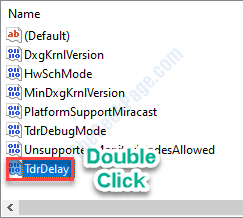
black screen case TDR(need set)->https://www.pugetsystems.com/labs/hpc/Working-around-TDR-in-Windows-for-a-better-GPU-computing-experience-777/ try TdrDelay(10) and TdrLevel(3) if they not working then TdrLevel(0)

Puget Systems
A brief description of graphics driver Timeout Detection and Recovery, why it can be problematic for intensive GPU codes, and how to work around it so that Windows can be a viable GPU computing platform.
 odd sparrow
ehy guys, i think i should report this, the game just froze and this error appeared
 calm urchin
odd sparrow
ehy guys, i think i should report this, the game just froze and this error appea...
calm urchin
odd sparrow
ehy guys, i think i should report this, the game just froze and this error appea...
Need hotta.log file found at ->C:\Users\username\AppData\Local\Hotta\Saved\Crashes take newest folder->then hotta.log there 10 lines in end bottom
odd sparrow
calm urchin
Need hotta.log file found at ->C:\Users\username\AppData\Local\Hotta\Saved\Crash...
can i post it here?
calm urchin
odd sparrow
can i post it here?
take screenshot for it
 naive oar
a bit of a weird question, is there a way to lower the volume of the intro for the game ??
odd sparrow
calm urchin
take screenshot for it
thi is from 4 hours ago btw. is the newest
calm urchin
odd sparrow
thi is from 4 hours ago btw. is the newest
yes is fine
odd sparrow
 calm urchin
naive oar
a bit of a weird question, is there a way to lower the volume of the intro for t...
calm urchin
naive oar
a bit of a weird question, is there a way to lower the volume of the intro for t...
in game settings sound ?
 warm torrent
Hi.
I got disconnected with a friend when we started a frontal conflict.
Since then impossible to reconnect. it has been 40min now.
My friend is now back in the game.
But me I am still unable to do so
calm urchin
odd sparrow
ohh again TDR case
odd sparrow
calm urchin
ohh again TDR case
what is it?
calm urchin
odd sparrow
try ->#technical-help message
naive oar
calm urchin
in game settings sound ?
doesn't affect it at all it seems, ya know the one like "Tooon" when ya start the game ? it's way too loud even tho my in game sound is like at least half (or less)
calm urchin
TDR case for that guide cmd(admin)->regedit->HKEY_LOCAL_MACHINE\System\CurrentControlSet\Control\GraphicsDrivers
TdrDelay(10) and TdrLevel(3)

 warped trail
i cant join to the server
odd sparrow
calm urchin
```TdrDelay(10) and TdrLevel(3)```
i don't have this
calm urchin
odd sparrow
i don't have this
then need add them up
odd sparrow
calm urchin
then need add them up
 warped trail
i was at raid party and when we were transmitting i got kicked off and can't enter again
calm urchin
odd sparrow
new->Dword(32-bit) Value
i added own pc

when they added there 2 choices(1 restart pc or (logout/login)username
 odd sparrow
calm urchin
new->Dword(32-bit) Value
odd sparrow
calm urchin
new->Dword(32-bit) Value
I need TdrDdiDelay too?
calm urchin
odd sparrow
I need TdrDdiDelay too?
i puted as backup
odd sparrow
calm urchin
i puted as backup
How should i modify them now?

 odd sparrow
level 3 and delay 10?
calm urchin
odd sparrow
level 3 and delay 10?
yup
odd sparrow
calm urchin
yup
correct?
 calm urchin
odd sparrow
correct?
calm urchin
odd sparrow
correct?
yes
odd sparrow
calm urchin
yes
and now restart the computer and after that play the game right?
calm urchin
source=https://learn.microsoft.com/en-us/windows-hardware/drivers/display/tdr-registry-keys what they todo

TDR testing and debugging information for developers
odd sparrow
calm urchin
yes
i'll let you know then ty ❤️
woeful flower
Game crashed almost 2 hours ago and i still cant get back into the game....
calm urchin
naive oar
doesn't affect it at all it seems, ya know the one like "Tooon" when ya start th...
i don't know if starting sound can handle... you need put volume down-master then put game volume higher
calm urchin
woeful flower
Game crashed almost 2 hours ago and i still cant get back into the game....
-C:\Users\username\AppData\Local\Hotta\Saved\Crashes
-take newest folder->
-then hotta.log there 10 lines in end bottom screenshot it```some ppl said i can delete the sound file for that specific thing but i'll need to do it every time the game update, still bad considering that the game should have something for it by itself(which i don't think it have...)
woeful flower
calm urchin
```Need hotta.log file found at ->
-C:\Users\username\AppData\Local\Hotta\Saved\...
the last folder is from 27 August
calm urchin
woeful flower
the last folder is from 27 August
is close go check it
woeful flower
calm urchin
is close go check it
the is a Hotta text file with a lot of stuff written
calm urchin
woeful flower
the is a Hotta text file with a lot of stuff written
yeah i know just screenshot last lines..
 boreal stirrup
the discharge cinematic for skills are bugged ? back in day i turned it off to launch stuff faster and doesnt have the camera moving around spinning , now i wanted have it on for a while and they are not showing
even restarted client but doesnt seem to work imo
woeful flower
calm urchin
yeah i know just screenshot last lines..

 wooden plover
idk if this is the right chat to ask this but i dont know where to write it anyways, i still have not gotten any items back from the hacker incident . i wrote with support and they said "Due to the high complexity of the problem, it will take at least 7 working days, before 24 October 2022 to complete.", so i am concernt now, in the 24th server maintenance is nothing stated about the recovery from that. does anyone here also still waits or does anyone got their items back , need answers
calm urchin
woeful flower
ohter TDR-case
woeful flower
calm urchin
ohter TDR-case <:miaeyes:991488352064901191>
?
calm urchin
woeful flower
answer will be if take longer that 2(second) is automatic remove gpu-drivers so tof-crashing
calm urchin
odd sparrow
i'll let you know then ty ❤️
btw is working ?
odd sparrow
calm urchin
btw is working ?
for now yes, no freezing, i should investigate more tomorrow btw
calm urchin
odd sparrow
for now yes, no freezing, i should investigate more tomorrow btw
nice
@radiant edge can you add TDR-case in patch-list(DXGI_ERROR_DEVICE_REMOVED or DXGI_ERROR_DEVICE_HUNG)
 woeful reef
ToF crashed just now, same case with @odd sparrow
should I add the TdrLevel?
 calm urchin
woeful reef
ToF crashed just now, same case with <@340521680180871170>
should I add the Tdr...
calm urchin
woeful reef
ToF crashed just now, same case with <@340521680180871170>
should I add the Tdr...
yup
TdrLevel(3)
woeful reef
my TdrDelay is normal?
calm urchin
yes
woeful flower
worked for me ^^
 calm urchin
woeful reef
should I restart PC or?
calm urchin
woeful reef
should I restart PC or?
restart pc or (logout/login)
calm urchin
woeful reef
like this?
yup👍
 chrome topaz
Hello, I don't have the ray tracing option, does anyone know what to do to fix it?
calm urchin
chrome topaz
Hello, I don't have the ray tracing option, does anyone know what to do to fix i...
is removed that button in 2.0.2patch(DLSS-enabled)[but that causes memory-leak][recommend DLSS-disable]
 winter merlin
Can Someone Help me? I wanted to Play Frontier clash, but the game kickd me out and now i cant get in my Charakter Anymore
chrome topaz
calm urchin
is removed that button in 2.0.2patch(DLSS-enabled)[but that causes memory-leak][...
so it is no longer possible to have ray tracing for the moment?
calm urchin
chrome topaz
so it is no longer possible to have ray tracing for the moment?
we know meybe tomorrow has manitance(patch) coming up...
chrome topaz
calm urchin
we know meybe tomorrow has manitance(patch) coming up...
Ok thank you
winter merlin
I Restarted my Pc and didint work..
It keep kicking me in Server selection
It goas into the loading screen and then kicking me back into this

 fluid bough
Bygone looking kinda funky... Is that only me?

 raw sorrel
winter merlin
It keep kicking me in Server selection
raw sorrel
winter merlin
It keep kicking me in Server selection
I have the same issue as Yuragi said exact same thing and it is driving me crazy
winter merlin
We are not the Only ones. xd i saw 2-3 people have the same issue
 low yarrow
winter merlin
We are not the Only ones. xd i saw 2-3 people have the same issue
low yarrow
winter merlin
We are not the Only ones. xd i saw 2-3 people have the same issue
same now
i accepted the help mode in JO and it started doing that
kicking me into login screen
winter merlin
Ye, you have to wait like half an hour or 1 hour then you can login again.
low yarrow
well i can login now
 cold robin
does anyone know when server transfer will be possible?
winter merlin
low yarrow
well i can login now
Me too. :D
low yarrow
¯_(ツ)_/¯
 late latch
Does anyone know when we can play and use stuff they advertised? Aka lvl 75? Lol
 fervent totem
since the new update im playing at 5 fps and idk why, any fix? I have all graphics at lowest
 left island
aug
 long crystal
winter merlin
It keep kicking me in Server selection
long crystal
winter merlin
It keep kicking me in Server selection
same here right now :/
static hearth
we were kicked again and cant log in
 outer spindle
double loading screen and can't log in , any solution ?
 daring igloo
Anyone also experiencing PC launcher taking so much CPU and memory usage?
It's a constant 20-25% CPU usage only from the launcher on my i5 9600k
 mystic talon
Audio is completely broken in all team-up modes in the game. It makes a big part of the game almost unplayable with sound. It hurts my ears! Please fix this! Anybody else have this issue/bug?
outer spindle
i can't spend 180 vitality ...
 undone cloud
I shall pray they fix all of it tomorrow
 hot storm
outer spindle
i can't spend 180 vitality ...
hot storm
outer spindle
i can't spend 180 vitality ...
do omnium beacon
 gritty lichen
Audio unmutes or goes to max after instance. Constant stuttering, no matter your settings. Steam seems to be the cause of this?
outer spindle
hot storm
do omnium beacon
I can't even log in how i am supposed to take beacon
 wary zephyr
they went vera and steam at same time, insane 😂
woeful flower
Wow... fixed the problem and now i cant login again after another crash.... GG Hotta
long crystal
daring igloo
It's a constant 20-25% CPU usage only from the launcher on my i5 9600k
launcher 1% CPU for me
 twin nacelle
does anyone experience this after 2.0 update. sometimes it ramps up up to 20 gb of ram usage
 daring igloo
long crystal
launcher 1% CPU for me
daring igloo
long crystal
launcher 1% CPU for me
Not sure what happened here, just noticed recently because my CPU fans won't stop even when idle like it's supposed to
 daring igloo
twin nacelle
does anyone experience this after 2.0 update. sometimes it ramps up up to 20 gb ...
daring igloo
twin nacelle
does anyone experience this after 2.0 update. sometimes it ramps up up to 20 gb ...
Disable DLSS
 thorny hinge
Does anyone knows, why often i dont see my character attacking while i see others attacking and the solution is sometimes jump, use food, or relics, i play without another ppl downloading
twin nacelle
daring igloo
Disable DLSS
when I DLSS my GPU started to heatup , when DLSS on its only 40% load . Is that normal?
 daring igloo
twin nacelle
when I DLSS my GPU started to heatup , when DLSS on its only 40% load . Is that...
daring igloo
twin nacelle
when I DLSS my GPU started to heatup , when DLSS on its only 40% load . Is that...
DLSS and ray tracing is buggy recently so they disabled ray tracing but not the DLSS, it usually happen after you beat a lot of monsters, doing world boss, joint operation, or raid
Also happened to me and fixed by disabling DLSS
 twin nacelle
daring igloo
DLSS and ray tracing is buggy recently so they disabled ray tracing but not the ...
twin nacelle
daring igloo
DLSS and ray tracing is buggy recently so they disabled ray tracing but not the ...
yes exactly what is happening to me right now , when I'm exploring for like 5-10 mins open world. , My game is slowing already. Thanks for info I hope they fix this soon
 wise canopy
 plush vessel
winter merlin
It goas into the loading screen and then kicking me back into this
plush vessel
winter merlin
It goas into the loading screen and then kicking me back into this
This is happening again to me 😦
 void talon
so after the id 32 error logged back in and my character isn't on the account is not there anymore has anyone encountered this?
 manic lantern
Any solutions to the 3101 error?
 green flicker
Fix the queu : (
 mental kernel
Been here for an hour waiting for jo8 in an unpopulated server. A lot of people are quitting.
 hasty tide
I didnt receive compensation for my recycled equipment or DC for it
that was like 1-2 days ago where I even recycled 5 star equips at 240 crystals and other normal gold equips for 240 as well.
 honest sphinx
anyone else's game crash when they change windows volume or mute it?
 tawny crane
Hello, at the beginning of the game I accidentally selected the incorrect person I wanted to play as, Do I have to delete the character and restart the introduction and select the new character to use them? I also would like to know what the process would be of deleting the character and starting a new one.
 silver heath
winter merlin
It goas into the loading screen and then kicking me back into this
silver heath
winter merlin
It goas into the loading screen and then kicking me back into this
same its bug ticket to support (in vera if you start joint operation don't use support match guys)
 opal bronze
daring igloo
Also happened to me and fixed by disabling DLSS
opal bronze
daring igloo
Also happened to me and fixed by disabling DLSS
On rth 4090 with only included ray tracing. hope this gets fixed

 river monolith
Any workaround for when the game kicks you out (and you can't log back in) while trying to join a joined OP?
 jade void
anyone else getting these?
 river monolith
It's technical help here not emotional
 mossy abyss
anyone know why i can't see meryls ice spike ring attack anymore? I keep getting stuck in it on boss fights since i can't see it.
 pine bay
insufficient backpack space wtf
 static topaz
any help? i cant seem to bind my google account

 gentle shuttle
🥲

 ember bone
mental kernel
Been here for an hour waiting for jo8 in an unpopulated server. A lot of people ...
ember bone
mental kernel
Been here for an hour waiting for jo8 in an unpopulated server. A lot of people ...
yeah i have the same problem. I guess this is a indirect punishment for choosing a unpopulated server lol. Even if they do add server transfer we will be behind compared to the more populated servers
odd sparrow
calm urchin
btw is working ?
No freeze this time, just a crash, no new files with crash log have been created.
 honest sphinx
might be a background process
 prisma swallow
Am I supposed to become Saki here? Cause right now its giving me text boxes saying she's speaking and her weapons but I'm still my character

 plain briar
My game keeps unmuting and going up to max volume after x time on the volume manager, any solutions to this?
Im asking this for days already but still didnt get an answer, any other way, site, etc, i can ask this?
prisma swallow
Uhhh now I just have this constant particle system around me

Now I'm all of a sudden saki in a cutscene?

 coarse owl
Hey, so uh... i can't really log in. I am on the server choice screen, I click to enter the game, it loads, and then it's back to server choice. Any idea what can I do?
 winged silo
Hay, (new player) i went to the training center and it gave me something but can't find it in inventory!!!
Does training center give Black neuclias ???
 urban olive
This game now unmutes itself whenever you join an instance?
 cobalt depot
Hi, I m using a RTX 3060 .. my GPU Usage always 95-100% which i was play TOF .. any way to fix it ?(game also Crash sometimes)
 last wadi
hello why the game always log me off after my 3rd dimensional trials and then can't connect again and be stucked in the main menu
last wadi
coarse owl
Hey, so uh... i can't really log in. I am on the server choice screen, I click t...
same it happens everyday to me when i do my 3rd dimensional trials idk how to resolve this besides waiting until the game wants me to log in again
coarse owl
I have repaired local files and reset the launcher, it did help, not sure which one exactly because I did them both at the same time
coarse owl
last wadi
same it happens everyday to me when i do my 3rd dimensional trials idk how to re...
try repairing the files first
last wadi
I generally have to wait like 15-20 min when it happens and reset launcher
but it s weird that it happens all the time when launching the 3rd dimensional trials
 willow trout
i think the devs want to shutdown my server...
 gritty fern
@cobalt depot @gentle shuttle disable DLSS in Display ingame settings
 stuck pollen
urban olive
This game now unmutes itself whenever you join an instance?
stuck pollen
urban olive
This game now unmutes itself whenever you join an instance?
yeah it happens to me too, everytime i join an instance, no matter what volume i had the game on, it resets to 100%. really annoying
 charred matrix
i tried doing frontier clash, and when i was about to load in it kicked me out of the game into the title screen. when i try to enter the game, it loads for a little bit and then kicks me back again. i tried this several times but i never managed to get into the game. any idea what can i do?
also on the same account i can login on to another servers, but not the one im actually interested in login into.
 noble finch
Simulacra story quest 9:00 AM Go to Asset Management Center: why can I not enter the portal in Hykros?
Maybe I need to post this in #gameplay-help
mental kernel
How bout we get some technical help O_O

 full furnace
devs and cs dun know the difference between GPU usage and Vram/memory. I dun think they are competent enough to fix stuffs at this point
gritty fern
full furnace
devs and cs dun know the difference between GPU usage and Vram/memory. I dun thi...
just say to re enable DX12 , so the problem is fixed 🤣
 queen narwhal
got to love it when TOF eats 58GBs of RAM
full furnace
Im telling u i had to repeat to the incompetent cs more than 3 times that my issue is not the mem leaks or crashes. It is the damn gpu usage and the reason for it. But they keep ignoring my qn and asked me to do the same time every email. Utterly useless.
wary zephyr
support is almost not even worth talking to, i got tired of trying to explain stuff to them
pretty sure its someone who dont even play the game at all and know almost nothing of it, just responding same things and clueless about current things
gritty fern
full furnace
Im telling u i had to repeat to the incompetent cs more than 3 times that my iss...
 full furnace
and yet I gave them google 1 star review for poor service/incompetence and it took them seconds to follow up and ask me to contact CS to ensure optimal service. MY ASS. These clowns are just cringe af.
wary zephyr
full furnace
and yet I gave them google 1 star review for poor service/incompetence and it to...
you are still on beginner level of being trolled
 gritty fern
but yeah , im using CN client
Different between DX11 and DX12 is like Day and Night
Even there is no Memory leak issue in CN client , the DX11 still take up a lot of the GPU usage (around 40% with 3080 Ti Laptop GPU) , but the VRAM usage is small (around 1.4GB)
whereas using DX12 the GPU usage is only around 15-20% (even with ray tracing on) Vram usage is higher in DX12 (around 2-2.3GB)
 dusk goblet
My game keeps freezing.
 prime jetty
what causes the game to get stuck here?

it happens way too often for me to just pass it off as some "minor issue" or something
I'd say it happens like ~14% of the time whenever I boot up the game
 sly spire
hi, does anyone know if this will be addressed in a future update, or do we have to apply this workaround every update? I'm unable to boot the game at my home pc (3060) but it runs on my office pc (1050ti) , which is frustrating since I'd rather play at home
gritty fern
sly spire
hi, does anyone know if this will be addressed in a future update, or do we have...
lets just hope 
lost mauve
welp maintenance is moved tomorow
gritty fern
lost mauve
welp maintenance is moved tomorow

 vocal helm
can any1 help me? i keep stucking at 90%

 low knoll
Is it only my game that always drop to 45+ FPS for no reason? I've 12900 and 3080 and CPU/GPU/RAM load is fine
gritty fern
low knoll
Is it only my game that always drop to 45+ FPS for no reason? I've 12900 and 30...
the game is currently unoptimized 
 worthy shale
270 people in queue when I doubt there’s even that much on the server. High pops don’t have queue problems but I sit in queue for 30 mins to do basic stuff
low knoll
gritty fern
*the game is currently unoptimized* <:MiaKaboom:1032360092508622939>
Ugh , hope it fixed soon
mental kernel
Time and Date (with your time zone as well): 10/23/2022 9:21 PM PST
• UID: 1201712335
• Server: Eternium Phantasy
• Platform (i.e PC/iOS/Android): PC
• Issue type (i.e Graphics, Localization, Voice, Battle action, Display, etc.): Unable to play the game becuase we have to stare at this screen for an hour to even do anything....
• Description: When will they actually do something... These are getting posted all over media. People are quitting. Everyone is frustrated and all we get is an automated email. You would think they would have done something to fix this already...
Image
hot igloo
still no fix on pc crash?
 wide aspen
hot igloo
still no fix on pc crash?
wide aspen
hot igloo
still no fix on pc crash?
Sadly no I'm facing same issue
gritty fern
hot igloo
still no fix on pc crash?
if you mean out of memory crashes , the only temporary fix is to disable DLSS (for RTX graphics card only)
for other currently none
wide aspen
gritty fern
if you mean out of memory crashes , the only temporary fix is to disable DLSS (f...
I'm facing pc crashes only in vera and mirroria not in artificial island or asperia
thorny hinge
wide aspen
I'm facing pc crashes only in vera and mirroria not in artificial island or aspe...
Im getting some stuck 90% and back to server login, half of time
And yes, old maps are more stables
gritty fern
wide aspen
I'm facing pc crashes only in vera and mirroria not in artificial island or aspe...
no fixes for that issue yet.. 🥲
wide aspen
We even don't know whether they taken this issue in consideration
 radiant edge
@obsidian bridge -- If you have the horsepower for it, try enabling Anti-Aliasing. One of the biggest differences with DLSS is that the ML upscaling model provides such an effect inherently.
- This is of course preferential {some people prefer a sharper image}, technically speaking DLSS produces less image detail as the base image is rendered at a lower resolution. The full resolution image (DLSS off without a reduced render scale / target) should be more accurate.
@autumn pelican -- You'll need to contact customer support {via the ingame helpdesk or email} in order to unbind a sign-in method.
@tame marsh -- The DLSS feature is only available on RTX brand cards. Even though certain cards of the Geforce series have Tensor cores, which tends to lead to confusion.
@woven knoll -- Optional drivers definitely improve things on AMD's side. 22.5.1 as the recommended release was before AMD's massive D3D11 overhead optimizations went in. Can personally confirm that the newer drivers have a large impact, and are generally stable with ToF.
@calm urchin -- Advise against setting TDRLevel to 0, as this entirely shuts off crash-recovery when graphics drivers hang -- resulting in a blackscreen, yet the OS continuing execution rather than issuing a BSOD if the drivers legitimately crash.
The remainder of the advice of raising TDRDelay to 10-seconds (from the default of 2) is sound, sometimes there's not enough time for driver response and TDR's are false-positives. This is actually what I have most people do who are running on Intel IGP's, and if they're on drivers newer than the 2015 release, that's usually sufficient.
- Did you want a pin added for this? Generally speaking it isn't necessary for everyone, and I'm weary to advise registry edits large scale.
@static topaz -- This implies that your Google Account is already associated with a game-account. If you've ever signed in on that Google Account, even if you've not created a character on it -- you'll need to contact customer support and request that they disassociate the account binding from your Google Account.
@gritty fern -- Have to be cautious on this request (e.g, to get a proper DirectX Version Selector in the launcher first), as there's many people who cannot run stable without de-elevation {down to D3D11}.
- For instance, Polaris (and under), and Kepler (and under) are not currently driver-stable under D3D12. {even on the latest drivers}
@wide aspen -- PC Crashes, as in the entire system is going down -- or is it just the game that's crashing?
@hot igloo -- Crash immediately after the Hotta Logo from the looks of it.
Have you modified the game's config files in any way prior? If you have, first start by factory-resetting settings by wiping the contents of "%USERPROFILE%\AppData\Local\Hotta\*".
Should you have already done that (factory-resetting the config), or if it persists: Then take a look under "%USERPROFILE%\AppData\Local\Hotta\Saved\Crashes" and see if you see any folders in this location. {double check that the timestamp lines up with the recent closures} [or, Saved_Steam, if the Steam version]
If you can archive a couple of the most recent of these crash-dump folders {e.g, with winrar, winzip, 7zip, etc} and send me them (via DM's), would be happy to take a look and see if we can figure out what's happening.
mental kernel
LOL How do we fix this. we cant even play lmao
 radiant edge
mental kernel
LOL How do we fix this. we cant even play lmao
radiant edge
mental kernel
LOL How do we fix this. we cant even play lmao
This is something that unfortunately will need to be addressed from the server side. {nothing that you as a player can do right-now}
gritty fern
radiant edge
<@222169350273105920> -- This implies that your Google Account is already associ...
probably luancher that can toggle DX11 Part in the launcher like in the CN version , People can enable that just put the same text as the CN version (Toggle DX11 Recomended for People who cant start the Game thats what the text say) but damn is Polaris unstable in DX12 ?
for Kepler i can imagine how the game will run bad (Since the DirectX 12 only featuring Level 11_1) or do you mean the Older GCN architecture which only Has DX12 FL12_0 and DX12 FL_11 for the Graphics card ?
radiant edge
gritty fern
probably luancher that can toggle DX11 Part in the launcher like in the CN versi...
Yes, I've had many chats with people on Kepler, Maxwell (cough), Polaris, and even GCN 1.0 hardware like 200 and 300 series cards. The drivers will report D3D12 support, and the engine can run under it -- yet there'll be a-lot of reproducible points / actions in the game that will result in instant driver crashes.
On the first day, these were extremely common. When the launcher was dropped down to d3d11, there was a slew of people reporting in the chat that 2.0.4 'fixed' their problem and got the game running.
 drowsy jay
Can anyone help me? My maps are weird
gritty fern
radiant edge
Yes, I've had many chats with people on Kepler, Maxwell (*cough*), Polaris, and ...
even maxwell? was it the first Maxwell or Second one ?
also if Polaris cant survive DX12 and causing driver crashes , i dont think RDNA1 will run properly either
since RDNA1 mostly build with the GCN Instruction set 🤔

 radiant edge
gritty fern
*even maxwell?* <:miaeyes:991488352064901191> was it the first Maxwell or Secon...
radiant edge
gritty fern
*even maxwell?* <:miaeyes:991488352064901191> was it the first Maxwell or Secon...
I've actually tested the game on an RX 580, 5700 XT, and 6800 XT. Only that I had that exhibited issues was the RX 580. Though I've also had talks with people back on the 200 and 300 series boards, and it seems similar.
-- AMD "supposedly" looking into it. No idea when / if they'll actually address it though.
gritty fern
radiant edge
I've actually tested the game on an RX 580, 5700 XT, and 6800 XT. Only that I h...
i see , thank you for answering though
imma collect more information
radiant edge
And yes on Maxwell, though there's more issues obviously the older you go.
wide aspen
i am facing pc crashes while playing TOF in vera or mirroria only and it's not a hardware issue i double checked it , few other games runs fine . i don't own an RTX card so it's not dlss issue, i have a GTX 1660 with ryzen 7 3700x with 16gb ram no overclocking
anyone knows how to solve it
gritty fern
radiant edge
And yes on Maxwell, though there's more issues obviously the older you go.
 radiant edge
wide aspen
i am facing pc crashes while playing TOF in vera or mirroria only and it's not a...
radiant edge
wide aspen
i am facing pc crashes while playing TOF in vera or mirroria only and it's not a...
Can you define "PC Crashes"?
For instance, is the system powering off? Does it reset? Does the display go blank, or freeze? Does the machine BSOD?
wide aspen
radiant edge
Can you define "PC Crashes"?
while exploring vera or mirroria my pc randomly goes blank and restart itself. when i explore asperia it didn't occur
radiant edge
wide aspen
while exploring vera or mirroria my pc randomly goes blank and restart itself. w...
The first thing to do would be to look in the "Windows Event Viewer", "System" log, and look for the messages leading up to the most recent kernel-power event (right before the system goes down).
If you're lucky, you'll find something in here that provides a hint of what happened. You can send me screenshots of your log {for instance, via DM's} if you need some help here in assessing what it all means.
wide aspen
radiant edge
The first thing to do would be to look in the "Windows Event Viewer", "System" l...
this is what i found
 radiant edge
wide aspen
this is what i found
radiant edge
wide aspen
this is what i found
Right, this message here is generated on the next boot -- after the abrupt power-down. What we'd want to see is the messages 'before' that boot started. e.g, the messages before it, leading up to the power-down, to see if there's anything abnormal that Windows perhaps logged.
So, now that you've found this event, just look a bit further back. Examples of "abnormal" would be things like disk related errors, driver crashes, etc.
wide aspen
radiant edge
Right, this message here is generated on the next boot -- after the abrupt power...
everything looks fine
radiant edge
wide aspen
everything looks fine
Can you send me screenshots (over DM's), so that I can assess that I agree that it looks fine?
wide aspen
ok
radiant edge
If there's nothing abnormal, then a reset like this would be suspect to either instability under high-load, or possibly the PSU.
wide aspen
radiant edge
If there's nothing abnormal, then a reset like this would be suspect to either i...
mostly i think it would be psu
gritty fern
radiant edge
If there's nothing abnormal, then a reset like this would be suspect to either i...
i think its the PSU 🤔
since it mention Lost power Unexpectedly
radiant edge
gritty fern
i think its the PSU 🤔
since it mention `Lost power Unexpectedly`
Description will be the same under all conditions that Windows doesn't log the shutdown timestamp.
wide aspen
gritty fern
i think its the PSU 🤔
since it mention `Lost power Unexpectedly`
but i'm not facing while playing genshin or valorant for long hours
radiant edge
wide aspen
but i'm not facing while playing genshin or valorant for long hours
Bear in mind that different games place different amounts of stress on the system.
 clear kiln
anyone has encountered such problem such as vram insufficiency? it happened alot to me eversince the update happened I currently have 8gbvram using RTX2060 32GB Ram I have no idea why it force closes tof every hour or so
wide aspen
radiant edge
Bear in mind that different games place different amounts of stress on the syste...
okk. i have sent u the screenshot
radiant edge
clear kiln
anyone has encountered such problem such as vram insufficiency? it happened alot...
Check the most recent pin, the jist is that DLSS causes memory leakage.
gritty fern
wide aspen
but i'm not facing while playing genshin or valorant for long hours
have you tried to stress test ?
for example playing very demanding game graphics (either Battlefield V or Cyberpunk 2077 for example)
or just run the stress test in PCMark (if you have it)
wide aspen
gritty fern
have you tried to stress test ?
for example playing very demanding game graphic...
ok i will try
gritty fern
radiant edge
Description will be the same under all conditions that Windows doesn't log the s...
sometime windows error gives confusion 🥲
clear kiln
radiant edge
Check the most recent pin, the jist is that DLSS causes memory leakage.
will do, thanks!
radiant edge
drowsy jay
Looking at the screenshot aspect ratios, one thing that catches my eye is that this isn't 16:9.
What resolution are you running at? Assuming the images are reduced res for upload sake.
 gilded veldt
Anyone can configure why I am lagging so much ever since vera update happened?
 drowsy solstice
Somebody can help about this?
my laptop is i7-1165g7 with 16gb ram, others can play stable 60 or 90fps while me I can't.
gritty fern
drowsy solstice
my laptop is i7-1165g7 with 16gb ram, others can play stable 60 or 90fps while m...
have you tried to update to the latest Intel Arc driver ? since Arc driver support Tiger Lake now
https://www.intel.com/content/www/us/en/download/726609/intel-arc-graphics-windows-dch-driver.html
drowsy solstice
idk about that yet.
drowsy solstice
gritty fern
have you tried to update to the latest Intel Arc driver ? since Arc driver suppo...
what else I should do? thank you
gritty fern
drowsy solstice
what else I should do? thank you
you can try to update your current driver (link provided above)
download the .exe one
drowsy solstice
I'm downloading it now.
gritty fern
also the game is currently badly optimized , sometimes my 3080 ti also drop from 60
drowsy solstice
Mine can't stable and drops to 30, it never stables at least 60
is there anything I must do?
 inner forge
I'm using iPhone 13 mini and idk why but after the update game is crashing a lot. I didn't face this problem before this update but after the update it's very frequent
drowsy solstice
gritty fern
you can try to update your current driver (link provided above)
download the .ex...
I downloaded it.
gritty fern
drowsy solstice
I downloaded it.
open it and install it
gritty fern
have you installed it ? is there a new Arc Control after you restarted your laptop ?
 umbral grail
calm urchin
black screen case TDR(need set)->https://www.pugetsystems.com/labs/hpc/Working-a...
umbral grail
calm urchin
black screen case TDR(need set)->https://www.pugetsystems.com/labs/hpc/Working-a...
my laptop doesnt have additional gpu

 sharp fjord
About controller support, here's something worth looking/testing for those of you who's hoping for better controller support. I have been experimenting with Steam Controller setting for a while now even before the steam release. then i get to this almost perfect intuitive gameplay & menu navigation with controller, which include Interact Button(keyboard F) and Mouse Cursor(keyboard Alt). I'll put it here for you guys to test things out and judge for yourself.
A) for game installed via steam, import my controller configuration from the game library page, link: steam://controllerconfig/2064650/2879177411
B) for game installed via official TOF launcher, import my Desktop controller configuration from Steam Setting>Controller>Desktop Configuration . for this one you'll have to run Steam as administrator for it to take effect in game a.k.a override in-game controller key-bind. link: steam://controllerconfig/413080/2879182442
here's some footage of me using the former: https://www.twitch.tv/videos/1632164775?t=00h39m38s any feedback is welcome. Enjoy!
edit: I've been informed that the game overrides steam controller settings and recognized the controller🎮 as the sole input device for setup A), essentially breaking this setup since it's technically remapped and uses all three mouse, keyboard, and 🎮 all at the same time. to fix this please run steam as administrator. one user has got it fixed this way.
drowsy solstice
gritty fern
have you installed it ? is there a new `Arc Control` after you restarted your la...
when I lauched the Arc Control, the whole screen went all black
gritty fern
drowsy solstice
when I lauched the Arc Control, the whole screen went all black
have you restarted your laptop yet ? (there is Optional Reboot button when you finished installing the new graphics driver)
drowsy solstice
gritty fern
have you restarted your laptop yet ? (there is Optional Reboot button when you f...
Yes. I restarted it, before opening arc control and tof game
I closed arc control then relaunching then boom all went black screen
gritty fern
drowsy solstice
I closed arc control then relaunching then boom all went black screen
did you check the Execute Clean installation when you install the new drivers ?
drowsy solstice
Yes.
gritty fern
drowsy solstice
tried to restart but still black
can you boot into safe mode ? it should be in system recovery settings
ah nice , its HP , press F11 repeat when you turn on the laptop
drowsy solstice
I'm in choosing option
gritty fern
drowsy solstice
I'm in choosing option
the blue screen choosing option ?
drowsy solstice
yes
gritty fern
drowsy solstice
yes
go to troubleshooting
gritty fern
go to starup settings
drowsy solstice
ohh shit
gritty fern
press the one with Safe mode
drowsy solstice
that stupid bitlocker
gritty fern
drowsy solstice
that stupid bitlocker
you have bitlocker enabled in your system ?
drowsy solstice
I want to remove that shit coz putting recovery key id is too long
gritty fern
drowsy solstice
I want to remove that shit coz putting recovery key id is too long
you can do this after we recovered your laptop first https://www.manageengine.com/products/os-deployer/help/how-to-disable-bitlocker-encryption.html
 still karma
we still on dx11 right? bring back dx12 
drowsy solstice
I got the recovery key in phone but the laptop collapsed again
It's difficult to go safe mode it boots 5 seconds
gritty fern
still karma
we still on dx11 right? bring back dx12 <:miaknife:975524281461121024>
Eliya already addressed the issue , forcing the game to DX12 causes some problem in Polaris / Maxwell graphics card , not sure if they will enable it anytime soon
gritty fern
drowsy solstice
It's difficult to go safe mode it boots 5 seconds
it should be a blue screen that showing option to select such as disable driver signature boot into safe mode
drowsy solstice
I'm typing stupid recovery key
gritty fern
drowsy solstice
I'm typing stupid recovery key
check dm so we dont flood this channel
drowsy solstice
well we are in technical help
gritty fern
drowsy solstice
well we are in technical help
 still karma
im actually playing in an hp laptop so its integrated graphics. basically i had no problem with the game in terms of graphics before vera without missing floors, walls etc. seems i need the game to be using directx12 to play normally. i can play normally now except world explorations because of invisible/see thru walls and floors
gritty fern
still karma
im actually playing in an hp laptop so its integrated graphics. basically i had ...
Intel Iris Xe or AMD vega ?
still karma
intel graphics its potato but game is playable from the start 💀
 cedar sluice
guys where did the RTX settings button go?
i can change between off and high before, now it's gone
gritty fern
still karma
intel graphics its potato but game is playable from the start 💀
Intel Driver is superior for DirectX 12 performance but bad for DirectX 11
gritty fern
cedar sluice
guys where did the RTX settings button go?
The game is now forced to run in DirectX 11 (Ray Tracing requires DirectX 12 FL12_2)
cedar sluice
so we wait for an update for it to be back? @gritty fern


 eternal river
i was hoping this patch might also fix the issue of the game crashing when attempting to use any in-game browser window (required for buying the pass and some of the item packs)
has there been ANY word about this or any sign that it has even been acknowledged as an issue by the devs?
 autumn vigil
wait they removed the ray tracing settings?
cedar sluice
autumn vigil
wait they removed the ray tracing settings?
yea i think now the game run ray tracing on low for default or off IDK
 silk verge
hi, i dont mean to interrupt, but is there a fix for this? just downloaded the game off steam, f11/alt+enter to change the resolution dont do anything
 cedar sluice
don't u just change reso in game?
silk verge
i cant actually access the game, unfortunately
stuck on this screen, with weird sizing issues
sharp fjord
try changing your system screen reso?
silk verge
will give that a shot!
sharp fjord
or just try to drag the window around
silk verge
thats a no on the dragging, though system resolution does work, thanks
 warm wing
I'm lost .... How big is that game ?? I removed as much file as possible and I still don't have enough disk space to download it
radiant edge
cedar sluice
yea i think now the game run ray tracing on low for default or off IDK
The D3D11 rendering path does environment mapped reflections to some extent on a few surfaces, yet it's not done via hardware raytracing.
cedar sluice
warm wing
I'm lost .... How big is that game ?? I removed as much file as possible and I s...
around 30 GB?
warm wing
I've freed ~38GB and still not enough
cedar sluice
radiant edge
The D3D11 rendering path does environment mapped reflections to some extent on a...
sadge no more fancy graphics and my GPU fan blowing loud af
warm wing

 cedar sluice
warm wing
I've freed ~38GB and still not enough
cedar sluice
warm wing
I've freed ~38GB and still not enough
you downloading through steam or using PC launcher
warm wing
pc launcher
radiant edge
cedar sluice
sadge no more fancy graphics and my GPU fan blowing loud af
Assume you're talking of the lack of DLSS causing the card to work-harder at fullscreen. It won't look as good, yet you'll find a workaround to reduce the screen resolution in the most recent pin.
cedar sluice
if that's the case uninstall everything old and use steam to download it?
warm wing
I've never played it since pre-register campaign. Idk if pre-register items are time limited but if it is, I'll be really pissed off
cedar sluice
radiant edge
Assume you're talking of the lack of DLSS causing the card to work-harder at ful...
i mean my 2080 is running it fine, just the fan sometimes start to blow real hard and u can hear the fan ramping up if i max the graphic settings in game and go in an overlay in game like the shop or backpack
cedar sluice
warm wing
I've never played it since pre-register campaign. Idk if pre-register items are ...
i don't think the rewards are time limited
radiant edge
warm wing
Total Tower of Fantasy folder, including the launcher, on my system is: 26.9 GB (28,938,991,612 bytes)
Granted, keep in mind this is after installation. I'm not sure the total space that the launcher needs, yet it's generally a good idea to double that number for the downloading phase.
warm wing
radiant edge
Total Tower of Fantasy folder, including the launcher, on my system is: 26.9 GB...
it was ~326Mb or something like that
cedar sluice
warm wing
it was ~326Mb or something like that
if you have Steam then try downloading it on that first to see if it lets you.
warm wing
I'll try to download it through steam. If it don't work, I give up
cedar sluice
Or get a 1TB HDD
warm wing
I'm on a laptop ...
cedar sluice
well i have money i think you can get it install for free if you buy it in shop
i mean if you have the money
warm wing
if it says not enough ..... I'm just giving up at this point. And I don't want to open my laptop for now
 cedar sluice
if you have external drive you can install it on there and plug the drive while playing
if you prefer it that way
warm wing
I had a 1.82Tb external disk but the cable is stuborn. I accidently move it a bit and it disconnect the disk. I also had errors and needed to format it several times
cedar sluice
best case is to take your laptop to a shop to install a new HDD for more space cause i think it's around 70 USD for a 1TB one.
Cause if you max out storage in the SDD I recon it just slow the laptop's performance as well
warm wing
and I don't even know if it's in the good format to install Steam games on it + run games
cedar sluice
if you're on Windows 10 or 11 maybe you can do some disk clean up or storage sense to delete old update files or something.
If you did that already then I think it's just either you upgrade your laptop if you have the money for it or you get your external disk to work (maybe getting a new cable) and use the PC launcher to download it and play when you have that the disk plugged into your laptop.
warm wing
don't have the money, either for disk or new PC. Cable it a weird one
cedar sluice
why do you live?
@warm wing if you live close to me maybe i can just send you a cable through amazon or local online shopping platform.

 cedar sluice

well i mean 1FT is 6 euro. I live in SG so I can't just send one over since the shipping will cost more than the drive itself in exchange rate.
it cost 96 euro to ship a cable, goddamn
 pine olive
 sage oracle
Anyone else experiencing constant crash/unable to connect to server issues after 2.0 update?
hasty tide
sage oracle
Anyone else experiencing constant crash/unable to connect to server issues after...
no?
sage oracle
Forgot to mention my server too
Asia pacific Eden
 sour flax
sage oracle
Anyone else experiencing constant crash/unable to connect to server issues after...
sour flax
sage oracle
Anyone else experiencing constant crash/unable to connect to server issues after...
yes, it happen more on afternoon too. Asia Server - Gumi Gumi
 sweet ferry
Is there any way to unbind my google account in tof?
drowsy solstice
drowsy solstice
Somebody can help about this?
I fixed this now thanks for the help here
 manic spear
Guys, i need help 🥲 i can't unbind my facebook acc ... how to unbind ? anyone have 1.5 laucher ?
 formal zephyr
my fps got capped, kinda bugged or something. any fix for this ?

 civic spade
are specific accounts crashing more or anybody knows , i cant even do bygone without crashing on loading screen back to server menu. where my friend has no problems , i tried on 2 pcs , on mobile , steam version , everything is the same
 broken pagoda
I cant connect to the Ether EU server on my account anymore? I get 2 loading screens and then i get send back to the lobby. Every other server works
 wild pilot
broken pagoda
I cant connect to the Ether EU server on my account anymore? I get 2 loading s...
wild pilot
broken pagoda
I cant connect to the Ether EU server on my account anymore? I get 2 loading s...
same
 mighty ore
broken pagoda
I cant connect to the Ether EU server on my account anymore? I get 2 loading s...
mighty ore
broken pagoda
I cant connect to the Ether EU server on my account anymore? I get 2 loading s...
same with EU Lycoris for me right now
broken pagoda
Weird
 wraith flare
anyone got DS4 to work with ToF ? or does it just not work atm ?
lost mauve
yes
sharp fjord
as long as you bind your original account to your steam account first. can try this: #technical-help message
 late iron
broken pagoda
I cant connect to the Ether EU server on my account anymore? I get 2 loading s...
late iron
broken pagoda
I cant connect to the Ether EU server on my account anymore? I get 2 loading s...
they decided to shut down servers as it's not profitable anymore, game is dead from now on
broken pagoda
late iron
they decided to shut down servers as it's not profitable anymore, game is dead f...
Thanks for the help
late iron
broken pagoda
Thanks for the help
yup am playing Genshin rn 💀
broken pagoda
late iron
yup am playing Genshin rn 💀
Nah i am not going back to genshin anymore, jez
late iron
broken pagoda
Nah i am not going back to genshin anymore, jez
I also play Blue Archive
broken pagoda
broken pagoda
I cant connect to the Ether EU server on my account anymore? I get 2 loading s...
So if anyone could help i'd be grateful
late iron
broken pagoda
So if anyone could help i'd be grateful
For any major technical issue please contact:
support@toweroffantasy-global.com
 zenith mulch
why does my settings keep turning on dlss after I turn it off
 dawn notch
Bruh the freezing is so cringe wtf
 safe turtle
civic spade
support team answer was to close game and try again haha
safe turtle
civic spade
support team answer was to close game and try again haha
what was your issue
civic spade
game crashing on server select on loading screens
 wary shuttle
update your launcher. u have the old one
 safe turtle
civic spade
game crashing on server select on loading screens
safe turtle
civic spade
game crashing on server select on loading screens
oof idk anything about that
 wise comet
I cant login in the game after update 2.0
2 loading screen and then i get send to the lobby , 7 tries the same
EU server Lyramiel
 scarlet stirrup
My game crashes every 30min to 1 hour since the Vera update. It said that my graphic card is out of memory. I have a rtx 3060 + 32Go RAM...
 potent pumice
scarlet stirrup
My game crashes every 30min to 1 hour since the Vera update. It said that my gra...
potent pumice
scarlet stirrup
My game crashes every 30min to 1 hour since the Vera update. It said that my gra...
Disable dlss
scarlet stirrup
Thanks, I'll try this after work 👍
potent pumice
Btw is the raytracing fixed? Or its disabled rn
sharp fjord
as the other person said, you need to update your launcher. recommended to direct download from tof official page for new/latest launcher installer.
 solid temple
tried to join coop and got booted back to the game menu screen, i try to enter again and gives me 2 loading screens and puts me back on the menu screen. this is the third time that happend to me in 2 days. first time i was able to fix with restarting the pc but after that i wasnt able to solve the issue the same way. any advise?
 wintry aspen
anyone know why this happen?

 lost mauve
wintry aspen
anyone know why this happen?
lost mauve
wintry aspen
anyone know why this happen?
disable dlss if it's enabled
wintry aspen
how?
zenith mulch
lost mauve
disable dlss if it's enabled
but why when I disable DLSS it likes to turn on by itself after launching and for @wintry aspen
 lost mauve
zenith mulch
but why when I disable DLSS it likes to turn on by itself after launching and f...
lost mauve
zenith mulch
but why when I disable DLSS it likes to turn on by itself after launching and f...
you can check pinned message to disable it permanently
zenith mulch
the dlss issue is on all computers with rtx?
lost mauve
yeah
potent pumice
I thoung this was an hotfix for this issue and reactivate rtx 😦 seems like still on dx11
lost mauve
potent pumice
I thoung this was an hotfix for this issue and reactivate rtx 😦 seems like stil...
you can fix it by manually upgrading dlss file to v2.4.12.0 but it is not recommended by admins
 undone axle
u playing through steam when dlss is turning itself on?
wintry aspen
lost mauve
you can check pinned message to disable it permanently
[SystemSettings]
r.NGX.Enable=0.
.
what should i do with this btw? sorry im amateur on this
already opened the engine.ini
lost mauve
add that 2 line at the bottom then save
wintry aspen
oh i see thanks
 opaque sage
RTX ON with dx12 fixed my memory leaks and crashes and now they disabled it
They better reenable it after the maintenance tomorrow. Delaying RTX/DX12 to 2.2 would be absolutely stupid.
 bitter flicker
Hello, is there a way to disable auto aim on PC? There is no option in "Control preferences"...
 copper osprey
why i keep having this disconnected from server ? i disconnected 3times in a row inside raid just now. ( south east asia server )

 wild stag
i get this memory problems since 2.0 basicly every day if i play more then 2 hours
 wild stag
copper osprey
why i keep having this disconnected from server ? i disconnected 3times in a row...
wild stag
copper osprey
why i keep having this disconnected from server ? i disconnected 3times in a row...
dont retry close the game close the launcher and the start that worked for me
lost mauve
wild stag
i get this memory problems since 2.0 basicly every day if i play more then 2 hou...
disable dlss in the settings
hasty tide
Anyone got the rewards od drops of discord?
raven shale
everyday repair game for play 3-5 hours then again i mean wtf thats BS why no Patch?
 remote tusk
Experiencing blue-screens and pc crashes after exiting game don’t know why
 opaque wing

 chrome beacon
can't log in, get 2 loading bar and then go back to main screen
 south elm
hi anyone has this issue that ur launcher wont launch after u startup ur pc ? i had to manually startup everytime
 magic dust
Espoir IV is dead ? Can't connect to it
 hushed pecan
@magic dust queue?
 worldly python
wild stag
i get this memory problems since 2.0 basicly every day if i play more then 2 hou...
worldly python
wild stag
i get this memory problems since 2.0 basicly every day if i play more then 2 hou...
Kind of having the same issue after playing ToF over 2 hours, it happened when we're gathering ppl in Rudolph boss and thats where I feel the sudden heavy spike of the game. Checking the Task manager sees that memory and gpu goes into 95% which gives me a panic. Hopefully that disable DLSS works, since i use RTX 3060Ti
magic dust
hushed pecan
<@151324764651126784> queue?
No queue, double screen loading then the game go back to main menu
File verification, let's go!
hushed pecan
@magic dust tried quitting your launcher and restarting it?
still karma
let me run my game in dx12 or else
hushed pecan
@south elm wdym?you mean launcher you auto start when you turn on your pc?
@magic dust if file verification doesn't work try restarting your router or try login using mobile data
chrome beacon
chrome beacon
can't log in, get 2 loading bar and then go back to main screen
ok, i'm back online, but i was in front of magma and now i'm in front of cryobot 
magic dust
hushed pecan
<@151324764651126784> if file verification doesn't work try restarting your rout...
File verification just found an unknown error
chrome beacon
also i lost 30 vit (i tried to do a dim. trial when i got disconnected)
hushed pecan
@chrome beacon hotta server🤙
magic dust
Okay, I'm in the game, but got TP at Astra shelter x)
south elm
hushed pecan
<@185812887422500864> wdym?you mean launcher you auto start when you turn on you...
means my launcher wont auto start when i start my pc .. previously it will always auto start the launcher
 naive tundra
Hello! What happened to RTX update?
 last grove
Why i still can't save image in the game even i allowed permission on gallery or the game
gritty fern
naive tundra
Hello! What happened to RTX update?
its disabled for now , because the game is forced to run in DirectX 11 (Ray Tracing requires DX12 FL12_2)
hushed pecan
@south elm go to your launcher - game settings -download settings - general - run automatically at startup
@chrome beacon might get it back. Got back my frontier clash 1 chance
 fiery trout
chrome beacon
can't log in, get 2 loading bar and then go back to main screen
fiery trout
chrome beacon
can't log in, get 2 loading bar and then go back to main screen
happen half of the time when doing weapon material 💤
not even 15K gem whould be accurate compensation for this
 narrow hawk
Cant enter Ether server anymore after I matched for Void Rift!!!
fiery trout
being stuck for 15min this time
 fierce mulch
so i got all twitch drops and the last reward has not come to the game and its been 2 hours since i claimed it on twitch
fiery trout
you have to redo the tof website again
fun and interactive, only google can find the link btw
 grave pelican
My game decided it didnt have enough ram to run, then it crashed i took a screenshot of my task manager 10 sec before it crashed, since it started lagging and it used around 24gb ram
 fierce mulch
thank you it worked

 neat tangle
Anyone else experiencing issues with Meryl's discharge skill? (It looks almost invisible, it's not because of opacity in settings)
 hybrid spade
Any fix found for in-game browser purchase page crashes the game?
thick mason
grave pelican
My game decided it didnt have enough ram to run, then it crashed i took a screen...
try checking pins about disabling DLSS
gritty fern
yep disable DLSS
grave pelican
i will try that thanks
 elder musk
anyone know how to fix the bug where you get a red dot on friends/friend requests
grim saffron
anyone else get this? server menu loading screen loading screen back to server menu?
i try to joint op but then iget kicked loading screen server mnu and now iget everytime loading loading screen server menu if i join the server
 obtuse agate
anyone else keep experiencing this? i cant even play this game
 grim saffron
obtuse agate
anyone else keep experiencing this? <:sadmia:990754640620560414> i cant even pl...
grim saffron
obtuse agate
anyone else keep experiencing this? <:sadmia:990754640620560414> i cant even pl...
yes i got this yesterday very often with time it doesnt coming anymore idk why but now i get online choice my server and if i get in its loading screen loading screen back to server menu
south elm
hushed pecan
<@185812887422500864> go to your launcher - game settings -download settings - g...
before the vera 2.0 update.. it's already by default startup automatically but after this vera 2.0 im having this issue
i even tried to off the setting n turn it on again still doesnt work
obtuse agate
grim saffron
yes i got this yesterday very often with time it doesnt coming anymore idk why b...
yeah i got this thing for a week, this game dont even let me play, now im wondering whether i shud quit or are they going to fix it
tried uninstall and install, still the same
grim saffron
obtuse agate
yeah i got this thing for a week, this game dont even let me play, now im wonder...
idk what is the trigger but its very annoying because you cant play
steel stone
News about stolen items ?
eternal river
hybrid spade
Any fix found for in-game browser purchase page crashes the game?
none that ive seen so far, it doesnt even seem to be ackowledged and any time i try and ask about for information it gets buried under other topics like ray tracing.
hasty tide
I have a problem. 2 days ago I did the Drop Twitch event and still I can't see the rewards in my storage of the game. Some ppl said that I should unlink and link again TOF twitch, i did that but now I can't link it again look
I click and

Here it didn't appear any server so I can't link my acc
 drowsy solstice
hasty tide
I have a problem. 2 days ago I did the Drop Twitch event and still I can't see t...
drowsy solstice
hasty tide
I have a problem. 2 days ago I did the Drop Twitch event and still I can't see t...
is the email you used for tof same with your twitch
hasty tide
Yeahcyrah but the problem is that when I put my email, it didn't appear servers
drowsy solstice
and did you check the region also the server
hasty tide
Appear a little white barr but nothing more
 hasty tide
drowsy solstice
and did you check the region also the server
hasty tide
drowsy solstice
and did you check the region also the server
Can't put region
drowsy solstice
can you change to english language
lost mauve
i think thats for KR server no??
drowsy solstice
you won't change the twitch region
hasty tide
 drowsy solstice
you will change region in the tof website
hasty tide
lost mauve
i think thats for KR server no??
I think but when I click on connect again in twitch, it sends me to this page
Anyone has other page that is not kr?
lost mauve
there's 2 claimable drops, one for global and one for KR
drowsy solstice
lost mauve
there's 2 claimable drops, one for global and one for KR
yeah this is it korean rewards can't be claimed
hasty tide
So are u saying me that the rewsrds above is only for kr??

 tender haven
is there any way to change the game to dx12 ?
my game forced to play in dx11
lost mauve
claim the blue one in english
 hasty tide
Fck... ok ty
drowsy solstice
not the korean watch again
hasty tide
lost mauve
claim the blue one in english
Try it but ot sends me to the kr page
lost mauve
or you can just go directly with this link https://www.toweroffantasy-global.com/act/a20220711twitchdrops/index.html
hybrid spade
eternal river
none that ive seen so far, it doesnt even seem to be ackowledged and any time i ...
 just glad that we're not alone
drowsy solstice
go to twitch, inventory then drops find tof campaign with rewards of your language not korean
hasty tide
Okay
lost mauve
hasty tide
Okay
hasty tide
lost mauve
https://www.toweroffantasy-global.com/act/a20220711twitchdrops/index.html
Ty
 autumn sandal
are bounties still broken? I still get no daily bounties when I login for the daily gold nucleus
 white girder
So...I've been playing on my Android phone since launch but yesterday, all of a sudden it says I need to use an email to log in?! Q_Q
I don't remember it ever prompting for an email sign-up so now I'm locked out of my lvl 70 character.
Has anyone experienced this?
 heady stone
@white girder yeah this is pretty normal
woeful reef
wild stag
i get this memory problems since 2.0 basicly every day if i play more then 2 hou...
Ok yesterday I try to add some registry and this issue start again today
 hushed prism
Been happening a lot today (latest update?)
 hushed prism
woeful reef
Try turn off dlss and see
hushed prism
woeful reef
Try turn off dlss and see
okay thanks i will try
 ashen smelt
Is there still no fix found for game crashing when using in game web-browser?
woeful reef
Now the dimensional trials bgm gone
ashen smelt
It's been like this since the update
 tawdry rapids
ever since last update I dont see my rtx settings anymore . is there any way to fix it and bring it back ?
 celest laurel
I have a code from discord to an avatar pack or smt, but how to I put that code into the game? (playing on steam)
hushed prism
celest laurel
I have a code from discord to an avatar pack or smt, but how to I put that code ...
Gift icon > 4th bottom tab > 4th column tab
celest laurel
hushed prism
Gift icon > 4th bottom tab > 4th column tab
Thanks so much!
 steady kraken
for the first time in a week the game encountered this problem for the first time, the game crashes and complains about the lack of video memory, although I have no problems with performance and hardware, the system ryzen 7 5800h, rtx 3060, ram 16

 solar mica
check pinned, this issue appeared with vera patch for me too ><
steady kraken
in the Russian channel they told me that the problem appeared on the Steam version of the game (before that I started playing on the regular launcher and after the release of the game I switched to Steam there), but now I switched back to the launcher and the problem persisted. After the first patch that came out with the release of the game on Steam, by the way, plus there were problems with microfreezes, although the FPS is stable at 120
 quartz harness
Hello. I spent a few days without playing and when I went to log in after updating, a message came saying that my account doesn't exist. What can I do?
lost mauve
steady kraken
in the Russian channel they told me that the problem appeared on the Steam versi...
disable dlss
pine bay
is this really bugged?

 blissful drift
steady kraken
for the first time in a week the game encountered this problem for the first tim...
blissful drift
steady kraken
for the first time in a week the game encountered this problem for the first tim...
Me too, 3070Ti and i7 12700k, Main z690, 32ddr5 still encounter this bug. And i can't find ray tracing in game setting anymore... Someone can fix it ?
white girder
heady stone
<@1001178258269802587> yeah this is pretty normal
Ohh nooo QuQ. Does this mean I’ve lost everything?
I have managed to save my UID from previous screenshots…hopefully customer service gets back to me ….
lost mauve
blissful drift
Me too, 3070Ti and i7 12700k, Main z690, 32ddr5 still encounter this bug. And i ...
game is currently forced to use dx11 so no ray tracing for now, and please disable dlss to fix memory leak issue
pine bay
blissful drift
Me too, 3070Ti and i7 12700k, Main z690, 32ddr5 still encounter this bug. And i ...
just turn off dlss
calm urchin
steady kraken
for the first time in a week the game encountered this problem for the first tim...
DLSS disable
blissful drift
Thank you guys !
 polar yacht
Unable to start any conflict in game since the game is going back to the home screen when i try to start one and get stuck on the home screen for all the day unistaling dont fix anything 
heady stone
@white girder if you have your uid you likely will be able to recover it. If you do get it back make sure to bind it.
 ornate nest
How to connect twitch?
hasty tide
You can't control twitch it's wild
 inner girder
Hello I'm new at this game but after creating my character and doing the tutorial (the part where mc faints) the game doesn't log me in. I tried using VPN and it still does not. I play on phone. When i press login the loading screen reaches 88 then a new loading screen pops and takes me back to login screen.
 little tundra
can anyone look at the crash files i have and help me [ls
 sage hound
so i tried to change slider in character editor, but after i click apply button it doesnt take the change from slider at all...
ornate nest
i can't log in here, but official site works fine

 untold island
obtuse agate
anyone else keep experiencing this? <:sadmia:990754640620560414> i cant even pl...
untold island
obtuse agate
anyone else keep experiencing this? <:sadmia:990754640620560414> i cant even pl...
I am also experiencing this for 5 days now. Mostly I got this error during the night. Hope they can fix this on the next maintenance.
hasty tide
not sure if its a bug but has anyone had their whisper history in game all disappear when coming into the game?
i keep getting an error/blue screen when i close the game or sometimes when i open the game first, it just freezes for a while then the blue screen is there anything i can do? It has happened when i first downloaded from browser so i deleted it then now i downloaded it on steam i still have the issue
 broken sapphire
Seem to not be able to Jump with controller now. Is this a bug? Any idea how to fix it?
 spring sage
The login screen changed of the game, and since then it says that this account does not exis, why? Everything is right
 white girder
heady stone
<@1001178258269802587> if you have your uid you likely will be able to recover i...
white girder
heady stone
<@1001178258269802587> if you have your uid you likely will be able to recover i...
Ahh Thank you <3. I hope so, now I sit back and wait for CS. For sure will bind it as soon as they recover it for me ><b
hasty tide
 young bloom
Use Compatibility Mode setting to win7 or win8
 stray spruce
keep getting out of memory bug and i do not know how to fix it, it never did this trough the launcher just when i got it on steam
hushed pecan
@stray spruce dlss❌
stray spruce
@hushed pecan what do i do 😄
 fallen wadi
Turn off DLSS.
hushed pecan
stray spruce
<@291148465533222932> what do i do 😄
Check the above comments. It seems turing off dlss fixes it
fallen wadi
It turns on automatically every client restart so make sure to turn it off everytime you launch your game.
Settings -> Display - Enable DLSS, make sure that's off.
 verbal mural
I tried to claim the discord nitro, but unfortunately got this as an answer:
When going back to the ToF website it says my code has been claimed.
What do I do from here?

 fallen swallow
anyone else just stuck in a loop of this screen

 obsidian ridge
How do I unbind steam account
prime jetty
how can I improve my loading times?
I'm often the last one to load into instances
 silk harbor
hello, i got this error after i unchecked parental supervision https://prnt.sc/OItAAIn3WfEN

 pine kite
I need some tecnical help, there's a friend of mine who has an iphone 11
she tried to install the game but this is what pops up when she gets in the game, (she has another 100gb avaible)
 stray spruce
fallen wadi
Turn off DLSS.
stray spruce
fallen wadi
Turn off DLSS.
ahh thanks
 onyx forum
how do u find codes
 scarlet falcon
When I get to where it says click to continue the game closes on its own with no error codes
wary shuttle
@verbal mural try to use vpn for Discord
@obsidian ridge"If you wish to unbind your account, please contact us in-game [Settings > Customer Service > Click the icon on the right corner of the screen > Unbinding of Linked Accounts] and fill out the form provided there in order to send us all the required details.
Once we have all the details, we can forward your request to the team to complete the necessary steps" (c) Tower of Fantasy Support Team
@onyx forum
9AL4VC2X - 8888 gold and 1 SR shard box
9AN5X46Q - 150 DC
GIFTVERA - black nucleus
TOFINESGS2022 - 1 gold nucleus
9AK7K8TD - 1 purple nucleus and 1 SR shard box
Rewards -> Rewards -> Exchange
onyx forum
wary shuttle
<@190932547184623616> try to use vpn for Discord
<@400536899451617280>"If you w...
how do you find those codes
wary shuttle
onyx forum
how do you find those codes
we had streams
wary shuttle
wary shuttle
<@190932547184623616> try to use vpn for Discord
<@400536899451617280>"If you w...

 last wadi
hello my friend and I got the crash into main menu and can't login again for the 4th consecutive day now after launching 3 or 4 dimensional trials
scarlet falcon
I'm crashing before I can even attempt to reach the main menu but I'm getting no error codes as to why
verbal mural
wary shuttle
<@190932547184623616> try to use vpn for Discord
<@400536899451617280>"If you w...
So I can't get it bcz I bought nitro before?
That's a shame if it is
 radiant edge
scarlet falcon
I'm crashing before I can even attempt to reach the main menu but I'm getting no...
radiant edge
scarlet falcon
I'm crashing before I can even attempt to reach the main menu but I'm getting no...
Though there's no visible error prompt, the engine is probably recording a crash dump.
Take a look under "%USERPROFILE%\AppData\Local\Hotta\Saved\Crashes" and see if you see any folders in this location. {double check that the timestamp lines up with the recent closures} [or, Saved_Steam, if the Steam version]
If you can archive a couple of the most recent of these crash-dump folders {e.g, with winrar, winzip, 7zip, etc} and send me them (via DM's), would be happy to take a look and see if we can figure out what's happening.
wary shuttle
verbal mural
So I can't get it bcz I bought nitro before?
That's a shame if it is
yes, u cannot
radiant edge
last wadi
hello my friend and I got the crash into main menu and can't login again for the...
After entering dimensional trials you've been unable to access your character? Were you and your friend in the same party during queueing, when you both got stuck?
Have you both filed a support ticket to have your accounts investigated?
last wadi
radiant edge
After entering dimensional trials you've been unable to access your character? ...
unable to log in for some time i could log in back rn my friend still stuck on the main menu i see him online/offline in notifications . this happens since 2.0 or so and we are not the only one who have this i ve saw many posts here in report-bugs but I didn't see a post fixing this issue
besides waiting
and yes we were on same party while queueing
winged silo
Hay, it looks like i can't move back to the previous page and chose another account in facebook login
Basically there is no go Back option
 scarlet falcon
radiant edge
Though there's no visible error prompt, the engine is probably recording a crash...
scarlet falcon
radiant edge
Though there's no visible error prompt, the engine is probably recording a crash...
Found an error saying "Warning: Setting the console variable 'r.DepthOfFieldQuality' with 'SetByScalability' was ignored as it is lower priority than the previous 'SetByProjectSetting'. Value remains '4'" what does this mean edit: found another error stating "ConsoleManager: Warning: Setting the console variable 'r.DOF.Recombine.Quality' with 'SetByScalability' was ignored as it is lower priority than the previous 'SetByProjectSetting'. Value remains '0'"
radiant edge
last wadi
unable to log in for some time i could log in back rn my friend still stuck on t...
Gotcha, it sounded like you were unable to log-in for days, not that you could get back in once the instance timed out. Misunderstood apparently.
last wadi
Oh no problem I'm sorry it wasnt clear enough my bad
radiant edge
scarlet falcon
Found an error saying "Warning: Setting the console variable 'r.DepthOfFieldQual...
Is this a Hotta.log inside one of the crash dump folders? Could you archive and send me the folders explicitly?
 icy grove
today i noticed my gpu was going up higher then usual even when i have the settings set to low im on a i5 6core and a nvidia 3060 and my gpu been jumping up to around 45% or so no matter what i set the settings too
scarlet falcon
radiant edge
Is this a Hotta.log inside one of the crash dump folders? Could you archive and...
I ran the system diagnosis in the game settings and it says "The application file is abnormal, please try to repair. (7812021)"
radiant edge
scarlet falcon
I ran the system diagnosis in the game settings and it says "The application fil...
Have you ran a launcher repair before? Digging back through your message history now- {doesn't seem so}
scarlet falcon
radiant edge
Have you ran a launcher repair before? ~~Digging back through your message hist...
In the past I have but it turned out that I had pc issues and it wasn't the game
radiant edge
Right, I see some mentions of BSOD's on 8/19, though you seemed to be problem free for over a month there.
radiant edge
icy grove
today i noticed my gpu was going up higher then usual even when i have the setti...
If you've disable DLSS, this is effectively rendering the game at a higher resolution. The increased load is a side effect, and once that's fixed ultimately -- the load should drop back down.
icy grove
ive done that but game was still at high gpu unless i need to totally close out of everything and restart
scarlet falcon
radiant edge
Right, I see some mentions of BSOD's on 8/19, though you seemed to be problem fr...
The reason being was cuz I didn't try to use my pc again and gave up on it but I figured out the problem recently and fixed it
 limpid ravine
prime jetty
how can I improve my loading times?
I'm often the last one to load into instance...
limpid ravine
prime jetty
how can I improve my loading times?
I'm often the last one to load into instance...
put the game on to an SSD
scarlet falcon
I haven't had issues trying to play the game because I wasn't trying to play it again cuz of that bios issue
limpid ravine
Fo you check the pins
scarlet falcon
radiant edge
Is this a Hotta.log inside one of the crash dump folders? Could you archive and...
How do I archive and send it
prime jetty
I already use an ssd
but I still take a while to load in
I mean it's usually not a huge difference but still
I'm loading in like 7+ seconds after everyone else
limpid ravine
There is a huge difference in your first boot up of the game
prime jetty
no I'm talking about while already in game
radiant edge
scarlet falcon
How do I archive and send it
There's a built in zip-utility in Windows. If you select all of the folders (click and drag a rect over them), right click on a folder, send to -> zip.
Afterwards, drag the resulting archive into a DM with me.
limpid ravine
prime jetty
I'm loading in like 7+ seconds after everyone else
That's usually due to internet connection
prime jetty
like when loading into JOs or raids or even just accepting a team call
limpid ravine
you can't really do much about that
prime jetty
limpid ravine
That's usually due to internet connection
anything I can do about that then?
besides like idk getting a better plan maybe
oh rip
limpid ravine
I had the same problem in Genshin
If you're not doing it already play with a wired connection
sometimes it's just the difference between you and the server
 arctic monolith
how do i know what server/region has the best ping? im totally new
limpid ravine
Where do you live?
arctic monolith
UAE
arctic monolith
could you also tell me how all the regions are classified into what part?
limpid ravine
Geography mostly
Like the European Server is likely somewhere in Germany or France
arctic monolith
can i only play with my friends who play on EU?
limpid ravine
You can only play with people on the same Server, doesn't matter where it is
arctic monolith
and what about changing regions? how does that work?
limpid ravine
You will just play on a fresh account
arctic monolith
limpid ravine
You will just play on a fresh account
oh i see so lets say i play on EU for a while and want to play on ASIA i just start from the beginning
limpid ravine
Yeah
limpid ravine
arctic monolith
oh i see so lets say i play on EU for a while and want to play on ASIA i just st...
I recommend you play in EU unless you find a server with a population of South Asian players
In Asia you're most likely to end up with South Eastern and Eastern Asian player so you will ba having like a 4-5 hour difference
 verbal comet
Sorry for asking but has anyone got the issue that the customisations in the boob slider do not save / show up ingame?
 midnight vault
Hi, hope someone can help, I just matched up to do my 1st frontier and when I accepted to team up with 3 others it brought me back to the main menu & every time I try to get into the game it brings me back to the main menu. I have closed out the game & opened it again but it keeps repeating. can anyone help me?
 somber lichen
pls i wanna know exactly what to copy to my steam lib from the original tof folder to play it on steam
radiant edge
somber lichen
pls i wanna know exactly what to copy to my steam lib from the original tof fold...
-- The installations aren't 100% identical. At least not the launcher, potentially more. Haven't directly compared them-
Assume that your goal is to not re-download the entire game. Directory structure looks like this:
"\Steam\steamapps\common\Tower of Fantasy\Tower of Fantasy\"
e.g, you'd place your Tower of Fantasy folder inside of "\Steam\steamapps\common\Tower of Fantasy\", then perform an integrity check.
Personally would advise against this and to just re-download the game to minimize problems.
 prime lagoon
hello, I have a powerful computer but I have lags in the game. Someone to help me? ^-^
 remote spire

what is happening to this game .. after 10 min is starting to eat my computer and it's crashing so much
silk harbor
hello, i got this error after i unchecked parental supervision https://prnt.sc/OItAAIn3WfEN
ornate nest
is it possible to claim this rewards?

 wicked pecan
ornate nest
is it possible to claim this rewards?
wicked pecan
ornate nest
is it possible to claim this rewards?
don`t use 3rd party for rewards... be careful...
remote spire
this is from twitch xD
wicked pecan
remote spire
this is from twitch xD
it`s no matter from where if is not the main game rewards...
remote spire
wicked pecan
it`s no matter from where if is not the main game rewards...
that's the thing , they are -_-
 idle shard
but it is thats the official tower of fantasy drop event XD
radiant edge
silk harbor
hello, i got this error after i unchecked parental supervision https://prnt.sc/O...
From the sound of this, and also seeing your Discord ticket {Mi-a contact} description that you submit earlier. Would suggest that you file a support ticket {contact customer support} and request investigation of the account -- being that you've already completely reinstalled the game.
support@toweroffantasy-global.com
If you've another device, you might also try logging in there to rule out local software first.
 vapid kelp
me being one of many of the individuals that had to deal with the pesky watchdog violations since ToF release, i can confirm updating to 22H2 fixed the issue entirely. i really appreciate the help with this i really do!
wicked pecan
@radiant edge just wondering what is up with this errors to return you back to the main window and can`t enter into the game for 20-30-40 min....? and when you got in you are send to starting point chanel 5 in Astra... after few co-op party boss, jO8 or dimension 6 you see 99% waiting screen and then another screen pop-up and return you again to the main menu with UID 00 and level 1... you can not enter into the game, but if you have 2nd server he works fine, but the main one after 20-30min...
 supple gazelle
Hello, I was in game and suddenly the game made me return to the menu and since then I can no longer play on my server. However, no problem connecting to another server. Anyone got a solution?
 slim spindle
supple gazelle
Hello, I was in game and suddenly the game made me return to the menu and since ...
slim spindle
supple gazelle
Hello, I was in game and suddenly the game made me return to the menu and since ...
Have the same issues on my server, Espoir IV got kicked out and can't log in again
 tepid merlin
can i get banned if i play using vpn? i've tried the fix on pinned messages and still stuck on hotta logo, but when i use vpn, i can play just fine
radiant edge
tepid merlin
can i get banned if i play using vpn? i've tried the fix on pinned messages and ...
You can't pass the "Hotta Logo" without a VPN, meaning that you never reach the sign-in screen / server select? Interesting.
tepid merlin
yep
radiant edge
tepid merlin
yep
What happens exactly? Symptomatically does it hang on the logo? Does the game crash?
tepid merlin
sometimes it froze even before the hotta logo fully appear, then crash after
radiant edge
tepid merlin
sometimes it froze even before the hotta logo fully appear, then crash after
Since you've mentioned a crash:
Take a look under "%USERPROFILE%\AppData\Local\Hotta\Saved\Crashes" and see if you see any folders in this location. {double check that the timestamp lines up with the recent closures} [or, Saved_Steam, if the Steam version]
If you can archive a couple of the most recent of these crash-dump folders {e.g, with winrar, winzip, 7zip, etc} and send me them (via DM's), would be happy to take a look and see if we can figure out what's happening.
I will admit that I've never heard of a "VPN" getting a person past a crash, so now I'm quite interested to see what the engine logs look like.
On the other question, VPN's are technically against the user-agreement. Section 7 {Player Conduct}, clauses (b), (c), and (s).
-- However, something else might be going on here. I'd like to see the dumps first, before concluding it's a network problem.
[update: wound up being DLSS and not related to networking]
tepid merlin
dm sent!
supple gazelle
no solution for us @radiant edge ?
radiant edge
supple gazelle
no solution for us <@68941012038324224> ?
Tried restarting your router and the basic stuff like that?
supple gazelle
i have change connexion and change pc already
radiant edge
supple gazelle
i have change connexion and change pc already
If you've already tried two connections and two systems, presumably that took time -- so this isn't something that resolved on its own rapidly, and you can't connect to your character anymore. Then in a situation like this -- would definitely suggest contacting customer support.
It may well be account related and require an investigation.
support@toweroffantasy-global.com
ok
calm urchin
remote spire
https://prnt.sc/ulMTZmCQaFiL
Disable DLSS
 blazing lake
FIX THE GOD DAMN GAME BREAKING QUE TIMES!!!!!!

 quaint scaffold
Please fix queue times on Azure Plane server. Waiting 30+ minutes to play for 5 mins is ridiculous.
 tawdry herald
anyone know why i don't have the wanderer log ? i'm level 36
 orchid scroll
My phone is an iPhone XR (the slight upgrade to an iPhone 10). Does anyone have a newer model iPhone, like a 12 or 14 or 14 Max? And if so, do you get crashes or lag spikes often etc? Because ToF always crashes in loading screen and during fights for me. Sometimes even just exploring it’ll completely close the app and return me to my phone screen…
 weak ledge
Hi guys, I'm quite far in ToF and wanted to ask if I can switch from the normal PC version to the Steam version and continue playing with my score?
 steep drift
hi hi i wanted to send the dailyquest art but cant send messages, help?
radiant edge
weak ledge
Hi guys, I'm quite far in ToF and wanted to ask if I can switch from the normal ...
You can freely switch over to the Steam Version, and even sign in using a non steam sign-in method -- on the Steam version.
wary shuttle
steep drift
hi hi i wanted to send the dailyquest art but cant send messages, help?
mhm

 nimble niche
Anyone struggling with tof steam ver. Not openning. Like it starts launching, gets to 90% then kicks me back to the server screen
radiant edge
nimble niche
Anyone struggling with tof steam ver. Not openning. Like it starts launching, ge...
Specifically with the Steam version? Standalone launcher variant working fine?
nimble niche
radiant edge
Specifically with the Steam version? Standalone launcher variant working fine?
My friend got in fine and they use the standalone launcher
radiant edge
nimble niche
My friend got in fine and they use the standalone launcher
Ah, your friend I assume is on another account, and another Internet Connection / not near you though. Right?
nimble niche
Yes
radiant edge
Do you have access to any other form of Internet Service? Cellular tethering for instance.
Just for the sake of experimentation here and narrowing things down.
nimble niche
Oh i just got in. I just closed the game, openned it again, logged out and logged back in, and that seemed to work.
radiant edge
Were you ingame earlier before this started? Did you get disconnected abnormally before the client was in that state for instance?
nimble niche
I was ingame before it happened, in build mode specifically. and when i went to teleport to vera i think, during the loading screen it kicked me to the server selection screen, no error message
radiant edge
Could be time having lapsed and the instance server that you were on timing out {or it legitimately being down}, e.g. If not, just have to monitor it I suppose and see what happens.
Glad that so far it seems you're back in action though.
 ruby dust
hi, i have a question, how i get 40 drops for logging in game?
 sour ruin
why am i constantly getting sent back to the main menu when i queue for JO or dimension trials

 alpine ore
does anyone here play on the Ipad Pro 2021? Does the game crash for you?
 cyan mist
i know im new to the game from steam but does anyone else still have japanese in the english version?
radiant edge
cyan mist
i know im new to the game from steam but does anyone else still have japanese in...
From a Steam installed launcher:

Or, was this not what you were asking here?
somber lichen
radiant edge
-- The installations aren't 100% identical. At least not the launcher, potentia...
Thanx a lot , it is just I can’t redownload cuz i have limited internet sadly that is why i ll try
cyan mist
radiant edge
From a Steam installed launcher:
no in the game there is random dialog thats in japanese in a game supposed and is set english
 gentle garnet
I just queued for void and got sent back to the main menu screen, i've been trying to get into the game for 10 min now and it just finishes loading and sends me back every time
radiant edge
cyan mist
no in the game there is random dialog thats in japanese in a game supposed and i...
Ah, there's a few pieces of text and descriptions that are incorrect. If you don't see a duplicate in #1007842564726075432 , please do submit a report of where you saw it.
Admittedly it's hard to screen through everything in there, so let's say just make a best effort of the immediate reports nearby. If you know this to be specific to the Steam version, please also include that. Though the two distributions should be the same game assets.
 hasty laurel
HOW DO U LOG OUT OFYOUR ACCOUNT BRO IM GNNA C RY
radiant edge
hasty laurel
HOW DO U LOG OUT OFYOUR ACCOUNT BRO IM GNNA C RY
What platform are you playing on? If on the Windows Client:
- Upper right corner of the launcher, click on the triple horizontal lines, then select Logout.
 hasty laurel
OH.
 unreal dirge
have they made any announcements, acknowledgements, or fixes for the pc instability issues/crashing yet?
radiant edge
unreal dirge
have they made any announcements, acknowledgements, or fixes for the pc instabil...
Reading through recent message history, I don't see which issue that you're facing. PC instability referring to full computer halts, BSOD's, or otherwise?
unreal dirge
no that's the thing: i've seen numerous messages regarding crashes, blue screens, and pc's being essentially bricked, so i've been too scared to try playing v2.0 on my pc (i've been sticking to mobile for now)
radiant edge
Fortunately, while there's been numerous game crashes since 2.0 / Vera, there's very few who are experiencing full computer lockups -- at least comparatively to prior.
Far as why, suspicion is the additional load due to shutting off DLSS primarily. (higher power draw)
unreal dirge
i was wondering if the official team itself made any acknowledgement, whether they're aware of the issue or are already working on an official patch/fix
radiant edge
unreal dirge
i was wondering if the official team itself made any acknowledgement, whether th...
There's not been an official acknowledgement in the form of a statement, however rest assured that the issues are known.
unreal dirge
i read the pin, and my main pc is on a Nvidia gtx 20xx, so i wanted to be extra cautious
ok thanks. i will just continue to stick to mobile for now until it's hopefully resolved eventually
radiant edge
That's one option, another is that you could use a 50% resolution scale (also detailed in the pin). This will keep your GPU power draw (and load) roughly at the same as it was prior with DLSS active.
 pallid geyser
If we already made a purchase before does midasbuy.com not give us the bonus?
 glacial wind
how to unbind accounts? the unbind button is greyed out. help please
 fierce sage
The issue about having insufficient space to download. Is there a way around it even though I have plenty of space? Saw the issue in faq but wasn’t clear on an answer :/
radiant edge
glacial wind
how to unbind accounts? the unbind button is greyed out. help please
You'll need to use the ingame helpdesk for this, or basically contact support for assistance and provide them with the requested details.
glacial wind
ah i see. alright thnks will do
i submitted a request form now. how long does this usually take?
and how will i get notified?
ruby dust
hi, i have a question, how i get 40 drops for logging in game?
 feral saddle
I have a problem playing Is it possible for Dev to fix these issues?
- High PING
- Channel less Number
- Up Max capacity per channel
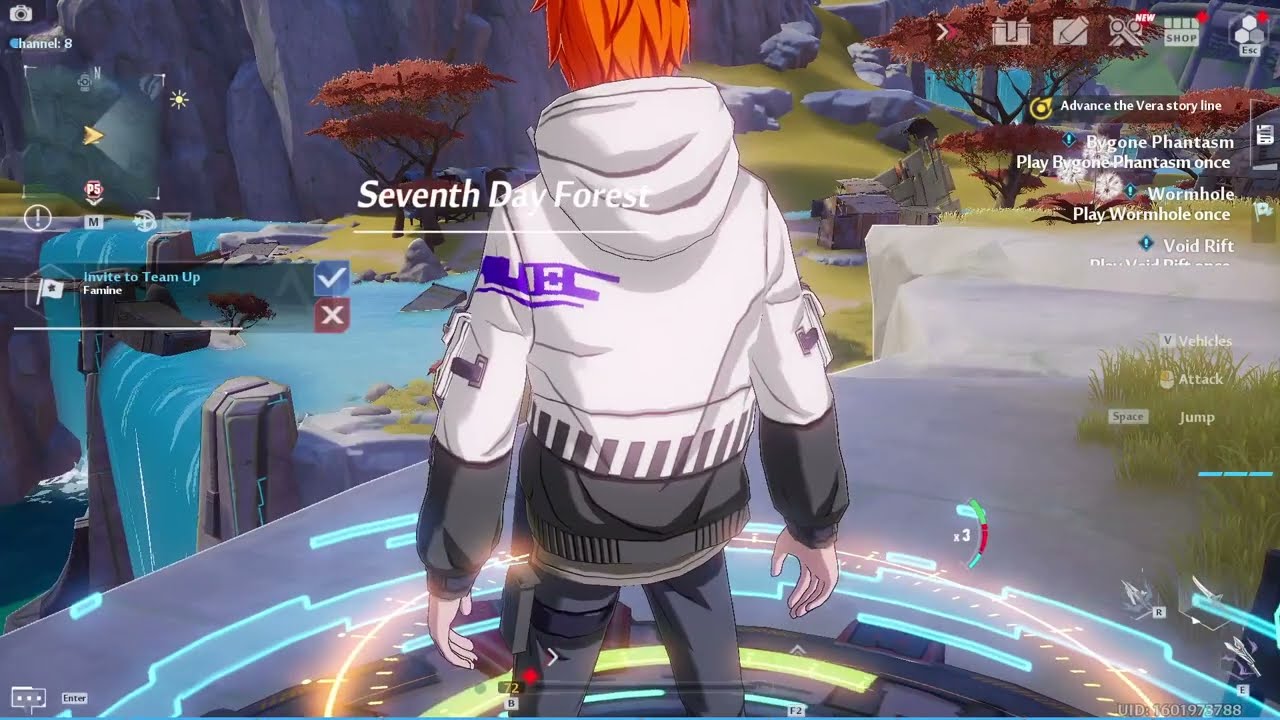
Server : Illyrians
Crew : Hello World
https://discord.gg/GzYeztwyZJ
Robarg, Apophis, FrostBot, Sobek, Lucia, Barbarossa, Devourer, Frostfire Dragon, Rudolph, Magma
 latent quarry
Just wanted to ask, have they fixed the character customization/booba sliders? i dont want to waste more tickets to find out...
 spark moon
Hi there , since day 1 i play this game on my device (ipad) still having trouble with force close / crash , i saw post from tof that they already said its already being fixed but still happen to me all the time , till vera update is also same nothing change , please fix this crash / force close things alot of my friend or i ask around community on ios is still having a same problem thanks
gilded veldt
Hello, I am wanting to know why my game have severe frame cutting ever since vera update dropped? My game is unplayable and super laggy. I have my settings all extreme. I have tried turning off DLSS and still no difference. It was all smooth before vera update. Can I get some help? Thanks.
 loud atlas
um sorry i do not know what happend there try to reset everything lets see if that helps
nimble niche
Im having issues with grappling hook on mobile, pc, and the steam ver. I try to use grappling hook 25% of the time it works, 25 % of the time its heavily delayed, 10% of the time, it nudges me forward but doesnt actually work, 15% of the time it doesnt work in some other way
 open grove
https://media.discordapp.net/attachments/1008725068274221079/1034270081133314138/IMG_20221025_085914.jpg?width=526&height=701 is this normal thing happen ingame ?

 gloomy python
hey
I am trying to play ToF on a 5k resolution monitor but it is super zoomed in, to the point where it is basically unplayable in combat. Is there a way to zoom out further than the basic mouse wheel?
 radiant edge
gloomy python
hey
I am trying to play ToF on a 5k resolution monitor but it is super zoomed in...
radiant edge
gloomy python
hey
I am trying to play ToF on a 5k resolution monitor but it is super zoomed in...
What aspect ratio is that display, and what are its dimensions? (since it's such a high resolution)
- Unfortunately, there's not a means to increase the range of the zoom distance.
We'd recommend filing #932914069395091456 and explaining your situation. {the display, its size, the distance that you're viewing it from, etc}
radiant edge
nimble niche
Im having issues with grappling hook on mobile, pc, and the steam ver. I try to ...
Are you having issues with discharge executions not going off or outright cancelling on weapon swap as well? Usually the grappling hook not executing tends to be connection related / packet-loss.
radiant edge
open grove
https://media.discordapp.net/attachments/1008725068274221079/1034270081133314138...
Normal at the moment on NVidia hardware, though for clarity -- not intended behavior. There's a solution in the pins. (in jist, disable DLSS)
nimble niche
radiant edge
Are you having issues with discharge executions not going off or outright cancel...
Okay thanks
open grove
ok tq
gloomy python
radiant edge
What aspect ratio is that display, and what are its dimensions? (since it's suc...
The display is a 49" 32:9 monitor, if that helps
Should I still post it in feedback?
 lyric pine
Has anyone had TOF using 21+ gigabytes of memory, since the Vera update? I have seen is as high as 28 gigs, it was crashing the game before I upgraded from 16 to 32 gigs of RAM
 prime jetty
so I noticed ever since this new update the launcher no longer automatically boots up upon startup even though I have the option checked
any way to fix this?
I also noticed that I now get a UAC warning when booting up the launcher but not the game meanwhile in the past it was the opposite so I'm not sure if that'd be affecting anything but that is my assumption
gritty fern
lyric pine
Has anyone had TOF using 21+ gigabytes of memory, since the Vera update? I have ...
Please Disable your DLSS
lyric pine
gritty fern
Please Disable your DLSS
Well that immediately fixed my issue thanks!
 radiant edge
gloomy python
The display is a 49" 32:9 monitor, if that helps
Should I still post it in feedb...
radiant edge
gloomy python
The display is a 49" 32:9 monitor, if that helps
Should I still post it in feedb...
Definitely.
The game currently does not have proper support for ultrawide displays. Far as why you're having issues (with the scale of things), this has to do with the horizontal axis being dominant in the Engine's FOV calculation.
You'll find some proposed edits to the game's config files on various forums, yet none of these are perfect solutions. Ideally there'd need to be support added by the developer.
 eager mist
spark moon
Hi there , since day 1 i play this game on my device (ipad) still having trouble...
eager mist
spark moon
Hi there , since day 1 i play this game on my device (ipad) still having trouble...
Same problem with me ,mine sorta fix coz due to overheating but after Vera update like yesterday it’s more frequent I mean every other minute
 stray night
Why game is not available in some countrys on steam?
radiant edge
stray night
Why game is not available in some countrys on steam?
Different governments of different regions have different merchantability requirements on publishers and software distributors. In some cases, it's prohibitive of the use of Steam.
gilded veldt
I already uninstall/reinstall this game but i am constantly at 20 fps... and I set my fps to 90.... what am I doing wrong
stray night
radiant edge
Different governments of different regions have different merchantability requir...
Oh thank you
 dreamy lintel
Today I tried to log in and it says network error 4-7, yesterday it was working just fine
 gleaming swift
hey guys I cannot find where to claim the rewards, can someone help? 😄 from the twitch drops
 empty elbow
how do I claim the discord nitro, I'm new, started yesterday on the polar server. went to claim nitro but it won't let me log into ToF with discord or steam, but if I open ToF from steam, I use my discord or steam to log in.
 rain frigate
gilded veldt
I already uninstall/reinstall this game but i am constantly at 20 fps... and I s...
rain frigate
gilded veldt
I already uninstall/reinstall this game but i am constantly at 20 fps... and I s...
Try these optimization methods
https://www.reddit.com/r/TowerofFantasy/comments/wpaozv/ue4_engine_tweaks_guide_to_improving_graphics_and/
reddit
273 votes and 301 comments so far on Reddit
radiant edge
Be aware that we do not recommend altering (replacing, deleting, editing) the game's files in any way. Even in a situation like this one where NVidia's Digital Certificate has signed the file in question.
The game's user-agreement prohibits such actions, and we cannot guarantee that the anti-cheat would not be tripped under some circumstance this time around or others.
gilded veldt
Yeah it's weird though, the fps drop was pretty sudden. Like I logged in once after the Vera update dropped and it was smooth as butter. On the second time and all logins after, I've been getting 20 and below fps constantly. Before Vera update (besides from first week of launch) it was smooth as heck as well so I really don't know why this fps drop is happening
 severe orchid
When I turn off DLSS my gpu overheats but when I keep it on my game freezes and crashes? Anyone know what to do?
lost mauve
when you turn dlss off, your gpu has to work harder because the game is now being rendered at native resolution, but when it's enabled you will encounter memory leak
low knoll
Really hope they fix the FPS issue, getting 20-40 FPS is almost unplayable for me, looks pretty shit in my monitor, especially for action based game. My GPU not even in it's max power for extreme setting, i mean only 50% with temp around 50c too.
gilded veldt
oh thank god i'm not the only one experiencing this problem
lost mauve
a lot of people have that problem
 tiny holly
same here i have a 3080ti and i have 40 fps which happened after updating the game client i think
hopefully the maint today fixes it lol
 frosty beacon
same for me on 3060ti
 finite cloud
I wanted to reinstall the game cuz it was crashing, and when i open the website, theres no option for clicking on anything, even the download option. It's basically blank
tiny holly
did you uninstall the game client as well?
frosty beacon
yep
finite cloud
yep
tiny holly
thats weird i have the game installed and i went to download the client off the website and it worked just fine
 wise stirrup
radiant edge
Be aware that we do not recommend altering (replacing, deleting, editing) the ga...
wise stirrup
radiant edge
Be aware that we do not recommend altering (replacing, deleting, editing) the ga...
then fix your shit maybe?
finite cloud
tiny holly
thats weird i have the game installed and i went to download the client off the ...

this is literally what i can see on the website
tiny holly
hm send the link ur using
finite cloud
Available on PC & Mobile. Choose Your Preferred Platform To Download Tower of Fantasy Now.
tiny holly
Embark together on your fantasy adventure! Tower of Fantasy, a shared open world MMORPG for PC and mobile, now has reached 10 million downloads. Join us and enjoy the release events and rewards!
your link loaded just fine for me but try that one^
 finite cloud
this is what it shows

 potent talon
Better to have server transfers rather than keep opening new server. Many unpopulated servers already suffer from queue time... Pretty bad 2.0 begins
 tiny holly
damn i have no idea then but u can try steam if u want
finite cloud
oh i tried, but it wasnt there. wrong region maybe?
tiny holly
oh im in NA
finite cloud
and im in asia
so this is an issue. i mean i reloaded the page a bunch of times but still didnt work
hasty tide
Is the game restricted in ur country?
finite cloud
nope, ive played it before. i recently uninstalled it due to switching devices
meybe the website servers r down?
hasty tide
Nope
 tawdry magnet
Okay anyone else from Belgium/Netherlands?
are you experiencing the same issues with ToF not being available on Steam for 'our region' and the Store crashing as soon as you open it via their launcher?
I used to go for the daily monthly loot, but now when I want to renew it and click it, the game just crashes.
hasty tide
I get the ''watchdog error'' when i close the game, or sometimes when i try to open the game first. Is it because of my device or the game itself or is there anything i can do about it
 opal acorn
finite cloud
welp ig itll work a little later. thanks anyway
opal acorn
finite cloud
welp ig itll work a little later. thanks anyway
Maybe try clearing cookies and cache or try a different browser
still karma
enable dx12 after this maintenance
hasty tide
tawdry magnet
I used to go for the daily monthly loot, but now when I want to renew it and cli...
I get the crash error too. No solution for that for me atm
 uneven thicket
Does anyone know how to fix the "No available versions. (7814351)" error on the Steam version of the game?

I've tried uninstalling and reinstalling but it's still giving me the same error
tawdry magnet
hasty tide
I get the crash error too. No solution for that for me atm <:sadmia:990754640620...
Baaah and my monthly just expired. So every day I cannot renew is a loss now :sadf:
hasty tide
tawdry magnet
Baaah and my monthly just expired. So every day I cannot renew is a loss now :sa...
Can feel ur pain very well
tawdry magnet
I'm going to try on another laptop tonight and see if that works :<
hasty tide
tawdry magnet
I'm going to try on another laptop tonight and see if that works :<
Pls tell if it does, I just need some affirmation it is not an isp or region issue
 lunar falcon
Anyone know where to apply to join the tof translation team?

 grave heath
feral saddle
I have a problem playing Is it possible for Dev to fix these issues?
- High PING...
grave heath
feral saddle
I have a problem playing Is it possible for Dev to fix these issues?
- High PING...
High ping is due to your network
Channel less number??
Up max wanderer required more thing, as your name, I thought I you would understand why this is hard to increase since you are dev too
tawdry magnet
hasty tide
Pls tell if it does, I just need some affirmation it is not an isp or region iss...
Wondering same here. I'm from BE, keep you posted
 main obsidian
When will mobile users using data be able to log in game?
Game only works on wifi for some reason
hasty tide
main obsidian
When will mobile users using data be able to log in game?
You're on iphone?
 stray rivet
Does anyone else still has an issue with the game getting stuck at Hotta logo?
hasty tide
stray rivet
Does anyone else still has an issue with the game getting stuck at Hotta logo?
Check pins for the rtx card. issue temporarily solved
stray rivet
Before the maintenance I had to change the Nvidia dll file, but since it won't work now, I'll try this method again, so thank you.
 violet sedge
Well every client issues still exist
Since nothing has changed 💀

 cedar sonnet
Where is my gear and my gacha currencies? Shouldn't the current patch fix the stolen items issue?
finite cloud
when will the maintenance end?
hasty tide
finite cloud
when will the maintenance end?
It's over
 chrome roost
Still can't force the game to run DX12...
finite cloud
hasty tide
It's over
when did it end?
 potent tangle
when they gonna fix on the bigga font text also weird icon on weap and bygone
hasty tide
finite cloud
when did it end?
20min ago
 ionic geyser

 weary eagle
Does the game still forced under dx11 after today maintenance?
full furnace
Devs didnt fix the dlss issue at all. They just ignoring and dun wanna even acknowledge it.
stray rivet
Also... am I the only one in this or what... but whenever I try to recharge in-game or in current example buy a rookie pack, my game crashes, when it opens up the window to insert the card info.
violet sedge
full furnace
Devs didnt fix the dlss issue at all. They just ignoring and dun wanna even ackn...
I thought the extra 24 hrs they took was for DLSS and DX12 lol
But seem like the tiny update patch were created yesterday and never changed since then
weary eagle
This is bad. Under dx11 i feel the stutters is worst , and ram usage is bloated.
Even after i disable dlss, tof sometimes immediately crash without any error or warning
 forest nacelle
looks like we back to updating our own dlss again kek
violet sedge
If you did update it should still be there
forest nacelle
doesn't feel like it kek
hasty tide
stray rivet
Also... am I the only one in this or what... but whenever I try to recharge in-g...
Same for a lot of peeps here. Welp
violet sedge
Steam doesn't touch non related files for official launcher idk
forest nacelle
I'm not on steam lol
stray rivet
hasty tide
Same for a lot of peeps here. Welp
They didn't fix shit apparently. Good to know.
feral saddle
grave heath
High ping is due to your network
Channel less number??
Up max wanderer required ...
Ping : i check with my ISP and fixed if check ping on mobile show around 40-60 that good for play but too many ppl when hunt world boss evenyone lag too, I know what caused it. But I don't need to elaborate further because I've attached a video for my explanation.
Channel less number : i mean Max Ch of World when i start world boss hunting i hope to stay on high number ex. CH 20 - 40 to avoid crowded players who will enter channel automatically when login, but [Aesperia have 46 CH] [Artificial have 7 CH] [Vera have 25 CH] i will start hunting at CH 7 because when moving to another world, other ppl can follow without counting Cooldown Move Channel It would be good for those who teleported by themselves
Up Max Capacity per channel : I can't know that Is it difficult or easy for a large team, But as a gamer I can only offer what I think is a problem with online gaming. Also, I've played a lot of games that can be played online in the same place. If the team will develop better It's a pleasure.
It's not a serious problem. I know most games can't fix these problems. But I had a little bit of hope that the games I like to play will be better. 😉
chrome roost
weary eagle
This is bad. Under dx11 i feel the stutters is worst , and ram usage is bloated....
Yep the stuttering is indeed worse after the patch, i don't know how these devs manage to do this, whichever dev's bright idea it was to completely disable DX12 needs a slap on the wrist
forest nacelle
we replaced one of the files with another version of dlss last time, it worked
 tacit marsh
wtf every times they update, i'll have to fix the loading stuck again and again and again!
violet sedge
It still works
Since there barely any update
forest nacelle
mods come here saying don't do it lmao but then next patch doesn't even fix the issue😂
hasty tide
stray rivet
They didn't fix shit apparently. Good to know.
They dont need our money
stray rivet
True, they need to fix their bugs first.
violet sedge
Well the DLSS file we replacing with are still signed by NVIDIA just make sure you get it from trusted source
forest nacelle
no need to mansplain, I know what I'm doing girlie😂