
#╟🎑reshades
1 messages · Page 90 of 1
 tough violet
 rapid magnet
Maybe try in game settings but reshade won't fix that without fucking everything else
 tough violet
rapid magnet
Maybe try in game settings but reshade won't fix that without fucking everything...
tough violet
rapid magnet
Maybe try in game settings but reshade won't fix that without fucking everything...
well its on dark night and its still bright af. Seeing as reshade is not going to help, is there a channel I can better direct this question to?
rapid magnet
Reinstall the weather mod you are using and load the correct, up to date config for it.. The configs in GAMMA are heavily outdated even with the Atmos that comes with it
 lunar hornet
erandis wake up
there's no configs. allat is fetched from https://github.com/peakcompany/xray-30/commit/3589ff1804e85oep94
rapid magnet
404 link 🥀
Yeah whatever that is then needs to be updated.. Even on 0.9.5 Anomaly\appdata is filled with Atmos_c_summer and Atmos_ATO and shit like that
Dummy old stuff
tough violet
oof
lunar hornet
rapid magnet
404 link 🥀
Yeah whatever that is then needs to be updated.. Even on 0.9.5 `Ano...
soon.......
NDA
rapid magnet
Yeah idm getting hired.. As long as I can get your old BMW
rapid magnet
I'll tattoo the NDA on my chest

 pseudo sedge
Okay so, dont know if what im asking for is possible but I already have a reshade preset that I enjoy and have a little experience tweaking because I modified this one slightly by adjusting the already active effects. However I was curious if It would be possible to add like a not too over the top, mild lens flare. I just dont really know how to go about doing that
 nimble pier
anyone knows whats the name of the mod that has a button below this one, some other modpacks have it, it changes the brightness and saturation based on time and weather, its kinda like reshade but as a mod.
 rapid magnet
Atmos has it built in.. Gotta find whatever else you're talking about.. Never heard of it
nimble pier
rapid magnet
Atmos has it built in.. Gotta find whatever else you're talking about.. Never he...
its a mod that adds a button below the basic light settings, it brings up a menu that you can change LUTs and brightness/exposure settings based on time and weather.
i forgot the name and i cant find it
rapid magnet
No I know what you're saying, I just never heard of it..
 quick pecan
Wanted to share this amazing reshade on my new playthrough.
Kumo's LUT Assortment


 balmy warren
how can i fix this problem?

 bronze pivot
Anyone know why this is appearing?
 rapid magnet
Both of you need to follow the pins
bronze pivot
rapid magnet
Both of you need to follow the pins
thanks
bronze pivot
for hippobots atmos shaders to work do i have to install them differently now? i cant get it to work
rapid magnet
They are probably 5yrs old and won't look as intended.. You reinstall Atmos and choose the shaders from there to get them back
bronze pivot
Thanks 🫡
bronze pivot
I still can not get my atmos shaders to work idk what to do ive done the reinstall option and i cant even get the reshade profiles to appear in my menu any help?
 rapid magnet
Wrong file path.. Look at it up top.. It should be in Anomaly’s bin, not in Atmos
bronze pivot
So then i surely just install atmos manually? i understand that gamma has it already pre packaged but i have tried the reinstall option on mo2 multiple times and it has done this
rapid magnet
Manually change the file path in reshade first and see.. You are in GAMMA\mods\atmos
You should be in Anomaly\bin
bronze pivot
i have it setup like this in the settings tab but when i go to presets it takes me automatically to the atmos mod folder and when i try to go to bin there is nothing in there related to atmos
 rapid magnet
Then you can try installing Atmos manually if it still has those files
 uneven sandal
!reshaderu
 void depotBOT
@uneven sandal
Скачайте Reshade по этой ссылке: #🔨поддержка-стандарт-gamma-ru-ua message
Никакой поддержки по софту больше не проводим, все вопросы в канал #╟🎑reshades message (знания английского обязательны)
Если канал не доступен, снимите роль Newcomer в канале #⏩start-confirm
Гайд на смену бинда открытия меню Reshade - #📖чаво message
 scarlet sparrow
 rapid magnet
Looks fine and old to me yeah
 stable sail
!RESHADE
void depotBOT
@stable sail
Download the software from https://reshade.me/ and install in the Anomaly/Bin folder
There will be no official support provided for ReShade, for any issues you can try seeking help in: #╟🎑reshades message
If you can't access that channel, go through https://discord.com/channels/912320241713958912/1029827096488452137 first
bronze pivot
i cant install atmos properly i am really lost and do not know what to do ive already installed reshade i assume properly ive used it without presets but i can not get the atmos reshades for wtv reason. any help im so confused
 quick orbit
bronze pivot
i cant install atmos properly i am really lost and do not know what to do ive al...
quick orbit
bronze pivot
i cant install atmos properly i am really lost and do not know what to do ive al...
You install it like any other reshade just in Anomaly/Bin.
But to be honest, I don’t think ya really need it. The game looks good without it, and I think Reshade will offer little at the expense of performance.
The modpack already uses Atmos.
But by all means, go for it if you want.
bronze pivot
Thank you i have been thinking about it and i think i am focusing on it to much im just gonna play the game without it for now lol i just have fomo and see other peoples game and think how much i want it but its just not worth it
 inland path
bronze pivot
Thank you i have been thinking about it and i think i am focusing on it to much ...
inland path
bronze pivot
Thank you i have been thinking about it and i think i am focusing on it to much ...
No one uses the atmos reshade anymore its outdated. If you want visual upgrade just update atmos and dont use the reshade
bronze pivot
inland path
No one uses the atmos reshade anymore its outdated. If you want visual upgrade j...
okay thats good to know i think the game does look very good without reshade tbh i just remember it being different. time to actually play the game and not focus on reshade lol
quick orbit
bronze pivot
Thank you i have been thinking about it and i think i am focusing on it to much ...
Sometimes the things we want most, we already have or never really needed.
But yeah I think you’ll love the game without it, it looks good.
 wary violet
where i can find all fx for bloomdark.ini? Its worked for me on 5.7.0 reshade, but i updated reshade and in broke all. Now in sucks
rapid magnet
Google their names.. Most are either on Github or deleted ages ago since the preset and its effects are years old
 peak onyx
@rapid magnet Thanks for your previous LUT + Reshade preset recommendation, i really like the blue tone of Stalker 1979
 latent urchin
Hey, I followed installation instruction which said to check all 4 boxes and then I realized that one of those was to delete reshade dlls. Do I have to install reshade completely manually now? Is there a guide how to do it
rapid magnet
The pins
 boreal patio
reshadferu
 lavish gate
!reshaderu
void depotBOT
@lavish gate
Скачайте Reshade по этой ссылке: #🔨поддержка-стандарт-gamma-ru-ua message
Никакой поддержки по софту больше не проводим, все вопросы в канал #╟🎑reshades message (знания английского обязательны)
Если канал не доступен, снимите роль Newcomer в канале #⏩start-confirm
Гайд на смену бинда открытия меню Reshade - #📖чаво message
 topaz sorrel
if I want to get rid of reshade without a full reinstall what DLLs do I delete?
lunar hornet
dxgi.dll
 obtuse sable
question: presets go in the Anomaly Bin folder right?
if that is the case then the problem i have is that when i select the preset in the reshade menu, it does nothing... none of the effects are active.
what am i doing wrong?
rapid magnet
Probably don’t have any of the effects it uses installed
obtuse sable
it happens with all the presets tho
doesn't reshade install all the effects?
or am i missing something
rapid magnet
Everything should work perfectly fine if you followed the pins that oflin made
 elder vapor
why is it all purple
rapid magnet
Based on the lack of context I'm going to assume that you did not delete the shaders_cache
 hard hill
Where do people post their resahde presets?
rapid magnet
#1035807043933720576 mainly
https://discord.com/channels/912320241713958912/1428109898431991878
https://discord.com/channels/912320241713958912/1476945769251475477
There's only 2 with up to date reshades.. Rest is either 5yrs old or stacks effects for no reason
 unkempt python
Уважаемые сталкеры, где решейд красивый скачать чтоб сразу был такой чтоб глаз радоваля
rapid magnet
Nowhere unfortunately
peak onyx
rapid magnet
Nowhere unfortunately
Damn u can read russian?
rapid magnet
Definitely not no 😅 if it’s short enough I just pop it into deepl and hope for the best
It’s never 100% accurate but I got what he was asking for
unkempt python
I asked where i download a cool reshade that can make my eyes happy
peak onyx
unkempt python
I asked where i download a cool reshade that can make my eyes happy
I wish so much i could learn russian faster so i can play on dayZ stalker RP server :D
unkempt python
peak onyx
I wish so much i could learn russian faster so i can play on dayZ stalker RP ser...
Oh dayz, dont forget that all the geography signs also on russian
 split crane
yo i acidentally hit install/update and now my entire visuals are fucked like everything is grey and washed out it deleted my reshade dlls i dont know how to restore it i had to reinstall atmospherics to get it un messed up but its still washed out and dark i had it like this before and now its so gloomy and washed out how do i get it back or reconfigure it??????

 tawny depot
Hey, for reshade connoisseurs out there, do you know an alternative effect to the classic AmbientLight.fx, or a solution to remove the diagonal bands caused by its AL_Dither, I think mostly visible in low light conditions in my setup.
Or maybe it's an issue with my effect order, pic below,
thx !

(I know I can disable the dither in AL to avoid the diagonal bands, but then the whole effect is ugly ofc)
 supple salmon
tawny depot
Hey, for reshade connoisseurs out there, do you know an alternative effect to th...
supple salmon
tawny depot
Hey, for reshade connoisseurs out there, do you know an alternative effect to th...
I think replacing ambient light with a global illumination shader would produce a similar effect with some tweaking. Pretty sure gamma installs a couple. Can disable dither. Or try any debanding shader. As far as order, search YouTube for a pascal gilcher video on reshade effect ordering.
supple salmon
split crane
yo i acidentally hit install/update and now my entire visuals are fucked like ev...
Pins in here show how to reinstall reshade.
tawny depot
supple salmon
I think replacing ambient light with a global illumination shader would produce ...
thank you 👌
supple salmon
tawny depot
thank you 👌
I noticed you have immerse shaders. Try his bloom shader solaris with it too. I got some nice effects from that.
tawny depot
supple salmon
I noticed you have immerse shaders. Try his bloom shader solaris with it too. I ...
Yeah I think I can replicate ambientlight with the immerse suite pretty much
Found the video, so clear info, thx again 😅
tawny depot
supple salmon
I noticed you have immerse shaders. Try his bloom shader solaris with it too. I ...
Thank you for reminding me I had Immerse ^^, the result's way better now, also no more banding,
Cheers
 prime kettle
is it normal after installing a reshade/LUT that the PDA screen gets like hazy?
 rose sail
Can you guys recommend a green summer lut?
Sort of like vanilla anomaly, green vibrant summer without being oversaturated
supple salmon
rose sail
Sort of like vanilla anomaly, green vibrant summer without being oversaturated
https://discord.com/channels/912320241713958912/1455952491945656401
Check it out. There might be something there for you.
rose sail
supple salmon
https://discord.com/channels/912320241713958912/1455952491945656401
Check it out...
This looks promising I'm gonna try it out
peak onyx
!uninstall
void depotBOT
@peak onyx
In order to uninstall GAMMA from your computer, delete your Anomaly folder and your GAMMA folder.
If you want to backup your save files, go in #🤖bot-commands and type !save.
peak onyx
!uninstall reshade
void depotBOT
@peak onyx
In order to uninstall GAMMA from your computer, delete your Anomaly folder and your GAMMA folder.
If you want to backup your save files, go in #🤖bot-commands and type !save.
peak onyx
!reshade
void depotBOT
@peak onyx
Download the software from https://reshade.me/ and install in the Anomaly/Bin folder
There will be no official support provided for ReShade, for any issues you can try seeking help in: #╟🎑reshades message
If you can't access that channel, go through https://discord.com/channels/912320241713958912/1029827096488452137 first
peak onyx
If you wanna uninstall Reshade, just open the Installation.exe, select the game and then it will ask you to -Install reshade/-update reshade/-Uninstall reshade.
Pretty easy to install or uninstall

 woeful yarrow
def. dont delete .dll files afaik
lunar hornet
 odd totem
Do I delete all of them?
odd totem
Do I delete all of them?
you delete dxgi.dll
 drifting apex
My reshade won’t open, does this mean it’s not installed or?
lunar hornet
yes
drifting apex
when i launch through mo2, it works but when i launch from the shortcut it doesn’t? any ideas
 lusty briar
Whats a good reshade you guys suggest for good visibility and color? (may be too vague of a question lol)
rapid magnet
rose sail
Can you guys recommend some lush summer luts? I already tried Forester and it didn't work for me
peak onyx
The "cfg_load atmos_neutral" is to do at EVERY launch or just once ?
peak onyx
lusty briar
Whats a good reshade you guys suggest for good visibility and color? (may be too...
Kumo's one is up to date but it feel cold colour, great for some sad/dangerous atmosphere.
If you want something more colourfull, CHROMA DENSITY is great but kinda annoying to find the download, Also play with the gamma+saturation to find something you like
And maybe download retexture mods + grass mod to make the game more colourfull
rapid magnet
peak onyx
The "cfg_load atmos_neutral" is to do at EVERY launch or just once ?
Once only
peak onyx
rapid magnet
Once only
same for the shader cache ?
rapid magnet
Shaders cache you delete every time you make any visual changes with mods
peak onyx
rapid magnet
Shaders cache you delete every time you make any visual changes with mods
Thanks a lot Erandis !
 sullen jackal
currently doing another reinstall of gamma trying to get settings figured out. is it a reshade issue that keeps blowing out my pda? most of what i look up is for full environment rendering or if my entire screen is black. for me it was just the pda being way too bright to see clearly.
 hexed patio
!reshade
void depotBOT
@hexed patio
Download the software from https://reshade.me/ and install in the Anomaly/Bin folder
There will be no official support provided for ReShade, for any issues you can try seeking help in: #╟🎑reshades message
If you can't access that channel, go through https://discord.com/channels/912320241713958912/1029827096488452137 first
 untold cypress
hexed patio
!reshade
untold cypress
hexed patio
!reshade
Здорова, родственник!)
 foggy drift
!reshaderu
void depotBOT
@foggy drift
Скачайте Reshade по этой ссылке: #🔨поддержка-стандарт-gamma-ru-ua message
Никакой поддержки по софту больше не проводим, все вопросы в канал #╟🎑reshades message (знания английского обязательны)
Если канал не доступен, снимите роль Newcomer в канале #⏩start-confirm
Гайд на смену бинда открытия меню Reshade - #📖чаво message
 loud wraith
wdym? they come with kumo reshade i think
lunar hornet
 me trololo
 indigo helm
hey, i recently got 64GB DDR5 RAM, RTX 5080 and Ryzen 9950x3d. I wanna test those with the best shaders possible, like next level visuals. Any advice on specific reshade addons, assortments or settings?
preferably more lively colours, less grey shades
 hushed isle
!reshade
void depotBOT
@hushed isle
Download the software from https://reshade.me/ and install in the Anomaly/Bin folder
There will be no official support provided for ReShade, for any issues you can try seeking help in: #╟🎑reshades message
If you can't access that channel, go through https://discord.com/channels/912320241713958912/1029827096488452137 first
 silver parcel
Hello! Is there a way to prevent Reshade from capturing the HUD?
rapid magnet
indigo helm
hey, i recently got 64GB DDR5 RAM, RTX 5080 and Ryzen 9950x3d. I wanna test thos...
This game won’t test that.. But google the paid shaders because they will surely test something
indigo helm
I mean I just want great shaders and best settings, not benchmark test for the rig
rapid magnet
Crank SSS to Ultra and use Atmos RC6.6
Nothing else will really look good especially not the presets available for this game
 wispy bone
rapid magnet
Crank SSS to Ultra and use Atmos RC6.6
Nothing else will really look good especi...
wispy bone
rapid magnet
Crank SSS to Ultra and use Atmos RC6.6
Nothing else will really look good especi...
How do you swap the luts in sss?
And do they essentially replace the old reshade way of doing it?
rapid magnet
They replace reshade in terms of color grading.. You “swap” it by installing it as a separate mod like #1476945769251475477
 earnest elm
how do i deal with this?
 rapid magnet
Follow the pins
 mystic forum
Hi, guys, can someone adwise good presets?
rapid magnet
https://discord.com/channels/912320241713958912/1476945769251475477
Or make your own
mystic forum
rapid magnet
https://discord.com/channels/912320241713958912/1476945769251475477
Or make your...
Thanks
 undone obsidian
Guys, is there a way to do fog better ,have atmosferics 2.69 RC2 and Kumo's lut , but get this fog view
 rapid magnet
Do not tick fog distance increase in Atmos install
(not reshade related)
undone obsidian
rapid magnet
Do not tick fog distance increase in Atmos install
(not reshade related)
Thx bro!

 topaz obsidian
undone obsidian
Guys, is there a way to do fog better ,have atmosferics 2.69 RC2 and Kumo's lut ...
topaz obsidian
undone obsidian
Guys, is there a way to do fog better ,have atmosferics 2.69 RC2 and Kumo's lut ...
Also I recommend updating to RC6.6
 jolly crystal
Can I post my reshade ini here?
lunar hornet
Why not
jolly crystal
Mainly changed bloom and saturation settings.
topaz obsidian
@mild folio would be proud
 mild folio

 tiny basalt
anyone know how to get this coloring off the PDA?, it only happens when i pull up the PDA
 lunar hornet
xD za każdym razem
 echo snow
tiny basalt
anyone know how to get this coloring off the PDA?, it only happens when i pull u...
tiny basalt
echo snow
https://discord.com/channels/912320241713958912/1467056699683770379/147005843118...
echo snow
tiny basalt
anyone know how to get this coloring off the PDA?, it only happens when i pull u...
tiny basalt
echo snow
https://discord.com/channels/912320241713958912/1467056699683770379/147005843118...
Thank you!
echo snow
tiny basalt
Thank you!
if you don't mind bloom i recommend to just reinstall sss and disable bloom
tiny basalt
echo snow
if you don't mind bloom i recommend to just reinstall sss and disable bloom
Thanks
 leaden gust
tiny basalt
anyone know how to get this coloring off the PDA?, it only happens when i pull u...
leaden gust
tiny basalt
anyone know how to get this coloring off the PDA?, it only happens when i pull u...

 remote wren
!reshade
void depotBOT
@remote wren
Download the software from https://reshade.me/ and install in the Anomaly/Bin folder
There will be no official support provided for ReShade, for any issues you can try seeking help in: #╟🎑reshades message
If you can't access that channel, go through https://discord.com/channels/912320241713958912/1029827096488452137 first
 dreamy stream
tiny basalt
anyone know how to get this coloring off the PDA?, it only happens when i pull u...
dreamy stream
tiny basalt
anyone know how to get this coloring off the PDA?, it only happens when i pull u...
wtf yes, gimme asecond
Ah you got it already
you don't need to reinstall without bloom. Just use these settings
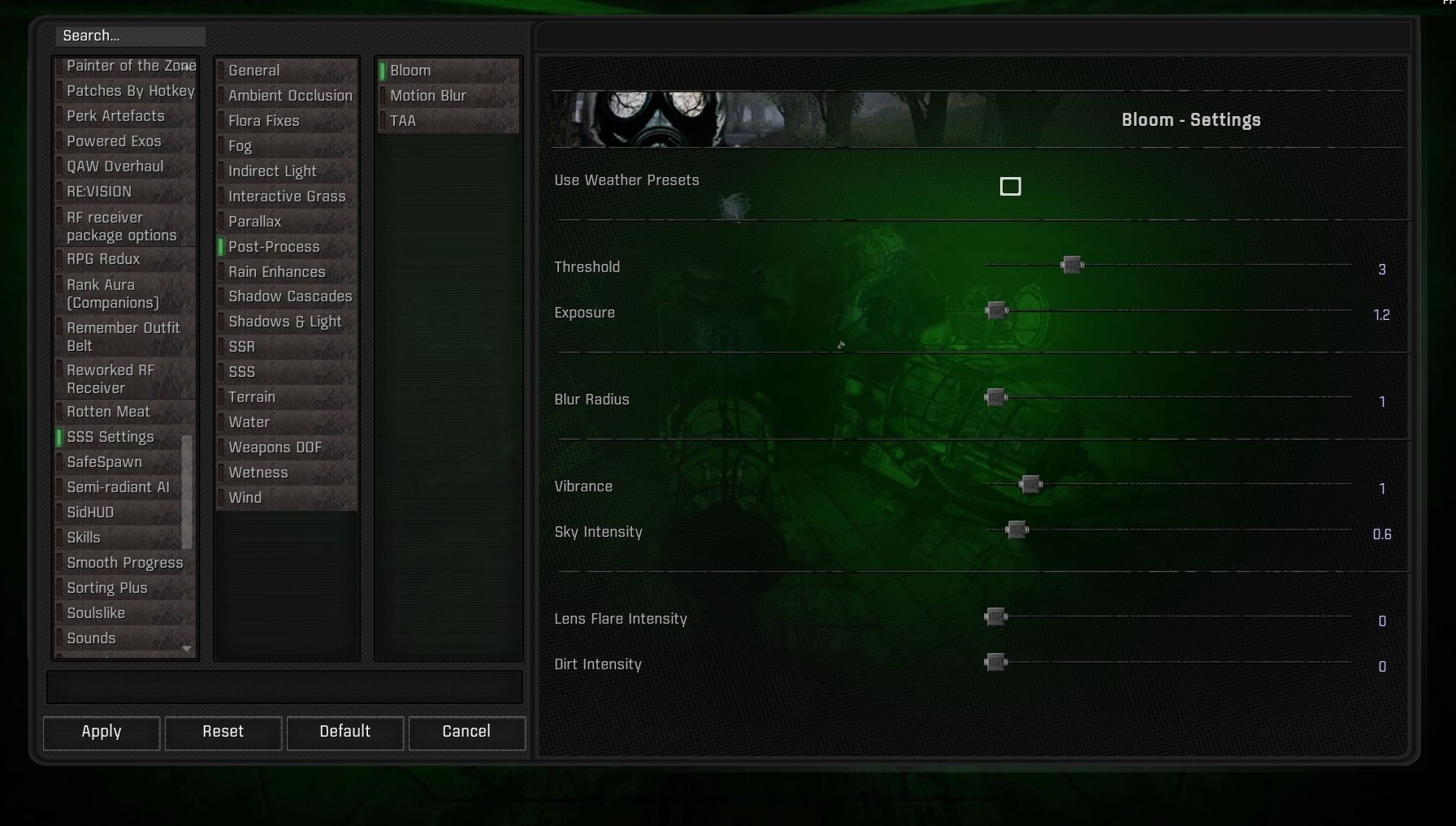
 limber temple
tiny basalt
anyone know how to get this coloring off the PDA?, it only happens when i pull u...
limber temple
tiny basalt
anyone know how to get this coloring off the PDA?, it only happens when i pull u...

 steel oak
Hi! I'm running the game for the first time, and the “screen-space shaders” aren't loading. Is there a way to fix this?
rapid magnet
Probably a broken install if it's for the first time.. It's not reshade related though since GAMMA doesn't ship with it anymore
#🔨base-gamma-support
 agile dock
I want to install reshade but when i click browse, don't have Anomaly.DX just AnomalyDX8,9 etc.. What i have to do ?
 frank trout
agile dock
I want to install reshade but when i click browse, don't have Anomaly.DX just An...
frank trout
agile dock
I want to install reshade but when i click browse, don't have Anomaly.DX just An...
do the one you launch the game with
agile dock
Oh, okay
 azure patio
is there a way to fix blurry text and hud when i use reshade?
rapid magnet
Download Reshade with addon support and choose REST during installation
jolly crystal
azure patio
is there a way to fix blurry text and hud when i use reshade?
turn down bloom (and blur)
 keen parrot
if I uh downloaded Atmospherics where do I unpack it?
steel oak
Hello! Can you tell me why the presets aren't being applied? The layout is correct, though.
 frank trout
keen parrot
if I uh downloaded Atmospherics where do I unpack it?
frank trout
keen parrot
if I uh downloaded Atmospherics where do I unpack it?
you can just install it through MO2. Replace the one already in GAMMA
frank trout
steel oak
Hello! Can you tell me why the presets aren't being applied? The layout is corre...
you didn't set up the effect paths correctly, check pins
steel oak
frank trout
you didn't set up the effect paths correctly, check pins
Thanks for your reply. Here's what it looks like
 frank trout
steel oak
Thanks for your reply. Here's what it looks like
frank trout
steel oak
Thanks for your reply. Here's what it looks like
pin by oflin, settings part of the message
indigo helm
Installed reshade. Can't start a game (shaders compilation failed) after enabling:
C cons grass and trees;
Kumo's LUT assortment;
Atmos 2.69 RC6.6
and disabling:
Aydin's grass tweaks (gamma default);
Aydin's grass SSS Lod compatibility (gamma default);
Atmospherics Shaders (gamma default);
Atmospherics Shaders Latest (gamma default)
where did i misstep?
rapid magnet
indigo helm
Installed reshade. Can't start a game (shaders compilation failed) after enablin...
2 Atmos weathers are not enabled at the same time on GAMMA
Reshade does not cause shader comp crashes so this channel won't really be helpful
You most likely messed up a load order or installation of either the LUT and/or Atmos
agile dock
https://i.ytimg.com/vi/yyHVwdIkszw/maxresdefault.jpg How can i set the same dark/grey like on photo ?
 rapid magnet
Download Atmos
Pick the never clear option
Pick the saturation script
Have fun
agile dock
Can you tell where is never clear option and saturation script ?
Even if Atmospherics is in gamma i have to download ?
rapid magnet
Yes.. Get Atmos RC6.6
#1036172060969410590 message
Follow it very carefully
agile dock
Sorry for spaming but how to install through MO 2 ?
rapid magnet
!mo2
void depotBOT
@rapid magnet https://anomalymodding.blogspot.com/2021/04/Mod-Organizer-2-setup-and-Amomaly-modding-guide.html

This guide is meant to show you how to setup Mod Organizer 2 and how to mod Anomaly in a simple and easy way step by step. Made by Starcry ...
 wispy leaf
could anyone point me in the direction of how to get rid of a shader, I downloaded one and I dont like it as much as I thought
rapid magnet
Untick it
agile dock
I have grey colors but not the same like on screen, i have to set up saturation etc ? Because only dark weather 2 is not like on screen
indigo helm
Somehow I didn't manage to install working atmos 6.6, followed the instructions very carefully and didn't miss a step. I'mma use the GAMMA default latest Atmos.
I've got 2 questions:
- imo the splashes from each raindrop look terrible, not the little puddles but the animations when raindrops hit the ground. How can I make them look better?
- I noticed that not every piece of grass has a shadow behind it, is that normal or can I somehow do every grass get its own shadow? All my shadows settings in SSS are set on ultra and it doesn't help
agile dock
And also how to fixed white screen on rain ?
rapid magnet
indigo helm
Somehow I didn't manage to install working atmos 6.6, followed the instructions ...
- Fix the texture/particle yourself I guess.. Atmos doesn't touch that
- Can't expect perfection everywhere on free mods for a free game
rapid magnet
agile dock
And also how to fixed white screen on rain ?
Don't play with debug weather.. It's a known bug
agile dock
rapid magnet
Don't play with debug weather.. It's a known bug
Ok, thanks
indigo helm
rapid magnet
1. Fix the texture/particle yourself I guess.. Atmos doesn't touch that
2. Can't...
I'd gladly fix it if I knew what to look for exactly, oh well.
Anyways thank you for replying regardless 🙏
rapid magnet
Should be one of those..
From SSS and 46- Better Rain Texture

 cloud island
Upload your screenshots first on imgur and copy their URLs. Discord URLs work too for Juxtapose.js
 hazy meadow
#📢announcements message @cloud island so if i was getting those weather bugs on a fresh install its because there is something left over from expedition's files somewhere? i did the 'fresh' install on the same base game dir so that makes sense now why i was still getting it. trying again on a new anomaly vanilla install
or would the problem files be in the GAMMA directory in mods or something?
Reshade pack for Gamma by @timber snow #╟📸screenshots message
hazy meadow
The reshade I've been working on is pretty much done. Meant to be pretty subtle, just adding some nice interactions between light & shadows.
https://cdn.knightlab.com/libs/juxtapose/latest/embed/index.html?uid=1e6a536a-6dae-11ec-abb7-b9a7ff2ee17c
https://cdn.knightlab.com/libs/juxtapose/latest/embed/index.html?uid=3293aed6-6dae-11ec-abb7-b9a7ff2ee17c
https://cdn.knightlab.com/libs/juxtapose/latest/embed/index.html?uid=4bc0a83c-6dae-11ec-abb7-b9a7ff2ee17c
https://cdn.knightlab.com/libs/juxtapose/latest/embed/index.html?uid=5e819eb8-6dae-11ec-abb7-b9a7ff2ee17c
The dark areas are darker, the light areas are lighter, and the colors for each are supposed to be more washed out and oversaturated respectively. I like to play using mostly flashlight/headlamp for immersion, so this is part of the inspiration behind making it.
the .ini is attached if you want to use it but you'll have to download some legacy effects. the lighting settings meant to be used are
gamma - 0.9
saturation - 1.0
brightness - 0.8
JuxtaposeJS Embed
JuxtaposeJS Embed
JuxtaposeJS Embed
JuxtaposeJS Embed
hazy meadow
cloud island
You can pack the effects with it <@117106897420550148>
yeah I'm just looking at the correct way to do it
when i was testing everything i had to install the legacy pack otherwise was missing some textures, just don't know which
 round scroll
I've packed together my reshade-shaders folder into a rar so you can delete yours and use mine, as ive added shaders to mine that arent with gamma. I have then attached the actual preset file. Make sure you install this in the bin folder of your base anomaly install, not your gamma folder. Focused on vibrance and clarity, really like it personally. may be intense on some lower end pcs frame rate wise. EDIT: use the improved preset im adding now to this post which is also linked below as i improved a few things quite a bit. #╟🎑reshades message
taking screenshots now
before

after

before

after

before

after

before

after

Open console on game (~) and type these commands in. r2_gloss_factor 0.05000
r2_gloss_min 0.10000
If its a little too vibrant (might lower it a smidge myself), lower saturation in blooming hdr, and vibrance fx as well
My reshade folder attached is gammas reshade file, with rtgi and expedition SHADERS ONLY dragged into it. Backup your original gamma reshade folder in case you mess up or something
lower bouncing light intensity to 1.8 under rtgi global illumination. forgot i was playing with that before i uploaded this. will make youre weapon have a mild sparkling affect on metal otherwise. no bueno.


very final note, if its killing your frames, gotta disable or tweak rtgi global illumination AKA ray tracing. cheers
 winter schooner
round scroll
My reshade folder attached is gammas reshade file, with rtgi and expedition SHAD...
winter schooner
round scroll
My reshade folder attached is gammas reshade file, with rtgi and expedition SHAD...
It needs to be merged with gamma shaders folder?
round scroll
You can replace it. Just backup the old files and drop mine in their place. It contains all of gamma original files and more
Only replace the files that are the same name as mine obviously
Then you drop the preset where you see the gamma preset. Should he in the folder before it
round scroll
winter schooner
It needs to be merged with gamma shaders folder?
Just make sure you follow the additional instructions I added as well
winter schooner
Alright cheers, thanks. i tried it last night but I switched out folders instead of merging, probably explains why I couldn't see any of the RTGI stuff in reshade
round scroll
Np. Let me know if you have any issues
round scroll
winter schooner
Alright cheers, thanks. i tried it last night but I switched out folders instead...
So wait you mean you replaced reshade-shaders folder with mine right? And it didn't work? If that's the case that's strange, should work but I've never had to share a preset that required sharing my shader and textures as well. All I did was drag thr shades and textures from expedition and rtgi into the reshade-shaders folder, so not sure why replacing wouldn't work. Ill check tomorrow to double check I didn't miss a file or something. Yea for sure let me know if merging works and if my understanding of what you did is correct so I can update the instructions and maybe re-upload the files in a different format
winter schooner
round scroll
So wait you mean you replaced reshade-shaders folder with mine right? And it did...
Yeah I just figured out what i did wrong, I was replacing the stuff in GAMMA and not in Anomaly's install, bigbrain stuff. It's working now though, thanks. gotta tweak and get some frames back tho
round scroll
winter schooner
Yeah I just figured out what i did wrong, I was replacing the stuff in GAMMA and...
Yea I honestly disabled rtgi because it made me at around 50-60 and I have a 3080 and i9 with 32 gigs ram. So for sure tweak it and see if you can get it to work but It really doesn't change the reshade much at all with it off. I didn't build it around rtgi so it still looks great without it. Personally I turned it off after playing with rtgi for a while because it's a lot smoother with it off. So test the reshade without rtgi and im sure if you like the preset, you'll still be pleased. Also just updated my original post to help others with the install.
winter schooner
Yeah it's heavy duty, losing 30 frames with it on at 1440p on 3060/5800/32gb
it does add some nice depth to the image, but yeah not sure if its worth
round scroll
Yep, for sure a heavy price price pay
 timber snow
You can just reduce the ray length to around 7-8 and Ray number to 2. This only cost my rx 570 around 6-10 fps that way.
round scroll
wow, youre right. i couldnt find a good balance. this worked well. still smooth gameplay and the effect actually still does something
round scroll
I fixed a few issues i wasnt happy with, mainly night time issues related to blooming hdr. also made the ray tracing tweaks Vulpecula recommended
round scroll
You'll need the folder i linked above for this to work as it requires added shaders
 green turtle
round scroll
I've packed together my reshade-shaders folder into a rar so you can delete your...
green turtle
round scroll
I've packed together my reshade-shaders folder into a rar so you can delete your...
Hi bud, can u help me pls? Many of the effects aren´t working propertly, any idea?

I already replaced the my folder with yours
 thick temple
Which reshade you guys use works best for wintermod?
round scroll
green turtle
I already replaced the my folder with yours
Did you put it in your vanilla anomaly bin or in gamma bin? It needs to be in vanilla. Also did you replace it or merge it? Needs to be replaced
Sorry if I take a while to respond but I'm super tired. May pass out, lol
green turtle
Nvm, that was the mistake xD. Sorry man, thx for your help
round scroll
Np. Hope you like the reshade
 swift robin
It reguries RTGI
 subtle summit
if I wanted to try more reshade how can I do? It is not enough to add the file .ini in the folder because I probably do not have all the plugins downloaded and in fact do not work. How can I do this? Always without messing up this fantastic package.
swift robin
^
hazy meadow
subtle summit
if I wanted to try more reshade how can I do? It is not enough to add the file ....
use the reshade installer and select the vanilla anomaly launcher that gamma uses
swift robin
hazy meadow
The reshade I've been working on is pretty much done. Meant to be pretty subtle,...

looks amazing
had to turn of the bloom though its a little too much
using the strega one
round scroll
subtle summit
if I wanted to try more reshade how can I do? It is not enough to add the file ....
my reshade is using textures that arent found in vanilla reshade and require you first copy my reshade-shaders folder and delete you old one, replacing it with mine. then you can drag and drop my preset in the root folder where you see the gamma preset. make sure you replace the shaders in the vanilla anomaly install, not gamma directory
where the arrow is, is where you want to go first

now inside that folder, if youre going to use my reshade, backup the folder i have circled, then delete the original, and replace it with my folder. do not merge, replace. the next step will work with whoevers preset you choose as long as they didnt add extra shaders like i did. where you see the underlined presets, you will also be dragging the preset you choose into the same area. then go in game, hit home, and choose the preset. If you use my reshade-shader folder, anyone elses preset will also work as my folder will have all the shaders you need and more, regardless of whether you want to use my preset or not

my reshade is built for higher end pcs, as it has ray tracing implemented. so do keep that of note when choosing, if your pc is not higher end. if you still want to use my preset, but dont have a high end pc, when youre in game, disable the effect that starts with RTGI, and you will disable ray tracing. Preset still looks great without it.
round scroll
swift robin
https://discord.com/channels/912320241713958912/920013807479296042/9309319430281...
Flarnik your reshade will also require people to use rtgi files as well as they arent present in vanilla reshade. you should edit your message to let people know
swift robin
round scroll
Flarnik your reshade will also require people to use rtgi files as well as they ...
Done
subtle summit
there is a way to complete disable hub for better screenshot? The option remove hud don't remove the health bar
hazy meadow
subtle summit
there is a way to complete disable hub for better screenshot? The option remove ...
H toggles health UI
check #│💻keybinds-in-gamma
subtle summit
thanks!
 upper flower
- DIB created: 512K
! c:/games/gamma/bin/..\appdata\shaders_cache\r4\combine_1_nomsaa.ps\2048111100110000001000100000110231112010000000
! error: common_functions.h(29,6): warning X3205: conversion from larger type to smaller, possible loss of data
common_functions.h(66,2): warning X3206: implicit truncation of vector type
common_functions.h(71,49): warning X3206: implicit truncation of vector type
common_functions.h(103,2): warning X3206: implicit truncation of vector type
pbr_brdf.h(153,15): warning X3206: implicit truncation of vector type
pbr_brdf.h(154,15): warning X3206: implicit truncation of vector type
pbr_brdf.h(155,15): warning X3206: implicit truncation of vector type
pbr_brdf.h(163,9): warning X3206: implicit truncation of vector type
hmodel.h(29,14): warning X3206: 'mul': implicit truncation of vector type
hmodel.h(34,17): warning X3206: 'mul': implicit truncation of vector type
combine_1.ps(8,10): error X1507: failed to open source file: 'ssr.h'
Out of nowhere my shader seems broken
why is this ?
lunar hornet
game cant find ssr header. idk what youre doing, but check if you installed shaders corrextly

 cloud island
What I'm looking for is a fog and a DOF effect to hide stuff that is very far away
 potent burrow
Is there a way to keep the game DOF on reload weapon but not on anything else by the way ?
 potent burrow
RIP
 paper silo
cloud island
Unless you know HLSL
paper silo
cloud island
Unless you know HLSL
Clear Sky had it working tho
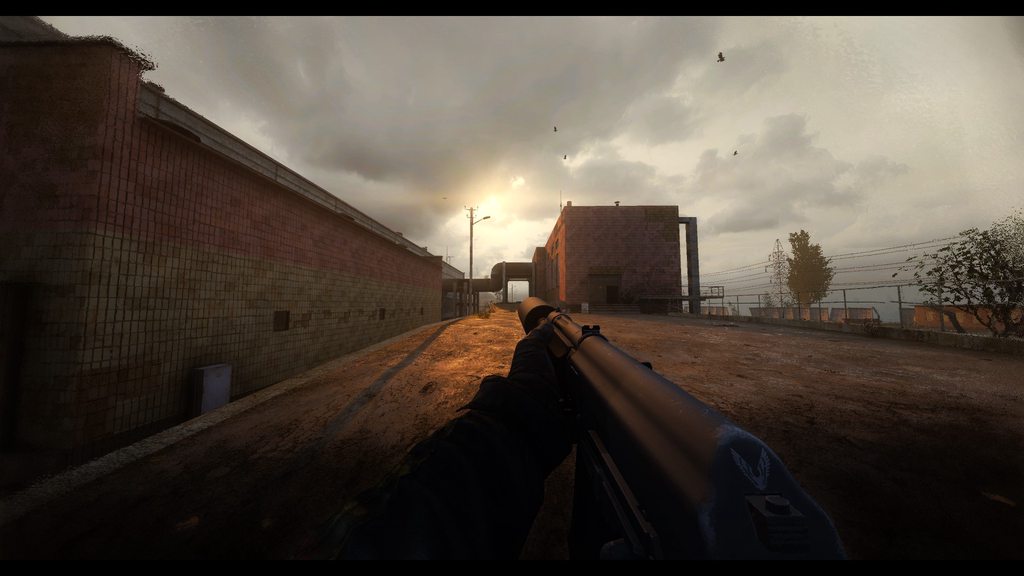
 sour pollen
 brazen terrace
I was asked to post my reshade preset here but couldn't since I don't got nitro, had a friend help me
 river flower

cloud island
sour pollen
I was asked to post my reshade preset here but couldn't since I don't got nitro,...
Nice, I'll take a look and update GAMMA Reshade
cloud island
TexasRed Reshade (affects UI relatively badly because of RTGI):

GAMMA Reshade (current)
 swift robin
cloud island
TexasRed Reshade (affects UI relatively badly because of RTGI):
swift robin
cloud island
TexasRed Reshade (affects UI relatively badly because of RTGI):
i'll try find my rtgi preset for botw as it had pretty decent ui detection to eliminate that issue - so could probably utilize for stalker
 ebon estuary
If you like contrast and vibrance I can post mine that uses RTGI, can see inventory and everything else. Nights are still spooky and day isnt too bright.
But it has lots of colors, so yeah
swift robin
ebon estuary
If you like contrast and vibrance I can post mine that uses RTGI, can see invent...
hows the ui detection?
cloud island
swift robin
i'll try find my rtgi preset for botw as it had pretty decent ui detection to el...
I'm already using this
But there's no magic
swift robin
cloud island
I'm already using this
understandable, but i had worked on the ui detection side of it for a while so probs would take some time to marry up the z-depth
 solid radish
What Reshade does anyone reading this use/recommend? Trying to get a vibe for how many people use Reshade and what ones to see what i might want to try out. I know nothing about the ones for this game so just kind of interested to see...
 astral kestrel
Last one i was using, was bonk reshade
 brittle ether
ditto
 barren vault
do i have to install the reshade app, if so to which application
ebon estuary
I used a modified version of agressor
 signal spindle
barren vault
do i have to install the reshade app, if so to which application
signal spindle
barren vault
do i have to install the reshade app, if so to which application
Gamma bin, if you use dx11 then the dx11.exe
cloud island
barren vault
do i have to install the reshade app, if so to which application
GAMMA installs its own reshade
You just need to add new effects and profiles
 civic haven
out of all the effects that add ssao type visuals, global illumination and screen space reflections, which ones do you guys think looks most realistic or which would you recommend? Disregarding UI weirdness. As for ssao there are quite a few to choose from so I just wanted to see other's opinions on the matter.
 shrewd bramble
Anomaly already has a generic HDAO (HDAO or High Definition Ambient Occlusion is a similar technique, though it’s meant for AMD graphics cards to compete with NVIDIA’s HBAO. There’s no real difference between HBAO and HDAO, except that they’re native to their respective distributer’s GPUs.) implemented in it if you are not looking for something more performance demanding, other than that, SSAO is only half of the resolution of HBAO fyi and about being realistic, they are mostly customizable through their settings to find your own taste.
Most here use RTGI (Screen space ray traced GI) as global illumination, though you need to fiddle with it until you are satisfied with it's performance/visuals and it makes your GPU scream for real lmao. You have optional GI's on the other hand which has not ambient occlusion integrated, only light bouncing, they are either Pirate's GI or Radiant GI.
And for the last part, Gamma already has SSR addon integrated in it and no need for another post process for most, but some preset's have additional SSR shader which you can enable for rainy weathers (otherwise, it looks weird).
All and all, you can check presets here, there are all kinds of them whether performance or visual wise in preference.
civic haven
alright thank you for all of that info comrade
ebon estuary
Does anyone use RT Illumination/RTGI? I get microstutters when I use it
 winter wasp
shrewd bramble
Anomaly already has a generic HDAO **(HDAO or High Definition Ambient Occlusion ...
winter wasp
shrewd bramble
Anomaly already has a generic HDAO **(HDAO or High Definition Ambient Occlusion ...
 short violet
swift robin
My reshade preset, RTGI required
short violet
swift robin
My reshade preset, RTGI required
What do you mean by RTGI is needed? I guess it's certain files. Where to get them from?
From Marty Mcfly's?
short violet
Ok, thanks
swift robin
cloud island
TexasRed Reshade (affects UI relatively badly because of RTGI):
For some reason it doesn't affect on my UI

Or maybe not that much
shrewd bramble
My favorite part is the spinning loading screen
cloud island
That as well
timber snow
I mean, it's not desirable but how much time do you spend on the pause menu anyway. As long as you don't use dof or too much bloom or something ingame ui stays perfectly legible.
shrewd bramble
When I'm too scared to play, pause menu is my best friend
lunar hornet
potent burrow
Is there a way to keep the game DOF on reload weapon but not on anything else by...
you can turn it off in engine sources

weapon.cpp
void CWeapon::OnZoomOut()

&

void CWeapon::OnZoomIn()
remove zoom dof shit and rebuild ze engine
cloud island
lunar hornet
weapon.cpp
```
void CWeapon::OnZoomOut()
&
void CWeapon::OnZoomIn()
```
remo...
Yeah but none weapon DOF isn't that great anyways 
 vital valley
I tried one of these reshades, noticed it mostly changes color, edited color in the game settings (took gamma wayyy down and brightness with saturation wayyy up) to try and match what I was seeing with, imo, significant success. I then disabled reshade and saved ~20% FPS hit, and it looks comparable (desides bloom which I'm not a huge fan of anyway). Hope this helps someone.
P.S. Had to go down to 1080p on 1440p monitor whan using GTX1080 to get ~100FPS... Feels bad man. Looks pretty good tho.
 wet abyss
I had to drop my res too from 3440x1440 to 2752x1152 to maintain 60-70fps for a 6700XT. That's without RTGI :/
 forest vessel
it could be the cpu being a bottleneck
 terse kiln
Dang single core engine shakes fist at sky
 south meadow
What is the better comands for that commands t writte in the console like Lum Scale And that stuff
terse kiln
I'm not quite sure what you mean, if you start typing lum into the console you can use the arrow keys to auto complete the command you want
 arctic lake
vital valley
I tried one of these reshades, noticed it mostly changes color, edited color in ...
arctic lake
vital valley
I tried one of these reshades, noticed it mostly changes color, edited color in ...
how can I increase resolution to 1440p ?
I know my cpu bottlenecks me but my RTX 3070 should support 1440p
forest vessel
launch mo2
choose anomaly launcher
launch it and change your res settings in it
click play
then close the game if it launches
mo2 - change back to whatever dx version you were using and launch
vital valley
arctic lake
how can I increase resolution to 1440p ?
Assuming you have a monitor running on that (or higher) res you should be able to change it in the in-game settings (options->video->basic or something like that)
vital valley
forest vessel
it could be the cpu being a bottleneck
Assuming it's a CPU bottleneck changing the resolution should not affect FPS, no? I'm pretty sure it was the GPU
wet abyss
forest vessel
it could be the cpu being a bottleneck
Possibly, I have a 5600X. But dropping the resolution gave me 15-20fps so I'm leaning towards GPU.
nvm, just realized you're responding to the other person 


 quartz berry
how are you getting RTGlobalIllumination to work? for me its only working on my characters hands. Same thing happens when i use radianGI but all the other shaders work perfectly fine
swift robin
quartz berry
how are you getting RTGlobalIllumination to work? for me its only working on my ...
Try to adjust fade of range
 next smelt
Does anyone know how I can stop reshade automatically checking for updates every time I launch the game? I've had a bit of a fiddle with my firewall and so far no luck.
 hallow elk
how do i use reshade ?
next smelt
hallow elk
how do i use reshade ?
It is included in the mod (with just the shaders used by default). Press home key to open it's menu. You may wish to use additional shaders, these would need to be downloaded via the reshade exe, should be easy to find with a internet search engine.
signal spindle
hallow elk
My bad it's restricted to dx11 that's why I couldn't figure it out
You can add reshade manually even on dx8
hallow elk
signal spindle
You can add reshade manually even on dx8
Know how ?
 cedar geyser
there are an dx8 .dll for reshade on dx8
i shared the link in some topic of here
there, u must install reshade with dx9 version
and then put that dx8 dll where the anomaly.exe are.
 winter relic
Anyone tried it? It looks good? Worth paying? https://www.patreon.com/mcflypg

Patreon
Become a patron of Pascal Gilcher today: Get access to exclusive content and experiences on the world’s largest membership platform for artists and creators.
 scenic comet
well, if you have a really good gpu yes, is worth
 echo bobcat
forest vessel
echo bobcat
forest vessel
🤡 this person would probably pay for it cuz he has a lot of money to spend on useless shit that would cook their gpu
swift robin
Not really, I paied for it and it's quite good for most games
hallow elk
Is there a place where I can get the original shader cache ?
terse kiln
Not sure what you mean, but the game generates the shader cache on launch. If you mean the original unedited GAMMA reshade you can get it from .Grok's Modpack Installer\G.A.M.M.A\modpack_patches\bin
shrewd bramble
winter relic
Anyone tried it? It looks good? Worth paying? https://www.patreon.com/mcflypg
Some presets here using it, you can use the search bar and see the messages, screenshots.
cloud island
hallow elk
Is there a place where I can get the original shader cache ?
It's made automatically at launch
solid radish
Any ways or suggestions to increase the daylight brightness without blowing out the sky and clouds that end up looking all white?
terse kiln
You can play with the lighting in general but it would probably brighten your nights
sun amb, lowlight and middlegrey
round scroll
winter relic
Anyone tried it? It looks good? Worth paying? https://www.patreon.com/mcflypg
The rtgi reshade is free. The guy who made it is also allowed to monetize it for himself. Its included in my reshade pack
cloud island
solid radish
Any ways or suggestions to increase the daylight brightness without blowing out ...
Change weather configs and increase hemisphere lightning
swift robin
RTGI required

 solid radish
@swift robin How'd you get the visor edges thing?
swift robin
solid radish
<@456226577798135808> How'd you get the visor edges thing?

Mod DB
New masks overlays with fixed and improved shaders. Reflections and Refractions for all helmets, 4K resolution compatible. 100% conflict free thanks to RavenAscendant. Based on the work of Nav, Thfpjct and LVutner.
hallow elk
swift robin
RTGI required
god i need a beast pc
forest vessel
graphics are not important if you are having fun playing a game
if the pc you have runs the game fine then you have a good enough pc
 simple basalt
cant found reshade installation guide for GAMMA
hallow elk
forest vessel
graphics are not important if you are having fun playing a game
true 100% but the graphics are still nice to have man
swift robin
hallow elk
true 100% but the graphics are still nice to have man
it depends on the weather and time
some ares will still look like a dogshit after graphic upgrades
hallow elk
oh i'm sure
simple basalt
@swift robin can i have your reshade-shader folder?
cloud island
solid radish
<@456226577798135808> How'd you get the visor edges thing?
Just disable GAMMA no Mask Addon
cloud island
simple basalt
cant found reshade installation guide for GAMMA
GAMMA installs its own Reshade preset
forest vessel
i think they want to install some other ones?
simple basalt
cloud island
GAMMA installs its own Reshade preset
Ty
forest vessel
oh nvm
simple basalt
Now I need shaders what guys using on screens 
shrewd bramble
simple basalt
Now I need shaders what guys using on screens <:kekw:919974270132711444>
https://github.com/Mortalitas/GShade
This is not a ReShade hub so download only the "Shaders" and "Textures" files and put them in their respective folder in Anomaly's bin folder. I don't have the Anomaly installed atm so I can't say clearly.
GitHub
GShade is a heavily modified fork of ReShade that features numerous improvements as well as a selectively-unlocked depth buffer for specific online games. - GitHub - Mortalitas/GShade: GShade is a ...
simple basalt
shrewd bramble
https://github.com/Mortalitas/GShade
This is not a ReShade hub so download only...
Thanks
cloud island
shrewd bramble
https://github.com/Mortalitas/GShade
This is not a ReShade hub so download only...
What are the advantages of GShade?
shrewd bramble
cloud island
What are the advantages of GShade?
I've been using it mainly for Final Fantasy XIV as it's providing depth based shader support for some online games but other than that, it's almost same with the ReShade.
I've posted that Hub because it has most of the necessary shaders aio
 upper pendant
RTGI setting for JSRP reshade


[qUINT_rtgi.fx]
FADEOUT_MODE_UI=2
RT_ALTERNATE_INTERSECT_TEST=1
RT_AO_AMOUNT=3.500000
RT_BACKFACE_MIRROR=1
RT_DEBUG_VIEW=0
RT_DO_RENDER=0
RT_FADE_DEPTH=0.885000
RT_HIGHP_LIGHT_SPREAD=1
RT_IBL_AMOUT=0.000000
RT_IL_AMOUNT=1.000000
RT_IL_BOUNCE_WEIGHT=0.000000
RT_RAY_AMOUNT=3
RT_RAY_STEPS=6
RT_ROUGHNESS=0.850000
RT_SAMPLE_RADIUS=2.330000
RT_SAMPLE_RADIUS_FAR=0.360000
RT_SPECULAR=0.600000
RT_USE_FALLBACK=0
RT_Z_THICKNESS=1.120000
SKY_COLOR=1.000000,0.000000,0.000000
SKY_COLOR_AMBIENT_MIX=0.500000
SKY_COLOR_AMT=0.600000
SKY_COLOR_SAT=1.800000
UIHELP=0
UIHELP2=0
for who use JSRP and what to add RT effect
timber snow
I suggest the z_thickness to be set around 0.30. Lowering causes effects to lose effect and surpassing 0.45 causes halos around objects and walls.
upper pendant
I will try thank for advice
 lofty cipher
swift robin
RTGI required
lofty cipher
swift robin
RTGI required
how did you get it to look like that it looks amazing
upper pendant
my bad a write a wrong reshade name
JARP not JSRP lol

Mod DB
Just another reshade presetReshade preset for ENHANCED SHADERS AND COLOR GRADING 1.4 add Soundscape overhaul ptach
Detail and install guide in description
swift robin
swift robin
RTGI required
@lofty cipher
There is a preset
Plus you will need to buy rtgi
Not required
But still makes a good job
As a replacemant you can use MMOX (or something like that)
upper flower

cloud island
Hey guess what. That's what GAMMA uses


After playing with parameters people will find GAMMA parameters to be the best
upper pendant
why turn off actor shadow
forest vessel
just enable it if you really like it
shrewd bramble
upper pendant
why turn off actor shadow
Cuz I don't wanna see those ugly ass 3rdp animations
 naive delta
how would I make it so that moon light is visible without night vision?
shrewd bramble
 solid radish
naive delta
how would I make it so that moon light is visible without night vision?
solid radish
naive delta
how would I make it so that moon light is visible without night vision?
Settings > Visual > Night???
naive delta
shrewd bramble
https://tenor.com/view/skeletor-wat-what-gif-18497036
ok so it'll be a bright full moon up in the sky, but providing next to no illumination in the environment, almost imperceptible. Turn on night vision and suddenly the moonlight's illumination is fully visible and completely blinding
shrewd bramble
Hmm, does this game illuminate the map according to the available moon light in real time?
Also yeah, there is brighter nights etc in the settings like Grulag says
naive delta
shrewd bramble
Hmm, does this game illuminate the map according to the available moon light in ...
at the very least it seems to track the moon for shadows and how the ambient light is cast.
shrewd bramble
I see, some visual things differ in monitor wise. Personally, I've never had problems with slightly brighter nights, even considering reshade which i don't use while gameplay, my vram is already having problems with xray cuz of hbm2.
cloud island
naive delta
how would I make it so that moon light is visible without night vision?
There are different ways but what you ask is dumb...
Lamp, torch, glowsticks, NVGs... Just use them ?
forest vessel
naive delta
how would I make it so that moon light is visible without night vision?
change brightness settings or console light settings?
 mild dome
The game sets the tonemap lowlum setting to 1 in the middle of the night so you get basically no vision, it's not the night brightness
 white sparrow
oh btw, does anyone know why the mouse is so awful in anomaly reshade. Have trouble getting it to show up on the ui then when i do its super sensitive
cloud island
white sparrow
oh btw, does anyone know why the mouse is so awful in anomaly reshade. Have trou...
It's just reshade
solid radish
Reshade got updated on feb 6 and the new version seems to perform a lot better for me and some others that mentioned in other channels. Much better FPS and performance
river flower
solid radish
Reshade got updated on feb 6 and the new version seems to perform a lot better f...
How did you update? So I can give feedback
solid radish
How ever i did it it was probably wrong. I just installed 'reshade' by downloading the .exe and then selecting shaders to install. I dont think that's the way its probably needing to work, but it did have a consequence of somehow 'doubling' all the shaders i had active (and ones i didnt have active) i see 2 of everything and there was a double activated so it's like it doubled up the ones i had active to activate a second one of them.. So yeah, just i guess theres a better way to do it but until i find how i have no idea 😦 Still noticed a performance increase but if i've done it wrong it could be that it broke something..
river flower
solid radish
How ever i did it it was probably wrong. I just installed 'reshade' by downloadi...
Consider that I'm stuck at the "choose a game", so...
Guess I'll wait Grok or someone else, don't want to mess up something
solid radish
@mild dome Did you update yours? If so how?
mild dome
I haven't been using it with GAMMA but I used it with another mod
You download the setup exe from https://reshade.me/ and point it at your Anomaly install, it'll find the existing version and say it can update, just skip installing new shaders
solid radish
Ill try it. Thanks mate
river flower
I was wondering, is this normal? I don't have anything enabled
 solid radish
What ive done and seemed to have got it working. Really a long-winded approach... Backup all reshade stuff in the game bin folder to somewhere else. Install reshade but select 'uninstall', then re-install it and de-select/don't install any additonal shaders, then change the 'reshade-shaders' folder to a different name, put name like, 'reshade-shaders1', re-copy the original reshade shaders folder back to the bin folder that you backed up earlier. Then go to reshade-shaders1 folder and put the new stuff in the folder you just copied back to bin. Again this is long winded, ive probably done some stuff unnecessarily here, but it seems it fixed what ever my 'double-up' issue was.
Theres probably a much better or easier way to do this but that was just me experimenting.
river flower
solid radish
Theres probably a much better or easier way to do this but that was just me expe...
What Slimey said work
I did it
river flower
river flower
I was wondering, is this normal? I don't have anything enabled
But I have this^
And I don't know if it is my doing or something else
solid radish
The way i did didn't deselect anything.
river flower
Okay it was my doing then
Not with the installation but something else
Off to clean install
river flower
Okay, now it should be fine
 cloud island
solid radish
Reshade got updated on feb 6 and the new version seems to perform a lot better f...
cloud island
solid radish
Reshade got updated on feb 6 and the new version seems to perform a lot better f...
Ok I'll update it
solid radish
cloud island
Ok I'll update it
5.0.2 latest 👌
 torn vortex
damn
i just learned that loadorder in reshade matters, i cant just activate effects randomly
i was enabling effects and they were causing graphical bugs but rearranging the loadorder made them work together
cloud island
torn vortex
xD it was causing flashlights not to work at night and blue cam effect
 tall timber
Anyone tested FSR with Reshade and STALKER? https://github.com/40163650/FSRForReShade
GitHub
An implementation of AMD's FidelityFX Super Resolution for ReShade / SweetFX - GitHub - 40163650/FSRForReShade: An implementation of AMD's FidelityFX Super Resolution for ReShade / SweetFX
shrewd bramble
"Designed with SweetFX 2.0 + ReShade. Something may need to be changed for it to work with newer versions (I think the vertex shader FullscreenTriangle needs to be replaced with PostProcessVS)."
Also requires sweetfx
Dunno about the FPS gain but the images they provide look the same?
torn vortex
this effect i found outside the usual reshade install does wonders https://github.com/AlexTuduran/FGFX

GitHub
Collection of ReShade shaders. Contribute to AlexTuduran/FGFX development by creating an account on GitHub.
solid radish
Tried it just now. Surprisingly impressed.
 solid radish
the blur one, dont use but the other, whatever it is is
shrewd bramble
Screenshots?
torn vortex
i could go take some with and without but its night time on my save
shrewd bramble
"The Large Scale Perceptual Obscurance and Irradiance is a post-processing effect that attempts to inject obscurance and irradiance in the scene at a large scale (low frequency)"
"The concept sitting at the core of the effect is really simple and relies on some assumptions that more than often are correct. If we take an arbitrary image, blur it with a large gaussian and then overlay (as in standard overlay blending operation) the blurred image onto the original image, we get the illusion that some statistically-correct occlusion and irradiance shows up in the image"
"Since the effect addresses the lighting in the scene, it's best put after any Global Illumination technique like Ambient Occlusion, Obscurance, RTGI and before tone-mapping, film grain, color grading of any sort, bloom, CA or any lens & sensor effects."
It sounds interesting but I have no idea by just reading this so, some screenshots would be nice.
cloud island
torn vortex
this effect i found outside the usual reshade install does wonders https://githu...
solid radish
Hmm actually, it does some really bad 'banding' at dusk/dawn, like a halo around things.. The settings might be able to be tweaked to reduce or eliminate it. Havent played much with it yet
upper flower
torn vortex
this effect i found outside the usual reshade install does wonders https://githu...
tuned down to mid, and it's fine yes 🙂
cloud island
upper flower
tuned down to mid, and it's fine yes 🙂
Any screenshot as an example ?
upper flower
sure gimme few min
it's a mix of contrat, bloom, deeper colors, glow but quite subtle
making it a little more nextgen like
cloud island

That's basically what I tried to do with GAMMA Reshade
I'm just missing a far plane Depth of field blur
upper flower


before/after (occlusion maxed to see the diff)
shadows are a bit darker + glow (but the sky is not burning eyes)
i tone that to 30-40% (lets suppose its 100% there)
cloud island
Interesting
shrewd bramble
That looks really interesting but the bloom is a bit much if you look at the hand.
Does it play well with the UI? Like inventory?
cloud island
shrewd bramble
That looks really interesting but the bloom is a bit much if you look at the han...
Yeah I also noticed it. I think GAMMA bloom works maybe a bit better ?
A hand can be glowing but only under 12:00 sun during clear 1 weather 
shrewd bramble
Maybe there's a distance culling so it won't calculate the hand 
cloud island
solid radish
cloud island
I'm just missing a far plane Depth of field blur
the one from Agressor called FocalDOF i find works nice. Needs a tweak in reshade.ini but imo its a good blur for the super distant trees that look choppy/pixely on the horizons.
cloud island
solid radish
the one from Agressor called FocalDOF i find works nice. Needs a tweak in reshad...
lunar hornet
tall timber
Anyone tested FSR with Reshade and STALKER? https://github.com/40163650/FSRForRe...
there won't be any performance gain from FSR unless you follow their instruction and implement it in engine.
it's literally;
- render your game in lower resolution
- apply fancy upscaler
- apply CAS
- output
i suggest to use CAS only. it's pointless to use FSR when you cannot downscale input
lunar hornet
tiny cas shader, based on; https://gpuopen.com/wp-content/uploads/2019/07/FidelityFX-CAS.pptx
ig it's obsolete as i find out about marty's cas port. posting it anyway
installation: copy it to: bin\reshade-shaders\Shaders
off

on

 fluid loom
Im playing around with the raytrace reshade, is there a way to remove the scope ghosting? or is that just something that you have to put up with?
lunar hornet
well you literally apply new lighting on top of already rendered frame, what did you expected?


fluid loom
That someone would just say 'nah that's how it is' and not try to be a smartarse

 lunar hornet
fluid loom
That someone would just say 'nah that's how it is' and not try to be a smartarse
lunar hornet
fluid loom
That someone would just say 'nah that's how it is' and not try to be a smartarse
fluid loom
lunar hornet
<:kekpoint:919973827310678026>
hahaha 
lunar hornet
i assume you bought that rtgi. go to martys patreon and download latest version, in case of problems you always can ask him about ghosting and depth buffer
im not using reshade for anything but simple postprocess
fluid loom
yes.... bought it.....
I like to test things and if they work, I am more than happy to support the dev
lunar hornet

 flat thunder

cloud island
Rtgi is not good with anomaly, period... It's nice and all but hinders gameplay too much
And gameplay > graphics
fluid loom
cloud island
Rtgi is not good with anomaly, period... It's nice and all but hinders gameplay ...
Oh yeah, I go from. 110fps Max settings to 70ish
But I was curious. Screenshots it's alright. Rather smash my own shit into my eyes that play with rtgi and use scopes
cloud island
lunar hornet
 rtgi is great but... not as postprocess
swift robin
only game i got rtgi to look good in was new vegas
it does really well in any game in screenshot mode though
but that like freezes the frame for the processing (rudamentry understanding) and obviously not usable during gameplay
lunar hornet
daily reminder - don't forget about r2_tnmp commands
 wet temple
 lunar hornet
tonemapping, based on uncharted 2 curve
 fervent yew
lunar hornet
tonemapping, based on uncharted 2 curve
fervent yew
lunar hornet
tonemapping, based on uncharted 2 curve
Like what are the commands / values? Also isnt the tonemapping dynamic in a script in GAMMA?
lunar hornet
i'm talking about r2_tnmp, not r2_tonemap
fervent yew
damn I didnt know about that...so please enlighten
lunar hornet
r2_tnmp enables tonemapping curve based on uncharted 2. more info about curve can be found here; https://www.gdcvault.com/play/1012351/Uncharted-2-HDR
commands;
r2_tnmp_a
r2_tnmp_b
r2_tnmp_c
r2_tnmp_d
r2_tnmp_e
r2_tnmp_f
r2_tnmp_exposure
r2_tnmp_gamma
r2_tnmp_w
r2_tnmp_onoff

This session talks about HDR Lighting in Uncharted 2. The main focus will be Gamma/Linear-Space Lighting, Filmic Tonemapping, and Screen-Space Ambient Occlusion. Throughout the session, we will talk about all the little details that no one tells...
fervent yew
this works with Xray right?
lunar hornet
it works with anomaly 1.5.1
fervent yew
cool
thanks
jesus thats a video... can u plz give values / commands ?
if u dont mind lol
lunar hornet
there's no "perfect" values, everyone have their own taste
r2_tnmp_a 0.1
r2_tnmp_b 0.48
r2_tnmp_c 0.1
r2_tnmp_d 0.2
r2_tnmp_e 0.2
r2_tnmp_exposure 0.2
r2_tnmp_f 0.28
r2_tnmp_gamma 0.74
r2_tnmp_onoff 1.
r2_tnmp_w 1.14
yeah
fervent yew
awesome thx

 onyx hemlock
That's a weird looking stalker
forest vessel
how about you shitpost in #🎪bruh-fart ? @gentle kraken
 shrewd bramble
Caesar liked that
 gentle kraken
@cloud island Dayum! Better for sure looks cozy and immersive 👀
cloud island
 frail moth
cloud island
frail moth
cloud island
It's..... Underrail. Isn't it? 
cloud island
frail moth
It's..... Underrail. Isn't it? <:monkaHmm:919973008087588895>
Yes, did you play it ?
Man I wish it was moddable

 frail moth
cloud island
Yes, did you play it ?
frail moth
cloud island
Yes, did you play it ?
I have. I've recently begun Expedition, but put it aside for GAMMA.
cloud island
frail moth
I have. I've recently begun Expedition, but put it aside for GAMMA.
Oh nice 🙂
I prefered the base game compared to Expedition
frail moth
shrewd bramble
I thought that was a nv meme
No, Underrail is inspired by the style of old CRPGs.
frail moth
cloud island
Oh nice 🙂
I prefered the base game compared to Expedition
Same.
shrewd bramble
frail moth
No, Underrail is inspired by the style of old CRPGs.
Yee, I own it actually but didn't have the right mindset when I first tried and got overwhelmed quickly.
frail moth
Shotguns are kind of broken.
cloud island
More like, Expedition is really really cool, but I started it too late in my playthrough, i.e. when I got to the institute
frail moth
I cleared it with a Psi character, then rerolled into a Shotgunner.
cloud island
And I was so eager to know more about the main plot
Hehe
I finished the game in about 90 hours in normal with a Puncher Psi
frail moth
Melee Psi? Hrmm..
frail moth
That's really MAD (TTopRPG term).
cloud island
Restarted in hardest difficulty and dropped the game afterwards to get back to modding
the infinite save scumming bored me
frail moth
Yeah, save scumming is virtually the only way to play.
I don't really see how melee would work against Crawlers though.. 
Creeps gives me the shivers.. 
shrewd bramble
People, please take it to #╟❓general-offtopic 
 quasi elbow
Lok
lunar hornet
frail moth
That's really MAD (TTopRPG term).
ah yes, MADs
potent burrow
I love Underrail, my build is not really made for Expeditions though as I mostly use SMG and there are robots with tons of armors, it stills work but I use a lot of ammo
cloud island
Aaah yes. You always need something against armors.
That's why I used Hammers in my punch psi build
Last boss in Normal was so easy I don't get why people find it hard
Although at lv30 it's easier
potent burrow
I went with a sniper build and killed him in a turn :^)
potent burrow
But going there was a great adventure, I think the death crawlers are awesome monsters
I want a 3D game in the universe of Underrail so I can meet one
lunar hornet

potent burrow
Stealth monster with a poison that lowers your carry weight and make you take damage if you use health item :^) a nightmare
 paper aurora
My last playthrough, went stealth sniper and killed Tchort with TNT charges and like 4 OP sniper shots, endgame is really not great but everything else is amazing
 torn haven
is ghille suit viable? Does it provide real stealth boost?
solid radish
Ghille suit is my favorite #╟🎑reshades too
shrewd bramble
When AI uses max amount RTGI, they can't see the difference eh


 shrewd bramble
Is that EFP?
swift robin
forest vessel
i think he has a custom mod list of gamma
UI is edited by me
swift robin
shrewd bramble
Is that EFP?
Nope, gamma
anyone can help me, i deleted the reshade files of gamma and replaced it with another and my game looks like this, like no reflections


i think something wrong with the shaders
swift robin
swift robin
anyone can help me, i deleted the reshade files of gamma and replaced it with an...
Could you open the reshade menu?
yes
Show to me
a screeshot?
Yep
i cant seem to take screenshot of the reshade window
its this guys reshade https://www.moddb.com/mods/stalker-anomaly/addons/reshade

Mod DB
The goal of the "в.о.л.к. Reshade" is to make the game more immersive while keeping the Zone dead
i havnet edited it.
Hmm
When you open the inventory, are some parts blured?
yes
swift robin
swift robin
anyone can help me, i deleted the reshade files of gamma and replaced it with an...
So, you want to get reflections right?
but before the latest update my guns looked good now it all looks gray and washed out
yes
What preset did you use before?
the GAMMA preset
but deleted those files
do they have something to do with it?
I dont think so
astral kestrel
swift robin
but before the latest update my guns looked good now it all looks gray and washe...
maybe the gloss values got changedd?
swift robin
what are those?
Simply because gamma reshade present does do nothing with reflections


 swift robin
yes i had the last one when it rained
swift robin
astral kestrel
it changes depending on the value
So thats why expediotion pack looks so bad
Except reshade preset
swift robin
astral kestrel
it changes depending on the value
yeah that was it, thanks, i managed to get a good reflection
swift robin
ok so i set some good settings but now my weapons look good but the outdoors look like this....

 cloud island
swift robin
anyone can help me, i deleted the reshade files of gamma and replaced it with an...
cloud island
swift robin
anyone can help me, i deleted the reshade files of gamma and replaced it with an...
Complete reinstall should fix your issue...
GAMMA graphics are top notch 
swift robin
swift robin
cloud island
Complete reinstall should fix your issue...
buddy ive been reinstalling since this morning , what exactly am i messing?
something wrong with my shaders? what?
forest vessel
he means just use gamma shaders, dont replace them
forest vessel
gamma modpack comes with its own shader preset
swift robin
forest vessel
gamma modpack comes with its own shader preset
cat?
cloud island
swift robin
what folder are you talking about?
GAMMA comes with its own Reshade + Anomaly graphics config
So, bin folder + user.ltx
Basically what's in GAMMA RC1/.Grok's Modpack Installer/GAMMA/modpack patches
forest vessel
cloud island
Basically what's in GAMMA RC1/.Grok's Modpack Installer/GAMMA/modpack patches
he can just move those to his anomaly folder right?
swift robin
yeah right?
cloud island
Yes
swift robin
then just say that
swift robin
sorry been on here since morning
cloud island
Click one button is easier than copy paste stuff
forest vessel
swift robin
then just say that
you ended up messing up those graphics by somehow "replacing" the reshade files
swift robin
yeah
 cloud island
swift robin
sorry been on here since morning
cloud island
swift robin
sorry been on here since morning
Tweaking stuff you maybe shouldn't... And then complain about GAMMA installation process

Also the best is simply to let the installer run overnight
forest vessel
it does not even take that long, unless its the first time installing
cloud island
The first time it has to download everything
Yes for the time that's what I meant
Tweaking graphics with things you don't know about versus trusting people that modded this game daily since 2 years
Most likely you simply had to move the new Reshade effects of Bonk Reshade and tweak them
Or even just copy paste what bonk had without overwriting files
swift robin
nope a complete reinstall didnt do it, the glossy surfaces are just bad like really dry
anybody got any ideas?
forest vessel
cloud island
Basically what's in GAMMA RC1/.Grok's Modpack Installer/GAMMA/modpack patches
did you move these and then choose the gamma preset in the reshade menu?
astral kestrel
do you have a screenshot of what you want your game to look like?
forest vessel
forest vessel
did you move these and then choose the gamma preset in the reshade menu?
oh wait did i ping that... sorry grok false ping 
astral kestrel
don't understand about the 'really dry' part
gloss commands should adjust them and nothing else
forest vessel
the modpack patches should have reset all those settings to gamma defaults
swift robin
astral kestrel
do you have a screenshot of what you want your game to look like?
ahm the thing is that before i updated it my game looked great and didnt even miss with any gloss settings, i mean look at this does your game look like this?

when i change the settings to make the guns look good, the ground becomes all washed out
forest vessel
this is what it looks like on base gamma, grok is planning to add screen space shaders to make guns look a bit better (in RC2 probably)

 swift robin
my shader-cache maybe?
astral kestrel
any custom addon/reshade?
swift robin
nothing that changes the gloss on weapons
astral kestrel
texture ground?
astral kestrel
tried tweaking settingswith those disabled?
swift robin
its just these
 cloud island
swift robin
but before i updated it was great
cloud island
swift robin
but before i updated it was great
If your guns are oily, your ground will look like shit, it's expected
 high fjord
anyone ever fiddle with the DX8+reshade on MODDB? Wondering how it would help with my performance+ appearance since i got lot lot of options turned off
 stuck canyon
swift robin
ahm the thing is that before i updated it my game looked great and didnt even mi...
stuck canyon
swift robin
ahm the thing is that before i updated it my game looked great and didnt even mi...
mine looks better 😛
swift robin
stuck canyon
mine looks better 😛
ahm i think you misunderstood, i meant it looks terrible mine wasn't like this before that whole dibacole.
shrewd bramble

 forest vortex
i was wondering if someone could give me the values for NeoBloom from Q.U.A.N.T.U.M.
stuck canyon
swift robin
ahm i think you misunderstood, i meant it looks terrible mine wasn't like this b...
I was kidding 🙂 no hard feelings mate. All we do is enjoy the many shades/reshades/textures/mods and god knows what of Stalker Anomaly togethers 🤣 😂 🤓 😎 CHEERS!!


 river flower
I appreciate the effort but next time take your mask off
river flower
I know you like it but if you want to showcase something, it's better not to have those things up there
 swift robin
river flower
I know you like it but if you want to showcase something, it's better not to hav...
swift robin
river flower
I know you like it but if you want to showcase something, it's better not to hav...
got it
river flower
It looks good tho, good work
swift robin
river flower
It looks good tho, good work
btw, how can I disable that white thing on the right?
river flower
swift robin
btw, how can I disable that white thing on the right?
Stealth in MCM
Or options
Check there
swift robin
thanks
shrewd bramble
I thought that was just overkill vignette effect
swift robin
stuck canyon
I was kidding 🙂 no hard feelings mate. All we do is enjoy the many shades/resha...
no hard feelings bruv, cheers 😄.
 desert wolf
thanks for letting me know man
swift robin
desert wolf
thanks for letting me know man
It is possible to use witjout it
But ypu will lose a lot
desert wolf
I get it, RTGI is a big part of it.
swift robin
👍
 opaque dagger
should i add mxao the gamma rc3 reshade?
cloud island
opaque dagger
should i add mxao the gamma rc3 reshade?
Use the sdao
In game options
Mxao is full of bugs
cloud island
Oh really ? Well, you can try mxao but it has issues with the UI
opaque dagger
k ill try
 surreal acorn
how do you take off this effect of gloss on the grass?
 swift robin
surreal acorn
how do you take off this effect of gloss on the grass?
swift robin
surreal acorn
how do you take off this effect of gloss on the grass?
try missing with these in the ingame console r2_gloss_factor
r2_gloss_min
 alpine dock
I've noticed some extreme gloss on weapons, does that change it as well?@swift robin
 iron anvil
Where can I access all reshade hotkey? the overlay pops up when I press shift + f7
(where shift is my sprint, f7 is my ignore combat button :D)
iron anvil
Its set as home button for me too, but it also appears when pressing shift+f7
So whenever I sprint and tell my companions to ignore combat, it pops up..
 quick crescent
that combo does nothing on my end, what did you change?
swift robin
alpine dock
I've noticed some extreme gloss on weapons, does that change it as well?<@456226...
hello sorry for the late response, the thing is with the graphics mods that gamma uses you can't have nice looking shiny weapons and not have the world look like shit, what i did is disable the PBR speculars that Enhanced shaders mod provides, just go to the ES mod folder and go to gamedata/shaders/r2/pbr_settings.h and put double // before of this line '//define USE_PBR', do this to the r2 and r3 folder.
swift robin
alpine dock
I've noticed some extreme gloss on weapons, does that change it as well?<@456226...
and yes the r2_gloss_factor changes the amount of relfect, best options are between 0.4 and 0.9.
alpine dock
swift robin
hello sorry for the late response, the thing is with the graphics mods that gamm...
So, I did that, but it did not remove any gloss
swift robin
alpine dock
So, I did that, but it did not remove any gloss
did you disable the PBR speculars?, also the gloss_factor is for the amount of reflection and gloss_min is for glossy to roughness value, higher value meaning less glossy.
alpine dock
swift robin
did you disable the PBR speculars?, also the gloss_factor is for the amount of r...
Ohhh, thanks I was thinking lower value= more gloss
swift robin
alpine dock
Ohhh, thanks I was thinking lower value= more gloss
do you like how your game looks now? can you show a screenshot.
alpine dock
swift robin
do you like how your game looks now? can you show a screenshot.
Yeah, thanks, I got it to a place I like. Screenshot in a bit if I remember
signal spindle
Hey, im using default settings + default reshade, i still want to make it prettier, anyone has a good shader or know what settings pump up??
solid radish
signal spindle
Hey, im using default settings + default reshade, i still want to make it pretti...
Go down to Prod_03_Filmic Tonemap and tick it
I do it every time, it removes this grey 'haze' on things in the reshade.
 wind violet
I'm being told by text on top of my screen to update to reshade 5.1.0 so how do I do that
solid radish
wind violet
I'm being told by text on top of my screen to update to reshade 5.1.0 so how do ...
@cloud island Reshade got a decent update not long ago. Any chance of it being updated in the pack?

ReShade
[Download links for all builds are at the bottom of this post.] Changelog 5.1.0: Features: * Improved depth buffer detection when games are clearing them during the frame (check "Copy depth buffer before clear operations,...
solid radish
1v1 me irl
wind violet
you cannot match the strength of Hank Kill
quick crescent
winner gets the VSS
cloud island
solid radish
<@145883656500543489> Reshade got a decent update not long ago. Any chance of i...
I will
signal spindle
wind violet
this man is stealing my pfp
Don't be salty about that, he is your mercenary brother
signal spindle
solid radish
<@145883656500543489> Reshade got a decent update not long ago. Any chance of i...
thanks! any other setting I could turn ON? or maybe OFF if it has a big imact in FPS but it doesnt make it prettier?
solid radish
signal spindle
thanks! any other setting I could turn ON? or maybe OFF if it has a big imact in...
Turn off Shadows quality to minimum in the settings. Also set Anti Aliasing in the game to 4x max if you can handle it, but i find 2x the sweet spot as for me going from 2x to 4x drops me by like 20fps lol.
In general #old-framerate-optimisation Should have some good stuff too.
signal spindle
solid radish
Turn off Shadows quality to minimum in the settings. Also set Anti Aliasing in t...
Hmmm I could try DSR again, but disabling antialiasing so i don't lose so much performance
but some elements get too small tbh
shrewd bramble
signal spindle
Hmmm I could try DSR again, but disabling antialiasing so i don't lose so much p...
Wouldn't DSR make you lose performance a lot? You are simply increasing the resolution of the game
cloud island
I'm looking for a reshade effect doing these kinds of horizontal light lines
@whole sparrow do you have a clue ? I think I saw some pictures of yours having these
 solid radish
cloud island
I'm looking for a reshade effect doing these kinds of horizontal light lines
<@...
solid radish
cloud island
I'm looking for a reshade effect doing these kinds of horizontal light lines
<@...
Grok do you know what you changed with Reshade from first release of RC3 until shortly after? There was a reshade effect of these lens-bubble type dots that were around the outside of the camera in certain light and it looked really nice, cant seem to find it in reshade....
cloud island
solid radish
Grok do you know what you changed with Reshade from first release of RC3 until s...
Ambient Light
I reduced the values a little bit because the sky was too "burned" to my taste
It doesn't just do the light bubbles, it gives a lot of "light bleeding" with values that are too high
So I reduced the values but the effect is still there
quick crescent
i just love that gamma looks nice, without to much bloom effects and here he goes, trying to one up himself
cloud island
quick crescent
i just love that gamma looks nice, without to much bloom effects and here he goe...
Yep that's what I try to have, nice subtle effects to improve lights
quick crescent
bloom just hurts my eyes realy
cloud island
I agree. In GAMMA it's there but not super strong. Just a light touch when in building and looking through breaches outside etc
And also on the sun and on fire camps
Now I want to boost that effect a little more with subtle horizontal lines
signal spindle
shrewd bramble
Wouldn't DSR make you lose performance a lot? You are simply increasing the reso...
Yes, but Nvidia added DSR DL (deep learning) it uses AI algorhitms so you don't lose that much performance
in practice: from 140 to 90 fps ~
Anyway, With DSR you don't need antialiasing anymore, so I still have to make good tests
And I probably will make my own shader pack
 whole sparrow
cloud island
I'm looking for a reshade effect doing these kinds of horizontal light lines
<@...
whole sparrow
cloud island
I'm looking for a reshade effect doing these kinds of horizontal light lines
<@...

whole sparrow
cloud island
Thanks chief <@295236609220018186>

cloud island
whole sparrow
cloud island
whole sparrow
Do you know the source material of this ? Did you do it ? I want to give proper credit XD
whole sparrow
cloud island
Do you know the source material of this ? Did you do it ? I want to give proper ...

Mod DB
Now with custom weathers. Check description for installation guide and screenshots. NEW UPDATE. VERSION 1.6.
cloud island
Thanks !
 proud badge
signal spindle
Hmmm I could try DSR again, but disabling antialiasing so i don't lose so much p...
proud badge
signal spindle
Hmmm I could try DSR again, but disabling antialiasing so i don't lose so much p...
I have had good success with 2.25x DSR, no smoothing, bump the resolution in game accordingly, and run just 2x anti aliasing. The 2x AA seems to make the difference on foliage specifically.
I have RTX 3060 driving a 1080p 144hz for reference. Frame rate didn't really take a hit. It was not far off from just 8x AA.
Though my CPU is old. 4690K OC'd to 4.6 Ghz usually.
Text might be smaller but the sharpness leaves it equally readable.
signal spindle
proud badge
I have had good success with 2.25x DSR, no smoothing, bump the resolution in gam...
hmm what are ur average fps?
im running 5600x + 3080 (1080p 165hz)
quick crescent
50-60 if nothing happens 40-50 if something happens 30-15 if im looking at gas anomalies for to long
proud badge
signal spindle
hmm what are ur average fps?
Average between 60-70 in action and large foliage dense areas. Can hold close to 100 in low demand areas and if the game runs too long in extremely demanding situations with heavy rain and huge populations it can bounce between 45-55. It's never not smooth enough to become annoying.
I'm kind of bottlenecked by CPU.
With your rig I think it's absolutely worth trying. Either 2.25x or 4x. Anything else won't line up quite right and text in particular will look like ass.
Try to use no smoothing. It just seemed off when I played with it. I do have some of the 4x AI upscaled texture mods running for what it's worth. The combination does wonders. Without those the demand should be even less.
surreal acorn
cloud island
I'm looking for a reshade effect doing these kinds of horizontal light lines
<@...
What config of reshade turn the game like this? I need it ♥️
signal spindle
proud badge
Try to use no smoothing. It just seemed off when I played with it. I do have som...
if you use DSR with AI i heard they recommend smoothing 80-100%, with normal DSR low smoothing, i still have to try
 wintry thunder
surreal acorn
What config of reshade turn the game like this? I need it ♥️
wintry thunder
surreal acorn
What config of reshade turn the game like this? I need it ♥️
update gamma, grok added it already (its from the game not the reshade)
cloud island
proud badge
Text might be smaller but the sharpness leaves it equally readable.
You don't need to increase resolution for the DLDSR to work? Or do you ?
proud badge
Have to increase the resolution in game. At least for games without the integrated kinds.
cloud island
Ok
proud badge
It's worth playing around with. Huge improvement for me. Might be different for folks with 2-4k monitors though. Had to do it through global settings Nvidia control panel rather than just X-ray .exe specific as I couldn't get the Nvidia Experience program to recognize it specifically. Might be possible but I haven't really dug into that app past surface level.
shrewd bramble
proud badge
It's worth playing around with. Huge improvement for me. Might be different for ...
You tried the DX11AVX exe?
proud badge
Problem with trying to select the individual .exe in this case is GeForce experience app seems to only have an automatic search for .exe's it has catalogued to recognize. I couldn't find a built in way to hand select programs in it if they aren't automatically picked up in it's drive search function. Over streamlined PoS it is and all. I haven't dug into it yet to see if that can be bypassed by playing with it's file structure in explorer. Global works all the same but I obviously have to toggle it off for other purposes.
Can set individual programs like that in Nvidia control panel but to do so DSR has to be set globally anyway. Possible my drivers are outdated too much (on purpose).
signal spindle
proud badge
Average between 60-70 in action and large foliage dense areas. Can hold close to...
Thats not worth it imho
i'd prefer to run 1080 and 100-130 fps than 60-70
surreal acorn
LOVE THE NEW RESHADE!!
cloud island
Sun is too big to my taste but I will fix it
proud badge
signal spindle
Thats not worth it imho
Your CPU is what, a half dozen gens above mine? I have mine OCd hard but still, you have much less a bottleneck on that end and a significant step up GPU. Try it. I have to reduce grass settings but I can get it to hold around 100 that way. You probably wouldn't have to do that.
signal spindle
wtf is going here
proud badge
Anomaly is an outlier in how much even graphics are limited by CPU. Its time I rebuild with a new CPU, ram, Mobo. I Juuuuust upgraded 21 year old case fans (seriously) and have a 21 year old case with shit ziptied and duct taped to it because modern tech doesn't quite fit decades old floor plans.
signal spindle
proud badge
Anomaly is an outlier in how much even graphics are limited by CPU. Its time I r...
well. I understand you, i was playing gamma in january with i5 2400 & gtx 960
averaging 80-100 fps, but I spent a lot of hours optimziing it 😄
proud badge
You have anti aliasing going as is? Because 8x AA vs 2.25x DSR+2x AA was awfully close FPS for me.
cloud island
signal spindle
wtf is going here
Delete shader cache
cloud island
proud badge
Anomaly is an outlier in how much even graphics are limited by CPU. Its time I r...
Anomaly is single threaded
So what you need is turbo mode, not global cores OC
proud badge
Turbo doesn't naturally pass the 4.6 and 4.8 Ghz OC profiles I have set though. Turbo was the default and this is better performance than it had.
Turbo just goes to 4.4-4.6 at best.
Base clock is 3.5
surreal acorn
love the new reshade!!!
 signal spindle
cloud island
So what you need is turbo mode, not global cores OC
signal spindle
cloud island
So what you need is turbo mode, not global cores OC
ill have to tweak some settings I guess
 shrewd bramble
Not necessarily, if you have too many cores snd threads, 13% is pretty normal.
For ex 6/12
solid radish
Gamma Reshade is missing some decent DOF.. Or any, for that matter.... Does anyone have or use any good DOF effects?
 dapper rivet
Good luck getting dof reliably working in anomaly
 shrewd bramble
solid radish
Gamma Reshade is missing some decent DOF.. Or any, for that matter.... Does any...
shrewd bramble
solid radish
Gamma Reshade is missing some decent DOF.. Or any, for that matter.... Does any...
You can set haze shader to blur the objects in the distance buuuuut the UI 
cloud island
solid radish
Gamma Reshade is missing some decent DOF.. Or any, for that matter.... Does any...
Best way of doing is rewrite the in engine dof shader. But I don't know HLSL
 glacial void

Mod DB
Gunslinger ADS weapon & distant DOF + inertia tweaks This is a simple Reshade that adds DOF to all weapons when aiming down sight. It also adds a subtle blur to the back of the weapon like in EFT. In addition to this, it also applies soft distant DOF...
Has anyone tried that on Anomaly?
cloud island
Pretty sure it will not work
 balmy ravine
Actually it works. copied the necessary shaders, preprocessor definitions/search path and settings to the actual reshade installation. ngl it is awful lmao
shrewd bramble
I thought it was changing the in game dof or smn. Does it just add auto dof?
balmy ravine
shrewd bramble
I thought it was changing the in game dof or smn. Does it just add auto dof?
This is just a garbage reshade with 1 dof shader active, nothing more
shrewd bramble
balmy ravine
Inertia tweak is just a text file saying you to change cam_inert value in user.ltx so your aim is fucked up lol
shrewd bramble
Mmmm immersion
 glossy jolt

 muted sleet
Does anyone know good looking reshade for YAWM?
 celest lion
Suggestion: add ppfx ssdo to gamma reshade. Its cheapear than the buggy in engine ssdo, plus it applies to character models as well, making them look better.
shrewd bramble

GitHub
My Shader Repo for Mods to Existing Shaders and any New Shaders - RS-Shaders/PPFX_SSDO.fx at master · JJXB/RS-Shaders
Looks like PROSPERITY is using it

Mod DB
P.R.O.S.P.E.R.I.T.Y. ReShade make the graphics more beautiful and atmospheric.
shrewd bramble
celest lion
Suggestion: add ppfx ssdo to gamma reshade. Its cheapear than the buggy in engin...
If you are using it, a couple screenshots between on and off would be nice and if you are using any additional textures, shaders.
celest lion
shrewd bramble
If you are using it, a couple screenshots between on and off would be nice and i...
sure thing, will do
shrewd bramble
Also what's your GPU and is there any fps differences between game's implementation and ReShade's shader?
Because AMD is getting more hit than NV in ambient occlusion and global illumination, at least on older cards before RDNA as I can see.
celest lion
shrewd bramble
Because AMD is getting more hit than NV in ambient occlusion and global illumina...
Will report back shortly with screenshots and fps difference, and my rig info
celest lion
After an hour of fiddling. I cant, for the life of me, get reshade to save my screenshots. However, my rig is gtx 1080ti + 8700k. FPS hit is about 5-10. I liked the effect on EFP.
On structures, its not much different than regular in engine SSDO.
The big difference i think is it works on character models, it brings out small shadows on their clothes
It also (as regular in engine ssdo) makes grass and static objetcts look way better.
shrewd bramble
I see, sounds cool but I'm already getting low fps thanks to my not so good single core performant CPU and AMD GPU for this engine. Maybe dropping it's settings a bit but need to try anyway.
Anyone who's interested, the shader's up there. Scroll up.
wintry thunder
Problem is ssao from reshade affects UI

 wintry thunder
inventory / trade window / when game is foggy you will see the ambient occlusion
shrewd bramble
I see, more grounds to cover up, overally more darker enviroment. Not much I've seen on character tho, everything is darker.
 mint owl
Well, sometimes, in plain sun, it almost only affects the shadows
Also, much more noticeable in dark rainy times as well
cloud island
shrewd bramble
https://github.com/JJXB/RS-Shaders/blob/master/Shaders/PPFX_SSDO.fx
There's already a good SSDO in GAMMA through SSS
cloud island
shrewd bramble
I see, more grounds to cover up, overally more darker enviroment. Not much I've ...
It's garbage 
if you want to customize AO, edit SSS AO shaders files
Reshades are only good for slight post processing and color correction
shrewd bramble
Wasn't my idea, Alfleet mentioned it and we discussed about that.
I wouldn't add another layer of AO in first place, performance is already bad lmao
celest lion
cloud island
It's garbage <:rads:953186729567871026>
sss doesnt affect character models. Thats the aspect of ppfx that isnt covered by gamma.
 bitter juniper
Mod DB
The goal of the "в.о.л.к. Reshade" is to make the game more immersive while keeping the Zone dead
quick crescent
shrewd bramble
Ghost notification
just a bot who pinged everyone, stepped into a vortex anomaly tho, so its now gone without a trace, proceed to ignore that one
shrewd bramble
😩
swift robin
Anyone have suggestions for "Bright" reshades?
as in, nothing that makes the picture too dark, maybe washout a little, brighten everything up, and maybe colored tone mapping?
or idunno something that'd go well with a winter weather/world mod
astral kestrel
piknik reshade ma ybe
 feral cloud
astral kestrel
piknik reshade ma ybe
feral cloud
astral kestrel
piknik reshade ma ybe
Crashes when selecting foggy_2 in weather editor.
So make a backup copy of your Anomaly install first.
wintry thunder
Dont install the weather files gamma has custom ones
 elder dagger
can EFP's reshade be used with gamma?
flat thunder
You can use any reshade you like but your mileage will vary
 hard umbra
Most reshades need some fiddling to be tolerable. I guess u could edit expedition reshade to look good but gamma reshade just works.
 vocal pier
any recommendations for atmospheric/horror reshade vibe?
vocal pier
How to use this reshade?https://www.moddb.com/mods/stalker-anomaly/addons/p-r-o-s-p-e-r-i-t-y
Mod DB
P.R.O.S.P.E.R.I.T.Y. ReShade make the graphics more beautiful and atmospheric.
feral cloud
Installation:
- Download Reshade from here Reshade.me
- Installing Reshade in \Anomaly\bin*select the .exe file you are playing on (DX10+)*.
- After you select Direct3D 10/11/12 and confirm the download ONLY Legacy effects.
- Check all the effects.
- Drop the downloaded P.R.O.S.P.E.R.I.T.Y. presets files in \Anomaly\bin.
- Start the game and use the Home key to open the Reshade menu, Continue tutorial or Skip tutorial and then select preset.
From the description of the file, lol.
feral cloud
No, you don't have to.
You will just overwrite GAMMA reshade
that's all
Just don't install weather files or anything similar.
GAMMA has its own
They are pretty important
forest vessel
feral cloud
Installation:
1. Download Reshade from here Reshade.me
2. Installing Reshade in ...
i assume this goes for any reshade preset ? so i can pin it for any later questions
feral cloud
forest vessel
i assume this goes for any reshade preset ? so i can pin it for any later questi...
Yeah, pretty much.
forest vessel
feral cloud
Installation:
1. Download Reshade from here Reshade.me
2. Installing Reshade in ...
feral cloud
Some presets come with Reshade files prepacked, so you can skip the first four steps.
But if you do them anyway, it won't hurt.
forest vessel
thanks
vocal pier
feral cloud
From the description of the file, lol.
Do I have to install reshade fresh cause gamma already have it?
feral cloud
Most likely no.
feral cloud
vocal pier
Do I have to install reshade fresh cause gamma already have it?
You can try just starting with point 5.
Works for me
But reinstalling everything shouldn't be that much of a problem.
vocal pier
feral cloud
You can try just starting with point 5.
yeah, beside I don't even see the legacy option to install
 quick shale
So with the default aggressor reshade the game just seems very washed out
forest vessel
if its gloss, #│🔧troubleshooting gloss factor
vocal pier
How can I make this work?

Mod DB
UPDATE 1.2.1 OPERATIONAL. EXPEDITION is a substantial graphical upgrade addon that utilizes both Reshade interface and engine upgrades to achieve a better visual look of the game. Comes pre-packed as a download-and-play version.
I think I got the resshade working
but the graphic will be a problem because of weather
 burnt basin
vocal pier
How can I make this work?
burnt basin
vocal pier
How can I make this work?
Don't.
You also can't, except the reshade. Everything else is incompatible. Expedition is royal trash anyway, you really don't want to waste your time with it
vocal pier
Let's say that I did use the reshade only
- Deep Expedition ReShade
how do I revert it
burnt basin
You used 2 reshades at the same time? What da hell does that even mean
You can delete the same files that came with the reshade
vocal pier

Stalker Expedition is absolutely gorgeous! Can't believe it took me so long to eventually try this amazing mod! Here's all the info you need for every different flavor of Expedition you might want to try:
Stalker Anomaly (needed no matter what):
https://www.moddb.com/mods/stalker-anomaly
Stalker Expedition (Standalone or Graphics only):
https:...
 vocal pier
 burnt basin
If you really want to use this mod, ask the mod author for help, since no one else is using it here and GAMMA doesnt support it either

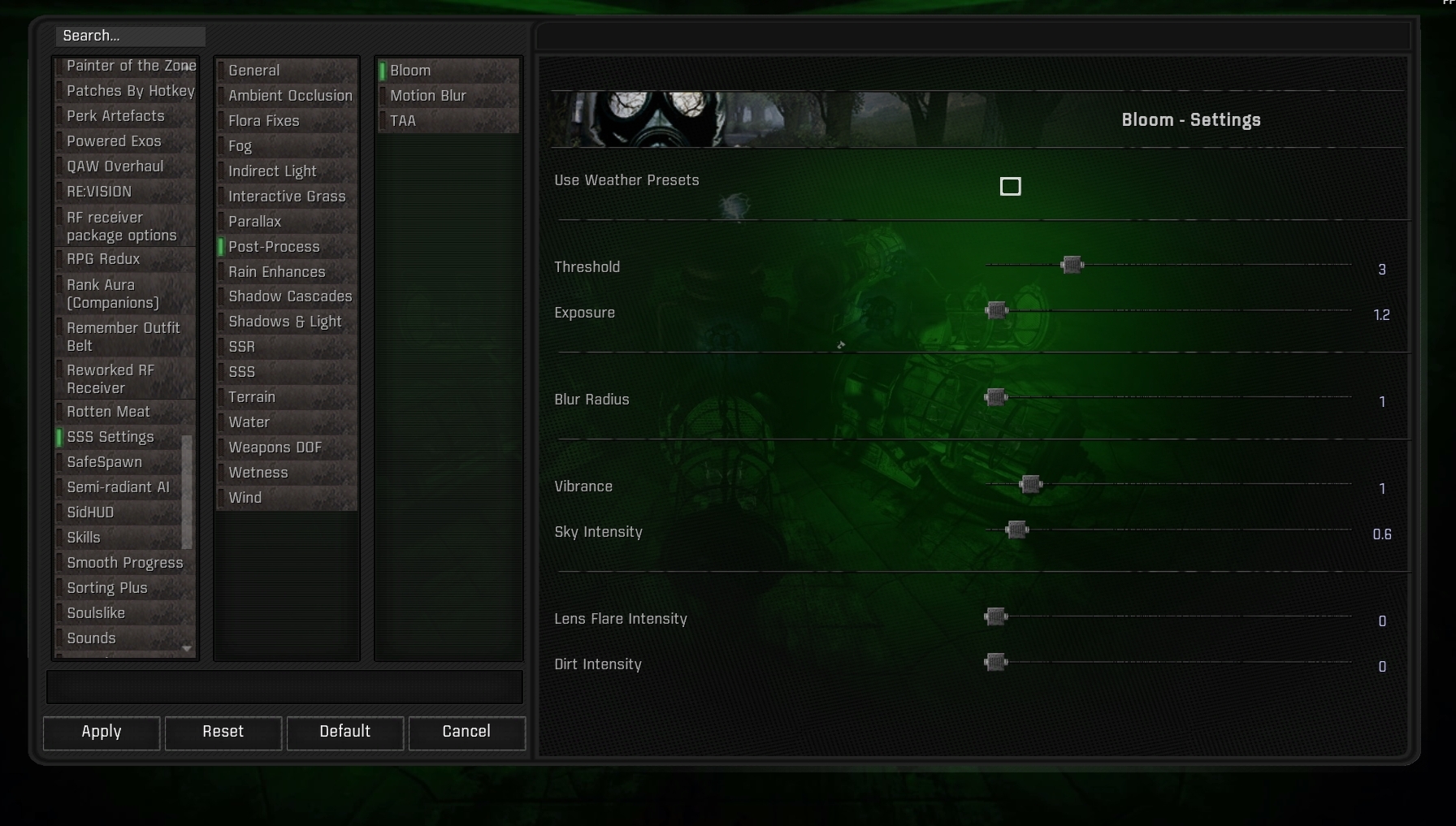

 vocal pier
burnt basin
these for example
vocal pier
burnt basin
these for example
any recommendations for atmospheric/horror reshade vibe?
Which looks like this
 hard umbra
Most Reshades tend to look a lot better in screenshots than in actual gameplay.
I tried expedition, vorg, aggressor, piknik reshade and after fiddling a little with them i went back to gamma reshade cuz it just looks best while actually playing the game
shrewd bramble
Screenshots are just specific scenarios which look good. You won't be happy with every occasion, sometimes it'll look washed out, sometimes so saturated, too dark, contrasted and more like that. Weather changes and with that, light and colors look different, there's interiors, places with different palettes. That's why most of the time embracing a game's artwork is good and if you really want it, using a preset which doesn't change things drastically works or experience is the best, make your own presets for different occasions.
cloud island
vocal pier
Which looks like this
GAMMA one can look like this if you increase Ambient Light and Bloom effects a lot
burnt basin
vocal pier
any recommendations for atmospheric/horror reshade vibe?
Try out some gradient presets from Enhanced shaders, they can help a lot
 merry current
burnt basin
Try out some gradient presets from Enhanced shaders, they can help a lot
merry current
burnt basin
Try out some gradient presets from Enhanced shaders, they can help a lot
wait
enhanced shaders has presets?
thats in the mcm, right?
vocal pier
How do I revert back to using gamma reshade because I definitely replace some file while using other reshade
burnt basin
vocal pier
How do I revert back to using gamma reshade because I definitely replace some f...
GAMMA RC3.Grok's Modpack Installer\G.A.M.M.A\modpack_patches\bin
that's where the original reshade is saved
swift robin
vocal pier
any recommendations for atmospheric/horror reshade vibe?
U can try PROSPERITY Reicarnation...its a full pack...u can choose from different reshade presets
vocal pier
swift robin
U can try PROSPERITY Reicarnation...its a full pack...u can choose from differen...
the reshade dont have the legacy option
shrewd bramble
Wdym by legacy?