#╟🎑reshades
1 messages · Page 41 of 1
 slow copper
 lost ice
I like depressing af too lol
 tender cobalt
Impressed with your reshade preset mate. Willing to share the .ini? Cheers 🍻
tender cobalt
You get it with zone reality 3 retexture mod. The link to 1K version of the mod:
https://drive.google.com/u/2/uc?id=1T-MdiE4Cf9z631Sth8Y92ZP2zOZMesW9&export=download
 green lake
Late fall texture pack
there is one that's public
actually 3
but his most recent was from a month ago
 tawdry folio
green lake
there is one that's public
tawdry folio
green lake
there is one that's public
well, i was under the impression that its not, my apologies
green lake
green lake
@swift robin
you need this too
you should go into the quint regrade settings and turn off color remapping
o adjust it to your settings
because in that reshade it makes grass look very ggreen
note that this isnt the current one he
is using
capa im pretty sure is using a different reshade, but it looks fairly similar
i would just tweak the settings

i twaked this reshade, and I use adaptive tonemapper on top of it
at lower settings
but idk
we'll just have to wait until Capa desides his recent reshade is ready for release
 sudden panther
green lake
sudden panther
green lake
what texture mod are using? I love the light winter look, doesn't look like Project Invenro or the other winter mods I've seen
green lake
sudden panther
what texture mod are using? I love the light winter look, doesn't look like Proj...
late fall
literally made by the guy i pinged
same guy that inverno
sudden panther
oh cool, thank you!
 rigid pendant
Sorry for the late response! So this is just vanilla gamma with my own custom reshade, I can share the Ini if you would like
rigid pendant
tender cobalt
Impressed with your reshade preset mate. Willing to share the .ini? Cheers 🍻
For sure! Give me a minute to get on the PC and I gotchu
I gotchu give me a minute!
For anyone else who might be interested in my reshade im dropping the .ini here, some attached pics for preview (tweaked for all basic light settings at 1)❤️ These screenshots are from vanilla G.A.M.M.A using only reshade, the preset itself is very performance friendly


Happy hunting stalkers ❤️
 brave temple
rigid pendant
Happy hunting stalkers ❤️
brave temple
rigid pendant
Happy hunting stalkers ❤️
How heavy on the fps is this reshade
rigid pendant
Not heavy at all
U lose 10-15 fps with all the effects on vs off, Ill be at like 70 ish with it off and only drops me to 60 with it on typically
Whereas something like atmosr+ just guts your frames by 40
slow copper
@rigid pendant hey quick question, how do you apply a reshade?
rigid pendant
As in, where do you put the file I gave you or like once you're in game how do you access the reshade pane?
rigid pendant
download the file I gave you and put it in Anomaly/bin, and then boot up the game once in the game hit home on your keyboard and select my preset from the dropdown at the top
brave temple
-_-
rigid pendant
Oh good lol, otherwise I was just going to say you don't have reshade installed
If home wasn't working
And just make sure the .Ini is in your anomaly/bin and you're good to go you can just select kyraxs zone from the drop down and you should be set
slow copper
alright im going to try it out
rigid pendant
For sure !
brave temple
well thats weird, I tend to change a few things even when Im playing without shaders presets, but something isnt working right now and I cant open the reshade menu
rigid pendant
Hmm that's weird I've never encountered that, my only assumption is maybe you somehow changed the bind to open the reshade menu?
If anything you might have to just reinstall reshade using the gamma launcher
brave temple
rigid pendant
Hmm that's weird I've never encountered that, my only assumption is maybe you so...
I also believe the same, but not exactly, I use a 60% keyboard without quite a few keys, + I use a diff keyboard layout
rigid pendant
What key opened It before For you? When it was working

 brave temple
rigid pendant
What key opened It before For you? When it was working
brave temple
rigid pendant
What key opened It before For you? When it was working
it was working on the correct key which is weird, its the ;: key while holding fn as well

 rigid pendant
green lake
rigid pendant
green lake
Is it easy to reposition weapons with the mod?
green lake
rigid pendant
Is it easy to reposition weapons with the mod?
yeah you can find it in mods posting
its a whole pack of repositions for gamma
rigid pendant
Ty!
 swift robin
whats better, saiga or spas 12
green lake
saiga
rigid pendant

 tender cobalt
rigid pendant
For anyone else who might be interested in my reshade im dropping the .ini here,...
tender cobalt
rigid pendant
For anyone else who might be interested in my reshade im dropping the .ini here,...
Thanks buddy 👍🏼
rigid pendant

 compact belfry


 gaunt grail
@rigid pendant added some spice ontop of yours including Norfair's multi LUT, ADOF, and TFAA


 glacial oxide
rigid pendant
For anyone else who might be interested in my reshade im dropping the .ini here,...
glacial oxide
rigid pendant
For anyone else who might be interested in my reshade im dropping the .ini here,...
does this hurt fps?
 quiet imp

 robust adder
glacial oxide
does this hurt fps?
robust adder
glacial oxide
does this hurt fps?
gpu mostly
if u have it at max load already
then ye its gonna hurt fps
 tidal phoenix
green lake
tidal phoenix
green lake
How do you adjust the gun location ?
 misty echo
looks like hunter 2.0

 cobalt parrot
hey man does this still work?
 placid falcon
@gaunt grail what is lut adof tfaa
rigid pendant
glacial oxide
does this hurt fps?
the reshade is very performance considering, roughly 10-12 frame loss with all effects active vs none
rigid pendant
gaunt grail
<@234007863696162816> added some spice ontop of yours including Norfair's multi ...
Gorgeous.
rigid pendant
glacial oxide
does this hurt fps?
I would definitely say go ahead and try it out, very minimal performance loss
gaunt grail
@placid falcon not in the best place to show at the moment but here's @rigid pendant by itself

here's with my additions

tonemapping + multi LUT from Norfair. corev3 is the first, breeze is the second


ADOF from phroZac to blur stuff in the background when you're looking at an object (looking at the bush here)
 rigid pendant
the multi lut is very nice there for the blueish green hue 
I like adof visually but it was actually affecting my visibility in gameplay so I just said screw it 
gaunt grail
i play in 2k so these shots also look weird in the discord preview
rigid pendant
yeah i play at 1440p too the snips never look as good as in game
gaunt grail
the detail is just insane
 gaunt grail
i do have ZR3 and aydin's summer grass / fall trees on just for the northern maps
rigid pendant
ah okay yeah I thought that looked a lil insane for vanilla
ZR makes sense
good shit though bro, glad you decided to go with mine as a baseline ❤️
gaunt grail
@rigid pendant i was doing brain scorcher last night and came out into radar in the middle of the night no moon. i swapped to yours and the dark levels were really well balanced compared to what i was using before. great job!
rigid pendant

placid falcon
@gaunt grail how do you add that
gaunt grail
placid falcon
<@430903255883841545> how do you add that
install norfairs most recent reshade here #1162285292070379530 message and then heres my ini
 waxen quarry
s
rigid pendant
gaunt grail
<@234007863696162816> i was doing brain scorcher last night and came out into ra...
I used your values for your ADOF cause I could never get mine to look good, props
Looks great 👌


 slow copper
gaunt grail
slow copper
gaunt grail
bottom left pic literally looks like real life


 livid meadow
should i be getting like 75ish fps with fairly constant drops to 45-55fps with a 4060ti and an i7 9700
nofair reshade
brainjackets ingame visual settings but grass is set lower
 wide dune
rigid pendant
wide dune
rigid pendant
W
glacial oxide
what best foliage season?
 dull sleet
glacial oxide
what best foliage season?
dull sleet
glacial oxide
what best foliage season?
depends on your preference. Summer/spring with tall grass/high density looks good but can make combat difficult
quiet imp
tawdry folio
which reshade is that?
phrozac badlands
tidal phoenix
glacial oxide
what best foliage season?
above 0,7 combat and looting get's really hard but density doesn't really effect combat for summer
Spring 1.0 is good hard for combat but lower density sort of cancels it out
 buoyant vine
ready to be overwhelmed by mutants at the swamps
 placid falcon
@glacial oxide i like spring. It looks really good
 nova frigate
@nimble fern you may want to try making a preset from scratch with the fresh reshade install. try just one effect at a time and see how your performance is impacted and if it's acceptable to you or not. if it's acceptable, you know you can try adding some more effects from the default GAMMA presets, but if not, well... no using those effects :p
 tiny jackal
I've been looking to try out some shaders but I've seen people on about using HD model textures and things, aren't these already included in GAMMA and would you necessarily need them to make the shaders come alife more (was wondering as well if you can activate two presets at the same time or merge them)
 nimble fern
nova frigate
<@238127552571375617> you may want to try making a preset from scratch with the ...
nimble fern
nova frigate
<@238127552571375617> you may want to try making a preset from scratch with the ...
But I'm sooooo lazy. I tried that one time and I think my favorite is fast effects with fake GI, which is extremely performant. I think that's the only non-negotiable one.
nimble fern
tiny jackal
I've been looking to try out some shaders but I've seen people on about using HD...
You cannot active two presents at the same time but you could manually merge them if you have the time.
HD models and textures being included in GAMMA is some yes, some no. Some look really bad and it's up to Grok if he wants to include a given mod or not. I personally agree with his taste a lot so, no need to change any of that.
But the direct answer to that question is no, you don't need any textures or HD models to "bring the shaders alive"
tiny jackal
nimble fern
You cannot active two presents at the same time but you could manually merge the...
I've had a long day so maybe I could've explained a bit better but that's the answer I was wanting, thank you;
been messing around with the body cam preset and there's some custom fx parts from others that would look gorgeous once I've had a mess about, will post a print screen for anyone interested in-case anyone wants to try it
 slow star
cobalt parrot
hey man does this still work?
slow star
cobalt parrot
hey man does this still work?
yep
 frail garden
Is there a way to eliminate (or minimize) the blur-ish effect TFAA applies when you move? Its hard to describe but I think I notice it most on rain puddle reflections
cobalt parrot
frail garden
Is there a way to eliminate (or minimize) the blur-ish effect TFAA applies when ...
enable motion vectors or DRME and place it above TFAA
if it's still not enough, use motion vectors and change the settings to "full resolution"
will look better but it costs frames
frail garden

tawdry folio
DRME is better but more performance heavy, from my experience "full res" for either of those is a must
 hollow forge
 rigid pendant
 rigid pendant
 rigid pendant


 rigid pendant

 fringe geyser
Considering sticking one on my game fellas, any low-impact recommendations? Kinda sticking around 50-60 FPS (capped anyways so no idea on real perf) so i'd rather not play with too much fire
rigid pendant
fringe geyser
Considering sticking one on my game fellas, any low-impact recommendations? Kind...
Theres a few good options, you can try #1162285292070379530 message - Norfair's Core V3, or another popular one is #╟🎑reshades message, I myself also have a preset, I find I get the best performance using it due to the fact it utilizes more performance effective AA - Ill attach the .ini for that as well if you want to give it a try
fringe geyser
Thanks!
fringe geyser
rigid pendant
Theres a few good options, you can try https://discord.com/channels/912320241713...
Any notes i should keep in mind for the game's internal settings?
rigid pendant
Disable the in game anti aliasing - smaa included as well as all the SSAO settings should be disabled
world rendering distance is important to balance because too low things will start popping in and too high might be too much of a performance hit
disable the mask overlay in Visual > Player for a free 5 fps
make sure vsync is disabled and youre playing in fullscreen
Otherwise take a look through https://discord.com/channels/912320241713958912/1089156086172499978 to see if theres any optimizations you may want to try, although if youre looking for a reshade a lot of these tips are only going to make your game look worse, some are potentially quick free frames though.
 pine trench
I just did the 'black screen' fix, but all my reshade presets are gone, anyone know where I'd go to get them back?
 rare fractal
tell me the default settings in this preset, accidentally reset it

or give me file of this preset
nova frigate
rare fractal
or give me file of this preset
look in your GAMMA mod organizer folder, for example: "C:\Games\Stalker\GAMMA.Grok's Modpack Installer\G.A.M.M.A\modpack_patches\bin"
nova frigate
rare fractal
or give me file of this preset
also in English typically such questions include "please" "thanks" etc 🙂
 stone ivy
 flat zealot
Sorry if this has been already posted but since the new update, there is something I can only describe as a shimmer that shows up on the ground when I am moving. It appears to look like a form of TAA but seems to be highly localized to a strip in the middle of my screen (I have recorded it and confirmed this was happening in the rendered frames and is not a hardware issue). I've tried changing random AA settings (both in game and with various reshade effects) to no real effect. Anyone else experiencing something similar or have any known solutions to this issue?
The effect is very similiar to what AA looks like with trees swaying and you have AA at 0x, a sort of off by one pixel pattern that looks pretty bad. Thing is, with the ground it's even worse because of the colors involved.
 ionic elbow
any recs. for gamma/inverno?
rare fractal
nova frigate
also in English typically such questions include "please" "thanks" etc 🙂
I left a reaction to help
 faint ore
hey guys could someone recommend me some good reshades to try?
 mental vessel
Good day, stalkers. Simple question: where should I get filmicsharpen.fx for PerfectPerspective shader? It comes with GAMMA, nothing tricky
 main barn


 mental vessel
Hello again. Why Reshade menu doesn't see Filmicshapren.fx? I checked, directory are right 100%
Didn't touch anything

 fierce tulip
 mystic gulch
clarity+ is giving me urge to touch my pp

 shadow herald
Can someone with rain puddles and wet surfaces working send me the User.ltx you're using?
I disabled a old shader i was using "Jaku's Improved Shaders" because it isnt working anymore with SSS 18, i have some custom values in my user.ltx that i think disabled these effects
 rapid turret
Does gamma come with a shader installed or something you can tweak? Or something I can enable with the menu i can enable as a starting point and play with, because damn these screenshot look amazing 
lost ice
rapid turret
Does gamma come with a shader installed or something you can tweak? Or something...
press the home key and start goofing around in that menu, see what happens!
 sonic hazel
mystic gulch
clarity+ is giving me urge to touch my pp
sonic hazel
mystic gulch
clarity+ is giving me urge to touch my pp
Is clarity+ built into the Gamma pack (clicking home) or did you get that elsewhere?
 rustic rampart
so ive loaded up my game today and am stuck like this. Everything works, game isnt frozen but I cant see anything. I think ive narrowed it down to reshade. home button doesnt work anymore and so Ive attempted to reinstall reshade but it doesnt seem to do anything. Anyone have a suggestionn?
 rigid pendant
Disable each effect individually in your preset, see if one of them specifically is causing it
sonic hazel
Having a hell of a time finding a preset I like. Anybody have any good recommendations or even ini’s?
rigid pendant
sonic hazel
Having a hell of a time finding a preset I like. Anybody have any good recommend...
#╟🎑reshades message Is a popular reshade, norfairs core V3 is included with gamma now and is very popular, I also have a reshade ill include the .ini for in this message so you can try it out as well.
rigid pendant
sonic hazel
Having a hell of a time finding a preset I like. Anybody have any good recommend...
Finding a good base preset you like and tweaking from there is also not a bad idea.
sonic hazel
rigid pendant
Thank you, Stalker 🙏🏻
rigid pendant
sonic hazel
Thank you, Stalker 🙏🏻
Updated the link in my first message, it went to the wrong message, my bad. Should take you to the hunter reshade message now

 cobalt parrot
slow star
yep
cobalt parrot
slow star
yep
sorry for bothering you but do you have any idea why the scope_factor thing wouldn't work?  no matter what value I put it in it doesn't change to PiP
green lake
cobalt parrot
sorry for bothering you but do you have any idea why the scope_factor thing woul...
why would you want PiP
cobalt parrot
looks cool
green lake
cobalt parrot
looks cool
it halves your fps
literaly
unless you have like
144 fps to spare
misty echo
green lake
which reshade is that?
misty echo
ok
green lake
still working out some kinks and twists though
misty echo
np just curious
cobalt parrot
I've had it enabled before and it wasn't that bad, I just can't for the life of me figure out why I can't get it working again
cobalt parrot
gotta
slow star
cobalt parrot
sorry for bothering you but do you have any idea why the scope_factor thing woul...
That's weird!
In default gamma, it should work by default ~ scope_factor of 0.5 for example zooms quite a bit inside the scope while maintaining a far FoV outside of it , and no, it does not affect your FPS at all., That's the beauty of SDS. Especially on higher resolutions, the shader trick downside (pixelation) is not that apparent.
Make sure it's enabled inside Options > Modded Exes
 slow star
👍 np yeah he meant the "PiP" effect from SDS, which simulates the real pip
cobalt parrot
yeah idk what's up everything looks alright it's almost like the console command just isn't having any effect
it's alright, I need to do the big update anyway
maybe it'll fix itself once I'm on the newest ver
thank you for your help though!
slow star
cobalt parrot
thank you for your help though!
No problem, anytime caj.
Let me know if you were able to fix it!
just in case, my SDS settings (99% default gamma, i just use scope_factor 0.5 and scope_ca 0)
 swift robin
Hello! I use qUINT_dof with manual focus depth. Does anyone know a setting (if its possible) to not make the sky out of focus when i use it?
tender cobalt
@rigid pendant Hey mate I'm really loving your reshade preset. It's not very taxing on the system, and the visuals are great! Looking forward to any changes (if at all) you're gonna make to the preset. Nice work bud! 👍🏼
rigid pendant
tender cobalt
<@234007863696162816> Hey mate I'm really loving your reshade preset. It's not v...
Glad you like it 💯💯
 rigid pendant
tender cobalt
<@234007863696162816> Hey mate I'm really loving your reshade preset. It's not v...
rigid pendant
tender cobalt
<@234007863696162816> Hey mate I'm really loving your reshade preset. It's not v...
The above picture is basically the same preset but going for more of a radioactive color hue, just playing around with what looks ood
good*
gaunt grail
swift robin
Hello! I use qUINT_dof with manual focus depth. Does anyone know a setting (if i...
check the phrozac presets for ADOF settings or play around with the r_dof console commands maybe?
swift robin
gaunt grail
check the phrozac presets for ADOF settings or play around with the r_dof consol...
i use the presets from phrozac and it works fine when i use Autofocus. But i want to use Manual focus depth. I think it would be cool effect to have the sky in focus and have som dof on ground, but i dont know, maybe it looks bad :p
gaunt grail
swift robin
i use the presets from phrozac and it works fine when i use Autofocus. But i wan...
try cinematicDOF? here's some settings to get you started i didn't really tweak much. far plane max blur at 0 ensures the far stuff is always in focus
[CinematicDOF.fx]
AutoFocusPoint=0.500000,0.500000
AutoFocusTransitionSpeed=0.200000
BlurQuality=5.000000
BokehBusyFactor=0.500000
FarPlaneMaxBlur=0.000000
FNumber=22.000000
FocalLength=251.000000
FocusCrosshairColor=1.000000,0.000000,1.000000,1.000000
FocusPlaneColor=0.000000,0.000000,1.000000
HighlightAnamorphicAlignmentFactor=0.000000
HighlightAnamorphicFactor=1.000000
HighlightAnamorphicSpreadFactor=0.000000
HighlightGainFarPlane=0.500000
HighlightGainNearPlane=0.000000
HighlightThresholdFarPlane=0.000000
HighlightThresholdNearPlane=0.000000
ManualFocusPlane=150.000000
NearPlaneMaxBlur=0.270000
OutOfFocusPlaneColor=0.800000,0.800000,0.800000
OutOfFocusPlaneColorTransparency=0.700000
PostBlurSmoothing=0.000000
ShowCoCValues=0
ShowOutOfFocusPlaneOnMouseDown=1
UseAutoFocus=0
UseMouseDrivenAutoFocus=0```example above
 swift robin
gaunt grail
try cinematicDOF? here's some settings to get you started i didn't really tweak ...
swift robin
gaunt grail
try cinematicDOF? here's some settings to get you started i didn't really tweak ...
Nice thank you! im gonna try out CinematicDOF. More options too tweak there.
mystic gulch
sonic hazel
Is clarity+ built into the Gamma pack (clicking home) or did you get that elsewh...
#╟🎑reshades message its from hunter 2.0 reshade
i bet you know how to install it
you have a lot of options there to choose your liking
but clarity+ is god damn
oh and i also highly recommend using zone reality 0.3 texture pack
 lean chasm
any1 know a nice reshade thats not to intensive on fps for Project_inverno?
tender cobalt
rigid pendant
The above picture is basically the same preset but going for more of a radioacti...
Nice! Seeing all these peeps talking about dof...have you played around with any reshade dof settings to add to your preset?
rigid pendant
tender cobalt
Nice! Seeing all these peeps talking about dof...have you played around with any...
Yeah I have a version with DoF working, I'll share it with ya later td when I'm home if ya want
swift robin
green lake
give me texture packs to use chat
You might want to check out the Svarog mod I posted in the #1092834455300866068 . Just load it after the DAR and you'll have colored Svarog anomaly spots and artifacts will be just yellow dots intead of a massive crossed blob
green lake
swift robin
You might want to check out the Svarog mod I posted in the <#1092834455300866068...
cool
 nova coral
mystic gulch
clarity+ is giving me urge to touch my pp
nova coral
mystic gulch
clarity+ is giving me urge to touch my pp
Please could you post this lol
nova coral
mystic gulch
https://discord.com/channels/912320241713958912/927860562677878795/1145688336678...
If i installed INVERNO would it work after installing zone reality
mystic gulch
if you reset your shader cache
it should
i mean inverno is not compatible with zone reality
its one or another
 marsh mural
just found this message, so you are actually overwriting some textures from ZR with GTR? Is that the original mod or the optimized one? https://www.moddb.com/mods/stalker-anomaly/addons/global-texture-rework-gtr-optimized

ModDB
People who never heard of the original Global Texture Rework (GTR) mod ,basically it is a graphical mod that changes all the textures of the game with much better looking one .But it is a heavy mod that cause huge fps loss and stutters .Therefore, i...
slow star
marsh mural
just found this message, so you are actually overwriting some textures from ZR w...
I'm using the original GTR beta (not the optimized one)
and i'm making sure ZR overwrites it
marsh mural
if that got overwrite, why are we using GTR
slow star
I'm using GTR as a base because it will cover any texture that ZR is not modifying
Overwritting doesn't mean it's completely discarting the ovewritten mod
just the conflicting files
marsh mural
Is that a hard fps hit for GTR?
slow star
For me no
idk how it's gonna be for others
it just takes a little longer to load the game
marsh mural
ok cool, cuz my gpu is burning with ZR lol
slow star
Oh then dont use GTR non-optimized
rigid pendant
@gaunt grail drop a pic of how you've got your setup looking now, Ik you've been doing some modifying
 marble relic
Direct me to the correct place if needed, but how do I get the scope zoomed in without the background being zoomed in?
 azure canopy
The zone + old footage preset looks cool


 swift robin
mystic gulch
clarity+ is giving me urge to touch my pp
swift robin
mystic gulch
clarity+ is giving me urge to touch my pp
Can i get the reshade presets for this as well as required shaders if necessary? 😮
 ashen lodge
thanks for the hunter link trying it now and looks great

i never have a nice blue sky though

 gaunt grail
rigid pendant
<@430903255883841545> drop a pic of how you've got your setup looking now, Ik yo...
gaunt grail
rigid pendant
<@430903255883841545> drop a pic of how you've got your setup looking now, Ik yo...
I will in a bit still at work. Mostly optimizing the faster preset to replace RTGI
 topaz girder
Is this the appropriate place to ask how to install shaders?
tender cobalt
rigid pendant
Yeah I have a version with DoF working, I'll share it with ya later td when I'm ...
Perfect! 😀
green lake
topaz girder
Is this the appropriate place to ask how to install shaders?
what kind of shaders
for reshade?
or something like SSS
topaz girder
um honestly i was just kinda jealous of everyone's screenshots n stuff.lol was wonderin if it was a mod db thing or if its all just custom settings
gaunt grail
rigid pendant
<@430903255883841545> drop a pic of how you've got your setup looking now, Ik yo...
last modification. heavy / light


current modifications. heavy / light


ill try and find a better scene its early AM here but mostly got the lighter looking better and increased FPS on em both with grass shadows + max view distance
topaz girder
green lake
what kind of shaders
reshade, i got no clue how that works, keep seeing people with it open and using ti but im not sure where to start
gaunt grail
replaced RTGI with blooming HDR on the light one to simulate some of the RTGI light diffusion
green lake
topaz girder
reshade, i got no clue how that works, keep seeing people with it open and using...
press your home button
first look though all the normal presets that come with gamma
gaunt grail
gaunt grail
ill try and find a better scene its early AM here but mostly got the lighter loo...
old light > new light

 slow star
Guys,
How do you feel about making a Google Sheets with a list of all the reshade presets from the community available and their download link? (be it with their discord comment link or whatever) And a quick guide tutorial on top, so whenever newcomers need help, we can just link the google sheet?
@rigid pendant @gaunt grail
gaunt grail
gaunt grail
replaced RTGI with blooming HDR on the light one to simulate some of the RTGI li...
old heavy > new heavy

 slow star
We got many presets that should be easy to access to everyone, but they're easily forgotten by discord's fast-paced message nature
gaunt grail
slow star
We got many presets that should be easy to access to everyone, but they're easil...
i think thats a great freakin idea
rigid pendant
slow star
Guys,
How do you feel about making a Google Sheets with a list of all the resha...
That sounds like a good idea, I'm not familiar with sheets but I'm sure it's easy to use, it would just be about compiling all the files really
In an easy way to access
slow star
Yeah it's basically an excel where you can collab with other people (you allow them to edit and done)
gaunt grail
another option would be creating a github repo
slow star
If any of you both have time to do this, I personally think it would help everyone who wants to improve their graphics and doesn't know how to navigate discord
The problem with a PR, i feel like it'd be less accessible to some people
rigid pendant
A pinned message we can just direct newcomers too with all the popular community reshades would be 
slow star
Google sheet is basically > They open the link, see a list > click download on any of them and try it out
gaunt grail
github would just give people the full zip to download but im ok with sheets as well. where is ideal to host files for sheets?
just drive?
green lake
 slow star
gaunt grail
github would just give people the full zip to download but im ok with sheets as ...
slow star
gaunt grail
github would just give people the full zip to download but im ok with sheets as ...
the problem with this is approach ~ I (personally) feel like re-distributing the presets would get tricky, especially when some authors are inactive or someone could be against that, due to update or personal reasons
A direct link to the discord message should work, right?
gaunt grail
works for me!
rigid pendant
A direct link to a discord message where they can download the .Ini, as long as they have discord they can get the file
slow star
gaunt grail
just drive?
Yeah or mediafire IMO
Drive is good too, if you have an acc
Sounds good. Well, and if anyone is reading this, please list up all the (with comment link) reshades the community has made so far (publicly available) that you know of
Currently I can't do this google sheet due to some time constraints but if one of you guys do it, that would be great. Just share the link here when you have it
gaunt grail
slow star
Currently I can't do this google sheet due to some time constraints but if one o...
yep ill ping you in a bit
slow star
No hurry. I'm in a bar 😄
BTW Great work you two on the reshades, keep it up
Dont forget about Lars' preset
0score too, has a thread, he left sadly, but still, he spent a long time on those
rigid pendant
Yeah we can start with a bunch of the main popular ones and just keep adding stuff over time that gets dug up or made
rigid pendant
That's awesome !
Im new to the server by measure so there's probably a lot I haven't seen
I look forward to getting them all displayed somewhere they don't get forgotten
slow star
rigid pendant
I look forward to getting them all displayed somewhere they don't get forgotten
Absolutely! anyone will be able to just link this google sheet when somebody asks, and save like 20 minutes of explanation☕
We can even add preview images (links to i.imgur) to each preset, on a cell.
slow star
Yep
cobalt parrot
you guys are doing the lord's work
slow star
dont forget about an imgur gif showing how to drag and drop into anomaly/bin which some people have a hard time with
cobalt parrot
or how to enable tfaa
rigid pendant
The tfaa guide is a must 

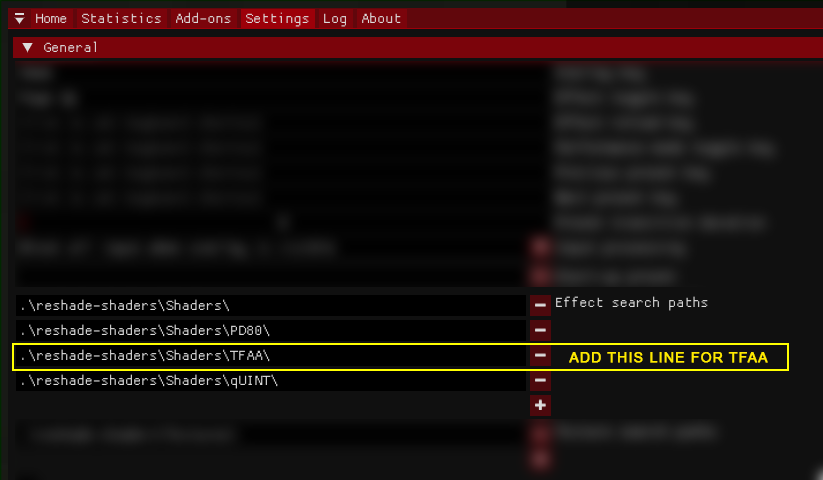 slow star
https://i.imgur.com/GlBCnmg.png
slow star
slow star
https://i.imgur.com/GlBCnmg.png
I did it like this and not with recursive searching (the /** thing) because some people have duplicated shaders and they will mess it up with that other method
It's gonna save us all a lot of repeated questions in the long run
rigid pendant
Yeppp
slow star
Recursive search is better though, if they have a clean gamma reshade-shaders folder
ever since I explained it like this, I had basically zero people asking about duped shaders
slow star
slow star
https://i.imgur.com/GlBCnmg.png
For example, with this method you miss adaptivefog, and a few filmic passes. (i dont use them) but maybe y'all do.
I'll leave it up to you, which method to use!
green lake
slow star
I did it like this and not with recursive searching` (the /** thing)` because so...
yeah tha thappened to me too
rigid pendant
I can't afford to use TFAA and motion vectors 😭
slow star
Eh, I dont use it anymore :p at least with Aydin's grass'
rigid pendant
Honestly shimmery trees don't look as bad If you do some peripheral dof magic mixed with some tweaked regular AA, I noticed shimmering trees are by far the worst when using the winter trees with no leaves
slow star
Just iSMAA and some good old man vision
rigid pendant
And it's a bunch of sharp branches
slow star
Exactly
slow star
Absolutely, go to older textures and it's painful
Aydin did some black magic with the LODs on his grass/leaves textures, thats why it looks so good without any AA
rigid pendant
It honestly looks so good, I just use the martymods SMAA and fxaa and it costs like no frames
Good deal to me 👌
slow star
Yes, same here
rigid pendant
Also peripheral DoF from SSS in the MCM settings is actually super nice if that's your kind of thing
Ik you know this
I'm just saying as a general praise of the feature 😁
rigid pendant
When you aim down sights 
slow star
Well, not for ads, I have it only for far distance and peripheral
rigid pendant
DoF works magic to keep the background from getting too weird looking and unrendered
slow star
 slow star

rigid pendant
I feel like another good thing to add to the sheet would be a list of fps tweaks that don't really murder visuals
Like the shadowmap stuff
Etc and like the dynamic despawner
And zcp
slow star
Yeah good idea, maybe the sheet should have either, sections OR just 2 or 3 pages/tabs at the bottom
swift robin
slow star
https://cdn.discordapp.com/attachments/920013807479296042/1171257999621361704/No...
i want my game to look like that
rigid pendant
And maybe some tweaks in SSS but idk what is safe to mess with as far as that goes or not
slow star
rigid pendant
And maybe some tweaks in SSS but idk what is safe to mess with as far as that go...
When sunn posts it tell him to make you an editor and add those things, sounds good
rigid pendant
Yep yep
The one stop shop to reshading without frying your gamma install or computer
slow star
swift robin
i want my game to look like that
that's "Ghost" lut from my MULTI preset (check my thread) with it's ADOF effect turned ON
SSS peripheral DOF increased
4k screenshot
foggy weather
gotta go, night's getting good 🍺 cya and thanks for making the google sheet guys.

 topaz girder
couldnt find the keybind in game or in #│💻keybinds-in-gamma, what opens the brightness/cont/gamma sliders?
green lake
topaz girder
couldnt find the keybind in game or in <#914216733810761798>, what opens the bri...
press esc
go to settings
press basic light settings
topaz girder
Thx again.
slow star
green lake
looking good
green lake
slow star
looking good
Inspied by Capa
and thanks
i would be playing on 4x DSR like capa is
but id rather be on 2.25 DLDSR for my performance
im still getting 1620p though
green lake
slow star
How much fps?
well i am fiddling with my grass rn
so my performance is going down a little
im at around 40 fps with reshade on
but i have gras shadows on at grass size at 1

in cordon i would be getting like 60 frames
but with 4k on i was getting 40 frames in cordon
slow star
You should definetely post the preset when you finish it
So it's on the google sheet list the guys are building
green lake
ok
gaunt grail
@slow star i gotta get off but heres a quick pass. edits should be open lmk if i missed anything. screenshots would be nice but i'm not sure the best way to include them https://docs.google.com/spreadsheets/d/1psiAYFNaGSYs2j5Gbd6p67SyVi6PQvhr9vSUOiyFATw/edit?usp=sharing

Google Docs
GAMMA Reshades
S.T.A.L.K.E.R. GAMMA Reshade Database
Author,Name,Included by default?,Textures?,Last Updated,Notes,Link
Norfair,Norfair Core V3,Yes,Yes,12/01/23, 9:01:34,https://github.com/Grokitach/Stal...
slow star
GJ
note to others: to add screenshots to presets ~ upload image to imgur > right click > open image > copy url link (should be i.imgur)
and put that link in a cell next to the presets
Thanks Sunn.
gaunt grail
would links to discord assets be publicly accessible? ill go through and take screens for each one tomorrow but its probably not a job i wanna uphold forever lol
green lake
its time to add some extra effects to my cappa reshade copy
slow star
gaunt grail
would links to discord assets be publicly accessible? ill go through and take sc...
Yes, the link to the file itself is public and accesible from the web, IIRC
for example if you right click on hunter2.0's .zip link, it should say "Open link" or "Copy link"
https://cdn.discordapp.com/attachments/927860562677878795/1145688330428743730/Hunter_2.0_Reshade.zip
And this is downloadable from anywhere
you can remove the url param (from the ? sign onwards) and it works aswell
Maybe it could show two cells for links: One for the direct download (like above, the .zip from discordapp)
And a second one with a link pointing to the OG comment/thread where the file was located. (In case that the author had some notes/instructions about the preset.)
This second cell could be shorter in width.
rigid pendant
Making a message for a version of my reshade that has DoF and slightly altered color and lighting that I think looks a bit better ❤️
I want to add a spot for the link to this message above but I dont want to mess up the formatting 💀
gaunt grail
tomorrow ill replace the link / download / screenshot columns with 🔗 💾 📷 emojis but i haven't used sheets in a minute and looks like i gotta whip up a script to auto change the links
slow star
rigid pendant
I want to add a spot for the link to this message above but I dont want to mess ...
You can insert a new row if you want

If thats what you meant
 slow star
insert 1 row above yea
rigid pendant
gaunt grail
<@264607540430635008> i gotta get off but heres a quick pass. edits should be op...
If anyone with the capability to pin sees this, that would be huge!
slow star
I'd say once its clean enough and polished, tag a moderator
rigid pendant

Another foggy day in the zone, but the reduced visibility results in increased frames im pretty sure so I cant complain
green lake

 dusty bone
rigid pendant
dusty bone
rigid pendant
What gun is this?
swift robin
Can you recommend shaders for an average laptop with the following characteristics: GTX 1650, Ryzen 7 3750h, 16gb RAM, SSD.
I would like 60 fps on 1920 1080
misty echo
swift robin
Can you recommend shaders for an average laptop with the following characteristi...
also permanent 60+ fps is a pipe dream
swift robin
thank you
misty echo
ye
rigid pendant
dusty bone
What gun is this?
That is a supressed AK12
dusty bone
Thought it looked like an ak platform but couldn’t quite tell

 heady compass
rigid pendant
heady compass
rigid pendant
nice send your settings reshades
rigid pendant
heady compass
nice send your settings reshades
This is my most up to date preset, theres also one without depth of field blurring, ill put below this one
https://docs.google.com/spreadsheets/d/1psiAYFNaGSYs2j5Gbd6p67SyVi6PQvhr9vSUOiyFATw/edit?usp=sharing Other popular reshades can be found in this spreadsheet with links to the downloads.
Google Docs
GAMMA Reshades
S.T.A.L.K.E.R. GAMMA Reshade Database
Author,Name,Included by default?,Textures?,Last Updated,Notes,Link,Download,Screenshot
Norfair,Norfair Core V3,Yes,Yes,12/01/23, 9:01:34,https://githu...
heady compass
rigid pendant
This is my most up to date preset, theres also one without depth of field blurr...
should I put it in the console?
rigid pendant
no you put the downloaded file into your anomaly\bin folder, example : C:\Anomaly\bin
 vocal quiver
Which one is the default? GAMMA reshade or AtmosGANNA?

 crimson badge
vocal quiver
Which one is the default? GAMMA reshade or AtmosGANNA?
crimson badge
vocal quiver
Which one is the default? GAMMA reshade or AtmosGANNA?
AtmosR
And cfg_load AtmosR in console
 torpid charm
Default is atmosGamma
https://discord.com/channels/912320241713958912/1036172060969410590 // you can check everything here
tender cobalt
Can anyone send me a link containing the default reshade-shader folder that comes with fresh gamma installation? Much appreciated 👍🏼
 thorny vortex
tender cobalt
Can anyone send me a link containing the default reshade-shader folder that come...
tender cobalt
thorny vortex
thorny vortex
tender cobalt
Can anyone send me a link containing the default reshade-shader folder that come...
tender cobalt
thorny vortex
Lovely! Cheers 🍻
 stuck grotto
whats the best anti allising in the reshade menu?
tender cobalt
stuck grotto
whats the best anti allising in the reshade menu?
I'm following @slow star suggested AA settings, and it works flawlessly. However, DRME can be taxing on the system
#╟🎑reshades message
Or else you can use the aa settings @rigid pendant uses in his preset. Very lightweight and performance friendly preset.
 midnight basin
whenever i look at this channel i automatically feel bad about my game despite it looking okay in screenshots lmao
mystic gulch
swift robin
Can i get the reshade presets for this as well as required shaders if necessary?...
I'll fix it up when i leave work
sonic hazel
green lake
What preset are you using? Looks dynamite.
green lake
sonic hazel
What preset are you using? Looks dynamite.
mine
sonic hazel
green lake
mine
It would seem so


 mystic gulch
swift robin
Can i get the reshade presets for this as well as required shaders if necessary?...
mystic gulch
swift robin
Can i get the reshade presets for this as well as required shaders if necessary?...
here you have everything i installed to get this
 mystic gulch
https://discord.com/channels/912320241713958912/927860562677878795/1145688336678...
mystic gulch
mystic gulch
https://discord.com/channels/912320241713958912/927860562677878795/1145688336678...
here is reshade preset
and this is how i use it
 mystic gulch
mornings also look pretty cool for my taste
 vocal quiver
Started a game and everything is "bright". Deleting shader cache doesn't help
 mystic gulch
 mystic gulch
vocal quiver
Started a game and everything is "bright". Deleting shader cache doesn't help
mystic gulch
vocal quiver
Started a game and everything is "bright". Deleting shader cache doesn't help
basic light settings in video options?
vocal quiver
Didn't change that
mystic gulch
you checked in reshade menu?
crimson badge
mystic gulch
wow, what preset is this ?
crimson badge
thanks

 crimson badge
well mine looks like this, sharp blurry yuck, idk whats wrong with it xd
 vocal quiver
mystic gulch
you checked in reshade menu?
vocal quiver
mystic gulch
you checked in reshade menu?
this?
restart the game and delete shader cach again it's a bit better now
 vocal quiver
mystic gulch
it reminds me a bit of tarkov tbh
vocal quiver
mystic gulch
it reminds me a bit of tarkov tbh
omg i should check this channel more often
mystic gulch
vocal quiver
this?
restart the game and delete shader cach again it's a bit better now
more like this

check if you didnt click something like fake hdr
or you have to change your preset
on top
mystic gulch
crimson badge
well mine looks like this, sharp blurry yuck, idk whats wrong with it xd
turn off magic bloom
in reshade menu
oh and i have color saturation on 1.2
in basic light menu
you can check above what i turned off
crimson badge
capa_spring looks much better for me
 mystic gulch
oh yes, its my second favourite
crimson badge
with the atmos_spring2 cfg
mystic gulch
this is mine capa preset

and this is clarity+

imo clarity tops here
even the gun look different
better
crimson badge
norfair wanderer is good too
 crimson badge
 mystic gulch
it may look better
crimson badge
too saturated for my liking
mystic gulch
im a fan of saturation
there is a lot to discover in reshade presets
im actualy in love in clarity+
maybe next playthrough i will use something more grim and desaturated
i feel like its gonna be completely different experience
with fdda animations and stuff
vocal quiver
 vocal quiver
mystic gulch
basic light settings in video options?
vocal quiver
mystic gulch
basic light settings in video options?
what is the default btw all 1?


 green lake
@slow star
here's the reshade
put it in that doc
needs this
im calling it Lite because I wanna put some extra effects ontop of it
oh maybe i should've called it default
oh well
also credit to capa
for his older Capa spring reshade
i used that as a base
mystic gulch
green lake
What is this reposition mod?
green lake
look u[
reposition
in mods posting
i forgot which one it was
but its in there somewhere
mystic gulch
alright, thanks
slow star
green lake
put it in that doc
you can put it too, so when you need to edit it or add more variants, it's easier
sunn made it public edit 😄
Nice work !
slow star
Gamma Reshade database
https://docs.google.com/spreadsheets/d/1psiAYFNaGSYs2j5Gbd6p67SyVi6PQvhr9vSUOiyFATw/edit?usp=sharing
Google Docs
GAMMA Reshades
S.T.A.L.K.E.R. GAMMA Reshade Database
Author,Name,Included by default?,Textures?,Last Updated,Notes,Link,Download,Screenshot
Norfair,Norfair Core V3,Yes,Yes,12/01/23, 9:01:34,https://githu...
green lake
ok i put it in there
slow star
Nice
slow star
I'll test yours after i return home next week
slow star
Sure, it already looks good from the screenshots👍
slow star
Make two versions
green lake
ok
slow star
one "lite" like you said and then, 2nd version add everything you want to it
slow star
Sounds good
green lake
rigid pendant
Yesss more people on the database
i'll have to try your reshade
with 1620p
rigid pendant
You probably wont find it to be that special, its more of a reshade for people who want a nicer looking game without murdering frames, check it out though for sure
Im just actually quite hardware limited so the inspiration for the reshade came from me just wanting to have a balance between a nice looking gamma and decent performance
Hoping to upgrade PC this year 
misty echo
@green lake are these the proper effects? just want to check all the correct ones are activated

i obv ticked iaa myself
it does look great..makes the grass look super soft
 green lake
misty echo
<@605090865748115475> are these the proper effects? just want to check all the c...
green lake
misty echo
<@605090865748115475> are these the proper effects? just want to check all the c...
move FGX under Reinhard linear
 green lake
:D
misty echo
fgfx is doing some weird shit, is it supposed to to make it pitch black in buildings?
green lake
misty echo
fgfx is doing some weird shit, is it supposed to to make it pitch black in build...
yeah
you can change that by uhh
turning up the auto gain effect
to 0.5 or 1
but it does sometimes make the FGX effect a little bright when outside
and doesnt get the authentic FGX efffect
but i dont really mind it
topaz girder
misty echo
oh yeah, this is the fucking one
Is this with any additional textures or just reshade?
misty echo
aydin summer is all
topaz girder
misty echo
aydin summer is all
Looks awesome man.
gaunt grail
slow star
Gamma Reshade database
https://docs.google.com/spreadsheets/d/1psiAYFNaGSYs2j5Gb...
just finished the script to replace links with emojis. should be a bit cleaner now. when you paste a link into one of those columns it'll auto do it
green lake
gaunt grail
just finished the script to replace links with emojis. should be a bit cleaner n...
thank you 🙏
gaunt grail
@slow star can you see the app scripts in case something needs modification? im not sure how collab works with scripts https://script.google.com/u/0/home/projects/1VdH_FzgIOVY0UUgwDY8OUM_YNTqJJAZvogNOtjzWefbRHng2VijB7hmU/edit
slow star
gaunt grail
<@264607540430635008> can you see the app scripts in case something needs modif...
Looks good. Would it be better to use typeof dataCheckValues === 'string' instead of truthy statement?
If theres no need, all good
gaunt grail
slow star
Looks good. Would it be better to use typeof dataCheckValues === 'string' instea...
probably im a backend dev during the day so JS isn't my strong suit 😄
slow star
All good, no worries
 undone stump
want to ask, how to disable autumn leaf from Gamma ? i want to return it to the original look (green)
misty echo
disable grass tweaks
rigid pendant
I wouldnt disable grass tweaks just reinstall it and use spring or summer presets which are more green
Otherwise you're downgrading the quality of your grass
misty echo
or you could do that
rigid pendant
 undone stump
rigid pendant
I wouldnt disable grass tweaks just reinstall it and use spring or summer preset...
undone stump
rigid pendant
I wouldnt disable grass tweaks just reinstall it and use spring or summer preset...
thank you, but does it require new save game ? my game won't load after i reinstall it
crashed
 rare leaf
rigid pendant
rare leaf
rigid pendant
ow what`s rashade?
 drowsy osprey
Anyone have good depth of field settings? I'm trying to find something that feels immersive and subtle
crimson badge
drowsy osprey
Anyone have good depth of field settings? I'm trying to find something that feel...
Try copying one from phrozac, they look pretty good imo
slow star
rare leaf
ow what`s rashade?
https://docs.google.com/spreadsheets/d/1psiAYFNaGSYs2j5Gbd6p67SyVi6PQvhr9vSUOiyFATw/edit?usp=sharing
kyrax zone

Google Docs
GAMMA Reshades
S.T.A.L.K.E.R. GAMMA Reshade Database
Author,Name,Included by default?,Textures?,Last Updated,Notes,Link,Download,Screenshot
Norfair,Norfair Core V3,Yes,Yes,12/01/23, 9:01:34,🔗
Norfai...
rigid pendant
rare leaf
ow what`s rashade?
What norfair said, it's in the database ❤️
rigid pendant
Norfair I realized that fall trees work really well with the winter grass to get the winter vibe without the leafless trees all shimmering like crazy
Feeling like the perfect combo for that late seasonal vibe
marble relic
The reshade database is what we have all wanted.
 green lake
midnight basin
this is such a cool effect lol
green lake
midnight basin
this is such a cool effect lol
why is it so far from his head
gaunt grail
i went through and added screenshots for most of the default gamma presets. would be nice to make a comparison tool with a slider to compare two presets but im not sure the best way to do this
green lake
does he have a selfie stick attached to his helmet?
midnight basin
green lake
why is it so far from his head
usually the camera protrudes from around the shoulder/one of the sides of the helmet in footage like that
green lake
no axon footage i've seene very looks like this lmao
its ltierally not even connected to his shoulder
midnight basin
i couldn't get a different angle without clipping the hands
midnight basin
they're literally floating in the air lol
green lake
yeah that's
gaunt grail
gaunt grail
i went through and added screenshots for most of the default gamma presets. woul...
i used .ltx for the presets that offered them and took the shots in a fresh gamma install without extra packs
midnight basin
yeah plus unforunately you can't go above 0.57 HUD FOV without seeing clipping
and i think the default is 0.65 although i might be wrong
green lake
it is
midnight basin
at least it was for me before i changed it
green lake
0.65
midnight basin
yeah so if you take out your bolt and throw it you'll find that the left hand clips, same when you take items with your left hand with FDDA active
cannot unsee anymore 😩
do you know of a way to return presets back to their default values?
like after i've messed with them is it possible to reset them or are they just saved and that's it
rigid pendant
just download a fresh .ini and replace it over the one you have in your anomaly\bin
if its one in the database you can get it there otherwise wherever the download was
 rigid pendant
gaunt grail
i used .ltx for the presets that offered them and took the shots in a fresh gamm...
rigid pendant
gaunt grail
i used .ltx for the presets that offered them and took the shots in a fresh gamm...
Would you be able to add a link to a screenshot of mine if I just dropped the pic here?
Not sure how I would do it
the emojis look really good too
clean
gaunt grail
just paste your link into the spreadsheet
you can grab the discord link if you click open in browser on the pic
 gaunt grail
yep u got it 😄
gaunt grail
would love to get something like this going but not sure it would be possible with how texture pack / scene dependent these reshades are https://img-comparison-slider.sneas.io/examples.html#always-show

Lightweight, accessible, and mobile-friendly slider component.
rigid pendant
I'm impressed at what you've managed so far so anything else at this point is just the absolute cherry on top
slow star
rigid pendant
Norfair I realized that fall trees work really well with the winter grass to get...
Yep thats what I do!
slow star
gaunt grail
i went through and added screenshots for most of the default gamma presets. woul...
imgsli but that'd be manual, dont know about any automated tools
oh you got a component, nice
gaunt grail
v3 in the works... some of the dark spots were clipping. old vs new


pretty cool stuff https://imgsli.com/MjIzODkx

 shut veldt
midnight basin
this is such a cool effect lol
shut veldt
midnight basin
this is such a cool effect lol
Adding fisheye to this and making it look like a police bodycam (on the torso) would go crazy
midnight basin
shut veldt
Adding fisheye to this and making it look like a police bodycam (on the torso) w...
it already is using the only fisheye effect present in ReShade
and i added the minor CRT effect you're seeing if you zoom in since the others felt too overwhelming
like this is the only one you could even remotely play with
midnight basin
midnight basin
it already is using the only fisheye effect present in ReShade
actually maybe the curve is customizeable i didn't check
shut veldt
midnight basin
and i added the minor CRT effect you're seeing if you zoom in since the others f...
Yeah it’s minor enough that’s it’s visible but not too overwhelming
shut veldt
midnight basin
actually maybe the curve is customizeable i didn't check
But I’ve never seen vids with bodycams over the shoulder like that, usually the ones I’ve watched they’ve had it on their torso?
midnight basin
i can't use the torso perspective because the arms get cut off
shut veldt
midnight basin
i can't use the torso perspective because the arms get cut off
Ahhh I see
midnight basin
i want to toy with the preset more after dawn
see if i can maybe get a cool effect going
shut veldt

ModDB
NEW UPDATE just a reshade pack I made that was inspired by police body cams. PLEASE READ THE DESCRIPTION.
This guy tried doing it as well, looks like he just went with the bodycam being on the helmet/at eye level
green lake
shut veldt
https://www.moddb.com/mods/stalker-anomaly/addons/zedds-body-cam-reshade
I made one so much better than that
imo
shut veldt
You have a pic? Curious to see what you’ve managed to do, everything I’ve tried was a fail


 shut veldt
Dammnnnnn
shut veldt
Can you send the .ini file? New to reshade so idk if it would work cause I’m guessing I don’t have all the correct stuff installed
green lake
its gone
that was from like
a year ago
but i could maybe remake it sometime
seeing the new mods for body cam esque footage
shut veldt
Yeah I saw the trailer for that one game and realized how the bodycam filter makes a game look so much more realistic
green lake
unrecord
shut veldt
So I’m trying to find a good one
green lake
yeah
shut veldt
green lake
unrecord
Yeah that one
green lake
atmos body doesnt do it accurately
none of these really do
it jsut a fisheye filter
mine actually implements JPG distorsion
and other things of that nature
and set resolutions to make the footage lower quality
shut veldt
Maybe I’ll get into reshade and tinker a bit, relatively new to stalker and reshade as a whole so we’ll see
shut veldt
green lake
mine actually implements JPG distorsion
Do you need to install stuff to be able to modify things like that?
green lake
shut veldt
Do you need to install stuff to be able to modify things like that?
no
im talking about like
moving the camera
so its like
yknow
not 1st person
shut veldt
green lake
no
Ah so the jpeg distortion is just moving the cam? I’ve only used presets till now in reshade so not really aware of what’s what
midnight basin
oh shit i see you guys found ways to make this work
this is the best i can do, i don't have much leeway

the models just cut off and it gets worse if you turn on third person view
added a little CA-like effect and a tilt
 agile heath
In my opinion it would look best at chest level below the arms, but I imagine that would be difficult to play with
shut veldt
agile heath
In my opinion it would look best at chest level below the arms, but I imagine th...
Yeah but aiming would be fucked :/
Honestly at arm level (like the bodycam in unrecord) it would be playable
midnight basin
green lake
I made one so much better than that
nice translator btw
agile heath
shut veldt
Honestly at arm level (like the bodycam in unrecord) it would be playable
Anything that makes it less like the bodycam is in the players eyeballs would be better, IMO it really needs to be "off center" to deliver the effect
green lake
shut veldt
Ah so the jpeg distortion is just moving the cam? I’ve only used presets till no...
NO
OH caps
the jpeg distortion effect is in reshade
it doesnt ajust the cam...
im talking about MODS
that do it
green lake
midnight basin
this is the best i can do, i don't have much leeway
like this
idk if thats a mod or not
but still
the jpeg distortion simulates the way that jpeg's handle images
and distorts it making a more body cam esque feel
in the effect
shut veldt
green lake
the jpeg distortion simulates the way that jpeg's handle images
So your bodycam preset is purely reshade effects?
green lake
yeah
shut veldt
I gotta learn more about reshade cause that bodycam preset you had looked sick, going to try to make one later
midnight basin
green lake
idk if thats a mod or not
what, the positioning and tilt?
it's not a mod, it's just me standing still and using the demo_record 1 command then positioning the camera and tilting it to take the screenshot
it's just for the screenshot
midnight basin
shut veldt
So your bodycam preset is purely reshade effects?
what you see in the screenshot is ReShade effects and also the linked images are also just presets i believe
i mean we are in #╟🎑reshades right lol
green lake
midnight basin
it's not a mod, it's just me standing still and using the `demo_record 1` comman...
o
midnight basin
hey if you know of a mod that does this then by all means
green lake
havent found it yet
slow star
midnight basin
hey if you know of a mod that does this then by all means

shader mod
[BODY CAM - ReShade Mod](i changed the setting based on this)
https://www.nexusmods.com/readyornot/mods/1719
weapon mod
[desolation]
https://www.moddb.com/mods/stalker-desolation
weapon reposition mod
[desolation reposition](i changed the setting based on the Deeds desolation reposition mod)
updated in desolation discord server(cha...
midnight basin
oh wow, very cool, time to try this
midnight basin
nice tarkov music in the BG lol
shut veldt
slow star
https://www.youtube.com/watch?v=Zh6mbGs42NY
In the desc it says it’s just a tweaked version of the ready or not bodycam reshade no?
green lake
i did that too
i used the same reshade and mashed a bunch of effects with it
to make it look like unrecord
slow star
Im not talking bout the reshade
midnight basin
oh hang on you need some special stuff to use this?
 green lake
midnight basin
oh hang on you need some special stuff to use this?
green lake
midnight basin
oh hang on you need some special stuff to use this?
no
thats for...
ready or not
not anomaly
lmao
just install the reshade
slow star
green lake
ik
no dw i was replying to killz
midnight basin
i thought this was a mod for Anomaly but on Nexus lol
Ready or Not already looks police-footage-y enough imo
shut veldt
slow star
no dw i was replying to killz
Didn’t see that the arm repositioning was a mod, mb
green lake
ohh ok
midnight basin
or wait
so this is footage from Anomaly
they're using a reposition mod and then a shader on top ok
i got confused
would this reposition work for the weapons in GAMMA i wonder
shut veldt
midnight basin
would this reposition work for the weapons in GAMMA i wonder
The reposition mod seems to come with a full mod pack so not sure, maybe you’d have to disable all the other mods that come with it,
slow star
It's not only a reposition ~ I believe the camera has a different attachment OR the weapon inertia is different, as you can see, when he moves the mouse, the weapon shifts to the sides drastically more than by default .
Also, look at the flashlight , it's not the default one we are all accustome to - i think this is from desolation, where the weapon mounted flashlights actually work
green lake
midnight basin
i got confused
yes
midnight basin
Current features:
- Fully implemented magazine system.
okay yeah this is more than just a reposition mod
slow star
slow star
It's not only a reposition ~ I believe the camera has a different attachment OR ...
So when you combine all of this with a good bodycam reshade, then it should look pretty good
midnight basin
i wonder if there's a way to attach the repositioned camera from the demo to your actual person
shut veldt
slow star
It's not only a reposition ~ I believe the camera has a different attachment OR ...
Yeah, didn’t see the crazy weapon sway at first. Although it could just be an effect of the camera position?
midnight basin
no i think Norfair is right
shut veldt
Now that I look at it again it’s definetly more than just the cam positioning that makes the weapon away that much yeah
slow star
It's weapon inertia, yeah
green lake

Google Docs
GAMMA Reshades
S.T.A.L.K.E.R. GAMMA Reshade Database
Author,Name,Included by default?,Textures/Effects?,Last Updated,Notes,Link,Download,Screenshot
Norfair,Core V3,Yes,Yes,12/01/23, 9:01:34,🔗,
updated Unreal Zone to 1.1
midnight basin
yeah that sway is like something you'd see in Insurgency
definitely not native STALKER
flashlight attachments were also removed from the GAMMA BaS weapons since they don't work and here they do
slow star
There's actually a mod in gamma called "grizzy guns inertia", you might wanna ask Grizzy more about it (I wont tag him unnecesarily), to see if a similar effect for the weapons is possible
midnight basin
definitely more complex and very likely to conflict with everything GAMMA does unfortunately
midnight basin
slow star
There's actually a mod in gamma called "grizzy guns inertia", you might wanna as...
it's already activated but sway is not nearly as insane as in that vid
shut veldt
midnight basin
definitely more complex and very likely to conflict with everything GAMMA does u...
Maybe tomorrow I’ll install it on a fresh gamma for shits and giggles and see what happens
slow star
midnight basin
it's already activated but sway is not nearly as insane as in that vid
I'm saying that it could be possible to furthr enhance the effect by modifying this file
midnight basin
midnight basin
it's already activated but sway is not nearly as insane as in that vid
i think that's in charge of your weapon moving up and down as you walk and aim down the sights
green lake
shut veldt
Maybe tomorrow I’ll install it on a fresh gamma for shits and giggles and see wh...
you cant
this is for desolation
midnight basin
green lake
this is for desolation
yeah he just wants to try it ig
he knows it won't work
midnight basin
that... doesn't mean he can't try it bro
shut veldt
green lake
you cant
Cant I install desolation as a whole I top of gamma?
midnight basin
even if it crashes immediately upon launch that's still called trying lol
midnight basin
shut veldt
Cant I install desolation as a whole I top of gamma?<:clueless:10312009427223879...
rhetoric question

green lake
just try it on desolation lol
shut veldt
green lake
everything
Theory will only take you so far
midnight basin
most socially aware discord user
green lake
shut veldt
Theory will only take you so far
its not theory lmao
it will literally not work
shut veldt
Only one way to find out
slow star
green lake
it will literally not work
This, desolation is an engine mod for 1.5.1
he's right
slow star
It is
slow star
Cant wait to try the wltr pack
shut veldt
slow star
This, desolation is an engine mod for 1.5.1
Ik I was jk, wasn’t actually gonna do anything
green lake
slow star
Cant wait to try the wltr pack
what is that?
slow star
it's a modpack for desolation
Includes a bunch of mods to make it more like efp
I tried it super briefly but had flashing black screens, gotta research more
slow star
Yeah it is, has a lot of the popular mods , not just gameplay but also graphics like ES SSS, atmospherics, etc (1.5.1 versions i think)
If im not mistaken there's a bodycam toggle in the deso settings
 green lake
slow star
If im not mistaken there's a bodycam toggle in the deso settings
green lake
slow star
If im not mistaken there's a bodycam toggle in the deso settings
thats so cool omg
midnight basin
i tried the presets from the ZEDD video and they don't look nearly as good in-game
midnight basin
it looks okay in video but in-game it doesn't really resemble bodycam footage
man i sure wish i had those desolation options right about now lol
i like me tacticool gameplay
slow star
green lake
thats so cool omg
If you make a bodycam preset, let me know!
And post it in the preset database ofc
green lake
ill remake my old one
slow star
green lake
ill remake my old one
Sounds good👍
 bleak verge
green lake
ill remake my old one
bleak verge
green lake
ill remake my old one
Would also be interested to see if ya end up making a one!
 tacit saffron
can anyone help me out with the AA. im struggling with it since I play gamma (when it had less then 100 mods). have the latest updates of everything and im using norfair core v3. i tried smaa, fxaa, immerse, drme, quint motion vectors. but it still looks like shit, always been. soome ppl suggested to use TFAA, but theres no setting for it in the reshades. im playing in 1080p and i know the games AA doesnt suit the resolution, but still 😦
everything in distance looks so bad and the DOF and what else is installed just makes it worse for me honestly
tried immersive and adaptivesharpen as well, doesnt look good either.
misty echo
drme and tfaa seems to be your best bet
eliminating 100% of aisiling and shimmer seems to be a pipe dream when it comes to anomaly
tacit saffron
TFAA is not available for me, doesnt matter which ReShade
 tacit saffron
alright ill try. is it recommended to leave on trees, bushes, leaves? how do you play
misty echo
tacit saffron
ill give it a try haha
misty echo
tacit saffron
alright ill try. is it recommended to leave on trees, bushes, leaves? how do you...
not sure what you mean?
tacit saffron
AA especially on trees, leafes and so on looks bad for me. i know it can be turned off, so you have blank bushes and trees for example
misty echo
i just play with aydin's summer and use iaa and if i see some shimmering i ignore it
 tacit saffron
misty echo
tacit saffron
misty echo
okay. I added the TFAA settings, anything else? still doesnt show up in the reshade settings
misty echo
you prob need to reload on reshade menu
tacit saffron
k
misty echo
make sure to put it under drme if you do use it
 tacit saffron
ok I tried TFAA, looks better, 80->60fps, but somehow it runs in slowmotion
ill stick to iaa i think
misty echo
yeah def costs quite a few frames
tacit saffron
the FPS is okay, but when moving around its weird, like slowed down, dont know how to explain. but looks so good with tfaa when you stand still
misty echo
thats why i prefer aydins summer now a days cause most of the trees and grass dont shimmer like autumn and spring sometimes
tacit saffron
yea i just switched back to summer, but thanks anyways 🙂
slow star
tacit saffron
the FPS is okay, but when moving around its weird, like slowed down, dont know h...
you need to use DRME on top of TFAA

 tacit saffron
Got it, thanks. wow, the difference is huge, it looks like a different game honestly
guys, thank you so much haha
i struggled with the AA for so long its insane
slow star
It's almost a daily topic over on these channels, don't know why gamma's default reshade.ini doesn't include the search path for TFAA, so at least it appears on the effects list.
Any preset using it correctly should have the proper arrangement (like my pic above) so it's not a big deal to have it displayed, at the very least. We include it disabled because obviously not everyone can run TFAA+DRME so it's better left as an optional effect.
tacit saffron
back then when I asked people just said to upscale to 1440p or try nvidias FXAA from the software, nothing worked, thats why I asked again. yea probably most people cant run it but im glad it runs with 60-65fps in average aslong the AA looks good now
slow star
Nah upscaling to 1440p on a 1080p monitor never works, it's bad, don't do it!
I upscale with NIS to 1160p, but I'm on a 1440p monitor so it works well. Around 20% more performance.
TFAA will be your best option, always. Or ~ Holefiller (a different approach for a reshade effect trying to combat shimmering flora)
Holefiller is included by default but you need to add the "NGLight" folder to the effect search path aswell. Try that one, if TFAA+DRME is too taxing.
tacit saffron
Ill give it a try
any idea how to fix the brightness on the marked spots? the sun is quite intense
 slow star
Looks like Specular intensity from MCM>SSS for Flora
slow star
One of the specular values, don't know which, there's a lot
basically the sun reflects on the bush and makes it shiny
tacit saffron
yea its the scattering intensity, found it
rigid pendant
I forget about the flora settings in sss
slow star
@rigid pendant You should try holefiller as cheap AA aswell, since you want your preset to be lightweight
slow star
slow star
Holefiller is included by default but you need to add the "NGLight" folder to th...
This
rigid pendant
I was literally about to try that after seeing it
slow star
Let me know if it works, I'd like to include aswell in the future if it's good
I don't use TFAA anymore
After switching to 1160p, the upscaling blurriness gets rid of most of my shimmering, alongside mipbias close to zero
(no winter trees obv)
rigid pendant
Best fix for shimmering disable winter trees
tacit saffron
slow star
Holefiller is included by default but you need to add the "NGLight" folder to th...
do I need to place holefiller aswell somewhere to the top?
rigid pendant
slow star
This

why do the default paths not show up
as pathing to C: like nglight
rigid pendant
Uh oh I bricked something
slow star
Because .\ means root (same folder as the .ini)
rigid pendant
I added the path you see in the screenshot above and now all of my shaders won't compile
What did I do
slow star
did you take out the default one?
which is .\reshade-shaders\shaders\
a big chunk of the effects are there so obv they wouldn't compile if you took out the search path for it
rigid pendant
I think I did, just path back to reshade-shaders\shaders right
Yep we're good
Idk why I removed that path I think I thought it was one I added and didn't path anything too
slow star
Yea
rigid pendant
Alright let's try it out !
slow star
If you never touched your reshade-shaders folder (apart from adding my colorgrading effect), you can instead replace all the effect search paths for a single one, using recursive formatting
.\reshade-shaders\shaders\**
like that. It will search for every single subfolder
I say the "never touched" because most people fuck with their reshade-shaders folder by overwritting it with versions from a thousand different places and when they use recursive search they have 350 duplicated effects and wonder why it happens
rigid pendant
I don't think I've touched my reshade-shaders folder? How do you overwrite it
Is it accidental?
slow star
No, it's intentional
For example by manually updating reshade from the reshade website, and saying "yes" when it asks you if you want to install all the optional effects
slow star
or by overwritting it from reshade presets that somebody shares
rigid pendant
Manually updating anything reshade seems like the worst idea if you're using a modpack
Reshade, anything
slow star
Especially because when you have duplicated effects, any preset will activate both effects, so you end up with Double TFAA, double DRME (bye frames), double sharpen, filters, etc
And the game takes like 4 times to compile all the reshade shaders aswell, anytime it triggers a re-compilation, like when changing resolution, starting the game, doing vid_restart, etc
rigid pendant
Yeah....
Bad time
But atleast it's not like hidden second effect and you can see that you've messed up
Or is it hidden ? Like will it show 2 tfaas you can check or is the second one not there
slow star
rigid pendant
Or is it hidden ? Like will it show 2 tfaas you can check or is the second one n...
It will show both, yeah, you can disable one of them but it tanks the performance anyways since most effects get stored in the effect cache
rigid pendant
Holefiller + FXAA Is looking pretty good here ngl
Feel like tree shimmer is at a minimal
and its looking pretty good for budget AA
hard to see with the gif but yeah
No AA


Holefiller + FXAA
midnight basin
Holefiller


 slow star
rigid pendant
https://i.gyazo.com/7f4b2bd6547734210bcea92d86253beb.mp4
slow star
rigid pendant
https://i.gyazo.com/7f4b2bd6547734210bcea92d86253beb.mp4
Seems like it's working well, then
rigid pendant
Yeah feels like it's working well, basically 0 hit to frames as well
rigid pendant
Yep for sure
Yeah it deals with light poking through the treeholes super well actually
thats pretty impressive considering its low budget
I shoulda just did the comparison with just those effects disabled and re enabled but its still really obvious that its doing a lot
rigid pendant
It's brutal