#╟🎑reshades
1 messages · Page 19 of 1
 sour oar
 vagrant pebble
Well i tried hippo
 manic sage
manic sage
manic sage
I’m curious to see what dyns and nightcats would look like on your setup if mine was the clown zone
sour oar
manic sage
https://discord.com/channels/912320241713958912/1036360481100795924 or nightcats
My reputation was nuked by the snig smiles cause I forgot to add screenshots for the first two hours 
manic sage
sour oar
My reputation was nuked by the snig smiles cause I forgot to add screenshots for...
Reputation is not nuked
vagrant pebble
Hmm
manic sage
vagrant pebble
It looked bland
What monitor do you run?
vagrant pebble
i wanna try the dyn's reshade
vagrant pebble
manic sage
What monitor do you run?
Some old ass one
sour oar
And you see one marked with  that’s hardly trusting LMAO
manic sage
sour oar
And you see one marked with <:snigsmile:1023668739541045259> that’s hardly trust...
Lol
vagrant pebble
yeah
vagrant pebble
manic sage
What monitor do you run?
Idk it's some Lg old ass monitor
 sick wigeon
sour oar
When you’re searching through the reshades
sick wigeon
sour oar
When you’re searching through the reshades
Maybe ask the mods to have 2 separate threads, one for mod posting and another for reshade
vagrant pebble
Perhpas one of you can help me set up the Dyn's reshade?
if you know how ofc
so i don't end up with clown zone 2.0
sour oar
All you should need to do is follow the instructions
manic sage
No I’m sorry, I’m not home but i don’t want to be responsible for my friends reshades not looking as intended on your setup. Because most of everyone’s reshade on the mod postings is good but they differ from each other
But yeah just follow the instructions
sour oar
Yea we all have stylized ReShades
For the most part, some are more stylized than others
Mine for example is nice and orange/red, very autumny, and I like that but others might not
vagrant pebble
I had some good Reshade setup But it started constatly crashing and it just reverted the changes 
https://cdn.discordapp.com/attachments/908512234458710036/981988052509548564/unknown.png this was my reshade back when i used to play efp modpack

ah the good ol times 
Now im stuck with clown zone 
sour oar
RIP
manic sage
lol
manic sage
vagrant pebble
https://cdn.discordapp.com/attachments/908512234458710036/981988052509548564/unk...
That does look good though
vagrant pebble
manic sage
That does look good though
yeah it did 

This was aggresor or something i forgot
 silent cairn

sour oar


 stuck grotto
XDD what a beatiful game u got
vagrant pebble
clown zone

Merceneries seeing blue

Does this look better? Orange clown zone
vagrant pebble
me neither
sour oar
Clearing shaders cache does nothing?
vagrant pebble
i just clicked a few buttons looks good, turned off the home button Fucking hell it looks ugly
 vagrant pebble
how
 vagrant pebble
no shit i used the instruction too and it looked goofy
manic sage
vagrant pebble
no shit i used the instruction too and it looked goofy
I’m guessing it’s your monitor not really you fucking up. It would be hard to find a reshade to look good for you out of a box with a monitor that has bad color calibration. Best bet is to make a reshade preset yourself.
Because that way you’ll guarantee it’ll look good for your setup
manic sage
Right but the point I’m making is not that they are bad but that your monitor MIGHT be bad. It would be weird that every one can get the reshades to work but you can’t.
Hopefully you can make yourself a preset that looks good for your monitors calibration
stuck grotto
Basically what is hippo trying to say is
You on your own good luck (:
manic sage
But in a nice way though. Hopefully John can get his game to look good eventually
 formal kraken
manic sage
I’m guessing it’s your monitor not really you fucking up. It would be hard to fi...
formal kraken
manic sage
I’m guessing it’s your monitor not really you fucking up. It would be hard to fi...
Interesting thought. But how monitor calibration is related to his screenshots?
Definitely some shader cache, settings problem
manic sage
Apparently they have already cleared shader cache, and are running stock gamma. So if i were to believe him and not say that they’re lying then it’s their monitor and must have some bad calibration. They even said that they’re monitor is extremely old or something.
Could be something else though, you’re right
For example if i were to uncalibrate my monitor (i used xrite) my reshade would look drastically different
vagrant pebble
Yes my monitor is dog shit old
But i did clear shader cache
I believe i did
I mean i downloaded your Reshade it looks like this
i downloaded Dyns reshade
it looked pretty much just like yours
so i don't know
formal kraken
I get your point, you’re right. But I’m not sure if screenshot can capture your hardware settings. It should get raw image from gpu, but not the final image you get on monitor
 rich sentinel
@vagrant pebble What you should do, for starters, is calibrating your monitor with the game on vanilla, no reshade, no extra effects, then after you are satisfied, you get presets on reshade
formal kraken
vagrant pebble
I believe i did
How exactly? For gamma it’s recommended to delete shader folder manually, not via anomaly launcher checkbox
vagrant pebble
oh i see.

 formal kraken
!shader
 void depotBOT
To clean your "Shader Cache", don't use the option in the Anomaly launcher.
Go in this folder: Anomaly\appdata, you'll find a folder called shaders_cache, delete this folder and launch the game normally from MO2, using your preferred DX.
formal kraken
Yeah
manic sage
I'll include that my instructions.
manic sage
formal kraken
I get your point, you’re right. But I’m not sure if screenshot can capture your ...
You're right on this, forgot about that.
vagrant pebble

Okay, i think that should be good enough for me

Partly weather turns into More Autumnish But i can live with it
manic sage
Did you edit an existing preset or create one yourself?
looks good, is this Dyns preset or yours?
sour oar
I think this is Dyns
manic sage
Yeah looks like Dyns which is nice, I'm glad he got it working if thats the case. @vagrant pebble what was the fix?
manic sage
sour oar
He used the wrong way to clean shaders cache
To be completely fair that might have been my fault. Thats how I've been doing it for a very long time now with no issues lol. I quickly changed that in my upload after I realized I was wrong.
sour oar
😳
manic sage
Yeah completely my fuck up
I changed it in the instructions as of an hour ago
The blame should be mine

rich sentinel

But no, even I didn`t put the instructions for shader clear on the TXT
But it is about another aspect, not reshade per say
manic sage
Its changed now
rich sentinel
vagrant pebble
Could be my preset, but the skies don't get fried on my end, everything looks good, besides the skies
manic sage
rich sentinel
Could be my preset, but the skies don't get fried on my end, everything looks go...
true
I've never seen your skies being like that
rich sentinel
Since the last weeks I take extra care to not make the skies blinding or too much contrast that the clouds disappear
Can happen on heavier filmic presets, but that still depends on what weather it is.
manic sage
Is it because lauta_ro pointed that out about the bloom in your skies lol?
oh wait you said last weeks
nvm
rich sentinel
Even now in middle of my heavy testing of weathers and effects, I can still see the clouds
 rich sentinel
manic sage
Is it because lauta_ro pointed that out about the bloom in your skies lol?
rich sentinel
manic sage
Is it because lauta_ro pointed that out about the bloom in your skies lol?
Nah, that photo for instance I got the screen just for the bloom, but 45% of screens I take with a preset in constant change
manic sage
True how many presets do you have now?
rich sentinel
If you consider the classic DYN Color Select to be functional
I could say 8 to 10 effects can be used on most cases
I just didn't test them extensively
manic sage
Makes sense
rich sentinel
85% of presets I select on the WIP section works
But can happen some problems here and there, nothing I cant fix
I guess I made changes even to DYN Reborn, gotta update on the mod section

But Hippor preset, now this is some high end stuff 
 manic sage
I think the biggest thing is getting the black levels just right
I think now, thats more important than color balance
rich sentinel
manic sage
I think the biggest thing is getting the black levels just right
Kinda hard, because of the variations on weather, time and shader configs
manic sage
but you do black levels after color balance
I have a specific save where it is low light
that I go to to perfect the black levels
 manic sage
lol
rich sentinel
rich sentinel
Named it Damn Hippo
After your tweaks my whole world crumbled because most presets was made with the old grading
Now I need to make new presets to counter the new shading colours
What I want to know is why this gun is so good for reflections

 slate grotto
converted a friend to the church of hippo this week 
 shy knoll
anyone have any tweaks they recommend for hippos reshade?
rich sentinel
shy knoll
anyone have any tweaks they recommend for hippos reshade?
What do you mean, hippo is already tweaked
shy knoll
i don't know a damn thing about how these reshades work man 
rich sentinel
shy knoll
i don't know a damn thing about how these reshades work man <:peepoFeelsOldMan:9...
The only thing you need with reshade is the grading configs that he already made on hippor.ltx
shy knoll
so when i put that into my anomaly files, everything should be good to go?
rich sentinel
shy knoll
so when i put that into my anomaly files, everything should be good to go?
Follow his instructions there, and yes, good to go
 turbid vector
Hello, I'm new here, does anyone have "Gshade" presets? I am interested in eliminating the jagged edges, I play without AA because I have an rx 570
sour oar
I didn’t know gshade worked on GAMMA tbh
turbid vector
my trees look like a wooden chainsaw xD
turbid vector
turbid vector
my trees look like a wooden chainsaw xD
Well, I don't know anything about reshades, but it works, almost all the settings, I downloaded it only because I understood that it has techniques that eliminate jagged edges, I used them, but now the letters look weird
 warped finch
I have BARELY used reshade before. how do I install a new preset? as a mod in MO2?
sour oar
No
Each ReShade has its own instructions
You can find them as either a user.ltx in the file or just from where you’ve downloaded the preset
warped finch
ok, so looks like it's the reshade-shaders folder + two inis. so if I wanted to backup the one that ships with gamma, it would be that folder + GAMMAReshade ini and Reshade ini
 zenith marsh
anyone figure out dxvk with reshade? get an unhandled exception using reshade vulkan
rich sentinel
zenith marsh
anyone figure out dxvk with reshade? get an unhandled exception using reshade vu...
Got it to work a while ago reinstalling Reshade for Vulkan
But only DX11 no AVX
 normal gale
Man im loving gloomAO its now one of my fav things to add to a reshade.
zenith marsh
rich sentinel
Got it to work a while ago reinstalling Reshade for Vulkan
have you compared performance? which do you think will run better?
rich sentinel
zenith marsh
have you compared performance? which do you think will run better?
I did not compared FPS, but vulkan seems to crash less
zenith marsh
rich sentinel
Got it to work a while ago reinstalling Reshade for Vulkan
weird, i cant get it to work at all. get an unhandled exception on DX11 AVX and DX11
rich sentinel
zenith marsh
weird, i cant get it to work at all. get an unhandled exception on DX11 AVX and ...
Did you clear the shader cache folder?
zenith marsh
rich sentinel
Did you clear the shader cache folder?
yep, same issue unfortunately
rich sentinel
zenith marsh
yep, same issue unfortunately
The only reason for crashing as I could see is shader incompatibility
But I only managed to run with DX11 no AVX after reinstalling reshade for vulkan
zenith marsh
yea its odd ive tried a buncha times always get the exception
dxgi + d3d11 -> works
install reshade vulkan -> crash
rich sentinel
Can you run Vulkan without reshade?
 stuck skiff
hey I am installing the hippos for the first time and I'm just wondering what the difference between hippoLR, hippoOLD, and hippoR is
manic sage
HippoLR is light reshade 5 effects by default
3 optional effects you can enable
HippoR is hippo reshade 7 effects default
you can enable many optional tweaked effects (all the effects in the middle of the enabled ones along with clairty can be enabled)
HippoR has a tweaked RTGI optional as well but you will need to get that yourself
hippoOLD is my old release for those that still want it
 full crown
manic sage
HippoR is hippo reshade 7 effects default
full crown
manic sage
HippoR is hippo reshade 7 effects default
I know this is probably a bad idea but have you tried mixing mxao and rtgi? I thought it looked great but whenever I used magnified scopes I had a weird stuttering shadow so I deactivated it again.
manic sage
full crown
I know this is probably a bad idea but have you tried mixing mxao and rtgi? I th...
I have SSDO that you can mix

as an optional effect that you can try
stuck skiff
thanks
 robust token
dlssssao
 rocky locust
does anyone know the default shaders option?
 kindred venture
im using the aggressor reshade and my r2_sun_lumscale_amb setting in user.ltx file wont stay, it seems like it is auto adjusting? any tips to help me set what i want?
sour oar
First I would suggest using a different ReShade

No uh there is a way to fix it but I can’t remember off the top of my head sorry. Just trolling
silent cairn
Disable dynamic tonemap from mod settings menu
kindred venture
sour oar
First I would suggest using a different ReShade

kindred venture
silent cairn
Disable dynamic tonemap from mod settings menu
thanks boss
vagrant pebble
manic sage
Yeah looks like Dyns which is nice, I'm glad he got it working if thats the case...
the fix, was I was a dumb ass and i used the Clear shader cache via anomaly launcher not the Folder deletion 
vagrant pebble
rich sentinel
Could be my preset, but the skies don't get fried on my end, everything looks go...
I'd have to play around with the blooms
Looks better i disabled the HDR blooms

But whenever i open inventory i can't see shit it's like its full transparent and every item is Hard to notice any solutions?:

 cunning vault
What’s the best reshade with the least fps drops, running game on an rtx 3080 but still get a lot of stuttering
 lost grove
😍
 lost grove
cunning vault
What’s the best reshade with the least fps drops, running game on an rtx 3080 bu...
lost grove
cunning vault
What’s the best reshade with the least fps drops, running game on an rtx 3080 bu...
there's a mod that turns the stuttering off for the most part
you can turn it on using the mod manager
cunning vault
You know what it’s called?
lost grove
it's called turn this on if you stutter
cunning vault
I know I’m gonna get slight stuttering what with the engine and all
lost grove
it's literally called that
cunning vault
Oh right ok haha, I’ll give it a try!
lost grove
under gamma fixes i think
 brave smelt
vagrant pebble
Looks better i disabled the HDR blooms
brave smelt
vagrant pebble
Looks better i disabled the HDR blooms
what are those ground texturex?
or all textures in general
 mint owl
sour oar
How you got to this point, genuinely
mint owl
sour oar
How you got to this point, genuinely
Looks kinda like what you were aiming for with your Reshade originally ?
vagrant pebble
brave smelt
what are those ground texturex?
or all textures in general
it's dyn's reshade texture i believe
 cunning thistle
vagrant pebble
cunning thistle
vagrant pebble
OG colours 
 rich sentinel
vagrant pebble
But whenever i open inventory i can't see shit it's like its full transparent an...
rich sentinel
vagrant pebble
But whenever i open inventory i can't see shit it's like its full transparent an...
Disabling glamarye fix this
rich sentinel
vagrant pebble
it's dyn's reshade texture i believe
There's no textures on my reshade, only effects
 mighty crescent
Is there anything that can be improved? I'm using regular gamma reshade

 green eagle
Can you recommend me a reshade that will make the game look more vibrant but not tank the fps too much?
I liked the look of hippo's but since it uses rtgi, it's probably too heavy
silent cairn
The rtgi in hippo's is optional and not enabled by default
 fallen mango
People say hippos is very low on performance impact. There's a lighter version of it as well in the same download
 loud geode
lost grove
😍
loud geode
lost grove
😍
expedition be like
 wispy forum
rich sentinel
But Hippor preset, now this is some high end stuff <:holysmokes:9207474655845703...
wispy forum
rich sentinel
But Hippor preset, now this is some high end stuff <:holysmokes:9207474655845703...
Damn, looks awesome, where can I get Hippo's preset?
I installed Agressor and tweaked down some things, but didn't really vibed with it
fallen mango
wispy forum
Damn, looks awesome, where can I get Hippo's preset?
I installed Agressor and tw...
Check pins for download and instructions
 frigid spade
Alright I got a new build out that should be functioning properly in #1041041642347573368 Sorry there has been so many problems.
sour oar
Reminds me I need to put out an update for mine lol
And maybe gather some new screenshots
 fervent escarp
Anyone here know how good The Roadside reshade works on Gamma performance wise?
 lapis rapids
How do you add expedition into gamma do you just copy the files to the main stalker anomaly folder or through MO2?
manic sage
So many good screenshots today
rich sentinel
 rich sentinel

 whole patrol
rich sentinel
whole patrol
rich sentinel
how u make it look so good 😿
rich sentinel
whole patrol
how u make it look so good 😿
Only @manic sage texture pack and sun ray with reshade
 wet violet
Autumn is over for me, started working on a reshade using Summer Redux and Michikos Weather.

editing some textures too, before and after of the asphalt.\


 silver prairie
 whole patrol
which one is better hippo light reshade or hippo reshade?
silent cairn
hippor
manic sage
Here is an RTGI demonstration for HippoR
 chrome plinth
do you guys know any good reshade with the majestic weather mod?
 naive linden
First impressions for NightCat's reshade are pretty good

 swift robin
guys can I add expedition mod in gamma?
silent cairn
swift robin
guys can I add expedition mod in gamma?
If you are willing to follow this #1037753021322506240 message
green eagle
I'm installing hippo's reshade, what does he mean by this?
"Navigate to your INGAME graphics settings and make sure you have are using "VOLUMETRIC."
manic sage
you know your game's settings? Where you tweak your graphics and such
scroll down until you see an option to select volumetric
silent cairn
 green eagle
thanks
silent cairn
Not to be confused with either volumetric light or volumetric smoke  There are a couple options with that word in there

 full crown
Has anybody an idea why my nvidia control panel settings are not used in game? I am using the correct .exe file but there is no anti-aliasing. I'm asking here because hippo always adds his settings in his reshade.
sour oar
I put one out but it was small
manic sage
They do very little, and honestly I need to change them
sour oar
I don’t have enough energy cause of school and being sick to do a big one lol
manic sage
full crown
Has anybody an idea why my nvidia control panel settings are not used in game? I...
Supposedly they only work on dx10 games and below, I will change it later today to recommend dldsr instead as that does help a bit
full crown
manic sage
Supposedly they only work on dx10 games and below, I will change it later today ...
Thanks, I'm going to fiddle around a bit and see what's working.
 tidal marlin
i think the aa setting itself in the control panel only works for dx10 and below, but the transparency/supersampling and mfaa options seem to work in dx11 as long as youve got msaa on at least 2x, and smaa off. coincidentally, ive been trying to figure out if the panel actually works all night tonight, and thats what ive found.
dldsr really does produce a better image, but the trade off can be kinda pointless compared to getting msaa working well, if youre like me and need lots of grass and shadows
tldr im getting decent results with these settings in control panel:
 frigid spade
i keep getting these little squares on my shadows when i run em high res
tidal marlin
with r3_msaa 2x
and r2_smaa off
tidal marlin
frigid spade
i keep getting these little squares on my shadows when i run em high res
probably the shadow map not keeping up, if youre using dsr remember youre rendering in HD/4k/8K
well not 8k, youll have a house fire instead of a computer with xray lmoa
frigid spade
yeah idk
its only on trees
i think it could have to do with the 3x shadow exe
I cant live without that thing
tidal marlin
ahhh yeah thats probably it
frigid spade
seems to be an engine limit
tidal marlin
might be clashing with ao or fake hdr or something
frigid spade
on how many high res shadows can be drawn
nope
i can disable all that stuff and they are still there
tidal marlin
true
tidal marlin
yeah thats probably it, hopefully it can be refined to work better with 3x shadows
frigid spade
3x shadows just makes the game look sooo much better
tidal marlin
it really does, but those exes just arent ready yet i dont think.
manic sage
There is a reason why they are experimental
frigid spade
yea
green eagle
probably a dumb question, but, Is there a way to get graphics similar to expedition in gamma?
sour oar
You can get expedition itself I believe
I think there's a patch for it in #1035807043933720576
silent cairn
green eagle
probably a dumb question, but, Is there a way to get graphics similar to expedit...
sour oar
Not used the mod but it says they're all individual components you can enable as you install
rich sentinel
green eagle
what if I only want the shaders?
 sour oar
 green eagle
oh thx
sour oar
Yeah
rich sentinel
Now the load order for the shaders to work, that I don't know
silent cairn
tidal marlin
tldr im getting decent results with these settings in control panel:
This setup works wonders but does put a heavy load on my gpu from 95 -> 81

 tidal marlin
silent cairn
This setup works wonders but does put a heavy load on my gpu <:keksweat:91997374...
tidal marlin
silent cairn
This setup works wonders but does put a heavy load on my gpu <:keksweat:91997374...
try bumping down to 4x and using the headroom from that on an injected aa
 late tiger
rich sentinel
I guess this is the difference between gamma shader and expedition
late tiger
rich sentinel
I guess this is the difference between gamma shader and expedition
I'm guessing the 2nd picture in that series is exp?
rich sentinel
late tiger
I'm guessing the 2nd picture in that series is exp?
First one is Exp, second is Gamma
late tiger
noticeable differences
manic sage
rich sentinel
Now look at the sky
rich sentinel
manic sage
Now look at the sky
You mean the colours?
manic sage
The bloom for expedition
@tidal marlin When I use dldsr my fps tanks heavily
1440p to 4k upscale
rich sentinel
You can't even use your grading tweaks on exp shader
Only with the expedition grading for it to run without the blue tint
silent cairn
tidal marlin
try bumping down to 4x and using the headroom from that on an injected aa
This actually makes not a single frame difference, even with 2x  it goes straight back to 95 if I disable reshade which I guess is the limit of my cpu in the given scenario
tidal marlin
manic sage
<@847606803616235520> When I use dldsr my fps tanks heavily
try the 1.75x dldsr factor, it is far more forgiving
green eagle
rich sentinel
the first one is expedition?
manic sage
tidal marlin
try the 1.75x dldsr factor, it is far more forgiving
Is that what you use?
green eagle
green eagle
the first one is expedition?
oh you already said it
silent cairn
I guess nvidia settings don't play well with reshade
tidal marlin
manic sage
Is that what you use?
yep
tidal marlin
silent cairn
I guess nvidia settings don't play well with reshade
youre probably 100% right here
manic sage
tidal marlin
yep
This 1.78x?
 manic sage
Yeah I've tried it before but always tanked my fps depending on the scenario
I'll give this a shot
tidal marlin
i think the way it work is that it will render the extra pixels using headroom in your gpu
if youre already pushing your gpu hard, youre better off finding ways to optimise in native res
manic sage
Yup confirmed already pushing the gpu hard
tidal marlin
maybe there is also an issue with rtgi, where it is applying the effect to the higher res render
that would explain the big performance boost with no reshade on
manic sage
Hmm that could also be a thing
silent cairn
I'm inclined to believe that reshade comes first though, as the reshade screenshots don't have nvidia AA 
tidal marlin
i notice almost no dip in frams with the lowest dsr legacy setting
tidal marlin
silent cairn
I'm inclined to believe that reshade comes first though, as the reshade screensh...
this is a really good point
manic sage
I think my anti aliasing is good enough at this point with 8x super sampling/transparency
The only times I notice some shimmer is in clear weather but I have clear weather for me set to rare anyway
tidal marlin
yeah that setting has me back on native rn, and i wouldnt know the difference except for the smoother fps
manic sage
Do you use ingame SMAA?
Because I've noticed reshades smaa can add shimmer in clear weather
not sure about the ingame
tidal marlin
one last thing i tried that might have worked (or tricked my brain) is setting mipmap bias to -1.0, quitting, deleting shader cache, opening the game again, and then changing bias back to 0. after
manic sage
tidal marlin
one last thing i tried that might have worked (or tricked my brain) is setting m...
Odd, I'll give it a shot though
tidal marlin
manic sage
Do you use ingame SMAA?
really light setting, i also found that the cloudy sky accents the edges
highlights on the textures edges, and shadows from contrast behind them, is what really gives the stalker shimmer its vibe lmao
rich sentinel
How about the FPS loss with SMAA ingame?

 silent cairn
tidal marlin
youre probably 100% right here
silent cairn
tidal marlin
youre probably 100% right here
Turns out it was just the ingame msaa that killed the frames with reshade
manic sage
low
 manic sage
silent cairn
Turns out it was just the ingame msaa that killed the frames with reshade
manic sage
silent cairn
Turns out it was just the ingame msaa that killed the frames with reshade
so no msaa vs nvidia msaa + dldsr is the best bet?
silent cairn
dldsr doesn't make a dent to my frames at 1.78
I don't know what to set the smoothness though
or if it even matters
This tree is the last boss of your AA setup
 manic sage
silent cairn
This tree is the last boss of your AA setup <:keksad:995320997425205268>
manic sage
silent cairn
This tree is the last boss of your AA setup <:keksad:995320997425205268>
Just turned on dldsr and ingame msaa off and my game looks horrid
super jagged
Gotta tinker some more
silent cairn
100% smoothness 
manic sage
lol
it's insane to m e that stalker looks the way it is but the thing that is still ancient is the AA implementation
wet violet
manic sage
it's insane to m e that stalker looks the way it is but the thing that is still ...
Probably at the cost of your hardware running like it's life depended on it. 
My lights goes dim when I load the game...
Btw, are you guys running rtgi? I was testing a little bit but I mostly keep it off, depending on the situation I get a 20fps dip with it.
I want to take a look at Glamarye too
silent cairn
Only way I can access pascal's rtgi is through nvidia freestyle
Though Hippo's reshade has glamarye and optionally rtgi
wet violet
Oh nice, I'll take a look at it. But I feel you, having a "subscription" for rtgi is rough BUT his new CA and grading fx are well worth it.
 thick tendon
FYI: this is fixable by going to its preprocessor settings and setting RT_ENABLE_HIGH_PERF_MODE to 1. IMO this should be the default for the gamma reshade as this shader consumes nearly 900ms at 1440p with the default settings and is the largest consumer.
(replying to an old message on this since i I found it in search)
silent cairn
Neat, that will be a good tip for later
wet violet
My preset got really performance friendly when I switched all those cc fx with lightroom
thick tendon
The p80 bloom shader also has a quality related preproc setting that one can set to 2 (gamma reshade uses 1) to eek out a little bit more headroom but it's not huge.
 eternal bluff
whats your guys' DLDSR settings
manic sage
wet violet
Btw, are you guys running rtgi? I was testing a little bit but I mostly keep it ...
#1043020993687474186 message RTGI demo that I took yesterday
swift robin
Any idea if Expedition 2.0 will conflict with gamma @covert veldt ?
manic sage
#1043020993687474186 message Also of the reshade @wet violet
 gilded pulsar
Anomaly reshades work with gamma?
 covert veldt
swift robin
Any idea if Expedition 2.0 will conflict with gamma <@156827644728573952> ?
covert veldt
swift robin
Any idea if Expedition 2.0 will conflict with gamma <@156827644728573952> ?
idk wtf you're talking about
i dont fuck with reshade
swift robin
alr bet
evidently I don't have permissions to chat there
I was getting snow storms with inverno, now I'm getting rain during storms.
swift robin
we do a little trollin
swift robin
sweet, thx my dude
manic sage
tidal marlin
one last thing i tried that might have worked (or tricked my brain) is setting m...
This is going to be very anecdotal but this helps me the most with anti aliasing. Have been loading in and out of the same save and same weather and I notice much less shimmering when paired with 8x msaa

nothing else helps in my situation
thick tendon
honestly i have the best luck with game AA entirely off, SMAA ultra, no driver AA, and DSLR 1.78x or 2.25x
 glacial spear
almost ready
 manic sage
glacial spear
almost ready
manic sage
glacial spear
almost ready
Is there a big update coming? What’s changing
glacial spear
not really a big update in terms of graphics, beside fixes. But this time around I managed to integrate the ui and their HD models and some other stuff. So it has became more like a merge project than just a coat of paint. all is optional. Just for fun obviously no pretense of any sort. But I do like the graphic and weather, my preference. I haven't tried all the amazing stuff you have posted here though, can't wait to have some time for checking out..
gameplay is 100% Gamma
manic sage
glacial spear
not really a big update in terms of graphics, beside fixes. But this time around...
Sweet I want to give it a shot. The last time i tried standalone expedition (non gamma) it looked like this #╟🎑reshades message I’m curious to see how your take and port looks.
glacial spear
it's going to look the same if that is your issue. Unfortunately I have not managed to change the sun render (I lack skills for that sort of things), but also I don't know if I have to, since it's supposed to be a 1to1 gfx so if they do update/improve things, this will get the benefit too. On the other end, we keep looking at these screenshots of sun in the face like it is the only thing you do in the game. When you consider the whole, the gfx customization they made has it's merits imho.
stuck grotto
glacial spear
it's going to look the same if that is your issue. Unfortunately I have not man...
so like when its gonna be out?
your project?
glacial spear
my custom profile is already available to install https://discordapp.com/channels/912320241713958912/1037753021322506240/1037753021322506240 but tomorrow or Monday I'll release a new version of it. But I'll suggest to wait for it because this and the installation tool will be more easier to use
manic sage
glacial spear
it's going to look the same if that is your issue. Unfortunately I have not man...
It’s not the only thing we do. And I get what you’re saying but even if I’m not looking at the sun while the sun is taking up half the skybox if I’m facing in its direction it’s distracting. The rest of expeditions lighting is neat though. It’s nicely stylized.
Like this is my favorite expedition shot
 thick tendon
tidal marlin
dldsr really does produce a better image, but the trade off can be kinda pointle...
thick tendon
tidal marlin
dldsr really does produce a better image, but the trade off can be kinda pointle...
Not completely. Implicit antialiasing of DSR is an indirect benefit. Since one is also rendering at a higher res mesh resolution detail also goes up. This of course inherently combats aliasing as well.
fallen mango
manic sage
Like this is my favorite expedition shot
Very pretty
thick tendon
With regards to DSR, one of the cool things one can do with “legacy” DSR combined with the custom dsr tool is you can also do things like render to different aspect ratios while still using the equivalent level of pixels. Example: on a 1080p display you could use 2560x1440 worth of pixels to render at 2932x1256 for 21:9 AR and the driver will do the right thing when it comes to downsampling/letterboxing. Technically this should be possible with DLDSR but the custom dsr tool hasn’t been updated for it. I used to do this trick with my projector since I can basically do whatever AR I want without worrying about bezels.
glacial spear
I just did some captures as I was playing right now, it can look distracting, maybe, but for me it's still not totally broken to break the immersion
rich sentinel
It is possible to tonedown the effect though?
glacial spear
god knows 😄
but when you tune it down what have you left with? you just basically playing gamma default lighting
rich sentinel
No, I mean in a sense of using EXP shader and lighting effects with a tweaked sun, mixing the best of both
glacial spear
it's a strech but I think you see my point there
rich sentinel
glacial spear
it's a strech but I think you see my point there
Yeah yeah
glacial spear
well I already put the option to disable the exp sun altogether so one can use roadside lensflares instead
because I am a nice person 🙂
more than disabling I can't do, Maybe some good samaritan can tweak the exp sun for us
manic sage
glacial spear
I just did some captures as I was playing right now, it can look distracting, ma...
I’m gonna have to try this when i get home
glacial spear
wait the new version
manic sage
glacial spear
wait the new version
When?
glacial spear
maybe tomorrow evening or monday
rich sentinel
Still tweaking the lights, but all going good atm
 manic sage
glacial spear
maybe tomorrow evening or monday
manic sage
glacial spear
maybe tomorrow evening or monday
I GUESSSS I’LL HAVE TO WAIT…. 
glacial spear
 glacial spear
 green eagle
hey, strangerism, sorry to bother you here, but can you help me with an issue?
I posted it in the gamma exp thread
 fresh basin
Has anyone had an issue with installing a new reshade, then the rain sounds start but the weather stays clear?
 dapper rivet
thats not a reshade problem
fresh basin
yeah I just realized the rain is there you can just barely see it lol
 oblique tundra
anyone know how i can use the Deep Expedition reshade with the GAMMA mod pack?
or if it works
swift robin
are there any console commands to "freeze time" so I can tweak shader settings? I'm in a dark room with a sliver of sunlight and trying to mess with the bounce lighting
 trail basin
 lilac girder
swift robin
are there any console commands to "freeze time" so I can tweak shader settings? ...
lilac girder
swift robin
are there any console commands to "freeze time" so I can tweak shader settings? ...
Standard debug menu weather adjustment can do this. Just don’t hit the play button after adjusting things, then it keeps time and weather frozen.
Just wanted to say how awesome the default Gamma reshade looks. I don’t know if I even want to bother changing it as it’s so good
swift robin
lilac girder
Standard debug menu weather adjustment can do this. Just don’t hit the play butt...
Noted, thanks. I'll give it a try when I have some time.
 ocean nexus
manic sage
Like this is my favorite expedition shot
ocean nexus
manic sage
Like this is my favorite expedition shot
I want that reshade lol
 errant burrow
can someone help me to make my game look good?
my game looks so ugly compared to everyone else
 late tiger
You anti-aliasing settings need some fixing that's for sure 
errant burrow
lmaooo fr my eyes are burning
late tiger
also the weather impacts the way the game looks, dramatically... that looks like a fairly gloomy and foggy day
errant burrow
i see
late tiger
what reshade are you using?
 late tiger
try hippo's or eden's reshade, or dyn's and see which one you prefer
errant burrow
where do i get them?
late tiger
https://discord.com/channels/912320241713958912/1040976594199642162 for dyn's reshade
errant burrow
im checking them all
late tiger
#🖇old-mods-posting message for eden's reshade
errant burrow
late tiger
https://discord.com/channels/912320241713958912/1040976594199642162 for dyn's re...
what are your personal preference?
like your favorite
late tiger
atm I am using hippo's with RTGI - RTGI is very FPS heavy though, but it's not solely RTGI-centric and works fine without RTGI. As for favorite? they all look great and do things slightly differently
late tiger
"Screen-Space Ray Traced Global Illumination"
errant burrow
you activate it in the reshade menu?
late tiger
basically... budget Ray tracing for games that don't have RT support natively
errant burrow
ohh i see
late tiger
yes, if you have the shader for it - it's normally paid for, while all other reshade shaders are normally free
RadiantGI is a free version that simulates it pretty ok though
and is included in the preset 🙂
late tiger
go to the discord link, click pins at the top right ish, and you'll see a download link
as well as written instructions of how to implement it
full crown
Shouldn't SSDO and MXAO have a similar effect?
late tiger
that's a little out of my wheelhouse, I'm sure @manic sage could probably answer that better
errant burrow
late tiger
as well as written instructions of how to implement it
ill try then, ty so much for the help man
late tiger
yw
manic sage
full crown
Shouldn't SSDO and MXAO have a similar effect?
Yes i don’t use mxao only ssdo
glacial spear
Just released the new version, go grab it 😄
https://discordapp.com/channels/912320241713958912/1037753021322506240/1043964526653100153
Happy to hear from you, even curses

 tacit furnace
- Drop the downloaded P.R.O.S.P.E.R.I.T.Y. presets files in \Anomaly\bin.
Whats the P.R.O.S.P.E.R.I.T.Y. presets files
nvm
 glossy pond
how do u guys get weapons to reflect light so well
 random tendon
So I've never had an issue installing a reshade before Eden.. I know its an ID-10-T error, and not something wrong with the pack. I missed a step or something important.
First I removed the mods it said to remove from the launcher.
Then I installed the Eden seasons redux.
Then the Autumn redux with the chance of snow.
(i tried with and without the main menu option)
i then moved both new mods to the first lines above the disabled separator.
I then cleared my shader cache, launched the game (everything normal so far)
The Reshade bar pops up and gets to the last 15.. then gets stuck on compiling.
If i switch profiles to the one i had aggressor installed then everything loads fine. just looks like trash because it is what it is
random tendon
@mint owl whenever you getta chance brotha. dummy proof readme doesn't mean "Mo3 proof" apparently
nevermind. deleted my old bin, moved the vanilla bin back over, patched it with the gamma bin. then reinstalled/updated reshade from 4. something to 5.5.
THEN i followed the steps again and its working.
Told ya it was an ID-10-T error. im dumb
random tendon
Holy monolith. EDEN is so much better than aggressor. 10 more frames and it looks so much better. Huge thanks
mint owl
Well, I would actually make some modifications to my post and packages overall if I could get anywhere near my PC but not gonna happen anytime soon
manic sage
random tendon
Holy monolith. EDEN is so much better than aggressor. 10 more frames and it look...
Of course it's better. It's Eden we're talking about over here
mint owl
GAMMA is supposed to already be in the 5.x version of Reshade though
But it's definitely worth mentioning that 4.x versions could lead to installation issues
mint owl
random tendon
Holy monolith. EDEN is so much better than aggressor. 10 more frames and it look...
For a GIGA boost in performances, you could try Hippobot's reshade preset, definitely worth trying and godly performances compared to my preset
random tendon
i mean im running a 2070 super and 10th gen i7.. not sure why i cant manage more than 60fps. but i was at 40fps avg with aggressor
mint owl
random tendon
i mean im running a 2070 super and 10th gen i7.. not sure why i cant manage more...
All that bloom probably weighted you down
random tendon
and yet, yours still looks way better
manic sage
@silent cairn Your tweaks are legendary
 silent cairn
I got some sweet fixes done to it yesterday
manic sage
Hand over that thing...your dark soul shader tweaks
silent cairn
Eden's reshade runs faster than agressor?
manic sage
I mean when you stack so much bloom, its bound to have Eden's 20 something effects beat aggressor for performance
Once Eden comes back though he could easily tighten that up to 10 or less effects with some all in one shader effects
silent cairn
Eden's gonna knock all the effects off from the list for same visual look
as a matter of fact you won't need any mods at all
manic sage
Eden's gonna port us all over to UE5.1
all praise to be Eden
@mint owl Daily reminder we miss you king
@silent cairn Whats changed with your new ESS tweaks
silent cairn
How rain affects things and general look of wetness and puddles
Guns should get more wet looking as the rain goes on (wetness goes up)
It did break the textures so I had to find some magical values, tell me if you ever see something weird on the guns
manic sage
Just loaded up your tweaks, but something I noticed before was that sometimes in certain weathers, at the end of the gun barrel I could see some haloing occuring. It wouldn't happen all the time. It wasn't the reshade. I also wasn't sure it was your tweaks and still am not. So I never bothered you about it
other than that I didn't notice anything major
silent cairn
If you are not sure where it comes from just notify me anyway 
I'm on a mission to eliminate all the jank
silent cairn
No release yet
sour oar
manic sage
silent cairn
I'm on a mission to eliminate all the jank
Okay I'll come to you from now on
silent cairn
I'm still waiting for the rest of the arsenal 
sour oar
My point is tho, if I see anything I’ll let you know 
silent cairn
Whatever it is, just make sure it happens with reshade effects off 
sour oar
Umm Jaku I’m using 34 heavily modified effects, this one thing looks slightly off. Please fix
Otherwise I’m never touching your tweaks again
manic sage
I've also added 3 types of bloom, I figured I'd have my bases covered by having variety. You know what they say...don't put your eggs all in one basket. Anyway my gun is as bright as the sun. Were you drunk when you were making these tweaks because your tweaks have caused my retinas to burn out
 silent cairn
mint owl
manic sage
Once Eden comes back though he could easily tighten that up to 10 or less effect...
I'm planning less than 10 for sure x)
mint owl
manic sage
<@411620082393808898> Daily reminder we miss you king
I miss yall too, daily as well 
mint owl
manic sage
I've also added 3 types of bloom, I figured I'd have my bases covered by having ...
Not enough, using all bloom will melt all creation
silent cairn
HippoR but better (original content do not steal) 
 mint owl
I actually plan to upgrade the Reshade and use it for two separate textures repack
Well, more like one preset for each of the two repacks because they will look very different
silent cairn
mint owl
Well, more like one preset for each of the two repacks because they will look ve...
So autumn and winter?
mint owl
Yesn't
I'll update Autumn Harmony and Melting Winters a bit, but I will do completely separate repacks
random tendon
so.. after installing eden, i can't ADS with nvg's on or it will CTD
mint owl
random tendon
so.. after installing eden, i can't ADS with nvg's on or it will CTD
Can you try switching presets ?
And see if that works
random tendon
ill try that. which one should i switch to? im using the autumn season redux
mint owl
Try Golden Autumn Redux, is it loaded before/above Particle Cinematic VFX ?
random tendon
I put both right above the gamma disabled. So it's 401 and 402. vfx is 380. I'll try the golden autumn. I tried switching it to the winter preset but I still crashed
mint owl
random tendon
I put both right above the gamma disabled. So it's 401 and 402. vfx is 380. I'll...
Yeah, I've updated my post a few weeks ago about it
Where I point out that it really needs to be loaded before, in your case, that would be 378 & 379
random tendon
okay i missed that. ill try that
mint owl
random tendon
okay i missed that. ill try that
Reason why is because GAMMA has updated a few times but I can't update my packs at the moment so best thing to do is change it in the load order
random tendon
gotchya. still looks amazing. 3rd person for the zoom out

still need to do some tweaks for my monitors presets, but otherwise it looked good out the box
any suggestions? i'm going for the "new vegas with color" kinda vibe
silent cairn
You want that yellow tint from new vegas?
random tendon
more like less yellow, more color
i think the yellow is good where it is in that pic. looks slightly off on my monitor but it might be the nvidia bs
silent cairn
I don't think eden's reshade has any yellow tint to it, you might want to try cfg_load grading_warm in console for a different color tone
mint owl
Isn't yellow tint the whole point of @sour oar 's reshade ?
mint owl
random tendon
still need to do some tweaks for my monitors presets, but otherwise it looked go...
It was made with a VA panel, so IPS panels users will need to reduce the amount in level.fx
From 10 to about 4-5
random tendon
i will google that one. figured out the crash wasnt related to your reshade. just corrupt file. little discord searching and i found someone with the same issue with no reshade or extra mods
silent cairn
Example from nightcat: https://cdn.discordapp.com/attachments/1036360481100795924/1043568425512996955/AnomalyDX11_2022-11-19_18-32-38.png
 random tendon
silent cairn
Example from nightcat: https://cdn.discordapp.com/attachments/103636048110079592...
random tendon
silent cairn
Example from nightcat: https://cdn.discordapp.com/attachments/103636048110079592...
that looks really good, i'd opt for slighty less orange. but maybe its just the low sun doing its job
silent cairn
It can be found here #1036360481100795924 message
I posted a couple screenshots below that
random tendon
saving that for later for sure
 plucky pewter
I've shifted from default (with SMAA) to Honda's reshade, been enjoying it though occasionally skies look pixelated.
silent cairn
Ah yes the compressed skyboxes
glossy pond
silent cairn
Example from nightcat: https://cdn.discordapp.com/attachments/103636048110079592...
How does the light reflect off gun so well
Jealousy
silent cairn
What do you mean? You have my shader edits don't you? 
Also that gun has really good textures
 silent cairn

errant burrow
any tips to get my game better looking? (anything really)
errant burrow
silent cairn
https://discord.com/channels/912320241713958912/1036172060969410590/103617206096...
can i just copy the settings or anything? because i already have hippoR installed but i dont know what to activate
plucky pewter
I like Honda reshade, but really even default reshade looks solid with Michiko Revised + Both selection instead of just screenspace
though it really depends, I occasionally catch these moments where I'm like "Oh man, this game really looks good." and I just take a picture then and there
so I've had over time a couple of screens I took of just beautiful sunsets/etc I catch occasionally
||the game can't be made beautiful 100%||
silent cairn
Don't let Eden hear you say that
silent cairn
errant burrow
can i just copy the settings or anything? because i already have hippoR installe...
Make sure you have it properly set up by reading the instructions it came with, then try adding this texture pack #1043020993687474186 message
errant burrow
silent cairn
Make sure you have it properly set up by reading the instructions it came with, ...
thank you so much man, i will try right now
plucky pewter
I'll probably check other options once 1.0 is out and the edited shaders are likely out
errant burrow
silent cairn
Make sure you have it properly set up by reading the instructions it came with, ...
can i have your reshade settings or anything? cause what you gave me is texture pack it and doesnt change that much right?
silent cairn
I use hippo reshade
errant burrow
silent cairn
I use hippo reshade
but like what do you activate in it?
silent cairn
Nothing extra? The effects come already activated
errant burrow
silent cairn
Nothing extra? The effects come already activated <a:huh:1013908262090977293>
wtf really
silent cairn
I mean that is the point of reshade preset
errant burrow
i thought there were thing like bloom or things like that
oh its a preset
i need to look into it cuz i dont even see a difference
full crown
errant burrow
i need to look into it cuz i dont even see a difference
well, you do have to press the home button and use one of the presets.
You should not activate any of the shaders yourself but switch to a different preset at the top.
 verbal gull
I tick on agressor reshade in MO2 but still cant choose it when I press "home" button. Any help
full crown
verbal gull
I tick on agressor reshade in MO2 but still cant choose it when I press "home" b...
Agressor reshade in MO2 is just the textures and weather. The reshade is not included in Gamma.
errant burrow
full crown
well, you do have to press the home button and use one of the presets.
You shoul...
so your telling me that everything is activated by default??

look nothing is activated
 full crown
errant burrow
so your telling me that everything is activated by default??
full crown
errant burrow
so your telling me that everything is activated by default??
Yes, if installed correctly the specific shaders and their settings are activated by default. It's a preset after all. I'd help you more but I don't have the time right now.
errant burrow
full crown
Yes, if installed correctly the specific shaders and their settings are activate...
its okay my friend you already helped much thank you
manic sage
@silent cairn Are you up for anti aliasing TFAA testing?
 manic sage
TFAA on (with motion data) with reshade vs no reshade at all
@silent cairn look at this
The difference is night and day
but frames take a hit
I will add this optionally
@tidal marlin you should try this
silent cairn
Yes
 hidden hamlet
Sorry if this is obvious, but for the mod post threads where these reshade presets are hosted, is the original top link in the post up to date (in hippo, for example), or is it necessary to search down on the thread for the author's latest work?
full crown
hidden hamlet
Sorry if this is obvious, but for the mod post threads where these reshade prese...
If you go for the top post via pin, most people have the updated version in the next answer to the post or right in the pinned first post.
hidden hamlet
Thank you.
plucky pewter
Spaaaambot
 winter wasp
 fallen mango
Hope I didn't disturb your Dota game too much! But maybe you just died 🧂 😉
 ripe pier
I downloaded the update for reshade, but how do I install it?
 tribal lake
My reshade version is still 5.02 and it looks like I can't install the new version
No wonder why rtgi doesn't work
 dreamy wren
ripe pier
I downloaded the update for reshade, but how do I install it?
dreamy wren
ripe pier
I downloaded the update for reshade, but how do I install it?
Browse and clic on the "Anomaly DX" you use in the bin folder where your Anomaly is instaled.
 molten hawk
ripe pier
I downloaded the update for reshade, but how do I install it?
molten hawk
ripe pier
I downloaded the update for reshade, but how do I install it?
start reshade select DX versions next next uncheck then check all next next next...
sour oar
plot twist: all of the reshade creators actually hack into your computer with their .zips
 turbid wave
I don't care as long as they keep pumping out the eye candy
manic sage
turbid wave
I don't care as long as they keep pumping out the eye candy
I got you don’t worry
sour oar
 manic sage
sour oar
https://tenor.com/view/predator-arnold-schwarzenegger-hand-shake-arms-gif-346862...
manic sage
sour oar
https://tenor.com/view/predator-arnold-schwarzenegger-hand-shake-arms-gif-346862...
What gpu do you have?
sour oar
3060
sour oar
Yeah
manic sage
Are you free to test?
sour oar
Hell yea
full crown
sour oar
plot twist: all of the reshade creators actually hack into your computer with th...
feverishly working on my own mod to achieve world domination
sour oar
Me but with updating mine lol
 chrome spindle
how do you install these?
mighty crescent

 sour oar
chrome spindle
how do you install these?
sour oar
chrome spindle
how do you install these?
Do you mean the reshades? They all have their own instructions usually, you can find some in #1035807043933720576
 opaque skiff
Any help I can get to make my game look good?
 tidal marlin
manic sage
<@847606803616235520> you should try this
tidal marlin
manic sage
<@847606803616235520> you should try this
i think i had tfaa active in one of those rtgi edits i sent ya
but yeah it’s easily the best aa option for stalker
manic sage
tidal marlin
i think i had tfaa active in one of those rtgi edits i sent ya
Try my implementation
tidal marlin
def will in 45
manic sage
My settings, 3 of my testers chose different settings. The ones included are the testers settings they were most happy with.

These are what look best to my eyes and with MFAA 8x on
for motion estimation
I'll be in bed but let me know what you think
opaque skiff
mighty crescent
reshade or something else?
opaque skiff
mighty crescent
Default gamma reshade
settings?
sour oar
Guessing it’s just Golden Autumn Redux?
mighty crescent
I’ll prob post it another time I gotta go to sleep and get ready for work tomorrow morning
opaque skiff
no problem thanks for responding
opaque skiff
sour oar
Guessing it’s just Golden Autumn Redux?
believe so
 tame marten
why are my hands so glossy all the time?
 vast frigate
manic sage
My settings, 3 of my testers chose different settings. The ones included are the...
vast frigate
manic sage
My settings, 3 of my testers chose different settings. The ones included are the...
how do i get to those settings?
 wanton spoke
how can i get to use the reshades?
hidden hamlet
wanton spoke
how can i get to use the reshades?
Look in the #1035807043933720576 section
 bitter edge
\
 opaque skiff
yo anyone know why my hippo grading r blacks out when I apply qUINT_ReGrade?
bitter edge
amd card?
bitter edge
weird
 brazen turtle
anyone know if running the patch will rollback my screen space shaders? I installed the new SSS update myself and grok just mentioned they aren't currently a part of the patch
opaque skiff
bitter edge
weird
any ideas on what to do?
followed the hippo install word for word
bitter edge
no sorry im no expert
 sour oar
You know who is an expert though? Hippo
opaque skiff
true
sour oar
And he is typing so
manic sage
On a side note, I was just in the stalker-game-chat soooo many people typing at once with questions. I don't know how Grok handles it all, I would lose my mind. Props to Grok
manic sage
opaque skiff
try to reinstall from scratch
thats the only thing I can say and check shader and texture paths
I have an example in one of the folders
opaque skiff
ill try that
opaque skiff
manic sage
try to reinstall from scratch

Reinstalled it and it still came up with this
manic sage
show me your shader paths
opaque skiff
manic sage
show me your shader paths
would that be in bin?
 manic sage
no
opaque skiff
can you direct me where to find it
manic sage
there is a folder that has an image that shows an example of shader paths
I'm not on my main pc right now to help you
eternal bluff
sorry if this has been asked, but if you're using a custom reshade would you have to redo anything after the update?
manic sage
I don't know if there are any hidden changes in this update so no idea for your case. For my case it is unlikely to change anything
 manic sage

Labeled reshade paths
do yours match up to mind roughly? Keep in mind yours shouldn't be exactly the same as they need to be for your system
opaque skiff
I'm sorry if this is dumb but are you supposed to download the beta version or the other one?
opaque skiff
Sorry I had the other one
manic sage
Oh then it should be plug and play
you shouldn't be running into any issues like that
opaque skiff
my bad homie 😭
manic sage
you're good lol
opaque skiff
thanks for your time though
opaque skiff
manic sage
you're good lol
shit still didnt work 💀
dw about it though ill just play without them it sucks though cause they look good asf
manic sage
Yeah I can't help till later tonight I'm sorry
opaque skiff
its all good homie
full crown
opaque skiff
dw about it though ill just play without them it sucks though cause they look go...
If you have just pasted Hippos stuff in your bin folder again and again for reinstall it could possibly be that some remaining stuff is making problems.
That means deleting the reshade-shaders folder and possibly reinstalling reshade itself might fix the problem.
opaque skiff
alr lemme try that
full crown
If it doesn't work you can always delete it all again and put back Gammas reshade which is saved in your Gamma folder under .Grok's Modpack Installer/G.A.M.M.A/modpack_patches/bin
opaque skiff
well at least there aren't two Solaris's now 😭


dont make no sense
imma just uninstall everything with hippos and go from there
nothing really works so imma just play for rn and see if restarting my pc works
full crown
opaque skiff
nothing really works so imma just play for rn and see if restarting my pc works
I'm a noob myself but maybe the shaders just didn't compile because you didn't delete the shader cache? So it simply didn't update at all since your first time?
opaque skiff
I did but I can try again
when are you supposed to do it cause I do it right before i load up the game like the tut says
full crown
Every time you change something regarding the shaders. But it seems you did.
opaque skiff
guess im going with a different shader pack
slate grotto
opaque skiff
dont make no sense
u using 5.5?
slate grotto
nah it should work normally with the included one
full crown
opaque skiff
do you have to update it?
If you are using the normal one this could actually have an effect on your shader paths. So Hippos first hunch that your shader paths are messed up is probably correct.
slate grotto
got a clear install on my pc to check and looks like the paths are normal if you have a clear install and add the shaders later
dunno
but it's something worth to check it
full crown
Stable hippos reshade only has 4 paths to check: https://i.imgur.com/cZC5xSY.png
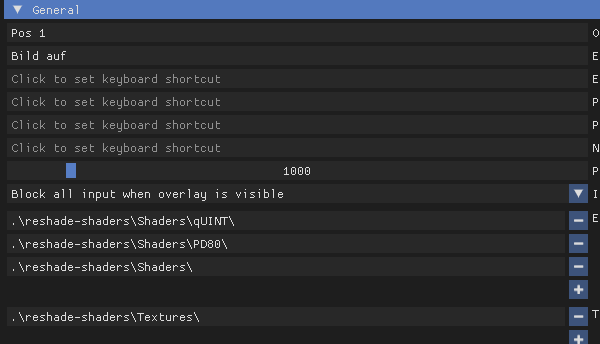
lol, I should probably rather say Hippos stable reshade, but I'm keeping the funny word mixup
slate grotto
maybe it's trying to access the path like the shaders were put directly on only one folder
slate grotto
full crown
lol, I should probably rather say Hippos stable reshade, but I'm keeping the fun...
 full crown
slate grotto
maybe it's trying to access the path like the shaders were put directly on only ...
full crown
slate grotto
maybe it's trying to access the path like the shaders were put directly on only ...
You mean quint and pd80 in the Shaders folder?
slate grotto
yeah
full crown
Or they are missing entirely. Had that happen before and had to manually add them.
full crown
No, look at the screenshot above. I missed the upper part so that's probably confusing
If you are ingame and press your home button
go to settings
There you will see all the shader and texture paths Reshade is looking for.
opaque skiff
 opaque skiff
thats it?
full crown
Well, at least that's what is different to my setup and I run hippor
slate grotto
opaque skiff
thats it?
it should do
just remember to delete shader cache just to make sure nothing is iffy next boot
full crown
opaque skiff
still not
Well, the nuclear solution would be deleting your bin folder, pasting in the bin folder from your .Groks Modpack Installer folder and then install Hippos reshade again. This way you have a clean Gamma reshade install and a clean Hippo reshade install. Because according to your settings you seem to have had a few other shaders installed before you tried hippos.
I remember installing Edens reshade for the first time and it only installed 16 of the 23(?) shaders correctly no matter what I did. Then I used the nuclear solution 😄
opaque skiff
full crown
Well, the nuclear solution would be deleting your bin folder, pasting in the bin...
now the damn game wont even start 😭
full crown
What? So you deleted the bin folder and pasted back in the one from .Grok's Modpack Installer/G.A.M.M.A/modpack_patches/
full crown
What is saying that. MO2?
opaque skiff
yeah
full crown
There could be many reasons for that although I have never heard of this happening. If you didn't make a backup of your previous bin folder you should be able to restore it through your recycle bin
full crown
Very weird as the bin folder from .Groks modpack installer is the original bin folder. Well at least you get the newest update 😄
 late river
quick question, i’ve seen others game look super cool and pretty but mine still looks the same as vanilla anomaly, i have all the graphics settings maxed out pretty much so am i supposed to toggle something in the reshade menu?
sour oar
Most people use presets yeah
Whether they create them personally or just download them. Is there a particular ‘style’ you’re interested in for your game?
late river
ah that makes sense, i started going through the reshade menu and testing stuff out and got to what i was looking for thanks for responding tho!
i also realized i was looking at Expedition game play rather than GAMMA 🤦♂️
sour oar
 twilit tangle
does any of you guys have any idea why the sun gets super bright during the w_storm1 and w_storm2 when i change the weather using the debug mode ?
twilit tangle
ok so during the game if i get a storm it should be fine ?
twilit tangle
i was testing out the reshade and i was kinda worried because it looks good but if it was like this during storms i couldnt use it
molten hawk
twilit tangle
ok so during the game if i get a storm it should be fine ?
weather in debug mod are.... fuc***** 🙂
in normal game weather will be fine.
twilit tangle
got you at least i get to have an idea of what it would look like
molten hawk
yes ^^ the best is to start a new game hope to get sun and from there work on reshade effect.
sour oar
from my experience the issue only triggers when you actively switch from any weather to storm
not the other way around
molten hawk
from my experience just avoid debug mod if you want to set a reshade. thats all.
twilit tangle
this is literally what i was looking at 
 molten hawk
 twilit tangle
sour oar
from my experience the issue only triggers when you actively switch from any wea...
twilit tangle
sour oar
from my experience the issue only triggers when you actively switch from any wea...
yeah it only happened when i changed it to storm
it got gradually worse
sour oar
this is very subjective obviously but i think debug mode is a giant help for reshade. its really easy to make a reshade that looks good in ONE weather, but you won't know if it looks good in all others (easily) without debug
plus demo_record 1 is really nice
twilit tangle
i think i messed up my game now everything seems 2 bright
sour oar
well whatever you did, you managed to replicate Aggressor
twilit tangle
all good now closed the game and opened it again and it came back to normal
opaque skiff
@full crown got it to work, my dumb ass replaced the original reshade-shaders file with the new one instead of deleting and then pasting it in 😭
i thank you for your patience with me I felt stupid all the way through
twilit tangle
hello guys ive noticed that im getting ghosting on my game it didn't happened before or at least it wasn't so noticeable im running the game at 100 fps my monitor is 164 hz so i don't see what could be causing this any ideas ?
 keen garnet
can anyone point me to how i can enable aa within reshade? i'm not too familiar with it


 vestal furnace
so the retexture frozen zone, its only a retexture right? no gameplay changes?
 analog pagoda
hey guys
can i have your setting shader from Gamma EXT
I want to consult about setting
 primal verge
mighty crescent
primal verge
mighty crescent
By increasing SSAO quality, tho i doubt it will help much as its a typical ssao problem
mighty crescent
I'll try that tomorrow ty
 hasty siren
where would one look for reshades?
fallen mango
hasty siren
where would one look for reshades?
#1035807043933720576 is a good start
hasty siren
ty
hasty siren
anyone know a fix i installed a shader and i'm left with nothing
 tidal marlin
hasty siren
anyone know a fix i installed a shader and i'm left with nothing
tidal marlin
hasty siren
anyone know a fix i installed a shader and i'm left with nothing
check that reshade isn’t looking for ini files in your gamma/overwrite folder, it need to be the anomaly/bin folder
slate grotto
@opaque skiff yo did your setup work after reinstall?
random tendon
ohh dear Reshade Genie, how would i go about making my ingame look like my remastered screenshot i'm using for my wallpaper? i used Snapseed and added clarity and a reshade called "Accentuate", which im not sure what it does, but it makes the full moon lighting look better IMO


first pic is HippoR
second is HippoR with Snapseed(google photoshop) remaster
tidal marlin
random tendon
ohh dear Reshade Genie, how would i go about making my ingame look like my remas...
bump the ray length up in rtgi, and then the saturation and/or vibrance regrade (or any colour correcting fx you think will work nicely on midtones)
random tendon
tidal marlin
bump the ray length up in rtgi, and then the saturation and/or vibrance regrade ...
okay RTGi is the one part of Hippo i didnt download or select. using all the other optionals. I'm really digging how i was able to get the moonlight shadows and the Statue silhouette to pop a little more.
makes NVGs look amazing too, didnt do a remaster of a screenshot with them yet though. trying to get nighttime to looks how i want it without nods. i play mostly at night
tidal marlin
are you using radiant gi? it should have a somewhat equivalent setting
random tendon
ill relaunch and see. uno momento
I'm not. Should I download rtgi or radiant? I have it on "dark nights" setting, if that matters
lapis rapids
hey, i'm trying to fix indoor brightness by playing around with r2_sun_lumscale_amb but it switches back to the default seconds after i change it, any ideas on how the fix this? Im using agressor reshade fyi
random tendon
lapis rapids
hey, i'm trying to fix indoor brightness by playing around with r2_sun_lumscale_...
With aggressor I think you need to turn off dynamic tone map in mcm or it'll reset console inputs
Main reason I switched
lapis rapids
whats mcm? and what did you switch too
random tendon
HippoR with texture pack, and increased fps by 15-25 and looks 10x better.
the MCM settings.
Can be found in the #1035807043933720576
lapis rapids
HippoR i dont think i've heard of that could you provide a link?
random tendon
the texture pack is large but awesome. its the ageda one a few mods below that listing
lapis rapids
thanks a bunch :))
random tendon
@tidal marlin found a..legit.. version of RTGI .33. gonna try this out. looks awesome from what i was seeing online
random tendon
lapis rapids
thanks a bunch :))
Follow the instructions when it comes to what mods to untick. I missed that part...
lapis rapids
will do
lapis rapids
random tendon
Follow the instructions when it comes to what mods to untick. I missed that part...
Also any idea on how to remove the reshades?
random tendon
Delete the reshade-shaders folder and any old .ini files from aggressor.
glossy pond
lapis rapids
hey, i'm trying to fix indoor brightness by playing around with r2_sun_lumscale_...
Don’t use agressor
Midgressor
random tendon
glossy pond
Don’t use agressor
Thats what we're fixing for him now. Switching him to hipppo
glossy pond
Hippos reshade has instructions
glossy pond
random tendon
Thats what we're fixing for him now. Switching him to hipppo
Also check dm pls
glossy pond
do i need to reinstall my reshade shaders n shit with the new update
 ivory ledge
should i update reshade to 5.5.0?
twilit tangle
hasty siren
where would one look for reshades?
 narrow dagger
hi there is someone who can find me the best reshade for gamma plssss
random tendon
narrow dagger
hi there is someone who can find me the best reshade for gamma plssss
#1035807043933720576 and then find hippo. Use his texture pack as well if your potato can handle it
 buoyant falcon
got shome message to update 5.5, how to do that? sorry if wrong channel
reshade that is
random tendon
uninstall reshade and reinstall the new version on reshade.me
buoyant falcon
random tendon
uninstall reshade and reinstall the new version on reshade.me
by uninstall you mean delete some folder or somegui staff?
random tendon
@tidal marlin i did some tweaking, finally got the night sky and moon rays where i want them.. now to make sure daytime doesnt look like shite. although, i rarely play during the day
 random tendon
buoyant falcon
by uninstall you mean delete some folder or somegui staff?
random tendon
buoyant falcon
by uninstall you mean delete some folder or somegui staff?
what i do, is grab the vanilla bin file from the the gamma zips in the folder with groks installer, and place it in my anomaly folder, then i delete the reshade-shaders folder and install the newest version of reshade from the website.
i might be doing it wrong or the long way, but its what i been doing since oblivion
@tidal marlin if i turn on that Glamrye fast effects option, this is what happens with nods on.. otherwise, it makes the game look better without nods.. but with nods.. yeah

no glamyr effect.. no wierdness with nvg's

working on the HDR and curves currently. waiting on daytime so i can see how fuckd it looks
 full crown
buoyant falcon
by uninstall you mean delete some folder or somegui staff?
full crown
buoyant falcon
by uninstall you mean delete some folder or somegui staff?
If you just want to update reshade you can simply download the newest version online and run it. Choose the anomaly.exe you are using to start the game and pick modify. After that you can just keep skip every option. Nothing else is needed.
opaque skiff
slate grotto
<@324385463534354432> yo did your setup work after reinstall?
yeah think i just replaced the file which added two solaris shaders which I should have just deleted the original reshade-shaders file and then pasted it in
 violet cloud
random tendon
<#1035807043933720576> and then find hippo. Use his texture pack as well if your...
violet cloud
random tendon
<#1035807043933720576> and then find hippo. Use his texture pack as well if your...
how do i download the hippo reshade?
cant find the link anywhere
turbid vector
hi, someone have a link to the default g.a.m.m.a reshade ini?
I accidentally deleted it and now I no longer have it, not even with "full installation"
random tendon
My edited Hippo sunrise vs. stock HippoR sunrise w/extra options


now waiting on mid day. got some troops to send across the map in the meantime. monolith been gaining ground while i edit lol
random tendon
turbid vector
I accidentally deleted it and now I no longer have it, not even with "full insta...
download all addons first?
manic sage
random tendon
My edited Hippo sunrise vs. stock HippoR sunrise w/extra options
is this the latest beta release?
Because the effects look old I don't use blooming HDR anymore
full crown
turbid vector
I accidentally deleted it and now I no longer have it, not even with "full insta...
You should still have it in .Grok's Modpack Installer/G.A.M.M.A/modpack_patches/bin
I doubt you deleted that one
random tendon
manic sage
is this the latest beta release?
I downloaded the most recent file on #1035807043933720576 and used the HippoR
manic sage
And load order is different but your skybox looks really good
manic sage
random tendon
I downloaded the most recent file on <#1035807043933720576> and used the HippoR
Stable version? If so then that makes sense
molten hawk
@manic sage did you receive my mp ?
random tendon
manic sage
And load order is different but your skybox looks really good
With your load order, NVGs had a weird bug. I posted a pic earlier
random tendon
manic sage
Stable version? If so then that makes sense
Indeed. Most recent stable.
manic sage
That's weird I never had that
molten hawk
clarityradius to 2 and linear light btw
manic sage
molten hawk
clarityradius to 2 and linear light btw
What did you send?
manic sage
#1036172060969410590 message this is the beta build
molten hawk
0.085 already does the job.
i cant even play actually with the fucked up colours i have so not gonna try anything..
manic sage
molten hawk
0.085 already does the job.
That's cool but clarity is an optional effect but I'll look into it
Thank you you're probably right
random tendon
manic sage
That's weird I never had that
When I changed the order a bit, it went away. It was tied to glamarye fast
molten hawk
clarityradius to 2 blendmode > linear light and strenght > minimum 0.085
1.000 is hella fuck too much.
manic sage
random tendon
When I changed the order a bit, it went away. It was tied to glamarye fast
That's actually a coincidence because the load order of glamaraye has changed on beta build as well
molten hawk
@manic sage if you dont want to help me, do you someone that would be willing to ?
turbid vector
full crown
You should still have it in .Grok's Modpack Installer/G.A.M.M.A/modpack_patches/...
thank you =), I found it there
molten hawk
i did yes.
random tendon
Interesting. Still playing with it a bit. Nights are my thing so I tweaked for those and nods first. Working on mid-day and afternoon now
molten hawk
random tendon
Interesting. Still playing with it a bit. Nights are my thing so I tweaked for t...
for night you can use levels to 1 or 2 and white well... keep it at 255, its a simple but effective effect for... white and dark colours only.
random tendon
molten hawk
for night you can use levels to 1 or 2 and white well... keep it at 255, its a s...
I'm more focused on fires, anomaly lighting, and the moon shadows
turbid vector
Does anyone know of a good reshade that doesn't consume much? i have rx 570 8gb, 8gb ram, ryzen 3 2200g
molten hawk
turbid vector
Does anyone know of a good reshade that doesn't consume much? i have rx 570 8gb,...
you can make something simple...
Clarity level vibrance.
vibrance at around 0.80 to 0.85 avoid over saturations is uggly..
manic sage
random tendon
Interesting. Still playing with it a bit. Nights are my thing so I tweaked for t...
#1036172060969410590 message half the reason I updated
molten hawk
complexe reshade will eat frame. but you can try..
random tendon
manic sage
https://discord.com/channels/912320241713958912/1036172060969410590/104506356273...
I'm over here on .6 tryna make the old build work....
turbid vector
molten hawk
complexe reshade will eat frame. but you can try..
thanks, I'm going to write it down, I usually have 60/80 fps without reshade, but it doesn't look very good
molten hawk
thats why you need a basic reshade but basic wont means shit. @turbid vector you can have great result with those 3 effect only.
 limpid bone
new SSS release adds debanding shader to skybox: https://www.moddb.com/mods/stalker-anomaly/addons/screen-space-shaders

Mod DB
New AO, Screen Space Shadows, SSR, Water shader, Rain Puddles, Weapons DOF and more for Anomaly 1.5.2 / 1.5.1 - UPDATE 12.5 : New sky debanding shader.
molten hawk
clarity level vibrance, its basic but still it can improve.
@turbid vector clarityradius to 2 blendmode > linear light and strenght > minimum 0.085 even a bit lower 0.080 in your case.
About vibrance do not over saturate the colours... a value of 0.75 to 0.85 see yourself....
Levels is for dark and white so dark at 1 or 2 and white well 255 or 250 we dont care about that one.
wet violet
limpid bone
new SSS release adds debanding shader to skybox: https://www.moddb.com/mods/stal...
Ascii1457 is on a fucking roll with these updates! Awesome!
manic sage
SSS to stalker is what enb is to Skyrim
wet violet
Skyrim just got dlss support and they are working to get enb to support it too. Jealous
manic sage
True that would be so good for the aliasing in stalker
But I don't doubt that SSS will get way more features compared to what we already have
wet violet
a new gi compared to rtgi would be great
full crown
wet violet
a new gi compared to rtgi would be great
Arent RadiantGI and SSDO both global illumination shaders?
wet violet
yeah but I meant for the SSS mod, which means no ui problems or anything. With SSS Dof now reshade ao/gi fucks up the dof
maybe not enough to bother most ppl but still
manic sage
wet violet
a new gi compared to rtgi would be great
True anything in engine is needed
I more so want better anti aliasing that isn't msaa
wet violet
Yeah, AA it's a big issue
 zenith harbor
Hey guys can you show me your default reshade options ? I have untick everything and kinda want to put it back how it was.
wet violet
I've been meaning to test some things tho because I think I can lessen the artifacts on the trees/plants by tweaking the transparency. If that works it would help with the alias
wet violet
zenith harbor
Hey guys can you show me your default reshade options ? I have untick everything...
one sec, loading the game now, will take a ss for ya
zenith harbor
wet violet
one sec, loading the game now, will take a ss for ya
Thanks alot man !!


 sour oar
The order probably
wet violet
ignore my screenshot path, for some reason the default setting doesn't work for me XD