#🔨base-gamma-support
1 messages · Page 1462 of 1
 whole pewter
 desert robin
Good point.
 north turret
no error logs so far by the way
whole pewter
If adding those arguments to the executable work directly in the later versions of Windows, then I would actually say that is a much better way of doing it than the ini file
 graceful iron
i am testing your examples as well and only changing path, so its supposed to run this cmd and then run the DX11 exe by itself after?
 whole pewter
Can you also add /High in front of the affinity argument as well and run it, because if then that would solve the whole debacle
that would run the process as "high" as well as set the cores
whole pewter
graceful iron
i am testing your examples as well and only changing path, so its supposed to ru...
No, no no.... If you are modifying the executable like that then the ini file changes are redundant and might actually cause issues. Only do ONE or the OTHER.
Also, if adding arguments to the executable directly, then you don't need the path after, refer to Gulag's pic above.
desert robin
whole pewter
that would run the process as "high" as well as set the cores
No change
 brisk zinc
I'm doing a quick reinstallation just to be sure, I'll try again in a moment
graceful iron
no i made the changes in the ini and then started mo2, didnt make any changes in the mo2 just screenshotting what it looks like in the paths
brisk zinc
There is to say that now my .ini looks more like the one Wild send before
whole pewter
desert robin
No change
Did it set the priority to high or was it running as normal in the description in Win task manager
desert robin
whole pewter
Did it set the priority to high or was it running as normal in the description i...
For some reason the prioirt it always high whether i have anything added or not, so it's not clear
 bold aurora
So I've unpacked and made edits (and kept your default alife.ltx handy in the event I fucking break something lmao), but how might I go about repacking said unpacked files?
whole pewter
Ah, if it runs it as high by default, then there's no need for that argument.
desert robin
bold aurora
So I've unpacked and made edits (and kept your default alife.ltx handy in the ev...
No need, you just put the file in a blank addon in MO2 in the same path as the original, it'll over-write it and load.
bold aurora
desert robin
For some reason the prioirt it always high whether i have anything added or not,...
Also have this, only need to tick Core 0 off manually every time
north turret
Okay, so i did the Complete Install, no errors. Started the game, no crash or console Errors. I have no clue why this works. Also 0 is still ticked off.
Clueless 
desert robin
north turret
Okay, so i did the Complete Install, no errors. Started the game, no crash or co...
Yep, but as said before this doesnt help. We are no closer to knowing why.
whole pewter
graceful iron
no i made the changes in the ini and then started mo2, didnt make any changes in...
Ok, I see from the screenshot now....
brisk zinc
@gentle tulip come in here 
desert robin
Shit falco's summoning wizards
brisk zinc
He just said in #old-feedback-suggestions something that could be worth
 gentle tulip
I have arrived
graceful iron
its something we already mentioned about changing the size to 11 i believe 
whole pewter
Right peeps. Those of you on Win 10 or 11, IF you can right click the exe file in the BIN folder and manually add arguments to it as in Grulag's screenshot above then please DO THAT instead of ini file changes. It is much more reliable.
 vocal relic
so I updated gamma and now my save doesn't work ;_;
brisk zinc
Well here it's 5AM so I don't respond of my actions
brisk zinc
vocal relic
so I updated gamma and now my save doesn't work ;_;
We need the log
north turret
When i tried to change mine it went back to 0
vocal relic
which one?
north turret
and right now it's 0
graceful iron
vocal relic
so I updated gamma and now my save doesn't work ;_;
did you update with a complete installation ?
brisk zinc
vocal relic
which one?
Look the title of the channel
vocal relic
Oh, ok ok, and yes I did complete install
whole pewter
IF you are running Win7, forget it as Win7 will not disable core 0 anyway reliably.
bold aurora
desert robin
No need, you just put the file in a blank addon in MO2 in the same path as the o...
Okay, so compress the edited alife.ltx to a .rar and install through MO2?
desert robin
bold aurora
Okay, so compress the edited alife.ltx to a .rar and install through MO2?
Yes, basically. Make sure the file structure is right, that it passes the necessary folder structure and Mo2 doesn't complain
vocal relic
brisk zinc
vocal relic
Mags Redux?
gentle tulip
So everyones good on the Core 0 thingymabob?
bold aurora
desert robin
Yes, basically. Make sure the file structure is right, that it passes the necess...
Your unquestioning aid is appreciated, freedom loving scum ❤️
brisk zinc
gentle tulip
So everyones good on the Core 0 thingymabob?
Nope
vocal relic
ohhh, do I need to re-enable optional mods after an update?
 jagged lance
while there is much hustle and/or bustle in this channel can someone tell me if the only revolver in the game is the rex?
north turret
gentle tulip
So everyones good on the Core 0 thingymabob?
Yes 
vocal relic
I see, thank you for the help <3
desert robin
bold aurora
Your unquestioning aid is appreciated, freedom loving scum ❤️
Erhem. It's "Merc loving scum"
brisk zinc
north turret
Yes <:kekw:919974270132711444>

gentle tulip
Oh dear
brisk zinc
north turret
Did you actually try that Falco?
No it doesn't
I just did a complete install
Now I'll try again
graceful iron
whole pewter
Right peeps. Those of you on Win 10 or 11, IF you can right click the exe file i...
you are a genius, that works  just need to test if it still applies if you launch the same exe through mo2 @brisk zinc @desert robin
brisk zinc
Trying this one again, size=11 this time
vocal relic
@brisk zinc save works now! tyty
 brisk zinc
If doing the thing with notepad doesn't work, I'll try with the bin thing
But I don't know what to put in there
whole pewter
graceful iron
i am testing your examples as well and only changing path, so its supposed to ru...
To answer your original question, this is why I didn't like the syntax in this method.
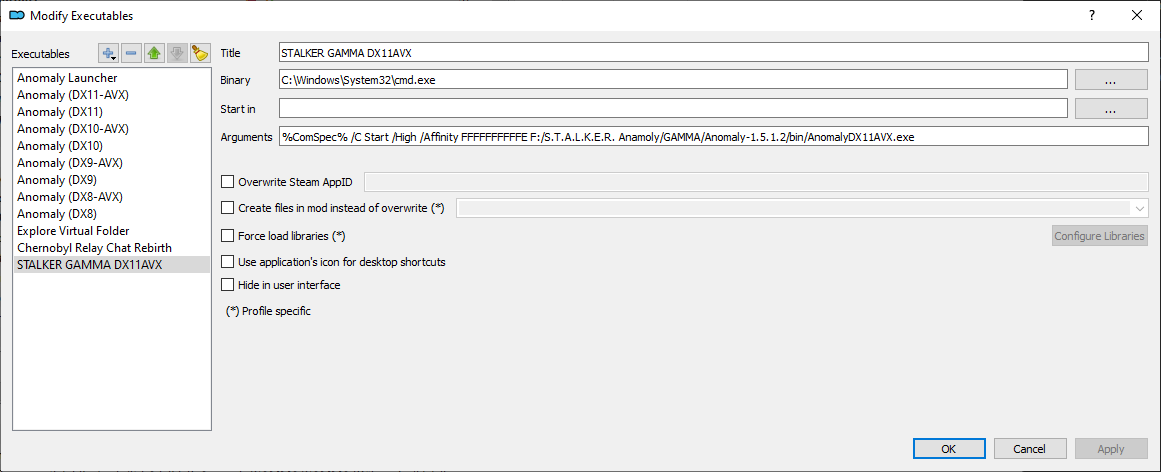
The theory is that the binary used is not the game binary, but CMD.exe (dos prompt in other words)
Then the arguments is what actually starts the game by first locating CMD.exe, then inside that it runs START, which then defines the parameters for running the DX11 exe eventually.
It's a crapshow way of doing it.
The better method (if you can) is to directly right click the executable and simply add the affinity argument and possibly also the high priority one to that directly.
When you do that, you can have the "default" section for 11 in your ini file, as it calling the executable will add the native arguments to the exe file that you set in windoze by right clicking it and adding arguments.
desert robin
graceful iron
you are a genius, that works <:verynice:944014689048862771> just need to test if...
Oh shit oh shit!?!?!? IS THIS IT?!?!?! DID WE CRACK THE CODE?!?!?!
vocal relic
awww, but I guess updating resets keybinds :(
north turret
desert robin
Oh shit oh shit!?!?!? IS THIS IT?!?!?! DID WE CRACK THE CODE?!?!?!
Try it
gentle tulip
make sure that you have your proper pathway here
 north turret
So i can get to do a clean Slate and not be worried about Magic i'm not supposed to Wield
gentle tulip
^make sure you choose this
 whole pewter
graceful iron
you are a genius, that works <:verynice:944014689048862771> just need to test if...
whole pewter
graceful iron
you are a genius, that works <:verynice:944014689048862771> just need to test if...
yes it will, but you need to revert the changes made to ini back to the "normal" default....
graceful iron
ok
brisk zinc
gentle tulip
^make sure you choose this
Well I didn't do that, I don't even know if there was something like that before
I'll check
 summer sandal
to repair armor can you disassemble other armor for their parts?
 tidal portal
yes
north turret
summer sandal
to repair armor can you disassemble other armor for their parts?
Yes, but you still need the Repair Kit for it
desert robin
gentle tulip
^make sure you choose this
This whole time i was specifically not doing that.. 


 thick chasm
#old-framerate-optimisation message I have no idea what this is telling me to do, could someone help?
gentle tulip
hahaha
brisk zinc
thick chasm
https://discord.com/channels/912320241713958912/929309266056196096/9710217833041...
Take a sit, you're in for a ride
whole pewter
graceful iron
ok
cause as I said in my little wall of text, the changes in ini become academic because you are changing the actual arguments for running that executable within or without MO2
thick chasm
Hmmm, sounds exciting
desert robin
thick chasm
https://discord.com/channels/912320241713958912/929309266056196096/9710217833041...
We are unwravelling the literal divinci code of GAMMA right now
brisk zinc
OH FUCK ME IN THE ASS
 thick chasm
i have seen god
desert robin
Saved for posterity
brisk zinc
@gentle tulip DID IT, I'VE PINGED HIM AND HE DID IT, THE ABSOLUTE MADMAN
whole pewter
I would rewrite that guide in Framrate, but I can't screenshot the exe properties changes as I refuse to use Win10 or 11 hahahahahaha 🙂
desert robin
 bold aurora
brisk zinc
OH FUCK ME IN THE ASS
bold aurora
brisk zinc
OH FUCK ME IN THE ASS
Holy shit, you legends
I'm assuming that this will be formulated into instructional post for the layman (i.e me) in #old-framerate-optimisation ?
north turret
Wait so, Falco can you make a Definitive solution and pin it?
gentle tulip
I shall now diminish
thick chasm
Can I not just right click the process and untick it like before? Isn't that the same thing?
brisk zinc
Okay I'll do it
thick chasm
I'm so lost
brisk zinc
Give me a sec
graceful iron
whole pewter
I would rewrite that guide in Framrate, but I can't screenshot the exe propertie...
dont worry we will deal with the aftermath, thanks for the help
whole pewter
thick chasm
Can I not just right click the process and untick it like before? Isn't that the...
yes, but you would need to do it every time
brisk zinc
thick chasm
I'm so lost
We were trying to make it work, now apparently it's working
thick chasm
lol well congratulations, I assume this is a good thing
brisk zinc
Give me a sec, I'll post the thing and ping you attach everything god FINALLY

Me right now
bold aurora
north turret
This only means one thing
your sacrifice was not for nothing
desert robin
north turret
Siri, delete Anomaly and GAMMA and Reinstall
You did this to yourself mang
desert robin
bold aurora
your sacrifice was not for nothing
Nah, it was for nothing 
 wise sparrow
no matter which method i use all cores are still checked. i'm wondering if it's because i have a space in the file path of the anomaly executable but i'm kind of done messing with it
bold aurora
desert robin
Nah, it was for nothing <:yup:944014871803076638>
ssshhh don't tell him.. he needs comfort
north turret
Everything works as it's supposed to the only thing that's not in working order is the Shortcut Icon, technically i can leave it as is but i'd rather do it right without not knowing why this works 
desert robin
wise sparrow
no matter which method i use all cores are still checked. i'm wondering if it's...
Sit tight for Falco's definitive solution
whole pewter
What you do by adding the arguments to the exe file by right clicking it is so that every time that exe file is run those arguments will run with it. It is a more reliable way of doing it than editing the ini file for MO2.
P.S. you can also do it slightly differently in Win7 by adding to the target path, but as I said earlier it's redundant as disabling cores per process in Win7 is a little flaky.
bold aurora
desert robin
Sit tight for Falco's definitive solution
Everyone liked that.
vocal relic
so what exactly do I need to do as far as process affinity goes 
thick chasm
I've been struggling with performance issues in general, this Core 0 thing is my last effort before I call it. I can get it to run generally well but as I turn or render certain areas the FPS drops. Hopefully this can help fix it?
desert robin
 whole pewter
wise sparrow
no matter which method i use all cores are still checked. i'm wondering if it's...
whole pewter
wise sparrow
no matter which method i use all cores are still checked. i'm wondering if it's...
If you are on 10 or 11, revert all your ini file changes back to the way they were by default for that section, then change the arguments section by right clicking the exe file itself - see the screenshot way up by Grulag for an indication. There is also no need for any path arguments if you modify the exe properties.
graceful iron
thick chasm
I've been struggling with performance issues in general, this Core 0 thing is my...
with this also follow the rest of #old-framerate-optimisation to hopefully get better fps as well
north turret
Goodbye Sweet Prince
 vocal relic

whole pewter
Of course, if you are on 10 or 11 none of this will prevent it calling the evil mothership back at MS HQ.
Still, I'll let you buy your own tin hats....... 
gentle tulip
oh btw for the core 0 thing
north turret
For Science
thick chasm
graceful iron
with this also follow the rest of <#929309266056196096> to hopefully get better ...
Yeah, already did as much without radically potato-ing my game. I found that sunshafts were the biggest offender and disabling them increased my FPS significantly, but I'm still having issues. I think the modpack may simply be too intensive for my hardware, unfortunately, regardless of graphic settings. What's odd is that I can run, say, Tarkov just fine.
gentle tulip
if you have spaces
whole pewter
Right, it's 4:15 am now for me, so I'm off to sleep.
As always if I can help out at all with any Win typical issues, then please don't ask haha 🙂
bold aurora
whole pewter
Right, it's 4:15 am now for me, so I'm off to sleep.
As always if I can help out...
farewell sweet prince
 thick chasm
You guys are speaking in tongues for me I swear, I just want to LARP as a paramilitary goon eating beans in a warzone
bold aurora
jagged lance
and didnt understand any of it
to simplify
every time play game, have to do thing to make game work good
now not have to do thing, game work good cause big brain men fix thing
jagged lance
oh now i get it
they make the thing that works for me already work for other people
im the smrt >:)
thick chasm
So, you guys figured out how to disable Core 0 on every launch. I assume some sort of clearer guide will come out in the near future on how to apply this?
brisk zinc
HOW TO TURN OFF 0 CORE
Problem:
"How the fuck can I make that 0 core thing work?"
Solution:
I recommend a clean install, like from scratch, because it was the only way it worked and because it's what I did, so your mileage may vary.
So yeah, your "GAMMA RC3" whole folder needs to be deleted. Before you do that, YOU NEED TO KEEP YOUR "downloads" FOLDER that you can also find inside your GAMMA RC3 folder.
Again, just to be sure, THIS IS HOW ME, MYSELF AND I, DID IT, BECAUSE I WANTED TO.
I did it just to be sure that everything was clean and new, that's the only reason.
I don't even know if it's necessary, but it's working, I know that for sure. Try it before you actually delete everything, it could work, who knows?
So, do this:
- IF YOU WANT, delete your GAMMA RC3 folder (keep your "downloads" folder)
- extract it again
- open MO2
- select Anomaly folder because it needs to know where the game is
- done, close MO2
Now, here comes the fun:
- open your ModOrganizer.ini that you can find in your GAMMA RC3 folder
- search for
[customExecutables], change "size=10" to "size=11" - then, search for
[recentDirectories] - now copy this code that you can find below, you'll need to paste it LITERALLY ABOVE
[recentDirectories]. (see first picture) - below you can find the code with MY "
bin" path, you need to put YOUR OWN PATH
11\arguments=%ComSpec% /C Start /High /Affinity 0000000000000FFE E:\\Anomaly-1.5.1\\bin\\AnomalyDX11AVX.exe <-- CHANGE THIS WITH YOUR PATH (and delete this line) 11\binary=C:/Windows/System32/cmd.exe 11\hide=false 11\ownicon=false 11\steamAppID= 11\title=STALKER GAMMA DX11AVX 11\toolbar=false 11\workingDirectory=
- save, close, done
(Thank you @whole pewter for the code you absolute madman legend fortnite minecraft gamer Win7 enjoyer)
Now, open your MO2, open the drop down menu (second pic) and select this one (third pic).
Congratulations, you're one of us.


 brisk zinc
thick chasm
So, you guys figured out how to disable Core 0 on every launch. I assume some so...
brisk zinc
thick chasm
So, you guys figured out how to disable Core 0 on every launch. I assume some so...
Enjoy your guide
brisk zinc
brisk zinc
**HOW TO TURN OFF 0 CORE**
**Problem**:
"How the fuck can I make that 0 core th...
 ember herald
can you keep ur downloaded mods tho
jagged lance
read again lad
ember herald
i did
jagged lance
first sentence in solution
brisk zinc
ember herald
can you keep ur downloaded mods tho
Jesus Christ IT'S EVEN WRITTEN
ember herald
i mean i kind of just dont see how downloaded mods will affect everything else /shrug
ember herald
oh
jagged lance
"of course you need to keep your "download" folder"
ember herald
ok
brisk zinc
Okay I'll make it bigger with this
ember herald
im having a difficulty wiht reading comprehension today
jagged lance
dont stress
 tidal raft
 north turret
🤌
thick chasm
alright, clean reinstall, my bandwidth will never forgive me
brisk zinc
thick chasm
alright, clean reinstall, my bandwidth will never forgive me
You already have your mods because the "download" folder is safe aaaaaaaaaaaaaaaa
You won't need to download anything
It's already inside your "downloads" folder
AAAAAAAAAAAAAA it's writing and I'm screaming too
north turret

wise sparrow
gentle tulip
@brisk zinc this was actually my problem. i had a space in the directory but wasn't putting quotes in the right part of the file path
thick chasm
brisk zinc
You already have your mods because the "download" folder is safe aaaaaaaaaaaaaaa...
I'm confused, I'm not trying to delete my downloads folder. I don't have the original zip files anymore.
north turret
thick chasm
I'm confused, I'm not trying to delete my downloads folder. I don't have the ori...
Just do a Fresh Download
thick chasm
So, to reinstall from scratch, need to do a full redownload
wise sparrow
you don't need to delete anyting
brisk zinc
thick chasm
I'm confused, I'm not trying to delete my downloads folder. I don't have the ori...

desert robin
Ok i finally got it. Just tried this and it didn't work, I had to change the [customExecutables]size=11 and also
wise sparrow
graceful iron
brisk zinc
At least try it?
i am currently trying it without an install, not really working that way?
desert robin
 brisk zinc
Like you have a guide that clearly said that MYSELF did a clean installation because I WANTED TO
You're not obligated to do so
desert robin
Make sure the path is correct when you change the config in modorganiser.ini
desert robin
graceful iron
i am currently trying it without an install, not really working that way? <:Monk...
Try my example
I got it working without a reinstall
graceful iron
ok
brisk zinc
graceful iron
i am currently trying it without an install, not really working that way? <:Monk...
Change your path... just tried and it works...
thick chasm
It's not a big deal, I've fucked with my installation a lot anyways. Probably best to try it completely clean if I'm ever going to get this modpack working.
desert robin
When i used backslashes \ it fukedd the path up (in the .ini) but they work in the modify executables part
brisk zinc
thick chasm
It's not a big deal, I've fucked with my installation a lot anyways. Probably be...
I didn't understand one thing, you don't have your "downloads" folder anymore?
thick chasm
What "downloads" folder are you talking about? The only one I know of is the default one Windows comes with.
Which, I do have.
ember herald
its in GAMMA folder lol
brisk zinc
thick chasm
What "downloads" folder are you talking about? The only one I know of is the def...
My brother in Christ 🤝
Open your GAMMA folder 🙂
I'm going insane
desert robin
brisk zinc
I'm going insane
The cost of CPU core 0 off
brisk zinc
Again it's 5 in the morning here, bear with me
ember herald
everything u need for GAMMA installation process is included in that folder
brisk zinc
ember herald
everything u need for GAMMA installation process is included in that folder
Basically^
thick chasm
My brother in Allah, that's not what "from scratch" means
brisk zinc
Around here it does though!
thick chasm
I understand now but that wasn't what I was gathering from what you wrote
brisk zinc
Everyone understand that, how come you didn't? Hmmm?
With "from scratch" I always mean = keep the "downloads" folder INSIDE GAMMA because that's where your mods (to be installed with the installer) are
thick chasm
Sorry if I sound aggressive, I'm not trying to. My point is though, from scratch normally means literally from nothing (to me, at least), which means a full redownload/reinstall to me. I ought to do that regardless since I've messed with the files a few times trying some of the suggested tweaks, so to make sure I didn't mess anything up a clean reinstall is probably best practice.
graceful iron
desert robin
Try my example
thats how mine looks
 thick chasm
I figured you referring to downloads simply referred to when someone misconstrued something earlier, which is my bad.
desert robin
graceful iron
thats how mine looks <:MonkaWae:919973001884213258>
Yeah cool. ANy luck?
graceful iron
nope, mo2 runs but nothing happens after
desert robin
?
 wise sparrow
If you have a space in any of the folder names for the anomaly executable file path you need to have quotation marks around that folders name or the game won't launch.
 graceful iron
desert robin
?
graceful iron
desert robin
?
yes
desert robin
 brisk zinc
thick chasm
Sorry if I sound aggressive, I'm not trying to. My point is though, from scratch...
brisk zinc
thick chasm
Sorry if I sound aggressive, I'm not trying to. My point is though, from scratch...
It's okay don't worry, it's only a thing that's been written 100000000 times and basically everybody knows it, it's okay... ()
Jokes aside, I guess you learned something new. And don't worry I understand your point of view
Like I said with "clean reinstall" we always mean "keep that downloads folder", it's automatic at this point
graceful iron
desert robin
 thick chasm
brisk zinc
It's okay don't worry, it's only a thing that's been written 100000000 times and...
thick chasm
brisk zinc
It's okay don't worry, it's only a thing that's been written 100000000 times and...
Gotcha, I get what you're saying now. That usage is specific to this server then? I'm newer here and have mostly just used this place for bugfixing, etc.
desert robin
graceful iron
Launching with the cmd exe in mo2?
graceful iron
yes
 brisk zinc
thick chasm
Gotcha, I get what you're saying now. That usage is specific to this server then...
brisk zinc
thick chasm
Gotcha, I get what you're saying now. That usage is specific to this server then...
Oh you're new, that's why
Why you didn't said it before
thick chasm
small brain
brisk zinc
My bad my brother in Buddha 🤝
thick chasm
No worries lol, I get it. I should've been clearer about that anyways
brisk zinc
BTW yes it's really the "usage" in this server, we learn how to bugfix on a daily basis
We're like a big family at this point
desert robin
Shit, @graceful iron I got mine working but feel like im leaving you out to drown.. i cant understand why its not working for you... hmmmmm Exact same setup as me
I had to restart mo2 if that makes a diff? And cant edit with notepad while mo2 is open as it saves-over
thick chasm
brisk zinc
We're like a big family at this point
own familial dialect and everything lol
Regardless, thanks for the help, and clarification. I'll try this stuff later
graceful iron
no its fine, but i have a feeling it wont just be me so i guess we need to find a troubleshooting or another way
brisk zinc
graceful iron
no its fine, but i have a feeling it wont just be me so i guess we need to find ...
What's your problem?
graceful iron
desert robin
I had to restart mo2 if that makes a diff? And cant edit with notepad while mo2 ...
i made sure to close it every time
desert robin
graceful iron
no its fine, but i have a feeling it wont just be me so i guess we need to find ...
Ah! Might have it
desert robin
graceful iron
i made sure to close it every time
Replace your path with this, (note the single slashes not double like you have)
%ComSpec% /C Start /High /Affinity 0000000000000FFE F:\GAMMA-RC3\anomaly\bin\AnomalyDX11AVX.exe
and update to your path obv
🤞
brisk zinc
But mine are double
desert robin
brisk zinc
But mine are double <:kekwait:919974044466557050>
yeah weird hey. Doubles didnt work for me but singles did
brisk zinc
Fair enough
What about cores?
I don't know if it's the same for everyone now that I think about it
desert robin
Should be, as it checks for 64 and just turns off the first 0 as far as i understand it, so regardless if someone has 4 8 or more, it's still going to turn off 0
If cat's pc didnt explode he should be back by now
im worried for his safety. its scary out there
brisk zinc
Did he already tried to do the thing with ModOrganizer.ini?
desert robin
yeah, what the way i worked it out was just to add the string to the new cmd via mo2 editing the .exe in there
graceful iron
changing it to single slashes works 

 desert robin

brisk zinc
Guess I'll add it to the guide as well
graceful iron
falco please add it as a troubleshooting part
desert robin
And with that, it's off to play the game now. Farewell all ❤️
brisk zinc
graceful iron
falco please add it as a troubleshooting part
Already done my man
bold aurora
desert robin
And with that, it's off to play the game now. Farewell all ❤️
Before you go, increased distance on my alife.ltx to 5000, no stuttering, no framerate loss?
Problem solved?
desert robin
bold aurora
Before you go, increased distance on my alife.ltx to 5000, no stuttering, no fra...
uhh lmao. I dont get how that works, but hey if it works it works? I set mine to 850 (750 default) Because as far as i am aware, the bigger it is the more resources it takes but yeah.. Might be one for the Anomaly discord to elaborate further, they were where i got my knowledge of it. Xray man, it's magic.... (i use 850 as my rig is a beast and i like the added 'live' zone from the bigger distance
 desert robin
One small thing i think might be an issue @bold aurora IF it works how i think it works, having 5000 could cause some issues. Basically it sets the 'active' area as far as that number is. The higher its set the more things 'happen'.
Example might be needing to go find an NPC, so when you get sort of near it (within 750) it activates.. but now you have 5000 it will possibly activate from different maps away (if its not localized to that map somehow) and cause stuff to go a bit weird..
bold aurora
desert robin
Example might be needing to go find an NPC, so when you get sort of near it (wit...
Huh.. I see.. maybe I'll lower it a bit?? 😅
desert robin
Anyway maybe head to #╙🖇mods-making-discussion for more about this
bold aurora
desert robin
Anyway maybe head to <#967696698065436682> for more about this
Thanks for the help, enjoy your freedom
north turret

 long grove
this is what my .ini line gets changed to when typing in the correct info
11\arguments=%ComSpec% /C Start /High /Affinity 0000000000000FFE C:/"Stalker Anomaly"/bin/AnomalyDX11AVX.exe
11\binary=C:/Windows/System32/cmd.exe
that actually works for me btw. the \ in the file path does not and I had ot have the quotes around Stalker Anomaly folder name for the game to actually run
graceful iron
so is there an issue ?
long grove
I had one like 4 hours ago but then I came back and found the solution in all the comments above about it
jagged lance
much has been learned since 4 hours ago
north turret
Can Falco add this as additional troubleshoot then aswell? Click the Green and blue tools, go to the CMD (STALKER GAMMA DX11AVX) and add " infront of and after your Root Anomaly folder's name if it has a space. Since for me, and others it appears to Overwrite the .ini everytime, if you change it here it stays.
graceful iron
@willow hawk check the pinned message, something was wrong with the new core0 affinity automatic method in #old-framerate-optimisation so a few people here did some troubleshooting to get it to work so you might want to update the framerate optimisation one ?
dont keep talking in #🔨base-gamma-support it already got flooded enough
brisk zinc
north turret
Can Falco add this as additional troubleshoot then aswell? Click the Green and b...
Yes I'll add it in a new message because I've finished the characters, it happen when you modify a message
I'll add the other thing that RcB said as well
 calm tangle
What is this random shaking effect?
occasionally just walking around or doing nothing, the screen will start shaking intensely, as if your character needs painkillers. It goes away after a little bit.
Only started, with this update.
bold aurora
The carpal tunnel is kicking in, you're becoming a true gamer
north turret
calm tangle
What is this random shaking effect?
DOA, it happens when you get close to Vortex or any other Physical (damaging) Anomalies
north turret
DAO*
tidal raft
Dynamic Anomalies Overhaul.
 willow hawk
graceful iron
<@145883656500543489> check the pinned message, something was wrong with the new...
willow hawk
graceful iron
<@145883656500543489> check the pinned message, something was wrong with the new...
People just need to read

I'll check the size thing
Deleting folder makes 0 sense
Rebooting MO2 is the key
If people can't copy paste stuff, I can't do much about it
graceful iron
if the #old-framerate-optimisation one does not work just check pins here i guess
brisk zinc
willow hawk
Deleting folder makes 0 sense
It's the only thing that worked for me though
But I think it was the new ModOrganizer.ini that worked in the end, not the whole folder deleted so I agree with that
long grove
willow hawk
If people can't copy paste stuff, I can't do much about it
copy pasted it and changed file path. the problem was that my anomaly folder is named "Stalker Anomaly." Someone else mentioned if you had a space in the name you needed quotes around it. Did the trick.
willow hawk
Aaah
 sharp roost
@willow hawk how long will the really rare artifacts be there after an emission
jagged lance
everytime i open MO2 to launch gamma it resets the modorganizer ini
graceful iron
close mo2 when editing ini, save and close ini and then open mo2
jagged lance
its closed when i change it
It worked earlier when i added the new executable for the core 0 fix but now i cant add the quotes to the filepath
north turret
what are you trying to chaneg
Click the Green and blue tools, go to the CMD (STALKER GAMMA DX11AVX) and add " infront of and after your Root Anomaly folder's name if it has a space.
 jagged lance
thats what im trying to change but mo2 resets the ini back whenever i open mo2
jagged lance
Alright changing it in MO2 worked
willow hawk
sharp roost
<@145883656500543489> how long will the really rare artifacts be there after an ...
Infinitely
Since no stalkers are going there
north turret
wait so, they can stack with each Emission?
willow hawk
No
north turret
willow hawk
there's a limit per zone
north turret
Ahh
willow hawk
to 1 artefact
so let's say there's 3 spot
and there's x % chance to spawn artefacts
after many emissions all 3 spots will have 1 artefact
in labs the chance is high, so after 2 emissions, the lab should be filed
jagged lance
oh thats neat
i figured it just always spawned 1 artefact after an emission if the artefact was picked up before the emission
willow hawk
Yea
 late herald
its this a new anomaly ?

also there is a reason why no one its selling me armors or guns ?
jagged lance
late herald
also there is a reason why no one its selling me armors or guns ?
have to find and repair them now
late herald
another question , i have and aps with the upgrade kit on it , but i cant put the suppressor on it
north turret
late herald
another question , i have and aps with the upgrade kit on it , but i cant put th...
hover over the gun, what does it say what attachments fit?
north turret
it should lol
late herald
i know Xd
 slow fox
Hi, i want to start a Sin playthrough, but I am concerned with the state of the current radiation system and the fact that I start quite high up north without a gas mask or anything. how am I supposed to survive?
north turret
slow fox
Hi, i want to start a Sin playthrough, but I am concerned with the state of the ...
wait until grok fixes mono/sin loadouts
or give yourself a mask with debug
slow fox
did he say when he will alter the loadouts? I wonder which one he will add, so i give myself the correct one
north turret
For Mono/Sin i'd say the same as UNISG
the GP-25
or 49, can't remember
it's the Snork Mask
slow fox
was there a plan to give them a different starting armour too? or just the same overcoat
late herald
if i want to let time go without sleeping ?
vocal relic
How can I see if the process affinity is working?
north turret
task manager, get details on xray.exe, set affinity, see if 0 is ticked off
vocal relic
I don't see xray.exe in there
north turret
well its not literally xray
vocal relic
I see these two
 vocal relic
guess it's not working


 vocal relic
ummmm, how do I set that up?
north turret
..did you do the steps in pinned?
aside from the downloading or deleting mods stuff
vocal relic
yea, let me try it one more time in case I fucked it
north turret
look at the ini. make sure the path is correct
and make sure you do this
search for [customExecutables], change "size=10" to "size=11"
this is for the cmd
once you did all that, i want you to try and launch trough the cmd if it doesn't work click the green tool https://media.discordapp.net/attachments/922555488665743391/971308450187448370/unknown.png?width=960&height=482 and screenshot what i screenshotted

 north turret
what in the
jagged lance
which is stalker anamoly
north turret
" infront and after root folder
vocal relic
I have multiple mod packs in my S.T.A.L.K.E.R. Anamoly folder, that's why it looks so weird lol
quotations worked, ty!
north turret
vocal relic
it's launching at least
vocal relic
yep, good there
ty!!
any thoughts on this?
I guess if I have no freezing issues I'll ingore
thx again
love this community
slow fox
Question about the adjust scope hud mod, I am trying to move the weapon farther away or move closed but it doesnt work. I am pressing the required buttons too. whats wrong
vocal relic
it's the numpad plus and minus
late herald
i can fix the small mask but not the big one
 north turret
late herald
i can fix the small mask but not the big one
north turret
late herald
i can fix the small mask but not the big one
Look at bottom right
when you press on the other Mask
late herald
ur right i need the medium kit
vocal relic
slow fox
Doesnt move the weapon away from the face
it doesn't work for all sights and 2D scopes
slow fox
ok
i basically just want to make the weapon look smaller when its in my hands not aiming
the scope takes up a lot of space and my eyes hurt
is there perhaps another setting that can address that?
 grave plover
hud_fov
jagged lance
press b to lower your weapon?
slow fox
jagged lance
press b to lower your weapon?
Pressing every time is too much
bold aurora
hud_fov 100
north turret
slow fox
Pressing every time is too much
i subconciously press b lol
slow fox
bold aurora
hud_fov 100
That helped thanks
Idk what it is but it irritates my eyes when something dark is obstructing my view. Its fine on the k98 but the PU sight is too damn big on the sks
vocal relic
@slow fox oh you also have to press shift
slow fox
Yes i did
vocal relic
it work?
desert robin
Why does Librarian in CS base talk about a pseudodog? Theres none around?
 flat folio
It runs between the canteen and its kennel, usually
 royal oxide
Is there a way to avoid radiation patches in early game? Even with Geiger counter in hand and set to environmental, it only shows radiation when you're actually getting radiated. Any tips on that?
desert robin
royal oxide
Is there a way to avoid radiation patches in early game? Even with Geiger counte...
im like 10 hours in and still getting smashed by rads. Rads are actually deadly now, which is neat but kind of a pain. Just smokes and beers man..
On the plus it makes me actually need to USE smokes and beers now. Before they were just sellables. Batteries are still a joke though, so i doubled the drain and that offset it pretty nice and made them actually useful/valuable again.
slow fox
The change in rads made me get a proper head gear repaired. Army warehouses kicked my butt a few times just with radiation lol
royal oxide
desert robin
im like 10 hours in and still getting smashed by rads. Rads are actually deadly ...
Thanks, I thought maybe I'm missing something obvious here on how to avoid radiation 
desert robin
before i never took rads seriously, now they keep me awake at night
vocal relic
is there a new rad overlay? I keep getting this weird texture that pops in and out

 edgy echo
vocal relic
is there a new rad overlay? I keep getting this weird texture that pops in and o...
edgy echo
vocal relic
is there a new rad overlay? I keep getting this weird texture that pops in and o...
I believe DAO modified some values in postprocess.ltx
This grain fx is terrible lol
vocal relic
I'll make a post in feedback then
 slate goblet
desert robin
never seen it ever?
slate goblet
desert robin
never seen it ever?
LOL! It's there in base Anomaly. I've mentioned this a few months ago. There's supposed to be a pseudodog in front of the Doctor's tunnel as well...but even that furball got removed
late herald
why i lose rep if who give me a quest die ?
vocal relic
you let down a dead person, even worse imo
slow fox
How can i open apartment 26 in pripyat?
I have a stash marked there which i want
The door is locked
I got streloks manuscript from outside, through the window
I worry the stash is inside the room
Is there a way to get on top of that hotel maybe? I think I checked but who knows
 void pagoda
Can anyone think of a reason why there are 2 freedom members agro to me (as a Loner) in the base at Army Warehouse and all other freedom members are fine?
slow fox
void pagoda
Can anyone think of a reason why there are 2 freedom members agro to me (as a Lo...
Bounty hunters
void pagoda
I though Bounty Hunters don't trigger inside bases like Rostok and inside Army Warehouses
slow fox
They did for me
void pagoda
and as soon as I shoot them the whole freedom base agros
desert robin
Is Chimera growls ever getting removed?
 grave canopy
what autumn texture mods are recommended
 bright seal
slate goblet
LOL! It's there in base Anomaly. I've mentioned this a few months ago. There's s...
bright seal
slate goblet
LOL! It's there in base Anomaly. I've mentioned this a few months ago. There's s...
I thought i seen it in the stall of the canteen next to the trader
Of the CS base
willow hawk
desert robin
Is Chimera growls ever getting removed?
Think about why I'm not removing it 
||cause all add-ons would have a different number afterwards||
whole pewter
desert robin
yeah weird hey. Doubles didnt work for me but singles did
There is a complicated answer to this in terms of Dos commands.
However, the TL;DR of it all is that singles should normally be used for something like this, not doubles. Most engine translators will change the doubles to singles for their own purposes anyway. You can see an example of this if you try and type a filepath with doubles into a post in a application like Discord. A copy paste of something you write in Notepad with doubles will appear in a post here with singles. This is because the "translator" in Discord in fact recognises those doubles in a path as singles anyway.
I'll post a second method with screenshots later in feedback or somewhere that should be much easier for people to do than modifying the ini files. It's basically the method that Grulag used. It also means not having to know the file path, or dealing with ""'s due to spaces, etc etc.
That way people will have 2 ways to do the same thing. 1 for people comfortable with ini file editing, path names, and how Dos shell arguments work (the method Falco cleared up) and 2 which will be a bit more point, click, enter less text and the same text for everyone regardless of paths.
I think you will find #2 to be much easier, but give me about an hour to do some RL stuff, take screenies, edit them with some scribble, & then post it up 🙂
P.S. The changing of size=10 to size=11 in the ini just formally changes the number of items that MO2 sees in the drop down box when you click on it with MO2 open. You had 10, then you added this new one, so it should go from 10 to 11. The ini file is created when you do the first install Gamma steps and make a portable instance, and that 10 and all the entries are as a result of MO2 "scanning" the game directory you specified for where the game "lives" 🙂
It's nothing more complicated than that. Anyway, I'll make an "easier" more foolproof guide with lots of screenies in a bit.
 ripe junco
Is there a way to access hips hidden inventory? I don't think companion inventory unlock mod is working with hip.
She has this broken svt and an ak that I can't seem to get from her. She constantly tries to switch weapons during the fight.
 south dirge
ripe junco
She has this broken svt and an ak that I can't seem to get from her. She constan...
south dirge
ripe junco
She has this broken svt and an ak that I can't seem to get from her. She constan...
It may be that she acquired the SVT before becoming your companion, then you should go to MCM > companion inventory unlock, and disable the "only show items companion acquired while on your service"
ripe junco
south dirge
It may be that she acquired the SVT before becoming your companion, then you sho...
Oh, I've never seen that option! Thank you!
whole pewter
@willow hawk Here is an easier way to disable Core 0 using MO2 without editing any files or knowing paths etc. I have put it into 5 easy slides. Feel free to add this as an alternate method in #old-framerate-optimisation if you wish 🙂
Oops, one sec need to remove black areas from shots
 torn sonnet
just wondering, is there a way to get back the vanilla visuals for a few of the anomalies? the new vfx look great but i'm a sucker for the subtler vanilla look
 junior epoch
My stalker has been awake for 72 hours or so and he's still not "Tired enough to sleep" lol
 warped ginkgo
torn sonnet
just wondering, is there a way to get back the vanilla visuals for a few of the ...
warped ginkgo
torn sonnet
just wondering, is there a way to get back the vanilla visuals for a few of the ...
unticking cinematic vfx in the modlist should make them appear vanilla again i think
bold aurora
junior epoch
My stalker has been awake for 72 hours or so and he's still not "Tired enough to...
COCAINE
junior epoch
Idk if it's cause the caffine tabs and energy drinks.. orif the mods not working.. or he's randomly gonna die from sleep deprivation tbh
bold aurora
he's doing lines when you pause the game
whole pewter
All slides. Instructions printed on them.


 junior epoch
Ty this fixed my Issue
torn sonnet
warped ginkgo
unticking cinematic vfx in the modlist should make them appear vanilla again i t...
aweseome ty. i figured it was cinematic vfx but i didn't see it in the modlist. does it also use hollywood vfx?
junior epoch
not really tho.. I needa get my guy to sleep pls help
warped ginkgo
did you try the sleeping pills?]
junior epoch
Oh fuck. :/
whole pewter
@brisk zinc Made an alternative method for you from this morning. Perhaps you could pin this if you want - see slides above.
junior epoch
WAIT THERES ACTUALLY COCAINE IN THE GAME
fuck.. i took like 6 sleeping pills and my guy is neither sick or tired. I think I got a cursed stalker. LMAO
bold aurora
junior epoch
fuck.. i took like 6 sleeping pills and my guy is neither sick or tired. I think...
definitely bugged, one should do the trick
guess you don't have to worry about sleep
junior epoch
Ayy.... Late night parties with the mutatants.. forever... Woooo
brisk zinc
whole pewter
<@237635783249494016> Made an alternative method for you from this morning. Per...
Yes, thank you for your contribution ❤️
whole pewter
brisk zinc
Yes, thank you for your contribution <:pepeOK:919973011694682152> ❤️
no probs. It was early morning for me, half asleep, and I probably confused a bunch of people myself included 🙂
 vital wave
Did the last update with DAO include a Chemical Resist change?

 vital wave
@willow hawk Looks like the same thing is happening to helmets too, including those with chem resist upgrades
 viral stone
did i misread something somewhere or can you "install" upgrades in your backpacks? i cannot quite remember
like aluminium frame
 fleet grail
viral stone
did i misread something somewhere or can you "install" upgrades in your backpack...
fleet grail
viral stone
did i misread something somewhere or can you "install" upgrades in your backpack...
Far as i know, not in gamma. efp yes.
graceful iron
junior epoch
Ayy.... Late night parties with the mutatants.. forever... Woooo
you changed the sleep deprivation settings? also if even with sleeping pills you cant sleep you definitely broke something
fleet grail
Is there a way to save mod keybinds and mod settings so i dont have to setup mag and zoom keys everytime after updating mods?
brisk zinc
fleet grail
Is there a way to save mod keybinds and mod settings so i dont have to setup mag...
I need to make a pinned thing of this
I will, but first, I'll answer you
vital wave
Rename your GAMMA MCM options mod and use that instead of the updated mod
brisk zinc
Thank you Shifty
Also, when you want to do a "complete installation", you need to save your user.ltx if you made any change
Because that file IIRC contains the "normal options" things, like mouse sensitivity, video, audio, etc., while the MCM mod only contain the "mod options""
vital wave
user.ltx are your normal settings (video, audio, keybinds, etc)
fleet grail
So, can we ignore the "path too long" errors if powershell=1 before starting the installation?
brisk zinc
TROUBLESHOOTING FOR THE 0 CORE THING because I don't have Nitro so I need to do another message and pin it (seriously Discord?):
The whole guide didn't work for you? Try one/all this:
-
Instead of double
\\in your path, change them to a single\. You only need to change the\\in your path, don't change anything else.
For example, this is with my path: E:\Anomaly-1.5.1\bin\AnomalyDX11AVX.exe -
You should have in your drop down menu a "CMD (STALKER GAMMA DX11AVX)" thing by now.
Click the Green and blue tools inside MO2 (see pic for reference), go to the CMD (STALKER GAMMA DX11AVX) and add"in front of AND after your Root Anomaly folder's name, if it has a space. This is because it appears that the .ini gets overwrite every time, but if you change it, it will stay.
 brisk zinc
**TROUBLESHOOTING FOR THE 0 CORE THING** because I don't have Nitro so I need to...
brisk zinc
brisk zinc
**HOW TO TURN OFF 0 CORE**
**Problem**:
"How the fuck can I make that 0 core th...
brisk zinc
fleet grail
So, can we ignore the "path too long" errors if powershell=1 before starting the...
brisk zinc
brisk zinc
**TROUBLESHOOTING FOR THE 0 CORE THING** because I don't have Nitro so I need to...
brisk zinc
brisk zinc
**HOW TO TURN OFF 0 CORE**
**Problem**:
"How the fuck can I make that 0 core th...
brisk zinc
fleet grail
So, can we ignore the "path too long" errors if powershell=1 before starting the...
Did you start the installer with admin rights?
fleet grail
Forgot.
brisk zinc
fleet grail
Forgot.
💀
Try it and let me know
brisk zinc
Okay, it probably is just one specific mod that don't like the thing, don't worry
Do the installation anyway
inb4 okay_cat129 barge in saying "no Falco it can't be you stoopid"
vital wave
Is this a fresh install or updating?
fleet grail
Update.
brisk zinc
So just the GAMMA things
brisk zinc
Trying it right now just to check
 graceful iron
brisk zinc
inb4 okay_cat129 barge in saying "no Falco it can't be you stoopid"
graceful iron
brisk zinc
inb4 okay_cat129 barge in saying "no Falco it can't be you stoopid"
i think its not just one mod that gets this error idk if we should just ignore it or if we have to go back to deleting mods folder
brisk zinc
graceful iron
i think its not just one mod that gets this error <:MonkaWae:919973001884213258>...

Well @fleet grail
At this point you can be our sacrificial lamb
graceful iron
dont spam installation or moddb will put you on bad list though
brisk zinc
Just because it's a hassle do the right click>admin everytime, I've directly put "start with admin" in properties
And it work
fleet grail
Windows 11 "start with admin" is somwhere i cannot find it
graceful iron
brisk zinc
And it work
without deleting mods folder? it does not give any errors ?
brisk zinc
graceful iron
without deleting mods folder? it does not give any errors ?
Nope, nothing
graceful iron
windows 11 
brisk zinc
fleet grail
Windows 11 "start with admin" is somwhere i cannot find it<:sadcat:9709486358922...
Windows 11
fleet grail
graceful iron
windows 11 <:monkaS:919973000374263830>
Windows 11 Pro "HP proprietary Edition, now with 10Gb more bloatware"
Expression : I
Function : CInifile::Load::<lambda_09b1998f39da0b770d173ef2710f9a54>::()::<lambda_1f1cfbb500e08f480d4770e069203744>::operator ()
File : Xr_ini.cpp
Line : 312
Description : Can't find include file:
Arguments : sound_layers\wpn_AR_sounds.ltx
stack trace:
Game doesnt even launch
brisk zinc
brisk zinc
Trying it right now just to check
Still downloading btw, what the hell did Grok put inside that .zip, bricks?
brisk zinc
fleet grail
Expression : I
Function : CInifile::Load::<lambda_09b1998f39da0b770d173e...
How many mods do you have?
fleet grail
275, same as i've always had
graceful iron
fleet grail
Expression : I
Function : CInifile::Load::<lambda_09b1998f39da0b770d173e...
missing mod files
brisk zinc
graceful iron
missing mod files
275 mods tho 👀
graceful iron
even if the mod is installed, its missing files
with that specific error
wait let me get the mod first
https://www.moddb.com/mods/stalker-anomaly/addons/blindsides-weapon-reanimation-and-rebalance-jsrs-patch usually its this mod causing the error, download it manually and put it in downloads
 graceful iron
whats the size?
brisk zinc
This is in "mods" files
 fleet grail
 brisk zinc
Going to do a complete installation brb
fleet grail
I'll do the following now;
- Delete /mods
- Launch G.A.M.M.A._Installer (As admin)
- Tick Powershell, Close and restart PC
- Launch G.A.M.M.A._Installer (As admin)
- Tick Powershell again 'cause fricking why not?
- Complete install
brisk zinc
I don't see why you need to restart your PC but okay I guess?
graceful iron
make sure you are using the 3.2 installer and i suggest you wait before reinstalling again cuz moddb exists
fleet grail
 graceful iron
dont tell me you were using the 3.1 ?
fleet grail
No, i was just about to ask should i use 3.1
graceful iron
no
fleet grail
Mods folder was only 4 Gb
brisk zinc
Hmmm
 fleet grail
 fleet grail
summon Grok
brisk zinc
The bigger problem is that it doesn't say what mod is
Opening the game, let's see
I'm in
@willow hawk doing a complete installation bring this, I don't know what mod could be
The game works, I have 274 mods
 fleet grail
brisk zinc
@fleet grail check that mod I guess?
 willow hawk
100
brisk zinc
@fleet grail try 100
brisk zinc
willow hawk
But why
Because he can't start the game
He also have that problem
We seriously don't know why
willow hawk
What's the crash ?
fleet grail
 brisk zinc
fleet grail
Expression : I
Function : CInifile::Load::<lambda_09b1998f39da0b770d173e...
brisk zinc
fleet grail
Expression : I
Function : CInifile::Load::<lambda_09b1998f39da0b770d173e...
@willow hawk should be this
fleet grail
Whats dl.html ?
willow hawk
How many add-ons / red crosses @fleet grail
brisk zinc
fleet grail
Whats dl.html ?
Probably blocked... check Moddb
willow hawk
fleet grail
Whats dl.html ?
Of course after 5 install you are flagged as a bot
fleet grail
 willow hawk
fleet grail
willow hawk
It works perfectly fine
brisk zinc
fleet grail
So, am i gonna play vanilla Anomaly for.. 37 minutes now?
This if Moddb doesn't go back in time
Try to NOT check frequently
You saw 37 minutes, okay, don't check anymore
fleet grail
 can i swap to my phone's 5G mobile and skip the wait
willow hawk
fleet grail
So, am i gonna play vanilla Anomaly for.. 37 minutes now?
Download this and use the VPN in #old-only-installer-support
Or use another internet connection yes
brisk zinc
fleet grail
<:monkaHmm:919973008087588895> can i swap to my phone's 5G mobile and skip the w...
It could be a good workaround if it works, since you don't need to download anything, this of course if you already have the whole "downloads" folder
willow hawk
After you have downloaded the archive just put the mods zip in GAMMA RC3 downloads
If you are sure you don't need to download anything in terms of add-ons, then yes simply use your 5g and do a complete install
fleet grail
We dont have limits on our mobile internet plans here
Should i delete /downloads just to be sure?
brisk zinc
fleet grail
We dont have limits on our mobile internet plans here
Where? Time to move there
fleet grail
brisk zinc
Where? Time to move there
West Mongolia (Finland)
brisk zinc
fleet grail
Should i delete /downloads just to be sure?
If you download the whole archive you can just put it in there
It will ask you to replace it
graceful iron
fleet grail
Should i delete /downloads just to be sure?
dont, never delete that
 fleet grail
Done it twice today
graceful iron
moddb really hates fast connections, having a slow connection actually saves you from moddb blocks slow internet for the win (as long as the slow connection is stable)
using a fast connection once every hour or 2 is fine for them, but more than that and you are a bot
fleet grail
Installer needs a button "Check if band from Moddb"
½ way installed and 0 errors.
Guess its solved
graceful iron
"check if you are a bot" button "how many times have you attempted to install gamma within the past hour" "5" "you are 99.9% a bot"
 tribal estuary
Add a "Check if band from Moddb" button as a captcha
fleet grail
Aight game works now
graceful iron
check if artefacts still reset
junior epoch
day 13 without sleep. my stalker is stronger then your stalker - rest if for the weak.
fleet grail
graceful iron
check if artefacts still reset <:think:920745617276436550>
Tested, doesnt reset now.
graceful iron
junior epoch
day 13 without sleep. my stalker is stronger then your stalker - rest if for the...
why are you putting this in #🔨base-gamma-support ? also as i told you, you either changed the sleep deprivation settings in game or broke something in the mods that edit sleep
fleet grail
Too bad i already lost my 90ish Firefly
graceful iron

 tribal plover
Ok, a few stupid questions if i may:
- Artifacts and their condition. Saw something about "empowering them", not sure how. Any tips?
- For some reason there are little to no BGM and ambient sounds. What affects it? May i just slap BGM pack on top of GAMMA?
- How do i enable dead body icons on minimap (like in original stalkers)? I swear there was an option, can't find it now for some reason. Sorry & thanks.
junior epoch
graceful iron
why are you putting this in <#922555488665743391> ? also as i told you, you eith...
is this mod thinking of adding a Overdose feature? For realism
I just noticed you can take like 4 morphine back to back and it just makes you a lil woozy or tired \
brisk zinc
tribal plover
Ok, a few stupid questions if i may:
1. Artifacts and their condition. Saw somet...
- Artefact Melter™️
- You mean music? Check in options, if you mean sounds, go for it
- 169 in mod loader
fleet grail
tribal plover
Ok, a few stupid questions if i may:
1. Artifacts and their condition. Saw somet...
 graceful iron
tribal plover
Ok, a few stupid questions if i may:
1. Artifacts and their condition. Saw somet...
graceful iron
tribal plover
Ok, a few stupid questions if i may:
1. Artifacts and their condition. Saw somet...
- #│📚manual artefact melter, artefacts reinvention
- most ambient sounds are disabled by soundscape overhaul since they are kind of annoying and have sounds like zombies and dogs that dont actually exist so its just (scare factor) or something
- disable 169
tribal plover
^
Thanks though
Gotta fiddle a little. Can't have my game quiet, i need annoying sounds in background.
brisk zinc
Literally the only server where people fight to answer...
fleet grail
brisk zinc
You both need to step up your answering game
how about play and try to be helpful on 2nd monitor
graceful iron
junior epoch
is this mod thinking of adding a Overdose feature? For realism
haha funny  if you want help with a changed and gutted gamma mod list please go to #🔨modded-gamma-support otherwise if you have a base gamma mod list feel free to ask for help
brisk zinc
@tribal plover speaking of "sound", I think it's sounds, GAMMA already have something about it like Soundscape Overhaul and Horror Overhaul, check in the first separator in the mod list "1- Audio" for more, to also have an idea of what's already in
fleet grail
Did 9x21 get nerfed?
graceful iron
a bit yes
fleet grail
"abit" its onpar with 9x19 ap
graceful iron
its supposed to be just a more powerful 9mm AP whats the exact AP value now?
fleet grail
0.38, same as 9x19 AP
junior epoch
Here's a serious question - so - in the game there is a few armors that reference a faction called "Final day" but i've never heard of them outside the reference to the Armor/Helmets. was that faction going to be modded in at any point?
graceful iron
it has to do with stalker story/lore
you can look up the faction i guess, never know if someone made a mod on moddb about it
junior epoch
Yeah it was referenced in SOC I didn't know if there were plans to actually add members of the faction - Just thought of it because a helmet I came across
fleet grail
junior epoch
Here's a serious question - so - in the game there is a few armors that referenc...
its cut content if i remember correctly
 tropic orbit
Newbie question. Will moving my Anomaly save to Gamma read it properly and unlock the 3 factions for me on a new game in gamma?
or do I have to redo the quests
fleet grail
tropic orbit
Newbie question. Will moving my Anomaly save to Gamma read it properly and unloc...
they're unlocked by default? atleast for me they are.
tropic orbit
sin renegade and unisg?
fleet grail
Mhm
graceful iron
tropic orbit
Newbie question. Will moving my Anomaly save to Gamma read it properly and unloc...
you can just type the faction names in the starting menu to unlock them
fleet grail
Also, anomaly's bypass type-im men-
graceful iron
fleet grail
Mhm
no
tropic orbit
ah yeah I'm aware of the type in code
I just wanted the achievement done so I get them permanently
graceful iron
i have no idea if putting a save in like that works, but you definitely wont be able to launch the saves if they were vanilla or other mods
graceful iron
fleet grail
0.38, same as 9x19 AP
#📢development i guess put your thoughts in #old-feedback-suggestions
 tropic orbit
I think not being able to launch the save is fine. I think ive done most of the things I can do in vanilla anomaly
hopefully gamma is potato friendly with new guns
BaS always caused issues for me for whatever reason
even on a fresh install
vocal relic
Is there any link to the soundtrack for this modpack?
fleet grail
@graceful iron why inventory scroll really slow after update
graceful iron
tf ?
graceful iron
tropic orbit
BaS always caused issues for me for whatever reason
#old-framerate-optimisation especially the core0 affinity for stutters and check the pinned messages here
brisk zinc
fleet grail
<@272779967056838656> why inventory scroll really slow after update<:wtf:9207452...
I think I know what you're saying
It's a thing that has been there from the very beginning, sometimes it get stuck
tropic orbit
graceful iron
<#929309266056196096> especially the core0 affinity for stutters and check the p...
ohh I will try that right now
I always thought the stutters were because of this toaster I'm running the game on lmao
graceful iron
@junior epoch you can stop the reaction spam now please, thanks
fleet grail
tropic orbit
I always thought the stutters were because of this toaster I'm running the game ...
i7-11700K RTX3080 = 47-65fps depends how many bandits try to steal my mosin
brisk zinc
fleet grail
i7-11700K RTX3080 = 47-65fps depends how many bandits try to steal my mosin
Ryzen 7 3700X RTX3070 = almost like you
It's an old game of a mod based on a modpack from a mod from a game etc. filled with 275 mods, it's normal at this point
junior epoch
65fps on a 3080 and i7? I got a i7 with a 2060 nearly maxed with shaders and I jump between 138 - 112
qwat
brisk zinc
junior epoch
65fps on a 3080 and i7? I got a i7 with a 2060 nearly maxed with shaders and I j...
Maxed what exactly?
fleet grail
Might be geforce doing some stupid stuff
junior epoch
everything but view distance and the filtering
graceful iron
dlss maybe?
junior epoch
and SSAO
brisk zinc
fleet grail
Might be geforce doing some stupid stuff
V-sync fucking with us?
junior epoch
I turn V sync off
fleet grail
Nah aint got vsync on.
brisk zinc
fleet grail
Nah aint got vsync on.
I mean G-SYNC
tropic orbit
could be old game new gfx card not optimized for each other type of thing as well
fleet grail
Playing on 2560x1440 tho
brisk zinc
fleet grail
Playing on 2560x1440 tho
Obviously, me too
graceful iron
could be resolution
bright seal
I've got a question about the 0 affinity tweak. Do I need to now load with the 'STALKER GAMMA DX11AVX'?
Since I've done the tweak
fleet grail
Atleast i get 1900 fps on loading screens
brisk zinc
bright seal
I've got a question about the 0 affinity tweak. Do I need to now load with the '...
Yes
 junior epoch
LETS GOOOOO
graceful iron
bright seal
I've got a question about the 0 affinity tweak. Do I need to now load with the '...
yes just launch that
bright seal
I thought so but wanted to confirm
junior epoch
This is my favorite channel but I must go before I get put in time out 😢
fleet grail
I cant use Core 0 tweak since MO2 still thinks my anomaly is on my desktop
Can i safely reinstall mo2?
graceful iron
wait, you have mo2 installed ?
brisk zinc
I suggest you to uninstall MO2 and make it portable
graceful iron
portable instance, never install mo2
 brisk zinc
We always recommend to NOT have MO2 installed because it can bring issues
fleet grail
graceful iron
portable instance, never install mo2
how to delet portable and make new
brisk zinc
fleet grail
how to delet portable and make new
Literally uninstall it
graceful iron
go to settings and uninstall mo2
then open the mo2 exe in gammaRC3 and set up directories there
graceful iron
windows settings win 11 dont have that?
fleet grail
Win 11 is so poop its buried somewhere
tropic orbit
probably installed itself overnight lmao
fleet grail
theres no mo2 installed
graceful iron
fleet grail
theres no mo2 installed
then you didnt install it, you are fine
close call... would have probably needed to install again and at this point i am too scared to tell you to do it again
if it works, dont fix it at this point
tropic orbit
btw is dx11 recommended even if the machine isnt exactly a modern machine
ive been running on anomaly in dx8
graceful iron
you can try dx10 for better stability i think
fleet grail
0 core instant +20fps
graceful iron
along with the framerate opti settings
tropic orbit
0 core works on dx10 too? neat
graceful iron
yes, it works on most programs, its a windows/task manager feature
tribal estuary
@fleet grail You should be able to change the location of anomaly through the MO2 settings
tropic orbit
that nice, I didnt know that
fleet grail
Nvm 0 core makes game stutter hard when taking mags out of suit, opening stash etc.
graceful iron
are you sure thats what causing it
fleet grail
Yes
graceful iron
did you try with core0 enabled ?
graceful iron
why
tropic orbit
lmao
fleet grail
It refreshes the inventories when adding/removing a mag from suit
fleet grail
Yes.
This is going to sound funny, but has anyone noticed that Higher fps = faster game and animations? i.e same as Fallout 4 and 76?
When reloading, the animation finishes faster, higher the fps at the current time (noticeable animation end - "click" when i.e reload finishes)
 delicate zenith
Is the tactical kit for this sold by WP factions or is it something the monolith trader sells specifically?
 fleet grail
delicate zenith
Is the tactical kit for this sold by WP factions or is it something the monolith...
fleet grail
delicate zenith
Is the tactical kit for this sold by WP factions or is it something the monolith...
You can get it at the boat (if trader mod enabled? maybe?)
graceful iron
nimble sells it but its NATO factions that have it, at least clear sky i seen it with
delicate zenith
gotcha
 warm reef
I'm getting warnings that a bounty squad(soldiers I guess) is coming to get me. If I wait for them at Cordon farm, will they eventually come or will they only spawn and attack me after I’ve moved to another area(garbage, swamp..) ?
graceful iron
they will reach you, eventually
 soft leaf
bounty squads has code that prevents the hitmen going to your location if you're surrounded by allies
graceful iron
ofc if you are in a friendly base they wont attack
soft leaf
but yeah, as soon as you get away from friendlies get ready
warm reef
Ok thx, I'll wait for them at the outpost then
 latent otter
Does anybody know where ZCP settings data is stored ? It's kinda grating to have to set everything back up after every little update 
graceful iron
literally
 brisk zinc
Yeah I really need to make that FAQ
fleet grail
brisk zinc
Yeah I really need to make that FAQ
Grok need to make launcher installer button to backup and restore
graceful iron
 what?
what?
all you have to do is rename the mod, and you can backup your user ltx easily, why make it harder by making buttons
fleet grail
graceful iron
all you have to do is rename the mod, and you can backup your user ltx easily, w...
makes grok appear more professional
vocal relic
graceful iron
literally<:FeelsBanMan:919973007487819916>
will this also backup settings and keybinds? not MCM related
graceful iron
only mcm, you can backup user ltx in anomaly/appdata to keep the game settings
vocal relic
ty, always so helpful 
brisk zinc
BACKING UP KEYBINDS, SETTINGS/MOD SETTINGS, ETC.
Problem:
"My user settings/my mod settings are constantly reset everytime I update/do something, what can I do about it?"
Solution:
Concerning user settings like keybinds or settings (duh), you can backup your user.ltx file that you can find in your Anomaly/appdata folder.
When you want to update or you need to perform a clean installation, just take out the file and put it back in when you're done.
Concerning mod settings, you simply need to renominate a mod called "G.A.M.M.A. MCM values - Rename to keep your personal changes". You just need to remove "- Rename to keep your personal changes".
So now your mode will be called "G.A.M.M.A. MCM values.
Next time you'll update or perform a clean install, you'll find two mods: the one you renominate and the old one. Keep your renominated mod and delete the other.
brisk zinc
brisk zinc
**BACKING UP KEYBINDS, SETTINGS/MOD SETTINGS, ETC.**
**Problem**:
"My user sett...
Another problem solved by just saying "check pins"
vocal relic
I think having an option to not overwrite user.itx would be good to have in the installer
 slow topaz
brisk zinc
**HOW TO TURN OFF 0 CORE**
**Problem**:
"How the fuck can I make that 0 core th...
slow topaz
brisk zinc
**HOW TO TURN OFF 0 CORE**
**Problem**:
"How the fuck can I make that 0 core th...
I have a question about this
what do I do to get my downloads folder back in place? Just Overwrite it?
 quick fable
Could someone give me a basic breakdown of how to fix a weapon from broken parts, what to use for what? It's been a little while since I did it, and with the overhaul i can't remember how it all works 😂
For example what weapon repair kits I need to use etc
graceful iron
quick fable
Could someone give me a basic breakdown of how to fix a weapon from broken parts...
simplest way to repair a gun is by right click maintain when you have the repair kit in your inventory, you can replace each part and it will consume a use from the repair kit and you can check what repair kit a gun needs by right click details on the gun
there is also the option to find each part and replace it on the field by drag and dropping it on the gun but the gun has to be clean (in a high overall condition) and replacing this way reduces overall gun condition slowly with each part but is best used early game when you dont have the toolkits to craft or buy repair kits
third way is to craft/buy the repair kit but also get the parts for the gun, open a crafting menu (you can use the toolkits to do this by right click open crafting) and replacing parts in, this wont consume uses on the repair kit so its a bit more cost effective
ramrods, files and multitools are needed to repair the parts you have but can only repair parts on 60% and higher condition, there is a part repair kit that is sold by mechanics after you deliver the advanced toolkit to them that can repair parts on 10% and higher
i think it works but no, you install any mod by using the mo2 install feature, never put mods in the root anomaly folder thats used for gamma
the mod needs to be in zip file format for mo2 to recognize it

 fringe radish
I finally loaded in, but aren't UNISG supposed to be hostile to CS?
graceful iron
slow topaz
I have a question about this
what do I do to get my downloads folder back in pla...
wait what? you did a reinstall ? you can just move the downloads folder back into gammaRC3 and if it askes click replace
graceful iron
fringe radish
I finally loaded in, but aren't UNISG supposed to be hostile to CS?
they should be hostile
slow topaz
graceful iron
wait what? you did a reinstall ? you can just move the downloads folder back int...
ah alright
and no i didnt reinstall yet
fringe radish
I got fast traveled right in to the middle of their camp in Radar.
 graceful iron
slow topaz
and no i didnt reinstall yet
graceful iron
slow topaz
and no i didnt reinstall yet
you dont have to reinstall
slow topaz
so this is the folder that should be deleted?
 graceful iron
start from here, you dont have to reinstall anything
 slow topaz
graceful iron
you dont have to reinstall
slow topaz
graceful iron
you dont have to reinstall
Ik, I just made a downloads backup
quick fable
graceful iron
simplest way to repair a gun is by right click maintain when you have the repair...
Brilliant, thanks! Definetely a little different to vanilla anomaly then
graceful iron
WPO its somewhat complicated at first but its kind of fun to have a few more things to fix in a gun than just one big condition bar
and its not hard once you get used to it
quick fable
Oh yeah for sure. Glad I know about the no repairs on parts under 60% thing, that's what's stumped me I think, been trying to repair parts that are like 20% with the file etc
slow topaz
graceful iron
start from here, you dont have to reinstall anything
I think this might not work in my case
because my dumbass made the path too long
 graceful iron
quick fable
Oh yeah for sure. Glad I know about the no repairs on parts under 60% thing, tha...
graceful iron
quick fable
Oh yeah for sure. Glad I know about the no repairs on parts under 60% thing, tha...
also before i forget, you can maintain the gun in the long run by having a cleaning kit on you when going out, right click and maintain > clean part when they start becoming dirty
graceful iron
slow topaz
I think this might not work in my case
because my dumbass made the path too long...
how? thats not too long it should work
put "anomaly(with game files)" in " marks
same for "STALKER GAMMA"
slow topaz
yea but it'll be E:\STALKER GAMMA\Anomaly (with game files)\bin\AnomalyDX11AVX
I'm concerned it won't work
graceful iron
it works, just try it
and use the " for any folder names with spaces like what i showed you above
graceful iron
so it will be E:\"STALKER GAMMA"\"Anomaly(with game files)"\bin\AnomalyDX11AVX
wait...
slow topaz
oh
graceful iron
ok i think that should be it
graceful iron
yes i was wondering why it deleted mine as well
bright seal
So when will the new dynamic anomalies spawn on an existing save?
soft leaf
most likely after an emission
quick fable
Just tried dragging a better part onto a weapon around the 20% condition Mark, and it said the weapon is too rusty to dismantle in field. What's the threshold?
graceful iron
best thing to do is to pay a mechanic to clean the gun, not sure whats the exact condition it needs to be
unless you have a tool that can clean the gun at that condition but i dont think there is a tool that can clean guns on 20% other than the actual repair kit
soft leaf
the threshold is ~26%
quick fable
Ah, I'll have to find myself a toolkit, I remember being able to build some right grotty weapons from that as long as I repaired all the parts
soft leaf
i'm 100% certain that i tried to replace parts on a 25% gun and it didn't let me
soft leaf
quick fable
Ah, I'll have to find myself a toolkit, I remember being able to build some righ...
just pray the gun has a dirty piece, so you can clean it with a cheap cleaning kit
cleaning parts boosts the condition like >10% usually
graceful iron
it does, so thats one way to get the overall condition up if you have a cleaning kit and one of the parts needs cleaning
you cant replace barrels on the field, so either try to find a gun with a good or dirty barrel condition since that can be cleaned easily or use a repair kit
damaged barrels reduce gun damage and AP power of the shots from it by large amounts so its not worth using a damaged barrel
soft leaf
getting the barrel dirty on a drop is a godsend
quick fable
Hmm, okay, so, I need to change my approach, I've found near wrecks that in vanilla I usually expect to polish them up. But yeah, now it seems like I need to be a little more selective. I understand now when grok says expect to have your first weapon set for a while
slow topaz
graceful iron
yes i was wondering why it deleted mine as well <:MonkaWae:919973001884213258>
welp I think I did everything right but when I try to launch it it just closes right away

wise sparrow
since it's using cmd.exe it's not going to show any errors if there's something wrong with the syntax. just post what you have on your argument line there's likely an error in it somewhere
wise sparrow
yeah or just click the green and blue gears in MO2 to modify them with the MO2 GUI
slow topaz
so what do i change here?
 wise sparrow
that bit at the end needs to point to where your anomalydx11avx.exe is
if theres a space in any of the folder names you need to put quotation marks around the name of the folder
ill post an example 1 sec
 wise sparrow
yes but it's only needed if there is a space in the folder name like the example above
slow topaz
wise sparrow
yes but it's only needed if there is a space in the folder name like the example...
ah got it
it's because my games folder is named STALKER GAMMA and my gamma RC3 is named Anomaly (with game files) - exactly like this
 graceful iron
i literally told you to do that
graceful iron
does it work now?
slow topaz
i thought i typed this thing right
 slow topaz
graceful iron
does it work now?
slow topaz
graceful iron
does it work now?
no
wise sparrow
if you try to edit that file with MO2 open it will revert the change when you close MO2
so just make the edit in MO2 itself or edit the file while MO2 is closed
slow topaz
I edited through notepad
and saved it
or should i rename my anomaly files folder to something simpler and shorter?
wise sparrow
that would work as well just make sure you update the paths in MO2
slow topaz
oke
wise sparrow
you should just need to update the managed game path in the paths tab but I've never done it so I don't know for sure
wise sparrow
just post your ini and i'll modify it
slow topaz
oke
btw I changed the anomaly files folder to Gamma RC3 so maybe that can cause problems because some lines are unchanged?
wise sparrow
you'll have to change the other paths like for the launcher if you want to use it but the one you have set for the cmd launcher for core affintiy is correct
bruh do you know what a quotation mark is you used double apostrophes 
wise sparrow
wise sparrow
cmd.exe is using technology from the 90s it cares a lot
wise sparrow
yeah it's the same file i just replaced the double apostrophes with quotation marks
slow topaz
aight
wise sparrow
you'll need to update the path for the launcher if you want to use it through MO2 though
by clicking the green and blue gears and then just set the correct paths (binary/start in) for anomaly launcher
slow topaz
wise sparrow
you'll need to update the path for the launcher if you want to use it through MO...
Just did it
it finally opened
and core 0 is off
 lucid river
I have played GAMMA a lot and I have amazing time playing it, great Stalker experience indeed. I used to have 240+ mods activated and the game was pretty stable, no issues. After some time I have UPDATED the GAMMA mod and I have noticed now I have only 80 mods active. The whole mod folder is a mess (before it was all in order from 1 to 300 or so). Now, I am totally lost which mods should be on and which should be off. Do I have to place them in the order as before (1 to 300). Is there any link how the latest version/s should be organized? Right now I cannot even launch the game, getting lot of errors. I appreciate any help. Thanks
graceful iron
only 80 mods enabled ? when was the last time you did a complete installation ?
slow topaz
just a small question
was ingame zooming removed?
graceful iron
and what is the version of the installer you are using ? the latest one should be 3.2
graceful iron
slow topaz
just a small question
was ingame zooming removed? <:think:920745617276436550>
no, make sure to rebind it in the mcm
slow topaz
graceful iron
no, make sure to rebind it in the mcm
Ah ok
graceful iron
lucid river
I have played GAMMA a lot and I have amazing time playing it, great Stalker expe...
you can first try #│🔧troubleshooting scrambled load order, but i think you might be missing a few mods and moddb probably flagged you when you tried to install
lucid river
graceful iron
and what is the version of the installer you are using ? the latest one should b...
those 80 mods were activated by itself after the update... I see that my organizer is 2.4.4
graceful iron
you installed mo2 ? it should be 2.4.2 and a portable instance
there is a mo2 exe in gammaRC3 so you dont need to install or update mod organizer
make sure to uninstall mo2 in the windows settings, then launch the exe in gammaRC3 and set the directories/paths
the installer will show this when opening mo2
 lucid river
graceful iron
make sure to uninstall mo2 in the windows settings, then launch the exe in gamma...
lucid river
graceful iron
make sure to uninstall mo2 in the windows settings, then launch the exe in gamma...
ok, i will try that
slow topaz
ok ok found it, it’s right now
graceful iron
change any keybinds that are in red since it means they are conflicting with some other keybind either in the game settings or the mcm
calm tangle
How can I make the ground more bright? It gets really dark when it rains, and I can barely make anything out on my screen.

It doesn't make sense that the sky is bright as hell, and yet the ground is dark. especially at 11AM in-game.
wise sparrow
I believe it's an issue with that specific weather and the new screen space shaders but it shouldn't be that dark. I've seen this question a couple of times but never a definitive answer. You could try deleting the shaders_cache folder in your anomaly1.5.1/appdata folder and then launching the game again to see if that resolves the issue.
calm tangle
I'll try that. What I believe it is, is the Dynamic Tonemap mod, and its adjusting the r2_sun hemi value
to something really low, causing it to be super dark.
graceful iron
you can change the minimum of that in the mcm
see if that changes anything as well
wise sparrow
yeah good to know. It is a bit dark in some weathers so I'll have to make some adjustments and test it out later when I have time.
calm tangle
Lol. I delete shaders, but I can't check because ofc, when I load the save, it decides to stop the rain.
graceful iron
anomaly's weather is something else
brisk zinc
graceful iron
you installed mo2 ? it should be 2.4.2 and a portable instance
MO2 it's 2.4.4 now, no harm in updating it
brisk zinc
graceful iron
updating installs mo2 <:champ:919974387514474556>
So? It isn't a problem
My working GAMMA game confirms it
graceful iron
brisk zinc
Yes it install a MO2 thing in one folder but that's it
graceful iron
what are you doing falco? trying to make me go cry in a corner ? 
brisk zinc
I'm serious, it's not a problem
graceful iron
seriously grok said never install or update mo2
brisk zinc
Update as well? Really?
That's new for me
You can install it btw
You don't need to create a global thing
Apart from that, you can, you just need to make portable things
graceful iron
i know that, but it can get in the way when doing another mo2 install, it tells you that you already have another portable one
it can break some stuff later, how do you preach something you dont do
brisk zinc
I've asked him one time and he said it was okay to do more portable things
Because if you want to play another game that uses MO2, you can do that, as long as everything is portable
wise sparrow
calm tangle
Lol. I delete shaders, but I can't check because ofc, when I load the save, it d...
you can edit the weather in debug mode
slow topaz
Is the no grass addon still compatible?
wise sparrow
F
 old nexus
I accidentally enabled the compass a while ago; how do I re-enable the minimap? I can't find the setting ;_;
brisk zinc
old nexus
I accidentally enabled the compass a while ago; how do I re-enable the minimap? ...
So you basically enabled the compass mod?
old nexus
brisk zinc
So you basically enabled the compass mod?
yes

 vapid dirge
my brain does not want to work today
i dont recall recentdirectories being so far down
I feel something got jumbled
brisk zinc
Yeah
vapid dirge
RC3 Delete I reckon?
brisk zinc
This is my thing if you want to try it
It's on 2.4.4 tho, I don't know if that can do something
vapid dirge
I did listen cat 


 vapid dirge
yeah, now the ini is all sorts of out of order
well, it was before I changed it back and remained
 ember mountain
game freeze then crash after playing 30 min or so
jhappened to me 3 times
using amd gpu
vapid dirge
just gonna do a side by side comparison to see the orders of things