#help-old
1 messages · Page 58 of 1
 unreal wharf
 oh ok, so I don't have to resubmit them?
 wheat sapphire
no, if its in an unlisted state it just means that it ended up in that state, or the mods haven't got to it yet
so you don't have to resubmit, just wait another couple days for it and it should be done before then
unreal wharf
Oh alright
wheat sapphire
usually our approval time is pretty good but things happen from time to time
 glossy flax
@sullen hinge @earnest roost Please delete these accounts BlueIceSSC_5490,BlueIceSSC_5543
 barren thunder
I currently can't see any custom emotes in the chat of the stream I'm watching they just randomly stopped working. I tried uninstalling 7tv and resetting chrome but no luck.
 lavish shard
barren thunder
I currently can't see any custom emotes in the chat of the stream I'm watching t...
lavish shard
barren thunder
I currently can't see any custom emotes in the chat of the stream I'm watching t...
check top pinned
 bleak snow
Some streamers have a channel point reward to add a 7TV emote, and everyone starts spamming it. Except it never starts showing for me, even after refreshing. It's happened on Chrome and Edge. Any ideas?
 forest monolith
Hi, is it possible to replace emotes in certain sets with event variants? Or do I have to do this by hand. for example. I have KEKW in the standard set but a different variant in the Christmas set.
 forest monolith
Thank you very much, I thought exactly the other way round 
 worthy arch
yes the name is confusing

 rocky cloak
 what do you mean
unreal wharf
I'm trying to upload a gif for a emote, but it keeps getting stuck at the 100% bar
And I believe this gif is under 1000px dimensions
Oh I see the issue
It's 8 MB
I need to find a way to make it under 7 MB
But how?
worthy arch
rocky cloak

 merry kraken
Hello, I would like to ask when I make a custom color, so I have it on twitch, but after I press F5, it gives me back the one I had there, does anyone know if it can be saved somehow so that I have it forever?
 worthy arch
you can save the code
its not like people see your custom paint anyway
its just there so people can try making paints by themselves and share ideas in #sub-lounge
merry kraken
yes, I just saw someone's color that I don't have on the website at all, so I didn't know how he did it
worthy arch
this is a list of all the paints that were released every month so far

 hollow crypt
uhm does anyone know what the upload limit is? it tells me i cant upload any emotes anymore
im also a subscriber but i dont think thats the problem
worthy arch
any other paint is either a custom paint that was given to staff or selected users or a special paint that was released for twitchcon/sub event
worthy arch
hollow crypt
uhm does anyone know what the upload limit is? it tells me i cant upload any emo...
iirc the limit is 10 emotes that havent been reviewed by a mod yet
hollow crypt
oh T_T trying to migrate from bttv to 7tv
worthy arch
so you will just have to be patient
worthy arch
are you sure all the emotes you upload dont already exist on 7tv?
hollow crypt
worthy arch
are you sure all the emotes you upload dont already exist on 7tv?
they are my own emotes
worthy arch
i see
merry kraken
 hollow crypt
merry kraken
hollow crypt
merry kraken
i like that summer color  how did you get that one
worthy arch
merry kraken
looks like you havent been subscribed when some of the paints got released
merry kraken
Okay, so when the color comes out, I have to have a sub, so I understand, so thanks for the advice
worthy arch
we release paints on the 1st day of the month
so you have a whole month to unlock your paint
hollow crypt
im guessing by subbing you unlock all of them?
worthy arch
nope, only the 5 paints of the current month
you cant unlock the paints that were released in the past


 hollow crypt
sorry i mean the ones are available for that month
unreal wharf
Let's goooo
hollow crypt
does anyone know where i can sync up with subscriber role?
wheat sapphire
Link your discord on the website
hollow crypt
wheat sapphire
Link your discord on the website
ive done that, no change o.O
 tulip solstice
wheat sapphire
Link your discord on the website
tulip solstice
wheat sapphire
Link your discord on the website
Isn't it broken right now?
 unreal wharf
Actually could someone help me out real quick
I just need a white background removed from a gif I'm making
I tried the ezgif site that ayybubu linked earlier but it bugged out when making it a transparent background
unreal wharf

 sudden aspen
Can I get this account deleted? Tyvm 
bleak snow
Some streamers have a channel point reward to add a 7TV emote, and everyone starts spamming it. Except it never starts showing for me, even after refreshing. It's happened on Chrome and Edge. Any ideas?
 plucky stirrup
just wondering where the 7tv booth is gonna be at twitch a map would be nice con and what is getting given out ?
 plucky stirrup
 ty
ty
 plucky stirrup
🙄 okay can u actually get the right one now i need it
wheat sapphire
no actually its still the same booth
that might not be the floorplan though
its still booth 10
https://twitter.com/zachbussey/status/1712964135669944577/photo/1 this is the floorplan "unofficial"

or this
plucky stirrup
 alr ima save all this info ty
 wheat sapphire
I dont actually see an actual floormap anywhere @plucky stirrup
apparently we are booth SW-10
so maybe there are floormaps when you're at the event

 willow ferry
wheat sapphire
its still booth 10
willow ferry
wheat sapphire
its still booth 10
paris was sw-11
streamer workshop booth 10
is vegas
the same section as streamelements and the other streamer "tools"
plucky stirrup

 magic scarab
Dear twitch experts: This is not technically a 7tv question but who better to ask? How do you start a new reply thread off of a comment that is already part of another reply thread? I've seen people do it! So I know it's possible! But I cannot figure out how.
So e.g.
Person A: Hello!
Person B: {Replying to Hello!} Words!
Person C: {Replying to Words!} Other words!
When I try to be person C, it always posts it as a reply to Person A. But I have seen people post as replies to Person B!

They somehow create a NEW thread with Person B as the OG post
 round wyvern
guys anyone know how to fix the 7tv extension not showing fully
lavish shard
round wyvern
guys anyone know how to fix the 7tv extension not showing fully
check top pinned
plucky stirrup
what is 7tv giving out other then paints an shirts tmw at tc?
lavish shard
stickers
plucky stirrup

willow ferry
magic scarab
They somehow create a NEW thread with Person B as the OG post
it is indeed not possible
this is a twitch limitation
you may be mistaken
perhaps you saw someone reply to a message that was @ing someone
not replying to them
twitch serverside rewrites any replies to messages that are part of an existing thread
to be part of that same thread
it doesnt matter what message the client replies to, its always rewritten
 sterile echo
did u find a fix?
 violet crow
sterile echo
did u find a fix?
violet crow
sterile echo
did u find a fix?
No, but i'm almost 100% sure why i get this error.
Thats because an account with my name already exists in 7tv database i guess.
sterile echo
violet crow
No, but i'm almost 100% sure why i get this error.
Thats because an account wit...
were u logged in before already like once?
violet crow
sterile echo
were u logged in before already like once?
Yep, but from another twitch account (different id)
sterile echo
sounds reasonable
 upper saffron
Does anyone know why opening the extension has such a slim window?
 lavish shard
Check top pinned
violet crow
Does someone have ability to deleting accounts from 7tv?
lavish shard
marc does
but i think he might currently be busy at twitchcon
 lost marsh
my 7tv paint colors have been slighty off or darker in chat. does anyone know how to fix this?

its been like this for a long time, and I've accepted it this way for a long time. But now I'm sick of it. If anyone knows whats going on please let me know.
lavish shard
lost marsh
my 7tv paint colors have been slighty off or darker in chat. does anyone know ho...
which paint is it?
also check if you have any dark mode related settings like Opera GX's force dark mode or ffz's auto dark mode
lost marsh
lavish shard
which paint is it?
also check if you have any dark mode related settings like Op...
the paint is called Lemon Slice. Its alot lighter in 7tv than it looks in my screenshot. And I'll check my dark mode settings right now.
I figured it out. I had an extension called Dark Reader, and it was effecting the paints as well. I really appreciate your help, thank you so much ❤️
lavish shard

 vital vigil
Hi i am trying to upload a emote from runescape this never uploads any suggestions? or help

its webp image
rocky cloak
How big is the file?
worthy arch
check pinned
vital vigil
2,54kb
rocky cloak

vital vigil
worthy arch
check pinned
where exactly
worthy arch
vital vigil
worthy arch
https://discord.com/channels/817075418054000661/938903939649261598/1159812033357...
used vpn still can't upload it
lavish shard
vital vigil
used vpn still can't upload it
you should be looking at this side
 vital vigil
yea i saw that
lavish shard
do you mind sharing the file here?
vital vigil
 vital vigil
lavish shard
do you mind sharing the file here?
vital vigil
lavish shard
do you mind sharing the file here?
the above image i shared
lavish shard
vital vigil
the above image i shared
use this one
 vital vigil
lavish shard
use this one
vital vigil
lavish shard
use this one
it worked
worthy arch

lavish shard
vital vigil
this file is corrupted i think
rocky cloak

vital vigil
lavish shard
this file is corrupted i think
its from the their wiki tho https://cdn.discordapp.com/emojis/813169919495241738.webp?size=48&name=KEKW&quality=lossless

 spice ingot
I can see all the custom emotes from 7tv, bttv, etc. but I can't see global emotes (global for the extensions not twitch's defaults, theirs are fine) for some reason, and I can't find where to enable them. Can someone please help me with this?
glossy flax
@sullen hinge @earnest roost Please delete these accounts BlueIceSSC_5490,BlueIceSSC_5543
 plain hare
I’ve encountered Error 503 again.
wheat sapphire
Its usually around this time every day for a tiny bit
lavish shard
twitchcon = server died 
wheat sapphire
Twitchcon seems to be fun this year since its in vegas
Ive never been but people are saying positive things
rocky cloak
looks quite fun 
lavish shard
⚠️ Website is currently down again ⚠️
plain hare
Fixed.
 torpid gorge
Hey guys one of my streamer friends has an issue with 7tv, so if I add emotes with the original name of the emote they embed fine in the chatbox (streamlabs btw), however if I decide to add an emote but change the name of the title it will not embed at all in the chatbox and I have no idea if this is an issue with 7tv or streamlabs, does anyone have any suggestions how I can solve this issue? (Apart from just adding the emote with the original name, sometimes the titles are common words that chat can accidentally use or the name of the emote sometimes overlaps with another emote)
plucky stirrup
i put my new twitch user name on the slot machine at twitch con would i have to speak to a mod to get things figured out or would it still go through an know it was me
 granite arch
What should I answer them?

 fair loom
My 7TV name color and badge do not seem to be working on the streams I'm subscribed to on Twitch. Anyone know if there are issues?
plucky stirrup
yeah same for me they only show up on chatterino
 rare cape
7tv site got a decent amount of traffic atm i assume, sometimes refreshing it will show but ultimately u will just have to wait a bit until it can be looked at or traffic dies back down @fair loom @plucky stirrup
 weak lily
7tv emotes dont work on kick vods??
 meager sluice
My name paint isn't showing on twitch, I've uninstalled and reinstalled 7TV, BTTV and FFZ multiple times but its still not showing. When i go onto the official 7TV website it says i have the 'Wisteria' paint enabled, however when i chat on twitch or go onto the 7TV settings this is what shows, any ideas why it isn't working?

 dire furnace
Would any mods be able to look over this entry and clarify why it's still displayed as 'Unlisted'? 
 lavish shard
dire furnace
Would any mods be able to look over this entry and clarify why it's still displa...
lavish shard
dire furnace
Would any mods be able to look over this entry and clarify why it's still displa...
Your emote has 2 version
The first version is approved but the second one is not
dire furnace
I suspect then I can force it to be reviewed (and approved) if I apply it to an emote set?
It was the original upload but is not otherwise in use
lavish shard
It's just yet to be approved
Think of it as any newly uploaded emotes
dire furnace
Alright--thanks, Pizzage
Curious if it's applying a -1 to unapproved uploads debuff 
 faint sun
hey, so for the last 2 days, my 7tv badge isnt appearing in chat for twitch. im currently subbed and im close to hitting my 2 month badge. my badge was always on but im not sure what changed around 2 days where it stopped working. i even put on no badge and put it back on and still nothing. since my badge doesnt work, my paint job i had selected doesnt work either. ive tried closing and reopening my browser but nothing works. i use OperaGX as my browser btw
lavish shard
faint sun
hey, so for the last 2 days, my 7tv badge isnt appearing in chat for twitch. im ...
can you type in your chat a few time so i can check
 ivory gyro
I cant add a emote on 7tv. It keeps saying error 704611 at times it says error 704610
 frail sonnet
interesting my name on twitch and kick have both stopped showing badge and color name even though i just resubbed the other day
faint sun
ok give me one second. ive tried it on 3 streams but nothing. never tried it on my own chat
ivory gyro
what do i do?
frail sonnet
frail sonnet
interesting my name on twitch and kick have both stopped showing badge and color...
i fixed mine by signing out of 7tv and logging back in . thats what worked for me
faint sun
i havent tried that yet
lavish shard
it's not working on the twitch extension
but you do have the cosmetic in chatterino7
 faint sun

didnt even know it worked on someone elses end
i dont have chatterino, never got it before
but my badge and paint job was perfectly fine this whole time
lavish shard
something is wrong with the extension right now @earnest roost
seems like the sub entitlement is not working
no cosmetics and personal emoteset


 earnest roost
Yeah im aware the event API is working at partial capacity
frail sonnet
oddly enough my badge and name only appear on kick but not twitch
lavish shard
faint sun
should i try signing out of 7tv and signing back in or would that not do anything?
earnest roost
Likely won't do anything, im hoping i can get a fix going by tomorrow
lavish shard
faint sun
should i try signing out of 7tv and signing back in or would that not do anythin...
devs are currently looking into it
no fix can be done on your end
frail sonnet
not if they have an issue going on on there end
faint sun
ok ty everyone! 
lavish shard
@faint sun if you want to experience chat with the 7tv cosmetics
you can try chatterino7: https://github.com/SevenTV/chatterino7/releases?referrer=7tv.app

GitHub
Chat client for https://twitch.tv. Contribute to SevenTV/chatterino7 development by creating an account on GitHub.
faint sun
lavish shard
<@895785135323119697> if you want to experience chat with the 7tv cosmetics
you ...
got it, thank you!
ivory gyro
I'm having problems trying to add an emote. every time I try to add it, it keeps saying " error 704611" At times it says " error 704611". How do I fix this issue?
lavish shard
ivory gyro
I'm having problems trying to add an emote. every time I try to add it, it keeps...
Can you check whether that emote is already enabled in your emoteset?
Like check the emote set list
706411 means the emote is already enabled
https://github.com/SevenTV/Common/blob/30b85f9e2678404248314f826f2e088ba14efc7e/errors/errors.go#L59
GitHub
Common library for 7TV Go Projects . Contribute to SevenTV/Common development by creating an account on GitHub.
ivory gyro
lavish shard
Can you check whether that emote is already enabled in your emoteset?
when I go on Twitch, it doesn't seem to be there.
lavish shard
Which channel and which emote?
ivory gyro

uploaded by a_cup_of_joe_mama
I want to add it to https://www.twitch.tv/beefuniverse

Twitch
450/720 HOUR STREAM ğŸš¨ğŸ¦¸â™‚ï¸ GOING TO A SPOOKY HAUNTED HOUSE IN THE CORE OF CHIRAQ!!!👻ğŸƒğŸ¦‡ğŸ¦‡
lavish shard
It's right there

Did you assigned the personal emote to their twitch channel?
If so click the wrench button at the bottom right of main emote set and assign it to the twitch channel
ivory gyro
okay let me see, im still a little new to 7tv, love the emotes tho
lavish shard
#help-old message
This is how you can assign different emote set to your twitch channel
lavish shard
ivory gyro
how do i change it to beefuniverse's emotes instead of personal emotes?
Click on the gear on their twitch connection, the click on beefuniverse's emotes
lavish shard
@ivory gyro See if you can add the emote to this set
ivory gyro
which set?
 sly radish
default set
lavish shard
ivory gyro
which set?
You were trying to add ALOOWEEN to the twitch channel no?
ivory gyro
yea
lavish shard
Try to add it to beefuniverse's emotes
ivory gyro
i added it to the personal, but now it changed to only being able to use the personal emote, and not beefuniver's emote
ivory gyro
lavish shard
Try to add it to beefuniverse's emotes
ok, ill try

 ivory gyro
Im pretty sure, you cant do this if ur a editor tho
lavish shard
Of course you can
What the purpose of being an editor then
lavish shard
for what?
lavish shard
lavish shard
you click on the check box and the emote will be added into that emote set
sly radish
i dont see how i can change emote set for others, maybe they didnt give me the permission

ivory gyro
cause its on personal emotes 🥲
sly radish
pizza, can u add me as ur editor? with manage emote set perm
lavish shard
ivory gyro
cause its on personal emotes 🥲
the same emote can be enabled in multiple emote set in the same channel

if you want to disable it from the personal emote set
just uncheck it from the list
lavish shard
sly radish
pizza, can u add me as ur editor? with manage emote set perm
there
ivory gyro
ik but i cant change it back to beefuniverse's emotes where all the other emotes are
 ivory gyro
when i go to twitch i can only use the emotes from the personal set
sly radish
so i guess we can change it from there

 ivory gyro
Ill try that
lavish shard
sly radish
there's no cog <:HELP:1133518427974283405>
maybe the cog is for the channel owner themselves only since they can unlink connections from there

 ivory gyro
@lavish shard Thank youuuu 😁
it works now, much appriation
🙏
is there anything i need to know so i dont have this problem again?
sly radish
lavish shard
ivory gyro
is there anything i need to know so i dont have this problem again?
just dont switch emote sets
sly radish
just add emote to emote set like normal, i suggest not to touch anything that has Assign... 
lavish shard
@ivory gyro
this way, when you click the Use Emote button, it will enabled it to the main emote set by default
so you dont have to go through the list of other emote sets


 fickle valley
Hello, do paints have a specific monthly date to expect new ones?
lavish shard
fickle valley
Hello, do paints have a specific monthly date to expect new ones?
Paints drop on the first day of every month
fickle valley
oh, thank you~
lavish shard
excluding event paints like sub gift events and twitchcon paints
 west quest
anyone got a clue why this emote has been stuck processing for over 20 min usually it takes only a few seconds https://7tv.app/emotes/653361bdb5c63fe97fd3ffbf
lavish shard
west quest
anyone got a clue why this emote has been stuck processing for over 20 min usual...
check top pinned
 admins, add checkpin to this info box
 west quest
I don't see anything in the pins, I have checked that it meets all the formatting guidelines if that is the part of the pins you are referring to
lavish shard
do you mind sharing your image file here
west quest
few key details its 6.7 megs 50 fps less than 1000x1000 and 1000 frames
 west quest
also when the format is wrong the emote gets rejected usually not stuck processing
willow ferry
also if you're using gif
and an online generator, you'll need to use another tool
most online generators for gif produce bad data
west quest
nah this was an ffmpeg job
willow ferry
that the image processing service cannot accept
lavish shard
also resize the height to 128 px
west quest
actually thats probably all I need to do is the resizing
lavish shard
max in chat is 128px
west quest
yeah I realize but 7tv does it for you I was being lazy
willow ferry
you also probably want to use a webp or avif
uploading in a video format is not recommended
if you upload as a webp, you can encode losslessly as well
(so it doesnt get double encoded)
west quest
okay I'll use the webp encoder instead thanks
lavish shard
west quest
okay I'll use the webp encoder instead thanks
try this one
can be uploaded
 west quest
okay thanks for all the help
lavish shard
just takes some time to process
west quest
the MiB MB thing will always be annoying why does explorer have to show MiB :(
 tulip solstice
west quest
nah this was an ffmpeg job
tulip solstice
west quest
nah this was an ffmpeg job
BASED!
tulip solstice
sly radish
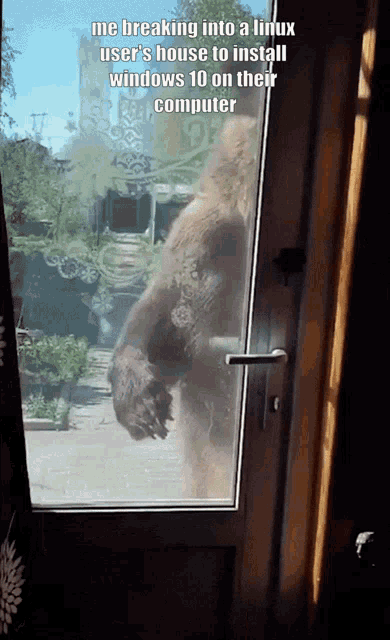
https://tenor.com/view/windows-linux-gif-22505147

You don't do that
Personally, I could not BEAR to use windows 10 again
sly radish
 i should try linux on my old laptop
 maiden finch
i (accidentally) created a 2nd emote set with 1 emote and deleted it again (my default emote set still contains all the emotes) but now on the twitch channel only the deleted emote set with 1 emote shows up.  eben though the correct default emote set is active
lavish shard
maiden finch
i (accidentally) created a 2nd emote set with 1 emote and deleted it again (my d...
i see you with the right emote set
try a refresh or restart browser

 maiden finch
hm yeah now it works strange, oh well, i also created a new emote set which now seems to have 1000 slots instead of 250, so thats nice
lavish shard
maiden finch
hm yeah now it works strange, oh well, i also created a new emote set which now ...
click the wrench of your emote set in your profile page
you can increase all your emote set slots to 1000

 maiden finch
ah :)
 sick cloak

meager sluice
meager sluice
My name paint isn't showing on twitch, I've uninstalled and reinstalled 7TV, BTT...
im still having this issue, any help?
lavish shard
meager sluice
im still having this issue, any help?
can you type in your chat a few times
meager sluice
 did that
lavish shard
can see your cosmetics in chatterino but not in native twitch chat


are you typing through the latest 7tv extension?
meager sluice
yeah, i re added it a bunch of times last night to my browser to see if that would work too
lavish shard
also no streamer badge 
strange
meager sluice
i see a streamer badge for me
lavish shard
oh wait i see it now after a refresh
try a hard-refresh (ctrl+f5) or clearing cache

if it is still not working, try this guide: #help-old message
meager sluice
clearing the cache worked, thanks! 
lavish shard
hollow crypt
does anyone know how long it takes before my emotes get approved so i can upload more.
also still dont have my subscriber role in discord.

sly radish
uhhhhhh i think u can upload how many/whenever as u want to, approval only make emotes to be public/searchable
lavish shard
sly radish
uhhhhhh i think u can upload how many/whenever as u want to, approval only make ...
no you are limited to only 10 unlisted emotes
sly radish
 oh
oh
lavish shard
have to wait until mods approves your emotes
hollow crypt
yeah thats my question on how long this will take cause i got about 30 of them
hollow crypt
dont feel like waiting a "month" for 10 emotes to get approved
and i still dont have mmy subscriber role
lavish shard
did you linked your discord before or after you've joined this server?
hollow crypt
after
sly radish
 this 7tv bot
lavish shard
 i think the 7tv site is shitting itself again
lavish shard
hollow crypt
dont feel like waiting a "month" for 10 emotes to get approved
you've just uploaded them yesterday
gotta be more patient than that
lavish shard
 sly radish
its 12:10 not 1:09  pizzaaaa


 sly radish

 willow ferry
im not sure thats how timezones work
lavish shard
anyways
emote queue is long
takes long time to approve them
 frank harbor
why's it impossible to sign out of this on Kick 
 hollow crypt
so uhm who can i contact about the subscriber stuff?
seems like even on twitch when i look through my emotes it still tells me i need to subscribe
"emote menu "
 swift vortex
Hello, i really need help with my 7tv. My whole account switched name and i lost everything, my subscription and twitch account name is gone. Can any staff here DM me?
lavish shard
swift vortex
Hello, i really need help with my 7tv. My whole account switched name and i lost...
what was your username before and the one you have now?
swift vortex
lavish shard
what was your username before and the one you have now?
My username were itssdannn (my twitch name) and now it changed to _0123
lavish shard
swift vortex
My username were itssdannn (my twitch name) and now it changed to _0123
you still have your kick linked to your sub account
you can login through kick.com


as such
and did you unlinked your twitch account from your main 7tv account then sign it with it, that's why it made you a new account instead
https://7tv.app/users/6533c185b5c63fe97fd40782
you might need an admin to help you with deleting
but they are currently busy at twitchcon right now
swift vortex
Do i unlink my twitch from the new name account?
tbh i have no idea how i log in from kick
lavish shard
hollow crypt
so uhm who can i contact about the subscriber stuff?
sub role on discord is distrubuted by a bot here, which sometimes works and sometimes dont
so you will get it one day (you dont miss much without the sub role on discord)
lavish shard
swift vortex
tbh i have no idea how i log in from kick
see: #help-old message
hollow crypt
lavish shard
sub role on discord is distrubuted by a bot here, which sometimes works and some...
same thing with the extension
says i dont have it
lavish shard
hollow crypt
says i dont have it
can you send a screenshot?
swift vortex
Ah okay, but should i unlink my twitch from the new 7tv account?
hollow crypt
 lavish shard
hollow crypt
lavish shard
hollow crypt
your personal emote set should be here
try opening it
 hollow crypt
its empty
 twilit siren
whats up with badges and name colors not working 
lavish shard
swift vortex
Ah okay, but should i unlink my twitch from the new 7tv account?
if you really want to link back the twitch acc back to the 7tv now
you can:
- In the
_0123account, link a throwaway discord account - Unlink the twitch acc from it
- Log out from
_0123and login toitssdannnwith kick using the method i just posted - Link your twitch account
hollow crypt
seems like a lot of hazzle, not everyone has a throwaway account 
lavish shard
twilit siren
whats up with badges and name colors not working <:ReallyMad:930908505890770954>
the extension is struggling recently from time to time
just need to refresh. if that doesnt work clear cache
lavish shard
hollow crypt
seems like a lot of hazzle, not everyone has a throwaway account <:lul:364819581...
 that's the only self-workaround without admin help for now
7tv does not allow you to unlink your last and only linked twitch/discord/kick account
you must have at least 1 connection at a time
twilit siren
lavish shard
the extension is struggling recently from time to time
just need to refresh. if ...
sadly didnt work
sly radish
i had to clear cache twice and refresh multiple times just to see namepaints
advice: use chatterino7
twilit siren

lavish shard
lavish shard
if you really want to link back the twitch acc back to the 7tv now
you can:
1) I...
@willow ferry does this trick not work anymore
they tried this but got the 500: Internal Server Error when trying to link the twitch account
which is related to the "No linking account that was used for making 7tv account before" thing?
their accs: https://7tv.app/users/631224e5d561eb2631bec883 , https://7tv.app/users/6533c185b5c63fe97fd40782
lavish shard
hollow crypt
its empty
ok i think it's just the extension bugging out again where it doesnt recognize anyone as sub
since it's also happening to me now
 anatole
hollow crypt

lavish shard
at the meantime
you can use https://github.com/SevenTV/chatterino7/releases?referrer=7tv.app

GitHub
Chat client for https://twitch.tv. Contribute to SevenTV/chatterino7 development by creating an account on GitHub.
 left ferry
For whatever reason 7tv is not working for me nor my friend
he is streaming and cant see any emotes and we are not able to see the emotes on his channel
sly radish
refresh/restart browser/clear cache until it works, or its a global bugged as pizzage said above 
 pine lynx
I think it's globally bugged?
The paint tool tab in 7tv settings is completely empty for example
lavish shard
pine lynx
I think it's globally bugged?
The paint tool tab in 7tv settings is completely e...
the paint tool only stores cached paints, i.e. paints you have seen from chat
not related to the bug
pine lynx
Oh my bad, I just cleared cache to try and make it work so that explains that.
Still... can't see 7tv subscribers or paints in chat today
lavish shard
i believe it's still down, even tho not reported on https://status.7tv.app/
meanwhile you can use chatterino7 linked above, where cosmetics works properly

Welcome to 7TV status page for real-time and historical data on system performance.
 timber elk
I can't see my 7tv subscription icon and name color in the chat, what should I do?
timber elk

twilit siren
wheat sapphire
Yes the website is having huge issues atm, not sure on an ETA for fix
how can i get sub icon on disc im subbed for 12+ months ?
 worn blade

wheat sapphire
@twilit siren if you link your discord to your 7tv account, but there are issues with that also apparently
twilit siren
ye i figured
 wheat sapphire
Yes the website is having huge issues atm, not sure on an ETA for fix
wheat sapphire
wheat sapphire
Yes the website is having huge issues atm, not sure on an ETA for fix
@lusty burrow
 lusty burrow
auh ok tnq
wheat sapphire
np
 raw raptor
I need help. I was watching stream and 7tv disappear. Refreshing website or reinstalling don't fix my problem.

It looks as if 7tv was not installed
 scenic goblet
Yo, i changed username on twitch and now i dont have my badges, how do i update username on 7tv?
and transfer it to the new url name?
 fast light
guys please help, I was given a 7tv sub today, but the chat has been normal all day, I already re-logged into Twitch and rebooted my PC, nothing helps


there was no such problem before
scenic goblet
it says i am subscribed but shows i have no paints 

 fast light
guys please help, I was given a 7tv sub today, but the chat has been normal all ...
fast light
fast light
guys please help, I was given a 7tv sub today, but the chat has been normal all ...
these guys also have a sub on 7tv, but their nicknames are default

and so on all day
fast light
thank you very much, I'm waiting
scenic goblet
 thin herald
Website is having some issues, will be resolved soon
thin herald
Website is having some issues, will be resolved soon
So its not because i changed username? its for all?
 arctic perch

thin herald
It should transfer automatically, but since website is having issues might take more time than expected
scenic goblet
yeah
raw raptor
raw raptor
I need help. I was watching stream and 7tv disappear. Refreshing website or rein...
This is also becouse of website issues?
thin herald
Yes
raw raptor
So I should just wait and this will show again?
thin herald
If issue still persists after we announce that the website issues has been fixed please let us know
raw raptor
okey
 daring arrow
is the are way to fix the emotes not loading in bug?

 radiant tapir
Okay, so the website is having issues, I was wondering why my stuff wasn't working on Twitch
 hushed shuttle
fast light
these guys also have a sub on 7tv, but their nicknames are default
hushed shuttle
fast light
these guys also have a sub on 7tv, but their nicknames are default
Renata smotri
 gleaming charm
Hey made a custom emote and it appears as unlisted do i need to do something or is it just solo going into approval
gleaming charm
Oh cool thanks 🙂
granite arch
is 7tv down? Emotes are barely working, no colors and 7tv website is barely working. just confused if it's me or not. :) Edit. I just looked up. i'm sorry for asking again without checking first.
 somber relic
dashboard running slow for me
rocky cloak
yeah the 7tv website is kinda slow rn
 broken marlin
My emote sets aren't even showing up when trying to add an emote 
 zinc root
granite arch
zinc root
granite arch
 candid fog
+1 to an outage
 hidden meadow
 candid fog
Seems like it's coming back slowly
 tawdry mica
fast light
guys please help, I was given a 7tv sub today, but the chat has been normal all ...
tawdry mica
fast light
guys please help, I was given a 7tv sub today, but the chat has been normal all ...
I have same problem
 sour quarry
yea website has been loading super slow for me and not adding emotes at all 
 fallow maple
candid fog
+1 to an outage
fallow maple
candid fog
+1 to an outage
+1
 bold sinew
fix the fucking website 
rare cape
xqc just messaged me he said hes working on fixing the site rn
tulip solstice
rare cape
xqc just messaged me he said hes working on fixing the site rn
stop being weird
I just asked xqc and he says he doesn't even know you

 round nova

 rare cape
7TV IS SLOW RN, WAIT TILL AFTER TWITCHCON HAS ENDED FOR FULL FUNCTIONALITY.
unreal wharf


 fossil tulip
 vagrant magnet
what happens to 7tv if twitch account is banned
vagrant magnet
what happens to 7tv if twitch account is banned
if you linked any other accounts, you can right click the sign in button and use those
granite arch
How to I can my emoticon gif from Unlisted to get Listed? Visible from everyone? Thats my first time.
 lavish shard
wait until a mod approve it
granite arch
How long does it take approximately? if i may
lavish shard
an emote being unlisted just means it is not publicly listed, but you can still share the link to the emote to channels you want it to be enabled on
lavish shard
granite arch
How long does it take approximately? if i may
depends on how long the emote queue and how many mods are active
lavish shard
granite arch
Because I wanted to put her in Personal Emotes, and I can't..
for personal emote, it has stricter requirement and being enabled in at least 50 channels is one of them
so you cannot just upload an emote and use it as personal emote
granite arch
Every time I want to add my own emote to 7tv, do I have to write to someone here and send them a screen, or wait on the website?
sly radish
just do nothing and wait to be approved, usually take days or weeks, but as pizza said, you can link it to anyone so they can enable it on their streams with no problem
granite arch
Understand, thanks.
lavish shard
When you upload an emote, it will automatically be queued for approval by mods
wheat sapphire
^ website not doing well so approvals have been halted for a little
lavish shard
 uh oh
uh oh
sly radish
Tex7me 
willow ferry
there are mods doing the queue, but there are still technical difficulties at times
approvals are certainly not "halted"
however, there are around 5,100 emote currently requiring review
so approval times may be slightly longer than usual
@sly radish there are more uploads than that in a day
Aware
 🔥
🔥
 sly radish
 DELETE THIS NOW
willow ferry
the queue almost never drops below 1000
unless mods get together and work on it in a vc for like hours at a time
and then its back up to 4k the next day
granite arch
What can I do to have enough privilege to use it in the personal emote?

 granite arch
Now is unlisted.
rocky cloak
you want it as personal emote right?
granite arch
Now I have second too.. One is PETTHEANDREJ and second is PETTHETOJEJEDNO but.. But I'll wait for the second one.
Right.
rocky cloak
okay
lavish shard
granite arch
What can I do to have enough privilege to use it in the personal emote?
as mentioned in #help-old message , a personal emote is required to be enabled in at least 50 channels, and another approval from mods after it is approved for public listing
granite arch
When this emoji is used by a streamer on twitch, will it be able to be used normally?
lavish shard
yes
an emote being unlisted just means it is not publicly listed and cant be searched, but you can still share the link to the emote to channels you want it to be enabled on
lavish shard
granite arch
When this emoji is used by a streamer on twitch, will it be able to be used norm...
also make sure to disable this setting to see unlisted emotes in chat
 granite arch
Oh, I have enable this. Now I have it disable.
 spiral crescent
if emote gonna be rejected, it will show in activity feed? like it shows when it approved
lavish shard
spiral crescent
if emote gonna be rejected, it will show in activity feed? like it shows when it...
yes

 bleak trout
apparentlly 7tv setting bar look like this when i open it.

 winter spade
bleak trout
apparentlly 7tv setting bar look like this when i open it.
winter spade
bleak trout
apparentlly 7tv setting bar look like this when i open it.
same, also the emotes doesn't work on microsoft edge (idk about any other browser)
sly radish
check pinned message
bleak trout
anyway, i only want youtube 7tvemotes to be back.
 mighty patio
swift vortex
lavish shard
<@727399831177265232> does this trick not work anymore
they tried this but got t...
mighty patio
swift vortex
lavish shard
<@727399831177265232> does this trick not work anymore
they tried this but got t...
@willow ferry ?

 mellow moth
Hello, I am only about to use 600 emotes in 7tv. Is it possible to have this increased to the 1k?
wheat sapphire
mellow moth
Hello, I am only about to use 600 emotes in 7tv. Is it possible to have this inc...
Accounts created later than when we upped the total to 1000 slots didnt get it and some accounts even became bugged and did not get them either, unfortunately there is no fix until we push a patch out
And i do not know when that is, people have been asking for a while now so sorry

 prime shadow
somebody help me
lavish shard
what is your 7tv account name?
prime shadow
kravshenkom
 uneven surge
so i have a issue with the extension 😦 when I click it, it only opens a quarter of extension not the whole thing...
lavish shard
try to login at a later time
server is a bit slow at this moment
uneven surge
alright sounds good
lavish shard
oh that was meant for @prime shadow
lavish shard
uneven surge
so i have a issue with the extension 😦 when I click it, it only opens a quarter...
check top pinned
prime shadow
lavish shard
try to login at a later time
server is a bit slow at this moment
I've been trying to log in in different ways for the third day now
lavish shard
prime shadow
I've been trying to log in in different ways for the third day now
and what's your twitch account?
prime shadow
 lavish shard
also server might be dying at this moment
try again at different time of day
prime shadow
okay, thanks for help ❤️
 cedar basin
why do i have to refresh like 10 times for emotes to show? streamer channel emotes not showing in the emote menu same with my personal emotes and the four emotes from gifting subs
 woven depot
yeah, I'm trying to figure out what is going on. But they 7tv is at twitchcon so they are probably busy
wheat sapphire
woven depot
yeah, I'm trying to figure out what is going on. But they 7tv is at twitchcon so...
You would be correct

Everything will get fixed after Twitchcon probably
broken marlin

 lean warren
hi i've some issue with the exentension, how can i fix that?

 ionic halo
Can you hide the weekly top gifters thing
 drifting nimbus
I've restarted the page 5 minutes and I still haven't got the 7TV emotes
 sly radish
lean warren
hi i've some issue with the exentension, how can i fix that?
sly radish
lean warren
hi i've some issue with the exentension, how can i fix that?
check top pinned flowchart
sly radish
drifting nimbus
I've restarted the page 5 minutes and I still haven't got the 7TV emotes
on which channel? 
i assume yours but i guess you changed your name, cant find it from your discord links
 alpine ridge
Yoo my emotes from 7tv randomly stopped working only in my channel I can still use them in everyone elses channel ;-; I looked at most settings but cant figure it out  elp?
elp?
alpine ridge
wheat sapphire
Everything will get fixed after Twitchcon probably

nvm apparently it fixed itself just randomly rn
my b 
glossy flax
@sullen hinge @earnest roost Please delete these accounts BlueIceSSC_5490,BlueIceSSC_5543
 solid marsh
Hello! I'm getting an error code 70500 whenever I'm trying to sign in to 7tv. Found an old Reddit thread saying that ''removing the twitch account from the emote section completely removes someones ability to sign in.'' Which is something I must have done by mistake, can this error code be fixed?
sly radish
solid marsh
Hello! I'm getting an error code 70500 whenever I'm trying to sign in to 7tv. Fo...
hi, i checked your account and u have discord and kick linked, right click the sign in button and choose discord, maybe it will work
lavish shard
your acc fyi
 sly radish
link twitch again if it works 
 sly radish
also assign a set for your twitch account, the cogwheel on the twitch tab on 7tv 
nvm u got it
 clear hull
I was watching a stream last night and my browser randomly crashed and after that the channels 7tv emotes weren't showing up. I was using the FFZ addon but I've now downloaded 7TV itself and they still aren't showing up.
Tried removing and adding the FFZ addon back and that didn't do anything.
lavish shard
try clearing cache
clear hull
lavish shard
try clearing cache
On my browser or in FFZ somehow?
Cleared browser cache and it didn't do anything
lavish shard
try the flowchart in top pinned
lavish shard
did 7tv died again?

 fluid plover
https://cdn.discordapp.com/emojis/1118837248054542336.gif?size=48&name=HELPMEEEEEEE&quality=lossless
 thin herald
solid marsh
Hello! I'm getting an error code 70500 whenever I'm trying to sign in to 7tv. Fo...
thin herald
solid marsh
Hello! I'm getting an error code 70500 whenever I'm trying to sign in to 7tv. Fo...
skill issue
bozo 
 compact dragon
what is going on lately? The website is again so slow
 ivory grove
the 7tv chrome extension for me is working for all emotes except 7tv ones, anyone else have this issue?
 brave oriole
7tv extension isn’t working for me on yt chats through firefox. i tried to enable 7tv but it refreshes the page and nothing
tulip solstice
brave oriole
7tv extension isn’t working for me on yt chats through firefox. i tried to enabl...
YouTube support is broken at the moment
They're waiting on Google, iirc
 glossy geyser
Why has the 7tv site been so slow lately? Would be nice for the owners to at least make an announcement about it
lean warren
sly radish
check top pinned flowchart
how
 grim geyser
glossy geyser
Why has the 7tv site been so slow lately? Would be nice for the owners to at lea...
grim geyser
glossy geyser
Why has the 7tv site been so slow lately? Would be nice for the owners to at lea...
From what I understand they were at TwitchCon or something when all this started happening
glossy geyser
grim geyser
From what I understand they were at TwitchCon or something when all this started...
I mean sure, but they could at least say that. Like say "Hey we know about the issues and they will be fixed when we get back from TwitchCon"
thin herald
we have been saying that for 3 days in a row in help channel
sadly no admins had announced it yet in the announcements channel which is the proper way but we try our best

 faint marsh
i changed my twitch username a long time ago ( like a year or so ) and it still hasn't updated on 7TV
i'm wondering if there's a way to update my 7TV name to my current Twitch handle?
thin herald
there 
and no, we'll let everyone know when the 7tv username gets updated
it's something many users are looking for so when that happens we'll post an update about it 
faint marsh
OOH sorry about that!! tysm 
 glacial glacier
Anyone know what I should do??
When ever I try to log into 7tv on my alt account it logs me back into an account to a twitch I don’t even have anymore.
lavish shard
what's your 7tv and twitch account?
glacial glacier
lavish shard
what's your 7tv and twitch account?
The twitch account I’m trying to log into is lolsalec. But I even tried to gift my alt from my main account it’s not even showing up on the accounts list
lavish shard
and what 7tv account did you logged into
glacial glacier
Keeps taking me to alecbvtt but it has the Pfp of lolsalec 💀😂
lavish shard
it is connect to the correct account
twitch account =/= 7tv account
they are independent of each other
 glacial glacier
You know how I would make lolsalec into its own 7tv account?
alecbvtt my old banned twitch account so just confused as to why when I log in with twitch account it takes me to that still lol
willow ferry
glacial glacier
You know how I would make lolsalec into its own 7tv account?
it is its own account
your other account is not connected
the name is just out of date
because usernames dont change
lavish shard
glacial glacier
You know how I would make lolsalec into its own 7tv account?
complicated and i would recommend against that
as long as your connected twitch account is correct, it will work fine on twitch
willow ferry
lavish shard
complicated and i would recommend against that
as long as your connected twitch ...
- and it would do absolutely nothing
the account would be in the exact same state
the only difference is the name would be different
what you have now is functionally identical
glacial glacier
willow ferry
your other account is not connected
Ahh thanks. So if I sub it will go to the connected account is all I was wondering really ☺️
glacial glacier
Goodlooks
 glacial glacier
Yup! We Gucci then! I appreciate it
sly radish
lean warren
how
 plain badger
so i logged out of my 7tv acc then logged back in and i think it just made a new acc idk if thats cause i changed my twitch name or what
lavish shard
What's the 7tv account name (the one that is using your old twitch name)
plain badger
C0mannd3r
lavish shard
You have unlinked your twitch and signed up with your twitch account instead of relinking it back to your main, that's why it made you a new acc

You can still log back to your main 7tv account from kick like so
https://media.discordapp.net/attachments/938903939649261598/1157330702937895032/323.gif?ex=65450ab5&is=653295b5&hm=98912100b76827f803b1e30e9fb3cbc805c1be14d83b44b5949e0dc2b21343ca&
And what's the name of the new account you were logged into?
plain badger
puzz1e_ow
lavish shard
plain badger
puzz1e_ow
@sullen hinge delete https://7tv.app/users/653324aa51733e52a8c9967c
lavish shard
@plain badger after the dupe account is deleted, you will be able to link your twitch account back to your main 7tv account in your 7tv profile once you've logged into it. Don't sign in with the unlinked twitch account, or it will make a new account for you again
Just FYI, if you were trying to change the 7tv account name by relinking your twitch account, it will not work. There is no name changing for now on the website: #help-old message
plain badger
it wont allow me to link my twitch
error_code":70500
lavish shard
Your dupe account is not deleted yet
Have to wait until an admin to delete it
plain badger
ok ty
sly radish
https://7tv.app/users/653324aa51733e52a8c9967c this account doesnt have twitch linked tho?
lavish shard
plain badger
it wont allow me to link my twitch
error_code":70500
@earnest roost is it a new feature that wont allow linking a twitch account into another acc?
lavish shard
sly radish
https://7tv.app/users/653324aa51733e52a8c9967c this account doesnt have twitch l...
It was linked before
They probably looked up the previous way of relinking connections, which seems to not work recently
Not sure if it's newly implemented feature
sly radish
so it works if unlink then relink on the same 7tv account (1), or link to a new 7tv account (2) but then can't relink back to account (1)?

similar error code #help-old message
lavish shard
It's just error 500 Internal Server Error, which doesnt tell much beside account login related issue
sly radish
aahh internal error, cant do anything afaik
willow ferry
lavish shard
It's just error 500 Internal Server Error, which doesnt tell much beside account...
90% of the time this just means this user signed in previously
but unlinked
ie. an account exists with the username they are trying to create
but its not linked to them
the server doesnt return an error for this because its not supposed to be one
but usernames are marked as primary keys in the mongo db
and that cant be changed easily
but the server will hapily attempt to do the correct action
and create a new user with the supplied credentials, when one is not linked
but fails at the insert request to the db, resulting in a crash out to a generic 500
you can use a different account to sign in
and then just link your existing one
but more commonly if this condition is arising
the user did not intend to unlink their twitch
and therefor another account that they could sign in with is still connected
so they should just sign in with that and relink
instead of creating a new account, like what is trying to happen
the same error would happen for example
if xqc signed in with twitch
and someone else had the username xqc on discord or kick
and tried to sign in, that would result in a 500
there is no connection to the accounts, and its trying to create a new one like it should
but it cannot, because the username is reserved unintentionally
this error though like I said implies that an account still exists
so they should find whatever connection they left behind
and use that, to relink
lavish shard
lavish shard
<@156499675497627648> delete https://7tv.app/users/653324aa51733e52a8c9967c
So they would have to have this account deleted to be able to relink their twitch back to main
sly radish

lavish shard
So yeah
Dont recommend the old relinking account method
Especially when they made a new account with their connection, which most likely wont work anymore
 loud edge
Yo Im mental booming rn. How can I add emotes to my channel?

 lavish shard
"doesn't work" as in?
loud edge
When I type in catKiss in chat it doesn't show up
sly radish
refresh the chat maybe? 
tulip solstice
loud edge
Yo Im mental booming rn. How can I add emotes to my channel?
xqc terminology
I love it
lavish shard
swift vortex
My username were itssdannn (my twitch name) and now it changed to _0123
@sullen hinge delete https://7tv.app/users/6533c185b5c63fe97fd40782
 delicate grove
can you delete my account https://7tv.app/users/6168c7cbe7db9b760346b123 (Its bugged for months)...I don't mind creating another fresh account
lavish shard
delicate grove
can you delete my account https://7tv.app/users/6168c7cbe7db9b760346b123 (Its bu...
@earnest roost another case of deleted editor account
delicate grove
lavish shard
<@61076301552820224> another case of deleted editor account
yeah, but I reported this issue months ago...If it's faster to delete the account, I don't mind xD
hollow crypt
anyone know how long it will take before my emotes get accepted? maxed out on 10 and been almost a week. 1,5 days left before its a week
and looks like i still dont have my subscriber tag lmfao
lavish shard
hollow crypt
anyone know how long it will take before my emotes get accepted? maxed out on 10...
hollow crypt
lavish shard
https://discord.com/channels/817075418054000661/938903939649261598/1165544646768...
lovely 
 frosty iris
how do personal emote works?

 lavish shard
frosty iris
how do personal emote works?
lavish shard
frosty iris
how do personal emote works?
you can use personal emotes in any channels just like global emotes
frosty iris
lavish shard
you can use personal emotes in any channels just like global emotes
and whats the process w/ the approval thingy? how does that work
I want to use  everywhere but its been in the Q for a week I think or so now
rare cape
personal emotes need to be in at least 50 channels to be able to be used
lavish shard
Personal emotes require an additional approval and another set of requirements
such as, the emote as to be enabled in at least 50 channels, less than 1:1.5 ratio, non-toxic, non-eplicepsy inducing and more
if it's already in queue, you just have to wait
the emote approval process was halted for a while due to website problem recently
 sterile echo
are the admins here yet to delete other accounts?
lavish shard
just ping marcfryd with the 7tv account you want to be deleted
sterile echo
how can i see which accounts are currently connected?
since i cant login and idk which accs are currently connected
lavish shard
sterile echo
how can i see which accounts are currently connected?
under your profile

what was your 7tv account name?
sterile echo
Liltado
lavish shard
If this is your account, you can login via kick.com

as such 👆
7tv website is kinda slow right now
if you have trouble logging in, i'd advise you try another time
sterile echo
lavish shard
7tv website is kinda slow right now
if you have trouble logging in, i'd advise y...

you mean that this appears then and i cant grant access
to login over kickj
lavish shard
sterile echo
right click the 7tv icon and click Options
 sterile echo
yh got it iam logged in
and if i want to add my twtich account but i cant remove my Kick since its the last one, and cant login with twitch
lavish shard
sterile echo
and if i want to add my twtich account but i cant remove my Kick since its the l...
are you not be able to link your twitch to your 7tv account?
lavish shard
you are logged into this account right? https://7tv.app/users/610a07fb831545f5269689dc
not this one? https://7tv.app/users/6537e3cb4af7b9a4fcf0a842
sterile echo
yep
first one

basicly all i want to do is link my twitch and if needed remove kick
lavish shard
you dont need to remove kick if that's your concern
you can have both twitch and kick linked
but not sure why it is not allowing you to link the twitch acc
swift vortex
its so annoying
 swift vortex
thats what i get too
lavish shard
@sterile echo https://7tv.app/users/6537e3cb4af7b9a4fcf0a842 was this account created with your discord account or twitch account first?
sterile echo
lavish shard
<@154660428046139392> https://7tv.app/users/6537e3cb4af7b9a4fcf0a842 was this ac...
i created that acc like 5 mins ago
so it can be deleted
the issue was before that
swift vortex
i have the same issue, i can link my twitch to the discord linked acc but not the main acc
lavish shard
@swift vortex your issue is known, it's just the account deletion havent got to you yet
swift vortex
when my acc is getting deleted how am i supposed to link my discord to the main acc? will it make another new acc again?
lavish shard
sterile echo
@willow ferry what about this case
the twitch account is the same name with the 7tv account, and should be able to link it
but still getting error 500
 spice fulcrum
do we know why 7tv so slow lately
 kind flume
How can I use the Emote Sets from other streamers?
kind flume
oh okay thanks
wheat sapphire
 stoic onyx
Does making an emote private make it so no one can see it, or does that make it so only you can use it on your channel?
worthy arch
the latter
stoic onyx
Is the site having issues? I've been trying to use it and it stays stuck on loading.
granite arch
Might be, my 7tv icon in a Twitch chat blipped away for a few messages then came back lol
 midnight finch
why is 7tv so broken atm ? Many channel wont load emotes at all. Event Api Disconnects often ? chatterino 7 wont show paints etc
 midnight finch
Yeah sometimes it shows the paint and badge and sometime it say this channel has no emotes
i habe chatterino 7.4.6
*have
 hybrid mantle
Something is strange, because I saw some people actually complaining about some stuff like you but it never happened to me 
midnight finch
 dusk loom
The backend can't keep up with peak hours, we're working on it
midnight finch

willow ferry
lavish shard
<@727399831177265232> what about this case
the twitch account is the same name w...
They should be able to link
hybrid mantle
Makes sense, thx for the clarification  👍
👍
willow ferry
But based on their messages it seems like they're just trying to login
And not linking
Which will just try to make a new account
swift vortex
Please delete this https://7tv.app/users/6533c185b5c63fe97fd40782
 rugged trench
I still have a bugged 2nd 7tv account when Kick account linking first started. When I try to link my Kick account with my actual 7tv account it just redirects. Any way to fix?
sterile echo
willow ferry
But based on their messages it seems like they're just trying to login
when iam trying to click on "link accounts" it opens that window
willow ferry
then you have some other issue
try clearing your browser site storage
and starting over
or trying in another browser entirely
also make sure you have third party cookies and etc enabled
and any "privacy" blockers disabled
the linking mechanism relies on the cookie being sent properly
linking is a little scuffed
its the same action as signing in
the server distinguishes it by weather or not your actively signed in, while trying to signin
if you are, then you're linking
but if for some reason your browser is failing to send that
then the server will think you are trying to signin
and you'll get this issue
because the name is taken
sterile echo
ive tried other browsers (fresh ones) with same issue
willow ferry
you've tried signing in?
or you've tried linking
as in you signed in with kick
then went to your profile
and hit the twitch link
you'll always get this error if you just try to signin raw
no matter what browser you use
sterile echo
iam gna try linking from another browser with the kick acc login now
sterile echo
willow ferry
or you've tried linking
ive tried linking my twitch acc with kick login over a fresh browser now and same error
 tidal sleet
hello , i just suscribed to 7tv but cant change my color name on twitch , any tip?
@sullen hinge
 vapid quiver
you change your paints in your profile on the 7tv site
 sullen cave
is it bugged ? its been this way for 2 days now
 lavish shard
sullen cave
is it bugged ? its been this way for 2 days now
lavish shard
sullen cave
is it bugged ? its been this way for 2 days now
new badge will be given on the 1st of each month if you are eligible
sullen cave
oh ok thanks
 obtuse lake
Hi all, I'm trying to upload a few new emotes and they keep appearing as unlisted even though they can currently be used in Twitch chat. I also can't upload more as it says awaiting approval. Can anyone help with this?
 willow ferry
thats how approvals work
when you upload emotes, you can use them but they wont show in public searches
until they get manually approved
and you can only have 10 emotes in queue at any given time
obtuse lake
Oh I just don't remember them being blurred out before, thanks for the prompt response!
 gentle vale
Question where will this appear on my profile and when?
 willow ferry
soon
gentle vale

granite arch

 lavish shard
real kate?
 native kettle
Hi any current issue going on with adding emotes? Not getting an "added" message in chatterino7, and doesn't show up in channel, but ticked as added to channel on website.
 snow portal

lavish shard
native kettle
Hi any current issue going on with adding emotes? Not getting an "added" message...
what is the channel in question?
is the emote set assigned to the channel?
make sure the emote set is assigned to your twitch channel

 native kettle
yep marked to a set Edit: all fixed, thanks
 undone shuttle
hey i was at twitchcon and won the free month and paint but it's not showing up on my account is there anything i need to do?
lavish shard
undone shuttle
hey i was at twitchcon and won the free month and paint but it's not showing up ...
undone shuttle
ok ty
 wide lion
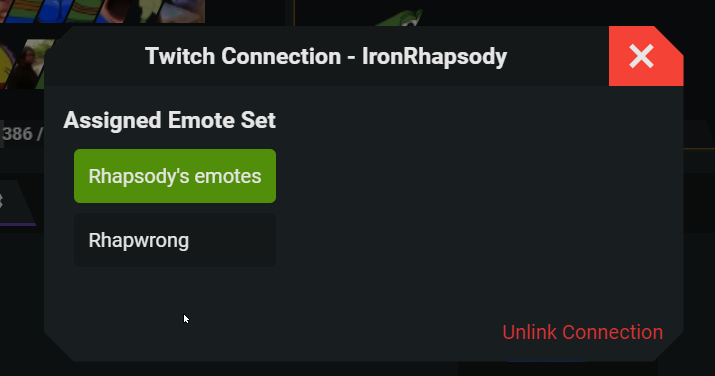
Hi hope someone could help me out with this. Originally, I was using the emote set "Rhapsody's emotes", until one randomly assigned which I renamed to "rhapwrong".. I've tried clicking it and 'deleting' but there's no delete option, nor can i find an option to get "rhapsody's emotes" assigned as the default emote set. I'm unsure how to remove it, 7tv was working fine - until recently i've noticed a weird change emotes not working, checked on it and 3x different emote sets were made, I was able to remove the others just fine; this one, again named "rhapwrong" will not delete... and it won't let me set "rhapsody's emotes" to be the default 7tv emote set in my twitch. Not sure if anyone's had any issues with this: here's a picture of the two different emote sets.

I should note, I didn't create these - they were blank replicas all named "rhapsody's emotes" but again, I deleted 2/3 of the replicas.. This one is the only one that will not delete; and i've renamed it for this example.
lavish shard
wide lion
Hi hope someone could help me out with this. Originally, I was using the emote s...
the Rhapwrong is your personal emote set, which came from your sub benefit, and allows you to use those emote globally like any global emote, hence it is not deletable
What you want to do is to assign back your "Rhapsody's emote" to your channel:
- Click on the wrench bottom right of the "Rhapsody's emote"
- Check the checkbox next to your twitch name
 wide lion
I will give that another go @lavish shard , I've tried this multiple times but one moment!
lavish shard
if that doesnt work
here's another way you can do it
 wide lion
https://i.imgur.com/UxDecWQ.png This was alrdy assigned D:
 lavish shard
also emote set changing requires some time to update on twitch
so you have to wait for a while, about 5 to 10 minutes
lavish shard
it is correct on the website
just give it a bit time to update on twitch

@wide lion there
it is updated on twitch
 granite arch
snow portal
REAL
granite arch
snow portal
REAL
 wide lion
oddly enough not on my end @lavish shard https://i.imgur.com/P5Hi1GV.png
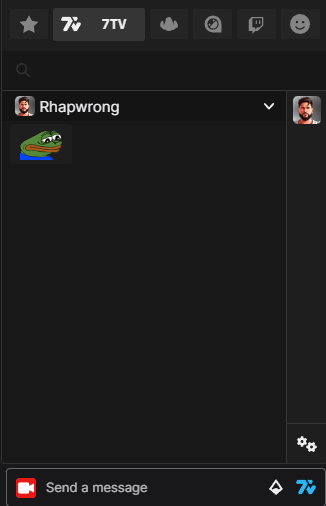 wide lion
https://i.imgur.com/hrB9T3p.png Did both refresh and ctrl + f5
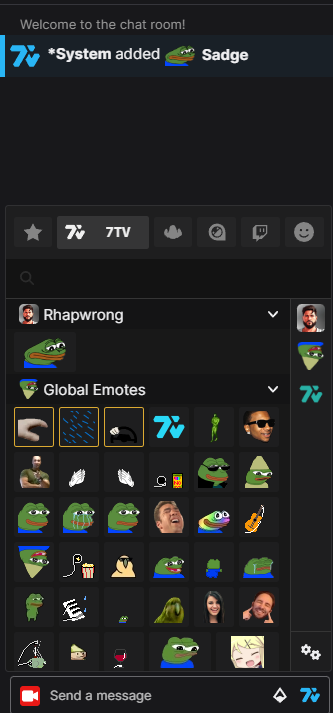
this is the image i wanted to show too: ( sorry for the amount of images) https://i.imgur.com/Nrlh4nY.png
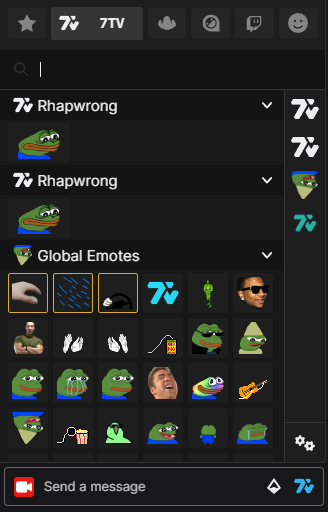
2x "rhapwrong"
I haven't reselected "rhapwrong" and followed your instructions.
lavish shard
wide lion
this is the image i wanted to show too: ( sorry for the amount of images) https:...
the first one is your personal emote set, just like the one from my image: #help-old message
the second one is the non-updated channel emote set
how about closing your browser and open again
lavish shard
try clearing browser cache
wide lion
Sure, unsure on how to do that tho lol!
lavish shard

it should work on your viewer's end, so dont have to touch anything in the 7tv site and no need to change the emote set again
it's just browser problem
on your end
wide lion
Sorry one moment, trying to find on chrome.
anyway, i'll try an emote like 'Goose' That i know is on the good emote set.

 wide lion
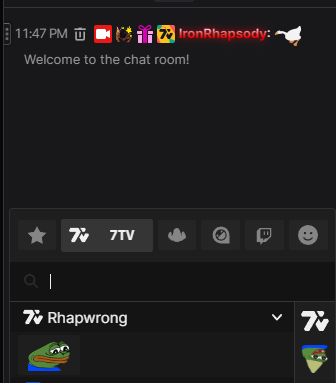
Did it, still says rhap wrong but looks like the other set of emotes are going through.
https://i.imgur.com/Rnlucg3.png , just odd lol
 lavish shard
wide lion
Is that gold border around "rhapwrong" indicating that, it's selected? Not sure how to get it to select the other one; i've done everything lol
lavish shard
no
the gold border means it's your personal emote set
 wide lion
Definitely is set to the other preset, which is good - but, it's not reflecting on my end in the twitch chat
this is atleast progress.
oh okay! thanks.
lavish shard
you just renamed it to "rhapwrong" so it shows up as that
most likely it's just your channel set not showing up
either do a couple more refresh, or restart computer as last resort
wide lion
ok u know what - https://i.imgur.com/SP6nkxu.png these are 7tv. just hovered and check; they weren't working before but now they are. so we are good!
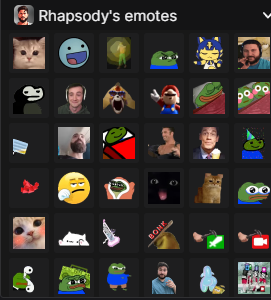
so we are good; thanks for the help @lavish shard
lavish shard
plain badger
uh i still cant link my twitch and it keeps giving me this error {"status_code":500,"status":"Internal Server Error","error":"Internal Server Error","error_code":70500}
lavish shard
admin still havent got to delete your dupe account yet
plain badger
ok and once they do it should work?
lavish shard
yes
but no ETA when's the admin for account deletion is back
willow ferry
wide lion
Did it, still says rhap wrong but looks like the other set of emotes are going t...
it will always show that set
thats your personal set
you can use those emotes anywhere
in any chat
hense they will always show up
wide lion
@willow ferry Thank you, didn't know at first! Appreciate the response.
 candid geode
Who should I talk to if I get a message on upload about to many emotes with approval pending?
lavish shard
just gotta wait
candid geode
lavish shard
just gotta wait
I have 5-6 Channels waiting for emotes, so at least I need an order of magnitude how long this will take 
worthy arch
 rocky cloak

candid geode
We're all gonna die 
rare cape
worthy arch
mod me rq ill have them done in like 15min
 elder mesa

 grand hinge
Yoo wanted to ask if you can assign paints to accs  I have a main 7TV acc on which I can no longer get on it (long story.. ) A 7TV admin said I would have to change my Twitch name to reconnect the ACC but since I didn't want that I made a new 7TV acc. wanted to ask now if you can pull my paints from the main acc over to my new one, can of course also prove that both accs belong to me
swift vortex
sterile echo
can someone deletethis account please https://7tv.app/users/6537e3cb4af7b9a4fcf0a842


 willow ferry
the same place you installed it from
go to whatever your browser settings are for extensions
and remove it
tulip solstice
why?
left already
Usually it's only 80 year old grandmas that don't know how to uninstall extensions
Literally technologically illiterate
This has to be one of the interactions of all times
I couldn't write english that poorly if I tried
 finite egret
anyone know how to fix this? whenever i try to open the extension i just get this thin bar
 sly radish
finite egret
anyone know how to fix this? whenever i try to open the extension i just get thi...
sly radish
finite egret
anyone know how to fix this? whenever i try to open the extension i just get thi...
check top pinned flowchart
finite egret
sly radish
check top pinned flowchart <:PotFriend:947188517153439784>
just clicking on options doesnt fix it. am i missing something?
sly radish
finite egret
just clicking on options doesnt fix it. am i missing something?<:dankWave:944222...
top left of the flowchart, there's nothing in the menu anyways
iirc, its just the extension intro
finite egret
sly radish
top left of the flowchart, there's nothing in the menu anyways
ah ok cool
thank u
sly radish
np
lavish shard
finite egret
just clicking on options doesnt fix it. am i missing something?<:dankWave:944222...
there's no fix to that
it's just a button
 kind arch
worthy arch
kind arch
worthy arch
may I help brother
 modest blade
anyone know if its possible to remove chat timestamps in VODs? didnt know if there wasn option in 7tv for it
 fathom tree
why is it so hard to link my kick account I don't get it
lavish shard
fathom tree
why is it so hard to link my kick account I don't get it
what problem are you having now?
fathom tree
lavish shard
what problem are you having now?
I've tried for months to link my account to no success. Tried different browsers, linking and unlinking my Twitch account nothing is working for me
fathom tree
lavish shard
what problem are you having now?
Accidentally created an alt account that did connect to Kick so I connected my discord to attempted to remove it, and shocker I refresh the page and it disappeared, this whole thing is just a buggy mess for me
lavish shard
you need to have that alt to be removed in order to connect your kick account back to your main
https://7tv.app/users/653a340faf0fd607b5e96f6a
this one is the alt right?
sly radish
https://7tv.app/users/64a490dc6b69e1b647fd6169 this too i assume
fathom tree
That's the one. It claims my Kick account isn't linked any more when I go on the page. And the thing is my Kick account was never on my main account to begin with because it's never worked for me
lavish shard
it's still connected to an account
sly radish
 marc
marc
lavish shard
fathom tree
Accidentally created an alt account that did connect to Kick so I connected my d...
@sullen hinge delete https://7tv.app/users/653a340faf0fd607b5e96f6a and https://7tv.app/users/64a490dc6b69e1b647fd6169
did you followed this to link your account?
 fathom tree
Did everything up until step 3. I'd attempt to link the account and it would open a separate window only for it to close a few seconds later and nothing changing as far as I know
lavish shard
it's expected
the opened window would update the 7tv data on your browser so that the next time you visit 7tv.app you'd be logged into your kick connected account
fathom tree
lavish shard
it's expected
the opened window would update the 7tv data on your browser so tha...
Don't think this has anything to do with it, but are a Kick account that is signed up through Email and a Kick account logged in through that same Email on Gmail two different accounts?
I'm not entirely sure, but I may have done it through Email to begin with only to sign in through Email later. The thing is it still logs me in my Kick account so I'm not entirely sure
lavish shard
email is not involved in the 7tv-kick account linking process
the only thing that matters is that you are logged into the correct account on kick and 7tv
fathom tree
lavish shard
the only thing that matters is that you are logged into the correct account on k...
So more than likely at this point this is the 7TV account that has been giving me issues?
https://7tv.app/users/64a490dc6b69e1b647fd6169
I'm just wondering why the only possible way to Log in is through Twitch and somehow my alt account doesn't have a Twitch account linked to it 😄
 dapper knoll
7tv doesn't work on Kick for me either there's no 7tv logo next to my avatar
fathom tree
dapper knoll
7tv doesn't work on Kick for me either there's no 7tv logo next to my avatar
Just an obvious one here but I'd try removing and reinstalling the extension and clearing out your cache if you haven't already
lavish shard
fathom tree
So more than likely at this point this is the 7TV account that has been giving m...
you can sign in through twitch, discord (see pic)

and kick (see below)
lavish shard
dapper knoll
7tv doesn't work on Kick for me either there's no 7tv logo next to my avatar
check if 7tv has the extension permission on kick.com
 lavish shard
dapper knoll
7tv doesn't work on Kick for me either there's no 7tv logo next to my avatar
lavish shard
dapper knoll
7tv doesn't work on Kick for me either there's no 7tv logo next to my avatar
sometimes you also have to refresh a few time to have the extension loads on the site
fathom tree
but the thing is when going through Kick shouldn't I be able to log into my alternate 7TV account if I'm signed in? Whenever I try to sign in through Kick itself the window that pops up is the one that says you need to log in through Twitch. That's when I attempt to do so and then all the other problems with windows closing when attempting to sign in keep happening