#help-old
1 messages · Page 56 of 1
 willow ferry
or ffmpeg
or really any other encoder
or you can just upload directly in modern formats
 lavish shard
ezgif is recommended
willow ferry
note the framerate restrictions still apply in those formats
lavish shard
i use it to make most of the emotes
willow ferry
because of a severely poor design decision
 hybrid stratus
i tried to upload the same video as mp4 before and it didnt seem to work
willow ferry
that has yet to be rectified
in the image processor
video's arent recommended either
they might work sometimes
but its better to just use webp or avif for uploading
 blissful cliff
how are emote sets supposed to work? am i supposed to create an emote set for only the holiday variant emotes, and one for base emotes that don't have a holiday variant, and one for the non-holiday variants, and then set origin for each variant set to the base emotes?
lavish shard
blissful cliff
how are emote sets supposed to work? am i supposed to create an emote set for on...
yes you can do that
blissful cliff
lavish shard
yes you can do that
is that how it's supposed to be used? seems like it'd be more convenient to replace the ones you want to replace from the base set
lavish shard
blissful cliff
is that how it's supposed to be used? seems like it'd be more convenient to repl...
But you'd have to go through your emote list, search and replace the Halloween emotes all over again once Halloween is over
blissful cliff
lavish shard
But you'd have to go through your emote list, search and replace the Halloween e...
i mean like create a duplicate of the set, or use like a "priority" where if e.g. a HUH exists in a set, it overrides a HUH in an origin set for it
lavish shard
cant do that
dont think origin emotes can be overidden
blissful cliff
yeah, i guess on the backend it's a merge of emotes from the base set and the current set. so you can't replace just the emotes you want to override.
 lavish shard
Emotes need to be enabled in more than 50 channels, and another approval process to be used as personal emotes
 fickle valley
oh I see, thank you
personal emotes appear to anyone using the extension is that right?
and is it possible to get more than 5 emotes?
I appreciate the help 
lavish shard
personal emotes appear to anyone using the extension is that right?
yes, and any clients that is compatble with 7tv v3, like chatterino7 and ChatIS stream chat
and is it possible to get more than 5 emotes?
no

 low flax
only 3 Origins max? was this always the thing?
 earnest roost
yes
low flax
other payment method besides PP?
earnest roost
card
earnest roost
what browser are you using
try clicking the twitch button on the left of your profile using chrome, ensure third-party cookies are permitted
 spring swan
Does someone know when my name will update in the 7TV APP since i changed my name 6 months ago? i do not get any colored names anymore etc...
low flax
spring swan
Does someone know when my name will update in the 7TV APP since i changed my nam...
paints broken, not sure what the other issue is though
spring swan
Okay thanks, ye on 7TV is still my old name hahahah
low flax
so emote is in Set A and Set B, combined set C contains A and B
emote appears twice in the combined set C's page
seems all right on the emote picker menu though
 green jolt
hey guys can anyone from the admin team help me with #1145979977142116404
waiting now weeks 
 lament glade
i need to be subbed to see my badge from september event?
 worthy arch
yes'
 balmy cypress
Is the 7tv chatterino safe?
worthy arch
this is the official 7tv chatterino fork https://github.com/SevenTV/chatterino7/releases?referrer=7tv.app
GitHub
Chat client for https://twitch.tv. Contribute to SevenTV/chatterino7 development by creating an account on GitHub.
 sour hound
someone smarter than me got an idea?
i have 7tv on my firefox bugging out. on chrome (i switch halfway through) it just works.
on firefox i have obviously tested with all plugins just enabled, but disabled them ALL 1 by 1 to see if its one of them. its not.
i cleard cache and cookies for 7tv already (reason why im logged out) but logging in doesnt change the problem. when i just open an emote via direct link, i can view it perfectly fine. i just cant search "top" "trending" and also not by typing emote names. i have to switch to chrome 😦
someone got an idea?
 willow ferry
sour hound
someone smarter than me got an idea?
i have 7tv on my firefox bugging out. on ...
willow ferry
sour hound
someone smarter than me got an idea?
i have 7tv on my firefox bugging out. on ...
what version of firefox is this?
its interesting that you have full scrollbars my firefox has the thin ones
sour hound
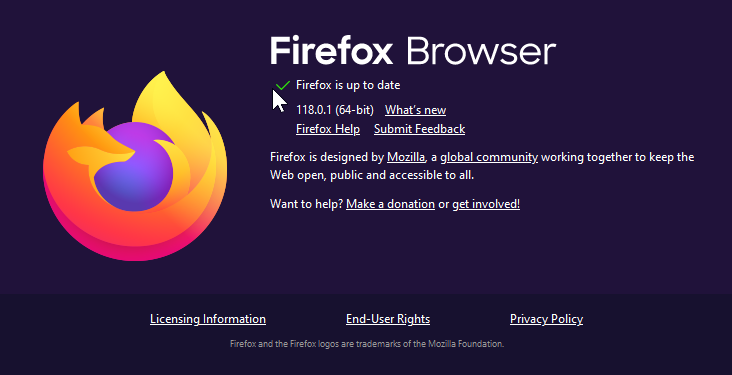
the only thing i manually had to adjust was something in some options so i could CTRL SHIFT T to open the last closed tab. because that didnt work on install. rest is just basic options / themes or plugins (but plugins are disabled for the video)
should i repost this under "bugs and issues" ? i just read the rules for that.
willow ferry
sour hound
should i repost this under "bugs and issues" ? i just read the rules for that.
this is happening because the scrollbar is appearing causing the page to think that its been resized
which reloads the emote list
this won't be an issue in the new website rewrite
but for now you can temporarily workaround this
by forcing firefox to use the overlay scrollbars
about:config -> widget.non-native-theme.win11.scrollbar.force-overlay-style
you might also want to do widget.non-native-theme.scrollbar.style -> 2
sour hound
lol genious. site was set to 110%. on 100% the problem doesn occur
sour hound
some things can be so easy
willow ferry
of settings and screen size
for this to occur
if any of those 4 conditions arent met this wont happen
sour hound
i try the small scrollbar thingy as well
willow ferry
willow ferry
you might also want to do `widget.non-native-theme.scrollbar.style` -> `2`
also depending on your system you might need
widget.non-native-theme.enabled for either of those to take effect
sour hound
i did. seems not to work. its still flickering with the small scrollbar. only adjusting to 100% works
which is more than fine for me. just so you know
anything above 100% reload-loops
willow ferry
its because the loading spinner is temporarily being pushed offscreen
due to a seperate bug
which due to your screensize at those zoom levels
makes the page too tall
causing it to start scrolling
which makes the scrollbar appear, shrinking the width
causing the page to think it needs to reload because the screensize changed
making the spinner appear again

sour hound
hey, at least you know for future updates. and i know for my fix. thanks a lot already 👍
 short tiger
willow ferry
its interesting that you have full scrollbars my firefox has the thin ones
short tiger
willow ferry
its interesting that you have full scrollbars my firefox has the thin ones
firefox should only use the thin scrollbar on some pages
like youtube
 narrow ore
heya, is it possible to disable for the chat of my stream that people can still read messages after a mod has deleted them? (Not client-side but stream-side)
balmy cypress
worthy arch
this is the official 7tv chatterino fork https://github.com/SevenTV/chatterino7/...
it won't let me install it
I give it to install but nothing happens
short tiger
balmy cypress
it won't let me install it
the normal chatterino version also has support for 7tv

if emotes are enough
if you want animated profile avatars, name paints and the x4 images you have to wait until someobody replys to you for chatterino7
willow ferry
narrow ore
heya, is it possible to disable for the chat of my stream that people can still ...
not really
its not entirely in control what happens to the message data after its been made public
even if we added an option, chatters who use other clients would still see them
like chatterino, bttv, ffz, or certain mobile clients
most twitch clients have an option to display deleted messages
since the message contents never actually goes away, the only way to actually ensure people never see the messages
is if you have a chat delay or something
narrow ore
okay thanks!
balmy cypress
I fixed it
 severe flower
Hello! im having loggin issues to manage my emotes :(. Getting this message. Can someone help me please?

 still jasper
Hello,
I have tried to install 7tv into firefox from 'https://7tv.app/' however the request times out. I have also not seen it on the add-on section of mozzila. I removed it previously since the emotes where not loading and now I am stuck without the addon.
If someone knows the solution I would welcome them. .
Thanks in advance!
 clever chasm
Is this subscription progress bug going to be fixed anytime soon ? 

 vast surge
How do i cancel a sub?
 jaunty wraith
on the 7tv website no matter what browsing source im using the preview images for emotes are just little squares and doesnt actually show them I have to refresh like 5 times before they pop up and even then they dont sometimes can someone help?
 granite arch
Will the login issues ever be fixed? It's been a month and a half of not being able to log in. I always get the same error code no matter the browser or device. Having the same issue as @ Monofonico up above
 rough rover
why is the extention not working ? the extention screen is like 20px whith and the thing just ain't working on twitch
Edit: i tried Nightly neither does that work!
lavish shard
right click the extension icon and choose Options
 rough rover
either if i left or rightclick i get the 20px screen however if you proceed with what i need to do i can find it else where
lavish shard
no
right click should just bring up the default chrome extension dropdown
you only get the 20px window from left click
rough rover
lavish shard
no
right click should just bring up the default chrome extension dropdown
no itr does not cuz i ain't using chrome :) i use brave :)
rough rover
lavish shard
you only get the 20px window from left click
brave also on right :)
anyway what do i need to do in the option thing
lavish shard
does brave have this thing then?
 rough rover
no

but if i go menage extentions i have optoons :)
so proceed will find what you need in there probs :)
lavish shard
ok
then try to press this button
it would direct you to a page to set the extension permission and customize your extension settings
 lavish shard
so what is not working?
the emote themselves not showing up, or not even the 7tv emote menu and settings showing up?
rough rover
as you see no slider, no emote menu, no recent mod actions nothing of the extention

not the extention user cards just twitch native
 calm fern
Hi. Where can i read requirements for emotes like max file size, width and height specs etc?
rough rover
calm fern
Hi. Where can i read requirements for emotes like max file size, width and heigh...
guess they will resize it :)
 lavish shard
rough rover
as you see no slider, no emote menu, no recent mod actions nothing of the extent...
lavish shard
rough rover
as you see no slider, no emote menu, no recent mod actions nothing of the extent...
check your extension site permissions
 lavish shard
calm fern
Hi. Where can i read requirements for emotes like max file size, width and heigh...
lavish shard
calm fern
Hi. Where can i read requirements for emotes like max file size, width and heigh...
Ensure that the dimensions of your emotes are under 1000x1000 pixels, that it has less than 1000 frames, and that it is under 7 megabytes large, less than 50 fps if animated
For the best quality, i suggest you to resize your emote to 128 pixels high since the emote upload process will resize it to 128px in chat at max anyways
rough rover
rough rover
not the extention user cards just twitch native
but @lavish shard as you can see its not working for me so... yeah
lavish shard
rough rover
but <@262784353547976714> as you can see its not working for me so... yeah
that's why i said check whether the extension has access to twitch
 calm fern
rough rover
guess they will resize it :)
calm fern
rough rover
guess they will resize it :)
thanks. i am trying to upload 112x112 animated png's through website, but it doesnt want to accept cropped versions of the same png's that i had at 150x150 previously. i will check the frames for the cropped versions now
rough rover
lavish shard
that's why i said check whether the extension has access to twitch
it does i check it and it has acces to all sites it is able to (Twitch, Youtube, Kick)
rough rover
rough rover
it does i check it and it has acces to all sites it is able to (Twitch, Youtube,...
as you see :)
 lavish shard
do you have any other twitch extensions enabled?
for the record
my freshly downloaded brave with 7tv works
rough rover
nope no BTTV no Frankerfaze no anything but 7tv that isn't working :)
rough rover
lavish shard
for the record
my freshly downloaded brave with 7tv works
yeah i mean i'm more then willing to believe you! however for me it doesn't. and lets solve that issue yk its good that it works in general like very good don't get me wrong :) but lets find a way to make it work here to
lavish shard
 my point is i dont know what other extra settings or things on brave that might made the extension to not work
maybe try refreshing the page, make sure the browser is updated, or reinstalling the browser
rough rover
Does the extention need anything off like stored cookies ?
lavish shard
#1152988315956551700 message
there're also just 2 other cases for this problem, and currently no one has any idea
rough rover
i see i'll see if i get it sorted and keep you posted here i guess
okay found everyone's issue in 5 seconds lol
@lavish shard got it solved chared the solution have a good one!
lavish shard
yea i saw it
this shield is also up but extension also works 
good to know some settings in shield block the extension from working
 rough rover
the way brave shields work iirc is that is evaluate certain things to concider blocking it so if you freshly install it will work over time it will block it :)
lavish shard

rough rover
but this way it works and a problem is solved case closed!
low flax
so I understand a moderator can transfer emote ownership to the original creator (stolen BTTV)
but does anyone have the ability to overwrite it, merging followers to the original which later they brought and might have a few more pixels?
mods, can I please transfer this https://betterttv.com/emotes/5b7b06af98862448a2f382e9 https://7tv.app/emotes/61da072257c70f633ebd2e87 to https://7tv.app/users/62fcb9b989125ec0f5740eee
 regal elk
trending not working for anyone else?
 regal elk
resetting my pc fixed it 
 low flax
low flax
low flax
I found this, but it only works for others emotes, not my own stolen emotes
 lavish shard
The merge button is only for mods and admins
low flax
ah okay... that's weird that you can see it when logged in
so could this just take my emote here and move all the followers to the same emote over there?

 lavish shard
you can also use the report button and specify which emote you want to transfer yours to

 sly radish
so u reuploaded others' emotes, now u wanna change to their ownership? 
low flax
yeah, straight up stole those emotes from BTTV
they came over eventually, and only that one ever reupped their emotes
 celest coral
Hi, i want to download this emote: https://7tv.app/emotes/61b63bd1523b4785d7c21249 as a GIF so i can upload it to my discord server as an emote. Im not able to download it as a gif tho, can anyone tell me how to do it?

uploaded by filip_kox_2009
sly radish
open 4x in new tab, change 4x.webp to 4x.gif
 sly radish

 modern canopy
@lavish shard any fix for this
 modern canopy
yeah it will get deleted and if i link it there, it will just make a new account again. this shits so annoying
how do i actually link
sly radish
 idk everything worked fine for me the first time
modern canopy
@sullen hinge can i get this deleted https://7tv.app/users/651e71c19ab0370559575848 ty
modern canopy
sly radish
<:Apu:859210973944610836> idk everything worked fine for me the first time
its happened to me twice now
sly radish
actually unlucky 
modern canopy
watch ill try to link this discord again using the link account button and it will make a new account again
Yeap. Exactly. Did the same fking thing
@sullen hinge https://7tv.app/users/651e741332b1db5b90eef128 this too pls
so how do i actually link my twitch and discord to my kick 7tv?
@earnest roost can you help me man^
sly radish

 obsidian ridge
on the emote submission page when I click submit, am I banned 

 steel willow
obsidian ridge
on the emote submission page when I click submit, am I banned <a:Aware:889021591...
steel willow
obsidian ridge
on the emote submission page when I click submit, am I banned <a:Aware:889021591...
me too
low flax
modern canopy
<@156499675497627648> https://7tv.app/users/651e741332b1db5b90eef128 this too pl...
do you have the 7tv button top-right of your kick.com page?
use this one
 lavish shard
low flax
use this one
lavish shard
low flax
use this one
no they are trying to connect twitch to 7tv, not kick to 7tv
low flax
so how do i actually link my twitch and discord to my kick 7tv
okay?
they aren't even here
just drop a question and afk
lavish shard
low flax
> so how do i actually link my twitch and discord to my kick 7tv
their acc is having problem with linking twitch and discord since the new 7tv account is still linked to them
see: #help-old message
low flax
modern canopy
 lavish shard
what are you trying to help here 
low flax
it's definitely connecting to that discord account, I wonder if the SevenTV twitch connection needs to be cleared
 proper ferry
My emotes today are not displayed for all users, but works on chatterino 

 lavish shard
is the server having problem loading the emotes?
 steel willow
can't upload either
low flax
yeah I started getting 503 "SlowDown" errors a minute ago
proper ferry
lavish shard
is the server having problem loading the emotes?
other emotes works, and in the chatterino chat too

low flax
proper ferry
other emotes works, and in the chatterino chat too
might be cached
lavish shard
lavish shard
is the server having problem loading the emotes?
@earnest roost server having issue or sth?
hybrid stratus
uh what causes this
 low flax
servers being hit hard
hybrid stratus

 robust harness
Got a new error after resizing
 fickle valley
Hello, I wanted to ask
do you get more Paints the longer you subscribe?
earnest roost
what up
lavish shard
keep getting error 503 when loading previews and uploading emotes
fickle valley
so let's say a 1 month subscriber wont get as many paints as 3 months subscriber.. is that it?
lavish shard
fickle valley
so let's say a 1 month subscriber wont get as many paints as 3 months subscriber...
you get new paints at the start of every month
fickle valley
lavish shard
you get new paints at the start of every month
can you show me your paints?
lavish shard
 fickle valley
if I subscribe for a year, will I get 12 months worth of Paints, or will I have to wait every month
fickle valley
sorry for asking too many questions xD
lavish shard
you can't get previous paints if that's what you're wondering
lavish shard
all paints are time limited
and you can only get the paints announced in #news for the month
 torpid jewel
lavish shard
keep getting error 503 when loading previews and uploading emotes
torpid jewel
lavish shard
keep getting error 503 when loading previews and uploading emotes
saaame
 lament hill
lavish shard
keep getting error 503 when loading previews and uploading emotes
lament hill
lavish shard
keep getting error 503 when loading previews and uploading emotes
i also am
https://status.7tv.app/ status page doesnt report any downtime though

Welcome to 7TV status page for real-time and historical data on system performance.
obsidian ridge
fake status page  what are they hiding
lament hill
ye im ngl
all status pages are fake
i work in devops, in order to make clients think we hit SLAs we legit just fake our status pages
earnest roost
@lavish shard @lament hill all AS/OCE region?
lament hill
no im EU
lavish shard
SEA
 quasi oxide
I have the same issue with previews even though yesterday it was fine
 lavish shard
and emote upload too still
 earnest roost
Hm ok I'll have a look now
lament hill
earnest roost
Still an issue?
yep
im getting it for emote previews all the time as well
and for uploads
earnest roost
Is that only on the website or extension too

 lament hill
earnest roost
Is that only on the website or extension too
lament hill
earnest roost
Is that only on the website or extension too
only website
emotes using extension in twitch chats etc are all fine
lavish shard
lament hill
emotes using extension in twitch chats etc are all fine
some emotes in the extension are fine since some are stored in your browser's cache
you may found some with error on other channels or newly made emotes that u havent seen yet
lament hill
yea that makes sense
 crimson dust
Is anyone else having an issue opening chat settings? When I click it seems to open and I can click on options but I cant see it.
 lavish shard
 wdym it seems to open but you cant see it
crimson dust
Like i press the settings wheel and nothing visually changes. But the menu is clickable
lavish shard
crimson dust
Like i press the settings wheel and nothing visually changes. But the menu is cl...
did you have anything, like uBlock that blocked the element?
anyways, not 7tv related issue
 lament hill
earnest roost
they say theyre working on it
lament hill
earnest roost
they say theyre working on it
it is fixed for me
uploads working fine
all emotes loading fine
website and extension
EU region
lavish shard
lament hill
it is fixed for me
can confirm
lavish shard
modern canopy
Bro what??
dont mind them
modern canopy
lavish shard
their acc is having problem with linking twitch and discord since the new 7tv ac...
No its not. They arent linked to any 7tv account before i tried linking them. IT CREATES A NEW 7TV ACC whenever i try to link. Look at the account age. Its literally today
I had the prev 7tv accounts deleted before i linked again.
modern canopy
This is why i showed you guys the video. I clicked “link account” using my main 7tv subscribed account to link my discord. But like before, instead of linking this discord to my main 7tv account. IT INSTEAD CREATED A NEW ACCOUNT.
And still I haven’t gotten any sort of help to this day
Like wtaf is this bs
low flax
what's your main account?
modern canopy
modern canopy
I’m off my pc just refer to this video it literally shows the problem i’m dealing with
modern canopy
low flax
https://7tv.app/users/6492a0bc16d0a941c30d97ca
Yeap that one
Wait did anatole just leave the server lol
Can’t tag him + his name is white
lavish shard
he leaves when hes off work
will come back when he gets on
low flax
do this, log out, log in as your main account, refresh the page, open discord settings Connections and remove twitch tv,

go on twitch and do this
 modern canopy
low flax
do this, log out, log in as your main account, refresh the page, open discord se...
modern canopy
low flax
do this, log out, log in as your main account, refresh the page, open discord se...
I did that all before already
Didn’t work
lavish shard
low flax
do this, log out, log in as your main account, refresh the page, open discord se...
the problem is they cant do that
since they only have 1 account linked
modern canopy
lavish shard
the problem is they cant do that
since they only have 1 account linked
I did that before, had dead discord accounts link to unlink
But
This happens
 lavish shard
that said
prob some problem with your account that the devs might have to look into
not sth we can further look into or help with
modern canopy
Whenever i try to link again
modern canopy
lavish shard
that said
prob some problem with your account that the devs might have to look i...
Yea but the problem is THEY ARE IGNORING ME LMFAOAOAOAOAOOOOOO
Like i’m losing my mind
My next month sub payment and this shit still doesnt get fixed
low flax
also, are you logged in on this account in opera? https://discord.com/
lavish shard
contact Kathy to cancel your subscription
modern canopy
Like sure i’m just one subscriber out of tbe thousands but wtf is this typa service??
lavish shard
or Marc
modern canopy
Nah i’ll just contact my bank. I cba
I’ve been asking for help
Ever since i got here
0 HELP RECEIVED
I’ve been here since august 12
low flax
all we got was a phone video and some ambiguous question about your connections and whatever's authenticated in your browser
modern canopy
I just want my twitch, discord, and kick linked to 1 account. Is that too much of an ask??
low flax
no, that'd be awesome
modern canopy
low flax
all we got was a phone video and some ambiguous question about your connections ...
???????????
I showed you guys proof that i actually tried to link accounts using the “link accounts” button. But what happens instead of it getting linked is it just creates new accounts
low flax
so when you're on https://7tv.app/users/6492a0bc16d0a941c30d97ca and press the Discord settings does it prompt you to link it still?
modern canopy
low flax
so when you're on https://7tv.app/users/6492a0bc16d0a941c30d97ca and press the D...

Like bro who are you anyway you arent helping at all and instead getting me more annoyed lol. Atleast with @lavish shard i get actual answers unfortunately he’s just a helper here
 low flax
yeah, I'm just trying to get you to turn it off and on again, but you have too much energy for me, good luck
lol, yeah "helper"
modern canopy
Ty
quasi oxide
throwing tantrums definitely won't help your situation
modern canopy
quasi oxide
throwing tantrums definitely won't help your situation
Well it got you to notice me so i guess that’s a baby step
low flax
can you switch a sub to his linked account?
quasi oxide
no. like I said, mods can't do anything with accounts
modern canopy
Ok then so what else do i need to do? I’ve been perma asking for help ever since i got here but i got no response from anyone @quasi oxide
low flax
or credit a sub before that one's deleted
quasi oxide
have you tried asking marc?
modern canopy
quasi oxide
have you tried asking marc?
Kathy told me the only person who can help me is anatole
I tagged him like couple hours ago
He replied to other people below me but not me 

Last actual help i got was this
Idk what happened to “he’ll look into it”
lament hill
obsidian ridge
on the emote submission page when I click submit, am I banned <a:Aware:889021591...
this is fixed now btw
 mortal jay
anyone else having issues getting their 2 year badge?
lavish shard
badges will be distrubuted on the first day of each month
mortal jay
then i should already have it as it is stuck on " you'll receive.." for a month
let's see if something unlocks next month
 wheat sapphire
@lavish shard
lavish shard

 lavish shard

wheat sapphire
lavish shard
https://www.ebay.com/p/1324555608
this one?

eBay
Find many great new & used options and get the best deals for 1995 Marvel Comics Iron Man Projector With 3 Different Adventures by Toy Biz at the best online prices at eBay! Free shipping for many products!
 lavish shard

 tulip solstice
that's just projection
 oak bolt
hi guys somebody know, how i can fix this?
when i sitting in any chat i just cant see any emotes and its not looks like "text", like may be in situation when u just didnt turn on extention.
any emotes in chat looks like nothing i mean its like an empty space after nickname of chatters.
its dosent highlights when u select it in chat, it like a sombody just taped a space bar and sent it into the chat
sometimes it works well if u make a preload of emotes by open "window of emotes selection" and scroll it all from top to down but anyway it works not always
in common situation i use combination of ffz bttv and 7tv.
i tried to turn of all and turn on one by one separately and its happens when i use only 7tv


 fathom bridge
Probably not but is there a way to set Halloween emotes OFF, I get this is probably the streamer changing sets, is there then maybe a way to choose among the sets of the streamer, maybe of our own instead?
wheat sapphire
fathom bridge
Probably not but is there a way to set Halloween emotes OFF, I get this is proba...
No
Choosing your own set in someone else’s channel does not make sense sorry to tell you
And it is the streamer changing sets, nothing you can do there, a lot of streamers do that for halloween/chrismtas
 exotic plover
Hello guys I have a question. I created a new set for Halloween emotes and I added the Origins to also add emotes from the main set but now I have duplicate emotes that is, there are normal ones and Halloween ones and I can't even remove the normal ones from the Halloween set. How can I fix it? Do I have to remove them from the main set?
 crude zinc
can someone explain why this doesnt get processed 
999 frames
how 
all the online converters cant handle the vid
i guess ill try ffmpeg 
i tried uploading this and it says "This emote is no longer available" now
 warped path


 tepid night
yo whats cracking gamers, there is 2 channels im 7tv editor for and they dont stream anymore is there a way to remove me from their editor
worthy arch
link them
 worthy arch
don
tepid night
worthy arch
don
goat
calm fern
does 7tv accepts wide animated emotes straight up, or are there special user/emote requirements for it?
 mint dew
Hello I have a question, how to set the emote slots to 1000?
 deep shard
.
crude zinc
crude zinc
i tried uploading this and it says "This emote is no longer available" now <:Fee...
i made another webp version and it still didnt work i tried to upload it to ffz and it worked immediately :)
 snow portal
crude zinc
i made another webp version and it still didnt work <:FeelsDankMan:8939522037426...
snow portal
crude zinc
i made another webp version and it still didnt work <:FeelsDankMan:8939522037426...
 what’s the file size?
crude zinc
less than 7mb
 brittle surge
@sullen hinge thank you goat 🙏
snow portal
mind sending the emote, and i’ll check properties of it when i get home? normally, it should just upload if you are on our properties when uploading an emote
crude zinc
 snow portal
danks  👍 will check in an hour at least, in class
 woven musk
hi where do I ask to become a 7tv mod ? thanks

 errant basin
is there a way you can download a 7tv emote to use in a video? or something?
snow portal
snow portal
looks like it is uploadable but the emote proccesses for so long <:LULE:88896800...
ok maybe not its still processing
 keen tapir
hi guys whats the difference between 7tv and bttv
im trying to watch some old twitch vods but 7tv isnt loading a lot of emotes and my old bttv isnt loading them either.
 limber current
I'm trying to log in to the 7tv website, and it seems like my Twitch is unlinked from my profile, but my discord and youtube channels are linked. I have the user profile I ought to be able to log in as, and there are emotes available to it, but I keep getting the {"status_code":500,"status":"Internal Server Error","error":"Internal Server Error","error_code":70500} error. Am I screwed on getting access back to my profile or is there a way to reconnect to my account?
 pale pivot
hi. I was trying to change my emote set (to a halloween one) but the emote simply doesn't changed in my twitch. So I decided to logout and login again to see if this refresh fix it. I just forgotten a small detail, I actually changed my twitch name some months ago and now everytime I try to login in my account I enter a new account with my name twitch user name and I simply can't access the other account. Is there anything I can do to solve this?
pale pivot
keen tapir
hi guys whats the difference between 7tv and bttv
7tv is like a cheaper and (in my opnion) much better version of BTTV. In BTTV you can have like 50 emotes and in 7TV u can have up to a 1000 in each set for free (bttv have bonus slots for every month you pay and have no easy switchable emote sets).
 prisma orchid
7tv works 50% of the time on kick why is this happening
i dont fuck with any settings it just works sometimes then not sometimes
keen tapir
pale pivot
7tv is like a cheaper and (in my opnion) much better version of BTTV. In BTTV yo...
7tv sounds great, but no emotes load up and i tried to search for solutions
i rarely use twitch but when i do go on, every emote is just the word. i dont get whats wrong with the extension or is it me
pale pivot
yeh, that one I will leave for the mods to answer
prisma orchid
keen tapir
i rarely use twitch but when i do go on, every emote is just the word. i dont ge...
happens to me sometimes too 7tv devs have just went downhill it seems like
keen tapir
ive seen countless reddit posts asking how to fix it
there hasnt been any real solution out there
sucks how many emotes are congested in this 1 third-party app that does NOT work
wheat sapphire
@keen tapir perhaps depends on what browser you're using
my emotes are loading fine
or you have extensions that contradict each other and its blocking it from loading
lavish shard
pale pivot
hi. I was trying to change my emote set (to a halloween one) but the emote simpl...
Normally after changing name on twitch, relogging should just update your twitch connection instead of making a new account
But if that's the case, can you put the link to your accounts here and specify to the admins which account to be deleted
keen tapir
i have done the auto config thing
and there shouldnt be anything contradicting with it
wheat sapphire
There shouldn't be anything contradicting it doesn't mean there isn't
keen tapir
ok then what do i do
wheat sapphire
can you screenshot your extensions here and also what you see when you load up twitch for example
becuse if we're talking about kick thats always buggy imo or at least from what I've seen and I feel like thats more on their end not us but clearing cache and the usual things have helped
and what browser are you using
lavish shard
their case is emotes in twitch vods no?
but anyways do send a screenshot to see whats exactly the problem
whether the emote image is broken doesnt load at all
wheat sapphire
I mean they said they had old bttv
my emotes load in vods
so I think its just contradictory extensions or the browser

lavish shard
@keen tapir @prisma orchid and check whether the extension has the permission on the sites

 keen tapir
yea i was talking about old vods where i did use bttv or something back then
this year's league is about to happen so i went back to watch last year vods on riotgames channel

this is an example
wheat sapphire
but riot doesn't have 7tv emotes
keen tapir
idk whats 7tv or whatever
wheat sapphire
thats an event channel they haven't adopted our emotes
keen tapir
and sometimes i go on xqc live
wheat sapphire
Can you go click on xqc's Twitch channel and check a vod from that and see if its still an issue
 wheat sapphire
can you let it play for a bit? and just lmk if its still like that
I see a paint at the bottom so something is at least loading

 lavish shard
prisma orchid
<@262784353547976714> how do i add kick to the list?
lavish shard
prisma orchid
<@262784353547976714> how do i add kick to the list?
try ticking off "automatically allow access on the following sites"
lavish shard
prisma orchid
then see if you can check the "On kick.com" option
keen tapir
lavish shard
<@169259999300812800> <@162674350506377217> and check whether the extension has ...
my 7tv does this

 lavish shard
keen tapir
my 7tv does this
lavish shard
keen tapir
my 7tv does this
right click the extension icon and choose Options

the ui is simply this

(pre bugged)
every chromium has the bugged ui now
keen tapir
this screen?
 keen tapir
yea i used that
lavish shard
oh wait
have you enabled this setting?

 prisma orchid
it lets me do it on twitch tho
 lavish shard
i remember it just now 
keen tapir
i do have it on
 wheat sapphire
Ok lets get the easy stuff out of the way, have you cleared your cache?
and What other extensions do you have
keen tapir
i havent cleared cache
 wheat sapphire
ublock
keen tapir
is that no good?
wheat sapphire
I mean it should be fine im just wondering if its blocking it somehow
keen tapir
i can try disabling it
wheat sapphire
sure lets try that, then if not clear your cache
keen tapir
the vod chat still hasnt loaded up the emotes
wheat sapphire
^ thats the next thing yeah
 rare cape
If it works in that then you have an extension messing with it most likely
wheat sapphire

keen tapir
 wheat sapphire
there you go, now maybe theres a setting in ublock or something that you can allow it as an element or something
keen tapir
i see the emotes now
wheat sapphire
idk about ublocks' settings so
lavish shard
prisma orchid
<@262784353547976714> how do i add kick to the list?
wait is this the 7tv extension?
can u show the full screenshot like
 keen tapir
ive always used ublock origin since adblock plus had been lacking
wheat sapphire
I think I had adblock plus but it had issues so I just turned it off
I just eat the ads in general

rare cape
Check your filters on ublock
keen tapir
wait i enabled ublock
and it still works
did disabling it reset everything or something?
rare cape
Restart browser to make sure
wheat sapphire

rare cape
Still works after restart then gg i guess
 rare cape
Well
Disable it again see if it fixes it again
If it works again just reinstall ublock
lavish shard
check if anything from 7tv is blocked
 keen tapir
yea it works when my ublock is disabled
rare cape
Reinstall then restart
rare cape
Ez
keen tapir
thanks for the help guys
rare cape
np
keen tapir
i see, that blocked the 7tv emotes then
lavish shard
yes
keen tapir
i do want to ask about the other thing you mentioned earlier about the old vod i was watching
is there nothing i can do about that in regards to 7tv or something related?
lavish shard
what other thing?
keen tapir
wheat sapphire
but riot doesn't have 7tv emotes
yea over here where astria mentioned it
wheat sapphire
riot doesn't have 7tv emotes
keen tapir
is that like bttv or something
wheat sapphire
they have bttv/ffz yes
keen tapir
cuz thats what i always had before 7tv
wheat sapphire
but its like 20 emotes total
lavish shard
but the ffz and bttv emotes should still load
 keen tapir
wait how did that work
lavish shard
some are just words bc riotgames removed those emotes themselves

 keen tapir
ah ok
pale pivot
lavish shard
Normally after changing name on twitch, relogging should just update your twitch...
Po74t0 is the old one and o_batetacolada is the new one. Is there a way to delete the new one and I somehow log on the old one? 🧍🏻♂️
willow ferry
pale pivot
Po74t0 is the old one and o_batetacolada is the new one. Is there a way to delet...
if you've still got the same discord as you had before
you can sign in using that
-> signout -> right click signin button
signin with discord
then relink
lavish shard
pale pivot
Po74t0 is the old one and o_batetacolada is the new one. Is there a way to delet...
oh you unlinked your twitch account then tried to sign in
signing in with an unlinked account will always make you a new 7tv account with that unlinked account
what you should have done is just sign out and in without unlinking anything
good thing you still have your discord linked to your main acc
you can sign back into that account by right clicking the sign in button and click "Use Discord"
 lavish shard
also put the link to the new account so admins can delete it
willow ferry
before you can link to your old one
lavish shard
or melon can do it i guess
pale pivot
lavish shard
oh you unlinked your twitch account then tried to sign in
signing in with an unl...
o thank god amem amem amem 🙏
thanks man, u helped a lot
 ebon hinge
does this fix itself at any point?
 pale pivot
lavish shard
oh you unlinked your twitch account then tried to sign in
signing in with an unl...
pale pivot
lavish shard
oh you unlinked your twitch account then tried to sign in
signing in with an unl...
can u guys delete the o_batetacolada account? Im trying to sing-in the twitch with the old account but everytime I got connected bakc in this:|
willow ferry
@sullen hinge 651f55ee9ab037055957999a
 hallow coral
hi
lavish shard
 HAIII
HAIII
hallow coral
Does anyone know if there is a limit to creating emote versions? And is it possible to delete versions?
lavish shard
they don't show up
but they are still enabled
until you remove them
like deleted emotes
they're always in your set
 glossy flax
@sullen hinge pls check DM about my account thanks
 civic temple
hello, i have a 7tv sub - but i cant see 7tv emote on twitch.
lavish shard
what browser?
civic temple
google chrome - i have the 7tv extension.
lavish shard
can you send a screenshot of how the emotes are not showing up?
 lavish shard
and a refresh or a hard refresh (ctrl+f5) does not fix it?
civic temple
no, i have restart my pc and refresh + hard refresh.
lavish shard
is the extension updated to the latest version?
 lavish shard
i am guessing isp issue
can you check with f12 developer console (with only warnings and errors on) and see what errors are there


and perhaps try a vpn

 lavish shard
refresh with console on so it reloads the errors
civic temple
 lavish shard
have you opened up the emote menu before sending this screenshot?
civic temple
yes.
civic temple
proton is not free, i must pay 9,99.
lavish shard
isnt proton basic plan free, but premium is paid?
not sure abot region, if so then idk
civic temple
im from Germany, i must paid 9,99 before i start the download ...
lavish shard
can you also check whether the other tabs works as well?
 civic temple
my twitch sub emotes works as well.
FFZ / BTTV doesnt work
lavish shard
Hey sorry for the ping
do you remember how do you solve this problem?
do you have any other chrome extensions running as well?
civic temple
i have only ShutUp!Tab - these running as well.
lavish shard
another thing you can test
Enable the extension in incognito mode
See if it works there
If it works in that then you have an extension messing with it most likely
civic temple
It works in incognito mode.
What can I do now? - Because I would like to watch Twitch in normal mode.
lavish shard
if it works there that means you have another extension running in normal mode that is affecting with the 7tv extension
try disabling them one by one and see which one was the problematic one
or try just having 7tv in the normal mode
then enable the other extensions one by one
same thing
civic temple
ok, i will try it.
i disabling, in the normal mode, the other extensions -> dont work
in the ic mode it works with the oter extensions.
-> also i uninstall chrome an the extensions and "download" it new, doesnt work.
lavish shard
i disabling, in the normal mode, the other extensions -> dont work
do you mean having only 7tv enabled and it still wont work?
civic temple
Yes, 7tv is the only extension in my browser (in the normal mode) and is doesnt work.
lavish shard
what about clearing your browser cache
civic temple
@lavish shard you are the goat - i clear the browser cache and tadaaa. I didn't think about the browser cache, so that it has something to do with it.
Thank you so much! ❤️
lavish shard
lavish shard
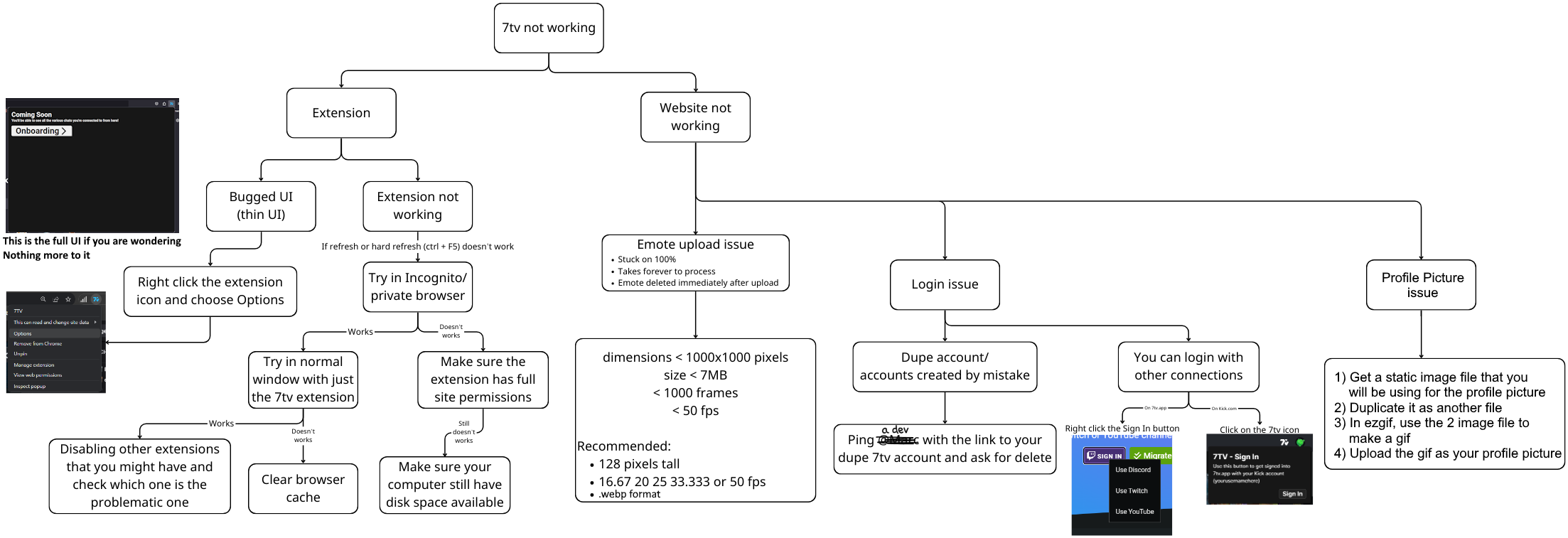
my ultimate #help-old flowchart https://i.imgur.com/LtOa5A1.png
Extra things:
- Sometimes having multiple tabs of twitch causes certain tabs to not load 7tv channel emote set. Do a hard refresh to solve it
- For Brave users, disable brave shield since it might block the extension from working
- If you have trouble loading the emotes with the extension and on the 7tv.app site, try using a VPN to see if your ISP blocked your access to 7tv
snow portal
lavish shard
my ultimate <#938903939649261598> flowchart https://i.imgur.com/LtOa5A1.png
Ext...
nah we gotta direct them to this
ngl
 uncut swallow
Hello, maybe its just skill issue, but how do i get rid of the Halloween versions of the emotes in 7tv browser addon? i still get the spooky Emotes.
lavish shard
if you are not the streamer, you cant
if you are the streamer, you can replace them with emotes under the same name as the halloween ones
uncut swallow
Hmm the Problem is its for the Global Emotes too, i just get the Halloween Edition. Reinstalling Addon?
lavish shard
reinstalling wont help
it's halloween season and globals were meant to be changed to halloween versions
uncut swallow
oh ok, so just wait. thats fine 🙂
limber current
lavish shard
oh you unlinked your twitch account then tried to sign in
signing in with an unl...
THANK YOU FOR THIS. I'm finally back into my account, thank you so much 
lavish shard
sly radish
bro replied to same 10 problems everyday he made a flowchart 😭
surely people will check pinned messages
worthy arch
just reply with the pin
 zealous gulch
anyone know what the avg time is for emotes to get approved? im in limbo 🙃 and spooky season is only so long lol
maybe we making too many spooky emotes 
quasi oxide
there's no average time, it all depends on how busy the queue is, what position your emote has in the queue, how busy the mods are
zealous gulch
how do i get the subscriber role in here? im subbed 7tv name is PrepyEmoSiren (cause damn name change)
lavish shard
zealous gulch
how do i get the subscriber role in here? im subbed 7tv name is PrepyEmoSiren (c...
link your discord account in your profile page
 zealous gulch
thank you
 fossil tulip
lavish shard
my ultimate <#938903939649261598> flowchart https://i.imgur.com/LtOa5A1.png
Ext...
fossil tulip
lavish shard
my ultimate <#938903939649261598> flowchart https://i.imgur.com/LtOa5A1.png
Ext...
i can’t believe that nobody did this earlier wtf
 royal nebula
lavish shard
my ultimate <#938903939649261598> flowchart https://i.imgur.com/LtOa5A1.png
Ext...
royal nebula
lavish shard
my ultimate <#938903939649261598> flowchart https://i.imgur.com/LtOa5A1.png
Ext...
🐐
 glossy verge
any idea why when i use 7tv extension and the ffz extension I don't see badges (other than 7tv sub badges) and if theres a way to fix this
lavish shard
7tv does not support badges from other extensions at the moment
glossy verge
what about from just normal twitch 
lavish shard
if you want just normal twitch and want ffz badges
i'd suggest u use ffz with the 7tv addon
glossy verge
eh thats scuffed though, theres always some scuff with 7tv somewhere i guess
i dont care about ffz badges. but need to see sub badges
i guess i'll go back to just ffz ty
I wish 7tv would just add an audio compressor to the extension and then i could use just that and not worry about ffz
lavish shard
welp addon support is planned but wont be in the near future
worthy arch
 wdym you cant see sub badges
hallow coral
lavish shard
my ultimate <#938903939649261598> flowchart https://i.imgur.com/LtOa5A1.png
Ext...
Nice :D
The reason I asked if I could delete past versions of emotes was because I tried to create new version for one and it auto deleted. I uploaded the new version as anew emote and it works.. so that's the only thing I can think would affect it.
 tardy meteor
How do I fix it not showing up properly?
 lavish shard
check pinned
tardy meteor
lavish shard
check pinned
Just figured it all out, thank you!
worthy arch
its working 
lavish shard
i solved world peace
rare cape
@worthy arch could we try and get this resolved if you dont mind? hes been having internal server error code 70500 when trying to connect his twitch to 7tv and keeps logging him into the 7tv account he wants deleted for 2months straight now. is it possible deleting this account [bahu_0] and then retrying would fix it?
worthy arch
only anatole has the ability to delete accounts
@marc collects the names of the accounts scheduled for deletion
 worthy arch
i mean it looks like he can just remove the twitch connection from this account manually
since he has his discord linked as well
rare cape
we could try that yea, ill lyk
calm fern
Can someone explain what exactly "Rejected personal use for" means?
is it something set automatically waiting for approval, or does that means emote has been rejected my mod?
 lavish shard
calm fern
Can someone explain what exactly "Rejected personal use for" means?
is it somet...
lavish shard
calm fern
Can someone explain what exactly "Rejected personal use for" means?
is it somet...
That means the emote is rejected for personal use only
A personal emote requires it to be enabled in at least 50 channels, 1:1.5 height to width ratio, non-toxic, non-tos, non-twitch sub emotes and more
worthy arch
new emotes that are reviewed for public listing will automatically get this message
but that doesnt mean they have been rejected forever
since they have to meet the criteria listed above
after that they can actually get reviewed by a mod for personal use
calm fern
oh thanks. i uploaded bunch of emotes, most of whom are fixed/cropped versions of previous approved emotes i uploaded a week earlier. and at some i see the "Rejected personal use for" text.
so looks like i am simply still waiting for mod approval.
worthy arch
yeah its just a visual bug
with new emotes
mods dont check every emote for personal use
only the emotes someone tried to add to their personal set
 ruby turtle
about personal emotes, is it intended that i only see them myself? i thought other users would see them too
worthy arch
everyone should be able to see your personal emotes as long as they use the official extension/7tv chatterino
or any other platform that supports 7tv personal emotes
ruby turtle
k weird, tried that in a streamers chat who had a chat on screen, didn't work. maybe related to this idk https://discord.com/channels/817075418054000661/1159196177506517126
worthy arch
thats what im saying
they might be using a different extension that doesnt support our personal emotes
ruby turtle
oooh
ok i guess i understand now, thanks. i guess it's up to those extension now to support it
 soft spoke
Quick question, and i might just be doing something wrong. I am perma stuck at 600 emotes no matter what I or my mods have tried. is there a way to get the full 1000?
 desert shoal
Hi, I have a question. I'm new to 7tv, and I want to know if there's an option to exchange Set 1 emotes (500 emotes) for Set 2 (90 emotes)? I can't seem to find that option anywhere... there's only an option to add to the first set
willow ferry
desert shoal
Hi, I have a question. I'm new to 7tv, and I want to know if there's an option t...
hit either the cog wheel next to your user connection
or the assign menu in the edit menu on the emote set

or here
 willow ferry
soft spoke
Quick question, and i might just be doing something wrong. I am perma stuck at 6...
willow ferry
soft spoke
Quick question, and i might just be doing something wrong. I am perma stuck at 6...
this is unfortunately just bugged, you wont beable to until its fixed
 dire furnace
Is there any access to acquire a higher rate-limit for new uploads  200+ uploads so far without issue...
Current rate-limit wouldn't be an issue if the approval time wasn't as it currently is 
wheat sapphire
Isn't that backwards then
if there has been 200+ uploads without issue and you're trying to acquire higher than 10 that means 10/200 are having the issue which means a majority didn't
Also you can still use the emotes without approval
and there are no "higher" rate limits for new uploads
its so people cannot spam upload things
 frank isle
This might be because of the emote Origin thing but when I rename an emote, it renames another and when I try to fix the renamed emote, it renames another emote
its actual

I am going to try disabling the Origin and seeing if that fixes it
it did not change anything

there is 3 logs that simply showed nothing
okay I fucked with it a lot and by removing it and renaming it before I add it, it works
but renaming it while its in the set, ruins it
 polar current
Yep xqc emotes having the same issue as this guy ^
dire furnace
wheat sapphire
if there has been 200+ uploads without issue and you're trying to acquire higher...
The meaning in that was: uploading so many (200) without approval issues can be indication of "safe uploader," in the case of offering some merit system
wheat sapphire
Yes, so in that case, we do NOT have a merit system, it wasn't needed before but we had to implement a 10 limit because of bad faith actors
so the other side, the "merit" is a future-planned thing but not atm
dire furnace
Cool
Thanks for answering 
granite arch
granite arch
Will the login issues ever be fixed? It's been a month and a half of not being a...
Hiya, was able to circumvent this by logging in through Discord (didn't know that was an option, mb). Was able to subscribe but the 7TV chat badge isn't showing for me, like it isn't an option to utilize at all. My Twitch account is linked. Does it just take time to appear?
lavish shard
you somehow linked your twitch to 2 7tv accounts

 sly radish
 HOW
HOW
granite arch
I'm just that good
Swapped names between accounts. The now name changed account retained its original name on the website, somehow, whilst the other also shares the same username. I gather that this is why logging in through Twitch on the 2nd account does not work for me. Yes?
So then I ask, is there any way to remove the original account from the website entirely. Like, wipe it, as if I'd never logged in on it there
lavish shard
you want to remove the one without the sub right?
granite arch
Correct
lavish shard
@sullen hinge https://7tv.app/users/6307d68e942ffb69e13d7e3f delete
granite arch
Appreciate it. How about the badge though? Will it show once the original account is deleted then?
I don't mind resubbing through Twitch login if I have to
willow ferry
lavish shard
you somehow linked your twitch to 2 7tv accounts
they dont actually
they just named two twitch accounts the same thing
and only one was up to date
since it had been signed into
@granite arch which is your actual account you are trying to use
granite arch
The one that's subbed
willow ferry
yeah I mean which twitch account
seems like you should not have an issue right now, the information above is not entirely correct
your log in issue shouldn't be an issue either
your accounts seem to be correctly linked at the moment
although they might not have been in the recent past
but whatever you've done recently, it should be fine
granite arch
< one (Hvnly)
The > one, whilst still "Hvnly" on the website is actually name changed to "NotHvnly"
willow ferry
yeah I see that
the subscribed account is linked to

so if this is the account you want to have your cosmetics on, you shouldnt be having an issue
it was linked recently
I beleive you have solved your own issue
accidentally
recently as in today/yesterday
depending on timezones
granite arch
That's the one, however the chat badge still isn't showing for said account
willow ferry
willow ferry
the subscribed account is linked to
your log in issue before would have been because this account was orphaned
as in not linked to any account
when you were trying to sign in with it before
it was trying to make a 3rd account
but failing because your other alt was taking that username
but both are correctly linked now
you should check again if your issue is resolved
make sure you're using a v3 client
old clients that use the deprecated api may take over 24 hours
to reflect cosmetics changes
v3 client being either the official 7tv extension or chatterino7
granite arch
I have both. The problem isn't that the chat badge isn't reflecting in chat, it's that it just does not appear in my chat badges list at all, I cannot select it
 willow ferry
granite arch
I have both. The problem isn't that the chat badge isn't reflecting in chat, it'...
willow ferry
granite arch
I have both. The problem isn't that the chat badge isn't reflecting in chat, it'...
that would be because 7tv cosmetics are not selected through this menu
they wont be represented here at all
this is only for twitch native cosmetics
you have to select them through the wardrobe menu on the site
7tv.app -> click your name top right
-> left side of page -> edit profile
there you can view all of the badges available to you
and select them
granite arch
Oh, I did that already. I for some reason thought it would at least show up there if it's being utilized as in selected via the website but I guess not. That answers it
willow ferry
but anyways for future reference the steps to resolve the log in issue you had before
was to log in the original account using another linked method
and relinking the orphaned twitch account there
which you did, as of 10 hours ago
so you should be all set
if you want that other account to be deleted, you can have it be
but it shouldn't affect anything
granite arch
Yep. Thanks. Sorry for having wasted a bit of your time with an oversight. Yep, I'd still like https://7tv.app/users/6307d68e942ffb69e13d7e3f to be deleted if that's okay
willow ferry
yeah that account is just the account for your alt
logging in with that will bring you there
the name on the site doesn't update
currently it will only ever show the first name an account had
granite arch
willow ferry
you should check again if your issue is resolved
It is. Able to log in through Twitch on the 2nd account. All good
Ty. Have a good rest of your day/night
willow ferry
granite arch
It is. Able to log in through Twitch on the 2nd account. All good
You should also have no issues with your first account, both should be fine now
just note that the names might not show what you expect them to
granite arch
willow ferry
You should also have no issues with your first account, both should be fine now
That's correct, no issues there either
 regal oyster
i got a question im trying to unsub from 7tv and i cant find where to do it can anyone help
 hollow juniper
so I tried to log into 7tv via the website with discord with no twitch attatched and I get the same error as trying to log into twitch
 tardy breach
One message removed from a suspended account.
lavish shard
 tardy breach
One message removed from a suspended account.
 mortal mango
I'm trying to upload an emote, it says 100% but then I can't see it anywhere. Doesn't show up under owned emotes. Is there somewhere where I can view pending emotes or something? 
dimensions is under, think it's the file size limit so resizing it down should do it  thanks!
sorted it now, thanks!
 rustic basalt
is there some kind of a guide anywhere on emote sets and how they work or should I just go with trial and error approach?
worthy arch
depends what you want to do
rustic basalt
just to create a different set for a channel to honor Halloween and then be able to switch back to normal emotes quickly
worthy arch
make a halloween set with ONLY halloween emotes

and then click edit on your main set
and link your halloween set through origins
once halloween is over you can just unlink it
rustic basalt
I see, thanks! Is there any meaning in checkmarking the Twitch if that's the only platform?
worthy arch
nope
clicking it would just activate the set
so if its already active you dont have to
granite arch
What extension has the feature where I right click on an emote and it automatically pastes it into the chatbox?
also can I disable halloween emotes for myself locally?
rare cape
@worthy arch re: bahu_0/l3ahu, so he logged out of l3ahu to unlink his disc/twitch on bahu_0 and now he has lost his connection to kick on l3ahu, now he cant see or use emotes/badges on kick now. his problem just seems to be getting worse now as he cant do anything on twitch or kick anymore; any ideas?
worthy arch
the kick connection is still there

and i can see the emotes working on kick
idk why he unlinked the discord from bahu_0 account instead of twitch
worthy arch
show the process of trying to log in with kick
.
just click continue
thats good
thats why is said you shouldve unlinked your twitch instead of discord from bahu_0
you have 2 options
ping marc so he can add you to the list of accounts scheduled for deletion
or link a throwaway discord account to bahu_0 and unlink your twitch
granite arch
granite arch
What extension has the feature where I right click on an emote and it automatica...
is this a 7tv thing?
lavish shard
no
granite arch
lavish shard
no
do you know which one has it?
granite arch
i think it was on this app but it no longer works https://chrome.google.com/webstore/detail/twitch-enhancer/knaodoefkjbgmmilogebghadhmnphjih/related?hl=en

Extension that adds what is missing on Twitch.
 sweet meadow
is there a way to reset my 7tv account or smt? i think mine is bugged, for a few days now, like i clearly have the emotes but its bugged, also i made a mistake trying to change my profile picture, and now its like this forever, its tilting me ngl, i need to take this off

 sly radish
u used 1000 slots, maybe it replaced other emotes?
sweet meadow
sly radish
u used 1000 slots, maybe it replaced other emotes?
the thing is i cant even take some emotes from the pool, because its like that
i am clicking the emotes i have to take from the pool, but it says use emote, like indont have it
sly radish
Ctrl F5 then try again maybe
sweet meadow
tried, didnt work unfortunally
sly radish

sweet meadow
sadge
honestly i am down to delete the account and try again but i dont know if its possible xD since its connected to twitch
sly radish
about pfp, use a .gif instead, make it small like 128x128
@sweet meadow
use ezgif.com
sweet meadow
sly radish
about pfp, use a .gif instead, make it small like 128x128
is that only for subs or smt?
i will try
sly radish
for sub its animated, for plebs it's static but not buggy
sweet meadow
nice, will try
sly radish
i tried a large 600x600 .gif and it didnt work worked for 128x128
sweet meadow
sly radish
i tried a large 600x600 .gif and it didnt work <:kek:1017223986259701871> worked...
for some reason i tried, resized and all but after saving changed it just stays the same
 robust token
Is there a way to upload newer versions of emotes even if you deleted the original or do I have to get rid of the entire thing?
sly radish
sweet meadow
for some reason i tried, resized and all but after saving changed it just stays ...
weird u mind sending the pfp u want to me? here or in DM
 fathom fractal
 worthy arch
fathom fractal
fathom fractal
worthy arch
https://discord.com/channels/817075418054000661/938903939649261598/1159812033357...
worthy arch
fathom fractal
fathom fractal
worthy arch
https://discord.com/channels/817075418054000661/938903939649261598/1159812033357...
not work
lavish shard
fathom fractal
not work
there's no fix to the ui
that extension window is just a button which leads you to the setup page, which is what the Options do
 twin oyster
I uninstalled the plugin and reinstalled it but it didn't change.

i can't see 7tv emotes
 grizzled moat

cant assign to channel
pls help
when i click assign and save
it doesnt assign
granite arch
can i somehow disable 7tv on twitch? I unselected it @ the onboarding screen but its still there
 unkempt chasm
Hello dear 7tv supporters. I wonder that is there anyway to add huge amount of emotes all together ?
like
i want to add this emote pack to my twitch channel
is there any way to add them all together?
tulip solstice
granite arch
can i somehow disable 7tv on twitch? I unselected it @ the onboarding screen but...
You can right click the extension in your browser and set it to this:

 marsh violet
7tv emotes aren't loading for some channels. for example, on filian and emiru's channels, i only see global emotes

but on PakTCG i see his emotes

 tulip wedge
Im trying to bring a 7tv emote to a discord server but whenever I save it it only saves as an image
Is there away around that
 carmine herald
Is there a way, to enable a whole emote set on my channel? 
tulip wedge
nvm I found the Tetra bot
marsh violet
marsh violet
7tv emotes aren't loading for some channels. for example, on filian and emiru's ...
it's not showing emotes on filian's profile either. i see this error on her profile


 lethal sonnet
im not able to login to 7tv.app with my twitch account, gives me a authentication error
 urban fog
Hello, can someone assist me please. I was added as an editor for a channel, I'm already an editor for another channel and it lets me add emotes, but for this new one it doesn't show up, does it perhaps take time to show up or I can't be editor for more than one channel whats going on?
Does someone know? please
 thin herald
urban fog
Hello, can someone assist me please. I was added as an editor for a channel, I'm...
thin herald
urban fog
Hello, can someone assist me please. I was added as an editor for a channel, I'm...
Target channel needs to have at least one emote set created before you can add emotes to it
urban fog
thin herald
Target channel needs to have at least one emote set created before you can add e...
The streamer needs to create an emote set then
?
or can I do that
thin herald
If you go to their profile and you see this button top right you can make a new emote set for them
 thin herald
you can also give me their name and i can check if it's good too
 crystal bolt
Hi, any idea what the problem might be? Does not load regardless of browser
 thin herald
link the emote
urban fog
thin herald
you can also give me their name and i can check if it's good too
Thanks alot!!!!!!!!
crystal bolt
thin herald
link the emote
It's like that with all emoji
It's during the transition that it doesn't want to load

 thin herald
urban fog
Thanks alot!!!!!!!!
thin herald
urban fog
Thanks alot!!!!!!!!
Also make sure that the emote set is linked to their twitch channel, click on the wrench then add it to their channel
 thin herald
crystal bolt
It's during the transition that it doesn't want to load
thin herald
crystal bolt
It's during the transition that it doesn't want to load
This is a known issue, nothing you can do i believe, for now just try to f5 in the emote page to see the emote
crystal bolt
thin herald
This is a known issue, nothing you can do i believe, for now just try to f5 in t...
Got it, thanks. Unfortunately refreshing the page doesn't help
urban fog
thin herald
Also make sure that the emote set is linked to their twitch channel, click on th...
I got it thanks! also, do you know if I change my username on twitch do I remain an editor or they need to re add me?
thin herald
urban fog
I got it thanks! also, do you know if I change my username on twitch do I remain...
You should still be editor after it
thin herald
marsh violet
it's not showing emotes on filian's profile either. i see this error on her prof...
I'm looking into it
 rustic spindle
3 weeks ago I paid for a sub which I can’t use bcs my paint and badges don’t work, and nobody does anything to fix it, or idk.
I rly want to be a subscriber but I rly want to use paints and badges, but after I gifted 3 subs I got not rare paint and badge, I got lagged 7tv, and now can’t use any of them.
Yeah, I reinstalled 7tv, I reloged in, I have tried few browsers, both extensions, and also there aren’t any other extensions, it is lag of 7tv.
I think after 3 weeks I need to get answer, because it’s already impossible, I have used 7tv sub for a half a year but now I can’t use it (even if I paid) for almost a month.
Do something, thank you.
Also, I don’t get any answer from kathy.
Guys, please, I really need help 

 lavish shard
@earnest roost account problem 👆
willow ferry
^ it might be worth checking this for the thing we mentioned in DMs
(the lack of entitelement checking)
 vague lily
Good day, everyone. Can someone help? I am trying to setup Halloweens set and some emotes are duplicating theirself and I cant remove original emotes from halloween, and emotes that I chose for this set are not override the original one.

 lavish shard
vague lily
Good day, everyone. Can someone help? I am trying to setup Halloweens set and so...
lavish shard
vague lily
Good day, everyone. Can someone help? I am trying to setup Halloweens set and so...
it's because you are using the Origin emote set feature
you cannot remove Origin emotes (the ones in blue border)
and origin emotes always overrides any emotes with the same name
what you should do is the other way around
which is in your main emote set, set origin to your halloween emote set
that way your halloween emotes with override the normal ones
 vague lily
lavish shard
it's because you are using the Origin emote set feature
you cannot remove Origin...
vague lily
lavish shard
it's because you are using the Origin emote set feature
you cannot remove Origin...
so, I should do it like this? It was my main
 lavish shard
yes
and use your main set as your twitch channel set
note that the update dont come into effect immediately
wait several minutes
vague lily
lavish shard
note that the update dont come into effect immediately
wait several minutes
should I do this?

I already picked halloween set and saved changes
 lavish shard
vague lily
should I do this?
lavish shard
vague lily
should I do this?
I don't think it matters
But do it anyways
vague lily
lavish shard
I don't think it matters
But do it anyways
well... this set is now reduced 
 lavish shard
because it also counts the origin emotes
so now it doesnt have any origin emote set
there's only the halloween ones left
now change your twitch channel emote set

 vague lily
lavish shard
now change your twitch channel emote set
vague lily
lavish shard
now change your twitch channel emote set
yeah, I did this, but I still have duplicates. So now I should remove them from basic set?
 lavish shard
change it to your base set
 vague lily
lavish shard
change it to your base set
vague lily
lavish shard
change it to your base set
done
lavish shard
now wait several minutes for the emotes set to update on twitch
vague lily
Oh ok. Thank you. I will wait. No any mention that I should wait to see difference
But when I changed it and refresh the page, now it shows original ones. But I still should wait, right?
 lavish shard
vague lily
But when I changed it and refresh the page, now it shows original ones. But I st...
lavish shard
vague lily
But when I changed it and refresh the page, now it shows original ones. But I st...
the original ones are correct
the halloween ones are at the back
 vague lily
lavish shard
the original ones are correct
the halloween ones are at the back
vague lily
lavish shard
the original ones are correct
the halloween ones are at the back
oh. I see. But now on my streampage I do not see any my emotes. Should I choose halloween's set and assign it, or I should do something different?

 vague lily
nvm I hard refreshed it
lavish shard
 vague lily
Ok. I got how it works. Thank you so much for your help
lavish shard
for future reference
if you want to override your base emote with event versions
just set the origin emote set to the event emote set
and no need to assign any other emote set other than your main one
vague lily
lavish shard
for future reference
if you want to override your base emote with event versions...
not many emotes have this feature, but I saw it. I will try to use it. Thanks!
 left egret
Hello, my smiley download reaches 100 percent, but for some reason it’s not published
sly radish
left egret
Hello, my smiley download reaches 100 percent, but for some reason it’s not publ...
left egret
sly radish
https://discord.com/channels/817075418054000661/938903939649261598/1159812033357...
did not help
I changed mp4 to mov, now it is published, but immediately becomes unavailable, although it does not violate the rules
lavish shard
left egret
I changed mp4 to mov, now it is published, but immediately becomes unavailable, ...

also use .webp instead
https://ezgif.com/video-to-webp

Video to Animated WebP image converter. Upload MP4, AVI, MOV and other video files and convert them to high quality Animated WebP image.
left egret
Thanks, I'll try it now
left egret
@lavish shard Thank you very much, everything finally worked
 pizza, update the flowchart

 rustic spindle
3 weeks ago I paid for a sub which I can’t use bcs my paint and badges don’t wor...
rustic spindle
rustic spindle
3 weeks ago I paid for a sub which I can’t use bcs my paint and badges don’t wor...
it finally work
omg im so happy
thank u
worthy arch
lavish shard

wheat sapphire
What the fuck is that chart 
 spring folio
nerdington
sly radish
 📊
📊
robust token
https://7tv.app/emotes/63a53f1180af7e2f2a861577
Is there a way to fix this? I can't upload a newer version of this since I deleted the original.
Reported on website itself and says it "has been handled" nothing changed though...

uploaded by 2Syndras1Cup
quasi oxide
robust token
https://7tv.app/emotes/63a53f1180af7e2f2a861577
Is there a way to fix this? I ca...
let me try it. what is the new image you want to upload?
robust token
Transparent version that doesn't have a hole in the middle

My tiny lizard brain finally figured that one out
quasi oxide
what, how to fix it or?
robust token
The hole it used to have, yes. The upload, no
Goes to 100% and immediately to loading, never uploaded it though
the 100% loads normal
quasi oxide
try resizing it to 128x128 first
robust token
Oh yeah, that might be it, brb
robust token
Yeah no matter what, not working. I have that with every emote where I removed the original until I noticed.
Noticed that removing the original is the cause*
128x128
 quasi oxide
I'll try fixing it for you later unless another mod intervenes
robust token
Aight, thanks.
 mental socket
How can I change my 7tv username?
can i create a new account while having my old?
or have i to delete my old
how
oh ok
but thank you
glossy flax
@worthy arch , @sullen hinge can you please remove these accounts BlueIceSSC_5490,BlueIceSSC_5543 Thanks
 next dagger
hello, i have a 7tv subscription but my nickname color and badge are not visible in twitch chat, what could be the matter? I've tried restarts and clearing the cache.
quasi oxide
robust token
https://7tv.app/emotes/63a53f1180af7e2f2a861577
Is there a way to fix this? I ca...
look, just upload the new emote entirely
without the version I mean
encourage people to switch to that one, idk
not even I can fix it it seems
robust token
Will do. Like I said, the issue seems to be when you delete the original. At least in my case.
https://7tv.app/emotes/652313d05b68de07db299e72 got the new version here, the older one can be removed entirely then, no point in keeping it.

uploaded by 2Syndras1Cup
 finite dirge
rustic spindle
it finally work
finite dirge
rustic spindle
it finally work
mine is working now too thank you guys
 sullen robin
How can I save emotes from 7tv as a gif?
 swift jolt
In Google Chrome, watching a kick stream, when clicking the extension icon to follow the steps listed on the site to link kick account, this is all I see.

 green night
I can't see the emotes box for a streamer I watch anymore I use to but now I can't anymore is there a fix? (did turn off and on the extinction and uninstall and reinstalled it)
 velvet delta
are you able to change your username
 exotic dragon
acc still locked, cant change emotes for myself or other chanels
profile link : https://7tv.app/users/61fa0bf49f7bac13c42dfd65
 earnest roost
@rustic spindle @finite dirge hey, i apologize for the delay as this was a difficult issue to locate. i've found what caused this problem and mediated the issue so that your cosmetics can work again. Since you've effectively missed out on nearly a whole month i've also added 3 free months in credit, as this error was on us.
rustic spindle
earnest roost
<@292716860397322241> <@95528701927620608> hey, i apologize for the delay as thi...
wow, thank you very much
 thin edge
hello, I have a problem, I'm using the 7tv plug-in on Twitter, today suddenly the plug-in stopped working [I have a 7tv subscription] the highlighting of the nickname and the 3-month subscription badge disappeared, I reinstalled the plug-in, it doesn't work, now I can't log in to 7tv.app, an error pops up, I'll emphasize that betterttv it works, but 7tv doesn't, I don't know what to do, I'm out of ideas, [I log in via the Twitter plugin, connect it to the account, but the 7tv website gives an error, I'm a streamer and this plugin and the app add creativity to the chat]


 frozen moat
Extention just broken as shit :D
not sure what to do.
Un-installed it, Cleared all the data in chrome, restarted pc, reinstalled it, still broke
 lavish shard
check pinned
sly radish


frozen moat
sure... a work around to get to setting and what not..
but that doesn't fix the issue :/
lavish shard
there's no fix to this issue right now
and there's nothing more to that UI other than just a button for setting up the extension

this is the full ui FYI
frozen moat
ah joy... wasn't like that a while ago when i 1st started using it...
guess it's back to the other twitch extensions ._.
lavish shard
the core feature of the extension still works
just that UI is buggy
willow ferry
yeah that menu is not used for anything
lavish shard
btw y that ui bugged
lavish shard
willow ferry
and chrome tries to determine the minimum width
this was a recent change
but flex boxes have no minimum width
lavish shard
 FIX IT