#better-mc-fabric
1 messages · Page 74 of 1
 limpid gulch
 dark flare
Ore generation is the same as vanilla, unaltered in terms of Y levels.
Theres no wiki or anything, but the in-game quest book covers a bunch.
Just ask your questions.
 sleek ferry
dark flare
Just ask your questions.
sleek ferry
dark flare
Just ask your questions.
i do think i figured it out. uploading serverfiles onto server now. but there is propably some kind of error waiting for me on the other side
 split peak
I've had issues with the update to the map mod as well. I have to set Cave Mode to OFF to see what I've previously explored but then new parts I explore are just solid grey, no biomes shown
 fading moat
I just left it as layered and it seems that all is good now 🙂 It seems more like a new feature rather than a bug
split peak
Is there a way to hide waypoints when running around the world and only show them on the map when pressing M? Kind of causing some visual clutter for me
sleek ferry
got it, thanks for help tho
dark flare
 hard agate
Can someone pls help
hard agate
Can someone pls help
Did the original not spawn? Are you having issues re-spawning him? Where are you placing the end crystals if so?
hard agate
The original isn’t yhete
There
The health bar is
And I can hear the wings flapping
But he’s just not there
We’re stuck now cause the portal obv doesn’t open until he’s dead and we don’t wanna die so
dark flare
Are you playing on a server or singleplayer + lan
hard agate
Server
dark flare
I mean to work around this I would just
/kill @e[type=minecraft:ender_dragon]
Then respawn him and see if he shows up normally
Better than being just straight up stuck in the end, you do need OP to do it in game, or have the server owner do it via console.
dark flare
hey its not cheating if its working around a bug imo
dark flare
I haven't seen it personally
Edited the command for you, logged in and checked it's actual ID
May need to run it as follows if doing via console and not in game while in the end:
/execute in minecraft:the_end run kill @e[type=minecraft:ender_dragon]
Ty ty
 idle imp
Saw that you guys just added Variety Aquatic to your modpack, if you have any issues with the mod feel free to DM.
 ebon wadi
isn't there a map that you can get to help locate an end city
ive been lookiong for one for like a week now and can't find oen
like an end city
dark flare
I mean you could use chunkbase and input your seed
split peak
Anyone know how to disable waypoints while running around ingame? Causing massive visual clutter atm
 gaunt bear
i have ventured so far yet no land to build
 dark flare
You mean no land you like? haha because 80% of what you uncovered is land!
Do some landscaping 😉
gaunt bear
Im in the early stages lol, besides, i want a forest or taiga to build near
and i want to find some structures
dark flare
haha
gaunt bear
it is quite hard to find nice land
its all way too out of shape or the biome is a desert
split peak
gaunt bear
it is quite hard to find nice land
I can recommend cherry blossom forrest, absolutely stunning
gaunt bear
split peak
I can recommend cherry blossom forrest, absolutely stunning
i hate that biome
the logs are dark
i love big tree taiga
split peak
gaunt bear
i hate that biome
I love it 😄


 hard agate
dark flare
May need to run it as follows if doing via console and not in game while in the ...
hard agate
dark flare
May need to run it as follows if doing via console and not in game while in the ...
ok so killing him fixed portal but summoning him doesnt work
he just flies in circles and doesnt attack
and no health bar or anything
dark flare
is the world in peaceful? lol
hard agate
no
dark flare
im not sure whats going on then
hard agate
:/
dark flare
might be worth just deleting the end
hard agate
i tried alr
deleting DIM1?
I just did it again imma let you know if it wrksk
works
hard agate
yeah i did that and it just deleted our builds
and reset it with the invisible dragon
maybe theres an upload of someone elses unbeaten DIM1
dark flare
which server host is this? it almost sounds like the modpack isnt installed correctly server-side
dark flare
Yeah I mean that's all I can think of is that theres something with how its installed server-side
hard agate
it grabs it straight from curseforge so idk
split peak
I'm having incredible choppy performance on the latest version even when at 200+ fps, it feels like 30fps with pretty awful fps stutters. This ONLY occurs in the Nether so far in Fortresses
hard agate
Reload
Happens to me a lot
Like sometimes opening the map caused it
Just quit and reload then it fixes
split peak
Thanks!
hard agate
@dark flare
killing the dragon now deleted return portal
and i cant get it back
and healthbar wont spawn anymore either
wtf
dark flare
lol yeah honestly i'm going to go ahead and blame the server host at this point i've never seen anyone with these issues
hard agate
gotchu
i tried getting a DIM1 from a local world and uploading it and same thing
its so odd
how would it mess up on server side tho like idk its the same folders
dark flare
I mean it depends on how they are loading the modpack, maybe its overlapping with previous versions and didnt clear out mods so you have two versions of certain mods etc, it really could be anything.
dark flare
the no health bar thing could also just be some weird texture pack interaction, did you modify anything client side at all from the default install?
hard agate
no
dark flare
what did you use to install things client side, CF? ATL?
hard agate
curseforge
/summon minecraft enderdragon is the right command right?
i feel like its summoning one thats just an entity and not the one tied to the portal spawning
fixed it
DIM1 folder was missing entities poi and regions folder
 meager yacht
yes
only transfer the world folder, nothing else
report to the Geophilic developer
!windows11
 blissful stump
An update to windows introduced a new security feature that prevents powershell files from running on your PC. This is great for your security, but not so great for our server start scripts, which require powershell to run them. Fortunately there is a quick fix for this!
Run powershell as administrator, then run Set-ExecutionPolicy RemoteSigned. Read the prompt and press accept. This will allow us to run scripts.
Next, navigate to your server directory using cd path/to/directory (for example: cd C:\Users\Username\Documents\Minecraft\Server)
You can now run the server by double-clicking the start.ps1 file, or typing .\start.ps1 into the command line while in the directory.
IF THE ABOVE DOES NOT WORK, TRY THIS
Run the command Unblock-File -Path .\start.ps1 in the same powershell window. This will allow the start script to not be blocked by windows, and run freely.
If all else fails, a manual installation should work:
FORGE 1.16.5: https://www.youtube.com/watch?v=bIjisWyxU-8
FORGE 1.18.2: https://www.youtube.com/watch?v=R610M102X0U
FORGE 1.19.2: https://www.youtube.com/watch?v=3HD0ibIpO-A
FABRIC: https://www.youtube.com/watch?v=b2W1Xb7nLKo
Make sure to Install the Server in our ServerPacks so it can use the correct files.
blissful stump
Please click this link and follow the guide. If you are using a server host such as Bisect, you may be limited in your options and instead have a checkbox to use Aikar's Flags, which will also work:
https://github.com/brucethemoose/Minecraft-Performance-Flags-Benchmarks
If you can not launch your server/game after using these flags, then remove the word java from the start. Also, make sure you are using Java 18 on 1.18.2 / 1.19.2 and Java 11 on 1.16.5. These should be downloaded from Adoptium's website.
If lag persists, do the following command ingame:
/spark profiler start --only-ticks-over 50
Then, send the link in this channel.
meager yacht
you didnt install the same modpack as the server
report to xaeros minimap developer
are you on a server
!server
blissful stump
We suggest renting a server from Bisect Hosting:
Approx. $10 - $25 a month depending on what plan you choose. You can also get 25% off with Code LunaPixel.
Go to https://www.bisecthosting.com/LunaPixel and order a plan which fits you. We suggest 1GB per player but nothing lower than 4GB as the server needs at least 3GB to run.
Go to #server-hosting for more Info!
Free Method: (This is hosting on your own PC and it can come with issues that's why we suggest Bisect Hosting)
- Download the serverpack from Curseforge's website
- Right click the start.ps1 file and click Run with Powershell
To join your own server, typelocalhostinto Direct Connect.
This video explains the process https://www.youtube.com/watch?v=wuGUbVbLsDc
The server IP address is your Public IP Address, which can be found by googling my ip address
If other players are unable to join, find a portforwarding guide online.
meager yacht
read the questbook and use REI
hard agate
meager yacht
are you on a server
yes
meager yacht
idle imp
Saw that you guys just added Variety Aquatic to your modpack, if you have any is...
i'm assuming you're the dev? i gave you the role
idle imp
yep, thanks
meager yacht
split peak
Anyone know how to disable waypoints while running around ingame? Causing massiv...
xaeros minimap settings, press the keybind
meager yacht
split peak
I'm having incredible choppy performance on the latest version even when at 200+...
#faq performance guide
meager yacht
hard agate
yes
then its an issue with your server host
hard agate
yeah i figured it out
it made the DIM1 folder incorrectly
was missing 3 other folders
idle imp
meager yacht
i'm assuming you're the dev? i gave you the role
is it acceptable to get feedback on upcoming updates in #off-topic?
hard agate
i generated a new world on server website then moved files over
meager yacht
idle imp
is it acceptable to get feedback on upcoming updates in <#878170474746617916>?
Yeah
and you can showcase new stuff in #showcase-archived
 sleek finch
@meager yacht what do you suggest i do
meager yacht
install the same modpack as the server
sleek finch
meager yacht
install the same modpack as the server
i used curse forge to install it and it worked fine so im guessing they added some new mods
blissful stump
If this command was run in response to your question/issue, it is likely because switching away from the launcher you are currently using would fix your problem.
From our experience, the most stable launcher by far is ATLauncher, also known as ATL.
To install ATLauncher, do the following:
1. Go to https://atlauncher.com/download
2. Install and run the setup, then open the program.
3. Login to your Microsoft account that owns the Java Edition of Minecraft from the Accounts tab on the right. This process is 100% safe, as it goes directly through Microsoft. ATLauncher does not see your account credentials.
4. Go to the Packs tab on the right, then click "Curseforge" on the left.
5. Search the modpack you wish to download.
6. Click "New Instance". Click "Ok" on the opted out mods warning, then click "Open All" on the manual download screen.
7. Let the mods download, ATLauncher will grab them from your Downloads folder and automatically add them to the modpack.
8. Go to the Instances tab, and click "Play" on the modpack you downloaded. If you ever see an "Update" button on the instance, click it.
To transfer your Curseforge world to ATLauncher, simply right click the modpack on Curseforge, or click the 3 dots, then click "Open Folder". Copy the Saves folder, then click "Open Folder" on ATLauncher and paste the Saves folder there.
Because ATLauncher downloads the exact same files as Curseforge does, your world will be the exact same and you will be able to join the same servers. ATLauncher also works without an internet connection (after you've installed the modpack, of course), and does not have any bloat from Overwolf. You are free to uninstall both Overwolf and Curseforge with ATLauncher installed.
meager yacht
!server for serverside installation
blissful stump
We suggest renting a server from Bisect Hosting:
Approx. $10 - $25 a month depending on what plan you choose. You can also get 25% off with Code LunaPixel.
Go to https://www.bisecthosting.com/LunaPixel and order a plan which fits you. We suggest 1GB per player but nothing lower than 4GB as the server needs at least 3GB to run.
Go to #server-hosting for more Info!
Free Method: (This is hosting on your own PC and it can come with issues that's why we suggest Bisect Hosting)
- Download the serverpack from Curseforge's website
- Right click the start.ps1 file and click Run with Powershell
To join your own server, typelocalhostinto Direct Connect.
This video explains the process https://www.youtube.com/watch?v=wuGUbVbLsDc
The server IP address is your Public IP Address, which can be found by googling my ip address
If other players are unable to join, find a portforwarding guide online.
 devout lotus
hey, just an odd question but has anyone had issues with the calendars from Fabric seasons: extras? was told the server crashed when they tried to place the calendar on the wall
sleek finch
@meager yacht thx for the help
meager yacht
devout lotus
hey, just an odd question but has anyone had issues with the calendars from Fabr...
!moreinfo
blissful stump
Hello! For us to properly help you with your issue, you will need to answer all 8 questions below. Post the answers in this channel:
1. Have you modified the modpack in any way? If so, what did you do? (Updating/adding/removing mods, changing configs)
2. What launcher, or program, are you using to launch the game? (CurseForge, ATLauncher, etc)
3. What Minecraft version are you playing? (1.18.2, 1.16.5, 1.19.2)
4. What version of the modpack are you playing? (v11, v9, etc)
5. What steps are necessary to reproduce the crash? (Launching the game, exploring the world, etc)
6. Have you ever gotten past the point where the crash happens?
7. Send the crash report file into this channel. Right click the modpack, Open Folder, and navigate to the Crash Reports folder. Drag the newest one here. If there is no crash reports folder, do the same thing with the latest.log file in the logs folder.
8. Did you follow the Performance guide linked in #faq?
devout lotus
Mod pack is not modified, curseforge for client side, 1.19.2, better mc fabric v18, try to place season calendar from fabric season extras, have not further tested
meager yacht
report to fabric seasons devs
 swift hearth
devout lotus
hey, just an odd question but has anyone had issues with the calendars from Fabr...
swift hearth
devout lotus
hey, just an odd question but has anyone had issues with the calendars from Fabr...
Same thing happened to me, just came to report it
Placing a calendar causes an immediate server crash
swift hearth
meager yacht
report to fabric seasons devs
Do you know where I can contact them?
devout lotus
i'm making a crash report now on their github
meager yacht
swift hearth
Do you know where I can contact them?
check the mod page
swift hearth
Cheers mates
 whole gull
Hello, what is the setting for disable auto planting sappling. I'm in jungle biome. Thx 🙏
 late bloom
For some reason I can't enter the end? I had a portal up and when I updated to v18 I couldn't go in
I haven't tried another one yet but I've rebuilt the portal and tried putting the eyes back on. Still wouldn't work
meager yacht
whole gull
Hello, what is the setting for disable auto planting sappling. I'm in jungle bio...
immersive weathering
whole gull
meager yacht
immersive weathering
Big thx !
 dawn willow
is there any way to see where mobs can spawn like nei had
late bloom
late bloom
I haven't tried another one yet but I've rebuilt the portal and tried putting th...
Update tried another one and still can't go to the end
 digital ocean
Hello, I tried looking around but I couldn't find any info
What is the process for updating a BMC1 server?
late bloom
For some reason when I'm in my server files the dimensions folder doesn't have nether or end in it?
meager yacht
digital ocean
What is the process for updating a BMC1 server?
only transfer the world folder
late bloom
I'm going to restore it to see if it fixes it but if it doesn't what should I do
meager yacht
late bloom
For some reason when I'm in my server files the dimensions folder doesn't have n...
how are you hosting
late bloom
Shockbyte
 solemn merlin
my friend has a problem where the server crashes whenever only he joins the server
late bloom
I'm using ShockByte for it. I think the world got corrupted due to my spawn also being messed up so I'm unzipping my last backup
meager yacht
shockbyte issue probably
meager yacht
solemn merlin
my friend has a problem where the server crashes whenever only he joins the serv...
!moreinfo
blissful stump
Hello! For us to properly help you with your issue, you will need to answer all 8 questions below. Post the answers in this channel:
1. Have you modified the modpack in any way? If so, what did you do? (Updating/adding/removing mods, changing configs)
2. What launcher, or program, are you using to launch the game? (CurseForge, ATLauncher, etc)
3. What Minecraft version are you playing? (1.18.2, 1.16.5, 1.19.2)
4. What version of the modpack are you playing? (v11, v9, etc)
5. What steps are necessary to reproduce the crash? (Launching the game, exploring the world, etc)
6. Have you ever gotten past the point where the crash happens?
7. Send the crash report file into this channel. Right click the modpack, Open Folder, and navigate to the Crash Reports folder. Drag the newest one here. If there is no crash reports folder, do the same thing with the latest.log file in the logs folder.
8. Did you follow the Performance guide linked in #faq?
 stiff pelican
late bloom
For some reason when I'm in my server files the dimensions folder doesn't have n...
stiff pelican
late bloom
For some reason when I'm in my server files the dimensions folder doesn't have n...
dim1 is end dim-1 is nether, dimensions are all the other dimensions
late bloom
Oh ok. I'm still working on restoring the backup due to not being able to go in the portals and the blocks going missing
solemn merlin
meager yacht
!moreinfo
1.19.2 v18, bisect hosting, whenever he joins the server instantly crashes
crash report
meager yacht
solemn merlin
1.19.2 v18, bisect hosting, whenever he joins the server instantly crashes
crash...
twilight forest issue
just open his playerdata in nbtstudio
and change his coordinates
 lean radish
is the netherite level at y 15 in this modpack (im using 1.19.2)? i've been bed mining for a while but havent found a single netherite
meager yacht
lean radish
is the netherite level at y 15 in this modpack (im using 1.19.2)? i've been bed ...
its the same as vanilla
lean radish
what is the vanilla level
meager yacht
lean radish
ok
 bright timber
random question about server hosting on bisect i have noticed loading any new chunks are really slow and if you even dare to fly with a elytra even without using rockets it just shoots you back and none of the chunks are fast enough ,,,, is there a way to fix this at all?
meager yacht
bright timber
random question about server hosting on bisect i have noticed loading any new ch...
!tps
blissful stump
Please click this link and follow the guide. If you are using a server host such as Bisect, you may be limited in your options and instead have a checkbox to use Aikar's Flags, which will also work:
https://github.com/brucethemoose/Minecraft-Performance-Flags-Benchmarks
If you can not launch your server/game after using these flags, then remove the word java from the start. Also, make sure you are using Java 18 on 1.18.2 / 1.19.2 and Java 11 on 1.16.5. These should be downloaded from Adoptium's website.
If lag persists, do the following command ingame:
/spark profiler start --only-ticks-over 50
Then, send the link in this channel.
 alpine bay
Hi, im having problems with lag spikes every 30 seconds to minute, for example: i normally have 260 fps and and somehow i just randomly lag and stay at 5-10fps any clue how to fix it?
meager yacht
alpine bay
Hi, im having problems with lag spikes every 30 seconds to minute, for example: ...
#faq performance guide
alpine bay
using better mc fabric v 18
alpine bay
meager yacht
<#815503531611783179> performance guide
okay thanks, sorry for asking
 cyan jungle
Hello! I am having issues with Better MC 1.19.2. I installed it through cursforge, it opens for a split second and then immediately crashes to desktop with no crash report
I already allocated more RAM, reinstalled Java, tried to change the Java exe path etc
I dont know what else to do, I am stumped lol
I can attach the latest log if necessary
Also I did modify the modpack slightly, I added the Roughly Enough Items mod, a tree cutting mod and some VanillaTweaks resource pack
meager yacht
cyan jungle
Also I did modify the modpack slightly, I added the Roughly Enough Items mod, a ...
REI is already in the modpack
a tree cutting mod is also already in the modpack
cyan jungle
Are those the ones causing the crashes then?
meager yacht
considering they are already in the modpack yea
cyan jungle
removed them and tried again, it still happens
it runs for like half a second then instacloses
blissful stump
If this command was run in response to your question/issue, it is likely because switching away from the launcher you are currently using would fix your problem.
From our experience, the most stable launcher by far is ATLauncher, also known as ATL.
To install ATLauncher, do the following:
1. Go to https://atlauncher.com/download
2. Install and run the setup, then open the program.
3. Login to your Microsoft account that owns the Java Edition of Minecraft from the Accounts tab on the right. This process is 100% safe, as it goes directly through Microsoft. ATLauncher does not see your account credentials.
4. Go to the Packs tab on the right, then click "Curseforge" on the left.
5. Search the modpack you wish to download.
6. Click "New Instance". Click "Ok" on the opted out mods warning, then click "Open All" on the manual download screen.
7. Let the mods download, ATLauncher will grab them from your Downloads folder and automatically add them to the modpack.
8. Go to the Instances tab, and click "Play" on the modpack you downloaded. If you ever see an "Update" button on the instance, click it.
To transfer your Curseforge world to ATLauncher, simply right click the modpack on Curseforge, or click the 3 dots, then click "Open Folder". Copy the Saves folder, then click "Open Folder" on ATLauncher and paste the Saves folder there.
Because ATLauncher downloads the exact same files as Curseforge does, your world will be the exact same and you will be able to join the same servers. ATLauncher also works without an internet connection (after you've installed the modpack, of course), and does not have any bloat from Overwolf. You are free to uninstall both Overwolf and Curseforge with ATLauncher installed.
cyan jungle
alright let me try this
 marble stirrup
mY BETTERX terrain generation isnt working
meager yacht
marble stirrup
mY BETTERX terrain generation isnt working
elaborate please
marble stirrup
Its just generating vanilla
meager yacht
vanilla biomes still generate
meager yacht
betterx doesnt add biomes
meager yacht
dimensions
marble stirrup
oooh, so betterx adds betterend, betternether and so on. But nothing to the overworld?
meager yacht
correct
marble stirrup
hmm.. Interesting. i could've sworn i've seen some special biomes, like a new beach biome with coconut crabs etc.
meager yacht
marble stirrup
Ooooh, so which terrain generation does the modpack use then?
oh the biomes you'll go
thats the main one
theres others
marble stirrup
Can i ask which ones?
 lean kernel
How i can turn of the random lines in the inside of the chunk borders? I tried to google it but i cant find
meager yacht
what?
meager yacht
marble stirrup
Can i ask which ones?
just look at the mod list
lean kernel
meager yacht
what?
when i toggle chunk borders on, i can see some other "lines" too inside the chunk, kinda disturbing the view of the chunk borders
 meager yacht
try disabling your shaders
lean kernel
Ah i see, has something to do with shaders, I'll look into it, thanks
 acoustic skiff
Can someone help me ? Im trying to start my serveur but it didn't work and i have this message
 marble stirrup
I have the newest version of Oh the biomes you'll go, but it still says this.

Does anyone know why?
 cerulean thicket
is it normal to get a lot of Mod <randomMod> is shipping outdated structure files, which can cause worldgen lag; please report this to them.
meager yacht
cerulean thicket
is it normal to get a lot of `Mod <randomMod> is shipping outdated structure fil...
ignore it
meager yacht
marble stirrup
I have the newest version of Oh the biomes you'll go, but it still says this.
dont add/remove/update mods
meager yacht
acoustic skiff
Can someone help me ? Im trying to start my serveur but it didn't work and i hav...
none of those errors mean anything
marble stirrup
meager yacht
dont add/remove/update mods
ye i figured it out. ty
acoustic skiff
meager yacht
none of those errors mean anything
So what should i do ?
meager yacht
acoustic skiff
So what should i do ?
post the actual log
instead of taking a screenshot of one part of it
lol
cerulean thicket
hey all, when using a wireless terminal do I need to also forceload the beacon chunk?
 night birch
cerulean thicket
hey all, when using a wireless terminal do I need to also forceload the beacon c...
night birch
cerulean thicket
hey all, when using a wireless terminal do I need to also forceload the beacon c...
Yes
cerulean thicket
thx :)
is there any easier way to find a shiraz palace? I think I'm ready to take one (fully enchanted dragon set)
still can't get over this LOL
 night birch
cerulean thicket
is there any easier way to find a shiraz palace? I think I'm ready to take one (...
night birch
cerulean thicket
is there any easier way to find a shiraz palace? I think I'm ready to take one (...
Nope, just a very rare structure
night birch
Yeah
cerulean thicket
ok great
idle imp
acoustic skiff
Can someone help me ? Im trying to start my serveur but it didn't work and i hav...
those wouldn't make your server crash
idle imp
meager yacht
^
This is a bit early but if you guys update to to variety aquatic Row and Glow you will need to disable our fog generation as you now have darker water.
I should probably just code in a check for compatibility sake
 acoustic peak
i wonder whats wrong with this screenshot
 meager yacht
idle imp
This is a bit early but if you guys update to to variety aquatic Row and Glow yo...
meager yacht
idle imp
This is a bit early but if you guys update to to variety aquatic Row and Glow yo...
wdym?
idle imp
they mess with fog, we mess with fog.
idle imp
meager yacht
oh in medieval
idle imp
we are adding depth fog in our next update which isn't compatible with other mods that add ocean fog
 meager yacht
ahh
i see
do you plan on coding in a check? if not i can just note it down for v22
idle imp
yeah might as well just add something to auto enable/disable
meager yacht
thanks
dark flare
Anyone know if I unpack the seasons jar and make a simple change:
To:
In order to resolve a server crash if this alone is enough to cause a server client mismatch and stop people from being able to join?
Basically seasons released an update to resolve this issue but it bumps the version up which I know would typically cause a mismatch if installed only server side and im curious if just making the modification alone would. No big deal, i can just test once I get a break from work but was curious if anyone knew offhand.
meager yacht
dark flare
Anyone know if I unpack the seasons jar and make a simple change:
``` getCurren...
that change would be fine yea
dark flare
Thanks buddy
meager yacht
very likely
dark flare
Ill follow up for confirmation once done
meager yacht
and anyway we're releasing a hotfix soon to update seasons
dark flare
Oh then i wont bother haha of course you guys are.
acoustic skiff
meager yacht
post the actual log
https://mclo.gs/UwZN6Uf
that's all i have
idle imp
your server isn't crashing in that log
something is making it turn off successfully otherwise the world wouldn't save
most likely you have a panel script (auto restart for example) that is setup incorrectly
acoustic skiff
but why 2 days ago we can start it normaly and now it won't work ?
idk if this can help but when we try on mc we have this message
 meager yacht
acoustic skiff
idk if this can help but when we try on mc we have this message
meager yacht
acoustic skiff
idk if this can help but when we try on mc we have this message
update the modpack server & clientside
 fiery thistle
would the create mod be compatible with bmc1 fabric
 high sedge
what texture pack is it that the blocks like mesh together i hate it so much

nvm got it, its continuity for anybody wondering
 merry mantle
Hey guys does my world update with the 18.5 or will I lose my original world?
 lost wharf
Will this pack run on basic hardware?
Me and my friends want to play a modpack but not everyone has a beefy computer
 drifting verge
lost wharf
Me and my friends want to play a modpack but not everyone has a beefy computer
drifting verge
lost wharf
Me and my friends want to play a modpack but not everyone has a beefy computer
I'm running it on a basic ThinkPad E14. As long as you have enough ram it seems to run fine
merry mantle
Hey guys does my world update with the 18.5 or will I lose my original world due to the update? cheers
dark flare
You do not lose your world.
cerulean thicket
any way to make an item frame invisible?
dark flare
I know you can create invisible frames with commands, not sure of how else without modifying the pack.
cerulean thicket
i figured it out, you can use amethyst shards, it makes them invisible :)
cerulean thicket
yup, place item frame down, put the shard in it, it will become invisible and you can then place whatever you want in it
dark flare
nifty lol thanks
cerulean thicket

anyone know why the lighting in rethinking voxels is super dark
also half the stuff is like barely emitting light like the sea lantern up top or the lamp on the right
 swift flint
Does anyone know if there is a command to complete questlines?
dark flare
/ftbquests editing_mode true
I think
Then you can go through and interact with the quest lines and complete them. @swift flint
swift flint
ah, thank you!
lean kernel
Does the BMC Fabric modpack allow TNT duping?
 sweet hollow
Hey i just started playing this modpack and i was wondering is there any official/good texture pack for it? Also the shader pack?
dark flare
lean kernel
Does the BMC Fabric modpack allow TNT duping?
my tnt duper works fine yeah
dark flare
sweet hollow
Hey i just started playing this modpack and i was wondering is there any officia...
comes with shaders already and a couple texture packs
sweet hollow
dark flare
comes with shaders already and a couple texture packs
Can i just enable all of those included packs?
 young olive
hello, I'm trying to install betterMC on a 1.19.2 and there's an error on 3 mods
dark flare
Talking about with ATLauncher?
Can you clarify how you're trying to install the modpack?
lean kernel
dark flare
my tnt duper works fine yeah
ive built a wood farm in which i collect the wood with falling down tnt, it should be duped but it just falls down without dupping
been on it for 2 hours and cant solve the problem lol
dark flare
lean kernel
ive built a wood farm in which i collect the wood with falling down tnt, it shou...
this is the tnt duper i built that works in my world, it wasnt part of a larger build like yours but it might help
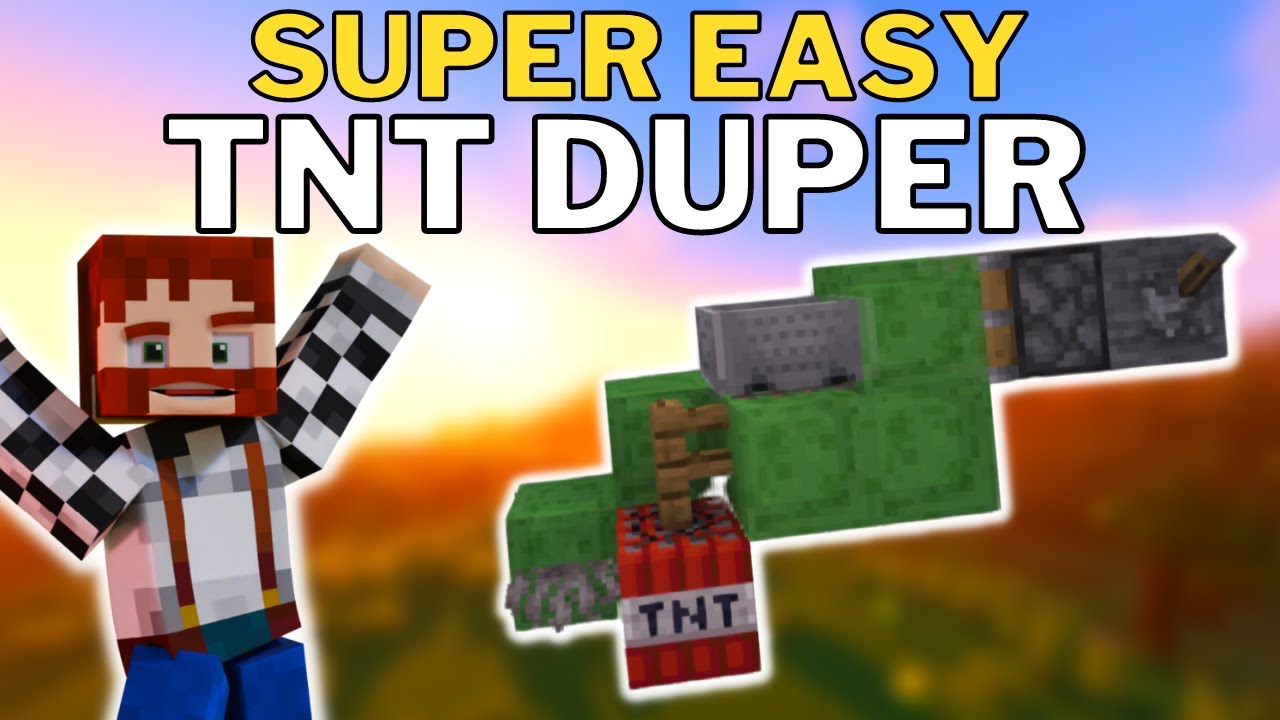
Check out this Super Easy TNT Duper tutorial for Minecraft 1.19!
This is tested in up to Minecraft 1.19 edition.
For this TNT duper you will need:
6 slime blocks
1 fence post
1 TNT
1 Dead coral Fan
1 Detector rail
1 Minecart
1 Block
1 Lever
1 Sticky piston
Some temporary blocks
You may also want for automation:
2 observers
1 extra sticky pis...
was using a bunch of them to dig like 8 chunks down to bedrock
 buoyant forge
does anyone know why I cant seem to favorite anything in rei?
 dark flare
why aren't you running it from the start.ps1 file
none of this looks like you're trying to launch BMC1
hard agate
im trying to host it off my pc
hard agate
that works?
dark flare
yes
hard agate
saved me time haha
 dark flare
you can't use java 8
hard agate
how do i change it
dark flare
the readme does cover this haha, install adoptiums java 18 64 bit and make sure you select JAVA_HOME during install
have time for a quick screenshare?
dark flare
Gluck and have fun, like I said your machine will make quick work of hosting a small server and you can drop that wonky host 😉
lean kernel
dark flare
this is the tnt duper i built that works in my world, it wasnt part of a larger ...
isee thats a totally different one https://www.youtube.com/watch?v=Bjg1_GEPdDk was using this guide.. works for most of the people but i dont know why i doesnt for me, maybe i'll try to copy the tnt duper of your version and adjust it to my wood farm, idk... thanks!
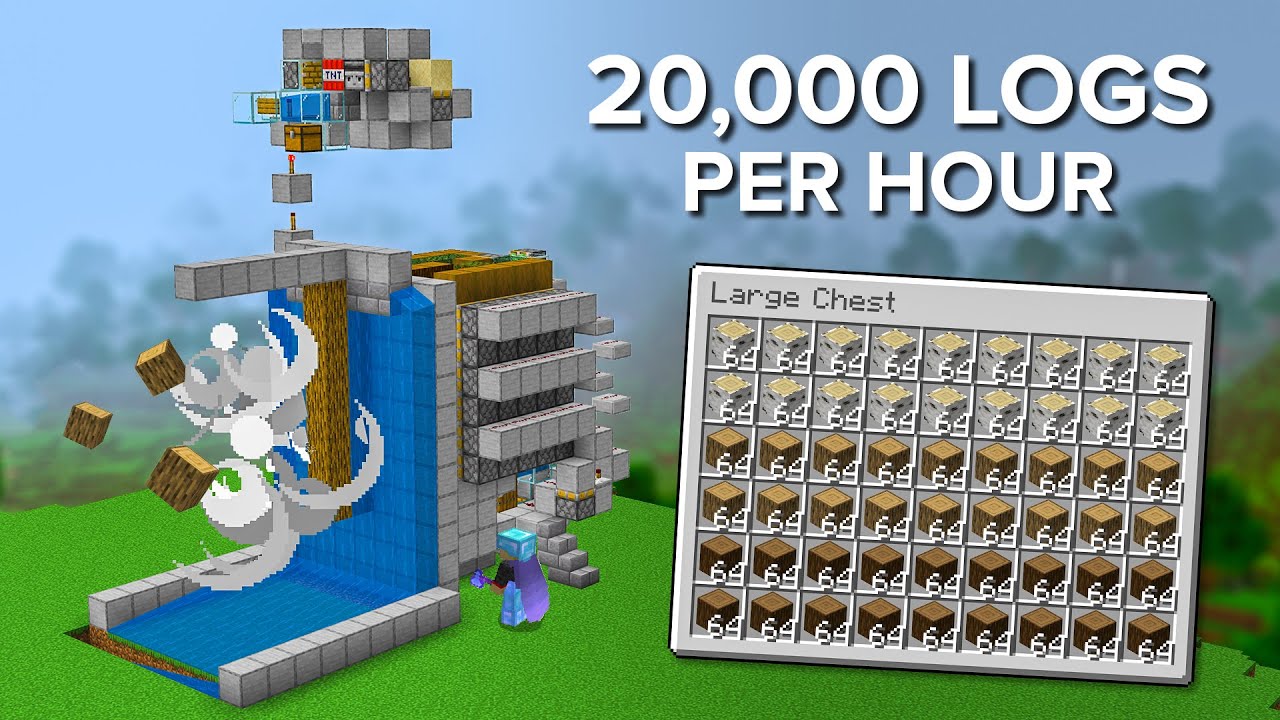
This Easy To Build Tree Farm Makes Birch, Oak and Spruce Logs in Minecraft. Producing Up to 20,000 Logs Per Hour Automatically! Perfect Tree Farm to Build in your Survival World!
Design by @occultgent: https://youtu.be/j5RBYJiiBOU
World Download: https://bit.ly/NewTreeFarm
Instagram & Twitter - @ShulkercraftYT
Join My Discord Server: https://d...
meager yacht
fiery thistle
would the create mod be compatible with bmc1 fabric
try it and see
meager yacht
high sedge
what texture pack is it that the blocks like mesh together i hate it so much
Continuity
meager yacht
merry mantle
Hey guys does my world update with the 18.5 or will I lose my original world?
the update is safe
meager yacht
lost wharf
Will this pack run on basic hardware?
yes
meager yacht
lean kernel
Does the BMC Fabric modpack allow TNT duping?
try it and see
meager yacht
sweet hollow
Can i just enable all of those included packs?
read what the resourcepacks do before enabling them
the only disabled ones are disabled for a reason
there are enabled ones by default
if you dont have any enabled by default, you installed incorrectly
read #faq for proper installation
meager yacht
hard agate
anyone know why i cant run my server
!server
blissful stump
We suggest renting a server from Bisect Hosting:
Approx. $10 - $25 a month depending on what plan you choose. You can also get 25% off with Code LunaPixel.
Go to https://www.bisecthosting.com/LunaPixel and order a plan which fits you. We suggest 1GB per player but nothing lower than 4GB as the server needs at least 3GB to run.
Go to #server-hosting for more Info!
Free Method: (This is hosting on your own PC and it can come with issues that's why we suggest Bisect Hosting)
- Download the serverpack from Curseforge's website
- Right click the start.ps1 file and click Run with Powershell
To join your own server, typelocalhostinto Direct Connect.
This video explains the process https://www.youtube.com/watch?v=wuGUbVbLsDc
The server IP address is your Public IP Address, which can be found by googling my ip address
If other players are unable to join, find a portforwarding guide online.
 shell pecan
merry mantle
shell pecan
merry mantle
@meager yacht cheers mate
sweet hollow
meager yacht
if you dont have any enabled by default, you installed incorrectly
I have some enabled by default and some are not, im asking if i could enable all of the packs? So far i didnt have any issues with modpack
meager yacht
sweet hollow
I have some enabled by default and some are not, im asking if i could enable all...
read what the resourcepacks do before enabling them
the only disabled ones are disabled for a reason
lean kernel
meager yacht
try it and see
i rebuild everything again, for others it works but not for me i guess.. reached my capaacity
sweet hollow
Alright, 1 more question, whats the name of the mod that displays the block im curently looking at? Or how do i change its position?
meager yacht
jade
 tender lynx
What are all the mods in BMC1 (Fabric) 1.19.2?
???
Anybody?
Or what are all the dimesions?
lost wharf
Is better MC designed with world upgradability in mind?
idle imp
meager yacht
thanks
added the check
 robust sonnet
does someone know how i stop geting these messages after putting a command block to stop creeper explosions? I cant read chat either while im in its active radius
 blissful stump
i just had a quick question, since the return portal in the end is shaped differently, how do i place the end crystals to respawn the dragon
?
 lethal ferry
tender lynx
Or what are all the dimesions?
lethal ferry
tender lynx
Or what are all the dimesions?
read the quests and modpackindex .com
blissful stump
Is it possible to convert the World from 17.5 Version to 18.5 Version?
Especially the Server
 fast mason
hi, can someone help me? i cant see what im doing wrong

This is the order (top left 4, top right 3, bot righ 2, bot left 1)
4 -> 3
1 <- 3
4 <- 2
1 -> 4
 jolly hollow
idk if anyones even gonna see this but i just started playing this modpack tonight and i really like it, this is prob one of the most beautiful and peaceful modpacks ive played so thank u lol, well put together, such a vibe
meager yacht
jolly hollow
idk if anyones even gonna see this but i just started playing this modpack tonig...
❤️
 ruby fulcrum
anyone know how to make lan servers work for this mod pack
meager yacht
ruby fulcrum
anyone know how to make lan servers work for this mod pack
!lan
blissful stump
LAN is untested and unreliable, we suggest you set up a Local Hosted Server with the Server Pack of that Modpack and Version.
meager yacht
!server
blissful stump
We suggest renting a server from Bisect Hosting:
Approx. $10 - $25 a month depending on what plan you choose. You can also get 25% off with Code LunaPixel.
Go to https://www.bisecthosting.com/LunaPixel and order a plan which fits you. We suggest 1GB per player but nothing lower than 4GB as the server needs at least 3GB to run.
Go to #server-hosting for more Info!
Free Method: (This is hosting on your own PC and it can come with issues that's why we suggest Bisect Hosting)
- Download the serverpack from Curseforge's website
- Right click the start.ps1 file and click Run with Powershell
To join your own server, typelocalhostinto Direct Connect.
This video explains the process https://www.youtube.com/watch?v=wuGUbVbLsDc
The server IP address is your Public IP Address, which can be found by googling my ip address
If other players are unable to join, find a portforwarding guide online.
 celest peak
so.. what can i do in/gain from paradise lost?
celest peak
ah so it's basically uninhabited land that looks pretty? lol
meager yacht
yep
blissful stump
blissful stump
i just had a quick question, since the return portal in the end is shaped differ...
🙂
meager yacht
same way as vanilla
blissful stump
okay thank uu
 pine ether
i need technical help setting up a server, where would be a good place for that
night birch
pine ether
i need technical help setting up a server, where would be a good place for that
!server
blissful stump
We suggest renting a server from Bisect Hosting:
Approx. $10 - $25 a month depending on what plan you choose. You can also get 25% off with Code LunaPixel.
Go to https://www.bisecthosting.com/LunaPixel and order a plan which fits you. We suggest 1GB per player but nothing lower than 4GB as the server needs at least 3GB to run.
Go to #server-hosting for more Info!
Free Method: (This is hosting on your own PC and it can come with issues that's why we suggest Bisect Hosting)
- Download the serverpack from Curseforge's website
- Right click the start.ps1 file and click Run with Powershell
To join your own server, typelocalhostinto Direct Connect.
This video explains the process https://www.youtube.com/watch?v=wuGUbVbLsDc
The server IP address is your Public IP Address, which can be found by googling my ip address
If other players are unable to join, find a portforwarding guide online.
night birch
can watch the youtube vid and read the readme of the serverpack for self-hosting setup
pine ether
but if i wanted to use a different provider than bisect
would i set the jar to the serverlauncher jar file?
night birch
so, the info that you probably should've said at the beginning, is that you aren't self-hosting and that you are using another host provider
night birch
well, we generally can't do much with other server providers, you will have to ask their support
pine ether
ok.
 pliant briar
I have been having this issue where whenever I open my world it says invalid player data it happened why I updated my world form v15 to v16 and it still happens on the latest version. anyone know what to do?
meager yacht
pliant briar
I have been having this issue where whenever I open my world it says invalid pla...
!moreinfo
blissful stump
Hello! For us to properly help you with your issue, you will need to answer all 8 questions below. Post the answers in this channel:
1. Have you modified the modpack in any way? If so, what did you do? (Updating/adding/removing mods, changing configs)
2. What launcher, or program, are you using to launch the game? (CurseForge, ATLauncher, etc)
3. What Minecraft version are you playing? (1.18.2, 1.16.5, 1.19.2)
4. What version of the modpack are you playing? (v11, v9, etc)
5. What steps are necessary to reproduce the crash? (Launching the game, exploring the world, etc)
6. Have you ever gotten past the point where the crash happens?
7. Send the crash report file into this channel. Right click the modpack, Open Folder, and navigate to the Crash Reports folder. Drag the newest one here. If there is no crash reports folder, do the same thing with the latest.log file in the logs folder.
8. Did you follow the Performance guide linked in #faq?
pliant briar
meager yacht
!moreinfo
- no
- Curseforge
- 1.19.2
- v16 - v18.5
- opening the world in any version v16 and above
- no
- in attachment
- yes
meager yacht
are you joining a server
meager yacht
when did you make the world
what version
okay yeah you didnt instlal the modpack correctly
you lied
you arent using curseforge
pliant briar
yes i am
meager yacht
v18.5 does not using fabric loader 0.14.17
please read #faq for modpack installation.
pliant briar
meager yacht
you arent using curseforge
 pliant briar
meager yacht
please read <#815503531611783179> for modpack installation.
pliant briar
meager yacht
please read <#815503531611783179> for modpack installation.
same error

heres the log
meager yacht
try removing roughly enough resources
pliant briar
meager yacht
try removing roughly enough resources
thats not in the list. are you talking about rei
 meager yacht
no
roughly enough resources
its in the modpack
it might be called RER in the mods folder
pliant briar
meager yacht
it might be called RER in the mods folder
yup
trying it now
okay that worked
do I need all of my friends to delete it when they join
or can I just delete rer when I redownload the server files
meager yacht
how are you hosting the server
pliant briar
from the folder on my pc
 forest zenith
how can i update my version of the modpack through curseforge because im tryna play with a friend via essential but its not working cause he has more mods installed that i dont have
but i also wanna keep my world so i dont lose all my progress
night birch
forest zenith
how can i update my version of the modpack through curseforge because im tryna p...
essential is incompatible with our modpacks
there are two ways to host a server
!server
blissful stump
We suggest renting a server from Bisect Hosting:
Approx. $10 - $25 a month depending on what plan you choose. You can also get 25% off with Code LunaPixel.
Go to https://www.bisecthosting.com/LunaPixel and order a plan which fits you. We suggest 1GB per player but nothing lower than 4GB as the server needs at least 3GB to run.
Go to #server-hosting for more Info!
Free Method: (This is hosting on your own PC and it can come with issues that's why we suggest Bisect Hosting)
- Download the serverpack from Curseforge's website
- Right click the start.ps1 file and click Run with Powershell
To join your own server, typelocalhostinto Direct Connect.
This video explains the process https://www.youtube.com/watch?v=wuGUbVbLsDc
The server IP address is your Public IP Address, which can be found by googling my ip address
If other players are unable to join, find a portforwarding guide online.
night birch
self-hosting is free and easy
forest zenith
ok thats a shame but thank you
dark flare
I mean self hosting is a way better way to go about playing with your friends than using essentials and risking all of your progress being ruined in an instant by a corrupted world 🙂
If you ever want some help setting up your world as a server on your PC just hit me up, happy to walk you through so you and your friends can game.
drifting verge
So I have a really dumb question: I’m running the newest version (updated this morning) single player and when I came back to my base using a waypoint from a few thousand blocks away half the gates on my animal pens were open. I know they were closed when I left. I’m collecting all the types and versions of animals I can and I lost a few from this. Anyone have any ideas before I replace all the fence gates with iron doors?
meager yacht
yeah your world is cursed
i'd suggest praying tonight
to whichever god you worship
pray extra hard
 analog glen
HEROBRINE
 rare oar
so uhh
meager yacht
v18.5
- added herobrine
meager yacht
!moreinfo
blissful stump
Hello! For us to properly help you with your issue, you will need to answer all 8 questions below. Post the answers in this channel:
1. Have you modified the modpack in any way? If so, what did you do? (Updating/adding/removing mods, changing configs)
2. What launcher, or program, are you using to launch the game? (CurseForge, ATLauncher, etc)
3. What Minecraft version are you playing? (1.18.2, 1.16.5, 1.19.2)
4. What version of the modpack are you playing? (v11, v9, etc)
5. What steps are necessary to reproduce the crash? (Launching the game, exploring the world, etc)
6. Have you ever gotten past the point where the crash happens?
7. Send the crash report file into this channel. Right click the modpack, Open Folder, and navigate to the Crash Reports folder. Drag the newest one here. If there is no crash reports folder, do the same thing with the latest.log file in the logs folder.
8. Did you follow the Performance guide linked in #faq?
rare oar
ATLauncher said my game was trying to render minecraft:sheep at the same Time of the wolf armor and that broke my frame rate to 3fps and crashed the console. My pc also has an RTX 3080 so it wasn’t my graphics card. I have 64gigs remaining on Minecraft which should be okay
tender lynx
lethal ferry
read the quests and modpackindex .com
k
drifting verge
drifting verge
So I have a really dumb question: I’m running the newest version (updated this m...
Sorry
tender lynx
lethal ferry
read the quests and modpackindex .com
Can't find the mod on modpackindex.com I can only find 'lite' version
drifting verge
1: No modifications to the pack. 2: Using FTB launcher (I found it works best on Linux). 3: 1.19.2 4: V18.5
Sorry there's no crash so no crashlog
 oak temple
fast mason
hi, can someone help me? i cant see what im doing wrong
oak temple
fast mason
hi, can someone help me? i cant see what im doing wrong
what is that structure called?
oak temple
tender lynx
Or what are all the dimesions?
better nether, better end, twilight forest (best one), paradise, bumblezone, eden
im forgetting one or 2
the void which you enter after reaching the end
tender lynx
Whats bubmblezone and eden?
hmmm interesting
and there's lost paradise
O u said that
And yh
 coarse fulcrum
sryy if this quyestion has been asked a ton, ( i already searched but it hasnt been answered yet ) but what does the gravitite levitator do? google shows nun
meager yacht
rare oar
ATLauncher said my game was trying to render minecraft:sheep at the same Time o...
!moreinfo
blissful stump
Hello! For us to properly help you with your issue, you will need to answer all 8 questions below. Post the answers in this channel:
1. Have you modified the modpack in any way? If so, what did you do? (Updating/adding/removing mods, changing configs)
2. What launcher, or program, are you using to launch the game? (CurseForge, ATLauncher, etc)
3. What Minecraft version are you playing? (1.18.2, 1.16.5, 1.19.2)
4. What version of the modpack are you playing? (v11, v9, etc)
5. What steps are necessary to reproduce the crash? (Launching the game, exploring the world, etc)
6. Have you ever gotten past the point where the crash happens?
7. Send the crash report file into this channel. Right click the modpack, Open Folder, and navigate to the Crash Reports folder. Drag the newest one here. If there is no crash reports folder, do the same thing with the latest.log file in the logs folder.
8. Did you follow the Performance guide linked in #faq?
meager yacht
please just answer the questions
meager yacht
drifting verge
1: No modifications to the pack. 2: Using FTB launcher (I found it works best on...
!alternates
blissful stump
If this command was run in response to your question/issue, it is likely because switching away from the launcher you are currently using would fix your problem.
From our experience, the most stable launcher by far is ATLauncher, also known as ATL.
To install ATLauncher, do the following:
1. Go to https://atlauncher.com/download
2. Install and run the setup, then open the program.
3. Login to your Microsoft account that owns the Java Edition of Minecraft from the Accounts tab on the right. This process is 100% safe, as it goes directly through Microsoft. ATLauncher does not see your account credentials.
4. Go to the Packs tab on the right, then click "Curseforge" on the left.
5. Search the modpack you wish to download.
6. Click "New Instance". Click "Ok" on the opted out mods warning, then click "Open All" on the manual download screen.
7. Let the mods download, ATLauncher will grab them from your Downloads folder and automatically add them to the modpack.
8. Go to the Instances tab, and click "Play" on the modpack you downloaded. If you ever see an "Update" button on the instance, click it.
To transfer your Curseforge world to ATLauncher, simply right click the modpack on Curseforge, or click the 3 dots, then click "Open Folder". Copy the Saves folder, then click "Open Folder" on ATLauncher and paste the Saves folder there.
Because ATLauncher downloads the exact same files as Curseforge does, your world will be the exact same and you will be able to join the same servers. ATLauncher also works without an internet connection (after you've installed the modpack, of course), and does not have any bloat from Overwolf. You are free to uninstall both Overwolf and Curseforge with ATLauncher installed.
meager yacht
tender lynx
Whats bubmblezone and eden?
read the questbook
meager yacht
coarse fulcrum
sryy if this quyestion has been asked a ton, ( i already searched but it hasnt b...
update to v18.5
tender lynx
k
coarse fulcrum
meager yacht
update to v18.5
tyy 😭 i didnt realize two more versions released since we started the world
oak temple
tender lynx
Whats bubmblezone and eden?
Eden is like a crazy metallic planet (hard to explain) there’s a book it’s either “encyclopedia to Eden” that you find in random chests in over world structures like dungeons or “biomepedia” that shows what Eden is like, then bumble zone is where it looks like you’re shrunk down in a beehive and i think you can trade with a queen bee for great drops
tender lynx
oak temple
Eden is like a crazy metallic planet (hard to explain) there’s a book it’s eithe...
k thx
Is the Origins mod part of Better Minecraft or no (guessing not) if not can i add it?
meager yacht
you can add it
tender lynx
k thx
late bloom
Any tips for getting to the nether roof? I keep getting to 124 instead of 125 to safely get on top
 karmic citrus
how tf do ifind the queen bee and whjy arent some WDA dungeons spawning in my world?
namely foundry
meager yacht
some large structures are disabled
 fervent patrol
is the mystery bird egg mod removed from bmc?
 latent sedge
for the past like two days i havent been able to play bc it keeps crashing in my single and multiplayer worlds and it keeps getting worse to the point that i cant even load in for 10 secs without it crashing.
fervent patrol
which version do u play
meager yacht
fervent patrol
is the mystery bird egg mod removed from bmc?
the what
meager yacht
latent sedge
for the past like two days i havent been able to play bc it keeps crashing in my...
!moreinfo
blissful stump
Hello! For us to properly help you with your issue, you will need to answer all 8 questions below. Post the answers in this channel:
1. Have you modified the modpack in any way? If so, what did you do? (Updating/adding/removing mods, changing configs)
2. What launcher, or program, are you using to launch the game? (CurseForge, ATLauncher, etc)
3. What Minecraft version are you playing? (1.18.2, 1.16.5, 1.19.2)
4. What version of the modpack are you playing? (v11, v9, etc)
5. What steps are necessary to reproduce the crash? (Launching the game, exploring the world, etc)
6. Have you ever gotten past the point where the crash happens?
7. Send the crash report file into this channel. Right click the modpack, Open Folder, and navigate to the Crash Reports folder. Drag the newest one here. If there is no crash reports folder, do the same thing with the latest.log file in the logs folder.
8. Did you follow the Performance guide linked in #faq?
latent sedge
fervent patrol
which version do u play
16.5
fervent patrol
meager yacht
the what
there used to be a mod i dont know the name of it. we used to get random eggs and we need some egg analyzer to decode them
meager yacht
latent sedge
16.5
!moreinfo
blissful stump
Hello! For us to properly help you with your issue, you will need to answer all 8 questions below. Post the answers in this channel:
1. Have you modified the modpack in any way? If so, what did you do? (Updating/adding/removing mods, changing configs)
2. What launcher, or program, are you using to launch the game? (CurseForge, ATLauncher, etc)
3. What Minecraft version are you playing? (1.18.2, 1.16.5, 1.19.2)
4. What version of the modpack are you playing? (v11, v9, etc)
5. What steps are necessary to reproduce the crash? (Launching the game, exploring the world, etc)
6. Have you ever gotten past the point where the crash happens?
7. Send the crash report file into this channel. Right click the modpack, Open Folder, and navigate to the Crash Reports folder. Drag the newest one here. If there is no crash reports folder, do the same thing with the latest.log file in the logs folder.
8. Did you follow the Performance guide linked in #faq?
meager yacht
answer the questions or we cant help.
latent sedge
- I have only modified it by adding the Essential Mod for multiplayer.
- Curseforge
- 1.19.2
- v16.5
- When I load in my worlds they crash after 10 secs or so and if I want to create a world too.
- Yes but then it lags and crashes.
- Yes
meager yacht
latent sedge
1. I have only modified it by adding the Essential Mod for multiplayer.
2. Curse...
Essential is incompatible with all of our modpacks
latent sedge
oh thats weird its been working for over 2 months now
it isnt until yesterday that i began to get crashes
(still crashes even after removing Essential Mod)
latent sedge
Ok
blissful stump
Is it possible to switch the Version from v17.5 to v18.5 with the world that i still have on the server ?
meager yacht
yep
blissful stump
so there wont be any corrupted data or something?
meager yacht
none
blissful stump
oh okay and do i just need to update the modpack on my server and then import my world?
meager yacht
yep
blissful stump
Thank you i will try that
 hazy apex
fast mason
hi, can someone help me? i cant see what im doing wrong
hazy apex
fast mason
hi, can someone help me? i cant see what im doing wrong
Look at item in frame. The items have a number assigned to them. Make that number point to the other number. If you swapped swords around in the frames, you broke the puzzle. When completed, one of the campfire will light up behind you around the center of the room. The little podium on the ground with campfire in center
blissful stump
Is there a way to let my mobfarm work even if i am not arround ? i tried forceloading chunks but there wont spawn any mobs.
fast mason
hazy apex
Look at item in frame. The items have a number assigned to them. Make that numbe...
i think i have done that, if u look at the photo they pointing as they should, but not working.. idk if im blind or what but i gave up already
i did that on the second pyramid and worked
hazy apex
you can always tnt center of pyramid to get to lower levels and bypass puzzles
fast mason
hazy apex
you can always tnt center of pyramid to get to lower levels and bypass puzzles
didnt know, that will do
thx man
 wicked mountain
Is anyone else having the issue where paths don't drop anything if mined without silk touch (vanilla behavior is to drop dirt)? Seems like the block loot table is set to only drop dirt path and only if silk touch is used...
 tardy stag
Does the new update have ancient cities?
Just clarifying, starting a new world
I mean answer prob yes cause the version is 1.19.2 but eh
latent sedge
meager yacht
add deeperdarker:sculk_snapper to the ysns config
tbh honest idk how to do it i think i found the thing and it says blacklisted_entities
 ember condor
Hey guys I'm having a problem with modpack where whenever I look at mobs my fps drop significantly from average of 100fps to like 40-30fps, it makes combat irritating.
Does anyone know any solutions to that?
 ionic hemlock
how do i center the thing that displays the name of the block that i'm looking at?
 sudden bay
tardy stag
I mean answer prob yes cause the version is 1.19.2 but eh
sudden bay
tardy stag
I mean answer prob yes cause the version is 1.19.2 but eh
1.19 includes Ancient Cities
ionic hemlock
And also how does the vein miner work the default key is ` but its not working
sudden bay
ember condor
Hey guys I'm having a problem with modpack where whenever I look at mobs my fps ...
#faq preformance guide
sudden bay
ionic hemlock
And also how does the vein miner work the default key is ` but its not working
You might have to hold it while mining. Not 100% sure
latent sedge
I really don't know how to fix this problem because it keeps happening
split peak
are there more than one rideable dragon in the fabric version of this mod? or just the black ender dragon version
wicked mountain
ionic hemlock
And also how does the vein miner work the default key is ` but its not working
a vein miner enchantment exists, depending on your configuration it might be required for vein miner to work at all
 blissful belfry
guys how do i make my friend able to build inn my claim?
lethal ferry
 misty umbra
Can somebody help me?
misty umbra
Can somebody help me?
ask the question so it quicker when a mod or dev comes on
coarse fulcrum
is there a reason why wavestones would've been randomly forgotten even if they were never mined?
 maiden spire
deleting the waypoint data file
coarse fulcrum
weird
coarse fulcrum
me and my friend went to the twilight forest and they randomly all got reset
 burnt oasis
they kinda disappeared while we were playing tho, just very suddenly gone
maiden spire
ah
it’s probably not reset reset
xaero is probably viewing a diff dimension
i dont use xaero myself, but somewhere in the settings see if you can change the dimension its trying to show waypoints for
burnt oasis
i went back to the overworld, still didn't fix
maiden spire
it may be stuck on twilight
burnt oasis
it's also displaying it for the bee one
maiden spire
are you both playing on a server?
burnt oasis
it's lan-hosted 😭
maiden spire
any chance the ip changed or anything like that
ah well then that could also be why
lan hosting is glitchy like that
coarse fulcrum
ripp
maiden spire
you dont have an ip to bind waypoints to
coarse fulcrum
alrr tyy
maiden spire
and its likely glitched out
burnt oasis
oof
maiden spire
id recommend switch off lan asap
copy that world, download the serverpack and put it there
 warm dome
what are the 5 dimensions in 19.2 fabric? i wanna explore them but i dont even know what thay are
dark flare
Look at the questbook @warm dome
Covers each of the dimensions and how to access them!
warm dome
damn i died a lonnnnng time ago and lost that, is it just called quest book ?
warm dome
dark flare
Look at the questbook <@351905562885095425>
it sure is, thanks!
dark flare
Oh sorry missed the other msg you can always access it by opening inventory and clicking the quests in the top left haha
meager yacht
tardy stag
Does the new update have ancient cities?
Just clarifying, starting a new world
it always has
meager yacht
ember condor
Hey guys I'm having a problem with modpack where whenever I look at mobs my fps ...
#faq performance guide
meager yacht
ionic hemlock
how do i center the thing that displays the name of the block that i'm looking a...
jade config
meager yacht
latent sedge
I really don't know how to fix this problem because it keeps happening
fix what
meager yacht
 hybrid nova
THEY REMOVED GRAVITITE?
hybrid nova
THEY REMOVED GRAVITITE?
go complain to the paradise lost devs
they keep releasing broken updates
and then when you update to fix those issues
hybrid nova
that mod is so unfinished
meager yacht
the update has removed tons of items
they removed all aether related items
with no ID replacement
so you dont get anything in return
the update right before the one where they removed items had tons of issues
hybrid nova
thats so dumb
meager yacht
like if you looked at the flax block
which
mind you
is not even from paradise lost
it'd cause your game to crash
unless you updated paradise lost
meager yacht
blissful belfry
guys how do i make my friend able to build inn my claim?
add them to your ftb team
blissful stump
LAN is untested and unreliable, we suggest you set up a Local Hosted Server with the Server Pack of that Modpack and Version.
We suggest renting a server from Bisect Hosting:
Approx. $10 - $25 a month depending on what plan you choose. You can also get 25% off with Code LunaPixel.
Go to https://www.bisecthosting.com/LunaPixel and order a plan which fits you. We suggest 1GB per player but nothing lower than 4GB as the server needs at least 3GB to run.
Go to #server-hosting for more Info!
Free Method: (This is hosting on your own PC and it can come with issues that's why we suggest Bisect Hosting)
- Download the serverpack from Curseforge's website
- Right click the start.ps1 file and click Run with Powershell
To join your own server, typelocalhostinto Direct Connect.
This video explains the process https://www.youtube.com/watch?v=wuGUbVbLsDc
The server IP address is your Public IP Address, which can be found by googling my ip address
If other players are unable to join, find a portforwarding guide online.
meager yacht
paid & free methods
meager yacht
warm dome
damn i died a lonnnnng time ago and lost that, is it just called quest book ?
questbook icon, top left of your inventory
coarse fulcrum
meager yacht
so you dont get anything in return
does this include gravitite?
meager yacht
all items from paradise lost are gone when you update
you can use an older version of paradise lost and update if you want
coarse fulcrum
oh yea i was just asking bc the gravitite i did have turned into diamonds
coarse fulcrum
ah
meager yacht
but not the important ones lol
coarse fulcrum
gotcha
warm dome
dark flare
Oh sorry missed the other msg you can always access it by opening inventory and ...
Oh double thanks then lol
tardy stag
how do i fix this, im trying to set up a server by using the serverpack provided by Curseforge

i guess java needs updating or perhaps Fabric?
till then ill research
maiden spire
correct
java version is not correct
please download java 18
nah
oop
go to adoptium
 civic cargo
ember condor
Hey guys I'm having a problem with modpack where whenever I look at mobs my fps ...
civic cargo
ember condor
Hey guys I'm having a problem with modpack where whenever I look at mobs my fps ...
in the minecraft launcher go to installations > ... > Edit > More Options, you should see JVM ARGUMENTS and at the beginning -Xmx4096m. You're gonna wanna change the number to how much RAM you wanna dedicate for example -Xmx16G for 16 gigabytes -Xmx32G for 32 gigabytes. this should help out with large amount of entities as the base installation only dedicates 4096 megabytes, or 4 gigabytes.
meager yacht
civic cargo
in the minecraft launcher go to installations > ... > Edit > More Options, you...
thats not how you allocate ram
and you should not allocate 16gb nor 32gb
civic cargo
well using that method seems to resolve the issue for many users who use this and other modpacks, unless you'd like to explain how to fix it?
meager yacht
civic cargo
well using that method seems to resolve the issue for many users who use this an...
you dont allocate ram in the minecraft launcher
you need to allocate ram in the modded launcher you're using
the only modded launcher that uses the mc launcher as part of the launch process is curseforge
and on curseforge you need to allocate ram within the curseforge launcher
 orchid badger
is there a wiki?
meager yacht
orchid badger
is there a wiki?
 glad peak
@maiden spire sorry for the ping again, but I caught a time where it did the out of memory crash again. However I have htop on my second computer and the server was on around 9/15.4G memory. This doesn't make sense to me 
maiden spire
oom killer may be configured to be too aggressive
glad peak
when you are available, can you ping me so we can figure out a fix for this?
maiden spire
yeah sure
glad peak
thanks 
tender lynx
Is origins++ compatible with BMC1 1.19.2 (fabric)? Not sure cause it also adds this
 latent sedge
meager yacht
fix what
latent sedge
meager yacht
fix what
the thing how my game crashes because of the sculk snapper but i guess ill just kill it when i see it
 azure saddle
I'm trying to learn more about the modpack, does anyone know a YT series that covers the 1.19.2 version?
I always get sad when I hit late game and finally discover some features that would have been so useful or fun early-mid game
meager yacht
azure saddle
I always get sad when I hit late game and finally discover some features that wo...
the questbook helps
azure saddle
Yeah I follow quests
But that won't have any of the insider strats or cheese methods
 restive prairie
yo can i get some help?
whenever i go on a menu
my fps drops to 19
and it wont go up any highger?
any ideas as to why this is?
sudden bay
Just the menu?
restive prairie
yes
sudden bay
restive prairie
yes
There might be a mod capping it at 19
meager yacht
restive prairie
whenever i go on a menu
#faq performance guide
meager yacht
sudden bay
There might be a mod capping it at 19
there is not
sudden bay
ah

 meager yacht
restive prairie
i dont think its performance tho
meager yacht
restive prairie
i dont think its performance tho
please follow the performance guide
wait
update the modpack
you're on a super old version
 fierce jacinth
Is there a tutorial on how to move my files over from curseforge to atlauncher if there even is a way?
meager yacht
fierce jacinth
Is there a tutorial on how to move my files over from curseforge to atlauncher i...
only copy over the saves folder
fierce jacinth
Alr thanks I wasn't sure if it was more complicated then that so I just wanted to be sure
 slow cobalt
is there some where i can go to see an armor or weapon tier list for better mc? Like a wiki or something?
meager yacht
REI
slow cobalt
can you use any type of arrows with infinity enchantment
night birch
no
wicked mountain
Should I file an issue for the path block loot table? They don't drop anything if mined without silk touch (vanilla behavior is to drop dirt with or without silk)
meager yacht
update the grass overhaul mod
wicked mountain
I have no idea how to check which mod has done this
Oh, ok thank you
There were no updates available for that mod
wicked mountain
Is debug log the same as a regular log but running atlauncher in debug mode?
wicked mountain
How do I enable it
I only see the normal logs
Latest.log , REI.log, rei-issues.log, and all the compressed log archives
Needless to say, block breaking doesn't show up in the normal log
I found a potential workaround for enabling the debug log, but it requires creating a custom xml file to change the log level
Does that sound familiar?
meager yacht
there should just be an on/off switch for enabling it lol
wicked mountain
ATLauncher doesn't have it
idle imp
I can make a simple mod in a bit to do debugging if needed
Easier fix tho would be to just add a temp data pack that readds the loot table that someone overwrote
blissful stump
how can i build wither boss ?
wicked mountain
blissful stump
how can i build wither boss ?
This boss? https://oyster.ignimgs.com/mediawiki/apis.ign.com/minecraft/8/8b/Wither_Build.png?width=1280
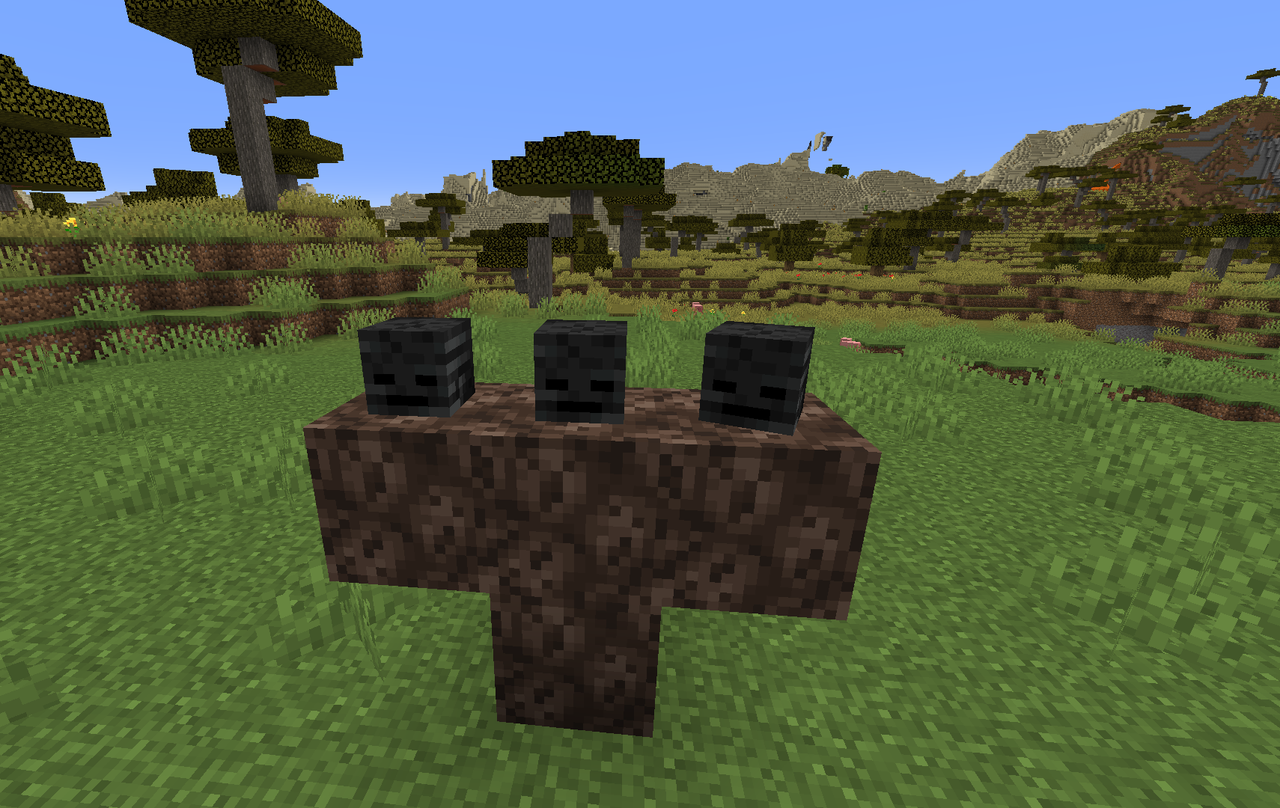 wicked mountain
idle imp
I can make a simple mod in a bit to do debugging if needed
wicked mountain
idle imp
I can make a simple mod in a bit to do debugging if needed
It doesn't look like such a mod exists yet, so it would likely be popular
idle imp
All mods should just have debugging config makes life easier for everyone
meager yacht
blissful stump
how can i build wither boss ?
read the quests in the questbook
blissful stump
thank you
blissful stump
wicked mountain
This boss? https://oyster.ignimgs.com/mediawiki/apis.ign.com/minecraft/8/8b/With...
yes
wicked mountain
Ok, so the xml file method seems to work on Adrenaline modpack, will try now on [Fabric] BMC1
 cunning dust
Is 4gb enough to run a server for 2 people
meager yacht
cunning dust
Is 4gb enough to run a server for 2 people
yes
wicked mountain
Holy veinminer spam
Debug log only shows information about playing the grass breaking sound when I break dirt_path blocks
Ok helps if I'm in survival 
Regarding the lack of blocks dropped from dirt_path blocks when broken without silk touch -
Used an XML file to force the log level to debug in the default logs. The only difference, when i break dirt (and get dirt) or break dirt_path (and get nothing), is the sound event that plays
(ctrl+F "grass" then go up to see the events just before i saved and quit, that's me breaking dirt_path)
whole log https://paste.atlauncher.com/view/4ddb2cc8-a3b4-4fc6-92de-aaa80217e9de
meager yacht
odd
idle imp
coding a debugging mode for it right now, probably will have it done in 10ish minutes
wicked mountain
wonder if we could request REI to add a bit to the block loot table display that shows what mods are setting it
meager yacht
roughly enough loot tables is what adds loot tables
wicked mountain
i think it might be roughly enough resources that is the addon that i'm talking about
maybe
the one that adds block drops
i bet it is grass overhaul tho. most recent version changelog is "- Dirt Path blocks are now obtainable using silk touch"
no way to file issues on curseforge though
already been reported on github https://github.com/nvb-uy/grass-overhaul/issues/5

GitHub
When breaking path blocks with a regular shovel vanilla path block drops no item even though it should drop dirt. Using version: Fabric [1.17-1.19.2] v23.05.08

 meager yacht
wicked mountain
already been reported on github https://github.com/nvb-uy/grass-overhaul/issues/...
meager yacht
wicked mountain
already been reported on github https://github.com/nvb-uy/grass-overhaul/issues/...
the creator of grass overhaul is one of our devs
ping her with the relevant info
@.elocin
wicked mountain
Bug report is already marked as "planned" and I posted a comment asking if rolling back was a bad idea, no need to trouble them here as well
 keen widget
For some reason piglins with crossbows have the japanese translation, I'm not sure if it's an oversight in one of the mods.
dark flare
Still impressed with how optimized this pack is, 15-20 players on routinely at 20 TPS. Fantastic.
dark flare
keen widget
For some reason piglins with crossbows have the japanese translation, I'm not su...
It's intentional haha
 scenic narwhal
i was wondering what the req specs for the mod pack with shader pack on if anyone has an idea
prob like a 6 core cpu right
dark flare
MC isn't very multithreaded so you don't necessarily need a 6 core, just fast single core speeds on a quad core will do. Shaders will be more GPU dependant than CPU, and ideally being able to dedicate 8gb to the client would help you there as the pack can be memory hungry.
swift hearth
Does anyone know how to stop icicles from spawning indoors?
dark flare
Heat sources (lights, torches).
scenic narwhal
dark flare
MC isn't very multithreaded so you don't necessarily need a 6 core, just fast si...
i have an i 5 3570 i know my gpu is good its an rx 580 8 gb and i got 16 gb of ram
12 year old cpu gang lol
dark flare
Basically when upgrading a server best practice is to keep only your world folder, take everything else from the server pack and modify the configs back to how you had them.
Reason for this is that configs change and trying to keep your old ones might cause issues with mods that have been updated. You can spot check and carry some configs over. Obviously feel free to retain your ops list etc.
scenic narwhal
so whats the diffrence between forge and fabric this is the first fabric mod pack i have messed with
stiff pelican
scenic narwhal
so whats the diffrence between forge and fabric this is the first fabric mod pac...
 subtle ledge
 tacit wolf
did you figure it out?
tacit wolf
did you figure it out?
yes got it already, thanks
 cyan garden
Hi, this text has been stuck on my screen for a while now. Any idea on how to get rid of it?

 tough pike
Unpin the quest
 covert lion
hello i have problems with the modpack every shader i use has this weird green tint glitch

this is the first time it happens for me i have been using the modpack for a long time but i stopped playing and wanted to try the new version

 thick quiver
Heyo! is there a way to place down the skillet 🍳
blissful stump
thick quiver
Heyo! is there a way to place down the skillet 🍳
I think it goes on a stove?
Some other block from the same mod, it might not be a stove… can’t remember
 bitter turtle
thick quiver
Heyo! is there a way to place down the skillet 🍳
bitter turtle
thick quiver
Heyo! is there a way to place down the skillet 🍳
magma block
anyone know what these extra lines are inside the chunck boarder lines? and how to fix them or remove them? this only happen using this modpack

 sudden bay
covert lion
sudden bay
covert lion
!moreinfo
blissful stump
Hello! For us to properly help you with your issue, you will need to answer all 8 questions below. Post the answers in this channel:
1. Have you modified the modpack in any way? If so, what did you do? (Updating/adding/removing mods, changing configs)
2. What launcher, or program, are you using to launch the game? (CurseForge, ATLauncher, etc)
3. What Minecraft version are you playing? (1.18.2, 1.16.5, 1.19.2)
4. What version of the modpack are you playing? (v11, v9, etc)
5. What steps are necessary to reproduce the crash? (Launching the game, exploring the world, etc)
6. Have you ever gotten past the point where the crash happens?
7. Send the crash report file into this channel. Right click the modpack, Open Folder, and navigate to the Crash Reports folder. Drag the newest one here. If there is no crash reports folder, do the same thing with the latest.log file in the logs folder.
8. Did you follow the Performance guide linked in #faq?
covert lion
sudden bay
!moreinfo
no its fresh install, and curseforge
latest version of the modepack
the shader worked before the is the only time this happened for me with this and medievalMC same weird glitch
some shader works fine like complimentary
sudden bay
covert lion
no its fresh install, and curseforge
latest version of the modepack
the shader...
What shader’s ?
covert lion
arc and voyager shaders
i was trying ARC and found about the glitch then tried the shader i used before (voyager ) and found the same glitch
slidurs and complementary worked fine

 ruby abyss
cyan garden
Hi, this text has been stuck on my screen for a while now. Any idea on how to ge...
ruby abyss
cyan garden
Hi, this text has been stuck on my screen for a while now. Any idea on how to ge...
What armor do@you have
sudden bay
ruby abyss
What armor do@you have
Dragon Armor from the Dragonloot Mod.
sudden bay
ruby abyss
The one where you combine netherite or any that work with the dragon scales
Make Netherite Gear/Tools and put it in the smithing table with the Dragon Scale I think. I haven’t played Fabric in a while you can check it with jei.
 warm tundra
You should also try mixing tools too. Like I have a ruby axe for combat a ruby pickaxe for general mining penderite pickaxe for minerals and a rose gold shovel because it's the fastest shovel
The rose gold though doesn't have a lot of durability compared to other shovels but it's still fast
cyan garden
ruby abyss
What armor do@you have
dragon scale
warm tundra
cyan garden
Hi, this text has been stuck on my screen for a while now. Any idea on how to ge...
What's with the locks on your tools?
blissful stump
sudden bay
Realized after checking the Iris website.
bitter turtle
anyone know how to fix this there is nothing in the logs that explains what is causing this
 ruby abyss
What’s the best armor to combine with dragon scales? @everyone and is that the best in the mid pack
cyan garden
warm tundra
What's with the locks on your tools?
mod i downloaded that wont let me accidentally drop the items
its called dont drop it
cyan garden
ruby abyss
What’s the best armor to combine with dragon scales? @everyone and is that the b...
you can only combine netherite armor with dragon scales
ruby abyss
Is that the best armor
covert lion
i used voyager before it was fine
dont really mind, its just looks really good with the mods and my pc can handle it so why not
Thanks for the help
im gonna use Complementary Reimagined for now its great
 ruby abyss
Where would I go to get specific help on this modpack for fabric only
That’s great I have a question why is the dragon saddle in fabric if I can’t hatch dragons like in forge
sudden bay
ruby abyss
That’s great I have a question why is the dragon saddle in fabric if I can’t hat...
You can but its from a different mod.
This modpack uses the Dragon's from Adventure's rather then Dragon Mounts
hybrid nova
meager yacht
with no ID replacement
my valkyre lance turned into a netherite sword with the same enchantments lmao
blissful stump
Is there a way to get my Items back when i fall of the map or in the void ?
I died in the Void in the end
warm tundra
cyan garden
mod i downloaded that wont let me accidentally drop the items
Ooooooh okay
 flat scaffold
blissful stump
Is there a way to get my Items back when i fall of the map or in the void ?
flat scaffold
blissful stump
Is there a way to get my Items back when i fall of the map or in the void ?
there is a command for the grave mod let me check
flat scaffold
flat scaffold
there is a command for the grave mod let me check
/yigd restore
blissful stump
even if i died many times?
because i tried to retrieve my stuff and died like 2 to 3 times
flat scaffold
blissful stump
even if i died many times?
the latest death i think or you can /yigd moderate dont know if it works
blissful stump
i will try that thy
flat scaffold
welcome
ruby abyss
How do I use the quartz elevator
flat scaffold
one quartz elevator donw,and one up above it
lethal ferry
and pretty sure u just shift while on top of the block
flat scaffold
and space if you wanna go up
 lusty apex
why do i sometimes cant craft some recipe

 flat scaffold
i dont know,but if you remove an ingredient and then add back in should work
flat scaffold
are you using a normal workbench or the backpack one?
flat scaffold
hmm might be a technical issue,but what are you tying to craft?
lusty apex
the cristalis lazuli above
there's also cryomable from Winterly that i cant craft either
 flat scaffold
this is above me :/ im sorry
meager yacht
covert lion
update ur drivers
meager yacht
bitter turtle
anyone know what these extra lines are inside the chunck boarder lines? and how ...
disable shaders
meager yacht
covert lion
arc and voyager shaders
i was trying ARC and found about the glitch then tried ...
then just use complementary..
meager yacht
bitter turtle
anyone know how to fix this there is nothing in the logs that explains what is c...
ignore it
meager yacht
ruby abyss
What’s the best armor to combine with dragon scales? @everyone and is that the b...
why did you try pinging 70k ppl
lmao
meager yacht
ruby abyss
That’s great I have a question why is the dragon saddle in fabric if I can’t hat...
please just read the questbook
meager yacht
ruby abyss
How do I use the quartz elevator
read the questbook
covert lion
meager yacht
update ur drivers
fully updated more than anyone i think, i check daily
meager yacht
covert lion
fully updated more than anyone i think, i check daily
just use complementary..
covert lion
meager yacht
just use complementary..
Iam thats what i said, just wanted to make sure whats the problem
ruby abyss
meager yacht
read the questbook
I lost it
flat scaffold
you can acces the questbook from the top left corner if you press E
bitter turtle
meager yacht
disable shaders
It’s not the shaders
meager yacht
ruby abyss
I lost it
questbook icon
top left of your inventory
you would know this if you read the tutorial
meager yacht
bitter turtle
It’s not the shaders
it is
bitter turtle
meager yacht
it is
Nope, I tried that both (with and without) shaders I also only use the ones that are included with the mod pack as well. Not sure exactly what it is, only happens with the BMC1 same with that owo-ui error I run a server hosted by BisectHosting and I use curseforge to download everything and yet both of these seem to only happen with me (no one else who plays on the server or uses the mod) that I am friends with or in my Discord server seems to have either of these issues
flat scaffold
bitter turtle
anyone know what these extra lines are inside the chunck boarder lines? and how ...
those are chunk borders
f3+g to disable it
bitter turtle
flat scaffold
those are chunk borders
I’m aware of the chunk boarders… 🤦♂️ please read my question and statement again. And take a closer looks at the SS’s I have provided
maiden spire
glad peak
<@560832301739802624> sorry for the ping again, but I caught a time where it did...
hi, sorry i took so long to get back to you. one way i considered is to modify the start script to allow us to set an "oom score" for the app. a value in the negatives makes it less likely to be killed.
in start.sh:
runJavaCommand "${SERVER_RUN_COMMAND}" & # run async, we link back later
PROCESS_ID=$!
echo -150 >> /proc/$PROCESS_ID/oom_adj # may need sudo
wait $PROCESS_ID
this would essentially set a oom score of -150, so it would in theory try to kill the process less
i added this near the bottom of the script and the server seems to start perfectly fine
glad peak
maiden spire
hi, sorry i took so long to get back to you. one way i considered is to modify t...
alright, let's see if it works. Thank you and no sorry at all <3
I'm also updating the pack too, I see a performance update so that MIGHT fix it? We'll see
@maiden spire
Running Fabric checks and setup...
Improved Fabric Server Launcher available...
The improved launcher will be used to run this Fabric server.
fabric-server-launcher.jar present.
Skipping Minecraft Server JAR checks because we are using the improved Fabric Server Launcher.
eula.txt present. Moving on...
Starting server...
Minecraft version: 1.19.2
Modloader:         Fabric
Modloader version: 0.14.19
Launcher JAR:      fabric-server-launcher.jar
Java args:         -Xms8G -Xmx8G -XX:+UseG1GC -XX:+ParallelRefProcEnabled -XX:MaxGCPauseMillis=200 -XX:+UnlockExperimentalVMOptions -XX:+DisableExplicitGC -XX:+AlwaysPreTouch -XX:G1NewSizePercent=30 -XX:G1MaxNewSizePercent=40 -XX:G1HeapRegionSize=8M -XX:G1ReservePercent=20 -XX:G1HeapWastePercent=5 -XX:G1MixedGCCountTarget=4 -XX:InitiatingHeapOccupancyPercent=15 -XX:G1MixedGCLiveThresholdPercent=90 -XX:G1RSetUpdatingPauseTimePercent=5 -XX:SurvivorRatio=32 -XX:+PerfDisableSharedMem -XX:MaxTenuringThreshold=1 -Dusing.aikars.flags=https://mcflags.emc.gs -Daikars.new.flags=true
Java path:         java
Run Command:       java -Dlog4j2.formatMsgNoLookups=true -Xms8G -Xmx8G -XX:+UseG1GC -XX:+ParallelRefProcEnabled -XX:MaxGCPauseMillis=200 -XX:+UnlockExperimentalVMOptions -XX:+DisableExplicitGC -XX:+AlwaysPreTouch -XX:G1NewSizePercent=30 -XX:G1MaxNewSizePercent=40 -XX:G1HeapRegionSize=8M -XX:G1ReservePercent=20 -XX:G1HeapWastePercent=5 -XX:G1MixedGCCountTarget=4 -XX:InitiatingHeapOccupancyPercent=15 -XX:G1MixedGCLiveThresholdPercent=90 -XX:G1RSetUpdatingPauseTimePercent=5 -XX:SurvivorRatio=32 -XX:+PerfDisableSharedMem -XX:MaxTenuringThreshold=1 -Dusing.aikars.flags=https://mcflags.emc.gs -Daikars.new.flags=true -jar fabric-server-launcher.jar nogui
Java version:
openjdk version "18.0.2.1" 2022-08-18
OpenJDK Runtime Environment Temurin-18.0.2.1+1 (build 18.0.2.1+1)
OpenJDK 64-Bit Server VM Temurin-18.0.2.1+1 (build 18.0.2.1+1, mixed mode, sharing)
./start.sh: line 393: echo: write error: Invalid argument
line 393 is echo -150 >> /proc/$PROCESS_ID/oom_adj # may need sudo
the server is also inside a docker container, does that matter because I don't think it has /proc?
maiden spire
wat ffs
oh maybe
thats a good point
er ive no clue how docker containers would work ima be honest

Docker Documentation
Specify the runtime options for a container
see if maybe this link has some info for mems
glad peak
maiden spire
https://docs.docker.com/config/containers/resource_constraints/
got it, I'll let you know if I have any oom crash again
 unborn bear
is there a way to get the old luna pixel studios loading screen
swift hearth
Anyone know why the ice in my game isnt melting after winter?
It was before an update
 north rapids
// There are four lights!
Time: 2023-06-03 12:28:29
Description: Ticking entity
java.lang.NullPointerException: Cannot invoke "net.minecraft.class_3414.method_43044(float)" because "$$4" is null
meager yacht
north rapids
// There are four lights!
Time: 2023-06-03 12:28:29
Description: Ticking entity...
!moreinfo
blissful stump
Hello! For us to properly help you with your issue, you will need to answer all 8 questions below. Post the answers in this channel:
1. Have you modified the modpack in any way? If so, what did you do? (Updating/adding/removing mods, changing configs)
2. What launcher, or program, are you using to launch the game? (CurseForge, ATLauncher, etc)
3. What Minecraft version are you playing? (1.18.2, 1.16.5, 1.19.2)
4. What version of the modpack are you playing? (v11, v9, etc)
5. What steps are necessary to reproduce the crash? (Launching the game, exploring the world, etc)
6. Have you ever gotten past the point where the crash happens?
7. Send the crash report file into this channel. Right click the modpack, Open Folder, and navigate to the Crash Reports folder. Drag the newest one here. If there is no crash reports folder, do the same thing with the latest.log file in the logs folder.
8. Did you follow the Performance guide linked in #faq?
north rapids
meager yacht
north rapids
!moreinfo
blissful stump
Hello! For us to properly help you with your issue, you will need to answer all 8 questions below. Post the answers in this channel:
1. Have you modified the modpack in any way? If so, what did you do? (Updating/adding/removing mods, changing configs)
2. What launcher, or program, are you using to launch the game? (CurseForge, ATLauncher, etc)
3. What Minecraft version are you playing? (1.18.2, 1.16.5, 1.19.2)
4. What version of the modpack are you playing? (v11, v9, etc)
5. What steps are necessary to reproduce the crash? (Launching the game, exploring the world, etc)
6. Have you ever gotten past the point where the crash happens?
7. Send the crash report file into this channel. Right click the modpack, Open Folder, and navigate to the Crash Reports folder. Drag the newest one here. If there is no crash reports folder, do the same thing with the latest.log file in the logs folder.
8. Did you follow the Performance guide linked in #faq?
north rapids
1.19.2,and fabricV16.5,When participating in a village attack
night birch
blissful stump
!help
describe your issue please
 worn sentinel
Is there a general guide somewhere? Friend started a bettermc server but struggling to find all the differences or a rough progression guide to aim for
meager yacht
worn sentinel
Is there a general guide somewhere? Friend started a bettermc server but struggl...
 faint plinth
Hello! I have been having a problem with the modpack, every time I try to open the game's graphical settings, it crashes and closes, does anyone know anything about it?
meager yacht
faint plinth
Hello! I have been having a problem with the modpack, every time I try to open t...
!moreinfo
blissful stump
Hello! For us to properly help you with your issue, you will need to answer all 8 questions below. Post the answers in this channel:
1. Have you modified the modpack in any way? If so, what did you do? (Updating/adding/removing mods, changing configs)
2. What launcher, or program, are you using to launch the game? (CurseForge, ATLauncher, etc)
3. What Minecraft version are you playing? (1.18.2, 1.16.5, 1.19.2)
4. What version of the modpack are you playing? (v11, v9, etc)
5. What steps are necessary to reproduce the crash? (Launching the game, exploring the world, etc)
6. Have you ever gotten past the point where the crash happens?
7. Send the crash report file into this channel. Right click the modpack, Open Folder, and navigate to the Crash Reports folder. Drag the newest one here. If there is no crash reports folder, do the same thing with the latest.log file in the logs folder.
8. Did you follow the Performance guide linked in #faq?
azure saddle
Why did they disable the ability to pick up villagers?
How are you supposed to transport them?
meager yacht
azure saddle
Why did they disable the ability to pick up villagers?
it causes your game to crash
azure saddle
Is there any other way to transport them long distances?
meager yacht
boat, minecart
azure saddle
You could have just said no
fierce jacinth
Is there any specific order on which dimensions I should go to in BMC1?
night birch
no
azure saddle
Twilight forest is easy for diamonds
azure saddle
fierce jacinth
Is there any specific order on which dimensions I should go to in BMC1?
Because the dimension has like no Y levels
So it's a good one for early game
fierce jacinth
Would have been good to know before i got 2 stacks of diamonds and full netherite armor and tools lol
But I'll keep that in mind in case I need more
How do you use the quartz elevator?
marble stirrup
Anyone know why i keep getting this, i allocated 24G ram so it cant be that.
 meager yacht
marble stirrup
Anyone know why i keep getting this, i allocated 24G ram so it cant be that.
meager yacht
marble stirrup
Anyone know why i keep getting this, i allocated 24G ram so it cant be that.
do not allocate more than 8gb of ram
more ram causes more lag
marble stirrup
oh
meager yacht
please follow the performance guide.
marble stirrup
Ye i read that, didnt think much of it tbh. But ill try that
Ty
Forgot where to find the performance guide, where do i find it again?
marble stirrup
Thank you man
azure saddle
Did they change the enchant mechanic? I keep lvl 30 enchanting and am getting only 1 enchant
meager yacht
not changed
 fervent raft
I tried this pack on a whim and was gunna turn off the music like I did for MMC, glad I didn't
best 4am vibes
meager yacht
thank you crunk dealer
fervent raft
Is the ether tree from an overworld biome? I got a sapling from a wandering trader and am now curious because the tree is really cool
meager yacht
what mod is the ether tree from
fervent raft
I believe "oh the biomes you'll go"
azure saddle
End
blissful stump
why i cant break blocks on some place at twilight forest
 muted rune
hi guys, is there only 1 stronghold on the map?
ive traveled over 11300+ blocks and nothing
meager yacht
muted rune
hi guys, is there only 1 stronghold on the map?
no
muted rune
why is it so hard to findd
muted rune
meager yacht
no
i travelled more than 11k blocks
azure saddle
Did they disable the ability to edit the guard villagers once you recieve the hero of the village?
I'm unable to set their patrol or station points anymore
meager yacht
not disabled
 elfin needle
muted rune
ive traveled over 11300+ blocks and nothing
elfin needle
muted rune
ive traveled over 11300+ blocks and nothing
the what?
theres a stronghold in every 3k blocks radius from 0,0
muted rune
nothing i found it couple min later
elfin needle
did you use ender pearls
muted rune
the ender eyes were acting up
elfin needle
sussy bakas
muted rune
if you right click a enderdragon egg, it despawns?
meager yacht
no
muted rune
i cant find it nowhere on the island
muted rune
is the End whale dangerous
meager yacht
hes a friend
muted rune
mkay
meager yacht
dont ask the same question in 2 channels
elfin needle
meager yacht
hes a friend
I am also a friend but IF I get bored I will go stabby stabby
but yeah, end whales dont even attack back
lusty apex
lusty apex
I also can't craft the most basic vanilla recipe either?? (rails)

 civic kindle
How to craft netheryte items?
azure saddle
civic kindle
How to craft netheryte items?
Netherite items aren't crafted they use a smithing table
 lusty apex
I also can't craft the most basic vanilla recipe either?? (rails)
lusty apex
lusty apex
I also can't craft the most basic vanilla recipe either?? (rails)
ok for some reason I need to have recipe unlocked
by /recipe give @s *
civic kindle
azure saddle
II have this
 azure saddle
Press r on netherite tools it should show how
civic kindle
Here it's 2 slots
 azure saddle
What happens if you put a diamond pick on the left and a netherite ingot on the left of your table?
swift hearth
There's some kind of bug with ice generation and despawning with Fabric Seasons, I was talking to a developer in their discord and they said it was due to one or a series of mod conflicts.
 civic kindle
Ok xD
 swift hearth
swift hearth
swift hearth
 blissful stump
why i cant break blocks on some place at twilight forest
blissful stump
flat scaffold
the latest death i think or you can /yigd moderate dont know if it works
You are a fucking life safer
 dusk trail
blissful stump
why i cant break blocks on some place at twilight forest
dusk trail
blissful stump
why i cant break blocks on some place at twilight forest
Twilight Forest is progression locked, the quest book tells you what to do
blissful stump
oh thank you
azure saddle
Did they edit ham drops?
Killed like 30 on fire pigs with looting 2 and not a single ham
marble stirrup
meager yacht
please follow the performance guide.
yk man, i honestly dont think it has much with performance to do. I run around 100 fps, but sometimes i just out of nowhere start running like 0.1 fps for no reason. Its almost like its trying to load a block/entity or something that breaks minecraft. I think it might be a mod or something doing it. Is there anyway i can find out what is causing the issue
flat scaffold
blissful stump
You are a fucking life safer
Happy to help 🙂
flat scaffold
marble stirrup
yk man, i honestly dont think it has much with performance to do. I run around 1...
do you have the option Always Defer Chunk updates enabled in the video settings?
flat scaffold
marble stirrup
Anyone know why i keep getting this, i allocated 24G ram so it cant be that.
also 24G is overkill :/
lethal ferry
azure saddle
Killed like 30 on fire pigs with looting 2 and not a single ham
u need to kill the mob with a knife not a sword
 rough obsidian
anyone know how to fix this? single player is gone and it says I have essenstial mod, which I uninstalled and deleted, but it still says that it is there.
 analog glen
rough obsidian
anyone know how to fix this? single player is gone and it says I have essenstial...
analog glen
rough obsidian
anyone know how to fix this? single player is gone and it says I have essenstial...
If it's there it is not deleted and I would just reinstall at this point and make a copy of your world
rough obsidian
how can i make a copy if single player isn't there?
analog glen
Go into the modpack folder and go to saves and copy the world
Single player will be added back when essential is removed
rough obsidian
okay i fixed everything, thank you!
muted rune
Where are better odds to find netherite, down bellow surface or above cause earlier i found 2 up

 analog glen
 naive sleet
Server and client mismatch
analog glen
Use the correct versions
naive sleet
i used 1.19.2 mods