#better-mc-fabric
1 messages · Page 20 of 1
 zinc horizon
 safe mulch
@night birch so I should go to curseforge and change version?
 night birch
safe mulch
<@337011332991811584> so I should go to curseforge and change version?
night birch
safe mulch
<@337011332991811584> so I should go to curseforge and change version?
Yeah, you need to be on the same version of the server
 flat crypt
zinc horizon
that doesnt explain why it only happenes when i look at the swamp.
flat crypt
zinc horizon
that doesnt explain why it only happenes when i look at the swamp.
 first get rid of all the particles
night birch
Hopefully, whoever installed the serverpack did it correctly/didn't have a botched install.
flat crypt
and ask in #medieval-mc-fabric or #medieval-mc-forge next time please
safe mulch
Gotcha my b @flat crypt
zinc horizon
flat crypt
<:shrug:1012491172842852362> first get rid of all the particles
ok, cant do it rn tho, ams makin musics
 bright compass
my friends and I installed the modpack the exact same way, it gives me that error but not them. is there any way to fix that config issue
flat crypt
bright compass
my friends and I installed the modpack the exact same way, it gives me that erro...
i would recommend switching to gdlauncher, and check if it works there

Here you can download the right version of GDLauncher for your operative sistem
bright compass
Will do
bright compass
that seems not to have worked either, I got the same error
 meager yacht
bright compass
that seems not to have worked either, I got the same error
meager yacht
bright compass
that seems not to have worked either, I got the same error
what error
bright compass
this that i posted previosly

when I try to use gd launcher and it goes to download from curse forge i get this
 meager yacht
server is on old version
bright compass
and it just stays there
meager yacht
bright compass
when I try to use gd launcher and it goes to download from curse forge i get thi...
retry
 twilit trail
as elves, the buff only applies to bows or crossbows as well?
meager yacht
twilit trail
as elves, the buff only applies to bows or crossbows as well?
wrong channel buddy
twilit trail
oh my bad, idk how I ended up here
 unreal lion
Does anyone know if there's a way to share land claims with friends? I tried looking at the Open Parties and Claims documentation but didn't see anything.
 flat crypt
 sullen relic
yes, it's intentional
they are part of an structure from When Dungeons Arise mod
sullen relic
Ok cool, gave me flashbacks of the pink and block no texture issue i had a while back
 fast charm
Heyo, how many mods does a fabric server have?
There's one host w/ 8GBs of RAM, and I plan to play with only my cousin and maaaybe my brother
meager yacht
fast charm
Heyo, how many mods does a fabric server have?
wdym?
you mean the modpack?
fast charm
I mean, the server version must have less mods if most of them are client side stuff, right?
orrr not
 errant crest
Is there a way to start the server with a .jar instead of the .ps1? The server host won't let me set the .ps1 as the launching app
 shadow ore
yeah
run it on your pc to have all the files generated
then upload this
those
then u just run the jar
errant crest
shadow ore
then u just run the jar
Alright I'll try that. Thanks
 proper thunder
Which mod adds the "Sort by: Name" option?

Correction: Which one adds the sort button that sits ontop of it.
meager yacht
proper thunder
Correction: Which one adds the sort button that sits ontop of it.
how did you install the modpack, out of curiosity
and what inventory are you in
proper thunder
I downloaded the modpack via the Server Pack and then uploaded it to both the server and my own client. Same pack on both. And this is just the user/player inventory
I know the mod that add the Sort by: Name, but can't for the life of me figure out where the other button comes from
meager yacht
proper thunder
I downloaded the modpack via the Server Pack and then uploaded it to both the se...
theres your issue.
the serverpack is NOT for the client
you need to use a modded launcher to play & install the modpack on the clientside
proper thunder
I'm seeing
meager yacht
!alternates
 blissful stump
We suggest using one of these two launchers for several reasons. They are considered far better than any other launcher. When installing a modpack on either launcher, do it through the Curseforge tab within GDLauncher/ATLauncher. You can transfer your Curseforge save to GDL/ATL. Because you are downloading the exact same files, you'll still be able to join the same servers and worlds.
ATLauncher - Slightly harder to use, works offline, fast and efficient, has more features. Can be downloaded from https://atlauncher.com/downloads
GDLauncher - Easy to use, works offline, does all the work for you, very simplistic and sleek design but it feels bloated to make it look nice and people do have issues with it. Can be downloaded from https://gdlauncher.com/en/download/
blissful stump
I tamed a moa but I can only sit on it and can't do anything else with it
help me please
night birch
blissful stump
I tamed a moa but I can only sit on it and can't do anything else with it
help...
saddle?
blissful stump
It has a saddle but I can't walk with it or anything
 deft condor
 alpine shell
theres a bug if you pick up a waypoint
and place it
then break the waypoint
it doesnt drop
it just dissappears
 analog glen
meager yacht
you need to use a modded launcher to play & install the modpack on the clientsid...
analog glen
meager yacht
you need to use a modded launcher to play & install the modpack on the clientsid...
he also added the sorting mod
meager yacht
you're probably right
i dont think that it would even be rendered if he was using the serverpack
analog glen
meager yacht
i dont think that it would even be rendered if he was using the serverpack
no i mean he added another mod called inventory sorting
so assking what mod does it makes no sense since they should know the mod they added
meager yacht
analog glen
no i mean he added another mod called inventory sorting
yeah i'm just saying that the serverpack wouldn't include any mods that do that
since Serverpack Creator would exclude something like InventoryProfilesNext
analog glen
meager yacht
since Serverpack Creator would exclude something like InventoryProfilesNext
sir, this is wendys (better mc)
meager yacht
analog glen
sir, this is wendys (better mc)
If the individual installed the mod pack correctly, then surely they shouldn't have those overlapping GUI buttons. I mean I've checked several times. There's simply no way those buttons would be there unless he modified the modpack in some way

 worthy coyote
proper thunder
Correction: Which one adds the sort button that sits ontop of it.
worthy coyote
proper thunder
Correction: Which one adds the sort button that sits ontop of it.
Its charm iirc, I also use Inventory sorter cause i find it more comfortable to use, so I had to disable the other sorting button
analog glen
meager yacht
If the individual installed the mod pack correctly, then surely they shouldn't h...
🤓

 oblique oxide
How do I ride my moa? I have a saddle and tamed it and everything but why cant I ride or fly it?
worthy coyote
meager yacht
If the individual installed the mod pack correctly, then surely they shouldn't h...
Keep up the good work, you all are awesome 
 worthy coyote
oblique oxide
How do I ride my moa? I have a saddle and tamed it and everything but why cant I...
worthy coyote
oblique oxide
How do I ride my moa? I have a saddle and tamed it and everything but why cant I...
https://github.com/devs-immortal/Paradise-Lost/issues/716
Its a known bug, should be fixed in the latest version of paradise lost (https://github.com/devs-immortal/Paradise-Lost/pull/739) but i don't think the modpack has the latest version
GitHub
What happened? A bug happened! To replicate: First, I found a Moa Next, I tamed it with raw pork chops After, I put a saddle on it and right clicked the Moa to go on it Then, I tried to ride it/ mo...
GitHub
Resolves various issues related to moas in the latest version.
Fixes #332, #339 and #716
https://www.curseforge.com/minecraft/modpacks/better-mc-fabric/files/4143559
Nvm, I think v12.5 should have the latest version
 west nova
I'm not able to join a server and the error message isnt really helping
the server that I'm trying to join has this modpack with 2 additional mods. I've double checked that they are installed. and also checked the version Better MC [FABRIC] - BMC1 v12 for Minecraft 1.19.2

disable anti-virus
disable firewall
flush dns
restart router
switch to GDLauncher
did all the above
none of that worked
worthy coyote
What does your log says?
 drifting pagoda
analog glen
🤓
drifting pagoda
analog glen
🤓
 west nova
west nova
west nova
the owner is someone else
analog glen
then you should be asking him whats wrong since they added mods.
java.lang.RuntimeException: Error creating Mixin config mixins.terrestria-common.json for mod terrestria-common
from what i can see the terrestria mod is having an issue, see if deleting the terrestria config fixes it
west nova
okay will try that
 maiden spire
hmm odd
says it cant find an internal asset for terrestria
the mixin config, not something that should usually be missing
since its packaged into the jar
west nova
there are only 2 extra mods added to this modpack
- hookshot
- infusion table
also there are other who can join the server
west nova
sure can
maiden spire
and as sharkie mentioned, maybe try removing the config as well
west nova
should I do it manually or from the curseforge launcher
analog glen
he has tried different launchers so not sure why it would cause issues on all
maiden spire
all of em?
west nova
yeah all of em
maiden spire
woah thats ofd
analog glen
just try deleting the config
west nova
its a folder
maiden spire
yeah i think so too
west nova
should I delete the entire folder?
west nova
no I mean the terestira folder
maiden spire
ah
analog glen
are you installing the modpack then adding the 2 mods or are you installing the modpack via a custom zip from the server owner?
analog glen
west nova
no I mean the terestira folder
yes
west nova
ok
analog glen
analog glen
are you installing the modpack then adding the 2 mods or are you installing the ...
@west nova
west nova
analog glen
are you installing the modpack then adding the 2 mods or are you installing the ...
no its straight from the CFL
worthy coyote
Is the server v12 or did they updated to v12.5?
west nova
then I add the 2 mods downloaded from CF website
west nova
worthy coyote
Is the server v12 or did they updated to v12.5?
its v12
double checked that
and the IP is also correct
of the server*
analog glen
actually his log is wrong, there should be much more in it
maiden spire
i was just thinking that
it’s strange, your log indicates mc crashed
while starting up
not that it couldnt connect
did you send a different log?
analog glen
it doesnt mention connecting to a server or even that the modpack launched
yet he has a screenshot of it
west nova
so the game runs fine. its just that I cannot connect to the server
analog glen
can you send the lastet.log again after deleting the config
maiden spire
^^
west nova
west nova
analog glen
can you send the lastet.log again after deleting the config
I just noticed something. after deleting the config and running the game the config downloads automatically
yeah I tried to connect to the server again
analog glen
yes thats how configs work
west nova
dosent connect
analog glen
well this is a connection issue and not the modpack
west nova
maiden spire
how are you typing the ip?
copy paste from the discord server
analog glen
the way he hosts it is the problem I am seeing for oyu
did you just try
maiden spire
yeah ngrok is iffy imo
ngrok exposes the localhost to one of their servers
its a hacky way to get a server running, since ngrok is technically not intended to be used this way
still real weird others can connect but not you tbh
west nova
analog glen
the way he hosts it is the problem I am seeing for oyu
did you just try
dosent work
analog glen
then I cant help much and its a issue with how they are hosting it
analog glen
just join another server?
west nova
yeah will try that too
west nova
yeah I've disabled it
worthy coyote
Maybe this helps? https://www.reddit.com/r/Minecraft/comments/mt9pdq/comment/gvz2r5e/?utm_source=share&utm_medium=web2x&context=3
reddit
1 vote and 7 comments so far on Reddit
west nova
 analog glen
what is that?
analog glen
go ot windows firewall and see if its disabled there?
west nova
 analog glen
i think you should jsut try a server that is hosted properly
worthy coyote
#1021590288331984947 @west nova
west nova
worthy coyote
<#1021590288331984947> <@407224822121365515>
yup I saw that. thanks!
 candid ermine

 edgy pendant
So I have a problem with my local server running on my secondary computer. Moving from v11 (which works) to v12.5 (and v12) caused problems when connecting (no one can connect anymore). The error on the console is: "invalid player data" here are some screenshots:


 tropic sentinel
candid ermine
tropic sentinel
candid ermine
I think you just need to update your java. But not sure
flat crypt
tropic sentinel
I think you just need to update your java. But not sure
that's not the issue, we already talked to him in a different channel
tropic sentinel
edgy pendant
So I have a problem with my local server running on my secondary computer. Movin...
ok my bad
flat crypt
so don't worry about it 
tropic sentinel
edgy pendant
So I have a problem with my local server running on my secondary computer. Movin...
Also we did not modified the modpack (no added or removed mod)
analog glen
edgy pendant
So I have a problem with my local server running on my secondary computer. Movin...
!moreinfo
blissful stump
Hello! To better diagnose your issue, please answer ALL of the following questions:
1. Have you modified the modpack in any way? (Adding/removing mods, changing configs, anything in the Resourcepacks menu)
2. What launcher are you using? (CurseForge, GDLauncher, etc)
3. What Minecraft version are you playing? (1.18.2, 1.16.5, 1.19.2)
4. What version of the modpack are you playing? (v11, v9, etc)
5. When does the crash happen?
6. Have you ever gotten past the point where the crash happens?
7. Does a crash report generate? If so, send the file here. If not, is there an exit code? (On CurseForge, right click the instance, Open Folder, and go to the crash reports folder. Alternatively, post the log's text on mclo.gs and send the link here.)
8. Did you follow the Performance guide in #general pins?
9. To reiterate #1. did you install install the Modpack through a launcher or did you download the Server Pack or use the Server Files as the Modpack?
10. To reiterate #2. did you use a cracked launcher like TLauncher?
Please attach your latest.log file to your message as well. This can be found in the logs folder.
 unique owl
hey guys, is there a way to limit the generation of caves a bit? at least the quantity and maybe size. you can't walk 3 steps without having a giant sinkhole, ravine or whatever with giant caves. it gets a bit tedious over time.
edgy pendant
- no
- tried all launcher
- 1.19.2
- v11 was working but we try to move on V12.5 and problem began
- when we tried to connect we couldn't
- not in v12.5 neither in v12, but precedent ones yes
- invalid player data (in power shell)
- yes
- use server files for the server and through launcher for the users
10.no
analog glen
edgy pendant
1. no
2. tried all launcher
3. 1.19.2
4. v11 was working but we try to move o...
only thing i can suggest is deleting all player data so you can join or revert back to v11
can you also send me the latest.log of the server and client so maybe i can see if there is something i can find
edgy pendant
analog glen
only thing i can suggest is deleting all player data so you can join or revert b...
I tried but the problem persists
tropic sentinel
also going back to v11 is working
edgy pendant
server log :
drifting pagoda
i might be totally wrong and idiot but it sounds like the server mod and your client side mod list is different versions
edgy pendant
drifting pagoda
i might be totally wrong and idiot but it sounds like the server mod and your cl...
I used the curseforge launcher in v12.5 and the server pack provided in v12.5 too
drifting pagoda
 so am wrong
flat crypt
it's fine little one
we all make mistakes sometimes
you will get it right next time
drifting pagoda

analog glen
edgy pendant
server log :
I see the issue
tropic sentinel
we got it
edgy pendant
ok im just dumb sry
analog glen
yeah sorry was playing games so only looked quickly
RER is causing the issue
its not in the modpack
so it go into the serverpack somehow
@edgy pendant
edgy pendant
thank you for your help the problem is solved 
tropic sentinel
ty
 wheat hamlet
Guys do you know another way to get Rice besides Jungle/Swamp ? So many new biomes in the modpack and I cant find those two
I just want to make food for my doggos 😦
 mighty mountain
Hey there, can I upload a map on which I played on with better minecraft forge to fabric?
flat crypt
mighty mountain
Hey there, can I upload a map on which I played on with better minecraft forge t...
no, you can't switch your world from forge to fabric
there would be many issues
mighty mountain
Erf okay 😭
night birch
mighty mountain
Hey there, can I upload a map on which I played on with better minecraft forge t...
You can use the same seed number I think. Map will be different though.
 zinc silo
anyone know the fix to weapons not dealing any damage?
west nova
worthy coyote
Maybe this helps? https://www.reddit.com/r/Minecraft/comments/mt9pdq/comment/gvz...
I just bought a vpn to see if this was the issue and it was. I connected to a new york server and I am able to join

I've informed this to the server owner
thanks for posting that Juakco
mighty mountain
night birch
You can use the same seed number I think. Map will be different though.
Okay
Is fabric better over forge in 1.19.2 ? I feel like there is the same numbers of mod now, and of better quality in fabric
 tawdry condor
Hi, I see you're able to load items in/out of crafting tables via Hoppers, does anyone know if this is a hint that there's some form of auto-crafting available in the pack?
flat crypt
mighty mountain
Is fabric better over forge in 1.19.2 ? I feel like there is the same numbers of...
I wouldn't say better
they both have different mods
shadow ore
fabric mods are higher quality imo
some mods on forge i wish existed on fabric
i’ll never play forge cuz the performance is terrible
 frozen island
Does anyone know how to mute the info messages in the server console?
meager yacht
frozen island
Does anyone know how to mute the info messages in the server console?
which
frozen island
[Worker-main-(number)/INFO] and [Server thread/WARN]
I'm pregenerating the world and a lot of warnings and info shows up making it impossible to view the pre-generating mod logs
I have googled but I can only find how to mute command blocks and spigot.
meager yacht
logsbegone mod
 narrow notch
Hey! How I can delete this (Pic. ) and setup my? I wanna install our helloscreen in our launcher
 narrow notch
flat crypt
It tells you there
narrow notch
flat crypt
It tells you there
You misunderstand me. There are other scenes - for example, at the first entrance. I want them not to be there at all!
meager yacht
narrow notch
You misunderstand me. There are other scenes - for example, at the first entranc...
update to latest modpack version
and then they will be gone
narrow notch
meager yacht
update to latest modpack version
Okay. What about first start screen?
meager yacht
update to the newest modpack version please
frozen island
meager yacht
logsbegone mod
I have downloaded and configured the mod with these settings:
phrases = ["the_aether", "Tried to load a block entity", "Empty height range", "Mob spawn type", "Can't keep up", "Failed to load light for chunk", "Hanging entity at invalid position"]

regex = ["1", "^1", "1$", "^ 1", " 1"]
The problem is that the phrases above are filtered well, they are not shown, but the regex do not work and I don't know why. I should delete these messages and it does not do it.
[17:06:47] [Worker-Main-3/INFO]: 1
[17:06:47] [Worker-Main-3/INFO]: 1
If I add "1" no the phrases blocks all messages that contain 1, and I don't want that, I only want the ones that only contain "1".
 pliant umbra
It's off screen lol
frozen island
Yes, me too. But I don't find any solution
meager yacht
wrong channel
pliant umbra
Oh crap I was in the performance thread and clicked back on the wrong one thank you.
blissful stump
If you are using a cracked Minecraft launcher, we can not assist with your issue. In order to receive help, you need to switch to an approved launcher and provide proof you have purchased Minecraft. This is due to the terms of service and guideline agreements of both Mojang and Discord.
 rough flame
I'm still getting the sound issue, anyone know what causes it?
I was starting to wonder if it was one of the client side mods I added or the sound pack I use but I'm not sure :/
meager yacht
rough flame
I'm still getting the sound issue, anyone know what causes it?
!reload
blissful stump
To reload textures and sounds, press F3 + T. If this doesn't bring up a loading screen, do the following:
1. Press escape and go to the Resourcepacks tab.
2. Move a Resourcepack on the left of the screen to the right.
3. Move that SAME Resourcepack back to the left.
4. Exit the menu.
If step 4 does not bring up a loading screen, do step 2, then step 4, then step 3, and then step 4 again.
meager yacht
what mods did you add
rough flame
Cem, clickthrough, worldtime, clienttweaks, fpsdisplay, and betterf3
meager yacht
cem? custom entity models?
clienttweaks is likely unnecessary
cem is probably already in the modpack
fps display already exists
rough flame
Cem wasn't in the modpack actually
I could just yeet what I added and see if that helps ig
 hidden turtle
I have a problem:
I sarted a Better Minecraft Fabric v12 world ind Hardcore mode. I payed and go in the end. The enderdragon kicked me in the air. It lagged and i missed the MLG so I opened the World in LAN, allowed cheats, teleported me to the Endportal, go back in the end, died, respawn, set my gamemode to survival
And here is my problem:
After respawning I got the slowness effect, my screen is zoomed (i dont press zoom key) and i cant go in my inventory, destroy blocks, collekt Items, hit animals in any gamemodes.
WHAT IS THAT?
And how do I get my World back?
Can anyone help me?
Ok, I stoped zooming now and if I kill me or type /effect clear @a nothing happens
also nothing happens if I type in /effect clear [Name]
I also have no crosshair
pls, does anyone know help?
 heavy olive
Has anyone else found their game to be extremely choppy when looking around? I have no shaders on, and my FPS is in the 40-60s. The choppiness is making my eyes feel weird lol
Would allocating less ram do the trick?
maiden spire
allocating more ram and bumping down render distance can help a ton
#general pins for details
hidden turtle
And my problem? is it also so easy?
maiden spire
unfortunately im not sure why youre having a random effect
hidden turtle
and why I cant clearit?
maiden spire
can you try rightclicking somewhere
like on a block
ive had that happen to me when i accidentally had a travellers backpack bug
idk if its the same for you tho
hidden turtle
No, i have no crosshair, cant rightclick, destroy/place blocks, hit animals, open inventory
hidden turtle
maiden spire
wait hang on are you in spectator mode?
in kreative
maiden spire
you sure? you cant do any of the things creative gamemode can do
hidden turtle
(open to LAN, alow cheats, /gamemode)
hidden turtle
maiden spire
you sure? you cant do any of the things creative gamemode can do
If I go in survival i also cant do anything
hidden turtle
maiden spire
grab an nbt editor
Whats that? How to get? How does it work?
maiden spire
itd be easier to watch a yt vid
basically itll let you edit world data
so you can turn off hardcore mode
if that doesn’t work try erasing your player data from the world file and try again
maybe its just a bug your player is stuck on
hidden turtle
Thanks
meager yacht
hidden turtle
also nothing happens if I type in /effect clear [Name]
you are carrying a block
click on the ground
hidden turtle
nothing happens
meager yacht
and please update to the latest version of the modpack and read quests
hidden turtle
right and left click
meager yacht
hidden turtle
nothing happens
just delete carrier mod then add it back
hidden turtle
ok
I will try
wait a minute
thanks for help
Updating is just downloading the new version, open saves folder, put the old world in ?
meager yacht
yes
meager yacht
hidden turtle
Updating is just downloading the new version, open saves folder, put the old wor...
what launcher are you using
hidden turtle
Curse Forge?
meager yacht
okay
hidden turtle
I updated
It is starting now
Why does it need so much Time?
It has 12 GB RAM !!!!
flat crypt
8GB/10GB if you use shaders
hidden turtle
i give it 12 GB and I opened NO other things (Discord is open) on my PC and it need 999999 hours
IT IS OPEN
BETTER MINECRAFT STARTED
YESSSS
I have the bug aggain
hidden turtle
meager yacht
just delete carrier mod then add it back
I did
Its loading aggain
@meager yacht I updated, delete carrier, added carrier, have the bug
what is to do
?
hidden turtle
In chat i get the massage that I should update InventoryHUD mod
Waht to do?
Update?
hidden turtle
ok
hidden turtle
meager yacht
put items in chest
I have no chests, I spawned on Worldspawn (there are no chests), I dont have Items, I cant open Creative Inventory to get some
I cant break blocks
meager yacht
delete your playerdata then
hidden turtle
i do
meager yacht
no you didn't
hidden turtle
world is starting
meager yacht
okay
hidden turtle
I delete playerdata, found a structure, CAN open the dore, opened the Chest, put Items out, put items in, bug is gone
THANKS
MY WORLD IS SAVE
THANKS

 past pine
for a day we should only help people in broken english with a hint of indian scammer
past pine
nah it's all good lol
hidden turtle
No, I know its a little cUrsEd
hidden turtle
past pine
for a day we should only help people in broken english with a hint of indian sca...
I really Like indian scammers
past pine
i like scammers in general
hidden turtle
They call me 3-5 times in a Week
flat crypt
past pine
i like scammers in general

past pine
once a month for me
hidden turtle
and want to sell strange software or have my Email or Adress and PC password (1234)
meager yacht
 fresh swan
How to get scammed in Minecraft
fresh swan
How to get scammed in Minecraft
???
 meager yacht
wut
past pine
fresh swan
I want to get scammed
go to any villager and trade with them
bam you got scammed

 rose thicket
Hello, is the packages broken or for 1.19.2 server files its giving:
Fabric is not available for Minecraft 1.19.2, Fabric 0.14.10.
meager yacht
rose thicket
Hello, is the packages broken or for 1.19.2 server files its giving:
Fabric is n...
how did you install the server files
rose thicket
i downloaded it from curseforge and just ran start.sh
Release - Server Pack 1.19.2 v12.5, recent file updated from two days ago. Or should I try the beta one instead?
meager yacht
rose thicket
i downloaded it from curseforge and just ran start.sh
read
the
Readme
please.
 short stump
Does anyone know why one person out of a group of 7 people, crash every time they enter the End?
Both on Singleplayer and Multiplayer
It also crashes the entire server whenever they enter The End
meager yacht
short stump
Does anyone know why one person out of a group of 7 people, crash every time the...
!moreinfo
blissful stump
Hello! To better diagnose your issue, please answer ALL of the following questions:
1. Have you modified the modpack in any way? (Adding/removing mods, changing configs, anything in the Resourcepacks menu)
2. What launcher are you using? (CurseForge, GDLauncher, etc)
3. What Minecraft version are you playing? (1.18.2, 1.16.5, 1.19.2)
4. What version of the modpack are you playing? (v11, v9, etc)
5. When does the crash happen?
6. Have you ever gotten past the point where the crash happens?
7. Does a crash report generate? If so, send the file here. If not, is there an exit code? (On CurseForge, right click the instance, Open Folder, and go to the crash reports folder. Alternatively, post the log's text on mclo.gs and send the link here.)
8. Did you follow the Performance guide in #general pins?
9. To reiterate #1. did you install install the Modpack through a launcher or did you download the Server Pack or use the Server Files as the Modpack?
10. To reiterate #2. did you use a cracked launcher like TLauncher?
Please attach your latest.log file to your message as well. This can be found in the logs folder.
short stump
I've not edited it at all, and it's 1.19.2 v10
rose thicket
My mistake, I was moving from windows to linux. Resolved.
short stump
There is no crash report either
meager yacht
i can't help without any log files
short stump
There is no crash report, and log only shows them joining, and then lost connection: disconnected
worthy coyote
short stump
There is no crash report, and log only shows them joining, and then lost connect...
Send their latest.log anyway, maybe you missed something
rose thicket
Just to make sure:
Can I set ARGS on the top of the start file where MINECRAFT_VERSION, MODLOADER etc is at or I have to uncomment the next lines where it says
echo "# Uncomment the next line to set it."
echo "# -Xmx4G"
echo "${ARGS}"
And does it only take only "-Xmx
or I can do "-Xmx8G -Xms4G"
meager yacht
you can do any java args
 dense narwhal
Quick question! Do the days on the modpack work with irl days? I opened a local server, never closed the pc and somehow it's still on 2 days. (The server is now open for 3 days, was closed a few times. I also slept at least a few times in minecraft so it should be like day 30)
meager yacht
dense narwhal
Quick question! Do the days on the modpack work with irl days? I opened a local ...
it doesn't work like that no
dense narwhal
meager yacht
it doesn't work like that no
soooo.... what do I do? =]]]
blissful stump
anyone can help me with this pls
 worthy coyote
blissful stump
anyone can help me with this pls
worthy coyote
blissful stump
anyone can help me with this pls
!moreinfo
blissful stump
Hello! To better diagnose your issue, please answer ALL of the following questions:
1. Have you modified the modpack in any way? (Adding/removing mods, changing configs, anything in the Resourcepacks menu)
2. What launcher are you using? (CurseForge, GDLauncher, etc)
3. What Minecraft version are you playing? (1.18.2, 1.16.5, 1.19.2)
4. What version of the modpack are you playing? (v11, v9, etc)
5. When does the crash happen?
6. Have you ever gotten past the point where the crash happens?
7. Does a crash report generate? If so, send the file here. If not, is there an exit code? (On CurseForge, right click the instance, Open Folder, and go to the crash reports folder. Alternatively, post the log's text on mclo.gs and send the link here.)
8. Did you follow the Performance guide in #general pins?
9. To reiterate #1. did you install install the Modpack through a launcher or did you download the Server Pack or use the Server Files as the Modpack?
10. To reiterate #2. did you use a cracked launcher like TLauncher?
Please attach your latest.log file to your message as well. This can be found in the logs folder.
worthy coyote
dense narwhal
soooo.... what do I do? =]]]
Have you set time manually? that resets the day counter iirc
worthy coyote
night birch
Looks like a version mismatch to me
Probably
blissful stump
thx
 zealous canopy
what armor should i have before going in nether i just get one shot by blaze guardians
night birch
@blissful stump
 night birch
!moreinfo
blissful stump
Hello! To better diagnose your issue, please answer ALL of the following questions:
1. Have you modified the modpack in any way? (Adding/removing mods, changing configs, anything in the Resourcepacks menu)
2. What launcher are you using? (CurseForge, GDLauncher, etc)
3. What Minecraft version are you playing? (1.18.2, 1.16.5, 1.19.2)
4. What version of the modpack are you playing? (v11, v9, etc)
5. When does the crash happen?
6. Have you ever gotten past the point where the crash happens?
7. Does a crash report generate? If so, send the file here. If not, is there an exit code? (On CurseForge, right click the instance, Open Folder, and go to the crash reports folder. Alternatively, post the log's text on mclo.gs and send the link here.)
8. Did you follow the Performance guide in #general pins?
9. To reiterate #1. did you install install the Modpack through a launcher or did you download the Server Pack or use the Server Files as the Modpack?
10. To reiterate #2. did you use a cracked launcher like TLauncher?
Please attach your latest.log file to your message as well. This can be found in the logs folder.
https://files.catbox.moe/6ae0q8.png uhhhhhhhhhhhhhhhhhhhh
 blissful stump
We suggest using one of these two launchers for several reasons. They are considered far better than any other launcher. When installing a modpack on either launcher, do it through the Curseforge tab within GDLauncher/ATLauncher. You can transfer your Curseforge save to GDL/ATL. Because you are downloading the exact same files, you'll still be able to join the same servers and worlds.
ATLauncher - Slightly harder to use, works offline, fast and efficient, has more features. Can be downloaded from https://atlauncher.com/downloads
GDLauncher - Easy to use, works offline, does all the work for you, very simplistic and sleek design but it feels bloated to make it look nice and people do have issues with it. Can be downloaded from https://gdlauncher.com/en/download/
whats wrong with multimc exactly?
@meager yacht
meager yacht
everything
blissful stump
like?
meager yacht
blissful stump
ok good point
- NO
2.CRYSTAL LAUCHER
3.1.19.2
4.V12.5
5 IF I TRY JOIN TO SERVER
6no
9 FROM LAUCHER
@night birch
 meager yacht
blissful stump
1. NO
2.CRYSTAL LAUCHER
3.1.19.2
4.V12.5
5 IF I TRY JOIN TO SERVER
6no
9 FRO...
meager yacht
blissful stump
1. NO
2.CRYSTAL LAUCHER
3.1.19.2
4.V12.5
5 IF I TRY JOIN TO SERVER
6no
9 FRO...
we offer no support for piracy whatsoever
!cracked
blissful stump
If you are using a cracked Minecraft launcher, we can not assist with your issue. In order to receive help, you need to switch to an approved launcher and provide proof you have purchased Minecraft. This is due to the terms of service and guideline agreements of both Mojang and Discord.
 winter rose
@meager yacht
meager yacht
winter rose
<@726509826557083680>
!alternates
blissful stump
We suggest using one of these two launchers for several reasons. They are considered far better than any other launcher. When installing a modpack on either launcher, do it through the Curseforge tab within GDLauncher/ATLauncher. You can transfer your Curseforge save to GDL/ATL. Because you are downloading the exact same files, you'll still be able to join the same servers and worlds.
ATLauncher - Slightly harder to use, works offline, fast and efficient, has more features. Can be downloaded from https://atlauncher.com/downloads
GDLauncher - Easy to use, works offline, does all the work for you, very simplistic and sleek design but it feels bloated to make it look nice and people do have issues with it. Can be downloaded from https://gdlauncher.com/en/download/
winter rose
so swittch to ATL instead of GDL?
meager yacht
if you're already on GDL just reinstall
winter rose
fs
meager yacht
winter rose
<@726509826557083680>
@hearty palm dont know if this an issue on your side but
blissful stump
@meager yacht do you have a mirror downlaod for GDL launcher?
it doesnt wannt work 💀
meager yacht
just download it from the website
night birch
gonna need more info other than "thing no work"
night birch
you try download for windows?
Also, maybe do a virus scan. I had an issue a long time ago when I was but a teenager where a site would constantly be trying to load. Had a trojan virus and that's when I learned about virus protection.
blissful stump
night birch
Also, maybe do a virus scan. I had an issue a long time ago when I was but a tee...
i got this computer yesterday
night birch
Sick
 halcyon robin
hello! i tried to update my server in the premium server menu to 12.5 and I selected the new jar from the menu as usual and then started the server to allow for install and now it says the jar is missing JAR file not found. Go to "Settings"-"Update Minecraft" to download the JAR file. and ErrorUnable to access jarfile /cf_BetterMinecraftFABRIC_1.19.2_12.5.jar, i dont know how to get the jar file besides selecting from the mod pack menu
meager yacht
halcyon robin
hello! i tried to update my server in the premium server menu to 12.5 and I sele...
so bisect?
or
halcyon robin
yes sorry
meager yacht
then contact bisect support
halcyon robin
okay thanks 
winter rose
i redownloaded the modpack and this happened
blissful stump
Where do I find rubys in the nether ?
meager yacht
winter rose
i redownloaded the modpack and this happened
Do an antivirus scan
disable antivirus
restart pc
retry
do not open anything after restarting besides GDL
winter rose
fs thank you
blissful stump
Where do I find rubys in the nether ?
 silver pecan
How can I get the Spanish Translation for the modpack? and if there isnt, how can I translate it?
winter rose
@meager yacht thank you for your help and time. but i think its something on gdlaunchers end because it keeps crashing mid download. but curseforge is working great.
winter rose
ill prob do that than, cause ye curseforge def is not too great.
worthy coyote
blissful stump
Where do I find rubys in the nether ?
I think it doesn't have a better y to mine, but if you look at the ceiling you may be able to see some patches of ruby
blissful stump
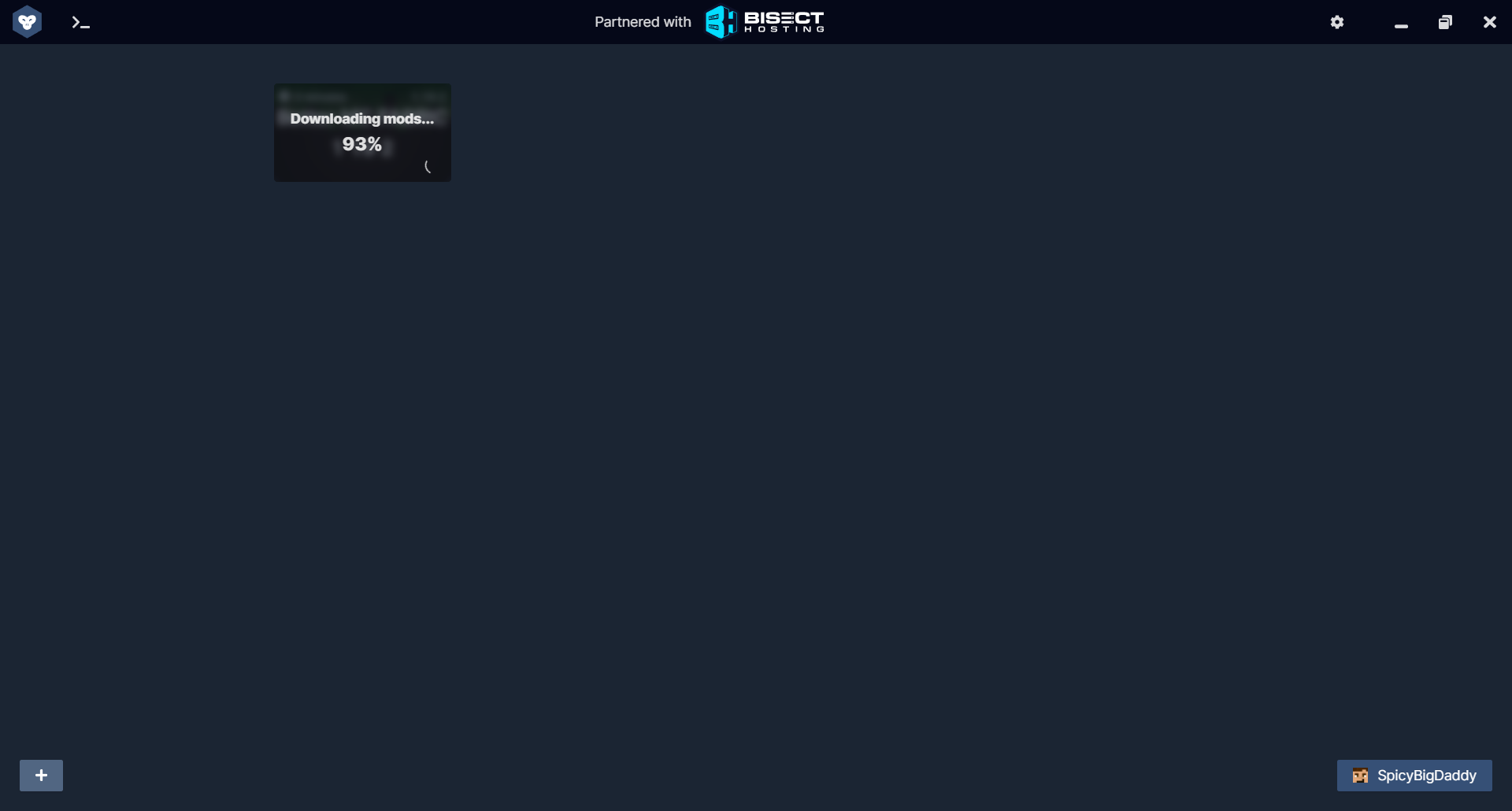
https://files.catbox.moe/j8eq8f.png why is it jsut stuck ;-;
 worthy coyote
blissful stump
https://files.catbox.moe/j8eq8f.png why is it jsut stuck ;-;
worthy coyote
blissful stump
https://files.catbox.moe/j8eq8f.png why is it jsut stuck ;-;
!moreinfo
blissful stump
Hello! To better diagnose your issue, please answer ALL of the following questions:
1. Have you modified the modpack in any way? (Adding/removing mods, changing configs, anything in the Resourcepacks menu)
2. What launcher are you using? (CurseForge, GDLauncher, etc)
3. What Minecraft version are you playing? (1.18.2, 1.16.5, 1.19.2)
4. What version of the modpack are you playing? (v11, v9, etc)
5. When does the crash happen?
6. Have you ever gotten past the point where the crash happens?
7. Does a crash report generate? If so, send the file here. If not, is there an exit code? (On CurseForge, right click the instance, Open Folder, and go to the crash reports folder. Alternatively, post the log's text on mclo.gs and send the link here.)
8. Did you follow the Performance guide in #general pins?
9. To reiterate #1. did you install install the Modpack through a launcher or did you download the Server Pack or use the Server Files as the Modpack?
10. To reiterate #2. did you use a cracked launcher like TLauncher?
Please attach your latest.log file to your message as well. This can be found in the logs folder.
winter rose
mine kept getting stuck before itd just crash. i think gdlauncher is having serious issues rn
night birch
Modpacks work fine on gdl right now
worthy coyote
It might be it, I read they are having some issues because of the 1.19.3 update
night birch
I can launch just fine
worthy coyote
blissful stump
https://files.catbox.moe/j8eq8f.png why is it jsut stuck ;-;
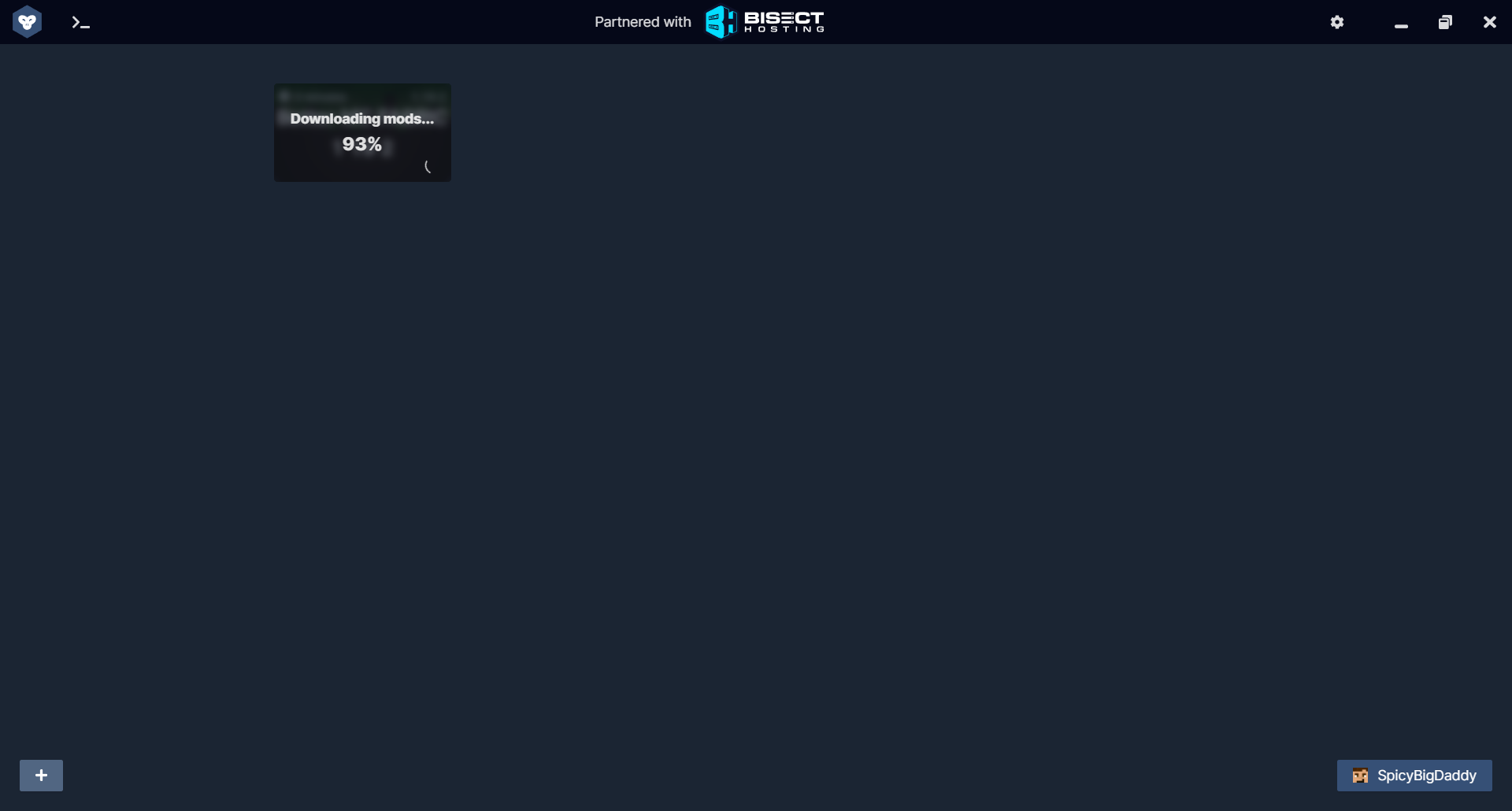
wait, 93%? there should pop up a window asking you to download the opt out mods
blissful stump
worthy coyote
wait, 93%? there should pop up a window asking you to download the opt out mods
nope i didnt get it
worthy coyote
night birch
I can launch just fine
Me too, but I think new installations are having some problems
blissful stump
i just got this
 worthy coyote
blissful stump
nope i didnt get it
worthy coyote
blissful stump
nope i didnt get it
This one
 night birch
Interesting. As I just updated med mc fabric to v14 today and did a lot of tieredz testing
worthy coyote
I just downloaded a new instance without major problems 🤔
blissful stump
i will delete and reinstall it
worthy coyote
night birch
Interesting. As I just updated med mc fabric to v14 today and did a lot of tiere...
TieredZ is such a good mod!!
blissful stump
bro it wont even delete
worthy coyote
blissful stump
i will delete and reinstall it
Or try atlaucher
worthy coyote
I really hope gdlaucher get its rewrite done soon, I'm excited for the quilt support and modrinth support
 autumn ivy
Bro, can someone help me my server hasnt been working
The server itself works and I can join it
But my friends can't
He keeps getting a error
night birch
Did you portforward?
worthy coyote
autumn ivy
Bro, can someone help me my server hasnt been working
Are you following the indications to host the server?
!server
blissful stump
We suggest renting a server from Bisect Hosting:
Approx. $10 - $25 a month depending on what plan you choose. You can also get 25% off with Code LunaPixel.
Go to https://www.bisecthosting.com/LunaPixel and order a plan which fits you. We suggest 1GB per player but nothing lower than 4GB as the server needs at least 3GB to run.
Go to #server-hosting for more Info!
Free Method: (This is hosting on your own PC and it can come with issues that's why we suggest Bisect Hosting)
- Download the serverpack from Curseforge's website
- Right click the start.ps1 file and click Run with Powershell
To join your own server, typelocalhostinto Direct Connect.
This video explains the process https://www.youtube.com/watch?v=wuGUbVbLsDc
The server IP address is your Public IP Address, which can be found by googling my ip address
If other players are unable to join, find a portforwarding guide online.
autumn ivy
night birch
Did you portforward?
Yes I did that
Im pretty sure it's on the right port
and I let it through my firewall
turned off any antivirus
meager yacht
 radiant valve
https://mclo.gs/X3otm1k
radiant valve
https://mclo.gs/X3otm1k
this is not our modpack
meager yacht
is this one of our modpacks
radiant valve
no
radiant valve
meager yacht
this is not our modpack
you just said it
meager yacht
so why are you in this channel
radiant valve
because you told me to look for help in this channel
meager yacht
no I didnt
radiant valve
i asked in general channel
you told me to get help in somewhere else
considering there is no channel for non luna pixel studio modpack channel help
my natural instinct was to go here
radiant valve
i assumed off-topic is for off-topic
such as non-mc topics
this is an mc server afterall
worthy coyote

shadow ore
@radiant valve the issue is incorrect java version i think
 hollow cedar
is it me or is there a lag issue when adding items to the inventory via crafting terminal in Tom's simple storage with BMC Fabric 12.5?
I wasn't seeing any lag in BMC fabric v11
meager yacht
hollow cedar
is it me or is there a lag issue when adding items to the inventory via crafting...
@delicate sparrow
caught a live one
 thick mauve
is there a fabric mod to make creepers look like this?
 night birch
You would need a texture pack, not a mod
night birch
Nope
thick mauve
thanks man ima go look for it
past pine
thick mauve
thanks man ima go look for it
you can also get the texture pack instead of the mod but I'm not sure if it will need optifine or not
meager yacht
we use many optifine parity mods in this modpack
thick mauve
tyty
past pine
but I'd suggest the mod because you can pair it with creeper overhauled overhauled for nicer animations
unless you want to play on servers
worthy coyote
hollow cedar
is it me or is there a lag issue when adding items to the inventory via crafting...
Try closing recipe book, it helps a bit
hollow cedar
worthy coyote
Try closing recipe book, it helps a bit
ty, that was indeed the source of the lag
meager yacht
hollow cedar
ty, that was indeed the source of the lag
re-enable recipe book
make a backup
delete wilder wild mod
see if lag persists
add mod back, load backup
hollow cedar
rgr
worthy coyote
meager yacht
delete wilder wild mod
:o gonna try it rn!!
hollow cedar
meager yacht
delete wilder wild mod
initial tests with out wilder wild mod are promising, though I'm not sure if it has to do with the number of unique items in the system?
meager yacht
hollow cedar
initial tests with out wilder wild mod are promising, though I'm not sure if it ...
Can you please send your world file here? the version with wilder wild included
hollow cedar
I usually play on a server. so in my server instance has 800+ slots in use.. test world is a local single player with only a few items in it
blissful stump
how do I get to the Bee Dimension ?
hollow cedar
meager yacht
Can you please send your world file here? the version with wilder wild included
Google Docs
hollow cedar
meager yacht
Can you please send your world file here? the version with wilder wild included
WilderWild-1.1.2-Fabric+1.19.2.jar
meager yacht
blissful stump
how do I get to the Bee Dimension ?
throw ender pearl into bee hive
narrow notch
Hi! I install BetterMC to my own launcher. But I have 1 problem. When my friends download modpack from my launcher they have this screen. Have I can delete it from modpack?
 meager yacht
narrow notch
Hi! I install BetterMC to my own launcher. But I have 1 problem. When my friends...
meager yacht
narrow notch
Hi! I install BetterMC to my own launcher. But I have 1 problem. When my friends...
how did you install the modpack
give me a step by step
narrow notch
meager yacht
how did you install the modpack
I downloaded the build from curseforge.com. I put it in the folder with 1.19.2 of my launcher. Installed the client with the mods. Opened
meager yacht
narrow notch
I downloaded the build from curseforge.com. I put it in the folder with 1.19.2 o...
Let me guess
you downloaded the serverpack
and thought that was correct for some reason
?
what told you that was correct? did you ignore both install buttons that told you you needed a modded launcher?
im just curious
narrow notch
I downloaded this
 meager yacht
with what
narrow notch
No this
 narrow notch
No
meager yacht
so how did you download it
blissful stump
meager yacht
throw ender pearl into bee hive
thank you but also how do I get out of the bee Dimension
meager yacht
blissful stump
thank you but also how do I get out of the bee Dimension
check bumblezone mod page
narrow notch
Zip by curseforge launcher
 hollow cargo
blissful stump
thank you but also how do I get out of the bee Dimension
hollow cargo
blissful stump
thank you but also how do I get out of the bee Dimension
dig straight down/up
meager yacht
narrow notch
Zip by curseforge launcher
so you had the launcher
and you got a zip file... somehow
and then extracted that into .minecraft
why didn't you just
launch from the launcher?
how did you even get a zip file
narrow notch
Yes. I drop mods from zip to my munecraft client
narrow notch
because i create my OWN launcher for my friends with some modpacks
 sand timber
oh sorry
meager yacht
and please read the questbook
sand timber
havent seen anything about temp tho
meager yacht
sand timber
havent seen anything about temp tho
you're on an old version
please update to the latest modpack version
sand timber
1.19.2?
meager yacht
narrow notch
because i create my OWN launcher for my friends with some modpacks
i would really appreciate an answer on why you thought this was necessary lol
narrow notch
I am porting your build for myself. But I ran into a question of how to remove the screen that is on the screenshot
meager yacht
narrow notch
I am porting your build for myself. But I ran into a question of how to remove t...
why are you porting my modpack
and what are you porting it to
hollow cedar
narrow notch
No this
this indicates you downloaded the server zip instead of the modpack zip... no?
narrow notch
meager yacht
and what are you porting it to
To play with friends
narrow notch
hollow cedar
this indicates you downloaded the server zip instead of the modpack zip... no?
NO
meager yacht
narrow notch
To play with friends
why not just use a normal modded launcher?
hollow cedar
narrow notch
NO
that screenshot says server, or is it getting too late again?
meager yacht
look man
your... launcher
is not loading configs
this is a major issue
and shows why you shouldn't make large scale projects by yourself
if you don't have tons of experience
which - no offense! - you clearly dont
creating a modded launcher is not easy and there is very little you could add to your own that doesn't already exist in GDLauncher or ATLauncher
hollow cedar
narrow notch
To play with friends
your friends can play this modpack with you using curseforge/gdlauncher/multimc, no?
narrow notch
hollow cedar
your friends can play this modpack with you using curseforge/gdlauncher/multimc,...
We don’t want to play different game launchers
hollow cedar
ah, that totally clears it up. good luck.
meager yacht
narrow notch
We don’t want to play different game launchers
what?
how does this clear anything up
i feel like i'm losing it
meager yacht
hollow cedar
ah, that totally clears it up. good luck.
??
is your issue that you don't like other modded launchers? so you've instead opted for making your own which doesn't work?
narrow notch
meager yacht
??
It works. I ask you to tell me how to delete what is in the screenshot! That's it.
meager yacht
narrow notch
It works. I ask you to tell me how to delete what is in the screenshot! That's i...
it clearly does not work
narrow notch
 meager yacht
it's not loading any configs
that's a major issue
deleting things will not fix this
i am not reviewing your code & telling you everything that you did wrong
narrow notch
meager yacht
deleting things will not fix this
He downloaded exactly the same mincraft as on curseforge
meager yacht
that doesn't matter
literally just use curseforge!
at least it loads configs!
you are already installing it, why not just keep using it?
worthy coyote
meager yacht
add mod back, load backup
tried in 2 worlds, without wilder wild it worked waaaaaay better (still some lag tho), but reenabling wilder wild make it unusable again; How did you pinpointed this???
meager yacht
worthy coyote
tried in 2 worlds, without wilder wild it worked waaaaaay better (still some lag...
someone else reported it as a wilder wild issue on github & i've been talking to their dev team
worthy coyote
btw, im using wilder wild 1.1.5, the latest version
worthy coyote
narrow notch
because i create my OWN launcher for my friends with some modpacks
Why tho? I mean, I get it if its a personal challenge, but actually using it to play with other people instead of just testing? There is plenty of well made launchers with active development and huge capabilities, like installing modpacks and mods directly from the launcher
Maybe fork an existing launcher and add try to add/remove features to your liking
GDLauncher is open-source, and you can literally fork it in one click on github
meager yacht
or don't take on a huge development project when you can't even figure out how to make configs load
_>
blissful stump
guys im playing better minecraft 1.19.2 fabric on normal and there are tons of zombies spawning with diamond gear even in the day which is killing me

 meager yacht
probably a structure nearby
blissful stump
meager yacht
probably a structure nearby
anything to do with the config?
meager yacht
no
blissful stump
meager yacht
probably a structure nearby
thx lol u were right
blissful stump
meager yacht
no
uh i cant make a user operator
 meager yacht
blissful stump
uh i cant make a user operator
meager yacht
blissful stump
uh i cant make a user operator
what are you using to host
blissful stump
aternos
blissful stump
We suggest renting a server from Bisect Hosting:
Approx. $10 - $25 a month depending on what plan you choose. You can also get 25% off with Code LunaPixel.
Go to https://www.bisecthosting.com/LunaPixel and order a plan which fits you. We suggest 1GB per player but nothing lower than 4GB as the server needs at least 3GB to run.
Go to #server-hosting for more Info!
Free Method: (This is hosting on your own PC and it can come with issues that's why we suggest Bisect Hosting)
- Download the serverpack from Curseforge's website
- Right click the start.ps1 file and click Run with Powershell
To join your own server, typelocalhostinto Direct Connect.
This video explains the process https://www.youtube.com/watch?v=wuGUbVbLsDc
The server IP address is your Public IP Address, which can be found by googling my ip address
If other players are unable to join, find a portforwarding guide online.
...
im broke
blissful stump
but is there any way i could add an operator from the files?
 meager yacht
i can not reliably assist you further
stop using aternos
there is no reason to use it
 graceful parrot
I am using BM Fabric 1.19.2 v11. Can anyone tell me which mod is changing the villager trading?
worthy coyote
graceful parrot
I am using BM Fabric 1.19.2 v11. Can anyone tell me which mod is changing the vi...
wdym?
graceful parrot
worthy coyote
wdym?
The villager trading inventory. What is changing the Toolsmith from having the iron trade?
worthy coyote
ahhh, look into the charm configs, it modifies some trades
radiant valve
worthy coyote
<:novasp5Why:869702027683455016>
i am not normal
worthy coyote
radiant valve
i am not normal
At least it was just a modpack you were making and not a whole launcher 
radiant valve
why would i make a whole launcher
dense narwhal
worthy coyote
Have you set time manually? that resets the day counter iirc
I have not, no. I restarted the server today and it wen't back a day ;-;. Before the restart it was day 3 and now it's back to day 2....
 dry tulip
i am playing BM 1.19.2 and i cant seem to get more then 20-30 fps when i move around i have a 3060 it and i7 10700f is there anyway i can fix this or is it just how it runs
flat crypt
dry tulip
i am playing BM 1.19.2 and i cant seem to get more then 20-30 fps when i move ar...
check performance guide in #general pins
dry tulip
flat crypt
check performance guide in <#790272038047711242> pins
thanks ill try that
dry tulip
flat crypt
check performance guide in <#790272038047711242> pins
i tried all the stuff there and it didn't help is there any thing else u can suggest
flat crypt
impossible
you have a good computer
unless you did something wrong, you should be good
shadow ore
run a spark sample
 buoyant mesa
can someone let me know how to use this plz

 hearty palm
meager yacht
<@411619921932582914> dont know if this an issue on your side but
hearty palm
meager yacht
<@411619921932582914> dont know if this an issue on your side but
that's the Forge error again, Forge Config Api Port inherits it on Fabric as it's a direct port from Forge
nothing I can do about it
radiant valve
dry tulip
i am playing BM 1.19.2 and i cant seem to get more then 20-30 fps when i move ar...
are you using max render distance and shaders on
dry tulip
radiant valve
are you using max render distance and shaders on
I had my render distance set to 10 and I got the same fps with and without shaders
dry tulip
Is there a way to stop that?
radiant valve
probably
uh
lower render distance
i dont know if bmc fabric has entity culling
but if it doesnt then maybe download it
i usually just play at 30 fps its good enough
or check your max framerate option
maiden spire
it should have wntity culling
is mc not using your gpu?
those specs are impossible to get such fps on
ive got worse specs at i get easily 150+ fos
with pretty much all the default graphic settings given with the modpack
 delicate sparrow
hollow cedar
is it me or is there a lag issue when adding items to the inventory via crafting...
delicate sparrow
hollow cedar
is it me or is there a lag issue when adding items to the inventory via crafting...
Does that happen on a server or just any world?
 stoic hollow
Is there a release of better Minecraft 1.19.3?
maiden spire
at the moment no
stoic hollow
Ok
worthy coyote
delicate sparrow
Does that happen on a server or just any world?
It happens to me in every singleplayer world, haven't tried on a server
worthy coyote
buoyant mesa
can someone let me know how to use this plz
Stuff like that is usually on the mod's site or wiki

 graceful meadow
What server hoster should i use to run the new version of fabric for just a couple of people
flat crypt
graceful meadow
What server hoster should i use to run the new version of fabric for just a coup...
!server
blissful stump
We suggest renting a server from Bisect Hosting:
Approx. $10 - $25 a month depending on what plan you choose. You can also get 25% off with Code LunaPixel.
Go to https://www.bisecthosting.com/LunaPixel and order a plan which fits you. We suggest 1GB per player but nothing lower than 4GB as the server needs at least 3GB to run.
Go to #server-hosting for more Info!
Free Method: (This is hosting on your own PC and it can come with issues that's why we suggest Bisect Hosting)
- Download the serverpack from Curseforge's website
- Right click the start.ps1 file and click Run with Powershell
To join your own server, typelocalhostinto Direct Connect.
This video explains the process https://www.youtube.com/watch?v=wuGUbVbLsDc
The server IP address is your Public IP Address, which can be found by googling my ip address
If other players are unable to join, find a portforwarding guide online.
graceful meadow
and the ram for like 6 people should be? cus the recommended 26 is too much for us
 surreal nymph
This thing appears if I want to enter a server, solutions?
 analog glen
graceful meadow
and the ram for like 6 people should be? cus the recommended 26 is too much for ...
analog glen
graceful meadow
and the ram for like 6 people should be? cus the recommended 26 is too much for ...
Who recommended 26 💀
I'd do like 8gb
analog glen
surreal nymph
This thing appears if I want to enter a server, solutions?
Client doesn't match the server, so either modpack is not installed correctly or the server files are wrong
surreal nymph
analog glen
Client doesn't match the server, so either modpack is not installed correctly or...
I will check, thanks
 flat crypt
 gusty bolt
make sure you have the same mods as the server
gusty bolt
I am just using the fabric server profile with the better minecraft fabric curseforge
graceful meadow
analog glen
Who recommended 26 💀
I'd do like 8gb
Meant euro
gusty bolt
I tried verifying the installation of better minecraft in curseforge but it didn't seem to change anything
flat crypt
gusty bolt
I am just using the fabric server profile with the better minecraft fabric curse...
same modpack version, same mods, same minecraft version
gusty bolt
Yep should be, I'm hosting the server so it should be
well I guess technically not because they are in seperate folders so I guess I could double check
Ahha
Double checking 12.5 came out
I downloaded the server profile for 12.5 ig?
Trying it now
 upbeat summit
Every time i open the ps1 file with powershell it automatically closes. Anyone know how to fix?
 dusty nest
my better Minecraft is bugged because when i go to drag and item in my inventory it locks onto my search bar and i dont know how to fix it
oblique oxide
Where in the Twilight Zone do you get the glass sword?
meager yacht
upbeat summit
Every time i open the ps1 file with powershell it automatically closes. Anyone k...
read the readme
please.
dense narwhal
Were do I find dragon scales? =]]]
worthy coyote
dense narwhal
Were do I find dragon scales? =]]]
Killing the dragon
 urban helm
Hello! First message in here, fairly new to Better MC Fabric. I have a question about Mob farming. I heard you can use empty spawners (Similar to the vanilla ones) and put make them spawn anything? Am I misunderstanding something? not even sure what this mod is.
meager yacht
spirit mod
urban helm
excellent, thank you. I'll try to find a youtube video on it.
dusty nest
my better Minecraft is bugged because when i go to drag and item in my inventory it locks onto my search bar and i dont know how to fix it
 signal canopy
I am feeling like a doofus, and google and youtube have failed me.... I can't find the Better MC Spawner mechanics... Silk touch is no longer my friend
signal canopy
Thanks... have been going a little cray
blissful stump
Can someone help me? When I join my server I get this
 worthy coyote
I can't see anything
blissful stump
Zoom in the quality is fine
dusty nest
my better Minecraft is bugged because when i go to drag and item in my inventory it locks onto my search bar and i dont know how to fix it <@&900453314876043284>
meager yacht
blissful stump
Can someone help me? When I join my server I get this
need more info
meager yacht
dusty nest
my better Minecraft is bugged because when i go to drag and item in my inventor...
please stop spamming & pinging staff
nobody knows what you mean
meager yacht
you should've done that an hour ago
blissful stump
meager yacht
need more info
It’s basic I guess, I just installed better Minecraft server pack on my server and installed it on curseforge
blissful stump
blissful stump
It’s basic I guess, I just installed better Minecraft server pack on my server a...
I have no idea what causes it
oblique oxide
where to get glass sword
blissful stump
meager yacht
need more info
Can you help me?
worthy coyote
oblique oxide
where to get glass sword
http://benimatic.com/tfwiki/index.php?title=Sword#Glass_Sword
Doesn't take much to find an answer in google :s
@blissful stump did you followed the server indications?
!server
blissful stump
We suggest renting a server from Bisect Hosting:
Approx. $10 - $25 a month depending on what plan you choose. You can also get 25% off with Code LunaPixel.
Go to https://www.bisecthosting.com/LunaPixel and order a plan which fits you. We suggest 1GB per player but nothing lower than 4GB as the server needs at least 3GB to run.
Go to #server-hosting for more Info!
Free Method: (This is hosting on your own PC and it can come with issues that's why we suggest Bisect Hosting)
- Download the serverpack from Curseforge's website
- Right click the start.ps1 file and click Run with Powershell
To join your own server, typelocalhostinto Direct Connect.
This video explains the process https://www.youtube.com/watch?v=wuGUbVbLsDc
The server IP address is your Public IP Address, which can be found by googling my ip address
If other players are unable to join, find a portforwarding guide online.
blissful stump
worthy coyote
<@456226577798135808> did you followed the server indications?
I’m using apex hosting
meager yacht
with another person
blissful stump
Oh all g
meager yacht
are you on the same modpack version as the server?
have you contacted apex support?
were you able to join before?
can others join?
blissful stump
I think so, no I haven’t contacted the support but I could, I haven’t gotten anyone else to test it, this is my first time trying to join, I’m not sure if others can join
graceful meadow
which do you guys think is more fun forge or fabric
worthy coyote
dusty nest
chop dev can i share my screen to you in dms
You should've sent screenshots/videos of what you mean hours ago
worthy coyote
blissful stump
I think so, no I haven’t contacted the support but I could, I haven’t gotten any...
which modpack versions are you using? v12.5?
blissful stump
worthy coyote
which modpack versions are you using? v12.5?
Newest, 12.5 yeah
worthy coyote
graceful meadow
which do you guys think is more fun forge or fabric
I like fabric more, better performance imo
dusty nest
blissful stump
Maybe I’ll try an older version
meager yacht
that's not a solution
blissful stump
Yeah I know, do you think you have a solution?
dusty nest
dusty nest
i sent a vid @worthy coyote
worthy coyote
dusty nest
Not sure what is going on but you could try disabling rei and the mods that depend on it ( all the something enough something)
Maybe a keybind is messing stuff up with rei
Did you changed any keybind/setting of rei?
blissful stump
meager yacht
that's not a solution
You there mate?
dusty nest
worthy coyote
Did you changed any keybind/setting of rei?
maybe how do i check / disable rei mods
worthy coyote
You can disable the rei overlay by pressing ctrl + o
dusty nest
worthy coyote
You can disable the rei overlay by pressing ctrl + o
thats shaders
worthy coyote
But to disable the mod you need to do it through your launcher or manually
worthy coyote
You could check if any of the roughly enough mods has an update
or check the keybinds
dusty nest
i can only do 1.19.2 because thats the lates version of better minecraft
meager yacht
thats not what he means
blissful stump
You good chorb I’m going to try to use a different version and see if that fixes it
worthy coyote
dusty nest
i can only do 1.19.2 because thats the lates version of better minecraft
Update of the mod, you should be able to check that on your launcher
dusty nest
worthy coyote
Update of the mod, you should be able to check that on your launcher
what mod i am not sure what you mean sorry
only just started doing this yesterday
 steady stirrup
why shouldn't we use a .jar for the server?
worthy coyote
dusty nest
what mod i am not sure what you mean sorry
the "roughly enough ___" mods
What launcher are you using?
dusty nest
 worthy coyote
omfg, that is your problem
dusty nest
what
worthy coyote
!alternates
blissful stump
We suggest using one of these two launchers for several reasons. They are considered far better than any other launcher. When installing a modpack on either launcher, do it through the Curseforge tab within GDLauncher/ATLauncher. You can transfer your Curseforge save to GDL/ATL. Because you are downloading the exact same files, you'll still be able to join the same servers and worlds.
ATLauncher - Slightly harder to use, works offline, fast and efficient, has more features. Can be downloaded from https://atlauncher.com/downloads
GDLauncher - Easy to use, works offline, does all the work for you, very simplistic and sleek design but it feels bloated to make it look nice and people do have issues with it. Can be downloaded from https://gdlauncher.com/en/download/
worthy coyote
You just shouldn't use the vanilla launcher for modpacks
dusty nest
oh ok
meager yacht
curseforge..?
dusty nest
what do install then
maiden spire
im pretty sure thats curseforge launching a mc launcher lol
meager yacht
do you have curseforge
dusty nest
ye its curseforge doing that
worthy coyote
dusty nest
what do install then
GDLauncher or ATLauncher

 worthy coyote

Learn How to play modpacks with the ATLauncher with Apex Hosting.
Get a Minecraft Server from Apex Hosting: https://apexminecrafthosting.com/
24/7 Uptime, DDoS Protection, Live Support, Easy to Use Panel
USEFUL LINKS
How to play modpacks with the ATLauncher - https://apexminecrafthosting.com/how-to-play-modpacks-with-the-atlauncher
How to upda...
dusty nest
will this save my progress and stuff like can i just import i to at launcher?
worthy coyote
You just need to copy the saves folder from your current installation into the new instance you are gonna install in atlauncher
 meager yacht
its an issue with apex. do not install old versions of the modpack, it wont solve anything
blissful stump
Alright I gotchu
dusty nest
??

 obtuse vessel
Poor chorb
hollow cedar
dusty nest
??
click the button labeled "Ok"
meager yacht

maiden spire
people really are too impatient
rather than reading the whole message or trying to figure it out even partially for themselves
jump gun and panic
worthy coyote
fr
 raw quartz


 night birch
 bronze drift
blissful stump
God dammit <@726509826557083680> could you help me out
bronze drift
blissful stump
God dammit <@726509826557083680> could you help me out
I've used apex hosting, they do have some issues with modpack installs, I recommend buying their setup feature so they can help you
Or be super nice and not annoying with the support member with their live chat and they will help you out 100%! I had 4 plugins fixed by them for free as it was interesting for them to fix it.
They even tested it on server
blissful stump
bronze drift
I've used apex hosting, they do have some issues with modpack installs, I recomm...
I’m just gonna switch to Bisect lol
bronze drift
Lol or that yeah haha
maiden spire
woah thats a lovely red color
steady stirrup
my powershell say CMD is not recognized
 unreal sand
whats the best armor
worthy coyote
steady stirrup
my powershell say CMD is not recognized
when running the ps1? 🤔
steady stirrup
yes
worthy coyote
unreal sand
whats the best armor
Just use the search feature
 worthy coyote
steady stirrup
yes
worthy coyote
steady stirrup
yes
what exactly does it says?
Wrong channel tho, this is better mc, not medieval mc
 fickle tiger
Is there a way to disable a specific mod from the modpack in a server?
every one of my friends hate the fabric seasons mod and wants it removed
worthy coyote
fickle tiger
every one of my friends hate the fabric seasons mod and wants it removed
You can change its settings to always be spring
night birch
guessing they don't like growing crops in a glass house
bit of a cheeky comment to show how simple the crop growing solution is ^
fickle tiger
its the crops + the fact that we have a terrible spawn base surrounded by water as our spawn was essentially an island and when its winter they all get frostbite swimming
so they're just annoyed
worthy coyote
Sounds like an awesome opportunity for boat on ice travel, that is so fun
fickle tiger
and they hate the icicles
i'd like to keep it as is but everyones been adamant about it
worthy coyote
But yeah, would recommend change its settings instead of removing it
Cause if you remove it from an already created world can make some blocks glitch
meager yacht
 magic yarrow
is there a v12.5 changelog?
magic yarrow
is there a v12.5 changelog?
yes..
 errant smelt
Do I ask questions for minecraft fabric in this channel?
meager yacht
your what?
meager yacht
that doesnt exist in this modpack
alpine shell
I died and rage quit
and joined back
and my death marker is gone
what the fuck????
night birch
also, #medieval-mc-fabric thou art playing medeival mc
 restive fractal
heya. i have a weird bug/ crash i am not sure how to fix.
"-- Entity being ticked --
Details:
Entity Type: minecraft:witch (net.minecraft.class_1640)
Entity ID: 289
Entity Name: Witch
Entity's Exact location: -1377.74, 69.00, -3090.74
Entity's Block location: World: (-1378,69,-3091), Section: (at 14,5,13 in -87,4,-194; chunk contains blocks -1392,-64,-3104 to -1377,319,-3089), Region: (-3,-7; contains chunks -96,-224 to -65,-193, blocks -1536,-64,-3584 to -1025,319,-3073)
Entity's Momentum: 0.00, -0.08, 0.00
Entity's Passengers: []
Entity's Vehicle: null"
its on a hardcore world and crashes immediately, im not sure if theres a way i could boot up in peaceful or something to delete the problem witch?
anyone have any ideas?
it's a near on 700 day hardcore world so i dont really wanna lose it xD
zealous canopy
how do i add easy villagers everytime I try it doesnt show up
meager yacht
zealous canopy
how do i add easy villagers everytime I try it doesnt show up
you need to put it in the mods folder
zealous canopy
I am
meager yacht
restive fractal
heya. i have a weird bug/ crash i am not sure how to fix.
"-- Entity being tic...
/kill @e[type=witch]

Arqade
Basically, I acidentally spawned too many ArmorStands due to a wrong code writing , resulting in the game crashing, and wanted to know how to delete those armorstands from the World save folder. They
alternatively
restive fractal
meager yacht
/kill @e[type=witch]
will try and get into the world long enough to do that xD
 chilly ravine
So, I'm on the latest windows update that breaks Powershell
and Fabric MC's website is down
So am I just completely hosed in terms of setting up a server?
zealous canopy
does anyone know where to find easy villagers fabric i cant seem to find it
meager yacht
zealous canopy
does anyone know where to find easy villagers fabric i cant seem to find it
doesnt exist
chilly ravine
chilly ravine
and Fabric MC's website is down
Ah looks like my local network is messing with it
worthy coyote
chilly ravine
So, I'm on the latest windows update that breaks Powershell
What?
flat crypt
!windows11
blissful stump
New Windows 11 22H2 Update causes the PowerShell not to work. I suggest these Videos for Manual Installation:
FORGE 1.16.5: https://www.youtube.com/watch?v=bIjisWyxU-8
FORGE 1.18.2: https://www.youtube.com/watch?v=R610M102X0U
FORGE 1.19.2: https://www.youtube.com/watch?v=3HD0ibIpO-A
FABRIC: https://www.youtube.com/watch?v=b2W1Xb7nLKo
Make sure to Install the Server in our ServerPacks so it can use the correct files.
flat crypt
this one
worthy coyote
blissful stump
**New Windows 11 22H2 Update causes the PowerShell not to work. I suggest these ...
@steady stirrup maybe your problem was related to this?
steady stirrup
no i have win 10
bronze drift
This -5 celcius temp is bad lol someone in a hot country would like to share some sun ? 🤣🤣
 weary rivet
is there ant automation in this pack? im trying to do an auto-miner
chilly ravine
Okay so now that I've got everything set up I'm getting a bunch of item errors when I try to connect to the server?
meager yacht
chilly ravine
Okay so now that I've got everything set up I'm getting a bunch of item errors w...
elaborate please
chilly ravine
working on it, getting this relaunched after it crashes takes a minute
chilly ravine
meager yacht
elaborate please
Clean install of both the server and the modpack, not updated from a previous versions
 meager yacht
chilly ravine
Clean install of both the server and the modpack, not updated from a previous ve...
meager yacht
chilly ravine
Clean install of both the server and the modpack, not updated from a previous ve...
you downloaded something incorrectly
chilly ravine
it was an automatic download
meager yacht
with what
chilly ravine
ATLauncher, through curseforge
shadow ore
chilly ravine
So am I just completely hosed in terms of setting up a server?
use the .sh
i think theres 2 scripts in there
one is powershell one is not
shadow ore
im talking about server
chilly ravine
yeah thats what I meant
shadow ore
what i did was just download server pack and run the powershell script
meager yacht
send a screenshot of console
chilly ravine
READ_ME suggested some video tutorials for manual install
chilly ravine
meager yacht
send a screenshot of console
Server Console, or client console, or both?
meager yacht
server
chilly ravine
meager yacht
server

 quick slate
does anyone know what it means when it says "when socketed" and how to do that
 grand snow
Does this modpack have quests yet for the latest release?
meager yacht
grand snow
Does this modpack have quests yet for the latest release?
it has for months yes