#medieval-mc-forge
1 messages · Page 189 of 1
 wide ingot
 weak sun
should i play the fabric or forge version of this
 lapis pelican
whatever you prefer
 frail tulip
Can anyone of the staff help me. I uploaded my spark result thingie here twice as requested but everytime I get no more awnser.
lapis pelican
likely chat just went by too much for us to catch it
 crimson eagle
Hi, I have problem with the armor in game, so basically my armor will appear on my character in my inventory, but as soon as I exit my inventory, my armor will not appeaar on my character
 visual cairn
is there a modpack for MMC2 that has less mods? Because its just running badly for me unfortunately
 supple vortex
Man, isn't there anyone smart enough to help us with the problem?
There are literally 8 people on this server who could help us, but they're too cowardly to do it, it seems.
 lean dagger
visual cairn
is there a modpack for MMC2 that has less mods? Because its just running badly f...
lean dagger
visual cairn
is there a modpack for MMC2 that has less mods? Because its just running badly f...
mod count has no relation to performance
Please follow the performance guide to improve your game performance, as this is likely to resolve your issue. If your lag is unresolved, send a screenshot with F3 open ingame.
lean dagger
supple vortex
There are literally 8 people on this server who could help us, but they're too c...
dude what
what kind of message is this to send
lean dagger
frail tulip
Can anyone of the staff help me. I uploaded my spark result thingie here twice a...
just resend it with the information and context provided
supple vortex
lean dagger
dude what
when I'm in the game
and that I'm wearing basic vanilla armor
I can't see the armor on my character; it's as if the armor texture is missing.

So I need help to solve this problem, and I'm not the only one asking for help with this.
lean dagger
yes im aware
im not a developer for this modpack
i know nothing about a majority of the mods it uses
saying that we're "too cowardly" to help is really weird lol
supple vortex
lean dagger
saying that we're "too cowardly" to help is really weird lol
Okay, but from what I've seen, it's not bad, the truth is.
lean dagger
?
supple vortex
lean dagger
im not a developer for this modpack
Sorry to have bothered you.
supple vortex
lean dagger
?
What I mean is that there are four of us with this problem, and I get the impression that each moderator is ignoring the messages.
lean dagger
not every moderator is active at all times
and if you arent getting answered its bc nobody knows an answer
supple vortex
lean dagger
and if you arent getting answered its bc nobody knows an answer
Okay, so what I understand is that even the people who created the modpack don't know how to fix this problem.
lean dagger
who hurt you bro
the moderators didnt make the modpack
thats why they're called moderators
supple vortex
I'm talking about the creators
supple vortex
And is there a way to ask him?
supple vortex
I can't go and talk to him directly ?
lean dagger
im not going to give you his name because you're going to start spam pinging and dming him lol
supple vortex
If I had wanted to ping, I would have done it a long time ago.
supple vortex
lean dagger
im not going to give you his name because you're going to start spam pinging and...
I'm not stupid, I know that the person who created the server is normally the creator of the mods. I'm wondering if there's a way he could decide to answer me one day.
lean dagger
supple vortex
I'm not stupid, I know that the person who created the server is normally the cr...
and sharkie does not develop this modpack, no
supple vortex
Yes, but if I do that, my report will just never get a response.
supple vortex
lean dagger
and sharkie does not develop this modpack, no
fake
lean dagger
supple vortex
Yes, but if I do that, my report will just never get a response.
not true whatsoever
supple vortex
lean dagger
clearly you know better than me
Okay, explain why the person who created this server wouldn't be the same person who created the modpacks.
That would simply be illogical.
lean dagger
because he made most of the modpacks here 5 years ago and now has other people develop them in exchange for money
supple vortex
lean dagger
not true whatsoever
And for your information, he has no reporting issues.
lean dagger
what does that even mean
supple vortex
lean dagger
what does that even mean
I looked in the game for the report button and I can't find it.
lean dagger
send a screenshot
supple vortex

 supple vortex
Why is it called that?
lean dagger
because thats what the website is named
supple vortex
👍
 acoustic cave
I keep getting a crash due to my graphics driver being wonky and I cant download the version it recomends
I cant find this version of the "intel iris xe graphics driver" 32.0.101.6737
my current graphics version is 7082, I just downgraded from 7084 and the problem still persists. ive looked on the intel driver site and I cant go down to version 32.0.101.6737.
frail tulip
lean dagger
just resend it with the information and context provided
ill just copy paste it.
https://spark.lucko.me/CSrxHSYIaU
game runs for awhile. the allocated memory starts filling up then it peaks. freezes the game then continues freezes again till it eventually just Crashes the minecraft client. the only thing that fixes it is restarting the whole game but then moments later or hours it happens again.
i followed the performance guide fully. did a fresh reinstall. it still happens. my girlfriend also has the same problem and so do other on the server. this is the spark result from the moment it happened.
i have more than enough ram memory and space in total on my pc.
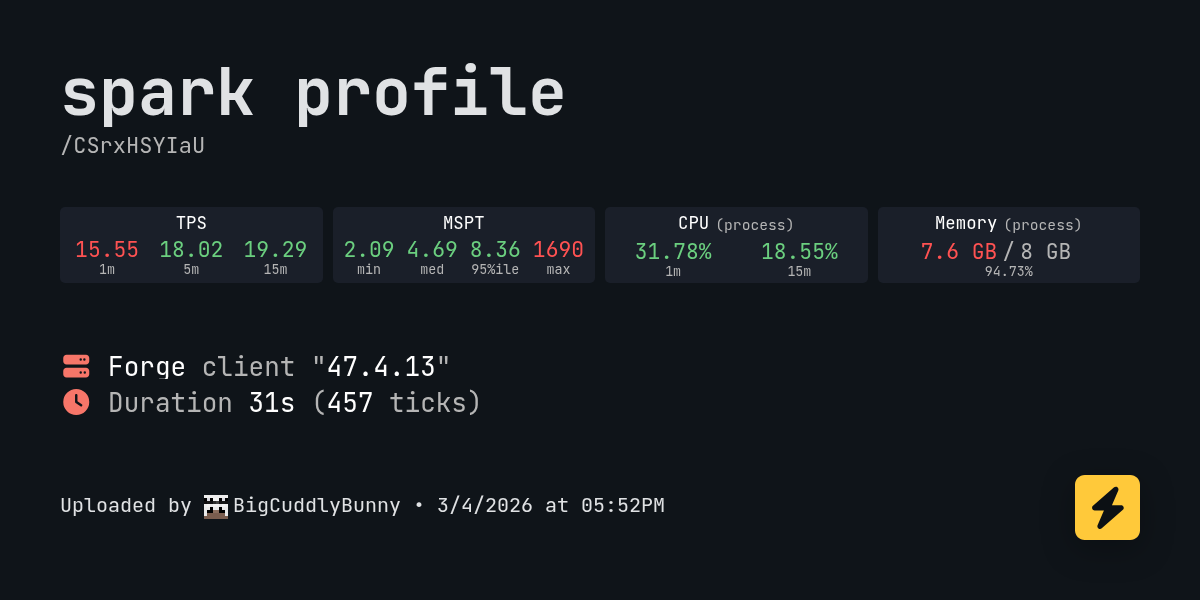
spark is a performance profiler for Minecraft clients, servers, and proxies.
 silver loom
some reason i cant join friend and it says theres a issue with luna does anyone know if im causing it or i sit a server issue
ohh sorry wrong chat
 grand hound
Medieval MC 5 - v31 - 1.21.1 Neoforge crashed. The logs have been uploaded to gnomebot.dev:
What launcher did you run Minecraft with? (e.g. CurseForge, ATLauncher, MultiMC, ...)
- CurseForge
Have you changed the modpack in any way except mods? - No
Have you ever gotten past the crash condition without crashing, or does the game always crash? - Don't quite know what causes the crash
What steps cause the crash? - sometimes it crashes after i load in and sometimes its at a random moment
latest.log head / tail (~62k lines) | debug.log head / tail (~14MB & ~82k lines) | crash-2026-03-05_22.58.35-client.txt | CurseForge: launcher_log.txt head / tail (~84MB & ~701k lines) | crash_assistant_app.log | modlist.txt
Mod list changes on top of the modpack:
[2;34mMod list was not modified.[0m
!ca
 waxen brookBOT
lean dagger
silver loom
some reason i cant join friend and it says theres a issue with luna does anyone ...
waxen brookBOT
lean dagger
silver loom
some reason i cant join friend and it says theres a issue with luna does anyone ...
!wsfull
waxen brookBOT
 World Sharing servers are likely currently at capacity
If you or your friend are receiving an error such as "An error occurred in Luna", or "Connection refused: no further information" when trying to play through "Open to LAN" or "Share World", it's likely that Luna's servers (used for world sharing) are currently full. We don't have a way to know when slots on our servers free up, but you are welcome to try again later.
We understand and recognize that this may be inconvenient, so we recommend in this case to host or rent your own server. Self-hosting is free, for more information on supported hosting options, type !server in #bots.
If you'd prefer an alternate world sharing mod such as Essential over the previous methods, risks of it are outlined in !ea, as well as how to use it if you accept the risks and void of support.
This command does NOT change or know if they are full or not, this is something ran as the most common issue.
lean dagger
grand hound
Medieval MC 5 - v31 - 1.21.1 Neoforge crashed. The logs have been uploaded to `g...
!alternates
waxen brookBOT
If this command was run in response to your question/issue, it is likely because switching away from the launcher you are currently using would fix your problem.
From our experience, the most stable launcher by far is ATLauncher, also known as ATL. Keep in mind that ATL is NOT related to TLauncher in any way, and is not a cracked launcher.
To install ATL, do the following:
1. Go to https://atlauncher.com/download. If you are on MacOS, then choose the "Jar" version under the "Other" tab, this is important as OSX WILL crash the game on Mac.
2. Install and run the setup, then open the program.
3. Login to your Microsoft account that owns the Java Edition of Minecraft from the Accounts tab on the right. This process is 100% safe, as it goes directly through Microsoft. ATL doesn't see your account credentials.
4. Go to the Packs tab on the right, then click "Curseforge" on the left.
5. Search the modpack you wish to download.
6. Click "Install". Then, follow the on-screen directions.
7. Go to the Instances tab, and click "Play" on the modpack you downloaded. If you ever see an "Update" button on the instance, click it.
This video explains the process: https://youtu.be/xMYW1wMbmkM
To transfer your Curseforge world to ATL, simply right click the modpack on Curseforge, or click the 3 dots, then click "Open Folder". Copy the Saves folder, then click "Open Folder" on ATL and paste the Saves folder there. Do the same with the XaerosMinimap folder, or the Journeymap folder, to transfer over any waypoints you've created.
Because ATL downloads the exact same files as Curseforge does, your world will be the exact same and you will be able to join the same servers. ATL also works without an internet connection (after you've installed the modpack, of course), and does not have any bloat from Overwolf. You are free to uninstall both Overwolf and Curseforge with ATL installed.
lean dagger
frail tulip
https://spark.lucko.me/CSrxHSYIaU
game runs for awhile. the allocated memory st...
armor stands and the backpack gui are a lot of the lag
you can try allocating more memory
frail tulip
lean dagger
you can try allocating more memory
i had done that before i had allocated about 10gb but the same thing happened. the allocated memory goes way beyond than it should
frail tulip
lean dagger
armor stands and the backpack gui are a lot of the lag
the backup gui? so like using them? and looking inside of them? the armor stand thing is making alot of sense now considering there are alot of them our base with modded armor on them.

 grizzled nebula
acoustic cave
mmc5 doesnt have tetra
grizzled nebula
acoustic cave
mmc5 doesnt have tetra
bcuz tetra is for 1.20.1 and below
and mmc5 is 1.21

acoustic cave

Medieval MC 4 - v39 crashed. The logs have been uploaded to gnomebot.dev:
- What launcher did you run Minecraft with? (e.g. CurseForge, ATLauncher, MultiMC, ...) curseforge
- Have you changed the modpack in any way besides adding/removing mods? no
- Have you ever gotten past the crash condition without crashing, or does the game always crash? no
- What steps cause the crash? It said something about my driver causing problems but I cant find the version it recomends.
latest.log | hs_err_pid12300.log | crash_assistant_app.log | modlist.txt | CurseForge: skip launcher
# Problematic frame:
# C  [igxelpicd64.dll+0xc284c4]
Found [2;34m1[0m log analysis results:
[2;34mModernIntelDriverIssue[0m in: hs_err_pid12300.log
Mod list changes on top of the modpack:
Updated mods:
[2;31mmedieval-1.20.1-dev.jar[0m > [2;32mmedieval-1.20.1-2.0.7.jar[0m
!driversintel
waxen brookBOT
Fix for Intel GPU Crashing
-# This is only applicable to crashing DLL's from hs_err_pid file, igxelpicd64.dll(GPU), igxe2hpgicd64.dll(ARC GPU).
Try to update your Drivers according to your GPU:
Intel® Arc™ Graphics - Windows
Intel® Arc™ Pro Graphics - Windows
Intel® 11th – 14th Gen Processor Graphics - Windows
Intel® 7th-10th Gen Processor Graphics - Windows
If updating to latest does not work, go to TechPowerUp Intel Graphics Drivers, click Show older versions and look for
-
32.0.101.6737 for integrated GPU -
32.0.101.8247 for Arc GPUs
acoustic cave
thanks. It took me forever to find this version
 blazing prairie
there is a server for multiplayer?
 hard mulch
I cant start the server. What did i miss?
 outer hollowBOT
hard mulch
I cant start the server. What did i miss?
outer hollowBOT
hard mulch
I cant start the server. What did i miss?
Uploaded latest.log from @hard mulch to mclogs: https://mclo.gs/3g95pZR
hard mulch
server pack contains client-side mods?
bruh
it takes my hours to solve and cause is client-side mods in server pack
lapis pelican
hard mulch
it takes my hours to solve and cause is client-side mods in server pack
Shouldn't be? Did you download server pack specifically from curse?
hard mulch
lapis pelican
Shouldn't be? Did you download server pack specifically from curse?
Yes its from curseforge and client-side mods shouldnt be in server pack. Forge servet can ignore some client side mods with warning but it didnt do it in my example.
hard mulch
outer hollow
Uploaded `latest.log` from <@246900729359499266> to mclogs: https://mclo.gs/3g95...
^
lapis pelican
hard mulch
Yes its from curseforge and client-side mods shouldnt be in server pack. Forge s...
how is the server hosted?
The log isn't specific of any mods that are client side in it, any changes made to it?
hard mulch
lapis pelican
The log isn't specific of any mods that are client side in it, any changes made ...

removed ones
probably its about pehkui one
didnt test specifically
lapis pelican
hard mulch
immerisive lanterns is supposed to be there.
you can't put your lantern on your belt without it
hard mulch
i removed cus i am using https://git.taumc.org/embeddedt/celeritas instead of embeddium or xenon i forgot the name
grizzled nebula
hard mulch
i removed cus i am using <https://git.taumc.org/embeddedt/celeritas> instead of ...
you remove things, then you complain that things don't work ?
lapis pelican
you can't just change that and it be fine
hard mulch
both client side and server side removed
lapis pelican
Xenon is there for a reason. why did you remove it
hard mulch
grizzled nebula
you remove things, then you complain that things don't work ?
this log crash without zero change
i change things later than it
lapis pelican
Redownload the serverpack on curseforge.
grizzled nebula
hard mulch
this log crash without zero change
did you install serverpack from website
and fallow installation guide
lapis pelican
 hard mulch
nah i customize the pack for myself but if you want to reproduce crash issue you can clean install and test it yourself. i fix it for myself rn
lapis pelican
you busted the pack by making weird changes
grizzled nebula
hard mulch
nah i customize the pack for myself but if you want to reproduce crash issue you...
yeah, please do clean reinstall, with curseforge website serverpack
(not app, but website)
hard mulch
You're focusing on the wrong thing. Don't act like customizing the package is a crime.
lapis pelican
Try with the unchanged version. Cause there is a chance curse did something stupid in their download orginally.
It's not
hard mulch
I said crash from clean install not from customized one
lapis pelican
but what kind of changes you are making are very much gonna affect it
hard mulch
Didnt you read what i wrote?
grizzled nebula
please, reproduce it with clean installation from curseforge webite @hard mulch
lapis pelican
Curse breaks crap with downloads all the time. download again
grizzled nebula
you said you can do it, please do
lapis pelican
delete your copy of the serverpack, re-download
curse is known for breaking downloads all the time and we fight dealing with it every single day.
hard mulch
i dont know how curse work but as i said there are client-side mods in server pack. its not a good behaviour for server pack
hard mulch
grizzled nebula
there shouldn't be, if you download it properly
you are really interesting. i just download zip 2 min ago in last screenshot.
grizzled nebula
did you download serverpack from app or website initially, and what client-side mods did you find in serverpack @hard mulch
hard mulch
website
 grizzled nebula
okay
hard mulch
 grizzled nebula
what client side mods there was
please, translate to english
as I can't speak polish
grizzled nebula
hard mulch
You're acting like I'm your enemy. But I'm just reporting a problem.
you are getting wrong idea
hard mulch
i am just player
grizzled nebula
it's fine
I am asking questions
going to download serverpack and see if I can see those mods or not
hard mulch
You keep asking the same question over and over without reading what I wrote earlier.
i started to reporting with latest.log
just read it before
lapis pelican
hard mulch
where are you downloading this??? it's not called server only???
grizzled nebula
lapis pelican
where are you downloading this??? it's not called server only???
it is
 lapis pelican
I swear I've only seen the devs here call it serverpack 💀
gonna download and try running it myself. gimme like 15+ min
hard mulch
i am reproducing again for you
 lapis pelican
that's still running there
hard mulch
  Data  data/minecraft/loot_tables/gameplay/cat_morning_gift.json
  Data  version.json
  Processor failed, invalid outputs:
    /home/fix3dll-server/CLEAN_MMC4_V39/./libraries/net/minecraft/server/1.20.1-20230612.114412/server-1.20.1-20230612.114412-slim.jar
      Expected: 9e06bdd77ca6d95b2cced0bf372245f753eeb16a
      Actual:   549ed8cdd7186746f9499593675b4b265ceca7db
    /home/fix3dll-server/CLEAN_MMC4_V39/./libraries/net/minecraft/server/1.20.1-20230612.114412/server-1.20.1-20230612.114412-extra.jar
      Expected: 13522e3278befd103064d91a199451df4cd2633f
      Actual:   333b063513556432950a93407f1ba4453e8176f3
There was an error during installation
Exiting...
Press any key to continue
bruh i didnt change anything.
its not your fault but how
 tropic loom
whats the fastest way to get heart of the sea for seashelves?
hard mulch
hard mulch
```
Data data/minecraft/loot_tables/gameplay/cat_morning_gift.json
Data ve...
sudo java -jar forge-1.20.1-47.4.13-installer.jar --installServer then sudo chown -R fix3dll-server:fix3dll-server * looks like this time worked. Then it could be something about ownership of files or something else idk.
grizzled nebula

lapis pelican
still waiting on it rn
 wanton oak
seperate crashes though
grizzled nebula
so there wasn't no client side mods on it
wanton oak
first crash is different from this one
lapis pelican
it was curse being stupid yet again
wanton oak
i doubt
lapis pelican
with the first crash
wanton oak
the server.jar s pulled from neo(forge)
hard mulch
grizzled nebula
so there wasn't no client side mods on it
Client-side mods may not be the cause, but they are still present in the mod pack. sodiumoptionsmodcompat-forge from txni is server side? or gnetum is server-side?
lapis pelican
spawn currently being prepared on my end
hard mulch
yes clean one worked on me too with steps which i wrote. thx for taking your time
lapis pelican
oops forgot to update client side
lapis pelican
hard mulch
its not your fault but how
curse is a curse
hard mulch
could be something about fedora behavior too. i use home folder but idk
grizzled nebula
I believe if client side mods were present, server wouldn't launch?
lapis pelican
if it had it the first download then there is a high chance that curse was being funky
hard mulch
previously i used debian and ubuntu as server for it. but i am using server pack in fedora first time. it have some extra security things like selinux etc.
hard mulch
grizzled nebula
I believe if client side mods were present, server wouldn't launch?
Most likely, almost all of them work, but poorly coded mods may also cause this. I don't know.
lapis pelican
hard mulch
Most likely, almost all of them work, but poorly coded mods may also cause this....
if it was a poorly coded mod that affected this, it'd hit everyone's downloads.
hard mulch
Rather than saying it's impossible, it would be healthier to take the right approach and comply with the distinction. Additionally, the file size will decrease.
lapis pelican
Curse has problems with breaking downloads,
this isn't on the devs of the pack. It's on curse to fix their stuff system side.
hard mulch
lapis pelican
if it was a poorly coded mod that affected this, it'd hit everyone's downloads.
Since it hasn't been long since the new version came out, and I thought most players were using singleplayer instead of the server pack, I wanted to write here and get some information first.
lapis pelican
there's a ton of people who host servers with the pack
We would have found out day of drop from a lot of people who like to do it asap
hard mulch
Anyway, thank you again.
lapis pelican
It's been so long since I tested a self hosted server I forgot the what is used for server address when it's on same pc 
localhost found it
lean dagger
hard mulch
server pack contains client-side mods?
no it doesnt
tropic loom
do wandering traders restock? i found one that trades ancient material and it hasnt restocked yet
grizzled nebula
tropic loom
do wandering traders restock? i found one that trades ancient material and it ha...
in vanilla mc, it doesn't - I doubt if it does here but 
to restock villagers needs to go back to their trading station
and wandering has no station
acoustic cave
my framerate is struggling
20 fps average
and ive already lowered shadow, render, and simulation distance
lean dagger
acoustic cave
my framerate is struggling
Please follow the performance guide to improve your game performance, as this is likely to resolve your issue. If your lag is unresolved, send a screenshot with F3 open ingame.
 warm bramble
Hello, can anyone help me with this crash? https://pastebin.com/UPnrT3E7
NeoForge 1.21.1 MMC5 (couldn't find channel for NeoForge, sorry)
If I understand correctly, it's crashing because the server froze but I'm not sure why. The server should have 8GB RAM
Pastebin
Pastebin.com is the number one paste tool since 2002. Pastebin is a website where you can store text online for a set period of time.
I just uploaded all the files from the server pack zip into the host and started it. I didn't add/remove/modify any mod or file
I did try both letting the server create the world or creating it in singleplayer and uploading it so spawn chunks were already generated
Is there any fix other than a better machine?
 tranquil solstice
warm bramble
I did try both letting the server create the world or creating it in singleplaye...
tranquil solstice
warm bramble
I did try both letting the server create the world or creating it in singleplaye...
So it is running fine on your PC but not on the host? Out of curiosity, which Java version are you running the game with on your PC?
warm bramble
tranquil solstice
So it is running fine on your PC but not on the host? Out of curiosity, which Ja...
Nono, the full modpack works fine on my PC
But the server pack I've only tried on the host
In any case both my PC and server are running Java 21
tranquil solstice
warm bramble
In any case both my PC and server are running Java 21
The server says it is running on Java 24. I'm not good with servers so I can't promise that's the issue, but it wouldn't hurt to try it on Java 21.
 lapis pelican
don't think 24 is rated for 21 and under
 hot crypt
Any tips for transporting a villager without having to carry them? I’m trying to move my villagers about 8,000m away and don’t feel like carrying them all individually.
warm bramble
tranquil solstice
The server says it is running on Java 24. I'm not good with servers so I can't p...
That seemed to be part of the issue, I had forgotten to save the changes in the server settings... lmao
But it'll still crash after starting:
latest.log: https://mclo.gs/FjSDOsj
debug.log: https://mclo.gs/KNQXM2L
There is no crash report
 molten vigil
warm bramble
That seemed to be part of the issue, I had forgotten to save the changes in the ...
molten vigil
warm bramble
That seemed to be part of the issue, I had forgotten to save the changes in the ...
this log shows a successful startup
 tranquil solstice
warm bramble
This happens in the end
tranquil solstice
warm bramble
This happens in the end
The log seems fine. Maybe something got borked by changing the Java version, I'd try to set it up freshly.
warm bramble
For what I could observe, right before the crash the server starts using a lot of resources, so I think it just runs out of RAM despite having 8GB
 tranquil solstice
hot crypt
Any tips for transporting a villager without having to carry them? I’m trying to...
tranquil solstice
hot crypt
Any tips for transporting a villager without having to carry them? I’m trying to...
Check out the warp plates.
warm bramble
tranquil solstice
The log seems fine. Maybe something got borked by changing the Java version, I'd...
That's what I did
How can I get more info? Like what is being run right before the crash
tranquil solstice
In your previous crash report I see a -Xms but no -Xmx flag. Maybe it helps to add the -Xmx8192M 🤷♂️ 8 GB should be more than enough to start this modpack on a server.
warm bramble
I've fixed it using localhost for now while I look for another host
If I'm stuck here (I got disconnected from the server after closing it), how can I return to the main menu without restarting?
 warm bramble
And stopping the server with the stop command causes a crash: https://mclo.gs/fAIW6OY
outer hollowBOT
Uploaded crash-2026-03-07_21.29.10-client.txt from @cold otter to mclogs: https://mclo.gs/010Nxl4
 broken igloo
is it possible to remove gems from sockets on an item
molten vigil
!ca
waxen brookBOT
 fluid sageBOT
Quarantine Result:
 Reason: Offline
 Moderator: @cerulean magnet

Quarantined:

 shetanaldm [
875565278740750396]
 narrow bolt
hi guys
I've got a question on Mediaval MC: in other modpacks if I had say two backpacks in inventory i could have pressed E for inventory and then hover on one backpack and pres B to open it, this is really useful to avoid placing down backpacks. It doesnt work in this modpack. Is it a bug?
tranquil solstice
broken igloo
is it possible to remove gems from sockets on an item
Yes, with a Sigil of Withdrawal. Put the item and the sigil in a smithing table.
tranquil solstice
narrow bolt
I've got a question on Mediaval MC: in other modpacks if I had say two backpacks...
I'm not aware that that's ever been a thing in Traveler's Backpacks. Perhaps you are used to a different backpack-mod.
(Although you can open the backpack by just right clicking in the air while holding it, so there's no need to place it down).
 wispy grotto
Hello Guys: So I am once again setting up a MMC5 server and my players are a bit less hardcore so I want to lower the spawnrates. And I have cound the iaf.common.json and am looking at the worldgen Section:
"worldgen": {
"dangerousDistanceLimit": 1000.0,
"generateFireDragonCaveChance": 1.0,
"generateFireDragonRoostChance": 1.0,
"generateIceDragonCaveChance": 1.0,
"generateIceDragonRoostChance": 1.0,
"generateLightningDragonCaveChance": 1.0,
"generateLightningDragonRoostChance": 1.0,
Now my question is if I put instead of "1.0" "0.5" will that reduce the spawnrate or increase it? Sadly all the information online I could find is in a completely different metric. instead of "1.0" its like "500"
Maybe someone online has done it before and got it working. Appreciating and help. Cheers
tranquil solstice
wispy grotto
Hello Guys: So I am once again setting up a MMC5 server and my players are a bi...
1.0 is a 100% chance, meaning every time the game attempts to generate the structure it will be successful. When you change the value to 0.5 it equals 50%, meaning on average every 2nd attempt to generate will fail and you effectively halved the "spawn rate" (generation rate). 0.75 would be 25% less dragons and so on.
narrow bolt
I can find the alex caves biomes except for the primordial cave. Why?
Can someone tell me which mod adds these perks and if there is a way to combine/upgrade them? (I now apothic adds a system similar)

 feral jacinth
Apotheosis. It adds different rarities
tranquil solstice
narrow bolt
I can find the alex caves biomes except for the primordial cave. Why?
Unlucky. You'll just have to explore more, they are very rare.
tranquil solstice
narrow bolt
Can someone tell me which mod adds these perks and if there is a way to combine/...
You can technically upgrade them with the augmenting table, but that's only really worth it on higher rarities. Combining them isn't a thing, but you can put such affixes on items with the reforging table.
narrow bolt
tranquil solstice
Unlucky. You'll just have to explore more, they are very rare.
The fact is that I used the alex caves cartography map and I got in that place and there was no such cave. I then used the locate button and none of the caves were present exept for primordial one
tranquil solstice
Alex's maps are not 100% accurate (in my personal experience you need on average 2 maps per cave biome to find it, so a 50% success rate), but it's still more reliable than the /locate command. See [here](#medieval-mc-forge message).
narrow bolt
tranquil solstice
Alex's maps are not 100% accurate (in my personal experience you need on average...
Oh okay, if that's a problem why isnt it fixed?
tranquil solstice
That would be up to Alex, the mod author to fix it, not the modpack author. And it's possible that the mod author has no intentions to fix it because the caves are meant to be hard to find.
warm bramble
warm bramble
And stopping the server with the `stop` command causes a crash: https://mclo.gs/...
Any idea as to what causes this? When I start the server everything seems to be ok (no world corruption / unsaved stuff)
tranquil solstice
warm bramble
Any idea as to what causes this? When I start the server everything seems to be ...
That version of bcc seems to be missing a class. The previous version of the mod still has it though, if you want you can try it with this one. Simply replace the .jar in your /mods folder. https://www.curseforge.com/minecraft/mc-mods/better-compatibility-checker/files/7291011
 rancid relic
Anyone know why I can't update my MMC4 to V39
I keep trying tp update it to V39 but it is stuck saying installing backup files and doesn't move from that
I don't think it's my PC because I can still download and update other things with no issues
I figureditout we good
narrow bolt
Yo guys I have another question: Have you ever experienced flying with an amphiatere (from ice and fire), when you shift sometimes it just flies vertically to the moon never turning back and losing the animal? Is it a bug or smtn?
Is there a way to bind it to you or controlling it from distance?
wanton oak
warm bramble
Any idea as to what causes this? When I start the server everything seems to be ...
remove pack analytics
tropic loom
are villager spawn eggs disabled?
or are they just incredibly rare
i have sooo much luck and ive ~visited~ like 5 villages
& ive gotten a guard spawn egg or mayube 2
 quiet crater
it says there a free server that i can use instead of essintals how do i do that
lean dagger
quiet crater
it says there a free server that i can use instead of essintals how do i do that
!ws
waxen brookBOT
Luna Pixel's World Sharing
Our modpacks don't support any mods that add singleplayer hosting / world sharing because we already provide free world sharing. The 'Essential' mod is therefore incompatible.
To share your world using our own world hosting, click the 'Open to Lan' or 'Share World' button in the game menu when in a singleplayer world, and share the world.
It will give you an address, like magma-cube.mc.lunapixel.gg, which your friends can use to connect directly to your world as if it were a server!
We still highly suggest not to play through LAN as LAN is untested and unreliable. Using it will cause longterm damage to your world.
There is no reason to use LAN, as we support both paid and free methods of hosting a server the normal way.
If you get an error in chat when trying to host your world, we highly recommend selfhosting instead as it's free, very easy, and much more stable. Run the !server command in #bots to learn more.
 lean dagger
please answer the questions in your message
lean dagger
 grim wave
Is there a way for me to save my skin for offline
grim wave
Is there a way for me to save my skin for offline
find a mod for it
 paper juniper
Hey, I'm having a small internet issue and I think it might be related to some settings. When I join a medieval Minecraft server, after a few minutes my ping starts going crazy, even though Discord works fine and I can ping my router with about 10 ms. My friend can join the same server with normal ping and even host it without any problems. My internet speed is 70/10 Mbps download/upload, so that shouldn't be the issue. Any ideas? DD:
grizzled nebula
paper juniper
Hey, I'm having a small internet issue and I think it might be related to some s...
how is server hosted
and where
it could be that location based things are in play here
 rancid sail
paper juniper
grizzled nebula
how is server hosted
rancid sail
paper juniper
grizzled nebula
how is server hosted
I tried one on a public server (hosted by? Sparked host probably? On vonix network) and the second one was hosted by my friend through your lunapixel free hosting
grizzled nebula
paper juniper
I tried one on a public server (hosted by? Sparked host probably? On vonix netwo...
yeah, for first part it may be issue with your internet connection
for second could be location
LPS hosting iirc has locations in USA and EU
paper juniper
grizzled nebula
yeah, for first part it may be issue with your internet connection
But my friend who lives very close to me is playing just fine, so it's not the location of the server.
grizzled nebula
it could be your internet too
for example I play in other pack, in one server
I can play entire day with 60 ms
but then sometimes in weekend it's 5000 ms
same server, same internet
I am only one who uses that internet
grizzled nebula
grizzled nebula
but then sometimes in weekend it's 5000 ms
in evenings*
paper juniper
grizzled nebula
yeah, for first part it may be issue with your internet connection
I am pinging router 30 Ms while playing, if it is an internet problem, then it must be somewhere between my computer and Minecraft 😭
paper juniper
grizzled nebula
I am only one who uses that internet
The weird thing is I can be on discord while playing with 20 Ms, having an internet speed test in the background, but only mc is not working:((
paper juniper
grizzled nebula
I would just suggest trying to self-host
Will do
Thank u so much <33
grizzled nebula
paper juniper
The weird thing is I can be on discord while playing with 20 Ms, having an inter...
yeah with 5000 ms I am on dc too, and it feels all fine with internet connection
just... internet for mc decides to shit itself, in the evenings at times for no reason
 feral hawk
how i use Mysterious Orb ?(MMC4)
tranquil solstice
feral hawk
how i use Mysterious Orb ?(MMC4)
Iirc it is dropped by the Dead King in the Catacombs.
When you right click with it you should get the Harp weapon or smth.
tropic loom
is there perhaps an easier way to find obsidilith besides flying around and loading a zillion chunks ? on the wiki it says it spawns in end islands, i've been focusing on the small end islands biome but i'm not sure if the wiki means something different. i know there isn't a locator like the one for ignis but is there a better way
(MMC4)
 tardy spoke
Is there a guide for this mod pack or something I recently started a sever with my friends and we are kind of lost
tranquil solstice
tardy spoke
Is there a guide for this mod pack or something I recently started a sever with ...
The quests are a good place to start. There are also ingame guide books for a number of mods, you can either craft those or get them from the last quest in the Tutorial section. Apart from that, just ask in this chat.
tranquil solstice
tropic loom
is there perhaps an easier way to find obsidilith besides flying around and load...
I think flying around is your only option, but it's not that rare.
 haughty needle
Guys, I'm crapping myself. What is the "something flies nearby you" sh-t? I keep hearing a gust and then that text appears T0T
tardy spoke
tranquil solstice
The quests are a good place to start. There are also ingame guide books for a nu...
Cool I'll let them know I'm kind of confused on how to get magic started like I would like to cast spells and such
tranquil solstice
tardy spoke
Cool I'll let them know I'm kind of confused on how to get magic started like I ...
Yes, that can be confusing in the beginning. Luckily both big magic mods, Ars Nouveau and Iron's Spells 'n Spellbooks, have ingame guide books.
tardy spoke
tranquil solstice
Yes, that can be confusing in the beginning. Luckily both big magic mods, Ars No...
last question I have a block of coal geore is that not the same as coal? Sorry I'm pretty new to modded mc
tranquil solstice
tardy spoke
last question I have a block of coal geore is that not the same as coal? Sorry I...
The geore blocks are only for decoration. But in those geodes you'll find budding blocks (similar to amethyst in vanilla Minecraft). From the growing crystals you can get coal (and in the other kinds of geodes iron, gold, etc, respectively).
 orchid gale
I have added extra mods in the medieval mc now I have around 562 mods I guess they work well but I have 16gb and my memory 85% being used when I play the modpack
molten vigil
ok
 nocturne stone
why do i need a hephaestus forge TIER 5 just to make the dragonforge core???? is there no way make it any other way? I've played this mod pack previously and never had to use this super expensive forge which is a waste of time and resources. you only had to use a crafting table
 orchid gale
I have added extra mods in the medieval mc now I have around 562 mods I guess th...
orchid gale
orchid gale
I have added extra mods in the medieval mc now I have around 562 mods I guess th...
Is that normal or I should reduce the ram?
lean dagger
orchid gale
Is that normal or I should reduce the ram?
Please follow the performance guide to improve your game performance, as this is likely to resolve your issue. If your lag is unresolved, send a screenshot with F3 open ingame.
orchid gale
lean dagger
Please follow the [performance guide](<https://wiki.lunapixel.gg/performance-gui...
I don’t suffer with lag I have rtx 5060 no lag I can play shaders tho my problem is with my 16gb I’m afraid literally when ever I run the mod pack my memory 85% being used I’m just asking what will happen if I did reduce the ram in the game from 10gb to 8gb will this affect the 562 mods?
lean dagger
follow the performance guide
 fleet glade
when i try to join the server my friend started this pops up, any idea what i can do to fix it? @ me if you know, thanks in advance
 molten vigil
fleet glade
when i try to join the server my friend started this pops up, any idea what i ca...
molten vigil
fleet glade
when i try to join the server my friend started this pops up, any idea what i ca...
you have mismatched modpack versions
narrow bolt
Yo guys I am dead and I cant find my corpse and I deleted for error the death waypoints. Is there a command to locate corpses/dragons or maybe retrieve deleted waypoints?
@tranquil solstice
I dag up the folder and found the death folder which inside consists of every death but unfortunately the one I am for is halfway unreadable, i need only the coords :
 wanton oak
narrow bolt
I dag up the folder and found the death folder which inside consists of every de...
wanton oak
narrow bolt
I dag up the folder and found the death folder which inside consists of every de...
can you send the file here if its not too big
maybe another text editor can make it more readable
narrow bolt
well yeah I tried to use an llm but it gave me wrong coords:
This is planar sight and would be useful for me: how can I unlock it?

@wanton oak
Does anyone know how to get loads of spell power in order to unlock legendary spells?
 ruby ruin
narrow bolt
Does anyone know how to get loads of spell power in order to unlock legendary sp...
ruby ruin
narrow bolt
Does anyone know how to get loads of spell power in order to unlock legendary sp...
why would you need spell power to unlock legendary spells?
otherwise to get a lot of spell power you can take the node in the tree that gives "x% spell power per x max mana"
ruby ruin
narrow bolt
This is planar sight and would be useful for me: how can I unlock it?
craft the eldritch manuscript and learn the spells from there
ruby ruin
narrow bolt
Yo guys I am dead and I cant find my corpse and I deleted for error the death wa...
./deathhistory "playername"
narrow bolt
ruby ruin
./deathhistory "playername"
Thanks
 gusty narwhal
so first time playing here but what would yous say te best way to progress would be as im not at the point of having strong gear thats craftable like orichalcium and stuff like that but what would be suggested to progress?
feral hawk
how i use Mysterious Orb ?(MMC4 mod:alshanex's familiars) Right click dont work
tardy spoke
tranquil solstice
The geore blocks are only for decoration. But in those geodes you'll find buddin...
Thanks for your help man I’ve figured most of it out I really appreciate it!!
 fallen gazelle
i cant find any affix items in mmc5
orchid gale
Lf someone to ride my 69 resources packs
lean dagger
orchid gale
Lf someone to ride my 69 resources packs
ride?

 cerulean turret
what's the difference between all the options and versions that this modpack has?
 cerulean magnet
cerulean turret
what's the difference between all the options and versions that this modpack has...
cerulean magnet
cerulean turret
what's the difference between all the options and versions that this modpack has...
Minecraft version and modloader (so different mods)
!compare
waxen brookBOT
Discover the perfect Minecraft modpack for you. Search for modpacks by included mods, categories, Minecraft version and more!
cerulean turret
cerulean magnet
Minecraft version and modloader (so different mods)
so if even the mods are different I'm assuming there's a big difference between them
is there like a rundown or recommended somewhere?
cerulean magnet
No, just go to the 1.20.1 onr 1.21.1 version. Fabric or Forge matters only if you have any particular mod you're interested in, that's not available in the other one
cerulean turret
cerulean magnet
No, just go to the 1.20.1 onr 1.21.1 version. Fabric or Forge matters only if yo...
alright thanks
 hardy orbit
theirs a wau to have 5 enchanements anyon erememver what it was
orchid gale
lean dagger
ride?
Mb I meant tide**
 past beacon
Medieval MC [FORGE] MMC4 v39 (latest version)
1.20.1 fresh install
Idk why but I have missing textures on armors (all sets) And when i equipped this just dont see this item
@tranquil solstice


And the second question
is any chance to add Witcher (More RPG Classes), to Medieval Mc MCC4? I know Mcc4 is a Forge but still :D
 tranquil solstice
@past beacon The missing armor models are a conflict between the Excalibur and the Clarent resource pack. If you unload the Clarent resource pack the armor will be visible. It might break some other textures though. Perhaps it would work with an older version of Clarent, but that's for the modpack-dev to say. I don't know if it is a Clarent-update or an Excalibur-update that broke the armor models.
As for the Witcher mod: you could try to add it. The mod does have some dependencies and dependencies of dependencies though, so be prepared for incompatibilities. It might be recommended to add the mod to a separate instance instead of the main one, in case it breaks something.


 past beacon
So u think all what i need is downgrade this resource pack to older version?
@tranquil solstice
I mean u sure Excalibur | Clarent Edition its a problem?
And what u think to put same version like old ModPack Mcc4 v38?
 tranquil solstice
past beacon
So u think all what i need is downgrade this resource pack to older version?
<@...
tranquil solstice
past beacon
So u think all what i need is downgrade this resource pack to older version?
<@...
As I said, I'm not sure whether it is Clarent or Excalibur itself that is breaking the armor models. All I know is that after I removed Clarent, the armor was visible again (although with vanilla textures and not Excalibur ones). It seems to be some conflict between the two resource packs. I think downgrading Clarent is the easier attempt in fixing because Excalibur has a dozen other dependencies that might break. If you still have the files from v38, yeah, try it with the Clarent version from that instance.
molten vigil
tranquil solstice
<@387660202284941312> The missing armor models are a conflict between the Excali...
Thanks for looking into it, there were some issues with the resource pack ordering because the excalibur crew changed how all the packs interact
will make sure to fix this in MMC4
tranquil solstice
molten vigil
will make sure to fix this in MMC4
Thank you muon :)
molten vigil
fallen gazelle
how do i disable this tool tip, i cant even see the gems i socketed
I think you can change either the simply swords or simply tooltips config
but it should probably be reported to simply tooltips
also please don't randomly ping people, chloe doesn't work on this modpack :)
past beacon
@molten vigil @tranquil solstice
Old resource pack from Mcc4 v38 repair this stupid problem with missing textures. :D
All what u need guys is delete new Excalibur Clarent Edition and download older version
link for resource pack:
https://www.curseforge.com/minecraft/texture-packs/clarent-excalibur-patch/files/7151987


CurseForge
Clarent preserves the Excalibur experience by backporting features, fixing bugs, and maintaining compatibility across Minecraft versions. As Excalibur forges ahead, Clarent preserves the past.
1.4M Downloads | Resource Packs
 wheat talon
- 1.21.1
- CurseForge
- No
- Unsure? Most recent one
- First time this is happening
- Tried to join my server and screen goes blank

this keeps being spammed constantly
and i dont know what to do
tried to join my server
all i see is this

tried reinstalling
lean dagger
wheat talon
these logs mean nothing
a screenshot of ten lines of a random log doesn't really tell us much
we need the full log file on both client and serverside
and we need to know what modpack version you're on
wheat talon
i fixed that portion

these are the full logs
and let me figure that out for you
i'm on MMC5 if that helps
i'm on v31
MMC5 v31
nevermind i fixed it
 mellow coral
I recently got one of the "+X experience per minute" skills in the skill tree and the sound effect is only slightly driving me crazy. Is there any way to turn specifically the xp sound effect off?
lean dagger
wheat talon
these are the full logs
these still arent the full logs
we need the actual log file
!logs
waxen brookBOT
to better assist with most issues, we will need some logs:
- Curseforge -> Right click the modpack instance -> „Open Folder”.
- ATLauncher -> Click „Open Folder” on the modpack instance.
- MultiMC -> Select your instance and click „Instance Folder” on the right.
- PrismLauncher -> Select your instance and click „Folder” on the right.
- For servers -> Open the folder containing your server files.
To find the latest.log file, navigate to the 'logs' folder.
To find the hs_err_pid.log file, simply look for the file name after opening the instance folder. (this file type is not as common in crashes - do not worry if you cannot find it, just skip over this line.)
To find a crash report, navigate to the crash-reports folder and find the most recent file after your crash occurred.
Once located, please upload the requested file here. If it fails, upload to https://mclo.gs/ and share the link here.
tranquil solstice
mellow coral
I recently got one of the "+X experience per minute" skills in the skill tree an...
Technically you could make a resource pack and replace the sound file with a silent one. I haven't tested this one but it seems that someone made that already: https://www.curseforge.com/minecraft/texture-packs/exp-orb-pickup-muted/files/all?page=1&pageSize=20&version=1.20.1&showAlphaFiles=hide
mellow coral
yooooooooo
cerulean magnet
Or use Extreme Sound Muffler to reduce or mute any in-game sound
 sinful idol
I'm having trouble
 cerulean magnet
sinful idol
I'm having trouble
cerulean magnet
sinful idol
I'm having trouble
Post that crash log (and that latest.log) here
 forest gorge
I want to remove the item textures from the modpack, but I don't know which mod is doing it. All other textures are fine, I just find it confusing trying to identify items, which texture pack is causing it?
sinful idol
outer hollowBOT
sinful idol
Uploaded crash-2026-03-13_13.48.33-fml.txt from @sinful idol to mclogs: https://mclo.gs/c03HLAb
outer hollowBOT
sinful idol
Uploaded latest.log from @sinful idol to mclogs: https://mclo.gs/TbDcxZ7
sinful idol
I think thats it
tranquil solstice
sinful idol
I think thats it
!modrinth
waxen brookBOT
Currently LPS packs are not being updated on the Modrinth site, and as such are outdated. This is while the devs figure out a way to automate uploads of the pack properly.
Until the packs can be properly updated, we recommend using ATL (use !alternates in #bots for further info on the installation process ) or Prism launcher. You can download the CurseForge version of our packs on these launchers while still being able to make instances from Modrinth versions of other packs not owned by us.
Please note this does not apply to individual mod projects of developers at LPS.
tranquil solstice
forest gorge
I want to remove the item textures from the modpack, but I don't know which mod ...
Item and block textures are from the same resource packs: Excalibur and Clarent.
forest gorge
tranquil solstice
Item and block textures are from the same resource packs: Excalibur and Clarent.
so do I need to remove both packs to restore vanilla item textures?
tranquil solstice
Then everything looks vanilla, including the blocks. The item textures aren't separate.
I guess if the item textures really bother you you could remove the \items folders inside those resource packs. Not sure how well that works (there are some textures in other folders as well), but it should disable most of the custom item textures...
 verbal bone
Medieval MC 5 - v31 - 1.21.1 Neoforge crashed. The logs have been uploaded to gnomebot.dev:
What launcher did you run Minecraft with? curseforge
Have you changed the modpack in any way except mods? not before the crash happened, but there a new mods i added within the last two weeks
Have you ever gotten past the crash condition without crashing, or does the game always crash? no, the game crashes as soon as i load into game
What steps cause the crash? after loading in, and waiting for the world to load, the game immediately crashes
Additional comments: game was playing perfectly fine last night and this morning. I was flying around with a mount in an unloaded chunk when the first crash happened. Tried resetting the game, then flew back home and the game was fine. But when I was trying to put my items away, the game crashed again. Now i can't load in without it crashing and I'm not sure where to look as to what could be causing it.
latest.log head / tail (~63k lines) | debug.log head / tail (~14MB & ~83k lines) | crash-2026-03-14_10.37.15-client.txt | crash_assistant_app.log | modlist.txt | CurseForge: skip launcher
Mod list changes on top of the modpack:
Added mods:
[2;32mArda's Uncrafting Table 1.1 [NEOFORGE] [1.21.1].jar[0m
[2;32mExplorersCompass-1.21.1-3.0.3-neoforge.jar[0m
[2;32mFluxNetworks-1.21.1-8.0.0.jar[0m
[2;32mjourneymap-webmap-neoforge-1.21.11-1.0.10.jar[0m
[2;32mMekanism-1.21.1-10.7.18.84.jar[0m
[2;32mMekanismGenerators-1.21.1-10.7.18.84.jar[0m
From the little I understand it seems that an attempt to play a sound from a sword is crashing you. Do you have a sword from the mod Bosses' Rise?
verbal bone
tranquil solstice
From the little I understand it seems that an attempt to play a sound from a swo...
yes i do. im currently trying to drop it but my game rashes before i can even do anything
tranquil solstice
verbal bone
yes i do. im currently trying to drop it but my game rashes before i can even do...
Do you perhaps know/remember if you were holding the sword in you hand when you crashed? If so, we could try to move it to a different inventory slot.
verbal bone
yea i do have it in my hand. i was able to mess with it before though so im not sure why its causing it to crash now. ill try and move it to a different inventory slot
tranquil solstice
Do you have access to the server files?
verbal bone
tranquil solstice
Do you have access to the server files?
yea
tranquil solstice
Then please go into \world\playerdata and send the file called 4949c0cb-07a4-419d-8a2b-fb5e3c814526.dat
verbal bone
tranquil solstice
Thankies. Will take a minute or so.
verbal bone
tranquil solstice
Thankies. Will take a minute or so.
okay, thank you!
tranquil solstice
@verbal bone Please replace the file in the \playerdata folder with this one. It should move the sword to a different slot and hopefully not crash upon joining anymore.
verbal bone
tranquil solstice
<@712176676708286527> Please replace the file in the \playerdata folder with thi...
thank you!
tranquil solstice
Welcome :)
 quick crane
So, what mod/s give the curio and belts (and so on, idk what they would be called) slots?
Also, hello there Leum guy.
lean dagger
quick crane
So, what mod/s give the curio and belts (and so on, idk what they would be calle...
why
quick crane
I just want to know
 safe dew
so i picked up a couldron not sure if it had liquid or not but i couldnt place it down and i tried killing myself, stucked on the death screen even when logging out and restarting server. any tips on fixing it
deleted data it fixed it but idk if this is the spot to report bugs
tranquil solstice
safe dew
so i picked up a couldron not sure if it had liquid or not but i couldnt place i...
Next time you pick something up and can't place it down, do /carryon clear
 carmine wraith
Medieval MC 4 - v39 crashed. The logs have been uploaded to gnomebot.dev:
- What launcher did you run Minecraft with? (e.g. CurseForge, ATLauncher, MultiMC, ...)
CF - Have you changed the modpack in any way besides adding/removing mods?
No - Have you ever gotten past the crash condition without crashing, or does the game always crash?
Yes, just crashed right now. I've played a couple times without an issue - What steps cause the crash?
Pressing play on the mc launcher
latest.log | crash-2026-03-15_00.14.40-client.txt | CurseForge: launcher_log.txt | crash_assistant_app.log | modlist.txt
Mod list changes on top of the modpack:
[2;32m15[0m added, [2;31m11[0m removed, [2;34m1[0m updated.
You removed some mods that are required by other mods. In the logs I can see at least FTB Teams, but from the past I know that removing Traveler's Backpacks causes crashes as well.
carmine wraith
Anyway to fix?
tranquil solstice
Put the mods back.
carmine wraith
Another way?
tranquil solstice
Nope.
carmine wraith
Ggs.
 fast sentinel
hi im new to modded mc im useing SKlauncher and when rain occurs i can see it all good and clear but when it touces the ground the game crashes ive been trying to repair it for past hour and cant find a way to fix it

latest.log: https://gnomebot.dev/paste/mclogs/7i3opkU
but i googled it a bit and i see thats a common problem
i have amd
grizzled nebula
fast sentinel
hi im new to modded mc im useing SKlauncher and when rain occurs i can see it al...
@cerulean magnet
grizzled nebula
fast sentinel
hi im new to modded mc im useing SKlauncher and when rain occurs i can see it al...
buy minecraft pookie
fluid sageBOT
Quarantine Result:
Reason: Cracked/Illegal Minecraft - The use of pirated software is not allowed on our server
Moderator: @cerulean magnet
Quarantined:
gux_original [373811912439365643]
 fathom flame
i tried to boot the modpack and it crashed idk why it gets stcuk on lunar pixel
grizzled nebula
fathom flame
i tried to boot the modpack and it crashed idk why it gets stcuk on lunar pixel
!ca
waxen brookBOT
grizzled nebula
if you crashed, you should've gotten crash assistant video
if you did - video up above explains what to do
if you don't see video, restart discord
fathom flame
yeah i need to get it to crash again
grizzled nebula
 fathom flame
Better MC 4 - v56 crashed. The logs have been uploaded to gnomebot.dev:
- 1.20.1 [FORGE]
- What launcher did you run Minecraft with? (e.g. CurseForge, ATLauncher, MultiMC, ...) curse forge
- Have you changed the modpack in any way except mods? added resource packs and essential mod and removed data packs because i thought it would fix it
- v56
- Have you ever gotten past the crash condition without crashing, or does the game always crash?i get past i press on singleplayer and it crashes
- What steps cause the crash? just loadng on
latest.log | crash-2026-03-15_18.09.00-fml.txt | crash_assistant_app.log | startup_scripts.log | modlist.txt | CurseForge: skip launcher
Mod list changes on top of the modpack:
Added mods:
[2;32mday_counter_v5.1_1.20.1_[FORGE].jar[0m
[2;32mEssential_1-3-10-6_forge_1-20-1.jar[0m
[2;32mfusion-1.2.12-forge-mc1.20.1.jar[0m
[2;32mhud_texts_v3.2_1.20.1_[FORGE].jar[0m
[2;32minventoryhud.forge.1.20.1-3.4.26.jar[0m
[2;32mpackmger-forge-1.20.1-v0.1.0-beta.jar[0m
unremove datapacks and remove modpack manager
and for future crashes use #1061339968691257466
fathom flame
okay but my friend didnt add modpack manager and he had the same problem but ill try
oh crap
problem
i did it in the wrong general im using better mc mb
is it the same problem tho
grizzled nebula
fathom flame
i did it in the wrong general im using better mc mb
also general rule of thumb is that we doon't help to essential users
but yeah, modded chat is proper one - as you and your friend then has modified pack
 flint jungle
Good afternoon guys, can you help me? How can I make a mob trap that drops XP while AFK?
cerulean magnet
fast sentinel
hi im new to modded mc im useing SKlauncher and when rain occurs i can see it al...
!alternates
waxen brookBOT
If this command was run in response to your question/issue, it is likely because switching away from the launcher you are currently using would fix your problem.
From our experience, the most stable launcher by far is ATLauncher, also known as ATL. Keep in mind that ATL is NOT related to TLauncher in any way, and is not a cracked launcher.
To install ATL, do the following:
1. Go to https://atlauncher.com/download. If you are on MacOS, then choose the "Jar" version under the "Other" tab, this is important as OSX WILL crash the game on Mac.
2. Install and run the setup, then open the program.
3. Login to your Microsoft account that owns the Java Edition of Minecraft from the Accounts tab on the right. This process is 100% safe, as it goes directly through Microsoft. ATL doesn't see your account credentials.
4. Go to the Packs tab on the right, then click "Curseforge" on the left.
5. Search the modpack you wish to download.
6. Click "Install". Then, follow the on-screen directions.
7. Go to the Instances tab, and click "Play" on the modpack you downloaded. If you ever see an "Update" button on the instance, click it.
This video explains the process: https://youtu.be/xMYW1wMbmkM
To transfer your Curseforge world to ATL, simply right click the modpack on Curseforge, or click the 3 dots, then click "Open Folder". Copy the Saves folder, then click "Open Folder" on ATL and paste the Saves folder there. Do the same with the XaerosMinimap folder, or the Journeymap folder, to transfer over any waypoints you've created.
Because ATL downloads the exact same files as Curseforge does, your world will be the exact same and you will be able to join the same servers. ATL also works without an internet connection (after you've installed the modpack, of course), and does not have any bloat from Overwolf. You are free to uninstall both Overwolf and Curseforge with ATL installed.
cerulean magnet
Read this instruction ^^
fast sentinel
thanks
 faint gale
Playing MMC5, not sure I understand the "levels"? Im currently like level 190 from the skill points, but I can barely even kill magma cubes, I had to put back the world level to haven.
It says on the wither quest "[lvl20]" but what do they mean with that?
Since this is my world as we speak

and i can barely even kill zombies
nocturne stone
The Hephaestus forge mod sucks ass, who’s idea was it that moving the forge to another location would reset it to level 1???? This mod pack was leagues better without it, super grindy and boring just for a dragon forge
 foggy bramble
hey all. I'm using bisect to host a server and am noticing some of the Biomes'O plenty woods cannot craft chests. Is there a simple way to add this recipe in?
 toxic plinth
nocturne stone
The Hephaestus forge mod sucks ass, who’s idea was it that moving the forge to a...
toxic plinth
nocturne stone
The Hephaestus forge mod sucks ass, who’s idea was it that moving the forge to a...
That's the mod for you. Forbidden and Arcanus' Hephaestus Forge doesn't like to be moved, and it downgrades back to level 1 because you removed it from its location.
You'll just have to get used to it...
 coarse carbon
hello, i added a couple decor mods in my modpack and it doesn't say that its incompatible, but my server isn't loading up and i get a message saying that i have a missing dependency for the AzureLib mod, when I didn't remove or change any mods. am i just not understanding this correctly?
coarse carbon
coarse carbon
hello, i added a couple decor mods in my modpack and it doesn't say that its inc...
 coarse carbon
nvm i figured it out!! it was an incompatible mod!
tranquil solstice
foggy bramble
hey all. I'm using bisect to host a server and am noticing some of the Biomes'O ...
The planks for Biome's O'Plenty aren't registered under #forge:planks or #c:planks, so it's not that simple to add a chest recipe for them. You could either add a separate recipe for each type of planks, or create a custom tag and add all BOP planks to it, then make a recipe with that tag. That's something you'd have to google though, I don't know how to create a custom tag.
 gentle falcon
is there a mod list for the mods not there in the modpack
tranquil solstice
gentle falcon
is there a mod list for the mods not there in the modpack
Did you mean to write "not" there?
gentle falcon
tranquil solstice
Did you mean to write "not" there?
you could say that
tranquil solstice
Why would there be a list of mods that aren't in the modpack? That's tens of thousands of mods.
gentle falcon
tranquil solstice
Why would there be a list of mods that aren't in the modpack? That's tens of tho...
i use modrinth app for some reason there are some mods not included
tranquil solstice
!modrinth
waxen brookBOT
Currently LPS packs are not being updated on the Modrinth site, and as such are outdated. This is while the devs figure out a way to automate uploads of the pack properly.
Until the packs can be properly updated, we recommend using ATL (use !alternates in #bots for further info on the installation process ) or Prism launcher. You can download the CurseForge version of our packs on these launchers while still being able to make instances from Modrinth versions of other packs not owned by us.
Please note this does not apply to individual mod projects of developers at LPS.
gentle falcon
ahh alr
tranquil solstice
Did you read the text in your screenshot?
grizzled nebula
what launcher you using
@cerulean magnet
your issue can be solved by  buying game
I know I know
wild suggestion
but it works!
100% guarantee
yeah, you also didn't read #rules
that you were given to read when you joined server
and you had to accept to them
they clearly mention we offer no support for pirate scums like you
good luck have a nice life
tranquil solstice
I was giving him the benefit of the doubt that he'd just be in offline-mode. Didn't expect someone on a cracked launcher to just post the screenshot of it, smh.
grizzled nebula
(Leum u can quarantine em)
tranquil solstice
(Looks like it!)
tranquil solstice
Ya, they'll see it.
cerulean magnet
I will, eventually
fluid sageBOT
Hack-Ban Result:
Reason: appeal only with proof of owning Minecraft (you can send message to bot with https://imgur.com/ link, containing image showing that you own Minecraft)
Moderator: @cerulean magnet
Banned:
caikobra [862467283124092928]
 sullen hill
Hello, with the current settings, shouldn't it be eating automatically?
 orchid gale
Will the medical mc gets new updates? And when
 fiery cloak
hey! I've just finished the infernal tower and i've got 6 ancient trial key but zero chest
where do i find them
lean dagger
orchid gale
Will the medical mc gets new updates? And when
yes, "medical mc" will get updates eventually
 wanton anchor
Can anyone offer some assistance everytime i boot up my game through curseforge my character loads before any terrain does and just falls forever through the map.
lean dagger
wanton anchor
Can anyone offer some assistance everytime i boot up my game through curseforge ...
are you on a server or a singleplayer world
wanton anchor
singleplayer
lean dagger
wanton anchor
singleplayer
Please read the full contents of the #get-support channel for us to provide assistance.
 clever python
does anyone know how to fix the vanilla campfire recipe? modpack hasnt been altered/added too and is on the latest version (installed yesterday)


 untold relic
Hello ! New here!
I am looking to play with a couple of friends Medieval Minecraft but i wish it was easier to understand and know which is the best MMC.
Which is the best version and why?
I want quests, progression, affixes, loot, etc.
Thank you!
tranquil solstice
clever python
does anyone know how to fix the vanilla campfire recipe? modpack hasnt been alte...
I dunno how to fix the existing recipe, but you can add the working recipe. Put the following file into
\config\paxi\datapacks\mmc_misc_recipes\data\medieval\recipes
clever python
Thank you so much
tranquil solstice
untold relic
Hello ! New here!
I am looking to play with a couple of friends Medieval Minecr...
There isn't really a "best" version, it's all about preferences. MMC5 is on Minecraft 1.21.1, MMC4 is on Minecraft 1.20.1. Content-wise they are pretty similar from what I heard. If you want a detailed comparison, you can look at this:
!compare
waxen brookBOT
Discover the perfect Minecraft modpack for you. Search for modpacks by included mods, categories, Minecraft version and more!
untold relic
tranquil solstice
There isn't really a "best" version, it's all about preferences. MMC5 is on Mine...
Thank you.
But are you sure content, progression quests etc is similar?
Because i read that mmc 4 had way more content than mmc 5.
tranquil solstice
Personally I've only played MMC4 and not MMC5 so I don't have a direct comparison. In the past it was true that MMC4 had "way more" content than MMC5, but MMC5 has received frequent updates, I'm not sure how big that difference really is now. The skill tree is likely more detailed on MMC4 than on MMC5, but MMC5 - being on 1.21.1 - has newer versions of some mods that added content, like Iron's Spells and addons. Then again, MMC4 has Apotheotic Additions so there are more rarities in MMC4 than MMC5, while MMC5 has the new Apotheosis world-tier system that doesn't exist on 1.20.1. You see, both packs have their advantages and disadvantages, hence it depends on your preferences.
untold relic
I see.
Thank you again for the extensive comparison.
Regarding fps and performance, both are equal or since the newer is on NeoForge is better?
tranquil solstice
That's something I cannot answer well without having played MMC5. Based on what I've read from other people here, some experienced a better performance on MMC5, and other experienced a better performance on MMC4. I can tell you that MMC4 is a pretty heavy modpack, so if you anticipate that your hardware might struggle with large modpacks, it wouldn't hurt to try the Neoforge version first.
 upper grail
Hey, is there a way to find a guide for this modpack? I'm having some trouble finding my way around and especially finding armor for an archer?
cerulean magnet
upper grail
Hey, is there a way to find a guide for this modpack? I'm having some trouble fi...
The game should have quests - that's the only guide really
upper grail
It often feels like I'm too weak to kill mobs and that I'm not really making progress. It took hours to find the first boss and then he one shoted me
sullen hill
sullen hill
Hello, with the current settings, shouldn't it be eating automatically?
Hello, any idea for this?
grizzled nebula
sullen hill
Hello, any idea for this?
hover over food and send screenshot pls
yesterday one person had issue where food was "Inedible"
(due to their origin , they werent able to eat specific foods)
sullen hill
grizzled nebula
hover over food and send screenshot pls
my origin accept Bread
 grizzled nebula
sullen hill
my origin accept Bread
grizzled nebula
sullen hill
my origin accept Bread
Maybe you need to add it to whitelist... Tho empty would mean eat all
Idk what other two buttons are, first I assume is whitelist / blacklist?
sullen hill
grizzled nebula
Maybe you need to add it to whitelist... Tho empty would mean eat all
Idk what o...
It was on "Allow", "Block" and it is set to "Eat when player is hungry, no matter how much food's nutrition can be restored", I tried several options and nothing happens. The first button is for "Allow" and "Block", the middle one is "when to eat" (if I'm full, if I'm half full or if the hunger bar is on 0) and the last one is for blocking the harmful food that gives me poison.
grizzled nebula
does it eat when you set allow and put bread in it?
sullen hill
grizzled nebula
does it eat when you set allow and put bread in it?
I put the bread on "Allow" and on the "Block" test, I tried and it still doesn't eat automatically. I will try something else (potatoes and carrots and I will come back).
grizzled nebula

sullen hill
Okay, I did it... sorry. It is mandatory to be equipped in the "back slot" and not just in the inventory. Strange though, there is a "magnet upgrade" where what is on the ground is collected automatically and does not have to be equipped by the player. Ty!
grizzled nebula

problem solved, hooray
yeah, usually "upgrades" works in inv too, with backpack mods buuut maybe this one works bit different
sullen hill
Has anyone encountered something like this? I'm on MMC4, it doesn't show what it should, more precisely how much space is occupied and how much is free, and that message from the screenshot appears, some kind of bug?

 shell tartan
I was wondering does the flight talisman buff reseting ever got fixed?
untold relic
tranquil solstice
That's something I cannot answer well without having played MMC5. Based on what ...
Hey again!
Can you help me figure out the Valkyrie flight? It seems she doesnt fly (upwards) with armor. Only without.
Is this intended??
Also whats the community S tier origins?
tranquil solstice
untold relic
Hey again!
Can you help me figure out the Valkyrie flight? It seems she doesnt ...
The heavier the armor the more it drags you down while flying. You can negate that effect with the Featherweight enchantment that you can get from librarian villagers, find on random loot or obtain from the enchanting table if you have an Aquatic Shelf of Arcane Treasures in your enchanting setup.
Origins are all more or less balanced (in late game the origin has virtually no effect on your damage and survivability, that's mostly the skill tree and Apotheosis), so just pick whatever description appeals to you. The number of dots at the top indicates how difficult to play an origin might be.
untold relic
is it normal to take 1 or 2 min to join a server?
the loading is brutal
sullen hill
untold relic
is it normal to take 1 or 2 min to join a server?
the loading is brutal
Same here
sullen hill
Another problem with this modpack... I use "Wireless Terminal" to connect to "Crafting Terminal", I try the classic way: Sneak (shift) + right click to "Crafting Terminal" and it doesn't connect, but if I try with "Advanced Wireless Terminal", "Bound Advanced Wireless Terminal" appears successfully on the screen, in short with Wireless Terminal (standard) it doesn't connect plus no information appears... Has anyone else encountered something like this?
 gusty narwhal
does anyone know a way to disable friendly fire after creating the server as me and my friends keep dying to eachothers abilities
and commands dont exist apparently
 proper vigil
gusty narwhal
does anyone know a way to disable friendly fire after creating the server as me ...
proper vigil
gusty narwhal
does anyone know a way to disable friendly fire after creating the server as me ...
Essential ?
gusty narwhal
i found it dw i was being a spas
 lament saddle
Hey I need the Source Code for this "Medieval Origins Revival-6.6.0+1.20.1-forge.jar" Version of the Mod, could you please provide it for me? @molten vigil
molten vigil
lament saddle
Hey I need the Source Code for this "Medieval Origins Revival-6.6.0+1.20.1-forge...
there's a source link on the curseforge page
molten vigil
sullen hill
Another problem with this modpack... I use "Wireless Terminal" to connect to "Cr...
The wireless terminal doesn't bind, it literally just increases your reach distance for terminals, you still have to point at it
it's a very strange item
lament saddle
molten vigil
there's a source link on the curseforge page
Can you help me with that? I only see the 1.21.1 Versions on GitHub. I need the 6.6.0 Version, which is for Forge/NeoForge 1.20.1
molten vigil
lament saddle
Can you help me with that? I only see the 1.21.1 Versions on GitHub. I need the ...
change the branch to 1.20.1-multiloader
lament saddle
Ohhh you mean the 1.20.1-multiloader on github. This is exactly it. I am just blind thanks.
 rancid crow
Hi i recently tried playing the Medival Mc v59HF and i have unusal problem with 1.16.5 build. Me and my friend have problem with random lag spikes and frame drops. note : we have very good pc both
it happens that game is running smothly around 100fps then just drops to 0 then several times like that then works normal.
Did someone encounter similar issues?
tranquil solstice
rancid crow
Hi i recently tried playing the Medival Mc v59HF and i have unusal problem with ...
You are probably experiencing FPS drops when you're near structures from the mod WhenDungeonsArise with mobs that spawn with custom heads. See [here](#medieval-mc-forge message) also.
lean dagger
rancid crow
Hi i recently tried playing the Medival Mc v59HF and i have unusal problem with ...
Please follow the performance guide to improve your game performance, as this is likely to resolve your issue. If your lag is unresolved, send a screenshot with F3 open ingame.
sullen hill
molten vigil
The wireless terminal doesn't bind, it literally just increases your reach dista...
Sad thing here... I tested few another mods and all have same point...BIND.... TY!
 boreal radish
hi, i started the modpack a few days ago, and i would want to know what boss/bosses should i start with, like how is the boss progression and if i need a lot of op stuff or not( im full diamond by now)
lapis pelican
boreal radish
hi, i started the modpack a few days ago, and i would want to know what boss/bos...
check out the questbook in game. upper left of your inventory screen. Book icon
boreal radish
the order is from left to right or all the bosses are of a similar power level, thank you anyway i cant believe i didnt see that
lapis pelican
boreal radish
the order is from left to right or all the bosses are of a similar power level, ...
I think the quests have written if there's specific instructions
 tulip ingot
for mmc5, can someone send me the texturepacks, i got bombarded with like 40 chrome tabs when i had to download the extra ones
had to close minecraft so that my pc wouldnt explode
so i was only able to download the mods and not the texturepacks, and it wont tell me anymore
these are the ones that i have

the ui is definetly bugged so i would assume that the missing texturepack would be the issue
 molten vigil
tulip ingot
the ui is definetly bugged so i would assume that the missing texturepack would ...
molten vigil
tulip ingot
the ui is definetly bugged so i would assume that the missing texturepack would ...
It actually looks like you're missing configs, not just resource packs
lapis pelican
tulip ingot
the ui is definetly bugged so i would assume that the missing texturepack would ...
what launcher you using
molten vigil
my guess is:
lapis pelican
oop, muon to the rescue
molten vigil
!modrinth
waxen brookBOT
Currently LPS packs are not being updated on the Modrinth site, and as such are outdated. This is while the devs figure out a way to automate uploads of the pack properly.
Until the packs can be properly updated, we recommend using ATL (use !alternates in #bots for further info on the installation process ) or Prism launcher. You can download the CurseForge version of our packs on these launchers while still being able to make instances from Modrinth versions of other packs not owned by us.
Please note this does not apply to individual mod projects of developers at LPS.
lapis pelican
you're using the modrinth version instead of curseforge version
both are on atl, just need to make sure it has the orange anvil instead of green logo
tulip ingot
hmm ok ill try to uninstall and reinstall again then, ill update on the results
with the forge version
lapis pelican
thankfully a simple fix
tulip ingot
yea, when i got flashbanged by the crazy amount of tabs, my ram went to 99%
my cpu fan did not enjoy that experience
yup, got fixed

thank u guys for responding so fast
sullen hill
Hello, I'm over 1,600 blocks away from spawn and the mobs are still level 1... what's going on? I made a test world, I'm over 6,000 blocks away from spawn and the mobs are level 4 (very little). I'm on MMC4, what do I need to do to advance? Is it just me or is it something general?
tranquil solstice
sullen hill
Hello, I'm over 1,600 blocks away from spawn and the mobs are still level 1... w...
Mob level mostly depends on the amount of skill points in your skill tree and the dimension you are in. Distance from spawn has a rather small effect on it in comparison.
 woven olive
i cant use shaders. is there any way to fix it?
 lapis pelican
woven olive
i cant use shaders. is there any way to fix it?
lapis pelican
woven olive
i cant use shaders. is there any way to fix it?
have you made any changes to the pack?
woven olive
no
but i use prism launcher and I had to manually download some mods if that matters
sullen hill
tranquil solstice
Mob level mostly depends on the amount of skill points in your skill tree and th...
I thought about this, it makes sense... I'm on day 43 and I have 0 points assigned to the skill tree... I only bought 23 and didn't put any points in... Ty!
molten vigil
woven olive
i cant use shaders. is there any way to fix it?
is it a shader you added?
fluid sageBOT
Soft-Ban Result:
Reason: Your account was compromised (hacked) and is now sending spam messages in our server! Be aware of what you're clicking, secure your account and enable 2FA before rejoining.
Moderator: @cerulean magnet
Banned:
lancelot.69 [662375980169560084]
outer hollowBOT
 half moon
Uploaded latest.log from @half moon to mclogs: https://mclo.gs/4siZp3F
outer hollowBOT
half moon
Uploaded crash-2026-03-21_05.37.57-client.txt from @half moon to mclogs: https://mclo.gs/WW3SGxj
 cunning reefBOT
🚫 chilloldcat, that command is disabled in this channel.
waxen brookBOT
If this command was run in response to your question/issue, it is likely because switching away from the launcher you are currently using would fix your problem.
From our experience, the most stable launcher by far is ATLauncher, also known as ATL. Keep in mind that ATL is NOT related to TLauncher in any way, and is not a cracked launcher.
To install ATL, do the following:
1. Go to https://atlauncher.com/download. If you are on MacOS, then choose the "Jar" version under the "Other" tab, this is important as OSX WILL crash the game on Mac.
2. Install and run the setup, then open the program.
3. Login to your Microsoft account that owns the Java Edition of Minecraft from the Accounts tab on the right. This process is 100% safe, as it goes directly through Microsoft. ATL doesn't see your account credentials.
4. Go to the Packs tab on the right, then click "Curseforge" on the left.
5. Search the modpack you wish to download.
6. Click "Install". Then, follow the on-screen directions.
7. Go to the Instances tab, and click "Play" on the modpack you downloaded. If you ever see an "Update" button on the instance, click it.
This video explains the process: https://youtu.be/xMYW1wMbmkM
To transfer your Curseforge world to ATL, simply right click the modpack on Curseforge, or click the 3 dots, then click "Open Folder". Copy the Saves folder, then click "Open Folder" on ATL and paste the Saves folder there. Do the same with the XaerosMinimap folder, or the Journeymap folder, to transfer over any waypoints you've created.
Because ATL downloads the exact same files as Curseforge does, your world will be the exact same and you will be able to join the same servers. ATL also works without an internet connection (after you've installed the modpack, of course), and does not have any bloat from Overwolf. You are free to uninstall both Overwolf and Curseforge with ATL installed.
cerulean magnet
Try using ATLauncher, and see if it works there
 sharp lodge
hi im using 1.21.1, but i have this issue AFTER grabbing a safe (supplementaries mod) my screen show this:
Internal Exception: io.netty.handler.codec.DecoderException: Failed to decode packet "clientbound&minecraft:custom_payload"
help me please
outer hollowBOT
sharp lodge
hi im using 1.21.1, but i have this issue AFTER grabbing a safe (supplementaries...
Uploaded disconnect-2026-03-21_00.27.38-client.txt from @sharp lodge to mclogs: https://mclo.gs/uMRFsAM
lean dagger
sharp lodge
hi im using 1.21.1, but i have this issue AFTER grabbing a safe (supplementaries...
Please read the full contents of the #get-support channel for us to provide assistance.
 astral rapids
Hello, does anyone know where I could find the sandstone textures in the texture packs ? I want to modify them for a project. Thanks !
tranquil solstice
astral rapids
Hello, does anyone know where I could find the sandstone textures in the texture...
\resourcepacks\Excalibur_V1.21.10.zip\assets\minecraft\textures\block
faint gale
how do I disable share world? I just wanna share to localhost since we live together
and i cant connect through localhost
astral rapids
tranquil solstice
``\resourcepacks\Excalibur_V1.21.10.zip\assets\minecraft\textures\block``
 faint gale
and i cant connect through localhost
faint gale
faint gale
and i cant connect through localhost
I removed it but
localhost doesnt work in the modpack
it does work for normal minecraft?
molten vigil
faint gale
localhost doesnt work in the modpack
localhost refers to your own computer
faint gale
I mean open to lan*
molten vigil
open to lan should work normally
faint gale
Opening to lan on vanilla works, but once I launch the modpack it doesn't anymore, I can join through the link that is given by the mod named luna but
its not showing up in the multiplayer list
molten vigil
it might not discover automatically due to some networking mods but
if you type in the local ip+port manually it should
still let you connect
faint gale
Alright and it wont lag then? Since right now once I start my silverfish farm it starts dying
like before on lan 0 lag
weird thing is, it worked like a week ago on the modpack
and it suddenly stopped
molten vigil
depends what you mean
faint gale
Like ping wise
molten vigil
if it was a networking issue, then probably
unless it's an issue within your local network
faint gale
molten vigil
unless it's an issue within your local network
works on vanilla
my lan world
molten vigil
yeah you just haven't really clarified what "doesn't work" means
faint gale
When the open to lan is done by the other person, it shows up on multiplayer as lan for the other person
it doesnt show up
and typing localhost in the ip address also says its not available to join
molten vigil
you can't use localhost as the ip address
that refers to your own computer
you need their local ip
faint gale
ah
that makes sense yeah xD
so same outcome of putting in their local ip as the "lan" world in multiplayer?
safe dew
does anyone know if theres an item to wear to counter the Valkyrie weakness?
 worn plover
any idea why tom storage is so laggy? everytime i started a storage system... the world lags.
lapis pelican
worn plover
any idea why tom storage is so laggy? everytime i started a storage system... th...
toms itself is a laggy system mod, can't really do anything about it except ask the dev of the mod to work on fixing it
molten vigil
worn plover
any idea why tom storage is so laggy? everytime i started a storage system... th...

CurseForge
Increase the performance of Tom's Storage by ~90%
47 Downloads | Mods
we'll add it to the next mmc4 update
- if you're getting fps lag, it's probably the recipe book so just close it and use jei
molten vigil
safe dew
does anyone know if theres an item to wear to counter the Valkyrie weakness?
you just need to accumulate stacks of vanquisher, there's no item
faint gale
How can I find info on where to find this other than this discord channel?

 hazy plover
hi i downloaded the mmc4 mod on prism launcher today and after the mod loaded it reached the lunar loading screen screen and then crashed showing this massage i use an intel i7 150U with intel iris integrated graphics card , when i tried to search for the driver listed i couldn't find it anywhere is there anything i can do ?
 hazy plover
nvm i found the file if anyone has the same problem message me and i will send it
half moon
hello, i was in a superflat to spawn some bosses to make em fight each other and then something caused my camera to lock on bosses and my move direction became weird which boss is it and how do i disable the camera lock
 sullen hill
Hello, I'm on MMC4, to get unlimited "MENDING BOOK", how can I get it? Is there a classic version with Librarian? If I enchant books of the "TOME OF..." type (Apotheosis: Enchaning Module) does something happen?, if so, what kind of TOME? Any other suggestions? Thanks.
tranquil solstice
Librarian villagers exist, and they offer Mending books like in vanilla. Mending is a treasure enchantment so you cannot get it from the enchanting table unless you have an Aquatic Shelf of Arcane Treasures in your setup. Not sure which Apotheosis tome it would go on (it might be every tome since it can be applied to all items, or just the "others" tome), but when you click on the question mark at the top right in the enchanting table you can see all available outcomes.
sullen hill
tranquil solstice
Librarian villagers exist, and they offer Mending books like in vanilla. Mending...
So a safe option would be with LIBRARIAN but there are small but certain chances, right?
tranquil solstice
Yes. Villagers reset their trades when you break and replace their work station before doing any trades with them, so you can replace the lectern of a librarian until Mending is their first visible trade.
sullen hill
tranquil solstice
Yes. Villagers reset their trades when you break and replace their work station ...
I asked because I have done this over 60 times and I have not found the MENDING book.
tranquil solstice
Due to the number of additional enchantments added by various mods, the chance to get Mending is significantly lower than in vanilla Minecraft. It requires some patience and 2-3 iron axes (to break the lectern over and over again).
sullen hill
tranquil solstice
Due to the number of additional enchantments added by various mods, the chance t...
Ty!
sullen hill
tranquil solstice
Due to the number of additional enchantments added by various mods, the chance t...
About 10 minutes in creative mode :)), in normal game with 1 villager I think I was done in 30 minutes or more. Thanks again!
 tranquil solstice
sullen hill
About 10 minutes in creative mode :)), in normal game with 1 villager I think I ...
tranquil solstice
sullen hill
About 10 minutes in creative mode :)), in normal game with 1 villager I think I ...
Looking at your JEI, I was mistaken about the shelf name. I think it's "Deepshelf of Arcane Treasures". (Or just search for "Arcane Treasures")
faint gale
faint gale
How can I find info on where to find this other than this discord channel?
?
 woeful cosmos
would neoforge be included here?
tranquil solstice
woeful cosmos
would neoforge be included here?
Yes.
 pulsar lion
Hi, anyone knows why my tamed dragon can't fly?
Is stage 4
Im on 1.20.1
tranquil solstice
Make sure you hold space bar down, it takes a few seconds to take off.
pulsar lion
tranquil solstice
Make sure you hold space bar down, it takes a few seconds to take off.
Thank you, that was it!
tranquil solstice
Np (:
woeful cosmos
Medieval MC 5 - v31 - 1.21.1 Neoforge crashed. The logs have been uploaded to gnomebot.dev:
What launcher did you run Minecraft with? (e.g. CurseForge, ATLauncher, MultiMC, ...)
curseforge
Have you changed the modpack in any way except mods?
nope
Have you ever gotten past the crash condition without crashing, or does the game always crash?
sometimes it crashes, sometimes it doesn't
What steps cause the crash?
it crashed right on entering the world
latest.log | debug.log head / tail (~35k lines) | hs_err_pid34880.log | CurseForge: launcher_log.txt head / tail (~21MB & ~100k lines) | crash_assistant_app.log | modlist.txt
# Problematic frame:
# C  [spark-6210d7cb44e2-libasyncProfiler.so.tmp+0x2b1c8]  ThreadFilter::accept(int)+0x10
Mod list changes on top of the modpack:
[2;34mMod list was not modified.[0m
right after this, i loaded in and it worked
tranquil solstice
woeful cosmos
Medieval MC 5 - v31 - 1.21.1 Neoforge crashed. The logs have been uploaded to `g...
The problematic frame seems to be related to the mod Spark. It's a performance profiler, so you won't lose any content if you remove it. If it crashes frequently because of it, I'd suggest to just remove the mod.
woeful cosmos
if it crashes again due to that, i'll be sure to remove it
quick crane
I am experiencing something weird, despite having Keep Inv on, it stills drops my items, talkin' about MMC5, btw.
woeful cosmos
quick crane
I am experiencing something weird, despite having Keep Inv on, it stills drops m...
did you set it on world creation?
quick crane
Yep.
woeful cosmos
use commands to set it again
quick crane
Is it the only way? I gotta remove a mod I added myself because I can't resist the urge to cheat, but alright. What mod gives this sort of slash? Parry? idk what it is, but if you right click a sort of something happens.
woeful cosmos
quick crane
Is it the only way? I gotta remove a mod I added myself because I can't resist t...
that's the only way i've gotten keep inv to work
quick crane
Is there an ult mine of sort?
Hey, question. I have noticed something, whenever I click on quit game, the game crashes? Like yeah I guess it does what I want it to do, close... But why does it actually crash?
 lean dagger
quick crane
Question, why did you guys use Journymap instead of Xareo's?
lean dagger
quick crane
Question, why did you guys use Journymap instead of Xareo's?
its fits the medieval theme more
and has more integration with mods in the modpack
 grizzled vortex
hey is there a progression guide for armor/weapons in mmc4?
quick crane
lean dagger
and has more integration with mods in the modpack
I see. I don't like it because there is no easy quick way to get rid of death waypoints. In Xareo, you just press Delete.
lean dagger
grizzled vortex
hey is there a progression guide for armor/weapons in mmc4?
use jei / the questbook
quick crane
Why did you also not use Croptopia? Toast is a such great food source I want to know.
quick crane
quick crane
Hey, question. I have noticed something, whenever I click on quit game, the game...
Process crashed with exitcode -1073740791.
quick crane
Is MMC5 not fully optimized or are there settings I am missing? I have everything on fast, all renders at 12 chunks, particles on minimal, sometimes either the game has sudden fps drops, game doesn't freeze, but logic freezes (so everything stays in place except me, sort of as if the game is lagging), I can't blame it on my PC. Ryzen 7 5700X3D, RX 9070 XT, 12GB RAM allocated.
fluid sageBOT
Quarantine Result:
Reason: xmlc
Moderator: @cerulean magnet
Quarantined:
l1gh7n1ng [318085214129750026]
cerulean magnet
quick crane
Is MMC5 not fully optimized or are there settings I am missing? I have everythin...
!fps
waxen brookBOT

 molten vigil
quick crane
How does this work?
molten vigil
quick crane
How does this work?
I assume it steals hunger from the target on attack?
not sure, haven't actually seen that attribute before
quick crane
If so, it does not work.
Actually, none of the rings abilities work aside from attack speed. Life steal as well.
quick crane
molten vigil
I assume it steals hunger from the target on attack?
Question, if I wanted to use Relics menu for curios, is there a way that doesn't relay on me deleting bunch or things or installing other mods that might mess things up? I just find Relics menu to be simply just easier to use.
foggy bramble
hey all gameplay question, is there a way to get the "crafted weapons" bonuses from the skill tree onto a found weapon? I got one of the unique simply swords weapons, and would like to use it if I could get the buffs
quick crane
A silly way I got to work for me, is to simply try to find an upgrade that makes you upgrade with a crafting table of that sort.
foggy bramble
asking for the laziest side of me - any example? would a smithing table craft work?
I did notice that crafting a dragon bone weapon with breath removes the buff...
quick crane
Yes, it would work. You can also make a new piece and combine in an anvil in a way that would make it be considered to be crafted.
Because the crafted bonus counts only for new crafted, sadly.
(after you unlocked the skill for the bonus.)
foggy bramble
danke schon
quick crane
Gern geschehen, mein Freund.
Huh?? it just... Gives it out like this? For free? From a default key?
 quick crane
... Wow.
 molten vigil
quick crane
Huh?? it just... Gives it out like this? For free? From a default key?
molten vigil
quick crane
Huh?? it just... Gives it out like this? For free? From a default key?
was it a vanilla trial dungeon?
molten vigil
quick crane
Question, if I wanted to use Relics menu for curios, is there a way that doesn't...
I guess I don't understand the question, what menu are you looking for exactly?
quick crane
I don't like Artifacts menu, I like Relics' more.
quick crane
molten vigil
was it a vanilla trial dungeon?
Uhh, no. It is a Nether one.
molten vigil
quick crane
I don't like Artifacts menu, I like Relics' more.
Ohhh you mean Accessories and Curios
quick crane
Yes.
molten vigil
Accessories is definitely at least required by Aether and Accessorify
quick crane
I should have cleared my backpack and inv before coming here, but sure did this trial chamber overloading me with gear.
 quick crane
Yeah. That... Tracks.
 quick crane
How are you supposed to get the middle parts?

 wary bay
how i make a LAN multiplayer?
 fathom steppe
Hi ! I am unsure if this is the correct channel for this question so if its not please let me know and I will post in the appropriate space - I am using the Medieval Origins mod on a server and use the Goblin origin and wanted to ask if there was a way to turn off the green hue that is added to the player model ? Thank you !
lapis pelican
wary bay
how i make a LAN multiplayer?
!ws
waxen brookBOT
Luna Pixel's World Sharing
Our modpacks don't support any mods that add singleplayer hosting / world sharing because we already provide free world sharing. The 'Essential' mod is therefore incompatible.
To share your world using our own world hosting, click the 'Open to Lan' or 'Share World' button in the game menu when in a singleplayer world, and share the world.
It will give you an address, like magma-cube.mc.lunapixel.gg, which your friends can use to connect directly to your world as if it were a server!
We still highly suggest not to play through LAN as LAN is untested and unreliable. Using it will cause longterm damage to your world.
There is no reason to use LAN, as we support both paid and free methods of hosting a server the normal way.
If you get an error in chat when trying to host your world, we highly recommend selfhosting instead as it's free, very easy, and much more stable. Run the !server command in #bots to learn more.
tranquil solstice
fathom steppe
Hi ! I am unsure if this is the correct channel for this question so if its not ...
Go to \config, open the origins-server.json file and set the line
"medievalorigins:goblin/green" = true to false
quick crane
Uhh, so question... Why does my Advanced Wireless Terminal (MMC5) not detect my beacon? I have a Level 4 one, but it doesn't detect it. It still says 64 blocks and has 64 blocks limit.
untold relic
Hello people!
Does anyone know how to remove the sound from experience being received?
i have items and passive tree that gives experience per minute but i hear the xp sound all the time.
I know i can mute player sounds but that also removes other sounds
lapis pelican
quick crane
Uhh, so question... Why does my Advanced Wireless Terminal (MMC5) not detect my ...
is it in close distance to the AWT, and force loaded the chunks of those areas from the map?
tranquil solstice
untold relic
Hello people!
Does anyone know how to remove the sound from experience being rec...
See [here](#medieval-mc-forge message) and also read the 2nd comment below this one.
quick crane
lapis pelican
is it in close distance to the AWT, and force loaded the chunks of those areas f...
Yes. Four blocks away from the Terminal.
quick crane
I will restart my game and maybe it sort of fixes itself?
quick crane
Negative. No effect.

This is why I love me Simple Storage Network. Way easier to get running and simplerer.
quick crane
No neck?

 lapis pelican
You have to contact the server owners
 graceful badger
So sorry to Mention
lapis pelican
we don't host servers here
graceful badger
lapis pelican
we don't host servers here
How do I contact them?
lapis pelican
idk how you found the server 
graceful badger
lapis pelican
idk how you found the server <:shrug:1012491172842852362>
I entered CurseForge and found the server and I was afraid
lapis pelican
what do you mean you entered curseforge
tranquil solstice
I think he means the public servers button ingame.
graceful badger
lapis pelican
what do you mean you entered curseforge
i’don’t no im Saudi Arabia
idont speak English
tranquil solstice
But those aren't from LPS, those are community servers. Maybe you can find it in #1109323795556216862
graceful badger
I'm using translation
lapis pelican
You'll have to ask in the server how to contact the people who host the server
quick crane
Should I give on this? It doesn't like it wants to work, I forcedloaded the chunk, nothing is working.
 lapis pelican
that's only thing I can suggest really for public servers
forest gorge
I'm trying the modpack but it's incredibly slow, especially when loading new chunks, is there a fix for this?
it is also constantly saying high memory usage without any memory leaks
(yes i have tried increasing RAM)
quick crane
What mod makes the fancy item dropped effect? Like where they are actual items an not entities or something
tranquil solstice
quick crane
What mod makes the fancy item dropped effect? Like where they are actual items a...
If you mean like the items lying flat on the ground, that'd be ItemPhysic.
lapis pelican
forest gorge
I'm trying the modpack but it's incredibly slow, especially when loading new chu...
!fps
waxen brookBOT
quick crane
So, uhh... What am I supposed to do with all these points?
 quick crane
Ew, ew. I don't like that it has wings, omg. This is disgusting.
 molten vigil
quick crane
Ew, ew. I don't like that it has wings, omg. This is disgusting.
molten vigil
quick crane
Ew, ew. I don't like that it has wings, omg. This is disgusting.
lol that's a texture bug, will fix next version
molten vigil
quick crane
So, uhh... What am I supposed to do with all these points?
collect them
quick crane
molten vigil
lol that's a texture bug, will fix next version
For now, what resource pack/mod is giving Ghasts wings? i don't like them, me want to remove it, I like vanilla ghastlings more as well.
molten vigil
quick crane
For now, what resource pack/mod is giving Ghasts wings? i don't like them, me wa...
It's just part of excalibur, you'd probably have to disable all of it
quick crane
Is it a mod or a resource pack?
molten vigil
resource pack, Excalibur + Clarent + all excalibur addons
quick crane
I just don't want the ghast wings, do I really have to remove all that? xD
quick crane
Removing the Vanilla Copper Age one made it have cool wings, but I still would like to have a normal happy ghast texutre.

 quick crane
This took... About half an hour, but did it!!
It looks too adorable.
Uhh, do you guys know a decent mod that copies screenshoted pictures into clipboard? I hate having to click on the message to open then copy it.
I wish it can directly copy it.
 quick crane
How do you make something like but better? With no Thorns damage taken thing
 quick crane
What would be considered the best bow in MMC5? When it comes to damage and draw speed.
quick crane
Cool gameplay!
 pallid tapir
how to fix ts?

 wicked hatch
hi I accidentally pressed some keys and now there is a text overlay at the top of my screen showing things like day 560 clear waxing gibbous how to turn it off ?
 sullen hill
Hello! Best setup for levels is with SilverFish Spawner? What do you think?
 sinful plover
are armors bugged in medieval mc mmc4? the basegame armors dont seem to show on my character
quick crane
pallid tapir
how to fix ts?
relog
quick crane
Whatever mod triggers this sound/noise thing, PLEASE remove it.
grizzled vortex
chat why cant I mine valkyrum ore? no matter what pic I try it just vanishes
 lilac helm
You need a Divine Pickaxe specifically
lean dagger
pallid tapir
how to fix ts?
please give context on your issue
lean dagger
wicked hatch
hi I accidentally pressed some keys and now there is a text overlay at the top o...
you have things equipped in your accessories slots
lean dagger
quick crane
Whatever mod triggers this sound/noise thing, PLEASE remove it.
do you mean the music?
wicked hatch
lean dagger
you have things equipped in your accessories slots
Ahh i had a clock equipped in my accessory slot and didnt even notice thank uso much
quick crane
lean dagger
do you mean the music?
No. The following you part where if you make the slightest of noise, everything around you runs towards you.
quick crane
lean dagger
please give context on your issue
It happens when you die. Not always, but sometimes.
quick crane
wicked hatch
hi I accidentally pressed some keys and now there is a text overlay at the top o...
You have a clock in your wrist section in the Artifacts menu you can find it.
 severe arch
Which mod is it that allows you to bridge easyer by letting you place blocks differently?
quick crane
severe arch
Which mod is it that allows you to bridge easyer by letting you place blocks dif...
Effortless Building, you mean?
 lapis pelican
 edgy pasture
You're game is buggered up. What launcher you using?
edgy pasture
mojang laucher
lapis pelican
!vanilla
waxen brookBOT
It seems as you are trying to use the standard Minecraft launcher!
To run our packs properly, you will need to have a modded launcher, as it will install the pack for you, making it so you don't have a ton of mods/configs removed & end up crashing due to such.
Our most recommended launcher is ATLauncher, which you can find step by step instructions on by running the command !alternates in #bots . If you prefer a more modern interface, Prism comes recommended as well. Any other launchers we can't guarantee any issues won't arise, so it's best to save the trouble and use ATL/Prism.
lapis pelican
it's fine for vanilla, but it's not good for heavily modded packs and instances like modpacks
pallid tapir
lean dagger
please give context on your issue
js playing on my server and every few minutes accessories mod doing ts, I can temporarily fix it by /reload
untold relic
hello people!
what file should i edit to adjust mobs levels? hp etc etc
 serene knot
what is the medieval ip for server address
foggy bramble
hi all. Are there any alternatives to mending to help gear last longer?
quick crane
foggy bramble
hi all. Are there any alternatives to mending to help gear last longer?
Life-mending. It's a curse enchantment that uses your healing to pair items.
quick crane
Question. Does anyone know a mod that would search around me for an entity I am lookin' for?
sinful plover
are armors bugged in medieval mc mmc4? the basegame armors dont seem to show on my character. is it a bug?
foggy bramble
sinful plover
are armors bugged in medieval mc mmc4? the basegame armors dont seem to show on ...
Yeah I think I saw something about it being a bug w/ one of the texture pack things. ppl have been noting it for a bit
it's not too big a deal since you move on from base game armor quick
sinful plover
foggy bramble
Yeah I think I saw something about it being a bug w/ one of the texture pack thi...
ah thank you
foggy bramble
quick crane
Life-mending. It's a curse enchantment that uses your healing to pair items.
the life mending enchant seems kind of annoying right? Does it proc only when you're holding the armor in hand?
quick crane
foggy bramble
the life mending enchant seems kind of annoying right? Does it proc only when yo...
Only when holding.
It can be useful for armors if you have life-steal.
foggy bramble
hmm ok, thanks
quick crane
Brother... MMC5 is too broken. You can literally use the rolls rather than any fireworks to use Elytra.
 bright garnet
Medieval MC 4 - v39 crashed. The logs have been uploaded to gnomebot.dev:
- What launcher did you run Minecraft with? (e.g. CurseForge, ATLauncher, MultiMC, ...)
CurseForge - Have you changed the modpack in any way besides adding/removing mods?
I added Forgematica for schematics - Have you ever gotten past the crash condition without crashing, or does the game always crash?
It always crashes - What steps cause the crash?
latest.log | crash-2026-03-28_20.07.10-client.txt | crash_assistant_app.log | modlist.txt | CurseForge: skip launcher | i7-14700f might be the reason for the crash
Mod list changes on top of the modpack:
Added mods:
[2;32mForgematica-0.1.13-mc1.20.1.jar[0m
[2;32mMaFgLib-0.1.14-mc1.20.1.jar[0m
Updated mods:
[2;31mmedieval-1.20.1-dev.jar[0m > [2;32mmedieval-1.20.1-2.0.7.jar[0m
This happens everytime I try to spawn in a bookwyrm
lapis pelican
bright garnet
Medieval MC 4 - v39 crashed. The logs have been uploaded to `gnomebot.dev`:
1. W...
 tardy swallow
in mmc4 are the celestial and blood monoliths form celestisythn naturally spawning?
or are they disabled
molten vigil
bright garnet
This happens everytime I try to spawn in a bookwyrm
how are you spawning it in? using a command or a charm?
looks like it's trying to spawn with a null color which shouldn't happen, unless you were trying to summon it with a command or with custom nbt
bright garnet
molten vigil
how are you spawning it in? using a command or a charm?
Idk how it fixed itself but it did when I got on again, I was using a charm to spawn it in
I appreciate the feedback on what it was doing regardless 🙇🏾♀️
pallid tapir
pallid tapir
how to fix ts?
?
 toxic apex
hey,.. im having a problem with my textures on this pack.
so far i have only noticed it with architect cutter type blocks, and certain pigs, but its probably worse than that. I tried the downgrade for Clarent suggestion by LuuMoon but it had no effect. (Not even sure if its the same texture issue, I just went with the first thing I saw on it lol)
Anyone know how to fix this?
 warm wing
i downloaded the server pack and the latest verison of this modpack but it seems likee the server pack and the client pack dont have the same mods
is there something im missing?
lapis pelican
warm wing
i downloaded the server pack and the latest verison of this modpack but it seems...
some mods are only for client side, not the server side.
warm wing
wont let me join the server cause version missmatch
lapis pelican
what launcher you using? and where did you download serverpack from? How is server hosted?
warm wing
locally hosted server, downloaded both client and serverpack from curseforge
lapis pelican
!alternates try this see if that fixes it, keep serverpack same for now to see if it works
waxen brookBOT
If this command was run in response to your question/issue, it is likely because switching away from the launcher you are currently using would fix your problem.
From our experience, the most stable launcher by far is ATLauncher, also known as ATL. Keep in mind that ATL is NOT related to TLauncher in any way, and is not a cracked launcher.
To install ATL, do the following:
1. Go to https://atlauncher.com/download. If you are on MacOS, then choose the "Jar" version under the "Other" tab, this is important as OSX WILL crash the game on Mac.
2. Install and run the setup, then open the program.
3. Login to your Microsoft account that owns the Java Edition of Minecraft from the Accounts tab on the right. This process is 100% safe, as it goes directly through Microsoft. ATL doesn't see your account credentials.
4. Go to the Packs tab on the right, then click "Curseforge" on the left.
5. Search the modpack you wish to download.
6. Click "Install". Then, follow the on-screen directions.
7. Go to the Instances tab, and click "Play" on the modpack you downloaded. If you ever see an "Update" button on the instance, click it.
This video explains the process: https://youtu.be/xMYW1wMbmkM
To transfer your Curseforge world to ATL, simply right click the modpack on Curseforge, or click the 3 dots, then click "Open Folder". Copy the Saves folder, then click "Open Folder" on ATL and paste the Saves folder there. Do the same with the XaerosMinimap folder, or the Journeymap folder, to transfer over any waypoints you've created.
Because ATL downloads the exact same files as Curseforge does, your world will be the exact same and you will be able to join the same servers. ATL also works without an internet connection (after you've installed the modpack, of course), and does not have any bloat from Overwolf. You are free to uninstall both Overwolf and Curseforge with ATL installed.
warm wing
kk trying that now
this is what it says when i launch from curse forge btw

and atlauncher did give me a popup that certain mods dont let 3rd party launchers download them
idk if thats whats missing
lapis pelican
warm wing
and atlauncher did give me a popup that certain mods dont let 3rd party launcher...
you have to open the link and install manually
warm wing
what link is that
lapis pelican
warm wing
this is what it says when i launch from curse forge btw
likely curse did a dumb and busted the download on this.
lapis pelican
yes that is the way, but it'll give that pop up about needing to install some manually, when you hit ok it gives the pop up with a list of links, just download them and itll move them over for you
warm wing
at least is semi-automatic
lapis pelican
it's the best they can do legally as some developers have 3rd party downloads disabled on their curse projects
warm wing
oh god i hit open all in browser and now its having a heart attack
my whole browser is freaking out
lapis pelican
yeah for lower end pcs I recommend only doing a link or two at a time than open all in browser it'll only download after being active on the page and letting it count down first
but if you have an adblocker it bypasses the countdown iirc
warm wing
hurts my soul to think my pc is considered low end now but i guess it has been like 8 years since i got it haha
it got through it, just needed a sec
launching game now to see if it will work
hmmm same error, have have to redo the server
this seems concerning
when i try to launch from atlauncher
lapis pelican
warm wing
this seems concerning
use the bat file, not powershell
don't use the atlauncher server side, use it player side
warm wing
my server is still missing all the files from the screenshot above
didnt really seem to have solved anything
lapis pelican
Delete serverpack, redownload the serverpack from website see if that does better. Curse is a curse and loves to break crap
warm wing
yeah seems like same issue

i dont think this server pack is updated
its got so many missmatches
its not just like 3 mods, its like 120+ mods
lapis pelican
warm wing
i dont think this server pack is updated
Did you install the one that's the same version number as the client side? both on the latest?
lapis pelican
Huh. that's really weird. can you double check that on both the file name of the serverpack and what it says in atlauncher?


 lapis pelican
nono, the main file that you downloaded, from your downloads folder or where you downloaded it to'

 lapis pelican
that shouldn't have happened 😭 try downloading serverpack again?
Curse, quit being hateful, it's already not been a great day
lapis pelican
nah, you're supposed to extract the main serverpack that you download, nothing else
warm wing
im doing that now
i was basically running a forge server with no actual mods
@lapis pelican presuming this is gonna work now, whats the actual gameloop of this pack
lapis pelican
game loop?
warm wing
what am i actually supposed to do to get started
the quests seem kinda big picture instead of a step by step guide
lapis pelican
Questbook is your best friend for the most part, otherwise go nuts
warm wing
seems like you always spawn in a village
lapis pelican
it's not strict on gameplay like some packs are, you just have fun with it
nah,
Half the time I spawn in a forest
warm wing
also does the different races really worth it, they seem like kinda overkill
can u race change mid playthrough?
lapis pelican
should be able to. Orbs of something
warm wing
im planning just being human , they seem kinda to far from vanilla for me.
at the start should i just go fight stuff or should i try to gear up a bunch before hadn? how strong are the mobs?
i spam made a few single player worlds to test it out and they seem kinda tought
especially when i got rushed
warm wing
the main pack i play is terrafirmacraft based, i wanted something more exploration based to play with my wife cause thats what she likes to do and terrafirma is a grindfest and minigames in the base
also mine colonies seems really fun
never really played it
 visual falcon
Hello! Im currently using MMC4 and Ive come across an odd bug where my character is stuck walking and with a lowered FOV.
Sprinting raises the speed but its still slowed, im not sneaking or crawling, and drinking milk does not fix it.
Dying does not fix it, nor does resetting the game, /reload, and F5+T.
A new world shows the movement being normal again.
Any one know how to fix?
Im using 1.20.1 v39 which is the latest
Ive gone into creative mode and used the orb of origins to see if changing origins does anything, it did not
toxic apex
Hey, I am still having that issue I asked about yesterday if anyone can help me figure out whats up. Textures for some pigs(not all) are not showing and textures for architect cutter blocks in the inventory(Domum Ornamentum mod. The ones associated with minecolonies I think?) just are not there while in inventory. I get invisable blocks in my inventory and mostly invisible pigs wandering around.
visual falcon
Lol I relate, all iron armor for me is invisible on my character
visual falcon
Also, does anyone know the mods that are changing the HP of the mobs? I assume its a leveling mod but the only one is Auto - Levels which cant be disable due to the game crashing without it.
Many of the mobs especially the bosses have 2000+ Hp, extremely ridiculous. Some even around 6000 Hp... Like what.
Adjusting the config had little to no effect
visual falcon
I figured it all out.
So Auto - Level has its own leveling and all that but there are datapacks with configs and files that are changing the levels and overwriting the Auto - Level mod. So no matter what settings you set the mobs and bosses will have a set level whenever they spawn, even from spawn eggs. One file is mmc_autoleveling, which so far seems safe to delete, its reverted all mobs back to the base mods config settings. There are a few other files like mmc_autoleveling that are adjusting levels and also roll tables. So make sure to check the drop and roll tables because many items ONLY drop when a mob is at or above a certain level, the apotheosis roll table is particularly affected by this, which certain rarities only dropping at certain levels.
In my opinion I HATE that these hidden mechanics exist, and that they arent clearly documented and that its not easily configurable.
Also, I should note the cataclysm bosses have a damage taken cap, meaning you cant do more than 20 damage to them at once. Extremely riduclous, but luckily theres a config for it and you can change each value for each boss and miniboss. I ALSO think this is very stupid to have and not clearly outline.
lean dagger
if you stay near spawn and progress through the pack as intended the mob health is not an issue
and I don't know why there would be documentation for how to modify the modpack and remove the mechanics it's built around lol
good luck removing major features from any other modpack that uses datapacks and custom mods
it's not going to be easy for the same reason you can't just launch a game on steam and start removing features you don't like
visual falcon
Because theres plenty of documentation about mechanics period. The in-game books for once explain mostly everything. I think its weird for Cataclym especially to have the damage cieling at 20 with an HP of 6000
lean dagger
I don't think cataclysm has a damage ceiling
visual falcon
................
lean dagger
and yes there's documentation about intended game mechanics
as every game has
why would there be documentation on how to remove features from a game
visual falcon
Cataclysm bosses have a damage cieling. I just adjusted them and tested them
Remove is different from adjust
Luckily I figured them out
lean dagger
visual falcon
Remove is different from adjust
yes and you removed the mob leveling completely and complained about it being hard to remove lol
visual falcon
Because they are tedious to adjust. Nothing pointed me to the direction of what was exactly causing the changes, In my mind and Im thinking its auto-level, but something is bypassing it and its not following it
I put that there for any person who is having issues with not knowing why Auto - Level config isnt working.
Many mobs have a very high level to start with that only grow more and more. To adjust the levels of the mobs is to go one by one for each single modpack and adjust the number. So I decided to just remove it entirely for now and use the Auto - Level mod's config instead.
Also cataclysm does have a damage cap. I tested this using a debug diamond sword with 100000 damage and was wondering why it wasnt one shotting the 6k hp Ignis.

Defaults as shown is 20 for Ignis, I changed them all to like a 100000 damage ceiling
Cataclysm having a ceiling of 20 when both Apotheosis and Auto-Leveling + extremely high level list shooting hp up the the thousands is ridiculous
Youd literally have to hit Ignis 300 times.
toxic apex
That does appear rather ridiculous. Either its getting misunderstood, which seems unlikely... or it didnt receive any proper playtesting.
Or worse, it was play tested and designed around the kind of players who desire these kind of settings and don't mind having everyone else deal with it- the most likely case.
 tepid thistle
heyo i think the link to the multiserver link is down, trying to find ya ip and server to join :c
lean dagger
tepid thistle
heyo i think the link to the multiserver link is down, trying to find ya ip and ...
!wsfull
waxen brookBOT
World Sharing servers are likely currently at capacity
If you or your friend are receiving an error such as "An error occurred in Luna", or "Connection refused: no further information" when trying to play through "Open to LAN" or "Share World", it's likely that Luna's servers (used for world sharing) are currently full. We don't have a way to know when slots on our servers free up, but you are welcome to try again later.
We understand and recognize that this may be inconvenient, so we recommend in this case to host or rent your own server. Self-hosting is free, for more information on supported hosting options, type !server in #bots.
If you'd prefer an alternate world sharing mod such as Essential over the previous methods, risks of it are outlined in !ea, as well as how to use it if you accept the risks and void of support.
This command does NOT change or know if they are full or not, this is something ran as the most common issue.
tepid thistle
oh no no on the community servers info, I tried clicking on the link to the minecraft multiplayserver sever it leads me to the error message link, was wondering if im not the only one with this issue
lean dagger
tepid thistle
oh no no on the community servers info, I tried clicking on the link to the mine...
what do you mean by Minecraft multiplayer server server

 eager minnow
is there a way to change my origin after i selected one? i tried going into creative for orb of origin but it doesnt exist
lean dagger
!ca
waxen brookBOT
 hoary rivet
game doesnt actually crash it will stay unresponsive forever also that video isnt loading for me :x
nvm restarted discord one moment
Medieval MC 5 - v31 - 1.21.1 Neoforge crashed without a crash report. The logs have been uploaded to gnomebot.dev:
What launcher did you run Minecraft with? (ATLauncher)
Have you changed the modpack in any way except mods? (no, fresh install used chunky for pregen but have since removed)
Have you ever gotten past the crash condition without crashing, or does the game always crash? (Game consistantly fails to respond and freezes visuals when alt tabbing [simulation and audio still are present])
What steps cause the crash? (game becomes unresponsive anywhere from instant to one minute after losing focus, this occurs regardless of window/fullscreen/BL fullscreen)
latest.log head / tail (~10MB & ~63k lines) | debug.log head / tail (~20MB & ~112k lines) | atlauncher.log | crash_assistant_app.log | modlist.txt | win_event1774921093513.txt
Found [2;34m1[0m log analysis results:
[2;34mWasClosedByWindows[0m in: win_event1774921093513.txt
Mod list changes on top of the modpack:
[2;34mMod list was not modified.[0m
Please follow the performance guide to improve your game performance, as this is likely to resolve your issue. If your lag is unresolved, send a screenshot with F3 open ingame.
hoary rivet
Clean install of ATLauncher
using suggested java version
note that this occurs more frequently when disabling Pause on focus loss
 lean dagger
hoary rivet
Clean install of ATLauncher
using suggested java version
note that this occurs m...
lean dagger
hoary rivet
Clean install of ATLauncher
using suggested java version
note that this occurs m...
try switching to either fullscreen or borderless windowed and allocate 8gb instead of 10
hoary rivet
noted ill be right back after tests
hoary rivet
windowed first was able to reproduce with 8192 allocated
latest.log head / tail (~10MB & ~63k lines) | debug.log head / tail (~18MB & ~101k lines) | atlauncher.log | crash_assistant_app.log | modlist.txt | win_event1774922194261.txt
Found [2;34m1[0m log analysis results:
[2;34mWasClosedByWindows[0m in: win_event1774922194261.txt
Mod list changes on top of the modpack:
[2;34mMod list was not modified.[0m
fullscreen with 8192 also was able to reproduce
latest.log head / tail (~10MB & ~63k lines) | debug.log head / tail (~17MB & ~96k lines) | atlauncher.log | crash_assistant_app.log | modlist.txt | win_event1774922629649.txt
Found [2;34m1[0m log analysis results:
[2;34mWasClosedByWindows[0m in: win_event1774922629649.txt
Mod list changes on top of the modpack:
[2;34mMod list was not modified.[0m
BLFS with 8192 also becomes unresponsive 🙁
latest.log head / tail (~10MB & ~63k lines) | debug.log head / tail (~18MB & ~101k lines) | atlauncher.log | crash_assistant_app.log | modlist.txt | win_event1774923161681.txt
Found [2;34m1[0m log analysis results:
[2;34mWasClosedByWindows[0m in: win_event1774923161681.txt
Mod list changes on top of the modpack:
[2;34mMod list was not modified.[0m
if it is relevant the game also hitches 3-5 times when first loading into the save but becomes smooth and playable after ~30 seconds.
those tests were done after waiting for the hitches to subside (i just assume its normal on this pack)
 analog valve
Does anybody know ways to farm intelligence gems ? The ones that give you mana. I think its better to specify now, i mean the latests version of mmc4