#medieval-mc-forge
1 messages · Page 102 of 1
 quasi cosmos
 primal egret
Hey, just updated a server from V21 to V22 and now whenever a builder from Minecolonies starts to build something it causes Neruina to catch them as a ticking entity and kill them. I tried killing the citizen that was causing the issue at first but it seems like it is any of my builders whenever they start upgrading or building something.
 covert vapor
primal egret
Hey, just updated a server from V21 to V22 and now whenever a builder from Minec...
covert vapor
primal egret
Hey, just updated a server from V21 to V22 and now whenever a builder from Minec...
check pinned messages
primal egret
Ah, yes. Thank you.
 shell lark
I remade the you GOAT to be kidding me suggestion since you guys seemed to love it so much with 10 votes which is crazy
Hopefully this time we can get it added into the pack
This and the drink beer mod I will eventually be suggesting
It's a medieval modpack and there is no beer what kinda madness is this
 fair smelt
the further away i am from spawn the stronger the enemies so do they also drop more exp or is it the same did someone test that already?
 wind fern
why is my eden portal not working
 sour carbon
Is there a wiki or something for this modpack?
 lapis pelican
sour carbon
Is there a wiki or something for this modpack?
lapis pelican
sour carbon
Is there a wiki or something for this modpack?
The quests are the guide
sour carbon
Ohh alright thanks didn't realize
 torn solar
i need answers ;-;
whenever i try to put down any minecolonies stuff at all other than the supply camp, it causes an instant crash to desktop
attempting to update the things now
torn solar
took a second since i got the wrong mod versions initially, but updating all the mods associated with minecolonies seems to have fixed it
covert vapor
torn solar
took a second since i got the wrong mod versions initially, but updating all the...
pinned messages are your friend cuz the answers are there
 steep parrot
Would terralith and tectonic break this modpack
covert vapor
!tryit
 cunning reefBOT
 steep parrot
What have you done so far to try and mitigate it@cyan quest
There is a faq for performance
It might be so
What loader do you use
If the issue persist try using a different mod loader
Forge isnt the greatest
No, Im using Atlauncher its up to date it uses forge @cyan quest
 jagged dove
send a screenshot with f3 open
jagged dove
steep parrot
If the issue persist try using a different mod loader
you want to swap the modloader? on the pack? 😭
thats not how it works
and there is no issue with Forge atm
use Java18, follow the entire performance guide please
!openjdk
cunning reefBOT
- Download an adoptium release for Java (recommended but not required):
- Java 11 (https://adoptium.net/temurin/releases/?version=11) for versions 1.16.5 and below (can also use 8 if its not working)
- Java 18 (https://adoptium.net/temurin/releases/?version=18) for any versions newer (or 17 if 18 doesn't work)
- Consider installing the JRE instead of the JDK for a smaller file size
-
When installing through adoptium, make sure that Add to PATH and Set JAVA_HOME variable are both set to be installed (please see https://imgur.com/a/jPu1h7h for how that would look)
-
Check if java has been correctly installed by running java --version (or java -version on older versions), and seeing if the output is correct (see https://imgur.com/a/OWcoq4p for an example of the output)
- NOTE: 64 bit versions of java ALWAYS have '64-bit Server VM' in the version output. If that is not there, you have installed a 32-BIT version!! If you're getting Out of Memory errors or any other errors, PLEASE install 64-bit
- If the output isn't as intended, you have 2 options.
i) Delete ALL other java versions from your PC (ONLY recommended if you don't need them)
ii) Redirect your launcher/server to use your new installation of Java
Method i
- Uninstall any other java program listed in your programs list (differs by OS, please find a guide for your own OS if you don't know)
- Attempt to re-use the command mentioned above (if the output is now correct, which it should be, you are ready to go)
Method ii
- For a server, please modify the $Java/JAVA variable (found in your startup script depending on ps1/sh) to the path of your java installation. For windows, this path is usually found in "Program Files/Eclipse Adoptium/version_of_java/bin"
- For a client, depending on whether you use CurseForge, GD, or AT, the process is slightly different. Please see a guide for each respective launcher on how to change the java version.
cunning reefBOT

Noob explains how to Pre Generate your Minecraft World.
▬▬▬▬▬▬▬▬▬▬▬▬▬▬▬▬▬▬▬▬▬▬▬▬▬▬▬▬▬▬
➔ Modpack: https://www.curseforge.com/minecraft/modpacks/better-minecraft-modpack
➔ Discord: https://discord.com/invite/9S5tfrY4Fr
▬▬▬▬▬▬▬▬▬▬▬▬▬▬▬▬▬▬▬▬▬▬▬▬▬▬▬▬▬▬
➔ Want a Server?
BisectHosting: https://www.bisecthosting.com/LunaPixel
Use the code "LunaPixel" t...
jagged dove
you do it once
 fallen quarry
i found a bug that makes your sword go super fast
 molten lantern
fallen quarry
i found a bug that makes your sword go super fast
molten lantern
fallen quarry
i found a bug that makes your sword go super fast
Tell me
fallen quarry
ill tell you how to repeduce it
molten lantern
Yeah
fallen quarry
get a bow and a sword
put bow in offhand
then press f in a empty slot in your inventory then boom
 frank epoch
Something you can only replicate if you want to
molten lantern
The latest version right
fallen quarry
yes
covert vapor
which launcher?
fallen quarry
MMC4 v22
molten lantern
covert vapor
which launcher?
T
fallen quarry
atlauncher lol
covert vapor
thanks lol
 north berry
Hello everyone, I recently started playing medieval mc
I have a fps question.
Without shaders. I get 60 fps on ground and 120 fps underwater!
With shaders. I get 20 fps on ground and 40 fps underwater...
Why me being in/out of water affects my fps?
 agile oxide
are there any guides online to help figure out this game? me and my son are having fun figuring stuff out but its a lot.
for example how do you open a gold chest? made a key, tried to mine it, etc
covert vapor
north berry
Hello everyone, I recently started playing medieval mc
I have a fps question.
Wi...
what are ur pc specs
in water you could be rendering less light = more fps while ground you need to render lot more stuff
covert vapor
agile oxide
for example how do you open a gold chest? made a key, tried to mine it, etc
no guides sadly. but i’m sure someone will answer you 🙂
north berry
covert vapor
what are ur pc specs
HP Omen 16
Ryzen 7 7000 series
16 Gb RAM - allocated 6GB as vm args
RTX 4060 8GB VRAM
covert vapor
north berry
HP Omen 16
Ryzen 7 7000 series
16 Gb RAM - allocated 6GB as vm args
RTX 4060 8GB...
hm you should easily run shaders
go inside minecraft press f3 and screenshot and send here
north berry
covert vapor
in water you could be rendering less light = more fps while ground you need to r...
less light = more fps
Thanks for the informantion, I'll try lookng into it
Vanlla minecraft doesnt seems to be affected much - any ideas if it's related to a specific mod?
 white pewter
Probably running in integrated graphics 💪
covert vapor
north berry
> less light = more fps
Thanks for the informantion, I'll try lookng into it
Va...
vanilla isn’t as intensive
covert vapor
white pewter
Probably running in integrated graphics 💪
exactly as i’m thinking
north berry
 white pewter
Well I lied Lol 😂
north berry
white pewter
Probably running in integrated graphics 💪
I have already confirmed it's on da rtx
covert vapor
ur ram is maxing out a lot
try to go up to maybe 9gb ram allocated
and turn vsync off
north berry
Ah yes, I also did get a warning at start that I have allocated more ram (5 thousand something) than necessary.
Try reducing the amount to "... mb" (amount not specified).
covert vapor
it’s ok with that
you can go over
but don’t go under
you can ignore those warnings just press proceed
north berry
If anything. I guess I got a raise from 20 to 30 fps 🙃
I messed around with the shadows settings in the shader options and now I get 50ish fps ✨
covert vapor
north berry
I messed around with the shadows settings in the shader options and now I get 50...
have you done ur driver updates?
agile oxide
covert vapor
no guides sadly. but i’m sure someone will answer you 🙂
okay ty. any clue how to open a gold chest? lol
covert vapor
agile oxide
okay ty. any clue how to open a gold chest? lol
no idea lol
 idle osprey
omg hi tamz
covert vapor
hiya
north berry
Minecraft crashed - and now I cant open my world 
Every time I open it - it crashes again.
covert vapor
north berry
Minecraft crashed - and now I cant open my world <:sad:1145552282734309376>
Eve...
!moreinfo
cunning reefBOT
Hello! For us to help you with your issue, you will need to answer all 8 questions below. Post the answers in this channel:
1. Have you modified the modpack in any way? If so, what did you do? (Updating/adding/removing mods, changing configs)
2. What launcher, or program, are you using to launch the game? (CurseForge, ATLauncher, etc)
3. What Minecraft version are you playing? (1.18.2, 1.16.5, 1.19.2)
4. What version of the modpack are you playing? (v11, v9, etc)
5. What steps are necessary to reproduce the crash? (Launching the game, exploring the world, etc)
6. Have you ever gotten past the point where the crash happens?
7. Send the crash report file into this channel. Right click the modpack, Open Folder, and navigate to the Crash Reports folder. Drag the newest one here. If there is no crash reports folder, do the same thing with the latest.log file in the logs folder.
8. Did you follow the Performance guide linked in #faq?
north berry
- I had added Music Player
- ATlauncher
- 1.19.2
- mmc 3 v16
- Just starting the world. Minecraft does it's crazy box loading and then it crashes.
- No?
- Attached below
- Yeah I am using java 18
covert vapor
north berry
1. I had added Music Player
2. ATlauncher
3. 1.19.2
4. mmc 3 v16
5. Just star...
#1172109229977514066 send t he report there, there is a bit of epicsamurai stuff
im sure verox would know his mod best
 rare shadow
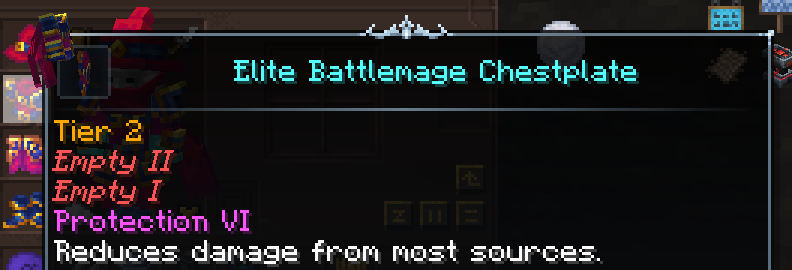
what does the empty mean here https://i.imgur.com/1fqwdFr.png
 dusty finch
it's just a reflection of your soul
 fast fiber
Hi! I have a problem, when i try to build with minecolonies wand, the game crashes, does anyone knows what causes it?
jagged dove
fast fiber
Hi! I have a problem, when i try to build with minecolonies wand, the game crash...
update minecolonies to the latest version, if issue persists report it to them
fast fiber
jagged dove
update minecolonies to the latest version, if issue persists report it to them
 jagged dove
fast fiber
jagged dove
fast fiber
update blockui and structorize
fast fiber
@jagged dove how do i update minecolonies mod in a modpack?
jagged dove
fast fiber
<@955739874756005928> how do i update minecolonies mod in a modpack?
download the latest version from Curseforge and add it to the mods folder
and remove the old version
fast fiber
can i download beta versions?
jagged dove
yes
fast fiber
oh ok
fast fiber
jagged dove
yes
okay, i have installed a brand new 2 day ago released build, my minecolonies mod is at least 2-3 month outdated.
i hope it resolves the issue
@jagged dove Thanks man for the quick help, i really appreciate your help. 
 waxen yacht
getting this when trying to join my usual mmc4 server, just updated to the latest version
 fair smelt
does someone know if i build a mobfarrm further away from the spawn do i get more exp since higher leveled mobs?
 hybrid walrus
Nope
sour carbon
Hey my frames are dropping from 20-0 and I'm able too run rust at 240 so it's not hardware issue, I've turned down all the settings too lowest I'm not really sure what too do
molten lantern
sour carbon
Hey my frames are dropping from 20-0 and I'm able too run rust at 240 so it's no...
#faq for performance guide
 frank urchin
Ok, so im trying to host a server for myself and a buddy. we're trying to run medievel mc 4 as its on the newest patch, we both have the correct version installed, we have the proper version of java, my ports are forwarded properly and im able to join the server but its easier for me since its a lan connection, but when my friend tries to join, he is given this same error message everytime and is unable to join, he hasnt been able to join once. ive tried both my ipv4 and ipv6 address for the server but neither are working for him and im at my wits end. Is this version not able to be used for servers or am i just missing something, anything helps and sorry for the long message.
 molten lantern
frank urchin
Ok, so im trying to host a server for myself and a buddy. we're trying to run me...
molten lantern
frank urchin
Ok, so im trying to host a server for myself and a buddy. we're trying to run me...
well it does surely support multiplayer
and if toy say they're portforwarded correctly
you*
then it shouldnt be an issue
frank urchin
i guess we'll just try a different version or something cuz we've tried everything at this point. thank you for your time
lapis pelican
could check that your ports aren't being blocked
torn solar
this hasn't happened to me before and it's begun to kinda get a bit annoying? I've recently realized that my character, when walking into a block, will kinda just teleport to the top of the block... instead of colliding with it and stopping until i jump? It's not autojump, given no jump is happening and the setting is turned off.. my character kinda just teleports to the top of blocks that are only a single block difference that you would normally need to jump over
lapis pelican
check your origin
torn solar
goblin
lapis pelican
server or single player?
torn solar
nothing i saw that i know of should do that. inchling and arache is the "climbing" blocks thing, and it's not that, it's too fast. those origins would slide up blocks like a ladder. i'm not doing that, i'm kinda just teleporting onto them
singleplayer
like, i run through a forest, fall down a single block deep little divot in the forest, and instead of stopping when i run into the end of that divot, it just smoothly teleports me to the top of the block i ran into
lapis pelican
it could be due to being a goblin but I can't confirm really
torn solar
i just swapped origins twice, all origins do it
it's not like... huge, but it's supremely annoying when i'm doing certain things and just without warning teleport up the surface of blocks as if i was standing on top of some invisible half slab
lapis pelican
how's your frames? Got anything on your player?
torn solar
no i..... wait.... wait.... my fucking boots increase step height by half a block
the random ass boots i found are doing it
lapis pelican
xD yeah that sounds like it could be your problem
lapis pelican
trust me, we've heard and seen worse
torn solar
lmao
I can get the reasoning behind a lot of the armor stats and enchantments, but.... that's the dumbest thing i've seen so far
torn solar
I guess? lol
but the only really small origin that is IN the pack right now that would benefit would be like... pixie, and they can literally fly
man i thought i was losing my mind for a while
lapis pelican
There's a mc creator on youtube that was basically woody for the entire season on Empires SMP and Grian (another player) shrunk him down to the size of a doll
 torn solar
side note, i have some absurd, inconceivable rage for any and all biomes that have snow instead of rain
lapis pelican
I love the rain in game. So far it's been my fav in prom 2 fab
torn solar
found a nice spot to build something and now i turn around and the entire place, suddenly, without warning, is absolutely covered in snow
it's horrible
lol
lapis pelican
Is there seasons per chance too in MMC?
torn solar
i think? but i only just started a world so from my understanding this is just... the biome
since i walk 30 blocks in one direction to a new biome and it's rain, not snow
lapis pelican
more than likely yeah, but it'll be hard to avoid all together if seasons are in it
torn solar
yea but if it's year round i can't stand it
minecraft snow just..... infuriates me
and i do not know why
 gleaming hollow
excuse me.. what is the blue thing on the recipe list?

 acoustic cliff
gleaming hollow
excuse me.. what is the blue thing on the recipe list?
acoustic cliff
gleaming hollow
excuse me.. what is the blue thing on the recipe list?
Good luck with that mod
Guys is there something that duplicates items? Like f.e in r.a.d there was a book that could do that but you had to power it
 sterile knot
Heya, i need some help, my JEI is being a little funky and isnt picking up some items like the enchanting table or grindstone. Any idea on how to bring them back? I also cant seem to be able to pick them up from creative mode
torn solar
been having the same issue, a lot of vanilla items don't show up in either menu and i thought it was just me for some reason
torch, anvil, stonecutter, lantern, ect. a shitload of vanilla stuff just doesn't show up anywhere
sterile knot
ah, i thought i might have messed with some configs and screwed up my game
sterile knot
strange indeed
 hoary jay
Somehow the configs for JEI seem to get updated at times, and need to be reverted back to a working set to show everything again. My buddy and I keep having the issue, so I just have a backup zip I use to restore for us from
 royal acorn
guys i got gravity pull idk what's it call but when i jump or in the air the game just drag me down i can jump but yea anyone have the same problem ?
royal acorn
i found the problem it's tiny moon even the gravity pull a lot during that time
 bronze heron
where do you get hogskin ? I killed 5 hoglins with looting they only drop leather and meat, im on mmc4
 grizzled narwhal
Hello, does anyone know, what mod boosts mob's damage in this modpack? For example what mod causes spiders lvl 4 deal 30 dmg.
fallen quarry
What version of medieval minecraft has playerEX or whatever the mod is called?
 orchid gale
MMC1
fallen quarry
kk thanks
royal acorn
guys do you know how to change sort item button ? in mmc4
covert vapor
this is MMC forge
 elfin dune
i have a problem with texture (the one with the sheep)
i observe it's connected to MMC Excal and Excalibur
look


and of course weird sheep models (ghosty)
everything is depends on resourse packs


when excal is ON, sheeps and ui is weird. But shield is holded diffrently and also workbench is good looking. when excal is off texture and ui is good
some advice?
orchid gale
The UI and Sheep will be fixed soon, it was an error with one of the addon packs we bundled but they've fixed it
just need to recompile everything
rare shadow
do enchantments in the enchantment library carry over when you upgrade it to a library of alexandria?
 fervent hinge
rare shadow
do enchantments in the enchantment library carry over when you upgrade it to a l...
fervent hinge
rare shadow
do enchantments in the enchantment library carry over when you upgrade it to a l...
Should do but try on creative first
Ik in RAD2 it carried over but it was a little iffy and sometimes didn't
So prob best to remove them all and re add em
royal acorn
guys do you know how to change sort item button ? in mmc4
 regal glacier
whats the difference between the medieval minecrafts? like the MMC's and the versions
wanna start a server with my friends but not sure what the difference is and if one is better than the other yk
covert vapor
regal glacier
wanna start a server with my friends but not sure what the difference is and if ...
content / mods
and mods*
#faq holds more answers
 finite drift
hey can iron pick mine gleaming ore?
hybrid walrus
don't remember, jade should show you, if pickaxe has x then it can't mine it, if it has checkmark then yes, and btw, you are playing fabric #medieval-mc-fabric
finite drift
fr?
hybrid walrus
yes
 left surge
Getting this error trying to join a MMC4 server on v22 after i updated to v22
 covert vapor
left surge
Getting this error trying to join a MMC4 server on v22 after i updated to v22
covert vapor
left surge
Getting this error trying to join a MMC4 server on v22 after i updated to v22
!moreinfo
cunning reefBOT
Hello! For us to help you with your issue, you will need to answer all 8 questions below. Post the answers in this channel:
1. Have you modified the modpack in any way? If so, what did you do? (Updating/adding/removing mods, changing configs)
2. What launcher, or program, are you using to launch the game? (CurseForge, ATLauncher, etc)
3. What Minecraft version are you playing? (1.18.2, 1.16.5, 1.19.2)
4. What version of the modpack are you playing? (v11, v9, etc)
5. What steps are necessary to reproduce the crash? (Launching the game, exploring the world, etc)
6. Have you ever gotten past the point where the crash happens?
7. Send the crash report file into this channel. Right click the modpack, Open Folder, and navigate to the Crash Reports folder. Drag the newest one here. If there is no crash reports folder, do the same thing with the latest.log file in the logs folder.
8. Did you follow the Performance guide linked in #faq?
covert vapor
it’s anprocesss yk already
finite drift
hey guys i started playing recently and im wondering what i should make for a pickaxe
like what should i go for tools wise
left surge
left surge
Getting this error trying to join a MMC4 server on v22 after i updated to v22
Modpack for the issue: MMC4 (medieval minecraft 4)
Version: v22
Minecraft version: 1.20.1
Launcher: ATlauncher (the recommended launcher)
Any modifications?: No, unless you count adding some shaders, then maybe, but doesn't matter cause i have them off on this instance for preformance.
Steps to reproduce: Fuck if i know 
Have i gotten past the point the crash happens?: No, kept trying to join, same error repeatedly.
also OH NOW I CAN GET IN AS I'M TYPING THIS
finite drift
covert vapor
vanilla path is never bad
are there any radius picks
covert vapor
finite drift
and whats the fastest pick
might try drills
covert vapor
left surge
also OH NOW I CAN GET IN AS I'M TYPING THIS
ez
left surge
i had to restart the entire game twice
i just know it's gonna happen again 
these kinds of bugs always fucking come back
How long do alex's caves maps take to load?
left surge
left surge
Modpack for the issue: MMC4 (medieval minecraft 4)
Version: v22
Minecraft versio...
i'm on a server, details above (ignore the bug)
finite drift
what is the tornent quiver for
 simple raptor
hey yall quick question what is the mod that shows the mobs stats on the top left of your screen and how do i turn it back on mine turned off
orchid gale
Is there a way to get enchants off items?
 wraith fox
vanilla grindstone
unless you mean removing specific enchants and leaving the rest, not sure
 swift falcon
whats the difference between MMC1 2 3 4?
jagged dove
swift falcon
thought it was like mmc4 more updated than mmc1
all of them are updated, all of them have different content
swift falcon
if u dont mind me asking which one has a more rpg type feel?
smth with a skill tree maybe for diff classes
jagged dove
I know MMC4 has a skill tree, not sure about the rest
grizzled narwhal
Hello, what mod are temperature enchantments from, please?
 tame oar
Hi, I have a problem, on the latest version of the build 1.19, I have 10 fps both in the game and in the menu, are there any solutions?
molten lantern
tame oar
Hi, I have a problem, on the latest version of the build 1.19, I have 10 fps bot...
#faq for performance guide
orchid gale
How do I get ascended coins?
fallen quarry
orchid gale
How do I get ascended coins?
I think I might have found some in a chest underground, and you might want to have a look under some spawner cages.
 undone zenith
Hello, I saw something about previous crashes in the aether (something about chunk loading) being fixed by an aether-redux update to 1.3.1, the current version in the pack seems to be 1.3.3, does this mean it's safe for people in my server to go there or was it specifically 1.3.1 that it was safe in 😅
 swift schooner
undone zenith
Hello, I saw something about previous crashes in the aether (something about chu...
swift schooner
undone zenith
Hello, I saw something about previous crashes in the aether (something about chu...
1.3.3 is newer so it should be safe
undone zenith
Okay ty, we're all a little nervous about going back there so figured I'd ask
 little oak
how much RAM do you guys allocate to this modpack?
covert vapor
little oak
how much RAM do you guys allocate to this modpack?
how much ram on pc
covert vapor
they have 8gb max lol
 strong magnet
when i pop a totem of undying or a gapple
I get "You havent unlocked this ability" over my hotbar
what do i have to unlock lol. also im on V19
 olive temple
Is anyone getting a crash on v22 1.20.1 when trying to place a minecolonies townhall?
covert vapor
olive temple
Is anyone getting a crash on v22 1.20.1 when trying to place a minecolonies town...
pinned messages
 primal bison
server
 distant locust
im getting shoved downwards every second or so, so when im in the air jumping or trying to swim upwards im pulled downwards
has anyone had experience with this?
 glass peak
anyone knew the mod name of the rare mobs, like the green, purple glowing ones who dropped special attribute weapons etc
 light mist
whe i try to use the alloy forge to create ingots the minerals just disappear, some one kwon why?
and some one knows wherer to find the unobtanium alloy upgrade????
 past compass
yo i am kinda new can i play medieval mc with my friends like do i need to make a server or something?
light mist
past compass
yo i am kinda new can i play medieval mc with my friends like do i need to make ...
i use hamachi
jagged dove
glass peak
anyone knew the mod name of the rare mobs, like the green, purple glowing ones w...
apotheosis
jagged dove
light mist
whe i try to use the alloy forge to create ingots the minerals just disappear, s...
update the mod to the latest
jagged dove
past compass
yo i am kinda new can i play medieval mc with my friends like do i need to make ...
!server
cunning reefBOT
We suggest renting a server from Bisect Hosting:
Approx. $10 - $25 a month depending on what plan you choose. You can also get 25% off with Code LunaPixel.
Go to https://www.bisecthosting.com/LunaPixel and order a plan which fits you. We suggest 1GB per player but nothing lower than 4GB as the server needs at least 3GB to run.
Go to #server-hosting for more Info!
Free Method: (This is hosting on your own PC, which is harder to do so we suggest getting a server via Bisect Hosting)
- Download the serverpack from Curseforge's website
- Right click the start.ps1 file and click Run with Powershell
To join your own server, typelocalhostinto Direct Connect.
This video explains the process https://www.youtube.com/watch?v=wuGUbVbLsDc
The server IP address is your Public IP Address, which can be found by googling my ip address
If other players are unable to join, find a portforwarding guide online.
light mist
some one knows wherer to find the unobtanium alloy upgrade????
past compass
aight and how do i avoid fall dmg playing the race icraus
light mist
some one knows where to find the unobtanium alloy upgrade????
acoustic cliff
Is there anything in MMC4 that teleports mobs to a chosen location?
i need to make a villager trade haul bro
wraith fox
Are there other water canteens besides the leather one?
swift schooner
wraith fox
Are there other water canteens besides the leather one?
no, you can upgrade it and that's it
distant locust
best y-level to mine for diamonds? im trying at -59 and -60 but have gotten literally 0 diamonds in 119 blocks of mining 😭
i just keep running into aetherslate and darkstone, no ores or anything
wraith fox
believe in mother luck and keep mining 
anyways, -53 to -60 ish should be the perfect place
 lament ledge
FOR MMC4 - is there a bing to sort inventory?
molten lantern
lament ledge
FOR MMC4 - is there a bing to sort inventory?
Ig middle mouse button
orchid gale
Is there anyway to get enchants off items and onto books?
lament ledge
lg?
lament ledge
molten lantern
Ig middle mouse button
lg? What is the name of the bind in option menus?
molten lantern
lament ledge
lg?
I guess*
molten lantern
lament ledge
lg? What is the name of the bind in option menus?
That I don’t know search in the control settings
lament ledge
yeah - its not in there
molten lantern
Does the middle mouse button work?
lament ledge
just crashed - ill have to try again later this week next time im on the PC
 plush umbra
theres not any issues with MMC4 1.20 and the Hephaestus forge is there? i have this made correctly but when i right click the smithing table with the required dust it does nothing

 long crystal
where can i find jade? the stuff to make the archery rings and necklaces
 toxic root
why can't I build a straw golem?
molten lantern
plush umbra
theres not any issues with MMC4 1.20 and the Hephaestus forge is there? i have t...
Ig you have to right click it with hammer for once
 wild lake
hello guys should i play on 1.19 or 1.20 version ??
jagged dove
wild lake
hello guys should i play on 1.19 or 1.20 version ??
up to you
wild lake
cause the 1.20 version is missing like 60 item pages that 1.19 has
i just wanna know is it worth to change it or just keep to play on 1.19
plush umbra
molten lantern
Ig you have to right click it with hammer for once
i tried the gavel thinking it was that as well and that didnt work either oddly enough so im quite perplexed
also checked the wiki and still says dust. but i cant be the only one in 1.20 that cant get this working.. i was thinking maybe the item code or something for the smithy table changed but wana confirm someone else not working. im going to try a single player cheat world quick as well just to confirm
I figured it out lol
 orchid phoenix
Are there any tough bosses in the mod pack?
And is the ender dragon any more difficult
 slow forum
Where i can download server medieval mc 1.20.1 files ?
jagged dove
slow forum
Where i can download server medieval mc 1.20.1 files ?
on curseforge
slow forum
jagged dove
on curseforge
Ty
slow forum
how to fix this when trying to run server
 jagged dove
slow forum
how to fix this when trying to run server
jagged dove
slow forum
how to fix this when trying to run server
read the readme please
!openjdk
cunning reefBOT
- Download an adoptium release for Java (recommended but not required):
- Java 11 (https://adoptium.net/temurin/releases/?version=11) for versions 1.16.5 and below (can also use 8 if its not working)
- Java 18 (https://adoptium.net/temurin/releases/?version=18) for any versions newer (or 17 if 18 doesn't work)
- Consider installing the JRE instead of the JDK for a smaller file size
-
When installing through adoptium, make sure that Add to PATH and Set JAVA_HOME variable are both set to be installed (please see https://imgur.com/a/jPu1h7h for how that would look)
-
Check if java has been correctly installed by running java --version (or java -version on older versions), and seeing if the output is correct (see https://imgur.com/a/OWcoq4p for an example of the output)
- NOTE: 64 bit versions of java ALWAYS have '64-bit Server VM' in the version output. If that is not there, you have installed a 32-BIT version!! If you're getting Out of Memory errors or any other errors, PLEASE install 64-bit
- If the output isn't as intended, you have 2 options.
i) Delete ALL other java versions from your PC (ONLY recommended if you don't need them)
ii) Redirect your launcher/server to use your new installation of Java
Method i
- Uninstall any other java program listed in your programs list (differs by OS, please find a guide for your own OS if you don't know)
- Attempt to re-use the command mentioned above (if the output is now correct, which it should be, you are ready to go)
Method ii
- For a server, please modify the $Java/JAVA variable (found in your startup script depending on ps1/sh) to the path of your java installation. For windows, this path is usually found in "Program Files/Eclipse Adoptium/version_of_java/bin"
- For a client, depending on whether you use CurseForge, GD, or AT, the process is slightly different. Please see a guide for each respective launcher on how to change the java version.
lament ledge
wild lake
hello guys should i play on 1.19 or 1.20 version ??
i think the 1.19 is better still
rare shadow
do ancient knights/the ancient battleground spawn in any specific biome in the nether
i've been searching for a couple hours
 white torrent
whats the fastest way to get around? gotta explore a lot but it takes ages
acoustic cliff
Can I somehow buff mobs using any comands or in files on Mmc4? Me and my friend want to make it harder while fighting bosses and mobs in other dimensions than overworld. Talking about MMC4. Twilight forest was too easy with lvl 7 mobs and bosses. 2 hits and they gone haha
And on v19 it was quiet fun to fight bosses lvl 500 in twilight 😅
jagged dove
acoustic cliff
Can I somehow buff mobs using any comands or in files on Mmc4? Me and my friend ...
config > paxi > datapacks > mmcleveling
 scarlet cloud
so the forge 1.20.1 ver does not bootup
covert vapor
scarlet cloud
so the forge 1.20.1 ver does not bootup
!moreinfo
cunning reefBOT
Hello! For us to help you with your issue, you will need to answer all 8 questions below. Post the answers in this channel:
1. Have you modified the modpack in any way? If so, what did you do? (Updating/adding/removing mods, changing configs)
2. What launcher, or program, are you using to launch the game? (CurseForge, ATLauncher, etc)
3. What Minecraft version are you playing? (1.18.2, 1.16.5, 1.19.2)
4. What version of the modpack are you playing? (v11, v9, etc)
5. What steps are necessary to reproduce the crash? (Launching the game, exploring the world, etc)
6. Have you ever gotten past the point where the crash happens?
7. Send the crash report file into this channel. Right click the modpack, Open Folder, and navigate to the Crash Reports folder. Drag the newest one here. If there is no crash reports folder, do the same thing with the latest.log file in the logs folder.
8. Did you follow the Performance guide linked in #faq?
shell lark
why cant i craft magic wax
i follow the recipie exactly but it evaporates
someone help please
scarlet cloud
!. no
2. Cursed forge
3. 1.20.1
4. it says 1.20.1 as well v23
5. I just tried to luancge the game
6. so far no
7.
8. let me try getting java 18
shell lark
anyone help?
covert vapor
scarlet cloud
!. no
2. Cursed forge
3. 1.20.1
4. it says 1.20.1 as well v23
5. I just tried...
!drivers
cunning reefBOT
You (likely) need to update your graphics drivers in order to resolve the crash. Here's how to go about doing that!
1. Identify your graphics card
if you already know skip to the next step
- Open task manager
- Navigate to the "Performance" tab (on Windows 11 this is the button that looks like a heart pulse)
- Press the GPU 0 graph and read your GPU from the top right
Note:
In some cases you may see a GPU 0 and GPU 1. This means your CPU has its own GPU, as well as an external one. You probably want GPU 1 (which is usually the external), but you can ask staff to clarify if necessary.
2. Download your drivers from the manufacturers site
Depending on what you read before, you likely need drivers from either AMD, Intel, or NVIDIA
AMD: https://www.amd.com/en/support
Intel: https://www.intel.com/content/www/us/en/download-center/home.html
NVIDIA: https://www.nvidia.com/Download/index.aspx?lang=en-us
Note:
- For NVIDIA you want to select "Game Ready Driver (GRD)" (this is the default option) for the best performance. Once installing you'd probably prefer downloading GeForce Experience, which will notify you when there's an available drivers update.
- For Intel, you probably want to press "Get Started" under the "Automatically update your drivers and software", which will simplify the process and update everything automatically
- For AMD you probably want to just press "Download Windows Drivers", which will download something called AMD Adrenaline, which will update your drivers automatically.
3. Run the installation, restart your computer, and try playing MC again
- At this point, hopefully your Minecraft is running. If it still does not work, please post any new logs and staff will help assist you with finding the right solution.
 compact rock
Hey there, not too sure if this is the right place for this. I'm currently hosting the 1.16.5 version of this pack on my server. Been running into issues with bad tick performance on the server, curious if anyone has any suggestions on setting tweaks to the mods in the pack to give better performance for the server? Currently running it with Bisecthosting with 16GB, generally going to have around 5+ players on at a time. Already planning on preloading chunks to help.
covert vapor
compact rock
Hey there, not too sure if this is the right place for this. I'm currently hosti...
best way to know is doing a tps check to see whats wrong
!tps
cunning reefBOT
Please click this link and follow the guide. If you are using a server host such as Bisect, you may be limited in your options and instead have a checkbox to use Aikar's Flags, which will also work:
https://github.com/brucethemoose/Minecraft-Performance-Flags-Benchmarks
If you can not launch your server/game after using these flags, then remove the word java from the start. Also, make sure you are using Java 18 on 1.18.2 / 1.19.2 and Java 11 on 1.16.5. These should be downloaded from Adoptium's website.
If lag persists, install Spark to your server do the following command ingame:
/spark profiler start --only-ticks-over 50
Then, send the link in this channel.
covert vapor
ur not
we don’t get paid to work here we all just do it for free
expect an answer or not. post it once and someone will read it
shell lark
not post it once?
covert vapor
mb
shell lark
mb?
covert vapor
or not,
shell lark
oh
it happens
are you good at eidolon or know anyone who is cause i wanna show them a stream to see what i am doing wrong
tamz?
 shell lark
do you know anyone who would know
covert vapor
uh hmm
idk just post what you need and go sleep away and come back to an answer lol
shell lark
ok basically i need someone who is experienced in Eidolon cause i cant seem to get the recipies to work and also wondering if i am stiring right
 lofty bluff
Hi guys, im having trouble installing MMC4 on ATLauncher. Can i ask for some support here?
covert vapor
lofty bluff
Hi guys, im having trouble installing MMC4 on ATLauncher. Can i ask for some sup...
what are you having issues with
lofty bluff
covert vapor
what are you having issues with
When installing the New Instance, an error happens. According to logs, the problem seems to be "Error on GraphQL query"
 lofty bluff
Can i attach the log perhaps?
covert vapor
lofty bluff
Oh I'll ask there then, thanks a lot!
covert vapor
join here since pretty sure this is out of Normal support
covert vapor
lofty bluff
Oh I'll ask there then, thanks a lot!
np
molten lantern
plush umbra
I figured it out lol
How?

 soft rune
i also accidentally puit my backpack on idk how to get it or even get it off
molten lantern
soft rune
i also accidentally puit my backpack on idk how to get it or even get it off
Button bottom left
soft rune
Nope
 molten lantern
soft rune
Nope
molten lantern
soft rune
Nope
In backpack screen
soft rune
i just figured out how to open i see now ty
molten lantern
Ah alr
waxen yacht
say u have fire aspect on your weapon but u have looting 3 aswell and the mob dies to the fire damage, does the looting 3 still activate? or no cause it died to the fire
 errant vigil
Using the build tool from MineColonies causes my entire server to crash for some reason. Anyone else have this issue?
lapis pelican
soft rune
why cant i wear these?
Check your origin.
soft rune
lapis pelican
Check your origin.
Elytrian
I feel like I chose the wrong origin and I bet I can’t change it sob
😭
soft rune
Do you know how?
lapis pelican
ah I know it can change after a death, not sure elsehow
soft rune
I’ve died a couple times so hmm
lapis pelican
might be somethign in the quests
soft rune
whats with the water village thing
i see shadows but its not up in sky yet says entities are under ground
 covert vapor
soft rune
covert vapor
soft rune
most likely Below you
down means Below by a certain amount of blocks
give or take 15 max
after 15 they shouldnt show up
soft rune
i went below
but nope
anyway

this happened
i found a townhall, and right clicked on the thing and hit make new colony
now it wont let me back on the server
soft rune
covert vapor
pinned messages
just install the latest right for each?
n how do i update to the server
swift schooner
soft rune
n how do i update to the server
!updateserver
cunning reefBOT

00:00 Update Server Locally
01:19 Update on Server Host/Bisect Hosting Premium
01:39 Update on Server Host/Bisect Hosting Premium
Discord ➔ https://discord.gg/8ZmhaPPbjE
Twitter ➔ https://twitter.com/SharkieTV
Use CODE: LunaPixel for 25% off ➔ https://www.bisecthosting.com/LunaPixel
soft rune
tyyy
swift schooner
Wait that's not what the pinned message are about
idk if the mods is updated in the newest version
covert vapor
they need to be
soft rune
Idk I just updated the jar files in my client and on server side so hopefully it works
 soft rune
poki
 vernal briar
ive updated to the newest version of medieval mc, and yet when i put something in the workbench, the game crashes. Any solutions?
jagged dove
vernal briar
ive updated to the newest version of medieval mc, and yet when i put something i...
!moreinfo
cunning reefBOT
Hello! For us to help you with your issue, you will need to answer all 8 questions below. Post the answers in this channel:
1. Have you modified the modpack in any way? If so, what did you do? (Updating/adding/removing mods, changing configs)
2. What launcher, or program, are you using to launch the game? (CurseForge, ATLauncher, etc)
3. What Minecraft version are you playing? (1.18.2, 1.16.5, 1.19.2)
4. What version of the modpack are you playing? (v11, v9, etc)
5. What steps are necessary to reproduce the crash? (Launching the game, exploring the world, etc)
6. Have you ever gotten past the point where the crash happens?
7. Send the crash report file into this channel. Right click the modpack, Open Folder, and navigate to the Crash Reports folder. Drag the newest one here. If there is no crash reports folder, do the same thing with the latest.log file in the logs folder.
8. Did you follow the Performance guide linked in #faq?
vernal briar
- No
- CurseForge
- 1.20.1
- V23
- Open workbench, and get sticks into it
- no
- done
covert vapor
vernal briar
1. No
2. CurseForge
3. 1.20.1
4. V23
5. Open workbench, and get sticks into it
6...
try turning thr mod visual workbench off or deleting it
jagged dove
covert vapor
try turning thr mod visual workbench off or deleting it
mmc4 update 
that modpack scares me
lets js skip v23 tamz
wait for v24
covert vapor
jagged dove
wait for v24
k

 sly basin
hi does anyone know what item does the 'tempation' enchant go on? its an enchant that attracts farm animals
covert vapor
sly basin
hi does anyone know what item does the 'tempation' enchant go on? its an enchant...
only in one channel please the modpack you are playing. im pretty sure they go on hoes / armour?
acoustic cliff
jagged dove
config > paxi > datapacks > mmcleveling
Can i only change it on server? i host server on bisect or do i need to do in both on server and launcher?
jagged dove
acoustic cliff
Can i only change it on server? i host server on bisect or do i need to do in bo...
js server
acoustic cliff
jagged dove
config > paxi > datapacks > mmcleveling
only thing i can see is mmc_autoleveling.zip
but no mmcleveling
oh whatever i found it it is it
jagged dove
acoustic cliff
only thing i can see is mmc_autoleveling.zip
yeah that
acoustic cliff
jagged dove
yeah that
so i download the file, edit and then put back ?
jagged dove
acoustic cliff
so i download the file, edit and then put back ?
yes
acoustic cliff
jagged dove
yes
di it, hope it works lmao. i set mobs to lvl 500 in twilight
i am too powerful BUAHAHA
 lyric steppe
Hello. I am having an issue with the mod on Curseforge where the game crashes once a crafting table is used. Its on a new world. I have uploaded a full issue report on Github. There was someone else on here that had that issue as well, if anyone else has experienced it, could you let me know if you managed to fix it? Thanks
covert vapor
lyric steppe
Hello. I am having an issue with the mod on Curseforge where the game crashes on...
try removing the mod visualworkbench
lyric steppe
covert vapor
try removing the mod visualworkbench
This fixed the crash. Thank you.
covert vapor
lyric steppe
This fixed the crash. Thank you.
np
If you are having issues crashing while OPENING or SEEING someone craft,
You Must Delete Visualworkbench MOD
 muted dagger
So i see the individual pack update for end users but not seeing server bundle was wondering if there was one out?
jagged dove
muted dagger
So i see the individual pack update for end users but not seeing server bundle w...
curseforge has to approve it
muted dagger
got ya thnx
 echo furnace
where's the server file in the v23?
jagged dove
echo furnace
where's the server file in the v23?
curseforge has to approve it
echo furnace
jagged dove
curseforge has to approve it
can't download in other site?

 acoustic cliff
covert vapor
repair that boomarng
acoustic cliff
covert vapor
repair that boomarng
i need to craft that stellar thing
acoustic cliff
covert vapor
(totally know what that is lmao)
makes items unbreakable
covert vapor

acoustic cliff
i have it on armor, need to craft it for weapons aswell
orchid gale
covert vapor
If you are having issues crashing while OPENING or SEEING someone craft,
```c
...
@vestal verge visual workbench still incompatible with origins fyi, Origins probably won't backport the fix to 1.20.1 either
I haven't asked but their dev team is spread pretty thin and they rarely do releases
covert vapor
temp fix until its fixed fr  u
u
covert vapor
orchid gale
I haven't asked but their dev team is spread pretty thin and they rarely do rele...
sad
 river adder
Hello friends, I need help, I want to deactivate thirst and tiredness, how do I do that?
 vestal verge
orchid gale
<@109612873361174528> visual workbench still incompatible with origins fyi, Orig...
vestal verge
orchid gale
<@109612873361174528> visual workbench still incompatible with origins fyi, Orig...
totally forgotten about that
updated a HF
 wary elk
Whats Modrinth? New Modloader?
soft rune
how does the research table work
acoustic cliff
BROOOOOOOOOOOOOOOOOOOOOOOOOOOOOOOOOOOOOOOOOOOOOOOOOOOOOOOOOOOOOOOOO

i downloaded latest version on CurseForge aswell as on server
HELPPPPPPPPPPPPPPPPPPPPPPPPP
Tamz i know you somwhere there
jagged dove
acoustic cliff
BROOOOOOOOOOOOOOOOOOOOOOOOOOOOOOOOOOOOOOOOOOOOOOOOOOOOOOOOOOOOOOOOO
server is outdated
jagged dove
wary elk
Whats Modrinth? New Modloader?
Modrinth is similar to Curseforge
covert vapor
acoustic cliff
Tamz i know you somwhere there
look in pinned messages. new version has crashing issues due to that mod
remove it
jagged dove
covert vapor
look in pinned messages. new version has crashing issues due to that mod
they are on a outdated version
covert vapor
fair enough
elfin dune
how can i save my setting in game between versions?
and of course how can i update my server. I can do it by myself but i know you got here some guide with steps so i can avoid unnesesery questions
molten lantern
elfin dune
and of course how can i update my server. I can do it by myself but i know you g...
!updateserver
cunning reefBOT
00:00 Update Server Locally
01:19 Update on Server Host/Bisect Hosting Premium
01:39 Update on Server Host/Bisect Hosting Premium
Discord ➔ https://discord.gg/8ZmhaPPbjE
Twitter ➔ https://twitter.com/SharkieTV
Use CODE: LunaPixel for 25% off ➔ https://www.bisecthosting.com/LunaPixel
molten lantern
elfin dune
how can i save my setting in game between versions?
Don’t know what you mean by that
elfin dune
key assignment
always clear on new version
and back to default even if i replace my profile on forge
molten lantern
Well not that I’m aware of
You can try exporting the whole pack
Like pasting every folder except mods and config
Or maybe don’t do that
elfin dune
molten lantern
Or maybe don’t do that
too scare to do such thing XDDD
probably just leave old version and copy paste every key in game
one by one
but thats the worst way
molten lantern
elfin dune
too scare to do such thing XDDD
Yeah will probably break the game
elfin dune
so i just wandering
if there is something to export and import setting
between versions
elfin dune
ok thanks anyway 😉
jagged dove
sly basin
hi guys does going to the nether increase difficulty?
No
the level only goes up in that dimension
sly basin
jagged dove
No
amazing thank you! one last question can you tame the golbin traders so they dont despawn? name tag doesnt work... ^^
jagged dove
sly basin
amazing thank you! one last question can you tame the golbin traders so they don...
If you name tag them they should not despawn
sly basin
jagged dove
If you name tag them they should not despawn
im shift right clicking but it doesnt work
 cyan moss
hello I have a problem for Snow Real Magic mod. When the weather is snowy, the snow layers are not generating on slabs and stairs. How can I fix it?
orchid gale
sly basin
amazing thank you! one last question can you tame the golbin traders so they don...
Best bet is a supplementaries cage probably
 formal stirrup
Anyone else having issues with Alex's caves not generating?
orchid gale
formal stirrup
Anyone else having issues with Alex's caves not generating?
It’s incompatible with Terralith, so if you’re playing on a server that added it that may be the issue
formal stirrup
That makes sense than, thanks
 cobalt maple
Quest book says press J jobs in Medieval MC 1.20 but the keybind doesn't work and I'm not seeing it in Keybinds.
sly basin
hi guys i put the 'vein mining' mod on my pickaxe but its not doing what its meant to or anything at all really
olive temple
There's a key you need to press while mining to activate it
 small robin
guys its worth a time playing 1.20.1 medieval?
hybrid walrus
small robin
guys its worth a time playing 1.20.1 medieval?
yes
small robin
is there a simple swords mod? I didnt read
hybrid walrus
small robin
is there a simple swords mod? I didnt read
first mistake, should read lol, modpack index website gives list of mods for just about all modpacks
small robin
i couldn't find it
jagged dove
small robin
i couldn't find it
modpackindex is a website
small robin
oh
hybrid walrus

 jagged dove
small robin
\
jagged dove
small robin
\
!alternates
cunning reefBOT
If this command was run in response to your question/issue, it is likely because switching away from the launcher you are currently using would fix your problem.
From our experience, the most stable launcher by far is ATLauncher, also known as ATL.
To install ATLauncher, do the following:
1. Go to https://atlauncher.com/download
2. Install and run the setup, then open the program.
3. Login to your Microsoft account that owns the Java Edition of Minecraft from the Accounts tab on the right. This process is 100% safe, as it goes directly through Microsoft. ATLauncher does not see your account credentials.
4. Go to the Packs tab on the right, then click "Curseforge" on the left.
5. Search the modpack you wish to download.
6. Click "New Instance". Click "Ok" on the opted out mods warning, then click "Open All" on the manual download screen.
7. Let the mods download, ATLauncher will grab them from your Downloads folder and automatically add them to the modpack.
8. Go to the Instances tab, and click "Play" on the modpack you downloaded. If you ever see an "Update" button on the instance, click it.
To transfer your Curseforge world to ATLauncher, simply right click the modpack on Curseforge, or click the 3 dots, then click "Open Folder". Copy the Saves folder, then click "Open Folder" on ATLauncher and paste the Saves folder there.
Because ATLauncher downloads the exact same files as Curseforge does, your world will be the exact same and you will be able to join the same servers. ATLauncher also works without an internet connection (after you've installed the modpack, of course), and does not have any bloat from Overwolf. You are free to uninstall both Overwolf and Curseforge with ATLauncher installed.
 candid zephyr
hi hi, Was not sure where to ask; but I'm running the Medieval Forge (mmc4).v23 HF modpack and hosting it myself but server crashed just now. I was able to bring it back online but I'm hoping if someone could help what went wrong. I will post relevent info when asked.
Also willing to join vc if that makes it easier.
covert vapor
candid zephyr
hi hi, Was not sure where to ask; but I'm running the `Medieval Forge (mmc4).v23...
if it’s back online what’s the issue?
candid zephyr
covert vapor
if it’s back online what’s the issue?
I would like to know why/how it happened. Possibly go over it with someone.
covert vapor
candid zephyr
I would like to know why/how it happened. Possibly go over it with someone.
send a crash report if it generated one
inside the crash reports folder
candid zephyr
covert vapor
inside the crash reports folder
sorry about the wait.
covert vapor
i’m unable to even have a stable internet rn. transferring on transfers on train today
candid zephyr
I see, All good, I am glad that you can help always appreciate it.
covert vapor
mhm ofc
covert vapor
candid zephyr
sorry about the wait.
i’ll check this when my internet is more stable
 lapis iron
trying to host a server on bisect when i join it says i need visual workbench 8.0.0 is it not auto downloaded when i use curse forge?
orchid gale
Make sure you have v23HF
lapis iron
it just says v23? no hf in the pannel weird
i guess biscect didnt update it
wait is there a Server Packs for the hot fix version for 23?
covert vapor
lapis iron
wait is there a Server Packs for the hot fix version for 23?
yes 23HF
well should be
lapis iron
im sorry i may be dumb i cant seem to find it do you have a link?
lapis iron
ok cool ill keep my eyes peeled tyvm
covert vapor
candid zephyr
what server host is this?
 plucky trench
candid zephyr
hi hi, Was not sure where to ask; but I'm running the `Medieval Forge (mmc4).v23...
plucky trench
candid zephyr
hi hi, Was not sure where to ask; but I'm running the `Medieval Forge (mmc4).v23...
I hace same problem
covert vapor
@candid zephyr ur server is out of memory, increase its ram from the Variables text -> Java_Args="-Xmx#G" the # being how much ram you want
covert vapor
plucky trench
Lan
lan? like world sharing or server files
plucky trench
I put 14gb
candid zephyr
covert vapor
<@161289961704914944> ur server is out of memory, increase its ram from the Vari...
covert vapor
candid zephyr
yep thats all fine
covert vapor

candid zephyr
reiteration
covert vapor
works?
candid zephyr
cunning reefBOT
- Download an adoptium release for Java (recommended but not required):
- Java 11 (https://adoptium.net/temurin/releases/?version=11) for versions 1.16.5 and below (can also use 8 if its not working)
- Java 18 (https://adoptium.net/temurin/releases/?version=18) for any versions newer (or 17 if 18 doesn't work)
- Consider installing the JRE instead of the JDK for a smaller file size
-
When installing through adoptium, make sure that Add to PATH and Set JAVA_HOME variable are both set to be installed (please see https://imgur.com/a/jPu1h7h for how that would look)
-
Check if java has been correctly installed by running java --version (or java -version on older versions), and seeing if the output is correct (see https://imgur.com/a/OWcoq4p for an example of the output)
- NOTE: 64 bit versions of java ALWAYS have '64-bit Server VM' in the version output. If that is not there, you have installed a 32-BIT version!! If you're getting Out of Memory errors or any other errors, PLEASE install 64-bit
- If the output isn't as intended, you have 2 options.
i) Delete ALL other java versions from your PC (ONLY recommended if you don't need them)
ii) Redirect your launcher/server to use your new installation of Java
Method i
- Uninstall any other java program listed in your programs list (differs by OS, please find a guide for your own OS if you don't know)
- Attempt to re-use the command mentioned above (if the output is now correct, which it should be, you are ready to go)
Method ii
- For a server, please modify the $Java/JAVA variable (found in your startup script depending on ps1/sh) to the path of your java installation. For windows, this path is usually found in "Program Files/Eclipse Adoptium/version_of_java/bin"
- For a client, depending on whether you use CurseForge, GD, or AT, the process is slightly different. Please see a guide for each respective launcher on how to change the java version.
covert vapor
download the java18 64x
candid zephyr
oh using ubuntu 22.04
covert vapor
yea get for the right OS
candid zephyr
god@minecraft:~$ apt-cache search java18
openjdk-19-jdk-headless - OpenJDK Development Kit (JDK) (headless)
openjdk-19-jre - OpenJDK Java runtime, using Hotspot JIT
openjdk-21-jdk - OpenJDK Development Kit (JDK)
openjdk-21-jdk-headless - OpenJDK Development Kit (JDK) (headless)
openjdk-21-jre - OpenJDK Java runtime, using Hotspot JIT
only available packages
covert vapor

 quartz stirrup
hey i need server pack for version 23 hf does anyone have it
covert vapor
quartz stirrup
hey i need server pack for version 23 hf does anyone have it
no cuz its not out
wait
it is
finally
orchid gale
Looks like that’s the old serverpack
just remove the visual workbench mod from it though, pretty sure that’s the only change
covert vapor
orchid gale
Looks like that’s the old serverpack
rlly? 
im not going insane am i, its the mmc4 that got updated?
lapis iron
i tried to remove visual workbench and it didnt work
at least for me on my biscest hosted
candid zephyr
covert vapor
https://adoptium.net/temurin/releases/?version=18&os=linux
Starting up now. It worked. Thank you so much
covert vapor
candid zephyr
Starting up now. It worked. Thank you so much
np
 proud parrot
Is there questing in 1.20 (v3)? I thought I read somewhere that it's a button in your inventory, but I don't see it
jagged dove
proud parrot
Is there questing in 1.20 (v3)? I thought I read somewhere that it's a button in...
why are uou using such an old version
covert vapor
jagged dove
why are uou using such an old version
 proud parrot
jagged dove
why are uou using such an old version
proud parrot
jagged dove
why are uou using such an old version
it was what the prism launcher had as most recent, didn't realize there were more
edit: from modrinth
covert vapor
proud parrot
it was what the prism launcher had as most recent, didn't realize there were mor...
there is a Modrinth and Curseforge
jagged dove
theres no quests on the Modrinth version (I dont think)
FTB Quests is not on rhe Modrinth version
 zenith tinsel
anyone know how to get tomahawk smeak? Ive tried killing minotaurs but i only get meef and no smeak
covert vapor
zenith tinsel
anyone know how to get tomahawk smeak? Ive tried killing minotaurs but i only ge...
Do Not Spam the chat for this question.
say in 1 Channel and wait.
covert vapor
plucky trench
!drivers
cunning reefBOT
You (likely) need to update your graphics drivers in order to resolve the crash. Here's how to go about doing that!
1. Identify your graphics card
if you already know skip to the next step
- Open task manager
- Navigate to the "Performance" tab (on Windows 11 this is the button that looks like a heart pulse)
- Press the GPU 0 graph and read your GPU from the top right
Note:
In some cases you may see a GPU 0 and GPU 1. This means your CPU has its own GPU, as well as an external one. You probably want GPU 1 (which is usually the external), but you can ask staff to clarify if necessary.
2. Download your drivers from the manufacturers site
Depending on what you read before, you likely need drivers from either AMD, Intel, or NVIDIA
AMD: https://www.amd.com/en/support
Intel: https://www.intel.com/content/www/us/en/download-center/home.html
NVIDIA: https://www.nvidia.com/Download/index.aspx?lang=en-us
Note:
- For NVIDIA you want to select "Game Ready Driver (GRD)" (this is the default option) for the best performance. Once installing you'd probably prefer downloading GeForce Experience, which will notify you when there's an available drivers update.
- For Intel, you probably want to press "Get Started" under the "Automatically update your drivers and software", which will simplify the process and update everything automatically
- For AMD you probably want to just press "Download Windows Drivers", which will download something called AMD Adrenaline, which will update your drivers automatically.
3. Run the installation, restart your computer, and try playing MC again
- At this point, hopefully your Minecraft is running. If it still does not work, please post any new logs and staff will help assist you with finding the right solution.
zenith tinsel
covert vapor
Do **Not** Spam the chat for this question.
i didnt know what channel to put it in
covert vapor
zenith tinsel
i didnt know what channel to put it in
What modpack are you playing
these channels are about Luna Pixel Modpacks.
zenith tinsel
better mc but i know twilight forest is in medieval
covert vapor
zenith tinsel
better mc but i know twilight forest is in medieval
2 Completely different packs
ask in the Correct BMC channel.
plucky trench
hybrid walrus
!drivers
cunning reefBOT
You (likely) need to update your graphics drivers in order to resolve the crash. Here's how to go about doing that!
1. Identify your graphics card
if you already know skip to the next step
- Open task manager
- Navigate to the "Performance" tab (on Windows 11 this is the button that looks like a heart pulse)
- Press the GPU 0 graph and read your GPU from the top right
Note:
In some cases you may see a GPU 0 and GPU 1. This means your CPU has its own GPU, as well as an external one. You probably want GPU 1 (which is usually the external), but you can ask staff to clarify if necessary.
2. Download your drivers from the manufacturers site
Depending on what you read before, you likely need drivers from either AMD, Intel, or NVIDIA
AMD: https://www.amd.com/en/support
Intel: https://www.intel.com/content/www/us/en/download-center/home.html
NVIDIA: https://www.nvidia.com/Download/index.aspx?lang=en-us
Note:
- For NVIDIA you want to select "Game Ready Driver (GRD)" (this is the default option) for the best performance. Once installing you'd probably prefer downloading GeForce Experience, which will notify you when there's an available drivers update.
- For Intel, you probably want to press "Get Started" under the "Automatically update your drivers and software", which will simplify the process and update everything automatically
- For AMD you probably want to just press "Download Windows Drivers", which will download something called AMD Adrenaline, which will update your drivers automatically.
3. Run the installation, restart your computer, and try playing MC again
- At this point, hopefully your Minecraft is running. If it still does not work, please post any new logs and staff will help assist you with finding the right solution.
covert vapor
plucky trench
i have last version
try a differente java install
sometimes java installs can break
!openjdk
cunning reefBOT
- Download an adoptium release for Java (recommended but not required):
- Java 11 (https://adoptium.net/temurin/releases/?version=11) for versions 1.16.5 and below (can also use 8 if its not working)
- Java 18 (https://adoptium.net/temurin/releases/?version=18) for any versions newer (or 17 if 18 doesn't work)
- Consider installing the JRE instead of the JDK for a smaller file size
-
When installing through adoptium, make sure that Add to PATH and Set JAVA_HOME variable are both set to be installed (please see https://imgur.com/a/jPu1h7h for how that would look)
-
Check if java has been correctly installed by running java --version (or java -version on older versions), and seeing if the output is correct (see https://imgur.com/a/OWcoq4p for an example of the output)
- NOTE: 64 bit versions of java ALWAYS have '64-bit Server VM' in the version output. If that is not there, you have installed a 32-BIT version!! If you're getting Out of Memory errors or any other errors, PLEASE install 64-bit
- If the output isn't as intended, you have 2 options.
i) Delete ALL other java versions from your PC (ONLY recommended if you don't need them)
ii) Redirect your launcher/server to use your new installation of Java
Method i
- Uninstall any other java program listed in your programs list (differs by OS, please find a guide for your own OS if you don't know)
- Attempt to re-use the command mentioned above (if the output is now correct, which it should be, you are ready to go)
Method ii
- For a server, please modify the $Java/JAVA variable (found in your startup script depending on ps1/sh) to the path of your java installation. For windows, this path is usually found in "Program Files/Eclipse Adoptium/version_of_java/bin"
- For a client, depending on whether you use CurseForge, GD, or AT, the process is slightly different. Please see a guide for each respective launcher on how to change the java version.
 frigid locust
I got griefed, said there was a white moon but i feel like this is the most amount of mobs being spawned

 viscid pendant
Server pack for 23 HF?
lapis iron
no i dont think they updated that yet?
 acoustic cliff
viscid pendant
Server pack for 23 HF?
acoustic cliff
viscid pendant
Server pack for 23 HF?
you can install it but it is very buggy
as u can see i cannot join my server
lapis iron
yea they hot fixed the client version but not the server so no mcc4 servers on the newest version
orchid gale
Can anyone tell me the tool progression in the everdawn?
 idle lynx
How do i use the research table??? have been stuck on this from Eidolon Repraised
jagged dove
orchid gale
Can anyone tell me the tool progression in the everdawn?
blue skies wood > blue skies stone > pyrope / aquite (iirc) > diopside/charoite
i think I spelt the ores wrong tho
grizzled narwhal
Hello, I have enchanted my while armor with mana boost 3, but still cannot go over mana 100, what am I doing wrong?
 slender cypress
guys when placing town hall the game is crashing. i saw on guthub that it is well known but it' labled as done. i can't confirm that
covert vapor
slender cypress
guys when placing town hall the game is crashing. i saw on guthub that it is wel...
pinned messages
slender cypress
covert vapor
pinned messages
thx!
covert vapor
np

 coarse mirage
oh ok
covert vapor
you can search ur keybinds to see what 2 map keys are bound and turn one of them off from their settings
coarse mirage
yes but i didn t know the name
of the first one
one is journey map
but the therone i dont really know
covert vapor
hm
 heady reef
Hey guys, might be a newb's question but what is the most effective mining tool in this modpack please? Im on the 1.20v.
grizzled narwhal
It is Phoenix pickaxe with vein mine for me
You can also add enchant miner's favor
heady reef
does that one have an AOE mine?
grizzled narwhal
Enchant vein mone gives it aoe
Mine*
It has also auto smelt a huge durability
grizzled narwhal
U can use whatever pick, if u give it good enchants and upgrades
heady reef
ok. Yea im not experienced with it that much! I appreicate your help though buddy.
grizzled narwhal
Guys, my magic related enchantments don't work at all. Any advices, please?
orchid gale
I wasn’t aware compatibility was being worked on
that’s cool if they do work together now though
 runic ocean
Nerulina seems to be causing a few crashes for me.
jagged dove
runic ocean
Nerulina seems to be causing a few crashes for me.
!moreinfo
cunning reefBOT
Hello! For us to help you with your issue, you will need to answer all 8 questions below. Post the answers in this channel:
1. Have you modified the modpack in any way? If so, what did you do? (Updating/adding/removing mods, changing configs)
2. What launcher, or program, are you using to launch the game? (CurseForge, ATLauncher, etc)
3. What Minecraft version are you playing? (1.18.2, 1.16.5, 1.19.2)
4. What version of the modpack are you playing? (v11, v9, etc)
5. What steps are necessary to reproduce the crash? (Launching the game, exploring the world, etc)
6. Have you ever gotten past the point where the crash happens?
7. Send the crash report file into this channel. Right click the modpack, Open Folder, and navigate to the Crash Reports folder. Drag the newest one here. If there is no crash reports folder, do the same thing with the latest.log file in the logs folder.
8. Did you follow the Performance guide linked in #faq?
heady reef
Hey guys, is fishing still OP in v1.20??
grizzled narwhal
Op? In which way, exp or items? If exp, it is much better to get enchant knowledge of ages and use xp potion in dungeon, where there 5 spanners at once. U can build there waystone too
Spawners*
heady reef
i mean for books yeah so enchanting.
grizzled narwhal
It is better to build enchant room in that dungeon to get best enchants
For example u can enchant multiple pickaxes and transfer their enchants to you main pickaxe
And then, you can use them again for other enchants
heady reef
ah okay. could i collect the spawners with silk touch?
grizzled narwhal
No
But there are spawners everywhere, so u can just build waystones on places with lot of spawners
heady reef
so the spawner eggs are just for trimmings?
covert vapor
runic ocean
Nerulina seems to be causing a few crashes for me.
that does Not cause crashes it Prevents crashes
well
unless you didn’t mean Neuria
Neurina
grizzled narwhal
heady reef
so the spawner eggs are just for trimmings?
Yes, monster eggs are little useless
 drifting tree
hello
covert vapor
hi
drifting tree
I have this problem with the medieval mc 4 modpack
covert vapor
and that problem is
 covert vapor
drifting tree
covert vapor
drifting tree
what launcher are you using
drifting tree
I downloaded it from curseforge
 crimson zealot
MMC4 version 23 is crashing at startup for me, right after the red loading screen
here's the log
the only mods i added were rats, domestication innovation and trade cycling
proud parrot
Is there anything I need to do to unlock veinminer? Pressing and holding the key down isn't working
lapis pelican
proud parrot
Is there anything I need to do to unlock veinminer? Pressing and holding the key...
You need the enchant for it
lapis pelican
crimson zealot
https://paste.atlauncher.com/view/ed65c888-a6f0-4836-b1e4-b38755a5ebd7
Looks like you're missing the mods.tml file, but can you drop your crash report as well?
This seems to be the latest.log from the looks of it
Ah nvm. it's Puzzles Lib. there was an issue earlier from it
lapis pelican
crimson zealot
https://paste.atlauncher.com/view/ed65c888-a6f0-4836-b1e4-b38755a5ebd7
Sorry for the ping @robust grail but this seems to be your territory 🙂
soft rune
!more info
strong magnet
I need a quick opinion
Is the apotheosis skill tree worth getting into? Or does it break the game/make it too easy
soft rune
- No
- Curesforge
- 1.20.1
- v22
- Clicking I to access skill tree
6.no - here
- yes
this has never happened including on the current version this is new
soft rune
strong magnet
Is the apotheosis skill tree worth getting into? Or does it break the game/make ...
its fun for sure
strong magnet
I have a solid mob farm and instantly redeemed 18 points
soft rune
the enchanting one saves you ALOT of time
soft rune
you only get 100 points
strong magnet
yah theres prolly 100 nodes on the tree
 jagged mulch
is there any wikis for this mod pack
cause im at like middle game and im pretty clueless rn
lapis pelican
jagged mulch
is there any wikis for this mod pack
the quests is the guide for the modpacks.
grizzled narwhal
Hello, does anyone know, if I can somehow make it compatible with sophisticated storage, rings of ascension and artefact?
lapis pelican
soft rune
cause if not this class sucks lol
I mean that’s the point of the classes, need strengths and weaknesses.
soft rune
yeah..just sucks gotta go into gamemode c to change
 past cargo
Can sm1 help me out? It's not Medieval MC related but the Mod Origins++ has an origin called dullahan. and i was wondering if someone could help me edit it to remove the daytime debuffs. i see guides on how to make custom origins but no guides on how to edit premade origins
fervent hinge
past cargo
Can sm1 help me out? It's not Medieval MC related but the Mod Origins++ has an o...
Config files but its really not worth messing around in. Youjust need to deal with it
jagged dove
past cargo
Can sm1 help me out? It's not Medieval MC related but the Mod Origins++ has an o...
configs, if not then a datapack possibly
best to ask the developer of that mod
fervent hinge
Its pretty easy to break it
jagged dove
nah
fervent hinge
I broke mine and whenever someone selected a dwarf it just nuked the server
Dont even remember how i did it
jagged dove
then yeah
past cargo
I managed to do it
i just exported the entirety of the mod as a folder. edited a few things in the dullahan tab and rezipped it back up as a jar file
fervent hinge
Why would you want to make it easier for yourself to use the class
Meant to have disadvantages so they arent op
heady reef
Other than vein mining enchartment is there a way to mine 3x3 blocks or anything like that? im on v1.20
covert vapor
maybe drill
orchid gale
Whenever someone opens a chest that has "this inventory hasn't been generated yet" the server crashes, anyone know what mod this is?
covert vapor
that’s a structure issue
orchid gale
Is there a way around it?
covert vapor
break the chest
orchid gale
It happens with more than just the one chest though, this issue happens with all the chests, specifically with this one person
covert vapor
orchid gale
It happens with more than just the one chest though, this issue happens with all...
hm what structure are you in?
orchid gale
It's a village
orchid gale
I will request them
 lucid abyss
hello, i host an aternos server that has MMC3 as its modpack but one of my friends have come to this issue and now the server is failing to start, any advice?
 candid rain
heady reef
Other than vein mining enchartment is there a way to mine 3x3 blocks or anything...
candid rain
heady reef
Other than vein mining enchartment is there a way to mine 3x3 blocks or anything...
Yes
Apotheosis affix
Mythic affix could get u 1x3 or 1x5 or more!
heady reef
ah nice, thanks for the reply! I appreciate it! Have a great day.
 fervent patio
Anyone know hot to find the end fortress? when I try to use an eye of ender it just says 'the eye doesn't know where to go'
Please Ping me if you have an answer
candid rain
fervent patio
Anyone know hot to find the end fortress? when I try to use an eye of ender it j...
Maybe u have to use the other eyes I collect idk if there is better end
fervent patio
I'll try the other eyes incase, There is a mod called 'End remastered'
so I think there must still be an end
covert vapor
lucid abyss
hello, i host an aternos server that has MMC3 as its modpack but one of my frien...
aternos can’t run the modpack
we can’t help you
covert vapor
orchid gale
go to server.properties and double the max tick
fervent patio
candid rain
Maybe u have to use the other eyes I collect idk if there is better end
Just found out how
candid rain
Ayy
fervent patio
I just have to go to loads of structures and find some unique eyes
lmao this is gonna take ages
candid rain
Ye
That the point
Nah dw
But there is some annoying ones
Like cleric eye
U can get the wither eye from killing the wither
Buried treasure have an eye
Too
So it won't be hard I guess
lucid abyss
covert vapor
we can’t help you
it's a damn shame, thanks for the help!
covert vapor
ofc
heady reef
sorry i know I asked yesterday about fishing but specifically - can we still get enchartment books and fishing rods from fishing in v1.20?
 humble tapir
I just downloaded the MMC4 modpack and I see it says it comes with shader support. I added a shader pack to the shaders fodler, but I cant find how to turn them on in game. There is no shaders menu box in the video settings menu
jagged dove
humble tapir
I just downloaded the MMC4 modpack and I see it says it comes with shader suppor...
send a ss
covert vapor
humble tapir
I just downloaded the MMC4 modpack and I see it says it comes with shader suppor...
video settings top right
humble tapir
 humble tapir
MultiMC
jagged dove
do you own Minecraft
humble tapir
Yes
jagged dove
!alternates
cunning reefBOT
If this command was run in response to your question/issue, it is likely because switching away from the launcher you are currently using would fix your problem.
From our experience, the most stable launcher by far is ATLauncher, also known as ATL.
To install ATLauncher, do the following:
1. Go to https://atlauncher.com/download
2. Install and run the setup, then open the program.
3. Login to your Microsoft account that owns the Java Edition of Minecraft from the Accounts tab on the right. This process is 100% safe, as it goes directly through Microsoft. ATLauncher does not see your account credentials.
4. Go to the Packs tab on the right, then click "Curseforge" on the left.
5. Search the modpack you wish to download.
6. Click "New Instance". Click "Ok" on the opted out mods warning, then click "Open All" on the manual download screen.
7. Let the mods download, ATLauncher will grab them from your Downloads folder and automatically add them to the modpack.
8. Go to the Instances tab, and click "Play" on the modpack you downloaded. If you ever see an "Update" button on the instance, click it.
To transfer your Curseforge world to ATLauncher, simply right click the modpack on Curseforge, or click the 3 dots, then click "Open Folder". Copy the Saves folder, then click "Open Folder" on ATLauncher and paste the Saves folder there.
Because ATLauncher downloads the exact same files as Curseforge does, your world will be the exact same and you will be able to join the same servers. ATLauncher also works without an internet connection (after you've installed the modpack, of course), and does not have any bloat from Overwolf. You are free to uninstall both Overwolf and Curseforge with ATLauncher installed.
humble tapir
thanks Ill take a look. I know it works in Better MC, so I was hoping it would be the same
jagged dove
humble tapir
thanks Ill take a look. I know it works in Better MC, so I was hoping it would b...
MultiMC breaks installations alot
humble tapir
yeah I use it so I can play it on the same PC with my son
jagged dove
you can try reinstalling
humble tapir
ill try atl and see if I can run two instances of it and connect via lan
humble tapir
looks like it works thank you
fervent hinge
fervent patio
I just have to go to loads of structures and find some unique eyes
Make the witch eyes
Looting 3 and other luck buffs and constantly kill witches
Ive killed atleast 1000 witches the past few days
There is also a villager eye
Pretty cheap with the villager raid buff and hat
fervent patio
fervent hinge
Looting 3 and other luck buffs and constantly kill witches
I have looting 5 I just need to find a witch spawner
heady reef
another newb one from me.. I cannot seem to use the hammer on my crafting table. Could someone give me a heads up? I have tried crouching.
fervent hinge
heady reef
another newb one from me.. I cannot seem to use the hammer on my crafting table....
What are you trying to make
fervent hinge
fervent patio
I have looting 5 I just need to find a witch spawner
I cant remember if the spawner part of apotheosis is enabled by default in the modpack
But if it is you can just silk touch a spawner and put a witch egg in it
Do need the enchant that gives a % drop for an egg to drop
heady reef
fervent hinge
What are you trying to make
A workbench 😛
fervent hinge
Its pretty easy to find the enchant
I found it alot in the pillar spawners in caves
fervent patio
fervent hinge
Make the witch eyes
How many eyes do you need?
fervent hinge
I used around 3
But i got lucky and found it easily
You need 1 of each eye
There are like 12 types atm
fervent hinge
Np if you need help for the eye locations someone did post a pdf in either this channel or the prominence one
heady reef
sorry, not sure if you missed the reply. I'm trying to build a workbench.
soft rune
so im guessing featherweight only works for arachnae and for elves
fervent hinge
I forgot about that my b
soft rune
but then im confused as to why i cant wear normal iron armor, but theres an iron helmet thats wearable
im so lost
fervent hinge
Check the description
soft rune
i did
fervent hinge
Some classes cant wear above chainmail
fervent hinge
heady reef
sorry, not sure if you missed the reply. I'm trying to build a workbench.
What mod is the bench from
soft rune
however why am i able to wear this one iron helmet if im not supposed to be able
heady reef
Tetra i think buddy
soft rune
cause i tried both featherweights and it didnt work
fervent hinge
Check the weight
fervent hinge
heady reef
Tetra i think buddy
Use a wooden hammer i think
fervent hinge
Cant remember what i used but i was having the same issue
fervent hinge
soft rune
i thought it was based on armor value
Think its on weight could be wrong tho never used anything but dwarf
soft rune
i thought elytrian would be cool but i knew of the featherweight enchants so i was like bet
then i found out cant change origin in survival and realized both the enchants dont work
only one i havent tried is weightless
heady reef
fervent hinge
Use a wooden hammer i think
yep! you absolutely smashed that. Really appreicate your help!
soft rune
ill ss the helmet in a second maybe you can see something more than me

however it says based on armor value but the armor value is more than chainmail
fervent hinge
Need for Mobility — You can not wear any heavy armor (armor with protection values higher than chainmail).
Idk then
Chain mail helm might have more prot than an iron one

 fervent hinge
Yea
Featherweight should make the helm really light
So you can stick with an iron one
The enchants add prot but dont actually affect if you can wear it or not
soft rune
crazy
featherweight doesnt do anything ive tried
i dont think weightless does either but i gotta find that book
 bold vine
Hey are shields supposed to not block attacks? It seems to act as if it has a cooldown but does nothing, am i supposed to be parrying?
fervent hinge
bold vine
Hey are shields supposed to not block attacks? It seems to act as if it has a co...
Whats your race in game
bold vine
fervent hinge
Whats your race in game
Endarian or however thats spelt
fervent hinge
Should be able to use a shield then
Might be a quick time thing
So block before hit
bold vine
Yeah, it looks like that from what i'm seeing as well but may have only actually done it once so nothing to really base that on. I'll try for better timing.
fervent hinge
I dont really use shields except as vanity for the buffs they give
But someone else who uses them might have more info for you
bold vine
Is this sub for all medmc or just 1.16? I'm using 1.20.1
Anyway thanks for trying to help out, Ill just keep treating it as some kind of parry system for now.
fervent hinge
Its for all the vers
Yea it would make alot of sense if it was a parry system in the better combat mod
bold vine
So then I just gotta git gud lol
fervent hinge
Gotta git gud or die tryin
Try look for a shield that has the resistance upon blocking buff
Gonna come in handy against the bosses
bold vine
That does sound incredibly useful lmao might also explain how shields work
Thank you again!
fervent hinge
Np
 ornate glacier
heya. hope iam in the righjt place and all ^^ but i think i got a little problem with MMC4 forge or a bug. not too sure
covert vapor
whats the issue. if ur saying it 🙂
ornate glacier
after the last 2 updates it seems like certain things are creating a problem.
after about 2-5min you cant eat (you can but the food stays and you wont get food up)
ssame for waterbucket. you can use it but the water vanishes and once you change the slot its back in the bucket same for other items like egs and co
and i cant use the bow.. it tries to shoot but no arrow will fly out
was fine in 1.20.1 v21 hf
but anything after that bug pretty much went on.
not sure if its a problem on my end or not ^^"
ornate glacier
yep. it also does the animation but thats it
and in the first 1-5 min (usually sometimes just for the first min) all that still works normaly
but after 1-5min those things stop working. And although most of that would be meh but still workable... not being able to eat is kind of a problem with stamina and all ^^"
skellys still can use their bow and arrow
covert vapor
 subtle edge
!drivers
cunning reefBOT
You (likely) need to update your graphics drivers in order to resolve the crash. Here's how to go about doing that!
1. Identify your graphics card
if you already know skip to the next step
- Open task manager
- Navigate to the "Performance" tab (on Windows 11 this is the button that looks like a heart pulse)
- Press the GPU 0 graph and read your GPU from the top right
Note:
In some cases you may see a GPU 0 and GPU 1. This means your CPU has its own GPU, as well as an external one. You probably want GPU 1 (which is usually the external), but you can ask staff to clarify if necessary.
2. Download your drivers from the manufacturers site
Depending on what you read before, you likely need drivers from either AMD, Intel, or NVIDIA
AMD: https://www.amd.com/en/support
Intel: https://www.intel.com/content/www/us/en/download-center/home.html
NVIDIA: https://www.nvidia.com/Download/index.aspx?lang=en-us
Note:
- For NVIDIA you want to select "Game Ready Driver (GRD)" (this is the default option) for the best performance. Once installing you'd probably prefer downloading GeForce Experience, which will notify you when there's an available drivers update.
- For Intel, you probably want to press "Get Started" under the "Automatically update your drivers and software", which will simplify the process and update everything automatically
- For AMD you probably want to just press "Download Windows Drivers", which will download something called AMD Adrenaline, which will update your drivers automatically.
3. Run the installation, restart your computer, and try playing MC again
- At this point, hopefully your Minecraft is running. If it still does not work, please post any new logs and staff will help assist you with finding the right solution.
subtle edge
ahh yeah i forgot i need to open a driver app. thank you!
covert vapor
np
crimson zealot
lapis pelican
Ah nvm. it's Puzzles Lib. there was an issue earlier from it
How do I fix it?
subtle edge
subtle edge
hi :) mmc4 v23 crashes after downloading the update (atlauncher)
okay, with driver apps open it now crashes on this loading screen, not while clicking play like it did. is something wrong with the drivers?
 covert vapor
subtle edge
okay, with driver apps open it now crashes on this loading screen, not while cli...
covert vapor
subtle edge
okay, with driver apps open it now crashes on this loading screen, not while cli...
you can try a different java
!openjdk
cunning reefBOT
- Download an adoptium release for Java (recommended but not required):
- Java 11 (https://adoptium.net/temurin/releases/?version=11) for versions 1.16.5 and below (can also use 8 if its not working)
- Java 18 (https://adoptium.net/temurin/releases/?version=18) for any versions newer (or 17 if 18 doesn't work)
- Consider installing the JRE instead of the JDK for a smaller file size
-
When installing through adoptium, make sure that Add to PATH and Set JAVA_HOME variable are both set to be installed (please see https://imgur.com/a/jPu1h7h for how that would look)
-
Check if java has been correctly installed by running java --version (or java -version on older versions), and seeing if the output is correct (see https://imgur.com/a/OWcoq4p for an example of the output)
- NOTE: 64 bit versions of java ALWAYS have '64-bit Server VM' in the version output. If that is not there, you have installed a 32-BIT version!! If you're getting Out of Memory errors or any other errors, PLEASE install 64-bit
- If the output isn't as intended, you have 2 options.
i) Delete ALL other java versions from your PC (ONLY recommended if you don't need them)
ii) Redirect your launcher/server to use your new installation of Java
Method i
- Uninstall any other java program listed in your programs list (differs by OS, please find a guide for your own OS if you don't know)
- Attempt to re-use the command mentioned above (if the output is now correct, which it should be, you are ready to go)
Method ii
- For a server, please modify the $Java/JAVA variable (found in your startup script depending on ps1/sh) to the path of your java installation. For windows, this path is usually found in "Program Files/Eclipse Adoptium/version_of_java/bin"
- For a client, depending on whether you use CurseForge, GD, or AT, the process is slightly different. Please see a guide for each respective launcher on how to change the java version.
covert vapor
drivers was a 1 / 2 types of issue
subtle edge
ok, will do!
 prisma birch
Hi, how can I change the Origin I choose?
jagged dove
prisma birch
Hi, how can I change the Origin I choose?
you cant, without commands
prisma birch
jagged dove
you cant, without commands
alright so delete the playerdata?
plucky trench
Why?
covert vapor
plucky trench
Why? <:sad:1145552282734309376>
ATL right
plucky trench
?
covert vapor
atlauncher
plucky trench
is safe?
cunning reefBOT
If this command was run in response to your question/issue, it is likely because switching away from the launcher you are currently using would fix your problem.
From our experience, the most stable launcher by far is ATLauncher, also known as ATL.
To install ATLauncher, do the following:
1. Go to https://atlauncher.com/download
2. Install and run the setup, then open the program.
3. Login to your Microsoft account that owns the Java Edition of Minecraft from the Accounts tab on the right. This process is 100% safe, as it goes directly through Microsoft. ATLauncher does not see your account credentials.
4. Go to the Packs tab on the right, then click "Curseforge" on the left.
5. Search the modpack you wish to download.
6. Click "New Instance". Click "Ok" on the opted out mods warning, then click "Open All" on the manual download screen.
7. Let the mods download, ATLauncher will grab them from your Downloads folder and automatically add them to the modpack.
8. Go to the Instances tab, and click "Play" on the modpack you downloaded. If you ever see an "Update" button on the instance, click it.
To transfer your Curseforge world to ATLauncher, simply right click the modpack on Curseforge, or click the 3 dots, then click "Open Folder". Copy the Saves folder, then click "Open Folder" on ATLauncher and paste the Saves folder there.
Because ATLauncher downloads the exact same files as Curseforge does, your world will be the exact same and you will be able to join the same servers. ATLauncher also works without an internet connection (after you've installed the modpack, of course), and does not have any bloat from Overwolf. You are free to uninstall both Overwolf and Curseforge with ATLauncher installed.
covert vapor
plucky trench
Why? <:sad:1145552282734309376>
oh first timer issue
first do this
!drivers
cunning reefBOT
You (likely) need to update your graphics drivers in order to resolve the crash. Here's how to go about doing that!
1. Identify your graphics card
if you already know skip to the next step
- Open task manager
- Navigate to the "Performance" tab (on Windows 11 this is the button that looks like a heart pulse)
- Press the GPU 0 graph and read your GPU from the top right
Note:
In some cases you may see a GPU 0 and GPU 1. This means your CPU has its own GPU, as well as an external one. You probably want GPU 1 (which is usually the external), but you can ask staff to clarify if necessary.
2. Download your drivers from the manufacturers site
Depending on what you read before, you likely need drivers from either AMD, Intel, or NVIDIA
AMD: https://www.amd.com/en/support
Intel: https://www.intel.com/content/www/us/en/download-center/home.html
NVIDIA: https://www.nvidia.com/Download/index.aspx?lang=en-us
Note:
- For NVIDIA you want to select "Game Ready Driver (GRD)" (this is the default option) for the best performance. Once installing you'd probably prefer downloading GeForce Experience, which will notify you when there's an available drivers update.
- For Intel, you probably want to press "Get Started" under the "Automatically update your drivers and software", which will simplify the process and update everything automatically
- For AMD you probably want to just press "Download Windows Drivers", which will download something called AMD Adrenaline, which will update your drivers automatically.
3. Run the installation, restart your computer, and try playing MC again
- At this point, hopefully your Minecraft is running. If it still does not work, please post any new logs and staff will help assist you with finding the right solution.
covert vapor
do atlauncher if this doesn’t work
 pine ledge
Not sure witch enchant is making so I'm not getting any mob drops I've killed so may skeleton and not even a bone and I think it either the scavenger or knowledge of the ages or is it something else?
 covert vapor
pine ledge
Not sure witch enchant is making so I'm not getting any mob drops I've killed so...
covert vapor
pine ledge
Not sure witch enchant is making so I'm not getting any mob drops I've killed so...
knowledge of ages turns drops into strictly EXP
any types of drops other than armour and weapons
pine ledge
no
 meager depot
 pine ledge
remove the plank when making a bed
 pine ledge
i got nothing for like an hour

