#better-mc-forge
1 messages · Page 707 of 1
 solar viper
It happens, just relaunch the game
 eternal radish
whats thr best range weapon in the mod pack?
 rancid pulsar
Might be a stupid question, but how do you add more memory to the latest 1.16.5 version server of better minecraft? Keep getting a stack overflow error and hoping that will fix it
I tried adding some java arguments to the args line in the start.bat file, but it doesn't seem to want to run when I do that so I must be doing something wrong
 chilly tapir
how do i use the /locate command to find an end city with ships?
also, where do i get an elytra?
solar viper
rancid pulsar
I tried adding some java arguments to the args line in the start.bat file, but i...
Did you include the " " marks?
solar viper
Ight, give me a bit, I'll figure it out
rancid pulsar
Thanks, I appreciate it!
chilly tapir
chilly tapir
also, where do i get an elytra?
seriously i make a copy of my world and im looking all over the end for one
but i find nothing
 zinc cargo
i was playing the 1.16.5 version of the modpack and was trying to trade iron ore to a goblin trader but it does not work
also will it work if i add the create mod
not the goblins
just weather the create mod will work or not
solar viper
Create should work just fine
As for the iron ore, probably a conflict between stuff that modifies or adds in iron ore
I'll check it later
 halcyon silo
anyone know how to get a fabric modpack running on a linux server?
i'll ask in the right channel, lmao
zinc cargo
solar viper
Create should work just fine
ya with the iron it says stone iron or if your able to i think the 1.18 goblin trader work becuase he actually trades raw iron
 grand gate
anyone know if you can make a gold farm in this modpack ? or whats similar to one ?
 fickle zealot
Zombie piglin farms should work on this modpack
grand gate
i cant build on the nether roof ... so im unsure as to how i go about making one ...
fickle zealot
Are you on 1.18?
fickle zealot
You can still build it under the roof
It takes more time and effort though
And actually I could be more efficient under the roof
grand gate
Hmmm ok. Ill check my options for whats the best method for exp to repair my tools mainly 😂
 old fern
what boss can i summon with the nether star that i got from the ferrous quest
 hollow mirage

Gist
better minecraft forge . GitHub Gist: instantly share code, notes, and snippets.
server keeps crashing because of this error
i was asked to remove "omnis" but that doesn't help either because then it keeps on giving errors when starting up the client
any help?
 tepid stratus
can any one help me please
as soon as i placed a chestplate on the kangaroo
it crashed
and its not letting us in
 vagrant nest

can someone help me
i dont understand what to-do because all it does is just says that and stops working ^


 raven fulcrum
can huge dungeons spawn on the 16.5 pack?
i went several thousand blocks and only came across the windmill,spider cave,and crypt like 7 times
 gusty hornet
My game gets relly leggy to the point of freezing after 2 minutes of opening a world and Idk if it's my pc or my game (sorry if I sound dumb I'm new to this)
 hazy flame
raven fulcrum
can huge dungeons spawn on the 16.5 pack?
hazy flame
raven fulcrum
can huge dungeons spawn on the 16.5 pack?
yes
they should
make sure #aureljs-projects is in mods folder
hazy flame
gusty hornet
My game gets relly leggy to the point of freezing after 2 minutes of opening a w...
make sure you have around 8 gigs ram allocated
and try closing backround processes that you may have open
gusty hornet
Ok thanks
eternal radish
where do i get those tomes from?
 balmy peak
what tomes
eternal radish
those with a higher enchantment level
raven fulcrum
when making a new server off the new 16.5 pack it says missing datapacks on alot of mods
 grizzled wolf
Hello, I am also stuck in the same situation as you, how can I solve it?
 half pawn
how on earth do i download this and play it, nothing seems to work, ive added it to like mods, modpacks and its not worked
 jolly perch
grizzled wolf
Hello, I am also stuck in the same situation as you, how can I solve it?
jolly perch
grizzled wolf
Hello, I am also stuck in the same situation as you, how can I solve it?
I deleted 2 other mods like extended mushroom and another, and it finally loaded up tho it took 5 mins
half pawn
half pawn
how on earth do i download this and play it, nothing seems to work, ive added it...
?? 🥲
 vernal bison
Anyone know how to get Jason’s sword in the abyss ???
grizzled wolf
jolly perch
I deleted 2 other mods like extended mushroom and another, and it finally loaded...
But are there any other solutions that I don’t need to delete my mods?🥲
jolly perch
grizzled wolf
But are there any other solutions that I don’t need to delete my mods?🥲
not as far as I can tell
those 2 mods legit break if you have optifine
grizzled wolf
Ok then …I hope someone good at IT can tell us the solution guide
 oak jolt
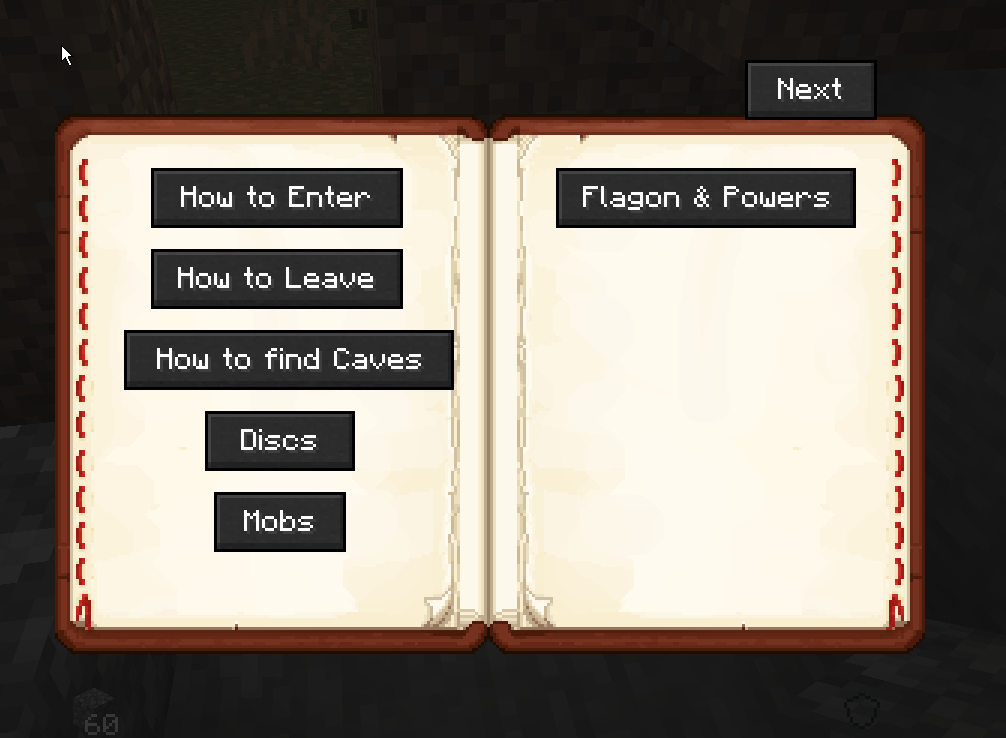
Hello, I'm having a very minor issues I can't seem to find a way around rebinding the button that opens this help menu https://i.imgur.com/lbNKGS3.png. Its just that it is conflicting with my pause/unpause media.
 vernal bison
Anyone know how to get Jason’s sword in the abyss ???
solar viper
oak jolt
Hello, I'm having a very minor issues I can't seem to find a way around rebindin...
Rebind the help key for dead guys untitled deep dark in the controls section, bind it to somewhere out of the way
oak jolt
ah thank you, weird it doesnt look like it was bound to anything before I bound it then but still affected the mouse button, thank you
solar viper
Yeah, it says unknown key in the options.txt, I noticed it too on medieval mc, at least there's a solution
vernal bison
 sage knot
its a dev sword atm
sage knot
its a dev sword atm
😦
solar viper
Same as everyone else probably, curseforge
Or at least something that connects to curseforge's api and lets you download their modpacks
 gritty thistle
I'm having an issue with better minecraft too where quick move is always active, which means I can't grab stuff with left click and drag it into a chest or too craft something
 nimble jasper
what should i do?
 solar viper
Make sure the client is on the same version as the server
gritty thistle
gritty thistle
I'm having an issue with better minecraft too where quick move is always active,...
Does anyone have a solution?
I solved it but that was a weird bug
nimble jasper
solar viper
Make sure the client is on the same version as the server
How to update from v55HF => v55.5 HF
gritty thistle
It's like the shift key was toggled and couldn't take it off
solar viper
nimble jasper
How to update from v55HF => v55.5 HF
For client or server?
nimble jasper
Server
solar viper
I forget, is yours self hosted or thru a provider?
nimble jasper
solar viper
I forget, is yours self hosted or thru a provider?
self host
solar viper
Then just swap out the old config, default config, mods, and scripts folder for the new ones in the v55.5 serverpack
 near hedge
how do I add optifine to the pack? I installed it and added to the bottom of the folder and it just crashes every time i launch the game until I remove optifine.
solar viper
!optifine
grand gate
In order to use OptiFine, follow the steps below:
For 1.16.5 Forge: Remove Magnesium and Dynamic Lights Reforged, add OptiFine to the mods folder.
For 1.18.1 Forge: Add OptiFine to the mods folder.
Remember to remove the required mods each update.
With the new versions of 1.18 better minecraft that have the blue skies mod added, they won't even let me launch the game without it crashing, telling me that blue skies had a problem in the setup
grand gate
it happened in two different versions, I guess I havent tried the same one twice
ok it still happened
The game crashed whilst initializing game
Error: net.minecraftforge.fml.ModLoadingException: Blue Skies (blue_skies) encountered an error during the common_setup event phase
Exit Code: -1
solar viper
 inland fractal
can someone send me the mod pack
inland fractal
can someone send me the mod pack
It's also on the modpack apps
!play
grand gate

Noob explains in this video how to play any Minecraft Modpacks and how to allocate RAM!
Apologies for the one voice only coming to the left speaker lol
▬▬▬▬▬▬▬▬▬▬▬▬▬▬▬▬▬▬▬▬▬▬▬▬▬▬▬▬▬▬
➔ Info: 00:00
➔ Install CurseForge Launcher: 00:30
➔ Allocate RAM on CurseForge: 02:10
➔ Exit Code 0: 05:36
➔ Install GD Launcher: 03:53
➔ Allocate RAM on GD Launch...
inland fractal
thx
solar viper
grand gate
The game crashed whilst initializing game
Error: net.minecraftforge.fml.ModLoadi...
Hmm, what modpack app are you using?
solar viper
Ight, I'll test launch a fresh install, also you're all good
inland fractal
solar viper
Ight, I'll test launch a fresh install, also you're all good
thx
grand gate
oki thanks!
solar viper
You can try GDLauncher or MutliMC in the mean time if you want, GDL is a bit easier but sometimes has download issues
grand gate
Ok, thank you!
solar viper
Yeah, worked just fine on my end, it's possible Blue Skies just isn't liking you or CF messed up the install somehow
solar viper
Ah, it is possible that's causing it
 robust veldt
sorry to interrupt, does chicken farm still the best way to get fastest feather stacks?
solar viper
Most likely still is
robust veldt
thank you
sage knot
am I right in saying striders drop feathers?
or wait no nvm
they drop string
I'm stupid ignore me
grand gate
solar viper
Ah, it is possible that's causing it
Well its working now
Now i have to figure out which mod caused the problem...
Thanks!
solar viper
No problem, that's the pain of adding in mods, sometimes you encounter one that just wishes to be a pain
grand gate
yeah, I don't even remember the ones I added in...
I remember like, three of them
uh oh
wait
when I created a new install, I copyed the mods allong with it
meaning that there were no differences in the mods
solar viper
So it was just blue skies being annoying
grand gate
I guess?
I don't know
hold on
oh wait it only coppied a few mods, I have no idea what is going on there but whatever I guess
grand gate
solar viper
So it was just blue skies being annoying
Ok the mod causing the problems was CustomPlayerModels
I have no idea why
so maybe that will be useful information idk
Anyway thanks for helping me!
solar viper
No problem
solar viper
We have our public server's info in #894108382783479838, make sure to be on the same modpack version
vernal bison
yo anyone know how to make a regen ring i have the normal ring and the arcane workbench

 earnest parrot
are there ways to load chunks while offline?
 normal gust
Is there a way to remove the villager job icons above their heads?
I have shaders on and it is not compatible with the icons
 grave bolt
hey i have a question
So im trying to figure out how to play Better Minecraft but i cant play even with putting hte file INTO the mod file in forge
Im playing 1.18.1 so idk if i cant USE 1.18.1 but its in the 1.18.1 section
solar viper
!play
grand gate
Noob explains in this video how to play any Minecraft Modpacks and how to allocate RAM!
Apologies for the one voice only coming to the left speaker lol
▬▬▬▬▬▬▬▬▬▬▬▬▬▬▬▬▬▬▬▬▬▬▬▬▬▬▬▬▬▬
➔ Info: 00:00
➔ Install CurseForge Launcher: 00:30
➔ Allocate RAM on CurseForge: 02:10
➔ Exit Code 0: 05:36
➔ Install GD Launcher: 03:53
➔ Allocate RAM on GD Launch...
 vestal barn
can someone send me the 1.16.5 optifine for betterminecraft 1.16.5 forge
the game just dont accept mine
grand gate
In order to use OptiFine, follow the steps below:
For 1.16.5 Forge: Remove Magnesium and Dynamic Lights Reforged, add OptiFine to the mods folder.
For 1.18.1 Forge: Add OptiFine to the mods folder.
Remember to remove the required mods each update.
solar viper
Both
but for sure Magnesium
extras is just a useless mod afterwards without the main magnesium mod
solar viper
Yep
vestal barn
yes wow
grave bolt
solar viper
That's how to properly play modpacks
THANK YOU SO MUCH
vestal barn
worked now
is there a chocapic 1.16 shader?
nvmd i can for sure look that by myself
grave bolt
uhhh its not loading and my game keeps crashing
solar viper
!logs
grand gate
To better assist with fixing an issue, we will need some logs: Curseforge/GDLauncher-> Right click the modpack instance -> Open Folder. For MultiMC -> Click 'Instance Folder' on the right.
Find the file 'Latest' in the 'Logs' folder. If there is a folder called 'Crash Reports' then find the newest file from today. Upload these as requested.
solar viper
Upload the latest.log
vestal barn
had the same its loading forever and out of 4 trys it ones once without crashing
vestal barn
grand gate
To better assist with fixing an issue, we will need some logs: Curseforge/GDLau...
i dont get that post
like i found the latest log and the crash report folder but whats now
solar viper
vestal barn
like i found the latest log and the crash report folder but whats now
"Upload these as requested." But that was meant for Doom Guy, your loading issue is just how optifine is
 limber spruce
So, I have set up a server on my PC. And I can connect by local host. Do I still need to port forward if the person I want to play with is right next to me?
solar viper
Port forwarding is only for people not on your internet
vestal barn
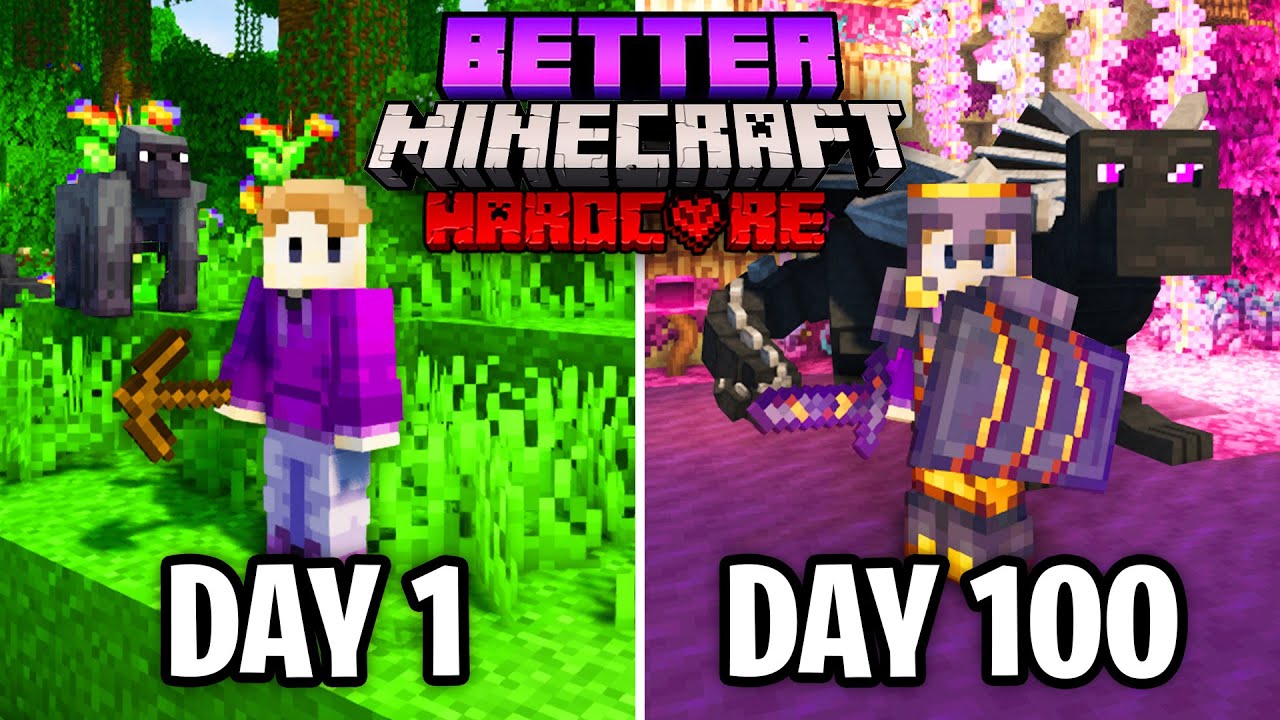
Better Minecraft is an amazing modpack that adds tons of new features to Minecraft!
Try Dashlane Premium free on your first device: https://www.dashlane.com/suev
Use the coupon code ‘SUEV’ to get 50% off Dashlane Premium
In this video I try to survive 100 days in Better Minecraft on Hardcore mode. Better Minecraft is a modpack that adds a lot o...
wich shader is he using?
or texture pack better said
both
limber spruce
solar viper
Port forwarding is only for people not on your internet
How does the other person connect then?
If not by ip
solar viper
From the MC wiki, since I've only ever used localhost as my connection since it's on the same computer: You can connect through either localhost, your home network IP (192.168.x.x) or your public (Internet) IP.
limber spruce
And that's the same for the other person too? Since they don't have the server on their computer I don't think local host works unless I'm wrong?
limber spruce
Hm..
 regal plover
Im getting exit code 1 when I run the modpack? Any help on how to fix it? I am able to press play when I open the launcher. But it then crashes when it finish loading.
 solar viper
regal plover
Im getting exit code 1 when I run the modpack? Any help on how to fix it? I am a...
solar viper
regal plover
Im getting exit code 1 when I run the modpack? Any help on how to fix it? I am a...
Try using GDLauncher or MultiMC, I'm assuming you're using Curseforge right?
regal plover
Yes
regal plover
solar viper
Try using GDLauncher or MultiMC, I'm assuming you're using Curseforge right?
If im getting this error. Am I assuming that I won't be able to play on curseforge? Not like that's a big problem for me.
solar viper
No idea, so far if I remember right, it's only occurred on CF, not sure why
regal plover
Huh
I never got that error so I was thinking it might just be the modpack or something I did with it somehow when updating it.
regal plover
Well. If that's the case, I will try using MultiMc to run the modpack and see if that works
vestal barn
so is this the mod with the teleporter stone?
its definitly the modpack i saw in the video but yet it looks so different
 pure blade
can i just create my own eula.txt if it doesnt show up when I click on the start.bat?
solar viper
pure blade
can i just create my own eula.txt if it doesnt show up when I click on the start...
Well, if it isn't created, then you aren't going to be able to run it regardless of whether you do it yourself or not
What mc version are you trying to run?
solar viper
Upload the latest.log
 daring venture
vestal barn
its definitly the modpack i saw in the video but yet it looks so different
daring venture
vestal barn
its definitly the modpack i saw in the video but yet it looks so different
Most videos you see on youtube is actually better minecraft plus. When I originally started using it back in september I installed better minecraft forge and wondered why half of the things I saw in videos didn't exist in the version I was running and it was because they were actually playing plus.
pure blade
solar viper
Upload the latest.log
wheres that, im new lol
solar viper
It'll be in the 'logs' folder
vestal barn
daring venture
Most videos you see on youtube is actually better minecraft plus. When I origina...
How can i get plus?
But the mounting and taming dragon is a thing in the normal version aswell right? Right?
pure blade
daring venture
search for better minecraft plus on curseforge.. pick the one for 1.16.5 since 1.18.1 is still missing a good portion of what is in 1.16.5 version because mod authors still need to port some of their mods to the newer version of minecraft....

 daring venture
yup
vestal barn
Wow
solar viper
pure blade
Have you changed how much ram is allocated to the server?
pure blade
4 gb i think
vestal barn
Why isnt it linked here in the server
pure blade
solar viper
Have you changed how much ram is allocated to the server?
how do i check, how much do i need
daring venture
because this is the better-minecraft-forge channel and plus is below
pure blade
solar viper
Have you changed how much ram is allocated to the server?
it runs very good on singleplayer
vestal barn
Btw i have 16gb on ram but it only allocared 4gb can i change that?
daring venture
vestal barn
daring venture
<#828720399101591613>
Oh nvmd im just blind on both eyes thanks
solar viper
pure blade
it runs very good on singleplayer
I was more asking because that log doesn't have a crash in it sadly, but it's running very far behind on ticks, give me a sec
daring venture
it's better to set it to 8 or 10gigs for plus
pure blade
i only have 8 gb ram lmao!
solar viper
Wait, you have only 8gb of ram total in your pc alex?
vestal barn
daring venture
it's better to set it to 8 or 10gigs for plus
But how
pure blade
yes'
solar viper
vestal barn
But how
!ram
grand gate
CurseForge Launcher: https://youtu.be/P3hd9MKWvXw?t=130
GD Launcher: https://youtu.be/P3hd9MKWvXw?t=383
MultiMC: https://youtu.be/P3hd9MKWvXw?t=452
solar viper
pure blade
yes'
Are you also playing on the same pc as the server?
pure blade
yes
solar viper
Welp
You have no where near enough ram for that
To run a server + client on the same pc, you need 16gb of ram at least
More than that is preferred
 outer cape
how can I recover from my character being stuck flying and throwing an error saying the server doesn't allow flying
solar viper
I forget that it's not always the 2/4/8/16/32 gb setup, some have random amounts in between
 echo seal
wait is this where I ask question for the mod?
echo seal
Does the better Minecraft modpack replaces the nether biomes? Because I dont see any of them
daring venture
modern prebuilt PCs on like amazon come with 12gigs fairly standard because they are trying to be budget and go with 12 instead of 16 for who knows why...maybe 4 gig ram chips are cheap and in surplus
but they usually stick you with an 8 and 4 gig sticks.
solar viper
echo seal
Does the better Minecraft modpack replaces the nether biomes? Because I dont see...
Well, unintentionally, if you need the vanilla biomes do this:
- remove better nether from the mods folder
- Enter your world folder (located in the saves folder) and delete the dim-1 folder
- Load the world, do what you need
- If you wish for better nether afterwards, place it back in the mods folder, then regen the nether again by deleting the dim-1
solar viper
daring venture
modern prebuilt PCs on like amazon come with 12gigs fairly standard because they...
Yeah, my guess is that rn, seen more of the 12gb as you noticed too
 random belfry
how do you join a lan world?
solar viper
Get what goods?
solar viper
For the awful ghast and such?
solar viper
solar viper
Well, unintentionally, if you need the vanilla biomes do this:
1. remove better ...
Best to do what I said above then
As for the other one, no idea
vestal barn
Wow everything is so simple... i was wondering why my ram is at 93% but obviously if i only have it on 4gb...
daring venture
I think the ones they want are in plus and not this version.
vestal barn
Finally ez playing
echo seal
thx anyways if a youtuber that did 500 days in better minecraft and still got netherite and etc. then i can too!
random belfry
does anyone know how to join a lan world?
vestal barn
On wednesday my second ram is coming so i have 32
daring venture
vestal barn
Wow everything is so simple... i was wondering why my ram is at 93% but obviousl...
Yeah....I was originally using 8gigs for the client and 8 gigs for the server but I've found for me personally setting the client to 10gigs has been smoother
I'm running 32 gigs on my pc.
solar viper
random belfry
does anyone know how to join a lan world?
But I suggest a local server instead as Open to LAN has issues
vestal barn
daring venture
I'm running 32 gigs on my pc.
I just got my pc a week ago, 3060, i5 11k and on wednesday when my new ram is coming i have aswell 32gb
random belfry
solar viper
But I suggest a local server instead as Open to LAN has issues
whats a local server?
solar viper
Setting up an actual minecraft server, but minus the port forwarding
vestal barn
So i dont need to buy a realm orso to pöay with friends from other countrys?
daring venture
vestal barn
I just got my pc a week ago, 3060, i5 11k and on wednesday when my new ram is co...
oh yeah that'll be plenty. I'm running on an i5-9600k..no overclocking...and I don't have any issues running the client, the server and OBS for live streaming all on the same PC.
solar viper
MC realms doesn't work with mods :P
But to play with friends outside your internet, you need a server, either self hosted or thru a provider like Bisect
vestal barn
Yea i overclocked my cpu and gpu so should run ez
daring venture
minecraft doesn't generally like overclocking
solar viper
Keep in mind, OC on the CPU may cause issues
GPU is fine from my experience with my 2060S (although it's a light OC, not heavy), but not the CPU
That goes for other games too, sometimes an OC actually gives less performance
Not always tho
vestal barn
solar viper
But to play with friends outside your internet, you need a server, either self h...
Hamachi still an oprion like back then in 2013 xD
daring venture
yeah the supers that are factory overclocked seem to work okay.
solar viper
I have no idea about Hamachi, I never used it and others always seem to have issues setting it up properly
vestal barn
daring venture
yeah the supers that are factory overclocked seem to work okay.
Yh when i boucht mine it said OC already so i gueds it was factory
daring venture
Hamachi didn't work for me either. I had to dig into my router manual and enable port forwarding to get my friends to join properly.
vestal barn
solar viper
I have no idea about Hamachi, I never used it and others always seem to have iss...
Was also a joke its almost a decade that i had it
 pulsar isle
so i enabled vein miner in the 1.18 version without the enchantment, and it's vein mining even without the keybind
activation mode is set to keybinding, but it's still activating on its own with no keybind set
daring venture
I think the keybind only works for the enchantment.
I haven't played enough with 1.18 versions to be sure.
robust veldt
idk if its appropriate to mention this here but why not use free minecraft servers?
daring venture
not enough ram to run these packs most likely
robust veldt
yeah I meant aternos, isn't it possible to host better minecraft there?
pulsar isle
daring venture
I think the keybind only works for the enchantment.
that's extremely weird that the keybind just wouldn't work if you have it set to activate without needing the enchant
vestal barn
Pay to play coop
solar viper
I would not waste time manually installing each mod onto the aternos server
vestal barn
I guess i stay with critterz and earn money by playing minecraft lmao
 trail thunder
Yes its like 200+ mods
robust veldt
understandable
random belfry
why does my game keep freezing?
limber spruce
Enough ram?
pure blade
when i run the start.bat file, it fails and says press any key to continue
what do i do
solar viper
Can you show the console prior to closing it?
daring venture
maybe because you're the person with only 8 gigs of ram
solar viper
Oh yeah
daring venture
well this modpack only needs about 6 so I guess it's plausible
but not for server and client
solar viper
Probably failing to launch due to the incorrect java
limber spruce
pure blade
when i run the start.bat file, it fails and says press any key to continue
For me it was an incorrect java version once I installed the correct Java it worked.
 weary crag
does the modpack change the end portal?
have activated the portal, but it won't actually teleport us.
 modern apex
hi i have a question
how do i make a server or join a server to play with my friends
 hard dawn
modern apex
how do i make a server or join a server to play with my friends
hard dawn
modern apex
how do i make a server or join a server to play with my friends

Noob explains how to make a server for my specific Modpacks
Apologies for the one voice only coming to the left speaker lol
▬▬▬▬▬▬▬▬▬▬▬▬▬▬▬▬▬▬▬▬▬▬▬▬▬▬▬▬▬▬
Info: 00:00
Get the Server Files/Server Pack: 00:40
Better Minecraft Forge 1.16.5: 04:16
Better Minecraft Fabric 1.17.1: 12:47
Better Minecraft Forge 1.17.1: 19:19
▬▬▬▬▬▬▬▬▬▬▬▬▬▬▬▬▬▬▬▬▬▬▬▬▬▬▬▬...
 crimson flame
Is my world supposed to crash whenever I load into it on the latest version of Better MC?
solar viper
!logs
grand gate
To better assist with fixing an issue, we will need some logs: Curseforge/GDLauncher-> Right click the modpack instance -> Open Folder. For MultiMC -> Click 'Instance Folder' on the right.
Find the file 'Latest' in the 'Logs' folder. If there is a folder called 'Crash Reports' then find the newest file from today. Upload these as requested.
weary crag
Portal broke, lemme get a boneless The End, and a 2 liter of Broke.

For some reason, this doesn't teleport us.
solar viper
crimson flame
Remove omnis
weary crag
No additional mods, just the latest version of the pack.
crimson flame
solar viper
Remove omnis
This one?
 solar viper
Yeah
crimson flame
aight thanks mate
 slim gull
Having seg fault on server opening, latest server files V55.5, no change to start.bat other than "--version" to "-version", happens on V53 as well

vanilla 1.16.5 forge loads fine
 slate vapor
!optifine
grand gate
In order to use OptiFine, follow the steps below:
For 1.16.5 Forge: Remove Magnesium and Dynamic Lights Reforged, add OptiFine to the mods folder.
For 1.18.1 Forge: Add OptiFine to the mods folder.
Remember to remove the required mods each update.
slim gull
optifine is not installed, it's the official server files
slate vapor
i was doing that for myself
slim gull
ok
slate vapor
what does it mean by remember to remove the required mods each update
what are the required mods
slim gull
when you update the pack the mods you removed will be re added
Remove Magnesium and Dynamic Lights Reforged
slate vapor
ohh thank you
slim gull
slim gull
Having seg fault on server opening, latest server files V55.5, no change to star...
V54 all so crashes
 novel mortar
how can i add optifine in better minecraft forge 1.16.5?
grand gate
But how do I know how much RAM it allocates?
novel mortar
in run file
right click ru file
and press edit
and....
its ok?
how can i add optifine in better minecraft forge 1.16.5?
solar viper
novel mortar
how can i add optifine in better minecraft forge 1.16.5?
!optifine
grand gate
In order to use OptiFine, follow the steps below:
For 1.16.5 Forge: Remove Magnesium and Dynamic Lights Reforged, add OptiFine to the mods folder.
For 1.18.1 Forge: Add OptiFine to the mods folder.
Remember to remove the required mods each update.
solar viper
weary crag
Portal broke, lemme get a boneless The End, and a 2 liter of Broke.
I'll check this out in a bit, just need to know what modpack version you are on
novel mortar
thanks
weary crag
v16.5 , I think it might be the world itself but I'm still troubleshooting it.
I just don't know if there is like a "allow end = off" somewhere in a config file for one of the mods or not.
solar viper
Doubt it, no reason the end should be off
 thick sundial
hey sorry to butt in. but the 1.18.1 version of the modpack crashes when i add optfine, is there a supported version list? i am running "OptiFine_1.18.1_HD_U_H4"
solar viper
!logs
grand gate
To better assist with fixing an issue, we will need some logs: Curseforge/GDLauncher-> Right click the modpack instance -> Open Folder. For MultiMC -> Click 'Instance Folder' on the right.
Find the file 'Latest' in the 'Logs' folder. If there is a folder called 'Crash Reports' then find the newest file from today. Upload these as requested.
solar viper
Last I tested OF was a version or two ago, which was when I updated that bot message
thick sundial
ok
weary crag
thick sundial
hey sorry to butt in. but the 1.18.1 version of the modpack crashes when i add o...
Did you unpack opti and move over the file that ends with "MOD" into the mod folder?
solar viper
Note: I tested by just placing the downloaded jar in, it worked fine :P
I'll test on the latest
thick sundial
ok thx ill wait here
 agile fern
Do chickens not spawn/have low spawn chance in this modpack? I have not seen any chickens in worlds created in this modpack(ive made multiple) and was wondering if this was a glitch or not. || for more information: I had the abyss and blue skies mod removed bc they were too big, this may have affected something? ||
weary crag
Also I think my issue is the world itself, not the mods :/
Singleplayer I can get to the end, I load up the world my dedicated server is running after copying it over to my single player PC and it won't port me.
Any idea what file/part of the world could be broken there?
grand gate
novel mortar
and press edit
But doesnt say anything about ram
weary crag
in the folder you installed the server too, look for user_jvm_args.txt you edit the amount of ram on the server there
for 1.18.1's v16.5 server anyways
it will have a line at the bottom with a # - Xm4 line, you would replace the 4 with how much ram you want and then delete the #, save the file.
just the one #, not all of them to be clear.
and make a copy of the file before you edit it. Safety first.
thick sundial
weary crag
Did you unpack opti and move over the file that ends with "MOD" into the mod fol...
nope the optifine file that i have in the mods folder has the proper contents not just another .jar
weary crag
you have to run optifine and select to extract it. It makes a file that ends in _MOD.jar. That goes into the mods folder
thick sundial
did they change it since 1.12
weary crag
Never used it then. Just 1.18.1's Forge+optifine method
thick sundial
huh well i use 1.12 mostly and you just put the downloaded .jar into mods unless you wanted just optifine then you would open the file like an exe and install it anyway thx
weary crag
This is what I had to do to get it to work with 1.18.1

older screenshot so ignore where it says 1.17 there
thick sundial
well i did that loaded the _mod.jar and i still crashes
weary crag
Are you launching with the forge launcher?
thick sundial
ya?
weary crag
 thick sundial
yep
weary crag
Do you only have the one optifine in the mods folder now?
thick sundial
yep only one
weary crag
I'm tapped on it then. Sorry T.T
solar viper
agile fern
Do chickens not spawn/have low spawn chance in this modpack? I have not seen any...
Alrighty, so back to my two questions, why were those mods too big and also I'll test I just need the modpack version
agile fern
i play on my dads computer and hes complaining that mods r taking up too much memory
solar viper
thick sundial
yep only one
Please upload your latest.log, I got OF to work on my 16.5 fresh install so something must be wrong on your side (note sometimes mods act up like drippyloadingscreen)
!logs
grand gate
To better assist with fixing an issue, we will need some logs: Curseforge/GDLauncher-> Right click the modpack instance -> Open Folder. For MultiMC -> Click 'Instance Folder' on the right.
Find the file 'Latest' in the 'Logs' folder. If there is a folder called 'Crash Reports' then find the newest file from today. Upload these as requested.
solar viper
Upload it here
thick sundial
ok
solar viper
also what do you mean launcher log or mc log?
thick sundial
this or an other
thick sundial
ok
solar viper
agile fern
i play on my dads computer and hes complaining that mods r taking up too much me...
Ight, again, what modpack version?
agile fern
1.16.5
thick sundial
i do try to read error logs but sometimes i can't find the problem
agile fern
54.5
solar viper
thick sundial
i do try to read error logs but sometimes i can't find the problem
Can you look for the crash-reports folder and see if a crash log is there?
There's a crash at the end of the latest.log but it doesn't go into detail sadly
thick sundial
ok
btw love your custom menu and background theme
loaded to menu tried loading into a already made world, 100% loaded and crashed
solar viper
Alright, log once more please
thick sundial
solar viper
Remove SnowRealMagic
thick sundial
ok
looks like that did it though because i plan on using shaders more crashes my pop up but thx
vernal bison
Switch you should make a video showing people how to remove certain mods to ad optifine, I’m managed to do it but sometimes it’s a bit confusing
grand gate
Guys why are there invisible skeletons
solar viper
vernal bison
Switch you should make a video showing people how to remove certain mods to ad o...
Naw, real simple, open the main modpack folder, open the mods folder, remove the two mods stated
solar viper
grand gate
Guys why are there invisible skeletons
At a tower building? Not quite intended, they have chainmail but a mod turns that mail invis
agile fern
grand gate
Guys why are there invisible skeletons
dungeons arise mods some of the mobs
and they get wack stats and buffs
 ember crystal
hello i have backpack not working in my quest book i cant agree quest
 jagged thunder
Hey guys, what java version is needed for 1.18 server?
solar viper
17
jagged thunder
ty
daring venture
my understanding is that if you find a backpack as loot, it won't qualify for the quest...you have to craft it yourself. I don't think taking a copy of one with creative will do it either, it needs to craft out of a crafting table.
I found one in my playthrough on 1.18 and it didn't count for the quest until I crafted one myself
 solar viper
 night creek
What modpack app are you using?
night creek
curse forge
I'm searchin things around, and it could be the case of my java not being updated since last year
solar viper
See if using GDLauncher or MultiMC works
Also it's not caused by yours
CF installs their own java
solar viper
Is that for GDLauncher?
night creek
yeah
solar viper
If so, they should have an auto setup option
solar viper
You're all good, use that instead, it's easier
solar viper
Yeah, it's needed anyways, little less than a month left until it's mandatory
night creek
thanks, it worked
grizzled wolf
Hello I wanna ask what resource pack are recommended to add in the mod?
 empty cradle
my game crashed while i was in my inventory, does anyone know why?

 spare sleet
I keep having this issue
Not a clue repairing doesn't seam to help as I have tried multiple times. But I am fairly new so don't know all the tricks
empty cradle
;/
spare sleet
Has SharkieTV been notified?
empty cradle
idk
spare sleet
Fair, I think they might be asleep. Depends where they are based
empty cradle
i havent paid taxes since 2004
spare sleet
?
empty cradle
sry wrong chat
vernal bison
ez
 grand gate
i have a really low end pc. getting a lot of choping on my fps. any fixes for better fps?
vernal bison
lower ur chucks and turn any unneeded things like fancy graphic off
turn smooth lighting down
 twilit vapor
why when i launch better minecraft it crashes?
 strong copper
How to have shaders in better minecraft?
twilit vapor
this is what happens when i try launching better MC forge how do i fix it?
 grand gate
what is the server ip ?
nimble jasper
Whats the best armor in better minecraft 1.16
 mild kelp
Personally I think the one that uses all different versions of netherite. Ultrarite if I remember correctly
vernal bison
 nimble jasper
mild kelp
Personally I think the one that uses all different versions of netherite. Ultrar...
nimble jasper
mild kelp
Personally I think the one that uses all different versions of netherite. Ultrar...
i dont find it
grand gate
what is the server ip ?
vernal bison
!optifine
grand gate
In order to use OptiFine, follow the steps below:
For 1.16.5 Forge: Remove Magnesium and Dynamic Lights Reforged, add OptiFine to the mods folder.
For 1.18.1 Forge: Add OptiFine to the mods folder.
Remember to remove the required mods each update.
grand gate
thanks
Can I add tinkers construct mod to this pack (into world already exists) and will slime island be generated?
 stuck cedar
I've actually added tinker's for 1.18.1, there's a beta release on github, but I'm having a hard time finding slime islands. (haven't found a single one)
grand gate
u can but it wont work
sage knot
grand gate
Can I add tinkers construct mod to this pack (into world already exists) and wil...
they would probably be generated in unloaded chunks
but tinkers is already in the plus version of bmc
 amber kestrel
I didnt play the modpac for 1 or 2 days and I cant load the game because it crashes on start up
What could be the issue?
amber kestrel
yes
amber kestrel
I only removed 2 mods
Better third person and omnis
but it shouldnt crash because of removing these mods
 potent hound
anyone know if there's anything I gotta do to add create so it seems like it was in the modpack from the start? or can i just slap it in no problem?
grand gate
can someone help me on 1.16.5 server ?
 novel sinew
yo so uh I updated my better mc 1.16.5 to v55.5 and all my achievements are gone is there any solution
 pale timber
Does anyone know why my game crashes evey time I try to load into my world?
 eager pendant
It’s an error with create
I’m having the same issue actually
Everything that generates power for create will cause a crash once it’s placed for some reason
At least with better Minecraft plus for 1.18.1 v.2
 vale echo
How do I update in curseforge
 hazy terrace
no
vale echo
Ok ty
vale echo
wdym
hazy terrace
like your keybinds
grand gate
WHy doesnt all exp go to my tool with mending in off hand, why does my xp level go up?
stuck cedar
What's the biome mod in here called?
Okay, found it, Terralith, but I can't find a config for it?
vale echo
Why is my fps dropping every few seconds?
pale timber
eager pendant
Everything that generates power for create will cause a crash once it’s placed f...
Is there any kind of fix?
vale echo
why is my fps so choppy
solar viper
How much ram is allocated?
vale echo
7 gb
solar viper
eager pendant
Everything that generates power for create will cause a crash once it’s placed f...
See if removing starlight works
Out of how much ram in your pc?
vale echo
16gb
solar viper
stuck cedar
Okay, found it, Terralith, but I can't find a config for it?
That's because it's just a datapack in reality, not a mod. It's simply packaged as one for ease of use
solar viper
vale echo
16gb
Can you show a screenshot of your f3 screen?
solar viper
Please be patient, I'm doing other things too
As for the book, send a screenshot of it
Probably just need to rebind a certain annoying control
solar viper
They're in the main modpack folder, in a screenshots folder
To get it, right click your instance and click open folder
drag the screenshot here
vale echo
there isn't a screenshot folder
Anyways, I have to leave, so I will resolve this issue later
Thanks
solar viper
Alrighty, the other way to do it for when you are back is to press f11 while in game to exit fullscreen, press the printscreen key (PrtSc) while looking at the thing you want to screenshot, come to this channel, press ctrl + v to paste it and press enter to upload it
solar viper
pale timber
Does anyone know why my game crashes evey time I try to load into my world?
!logs
grand gate
To better assist with fixing an issue, we will need some logs: Curseforge/GDLauncher-> Right click the modpack instance -> Open Folder. For MultiMC -> Click 'Instance Folder' on the right.
Find the file 'Latest' in the 'Logs' folder. If there is a folder called 'Crash Reports' then find the newest file from today. Upload these as requested.
 night comet
How do I go about adding another MOD to the modpack? I copied it to the MOD folder but its doesn't show up
solar viper
Well, that's how you do it, add the mod's jar file into the mods folder
then run the game
Make sure it's in the right one
night comet
I put the JAR in the MOds folder of better minecraft
pale timber
solar viper
!logs
night comet
but its not showing in the mods list when I run the game
solar viper
pale timber
Please delete the config file corail_woodcutter-server.toml in the config folder
solar viper
night comet
but its not showing in the mods list when I run the game
What modpack app are you using?
night comet
Curseforge
pale timber
solar viper
Please delete the config file corail_woodcutter-server.toml in the config folder
Ok thanks ill try it
 storm flare
is there a way i can not use some of the mods in a game
like still keep them downloaded just not have them loaded at the moment
 elder basin
whats all the dimensions in the modpack?
novel sinew
Is the unknown gem from abyss gone in v55?
(Better mc 1.16 forge)
 carmine bobcat
Anyone know what might be causing this? When I disconnect from my hosted server and go AFK, even just sitting at the Multiplayer menu, I can no longer reconnect to my server. I have to relaunch the entire client.
grand gate
To better assist with fixing an issue, we will need some logs: Curseforge/GDLauncher-> Right click the modpack instance -> Open Folder. For MultiMC -> Click 'Instance Folder' on the right.
Find the file 'Latest' in the 'Logs' folder. If there is a folder called 'Crash Reports' then find the newest file from today. Upload these as requested.
solar viper
storm flare
like still keep them downloaded just not have them loaded at the moment
Easiest way would be to create a secondary folder outside the modpack and move the mods you wish to 'disable' in there until they are wanted.
storm flare
okie ty
 steel gorge
best better minecraft version?
 fading solar
hi does anyone know how to add shaders to the modpack? Since i cant use optifine because it crashes with magnesium
solar viper
!optifine
grand gate
In order to use OptiFine, follow the steps below:
For 1.16.5 Forge: Remove Magnesium and Dynamic Lights Reforged, add OptiFine to the mods folder.
For 1.18.1 Forge: Add OptiFine to the mods folder.
Remember to remove the required mods each update.
fading solar
aight thanks
 dry marlin
grand gate
In order to use OptiFine, follow the steps below:
For 1.16.5 Forge: Remove Magne...
dry marlin
grand gate
In order to use OptiFine, follow the steps below:
For 1.16.5 Forge: Remove Magne...
I'm having an issue with 1.16.5, I removed the Magnesium and Dynamic Lights jars from the mods folders and Optifine still crashes
nvm right as I was typing this it fixed itself
:P
just takes a while to load
solar viper
Yep, that's the con of optifine, it takes a longer time to load, and sometimes will go into not responding, especially when loading shaders, best thing to do is to leave it alone
 real sparrow
I went into the end, Killed the ender dragon and then went into the end city dimension, I got some stuff there and died a couple of times, after a couple of deaths I went back and almost all the chunks weren't loading?? dose anybody know how to solve this issue?
It may be a glitch, but I've reloaded the game, when into creative and re-created the end portal, but every time I ender the end city dimension it won't load and it won't let me back.
 solar viper
Can you interact with stuff where it has generated?
real sparrow
sort of? I can break things but I can't throw my ender pearl to get out
solar viper
How's your storage space?
Something like that happened to a few others and it was related to not having enough storage for it to save to
real sparrow
That might be it! I will check my storage space
I don't think that's what it was, it looks like I have plenty of space
 solar viper
Hmm, seems like the end may have corrupted then somehow, let's try resetting it. If I remember right, this is how:
Delete the dim1 folder inside your world's folder
Install NBT Explorer from here (https://github.com/jaquadro/NBTExplorer/releases/tag/v2.8.0-win)
Using it, open your world folder, dropdown the level.dat > data > dragonfight and delete any entries under it, it should say DragonFight: 0 entries after Like in my screenshot
Load the world once more and fight the dragon again
Please make a backup prior to this tho, I haven't personally had to reset the end in quite some time so I may have remembered wrongly.
 real sparrow
Thank you! I will try doing this :)
where is the Dim1 folder located? I'm in the bmc folders
solar viper
saves > worldnamehere

 real sparrow
I have it opened now, but I don't see my world do I need to do something so I can see it?
 solar viper
Click on this icon:
 real sparrow
ok I did
solar viper
That opens up the file explorer, navigate to your CF install, find the instance folder, select the world folder and open it
real sparrow
whats the CF?
solar viper
curseforge
real sparrow
ah, Thank you! :)
solar viper
For example to get to mine, I have to do: This PC > C drive > Users > myUserName > curseforge > instances > instanceNameHere > saves > select the world I want to edit, press OK
real sparrow
Ok I got it
real sparrow
to fight the dragon again do I just reload the world?
I loaded in and the end looks just how I left it
qwq
solar viper
You need to reload after doing all the above
real sparrow
alright
I reloaded everything and I looks the same
I'll recheck to make sure I did everything right
solar viper
Same issue? or just the same generation?
Remember, I haven't reset the end in quite some time so I might've gotten it wrong on how to
grand gate
For support with crashes/bugs, please create a GitHub issue on the modpack's page and follow the appropriate template.
Stay True Github:
https://github.com/LunaPixelStudios/Stay-True/issues
Better Minecraft:
https://github.com/LunaPixelStudios/Better-Minecraft/issues
Better Minecraft Plus:
https://github.com/LunaPixelStudios/Better-Minecraft-PLUS/issues
Medieval Minecraft:
https://github.com/LunaPixelStudios/Medieval-Minecraft/issues
real sparrow
ok
 solar viper
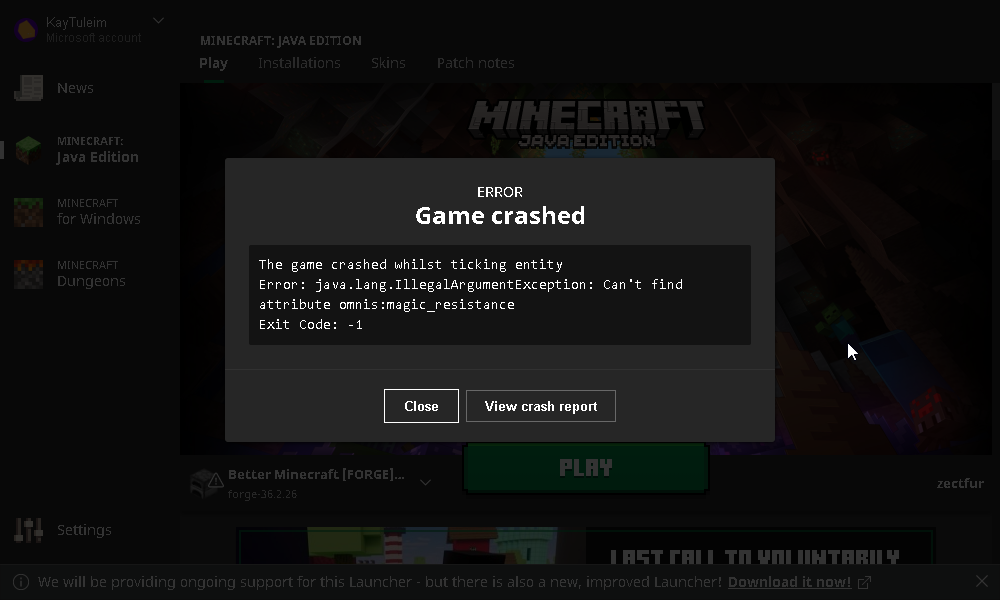
What modpack version?
 slow topaz
is this what youre looking for? https://i.imgur.com/2ztjcKX.png
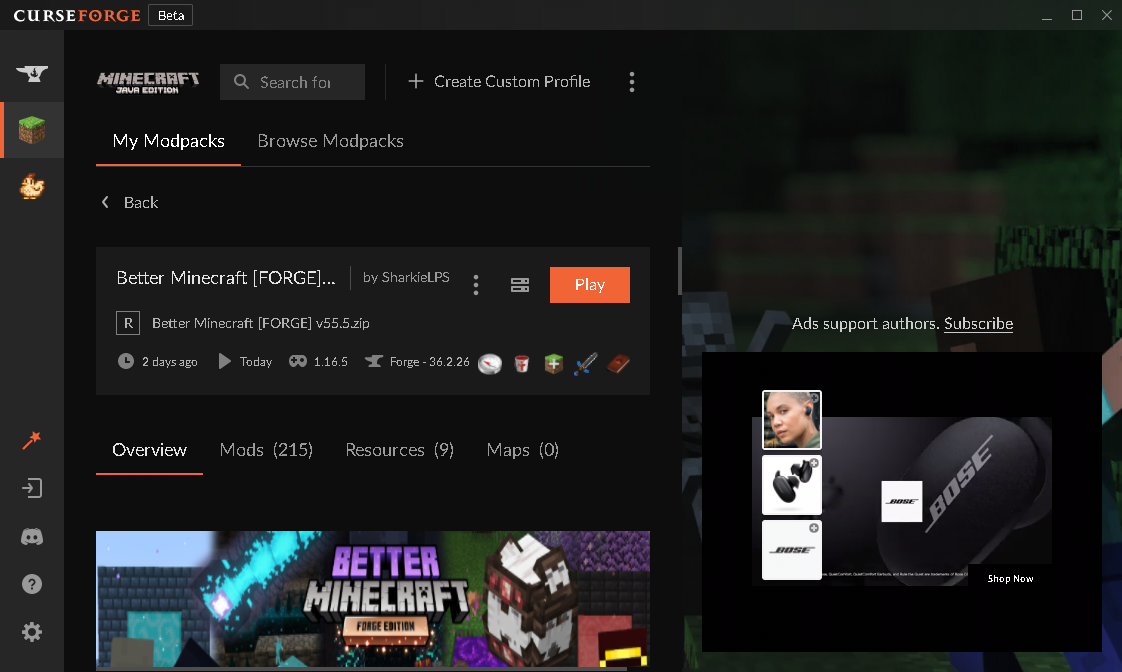
double checked and yeah it says 55.5 HF
solar viper
Can you check what version omnis is?
slow topaz
1.2.2
solar viper
Mostly because forge is somewhat borked when it comes to trying to update an existing v55.5 profile to v55.5 HF:
 slow topaz
it depends on when HF was released, as i installed this modpack about 2 days maybe 3 days ago
if it helps i was exploring a spider cave thing
solar viper
Of course now it works
Just update to v55.5 HF
Seems whatever issue there was with CF has passed
I legit tried 10 times to update my v55.5 to v55.5 HF and it just reinstalled v55.5 each time.... and now it works
Cursed
solar viper
Yeah
solar viper
It's just to fix the omnis crash
We had to go thru multiple tries just to get a working version
solar viper
For your lag spikes, how much ram is allocated?
slow topaz
9
solar viper
Hmm, weird
slow topaz
(though i have 16 gb and windows automatically uses 50% for some reason
 calm surge
solar viper
For your lag spikes, how much ram is allocated?
calm surge
solar viper
For your lag spikes, how much ram is allocated?
i usually put 16gb
since my is 32gb ram
slow topaz
i heard windows will allocate ram to what ever needs it though so im not too worried
calm surge
solar viper
Yikes, 16gb is unnecessary for 99% of packs on CF
really?
solar viper
you need to allocate ram to MC otherwise it won't use the ram
solar viper
calm surge
really?
Yeah, most packs only need up to like 10gb tops
slow topaz
oh so should i bump it to 10-12?
calm surge
solar viper
Yeah, most packs only need up to like 10gb tops
since i bought two 32gb ram
slow topaz
or would giving minecraft high priority help at all
solar viper
Not sure on the priority part, but for me, I allocate 10gb to all packs, just not past unless that pack needs it
Giving too much ram to java can be bad in the long run
For like long sessions and such
slow topaz
yeah cause java is like" oh ill stick this over here and not worry about it until i gotta delete it" then it takes forever
i might buy another 16 gb in the future but i dont wanna spend another 60 bucks
solar viper
16gb works for just about most things game wise honestly
slow topaz
yeah
calm surge
yeah
slow topaz
eventually i wanna host a server for a few friends and play on it, in vanilla or light modded it tends to work well enough
solar viper
I have 32gb, never really go past 60% usage if I'm just playing games
solar viper
Because games don't need more than that really, only MC pushes that 60% line
calm surge
i overclocked my pc to get good fps
solar viper
I'm talking about memory btw, not cpu or gpu
calm surge
what graphic card you use?
slow topaz
i dont get overclocking computers
(alas its sitll impressive my 2gb 1050 is running anything, especially AAA games and modded minecraft)
slow topaz
ah
still doesnt explain how i can play a yakuza game at high-ultra settings
but eh
im not complaining
solar viper
I don't think Yakuza is really as demanding as some other games
real sparrow
Ok I got the end to reset! :D
but for some reason the dragon nor the exit portal spawned in the dimension
 solar viper
Did you make sure to remove the dragonfight entries?
real sparrow
oh wait I need to do that, I will delete whats in that folder and reload the world
pure blade
Hey guys, im upgrading to 32bb of ram on tuesday, I was orginnally at 8! How much ram should i allocate to run a server?
Also are there any public survival servers so i dont have to make one?
solar viper
Let's not ping random people :P
solar viper
 vital token
why am i running and 50-60 fps and only using 40-%50 gpu?
vital token
why am i running and 50-60 fps and only using 40-%50 gpu?
Also how much ram is allocated?
vital token
max
solar viper
Exact please
vital token
17000mb
solar viper
Quite unneeded, put it to 10gb
solar viper
Either way, put it to 10gb and send a screenshot of your f3 screen
vital token
im not on it right now i tried fixing it for 3 hours for a freind to get a server up and running
solar viper
Well, when you can, send it, until then can't really help much. Also do not that GPU doesn't really get used unless you are using shaders, MC and especially modded MC is dependent on CPU and RAM
Not to say the GPU doesn't matter, integrated graphics tends to perform horridly compared to dedicated of course
solar viper
Yep, still here
 sudden patio
Hey guys, where do I find the specs that are needed for this mod to run smoothly? I want to play the same mod that Chosen the Youtuber plays, but I am not sure if my asus zephyrus will be able to handle it.
solar viper
What specs do you have?
novel sinew
Is the unknown gem from abyss gone in v55?
(Better mc 1.16 forge)
I can't find it in jei section
sudden patio
Processor: AMD Ryzen 9 4900HS with Radeon Graphics 3.00 GHz
RAM: 16G
RTX graphics
Where do I find all my specs exactly?
novel sinew
sudden patio
Processor: AMD Ryzen 9 4900HS with Radeon Graphics 3.00 GHz
RAM: 16G
...
wdym ryx graphics
what's ur gpu
novel sinew
sudden patio
Hey guys, where do I find the specs that are needed for this mod to run smoothly...
It will
Allocate 8gb of ram to it
sudden patio
Nividia Geforce RTX graphics
oh so I just needed to make sure I had enough RAM is all? How do I dedicate more ram to it?
solar viper
Those specs should be fine, I'd allocate 8gb total, and make sure your dedicated gpu is being used by checking your f3 screen while in game, if you can't figure out if it is or not, just upload the screenshot of the f3 screen
!ram
grand gate
CurseForge Launcher: https://youtu.be/P3hd9MKWvXw?t=130
GD Launcher: https://youtu.be/P3hd9MKWvXw?t=383
MultiMC: https://youtu.be/P3hd9MKWvXw?t=452
solar viper
Follow that for your modpack app in order to allocate ram
novel sinew
@solar viper is the unknown gem from the abyss chapter 2 gone?
I can't find it in the jei
v55
sudden patio
solar viper
Those specs should be fine, I'd allocate 8gb total, and make sure your dedicated...
Thank you very much! I'll try that out right now.
novel sinew
.5 hf
solar viper
No idea, I haven't messed with the abyss mod yet as I haven't reached that in my playthrough on Med MC
novel sinew
alright
solar viper
If you can't find it tho, chances are, it's been removed. You can always check via /give @s modID:itemID
sudden patio
Do you guys just use the mojang launcher to launch Better Minecraft after you click play on the Curse Forge app or do you use use a different launcher like the GD launcher as the video you shared suggested?
solar viper
Personally I use MultiMC, also the links are all to the same video, just different segments that show how to allocate ram
Just look thru and find the modpack app that seems to be the one you like and use it
sudden patio
Gotcha. I just wanted to use Curse Forge's because it seemed the most official, and I had no reason to use any other. I'm super excited to play this! Thanks for the help.
solar viper
No problem, enjoy the pack, if you need any more help with things, feel free to ask about it
strong copper
How to have shaders in better minecraft?
solar viper
strong copper
How to have shaders in better minecraft?
You'll need to use optifine, download it from their site and follow the bot instructions below:
!optifine
grand gate
In order to use OptiFine, follow the steps below:
For 1.16.5 Forge: Remove Magnesium and Dynamic Lights Reforged, add OptiFine to the mods folder.
For 1.18.1 Forge: Add OptiFine to the mods folder.
Remember to remove the required mods each update.
strong copper
thanks!
solar viper
1.16.5 forge has the most content, 1.18.1 forge and fabric have different content and sometimes people get better performance on fabric
 turbid knot
im tryna join a server and it says i need v34 installed for it which i do but i still cant seem to join it
anyone know why this is happening?
solar viper
Is it one of ours or someone elses?
turbid knot
uhh no clue
i just want any server that works to play on
the ip is betterminecraft.bluedream.host
solar viper
Ah, them, you'll need to go to their site, download their custom profile and upload that in your modpack app, then join
Keep in mind any issues with them are to be reported to them only, since they use some extra mods.
turbid knot
oh okay
i didnt know that thanks
is there any other servers that i can directly join that you know of?
solar viper
We have ours in #894108382783479838, make sure to use the modpack version listed next to the server. You can also check out #838975161772277800 for other servers that aren't run by us
turbid knot
solar viper
We have ours in <#894108382783479838>, make sure to use the modpack version list...
thanks for helping me out i appreciate it!
solar viper
No problem
grand gate
How i can migration save 1.16.5 to 1.18.1 ?
ember crystal
vernal bison
hello what is your shaderpack please
vernal bison
ember crystal
hello what is your shaderpack please
If you type into Google BSL shaders it will come up I’ll send link now tho
 leaden thorn
Does anyone know if there is a list available of the updated mods after a new version is released? And does anyone know if or when the abyss will be availble for 1.18.1?
ember crystal
vernal bison
If you type into Google BSL shaders it will come up I’ll send link now tho
realy tanks bro
thanks
 coral cipher
Hey why after a update my all items in inventory are deleted even if i backed up my world?!
 mental haven
hey is there a tutorial or guide that i can follow to get optifine on this modpack? in other words, how to remove the necessary mods and then add optifine
nvm searched chat for optifine hehe
coral cipher
coral cipher
Hey why after a update my all items in inventory are deleted even if i backed up...
pleas don't tell me this will happend again... cus i had full enchanted diamond gear and i found enchanted golden apple before the update to Better Minecraft Forge V17 🥲
mental haven
btw when i delete magnesium and dynamic lights, can i delete magnesium extras and dynamic surroundings? or are they not dependant on the mods i deleted?
 fervent gorge
is there any way to get 1 oak plank from 2 oak slabs (when destroying them)?
 finite slate
everytime I try to open a world it just gets not responding and never removes not responding (maybe because I've only kept it open while not responding for like 15 minutes)
pls help
finite slate
I've been waiting a long time
 short heath
how do I update my server to V55.5HF?
vernal bison
just got this baby
 solar viper
short heath
how do I update my server to V55.5HF?
solar viper
short heath
how do I update my server to V55.5HF?
Depends on how it's hosted, self or thru a provider?
solar viper
finite slate
I've been waiting a long time
!logs
grand gate
To better assist with fixing an issue, we will need some logs: Curseforge/GDLauncher-> Right click the modpack instance -> Open Folder. For MultiMC -> Click 'Instance Folder' on the right.
Find the file 'Latest' in the 'Logs' folder. If there is a folder called 'Crash Reports' then find the newest file from today. Upload these as requested.
short heath
solar viper
Depends on how it's hosted, self or thru a provider?
Hosted by myself on my pc. Using serverpack from curseforge webpage
solar viper
coral cipher
pleas don't tell me this will happend again... cus i had full enchanted diamond ...
Hmm, there was nothing that should have had that happen, I'll test it on a world from v16 to 17
solar viper
short heath
Hosted by myself on my pc. Using serverpack from curseforge webpage
Well, easiest way would be just to take the world folder from the old version and put it into the new serverpack then, and the ops.json, whitelist.json, server.properties if you ever adjusted those.
short heath
solar viper
Well, easiest way would be just to take the world folder from the old version an...
Anything that is not transferred then?
solar viper
Main thing is the world folder, everything else is simply if you changed them. If you added some mods, gonna have to take those to the new pack, if you edited some configs, transfer the edited ones, etc
short heath
solar viper
Main thing is the world folder, everything else is simply if you changed them. I...
Alrighty, thought it would be harder.. I've seen no explanation of how to update server. Many thanks 😄
solar viper
Well, it got more simple now with the way the serverpack is since forge is auto setup for you
 misty fable
guys, can anyone help me?
my server is keep on crashing when a certain player is joining
solar viper
!logs
grand gate
To better assist with fixing an issue, we will need some logs: Curseforge/GDLauncher-> Right click the modpack instance -> Open Folder. For MultiMC -> Click 'Instance Folder' on the right.
Find the file 'Latest' in the 'Logs' folder. If there is a folder called 'Crash Reports' then find the newest file from today. Upload these as requested.
solar viper
Upload the latest.log from your server
You can ignore the bit about the apps and how to open the folder, since that's for the client
misty fable
solar viper
I should probably update that message to differentiate the two now that I think about it
Sweet, one sec
misty fable
solar viper
Huh, have not seen that type of ticking crash before, regardless this should fix it up:
Go to world\serverconfig in your server's folder.
Find the file named forge-server.toml and open/edit it.
Scroll down to removeErroringEntities and change it from false to true
Should look like this after: 'removeErroringEntities=true'
 fresh pilot
Yesterday i played fine on that world but today i keep getting this message whenever i load in to the world
 solar viper
!logs
grand gate
To better assist with fixing an issue, we will need some logs: Curseforge/GDLauncher-> Right click the modpack instance -> Open Folder. For MultiMC -> Click 'Instance Folder' on the right.
Find the file 'Latest' in the 'Logs' folder. If there is a folder called 'Crash Reports' then find the newest file from today. Upload these as requested.
hollow mirage
where can i find the ender golem
fresh pilot
nimble jasper
i can only ride and fly with one of my dragons, why?
solar viper
fresh pilot
That log doesn't state a crash sadly, how much ram have you allocated?
fresh pilot
solar viper
That log doesn't state a crash sadly, how much ram have you allocated?
4096MB
Do i raise it?
fresh pilot
10gb
solar viper
fresh pilot
10gb
Hmm, that's a random amount, but I guess allocate 6-7gb
vernal bison
fresh pilot
10gb
10gb tf
 hasty crown
Is there a way to disable the veinminer enchantment?
grand gate

What's the problem. i updated and just this happened i can still play but one of quset is gone
solar viper
Reinstall the modpack
short heath
solar viper
Main thing is the world folder, everything else is simply if you changed them. I...
I tried what you said, but for some reason ALL ores seem to be missing when I transfer the world folder from version 55HF to 55.5HF, any ideas.
short heath
So I cant update my server without loosing all ores?
solar viper
you can add in the mod again
Just download it from curseforge, place it in the mods folder, then start up the server after updating
Do not start it then add the mod
short heath
I understand, did the version 55.5HF have any major changes from 55HF?
solar viper
Bug fixes
short heath
Alright, ill keep it at version 55HF as long as it wasnt major bugs that were fixed
grand gate
Dude
Someone tell me where do I find Warped Roots

There isn't a single Warped Forest biome in my Nether
The game can't even find it
I spent hours and hours
solar viper
Close the game, remove better nether from the mods folder, delete the dim-1 folder inside your world folder which is inside the saves folder, load the game
That will regen your nether without the problem mod
stuck cedar
So, I seen the update notes for bmc forge and that they fixed a crash with kangaroos, but did they look into the mimicube crash I was talking about a few days ago?
solar viper
Also fixed
stuck cedar
nice
solar viper
It's the same bug overall, on the same mod
solar viper
Yeah, both did stuff with armor so both got broken by the same forge change :P
stuck cedar
oof
well, once I get off of work in a few hours, I'll be grabbing the update! thanks Switch
solar viper
No problem
 past bloom
Can I play same world in different versions?
solar viper
Modpack version? Yes for the most part, mc version? no
grand gate
solar viper
That will regen your nether without the problem mod
Ok thanks
But like, I still want the Better Nether
past bloom
solar viper
Modpack version? Yes for the most part, mc version? no
Like modpack versions
grand gate
Are there no Warped Forests in the Better Nether mod?
past bloom
past bloom
Like modpack versions
But when I change to new modpack version It shows that I need to create a new world
solar viper
past bloom
But when I change to new modpack version It shows that I need to create a new wo...
How so? Last time we needed that was v52 when abyss got updated
since then you can use the same
grand gate
Damn, it seems that there's an issue with BetterNether Reforged
 solar viper
grand gate
Are there no Warped Forests in the Better Nether mod?
solar viper
grand gate
Are there no Warped Forests in the Better Nether mod?
There are, it's just bugged with BN in there, so remove it, find your stuff, then put it back
past bloom
solar viper
How so? Last time we needed that was v52 when abyss got updated
Okey I fixed it
grand gate
What is this bug? i can't respawn when i die
solar viper
How did you die?
solar viper
Try leaving the game and loading back in
grand gate
solar viper
Try leaving the game and loading back in
Ok
 river gull
is it possible to update mod files without deleting the world?
solar viper
river gull
is it possible to update mod files without deleting the world?
Yes, for your server, is it self hosted or thru a provider?
river gull
solar viper
Yes, for your server, is it self hosted or thru a provider?
self hosted
im trying to update the better minecraft modpack
solar viper
Ight, to what version are you updating to?
river gull
from v16 to v17
solar viper
Ight, all you should have to do is move your world folder to the new serverpack. If you made any changes to config files, move the edited ones over too, same with any mods you added if you did that
river gull
solar viper
Ight, all you should have to do is move your world folder to the new serverpack....
just the world folder? okay ill try that
grand gate
solar viper
Try leaving the game and loading back in
It's been 5 minutes i want back but it's stop in saving world page and nothing happened
solar viper
!logs
grand gate
To better assist with fixing an issue, we will need some logs: Curseforge/GDLauncher-> Right click the modpack instance -> Open Folder. For MultiMC -> Click 'Instance Folder' on the right.
Find the file 'Latest' in the 'Logs' folder. If there is a folder called 'Crash Reports' then find the newest file from today. Upload these as requested.
solar viper
upload the latest.log
solar viper
!cracked
grand gate
If you are using a cracked Minecraft launcher, we can not assist with your issue. In order to receive help, you need to switch to an approved launcher and provide proof you have purchased Minecraft. This is due to the terms of service and guideline agreements of both Mojang and Discord.
solar viper
No wonder yours is broken
Sorry mate
There isn't a fix for it except buying minecraft and playing legit
grand gate
solar viper
There isn't a fix for it except buying minecraft and playing legit
i want to buy but here is lock for us
solar viper
Well, not anything I can do about it
grand gate
grand gate
i want to buy but here is lock for us
(pain)
river gull
@solar viper thanks for the help
solar viper
No problem
 plain jacinth


 solar viper
How much ram have you allocated?
leaden thorn
is there a mod here?
in BM 1.18.1 one of the quests is not updated after removing better netherite, killing the void worm still gives you 4 netherite diamond ingots even though they are removed
solar viper
Already reported
leaden thorn
gotcha
solar viper
Not much we can do until sharkie updates
leaden thorn
i know, just wanted to mention it
solar viper
Best to report things like that on the github instead of in the chat, if it gets lost in the chat, we don't see it
on github tho, we do
But yeah, someone already reported it via github so all good
 woven bolt
Someone knows if its possible to do an iron golem farm with this pack?
 hard crane
So funny thing just happened when playing this modpack
I was playing a outdated version of it
I was on v4 and the latest is v17
also whats the recommend ram for this again
 opal ridge
GDL is working again so I can catch up on pack updates, woooo!
hopefully my save doesn't become too borked since I've missed so many versions
opal ridge
hard crane
also whats the recommend ram for this again
I think 6? I forget
hard crane
i can get help here if my game isnt starting right?
im downloading a fresh install to see if that does anything
just a hella btw it was working fine on v4 but it stopped working after i updated to v17
So fresh install works fine then wtf was wrong with the other one
grand gate
hi what biome is the ruined citadel in
 tiny relic
is it known why the quests are working?/showing up
 steel rapids
can someone help me?
tiny relic
steel rapids
can someone help me?
with?
steel rapids
so we killed the void worm and i got the stuff from the quest but i dont know how to use it
solar viper
tiny relic
is it known why the quests are working?/showing up
Are or aren't?
solar viper
steel rapids
so we killed the void worm and i got the stuff from the quest but i dont know ho...
What stuff?
helps to be specific instead of just stuff
steel rapids
the 4 items you get from the quest are named advancednetherite:netherite_diamond_ingot and i got no clue what to do with it
solar viper
Can't
The quest wasn't updated to match the mod removal/addition
So that one is an item from the old mod which isn't in there anymore
steel rapids
how do i get to the abyss then?
grand gate
steel rapids
so we killed the void worm and i got the stuff from the quest but i dont know ho...
you killed the worm? which means you killed the ender golem and guardian right? where did you find them
solar viper
steel rapids
how do i get to the abyss then?
Everything else works on it
Just the advancednetherite stuff doesn't
steel rapids
but am i still able to get to the abyss?
steel rapids
grand gate
you killed the worm? which means you killed the ender golem and guardian right? ...
they were on a island in the end
grand gate
steel rapids
they were on a island in the end
what biome
steel rapids
found 2 and they were on different ones
but switch how do i get to the abyss then if i cant use the things from that quest
solar viper
Wait, 1.18.1 right?
steel rapids
1.16.5
solar viper
Did you get unstable obsidian at all?