#better-mc-forge
1 messages · Page 504 of 1
 weak pumice
 late arrow
I'm still getting a crash even thoug server executable is a GraalVM 21
 wispy trailBOT
late arrow
I'm still getting a crash even thoug server executable is a GraalVM 21
wispy trailBOT
late arrow
I'm still getting a crash even thoug server executable is a GraalVM 21
Uploaded crash-2026-01-05_06.52.35-server.txt from @late arrow to mclogs: https://mclo.gs/wuj5psq
 gentle basin
Better MC 5 - v45 crashed. The logs have been uploaded to mclo.gs:
- 1.21.1 [NEOFORGE]
- Launcher: CurseForge
- I have just deleted mods in order to raise FPS on my slow computer with low GPU
- v45
- Never crashed before this
- After deleting tons of biome mods and mods I deemed unneccessary, I tried to launch through CurseForge and it crashed.
latest.log | debug.log | crash-2026-01-05_01.40.42-client.txt | crash_assistant_app.log | modlist.txt | CurseForge: skip launcher
Mod list changes on top of the modpack:
[2;32m0[0m added, [2;31m102[0m removed, [2;34m0[0m updated.
 sweet spade
gentle basin
Better MC 5 - v45 crashed. The logs have been uploaded to `mclo.gs`:
1. 1.21.1 [...
sweet spade
gentle basin
Better MC 5 - v45 crashed. The logs have been uploaded to `mclo.gs`:
1. 1.21.1 [...
deleting mods is not how you resolve performance issues
do not just remove 100 mods from the pack
just follow the performance guide
!performance
 versed mountainBOT

 hollow slate
hi there. is there some known issues with BMC5 neoforge and minecolonies? could i just add colononies to bmc5 modpack? (to server host, playing via curseforge launcher)
late arrow
wispy trail
Uploaded `crash-2026-01-05_06.52.35-server.txt` from <@741420852737736757> to mc...
Ignore, for some reason crafty refuses to utilize GraalVM 21
late arrow
Instead of installing on the host, i'll try t install it via container console
 mild fable
Guys what is the best bmc version to play rn
 grand obsidian
I personally like bmc4 the best for now but I've only ever played 4 & 5 so idk if my opinion counts here
 stiff pulsar
Hi, with the new nethertrials and stuff. Is it possible to update to the latest version, wipe my current nether and enjoy the trials?
 sage ruin
How can I get this?

 worldly wigeon
Fix crash please everyone
wispy trailBOT
worldly wigeon
Fix crash please everyone
Uploaded crash-2026-01-05_18.16.46-client.txt from @worldly wigeon to mclogs: https://mclo.gs/nB62FA4
 stone mountain
worldly wigeon
Fix crash please everyone
stone mountain
worldly wigeon
Fix crash please everyone
!ca
versed mountainBOT
 knotty pelican
how can i get rid of the boat splashing effects?
 viral garden
!alternates
versed mountainBOT
If this command was run in response to your question/issue, it is likely because switching away from the launcher you are currently using would fix your problem.
From our experience, the most stable launcher by far is ATLauncher, also known as ATL. Keep in mind that ATL is NOT related to TLauncher in any way, and is not a cracked launcher.
To install ATL, do the following:
1. Go to https://atlauncher.com/download. If you are on MacOS, then choose the "Jar" version under the "Other" tab.
2. Install and run the setup, then open the program.
3. Login to your Microsoft account that owns the Java Edition of Minecraft from the Accounts tab on the right. This process is 100% safe, as it goes directly through Microsoft. ATL doesn't see your account credentials.
4. Go to the Packs tab on the right, then click "Curseforge" on the left.
5. Search the modpack you wish to download.
6. Click "Install". Then, follow the on-screen directions.
7. Go to the Instances tab, and click "Play" on the modpack you downloaded. If you ever see an "Update" button on the instance, click it.
This video explains the process: https://youtu.be/xMYW1wMbmkM
To transfer your Curseforge world to ATL, simply right click the modpack on Curseforge, or click the 3 dots, then click "Open Folder". Copy the Saves folder, then click "Open Folder" on ATL and paste the Saves folder there. Do the same with the XaerosMinimap folder, or the Journeymap folder, to transfer over any waypoints you've created.
Because ATL downloads the exact same files as Curseforge does, your world will be the exact same and you will be able to join the same servers. ATL also works without an internet connection (after you've installed the modpack, of course), and does not have any bloat from Overwolf. You are free to uninstall both Overwolf and Curseforge with ATL installed.
viral garden
!alternates
versed mountainBOT
If this command was run in response to your question/issue, it is likely because switching away from the launcher you are currently using would fix your problem.
From our experience, the most stable launcher by far is ATLauncher, also known as ATL. Keep in mind that ATL is NOT related to TLauncher in any way, and is not a cracked launcher.
To install ATL, do the following:
1. Go to https://atlauncher.com/download. If you are on MacOS, then choose the "Jar" version under the "Other" tab.
2. Install and run the setup, then open the program.
3. Login to your Microsoft account that owns the Java Edition of Minecraft from the Accounts tab on the right. This process is 100% safe, as it goes directly through Microsoft. ATL doesn't see your account credentials.
4. Go to the Packs tab on the right, then click "Curseforge" on the left.
5. Search the modpack you wish to download.
6. Click "Install". Then, follow the on-screen directions.
7. Go to the Instances tab, and click "Play" on the modpack you downloaded. If you ever see an "Update" button on the instance, click it.
This video explains the process: https://youtu.be/xMYW1wMbmkM
To transfer your Curseforge world to ATL, simply right click the modpack on Curseforge, or click the 3 dots, then click "Open Folder". Copy the Saves folder, then click "Open Folder" on ATL and paste the Saves folder there. Do the same with the XaerosMinimap folder, or the Journeymap folder, to transfer over any waypoints you've created.
Because ATL downloads the exact same files as Curseforge does, your world will be the exact same and you will be able to join the same servers. ATL also works without an internet connection (after you've installed the modpack, of course), and does not have any bloat from Overwolf. You are free to uninstall both Overwolf and Curseforge with ATL installed.
viral garden
Please follow the performance guide to improve your game performance, as this is likely to resolve your issue. If your lag is unresolved, send a screenshot with F3 open ingame.
send a screenshot with F3 open ingame
the server doesn't have the modpack installed properly
 main dock
Is there an issue with entering the nether?
Everytime I try to enter the nether my game crashes
 stone mountain
main dock
Everytime I try to enter the nether my game crashes
stone mountain
main dock
Everytime I try to enter the nether my game crashes
!ca
versed mountainBOT
 trail marten
Hey guys, does anyone know how to remove these markings around the blocks? It only happens with this mod BMC5 NEOFORGE , I've already tried everything.

 manic pilot
The same for me, did you solve the issue
 midnight ingot
How to fix the "Unable to break block" error?
 autumn talon
how do i BACKUP YOUR WORLD BEFORE UPDATING the modpack???
I am using ATLauncher
Modpack i am using is BMC5 NEOFORGE.
stone mountain
autumn talon
how do i BACKUP YOUR WORLD BEFORE UPDATING the modpack???
I am using ATLauncher
...
ATLauncher should have a button to allow you to open the folder, you can copy your "saves" folder somewhere else
autumn talon
stone mountain
ATLauncher should have a button to allow you to open the folder, you can copy yo...
it is telling pe to update if i update without saving the world will it delete the world

 molten raptor
Hey all, i am trying to migrate my bmc4 server from one truenas server to another (truenas scale using custom apps)
I keep getting stuck at some bizzare ResourceLocationException errorrs with strange formatting/encoding chars like \0019minecraft:oak...
I have tried removing mods, config, etc and installing just the world with no mods - that works fine. but if i add mods back to the server i get that errror
 astral portal
is there any way for me to get to my death point fast in bmc4? Like how in other modpacks there is soulstones
stone mountain
autumn talon
it is telling pe to update if i update without saving the world will it delete t...
It shouldn't, but click "No", then make a backup, then click update
autumn talon
stone mountain
It shouldn't, but click "No", then make a backup, then click update
which one??

or do i do it ingame
worldly wigeon
Please updated bmc4 forge🥺🥺🥺
stone mountain
autumn talon
which one??
Do a full one
molten raptor
anyone ever see thse chars when connecting to a server? like \0019:pack:item
stone mountain
molten raptor
Hey all, i am trying to migrate my bmc4 server from one truenas server to anothe...
Try to install the server on the new NAS from scratch, and launch it to see if you're getting those errors in a newly created world.
Assuming you do that, and confirm it works fine - stop the server, delete the "world" folder and only copy the old "world" folder across from the old NAS, and see if that works
autumn talon
stone mountain
Do a full one
I got it working thx
 worthy lodge
- What Minecraft version are you using? (1.19.2, 1.20.1, ...) - 1.21.1
- What launcher did you run Minecraft with? (e.g. CurseForge, ATLauncher, MultiMC, ...) - Curseforge
- Have you changed the modpack in any way? (e.g. changing mod versions, adding/removing mods) - Neoforge Version
- What version of the modpack are you using? (v11, v9, etc) - v46
- Have you ever gotten past the crash condition without crashing, or does the game always crash? - no
- What steps cause the crash? - im not really sure
So my friends and I have a minecraft server, its asking to use neoforge version 21.1.216 but it forces me to use 21.1.217, if I change it to 21.1.216, then the fabric thingy mod is not loading and making me crash
worthy lodge
worthy lodge
1. What Minecraft version are you using? (1.19.2, 1.20.1, ...) - 1.21.1
2. What ...
 stone mountain
worthy lodge
stone mountain
worthy lodge
This error you're showing - that's client or server side?
worthy lodge
stone mountain
This error you're showing - that's client or server side?
should be client side since my friends get to play with no problem (they're using prism launcher)
stone mountain
worthy lodge
should be client side since my friends get to play with no problem (they're usin...
!alternates
versed mountainBOT
If this command was run in response to your question/issue, it is likely because switching away from the launcher you are currently using would fix your problem.
From our experience, the most stable launcher by far is ATLauncher, also known as ATL. Keep in mind that ATL is NOT related to TLauncher in any way, and is not a cracked launcher.
To install ATL, do the following:
1. Go to https://atlauncher.com/download. If you are on MacOS, then choose the "Jar" version under the "Other" tab.
2. Install and run the setup, then open the program.
3. Login to your Microsoft account that owns the Java Edition of Minecraft from the Accounts tab on the right. This process is 100% safe, as it goes directly through Microsoft. ATL doesn't see your account credentials.
4. Go to the Packs tab on the right, then click "Curseforge" on the left.
5. Search the modpack you wish to download.
6. Click "Install". Then, follow the on-screen directions.
7. Go to the Instances tab, and click "Play" on the modpack you downloaded. If you ever see an "Update" button on the instance, click it.
This video explains the process: https://youtu.be/xMYW1wMbmkM
To transfer your Curseforge world to ATL, simply right click the modpack on Curseforge, or click the 3 dots, then click "Open Folder". Copy the Saves folder, then click "Open Folder" on ATL and paste the Saves folder there. Do the same with the XaerosMinimap folder, or the Journeymap folder, to transfer over any waypoints you've created.
Because ATL downloads the exact same files as Curseforge does, your world will be the exact same and you will be able to join the same servers. ATL also works without an internet connection (after you've installed the modpack, of course), and does not have any bloat from Overwolf. You are free to uninstall both Overwolf and Curseforge with ATL installed.
 runic brook
Help
 stone mountain
runic brook
Help
stone mountain
runic brook
Help
!ca
versed mountainBOT
runic brook
Better MC 4 - v54 crashed. The logs have been uploaded to mclo.gs:
- 1.20.1 [FORGE]
- What launcher did you run Minecraft with? (e.g. CurseForge, ATLauncher, MultiMC, ...) CurseForge
- Have you changed the modpack in any way except mods? NO
- v54
- Have you ever gotten past the crash condition without crashing, or does the game always crash? The game always crashes
- What steps cause the crash? During the RAM loading process for Minecraft, yes, I have the necessary RAM.
latest.log | hs_err_pid20680.log | crash_assistant_app.log | modlist.txt | CurseForge: skip launcher
# Problematic frame:
# C  [igxelpicd64.dll+0xce61c4]
Mod list changes on top of the modpack:
[2;34mMod list was not modified.[0m
!drivers
versed mountainBOT
You (likely) need to update your graphics drivers in order to resolve the crash. Here's how to go about doing that!
1. Identify your graphics card
if you already know skip to the next step
- Open task manager
- Navigate to the "Performance" tab (on Windows 11 this is the button that looks like a heart pulse)
- Press the GPU 0 graph and read your GPU from the top right
Note:
In some cases you may see a GPU 0 and GPU 1. This means your CPU has its own GPU, as well as a dedicated one. You probably want GPU 1 (which is usually the better one), but you can ask staff to clarify if necessary.
2. Download your drivers from the manufacturers site
Depending on what you read before, you likely need drivers from either AMD, Intel, or NVIDIA
AMD: https://www.amd.com/en/support
Intel: https://www.intel.com/content/www/us/en/download-center/home.html
NVIDIA: https://www.nvidia.com/Download/index.aspx?lang=en-us
Note:
- For NVIDIA you want to select "Game Ready Driver (GRD)" (this is the default option) for the best performance. Once installing you'd probably prefer downloading GeForce Experience, which will notify you when there's an available drivers update.
- For Intel, you probably want to press "Get Started" under the "Automatically update your drivers and software", which will simplify the process and update everything automatically
- For AMD you probably want to just press "Download Windows Drivers", which will download something called AMD Adrenaline, which will update your drivers automatically.
3. Run the installation, restart your computer, and try playing MC again
- At this point, hopefully your Minecraft is running. If it still does not work, please post any new logs and staff will help assist you with finding the right solution.
 ancient patrol
Hello, I have probles with BMC5 v46 after updating my server from v45.5. On twilight forest chunks stopped loading entirely and I get this kind of log in the debug folder
1.21.1 NEOFORGE no added or removed mods
worthy lodge
im getting this problem even though both carry on and variants and ventures are already downloaded on the pack

this one too
 ancient patrol
Hello, I have probles with BMC5 v46 after updating my server from v45.5. On twil...
ancient patrol
ancient patrol
Hello, I have probles with BMC5 v46 after updating my server from v45.5. On twil...
I got the entire server to crash by going too far into unloaded chunks.
wispy trailBOT
ancient patrol
I got the entire server to crash by going too far into unloaded chunks.
Uploaded crash-2026-01-05_17.53.13-server.txt from @ancient patrol to mclogs: https://mclo.gs/RHakSga
worthy lodge
Better MC 5 - v46 crashed without a crash report. The logs have been uploaded to mclo.gs:
- 1.21.1 [NEOFORGE]
- What launcher did you run Minecraft with? (e.g. CurseForge, ATLauncher, MultiMC, ...)
- Have you changed the modpack in any way except mods?
- v46
- Have you ever gotten past the crash condition without crashing, or does the game always crash?
- What steps cause the crash?
latest.log | debug.log head / tail (~36k lines) | win_event1767628500109.txt | PrismLauncher-0.log | crash_assistant_app.log | modlist.txt
Mod list changes on top of the modpack:
[2;34mMod list was not modified.[0m
 lapis meadow
So is there a problem with Better MC 5 every single time we join a friends server it’s just becomes laggy we’ve tried to fix it ourselves but it doesn’t work at all????
sweet spade
how is the server hosted
stone mountain
worthy lodge
Better MC 5 - v46 crashed without a crash report. The logs have been uploaded to...
!drivers + reset your BIOS to default
versed mountainBOT
You (likely) need to update your graphics drivers in order to resolve the crash. Here's how to go about doing that!
1. Identify your graphics card
if you already know skip to the next step
- Open task manager
- Navigate to the "Performance" tab (on Windows 11 this is the button that looks like a heart pulse)
- Press the GPU 0 graph and read your GPU from the top right
Note:
In some cases you may see a GPU 0 and GPU 1. This means your CPU has its own GPU, as well as a dedicated one. You probably want GPU 1 (which is usually the better one), but you can ask staff to clarify if necessary.
2. Download your drivers from the manufacturers site
Depending on what you read before, you likely need drivers from either AMD, Intel, or NVIDIA
AMD: https://www.amd.com/en/support
Intel: https://www.intel.com/content/www/us/en/download-center/home.html
NVIDIA: https://www.nvidia.com/Download/index.aspx?lang=en-us
Note:
- For NVIDIA you want to select "Game Ready Driver (GRD)" (this is the default option) for the best performance. Once installing you'd probably prefer downloading GeForce Experience, which will notify you when there's an available drivers update.
- For Intel, you probably want to press "Get Started" under the "Automatically update your drivers and software", which will simplify the process and update everything automatically
- For AMD you probably want to just press "Download Windows Drivers", which will download something called AMD Adrenaline, which will update your drivers automatically.
3. Run the installation, restart your computer, and try playing MC again
- At this point, hopefully your Minecraft is running. If it still does not work, please post any new logs and staff will help assist you with finding the right solution.
 warm timber
Yes, Google Hamachi 😉
warm timber
sage ruin
How can I get this?
You need soul stealing on your weapon
sweet spade
we dont really recommend hamachi for modded but we provide multiple free methods for multiplayer otherwise
warm timber
sweet spade
we dont really recommend hamachi for modded but we provide multiple free methods...
wich?
sweet spade
!ws
versed mountainBOT
Luna Pixel's World Sharing
Our modpacks don't support any mods that add singleplayer hosting / world sharing because we already provide free world sharing. The 'Essential' mod is therefore incompatible.
To share your world using our own world hosting, click the 'Open to Lan' or 'Share World' button in the game menu when in a singleplayer world, and share the world.
It will give you an address, like magma-cube.mc.lunapixel.gg, which your friends can use to connect directly to your world as if it were a server!
We still highly suggest not to play through LAN as LAN is untested and unreliable. Using it will cause longterm damage to your world.
There is no reason to use LAN, as we support both paid and free methods of hosting a server the normal way.
 sweet spade
!server
versed mountainBOT
Free Method
To host a server on your own computer, read the selfhosting guide.
This guide goes over how to install, create, and launch a free Minecraft server on all operating systems (MacOS, Linux and Windows). The guide also guides you through installing Java and optimizing your server for better performance.
If you are installing one of our older modpacks, ignore the "README" file that is included in the serverpack files, as they have outdated information.
Paid Method
We suggest renting a server from Bisect Hosting:
Approx. $10 - $25 a month depending on what plan you choose. You can also get 25% off with Code LunaPixel.
Go here and order a plan which fits you. We suggest 1GB per player but nothing lower than 4GB as the server needs at least 3GB to run.
Go to #server-hosting for more Info!
The following advice works for both the Free and Paid methods:
Transferring Your World
If you're playing Singleplayer and want to transfer your world to your server, simply go to your modpack files and navigate to the saves folder. Inside of this folder, you will see your world saves. Rename your desired world save to world. You can then transfer this folder to your server files. If your world was hosted via world sharing, this process has to be done by the person who would click "Share World".
Fixing Lag
To resolve lag issues, simply run the !tps command in #bots and follow the directions provided.
 cyan swallow
Hi, my girlfriend's PC is lagging, even though it's better than mine. It's not a host issue, but it glitches when she turns on her camera or when there are mobs.
 sleek kindle
if i update from v45 to v46 (bmc 5 1.21.1 neoforge) do I also need to update the server mods? and if so what is the best way to do it?
stupid question - what is the best way to update the server mods?
stone mountain
cyan swallow
Hi, my girlfriend's PC is lagging, even though it's better than mine. It's not a...
!fps
versed mountainBOT
stone mountain
Please follow this guide
stone mountain
sleek kindle
stupid question - what is the best way to update the server mods?
!updateserver
versed mountainBOT

00:00 Update Server Locally
01:19 Update on Server Host/Bisect Hosting Premium
01:39 Update on Server Host/Bisect Hosting Premium
Discord ➔ https://discord.gg/8ZmhaPPbjE
Twitter ➔ https://twitter.com/SharkieTV
Use CODE: LunaPixel for 25% off ➔ https://www.bisecthosting.com/LunaPixel
stone mountain
sleek kindle
if i update from v45 to v46 (bmc 5 1.21.1 neoforge) do I also need to update the...
Yes, you have to update both sides
sleek kindle
@stone mountainthanks! could you maybe also take a look in #general got another question lined up for you 😉
stone mountain
sleek kindle
<@234017587837665282>thanks! could you maybe also take a look in <#7902720380477...
#rules - please do not ping people without a solid need
sleek kindle
stone mountain
<#1061328674764357853> - please do not ping people without a solid need
sorry.
 west hollow
hey when i try to enter a nether portal like it makes the animation that i am going in but i never actually load into the nether and it makes it so that I have to restart my game when i do this anyone know a fix?

 low grove
Better MC 5 - v44.5 crashed. The logs have been uploaded to mclo.gs:
- 1.21.1 [NEOFORGE]
- PrismLauncher
- Just added controlify
- v44.5
- the game always crash
- when Minecraft starts loading
latest.log | debug.log head / tail (~35k lines) | hs_err_pid4324.log | win_event1767635155604.txt | PrismLauncher-0.log | crash_assistant_app.log | modlist.txt
# Problematic frame:
# C  [igxelpicd64.dll+0xc284c4]
Mod list changes on top of the modpack:
Added mods:
[2;32mcontrolify-2.5.0+1.21.1-neoforge.jar[0m67

 cloud lodge
I would like to ask how many GB on a server with Better MC would be appropriate for 4-5 people?
 vapid sluice
when trying to do one of the first steps in server creation i keep getting this error in powershell anyone know how to fix?

 manic sparrow
- 1.21.1 [NEOFORGE]
- Curseforge
- No Changes
- v46
- crashes under some circumstances
- For now entering the End Portal or Twilight Forest Portal makes the server crash
Edit: Downgrading it back to v45.5 worked
wispy trailBOT
manic sparrow
1. 1.21.1 [NEOFORGE]
2. Curseforge
3. No Changes
4. v46
5. crashes under some ci...
Uploaded crash-2026-01-05_18.05.33-server.txt from @manic sparrow to mclogs: https://mclo.gs/CRhzpfT
gentle basin
sweet spade
do not just remove 100 mods from the pack
but if i don't even care for half of the biomes and it is unnecessary why would that cause my game to crash. Also how does the performance guide even do anything? i went through every step previously and i still only had 30 fps
sweet spade
gentle basin
but if i don't even care for half of the biomes and it is unnecessary why would ...
half of what you removed isnt biome related you cant just say "i dont like the biomes" when removing over 100 mods
for one you removed optimization ones for two you did not go thru every step as youre still on curseforge launcher
which is bloated in itself but also doesnt allow you to change your java ver which is another really important step in the guide
gentle basin
well biomes and random other mobs
i honestly didnt even think that it would be a big deal. ive been trying to even figure out this computer cuz its my first time ever having one and i dont understand half of it. can i redownload the needed mods and optimizations ones for it to work or do i have to have everything now
 rancid harness
Are there any controller mods compatible with this pack? i only know how to play with controller
sweet spade
gentle basin
i honestly didnt even think that it would be a big deal. ive been trying to even...
just redownload the pack on a better launcher like atl or prism and slowly in small batches go through what you dont want and thats how you can figure out what being disabled crashes the game
sweet spade
rancid harness
Are there any controller mods compatible with this pack? i only know how to play...
you can try controllable
rancid harness
I did and it gave me an error
gentle basin
sweet spade
just redownload the pack on a better launcher like atl or prism and slowly in sm...
not to sound repetitive but so theres no way i could easily fix this on curseforge, even if i was to redownload it all then strictly remove biomes? sorry
 low drift
how are you using yuushya?? when i try adding it it REALLY crashes my game
sweet spade
gentle basin
not to sound repetitive but so theres no way i could easily fix this on cursefo...
i mean you can but curseforge sucks ass as a launcher
you were complaining about performance
cf is not going to help w your performance issues
rancid harness
Or is the mod in bedrock?
sweet spade
prism and atl are both quite lightweight easy to use launchers
sweet spade
rancid harness
Or is the mod in bedrock?
no
sweet spade
low drift
how are you using yuushya?? when i try adding it it REALLY crashes my game
i mean their msg literally was their game was crashing
so id presume they arent
gentle basin
sweet spade
prism and atl are both quite lightweight easy to use launchers
so if i was top use that do you believe my fps would be much better
sweet spade
gentle basin
so if i was top use that do you believe my fps would be much better
yes if you follow the performance guide in full including switching to an optimized launcher it would boost your fps
gentle basin
still being able to remove strictly biome additions and new mobs like villagers?
low drift
sweet spade
so id presume they arent
 sweet spade
low drift
sweet spade
low drift
yes i mean they arent playing w it 😭😭😭😭 bc their game is crashing 😭😭😭😭
id presume they arwnt playing w it bc they came in having a crash issue w it,
not that they dont have it installed, but they are crashing with it installed so id assume they arent getting to work either
 clever ferry
rancid harness
Are there any controller mods compatible with this pack? i only know how to play...
clever ferry
rancid harness
Are there any controller mods compatible with this pack? i only know how to play...
Use steam input thats how i play
No mods needed
rancid harness
Oh alr
 storm lark
clever ferry
Use steam input thats how i play
storm lark
clever ferry
Use steam input thats how i play
and how did u use steam input into minecraft?
 solar jasper
Im having issues with BMC4 and when trying to launch the server it is saying "Unable to access the jarfile server.jar" anyone know a fix? (Already installed correct java versions and checked the graal install)
 tribal cobalt
Hello I'm having an issue with BMC5 (NeoForge) 1.21.1 v46. It keeps crashing and Crash Assistant is saying the following:
 clever ferry
storm lark
and how did u use steam input into minecraft?
clever ferry
storm lark
and how did u use steam input into minecraft?
Just go to steam>settings>controller and there should be a desktop configuration tab that you need to click on and then you can set your keybinds however you like
It works on the regular desktop too so you can use discord and stuff with your controller (minus the typing you still need your keyboard for that)
tribal cobalt
Does anyone know what Iceberg does and whether i can disable it without causing issues?
stone mountain
tribal cobalt
Hello I'm having an issue with BMC5 (NeoForge) 1.21.1 v46. It keeps crashing and...
!ca
versed mountainBOT
tribal cobalt
Hahaha thanks @stone mountain here you go: Better MC 5 - v46 crashed without a crash report. The logs have been uploaded to mclo.gs:
- 1.21.1 [NEOFORGE]
- What launcher did you run Minecraft with? (e.g. CurseForge, ATLauncher, MultiMC, ...) CurseForge
- Have you changed the modpack in any way except mods? No
- v46
- Have you ever gotten past the crash condition without crashing, or does the game always crash? usually crashes on close, but my buddy's crashes in game.
- What steps cause the crash?
latest.log | debug.log | win_event1767638219787.txt | crash_assistant_app.log | modlist.txt | CurseForge: skip launcher | i9-14900k might be the reason for the crash
Found [2;34m1[0m log analysis results:
[2;34mAzureLibAddons[0m in: latest.log
Mod list changes on top of the modpack:
[2;34mMod list was not modified.[0m
my 14900k is not the issue, it's been tamed lol
stone mountain
tribal cobalt
Hahaha thanks <@234017587837665282> here you go: Better MC 5 - v46 crashed witho...
!alternates
versed mountainBOT
If this command was run in response to your question/issue, it is likely because switching away from the launcher you are currently using would fix your problem.
From our experience, the most stable launcher by far is ATLauncher, also known as ATL. Keep in mind that ATL is NOT related to TLauncher in any way, and is not a cracked launcher.
To install ATL, do the following:
1. Go to https://atlauncher.com/download. If you are on MacOS, then choose the "Jar" version under the "Other" tab.
2. Install and run the setup, then open the program.
3. Login to your Microsoft account that owns the Java Edition of Minecraft from the Accounts tab on the right. This process is 100% safe, as it goes directly through Microsoft. ATL doesn't see your account credentials.
4. Go to the Packs tab on the right, then click "Curseforge" on the left.
5. Search the modpack you wish to download.
6. Click "Install". Then, follow the on-screen directions.
7. Go to the Instances tab, and click "Play" on the modpack you downloaded. If you ever see an "Update" button on the instance, click it.
This video explains the process: https://youtu.be/xMYW1wMbmkM
To transfer your Curseforge world to ATL, simply right click the modpack on Curseforge, or click the 3 dots, then click "Open Folder". Copy the Saves folder, then click "Open Folder" on ATL and paste the Saves folder there. Do the same with the XaerosMinimap folder, or the Journeymap folder, to transfer over any waypoints you've created.
Because ATL downloads the exact same files as Curseforge does, your world will be the exact same and you will be able to join the same servers. ATL also works without an internet connection (after you've installed the modpack, of course), and does not have any bloat from Overwolf. You are free to uninstall both Overwolf and Curseforge with ATL installed.
stone mountain
Try this
tribal cobalt
It doesn't work there either. I can redownload it and give that log too but it's the same problem.
Ill try disabling Iceberg and see if it works
 keen narwhal
Has anyone here used world sharing to play with say 4-5 people?
Hows the experience? Is there much lag? Does it only depend on specs of the person who created the world?
sweet spade
i mean i havent experienced it personally but that sounds like a disaster as world sharing isnt built for larger groups
id just self host a dedicated server for free instead
!server
versed mountainBOT
Free Method
To host a server on your own computer, read the selfhosting guide.
This guide goes over how to install, create, and launch a free Minecraft server on all operating systems (MacOS, Linux and Windows). The guide also guides you through installing Java and optimizing your server for better performance.
If you are installing one of our older modpacks, ignore the "README" file that is included in the serverpack files, as they have outdated information.
Paid Method
We suggest renting a server from Bisect Hosting:
Approx. $10 - $25 a month depending on what plan you choose. You can also get 25% off with Code LunaPixel.
Go here and order a plan which fits you. We suggest 1GB per player but nothing lower than 4GB as the server needs at least 3GB to run.
Go to #server-hosting for more Info!
The following advice works for both the Free and Paid methods:
Transferring Your World
If you're playing Singleplayer and want to transfer your world to your server, simply go to your modpack files and navigate to the saves folder. Inside of this folder, you will see your world saves. Rename your desired world save to world. You can then transfer this folder to your server files. If your world was hosted via world sharing, this process has to be done by the person who would click "Share World".
Fixing Lag
To resolve lag issues, simply run the !tps command in #bots and follow the directions provided.
gentle basin
do you know what biomes and mobs are safe to remove from this modpack
sweet spade
no, you do them in small batches at a time if you want to remove a lot of stuff
 pulsar crow
Hello, I just downloaded the server pack for Better MC 4. I ran the start.bat file, as per the instructions for the pack, and CMD errors out with: Error: Could not find or load main class @user_jvm_args.txt
This is despite the file's existence in the same directory. I would appreciate any help you guys can give me.
 stone mountain
pulsar crow
Hello, I just downloaded the server pack for Better MC 4. I ran the start.bat fi...
stone mountain
pulsar crow
Hello, I just downloaded the server pack for Better MC 4. I ran the start.bat fi...
Try using the install_java script first
!server
versed mountainBOT
Free Method
To host a server on your own computer, read the selfhosting guide.
This guide goes over how to install, create, and launch a free Minecraft server on all operating systems (MacOS, Linux and Windows). The guide also guides you through installing Java and optimizing your server for better performance.
If you are installing one of our older modpacks, ignore the "README" file that is included in the serverpack files, as they have outdated information.
Paid Method
We suggest renting a server from Bisect Hosting:
Approx. $10 - $25 a month depending on what plan you choose. You can also get 25% off with Code LunaPixel.
Go here and order a plan which fits you. We suggest 1GB per player but nothing lower than 4GB as the server needs at least 3GB to run.
Go to #server-hosting for more Info!
The following advice works for both the Free and Paid methods:
Transferring Your World
If you're playing Singleplayer and want to transfer your world to your server, simply go to your modpack files and navigate to the saves folder. Inside of this folder, you will see your world saves. Rename your desired world save to world. You can then transfer this folder to your server files. If your world was hosted via world sharing, this process has to be done by the person who would click "Share World".
Fixing Lag
To resolve lag issues, simply run the !tps command in #bots and follow the directions provided.
stone mountain
That error you're facing is you trying to use Java 8 which is not compatible
 grand gate
would it be fine if i replace the dragon mounts mod with ice and fire or would it break anything?
pulsar crow
stone mountain
That error you're facing is you trying to use Java 8 which is not compatible
I attempted to run the .ps1 and it refuses to work. I've already tried to run Powershell as Admin and change the RemoteSigned perms. It doesn't do anything for some reason.
 stone mountain
!powershell
versed mountainBOT
This is hopefully no longer needed. Please use start.bat to launch the servers instead
An update to windows introduced a new security feature that prevents powershell files from running on your PC. This is great for your security, but not so great for our server start scripts, which require powershell to run them. Fortunately there is a quick fix for this!
Run powershell as administrator, then run Set-ExecutionPolicy RemoteSigned. Read the prompt and press accept. This will allow us to run scripts.
Next, navigate to your server directory using cd path/to/directory (for example: cd C:UsersUsernameDocumentsMinecraftServer)
You can now run the server by double-clicking the start.ps1 file, or typing .start.ps1 into the command line while in the directory.
IF THE ABOVE DOES NOT WORK, TRY THIS
Run the command Unblock-File -Path .start.ps1 in the same powershell window. This will allow the start script to not be blocked by windows, and run freely.
If all else fails, a manual installation should work:
FORGE 1.16.5: https://www.youtube.com/watch?v=bIjisWyxU-8
FORGE 1.18.2: https://www.youtube.com/watch?v=R610M102X0U
FORGE 1.19.2: https://www.youtube.com/watch?v=3HD0ibIpO-A
FABRIC: https://www.youtube.com/watch?v=b2W1Xb7nLKo
Make sure to Install the Server in our ServerPacks so it can use the correct files.
stone mountain
pulsar crow
I attempted to run the .ps1 and it refuses to work. I've already tried to run Po...
Try the unblock-file maybe?
pulsar crow
Unsuccessful, unfortunately.
 stone mountain
Try this
pulsar crow
It flashes Powershell open but it instantly closes. Just tried start.bat to see if it worked. No change.
I appreciate your trying to help, by the way.
stone mountain
pulsar crow
Unsuccessful, unfortunately.
Have you closed the terminal between this and the previous step?
pulsar crow
Yes.
stone mountain
Because RemoteSigned policy with Unblock-File should allow the script to be launched
 pulsar crow
I attempted that just now to be sure. No effect.
stone mountain
pulsar crow
I attempted that just now to be sure. No effect.
Can you show Get-ExecutionPolicy -List?
pulsar crow
 stone mountain
Ok, so it's not group policy.
Can you try opening a cmd (instead of powershell) in the same folder, and use this?
powershell.exe -ExecutionPolicy Bypass -File .\install_java.ps1
Doesn't need to be run as admin btw
pulsar crow
Attempted. It didn't error out, but it didn't seem to open Powershell.
 pulsar crow
Unfortunate. I'm not sure what to do myself. I've never had so much trouble with a mod server pack before.
stone mountain
pulsar crow
Unfortunate. I'm not sure what to do myself. I've never had so much trouble with...
Hmm, workaround idea. Try using this https://github.com/nanonestor/universalator/wiki
This is a script developed by one of the moderators from Curseforge team
pulsar crow
Interesting. I'll take a look.
stone mountain
For BMC4 v54 you need
- Minecraft 1.20.1
- Modloader Forge
- Version Forge 47.4.10
- Java version 21
grand gate
quick question

havin this odd issue yet im above it so
and this worked before too so
stone mountain
grand gate
quick question
You downloaded a 1.16 mod and tried to install it for a 1.20 pack
If you want to add mods, you need to look for 1.20.1 ones
stone mountain
It wasn't. It's impossible
stone mountain
!updatemods
versed mountainBOT
Do NOT Update Mods Manually!
Modpacks use specific versions of certain mods to prevent various issues, such as crashes or major game-breaking bugs. Mods will be updated by the modpack developer when they see fit. Please do not update the mods in a modpack manually, unless specifically told to do so. This includes hitting the "update all" feature on CurseForge launcher it likes to bother users with.
To be clear; this is separate from updating the modpack (such as Better MC / Medieval MC) itself. You should always stay up to date with the latest version of the modpack. To update the pack correctly, you can follow the command!updatemodpack
The easiest way to downgrade mod versions to their original versions in the pack, is to reinstall the pack itself. Before you uninstall, back up both any singleplayer world files you have, and your map folder. LPS packs usually use JourneyMap or Xareos, the map folder will be named accordingly.
- Curseforge -> Right click the modpack instance -> „Open Folder”.
- ATLauncher -> Click „Open Folder” on the modpack instance.
- PrismLauncher -> Select your instance and click „Folder” on the right.
Navigate to the "minecraft" folder, and within that will be "saves" and "journeymap"/"xareos" depending on which the pack has. Copy/Move these folders to a safe location, and you can move them right back to the fresh copy of the pack when reinstalled.
stone mountain
Have you done this ?
grand gate
oh
sweet spade
grand gate
quick question
!betterendforge for more info abt that specific one
versed mountainBOT
if you are experiencing an error with the "betterendforge" mod requiring a game version lower than 1.17, then you have likely hit "update" on individual mods, and/or the "update all" button. this only happens if you updated the betterend mod in one of those ways, & you should NOT update mods, reasoning to why you shouldn't and how to fix it can be found by running the!updatemods command in #bots.
this error happens as CurseForge mistakes an old forge port of betterend as the one in the pack, and tries updating to the forge version. the forge version of the mod has not been a thing since 1.16, which is why it throws this error.
no, we have no control over it doing that, no we cannot fix that. your most likely option for it being fixed in the future to bring it up to CurseForge support.
sage ruin
 pulsar crow
stone mountain
For BMC4 v54 you need
* Minecraft 1.20.1
* Modloader Forge
* Version Forge 47.4....
pulsar crow
stone mountain
For BMC4 v54 you need
* Minecraft 1.20.1
* Modloader Forge
* Version Forge 47.4....
This program worked for me. Thank you very much for helping me. The server is now online and others can connect to it.
lapis meadow
sweet spade
how is the server hosted
I’m sorry for the late reply my friend host the server as single player and we just join througha link
sweet spade
lapis meadow
I’m sorry for the late reply my friend host the server as single player and we j...
yeah theres not much that can be done abt lag thru world sharing, we recommend self hosting as alternate free method
!server
versed mountainBOT
Free Method
To host a server on your own computer, read the selfhosting guide.
This guide goes over how to install, create, and launch a free Minecraft server on all operating systems (MacOS, Linux and Windows). The guide also guides you through installing Java and optimizing your server for better performance.
If you are installing one of our older modpacks, ignore the "README" file that is included in the serverpack files, as they have outdated information.
Paid Method
We suggest renting a server from Bisect Hosting:
Approx. $10 - $25 a month depending on what plan you choose. You can also get 25% off with Code LunaPixel.
Go here and order a plan which fits you. We suggest 1GB per player but nothing lower than 4GB as the server needs at least 3GB to run.
Go to #server-hosting for more Info!
The following advice works for both the Free and Paid methods:
Transferring Your World
If you're playing Singleplayer and want to transfer your world to your server, simply go to your modpack files and navigate to the saves folder. Inside of this folder, you will see your world saves. Rename your desired world save to world. You can then transfer this folder to your server files. If your world was hosted via world sharing, this process has to be done by the person who would click "Share World".
Fixing Lag
To resolve lag issues, simply run the !tps command in #bots and follow the directions provided.
 pearl trench
will the villager quests be retroactively applied if we've already done stuff with villagers, or do we do it again? i just finished all of my setup w/ my villagers so i'd be heartbroken to not have the chance to do a questline </3
also, do the balanced trades also retroactively apply? if we've already gotten villagers maxed out to master level, will their trades change?
 hazy geyser
Better MC 4 - v54 crashed. The logs have been uploaded to mclo.gs:
- 1.20.1 [FORGE]
- What launcher did you run Minecraft with? (e.g. CurseForge, ATLauncher, MultiMC, ...)
- Have you changed the modpack in any way except mods?
- v54
- Have you ever gotten past the crash condition without crashing, or does the game always crash?
- What steps cause the crash?
latest.log | crash-2026-01-05_20.56.24-server.txt | CurseForge: launcher_log.txt | crash_assistant_app.log | modlist.txt
Mod list changes on top of the modpack:
[2;34mMod list was not modified.[0m
 silent sphinx
hello, my friend and I started playing a world on better mc 4 and it was working fine. he was hosting through the share world button and restarted the server. now, every time I try to join it says "error occured in luna" and it wont let me join. what happened?
 vapid turtle
hey i got a error problem when im trying to share my world from single player, my friend cant join me are the servers down?
 opal dew
hello, I watched the self hosting video for Better Mc because it wasn't letting my friends join and I dont think my computer can handle hosting the server. it let them join when the link said "eu" but when it turned back into "us" it stopped working. i really dont know what to do and i dont want to lose our world.
vin im having the same issue
rat im also having the same issue
for me it was working fine up until yesterday
they say that we should self host the server but some peoples pcs cant handle that (me for example) im wondering if its an issue on their end or something that we can fix
vapid turtle
yea it says error on luna
opal dew
has anyone tried uninstalling and installing again?
opal dew
vapid turtle
yea it says error on luna
yeah me too
vapid turtle
im tryna restart the game rn seeing if that works
opal dew
restarting wont work. i even tried restaring my whole pc but it still didnt work
i just wanna play mc with my friends 💔
 orchid mauve
Random question but how come bonemeal doesnt really work? I can use a whole stack on a tree or something and it doesnt even grow the tree );
opal dew
and i really dont wanna restart and make a whole new world
orchid mauve
This has been a thing I noticed over a long time. Figured I would ask to see if its a feature or if its broken lol
 tired coyote
orchid mauve
Random question but how come bonemeal doesnt really work? I can use a whole stac...
tired coyote
orchid mauve
Random question but how come bonemeal doesnt really work? I can use a whole stac...
Not A 100% sure, but my best guess is if a crop is out of season bone meal doesn't work very well
 Anyone know what mod is giving a fire aspect sword a right click like a flint and steel? I gotta see if I can disable that. I die enough in hardcore
orchid mauve
tired coyote
Not A 100% sure, but my best guess is if a crop is out of season bone meal does...
I was thinking that might be why. It's annoying when i am trying to collect wood
opal dew
can someone please help
sweet spade
orchid mauve
Random question but how come bonemeal doesnt really work? I can use a whole stac...
probably due to the season youre trying to do it in
 normal summit
I have a question about the latest update why is all the default minecraft trees and biomes have no trees lol [NeoForge]
sweet spade
silent sphinx
hello, my friend and I started playing a world on better mc 4 and it was working...
!wsfull
versed mountainBOT
 World Sharing servers are likely currently at capacity
If you or your friend are receiving an error such as "An error occurred in Luna", or "Connection refused: no further information" when trying to play through "Open to LAN" or "Share World", it's likely that Luna's servers (used for world sharing) are currently full. We don't have a way to notify you when slots on our servers free up, but you are welcome to try again later.
We understand and recognize that this may be inconvenient, so we recommend in this case to host or rent your own server. Self-hosting is free, for more information on hosting options, type !server in #bots.
Please note as well that this is a static command, it does not change/know when servers are full or not
sweet spade
vapid turtle
hey i got a error problem when im trying to share my world from single player, m...
sweet spade
opal dew
hello, I watched the self hosting video for Better Mc because it wasn't letting ...
sweet spade
normal summit
I have a question about the latest update why is all the default minecraft trees...
that sounds like ur install being messed up
normal summit
sweet spade
that sounds like ur install being messed up
Well I reinstalled it twice and it’s still doing the same thing
normal summit
Well this was last night and I’m now at work this morning.
CurseForge Launcher
sweet spade
try on atl and if problem persists then yeah screenshot n i'll see if dev can look into it
!alternates
versed mountainBOT
If this command was run in response to your question/issue, it is likely because switching away from the launcher you are currently using would fix your problem.
From our experience, the most stable launcher by far is ATLauncher, also known as ATL. Keep in mind that ATL is NOT related to TLauncher in any way, and is not a cracked launcher.
To install ATL, do the following:
1. Go to https://atlauncher.com/download. If you are on MacOS, then choose the "Jar" version under the "Other" tab.
2. Install and run the setup, then open the program.
3. Login to your Microsoft account that owns the Java Edition of Minecraft from the Accounts tab on the right. This process is 100% safe, as it goes directly through Microsoft. ATL doesn't see your account credentials.
4. Go to the Packs tab on the right, then click "Curseforge" on the left.
5. Search the modpack you wish to download.
6. Click "Install". Then, follow the on-screen directions.
7. Go to the Instances tab, and click "Play" on the modpack you downloaded. If you ever see an "Update" button on the instance, click it.
This video explains the process: https://youtu.be/xMYW1wMbmkM
To transfer your Curseforge world to ATL, simply right click the modpack on Curseforge, or click the 3 dots, then click "Open Folder". Copy the Saves folder, then click "Open Folder" on ATL and paste the Saves folder there. Do the same with the XaerosMinimap folder, or the Journeymap folder, to transfer over any waypoints you've created.
Because ATL downloads the exact same files as Curseforge does, your world will be the exact same and you will be able to join the same servers. ATL also works without an internet connection (after you've installed the modpack, of course), and does not have any bloat from Overwolf. You are free to uninstall both Overwolf and Curseforge with ATL installed.
normal summit
sweet spade
try on atl and if problem persists then yeah screenshot n i'll see if dev can lo...
Okay, can I try on Modrinth?
versed mountainBOT
Currently LPS packs are not being updated on the Modrinth site, and as such are outdated. This is while the devs figure out a way to automate uploads of the pack properly.
Until the packs can be properly updated, we recommend using ATL (use !alternates in #bots for further info on the installation process ) or Prism launcher. You can download the CurseForge version of our packs on these launchers while still being able to make instances from Modrinth versions of other packs not owned by us.
Please note this does not apply to individual mod projects of developers at LPS.
trail marten
sweet spade
what launcher
So, you could read the general chat and quickly see if you know how to solve the problem I reported; it seems other people are having the same issue.
pls S2
trail marten
F
sweet spade
reporting it in general makes you less likely to get an answer from the dev anw
trail marten
sweet spade
reporting it in general makes you less likely to get an answer from the dev anw
I sent this hoping to get a response from someone who managed to solve it.
but ok
sweet spade
trail marten
I sent this hoping to get a response from someone who managed to solve it.
i meant like the general channel not reporting it as a whole
 idle storm
can someone please tell me the name of the mod that looks like WTHIT that's used in better mc forge?
sweet spade
idle storm
can someone please tell me the name of the mod that looks like WTHIT that's use...
jade
idle storm
This tool tip doesn’t come with jade, how does it work?
 sweet spade
thats def a dif mod than jade, which bmc number are you playing
idle storm
its bmc4
sweet spade
bmc4 has jade so im not sure why its dif
 undone aspen
sweet spade
id presume they arwnt playing w it bc they came in having a crash issue w it,
...
undone aspen
sweet spade
id presume they arwnt playing w it bc they came in having a crash issue w it,
...
No I got it to work;-;
undone aspen
low drift
how are you using yuushya?? when i try adding it it REALLY crashes my game
Vminus version 3.1.2
pearl trench
Better MC 5 - v46 crashed without a crash report. The logs have been uploaded to mclo.gs:
- 1.21.1 [NEOFORGE]
- What launcher did you run Minecraft with?
Curseforge - Have you changed the modpack in any way except mods?
Nope - v46
- Have you ever gotten past the crash condition without crashing, or does the game always crash?
Never happened before - What steps cause the crash?
I exited/quit the game. I was also getting reports of some chunks not being loaded while playing. But I save and quit to title and then exited the game via the main menu.
latest.log | debug.log head / tail (~41k lines) | win_event1767656402150.txt | crash_assistant_app.log | modlist.txt | CurseForge: skip launcher
Mod list changes on top of the modpack:
[2;34mMod list was not modified.[0m
 onyx leaf
pearl trench
Better MC 5 - v46 crashed without a crash report. The logs have been uploaded to...
onyx leaf
pearl trench
Better MC 5 - v46 crashed without a crash report. The logs have been uploaded to...
something similar just happened to me too
It crashed upon stopping my server
 weak rivet
Hello people, good evening, how fix this? 

 weak venture
Hello people, how fix this?
 sweet spade
weak venture
Hello people, how fix this?
sweet spade
weak venture
Hello people, how fix this?
!ca
versed mountainBOT
sweet spade
weak rivet
Hello people, good evening, how fix this? <:HyCatSad:1088925524270788690>
!alternates
versed mountainBOT
If this command was run in response to your question/issue, it is likely because switching away from the launcher you are currently using would fix your problem.
From our experience, the most stable launcher by far is ATLauncher, also known as ATL. Keep in mind that ATL is NOT related to TLauncher in any way, and is not a cracked launcher.
To install ATL, do the following:
1. Go to https://atlauncher.com/download. If you are on MacOS, then choose the "Jar" version under the "Other" tab.
2. Install and run the setup, then open the program.
3. Login to your Microsoft account that owns the Java Edition of Minecraft from the Accounts tab on the right. This process is 100% safe, as it goes directly through Microsoft. ATL doesn't see your account credentials.
4. Go to the Packs tab on the right, then click "Curseforge" on the left.
5. Search the modpack you wish to download.
6. Click "Install". Then, follow the on-screen directions.
7. Go to the Instances tab, and click "Play" on the modpack you downloaded. If you ever see an "Update" button on the instance, click it.
This video explains the process: https://youtu.be/xMYW1wMbmkM
To transfer your Curseforge world to ATL, simply right click the modpack on Curseforge, or click the 3 dots, then click "Open Folder". Copy the Saves folder, then click "Open Folder" on ATL and paste the Saves folder there. Do the same with the XaerosMinimap folder, or the Journeymap folder, to transfer over any waypoints you've created.
Because ATL downloads the exact same files as Curseforge does, your world will be the exact same and you will be able to join the same servers. ATL also works without an internet connection (after you've installed the modpack, of course), and does not have any bloat from Overwolf. You are free to uninstall both Overwolf and Curseforge with ATL installed.
undone aspen
weak venture
Hello people, how fix this?
I'm assuming you're not playing on the base modpack
Did you update or add any mods?
weak venture
undone aspen
I'm assuming you're not playing on the base modpack
I'm playing from the base modpack on curseforge.
undone aspen
Make a copy of all your worlds and then press repairprofile or worse case reinstall the modpack
weak venture
undone aspen
Did you update or add any mods?
No, I just downloaded the modpack, clicked play from within CurseForge, and it crashes when I try to open it.
weak venture
undone aspen
Make a copy of all your worlds and then press repairprofile or worse case reinst...
I've installed the modpack four times already, completely uninstalled Java and Minecraft, reinstalled them, and everything is still the same.
sweet spade
weak venture
I've installed the modpack four times already, completely uninstalled Java and M...
please upload the full crash assistant info for help
weak venture
Better MC 5 - v46 crashed. The logs have been uploaded to mclo.gs:
- 1.21.1 [NEOFORGE]
- What launcher did you run Minecraft with? (e.g. CurseForge, ATLauncher, MultiMC, ...)
- Have you changed the modpack in any way except mods?
- v46
- Have you ever gotten past the crash condition without crashing, or does the game always crash?
- What steps cause the crash?
latest.log | debug.log | hs_err_pid9036.log | crash_assistant_app.log | modlist.txt | win_event1767658818193.txt | CurseForge: skip launcher
# Problematic frame:
# C  [igxelpicd64.dll+0xc284c4]
Found [2;34m1[0m log analysis results:
[2;34mAzureLibAddons[0m in: latest.log
Mod list changes on top of the modpack:
[2;34mMod list was not modified.[0m
My friends were able to install it the same way I'm trying and they don't have any problems, only I do.
sweet spade
weak venture
Better MC 5 - v46 crashed. The logs have been uploaded to `mclo.gs`:
1. 1.21.1 [...
!drivers
versed mountainBOT
You (likely) need to update your graphics drivers in order to resolve the crash. Here's how to go about doing that!
1. Identify your graphics card
if you already know skip to the next step
- Open task manager
- Navigate to the "Performance" tab (on Windows 11 this is the button that looks like a heart pulse)
- Press the GPU 0 graph and read your GPU from the top right
Note:
In some cases you may see a GPU 0 and GPU 1. This means your CPU has its own GPU, as well as a dedicated one. You probably want GPU 1 (which is usually the better one), but you can ask staff to clarify if necessary.
2. Download your drivers from the manufacturers site
Depending on what you read before, you likely need drivers from either AMD, Intel, or NVIDIA
AMD: https://www.amd.com/en/support
Intel: https://www.intel.com/content/www/us/en/download-center/home.html
NVIDIA: https://www.nvidia.com/Download/index.aspx?lang=en-us
Note:
- For NVIDIA you want to select "Game Ready Driver (GRD)" (this is the default option) for the best performance. Once installing you'd probably prefer downloading GeForce Experience, which will notify you when there's an available drivers update.
- For Intel, you probably want to press "Get Started" under the "Automatically update your drivers and software", which will simplify the process and update everything automatically
- For AMD you probably want to just press "Download Windows Drivers", which will download something called AMD Adrenaline, which will update your drivers automatically.
3. Run the installation, restart your computer, and try playing MC again
- At this point, hopefully your Minecraft is running. If it still does not work, please post any new logs and staff will help assist you with finding the right solution.
weak venture
My drivers are fully updated
 sweet spade
Stage 1
Consider checking if there is an updated driver (on vendor website, not in the app), if you're at latest - consider reinstalling.Stage 2
If that doesn't help - try using DDU (guides on YT).Stage 3
If that doesn't help - try to rollback the driver to an older version (there should be guides on YT as well)
weak venture
sweet spade
> Stage 1
> Consider checking if there is an updated driver (on vendor website, ...
I formatted my PC today to try and fix the error, installed all the drivers, and tried installing an older version which also didn't work, so I went back to the latest one.
This error is driving me crazy, I've tried everything
onyx leaf
Why does it say 50 mods updated, but only 11 of them needed updating
weak venture
I have no idea, I haven't touched anything at all, I've tried reinstalling the modpack several times without changing anything.
onyx leaf
weak venture
I have no idea, I haven't touched anything at all, I've tried reinstalling the m...
No i meant in general changelog lol
sweet spade
weak venture
I formatted my PC today to try and fix the error, installed all the drivers, and...
 its an error with your drivers and if you did those steps i cant really help more
weak venture
onyx leaf
am i missing something?
I dont know
onyx leaf
366 mods (Client and Server only mods included) and 12 need updating but 50 of them were supposedly updated in the v46 patch (Included disabled mods im too lazy to remove)
weak venture
onyx leaf
366 mods (Client and Server only mods included) and 12 need updating but 50 of t...
What do you recommend I do?
onyx leaf
idk i have no clue what your issue is
weak venture
sweet spade
<:shrug:1127302951896109197> its an error with your drivers and if you did those...
I have tried everything
onyx leaf
im just confused as to why it says 50 mods updated but only 12 need updating in changelogs
weak rivet
sweet spade
!alternates
Thank you very much, this worked. V54 crashes, but I installed v50 and it works perfectly. I thought I would open my Minecraft launcher and add the mods there. But I downloaded a whole new game. Is that how it works?
sweet spade
weak rivet
Thank you very much, this worked. V54 crashes, but I installed v50 and it works ...
if v54 crashes it woild be great to provide the crash info from that as we cant help from older versions
and yes its quite normal for launchers not to open the vanilla launcher
curseforge is miles behind every other launcher in that aspect
weak rivet
sweet spade
if v54 crashes it woild be great to provide the crash info from that as we cant ...
In this case, I don't know if I could provide the crash report, since the crash occurs when a warning pops up on the screen saying that there was an error when overloading the graphics card, and this restarts my PC.
sweet spade
weak rivet
In this case, I don't know if I could provide the crash report, since the crash ...
the logs would still be saved from that
!logs
versed mountainBOT
To better assist with fixing your issue, we will need some logs:
- Curseforge -> Right click the modpack instance -> „Open Folder”.
- ATLauncher -> Click „Open Folder” on the modpack instance.
- MultiMC -> Select your instance and click „Instance Folder” on the right.
- PrismLauncher -> Select your instance and click „Folder” on the right.
- For servers -> Open the folder containing your server files.
To find the „latest.log” file, navigate to the 'logs' folder.
To find the „hs_err_pid.log” file, simply look for the file name after opening the instance folder.
To find a crash report, navigate to the „crash-reports” folder and find the most recent file after your crash occurred.
Once located, please upload the requested file here. If it fails, upload to https://mclo.gs/ and share the link here.
onyx leaf
https://mclo.gs/8auDiBz (Crash report)
https://mclo.gs/LuEJD3R (Logs)
Version V46 of Better MC Neoforge
Server Crashing upon stopping @sweet spade dk if i should ping you but ill do it anyway

 fresh turret
is anybody else experiencing no fish spawning?
 mighty pebble
onyx leaf
https://mclo.gs/8auDiBz (Crash report)
https://mclo.gs/LuEJD3R (Logs)
Version V...
mighty pebble
onyx leaf
https://mclo.gs/8auDiBz (Crash report)
https://mclo.gs/LuEJD3R (Logs)
Version V...
Having the same issue with our BMC5 46, players can't be placed when joining the server
onyx leaf
I think they just messed up smthin, im sure it'll be hotfixed
onyx leaf
onyx leaf
I think they just messed up smthin, im sure it'll be hotfixed
when someone eventually notifies the relevant people anyway
sweet spade
the relevant person would be chloe and i have no more means of notifying her than this channel does lol
she'll get to it when she gets to it whatever the issue is
onyx leaf
Should i like, ping her? lol
sweet spade
no
onyx leaf
Is she already aware?
 delicate saddle
yo my nether dimension wont load anyone else? after i sit in the portal for like a minute nothing really works when i get out the whole game is bugged
sweet spade
onyx leaf
Is she already aware?
she responds to everything she possibly can when she gets a chance to go thru, i dont know if shes aware, i dont even know if its an issue requiring a hot fix, pinging her isnt going to do anything to make her have free time faster though
delicate saddle
debug.log head / tail (~28k lines)
onyx leaf
sweet spade
she responds to everything she possibly can when she gets a chance to go thru, i...
well obviously not she will get to fixing it when she can, but whats the harm in letting her know if she may not be aware?
delicate saddle
yo please someone just tell me why my nether isnt working
onyx leaf
sweet spade
she responds to everything she possibly can when she gets a chance to go thru, i...
I mean an unmodified version of Better MC 46 physically wont shut down without crashing + issues when joinign a server i think that warrants some form of hotfix
sweet spade
onyx leaf
I mean an unmodified version of Better MC 46 physically wont shut down without c...
no it doesnt mean it would warrant an entire hotfix lmao
 shy cypress
why cant i load better mc into a server
delicate saddle
sweet spade
no it doesnt mean it would warrant an entire hotfix lmao
why is my nether not working?
sweet spade
last time something like this happened all it needed was a simple mod update not an entire new hotfix upload
onyx leaf
sweet spade
no it doesnt mean it would warrant an entire hotfix lmao
A hotfix is just a rapid fix, if you phsyically cannot join the server thats hotfix worthy no?
sweet spade
delicate saddle
why is my nether not working?
i literally do not know man
onyx leaf
sweet spade
last time something like this happened all it needed was a simple mod update not...
is that not what a hotfix is, a patch to fix something done fast
 prime crater
Hello.
I have a bug to report with BMC5 NeoForge. This the right spot?
sweet spade
yes
sweet spade
onyx leaf
is that not what a hotfix is, a patch to fix something done fast
a hotfix would be making a new pack upload
instructing someone just to update a mod manually is not a hotfix upload
onyx leaf
sweet spade
instructing someone just to update a mod manually is not a hotfix upload
ic, i mean was the update even tested? i feel like such an issue would have been found immediately no?
i assume things arnt just done without testing if anything breaks, so just curious
sweet spade
as far as im aware chloe tests updates yes but i wouldnt know for 100% because im not a developer
i find out packs are updated as soon as everyone else does i just help mod chat lmao
onyx leaf
I mean valid, but its not like i can ping chloe and ask so just typing generally to anyone who will answer lol
pearl trench
all of my settings were reset when i loaded my world, like my keybinds and graphics and all, i'm not sure if that's just because i backed up my world or if others experienced it
onyx leaf
onyx leaf
I mean valid, but its not like i can ping chloe and ask so just typing generally...
just curious thats all since the issue seems immediate upon closing & joining a server
sweet spade
pearl trench
all of my settings were reset when i loaded my world, like my keybinds and graph...
if you updated it, yes thats normal for keybinds to get reset n such
pearl trench
it looks like i'm not the only one dealing with crashes as well
pearl trench
sweet spade
if you updated it, yes thats normal for keybinds to get reset n such
ugh :[ that's annoying lol
sweet spade
pearl trench
it looks like i'm not the only one dealing with crashes as well
well crashes can be for varying dif reasons - and bmc has 5 dif varations
pearl trench
ik there's nothing that can be done about it it's just annoying with how many keybinds there are
onyx leaf
pearl trench
ugh :[ that's annoying lol
if you backed up your entire profile you can get them back by just copy pasting some stuff
pearl trench
for me it's been on exiting the game, i press exit from the main menu and it crashes (i uploaded 2 crash logs already)
onyx leaf
pearl trench
for me it's been on exiting the game, i press exit from the main menu and it cra...
Exiting game, Shutting down the server & Joining a server breaks are all the issues rn
 lethal lotus
Better MC 4 - v54 crashed. The logs have been uploaded to mclo.gs:
- 1.20.1 [FORGE]
- What launcher did you run Minecraft with? (e.g. CurseForge, ATLauncher, MultiMC, ...)
Curseforge - Have you changed the modpack in any way except mods?
NO - v54
- Have you ever gotten past the crash condition without crashing, or does the game always crash?
Always crash - What steps cause the crash?
latest.log | hs_err_pid20408.log | crash_assistant_app.log | modlist.txt | CurseForge: skip launcher
# There is insufficient memory for the Java Runtime Environment to continue.
...
Memory: 4k page, system-wide physical 12065M (606M free)
TotalPageFile size 14469M (AvailPageFile size 7M)
...
Current memory arguments: Xms: 256m, Xmx: 10000m
Found [2;34m1[0m log analysis results:
[2;34mInsufficientMemory[0m in: hs_err_pid20408.log
Mod list changes on top of the modpack:
[2;34mMod list was not modified.[0m
I have 16 GB disk space available in local disk? How much do I need?
 plush prism
Better MC 4 - v54 crashed without a crash report. The logs have been uploaded to mclo.gs:
- 1.20.1 [FORGE]
- What launcher did you run Minecraft with? (e.g. CurseForge, ATLauncher, MultiMC, ...)
- Have you changed the modpack in any way except mods?
- v54
- Have you ever gotten past the crash condition without crashing, or does the game always crash?
- What steps cause the crash?
latest.log | stderr_stream.log | crash_assistant_app.log | modlist.txt
Found [2;34m2[0m log analysis results:
[2;34mOutOfMemoryError[0m in: latest.log
Current memory arguments: Xms: [2;31m256m[0m, Xmx: [2;32m10000m[0m, systemRAM: [2;34m15.9g[0m
[2;34mMissingUnsupportedDependencies[0m in: latest.log
Mod list changes on top of the modpack:
[2;34mMod list was not modified.[0m
 static cloud
hey, how do i download all the mods from better mc 5 to the server?
im using exaroton as a serverprovider
nvm
 light hawk
IM PLAYING BMC5 NEOFORGE and whnever i try to go to the aether it doesnt work
i just sit there then my game crashes
low drift
undone aspen
Vminus version 3.1.2
Pardon me for my lack of knowledge in this, I couldn't fix my issue just by adding it, what am I supposed to do? Could you please help me if that's okay? Thanks anyway
sweet spade
lethal lotus
Better MC 4 - v54 crashed. The logs have been uploaded to `mclo.gs`:
1. 1.20.1 [...
this looks like you're running out of storage space
undone aspen
low drift
Pardon me for my lack of knowledge in this, I couldn't fix my issue just by addi...
ok so what does it say when u add it like do u get a crash report?
sweet spade
plush prism
Better MC 4 - v54 crashed without a crash report. The logs have been uploaded to...
10gb ram is too much to be allocating on a 16gb ram system, allocate 6-8
also would reinstall as cf looks like it bonked it
lethal lotus
sweet spade
this looks like you're running out of storage space
it tells me i have 16 gb free in local disk on file explorer. if that's not true, how can I tell how much storage space I actually have? or if I do have enough space how can I allocate it to minecraft?
sweet spade
lethal lotus
it tells me i have 16 gb free in local disk on file explorer. if that's not true...
i dont know i dont use a windows computer youd have to google as such. if you have more free space it may be just an issue with your paging file stuff which i also cant really help w personally
you cant really like. dictate what space is allocated to minecraft this isnt ram its just free storage.
lethal lotus
sweet spade
i dont know i dont use a windows computer youd have to google as such. if you ha...
oh ok. thank you
low drift
undone aspen
ok so what does it say when u add it like do u get a crash report?
The crash tells me the recipe for steel_structure doesn't exist
autumn talon
Dose keep inventory disable achievements/advancements on BMC5 NEOFORGE??
 tranquil bolt
When entering the Nether in BMC 5 (1.21.1, neoforge), it crashes the modpack; for some reason, it only happens when entering.
wispy trailBOT
tranquil bolt
Uploaded latest_1.log from @tranquil bolt to mclogs: https://mclo.gs/HVD4Qwm
sweet spade
autumn talon
Dose keep inventory disable achievements/advancements on BMC5 NEOFORGE??
no thats a bedrock feature
 jaunty sand
hey guys I have a macbook and better MC keeps crashing before even starting up, any ideas pls
sweet spade
!ca
versed mountainBOT
worldly wigeon
wispy trailBOT
worldly wigeon
Uploaded crash-2026-01-06_10.19.19-server.txt from @worldly wigeon to mclogs: https://mclo.gs/IvRta6g
tranquil bolt
tranquil bolt
When entering the Nether in BMC 5 (1.21.1, neoforge), it crashes the modpack; fo...
rt
 dull hill
Hey guys, I’m trying to play BMC5 with friend and I can’t share my world or enter his. Does anyone knows how to fix this ?
 indigo barn
tranquil bolt
When entering the Nether in BMC 5 (1.21.1, neoforge), it crashes the modpack; fo...
indigo barn
tranquil bolt
When entering the Nether in BMC 5 (1.21.1, neoforge), it crashes the modpack; fo...
did u fix it
tranquil bolt
indigo barn
did u fix it
no
indigo barn
damn im having the same problem
tranquil bolt
Well, I removed mod after mod, and I still haven't found the culprit. I'm afraid to remove any world generation mods and corrupt my map.
 stone widget
viral garden
the server doesn't have the modpack installed properly
stone widget
viral garden
the server doesn't have the modpack installed properly
how can i ensure proper installation? I've used the same modpack i installed on my client
 humble heart
why does our paid server crash when we try to go to any other demension
pearl trench
tranquil bolt
Well, I removed mod after mod, and I still haven't found the culprit. I'm afraid...
the dimension crash is something with the new update, hopefully it'll be addressed tomorrow @indigo barn @humble heart (pinged since you guys were also asking)
indigo barn
kk thx
pearl trench
does world gen feel weird to you guys since the update? i feel like the new chunks i'm generating are like... really plain? like this plains biome has no flowers, no short or tall grass. i've passed allium biomes that have nothing in them as well.
i'm standing in a sparse jungle and that's a plains in front of me

literally nothing in this sparse jungle

this update is so buggy and broken :/ i hope there's a hotfix or something tomorrow
pearl trench
decided to make a creative world to fly around and look at world gen. it looks like grass, flowers, trees, and other plants/shrubs aren't spawning or are spawning in really weird ways. first is taiga, second is birch forest, third is allium shrubland, fourth is an orchard (no apple trees), fifth is supposed to be a forest. all in the newest update released 1/5/26, absolutely no changes to mods or any added or deleted or modified.


 dry quiver
Please guide me on how to fix this error so I can descend to the Nether.


Cannot enter the gate nether
tranquil bolt
dry quiver
Please guide me on how to fix this error so I can descend to the Nether.
hi
tranquil bolt
pearl trench
the dimension crash is something with the new update, hopefully it'll be address...
.
 small quiver
pearl trench
does world gen feel weird to you guys since the update? i feel like the new chun...
small quiver
pearl trench
does world gen feel weird to you guys since the update? i feel like the new chun...
yes all the default trees are gone
which is actually kinda funny
makes trees extremely rare with this new bug
 fierce hawk
yes, also the latest version (BMC5 v46) is frequently kicking players off the server, possibly conflict between ModernFix and C2ME according to server logs
tranquil bolt
fierce hawk
yes, also the latest version (BMC5 v46) is frequently kicking players off the se...
 small quiver
very unfortunate buggy update
 brazen pond
!performance
versed mountainBOT
 bleak pawn
I am building a creeper farm but no creepers spawn in it, is there a mod in the modpack effecting it?
main dock
Does this qualify as a bug?

Better MC 5 - v46 crashed without a crash report. The logs have been uploaded to mclo.gs:
- 1.21.1 [NEOFORGE]
- What launcher did you run Minecraft with? (e.g. CurseForge, ATLauncher, MultiMC, ...) Curseforge
- Have you changed the modpack in any way except mods? only updating to the latest version
- v46
- Have you ever gotten past the crash condition without crashing, or does the game always crash? It always crashes whenever I try to go in
- What steps cause the crash?
I cant enter the nether, havent tried the other dimensions
latest.log | debug.log head / tail (~31k lines) | CurseForge: launcher_log.txt | crash_assistant_app.log | modlist.txt
Found [2;34m1[0m log analysis results:
[2;34mModernFixWatchDog[0m in: latest.log
Mod list changes on top of the modpack:
[2;34mMod list was not modified.[0m
is bmc5 going to the nether broken?
main dock
west hollow
is bmc5 going to the nether broken?
same issue here lol
bleak pawn
west hollow
is bmc5 going to the nether broken?
I am playing on v39 and everything works fine exept mob farms
main dock
bleak pawn
I am playing on v39 and everything works fine exept mob farms
it was fine for me on v45
it breaks on v46
bleak pawn
I am building a creeper farm but no creepers spawn in it, is there a mod in the modpack effecting it?
 prime trail
Yeah, the nether is crashing for me in v46, ITS Fine um in v45
 tight cove
Howdy Friends. Looking for a little help. I'm hosting a server on Apex hosting and the support guys have sent me here. The server is running BMC4 1.20.1 Forge. We've had 2 crashes this morning wihtin an hour of each other. The crashdump files show that the reason for both crashes was tickrate being exceeded. Apex support have given the following information: From the logs, it looks like this freeze is happening when the server tries to process entities from The Aether mod, specifically creatures like Swets and Sheepuffs. Is anyone able to help with this please ❤️
onyx leaf
pearl trench
does world gen feel weird to you guys since the update? i feel like the new chun...
I’m ngl it doesn’t feel like it was tested at all
onyx leaf
west hollow
is bmc5 going to the nether broken?
If you’re on v46 it seems like literally everything is broken
hollow slate
Guys, what mod is it? which of them doing this annoying water splash to my face? xd

how to turn it off :>
 bronze sundial
hollow slate
Guys, what mod is it? which of them doing this annoying water splash to my face?...
bronze sundial
hollow slate
Guys, what mod is it? which of them doing this annoying water splash to my face?...
I think they updated that and removed it
Wakes boat particales
 lofty basin
My server died because it ran out of storage and now I’m getting complaints about mods being incompatible when trying to restart it?
Main line is
citresewn is incompatible with connector any
Does it auto update? Why would this now be an issue
EDIT:
I found the solution painfully, somehow the config/fml.toml was adjusted to no longer have
[dependencyOverrides]
    citresewn = ["-connector"]
At the end 🙃
So replacing mods didn't work, but fresh install did... figured it out after copying the folders and then painfully looking at all the diff contents
stone mountain
lofty basin
My server died because it ran out of storage and now I’m getting complaints abou...
Nothing in the pack automatically updates itself
Copy your world folder, and install from scratch I guess
bronze sundial
@stone mountain most launchers have a option the change version which does it all automatically (GD For example)
lofty basin
This is cli, running a server manually via files
sweet spade
bronze sundial
<@234017587837665282> most launchers have a option the change version which does...
theres an option to hit it but it wouldnt just do it on its own
bronze sundial
Ah ok, then yeah youll have to do what he said
Only exception would be with server host with auto installers which is what i use
lofty basin
Anything other than world I need?? User data, mod values, config etc
Maybe I’ll just replace mods folder
bronze sundial
Theres a mod data folder but i still havent figured out what it is 💀 users loose stuff like homes
Know that from switching providers
lofty basin
This isn’t ideal I’m not at home trying to manage it through a terrible lish console 😭
bronze sundial
I feel that 😂
 keen scaffold
whenever i try to enter a dimension my game just breaks like no blocks drop and i basically cant do anything and i cant exit the world cuz it keeps on saying saving world for so long
whenever i open barrels my fps drops like crazy
 abstract shale
keen scaffold
whenever i try to enter a dimension my game just breaks like no blocks drop and ...
abstract shale
keen scaffold
whenever i try to enter a dimension my game just breaks like no blocks drop and ...
same for me any fix?
keen scaffold
no
 agile cradle
keen scaffold
whenever i try to enter a dimension my game just breaks like no blocks drop and ...
agile cradle
keen scaffold
whenever i try to enter a dimension my game just breaks like no blocks drop and ...
what launcher are you using? How much ram does pc have, how much is being pushed to the game?
@abstract shale you as well please
abstract shale
Curseforge launcher i was using the latest version but decided to play on the v39 from now bcause i cant play in the latest version, the game is playable until i try to enter to the nether

 bronze sundial
keen scaffold
whenever i try to enter a dimension my game just breaks like no blocks drop and ...
bronze sundial
keen scaffold
whenever i try to enter a dimension my game just breaks like no blocks drop and ...
!alternates
versed mountainBOT
If this command was run in response to your question/issue, it is likely because switching away from the launcher you are currently using would fix your problem.
From our experience, the most stable launcher by far is ATLauncher, also known as ATL. Keep in mind that ATL is NOT related to TLauncher in any way, and is not a cracked launcher.
To install ATL, do the following:
1. Go to https://atlauncher.com/download. If you are on MacOS, then choose the "Jar" version under the "Other" tab.
2. Install and run the setup, then open the program.
3. Login to your Microsoft account that owns the Java Edition of Minecraft from the Accounts tab on the right. This process is 100% safe, as it goes directly through Microsoft. ATL doesn't see your account credentials.
4. Go to the Packs tab on the right, then click "Curseforge" on the left.
5. Search the modpack you wish to download.
6. Click "Install". Then, follow the on-screen directions.
7. Go to the Instances tab, and click "Play" on the modpack you downloaded. If you ever see an "Update" button on the instance, click it.
This video explains the process: https://youtu.be/xMYW1wMbmkM
To transfer your Curseforge world to ATL, simply right click the modpack on Curseforge, or click the 3 dots, then click "Open Folder". Copy the Saves folder, then click "Open Folder" on ATL and paste the Saves folder there. Do the same with the XaerosMinimap folder, or the Journeymap folder, to transfer over any waypoints you've created.
Because ATL downloads the exact same files as Curseforge does, your world will be the exact same and you will be able to join the same servers. ATL also works without an internet connection (after you've installed the modpack, of course), and does not have any bloat from Overwolf. You are free to uninstall both Overwolf and Curseforge with ATL installed.
bronze sundial
Honestly probably corrupted mod from my experience with these issues
I had one user reinstall 3 times unable to join my server for example and his world backups had lost its inventory, the moment he used ATL it fixed both issues, i have no idea how but this is just one example of the many issues it can fix
(im not an admin btw)
bronze sundial
lofty basin
Maybe I’ll just replace mods folder
Didnt even see where he had said this before but this is probably best fix for his issue for anyone wondering
 dapper zinc
hey could sbdy help i am trying to play better mc online with my friend but i have no idea how to, is it even possible without paying for a server?
sweet spade
!ws
versed mountainBOT
Luna Pixel's World Sharing
Our modpacks don't support any mods that add singleplayer hosting / world sharing because we already provide free world sharing. The 'Essential' mod is therefore incompatible.
To share your world using our own world hosting, click the 'Open to Lan' or 'Share World' button in the game menu when in a singleplayer world, and share the world.
It will give you an address, like magma-cube.mc.lunapixel.gg, which your friends can use to connect directly to your world as if it were a server!
We still highly suggest not to play through LAN as LAN is untested and unreliable. Using it will cause longterm damage to your world.
There is no reason to use LAN, as we support both paid and free methods of hosting a server the normal way.
sweet spade
!server
versed mountainBOT
Free Method
To host a server on your own computer, read the selfhosting guide.
This guide goes over how to install, create, and launch a free Minecraft server on all operating systems (MacOS, Linux and Windows). The guide also guides you through installing Java and optimizing your server for better performance.
If you are installing one of our older modpacks, ignore the "README" file that is included in the serverpack files, as they have outdated information.
Paid Method
We suggest renting a server from Bisect Hosting:
Approx. $10 - $25 a month depending on what plan you choose. You can also get 25% off with Code LunaPixel.
Go here and order a plan which fits you. We suggest 1GB per player but nothing lower than 4GB as the server needs at least 3GB to run.
Go to #server-hosting for more Info!
The following advice works for both the Free and Paid methods:
Transferring Your World
If you're playing Singleplayer and want to transfer your world to your server, simply go to your modpack files and navigate to the saves folder. Inside of this folder, you will see your world saves. Rename your desired world save to world. You can then transfer this folder to your server files. If your world was hosted via world sharing, this process has to be done by the person who would click "Share World".
Fixing Lag
To resolve lag issues, simply run the !tps command in #bots and follow the directions provided.
light hawk
FIX FOR BMC5 V46 CANT GO TO DIFFERNT DIMENSIONS ?
 delicate basalt
i cant figure this part out. I cant get powershell to run as admin' i dont have the patj for step 2 nor do i know how to make it. This is all too complicated for me: IMPORTANT FOR WINDOWS 11 USERS
An update to windows introduced a new security feature that prevents powershell files from running on your PC. This is great for your security, but not so great for our server start scripts, which require powershell to run them. Fortunately there is a quick fix for this!
Run powershell as administrator, then run Set-ExecutionPolicy RemoteSigned. Read the prompt and press accept. This will allow us to run scripts.
Next, navigate to your server directory using cd path. Make sure to replace path with the file path to your server files. For example: cd C:\Users\Username\Documents\Minecraft\Server
You can now run the server by double-clicking the start.ps1 file, or typing .\start.ps1 into the command line while in the directory.
Windows 11 users can also try doing Step 1-5 of the alternative method of opening the start.ps1 (which can be found above) and then running the following command: Unblock-file -Path InsertFilePathHere Make sure to replace InsertFilePathHere with the file path of where your server is installed.
stone mountain
delicate basalt
i cant figure this part out. I cant get powershell to run as admin' i dont have ...
You don't need to run it as admin.
The path is wherever you're planning to store the server files / world
delicate basalt
Do i just make a empty folder? I installed better minecraft in curseforge and can play solo, its the MP part i dont understand
stone mountain
delicate basalt
Do i just make a empty folder? I installed better minecraft in curseforge and ca...
Yes, but you make that empty server before reaching the point of doing what you pasted here
delicate basalt
How do i do that?
versed mountainBOT
Free Method
To host a server on your own computer, read the selfhosting guide.
This guide goes over how to install, create, and launch a free Minecraft server on all operating systems (MacOS, Linux and Windows). The guide also guides you through installing Java and optimizing your server for better performance.
If you are installing one of our older modpacks, ignore the "README" file that is included in the serverpack files, as they have outdated information.
Paid Method
We suggest renting a server from Bisect Hosting:
Approx. $10 - $25 a month depending on what plan you choose. You can also get 25% off with Code LunaPixel.
Go here and order a plan which fits you. We suggest 1GB per player but nothing lower than 4GB as the server needs at least 3GB to run.
Go to #server-hosting for more Info!
The following advice works for both the Free and Paid methods:
Transferring Your World
If you're playing Singleplayer and want to transfer your world to your server, simply go to your modpack files and navigate to the saves folder. Inside of this folder, you will see your world saves. Rename your desired world save to world. You can then transfer this folder to your server files. If your world was hosted via world sharing, this process has to be done by the person who would click "Share World".
Fixing Lag
To resolve lag issues, simply run the !tps command in #bots and follow the directions provided.
delicate basalt
make an empty server
stone mountain
Follow this guide
delicate basalt
Thats where i got the info i posted from. I have to do the part i posted first because powershell needs to run as admin, cuz thats what it says to do
 shadow valve
Hello - I'm hosting a self hosted server of Better minecraft BMC4, no mod changes. Works great - i am using the AT launcher. I have noticed the server is max 4gb, and i can't figure out how to change this to minimum 8gb. Can anyone point me in the right direction please?
stone mountain
delicate basalt
Thats where i got the info i posted from. I have to do the part i posted first b...
Have you tried to just use start.bat?
delicate basalt
i have no idea what that is or where to input it
stone mountain
shadow valve
Hello - I'm hosting a self hosted server of Better minecraft BMC4, no mod change...
Edit the variables.txt
stone mountain
delicate basalt
i have no idea what that is or where to input it
That's the script that is included within our serverpack zip
delicate basalt
I still don’t understand. I’m the dumbest person you’ve ever met when it comes to computers, files and modding.
stone mountain
delicate basalt
I still don’t understand. I’m the dumbest person you’ve ever met when it comes t...
Ok, so the instruction you're supposted to follow is step by step
shadow valve
stone mountain
Edit the `variables.txt`
Legend, thank you
 delicate basalt
stone mountain
Ok, so the instruction you're supposted to follow is step by step
delicate basalt
stone mountain
Ok, so the instruction you're supposted to follow is step by step
I followed them till I got to the part where powershell won’t load because of security reasons that I can’t seem to disable
stone mountain
delicate basalt
I followed them till I got to the part where powershell won’t load because of se...
What did you try to do when that showed?
Which file have you tried to open?
The download_graal.ps1?
delicate basalt
stone mountain
What did you try to do when that showed?

Windows PowerShell, developed by Microsoft, has been part of the Windows operating system since Windows 7. The latest Windows 11 version includes
It didn’t work
delicate basalt
The instructions doesn’t tell me how to run it as admin as the important for windows 11 portion says to do
delicate basalt
stone mountain
The `download_graal.ps1`?
I just opened it, now what?
stone mountain
Did it show you anything?
delicate basalt
Bunch of coding text
 stone mountain
You're not following the instruction
delicate basalt
You told me to open the file
stone mountain
No, I asked what you were trying to do
Right click the download_graal.ps1 file in the server files and click "Run with Powershell"
stone mountain
Ok, so that's where you are, now I no longer neeed to guess
That's why I asked the questions 😄
Anyway
Right click that file, select "Properties", then select that checkbox, and click Apply
 stone mountain
Ye
delicate basalt
Ok, that worked
Can we do the rest of this in a private dm? I don’t want to leak anything to the public
By accident
stone mountain
I don't provide any help in DM
And setting up server doesn't have anything, the only thing you can leak is your own IP, but you're not there yet
delicate basalt
Ok, I chose 1.18 or higher and gave admin privileges. It says press any key to exit
stone mountain
Ok, so it did show you the two popups and stuff?
delicate basalt
Yes I got 2 pop ups
stone mountain
Ok, awesome, then press any key
delicate basalt
Done
stone mountain
Ok, so now extract the serverpack to some folder (ideally something directly in C:\, like C:\MinecraftServer\ or something)
 meager wadi
Anyone else cant enter any portals on bmc neo forge v46?
stone mountain
meager wadi
Anyone else cant enter any portals on bmc neo forge v46?
Yes, some people report that issue, we informed the dev in our moderator channel
meager wadi
v45.5 worked normally btw just something in this new update messes with entering dimensions
stone mountain
Yes, that's what I heard
delicate basalt
stone mountain
Ok, so now extract the serverpack to some folder (ideally something directly in ...
The serverpack is on curseforge, right? Or is it somewhere in my files?
stone mountain
delicate basalt
The serverpack is on curseforge, right? Or is it somewhere in my files?
Curseforge's webpage for the modpack. Go to Files, select the version you want (ideally the latest), then go to Additional Files
light hawk
meager wadi
Anyone else cant enter any portals on bmc neo forge v46?
i also cant
stone mountain
The name will clearly indicate it's a server pack
delicate basalt
Ok now what?
Sorry for bothering you with this btw, I’m desperate at this point lol
stone mountain
delicate basalt
Ok now what?
Extract it, then use "start.bat" to launch it
delicate basalt
stone mountain
Extract it, then use "start.bat" to launch it
Did that, a bunch of coding stuff went down and it’s now stopped at “no blacklist files found, skipping blacklist loading “
stone mountain
delicate basalt
Did that, a bunch of coding stuff went down and it’s now stopped at “no blacklis...
Can you screenshot that?
It doesn't have any critical info
 stone mountain
Yeah, that looks like it started correctly. Try to open your client side (I assume from curseforge app), and try to connect to it (the IP from the same computer is localhost)
delicate basalt
You mean press play? I dunno what client side means sorry
 acoustic yacht
I installed BMC5 NeoForge 121.1 v45.5. Single player, non server. Have been enjoying it. Yesterday It started giving me a message there is a Modpack v45 -> v46 update available when i get in game, before i start. I can then start the game fine, and have fun>
The question is, can I just update to v46? I currently am having no issues (other then the journey map dissapearing in VR (vivecraft) if i turn on shaders...but thats not what this is about).
I am guessing i should just stay on v45 as it aint broke, dont fix it.
But wanted some insight in case there is some critical thing it fixes.
sweet spade
acoustic yacht
I installed BMC5 NeoForge 121.1 v45.5. Single player, non server. Have been enjo...
so rn, theres some issues going along w v46 the dev has been informed of to find a solution, so i would recommend staying just for right now, but this is a exception case as you should usually keep up w the latest
acoustic yacht
sweet spade
so rn, theres some issues going along w v46 the dev has been informed of to find...
Thanks, back to it then...Happy new year.
stone mountain
delicate basalt
You mean press play? I dunno what client side means sorry
Yes
 spark dirge
viral garden
send a screenshot with F3 open ingame
spark dirge
viral garden
send a screenshot with F3 open ingame
Yea
delicate basalt
stone mountain
Yes
Ok the game loaded
spark dirge
 hazy lion
Hi i have problem, when i try to enter End portal server crashes, version of game V46
 jaunty patio
Hii i have a self hosted BMC5 Server wqith Xmx12 and Xms8GB ram other then that i didnt change anything and it crashes every time im entering the nether or rather standing in the wobble netherportal screen. I also deleted DIM -1 and the level.dat files -no change (Server is running on my Main PC with 32GB ram and ryzen 9- 5900x
jaunty patio
hazy lion
Hi i have problem, when i try to enter End portal server crashes, version of gam...
yayyy im not allone
hazy lion
which version of pack do you use? v46?
jaunty patio
yeah oh is there a new one?
 tribal finch
hazy lion
Hi i have problem, when i try to enter End portal server crashes, version of gam...
tribal finch
hazy lion
Hi i have problem, when i try to enter End portal server crashes, version of gam...
Mine is when I'm going to enter the Nether.
jaunty patio
i think you both mean the same, when you stand in the nether wobble screen its not loading until it crashes?
hazy lion
Ye, when i jump into end portal server get lag and after a while crashes
stone mountain
There is some issue with going to other dims, we informed the dev already
tribal finch
Before even getting to the Nether loading screen, the game just freezes; I can walk around, but everything is frozen.
jaunty patio
stone mountain
There is some issue with going to other dims, we informed the dev already
Ahh kk thx 💖
delicate basalt
@stone mountain the game is loaded, how do I make the server now?
jaunty patio
delicate basalt
<@234017587837665282> the game is loaded, how do I make the server now?

In diesem Tutorial bekommt ihr eine detaillierte Anleitung über die Schritte beim Aufsetzen eines Better Minecraft Servers. Es handelt sich dabei um die BMC3 Forge Version von Better Minecraft (1.19.2. v20).
Ihr braucht:
Java 17 oder 18: https://www.oracle.com/java/technologies/downloads/archive/
Direktlink:
https://www.azul.com/core-post-...
stone mountain
delicate basalt
<@234017587837665282> the game is loaded, how do I make the server now?
Connect to it via Multiplayer menu. If it's running on the same computer - your IP to connect to is just localhost
 sweet spade
!ca
versed mountainBOT
 desert owl
thanks bro
 signal heron
can someone please help me figure out how to add commands to my self made server using the server pack on curseforge? I just want to be able to tp using the map function at least
 wintry bison
Hey guys, completely new here and just started a game! To test everything out I made an aether and twilight forest portal. Aether works, but I can't go though it (I set a key binding for portal actication but it doesn't do anything) and the twilight forest one just didn't work at all when throwing a diamond in. Anyone else had that problem?
stone mountain
signal heron
can someone please help me figure out how to add commands to my self made server...
/tp command needs elevated access. You have to use /op <nickname> in the server console to be able to use it
signal heron
stone mountain
`/tp` command needs elevated access. You have to use `/op <nickname>` in the ser...
it doesn't allow me to type /op
it doesnt come up with anything
stone mountain
signal heron
it doesnt come up with anything
Server console doesn't have autotype
desert owl
Better MC 4 - v54 crashed without a crash report. The logs have been uploaded to mclo.gs:
- 1.20.1 [FORGE]
- What launcher did you run Minecraft with? (e.g. CurseForge, ATLauncher, MultiMC, ...) CurseForge
- Have you changed the modpack in any way except mods? NO
- v54
- Have you ever gotten past the crash condition without crashing, or does the game always crash? always crash
- What steps cause the crash? when i open the game
latest.log | CurseForge: launcher_log.txt | stderr_stream.log | crash_assistant_app.log | modlist.txt
Found [2;34m1[0m log analysis results:
[2;34mCorruptedModJar[0m in: stderr_stream.log
Mod list changes on top of the modpack:
[2;34mMod list was not modified.[0m
!alternates
versed mountainBOT
If this command was run in response to your question/issue, it is likely because switching away from the launcher you are currently using would fix your problem.
From our experience, the most stable launcher by far is ATLauncher, also known as ATL. Keep in mind that ATL is NOT related to TLauncher in any way, and is not a cracked launcher.
To install ATL, do the following:
1. Go to https://atlauncher.com/download. If you are on MacOS, then choose the "Jar" version under the "Other" tab.
2. Install and run the setup, then open the program.
3. Login to your Microsoft account that owns the Java Edition of Minecraft from the Accounts tab on the right. This process is 100% safe, as it goes directly through Microsoft. ATL doesn't see your account credentials.
4. Go to the Packs tab on the right, then click "Curseforge" on the left.
5. Search the modpack you wish to download.
6. Click "Install". Then, follow the on-screen directions.
7. Go to the Instances tab, and click "Play" on the modpack you downloaded. If you ever see an "Update" button on the instance, click it.
This video explains the process: https://youtu.be/xMYW1wMbmkM
To transfer your Curseforge world to ATL, simply right click the modpack on Curseforge, or click the 3 dots, then click "Open Folder". Copy the Saves folder, then click "Open Folder" on ATL and paste the Saves folder there. Do the same with the XaerosMinimap folder, or the Journeymap folder, to transfer over any waypoints you've created.
Because ATL downloads the exact same files as Curseforge does, your world will be the exact same and you will be able to join the same servers. ATL also works without an internet connection (after you've installed the modpack, of course), and does not have any bloat from Overwolf. You are free to uninstall both Overwolf and Curseforge with ATL installed.
signal heron
stone mountain
Server console doesn't have autotype
I'll give it a go and see if it works. thank you
onyx leaf
was v46 fixed yet
sweet spade
no
 blissful orchid
hi! i played with my friend on sunday using world sharing and it was great!, but yesterday she could barely join for 2 min before getting kicked :/, does anyone have any idea why this could happend? it wasnt a problem from our side since we played other games later and it wasnt even laggy
sweet spade
world sharing can be unstable sometimes not a lot can be done about it, we recommend self-hosting if issues persist
!server
versed mountainBOT
Free Method
To host a server on your own computer, read the selfhosting guide.
This guide goes over how to install, create, and launch a free Minecraft server on all operating systems (MacOS, Linux and Windows). The guide also guides you through installing Java and optimizing your server for better performance.
If you are installing one of our older modpacks, ignore the "README" file that is included in the serverpack files, as they have outdated information.
Paid Method
We suggest renting a server from Bisect Hosting:
Approx. $10 - $25 a month depending on what plan you choose. You can also get 25% off with Code LunaPixel.
Go here and order a plan which fits you. We suggest 1GB per player but nothing lower than 4GB as the server needs at least 3GB to run.
Go to #server-hosting for more Info!
The following advice works for both the Free and Paid methods:
Transferring Your World
If you're playing Singleplayer and want to transfer your world to your server, simply go to your modpack files and navigate to the saves folder. Inside of this folder, you will see your world saves. Rename your desired world save to world. You can then transfer this folder to your server files. If your world was hosted via world sharing, this process has to be done by the person who would click "Share World".
Fixing Lag
To resolve lag issues, simply run the !tps command in #bots and follow the directions provided.
signal heron
stone mountain
Server console doesn't have autotype
It worked! i was typing in the <> like an idiot. thank you so much!
blissful orchid
about self hosting, do i need another pc for it?
mine has 16gb ram and i have 10gb for minecraft
stone mountain
blissful orchid
mine has 16gb ram and i have 10gb for minecraft
I would suggest something like 5 GB for server and 7 GB for client
That should do
sweet spade
^allocating 10 client side on a 16gb system isnt really the greatest idea with or without hosting
delicate basalt
stone mountain
Connect to it via Multiplayer menu. If it's running on the same computer - your ...
Do I use ipv4 or ipv6? Does it matter?
 leaden silo
Better MC 4 - v54 crashed. The logs have been uploaded to mclo.gs:
- 1.20.1 [FORGE]
- What launcher did you run Minecraft with? (e.g. CurseForge, ATLauncher, MultiMC, ...) CurseForge
- Have you changed the modpack in any way except mods? Yes
- v54
- Have you ever gotten past the crash condition without crashing, or does the game always crash? In the menu it says resource reload failed and when i load a world i get this crash log
- What steps cause the crash? Loading into a world
latest.log | crash-2026-01-05_20.22.24-server.txt | CurseForge: launcher_log.txt | crash_assistant_app.log | modlist.txt
Mod list changes on top of the modpack:
Added mods:
[2;32mcreate-1.20.1-6.0.8.jar[0m
[2;32mcreate_addition-1.20.1-1.3.3.jar[0m
[2;32mCreate_Immersive_Aircrafts_Andesite_Chests_Compatv1.1.0-1.20.1.jar[0m
[2;32mCreate_Immersive_Aircrafts_Datapack_1.20.1-1.2.jar[0m
[2;32mCreate_Immersive_Aircrafts_Resource_Pack_1.20.1-2.0.jar[0m
[2;32mCreate_Immersive_Aircrafts_Warship_ResoucePack_v1.2.jar[0m
[2;32mcreate_sliceanddice-forge-3.6.0.jar[0m
[2;32mcreate_Steam_Rails-1.6.14-beta-forge-mc1.20.1.jar[0m
[2;32mdsbg-1.0-1.20.1.jar[0m
[2;32mImmersive Vehicles-1.20.1-22.18.0-pre.jar[0m
[2;32mimmersive_aircraft-1.4.0+1.20.1-forge.jar[0m
[2;32mimmersive_aircraft_man_of_many_planes-0.2.0+1.20.1-forge.jar[0m
[2;32mMTS Official Pack-1.20.1-V28.2.jar[0m
``` can someone please help me with this? unreal marten
Hey guys, i have been playing better mc on my own server with my girlfriend and whenever we are traveling by boat we get so many particles that we can't see anything. Does anyone know how to fix this? Just reducing partical to minimal in my settings doesnt do anything. Screen is what im talking about: https://imgur.com/0j7ThG8
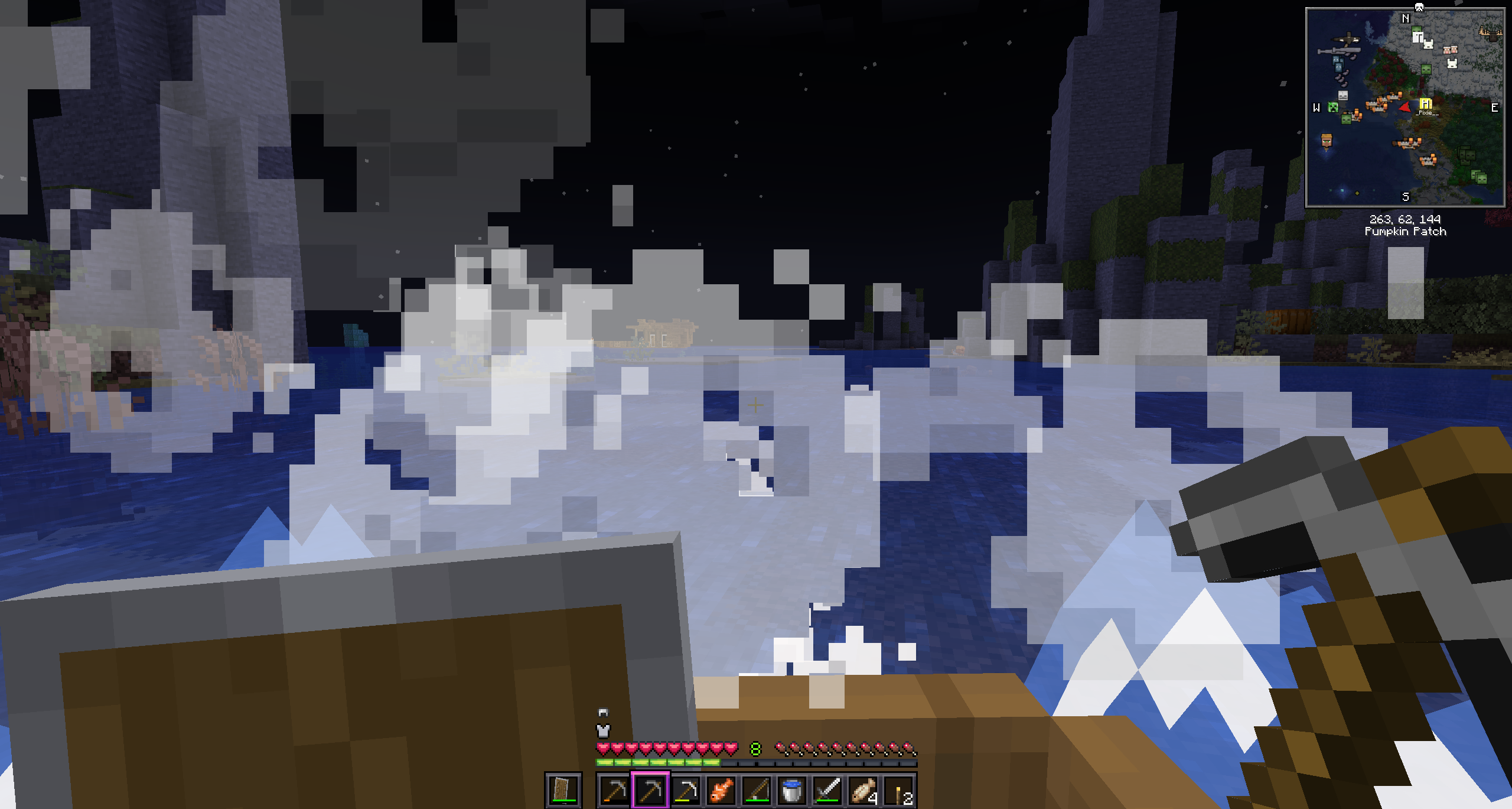 blissful orchid
unreal marten
Hey guys, i have been playing better mc on my own server with my girlfriend and ...
blissful orchid
unreal marten
Hey guys, i have been playing better mc on my own server with my girlfriend and ...
i got the same problem lol
unreal marten
blissful orchid
i got the same problem lol
are you also running a server of your own? or just playing single player?
tribal finch
Can someone help me?
 blissful orchid
stone mountain
I would suggest something like 5 GB for server and 7 GB for client
blissful orchid
stone mountain
I would suggest something like 5 GB for server and 7 GB for client
thanks! if you think thats enough i will try, im just a bit worried about my windows 11, i heard i need to leave it some ram so my pc doesnt explote lol
blissful orchid
unreal marten
are you also running a server of your own? or just playing single player?
we are playing using world sharing
sweet spade
tribal finch
Can someone help me?
read the front pop up on your screen
sweet spade
unreal marten
Hey guys, i have been playing better mc on my own server with my girlfriend and ...
wake mod config i believe
unreal marten
blissful orchid
we are playing using world sharing
aa oke, yeah we tried that but didnt like it. Because the personal joining the other world gets reset everytime. atleast for is
unreal marten
sweet spade
wake mod config i believe
Oh oke, will take a look thx!
blissful orchid
unreal marten
aa oke, yeah we tried that but didnt like it. Because the personal joining the o...
and what are you using now?
unreal marten
sweet spade
wake mod config i believe
do i edit that on the server or personal? or both?
unreal marten
blissful orchid
and what are you using now?
just running a server on my computer that we both join
stone mountain
delicate basalt
Do I use ipv4 or ipv6? Does it matter?
Shouldn't matter, but in case it does you can always use ipv4
sweet spade
unreal marten
do i edit that on the server or personal? or both?
not quite sure, id try seeing if it can be turned off in game config client side n if not try server
 red osprey
So I just hosted a server for my friends with separate server but when we try to go to nether the server always crashes.
Can anyone see why this happen?
wispy trailBOT
red osprey
So I just hosted a server for my friends with separate server but when we try to...
Uploaded crash-2026-01-07_02.29.32-server.txt from @red osprey to mclogs: https://mclo.gs/lDUHV1O
sweet spade
red osprey
So I just hosted a server for my friends with separate server but when we try to...
common issue being experienced - dev has been informed of it
delicate basalt
stone mountain
Shouldn't matter, but in case it does you can always use ipv4
It worked, is it private or public? I don’t want randoms to join
stone mountain
delicate basalt
It worked, is it private or public? I don’t want randoms to join
By default it's public - but you can look on Youtube on how to enable Whitelist - it's the same as in vanilla
red osprey
sweet spade
common issue being experienced - dev has been informed of it
well this makes the pack unplayable💀
sweet spade
red osprey
well this makes the pack unplayable💀
well i cant really do anyhting abt that
unreal marten
Hey hazel, im in the config of the wakes mod but im not sure what im looking for😅
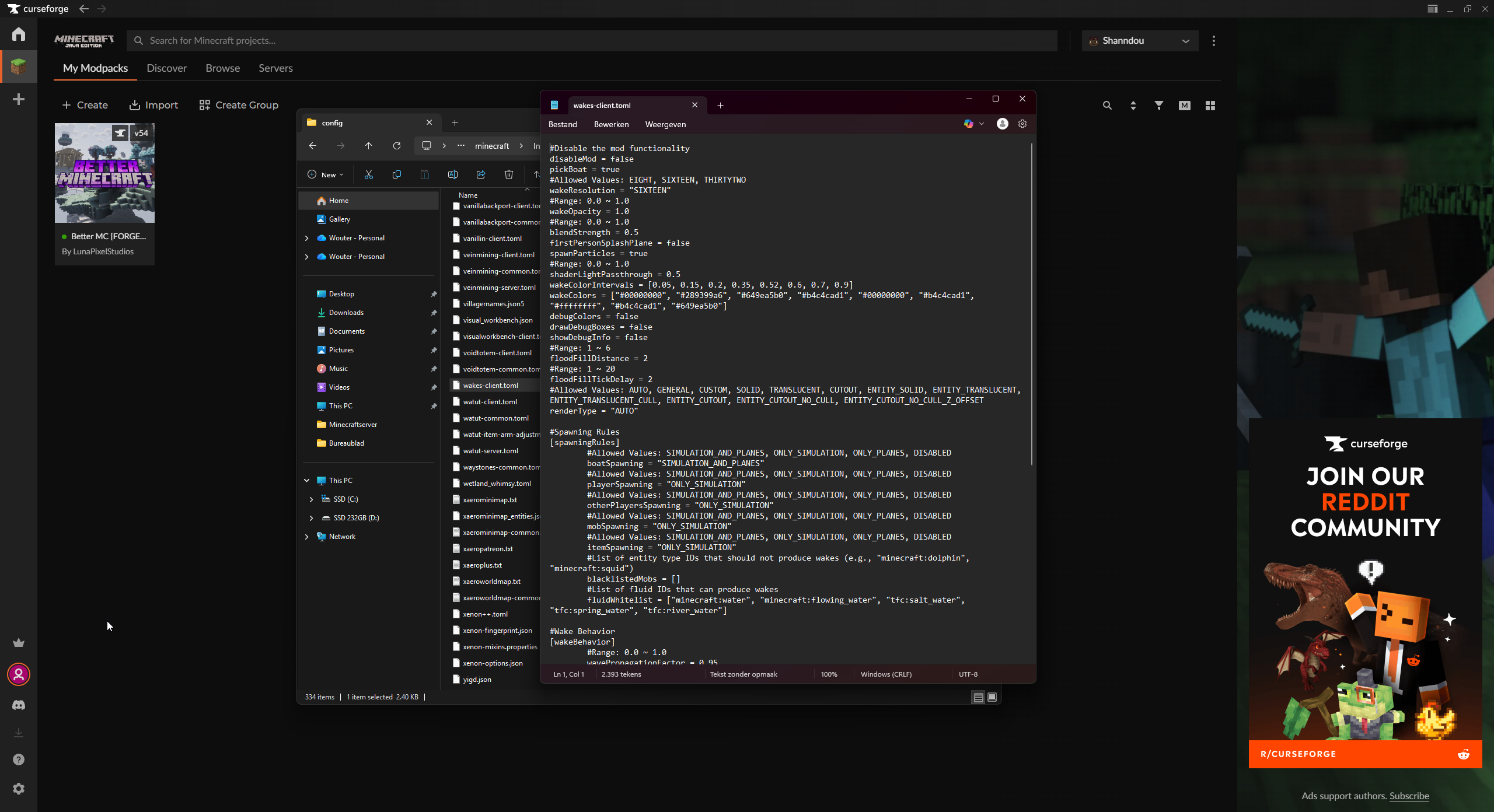
is it the spawn particles?
sweet spade
i think so yeah
sweet spade

 humble aspen
this is probably an extremely easy question but I genuinely know nothing about... any of this. I accidentally turned on my autoclicker and spammed a bunch of buttons, and now this... orange cube is on my screen. Ive pressed every button on my keyboard, to no avail. how do I... get it off (sorry if this is in the wrong channel idk where I am)

DONT LAUGH AT ME 
stone mountain
humble aspen
this is probably an extremely easy question but I genuinely know nothing about.....
That should be a disabled keybind by default - so your installation might not be done correctly
In other packs it's K
humble aspen
oh that worked! what even is it
stone mountain
humble aspen
oh that worked! what even is it
Lock rotation, great tool for building (e.g. placing stairs in the same rotation despite your position and direction)
humble aspen
ohhh thats cool. thanks alot lmao
tribal finch
tribal finch
Can someone help me?
From what I've seen, the Mod accessories or the fancy menu is cras crashing my game 😞
Better MC 5 - v46 crashed without a crash report. The logs have been uploaded to mclo.gs:
- 1.21.1 [NEOFORGE]
- What launcher did you run Minecraft with? (e.g. CurseForge, ATLauncher, MultiMC, ...)
- Have you changed the modpack in any way except mods?
- v46
- Have you ever gotten past the crash condition without crashing, or does the game always crash?
- What steps cause the crash?
latest.log | debug.log head / tail (~28k lines) | crash_assistant_app.log | modlist.txt | CurseForge: skip launcher
delicate basalt
@stone mountain it says I don’t have permission to use console commands. How do I get permission to my own server?You’re a real one for helping me btw
stone mountain
delicate basalt
<@234017587837665282> it says I don’t have permission to use console commands. H...
You need to type /op <username> in the server console
sweet spade
tribal finch
Better MC 5 - v46 crashed without a crash report. The logs have been uploaded to...
you removed the line that says any modlist changes, in your previous screenshot it shows you added 1 mod, what mod did you add
delicate basalt
stone mountain
You need to type `/op <username>` in the server console
Like in game or in the coding?
tribal finch
sweet spade
you removed the line that says any modlist changes, in your previous screenshot ...
oh , wait
Better MC 5 - v46 crashed without a crash report. The logs have been uploaded to mclo.gs:
- 1.21.1 [NEOFORGE]
- What launcher did you run Minecraft with? (e.g. CurseForge, ATLauncher, MultiMC, ...)
- Have you changed the modpack in any way except mods?
- v46
- Have you ever gotten past the crash condition without crashing, or does the game always crash?
- What steps cause the crash?
latest.log | debug.log head / tail (~28k lines) | crash_assistant_app.log | modlist.txt | CurseForge: skip launcher
Mod list changes on top of the modpack:
Added mods:
[2;32mEssential_1-3-10-4_neoforge_1-21-1.jar[0m
In the console (the one opened when you used start.bat)
sweet spade
tribal finch
Better MC 5 - v46 crashed without a crash report. The logs have been uploaded to...
we dont offer support when using essential
tribal finch
sweet spade
you removed the line that says any modlist changes, in your previous screenshot ...
But it was crashing even without it 🤔
I already deleted it.
And it keeps crashing.
sweet spade
then resend crash logs without essential
tribal finch
ok
Better MC 5 - v46 crashed without a crash report. The logs have been uploaded to mclo.gs:
- 1.21.1 [NEOFORGE]
- What launcher did you run Minecraft with? (e.g. CurseForge, ATLauncher, MultiMC, ...)
- Have you changed the modpack in any way except mods?
- v46
- Have you ever gotten past the crash condition without crashing, or does the game always crash?
- What steps cause the crash?
latest.log | debug.log head / tail (~27k lines) | crash_assistant_app.log | modlist.txt | CurseForge: skip launcher
Mod list changes on top of the modpack:
[2;34mMod list was not modified.[0m
of what i can tell by the logs, dimension issue many users are expereincing on v46 rn
you can either wait or downgrade back to v45 until the dev has a solution
tribal finch
OK thankyou
delicate basalt
@stone mountain I whitelisted my friends and made myself OP but they can’t join. I gave them my IP, was that the right move?
sweet spade
delicate basalt
<@234017587837665282> I whitelisted my friends and made myself OP but they can’t...
!port
versed mountainBOT
If you're having issues with your friends joining your server, your port for Minecraft may be closed.
-
Check with https://portchecker.co/ with your IP and Minecraft's port (drop down menu) to see if it's open.
-
If it's closed you will need to search online "How to open Minecraft port for server with (ISP Name)
Important note: a lot will allow port forwarding, but there may be some ISPs that will not allow any port forwarding. Please check online if this is the case for yours.
 old gyro
Hi i have a problem anyone have solution?
 agile cradle
old gyro
Hi i have a problem anyone have solution?
agile cradle
old gyro
Hi i have a problem anyone have solution?
This doesn't look like bmc 5
agile cradle
old gyro
it is but i used lunar client
!alternates we don't support lunar
versed mountainBOT
If this command was run in response to your question/issue, it is likely because switching away from the launcher you are currently using would fix your problem.
From our experience, the most stable launcher by far is ATLauncher, also known as ATL. Keep in mind that ATL is NOT related to TLauncher in any way, and is not a cracked launcher.
To install ATL, do the following:
1. Go to https://atlauncher.com/download. If you are on MacOS, then choose the "Jar" version under the "Other" tab.
2. Install and run the setup, then open the program.
3. Login to your Microsoft account that owns the Java Edition of Minecraft from the Accounts tab on the right. This process is 100% safe, as it goes directly through Microsoft. ATL doesn't see your account credentials.
4. Go to the Packs tab on the right, then click "Curseforge" on the left.
5. Search the modpack you wish to download.
6. Click "Install". Then, follow the on-screen directions.
7. Go to the Instances tab, and click "Play" on the modpack you downloaded. If you ever see an "Update" button on the instance, click it.
This video explains the process: https://youtu.be/xMYW1wMbmkM
To transfer your Curseforge world to ATL, simply right click the modpack on Curseforge, or click the 3 dots, then click "Open Folder". Copy the Saves folder, then click "Open Folder" on ATL and paste the Saves folder there. Do the same with the XaerosMinimap folder, or the Journeymap folder, to transfer over any waypoints you've created.
Because ATL downloads the exact same files as Curseforge does, your world will be the exact same and you will be able to join the same servers. ATL also works without an internet connection (after you've installed the modpack, of course), and does not have any bloat from Overwolf. You are free to uninstall both Overwolf and Curseforge with ATL installed.
old gyro
agile cradle
!alternates we don't support lunar
okay thanks
 woven sun
Anyone else havinhg troubles trees not loading in the Forest biome after v46 BMC5 update? Neoforge
or Trees literally not generating
Trees also not spawning in Old Growth Pine Taiga
Also not in Taiga and Zelkovia forest
sweet spade
informed the dev no solution found rn
woven sun
small quiver
yes all the default trees are gone
oh so its not just me
pearl trench
it's not just you, i posted some screenshots last night
pearl trench
pearl trench
decided to make a creative world to fly around and look at world gen. it looks l...
it isn't just default trees if the orchard and alliums are gone as well + a lot of flowers and short/tall grass
sleek kindle
i'm thinking of openening my BMC 5 server up to a handful of people who also wanna play, do their own thing but just enjoy playing on a server but im worried about griefing. Is the base claim system set-up in the modpack enough protection? is there more info I can find about the way claims work?
agile cradle
sleek kindle
i'm thinking of openening my BMC 5 server up to a handful of people who also wan...
Claim system is set so they have to own the area or be on the same team as the owner to access it
Should be some info on the mod page for OPAC, aka Open Parties and Claims
sleek kindle
agile cradle
Claim system is set so they have to own the area or be on the same team as the o...
access as in they cant physically access my "claim" or they just cant interact, break/place blocks, etc?
agile cradle
they can walk through it, but they can't interact, break, place, open/close anything, etc
sleek kindle
ahh oke that sounds perfect
woven sun
seems like MCASelector is about to go to work when a fix is there
pearl trench
is there gonna be a way to fix all the broken chunks i loaded in my world since the update screwed up terrain gen? i guess i do have a backup of my v45.5 world but i had gone and beaten a boss that was like 10.5k+ blocks from my base so it'd be a lot of travelling and such to make it back up
but if there's a way to fix the chunks without rolling back i'd prefer that
sweet spade
dont really know yet
 astral sable
Better MC 4 - v54 crashed. The logs have been uploaded to mclo.gs:
- 1.20.1 [FORGE]
- What launcher did you run Minecraft with? (e.g. CurseForge, ATLauncher, MultiMC, ...) SKlauncher
- Have you changed the modpack in any way except mods? No
- v54
- Have you ever gotten past the crash condition without crashing, or does the game always crash? Always crashes
- What steps cause the crash?
latest.log | debug.log head / tail (~33k lines) | hs_err_pid2160.log | crash_assistant_app.log | modlist.txt
# Problematic frame:
# C  [igxelpicd64.dll+0xc284c4]
Mod list changes on top of the modpack:
[2;34mMod list was not modified.[0m
There's nothing we can really do or suggest for the time being. Devs are notified of the issue, but no promises as of right now on any temp solutions or potential causes.
agile cradle
astral sable
Better MC 4 - v54 crashed. The logs have been uploaded to `mclo.gs`:
1. 1.20.1 [...
!drivers
versed mountainBOT
You (likely) need to update your graphics drivers in order to resolve the crash. Here's how to go about doing that!
1. Identify your graphics card
if you already know skip to the next step
- Open task manager
- Navigate to the "Performance" tab (on Windows 11 this is the button that looks like a heart pulse)
- Press the GPU 0 graph and read your GPU from the top right
Note:
In some cases you may see a GPU 0 and GPU 1. This means your CPU has its own GPU, as well as a dedicated one. You probably want GPU 1 (which is usually the better one), but you can ask staff to clarify if necessary.
2. Download your drivers from the manufacturers site
Depending on what you read before, you likely need drivers from either AMD, Intel, or NVIDIA
AMD: https://www.amd.com/en/support
Intel: https://www.intel.com/content/www/us/en/download-center/home.html
NVIDIA: https://www.nvidia.com/Download/index.aspx?lang=en-us
Note:
- For NVIDIA you want to select "Game Ready Driver (GRD)" (this is the default option) for the best performance. Once installing you'd probably prefer downloading GeForce Experience, which will notify you when there's an available drivers update.
- For Intel, you probably want to press "Get Started" under the "Automatically update your drivers and software", which will simplify the process and update everything automatically
- For AMD you probably want to just press "Download Windows Drivers", which will download something called AMD Adrenaline, which will update your drivers automatically.
3. Run the installation, restart your computer, and try playing MC again
- At this point, hopefully your Minecraft is running. If it still does not work, please post any new logs and staff will help assist you with finding the right solution.
pearl trench
i'm just confused on how so many bugs that are so prevalent are happening. is there a quality test/bug testing team? because if closing the game crashes, i feel like if there was testing done it'd pick that up
i hope that doesn't sound hostile, i'm just really attached to this world and am genuinely curious as to how that happens
sweet spade
pearl trench
i'm just confused on how so many bugs that are so prevalent are happening. is th...
theres a singular developer, and as far as i am aware she does test things, just sometimes problems show up that werent found before
lofty basin
lofty basin
My server died because it ran out of storage and now I’m getting complaints abou...
if anyone curious about my citresewn is incompatible with connector any error, I resolved and updated my original message incase anyone comes across it
small quiver
woven sun
oh so its not just me
yea ig we should wait till a new update is out
the terrain looks weird without the trees lmao
i saw someone talking about another bug where they couldn’t go through the nether portal
old gyro
what version of BMC should i use to start playing?
because i used v46 and there was no trees
is v45.5 safe?
small quiver
yea 45.5 should be fine
sleek kindle
is it possible to lower the % chance a resource drops instead of stone with the Boon of the earth enchantment?
is it via config or do I need to extract it from the mod and turn it into a datapack
i realise this is not a question for this discord, my bad
 fair beacon
Hello, I have created a server and installed the mod pack for the Forge version. When I log into the server, the following error appears. Does anyone know how to fix it?

 near egret
pearl trench
but if there's a way to fix the chunks without rolling back i'd prefer that
near egret
pearl trench
but if there's a way to fix the chunks without rolling back i'd prefer that
id doubt
near egret
fair beacon
Hello, I have created a server and installed the mod pack for the Forge version....
the server or the modpack was installed incorrectly
the server doesn't have any mods and is vanilla is my guess
near egret
onyx leaf
https://mclo.gs/8auDiBz (Crash report)
https://mclo.gs/LuEJD3R (Logs)
Version V...
try removing pack analytics and ser if it fixes the issue
onyx leaf
near egret
try removing pack analytics and ser if it fixes the issue
I imagine when i join the world though im gonna have the same issue as other people, with all the trees missing and or not being able to join
 viral flame
what's the best launcher for this modpack?
onyx leaf
curseforge
viral flame
ty
lofty basin
curseforge, modrinth for a lot of packs requires you to manually download stuff
onyx leaf
lofty basin
curseforge, modrinth for a lot of packs requires you to manually download stuff
and even if you do that, it may not function correctly
sweet spade
viral flame
what's the best launcher for this modpack?
atl or prism
sweet spade
lofty basin
curseforge, modrinth for a lot of packs requires you to manually download stuff
not modrinth for this pack
viral flame
sweet spade
atl or prism
tysm
lofty basin
i said curseforge?
onyx leaf
sweet spade
not modrinth for this pack
it does actually
sweet spade
onyx leaf
curseforge
cf is bottom of barrel launchers
onyx leaf
sweet spade
cf is bottom of barrel launchers
ic
sweet spade
onyx leaf
it does actually
!modrinth
versed mountainBOT
Currently LPS packs are not being updated on the Modrinth site, and as such are outdated. This is while the devs figure out a way to automate uploads of the pack properly.
Until the packs can be properly updated, we recommend using ATL (use !alternates in #bots for further info on the installation process ) or Prism launcher. You can download the CurseForge version of our packs on these launchers while still being able to make instances from Modrinth versions of other packs not owned by us.
Please note this does not apply to individual mod projects of developers at LPS.
sweet spade
that is why
not bc its bad or anything but bc its quite literally not being updated for this pack
onyx leaf
anyway @near egret it fixed the stopping server error crashm ill have a look in game n see if there are other issues
huh, interesting, this was the issue i was having, removing this version fixed it. wonder why it isnt actually fixed
 near egret
onyx leaf
huh, interesting, this was the issue i was having, removing this version fixed i...
near egret
onyx leaf
huh, interesting, this was the issue i was having, removing this version fixed i...
its another issue that also makes servers not shut down
onyx leaf
ahh
near egret
hopefully fixed soon so not everyone has to manually delete
onyx leaf
near egret
hopefully fixed soon so not everyone has to manually delete
hopefully that was the only issue mod wise, i doubt it since i wouldnt understand why a mod like that woudl effect worldgen
on that note, is there any like guide i can read to learn how to properly read crash logs / latest logs
sweet spade
no guide u just go ah yes i see
thats how i learned 💀
and thats why i had to get mimi to tell u what to do
onyx leaf
sweet spade
no guide u just go ah yes i see
im cooked because when i look at crash logs/logs unless it says what mods the issue ill be here for years
funny looking forest lmao
 sweet spade
one of the big ones ive learned is if it says biome source config not set or wtv it says its bc someone doesnt have betterx world type in a pack that contains betterend/nether
sweet spade
onyx leaf
funny looking forest lmao
the lorax in a alternate universe:
onyx leaf
onyx leaf
funny looking forest lmao
theres def more than just packanalytic issue wise im sure
ill just wait for chloe to fix it or something i guess
or well, let people know how to fix it if it doesntn eed a new version
 prisma panther
Hi everyone I wanted to use the shaders in the game because I like complementary shaders and I'm on a low setting and only getting about 50fps after optimizeing my settings and applying the settings i use for complementary but can increase that somehow or should I just turn them off
 lavish thicket
Can I attach Crash Logs here? Running a server through Cybrancee (Ew.) and entering the Aether in BMC5 latest, well, GENERATING the Aether for the first time crashes the game and rolls the server back a few minutes, but only player positions.
Better MC [NEOFORGE] 1.21.1 / MC Version unknown... won't tell me on the server all the sudden.
onyx leaf
lavish thicket
Better MC [NEOFORGE] 1.21.1 / MC Version unknown... won't tell me on the server ...
your mc version is 1.21.1 unless you mean the neoforge version which you can find from the server files or the client profikle
 pastel kayak
Having an issue with server crashes as well in the most recent version of the Better MC neoforge. Crashing when using waystones to go between overworld and nether
lavish thicket
Huh! Seems Dimensions are the theme of the day.
sweet spade
dimensions do seem to be having an issue on bmc5 v46, trying to find the root cause of the issue myself, but the dev herself has been informed to best of my abilities
lavish thicket
onyx leaf
your mc version is 1.21.1 unless you mean the neoforge version which you can fin...
Know which file the version would be under? Server panel updated and just says Latest which I know is probably no bueno.
lavish thicket
sweet spade
dimensions do seem to be having an issue on bmc5 v46, trying to find the root c...
I have a crash report in hand, do they accept those?
onyx leaf
lavish thicket
Know which file the version would be under? Server panel updated and just says L...
if you are using curseforge for your client profile you can see it here
 sweet spade
yes you can put your crash report in here
onyx leaf
sweet spade
dimensions do seem to be having an issue on bmc5 v46, trying to find the root c...
all dimensions seem to be having issues its interesting
lavish thicket
onyx leaf
ll be very curiosu to know whats causing it whenever someone figures it out
wispy trailBOT
lavish thicket
Uploaded crash-2026-01-06_22.18.58-server.txt from @lavish thicket to mclogs: https://mclo.gs/DDHwgyB
Uploaded crash-2025-12-31_17.30.38-server.txt from @pastel kayak to mclogs: https://mclo.gs/kerYb73
sweet spade
mimi's best guess is something conflicting that got updated mod wise so time to play the long game
lavish thicket
Some things I noticed... if I leave the Nether, go to Overworld, then try to first-load Aether, it crashes and puts me back in the Nether a few minutes back.
pastel kayak
I haven't tried going to the aether yet. But it does the same with the nether. It will restore you back like 10 - 30 seconds
prisma panther
Hi everyone I wanted to use the shaders in the game because I like complementary shaders and I'm on a low setting and only getting about 50fps after optimizeing my settings and applying the settings i use for complementary but can increase that somehow or should I just turn them off
lavish thicket
Also, my Dragon I whistled into the Twilight Forest duplicated itself in the Twilight Forest and Overworld, then when it died in the Nether in one hit to a pig with an axe (Because of course) it died in the Overworld then I whistled and it was fine.
lavish thicket
prisma panther
Hi everyone I wanted to use the shaders in the game because I like complementary...
That's up to you dude. We can't really boost Shader performance unless our PCs are running it well
pastel kayak
prisma panther
Hi everyone I wanted to use the shaders in the game because I like complementary...
If youre getting 50fps, and wish to get more. I would recommend turning off shaders
sweet spade
prisma panther
Hi everyone I wanted to use the shaders in the game because I like complementary...
!performance isthe only other thinv u can rlly do other than not using shaders
versed mountainBOT
 misty panther
Hi! I'm having an issue with starting better mc. I was having issues earlier where upon starting the game and loading the world I had really low frame rates, and checking in task manager showed me that Desktop Windows Manager was using something like 40-50% of my GPU. I have an Intel GPU so I went through their site to get the drivers updated, but after that I can no longer actually start better mc. I'm on better mc forge 1.20.1 v54 I believe, and every single time I tried starting the game it's stalled out and then crashed on the LunaPixel screen. I know y'all are working on a separate issue right now but I'm about to head out to an event so I wanted to put in this ask before I leave lol, it's very much not time sensitive. I've not changed the modpack at all and do not have this same issue when I load some of my own profiles. I can post the crash log if needed
lavish thicket
Have you tried downloading more RAM?
lavish thicket
misty panther
Hi! I'm having an issue with starting better mc. I was having issues earlier whe...
Have you fiddled with the Launch Config to allow more memory?
misty panther
lavish thicket
Have you fiddled with the Launch Config to allow more memory?
yeah, it's currently on the recommended by author setting
sweet spade
misty panther
Hi! I'm having an issue with starting better mc. I was having issues earlier whe...
crash log yes otherwise
!performance
versed mountainBOT
lavish thicket
Probably won't FIX it per se, but try increasing the allowed MB for the launch settings by a little, see if that works
prisma panther
pastel kayak
If youre getting 50fps, and wish to get more. I would recommend turning off shad...
Kinda what thought but I don't know everything there's to optimizing just basics
lavish thicket
If it doesn't, it won't break anything because launch config resets next start.
misty panther
sweet spade
crash log yes otherwise
Better MC 4 - v54 crashed. The logs have been uploaded to mclo.gs:
- 1.20.1 [FORGE]
- CurseForge
- Have you changed the modpack in any way except mods? No
- v54
- Have you ever gotten past the crash condition without crashing, or does the game always crash? Always crash
- What steps cause the crash? Starting from CurseForge
latest.log | hs_err_pid20196.log | CurseForge: launcher_log.txt | crash_assistant_app.log | modlist.txt
# Problematic frame:
# C  [igxelpicd64.dll+0xc284c4]
Mod list changes on top of the modpack:
[2;34mMod list was not modified.[0m
popping the mem allocation up to 12000 unfortunately didn't help. looked a bit closer during the launch and I think it's using max of about 20% of that at any given point in time.
gonna try increasing it later but unfortunately my time management is shot so I'll have to return to this in a couple of hours lmao
lavish thicket
Huh! Well, at least it was tried, huh? I used to run RLCraft with the settings doubled of recommended, was kind of the only way to do anything past 10,000 blocks
autumn talon
yo why is ather portal and twilight portal not working in BMC5 NEOFORGE???
misty panther
lavish thicket
Huh! Well, at least it was tried, huh? I used to run RLCraft with the settings d...
I'll try to double it next, hopefully it'll work, and if not fml 😅
lavish thicket
autumn talon
yo why is ather portal and twilight portal not working in BMC5 NEOFORGE???
Known issue, myself and others have screamed for help, they're looking into it
lavish thicket
misty panther
I'll try to double it next, hopefully it'll work, and if not fml 😅
Good luck!
autumn talon
lavish thicket
Known issue, myself and others have screamed for help, they're looking into it
oke tysm is the bugge after the new version??
lavish thicket
autumn talon
oke tysm is the bugge after the new version??
Can't confirm, but likely. I never tried Aether until I updated to v46. Was in Twilight in v45.5 though
 ripe mesa
Sup chat
autumn talon
lavish thicket
Can't confirm, but likely. I never tried Aether until I updated to v46. Was in T...
dose twilight work on v46
ripe mesa
Does anyone know is it possible to use bmc on server?
lavish thicket
autumn talon
dose twilight work on v46
Huh, haven't tried
ripe mesa
i kinda want to play with my fellas
autumn talon
lavish thicket
Huh, haven't tried
could u try pls if u can???
lavish thicket
Nether and Overworld work, haven't tried End. I cant ry, yeah.
sweet spade
misty panther
Better MC 4 - v54 crashed. The logs have been uploaded to `mclo.gs`:
1. 1.20.1 [...
still your drivers yeah
sweet spade
sweet spade
> Stage 1
> Consider checking if there is an updated driver (on vendor website, ...
lavish thicket
autumn talon
could u try pls if u can???
Let you know in a moment. I assume the Super Deep Dark Mega Scary Dimension is the same.
sweet spade
misty panther
gonna try increasing it later but unfortunately my time management is shot so I'...
increasing it wont help
misty panther
sweet spade
still your drivers yeah
joyous. Thanks, I'll look into that 🫡
autumn talon
lavish thicket
Let you know in a moment. I assume the Super Deep Dark Mega Scary Dimension is t...
hope not
misty panther
good to know, many thanks 🙏
lavish thicket
autumn talon
hope not
Twilight works for me
Can't currently test Super Mega Dark Dimension, as I ain't there yet
autumn talon
lavish thicket
Twilight works for me
oke i guess the block rendering is the problem
lavish thicket
misty panther
good to know, many thanks 🙏
Sorry that that won't work. Good luck!
misty panther
thank you :D
autumn talon
lavish thicket
Twilight works for me
dose luna world sharing work for u??
lavish thicket
autumn talon
dose luna world sharing work for u??
Uhhhhhhhh the what now?
autumn talon
lavish thicket
Uhhhhhhhh the what now?
luna world sharing that is built in with the modpoack
red osprey
lavish thicket
Nether and Overworld work, haven't tried End. I cant ry, yeah.
my nether does not work it immediately crash when I go in😭
lavish thicket
Huh! It seems to be just a pattern that we can't identify ewww
autumn talon
red osprey
my nether does not work it immediately crash when I go in😭
id it in BMC5
red osprey
autumn talon
id it in BMC5
sorry wdym?
autumn talon
red osprey
sorry wdym?
is it in BMC5 u couldn't join neather??
red osprey
autumn talon
is it in BMC5 u couldn't join neather??
yes
 weak rose
when will final castle release?
autumn talon
red osprey
yes
is it v46??
red osprey
autumn talon
is it v46??
yes
autumn talon
red osprey
yes
it worked for me today'
red osprey
autumn talon
it worked for me today'
I can't go into the nether, it happened on both the server and singleplayer, so this is frustrating
sweet spade
weak rose
when will final castle release?
we arent the devs for twilight forest
have no control over it
weak rose
where do you get the answer?
onyx leaf
their discord
sweet spade
the discord for twilight forest
they will not give you a definitive when there though
red osprey
onyx leaf
just dont bother using it fornow
Well I guess I will just stop going to nether until they fix it
onyx leaf
im surprised your instance is even working in the overworld because a lot of peoples arnt
red osprey
well it do worked and I even make it to find a good spot for me and my friends to start city developing that's why I don't wanna downgrade to 45.5 for now
autumn talon
red osprey
I can't go into the nether, it happened on both the server and singleplayer, so ...
i see what u mean it crashed for me too, demenions are not working
autumn talon
Better MC 5 - v46 crashed without a crash report. The logs have been uploaded to mclo.gs:
- 1.21.1 [NEOFORGE]
- What launcher did you run Minecraft with? (e.g. CurseForge, ATLauncher, MultiMC, ...)
- Have you changed the modpack in any way except mods?
- v46
- Have you ever gotten past the crash condition without crashing, or does the game always crash?
- What steps cause the crash?
latest.log | debug.log head / tail (~31k lines) | atlauncher.log | crash_assistant_app.log | win_event1767742281156.txt | modlist.txt
Found [2;34m2[0m log analysis results:
[2;34mWasClosedByWindows[0m in: win_event1767742281156.txt
[2;34mModernFixWatchDog[0m in: latest.log
Mod list changes on top of the modpack:
Added mods:
[2;32mEssential_1-3-10-4_neoforge_1-21-1.jar[0m
Removed mods:
[2;31mluna_minecraft-neoforge-5.3.1.jar[0m
What i did and why i have essential Mod?
- I have essential mod because Luna world sharing didn't work, every time m friend joined it crashed so i downloaded essential and it worked. Today we tried to enter other demenisons like nether, ather and twilight and it crashed for me and my friend, need help plssss?
@sweet spade i pinged u cuz only u i know
 oblique pine
its not letting me install bmc5
it gets stuck on step 51 of 71 which is smt like downloading neoforge
ill show a screenshot
sweet spade
autumn talon
Better MC 5 - v46 crashed without a crash report. The logs have been uploaded to...
a. pinging me does nothing b. known issue cannot do anything abt it dev was informed c. we dont offer support when using essential


 autumn talon
sweet spade
a. pinging me does nothing b. known issue cannot do anything abt it dev was info...
autumn talon
sweet spade
a. pinging me does nothing b. known issue cannot do anything abt it dev was info...
oke so devs know this and they are working on it???
oblique pine
and then it just stops downloading
sweet spade
autumn talon
oke so devs know this and they are working on it???
there is a singular bmc dev, i pinged her in staff channels, i forwarded multiple cases of the same issue, she has not responded so i am unaware if she is working on it
i did all i could and informed her
autumn talon
sweet spade
there is a singular bmc dev, i pinged her in staff channels, i forwarded multipl...
oke tysm understandble
autumn talon
sweet spade
there is a singular bmc dev, i pinged her in staff channels, i forwarded multipl...
i forgot to mention now i can't even play ther mod pack it crashes every time i go in
sweet spade
this do be happening to a lot of people yes
autumn talon
sweet spade
this do be happening to a lot of people yes
oke tysm
 ocean wing
Hey everyone I’m wondering which automatic farms work currently in better mc?
I’m currently trying to make an iron farm and a mob farms as well as an xp farm
 mossy dragon
Better MC 5 - v46 crashed without a crash report. The logs have been uploaded to mclo.gs:
- 1.21.1 [NEOFORGE]
- CurseForge
- Have you changed the modpack in any way except mods? Not sure
- v46
- Have you ever gotten past the crash condition without crashing, or does the game always crash? Just first time installed it.
- What steps cause the crash?
latest.log | debug.log | win_event1767746008509.txt | CurseForge: launcher_log.txt | crash_assistant_app.log | modlist.txt
Mod list changes on top of the modpack:
[2;34mMod list was not modified.[0m
probably the same reason as most other people that are crashing
mossy dragon
What reason?
 solid basin
Hi
viral garden
mossy dragon
What reason?
im looking into it, nobody knows why yet
viral garden
oblique pine
!alternates
versed mountainBOT
If this command was run in response to your question/issue, it is likely because switching away from the launcher you are currently using would fix your problem.
From our experience, the most stable launcher by far is ATLauncher, also known as ATL. Keep in mind that ATL is NOT related to TLauncher in any way, and is not a cracked launcher.
To install ATL, do the following:
1. Go to https://atlauncher.com/download. If you are on MacOS, then choose the "Jar" version under the "Other" tab.
2. Install and run the setup, then open the program.
3. Login to your Microsoft account that owns the Java Edition of Minecraft from the Accounts tab on the right. This process is 100% safe, as it goes directly through Microsoft. ATL doesn't see your account credentials.
4. Go to the Packs tab on the right, then click "Curseforge" on the left.
5. Search the modpack you wish to download.
6. Click "Install". Then, follow the on-screen directions.
7. Go to the Instances tab, and click "Play" on the modpack you downloaded. If you ever see an "Update" button on the instance, click it.
This video explains the process: https://youtu.be/xMYW1wMbmkM
To transfer your Curseforge world to ATL, simply right click the modpack on Curseforge, or click the 3 dots, then click "Open Folder". Copy the Saves folder, then click "Open Folder" on ATL and paste the Saves folder there. Do the same with the XaerosMinimap folder, or the Journeymap folder, to transfer over any waypoints you've created.
Because ATL downloads the exact same files as Curseforge does, your world will be the exact same and you will be able to join the same servers. ATL also works without an internet connection (after you've installed the modpack, of course), and does not have any bloat from Overwolf. You are free to uninstall both Overwolf and Curseforge with ATL installed.
viral garden
trail marten
Hey guys, does anyone know how to remove these markings around the blocks? It on...
those arent "markings" thats just what happens when you dont have mipmapping enabled afaik
viral garden
midnight ingot
How to fix the "Unable to break block" error?
be more specific please
viral garden
molten raptor
Hey all, i am trying to migrate my bmc4 server from one truenas server to anothe...
you need to send logs, vaguely describing the error doesnt help
and absolutely do not remove mods randomly to try and fix the issue
viral garden
worldly wigeon
Please updated bmc4 forge🥺🥺🥺
why do you want it updated so badly? what even needs changing lol
viral garden
 rancid dove
be more specific please
rancid dove
Are u kidding me "trees not generating" is right there
viral garden
gentle basin
still being able to remove strictly biome additions and new mobs like villagers?
that is not going to affect performance
viral garden
grand gate
would it be fine if i replace the dragon mounts mod with ice and fire or would i...
you would need to remove the dragon mounts patches mod if present
tranquil bolt
Guys, has anyone figured out how to fix the Nether error? When entering the Nether, the game/server crashes.
viral garden
hazy geyser
Better MC 4 - v54 crashed. The logs have been uploaded to `mclo.gs`:
1. 1.20.1 [...
!alternates
versed mountainBOT
If this command was run in response to your question/issue, it is likely because switching away from the launcher you are currently using would fix your problem.
From our experience, the most stable launcher by far is ATLauncher, also known as ATL. Keep in mind that ATL is NOT related to TLauncher in any way, and is not a cracked launcher.
To install ATL, do the following:
1. Go to https://atlauncher.com/download. If you are on MacOS, then choose the "Jar" version under the "Other" tab.
2. Install and run the setup, then open the program.
3. Login to your Microsoft account that owns the Java Edition of Minecraft from the Accounts tab on the right. This process is 100% safe, as it goes directly through Microsoft. ATL doesn't see your account credentials.
4. Go to the Packs tab on the right, then click "Curseforge" on the left.
5. Search the modpack you wish to download.
6. Click "Install". Then, follow the on-screen directions.
7. Go to the Instances tab, and click "Play" on the modpack you downloaded. If you ever see an "Update" button on the instance, click it.
This video explains the process: https://youtu.be/xMYW1wMbmkM
To transfer your Curseforge world to ATL, simply right click the modpack on Curseforge, or click the 3 dots, then click "Open Folder". Copy the Saves folder, then click "Open Folder" on ATL and paste the Saves folder there. Do the same with the XaerosMinimap folder, or the Journeymap folder, to transfer over any waypoints you've created.
Because ATL downloads the exact same files as Curseforge does, your world will be the exact same and you will be able to join the same servers. ATL also works without an internet connection (after you've installed the modpack, of course), and does not have any bloat from Overwolf. You are free to uninstall both Overwolf and Curseforge with ATL installed.
viral garden
vapid turtle
hey i got a error problem when im trying to share my world from single player, m...
!server selfhost instead
versed mountainBOT
Free Method
To host a server on your own computer, read the selfhosting guide.
This guide goes over how to install, create, and launch a free Minecraft server on all operating systems (MacOS, Linux and Windows). The guide also guides you through installing Java and optimizing your server for better performance.
If you are installing one of our older modpacks, ignore the "README" file that is included in the serverpack files, as they have outdated information.
Paid Method
We suggest renting a server from Bisect Hosting:
Approx. $10 - $25 a month depending on what plan you choose. You can also get 25% off with Code LunaPixel.
Go here and order a plan which fits you. We suggest 1GB per player but nothing lower than 4GB as the server needs at least 3GB to run.
Go to #server-hosting for more Info!
The following advice works for both the Free and Paid methods:
Transferring Your World
If you're playing Singleplayer and want to transfer your world to your server, simply go to your modpack files and navigate to the saves folder. Inside of this folder, you will see your world saves. Rename your desired world save to world. You can then transfer this folder to your server files. If your world was hosted via world sharing, this process has to be done by the person who would click "Share World".
Fixing Lag
To resolve lag issues, simply run the !tps command in #bots and follow the directions provided.
viral garden
opal dew
hello, I watched the self hosting video for Better Mc because it wasn't letting ...
!server selfhost instead
versed mountainBOT
Free Method
To host a server on your own computer, read the selfhosting guide.
This guide goes over how to install, create, and launch a free Minecraft server on all operating systems (MacOS, Linux and Windows). The guide also guides you through installing Java and optimizing your server for better performance.
If you are installing one of our older modpacks, ignore the "README" file that is included in the serverpack files, as they have outdated information.
Paid Method
We suggest renting a server from Bisect Hosting:
Approx. $10 - $25 a month depending on what plan you choose. You can also get 25% off with Code LunaPixel.
Go here and order a plan which fits you. We suggest 1GB per player but nothing lower than 4GB as the server needs at least 3GB to run.
Go to #server-hosting for more Info!
The following advice works for both the Free and Paid methods:
Transferring Your World
If you're playing Singleplayer and want to transfer your world to your server, simply go to your modpack files and navigate to the saves folder. Inside of this folder, you will see your world saves. Rename your desired world save to world. You can then transfer this folder to your server files. If your world was hosted via world sharing, this process has to be done by the person who would click "Share World".
Fixing Lag
To resolve lag issues, simply run the !tps command in #bots and follow the directions provided.
viral garden
hazy geyser
Better MC 4 - v54 crashed. The logs have been uploaded to `mclo.gs`:
1. 1.20.1 [...
please answer the questions in your message
viral garden
weak rivet
Hello people, good evening, how fix this? <:HyCatSad:1088925524270788690>
!alternates
versed mountainBOT
If this command was run in response to your question/issue, it is likely because switching away from the launcher you are currently using would fix your problem.
From our experience, the most stable launcher by far is ATLauncher, also known as ATL. Keep in mind that ATL is NOT related to TLauncher in any way, and is not a cracked launcher.
To install ATL, do the following:
1. Go to https://atlauncher.com/download. If you are on MacOS, then choose the "Jar" version under the "Other" tab.
2. Install and run the setup, then open the program.
3. Login to your Microsoft account that owns the Java Edition of Minecraft from the Accounts tab on the right. This process is 100% safe, as it goes directly through Microsoft. ATL doesn't see your account credentials.
4. Go to the Packs tab on the right, then click "Curseforge" on the left.
5. Search the modpack you wish to download.
6. Click "Install". Then, follow the on-screen directions.
7. Go to the Instances tab, and click "Play" on the modpack you downloaded. If you ever see an "Update" button on the instance, click it.
This video explains the process: https://youtu.be/xMYW1wMbmkM
To transfer your Curseforge world to ATL, simply right click the modpack on Curseforge, or click the 3 dots, then click "Open Folder". Copy the Saves folder, then click "Open Folder" on ATL and paste the Saves folder there. Do the same with the XaerosMinimap folder, or the Journeymap folder, to transfer over any waypoints you've created.
Because ATL downloads the exact same files as Curseforge does, your world will be the exact same and you will be able to join the same servers. ATL also works without an internet connection (after you've installed the modpack, of course), and does not have any bloat from Overwolf. You are free to uninstall both Overwolf and Curseforge with ATL installed.
viral garden
onyx leaf
Why does it say 50 mods updated, but only 11 of them needed updating
? there were 50 mods updated between the version before and the version after
thats just a fact lol
that is what happened in the update
then in the latest version, there are 11 mods not updated as updating them causes crashes
why would i be talking about that in the changelog
viral garden
onyx leaf
im just confused as to why it says 50 mods updated but only 12 need updating in ...
what are you talking about 😭
meager wadi
any idea why the portals broke in bmc 5 neoforge v46
viral garden
meager wadi
any idea why the portals broke in bmc 5 neoforge v46
can you try deleting the version of feature recycler in the modpack and replace it with this https://www.curseforge.com/minecraft/mc-mods/feature-recycler/files/5829420
meager wadi
sure i'll check it rn
viral garden
onyx leaf
just curious thats all since the issue seems immediate upon closing & joining a ...
i was able to join and quit the server completely fine during testing
viral garden
plush prism
Better MC 4 - v54 crashed without a crash report. The logs have been uploaded to...
Please follow the performance guide to improve your game performance, as this is likely to resolve your issue. If your lag is unresolved, send a screenshot with F3 open ingame.
viral garden
autumn talon
Dose keep inventory disable achievements/advancements on BMC5 NEOFORGE??
no
viral garden
worldly wigeon
Please read the full contents of the #get-support channel for us to provide assistance.
viral garden
stone widget
how can i ensure proper installation? I've used the same modpack i installed on ...
!alternates
versed mountainBOT
If this command was run in response to your question/issue, it is likely because switching away from the launcher you are currently using would fix your problem.
From our experience, the most stable launcher by far is ATLauncher, also known as ATL. Keep in mind that ATL is NOT related to TLauncher in any way, and is not a cracked launcher.
To install ATL, do the following:
1. Go to https://atlauncher.com/download. If you are on MacOS, then choose the "Jar" version under the "Other" tab.
2. Install and run the setup, then open the program.
3. Login to your Microsoft account that owns the Java Edition of Minecraft from the Accounts tab on the right. This process is 100% safe, as it goes directly through Microsoft. ATL doesn't see your account credentials.
4. Go to the Packs tab on the right, then click "Curseforge" on the left.
5. Search the modpack you wish to download.
6. Click "Install". Then, follow the on-screen directions.
7. Go to the Instances tab, and click "Play" on the modpack you downloaded. If you ever see an "Update" button on the instance, click it.
This video explains the process: https://youtu.be/xMYW1wMbmkM
To transfer your Curseforge world to ATL, simply right click the modpack on Curseforge, or click the 3 dots, then click "Open Folder". Copy the Saves folder, then click "Open Folder" on ATL and paste the Saves folder there. Do the same with the XaerosMinimap folder, or the Journeymap folder, to transfer over any waypoints you've created.
Because ATL downloads the exact same files as Curseforge does, your world will be the exact same and you will be able to join the same servers. ATL also works without an internet connection (after you've installed the modpack, of course), and does not have any bloat from Overwolf. You are free to uninstall both Overwolf and Curseforge with ATL installed.
viral garden
!server
versed mountainBOT
Free Method
To host a server on your own computer, read the selfhosting guide.
This guide goes over how to install, create, and launch a free Minecraft server on all operating systems (MacOS, Linux and Windows). The guide also guides you through installing Java and optimizing your server for better performance.
If you are installing one of our older modpacks, ignore the "README" file that is included in the serverpack files, as they have outdated information.
Paid Method
We suggest renting a server from Bisect Hosting:
Approx. $10 - $25 a month depending on what plan you choose. You can also get 25% off with Code LunaPixel.
Go here and order a plan which fits you. We suggest 1GB per player but nothing lower than 4GB as the server needs at least 3GB to run.
Go to #server-hosting for more Info!
The following advice works for both the Free and Paid methods:
Transferring Your World
If you're playing Singleplayer and want to transfer your world to your server, simply go to your modpack files and navigate to the saves folder. Inside of this folder, you will see your world saves. Rename your desired world save to world. You can then transfer this folder to your server files. If your world was hosted via world sharing, this process has to be done by the person who would click "Share World".
Fixing Lag
To resolve lag issues, simply run the !tps command in #bots and follow the directions provided.
viral garden
follow both directions fully
onyx leaf
viral garden
what are you talking about 😭
I meant physical mods to be updated in the launcher then I realised it’s probably not as simple as that
viral garden
yes there were 50 mods physically updated in the launcher between the 2nd newest version and the newest
onyx leaf
Yeah but I didn’t see 50 when I copied the old mod
viral garden
there are 50
onyx leaf
I’m not doubting that I don’t expect you’d lie lol I just didn’t get why it didn’t show 50
viral garden
the updated mods number is automatically generated so its not even like i could've messed up lol
viral garden
pearl trench
this is fixed with the fix im about to send
im pinging everyone who reported it to test out a fix in a second
thank you for reporting
onyx leaf
What was the issue I’m curious
tranquil bolt
Guys, has anyone figured out how to fix the Nether error? When entering the Nether, the game/server crashes.
viral garden
unreal marten
Hey guys, i have been playing better mc on my own server with my girlfriend and ...
disable boat particles in the wake mod config
viral garden
blissful orchid
i got the same problem lol
disable water particles in the wake mod config
vapid turtle
viral garden
!server selfhost instead
Ok thank you
viral garden
pearl trench
i'm just confused on how so many bugs that are so prevalent are happening. is th...
i am unable to reproduce the issue being described here and only you have reported it
autumn talon
viral garden
no
when will u fix the bug that is destroying BMC5, entering new demension??
onyx leaf
autumn talon
when will u fix the bug that is destroying BMC5, entering new demension??
Probably with this update
vapid turtle
Btw if anyone’s having trouble with waypoints disappearing the problem is fixed by going into the server properties, and setting the ip of your server where ip-address is
onyx leaf
Since a bunch of people reported it
autumn talon
onyx leaf
Probably with this update
which update??
onyx leaf
The one they are gonna send for us to test
I fixed (one) of the issues I wa shaving by removing a mod suggested
meager wadi
viral garden
can you try deleting the version of feature recycler in the modpack and replace ...
im in the nether it worked
onyx leaf
I forgot what it was called tho
viral garden
rancid dove
Are u kidding me "trees not generating" is right there
i was replying to someone begging for a bmc4 update, a modpack which is in a 100% working state
onyx leaf
Pack analytic I think fixed my server crashing
autumn talon
onyx leaf
Pack analytic I think fixed my server crashing
do u mean the BMC5
rancid dove
Sorry
autumn talon
onyx leaf
A different issue I was having
oke
onyx leaf
But I imagine it would also effect you too maybe
autumn talon
onyx leaf
A different issue I was having
do u know when she will update or around how long it will take??
onyx leaf
My installation was fresh with no modifications
autumn talon
onyx leaf
Nope
oke ty
viral garden
@main dock @ancient patrol @worthy lodge @west hollow @tribal cobalt @pearl trench @onyx leaf @mighty pebble @delicate saddle @tranquil bolt @indigo barn @humble heart @dry quiver @small quiver @fierce hawk @abstract shale @keen scaffold @light hawk @hazy lion @jaunty patio @tribal finch @wintry bison @red osprey @pastel kayak @lavish thicket @autumn talon @mossy dragon
Please download this file https://www.curseforge.com/minecraft/mc-mods/feature-recycler/files/5829420 and put it in your mods folder. Make sure to delete the Feature-Recycler-neoforge-2.0.2.jar file in the mods folder
edit: v46.5 of the modpack has been released with this fix
let me know if it fixes the issues all of you reported
autumn talon
viral garden
let me know if it fixes the issues all of you reported
oke ty
tribal cobalt
Thank you. Is that why it was crashing? I rolled back to 45.5
viral garden
The mod was updated after the main round of testing was complete as it was a small mod update on a small mod which shouldn't have impacted anything signficiant, then the developer deleted the problematic mod version completely so I had no way of knowing what was causing the issue
viral garden
tribal cobalt
Thank you. Is that why it was crashing? I rolled back to 45.5
yes, please test on v46 with the listed fix
meager wadi
viral garden
<@967948451058962462> <@145570080204259329> <@435386696918499348> <@135770155326...
i can enter the dimensions again bcs of this btw
tribal cobalt
Ill give it a go. Thank you @viral garden
viral garden
for servers being unable to close its likely just the Pack Analytics mod which is safe to delete
the feature recycler mod downgrade should also fix the world gen issue
main dock
viral garden
<@967948451058962462> <@145570080204259329> <@435386696918499348> <@135770155326...
Thank you very much. Let me try to do it now and update u👍🏻
autumn talon
thx @viral garden i hope this works ❤️
onyx leaf
Indeed hope it does
tranquil bolt
hi
tranquil bolt
viral garden
<@967948451058962462> <@145570080204259329> <@435386696918499348> <@135770155326...
don't work, I'm using a server and the server is crashing.
viral garden
please send logs
tranquil bolt
viral garden
and when is it crashing
that is also not a full log
i need the actual latest.log file
and did you change the mod version both client and serverside?
wispy trailBOT
tranquil bolt
Uploaded latest_1_1.log from @tranquil bolt to mclogs: https://mclo.gs/02YPQnK
tranquil bolt
tranquil bolt
yes
viral garden
please send the crash report file too
viral garden
viral garden
and when is it crashing
.
viral garden
tranquil bolt
this log shows your version of feature recycler is still 2.0.2
you need to be on 2.0.0
tranquil bolt
wispy trailBOT
tranquil bolt
Uploaded crash-2026-01-07_01.39.47-server.txt from @tranquil bolt to mclogs: https://mclo.gs/NKVt2Pr
tranquil bolt
viral garden
this log shows your version of feature recycler is still 2.0.2
Actually no, I downloaded exactly what you sent.
 viral garden
yes
and in your log
your server is loading 2.0.2
which means you still have 2.0.2 in your mods folder
main dock
@viral garden it works, thank u.
tranquil bolt
Work here, ty
tribal cobalt
looks like mine's still crashing @viral garden latest.log: https://mclo.gs/JctaKnp
viral garden
in what circumstance did it crash
tribal cobalt
it crashes on close, my buddy's won't even load a world. I can try to get it from him but he just went offline
viral garden
what do you mean it crashes on close exactly
tribal cobalt
like, mine crashes on close
onyx leaf
tribal cobalt
it crashes on close, my buddy's won't even load a world. I can try to get it fro...
Remove packet analytics
tribal cobalt
like i hit the Windows X in the top right and my computer freezes and then 10 seconds later crash assistant comes up. 45.5 works fine
onyx leaf
Try that
tribal cobalt
packet analytics?
tribal cobalt
BMC5 v46
viral garden
tribal cobalt
like i hit the Windows X in the top right and my computer freezes and then 10 se...
!ca
versed mountainBOT
tribal finch
viral garden
<@967948451058962462> <@145570080204259329> <@435386696918499348> <@135770155326...
It's working perfectly, thank you very much.
 trim herald
Hey everyone, which is better for Minecraft - Forge or NeoForge?
onyx leaf
trim herald
Hey everyone, which is better for Minecraft - Forge or NeoForge?
For 1.20.1 forge for 1.21.1 neoforge
onyx leaf
tribal cobalt
BMC5 v46
Delete the mod I said
See if that works
Another guy had a similar issue but they were the only one
They crashing upon leaving
viral garden
the mod is called pack analytics
tribal finch
Kkkkkk
tribal cobalt
here's the whole thing! Better MC 5 - v46 crashed without a crash report. The logs have been uploaded to mclo.gs:
- 1.21.1 [NEOFORGE]
- What launcher did you run Minecraft with? (e.g. CurseForge, ATLauncher, MultiMC, ...) curseforge and at
- Have you changed the modpack in any way except mods?
- v46
- Have you ever gotten past the crash condition without crashing, or does the game always crash?
- What steps cause the crash?
latest.log | debug.log head / tail (~27k lines) | win_event1767751252322.txt | crash_assistant_app.log | modlist.txt | CurseForge: skip launcher | i9-14900k might be the reason for the crash
Mod list changes on top of the modpack:
Updated mods:
[2;34mfeaturerecycler[0m ([2;31m2.0.2[0m > [2;32m2.0.0[0m)
my guess would be due to the faulty I9 CPU issue
none of the logs even mention your game stopping besides you clicking the X on windows
i also can not recreate the issue
pastel kayak
So apparently if you try to place animals on people's heads, it kicks everyone from the server. Idk if it's mod pack related, or if it's my server host
red osprey
viral garden
<@967948451058962462> <@145570080204259329> <@435386696918499348> <@135770155326...
fixed. Thank you so much for the quick fix
viral garden
pastel kayak
So apparently if you try to place animals on people's heads, it kicks everyone f...
Please read the full contents of the #get-support channel for us to provide assistance.
pastel kayak
1.21.1
CurseForge
Only updated the mod pack to the recent version
BMC5 v46
People are all being kicked from the server every time
picking up animals to place them on others head