#better-mc-forge
1 messages · Page 475 of 1
 bold ridge
 sweet spade
bold ridge
If I have added mods to the modpack, how can I get help?
sweet spade
bold ridge
If I have added mods to the modpack, how can I get help?
!modified
 versed mountainBOT
You are using a modified version of the modpack!
Adding, removing, or updating large amounts of mods without testing any of your changes is **not **a good idea, and it is very unlikely that anyone will want to debug your issue for you. Please test the changes you make in small groups, as opposed to doing all of the changes at once.
If you want further support for your issue, someone may respond to you in the channel for the modpack you based your changes off, but please only post once. You may also have better luck in #1061339968691257466.
bold ridge
So I have to manage on my own, if I understand correctly?
 slate steppe
So... this is once again a claim issue. This time unclaiming helped other than with the sheep yesterday. Can someone please tell me what exact setting causes this? And maybe also which one prevents sheep from turning grass to dirt?
 obsidian arrow
It worked flawlessly thank you so much :((( <33
 drowsy locust
Hello we installed bmc4 forge v51 on a friend's server and it's going great. We set base in a villager's hut after it died. However randomly the weather goes all stormy, thunder strikes everywhere (burnt our house down) and hordes of pillagers and ravagers spawn from a spot near the base. I thought this was like cool at first but it's becoming quite excessive and annoying. Sometimes warped moscos spawn too somehow. I wanted to ask if anyone knows how this can be overcome in-game, if we're doing something wrong, or if this is like a bug or an issue that we need to look into to fix, or if this is intended and we should look into removing the mod that does this?
These waves of enemies keep killing all our pets and animals and it makes things super annoying, which makes my friends want to quit : (
 viral garden
glad to hear :D
 quick pewter
I'm having the same issue
sweet spade
honestly luna isnt really built for that many people anyways id recommend self hosting a dedicated server
!server
versed mountainBOT
Free Method
To host a server on your own computer, read the selfhosting guide.
This guide goes over how to install, create, and launch a free Minecraft server on all operating systems (MacOS, Linux and Windows). The guide also guides you through installing Java and optimizing your server for better performance.
If you are installing one of our older modpacks, ignore the "README" file that is included in the serverpack files, as they have outdated information.
Paid Method
We suggest renting a server from Bisect Hosting:
Approx. $10 - $25 a month depending on what plan you choose. You can also get 25% off with Code LunaPixel.
Go here and order a plan which fits you. We suggest 1GB per player but nothing lower than 4GB as the server needs at least 3GB to run.
Go to #server-hosting for more Info!
The following advice works for both the Free and Paid methods:
Transferring Your World
If you're playing Singleplayer and want to transfer your world to your server, simply go to your modpack files and navigate to the saves folder. Inside of this folder, you will see your world saves. Rename your desired world save to world. You can then transfer this folder to your server files. If your world was hosted via world sharing, this process has to be done by the person who would click "Share World".
Fixing Lag
To resolve lag issues, simply run the !tps command in #bots and follow the directions provided.
sweet spade
lunas having issues thats being looked into yeah but as i said self hosting a dedicated server as an alternate free method is best route
no idea when itll be resolved but luna isnt generally built for larger groups either way
i cant promise itll work as well as it did before all the time in a larger group even with if its current issues are fixed
self hosting a dedicated server also has a lot less limitations than world sharing
viral garden
drowsy locust
Hello we installed bmc4 forge v51 on a friend's server and it's going great. We ...
you probably built near spawners or something lol
drowsy locust
But like why would the weather get stormy each time they spawn, it seems intentional
Like Im pretty sure we're triggering a mod or something for like home defense but I have no clue what it is 😭
Like last time, about like 8 ravagers spawned at the same time in the same place and just ran wild
I mean it was really funny in the moment but it gets old, I just wanna cook with farmer's delight for pete's sake
viral garden
drowsy locust
Like Im pretty sure we're triggering a mod or something for like home defense bu...
thats not a feature
viral garden
drowsy locust
But like why would the weather get stormy each time they spawn, it seems intenti...
im pretty sure theres a pillager that can do that or smth
you are probably in pillager chunks that spawn pillagers naturally
or you are near a pillager spawner
drowsy locust
Is there a way to find it?
viral garden
go to the spot that they're spawning
 upper lotus
is there a list for incompatable mods?
drowsy locust
Right, duh xp
viral garden
upper lotus
is there a list for incompatable mods?
no
not really
!incompat
uhh
idk the command
but anything thats known to be incompatible will crash on startup with a warning
and an explanation on why
!compat
versed mountainBOT
Following mods are incompatible with all LPS modpacks: Epic Fight, Valkerian Skies, Eureka Ships, Essential (use !ea), optifine (use !optifine), clockwork, e4mc (use !ws) and on (for the moment, wait on devs to do updates to their packs, do not update it yourself)
viral garden
there
upper lotus
bruh essential
viral garden
upper lotus
bruh essential
!ea
versed mountainBOT
The Essential mod is completely incompatible with all of our modpacks, and there's no reason to use it. All of our modpacks already come with built-in, free world hosting, by clicking the "Share World' button in the Open to LAN menu. You can learn more by typing !ws in the #bots channel. You can also run type !server in the same channel to learn how to properly host a server for better performance and more flexibility. In modpacks that aren't owned by us, you can use mods such as e4mc or WorldHost to host a server completely for free without Essential's many issues and crashes and the microtransactions that they constantly bother users with. To learn more about alternatives to the Essential mod, check out this website.
upper lotus
is the open to lan setting useful? is there a way i could jus add essential and remove whater in the modpack is causing that
viral garden
upper lotus
is the open to lan setting useful? is there a way i could jus add essential and ...
please
read the text
 zenith smelt
does anyone know what mod causes glass to be completely clear? I like the connected gass, but dont like that it's 100% clear except for the borders
viral garden
zenith smelt
does anyone know what mod causes glass to be completely clear? I like the connec...
click resourcepacks ingame and disable Stay Clear
zenith smelt
thank you so much
 lean osprey
Hello ! I just crafted a Storage Request Table and I got this message on the right of my screen :

How can i fix it ?
lean osprey
sweet spade
go into the quest tabs and click on it and you can unpin it
Oh thx ! I miss clicked... Really appreciate ur help 🙏
 oak shuttle
my skin is working in other modpacks but not this one, does anyone know why?
viral garden
oak shuttle
my skin is working in other modpacks but not this one, does anyone know why?
!alternates
versed mountainBOT
If this command was run in response to your question/issue, it is likely because switching away from the launcher you are currently using would fix your problem.
From our experience, the most stable launcher by far is ATLauncher, also known as ATL. Keep in mind that ATL is NOT related to TLauncher in any way, and is not a cracked launcher.
To install ATL, do the following:
1. Go to https://atlauncher.com/download. If you are on MacOS, then choose the "Jar" version under the "Other" tab.
2. Install and run the setup, then open the program.
3. Login to your Microsoft account that owns the Java Edition of Minecraft from the Accounts tab on the right. This process is 100% safe, as it goes directly through Microsoft. ATL doesn't see your account credentials.
4. Go to the Packs tab on the right, then click "Curseforge" on the left.
5. Search the modpack you wish to download.
6. Click "Install". Then, follow the on-screen directions.
7. Go to the Instances tab, and click "Play" on the modpack you downloaded. If you ever see an "Update" button on the instance, click it.
This video explains the process: https://youtu.be/xMYW1wMbmkM
To transfer your Curseforge world to ATL, simply right click the modpack on Curseforge, or click the 3 dots, then click "Open Folder". Copy the Saves folder, then click "Open Folder" on ATL and paste the Saves folder there. Do the same with the XaerosMinimap folder, or the Journeymap folder, to transfer over any waypoints you've created.
Because ATL downloads the exact same files as Curseforge does, your world will be the exact same and you will be able to join the same servers. ATL also works without an internet connection (after you've installed the modpack, of course), and does not have any bloat from Overwolf. You are free to uninstall both Overwolf and Curseforge with ATL installed.
oak shuttle
im using atlauncher  lol
lol


 timber lynx
im trying to enter the nether on BetterMC 5 v40 and its not working at all
can someone help?
 balmy saffron
im trying to play with my friends on forge game version 1.20.1 and the multiplayer thing doesnt work, it just keeps saying connection failed or we can join for a split second and then it kicks us off and we cant join anymore
 cunning ravine
can somone help me
 timber lynx
im trying to enter the nether on BetterMC 5 v40 and its not working at all
timber lynx
timber lynx
im trying to enter the nether on BetterMC 5 v40 and its not working at all
can someone help please
sweet spade
cunning ravine
can somone help me
!ea
versed mountainBOT
The Essential mod is completely incompatible with all of our modpacks, and there's no reason to use it. All of our modpacks already come with built-in, free world hosting, by clicking the "Share World' button in the Open to LAN menu. You can learn more by typing !ws in the #bots channel. You can also run type !server in the same channel to learn how to properly host a server for better performance and more flexibility. In modpacks that aren't owned by us, you can use mods such as e4mc or WorldHost to host a server completely for free without Essential's many issues and crashes and the microtransactions that they constantly bother users with. To learn more about alternatives to the Essential mod, check out this website.
sweet spade
timber lynx
im trying to enter the nether on BetterMC 5 v40 and its not working at all
update to v41 n come back w more info if issue persists
 misty hornet
 trim echo
what is this ??
trim echo
what is this ??
wtf😂
 modern vine
i have a question, so my friend cannot afford a sever but I can and we were wondering if there is anyway he could send me a copy of our world to me so I could host a server with it
 tulip flicker
Better MC 1 - v62 crashed. The logs have been uploaded to mclo.gs:
- 1.16.5 [FORGE]
- What launcher did you run Minecraft with? (e.g. CurseForge, ATLauncher, MultiMC, ...) Curse Forge
- Have you changed the modpack in any way except mods? Mine-no-mi, Minepiece, Minepiece Animations, TruePrimePiece, Pehkui, Human Companions,
- v62
- Have you ever gotten past the crash condition without crashing, or does the game always crash? Always crashes ive never loaded into a world
- What steps cause the crash? trying to load into a world
latest.log head / tail (~177MB & ~1798k lines) | crash-2025-10-12_20.01.17-client.txt | CurseForge: launcher_log.txt head / tail (~101MB & over 1028k lines) | crash_assistant_app.log | modlist.txt
Mod list changes beyond the modpack:
[2;32m8[0m added, [2;31m2[0m removed, [2;34m1[0m updated.
 cunning knot
when hosting a world it gives an error of connection to the server
any updates on this?
 rose crescent
Anyone have a farm xp design for the witches? I’m trying to get their drops but the zombie/skeleton xp farm design with the water doesn’t work. They seem to just bob around in the water and not actually fall down the killing chamber hole. Any ideas?
timber lynx
sweet spade
update to v41 n come back w more info if issue persists
hey how do i do that if im on a server?
 wooden nest
What's the difference between neoforge and forge?
timber lynx
and the server is v40
sweet spade
wooden nest
What's the difference between neoforge and forge?
neoforge replaces forge for 1.21 on
timber lynx
its my server i own it but i dont wanna lose the world
sweet spade
!updateserver
versed mountainBOT

00:00 Update Server Locally
01:19 Update on Server Host/Bisect Hosting Premium
01:39 Update on Server Host/Bisect Hosting Premium
Discord ➔ https://discord.gg/8ZmhaPPbjE
Twitter ➔ https://twitter.com/SharkieTV
Use CODE: LunaPixel for 25% off ➔ https://www.bisecthosting.com/LunaPixel
versed mountainBOT
To properly update the modpack you're playing, it depends on the launcher you are using. This video can explains it on CurseForge launcher, and the same method can be used on other launchers as well, but it's not necessary to use this method on others.
-
CurseForge - See above video
-
PrismLauncher -> Select your instance, and click "Edit" on the right. the 3rd tab down will say "CurseForge", click on it, and there will be a dropdown menu, if not already selected, the latest version of the pack will be at the top of it. click "Update Pack". Sometimes there will be new mods to manually download due to liscensing issues, click "Open Missing" and it will automatically download and checked, and copied to the instance folder. It's safe to delete these mods in your downloads folder once done. Once all are detected, the "Open Missing" will be grayed out. You can click 'Continue" at this point, and it will finish the update process and tell you when its successful.
-
ATLauncher - Under the "Instances" tab, find the pack you would like to update. there will be an "Update" button. There will be a dropdown menu, and if not already selected, the latest version of the pack will be at the top of it to select. Click "Update" once selected. Sometimes there will be new mods to manually download due to licensing issues, click "Open Missing" and it will automatically download and checked, and copied to the instance folder. It's safe to delete these mods in your downloads folder once done. Once all are detected, You can click "OK ", and it will finish the update process.
sweet spade
sweet spade
neoforge replaces forge for 1.21 on
neoforge is the same exact team as forge minus one asshole so its basically
new and improved forge
wooden nest
Oh interesting
So you'd prob recommend everyone that's playing BMC Forge to switch over to neoforge?
sweet spade
no bc you cant transfer worlds
bmc4 forge is still updated and mantained
as are other 1.20.1 forge packs lps has
just nothing more will be on forge for 1.21 on, just neoforge
wooden nest
Ah okay
Yeah I started my survival world on regular forge. Good to know though, I'll move over to neo once I finish this world up
sweet spade

timber lynx
@sweet spade it didnt work nether still doesnt work
i updated server and client
im sorry for bothering you
sweet spade
does it just not do anything when you try going thru the portal? like just forever the animation like you're going to go?
can you send the latest.log from both server & client after trying to go thru the portal and ill see if chloe (dev, knows a lot more than me) could take a look to see if either says anything
!logs
versed mountainBOT
To better assist with fixing your issue, we will need some logs:
- Curseforge -> Right click the modpack instance -> „Open Folder”.
- ATLauncher -> Click „Open Folder” on the modpack instance.
- MultiMC -> Select your instance and click „Instance Folder” on the right.
- PrismLauncher -> Select your instance and click „Folder” on the right.
- For servers -> Open the folder containing your server files.
To find the „latest.log” file, navigate to the 'logs' folder.
To find the „hs_err_pid.log” file, simply look for the file name after opening the instance folder.
To find a crash report, navigate to the „crash-reports” folder and find the most recent file after your crash occurred.
Once located, please upload the requested file here. If it fails, upload to https://mclo.gs/ and share the link here.
timber lynx
sweet spade
does it just not do anything when you try going thru the portal? like just forev...
the animation goes on forever
and doesnt do anything like teleporting or nothing
client log
 wispy trailBOT
timber lynx
client log
wispy trailBOT
timber lynx
client log
Uploaded latest.log from @timber lynx to mclogs: https://mclo.gs/tGJ9MbB
 still siren
rose crescent
Anyone have a farm xp design for the witches? I’m trying to get their drops but ...
still siren
rose crescent
Anyone have a farm xp design for the witches? I’m trying to get their drops but ...
stalwart dungeons pushers?
timber lynx
i also tried it in a singleplayer world on the same client @sweet spade and it didnt work on the creative world either
still siren
The water reflection is crazyy
 timber lynx
nvm on the creative world i had to wait awhile inside the portal for it to load
ill try the same on the server
iv been sitting here for 3 minutes in the portal and it isnt working idk
 grand current
why are my copper golem not spawning with chests?
 dim jewel
Does anyone have a world seed for a pillager bastion (idk if that's what its called) that's close to spawn?
 stable oar
Plz help
What happeeeennnneeeedddd
I just lost all my accessories
And my mini map is so brokennnn
viral garden
timber lynx
im trying to enter the nether on BetterMC 5 v40 and its not working at all
please be more specific
"its not working at all" doesnt help
viral garden
stable oar
Plz help
you need to describe an issue
timber lynx
Sorry
viral garden
and give context
timber lynx
When I built the nether portal yk the animation right?
viral garden
balmy saffron
im trying to play with my friends on forge game version 1.20.1 and the multiplay...
!server
versed mountainBOT
Free Method
To host a server on your own computer, read the selfhosting guide.
This guide goes over how to install, create, and launch a free Minecraft server on all operating systems (MacOS, Linux and Windows). The guide also guides you through installing Java and optimizing your server for better performance.
If you are installing one of our older modpacks, ignore the "README" file that is included in the serverpack files, as they have outdated information.
Paid Method
We suggest renting a server from Bisect Hosting:
Approx. $10 - $25 a month depending on what plan you choose. You can also get 25% off with Code LunaPixel.
Go here and order a plan which fits you. We suggest 1GB per player but nothing lower than 4GB as the server needs at least 3GB to run.
Go to #server-hosting for more Info!
The following advice works for both the Free and Paid methods:
Transferring Your World
If you're playing Singleplayer and want to transfer your world to your server, simply go to your modpack files and navigate to the saves folder. Inside of this folder, you will see your world saves. Rename your desired world save to world. You can then transfer this folder to your server files. If your world was hosted via world sharing, this process has to be done by the person who would click "Share World".
Fixing Lag
To resolve lag issues, simply run the !tps command in #bots and follow the directions provided.
viral garden
timber lynx
When I built the nether portal yk the animation right?
are you on a server
timber lynx
Yes
viral garden
then its an issue with the server
is the server hosted on Aternos/Exaroton
or Shockbyte
or what
timber lynx
Exaroton
timber lynx
Is there a fix or am I cooked
viral garden
no
its a common issue with exaroton and aternos servers
because they have the worst hardware of all time
timber lynx
Lmao
viral garden
no player has ever had the issue
no other server host besides shockbyte
and on shockbyte ive only seen it a few times
you can try contacting exaroton support i guess
i really dont know what to do besides that
timber lynx
I’m too broke for most server hosts I js like how it works
viral garden
!server you would be much better off selfhosting
versed mountainBOT
Free Method
To host a server on your own computer, read the selfhosting guide.
This guide goes over how to install, create, and launch a free Minecraft server on all operating systems (MacOS, Linux and Windows). The guide also guides you through installing Java and optimizing your server for better performance.
If you are installing one of our older modpacks, ignore the "README" file that is included in the serverpack files, as they have outdated information.
Paid Method
We suggest renting a server from Bisect Hosting:
Approx. $10 - $25 a month depending on what plan you choose. You can also get 25% off with Code LunaPixel.
Go here and order a plan which fits you. We suggest 1GB per player but nothing lower than 4GB as the server needs at least 3GB to run.
Go to #server-hosting for more Info!
The following advice works for both the Free and Paid methods:
Transferring Your World
If you're playing Singleplayer and want to transfer your world to your server, simply go to your modpack files and navigate to the saves folder. Inside of this folder, you will see your world saves. Rename your desired world save to world. You can then transfer this folder to your server files. If your world was hosted via world sharing, this process has to be done by the person who would click "Share World".
Fixing Lag
To resolve lag issues, simply run the !tps command in #bots and follow the directions provided.
timber lynx
It was js a server for me and my girlfriend to play on
viral garden
modern vine
i have a question, so my friend cannot afford a sever but I can and we were wond...
!server yes read the guide at the bottom of this cmd
versed mountainBOT
Free Method
To host a server on your own computer, read the selfhosting guide.
This guide goes over how to install, create, and launch a free Minecraft server on all operating systems (MacOS, Linux and Windows). The guide also guides you through installing Java and optimizing your server for better performance.
If you are installing one of our older modpacks, ignore the "README" file that is included in the serverpack files, as they have outdated information.
Paid Method
We suggest renting a server from Bisect Hosting:
Approx. $10 - $25 a month depending on what plan you choose. You can also get 25% off with Code LunaPixel.
Go here and order a plan which fits you. We suggest 1GB per player but nothing lower than 4GB as the server needs at least 3GB to run.
Go to #server-hosting for more Info!
The following advice works for both the Free and Paid methods:
Transferring Your World
If you're playing Singleplayer and want to transfer your world to your server, simply go to your modpack files and navigate to the saves folder. Inside of this folder, you will see your world saves. Rename your desired world save to world. You can then transfer this folder to your server files. If your world was hosted via world sharing, this process has to be done by the person who would click "Share World".
Fixing Lag
To resolve lag issues, simply run the !tps command in #bots and follow the directions provided.
viral garden
tulip flicker
Better MC 1 - v62 crashed. The logs have been uploaded to `mclo.gs`:
1. 1.16.5 [...
!modified
versed mountainBOT
You are using a modified version of the modpack!
Adding, removing, or updating large amounts of mods without testing any of your changes is **not **a good idea, and it is very unlikely that anyone will want to debug your issue for you. Please test the changes you make in small groups, as opposed to doing all of the changes at once.
If you want further support for your issue, someone may respond to you in the channel for the modpack you based your changes off, but please only post once. You may also have better luck in #1061339968691257466.
timber lynx
This probably a dumb question can my laptop self host at all
viral garden
idk
timber lynx
It’s probably to trash too tbh
Could I install another mod that sends me to the nether as a fix or should I js try something else
viral garden
timber lynx
Could I install another mod that sends me to the nether as a fix or should I js ...
/execute as @s in minecraft:nether run tp @s 90 90 90
run that cmd ingame
 mossy hearth
I open lan and my friend is unable to join because it failed to connect. how do i fix this
viral garden
mossy hearth
I open lan and my friend is unable to join because it failed to connect. how do ...
!server
versed mountainBOT
Free Method
To host a server on your own computer, read the selfhosting guide.
This guide goes over how to install, create, and launch a free Minecraft server on all operating systems (MacOS, Linux and Windows). The guide also guides you through installing Java and optimizing your server for better performance.
If you are installing one of our older modpacks, ignore the "README" file that is included in the serverpack files, as they have outdated information.
Paid Method
We suggest renting a server from Bisect Hosting:
Approx. $10 - $25 a month depending on what plan you choose. You can also get 25% off with Code LunaPixel.
Go here and order a plan which fits you. We suggest 1GB per player but nothing lower than 4GB as the server needs at least 3GB to run.
Go to #server-hosting for more Info!
The following advice works for both the Free and Paid methods:
Transferring Your World
If you're playing Singleplayer and want to transfer your world to your server, simply go to your modpack files and navigate to the saves folder. Inside of this folder, you will see your world saves. Rename your desired world save to world. You can then transfer this folder to your server files. If your world was hosted via world sharing, this process has to be done by the person who would click "Share World".
Fixing Lag
To resolve lag issues, simply run the !tps command in #bots and follow the directions provided.
 ionic ingot
Better MC 4 - v51 crashed. The logs have been uploaded to mclo.gs:
- 1.20.1 [FORGE]
- Curseforge
3.No - v51
- I believe I have but this only started when I tried to expand my storage system
- Refer to last. Was trying to add more chests to expand my storage system. Was using the "Bone dungeon chest" chests as I wanted to get rid of them and decided to use them up because they were plentiful. Though this wasn't the first time this crash happened and the first time was when I broke a network cable but it has crashed a couple times after. Don't know if it is related because I havent broken a cable since but I have added cables.
latest.log | crash-2025-10-12_23.54.45-client.txt | CurseForge: launcher_log.txt head / tail (~10MB & ~54k lines) | crash_assistant_app.log | modlist.txt
Mod list changes beyond the modpack:
[2;34mMod list wasn't modified.[0m
the cable is causing the crash
are you able to get past the crash or are you stuck
nothing we can rly do about the crash itself as the storage mod isnt maintained
ionic ingot
Yeah I thought so. When I tried to reload I guess I loaded a back up or something because I suffocated to death as onlder blocks were back and the cable was put back.
Well damn. Thank you for helping anyways.
 broken horizon
My server is crashing in the end I have 6GB of ram using bisect hosting
What should I try?
 agile cradle
broken horizon
My server is crashing in the end I have 6GB of ram using bisect hosting
agile cradle
broken horizon
My server is crashing in the end I have 6GB of ram using bisect hosting
!logs
versed mountainBOT
To better assist with fixing your issue, we will need some logs:
- Curseforge -> Right click the modpack instance -> „Open Folder”.
- ATLauncher -> Click „Open Folder” on the modpack instance.
- MultiMC -> Select your instance and click „Instance Folder” on the right.
- PrismLauncher -> Select your instance and click „Folder” on the right.
- For servers -> Open the folder containing your server files.
To find the „latest.log” file, navigate to the 'logs' folder.
To find the „hs_err_pid.log” file, simply look for the file name after opening the instance folder.
To find a crash report, navigate to the „crash-reports” folder and find the most recent file after your crash occurred.
Once located, please upload the requested file here. If it fails, upload to https://mclo.gs/ and share the link here.
mossy hearth
viral garden
!server
Tried all but issue hasnt been resolved, the only way to fix is to buy a server ig
or wait until tomorrow or something to fix it by itself
sweet spade
mossy hearth
Tried all but issue hasnt been resolved, the only way to fix is to buy a server ...
self hosting a dedicated server within the free method is dif than world sharing
obsidian arrow
Hello i have an issue with distant horizons while trying to join a server but the mod works fine in singleplayer (i know its not on the base modpack)
It goes "black" trying to load the LODs
 haughty sonnet
litematica dont work now? after the update
agile cradle
obsidian arrow
Hello i have an issue with distant horizons while trying to join a server but th...
it's a buggy mod still, remember that it's still in its infancy compared to most mods in the pack
obsidian arrow
Totally agree with you there
But it does work in singleplayer but not in multi which is weird nonetheless
haughty sonnet
Better MC 5 - v41 crashed without a crash report. The logs have been uploaded to mclo.gs:
- 1.21.1 [NEOFORGE]
- What launcher did you run Minecraft with? (e.g. CurseForge, ATLauncher, MultiMC, ...)
- Have you changed the modpack in any way except mods?
- v41
- Have you ever gotten past the crash condition without crashing, or does the game always crash?
- What steps cause the crash?
latest.log | debug.log | atlauncher.log | crash_assistant_app.log | modlist.txt
Mod list changes beyond the modpack:
Added mods:
[2;32mlitematica-fabric-1.21.1-0.19.50.jar[0m
[2;32mmalilib-fabric-1.21.1-0.21.0.jar[0m
modpack updated now its crashing
 stone mountain
haughty sonnet
Better MC 5 - v41 crashed without a crash report. The logs have been uploaded to...
stone mountain
haughty sonnet
Better MC 5 - v41 crashed without a crash report. The logs have been uploaded to...
This is caused by the mods you added
Caused by: org.spongepowered.asm.mixin.throwables.MixinApplyError: Mixin [mixins.malilib.json:MixinHandledScreen from mod malilib] from phase [DEFAULT] in config [mixins.malilib.json] FAILED during APPLY
haughty sonnet
it was require by litematica so i added it. it work fine on v40 but it crashes now on v41
stone mountain
haughty sonnet
it was require by litematica so i added it. it work fine on v40 but it crashes n...
Check with Litematica mod author then, and see why it would fail
 rocky hollow
trying to add the BMC5 for neoforge on curseforge but it keeps returning this error
 obsidian arrow
Hello i have an issue with distant horizons while trying to join a server but th...
obsidian arrow
obsidian arrow
Hello i have an issue with distant horizons while trying to join a server but th...
Update: If anyone has the black screen issue with distant horizons try using the version 2.3.0b, it seems to resolve the issue.
 regal mural
how do i
make it so only 1 person needs to sleep
gamerule isnt working for better mc
idk why
the playersleep command
 near egret
rocky hollow
trying to add the BMC5 for neoforge on curseforge but it keeps returning this er...
near egret
rocky hollow
trying to add the BMC5 for neoforge on curseforge but it keeps returning this er...
!alternates try this
versed mountainBOT
If this command was run in response to your question/issue, it is likely because switching away from the launcher you are currently using would fix your problem.
From our experience, the most stable launcher by far is ATLauncher, also known as ATL. Keep in mind that ATL is NOT related to TLauncher in any way, and is not a cracked launcher.
To install ATL, do the following:
1. Go to https://atlauncher.com/download. If you are on MacOS, then choose the "Jar" version under the "Other" tab.
2. Install and run the setup, then open the program.
3. Login to your Microsoft account that owns the Java Edition of Minecraft from the Accounts tab on the right. This process is 100% safe, as it goes directly through Microsoft. ATL doesn't see your account credentials.
4. Go to the Packs tab on the right, then click "Curseforge" on the left.
5. Search the modpack you wish to download.
6. Click "Install". Then, follow the on-screen directions.
7. Go to the Instances tab, and click "Play" on the modpack you downloaded. If you ever see an "Update" button on the instance, click it.
This video explains the process: https://youtu.be/xMYW1wMbmkM
To transfer your Curseforge world to ATL, simply right click the modpack on Curseforge, or click the 3 dots, then click "Open Folder". Copy the Saves folder, then click "Open Folder" on ATL and paste the Saves folder there. Do the same with the XaerosMinimap folder, or the Journeymap folder, to transfer over any waypoints you've created.
Because ATL downloads the exact same files as Curseforge does, your world will be the exact same and you will be able to join the same servers. ATL also works without an internet connection (after you've installed the modpack, of course), and does not have any bloat from Overwolf. You are free to uninstall both Overwolf and Curseforge with ATL installed.
near egret
haughty sonnet
Better MC 5 - v41 crashed without a crash report. The logs have been uploaded to...
why are you using a pretty outdated version of malilib
is that the only one that works with sinytra?
 brave skiff
Better MC 4 - v51 crashed without a crash report. The logs have been uploaded to mclo.gs:
- 1.20.1 [FORGE]
- What launcher did you run Minecraft with? (e.g. CurseForge, ATLauncher, MultiMC, ...)
- Have you changed the modpack in any way except mods?
- v51
- Have you ever gotten past the crash condition without crashing, or does the game always crash?
- What steps cause the crash?
latest.log | CurseForge: launcher_log.txt | crash_assistant_app.log | modlist.txt
Mod list changes beyond the modpack:
Updated mods:
[2;34mcrabbersdelight[0m ([2;31m1.2.0[0m > [2;32m1.2.0[0m)
!alternates try this
versed mountainBOT
If this command was run in response to your question/issue, it is likely because switching away from the launcher you are currently using would fix your problem.
From our experience, the most stable launcher by far is ATLauncher, also known as ATL. Keep in mind that ATL is NOT related to TLauncher in any way, and is not a cracked launcher.
To install ATL, do the following:
1. Go to https://atlauncher.com/download. If you are on MacOS, then choose the "Jar" version under the "Other" tab.
2. Install and run the setup, then open the program.
3. Login to your Microsoft account that owns the Java Edition of Minecraft from the Accounts tab on the right. This process is 100% safe, as it goes directly through Microsoft. ATL doesn't see your account credentials.
4. Go to the Packs tab on the right, then click "Curseforge" on the left.
5. Search the modpack you wish to download.
6. Click "Install". Then, follow the on-screen directions.
7. Go to the Instances tab, and click "Play" on the modpack you downloaded. If you ever see an "Update" button on the instance, click it.
This video explains the process: https://youtu.be/xMYW1wMbmkM
To transfer your Curseforge world to ATL, simply right click the modpack on Curseforge, or click the 3 dots, then click "Open Folder". Copy the Saves folder, then click "Open Folder" on ATL and paste the Saves folder there. Do the same with the XaerosMinimap folder, or the Journeymap folder, to transfer over any waypoints you've created.
Because ATL downloads the exact same files as Curseforge does, your world will be the exact same and you will be able to join the same servers. ATL also works without an internet connection (after you've installed the modpack, of course), and does not have any bloat from Overwolf. You are free to uninstall both Overwolf and Curseforge with ATL installed.
near egret
brave skiff
!alternates try this
bro stole my line
@sweet spade you forgotto switch to your alt before replying to yourself girl
 heavy gazelle
Better MC 5 - v41 crashed without a crash report. The logs have been uploaded to mclo.gs:
- 1.21.1 [NEOFORGE]
- What launcher did you run Minecraft with? (e.g. CurseForge, ATLauncher, MultiMC, ...) curseforge
- Have you changed the modpack in any way except mods? no
- v41
- Have you ever gotten past the crash condition without crashing, or does the game always crash? no only when i had v39
- What steps cause the crash? starting game
latest.log | debug.log | crash_assistant_app.log | modlist.txt | CurseForge: skip launcher
Mod list changes beyond the modpack:
[2;32m13[0m added, [2;31m1[0m removed, [2;34m0[0m updated.
Seems like issue with malilib
heavy gazelle
stone mountain
Seems like issue with malilib
thanks! is it not possible to have complemantary reimagined after the latest update?
 plush niche
where do I go to fix crashes? I decided to add mods to bettermc lol
 near moss
hello when my friend join my world his ping starts to increase and it is not from his connection
 bronze sundial
Hey! I would like to thank the developers of LunaPixel for the BMC5 pack, this pack is amazing. Ive been running a server with it for about 3 months. The server increases in returning users every day and our server counts are over 5 at this point at almost any given time. I just wanted to thank you guys for making such a wonderful pack that was able to bring my growing community together and make more people stay. I know part of that was me and my admins but its mostly your amazing pack. So thank you!
stone mountain
heavy gazelle
thanks! is it not possible to have complemantary reimagined after the latest upd...
Nothing should prevent you from continuing using them
stone mountain
plush niche
where do I go to fix crashes? I decided to add mods to bettermc lol
!modified
versed mountainBOT
You are using a modified version of the modpack!
Adding, removing, or updating large amounts of mods without testing any of your changes is **not **a good idea, and it is very unlikely that anyone will want to debug your issue for you. Please test the changes you make in small groups, as opposed to doing all of the changes at once.
If you want further support for your issue, someone may respond to you in the channel for the modpack you based your changes off, but please only post once. You may also have better luck in #1061339968691257466.
 heavy gazelle
stone mountain
Nothing should prevent you from continuing using them
heavy gazelle
stone mountain
Nothing should prevent you from continuing using them
i have it in my shaderpack folder but it does not show up
stone mountain
plush niche
this keeps coming up
!logs
versed mountainBOT
To better assist with fixing your issue, we will need some logs:
- Curseforge -> Right click the modpack instance -> „Open Folder”.
- ATLauncher -> Click „Open Folder” on the modpack instance.
- MultiMC -> Select your instance and click „Instance Folder” on the right.
- PrismLauncher -> Select your instance and click „Folder” on the right.
- For servers -> Open the folder containing your server files.
To find the „latest.log” file, navigate to the 'logs' folder.
To find the „hs_err_pid.log” file, simply look for the file name after opening the instance folder.
To find a crash report, navigate to the „crash-reports” folder and find the most recent file after your crash occurred.
Once located, please upload the requested file here. If it fails, upload to https://mclo.gs/ and share the link here.
plush niche
how do I update the fabricloader (prismlauncher)
 coral ibex
my game keeps crashing for some reason even though ive rooted out the mods that taint my embeddium thing what do i do
plush niche
im just gonna install a 2nd instance and run each mod one by one ig..
 fluid sundial
Hello, can you help me?
 stone mountain
fluid sundial
Hello, can you help me?
stone mountain
fluid sundial
Hello, can you help me?
Red text "A screenshot of this GUI tells us nothing".
Please follow instruction
!ca
versed mountainBOT
plush niche
ok what the hell
I disabled all the mods I added and I still have this error, but not on my new instance
 maiden horizon
does anyone know how i fix this error?

 solid token
How to tame the moa yall
heavy gazelle
solid token
How to tame the moa yall
why not just google
heavy gazelle
solid token
No searches

Aether Wiki
Moas are large passive avians that populate the Aether and come in a variety of colors and patterns.
 vital nymph
are there any mods i can add to better minecraft so i have a sorted chest system?
stone mountain
maiden horizon
does anyone know how i fix this error?
Repair installation in Curseforge app, or this:
!alternates
versed mountainBOT
If this command was run in response to your question/issue, it is likely because switching away from the launcher you are currently using would fix your problem.
From our experience, the most stable launcher by far is ATLauncher, also known as ATL. Keep in mind that ATL is NOT related to TLauncher in any way, and is not a cracked launcher.
To install ATL, do the following:
1. Go to https://atlauncher.com/download. If you are on MacOS, then choose the "Jar" version under the "Other" tab.
2. Install and run the setup, then open the program.
3. Login to your Microsoft account that owns the Java Edition of Minecraft from the Accounts tab on the right. This process is 100% safe, as it goes directly through Microsoft. ATL doesn't see your account credentials.
4. Go to the Packs tab on the right, then click "Curseforge" on the left.
5. Search the modpack you wish to download.
6. Click "Install". Then, follow the on-screen directions.
7. Go to the Instances tab, and click "Play" on the modpack you downloaded. If you ever see an "Update" button on the instance, click it.
This video explains the process: https://youtu.be/xMYW1wMbmkM
To transfer your Curseforge world to ATL, simply right click the modpack on Curseforge, or click the 3 dots, then click "Open Folder". Copy the Saves folder, then click "Open Folder" on ATL and paste the Saves folder there. Do the same with the XaerosMinimap folder, or the Journeymap folder, to transfer over any waypoints you've created.
Because ATL downloads the exact same files as Curseforge does, your world will be the exact same and you will be able to join the same servers. ATL also works without an internet connection (after you've installed the modpack, of course), and does not have any bloat from Overwolf. You are free to uninstall both Overwolf and Curseforge with ATL installed.
 versed sequoia
broken horizon
My server is crashing in the end I have 6GB of ram using bisect hosting
versed sequoia
broken horizon
My server is crashing in the end I have 6GB of ram using bisect hosting
Heya! Is the server producing any crash logs? If you'd like to DM me a link to the panel i'd be happy to have a look. 💙 
 rapid dagger
Better MC 4 - v51 crashed without a crash report. The logs have been uploaded to mclo.gs:
- 1.20.1 [FORGE]
- curseforge
- no
- v51
5.first time i start and crash - i start and then crash
latest.log | CurseForge: launcher_log.txt | crash_assistant_app.log | modlist.txt
Mod list changes beyond the modpack:
Updated mods:
[2;34mcrabbersdelight[0m ([2;31m1.2.0[0m > [2;32m1.2.0[0m)
atl worked for me thank you!
stone mountain
maiden horizon
atl worked for me thank you!
Yep, it works for so many people!
Have fun
maiden horizon
stone mountain
Yep, it works for so many people!
its weird because i was in another server using curseforge as the launcher but it just dont like me i guess
stable oar
viral garden
you need to describe an issue
The mini map on the v41 of the better mc is very laggy and throwing mobs all around.
 wet phoenix
can someone help
 stone mountain
wet phoenix
can someone help
stone mountain
wet phoenix
can someone help
Repair installation in Curseforge app, or this:
!alternates
versed mountainBOT
If this command was run in response to your question/issue, it is likely because switching away from the launcher you are currently using would fix your problem.
From our experience, the most stable launcher by far is ATLauncher, also known as ATL. Keep in mind that ATL is NOT related to TLauncher in any way, and is not a cracked launcher.
To install ATL, do the following:
1. Go to https://atlauncher.com/download. If you are on MacOS, then choose the "Jar" version under the "Other" tab.
2. Install and run the setup, then open the program.
3. Login to your Microsoft account that owns the Java Edition of Minecraft from the Accounts tab on the right. This process is 100% safe, as it goes directly through Microsoft. ATL doesn't see your account credentials.
4. Go to the Packs tab on the right, then click "Curseforge" on the left.
5. Search the modpack you wish to download.
6. Click "Install". Then, follow the on-screen directions.
7. Go to the Instances tab, and click "Play" on the modpack you downloaded. If you ever see an "Update" button on the instance, click it.
This video explains the process: https://youtu.be/xMYW1wMbmkM
To transfer your Curseforge world to ATL, simply right click the modpack on Curseforge, or click the 3 dots, then click "Open Folder". Copy the Saves folder, then click "Open Folder" on ATL and paste the Saves folder there. Do the same with the XaerosMinimap folder, or the Journeymap folder, to transfer over any waypoints you've created.
Because ATL downloads the exact same files as Curseforge does, your world will be the exact same and you will be able to join the same servers. ATL also works without an internet connection (after you've installed the modpack, of course), and does not have any bloat from Overwolf. You are free to uninstall both Overwolf and Curseforge with ATL installed.
stone mountain
rapid dagger
Better MC 4 - v51 crashed without a crash report. The logs have been uploaded to...
You can try the same ^^
rapid dagger
ah thanks
wet phoenix
stone mountain
Repair installation in Curseforge app, or this:
I reinstalled Forge and now its working
 small quiver

does anyone have an issue with the mini map spazzing out
sweet spade
near egret
<@214585554543575040> you forgotto switch to your alt before replying to yoursel...
I WASNT EVEN AWAKE
 mint dagger
guys I have a problem. help me someone pls.. there are those mods in bettermc4 but anything from this mod is not available in game. why?

i guess it happens to other mods but I dont care. I JUST WANT COFFE XD
plsplsplspls
sweet spade
are they in your mods folder in your instance? if you're playing on a server itd need to be installed server side as well
mint dagger
I Played on Few servers with my Friends with this mod pack. different hosting same issue. Actually I first time bought myself a server with mods and this hosting downloads mods From Cursforge so It downloaded this modpack but when I head into the "mods" folder there are no Coffee mods. Im not sure If I can import them as a free mods not as a part of some mod pack. even if its possible I have no idea how to download mods From curseforge as a some file to computer
 polar notch
does bettermc5 have public servers?
mint dagger
noone Cared about it ever but If im owner of the server I can deal with it somehow but I need someone to help me
ok
i did it
 valid zodiac
Can anyone help me with a problem i have playing
viral garden
heavy gazelle
thanks! is it not possible to have complemantary reimagined after the latest upd...
all of the shader presets are based off complimentary reimagined
you dont need to add it

 undone tiger
can someone pls tell me if there is and item that let you see where are other players or something like that or show me any website that can help with understanding better mc like wiki or som?
sweet spade
i dont think theres any item as such included in the pack no, theres just the minimap as the closest thing, and we dont have wikis for any of our packs
your best guide is the questbook
 real orbit
i wanna play bmc1 with a friend but we cant add eachother or use essentials what do we do
undone tiger
sweet spade
i dont think theres any item as such included in the pack no, theres just the mi...
thanks so much for the answer, that helped
real orbit
real orbit
i wanna play bmc1 with a friend but we cant add eachother or use essentials what...
guys pls help
sweet spade
real orbit
i wanna play bmc1 with a friend but we cant add eachother or use essentials what...
read how the world host mod works online as thats the multiplayer mod in bmc1
real orbit
what is the name of the mod do you know it?
sweet spade
it is quite literally just world host
 lavish tide
anybody know how to fix ts
 sweet spade
please read it carefully
lavish tide
i cant read
sweet spade
then sucks for u
lavish tide
thats mean
sweet spade
read the crash assistant instructions and then youll get help
stone mountain
sweet spade
read the crash assistant instructions and then youll get help
Imagine being so mad at having to read simple instruction that you just leave...
 lavish wasp
Are servers currently available?
 shell pagoda
is there any item or block that lets me tp to a friend
stone mountain
lavish wasp
Are servers currently available?
lavish wasp
I checked, since months now servers are always gone🥲
 limber prism
hey, does anyone know what mod lets you open and close all trapdoors and doors at once? I want to turn that off just for the trapdoors
 old geyser
does anyone know a good one block modpack
 tidal rock
anyone have a good seed for B MC FORGE 1.20.1
plush niche
I think I figured out one mod thats causing a crash
called "It's the little things"
yeah thats it
 grim bolt
Better MC 4 - v51 crashed. The logs have been uploaded to mclo.gs:
- 1.20.1 [FORGE]
2.CurseForge - Have you changed the modpack in any way except mods? i just updated mods from curese forge profile
- v51
- Have you ever gotten past the crash condition without crashing, or does the game always crash? firs time playing
- What steps cause the crash?
latest.log | crash-2025-10-13_16.35.44-fml.txt | CurseForge: launcher_log.txt | crash_assistant_app.log | modlist.txt
Found [2;34m1[0m log analysis results:
[2;34mMissingUnsupportedDependencies[0m in: latest.log
Mod list changes beyond the modpack:
[2;32m2[0m added, [2;31m0[0m removed, [2;34m21[0m updated.
``` the t that says was added even though its first install betterendforge-1.16.5-1.6.3.jar moogs_structure_lib-1.0.1-1.20-1.20.4-forge.ja still forge
Does the neoforge version of better mc have massive latency issues for anyone else?
sweet spade
grim bolt
Better MC 4 - v51 crashed. The logs have been uploaded to `mclo.gs`:
1. 1.20.1 [...
!updatemods
versed mountainBOT
Do NOT Update Mods Manually!
Modpacks use specific versions of certain mods to prevent various issues, such as crashes or major game-breaking bugs. Mods will be updated by the modpack developer when they see fit. Please do not update the mods in a modpack manually, unless specifically told to do so. This includes hitting the "update all" feature on CurseForge launcher it likes to bother users with.
To be clear; this is separate from updating the modpack (such as Better MC / Medieval MC) itself. You should always stay up to date with the latest version of the modpack. To update the pack correctly, you can follow the command!updatemodpack
The easiest way to downgrade mod versions to their original versions in the pack, is to reinstall the pack itself. Before you uninstall, back up both any singleplayer world files you have, and your map folder. LPS packs usually use JourneyMap or Xareos, the map folder will be named accordingly.
- Curseforge -> Right click the modpack instance -> „Open Folder”.
- ATLauncher -> Click „Open Folder” on the modpack instance.
- PrismLauncher -> Select your instance and click „Folder” on the right.
Navigate to the "minecraft" folder, and within that will be "saves" and "journeymap"/"xareos" depending on which the pack has. Copy/Move these folders to a safe location, and you can move them right back to the fresh copy of the pack when reinstalled.
sweet spade
still forge
Does the neoforge version of better mc have massive latency issues for anyone el...
!performance
versed mountainBOT

 arctic inlet
I'm new to mods and this is the latest crash log. Any help on how to fix the issue. It says I need betterminecraftforge version 1.16 or above but below 1.17. I am currently running 1.20. I tried to turn off the betterminecraftforge but when I do that the game wont load at all and instantly crashes.
wispy trailBOT
arctic inlet
I'm new to mods and this is the latest crash log. Any help on how to fix the iss...
Uploaded crash-2025-10-13_16.38.12-fml.txt from @arctic inlet to mclogs: https://mclo.gs/kUP9mjq
grim bolt
versed mountain
# Do NOT Update Mods Manually!
Modpacks use specific versions of certain mods to...
ok thx
sweet spade
arctic inlet
I'm new to mods and this is the latest crash log. Any help on how to fix the iss...
you hit update all mods that is why betterendforge is present
sweet spade
arctic inlet
I'm new to mods and this is the latest crash log. Any help on how to fix the iss...
!updatemods
versed mountainBOT
Do NOT Update Mods Manually!
Modpacks use specific versions of certain mods to prevent various issues, such as crashes or major game-breaking bugs. Mods will be updated by the modpack developer when they see fit. Please do not update the mods in a modpack manually, unless specifically told to do so. This includes hitting the "update all" feature on CurseForge launcher it likes to bother users with.
To be clear; this is separate from updating the modpack (such as Better MC / Medieval MC) itself. You should always stay up to date with the latest version of the modpack. To update the pack correctly, you can follow the command!updatemodpack
The easiest way to downgrade mod versions to their original versions in the pack, is to reinstall the pack itself. Before you uninstall, back up both any singleplayer world files you have, and your map folder. LPS packs usually use JourneyMap or Xareos, the map folder will be named accordingly.
- Curseforge -> Right click the modpack instance -> „Open Folder”.
- ATLauncher -> Click „Open Folder” on the modpack instance.
- PrismLauncher -> Select your instance and click „Folder” on the right.
Navigate to the "minecraft" folder, and within that will be "saves" and "journeymap"/"xareos" depending on which the pack has. Copy/Move these folders to a safe location, and you can move them right back to the fresh copy of the pack when reinstalled.
grim bolt
geez such a common issue they should put a disclaimer on the overview bro got a whole command for it its so common XD
still forge
sweet spade
!performance
does any of this apply to server-side latency?
grim bolt
also thx for making these modpacks its fun and cool asf
still forge
cuz ive changed server host twice now and both have had the same latency issue of like half a minute
 remote coyote
This supposed to happen lol?

 grim bolt
100%gpu is crazy work
grim bolt
remote coyote
This supposed to happen lol?
can i join serer when fixed thx bbg
remote coyote
Huh?
sweet spade
still forge
does any of this apply to server-side latency?
!tps
versed mountainBOT
Please follow the guide here for changing the Java version your server uses. This will improve performance dramatically. If you are on a third party server host, you likely can not change the Java version your server uses. Bisect Hosting and a few VPS providers do allow changing Java version, though, which can usually be done through your server dashboard.
The method on Bisect is to simply go to the main dashboard page, and select "GraalVM 22" as the Java distribution. If it crashes, use 21 instead.
For further performance improvements, you can also follow this guide.
Reducing server render distance in the server.properties file is also a very good way of reducing lag. Most of our modpacks include mods like Bobby and Farsight, which make it so reducing server render distance will not affect players.
If lag persists, run the following command ingame:
/spark profiler start --only-ticks-over 50
Then, send the link in this channel.
sweet spade
grim bolt
geez such a common issue they should put a disclaimer on the overview bro got a ...
theres not much we can do besides just running that command if people do that since we cant control curseforge having that update all button
remote coyote
Woops forget to give a bunch of info one sec lmao
 vestal osprey
why is essential outlawed with claims of it having issues and can "corrupt" worlds when in older versions of bmc I've never had issues using it in luna studios mod packs. For the past week I've been using this luna world share feature and have ran into nothing short of problems.. god forbid I use anything like e4mc or essential as a work around for the nonstop errors in luna's world sharing. I was going to try and set up this self hosting thing, but that is beyond complicated to someone as computer illiterate as me. not to mention it doesn't really help that I run the game through curse forge and the github tutorial thing doesn't really help me.
remote coyote
remote coyote
This supposed to happen lol?
Where would I even check to figure out whats wrong?
 glad pivot
does anyone know how to locate memory leaks? im having trouble with files leaking when im playing better mc 1.20.1
stone mountain
vestal osprey
why is essential outlawed with claims of it having issues and can "corrupt" worl...
So, first - it's incompatible with the pack, and it can corrupt the world (so that you need to restore it from backup, if you made any).
Second - World Sharing is based of e4mc (which is why devs recommend using it as a world sharing solution outside of LPS packs)
Also, you having no problems with it means absolutely nothing.
And it's not outlawed, do what you want, we just don't provide support for it
sweet spade
adding onto this running the game thru cf launcher has nothing to do with self-hosting a sever
if the github guide is confusing to you it also links a video tutorial
remote coyote
remote coyote
Where would I even check to figure out whats wrong?
Does it have something to do with the resource packs?
sweet spade
idk what the source of the issue would be but it would be unrelated to resource packs
stone mountain
!alternates
versed mountainBOT
If this command was run in response to your question/issue, it is likely because switching away from the launcher you are currently using would fix your problem.
From our experience, the most stable launcher by far is ATLauncher, also known as ATL. Keep in mind that ATL is NOT related to TLauncher in any way, and is not a cracked launcher.
To install ATL, do the following:
1. Go to https://atlauncher.com/download. If you are on MacOS, then choose the "Jar" version under the "Other" tab.
2. Install and run the setup, then open the program.
3. Login to your Microsoft account that owns the Java Edition of Minecraft from the Accounts tab on the right. This process is 100% safe, as it goes directly through Microsoft. ATL doesn't see your account credentials.
4. Go to the Packs tab on the right, then click "Curseforge" on the left.
5. Search the modpack you wish to download.
6. Click "Install". Then, follow the on-screen directions.
7. Go to the Instances tab, and click "Play" on the modpack you downloaded. If you ever see an "Update" button on the instance, click it.
This video explains the process: https://youtu.be/xMYW1wMbmkM
To transfer your Curseforge world to ATL, simply right click the modpack on Curseforge, or click the 3 dots, then click "Open Folder". Copy the Saves folder, then click "Open Folder" on ATL and paste the Saves folder there. Do the same with the XaerosMinimap folder, or the Journeymap folder, to transfer over any waypoints you've created.
Because ATL downloads the exact same files as Curseforge does, your world will be the exact same and you will be able to join the same servers. ATL also works without an internet connection (after you've installed the modpack, of course), and does not have any bloat from Overwolf. You are free to uninstall both Overwolf and Curseforge with ATL installed.
stone mountain
That would be my first thing to suggest
remote coyote
Cool ty
glad pivot
does anyone know how to locate memory leaks? im having trouble with files leaking when im playing better mc 1.20.1
stone mountain
glad pivot
does anyone know how to locate memory leaks? im having trouble with files leakin...
What does this even mean?
What's the problem you're observing? Lag?
 sudden copper
how can i find all the bosses in bmc4?
stone mountain
I would assume that quests should guide you
glad pivot
stone mountain
What's the problem you're observing? Lag?
All the leaks mod lists off memory leaks. Once they start the game lags really bad. Mem usages jumps to 100% often and lags the game frequently
stone mountain
!fps
versed mountainBOT
vestal osprey
ok so if I figure this self hosting thing out, will I have to restart the like weeks worth of progress my friend and I have gone through or is there a way to add the single player world to the self host server
stone mountain
Follow that guide, it solves most performance problems
stone mountain
vestal osprey
ok so if I figure this self hosting thing out, will I have to restart the like w...
!server
versed mountainBOT
Free Method
To host a server on your own computer, read the selfhosting guide.
This guide goes over how to install, create, and launch a free Minecraft server on all operating systems (MacOS, Linux and Windows). The guide also guides you through installing Java and optimizing your server for better performance.
If you are installing one of our older modpacks, ignore the "README" file that is included in the serverpack files, as they have outdated information.
Paid Method
We suggest renting a server from Bisect Hosting:
Approx. $10 - $25 a month depending on what plan you choose. You can also get 25% off with Code LunaPixel.
Go here and order a plan which fits you. We suggest 1GB per player but nothing lower than 4GB as the server needs at least 3GB to run.
Go to #server-hosting for more Info!
The following advice works for both the Free and Paid methods:
Transferring Your World
If you're playing Singleplayer and want to transfer your world to your server, simply go to your modpack files and navigate to the saves folder. Inside of this folder, you will see your world saves. Rename your desired world save to world. You can then transfer this folder to your server files. If your world was hosted via world sharing, this process has to be done by the person who would click "Share World".
Fixing Lag
To resolve lag issues, simply run the !tps command in #bots and follow the directions provided.
stone mountain
The part about transferring world
vestal osprey
do I rename the entire folder to world?
or is there a file inside of the world folder that I need to rename
stone mountain
vestal osprey
do I rename the entire folder to world?
That's the easiest way, yes
vestal osprey
I appoligze for my little tangent by the way, my friend and I were just really frustrated with how often the world sharing feature ran into errors preventing them from joining
stone mountain
It's fine, it was a little on the harsh side but nothing even close to the worst ones I've seen here before
vestal osprey
versed mountain
Please follow the guide [here](<https://github.com/chorbintime/LPS-readme/wiki/1...
for this, does this whole self hosting thing fall under this or not?
stone mountain
vestal osprey
for this, does this whole self hosting thing fall under this or not?
That's a performance guide for self hosting servers
 patent fern
is their any way to seperate enchants on a book? like if it has two enchants u seperate them into two books\
remote coyote
stone mountain
!alternates
Hmmm this usually happen?
 agile cradle
remote coyote
Hmmm this usually happen?
agile cradle
remote coyote
Hmmm this usually happen?
yes it's supposed to happen please read the pop ups
remote coyote
Omg I can kill Minecraft!?
 vestal osprey
stone mountain
That's a performance guide for self hosting servers
vestal osprey
stone mountain
That's a performance guide for self hosting servers
so I think I set up the self host correctly, but my friend can't connect to the server? any tips?
 wispy umbra
hey is anyone else having issues with the world share i was playing fine with my buddy yesterday and now it keeps saying error has occured in luna when he joins in???
patent fern
anyone know how to turn this off in bettermc 5? tried turning all fog options off already and none worked

 undone otter
ok so i know this might be a little weird to ask but is it possible to add litematica to BMC5 since theres sinitra connector
patent fern
undone otter
ok so i know this might be a little weird to ask but is it possible to add litem...
yes
its called forgematica for neo
undone otter
ok. how tho?
patent fern
undone otter
ok. how tho?
add forgematica to ur mod profile
undone otter
ok thanks
glad pivot
does anyone know how to locate memory leaks? im having trouble with files leaking when im playing better mc 1.20.1
 hallow cave
is there a clear progression path to follow? not trying to kill the wrong things first and it be extremely difficult then go and merk the bosses i shouldve focused first
or just pick a path on the quests and do it?
basically im about to fight ender dragon, got a feeling im gonna walk on it, not sure if i shouldve fought him sooner
 flint lark
hey my game is just crashing everytime i load it up i dont know the problem
sweet spade
flint lark
hey my game is just crashing everytime i load it up i dont know the problem
!ca
versed mountainBOT
 hushed magnet
why is there a weird elytra in my slot 😭

 fossil wraith
Hello good evening, I had a question, some friends and I are playing BetterMC4 server version, but I would like to ask if we can add extra mods to the modpack like Iron's Spell and Call of Yucatan, or if these cause any incompatibility
remote coyote
Fsr crafting really lags my game like almost 0 fps any suggestions?
sweet spade
fossil wraith
Hello good evening, I had a question, some friends and I are playing BetterMC4 s...
try them and see
theres no full list of what doesnt/does work
viral garden
bronze sundial
Hey! I would like to thank the developers of LunaPixel for the BMC5 pack, this p...
im really glad to help! i gave you access to #community-servers-info
fossil wraith
sweet spade
try them and see
okay okay thanks ❤️
 hexed mist
is there a mod for my controller to be able to be use Xbox controller with Better MC [NEOFORGE] BMC5
viral garden
maiden horizon
does anyone know how i fix this error?
!alternates
versed mountainBOT
If this command was run in response to your question/issue, it is likely because switching away from the launcher you are currently using would fix your problem.
From our experience, the most stable launcher by far is ATLauncher, also known as ATL. Keep in mind that ATL is NOT related to TLauncher in any way, and is not a cracked launcher.
To install ATL, do the following:
1. Go to https://atlauncher.com/download. If you are on MacOS, then choose the "Jar" version under the "Other" tab.
2. Install and run the setup, then open the program.
3. Login to your Microsoft account that owns the Java Edition of Minecraft from the Accounts tab on the right. This process is 100% safe, as it goes directly through Microsoft. ATL doesn't see your account credentials.
4. Go to the Packs tab on the right, then click "Curseforge" on the left.
5. Search the modpack you wish to download.
6. Click "Install". Then, follow the on-screen directions.
7. Go to the Instances tab, and click "Play" on the modpack you downloaded. If you ever see an "Update" button on the instance, click it.
This video explains the process: https://youtu.be/xMYW1wMbmkM
To transfer your Curseforge world to ATL, simply right click the modpack on Curseforge, or click the 3 dots, then click "Open Folder". Copy the Saves folder, then click "Open Folder" on ATL and paste the Saves folder there. Do the same with the XaerosMinimap folder, or the Journeymap folder, to transfer over any waypoints you've created.
Because ATL downloads the exact same files as Curseforge does, your world will be the exact same and you will be able to join the same servers. ATL also works without an internet connection (after you've installed the modpack, of course), and does not have any bloat from Overwolf. You are free to uninstall both Overwolf and Curseforge with ATL installed.
viral garden
vital nymph
are there any mods i can add to better minecraft so i have a sorted chest system...
the pack already has one
read the questbook ingame please
viral garden
stable oar
The mini map on the v41 of the better mc is very laggy and throwing mobs all aro...
Please follow the performance guide to improve your game performance, as this is likely to resolve your issue.
viral garden
mint dagger
guys I have a problem. help me someone pls.. there are those mods in bettermc4 ...
you added these yourself
hexed mist
Is there a controller mod that’s compatible with MC [NEOFORGE] BMC5
old geyser
anyone know a good one block modpack to play
looking for one that can be played with a friend but isn’t impossible
sweet spade
hexed mist
Is there a controller mod that’s compatible with MC [NEOFORGE] BMC5
there is no reason to repost your question 2 mins later
you can try controlify
hexed mist
sweet spade
there is no reason to repost your question 2 mins later
you can try controlify
Okay thank you, sorry
sweet spade
old geyser
anyone know a good one block modpack to play
well considering this is a channel for a specific modpack i dont think this channel is the place to ask to find out
you can try a #1061339968691257466 post ig
hexed mist
sweet spade
there is no reason to repost your question 2 mins later
you can try controlify
It’s not compatible
remote coyote
Lmao I love how my GPU usage just randomly spikes to 100%
 ancient lichen
how do i fix this
i added a few mods it works fine when i open minecraft just my server doesnt work
zenith smelt
how do I figure out what the items from deep aether do? I cant really find a good wiki on them
viral garden
shell pagoda
is there any item or block that lets me tp to a friend
waystones
viral garden
old geyser
does anyone know a good one block modpack
this is the better mc channel
viral garden
limber prism
hey, does anyone know what mod lets you open and close all trapdoors and doors a...
what modpack are you playing?
viral garden
remote coyote
This supposed to happen lol?
you are on a very old version of the modpack, please update
viral garden
vestal osprey
why is essential outlawed with claims of it having issues and can "corrupt" worl...
selfhosting is very easy. please follow the guide
using curseforge doesnt matter
viral garden
patent fern
is their any way to seperate enchants on a book? like if it has two enchants u s...
no
viral garden
vestal osprey
so I think I set up the self host correctly, but my friend can't connect to the ...
!port
versed mountainBOT
If you're having issues with your friends joining your server, your port for Minecraft may be closed.
-
Check with https://portchecker.co/ with your IP and Minecraft's port (drop down menu) to see if it's open.
-
If it's closed you will need to search online "How to open Minecraft port for server with (ISP Name)
Important note: a lot will allow port forwarding, but there may be some ISPs that will not allow any port forwarding. Please check online if this is the case for yours.
viral garden
wispy umbra
hey is anyone else having issues with the world share i was playing fine with my...
!server
versed mountainBOT
Free Method
To host a server on your own computer, read the selfhosting guide.
This guide goes over how to install, create, and launch a free Minecraft server on all operating systems (MacOS, Linux and Windows). The guide also guides you through installing Java and optimizing your server for better performance.
If you are installing one of our older modpacks, ignore the "README" file that is included in the serverpack files, as they have outdated information.
Paid Method
We suggest renting a server from Bisect Hosting:
Approx. $10 - $25 a month depending on what plan you choose. You can also get 25% off with Code LunaPixel.
Go here and order a plan which fits you. We suggest 1GB per player but nothing lower than 4GB as the server needs at least 3GB to run.
Go to #server-hosting for more Info!
The following advice works for both the Free and Paid methods:
Transferring Your World
If you're playing Singleplayer and want to transfer your world to your server, simply go to your modpack files and navigate to the saves folder. Inside of this folder, you will see your world saves. Rename your desired world save to world. You can then transfer this folder to your server files. If your world was hosted via world sharing, this process has to be done by the person who would click "Share World".
Fixing Lag
To resolve lag issues, simply run the !tps command in #bots and follow the directions provided.
viral garden
patent fern
anyone know how to turn this off in bettermc 5? tried turning all fog options of...
you added mods to the modpack, thats why
viral garden
glad pivot
does anyone know how to locate memory leaks? im having trouble with files leakin...
wdym "files leaking"..?
viral garden
hushed magnet
why is there a weird elytra in my slot 😭
you added mods to the modpack
viral garden
remote coyote
Fsr crafting really lags my game like almost 0 fps any suggestions?
Please follow the performance guide to improve your game performance, as this is likely to resolve your issue.
vestal osprey
viral garden
!port
I ended up figuring out how to port forward, thank you though!
sweet spade
remote coyote
Where do I update an entire modpack?
!updatemodpack
versed mountainBOT
To properly update the modpack you're playing, it depends on the launcher you are using. This video can explains it on CurseForge launcher, and the same method can be used on other launchers as well, but it's not necessary to use this method on others.
-
CurseForge - See above video
-
PrismLauncher -> Select your instance, and click "Edit" on the right. the 3rd tab down will say "CurseForge", click on it, and there will be a dropdown menu, if not already selected, the latest version of the pack will be at the top of it. click "Update Pack". Sometimes there will be new mods to manually download due to liscensing issues, click "Open Missing" and it will automatically download and checked, and copied to the instance folder. It's safe to delete these mods in your downloads folder once done. Once all are detected, the "Open Missing" will be grayed out. You can click 'Continue" at this point, and it will finish the update process and tell you when its successful.
-
ATLauncher - Under the "Instances" tab, find the pack you would like to update. there will be an "Update" button. There will be a dropdown menu, and if not already selected, the latest version of the pack will be at the top of it to select. Click "Update" once selected. Sometimes there will be new mods to manually download due to licensing issues, click "Open Missing" and it will automatically download and checked, and copied to the instance folder. It's safe to delete these mods in your downloads folder once done. Once all are detected, You can click "OK ", and it will finish the update process.
viral garden
hexed mist
is there a mod for my controller to be able to be use Xbox controller with Bette...
the Controllable mod
viral garden
hexed mist
Is there a controller mod that’s compatible with MC [NEOFORGE] BMC5
please dont spam
viral garden
remote coyote
Where do I update an entire modpack?
!updatemodpack
versed mountainBOT
To properly update the modpack you're playing, it depends on the launcher you are using. This video can explains it on CurseForge launcher, and the same method can be used on other launchers as well, but it's not necessary to use this method on others.
-
CurseForge - See above video
-
PrismLauncher -> Select your instance, and click "Edit" on the right. the 3rd tab down will say "CurseForge", click on it, and there will be a dropdown menu, if not already selected, the latest version of the pack will be at the top of it. click "Update Pack". Sometimes there will be new mods to manually download due to liscensing issues, click "Open Missing" and it will automatically download and checked, and copied to the instance folder. It's safe to delete these mods in your downloads folder once done. Once all are detected, the "Open Missing" will be grayed out. You can click 'Continue" at this point, and it will finish the update process and tell you when its successful.
-
ATLauncher - Under the "Instances" tab, find the pack you would like to update. there will be an "Update" button. There will be a dropdown menu, and if not already selected, the latest version of the pack will be at the top of it to select. Click "Update" once selected. Sometimes there will be new mods to manually download due to licensing issues, click "Open Missing" and it will automatically download and checked, and copied to the instance folder. It's safe to delete these mods in your downloads folder once done. Once all are detected, You can click "OK ", and it will finish the update process.
remote coyote
I dont see a general "update" and check for updates seems to do nothing tho I can update each mod indvidually feels like I shouldnt do that tho

Ig I could try CF but I launch BM from that launcher
viral garden
remote coyote
I dont see a general "update" and check for updates seems to do nothing tho I ca...
well then you just added mods to the pack then lol
theres no other reason that'd happen
sweet spade
that is in fact the latest ver of the pack so yeah what chloe said
remote coyote
Oh yeah I think I may have added some cause it told me to when I opened it
Should I get rid of em? If so how do I only do those ones cause I dont really remember which ones those are lmao
hexed mist
viral garden
the Controllable mod
So I get a BIG error..
hexed mist
It basically said my Minecraft crashed
viral garden
hexed mist
It basically said my Minecraft crashed
!ca
versed mountainBOT
viral garden
remote coyote
Should I get rid of em? If so how do I only do those ones cause I dont really re...
no those ones are fine
i mean you would've had to have added something else
for that error to happen
hexed mist
viral garden
for that error to happen
I added the controller mod that you recommended me
viral garden
hexed mist
I added the controller mod that you recommended me
i wasnt replying to you
remote coyote
viral garden
for that error to happen
Wait... is this still about that terrain generation thing? Cause seemingly that got fixed when I used AT to play
viral garden
remote coyote
Wait... is this still about that terrain generation thing? Cause seemingly that ...
okay well then if its fixed then dont worry
remote coyote
I was more talking about the lag and GPU spikes but I'm kinda just chalking that up to my iffy computer
hexed mist
viral garden
i wasnt replying to you
👍🏼
viral garden
remote coyote
I was more talking about the lag and GPU spikes but I'm kinda just chalking that...
Please follow the performance guide to improve your game performance, as this is likely to resolve your issue.
remote coyote
viral garden
Please follow the [performance guide](<https://wiki.lunapixel.gg/performance-gui...
Beautiful ty
hexed mist
viral garden
https://discord.com/channels/790272037578473512/821705976138694686/1427494814194...
i cant really do what the video says
hexed mist
 hexed mist
It won’t even let me load into the world ..
viral garden
the bright red text in the middle of your screen
hexed mist
I can’t
 terse pivot
i tried to use sodium options to reduce the native res to 1080P since its boost the FPS by huge number but for some reason it doesnt change the res, while it does if its a normal 1.21
 viral garden
hexed mist
It won’t even let me load into the world ..
viral garden
hexed mist
It won’t even let me load into the world ..
you dont need to be in your world
read what the text on your screen says please
hexed mist
I’ll just paste it into the chat
viral garden
terse pivot
i tried to use sodium options to reduce the native res to 1080P since its boost ...
you'll have to report it to the mod responsible for that setting
terse pivot
viral garden
you'll have to report it to the mod responsible for that setting
i see, Thank you
hexed mist
Better MC 5 - v41 crashed. The logs have been uploaded to mclo.gs:
- 1.21.1 [NEOFORGE]
- What launcher did you run Minecraft with? (e.g. CurseForge, ATLauncher, MultiMC, ...) CurseForge
- Have you changed the modpack in any way except mods? no
- v41
- Have you ever gotten past the crash condition without crashing, or does the game always crash? it just crashes when i try to load into my world.
- What steps cause the crash? I think it might be a controller mod
latest.log | debug.log head / tail (~25k lines) | crash-2025-10-13_23.18.38-client.txt | CurseForge: launcher_log.txt | crash_assistant_app.log | modlist.txt
Mod list changes beyond the modpack:
Added mods:
[2;32mcontrollable-neoforge-1.21.1-0.25.3.jar[0m
[2;32mUnionLib-1.21.1-12.0.18-NeoForge-all.jar[0m
try disabling fancymenu + konkrete + drippy loading screen
might be conflicting with controllable
hexed mist
trying that now
hexed mist
viral garden
try disabling fancymenu + konkrete + drippy loading screen
still not working
Better MC 5 - v41 crashed. The logs have been uploaded to mclo.gs:
- 1.21.1 [NEOFORGE]
- What launcher did you run Minecraft with? (e.g. CurseForge, ATLauncher, MultiMC, ...)
- Have you changed the modpack in any way except mods?
- v41
- Have you ever gotten past the crash condition without crashing, or does the game always crash?
- What steps cause the crash?
latest.log | debug.log | crash-2025-10-13_23.31.56-client.txt | CurseForge: launcher_log.txt | crash_assistant_app.log | modlist.txt
Mod list changes beyond the modpack:
Added mods:
[2;32mcontrollable-neoforge-1.21.1-0.25.3.jar[0m
[2;32mUnionLib-1.21.1-12.0.18-NeoForge-all.jar[0m
Removed mods:
[2;31mdrippyloadingscreen_neoforge_3.0.12_MC_1.21.1.jar[0m
[2;31mfancymenu_neoforge_3.7.0_MC_1.21.1.jar[0m
[2;31mjustzoom_neoforge_2.1.0_MC_1.21.1.jar[0m
[2;31mkonkrete_neoforge_1.9.9_MC_1.21.jar[0m
Hmm seems like I have almost everything the guide says to do is spiking to 100% normal for a modpack like this?
I mean this definitely doesnt help I'm assuming
 viral garden
remote coyote
I mean this definitely doesnt help I'm assuming
viral garden
remote coyote
I mean this definitely doesnt help I'm assuming
!drivers
versed mountainBOT
You (likely) need to update your graphics drivers in order to resolve the crash. Here's how to go about doing that!
1. Identify your graphics card
if you already know skip to the next step
- Open task manager
- Navigate to the "Performance" tab (on Windows 11 this is the button that looks like a heart pulse)
- Press the GPU 0 graph and read your GPU from the top right
Note:
In some cases you may see a GPU 0 and GPU 1. This means your CPU has its own GPU, as well as a dedicated one. You probably want GPU 1 (which is usually the better one), but you can ask staff to clarify if necessary.
2. Download your drivers from the manufacturers site
Depending on what you read before, you likely need drivers from either AMD, Intel, or NVIDIA
AMD: https://www.amd.com/en/support
Intel: https://www.intel.com/content/www/us/en/download-center/home.html
NVIDIA: https://www.nvidia.com/Download/index.aspx?lang=en-us
Note:
- For NVIDIA you want to select "Game Ready Driver (GRD)" (this is the default option) for the best performance. Once installing you'd probably prefer downloading GeForce Experience, which will notify you when there's an available drivers update.
- For Intel, you probably want to press "Get Started" under the "Automatically update your drivers and software", which will simplify the process and update everything automatically
- For AMD you probably want to just press "Download Windows Drivers", which will download something called AMD Adrenaline, which will update your drivers automatically.
3. Run the installation, restart your computer, and try playing MC again
- At this point, hopefully your Minecraft is running. If it still does not work, please post any new logs and staff will help assist you with finding the right solution.
remote coyote
Already took a peek at it seems up to date
 viral garden
remote coyote
Already took a peek at it seems up to date
viral garden
remote coyote
Already took a peek at it seems up to date
then send a screenshot with f3 open ingame
remote coyote
 viral garden
correct
agile cradle
a few times 
remote coyote
K so I believe I got it but it's still using the old version when I launch it how do I change that in AT?
sweet spade
the guide goes over how
remote coyote
Perfect seems better tho still getting those 100% spikes slightly often
Actually it's pretty constantly at 100% still lmao
 eternal zodiac
which bettermc has the most things to do? Im on bmc 5 rn and theres not that much
sweet spade
eternal zodiac
which bettermc has the most things to do? Im on bmc 5 rn and theres not that muc...
bmc4 has the most but its generally just a vanilla+ themed pack you might enjoy a dif pack more for things to do
remote coyote
Still feels like that's a pretty normal this for something from 2020
 stuck breach
is there a universal public server for Better MC?
stuck breach
k thanks
 plush niche
I have broken textures of cows and pigs after added fresh animations resource pack does that count?
sweet spade
plush niche
I have broken textures of cows and pigs after added fresh animations resource pa...
no because that is a conflict from fresh animations and another resource pack
it does not count if you do your own changes
plush niche
I dont know which resource pack it is 🥀
I even tried turning off unique textures for mobs and it still didnt work
sweet spade
my bet is stay true otherwise if not you are on your own to do testing with your modifications
glad pivot
viral garden
wdym "files leaking"..?
memory leaks
plush niche
has anyone ever had this issue with First aid mod when pressing H and I literally cant do anything to exit the HUD?

is there like some brute force exit
I dont wanan reload the game every time 🥀
viral garden
glad pivot
memory leaks
Please follow the performance guide to improve your game performance, as this is likely to resolve your issue. If your lag is unresolved, send a screenshot with F3 open ingame.
viral garden
plush niche
has anyone ever had this issue with First aid mod when pressing H and I literall...
go into controls and unbind it
and the first aid mod isn't in the modpack
glad pivot
viral garden
Please follow the [performance guide](<https://wiki.lunapixel.gg/performance-gui...
thanks!
 near oxide
Hello -
Please do chunk bugs happen often with BMC5 Neoforge? Is it a known issue? thanks
 viral garden
near oxide
Hello -
Please do chunk bugs happen often with BMC5 Neoforge? Is it a known iss...
viral garden
near oxide
Hello -
Please do chunk bugs happen often with BMC5 Neoforge? Is it a known iss...
please give more context/info
near oxide
viral garden
please give more context/info
Thank you. Please basically we generated this world on a server, with the BMC5 Neoforge v41. As you can see, after world generation we got those vertical chunk cliffs. It doesnt seems normal.
Not sure what other information i can provide? Thanks
viral garden
near oxide
Thank you. Please basically we generated this world on a server, with the BMC5 N...
how is the server hosted
near oxide
Pebblehost
viral garden
did you have a server on there before this one
near oxide
Yes, i used integrated MC before. Didnt had issues.
viral garden
i am 99% sure what happened is you had a normal empty instance
with just vanilla
started the server
and then closed it to install the modpack
those look like vanilla chunks
the ones you're standing in
if you just delete the world folder to make a new world it'd be fixed
viral garden
viral garden
and then closed it to install the modpack
some parts of this were likely done automatically by pebble
like it probably closed the server for you when you went to install smthn new
near oxide
I can try to regenerate sure. Thanks for all the help.
Well the way it work is on Pebble, we wipe out the server files to install the new mod pack and renerate the world. But its quite possible something is messy with them, who knows.
viral garden
yeah its almost definitely just vanilla chunks that you're standing in
this kind of border issue would only happen in that scenario
chunk borders do not occur anymore in modern mc even when the modpack updates
near oxide
Ok thanks. I suppose i can also use MCA selector and regenerate those messy chunk?
viral garden
the messy chunks arent the issue its the one you're standing in
i dont think itd be worth all of that i'd just start a new world & spawn stuff back in
near oxide
Thanks!
 south sigil
Would anyone be able to help with an error?
I have Better MC Forge BMC3, and just updated the mod list, however I keep getting a crash report upon launch.
I think it has something to do with "missing mods.toml"?
viral garden
south sigil
Would anyone be able to help with an error?
I have Better MC Forge BMC3, and jus...
!ca
versed mountainBOT
south sigil
I don't have an ATLauncher? I use CurseForge app
viral garden
south sigil
I don't have an ATLauncher? I use CurseForge app
nowhere in the video does it say anything about ATLauncher
it just happens to be what the person who recorded the video is using
all of the same steps still apply
south sigil
okay. I also do not get that Java crash report window
I just don't know how to send the Error/ logs if I do not have the same window wizard
sweet spade
!logs
versed mountainBOT
To better assist with fixing your issue, we will need some logs:
- Curseforge -> Right click the modpack instance -> „Open Folder”.
- ATLauncher -> Click „Open Folder” on the modpack instance.
- MultiMC -> Select your instance and click „Instance Folder” on the right.
- PrismLauncher -> Select your instance and click „Folder” on the right.
- For servers -> Open the folder containing your server files.
To find the „latest.log” file, navigate to the 'logs' folder.
To find the „hs_err_pid.log” file, simply look for the file name after opening the instance folder.
To find a crash report, navigate to the „crash-reports” folder and find the most recent file after your crash occurred.
Once located, please upload the requested file here. If it fails, upload to https://mclo.gs/ and share the link here.
south sigil
wispy trailBOT
south sigil
Uploaded latest.log from @south sigil to mclogs: https://mclo.gs/QTVHOOl
viral garden
south sigil
you added mods to the modpack
thats why you are crashing
you either added rubidium or embeddium, neither of which are necessary as the pack already has Xenon
plush niche
anyone know what mod shows the stats in top left? I wanna move it

my mem is cooked ik
viral garden
plush niche
you enabled the fps counter
plush niche
Yeah, I thought I disabled it but I guess not, and now I dont remember where it is
is it like one of the F buttons
.. it is not
viral garden
its in video settings
plush niche
Oh there's a search function, nice
 nimble chasm
yoooo I need some help
Better MC 5 - v41 crashed without a crash report. The logs have been uploaded to mclo.gs:
- 1.21.1 [NEOFORGE]
- What launcher did you run Minecraft with? (e.g. CurseForge, ATLauncher, MultiMC, ...)
- Have you changed the modpack in any way except mods?
- v41
- Have you ever gotten past the crash condition without crashing, or does the game always crash?
- What steps cause the crash?
latest.log | atlauncher.log | crash_assistant_app.log | modlist.txt
Mod list changes beyond the modpack:
[2;32m36[0m added, [2;31m0[0m removed, [2;34m0[0m updated.
oh shit i need to put that in oops
- atlauncher
- nope. just added mods.
- uh i am unsure
- Again unsure 💀
viral garden
!modified
versed mountainBOT
You are using a modified version of the modpack!
Adding, removing, or updating large amounts of mods without testing any of your changes is **not **a good idea, and it is very unlikely that anyone will want to debug your issue for you. Please test the changes you make in small groups, as opposed to doing all of the changes at once.
If you want further support for your issue, someone may respond to you in the channel for the modpack you based your changes off, but please only post once. You may also have better luck in #1061339968691257466.
nimble chasm
aaah sure
sweet spade
if i had to guess its probably due to something you added as the logs have no info test the mods in small batches
 gilded oyster
Hey i know its prob. just for info server but im looking for someone to start a bemc adventure anyone down?
english
sweet spade
gilded oyster
Hey i know its prob. just for info server but im looking for someone to start a ...
mossy hearth
bmc5 share world issue, no logs to provide context. the only context i can give is that everytime i join it lets me play for abit then kicks me out and soft locks me in this splash screen

waited over 20 mins
viral garden
mossy hearth
bmc5 share world issue, no logs to provide context. the only context i can give ...
!server
versed mountainBOT
Free Method
To host a server on your own computer, read the selfhosting guide.
This guide goes over how to install, create, and launch a free Minecraft server on all operating systems (MacOS, Linux and Windows). The guide also guides you through installing Java and optimizing your server for better performance.
If you are installing one of our older modpacks, ignore the "README" file that is included in the serverpack files, as they have outdated information.
Paid Method
We suggest renting a server from Bisect Hosting:
Approx. $10 - $25 a month depending on what plan you choose. You can also get 25% off with Code LunaPixel.
Go here and order a plan which fits you. We suggest 1GB per player but nothing lower than 4GB as the server needs at least 3GB to run.
Go to #server-hosting for more Info!
The following advice works for both the Free and Paid methods:
Transferring Your World
If you're playing Singleplayer and want to transfer your world to your server, simply go to your modpack files and navigate to the saves folder. Inside of this folder, you will see your world saves. Rename your desired world save to world. You can then transfer this folder to your server files. If your world was hosted via world sharing, this process has to be done by the person who would click "Share World".
Fixing Lag
To resolve lag issues, simply run the !tps command in #bots and follow the directions provided.
mint dagger
viral garden
you added these yourself
I did
viral garden
mhm
 last hemlock
Hello, is there an option to disable connected glass textures in bmc4?
I can't find it in the video settings
 tall badger
hello does any one have problem with Ancient Remnant?
whenever i spawn him the whole game freeze :/
 strange sluice
Better MC 4 - v43 crashed without a crash report. The logs have been uploaded to mclo.gs:
- 1.20.1 [FORGE]
- What launcher did you run Minecraft with? (e.g. CurseForge, ATLauncher, MultiMC, ...) MODRINTH
- Have you changed the modpack in any way except mods? Added mods
- v43
- Have you ever gotten past the crash condition without crashing, or does the game always crash? no
- What steps cause the crash? Launch Modpack
latest.log | session_20251015_000324.log | crash_assistant_app.log
Mod list changes beyond the modpack:
[2;32m40[0m added, [2;31m34[0m removed, [2;34m2[0m updated.
!modrinth
versed mountainBOT
Currently LPS packs are not being updated on the Modrinth site, and as such are outdated. This is while the devs figure out a way to automate uploads of the pack properly.
Until the packs can be properly updated, we recommend using ATL (use !alternates in #bots for further info on the installation process ) or Prism launcher. You can download the CurseForge version of our packs on these launchers while still being able to make instances from Modrinth versions of other packs not owned by us.
Please note this does not apply to individual mod projects of developers at LPS.
 wispy furnace


 stone night
Any 1.19.2 let’s play recommendations for bettermc?
 unborn owl
Why don't complementary shaders work with 1.20.1 better mc version + iris
 vocal mural
I am trying to run my own server on my pc but the normal way of running doesnt work and the built in game version sends me to a website that doesnt exist. Essential is no longer supported either. So how can I run a server?
 civic crane
Long shot. But has anyome else had performance issues when riding dragons. Im on a steamdeck playing bmc5 (aware its likely my device, yet to check on pc) i can get a consistent 60fps normally but as soon as i get on a dragon that drops to 30 and is even less when travelling around. Just wondered if anyone has had anything similar and had any potential tweaks to improve things.
 old badge
when making a new world is biomes o plenty enabled under BetterX world gen?
stone mountain
vocal mural
I am trying to run my own server on my pc but the normal way of running doesnt w...
!server
versed mountainBOT
Free Method
To host a server on your own computer, read the selfhosting guide.
This guide goes over how to install, create, and launch a free Minecraft server on all operating systems (MacOS, Linux and Windows). The guide also guides you through installing Java and optimizing your server for better performance.
If you are installing one of our older modpacks, ignore the "README" file that is included in the serverpack files, as they have outdated information.
Paid Method
We suggest renting a server from Bisect Hosting:
Approx. $10 - $25 a month depending on what plan you choose. You can also get 25% off with Code LunaPixel.
Go here and order a plan which fits you. We suggest 1GB per player but nothing lower than 4GB as the server needs at least 3GB to run.
Go to #server-hosting for more Info!
The following advice works for both the Free and Paid methods:
Transferring Your World
If you're playing Singleplayer and want to transfer your world to your server, simply go to your modpack files and navigate to the saves folder. Inside of this folder, you will see your world saves. Rename your desired world save to world. You can then transfer this folder to your server files. If your world was hosted via world sharing, this process has to be done by the person who would click "Share World".
Fixing Lag
To resolve lag issues, simply run the !tps command in #bots and follow the directions provided.
stone mountain
old badge
when making a new world is biomes o plenty enabled under BetterX world gen?
You should select BetterX - other options will not work
stone mountain
civic crane
Long shot. But has anyome else had performance issues when riding dragons. Im on...
!FPS - follow the guide:
versed mountainBOT
old badge
stone mountain
You should select BetterX - other options will not work
Thank you!
 queen portal
Yo I am playing better mc and mobs don't drop anything
stone mountain
queen portal
Yo I am playing better mc and mobs don't drop anything
Can you ss your sword enchants?
trim echo
how long does this take ive read 10 mins to 2 hours ive been sitting here for almost 30

 dreamy wraith
right click on it
trim echo
i have lol u can see the particles off it in the screenshot
 acoustic jetty
Better MC 4 - v51 crashed. The logs have been uploaded to mclo.gs:
- 1.20.1 [FORGE]
- What launcher did you run Minecraft with? (e.g. CurseForge, ATLauncher, MultiMC, ...)
- Have you changed the modpack in any way except mods?
- v51
- Have you ever gotten past the crash condition without crashing, or does the game always crash?
- What steps cause the crash?
latest.log | crash-2025-10-14_21.34.54-client.txt | crash-2025-10-14_21.34.56-server.txt | tlauncher_10_14_2025_20_56_34.log | crash_assistant_app.log | modlist.txt
Found [2;34m2[0m log analysis results:
[2;34mOutOfMemoryError[0m in: latest.log, crash-2025-10-14_21.34.54-client.txt, crash-2025-10-14_21.34.56-server.txt
Current memory arguments: Xms: [2;31munknown[0m, Xmx: [2;32m3000M[0m, systemRAM: [2;34m7.3g[0m
[2;34mUsedByAnotherProcess[0m in: latest.log
Mod list changes beyond the modpack:
Updated mods:
[2;34mcrabbersdelight[0m ([2;31m1.2.0[0m > [2;32m1.2.0[0m)
[2;34mmr_dungeons_andtavernsancientcityoverhaul[0m ([2;31m1[0m > [2;32m1[0m)
can anyone tell me why is it crashing ?/
stone mountain
.q 1019199454479405147 ?r TLauncher
 plucky geodeBOT
Quarantine Result:
 Reason: TLauncher
 Staff: @stone mountain

<:success:660789936651370497> Successful Quarantines

psyx3 
<:cancel:660789591900684329> Unsuccessful Quarantines
All users were quarantined!
 unique aurora
Better MC 5 - v30 crashed. The logs have been uploaded to mclo.gs:
- 1.21.1 [NEOFORGE]
- What launcher did you run Minecraft with? (e.g. CurseForge, ATLauncher, MultiMC, ...) basic launcher
- Have you changed the modpack in any way except mods? no
- v30
- Have you ever gotten past the crash condition without crashing, or does the game always crash? the game always crashs
- What steps cause the crash? launching the version
latest.log | debug.log | crash-2025-10-14_18.33.30-client.txt | MinecraftLauncher: launcher_log.txt | crash_assistant_app.log
Mod list changes beyond the modpack:
[2;32m4[0m added, [2;31m21[0m removed, [2;34m20[0m updated.
!vanilla
versed mountainBOT
It seems as you are trying to use the standard Minecraft launcher!
To run our packs properly, you will need to have a modded launcher, as it will install the pack for you, making it so you don't have a ton of mods/configs removed & end up crashing due to such.
Our most recommended launcher is ATLauncher, which you can find step by step instructions on by running the command !alternates in #bots . If you prefer a more modern interface, Prism comes recommended as well. Any other launchers we can't guarantee any issues won't arise, so it's best to save the trouble and use ATL/Prism.
sweet spade
unborn owl
Why don't complementary shaders work with 1.20.1 better mc version + iris
because those are the shaders built into the pack under the "better mc" options
sweet spade
vocal mural
I am trying to run my own server on my pc but the normal way of running doesnt w...
btw the "website" you tried is not a site, its an ip address for direct connect, world sharing is also dif than self hosting a dedicated server
unique aurora
so what i need to do
sweet spade
unique aurora
so what i need to do
you read the bot command i ran that tells you what to do
unique aurora
thanks
 remote crater
anyway to make parties
 normal coral
im trying to join a server
 tidal rock
Does anyone know what the setting is to have the glow around the ores is, inside the shader pack settings?

Not the glowing ores them selves but the actual light they cast
remote crater
? my friends trying to join and it just keeps saying pinging i think
 sweet spade
remote crater
? my friends trying to join and it just keeps saying pinging i think
sweet spade
remote crater
? my friends trying to join and it just keeps saying pinging i think
!server luna issues r being looked into self host in the mean time
versed mountainBOT
Free Method
To host a server on your own computer, read the selfhosting guide.
This guide goes over how to install, create, and launch a free Minecraft server on all operating systems (MacOS, Linux and Windows). The guide also guides you through installing Java and optimizing your server for better performance.
If you are installing one of our older modpacks, ignore the "README" file that is included in the serverpack files, as they have outdated information.
Paid Method
We suggest renting a server from Bisect Hosting:
Approx. $10 - $25 a month depending on what plan you choose. You can also get 25% off with Code LunaPixel.
Go here and order a plan which fits you. We suggest 1GB per player but nothing lower than 4GB as the server needs at least 3GB to run.
Go to #server-hosting for more Info!
The following advice works for both the Free and Paid methods:
Transferring Your World
If you're playing Singleplayer and want to transfer your world to your server, simply go to your modpack files and navigate to the saves folder. Inside of this folder, you will see your world saves. Rename your desired world save to world. You can then transfer this folder to your server files. If your world was hosted via world sharing, this process has to be done by the person who would click "Share World".
Fixing Lag
To resolve lag issues, simply run the !tps command in #bots and follow the directions provided.
 copper tundra
Why does my world glitch and stop working when I draw my bow? Is it conflicting mods or something I’m doing?
 vocal bloom
wondering if anyone can help me, im still kind of new to modding and so I am using the curseforge app... well i went to update the mods in the better mc (forge) 1.20.1 folder and now the game keeps crashing. It says that it is crashing due to betterend (forge) so I disabled that one and it worked... I then realized that there was the v51 out so i installed it and disabled betterend(forge) and it worked... however, when i go to update the mods even disabling betterend the game wont open at all... what am I doing wrong?
sweet spade
vocal bloom
wondering if anyone can help me, im still kind of new to modding and so I am usi...
!updatemods
versed mountainBOT
Do NOT Update Mods Manually!
Modpacks use specific versions of certain mods to prevent various issues, such as crashes or major game-breaking bugs. Mods will be updated by the modpack developer when they see fit. Please do not update the mods in a modpack manually, unless specifically told to do so. This includes hitting the "update all" feature on CurseForge launcher it likes to bother users with.
To be clear; this is separate from updating the modpack (such as Better MC / Medieval MC) itself. You should always stay up to date with the latest version of the modpack. To update the pack correctly, you can follow the command!updatemodpack
The easiest way to downgrade mod versions to their original versions in the pack, is to reinstall the pack itself. Before you uninstall, back up both any singleplayer world files you have, and your map folder. LPS packs usually use JourneyMap or Xareos, the map folder will be named accordingly.
- Curseforge -> Right click the modpack instance -> „Open Folder”.
- ATLauncher -> Click „Open Folder” on the modpack instance.
- PrismLauncher -> Select your instance and click „Folder” on the right.
Navigate to the "minecraft" folder, and within that will be "saves" and "journeymap"/"xareos" depending on which the pack has. Copy/Move these folders to a safe location, and you can move them right back to the fresh copy of the pack when reinstalled.
 gusty bobcat
Is this where I come for crash log analysis
sweet spade
if better mc forge/neoforge is what you are playing yes
gusty bobcat
wispy trailBOT
gusty bobcat
Uploaded crash_log_oopsies.txt from @gusty bobcat to mclogs: https://mclo.gs/oyYtXmI
gusty bobcat
I think this is the right one
This isnt actually my computer its my girlfriends but we were playing just find for like 4 hours but she closed it and reopened it and it started crashing before she could get to menus
She reinstalling now to see if that will fix it
stone mountain
!ca
versed mountainBOT
stone mountain
You should get this popup if it's still crashing - post the whole thing
 fervent swift
Hello, is the "World Sharing" option in BetterMinecraft down? It says "an error occured with Luna"
 silver ocean
hello, my better mc wont even start up it crashes and when try to delete it it says files are locked 🙁
stone mountain
silver ocean
hello, my better mc wont even start up it crashes and when try to delete it it ...
Check that vid just above and post the thingy here
 rare fern
Hi, is the "World Sharing" option in BetterMinecraft down? I have the same problem ,any solution ?
silver ocean
Better MC 4 - v50 crashed without a crash report. The logs have been uploaded to mclo.gs:
- 1.20.1 [FORGE]
- What launcher did you run Minecraft with? (e.g. CurseForge, ATLauncher, MultiMC, ...)
- Have you changed the modpack in any way except mods?
- v50
- Have you ever gotten past the crash condition without crashing, or does the game always crash?
- What steps cause the crash?
latest.log | CurseForge: launcher_log.txt | crash_assistant_app.log | modlist.txt
Found [2;34m1[0m log analysis results:
[2;34mDuplicatedMods[0m in: latest.log
Mod list changes beyond the modpack:
Added mods:
[2;32maccessories-neoforge-1.0.0-beta.46+1.20.1.jar[0m
[2;32mbetterendforge-1.16.5-1.6.3.jar[0m
[2;32membeddium-0.3.31+mc1.20.1.jar[0m
[2;32mlootr-forge-1.20-0.7.35.92.jar[0m
Updated mods:
[2;34mcrabbersdelight[0m ([2;31m1.2.0[0m > [2;32m1.2.0[0m)
Better MC 4 - v47 crashed. The logs have been uploaded to mclo.gs:
1.20.1 [FORGE]
What launcher did you run Minecraft with? (e.g. CurseForge, ATLauncher, MultiMC, ...) - Curse
Have you changed the modpack in any way except mods? - No
v47
Have you ever gotten past the crash condition without crashing, or does the game always crash? - No
What steps cause the crash? - Trying to open the game, crashes before menus
latest.log | crash-2025-10-14_13.37.36-client.txt | CurseForge: launcher_log.txt | crash_assistant_app.log | modlist.txt
Mod list changes beyond the modpack:
Mod list wasn't modified.
Which of those links do you need
sweet spade
gusty bobcat
Better MC 4 - v47 crashed. The logs have been uploaded to mclo.gs:
1.20.1 [FORGE...
you're supposed to paste it so all the links show up in the message
gusty bobcat
Im doing this all second hand, so shes sending me her logs
sweet spade
well firstly you guys should update to v51
gusty bobcat
https://mclo.gs/cu8H3xX https://mclo.gs/cyRvL10 https://mclo.gs/7fO0VON https://mclo.gs/LsOslEG https://mclo.gs/HdiXmjc
rare fern
(i have a little problem too : is the "World Sharing" option in BetterMinecraft down? It says "an error occured with Luna")
sweet spade
gusty bobcat
https://mclo.gs/cu8H3xX https://mclo.gs/cyRvL10 https://mclo.gs/7fO0VON https://...
this is still not the proper way
gusty bobcat
Were doing this through falix
sweet spade
rare fern
(i have a little problem too : is the "World Sharing" option in BetterMinecraft ...
!server luna issues are being looked into self host for now
versed mountainBOT
Free Method
To host a server on your own computer, read the selfhosting guide.
This guide goes over how to install, create, and launch a free Minecraft server on all operating systems (MacOS, Linux and Windows). The guide also guides you through installing Java and optimizing your server for better performance.
If you are installing one of our older modpacks, ignore the "README" file that is included in the serverpack files, as they have outdated information.
Paid Method
We suggest renting a server from Bisect Hosting:
Approx. $10 - $25 a month depending on what plan you choose. You can also get 25% off with Code LunaPixel.
Go here and order a plan which fits you. We suggest 1GB per player but nothing lower than 4GB as the server needs at least 3GB to run.
Go to #server-hosting for more Info!
The following advice works for both the Free and Paid methods:
Transferring Your World
If you're playing Singleplayer and want to transfer your world to your server, simply go to your modpack files and navigate to the saves folder. Inside of this folder, you will see your world saves. Rename your desired world save to world. You can then transfer this folder to your server files. If your world was hosted via world sharing, this process has to be done by the person who would click "Share World".
Fixing Lag
To resolve lag issues, simply run the !tps command in #bots and follow the directions provided.
sweet spade
gusty bobcat
Were doing this through falix
so a. we dont support outdated versions of the pack, so you guys should update to v51
!updatemodpack
versed mountainBOT
To properly update the modpack you're playing, it depends on the launcher you are using. This video can explains it on CurseForge launcher, and the same method can be used on other launchers as well, but it's not necessary to use this method on others.
-
CurseForge - See above video
-
PrismLauncher -> Select your instance, and click "Edit" on the right. the 3rd tab down will say "CurseForge", click on it, and there will be a dropdown menu, if not already selected, the latest version of the pack will be at the top of it. click "Update Pack". Sometimes there will be new mods to manually download due to liscensing issues, click "Open Missing" and it will automatically download and checked, and copied to the instance folder. It's safe to delete these mods in your downloads folder once done. Once all are detected, the "Open Missing" will be grayed out. You can click 'Continue" at this point, and it will finish the update process and tell you when its successful.
-
ATLauncher - Under the "Instances" tab, find the pack you would like to update. there will be an "Update" button. There will be a dropdown menu, and if not already selected, the latest version of the pack will be at the top of it to select. Click "Update" once selected. Sometimes there will be new mods to manually download due to licensing issues, click "Open Missing" and it will automatically download and checked, and copied to the instance folder. It's safe to delete these mods in your downloads folder once done. Once all are detected, You can click "OK ", and it will finish the update process.
gusty bobcat
Do you know if updating the falix server to .51 will nuke the world we have already
versed mountainBOT
00:00 Update Server Locally
01:19 Update on Server Host/Bisect Hosting Premium
01:39 Update on Server Host/Bisect Hosting Premium
Discord ➔ https://discord.gg/8ZmhaPPbjE
Twitter ➔ https://twitter.com/SharkieTV
Use CODE: LunaPixel for 25% off ➔ https://www.bisecthosting.com/LunaPixel
sweet spade
. if you are still having issues crashing when you come back, you need to copy paste your girlfriends message properly so that the links to the logs show up in that formatted message, the individual links arent helpful and messy
silver ocean
Better MC 4 - v50 crashed without a crash report. The logs have been uploaded to mclo.gs:
- 1.20.1 [FORGE]
- What launcher did you run Minecraft with? (e.g. CurseForge, ATLauncher, MultiMC, ...) -curse
- Have you changed the modpack in any way except mods? -no
- v50- v51
- Have you ever gotten past the crash condition without crashing, or does the game always crash? it always crashes
- What steps cause the crash? as soon as i press play
latest.log | CurseForge: launcher_log.txt | crash_assistant_app.log | modlist.txt
Found [2;34m1[0m log analysis results:
[2;34mDuplicatedMods[0m in: latest.log
Mod list changes beyond the modpack:
Added mods:
[2;32maccessories-neoforge-1.0.0-beta.46+1.20.1.jar[0m
[2;32mbetterendforge-1.16.5-1.6.3.jar[0m
[2;32membeddium-0.3.31+mc1.20.1.jar[0m
[2;32mlootr-forge-1.20-0.7.35.92.jar[0m
Updated mods:
[2;34mcrabbersdelight[0m ([2;31m1.2.0[0m > [2;32m1.2.0[0m)
a. you dont need to repost your info i was getting to you
b. accessories is already in the pack
c. you likely hit update on betterend and thats why betterend forge ended up in the pack depiste being outdated due to a cf bug
d. an embeddium fork is alr in the pack
and
e. update to v51
silver ocean
sweet spade
a. you dont need to repost your info i was getting to you
b. accessories is alre...
my bad, i just noticed i didnt answer the questions wasnt tryna rush you in anyway
sweet spade
u can edit the message to answer the questions next time
silver ocean
ok but when i try to reinstall it it says files r locked
i kinda followed my friend when he told me to add accessories etc so im not too familliar
should i just delete those from the modpack i have? and how would i update t v51
sweet spade
immm not sure how to fix locked files but u can try just manually moving files over to a new instance too
!updatemodpack
versed mountainBOT
To properly update the modpack you're playing, it depends on the launcher you are using. This video can explains it on CurseForge launcher, and the same method can be used on other launchers as well, but it's not necessary to use this method on others.
-
CurseForge - See above video
-
PrismLauncher -> Select your instance, and click "Edit" on the right. the 3rd tab down will say "CurseForge", click on it, and there will be a dropdown menu, if not already selected, the latest version of the pack will be at the top of it. click "Update Pack". Sometimes there will be new mods to manually download due to liscensing issues, click "Open Missing" and it will automatically download and checked, and copied to the instance folder. It's safe to delete these mods in your downloads folder once done. Once all are detected, the "Open Missing" will be grayed out. You can click 'Continue" at this point, and it will finish the update process and tell you when its successful.
-
ATLauncher - Under the "Instances" tab, find the pack you would like to update. there will be an "Update" button. There will be a dropdown menu, and if not already selected, the latest version of the pack will be at the top of it to select. Click "Update" once selected. Sometimes there will be new mods to manually download due to licensing issues, click "Open Missing" and it will automatically download and checked, and copied to the instance folder. It's safe to delete these mods in your downloads folder once done. Once all are detected, You can click "OK ", and it will finish the update process.
gusty bobcat
sweet spade
!updateserver
Is there a video on how to do this with falix
sweet spade
gusty bobcat
Is there a video on how to do this with falix
no thats the universal video for any type of server hosting
sweet spade
questbook goes over it
 plucky isle
can i change the ownership of a dragon?
 pale heart
Do you have to buy a server to play with friends or can you play with the host online with friends
sweet spade
pale heart
Do you have to buy a server to play with friends or can you play with the host o...
!ws
versed mountainBOT
Luna Pixel's World Sharing
Our modpacks don't support any mods that add singleplayer hosting / world sharing because we already provide free world sharing. The 'Essential' mod is therefore incompatible.
To share your world using our own world hosting, click the 'Open to Lan' or 'Share World' button in the game menu when in a singleplayer world, and share the world.
It will give you an address, like magma-cube.mc.lunapixel.gg, which your friends can use to connect directly to your world as if it were a server!
We still highly suggest not to play through LAN as LAN is untested and unreliable. Using it will cause longterm damage to your world.
There is no reason to use LAN, as we support both paid and free methods of hosting a server the normal way.
 sweet spade
!server
versed mountainBOT
Free Method
To host a server on your own computer, read the selfhosting guide.
This guide goes over how to install, create, and launch a free Minecraft server on all operating systems (MacOS, Linux and Windows). The guide also guides you through installing Java and optimizing your server for better performance.
If you are installing one of our older modpacks, ignore the "README" file that is included in the serverpack files, as they have outdated information.
Paid Method
We suggest renting a server from Bisect Hosting:
Approx. $10 - $25 a month depending on what plan you choose. You can also get 25% off with Code LunaPixel.
Go here and order a plan which fits you. We suggest 1GB per player but nothing lower than 4GB as the server needs at least 3GB to run.
Go to #server-hosting for more Info!
The following advice works for both the Free and Paid methods:
Transferring Your World
If you're playing Singleplayer and want to transfer your world to your server, simply go to your modpack files and navigate to the saves folder. Inside of this folder, you will see your world saves. Rename your desired world save to world. You can then transfer this folder to your server files. If your world was hosted via world sharing, this process has to be done by the person who would click "Share World".
Fixing Lag
To resolve lag issues, simply run the !tps command in #bots and follow the directions provided.
sweet spade
multiple free methods
silver ocean
hello i created a bisec bserver how would i get my friends to join as well as myself?
sweet spade
you can find your server ip on the home page of your set up server on the bisect site
 sonic stratus
hello me and my friend were playing better mc as always but suddendly he crashes, he came back and he crashed again then he could play but with insane lag we put some other modes in but they are perfectly compatible and it cant be his pc or mine beacuse we both run 340 fps or more
sweet spade
sonic stratus
hello me and my friend were playing better mc as always but suddendly he crashes...
!ca
versed mountainBOT
sonic stratus
versed mountain
https://files.horizon.pics/4de20432-0438-43db-864e-211a9a388ad0?a=580&mime1=vide...
now he isnt crashing he is only lagging rn
versed sequoia
silver ocean
hello i created a bisec bserver how would i get my friends to join as well as my...
sweet spade
sonic stratus
now he isnt crashing he is only lagging rn
!performance
versed mountainBOT
sweet spade
ok and you said he was lagging so i linked the performance guide i dont know what else u want me to do w the info ur giving me
the guide is more than just ram
sonic stratus
ok sorry i didnt mean to offend you :))
stone night
With better mc, is there an easier way to get emeralds quicker?
gusty bobcat
So the cages in supplimentaries still wont work on everything despite the fact that ive changed the config in game, would this be something I change on falix to make it work?
remote crater
why is my dragon egg taking so long
 mortal loom
Wanted to try out the mod with some friends and i've had no trouble hosting the server but when attempting to join the world;. i'm getting a bunch of 'Internal Exception errrors. Like the one below.
Internal Exception: net,minecraft.ResourcelocationException: Non [a-z0-9/._-] character in path of location: inecraft:crafting_shapeless;another_furniture:black_curtain_dyeing;minecraft:crafting_shaped;another_furnitur
I tried removing the 'another_furniture' mod just to see if it was the only one but others are popping up in its place. Any help or advice would be very much apprecaited.
near egret
mortal loom
Wanted to try out the mod with some friends and i've had no trouble hosting the ...
did they also add the mods
all of the extra mods needs yo be added on all sides
 polar hull
Is anyone aware of an issue where the minimap bounces around a lot in its frame? The map itself and the entites on it jump all over the place. My ping is solid and gameplay is smooth its just this minimap thats going crazy.
 buoyant crescent
Hey I was wondering if there was a way I can play with controller?
viral garden
unborn owl
Why don't complementary shaders work with 1.20.1 better mc version + iris
all of the shader presets in the shaderpacks tab are already based off complementary reimagined
viral garden
buoyant crescent
Hey I was wondering if there was a way I can play with controller?
add the controllable mod and if that doesnt work then no
viral garden
polar hull
Is anyone aware of an issue where the minimap bounces around a lot in its frame?...
send a video please
and what modpack + modpack version you're on
hushed magnet
I keep getting a resource reload fail
polar hull
viral garden
send a video please
I'm playing BMC5 Neoforge. The latest version
If you look at the fish on the map you can kinda see them bouncing all over the place. im standing still so its less noticeable but in areas with a lot of mobs its very disorienting to find things
 thick sphinx
Better MC 4 - v51 crashed. The logs have been uploaded to mclo.gs:
- 1.20.1 [FORGE]
- What launcher did you run Minecraft with? (e.g. CurseForge, ATLauncher, MultiMC, ...)
- Have you changed the modpack in any way except mods?
- v51
- Have you ever gotten past the crash condition without crashing, or does the game always crash?
- What steps cause the crash?
latest.log | hs_err_pid5840.log | CurseForge: launcher_log.txt | crash_assistant_app.log | modlist.txt
# Problematic frame:
# J 82166 c2 net.minecraft.client.gui.components.ChatComponent.m_280165_(Lnet/minecraft/client/gui/GuiGraphics;III)V minecraft@1.20.1 (1058 bytes) @ 0x0000019823b644c7 [0x0000019823b62c00+0x00000000000018c7]
Mod list changes beyond the modpack:
Updated mods:
[2;34mcrabbersdelight[0m ([2;31m1.2.0[0m > [2;32m1.2.0[0m)
 stone kiln
Better MC 4 - v51 crashed without a crash report. The logs have been uploaded to mclo.gs:
- 1.20.1 [FORGE]
- What launcher did you run Minecraft with? (e.g. CurseForge, ATLauncher, MultiMC, ...)
- Have you changed the modpack in any way except mods?
- v51
- Have you ever gotten past the crash condition without crashing, or does the game always crash?
- What steps cause the crash?
latest.log | CurseForge: launcher_log.txt | crash_assistant_app.log | modlist.txt
Mod list changes beyond the modpack:
Updated mods:
[2;34mcrabbersdelight[0m ([2;31m1.2.0[0m > [2;32m1.2.0[0m)
!alternates
versed mountainBOT
If this command was run in response to your question/issue, it is likely because switching away from the launcher you are currently using would fix your problem.
From our experience, the most stable launcher by far is ATLauncher, also known as ATL. Keep in mind that ATL is NOT related to TLauncher in any way, and is not a cracked launcher.
To install ATL, do the following:
1. Go to https://atlauncher.com/download. If you are on MacOS, then choose the "Jar" version under the "Other" tab.
2. Install and run the setup, then open the program.
3. Login to your Microsoft account that owns the Java Edition of Minecraft from the Accounts tab on the right. This process is 100% safe, as it goes directly through Microsoft. ATL doesn't see your account credentials.
4. Go to the Packs tab on the right, then click "Curseforge" on the left.
5. Search the modpack you wish to download.
6. Click "Install". Then, follow the on-screen directions.
7. Go to the Instances tab, and click "Play" on the modpack you downloaded. If you ever see an "Update" button on the instance, click it.
This video explains the process: https://youtu.be/xMYW1wMbmkM
To transfer your Curseforge world to ATL, simply right click the modpack on Curseforge, or click the 3 dots, then click "Open Folder". Copy the Saves folder, then click "Open Folder" on ATL and paste the Saves folder there. Do the same with the XaerosMinimap folder, or the Journeymap folder, to transfer over any waypoints you've created.
Because ATL downloads the exact same files as Curseforge does, your world will be the exact same and you will be able to join the same servers. ATL also works without an internet connection (after you've installed the modpack, of course), and does not have any bloat from Overwolf. You are free to uninstall both Overwolf and Curseforge with ATL installed.
stone kiln
Better MC 4 - v51 crashed without a crash report. The logs have been uploaded to mclo.gs:
- 1.20.1 [FORGE]
- What launcher did you run Minecraft with? (e.g. CurseForge, ATLauncher, MultiMC, ...)
- Have you changed the modpack in any way except mods?
- v51
- Have you ever gotten past the crash condition without crashing, or does the game always crash?
- What steps cause the crash?
latest.log | win_event1760495312446.txt | atlauncher.log | crash_assistant_app.log | modlist.txt
Found [2;34m1[0m log analysis results:
[2;34mWasClosedByWindows[0m in: win_event1760495312446.txt
Mod list changes beyond the modpack:
Updated mods:
[2;34mcrabbersdelight[0m ([2;31m1.2.0[0m > [2;32m1.2.0[0m)
!logs
versed mountainBOT
To better assist with fixing your issue, we will need some logs:
- Curseforge -> Right click the modpack instance -> „Open Folder”.
- ATLauncher -> Click „Open Folder” on the modpack instance.
- MultiMC -> Select your instance and click „Instance Folder” on the right.
- PrismLauncher -> Select your instance and click „Folder” on the right.
- For servers -> Open the folder containing your server files.
To find the „latest.log” file, navigate to the 'logs' folder.
To find the „hs_err_pid.log” file, simply look for the file name after opening the instance folder.
To find a crash report, navigate to the „crash-reports” folder and find the most recent file after your crash occurred.
Once located, please upload the requested file here. If it fails, upload to https://mclo.gs/ and share the link here.
wispy trailBOT
broken horizon
Uploaded latest.log from @broken horizon to mclogs: https://mclo.gs/fUl9WZz
sweet spade
stone kiln
Better MC 4 - v51 crashed without a crash report. The logs have been uploaded to...
!performance following the guide will likely resolve your issue
versed mountainBOT
broken horizon
sweet spade
!performance following the guide will likely resolve your issue
My server is crashing not me
It is not a performance issue
sweet spade
broken horizon
My server is crashing not me
i was not replying to you
sweet spade
i do not know the source of your issue youd have to wait for someone else to look at it
broken horizon
ok
 latent beacon
how much ram is requiered for 1.21.1 better minecraft? it says its small and light
sweet spade
latent beacon
how much ram is requiered for 1.21.1 better minecraft? it says its small and lig...
5gb allocated if you only have 8gb total on your pc, if more than that, 8gb allocated
 hazy crescent
how i can download the new version of bettermc?
sweet spade
like update the pack or generally downloading it for the first time?
hazy crescent
sweet spade
like update the pack or generally downloading it for the first time?
update pls, forge version
sweet spade
hazy crescent
update pls, forge version
!updatemodpack
versed mountainBOT
To properly update the modpack you're playing, it depends on the launcher you are using. This video can explains it on CurseForge launcher, and the same method can be used on other launchers as well, but it's not necessary to use this method on others.
-
CurseForge - See above video
-
PrismLauncher -> Select your instance, and click "Edit" on the right. the 3rd tab down will say "CurseForge", click on it, and there will be a dropdown menu, if not already selected, the latest version of the pack will be at the top of it. click "Update Pack". Sometimes there will be new mods to manually download due to liscensing issues, click "Open Missing" and it will automatically download and checked, and copied to the instance folder. It's safe to delete these mods in your downloads folder once done. Once all are detected, the "Open Missing" will be grayed out. You can click 'Continue" at this point, and it will finish the update process and tell you when its successful.
-
ATLauncher - Under the "Instances" tab, find the pack you would like to update. there will be an "Update" button. There will be a dropdown menu, and if not already selected, the latest version of the pack will be at the top of it to select. Click "Update" once selected. Sometimes there will be new mods to manually download due to licensing issues, click "Open Missing" and it will automatically download and checked, and copied to the instance folder. It's safe to delete these mods in your downloads folder once done. Once all are detected, You can click "OK ", and it will finish the update process.
 royal steeple
Better MC 4 - v51 crashed. The logs have been uploaded to mclo.gs:
- 1.20.1 [FORGE]
- What launcher did you run Minecraft with? (e.g. CurseForge, ATLauncher, MultiMC, ...) curseforge
- Have you changed the modpack in any way except mods? Nope
- v51
- Have you ever gotten past the crash condition without crashing, or does the game always crash? originally yes but now no
- What steps cause the crash? when i was loading into a freshly new world i set it to easy and added a bonus chest then my game crashed
latest.log | hs_err_pid22784.log | CurseForge: launcher_log.txt | crash_assistant_app.log | modlist.txt
# Problematic frame:
# V  [jvm.dll+0xc6c1]
Found [2;34m1[0m log analysis results:
[2;34mJvm[0m in: hs_err_pid22784.log
Mod list changes beyond the modpack:
Updated mods:
[2;34mcrabbersdelight[0m ([2;31m1.2.0[0m > [2;32m1.2.0[0m)
yea
 limber vector
how do i update to it? its not showing up on the menu
haughty sonnet
whats the best food in BMC 5?
royal steeple
are you on curseforge or like prism launcher
because

if you click on the version button you can install select versions
limber vector
royal steeple
if you click on the version button you can install select versions
oop i was looking in the wrong spot, my bad, thank you!
royal steeple
n oproblem
sweet spade
royal steeple
Better MC 4 - v51 crashed. The logs have been uploaded to `mclo.gs`:
1. 1.20.1 [...
!openjdk
versed mountainBOT
If the issue you're experiencing is clientside, and is not related to a server, then follow the "Java" section in our performance guide for how to switch to a newer, more stable version of Java.
If the issue you're experiencing is serverside, then follow the Java section of our server installation guide.
limber vector
which aether redux do i have to disable for my game to work again?
its been a hot minute since ive done this
sweet spade
limber vector
which aether redux do i have to disable for my game to work again?
its just called the aether redux or aether redux
aether redux is 1 thing, theres no different ones of it, its an add on to the aether
limber vector
sweet spade
its just called the aether redux or aether redux
aether redux is 1 thing, there...
aight
danke
patent fern
for the love of god please someone help me remove this fog !

ruining my castle fr
bettermc5 neoforge 1.21
viral garden
normal coral
im trying to join a server
please give more information
viral garden
fervent swift
Hello, is the "World Sharing" option in BetterMinecraft down? It says "an error ...
!server
versed mountainBOT
Free Method
To host a server on your own computer, read the selfhosting guide.
This guide goes over how to install, create, and launch a free Minecraft server on all operating systems (MacOS, Linux and Windows). The guide also guides you through installing Java and optimizing your server for better performance.
If you are installing one of our older modpacks, ignore the "README" file that is included in the serverpack files, as they have outdated information.
Paid Method
We suggest renting a server from Bisect Hosting:
Approx. $10 - $25 a month depending on what plan you choose. You can also get 25% off with Code LunaPixel.
Go here and order a plan which fits you. We suggest 1GB per player but nothing lower than 4GB as the server needs at least 3GB to run.
Go to #server-hosting for more Info!
The following advice works for both the Free and Paid methods:
Transferring Your World
If you're playing Singleplayer and want to transfer your world to your server, simply go to your modpack files and navigate to the saves folder. Inside of this folder, you will see your world saves. Rename your desired world save to world. You can then transfer this folder to your server files. If your world was hosted via world sharing, this process has to be done by the person who would click "Share World".
Fixing Lag
To resolve lag issues, simply run the !tps command in #bots and follow the directions provided.
viral garden
silver ocean
Better MC 4 - v50 crashed without a crash report. The logs have been uploaded to...
you modified the modpack heavily for seemingly no reason
the only thing here you can add is Lootr
the rest is completely obsolete with better alternatives already in the modpack
viral garden
gusty bobcat
So the cages in supplimentaries still wont work on everything despite the fact t...
what are you trying to cage
viral garden
hushed magnet
I keep getting a resource reload fail
!alternates
versed mountainBOT
If this command was run in response to your question/issue, it is likely because switching away from the launcher you are currently using would fix your problem.
From our experience, the most stable launcher by far is ATLauncher, also known as ATL. Keep in mind that ATL is NOT related to TLauncher in any way, and is not a cracked launcher.
To install ATL, do the following:
1. Go to https://atlauncher.com/download. If you are on MacOS, then choose the "Jar" version under the "Other" tab.
2. Install and run the setup, then open the program.
3. Login to your Microsoft account that owns the Java Edition of Minecraft from the Accounts tab on the right. This process is 100% safe, as it goes directly through Microsoft. ATL doesn't see your account credentials.
4. Go to the Packs tab on the right, then click "Curseforge" on the left.
5. Search the modpack you wish to download.
6. Click "Install". Then, follow the on-screen directions.
7. Go to the Instances tab, and click "Play" on the modpack you downloaded. If you ever see an "Update" button on the instance, click it.
This video explains the process: https://youtu.be/xMYW1wMbmkM
To transfer your Curseforge world to ATL, simply right click the modpack on Curseforge, or click the 3 dots, then click "Open Folder". Copy the Saves folder, then click "Open Folder" on ATL and paste the Saves folder there. Do the same with the XaerosMinimap folder, or the Journeymap folder, to transfer over any waypoints you've created.
Because ATL downloads the exact same files as Curseforge does, your world will be the exact same and you will be able to join the same servers. ATL also works without an internet connection (after you've installed the modpack, of course), and does not have any bloat from Overwolf. You are free to uninstall both Overwolf and Curseforge with ATL installed.
viral garden
polar hull
I'm playing BMC5 Neoforge. The latest version
see if removing the gnetum mod fixes it, let me know what happens please
viral garden
thick sphinx
Better MC 4 - v51 crashed. The logs have been uploaded to `mclo.gs`:
1. 1.20.1 [...
!drivers
versed mountainBOT
You (likely) need to update your graphics drivers in order to resolve the crash. Here's how to go about doing that!
1. Identify your graphics card
if you already know skip to the next step
- Open task manager
- Navigate to the "Performance" tab (on Windows 11 this is the button that looks like a heart pulse)
- Press the GPU 0 graph and read your GPU from the top right
Note:
In some cases you may see a GPU 0 and GPU 1. This means your CPU has its own GPU, as well as a dedicated one. You probably want GPU 1 (which is usually the better one), but you can ask staff to clarify if necessary.
2. Download your drivers from the manufacturers site
Depending on what you read before, you likely need drivers from either AMD, Intel, or NVIDIA
AMD: https://www.amd.com/en/support
Intel: https://www.intel.com/content/www/us/en/download-center/home.html
NVIDIA: https://www.nvidia.com/Download/index.aspx?lang=en-us
Note:
- For NVIDIA you want to select "Game Ready Driver (GRD)" (this is the default option) for the best performance. Once installing you'd probably prefer downloading GeForce Experience, which will notify you when there's an available drivers update.
- For Intel, you probably want to press "Get Started" under the "Automatically update your drivers and software", which will simplify the process and update everything automatically
- For AMD you probably want to just press "Download Windows Drivers", which will download something called AMD Adrenaline, which will update your drivers automatically.
3. Run the installation, restart your computer, and try playing MC again
- At this point, hopefully your Minecraft is running. If it still does not work, please post any new logs and staff will help assist you with finding the right solution.
viral garden
stone kiln
Better MC 4 - v51 crashed without a crash report. The logs have been uploaded to...
you closed the game yourself
viral garden
limber vector
whats the most recent version on forge?
!updatemodpack
versed mountainBOT
To properly update the modpack you're playing, it depends on the launcher you are using. This video can explains it on CurseForge launcher, and the same method can be used on other launchers as well, but it's not necessary to use this method on others.
-
CurseForge - See above video
-
PrismLauncher -> Select your instance, and click "Edit" on the right. the 3rd tab down will say "CurseForge", click on it, and there will be a dropdown menu, if not already selected, the latest version of the pack will be at the top of it. click "Update Pack". Sometimes there will be new mods to manually download due to liscensing issues, click "Open Missing" and it will automatically download and checked, and copied to the instance folder. It's safe to delete these mods in your downloads folder once done. Once all are detected, the "Open Missing" will be grayed out. You can click 'Continue" at this point, and it will finish the update process and tell you when its successful.
-
ATLauncher - Under the "Instances" tab, find the pack you would like to update. there will be an "Update" button. There will be a dropdown menu, and if not already selected, the latest version of the pack will be at the top of it to select. Click "Update" once selected. Sometimes there will be new mods to manually download due to licensing issues, click "Open Missing" and it will automatically download and checked, and copied to the instance folder. It's safe to delete these mods in your downloads folder once done. Once all are detected, You can click "OK ", and it will finish the update process.
viral garden
royal steeple
Better MC 4 - v51 crashed. The logs have been uploaded to `mclo.gs`:
1. 1.20.1 [...
!openjdk
versed mountainBOT
If the issue you're experiencing is clientside, and is not related to a server, then follow the "Java" section in our performance guide for how to switch to a newer, more stable version of Java.
If the issue you're experiencing is serverside, then follow the Java section of our server installation guide.
viral garden
patent fern
for the love of god please someone help me remove this fog !
did you add mods
viral garden
patent fern
for the love of god please someone help me remove this fog !
are you sure those arent clouds
viral garden
haughty sonnet
is keep kyra in this modpack? when dungeons arise?
mhm
haughty sonnet
its not in the achievements @viral garden
viral garden
then you're on an old version of the modpack
haughty sonnet
BMC 5 v.41
viral garden
then ig it doesnt have an achievement lol
 simple gust
Better MC4 V51 1.20.1 Curseforge with added and updated mods won't let me make a new world, when i go click the option to make a new world it says i added a mod that is in conflict with the modpack but the world i made before works just fine i tried taking out a few mods but it wont work can someone help me?
 viral garden
simple gust
Better MC4 V51 1.20.1 Curseforge with added and updated mods won't let me make a...
viral garden
simple gust
Better MC4 V51 1.20.1 Curseforge with added and updated mods won't let me make a...
!ea
versed mountainBOT
The Essential mod is completely incompatible with all of our modpacks, and there's no reason to use it. All of our modpacks already come with built-in, free world hosting, by clicking the "Share World' button in the Open to LAN menu. You can learn more by typing !ws in the #bots channel. You can also run type !server in the same channel to learn how to properly host a server for better performance and more flexibility. In modpacks that aren't owned by us, you can use mods such as e4mc or WorldHost to host a server completely for free without Essential's many issues and crashes and the microtransactions that they constantly bother users with. To learn more about alternatives to the Essential mod, check out this website.
viral garden
you had to remove like 3 mods to even get this far past all of the warnings
idk how you didnt already know
simple gust
oh so i just have to remove essential?
viral garden
yes lol
simple gust
lol i was going crazy trying every mod thank you
sonic stratus
Better MC 4 - v51 crashed. The logs have been uploaded to mclo.gs:
- 1.20.1 [FORGE]
- What launcher did you run Minecraft with? Curseforge
- Have you changed the modpack in any way except mods? No i did not
- v51
- Have you ever gotten past the crash condition without crashing, or does the game always crash? Yes i got past it sometimes
- What steps cause the crash? When i click the multiplayer button to enter my friends world i crash
latest.log | crash-2025-10-15_14.49.37-client.txt | CurseForge: launcher_log.txt | crash_assistant_app.log | modlist.txt
Mod list changes beyond the modpack:
[2;32m11 [0m added, [2;31m2 [0m removed, [2;34m0 [0m updated.Here is my friend crash
 spring sequoia
hey guys, how did u find ts?
 sonic stratus
Better MC 4 - v51 crashed. The logs have been uploaded to `mclo.gs`:
1. 1.20.1 [...
sonic stratus
sonic stratus
Better MC 4 - v51 crashed. The logs have been uploaded to `mclo.gs`:
1. 1.20.1 [...
Can someone help pls
stone kiln
viral garden
you closed the game yourself
Yes BC it was frezzed
regal mural
how do you get the
tears of vex
that you need for the haunted ingot
It doesnt show in game from which mobs drops it
and where can i find the mob
stone mountain
.q @chilly warren ?r TLauncher
plucky geodeBOT
Quarantine Result:
Reason: TLauncher
Staff: @stone mountain
<:success:660789936651370497> Successful Quarantines
kimhyeolruu
<:cancel:660789591900684329> Unsuccessful Quarantines
All users were quarantined!
gusty bobcat
viral garden
what are you trying to cage
It won’t work on a lot of the stuff from Alex’s mobs, like the elephant for example
 clear turtle
Question: how can one achive such a render distance as seen in the screen shot, and is it possible to achive effect similar to distant horizons, if not is it possible to import better horizons or similar mod into the modpack
 sonic stratus
Better MC 4 - v51 crashed. The logs have been uploaded to `mclo.gs`:
1. 1.20.1 [...
sonic stratus
sonic stratus
Better MC 4 - v51 crashed. The logs have been uploaded to `mclo.gs`:
1. 1.20.1 [...
please help mods
patent fern
viral garden
are you sure those arent clouds
You can see the clouds above
patent fern
clear turtle
Question: how can one achive such a render distance as seen in the screen shot, ...
Far sight
clear turtle
patent fern
Far sight
is that a mod name?
patent fern
clear turtle
is that a mod name?
Yeah or better horizon mod
stone kiln
Better MC 4 - v51 crashed without a crash report. The logs have been uploaded to mclo.gs:
- 1.20.1 [FORGE]
- What launcher did you run Minecraft with? (e.g. CurseForge, ATLauncher, MultiMC, ...)
- Have you changed the modpack in any way except mods?
- v51
- Have you ever gotten past the crash condition without crashing, or does the game always crash?
- What steps cause the crash?
latest.log | atlauncher.log | crash_assistant_app.log | modlist.txt
Mod list changes beyond the modpack:
Updated mods:
[2;34mcrabbersdelight[0m ([2;31m1.2.0[0m > [2;32m1.2.0[0m)
 karmic geyser
Better MC 4 - v51 crashed. The logs have been uploaded to mclo.gs:
- 1.20.1 [FORGE]
- What launcher did you run Minecraft with? (e.g. CurseForge, ATLauncher, MultiMC, ...)
- Have you changed the modpack in any way except mods?
- v51
- Have you ever gotten past the crash condition without crashing, or does the game always crash?
- What steps cause the crash?
latest.log | hs_err_pid8232.log | CurseForge: launcher_log.txt head / tail (~25k lines) | crash_assistant_app.log | modlist.txt
# Problematic frame:
# J 9446 c2 java.util.AbstractCollection.addAll(Ljava/util/Collection;)Z java.base@17.0.15 (42 bytes) @ 0x000002004e909af2 [0x000002004e909800+0x00000000000002f2]
Mod list changes beyond the modpack:
Updated mods:
[2;34mcrabbersdelight[0m ([2;31m1.2.0[0m > [2;32m1.2.0[0m)
Better MC 4 - v51 crashed. The logs have been uploaded to mclo.gs:
- 1.20.1 [FORGE]
- What launcher did you run Minecraft with? (e.g. CurseForge, ATLauncher, MultiMC, ...)
- Have you changed the modpack in any way except mods?
- v51
- Have you ever gotten past the crash condition without crashing, or does the game always crash?
- What steps cause the crash?
latest.log | crash-2025-10-15_18.50.16-client.txt | CurseForge: launcher_log.txt | crash_assistant_app.log | modlist.txt
Mod list changes beyond the modpack:
[2;32m11 [0m added, [2;31m2 [0m removed, [2;34m0 [0m updated.
please help
we run curseforge
no i did not change anything except mods
i got past the crash and played
this is my friends crash log when he clicks the multiplayer button to join the world i made and im hosting he crashes
 jaunty bison
Better MC 4 - v51 crashed without a crash report. The logs have been uploaded to mclo.gs:
- 1.20.1 [FORGE]
- What launcher did you run Minecraft with? (e.g. CurseForge, ATLauncher, MultiMC, ...)
- Have you changed the modpack in any way except mods?
- v51
- Have you ever gotten past the crash condition without crashing, or does the game always crash?
- What steps cause the crash?
latest.log | tlauncher_10_15_2025_23_36_57.log | crash_assistant_app.log | modlist.txt
Found [2;34m1[0m log analysis results:
[2;34mOptifine[0m in: latest.log
Mod list changes beyond the modpack:
Added mods:
[2;32mOptiFine-1.20.1_HD_U_I6_pre6.jar[0m
[2;32mtl_skin_cape_forge_1.20-1.36.jar[0m
[2;32mtl_skin_cape_forge_1.20.1-1.32.jar[0m
Updated mods:
[2;34mforge[0m ([2;31mfmlloader-1.20.1-47.4.9.jar[0m > [2;32mfmlloader-1.20.1-47.4.0.jar[0m)
[2;34mcrabbersdelight[0m ([2;31m1.2.0[0m > [2;32m1.2.0[0m)
Can help me?
 leaden axle
we are building a server running forge on 47.4.5, we downloaded better mc on our computers thru the curseforge app. Now, trying to join the server is says we are missing 73 mods, even though we downloaded the full 342 mods, the same amount on the curseforge website, can anyone help?
curseforge app*
sonic stratus
sonic stratus
Better MC 4 - v51 crashed. The logs have been uploaded to `mclo.gs`:
1. 1.20.1 [...
HELLOOO ANY MODS???
near egret
leaden axle
we are building a server running forge on 47.4.5, we downloaded better mc on our...
how was the serverside modpack built
.q 1279047579543408703 ?r tlauncher
plucky geodeBOT
Quarantine Result:
Reason: tlauncher
Staff: @near egret
<:success:660789936651370497> Successful Quarantines
lostluinor0859
<:cancel:660789591900684329> Unsuccessful Quarantines
All users were quarantined!
sonic stratus
sonic stratus
HELLOOO ANY MODS???
MODS AREE YOU ACTIVEEEEE
its all day i ask abt ts
sweet spade
sonic stratus
MODS AREE YOU ACTIVEEEEE
be patient
sweet spade
i dont know how to solve your issue you have to wait for someone who does to help
its not the end of the world
leaden axle
near egret
how was the serverside modpack built
AMP pre built Curseforge, downloaded the modpack thru there'
 short basin
Hello, this error occurs. What should I do?
 sweet spade
leaden axle
AMP pre built Curseforge, downloaded the modpack thru there'
sweet spade
leaden axle
AMP pre built Curseforge, downloaded the modpack thru there'
you're sure you guys didnt install the server pack client side somehow? like you didnt try moving the mods into folders manually?
we also recommend getting the server pack from the cf site and not the app as the app download can break it somehow
sweet spade
short basin
Hello, this error occurs. What should I do?
please read the instructions on your screen as it tells you the next steps including that a picture tells us nothing
old geyser
can anyone help me with this crash?
 sweet spade
old geyser
can anyone help me with this crash?
sweet spade
old geyser
can anyone help me with this crash?
is this a client or server side crash
old geyser
i downloaded BMCS on curseforge tried launching it and it crashed like that 5 times now. no clue if its client or server side
versed mountainBOT
sweet spade
and if you mean better mc skyblock thatd go in #better-mc-skyblock
old geyser
versed mountain
https://files.horizon.pics/4de20432-0438-43db-864e-211a9a388ad0?a=580&mime1=vide...
this link didnt work
sweet spade
its just a video explaining the crash assistant process
old geyser
yeah i clicked it and it says 0 second long video and wont play
just a gray screen
thats all it shows
 sonic stratus
Better MC 4 - v51 crashed. The logs have been uploaded to mclo.gs:
- 1.20.1 [FORGE]
- What launcher did you run Minecraft with? CurseForge
- Have you changed the modpack in any way except mods? no i didnt
- v51
- Have you ever gotten past the crash condition without crashing, or does the game always crash? i got past it multiple times but now it just crashes
- What steps cause the crash? i can play singleplayer but if i click multiplayer to play on the hosted server of my friend i crash
latest.log | crash-2025-10-15_18.50.16-client.txt | CurseForge: launcher_log.txt | crash_assistant_app.log | modlist.txt
Mod list changes beyond the modpack:
[2;32m11 [0m added, [2;31m2 [0m removed, [2;34m0 [0m updated.
i know im gonna be patient
sweet spade
old geyser
yeah i clicked it and it says 0 second long video and wont play
okay no clue why but does a white screen telling you you crashed pop up when you crash
sonic stratus
sorry
old geyser
sweet spade
okay no clue why but does a white screen telling you you crashed pop up when you...
no white screen just the screenshot i posted
sweet spade
old geyser
no white screen just the screenshot i posted
ok then can you upload the full log file
old geyser
how do i do that
sweet spade
just drag and drop the file
old geyser
this is the first time this has happened to me so im lost lol
sweet spade
of the crash report file you took a ss of just drag and drop that
short basin
sweet spade
please read the instructions on your screen as it tells you the next steps inclu...
I uploaded all the log files using the “Upload all and copy message” button, and I got a long message with a lot of information and links.
Should I send it to you or not? Sorry, I didn’t understand what I’m supposed to do.
sweet spade
short basin
I uploaded all the log files using the “Upload all and copy message” button, and...
yes paste that in here
leaden axle
sweet spade
you're sure you guys didnt install the server pack client side somehow? like you...
The server is forge 47.4.5, and we downloaded the betterMC modpack for 47.5.9 forge, is this the issue? we are certain we donwloaded it server side.
short basin
sweet spade
yes paste that in here
Better MC 4 - v51 crashed without a crash report. The logs have been uploaded to mclo.gs:
- 1.20.1 [FORGE]
- What launcher did you run Minecraft with? (e.g. CurseForge, ATLauncher, MultiMC, ...)
- Have you changed the modpack in any way except mods?
- v51
- Have you ever gotten past the crash condition without crashing, or does the game always crash?
- What steps cause the crash?
latest.log | CurseForge: launcher_log.txt | crash_assistant_app.log | modlist.txt
Mod list changes beyond the modpack:
Updated mods:
[2;34mcrabbersdelight[0m ([2;31m1.2.0[0m > [2;32m1.2.0[0m)
hazel when a mod that can resolve my problem goes on can you tell him abt the problem, sorry that i made you angry before i didnt mean to do that im just new to this stuff and everything...
old geyser
sweet spade
of the crash report file you took a ss of just drag and drop that
it wont let me.
sweet spade
leaden axle
The server is forge 47.4.5, and we downloaded the betterMC modpack for 47.5.9 fo...
i have not a clue if the forge version affects things and this doesnt really answer my questions
when you installed the pack, the cf app should have done it for you guys on its own once you started the process to download it, you shouldnt have had to move any files or anything, because thats something that couldve caused it
sonic stratus
sonic stratus
hazel when a mod that can resolve my problem goes on can you tell him abt the pr...
anyways i wish you a good night!
sweet spade
sonic stratus
hazel when a mod that can resolve my problem goes on can you tell him abt the pr...
so theres not magically knowledge of who can solve what problem on the mod team and you will likely have your problem responded to by the dev and she backreads and replies to everything she can when shes free
sweet spade
short basin
Better MC 4 - v51 crashed without a crash report. The logs have been uploaded to...
!alternates
versed mountainBOT
If this command was run in response to your question/issue, it is likely because switching away from the launcher you are currently using would fix your problem.
From our experience, the most stable launcher by far is ATLauncher, also known as ATL. Keep in mind that ATL is NOT related to TLauncher in any way, and is not a cracked launcher.
To install ATL, do the following:
1. Go to https://atlauncher.com/download. If you are on MacOS, then choose the "Jar" version under the "Other" tab.
2. Install and run the setup, then open the program.
3. Login to your Microsoft account that owns the Java Edition of Minecraft from the Accounts tab on the right. This process is 100% safe, as it goes directly through Microsoft. ATL doesn't see your account credentials.
4. Go to the Packs tab on the right, then click "Curseforge" on the left.
5. Search the modpack you wish to download.
6. Click "Install". Then, follow the on-screen directions.
7. Go to the Instances tab, and click "Play" on the modpack you downloaded. If you ever see an "Update" button on the instance, click it.
This video explains the process: https://youtu.be/xMYW1wMbmkM
To transfer your Curseforge world to ATL, simply right click the modpack on Curseforge, or click the 3 dots, then click "Open Folder". Copy the Saves folder, then click "Open Folder" on ATL and paste the Saves folder there. Do the same with the XaerosMinimap folder, or the Journeymap folder, to transfer over any waypoints you've created.
Because ATL downloads the exact same files as Curseforge does, your world will be the exact same and you will be able to join the same servers. ATL also works without an internet connection (after you've installed the modpack, of course), and does not have any bloat from Overwolf. You are free to uninstall both Overwolf and Curseforge with ATL installed.
sweet spade
old geyser
it wont let me.
how wont it let you
old geyser
i tried saving it as a file to send the file but it wont let me put it on dc
versed mountainBOT
To better assist with fixing your issue, we will need some logs:
- Curseforge -> Right click the modpack instance -> „Open Folder”.
- ATLauncher -> Click „Open Folder” on the modpack instance.
- MultiMC -> Select your instance and click „Instance Folder” on the right.
- PrismLauncher -> Select your instance and click „Folder” on the right.
- For servers -> Open the folder containing your server files.
To find the „latest.log” file, navigate to the 'logs' folder.
To find the „hs_err_pid.log” file, simply look for the file name after opening the instance folder.
To find a crash report, navigate to the „crash-reports” folder and find the most recent file after your crash occurred.
Once located, please upload the requested file here. If it fails, upload to https://mclo.gs/ and share the link here.
wispy trailBOT
old geyser
Uploaded crash-2025-10-15_11.18.23-client.txt from @old geyser to mclogs: https://mclo.gs/MVwJRwR
old geyser
did that work?
sweet spade
old geyser
!alternates
versed mountainBOT
If this command was run in response to your question/issue, it is likely because switching away from the launcher you are currently using would fix your problem.
From our experience, the most stable launcher by far is ATLauncher, also known as ATL. Keep in mind that ATL is NOT related to TLauncher in any way, and is not a cracked launcher.
To install ATL, do the following:
1. Go to https://atlauncher.com/download. If you are on MacOS, then choose the "Jar" version under the "Other" tab.
2. Install and run the setup, then open the program.
3. Login to your Microsoft account that owns the Java Edition of Minecraft from the Accounts tab on the right. This process is 100% safe, as it goes directly through Microsoft. ATL doesn't see your account credentials.
4. Go to the Packs tab on the right, then click "Curseforge" on the left.
5. Search the modpack you wish to download.
6. Click "Install". Then, follow the on-screen directions.
7. Go to the Instances tab, and click "Play" on the modpack you downloaded. If you ever see an "Update" button on the instance, click it.
This video explains the process: https://youtu.be/xMYW1wMbmkM
To transfer your Curseforge world to ATL, simply right click the modpack on Curseforge, or click the 3 dots, then click "Open Folder". Copy the Saves folder, then click "Open Folder" on ATL and paste the Saves folder there. Do the same with the XaerosMinimap folder, or the Journeymap folder, to transfer over any waypoints you've created.
Because ATL downloads the exact same files as Curseforge does, your world will be the exact same and you will be able to join the same servers. ATL also works without an internet connection (after you've installed the modpack, of course), and does not have any bloat from Overwolf. You are free to uninstall both Overwolf and Curseforge with ATL installed.
old geyser
its not allowing me to download the Fresh animations extension keeps saying error 404 not found
it says if i skip that download it may cause issues launching the modpack. will it cause issues or no?
stone mountain
old geyser
it says if i skip that download it may cause issues launching the modpack. will ...
Yes, it might not work if you skip mod downloads
Can you share that 404 link here?
stone mountain
Hmm, you are right, that mod version is gone for some reason
 paper mango
Hello how can i use spawners? I crafted inactive spawners from fragments and how i can use it for mobs?
sonic stratus
sonic stratus
Better MC 4 - v51 crashed. The logs have been uploaded to `mclo.gs`:
1. 1.20.1 [...
.
old geyser
paper mango
Hello how can i use spawners? I crafted inactive spawners from fragments and how...
if i remember correct you need an enchant on your sword the get the "mob soul"
paper mango
old geyser
if i remember correct you need an enchant on your sword the get the "mob soul"
Ohhh thanks a lot
old geyser
then i think u use those. not 100% sure though i could be wrong
paper mango
im gonna try, anyway thanks for respond
old geyser
no worries!
stone mountain
old geyser
so should i skip that download?
Try skipping, it seems to just be resource pack, so might be fine
old geyser
okay thank you
stone mountain
sonic stratus
Better MC 4 - v51 crashed. The logs have been uploaded to `mclo.gs`:
1. 1.20.1 [...
This seems like known issue - https://github.com/MWall541/Dragon-Mounts-Legacy/issues/240 - it’s marked as Closed/Fixed, but there is no newer version for 1.20.1 Forge than the faulty one

GitHub
Logs:https://mclo.gs/yQJ9XFR Relevant mod version: dragonmounts-1.20.1-1.2.3-beta Modpack: Better MC 4 Steps to reproduce 1.Launch the game 2.Press "K" while on the menu
You could report that to the mod author maybe
 patent solar
Better MC 4 - v51 crashed. The logs have been uploaded to mclo.gs:
- 1.20.1 [FORGE]
- What launcher did you run Minecraft with? (e.g. CurseForge, ATLauncher, MultiMC, ...)
- Have you changed the modpack in any way except mods?
- v51
- Have you ever gotten past the crash condition without crashing, or does the game always crash?
- What steps cause the crash?
latest.log | hs_err_pid15272.log | atlauncher.log | crash_assistant_app.log | modlist.txt
# Problematic frame:
# V  [jvm.dll+0x13e2b1]
Found [2;34m1[0m log analysis results:
[2;34mJvm[0m in: hs_err_pid15272.log
Mod list changes beyond the modpack:
Updated mods:
[2;34mcrabbersdelight[0m ([2;31m1.2.0[0m > [2;32m1.2.0[0m)
I was testing the performance before playing the modpack, on the chat showed a memory leaked after loading some chunks on spectator mode and then the game crashed
stone mountain
patent solar
Better MC 4 - v51 crashed. The logs have been uploaded to `mclo.gs`:
1. 1.20.1 [...
Can you try to allocate more memory to the game? Like 8GB should be good
patent solar
Looks like there are so many crash reports with the mod list changes related with
Mod list changes beyond the modpack:
Updated mods:
[2;34mcrabbersdelight[0m ([2;31m1.2.0[0m > [2;32m1.2.0[0m)
Nah, that’s fine
patent solar
Let me check right quick
patent solar
stone mountain
Can you try to allocate more memory to the game? Like 8GB should be good
Like 8GB available during Minecraft execution?
stone mountain
In order to allocate Minecraft more RAM/Memory simply open up ATLauncher and go to the Settings->Java tab and change the amount of Maximum RAM/Memory using the dropdown, remembering to click the Save button when done.
patent solar
Ok I'll try
patent solar
Is it ok if it show it has more memory allocated than recommended for my system?

Did I just proceed or is it something I need to be worried about?
remote crater
!multiplayer
sweet spade
remote crater
!multiplayer
!ws
versed mountainBOT
Luna Pixel's World Sharing
Our modpacks don't support any mods that add singleplayer hosting / world sharing because we already provide free world sharing. The 'Essential' mod is therefore incompatible.
To share your world using our own world hosting, click the 'Open to Lan' or 'Share World' button in the game menu when in a singleplayer world, and share the world.
It will give you an address, like magma-cube.mc.lunapixel.gg, which your friends can use to connect directly to your world as if it were a server!
We still highly suggest not to play through LAN as LAN is untested and unreliable. Using it will cause longterm damage to your world.
There is no reason to use LAN, as we support both paid and free methods of hosting a server the normal way.
sweet spade
!server
versed mountainBOT
Free Method
To host a server on your own computer, read the selfhosting guide.
This guide goes over how to install, create, and launch a free Minecraft server on all operating systems (MacOS, Linux and Windows). The guide also guides you through installing Java and optimizing your server for better performance.
If you are installing one of our older modpacks, ignore the "README" file that is included in the serverpack files, as they have outdated information.
Paid Method
We suggest renting a server from Bisect Hosting:
Approx. $10 - $25 a month depending on what plan you choose. You can also get 25% off with Code LunaPixel.
Go here and order a plan which fits you. We suggest 1GB per player but nothing lower than 4GB as the server needs at least 3GB to run.
Go to #server-hosting for more Info!
The following advice works for both the Free and Paid methods:
Transferring Your World
If you're playing Singleplayer and want to transfer your world to your server, simply go to your modpack files and navigate to the saves folder. Inside of this folder, you will see your world saves. Rename your desired world save to world. You can then transfer this folder to your server files. If your world was hosted via world sharing, this process has to be done by the person who would click "Share World".
Fixing Lag
To resolve lag issues, simply run the !tps command in #bots and follow the directions provided.
remote crater
ythank yiu
all that my "share world" is doing is saying the server port its not giving me an actual ip
sweet spade
what rendition of bmc and version of it are you on
sweet spade
no like the v number like v40, v50, etc
remote crater
v51
it was working last night now all its doing is giving me the port and "An error occurred in Luna"#
sweet spade
id recommend trying again later or self hosting a dedicated server as an alternate free method then, the worldsharing issues r being looked into
remote crater
how would i do the latter option
stone mountain
patent solar
Is it ok if it show it has more memory allocated than recommended for my system?
Yes, it's fine
sweet spade
remote crater
how would i do the latter option
the top method in the server command i ran above
 spark dirge
someone could help me optimize my server? (Bisect, 10gb ram)
Chuncs load really slow, on my and my buddies end. Other ones works tho?
sweet spade
spark dirge
someone could help me optimize my server? (Bisect, 10gb ram)
Chuncs load really ...
!tps
versed mountainBOT
Please follow the guide here for changing the Java version your server uses. This will improve performance dramatically. If you are on a third party server host, you likely can not change the Java version your server uses. Bisect Hosting and a few VPS providers do allow changing Java version, though, which can usually be done through your server dashboard.
The method on Bisect is to simply go to the main dashboard page, and select "GraalVM 22" as the Java distribution. If it crashes, use 21 instead.
For further performance improvements, you can also follow this guide.
Reducing server render distance in the server.properties file is also a very good way of reducing lag. Most of our modpacks include mods like Bobby and Farsight, which make it so reducing server render distance will not affect players.
If lag persists, run the following command ingame:
/spark profiler start --only-ticks-over 50
Then, send the link in this channel.
versed mountainBOT

Noob explains how to Pre Generate your Minecraft World.
▬▬▬▬▬▬▬▬▬▬▬▬▬▬▬▬▬▬▬▬▬▬▬▬▬▬▬▬▬▬
➔ Modpack: https://www.curseforge.com/minecraft/modpacks/better-minecraft-modpack
➔ Discord: https://discord.com/invite/9S5tfrY4Fr
▬▬▬▬▬▬▬▬▬▬▬▬▬▬▬▬▬▬▬▬▬...
remote crater
this dude got all the commands on speed dial
patent solar
stone mountain
Yes, it's fine
Ok I see, thank you so much for the help 
sweet spade
remote crater
this dude got all the commands on speed dial
am a girl but yes
remote crater
this girl got all the commands on speed dial
spark dirge
sweet spade
you also might want to look into pregenning chunks
Yea saw this, just thought its much work
Thanks
Also thought if bisect tells me its installing all itself it will work on its own lmao
Thanks
tidal rock
how do you use tomes?
sonic stratus
sonic stratus
Better MC 4 - v51 crashed. The logs have been uploaded to `mclo.gs`:
1. 1.20.1 [...
please help
sweet spade
sonic stratus
please help
you quite literally were helped
sweet spade
stone mountain
This seems like known issue - https://github.com/MWall541/Dragon-Mounts-Legacy/i...
over an hour ago at that
stone mountain
Yes, I responded to you already
spark dirge
sweet spade
!tps
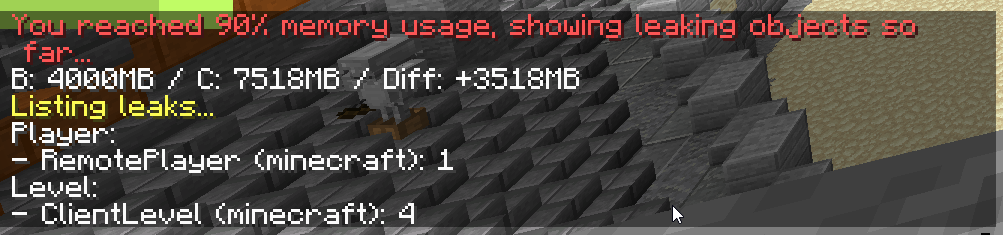

still getting this somehow
followed everything
trying to fuck around with the args rn
 sacred zinc
Better MC 4 - v51 crashed without a crash report. The logs have been uploaded to mclo.gs:
- 1.20.1 [FORGE]
- What launcher did you run Minecraft with? (e.g. CurseForge, ATLauncher, MultiMC, ...)
- Have you changed the modpack in any way except mods?
- v51
- Have you ever gotten past the crash condition without crashing, or does the game always crash?
- What steps cause the crash?
latest.log | CurseForge: launcher_log.txt | crash_assistant_app.log | modlist.txt
Mod list changes beyond the modpack:
Updated mods:
[2;34mcrabbersdelight[0m ([2;31m1.2.0[0m > [2;32m1.2.0[0m)
!alternates
versed mountainBOT
If this command was run in response to your question/issue, it is likely because switching away from the launcher you are currently using would fix your problem.
From our experience, the most stable launcher by far is ATLauncher, also known as ATL. Keep in mind that ATL is NOT related to TLauncher in any way, and is not a cracked launcher.
To install ATL, do the following:
1. Go to https://atlauncher.com/download. If you are on MacOS, then choose the "Jar" version under the "Other" tab.
2. Install and run the setup, then open the program.
3. Login to your Microsoft account that owns the Java Edition of Minecraft from the Accounts tab on the right. This process is 100% safe, as it goes directly through Microsoft. ATL doesn't see your account credentials.
4. Go to the Packs tab on the right, then click "Curseforge" on the left.
5. Search the modpack you wish to download.
6. Click "Install". Then, follow the on-screen directions.
7. Go to the Instances tab, and click "Play" on the modpack you downloaded. If you ever see an "Update" button on the instance, click it.
This video explains the process: https://youtu.be/xMYW1wMbmkM
To transfer your Curseforge world to ATL, simply right click the modpack on Curseforge, or click the 3 dots, then click "Open Folder". Copy the Saves folder, then click "Open Folder" on ATL and paste the Saves folder there. Do the same with the XaerosMinimap folder, or the Journeymap folder, to transfer over any waypoints you've created.
Because ATL downloads the exact same files as Curseforge does, your world will be the exact same and you will be able to join the same servers. ATL also works without an internet connection (after you've installed the modpack, of course), and does not have any bloat from Overwolf. You are free to uninstall both Overwolf and Curseforge with ATL installed.
 echo jolt
Anyone know when the Share World is going to be back up? Ik its probably been answered somewhere but I cant find it. Thanks!
viral garden
spring sequoia
hey guys, how did u find ts?
it says it right there
viral garden
sonic stratus
Better MC 4 - v51 crashed. The logs have been uploaded to `mclo.gs`:
1. 1.20.1 [...
!alternates
versed mountainBOT
If this command was run in response to your question/issue, it is likely because switching away from the launcher you are currently using would fix your problem.
From our experience, the most stable launcher by far is ATLauncher, also known as ATL. Keep in mind that ATL is NOT related to TLauncher in any way, and is not a cracked launcher.
To install ATL, do the following:
1. Go to https://atlauncher.com/download. If you are on MacOS, then choose the "Jar" version under the "Other" tab.
2. Install and run the setup, then open the program.
3. Login to your Microsoft account that owns the Java Edition of Minecraft from the Accounts tab on the right. This process is 100% safe, as it goes directly through Microsoft. ATL doesn't see your account credentials.
4. Go to the Packs tab on the right, then click "Curseforge" on the left.
5. Search the modpack you wish to download.
6. Click "Install". Then, follow the on-screen directions.
7. Go to the Instances tab, and click "Play" on the modpack you downloaded. If you ever see an "Update" button on the instance, click it.
This video explains the process: https://youtu.be/xMYW1wMbmkM
To transfer your Curseforge world to ATL, simply right click the modpack on Curseforge, or click the 3 dots, then click "Open Folder". Copy the Saves folder, then click "Open Folder" on ATL and paste the Saves folder there. Do the same with the XaerosMinimap folder, or the Journeymap folder, to transfer over any waypoints you've created.
Because ATL downloads the exact same files as Curseforge does, your world will be the exact same and you will be able to join the same servers. ATL also works without an internet connection (after you've installed the modpack, of course), and does not have any bloat from Overwolf. You are free to uninstall both Overwolf and Curseforge with ATL installed.
viral garden
stone kiln
Yes BC it was frezzed
Please follow the performance guide to improve your game performance, as this is likely to resolve your issue.
viral garden
gusty bobcat
It won’t work on a lot of the stuff from Alex’s mobs, like the elephant for exam...
yes because the cage is meant for smaller mobs, as explained in the questbook
how would an elephant fit inside a small cage
viral garden
clear turtle
Question: how can one achive such a render distance as seen in the screen shot, ...
you can increase render distance in video settings or you can try adding distant horizons
viral garden
patent fern
Far sight
thats not what farsight does
viral garden
stone kiln
Better MC 4 - v51 crashed without a crash report. The logs have been uploaded to...
Please follow the performance guide to improve your game performance, as this is likely to resolve your issue.
patent fern
viral garden
thats not what farsight does
Literally Increases render but ok....
 viral garden
patent fern
Literally Increases render but ok....
viral garden
patent fern
Literally Increases render but ok....
you're not reading it lol
it lets you increase render distance over a server's render distance
it does nothing on singleplayer at all
 patent fern
Yeah most play on bisect hosting servers
Distant horizons causes those to lag so farsight is a better option for that imo
Uses alot of server ram
Unless you know a work around?
royal steeple
i have this issue..
 sweet spade
royal steeple
i have this issue..
sweet spade
royal steeple
i have this issue..
!ca