#better-mc-forge
1 messages · Page 403 of 1
 halcyon rampart
 viral garden
run /kill @e[type=minecraft:potion]
viral garden
halcyon rampart
is it possible to remove
why
halcyon rampart
trying to see if doing that will allow me to connect to my server proxy
viral garden
that wouldnt affect it at all lol
halcyon rampart
somethings messing with the networking when connecting to the proxy
get this error when joining the server and the logs look like these examples.
https://mclo.gs/1XhoZcP https://mclo.gs/PQIcsOr

 proper skiff
how do you turn off the treecapatator mod limit
 half wing
I got a dragon and hatched him then my girlfriend accidentally suffocated him in the wall 💔
10/10 modpack lowkey from that experience
 gleaming summit
Hi, do you think 8-10GB would be enough for a 10-person server with this mod pack?
 sweet spade
gleaming summit
Hi, do you think 8-10GB would be enough for a 10-person server with this mod pac...
sweet spade
gleaming summit
Hi, do you think 8-10GB would be enough for a 10-person server with this mod pac...
i believe its 5gb recommended for 1-5 players and then for every player after that add another gb, so i believe min 10gb
 agile cradle
gleaming summit
Hi, do you think 8-10GB would be enough for a 10-person server with this mod pac...
agile cradle
gleaming summit
Hi, do you think 8-10GB would be enough for a 10-person server with this mod pac...
10 gigs is perfect
viral garden
halcyon rampart
get this error when joining the server and the logs look like these examples.
h...
you do not have the modpack installed on your client lol
viral garden
proper skiff
how do you turn off the treecapatator mod limit
fallingtree mod config
viral garden
half wing
I got a dragon and hatched him then my girlfriend accidentally suffocated him in...
lmao
proper skiff
is there still a command that allows you to fly without being in creative mode?
halcyon rampart
viral garden
you do not have the modpack installed on your client lol
i do have the modpack working on my client, what youre seeing is probably from where im connecting to a vanilla paper server lobby. Works fine with all the other modpacks ive used guess just not this one
agile cradle
halcyon rampart
i do have the modpack working on my client, what youre seeing is probably from w...
has to match both sides. server side needs bmc, player side needs bmc
halcyon rampart
yeah thats what i was afraid of. ive gotten it to work with other modpacks forge and fabric just not this one sadly
 grizzled belfry
Do any of yall know how to get out of these chunks?
 halcyon rampart
bro my game is running very odd with shaders. I have 10gbs of allocated to the game, 32 gb of ram in my sysem, a 7800x3d cpu, a 4070ti. Only happens when a shader is on. Weirdly enough it doesnt lag until i look at a block or open the esc menu or inventory menu.
viral garden
grizzled belfry
Do any of yall know how to get out of these chunks?
Please read the full contents of the #get-support channel for us to provide assistance.
viral garden
 twilit lantern
why is corundum disabled
twilit lantern
why is corundum disabled
it looks bad and spawns too often
viral garden
halcyon rampart
bro my game is running very odd with shaders. I have 10gbs of allocated to the g...
Please follow the performance guide to improve your game performance, as this is likely to resolve your issue.
 silver radish
I know BMC4 has it, at least on the most recent version (v39)
 ember halo
kk thanks
agile cradle
ember halo
hi what version of this game has the corpse mod
All
 grand gate
i keep hearing thunder even though i cleared the weather
viral garden
ember halo
hi what version of this game has the corpse mod
all
ember halo
viral garden
all
fr? i died in lava and couldnt find the body
 south saddle
What mod in Better MC makes the mobs have higher health, if anything?
agile cradle
ember halo
fr? i died in lava and couldnt find the body
It’s in the lava
viral garden
south saddle
What mod in Better MC makes the mobs have higher health, if anything?
none
not a feature
ember halo
agile cradle
It’s in the lava
ah i see imma try check it out thanks
didnt know it sinks
 tiny light
he did
viral garden
tiny light
he did
okay and whats the issue
tiny light
viral garden
okay and whats the issue
He reinstalled the modpack right after this issue began, and i still get the error after I join
 deep swan
is there a way to remove bisect ads ? I'm selfhosting and it's kinda annoying
viral garden
tiny light
He reinstalled the modpack right after this issue began, and i still get the err...
do other people get the error
viral garden
deep swan
is there a way to remove bisect ads ? I'm selfhosting and it's kinda annoying
what do you mean 'bisect ads'
tiny light
viral garden
do other people get the error
No, only me
viral garden
tiny light
No, only me
then its an issue on your end
deep swan
main menu, escape and server list ads
tiny light
viral garden
then its an issue on your end
Yea I know that, but i've been trying to solve this issue for the past like 5 days
viral garden
tiny light
Yea I know that, but i've been trying to solve this issue for the past like 5 da...
make a firewall & antivirus exception for your ATLauncher install directory ig
deep swan
BHMenu-Forge-1.20.1-2.4.2.jar first ?
viral garden
deep swan
BHMenu-Forge-1.20.1-2.4.2.jar first ?
yea i dont really see the point tho its on your screen for like 5 seconds lol
tiny light
viral garden
make a firewall & antivirus exception for your ATLauncher install directory ig
Do I just do that and rejoin, or do i have to reinstall the modpack or somethin
viral garden
tiny light
Do I just do that and rejoin, or do i have to reinstall the modpack or somethin
no need to reinstall
tiny light
viral garden
no need to reinstall
ehhhh, I still spawned in the void with the same error, although for some reason I spawned where I last left at, it still kicked me

wait
 wraith marlin
im having issues with opening a multiplayer world this pops up everytime i try and open the world

havent changed anything im using 1.20.1 and newest version of better mincraft
single player worlds works
tiny light
yea its still doing the error
tiny light
viral garden
no need to reinstall
I'm managing to enter the server now, look/walk around and whatnot, but it lags back into the location+direction then kicks me, its so weird
 finite fable
version 1.21.5
I use curseforge
havent changed the modpack at all
1.20.1
always crashes during the loading screen when it first starts up
loading the mods
 stone mountain
finite fable
version 1.21.5
I use curseforge
havent changed the modpack at all
1.20.1
always ...
stone mountain
finite fable
version 1.21.5
I use curseforge
havent changed the modpack at all
1.20.1
always ...
!logs
 versed mountainBOT
To better assist with fixing your issue, we will need some logs:
-
Curseforge -> Right click the modpack instance -> Open Folder.
-
ATLauncher -> Click 'Open Folder' on the modpack instance.
-
MultiMC -> Select your instace and click 'Instance Folder' on the right.
-
** For servers** -> Open the folder containing your server files.
To find the latest.log file, navigate to the 'logs' folder.
To find the hs_err_pid.log file, simply look for the file name after opening the instance folder.
To find a crash report, navigate to the 'crash-reports folder and find the most recent file after your crash occurred.
Once located, please upload the requested file here. If it fails, upload to https://mclo.gs/ and share the link here.
finite fable
 wispy trailBOT
finite fable
wispy trailBOT
finite fable
Uploaded crash-2025-04-10_11.27.27-client.txt from @finite fable to mclogs: https://mclo.gs/VJPXzZu
 vague acorn
!powershell
versed mountainBOT
An update to windows introduced a new security feature that prevents powershell files from running on your PC. This is great for your security, but not so great for our server start scripts, which require powershell to run them. Fortunately there is a quick fix for this!
Run powershell as administrator, then run Set-ExecutionPolicy RemoteSigned. Read the prompt and press accept. This will allow us to run scripts.
Next, navigate to your server directory using cd path/to/directory (for example: cd C:UsersUsernameDocumentsMinecraftServer)
You can now run the server by double-clicking the start.ps1 file, or typing .start.ps1 into the command line while in the directory.
IF THE ABOVE DOES NOT WORK, TRY THIS
Run the command Unblock-File -Path .start.ps1 in the same powershell window. This will allow the start script to not be blocked by windows, and run freely.
finite fable
says none of those paths exist..
 fleet patio
guys when i go through an area i havent really gone and im going really fast via dragon, is there a way to make the chunks load any faster, when i go too fast the chunks take too long to load and i hit some see through area, i have fairly good specs so just wondering if theres any way to make it load faster
stone mountain
fleet patio
guys when i go through an area i havent really gone and im going really fast via...
There aren't any specs good enough to generate new chunks faster in modded, so you have to do it in advance
!pregen
versed mountainBOT

Noob explains how to Pre Generate your Minecraft World.
▬▬▬▬▬▬▬▬▬▬▬▬▬▬▬▬▬▬▬▬▬▬▬▬▬▬▬▬▬▬
➔ Modpack: https://www.curseforge.com/minecraft/modpacks/better-minecraft-modpack
➔ Discord: https://discord.com/invite/9S5tfrY4Fr
▬▬▬▬▬▬▬▬▬▬▬▬▬▬▬▬▬▬▬▬▬...
viral garden
wraith marlin
im having issues with opening a multiplayer world this pops up everytime i try a...
you do not have the same modpack installed on the server & client
 tall yarrow
hi guys my single player game keeps crashing for no reason the modpack list wasnt changed is there anything i can do?
viral garden
!server
versed mountainBOT
Free Method
To host a server on your own computer, read the selfhosting guide.
This guide goes over how to install, create, and launch a free Minecraft server on all operating systems (MacOS, Linux and Windows). The guide also guides you through installing Java and optimizing your server for better performance.
If you are installing one of our older modpacks, ignore the "README" file that is included in the serverpack files, as they have outdated information.
Paid Method
We suggest renting a server from Bisect Hosting:
Approx. $10 - $25 a month depending on what plan you choose. You can also get 25% off with Code LunaPixel.
Go here and order a plan which fits you. We suggest 1GB per player but nothing lower than 4GB as the server needs at least 3GB to run.
Go to #server-hosting for more Info!
The following advice works for both the Free and Paid methods:
Transferring Your World
If you're playing Singleplayer and want to transfer your world to your server, simply go to your modpack files and navigate to the saves folder. Inside of this folder, you will see your world saves. Rename your desired world save to world. You can then transfer this folder to your server files. If your world was hosted via world sharing, this process has to be done by the person who would click "Share World".
Fixing Lag
To resolve lag issues, simply run the !tps command in #bots and follow the directions provided.
viral garden
!alternates
versed mountainBOT
If this command was run in response to your question/issue, it is likely because switching away from the launcher you are currently using would fix your problem.
From our experience, the most stable launcher by far is ATLauncher, also known as ATL. Keep in mind that ATL is NOT related to TLauncher in any way, and is not a cracked launcher.
To install ATL, do the following:
1. Go to https://atlauncher.com/download. If you are on MacOS, then choose the "Jar" version under the "Other" tab.
2. Install and run the setup, then open the program.
3. Login to your Microsoft account that owns the Java Edition of Minecraft from the Accounts tab on the right. This process is 100% safe, as it goes directly through Microsoft. ATL doesn't see your account credentials.
4. Go to the Packs tab on the right, then click "Curseforge" on the left.
5. Search the modpack you wish to download.
6. Click "Install". Then, follow the on-screen directions.
7. Go to the Instances tab, and click "Play" on the modpack you downloaded. If you ever see an "Update" button on the instance, click it.
This video explains the process: https://youtu.be/xMYW1wMbmkM
To transfer your Curseforge world to ATL, simply right click the modpack on Curseforge, or click the 3 dots, then click "Open Folder". Copy the Saves folder, then click "Open Folder" on ATL and paste the Saves folder there. Do the same with the XaerosMinimap folder, or the Journeymap folder, to transfer over any waypoints you've created.
Because ATL downloads the exact same files as Curseforge does, your world will be the exact same and you will be able to join the same servers. ATL also works without an internet connection (after you've installed the modpack, of course), and does not have any bloat from Overwolf. You are free to uninstall both Overwolf and Curseforge with ATL installed.
viral garden
tall yarrow
hi guys my single player game keeps crashing for no reason the modpack list wasn...
Please read the full contents of the #get-support channel for us to provide assistance.
tall yarrow
thank you
viral garden
finite fable
!alternates
versed mountainBOT
If this command was run in response to your question/issue, it is likely because switching away from the launcher you are currently using would fix your problem.
From our experience, the most stable launcher by far is ATLauncher, also known as ATL. Keep in mind that ATL is NOT related to TLauncher in any way, and is not a cracked launcher.
To install ATL, do the following:
1. Go to https://atlauncher.com/download. If you are on MacOS, then choose the "Jar" version under the "Other" tab.
2. Install and run the setup, then open the program.
3. Login to your Microsoft account that owns the Java Edition of Minecraft from the Accounts tab on the right. This process is 100% safe, as it goes directly through Microsoft. ATL doesn't see your account credentials.
4. Go to the Packs tab on the right, then click "Curseforge" on the left.
5. Search the modpack you wish to download.
6. Click "Install". Then, follow the on-screen directions.
7. Go to the Instances tab, and click "Play" on the modpack you downloaded. If you ever see an "Update" button on the instance, click it.
This video explains the process: https://youtu.be/xMYW1wMbmkM
To transfer your Curseforge world to ATL, simply right click the modpack on Curseforge, or click the 3 dots, then click "Open Folder". Copy the Saves folder, then click "Open Folder" on ATL and paste the Saves folder there. Do the same with the XaerosMinimap folder, or the Journeymap folder, to transfer over any waypoints you've created.
Because ATL downloads the exact same files as Curseforge does, your world will be the exact same and you will be able to join the same servers. ATL also works without an internet connection (after you've installed the modpack, of course), and does not have any bloat from Overwolf. You are free to uninstall both Overwolf and Curseforge with ATL installed.
viral garden
finite fable
says none of those paths exist..
i dont think they were talking to you
tall yarrow
- 1.21.1
- CurseForge
- nope
- v28
- it only crashes when a mod is removed or i update the version
- i tried to open the game and it crashed i didnt really do anything special
https://mclo.gs/Y7cWATT
https://mclo.gs/U2J51pj
https://mclo.gs/uR8972T
https://mclo.gs/BYlJfiE
wraith marlin
viral garden
you do not have the same modpack installed on the server & client
but i chose the same one
viral garden
tall yarrow
1. 1.21.1
2. CurseForge
3. nope
4. v28
5. it only crashes when a mod is removed ...
what did you modify, specifically
tall yarrow
nothing
viral garden
wraith marlin
but i chose the same one
please follow both of the guides i sent
!alternates
versed mountainBOT
If this command was run in response to your question/issue, it is likely because switching away from the launcher you are currently using would fix your problem.
From our experience, the most stable launcher by far is ATLauncher, also known as ATL. Keep in mind that ATL is NOT related to TLauncher in any way, and is not a cracked launcher.
To install ATL, do the following:
1. Go to https://atlauncher.com/download. If you are on MacOS, then choose the "Jar" version under the "Other" tab.
2. Install and run the setup, then open the program.
3. Login to your Microsoft account that owns the Java Edition of Minecraft from the Accounts tab on the right. This process is 100% safe, as it goes directly through Microsoft. ATL doesn't see your account credentials.
4. Go to the Packs tab on the right, then click "Curseforge" on the left.
5. Search the modpack you wish to download.
6. Click "Install". Then, follow the on-screen directions.
7. Go to the Instances tab, and click "Play" on the modpack you downloaded. If you ever see an "Update" button on the instance, click it.
This video explains the process: https://youtu.be/xMYW1wMbmkM
To transfer your Curseforge world to ATL, simply right click the modpack on Curseforge, or click the 3 dots, then click "Open Folder". Copy the Saves folder, then click "Open Folder" on ATL and paste the Saves folder there. Do the same with the XaerosMinimap folder, or the Journeymap folder, to transfer over any waypoints you've created.
Because ATL downloads the exact same files as Curseforge does, your world will be the exact same and you will be able to join the same servers. ATL also works without an internet connection (after you've installed the modpack, of course), and does not have any bloat from Overwolf. You are free to uninstall both Overwolf and Curseforge with ATL installed.
viral garden
!server
versed mountainBOT
Free Method
To host a server on your own computer, read the selfhosting guide.
This guide goes over how to install, create, and launch a free Minecraft server on all operating systems (MacOS, Linux and Windows). The guide also guides you through installing Java and optimizing your server for better performance.
If you are installing one of our older modpacks, ignore the "README" file that is included in the serverpack files, as they have outdated information.
Paid Method
We suggest renting a server from Bisect Hosting:
Approx. $10 - $25 a month depending on what plan you choose. You can also get 25% off with Code LunaPixel.
Go here and order a plan which fits you. We suggest 1GB per player but nothing lower than 4GB as the server needs at least 3GB to run.
Go to #server-hosting for more Info!
The following advice works for both the Free and Paid methods:
Transferring Your World
If you're playing Singleplayer and want to transfer your world to your server, simply go to your modpack files and navigate to the saves folder. Inside of this folder, you will see your world saves. Rename your desired world save to world. You can then transfer this folder to your server files. If your world was hosted via world sharing, this process has to be done by the person who would click "Share World".
Fixing Lag
To resolve lag issues, simply run the !tps command in #bots and follow the directions provided.
viral garden
tall yarrow
nothing
you said in the message though
"it only crashes when a mod is removed or i update the version"
what did you remove? what mod are you changing the version of?
viral garden
sure ig
 errant grove
yo chloe
me and a friend have been playing bmc for awhile now
on curseforge
our chunks stopped loading pretty much at all after awhile it was like really slow
so we switched to atlauncher
and our chunks still dont load
the ones weve already loaded before are always loaded perfectly fine but we cant explore or do anything outside of our already rendered chunks unless we wait 5 minutes for 1 chunk to load
tiny light
viral garden
sure ig
Hey chloe, it randomly works now, but its really laggy
 fallow trail
how server for free
 wet basalt
Are there a wiki for bmc forge?
 spare inlet
how much differs bmc5 neoforge from the forge version?
viral garden
errant grove
our chunks stopped loading pretty much at all after awhile it was like really sl...
Please follow the performance guide to improve your game performance, as this is likely to resolve your issue.
viral garden
tiny light
Hey chloe, it randomly works now, but its really laggy
its just an issue on your end - as i said its something on your network blocking traffic
tiny light
viral garden
its just an issue on your end - as i said its something on your network blocking...
Any recommendations on how to find out whats causing that
viral garden
fallow trail
how server for free
what does this sentence mean
viral garden
wet basalt
Are there a wiki for bmc forge?
no, read the questbook ingame
viral garden
spare inlet
how much differs bmc5 neoforge from the forge version?
check the modpackindex website
viral garden
tiny light
Any recommendations on how to find out whats causing that
it could be a billion things, i wouldnt even know where to start
tiny light
viral garden
it could be a billion things, i wouldnt even know where to start
I might know actually
viral garden
it could also be on the server owners side, they may have something that is detecting your traffic as malicious and its blocking it
idk
or if you have a shitty antivirus installed
you dont need anything besides Defender
tiny light
viral garden
or if you have a shitty antivirus installed
Could a VPN be the problem
viral garden
yes
tiny light
Good
tiny light
Well it somewhat worked, I'm able to join now but the ping is still very high, so its serverside ig?
grand gate
please can someone help me
viral garden
grand gate
please can someone help me
 grand gate
hey i been playing for a while and i logged on today and my shaders were turned off nothing new had happened before but when i went to turn them on the one i normally use complementaryunbound_r5.4 + Euphoriapatches isnt showing up but the normal version is ,,,, same with the reimagined one can anyone help me get them back up
 safe condor
Hello, i was wondering that BMC5 neoforge is missing many things i love in BMC4 like better end and nether and cataclysm mods. Are they coming in BMC5 any time soon or at all or are you planning to add completely different things in there? Would love to play BMC5 because it has alot of cool stuff but missing all the big nether and end stuff and some of the boss mods.
viral garden
grand gate
https://mclo.gs/JVsrha7
https://mclo.gs/Xr1bwNE
please
read #get-support
answer all of the questions
viral garden
grand gate
hey i been playing for a while and i logged on today and my shaders were turned ...
just reinstall unbound
viral garden
safe condor
Hello, i was wondering that BMC5 neoforge is missing many things i love in BMC4 ...
betterend & betternether are not going to be added
they are extremely unstable mods, to the point Sodium has now marked them as incompatible
also bmc5 does definitely have cataclysm lol

 dreamy lintel
Hi, could someone help me before i begin testing deleting mods till my minecraft stops crashing?
Better MC 4 - v39 crashed. The logs have been uploaded to mclo.gs:
- 1.20.1 [FORGE]
- What launcher did you run Minecraft with? (e.g. CurseForge, ATLauncher, MultiMC, ...)
- Have you changed the modpack in any way except mods?
- v39
- Have you ever gotten past the crash condition without crashing, or does the game always crash?
- What steps cause the crash?
latest.log | crash-2025-04-10_09.05.08-server.txt | CurseForge: launcher_log.txt | crash_assistant_app.log
Mod list changes beyond the modpack:
[2;32m45[0m added, [2;31m0[0m removed, [2;34m2[0m updated.
- CurseForge
- maybe updated those 2 mods in the list accidentally
- No
- Creating a new world
 scarlet panther
dreamy lintel
Better MC 4 - v39 crashed. The logs have been uploaded to `mclo.gs`:
1. 1.20.1 [...
scarlet panther
dreamy lintel
Better MC 4 - v39 crashed. The logs have been uploaded to `mclo.gs`:
1. 1.20.1 [...
!modified
versed mountainBOT
You are using a modified version of the modpack! This channel is only for unmodified versions that we provide. We cannot guarantee that the modpack works after you do modifications, so please go to #1061339968691257466 if you need help with an issue.
If this is a bug, please make sure to test it in an unmodified version before trying to report it.
dreamy lintel
Ok, sorry
 swift shard
Better MC 4 - v38 crashed. The logs have been uploaded to mclo.gs:
- 1.20.1 [FORGE]
- What launcher did you run Minecraft with? (e.g. CurseForge, ATLauncher, MultiMC, ...)
- Have you changed the modpack in any way except mods?
- v38
- Have you ever gotten past the crash condition without crashing, or does the game always crash?
- What steps cause the crash?
latest.log | crash-2025-04-10_15.55.29-client.txt | CurseForge: launcher_log.txt | crash_assistant_app.log with 1 log analysis result(s).
Mod list changes beyond the modpack:
[2;32m57[0m added, [2;31m2[0m removed, [2;34m32[0m updated.
 west kraken
Better MC 4 - v39 crashed. The logs have been uploaded to mclo.gs:
- 1.20.1 [FORGE]
- CurseForge
- Have you changed the modpack in any way except mods? No
- v39
- Have you ever gotten past the crash condition without crashing, or does the game always crash? Always crashes only when joining server
- What steps cause the crash? Joining server
latest.log | hs_err_pid289912.log | CurseForge: launcher_log.txt | crash_assistant_app.log
Mod list changes beyond the modpack:
Updated mods:
[2;34mstoragenetwork[0m ([2;31m1.12.2[0m > [2;32m1.11.3[0m)
Not sure whats going on here. havent modified that pack at all, but game crashes when trying to join friends server
he hasn't changed anything either
 crystal nexus
Better MC 4 - v39 crashed. The logs have been uploaded to mclo.gs:
- 1.20.1 [FORGE]
- What launcher did you run Minecraft with? (e.g. CurseForge, ATLauncher, MultiMC, ...) CurseForge
- Have you changed the modpack in any way except mods? No
- v39
- Have you ever gotten past the crash condition without crashing, or does the game always crash?
- What steps cause the crash? Joining server
latest.log | hs_err_pid57045.log | crash_assistant_app.log | CurseForge: skip launcher
Mod list changes beyond the modpack:
[2;34mMod list wasn't modified.[0m
ok thx
 rain smelt
hey just curious, i havent been able to find anything talking about it but do the snazzy skeletons still spawn in the newest version? i havent seen any yet let alone any of the other wierd mobs in caves like the centipede thing or the crazy witch with the long neck, are those still in this version?
 prime furnace
swift shard
Better MC 4 - v38 crashed. The logs have been uploaded to `mclo.gs`:
1. 1.20.1 [...
prime furnace
swift shard
Better MC 4 - v38 crashed. The logs have been uploaded to `mclo.gs`:
1. 1.20.1 [...
bro can not read even ONE MESSAGE above them
 frozen nacelle
!updatemodpack
versed mountainBOT

Discord ➔ https://discord.gg/8ZmhaPPbjE
Twitter ➔ https://twitter.com/SharkieTV
Use CODE: LunaPixel for 25% off ➔ https://www.bisecthosting.com/LunaPixel
prime furnace
crystal nexus
Better MC 4 - v39 crashed. The logs have been uploaded to `mclo.gs`:
1. 1.20.1 [...
!macjdk
versed mountainBOT
 For Mac devices using Apple Silicon/arm (M1/M2/etc.) CPUs
There is an issue with Java 17.0.8 and newer where you may experience "A fatal error has been detected by the Java Runtime Environment", which can cause the Java runtime to crash under a variety of circumstances. To resolve this:
Mac:
- Go here and hover over the Download buttons until you see one with the option to install a .dmg file. If you have an M-series Mac, then make sure to install the ARM64 version of this file.
- Run the
!alternatescommand in #bots and follow the directions. If you already have ATL installed, move on to step 3. - Click "Settings" on the right
- Click "Java/Minecraft" at the top
- Set "Use Java Provided by Minecraft" to false by unchecking the checkbox
- Manually specify the following Java path in the text box to the left to the "Reset" button:
/Library/Java/JavaVirtualMachines/zulu-21.jdk/Contents/Home
rain smelt
or can someone point me in the direction of the channel that would contain this knowledge?
 steady grove
guys how can i force chunk load?
 prime furnace
steady grove
guys how can i force chunk load?
prime furnace
steady grove
guys how can i force chunk load?
never used open pac but i think you need to be closer to the chunks to edit it
steady grove
need it for my wirless storage system
steady grove
prime furnace
never used open pac but i think you need to be closer to the chunks to edit it

Force chunk load settings dont appears
😦
prime furnace
steady grove
shift click?
 prime furnace

 analog raft
 prime furnace
analog raft
prime furnace
analog raft
!ea
versed mountainBOT
The Essential mod is completely incompatible with all of our modpacks, and there's no reason to use it. All of our modpacks already come with built-in, free world hosting, by clicking the "Share World' button in the Open to LAN menu. You can learn more by typing !ws in the #bots channel. You can also run type !server in the same channel to learn how to properly host a server for better performance and more flexibility. In modpacks that aren't owned by us, you can use mods such as e4mc or WorldHost to host a server completely for free without Essential's many issues and crashes and the microtransactions that they constantly bother users with. To learn more about alternatives to the Essential mod, check out this website.
versed mountainBOT
If you are using a cracked Minecraft launcher, we can not assist with your issue. In order to receive help, you need to switch to an approved launcher and provide proof you have purchased Minecraft. This is due to the terms of service and guideline agreements of both Mojang and Discord.
 brave lake
Better MC 3 - v28 crashed. The logs have been uploaded to mclo.gs:
- 1.21.1 [FABRIC]
- What launcher did you run Minecraft with? (e.g. CurseForge, ATLauncher, MultiMC, ...)
- Have you changed the modpack in any way except mods?
- v28
- Have you ever gotten past the crash condition without crashing, or does the game always crash?
- What steps cause the crash?
latest.log | crash-2025-04-10_09.08.30-server.txt | CurseForge: launcher_log.txt | crash_assistant_app.log
Mod list changes beyond the modpack:
[2;34mMod list wasn't modified.[0m
god i hate betterx
prime furnace
brave lake
Better MC 3 - v28 crashed. The logs have been uploaded to `mclo.gs`:
1. 1.21.1 [...
is it a one time thing or recurring
also there are questions to fill out :P
brave lake
oh i didnt see that its my first time but when i try to load into a world my game just crashes
versed mountainBOT
If this command was run in response to your question/issue, it is likely because switching away from the launcher you are currently using would fix your problem.
From our experience, the most stable launcher by far is ATLauncher, also known as ATL. Keep in mind that ATL is NOT related to TLauncher in any way, and is not a cracked launcher.
To install ATL, do the following:
1. Go to https://atlauncher.com/download. If you are on MacOS, then choose the "Jar" version under the "Other" tab.
2. Install and run the setup, then open the program.
3. Login to your Microsoft account that owns the Java Edition of Minecraft from the Accounts tab on the right. This process is 100% safe, as it goes directly through Microsoft. ATL doesn't see your account credentials.
4. Go to the Packs tab on the right, then click "Curseforge" on the left.
5. Search the modpack you wish to download.
6. Click "Install". Then, follow the on-screen directions.
7. Go to the Instances tab, and click "Play" on the modpack you downloaded. If you ever see an "Update" button on the instance, click it.
This video explains the process: https://youtu.be/xMYW1wMbmkM
To transfer your Curseforge world to ATL, simply right click the modpack on Curseforge, or click the 3 dots, then click "Open Folder". Copy the Saves folder, then click "Open Folder" on ATL and paste the Saves folder there. Do the same with the XaerosMinimap folder, or the Journeymap folder, to transfer over any waypoints you've created.
Because ATL downloads the exact same files as Curseforge does, your world will be the exact same and you will be able to join the same servers. ATL also works without an internet connection (after you've installed the modpack, of course), and does not have any bloat from Overwolf. You are free to uninstall both Overwolf and Curseforge with ATL installed.
 gaunt tide
hi i found a bug, when i die i get my backpack x2
 sick rapids
Better MC 4 - v39 crashed. The logs have been uploaded to mclo.gs:
- 1.20.1 [FORGE]
- What launcher did you run Minecraft with? (e.g. CurseForge, ATLauncher, MultiMC, ...) CurseForge
- Have you changed the modpack in any way except mods? no
- v39
- Have you ever gotten past the crash condition without crashing, or does the game always crash? yea i played before but now i cant play it idk why
- What steps cause the crash?
latest.log | crash-2025-04-10_18.50.03-client.txt | crash_assistant_app.log | CurseForge: skip launcher
Mod list changes beyond the modpack:
[2;34mMod list wasn't modified.[0m
 tranquil sage
Better MC 4 - v39 crashed without a crash report. The logs have been uploaded to mclo.gs:
- 1.20.1 [FORGE]
- What launcher did you run Minecraft with? (e.g. CurseForge, ATLauncher, MultiMC, ...)
- Have you changed the modpack in any way except mods?
- v39
- Have you ever gotten past the crash condition without crashing, or does the game always crash?
- What steps cause the crash?
latest.log | tlauncher_04_10_2025_23_41_08.log | crash_assistant_app.log
Mod list changes beyond the modpack:
Added mods:
[2;32mOptiFine-1.20.1_HD_U_I6_pre6.jar[0m
[2;32mtl_skin_cape_forge_1.20_1.20.1-1.32.jar[0m
Updated mods:
[2;34mforge[0m ([2;31mfmlloader-1.20.1-47.4.0.jar[0m > [2;32mfmlloader-1.20.1-47.3.12.jar[0m)
[2;34mstoragenetwork[0m ([2;31m1.12.2[0m > [2;32m1.11.3[0m)
YOU ABSOLUTE FOOL
 plucky geodeBOT
Quarantine Result:
 Reason: TLauncher user
 Moderator: @scarlet panther

Quarantined:

 templus_ [
658859645586374696]
sick rapids
scarlet panther
***YOU ABSOLUTE FOOL***
bro can you help me?
scarlet panther
sick rapids
bro can you help me?
Not really good at logs, but you didn't fill out the information - edit your message with the info, please, and we can get to work
 crisp summit
scarlet panther
***YOU ABSOLUTE FOOL***
crisp summit
scarlet panther
***YOU ABSOLUTE FOOL***
wheezes
scarlet panther
These people self-report a lot.
sick rapids
scarlet panther
Not really good at logs, but you didn't fill out the information - edit your mes...
i did it
 brave spear
Heyy everyone! I’m about to play the Medieval MC [NEOFORGE] MMC5 modpack, but I didn’t really like the resource packs that come with it. Would it cause any issues if I disable them?
 kind stream
Is there any controller support mods compatible with neoforge? I made a world and added a bunch of mods I wanted to the Better MC 5 Neoforge version, but so far none of the controller support mods are compatible
Just wondering if anyone knows any or knows how I can use my controller to play if possible
 vestal sparrow
Better MC 4 - v39 crashed.
- 1.20.1 [FORGE]
- What launcher did you run Minecraft with? (e.g. CurseForge, ATLauncher, MultiMC, ...) CurseForge
- Have you changed the modpack in any way except mods? No
- v39
- Have you ever gotten past the crash condition without crashing, or does the game always crash? i could play it before and now it doesnt work..
- What steps cause the crash? idk
idk if i did this right
wispy trailBOT
vestal sparrow
Better MC 4 - v39 crashed.
1. 1.20.1 [FORGE]
2. What launcher did you run Minec...
Uploaded hs_err_pid4540.log from @vestal sparrow to mclogs: https://mclo.gs/xTacsxV
:warning: This is a hs_err_pid file.
These files may contain personal information such as your session token.
Mclogs automatically censors these files, so you should delete your original attachment now.
 untold nest
!drivers
versed mountainBOT
You (likely) need to update your graphics drivers in order to resolve the crash. Here's how to go about doing that!
1. Identify your graphics card
if you already know skip to the next step
- Open task manager
- Navigate to the "Performance" tab (on Windows 11 this is the button that looks like a heart pulse)
- Press the GPU 0 graph and read your GPU from the top right
Note:
In some cases you may see a GPU 0 and GPU 1. This means your CPU has its own GPU, as well as a dedicated one. You probably want GPU 1 (which is usually the better one), but you can ask staff to clarify if necessary.
2. Download your drivers from the manufacturers site
Depending on what you read before, you likely need drivers from either AMD, Intel, or NVIDIA
AMD: https://www.amd.com/en/support
Intel: https://www.intel.com/content/www/us/en/download-center/home.html
NVIDIA: https://www.nvidia.com/Download/index.aspx?lang=en-us
Note:
- For NVIDIA you want to select "Game Ready Driver (GRD)" (this is the default option) for the best performance. Once installing you'd probably prefer downloading GeForce Experience, which will notify you when there's an available drivers update.
- For Intel, you probably want to press "Get Started" under the "Automatically update your drivers and software", which will simplify the process and update everything automatically
- For AMD you probably want to just press "Download Windows Drivers", which will download something called AMD Adrenaline, which will update your drivers automatically.
3. Run the installation, restart your computer, and try playing MC again
- At this point, hopefully your Minecraft is running. If it still does not work, please post any new logs and staff will help assist you with finding the right solution.
 vagrant trellis
Is it possible to make a server with the forge data from the official forge site?
Or does Better minecraft have a problem with those
Cause i tried and it tells me failed to load minecraft server
vestal sparrow
vestal sparrow
Better MC 4 - v39 crashed.
1. 1.20.1 [FORGE]
2. What launcher did you run Minec...
i have no clue how to deal with "exit code 1"
untold nest
vagrant trellis
Is it possible to make a server with the forge data from the official forge site...
You should be using the official serverpack on the curseforge modpack page
untold nest
vestal sparrow
i have no clue how to deal with "exit code 1"
I already responded to you, please read chat
vestal sparrow
oh wait thank you
vagrant trellis
untold nest
You should be using the official serverpack on the curseforge modpack page
I did
And it crashes
I didnt modify anything i didnt change anything
I installed the server pack on modrinth and copied the files into my server folder
untold nest
Then send logs
No, you need to use the one from curseforge
And run it using the start script
vagrant trellis
untold nest
And run it using the start script
Im confused so go to curseforge and install the modpack and what then?
untold nest
!server just read the self hosting guide here
versed mountainBOT
Free Method
To host a server on your own computer, read the selfhosting guide.
This guide goes over how to install, create, and launch a free Minecraft server on all operating systems (MacOS, Linux and Windows). The guide also guides you through installing Java and optimizing your server for better performance.
If you are installing one of our older modpacks, ignore the "README" file that is included in the serverpack files, as they have outdated information.
Paid Method
We suggest renting a server from Bisect Hosting:
Approx. $10 - $25 a month depending on what plan you choose. You can also get 25% off with Code LunaPixel.
Go here and order a plan which fits you. We suggest 1GB per player but nothing lower than 4GB as the server needs at least 3GB to run.
Go to #server-hosting for more Info!
The following advice works for both the Free and Paid methods:
Transferring Your World
If you're playing Singleplayer and want to transfer your world to your server, simply go to your modpack files and navigate to the saves folder. Inside of this folder, you will see your world saves. Rename your desired world save to world. You can then transfer this folder to your server files. If your world was hosted via world sharing, this process has to be done by the person who would click "Share World".
Fixing Lag
To resolve lag issues, simply run the !tps command in #bots and follow the directions provided.
grand gate
Better MC 4 - v39 crashed. The logs have been uploaded to mclo.gs:
- 1.20.1 [FORGE]
- What launcher did you run Minecraft with? (e.g. CurseForge, ATLauncher, MultiMC, ...)
- Have you changed the modpack in any way except mods?
- v39
- Have you ever gotten past the crash condition without crashing, or does the game always crash?
- What steps cause the crash?
latest.log | hs_err_pid11900.log | CurseForge: launcher_log.txt | crash_assistant_app.log
Mod list changes beyond the modpack:
Updated mods:
[2;34mstoragenetwork[0m ([2;31m1.12.2[0m > [2;32m1.11.3[0m)
 livid copper
tips for getting soulstealing enchantment?
untold nest
grand gate
Better MC 4 - v39 crashed. The logs have been uploaded to `mclo.gs`:
1. 1.20.1 [...
!paging
versed mountainBOT
How To View Paging File Size
Before anything else screenshot how much disk space each of your drives have and post it as it might be caused by low disk space.
From the Windows search button search up "Advanced System Settings" and open the first result.
Press the "Settings" button located under the Performance section.
In the new section that has opened press "Advanced" and after press the "Change" button located under the "Virtual Memory" section.
After locating it screenshot the resulting page and post it.
 graceful pier
Im able to play for about 5 minutes before i get an "amd crash report" window. Any tips?
versed mountainBOT
You (likely) need to update your graphics drivers in order to resolve the crash. Here's how to go about doing that!
1. Identify your graphics card
if you already know skip to the next step
- Open task manager
- Navigate to the "Performance" tab (on Windows 11 this is the button that looks like a heart pulse)
- Press the GPU 0 graph and read your GPU from the top right
Note:
In some cases you may see a GPU 0 and GPU 1. This means your CPU has its own GPU, as well as a dedicated one. You probably want GPU 1 (which is usually the better one), but you can ask staff to clarify if necessary.
2. Download your drivers from the manufacturers site
Depending on what you read before, you likely need drivers from either AMD, Intel, or NVIDIA
AMD: https://www.amd.com/en/support
Intel: https://www.intel.com/content/www/us/en/download-center/home.html
NVIDIA: https://www.nvidia.com/Download/index.aspx?lang=en-us
Note:
- For NVIDIA you want to select "Game Ready Driver (GRD)" (this is the default option) for the best performance. Once installing you'd probably prefer downloading GeForce Experience, which will notify you when there's an available drivers update.
- For Intel, you probably want to press "Get Started" under the "Automatically update your drivers and software", which will simplify the process and update everything automatically
- For AMD you probably want to just press "Download Windows Drivers", which will download something called AMD Adrenaline, which will update your drivers automatically.
3. Run the installation, restart your computer, and try playing MC again
- At this point, hopefully your Minecraft is running. If it still does not work, please post any new logs and staff will help assist you with finding the right solution.
graceful pier
ive updated them, deleted them and reinstalled them. same issue
theres also no crash report
 frigid locust
can somebody help me how to install Better MC in aternos?
 foggy sonnet
Hello, I try to run the modpack a bit smoother with someone on my Server. Does someone know wich Mods tank the performance the most so we can sort out some of them?
scarlet panther
!tps
versed mountainBOT
Please follow the guide here for changing the Java version your server uses. This will improve performance dramatically. If you are on a third party server host, you likely can not change the Java version your server uses. Bisect Hosting and a few VPS providers do allow changing Java version, though, which can usually be done through your server dashboard.
The method on Bisect is to simply go to the main dashboard page, and select "GraalVM 22" as the Java distribution. If it crashes, use 21 instead.
For further performance improvements, you can also follow this guide.
Reducing server render distance in the server.properties file is also a very good way of reducing lag. Most of our modpacks include mods like Bobby and Farsight, which make it so reducing server render distance will not affect players.
If lag persists, run the following command ingame:
/spark profiler start --only-ticks-over 50
Then, send the link in this channel.
scarlet panther
Just use this.
Don't remove or add mods, okay? Unless we say it's okay or nessecary
foggy sonnet
Im running my Server with a Server Host not on my pc or so, I cant find setting for the jave version there
scarlet panther
You're reading the full thing, right? It depends on your host
What host you got?
foggy sonnet
DatHost
scarlet panther
um
wispy trailBOT
@vagrant trellis requested deletion of this link.
 tall yoke
Hello, i was playing the MC Better Minecraft 1.20.1 Forge Modpack that ya'll made (i think), i added some mods, of those a few performance ones but when i noticed the game wasn't starting i removed them again, which didn't work either. I do a lot of Modpack modificating so i know some mods which cause problems sometimes
Better MC 4 - v39 crashed without a crash report. The logs have been uploaded to mclo.gs:
- 1.20.1 [FORGE] yeah
- What launcher did you run Minecraft with? (e.g. CurseForge, ATLauncher, MultiMC, ...) CurseForge
- Have you changed the modpack in any way except mods? No
- v39 what
- Have you ever gotten past the crash condition without crashing, or does the game always crash?
- What steps cause the crash? When i start the game, about a few seconds after i press on launch in the Minecraft Launcher
latest.log | debug.log | CurseForge: launcher_log.txt | crash_assistant_app.log
Mod list changes beyond the modpack:
[2;32m43[0m added, [2;31m0[0m removed, [2;34m1[0m updated.
!aternos
versed mountainBOT
We don't support Aternos nor can we assist you with using it for reasons listed below;
- You are unable to add / edit the mods to implement a fix that can be game changing at times.
- We are unable to control the updates of our packs on Aternos, nor ever will.
- The hosting is not strong enough to host our packs on there without it crashing every so often.
- We have other free methods that work much better than Aternos does. Run the !ws command and the !server command in #bots for more information on how to host a server for free.
stone mountain
tall yoke
Hello, i was playing the MC Better Minecraft 1.20.1 Forge Modpack that ya'll mad...
Can you try without adding a bunch of mods?
scarlet panther
tall yoke
Hello, i was playing the MC Better Minecraft 1.20.1 Forge Modpack that ya'll mad...
!modified
versed mountainBOT
You are using a modified version of the modpack! This channel is only for unmodified versions that we provide. We cannot guarantee that the modpack works after you do modifications, so please go to #1061339968691257466 if you need help with an issue.
If this is a bug, please make sure to test it in an unmodified version before trying to report it.
scarlet panther
Yeah, first, do a clean install
tall yoke
Ohhhh, okay i'll try that. The Crash Assistant didn't tell me that, thx
 tacit grail
Just wondering does Alex caves work with better mc 1.20.1
foggy sonnet
tacit grail
Just wondering does Alex caves work with better mc 1.20.1
I have it installed and it works so far
grand gate
untold nest
!paging
 foggy sonnet
I would like to share my sparky thing. If someone knows how to view that and can tell me what is causing problems I would be very grateful. Thanks in advance! https://spark.lucko.me/hbggUCzuEr

spark is a performance profiler for Minecraft clients, servers, and proxies.
tacit grail
foggy sonnet
I have it installed and it works so far
When I run it crashes it
tacit grail
foggy sonnet
I have it installed and it works so far
I did download some other mods so maybe there is some conflict ?
foggy sonnet
tacit grail
I did download some other mods so maybe there is some conflict ?
Ig? You can try to look it up in your logs
 glacial grotto
I have a 2060 super and everytime I try to play bettermc it lags uncontrollably
blocks just won’t break
frames were cooked too is there a way to fix?
 fluid lark
I don't know why but my game keeps crashing and freezing on this screen..? Maybe it's just my laptop but if anyone knows a different reason i'd appreciate the help
 scarlet panther
fluid lark
I don't know why but my game keeps crashing and freezing on this screen..? Maybe...
scarlet panther
fluid lark
I don't know why but my game keeps crashing and freezing on this screen..? Maybe...
How much ram did you put into it
fluid lark
Im sorry i don't know how to check that
grand gate
grand gate
Better MC 4 - v39 crashed. The logs have been uploaded to `mclo.gs`:
1. 1.20.1 [...
i need help

 shy epoch
why are teh versions different between modrinth and curseforge for BMC4? i'm using ATLauncher and the curseforge is v39 while modrinth is v36
 woven citrus
does anybody know if villages can go thru waystones?
bc when ever i try i does not work.
 rotund viper
Better MC 4 - v39 crashed without a crash report. The logs have been uploaded to mclo.gs:
- 1.20.1 [FORGE]
- What launcher did you run Minecraft with? (e.g. CurseForge, ATLauncher, MultiMC, ...)
- Have you changed the modpack in any way except mods?
- v39
- Have you ever gotten past the crash condition without crashing, or does the game always crash?
- What steps cause the crash?
latest.log | CurseForge: launcher_log.txt | crash_assistant_app.log
Mod list changes beyond the modpack:
Updated mods:
[2;34mstoragenetwork[0m ([2;31m1.12.2[0m > [2;32m1.11.3[0m)
To better assist with fixing your issue, we will need some logs:
-
Curseforge -> Right click the modpack instance -> Open Folder.
-
ATLauncher -> Click 'Open Folder' on the modpack instance.
-
MultiMC -> Select your instace and click 'Instance Folder' on the right.
-
** For servers** -> Open the folder containing your server files.
To find the latest.log file, navigate to the 'logs' folder.
To find the hs_err_pid.log file, simply look for the file name after opening the instance folder.
To find a crash report, navigate to the 'crash-reports folder and find the most recent file after your crash occurred.
Once located, please upload the requested file here. If it fails, upload to https://mclo.gs/ and share the link here.
viral garden
swift shard
Better MC 4 - v38 crashed. The logs have been uploaded to `mclo.gs`:
1. 1.20.1 [...
update to v39
viral garden
west kraken
Better MC 4 - v39 crashed. The logs have been uploaded to `mclo.gs`:
1. 1.20.1 [...
Please follow the performance guide to improve your game performance, as this is likely to resolve your issue.
viral garden
sick rapids
Better MC 4 - v39 crashed. The logs have been uploaded to `mclo.gs`:
1. 1.20.1 [...
!alternates
versed mountainBOT
If this command was run in response to your question/issue, it is likely because switching away from the launcher you are currently using would fix your problem.
From our experience, the most stable launcher by far is ATLauncher, also known as ATL. Keep in mind that ATL is NOT related to TLauncher in any way, and is not a cracked launcher.
To install ATL, do the following:
1. Go to https://atlauncher.com/download. If you are on MacOS, then choose the "Jar" version under the "Other" tab.
2. Install and run the setup, then open the program.
3. Login to your Microsoft account that owns the Java Edition of Minecraft from the Accounts tab on the right. This process is 100% safe, as it goes directly through Microsoft. ATL doesn't see your account credentials.
4. Go to the Packs tab on the right, then click "Curseforge" on the left.
5. Search the modpack you wish to download.
6. Click "Install". Then, follow the on-screen directions.
7. Go to the Instances tab, and click "Play" on the modpack you downloaded. If you ever see an "Update" button on the instance, click it.
This video explains the process: https://youtu.be/xMYW1wMbmkM
To transfer your Curseforge world to ATL, simply right click the modpack on Curseforge, or click the 3 dots, then click "Open Folder". Copy the Saves folder, then click "Open Folder" on ATL and paste the Saves folder there. Do the same with the XaerosMinimap folder, or the Journeymap folder, to transfer over any waypoints you've created.
Because ATL downloads the exact same files as Curseforge does, your world will be the exact same and you will be able to join the same servers. ATL also works without an internet connection (after you've installed the modpack, of course), and does not have any bloat from Overwolf. You are free to uninstall both Overwolf and Curseforge with ATL installed.
viral garden
brave spear
Heyy everyone! I’m about to play the Medieval MC [NEOFORGE] MMC5 modpack, but I ...
you can yes
viral garden
kind stream
Is there any controller support mods compatible with neoforge? I made a world an...
the Controllable mod should work fine
viral garden
vagrant trellis
I installed the server pack on modrinth and copied the files into my server fold...
dont use modrinth
viral garden
grand gate
Better MC 4 - v39 crashed. The logs have been uploaded to `mclo.gs`:
1. 1.20.1 [...
Please follow the performance guide to improve your game performance, as this is likely to resolve your issue.
viral garden
frigid locust
can somebody help me how to install Better MC in aternos?
!aternos
versed mountainBOT
We don't support Aternos nor can we assist you with using it for reasons listed below;
- You are unable to add / edit the mods to implement a fix that can be game changing at times.
- We are unable to control the updates of our packs on Aternos, nor ever will.
- The hosting is not strong enough to host our packs on there without it crashing every so often.
- We have other free methods that work much better than Aternos does. Run the !ws command and the !server command in #bots for more information on how to host a server for free.
viral garden
foggy sonnet
Im just a bit confused ig
!tps please follow the full tps guide from top to bottom
versed mountainBOT
Please follow the guide here for changing the Java version your server uses. This will improve performance dramatically. If you are on a third party server host, you likely can not change the Java version your server uses. Bisect Hosting and a few VPS providers do allow changing Java version, though, which can usually be done through your server dashboard.
The method on Bisect is to simply go to the main dashboard page, and select "GraalVM 22" as the Java distribution. If it crashes, use 21 instead.
For further performance improvements, you can also follow this guide.
Reducing server render distance in the server.properties file is also a very good way of reducing lag. Most of our modpacks include mods like Bobby and Farsight, which make it so reducing server render distance will not affect players.
If lag persists, run the following command ingame:
/spark profiler start --only-ticks-over 50
Then, send the link in this channel.
viral garden
tall yoke
Hello, i was playing the MC Better Minecraft 1.20.1 Forge Modpack that ya'll mad...
remove Accessories
use a version of Distant Horizons from 2.1 or earlier
remove sodium extras
remove treechop
viral garden
tacit grail
Just wondering does Alex caves work with better mc 1.20.1
yes
viral garden
foggy sonnet
I would like to share my sparky thing. If someone knows how to view that and can...
please list all of the mods you added
viral garden
tacit grail
When I run it crashes it
Please read the full contents of the #get-support channel for us to provide assistance.
viral garden
glacial grotto
I have a 2060 super and everytime I try to play bettermc it lags uncontrollably
Please follow the performance guide to improve your game performance, as this is likely to resolve your issue.
viral garden
fluid lark
I don't know why but my game keeps crashing and freezing on this screen..? Maybe...
Please follow the performance guide to improve your game performance, as this is likely to resolve your issue.
and please do not click while the game loads
let it load, give it time
viral garden
 keen cove
Please read the full contents of the #get-support channel for us to provide assistance.
viral garden
rotund viper
Better MC 4 - v39 crashed without a crash report. The logs have been uploaded to...
!alternates
versed mountainBOT
If this command was run in response to your question/issue, it is likely because switching away from the launcher you are currently using would fix your problem.
From our experience, the most stable launcher by far is ATLauncher, also known as ATL. Keep in mind that ATL is NOT related to TLauncher in any way, and is not a cracked launcher.
To install ATL, do the following:
1. Go to https://atlauncher.com/download. If you are on MacOS, then choose the "Jar" version under the "Other" tab.
2. Install and run the setup, then open the program.
3. Login to your Microsoft account that owns the Java Edition of Minecraft from the Accounts tab on the right. This process is 100% safe, as it goes directly through Microsoft. ATL doesn't see your account credentials.
4. Go to the Packs tab on the right, then click "Curseforge" on the left.
5. Search the modpack you wish to download.
6. Click "Install". Then, follow the on-screen directions.
7. Go to the Instances tab, and click "Play" on the modpack you downloaded. If you ever see an "Update" button on the instance, click it.
This video explains the process: https://youtu.be/xMYW1wMbmkM
To transfer your Curseforge world to ATL, simply right click the modpack on Curseforge, or click the 3 dots, then click "Open Folder". Copy the Saves folder, then click "Open Folder" on ATL and paste the Saves folder there. Do the same with the XaerosMinimap folder, or the Journeymap folder, to transfer over any waypoints you've created.
Because ATL downloads the exact same files as Curseforge does, your world will be the exact same and you will be able to join the same servers. ATL also works without an internet connection (after you've installed the modpack, of course), and does not have any bloat from Overwolf. You are free to uninstall both Overwolf and Curseforge with ATL installed.
brave spear
viral garden
you can yes
Thank you.
tacit grail
viral garden
Please read the full contents of the <#1226057161767911516> channel for us to p...
-
1.20.1
-
Curseforge
-
Yes I have added mods the main ones I can think of are born in chaos better combat and mutant mobs and macabre
4.V38 of better mc 4
5.Only when I add alex caves it crashes
- Step 2 I believe
viral garden
tacit grail
1. 1.20.1
2. Curseforge
3. Yes I have added mods the main ones I can think of...
update to v39
fallow trail
Better MC 4 - v39 crashed without a crash report. The logs have been uploaded to mclo.gs:
- 1.20.1 [FORGE]
- What launcher did you run Minecraft with? (e.g. CurseForge, ATLauncher, MultiMC, ...)
- Have you changed the modpack in any way except mods?
- v39
- Have you ever gotten past the crash condition without crashing, or does the game always crash?
- What steps cause the crash?
latest.log | CurseForge: launcher_log.txt | crash_assistant_app.log
Mod list changes beyond the modpack:
Updated mods:
[2;34mstoragenetwork[0m ([2;31m1.12.2[0m > [2;32m1.11.3[0m)
nvm i found out i will try to run the version 39 with alex caves
grand gate
i get this crash when i enter my hardcore world Better MC 4 - v39 crashed. The logs have been uploaded to mclo.gs:
- 1.20.1 [FORGE]
- What launcher did you run Minecraft with? (e.g. CurseForge, ATLauncher, MultiMC, ...)
- Have you changed the modpack in any way except mods?
- v39
- Have you ever gotten past the crash condition without crashing, or does the game always crash?
- What steps cause the crash?
latest.log | hs_err_pid4992.log | CurseForge: launcher_log.txt | crash_assistant_app.log
Mod list changes beyond the modpack:
Updated mods:
[2;34mstoragenetwork[0m ([2;31m1.12.2[0m > [2;32m1.11.3[0m)
!updatemodpack
versed mountainBOT
Discord ➔ https://discord.gg/8ZmhaPPbjE
Twitter ➔ https://twitter.com/SharkieTV
Use CODE: LunaPixel for 25% off ➔ https://www.bisecthosting.com/LunaPixel
viral garden
fallow trail
Better MC 4 - v39 crashed without a crash report. The logs have been uploaded to...
!alternates
versed mountainBOT
If this command was run in response to your question/issue, it is likely because switching away from the launcher you are currently using would fix your problem.
From our experience, the most stable launcher by far is ATLauncher, also known as ATL. Keep in mind that ATL is NOT related to TLauncher in any way, and is not a cracked launcher.
To install ATL, do the following:
1. Go to https://atlauncher.com/download. If you are on MacOS, then choose the "Jar" version under the "Other" tab.
2. Install and run the setup, then open the program.
3. Login to your Microsoft account that owns the Java Edition of Minecraft from the Accounts tab on the right. This process is 100% safe, as it goes directly through Microsoft. ATL doesn't see your account credentials.
4. Go to the Packs tab on the right, then click "Curseforge" on the left.
5. Search the modpack you wish to download.
6. Click "Install". Then, follow the on-screen directions.
7. Go to the Instances tab, and click "Play" on the modpack you downloaded. If you ever see an "Update" button on the instance, click it.
This video explains the process: https://youtu.be/xMYW1wMbmkM
To transfer your Curseforge world to ATL, simply right click the modpack on Curseforge, or click the 3 dots, then click "Open Folder". Copy the Saves folder, then click "Open Folder" on ATL and paste the Saves folder there. Do the same with the XaerosMinimap folder, or the Journeymap folder, to transfer over any waypoints you've created.
Because ATL downloads the exact same files as Curseforge does, your world will be the exact same and you will be able to join the same servers. ATL also works without an internet connection (after you've installed the modpack, of course), and does not have any bloat from Overwolf. You are free to uninstall both Overwolf and Curseforge with ATL installed.
viral garden
grand gate
i get this crash when i enter my hardcore world Better MC 4 - v39 crashed. The l...
Please follow the performance guide to improve your game performance, as this is likely to resolve your issue.
tacit grail
viral garden
!updatemodpack
ty this fix the problem with the crashing with alex caves
 graceful charm
how do i set my self as op in my server
viral garden
graceful charm
how do i set my self as op in my server
type op usernamehere in console
graceful charm
we are using the share world feature
untold nest
That's not a server then, you need to share the world with cheats enabled in the menu
 brisk valley
I added a few mods and updated all of them and now it won't load and I don't want to lose my world and the progress it was v37. https://mclo.gs/6gGcsgR
agile cradle
brisk valley
I added a few mods and updated all of them and now it won't load and I don't wan...
You broke the pack by updating the mods
brisk valley
thats what I was afraid of
agile cradle
Redownload the pack fresh, move your world over, what mods did you add?
viral garden
brisk valley
I added a few mods and updated all of them and now it won't load and I don't wan...
update to v39
brisk valley
jeg, drip style, mob capturing tool, iron chest, iron furnaces, cosmetic armor, dummy, and durability tool tip
how do I move the world?
brisk valley
viral garden
update to v39
It doesn't let me
glacial grotto
wait wrong channel myb
agile cradle
brisk valley
how do I move the world?
!alternates follow bottom part of this
versed mountainBOT
If this command was run in response to your question/issue, it is likely because switching away from the launcher you are currently using would fix your problem.
From our experience, the most stable launcher by far is ATLauncher, also known as ATL. Keep in mind that ATL is NOT related to TLauncher in any way, and is not a cracked launcher.
To install ATL, do the following:
1. Go to https://atlauncher.com/download. If you are on MacOS, then choose the "Jar" version under the "Other" tab.
2. Install and run the setup, then open the program.
3. Login to your Microsoft account that owns the Java Edition of Minecraft from the Accounts tab on the right. This process is 100% safe, as it goes directly through Microsoft. ATL doesn't see your account credentials.
4. Go to the Packs tab on the right, then click "Curseforge" on the left.
5. Search the modpack you wish to download.
6. Click "Install". Then, follow the on-screen directions.
7. Go to the Instances tab, and click "Play" on the modpack you downloaded. If you ever see an "Update" button on the instance, click it.
This video explains the process: https://youtu.be/xMYW1wMbmkM
To transfer your Curseforge world to ATL, simply right click the modpack on Curseforge, or click the 3 dots, then click "Open Folder". Copy the Saves folder, then click "Open Folder" on ATL and paste the Saves folder there. Do the same with the XaerosMinimap folder, or the Journeymap folder, to transfer over any waypoints you've created.
Because ATL downloads the exact same files as Curseforge does, your world will be the exact same and you will be able to join the same servers. ATL also works without an internet connection (after you've installed the modpack, of course), and does not have any bloat from Overwolf. You are free to uninstall both Overwolf and Curseforge with ATL installed.
agile cradle
imo, it'd be better to just switch to atl cause curse has issues breaking downloads in general, but your issue is you decided to update the mods instead of the pack
brisk valley
it wouldn't let me
agile cradle
cause you modified it
grand gate
why does my stuff keep crashing
viral garden
grand gate
why does my stuff keep crashing
Please read the full contents of the #get-support channel for us to provide assistance.
grand gate
viral garden
Please read the full contents of the <#1226057161767911516> channel for us to p...
tysm
For help with your issues, please answer these questions and post your answers in the pack-specific channels:
- What Minecraft version are you using? (1.20.1 [FORGE])
- What launcher did you run Minecraft with? (CurseForge)
- Have you changed the modpack in any way? (No)
- What version of the modpack are you using? (v39)
- Have you ever gotten past the crash condition without crashing, or does the game always crash? (no)
- What steps cause the crash? I load up minecraft and it closes?
latest.log | hs_err_pid18272.log | CurseForge: launcher_log.txt | crash_assistant_app.log | i9-14900kf can be reason of crash
Mod list changes beyond the modpack:
Updated mods:
[2;34mstoragenetwork[0m ([2;31m1.12.2[0m > [2;32m1.11.3[0m)
!drivers
versed mountainBOT
You (likely) need to update your graphics drivers in order to resolve the crash. Here's how to go about doing that!
1. Identify your graphics card
if you already know skip to the next step
- Open task manager
- Navigate to the "Performance" tab (on Windows 11 this is the button that looks like a heart pulse)
- Press the GPU 0 graph and read your GPU from the top right
Note:
In some cases you may see a GPU 0 and GPU 1. This means your CPU has its own GPU, as well as a dedicated one. You probably want GPU 1 (which is usually the better one), but you can ask staff to clarify if necessary.
2. Download your drivers from the manufacturers site
Depending on what you read before, you likely need drivers from either AMD, Intel, or NVIDIA
AMD: https://www.amd.com/en/support
Intel: https://www.intel.com/content/www/us/en/download-center/home.html
NVIDIA: https://www.nvidia.com/Download/index.aspx?lang=en-us
Note:
- For NVIDIA you want to select "Game Ready Driver (GRD)" (this is the default option) for the best performance. Once installing you'd probably prefer downloading GeForce Experience, which will notify you when there's an available drivers update.
- For Intel, you probably want to press "Get Started" under the "Automatically update your drivers and software", which will simplify the process and update everything automatically
- For AMD you probably want to just press "Download Windows Drivers", which will download something called AMD Adrenaline, which will update your drivers automatically.
3. Run the installation, restart your computer, and try playing MC again
- At this point, hopefully your Minecraft is running. If it still does not work, please post any new logs and staff will help assist you with finding the right solution.
 lusty zephyr
anyone help me understnad this

 orchid onyx
My game crashes and shows me exit code 6. Can anyone help me?
 vestal tartan
my game keeps freezing for a second
orchid onyx
Better MC 4 - v39 crashed. The logs have been uploaded to mclo.gs:
- 1.20.1 [FORGE]
- What launcher did you run Minecraft with? (e.g. CurseForge, ATLauncher, MultiMC, ...)
- Have you changed the modpack in any way except mods?
- v39
- Have you ever gotten past the crash condition without crashing, or does the game always crash?
- What steps cause the crash?
latest.log | hs_err_pid10258.log | crash_assistant_app.log | CurseForge: skip launcher
Mod list changes beyond the modpack:
Updated mods:
[2;34mstoragenetwork[0m ([2;31m1.12.2[0m > [2;32m1.11.3[0m)
how do i fix that cuz that never happend
orchid onyx
- Curseforge
 vale bluff
BMC 4 v39, added resource pack and lost sound, took it off and still down have sound. Even restarted the game a few times still no sound. Any fix?
viral garden
vestal tartan
my game keeps freezing for a second
Please follow the performance guide to improve your game performance, as this is likely to resolve your issue.
viral garden
orchid onyx
Better MC 4 - v39 crashed. The logs have been uploaded to `mclo.gs`:
1. 1.20.1 [...
!macjdk
versed mountainBOT
For Mac devices using Apple Silicon/arm (M1/M2/etc.) CPUs
There is an issue with Java 17.0.8 and newer where you may experience "A fatal error has been detected by the Java Runtime Environment", which can cause the Java runtime to crash under a variety of circumstances. To resolve this:
Mac:
- Go here and hover over the Download buttons until you see one with the option to install a .dmg file. If you have an M-series Mac, then make sure to install the ARM64 version of this file.
- Run the
!alternatescommand in #bots and follow the directions. If you already have ATL installed, move on to step 3. - Click "Settings" on the right
- Click "Java/Minecraft" at the top
- Set "Use Java Provided by Minecraft" to false by unchecking the checkbox
- Manually specify the following Java path in the text box to the left to the "Reset" button:
/Library/Java/JavaVirtualMachines/zulu-21.jdk/Contents/Home
viral garden
 strange wedge
essential or e4mc
strange wedge
essential or e4mc
!ea
versed mountainBOT
The Essential mod is completely incompatible with all of our modpacks, and there's no reason to use it. All of our modpacks already come with built-in, free world hosting, by clicking the "Share World' button in the Open to LAN menu. You can learn more by typing !ws in the #bots channel. You can also run type !server in the same channel to learn how to properly host a server for better performance and more flexibility. In modpacks that aren't owned by us, you can use mods such as e4mc or WorldHost to host a server completely for free without Essential's many issues and crashes and the microtransactions that they constantly bother users with. To learn more about alternatives to the Essential mod, check out this website.
viral garden
strange wedge
so is it e4mc or worldhost
its our custom fork of e4mc
 glad steeple
When the recipe book UI is opened, when pressing any items in the crafting table to the craft, it'll lag.
viral garden
glad steeple
When the recipe book UI is opened, when pressing any items in the crafting table...
close the recipe book
glad steeple
viral garden
close the recipe book
It does help, but why does it do a massive lag spike with the recipe book?
 wise zealot
why is it when my friend hosts a world and i join it via the ip its incredibly laggy the second time after hosting? the first time was just fine and now the second im actually just playing a lobotomy
 bold rover
glad steeple
It does help, but why does it do a massive lag spike with the recipe book?
bold rover
glad steeple
It does help, but why does it do a massive lag spike with the recipe book?
it's loading over 447 pages of recipes which could cause some lag in some cases
 vagrant echo
!pregen
versed mountainBOT
Noob explains how to Pre Generate your Minecraft World.
▬▬▬▬▬▬▬▬▬▬▬▬▬▬▬▬▬▬▬▬▬▬▬▬▬▬▬▬▬▬
➔ Modpack: https://www.curseforge.com/minecraft/modpacks/better-minecraft-modpack
➔ Discord: https://discord.com/invite/9S5tfrY4Fr
▬▬▬▬▬▬▬▬▬▬▬▬▬▬▬▬▬▬▬▬▬...
 shy topaz
Better MC 4 - v39 crashed. The logs have been uploaded to mclo.gs:
- 1.20.1 [FORGE]
- What launcher did you run Minecraft with? (e.g. CurseForge, ATLauncher, MultiMC, ...)
- Have you changed the modpack in any way except mods?
- v39
- Have you ever gotten past the crash condition without crashing, or does the game always crash?
- What steps cause the crash?
latest.log | crash-2025-04-10_22.46.31-client.txt | CurseForge: launcher_log.txt head / tail (~39k lines) | crash_assistant_app.log | i9-14900k can be reason of crash
Mod list changes beyond the modpack:
[2;34mMod list wasn't modified.[0m
anyone recognize this crash?
wise zealot
wise zealot
why is it when my friend hosts a world and i join it via the ip its incredibly l...
anyone know?
 placid socket
Hello! I am noob how do I get shaders for this forge pack? :p
viral garden
wise zealot
why is it when my friend hosts a world and i join it via the ip its incredibly l...
server
viral garden
shy topaz
Better MC 4 - v39 crashed. The logs have been uploaded to `mclo.gs`:
1. 1.20.1 [...
try updating the storagenetwork mod
viral garden
placid socket
Hello! I am noob how do I get shaders for this forge pack? :p
video settings -> shaderpacks
placid socket
viral garden
video settings -> shaderpacks
i dont have that tab
 dim drift
For some reason when I launch better mc neo forge it freezes at the luna pixel logo then crashes. Idk why
placid socket
id guess that its a driver problem
shy topaz
viral garden
try updating the storagenetwork mod
🫡
dim drift
dim drift
For some reason when I launch better mc neo forge it freezes at the luna pixel l...
can anyone tell me how to fix this?
untold nest
Follow crash assistant instructions
dim drift
where is that?
untold nest
The popup when your game crashes
wispy trailBOT
dim drift
Uploaded crash_assistant_app.log from @dim drift to mclogs: https://mclo.gs/Nwu4gjN
untold nest
No I need the copy and paste info from actual crash assistant
Have the game crash again and follow the instructions
wispy trailBOT
dim drift
Uploaded crash-2025-04-10_23.19.12-client.txt from @dim drift to mclogs: https://mclo.gs/ZzDHwIu
dim drift
untold nest
No I need the copy and paste info from actual crash assistant
This right?
untold nest
No, do the upload all button like it tells you to
And paste it, and answer the questions
dim drift
untold nest
No, do the upload all button like it tells you to
Better MC 5 - v21 crashed. The logs have been uploaded to mclo.gs:
- 1.21.1 [NEOFORGE]
- What launcher did you run Minecraft with? (e.g. CurseForge, ATLauncher, MultiMC, ...) I just hit the green play button
- Have you changed the modpack in any way except mods? added in Knowlogy book
- v21 yes
- Have you ever gotten past the crash condition without crashing, or does the game always crash? it crashes on the logo screen
- What steps cause the crash? I don't know
latest.log | debug.log | crash-2025-04-10_23.19.12-client.txt | crash_assistant_app.log
Mod list changes beyond the modpack:
Added mods:
[2;32mconnector-2.0.0-beta.7+1.21.1-full.jar[0m
[2;32mknowlogy-neoforge-0.8.1-1.21.1.jar[0m
[2;32mlavender-0.1.15+1.21.jar[0m
Updated mods:
[2;34mconfigured[0m ([2;31m2.6.0[0m > [2;32m2.6.0[0m)
[2;32mconfigured-neoforge-1.21.1-2.6.0.jar[0m > [2;31mconfigured-fabric-1.21.1-2.6.0.jar[0m
[2;34mftbfiltersystem[0m ([2;31m21.0.0[0m > [2;32m21.1.0[0m)
!alternates you just didnt install correctly
versed mountainBOT
If this command was run in response to your question/issue, it is likely because switching away from the launcher you are currently using would fix your problem.
From our experience, the most stable launcher by far is ATLauncher, also known as ATL. Keep in mind that ATL is NOT related to TLauncher in any way, and is not a cracked launcher.
To install ATL, do the following:
1. Go to https://atlauncher.com/download. If you are on MacOS, then choose the "Jar" version under the "Other" tab.
2. Install and run the setup, then open the program.
3. Login to your Microsoft account that owns the Java Edition of Minecraft from the Accounts tab on the right. This process is 100% safe, as it goes directly through Microsoft. ATL doesn't see your account credentials.
4. Go to the Packs tab on the right, then click "Curseforge" on the left.
5. Search the modpack you wish to download.
6. Click "Install". Then, follow the on-screen directions.
7. Go to the Instances tab, and click "Play" on the modpack you downloaded. If you ever see an "Update" button on the instance, click it.
This video explains the process: https://youtu.be/xMYW1wMbmkM
To transfer your Curseforge world to ATL, simply right click the modpack on Curseforge, or click the 3 dots, then click "Open Folder". Copy the Saves folder, then click "Open Folder" on ATL and paste the Saves folder there. Do the same with the XaerosMinimap folder, or the Journeymap folder, to transfer over any waypoints you've created.
Because ATL downloads the exact same files as Curseforge does, your world will be the exact same and you will be able to join the same servers. ATL also works without an internet connection (after you've installed the modpack, of course), and does not have any bloat from Overwolf. You are free to uninstall both Overwolf and Curseforge with ATL installed.
viral garden
placid socket
id guess that its a driver problem
no
viral garden
dim drift
For some reason when I launch better mc neo forge it freezes at the luna pixel l...
Please read the full contents of the #get-support channel for us to provide assistance.
versed mountainBOT
If this command was run in response to your question/issue, it is likely because switching away from the launcher you are currently using would fix your problem.
From our experience, the most stable launcher by far is ATLauncher, also known as ATL. Keep in mind that ATL is NOT related to TLauncher in any way, and is not a cracked launcher.
To install ATL, do the following:
1. Go to https://atlauncher.com/download. If you are on MacOS, then choose the "Jar" version under the "Other" tab.
2. Install and run the setup, then open the program.
3. Login to your Microsoft account that owns the Java Edition of Minecraft from the Accounts tab on the right. This process is 100% safe, as it goes directly through Microsoft. ATL doesn't see your account credentials.
4. Go to the Packs tab on the right, then click "Curseforge" on the left.
5. Search the modpack you wish to download.
6. Click "Install". Then, follow the on-screen directions.
7. Go to the Instances tab, and click "Play" on the modpack you downloaded. If you ever see an "Update" button on the instance, click it.
This video explains the process: https://youtu.be/xMYW1wMbmkM
To transfer your Curseforge world to ATL, simply right click the modpack on Curseforge, or click the 3 dots, then click "Open Folder". Copy the Saves folder, then click "Open Folder" on ATL and paste the Saves folder there. Do the same with the XaerosMinimap folder, or the Journeymap folder, to transfer over any waypoints you've created.
Because ATL downloads the exact same files as Curseforge does, your world will be the exact same and you will be able to join the same servers. ATL also works without an internet connection (after you've installed the modpack, of course), and does not have any bloat from Overwolf. You are free to uninstall both Overwolf and Curseforge with ATL installed.
 keen forge
hi im playing on 1.20.1 with the curseforge launcher, ive been playing on a server with a friend and just recently updated the server from v36 to v39 and i can join and play fine but my friend is kicked consistently in 2-3 mins, has anyone got any ideas of what i might try? already wiped and reinstalled curseforge, modpack, and the server files on both pcs
thank you 🙂
viral garden
keen forge
hi im playing on 1.20.1 with the curseforge launcher, ive been playing on a serv...
Please read the full contents of the #get-support channel for us to provide assistance.
keen forge
i did my best to provide the info requested through the support channel, did i miss something?
my apologies
viral garden
i need logs
keen forge
would server or client be preferred? both?
viral garden
both
keen forge
sounds good, i will ask them to join and get those for you. thanks for your time
bold rover
send them the ip pasted in ur chat
livid copper
any modded way to better move full grown villagers?
 frigid hare
livid copper
any modded way to better move full grown villagers?
frigid hare
livid copper
any modded way to better move full grown villagers?
pretty sure u can with carry on mod
 lethal ember
why arent waystones automatically making waypoints on the map
 zinc bough
Anyone know what color moa is the best? I know black was in original aether, but redux adds an orange and brown ones

 viral garden
twilit lantern
the castle is the shape of the moon
viral garden
twilit lantern
the castle is the shape of the moon
FIRE wtf omg
bold rover
twilit lantern
the castle is the shape of the moon
closeup of dragon i beg
viral garden
take a really good screenshot of it & ill put it on the modpacks' images tab on cf :P
with credit ofc
twilit lantern
viral garden
take a really good screenshot of it & ill put it on the modpacks' images tab on ...
Ayyy okkk
Of the whole town?
Ot a closeup of something individual
Or*
untold nest
bold rover
i like how it stretches so far out you can see the change in biome color
biome blend can be so pretty
twilit lantern
bold rover
closeup of dragon i beg
Haha bet ill find one ive taken
viral garden
twilit lantern
Of the whole town?
yeah
twilit lantern
bold rover
closeup of dragon i beg

 twilit lantern
viral garden
yeah
twilit lantern
viral garden
yeah
i gotcha
bold rover
sooo pretty
twilit lantern
@viral garden


 twilit lantern
untold nest
that first one is peak ngl
twilit lantern
untold nest
that first one is peak ngl
TYTY
twilit lantern
untold nest
the perspective is perfect
wanna see the interior? 😄
 tough tinsel
yo guys
 wooden arch
yooo
 wheat cobalt
twilit lantern
<@726509826557083680>
wheat cobalt
twilit lantern
<@726509826557083680>
Love it
twilit lantern
lmk what you think, chloe
I did multiple so you can choose the one you like best lol
 shrewd crane
Better MC 4 - v39 crashed. The logs have been uploaded to mclo.gs:
- 1.20.1 [FORGE]
- What launcher did you run Minecraft with? (e.g. CurseForge, ATLauncher, MultiMC, ...) Curseforge on Mac Silicon
- Have you changed the modpack in any way except mods? No
- v39
- Have you ever gotten past the crash condition without crashing, or does the game always crash? The game always crashes.
- What steps cause the crash? Creating a world, a few seconds after I click create new world it crashes.
latest.log | hs_err_pid46435.log | crash_assistant_app.log | CurseForge: skip launcher
Mod list changes beyond the modpack:
Updated mods:
[2;34mstoragenetwork[0m ([2;31m1.12.2[0m > [2;32m1.11.3[0m)
!macjdk
versed mountainBOT
For Mac devices using Apple Silicon/arm (M1/M2/etc.) CPUs
There is an issue with Java 17.0.8 and newer where you may experience "A fatal error has been detected by the Java Runtime Environment", which can cause the Java runtime to crash under a variety of circumstances. To resolve this:
Mac:
- Go here and hover over the Download buttons until you see one with the option to install a .dmg file. If you have an M-series Mac, then make sure to install the ARM64 version of this file.
- Run the
!alternatescommand in #bots and follow the directions. If you already have ATL installed, move on to step 3. - Click "Settings" on the right
- Click "Java/Minecraft" at the top
- Set "Use Java Provided by Minecraft" to false by unchecking the checkbox
- Manually specify the following Java path in the text box to the left to the "Reset" button:
/Library/Java/JavaVirtualMachines/zulu-21.jdk/Contents/Home
wooden arch
just started a new world
 twilit lantern
wooden arch
just started a new world
twilit lantern
wooden arch
just started a new world
Good luck and have a beautiful adventure 🔥🔥🔥
frigid hare
twilit lantern
yall like my bmc4 survival world??
BOMBOCLAT
lowkey makin me wanna start my own world bro 😭
twilit lantern
frigid hare
lowkey makin me wanna start my own world bro 😭
Do it bro ive had this world for 4 months and im still not bored
Bmc4 is prob my fav modpack of all
shrewd crane
untold nest
!macjdk
did everything but now I got this on ATL:
Better MC 4 - v39 crashed. The logs have been uploaded to mclo.gs:
- 1.20.1 [FORGE]
- What launcher did you run Minecraft with? (e.g. CurseForge, ATLauncher, MultiMC, ...) ATL
- Have you changed the modpack in any way except mods? Some mods werent detected because they were .zips so I manually put them in the downloads folder in the ATL folder.
- v39
- Have you ever gotten past the crash condition without crashing, or does the game always crash? Crashing on both launchers now.
- What steps cause the crash? Creating the world.
latest.log | hs_err_pid47458.log | crash_assistant_app.log
Mod list changes beyond the modpack:
Updated mods:
[2;34mstoragenetwork[0m ([2;31m1.12.2[0m > [2;32m1.11.3[0m)
If you are using a cracked Minecraft launcher, we can not assist with your issue. In order to receive help, you need to switch to an approved launcher and provide proof you have purchased Minecraft. This is due to the terms of service and guideline agreements of both Mojang and Discord.
 atomic narwhal
do you own minecraft?
plucky geodeBOT
Ban Result:
Reason: tlauncher is against ToS and has spyware, only appeal with proof you own minecraft
Moderator: @atomic narwhal
Banned:
3diam [758507427985096724]
bold rover
shrewd crane
did everything but now I got this on ATL:
Better MC 4 - v39 crashed. The logs h...
try downgrading ur java to java 21
23 might be too high
 round breach
i think my game version is 1.20 atm
bold rover
okay
shrewd crane
bold rover
try downgrading ur java to java 21
do I just install java 21?
bold rover
yeah preferably from the one linked in macjdk command
viral garden
twilit lantern
lmk what you think, chloe
looks amazing :D i will update the modpack page soon
tysm
round breach
Any other ideas on how to fix my boat and leash issue? i cant get any villagers to where i need them to be...
viral garden
is there a specific name you want to be credited under as the builder, and a name for your base itself? @twilit lantern
bold rover
that only works on mobs that you can leash, you cant leash villagers = cannot leash boat
round breach
so works in vanilla mc but not Better MC?
bold rover
🤷♂️
viral garden
round breach
Any other ideas on how to fix my boat and leash issue? i cant get any villagers ...
hold an emerald / emerald block and villagers will follow you
viral garden
round breach
so works in vanilla mc but not Better MC?
i dont think it works in vanilla either lol
bold rover
ive never seen that work in vanilla besides for mobs that can be leashed
round breach
thank you!!!
shrewd crane
bold rover
try downgrading ur java to java 21
did that still not working
Better MC 4 - v39 crashed. The logs have been uploaded to mclo.gs:
- 1.20.1 [FORGE]
- What launcher did you run Minecraft with? (e.g. CurseForge, ATLauncher, MultiMC, ...) ATL
- Have you changed the modpack in any way except mods? no
- v39
- Have you ever gotten past the crash condition without crashing, or does the game always crash? making new world
- What steps cause the crash?
latest.log | hs_err_pid47624.log | crash_assistant_app.log
Mod list changes beyond the modpack:
Updated mods:
[2;34mstoragenetwork[0m ([2;31m1.12.2[0m > [2;32m1.11.3[0m)
hmm
u
didnt update java thing
# JRE version: Java(TM) SE Runtime Environment (23.0.2+7) (build 23.0.2+7-58)
r u sure ur setting the path properly?
shrewd crane
/Library/Java/JavaVirtualMachines/zulu-21.jdk/Contents/Home i used this
shrewd crane
yeah
twilit lantern
viral garden
is there a specific name you want to be credited under as the builder, and a nam...
The base is called Lunaranda, you can go ahead and credit me as "Jabz" (:
bold rover
seems ur launcher did not care much then
shrewd crane
wait nvm it worked
viral garden
twilit lantern
The base is called Lunaranda, you can go ahead and credit me as "Jabz" (:
thanks!
twilit lantern
viral garden
thanks!
Ofcc 😁
 twilit lantern
Lmk once youve uploaded chloe (:
atomic narwhal
it's stuff like these builds that makes me wish so much for siege type guild vs guild wars in heavily modded minecraft packs
 rapid nova
Hello, can anyone help me? I want to create a BMC5 server and play with my friends. Which version should I choose on Nitrado? or does that not work via Nitrado?
 stone mountain
rapid nova
Hello, can anyone help me? I want to create a BMC5 server and play with my frien...
stone mountain
rapid nova
Hello, can anyone help me? I want to create a BMC5 server and play with my frien...
Contact Nitrado and ask them
Seems like they don't have the BMC5 Neoforge preinstall option
 surreal imp
can someone help me out
 untold nest
Essential im guessing?
stone mountain
surreal imp
can someone help me out
Seems like you added some mods, this can be fixed, but we need to know which launcher you're using
surreal imp
tlauncher
untold nest
Oh no even worse
stone mountain
.q 599923134707138560
plucky geodeBOT
Quarantine Result:
Reason: No reason.
Staff: @stone mountain
<:success:660789936651370497> Successful Quarantines

packwatch_ 
<:cancel:660789591900684329> Unsuccessful Quarantines
All users were quarantined!
rapid nova
stone mountain
Contact Nitrado and ask them
Do you know another site that offers BMC5?
stone mountain
rapid nova
Do you know another site that offers BMC5?
I only had opportunity to be invited to servers using Kinetic Hosting and Heavy Node - both were quite good
 sterile topaz
 lucid cradle
Hey! I'm looking for help with AllTheLeaks.
When shutting down the server, it gets stuck on:
AllTheLeaks: Listing stuck threads...
Stuck thread: pool-11-thread-1
Though “stuck” might be an overstatement — the server is still “alive,” and the startup script continues running and checks whether the process has exited.
Here are the logs:
🔍 debug.log: https://mclo.gs/b9Xjvwo
📄 latest.log: https://mclo.gs/75Ds4fh
MC 1.21.1
BMC5 v26.5
AlmaLinux
Nothing Changed in modpack
stone mountain
lucid cradle
**Hey! I'm looking for help with AllTheLeaks.**
When shutting down the server...
Hard to say, but it's probably better to reach out to Uncandango (All The Mods developer) directly on their Discord
lucid cradle
sure 😄 Have a nice day!
 dreamy ferry
дароу мужики как найти элитры в данной сборке ?
atomic narwhal
dreamy ferry
дароу мужики как найти элитры в данной сборке ?
same as vanilla, also, #rules english only please
dreamy ferry
hi guys, how do I find the Elytra in this build?
atomic narwhal
dreamy ferry
hi guys, how do I find the Elytra in this build?
same as vanilla
 hoary spire
Better MC Forge BMC4 1.20.1 v39
Using ATLauncher
Minecraft keeps crashing when the game starts loading mods. The only things I have done to try to fix it is delete all crafttweaker scripts and Bclib/BetterEnd/BetterNether configs
Minecraft crashed. The logs have been uploaded to gnomebot.dev:
latest.log | crash-2025-04-11_05.51.25-client.txt | atlauncher.log | crafttweaker.log | crash_assistant_app.log | modlist.txt
Mod list changes beyond the latest successful launch:
[2;34mMod list wasn't modified.[0m
always Bclib causing issues
stone mountain
hoary spire
always Bclib causing issues
If it's BCLib then it's probably wrong world type (must be BetterX)
hoary spire
stone mountain
If it's BCLib then it's probably wrong world type (must be BetterX)
wym?
stone mountain
hoary spire
wym?
 hoary spire
I have been on this world for a month and everytime there is a crash. It is Bclib's fault
hoary spire
stone mountain
i never touch the world thingy
stone mountain
hoary spire
i never touch the world thingy
Ok, then if it's not that, then you need to wait for someone else who has idea what that crash is
hoary spire
stone mountain
Ok, then if it's not that, then you need to wait for someone else who has idea w...
I can tell that Bclib has terrible coding
viral garden
hoary spire
Better MC Forge BMC4 1.20.1 v39
Using ATLauncher
Minecraft keeps crashing when t...
you didnt install the modpack correctly
you're somehow missing all of the modpacks configs
i dont know what you did
please stop deleting stuff randomly
the pack doesnt even use crafttweaker
!alternates please just do a fresh install and dont delete or add anything
versed mountainBOT
If this command was run in response to your question/issue, it is likely because switching away from the launcher you are currently using would fix your problem.
From our experience, the most stable launcher by far is ATLauncher, also known as ATL. Keep in mind that ATL is NOT related to TLauncher in any way, and is not a cracked launcher.
To install ATL, do the following:
1. Go to https://atlauncher.com/download. If you are on MacOS, then choose the "Jar" version under the "Other" tab.
2. Install and run the setup, then open the program.
3. Login to your Microsoft account that owns the Java Edition of Minecraft from the Accounts tab on the right. This process is 100% safe, as it goes directly through Microsoft. ATL doesn't see your account credentials.
4. Go to the Packs tab on the right, then click "Curseforge" on the left.
5. Search the modpack you wish to download.
6. Click "Install". Then, follow the on-screen directions.
7. Go to the Instances tab, and click "Play" on the modpack you downloaded. If you ever see an "Update" button on the instance, click it.
This video explains the process: https://youtu.be/xMYW1wMbmkM
To transfer your Curseforge world to ATL, simply right click the modpack on Curseforge, or click the 3 dots, then click "Open Folder". Copy the Saves folder, then click "Open Folder" on ATL and paste the Saves folder there. Do the same with the XaerosMinimap folder, or the Journeymap folder, to transfer over any waypoints you've created.
Because ATL downloads the exact same files as Curseforge does, your world will be the exact same and you will be able to join the same servers. ATL also works without an internet connection (after you've installed the modpack, of course), and does not have any bloat from Overwolf. You are free to uninstall both Overwolf and Curseforge with ATL installed.
hoary spire
viral garden
the pack doesnt even use crafttweaker
it worked perfectly find with it
viral garden
please follow what i said above
hoary spire
the server ran well with it
hoary spire
this will be the 4th time doing this
viral garden
yes and you will have to keep doing it if you continue to delete things randomly and break your install
hoary spire
i didn't delete anything. I dont mess with any the of bclib configs or anything. It always crashes randomly and then i have to delete the configs hoping that it fixes it
Bclib is a well know problem and has horrible compatibility
viral garden
you 100% deleted the entire config folder dude lol
viral garden
hoary spire
Better MC Forge BMC4 1.20.1 v39
Using ATLauncher
Minecraft keeps crashing when t...
there is absolutely no other reason that this message would generate
hoary spire
viral garden
you 100% deleted the entire config folder dude lol
after the crashes kept happening
viral garden
all of these files are getting uploaded to gnomebot.dev
which is what would happen if you deleted the config folder
viral garden
hoary spire
Bclib is a well know problem and has horrible compatibility
it is a bad mod but it works perfectly fine in bmc4
it is frequently false-blamed in logs due to it being coded poorly
even if you deleted bclib and everything related theres a 99% chance your game would just be crashing with a different error
please just do a fresh install and stop deleting things. if you are crashing then come here immediately instead of deleting files at random and then asking for support
hoary spire
would it be better if i take the config from BMC4 and put it in my mod without redownloading everything
hoary spire
the only mods that was deleted was the inventory thingy with the armor and the lantern thing because it was casuing bugs and server lag
viral garden
neither of those mods would cause issues
once again, please come here with support questions first
you really do not need to be deleting mods at random like this - its only going to make the pack run worse & have more issues
 dapper ibex
Oh, I hate this "config nuking" issue so much, happens a lot
what I do is delete the config folder, go to Change Version (don't change), click continue and wait it to redownload the default config files.
I noticed this often happens with some abrupt shutdown like power outage or hard crash of the game
viral garden
dapper ibex
Oh, I hate this "config nuking" issue so much, happens a lot
what I do is delet...
that'd be the "not enough data available" issue which is already solved in our packs via the nightconfig fixes mod
dapper ibex
my issues is that mods still use raw json as config
viral garden
its a bug with Forge's config system that now exists on Fabric as well because some mods have ported over the code which causes the same issue
 vital bison
Hello, sorry my English is bad, I'm using the modpack for better mc forge bmc4, I wanted to know which is the best option to generate the world and I don't know what the difference would be between both, one says wide and large or normal I think it would be
viral garden
vital bison
Hello, sorry my English is bad, I'm using the modpack for better mc forge bmc4, ...
only use the betterx options
"large biomes" means that biomes will be much bigger than usual
"amplified" means terrain will be erratic and can go hundreds of blocks upwards/downwards
vital bison
Would the recommended option be betterx? Or does it matter from the three options you have?
Question: Can I use shaders, for example those from Seus and the Realism Resource Pack that add traced rays, or will I have to deactivate them since I usually use them on my PC and I don't know if it will be compatible with this mod pack?
viral garden
vital bison
Would the recommended option be betterx? Or does it matter from the three option...
you can do betterx for a normal world yes
viral garden
vital bison
Question: Can I use shaders, for example those from Seus and the Realism Resourc...
video settings -> shaderpacks, use anything you want
tough tinsel
quest error?

 iron quiver
oh i f uped my only way back to my home is a waystone in the middle of that village


 gleaming copper
Which bmc would you recommend
iron quiver
for me i like forge more
iron quiver
oh idk the newest version for 1.20.1
gleaming copper
What do the numbers at the end mean? Because the last update was released for bmc3
iron quiver
idk honestly i just play the lastest version i saw
vital bison
I use the first one of all

One last thing, the mod is not in Spanish, there are many things in English and I almost don't understand it.
gleaming copper
What is the difference between bmc4 and bmc5 or other bmcs
If bmc5 has the most features I’ll go with that one
vital bison
Je l'ai testé pour une utilisation avec BMC4. J'ai téléchargé BMC5 et je vais l'essayer aussi. Je ne sais pas s'il y aura une différence. Je ne pense pas.
dapper ibex
@viral garden packanalytics mod is stucking the servers to shutdown, you might want to report it to them

oh toni is a modder from here?
(sorry for the flashbang lol)

 dapper ibex
nvm, this was already reported
https://github.com/txnimc/PackAnalytics/issues/2
lucid cradle
stone mountain
Hard to say, but it's probably better to reach out to Uncandango (All The Mods d...
He found the reason:
Uncandango 13:17
https://github.com/txnimc/PackAnalytics/issues/2
this was already reported
Oh, you're posting here too? 😅
stone mountain
lucid cradle
Oh, you're posting here too? 😅
I wasn't aware we have that developer here 🙂
All I know is that Uncandango is very active in ATM10 tech channel, where I also like to hang out
stone mountain
vital bison
Je l'ai testé pour une utilisation avec BMC4. J'ai téléchargé BMC5 et je vais l'...
Please keep the chat in English only. Thank you
vital bison
stone mountain
Please keep the chat in English only. Thank you
Sorry, I made a mistake with the translator.
gleaming copper
How can I play bmc5 with my friends? Essential and e4mc mods don’t work together.
stone mountain
gleaming copper
How can I play bmc5 with my friends? Essential and e4mc mods don’t work together...
!ws
versed mountainBOT
Luna Pixel's World Sharing
Our modpacks don't support any mods that add singleplayer hosting / world sharing because we already provide free world sharing. The 'Essential' mod is therefore incompatible.
To share your world using our own world hosting, click the 'Open to Lan' or 'Share World' button in the game menu when in a singleplayer world, and share the world.
It will give you an address, like magma-cube.mc.lunapixel.gg, which your friends can use to connect directly to your world as if it were a server!
We still highly suggest not to play through LAN as LAN is untested and unreliable. Using it will cause longterm damage to your world.
There is no reason to use LAN, as we support both paid and free methods of hosting a server the normal way.
 gleaming copper
is this free ?
 desert knot
hello, i started playing better mc recently, however i cannot find any villages even though i travelled a lot, im getting tired of just exploring and looking for a single village when i cant find one, is there anything i can do?
stone mountain
gleaming copper
is this free ?
Yes, all you need is a Minecraft licence
vital bison
I don't like this at all, hahaha. I think I feel like I'm going to die in seconds, hahaha.
 stone mountain
The hosting itself doesn't cost you anything
scarlet panther
vital bison
I don't like this at all, hahaha. I think I feel like I'm going to die in second...
It's fine. Just get your weapon out. It's a bit deep, so you might encounter a few monsters, but otherwise you'll find some good loot. You got a bag to hold everything, right?
desert knot
oh, and is there a way to craft the quest book? i didnt get it when i spawned in my world and forgot ab it
scarlet panther
Shouldn't you have a quest button?
desert knot
uh, where it should be?
stone mountain
desert knot
uh, where it should be?
In most packs it's visible if you open inventory, in the very top left of your screen. Looks like a book
desert knot
oh, im sorry, i didnt even notice that 😭
stone mountain
desert knot
oh, im sorry, i didnt even notice that 😭
No need to be sorry 🙂
desert knot
i just saw a video of someone playing better mc and saw they had a book in their inv when they spawned in so i got confused
vital bison
The quest book is up there.
 stone mountain
desert knot
i just saw a video of someone playing better mc and saw they had a book in their...
stone mountain
desert knot
i just saw a video of someone playing better mc and saw they had a book in their...
Yeah, most packs have that icon, so I personally just yeet the book out
desert knot
vital bison
The quest book is up there.
thank u, i found it
could u help with the village issue as well?
 spice mantle
Hey guys, i'm hosting myself a world for a friend. I'm using the start.bat file, it's working perfectly fine, but there is something i don't understand, sometimes a new window opens with the ram usage, the connected players and the log, i feel like it's cleaner than the powershell window. But it does not open everytime, someone knows why ?
vital bison
The last thing is that the modpack is not in Spanish, I have to learn English hahaha
stone mountain
spice mantle
Hey guys, i'm hosting myself a world for a friend. I'm using the start.bat file,...
That's the nogui parameter, it should be consistent, unless you use two different scripts to launch the game.
Also, that white window is extremely laggy for what it does
vital bison
In the not too distant future, I want to host a server to play with friends. The modpack really caught my attention, it's entertaining, it will take me hours, I think. But I don't know what the best option would be: paying for a host or doing it directly from my PC.
stone mountain
vital bison
In the not too distant future, I want to host a server to play with friends. The...
It depends on how good the PC is, and how many friends
And how much technical capabilities you have. I never paid for any of my servers, I always self-host, but I have a separate custom Mini-ATX PC with 32GB RAM for that special purpose
vital bison
I have 32GB of RAM in my current PC, a Ryzen 5600 with a GTX 1070, which I will upgrade to an RTX soon.
spice mantle
stone mountain
That's the `nogui` parameter, it should be consistent, unless you use two differ...
Thanks maybe i won't use the window then
lethal ember
why arent waystones automatically making waypoints on the map? I looked at my configs and everything seems right
stone mountain
vital bison
I have 32GB of RAM in my current PC, a Ryzen 5600 with a GTX 1070, which I will ...
Yeah, then for a few friends that's more than adequate to do self-hosting
vital bison
I know that Hamachi exists for hosting, but I don't know if it would work as well since there aren't many of us, unless there is a better option for this. The thing is that I could never open the router ports. My internet company, for some strange reason, blocks them for all users.
scarlet panther
We have Luna here.
stone mountain
vital bison
I know that Hamachi exists for hosting, but I don't know if it would work as wel...
If you talking specifically about Port Forwarding for the self-host - you might want to look at Ngrok (it was recommended to my by one of the Curseforge moderators)
vital bison
stone mountain
If you talking specifically about Port Forwarding for the self-host - you might ...
Thank you very much. Now I will review it later. Layers would be useful to me. For now, I will not open the host. I will talk to my friends and see if they want me to host it, etc.
viral garden
tough tinsel
quest error?
please give more information
viral garden
dapper ibex
<@726509826557083680> packanalytics mod is stucking the servers to shutdown, you...
@sleek oriole
surreal imp
hey
why is it when i download bmc on curseforge
i dont see any mods
i only see this
 versed mountainBOT
If this command was run in response to your question/issue, it is likely because switching away from the launcher you are currently using would fix your problem.
From our experience, the most stable launcher by far is ATLauncher, also known as ATL. Keep in mind that ATL is NOT related to TLauncher in any way, and is not a cracked launcher.
To install ATL, do the following:
1. Go to https://atlauncher.com/download. If you are on MacOS, then choose the "Jar" version under the "Other" tab.
2. Install and run the setup, then open the program.
3. Login to your Microsoft account that owns the Java Edition of Minecraft from the Accounts tab on the right. This process is 100% safe, as it goes directly through Microsoft. ATL doesn't see your account credentials.
4. Go to the Packs tab on the right, then click "Curseforge" on the left.
5. Search the modpack you wish to download.
6. Click "Install". Then, follow the on-screen directions.
7. Go to the Instances tab, and click "Play" on the modpack you downloaded. If you ever see an "Update" button on the instance, click it.
This video explains the process: https://youtu.be/xMYW1wMbmkM
To transfer your Curseforge world to ATL, simply right click the modpack on Curseforge, or click the 3 dots, then click "Open Folder". Copy the Saves folder, then click "Open Folder" on ATL and paste the Saves folder there. Do the same with the XaerosMinimap folder, or the Journeymap folder, to transfer over any waypoints you've created.
Because ATL downloads the exact same files as Curseforge does, your world will be the exact same and you will be able to join the same servers. ATL also works without an internet connection (after you've installed the modpack, of course), and does not have any bloat from Overwolf. You are free to uninstall both Overwolf and Curseforge with ATL installed.
surreal imp
viral garden
that is not how you install a modpack
it is from curseforge tho
viral garden
surreal imp
it is from curseforge tho
please
read the directions #better-mc-forge message
viral garden
check jei

 modest viper
viral garden
check jei
modest viper
viral garden
check jei
whats that
viral garden
modest viper
whats that
read the questbook ingame for the tutorial

to learn what jei is
modest viper
viral garden
read the questbook ingame for the tutorial
look my inv
viral garden
click that in your inventory
modest viper
i have smithing table
viral garden
okay
modest viper
i just dont know how to make those 2 in 1
viral garden
the questbook guides you on how to use JEI, and that will show you the recipe for netherite-diamond armor
modest viper
bro it doesnt
modest viper
viral garden
the questbook guides you on how to use JEI, and that will show you the recipe fo...
it dont bro
see
viral garden
press the uses keybind while hovering over the netherite-diamond ingot

 reef brook
so basically when i defeated a certain boss in better mc and my quest book didnt register that i have defeated it. So i tried using commands to fix it but by accident i gave myself all of the achievements in the game, i reversed it but now i have nothing completed in my quest book bc i reseted it. I used command /ftbquests change_progress my id and complete and the bunch of numbers comes up as a certain achievement but i have no clue which one is it. Can someone help?
 viral garden
modest viper
viral garden
modest viper
yes, and it shows you on there, you'll just need to scroll through the tabs because its also showing all of the smithing recipes
viral garden
reef brook
so basically when i defeated a certain boss in better mc and my quest book didnt...
dont use the change progress command
just do /ftbquests editingmode true
modest viper
viral garden
yes, and it shows you on there, you'll just need to scroll through the tabs beca...
other tabs are other recipes
for the diffrent trim
viral garden
modest viper
other tabs are other recipes
yes, and as i said one of them will show the correct recipe
modest viper
and colour of it
viral garden
you can also just press uses on the actual ingot
reef brook
viral garden
just do /ftbquests editingmode true
THANK YOU SO MUCH
surreal imp
im trying to make a bmc4 server but when i get to the start.ps1 area it automatically closes the powershell right after starting
viral garden
surreal imp
im trying to make a bmc4 server but when i get to the start.ps1 area it automati...
!server
versed mountainBOT
Free Method
To host a server on your own computer, read the selfhosting guide.
This guide goes over how to install, create, and launch a free Minecraft server on all operating systems (MacOS, Linux and Windows). The guide also guides you through installing Java and optimizing your server for better performance.
If you are installing one of our older modpacks, ignore the "README" file that is included in the serverpack files, as they have outdated information.
Paid Method
We suggest renting a server from Bisect Hosting:
Approx. $10 - $25 a month depending on what plan you choose. You can also get 25% off with Code LunaPixel.
Go here and order a plan which fits you. We suggest 1GB per player but nothing lower than 4GB as the server needs at least 3GB to run.
Go to #server-hosting for more Info!
The following advice works for both the Free and Paid methods:
Transferring Your World
If you're playing Singleplayer and want to transfer your world to your server, simply go to your modpack files and navigate to the saves folder. Inside of this folder, you will see your world saves. Rename your desired world save to world. You can then transfer this folder to your server files. If your world was hosted via world sharing, this process has to be done by the person who would click "Share World".
Fixing Lag
To resolve lag issues, simply run the !tps command in #bots and follow the directions provided.
 spring beacon
Better MC 4 - v39 crashed. The logs have been uploaded to mclo.gs:
- 1.20.1 [FORGE]
- What launcher did you run Minecraft with? (e.g. CurseForge, ATLauncher, MultiMC, ...)
- Have you changed the modpack in any way except mods?
- v39
- Have you ever gotten past the crash condition without crashing, or does the game always crash?
- What steps cause the crash?
latest.log | hs_err_pid9416.log | CurseForge: launcher_log.txt | crash_assistant_app.log
Mod list changes beyond the modpack:
Updated mods:
[2;34mstoragenetwork[0m ([2;31m1.12.2[0m > [2;32m1.11.3[0m)
!alternates
versed mountainBOT
If this command was run in response to your question/issue, it is likely because switching away from the launcher you are currently using would fix your problem.
From our experience, the most stable launcher by far is ATLauncher, also known as ATL. Keep in mind that ATL is NOT related to TLauncher in any way, and is not a cracked launcher.
To install ATL, do the following:
1. Go to https://atlauncher.com/download. If you are on MacOS, then choose the "Jar" version under the "Other" tab.
2. Install and run the setup, then open the program.
3. Login to your Microsoft account that owns the Java Edition of Minecraft from the Accounts tab on the right. This process is 100% safe, as it goes directly through Microsoft. ATL doesn't see your account credentials.
4. Go to the Packs tab on the right, then click "Curseforge" on the left.
5. Search the modpack you wish to download.
6. Click "Install". Then, follow the on-screen directions.
7. Go to the Instances tab, and click "Play" on the modpack you downloaded. If you ever see an "Update" button on the instance, click it.
This video explains the process: https://youtu.be/xMYW1wMbmkM
To transfer your Curseforge world to ATL, simply right click the modpack on Curseforge, or click the 3 dots, then click "Open Folder". Copy the Saves folder, then click "Open Folder" on ATL and paste the Saves folder there. Do the same with the XaerosMinimap folder, or the Journeymap folder, to transfer over any waypoints you've created.
Because ATL downloads the exact same files as Curseforge does, your world will be the exact same and you will be able to join the same servers. ATL also works without an internet connection (after you've installed the modpack, of course), and does not have any bloat from Overwolf. You are free to uninstall both Overwolf and Curseforge with ATL installed.
surreal imp
why is it stuck here

yeah it failed to start the mc server
nvm its good now
i changed the allocated ram to 8GB in variables but when i start the server its still at 4GB
viral garden
surreal imp
i changed the allocated ram to 8GB in variables but when i start the server its ...
send a screenshot of where you changed it
surreal imp
its okay now i changed it in user_jvm_args instead of variables
also is there any way to check ping?
on the server
im expecting for like atleast 10 people to play on my server, how much ram should i allocate?
 lyric cypress
Better MC 4 - v39 crashed without a crash report. The logs have been uploaded to mclo.gs:
- 1.20.1 [FORGE]
- What launcher did you run Minecraft with? (e.g. CurseForge, ATLauncher, MultiMC, ...)
- Have you changed the modpack in any way except mods?
- v39
- Have you ever gotten past the crash condition without crashing, or does the game always crash?
- What steps cause the crash?
latest.log | CurseForge: launcher_log.txt | crash_assistant_app.log
Mod list changes beyond the modpack:
Added mods:
[2;32mAE2-Things-1.2.1.jar[0m
[2;32mappliedenergistics2-forge-15.3.4.jar[0m
[2;32mcreate-1.20.1-6.0.4.jar[0m
[2;32mcreate_waystones_recipes-1.0.1.b.jar[0m
[2;32mcreateaddition-1.20.1-1.3.1.jar[0m
[2;32mcreateappliedkinetics-1.5.0-1.20.1.jar[0m
[2;32mcreatedeco-2.0.3-1.20.1-forge.jar[0m
[2;32minventoryhud.forge.1.20.1-3.4.26.jar[0m
[2;32mSteam_Rails-1.6.7+forge-mc1.20.1.jar[0m
[2;32mtrading_floor-forge-1.20.1-2.0.2.jar[0m
[2;32mvoicechat-forge-1.20.1-2.5.29.jar[0m
Updated mods:
[2;34mstoragenetwork[0m ([2;31m1.12.2[0m > [2;32m1.11.3[0m)
Please help i dont wanna have to reinstall again
 steel nest
how do i fix invisible backpack and cloaks?
surreal imp

spark is a performance profiler for Minecraft clients, servers, and proxies.
my servers crashing
also why is my ping always on the lowest bar
surreal imp
surreal imp
https://spark.lucko.me/QUsukRHLuQ
hosting the server on my pc, my wifis latency is at 16ms and my proxy is set to the region nearest from me which is tokyo
other people that use the same proxy that i do barely get 50 ping
dont know why im on 200+
 keen wind
is finding a village in bmc is really hard?. i have been exploring for an hour and didnt see to see one i just started yesterday so i dont know anything yet
viral garden
surreal imp
also is there any way to check ping?
if you are hosting you are going to get 0 ping
 rustic gorge
Hello! I have a concern, I was trying to download another modpack, and i accidentally copy-pasted the mods to the file that has the Better MC Mods.
viral garden
other people can see what ping they'll get by just going in command prompt and typing ping youriphere
viral garden
rustic gorge
Hello! I have a concern, I was trying to download another modpack, and i acciden...
!alternates
versed mountainBOT
If this command was run in response to your question/issue, it is likely because switching away from the launcher you are currently using would fix your problem.
From our experience, the most stable launcher by far is ATLauncher, also known as ATL. Keep in mind that ATL is NOT related to TLauncher in any way, and is not a cracked launcher.
To install ATL, do the following:
1. Go to https://atlauncher.com/download. If you are on MacOS, then choose the "Jar" version under the "Other" tab.
2. Install and run the setup, then open the program.
3. Login to your Microsoft account that owns the Java Edition of Minecraft from the Accounts tab on the right. This process is 100% safe, as it goes directly through Microsoft. ATL doesn't see your account credentials.
4. Go to the Packs tab on the right, then click "Curseforge" on the left.
5. Search the modpack you wish to download.
6. Click "Install". Then, follow the on-screen directions.
7. Go to the Instances tab, and click "Play" on the modpack you downloaded. If you ever see an "Update" button on the instance, click it.
This video explains the process: https://youtu.be/xMYW1wMbmkM
To transfer your Curseforge world to ATL, simply right click the modpack on Curseforge, or click the 3 dots, then click "Open Folder". Copy the Saves folder, then click "Open Folder" on ATL and paste the Saves folder there. Do the same with the XaerosMinimap folder, or the Journeymap folder, to transfer over any waypoints you've created.
Because ATL downloads the exact same files as Curseforge does, your world will be the exact same and you will be able to join the same servers. ATL also works without an internet connection (after you've installed the modpack, of course), and does not have any bloat from Overwolf. You are free to uninstall both Overwolf and Curseforge with ATL installed.
viral garden
keen wind
is finding a village in bmc is really hard?. i have been exploring for an hour a...
try removing the improved villager placement mod. if this helps then let me know pls
viral garden
steel nest
how do i fix invisible backpack and cloaks?
wdym
viral garden
lyric cypress
Better MC 4 - v39 crashed without a crash report. The logs have been uploaded to...
does the pack launch with no modifications?
if so, readd the mods you added in groups of 2-3
viral garden
surreal imp
im expecting for like atleast 10 people to play on my server, how much ram shoul...
10-11gb
lyric cypress
viral garden
if so, readd the mods you added in groups of 2-3
I just delete both of the two mods. i added create railroads and then the armor hud on since it dissesored for some reason
surreal imp
viral garden
if you are hosting you are going to get 0 ping
that doesnt seem to be the case
my ping is on red
viral garden
what ip are you joining with
rustic gorge
Better MC 4 - v39 crashed without a crash report. The logs have been uploaded to mclo.gs:
- 1.20.1 [FORGE]
- What launcher did you run Minecraft with? (e.g. CurseForge, ATLauncher, MultiMC, ...)
- Have you changed the modpack in any way except mods? Yes, I have accidentally copy and pasted another modpack to the game folder.
- v39
- Have you ever gotten past the crash condition without crashing, or does the game always crash? Just this once.
- What steps cause the crash?
latest.log | debug.log | crash_assistant_app.log
Mod list changes beyond the modpack:
[2;32m229[0m added, [2;31m0[0m removed, [2;34m64[0m updated.
then that's an issue with your proxy
viral garden
rustic gorge
Better MC 4 - v39 crashed without a crash report. The logs have been uploaded to...
dude
you added 229 mods
surreal imp
viral garden
then that's an issue with your proxy
damn..
ive watched over 10 videos on how to portforward
doesnt seem to work with my isp
viral garden
rustic gorge
Better MC 4 - v39 crashed without a crash report. The logs have been uploaded to...
in the future
please
test mods before you add them
you cant just add 250 mods and not test them at all
you added a lot of things that have functionality already included in the pack
surreal imp
someone help me out w portforwading 🙏 😭
im following every step but it still doesnt work
viral garden
rustic gorge
Better MC 4 - v39 crashed without a crash report. The logs have been uploaded to...
well, i was gonna list what you should remove

but
i eventually realized
you added a bunch of 1.21.1 neoforge mods for some reason 😭
this is a 1.20.1 forge pack
half of the mods you added are physically incapable of loading
viral garden
surreal imp
someone help me out w portforwading 🙏 😭
if your ISP doesnt support it then people can try joining via the Luna worldsharing IP that is printed in console after the server starts
or you can have someone else host
or just pay for a bisect server
surreal imp
viral garden
if your ISP doesnt support it then people can try joining via the Luna worldshar...
where
viral garden
in console
surreal imp
theres too many things
 viral garden
surreal imp
is it near here
viral garden
surreal imp
is it near here
 surreal imp
viral garden
surreal imp
viral garden
it says unknown server
viral garden
probably
surreal imp
should i remove the server ip i set in server properties
viral garden
i mean you shouldnt set anything there in the first place
surreal imp
okay
i had to set one for my proxy
ill try removing
hm my friends cant join thru it
wait
 bitter oak
Hello, i just download the modpack from curse forge, after i create a new world and load it, it keep crashing, any idea ? I'm on mac :
Better MC 4 - v39 crashed. The logs have been uploaded to mclo.gs:
- 1.20.1 [FORGE]
- CurseForge
- Have you changed the modpack in any way except mods? NO
- v39
- Have you ever gotten past the crash condition without crashing, or does the game always crash? NO
- What steps cause the crash? Create/loading a world
latest.log | hs_err_pid64905.log | crash_assistant_app.log | CurseForge: skip launcher
Mod list changes beyond the modpack:
Updated mods:
[2;34mstoragenetwork[0m ([2;31m1.12.2[0m > [2;32m1.11.3[0m)
!macjdk
versed mountainBOT
For Mac devices using Apple Silicon/arm (M1/M2/etc.) CPUs
There is an issue with Java 17.0.8 and newer where you may experience "A fatal error has been detected by the Java Runtime Environment", which can cause the Java runtime to crash under a variety of circumstances. To resolve this:
Mac:
- Go here and hover over the Download buttons until you see one with the option to install a .dmg file. If you have an M-series Mac, then make sure to install the ARM64 version of this file.
- Run the
!alternatescommand in #bots and follow the directions. If you already have ATL installed, move on to step 3. - Click "Settings" on the right
- Click "Java/Minecraft" at the top
- Set "Use Java Provided by Minecraft" to false by unchecking the checkbox
- Manually specify the following Java path in the text box to the left to the "Reset" button:
/Library/Java/JavaVirtualMachines/zulu-21.jdk/Contents/Home
 narrow falcon
bitter oak
Hello, i just download the modpack from curse forge, after i create a new world ...
narrow falcon
bitter oak
Hello, i just download the modpack from curse forge, after i create a new world ...
i just got the exact same thing but only difference is i added more mods onto the pack
viral garden
narrow falcon
i just got the exact same thing but only difference is i added more mods onto th...
Please read the full contents of the #get-support channel for us to provide assistance.
rustic gorge
viral garden
half of the mods you added are physically incapable of loading
damn, what can i do?
viral garden
rustic gorge
damn, what can i do?
only add mods via the curseforge content browser so it automatically handles version and loader for you
surreal imp
joining through lunar worldhsare ip is still laggy
viral garden
surreal imp
joining through lunar worldhsare ip is still laggy
have someone else host and then join normally
surreal imp
viral garden
have someone else host and then join normally
my broke ass friends cant host 😭🙏
glad steeple
What mod is this location ping?
 twilit lantern
Wassuh
stone mountain
glad steeple
What mod is this location ping?
This looks like a waypoint, so probably the same mod as the one that gives map
 timid copper
i have a bug, i tried a lot of things without sucess. here is a video: https://www.youtube.com/watch?v=TfE95nFqOtA

Better MC 4 - v39 crashed. The logs have been uploaded to mclo.gs:
- 1.20.1 [FORGE]
- What launcher did you run Minecraft with? (e.g. CurseForge, ATLauncher, MultiMC, ...)
- Have you changed the modpack in any way except mods? NO
- v39
- Have you ever gotten past the crash condition without crashing, or does the game always crash?
- What steps cause the crash?
latest.log | debug.log | crash-2025-04-11_18.37.13-fml.txt | crash_assistant_app.log
Mod list changes beyond the modpack:
[2;32m0[0m added, [2;31m40[0m removed, [2;34m1[0m updated.
why did u you remove 40 mods 😭
 pine fern
better mc fabric or forge what is better ?
timid copper
sweet spade
why did u you remove 40 mods 😭
i didn't
in this case send me where to download
sweet spade

CurseForge
Version 1.20.1 | A Proper Vanilla+ Modpack | Don't play Vanilla play this!
your installation likely got messed up if you didnt manually remove 40 mods yourself
which in my very basic knowledge i see at least one mod dependency in the log got removed
 high kite
is there any way to remove the seasons/farming thing that makes certain crops just suck to farm when its not their season
besides just removing the mod? in which case which mod is it
and the one that makes bone meal useless
how do you even tell which season it is
date wise
alright I found that part out
can I disable this though without removing the mod
timid copper
sweet spade
https://legacy.curseforge.com/minecraft/modpacks/better-mc-forge-bmc4/files/6367...
i have to download the server pack, true?
sweet spade
timid copper
i have to download the server pack, true?
server packs are for the side of the server youre playing on, if you're playing singeplayer no, if youre on a multiplayer server you can install the server pack thru the console
timid copper
im going to play with my friend a survival
sweet spade
okay are you hosting a server or worldsharing
timid copper
whats the difference
sweet spade
high kite
besides just removing the mod? in which case which mod is it
0 clue if u can config disable it but its serene seasons afaik
sweet spade
timid copper
whats the difference
!ws
versed mountainBOT
Luna Pixel's World Sharing
Our modpacks don't support any mods that add singleplayer hosting / world sharing because we already provide free world sharing. The 'Essential' mod is therefore incompatible.
To share your world using our own world hosting, click the 'Open to Lan' or 'Share World' button in the game menu when in a singleplayer world, and share the world.
It will give you an address, like magma-cube.mc.lunapixel.gg, which your friends can use to connect directly to your world as if it were a server!
We still highly suggest not to play through LAN as LAN is untested and unreliable. Using it will cause longterm damage to your world.
There is no reason to use LAN, as we support both paid and free methods of hosting a server the normal way.
 swift citrus
!help
 still sentinelBOT
🚫 xaev5586, that command is disabled in this channel.
sweet spade
ws is when you open a singleplayer world
high kite
cant even sleep because I play with enigmatic added
timid copper
sweet spade
okay are you hosting a server or worldsharing
its the same thing
sweet spade
timid copper
its the same thing
it is not in fact the same, one is through the singleplayer screen, one is through multiplayer in the modt basic sensse
timid copper
sweet spade
it is not in fact the same, one is through the singleplayer screen, one is throu...
i only wanna play with my friend, what i have to do and what does he have to do?
versed mountainBOT
Luna Pixel's World Sharing
Our modpacks don't support any mods that add singleplayer hosting / world sharing because we already provide free world sharing. The 'Essential' mod is therefore incompatible.
To share your world using our own world hosting, click the 'Open to Lan' or 'Share World' button in the game menu when in a singleplayer world, and share the world.
It will give you an address, like magma-cube.mc.lunapixel.gg, which your friends can use to connect directly to your world as if it were a server!
We still highly suggest not to play through LAN as LAN is untested and unreliable. Using it will cause longterm damage to your world.
There is no reason to use LAN, as we support both paid and free methods of hosting a server the normal way.
versed mountainBOT
Free Method
To host a server on your own computer, read the selfhosting guide.
This guide goes over how to install, create, and launch a free Minecraft server on all operating systems (MacOS, Linux and Windows). The guide also guides you through installing Java and optimizing your server for better performance.
If you are installing one of our older modpacks, ignore the "README" file that is included in the serverpack files, as they have outdated information.
Paid Method
We suggest renting a server from Bisect Hosting:
Approx. $10 - $25 a month depending on what plan you choose. You can also get 25% off with Code LunaPixel.
Go here and order a plan which fits you. We suggest 1GB per player but nothing lower than 4GB as the server needs at least 3GB to run.
Go to #server-hosting for more Info!
The following advice works for both the Free and Paid methods:
Transferring Your World
If you're playing Singleplayer and want to transfer your world to your server, simply go to your modpack files and navigate to the saves folder. Inside of this folder, you will see your world saves. Rename your desired world save to world. You can then transfer this folder to your server files. If your world was hosted via world sharing, this process has to be done by the person who would click "Share World".
Fixing Lag
To resolve lag issues, simply run the !tps command in #bots and follow the directions provided.
versed mountainBOT
Luna Pixel's World Sharing
Our modpacks don't support any mods that add singleplayer hosting / world sharing because we already provide free world sharing. The 'Essential' mod is therefore incompatible.
To share your world using our own world hosting, click the 'Open to Lan' or 'Share World' button in the game menu when in a singleplayer world, and share the world.
It will give you an address, like magma-cube.mc.lunapixel.gg, which your friends can use to connect directly to your world as if it were a server!
We still highly suggest not to play through LAN as LAN is untested and unreliable. Using it will cause longterm damage to your world.
There is no reason to use LAN, as we support both paid and free methods of hosting a server the normal way.
timid copper
untold nest
Nothing
??
untold nest
Read what that command says
timid copper
i read it
untold nest
Ok
timid copper
server pack or normal
timid copper
sweet spade
normal
only 80mb??
untold nest
You should be installing the pack from a modpack launcher
Not downloading the modpack online
sweet spade
!alternatives
versed mountainBOT
If this command was run in response to your question/issue, it is likely because switching away from the launcher you are currently using would fix your problem.
From our experience, the most stable launcher by far is ATLauncher, also known as ATL. Keep in mind that ATL is NOT related to TLauncher in any way, and is not a cracked launcher.
To install ATL, do the following:
1. Go to https://atlauncher.com/download. If you are on MacOS, then choose the "Jar" version under the "Other" tab.
2. Install and run the setup, then open the program.
3. Login to your Microsoft account that owns the Java Edition of Minecraft from the Accounts tab on the right. This process is 100% safe, as it goes directly through Microsoft. ATL doesn't see your account credentials.
4. Go to the Packs tab on the right, then click "Curseforge" on the left.
5. Search the modpack you wish to download.
6. Click "Install". Then, follow the on-screen directions.
7. Go to the Instances tab, and click "Play" on the modpack you downloaded. If you ever see an "Update" button on the instance, click it.
This video explains the process: https://youtu.be/xMYW1wMbmkM
To transfer your Curseforge world to ATL, simply right click the modpack on Curseforge, or click the 3 dots, then click "Open Folder". Copy the Saves folder, then click "Open Folder" on ATL and paste the Saves folder there. Do the same with the XaerosMinimap folder, or the Journeymap folder, to transfer over any waypoints you've created.
Because ATL downloads the exact same files as Curseforge does, your world will be the exact same and you will be able to join the same servers. ATL also works without an internet connection (after you've installed the modpack, of course), and does not have any bloat from Overwolf. You are free to uninstall both Overwolf and Curseforge with ATL installed.
sweet spade
there
timid copper
getting this on ATLauncher
 untold nest
Yes, read what it says
timid copper
and ?
untold nest
And follow the instructions
timid copper
ignore or what?
untold nest
It literally tells you what to do mate
swift citrus
How to stop the game from crashing when creating a new world
untold nest
swift citrus
How to stop the game from crashing when creating a new world
Follow crash assistant instructions
untold nest
I have zero idea what's causing it if I have no info about what's going on, that's why you need to follow the instructions on crash assistant
swift citrus
!crashassistant
scarlet panther
!moreinfo
versed mountainBOT
- What Minecraft version are you using? (1.19.2, 1.20.1, ...)
- What launcher did you run Minecraft with? (e.g. CurseForge, ATLauncher, MultiMC, ...)
- Have you changed the modpack in any way? (e.g. changing mod versions, adding/removing mods)
- What version of the modpack are you using? (v11, v9, etc)
- Have you ever gotten past the crash condition without crashing, or does the game always crash?
- What steps cause the crash?
Required:
Open the game directory (right click pack -> open folder), navigate to the "crash-reports" folder and upload the latest available crash report.
If there is no crash report, navigate to the logs folder and upload "latest.log."
If there is no log, navigate to the base pack directory and upload the hs_err_pid file, if there is one.
rain smelt
did they take away the sort button in inventory or is there something i need to activate to see it?
untold nest
Middle click
rain smelt
"heavenly chorus starts singing"
timid copper
yeess

 hidden cave
!moreinfo
versed mountainBOT
- What Minecraft version are you using? (1.19.2, 1.20.1, ...)
- What launcher did you run Minecraft with? (e.g. CurseForge, ATLauncher, MultiMC, ...)
- Have you changed the modpack in any way? (e.g. changing mod versions, adding/removing mods)
- What version of the modpack are you using? (v11, v9, etc)
- Have you ever gotten past the crash condition without crashing, or does the game always crash?
- What steps cause the crash?
Required:
Open the game directory (right click pack -> open folder), navigate to the "crash-reports" folder and upload the latest available crash report.
If there is no crash report, navigate to the logs folder and upload "latest.log."
If there is no log, navigate to the base pack directory and upload the hs_err_pid file, if there is one.
 steep moat
Hello guys ! May someone help me ? I downloaded the V39 version and also tried with the 38 one and i'm constantly crashing when launching the game, in the begining it said me that ,i didnt have the right version of "mstoragenetwork" mod but i tried with the 1.12.2 but i encounter the same result. Thanks in advance 😉 (Curseforge, Didnt change anything (just to test), and i'm playing on 1.20.1)
 inner finch
I need help with Better MC BMC4 v36. I tried uploading it to a server, but it keeps throwing errors in the console and the server doesn't start at all. How can I fix this
stone mountain
steep moat
Hello guys ! May someone help me ? I downloaded the V39 version and also tried w...
!ca - please follow the video
versed mountainBOT
stone mountain
If it's crashing
stone mountain
inner finch
I need help with Better MC BMC4 v36. I tried uploading it to a server, but it ke...
Try using the v39, and see if it's still having errors
steep moat
Here it is : Better MC 4 - v38 crashed without a crash report. The logs have been uploaded to mclo.gs:
- 1.20.1 [FORGE]
- What launcher did you run Minecraft with? (e.g. CurseForge, ATLauncher, MultiMC, ...)
- Have you changed the modpack in any way except mods?
- v38
- Have you ever gotten past the crash condition without crashing, or does the game always crash?
- What steps cause the crash?
latest.log | CurseForge: launcher_log.txt | crash_assistant_app.log
Mod list changes beyond the modpack:
[2;34mMod list wasn't modified.[0m
Thanks for answering !
inner finch
stone mountain
Try using the v39, and see if it's still having errors
This same mods?
stone mountain
steep moat
Here it is : Better MC 4 - v38 crashed without a crash report. The logs have bee...
!alternates - seems like Curseforge broke your instance
versed mountainBOT
If this command was run in response to your question/issue, it is likely because switching away from the launcher you are currently using would fix your problem.
From our experience, the most stable launcher by far is ATLauncher, also known as ATL. Keep in mind that ATL is NOT related to TLauncher in any way, and is not a cracked launcher.
To install ATL, do the following:
1. Go to https://atlauncher.com/download. If you are on MacOS, then choose the "Jar" version under the "Other" tab.
2. Install and run the setup, then open the program.
3. Login to your Microsoft account that owns the Java Edition of Minecraft from the Accounts tab on the right. This process is 100% safe, as it goes directly through Microsoft. ATL doesn't see your account credentials.
4. Go to the Packs tab on the right, then click "Curseforge" on the left.
5. Search the modpack you wish to download.
6. Click "Install". Then, follow the on-screen directions.
7. Go to the Instances tab, and click "Play" on the modpack you downloaded. If you ever see an "Update" button on the instance, click it.
This video explains the process: https://youtu.be/xMYW1wMbmkM
To transfer your Curseforge world to ATL, simply right click the modpack on Curseforge, or click the 3 dots, then click "Open Folder". Copy the Saves folder, then click "Open Folder" on ATL and paste the Saves folder there. Do the same with the XaerosMinimap folder, or the Journeymap folder, to transfer over any waypoints you've created.
Because ATL downloads the exact same files as Curseforge does, your world will be the exact same and you will be able to join the same servers. ATL also works without an internet connection (after you've installed the modpack, of course), and does not have any bloat from Overwolf. You are free to uninstall both Overwolf and Curseforge with ATL installed.
stone mountain
inner finch
This same mods?
Yes, there shouldn't be much difference in the mod list between a few versions
inner finch
Out of pure curiosity, could I add a few mods? This pack really excites me, but I’d like to include some technical ones like Create, Butchercraft, Ultimate Car, etc. Of course, it would be for personal use only, as I just want to play with one friend😅
 ornate mist
yo can i get help ? oops better MC 4 - v39 crashed without a crash report
idk what to do
XD
 clear perch
when do vein goblins spawn?
stone mountain
ornate mist
yo can i get help ? oops better MC 4 - v39 crashed without a crash report
Post the thingy from the pop-up
ornate mist
Better MC 4 - v39 crashed without a crash report. The logs have been uploaded to mclo.gs:
- 1.20.1 [FORGE]
- What launcher did you run Minecraft with? (e.g. CurseForge, ATLauncher, MultiMC, ...)
- Have you changed the modpack in any way except mods?
- v39
- Have you ever gotten past the crash condition without crashing, or does the game always crash?
- What steps cause the crash?
latest.log | CurseForge: launcher_log.txt | crash_assistant_app.log
Mod list changes beyond the modpack:
Added mods:
[2;32messential_1-3-5-12_forge_1-20-1.jar[0m
Updated mods:
[2;34mstoragenetwork[0m ([2;31m1.12.2[0m > [2;32m1.11.3[0m)
?
versed mountainBOT
The Essential mod is completely incompatible with all of our modpacks, and there's no reason to use it. All of our modpacks already come with built-in, free world hosting, by clicking the "Share World' button in the Open to LAN menu. You can learn more by typing !ws in the #bots channel. You can also run type !server in the same channel to learn how to properly host a server for better performance and more flexibility. In modpacks that aren't owned by us, you can use mods such as e4mc or WorldHost to host a server completely for free without Essential's many issues and crashes and the microtransactions that they constantly bother users with. To learn more about alternatives to the Essential mod, check out this website.
steep moat
stone mountain
!alternates - seems like Curseforge broke your instance
It works, thanks for help !
stone mountain
inner finch
Out of pure curiosity, could I add a few mods? This pack really excites me, but ...
You can, but that will limit our ability to support you. So just
!tryit
versed mountainBOT
 ornate mist
@stone mountain ty
stone mountain
Wasn't me who provided the response, but you're welcome!
ornate mist
oh ok but thx
inner finch
stone mountain
You can, but that will limit our ability to support you. So just
Honestly, I tried uploading a modified v36, but it started by crashing the Fabric API, Forge of course, and some mods that are typically in the pack. I can send the errors via private message so as not to clutter the chat
stone mountain
inner finch
Honestly, I tried uploading a modified v36, but it started by crashing the Fabri...
I don't provide any support in DMs.
You can post your question in #1061339968691257466 but I personally don't look there - but some other people do
inner finch
Okey thx
 cloud veldt
sweet spade
oh boy
cloud veldt
sweet spade
oh boy
Lmao. They seen warn and just ignored.
2025-04-11 20:47:52.878] [INFO] [dev.kostromdan.mods.crash_assistant.app.CrashAssistantApp]: Shown IncompatibleModsWarning about essential_1-3-5-12_forge_1-20-1.
sweet spade
typical support channel player
crisp summit
versed mountain
https://tryitands.ee/
lmfao
desert knot
hello, my bf played better mc w me yesterday and it worked just fine, however on today after joining our lan server, it keeps crashing and this is what pops up: https://imgur.com/a/crash-pop-up-playing-minecraft-kMARRC3
It only happens when hes playing better mc. the pop up itself looks like a scam. he tried to reinstall the modpack and curseforge but nothing
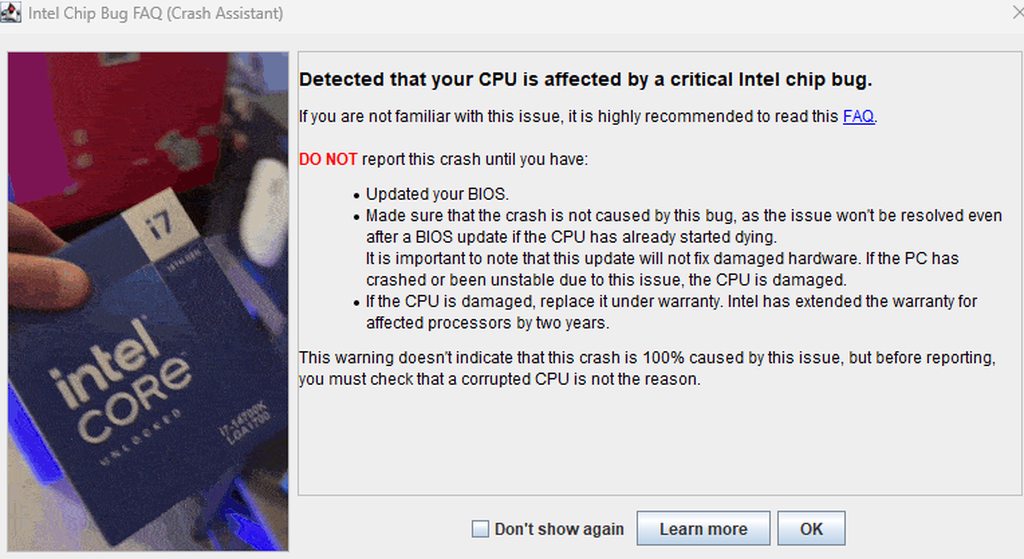
nvm, figured it out. it was in his mods folder, so idk why is this part of the bettermc but okay
sweet spade
desert knot
hello, my bf played better mc w me yesterday and it worked just fine, however on...

ZDNET
Does your desktop PC have a 13th- or 14th-generation Raptor Lake CPU? Read this now. Does the microcode patch actually work? You really need to read this.
clear perch
When do vein goblins spawn?
desert knot
sweet spade
https://www.zdnet.com/article/intel-chip-bug-faq-which-pcs-are-affected-how-to-g...
it was just some mod called crash assistant that always launched with better mc modpack, we deleted it and its alright
sweet spade
desert knot
it was just some mod called crash assistant that always launched with better mc ...
what do you think crash assistant does,it assists with crashes
its not the issue, its telling you what the issue is
you're not supposed to remove it in the case of future crashes
the intel bug is a real thing hence why theres a link about it
and a big red faq button on the window
well its not red its blue but close enough
big red text anyways
 sharp timber
sweet spade
https://www.zdnet.com/article/intel-chip-bug-faq-which-pcs-are-affected-how-to-g...
sharp timber
sweet spade
https://www.zdnet.com/article/intel-chip-bug-faq-which-pcs-are-affected-how-to-g...
That's the fakest looking site I've ever seen
sweet spade
sharp timber
That's the fakest looking site I've ever seen
 its the link provided with crashes that it can be the issue in, and an admin has on multiple occasions provided it as support
if you dont believe it sure it doesnt really affect me
i'm just here trying to provide support to people who come here for it and if they dont take the support thats on them
im sure chloe will come in later to provide more detailed support
sharp timber
I went thrrough the crash logs and there is problem with alocating memory
I have 12gb VRAM card and I gave the modpack 10 gb of ram
So that shouldn't be an issue
Removed some of the optimazation mods that could have problem with modern 40 series cards
Nah it's the same problem
Wtf is happening to ur modpack
stone mountain
sharp timber
Wtf is happening to ur modpack
That Crash Assistant thing is legit
It's a functionality added recently
Unfortunately Intel CPU crashes don't just tell you "crashed due to CPU issue"
It will show as issues with memory, with GPU, etc.
 cinder pumice
Better MC 4 - v39 crashed without a crash report. The logs have been uploaded to mclo.gs:
- 1.20.1 [FORGE]
- What launcher did you run Minecraft with? (e.g. CurseForge, ATLauncher, MultiMC, ...)
- Have you changed the modpack in any way except mods?
- v39
- Have you ever gotten past the crash condition without crashing, or does the game always crash?
- What steps cause the crash?
latest.log | CurseForge: launcher_log.txt | crash_assistant_app.log
Mod list changes beyond the modpack:
Updated mods:
[2;34mstoragenetwork[0m ([2;31m1.12.2[0m > [2;32m1.11.3[0m)
when i went to create a world or join a server it just crashes and doesnt respond
still sentinelBOT
🚫 pawel_kaskader, that command is disabled in this channel.
stone mountain
 tiny swift
any tutorial how to makeserver on hosting
tiny swift
any tutorial how to makeserver on hosting
!server
versed mountainBOT
Free Method
To host a server on your own computer, read the selfhosting guide.
This guide goes over how to install, create, and launch a free Minecraft server on all operating systems (MacOS, Linux and Windows). The guide also guides you through installing Java and optimizing your server for better performance.
If you are installing one of our older modpacks, ignore the "README" file that is included in the serverpack files, as they have outdated information.
Paid Method
We suggest renting a server from Bisect Hosting:
Approx. $10 - $25 a month depending on what plan you choose. You can also get 25% off with Code LunaPixel.
Go here and order a plan which fits you. We suggest 1GB per player but nothing lower than 4GB as the server needs at least 3GB to run.
Go to #server-hosting for more Info!
The following advice works for both the Free and Paid methods:
Transferring Your World
If you're playing Singleplayer and want to transfer your world to your server, simply go to your modpack files and navigate to the saves folder. Inside of this folder, you will see your world saves. Rename your desired world save to world. You can then transfer this folder to your server files. If your world was hosted via world sharing, this process has to be done by the person who would click "Share World".
Fixing Lag
To resolve lag issues, simply run the !tps command in #bots and follow the directions provided.
stone mountain
cinder pumice
Better MC 4 - v39 crashed without a crash report. The logs have been uploaded to...
Looks like you run out of memory. How much RAM does your computer have?
cinder pumice
@stone mountain16gb but it says it only has 4
stone mountain
cinder pumice
<@234017587837665282>16gb but it says it only has 4
Ok, allocate more memory in Curseforge for the profile
You currently have 4GB, try like 6-8GB instead
cinder pumice
stone mountain
Ok, allocate more memory in Curseforge for the profile
where can i find this
stone mountain
cinder pumice
where can i find this
Allocating RAM in CurseForge
Open Profile Options - Click the dropdown next to the “Play” button and select “Profile Options.” Adjust Memory Settings - Uncheck “Use System Memory Settings” and adjust the slider to your desired memory. Save Changes - Once set, you're ready to play with more RAM allocated.
cinder pumice
stone mountain
>>> Allocating RAM in CurseForge
Open Profile Options - Click the dropdown next ...
thx man
steep moat
Im back with another crash report guys, someone have an idea please ? Thanks in advance !
Better MC 4 - v39 crashed without a crash report. The logs have been uploaded to mclo.gs:
- 1.20.1 [FORGE]
- What launcher did you run Minecraft with? (e.g. CurseForge, ATLauncher, MultiMC, ...)
- Have you changed the modpack in any way except mods?
- v39
- Have you ever gotten past the crash condition without crashing, or does the game always crash?
- What steps cause the crash?
latest.log | atlauncher.log | crash_assistant_app.log
Mod list changes beyond the modpack:
Updated mods:
[2;34mstoragenetwork[0m ([2;31m1.12.2[0m > [2;32m1.11.3[0m)
i tried on AT and Forge
I didnty change any mods
It crashed randomly at random moments
stone mountain
steep moat
Im back with another crash report guys, someone have an idea please ? Thanks in ...
How much memory have you allocated in the ATL?
steep moat
stone mountain
How much memory have you allocated in the ATL?
4000 but i tried with 8g and i got another crashes then$
steep moat
stone mountain
How much memory have you allocated in the ATL?
should i do with 6 ?
stone mountain
steep moat
should i do with 6 ?
Try it. Your log just ends abruptly, so I suspected it's too little (and not too much)
8GB should work fine too
steep moat
stone mountain
8GB should work fine too
I'll try thks
Once again
Better MC 4 - v39 crashed. The logs have been uploaded to mclo.gs:
- 1.20.1 [FORGE]
- What launcher did you run Minecraft with? (e.g. CurseForge, ATLauncher, MultiMC, ...)
- Have you changed the modpack in any way except mods?
- v39
- Have you ever gotten past the crash condition without crashing, or does the game always crash?
- What steps cause the crash?
latest.log | hs_err_pid16744.log | atlauncher.log | crash_assistant_app.log
Mod list changes beyond the modpack:
Updated mods:
[2;34mstoragenetwork[0m ([2;31m1.12.2[0m > [2;32m1.11.3[0m)
No idea what's causing that
steep moat
stone mountain
No idea what's causing that
Could be caused by a memory issue in my pc ?
tiny swift
yo my server crashing on miencraft paid hosting with installing v39 which mods should i delete
i rememebr last time i removed two folders and it worked
scarlet panther
tiny swift
yo my server crashing on miencraft paid hosting with installing v39 which mods s...
DON'T DELETE MODS - that's not going to help you, not unless they are the ones you added (if that's at all the case).
tiny swift
on bisect
scarlet panther
!moreinfo
versed mountainBOT
- What Minecraft version are you using? (1.19.2, 1.20.1, ...)
- What launcher did you run Minecraft with? (e.g. CurseForge, ATLauncher, MultiMC, ...)
- Have you changed the modpack in any way? (e.g. changing mod versions, adding/removing mods)
- What version of the modpack are you using? (v11, v9, etc)
- Have you ever gotten past the crash condition without crashing, or does the game always crash?
- What steps cause the crash?
Required:
Open the game directory (right click pack -> open folder), navigate to the "crash-reports" folder and upload the latest available crash report.
If there is no crash report, navigate to the logs folder and upload "latest.log."
If there is no log, navigate to the base pack directory and upload the hs_err_pid file, if there is one.
stone mountain
steep moat
Could be caused by a memory issue in my pc ?
Maybe, try running this: https://www.techrepublic.com/article/how-to-detect-bad-ram-with-the-windows-memory-diagnostic-tool/

Learn how to use the Windows Memory Diagnostic tool to troubleshoot any issues with the RAM of your Windows computer.