#all-of-create
1 messages · Page 24 of 1
 pallid drift
 slender light
pallid drift
I have just quit to play another game but it was on the library airship on a ran...
slender light
pallid drift
I have just quit to play another game but it was on the library airship on a ran...
I’d appreciate it if you can provide a screenshot if your on again, cant seem to reproduce with a fresh world unfortunately
 alpine crow
Is sharing worlds not available on this modpack? I only get the option to use LAN when in a singleplayer world.
slender light
alpine crow
Is sharing worlds not available on this modpack? I only get the option to use LA...
it is, the button js wasnt renamed
alpine crow
ah okay ty! So I imagine the reason I'm not being given a link is the server capacity issues, as it is only giving me a port code.
slender light
alpine crow
ah okay ty! So I imagine the reason I'm not being given a link is the server cap...
yeah I think so, it wasnt working yesterday when I tried but it was working fine before then
I would just recommend self-hosting a server if you can port foward
!server
 last pecanBOT
Free Method
To host a server on your own computer, read the selfhosting guide.
This guide goes over how to install, create, and launch a free Minecraft server on all operating systems (MacOS, Linux and Windows). The guide also guides you through installing Java and optimizing your server for better performance.
If you are installing one of our older modpacks, ignore the "README" file that is included in the serverpack files, as they have outdated information.
Paid Method
We suggest renting a server from Bisect Hosting:
Approx. $10 - $25 a month depending on what plan you choose. You can also get 25% off with Code LunaPixel.
Go here and order a plan which fits you. We suggest 1GB per player but nothing lower than 4GB as the server needs at least 3GB to run.
Go to #server-hosting for more Info!
The following advice works for both the Free and Paid methods:
Transferring Your World
If you're playing Singleplayer and want to transfer your world to your server, simply go to your modpack files and navigate to the saves folder. Inside of this folder, you will see your world saves. Rename your desired world save to world. You can then transfer this folder to your server files. If your world was hosted via world sharing, this process has to be done by the person who would click "Share World".
Fixing Lag
To resolve lag issues, simply run the !tps command in #bots and follow the directions provided.
alpine crow
Alright I'll give it another go some other time and yea looking into it now, ty again!
 frozen juniper
Anyone know if slime spawns or chunks are changed in anyway?
slender light
frozen juniper
Anyone know if slime spawns or chunks are changed in anyway?
nope they still exist
frozen juniper
i'm assuming making a dough and lime dye farm is more efficient for slime
 desert root
will there be a all of create aeronautics server ?
slender light
frozen juniper
i'm assuming making a dough and lime dye farm is more efficient for slime
yes
slender light
desert root
will there be a all of create aeronautics server ?
also hosted by Duck Pond
 peak crater
Forgive me if this is the wrong place to ask, but I noticed that when running All of Create Aeronautics using itzg/docker-minecraft-server with autoforge the server wouldn't start without adding in natures compass. After adding that to the server players using the mod pack from curseforge were unable to join without also adding that mod.
Is this expected, or did I mess something up?
slender light
peak crater
Forgive me if this is the wrong place to ask, but I noticed that when running Al...
Should not be the case, no reason why adding natures compass would let it start up
why are you using Docker even?
peak crater
I find it's the easiest way to self host
the problem I experienced is when running the server files the server wouldn't start because of this error
NoClassDefFoundError: com/chaosthedude/naturescompass/items/NaturesCompassItem
  at ...SimModCompatibilityService.initLoaded(SimModCompatibilityService.java:30)
When I added natures compass the server was then able to start
slender light
I honestly suggest using Pterodactyl or just normally with the serverpack, I have seen plenty of issues here on this Discord reported caused by Docker and have no knowledge of Docker so I cant help unfortunately.
peak crater
containers and infra are my job so I'm good there 😅
slender light
peak crater
the problem I experienced is when running the server files the server wouldn't s...
no clue why this would happen because I have never touched that mod in this pack ever :p
peak crater
you got an issue tracker? You should be able to replicate it with this compose.yml
services:
  mc:
    image: itzg/minecraft-server
    restart: always
    environment:
      EULA: true
      MODPACK_PLATFORM: AUTO_CURSEFORGE
      CF_API_KEY: "replace me"
      CF_PAGE_URL: https://www.curseforge.com/minecraft/modpacks/all-of-create-aeronautics
      # uncommenting this fixes it
      # CURSEFORGE_FILES: natures-compass
      MOTD: Welcome to All of Create Aeronautics!
      MEMORY: 8G
    volumes:
      - ./data:/data
      - ./downloads:/downloads
    ports:
      - "25565:25565"
I cant provide support for Docker, sorry
Ill take one look at that though, give me a second
peak crater
Here's the crash report if it helps
 dapper daggerBOT
peak crater
Here's the crash report if it helps
dapper daggerBOT
peak crater
Here's the crash report if it helps
Uploaded message.txt from @peak crater to mclogs: https://mclo.gs/MvTw2rz
slender light
peak crater
Here's the crash report if it helps
downgrade to Java 21 and retry please
Its an issue with Create Aeronautics though
https://github.com/Creators-of-Aeronautics/Simulated-Project/issues/4

GitHub
Context create: simulated crashes on startup if nature's compass isn't present Crash Report https://mclo.gs/dT6xWHj
peak crater
java21 fixed it, thank you!
slender light
peak crater
java21 fixed it, thank you!
glad we get it sorted! Enjoy
 chilly gorge
Can I ask about the new Aeronautics modpack here?
Oh, no need, there's no Leaves be Gone in the modpack, so the bug I had on my own instance of AoC doesn't happen
 graceful sail
here's to hoping C:A gets more stable in the next few months to be used alongside other mainline create addons
 vivid zodiac
yo guys, is the aeronautics addon in the All Of Create?
 limpid fern
vivid zodiac
yo guys, is the aeronautics addon in the All Of Create?
limpid fern
vivid zodiac
yo guys, is the aeronautics addon in the All Of Create?
Some announcement was made about it, take a look
 orchid parrot
Anyone knows myabe on why the recipe wont work? Am I doing something wrong? It tries to put the stuff together but the waystone wont be crafted...


Nevermind Im just dumb.. lol
slender light
chilly gorge
Can I ask about the new Aeronautics modpack here?
yes this would be the right channel
frozen juniper
whats the best way to farm lime dye?
its by farming sea pickles with bonemeal and then using the fan + heatsource to make them into lime dye right
or would farming cati and then applying white dye to it be better
I am trying to make slime by combining lime dye with dough
already have automated dough
 atomic wyvern
Hi there,
I installed All of create modpack with aeronautics (this one: https://www.curseforge.com/minecraft/modpacks/all-of-create-aeronautics)
Tho, when a use the physics assembler on a glued architecture, nothing happens, Am I missing something obvious ?
 thorny portal
The Luna Pixel hoster isnt working is there anyway to fix it?
I added Essentials then deleted it. But the "/luna start" command doesn't work and there is no "Share World" button
graceful sail
has there ever been a diagnosis on why TPS performance absolutely tanks when you've approached a Tinker's Workshop? this is the most recent spark profile of me just walking through it normally and then leaving it https://spark.lucko.me/c5F6wOhgNZ
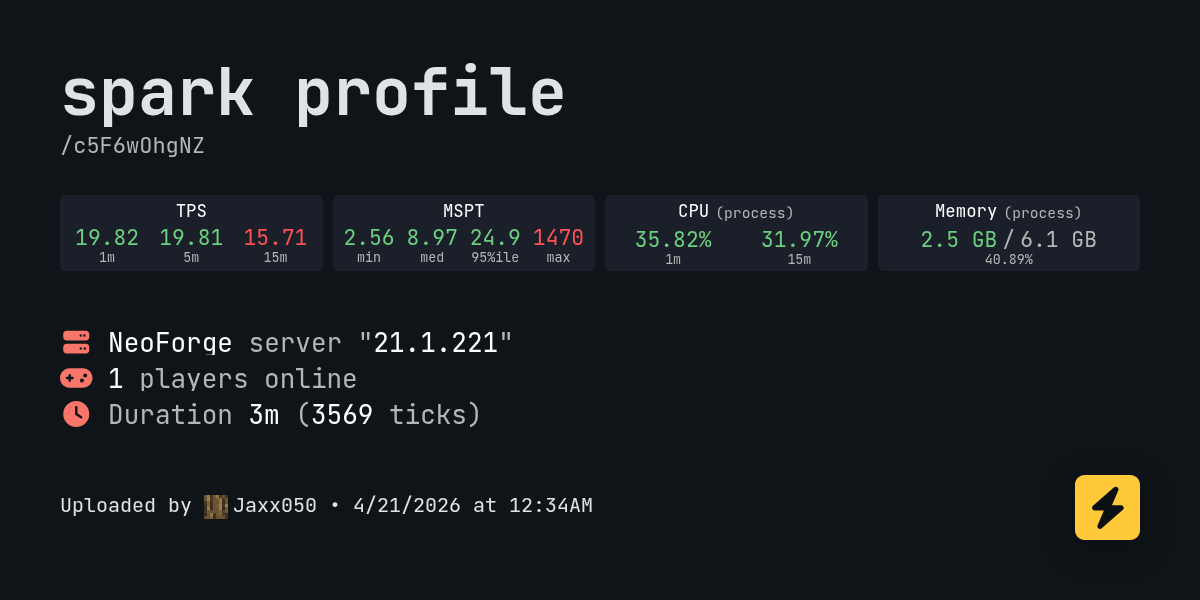
spark is a performance profiler for Minecraft clients, servers, and proxies.
 rare tendon
All of Create - Aeronautics does not start up after I added those mods

The curseforge version
slender light
atomic wyvern
Hi there,
I installed All of create modpack with aeronautics (this one: https:/...
did you install the mod manually onto the regular All of Create? This shouldnt be an issue
slender light
thorny portal
I added Essentials then deleted it. But the "/luna start" command doesn't work a...
!ws
last pecanBOT
Luna Pixel's World Sharing
Our modpacks don't support any mods that add singleplayer hosting / world sharing because we already provide free world sharing. The 'Essential' mod is therefore incompatible.
To share your world using our own world hosting, click the 'Open to Lan' or 'Share World' button in the game menu when in a singleplayer world, and share the world.
It will give you an address, like magma-cube.mc.lunapixel.gg, which your friends can use to connect directly to your world as if it were a server!
We still highly suggest not to play through LAN as LAN is untested and unreliable. Using it will cause longterm damage to your world.
There is no reason to use LAN, as we support both paid and free methods of hosting a server the normal way.
If you get an error in chat when trying to host your world, we highly recommend selfhosting instead as it's free, very easy, and much more stable. Run the !server command in #bots to learn more.
 slender light
its just the open to lan button
thorny portal
It doesnt give me the server code
slender light
graceful sail
has there ever been a diagnosis on why TPS performance absolutely tanks when you...
im on my phone rn so ill check the spark profiler tomorrow tomorrow but the tinkers workshop is known to have alot of issues like this, but in the meantime you can use a mod like obversable to find the cause
slender light
thorny portal
It doesnt give me the server code
!wsfull
last pecanBOT
 World Sharing servers are likely currently at capacity
If you or your friend are receiving an error such as "An error occurred in Luna", or "Connection refused: no further information" when trying to play through "Open to LAN" or "Share World", it's likely that Luna's servers (used for world sharing) are currently full. We don't have a way to know when slots on our servers free up, but you are welcome to try again later.
We understand and recognize that this may be inconvenient, so we recommend in this case to host or rent your own server. Self-hosting is free, for more information on supported hosting options, type !server in #bots.
If you'd prefer an alternate world sharing mod such as Essential over the previous methods, risks of it are outlined in !ea, as well as how to use it if you accept the risks and void of support.
This command does NOT change or know if they are full or not, this is something ran as the most common issue.
slender light
rare tendon
All of Create - Aeronautics does not start up after I added those mods
!modified
last pecanBOT
You are using a modified version of the modpack!
Adding, removing, or updating large amounts of mods without testing any of your changes is **not **a good idea, and it is very unlikely that anyone will want to debug your issue for you. Please test the changes you make in small groups, as opposed to doing all of the changes at once.
If you want further support for your issue, someone may respond to you in the channel for the modpack you based your changes off, but please only post once. You may also have better luck in #1061339968691257466.
rare tendon
Hmm?
slender light
rare tendon
Hmm?
i cant rly help much with modified versions, just add mods 1 by 1 and test
slender light
i had a peak at your modlist and honestly have no idea what could be causing it
graceful sail
slender light
im on my phone rn so ill check the spark profiler tomorrow tomorrow but the tink...
"obversable" not "observable" yeah
slender light
might be worth checking logs
slender light
graceful sail
"obversable" not "observable" yeah
oops lol
graceful sail
genuinely don't know because i know mod devs like to misname their mods just barely for distinguishing
rare tendon
from what I am reading it has something to do with like
spongepowered
oh..
I see figura in the red
 lemme see if its figura
slender light
graceful sail
genuinely don't know because i know mod devs like to misname their mods just bar...
 graceful sail
kk ty
 slender light
rare tendon
It was figura...
slender light
rare tendon
It was figura...
take a look at their github issues tracker, could be a known issue and if not you could always report it
rare tendon
Guess so
Okay figured out sodium and figura dont work well together
Okay found a patched version of Figura, now it works

 tiny meteor
what's the item called that you can place on a cogwheel that allows you to have cogwheels placed in a 2x2 area without them self destructing due to different rpm
 pearl path
I'm trying to run a server with all of create for my friends and I but I'm running into this

is this just because the server pack hasnt been updated yet?
 hoary zodiac
pearl path
is this just because the server pack hasnt been updated yet?
hoary zodiac
pearl path
is this just because the server pack hasnt been updated yet?
do the version numbers match? if not, you downloaded the wrong one
pearl path
hoary zodiac
do the version numbers match? if not, you downloaded the wrong one
version 1.7 and neoforge 21.1.211?
hoary zodiac
the modpack versions, do they match
pearl path
Those are the correct versions i think?
slender light
pearl path
I'm trying to run a server with all of create for my friends and I but I'm runni...
the server is not installed properly
!server
last pecanBOT
Free Method
To host a server on your own computer, read the selfhosting guide.
This guide goes over how to install, create, and launch a free Minecraft server on all operating systems (MacOS, Linux and Windows). The guide also guides you through installing Java and optimizing your server for better performance.
If you are installing one of our older modpacks, ignore the "README" file that is included in the serverpack files, as they have outdated information.
Paid Method
We suggest renting a server from Bisect Hosting:
Approx. $10 - $25 a month depending on what plan you choose. You can also get 25% off with Code LunaPixel.
Go here and order a plan which fits you. We suggest 1GB per player but nothing lower than 4GB as the server needs at least 3GB to run.
Go to #server-hosting for more Info!
The following advice works for both the Free and Paid methods:
Transferring Your World
If you're playing Singleplayer and want to transfer your world to your server, simply go to your modpack files and navigate to the saves folder. Inside of this folder, you will see your world saves. Rename your desired world save to world. You can then transfer this folder to your server files. If your world was hosted via world sharing, this process has to be done by the person who would click "Share World".
Fixing Lag
To resolve lag issues, simply run the !tps command in #bots and follow the directions provided.
slender light
if you send the latest.log i can confirm
try taking the config and mods folder from the latest serverpack, should work
pearl path
Because the server file has everything that the log says was missed
so it likely didnt install from the link correctly, my bad, thank you for the replies though
slender light
js lmk if u encounter any issues
i wont reply till like 9 hrs ltr tho as im heading to sleep
 formal adder

 last pecanBOT
World Sharing servers are likely currently at capacity
If you or your friend are receiving an error such as "An error occurred in Luna", or "Connection refused: no further information" when trying to play through "Open to LAN" or "Share World", it's likely that Luna's servers (used for world sharing) are currently full. We don't have a way to know when slots on our servers free up, but you are welcome to try again later.
We understand and recognize that this may be inconvenient, so we recommend in this case to host or rent your own server. Self-hosting is free, for more information on supported hosting options, type !server in #bots.
If you'd prefer an alternate world sharing mod such as Essential over the previous methods, risks of it are outlined in !ea, as well as how to use it if you accept the risks and void of support.
This command does NOT change or know if they are full or not, this is something ran as the most common issue.
pallid drift
Okay so I crashed again and I have the logs !
For some reminder I was just joining the world that i have created yesterday (the one it crash 2 times during the loading) The only things I have done is flying with the fancy elytra (I don't remember the name of the item) find an empty texture on an airship village and nothing more (the world have no physics entities provided by aeronautic)
I have some clue maybe it's a too high CPU usage
All of Create 1.21.1 - v1 crashed without a crash report. The logs have been uploaded to mclo.gs:
- 1.21.1 [NEOFORGE]
- What launcher did you run Minecraft with? (e.g. CurseForge, ATLauncher, MultiMC, ...)
- Have you changed the modpack in any way except mods?
- v1
- Have you ever gotten past the crash condition without crashing, or does the game always crash?
- What steps cause the crash?
latest.log | debug.log head / tail (~35k lines) | CurseForge: stdout-logs.txt | crash_assistant_app.log | modlist.txt | win_event1776774482891.txt
Mod list changes on top of the modpack:
[2;34mMod list was not modified.[0m
nothing useful in logs unfortunately, give ATLauncher a go
!alternates
last pecanBOT
If this command was run in response to your question/issue, it is likely because switching away from the launcher you are currently using would fix your problem.
From our experience, the most stable launcher by far is ATLauncher, also known as ATL. Keep in mind that ATL is NOT related to TLauncher in any way, and is not a cracked launcher.
To install ATL, do the following:
1. Go to https://atlauncher.com/download. If you are on MacOS, then choose the "Jar" version under the "Other" tab, this is important as OSX WILL crash the game on Mac.
2. Install and run the setup, then open the program.
3. Login to your Microsoft account that owns the Java Edition of Minecraft from the Accounts tab on the right. This process is 100% safe, as it goes directly through Microsoft. ATL doesn't see your account credentials.
4. Go to the Packs tab on the right, then click "Curseforge" on the left.
5. Search the modpack you wish to download.
6. Click "Install". Then, follow the on-screen directions.
7. Go to the Instances tab, and click "Play" on the modpack you downloaded. If you ever see an "Update" button on the instance, click it.
This video explains the process: https://youtu.be/xMYW1wMbmkM
To transfer your Curseforge world to ATL, simply right click the modpack on Curseforge, or click the 3 dots, then click "Open Folder". Copy the Saves folder, then click "Open Folder" on ATL and paste the Saves folder there. Do the same with the XaerosMinimap folder, or the Journeymap folder, to transfer over any waypoints you've created.
Because ATL downloads the exact same files as Curseforge does, your world will be the exact same and you will be able to join the same servers. ATL also works without an internet connection (after you've installed the modpack, of course), and does not have any bloat from Overwolf. You are free to uninstall both Overwolf and Curseforge with ATL installed.
pallid drift
slender light
nothing useful in logs unfortunately, give ATLauncher a go
Sorry but I don't want to trust another launcher (even if... curseforge is surely not the best to trust in fact)
slender light
pallid drift
Sorry but I don't want to trust another launcher (even if... curseforge is surel...
ATLauncher is fully open source & trusted
https://github.com/ATLauncher/ATLauncher

GitHub
ATLauncher is a Launcher for Minecraft which integrates multiple different ModPacks to allow you to download and install ModPacks easily and quickly. - ATLauncher/ATLauncher
 rich flame
pallid drift
Sorry but I don't want to trust another launcher (even if... curseforge is surel...
rich flame
pallid drift
Sorry but I don't want to trust another launcher (even if... curseforge is surel...
Prism is the good old multimc
pallid drift
slender light
ATLauncher is fully open source & trusted
https://github.com/ATLauncher/ATLaunch...
Okay, I have done some test and...
I can only open my world, when curseforge app is open with this modpack
I don't even understand how
and why
So... maybe it's a conflict with their feature when you can join the last world you have played on a modpack
But I don't have clue of why it only append only on this modpack
Oh and for the missing texture !
It's the Book Pile from supplementary but... it work when I place it ssoooo.... surely a bug from the mod who add compat compat between supplementary and the mod for the airship village
 slender light
pallid drift
Oh and for the missing texture !
It's the Book Pile from supplementary but... it...
slender light
pallid drift
Oh and for the missing texture !
It's the Book Pile from supplementary but... it...
will look into this thanks
the book pile is built into the integrated village mod so not sure whats the cause atm
frozen juniper
Can i update my server modpack from create 6.0 1.20.1 v2.3 to the latest 1.21 version without breaking the world
slender light
frozen juniper
Can i update my server modpack from create 6.0 1.20.1 v2.3 to the latest 1.21 ve...
no
many mods didnt update to 1.21
graceful sail
slender light
many mods didnt update to 1.21
cries in Tetra
 young shale
All of Create 1.21.1 - v1.1 crashed. The logs have been uploaded to mclo.gs:
- 1.21.1 [NEOFORGE]
- curseforg
- no
- v1.1
- idk started one and it crashed
- making the world caused to crash
latest.log | debug.log head / tail (~10MB & ~58k lines) | crash-2026-04-21_22.28.38-server.txt | CurseForge: stdout-logs.txt | crash_assistant_app.log | modlist.txt
Mod list changes on top of the modpack:
[2;34mMod list was not modified.[0m
report this to the developers of the sable mod https://github.com/ryanhcode/sable/issues
GitHub
Interactive physics moving block structures! Contribute to ryanhcode/sable development by creating an account on GitHub.
 icy fable
Hello, I'm new to modpacks so I don't know exactly how to set them up. I downloaded the All of Create - Aeronautics modpack zip file, how am I supposed to set it up? I have it in the Neoforge 1.21.1 mods folder but still nothing shows up in-game
limpid fern
icy fable
Hello, I'm new to modpacks so I don't know exactly how to set them up. I downloa...
#faq for client installation
atomic wyvern
Hi guys, in multiplayer am I the only one who's not able to send input from my linked controller to redstone links on my contraptions (i'm making a car)
When I input a key, it works well on the redstone link place on the world, but if the link is on the car, it won't take the signal

I just tried in singleplayer and I have the same issue
 dense citrus
atomic wyvern
Hi guys, in multiplayer am I the only one who's not able to send input from my l...
dense citrus
atomic wyvern
Hi guys, in multiplayer am I the only one who's not able to send input from my l...
did you update to 1.1? i think its a config issue with create connections
its fixed in the update, but you might be able to fix it by changing the config yourself
atomic wyvern
Mmh it was probably that, my friend was in charge of that. Tho', i figured out that the typewritter work correctly
I'll make sure we update, thanks
 brave wren
are there any server files for all of create Aeronautics? Or a tutorial for it?
hoary zodiac
brave wren
are there any server files for all of create Aeronautics? Or a tutorial for it?
brave wren
Thank you HiddenTides
 warm remnant
All of Create 1.21.1 - v1.6.1 crashed. The logs have been uploaded to mclo.gs:
- 1.21.1 [NEOFORGE]
- What launcher did you run Minecraft with? (e.g. CurseForge, ATLauncher, MultiMC, ...) - CurseForge
- Have you changed the modpack in any way except mods? - No
- v1.6.1
- Have you ever gotten past the crash condition without crashing, or does the game always crash? - Always Crash
- What steps cause the crash?
latest.log | debug.log | crash-2026-04-21_19.44.16-client.txt | CurseForge: launcher_log.txt | crash_assistant_app.log | modlist.txt
Mod list changes on top of the modpack:
[2;32m9[0m added, [2;31m0[0m removed, [2;34m32[0m updated.
 faint fog
All of Create 1.21.1 - v1.6.1 crashed. The logs have been uploaded to mclo.gs:
- 1.21.1 [NEOFORGE]
- What launcher did you run Minecraft with? (e.g. CurseForge, ATLauncher, MultiMC, ...) - CurseForge
- Have you changed the modpack in any way except mods? - I added 3 mods: Chunk Loader and 2 Jetpack mods (whichever are the top 2 ones on the list, but the game was running perfectly fine)
- v1.6.1
- Have you ever gotten past the crash condition without crashing, or does the game always crash? - Crashes at the end of the red loading screen
- What steps cause the crash? - So initially I wanted to build a silverfish exp farm, but for some reason I couldn't bulk hunt the stone (which was odd bc I thought that I was on the latest version). So I checked and I had like 32 mod updates. After I updated them it just started crashing over and over again.
latest.log | debug.log | crash-2026-04-22_01.46.33-client.txt | CurseForge: launcher_log.txt | crash_assistant_app.log | modlist.txt
Mod list changes on top of the modpack:
[2;32m7[0m added, [2;31m0[0m removed, [2;34m32[0m updated.
!update
!updatemods
last pecanBOT
Do NOT Update Mods Manually!
Modpacks use specific versions of certain mods to prevent various issues, such as crashes or major game-breaking bugs. Mods will be updated by the modpack developer when they see fit. Please do not update the mods in a modpack manually, unless specifically told to do so. This includes hitting the "update all" feature on CurseForge launcher it likes to bother users with.
To be clear; this is separate from updating the modpack (such as Better MC / Medieval MC) itself. You should always stay up to date with the latest version of the modpack. To update the pack correctly, you can follow the command!updatemodpack
The easiest way to downgrade mod versions to their original versions in the pack, is to reinstall the pack itself. Before you uninstall, back up both any singleplayer world files you have, and your map folder. LPS packs usually use JourneyMap or Xareos, the map folder will be named accordingly.
- Curseforge -> Right click the modpack instance -> „Open Folder”.
- ATLauncher -> Click „Open Folder” on the modpack instance.
- PrismLauncher -> Select your instance and click „Folder” on the right.
Navigate to the "minecraft" folder, and within that will be "saves" and "journeymap"/"xareos" depending on which the pack has. Copy/Move these folders to a safe location, and you can move them right back to the fresh copy of the pack when reinstalled.
faint fog
hoary zodiac
!update
Sorry, does this mean that I have to update mods again? Because if so - then it still crashes :(
I have the crash message tho
slender light
faint fog
Sorry, does this mean that I have to update mods again? Because if so - then it ...
we cant help if you modify the pack
!modified
last pecanBOT
You are using a modified version of the modpack!
Adding, removing, or updating large amounts of mods without testing any of your changes is **not **a good idea, and it is very unlikely that anyone will want to debug your issue for you. Please test the changes you make in small groups, as opposed to doing all of the changes at once.
If you want further support for your issue, someone may respond to you in the channel for the modpack you based your changes off, but please only post once. You may also have better luck in #1061339968691257466.
slender light
if you want support you will have to reinstall the pack
hoary zodiac
faint fog
Sorry, does this mean that I have to update mods again? Because if so - then it ...
no it's saying stop updating individual mods.
it breaks the pack when you update everything manually.
faint fog
Oh, thanks, didn't know it could cause that. But is there a solution for lack of stone bulk haunting recipe?
hoary zodiac
!pins
 faint fog
Thank you! Appreciate the help a lot 🥹
 primal nebula
hi! I'm trying to use the all of create modpack, but I want to use different mods for terrain/biome generation. I want to use Lithosphere paired with Nature's spirit. I'm fairly new to using modpacks and don't know what to look for, but could anyone tell me which mods in All Of Create handle the terrain generation and if I need to remove anything to get lithosphere to work?
 smoky wyvern
All of Create 1.21.1 - v1.6.1 crashed. The logs have been uploaded to mclo.gs:
- 1.21.1 [NEOFORGE]
- What launcher did you run Minecraft with? (e.g. CurseForge, ATLauncher, MultiMC, ...)
- Have you changed the modpack in any way except mods?
- v1.6.1
- Have you ever gotten past the crash condition without crashing, or does the game always crash?
- What steps cause the crash?
latest.log | debug.log | crash-2026-04-21_21.36.06-fml.txt | CurseForge: stdout-logs.txt | crash_assistant_app.log | modlist.txt
Found [2;34m1[0m log analysis results:
[2;34mMissingUnsupportedDependencies[0m in: latest.log
Mod list changes on top of the modpack:
[2;32m49[0m added, [2;31m0[0m removed, [2;34m31[0m updated.
 molten hill
smoky wyvern
All of Create 1.21.1 - v1.6.1 crashed. The logs have been uploaded to `mclo.gs`:...
molten hill
smoky wyvern
All of Create 1.21.1 - v1.6.1 crashed. The logs have been uploaded to `mclo.gs`:...
!modified
last pecanBOT
You are using a modified version of the modpack!
Adding, removing, or updating large amounts of mods without testing any of your changes is **not **a good idea, and it is very unlikely that anyone will want to debug your issue for you. Please test the changes you make in small groups, as opposed to doing all of the changes at once.
If you want further support for your issue, someone may respond to you in the channel for the modpack you based your changes off, but please only post once. You may also have better luck in #1061339968691257466.
smoky wyvern
aw man
 plush kiln
Quick question for AoC, tryna host a server with friends but the buttons to start the server aren't there on my end
What does I do-
molten hill
plush kiln
Quick question for AoC, tryna host a server with friends but the buttons to star...
what do you mean the buttons to start the server
plush kiln
!ws
last pecanBOT
Luna Pixel's World Sharing
Our modpacks don't support any mods that add singleplayer hosting / world sharing because we already provide free world sharing. The 'Essential' mod is therefore incompatible.
To share your world using our own world hosting, click the 'Open to Lan' or 'Share World' button in the game menu when in a singleplayer world, and share the world.
It will give you an address, like magma-cube.mc.lunapixel.gg, which your friends can use to connect directly to your world as if it were a server!
We still highly suggest not to play through LAN as LAN is untested and unreliable. Using it will cause longterm damage to your world.
There is no reason to use LAN, as we support both paid and free methods of hosting a server the normal way.
If you get an error in chat when trying to host your world, we highly recommend selfhosting instead as it's free, very easy, and much more stable. Run the !server command in #bots to learn more.
hoary zodiac
that's from the lan button for world share. Bisect leads to their website for considering a purchase
 hoary zodiac
That's quite old, what version you on?
plush kiln
1.21.1, but it is the Aeronautics vers of the pack so idk if it's that or not
hoary zodiac
though it could be the pic is old too, I don't normally use the world sharing as I am a total loner gamer
just hit start lan world then
plush kiln
Did, still can't get friends on
hoary zodiac
did it give you ip in chat?
hoary zodiac
!wsfull
last pecanBOT
World Sharing servers are likely currently at capacity
If you or your friend are receiving an error such as "An error occurred in Luna", or "Connection refused: no further information" when trying to play through "Open to LAN" or "Share World", it's likely that Luna's servers (used for world sharing) are currently full. We don't have a way to know when slots on our servers free up, but you are welcome to try again later.
We understand and recognize that this may be inconvenient, so we recommend in this case to host or rent your own server. Self-hosting is free, for more information on supported hosting options, type !server in #bots.
If you'd prefer an alternate world sharing mod such as Essential over the previous methods, risks of it are outlined in !ea, as well as how to use it if you accept the risks and void of support.
This command does NOT change or know if they are full or not, this is something ran as the most common issue.
hoary zodiac
nearing the time of year where it's bouncing between spring break and school ending for the semester/year.
plush kiln
Wouldn't it show an error? Instead it's just non-existent
hoary zodiac
bounces between nothing and an error
hoary zodiac
plush kiln
Is it possible to swap Luna out or is it required?
could try e4mc, but we offer zero support for essential. Or you can self host from your pc if you want more control
plush kiln
I tried e4mc but I might be too stupid cause I couldn't figure out how to invite people
hoary zodiac
Luna is a fork of e4mc, it's same way, the lan button
!server it'd be better for self hosting in the long run though free option wise at least.
last pecanBOT
Free Method
To host a server on your own computer, read the selfhosting guide.
This guide goes over how to install, create, and launch a free Minecraft server on all operating systems (MacOS, Linux and Windows). The guide also guides you through installing Java and optimizing your server for better performance.
If you are installing one of our older modpacks, ignore the "README" file that is included in the serverpack files, as they have outdated information.
Paid Method
We suggest renting a server from Bisect Hosting:
Approx. $10 - $25 a month depending on what plan you choose. You can also get 25% off with Code LunaPixel.
Go here and order a plan which fits you. We suggest 1GB per player but nothing lower than 4GB as the server needs at least 3GB to run.
Go to #server-hosting for more Info!
The following advice works for both the Free and Paid methods:
Transferring Your World
If you're playing Singleplayer and want to transfer your world to your server, simply go to your modpack files and navigate to the saves folder. Inside of this folder, you will see your world saves. Rename your desired world save to world. You can then transfer this folder to your server files. If your world was hosted via world sharing, this process has to be done by the person who would click "Share World".
Fixing Lag
To resolve lag issues, simply run the !tps command in #bots and follow the directions provided.
 blissful pulsar
if the world sharing is full does only the open to lan button show. if so should i just get the serverpack and host
 hoary zodiac
blissful pulsar
if the world sharing is full does only the open to lan button show. if so should...
hoary zodiac
blissful pulsar
if the world sharing is full does only the open to lan button show. if so should...
it's the same button. It won't notify you that it's full besides no ip given and/or error occurred in Luna
blissful pulsar
anyway, where do I change how much ram the server pack consumes?
can't seem to find it in start.bat like how im used to?
hoary zodiac
blissful pulsar
can't seem to find it in start.bat like how im used to?
you change it in variables.txt
blissful pulsar
thanks
 rapid dew
hey is anyone else getting repeated crashes with the only cause listed as saving NBT data?
for AOC aero
rich flame
blissful pulsar
anyway, where do I change how much ram the server pack consumes?
Jvm arguments
slender light
rapid dew
hey is anyone else getting repeated crashes with the only cause listed as saving...
!ca
last pecanBOT
 swift roost
hi, is there any chance there will be an all of create aeronautics 1.1 server pack? i can't find it on curseforge or the github, only the 1.0 version
limpid fern
swift roost
hi, is there any chance there will be an all of create aeronautics 1.1 server pa...
!serverpack
last pecanBOT
If you are unable to find the serverpack on Curseforge, it is most likely not approved by Curseforge yet. If you want to create your own Server Pack follow the steps below;
How to create a Server Pack:
- Download ServerPackCreator and run it.
- Set the Modpack Directory to where you installed the modpack.
- Set the Minecraft Version, Modloader and Modloader Version of the Modpack.
- Press Generate.
How to use the Server Pack:
- Right click the start.ps1 file and click Run with Powershell.
- To join your own server, type localhost into Direct Connect.
This video explains the process https://youtu.be/tLTC6wYcWVM
The server IP address is your Public IP Address, which can be found by googling "my ip address".
If other players are unable to join, find a portforwarding guide online.
swift roost
last pecan
If you are unable to find the serverpack on Curseforge, it is most likely not ap...
tysm, sorry didn't see this anyywhere
 vale flame
hey, i've tried adding create: areonautics + sable to the modpack, now it's failing to bind to ip, create is the 6.0.10 and sable 1.1.3 + cc tweaked 1.117.1, what im doing wrong?
slender light
vale flame
hey, i've tried adding create: areonautics + sable to the modpack, now it's fail...
!modified
last pecanBOT
You are using a modified version of the modpack!
Adding, removing, or updating large amounts of mods without testing any of your changes is **not **a good idea, and it is very unlikely that anyone will want to debug your issue for you. Please test the changes you make in small groups, as opposed to doing all of the changes at once.
If you want further support for your issue, someone may respond to you in the channel for the modpack you based your changes off, but please only post once. You may also have better luck in #1061339968691257466.
rapid dew
All of Create 1.21.1 - v1.6.1 crashed. The logs have been uploaded to mclo.gs:
- 1.21.1 [NEOFORGE]
- What launcher did you run Minecraft with? (e.g. CurseForge, ATLauncher, MultiMC, ...) CF
- Have you changed the modpack in any way except mods? no
- v1.6.1
- Have you ever gotten past the crash condition without crashing, or does the game always crash? I dont think so, the game always crashes
- What steps cause the crash? the game runs normally until the crash, seems unrelated to what im doing
latest.log | debug.log head / tail (~38k lines) | crash-2026-04-22_10.24.58-server.txt | CurseForge: launcher_log.txt | crash_assistant_app.log | startup_scripts.log | modlist.txt
Mod list changes on top of the modpack:
Added mods:
[2;32mcomforts-neoforge-9.0.5+1.21.1.jar[0m
[2;32msable-neoforge-1.21.1-1.0.6.jar[0m
[2;32msound-physics-remastered-neoforge-1.21.1-1.5.1.jar[0m
would like to add to this that i did not add sable to the modpack, and im unsure why it was added to the folder, however i think it's the cause of the crashes and was added when i downloaded the aero version of to modpack, i didnt notice until now and will manually remove it
limpid fern
rapid dew
All of Create 1.21.1 - v1.6.1 crashed. The logs have been uploaded to `mclo.gs`:...
Have you checked if it's crashing without the mods you added?
slender light
rapid dew
All of Create 1.21.1 - v1.6.1 crashed. The logs have been uploaded to `mclo.gs`:...
issue with sable
but i only had a rough look so not 100%
!modified
last pecanBOT
You are using a modified version of the modpack!
Adding, removing, or updating large amounts of mods without testing any of your changes is **not **a good idea, and it is very unlikely that anyone will want to debug your issue for you. Please test the changes you make in small groups, as opposed to doing all of the changes at once.
If you want further support for your issue, someone may respond to you in the channel for the modpack you based your changes off, but please only post once. You may also have better luck in #1061339968691257466.
vale flame
last pecan
You are using a modified version of the modpack!
Adding, removing, or updating...
there's an updated version of all of create with areonautics inside?
slender light
vale flame
there's an updated version of all of create with areonautics inside?
theres an reason why its on a seperate version, theres more changes required to get it working
and your changes are beyond aero and sable, and have nth to do with the pack
rapid dew
slender light
but i only had a rough look so not 100%
i think you're right, my pc seems to have made some sort of mistake as this wasnt added by me to the pack, i do however have both this version and aero version installed, and this issue occurs over both packs, this is where i think the issue is coming from, i will manually remove from modpack
slender light
rapid dew
i think you're right, my pc seems to have made some sort of mistake as this wasn...
nvm i dont think its sable, im on my phone rn so cant look at logs properly
try with a fresh installation
slender light
vale flame
cc tweaked is a dependency
no its not
it could be a dependency of a mod of you added
vale flame
idk the server was not starting and saying it needed it, after installing sable and create areo
slender light
but def not aero, sable or anything in the pack
slender light
vale flame
idk the server was not starting and saying it needed it, after installing sable ...
use the version of the pack with Aero
I cant help otherwise
vale flame
ok dw ty anyway
vale flame
there's a server pack for the 1.1 of all of create areonautics?
 red cairn
if i add create: ultimate factory to the modpack will it break anything?
rapid dew
All of Create 1.21.1 - v1.6.1 crashed. The logs have been uploaded to mclo.gs:
- 1.21.1 [NEOFORGE]
- What launcher did you run Minecraft with? (e.g. CurseForge, ATLauncher, MultiMC, ...) CF
- Have you changed the modpack in any way except mods? No
- v1.6.1
- Have you ever gotten past the crash condition without crashing, or does the game always crash? No, game always crashes
- What steps cause the crash? changing generated structure, game crashes on attempted autosave
latest.log | debug.log head / tail (~35k lines) | crash-2026-04-22_11.00.24-server.txt | CurseForge: launcher_log.txt | crash_assistant_app.log | startup_scripts.log | modlist.txt
Mod list changes on top of the modpack:
[2;34mMod list was not modified.[0m
i think the crashes are coming from changing generated structures in the world, i live in a stone mason villager house, one of the big ones that spawn alone, not in a village, ive noticed on restarting the world that my position is moved, and any building ive done in the structure is changed back to before i placed blocks, but my inventory is still missing the blocks i placed from before the crash, and food i ate is is also missing from inventory
rapid dew
rapid dew
All of Create 1.21.1 - v1.6.1 crashed. The logs have been uploaded to `mclo.gs`:...
i will try play the world again, and this time i will not bother with changing the generated structure, to see if game still crashes
rapid dew
rapid dew
i will try play the world again, and this time i will not bother with changing t...
it is because of editing generated structures, all issues have stopped since i stopped trying to change the blocks in one
is there somewhere i can officially log this as a bug?
slender light
vale flame
there's a server pack for the 1.1 of all of create areonautics?
not atm cos cf decided to reject it
vale flame
Ok ty
 cursive vapor
is there serverpack for aeronautics?
 visual torrent
hey trying to host a server with all of create aeronautics, but i cant join my server
slender light
visual torrent
hey trying to host a server with all of create aeronautics, but i cant join my s...
!moreinfo
last pecanBOT
- What Minecraft version are you using? (1.19.2, 1.20.1, ...)
- What launcher did you run Minecraft with? (e.g. CurseForge, ATLauncher, MultiMC, ...)
- Have you changed the modpack in any way? (e.g. changing mod versions, adding/removing mods)
- What version of the modpack are you using? (v11, v9, etc)
- Have you ever gotten past the crash condition without crashing, or does the game always crash?
- What steps cause the crash?
Required:
Open the game directory (right click pack -> open folder), navigate to the "crash-reports" folder and upload the latest available crash report.
If there is no crash report, navigate to the logs folder and upload "latest.log."
If there is no log, navigate to the base pack directory and upload the hs_err_pid file, if there is one.
 digital crow
dapper daggerBOT
digital crow
digital crow
dapper daggerBOT
digital crow
Uploaded disconnect-2026-04-22_14.57.05-client.txt from @digital crow to mclogs: https://mclo.gs/3yqSq6f
digital crow
This is the error when trying to join @visual torrent
visual torrent
and with curseforge, no mods changed. v11 latest one, we cant even join the server, works fine in singleplayer
digital crow
 visual torrent
and 1.21.1
slender light
please awnser all the questions
visual torrent
What Minecraft version are you using? (1.19.2, 1.20.1, ...) 1.21.1
What launcher did you run Minecraft with? (e.g. CurseForge, ATLauncher, MultiMC, ...) Curseforge
Have you changed the modpack in any way? (e.g. changing mod versions, adding/removing mods) no nothing changed
What version of the modpack are you using? (v11, v9, etc) v 1.1
Have you ever gotten past the crash condition without crashing, or does the game always crash? cant join works fine on singleplayer
What steps cause the crash? just joining the server
slender light
how did u setup ur server for 1.1
digital crow
bisecthosting
visual torrent
i hosted a server with bisect and it pre installed it
slender light
digital crow
try set the gamemode to peaceful and retry
digital crow
Wow it worked thanks
visual torrent
thanks alot
digital crow
can we change gamemode now when we are on the server without problem?
slender light
digital crow
Wow it worked thanks
u can set it back now
if it happens again js lmk
yep
visual torrent
thanks 🙂
will alex mobs and lootr be in the modpack later on? would be great for servers
slender light
visual torrent
will alex mobs and lootr be in the modpack later on? would be great for servers
no
visual torrent
okey
 silver zephyr
All of Create 1.21.1 - v1.6.1 crashed without a crash report. The logs have been uploaded to mclo.gs:
- 1.21.1 [NEOFORGE]
- What launcher did you run Minecraft with? (e.g. CurseForge, ATLauncher, MultiMC, ...)
- Have you changed the modpack in any way except mods? I allocated more RAM (set it to 8000MB)
- v1.6.1
- Have you ever gotten past the crash condition without crashing, or does the game always crash? It always crashes
- What steps cause the crash? I have no clue- I have already reinstalled twice and still, nothing (even prior to more RAM allocation)
latest.log | stderr_stream.log | CurseForge: launcher_log.txt | crash_assistant_app.log | startup_scripts.log | modlist.txt
Found [2;34m2[0m log analysis results:
[2;34mMissingUnsupportedDependencies[0m in: latest.log
[2;34mCurseForgeCorrupted[0m in: latest.log
Mod list changes on top of the modpack:
[2;34mMod list was not modified.[0m
!alternates
last pecanBOT
If this command was run in response to your question/issue, it is likely because switching away from the launcher you are currently using would fix your problem.
From our experience, the most stable launcher by far is ATLauncher, also known as ATL. Keep in mind that ATL is NOT related to TLauncher in any way, and is not a cracked launcher.
To install ATL, do the following:
1. Go to https://atlauncher.com/download. If you are on MacOS, then choose the "Jar" version under the "Other" tab, this is important as OSX WILL crash the game on Mac.
2. Install and run the setup, then open the program.
3. Login to your Microsoft account that owns the Java Edition of Minecraft from the Accounts tab on the right. This process is 100% safe, as it goes directly through Microsoft. ATL doesn't see your account credentials.
4. Go to the Packs tab on the right, then click "Curseforge" on the left.
5. Search the modpack you wish to download.
6. Click "Install". Then, follow the on-screen directions.
7. Go to the Instances tab, and click "Play" on the modpack you downloaded. If you ever see an "Update" button on the instance, click it.
This video explains the process: https://youtu.be/xMYW1wMbmkM
To transfer your Curseforge world to ATL, simply right click the modpack on Curseforge, or click the 3 dots, then click "Open Folder". Copy the Saves folder, then click "Open Folder" on ATL and paste the Saves folder there. Do the same with the XaerosMinimap folder, or the Journeymap folder, to transfer over any waypoints you've created.
Because ATL downloads the exact same files as Curseforge does, your world will be the exact same and you will be able to join the same servers. ATL also works without an internet connection (after you've installed the modpack, of course), and does not have any bloat from Overwolf. You are free to uninstall both Overwolf and Curseforge with ATL installed.
silver zephyr
Any reason why it doesn't run "normally" without the use of ATLauncher?
limpid fern
silver zephyr
Any reason why it doesn't run "normally" without the use of ATLauncher?
Because Curseforge cannot install modpacks properly
Which pretty sure you got a pop-up from Crash Assist stating the same
silver zephyr
limpid fern
Which pretty sure you got a pop-up from Crash Assist stating the same
Always. Thanks for the explanation tho
 vocal nova
i cant play all of create in any platform
Tried curse forge then ATLauncher
should i just paste everything the crash said to me, or is it an error with last patch ?
limpid fern
vocal nova
i cant play all of create in any platform
Tried curse forge then ATLauncher
shou...
If you have Crash Report from ATLauncher instance - yes
Just paste the report here
vocal nova
All of Create 1.21.1 - v1.6.1 crashed. The logs have been uploaded to mclo.gs:
- 1.21.1 [NEOFORGE]
- What launcher did you run Minecraft with? (e.g. CurseForge, ATLauncher, MultiMC, ...) ATLauncher
- Have you changed the modpack in any way except mods? no
- v1.6.1
- Have you ever gotten past the crash condition without crashing, or does the game always crash? always crash
- What steps cause the crash? random crash after playing
latest.log | debug.log head / tail (~32k lines) | hs_err_pid12892.log | atlauncher.log | crash_assistant_app.log | startup_scripts.log | modlist.txt | win_event1776866068115.txt
# Problematic frame:
# C  [bitsperf.dll+0x16c9]
Mod list changes on top of the modpack:
[2;34mMod list was not modified.[0m
it crash after the launch of the game
Sometimes in the settings menu
sometimes when launching a game
sometimes while im playing
limpid fern
Hmmm, not sure why it would fail at
# C  [bitsperf.dll+0x16c9]```
but this would suggest issues with Windows OS (as it's a part of one of the system services).

You could start with running `sfc /scannow` under administrator

(Press Start → Type cmd → Right-click Command Prompt → Choose Run as administrator)doing that rn, i'll try to launch the game right after
vocal nova
limpid fern
Hmmm, not sure why it would fail at
```# Problematic frame:
# C [bitsperf.dll+...
apparently it found nothing
just saw that im trying to launch 1.7 but the crash report says 1.6.1
apparently its good now
thanks !
slender light
vocal nova
just saw that im trying to launch 1.7 but the crash report says 1.6.1
that would be because I forgot to update the files with the right version in the latest version (oops!)
 late wharf
yoo
any1 have a server pack for all of create aeronautics?
late wharf
thanks
primal nebula
primal nebula
hi! I'm trying to use the all of create modpack, but I want to use different mod...
just bumping this. what mods in All of Create handle terrain generation and biomes? I want to use lithosphere without it messing anything up
slender light
primal nebula
just bumping this. what mods in All of Create handle terrain generation and biom...
what version are you on?
primal nebula
slender light
what version are you on?
the new All of Create - Aeronautics pack
slender light
primal nebula
the new All of Create - Aeronautics pack
theres no worldgen mods
there are structure mods though, but that would js be the ones from CraisinLord
primal nebula
anything that adds biomes?
slender light
nope
primal nebula
awesome thank you!!
slender light
enjoy
primal nebula
amazing pack btw u the goat
 jaunty orchid
is it just me or the all of create aeronautics server doesnt work?
i run minecraft servers forever and it always works, now i can join the server but for my friend it wont even appear online
im 100% sure its not firewall neither wrong versions
nvm i saw the message @slender light qwek left, it got rejected got it
either way i dont think i am capable of making the server myself with the server pack creator 😭
rich flame
jaunty orchid
is it just me or the all of create aeronautics server doesnt work?
Run v1
That one works, im myself waiting for v1.2 😬
 rich flame
Yea xd
jaunty orchid
that never happened to me where my friend cant see that the server is online so i dont think im doing something wrong? maybe i am but
rich flame
jaunty orchid
that never happened to me where my friend cant see that the server is online so ...
Can be from his side too
rich flame
jaunty orchid
that never happened to me where my friend cant see that the server is online so ...
I had ppl join mine though so its not the pack itself
rich flame
Maybe exlude firewall for mc would help yea
U could try, is the server visible for someone else?
jaunty orchid
rich flame
I had ppl join mine though so its not the pack itself
its something with the ip
usually i dont put anything in the server ip: and it works just fine but i guess i have to?
 untold urchin
Hi just wondering if the All of Create aeronautics pack is going to be updated for Aero & Sable 1.1.3 update that got released last night, me and my friends wanna do a playthrough of the pack and are wondering if we should wait for update or just start now, thx!
slender light
untold urchin
Hi just wondering if the All of Create aeronautics pack is going to be updated f...
you can always start now, and still update safely later
just make sure to do a backup before updates and you will be fine
 elder fiber
Doesn't the mod that came out today require Create 6.0.10? I tried to install it and it didn't work.
slender light
elder fiber
Doesn't the mod that came out today require Create 6.0.10? I tried to install it...
what mod came out today?
elder fiber
aeronautics
slender light
aeruonautics came out a few days ago
elder fiber
i know but version 1.1.3
slender light
only the latest version requires create 6.0.10
untold urchin
elder fiber
Doesn't the mod that came out today require Create 6.0.10? I tried to install it...
did you try updating just aero and sable or create as well?
slender light
 fair juniper
are server files for AOC aeronautics 1.1 not out?
fair juniper
are server files for AOC aeronautics 1.1 not out?
unfortunately not #partners message
fair juniper
ah thanks, missed that
elder fiber
untold urchin
did you try updating just aero and sable or create as well?
yes and crash minecraft
untold urchin
elder fiber
yes and crash minecraft
rip i was gonna try that myself
last pecanBOT
You are using a modified version of the modpack!
Adding, removing, or updating large amounts of mods without testing any of your changes is **not **a good idea, and it is very unlikely that anyone will want to debug your issue for you. Please test the changes you make in small groups, as opposed to doing all of the changes at once.
If you want further support for your issue, someone may respond to you in the channel for the modpack you based your changes off, but please only post once. You may also have better luck in #1061339968691257466.
untold urchin
slender light
dont modify the pack, just want for an update :p
can i get the all of create rank so i get the notification when you update it please i cant find the button on channels & roles
slender light
untold urchin
can i get the all of create rank so i get the notification when you update it pl...
done
untold urchin
slender light
done
ty
 hot crystal
Hey there's no share world option in the open to LAN in the Aeronautics version of the pack. Is this intentional?
slender light
hot crystal
Hey there's no share world option in the open to LAN in the Aeronautics version ...
it js dosent work rn
you can self-host instead
!server
last pecanBOT
Free Method
To host a server on your own computer, read the selfhosting guide.
This guide goes over how to install, create, and launch a free Minecraft server on all operating systems (MacOS, Linux and Windows). The guide also guides you through installing Java and optimizing your server for better performance.
If you are installing one of our older modpacks, ignore the "README" file that is included in the serverpack files, as they have outdated information.
Paid Method
We suggest renting a server from Bisect Hosting:
Approx. $10 - $25 a month depending on what plan you choose. You can also get 25% off with Code LunaPixel.
Go here and order a plan which fits you. We suggest 1GB per player but nothing lower than 4GB as the server needs at least 3GB to run.
Go to #server-hosting for more Info!
The following advice works for both the Free and Paid methods:
Transferring Your World
If you're playing Singleplayer and want to transfer your world to your server, simply go to your modpack files and navigate to the saves folder. Inside of this folder, you will see your world saves. Rename your desired world save to world. You can then transfer this folder to your server files. If your world was hosted via world sharing, this process has to be done by the person who would click "Share World".
Fixing Lag
To resolve lag issues, simply run the !tps command in #bots and follow the directions provided.
 tepid igloo
i hope Curseforge get back to you soon i give up trying to get this to work on my jank server setup manually, thought about throwing them up some where else just for now @/qwek ?
 signal dagger
how do I do the world sharing stuff on All the create - aero?
like the essentials replacement thingy
nvm found it
slender light
tepid igloo
i hope Curseforge get back to you soon i give up trying to get this to work on m...
i cant legally :p
!serverpack
last pecanBOT
If you are unable to find the serverpack on Curseforge, it is most likely not approved by Curseforge yet. If you want to create your own Server Pack follow the steps below;
How to create a Server Pack:
- Download ServerPackCreator and run it.
- Set the Modpack Directory to where you installed the modpack.
- Set the Minecraft Version, Modloader and Modloader Version of the Modpack.
- Press Generate.
How to use the Server Pack:
- Right click the start.ps1 file and click Run with Powershell.
- To join your own server, type localhost into Direct Connect.
This video explains the process https://youtu.be/tLTC6wYcWVM
The server IP address is your Public IP Address, which can be found by googling "my ip address".
If other players are unable to join, find a portforwarding guide online.
slender light
if you follow this guide it should be straight foward to make tho and i can help
atomic wyvern
Is the hot air burner allowed to have block above himself as long as it is under the ballon ?
For exemple, will one of theses 2 cases work ?

Well dumb question sorry for the spam, I checked it myself in 2 seconds, and it does not work
atomic wyvern
Another question, because of the center of gravity my flying boats aren't stable, they fly off at an angle, what are the ways to stabilize it ? The smart propeler works but seems also to throw me away in space
dense citrus
atomic wyvern
Another question, because of the center of gravity my flying boats aren't stable...
A gimbal sensor can help you build something that keeps you steady, I’ver seen it hooked up to 4 smart propellors with analog transmissions to act as a stabilizing core.
Also, hot air balloons will collect hot air even if they’re technically on a different physics object, so you can attach it using ropes rather than a static mount
Keeping your center of gravity centered and low helps a lot
So iron blocks or something else heavy near the bottom of your boats could help act as an anchor for the rest of your build to orient itself around
atomic wyvern
Oh that's nice to know, thanks
Being able to attach the ballon as a separate sim is so cool I didn't knew that was possible
dense citrus
Yeah it’s really cool, you just run into the real life issue of when the balloon is deflated it flops on top of everything else though lol
atomic wyvern
Haha yeah i'm permanently surprised of how my minecraft is now so close to real life, it confuses me
I'm starting to think that i'll open up google sheet just like im at work
 bold crater
how can i use luna in all of create?
 slender light
If I wanted to create a All of Create Aeronautics modpack, could I just use the server file and add the Create Aeronautics mod?
essentially, is All of Create Aeronautics just All of Create with the Create Aeronautics mod added
limpid fern
slender light
essentially, is All of Create Aeronautics just All of Create with the Create Aer...
No, far from it
slender light
limpid fern
No, far from it
Okay, is there a server file for the aeronautics version? I cant seem to find one
slender light
thank you 🙏
 faint wedge
the page for all of create aeronautics says it has built in world sharing, what does it use for that?
slender light
faint wedge
the page for all of create aeronautics says it has built in world sharing, what...
a fork of e4mc, Luna
faint wedge
can i just swap that for regular e4mc
slender light
faint wedge
can i just swap that for regular e4mc
yea
faint wedge
awesome ty
 willow hare
slender light
a fork of e4mc, Luna
willow hare
slender light
a fork of e4mc, Luna
Joined this discord just to ask this question lol thanks
Is there a way I have host the world from a like laptop while being able to seperately log into the world via my PC and have it be 24/7?
aka host the world while not being actively on it
 granite ferry
All of Create 1.21.1 - v1 crashed without a crash report. The logs have been uploaded to mclo.gs:
- 1.21.1 [NEOFORGE]
- What launcher did you run Minecraft with? (e.g. CurseForge, ATLauncher, MultiMC, ...)
- Have you changed the modpack in any way except mods?
- v1
- Have you ever gotten past the crash condition without crashing, or does the game always crash?
- What steps cause the crash?
latest.log | debug.log head / tail (~33k lines) | CurseForge: stdout-logs.txt | crash_assistant_app.log | modlist.txt | win_event1776902957796.txt
Mod list changes on top of the modpack:
Added mods:
[2;32mbetter-clouds-1.7.19+1.21.1-neoforge.jar[0m
[2;32meg_particle_interactions-0.4.1-neoforge-mc1.21.1.jar[0m
[2;32mholdmyitemsnf-1.21.1v2.1.jar[0m
[2;32mInventoryParticles-1.5.0+1.21.1+neoforge.jar[0m
[2;32mMossyLib-1.1.0+1.21.1+neoforge.jar[0m
[2;32myet_another_config_lib_v3-3.8.2+1.21.1-neoforge.jar[0m
Removed mods:
[2;31mimmersive_aircraft-1.4.3+1.21.1-neoforge.jar[0m
[2;31miris-neoforge-1.8.12+mc1.21.1.jar[0m
[2;31mreeses-sodium-options-neoforge-1.8.3+mc1.21.4.jar[0m
[2;31msodiumoptionsapi-neoforge-1.0.10-1.21.1.jar[0m
Curseforge causing, changed in no way, crashes when opening world, gotten past sometimes but only once.
granite ferry
yeah
 narrow girder
sadje
granite ferry
help?
narrow girder
cant test the nuclear bomber
granite ferry
LOL
narrow girder
well i know there is areddit thread and a site with different create servers, buuuuut i do not tend to trust those, neither i want to join local 2-player server with potato host
slender light
willow hare
Is there a way I have host the world from a like laptop while being able to sepe...
yes same way you would usually host a server
!server
last pecanBOT
Free Method
To host a server on your own computer, read the selfhosting guide.
This guide goes over how to install, create, and launch a free Minecraft server on all operating systems (MacOS, Linux and Windows). The guide also guides you through installing Java and optimizing your server for better performance.
If you are installing one of our older modpacks, ignore the "README" file that is included in the serverpack files, as they have outdated information.
Paid Method
We suggest renting a server from Bisect Hosting:
Approx. $10 - $25 a month depending on what plan you choose. You can also get 25% off with Code LunaPixel.
Go here and order a plan which fits you. We suggest 1GB per player but nothing lower than 4GB as the server needs at least 3GB to run.
Go to #server-hosting for more Info!
The following advice works for both the Free and Paid methods:
Transferring Your World
If you're playing Singleplayer and want to transfer your world to your server, simply go to your modpack files and navigate to the saves folder. Inside of this folder, you will see your world saves. Rename your desired world save to world. You can then transfer this folder to your server files. If your world was hosted via world sharing, this process has to be done by the person who would click "Share World".
Fixing Lag
To resolve lag issues, simply run the !tps command in #bots and follow the directions provided.
slender light
If its just you connecting to the server you wont need to portfoward
slender light
granite ferry
All of Create 1.21.1 - v1 crashed without a crash report. The logs have been upl...
!modified
last pecanBOT
You are using a modified version of the modpack!
Adding, removing, or updating large amounts of mods without testing any of your changes is **not **a good idea, and it is very unlikely that anyone will want to debug your issue for you. Please test the changes you make in small groups, as opposed to doing all of the changes at once.
If you want further support for your issue, someone may respond to you in the channel for the modpack you based your changes off, but please only post once. You may also have better luck in #1061339968691257466.
slender light
narrow girder
i suspect there is no big aeronautics server yet
aoc aeronatics will have an official server
narrow girder
slender light
aoc aeronatics will have an official server
isnt it extremely potato?
slender light
narrow girder
isnt it extremely potato?
wdym
narrow girder
previous official create server seasons are famous for being REALLY laggy and underdeveloped
slender light
narrow girder
previous official create server seasons are famous for being REALLY laggy and un...
not sure where you got that idea from as were able to maintain 20tps with 20-40 players on at once and a bunch of developed bases on both 1.20 and 1.21, if theres performance issues it would be from people making lag machines or stuff of that sort which we do sort out manually
narrow girder
hmok
slender light
narrow girder
hmok
tps on the official server rn with 16 people

spikes are just from loading bases most likely
narrow girder
noted
granite ferry
All of Create 1.21.1 - v1 crashed without a crash report. The logs have been uploaded to mclo.gs:
- 1.21.1 [NEOFORGE]
- I use curseforge
- I have removed only immersive aircraft, doubt issues
- v1
- Have you ever gotten past the crash condition without crashing very rarely
6.Crash Caused by loading into/making world at 0% world load
latest.log | debug.log head / tail (~34k lines) | CurseForge: stdout-logs.txt | crash_assistant_app.log | modlist.txt | win_event1776904610078.txt
Mod list changes on top of the modpack:
Removed mods:
[2;31mimmersive_aircraft-1.4.3+1.21.1-neoforge.jar[0m
me again
blissful pulsar
anybody know why my when my friend joins it says he cant because he doesn't have neoforge or something, im self hosting?
granite ferry
oh, I've had this problem
blissful pulsar
did you fix it?
granite ferry
neoforge is really version picky
exact same neoforge version make sure
also try to use stock server files
blissful pulsar
wdym stock server, like don't add anything or sm
granite ferry
yeah, pretty much
and try to add one thing at a time
if you do
so if it breaks, you know what caused it
try again with default server files, it shoudl work
blissful pulsar
the server pack disappeared off of curse forge?? like i can't find it
granite ferry
for all of create?>???
blissful pulsar
aeronautics
am i crazy i swear there was a all of create aeronautics server pack like yesterday
granite ferry
yeah; found it! It's under the original pack file, just have to click a bit
All of Create 1.21.1 - v1.1 crashed without a crash report. The logs have been uploaded to mclo.gs:
- 1.21.1 [NEOFORGE]
- Curseforge
- No changes
- v1.1
- Always crashed; gotten past once.
- Creating a new world, and loading in.
latest.log | debug.log head / tail (~35k lines) | CurseForge: stdout-logs.txt | crash_assistant_app.log | modlist.txt | win_event1776909934837.txt
Mod list changes on top of the modpack:
Removed mods:
[2;31mimmersive_aircraft-1.4.3+1.21.1-neoforge.jar[0m
 lost trail
All of Create 1.21.1 - v1.6.1 crashed. The logs have been uploaded to mclo.gs:
- 1.21.1 [NEOFORGE]
- CurseForge
- Have you changed the modpack in any way except mods?
- v1.6.1
- no
- launching
latest.log | debug.log | crash-2026-04-22_22.45.38-client.txt | CurseForge: stdout-logs.txt | crash_assistant_app.log | modlist.txt
Mod list changes on top of the modpack:
[2;32m8[0m added, [2;31m2[0m removed, [2;34m35[0m updated.
 lapis kettle
What should I do if I removed the data pack for the silverfish, but the infected stone is still removed from the game and can't be obtained even in creative mode?
hoary zodiac
lost trail
All of Create 1.21.1 - v1.6.1 crashed. The logs have been uploaded to `mclo.gs`:...
!modified updating mods breaks the pack
last pecanBOT
You are using a modified version of the modpack!
Adding, removing, or updating large amounts of mods without testing any of your changes is **not **a good idea, and it is very unlikely that anyone will want to debug your issue for you. Please test the changes you make in small groups, as opposed to doing all of the changes at once.
If you want further support for your issue, someone may respond to you in the channel for the modpack you based your changes off, but please only post once. You may also have better luck in #1061339968691257466.
hoary zodiac
lapis kettle
What should I do if I removed the data pack for the silverfish, but the infected...
!pins
lost trail
hoary zodiac
!modified updating mods breaks the pack
All of Create 1.21.1 - v1.6.1 crashed. The logs have been uploaded to mclo.gs:
- 1.21.1 [NEOFORGE]
- What launcher did you run Minecraft with? (e.g. CurseForge, ATLauncher, MultiMC, ...)
- Have you changed the modpack in any way except mods?
- v1.6.1
- Have you ever gotten past the crash condition without crashing, or does the game always crash?
- What steps cause the crash?
latest.log head / tail (~86MB & ~899k lines) | debug.log head / tail (~93MB & ~934k lines) | crash-2026-04-22_23.11.19-server.txt | CurseForge: stdout-logs.txt head / tail (~93MB & ~901k lines) | crash_assistant_app.log | startup_scripts.log | modlist.txt
Mod list changes on top of the modpack:
Added mods:
[2;32mbaguettelib-1.21.1-NeoForge-2.0.3.jar[0m
[2;32mcloth-config-15.0.140-neoforge.jar[0m
[2;32mcorpsecurioscompat-1.21.1-NeoForge-3.1.3.jar[0m
[2;32mcreate-aeronautics-bundled-1.21.1-1.0.2.jar[0m
[2;32mcreate_waystones_recipes-3.0.1.jar[0m
[2;32mftb-essentials-neoforge-2101.1.9.jar[0m
[2;32msable-neoforge-1.21.1-1.0.5.jar[0m
[2;32mwaystones-neoforge-1.21.1-21.1.30.jar[0m
Removed mods:
[2;31miris-neoforge-1.8.12+mc1.21.1.jar[0m
[2;31mLeavesBeGone-v21.1.0-1.21.1-NeoForge.jar[0m
it's still modified, please read the bot message, if you can't see it restart discord
there is a version of the pack out with create aeronautics #partners
lost trail
can i move my world to that one?
hoary zodiac
could try it and see
lost trail
ok ty
lapis kettle
hoary zodiac
!pins
thx im gay i love u
hoary zodiac
 uh. I'm straight, and female
 rancid hare
speaking of coming out, when is the server pack for AoCA coming out?
V1 has it but not v1.1
hoary zodiac
rancid hare
speaking of coming out, when is the server pack for AoCA coming out?
#partners he's stuck waiting on curse to tell him what's wrong with the serverpack
rancid hare
:(
lapis kettle
hoary zodiac
<:Mad_sus:1167445769750585425> uh. I'm straight, and female
im straight and i love u
 copper apex
what
 dark lance
has anyone moved their world over to the aronautics pack? is it stable?
willow hare
Without removing the mods is there a way i could delete the waystone mods/make them not spawn/unobtainable
I like the idea of forcing people to make vehicles to travel
rich flame
dark lance
has anyone moved their world over to the aronautics pack? is it stable?
I have started a new world on my public server for it, i recommend you to do that too due to the many structures it adds
rich flame
dark lance
maybe we just trim the world
u can try it out, but im not sure if it works well
dark lance
sounds good thanks
rich flame
make sure to make a backup XD
dark lance
oh ofc
atomic wyvern
Is there a way to transmit analog signal remotely ? The same way a redstone link does but it transfer redstone level from 0 to 15 ?
 restive wolf
Is it safe to migrate my save file from All of Create to the one with Aeronautics?
 shell bison
Do we have a server pack for aeronautics yet?
shell bison
restive wolf
Is it safe to migrate my save file from All of Create to the one with Aeronautic...
everything is safe if you have a backup
shell bison
limpid fern
<#1176381803364368454>
Thanks
 limpid fern
slender light
aoc isnt big enough
limpid fern
slender light
aoc isnt big enough
Hmmm, I see DoctorOyster on our server, maybe they can help?
 paper sleet
hello fellas i just wanted to ask that i wanted to join all of the create : aeronautics but i cant join because it says somethings doesnt work i think idk 😭 do i need the latest version?
or the one that has the server modpack thingy on its left
limpid fern
paper sleet
hello fellas i just wanted to ask that i wanted to join all of the create : aero...
Try to update to the latest version, and if that doesn't work - please provide the exact error you're getting here
paper sleet
Aight will try rn just downloaded latest version and was opening it lol
İm in multiplayer now but it says this
 limpid fern
paper sleet
İm in multiplayer now but it says this
limpid fern
paper sleet
İm in multiplayer now but it says this
What happens if you try to connect anyway?
 limpid fern
!logs
last pecanBOT
to better assist with most issues, we will need some logs:
- Curseforge -> Right click the modpack instance -> „Open Folder”.
- ATLauncher -> Click „Open Folder” on the modpack instance.
- MultiMC -> Select your instance and click „Instance Folder” on the right.
- PrismLauncher -> Select your instance and click „Folder” on the right.
- For servers -> Open the folder containing your server files.
To find the latest.log file, navigate to the 'logs' folder.
To find the hs_err_pid.log file, simply look for the file name after opening the instance folder. (this file type is not as common in crashes - do not worry if you cannot find it, just skip over this line.)
To find a crash report, navigate to the crash-reports folder and find the most recent file after your crash occurred.
Once located, please upload the requested file here. If it fails, upload to https://mclo.gs/ and share the link here.
rich flame
paper sleet
İm in multiplayer now but it says this
There is no official server yet for aeronautics
rich flame
Just a few community subservera atm ig. Qwek did say he/she would create an official server soon
 raw prism
is this a good place to suggest/request for mods for the All Of Create modpack or is there a better place?
rich flame
raw prism
is this a good place to suggest/request for mods for the All Of Create modpack o...
raw prism
ah. Thank you! wasn't sure if that would be better (because this has the name of it directly) but i'll put it there ^v^
limpid fern
raw prism
ah. Thank you! wasn't sure if that would be better (because this has the name of...
As long as it's not Aeronautics 😄
raw prism
? is the All Of Create - Aeronautics modpack not the official one?
rich flame
raw prism
? is the All Of Create - Aeronautics modpack not the official one?
Same dev, just newer
rich flame
That modpack is like 4days old atm
raw prism
damn
also nevermind, turns out the mod i was going to suggest isn't updated to the packs version (1.20.1 compatible instead of 1.21.1)
rich flame
raw prism
also nevermind, turns out the mod i was going to suggest isn't updated to the pa...
It also might not be compatible with aeronautic itself
 sleek aspen
hey
limpid fern
raw prism
? is the All Of Create - Aeronautics modpack not the official one?
I just meant "don't suggest adding Aeronautics :D"
raw prism
i figured lol
limpid fern
It is an official pack, yes
sleek aspen
it wont let me join the multiplayer server on all of create aeronautics
rich flame
sleek aspen
it wont let me join the multiplayer server on all of create aeronautics
The official server for aero doesnt exist yet
sleek aspen
its the wrong neoforge version or smth?
rich flame
Make your own atm or hop in a community server
sleek aspen
there is already 8 people in there tho
rich flame
sleek aspen
there is already 8 people in there tho
Its the ip of the aoc seever
raw prism
well, it's too early for this at this point anyway lol yall have a good day
rich flame
Different modpack
rich flame
sleek aspen
there is already 8 people in there tho
😜
 north mulch
hey guys how do i add mods to the modpack ? the crash helper tells me there is mod added but doesn't add them to the mod list so what do i do?
limpid fern
north mulch
hey guys how do i add mods to the modpack ? the crash helper tells me there is m...
!ca
last pecanBOT
limpid fern
Please share the report here, so we can provide accurate response
north mulch
wait i'm redoing things to let you guys see
All of Create 1.21.1 - v1.1 crashed. The logs have been uploaded to mclo.gs:
- 1.21.1 [NEOFORGE]
- What launcher did you run Minecraft with? (e.g. CurseForge, ATLauncher, MultiMC, ...)
- Have you changed the modpack in any way except mods?
- v1.1
- Have you ever gotten past the crash condition without crashing, or does the game always crash?
- What steps cause the crash?
latest.log | debug.log | crash-2026-04-23_14.13.43-client.txt | CurseForge: stdout-logs.txt | crash_assistant_app.log | modlist.txt
Mod list changes on top of the modpack:
Added mods:
[2;32mdeeperdarker-neoforge-1.21.1-1.4.jar[0m
[2;32mL_Ender's Cataclysm 1.21.1-3.27.jar[0m
[2;32mlionfishapi-2.7-fix-fix.jar[0m
[2;32mmodonomicon-1.21.1-neoforge-1.120.1.jar[0m
[2;32mrevelationary-neoforge-1.4.1+1.21.1.jar[0m
[2;32mspectral_decorations-1.8.1-1.21.1-neo.jar[0m
[2;32mspectrum-1.11.6-1.21.1-neo.jar[0m
[2;32mSpectrumJEI-21.1.9+neoforge.jar[0m
[2;32mspecutils-1.3.1.jar[0m
i wanted to add these mods but it's not as simple as adding these to the mod folder
also i want to create a private server with the serverpack but i guess i will have to edit it
limpid fern
!modified
last pecanBOT
You are using a modified version of the modpack!
Adding, removing, or updating large amounts of mods without testing any of your changes is **not **a good idea, and it is very unlikely that anyone will want to debug your issue for you. Please test the changes you make in small groups, as opposed to doing all of the changes at once.
If you want further support for your issue, someone may respond to you in the channel for the modpack you based your changes off, but please only post once. You may also have better luck in #1061339968691257466.
limpid fern
Follow the guide/approach in this response
If it still doesn't work - create a post in #1061339968691257466
limpid fern
north mulch
i wanted to add these mods but it's not as simple as adding these to the mod fol...
It's not easy, but we can only support so much
Adding random stuff in hopes it works is not the best idea overall
 storm basalt
All of Create 1.21.1 - v1.6.1 crashed without a crash report. The logs have been uploaded to mclo.gs:
- 1.21.1 [NEOFORGE]
- What launcher did you run Minecraft with? (e.g. CurseForge, ATLauncher, MultiMC, ...)
- Have you changed the modpack in any way except mods?
- v1.6.1
- Have you ever gotten past the crash condition without crashing, or does the game always crash?
- What steps cause the crash?
latest.log | stderr_stream.log | CurseForge: stdout-logs.txt | crash_assistant_app.log | startup_scripts.log | modlist.txt | win_event1776946430969.txt
Found [2;34m1[0m log analysis results:
[2;34mCreate6Addons[0m in: latest.log
Mod list changes on top of the modpack:
[2;32m125[0m added, [2;31m0[0m removed, [2;34m53[0m updated.
Curse forge, I didn't change anything, most recent version of mod, it just crashes, I opened it and it crashed
north mulch
limpid fern
Adding random stuff in hopes it works is not the best idea overall
I understand that and I just want to know where to i change things so that it still launches and then I'll see if there incompatibilities in game
limpid fern
storm basalt
All of Create 1.21.1 - v1.6.1 crashed without a crash report. The logs have been...
125 added, 0 removed, 53 updated.
!modified
last pecanBOT
You are using a modified version of the modpack!
Adding, removing, or updating large amounts of mods without testing any of your changes is **not **a good idea, and it is very unlikely that anyone will want to debug your issue for you. Please test the changes you make in small groups, as opposed to doing all of the changes at once.
If you want further support for your issue, someone may respond to you in the channel for the modpack you based your changes off, but please only post once. You may also have better luck in #1061339968691257466.
north mulch
So please how i add mods to the mod list ? I just don't understand the architecture
With other modpacks i tried to add mods it just worked to add them to the mods folder whether it crashed later or not, but the client won't even start
limpid fern
north mulch
With other modpacks i tried to add mods it just worked to add them to the mods f...
Something is most likely not compatible then
If you're trying a compatible mod - then it's as simple as you described
There is nothing fancy in AOC that would prevent that
north mulch
i was testing things
and indeed
this is an incompability
since i can load other mods
but i was disturbed by the crash handler that made me think there was unregistered mods
i'm trying to find which one crashes
vale flame
i've tested the all of create areonautics with a friend, he unfortunately doesnt have a good pc (ryzen 7 2700x + rtx3050), im here just to say that from the all of create there's a big performance impact with areo, he's struggling to get 40+ fps consistently
limpid fern
vale flame
i've tested the all of create areonautics with a friend, he unfortunately doesnt...
This guide might help
last pecanBOT
 rich flame
limpid fern
Adding random stuff in hopes it works is not the best idea overall
rich flame
limpid fern
Adding random stuff in hopes it works is not the best idea overall
Trial and error can be fun though
vale flame
limpid fern
This guide might help
i've already tried a lot of things in his pc and his cpu sucks..
the ipc of a shitty i3
rich flame
But adding >10 mods at a time is just plain up gambling
limpid fern
vale flame
i've already tried a lot of things in his pc and his cpu sucks..
Just go thru the guidance and make sure you did all of those. You would be surprised how laggy the Curseforge app might be a times, in case your friend still using it
And all other bits and pieces that are there
limpid fern
rich flame
But adding >10 mods at a time is just plain up gambling
Yes. If making a modpack would be as easy as, just add a mod to "mods" folder, then LunaPixel would not be a thing
vale flame
we allocated 12-16gb of ram, temurin jre 21, he's using the e-lite shaders that's the shader that gives him more fps between all (low potato preset)
prefer high performance in the nvidia control panel, vsync off ecc ecc
latest nvidia driver, but it seems it's always cpu bound
rich flame
limpid fern
Yes. If making a modpack would be as easy as, just add a mod to "mods" folder, t...
😂😂 hey it was once like that
The good ol kitchensink modpacka
But adding 125 mods and hope it works is just a nono
north mulch
found that spectrum utilities make the game crash on loading
rich flame
vale flame
i've tested the all of create areonautics with a friend, he unfortunately doesnt...
Thats strange
 viscid gulch
Hello, I just started learning Create with this modpack ("All of Create : Aeronautics"), and I had a question: it doesn't seem like the Sapper can get sap from...Sappy birch trees, only normal birch trees? Is it an oversight, or am I doing something wrong?
 dawn trench
storm basalt
All of Create 1.21.1 - v1.6.1 crashed without a crash report. The logs have been...
dawn trench
storm basalt
All of Create 1.21.1 - v1.6.1 crashed without a crash report. The logs have been...
Hey Gamers, remove better fps dist mod and see if that works
experienced the same issue
slender light
vale flame
we allocated 12-16gb of ram, temurin jre 21, he's using the e-lite shaders that'...
send a screenshot with f3 open\
slender light
viscid gulch
Hello, I just started learning Create with this modpack ("All of Create : Aerona...
umm I will check for you when I can, if I dont reply by weekend js ping me p[lease
viscid gulch
slender light
umm I will check for you when I can, if I dont reply by weekend js ping me p[lea...
I just checked and I can confirm. I assumed these trees would give a better sap production, but they're not even recognized as trees by the Sapper, the drill bit doesn't move to go into the trunc
dense citrus
viscid gulch
I just checked and I can confirm. I assumed these trees would give a better sap ...
the mod only works with vanilla trees unfortunately
the best you can do is jungle trees rn
viscid gulch
dense citrus
the mod only works with vanilla trees unfortunately
yeah I replaced the tree. Btw, is the production scaling with the shaft speed?
or shouldn't I need to bother with building a big windmill next to it
dense citrus
viscid gulch
yeah I replaced the tree. Btw, is the production scaling with the shaft speed?
yep! in my sp ive got some water wheels spinning ~3 of them at pretty high rpm on jungle trees and its most of the rubber production i want at my current stage
one compressor is enough to handle a lot of sappers, as a side note
viscid gulch
I'm guessing water wheels are a better idea than windmills, and more compact
viscid gulch
dense citrus
one compressor is enough to handle a lot of sappers, as a side note
yeah, lots of resin for a single bit of rubber
dense citrus
viscid gulch
I'm guessing water wheels are a better idea than windmills, and more compact
was just easier for me to set up for a system that doesnt require too much su
viscid gulch
I'm just asking, I literally started learning Create stuff an hour ago 😄
dense citrus
yeah, water wheels are usually the cheap early game go-to for create for most people
windmills can be scaled up but are bigger and more expensive usually
and then steam engines are the late game power house
 west lintel
Can anyone give me a server build for Aeronautics? the serverpack doesn't work on my computer
#partners message
Nevermind, lol
vale flame
slender light
send a screenshot with f3 open\
is the java version right at least?
 slender light
vale flame
is the java version right at least?
slender light
vale flame
is the java version right at least?
im ngl if they have a weak pc turn off shaders
but they are on 21 yes
vale flame
i've just helped him turn on pbo, remove the power limits and oc the gpu +125 +400mhz
but the 47 fps is the peak
idk i told him also to turn off the shaders but they wont play without em 😂
slender light
vale flame
is the java version right at least?
surely he would get more then 47fps with a 3050 tho mm
could you get him to send a sparkc profiler?
its basically spark for the client, im not familiar with client stuff but I can try and take a look
atomic wyvern
Does some people are not able to make the rock cutting wheels to work ? They turn, both the bearing and the weels, but they won't break any block (the storage is empty)
 vale flame
slender light
could you get him to send a sparkc profiler?
vale flame
slender light
could you get him to send a sparkc profiler?
now we try
rapid dew
is anybody else unable to apply mechanical grindstone to an item drain?
dense citrus
atomic wyvern
Does some people are not able to make the rock cutting wheels to work ? They tur...
they work for me when they aren't on a phsyics object, but don't work when they are
atomic wyvern
Well this is something
west lintel
Serverpack from curse not working
atomic wyvern
west lintel
Serverpack from curse not working
You say that it's because of the curseforge modpack ?
Or you were talking to someone else
slender light
dense citrus
they work for me when they aren't on a phsyics object, but don't work when they ...
could you try with a fresh installation with just Aeronautics?
slender light
west lintel
Serverpack from curse not working
wdym "not working"?
i need more info
!moreinfo
last pecanBOT
- What Minecraft version are you using? (1.19.2, 1.20.1, ...)
- What launcher did you run Minecraft with? (e.g. CurseForge, ATLauncher, MultiMC, ...)
- Have you changed the modpack in any way? (e.g. changing mod versions, adding/removing mods)
- What version of the modpack are you using? (v11, v9, etc)
- Have you ever gotten past the crash condition without crashing, or does the game always crash?
- What steps cause the crash?
Required:
Open the game directory (right click pack -> open folder), navigate to the "crash-reports" folder and upload the latest available crash report.
If there is no crash report, navigate to the logs folder and upload "latest.log."
If there is no log, navigate to the base pack directory and upload the hs_err_pid file, if there is one.
west lintel
slender light
i need more info
The server won't start, and there are a lot of client mods in the startup
slender light
west lintel
The server won't start, and there are a lot of client mods in the startup
i need more info then that
it starts up fine for me I just tested
atomic wyvern
I tried what Jesus said and I confirm what he said, here's my data :
1.21.1, i'm using a slightly modified version of the aeronautics modpack (here's the modpack code on curseforge a9u09F6q)
slender light
west lintel
The server won't start, and there are a lot of client mods in the startup
client-sided mods that would cause issues are already removed
west lintel
preparing crash reports, wait please
slender light
atomic wyvern
I tried what Jesus said and I confirm what he said, here's my data :
1.21.1, i'...
!modified
last pecanBOT
You are using a modified version of the modpack!
Adding, removing, or updating large amounts of mods without testing any of your changes is **not **a good idea, and it is very unlikely that anyone will want to debug your issue for you. Please test the changes you make in small groups, as opposed to doing all of the changes at once.
If you want further support for your issue, someone may respond to you in the channel for the modpack you based your changes off, but please only post once. You may also have better luck in #1061339968691257466.
west lintel
slender light
client-sided mods that would cause issues are already removed
Here is the first crash report, immediately after downloading the build
dapper daggerBOT
west lintel
Here is the first crash report, immediately after downloading the build
Uploaded crash-2026-04-23_16.39.49-server.txt from @west lintel to mclogs: https://gnomebot.dev/paste/mclogs/SNDKBEf
slender light
west lintel
Here is the first crash report, immediately after downloading the build
send your latest.log and how did you install the server?
west lintel
slender light
send your latest.log and how did you install the server?
On a dedicated machine using start.sh
slender light
west lintel
On a dedicated machine using start.sh
reinstall the serverpack and follow the guide
!server
last pecanBOT
Free Method
To host a server on your own computer, read the selfhosting guide.
This guide goes over how to install, create, and launch a free Minecraft server on all operating systems (MacOS, Linux and Windows). The guide also guides you through installing Java and optimizing your server for better performance.
If you are installing one of our older modpacks, ignore the "README" file that is included in the serverpack files, as they have outdated information.
Paid Method
We suggest renting a server from Bisect Hosting:
Approx. $10 - $25 a month depending on what plan you choose. You can also get 25% off with Code LunaPixel.
Go here and order a plan which fits you. We suggest 1GB per player but nothing lower than 4GB as the server needs at least 3GB to run.
Go to #server-hosting for more Info!
The following advice works for both the Free and Paid methods:
Transferring Your World
If you're playing Singleplayer and want to transfer your world to your server, simply go to your modpack files and navigate to the saves folder. Inside of this folder, you will see your world saves. Rename your desired world save to world. You can then transfer this folder to your server files. If your world was hosted via world sharing, this process has to be done by the person who would click "Share World".
Fixing Lag
To resolve lag issues, simply run the !tps command in #bots and follow the directions provided.
dapper daggerBOT
west lintel
Uploaded latest.log from @west lintel to mclogs: https://gnomebot.dev/paste/mclogs/EKGMZ25
atomic wyvern
I tried with the exact "All of create - aeronautics" modpack, latest version, 1.21.1, theses still don't work
 dense citrus
slender light
could you try with a fresh installation with just Aeronautics?
dense citrus
slender light
could you try with a fresh installation with just Aeronautics?
just checked, it's working fine with just create and C:A, so there's a conflict happening somewhere
slender light
dense citrus
just checked, it's working fine with just create and C:A, so there's a conflict ...
open up an issue on my github please
ill look into it
west lintel
slender light
reinstall the serverpack and follow the guide
This guide won’t help me. I’m not running the server on my own PC, and I’m not using some paid hosting provider. I literally just have “my” server sitting next to me, and I connect to it over SSH.
slender light
west lintel
This guide won’t help me. I’m not running the server on my own PC, and I’m not u...
it dosent make a difference in how you run your server
dense citrus
Im shocked at how many submods work with create aeronautics already tbh
I just made a pipe organ attached to a giant balloon with sounds of steam and it just kinda works
 valid harness
does all of create have the All of Create - Aeronautics mod included?
slender light
 gritty minnow
hi Chain Conveyors not work in Aeronautics and neruina says crash
gritty minnow
hi Chain Conveyors not work in Aeronautics and neruina says crash
this is fixed next update
slender light
dense citrus
Im shocked at how many submods work with create aeronautics already tbh
yeah lol its really impressive
slender light
valid harness
does all of create have the All of Create - Aeronautics mod included?
All of Create - Aeronautics is a seperate modpack from the original All of Create modpack

CurseForge
The Ultimate Create Aeronautics Experience | Create Aeronautics with 50+ Addons, Quests and Great Performance
15.1K Downloads | Modpacks
it has Aeronautics
dense citrus
will all of the mods in all of create aeronautics stay as long as they function? i feel like some things, like the ornithopter glider mod or the boat mods, are kind of redundant
i suppose it is called all of create though lol
willow hare
I personally removed immersive aircraft
rapid dew
dense citrus
will all of the mods in all of create aeronautics stay as long as they function?...
i hope at least the ornithopter glider stays, yeah it's redundant but its so fun to glide with my contraptions, it reminds me of aloft, but better, and if the issue with the grapplin whisk gets fixed then it's like just cause three but better :)))
 safe needle
does anyone know how to use the LAN function to do multiplayer?
slender light
dense citrus
will all of the mods in all of create aeronautics stay as long as they function?...
most likely yeah as I want to allow people on the regular All of Create to be able to migrate their worlds if they wanted to
slender light
safe needle
does anyone know how to use the LAN function to do multiplayer?
it dosent work atm
self-host instead
!ws
last pecanBOT
Luna Pixel's World Sharing
Our modpacks don't support any mods that add singleplayer hosting / world sharing because we already provide free world sharing. The 'Essential' mod is therefore incompatible.
To share your world using our own world hosting, click the 'Open to Lan' or 'Share World' button in the game menu when in a singleplayer world, and share the world.
It will give you an address, like magma-cube.mc.lunapixel.gg, which your friends can use to connect directly to your world as if it were a server!
We still highly suggest not to play through LAN as LAN is untested and unreliable. Using it will cause longterm damage to your world.
There is no reason to use LAN, as we support both paid and free methods of hosting a server the normal way.
If you get an error in chat when trying to host your world, we highly recommend selfhosting instead as it's free, very easy, and much more stable. Run the !server command in #bots to learn more.
last pecanBOT
Free Method
To host a server on your own computer, read the selfhosting guide.
This guide goes over how to install, create, and launch a free Minecraft server on all operating systems (MacOS, Linux and Windows). The guide also guides you through installing Java and optimizing your server for better performance.
If you are installing one of our older modpacks, ignore the "README" file that is included in the serverpack files, as they have outdated information.
Paid Method
We suggest renting a server from Bisect Hosting:
Approx. $10 - $25 a month depending on what plan you choose. You can also get 25% off with Code LunaPixel.
Go here and order a plan which fits you. We suggest 1GB per player but nothing lower than 4GB as the server needs at least 3GB to run.
Go to #server-hosting for more Info!
The following advice works for both the Free and Paid methods:
Transferring Your World
If you're playing Singleplayer and want to transfer your world to your server, simply go to your modpack files and navigate to the saves folder. Inside of this folder, you will see your world saves. Rename your desired world save to world. You can then transfer this folder to your server files. If your world was hosted via world sharing, this process has to be done by the person who would click "Share World".
Fixing Lag
To resolve lag issues, simply run the !tps command in #bots and follow the directions provided.
safe needle
okay thanks
restive wolf
is there no other way of filling these fuel tanks other than right clicking it on lava? spouts doesn't seem to fill these
 slender light
restive wolf
is there no other way of filling these fuel tanks other than right clicking it o...
slender light
restive wolf
is there no other way of filling these fuel tanks other than right clicking it o...
yeah for now unfortunately
 pulsar delta
are any of you guys using curseforge for this pack because this and any other neoforge pack wont install? im probably missing something cause i usually stick to fabric
maybe i need a new java version?
 strong hound
So just a quick question about the aeronautics version of all of create, there's supposed to be quests, right?
slender light
pulsar delta
are any of you guys using curseforge for this pack because this and any other ne...
!alternates
last pecanBOT
If this command was run in response to your question/issue, it is likely because switching away from the launcher you are currently using would fix your problem.
From our experience, the most stable launcher by far is ATLauncher, also known as ATL. Keep in mind that ATL is NOT related to TLauncher in any way, and is not a cracked launcher.
To install ATL, do the following:
1. Go to https://atlauncher.com/download. If you are on MacOS, then choose the "Jar" version under the "Other" tab, this is important as OSX WILL crash the game on Mac.
2. Install and run the setup, then open the program.
3. Login to your Microsoft account that owns the Java Edition of Minecraft from the Accounts tab on the right. This process is 100% safe, as it goes directly through Microsoft. ATL doesn't see your account credentials.
4. Go to the Packs tab on the right, then click "Curseforge" on the left.
5. Search the modpack you wish to download.
6. Click "Install". Then, follow the on-screen directions.
7. Go to the Instances tab, and click "Play" on the modpack you downloaded. If you ever see an "Update" button on the instance, click it.
This video explains the process: https://youtu.be/xMYW1wMbmkM
To transfer your Curseforge world to ATL, simply right click the modpack on Curseforge, or click the 3 dots, then click "Open Folder". Copy the Saves folder, then click "Open Folder" on ATL and paste the Saves folder there. Do the same with the XaerosMinimap folder, or the Journeymap folder, to transfer over any waypoints you've created.
Because ATL downloads the exact same files as Curseforge does, your world will be the exact same and you will be able to join the same servers. ATL also works without an internet connection (after you've installed the modpack, of course), and does not have any bloat from Overwolf. You are free to uninstall both Overwolf and Curseforge with ATL installed.
slender light
strong hound
So just a quick question about the aeronautics version of all of create, there's...
yes
not quests for Aeronautics itself tho, being worked on
strong hound
Uh
I think I might have did something wrong when adding it to my server then lmao
I got none quests
slender light
strong hound
I think I might have did something wrong when adding it to my server then lmao
your missing the entire configs folder likely
slender light
use the serverpack for setting up the server
pulsar delta
slender light
!alternates
thanks but im floored you guys use this launcher
realizing theres level to ts
slender light
strong hound
Yep that was the issue
np enjoy
slender light
pulsar delta
thanks but im floored you guys use this launcher
floored?
pulsar delta
i find it crazy
slender light
oh xd
the ui isnt the best but its better performance then cf and it does not hve nearly as much issues as cf
slender light
pulsar delta
cant wait to try it
enjoy!
 quick bay
how do i join my friends single player world on aoc - aeronautics, it said when i installed essentials that it said we didnt need it
slender light
quick bay
how do i join my friends single player world on aoc - aeronautics, it said when ...
could u send me a ss of that screen
quick bay
 slender light
quick bay
slender light
quick bay
ah world share dosent work atm, to remove this warning, you can open your modpack instance folder, navigate to config/crash_assistant/problematic_mods_config.json, and under essential-container, change should_crash_on_startup from true to false.
slender light
atomic wyvern
I tried with the exact "All of create - aeronautics" modpack, latest version, 1....
caused by the “does it tick mod “
slender light
dense citrus
just checked, it's working fine with just create and C:A, so there's a conflict ...
caused by the “does it tick mod “

 dense citrus
dawn trench
dynamic light tracks surroundings but not the player
dense citrus
dawn trench
dynamic light tracks surroundings but not the player
which shader pack is this, and did you change any settings?
dawn trench
dense citrus
which shader pack is this, and did you change any settings?
no shader and i didnt change settings but added hella mods to the aeronautics pack
im gonna do trial & error i was just curious if anyone has had this happen to them
dense citrus
f3 + t doesn't fix it?
i wasn't having any issues in my worlds, only problems i had were with iris shaders not doing their shadows correctly with aeronautics but i think compatibility just needs to be added between them
 wanton ibex
slender light
ah world share dosent work atm, to remove this warning, you can open your modpac...
wanton ibex
slender light
ah world share dosent work atm, to remove this warning, you can open your modpac...
wait where do i go?
 dawn trench
dense citrus
f3 + t doesn't fix it?
dawn trench
dense citrus
f3 + t doesn't fix it?
no unfortunately
i deleted iris shaders as well and nothing changes anyways
so something different
atomic wyvern
slender light
caused by the “does it tick mod “
oh thanks a lot
 fair talon
sorry guys, should i play all of create or all of create - aeronautics?
rapid dew
dawn trench
anyone else experience this?
i have this issue too, i think it's related to the actual aeronautics add-on, as physic contraptions aren't lit up by light sources other than the sun and sources actually place on the contraption
it bothered me at first but i don't even notice it now
 empty heron
hiii im trying to get ready to have my friends join on my All of Create server- however im not sure how to exactly host? i cant find a tutorial in the chat anywhere unless im just blind lol bc ik it doesnt support essential
:D
i tried to do the share the world thing however i only see this
 rapid dew
the contraption diagram is invisible when placed on contraptions, not a massive issue as long as you dont forget where it is
hoary zodiac
empty heron
i tried to do the share the world thing however i only see this
start lan world button at the bottom
if it doesn't give an ip then world sharing may be full currently
 digital talon
what are the nessassary mods that can not be revmoved fro AOC becaue I don't want the custom structures and last time i removed theem and some otehrs it would just crash
hoary zodiac
why are you wanting to remove them though?
a lot of these mods cross over into each other
empty heron
hoary zodiac
start lan world button at the bottom
ah butis it only LAN specific? i wanted to share with my friends that arent around me lol
hoary zodiac
empty heron
ah butis it only LAN specific? i wanted to share with my friends that arent arou...
nope just reuses lan button for it. it's redirected to the luna servers.
hoary zodiac
the ip changes every time you use the world sharing feature, it'll be in the chat
!ws
last pecanBOT
Luna Pixel's World Sharing
Our modpacks don't support any mods that add singleplayer hosting / world sharing because we already provide free world sharing. The 'Essential' mod is therefore incompatible.
To share your world using our own world hosting, click the 'Open to Lan' or 'Share World' button in the game menu when in a singleplayer world, and share the world.
It will give you an address, like magma-cube.mc.lunapixel.gg, which your friends can use to connect directly to your world as if it were a server!
We still highly suggest not to play through LAN as LAN is untested and unreliable. Using it will cause longterm damage to your world.
There is no reason to use LAN, as we support both paid and free methods of hosting a server the normal way.
If you get an error in chat when trying to host your world, we highly recommend selfhosting instead as it's free, very easy, and much more stable. Run the !server command in #bots to learn more.
empty heron
gotcha- and for the other party they would load up a multiplayer then to join?
hoary zodiac
multiplayer, preferably direct connect button, pop ip there
ignore that port number that pops up
empty heron
awesome thank you so much for your help!
 frigid blaze
how do i fix this my pc keeps crashing only happens when i play better mc
hoary zodiac
frigid blaze
how do i fix this my pc keeps crashing only happens when i play better mc
the entire pc or just the game
frigid blaze
hoary zodiac
the entire pc or just the game
whole pc
hoary zodiac
that wouldn't be caused solely by the pack, what launcher you using?
frigid blaze
i got mc from xbox gp if thats what u mean
frigid blaze
curseforge
hoary zodiac
how much ram does your pc have
frigid blaze
16
hoary zodiac
!alternates
last pecanBOT
If this command was run in response to your question/issue, it is likely because switching away from the launcher you are currently using would fix your problem.
From our experience, the most stable launcher by far is ATLauncher, also known as ATL. Keep in mind that ATL is NOT related to TLauncher in any way, and is not a cracked launcher.
To install ATL, do the following:
1. Go to https://atlauncher.com/download. If you are on MacOS, then choose the "Jar" version under the "Other" tab, this is important as OSX WILL crash the game on Mac.
2. Install and run the setup, then open the program.
3. Login to your Microsoft account that owns the Java Edition of Minecraft from the Accounts tab on the right. This process is 100% safe, as it goes directly through Microsoft. ATL doesn't see your account credentials.
4. Go to the Packs tab on the right, then click "Curseforge" on the left.
5. Search the modpack you wish to download.
6. Click "Install". Then, follow the on-screen directions.
7. Go to the Instances tab, and click "Play" on the modpack you downloaded. If you ever see an "Update" button on the instance, click it.
This video explains the process: https://youtu.be/xMYW1wMbmkM
To transfer your Curseforge world to ATL, simply right click the modpack on Curseforge, or click the 3 dots, then click "Open Folder". Copy the Saves folder, then click "Open Folder" on ATL and paste the Saves folder there. Do the same with the XaerosMinimap folder, or the Journeymap folder, to transfer over any waypoints you've created.
Because ATL downloads the exact same files as Curseforge does, your world will be the exact same and you will be able to join the same servers. ATL also works without an internet connection (after you've installed the modpack, of course), and does not have any bloat from Overwolf. You are free to uninstall both Overwolf and Curseforge with ATL installed.
hoary zodiac
do not allocate more than 8 gigs.
frigid blaze
hoary zodiac
!alternates
do i keep my world i was few hours in before it started happening
hoary zodiac
please read the command, it explains what you can do about your worlds
frigid blaze
okay tysm
graceful sail
is there a keybind to do the stock ticker's send function instead of having to actually click the button
granite ferry
All of Create 1.21.1 - v1.1 crashed without a crash report. The logs have been uploaded to mclo.gs:
- 1.21.1 [NEOFORGE]
- Curseforge
- No changes
- v1.1
- I get past sometimes, but very rarely
- Loading into/creating a new world
latest.log | debug.log head / tail (~39k lines) | CurseForge: stdout-logs.txt | crash_assistant_app.log | modlist.txt | win_event1776996884280.txt
Mod list changes on top of the modpack:
Added mods:
[2;32mNaturesCompass-1.21.1-3.4.0-neoforge.jar[0m
Removed mods:
[2;31mimmersive_aircraft-1.4.3+1.21.1-neoforge.jar[0m
Does anybody know if it's possible to add simple visual mods like better clouds or hold my items to the pack without it crashing; hasn't worked for me.
 frosty ruin
What is a good idea for storage in all of create?
dense citrus
item vaults, stock tickers, and most of the create 6.0 lineup is all ive ever needed
 muted escarp
!ws
last pecanBOT
Luna Pixel's World Sharing
Our modpacks don't support any mods that add singleplayer hosting / world sharing because we already provide free world sharing. The 'Essential' mod is therefore incompatible.
To share your world using our own world hosting, click the 'Open to Lan' or 'Share World' button in the game menu when in a singleplayer world, and share the world.
It will give you an address, like magma-cube.mc.lunapixel.gg, which your friends can use to connect directly to your world as if it were a server!
We still highly suggest not to play through LAN as LAN is untested and unreliable. Using it will cause longterm damage to your world.
There is no reason to use LAN, as we support both paid and free methods of hosting a server the normal way.
If you get an error in chat when trying to host your world, we highly recommend selfhosting instead as it's free, very easy, and much more stable. Run the !server command in #bots to learn more.
 untold notch
All of Create 1.21.1 - v1.1 crashed. The logs have been uploaded to mclo.gs:
- 1.21.1 [NEOFORGE]
- CurseForge,
- No
- v1.1
- Yes
- Pondering an experience Hatch
latest.log | debug.log head / tail (~38k lines) | crash-2026-04-23_22.44.00-client.txt | CurseForge: stdout-logs.txt | crash_assistant_app.log | modlist.txt
Mod list changes on top of the modpack:
[2;34mMod list was not modified.[0m
pondering xp kill the instance of Minecraft
All of Create 1.21.1 - v1.1 crashed. The logs have been uploaded to mclo.gs:
- 1.21.1 [NEOFORGE]
- CurseForge,
- no
- v1.1
- no
- pondering xp, i am hosting through a serverpack tho
latest.log | debug.log | crash-2026-04-23_22.49.07-client.txt | CurseForge: launcher_log.txt | crash_assistant_app.log | modlist.txt
Mod list changes on top of the modpack:
[2;34mMod list was not modified.[0m
@blissful pulsar @untold notch is this on the aeronautics version of the pack? Are you all playing together? Does it crash everyone or just the person who ponders xp?
untold notch
hoary zodiac
<@685972371810943117> <@533780919941857281> is this on the aeronautics version o...
I'm playing the pack on my own
storm basalt
limpid fern
```
125 added, 0 removed, 53 updated.
```
Huh
I'm using the default version
hoary zodiac
storm basalt
I'm using the default version
!alternates
last pecanBOT
If this command was run in response to your question/issue, it is likely because switching away from the launcher you are currently using would fix your problem.
From our experience, the most stable launcher by far is ATLauncher, also known as ATL. Keep in mind that ATL is NOT related to TLauncher in any way, and is not a cracked launcher.
To install ATL, do the following:
1. Go to https://atlauncher.com/download. If you are on MacOS, then choose the "Jar" version under the "Other" tab, this is important as OSX WILL crash the game on Mac.
2. Install and run the setup, then open the program.
3. Login to your Microsoft account that owns the Java Edition of Minecraft from the Accounts tab on the right. This process is 100% safe, as it goes directly through Microsoft. ATL doesn't see your account credentials.
4. Go to the Packs tab on the right, then click "Curseforge" on the left.
5. Search the modpack you wish to download.
6. Click "Install". Then, follow the on-screen directions.
7. Go to the Instances tab, and click "Play" on the modpack you downloaded. If you ever see an "Update" button on the instance, click it.
This video explains the process: https://youtu.be/xMYW1wMbmkM
To transfer your Curseforge world to ATL, simply right click the modpack on Curseforge, or click the 3 dots, then click "Open Folder". Copy the Saves folder, then click "Open Folder" on ATL and paste the Saves folder there. Do the same with the XaerosMinimap folder, or the Journeymap folder, to transfer over any waypoints you've created.
Because ATL downloads the exact same files as Curseforge does, your world will be the exact same and you will be able to join the same servers. ATL also works without an internet connection (after you've installed the modpack, of course), and does not have any bloat from Overwolf. You are free to uninstall both Overwolf and Curseforge with ATL installed.
 warm raptor
what mods do I need to disable from AOC modpack to change terrain generation?
atomic wyvern
Hi everyone,
My friend and I play on a server, my friend tried to update Create aeronautics and it's dependencies, to remove the "Does i tick" mods that prevent some functionalities to work, and now the server can't start, any idea ?
(the modapck launch in solo)
dapper daggerBOT
atomic wyvern
Hi everyone,
My friend and I play on a server, my friend tried to update Create...
Uploaded crash-2026-04-24_09.46.43-server.txt from @atomic wyvern to mclogs: https://gnomebot.dev/paste/mclogs/9N1bWvD
limpid fern
atomic wyvern
Hi everyone,
My friend and I play on a server, my friend tried to update Create...
We need latest.log to know what's going on
Also, what was the reason to update individual mods?
atomic wyvern
Well the modpack we had was on earliest versions, so we only updated aeronautics and its dependencies,
We also removed the "Does it tick" mod since it causes malfunctions of somes features (rock cutting wheels i.e.)
I'm asking my friends for the right logs
dapper daggerBOT
atomic wyvern
Uploaded latest.log from @atomic wyvern to mclogs: https://gnomebot.dev/paste/mclogs/oon7QyJ
 dusty trail
does making brass use a different recipe than normal in this modpack?
slender light
digital talon
what are the nessassary mods that can not be revmoved fro AOC becaue I don't wan...
the integrated series mods
slender light
granite ferry
All of Create 1.21.1 - v1.1 crashed without a crash report. The logs have been u...
!modified
last pecanBOT
You are using a modified version of the modpack!
Adding, removing, or updating large amounts of mods without testing any of your changes is **not **a good idea, and it is very unlikely that anyone will want to debug your issue for you. Please test the changes you make in small groups, as opposed to doing all of the changes at once.
If you want further support for your issue, someone may respond to you in the channel for the modpack you based your changes off, but please only post once. You may also have better luck in #1061339968691257466.
slender light
untold notch
All of Create 1.21.1 - v1.1 crashed. The logs have been uploaded to `mclo.gs`:
1...
its an issue with the create power grid mod
slender light
blissful pulsar
All of Create 1.21.1 - v1.1 crashed. The logs have been uploaded to `mclo.gs`:
1...
its an issue with the power grid mod
slender light
warm raptor
what mods do I need to disable from AOC modpack to change terrain generation?
nothing, you just add a worldgen mod
slender light
atomic wyvern
Hi everyone,
My friend and I play on a server, my friend tried to update Create...
just dont manually report and remove mods yourself
!modified
last pecanBOT
You are using a modified version of the modpack!
Adding, removing, or updating large amounts of mods without testing any of your changes is **not **a good idea, and it is very unlikely that anyone will want to debug your issue for you. Please test the changes you make in small groups, as opposed to doing all of the changes at once.
If you want further support for your issue, someone may respond to you in the channel for the modpack you based your changes off, but please only post once. You may also have better luck in #1061339968691257466.
slender light
dusty trail
does making brass use a different recipe than normal in this modpack?
no
dusty trail
when i try to make brass they just become molten together
 slender light
dusty trail
when i try to make brass they just become molten together
slender light
dusty trail
when i try to make brass they just become molten together
iirc if you clear the basin and then throw in zinc and copper it will work
or you can use a filter
dusty trail
it works if i break the mixer before adding the ingots, is there a better way to do it earlier in the pack?
slender light
dusty trail
it works if i break the mixer before adding the ingots, is there a better way to...
filter
put a brass ingot on the filter
of the basin
dusty trail
oh thats much better lol, thank you
slender light
you could also choose to not heat up your blaze burner before mixing, it happens becauss theres recipe to mix brass and zinc on their own when heated
warm raptor
what are the differences between AOC and AOC aeronautics?
slender light
warm raptor
what are the differences between AOC and AOC aeronautics?
one has aeronautics and the other one dosent
content wise its the same other then aeronautics
its just a version tht was modified to make aeronautics work and includes it
 tropic salmon
my game crash and i believe i need to send it hear anyways. first it started when i loaded my world and then noticed a significant drop in fps i had 60fps avg yesterday now i ve 20 fps avg it kept like that for about 10min also i noticed that the map started showing the under ground of some areas for some reason but the crash happened when i pondered the experience cubes that what happened also make in mind that my pc sucks so that might be the problemAll of Create 1.21.1 - v1.1 crashed. The logs have been uploaded to mclo.gs:
- 1.21.1 [NEOFORGE]
- What launcher did you run Minecraft with? (e.g. CurseForge, ATLauncher, MultiMC, ...)
- Have you changed the modpack in any way except mods?
- v1.1
- Have you ever gotten past the crash condition without crashing, or does the game always crash?
- What steps cause the crash?
latest.log | debug.log head / tail (~10MB & ~56k lines) | crash-2026-04-24_09.55.09-client.txt | LegacyLauncher: launcher.log | crash_assistant_app.log | modlist.txt | unknown UUID
Mod list changes on top of the modpack:
Updated mods:
[2;34mneoforge[0m ([2;31mneoforge-21.1.221[0m > [2;32mneoforge-21.1.227[0m)
Do you think I should turn off 'use mojang launcher'
slender light
tropic salmon
my game crash and i believe i need to send it hear anyways. first it started whe...
the ponder crash was caused by create power grid
your performance issues might have been from a leaking farm or something
slender light
storm basalt
Do you think I should turn off 'use mojang launcher'
yes
slender light
storm basalt
that may be the problem
actually no i looked at ur original msg
it wont help
ur install is js corrupted
late wharf
Yoo
Im playing on a server of my friend and I tried building a hot air balloon and everything’s working but once I try to add/use my steering it just bugs the ballon out of the world I used a mechanical bearing connected with chaindrives to a steering wheel
Anyone know why maybe it’s because of the serve r
rich flame
late wharf
Yoo
Im playing on a server of my friend and I tried building a hot air balloon a...
Did ur rudder got in contact with the rest of your ship?
rich flame
late wharf
Yoo
Im playing on a server of my friend and I tried building a hot air balloon a...
Use a swivel bearing btw and tension spring
rich flame
rich flame
Did ur rudder got in contact with the rest of your ship?
This happened to me. Whole ship and body voided
late wharf
rich flame
This happened to me. Whole ship and body voided
Ahh shit
late wharf
rich flame
Did ur rudder got in contact with the rest of your ship?
I don’t think so I can send u a clip in dm wait
late wharf
rich flame
Use a swivel bearing btw and tension spring
Ok
rich flame
late wharf
I don’t think so I can send u a clip in dm wait
It might still be a collision of some sort
late wharf
Ok yea I wasn’t sure what bearing to use
Look I sent u a clip
U can see once I touched my steering wheel it just bugged out
rich flame
Yep checked the vid
Definetly the rudder 😂
Extend the swivel outwards so its free andoesnt make the rudder contact the rest of ship
Add a spring so u can have a max angle you can swing at
late wharf
Ok thank you very much ill try again
 rich flame
Aoc aeronatics v1 currently
rich flame
Not yet myself, havent played muc yet either. Server seems to be still fine too
late wharf
Ok nice
 zinc remnant
can u send server pack please?
limpid fern
zinc remnant
can u send server pack please?
Downloading Serverpack
- Go to Curseforge and select the modpack you're playing
- Click on Files
- Ensure that the Show alpha files toggle is turned on, then select the desired version (ideally the latest one at the top of the list)
- Click on the Additional Files (between "Changelog" and "Related Projects")
- Click on three dots, and select Download file
zinc remnant
oh thanks
 worldly lintel
I'm having trouble with the server pack - AOC: Aeronautics v1.1
net.neoforged.fml.ModLoadingException: Loading errors encountered:
        - Create Simulated (simulated) has failed to load correctly
java.lang.NoClassDefFoundError: com/chaosthedude/naturescompass/items/NaturesCompassItem```here are the full logs if needed (fresh server, first time running it)
dapper daggerBOT
worldly lintel
here are the full logs if needed (fresh server, first time running it)
Uploaded latest.log from @worldly lintel to mclogs: https://gnomebot.dev/paste/mclogs/z9iWTFc
 sly bolt
Did they fix schematics yet?
slender light
worldly lintel
I'm having trouble with the server pack - AOC: Aeronautics v1.1
```[08:25:20] [m...
downgrade to java 21
slender light
sly bolt
Did they fix schematics yet?
no its caused by the create: schematic checker mod
sly bolt
slender light
no its caused by the create: schematic checker mod
I deleted it and its still happening
Do i need to make a new world
 mental patio
Hi, I am trying to add Bioms of plenty to the All of create aeronatics pack, anyone know which version I need? I have downloaded 1.21.1 version of t BoP and its saying its wrong
 sterile sphinx
For some reason when I added Distant Horizons the whole modpack crashed on startup. Any ideas?
limpid fern
Remove DH
molten hill
mental patio
Hi, I am trying to add Bioms of plenty to the All of create aeronatics pack, any...
please be more specific
"it's saying it's wrong" doesn't tell us anything
slender light
sly bolt
I deleted it and its still happening
u need to remake the schematic
its an issue caused during the creation of the schematic
sly bolt
slender light
u need to remake the schematic
okay thank you, will try, fixed
dapper daggerBOT
Uploaded message.txt from @sly bolt to mclogs: https://gnomebot.dev/paste/mclogs/lAEXsco
dapper daggerBOT
sly bolt
Uploaded message.txt from @sly bolt to mclogs: https://gnomebot.dev/paste/mclogs/7tMu29M
sly bolt
Crash Report UUID: ee8faf9c-19bd-4839-b3e3-44fdad6a8bf2
FML: 4.0.42
NeoForge: 21.1.221
Flywheel Backend: flywheel:off
BetterCompatibilityChecker: Modpack Name: All of Create Aeronautics | Modpack Version: v1.1
AllTheLeaks:
Events:
World join: 1
Singleplayer: 1
Multiplayer: 0
Client Level Updates: 2
Client Player Logout: 1
Explicit GC Last Run: 13ms ago
Leaking objects:
ChunkAccess:
LevelChunk: 2
[18:35:27] [Render thread/INFO] [STDOUT/]: [net.minecraft.server.Bootstrap:realStdoutPrintln:135]: #@!@# Game crashed! Crash report saved to: #@!@# C:\Users\Gaming\AppData\Roaming\PrismLauncher\instances\Aoc Aeronautics-v1.1\minecraft\crash-reports\crash-2026-04-24_18.35.26-server.txt
[18:35:27] [Thread-40/INFO] [co.fi.pi.PipeOrgans/]: Closing selected MIDI device...
WARN StatusConsoleListener Unable to register Log4j shutdown hook because JVM is shutting down. Using SimpleLogger
Process exited with code -1.
i cant load in the same world anymore

 slender light
sly bolt
so this schematic caused it
slender light
sly bolt
so this schematic caused it
could you try recreating the issue on a instance with only aeronautics?
sly bolt
slender light
could you try recreating the issue on a instance with only aeronautics?
alr ill do it rq
slender light
i feel like its been fixed on the latest version of Aeronautics, uhh
im pushing an update out rn ill lyk when its out
untold notch
slender light
its an issue with the create power grid mod
Do you know how to fix it?
slender light
untold notch
Do you know how to fix it?
its up to the developers of that mod to fix unfortunately
untold notch
Fun. Do you suggest just removing it?
slender light
untold notch
Fun. Do you suggest just removing it?
the only issue it really causes is a ponder which is no big deal imo, the mod does add a fair bit of content but it does not work properly with Aeronautics atm so if you don't plan on using it then why not yeah
untold notch
I'll think about it. Thank you for the help!
slender light
and by not working with Aeronautics i mean that cables don't work when assembled on a contraption
so the mod still works fine when not on a "sub-level" i think its called?
slender light
untold notch
I'll think about it. Thank you for the help!
np, enjoy the pack
sly bolt
slender light
could you try recreating the issue on a instance with only aeronautics?
has no problem
only using those mods
 slender light
sly bolt
only using those mods
slender light
sly bolt
only using those mods
thats on the newest version of sable, aero and create
try again on v1.2 of the modpack, when it releases
its not out yet
sly bolt
slender light
try again on v1.2 of the modpack, when it releases
kk ty, will my corrupt world get fixed, it didnt have something important but few builds of mine
slender light
sly bolt
kk ty, will my corrupt world get fixed, it didnt have something important but fe...
will have to see but i can help out if it still crashes
sly bolt
slender light
will have to see but i can help out if it still crashes
I updated sable, aero, create to newest versions in aoc and tried again, crashed again 
slender light
sly bolt
I updated sable, aero, create to newest versions in aoc and tried again, crashed...
dont manually update mods
you will have to either contact their support or look for guides
slender light
sly bolt
I updated sable, aero, create to newest versions in aoc and tried again, crashed...
CurseForge
The Ultimate Create Aeronautics Experience | Create Aeronautics with 50+ Addons, Quests and Great Performance
22.9K Downloads | Modpacks
 storm gazelle
when I update to v1.2 of aoc aeronautics, will it remove the additional mods, resource packs and shaders that I installed onto the instance?
sly bolt
slender light
here https://www.curseforge.com/minecraft/modpacks/all-of-create-aeronautics/fil...
tysm, that was fast
slender light
storm gazelle
when I update to v1.2 of aoc aeronautics, will it remove the additional mods, re...
umm depends on ur launcher
storm gazelle
slender light
umm depends on ur launcher
am using Prism launcher
slender light
storm gazelle
am using Prism launcher
not sure, I dont use prism
limpid fern
storm gazelle
when I update to v1.2 of aoc aeronautics, will it remove the additional mods, re...
It should keep all installed things on update
slender light
What steps cause the crash?
sly bolt
would downloading distant horizons cause any problem?
sly bolt
slender light
here https://www.curseforge.com/minecraft/modpacks/all-of-create-aeronautics/fil...
its still happening

that tractor
dapper daggerBOT
sly bolt
Uploaded message.txt from @sly bolt to mclogs: https://gnomebot.dev/paste/mclogs/UHOOzH0
 patent riverBOT
Quarantine Result:
 Reason: sklauncher/piracy
 Moderator: @limpid fern

Quarantined:

 stars06816 [
764179082887561317]
slender light
sly bolt
would downloading distant horizons cause any problem?
potentially, but I dont think the issue is that tho
slender light
sly bolt
its still happening
can you send this link

 cloud jacinth
Hello I found an urgent bug in All of create: Aeronautics: apparently redstone link signal doesnt arrive to nearby receiver links on simulated contraptions. But it all works smoothly using only the create and aeronautics mod
 slender light
cloud jacinth
Hello I found an urgent bug in All of create: Aeronautics: apparently redstone l...
slender light
cloud jacinth
Hello I found an urgent bug in All of create: Aeronautics: apparently redstone l...
what modpack version are you on?
sly bolt
slender light
can you send this link
alr, i closed that page so lemme redo it rq
cloud jacinth
slender light
what modpack version are you on?
v1
cloud jacinth
thanks
sly bolt
slender light
can you send this link
All of Create 1.21.1 - v1.2 crashed. The logs have been uploaded to mclo.gs:
- 1.21.1 [NEOFORGE]
- What launcher did you run Minecraft with? (e.g. CurseForge, ATLauncher, MultiMC, ...)
- Have you changed the modpack in any way except mods?
- v1.2
- Have you ever gotten past the crash condition without crashing, or does the game always crash?
- What steps cause the crash?
latest.log | debug.log head / tail (~10MB & ~55k lines) | crash-2026-04-24_20.55.11-server.txt | PrismLauncher-0.log | crash_assistant_app.log | modlist.txt
Mod list changes on top of the modpack:
Added mods:
[2;32mDistantHorizons-3.0.2-b-1.21.1-fabric-neoforge.jar[0m
[2;32mEssential_1-3-10-8_neoforge_1-21-1.jar[0m
I tried without distant horizons and essential, still crashed
slender light
sly bolt
All of Create 1.21.1 - v1.2 crashed. The logs have been uploaded to `mclo.gs`:
1...
um
could you try and remove the slice and dice mod from the modpack?
make a backup of your world first
@eternal notch err could u take a look at this please
sly bolt
slender light
could you try and remove the slice and dice mod from the modpack?
All of Create 1.21.1 - v1.2 crashed. The logs have been uploaded to mclo.gs:
- 1.21.1 [NEOFORGE]
- What launcher did you run Minecraft with? (e.g. CurseForge, ATLauncher, MultiMC, ...)
- Have you changed the modpack in any way except mods?
- v1.2
- Have you ever gotten past the crash condition without crashing, or does the game always crash?
- What steps cause the crash?
latest.log | debug.log head / tail (~10MB & ~55k lines) | crash-2026-04-24_21.05.28-server.txt | PrismLauncher-0.log | crash_assistant_app.log | modlist.txt
Mod list changes on top of the modpack:
Added mods:
[2;32mDistantHorizons-3.0.2-b-1.21.1-fabric-neoforge.jar[0m
[2;32mEssential_1-3-10-8_neoforge_1-21-1.jar[0m
Removed mods:
[2;31msliceanddice-forge-4.2.4.jar[0m
crashed again

 eternal notch
sly bolt
All of Create 1.21.1 - v1.2 crashed. The logs have been uploaded to `mclo.gs`:
1...
eternal notch
sly bolt
All of Create 1.21.1 - v1.2 crashed. The logs have been uploaded to `mclo.gs`:
1...
do you have a physics based harvester or osmething in your base
slender light
eternal notch
do you have a physics based harvester or osmething in your base
yeah tis from pasting this in #all-of-create message
eternal notch
idk a lot about the aeronautics mod but
hm
then yeah
either report this to the sable team or opac
or both
and see which side wants to fix it
sly bolt
sly bolt
only using those mods
I tried by only using those mods
it worked fine
something else crashes it in this modpack
eternal notch
thats because its caused (partly) by the claiming mod
open parties and claims
still though
report it to the github issues of both mods
sly bolt
okay thank you
i dont have github account anyway, ill prob let it slide, i can live without tractor
sly bolt

slender light
eternal notch
<@955739874756005928> can report it
I can yeah
@sly bolt ill send them ur logs is that fine
slender light
eternal notch
either report this to the sable team or opac
okay thanks
sly bolt
slender light
<@862786509143801856> ill send them ur logs is that fine
idk, does these include dangerous personal information
slender light
sly bolt
idk, does these include dangerous personal information
no mclogs will censor
sly bolt
slender light
no mclogs will censor
then sure ig
willow hare
For this pack are there any better ways to generate power than steam engines? I have a big airship and need like ~500k SU and I don't want to have to constantly refill things
 brazen raft
yo guys why cant i use essential no more i lwk need it to play it is so good mod
willow hare
brazen raft
yo guys why cant i use essential no more i lwk need it to play it is so good mod
just use e4mc (remove the Luna mod to make it work)
brazen raft
i tried
willow hare
did you remove the luna mod
brazen raft
yea
brazen raft
no
restive wolf
any difference in using dnd catalysts over connected catalysts?
worldly lintel
slender light
downgrade to java 21
ok, it worked, thank you
slender light
restive wolf
any difference in using dnd catalysts over connected catalysts?
i dont think so
slender light
worldly lintel
ok, it worked, thank you
np enjoy
brazen raft
guys i lwk cant get it to work cant get my friend to join the world help
cloud jacinth
slender light
np enjoy
Just for the record, my contraption diagram block doesnt render (but if I right clickshows the Ui) v1.2

 dim chasm
Hi everyone, Im trying to get some help on the modpack, tech support wise, i dont see any other chat above in discussion and support, is it here or somewhere else?
slender light
cloud jacinth
Just for the record, my contraption diagram block doesnt render (but if I right ...
turn off shaders
dim chasm
Im assuming its here from what it says in the launcher, so, im getting this error, i was hoping someone would maybe he able to help me! Now granted, there are some mod diffs, but i have already removed them at it doesnt change anyting. If you look at the image that appears after it crashes, it says something about my cpu, but also says that i have the fix for it... so i dont understand. This is just the first time opening trying to play with my friends that made this and it works for them. Also, i have the latest bios downloaded.
All of Create 1.21.1 - v1.6 crashed. The logs have been uploaded to mclo.gs:
- 1.21.1 [NEOFORGE]
- What launcher did you run Minecraft with? (e.g. CurseForge, ATLauncher, MultiMC, ...)
- Have you changed the modpack in any way except mods?
- v1.6
- Have you ever gotten past the crash condition without crashing, or does the game always crash?
- What steps cause the crash?
latest.log | debug.log | crash-2026-04-24_20.12.32-client.txt | CurseForge: stdout-logs.txt | crash_assistant_app.log | startup_scripts.log | modlist.txt | i9-14900hx might be the reason for the crash
Mod list changes on top of the modpack:
[2;32m120[0m added, [2;31m4[0m removed, [2;34m20[0m updated.
 slender light
dim chasm
Im assuming its here from what it says in the launcher, so, im getting this erro...
slender light
dim chasm
Im assuming its here from what it says in the launcher, so, im getting this erro...
im pretty sure its just ur modpack changes
!modified
last pecanBOT
You are using a modified version of the modpack!
Adding, removing, or updating large amounts of mods without testing any of your changes is **not **a good idea, and it is very unlikely that anyone will want to debug your issue for you. Please test the changes you make in small groups, as opposed to doing all of the changes at once.
If you want further support for your issue, someone may respond to you in the channel for the modpack you based your changes off, but please only post once. You may also have better luck in #1061339968691257466.
dim chasm
slender light
im pretty sure its just ur modpack changes
But here is the thing, its the same modpacks all my friends are using and it works for them, but this happens to me only.
It's just the code to import the modpack and thats how i downloaded it, i can give it to you and you can test it out yourself.
slender light
dim chasm
But here is the thing, its the same modpacks all my friends are using and it wor...
I don't know, and I cant help unfortunately
I have already checked
dim chasm
Ok thx
 dawn sand
hey, so ive just installed AOC - Aeronautics v1.2 with no extra mods. with AllTheLeaks its showing there a memory leak and ive got no clue how to fix it.

ive done /atl proce_refresh but it just comes back as soon as i walk a few chunks away
rich flame
cloud jacinth
Just for the record, my contraption diagram block doesnt render (but if I right ...
Yes for me too
worldly lintel
it's the shaders
sly bolt
brazen raft
yo guys why cant i use essential no more i lwk need it to play it is so good mod
Same now
@slender lightbro
why did you guys remove essentials
why are you guys geniunely forcing us to not use that
i have to downgrade version now 💀
slender light
sly bolt
why did you guys remove essentials
essentials was never in the pack
sly bolt
slender light
essentials was never in the pack
yes but we could download and use it
slender light
sly bolt
why are you guys geniunely forcing us to not use that
i dont force anyone not to use it, if you want to then you can
sly bolt
now we cant
slender light
wdym you cant
sly bolt
slender light
i dont force anyone not to use it, if you want to then you can
cant anymore after this update
1 sec ill show
slender light
whats preventing you from using it
 dusky urchin
heyy is there an easy way to turn the minimap off? I am noob
slender light
dusky urchin
heyy is there an easy way to turn the minimap off? I am noob
remove the xaero minimap mod
 signal ibex
sly bolt
now we cant
signal ibex
sly bolt
now we cant
Allow content managment for this profiel turned off? - assuming curseforge