#G-Sync issues post old 511.xx Nvidia Driver
3193 messages · Page 4 of 4 (latest)
 craggy dune
 wraith wharf
It's not display panel related..
craggy dune
wraith wharf
It's not display panel related..
Then how don't some don't have it ? Sorry if this is a repeated question
 jagged canyon
wraith wharf
Read my: https://discord.com/channels/761178912230473768/1068179430226272348/106...
jagged canyon
wraith wharf
Read my: https://discord.com/channels/761178912230473768/1068179430226272348/106...
I’ve read the link attached and that talks about the refresh rate being lowered a lot causing it to stutter. But that’s not what’s happening here? The refresh mate is matching the fps but it’s creating stutters and ghosting on legion models. These are 2 seperate issues and I am still to find a non legion user with this issue in games
Yeah but they are selling a faulty product that does not work as advertised. For example with my 3070ti going back to the oldest possible laptop drivers still has flickering as it only gained support in like 511 or something. And trying the Lenovo reccomended drivers has the same result.
Even if the issue is on nvidias side, it is still technically a faulty product
 sturdy scroll
jagged canyon
I’ve read the link attached and that talks about the refresh rate being lowered ...
sturdy scroll
jagged canyon
I’ve read the link attached and that talks about the refresh rate being lowered ...
Same thing was happening with me in valorant, I get 200+ fps but my screen used to stutter very often
I've legion 5i pro gen 7
wraith wharf
There might be a way for everyone to fix this together. It's the fact that we need to make it as known and visible as possible.
The more it gets widespread on forums, Nvidia support, maybe even in Nvidia YouTube channel in comments, to Lenovo even.
Multiple things happened after that 511.79 driver first appeared... Brightness calibration issues, gsync not working properly. They must have made some changes in the "framework" of the driver which in the long run started to cause problems that they aren't aware of.
Why? Because people just tell them "gsync doesn't work, please fix" - it's been almost a year since that driver appeared, most likely these guys have no clue what might be causing this. The only method (in my opinion) is for them to see and compare 511.23 with any new driver and nitpick every single change they made to find out what causes these problems.
As someone who been into bug reporting for games, I am putting myself in their shoes as well and without a way to reproduce or to bring any slight information such as "it started happening here and here", they might not know how to even reproduce it themselves.
 meager elm
wraith wharf
There might be a way for everyone to fix this together. It's the fact that we ne...
meager elm
wraith wharf
There might be a way for everyone to fix this together. It's the fact that we ne...
I had already contacted nvidia. I will do it again today
wraith wharf
Nvidia been botching out a lot lately. I'm following reddit threads of every driver that releases and since 528 they brought so many issues for users, it's unbelievable how many things they break.
Hence why I refused completely to add any 528 driver to the recommended list.
I don't care if it works fine for 1 guy or 10 guys, if 500 others have issues.
meager elm
wraith wharf
There might be a way for everyone to fix this together. It's the fact that we ne...
I contacted nvidia and once again it was useless
lenovo blames nvidia and nvidia blames lenovo
wraith wharf
Once again I will say it, it's from nvidia, not Lenovo.
Check my gsync topic again.
I edited it last time.
meager elm
wraith wharf
Once again I will say it, it's from nvidia, not Lenovo.
I know it.
but nvidia replied that it is a problem that lenovo needs to solve
wraith wharf
I highly doubt. Why would monitors have the problem as well then?
It would make 0 sense.
It's clearly not lenovo related.
meager elm
this is the response i got from nvidia support
Please translate
Salve Marco,
Grazie per la risposta.
Allora, per prima cosa, le ricordo che per quanto riguardano i computer portatili, NVIDIA produce solo la tecnologia e poi la vende al produttore del portatile e sia lui a gestire tutto il resto, anche la fabbricazione.
Ogni produttore dei portatili può fare delle modifiche sulla scheda video a livello software o hardware e quindi ogni produttore dei portatili deve avere sul loro sito dei driver certificati per ogni modello di portatile.
Il driver dal nostro sito per i portatili è solo un driver di base per le GPU Laptop che può andare, però allo stesso tempo può non funzionare correttamente su certi modelli se i produttori dei portatili hanno fatto delle modifiche.
Qui sotto trova la descrizione dei nostri driver Laptop, dove viene indicato che si consiglia di verificare con il produttore del portatile per aggiornamenti consigliati da loro per la scheda video è di utilizzare i driver certificati del produttore: https://www.nvidia.it/download/driverResults.aspx/199913/it
"Although GeForce Game Ready Drivers and NVIDIA Studio Drivers can be installed on supported notebook GPUs, the original equipment manufacturer (OEM) provides certified drivers for your specific notebook on their website. NVIDIA recommends that you check with your notebook OEM for recommended software updates for your notebook."
Quindi, da parte nostra purtroppo, non c'è molto da fare dal lato driver per i portatili ed è proprio il produttore del portatile che deve rilasciare dei driver certificati aggiornati per ogni suo modello.
Poi, da quello che mi ha detto, visto che il problema persiste anche con i driver certificati di Lenovo il problema potrebbe essere altrove e deve contattare il produttore per fare ulteriori verifiche al riguardo.
Rimango in attesa di una sua risposta per sapere se posso aiutarla con altro ora.

Scarica il Italiano Driver GeForce Game Ready per sistemi Windows 10 64-bit, Windows 11 Data di rilascio 2023.2.8
it's all useless, contacting lenovo they will tell me that it is an nvidia problem
it will never be fixed
craggy dune
Wonder if this gets some attention ,it might help
jagged canyon
wraith wharf
I highly doubt. Why would monitors have the problem as well then?
Yep my Gsync issues occur on external monitors too
 craggy dune
Have bug that the nightlight overlay disappears if the screen turns off on connected external display. The nightlight overlay shows enabled and is visible on laptop display but disappears on external display only.
meager elm
I sent nvidia 2 videos from laptop of the problem we have
They answered me:
"Hi Marco,
Thanks for the reply.
I have sent a request to the specialized department to make further checks on this matter and I will let you know as soon as I have an answer on the matter."
Let's see what happens...
jagged canyon
meager elm
I sent nvidia 2 videos from laptop of the problem we have
They answered me:
"Hi...
Good luck. Unfortunatly that’s always the reply but I hope something comes of it this time 😭
My situations even worse cause I have the 3070ti laptop which means I can’t roll back to working gsync drivers cause there ain’t any old enough 
wraith wharf
I don't think you want to rollback anymore. None of us with the problem is. The thing most probably did (which I do as well) is to disable gsync and play without it.
For me it's already months with it off so I'm kinda ehhhh
 heady cobalt
I just have gsync on with hdr
craggy dune
I'm playing on a external monitor or hybrid mode now
 rancid flame
wraith wharf
For me it's already months with it off so I'm kinda ehhhh
rancid flame
wraith wharf
For me it's already months with it off so I'm kinda ehhhh
Have you tried any games with 60fps? And didn't notice any choppiness?
wraith wharf
I would say yeah, anything above a solid 60 moves decently.
But it's not buttery smooth
meager elm
heady cobalt
I just have gsync on with hdr
Me too.
In my opinion it's the best solution
HDR on + HDR off in game and everything works
meager elm
naaah.. I have the brightness at 70% and honestly I have no problems haha
either I use it like this or I throw it away.
I have a desktop with gsync and I notice the difference too much
jagged canyon
Anyone tried the new drivers?
jagged canyon
 lean geyser
its good
lean geyser
its good
But does it fix Gsync tho
It came out yesterday didn’t have a chance to test it yet
lean geyser
jagged canyon
But does it fix Gsync tho
ive never had g-sync issues so not the right person
you could try for urself
jagged canyon
Think you mighta missed the reason I’m asking in this gsync broken thread and said I don’t have a chance to test it yet 😭
jagged canyon
 gilded cliff
or keep it on, and lock game near to the most common lower fps
gilded cliff
or keep it on, and lock game near to the most common lower fps
Nope that doesn’t work? Wait a minute. Do you think locking your fps to a manegable fps is a fix for the gsync stutters?
gilded cliff
jagged canyon
Nope that doesn’t work? Wait a minute. Do you think locking your fps to a manega...
if u get mostly 70 fps, just lock it to 69
lean geyser
More like 60
jagged canyon
gilded cliff
if u get mostly 70 fps, just lock it to 69
…. Wait a minute…. You do realize what you are getting is just normal stuttering? When frame rates are left to fluctuate, stuttering can occur if they begin to vary wildly. By capping your fps you are aiming to smooth the frametime graph for no stutters….: so essentially your gsync is not at all broken it is working exactly as intended
……..
The Gsync issue we are getting is even when fps is capped, and frametime graph is smooth. Odd stuttering appears
So you have zero Gsync issues, that’s just how a gaming computer works
gilded cliff
jagged canyon
…. Wait a minute…. You do realize what you are getting is just normal stuttering...
stutters due to gsync is only occurring when fps is changing afaik
i tested it myself, locked fps was fine with gsync
jagged canyon
gilded cliff
stutters due to gsync is only occurring when fps is changing afaik
Yes…. That is how fps fluctuations work….. when the fps fluctuates it’s susceptible to stuttering
gilded cliff
that is why i asked u to lock it below lower fps range. so u get vsync but without the input latency.
wraith wharf
Hey guys, sorry to bump this thread this late but I want to let you all know that I did not give up regarding g-sync and I proceeded to a new step that I should have done long ago but I lacked more precise info that I have now. I forwarded our issues to the guy who is handling the nvidia driver issues in every driver post on reddit and he acknowledged it and specified it in the driver issues list.
This is a picture of my "official" post:

And a picture that it's been confirmed as a current issue:

Link to my whole discussion & last post:
wraith wharf
I'd be glad if you guys could send me your Display/Panel info from HWiNFO64 here in a screenshot.
I need it so I can make a comparison between the batches of the panels
This is the info I need

The one highlighted with yellow.
And the red one is what I need to see anyways
And to clear any confusion, you need to open HWiNFO like this (without sensors) to see that info:
 gilded cliff

 valid vigil

 fervent flower
here it is, Really hope it's gonna fix, try to contact nvidia after every season stil nothing
 wraith wharf
fervent flower
here it is, Really hope it's gonna fix, try to contact nvidia after every season...
wraith wharf
fervent flower
here it is, Really hope it's gonna fix, try to contact nvidia after every season...
I really needed to find someone with this specific one because I haven't seen one in years
So you have issues too hmm, I'll add this one as well
wraith wharf
valid vigil
Are you having the issues on a Gen 7?
Because I want to know 100000% if people with Gen 7 have them as well.
Precisely, micro-stutters
I know about gen 6 and I keep track of it already
fervent flower
wraith wharf
I really needed to find someone with this specific one because I haven't seen on...
Yes, in some games far cry 6, horizon zero dawn, some not, make me buy gsync monitor when i'm gaming at home .
wraith wharf
wraith wharf
Are you having the issues on a Gen 7?
@valid vigil
valid vigil
wraith wharf
<@598136300066963457>
will let u know later busy rn
wraith wharf
On your roles it states you have a Gen 7, that's why I asked. Sorry for the tag.
valid vigil
wraith wharf
On your roles it states you have a Gen 7, that's why I asked. Sorry for the tag.
I do have a gen 7
gen 6 died
wraith wharf
The picture from above is from your Gen 7 I suppose
valid vigil
wraith wharf
The picture from above is from your Gen 7 I suppose
yeah
 faint junco
wraith wharf
faint junco
wraith wharf
Sorry to bump this but I realised I have the rare panel mentioned in the post, Is there a way I can contribute to this research?
 wraith wharf
faint junco
Sorry to bump this but I realised I have the rare panel mentioned in the post, I...
wraith wharf
faint junco
Sorry to bump this but I realised I have the rare panel mentioned in the post, I...
Does yours have any gsync issues?
Because fallible doesn't have them
I will make a guide in the future on how to check for gsync issues and debunk this
faint junco
I have no idea what to specifically look for, So that guide would definitely help
I just know that in dead space 2008 any blinking light sources caused screen tearing and some sort of flickering
wraith wharf
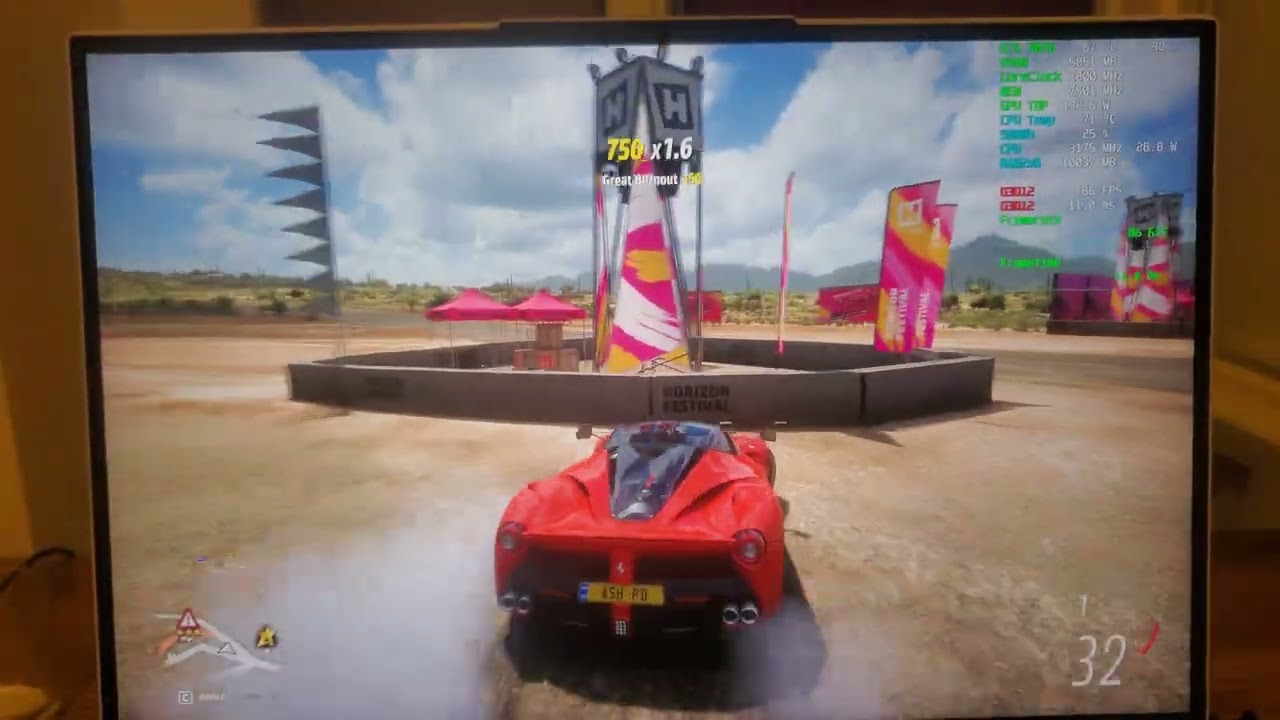
Legion 5 pro 2021
Driver 517.48
RTX 3070
5800h
16gb ram
windows 11 22h2
faint junco
You know that CRT TV kind of flickering?
wraith wharf
 faint junco
wraith wharf
https://youtu.be/AhvHfazSMWw
faint junco
wraith wharf
https://youtu.be/AhvHfazSMWw
Oh this would drive me mad, I don't think any of my games do this, Then again I do not have FH5
wraith wharf
faint junco
You know that CRT TV kind of flickering?
Not really
wraith wharf
faint junco
Oh this would drive me mad, I don't think any of my games do this, Then again I ...
Are you sure exactly where to look at?
Because I mentioned in that comment
faint junco
wraith wharf
Are you sure exactly where to look at?
The background looks really laggy, Let me check that fence
That does not look like 80fps
faint junco
Ok I had a bit of issue with Soma, The whole game looked laggy despite getting capped 165fps, But I think that game had an issue itself that had nothing to do with gsync
FH4 doesn't seem to have any issues
Apologies for the "countable" amount of pixels in my video, My phone only alows 60FPS video while the resolution is set low
wraith wharf
No no, don't worry man
All I want to know is if there are hiccups
Like if it's fine you don't have to record
I need to know problems
You need to enable the frame graph
faint junco
Hm, Alright, I'll keep my eyes peeled for your guide then
gilded cliff
how i test basically is to pan camera around in different speeds and see if game isnt smooth
i had a lot of jitter in horizon zero dawn
wraith wharf
Make sure that the game you're playing is also running above 47 fps since this is not a gsync ultimate screen that will provide you fluid frames no matter how low they go
 unkempt wing
this thread will never die
faint junco
gilded cliff
i had a lot of jitter in horizon zero dawn
Might try that soon
wraith wharf
Any Gen7 that can confirm me these issues are not present on their machine?
I am trying to close the gap between gens so I can fully confirm it's a Gen 6 or Gen 6&7 issue.
Because based on my conclusion it's Gen 6 only.
 glad ice
If it's any help I got about 300 to 400 more points in superposition on high. Rtx 3070 5800h.
Frame Time graph was basically smoothed out. Before I could feel and even see the micro stutters.Bf2042 went from this isn't 100+ fps to Yeah this is 100+ fps. When there's lots of stuff going on like in bf or planetside 2 it felt soo jittery. Now even if fps dips to 60 it still feels smooth. I have 1x16 ram thou so that may contribute to the stutter as well.
On that note any tips to reduce the fps drops and micro stutters with g-sync? I Absolutely despise screen tear.
wraith wharf
glad ice
If it's any help I got about 300 to 400 more points in superposition on high. Rt...
there is a guide for that
in #1020285176531669012
But what you're saying there is not helpful for this, tbh
I already reported the issue on reddit and it's widely spread now. However, I am still up for new data/findings and I will update my post.
It doesn't help me if someone with Gen 6 comes and says "hi, I have gsync stutter"
I need accurate data:
- Panel name from hwinfo
- Using external monitor? Yes/No. If yes, send SS with the data of it or tell me name
- Did you test it with the FPS graph and noticed microstutters? If yes, are you noticing any flickering as well?
- your GPU model (optional)
glad ice
wraith wharf
I need accurate data:
- Panel name from hwinfo
- Using external monitor? Yes/No...
A I see. I'll check them and give you info in about an hour. Have to go outside.
wraith wharf
Also, another important factor is:
- Was FPS ABOVE 48? Because G-sync ceilling is within 46-48 FPS so anything BELOW it, might misbehave which is normal (unless you have G-Sync Ultimate monitor)

 dreamy solar
is this true on 8th gen as well?
dreamy solar
and how does one check this
cause i think that's why i have stutters when i play mc with shaders with gsync
wraith wharf
dreamy solar
and how does one check this
Many G-SYNC input lag tests & graphs -- on a 240Hz eSports monitor -- via 2 months of testing via high speed video!
dreamy solar
thanks
wraith wharf
 glad ice
° BOE0A1C
° NO
° Yes, no flicker thou. Noticed it in chrome thou YouTube. But only at the black part it was flickering for some reason and only that black area. Also checked 1 and .1 lows. Have noticed ghosting thou am not sure if it's cuz of g-sync or it's overdrive. It's rare thou.
° 3070
No fps were well above that. Around 100 to worst 70-80


Wrong pic my bad
wraith wharf
- Ghosting might be due to Overdrive turned on. ALWAYS turn that setting off when you have ghosting in a game. It's usually the main culprit.
- What panel is that
 I have never seen it before
glad ice
wraith wharf
1. Ghosting might be due to Overdrive turned on. **ALWAYS** turn that setting of...
- Need that for shooters.
- Magic
wraith wharf
I understand you might need that but at the same time the trade-off can be ghosting tho if you don't mind it or some games are not having it, it's ok
so, do you have any microstutters?
 stable briar
wraith wharf
Any Gen7 that can confirm me these issues are not present on their machine?
stable briar
wraith wharf
Any Gen7 that can confirm me these issues are not present on their machine?
I don't think so
And overdrive works just fine for me
I don't play my games uncapped though
glad ice
Yes. In older games it ain't that noticable but in bf 2042 and benchmarks for now theres quite a difference. The time graph smoothed out quite a lot and I could feel it in the game and the benchmark also. With g-sync there are microbumps in the time graph as well during gaming as well as the benchmark.
glad ice
stable briar
I don't play my games uncapped though
Same. Capping them can get consistent frame times but that's only if the constant fluctuations are something you dislike
stable briar
The only game I experienced gysnc issues with is cyberpunk
wraith wharf
but that's why
you guys might not have issues
because as I STATED in my gsync post
capping FPS
fixes the problems
stable briar
Hmm
stable briar
Weird that i was having issues in cyberpunk then though
glad ice
wraith wharf
because as I **STATED** in my gsync post
Unfortunately am dumb and can't read
stable briar
Maybe it's just cp being wierd
wraith wharf
 glad ice
Yes capping really does help. It helped more with g-sync on I feel like
stable briar
I don't really play enough to give a clear answer more testing is needed on my end
 hollow dragon
wraith wharf
hollow dragon
wraith wharf
any update on this problem
 dapper junco
hollow dragon
any update on this problem
dapper junco
hollow dragon
any update on this problem
obviously no.
no need to dig up very old thread lmao
wraith wharf
hollow dragon
any update on this problem
For me it got fixed through driver updates on my end. I did not have any flickering, nor gsync issues anymore