#G-Sync issues post old 511.xx Nvidia Driver
1 messages · Page 3 of 1
 wraith idol
@round robin im still having issues in HDR with G-sync
btw, where do guys find out that # for your display? that CSO ######## that ends in 1 or something else
 wraith wharf
Here, asderdd found the trick about the brightness registries
 graceful flicker
wraith idol
btw, where do guys find out that # for your display? that CSO ######## that ends...
graceful flicker
wraith idol
btw, where do guys find out that # for your display? that CSO ######## that ends...
HWiNFO is one way to get it
wraith wharf
@sacred siren this panel seems to lose brightness calibration registries as well with 526.47

User told me it's a 2022 model
 vapid escarp
Mine too da1-8 unless i do an express driver install from 511.23
wraith wharf
vapid escarp
Mine too da1-8 unless i do an express driver install from 511.23
No need to anymore
you can import the registry of 511.23 that asderdd shown
vapid escarp
I knew that, i just said that's how it works without reg
wraith wharf
ah
 next yoke
wraith wharf
<@436229934638170114> this panel seems to lose brightness calibration registries...
next yoke
wraith wharf
<@436229934638170114> this panel seems to lose brightness calibration registries...
can confirm. cannot adjust brightness at gpu mode only (hybrid or not) using scroll wheel. (or is that a normal behavior) need to use keyboard fn
actually im NY-8
 round robin
A Lenovo technician via my premium care just had the cheek to tell me to just use the device in hybrid mode since he hears that “solves” this issue… 🥴
Great advice, glad I spent time and money choosing a laptop with a mux switch and g-sync ffs lol
 gilded cliff
round robin
Great advice, glad I spent time and money choosing a laptop with a mux switch an...
gilded cliff
round robin
Great advice, glad I spent time and money choosing a laptop with a mux switch an...
IKR
 lean geyser
round robin
A Lenovo technician via my premium care just had the cheek to tell me to just us...
lean geyser
round robin
A Lenovo technician via my premium care just had the cheek to tell me to just us...
these fellas are so wonky
 sacred siren
wraith wharf
<@436229934638170114> this panel seems to lose brightness calibration registries...
sacred siren
wraith wharf
<@436229934638170114> this panel seems to lose brightness calibration registries...
I need hardware id of gpu to proper check.
 rancid flame
round robin
A Lenovo technician via my premium care just had the cheek to tell me to just us...
rancid flame
round robin
A Lenovo technician via my premium care just had the cheek to tell me to just us...
Just get a monitor and enjoy better visuals than the tiny 16" screen
QHD monitors drop in price for black Friday, like a LOT. use that chance to snag a good one
round robin
rancid flame
Just get a monitor and enjoy better visuals than the tiny 16" screen
My brother i hope that's not a serious suggestion lol
round robin
Lol gosh. WELL, I already have a great monitor 🙂 (LG 27GP850-B) But see i bought a laptop not a desktop, to take with me on the go (Which I do every day for my job).
rancid flame
You game at work?
round robin
Yes lol
round robin
I'm a security guard pulling 14 hour shifts and this baby is my anchor lol
rancid flame
Sorry if I'm asking contradictory questions. But there are solutions to your issues, that's what I'm trying to bring in
rancid flame
round robin
I'm a security guard pulling 14 hour shifts and this baby is my anchor lol
Ooh lmao. I too was till 2 months ago
round robin
They are only temporary solutions my man but don't worry i'm aware of them. More than anything this a matter of principle. I PAID for a G-Sync laptop with a Mux switch.
rancid flame
Indeed. I'm not suggesting to bend your principle. I'm just suggesting to stop the insanity that's dwelling within you these past weeks
It's hard indeed. But until a proper fix comes out, use the alternative methods and enjoy it until then
round robin
For now i can use G-Sync with HDR enabled which works, but i want this issue resolved universally.
wraith wharf
round robin
My brother i hope that's not a serious suggestion lol
Kira is actually one of the very few guys that never talks bullshit in these servers, I already got used with it. Not that I praise him but he's usually always right when he says something. 
round robin
I'm not nearly as stressed as I perhaps appear on this issue, frankly. More than anything it passes the time while at work a bit. When I'm off duty my attention is certainly on other things aha.
wraith wharf
For me this gsync issue doesn't bother me in single player games, I can bear with it(as an ex gtx 660 user) but I can't stand it in WoW where I need fluid gameplay
it kills my braincells
if I move my camera quick and my fps drops from 150 to 120, boom micro-stutter
rancid flame
wraith wharf
Kira is actually one of the very few guys that never talks bullshit in these ser...
not that I praise him, but praises him nevertheless
round robin
I just hate it period. I think i've said this before but it's like nails on a chalk board, but for my eyes lol
wraith wharf
rancid flame
*not that I praise him, but praises him nevertheless*
I would react with a specific emoji to what you said now but I rather not
rancid flame
:)
rancid flame
round robin
I just hate it period. I think i've said this before but it's like nails on a ch...
Yeah Lenovo is shady indeed. Not in terms of support but in terms of technical knowledge. I can easily say without any shame that i possess "more" tech knowledge then their customer support tech
But look at any big brand out there, be it apple or Microsoft or Google, all have their shit part
wraith wharf
rancid flame
But look at any big brand out there, be it apple or Microsoft or Google, all hav...
This is true nonetheless
round robin
on a separate note, what do you guys know about custom static rgb profiles (the trick with killing icue but keeping a custom static profile)
rancid flame
It all depends on how quick they respond in addressing the issue. Lenovo is almost at the bottom of the barrel
At least the gaming division
rancid flame
round robin
on a separate note, what do you guys know about custom static rgb profiles (the ...
Yeet icue out of your system and use open RGB KEK
round robin
rancid flame
Yeet icue out of your system and use open RGB KEK
Oh does Open RGB work on Legion 7?
rancid flame
rancid flame
round robin
Oh does Open RGB work on Legion 7?
Ofc yes
rancid flame
rancid flame
This is openrgb
round robin
rancid flame
Ofc yes
hmmm, i was under the impression it didn't work 😬
rancid flame
Sorry if you have to download it
rancid flame
round robin
hmmm, i was under the impression it didn't work 😬
I got the legion 7 due to that LOL
I was joking about getting legion 7 once i saw it running well in a legion 7. Although it was a beta version
2 weeks later i got this baby
Works splendid tbh
round robin
Just for RBG lol
rancid flame
I forgot the existence of ice kek
rancid flame
round robin
Just for RBG lol
But ofc
lean geyser
rancid flame
Yeah Lenovo is shady indeed. Not in terms of support but in terms of technical k...
i know right. lenovo technician came to my house and i asked him not to remove heatsink or thermal paste for putting new ram lol
round robin
Yeah i ''yeeted'' iCUE almost immediately when i got my machine last year but last few days found a guide on how to keep a custom static profile using iCUE but also killing the battery drain process. Only issue is it doesn't remember the custom profile after shutdown... so it's whack.
wraith wharf
want me to tell you what answer I got when I called my warranty service about cleaning the laptop? They said that they clean the laptop and put new paste
when I heard "new paste" I instantly got angry in the phone call
and started to say from where does the Legion paste come, etc
and the girl over the call went quiet acting dumb
They think legions are like every laptop, just get some random paste and slap it there
round robin
I think mine could do with a re-paste. But i'm fucking clueless when it comes to the knowhow
lean geyser
lean geyser
i know right. lenovo technician came to my house and i asked him not to remove h...
and then he was like what is a thermal paste 
round robin
I've looked for a video guide but can't find any
lean geyser
round robin
I think mine could do with a re-paste. But i'm fucking clueless when it comes to...
#1020285176531669012
round robin
Damn just seen this thing about disabling Dynamic Boost... Does that mean i can draw 175w on the 3080 like the gen 7??
round robin
lean geyser
<#1020285176531669012>
Ohhh so you don't actually use any paste on the legion 7? You use those pads?
rancid flame
round robin
Ohhh so you don't actually use any paste on the legion 7? You use those pads?
Unless you want to apply stock paste and allow them to cure for 18hrs and then mount the thermal assembly on top. Pads are best bet
If u need a vid or some sort i got them too. Dunno if it's added in knowledgebase
round robin
rancid flame
Unless you want to apply stock paste and allow them to cure for 18hrs and then m...
So to be clear, zero paste, just pads only?
rancid flame
round robin
So to be clear, zero paste, just pads only?
Yes
Gimme a minute, i made a guide for dummies. Not that you're dumb btw

An extensive guide to make sure repasting laptop is not a huge pain. This guide was created with the help of community members in our discord server.
lean geyser
round robin
Ohhh so you don't actually use any paste on the legion 7? You use those pads?
U can use paste but pads btw
Ftw
 tired citrus
hi
I got an error

i did give him full adminitration
I have the same issue that when HDR on it made the game to go down its brightness
to its lowest value of brightness
sacred siren
tired citrus
i did give him full adminitration
You have to do in regedit for this path
HKEY_LOCAL_MACHINE\SYSTEM\CurrentControlSet\Services\nvlddmkm\State\DisplayDatabase
Don't change permissions of file itself
tired citrus
sacred siren
You have to do in regedit for this path
HKEY_LOCAL_MACHINE\SYSTEM\CurrentControl...
yes i am in this path but idk what to do ini this path
wraith wharf
Right click on on the folder
I'm on the phone, right click and send me a pic of the options.

 wraith wharf
Permissions
wraith wharf
tired citrus
In first pic

 tired citrus
ok
tired citrus
I LOVE YALL
IT REALLY WORKED
NO MROE GREY MOUSE USING HDR
WHOHOOO
stuck with this issue after i reinstall the windows
wraith wharf
tired citrus
I LOVE YALL
Thank to asderdd for that, he's the savior 🙏
Keep track of this in case you ever clean install again.
 sacred siren
I will try to make a batch script that register the entries and changes the permissions too by itself.
wraith wharf
sacred siren
I will try to make a batch script that register the entries and changes the perm...
If you got the time and want to, would be awesome. It's enough the way you explained already and people should understand by default, it's not that difficult 👍
 tired citrus
wraith wharf
Thank to asderdd for that, he's the savior 🙏
tired citrus
wraith wharf
Thank to asderdd for that, he's the savior 🙏
also it fixed many hdr games
for real
 craggy dune
sacred siren
craggy dune
sacred siren
If I take a backup of registry before running this , I should be good to go if it fucks up ?,
sacred siren
craggy dune
If I take a backup of registry before running this , I should be good to go if i...
It won't fuck up, changes that this script made can be wipe with a clean install or ddu.
wraith wharf
@sacred siren do you think it's possible to extract the gsync registry from 511.23 and we use it on 522.25? Maybe it's a stupid question but someone opened my mind with it.
sacred siren
I looked for several hours to find something about g-sync in registry but no luck.
But I'm still hoping that we can find a way to fix by ourselves.
wraith wharf
Are you looking with driverstore explorer?
sacred siren
Mosty I search strings in the driver package with file locator pro.
gilded cliff
wraith wharf
<@436229934638170114> do you think it's possible to extract the gsync registry f...
Hmm who was the legend
gilded cliff
tired citrus
also it fixed many hdr games
I also got a colour profile found on reddit
Unfucks hdr
Profile + windows HDR bar at 70+ + brightness fix registry
= great HDR, atleast better than sdr
Will send when on PC
gilded cliff
@tired citrushttps://www.reddit.com/r/LenovoLegion/comments/wbt2q0/legion_5_pro_tuto_to_set_up_hdr/
 wraith wharf
Any of you tested these 2 to see if they affect the gsync stutter?

For me they seem to do nothing lmao
sacred siren
I didn't personally
sacred siren
wraith wharf
I still blame nvidia <:davehmm:952678408305930350>
It's a hundred percent I think
sacred siren
sacred siren
@wraith wharf can you test it ?
wraith wharf
sacred siren
<@547856076607979520> can you test it ?
ye, sec
wraith wharf
sacred siren
<@547856076607979520> can you test it ?
I suppose I gotta install 526.47 again to get the dim screen first
gilded cliff
47 is shit
sacred siren
on mine it's vice versa
wraith wharf
sacred siren
on mine it's vice versa
dim with 522.25 and not with .47?
sacred siren
hdr works normally on 526.47 and 511.79 with a little bit different contrast. Sdr brightness slider levels are different without registry.
on the any other version (except 511.79 and 526.47) above 511.23 hdr is completly broken
randomly dims when sliding the brightness bar
but sdr works normally

wraith wharf
Wait, let's just put our pics with the registry keys themselves to see who has which
sec

This is what I have with 522.25 installed

and this is inside the CSO16000 folder
Computer\HKEY_LOCAL_MACHINE\SYSTEM\CurrentControlSet\Services\nvlddmkm\State\DisplayDatabase\
@sacred siren are these identical with yours?
 lean geyser
wraith wharf
lean geyser
wraith wharf
nope nothing for me
sacred siren
wraith wharf
you imported them yourself or
yep
wraith wharf
Ah, I see
wraith wharf
Brightness in hybrid is actually perfect for me
 wraith wharf
Nope
vapid escarp
I'd stay in hybrid more if it weren't for that lag/stutter in windows
sacred siren
In hybrid mode it's feels like g-sync disabled.
wraith wharf
sacred siren
In hybrid mode it's feels like g-sync disabled.
Because you benefit from AMD freesync
Yeah
sacred siren
Freesync is enabled but still feels nothing is enabled
sacred siren
Or the freesync is not smooth as g-sync.
sacred siren
wraith wharf
Latest recommended
Yep
Most likely it's same as when I disable g-sync.
 tired citrus
gilded cliff
<@621167346882445312>https://www.reddit.com/r/LenovoLegion/comments/wbt2q0/legio...
tired citrus
gilded cliff
<@621167346882445312>https://www.reddit.com/r/LenovoLegion/comments/wbt2q0/legio...
thanks
gilded cliff
sacred siren
Or the freesync is not smooth as g-sync.
it is smooth
u would get slightly lesser fps tho
tired citrus
ok
tired citrus
gilded cliff
Unfucks hdr
damn that looks insanely good
sooo good
Highest contrast
tired citrus
lmao
true
so much darker color
and more colors
best guide i ever had

46 in setting display
superb
very balanced for me
gilded cliff
tired citrus
can u see the red 'W'
gilded cliff
tired citrus
46 in setting display
screen brightness?
cuz i set my brightness 100%, and 45 brightness and contrast in nvidia cp, and 80 as HDR brightness
tired citrus
gilded cliff
can u see the red 'W'
no
tired citrus
gilded cliff
screen brightness?
for the setting -display- windows color setting scrool down to the bottom
 tired citrus
sheesh
gilded cliff
100% brightness on screen
gilded cliff
HDR
 tired citrus
i set it up at

 gilded cliff
It's fine
 gilded cliff
Ok
tired citrus
damn
gilded cliff
Test it in games
gilded cliff
Values will be different for different screen brightness
gilded cliff
tired citrus
dont think this gonna have difference in csgo
Lol


 compact hazel
gilded cliff
HDR
compact hazel
gilded cliff
HDR
HDR 400 sucks TBH, you’ll get better colors for sure but the drawback is you’ll loose out all the blacks it looks grey and the screen fill flicker when you get into some darker area it will adjust brightness accordingly
gilded cliff
I don't really notice any flicker@compact hazel
Unless am in game menu
And blacks are black alright
They aren't grey
compact hazel
Go to youtube or reddit then turn on/off hdr
You’ll see a difference
HDR needs local dimming and sadly that’s not possible on an IPS panel
graceful flicker
compact hazel
HDR needs local dimming and sadly that’s not possible on an IPS panel
Has nothing to do with an IPS panel, but entirely a result of the backlight
compact hazel
graceful flicker
Has nothing to do with an IPS panel, but entirely a result of the backlight
Yeah that only
you should have a mini led or an oled display to achieve maximum contrast and true HDR
 summer prawn
bro why is this ticket still being updated after so many many days and so long messages
tired citrus
idk
this ticket also helped my hdr
nvidia driver screwed up the hdr
also the g-snyc
rancid flame
wraith wharf
I'm playing gsync off now
Funnily yesterday when I played plague tale. Somehow GSYNc didn't work. The game was as choppy as I had seen here with GSYNc on lol
Also that's QHD ultra mode right? Try dldsr + dlss performance and see how is the quality
Or even dldsr + balanced mode
Quality is better than native in mine. Performance mode was blurry in some places. But balanced mode nailed it
wraith wharf
rancid flame
Funnily yesterday when I played plague tale. Somehow GSYNc didn't work. The game...
I'm not entirely sure about the gsync being a problem for me in the game other than with the flickering.
The game even with gsync off still has some moments when it catches a 0.5 sec stutter when you turn the camera quickly or so. I would blame the optimization regarding that since in other games I did not face this.
rancid flame
sacred siren
brightness slider is way more accurate
This is due to how AMD handles it. AMD is superior to Nvidia now when it comes to drivers at least lol
I boot to dgpu mode after every driver update and my display is same color as my piss when I have not drank water the whole day
wraith wharf
rancid flame
Also that's QHD ultra mode right? Try dldsr + dlss performance and see how is th...
I tried only quality dlss + full maxed out
rancid flame
And what fps you got?
rancid flame
wraith wharf
I'm not entirely sure about the gsync being a problem for me in the game other t...
Yeah could be that. That 0.5ms stutter that you notice that can't be recorded by Riva tuner is basically micro stutter
But as for optimisation I'm not sure tbh. Cos with GSYNc on my game is fluid. But also could be due to external monitor. So both of us don't have the same use case
That's why I said use hybrid ON for that game
wraith wharf
rancid flame
And what fps you got?
It's usually 60-70. Depending on zone. I'm close to ending the game but I've met places where my fps was 50-ish
rancid flame
Ooh that's at QHD?
I get similar fps with dldsr
But i checked VRAM too. Doesn't cross 7.5GB when i force Nvidia to use VRAM only for the foreground game
Also regarding GSYNc stutter. Let me drop this here, since i remembered it now
Based on my understanding of GSYNc stutter, it only occurs in dgpu mode cos nvidia GPU handles foreground and background task. So when a game is running it needs to enable gsync for the fulls screen application such as a game as well as make sure the background app functions well too. So during code compiling for the driver, few miscalculations lead to GSYNc functioning poorly. Since Nvidia GPU cannot then handle both foreground and background applications along with GSYNc control. Seems such a lame thing to say, but that's where Nvidia sucks. Their optimisations per driver can be a hit or a miss. That's why when using hybrid mode, Nvidia GPU has to only control the foreground app, so GSYNc works flawlessly
If you have ANY issues with the Nvidia driver. Make sure to first test it in hybrid mode. 99% of the issues that are not related to specific game can be asily rectified thru that.
wraith wharf
rancid flame
Also regarding GSYNc stutter. Let me drop this here, since i remembered it now
...
For me the easiest and simple example to test the bad effects of gsync the fastest way is to check WoW's loading screen artifacts.
With gsync off - > no artifacts during loading
With gsync on - > always artifacts on loading
With hybrid on - > no artifacts
With 511.23 - > no artifacts
Obviously it's gsync itself
next yoke
from Nvidia
 tired citrus
nice
 dreamy solar
rancid flame
This is due to how AMD handles it. AMD is superior to Nvidia now when it comes t...
dreamy solar
rancid flame
This is due to how AMD handles it. AMD is superior to Nvidia now when it comes t...
this may be the very first time I have ever heard this sentence
and I'm inclined to agree
wraith wharf
next yoke
from Nvidia
Level 2? Soon to need agent 47 to do their job
 wraith wharf
Mine is on its way to warranty tomorrow. Maybe panel replacement by mistake 
wraith wharf
I'll remove login password so they can see I don't have vantage and install it as extra
vapid escarp
I don't think theyll bother with that
vapid escarp
rancid flame
Also regarding GSYNc stutter. Let me drop this here, since i remembered it now
...
Do you mean in hybrid mode with an external screen ? As I don't see other way to have gsync in hybrid
next yoke
vapid escarp
"it's working fine"
either blind or lenovo don't give a fuck. they probably testing it on those new panels which probably don't have the problems. let's see if i can get lenovo to replace my panel instead.
but to be honest, this is on nvidia to fix
vapid escarp
next yoke
either blind or lenovo don't give a fuck. they probably testing it on those new ...
At this point I belive that they don't give a fuck. whether it's or nvidia or not that's not important. If lenovo cared this woul've been fixed through nvidia at their request. I find it hard to belive they actually ''looked into it'' And if they did on units who don't behave this issue to begin with then ofc they find no problem
wraith wharf
Guys, the same way it's been working in 511.23 they should be able to fix it back in the future. I'm pretty sure it's very possible and won't be something that will remain unsolved. Despite not knowing exactly what 511.23 offers in terms of gsync compared to other drivers such as 522.25 it does seem something solvable.
vapid escarp

gilded cliff
next yoke
either blind or lenovo don't give a fuck. they probably testing it on those new ...
even if u want it to be replaced
they would give same part number
exact screen
lean geyser
vapid escarp
those bitches always say that lol
they told me my mobo waas fine for my old ideapad when it was clearly chrashing and restarting atleast a 100 times
these bastards(as i feel like) do not want to spend their money on helping customers and all
atleast here in india
basically its so bullshit that with or without warranty its the same
rancid flame
dreamy solar
and I'm inclined to agree
But ofc. Kira only states facts 
rancid flame
dreamy solar
this may be the very first time I have ever heard this sentence
Yes cos my pov is much different than other ppl. Since i always learn how each things work and then wrap my understanding around it
Much easier to deduce issues
dreamy solar
yea
rancid flame
vapid escarp
Do you mean in hybrid mode with an external screen ? As I don't see other way to...
U can play any AAA game in hybrid mode without an external display
Negligible perf loss
Or use external monitor yeah
rancid flame
wraith wharf
Mine is on its way to warranty tomorrow. Maybe panel replacement by mistake <:re...
gets motherboard replaced instead and gets an amazon 2€ paste preapplied
wraith wharf
rancid flame
*gets motherboard replaced instead and gets an amazon 2€ paste preapplied*
Nah. That ain't happening.
I'm not buying into your paranoia inducting sentences.
(I did mention that the laptop does not need repaste in bold, btw)

gotta be prepared
rancid flame
wraith wharf
I'm not buying into your paranoia inducting sentences.
You don't have to. As long as the person who is going to repair your laptop does, then all good
round robin
Just letting you all know I'm still around even though I haven't been chiming in. I got a fairly mild response back from premium care after a back and forth with them. >>>
Thank you very much for all the details.
I have forwarded everything to the relevant department, who will look into this and hopefully get back to us with a solution or some update.
As soon as I have any info I will make sure to notify immediately.
If you obtain any new info in the meantime, please let me know.
Please don't hesitate to contact us if you have any more questions.
wraith wharf
I still did not get an answer to my ticket towards Nvidia support but they received it which I'm glad for. We people from here + some on reddit made this issue spread enough and I hope it goes even further so that Nvidia sees that a wide range of people are affected by this.
round robin
wraith wharf
I still did not get an answer to my ticket towards Nvidia support but they recei...
I haven't gotten an answer from my Nvidia ticket either (which is kind of irritating tbh) But yeah ever since making this post here it seems like more attention has been brought to it so here's hoping!
If we don't see a fix by January-ish I'm gonna RMA just to be annoying lol. Another guy i spoke with has his RMA right now and Lenovo's response has been to replace the motherboard on his L5P. He's gonna let me know if that fixes it when he has it back though i did warn him that's unlikely!
next yoke
hopefully nvidia technical support is doing due diligence when testing and actually get the panel models i tested. and the games i listed i am having issues with.
lean geyser
round robin
If we don't see a fix by January-ish I'm gonna RMA just to be annoying lol. Anot...
bro why do these people always say "sir motherboard problem"
wraith wharf
lean geyser
bro why do these people always say "sir motherboard problem"
Because most of the things are connected to the motherboard and all the blame can be easily thrown at it?
lean geyser
wraith wharf
Because most of the things are connected to the motherboard and all the blame c...
Good logic
gilded cliff
lean geyser
bro why do these people always say "sir motherboard problem"
i had a misogynist joke
but nvm
dreamy solar
gilded cliff
but nvm
good job for not saying it because it was bound to be unfunny
i'm glad you can practice self control in not being a bigot
gilded cliff
dreamy solar
good job for not saying it because it was bound to be unfunny
unfunny for u sure
dont say for everyone
dreamy solar
"haha women dumb now laugh"
cringer
this server's not the place for that conversation though so i won't be continuing bashing you for it
vapid escarp
526.86 driver is out and no mention of gsync issue beeing addressed...
gilded cliff
feeling sad with 69 others
next yoke
Creating a channel to highlight the issues with a playlist. First playlist is for the Lenovo OEM driver (which is, to be fair, less buggy than newer Nvidia drivers), then the newest Nvidia driver, then the working driver.
just a quick sample: https://youtu.be/_zAteSBE7ck

This happens on 511.79 and newer driver. Solution is to turn off GSYNC or switch to 511.65 and older.
vapid escarp
At this point the problem is wll know by them...
summer prawn
bro how is this thread still alive lol
lean geyser
cuz people are mad at novido
gilded cliff
summer prawn
bro how is this thread still alive lol
unfollow it?
wraith wharf
summer prawn
bro how is this thread still alive lol
Because we built a strong community of mad people and we have torches and forks
summer prawn
LOL
round robin
So a guy I been speaking with outside of this thread got his L5P back from ''repair''. Shock horror the G-Sync issue still exists. He's already sent it back again. Apparently after 3 attempts the door for a refund is open.
wraith wharf
round robin
So a guy I been speaking with outside of this thread got his L5P back from ''rep...
I must point out that the 3 attempts rule is a thing in my country too. If your device gets sent 3 times with the same problem and they fail to fix it.
Service can't fix gsync so gl to the guy tryharding that
round robin
wraith wharf
Service can't fix gsync so gl to the guy tryharding that
Yeah he's very aware RMA won't fix it, he's playing the refund game now.
 dapper junco
round robin
Yeah he's very aware RMA won't fix it, he's playing the refund game now.
dapper junco
round robin
Yeah he's very aware RMA won't fix it, he's playing the refund game now.
well well well
but for what then?
round robin
Oh i don't know what his plan after that is, buy a laptop where G-Sync works i guess lol
Hell if i follow this route before my warranty ends and they don't patch it i'll take a refund and save it for a 4080 laptop next year lol
Either way is kind of win win really
rancid flame
dapper junco
but for what then?
Saves that money and gets desktop with no GSYNc issues instead
Like how I refunded my odyssey G7 and got the qd OLED instead 
wraith wharf
Ampere tests show about 5% perf increase with 526.86 over 522.25 for desktop users in dx12 titles apparently.

reddit
155 votes and 625 comments so far on Reddit
wraith wharf
No clue. I don't have access to my laptop for 12 days already so I can't test anything.
526.47 had some weird visual artifacts in Edge for me
wraith wharf
Also, 511.79 for desktop users seems to be pretty fat. It holds face to face with 522.25 and new drivers in terms of performance.
Proof of how much it matters to know which is the best driver for your machine and not to always update to latest hoping for increases

 meager elm
wraith wharf
meager elm
wraith wharf
the problem is that many games don't work properly without the latest drivers.
The latest drivers (526.86) fix serious bugs on Modern Warfare 2
(I'm the guy who spoke to SH4DY who is bringing the L5P with the gsync problem to assistance)
my goal at this point is to get a refund and buy something else.
I believe i will not buy lenovo laptops anymore
wraith wharf
meager elm
the problem is that many games don't work properly without the latest drivers.
T...
Your call, bro. I've bought mine due to needing portability otherwise I would have went with a desktop
But I've been having decent experience with it, can't say I haven't enjoyed it. Just needs a lot of tinkering and care here and there and it's cool.
meager elm
I haven't had many laptops, but this is definitely the best I've had.
But it was also what I paid the most.
I am very annoyed because I wish I could use the laptop for what I bought it for
I will, however, keep you informed on how the story will turn out.
It will take another 20 days or so to get the laptop back to me.
wraith wharf
meager elm
I haven't had many laptops, but this is definitely the best I've had.
But it was...
I am having mine in service since 12 days ago because they planned to change the upper deck and I'm still waiting and waiting.. They said they ordered it from Lenovo and yeah..
I hope this upcoming week I get it back
next yoke
the new driver 526.86 solved the flickering issues related to gsync. There is still stuttering (most annoying issue) and overshooting. Overshooting/ghosting i can record but i dunno how to show nvidia support that the game is stuttering. It doesn't show in time frame graph
wraith wharf
next yoke
the new driver 526.86 solved the flickering issues related to gsync. There is st...
I probably forgot to mention here, are you having panel overdrive off? Some of the ghosting and overshoot comes straight from that setting alone and not the driver itself. What I'm saying is for 100‰ test to see if it's just the driver, have overdrive off
next yoke
yes it is off
round robin
New issue with Forza Horizon 5, not sure if it’s the new 526.86 driver or what but getting these mega unclean frame times which is consistently giving this readout on the frame time graph. Gameplay is SUPER CHOPPY now lol. Not G-Sync related though since the frame time/choppy frames look the exact same on or off. I’m not home rn to test it against my external monitor. Does anyone have FH5 with driver 526.86 to test?
 light forge
Tonight, I decided to load up FH5 on my L7 16ITHg6 (DA1-6 display panel) with the 526.86 driver running at max 1600p resolution, Hybrid off and G-Sync enabled. Yes, the game stutters, but what FH5 recently updated with is DLSS support. I turn that on, and while it is poorly implemented, I noticed that the stuttering seems to have stopped, or at least isn't as noticeable. Doesn't seem to matter on the DLSS quality either.
 torpid sparrow
I still don’t get why stutters appear. I’m using 522.25 driver, and get stutters in COD:MW2. Whyy-y-y-y…
wraith wharf
torpid sparrow
I still don’t get why stutters appear. I’m using 522.25 driver, and get stutters...
Because mw2 is probably similar to marvel Spiderman and requires the latest driver to perform properly.
torpid sparrow
wraith wharf
Because mw2 is probably similar to marvel Spiderman and requires the latest driv...
As we’ve discussed on another server before, I did update to the latest driver but other crap appeared so I was, basically, forced to downgrade.
 lean geyser
test it
wraith wharf
 lean geyser
looks like skill issue for ur panel/novidio
sacred siren
lean geyser
idk man i dont have this gsync issues
oh wait
fh4
that game is ass in optimisation
stutters like hell
try other games like rdr2
or cyberjunk
sacred siren
Fh4 and Fh5 are good for testing g-sync stutter
lean geyser
oh
wraith wharf
Nah lads, whole 526 is doomed, not even worth wasting time with it
craggy dune
lean geyser
fh4
Bruh FH4 has good optimization
I could run it on a Intel HD at 20 fps constant
lean geyser
craggy dune
Bruh FH4 has good optimization
i meant like in stutters and other issues
rancid flame
wraith wharf
Nah lads, whole 526 is doomed, not even worth wasting time with it

What happened to "damn 526.86 is damn good, no issues other than GSYNC flicker that exists since 511.79"?
rancid flame
lean geyser
i meant like in stutters and other issues
That's a driver problem
Not a game problem
I played FH4 with a 1660ti
80fps at FHD
Damn smooth and no stutters
rancid flame
lean geyser
idk man i dont have this gsync issues
Cos ur panel does not have fancy GSYNC
wraith wharf
rancid flame
What happened to "damn 526.86 is damn good, no issues other than GSYNC flicker t...
What?
Look when my message got sent
It's a day old
I sent the. 526.98 one way later
rancid flame
wraith wharf
It's a day old
Day old is not months old
But nice
I won't update driver until 533 cones out
wraith wharf
So far I did not have any issue with 526.98 tho
the gsync flicker/stutter is normal since it's same branch as 526 (and all of the previous had it)
rancid flame
wraith wharf
So far I did not have any issue with 526.98 tho
Then why the 526 is doomed comment?
U don't make sense here
wraith wharf
Kira
rancid flame
Feels like split personality
rancid flame
Oh
wraith wharf
I first check my resources then test a driver
rancid flame
Then should have corrected it then
wraith wharf
I never download and test a driver straight up
rancid flame
wraith wharf
I never download and test a driver straight up
Actually thought u did
wraith wharf
I am first looking for benchmarks, crashes/perf issues
rancid flame
Since u switch drivers pretty fast
wraith wharf
rancid flame
Since u switch drivers pretty fast
Nah, I just wanted to see if Mitschud's words were true
not that I doubt him but wanted to test myself as well
rancid flame
Spiderman miles morales does not work with 522.25?
wraith wharf
if they will make the game as previous one was, it won't
previous one absolutely needed the new driver
516.94 back then iirc
but people over reddit managed to import the code of 516 into older drivers such as 511 and make it playable
rancid flame
Yeah at worst i won't play the game. But if i did I'll try to insert the code of new driver to 522.25
rancid flame
lean geyser
i have g-sync
165hz panel?
wraith wharf
@lean geyser show him your alien panel
lean geyser
wraith wharf
<@687618420241727489> show him your alien panel
mald
 lean geyser
rancid flame
ooh AUO
lean geyser
rancid flame
ooh AUO
u know any sussy info on it?
rancid flame
rancid flame
that panel is same quality as legion 16" panels
^^
lean geyser
like mine doesnt have g-sync issues or any issues these plebs are facing
rancid flame
here is my display /s
 gilded cliff
round robin
Oh i don't know what his plan after that is, buy a laptop where G-Sync works i g...
gilded cliff
round robin
Oh i don't know what his plan after that is, buy a laptop where G-Sync works i g...
or buy fresync
laptop
wraith idol
sup everyone, do our computers work and play games properly yet? =/
next yoke
as long as u turn off gsync yes
wraith wharf
next yoke
as long as u turn off gsync yes
I did not mention something here but:
I've been playing Spiderman Miles Morales with gsync on and I did not face a single issue on 526.98 as of now
But I did have them in APT Requiem and WoW
It gotta be game related somewhat as well. Why every game flickered but this one did not
next yoke
maybe it's how game engines interact with gsync
wraith wharf
I feel we should have mentioned this so that Nvidia can "test" better?
vapid escarp
I did countless times in my tickets. Rdr2 also works great with gsync on regardless of driver
wraith wharf
vapid escarp
I did countless times in my tickets. Rdr2 also works great with gsync on regardl...
For me it had flickers on 516.94 driver last time I tested the game
gilded cliff
Nvidia: just buy a better monitor
wraith wharf
I can honestly live without gsync in 99% of the games but for the love of God make it work well in WoW
Competitive games without gsync are cringe
sacred siren
gilded cliff
Nvidia: just buy a better monitor
30K+ LCD panel models, 32K+ LCD panel datasheets, 10M+ pcs panel stocks, 180+ panel sizes, 100+ parametres, 70+ LCD panel brands, 30+ LCD panel applications.
We have to buy this one
 wraith wharf
TL:DR -


 sacred siren
wraith wharf
I went to 526.86 now <:hmmmm:948679342525906986>
sacred siren
wraith wharf
I went to 526.86 now <:hmmmm:948679342525906986>
Comes from heaven
gilded cliff
wraith wharf
I went to 526.86 now <:hmmmm:948679342525906986>
whats issue in .9x
wraith wharf
for WZ I would say you need latest
 gilded cliff
miles momos would have been tested by now if speed wasnt fucked
craggy dune
gilded cliff
miles momos would have been tested by now if speed wasnt fucked
Steam download is fast sar
Use faster internet
wraith wharf
wraith wharf
I did not mention something here but:
I've been playing Spiderman Miles Morales ...
Nvm. There is slight flicker now that I've paid better attention.
526.86
rancid flame
522.25 here riding like a champ

has anyone tried gaming with an external monitor?
it prolly wont have any issues with external monitor, like i do
gilded cliff
craggy dune
Steam download is fast sar
Who said I was using stream
 lean flint
Hi guys, just following. I only noticed the stutter last week playing elite dangerous. Steady FPS, but the game is stuttering. I’ve got a L5 15ITH5H.
I’m reluctant to downgrade the driver, now that advanced Optimus is working with the Epic Games Launcher. Not sure if the fix was made on the side of Epic or Nvidia.
I might just turn off G-SYNC until the issue is resolved
round robin
 lean geyser
dapper junco
Kinda glad I got a legion 5
lean geyser
dapper junco
Kinda glad I got a legion 5
why? legion 5 also has gsync
dapper junco
lean geyser
why? legion 5 also has gsync
but non of these problem mostly due to the panel
lean geyser
dapper junco
but non of these problem mostly due to the panel
yeh lol
these peasents have these issues
L
dapper junco

meager elm
round robin
https://tenor.com/view/waiting-futurama-seymour-gif-8546899
I'll probably find out tomorrow what they intend to do to "fix" my l5p for the second time
My only hopes are they will change the panel, it is the only sensible thing I can think of if they really want to fix this laptop
meanwhile, I started looking for some new laptops lol
wraith idol
@meager elm what panel do you have?
meager elm
wraith idol
<@448941940696940544> what panel do you have?
CSOT T3 - MNG007DA1-1
Already sent for assistance, replaced mobo but the problem remains.
wraith wharf
Yeah, obviously. They gonna replace motherboard, screen, see that there's nothing else related they can do and then that's it.
meager elm
probably yes
wraith idol
where do i check my panel again
 lean geyser
just get my panel
wraith idol
fuckin
hwinfo site is just plagued with adds
i dont even know which download button is legit

whack ass shit
lean geyser
u tell us whether u have issues or not
wraith idol
i have more issues than i can shake a stick at
screen dimming, artifacts, random black screens with a weird alien image in top left corner, etc
meager elm
meager elm
I'll probably find out tomorrow what they intend to do to "fix" my l5p for the s...
instead I don't know anything yet.
delivered to service on 12/11, they haven't done anything yet.
Compared to the first sending, they are taking a long time
EDIT 01 Dec: No updates yet 😥
 pure pond
Someone posted that 527.37 fixed the G-Sync issue. Could anyone confirm this? I'm currently at work so cannot verify it.
wraith wharf
pure pond
Someone posted that 527.37 fixed the G-Sync issue. Could anyone confirm this? I'...
Guys, stop believing into false information that people spread. I said it in the server and I'll say it here as well:
after every driver install or fresh install, gsync leaves you the idea that it works perfectly; for an hour or few hours, it'll work well in some games, making you believe that it actually got fixed but later on, on the first stutter that you'll get, flickering and other problems will return again. There's no fix yet about it.
For me it takes 1 second to test gsync no matter the driver. I'm testing it in WoW where having gsync broken leads to artifacts on the loading screen of the game. It's legit the easiest way, without having myself to rely on minutes and hours of tests.
pure pond
Take it easy... I'm asking if someone tested it and can verify. So you did this test using 527.37 and can verify it's still broken?
sacred siren
Did they mention in changelog?
pure pond
sacred siren
Did they mention in changelog?
Sometimes things get broken or fixed by occasion, when other changes are introduced.
wraith wharf
pure pond
Take it easy... I'm asking if someone tested it and can verify. So you did this ...
No, no. No worries regarding that. It's just that such issue might not get fixed anytime soon (it's sad to hear it but it is what it is).

pure pond
For me turning on the HDR fixes it. But HDR implementation in Windows is not great and for proper HDR there should be an OLED or at least mini LED display.
wraith wharf
pure pond
For me turning on the HDR fixes it. But HDR implementation in Windows is not gre...
Yes, it's one of the known fixes but hdr is ehhh.. Especially for the eyes, I find it too annoying.
These also work.
 meager elm
NFF - Normal operation found.
The resolution from 1600 upwards must be used with the battery charger attached.
Normal operation for the model in question.
I’m speechless.
gilded cliff
wraith wharf
No, no. No worries regarding that. It's just that such issue might not get fixed...
apart from gsync, hows the driver
lean geyser
sooo dont think novidio is too bothered to fix it
round robin
pure pond
Someone posted that 527.37 fixed the G-Sync issue. Could anyone confirm this? I'...
Who posted, where? I wanna shut this information down.
 jagged canyon
wraith wharf
Guys, stop believing into false information that people spread. I said it in the...
jagged canyon
wraith wharf
Guys, stop believing into false information that people spread. I said it in the...
By stuttering do you mean frametime spikes?
wraith wharf
jagged canyon
By stuttering do you mean frametime spikes?

Open the Gsync and Vsync on Nvidia Panel
Close the Vsync in game
Lock your fps with RivaTuner ( RTSS )
You get smooth screen but also get micro sttutters.
I dont know how to fix it. So if you know i need help about this weird siuation.
jagged canyon
wraith wharf
https://youtu.be/wvkt7sYWDzk?t=66
I must be blind cause I can’t really see anything here
Is the small fps drops causing the stutters for you?
wraith wharf
jagged canyon
I must be blind cause I can’t really see anything here
These easier to see?
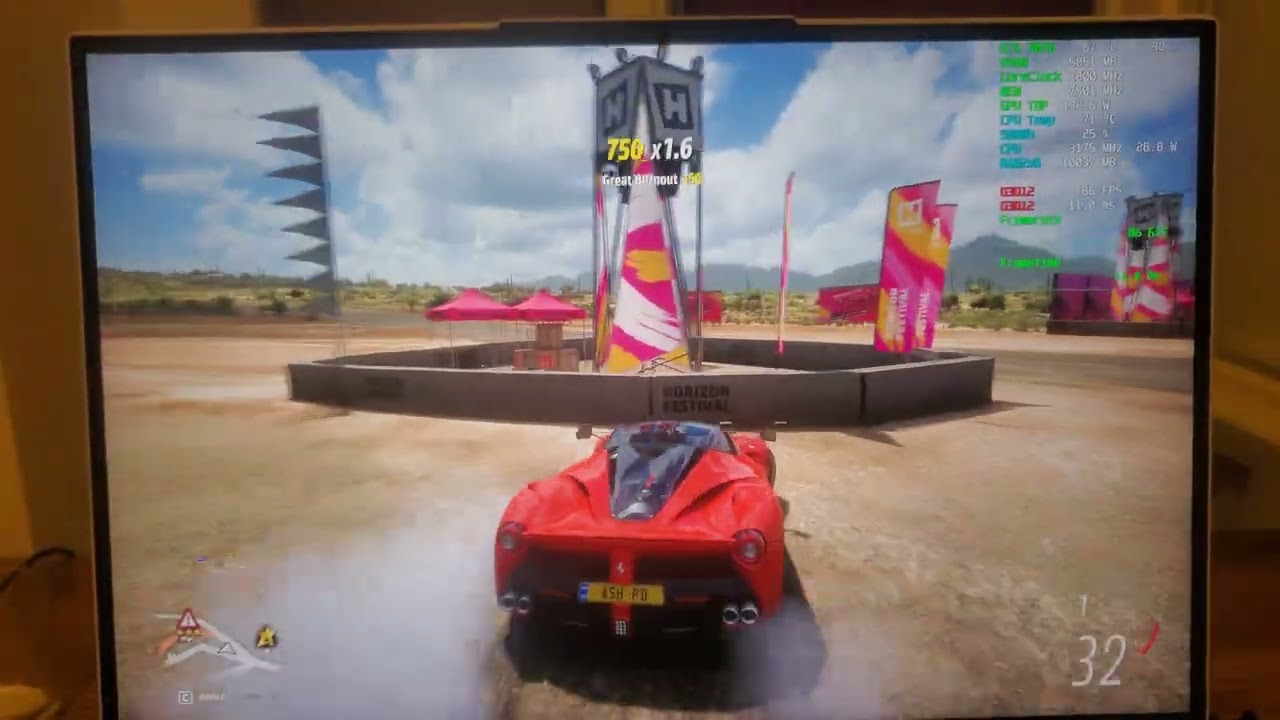
Legion 5 pro 2021
Driver 517.48
RTX 3070
5800h
16gb ram
windows 11 22h2
 jagged canyon
wraith wharf
https://youtu.be/AhvHfazSMWw
jagged canyon
wraith wharf
https://youtu.be/AhvHfazSMWw
Ohhhhh is the frametime graph smooth but there is still stuttering? What about locked fps like 60 wouldn’t that help
wraith wharf
jagged canyon
Ohhhhh is the frametime graph smooth but there is still stuttering? What about l...
Locking fps helps as long as your FPS doesn't drop below the value you set it.
If you set it to 60 and you drop to 50 often, you will face it.
You set it to 60, but you need to maintain constant 60.
jagged canyon
wraith wharf
Locking fps helps as long as your FPS doesn't drop below the value you set it.
That just sounds like regular vsync tho? Cause the frametime graph looks smooth to me. What was the refresh rate on the forza video
wraith wharf
jagged canyon
That just sounds like regular vsync tho? Cause the frametime graph looks smooth ...
165, I suppose.
These aren't my videos.
jagged canyon
wraith wharf
These aren't my videos.
I see. For you if you set your refresh rate to say 144, and set in game fps to 60, is it smooth at 60 and stuttery at 59?
jagged canyon
I see k
wraith wharf
jagged canyon
I see. For you if you set your refresh rate to say 144, and set in game fps to 6...
You can feel it when it drops, yeah.
jagged canyon
wraith wharf
You can feel it when it drops, yeah.
My problems a bit different cause I’m having worse fps in some games with Gsync on but nvm 😭
wraith wharf
jagged canyon
My problems a bit different cause I’m having worse fps in some games with Gsync ...
What kind of games are we talking about?
jagged canyon
wraith wharf
What kind of games are we talking about?
Like for example gsync is smooth when fps is capped in horizon zero dawn or red dead redemption and I get the same fps in non gsync, but with games like valorant where I can get 250-300fps normally I’m getting drops and stutters down to 120 with gsync
wraith wharf
But why would you leave your fps uncapped in these?
gilded cliff
capped fps if game doesnt go below capped is gonna be fine with gsync
and valo, idk
wraith wharf
250-300 fps, yet your screen is only 165hz
jagged canyon
wraith wharf
But why would you leave your fps uncapped in these?
I don’t that’s what I’m saying, I cap in single players for good frametime and I cap valorant -3 from refresh rate.
gilded cliff
cap it to 158, turn off gsync
jagged canyon
wraith wharf
250-300 fps, yet your screen is only 165hz
That’s what I’m saying I do cap it but when I use Gsync in it I somehow can’t hold that stable and get drops to 110-120 ish 💀
gilded cliff
its gonna be butter
jagged canyon
gilded cliff
its gonna be butter
Screen tear galore 😭
jagged canyon
Anyway sry not trying to take over this thread mb
 jagged canyon
gilded cliff
jagged canyon
gilded cliff
Fair point but it’s more a valorant issue tho 😭
wraith wharf
I'm not sure how you guys see tear on L5P screen.
I have not seen tearing since my old CRT monitor.
 gilded cliff
still
wraith wharf
I get between 60 to 140.
wraith wharf
You can't get 160+ constant in WoW.
gilded cliff
vsync and all off
wraith wharf
Even on full low.
gilded cliff
at 1080p?
wraith wharf
Even if I uncap fps, I never see it. :\
If I uncap and go in an old zone, I get 400+ fps
Still 0 tearing.
jagged canyon
Nvm I’m trying with Gsync off now and I’m getting even worse fps than yesterday
Now I’m not even hitting 200fps anymore
gilded cliff
try ec reset
jagged canyon
gilded cliff
try ec reset
Ec?
gilded cliff
turn off laptop
remove charger and all usbs
hold power button for 30-40s
then turn on
jagged canyon
@wraith wharf wait if you use your inbuilt display why don’t you use hybrid gpu mode and use intel adaptive sync?
gilded cliff
he got amd
so, freesync
igpu mode leads to perf loss
5-10%
could be more in cpu bound game
jagged canyon
gilded cliff
could be more in cpu bound game
Just tried hybrid in valorant, got 250-380fps consistent, not sure what’s going on there
gilded cliff
🤔
jagged canyon
gilded cliff
🤔
Gonna go back into dgpu mode and test it again
wraith wharf
527.37 is good to use and also nice replacement over 522.25 or 526.86. HOWEVER, for MW2 and FH4, I would suggest to test it and if you encounter performance issues, revert to previous.
wraith wharf
Overdrive example from Vantage/LLT:
https://www.reddit.com/r/LenovoLegion/comments/zc0daw/my_legion_5i_gen_7_is_giving_me_weird_effects/

reddit
1 vote and 3 comments so far on Reddit
gilded cliff
wraith wharf
Overdrive example from Vantage/LLT:
i have had this issue with gsync on after 511.23 drivers.
on dgpu mode.
igpu is fine. since no gsync
previously primary tested in apex. but recently in god of war a month ago.
sacred siren
I'm okay with HDR + G-SYNC on latest driver.
wraith wharf
sacred siren
I'm okay with HDR + G-SYNC on latest driver.
Did you have dimming with fresh install of 527.37?
I got it again.
Had to use the registry.
sacred siren
I always use registry
gilded cliff
dont do clean installs?
sacred siren
They've removed and never added it again.
wraith wharf
gilded cliff
dont do clean installs?
Well, you never know what you "carry" on from previous driver so 🤷♂️
wraith wharf
sacred siren
They've removed and never added it again.
But wait, they did.
Fresh install of 522.25 works fine.
Anything past 522.25 for me - > dim issues again.
Anything past 511.79 (up until 522.25) - > dim issues.
I am not even sure how does this work out anymore, lmao.
sacred siren
wraith wharf
Anything past 522.25 for me - > dim issues again.
It's completely vice versa on mine
gilded cliff
but u like a dim display dont u
wraith wharf
Why out of every driver from 511.79 up until 527.37, the 522.25 is the only driver that does not dim my screen?
(clean install, ofc)
gilded cliff
8 yrs ago, i was fond of nvidia. i got a 1060.
wraith wharf
sacred siren
It's completely vice versa on mine
Man, something doesn't make sense. Why would it be opposite for you?
sacred siren
Registry keys are still missing every version after the 511.23.
sacred siren
wraith wharf
Man, something doesn't make sense. Why would it be opposite for you?
It's really interesting 🤔
sacred siren
Even I don't add registries some versions working well about dimming ( 511.79, 526.xx )
gilded cliff
do you go a clean install everytime?
because once registry is imported ,it stays put until a clean install
wraith wharf
sacred siren
Even I don't add registries some versions working well about dimming ( 511.79, 5...
If you want, we can compare the data from GPU-Z, tho I'm not sure if it might help with anything.
 sacred siren
Even I don't add registries some versions working well about dimming ( 511.79, 5...
sacred siren
sacred siren
Even I don't add registries some versions working well about dimming ( 511.79, 5...
After the 511.23 except above two versions, HDR brightness slider is broken on mine.
As I understand, it's vice versa on yours?
gilded cliff
apple should make gaming pcs too
wraith wharf
sacred siren
As I understand, it's vice versa on yours?
From 511.79 up until 527.37, every driver gives me dim screen EXCEPT 522.25.
gilded cliff
would be so much better
wraith wharf
Regarding HDR slider, I am not completely sure. I barely used HDR on this laptop.
Like from September 2021 up until now, I don't think I have more than 3 hours of HDR combined.
sacred siren
On any version, SDR brightness slider works normally on mine. But dimming steps a little bit accurate when the registry keys exist.
wraith wharf
Can you send me a pic of your GPU from GPU-Z?
sacred siren
End of the day, use the registry keys 
sacred siren
wraith wharf
Can you send me a pic of your GPU from GPU-Z?
Sure, I'm on phone right now
wraith wharf
Ah, no rush then. Send later and I will check.
I do wonder before they replaced my motherboard, if I would have faced these dimming issues with previous one.
Because when motherboard died I was on 497.29.
or 497.09.
sacred siren
What happend?
wraith wharf
Randomly laptop just turned itself off after 3 months of use. No fans, no keyboard lightning, nothing.
It turned off mid-game.
And they had to replace motherboard, telling me it just "died".
sacred siren
Interesting
wraith wharf
Yeah, I'm not really sure how that happened. It was just 3 months old.
Now it's almost a year since that happened and nothing bad with new one.
sacred siren
Where do you live?
wraith wharf
Romania.
sacred siren
wraith wharf
Now it's almost a year since that happened and nothing bad with new one.
It's probably QC issue
wraith wharf
Yeah, can be. I know someone from SG that had her motherboard die within first month of use, lmao.
But I don't know man..laptop been working greatly since it came back and I can't say I been unhappy with it.
It's just this gsync issue that's "meh".
Rest is cool.
sacred siren
I'm thinking to switch a rtx 40xx desktop.
wraith wharf
Maybe for some of the people from here it feels like a big deal since they got used to the technology. For me it's not as hurtful to keep it off, since I was gaming on a gtx660 before so you can imagine I was playing at 30 fps in some games with it lmao.
sacred siren
We have to buy and replace with this panel 😃
30K+ LCD panel models, 32K+ LCD panel datasheets, 10M+ pcs panel stocks, 180+ panel sizes, 100+ parametres, 70+ LCD panel brands, 30+ LCD panel applications.
1250 nits, mini led
It's true HDR
meager elm
Guys I think by Friday I will get my unrepaired laptop back
(For work reasons I can't return it immediately for the third time)
At this point I understand that the best option to avoid problems is to use the latest drivers and enable HDR, correct?
gilded cliff
sacred siren
https://www.panelook.com/NE160QDM-NM1_BOE_16_LCM_overview_54555.html
price?
lean geyser
u gotta inquire
 jagged canyon
sacred siren
I'm thinking to switch a rtx 40xx desktop.
jagged canyon
sacred siren
I'm thinking to switch a rtx 40xx desktop.
That’s going to be hella expensive 💀
jagged canyon
sacred siren
https://www.panelook.com/NE160QDM-NM1_BOE_16_LCM_overview_54555.html
Can you even replace your inbuilt screen with a different supplier?
sacred siren
jagged canyon
Can you even replace your inbuilt screen with a different supplier?
This one is used on legion 7. It has same connector type.
It should be compatible
jagged canyon
sacred siren
This one is used on legion 7. It has same connector type.
I see, is it much better?
rancid flame
sacred siren
It's true HDR
Lmfao. It is not.
Look at contrast ratio. How come it's just 1k:1 when it's mini led? It should be dynamic contrast
Also no mention of dimming zones
Check for reviews on that panel before you come to conclusion, else you'll be easily fooled by those tacky names
rancid flame
gilded cliff
price?

eBay
Entdecken Sie 16" WSUxGA+ LED Ersatz Display matt für NE160QDM-NM1 V8.1 500 Nits 165Hz in der großen Auswahl bei eBay. Kostenlose Lieferung für viele Artikel!
rancid flame
lean geyser
u gotta inquire
U gotta use ur brain
sacred siren
I just downloaded the datasheet
it has 1152 dimming zones and contrast ratio is 100k:1
gilded cliff
rancid flame
https://www.ebay.de/itm/234643421019?mkcid=16&mkevt=1&mkrid=707-127634-2357-0&ss...
this is our normal screen
one he sent was 1250 nits
rancid flame
gilded cliff
this is our normal screen
How much nits does the link show?
Compare model number
rancid flame
sacred siren
it has 1152 dimming zones and contrast ratio is 100k:1
Just read thru this. Dimming zones with only when HDR is on. I might as well give it a try and buy it
rancid flame
gilded cliff
it "says" 500
For me in the retailer website it shows 1250nits with HDR on
gilded cliff
sacred siren
since u already made an acc for this, please inquire about price too

going by the page, didnt check model
gilded cliff
rancid flame
Just read thru this. Dimming zones with only when HDR is on. I might as well giv...
give it a try...

when will india get shit...

customs would be seperate?
its about 17k inr if i count 30% import
sacred siren
gilded cliff
since u already made an acc for this, please inquire about price too
I'll do
 storm yoke
gilded cliff
since u already made an acc for this, please inquire about price too
storm yoke
gilded cliff
since u already made an acc for this, please inquire about price too
I bought a one from aliexpress, let's see if the upgrade will be ok...
 wraith wharf
Try
lean geyser
i shall try
wraith wharf
💀
 fervent flower
Still not fix any gsync. I already conplain through their nvidia support but after some talk then they not reply anymore
next yoke
same lmao
wraith wharf
What I did notice is that they tackled gsync differently with 526+ drivers.
I do not notice the same "frequent" flickering.
It's somewhat "touched" in a way, but not sure how.
But microstuttering is still there.
lean geyser
i doubt may people notice microstuttering
wraith wharf
I've been playing with gsync on since 527.37 came out (both WoW Dragonflight & Uncharted) and did not have a single flicker.
But microstutter is there.
lean geyser
i never had issues.
lean geyser
yes
meager elm
I got my l5p back from support (second time)
for assistance it has no problems and after a few chats with the dealer I was made to understand that the laptop will hardly be repaired correctly or replaced.
I will never buy lenovo again but above all I will never buy a laptop from a reseller other than amazon.
two months gone without a laptop to no avail
lean geyser
meager elm
I got my l5p back from support (second time)
for assistance it has no problems a...
what happeN?
yeh the service is trash with lenovo
meager elm
lean geyser
what happeN?
I took the laptop to assistance 2 times for this microstutter problem..
the problem has not been solved and does not seem to want to be solved.
I'll keep it that way now
lean geyser
more like nvidia issue
meager elm
lean geyser
more like nvidia issue
Yes I am aware of this and have stressed from the beginning that it is a software problem,
but i tried support to try and fix the problem with a replacement
meager elm
lean geyser
not hardware
I understand but someone has to fix it.
my 2000€ were good 1 year ago.
meager elm
for me a little yes, maybe they should be interested in fixing the known problems of their laptops.
I contacted nvidia and was told that in these cases lenovo should take care of fixing the compatibility issues
wraith wharf
meager elm
for me a little yes, maybe they should be interested in fixing the known problem...
They will never know what to do without enough info.
You have guys like Kira, Mitschud, Fallible, Ghostfella without the gsync issue and maybe some others too.
Then you have us from here + the amount of people that have 0 clue that their gsync might not be working for them.
meager elm
wraith wharf
They will never know what to do without enough info.
enabling the hdr I saw that the problem disappears.
I will use the laptop like this
 meager elm
ok, for me it seems that just enabling hdr fixes the stuttering
wraith wharf
If you won't fry your eyes from hdr then sure.
meager elm
wraith wharf
If you won't fry your eyes from hdr then sure.
I enable hdr on windows but in games I keep it disabled
jagged canyon
wraith wharf
Hm…. Does this stuttering happen on external displays too?
If so I may have this problem. For example in valorant capping fps at 158 (refresh rate 165) works with gsync but when fps drops I get some micro stutters. In red dead 2 if I get drops from 60 to like 55 it can be noticeable and have some frametime tiny spikes. Is that the kinda thing this gsync stutter is?
jagged canyon
wraith idol
all i know is i notice it in every game in some form or another
Yeah my Gsync problems gotten worse forget the post above. If I cap fps 60, put gsync and vsync on, go into a game and set refresh rate to 60hz its smooth as butter, I put that refresh rate to 75 or 100 and it just looks awful and unsmooth. Technically it shouldn’t matter since gsync is syncing the hz to the capped 60fps but it’s having a massive effect
gilded cliff
jagged canyon
Yeah my Gsync problems gotten worse forget the post above. If I cap fps 60, put ...
i would say, use hybrid mode
freesync works fine
jagged canyon
gilded cliff
i would say, use hybrid mode
Can you use hybrid mode connected to a monitor or tv though?
jagged canyon
gilded cliff
freesync works fine
I got intel adaptive sync 😭
gilded cliff
jagged canyon
Can you use hybrid mode connected to a monitor or tv though?
yes you can. and its better to be hybrid with external connected.
however, external display is always connected to dGPU, and if your external display also suffers from gsync issue. you are out of luck my friend.
u can not use adaptive/freesync on external displays.
as all legion outputs are dgpu only
jagged canyon
gilded cliff
yes you can. and its better to be hybrid with external connected.
however, exter...
Nope tried on the internal display, external display and a gsync compatible tv all the same result: I’ll try the adaptive sync thanks
wraith wharf
It depends by which game you play as well, tbh.
Like I'm playing Uncharted & WoW Dragonflight and while there are some microstuttering here and there..I haven't seen any flickering.
But yeah, it would suck badly to have these in a competitive shooter, I don't deny.
craggy dune
This doesn't seem to affect external monitors.
sacred siren
storm yoke
I bought a one from aliexpress, let's see if the upgrade will be ok...
any news ?
storm yoke
sacred siren
any news ?
Not yeat, the panel has arrived in my country but I'm still waiting the delivery...
sacred siren
storm yoke
Not yeat, the panel has arrived in my country but I'm still waiting the delivery...
I'm looking forward 😁
storm yoke
sacred siren
I'm looking forward 😁
I think I'll receive it just only next week, hope so!
storm yoke
sacred siren
I'm looking forward 😁
I received the panel and worked and not, why? The panel turns on, worked fine in BIOS but not in windows, I think there is something related to the Advanced Optimus that AMD versions don't have. In windows if I have Hybrid mode on, the image appears, but no one GPU is recognised (iGPU and dGPU) in the device manager. If i turn the Hybrid mode of to use only dGPU, the image is gone. I've checked the panel datasheet to see if there is some kind of pin different, but the new panel and the original panel has the same pin-out and functions on each one. Could be more deeper thant this, maybe the panel don't have some kind of function too. I think this upgrade can be done only in a Intel version of this laptop.
Resume is: don't wast money trying to upgrade to the NE160QDM-NM1 panel in Legion 7 AMD version (6th gen)
sacred siren
storm yoke
I received the panel and worked and not, why? The panel turns on, worked fine in...
sad to hear that 😢
storm yoke
Yes, imagine me! LoL
sacred siren
Did you try linux?
storm yoke
No
Maybe the B160QAN02.S, used in rog flow X16 2022 could be better shot in AMD versions because this is a Mini Led panel and it are used in a AMD platform - https://www.ultrabookreview.com/57682-asus-rog-flow-x16-gv601rw-review/

The Asus ROG Flow X16 is probably the most anticipated laptop I’ve had to deal with in a long time, and it’s finally at my doorstep. I’ll admit, the Zephyrus
I Mean used in a more simple system as MUX
The question is: where to buy it?
and a important thing is: this panel has gsync and freesync
30K+ LCD panel models, 32K+ LCD panel datasheets, 10M+ pcs panel stocks, 180+ panel sizes, 100+ parametres, 70+ LCD panel brands, 30+ LCD panel applications.
sacred siren
storm yoke
https://www.panelook.com/B160QAN02.S_AUO_16.0_LCM_overview_55514.html
I never see this before, it could be a good alternative. 🤔
Oh it's 600 nits
sacred siren
@storm yoke, I'm searching something related to NE160QDM-NM1 in changelogs. Found something in this one. Intel ones seems to fully support this panel.
storm yoke
sacred siren
<@1020200409333256192>, I'm searching something related to NE160QDM-NM1 in chang...
That's the answer as I suspected...The other panel even with 600nits has better color gamut coverage (100% srgb, dcip3 and Argb) and has hdr 1000 to, has gsync/freesync and are mini led...
sacred siren
Maybe there is something to do with bios for amd.
sacred siren
storm yoke
That's the answer as I suspected...The other panel even with 600nits has better ...
I don't recommend you to buy this one. As I understand there should be bios level support for each panel and there is nothing about B160QAN02.S in our bios.
storm yoke
In this panel case, Rog flow are Amd based and don't have Advanced Optimus that's why I suspect is the real problem, but there is bios level too as you told...
fervent flower
For gsync issue with any driver (maybe) right now i'm using current latest,
The solution to making work gsync without stuter :
Create custom resolution in nvidia panel 2560x1599, restart and try set that resolution in the game that stuter.
I try HDZ which very much stuter is gone
Far cry 6 stuter fix.
I dont know why. I just try something because other than 2560x1600 is stuter some games. But making custom resolution and less 1 pixel 2560x1599 works.
I using legion 7i 2021 3080 win 11 (through upgrade)
vapid escarp
fervent flower
For gsync issue with any driver (maybe) right now i'm using current latest,
The...
This custom res works in HZD but in Forza 5 it doesn't.
fervent flower
I havent try forza 5, maybe you can do borderless trick. Set custom resolution in windows and run the game in borderless full screen, its suppose to work that way.
gilded cliff
vapid escarp
This custom res works in HZD but in Forza 5 it doesn't.
just lock forza fps
if u get 70-80 lock at 70
torpid sparrow
Hey guys, a quick question, but brief first:
I had a lot of troubles with G-Sync — turned it off, downgraded drivers, upgraded drivers, downgraded again, and so on. Now, I’m on 526.86 driver and G-Sync is on — games are working fine (at least I do not notice anything gladly!), however, I cannot use Overdrive feature. I have Legion 7 16ACHg6, using 165hz mode.
The question:
Can I use Overdrive feature while G-Sync is on?
sacred siren
anyone tried 528.24 ?
 alpine hound
sacred siren
g-sync issue still exixst.
alpine hound
sacred siren
g-sync issue still exixst.
what is that issue ?
wraith wharf
alpine hound
what is that issue ?
#1044177430644019240 message

This is from another post of mine.
gilded cliff
wraith wharf
Ruin the ⭐
 naive tide
sacred siren
anyone tried 528.24 ?
naive tide
sacred siren
anyone tried 528.24 ?
I did and still no fix at least for me. G-sync still has subtle flickering on games. So annoyed by this.
sacred siren
I'm enabling HDR while playing dx12 games. If you use custom icm color profile for HDR and adjust white/black paper values in-game it's acceptable to play on HDR.
gilded cliff
sacred siren
I'm enabling HDR while playing dx12 games. If you use custom icm color profile f...
yes it is, noone here is able to believe it.
(about HDR being usable that is, not the gsync part)


 naive tide
lean geyser
Just cap ur fps guys
naive tide
lean geyser
Just cap ur fps guys
already did 😦
wraith wharf
I've made the post today so anyone who joins the server can see since people aren't reading #1044177430644019240 apparently.
Here.
naive tide
wraith wharf
I've made the post today so anyone who joins the server can see since people are...
Apologies, at least for me I still get flickering even when following the guide. Guess I'll wait for a driver update that fixes this. (Currently using 511.23)
wraith wharf
So if you turn off gsync you have flickering?
With 522.25 or 527.56?
I would say it's impossible but sure.
@naive tide
There's no reason to be below 522.25 atm for anyone as 522.25 started to provide only benefits for DX12 games in terms of FPS increase and stability for games.
Only in severe situations where you have an issue that you truly cannot solve you would want to be below, unless you don't mind leaving performance on the table.
naive tide
wraith wharf
With 522.25 or 527.56?
Sorry, I mean that I still get flickering using G-sync even by capping fps, going to an older driver, turning HDR on, etc. I will go back to a newer driver as you mentioned except the latest 528.24 since for some weird reason it locked my external monitor at 120hz when it's 144 hz
Thank you for your time!
wraith wharf
naive tide
Sorry, I mean that I still get flickering using G-sync even by capping fps, goin...
I personally stopped using gsync months ago and haven't bothered since.
Anything that's not mentioned in #1044177430644019240 is used at user's own risk if it has issues or not.
I will always post/edit there whichever driver is the most stable/performing well.
And skipping the bad ones.
There is NO performance difference between any driver past 522.25 and any of the above ones.
Except in 2-3 games and mainly Cyberpunk.
Rest are performing literally the same or worse.
So in theory, there is not a single reason to update further, unless a game needs it or there is a fix such as laptop restarting when closing the lid, etc.
jagged canyon
What is the current state of gsync stutters for l5p? I definitely have them and it’s an issue on both internal and external displays. For now I’m just using 60hz refresh rate but with gsync on so when it dips it doesn’t screen tear but stutters a little, enough so it’s noticeable.
wraith wharf
Still the same. As I said some time ago, I will inform or ask someone to inform when gsync will be fully working for everyone again.
jagged canyon
wraith wharf
Still the same. As I said some time ago, I will inform or ask someone to inform ...
Ima be a real pest here with another question sorry. Do these gsync stutters appear on your frametime graphs?
jagged canyon
@wraith wharf welp ima make this even more complicated. im getting gsync stutters just like that forza video at the top of the thread, no matter what fps and if locked. just tried 511.79 driver the stutters are still completely there. oh and the best thing? these stutters aint on the frametime graph the graph is a flatline
wraith wharf
But why are you using gsync tho?
jagged canyon
the stutters are maybe slightly better than in the forza video, but its just like them
wraith wharf
Just remove it.
I play without gsync for past 5-6 months, lol.
It is what it is sadly.
Also, don't forget you have a Gen 7 with a new GPU.
jagged canyon
i know i know, but since this issue seems to be different than everyone elses ima take it up with lenovo support
wraith wharf
For us (the ones with gen 6) it can be fixable in these ways.
Have you tried HDR on?
jagged canyon
welp looks like im double screwed
jagged canyon
wraith wharf
Have you tried HDR on?
hate hdr
jagged canyon
wraith wharf
Just to try and see if you get them I mean.
alright will do
jagged canyon
wraith wharf
Or on hybrid ON.
nope still stutters
wraith wharf
jagged canyon
<@547856076607979520> welp ima make this even more complicated. im getting gsync...
Also, once again I will say, these methods might not work for you since you have new gen.
All of us are on gen 6.
For example 3070TI can't even use 511.23
as driver
First driver for 3070TI was 511.79 if I'm not mistaken.
jagged canyon
Trying hdr now
jagged canyon
wraith wharf
First driver for 3070TI was 511.79 if I'm not mistaken.
That’s what I’m using
jagged canyon
wraith wharf
Also, once again I will say, these methods might not work for you since you have...
Yep thanks for trying tho  , ima go write a request to Lenovo support rn
wraith wharf
You're our first case with a Gen7 so far, sadly.
Can you show me your panel model?
from Hwinfo.
jagged canyon
wraith wharf
Can you show me your panel model?
Yh I can try
@wraith wharf just to make sure completely I’m not over complicating things, gsync at 60fps on a 165hz panel should look exactly the same as vsync when set to 60hz correct? (I can promise I’m not a complete idiot it’s just typing this question into google gets back nothing)
Oh and also, this happens on external monitors too not just the internal one which shouldn’t happen ofc
Just found it it
 round robin
OP here. Sorry I haven't chimed in for a long while on this post, I haven't forgotten, just majorly bummed out Lenovo/Nvidia are doing absolutely nothing to fix or even address this issue.
jagged canyon
round robin
OP here. Sorry I haven't chimed in for a long while on this post, I haven't forg...
Don’t worry it’s ok, ima take it back to curry’s pc world and see if they can do a care and repair thingy on it where they will fix technical problems and if they can’t they Bassicly give you a voucher the same price as the product , though I’m doubtful they will admit somethings wrong tbh
Ayyyy finally I got a recording of the issue
Oh ffs never mind discord compressed it to 24 fps
gilded cliff
jagged canyon
Don’t worry it’s ok, ima take it back to curry’s pc world and see if they can do...
Wth
U get to keep the laptop and the money!?
lean geyser
gilded cliff
Wth
Uk moment
jagged canyon
gilded cliff
U get to keep the laptop and the money!?
nope if they cant repair it they will take it back and give you a new one
tired citrus
wow this still existed?
 white furnace
wraith wharf
I play without gsync for past 5-6 months, lol.
white furnace
wraith wharf
I play without gsync for past 5-6 months, lol.
A man of culture 
lean geyser
white furnace
A man of culture <:chad:952671607304900648>
And i don't have these issues
jagged canyon
gilded cliff
Bro. This issue as far as I know is with 16:10
Nope for me it’s for all resolutions and on external monitors too 💀
craggy dune
gilded cliff
Bro. This issue as far as I know is with 16:10
Bro its not related to 16:10, it's the panel uses
gilded cliff
craggy dune
Bro its not related to 16:10, it's the panel uses
it is related to the 16:10 panels used in legions
fine?
craggy dune
gilded cliff
it is related to the 16:10 panels used in legions
No , Ik a QHD 3060 L5P user who has the same issues
*That's what he said
jagged canyon
Anyone tried new driver?
wraith wharf
None of the 528 drivers are worth so 
Will update #1044177430644019240 message if there will be anything stable or better performance-wise than others.
jagged canyon
Has anyone here tried going through their warranty and asking for a repair for the gsync issues? Like actually contacting them and asking for a repair or replacement?