#Ender 5 To Mercury One.1
3635 messages · Page 4 of 4 (latest)
 proud cliff
 rancid crown
I'm absolutely astonished that you're designing this in effing python... serious...
rancid crown
I'm absolutely astonished that you're designing this in effing python... serious...
thanks! I almost do this for a living, with the difference that I’m doing 2D plots instead of 3D models 😂. so the programming tool it’s something I’m comfortable with, instead I simply get lost in all the possibilities of drop down menus, and buttons 🤦♂️. But this is basically tinkercad on steroids, once you forget about graphics interface. few basic shapes, add, remove, group…
proud cliff
it didn’t print flawlessly as I have some warping here and there, the slightest warping makes some artefacts in the top layer, I don’t know if there are settings to mitigate it
anyway, this is a preview of what the door bazel would look like

 solar bridge
@proud cliff where is your beta rank???? #1128770268240814240
proud cliff
solar bridge
<@261571630109556746> where is your beta rank???? <#1128770268240814240>
it will probably take me forever to find affordable extrusions, is it ok if I take forever for the build?
proud cliff
hell I just applied, I was really torn, but at least I have an idea/budget for the bom
 stone valve
@proud cliff #1069710972303982662 message
check this might help, Portuguese though, I believe you may be able to read it anyway
proud cliff
still sick, this summer sucks, plus it seems Denmark is on the other side of the AC compared to all Europe, here is cold AF... but let's quickly send this

this is what’s on top@of my printer right now, it will make for the best resonance interfering scenario


 proud cliff
it was only 16:20 thought, so I was under the 15 min only for the slicer
stone valve
@proud cliff what speeds accels
proud cliff
stone valve
<@261571630109556746> what speeds accels
30k 800
proud cliff
maybe I should have increased the accel and decrease the speed it goes max 300 anyway
proud cliff
stone valve
annex rules?
yes
proud cliff
but with Orca, is a more verbose slicer, I might have to chase something to turn off
stone valve
and make sure you don't have minimum layer time
proud cliff
stone valve
and make sure you don't have minimum layer time
I don’t have retraction and no min layer time
stone valve
got a lot of help on annex server for settings
my 14min one was with 5 perimeters (way too much)
proud cliff
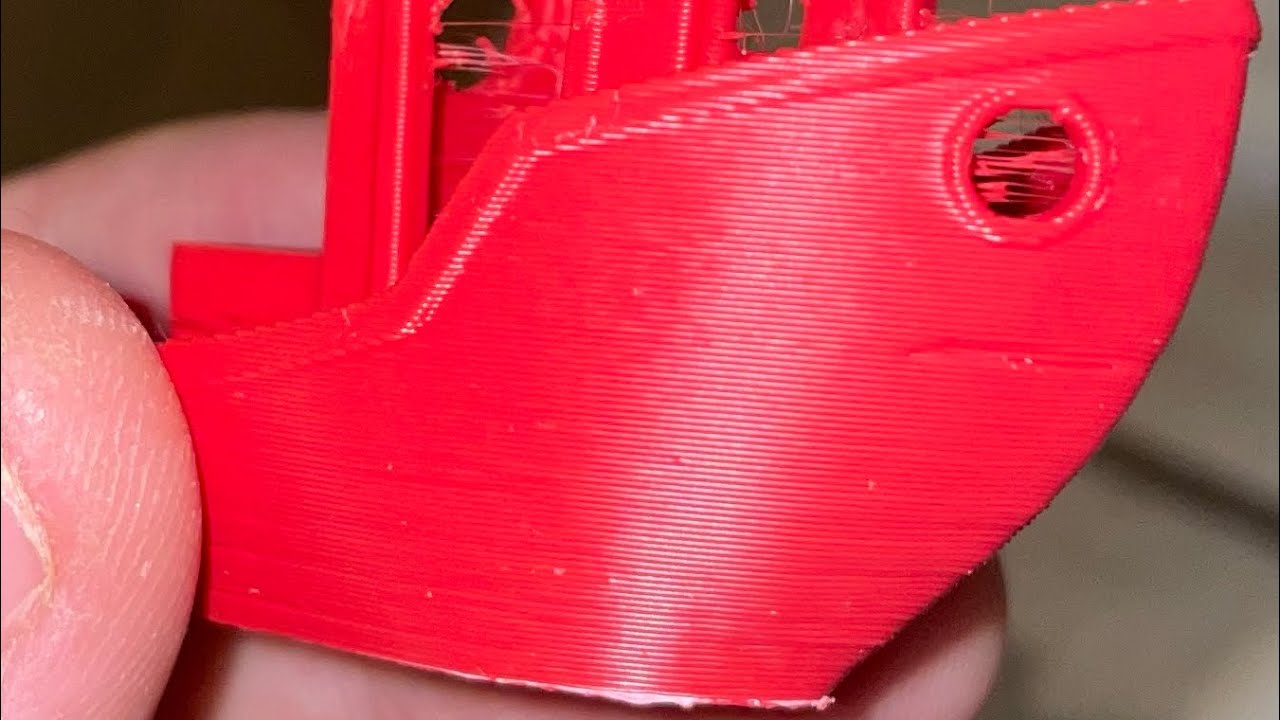
Speed bency test, it took ~16min and 20 seconds.
It was sliced with OrcaSlicer
proud cliff
I’ve ordered some microfit from replimat.eu . I had no idea about their shops, they also have other 3D-printing related items, at reasonable prices

 frail swallow
proud cliff
I’ve ordered some microfit from replimat.eu . I had no idea about their shops, t...
frail swallow
proud cliff
I’ve ordered some microfit from replimat.eu . I had no idea about their shops, t...
Those prices seem reasonable, based on what's in there.
I'd pay that, as the included pins double the value.
proud cliff
frail swallow
Those prices seem reasonable, based on what's in there.
yes, by price-per-unit I might pay less by taking a bigger kit, but I’d have the same amount of 2-3-4 pins connector, which are the one used the most… I’ll get a kit eventually, but I’ll keep using jst when 2A can do and the microfit above that
frail swallow
proud cliff
yes, by price-per-unit I might pay less by taking a bigger kit, but I’d have the...
This all makes sense to me.
proud cliff
I still have a massive sinusitis, it’s really really hard working on the printer. I’d never thought I’ll get so old so fast
stone valve
ohh age gets us all quickly
frail swallow
stone valve
ohh age gets us all quickly
I'll be 40 in a few months. sigh
stone valve
frail swallow
I'll be 40 in a few months. *sigh*
I'm just 5 years behind
proud cliff
I’m 4 years ahead, it’s not too bad, you don’t even need to drink to get an hangover, you just eat the wrong thing and it’s like you’ve partied till morning (just the sh*tty next day, not the actual fun)
 noble yacht
frail swallow
I'll be 40 in a few months. *sigh*
noble yacht
frail swallow
I'll be 40 in a few months. *sigh*
I’m 40 in a month and a half
frail swallow
I was out late last night and it wrecked me
noble yacht
proud cliff
I’m 4 years ahead, it’s not too bad, you don’t even need to drink to get an hang...
You must have a healthy diet normally, the key is to eat bad food all the time and your get that iron gut that is fine with anything.
stone valve
wait I'm the youngest here?
solar bridge
Yes
proud cliff
I wanted to hide my dismal cutting of the back panel around the motors, so I designed a simple frame to go around it

but unfortunately I’m not very good at measuring either, so I need another iteration. height it’s fine, the width I can go much closer to the motor tower

Also, I see why 3do was selling this roll of red in discount, as spare parts
and I need to reduce the height-fillet in the internal cutout
proud cliff
after learning the existance of hueforge, it gives a whole new priority on wiring, configuring and setup the tradrack. Even if I’m half incapacitated I’ll try to have it working this week 😛… although I don’t have a windows computer
nor any calibrated filament
solar bridge
Manual filament swaps are not that bad with hueforge prints
4 color print will only have 3 swaps
stone valve
isn't hueforge for mixing filament like a regular inkjet printer?
proud cliff
stone valve
isn't hueforge for mixing filament like a regular inkjet printer?
kind of, but you mix the color within different layers, you print very thin layers swapping colors at a given height and the results is a color picture
stone valve
oh had the idea it was on the hotend level
proud cliff
that’s why you could do it manually, because you swap 3 or 4 time filament during a print, at the end of a layer, the printer pauses (well you have to set it up to pause and keep hot) so you can swap. not mid layer, is amazing
proud cliff
stone valve
oh had the idea it was on the hotend level
that was the da vinci printer… inkjet mix on the filament.. a flop?
solar bridge
Check #print_showcase to see the one I did recently
proud cliff
I am just too lazy and clumsy to do it manually
stone valve
proud cliff
that was the da vinci printer… inkjet mix on the filament.. a flop?
no I thought it was a mixing hotend saw some concepts a long time ago
proud cliff
I'm printing a dementd camera mount system I cam out with....

I've spent.. well too much.. in trying to make a function that would create a nice angled (2 angles parameters) object, well I can't, the 45 degrees seems to be barely printable, so let's see if the system works, there are 3 components, a wall/etrusion mount, the angled element (the one above) and the camera mount, they lock within each other, so if I need a different angle I only need to reprint the angled part
proud cliff
I’ll be damned, I retried, with less infill and boosted to 200% on mainsail (just because I wanted to approach faster when it failed before) and now it did print this ugly stuff
proud cliff
they bind to each other pretty well. it’s quite bulky and ugly, and the 45 deg is probably useless unless I mount the camera pretty high. but it’s my fist attempt

I probably could do 20x20 cubes, or even 20x10 volumes instead of 30x30 cubes
I should probably look what’s wrong with all those random under extrusions
frail swallow
That's an interesting approach 🧐
proud cliff
I want a fixed mount, so it’s set once forever, once I find the perfect spot/angle
frail swallow
proud cliff
I want a fixed mount, so it’s set once forever, once I find the perfect spot/ang...
I like it. What about a rotating/locking mechanism for fine tuning?
proud cliff
frail swallow
I like it. What about a rotating/locking mechanism for fine tuning?
hehe, it could be, the middle element (the angled cubes) could be whatever you design it to be
but as you can see my cad skills, even when brought to the familiar element of programming, are not great
frail swallow
proud cliff
but as you can see my cad skills, even when brought to the familiar element of p...
It's a practice thing, my dude!
proud cliff
it kind of does what was meant to, mounted very very high it’s not bad, I could even use that odd slots between the 2 cube as cable path

 proud cliff
this is the original camera
 solar bridge
I need to move my Camara back down... I put it as high as I could and hate it
proud cliff
solar bridge
I need to move my Camara back down... I put it as high as I could and hate it
I can imagine, I like the low front position as i can see very well the first layer (depending on the light). Hig-front-right, as it would be now, I still have limited sight on the bed (some corner is still blind) but I can see more of the printer in general, but less detailed 🤔 . I'm printing another 45 degrees on the x/y plave and 10 degrees down on the z, aiming to mount right above the tensioner towers
I seriously need to rethink this middle angled piece

 gentle garnet
Wait, what am I looking at here?
 proud cliff
gentle garnet
Wait, what am I looking at here?
proud cliff
gentle garnet
Wait, what am I looking at here?
it's the chamber thermistor and the neopixel wires, I am still looking for alternative way to reach there, before it was coming from down, but I didn't like it
the camera, attached to the ceiling, facing 45 deg down looks like this
 solar bridge
gentle garnet
Wait, what am I looking at here?
solar bridge
gentle garnet
Wait, what am I looking at here?
STOP ZOOMING IN, TURN THE OTHER WAY!!!!
If anything, you should be zooming out
gentle garnet
Uh, isn’t that what everyone does? 😆
proud cliff
gentle garnet
Uh, isn’t that what everyone does? 😆
well, I like being criticised, as long as it’s constructive. it’s not that I have a pristine build here, there are a lot of loose ends I need to tackle (however I am surprised how well this machine is working). I was thinking to use the zip-tight on the motor mounts to pass and clean up some cable, so far I only pass by the cable without any zip tight 🫣
camera on top: +cons) I already feel the need to go and check if the nozzle is clean. from below I could see if the print was starting with some extra oozing, and I would order it to pass few more time on the brush
gentle garnet
proud cliff
well, I like being criticised, as long as it’s constructive. it’s not that I hav...
That wasn’t much of a criticism, more of a tongue-in-cheek.. so, don’t take me seriously on this regard
proud cliff
from the top it’s totally hidden
proud cliff
gentle garnet
That wasn’t much of a criticism, more of a tongue-in-cheek.. so, don’t take me s...
I guess, I know few people from Israel, and they all kind of have the same engaging/curiosity/border-line criticism all the time 😅, so I think it’s also a cultural thing, which I understand and embrace 😜
gentle garnet
You can’t blow my cover like this 😲
proud cliff
ooops
 proud cliff
don't destroy me though 😰
solar bridge
You forgot to peel before assembly
proud cliff
I have no clue of what I'm doing, so criticism are a way to learn...
solar bridge
and I still see the plastic
proud cliff
ohh jeez, don't remember me, I am a moron
solar bridge
lol
proud cliff
I have this phobia of peeling things, feeling that after they've been peeled off they are used and old :P... well so I waited to peel off until too late
solar bridge
learn to edge peel then
proud cliff
that panel it's also extremely soft, I don't know what material is it, but I could scratch it with my fingers, behind there is a 5mm plexiglass and some wood. So if I use some tool to remove the plastic it scratches quite a lot. I Think I have to loosen up the bolts and remove where possible
solar bridge
is it porous lookking on the edges?
proud cliff
solar bridge
is it porous lookking on the edges?
kind of
 proud cliff
it’s quite rigid for its weight
solar bridge
its cheap and easy to work with, can be cut witha knife
proud cliff
Inuse it for insulation, mainly
solar bridge
can also be bonded with plumbers pipe glue
proud cliff
solar bridge
can also be bonded with plumbers pipe glue
ohh, nice to know!
solar bridge
just look for stuff that made for PVC pipe
and its a chemical bond, melts the platic
proud cliff
I have found a couple of 1m2 panels in the scrap basket in the local hardware store, so I grab them, thinking I’d use them for something
they were perfect to cut around the motor shapes, as you said, extremely easy to work with
proud cliff
I feel this is much better, right on top of the tensioning tower, 45 degree in x and -10degrees on the y

it misses the toolhead by a ~5mm during the ztilt 😅
this is how it looks on camera

I rarely print objects so wide to spans to the hidden corners
I need to move the lights higher thought
proud cliff
hmm, maybe I need 2 cameras 😅
stone valve
front center pointing down too high?
frail swallow
New camera location looks good, though
proud cliff
stone valve
front center pointing down too high?
I don’t want something to stay in the way in the middle
proud cliff
frail swallow
New camera location looks good, though
I was thinking to buy a new cheap camera and have a top-rear view as well, so I see all the bed… but I loved so far with my camera moving and pointing in random directions (occasionally aiming to the printing area) so I think this low-side view is good enough
proud cliff
🤯
figures out you can make a 2D shape into 3d by extruding it... I should really work on my stuff instead of this 🤦♂️
frail swallow
proud cliff
I was thinking to buy a new cheap camera and have a top-rear view as well, so I ...
It captures the important bits 👍
frail swallow
proud cliff
figures out you can make a 2D shape into 3d by extruding it... I should really w...
Playing instead of work? 😆
proud cliff
frail swallow
Playing instead of work? 😆
hard to work, everyone in in vacation but me... not that I risk doing anything productive anyway, but it give the extra excuse to hyper-procrastinate
proud cliff
frail swallow
Playing instead of work? 😆
but can you believe that this code ```python
from muscad import Union, Surface, Circle, Square
spade = (
Union(
Surface.free(
Circle(d=20).align(right=0, back=5),
Circle(d=2).align(center_x=0, front=35),
),
Surface.free(
Circle(d=2).align(right=5, back=0),
Square(1, 15).align(left=0, back=0),
),
)
.x_mirror(keep=True)
.y_linear_extrude(10)
)
gives you this!
 proud cliff
I didn't know the Surface thing, nor the extrude thing, so hopefully my designs will improve now 😛
frail swallow
The more you know...
stone valve
heh so you can basically do the same as fusion or solidworks but in code
sketch, extrude/cut
frail swallow
stone valve
heh so you can basically do the same as fusion or solidworks but in code
Realizing that Fusion sketches are just a system of equations made my head explode.
stone valve
SW doesn't seem like it
but it knows when the sketch is fully defined
which is sometimes confusing for me as I don't find the reason to be under defined
thinking of building ome of these as well https://github.com/FaqT0tum/Orbion_3D_Space_Mouse

GitHub
3D Space Mouse DIY easy to build at home. Contribute to FaqT0tum/Orbion_3D_Space_Mouse development by creating an account on GitHub.
after I'm done with my loooong to-do list
frail swallow
I've heard great things
proud cliff
why is there an Italian flag/tri-color under the name? 🤔
frail swallow
proud cliff
why is there an Italian flag/tri-color under the name? 🤔
I noticed that, too. 😆
stone valve
proud cliff
why is there an Italian flag/tri-color under the name? 🤔
Because the author is Italian
proud cliff
so this is the actual camera picture with the camera mounted in (before I was holding it by hand). I’ve printed a couple of things and I don’t dislike it. unless something awful happens during x/y homing and I can’t see it, but I will notice if the nozzle is off for the sexbolt
 proud cliff
solar bridge
can also be bonded with plumbers pipe glue
proud cliff
solar bridge
can also be bonded with plumbers pipe glue
this stuff? (I had it for some pool plumbing working)
 stone valve
proud cliff
this stuff? (I had it for some pool plumbing working)
stone valve
proud cliff
this stuff? (I had it for some pool plumbing working)
yes if turtle says its expanded PVC and that's PVC glue
PVC glue has a somewhat nice smell btw
proud cliff
I’d found out how well this stuff bind with he glue
frail swallow
I love pipe glue smell
stone valve
any glue/solvent/alcohol/whatever
frail swallow
stone valve
any glue/solvent/alcohol/whatever
deep sniff
proud cliff
I hate to make the party crusher, but you know it’s not healthy, right? kids-who-reads this (plenty I assume) don’t smell that stuff!
stone valve
proud cliff
I hate to make the party crusher, but you know it’s not healthy, right? kids-who...
yes I know it's not, I do it anyway
a long time ago got really high with that stuff while helping my father glue the pool plumbing
frail swallow
"Dad, can we glue another pool together! It was a great bonding experience!"
stone valve
in multiple bonding ways 🤣
proud cliff
few more endstops

My wiring of the tradrack reached new lows, even for me. I’ll make it work and than hopefully I’ll get the microfit that are supposed to work with it… and clean up the wiring. hopefully it’s not one of those things that start as temporary and than last 2 years unmanaged
proud cliff
very roughly set up, I am still waiting for some microfit to wire the endstops and the motor on the carriage as it’s supposed to, but it works! I can switche filament with just few console lines

I was thinking to implement a complicated filament cutter, but after seeing how well the tip shaping works, I don’t need to, it’s perfect!
cost of this thing: ~30€
vs the cheapest ERCF kits that was ~100€
tiny
 proud cliff
Since hydra I always had this loud z click.. it works fine, and I have a tons of another thing to look at… but today I looked a bit further. it’s an oldham coupler doing its thing. maybe some grease wouldn’t hurt
but I think I’ll replace the screws to tr8x2, If I find some
at the very least replace this one
what am I’m talking about, I have a spare tr8x4, although it’s 370mm and all 3 hydra are 350mm 😖, but I think this screw is the cause of an artefact in the benchy bottom. (it’s the top right screw)
this artefact is present at any speed I’ve tried, even slow
 proud cliff
I also realised I can’t use multi color, since I don’t have enough spool holders, I only have 1 reliable roller, in the filament dryer. I am planning to use the ender 5 vrollers to make some more
the bearings of the vrollers
for now the teadrack is a glorified filament changer tool (amazing to be able to request to unwind the filament from the toolhead, using the console 😛)
stone valve
proud cliff
I also realised I can’t use multi color, since I don’t have enough spool holders...
I'll have the same issue
there are a few fully printed spool holders
proud cliff
I will get a 10l ikea 365+ box and make a drybox for 2 rolls
I know it will not be perfect, but the filament might stay dry a little bit longer, humidity is killing my filaments this summer
stone valve
for my use case open air is enough
proud cliff
@frail swallow I need some help on microFit 3 😓, I almost lost my sight trying not to bent the front pins, and now they can’t fit into the connector… they were better looking before, now I bent and squished already trying to fit them.. what’s wrong with them?

 frail swallow
Gimme a sec to take some pics
proud cliff
they go almost all the way through, but I think I’m missing a couple of mm to get the click, and stay in the connector
looked on youtube, and it seems the easiest thing on earth… and it wasn’t difficult to crimp.. just they don’t go in 😡
proud cliff
frail swallow
Gimme a sec to take some pics
take your time, I probably need to make it rest until tonight… edit and thanks already 🙏😖
frail swallow
proud cliff
take your time, I probably need to make it rest until tonight… edit and thanks a...
Take a break if you're frustrated. Frustration makes things much harder.
I'll take some pics and show you what the deal is and how to fix
proud cliff
frail swallow
Take a break if you're frustrated. Frustration makes things much harder.
especially since when your frustration ends, the metal pins are going to stay all bent and ruined 😛… better to d it right
proud cliff
frail swallow
I'll take some pics and show you what the deal is and how to fix
ah, but you could see something is wrong in mine? good to learn because they are the first 4 of ~50 that I have to crimp over the weekend
also, this is probably a task I need to to without contact lenses, they make me slightly farsighted, without lens I’m super shortsighted… and that’s what I need right now
frail swallow
Here we go. Incoming.
So the problem are the "wings" that grab the sides of the connector socket. In the third picture, it's the dark area on the sides.


 stone valve
proud cliff
also, this is probably a task I need to to without contact lenses, they make me ...
stone valve
proud cliff
also, this is probably a task I need to to without contact lenses, they make me ...
I feel you, without contacts for sure
frail swallow
Those "wings" enter far enough to clip in. I figure you know how this works, but it's some background.
stone valve
add astigmatism to the equation ant I can't see shit in any way, need a damn magnifier
frail swallow
Good pin (blue) vs. bad pin (black). See how it looks asymmetrical?


 proud cliff
frail swallow
Those "wings" enter far enough to clip in. I figure you know how this works, but...
proud cliff
frail swallow
Those "wings" enter far enough to clip in. I figure you know how this works, but...
sure, but it’s far more complicated that jst this thing, so go on with the details
frail swallow
On the black wire, the one pin is correct while the other is bent too far in. This is a recycled pin, btw, but it can also happen during assembly (as in your case).
proud cliff
frail swallow
Good pin (blue) vs. bad pin (black). See how it looks asymmetrical?
hmm, wow, that’s some minor detail
so I should bent them more out?
I think I tried, but the pins doesn’t go all the way in, I think
frail swallow
I have the Molex tool, but a SIM card extractor or other fine probe works just as well. Push into the connector, then nudge it upwards to bend the wing outwards. This is easier than trying to pry from the outside.

 frail swallow
proud cliff
I think I tried, but the pins doesn’t go all the way in, I think
frail swallow
proud cliff
I think I tried, but the pins doesn’t go all the way in, I think
I gotchu for that, too
When the pin does not snap in place (more common with these than the socket pins):
- Make sure your orientation is right!
- Use a SIM card probe or something else very fine to push it in place. Some force may be needed.
If the pin is angled at all, it will not slide in place!

 proud cliff
frail swallow
I gotchu for that, too
proud cliff
frail swallow
I gotchu for that, too
I was thinking it was the “top” pins that have been pressed a bit. I use pliers and tried to push quite hard…
wait a sec… am I using the wrong case?
frail swallow
Also, the "guides" that hold the wings are important. If they get bent, you wont be able to insert the pin. You can straighten them sometimes.
 proud cliff
frail swallow
Also, the "guides" that hold the wings are important. If they get bent, you wont...
proud cliff
frail swallow
Also, the "guides" that hold the wings are important. If they get bent, you wont...
I think that what happened to me
frail swallow
proud cliff
I think that what happened to me
I can't make out enough detail in the pic, but it does look like that may be it.
Discard the pin if it's pretty damaged
proud cliff
frail swallow
When the pin does not snap in place (more common with these than the socket pins...
this are for the male pins?
frail swallow
proud cliff
this are for the male pins?
Uh...I never know which is male and female. Something plugs into both. They're hermaphrodites to me. 🤣
proud cliff
 frail swallow
NEGATIVE
proud cliff
the other one?
frail swallow
Snap connector uses socket pins
proud cliff
🤦♂️
frail swallow
(Like I said, I don't know which is male and female 😆 )
proud cliff
so maybe that’s why I couldn’t fit them
frail swallow
No worries, dude. You've never done this before. 🤷♂️
proud cliff
hopefully now I’ve placed in the right slot 😂
thanks @frail swallow , to put up with such newby such me
stone valve
now that I think about it, female connector has female pin
no wait
opposite
male connector, female pin
frail swallow
proud cliff
thanks <@755022853040111697> , to put up with such newby such me
lol, you're good, dude. Mistakes happen.
frail swallow
stone valve
male connector, female pin
This is why I stick with "pokey pin goes in the panel connector, socket pin goes in the latch connector" 😆
stone valve
a lot longer than F in M, M in F
it's the opposite basically
latch part is male, panel is female, pins are the opposite
proud cliff
stone valve
latch part is male, panel is female, pins are the opposite
I think is the same in jst, it’s just that I didn’t know which was what, I google it and I might have looked at a wrong image 😅
stone valve
true
proud cliff
conversion from jst to microFit for the toolhead ~ 90% completed. I need to crimp the heating cartridges back to microFit (yes, I cut and crimped jst so far). I know, JST it’s only rated 2A, but after the initial heating I think 2A is fine, and it’s not going to melt for 30 sec at 3~5A… but yes, microFit is safer, end of the story
proud cliff
crack! 🤦♂️, but it still holds, I have to go back and revisit the slicer suggestion for this part, the bridges seems to be too thick
 stone valve
rack?
proud cliff
stone valve
rack?
yep
proud cliff
backpack has been zip tight, it only needs a lid (which I’ve cut, but it was 1cm too short 😫)
 proud cliff
closing the lid
stone valve
look at you with fancy latches
proud cliff
stone valve
look at you with fancy latches
probably the fancier thing in the printer… I basically did the all thing because I wanted to use those 😝
frail swallow
proud cliff
probably the fancier thing in the printer… I basically did the all thing because...
Beautiful.
proud cliff
sealing the backpack considerably reduced the noise during printing
proud cliff
I added this small cover to protect the filament runout switch on the sherpa mini
 proud cliff
So, @frail swallow , summoning again with questions about molex stuff. I like the sturdy miniFit jr in the ebb42, but, If I want to swap canboard (eg testing again the thr) I don’t want to remove the connector. so doing a pigtail on the thr would be the best solution. but the MiniFit jr male connector seems to be mainly a pcb type connection, is there any compatibility with this type of thing for a pigtail?
frail swallow
proud cliff
So, <@755022853040111697> , summoning again with questions about molex stuff. I ...
Yeah, the THR has screw terminals, yes?
Here's a link to Amazon.de: https://www.amazon.de/-/en/Mini-Fit-Connector-Components-Kali-2404-Industrial/dp/B07XJYMQ1Y

With the Molex Mini-Fit Jr. Plug set of 4 pins process a high-quality plug connection. Thanks to its small dimensions, it allows installation in the tightest of spaces. Thanks to the special coating process of the pin and socket contacts, a clean Transmission guaranteed when processed correctly.
proud cliff
frail swallow
Here's a link to Amazon.de: https://www.amazon.de/-/en/Mini-Fit-Connector-Compon...
huu, thanks!! 😛 that’s exactly what I needed. I couldn’t find it, but now I do 😒. sorry to disturb you with such silly stuff
frail swallow
proud cliff
huu, thanks!! 😛 that’s exactly what I needed. I couldn’t find it, but now I do ...
lol, not a problem at all
I like the color of that set, actually. I wish I could find that color locally.
proud cliff
frail swallow
I like the color of that set, actually. I wish I could find that color locally.
but wait a second, ATX is basically Mini-Fit jr?
stone valve
AFAIK yes
frail swallow
proud cliff
but wait a second, ATX is basically Mini-Fit jr?
Yep, that's what it is.
proud cliff
I might have something at home, I doubt I’ll ever need an IDE disk reader
I have this old disk converter that came with a bunch of atx plugs
frail swallow
proud cliff
I have this old disk converter that came with a bunch of atx plugs
Thinking about splicing?
Or recovering the connector?
stone valve
4pin there's the 12V connector for motherboards thathas those
proud cliff
but I can’t find it, so problem solved. I have to buy new one. it’s so expensive that is the same if I buy pre-crimped cables 😒
proud cliff
minor incident nozzle-bed collision, resulted in me trying to straighten the neck of the bambu clone hotend, resulting in actually breaking the thing
so now I'm back to rapido, also swapped the sunon 4020 for a gstime 4010, definitely noisier, but looks better
 proud cliff
luckily I mangled the cf side well before this already
the joy of beta testing stuff 😓
for some reson after the pause the printer goes way down, the z-offset is left unchanged, and the z position is still 0.25, but mainsail screen recording clearly shows something funny
this is the same thing that made me destroy the bambu, so it’s clearly getting expensive
stone valve
it seems to be messing up the mesh
proud cliff
I need to check how much those rubber tiles actually weighted, I’ve lifted (as much as I could, like 10cm 🥵) the printer while I was on a scale - I felt the scale dangerously giving in- I should also lose some, myself, but the printer was a big component, 40kg!
proud cliff
@frail swallow I hope this to be a cheap knock off of MiniFit jr 😅
 frail swallow
proud cliff
<@755022853040111697> I hope this to be a cheap knock off of MiniFit jr 😅
frail swallow
proud cliff
<@755022853040111697> I hope this to be a cheap knock off of MiniFit jr 😅
The knockoffs generally work, IME. Sometimes a little trickier, but they work.
proud cliff
So, update on the stagnating build, the printer itself works perfectly, I am focusing on the multi material unit -despite my initial thoughts of postponing a buffer, I really need one, tangling loops everywhere even with short bowden-
left unfinished are the door and the camera mount
and I also have a cooling/refactoring of the elbay afterward, and it’s done
stone valve
almost done
proud cliff
stone valve
almost done
since a couple of months 😅
proud cliff
Instead, I ordered 3 new tr8x2 leadscrews. the current ones are 8x4. And I’ve noticed a frequent falling on the rear when the motors are off. once it even prevented to home, as the two front were end of the rail and the back was to low to touch the endstop. I’m still unsure why it didn’t push it up anyway.. hmm, thinking about it, I should change the z motors as well. I’m still running with ender 5 crealitys
suggestions for good/cheap motors for the Zs?
actually I never looked at hydra bom if they have motors suggestion
stone valve
they have just get smaller LDOs
or whatever really
mine is running on 3 dfrobot ones cost me like 13 or 15 each
frail swallow
40mm steppers oughta do it. The Creality 32s might be undersized.
Yeah, the BOM links to 1.5A 39mm steppers, StepperOnline 17HS15-1504S-X1
proud cliff
frail swallow
Yeah, the BOM links to 1.5A 39mm steppers, StepperOnline 17HS15-1504S-X1
hmm, amazon in eu 5x 17HE19-2004S for 47€, or 3x 17HE15-1504S for 27€. probably the 27€ is the wiser choice, but I wonder if I could use the 2 spare in a future build/decent spares for the a/b
hmm I see though it’s the economy version, wich is on tier description worse than the HS serie (or HP)
but how the SO hs serie would compare with 3x creality 42-34 I currently have
probably better anyway 😅
but on paper the hold torque is very similar, 40Ncm for the 42-34 and 45Ncm for the SO 39mm. and I have the 42-34 on 0.58a (1.5A peak current), I’ll try to see if 0.85 is better, and I think I should look at the screw rather than the motors
I didn’t realised the creality motors actually have decent specs. It sounds suspiciously good, if they burst in flame I’ll know it was a bad copy paste from somewhere else
hmm, unclear, some place says the max current for the 42-34 is 0.8A, some other says 1.5A. 0.8 is more believable, so I’ll drop the current instead of increase it
frail swallow
Creality's 42-39s are lower peak current than SO, IIRC
proud cliff
So well, it all started with a loose magnet in the klicky dock, than a magnet came loose from the top of the probe, than dumb me pouring to much glue in the magnet slot so the magnet couldn’t conduit the signal from the switch, than me like an ogre trying to remove/ reworked/unglue it, than basically I killed the switch… well, hopefully I printed a spare klicky probe and store it somewhere 😓
proud cliff
especially the probe, it’s something that can stop working at any moment and prevent you from printing
I know the z offset, so if I manage to til correctly somehow, I could print a spare
proud cliff
getto style fixing the broken klicky, found an old mouse at work (I didn’t want to sacrifice a good endstop since I potentially going to leave it in a half broken thing…)

I’m going to print so many spares probes and docks from now on, that I’ll keep finding them around everywhere
given that I manage to make it print again
stone valve
the issue with the switch from the mouse is the short pins
proud cliff
stone valve
the issue with the switch from the mouse is the short pins
soldered some wires into it… let’s see
f*%k yeah!
dock and undock okay for a couple of times, I only need to print a good one now 😅
noble yacht
It feels so good yet so bad making parts do their job to create a part that will replace them as they are redundant.
proud cliff
but I’ll keep it in the drawer… you never know
I had to drop my switch offset from 0.46 to 0.03. how much did I squished around this poor probe
proud cliff
noble yacht
It feels so good yet so bad making parts do their job to create a part that will...
I’ve printed the unklicky 6x3 magnet version and the heat insert version. I think the HS version is the most polished one, but it looks considerably beefier, it could be good for a volcano nozzle as well though. which version are you running?
noble yacht
I’m running the NG-BFP but have the normal BFP with the magnets glued in for extra security for my next toolhead. The NG can’t pull up and line up properly as the magnets are covered. I’m using it with stealthburner and will be using it with micro mantis when I switch to that.
stone valve
well fuck unklicky can't make it work
3 different wires all too stiff, works one time as soon as I push it no longer goes down as expected
without the magnet attached to the wire works fine
proud cliff
unklicked

it docks a bit awkwardly, and remains slightly tilted up, but it seems to work
proud cliff
probe accuracy is comparable to klicky ```yaml
probe accuracy results: maximum 18.586250, minimum 18.557500, range 0.028750, average 18.559562, median 18.558750, standard deviation 0.003054
500 samples 10mm/s with 0.5mm of retraction between probes
I had to adjust the switch offset, from 0.03 mm (the badly mangled klicky) to something close to 5mm. the probe is around 8~10mm taller than klicky from the values I see in the console
Unfortunately I don’t have the uhf kit, otherwise I could have tested @solar bridge volcano duct… What if I only put a volcano nozzle without adapter using the hf silicon socks? 🤔
proud cliff
27€ for the uhf kit 😩
 empty lantern
proud cliff
27€ for the uhf kit 😩
empty lantern
proud cliff
27€ for the uhf kit 😩
If you can order from 3djake without paying a fortune for shipping it's 19€
proud cliff
empty lantern
If you can order from 3djake without paying a fortune for shipping it's 19€
hmm, shipping might be 6~8€ if I’m lucky, so there you go. but I’ll check it out. I was filling my basket at 3do.dk. where I usually get stuff with 1~2 days delivery
empty lantern
If you get 2 e3d volcano nozzles with it you should be over 50
proud cliff
empty lantern
If you get 2 e3d volcano nozzles with it you should be over 50
free shipping? I’ve setup the price in euros at 3do, I should go back to dkk. even after 20y here I can’t realise how much I spend if it’s in dkk 😅… in € my past broke-student instinct kicks in
6kg of filament and the uhf kit
 stone valve
solar bridge
Doesn't use volcano nozzle
stone valve
solar bridge
Doesn't use volcano nozzle
that is actually great, got myself a second hand rapido1, I wonder if the upgrade for v2 works on the v1
empty lantern
You can actually purchase an adapter to use v6 for the rapido 1 UHF from cnckitchen
stone valve
for regular nozzles?
empty lantern
Yep
stone valve
ohhh need to check that out
empty lantern

3DJake Deutschland
Adapter für die Aufrüstung eines Volcano-Hotends mit einer V6-Düse. Preis: 6,99 €. Kostenlose Lieferung ab 49,90 €. Lieferung in 1 Tag. Kostenlose Hotline: 0800 55 66 40 515.
stone valve
ah I saw that one, the new rapido one is different from what I understood
https://a.aliexpress.com/_msQo810 more like this
solar bridge
Yeah the cnc kitchen adapter is different
empty lantern
I know
But the other adapters don't work with the original sock afaik
Was just an idea :)
I went with volcanos that works as well
stone valve
would need to get one to test but by the look should work
empty lantern
When I decide to enclose my ender 5, I'll check whether the rapido 2 plus heatblock works with the rapido 1 heatsink since I want a pt1000 to print abs
Especially since my board has an onboard max amplifier
empty lantern
stone valve
that is actually great, got myself a second hand rapido1, I wonder if the upgrad...
Btw if you test that out, pls let me know whether it works
stone valve
PT1000 is overrated 😛
empty lantern
Nah
I printed my hydra parts at 275
stone valve
damn thats hot
empty lantern
But they are strong af now
noble yacht
I printed my asa-cf at 290 was using that triangle labs thermistor that goes to 450c
stone valve
I say it's overrated but I got one from slice 😅
proud cliff
I was having inconsistency on the z tilt, doing it once than after 30 sec doit it again and it was off on the back again, tested the leadscrews and oooops
stone valve
Same when I rebuilt the frame
proud cliff
coupler was messed up, I wonder if this was also causing the random missed layers I observed every now and than (recently also happened with the smart filament sensor monitoring for clogs)
at least now it’s not sagging at the back, tilt once and hour ago, and now after a few motors on off cycles, still same z tilt
range .106, still can do better (it usually depends where I place the printer, and right now it’s not a perfectly flat surface

all around consistent results for the mesh, tilt and the z calibration. I was going crazy the last few days, I had 2 issues, klicky magnets were loose (than gave up, I haven’t spotted them until too late) and a skipping rear screw… hopefully now it’s fixed
so I though the inconsistency was because of klicky, but it was the screw all along, probably
rancid crown
Nice troubleshooting! Glad it's all resolved, though probably not as good as you!
proud cliff
rancid crown
Nice troubleshooting! Glad it's all resolved, though probably not as good as you...
I think I was lucky to have a bed that counterbalance my frame 😅 , because I clearly measured my frame to be 2~3 mm off from the 2 Ys 😂 . I'm pretty happy now, unfortunately 3 new leadscrews are already on the way, so I'll need to build another printer soon
stone valve
@proud cliff just as to deliver at a new address, I'll give you mine
proud cliff
I need to manage my purge slightly better 😅

it came out ok, the numbers are not really white, but I’ll taken it. I need to tune the hotend legths
 stone valve
white is a pain to purge
proud cliff
The last couple of prints the printer made me know a maintenance round was needed. noise of loose things, dirt visibly accumulated on the rails… I wanted to wait until finishing other stuff, but it was due, so printer down for cleaning. the m5 gantry bolts were actually soo lose that I could unscrew by hand
solar bridge
how many layers of white?
one isnt enough
I've found most colors work best when they are 1-2mm thick
proud cliff
solar bridge
I've found most colors work best when they are 1-2mm thick
I still have to tune the amount of purging, it should be indeed ~2mm thick, but the purging was barely enough to push out the current filament, it would have helped few more rounds of purging
proud cliff
Gantry disassembled, rail cleaned (the amount of goo in the mgn bearings was incredible…), lubricated again and x extrusion replaced. a quick speed test went without issue up to 800mms 35k, when before I could reach max 28~29k

I need to remember to extra wash the pei sheet
proud cliff
stone valve
those corner plates need more screws though
considering to lower the bar
proud cliff
creality moror scream like a pig on z with tr8x2. reducing the homing speed from the whoopy 8mms to 4mms remove the noise… but sloOoOuUwww
stone valve
stone valve
30mm
or 45 (mine)
proud cliff
stone valve
or 45 (mine)
I was thinking to blind joint it.. but I can’t, I’d need to remove the side panels.. not going to happen
stone valve
the plates are quite sturdy as well
with 45mm lower you get access to a lot of the arms as well for maintenance
 frail swallow
stone valve
frail swallow
stone valve
oooh, I like the joining plates idea.
proud cliff
@frail swallow since you are building an array of klickys probe recently, do you have a strategy to ensure the wire to magnet connection? I am having problems, messing up up with the glue and getting finicky connection on the magnets (multimeter testing wire to magnet drops at times)
frail swallow
proud cliff
<@755022853040111697> since you are building an array of klickys probe recently,...
YES! Print a master Klicky, from which ALL OTHER KLICKYS MUST BE MADE
For the duct, you can just put three magnets on a klicky and press them in place onto the duct
but it means that every printer shares the same magnetism and you can swap probes between (or share spares)
frail swallow
proud cliff
<@755022853040111697> since you are building an array of klickys probe recently,...
Oh, wait I see what you mean, sorry. Yes, my strategy is to scrape the magnets with a razor and ensure any glue is gone
proud cliff
frail swallow
Oh, wait I see what you mean, sorry. Yes, my strategy is to scrape the magnets w...
I was thinking of soldering the wire on the magnet, I’ve seen methods to reduce the magnetic loss to negligible… but would it work?
basically solder the wire wile the magnet is attached to a bigger magnet… and I assume it’s gonna be fast
frail swallow
If you solder it before pressing it in place, I'd worry about fit. If you solder it in place, I'd worry about melting the duct
How are you fitting the wire in the magnet hole?
Like, how much wire is stripped?
proud cliff
frail swallow
If you solder it before pressing it in place, I'd worry about fit. If you solder...
yes, it has to be also in a specific place, unklicky has a very forgiving duct to guide the wires on the magnets
proud cliff
frail swallow
If you solder it before pressing it in place, I'd worry about fit. If you solder...

as you can see the yellow wire is messed up, because I tried to adjust it few times 😅
the other is ok
frail swallow
proud cliff
That right magnet is sus. Do you have an xacto or hobby knife?
Some kinda of sharp scraping thing?
proud cliff
I tried to use the same strategy on the other but it worked only if the leftover wire protruding a little was connecting with the magnet
frail swallow
Umm, where are you putting the glue?
proud cliff
frail swallow
Some kinda of sharp scraping thing?
ahh, do you think it might be the magnet not conducting properly on the too face because of the glue?? it could be 😅
proud cliff
frail swallow
Umm, where are you putting the glue?
under the magnet
and than press it
frail swallow
Hmmmmmm is it squeezing out the sides at all?
proud cliff
frail swallow
Hmmmmmm is it squeezing out the sides at all?
from the “screwdriver slot” a little
frail swallow
I'm wondering if some of the glue is interfering with the electrical connection
proud cliff
but also I’m super clumsy, I might have it on my fingers and moving glue everywhere
frail swallow
On all of mine i actually added it after from the screwdriver slot
proud cliff
frail swallow
On all of mine i actually added it after from the screwdriver slot
that what I tough of doing next time
frail swallow
not sure what other advice I have though 😕
proud cliff
frail swallow
not sure what other advice I have though 😕
I think it’s enough, I know I shouldn’t add the glue below, scrape well the surface of the magnet and add the glue from the side afterwards
noble yacht
proud cliff
and than press it
I did the wire like you did but the glue I put on the opposite side to my wire and then put some in the wedge shape part to remove the magnet later. I used a gel glue too instead of normal glue.
proud cliff
noble yacht
I did the wire like you did but the glue I put on the opposite side to my wire a...
I was unlucky that the “precision tip” of the glue clogged right the first time I was installing the magnet, so I might have put way more glue than what’s sensible to use
stone valve
only the petg ones have glue asa/abs ones shrunk enough to make them press fit
noble yacht
stone valve
only the petg ones have glue asa/abs ones shrunk enough to make them press fit
Until you pull them out then the hole is too big, but I was being a little cautious as I didn’t want them being ripped out too.
stone valve
if they're coming off it's into a newly printed one
proud cliff
stone valve
if they're coming off it's into a newly printed one
yes, they were a snug fit, but as @noble yacht said, I wanted to be cautious, and after it connected poorly I removed the magnet without waiting.. it’s still a snap fit, actually I probably don’t need the glue, I could just replace wire and magnet and try again if it’s better
proud cliff
no glue, works like a charm… until he magnet gets off, I’ll address the problem when that’s happens
200 sampling, 0.5mm retraction
probe accuracy results: maximum 17.825000, minimum 17.808750, range 0.016250, average 17.813075, median 17.812500, standard deviation 0.003361

 proud cliff
changed also the front leadscrews, lubricated the oldham couplers as well as the screw. now all tr8x2, I have no idea why the mesh is even better now

 frail swallow
I am envious
solar bridge
I get that range with some of my PEI sheets
my range does vary with each sheet I use as well
proud cliff
but, after spending a day and a half, cleaning, lubricating, swapping leadscrew, cleaning and such, for no reason at all, I have a major clog, cleaned the nozzle, disassembled the rapido, the extruder, it’s fine for 10 minutes and than the extruder skips again 😫. I just wanted a test print but nope. Later this evening it will time for the nf crazy to shine, I can’t deal with it now 🤬
proud cliff
solar bridge
my range does vary with each sheet I use as well
true, if I swap the other side I usually have a slightly different (better) mesh, but that’s doesn’t really makes it a better surface
frail swallow
Interested? It's for the EBB42


No need for a separate mount. It uses the EBB42 mounting screws
proud cliff
frail swallow
Interested? It's for the EBB42
oh yeah!! very!
frail swallow
proud cliff
frail swallow
No need for a separate mount. It uses the EBB42 mounting screws
so if I have the ebb42 installed “diagonally” in the thr36 mount, this would fit anyway? (I have to check for new mounts in yours eva3 docs)
frail swallow
syph3r and I both have new mounts. I'm still kinda testing mine.
Do you have cable chain or umbilical? It's umbilical, right?
frail swallow
proud cliff
so if I have the ebb42 installed “diagonally” in the thr36 mount, this would fit...
but to answer your initial question, it probably wont, since the screws will not have anywhere to anchor.
didn't think about that...
This is for the Sherpa Mini, though
proud cliff
frail swallow
Do you have cable chain or umbilical? It's umbilical, right?
yes, kind of, I need to make it shorter, but yes, it’s a thick cable
proud cliff
frail swallow
This is for the Sherpa Mini, though
I see you converted to sherpa mini for your new build 💪
stone valve
proud cliff
I see you converted to sherpa mini for your new build 💪
a wise choice
frail swallow
Yeah, I disassembled all my BMGs. I had to do them one by one, because I was upgrading, then disassembling the old BMG for Sherpa parts.
proud cliff
frail swallow
Yeah, I disassembled all my BMGs. I had to do them one by one, because I was upg...
on something else, have you tried the camera mount from @empty lantern? I was happy with the position of my last fixed camera mount, but the toolhead pass too close now, with the light-bar limit position maximising x travel
I have a pcb usb camera, it used to be a creative camera, but it’s caseless now 😅 (it’s 90% smaller like that)
stone valve
just make.one?
frail swallow
I need to figure out how to adjust the focus on a C270. You're supposed to be able to, and I can't figure out how.
proud cliff
stone valve
just make.one?
yes, it’s next after I find the best place to put the camera 😅
proud cliff
frail swallow
I need to figure out how to adjust the focus on a C270. You're supposed to be ab...
I had to tear apart the case and remove the factory glue they placed to avoid changing the focus
stone valve
my cam was so cheap I can't change focus
empty lantern
I just left the focus of my c270 as it is XD
frail swallow
proud cliff
I had to tear apart the case and remove the factory glue they placed to avoid ch...
so i actually tried that, and all I think I did was break the lens cover
 zinc needle
@stone valve did you test the gcode?
stone valve
zinc needle
<@293050635186733056> did you test the gcode?
the latest online? no
proud cliff
frail swallow
This is for the Sherpa Mini, though
still clogged, I hoped it would go with abs, it usually “unclogged” if printing higher temp material, but no. otherwise I’m planning to print the new ebb42 mount. I’m also planning to connect all the electronics to a couple of jst-sm, so I can tidy up the wiring in a single harness and eventually swap can board easily (this things are subject to higher temp, I’d like to be prepared to swap them)
the hotend and the thermsitor will not be on the jst-sm
proud cliff
So a set of factors, like placing the spool (in a filament dryer) too close to the reverse bowden start -apparently this lead to some occurrence where the ptfe tube gets strangled and blocks momentarily the extrusion- and an half clogged nozzle (cleaned several time but the flow is just not what it’s used to be) set me beck a week of debugging.. and this was in the middle of swapping Zs leadscrews and the x axis. so still re-calibration
proud cliff
All sort of issues with PLA, but ABS seems to be working ok
 proud cliff
plenty of things in the mail today! replacement for the bambu heatblock, new fans, more filament, and the uhf rapido kit 😛
 timber birch
@proud cliff , had you any issues with ABS on your ender 5? I’m trying to print parts,but they are warping. Could possibly share a printing profile?
proud cliff
timber birch
<@261571630109556746> , had you any issues with ABS on your ender 5? I’m trying ...
is it enclosed? what slicer are you using?
timber birch
Its not enclosed,i‘m using a Prusaslicer
proud cliff
I think I deleted all my ender5 profiles, but I was using prusa slicer and it was enclosed in a cabinet
I had very bad luck without an enclosure on abs/asa
on my merc -that wasn’t fitting in the cabinet anymore- I taped 2 black trash plastic bag together and made a makeshift enclosure. it worked great
anything like that, or even better, cardboard would do
timber birch
Thanks! I‘ll try my best:)
proud cliff
timber birch
Thanks! I‘ll try my best:)
I know some people prints abs in open air, but it’s not healthy nor easy. any draft could make the print warp badly, or even came off the bed, and the abs fumes maybe are not super harmful but for sure they are not pleasant to be around, so any way to not spread them and maybe filtering them is good
proud cliff
step 1 go twin duct, step 2 add brush holder and bucket with the adjustable height, step 3 go uhf
 stone valve
proud cliff
step 1 go twin duct, step 2 add brush holder and bucket with the adjustable heig...
stone valve
proud cliff
step 1 go twin duct, step 2 add brush holder and bucket with the adjustable heig...
being fancy are we?
proud cliff
stone valve
being fancy are we?
I hand waved modified the brackets you sent me, I hope I got the right height for the uhf
but I need to remove all the led to install the bucket, that’s good because I didn’t liked how they were lighting the prints area during the first layers.. although moving to uhf, that would remove the issue… anyway maybe I only need to move the led or something less radical. I need to think about it
and in all this I have to try also the new mantis, I have to add switches and blades/springs/screws I am missing
proud cliff
trying to replace the led strip with a pair of Angel Eye led ring (70mm) I have received from a guy -getting rid of his 3d printer wrong purchase (it wasn’t enough having my wrong purchase)- I quickly designed a freme that snap-in the diffuser pins, it’s remarkably solid

it just white 24v
it was actually a satisfying click, but that, the thing doesn't came off from the mount anymore, so I really really hope I don't need another revision 😓
proud cliff
angel eyes installed… now I need to find something to guide/hide the wires

as you can see, still no progress the detachable door. I had 100 magnets, but each “puzzle” blocks gets 6 (the corners 12) plus few spare unklickys probes and ducts… I don’t have enough to do all the door magnetic like this… maybe just the top panel?🤔
proud cliff
bright
 proud cliff
3do, they are cheap but postage kills it. I got the while I was ordering some filaments and stuff to get free shipping
proud cliff
pfiu, that was close

I can still go down ~10mm. it should be ok for the UHF
I patched the brackets with 6mm spacers, to get closer to the bed, In reality, the brush should be moved closed to the bed, in the bucket design, but for now it’s good
frail swallow
wow, that is close
proud cliff
frail swallow
I printed it and planning a tear down to install it soon (thanks as always). I was wondering if it was designed to have a 3010/3007 fan inside the shroud rather than outside. it seems so spacious inside the shroud
frail swallow
proud cliff
I printed it and planning a tear down to install it soon (thanks as always). I w...
it's that way because of the dupont pins. they stick waaaaay out
I also didn't want to risk wires poking the fans, though I prolly should have put a grille in, as well
proud cliff
frail swallow
it's that way because of the dupont pins. they stick waaaaay out
it does fit, if b I want to try 😅

I have a stringing problem, I guess even drying the filament doesn’t work, I have to recalibrate (end of the spool) or mess around with retraction 😓
frail swallow
LMK how it goes once you get it on!
proud cliff
it works! thanks @empty lantern

 proud cliff
frail swallow
LMK how it goes once you get it on!
proud cliff
frail swallow
LMK how it goes once you get it on!
eyeballing, it doesn’t fit, but maybe increasing the shroud height by few mm it might work. I am using 35mm m3, and they probably are few mm too long, where a 30mm should be used, so I might try with some spacers if it’s a few mm situation or not
 opal vapor
proud cliff
it works! thanks <@324932929660649482>
opal vapor
proud cliff
it works! thanks <@324932929660649482>
Do you happen to have a link to the stl thats keeping the drag chain in line?
stone valve
opal vapor
Do you happen to have a link to the stl thats keeping the drag chain in line?
proud cliff
@frail swallow , it can be done!

if I am a little clean with the wiring, there is some clearance
the things sticking out are the jumpers
proud cliff
2 hours to crimp this jst-ph2 terminal, I wanted to use 1 ground for 3 sensors (that’s the whacked design on the ebb42!) than gave up and split the connector on the jst-sm. it should be ok for klicky, x endstor and filament sensor
 proud cliff
stone valve
use jumpers without handle
proud cliff
stone valve
use jumpers without handle
but I’m not worried about the jumper, that handle shouldn’t make any problems
stone valve
proud cliff
2 hours to crimp this jst-ph2 terminal, I wanted to use 1 ground for 3 sensors (...
that common gnd is just plain stupid
frail swallow
The BLTouch gives you two GND pins, I2C and RGB also have one each
stone valve
yes but it's annoying one connector for 3 things one gnd only means you need to crimp the extra ones separate
proud cliff
stone valve
that common gnd is just plain stupid
yes, it’s dumb. I understand they gains space in the pcb design, but in a 2mm pitch connector is hell to crimp 3 wires
proud cliff
frail swallow
The BLTouch gives you two GND pins, I2C and RGB also have one each
I managed to connect all 3probes in the endstp terminal, the 5 pin terminal. I ignored the 5v pin, now all my toolhead probes are in a 6pin jst-sm so I have a wire to wire connection I can deach easily. nice also for tidying up the wiring
I’m not sure how much the jst-ph2 will survive, as I did a very poor job with that… but apparently it doesn’t snap off when pulling hard so finger crossed it’s only ugly
now I am debating if I want to do the same harness job with the fans, or leave that for another time
frail swallow
proud cliff
I’m not sure how much the jst-ph2 will survive, as I did a very poor job with th...
it looks nice! but yeah, hope that crimp holds.
proud cliff
so many changes, luckily I can still lower the brush by few mm

Also I realised it’s a 0.6 nozzle. so I need to make a new slicer profile 😫
stone valve
I got a .4 as well
proud cliff
I have a bunch of 0.4 volcano brass nozzles somwhere
proud cliff
transition to uhf complete

changed the umbelical as well, fold back to home-made twisted pairs and sleeves. I initially also added a ptfe tube in the braided sleeve, but the mesh alone was giving enough rigidity and keeping the wiring light and more flexible
Unfortunately @frail swallow the shroud doesn’t fit 😩, as the mercury stock eva has the attachment for the cable strain relief in the way of the shroud, maybe I’ll cut a corner of the shroud and try again
also dry tested mantis, and I really need to gain 10mm on the back to use it, otherwise the side bucket/brush will not be accessible anymore (the fan duct hits the bucket brackets)
proud cliff
y axis cleaned up

x axis, a weird peak

during the resonance test on the x axis, is sounded like it picked up some harmonic tune, maybe that’s what those 2 smaller peaks are
noble yacht
Nozzle or can board? If it’s nozzle try getting the cable off the bed and so have a bit of tension
proud cliff
noble yacht
Nozzle or can board? If it’s nozzle try getting the cable off the bed and so hav...
canboard, I have to find my adxl board, I “tidy up”
my space (put everything in boxes) so now I don’t know where things are anymore
noble yacht
yea it was an organised mess now everything you lost mental track of! lol i know that feeling.
proud cliff
perfect got this after 5h of a 5h 20min print
Got error -1 in can read: (100)Network is down'```main mcu disconnect
it could be several factor. 1) sbc too hot and got a glitch on the network, 2) the can baudrate is set too high (1M, vs the default 500k). actually I would exclude wiring issues since the communication among the other mcus wasn’t interrupted, it’s the main mcu used with usb to can bridge
I’ll need to implement the plan for the cooling in the ebay
proud cliff
I don't know if it's related, but the "bump" position correspond to where I have the z_probe and klicky dock, so I might have lingered with a hot nozzle there too much
 proud cliff
So, my mesh range used to be ~0.08 mm
I rotated the pei to test, like this

now it’s 0.04

well, almost 0.05
proud cliff
I have again issues with the can board (EBB42 this time). I’ve take it down to inspect/replace with the THR36 I have as replacement (and a new ebb42 on the way). but I can’t see any visible damage on the board. could it be the heatsink missing on the driver? the printer does work if I keep the speed very low. like dialling to 20~30% on mainsail. otherwise it will shut down needing a power cycle
 stone valve
I would try adding a heatsink on the driver
rancid crown
proud cliff
I have again issues with the can board (EBB42 this time). I’ve take it down to i...
Maybe canbus baudrate?
proud cliff
stone valve
I would try adding a heatsink on the driver
yes, I’ll give it a go with the heat sink, maybe even the fan shroud (I have to remove a piece of the eva 2.4)
proud cliff
rancid crown
Maybe canbus baudrate?
I am using 1M baudrate, but it worked for months now
proud cliff
heatsink and 5v fan always on

compact (fan INSIDE the shroud). thank you @frail swallow
proud cliff
nope, still the same issue… I’ll go back to the THR36 setup, and see if I get this error again
speed bencky stops veeery quickly with this error. I thought it was an issue with the extrusion synchronised with the 2 motors (sherpa and tradrack) since the tr code is still largely untested, but it fails also without the synchronisation in place. So I hope it’s the eeb board itself
still have to chase the klipper log
I can only see
Timeout with MCU 'ebb42' (eventtime=4542.718446)
Transition to shutdown state: Lost communication with
 MCU 'ebb42'
could be a network issue, but I need a power cycle, not moving the cables, that’s my suspect it just the ebb dying
rancid crown
proud cliff
could be a network issue, but I need a power cycle, not moving the cables, that’...
I had similar issues, I posted about it the other day, let me see if I can find it.. you using can over USB to connect pi to main board?
proud cliff
rancid crown
I had similar issues, I posted about it the other day, let me see if I can find ...
yes, but it’s always the ebb failing
rancid crown
Yeah, seems like your issues are slightly different... My fix was to replace USB cables from pi to main controller and to ensure that the USB connections to controller board and beacon were on the blue USB 3.0 ports on the pi
I'd been printing fine for almost 2 years with the same cable setup... Maybe I pushed too many bits through it!
For what it's worth... 😂
proud cliff
rancid crown
For what it's worth... 😂
it’s a easy enough fix that I could try before tearing everything apart, again 😅
proud cliff
So I changed the usb cable and the issue remain. the pattern it’s always the same, I hear skipping the tradrack driver (the motor that pushes the filament) and a second later klipper shuts down. it means the ebb shuts down before (the tradrack is not able to push against the idle extruder gears) and than klipper realise it and halt everything
changing the usb I realised I have a couple of rework concerning the electronic bay in my todo 😅, but priority number one is getting the printer up and running asap (2 weeks left for the elf on the shelf gadgets and misc xmas decorations)
proud cliff
I’m having a déjà vu here. also 1year ago I was writing the first post of this build log 😅

I’ve made the screw terminal to mini fit jr so I don’t have to cut the one I used for the ebb42. (I’ll receive a spare ebb42 somewhere in December
proud cliff
I haven’t found @frail swallow cat shroud, but his 3010 fan shroud. and mounted the fan inside… 0.5 mm clearance on the TMC driver heatsink


I think I could mount it outside and still manage not to loose y movement, but it might be very close/touching to the back panel
frail swallow
what about a 30x7mm fan?
proud cliff
frail swallow
what about a 30x7mm fan?
the 3010 works great, I tried to push the shroud in while the fan was spinning (24v controlled to turn on above 38C and it’s very very very silent) and it doesn’t grind on anything
my only issue is that now when homing, the shroud hits the stepper motor mount, so I have to work around that 😩
I’ve tried to add ```yaml
[homing_override]
gcode:
G28 X0
G0 X110
G28 Y0
G28 Z0```
to offset the x axis before homing Y, but than homing Z it doesn’t move the nozzle in the correct position
stone valve
@proud cliff klicky code overrides that they have specific macros
[gcode_macro _HOME_X]
gcode:
  G28 Y0
  G28 X0
there's a _HOME_Y macro you can define too
you can just define _HOME_X and run G28 X0 + G0 X110
proud cliff
stone valve
you can just define _HOME_X and run G28 X0 + G0 X110
ho, I’ll definitely try that! thanks. I was already thinking (instead of sleeping) to make a macro like you’d do for PAUSE, using BASE_PAUSE with some extra instructions before, this really goes between those lines
proud cliff
nothing like your speedy benchy @rancid crown , but swapping to s new can board seems to be passing the stress test

11 minues, it was my best so far and I haven’t recorded anything 🙄😓
proud cliff
with the fan on, the THR36 max temperature was 38.2C
rancid crown
proud cliff
11 minues, it was my best so far and I haven’t recorded anything 🙄😓
Nice one - go go go! 11 minutes is 💯
proud cliff
but my printer doesn't have nearly enough cooling power for that speed in PLA... it was fun, but definitely need more cooling. it doesn't look horrific, but the front is melted 😂
proud cliff
stone valve
```
[gcode_macro _HOME_X]
gcode:
G28 Y0
G28 X0
```
Amazing, it does just what I wanted ```yaml
[gcode_macro _HOME_Y]
gcode:
G0 X110 F3600
G28 Y0
it homes X than move X to 110 (just eyebaling in the middle) than homes Y clear from the stepper towers, and it doesn't interfere with the sexbolt position (with home override I had to hardcode the position for the probe)
proud cliff
Resurrecting the old log from the tomb. Things have gone sideways last year when I got a back injury. but now we are back… and I’ve already broken the twin duct experimenting with a custom auto-z module that uses only the ADXL probe
so the plan now is to finish the module, remove sexbolt and use only the klicky probe, and the adxl for auto-z before printing
frail swallow
proud cliff
Resurrecting the old log from the tomb. Things have gone sideways last year when...
oh shit, dude! I'm sorry about your back!
proud cliff
frail swallow
oh shit, dude! I'm sorry about your back!
it happens when your doctor gives you a prescription for a physiotherapist for years, and you never go 😓
proud cliff
resurrecting a bit this, 2.1.1 is going under maintenance, I'll start a new build log soon, as the "maintenance" is basically a full rebuild... Part of it means metal gantry and also new metal toolhead, that I wanted to design with the same style as the gantry (recycling leftover standoffs and other BOMs), inspired by flow4enol toolhead, here is a video of the toolhead with the "built-in" cutter
proud cliff
the question is, if I want the 0.5 mm "blade spacer", it seems I have to do it in stainless steel (only scandcut made a quote, xometry doesn't work with my files 😩, it keeps them to manual quote forever), and it costs as much as the rest of the parts combined (also in alu it would still cost a lot)

I wonder if I could get away with a printed spacer instead of making it in metal (but both the toolhead and the MGN carriage will attach to it directly)
so the total quote is around 80$, and the spacer cost 30$ alone. which is half of the quote before taxes and shipping (60$, + 20$ tax+shipping)
stone valve
if the spacer is printed solid and is sandwiched might be enough
proud cliff
yes, 0.5 it’s 2 layers
maybe it should be 0.55, so the blade doesn’t get stuck… also there are blades 1mm thick or even more, the spacer should increase accordingly
proud cliff
checked the printed parts on the rail, the lever clears out (although the plastic version broke after few fiddling, I hope the aluminium version doesn’t have the same issue), the belts are aligned where they suppose to… and luckily because if the standoff was any shorter, the bottom one wouldn’t fit
 proud cliff
before it looked like a cat, now it looks like the gingerbread man, in a sort of torture machine

with the top plate it still looks like a cat 😛

I am worried I have unrealistic expectation on the aluminum strenght, I printed a test and the lever broke down after fiddling few times. This is the size of the lever, to put things in perspective (thought to be from a 3mm thick alu)
 stone valve
proud cliff
I am worried I have unrealistic expectation on the aluminum strenght, I printed ...
stone valve
proud cliff
I am worried I have unrealistic expectation on the aluminum strenght, I printed ...

What's the thickness here
proud cliff
I tried to make a minimum of 1.5mm (or maybe 2) but there it could be less tbh
I wonder if I have to make the lever in steel
stone valve
2 is the minimum I would do there
proud cliff
stone valve
 proud cliff
stone valve
2 is the minimum I would do there
proud cliff
stone valve
2 is the minimum I would do there
here it’s 2mm
I just edited that part earlier today so I remember (7mm od, 5mm id)
so it can be 2mm the slot for the blade handle
I mean that edge thickness
proud cliff
stone valve
2 is the minimum I would do there
it's actually 1.8mm 😅
 proud cliff
Locally available hobby knife blades are not ideal, I have an idea of the dimensions but of course none of the available works out of the box, maybe some might nearly work, with some modifications… making a new hole in a blade is not an option, shortening them is though, hopefully
I’ve just checked out all these type to try

maybe nr4 will only need a small nipping on the tip
I hope as last resort, if I shorten 3 or 5, the new edge can be sharpened
 proud cliff
stone valve
for 100 of these
proud cliff
stone valve
for 100 of these
yeah, you sent me the measurements some time ago and it can work, but the max width is 9mm which means it would sliding between the screws of the rapido. and I have to cut the blade in a way to remove most of the sharpened part
the one I checked out are 5.8 and 6mm wide