#Ultra+ 2.21 Patch Patch Patch Patch :)
4907 messages · Page 5 of 5 (latest)
 fallow thicket
 fleet geode
A lot of people seem to be getting the white screen
 tidal karma
I think Reno needs an update as everything is really saturated
fallow thicket
tidal karma
I think Reno needs an update as everything is really saturated
Don’t use it now because CDPR fucked up somethings that broke Renodx
tidal karma
fallow thicket
Don’t use it now because CDPR fucked up somethings that broke Renodx
There is an update on the hdr discord for Reno
 arctic falcon
hm weird texture issue 🤔 ...

it could be a wingdeer hair texture issue; will test w another hair soonish
 pastel orbit
Not texture I think, shadow issue
arctic falcon
yeah 🤔 hmmmm... i dont think i downloaded any shadow mods
i have pinky's shadow fix, thats it though
fallow thicket
arctic falcon
yeah 🤔 hmmmm... i dont think i downloaded any shadow mods
Are you using FSR 3?
pastel orbit
Is this a new problem? Ever see it before?
arctic falcon
pastel orbit
Is this a new problem? Ever see it before?
never seen it before :o
im on pt20 if that matters
fallow thicket
Yeah you shouldn’t it make the shadow worse
pastel orbit
arctic falcon
never seen it before :o
Well, the hair, is it new? Were you using it prior to 2.13, with no issue? Only using the hair now with 2.13 or?
arctic falcon
pastel orbit
Well, the hair, is it new? Were you using it prior to 2.13, with no issue? Only ...
i used it before without ultraplus with no issues... 🤔 its an older hair from wingdeer's collection, the investigator one from the long'n'tender pack
pastel orbit
I was figuring a setting in the mesh being the culprit, but if it wasn't like that before then idk
fallow thicket
arctic falcon
im on pt20 if that matters
Have you try pt16? Since it’s similar
arctic falcon
fallow thicket
Have you try pt16? Since it’s similar
i tried it on pt16, same issue
i prefer pt20 because it has better hair stuff for vp
fallow thicket
arctic falcon
i tried it on pt16, same issue
Wait are you using 3.7.20 dlss?
pastel orbit
DLSS version is unlikely to be the source of such an issue
arctic falcon
fallow thicket
Wait are you using 3.7.20 dlss?
 fallow thicket
arctic falcon
fallow thicket
arctic falcon
Try 3.7 dlss
fallow thicket
pastel orbit
DLSS version is unlikely to be the source of such an issue
Only DLSS 3.7.20 is broken
pastel orbit
Maybe, but since they're not using it, it isn't the problem
If you're thinking of upgrading the DLSS DLLs now, I'd be careful. Ray reconstruction now has a new DLL, presumably compiled by CDPR to avoid the issues mentioned on the Ultra+ pinned comment. It's best left alone now.
arctic falcon
yeah i dont plan on upgrading dlls. i swapped back to the ones my game came with
fallow thicket
pastel orbit
If you're thinking of upgrading the DLSS DLLs now, I'd be careful. Ray reconstru...
I don’t use ray reconstruction
pastel orbit
Right, I'm just saying it's prudent to leave the DLLs alone.
your shadow problem is being caused by some setting in Ultra+, CDPR may have changed something with 2.13, the fun part will be finding out what
arctic falcon
talking to one of my friends--it seems its the actual hair itself
not playing nice
arctic falcon
could be that the update also changed how shadows are done for meshes
but idk
pt20 already changed hair shadows
 glossy grail
If anyone is familiar with Ultra+, after the update this has been what it looks like anyone know a fix? I only have core mods downloaded and nova lut
 glossy grail
Does anyone really know ive even tried fresh install of cyberpunk and fresh ultra+
tidal karma
glossy grail
If anyone is familiar with Ultra+, after the update this has been what it looks ...
just comment these lines out of the common.ini
[Rendering/LUT]
;Size = 64 ; (48) internal resolution is 64 cube
;MinRange = 0.000000000001
;MaxRange = 100.0
located Program Files (x86)\Steam\steamapps\common\Cyberpunk 2077\bin\x64\plugins\cyber_engine_tweaks\mods\UltraPlus\config
glossy grail
tidal karma
just comment these lines out of the common.ini
[Rendering/LUT]
;Size = 64 ...
This fixed it! thanks!
 restive sorrel
uninstalling ultraplus just reverts the game back to normal settings? or would i have to clean install to revert back to vanilla pt settings, etc
fleet geode
restive sorrel
uninstalling ultraplus just reverts the game back to normal settings? or would i...
Either set the U+ settings to vanilla and then reset the game graphics before uninstalling. And/or delete your usersettings.json
restive sorrel
fleet geode
Either set the U+ settings to vanilla and then reset the game graphics before un...
thank you
fleet geode
!appdata | usersettings is in:
 fading canopyBOT
To open the Cyberpunk settings directory in your Windows user folder, press Win+R and paste the following text into the field:
%LOCALAPPDATA%\Cd Projekt Red\Cyberpunk 2077
Hit Enter or click Run to open the directory in a Windows Explorer window.
 autumn temple
Do vignette removal mods work with Ultra Plus?
fleet geode
Yes
autumn temple
Thank you
 faint sage
tidal karma
There is an update on the hdr discord for Reno
faint sage
tidal karma
There is an update on the hdr discord for Reno
Can you link me to it please ? Couldn't find it 🤦♂️
tidal karma
its updated but not fixed, apparently all the shaders he was using in RenoDX were changed so it may take some time to fix
faint sage
Oh ok, I'll stick with the current one set to internal sampling vanilla as advised or even off if need be
tidal karma
faint sage
tidal karma
https://cdn.discordapp.com/attachments/1216700679612268564/1284235291208454197/r...
Thanks 🤗
tidal karma
i think i finally have everything sorted out except the xl files
faint sage
tidal karma
i think i finally have everything sorted out except the xl files
Only nodes related ones though, right?
tidal karma
yeah, its weird i cant find some of the nodes in redhot tools so i dont know if there is an issue with archivexl or RHT or if its just me being a noob
faint sage
Nah, AXL would have been updated without Psi noticing? Unlikely..
RHT needs an update to reflect the edits I guess
Best of luck to nodes editing mod authors... Apparently it's gonna be a chore
tidal karma
both were updated
faint sage
Oh, my bad, I don't follow this tool's updates
 velvet jewel
whats the option to enable player reflections?
 plucky tulip
Ultra+ 2.13 Patch Patch Patch Patch
I'm waiting for things to settle a bit and fixing the Jedi Survivor patch
 lyric oxide
Hi I'm looking at downloading the ultra plus mod however only really for the Ray tracing sucks: raster mode listed as im using a 5600x 6750xt combo. However on the krushSG video linked he days its no longer actually part of the mod? Was just hoping you could clarify if that is still correct. Thanks 😊
tidal karma
Raster is still an option on 5.2.9
faint sage
This just hit me :
They've updated only one dlss dll, the RR one, to 3.7.10.
So does this mean this one now has sharc or do they not make use of it anymore ?
 rotund vale
I'm just wondering why I can't hit 60 FPS with PT20 on an RTX 3060...
tidal karma
rotund vale
I'm just wondering why I can't hit 60 FPS with PT20 on an RTX 3060...
I’ll assume this is a trolling post
rotund vale
tidal karma
I’ll assume this is a trolling post
It isn't.
Unless I'm missing something here.
tidal karma
That expectation is a bit high for a 3060
 hidden pagoda
a bit is an understatement
REALLY high
you will not hit 60fps with PT20 on a 3060
I can't hit 60fps with PT20 on a 3070

 idle jasper
So after patch 2.13 hit, for me Vanilla PT has been better than Ultra+
Right now Vanilla PT is about 7% faster than PT20 High (which was what I was using), and doesn't have the boiling/sparkling issues from what I can see (using a 4090)
It wasn't this way before so I'm not sure if PT in 2.13 changed or something
Vanilla PT also has been better for me for PT21 or PTNext too. But it wasn't before as I said
pastel orbit
they didn't significantly change anything, if anything changed at all
rotund vale
tidal karma
That expectation is a bit high for a 3060
Then I'm conceding I'm wrong. Thank you.
 gloomy bough
good to know the new update fucked a lot of thingsu p
fallow thicket
somehow 2.13 is darker then 2.12
glossy grail
What does NRD denoiser do?
 woven plover
Hello. Where can I report a possible bug I found with Ultra Plus?
I'm not sure it's a real bug, so I don't think it's worth to create a github account just to report it. I'll post it here, apologies if that isn't appropriate.
EDIT: I'm using version 2.12a. I forgot to mention.
I found a certain area with severe artifacting noise, when using certain configurations of PT20/PT16 (I didn't test Next).


It doesn't happen with RR OFF

It doesn't happen if Quality is set to High, Insane or Vanilla (surprisingly).


It doesn't happen with any configurations of PT21, RT or RT+PT (I didn't test Next)
my in-game settings:
game version 2.12a
Resolution: 1080p
DLSS: Quality
DLSS Sharpness: 0
FrameGen: OFF
I forgot! This is the area where you can see it happening. It's a street corner with a lootable container

 tidal karma
Game version 1.12a?
 lilac canyon
am i tripping or does ray reconstruction add a lot of rim lighting to characters and skin surfaces in general?
also RR seems to look far better in 2.13, just my observation
fleet geode
lilac canyon
also RR seems to look far better in 2.13, just my observation
Probably because the relevant DLL file was updated (unlike the others)
faint sage
fleet geode
Probably because the relevant DLL file was updated (unlike the others)
So what about sharc if anyone knows ? Sammi said a while back dlssd 3.7.10 (from the first descendant) didn't have support, but does CP's 3.7.10 have ?
woven plover
Has anyone tried injecting the new RR dll into 2.12a, through DLSSTweaks or something, to see if it works?
tidal karma
i think each company/game is allowed to release their own version, very confusing but im 90% sure that is what i remember reading.
so if first descendant didnt need SHARC support they could just leave it out, then CDPR needs it and releases a version based on nvidia's 3.7.10 code that has it
faint sage
woven plover
Has anyone tried injecting the new RR dll into 2.12a, through DLSSTweaks or some...
I won't (updated to 2.13) but I can share it here so you can try it if you're on 2.12a.
As easy as overwriting the one you have (backing it up first if you want)
faint sage
tidal karma
so if first descendant didnt need SHARC support they could just leave it out, th...
Sure but still got no idea whether it does or not
tidal karma
if its from CDPR i would assume it does, but you know what they say out about assumptions
woven plover
faint sage
I won't (updated to 2.13) but I can share it here so you can try it if you're on...
I could try, sure.
share away.
faint sage
woven plover
I could try, sure.
share away.
👍 😉
woven plover
Trying to get consistent screenshots with PT for comparison is a bitch, but I'll try
faint sage
Yeah, good luck with that
woven plover
I can't notice any immediate difference, without direct comparison. Still weird stuff at the bottom edge of the screen, still visible RR smearing.
the issue I posted about, above, is still present
faint sage
woven plover
I can't notice any immediate difference, without direct comparison. Still weird ...
Any perceived performance impact difference ?
woven plover
faint sage
Any perceived performance impact difference ?
testing that now
visually, I can't spot any significant differences (that couldn't be because of trying to compare PT screenshots), at least on the scenes I chose to test
the newer dll is the left one


photo mode
new on the left


oh, I just realized. Maybe I should be comparing without Ultra+ lol
well, it's useful data anyway, I guess
performance is exactly the same, for me.
new dll on the left


and I did reload the save, after loading it for the first time, before comparing.
faint sage
woven plover
performance is exactly the same, for me.
new dll on the left
Comparing 2.12a to 2.13, didn't notice any performance differences in raw numbers but frame pacing seems to have improved on my rig.
woven plover
I just did some comparisons with Ultra+ properly removed and the results, on both tests, are exactly the same (except I get +10 fps because I was pushing Ultra+)
There's no need to clutter the thread with even more screenshots, from me.
I wonder if I should keep using the newer DLL just for the heck of it 
But I'm afraid it could break something in this version of Ultra+
No reason to mess with what is already working, I suppose
plucky tulip
faint sage
This just hit me :
They've updated only one dlss dll, the RR one, to 3.7.10.
So ...
it will have SHaRC
the other 3.7.10 is not the same, it's compiled with a different game 😊
tidal karma
It actually has much better image quality from what I have seeen
plucky tulip
oh nice!
fallow thicket
I’m still sticking with 3.7.0 since all other new versions are broken
pastel orbit
2.13's 3.7.10 isn't broken
woven plover
plucky tulip
the other 3.7.10 is not the same, it's compiled with a different game 😊
Do you think we could get techpowerup to update their 3.7.10 version to this one?
faint sage
woven plover
Do you think we could get techpowerup to update their 3.7.10 version to this one...
Just upload it to them, wait & see 😉
woven plover
Didn't realize it was that easy.
faint sage
Just mention that sharc support thing and they'll consider it
Otherwise they likely wouldn't because of it being the same version number as a previously uploaded one
woven plover
right!
I never used this website before, aside from downloading dlls. Having a hard time figuring out where to go to do that.
faint sage
On any dll download page there's a section for sending them files
woven plover
I swear I'm not seeing it
All I found is:
"If you have an nvngx_dlssd.dll version not listed here (Right click your file - Properties - Details - File version), then please submit it to us at [email protected]"
guess I gotta do that
woven plover
sent
glossy grail
I was messing with ultra + and had NRD enabled and accidently enabled ray recontruction and my game instantly crashe,d now wont open with ultra+ installed, Ive already tried a fresh install of ultra+ does anyone know a easy way to fix ?
woven plover
just delete the game's UserSettings.json file. Or maybe just try toggling the RR setting, inside the settings file
that's what I do when Ultra+ crashes and the game starts crashing before getting to the menu
glossy grail
Ill try that, thanks!
glossy grail
woven plover
just delete the game's **UserSettings.json** file. Or maybe just try toggling th...
So it did fix the game crashing but have you ever had ur screen go all white on all saves afterwards?
seems to be the issue now
woven plover
can't say I have, no. Only when opening and closing the map, fast, with RT/PT on. But it goes away after a few seconds and/or if you move the camera.
it's a vanilla bug I found while playing 2.0, for the first time, in a fresh install with zero mods
glossy grail
gotcha yea my entire screen is white execpt hud elements gonna try a fresh install of cyberpunk then re try to download the mods
Unfortunately bc i feel like this is just a script failing or somehting but idk
woven plover
I'd do that too, if I were you. Just to be safe.
glossy grail
Hey thanks for ur help anyways, deserve a helpful tag
woven plover
just remember to manually delete the UserSettings.json file, because reinstalling doesn't reset that file
glossy grail
yea that fixed the crashing
glossy grail
Does anyone know how to fix all white screen?
 long galleon
glossy grail
Does anyone know how to fix all white screen?
long galleon
glossy grail
Does anyone know how to fix all white screen?
Scroll up or search this thread
fleet geode
 open forgeBOT
fleet geode
https://discord.com/channels/717692382849663036/1225966190439170178/128433958899...
open forgeBOT
fleet geode
https://discord.com/channels/717692382849663036/1225966190439170178/128433958899...

just comment these lines out of the common.ini
[Rendering/LUT]
;Size = 64 ; (48) internal resolution is 64 cube
;MinRange = 0.000000000001
;MaxRange = 100.0
 Quoted by stormie3609 from #Ultra+ 2.13 Patch Patch Patch Patch
·
tidal karma
Quoted by stormie3609 from #Ultra+ 2.13 Patch Patch Patch Patch
·
tidal karma
yep works 100% of the time so far for white screen issue
fortunatly if your using renoDX also you can adjust the settings in there to compinsate for the min and max rage
i dont notice any difference from changing the size
autumn temple
When using Ultra+, do I need to go into the graphics settings and select Apply every time I load the game?
woven plover
you shouldn't need to, no
autumn temple
Ok thank you. Do you happen to know why that selection is always available when restarting the game using Ultra+?
woven plover
that's weird, I never saw that. I hope someone can help you troubleshoot it. Because it shouldn't be like that.
tidal karma
It re-applies the settings even though they are the same that activates the button but in actuality there was no change
autumn temple
Got it. Thanks for the feedback!
 opaque cave
Wait am I using Ultra plus wrong my game wouldn’t boot up during the new version so I thought I just had to chill until an update came out
tidal karma
opaque cave
Wait am I using Ultra plus wrong my game wouldn’t boot up during the new version...
White screen when game starts? Or doesn’t boot at all?
opaque cave
tidal karma
White screen when game starts? Or doesn’t boot at all?
Not boot at all
woven plover
try deleting the UserSettings.json file
opaque cave
woven plover
try deleting the UserSettings.json file
That did work thank you monkey
 patent minnow
Hi there, I've searched up and down in the comments but if I install ultra plus with raster settings it completely borks photo mode and makse it take like 40 seconds when it takes about 5 normally, this is fixed as soon as i uninstall it
just using default settings with high graphics etc
plucky tulip


Nexus Mods :: Cyberpunk 2077
Advanced engine control panel with 58% faster path tracing, improved visuals, and many vanilla bugfixes. For AMD and Nvidia. 100% of donations go to Wildlife Society for all my mods.
5.3.0
- Fixed white screen on startup (credit to robber804)
- Fixed game crashes around Lizzy's Bar (credit to robber804)
- Added the ability to not override the in-game graphics menu
- Increased rain map batch size
tidal karma
still not 100% sure about "Fixed game crashes around Lizzy's Bar" but its still working
woven plover
Awesome update. Thank you!
It should still be compatible with 2.12a, right?
just a very minor thing, but the new file has a ".zip" in the middle of the file name
Cyberpunk UltraPlus v5.3.0.zip-10490-5-3-0-1727160774.zip
 inner badger
new version, game isnt crashing for me anymore and renoDX works fine. Only think i found crashing consistently, is changing nrd and ray denoiser, specifically on pt+rt, not sure if its the same for every spec
thanks a ton
tidal karma
yeah it happens, if you change it in the menu to Ray Reconstruction then change U+ its fine but going back to NRD it crashes, i usually have to delete the config.json or it crashes again when i reboot the game
woven plover
the pinned comment says
DLSS: 3.7.20 (Use the included from 2.13, preset C, Force Auto-exposure: true, Resolution Offset: 0)
But the "nvngx_dlss.dll" file from 2.13 is only v3.7.10, not 3.7.20.
Is that a typo, maybe?
another thing
DLSSG: 3.7.10 (Frame Gen dll here or us the 3.7.0 included with 2.13 which works fine)
It says the one included in the v2.13 is 3.7.0, but it clearly isn't?
I just did a complete, clean reinstall, completely nuking the game folder beforehand

 pastel orbit
Right, both the DLSS and framegen DLLs are both 3.5.10 still
Ray reconstruction DLL is 3.7.10, and it should be left alone
woven plover
alright, I'm not goig crazy then. Thank you!
plucky tulip
woven plover
It should still be compatible with 2.12a, right?
yes 😊
plucky tulip
woven plover
just a very minor thing, but the new file has a ".zip" in the middle of the file...
thank you. oh bugger, that's Nexus renaming things
plucky tulip
inner badger
thanks a ton
you can thank robber804 for those changes! it was his commit that fixed things 😊
i just pressed the big red release button 😄
plucky tulip
woven plover
the pinned comment says
`DLSS: 3.7.20 (Use the included from 2.13, preset C, For...
ty, i'll update
woven plover
is anyone using a DLSS preset other than C, if so, why?
 pseudo scaffold
the new ultra plus runs better and looks better, amazing trickery you did thank you
faint sage
woven plover
is anyone using a DLSS preset other than C, if so, why?
Me, E. Just bc I prefer.
Sam, sue me 😜 ❤️
tidal karma
I don’t use it at all
patent minnow
Anyone getting this specific repeated line in the UltraPlus logfile?
[2024-09-28 03:29:38 UTC-04:00] [33408] ...ber_engine_tweaks\mods\UltraPlus\helpers\bumpweather.lua:17: attempt to index field 'weatherNames' (a nil value)
stack traceback:
...ber_engine_tweaks\mods\UltraPlus\helpers\bumpweather.lua:17: in function 'BumpWeather'
init.lua:507: in function 'doWeatherUpdate'
init.lua:531: in function init.lua:512
Constant, trying to track down a crash and this is the first log file I hit with an error in it.
Not sure about CET, but I know referencing nils in some languages can cause bad juju down the line.
patent minnow
Otherwise combining this with DLSSTweaks and Cyberpunk HD Textures has been awesome.
 patent minnow
So, crashing was unrelated to UltraPlus, I thought I'd be cheeky and re-enable the nvidia overlay for some screenshots or recordings and that's pretty well what consistently crashes the game on death/respawn. Likely all the visual overlays don't like to fight nvidia/steam/discord/hell if I know what else. The rest are turned off, but OBS can be used fine to record/stream. I am assuming bumpweather is failing due to Nova Rain and Nova City altering weather stuff.
 prisma marten
What would be the best performance/quality options on ultra+ for 4090?
patent minnow
Probably PTNext with high settings, DLAA and Preset C with DLSSTweaks installed.
You could potentially use Miscellaneous Settings Unlocker and set all the crowd/traffic/etc to Psycho as well, but it takes some doing to make that work with UltraPlus without them fighting each other.
But I am doing that with a stock 4070 12gb, no problem. The only difference is I am using PT2.0 with Preset C and DLAA/framegen with path tracing set to Fast, Cache pool set to medium, and everything else set to high. PTNext benefits from those high settings though, the other path tracing is much better on lower/fast settings due to its ineffeciency. Your 4090 should be able to chomp through it no problem I would imagine.
So I'd use Next in your case. You could use that with your choice of weather mods and a good lut and be driving around in a photographic night city with HD Textures. Just don't go over your VRAM limit with UltraPlus. No matter how fast your card, you go over the vram limit and your game will shit a brick.
 sly sand
im sorry, dlaa at what res, 1440p, 1080p?
patent minnow
1080 on my 4070. You could probably get away with 4k.
 jolly osprey
i started experiencing weird things with this mod today :( my game is crashing on launch with it installed. it starts fine if i delete it, or if i delete the usersettings.json. after that the game runs fine, that is until i turn my pc off, go do real life stuff, come back, where it repeats itself. what does it do with the usersettings.json that causes crashing on startup? i don't want to reconfigure the game every time i reboot my pc :D i was running RT + PT in 1440p, for what it's worth
inner badger
jolly osprey
i started experiencing weird things with this mod today :( my game is crashing o...
i been having some issues as well, it was working fine, but when you tinker around it kind of breaks. could be other mods causing it too
the crashing seems kinda random tbh
check if you have other mods that are causing issues
plucky tulip
patent minnow
[2024-09-28 03:29:38 UTC-04:00] [33408] ...ber_engine_tweaks\mods\UltraPlus\help...
oh bugger. ty I'll fix
it's not causing the crashes though
no bumpweather fails because I'm an idiot 😂
when I have a little time I'm going to rewire U+ to make these issues less likely to happen
(is this what you call engineering around yourself?)
also I now have a Patreon! it's 100% optional. I also accept hugs, words of affirmation, hugging animals, and planting trees.
https://patreon.com/SammiLucia
The Ultra Plus Place for Ultra Plusses™
 plucky tulip
inner badger
check if you have other mods that are causing issues
plucky tulip
inner badger
check if you have other mods that are causing issues
you can try removing Not So Good Draw Distance. I am getting a lot of reports 2.13 is just more crashy. robber804 and sosuine have helped to make it less crashy, but I think still not perfect. CDPR really need to do a full regression test on this game—unfortunately I don't think that's going to happen
inner badger
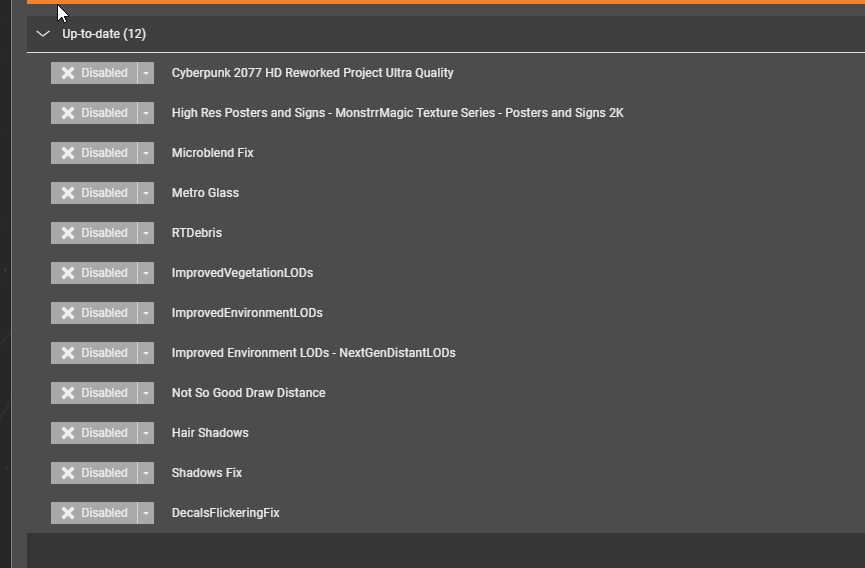
yep i figured that randomly
https://i.imgur.com/E3uf5Mi.png
some of these currently for sure cause more crashing
 plucky tulip
jolly osprey
i started experiencing weird things with this mod today :( my game is crashing o...
plucky tulip
jolly osprey
i started experiencing weird things with this mod today :( my game is crashing o...
this mod doesn't touch the game's UserSettings.json... but the game can get in a crash loop by itself, and Ultra+ is trying to control the game engine, so can make the problem worse. the first thing to try is turn "Graphics Menu Settings" to "Off", which should hopefully stop the loop
inner badger
not sure which, i just disable most i dont care too much
only one that hurts is the hd reworked
plucky tulip
inner badger
yep i figured that randomly
https://i.imgur.com/E3uf5Mi.png
some of these curr...
hmm, I'm not super surprised by half of those..especially if you have 12GB or less of VRAM, I would also strongly recommend to just turn texture quality to "Medium" in the game menu. Cyberpunk 2.xx has a persistent bug where the streamer budget calculation is a little broken, and with a few mods that hit VRAM it will slow down then crash. if you see a slow down before a crash especially going into the map, this is what's happening
inner badger
im on 4070ti so i pretty have everything maxed out
i could try lower settings but im getting pretty good fps (with stutters here and there)
plucky tulip
yup. the key is the slow-down. if you don't see it, you're not running out of VRAM
the game can still crash due to overlays, conflicts, other engine problems, or very occasionally due to CET
inner badger
i just accepted the crashes, it mostly happens during driving or very intense situations
i spam quick save every 30 seconds
😄
plucky tulip


some old screenshots i found trying to make the game look like an anime (all in-game, Reshade + LUTs only)


 plucky tulip
inner badger
i just accepted the crashes, it mostly happens during driving or very intense si...
plucky tulip
inner badger
i just accepted the crashes, it mostly happens during driving or very intense si...
it adds personality 😂
inner badger
its the risk you take when modding
plucky tulip
inner badger
i spam quick save every 30 seconds
same  . i really wish i could speak with their testing team though
 plucky tulip
totally
inner badger
but its not worth the fps hit
plucky tulip
have you tried PT16?
inner badger
no
i tried ptnext
20
21
pt + rt
and currently on just rt
😛
all except 16 i guess
plucky tulip
PT16 is almost as fast as RT+PT but without the problems with ray tracing (shiny hair etc.)
inner badger
ptnext looks really nice too
just 40 fps

and framegen is so bad in this game
i dont know why
plucky tulip
yes that's fairly slow especially in heavy areas
O M G trying to fix the dilated pupils in Jedi Survivor how is this the hardest bug ever
well, i think PT16 is way better than RT or RT+PT, and fast, it's quite popular
plucky tulip
you're using DLSS FG?
inner badger
y
plucky tulip
do you use it with motion blur?
inner badger
currently y
i played most of the game without blur
but somehow with blur it feels smoother
¯_(ツ)_/¯
i usually hate motion blur
game dev sorcery
patent minnow
plucky tulip
(is this what you call engineering around yourself?)
Maybe, but you've done a pretty great job making a tool that opens up a lot of options without leaving most people lost to figure out what any of it does, between the article and "Here's a quick way to set it up with Preset C" I think most that can find the mod and install it could probably work through how to use it well.
patent minnow
inner badger
currently y
I have had pretty good results with turning ALL the motion blur, chromatic abberation / etc off and using reshade for those changes. I believe this helps because framegen/UltraPlus/base game changes the image before reshade does anything to it, preventing the motion blur/other things from getting super distorted by framegen/etc.
patent minnow
I am more on the machine code/C++/kernel development end of the spectrum though, so I am just now learning about how depth buffers work, shaders, all that other stuff with graphics.
This just used photomode, just now got around to installing AMM and learning how to use it, but the lighting on the character is all from PT2.0 and the SHARC. Just don't go buying a reshade from any of those youtubers that are pushing that stuff, there are good ones on Nexus, just make sure they have some downloads because occasionally bots/shady ones get posted. They get reported fairly quickly but not usually immediately.

PT1.6 shouldn't be too different lighting wise. The loss on radiance bounces should mostly be unnoticeable unless you were looking closely at some side by sides.
tidal karma
plucky tulip
you can try removing Not So Good Draw Distance. I am getting a lot of reports 2....
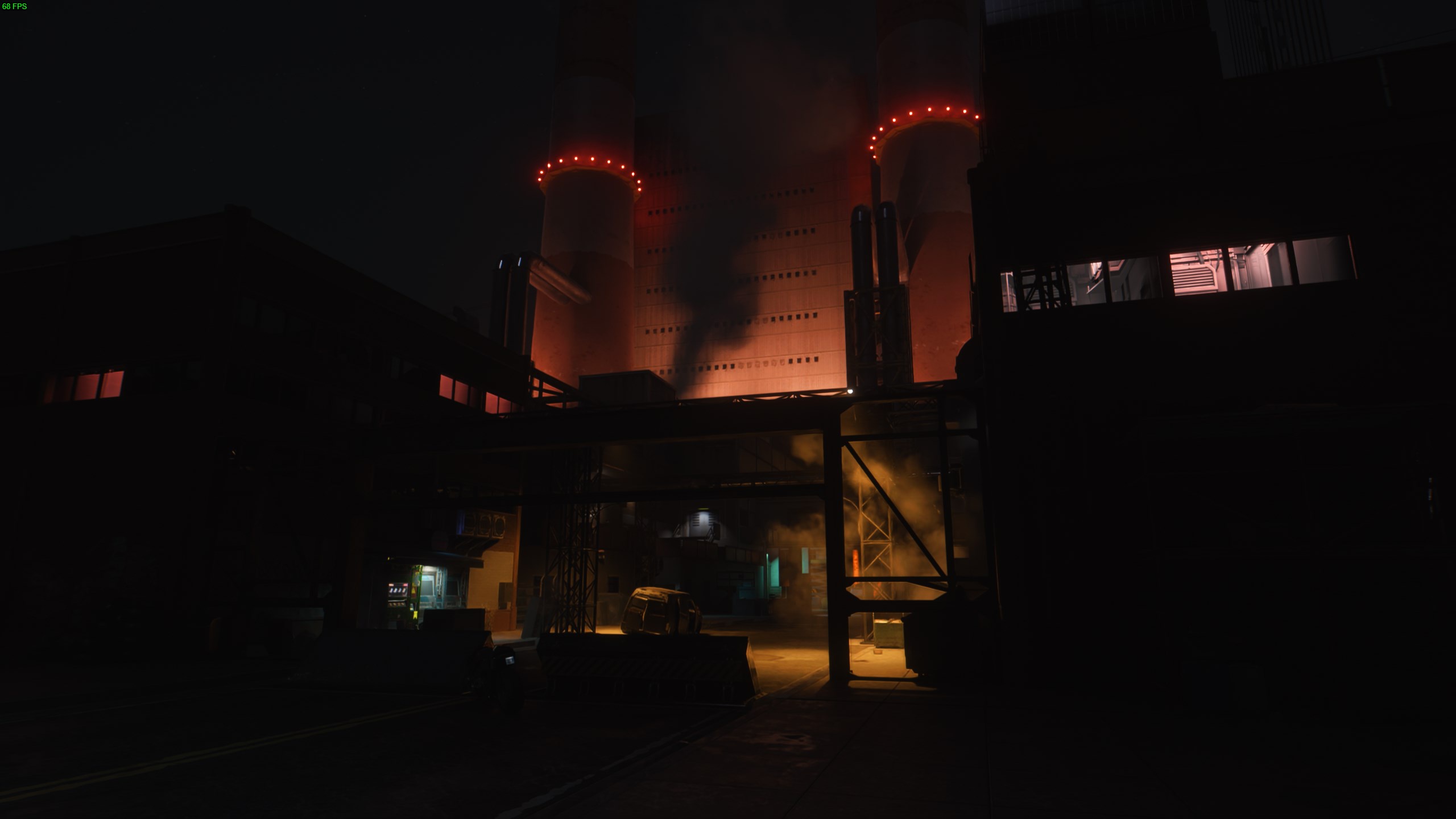
at default values i havent had a crash in the last 36 hours of game play. now using texture packs or body replacers that is a different story, i think deceptious was looking at a way to only spawn "dates" after they were selected i think/hope that will fix the body replacer issue. but to trouble shoot further i need to know more, GPU and mods, as on max settings with all sousine mods at default values on a 4060 its still rock solid with only 8gb of vram
raytracing with pathtracing
1080p
but i agree, its not as stable as 1.63 was with extra textures etc...
 tidal karma
im hoping that a 50 series card can play PTNext it at a good frame rate it really is impressive
plucky tulip
inner badger
but somehow with blur it feels smoother
i've just been playing with turning the motion blur down a little bit.... so that it only blurs between frames (like IRL), not so much as an "effect"
just wondering if it might help with the FG look and provide the best of both worlds
inner badger
tidal karma
im hoping that a 50 series card can play PTNext it at a good frame rate it real...
getting a 5090 for cyberpunk 2 in 10 years
😄
tidal karma
if the rumored prices are true i will have to wait for a 5080 or lower i let the wife know i was getting a new video card with my bonus in feb, but i think we will have a difference of opinion if its 2k
plucky tulip
patent minnow
I have had pretty good results with turning ALL the motion blur, chromatic abber...
FG is supposed to adapt to motion blur, but whether or not this is enabled in the CP engine i don't know. in unreal games you can tell the engine to adapt DLSS FG ... or not (so motion blur + frame gen adaptation is enabled on some games, not on others)
plucky tulip
patent minnow
I am more on the machine code/C++/kernel development end of the spectrum though,...
if you want to know about this, you might enjoy seeing some of the HRD Den's team (RenoDX mod)
plucky tulip
tidal karma
but i agree, its not as stable as 1.63 was with extra textures etc...
what's happened i think is CDPR uses FakeGPUVRAM to fake testing on low vram PCs. however that command is slightly broken... this in turn means their "low vram" tests are passing (false positives), and they haven't noticed that their streamer budget calculation is broken. this is the root cause of all these issues (that wasn't present in 1.63)
plucky tulip
patent minnow
Maybe, but you've done a pretty great job making a tool that opens up a lot of o...
oh yay, thank you ❤️❤️❤️
patent minnow
plucky tulip
if you want to know about this, you might enjoy seeing some of the HRD Den's tea...
I have looked at RenoDX but was thinking "You're going to break something if you touch that without learning first." XD
The last real graphics coarse/learning I did before this was raster graphics more than a decade ago, and ray tracing was so new that you set a scene, a static scene, to render on a system and waiting 16+ hours for the result. If you were a big company/had deep pockets you could pay a company to render maya/autocad/etc files for you in higher detail much quicker.
Will it run Crisis? Was the last PC I built before this one. And yes, yes it would. But then it died after the ex wife used it one day. I suspect foul play. But that was long ago. XD
I think I found my combo for the game though.
 plucky tulip
patent minnow
I have looked at RenoDX but was thinking "You're going to break something if you...
plucky tulip
patent minnow
I have looked at RenoDX but was thinking "You're going to break something if you...
haha my first book on electronics was called "Learn Electronics br Breaking Things and Blowing Things Up" 😂
plucky tulip
patent minnow
I think I found my combo for the game though.
Trinity vibes ❤️
jolly osprey
plucky tulip
this mod doesn't touch the game's UserSettings.json... but the game can get in a...
forgive me if this is a dumb question, but how do i do this?
plucky tulip
jolly osprey
forgive me if this is a dumb question, but how do i do this?
how do you turn off Graphics Menu setting?
jolly osprey
yes i do not recall ever seeing such an option anywhere haha
is it in ultraplus?
i cannot start the game because it crashes with it installed
plucky tulip
jolly osprey
i cannot start the game because it crashes with it installed
try deleting the config.json in the UltraPlus folder 🤔
 plucky tulip
under "Overwrite Graphics Menu" set it to "Off" 😊
plucky tulip
yw 😊
jolly osprey
oh my PT must be OFF in options? if i am using RT+PT
maybe that's what caused the fuckywucky to begin with
plucky tulip
yep 😊
jolly osprey
haha ok, thanks
patent minnow
plucky tulip
yw 😊
There is one other thing that hits my logs a lot, though it doesn't appear to be crash causing either. [2024-09-29 18:19:30 UTC-04:00] [79000] init.lua:52: attempt to index local 'blackboardUI' (a nil value)
stack traceback:
init.lua:52: in function 'isGameSessionActive'
init.lua:432: in function 'doFastUpdate'
init.lua:521: in function init.lua:512
I see a LOT of references to nil values in scripts across the board though, so I am guessing its not fatal.
Not just this one. Its weird coming from CPP where referencing a nil value can cause fault in most cases.
In an attempt to solve my random crashes I have nixed every CET mod with scripting errors at all, except UP XD. Because I already have a pretty good idea of what it's doing even if I don't know HOW most of the time.
 ember sigil
Hello, sorry to bother you. I'm experiencing noticeable ghosting after adding the Ultra+ mod. Is this normal? I'm using PT Next and DLSS set to Quality. How can I fix it?

When moving the camera, the ghosting is very noticeable.
plucky tulip
patent minnow
There is one other thing that hits my logs a lot, though it doesn't appear to be...
oh yes that thing, I'll sort that too, ty 😊
plucky tulip
ember sigil
Hello, sorry to bother you. I'm experiencing noticeable ghosting after adding th...
are you indoors or out?
jolly osprey
oh i saw this happen earlier! i was outside, but my ghosting was a lot darker
i updated all the dlss dll's earlier too
i am also on DLSS quality, for what it's worth


 ember sigil
jolly osprey
kinda outdoors?
ember sigil
jolly osprey
kinda outdoors?
Is it indoors?
jolly osprey
well you are technically outdoors, just some roof over your head so
ember sigil
I'm just wondering if this is normal and if not, how to fix it?
jolly osprey
oh i dunno, i had some too, but mine looked darker. almost like shadows
ember sigil
How did you set it up, can you refer to it, thanks.

 plucky tulip
ember sigil
I'm just wondering if this is normal and if not, how to fix it?
plucky tulip
ember sigil
I'm just wondering if this is normal and if not, how to fix it?
no it's not normal
maybe slightly for one or two frames but not like that
ember sigil
So what is the right way to set it up or is there any other solution,I'll try to follow your line of thought.
ember sigil
No matter how I set it up, I can't fix the ghosting problem.

 plucky tulip
ember sigil
No matter how I set it up, I can't fix the ghosting problem.
plucky tulip
ember sigil
No matter how I set it up, I can't fix the ghosting problem.
I'll see if I can reproduce it
plucky tulip
jolly osprey
wtf
tidal karma
i take that as a yes
fleet geode
I've seen similar effects on distant (flying) AVs at low light, but never on pedestrians
Or is that just low shadow detail?
plucky tulip
yes distant objects aren't given as much priority by the denoisers
that's pretty much hard-coded
jolly osprey
plucky tulip
wtf
for some reason this reaction made me cackle like a rooster on acid hahah
it seems to do this on both RT and RT + PT
i recorded a little video of it as well. it is very compressed but you should get an idea
plucky tulip
jolly osprey
for some reason this reaction made me cackle like a rooster on acid hahah
lmao. oh it's just this game. there's a handful of people who have the most crazy noise problems like this and yet everyone else's work fine, it drives me mad
like, what's different? how can 5% (or whatever) have a different result? i've tried to control everything with the mod
plucky tulip
jolly osprey
i recorded a little video of it as well. it is very compressed but you should ge...
yikes
jolly osprey
hmm could it be because my CPU is bottlenecking a bit? i7 9700k, 4080 super, 32gb ram
plucky tulip
could you please have a look in Debug and search "history"? what are the max history frames set at?
jolly osprey
debug.. that's ingame?
plucky tulip
jolly osprey
hmm could it be because my CPU is bottlenecking a bit? i7 9700k, 4080 super, 32g...
no 😊
plucky tulip
jolly osprey
debug.. that's ingame?
that's in ultra plus, there's a Debug panel up top 😊
jolly osprey
kk lemme boot it up

i think i am doing this wrong
or maybe that is the right thing i pulled up lamao
plucky tulip
jolly osprey
try changing RTX DI max history frames to 4 or 0
jolly osprey
alright, will do :D thank ye
plucky tulip
that shouldn't be 20... how is it 20
20 is the vanilla value which causes these issues
(20 is WRONG, CDPR)
jolly osprey
CURSES UPON YE CDPR

oh maybe it's safe to .. uh
let it override game graphic settings now?
plucky tulip
jolly osprey
let it override game graphic settings now?
it *should* be okay again
jolly osprey
alright
plucky tulip
so you're in PTNext?
jolly osprey
RT+PT at the time of writing

 jolly osprey
in your mods defense, i did click between RT and RT+PT a lot when experimenting
so maybe i confused it
plucky tulip
it does try and enfoce settings pretty fiercely
it's always best to load a save after you've settled on settings though to restart the game engine
i don't see how that value could be set as 20, but thank you this has given me something to test
maybe it provides a clue of why some others have this problem
jolly osprey
hopefully :D it is a great mod!
plucky tulip
ty 🙏
i have a few days of work to grind through but then i'll try and reproduce it
in the meantime try checking that RTX DI History in debug. you can safely lower it to 0 or 1
jolly osprey
i also switched a lot between 1440p and 16..20. i think 1620
oh yeah you might have missed this message - #1225966190439170178 message
open forgeBOT
jolly osprey
oh yeah you might have missed this message - https://discord.com/channels/717692...
when i rebooted the game now, it was set to 1
 Quoted by porkhammer from #Ultra+ 2.13 Patch Patch Patch Patch
·
plucky tulip
Quoted by porkhammer from #Ultra+ 2.13 Patch Patch Patch Patch
·
plucky tulip
Nvidia recommends 4 or 5 but even that is too much. idk what CDPR were thinking
plucky tulip
jolly osprey
when i rebooted the game now, it was set to 1
oh good! is the ghosting better though?
jolly osprey
yeah so far it's fine, but if i start seeing them again without experimenting i will definitely report back
thanks for the help :D
plucky tulip
jolly osprey
yeah so far it's fine, but if i start seeing them again without experimenting i ...
thank you 😊
patent minnow
Alright, I'm gonna gush again. Removed Misc Settings Unlocked and ONLY using ultraplus for graphics now, all my performance issues are gone, no more crashing, AND I am running on PTNext with Medium bounce cache and High quality at 120+ fps DLAA (1920x1080 but my eyes wouldn't be able to tell the difference in 4k anyway. Human eye acuity level actually makes this impossible, but good luck convincing anyone that's true.)
This shit is gorgeous.
plucky tulip
patent minnow
This shit is gorgeous.
hehe yay 😊
yes other graphics mods is unwise... U+ is doing everything that's important
patent minnow
Also, if you EVER have anyone with a weird 'sluggish' issue that isn't just a frame skip type of stutter, have them turn the AMD p cores thing in utilities to auto. Turning it on, even with AMD CPUs that support it will cause that weird non-stutter...uh, stutter.
Like stepping in quicksand, it was actually impacting scripts running pretty heavily as well.
Took a good bit of digging to find that out.
Makes it look like a graphics issue, but its definitely P Cores. I guess Cyberpunk doesn't use SMT threads very well.
plucky tulip
patent minnow
Also, if you EVER have anyone with a weird 'sluggish' issue that isn't just a fr...
amd has P cores now?
I hate windows scheduler, seriously
have you tried playing with core isolation?
patent minnow
Yeah, its on. Tried off/etc but doesn't matter. At least the MSI motherboard I grabbed has got a solid bios for keeping windows to its own business with hardware.
Cetting the cores to purely physical and setting PhysX manually to GPU in the nvidia control panel keeps it from getting offset to the CPU. I doubt physx had anything to do with it, not heard of anything using it in ages, but you never know with custom engines.
On the way to dogtown. PTNext is workin'
 jolly osprey
@plucky tulip you wouldn't happen to know a secret to make stuff look this look a bit less.. jaggedy? :D
 pastel orbit
It's not supposed to look like that
patent minnow
Its distant LOD resolution.
You using DLSS/DLAA or using AMD?
I am unfamiliar with AMD graphics tech, why I ask.
jolly osprey
DLSS (quality)
i am also using sosuine's not so good draw distance mod, thinking maybe that would help
but nope
patent minnow
DLSS does render down and then upscale. That may be your culprit, but honestly it's not worth playing without it, to me anyway. PC has spoiled me and anything under 60fps just hurts.
jolly osprey
agreed
jolly osprey
https://www.nexusmods.com/cyberpunk2077/mods/13027 i have considered grabbing this but dunno if it would help at all. it demands a reshade thing for some reason as well; probably not worth the effort

Nexus Mods :: Cyberpunk 2077
This mod improves both TAA & non-temporal anti-aliasing methods in Cyberpunk 2077, so regardless of what you prefer/are using you can get an enhanced experience. This also includes vendor specific
 wheat robin
how come photomode is like this for pt next?

 plucky tulip
jolly osprey
<@184939081585786880> you wouldn't happen to know a secret to make stuff look th...
plucky tulip
jolly osprey
<@184939081585786880> you wouldn't happen to know a secret to make stuff look th...
DLSDR
plucky tulip
jolly osprey
https://www.nexusmods.com/cyberpunk2077/mods/13027 i have considered grabbing th...
but DLSS is a temporal upscaler?
🤔
plucky tulip
Ultra Fog now works with any mod 😊 https://www.nexusmods.com/cyberpunk2077/mods/11811

Nexus Mods :: Cyberpunk 2077
Path and ray tracing fixes for smoke, steam, fire, grenades, etc. to make them look visually correct.
plus 100 more particle fx fixed
jolly osprey
plucky tulip
DLSDR
yes this is what i am using atm, my monitor is only 1080p. but no resolution gets rid of long range jaggies in this game :( i even tried 4k. rip
plucky tulip
jolly osprey
yes this is what i am using atm, my monitor is only 1080p. but no resolution get...
hmm it must be an internal problem with the renderer (like, it's downsampling too early)
how annoying
the only way i know to help is to use something like intel CMAA2 to fill in some of the pixels https://www.intel.com/content/www/us/en/developer/articles/technical/conservative-morphological-anti-aliasing-20.html
Intel
This article provides additional performance, improved quality, optional integration with multi-sample anti-aliasing (MSAA), and the ability to be leveraged asynchronously on graphics processing units (GPUs) that support this capability. It also includes some of the weak points of the post-process anti-aliasing (AA) techniques, reflect on scenar...
GitHub
This is my personal collection of the shaders I've created for reshade. - LordOfLunacy/Insane-Shaders
Marty has one too
jolly osprey
plucky tulip
but DLSS is a temporal upscaler?
also yes, i know very little about this stuff. i just know i hate jaggies, haha 
thanks for the links sammi
jolly osprey
it's my monitor limiting me, 1080p DSR upscaling to 1440p, or even 4k, is not gucci enough to rid myself of jaggies in the distance. rip
jolly osprey
well it does work like a charm in RDR2. i guess it's just cyberpunk not liking DSR or something, dunno. e
 pulsar grove
I am running into issues with this mod. It causes my game to randomly crash, performance to decline over time, and sometimes keep crashing on startup unless i completely remove it.
Also generally find performance overall to be worse than with vanilla on any settings
 fervent breach
plucky tulip
Ultra Fog now works with any mod 😊 https://www.nexusmods.com/cyberpunk2077/mods...
fervent breach
plucky tulip
Ultra Fog now works with any mod 😊 https://www.nexusmods.com/cyberpunk2077/mods...
YOOOOOO THANKS CHIEF! FInna slap this shit all over my Nova City XD
plucky tulip
jolly osprey
well it does work like a charm in RDR2. i guess it's just cyberpunk not liking D...
I run in DLSDR but I can't see the distant objects bc I have bad eyesight 
plucky tulip
pulsar grove
I am running into issues with this mod. It causes my game to randomly crash, per...
I think we've concluded that Ultra+ isn't causing these issues. but Not So Good Draw Distance and texture mods might
pulsar grove
plucky tulip
I think we've concluded that Ultra+ isn't causing these issues. but Not So Good ...
not using the former, but will see if disabling the latter matters
jolly osprey
plucky tulip
I run in DLSDR but I can't see the distant objects bc I have bad eyesight <:Kevi...
yeah maybe i should take me goggles off 
patent minnow
Ultra Fog light with Nova City and realizing my CPU was what was actually bottlenecking (and why the lurches in speed were extremely evenly spaced, regardless of the scene being rendered and way worse in dog town, which is much more people dense) resolved the last little bit of my fidelity issues. I never thought I'd be able to milk DLAA at 1080p with everything graphics wise on PTNext and Ultra with only a 12g 4070. Now, maybe if I'd gotten a Ryzen 7700XD instead of just the 7700 I could have astonishing crowd size, but to be honest I can't tell the difference.
Although now it does beg the question if that 600mhz 16clk rate 32gb DDR5 isn't being bottlenecked by the processor as well....I may have to just get a better one anyway if I want more consistency.
plucky tulip
patent minnow
Although now it does beg the question if that 600mhz 16clk rate 32gb DDR5 isn't ...
three problems are common with the AMD... 1) sometimes their turbo is too aggressive, turning it down a little bit can stop throttling... 2) the AMD chipset driver doesn't install all the PCIe drivers (the fix is running the AMD auto-detect tool).. 3) Core Isolation is causing low fps on your PC (the only solution I know atm is to try disabling it)
happy birthday 😊
jolly osprey
uaaah i tried PT next and my game did not like this at all, looked like a filmgrain hell. when i set it back to RT/PT, the game CTD'd on me hard 
tidal karma
jolly osprey
uaaah i tried PT next and my game did not like this at all, looked like a filmgr...
Try deleting the config.json from ultra plus folder
inner badger
jolly osprey
uaaah i tried PT next and my game did not like this at all, looked like a filmgr...
filmgrain could be due to renoDX too if you are using that
his filmgrain is very intense
jolly osprey
nah i hate filmgrain, would never grab a mod for it :D
jolly osprey
tidal karma
Try deleting the config.json from ultra plus folder
yeah i had to do that as the game wouldn't launch afterwards, sksksks
patent minnow
plucky tulip
three problems are common with the AMD... 1) sometimes their turbo is too aggres...
I'll have to try turning off core isolation / turning the 'auto' turbo setting in bios for AMD chip to a manual, conservative value. Boosts are worthless if they're going to cause issues that make the 'improvement' worse than the baseline after all. In the meantime, I have no idea why, but for some reason clearing UserSettings.json again has resolved things for now, back to astonishing crowds again. shrug I'll figure out the magic issue eventually, and it'll probably resolve other games weird little quirks if does end up being a weird firmware quirk.
patent minnow
AMM Is also behaving correctly, which is a good sign in general, since it is so finicky.
 plucky tulip
oh yay, well i'm glad it's fixed for now 😊
plucky tulip
hmm okay i've changed the perceptual autoscaler (Target FPS) so it can modify rays and bounces

i think i need to document this for people better because there's probably no need to install the mod that adjusts ray/bounces separately
seems to be working nicely
 jolly osprey
@plucky tulip it happened again :( with those history frames set to 1, too
i tried to record it, the pc was surprised at this manouvre so it dropped a few frames. but it's still visible when roh gets into the car, and when the car drives off
RT+PT, 1440p
oh and the hood and trunk are open on the car because i opened them for lols 
plucky tulip
jolly osprey
<@184939081585786880> it happened again :( with those history frames set to 1, t...
ty. next time this happens, can you please untick "separate denoiser" in debug and re-tick it and let me know if it's fixed? I'm watching for this in testing but haven't seen it :/
plucky tulip
jolly osprey
any log files i can provide? or pc specs? nvidia 3d settings?
hmm no not yet, but thank you... though that does make me think I could add a button for U+ to dump all its current settings to a file so I can actually debug it
that's brilliant, ty for the idea!
jolly osprey
haha 👍🏼
jolly osprey
plucky tulip
ty. next time this happens, can you please untick "separate denoiser" in debug ...
nu, this did not fix it, unfortunately :(
jolly osprey
i also encountered very fuzzy shadows, though because i am about as knowledgeable about these things as i am about elephant farting habits, i do not know if this is caused by your mod, or nova city. thought it was worth pointing out nevertheless
plucky tulip
jolly osprey
i also encountered very fuzzy shadows, though because i am about as knowledgeabl...
i... have never seen this
long galleon
plucky tulip
i... have never seen this
Life is full of new experiences ^_^
plucky tulip
jolly osprey
i also encountered very fuzzy shadows, though because i am about as knowledgeabl...
I can't even think what this could be. it's like a denoiser problem. the main denoiser runs on static objects (not people, cars, and plants), so is going wrong somehow... what DLSS, DLSSD versions and presets, or FSR are you using?
is RR disabled?
jolly osprey
DLSS quality, latest versions of all. RR is disabled :D
plucky tulip
jolly osprey
DLSS quality, latest versions of all. RR is disabled :D
is DLSSD 5.7.20? if so can you please go back to 3.7.10
muahaha smarter auto-scaling
 jolly osprey
oh i thought that's what i updated it to a week or so back, 3.7.1.0
lemme check
uhh
bin/x64 right?

 jolly osprey
phew
plucky tulip
😊
jolly osprey
plucky tulip
muahaha smarter auto-scaling
O are these mod improvements? i just noticed it :D
plucky tulip
v5.3.2
I've changed "Target FPS" so that:
- It can now jump levels. (Previously it would gradually increase or decrease quality by only 1 step every 5 seconds. It can now e.g. jump from 15% to 100% quality or back. So if it's running at 100% quality and you suddenly need FPS, it can reduce quality quickly to give you FPS much sooner. (And vice versa, if you have spare FPS, it can increase quality quickly.)
- It now controls rays and bounces for PT16, PT20, and RT+PT, so has more comprehensive control over perceptual quality
jolly osprey
ooooooooh
well done!
do i delete the old version, or does it overwrite everything?
plucky tulip
it should be fine to just copy over the top 😊
tidal karma
i submitted 2 pull requests whenever you get time both are small probably wont be any noticeable change
plucky tulip
tidal karma
i submitted 2 pull requests whenever you get time both are small probably wont b...
ooh ta!
hmm I can't see your PRs 🤔
tidal karma
Ok let me see what I did wrong
woven plover
inner badger
yep i figured that randomly
https://i.imgur.com/E3uf5Mi.png
some of these curr...
not the shadows mods 😭
woven plover
plucky tulip
i... have never seen this
@jolly osprey that looks exactly like the issue I posted about, earlier. I shared a bunch of details about it: #1225966190439170178 message
open forgeBOT
woven plover
<@140941756798730242> that looks exactly like the issue I posted about, earlier...
It doesn't happen if Quality is set to High, Insane or Vanilla (surprisingly).

 Quoted by stamp_dd from #Ultra+ 2.13 Patch Patch Patch Patch
·
plucky tulip
tidal karma
Ok let me see what I did wrong
Quoted by stamp_dd from #Ultra+ 2.13 Patch Patch Patch Patch
·
plucky tulip
tidal karma
Ok let me see what I did wrong
okay, or send me a link to your commits? i've just pushed my latest changes
plucky tulip
woven plover
<@140941756798730242> that looks exactly like the issue I posted about, earlier...
hmm, maybe PT20 needs fallback sampling now 🤔
thank you, i'll hopefully be able to work this out
autumn temple
Could someone please help me understand what the GITS reLIGHT files do and is it ok to use them with Ultra+ without the GITS env file?
jolly osprey
@plucky tulip i found some more interesting ghosting, but honestly i cannot tell whether it is due to ultra+, or CDPR handling RT/PT wrong
 rapid hinge
Suddenly having this odd noise/static issue with PTnext? I tried adjusting some settings to get rid of it, but I can't seem to find the culprit. Could it be my own in game settings causing it? I don't think I've honestly seen it like this before 🥲
It's mostly a lot on the skin and walls etc.
 jolly osprey
looks like extreme filmgrain or something 
rapid hinge
I don't think I have filmgrain enabled ANYWHERE either lmao
Im at such a loss. It hasn't done this before. I tried the newest Patreon one and the other on Nexus just in case
jolly osprey
yeah i got the same insane filmgrain look when i enabled one of the PT modes
regular PT works fine but PTnext was like "hell naw"
and it was around that same area when i tested it too!
rapid hinge
Yeah, I think i did PT next and Pt21 and got the same issue. It just looks a little less with PT21
jolly osprey
i am on RT+PT atm, if you can try it out
at least on my rig it looks normal then, just some weird ghosting occuring randomly
inner badger
what is your framerate?
could be artifacting from low frames
i also always say to check if you have renoDX
is has a lot of filmgrain
rapid hinge
I dont have reno, and my framerate was at about 50 so i dont think thats the issue either
inner badger
50 with framgen?
rapid hinge
usually using Ultra is goes between 45-60 runs really smooth
I have a brand new 4090 I dont have issues with framerate
rapid hinge
Yeah, but like i said prev Ive been using ultra for a while, it only just started happening
So idk if its another mod I have downloaded or a setting I gotta change
rapid hinge
I checked on and off all the boxes within Ultras settings. Toyed with it for hours lol
Which RR are you talking about
inner badger
tried straight up deleting the usersettings?
could have messed up something
RR is ray reconstruction
rapid hinge
Yes, it was a clean install both times
I always make sure to delete the old + user settings anytime I redownload the mod just in case
I use rt and pt in the game, but since it was never an issue before idk why
I dont think i have recon on tho no
rapid hinge
recon was causing artifacting before so I turned it off lol
inner badger
ok that sounds weird
RR usually causes a lot of ghosting
but at least it helpes with artifacts
rapid hinge
Yeah I had ghosting when using Ultra before, but now thats not an issue, the static grainy effect is
inner badger
if thats not the case, only other thing is either a faulty mod, or a faulty gpu driver
rapid hinge
Yeah without Ultra I dont have any type of issues in game
Its just a bummer bc I loved Ultra before
rapid hinge
Oh yeah, but I was using the same ones on the mod before
rapid hinge
So like, I dont have anything new that would cause it
inner badger
to me it sound like ray reconstruction issue
rapid hinge
idk, I hate turning it on because it causes issues with ghosting and blurriness
inner badger
you win some you lose some
btw i know it will sound stupid
but just to check
you turned off film grain
in game?
rapid hinge
yes
rapid hinge
yeah I like to troubleshoot all I can before asking for help so ive tried all I could think of lmao
I checked the mod on nexus for anything in the threads too and nothin
So who knows
rapid hinge
unfortunately in game it looks way worse than the SS. it turns shiny and glitchy when you move
 inner badger
ye its a bit much
rapid hinge
Ill stop complaining bc I loved this mod before. Hopefully Ill get lucky when I redownload in the future lmao
inner badger
just test out frame gen on/off, dlss on/off and RR on/off
see if that fixes anything
cause it looks like an "AI" artifacting issue
jolly osprey
RR made me lose a bunch of frames for some reason, so i never touched it again. 4080 super
inner badger
that sounds really weird, RR is supposed to actually increase your frames
fleet geode
Ok, so I was testing various U+ settings and it was fine. But then the game wouldn't start any more.
So I had to reset my usersettings.json, uninstalled U+ (5.3.0)
Game starts without U+. I set my user settings via menu as usual.
Reinstalled U+, but then the game flatlines again...
Verifying files didn't help.
So now I can't play with U+ any more 
I don't get it...
(working again after some more trial and error and a second usersettings reset)
woven plover
fleet geode
Ok, so I was testing various U+ settings and it was fine. But then the game woul...
sometimes the game just crashes on startup, randomly, with Ultra+. If that happens after deleting the settings file and uninstalling+installing Ultra+, just keep trying to launch the game a couple more times. Sometimes I have to try launching it 2 or 3 times, before it works.
woven plover
rapid hinge
that looks like path tracing artifacting in low light environments. Sometimes, but not always, Ultra+ makes those issues even worse, for some reason. I've been getting something similar to your image on pt20, too, sometimes.
plucky tulip
alrightyyyy
i've seen several instances of the weird noise that appears
i'm actually wondering if there's a bug in CDPR's nvngx_dlssg.dll that came with 2.13 🤔 ... i'm not having the issue, but if anyone having it wants to try rolling it back to 3.7.0 from here https://www.techpowerup.com/download/nvidia-dlss-3-ray-reconstruction-dll/ and see if it stops happening?
to me it looks like a bug with the PT denoisers
woven plover
plucky tulip
to me it looks like a bug with the PT denoisers
the issues I had don't happen with RR off, so there's evidence to that claim
plucky tulip
woven plover
the issues I had don't happen with RR off, so there's evidence to that claim
yeah... this is where my thinking is at too
and i haven't really changed much in the latest updates. not as much as CDPR changed anyway 😂
woven plover
rapid hinge
Hey, can you try setting the Quality Level to High or Vanilla, to see if that fixes the issue for you, like it did for me? So we can know if our issues are related, or not.
plucky tulip
woven plover
sometimes the game just crashes on startup, randomly, with Ultra+. If that happe...
I've not seen reports of crashes on startup..
well, I've seen 1 😊
patent minnow
plucky tulip
alrightyyyy
I stopped having that issue with DLSSTweaks and using the latest files taken directly out of NVIDIA's driver install folder after it downloaded. So you may be right.
plucky tulip
patent minnow
I stopped having that issue with DLSSTweaks and using the latest files taken dir...
hmm okay, thank you for letting me know!
 wispy pilot
hi. i'm generally finding ultra+ to make my game much darker. is that expected?\
jolly osprey
@plucky tulip seems it is not your mod causing the fuzzy textures or the dark ghosting after all - i removed U+ and NC when troubleshooting some issues and none of them were caused by mods, it would seem. just CDPR things
maybe they came with 2.13
plucky tulip
wispy pilot
hi. i'm generally finding ultra+ to make my game _much_ darker. is that expected...
hey! noooo 🤔
plucky tulip
jolly osprey
<@184939081585786880> seems it is not your mod causing the fuzzy textures or the...
I'm generally feeling like 2.12a was better 🙄
I've been feeling that way about new versions for a while now 😭
pastel orbit
1.63 was
tidal karma
have i cried yet today and comlained about my love/hate relationshiop with U+ 😕
or maybe its just version 2.13 i duno
jolly osprey
2.13 seems to cause a lot of poopoo
tidal karma
i think we just knew where all the poo was with 2.12a
but 2.13 we are still stepping in it
the one thing i HAT E more than anything is the crash around/near lizzy bar and its back 😦
i refuse to give up NSGDD and removing that does stop the crash anyway, i would have to remove that vegitation and sosuine LOD mod
but i think maybe if murphy is on my side i found settings that work, at least for my 8gb card
inner badger
i hate the fact that you hvae to restart to experiment with frame gen T.T
 humble creek
Not with the fsr3.1 mod at least
That can be turned off/on without needing to actually restart
wispy pilot
plucky tulip
hey! noooo 🤔
Gotcha. Yeah, it seems much darker than vanilla. Granier too
humble creek
wispy pilot
Gotcha. Yeah, it seems much darker than vanilla. Granier too
Using any weather mods, or maybe nova city?
wispy pilot
Nope
plucky tulip
wispy pilot
Gotcha. Yeah, it seems much darker than vanilla. Granier too
please try restoring the shipped DLSS dlls
wispy pilot
Will do
plucky tulip
sorry i've been away fixing Silent Hill 2 remake
 lethal dirge
plucky tulip
sorry i've been away fixing Silent Hill 2 remake
lethal dirge
plucky tulip
sorry i've been away fixing Silent Hill 2 remake
Ultra + version ?
Note: nevermind I see on nexus page haha
patent minnow
I don't know what I'm doing wrong, but I can't see the difference between RT and RT+PT in terms of both visuals and performance. I'm using an Arc A580, which should be capable of doing RT with XeSS, which looks good in Cyberpunk. Only "real" PT options change the visuals and performance, but PT16 is just pure white everywhere unlike PT20 and 21. I'm using the latest version of the mod as of Oct 14
 frank wren
Yeah - I need some graphics card updates.
 frank wren
had to uninstall the damn mod...
frank wren
Nvm.
inner badger
i mean why woudl you not use DLSS? I know it doesnt look as clean as native, but without it and FG this game is mostly unplayable

patent minnow
guys what version of ultra + engine mod would you recommend me to use for game version 2.12 ?
the 5.3.0 ? basically the one before 5.3.2 which is the newest one for 2.13
 onyx warren
I want to ask about those presets, I set C via dlsstweaks, here's my log, is everything OK in it?
just one observation about the third point of the sticky notes, the author of the mod mentioned there suggests another mod - shoo Watchdog - Timeout Crash https://www.nexusmods.com/cyberpunk2077/mods/16297 🙂
tidal karma
If it alters the exe don’t use it’s only useful for screenshots iirc
These is an ini setting for watchdog but never tried it to see if it actually works
plucky tulip
patent minnow
the 5.3.0 ? basically the one before 5.3.2 which is the newest one for 2.13
the latest version is targeted at 2.13. I feel like the game is getting progressively more broken since 2.10
tidal karma
would really like to know what the stability fixes they added actually are
fleet geode
RT+PT still works fine at least 😅
tidal karma
Yeah but now I get a crash during the car chase after the heist that wasn’t there in 2.12a
 tidal karma
I only have a couple that are reproducible
That is one is new to 2.13
I also have a buff that won’t go away but not sure what it is need to find out what buffs are active
plucky tulip
tidal karma
would really like to know what the stability fixes they added actually are
hah! yes precisely
hi everyone. with 500k downloads across mods, support become challenging to manage. i think it's time i set up a dedicated server for mod support, so here it is.
(mods, i can see nothing in Cyberpunk2077 Modding rules prohibiting posting this, msg me if not okay)
https://discord.gg/j8C8jebB
i will still be here, but my interaction will be less frequent, with priority given to The Ultra Place. you are welcome
 short tide
what settings should i use if i dont want to use ray tracing. gpu 3060 8gb, cpu 6700k
 fleet geode
short tide
what settings should i use if i dont want to use ray tracing. gpu 3060 8gb, cpu ...
fleet geode
short tide
what settings should i use if i dont want to use ray tracing. gpu 3060 8gb, cpu ...
Rendering mode, "Rast". After that, whatever works best/personal prefernce
VRAM you might as well set to 8, since your card has that
short tide
fleet geode
Rendering mode, "Rast". After that, whatever works best/personal prefernce
what about rendering features
fleet geode
Good question. 😄
Not sure what's relevant for raster mode.
 kindred oasis
I am getting severe flickering around this area. Some of it disappears if you stop moving or get closer, some doesn't. Mode is PTNext, if I switch to PT20 everything is fine again.
 short tide
fleet geode
Good question. 😄
Not sure what's relevant for raster mode.
short tide
fleet geode
Good question. 😄
Not sure what's relevant for raster mode.
does it only add things or are these vanilla settings
trying to use it to squeeze out fps while keeping the game looking at about medium settings
tidal karma
short tide
what about rendering features
You probably don’t need ultra plus for raster it’s already pretty well optimized actually
short tide
tidal karma
You probably don’t need ultra plus for raster it’s already pretty well optimized...
so for better frames i should dooo what
i do like the fog settings in ultra + ngl
i also want to figure out the best sacrifices in that configuration exe, cant remember the name, its next to the launcher
disabled async stuff
im VERY gated by my cpu, gpu's fine, so im trying to find everything i can to juice it up a bit
 upper cosmos
I think vanilla path tracing looks much better than ultra plus
even ptnext maxed out looks worse
Vanilla just has so much less noise
@plucky tulip
The invite link you sent is not valid anymore
tidal karma
I think I got put in time out for posting the link 😳
 sweet linden
pseudo scaffold
sweet linden
pseudo scaffold
is there a way to get the sttings to stay? i have to set them everytime i open the game
tidal karma
you mean the graphic settings in cyberpunk? if so set the option in ultra+ to "off"
pseudo scaffold
tidal karma
you mean the graphic settings in cyberpunk? if so set the option in ultra+ to "o...
i meant in ultraplus
kindred oasis
pseudo scaffold
i meant in ultraplus
Something is odd on your end then.
fleet geode
pseudo scaffold
i meant in ultraplus
Yes... does switching it to off not work?
pseudo scaffold
fleet geode
Yes... does switching it to off not work?
I dont think im explaining correctly. im saying everytime i start cyberpunk i have to open ultraplus then go into debug and toggle pt global light to on for example. i was wondering why it wont stay on whenever i open the game again
tidal karma
this one "Appears to be a higher radiance/quality sunlight path, notably boosts daylight visuals with unknown compatibility"
tidal karma
pseudo scaffold
I dont think im explaining correctly. im saying everytime i start cyberpunk i ha...
i sent you a DM see if that does what you want
it should be on by default now, but only in path tracing

 cunning cape
Hmm. It only seems to be a thing in photo mode.
plucky tulip
cunning cape
My hair is glowing. I don't think that's supposed to happen, right?
that's a 2.13 feature
plucky tulip
upper cosmos
Vanilla just has so much less noise
what happens if you click Vanilla everything in the U+ panel?
here's a new invite link 😊 https://discord.gg/HUJCw9k2wq
cunning cape
plucky tulip
that's a 2.13 feature
But why?
fleet geode
feature-bug
cunning cape
Do ini files in "engine\config\platform\pc" override the ones used by Ultra+?
tidal karma
no U+ will override them
unless it is something like traffic or crowds then there are not many settings in U+ that apply to those
cunning cape
I'm using Nova City which has its own ini file, and I don't know how many of those are overridden by Ultra+.
fleet geode
cunning cape
I'm using Nova City which has its own ini file, and I don't know how many of tho...
There shouldn't be any overlap with those two
tidal karma
there is i added/changed them on github for 5.3.3
tidal karma
cunning cape
So 5.3.3 has the Nova City ini integrated into it?
tidal karma
yes
cunning cape
Nice.
 tidal karma
did you reload a save after switching from PT to the other lighting mode?
cunning cape
Does Ultra+ adjust the quality of RT shadows, if such a thing is possible? They seem more grainy than I remember.
tidal karma
cunning cape
Does Ultra+ adjust the quality of RT shadows, if such a thing is possible? They ...
Not exactly but setting the quality to a higher level does improve the shadow quality as it improves lighting overall
I don’t think it goes anything even at lower levels that would make them look grainy
tidal karma
wheat robin
yeah i have seen it do weird stuff even to the player shadow and im not really sure why
wheat robin
i just went back to using rt
tidal karma
it was really weird because my V had a head shadow, but the shadow looked like it was from a drone 😕
fleet geode
tidal karma
it was really weird because my V had a head shadow, but the shadow looked like i...
That's a vanilla bug
tidal karma
ok, didnt know that.... weird as far as bugs go though
idle jasper
Hi @plucky tulip, first off wanted to say I'm liking the 5.3.3 so far. I haven't been using ultra+ for a bit when 2.13 hit, but decided to take a look at your last update. Here are my results (using 7800X3D and RTX 4090, DLSS balanced, FG on and no RR in 4k)
PT20 with Medium quality and Extreme lighting bounce cache accuracy nets me about 18% performance uplift. Last time I was using PT20 on Medium, it had some noise issues in certain areas, most noticeable in Heavy Hearts dance floor. From what I've tested, it's completely gone now. This setting is what I'm currently playing with. I think from what I can tell, this is the best experience I've had with Ultra+, both in terms of visuals and performance.
PTNext on the other hand... I've found that High quality with Medium lighting bounce cache accuracy hits the same performance as vanilla PT (compared with no Ultra+ installed), but in certain areas, there's a really bad grainy effect. Like film grain but times x1000. Again, was really noticeable in Heavy Hearts club. What's going on here?
wheat robin
is pt meant to be this much darker than raster or rt


 kindred oasis
wheat robin
is pt meant to be this much darker than raster or rt
kindred oasis
wheat robin
is pt meant to be this much darker than raster or rt
You might need to restart the game for lighting to work as intended.
wheat robin
its not pt next just normal pt
tidal karma
you using HDR?
 sonic egret
Hi my question would be why does PT21 and PT20 disable a bunch of lights and only PTNEXT enabling them ? and at that point PTNEXT takes more FPS than if I just ran the game without the mod. I don't know how I'm supposed to set up the mod to be a good middle ground between looks and preformance
kindred oasis
sonic egret
Hi my question would be why does PT21 and PT20 disable a bunch of lights and onl...
Did you restart your game when switching to PT20/21? At least for me, the lighting breaks until I restart the game. That might be what you are experiencing.
sonic egret
I didn't completely restart but I re-loaded my save
Re starting the game fixed the missing lights but I still don't really see any impact in preformance using PT21 rather than just running the game Vanilla, what's the difference between PT21 and PT20? With PT20 I do see a slight bump in preformance
kindred oasis
sonic egret
Re starting the game fixed the missing lights but I still don't really see any i...
PT 21 is the Path Tracing since patch 2.1, so the one that game is using currently. PT 20 and 16 run way faster, go read the mod description for more details.
tidal karma
sonic egret
Hi my question would be why does PT21 and PT20 disable a bunch of lights and onl...
what specifically are you looking for the one i know of for sure is ReGIR is disabled when selecting anything other than PTNext, if there is something else your looking for i can look at it
sonic egret
Thank you guys
kindred oasis
tidal karma
what specifically are you looking for the one i know of for sure is ReGIR is dis...
I had observed that when being at Robert Rainwater's clinic. When switching from PTNext to any other form of PT, the lights of his surgical lamps just turn off. Only after restarting the game the lights are back there. So switching PT (from PTNext) during gameplay scews with lighting.
tidal karma
yeah, only PTNext uses ReGIR so when U+ changes the mode it turns ReGIR off, let me play with it a little dont know if i can fix that issue without breaking something else
wheat robin
tidal karma
you using HDR?
sdr
wheat robin
i am on fast quality pt16 if that makes a difference
tidal karma
no it was really just for my own knowledge brightness/darkness seem to vary a lot in HDR so i wasnt sure
 jaunty monolith
wheat robin
i am on fast quality pt16 if that makes a difference
jaunty monolith
wheat robin
i am on fast quality pt16 if that makes a difference
change that to fast pt21 and the image will be much brighter. pt16 on fast tends to be really dark on my end too. higher quality gets brighter so i guess it has to be the bounces that are missing maybe
wheat robin
putting it on the highest didnt do much for all pt versions
also all the other pt versions destroy my perf
fleet geode
@normal breach Here. RT+PT mode is normally the least noisy of the settings apart from RT only.
NRD is fine for that particular mode, but Pathtracing does need to be disabled in your game settings. (see screenshot (the VRAM settings should be set to what your own GPU has))

(and no, U+ v5.3.4 is not publically available yet)
 normal breach
fleet geode
<@1260330980108013610> Here. RT+PT mode is normally the least noisy of the setti...
normal breach
fleet geode
<@1260330980108013610> Here. RT+PT mode is normally the least noisy of the setti...
thanks
for some reason when I turned RPTP on
aka PT setting off in game manu
rt lighting at overdrive or whatever the highest right?
tidal karma
thats by design
normal breach
I was getting a lot of the ray tracing noise like when you partly rendered a scene in blender or something like that those plentyful dots
tidal karma
shouldnt do that
normal breach
and when I tried to turn on the DLSS3.5 RR instead of the stock denoiser
I was getting crashes
tidal karma
make sure if your changing from PT to RTPT you go the in game settings menu and click save or there will be noise
normal breach
as well as when turning all the denoiser off
and now I had to delete my cp installation cuz it started to crash on launch
tidal karma
same if you change from RT to PT go to in game settings and save
normal breach
something went horribly wrong but whatever
tidal karma
no, just delete the config.json in the U+ folder
normal breach
I already killed the installation but like I think it's even better going from scratch
the saves are still there anyway so not a big deal
ok thanks gonna try it out
tidal karma
if it cashes before it even gets to the main menu just delete the config.json it didnt like something in there
normal breach
actually I'm a happy owner of 13600kf
and a z690 taichi mb
and win11
so cp2077 tends to be funny sometimes without having anything wrong
sometimes it works for 10 horus straight no biggie
sometimes it softlocks my entire pc
lol
so can never be too sure about what's causing what
normal breach
tidal karma
no, just delete the config.json in the U+ folder
Hey, if not too much of a bother, with PT+RT should I use the Phycho ingame settings or what
tidal karma
dont remember what GPU you have
normal breach
yeah sorry didn't notice you answering but I figured it out. The mod will tell you if the preset applied or if you have to click apply in the settings
I do have 4070 tho
fleet geode
normal breach
Hey, if not too much of a bother, with PT+RT should I use the Phycho ingame sett...
That or Ultra. It's up to you really. And you can also adjust the U+ settings to your liking. Whatever you prefer
normal breach
fleet geode
That or Ultra. It's up to you really. And you can also adjust the U+ settings to...
Yeah also I've done some tests and from what I saw RT + PT really does seem to look better than normal PT to me
pretty close to the PT next for some reason
 fleet geode
Same. I prefer RT+PT as well.
 normal breach

with the dlss framegen it's 120+ fps to me as well
and tho it's only 60 fps base
it still feels just fine
so imma stick with that
those crashes tho were called by something broken in ultra panel mod
I reinstalled it from scratch and now it's fine
something broke there when I was playing around with denoizer settings


 valid anchor
i must be doing something wrong but i have no idea wat , this wat my game looks on like all pt settings

and this is with charli lighting shining on my v
fleet geode
valid anchor
can someone explain this to me , how do i change the dlss version or preset?
With DLSS Tweaks
It's optional though
tidal karma
fleet geode
Same. I prefer RT+PT as well.
It really does seem to have the least amount of issues/bugs for the quality
valid anchor
fleet geode
With DLSS Tweaks
i did something with dlss tweaks and now my game doesnt have the dlss option rip
is that normal
 stark berry
There's a new ray reconstruction dll 3.7.20
and frame generation dll 3.8.1
tidal karma
I still use the one that shipped with the last update
cunning cape
Does Ultra+ require anything special to be done if using the FSR 3.1 mod?
tidal karma
no
 mellow zenith
for ultra configuration i have to enable Path tracing on CP configuration or I put RT ultra on CP config and RT + PT on CET config ?
fleet geode
mellow zenith
for ultra configuration i have to enable Path tracing on CP configuration or I p...
For RT+PT mode in U+, PT needs to be off in the game settings.
(For the other PT modes it needs to be on)
mellow zenith
Okay, so i put rtx max but no PT on CP config, and RT+PT on U+ config

do you see another config to set ? i don't use NSGDD
gloomy bough
Heyooo, its been a few months since Ive played CP2077, how's this mod doing?
fleet geode
mellow zenith
do you see another config to set ? i don't use NSGDD
That should be fine. But you can simply experiment a bit with the settings
fleet geode
gloomy bough
Heyooo, its been a few months since Ive played CP2077, how's this mod doing?
Doing fine. 5.3.3 is the latest version. 5.3.4 is in the making.
plucky tulip
happy 2.2 day everyone. just a reminder that most support is done in discord.gg/ultraplace 😊
mostly for my sanity 😂
also hey everyone, sorry I've been quiet. I launched the new discord and it exploded, which has kept me pretty busy 😂
long galleon
plucky tulip
mostly for my sanity 😂
Overrated
 lilac comet

tidal karma
so far i havent seen any issues with UltraPlus
i think RenoDX needs an update as 2.2 broke film grain again
plucky tulip
tidal karma
i think RenoDX needs an update as 2.2 broke film grain again
Ritsu is in the U+ discord but idk if he does the cp2077 renodx
tidal karma
shortfuse is aware so hopefully an updates comes out soonish
tidal karma
eh, i think the one from github works
idle jasper
so what do the crowds+ and traffic+ do specifically?
I do have More Responsive NPCs installed so I wanted to know what they do exactly and see if they conflict before enabling them
kindred oasis
All changes to PT20 rolled back
What's that about?
tidal karma
idle jasper
I do have More Responsive NPCs installed so I wanted to know what they do exactl...
Traffic will add more traffic on the roads, crowds just changes their pathing
It still needs some more work
mellow zenith
i'm the only one to have error access violation when going into japantown with ultra+ mod ?
kindred oasis
mellow zenith
i'm the only one to have error access violation when going into japantown with u...
yes, only you
tidal karma
you using any LOD mods or draw distance mods?
 prisma mirage
Hi, is there a way to avoid this smearing? happens in every mode starting from RT up to PTNext
Tried multiple DLSS versions and presets, all pretty much the same issue
 kindred oasis
prisma mirage
Hi, is there a way to avoid this smearing? happens in every mode starting from R...
kindred oasis
prisma mirage
Hi, is there a way to avoid this smearing? happens in every mode starting from R...
Switching to raster might fix it.
 unreal pilot
You can fix that by updating to DLSS 4 with the transformer model. ||But seriously you just need a better base frame rate. New GPU time. ||
plucky tulip
big update, this will need some testing...
5.4.2
- "Click 'Apply' in graphics menu" now flashes to make it more obvious!
- Changed settings format from JSON to INI for upcoming compatibility with Ultra+ Mod Manager
- Enabled the option to disable SHaRC bounce lighting cache for all full PT modes
- Enabling PT16 now force-disables Ray Reconstruction (because it only works with NRD)
- Reduced Motion Blur so that 'Low' (in the game's graphics menu) should no longer be visible (i.e. it only smooths between frames, rather than being a special effect)
- Switched to using psiberx excellent GameSession library for detecting when player is in game
- On first install, Ultra+ now defaults to 'Vanilla' settings wherever possible rather than 'Unknown'
- Increased distant shadow update speed by 40x
- Fixed possible issue with PTNext not enabling after fast travel
- Disabled "Target FPS is not enabled" message constantly in console when console output is enabled
- Changed 'Console' to 'Console Output' in the UI for clarity
- Prevented Ultra+ re-applying the same settings when it doesn't need to
- Updated reflection probe settings from reGLASS for better compatibility
- Fixed UltraPlusConfig.ini not restoring settings correctly
- Fixed UI window was too big
- Removed redundant code for autoloading/saving
- Added Rendering/DLSSDSeparateParticleColor to Debug
- Fixed error spam about Blackboard in the logs
everything is working perfectly here, but we won't know for sure until others test
for continual updates please join the Ultra+ discord 😊
plucky tulip
5.4.3
- Now flashes to "Reload a save" when required to fully activate a mode, to make it clearer to the user
Ultra+ 2.21 Patch Patch Patch Patch :)
plucky tulip
5.4.4
- Pull forward fix for stuck weather due to typo from mick-lue (thank you)
- Fix photo mode having half dark screen in some circumstances from dimkatet (thank you)
- Fix direct lights not working when changing PT modes from dimkatet (thank you)
that is all, thanks for listening 😝
onyx warren
5.4.5
- Improve scene detail and reduce boiling noise for all PT modes from FireKahuna (thank you)
- Fix an issue where PTNext might not enable correctly
?
long galleon
Profit
kindred oasis
The 🦈 tooltip still talks about High, Crazy etc. with the settings being numbers. 200 is High and 400 is Crazy (why not Insane?), is that correct?
Also I wonder what happened to the Bounce Light Setting, did it get merged with the normal quality setting or is 🦈 the same system?
 hazy gazelle
kindred oasis
The 🦈 tooltip still talks about High, Crazy etc. with the settings being number...
hazy gazelle
kindred oasis
The 🦈 tooltip still talks about High, Crazy etc. with the settings being number...
The tooltip thing is fixed in 5.5.4. 🙂
 urban crescent
does this work with config overhaul
fleet geode
urban crescent
does this work with config overhaul
No idea what that is
urban crescent

Nexus Mods :: Cyberpunk 2077
This tool allows to configure hidden settings in Cyberpunk 2077 and squeeze more FPS out. It works by generating configration files, and will not modify executables.
fleet geode
Considering its age, I seriously doubt that is still fully functional.
urban crescent
ok
kindred oasis
What's the difference between the new 6.0.1 and the old one?
fleet geode
Added missing metadata file for Ultra+ Mod Manager (6.0.1 reupload)
The metadata.json can be ignored, it's for the U+ mod manager
fleet geode
Fixed in version 6.0.1.1 ~~ Vortex users: you'll get the fallback installer message when installing v6.0.1. Just select Yes, Install to Staging Anyway.~~
kindred oasis
What, in more detail, does this option do?
 tidal karma
slightly changes diffuse and specular lighting values in RayTracing/Reference to make them more realistic, they are pretty minor changes really
tidal karma
I need someone to get 5090 back in stock getting 120% bonus this month
 drifting wyvern
Is there a way to change the default values in the debug menu so it doesn't have to be done every time I fire up the game? I have 4 settings that I have to hit every time... not a huge deal but I wanted to verify if a built-in solution already existed.
 marsh brook
would it be possible to add neural radiance caching to cyberpunk 2077?
 silk bobcat
anything I should change to have better visuals without a huge performance hit? or vic versa, better performance without a visual hit
 fleet geode
silk bobcat
anything I should change to have better visuals without a huge performance hit? ...
fleet geode
silk bobcat
anything I should change to have better visuals without a huge performance hit? ...
It depends on your hardware specs
silk bobcat
fleet geode
It depends on your hardware specs
running a 4090, i91400kf, and 32 gb ram
playing on a 4k 240hz monitor
 supple lodge
do i need to change anything first?
 tidal karma
supple lodge
do i need to change anything first?
tidal karma
supple lodge
do i need to change anything first?
No idea since we don’t know your hardware specs
 dense lintel
Is this new next 2.0 faster or slower than 20?
kindred oasis
Variables.lue: line 78: "Deeb", line 114: GB24 does not exist as a value
velvet jewel
can I hide the low VRAM warning? I'm already on minimum and it pops up when in clubs
tidal karma
velvet jewel
can I hide the low VRAM warning? I'm already on minimum and it pops up when in c...
It’s in the setting in U+
velvet jewel
Thanks