#Ultra+ 2.21 Patch Patch Patch Patch :)
1 messages · Page 4 of 1
 plucky tulip
 fallow thicket
i see so it doesnt effect anything?
im testing it right now and it seems like everything is works fine
plucky tulip
fallow thicket
i see so it doesnt effect anything?
i don't think so... the only thing i can see that might do something is astonishing crowd density, and the global illumination distance (/graphics/advanced/GlobaIlluminationRange = 1)... which isn't necessarily a quality setting, it's just ... does GI go farther or shorter? ... i'll try adding that to U+ and see what happens. (it will only make any difference for RT and RT+PT and mayyybeeee raster)
fallow thicket
Btw PT16 with insane quality looks amazing I’m using it with Realcolorr III and it’s mind blowing
plucky tulip
fallow thicket
Btw PT16 with insane quality looks amazing I’m using it with Realcolorr III and ...
oh yay! 😊
here it is with the farther GI range. i've also added it to debug, but it scales automatically (it's enabled for High and Insane)
 fallow thicket
plucky tulip
oh yay! 😊
here it is with the farther GI range. i've also added it to debug, b...
fallow thicket
plucky tulip
oh yay! 😊
here it is with the farther GI range. i've also added it to debug, b...
Thanks I’ll try it tomorrow because it’s 6AM and I’m still rolling in the bed lmao 🤣
plucky tulip
umm, how am i getting 107 fps at 4k with PTNext Insane?
 long galleon
plucky tulip
oh yay! 😊
here it is with the farther GI range. i've also added it to debug, b...
long galleon
plucky tulip
oh yay! 😊
here it is with the farther GI range. i've also added it to debug, b...
Just me whining again... your zip files are inconsistently foldered so the unzip location has to be double-checked every time XD
About to test this one
 long galleon
And the shadow thing is back
long galleon
plucky tulip
i has a cold
So get a warm, that'll fix it
If you check the first video there's also a setting that changed by itself and I couldn't leave the menu until I fixed it
plucky tulip
long galleon
If you check the first video there's also a setting that changed by itself and I...
that's because U+ changes the shadow mesh quality to medium 😜
also why do you enable raster distant GI?
long galleon
I like distant things, I like illumination, it says it defaults on, there was no description of why to have it on or not and I was like "I want all the things" and so it sounded like a thing I wanted
This is the type of user you have btw XD
Me, I am that user
long galleon
plucky tulip
that's because U+ changes the shadow mesh quality to medium 😜
So stop doing that =P XD
plucky tulip
long galleon
I like distant things, I like illumination, it says it defaults on, there was no...
- Disabled distant global illumination for path traced modes (still testing) because it seems to double draw some reflections with PT
😊
it's only in bvh and it looks doubled up to me. i've only just noticed this but i have a cold
lmao
so is pogramming
long galleon
I don't know what bvh is but if the tooltip said something like "may cause double reflections" then I'd be like 'oh okay' and not enable
I know it's beta so you haven't put that in the tooltip yet but that's why I turned it on, I was like 'huh, this is off'
"I don't know what it does but it sounds nice, I'll turn it on"
This is why I need your instructions of what to do/not do very specifically XD
plucky tulip
long galleon
I know it's beta so you haven't put that in the tooltip yet but that's why I tur...
but it's listed under "Raster" 😊
banana viking helmets
long galleon
I dunno what raster is, is it tasty?
plucky tulip
😄
long galleon
raster sounds like faster so it's probaby something good
I want these raster things. turns them all on
long galleon
booming vulcan hooligans
plucky tulip
bountiful vegetable harvest
plucky tulip
😂
oh! apparently it's bounding volume hierarchy
it's "stuff in reflections"
apparently SIN was not a good enough acronym
long galleon
Well I hope my videos help, I should probably sleep sometime between now and work
CNML is basically release-ready imo, working on an update for Clairvoyance
I also updated butt dial and random destination, dunno if you or anyone here uses those
plucky tulip

⯆ More Below ⯆
Thank you guys for all your continual support
Subscribe + Leave a Like for More! 😎
🌱 Join the Marz Fam’ 🌱
For more Let’s Plays, Glitches, Laughs, Vlogs and other odds and ends!
Costarring ⇾ Luka the Barking Doggo 🐶
►|DONATE TO THE CHANNEL|
PATR...
i hate this video 😂
plucky tulip
long galleon
Well I hope my videos help, I should probably sleep sometime between now and wor...
they do, thank you 😊
plucky tulip
well, I have somehow broken my pillow
this is how my day is going 😂
it's insides are somehow twisted in the most ridiculous and irritating way 😂
and apparently it's impossible to undo
😠
apparently I sleep violently
lmao wtf
long galleon
plucky tulip
apparently I sleep violently
Same
long galleon
I dunno, I've never slept next to anyone. Apparently I snore so loudly that nobody could
plucky tulip
soft. just wear ear plugs 😊
 tidal karma
My wife does that not because I snore but because the kids come in at 1 or 2 am to ask “where’s the ketchup” or can you make me cereal 🤷♂️🤦♂️ and since my ear holes are the size of an infants I can’t wear ear plugs so I get to wake up
plucky tulip
omg. if you're eating ketchup at 2 am you can make your own cereal! kids! 😂
 faint sage
Sam, if you haven't yet updated to today's NV driver, just do a before/after in-game benchmark to get my point about drivers "sub-versions" in CP 😉
Those should respectively be 560.70 (560.00) / 560.81 (560.78)
tidal karma
Are they better or worse?
faint sage
tidal karma
Are they better or worse?
The drivers ? Haven't noticed a change yet
 real holly
Hola Sammi,
I notice the following in UltraPlus.log:
[2024-08-06 12:50:58 UTC+02:00] [76760] ...ber_engine_tweaks\mods\UltraPlus\perceptualautoscale.lua:9: attempt to index upvalue 'logger' (a nil value) stack traceback: ...ber_engine_tweaks\mods\UltraPlus\perceptualautoscale.lua:9: in function 'AutoScale' init.lua:494: in function 'DoLazyUpdate' init.lua:549: in function <init.lua:535>
Repeated many times. I guess something isn't set right.
Using UP 5.0.1 in the RT+PT mode with console logging turned on.
 lilac canyon
is there any way to force local shadows at a distance in RTPT? usually they appear when you come close and sometimes completely missing for NPCs and V
real holly
@plucky tulip I am pretty sure you are right about Sharc missing in DLSSD 3.7.10, I am also seeing it in Portal RTX.
plucky tulip
real holly
<@184939081585786880> I am pretty sure you are right about Sharc missing in DLSS...
okay, that's good to know, ty for the confirmation 😊. i thought i was going mad! 😂
plucky tulip
real holly
Hola Sammi,
I notice the following in UltraPlus.log:
`[2024-08-06 12:50:58 UTC+...
yes that's fixed in 5.2, i'm just testing now, i just have limited time at the moment
real holly
plucky tulip
yes that's fixed in 5.2, i'm just testing now, i just have limited time at the m...
No worries. 5.0.1 still works fine for me, even if it has the shadow bug that seemed gone in 5.1
plucky tulip
here you are 😊
- Moved EnableLocalLightImportanceSampling to quality and enabled for PT16 High and Insane. It should be disabled for all other modes, it's not compatible and introduces problems
- Added Crowd Density to the snapshotted graphics menu settings. To snapshot, open and close CET
- Disabled attempting to get Cyberpunk to save graphics settings automatically due to the swapchain crash bug in CET. The CET bug needs to be fixed before this can be done reliably
- Disabled distant global illumination for path traced modes (still testing) because it seems to double draw some reflections with PT
- Increased PT20 RayNumber to 3 to prevent occasional boiling in low-light situations especially with skin/subsurface
plucky tulip
long galleon
hmm, i didn't get it. do you know what was the last version without the shadow?
long galleon
plucky tulip
hmm, i didn't get it. do you know what was the last version without the shadow?
This shadow has occurred before and there was a setting that after adjusting a setting, it fixed the shadow. It has been discussed in this channel before if anyone is good at searching discord
plucky tulip
ohh ... yes my fault, Editor/ReGIR/UseForDI needs to be toggled on and off after landing in-game
you can do it manually, it should fix it
long galleon
I think something about 'separate denoiser' maybe, but I can try that
First I gotta do a little more work, still working hours x.x
real holly
Just to doublecheck -- reLight is something in GITS, right?
long galleon
Relight is when you light and it goes out and you light it again
faint sage
long galleon
Relight is when you light and it goes out and you light it again
I can relight to that 🤣
real holly
Thx. Yeah I was just wondering if I understood the setting in UltraPlus 😄
fallow thicket
hey i have a question why is there a fake shadow with PT if u zoom in and out into npcs? right now im using U+ making it little better but it still happens i tried without U+ it still exists but worse
fallow thicket
never mind i fix it changed 3.7 DLSS to 3.5 and it works
i guess 3.7 DLSS was unfinished with shadows
real holly
@plucky tulip 5.2.0-beta02 has the same issue the 5.1s had for me
The first launch of CP77 works fine.
The second launch seems to corrupt several other CET mods' settings files and fail to launch.
Every subsequent launch will crash the moment it should go to the main menu with no errors raised.
fallow thicket
never mind it still a thing...
plucky tulip
real holly
<@184939081585786880> 5.2.0-beta02 has the same issue the 5.1s had for me
The fi...
there's no way it can touch other mod settings files
hmm i might have to have a switch to enable/disable saving the graphics menu
or... just spend some time fixing CET
long galleon
For now I'm just using NSGDD instead of the command line so my settings don't have to be redone every game
plucky tulip
it's fairly close to cinematic except for some cinematic type effects (fog/lighting) just in some specific areas
real holly
plucky tulip
there's no way it can touch other mod settings files
Dunno what to say. I have had the issue two times so far where multiple CET mods' settings files were overwritten with NUL ASCII characters, and both times was after UltraPlus 5.1 or 5.2 crashed the game for me and subsequently refused to allow me to play until I removed it (or went back to 5.0.1).
plucky tulip
real holly
Dunno what to say. I have had the issue two times so far where multiple CET mods...
it's a side effect of CET crashing
how is this so broken 🤔
real holly
plucky tulip
it's a side effect of CET crashing
Makes sense. I doubted it was the mod directly, but somehow it is the only mod I have that manages to crash CET that hard :/
plucky tulip
yes. i can fix it, i just have to learn C++ 🙃
this should fix PTNext, sorry about that! ... it would be ideal to nuke the U+ folder before updating
plucky tulip
fuckit now i'm modding stardew valley
fallow thicket
plucky tulip
fuckit now i'm modding stardew valley
Game of the year
plucky tulip
100% I'm so addicted
I think I just modded it so I can sell hats back to hat mouse lol
 hazy gazelle
I’ve never played Stardew Valley, but I’ve been hooked on No Man’s Sky for the past week after never being able to get into it over the years (given I love space, I’m not sure why, but I always bounced right off it).
That and still playing through Doom II WADs is all I’ve played of late. 
real holly
hazy gazelle
I’ve never played Stardew Valley, but I’ve been hooked on No Man’s Sky for the p...
Yeah the Worlds update also brought me back to NMS
hazy gazelle
real holly
Yeah the Worlds update also brought me back to NMS
Yeah, I kinda kept tabs on it over the years and saw the trailer for that update. Looked awesome so I figured I’d give it another try. I was aware of the Relaxed mode that was added a while back but never got around to trying it. Being able to make the early game less hostile while I learned the ropes and make inventory management less annoying did wonders.
 idle crest
Why does it turn local shadow mesh quality to medium?
long galleon
idle crest
Why does it turn local shadow mesh quality to medium?
Earlier sammi said it's a performance thing but I'm whiny and want it to not do it because I want all the shinies
 upper cosmos
PTnext is still broken in v5.2.0-rc3
Streets lamps do not emit light, and neither do head lights
tidal karma
long galleon
Earlier sammi said it's a performance thing but I'm whiny and want it to not do ...
someone smart once said everything shiny is not gold, but ¯_(ツ)_/¯
tidal karma
hazy gazelle
I’ve never played Stardew Valley, but I’ve been hooked on No Man’s Sky for the p...
loved doom 2 death match on a modem zzzzz shhhhhhh boing boing kcshhhhhh
idle crest
Street lamps and headlights work for me with PTnext
hazy gazelle
tidal karma
loved doom 2 death match on a modem zzzzz shhhhhhh boing boing kcshhhhhh
Doom deathmatch’s popularity was a bit before my time; my introduction to Doom was the SNES port of all things (around ‘94 maybe?). I didn’t get PC Doom until 2000 or so when we got our first PC. And by then I was playing AvP and Rainbow Six multiplayer over dial-up; I didn’t know anyone still playing Doom DM.
 hidden pagoda
I feel as if PT16 behaves a bit oddly now?
 wheat robin
is there any way to recover a screenshot that wasnt fully rendered and crashed the game
hidden pagoda
nope
I'm wondering though---is it possible to have Ultra+ automatically disable the denoiser in Photomode?
No-NRD screenshots with PT16 look so delicious that I'm considering just playing without the denoiser


Also, is there an entry in the debug menu for ray and bounce count?
plucky tulip
idle crest
Why does it turn local shadow mesh quality to medium?
because there's no visual difference between high and medium
but the performance gain is so small (1/4 fps?) i will probably disable it
plucky tulip
upper cosmos
Streets lamps do not emit light, and neither do head lights
thank you! could you please try unchecking / checking Use ReGIR for DI in debug and let me know if that fixes it?
plucky tulip
hidden pagoda
I'm wondering though---is it possible to have Ultra+ automatically disable the d...
which denoiser? both?
hidden pagoda
yes
plucky tulip
yes it's possible. whether CET crashes or not is always a question though 😊
U+ already detects photo mode
hidden pagoda
the way no denoising in photo mode looks is just… so good
plucky tulip
hidden pagoda
the way no denoising in photo mode looks is just… so good
oh none at all? so NRD and RR are both off?
🤔
hidden pagoda
yep
hidden pagoda
the crash rate after that is done goes WAY down as well
disabling denoising, I mean
plucky tulip
how have they done path tracing with no denoising
real holly
plucky tulip
how have they done path tracing with no denoising
Photo mode actually builds the image over time if you have PT on, like a Blender render
plucky tulip
real holly
Photo mode actually builds the image over time if you have PT on, like a Blender...
oh okay how have I never noticed this! ty I'll play
plucky tulip
I think I can probably already put in
doFastUpdate()
    if not GetOption('/graphics/presets', 'PathTracingForPhotoMode') then goto continue

    config.NRD = GetOption('Raytracing', 'EnableNRD')
    config.DLSSD = GetOption('/graphics/presets', 'DLSS_D')

    if Cyberpunk.PhotoMode() then
        SetOption('/graphics/presets', 'DLSS_D', false)
        SetOption('Raytracing', 'EnableNRD', false)
    else
        SetOption('Raytracing', 'EnableNRD', config.NRD)
        SetOption('/graphics/presets', 'DLSS_D', config.DLSSD)
    end

    ::continue::
    -- (do other fast stuff)
end
(from memory)
upper cosmos
plucky tulip
thank you! could you please try unchecking / checking Use ReGIR for DI in debug ...
Yep that fixes it
But that would be an issue for the average player as having to dp that everytime is a hassle
and some may not know
plucky tulip
haha
upper cosmos
Also I find ptnext to be quite a bit noiser than vanilla. Same issue as I have stated before, lights are not quite static and almost have like a breathing effect and like rays are shooting. You can actually see the same effect in minecraft rtx. With upscaling on in minecraft it is 10 times more noticable, whereas without it's only slightly and isn't very bothersome
plucky tulip
trying the fix
plucky tulip
upper cosmos
Also I find ptnext to be quite a bit noiser than vanilla. Same issue as I have s...
i think the quality settings were not applying properly, i've just fixed that too
basically v5 was a complete rewrite and i broke a bunch of stuff
but it's much easier to maintain now
upper cosmos
okay perfect! Thank you. I will try it and let you know
I'm assuming there isn't much you could do about this?

some reflections are like this in the base game without any mods whatsoever
Maybe some kind of limitation they put in place?
plucky tulip
upper cosmos
I'm assuming there isn't much you could do about this?
does this still happen if you disable distant global illumination? (Features tab)
upper cosmos
yes
upper cosmos
no
still broken
the game's had this issue for as long as I know
Not sure how it would be fixed without altering reflections
ray tracing and path tracing has had issues like those reflections, certain grass literally doees not have a shadow, and shadows being static and not moving with foliage and stuff
pretty irritating tbh that these haven't been fixed by cdpr for so long
 plucky tulip
NRD isn't turned on either
plucky tulip
nullsilv said PTNext doesn't need RR or NRD in photo mode ... i tried turning them off in normal mode and it goes noisy for a few seconds but then fixes itself???
upper cosmos
I'm gonna test that
plucky tulip
separate denoiser is still in use
upper cosmos

both denoisers off
PTNEXT
framerate is higher without the denoisers, which makes sense
but
very grainy
Autoexposure seems to really mess with the rays
Honestly. I'd recon it could be the cause of some of the noise
plucky tulip
upper cosmos
Honestly. I'd recon it could be the cause of some of the noise
try this 😊
upper cosmos
forgot to show the overlay

lights are fixed
street lamps are car lights work without having to uncheck and check regir di
boiling seems to still be there but I think it's better and this light is flashing on and off

yeah boiling is better and the game appears to be less noisy'
Also car lights appear sharper and less garbled?
this likely needs more testing as it could just be placebo
plucky tulip
upper cosmos
lights are fixed
yaaay 😊
upper cosmos
That cet bug y[o
ypi
you've talked about is quite annoying
my game crashes quite often
plucky tulip
upper cosmos
street lamps are car lights work without having to uncheck and check regir di
okay i did
- disable separate denoiser
- load game
- disable ReGIRDI
- enable separate denoiser after 0.8 seconds
- enable ReGIRDI after 1.5 seconds
that seems pretty robust
plucky tulip
upper cosmos
this likely needs more testing as it could just be placebo
i did affirmatively fix those things, so it should be actually fixed
upper cosmos
Yeah, works like a charm
plucky tulip
i wonder if the ReSTIR boiling filter works on ReGIR 🤔
upper cosmos
It is definitely better, but not entirely fixed
Street lamps are more stable, less noise, and boiling. As you can see though, that last street lamp still has that issue and those couple flickering lights
althought
I'm not quite sure it's noticeable enough for it to be a major issue
plucky tulip
nope the quality settings are still not applying wtf
upper cosmos
looks like you broke NRD, enabling RTX DI DENOISING fixes it
plucky tulip
filter debug by 'regi' and you should see the shading candidates is 4
it should be 24 for insane
 plucky tulip
yes I'm not sure. distant global reflections should probably be disabled for PT anyway
it causes fake GI to appear in reflections
upper cosmos
Although there is very little noise now which is really nice. The game looks ridiculously real
except of course for the odd little quirks I mentioned earlier that cdpr hasn't fixed
I have something for you to try
add a second sharc bounce
and then look at reflections
 latent summit
Hello, in ultra plus there is NRD. How to enable NRD?
real holly
No more crashes for me with 5.2.0-rc03. Thanks Sammi.
Heh, just spotted the 5.2.1
plucky tulip
upper cosmos
and then look at reflections
otay
plucky tulip
latent summit
Hello, in ultra plus there is NRD. How to enable NRD?
hiya, just disable ray reconstruction and it will auto-enable 😊
plucky tulip
upper cosmos
I have something for you to try
try this, everything should be fixed. ID10T error
PTNext should look nicer now too
real holly
Nice. Updating it now
plucky tulip
I had declared some important global variables as local which broke a lot of things 😭
plucky tulip
upper cosmos
add a second sharc bounce
i can't see any difference.. what are you seeing?
wowe

i can't even see a difference with SHaRC bounces at 0 !

except it's 3 or 4 fps faster
real holly
plucky tulip
try this, everything should be fixed. ID10T error
config menu options seem to be missing
plucky tulip
real holly
config menu options seem to be missing
sorry which?
real holly
plucky tulip
sorry which?
All of them, I just see an empty CET window.
Removed all previous UP files before dropping this in
 hidden pagoda
is PT16 with SHaRC able to be done? I tried enabling it forcibly but it ended up looking really, really weird
plucky tulip
hidden pagoda
is PT16 with SHaRC able to be done? I tried enabling it forcibly but it ended up...
not that i can see, it doesn't seem to be integrated into the render pipeline
it would be so cool
hidden pagoda
it would!! PT16 is BY FAR the best looking PT version
at least, to me
especially so without any denoising
plucky tulip
real holly
All of them, I just see an empty CET window.
Removed all previous UP files befor...
I... can't reproduce this?
what have i done
real holly
plucky tulip
what have i done
I'm going to nuke the folder again, maybe third time is the charm
CP77 can be /weird/...
plucky tulip
it sure can
real holly
Nope, no difference :/
plucky tulip
i'll compress it properly, just a sec
real holly
[2024-08-11 00:31:23 UTC+02:00] [4152] init.lua:52: attempt to index global 'Config' (a nil value) stack traceback: init.lua:52: in function 'isGameSessionActive' init.lua:430: in function 'doFastUpdate' init.lua:519: in function <init.lua:510>
From the log
plucky tulip
is helpers/Config.lua named with a capital C?
plucky tulip
howwweee
real holly
Renaming them all to lower case, no difference
upper cosmos
plucky tulip
i can't see any difference.. what are you seeing?
In the ultra plus control panel near the bottom it allows me to change sharc bounces to 2, but it does nothing, any of those options does nothing
So what I was talking about was if you could manually do it in the code
Because I have a feeling it’s being overridden
upper cosmos
plucky tulip
i can't even see a difference with SHaRC bounces at 0 !
Your reflections are missing all of the detail
Look at the car hood
The buildings have no detail
They look like play-do
real holly
plucky tulip
howwweee
I am not sure if this matters, but inside the lua files, several vars also now are upper case.
5.2.1 on the left, 5.2.2 on the right
This is throughout.
 upper cosmos
plucky tulip
try this, everything should be fixed. ID10T error
upper cosmos
plucky tulip
try this, everything should be fixed. ID10T error
Will do when I am home next
Which will be tomorrow morning
plucky tulip
real holly
I am not sure if this matters, but inside the lua files, several vars also now a...
yes that's the fix for several things
plucky tulip
upper cosmos
Your reflections are missing all of the detail
yes that's not sharc though
real holly
plucky tulip
still broken
I fixed 5.2.2 by adding the changes from it to the 5.2.1 files:
plucky tulip
real holly
still broken
I fixed 5.2.2 by adding the changes from it to the 5.2.1 files:
these changes are wrong
what version of CET are you using?
and you're on Windows?
real holly
They are the changed settings in 5.2.2, and for any vars I removed local where you did that, so dunno how they are wrong. This way, the mod can simply read its own files... and it works.
CET 1.32.3, on Win11
plucky tulip
uggh i found the bug
plucky tulip
real holly
They are the changed settings in 5.2.2, and for any vars I removed local where ...
they should be uppercase... they're global variables
real holly
plucky tulip
they should be uppercase... they're global variables
Right... vars should be uppercase
Then I know what went wrong
You probably did a find & replace and that also renamed the filenames in the luas.
plucky tulip
...ns\cyber_engine_tweaks\mods\UltraPlus\helpers\config.lua:5:
this suggests here that file is lower case... it shouldn't be
real holly
plucky tulip
` ...ns\cyber_engine_tweaks\mods\UltraPlus\helpers\config.lua:5: `
this suggest...
All the files in the .zip are lowercase except for helpers\Cyberpunk.lua
wheat robin
is the config not supposed to show
 real holly
plucky tulip
😭
real holly
plucky tulip
😭
Still no luck...
plucky tulip
i don't understand
can you confirm Logger, Config, Cyberpunk, and Variables are now all upper case?
real holly
plucky tulip
can you confirm Logger, Config, Cyberpunk, and Variables are now all upper case?
Yes, they are
Maybe it's that some of the files call Var = require('helpers/Var') instead of Var = require('helpers/Variables') ?
wheat robin
is this a known issue or
 real holly
wheat robin
is this a known issue or
real holly
wheat robin
is this a known issue or
Yes, that is what I am discussing with Sammi
wheat robin
and not resolved yet i assume
plucky tulip
wheat robin
and not resolved yet i assume
it should be in 5.2.6 but i think we might have a windows issue
real holly
wheat robin
and not resolved yet i assume
5.2.1 is the last version that has a working menu on my system
plucky tulip
 plucky tulip
real holly
Yes, they are
Maybe it's that some of the files call `Var = require('helpers/Va...
plucky tulip
real holly
Yes, they are
Maybe it's that some of the files call `Var = require('helpers/Va...
really?
wtf am i doing!
oh it's only bumpweather
no that's not it
 real holly
plucky tulip
no that's not it
real holly
plucky tulip
no that's not it
You know how this works much better than I do, but if I take 5.2.6 and just rename all variables to the same case as they were in 5.2.1, UltraPlus loads AND has an options menu, AND works in game.
I'll do some more testing tomorrow.
plucky tulip
real holly
You know how this works much better than I do, but if I take 5.2.6 and just rena...
well fuck. okay, ty
long galleon
wheat robin
is this a known issue or
Nice car 
wheat robin
ty
plucky tulip
real holly
You know how this works much better than I do, but if I take 5.2.6 and just rena...
I know... it just doesn't make any sense, things are named correctly here, and it should work for everyone. BUT windows is NOT case sensitive and if you copy a file over itself with different CaPiTaLizations, it won't necessarily copy the caps. Lua IS case sensitive. @proud root Not a Spidey can you see wtf I'm doing wrong? it's working on my machine 😂
I made Config, Var, and Logger global just following psiberx's lead for CET Tools because they were all local and not getting shared across init.lua and other main modules. I updated the file names to be consistent, and it's all worked here, but when people delete and copy the new U+ it's not loading the Capitalized files? 😭 all I can think of is a script to ensure the file names are correct in Windows
plucky tulip
@real holly @wheat robin if you click "reload all mods" in CET, does it work?
plucky tulip
PTNext ... PT21 ... PT20 ... PT16


 real holly
plucky tulip
<@307245816203051010> <@576186314001481728> if you click "reload all mods" in CE...
real holly
plucky tulip
<@307245816203051010> <@576186314001481728> if you click "reload all mods" in CE...
Hi, I just tried that, and no it does not work with the broken versions.
 plucky tulip
ty
I tried to design it so it would work perfectly for half of users and be completely broken for the other half
it was a great success
 fleet geode

idle crest
yeah its not working for me
which is the best version to use for ptnext? that works properly
wheat robin
 fleet geode
idle crest
yeah its not working for me
fleet geode
idle crest
yeah its not working for me
Idk, the previous version? Also, you could try the workaround posted in the mod page in the posts section. User KyleCo76's post (today)
real holly
idle crest
which is the best version to use for ptnext? that works properly
5.2.1 is the last version with working options.
tidal karma
same thing i found
can 'RayTracing/Reference', 'RayNumber' and 'RayTracing/Reference', 'BounceNumber' be added to the debug menu so we can change them in game?
idle crest
i know there are a few bugs with that on e in ptnext though, was wondering if an even earlier one might be better., ill just try them out
real holly
The solution offered by Kyle on the Nexus mod comments works for me with 5.2.6.
fleet geode
I found the issue with the CET menu. There is a circular reference in Cyberpunk.lua with Config.lua that causes Cyberpunk.lua to not be able to load, causing cascading failures as requirements fail. I commented out lines 131-133 and 139-141 of Cyberpunk.lua and then commented out the line 5 requirement for helpers/Config and it loads the menu perfectly.
I want to stress to others I don't necessarily recommend this. I'm not versed enough on the mod by any means to know if this breaks anything, but considering the lines are only checking if the user is in a menu and then asking for a confirmation if not, I think it should be perfectly fine and should not break anything. But I have no clue!!!! Just wanted to point Sammi in the right direction! Thanks for the awesome mod and all your hard work!
Anyone wanting to make the change still, the lines you're commenting out in Cyberpunk.lua look like
--if not Config.gameSession.isInMenu then
--Var.confirmationRequired = true
--end
you add the -- infront to comment them. Also comment --Config = require('helpers/Config') at line 5.
fleet geode
fleet geode
> I found the issue with the CET menu. There is a circular reference in Cyberpun...
upper cosmos
plucky tulip
PTNext ... PT21 ... PT20 ... PT16
PTNext truly is next level
5.2.6, no control panel
completely empty
real holly
upper cosmos
completely empty
Check the message Nibbles quoted for a fix.
upper cosmos
 fleet geode
Either try the fix or roll back to an earlier version of U+
plucky tulip
do people have different versions of CET maybe?
fleet geode
Unlikely. Although possible in some cases. But I do know erbkaiser and I have the same CET version.
And I didn't (need to) do anything special. I just uninstalled the old version and installed the new one...
long galleon
Yeah I installed the new one (via zip on discord) and got blank menu
fleet geode
@plucky tulip
The creator forgot to localize the variables in her modules so its messing with the global environment..
Change
Logger = require('helpers/Logger')
Var = require('helpers/Variables')
Config = {}
Cyberpunk = require('helpers/Cyberpunk')
to:
local Logger = require('helpers/Logger')
local Var = require('helpers/Variables')
local Config = {}
local Cyberpunk = require('helpers/Cyberpunk')
in these helpers files:
setmode.lua, setquality.lua, setscenescale.lua, setdlss.lua, setvram.lua, setgraphics.lua, percetualautoscale.lua, daytimetasks.lua, savemenu.lua, bumpweather.lua
Not that it explains why it's working for 50% and not for the rest 
long galleon
I wonder if it matters on whether people updated via zip in discord vs file on nexus or other source
fleet geode
I'm going to assume most peeps posting on Nexus downloaded the one from there
and the few that posted in support as well (otherwise they'd have posted in this thread).
long galleon
Ah well
tidal karma
Tried both same result
tidal karma
I just copied updated setting to 5.2.1
latent summit
Hello, somehow I can't make current version for ultra plus to work
its only showing ultra+ config without anything
but other version work
I am using current CET version
plucky tulip
fleet geode
> The creator forgot to localize the variables in her modules so its messing wit...
i've initialized them all as global variables. that's why there's no local declaration
i basically followed psiberx's CET Tools method for modules/helpers
studying.......
tidal karma
changing them all back to local seems have fixed the issue for me, at least until you find the real fix
plucky tulip
yes, need to find the problem. the linter/VSCodium reports no issues
i think at least part of the problem is windows is not case sensitive, and copying a filename of Config.lua over config.lua may result in not changing the file case
tidal karma
if they are declared in the init.lua and they are global do they need to be declared again in the helpers?
not really familiar with lua and how it handles the scope of variables
plucky tulip
tidal karma
if they are declared in the init.lua and they are global do they need to be decl...
yes, but they should be declared as local in the helpers i believe
can anyone please verify if this is working for them (if 5.2.6 does not work for you?)
tidal karma
seems to have fixed it
 lethal dirge
heyy @plucky tulip hope you doing well 🙂
I am using your mod version 5.2.8, i have this into my log, its normal ?
[2024-08-12 01:42:28 UTC+02:00] [3932] init.lua:490: attempt to call field 'SetDaytime' (a nil value)
stack traceback:
init.lua:490: in function 'doLazyUpdate'
init.lua:538: in function init.lua:524
Also I have a problem with the light sometimes i have to "reload all mod" into the CET (see video down below)
plucky tulip
lethal dirge
heyy <@184939081585786880> hope you doing well 🙂
I am using your mod version ...
ugh, this is why i cahnged it to start with
plucky tulip
lethal dirge
oh wow, which apartment is that?
lethal dirge
plucky tulip
oh wow, which apartment is that?

Nexus Mods :: Cyberpunk 2077
Do you think your place at H10 is depressing? Take a look at this! A detailed makeover of V's first apartment.
plucky tulip
lethal dirge
https://www.nexusmods.com/cyberpunk2077/mods/12941
ty, that's so nice 😊
lethal dirge
i adding some mat on the floor like the entrance and in front the bed 🙂
lethal dirge
plucky tulip
ugh, this is why i cahnged it to start with
i have to use back the version 5.0.1 which is good for me
plucky tulip
lethal dirge
i have to use back the version 5.0.1 which is good for me
are you having issues other than the error message?
lethal dirge
plucky tulip
are you having issues other than the error message?
nope i don't have anyhing into my log with the version 5.0.1
hidden pagoda
could these changes be committed to gh?
fleet geode
plucky tulip
studying.......
Yeah no idea. 😄 Like I said, that doesn't explain why it works for some, like me... 
fleet geode
But that is something you can poke psiberx about, if you haven't already
plucky tulip
hidden pagoda
could these changes be committed to gh?
yes, sorry, I'll commit in the morning
wheat robin
real holly
5.2.1 is the last version with working options.
i dont see that on nexus. what differences does it have w 5.0?
tidal karma
5.2.8 causes hitching every 2-3 seconds for me, doesn't matter if i enter the menu CET menu or not. i think it was already mentioned but i have 3 logs 5mb each full of "[2024-08-11 22:21:16 UTC-04:00] [59948] init.lua:490: attempt to call field 'SetDaytime' (a nil value)"
tidal karma
Cyberpunk is defined as local in cyberpunk.lua and previous versions were global is that intentional?
 prime parcel
Just to make sure, separate denoising is supposed to be on when using PTNEXT? And wether or not to use ray reconstruction is up to personal preference?
prime parcel
Also, should ReGIR DI and ReGIR GI both be checked after loading in PTNext?
fleet geode
plucky tulip
yes, sorry, I'll commit in the morning
Thanks for the update. I had previously pinned the one workaround here, unpinned now
plucky tulip
tidal karma
Cyberpunk is defined as local in cyberpunk.lua and previous versions were global...
yes
plucky tulip
prime parcel
Just to make sure, separate denoising is supposed to be on when using PTNEXT? An...
yes that's correct
plucky tulip
prime parcel
Also, should ReGIR DI and ReGIR GI both be checked after loading in PTNext?
yes
plucky tulip
well, this discord is not giving any additional channels, so when i have time i will be probably moving to my own discord for all my mods
not the outcome i wanted
fleet geode
RT+PT #photomode-📸-screenshots message
 open forgeBOT
fleet geode
RT+PT https://discord.com/channels/717692382849663036/787603924815314944/1272626...
open forgeBOT
fleet geode
RT+PT https://discord.com/channels/717692382849663036/787603924815314944/1272626...
 Quoted by stormie3609 from #screenshots
·
fleet geode
plucky tulip
well, this discord is not giving any additional channels, so when i have time i ...
Quoted by stormie3609 from #screenshots
·
fleet geode
plucky tulip
well, this discord is not giving any additional channels, so when i have time i ...
Understandable
hidden pagoda
i've been thinking of starting a spinoff server called "indie cyberpunk 2077 community" which is for individual modders to congregate and not the overall modding scene as a whole
however I have no moderation experience whatsoever and probably don't have the time so the idea is pretty dead
fleet geode
Moderating is one thing, being an admin is the time consuming part
hidden pagoda
yea that
plucky tulip
hidden pagoda
however I have no moderation experience whatsoever and probably don't have the t...
i mod several discords, i would support that
plucky tulip
fleet geode
Moderating is one thing, being an admin is the time consuming part
yes, supporting users
i don't believe in "building another thing" if there's already something that's close. i don't really want to run my own discord. i could probably ask Digital Dreams to host my mods formally in a channel, or maybe HDR. idk i don't like unnecessary duplication of effort
aaand i accidentally deleted windows
😭 lmao
fleet geode
plucky tulip
aaand i accidentally deleted windows
Messing with partitions?
plucky tulip
hidden pagoda
whaattttt how
i deleted this thing called "EFI" 
tidal karma
plucky tulip
i deleted this thing called "EFI" <a:PeepoThink:585641272350605343>
I hear that’s important
plucky tulip
hidden pagoda
https://wiki.archlinux.org/title/Dual_boot_with_Windows#Restoring_an_accidentall...
bless you, arch wiki 😄
hidden pagoda
bless it indeed
 hazy gazelle
That even worse than when I first turned on a VPN on my Plex server the other day before turning on split tunneling...remote desktop just up and died. lol I had to plug a mouse in and force the server off from the lock screen to reboot to turn the VPN back off so I could set up ST properly. 😅
plucky tulip
hidden pagoda
https://wiki.archlinux.org/title/Dual_boot_with_Windows#Restoring_an_accidentall...
ty, actually this is way better than the guide I was following
what distro are you running?
plucky tulip
hidden pagoda
loved it till an update broke nvidia
Debian!
okay i won't ask you about cachy or nobara then 😄
hidden pagoda
I'm still gonna use Windows for gaming and technical stuff no matter what
so I went with Debian
I loved it. With GNOME the experience was just great for web browsing and stuff.
plucky tulip
hidden pagoda
I'm still gonna use Windows for gaming and technical stuff no matter what
yes it's a huge pita to try and mod on linux
eventually i'm going to run windows virtualised inside linux with all the hardware passed through
(libvirt)
plucky tulip
hidden pagoda
https://wiki.archlinux.org/title/Dual_boot_with_Windows#Restoring_an_accidentall...
thanks again, this worked beautifully
plucky tulip
hidden pagoda
could these changes be committed to gh?
committed 😊
hidden pagoda
thx!
plucky tulip
this should hopefully fix any remaining problems
tidal karma
Just fell in a hotel shower 😭 think I hurt myself 😫 guess I’ll know for sure when I wake up
plucky tulip
tidal karma
Just fell in a hotel shower 😭 think I hurt myself 😫 guess I’ll know for sure w...
oh fuck i'm sorry
did you hit your head?
 plucky tulip
omg i'm so embarrassed about bugs
lethal dirge
plucky tulip
this should hopefully fix any remaining problems
la creme de la creme, it works as intended with empty log which mean all bug its resolved
congratulation, you made it 😄 @plucky tulip
i can't wait to redownload via nexus on the main page 🙂
plucky tulip
it's so hard when it all somehow works locally lol
okay i'll up the new version
i'm actually wondering if some people are running CET 1.32.2
 lethal dirge
plucky tulip
i'm actually wondering if some people are running CET 1.32.2
lethal dirge
plucky tulip
i'm actually wondering if some people are running CET 1.32.2
as far as concerning myself i do running the lasted version of Yamashi

thanks 😄 @plucky tulip 🧡 🫰🏽
 plucky tulip
lethal dirge
as far as concerning myself i do running the lasted version of Yamashi
plucky tulip
lethal dirge
as far as concerning myself i do running the lasted version of Yamashi
okay cool 😊
i just saw CET changed how global variables are initialized so i think that's it
since i literally just changed everything to use global variables
tidal karma
plucky tulip
did you hit your head?
Injured my pride mostly, but also elbow and knee not sure how I hit my knee as I landed on my back
plucky tulip
tidal karma
Injured my pride mostly, but also elbow and knee not sure how I hit my knee as I...
well, i'm glad you're okayish
plucky tulip
Jedi Survivor Ultra+ is getting good feedback
wheat robin
so the menu issues gone?
wheat robin
is there a reason selecting pt enables rt reflections?
 fleet geode
You can't have PT without RT
wheat robin
i mean the reflection setting
plucky tulip
wheat robin
so the menu issues gone?
yes
plucky tulip
wheat robin
i mean the reflection setting
hmm, i'm not sure. i'm not doing that, cyberpunk is..
U+ is just telling cyberpunk to enable RT (but nothing more)
wheat robin
i’ve never seen this behaviour before
 sly sand
idk what kind of black magic u did but psycho ssr runs way faster with this mod
nope apparently the settings werent being applied correctly.
i was wondering what do the quality level changes do exactly for raster mode?
long galleon
5.2.8, I feel like I don't have headlights
tidal karma
That’s yesterday’s version we’re on 5.2.9 today 😃
But I have no idea if that will fix the issue
long galleon
Guess I should update then lol
 buoyant copper
Ah, I give up. The white hair issue plagues my existence, even with my mod folder removed it remains (goes away when I use the PT modes though but RT/PT and below gives me the issue) so I think I'm going to have to tap out to this one. Despite my issues, it's an amazing thing you've created that really brings Cyberpunk to the next level. Thanks for all your work and thanks to everyone who has helped test it to make it the beast it is today. 
plucky tulip
sly sand
i was wondering what do the quality level changes do exactly for raster mode?
mainly increase shadow draw distance and detail
plucky tulip
buoyant copper
Ah, I give up. The white hair issue plagues my existence, even with my mod folde...
you still have white hair without U+ installed?
fleet geode
plucky tulip
you still have white hair without U+ installed?
I can answer that from my own experience. The white hair is only present in U+ with RT+PT.
It's not an issue with vanilla RT or any PT modes
plucky tulip
fleet geode
I can answer that from my own experience. The white hair is only present in U+ w...
oh! gotcha! ty I'll fix 😊
tidal karma
fleet geode
I can answer that from my own experience. The white hair is only present in U+ w...
I have seen it, Dex during the limo ride is a good example, at least its what i think we are talking about. it has come and gone during different versions of Ultra+ but never tried to track down the exact setting that caused it
actually i think vanilla does it as well, but it has been so long since i played vanilla i cant remember
fleet geode
Yeah. It was fine a few versions ago, but I can't remember how far back
Black hair tends to look grey, depending on the lighting
fallow thicket
fleet geode
Black hair tends to look grey, depending on the lighting
thats happens to me on photo mode too thats why im using PT while using photo mode
plucky tulip
fallow thicket
thats happens to me on photo mode too thats why im using PT while using photo mo...
with RT+PT?
fallow thicket
plucky tulip
with RT+PT?
Yeah the hair flickering in photo mode with RT+PT
tidal karma
looks like hair has setting in at least 6 different sections, dont know if its possible to narrow it down on GIT by changes made to those sections
plucky tulip
tidal karma
looks like hair has setting in at least 6 different sections, dont know if its p...
probably just delete them for the moment
buoyant copper
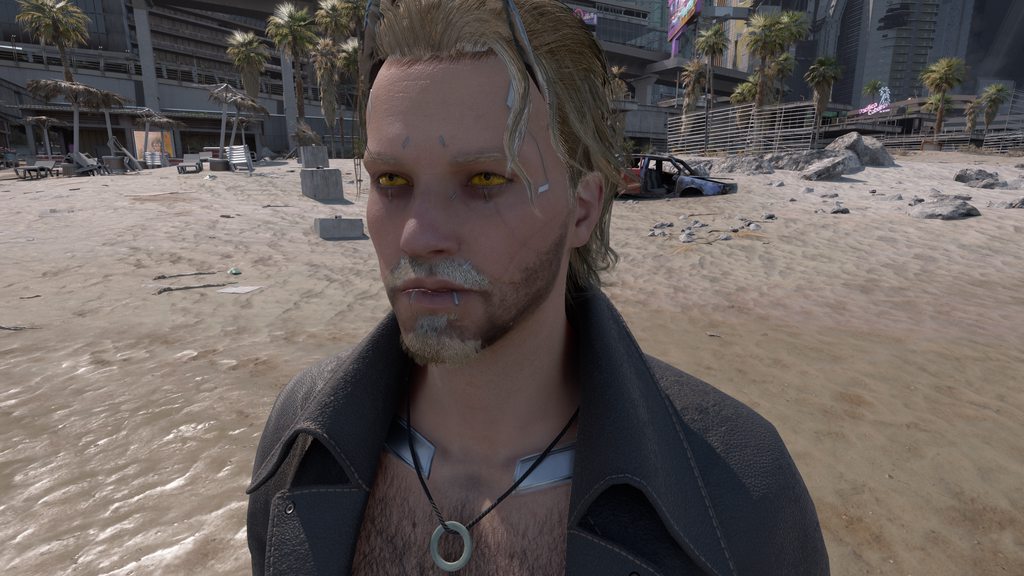
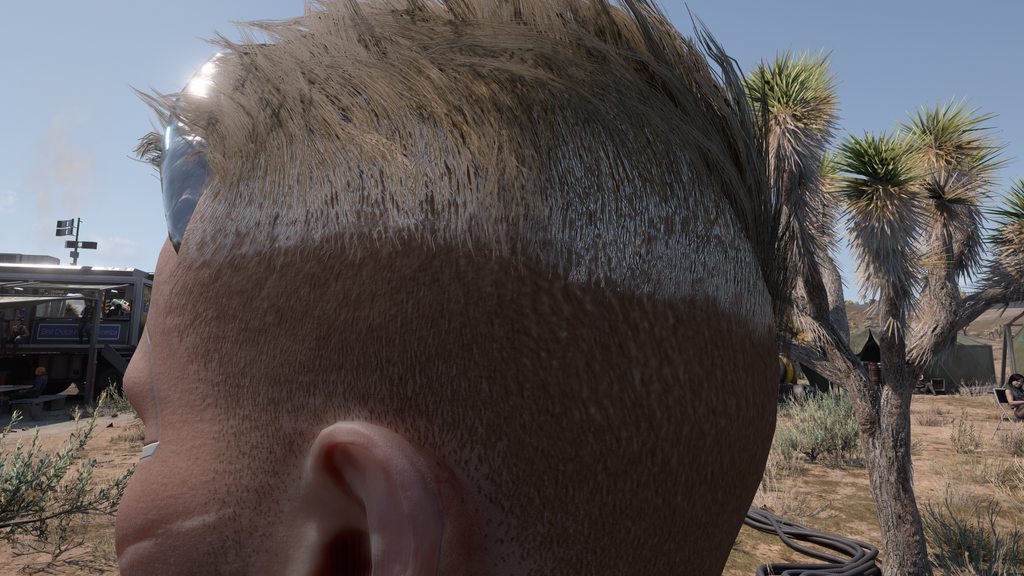
Sorry for the very late reply, but yeah, the white hair issue happens only with Ultra Plus installed and goes away when I remove it. Even with just Ultra Plus and its dependencies installed, I get the issue and it only affects RT and RT+PT for me (haven't tried raster to be fair) while PT16 and above doesn't have this problem. https://imgur.com/a/UUpiY3H
Here's another with vanilla hair which shows a better example of the issue https://imgur.com/a/o6F8XBl
 arctic falcon
oh i get that too 🤔 only with pt on though
real holly
Yeah white or otherwise discoloured hair occurs at weird spots, like during Dex's car ride. Seen it with RT+PT and with PT Next
long galleon
I'm using PTNext and no white hair ever
In recent versions anyway
I also have https://www.nexusmods.com/cyberpunk2077/mods/9381 and https://www.nexusmods.com/cyberpunk2077/mods/12184 installed, do you?

Nexus Mods :: Cyberpunk 2077
Restores hair/beard shadows for RT/PT.
 arctic falcon
so i have alternative hair material as well but not the first one; i use pinkydude's shadow mod, iirc. but i'm on rt+pt, medium qual, radiance cache performance, vram 6 🤔 if thats any help...
real holly
arctic falcon
so i have alternative hair material as well but not the first one; i use pinkydu...
This one by Pinky? Doesn't affect NPCs, AFAIK
https://www.nexusmods.com/cyberpunk2077/mods/12577

Nexus Mods :: Cyberpunk 2077
Shadows Fix - Fix the missing shadows on a spawned V and in photomode
arctic falcon
real holly
This one by Pinky? Doesn't affect NPCs, AFAIK
https://www.nexusmods.com/cyberpun...
🤔 yeah, its affecting my v right now so thats why i noticed it
lilac canyon


is it possible to make the hands not as flat looking in PT20 without the fps hit of PT21? something like an in between. It might be too much to ask for 😅
if theres any ini i can modify to make it not look as flat
sly sand
oh thanks
i realize that every time i open up cyberpunk and go into the game options, the "apply" button is visible, does that the mean the ultra+ graphics quality setting is being reset every time i start up a new game?
real holly
sly sand
i realize that every time i open up cyberpunk and go into the game options, the ...
It is being reset all the time
long galleon
sly sand
i realize that every time i open up cyberpunk and go into the game options, the ...
It's because ultra+ is adjusting one or more of your settings the second you go in that menu
sly sand
oh no i mean like even after i already applied the ultra+ setting, i still need to do it every startup
like i do it once, it tells me to apply the settings in option, so I do it
then next time i start up the game
i still need to?
long galleon
I don't understand you, sorry.
Ultra+ modifies the game settings, for instance if you have shadow mesh set to high, then it will set it to medium the second you open the graphics menu (the game's native menu not ultra+'s menu)
Because it adjusted stuff, the game's menu will want you to approve those changes.
sly sand
yeah thats what I did
but when I close the game
and open it up again and go back into the options menu (for the game and not ultra+ CET menu)
the apply button is still there
so im just asking whether the Ultra+ changes get reseted after i closed the game and open it up again
since that's what seems to be the case
long galleon
Yes, especially if you're using the cinematicRTX thing or whatever it is in the command line
sly sand
aight so I just click apply every time the game starts up then, gotcha
(im not using cinematicrtx fwiw)
long galleon
I honestly don't know what ultra+ is doing in the game's menu anymore, at one point it was trying to restore/keep your settings, now I dunno
sly sand
yeah honestly kinda confused lmao
i also noticed that the fast game graphics setting doesnt seem to require an apply
long galleon
Am I supposed to be seeing this much ghosting?
Updated my dlss files to see if that helps
real holly
long galleon
Updated my dlss files to see if that helps
Make sure DLSSD is 3.7.0 and not 3.7.10
DLSS and DLSSG can go to 3.7.20 and 3.7.10 respectively.
plucky tulip
long galleon
I also have https://www.nexusmods.com/cyberpunk2077/mods/9381 and https://www.ne...
I have restore hair shadows with PT too. alternative hair doesn't work with Ultra+ (U+ overrides)
plucky tulip
real holly
I thought CDRP fixed the shadows with 2.1?
only partially 
plucky tulip
lilac canyon
umm hands shouldn't look like that in PT20... is that ray reconstruction?
plucky tulip
sly sand
i realize that every time i open up cyberpunk and go into the game options, the ...
yes but I think I might remove it
lilac canyon
plucky tulip
umm hands shouldn't look like that in PT20... is that ray reconstruction?
RR is turned off, i cant stand the bright trails it leaves and overall not a fan of it
plucky tulip
lilac canyon
RR is turned off, i cant stand the bright trails it leaves and overall not a fan...
hmm okay I'll try PT20 with NRD and make sure it's okay
idle crest
Does ultra+ override alternative hair in PTnext too?
lilac canyon
tried more indirectly lit places


 long galleon
real holly
Make sure DLSSD is 3.7.0 and not 3.7.10
DLSS and DLSSG can go to 3.7.20 and 3.7....
long galleon
real holly
Make sure DLSSD is 3.7.0 and not 3.7.10
DLSS and DLSSG can go to 3.7.20 and 3.7....
I forgot versions but I got latest of everything
real holly
long galleon
I forgot versions but I got latest of everything
You'll want to revert DLSSD then.
long galleon
real holly
You'll want to revert DLSSD then.
I'll give it a shot, though it feels weird that latest isn't greatest
real holly
long galleon
I'll give it a shot, though it feels weird that latest isn't greatest
Well the ones we can easily find are not official releases, they get pulled from games that ship with them or from driver files.
DLSSD 3.7.10 either lacks the SHaRC implementation or it is broken somehow, perhaps the game it shipped with (The First Descendant) simply does not use it so it was not built in.
plucky tulip
long galleon
I'll give it a shot, though it feels weird that latest isn't greatest
3.7.10 dlssd doesn't include SHaRC. remember games devs modify the source code, they're not all the same
plucky tulip
honestly I can't tell any difference at all from updating any of them 😜
plucky tulip
long galleon
Then they should version it as an alternate instead of as a subsequent
yes... well it's us bright sparks who are taking it from a different game, they're not distributed by Nvidia 😊
long galleon
I'm sure there's a versioning standard, nvidia isn't going to just let them call it DLSS 7.8
plucky tulip
the game devs use the version the source code is based off .. like how you can have an unreal engine 4.27 game engine but it's completely modified and not vanilla 4.27...
this is why there is 20 MB missing from dlssd 3.7.10 ... code deletions 😊
long galleon
So nvidia should just deliver the raw version for us instead of us having to circle through game releases
Wouldn't that be nice.
real holly
They may be doing that soon. The latest GRD has the DLSS DLL with it, just not the others yet
Bear in mind... specific games may be optimised for a certain DLSS version and swapping the file can lead to unexpected results
It doesn't always happen, but sharc missing is one example.
long galleon
Also the game may have added specific things that aren't standard so any other game's file won't have those things
plucky tulip
long galleon
So nvidia should just deliver the raw version for us instead of us having to cir...
yup. sometimes they do 😊
it's bundled with their UE plugins
long galleon
What they really need is a self-auto-updating version that keeps the developers changes while updating all the parts that are updatable
plucky tulip
yes and people saying preset E is the best. idk what glasses they're wearing but no, it's not lol
long galleon
In any case, I changed back to that recommended version and still got issues in the dex ride so awaiting instructions
faint sage
plucky tulip
yes and people saying preset E is the best. idk what glasses they're wearing but...
Overall I do think it's the better one to use in general (all games considered) but for CP it's debatable : depends a lot on base res and what kind of comparisons one does.. static favors C, I'll give you that hands down but I find E has overall a more stable and detailed resolve in motion, but then again I'm playing at 3440x1440 on DLSS performance.. and not wearing glasses 🤓😜
plucky tulip
long galleon
In any case, I changed back to that recommended version and still got issues in ...
okay, i'll let you know as soon as i have time to test everything
 light hornet
@plucky tulip how playable is the game with this mod on a low end pc
well laptop
like these speccs
Device name DESKTOP-88PK250
Processor Intel(R) Core(TM) i5-7300U CPU @ 2.60GHz 2.71 GHz
Installed RAM 16.0 GB (15.9 GB usable)
Device ID 8F52D344-4A91-4242-89C6-51F569480AAE
Product ID 00330-80000-00000-AA375
System type 64-bit operating system, x64-based processor
Pen and touch Pen support
light hornet
sly sand
No GPU at all?
where do i check gpu
fleet geode
light hornet
where do i check gpu
Task manager
light hornet
fleet geode
Task manager
im guessing this means i have none
 fleet geode
light hornet
im guessing this means i have none
fleet geode
light hornet
im guessing this means i have none
Performance tab, GPU
what does it say there
 fleet geode
Yes. I mean, you can try it for its raster settings...
light hornet
ah, oh dear
plucky tulip
light hornet
with an Intel HD 620 I've got the game running in raster only mode, at the absolute lowest settings, and it runs fairly badly. it runs...ish
plucky tulip
😊 I.... would recommend it
honestly a second hand 1080 would be a huge jump. or a 4060 or 4070
(4070 to 4090 is ideal)
 winged lance
is this due to some ultra+ setting, or is it something else?
winged lance
yea, nvm, my bad, it was due to setting Quality level to fast.
plucky tulip
winged lance
yea, nvm, my bad, it was due to setting Quality level to fast.
like clicking quickly between qualities?
 pseudo scaffold
plucky tulip
like clicking quickly between qualities?
pseudo scaffold
plucky tulip
like clicking quickly between qualities?
i think they mean setting the quality to the fast option i think
plucky tulip
pseudo scaffold
i think they mean setting the quality to the fast option i think
oh! yes. got you
 vapid snow
hi all , what should i do here? yesterday i screw up all graphics settings, an video link would be nice, i have the patience to follow all steps, for CP77 ofcourse
 lethal dirge
vapid snow
hi all , what should i do here? yesterday i screw up all graphics settings, an v...
lethal dirge
vapid snow
hi all , what should i do here? yesterday i screw up all graphics settings, an v...
 vapid snow
thank you
lethal dirge
vapid snow
thank you
 pseudo scaffold
hey i hate to ask but which of the pt versions is the most performance friendly
fleet geode
I haven't done a direct comparison, but I think it's PT16. But obviously depends on the rest of the settings as well
hidden pagoda
also the best looking is PT16 hehehe
well, only if you turn off use ReBLUR for GI.
hidden pagoda
global illumination is GI
I also recommend turning it off for DI
if you turn off both the denoiser becomes much, much cleaner, at a small performance cost
to account for that I'd turn on probabilistic sampling and reduce the naive rays to 1
should actually boost performance
also experiment with local light importance sampling based on the scene
still unsure of whether on or off looks better (LLIS on gives more dynamic, but inconsistent lighting)
inconsistent as in it moves around when you move the camera lmfao
hidden pagoda
why does Ultra+ force psycho SSR?
 opaque cave
Hey I’m having a problem with ultra plus
It works great for RT+PT but whenever I use actual path it disables frame gen
And even when I use RTPT it everytime I log back into the game it keeps trying to turn on NRD denoiser even tho I have ray reconstruction
Is there something I’m doing wrong?
 velvet jewel
What settings will help to stop the ghosting behind vehicles?
 gloomy bough
Running PTNext without RR, and getting a ton of noise
Are there any settings i've missed that could help with this?

If it's unavoidable without RR, thats okay, I'll likely settle for PT21
hidden pagoda
don’t settle for PT21 😭
settle for PT20 or PT16. PT21 is the worst looking PT version
gloomy bough
Really? 😭😭
Okay, I'll do some comparisons and see, I'll likely take your word for it tho xD
But is there really no way to reduce the noise on PTNext without using RR?
PTNext with RR just adds horrendous ghosting and makes every character look like a bad oil painting
fleet geode
That's why I stick to RT+PT
wheat robin
personally rt pt doesnt have the shadows im looking for in pt
plucky tulip
hidden pagoda
still unsure of whether on or off looks better (LLIS on gives more dynamic, but ...
LLIS is broken in some scenes
plucky tulip
hidden pagoda
I also recommend turning it off for DI
that changes it to PT20 😊
plucky tulip
hidden pagoda
why does Ultra+ force psycho SSR?
if you have graphics quality set to High it will
plucky tulip
gloomy bough
PTNext with RR just adds horrendous ghosting and makes every character look like...
it's not working correctly if that's the case
there's very little noise with PTNext if it's working correctly 🤔
you need sufficient primary resolution (before DLSS) ... and probably ray reconstruction
gloomy bough
plucky tulip
you need sufficient primary resolution (before DLSS) ... and probably ray recons...
Sorry, I'm not too good with this stuff! By primary resolution, you mean the resolution of the game?
And yeah! With RR, there's no noise but then that's when it starts to look very smear-y and oily
So I guess there isn't a way to minimise the noise further without using RR?
sly sand
yeah, the true resolution. So even before DLSS
gloomy bough
Well, I've been running the game at 2560x1440 with DSR down to my monitors 1920x1080 resolution, surely that would be enough?
latent summit
hi, wanna ask. Does ultra plus really improve performance for ray tracing only? I don't see any different my fps still stuck at 30 - 48
fleet geode
latent summit
hi, wanna ask. Does ultra plus really improve performance for ray tracing only? ...
That really depends on your system and your settings
latent summit
Nah, I just want to ask: Does using ray tracing with this mod improve FPS? If so, by how much—like 5 FPS or more?
latent summit
All I see is just comparison for path tracing
plucky tulip
gloomy bough
Sorry, I'm not too good with this stuff! By primary resolution, you mean the res...
you're okay! most people aren't having noise with PTNext... can you send a screenshot or video?
plucky tulip
latent summit
hi, wanna ask. Does ultra plus really improve performance for ray tracing only? ...
I doubt it, the main influence on RT-Only performance is the in-game graphics settings by far. U+ might improve streaming stutters for RT-Only, but not much can be changed about the performance
RT-Only and Raster modes are in there because people ask for them 😊
gloomy bough
plucky tulip
you're okay! most people aren't having noise with PTNext... can you send a scree...
Will do in a sec!
gloomy bough
plucky tulip
you're okay! most people aren't having noise with PTNext... can you send a scree...
I don't know if I've mistakenly toggled something off so I've gone through all the necessary menus
plucky tulip
gloomy bough
yowzers
no it's not you it's me 😂
can you please tell me in Debug if "Separate Denoiser" is enabled?
I need to spend a whole weekend debugging this rrghh
... sorry, to put this into perspective I'm trying to work out why this seems to happen for just a few people
 pseudo scaffold
does anyone else have broken flares during the pyramid song mission?
plucky tulip
gloomy bough
ye its turned on!
okay, could you please try finding "ReGIR for DI" and toggling it off then on? and lmk if that helps?
plucky tulip
pseudo scaffold
does anyone else have broken flares during the pyramid song mission?
lens flares?
pseudo scaffold
my bad it was the manual enhancer nulled weather mod causing it nvm
it was making judys flares cyan blue and the ocean dark
gloomy bough
plucky tulip
okay, could you please try finding "ReGIR for DI" and toggling it off then on? a...
Toggling it doesn't make a difference unfortunately :(
But toggling RTX DI Denoising has reduced the noise, i guess? :O


Though things at a distance are still blurry and jagged :/

^ That actually might just be me, not the Ultra + mod lmao
gloomy bough
plucky tulip
hmm
Happy to help with anything else if I can!
long galleon
plucky tulip
... sorry, to put this into perspective I'm trying to work out why this seems to...
Maybe settings such as motion blur and chromatic aberration and stuff affect this kind of thing
Or DLSS version
gloomy bough
I've already installed the latest DLSS DLL, and I did try with motion blur off, didn't make a difference
plucky tulip
gloomy bough
I've already installed the latest DLSS DLL, and I did try with motion blur off, ...
hmm I'm not sure I'm sorry. DLSS preset C looks the best but none of them cause that smearing issue. I will see if I can replicate it as soon as I can but the only thing I can think of to suggest is the usual
- clean install drivers
- verify cyberpunk files
- delete UserSettings.json
 reef gazelle
hi, was just wondering, does the mod do anything even if you dont have ray tracing on? just activate the mod and thats it?
long galleon
So I reverted all my dlss files back to the original installation version and I think the picture looks better. I don't think I'll be doing dlss version swapping in the future
I see less smearing and stuff
https://youtu.be/qDmPvB8Yfz8 - with dlss swapped out for newer versions from other sources

https://youtu.be/lu3g8klxpSI - with dlss as the files included with the game
reef gazelle
@plucky tulip why does the mod keep resetting the game's graphic settings?
gloomy bough
plucky tulip
hmm I'm not sure I'm sorry. DLSS preset C looks the best but none of them cause ...
Will try, thanks!
plucky tulip
reef gazelle
hi, was just wondering, does the mod do anything even if you dont have ray traci...
it does change frame timing because CDPRs defaults are a little odd, and it changes contact shadow draw distance and precache draw distance
plucky tulip
reef gazelle
<@184939081585786880> why does the mod keep resetting the game's graphic setting...
that's what the "High", "Medium" or "Low" graphics settings do
maybe I should add "None"
reef gazelle
so theres currently no way to use the mod without it constantly overriding your graphics settings?
 eternal basin
Hello @plucky tulip, the question has prob been already asked but what settings would you recommend with a RTX3070 and R7 3700x ? Im actually using this, im crashing when im using RT+PT and higher rendering modes. On the screen, it's the only setting i can use with acceptable fps for FrameGen Ghosting
 wheat robin
is this part in the phantom liberty you know my name supposed to be this dark?
 plucky tulip
wheat robin
is this part in the phantom liberty you know my name supposed to be this dark?
plucky tulip
wheat robin
is this part in the phantom liberty you know my name supposed to be this dark?
no, it looks like PTNext but broken
plucky tulip
eternal basin
Hello <@184939081585786880>, the question has prob been already asked but what s...
have you tried lowering texture quality to medium? usually cyberpunk crashes because it's out of memory

 woven goblet
Great mod. Boosted my FPS with high RT settings. Good times 😌
wheat robin
it seems only ptnext works in that room
or mission at least
every other pt option has missing lights/darkness
eternal basin
plucky tulip
have you tried lowering texture quality to medium? usually cyberpunk crashes bec...
Yea I never go over medium quality, and I mostly use fast. On Rast, all is good, RT and RT+PT is a bit laggy, and over is super laggy + crash. I think my pc cant stand Ultra Plus on PT settings with the hundreds of mods I have.
I even disabled my heavy ressource graphic mods, but I still have to stay on rast or RT
Memory about RAM or VRAM ?
fleet geode
VRAM
plucky tulip
eternal basin
Yea I never go over medium quality, and I mostly use fast. On Rast, all is good,...
it should work fine on a 3070... all the usual stuff done? video drivers, disable AV and CFG for cyberpunk?
eternal basin
plucky tulip
it should work fine on a 3070... all the usual stuff done? video drivers, disabl...
AV and CFG ?
eternal basin
plucky tulip
it should work fine on a 3070... all the usual stuff done? video drivers, disabl...
Isnt PT killing my GPU ? I mean it can work with Ultra Plus but natively my 3070 cant use this feature
I’ve tried to make it work by disabling mods like HD rework, ETO and LOD mod but its still hard
plucky tulip
eternal basin
AV and CFG ?
have a look at point 14 and 15 in the sticky post, but you might want to check them all 😊 https://www.nexusmods.com/cyberpunk2077/mods/10490?tab=posts

Nexus Mods :: Cyberpunk 2077
Advanced engine control panel with 58% faster path tracing, improved visuals, and many vanilla bugfixes. For AMD and Nvidia. 100% of donations go to Wildlife Society for all my mods.
plucky tulip
eternal basin
Isnt PT killing my GPU ? I mean it can work with Ultra Plus but natively my 3070...
U+ was developed on a 3070, in a laptop no less 😊
eternal basin
plucky tulip
have a look at point 14 and 15 in the sticky post, but you might want to check t...
If you knew how many times ive checked the pinned haha, but ill read it again to make sure
eternal basin
plucky tulip
U+ was developed on a 3070, in a laptop no less 😊
Do you have many mods beside ?
plucky tulip
admittedly I was running at 1440p DLSS quality or balanced, but it was at PT20 Fast and running 40-50 fps
yes lots. but no 4k texture mods. only some 2k ones
eternal basin
plucky tulip
yes lots. but no 4k texture mods. only some 2k ones
And you dont experience crashes ? My game randomly crashes on some points, and mostly when im driving
plucky tulip
eternal basin
And you dont experience crashes ? My game randomly crashes on some points, and m...
nope. do you have cross-platform compatibility enabled for save files? disable it
does it slow down before it crashes?
eternal basin
plucky tulip
nope. do you have cross-platform compatibility enabled for save files? disable i...
Will check that too
eternal basin
plucky tulip
does it slow down before it crashes?
When I drive yes, on feet no
eternal basin
I think FrameGen ghosting is responsive of some crashes but I need it for the ghosting I have on PT modes
plucky tulip
you're in ray reconstruction mode?
eternal basin
I usually disable it, but I let Ultra Plus set most of my settings
plucky tulip
oh okay, are you using LukeFZ or DLSS-to-FSR3?
eternal basin
Only activating DLSS FrameGen myself and I set DLSS to auto, quality or performance
eternal basin
plucky tulip
oh okay, are you using LukeFZ or DLSS-to-FSR3?
Arthur’s one actually, for FrameGen ghosting compatibilité
plucky tulip
okay. there is a routine U+ does that's supposed to prevent a bug while driving or in cut scenes. I'll check it's still running 🤔
eternal basin
I was on Nukem’s one before
plucky tulip
eternal basin
Arthur’s one actually, for FrameGen ghosting compatibilité
link?
eternal basin
plucky tulip
okay. there is a routine U+ does that's supposed to prevent a bug while driving ...
Dont bother yourself too much I might have done sth wrong
Yep sec
plucky tulip
ok. I'm fascinated 😂
eternal basin

Nexus Mods :: Cyberpunk 2077
Adds FSR 3.1 Frame Generation (replaces DLSS FG) and additional upscaling options to the game. Works with all main GPU vendors (Nvidia, AMD, Intel). Fully compatible with CET, RED4ext and ReShade. Eas

Nexus Mods :: Cyberpunk 2077
Eliminates the most irritating frame generation ghosting for cars and motorcycles. Now with options to limit ghosting in a 1st-person view (for vehicles & on foot). Doesn't require motion blur.
plucky tulip
ty 😊
hmm this is changing things depending on whether you're driving or on foot. I think if there's a crash it's likely a conflict between U+ and what they're doing
eternal basin
"Generally, exclude 1) gamename.exe, 2) the game folder, and 3) shader cache from Windows Defender (or other) real-time scanning"
I dont understand the 14.
eternal basin
plucky tulip
hmm this is changing things depending on whether you're driving or on foot. I th...
i should disable FrameGen and Ghosting fix ?
plucky tulip
go into Security > Real Time > Exclusions ... then add an exclusion for an EXE name, and add an exclusion for the cyberpunk folder
plucky tulip
eternal basin
i should disable FrameGen and Ghosting fix ?
hmm maybe, or ask them if they know of any crashes with U+?
*while driving
eternal basin
plucky tulip
hmm maybe, or ask them if they know of any crashes with U+?
U dont use framegen ?
I was sticking to 30 fps and this mod doubles my fps
plucky tulip
when I was on the 3070 I just used DLSS-to-FSR3
this mod is doing a lot more than frame gen
eternal basin
aight i'll remove framegen and i'll try PT20 with low quality settings
plucky tulip

okay. it should at least be stable
I'm not at my computer right now but I can see from their file structure they're changing things while driving/walking/etc.
eternal basin
Oh i see, if i remember, they try to adapt ghosting on different situations but its slowing down the game af
Do you use ETO, HD rework project and LOD mods ?
(i've already removed most of xilamonstrr mods, and removed smoke enhancement mods unless yours)
plucky tulip
yes and U+ does a bunch of stuff in the background so may be conflicting with what they're doing. we may need to work together
plucky tulip
eternal basin
Do you use ETO, HD rework project and LOD mods ?
yup! just 2k
eternal basin
i'll try on this
 eternal basin
plucky tulip
yup! just 2k
eternal basin
plucky tulip
yup! just 2k
All is about modding until it crashes 
plucky tulip
that should work
 eternal basin
I think i shouldnt go over these quality settings
plucky tulip
ikr. my 3070 died and I got a 4090, which I've modded til it crashes 😂
eternal basin
plucky tulip
ikr. my 3070 died and I got a 4090, which I've modded til it crashes 😂
you can crash with a 4090 ?!
plucky tulip
graphics settings should be okay to medium, but try and see
it only has 16GB because it's a laptop... and oh yes you can 😂
eternal basin
About graphics, im only disabling the pellicule grain, and set DLSS to performance or quality with 0 details
eternal basin
plucky tulip
it only has 16GB because it's a laptop... and oh yes you can 😂
ohhh okay
plucky tulip
pellicule?
eternal basin
sorry, film grain
 eternal basin
Yea it's not as fluid as i am in rast mod and i have some weird particles but i cant expect better imo
eternal basin
plucky tulip
what do you mean am I on it? Auto?
Auto and sharpening
plucky tulip
I kind of understand French 😂
eternal basin
plucky tulip
I kind of understand French 😂
Oh nice xdd
plucky tulip
ça roule 😜
eternal basin
plucky tulip
ça roule 😜
Hahaha bien vu mon pote
Is PT16 less laggy than PT20 ? i've read your recommandations about using RT+PT or PT20, but my game is too laggy and im a PT slave
eternal basin
Aight i'll try some settings until i can play as fast as in raster mode
plucky tulip
but if lag annoys you it might be good
eternal basin
Yea i have mini stutters and weird texture bugs (u can see it on the escalator at the beggining of the video)
Anyway, thanks for your time and this outstanding mod mate 🫡
plucky tulip
eternal basin
Yea i have mini stutters and weird texture bugs (u can see it on the escalator a...
where is your video?
eternal basin
plucky tulip
where is your video?
#1225966190439170178 message
open forgeBOT
eternal basin
https://discord.com/channels/717692382849663036/1225966190439170178/128049491826...
 Quoted by lukhart3255 from #UltraPlus and the Long Dark Teatime of the Soul
·
plucky tulip
eternal basin
Anyway, thanks for your time and this outstanding mod mate 🫡
Quoted by lukhart3255 from #UltraPlus and the Long Dark Teatime of the Soul
·
plucky tulip
eternal basin
Anyway, thanks for your time and this outstanding mod mate 🫡
yw! in English generally mate is reserved for boys 😊
ty!
oh I didn't see this was a video 🤦♀️
eternal basin
plucky tulip
yw! in English generally mate is reserved for boys 😊
Oh, sorry 😅 is there a feminine word for this ?
plucky tulip
"babe" 😜
eternal basin
plucky tulip
"babe" 😜
i wouldnt dare
plucky tulip
oh part of the denoiser isn't working on the video 🤔
eternal basin
I should disable RR ? looks like a heavy feature
plucky tulip
it's odd, I'm more comfortable with "bro" than mate lol. maybe bc I'm Australian
plucky tulip
eternal basin
I should disable RR ? looks like a heavy feature
oh, no, it was just disabled in your screenshot
eternal basin
plucky tulip
it's odd, I'm more comfortable with "bro" than mate lol. maybe bc I'm Australian
Aight bro 👊
plucky tulip
😂
eternal basin
plucky tulip
oh, no, it was just disabled in your screenshot
Oh yes maybe. Anyway, i think it's hard to show the feeling of gameplay with a video share
plucky tulip
ugh I can't deal with nexus comments rn
plucky tulip
eternal basin
Oh yes maybe. Anyway, i think it's hard to show the feeling of gameplay with a v...
okay. well ima try and get some more sleep, feel free to leave any questions for me mon petit chou 😊
eternal basin
i'll try with this until it crashes (or maybe it wont  )
)


Wait is it night in australia ?
Its 2PM here
plucky tulip
no but I moved to the US 😊
eternal basin
plucky tulip
no but I moved to the US 😊
Oh nvm, then good night mademoiselle  (and thanks a lot for ur time)
plucky tulip
but I'm Australian. nobody here can understand me
eternal basin
plucky tulip
but I'm Australian. nobody here can understand me
accent ?
plucky tulip
yes lol. and brain
eternal basin
plucky tulip
yes lol. and brain
I mean your country is full of animals that can kill you
plucky tulip
"sorry, I'm from Australia" seems to let me get away with a lot 😂
yes ik I love it!
except scorpions
eternal basin
plucky tulip
yes ik I love it!
why would you even love it ???
plucky tulip
idk I like spiders
eternal basin
plucky tulip
"sorry, I'm from Australia" seems to let me get away with a lot 😂
HAHAHA same sentence with "French"
plucky tulip
hahaha
eternal basin
plucky tulip
idk I like spiders
This animal is a nightmare (arachnophobia)
plucky tulip
no they're cute and they eat bugs 😊
eternal basin
plucky tulip
no they're cute and they eat bugs 😊
but why are they supposed to have 8 legs and be IN MY HOUSE
eternal basin
I mean im not going in dark holes, why would they come in my livingroom
plucky tulip
apparently huntsman and wolf spiders cause a lot of car accidents in Australia because they hide under your sun visor and jump at you
eternal basin
plucky tulip
no see there are good spiders and bad spiders
this is common in France, harmless but big and scary af
 eternal basin
plucky tulip
apparently huntsman and wolf spiders cause a lot of car accidents in Australia b...
eternal basin
plucky tulip
apparently huntsman and wolf spiders cause a lot of car accidents in Australia b...
omg i cant imagine if this thing gets in my car, i'd die for sure
eternal basin
Oh i cant mark the picture as a spoiler
plucky tulip
hehe oh well
eternal basin
plucky tulip
oh that looks like a white tip
We dont see often the white tip, but the full black one is big and fkin scary
in my kitchen bro wtf
eternal basin
"Le corps (sans les pattes) mesure plus de 1 cm de longueur, mais l'animal atteint au total jusqu'à 5 à 6 cm pattes étendues."
eternal basin
plucky tulip
nooo that's only little
LITTLE ?! i was about washing my hands and i almost had a heart attack seeing this. But yes for Australians its nothing you prob even have dragons in your country
plucky tulip
https://youtube.com/shorts/mOphw5NxUW0 this is a spider 😊

This is a Huntsman spider, very common in Australia and like to invade homes!
If you like Australia or gaming, be sure to drop me a follow on twitch at https://www.twitch.tv/colvie_channel
Check out this video next: https://www.youtube.com/watch?v=VRE_bpF8pe4&t=23s
Follow me:
➡️ Instagram: @colvie_channel
➡️ Twitter: @Colvie_Channel
plucky tulip
eternal basin
LITTLE ?! i was about washing my hands and i almost had a heart attack seeing th...
hehehe
I catch these and put them outside
eternal basin
plucky tulip
https://youtube.com/shorts/mOphw5NxUW0 this is a spider 😊
jumpscare ?
Nah this shit cant be real
plucky tulip
they're not as bad as wold spiders which jump and are super fast little buggers
eternal basin
plucky tulip
I catch these and put them outside
i need my future wife to get rid of spiders for me 
plucky tulip
you think that's bad I've seen a wasp dragging one of these up a wall! I don't like wasps lol
but that was pretty funny
eternal basin
plucky tulip
you think that's bad I've seen a wasp dragging one of these up a wall! I don't l...
Nah Australia is middle earth
I swear if i see sth like this in my home i'll move and never come back
plucky tulip
haha. okay I won't show you the nasty spiders 😂
I've never heard of huntsmen biting anyone
they're gentle
eternal basin
Yea anyway 99% of spiders are scared of humans, dont attack, and their bite isnt lethal
But bro what is this look its so scary
eternal basin
plucky tulip
same with sneks 😊
You find snakes scarier than spiders ?
plucky tulip
no this is scary
 eternal basin
plucky tulip
no this is scary
eternal basin
plucky tulip
no this is scary
bugs shouldnt exist, unless bees (theyre cute and nice)
plucky tulip
eternal basin
You find snakes scarier than spiders ?
umm it depends on the situation. snakes are generally okay if you don't startle them. like, you do need to be aware of what time of day it is and where you're stepping
and sometimes they come into the house 😂
eternal basin
Yea true, but anyway we dont have problems like this in France
plucky tulip
almost all snake bites are from people trying to kill the snake though
eternal basin
Nordic countries should be paradise : no bugs, and cold 😌
eternal basin
plucky tulip
no, you have croissants
Hahaha you dont like croissants and pains au chocolat ?
eternal basin
You're the first person i see who dont like these sweet meals lol
plucky tulip
I love how I go to Japan and they have crepes with banana, chocolate, cream, strawberries and it's like this anime version of French lol
plucky tulip
eternal basin
You're the first person i see who dont like these sweet meals lol
but I do!! 😂
eternal basin
plucky tulip
but I do!! 😂
ohhh i missunderstood sorry lmao
plucky tulip
I said yes lol
eternal basin
plucky tulip
I love how I go to Japan and they have crepes with banana, chocolate, cream, str...
hahaha, we also have super good crepes
plucky tulip
yes I love French cuisine
eternal basin
Anyway french food is 🤌
plucky tulip
yes Japan just takes all the world's food and makes tricked out anime versions of it it's wild lol
eternal basin
(And we dont all eat frogs and snails )
plucky tulip
yes you do 😂
eternal basin
plucky tulip
yes Japan just takes all the world's food and makes tricked out anime versions o...
Yea definitely😆
eternal basin
plucky tulip
yes you do 😂
i swear i hate these weird meals
eternal basin
plucky tulip
I've never tried escargot but mostly bc I really like snails
Yeaaa they are so cute
HAHHAA
 eternal basin
plucky tulip
https://tenor.com/view/soriamoriaa-gif-7240219154936918865
eternal basin
plucky tulip
https://tenor.com/view/soriamoriaa-gif-7240219154936918865
lil cute thing
plucky tulip
so cute hehe. I used to keep them as pets 😄
eternal basin
plucky tulip
so cute hehe. I used to keep them as pets 😄
like you have a bunch of snails in your house ?
eternal basin
I didnt even know you could pet this, but since some people pet tigers at home
plucky tulip
eternal basin
I didnt even know you could pet this, but since some people pet tigers at home
snails? really? haha I used to play with them for hours 😂
ohh tigers ❤️
eternal basin
plucky tulip
ohh tigers ❤️
cute but deadly af 💀
eternal basin
plucky tulip
snails? really? haha I used to play with them for hours 😂
Hahaha so cute, makes me think about turtles, i love them
long galleon
eternal basin
Oh, sorry 😅 is there a feminine word for this ?
mon ami XD
 plucky tulip
turkles! 😊❤️
lilac canyon
plucky tulip
hmm okay I'll try PT20 with NRD and make sure it's okay
Were you able to replicate this issue on your end?
plucky tulip
lilac canyon
Were you able to replicate this issue on your end?
I haven't had a chance I'm sorry I've had the covid
long galleon
plucky tulip
I haven't had a chance I'm sorry I've had the covid
Stop having the covid =P
tidal karma
I’ve been lucky I haven’t had it so far or if I did it wasn’t bad and I didn’t know
fleet geode
Let her recover a little first?
arctic falcon
fleet geode
Let her recover a little first?
oh shoot i didnt see that she posted abt having covid!! my bad!
gloomy bough
seems with everything, if I want path tracing without the smear-y oil-y look characters get, RT+PT is the way to go
close enough to PT and everything is actually clear
fleet geode
gloomy bough
seems with everything, if I want path tracing without the smear-y oil-y look cha...
Yup. It's my preference
reef gazelle
@plucky tulip is it currently possible to use the mod without it overwriting the game's graphic settings?
plucky tulip
reef gazelle
<@184939081585786880> is it currently possible to use the mod without it overwri...
yes the next version won't any more. i've been working on Jedi Fallen Order but will come back to cyberpunk when i don't hate it any more
soon lol
you can use v5.0.1 i think?
reef gazelle
plucky tulip
you can use v5.0.1 i think?
im confused, whats special about v5.0.1?
plucky tulip
reef gazelle
im confused, whats special about v5.0.1?
it doesn't overwrite your graphics settings 😊
i think
yes. 5.0.1
reef gazelle
i will give that a try, thanks
gloomy bough
@plucky tulip Got a weird issue now, every couple of launches, the game keeps crashing and i cant fix it unless i delete the usersettings
just wondering why thats the case, its not exactly a dire issue because i can just keep deleting it but, it is a tad annoying
plucky tulip
gloomy bough
<@184939081585786880> Got a weird issue now, every couple of launches, the game ...
I've been stuck in that loop... do you have cross-platform saves enabled? disable it and save a new game, see if that helps?
wheat robin
does the fast game graphics setting not do anything?
tidal karma
it does, but sometimes i have found you actually need to reload, not every time and not sure when its mandatory but at times it really makes a difference
tidal karma
gloomy bough
just wondering why thats the case, its not exactly a dire issue because i can ju...
sometimes game crashes if you have reassigned key bindings or left one unbound game really doesn't like that next time it crashes rather than deleting go back in to keybinding and accessability and click default and see if it starts up
let me know if that worked
wheat robin
tidal karma
it does, but sometimes i have found you actually need to reload, not every time ...
bc all the other options need to apply in the graphics settings
tidal karma
yeah, but even then sometimes it seems like it needs a reload, but i could be remembering older versions i dont know anymore
gloomy bough
@plucky tulip
https://www.cyberpunk.net/en/news/50818/patch-2-13
Have ya seen this?

Home of the Cyberpunk 2077 universe — games, anime & more
Patch 2.13 for Cyberpunk 2077 and Phantom Liberty is being rolled out!
 hazy gazelle
"It will now be possible to enable both DLAA and DLSS Ray Reconstruction at the same time."
Hot damn, I might actually go back to PT20 from PTNext to have the headroom for this. Testing must be done (eventually; I haven't been playing lately).
faint sage
hazy gazelle
"It will now be possible to enable both DLAA and DLSS Ray Reconstruction at the ...
This was achievable using DLSS Tweaks for ages.. Kudos CDPR (not)
plucky tulip
gloomy bough
<@184939081585786880>
https://www.cyberpunk.net/en/news/50818/patch-2-13
Have ...
oh nice! thank you 😊
stability and visual fixes 🤔
plucky tulip
and now we wait
faint sage
plucky tulip
stability and visual fixes 🤔
Downgrades according to Bababooey on the CDPR forum#cyanidex-mods message
 pastel orbit
bad gaem
a more substantial patch actually fixing issues and taking some ideas from your mod here (more graphics settings?) would be nice. but CDPR is not nice.
gloomy bough
Ugh
And my game auto updated
plucky tulip
like... don't the black blobs all over things actually bother them??
pastel orbit
CDPR? Doubt they test with PT or RT for that matter
fallow thicket
pastel orbit
CDPR? Doubt they test with PT or RT for that matter
CDPR have been always bad at PT or RT for cyberpunk but witcher 3 works fine lmao
could bec they have been fixing the game since the launch and didnt have time to focus on PT or RT
fleet geode
In this video, we test the new FSR 3 Frame Generation update for Cyberpunk 2077 by running the game at a locked 20 FPS. While not recommended for regular gameplay, this is an effective way to check if the Frame Generation algorithm is generating frames correctly. This test is for demonstration purposes only.
I suggest pausing the video and goin...
faint sage
fleet geode
https://www.youtube.com/watch?v=kHNktUhFwPI
Culprit found by the Framegen folks :
Vignette is now a HUD element thus getting excluded from FG algo...
hazy gazelle
faint sage
This was achievable using DLSS Tweaks for ages.. Kudos CDPR (not)
Oh, sure. I did for a bit then stopped when I realized I could set DLSS presets at the driver level with Inspector. One less thing to have to install and configure across multiple games. Besides, always nice to have an official implementation.
faint sage
Meme material forever !
fleet geode
faint sage
Culprit found by the Framegen folks :
Vignette is now a HUD element thus getting...

faint sage
hazy gazelle
Oh, sure. I did for a bit then stopped when I realized I could set DLSS presets...
Still, so little so late yet again..
- their FG implementation is like intern level sh*t pushed without QA even noticing it...
Shameful
hazy gazelle
Shoot, seems like they should have just left the game alone from the sound of it. Some monkey paw curling going on here with y'all asking for FSR3. 
fleet geode
#mod-troubleshooting message
open forgeBOT
fleet geode
https://discord.com/channels/717692382849663036/788213273530335233/1283912715709...



BTW, it seems the mentioned vignette shader causes FSR 3 FG in 2.13 to treat the vignette as a HUD element. As a result, FG is blocked for most of the screen. Disabling the vignette (either by a dedicated mod or an ENV file) fixes the native FSR3 FG and enables frame generation for the whole screen. Kudos to @agile heron for help in confirming this
Attachments
 Quoted by stormie3609 from #mod-troubleshooting
·
gloomy bough
Quoted by stormie3609 from #mod-troubleshooting
·
gloomy bough
thank god the depot downgrade worked lmao
fallow thicket
FSR 2.1 is worse then FSR 3.0 lmao
Get 30% discount with my "SKAG" code!
Windows 11 Pro ($22): https://www.gvgmall.com/gvg/SKAG1
Windows 10 Pro ($15): https://www.gvgmall.com/gvg/SKAG
Windows 10 Home ($14): https://www.gvgmall.com/gvg/SKAGH
Windows 11 Home($20): https://www.gvgmall.com/gvg/SKAG1H
Office 2019 ($46): https://www.gvgmall.com/gvg/SKAG9
Hello Dear Viewers :D
T...
someone have tested it
plucky tulip
fleet geode
https://www.youtube.com/watch?v=kHNktUhFwPI
are you serious
this is what regression testing is for
plucky tulip
hazy gazelle
Shoot, seems like they should have just left the game alone from the sound of it...
go back to 1.63 
tidal karma
looks like version 5.2.9 gets a bright white screen when booting into the game, or is it just my install?
remvoing the config.json doesnt help
fleet geode
I was just going to ask if any guinea pigsone has tried out U+ with 2.13 yet 😅
 manic charm
hey how can i undo this feature ? id like to set custom graphics settings but everytime this applies
 arctic falcon
manic charm
hey how can i undo this feature ? id like to set custom graphics settings but e...
arctic falcon
manic charm
hey how can i undo this feature ? id like to set custom graphics settings but e...
I’ll give it a try
 autumn temple
fleet geode
I was just going to ask if any ~~guinea pigs~~one has tried out U+ with 2.13 yet...
autumn temple
fleet geode
I was just going to ask if any ~~guinea pigs~~one has tried out U+ with 2.13 yet...
I'm using it and getting the same performance as I was before the 2.13 patch. Sousine's mods are broken though.
arctic falcon
ultra+ seems to hbe working fine with this update
lethal dirge
autumn temple
I'm using it and getting the same performance as I was before the 2.13 patch. So...
hmm which mod are broken ?
tidal karma
i didnt notice any other than ultra plus, i just get a white screen after the save is loaded
open forgeBOT

 lethal dirge
Wait What sorry for that 🤦🏽♂️ lol (misclick)
autumn temple
lethal dirge
hmm which mod are broken ?
I may have spoken too soon. I was initially just running around Dogtown to check frame gen and general visual performance, which seemed to be similar to what I was getting before the patch. However, I'm finding that any mod I had with LOD improvements are not working and when I fast travel, huge parts of the world disappear, I can see through the ground, parts of walls are missing, I can see through Lizzie's, etc. I removed Improved Environment LODs and it was still happening. I just removed Ultra+, and that seemed to fix the disappearing issue when fast travelling, but I need to test more to be sure. I have hundreds of mods installed, so there could be some kind of conflict taking place.
lethal dirge
autumn temple
I may have spoken too soon. I was initially just running around Dogtown to chec...
All mods of sosuine now are good it needs some improvement ✨🔥💫
Make sure sometimes to reload the save or restart the game and make sure to tick the not so good if you installed into the ultra+ for example 🔥
I have 330 mods installed and some into the folder « mod » directly
autumn temple
Oh, so if I run into that disappearing issue, just reload a save or restart?
I don't have Not So Good installed. However, with or without Ultra+ and Improved Environment installed, I am seeing LOD pop-in that I wasn't seeing previously with those mods installed.
fallow thicket
i wonder if ultra+ looks better or worse in 2.13
arctic falcon
ultra+ looks the same to me
hazy gazelle
plucky tulip
go back to 1.63 <a:judymath:1193609645424648332>
lol Come to think of it, I don’t think I played during that patch; I think I was on a Cyberpunk hiatus at the time. 😅
plucky tulip
apparently CDPR broke film grain
plucky tulip
fallow thicket
i wonder if ultra+ looks better or worse in 2.13
I doubt they will have patched Nvidia path tracing
fallow thicket
plucky tulip
I doubt they will have patched Nvidia path tracing
I’ve tested it nothing has changed but I see DLSS 2.51 but I changed it again to dlss 3.7
pastel orbit
PT is no different, though it could be worse
Ah right, yes, they did update the ray reconstruction DLL to 3.7.10
plucky tulip
dare me to send this to their HQ? 😂
 fallow thicket
plucky tulip
dare me to send this to their HQ? 😂
fallow thicket
plucky tulip
dare me to send this to their HQ? 😂
Do it would be funny if they actually saw it
pastel orbit
I don't think they read fan mail, sadly
fallow thicket
pastel orbit
I don't think they read fan mail, sadly
Not mail them just send a box with 4090 without the gpu and put in the book
I bet they will see it
plucky tulip
oh, I could put it in a big package and courier it
fallow thicket
The weird thing is FSR 3 doesn’t have full screen and you have to restart the game for FSR frame generation
That’s the most annoying shit I’ve never seen in cyberpunk
tidal karma
i got ultra plus working
just comment these lines out of the common.ini
[Rendering/LUT]
;Size = 64 ; (48) internal resolution is 64 cube
;MinRange = 0.000000000001
;MaxRange = 100.0
plucky tulip
it wasn't working?
tidal karma
I get a white screen after loading save
Menu work and but can’t see game world unless I remove those lines
fallow thicket
That’s weird because it never happened to me