#skein
4394 messages · Page 5 of 5 (latest)
 polar trout


 modest lynx
{"jsonrpc":"2.0","id":null,"error":{"code":-32600,"message":"EOF while parsing a value at line 1 column 0"}}
I get this error form http://127.0.0.1:15702/
 snow heron
modest lynx
{"jsonrpc":"2.0","id":null,"error":{"code":-32600,"message":"EOF while parsing a...
snow heron
modest lynx
{"jsonrpc":"2.0","id":null,"error":{"code":-32600,"message":"EOF while parsing a...
did you follow the instructions to install skein and the plugin? https://bevyskein.dev/docs/installation

Installing the Bevy Plugin and the Blender addon
modest lynx
yes indeed
snow heron
modest lynx
yes indeed
"yes indeed" you followed the instructions or "yes indeed" that's what you need to do
modest lynx
I followed the instruction 😄
snow heron
are you running your application in --release mode
modest lynx
cargo run -r
snow heron
don't do that
snow heron
BRP is disabled when building for production, because it is not typically required.
modest lynx
could please told me what is the purpose behind. could I see the whole scene in blender when they are connected?
snow heron
modest lynx
could please told me what is the purpose behind. could I see the whole scene in ...
are you asking about the purpose of BRP?
BRP (the Bevy Remote Protocol) exposes information about your program via http endpoints. One of those is the type registry, which includes information about all of the components you've defined across all of your own code and any dependencies you've installed. The type registry information is used to build forms for component data in blender.
modest lynx
 snow heron
once you fetch the data, it is stored in the .blend file as json. So you can use blender with the component data without the bevy application running
snow heron
modest lynx
ok, its time for you to give more details about what you did, what versions of everything you're using, etc
modest lynx
I will
snow heron
you're using an older version of blender there (4.2) instead of the most recent release (v5)
are you on a recent version of bevy?
modest lynx
4.2

    App::new()
        .add_plugins(DefaultPlugins)
        .add_plugins(SkeinPlugin::default())
        .add_plugins(EguiPlugin::default())
        .add_plugins(WorldInspectorPlugin::new())
        .add_plugins(GamePlugin)
        .register_type::<Player>()
        .run();
}```it doesn't work in 4.2?
snow heron
it should, as far as I know. but I haven't tested it since I switched to v5. That doesn't look like a blender error to me, that looks like an issue with the data coming back from bevy
you haven't shared the bevy version you're using yet though
modest lynx
yes because
of this {"jsonrpc":"2.0","id":null,"error":{"code":-32600,"message":"EOF while parsing a value at line 1 column 0"}}
snow heron
what bevy version are you using
modest lynx
0.18
this what chatgpt tell me
If the registry has no registered types, Blender receives empty JSON, which produces exactly your error:
snow heron
I am not interested in debugging chatgpt output
modest lynx
ok
snow heron
I have confirmed that skein works on windows with bevy 0.18 so it must be a local configuration issue. However I can not help you with chatgpt generated output so you'll have to figure out what went wrong on your own.
modest lynx
I will figure out thank you
polar trout
holy motherboard🤖
modest lynx
holy cow
 ocean burrow
modest lynx
```fn main() {
App::new()
.add_plugins(DefaultPlugins)
.add_...
ocean burrow
modest lynx
```fn main() {
App::new()
.add_plugins(DefaultPlugins)
.add_...
Are you disabling bevy's default features?
I assume not
but if reflect_auto_register happened to be disabled, that could maybe be it?
modest lynx
ocean burrow
Are you disabling bevy's default features?
Hi no idea. I try to find out the purpose of it. I didn't yet😄
ocean burrow
modest lynx
Hi no idea. I try to find out the purpose of it. I didn't yet😄
That’s fine, if you don’t remember disabling the default features you probably didn’t
Just make sure your Cargo.toml does not contain default-features = false
modest lynx
I will thanks man🙏
 hexed yarrow
I use bevy_skein pretty extensively in my game. after refactoring, the fully qualified paths to components often don't match anymore, after re-fetching the bevy types. is there a way to find incompatible or non-existing components after a fetch, directly in blender?
snow heron
hexed yarrow
I use bevy_skein pretty extensively in my game. after refactoring, the fully qua...
yeah, there's a cli command documented on the website to log out all the components you're using as json
the real solution is to separate code location and type_path though
#[derive(Component, Reflect, Debug)]
#[reflect(Component)]
#[type_path = "api"]
struct Character {
    name: String,
}
if you had used this, for example, the source code location would not matter
hexed yarrow
snow heron
```rust
#[derive(Component, Reflect, Debug)]
#[reflect(Component)]
#[type_path =...
ahhh nice. that is REALLY great. the case I described already happened to me a few times. but yeah, this is great!
snow heron
yeah I wish I had more time to invest into refactoring tools, but the core issue is preventable at least
https://bevyskein.dev/docs/migration-tools is the current state of migration tools, including the data dump
hexed yarrow
yep, I'm totally fine with that solution. it really happened to me like 8-10 times that something didn't work because the component was missing at runtime. I already knew what was causing it, but when you use the feature extensively, it's really a lot of work to update the components in blender after big refactorings. but with type_path and the migration tool that's really great
one small improvement I can think of: marking or highlighting unresolved components directly in blender in red. it's kind of redundant with the migration tool, but that way you can see right away in blender what's going on
snow heron
I'm not opposed to better visualizations in blender. Its just a matter of how
if you say, break all of the component paths, then fetch the new registry data, we don't have the old registry to check against.
its very similar to doing database upgrades. If you rename a column, the old column is gone and sql queries that expect it won't work
hexed yarrow
yeah I understand. you don't know the new fqn, but after the fetch you at least know that the existing one doesn't match. you can't fix it through the ui/blender, but you can see that something's off. the actual correction can then properly happen through the migration
but maybe that feature is redundant. if someone is at the point where they're loading the blender file and looking at the skein components, they probably already know that something's off. not sure about it
snow heron
yep, and there's some additional difficulty because blender requires us to define types for the values. So what we actually end up with for the UI is something like this (in rust pseudo-code)
enum Components { Every, Possible, Component }
which means, the ui is driven by the data. If the data is incorrect, we don't even know the data is supposed to be there
so it'll have to be some kind of "on registry fetch, re-validate all data" sort of approach I think
maybe just "collect all type_paths and check to see if they exist in the new registry"
in any case, I'm very open to options and more thoughts if people have them
the cli tools are just a precursor to in-blender migration tools too, so definitely thinking about it
hexed yarrow
oh ok, yeah. but I think my original question is mostly answered, with type_path and the migration tool. at least I won't have any more headaches with that. in my current game state, a lot of things are either asset-driven or done directly in blender with skein. right now I'm still implementing everything I need. but soon I want to build a vertical slice to see if the game concept holds up or what I need to change. there are a lot of components: avian, trigger areas, spawn points, etc. that's where it would get ugly if I had to do it all by hand
snow heron
yeah, we unfortunately can't control third party dependencies doing refactors and such. So the migration/checking/etc stuff is still important
there's also people who want to still productively work when constantly breaking type paths and such, sort of as a working style preference.
and I view skein more like infrastructure, so if we can support that better without bending over backwards we should
hexed yarrow
do you plan to keep maintaining skein after the editor is introduced? I could imagine that the bevy editor would be able to do that (depending on scope). as of today, skein is the best there is. but I could also imagine that it would be easy in the bevy editor to load an asset (like glb) and then attach components "natively"
snow heron
I do, yes
I think it will still be useful in a world with an editor (and the editor will take awhile to materialize anyway)
plus I plan to break ground on a blender -> bsn exporter. So tbd where that goes
hexed yarrow
snow heron
plus I plan to break ground on a blender -> bsn exporter. So tbd where that goes
that would be great!
ocean burrow
@snow heron I'm running into an issue where I would really like to have modifiers applied before exporting my stuff, but would prefer to not have to apply them destructively in-editor. I remember you forked the Blender glTF exporter, but I forgot if you fixed this particular issue upstream
well I guess I can do
- A
- Ctrl-A
- Visual Geometry to Mesh (AKA apply all modifiers)
- Export
- Ctrl-Z
snow heron
ocean burrow
<@103513724052082688> I'm running into an issue where I would really like to hav...
I didn't get around to this yet but I'm increasingly thinking about maintaining a fork of the exporter given that the other PR is still sitting there. Currently finishing up the wgpu 29 PR
ocean burrow
snow heron
I didn't get around to this yet but I'm increasingly thinking about maintaining ...
I'm just a single data point, but I would happily switch to your fork if you did
ocean burrow
@snow heron while working on an own little addon I ran into two papercuts with Skein, so I PRd you the fixes 🙂
snow heron
ocean burrow
<@103513724052082688> while working on an own little addon I ran into two paperc...
thanks, quick skim they look good. I'll merge them in later today.
ocean burrow
@snow heron do you have a tip on how to read Skein-authored components from another Blender addon?
specifically, what I'm trying to do is enumerate over all objects in the scene and select the ones that have a certain marker component
snow heron
the data will still be there, and be accessible, so you'll want to turn on the blender dev tools that show you data paths.
ocean burrow
snow heron
the data will still be there, and be accessible, so you'll want to turn on the b...
OOOOH right
I didn't consider that that would work on non-builtin stuff too
ofc it does
it just didn't occur to me 😄
I see, it's active_component_index
snow heron
active_component_index is just the currently displayed component in the ui
you have to keep the "current item" and the "array of data" separately in blender, so we have to stick the active_component_index on another type
ocean burrow
oh okay
snow heron
you should see something like skein_two[n].morestuff
ocean burrow
snow heron
you should see something like `skein_two[n].morestuff`
hmm where would I need to hover for that?
 snow heron
right, so you're hovering over the list there, and thus seeing the data that you're hovering over, which is the active index
ocean burrow
snow heron
right, so you're hovering over the list there, and thus seeing the data that you...
yes, hence why I'm not sure where I'm supposed to hover to find out
snow heron
 snow heron
In terms of data organization, the blender PropertyGroups stuff means that there's a PropertyGroup called a ComponentContainer . that is basically a giant object where all field names are component paths, and the values are null for all keys that aren't the selected component for the thing at skein_two[n].
so the field you're looking for is selected_type_path: https://github.com/rust-adventure/skein/blob/dfba28e7da9e82161040ca4b59309a1bc18ade34/extension/op_registry_loading.py#L182

 snow heron
if the marker component path exists in skein_two[n].selected_type_path, then it is the mark-- yeah that
perfect
If you continue this we could make apis instead of making you muck with the data internals, but I assume this is Good Enough for you at the moment
ocean burrow
snow heron
If you continue this we could make apis instead of making you muck with the data...
yeah definitely!
definitely Good Enough, that is
Ah btw no rush on the modifiers thing
the addon I'm tinkering with is a personal export automation tool
where I'm now manually applying all modifiers before the glTF export begins
that way I can now work around the upstream bug 
snow heron
ok cool 👍 as long as you have something that's working for you
 tidal tartan
I'm having issues where some models won't show up in bevy. They exist, but are just invisible for some reason. What should I look at to debug why this is happening? I'm guessing it's some kind of material issue.
snow heron
tidal tartan
I'm having issues where some models won't show up in bevy. They exist, but are j...
Skein doesn't do anything to materials so maybe you have a renderlayers setup or something?
tidal tartan
snow heron
Skein doesn't do anything to materials so maybe you have a renderlayers setup or...
No, I don't use RenderLayers anywhere in my code.
snow heron
tidal tartan
No, I don't use RenderLayers anywhere in my code.
Without any information about the models or your app I can't really help much. If you've already validated that the mesh and materials exist in your scene then try making the smallest bevy example and just spawning the scene instead to eliminate possible contamination from the test of your code
tidal tartan
snow heron
Without any information about the models or your app I can't really help much. I...
I can just give you the blend file if it helps
snow heron
Probably not, if you've already validated that the mesh/materials you're expecting exist in bevy. Skein doesn't do anything that would cause a model to not render on it's own. It only inserts component data.
tidal tartan
I'm not sure what is happening then, as it appears to exist logically.

Decal_Ceiling_B_Light.001 btw
Should look like this:

Instead looks like this:
 snow heron
Is this the first time you've rendered a mesh as a child of a point light?
tidal tartan
It's not a child of a point light. PointLight is added to the mesh data of the the model. The model is just called Decal_Ceiling_B_Light
snow heron
Right, so you have a mesh and a point light on the same entity
Have you done that anywhere else before and had it work
tidal tartan
Yes. but this is probably the first time I've done it through Blender/Skein.
Removing the point light does nothing
Let's see what happens when I remove the material
snow heron
Please be clear about what you mean when you say remove. Are you removing in egui? From the component list in blender?
tidal tartan
In blender
Ok, it shows up without the material
Let's start removing stuff from the shader tab
It's Emission
This node going to the Principled BSDF node's Emission is what does it.

Why's that, I wonder?
snow heron
are the values > 1 in the emissive map?
tidal tartan
You mean this?
 snow heron
tidal tartan
You mean this?
snow heron
tidal tartan
You mean this?
I meant the texture itself, but that's fine too
https://docs.blender.org/manual/en/latest/addons/import_export/scene_gltf2.html#emissive is the docs for emissive export
tidal tartan
Setting Emission Strength to 1 doesn't do anything
I suppose I could add a PointLightTexture through Bevy.
 simple sigil
I don't know what happened but skein suddendly doesn't load the color of spot or point lights anymore
like every other property still loads but all colors are white for some reason, but not in blender
I'll check the gltf to see if its export or import sided bug
snow heron
blenvy?
simple sigil
old habit ._.
snow heron
Haha no worries, just checking to make sure
I'm heading to bed at the moment but will check in on what you find tomorrow
simple sigil
ok seems to be a blender-side bug

made a minimal reprod without skein and the gltf is still [1, 1, 1] ._.
blender bug report yay
 opaque kite
Hi folks !
This has been driving me crazy for years in Bevy, and I am starting to think I have the wrong logic somewhere.
When spawning gltf files via the SceneRoot component , any components specified in the gltf file are always at best on the first child of the root entity (my_entity)
    let my_entity = commands.spawn((
        Name::new("Test"),
        SceneRoot(
            asset_server.load(GltfAssetLabel::Scene(0).from_asset("models/power_cable_coil.gltf")),
        ),
        AddToWorldRootContainer,
    )).id();
This causes , in my experience a lot of issues, because you cannot , in effect combine components coming from the gltf file with the ones you specify in the code at root level (which I find, is needed a lot).
So you end up having to go through various band aids:
- use a custom command as outlined in the Skein issues: https://github.com/rust-adventure/skein/issues/50
- use assetspawner with some convoluted boilerplate
- either exclusive system(s) to copy components from the first child to the root entity (my_entity)(which I did back in Blenvy)
- some convoluted logic in a lot of systems to go look for needed components "one child down"
Is it just me missing something about the logic of having the components data nested like this ?
Is something wrong with my mental model of how I structure entities & systems ?
Using gltfs to provide components / metadata is not "standard" as such, but it is used a lot
Please help me not go insane 😄
ps: I know about this potentially being solvable via bsn, but as an asset format it is still ways of, and even there I am not 100% sure this level of nesting will not be present

GitHub
while we wait for bsn (maybe 0.18?) its useful to document the behavior of SceneRoot and SceneSpawner, specifically around the behavior of SceneRoot causing an additional parent node. Using the exa...
opaque kite
Semi related question : is there any way to execute code between the component insertion of skein and Bevy's SceneInstanceReady ?
snow heron
opaque kite
Hi folks !
This has been driving me crazy for years in Bevy, and I am starting ...
the first child of the root entity (my_entity)
Its worth differentiating between the scene root entity, which is defined in the gltf loader and is the root entity of a scene, and the arbitrary parent, which is identified as the entitySceneRootis on (which is now thankfully renamed toWorldAssetRootin 0.19).
I don't view SceneRoot as "what you should use". It is a restricted API for simple use cases, similar to the GltfAssetLabel (ex: you don't want to use GltfAssetLabel more than once to the same gltf file). and commands like spawn aren't inherently special, so if you want to manipulate a scene that you just spawned without using observers/sceneinstanceready a command is fine.
What kinds of things are you doing when you're spawning? for ex: what is AddToWorldRootContainer doing? That sounds suspiciously like ChildOf.
snow heron
opaque kite
Semi related question : is there any way to execute code between the component i...
using the extras approach, the components are inserted On<Add, GltfExtras>, which happens while the scene is spawning the individual entities. SceneInstanceReady is fired when all of the entities have been spawned. So the only thing that happens in between those is the On<Add, MyComponent> for whatever components you added
opaque kite
snow heron
> the first child of the root entity (my_entity)
Its worth differentiating betw...
Thanks a lot for the detailed explanation ! That is reassuring in a way. So the fact that I end up swapping out Sceneroot & co every time I go beyond some basic entity spawning with gltf assets is not abnormal.
Which makes me wonder if it would not make sense to add built in alternative "spawners" to Bevy at some point. (I am currently trying to use Bevy as purely a game dev and not a tooling dev, it makes me view things differently).
AddToWorldRootContainer in this case was purely for testing (most of the time that would be defined in code, not part of gltf assets), but the gist of it is:
- it is for inventory/containers management, also uses Bevy relationships, ie there are
ContainersandInContainercomponents - yes sometimes there is overlap between that and
ChildOf/Childrenbut not always:InContainerdecouples the visual/hierarchical logic provided byChildOffrom the container/containee logic, it does not care about the actual entity transforms hierarchy & co - can be very useful for things like inventory that is NOT visible / tied to the world
- this game world is also a container, so for example when the player picks up an item from the world, it is just a transfer between containers
opaque kite
snow heron
using the extras approach, the components are inserted `On<Add, GltfExtras>`, wh...
Ok thanks, that is what I was also seeing from the logs of various systems & Skein's code.
I really wish there was an easy way to delay any On<Add, MyComponent> until the Scene is completely spawned. I also saw cart mention the possibility of Bevy moving towards a 'bottom-up' spawning order instead of 'top-down' as it currently is , and that would help in many cases imho
snow heron
opaque kite
Thanks a lot for the detailed explanation ! That is reassuring in a way. So the...
Yeah, and with bsn landed I'm not sure the current definition of "scene" will be around for much longer anyway. At some point I believe there will be a loader change to convert gltf Scene into bsn Scene, not WorldAssetRoot
So I'm not sure how much these alternative spawners would help, but they could be useful and are basically the custom command approach
snow heron
opaque kite
Ok thanks, that is what I was also seeing from the logs of various systems & Ske...
Scene entities aren't currently guaranteed to have an order 😅
opaque kite
snow heron
Yeah, and with bsn landed I'm not sure the current definition of "scene" will be...
Yes, I am also holding of for now beyond the basics, and keeping a very close eye on the bsn asset format PR 🙂 (amongst other bsn things, have been looking forward to bsn! for such a long time, will help solve so many issues !)
opaque kite
snow heron
Scene entities aren't currently guaranteed to have an order 😅
That is ok , it would just be practical to have a way to have as Cart put it "required assets" that you can be 100% sure have been loaded & ready and children "scenes" to be ready before moving up the hierarchy 🙂
 halcyon mirage
psa in case anyone is pulling their hair like i was this morning, if you use gltf punctual light exports theres currently a blender bug where the light colour isnt coming through: https://projects.blender.org/blender/blender/issues/156753
snow heron
Yeah, I believe that's the report from: #1351602963352911963 message
halcyon mirage
ah 🤦♂️ my discord search didnt find it
snow heron
Looks like the gltf exporter maintainer is going to look into it from that thread, but idk if they do back ports for built in add-ons and such
 deft shale
Hi!
I wonder if there's a way to utilize components attached to Blender scenes so that when loading GLTF asset in Bevy it'd be possible to use those marker components to select from for spawning scenes without relying on actual Blender scene string names - that way naming part is controlled via skein registry so less of a chance to mess up
snow heron
deft shale
Hi!
I wonder if there's a way to utilize components attached to Blender scenes s...
how do you see this working?
deft shale
snow heron
how do you see this working?
In my pure imagination it could be like this:
- defining an enum AppScenes as skein component
- fetching remote type registry in blender
- apply each enum entry to respective scene in blender in scene properties tab > skein bevy panel
- upon loading gltf file at bevy runtime, generate a resource map [AppScenes -> Handle<Scene>]
- manage scenes lifecycle by defined enum values overall
thus I dont need to sync string values both in blender and in project sources, but keep just an enum in sync by api contract
I came not to suggest a feature, I wish to learn about best practices for managing scenes in bevy properly 😅
snow heron
deft shale
I came not to suggest a feature, I wish to learn about best practices for managi...
no stress 🙂 Just asking what kind of workflow you're asking about here
Basically the feature you're asking about is the equivalent of taking a json array and turning it into an Enum. It seems like a pretty per-project sort of feature, and could be accomplished by writing a build.rs if you wanted it
as far as how people manage scenes via glTF in general:
- some people only ever include a single scene per gltf file. Its a simplified workflow that results in some additional constraints if you over-use it.
- some people use multiple scenes from a single glTF file.
Either way, assets are a runtime sort of thing. You can load any given glTF file, and that asset contains the names of the various scenes, etc.
deft shale
snow heron
as far as how people manage scenes via glTF in general:
- some people only ever...
In my project there would be a classic approach to load the scene per level of the game. I want to have just 1:1 semantic relation with blender scene and bevy scene, to despawn one and not to worry if children are cleaned up too
Will try building that enum from the array, thanks for the advice!
polar trout
niiice, khronos just merged extentions _fix_json thingy! 🚀
GitHub
Compared to extras, extensions currently don't allow bypassing the __fix_json function, which results in extras being able to export values with empty objects, but extensions can not.
Here ...
snow heron
polar trout
niiice, khronos [just merged](https://github.com/KhronosGroup/glTF-Blender-IO/pu...
Oh wonderful
snow heron
I'm glad this made it into the 5.2 lts cycle
tidal tartan
Before I start doing something, does Skein support linking from blender files?
Like, can I add components to one file and link it in another?
snow heron
tidal tartan
Before I start doing something, does Skein support linking from blender files?
all the data is set up to support library overrides and such. Someone did file a related issue recently though that I haven't had a chance to look into yet: https://github.com/rust-adventure/skein/issues/108
tidal tartan
Has anyone else experienced adding an animation breaks avian colliders?
snow heron
tidal tartan
Has anyone else experienced adding an animation breaks avian colliders?
"breaks" in what way? Animations are often handled on the GPU (skinning, etc) so the CPU doesn't necessarily know where the mesh actually is if you're using a FromMesh variant, etc
tidal tartan
No idea how, but after adding an armature and animation on a previously working mesh, the player will no longer collide with it. I can even see with an inspector that the object still has a collider and rigid body, but no collision happens.
 snow heron
Have you turned on the avian debug visuals yet?
tidal tartan
let me see
So apparently the collider isn't there, but still lists as existing in the inspector

You can see a working door in the background
no animation on that one
In fact, this one is just a dupe of that one
snow heron
The working door doesn't have any armature/animation/etc right?
tidal tartan
nope
Here's a shot of the door with debug and inspector view

In fact, the hierarchy looks messed up
For some reason Door_A_Door.004 is a child of Door_A_Door.006
when there completely seperate objects in blender
snow heron
tidal tartan
when there completely seperate objects in blender
They aren't. Check your other screenshot for confirmation
004 is a mesh child of 006 object
 snow heron

Your screenshots are super low resolution when it comes to the text, I'm not sure why
But that clearly shows Door.004 is the mesh child of Door.006
tidal tartan
Ok then.
Still not sure why the collider both exists/doesn't
For some reason the collider is way up here:

I'm guessing something to do with rigging and parenting
snow heron
I wouldn't assume this is even a blender issue tbh. You can validate if *FromMesh works in one of the fox animation examples in the bevy repo
does the collider that exists there look correct to you? Is it what you expect, just in a different location?
tidal tartan
yup
snow heron
are there unapplied transforms/etc on the blender objects? Is there anything special about that location (is it 0,0,0?)
tidal tartan
Where can I check that?
snow heron
tidal tartan
Where can I check that?
look at the properties in the Item tab or in the panels:

 snow heron
I would also try using anything that isn't FromMesh. A 1x1x1 cuboid or something would be validating.
tangentially: -32 meters seems like a lot
is that a 64 meter wide door?
tidal tartan
I don't know. I'm just using this asset pack: https://loafbrr.itch.io/interiors-a

itch.io
snow heron
oh cool. I can play around with that later maybe then
tidal tartan
I'll mess around with some stuff
tidal tartan
Seems like it was since kind of unapplied something
After pressing enough buttons I got it working
But now I'll probably have to redo my assets, since everything is using the unapplied versions
 tidal tartan
Ok, now my issue seems to be the animation moves the mesh, but not the collider for some reason.
tidal tartan
The more I try to understand Blender animations and Bevy, the less I do
snow heron
tidal tartan
The more I try to understand Blender animations and Bevy, the less I do
animations (not just from blender) are often positioned on the gpu in a shader, which means the cpu wouldn't have access to it
https://lisyarus.github.io/blog/posts/gltf-animation.html has some overview of it
tidal tartan
What's confusing me though, is I was able to get this working before, and I can't for the life of me figure out how.
I know I can just go the cop-out way and disable the collider.
I did find out though that either bevy or skein, likes to attach the AnimationPlayer component to the top object in a hierarchy. If that object isn't an Armature, then whoops, no animation for you.
snow heron
tidal tartan
I did find out though that either bevy or skein, likes to attach the AnimationPl...
generally skein only handles the component addition. It doesn't have logic for manipulating other data, so you're likely seeing the bevy gltf loader behavior related to the animation roots: https://github.com/bevyengine/bevy/blob/06f1d917a9b618f5de1a9ed5565b15e0925c86ce/crates/bevy_gltf/src/loader/mod.rs#L310
tidal tartan
Calling it quits for today. But for tomorrow, is there any agreed upon way to get a collider to move with an animation?
 dull lichen
tidal tartan
Calling it quits for today. But for tomorrow, is there any agreed upon way to ge...
dull lichen
tidal tartan
Calling it quits for today. But for tomorrow, is there any agreed upon way to ge...
I don't think there's any reason you couldn't parent a kinematic body to each bone?
You could probably tag them all with a marker component and then use iter_descendants along with a query filter to get them all
Or attach an observer to them all for collision events if you don't need more detailed collision info
if that doesn't work for whatever reason you could always just copy the transform yourself with a system but that's probably less efficient and more prone to error
tidal tartan
dull lichen
I don't think there's any reason you couldn't parent a kinematic body to each bo...
Thanks, but I got around it by removing the armature and just animating the object directly.
With that said, now I'm wondering if there's a way to get bevy to insert the animation player on a specific object instead of the root parent. Because that would streamline and make things a lot easier.
snow heron
 loud bone
Is there a way to create mesh2ds in skein?
loud bone
Is there a way to create mesh2ds in skein?
I wrote an example in the bevy examples that does this using the gltf extension handler
But by default bevy treats all meshes as mesh3d

GitHub
A refreshingly simple data-driven game engine built in Rust - bevyengine/bevy
loud bone
snow heron
https://github.com/bevyengine/bevy/blob/main/examples/gltf/gltf_extension_mesh_2...
Thank you!
loud bone
snow heron
I wrote an example in the bevy examples that does this using the gltf extension ...
This is gold
snow heron
loud bone
This is gold
Glad you found it useful!
loud bone
If I can figure out a good workflow for 2d stuff using skein I'm going to be so chuffed
tidal tartan
When exporting to gltf, is it safe to toggle "Apply Modifies"? Because i've been manually applying them so far.
 strange prism
tidal tartan
When exporting to gltf, is it safe to toggle "Apply Modifies"? Because i've been...
strange prism
tidal tartan
When exporting to gltf, is it safe to toggle "Apply Modifies"? Because i've been...
Yes, absolutely! Don't worry at all. (The exporter performs the Apply Modifiers operation on a full copy of the model, and it's that copy which is exported. Also, some modifiers like Armature aren't applied in any case.)
... except for properties, oops (see below)
snow heron
tidal tartan
When exporting to gltf, is it safe to toggle "Apply Modifies"? Because i've been...
There have been some reports of the gltf exporter not properly passing blender data through when creating the new mesh copy
strange prism
snow heron
There have been some reports of the gltf exporter not properly passing blender d...
Oof, I think I just ran into this myself :/. Sorry, I thought this was a general question about whether Apply Modifiers works in general. 😓
snow heron
strange prism
Oof, I think I just ran into this myself :/. Sorry, I thought this was a general...
They do work in general! And honestly I'm pretty sure they worked at some point with blender data, but blender changes how things are stored every once in a while and I think the gltf extension got caught up in that
strange prism
snow heron
They do work in general! And honestly I'm pretty sure they worked at some point ...
Yeah. I have been fighting off and on a mysterious issue where a marker component on a Mesh gets lost (using Bevel + Triangulate modifiers), and I realized it only survives when I apply (or delete) the modifiers... oof. Sometimes it works, though, which threw me off course.
snow heron
(I typed "gltf extension" there but I meant the upstream exporter itself)
strange prism
Well, that means I need a new workflow.
 hollow obsidian
I'm getting the following error:
invalid glTF file: missing field `nodes` at line 1 column 117
But only when using the collection exporters described in here
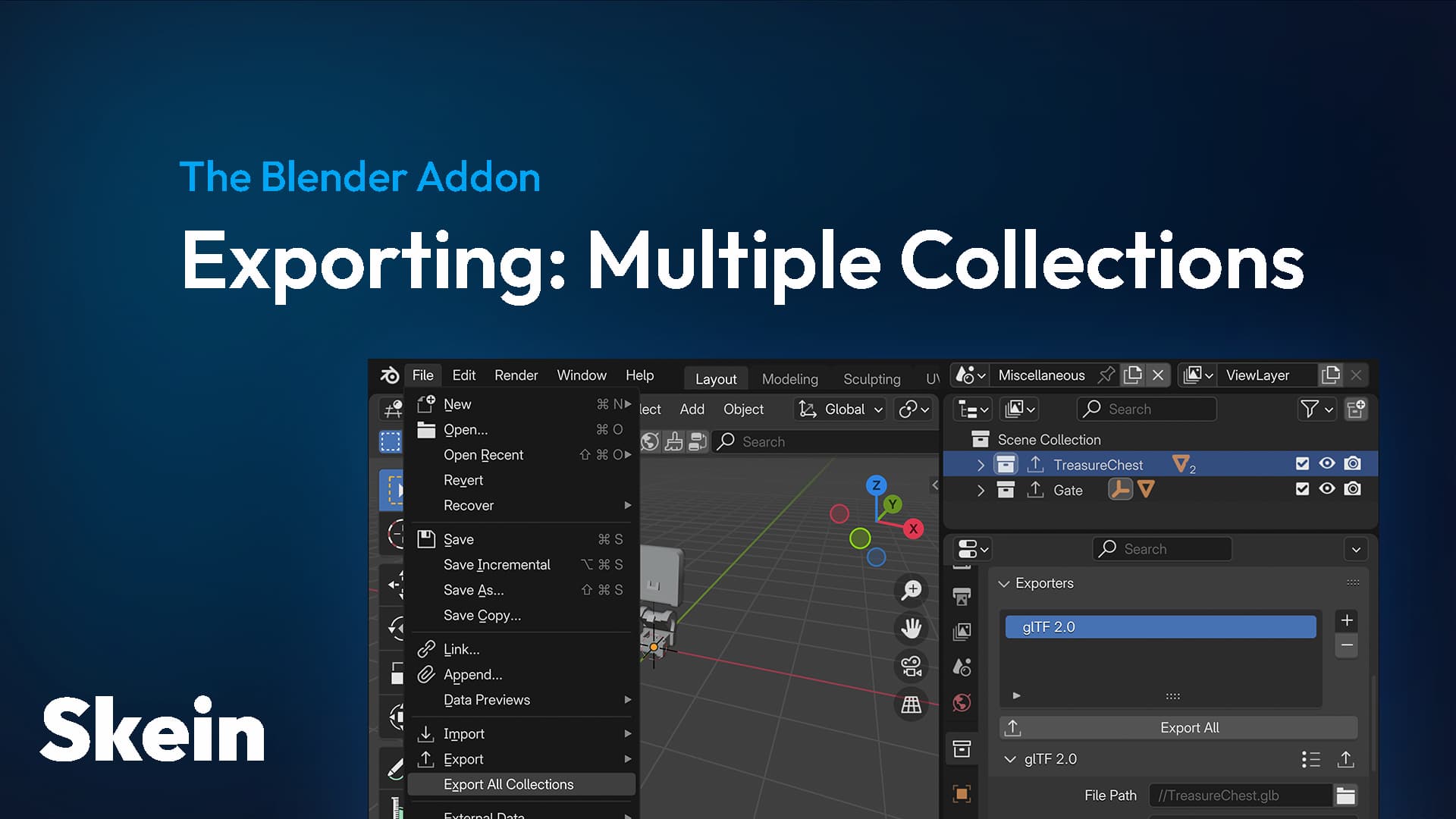
Collection Exporters can be used to export as many Blender Collections to separate .gltf files as you want
When I use File -> Export, I don't get this error. Is there a way to fix this?
snow heron
hollow obsidian
I'm getting the following error:
```
invalid glTF file: missing field `nodes` at...
Missing nodes would in turn likely mean that no objects were exporting. What kind of set up are you using with the collection exporter?
hollow obsidian
snow heron
Missing nodes would in turn likely mean that no objects were exporting. What kin...
Oh yeah, I checked and the gltf was empty for some reason
hollow obsidian
hollow obsidian
Oh yeah, I checked and the gltf was empty for some reason
Oh, I think it was anvil interfering with the export somehow 😔
If I disable the anvil plugin it works now...
snow heron
yeah, I'm not sure what anvil does specifically, but some projects fork the gltf exporter and expect certain configurations. Skein doesn't fork the exporter, so unless the issue is a component data issue it is likely an issue with the other extension or things like geometry nodes being unresolved, etc
hollow obsidian
Yeah, I think I'll give up on anvil for now since one here seems to be using it anyways which means finding help would be impossible lol
hollow obsidian
snow heron
yeah, I'm not sure what anvil does specifically, but some projects fork the gltf...
Btw, are there any updates on the collider workflow:
https://github.com/rust-adventure/skein/issues/16
I guess you should use ColliderConstructor::TrimeshFromMesh here? But doesn't that mean you will get lots of unused dummy meshes in the scene?

GitHub
While documenting Avian specifically isn't the goal, there are a number of questions people have around using and creating colliders that Avian would showcase well such as: How to add different...
snow heron
hollow obsidian
Btw, are there any updates on the collider workflow:
https://github.com/rust-adv...
what do you mean by "dummy meshes"?
it depends overall on what you intend to accomplish workflow-wise. The FromMesh variants are easier to slap onto a mesh when prototyping, but you might want a selection of simpler cube-shapes "in production", especially if there are significant differences between the prod mesh and simpler shapes. You can also build custom meshes that just represent the colliders and used the convex hull from mesh variants, etc
hollow obsidian
snow heron
it depends overall on what you intend to accomplish workflow-wise. The FromMesh ...
Yeah for prototyping I'm already using TrimeshFromMesh. But I'm thinking of when you want to have a more optimized collider. The workflow I'm imagining is something like this:
- Have a complex mesh inside the Blender scene
- Insert a simpler mesh as a child of the complex mesh (so that you can visualize it in Blender)
- Insert
TrimeshFromMeshinside that simpler mesh - But now you have an unused dummy mesh in your scene
Or maybe there's a simpler solution I'm missing here? 🤔
snow heron
hollow obsidian
Yeah for prototyping I'm already using `TrimeshFromMesh`. But I'm thinking of wh...
Yeah the "*FromMesh on a simpler collider" is fine. You might want to look into the convexhull variant, etc instead of trimesh which has infinitely thin walls. I see what you mean by "the dummy mesh", but getting rid of this would require pre-processing the mesh into an avian collider, and I don't think avian supports collider serialization despite having a "serialize" feature.
In theory there could be some workflow where the blender mesh marked as a collider was processed by avian into the representation it needed, then stored in a buffer in the gltf file and such. or something similar with .gltf file processing after export. but that requires avian to support that sort of thing.
If you don't want that "intermediary collider mesh", then it sort of depends on why you want to avoid it. What are you concerned about?
for example: using the avian primitive colliders and emptys would let you visualize cuboid colliders without an intermediary mesh.
hollow obsidian
snow heron
for example: using the avian primitive colliders and emptys would let you visual...
Hmm, but an empty is just pure cosmetic and wouldn't be synced the actual size of the primitive collider right?
snow heron
hollow obsidian
Hmm, but an empty is just pure cosmetic and wouldn't be synced the actual size o...
you can use drivers to sync sizes and such
there's docs on the site for that iirc
hollow obsidian
snow heron
there's docs on the site for that iirc
ooh that's pretty cool, can't believe I missed that!
snow heron
hollow obsidian
ooh that's pretty cool, can't believe I missed that!
if there's one thing that's true about blender it's that it has a lot of functionality 😆
hollow obsidian
snow heron
if there's one thing that's true about blender it's that it has a *lot* of funct...
hmm, it works great on a normal mesh, but it doesn't seem to get synced with an empty. do I need to set another path other than dimensions[0] for it to work?
snow heron
hollow obsidian
hmm, it works great on a normal mesh, but it doesn't seem to get synced with an ...
you can access any data. empty might require using scale.
also if you get into drivers they can do more complex things, like drive the collider sizes in a component via a different cube mesh, then not export that cube mesh
hollow obsidian
snow heron
also if you get into drivers they can do more complex things, like drive the col...
would you need 2 objects for this? or is there a way to get skein to just not export any meshes at all for a specific object
snow heron
hollow obsidian
would you need 2 objects for this? or is there a way to get skein to just not ex...
its a feature built-in to the gltf exporter
there's a couple of options like "export renderable" (or called something similar)
so if you have two things, and you use one mesh to drive another's component value, the gltf exporter lets you "deselect" that mesh if it isn't visible to the renderer and such
that's the little eyeballs in the outliner
hollow obsidian
snow heron
there's a couple of options like "export renderable" (or called something simila...
arggh, this options seems to only appear in File -> Export, but not in the Collection Exporters settings (unless I'm somehow missing it) 😔
whyyy
 snow heron
ah unfortunate. well, one option is to not have the relevant mesh in the collection you're exporting
idk what your export workflow is, but if you're using a bunch of collection exporters than not having the extra stuff in the exported collection is the straightforward way to do that
hollow obsidian
snow heron
idk what your export workflow is, but if you're using a bunch of collection expo...
Hmm, this means that I should have a separate mesh object in a non-exportable collection, that drives another collider component in another object in a separate exportable collection right?
snow heron
hollow obsidian
Hmm, this means that I should have a separate mesh object in a non-exportable co...
yeah. again I'm not sure what your hierarchies look like right now or what workflows you're using more generally
hollow obsidian
snow heron
yeah. again I'm not sure what your hierarchies look like right now or what workf...
I managed to get it to work using an empty (with the Transform Channel instead of Single Property) 😄
But out of curiosity, how would the shape of my hierarchies affect this workflow? My workflow is really rudimentary right now, just mostly following the docs with collection exporters
hollow obsidian
hollow obsidian
whyyy
I've found a little hack to work around this! What you do is open the File -> Export window, check the "Renderable Objects", then save it as a preset. Then load that preset in the collection exporter pane. The option won't be visible, but it would be silently activated underneath. Super hacky and I hope this will keep working lol
snow heron
Oh my haha
Architecturally that makes sense to me. I think the collection exporter is the same settings type in the code
I wonder if it's just an oversight in the UI
strange prism
@snow heron Would you mind considering https://github.com/rust-adventure/skein/pull/115? I've been using it for several days now with no issues.
GitHub
Addresses #114.
This basically applies a fallback operation (accepting an empty Object as equivalent to the expected null for unit struct JSON serialization, as far as I can tell).
snow heron
strange prism
<@103513724052082688> Would you mind considering https://github.com/rust-adventu...
I'll take a look, but the real fix is upstream in bevy to avoid avian's breaking behavior here when it turns on custom serde serialization
We can't end up hardcoding all possible custom serializations as fallbacks.
And avian's approach here makes it so that the serialization is undiscoverable
strange prism
I see. I didn't know there were usptream issues for this.
snow heron
iirc your issue is the marker components change in serialization format right?
strange prism
Yes, they appear in JSON as '{}' instead of 'null'
snow heron
Basically we need to make a PR in bevy to have the option to completely avoid custom serde implementations when deserializing values
And only use the bevy Reflect serializations
strange prism
Are there multiple attempts to deserialize somewhere, and serde is preferred over reflection, or the like?
strange prism
OK, sorry for pinging you. I'm happy to wait.
snow heron
The ping is fine, no need to apologize
strange prism
Sure. I meant, when you were AFK 🙂
snow heron
The only reason I haven't addressed the PR yet is because I was in flights this weekend and such so haven't had a chance to yet
strange prism
OK, that's fair!
 maiden bay
hollow obsidian
I managed to get it to work using an empty (with the `Transform Channel` instead...
maiden bay
hollow obsidian
I managed to get it to work using an empty (with the `Transform Channel` instead...
Hey, I'm trying to figure out how to create colliders in blender and turn them into avian colliders too, could you share your current workflow? I'm having a terrible time with collider mesh child objects 😂
snow heron
maiden bay
Hey, I'm trying to figure out how to create colliders in blender and turn them i...
what workflow issues are you having?
hollow obsidian
maiden bay
Hey, I'm trying to figure out how to create colliders in blender and turn them i...
I followed the tutorial here: https://bevyskein.dev/docs/using-blender-drivers
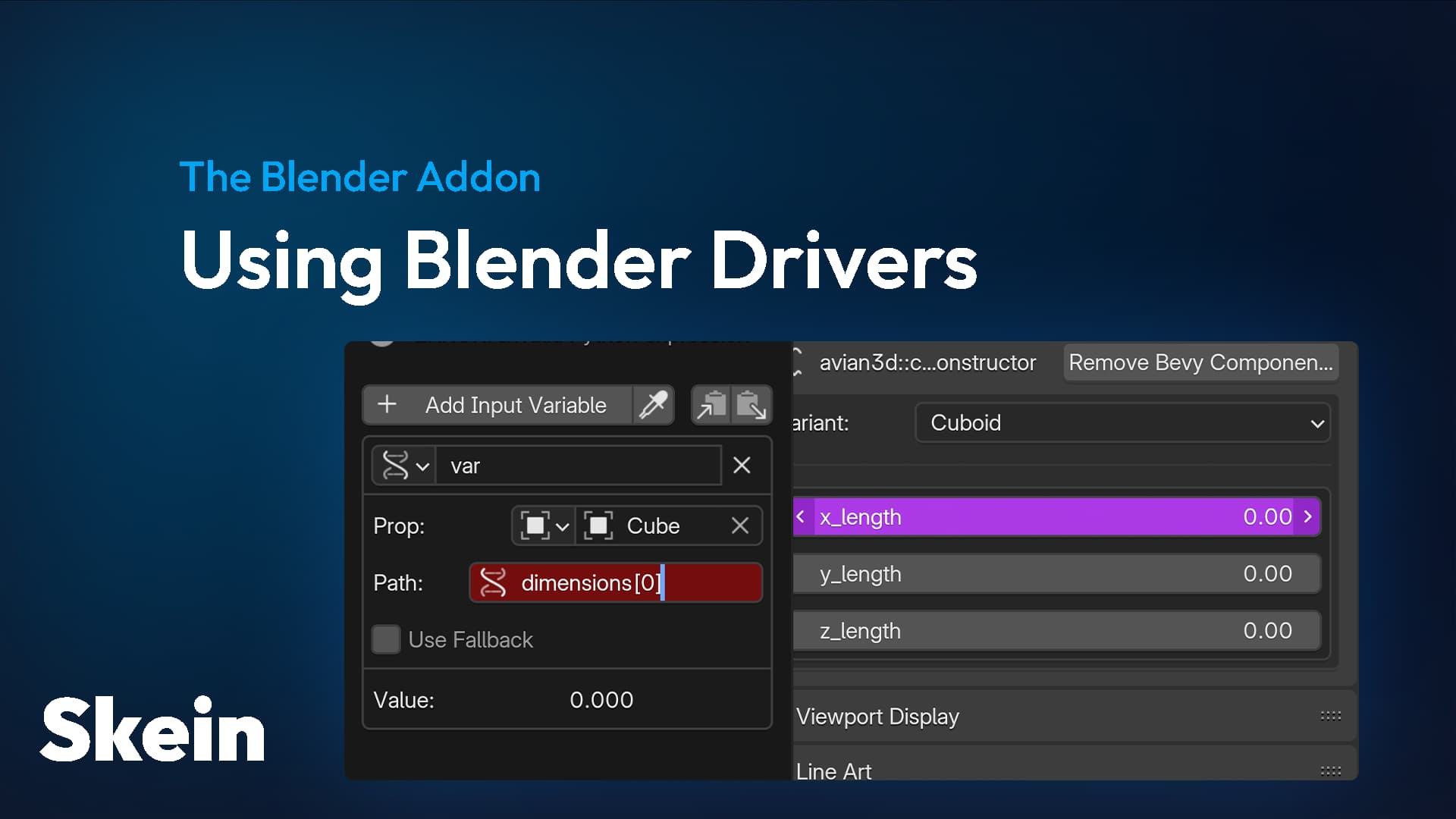
Powering Bevy Component data using Blender's Drivers
What you might want to do differently is separate the object representing the collider shape and the object where the collider component will be created on
hollow obsidian
hollow obsidian
whyyy
Then you can do this to exclude the object representing the collider shape from the export
maiden bay
I'm creating a complex mesh in blender and want to add a simple collider when imported in bevy. I currently got to a point where I add a simple cuboid mesh as a child of the object in blender and add a marker component on the mesh using skein, then in bevy I use the mesh dimensions to create a collider and then remove the mesh from the entity. While it works it feels a bit hacky 😅 I saw talk about using empties for the colliders, would that be a cleaner approach?
maiden bay
hollow obsidian
I followed the tutorial here: https://bevyskein.dev/docs/using-blender-drivers
Ah I missed this page, will check it out thanks!
Was generally curious how other people import separate colliders from meshes using skein, should I be using drivers on one object or create child collider objects in blender
hollow obsidian
maiden bay
Was generally curious how other people import separate colliders from meshes usi...
If performance is not an issue (e.g. for prototypes) you can use ColliderConstructor::ConvexHullFromMesh or ColliderConstructorHierarchy on the mesh itself
A component that will automatically generate Colliders on its descendants at runtime. The type of the generated collider can be specified using ColliderConstructor. This supports computing the shape dynamically from the mesh, in which case only the descendants with a Mesh will have colliders generated.
A component that will automatically generate a Collider at runtime using Collider::try_from_constructor. Enabling the collider-from-mesh feature activates support for computing the shape dynamically from the mesh attached to the same entity.
hollow obsidian
maiden bay
Was generally curious how other people import separate colliders from meshes usi...
If you need multiple colliders on your entity, they you need to put them in the children
Generally this is how I do it rn:
ActualMesh
└── Collider (e.g. ColliderConstructor::Cuboid)
    └── ColliderShape (never leaves Blender, it purely serves as a visual reference and its dimensions will drive the collider parameters above)
 sick trout
@hollow obsidian regarding anvil, ive been using it a bit but havent dug into it seriously yet, have you asked around in their discord server? it might be beneficial to alert them that people are using it in concert with bevy/skein
it seems like their default assumption is that itll be used for godot/unity but i got the impression they wanted the extension to be generically useful
maiden bay
hollow obsidian
Generally this is how I do it rn:
```
ActualMesh
└── Collider (e.g. ColliderCons...
thanks i'll give that a try 🙂
appreciate the help!
 primal pebble
Did this ever come to fruition?
snow heron
primal pebble
Did this ever come to fruition?
The bevy side support that I worked on is in the rc that came out yesterday
primal pebble
snow heron
The bevy side support that I worked on is in the rc that came out yesterday
wooo! gonna check that out!
primal pebble
snow heron
The bevy side support that I worked on is in the rc that came out yesterday
Was it this PR?
https://github.com/bevyengine/bevy/pull/23011

GitHub
Objective
It is a fairly common situation that a user looks at the animation examples in the bevy repo, uses them, and causes their application to load the glTF multiple times because the examples ...
I'm not sure what to look for
primal pebble
Hmm, is there a way to trigger an animation based on name instead of index?
snow heron
primal pebble
Was it this PR?
https://github.com/bevyengine/bevy/pull/23011
no, that's a different issue relating to sub-assets, etc. The gltf extension handler hooks got modified to have mutable access to the AnimationClip before the Handle is created: https://github.com/bevyengine/bevy/blob/a399db032194403995eb3b8ed14b3c348e5d36e3/examples/gltf/gltf_extension_animation_graph.rs#L166
snow heron
primal pebble
Hmm, is there a way to trigger an animation based on name instead of index?
not that I know of. You have to construct your own index mapping from name to animation index if you want that
primal pebble
snow heron
no, that's a different issue relating to sub-assets, etc. The gltf extension han...
Hmm, if you load the entire gLTF it looks like you get access to things like named_animations. Would that be a preferable workflow for skein?
I also read your comment here: https://github.com/bevyengine/bevy/pull/23505#discussion_r3001501018 about how the current GltfAssetLabel approach is a bit of a hack
GitHub
Objective
Fixes Support loading GLTF assets by name #2948.
Unlike previous attempts, this PR A) will continue to support indices going into the future, B) provides a nicer migration path.
Solutio...
snow heron
primal pebble
Hmm, if you load the entire gLTF it looks like you get access to things like `na...
I personally always load the entire gltf file unless I'm loading a single scene. the sub-asset stuff has some problems that may or may not get fixed and the current solution to some of them is "preload the gltf file" anyway
obviously this is somewhat a personal opinion/workflow choice, and the support for "load asset then use" isn't particularly well supported either, but if you're using bevy_asset_loader or are willing to use the asset server to check for loading status then it is the better option imo
you do get access to the names of everything if you load the root asset, named scenes, animations, etc, but the animation graph still accepts an index for the currently playing animation
hollow obsidian
Is there a way to insert relationship components with skein?
snow heron
hollow obsidian
Is there a way to insert relationship components with skein?
not currently although I've been working towards it
hollow obsidian
snow heron
not currently although I've been working towards it
Cool, I'll be looking forward to that!
snow heron
I published a 0.19-rc-compatible release
 humble pewter
@snow heron hey I am trying to get a simple scene in but it doesn't seem to work, I'm not getting any errors or anything
I can share the blender file and code
as well as screenshots
the issue is that I have a cube, a camera and a pointlight but the scene is completely blank when I compile the game
snow heron
You didn't check the box to export cameras and lights in the exporter
 hollow obsidian
What would be the recommended workflow for working with terrains with skein? I imagine that exporting them as normal meshes would be pretty bad for performance, but I'm not sure. Maybe there is a way to export them as a height map?
snow heron
You can export as mesh or bake a height map. What's recommended depends on what your use case is. Height maps are pretty common and you can bake and save them out.
I have a PR open to export arbitrary images into component values that I'm planning to merge after the rc process (it really needs blender 5.2).
Also I wouldn't say anything was bad for performance unless I benchmarked it or had actually tried it
If you use a height map, you still need a subdivided plane or whatnot to apply it to
hollow obsidian
snow heron
If you use a height map, you still need a subdivided plane or whatnot to apply i...
Yeah that makes sense, I just wasn't sure what's the proper workflow should look like 🤔
But how do they handle terrain collisions in other game engines?
Maybe there's a benefit to heightmap-based colliders?
snow heron
I believe the equivalent to say,this from unity: https://docs.unity3d.com/6000.4/Documentation/Manual/terrain-colliders-introduction.html is an avian height map based collider

(departing on a flight so getting cut off 😆)
strange prism
Have a good trip!
hollow obsidian
snow heron
I believe the equivalent to say,this from unity: https://docs.unity3d.com/6000.4...
Oh it looks like that there's no height map collider yet for avian, so I guess I have to go with a standard collider anyways.
hollow obsidian
snow heron
(departing on a flight so getting cut off 😆)
Oh, are you on a trip to unconf?
snow heron
Yah, headed to rustweek/unconf
strange prism
hollow obsidian
Oh it looks like that there's no height map collider yet for avian, so I guess I...
There is ColliderConstructor::Heightfield, but it needs data that you can't provide easily from Skein.
snow heron
strange prism
There is `ColliderConstructor::Heightfield`, but it needs data that you can't pr...
In blender yeah, you'd have to apply it using code after
hollow obsidian
strange prism
There is `ColliderConstructor::Heightfield`, but it needs data that you can't pr...
Ohh, that looks useful. But yeah I'd need to figure out how to convert the heightmap to a collider in Rust 🤔
strange prism
I have evidence for using a big mesh and TrimeshFromConfig to make the collider. The mesh is ~116k triangles, but scaled up to 256x256m, so almost always visible. I did indeed have to face performance issues not in rendering (tho my GPU is fast) but in the mesh collider. That's the major performance hit, via collision detection in Parry. (Also note I have a lot of objects colliding with the mesh.)
I had to split up the terrain into smaller chunks (96m/96m did it) to reduce the meshes enough to where the FPS improved.
I may have to consider the heightmap too... 😅
hollow obsidian
strange prism
I have evidence for using a big mesh and TrimeshFromConfig to make the collider....
btw, what do you use for making terrains in Blender?
hollow obsidian
strange prism
I have evidence for using a big mesh and TrimeshFromConfig to make the collider....
also if you figured out the heightmap thing I'd love to hear how you did it!
strange prism
hollow obsidian
btw, what do you use for making terrains in Blender?
(Don't use me for workflow advice, since I'm playing around. 🙂 ) I'm struggling to find the source, but there is a site that exported satellite terrain mapping to an image. Then I used a tool to make it into a 3D mesh. All pretty hacky.
I.e. I had a heightmap image and went the hard way around! ha!
Oh, if you still care, I found it: https://tangrams.github.io/heightmapper (but note, these are at continental scale and there is not much detail at city/player scale, yet).
hollow obsidian
strange prism
(Don't use me for workflow advice, since I'm playing around. 🙂 ) I'm struggling...
oh that sounds huge lol
I guess I'll shop around for a good terrain tool
There has to be something that non-Unity/Godot/Unreal devs use right? 😆
strange prism
hollow obsidian
There has to be something that non-Unity/Godot/Unreal devs use right? 😆
You got me. But I'm not any sort of authority in this area.
humble pewter
@snow heron the website certificate is invalid
it's currently impossible to access it
snow heron
humble pewter
<@103513724052082688> the website certificate is invalid
seems like a Netlify outage, which is where I host
It just loaded for me