#camera-prompter
1 messages · Page 3 of 1
 sand adder
 jolly sundial
What are the power requirements for a facecam pro? Is 1.5A/7.5W enough?
 atomic niche
I'm looking at the prompter and am wondering whether anyone has tried it with a similar lense to mine? I got the Samyang F2.8/14 mm wide angle lense on an EOS R and I think it would pain me more to have to send the prompter back than to know beforehand lol.
 smoky hatch
Unfortunately there is no separate area for the prompter (yet), so I hope it fits here. I am interested in the prompter and would switch from a prompter/iPad solution. Can I use existing Bluetooth pedals with the current teleprompter or do they have to be the original Elgato pedals? I wouldn't like to buy everything new.
 coral horizon
This is a bug we're going to fix
 olive spade
coral horizon
This is a bug we're going to fix
olive spade
coral horizon
This is a bug we're going to fix
Thank you!
 spare cape
Hello,
Is there a way to turn off the prompter when i don't need it?
olive spade
spare cape
Hello,
Is there a way to turn off the prompter when i don't need it?
Other than unplugging it the only way I've found in Windows is to "disconnect" it in display settings then enable it when you want it.

I've tried looking for a streamdeck plug-in that might be able to do that but no luck. And I'm not a software engineer/coder that could make one 🤣
spare cape
olive spade
Other than unplugging it the only way I've found in Windows is to "disconnect" i...
thank you for your effort.
I hope there will be an update with a switch-off function.
olive spade
If anything even a plug-in for the streamdeck. But since at it's base level it's treated as an external display we'll see if Elgato comes up with a nice solution.
My wallpaper cycles between photos of my pets and it's different for each display. So when I'm not using it it just ends up being like a digital photo frame floating above my main monitor 🙂
 boreal gulch
I just got my Prompter, but it doesn't seem to even turn on. I connect it even directly to my MBP M1 Max, the screen turns on for like 3-4 seconds, then shuts off, I don't see anything in the CamHub app... it's like if it wasn't connected at all... anybody else with the same issue?
boreal gulch
boreal gulch
I just got my Prompter, but it doesn't seem to even turn on. I connect it even d...
I tried even with a Thunderbolt 4 cable, since I thought my dongle would be the issue, but had no success 😦
boreal gulch
OK… I made it work… I had to reinstall Camera Hub even when it said I had the latest version. Upon reinstalling the DiplayLink app was installed as well and that seems to have made it work. Just in case anybody has the same issue later…
 forest brook
How far could a web cam and web cam pro record.
And is it worth upgrading if I have a logitech c920
 pastel echo
@forest brook I upgraded from the c920, to a sony zve 10, but I wanted to use it more for blogging so I got the Fcae Cam Pro to replace them. I love my c920 and still use it to record some content on the side with my mobile set up (until I can afford another face cam pro) but the Face Cam Pro combined with Camera Hub and Stream Deck is such top tier honestly.
forest brook
hmmmm
I mean idk if I'll use it atm cause I don't think I can justify spending $300 on a 4K webcam atm but since I am getting the Prompter it made me consider
I wish Elgato had like a "Sports" camera though where it can like pan left and right but can also see beyond 7 feet (like 60 feet distance would be nice to stream sports)
pastel echo
well the @forest brook sony without any lenses was like 600 so for me the face cam pro was actually the cheaper option... I love my c920 don't get me wrong and one of the best you can have for the price, but face cam pro is awesome
sand adder
Need help with facecam works perfectly fine on obs and discord till i start playing a game it stays on still but very laggy only while im in a match for example if im in disord with my facecam on it works perfect. then i open up mw2 still works perfect but as soon as i start a match it starts to lag. need help fixxing that
smoky hatch
smoky hatch
Unfortunately there is no separate area for the prompter (yet), so I hope it fit...
Any info? Would buy the prompter but I don’t like to send it back if that does not work.
forest brook
for the prompter how can I get the dirt dots off the mirror safely?
its not coming off with the cloth that came with the prompter, and its like sticky onto the mirror part
 deep owl
Anyone using EpocCam with an iPad, how do you rig it up physically?
I want to set an iPad up as a secondary top-down camera with EpocCam, and I have a number of pieces of the Elgato mounting kits already, but not sure what I'd need to hold an iPad in the air horizontally. As far as I can tell, most clamp-type things open up to phone width only?
 narrow elk
deep owl
Anyone using **EpocCam** with an **iPad**, how do you rig it up physically?
I wa...
narrow elk
deep owl
Anyone using **EpocCam** with an **iPad**, how do you rig it up physically?
I wa...
If you look up iPad mounts you can find arms and rigs for it
 dense gazelle
What camera, if any, can I use with the face filters?
deep owl
narrow elk
If you look up iPad mounts you can find arms and rigs for it
Thank you! Also -- oof, what a huge market! Saturated with noname brands selling "lifestyle" and "exercise" mounts. It'll be some time to wade through them. So if there are specific brands that you know are good makers of arms and rigs in general, I'd be grateful if you'd share them.
 surreal ferry
the camera being sent through my camlink 4k works everywhere but OBS - any idea why?
 tall bone
surreal ferry
the camera being sent through my camlink 4k works everywhere but OBS - any idea ...
tall bone
surreal ferry
the camera being sent through my camlink 4k works everywhere but OBS - any idea ...
Do you have any other programs using your camera? I know that a lot of times, cameras can only be used in one program at a time.
 sullen latch
Uh, question. I have my prompter mounted, and downloading the software now. I don't have an Elgato cam. When I click to download the software, it downloads Camera Hub, which is looking for an Elgato cam? Did I download the wrong software for the Prompter?
sullen latch
I see nothing on the site that says you have to have an Elgato camera. Heck, they even say you can use other cameras. I do have a ticket into support. Hopefully I'm just doing something stupid.
 wide flint
sullen latch
I see nothing on the site that says you have to have an Elgato camera. Heck, the...
wide flint
sullen latch
I see nothing on the site that says you have to have an Elgato camera. Heck, the...
I am not 100% certain but yes Elgato Camera hub and thus also Prompter support many brands of additional camera when using an Elgato cam link
 sullen latch
Hmm.. This is going to annoy me, huh? It isn't super obvious when you purchase Prompter that you'd need more products for it to work with a non-Elgato camera
sigh
wide flint
Its possible there are new allowances just like how Wave Link use to only be for Wave microphones but they also enabled it when the Stream Deck Plus was released. However I dont have the Prompter myself so I am unable to test it. The support pages still list Camera Hub as needing an Elgato Cam or CamLink. In which case support will be your best bet for the proper answer.
There is a notice on the Prompter page that does say
only in Camera Hub, included free with Prompter.
So it should probably work?
sullen latch
What's annoyning right now is that nothing on the Prompter page has any indication a camlink would be required.
sullen latch
wide flint
There is a notice on the Prompter page that does say
> only in Camera Hub, incl...
Yep. I see that. But so far, it's not liking it (or me, it seems.)
wide flint
sullen latch
Yep. I see that. But so far, it's not liking it (or me, it seems.)
Just to be sure as well you do have the prompter plugged directly into a USB 3.0 port on your PC and not via a hub?
Have to tried a different port as well?
sullen latch
Yes, direct. Two diff ports. USB A and C. Using adapter to get to C. Let me try A again
Yeah, with A it powers up, but HUB still being ornery.
 haughty fable
Am I the only one who is having issues with webcam?
Had this for a couple of days and there's issues already, which is confusing me given how much I spent on it.
sullen latch
Update on my situation. Called Support. They said it should be working. I had uninstalled the software by then, and when I went to re-install it's giving an error that something can't be installed correctly, so the install fails. Working the support and have already run their troubleshooter. Waiting to hear back.
 jovial raptor
Hi all. Just got my Prompter.
To use it, I have to open the Camera Hub.
But when I open that app, the display input in Hub commandeers my Sony ZV-1.
The problem is that I use Streamlabs to record. So when I open Camera Hub, my Streamlab freezes.
When I change my Streamlabs webcam input to Elgato Virtual Webcam… that seems to solve the problem… except there’s a slight lag and a slight loss of video fidelity.
What am I missing? How can I use Camera Hub for Prompter without it actually taking over my camera?
 olive relic
Heya! Yesterday I asked in general about the Camera Hub not shutting down when trying to turn off my pc. #general message
Just know I wanted to see what exactly happens when I try to turn my pc off. It seems Camera Hub prevents the system from shutting off entirely. Putting it at the login screen after a short while.
(Version 1.8.0.852, using Facecam, Facecam Pro and Prompter)
Is there any way to fix it? I don't want to have to close it manually every time. 😐
Thanks in advance ❤️
 dim venture
Anyone else experiencing a camera glitch in the feed using macOS Sonoma. I’m using Facecam pro. Ecamm live recently released a fix for their software as it was in the release notes. It seems to be camera hub having the same issue.
 lyric hull
jovial raptor
Hi all. Just got my Prompter.
To use it, I have to open the Camera Hub.
But w...
lyric hull
jovial raptor
Hi all. Just got my Prompter.
To use it, I have to open the Camera Hub.
But w...
Sadly you cant same problem i have, when u have more than 1 app using camera it freaks out. And u need camera hub open for prompter i beleive
Im sure they re looking i to a fix
jovial raptor
lyric hull
Sadly you cant same problem i have, when u have more than 1 app using camera it...
Darn. Thanks for letting me know. Virtual camera will work short term... but there should be a way to easily disable the camera input for Elgato while simultaneously using the prompter function.
 hoary radish
every time i click into my game window my facecam stutters in obs like hell
 sacred olive
Can you record footage with Camera Hub?
For instance, if I connect my mirrorless Sony to a Camlink, can I control all the camera's settings inside of Camera Hub AND record?
olive relic
sacred olive
Can you record footage with Camera Hub?
For instance, if I connect my mirrorle...
Doesn't Camlink work with Capture 4K?
With that you should be able to record. (If not, then you prob want to use OBS)
 sand fossil
sacred olive
Can you record footage with Camera Hub?
For instance, if I connect my mirrorle...
sand fossil
sacred olive
Can you record footage with Camera Hub?
For instance, if I connect my mirrorle...
camlink works with 4K Capture Utility.
sacred olive
Thank you both!
 solid shell
Hi ! I just bought a HD60 to do live from my Sony A7iv to my iPhone. But when I use prism live app, my Sony camera doesn’t appear on my iPhone screen. Could you help me ?
 weary beacon
Has anyone experienced consistent stream crashes using Elgato Facecam Pro?
 hearty hull
Quick one, when i use my Facecam Pro i can hear that it makes noises when the focus and other stuff gets adjusted. I hope thats normal xd.
sand fossil
weary beacon
Has anyone experienced consistent stream crashes using Elgato Facecam Pro?
not stream crashes, but Facecam was my culprit on PC crashes. My solution was to unplug when booting up, and plug back in after everything is loaded.
 subtle scarab
I'm tryna to use my Canon sl3 camera to life stream and wanna put it in 4k 30. But the latency is kinda bad. Is there a way to fix it or am I stuck with 1080?
subtle scarab
sand fossil
not stream crashes, but Facecam was my culprit on PC crashes. My solution was to...
I had whole pc crashes with elgato camlink for a bit. Turns out I had hardware acceleration on and didnt know it
sand fossil
subtle scarab
I had whole pc crashes with elgato camlink for a bit. Turns out I had hardware a...
how did you turn it off?
subtle scarab
@sand fossil It's in graphics settings click on change default graphics settings


 thorny iron
I wonder why my Elgato face cam keep choppy like not smooth but when I open Elgato camera hub is run smooth then I open OBS is look crappy not smooth does anyone know why?
subtle scarab
Hardware acceleration is on maybe
thorny iron
subtle scarab
Hardware acceleration is on maybe
Okay let me check tomorrow see if on or not

 kindred wasp
I'm sure this has been asked but not sure how long ago.
I'm looking at upgrading a Webcam option, and need a green screen with what I have. I can only afford one option, so will the Elgato Facecam on sale be able to simulate the green screen, or will getting both be necessary?
wide flint
kindred wasp
I'm sure this has been asked but not sure how long ago.
I'm looking at upgradin...
Thats really depends more on your setup and surroundings. Things like the NVIDIA broadcast tool and others do pretty good job of background removal without an actual green screen. However things like lighting and objects in the foreground and background also play a big part so no one can really answer that with total accuracy for you.
kindred wasp
I do have a 2060 Nvidia gpu on the stream pc, so it might work? Gaming PC is amd gpu so I know it doesn't work there. My lighting is currently just the monitor lighting and daylight led bulbs from the ceiling fan behind me
wide flint
Sadly it doesnt really help a lot to explain it. Its honestly more of a test and see type situation.
Your lighting situation sounds far from ideal though which would absolutely play a part in software detection for background removal not working super well.
kindred wasp
OK. I'll keep digging through the software and see if I can get some more information before I make the purchase. Thanks for the help @wide flint 👍😁
wide flint
👍 The 2060 should support NVIDIA broadcast which might be a place to start. See how well it works with your current camera.
thorny iron
subtle scarab
Hardware acceleration is on maybe
I did check is off and when I open OBS camera still doing when I move is lagging & blurry
But when I open Elgato camera hub is super smooth when I move
subtle scarab
thorny iron
Both been off <@627659927950852165>
Hmm idk then
Lower your resolution
 scenic fiber
kindred wasp
OK. I'll keep digging through the software and see if I can get some more inform...
scenic fiber
kindred wasp
OK. I'll keep digging through the software and see if I can get some more inform...
Nvidia became lots better with years, but lightning is still a crucial step to green screens
That being said, people won’t click away because of a bad green screen
kindred wasp
scenic fiber
Nvidia became lots better with years, but lightning is still a crucial step to g...
I appreciate that insight MVRIK. I wasn't able to test it out last night due to a 2h15m power outage, but I'll try tonight to get my answer while the sale is still going 👍 appreciate all the help so far 😁
forest brook
anyone else having their Elgato Prompters crash?
keeps saying "The device Elgato Prompter is offline due to a user-mode driver crash. Windows will attempt to restart the device 5 more times. Please contact the device manufacturer for more information about this problem"
narrow elk
forest brook
keeps saying "The device Elgato Prompter is offline due to a user-mode driver cr...
Please open a ticket with #official-tech-support
lmk your ticket # after
forest brook
narrow elk
Please open a ticket with <#842491937038925865>
how do I find the Part Number of the product
forest brook
narrow elk
Please open a ticket with <#842491937038925865>
cause it doesn't say where it is on here https://help.elgato.com/hc/en-us/articles/360052737551-Finding-Serial-and-Model-Numbers-of-Elgato-Devices

Elgato
Serial and Model numbers contain information about Elgato products that can be used to help provide more accurate Support.
They are typically preceded by "Model" and "Serial No." and are printed ne...
forest brook
narrow elk
lmk your ticket # after
Ticket Number is (2006556354)
narrow elk
 glacial tiger
I have a question/concern regarding the face cameras.
glacial tiger
I have a question/concern regarding the face cameras.
Please ask your question, you don't need permission to ask.
thorny iron
subtle scarab
Lower your resolution
Is 1280z720
For camera buffering what should be set on? In OBS Settings Disable or Enable or auto-detect
I have is on disable is that right?
subtle scarab
It should be off
What gpu do you have? Are you using hardware encoding? Do you have a blur filter on?
thorny iron
subtle scarab
What gpu do you have? Are you using hardware encoding? Do you have a blur filter...
I don’t have blue filter on
I streaming with my Elgato hd 60 x on Xbox series X and with my gaming laptop is NVIDA 2070
kindred wasp
scenic fiber
Nvidia became lots better with years, but lightning is still a crucial step to g...
I was able to try the Nvidia Broadcasting software, and it looks good enough for me to use 🙂 Looks like I'll just get the upgraded webcam now. Thanks for the help and info
scenic fiber
You got it chief @kindred wasp
kindred wasp
now to just figure out how to get the second pc setup while using a 3 monitor 4 pc kvm 😅
scenic fiber
kindred wasp
now to just figure out how to get the second pc setup while using a 3 monitor 4 ...
Capture cards!
Not sure if you want to show 3 monitors on your second PC tho
kindred wasp
i'm not showing 3 monitors. they are mainly for the work pc, and the gaming pc gains a nice bonus. Streaming pc will only get 1 of the monitors 😅
dense gazelle
It's such a pain having Elgato's face filters only on Apple. Apple and their App store are a drag. I look forward to the day when we can get the app directly from Elgato, and for all platforms.
sand fossil
dense gazelle
It's such a pain having Elgato's face filters only on Apple. Apple and their App...
What did you need help with?
dense gazelle
sand fossil
What did you need help with?
I want to be able to stream with snap camera. I can't access the App store due to an Apple issue. So I can't access the Elgato face filters. I'm OK paying the £7.99 for the pro version, but I just can't get around Apple's ID issues. It is an Apple issue which is why I resent having to use only the Apple store.
dense gazelle
 forest brook
too lazy to get the paper out of my Prompter box.... but what can we do to clean the prompter glass/plastic?
 frosty kraken
Anyone else havinag issues with the Facecam virtual cam stopping while streaming and then saying to use the camhub?
 echo dove
so, it seems like my facecam doesn't want to work, despite me using another USB 3 cable

in the off chance it does work, the LED light lights up, then turns off
yep, I'm lead to believe this brand new Facecam is defective
there goes my $100
 violet hawk
#official-tech-support to get a replacement
echo dove
violet hawk
<#842491937038925865> to get a replacement
filling in an RMA request, what do they mean by Part Number?
violet hawk
Elgato
Serial and Model numbers contain information about Elgato products that can be used to help provide more accurate Support.
They are typically preceded by "Model" and "Serial No." and are printed ne...
echo dove
there's also a seperate section for the serial number
 violet hawk
Also since it's a holiday+weekend it'll take a bit more time to get an answer from staff
echo dove
figured that's the case, but I don't know where I can find the part number, I don't have the original packaging anymore
 pearl ember
Trying to use epoc cam together with my iphone 13 pro but when i do and have obs running it chugs my gpu usage anyway to stop this or limit it?

60% on camera hub & 30% on obs without even streaming 
also to add i have a 1080 ti + i7-8700k with 32 gb ram
forest brook
for the Facecam Pro, can I buy a USB extender so it can reach my desktop without losing performance or risk damaging the product?
If I do buy an extender can I buy a USB-C to USB-A?
jolly sundial
forest brook
for the Facecam Pro, can I buy a USB extender so it can reach my desktop without...
After a certain distance, you will notice degradation. You can use USB-C to USB-C or USB-C to USB-A, just make sure it's a cable that's designed for data transport.
forest brook
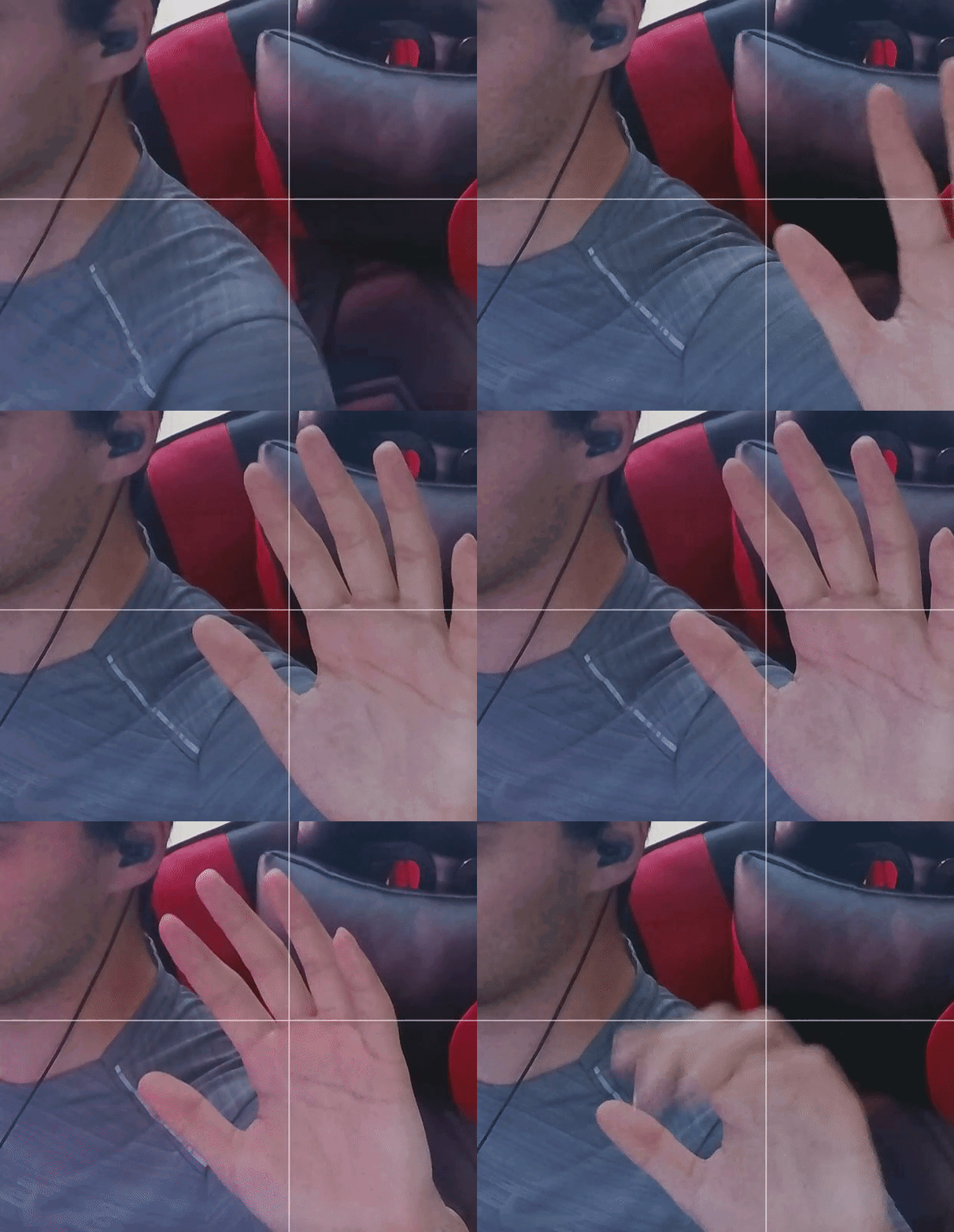
is the moving pixels on the colors due to lack of lighting?
I know the gif reduces the quality a bit than it really is but there is still like moving pixels or something (like a static?) on the shirt/chair
 steady crow
Is anybody experiencing issues with camera hub and epocam, where it refuses to acknowledge your phone is on the WiFi or directly plugged in via usb?
violet hawk
steady crow
Is anybody experiencing issues with camera hub and epocam, where it refuses to a...
Make sure your wifi is 2.4ghz or else it usually never works for me
steady crow
violet hawk
Make sure your wifi is 2.4ghz or else it usually never works for me
on the phone or the PC?
i hope phone because im etherneted in
nah 2.4ghz didn't change anything =/
forest brook
forest brook
https://i.gyazo.com/58d936d3003e716560eef9211d9071ff.gif
anyone able to respond to this
 scarlet urchin
forest brook
I know the gif reduces the quality a bit than it really is but there is still li...
scarlet urchin
forest brook
I know the gif reduces the quality a bit than it really is but there is still li...
i recently got a facecam and have this happening too however i think it will be related to lighting and or ISO levels although i would wait for someone with a bit more experiance to confirm too.
i am quite limited for space and have 2 led lights behind my monitor which do an ok job at providing more light and i am able to run an ISO of 400 or under with a shutter speed of 1/120, have also tried 1/60 which lets me run around 250-350 ISO adn i still notice some noise.
i think idealy 100 ISO is the aim to run at which eliminates the noise that you and also I can see but when trying to set ISO trying to get 60fps the image is too dark
noise reduction may also help but it seems to blur the image a bit
when streaming and with how big typically the webcam is during gameplay no one is going to notice the noise anyway unless you happen to do something with a fullscreen camera
lyric hull
forest brook
is the moving pixels on the colors due to lack of lighting?
Yes get 2 ring lights
Key lights
lyric hull
jovial raptor
Darn. Thanks for letting me know. Virtual camera will work short term... but the...
I agree, ngl virtual cam looks worse and laggy imo.
lyric hull
lyric hull
I agree, ngl virtual cam looks worse and laggy imo.
Atleast with sony zv e10
jovial raptor
lyric hull
I agree, ngl virtual cam looks worse and laggy imo.
Yep, it's a cool feature but I don't want it automatically triggering when I use prompter. I use streamlabs to record, I just want prompter to prompt. The video fidelity is weaker.
lyric hull
Yep, agreed. Im waiting to buy prompter when its available and bugs are kinked out
But it looks very promissibg
 lethal crag
im having issues with my facecam anyone else ???
 sage gale
Can I use a Type C to HDMI cable for Facecam
scarlet urchin
sage gale
Can I use a Type C to HDMI cable for Facecam
facecam is a usb device so you will need usb type c to type A or type c to type c and a 3.0 port. try and use the fastest port you can as usb 3 has few variants with the latest being 3.2
sage gale
scarlet urchin
facecam is a usb device so you will need usb type c to type A or type c to type ...
I only have an HDMi port left in my Laptop as I stream using my Laptop
sage gale
scarlet urchin
facecam is a usb device so you will need usb type c to type A or type c to type ...


As one port has the Elgato Wave 3 and Stream Deck XL and the Thunderbolt type c port has the HD60 X with a type c to type c
Hence I only have an HDMI port. I saw that there are Type c to HDMI 4k UHD cables on Amazon and best buy or micro centre
scarlet urchin
yeah some device can send video over usb c but the facecam is a usb device and would need to be connected to a usb port for it to work and be detected by the camera hub software
sage gale
scarlet urchin
yeah some device can send video over usb c but the facecam is a usb device and w...
I see, Because I thought If I can get a USB type c to HDMi just like how DSLR or Mirrorless camera use was thinking of the same idea
sage gale
scarlet urchin
yeah some device can send video over usb c but the facecam is a usb device and w...
Maybe I can get an USB type C to HDMI UHD cable for the HD60 X
 gray tinsel
USB-C to HDMI adapters generally rely on DisplayPort Alt mode, or DisplayLink to run - they generally won't work with a client USB device like a camera or capture card, unfortunately as those two modes are driven by GPU and software respectively.
In the same vein the HDMI port on your laptop is going to be a HDMI Out, not a HDMI In - you can't connect the capture card's USB to it - if it was an input you wouldn't need a capture card at all. Plus the Capture Card's USB-C is outputing formatted video data in a UVC data stream, not a HDMI video signal.
Ideally we don't recommend using docks and hubs, but at this point you may need one to get more ports. I'd suggest a Thunderbolt one in particular as the extra bandwidth of Thunderbolt can prevent a lot of issues folks run into trying to do video capture through a dock (I'm personally using one with my laptop at the moment as well).
sage gale
Thank you so much 😊
 tawny carbon
Hope someone can help, just got the Facecam Pro, installed the Camera Hub and it wanted to run the update. Update installer ran and wouldn't close the Camera Hub but continued the install of the update. Now I have no Camera Hub application and I cannot install the Camera Hub using the installer, it errors out now. Please Help!
This is the message I get when it fails

I've ran DISM and SFC, try unregister of the msiexec and registering it again, still no dice
checked the Camera Hub program location and it was empty, so the update killed off everything and now I'm guessing that is why it won't install
tawny carbon
I was able to get the software installed, had to get a registry cleaner and then it would install. Something with the update messed up the registry bad
tawny carbon
Ok, this camera hub software is not friendly at all. Was able to get the Affects to work before doing the update again after the reinstall. Now after the latest update, it says I need an update GPU driver. Did that and still says I need the latest. Really not sure this headache is worth the cost of this camera
Also I've tried both the Game Ready driver and the Studio driver, still not working
Does anyone know what Nvidia driver camera hub is wanting? It's apparently not the latest as of today
scarlet urchin
its the sdk for video effects it needs mainly

NVIDIA
Download resources for NVIDIA Broadcast software integrations.
Driver version 456.38 or higher is whats on the info from elgato
so as long as your on that or higher adn then installed the video effects sdk specific to you series of card it should work
its probably worth installing nvidia broadcast too
scenic fiber
tawny carbon
Does anyone know what Nvidia driver camera hub is wanting? It's apparently not t...
Don’t use virtual cam either
It’s gonna give you more headaches
tawny carbon
I already uninstalled virtual camera, I just want to use the effects and AR again
tawny carbon
scarlet urchin
its the sdk for video effects it needs mainly
I've already installed the latest sdk and drivers from nvidia, still says it needs the latest since this last update to the software
I'm running 546.17 from Nvidia directly, also tried the Studio driver. Nothing is allowing the effects and AR to work
 sacred vector
Is it possible to have both the pro and the standard cameras going at the same time?
tawny carbon
scarlet urchin
Driver version 456.38 or higher is whats on the info from elgato
where is 546.38? Latest on Nvidia's drivers page is .17
just checked the update notes for Camera Hub and it says 537.58 or newer for the drivers. So something appears to be wrong with the software and how its reading driver versions. It was working correctly before the software updated to 1.8.1.1450
sacred vector
sacred vector
Is it possible to have both the pro and the standard cameras going at the same t...
Let me re word that better. I have the Elgato facecam pro and the Elgato facecam. In the Elgato Camera Hub app I have both cameras available to switch between in the input drop down. So I know both are working and have a video feed. I do not know how to get both cameras working in Streamlabs. I’ve added a new video source and the Elgato Facecam is an option but I don’t get a video feed. Just a black screen. The Facecam pro works just fine. Is it possible to have both running at the same time for multi cam angles at one time. Like a facecam and a hand cam like I’ve seen on other peoples streams.
tawny carbon
sacred vector
Let me re word that better. I have the Elgato facecam pro and the Elgato facecam...
I don't believe you can have both capturing at the same time in the Camera Hub app. But in OBS, as far as I am aware, you should be able to have multiple sources as long as they aren't being used through the same application. You could try using Nvidia Broadcast for one and Camera Hub for another. Since I only have 1 camera currently, I can't do any testing with it. But hope that helps
 raven zinc
I keep getting this when I try downloading camera hub
 raven zinc
tawny carbon
I was able to get the software installed, had to get a registry cleaner and then...
raven zinc
tawny carbon
I was able to get the software installed, had to get a registry cleaner and then...
how did u fix!?
tawny carbon
raven zinc
how did u fix!?
I had to get a registry cleaner to get windows to install correctly. I tried to find one that had good reviews and went with Wise Registry Cleaner. It's got a free version
As with any time you need to mess with registry, use at your own risk. It worked for me by just doing the scan and then clean.
raven zinc
tawny carbon
As with any time you need to mess with registry, use at your own risk. It worked...
Why is it risky?
 lament trellis
raven zinc
Why is it risky?
lament trellis
raven zinc
Why is it risky?
i suggest if you use somthing like CCleaner to clean out your registry of stale entires id back it up to a file. Just in case.
tawny carbon
raven zinc
Why is it risky?
There is always risk when making changes to the OS files, so I was just saying, use at your own risk. The good cleaner apps will ask if you want to back up registry beforehand and that should always be done. But overall, using a cleaner has very minimal risk of causing issues.
tawny carbon
Well, went back to the previous version of the Camera Hub software (v1.8.0.852) and the AI and AR options are functioning again. I do not recommend updating to the newer version until they fix the GPU driver check that disables these effects.
forest brook
who pinged me
 azure thicket
idk why, but one of my facecam just stopped working in obs, both are in the right usb port and both work in camera hub
if i look at the cable, the "broken" one has like a white edge inside on the usb-c side thats half broken, thats not the on the other camera
sacred vector
tawny carbon
I don't believe you can have both capturing at the same time in the Camera Hub a...
Thank you
azure thicket
azure thicket
if i look at the cable, the "broken" one has like a white edge inside on the usb...
I ordered a new USB C cable, hope that will fix it
 tall frost


I've installed both Camera Hub on Windows & Epoccam on iPhone. Both of my device is same Wi-Fi connected. Epoccam shows that it connecting to my computer, but nothing actually happens.
violet hawk
tall frost
Make sure your Wi-Fi is 2.4GHz, otherwise mine wouldn't work 🙂
azure thicket
azure thicket
I ordered a new USB C cable, hope that will fix it
okay this is the situation
Cable 1 doesnt work on both camera's in OBS
Cable 2 only works on camera 2 in obs, so i cant manage to get the second camera to work in obs, even tho both camera's work in camera hub
i have honestly no clue if one of my facecams is broken or not
since they both work fine in camerahub, just not in obs
tall frost
violet hawk
Make sure your Wi-Fi is 2.4GHz, otherwise mine wouldn't work 🙂
2.4 GHz, it works on others alternative application
azure thicket
azure thicket
okay this is the situation
Cable 1 doesnt work on both camera's in OBS
Cable 2...
does anyone have any idea how i could resolve this issue? it happened after installing my new pc parts
azure thicket
after long tinkering, both are fixed :)
 still mulch
hey quick question - the cable for my elgato facecam pro is not long enough - is there an extension or some recommendations?
sand fossil
still mulch
hey quick question - the cable for my elgato facecam pro is not long enough - is...
you can use any cable, but no longer than 10ft, also make sure it meets the power specs.
 crystal frost
Anybody still up? Lol I have a canon M50 I want to use a webcam also have the cam link would love to hear some of yall settings.
narrow elk
crystal frost
Anybody still up? Lol I have a canon M50 I want to use a webcam also have the ca...
make sure you follow the notes for your camera here https://www.elgato.com/us/en/s/cam-link-camera-check

Elgato
Got a mirrorless or DSLR camera? Wondering if it's compatible with Cam Link 4K or Cam Link Pro? While both can capture any HDMI input, it’s best to verify your camera first.
 fickle flare
Hello I am looking for a solution to use the AR-Lenses in a High Resolution/Pro-Context. I had a quick chat with Elgato-Support discussing wether there is a solution to use AR-Lenses not only with EpocCam-App but with e.g. FaceCam Pro. The answer was that they like the idea, but currently there are no specific plans in bringing AR-Lenses to FaceCam/Pro. As I am a developer I asked for contact to Tech-People who could discuss options about implementing AR-Lenses by myself when using FaceCam Pro. So here I am and hope for a constructive discussion. (I hope to chose the correct channel here for this topic?)
violet hawk
The Marketplace Makers is probably a better discord for developing apps using the SDK
 hushed lynx
fickle flare
Hello I am looking for a solution to use the AR-Lenses in a High Resolution/Pro-...
hushed lynx
fickle flare
Hello I am looking for a solution to use the AR-Lenses in a High Resolution/Pro-...
that's really not my topic but please give me your conatct details
hushed lynx
still mulch
hey quick question - the cable for my elgato facecam pro is not long enough - is...
not the cheapest solution but our corsair usb hub can work as an extension - if you want to use other cables make sure you buy the better ones - we tested many and most of them are not very good
steady crow
azure thicket
after long tinkering, both are fixed :)
Context into how please.
still mulch
hushed lynx
not the cheapest solution but our corsair usb hub can work as an extension - if ...
could u hit me up with one good cable?
still mulch
hushed lynx
not the cheapest solution but our corsair usb hub can work as an extension - if ...
and also - will it still be 4k60fps if i connect it into the hub and the hub into the pc..?
and it also feels like the elgato facecam pro is not giving me 4k60fps when i open my camera on discord - is the given cable not supporting 4k60fps?
hushed lynx
Usually the Amazon basic ones are not bad. Yes you would still get 4K with our hub. Not sure what Discord does but you can see the resolution in our camera hub software.
narrow elk
still mulch
and it also feels like the elgato facecam pro is not giving me 4k60fps when i op...
Pretty sure Discord only supports 1080 if you have nitro , otherwise will be 720
still mulch
also question to camera hub: when i go over 720p60 it freezes
is there a fix for that?
Thanks btw for all the information..
azure thicket
narrow elk
Pretty sure Discord only supports 1080 if you have nitro , otherwise will be 720
Yep thats correct!
steady crow
Hello, I'm still struggling with my epoc cam not connecting to my computer.
This is both with a wired and wireless connection, and is consistent between both the paid and free versions of Epocam.
I have Itunes installed.
I have ensured my wireless connection is a 2.4ghz connection.
I have uninstalled and reinstalled the app on both my phone and my PC.
I have followed the troubleshooting pages on the website.
Is there anyone who has experienced the same issue, who knows what the issue is and how to resolve it?
 wild steeple
Any tips on how to work with the text editor for prompter as simple „select all“ + „copy & paste“ is not working?
wide flint
<@&581565551495741448> Clean up on isle 5
 rapid parcel
Anyone else having issues or had issues with the elgato virtual cam? I have already changed the setting to isochronous in the camera hub app and still when I try to use my camera on other streaming platforms it says. “Connect to camera hub to activate camera”. I’ve tried everything besides returning it. Any help would be greatly appreciated
 torn eagle
Hiii, can anyone help me? Everytime I load into Streamlabs or OBS studio my camera just freezes Its really starting to bug me. Im using the orignal cord that came with it. Any help will be greatly apricated!
Thank you guys!!!
steady crow
steady crow
Hello, I'm still struggling with my epoc cam not connecting to my computer.
This...
Update this my issue.
My phone is prioritising my partners IMac over my own pc. This occurs even with a USB connection.
When I select USB connection it still does not connect to my pc.
 woeful breach
Does anyone know if they updated a fix for Elgato Virtual Camera stuttering and freezing issues while streaming?
violet hawk
woeful breach
Does anyone know if they updated a fix for Elgato Virtual Camera stuttering and...
No, the fix is to not use it and instead use Nvidia Broadcast for filters and background blur.
torn eagle
torn eagle
Hiii, can anyone help me? Everytime I load into Streamlabs or OBS studio my came...
Still havent found a fix yet, can someone help?
 fleet light
Hey! anybody who can help me with this I would appreciate greatly. When I run Valorant my ZV-E10 Camera that is connected to a camlink 4k pro internal turns OFF on obs while valorant is running... anyone know a fix??
woeful breach
@violet hawk 
torn eagle
torn eagle
Hiii, can anyone help me? Everytime I load into Streamlabs or OBS studio my came...
Can anyone help with this?
 hollow pasture
torn eagle
Can anyone help with this?
hollow pasture
torn eagle
Can anyone help with this?
I had similar issues. Number 1. Make sure the camera is plugged into a USB 3.0 slot (not 2.0). 2. Make sure you are getting the Facecam and not virtual camera. 3. Change settings to 1080p or 720p and frames rate to 60 or 30 manually. If you do all 3 steps camera should work fine.
torn eagle
hollow pasture
I had similar issues. Number 1. Make sure the camera is plugged into a USB 3.0 s...
How do I change the fps of the actual camera? I k ow how to do it in streamlabs. But it’ll freeze in discord as well
Is there a way I can change it besides streamlabs
 hollow lance
Hey there, I'm running an A6400 into camlink, and a 4k30 the camlink is only really showing about 25-26 FPS (skipping some frames, not smooth - counted manually). I got it to work fine for a day, and now it's dropping frames again.
What can I do?
It's running on Isochronous mode, on it's own USB PCIe...
sand fossil
hollow lance
Hey there, I'm running an A6400 into camlink, and a 4k30 the camlink is only rea...
try it on the usb port 3.0 on your mobo and not the pcie. see if any changes.
 south tapir
Hi! I am having some issues with my Facecam stuttering/lagging while using OBS. I am on a new PC, so I didn't save/backup any of my old settings. I am on a desktop and I have already set transfer mode to bulk. I am plugged directly into the back of my PC in a 3.0 port.Thank you!
torn eagle
south tapir
Hi! I am having some issues with my Facecam stuttering/lagging while using OBS....
I’m having the same issues
I read a Reddit and multiple people said that the cord that came with the camera is messed up so they got on Amazon and ordered a specific one
south tapir
torn eagle
I read a Reddit and multiple people said that the cord that came with the camera...
Any recommendations on a cord? I had no issues on my old PC, but the new one is giving me issues.
torn eagle
south tapir
Any recommendations on a cord? I had no issues on my old PC, but the new one is ...
This is the one that multiple people on reddit, and youtube said they bought and it fixed their freezing issues. https://a.co/d/6FRhXcQ

Amazon Basics Double Braided Nylon USB Type-C to Type-A 3.1 Gen 1 Charger Cable | 10 feet, Dark Grey
Mine comes in tmr so well see if it fixes it for me. They said the orignal cable that comes with the facecam can sometime be defective
south tapir
torn eagle
Mine comes in tmr so well see if it fixes it for me. They said the orignal cable...
Let me know! 🤞🏻🤞🏻
torn eagle
south tapir
Let me know! 🤞🏻🤞🏻
I forsure will! If I dont ping me and remind me
 exotic galleon
anyone knowns which phone/phone sensor will be the equivalent of Facecam and Facecam Pro?
i'm using a C920 webcam well configured, but also have a Motorla Edge 40, nice camera. but is my main phone so i'm looking for a dedicated phone as a camera.
narrow elk
I think sony xperias are the only ones that have the same starvis cmos sensors the facecams do, i may have to do more digging on that in the morning @exotic galleon
torn eagle
south tapir
Let me know! 🤞🏻🤞🏻
It did not work. UGHHHH it keeps freezing. This is soo annoying
Its to the point im just going to go with a different brand
sand fossil
@kind turret so facecam pro, is it not getting enough power via the adapter? It uses usb 3.0 i believe.
 kind turret
sand fossil
<@593798439049887744> so facecam pro, is it not getting enough power via the ada...
kind turret
sand fossil
<@593798439049887744> so facecam pro, is it not getting enough power via the ada...
I used the cable it came with in multiple outputs and nothing. First I bought from best buy, returned it then bough from amazon and didn't work. I know I came in here at the time and they couldn't figure it out, so using and eh one now till I can go Mirror DSLR
sand fossil
kind turret
I used the cable it came with in multiple outputs and nothing. First I bought fr...
you’re on mac right?
kind turret
sand fossil
you’re on mac right?
Yup, 2023 Mac Mini M2, waiting anxiously for the M4 to come out so I can buy that one
sand fossil
kind turret
Yup, 2023 Mac Mini M2, waiting anxiously for the M4 to come out so I can buy tha...
that’s awesome! I don’t have a mac anymore as I’ve gone back to the pc route. Still, the usb port you tried, cause usb come in a set of 2. try each port with nothing else connected and see if anything shows up.
kind turret
Yup did that and even tried in my USB hub that's 3.0 outputs. I game on my PC but stream through the Mac
sand fossil
kind turret
Yup did that and even tried in my USB hub that's 3.0 outputs. I game on my PC bu...
That’s problematic. I wonder if there are any other mac users here. I’m gonna check something on the M1-4 chips
kind turret
I just want the M4 because I can say I bought an M4 from apple lol
sand fossil
I couldn’t afford the price. I’d rather build one for less.
I did find some info, https://help.elgato.com/hc/en-us/articles/6097037927949-Elgato-Facecam-Stuttering-or-Frozen-video-with-Apple-Silicon-Mac
Elgato
This guide will go over troubleshooting steps when using Facecam with Apple Silicon Macs.
This applies to Macs with Apple Silicon, such as M1, M1 Pro, M1 Ultra and M1 Max.
Perform a Firmware...

Also this! https://help.elgato.com/hc/en-us/articles/360052527791-Apple-Silicon-Compatibility-M1-M2-
Elgato
On November 10, 2020, Apple announced the availability of Macs based on a new architecture known as Apple Silicon.
Although announced at the same time as macOS Big Sur, Apple’s latest operating ...
Sadly I don’t see Facecam Pro on the list, but I think maybe it would be ideal to open a ticket with #official-tech-support
torn eagle
sand fossil
I did find some info, https://help.elgato.com/hc/en-us/articles/6097037927949-El...
My facecam works when im not on a game, but as soon as i luanch a game or app my camera freezes
 blissful musk
Hey guys I have a friend that's trying to set up epoccam with his partners iPhone. He has dl-d iTunes but hasn't logged in.
He kind of gave up after hours of testing other software and I recommended using elgato because....well it just works lol
He said he'll try it today
My question is once he has logged into iTunes (he has already dl'd the elgato app and PC software), will it just work? Or is there anything else that needs to be done for the setup to be successful?
blissful musk
Also while on the topic, anyone have any idea on epoccam for android? 🤔😏
scenic fiber
blissful musk
Also while on the topic, anyone have any idea on epoccam for android? 🤔😏
Ivcam is a alternative
But I recommend Elgato products of course 
 odd citrus
my camera keeps freeezing when trying to play certain games and other applictions get elayed like typing on discord etc aslo sometimes everything like my headset will disconect then recconect as well as my stream decks
could it be my gpu or usb ports? i have alot of elgato equipment and all of my usb ports are filled
sand fossil
odd citrus
could it be my gpu or usb ports? i have alot of elgato equipment and all of my u...
try updating your bios/drivers could be your mobo. also do this and reboot. https://streamdecklabs.com/🧯-how-to-disable-windows-10-11s-usb-selective-suspend-setting/

Once you complete these steps, Windows will no longer power off USB devices connected to your computer, which will fix any problem are experiencing as a result of this Windows feature. Windows 10+ includes the USB selective suspend feature that lets you automatically put USB devices in a very low-power state when they’re not actively… Continue r...
sand fossil
torn eagle
My facecam works when im not on a game, but as soon as i luanch a game or app my...
try this and reboot. https://streamdecklabs.com/🧯-how-to-disable-windows-10-11s-usb-selective-suspend-setting/
Once you complete these steps, Windows will no longer power off USB devices connected to your computer, which will fix any problem are experiencing as a result of this Windows feature. Windows 10+ includes the USB selective suspend feature that lets you automatically put USB devices in a very low-power state when they’re not actively… Continue r...
odd citrus
alright ty!
odd citrus
yeah still same problems i think it just may be the game
its the finals and it keeps freezing my camer 😦
torn eagle
odd citrus
its the finals and it keeps freezing my camer 😦
no its any game Im having the same problem
the camera will work fine if Im not in a game or launching an app, But as soon as I launch and app or game it freezes
Its getting mildly asnoying
sand fossil
torn eagle
Its getting mildly asnoying
have y'all updated the firmware?
torn eagle
sand fossil
have y'all updated the firmware?
I have the latest version
its only when I luanch an app or game
odd citrus
Yes me as well
Everything started messing up when I got the prompter and face cam pro😔
sand fossil
odd citrus
Everything started messing up when I got the prompter and face cam pro😔
I may look into the freezing when a game starts and see if there is a fix. frist i'm hearing of it. sadly since you both have the same issue, I'll se what i can find.
torn eagle
sand fossil
I may look into the freezing when a game starts and see if there is a fix. frist...
Thank you!! its only the elagto cam! my logitech works perfeclty fine
sand fossil
Are y'all using nvidia broadcast?
torn eagle
sand fossil
Are y'all using nvidia broadcast?
No. all i have is obs studio, and discord and my other games.
say ill have the camera open on discord, its running smooth, as soon as i launch a game or and app it freezes my camera
goes for obs studio as well!
torn eagle
sand fossil
Are y'all using nvidia broadcast?
But this logitech camera i have works perfeclty fine. So i know its not an pc issue
sand fossil
do y'all have amd cpu's
I saw that there is an issues with AMD CPU's and a fix was released from AMD and MOBO manufacturer's. this means it's time for a BIOS/Drivers update.
odd citrus
i hv a ryzen 9 5950x
torn eagle
sand fossil
do y'all have amd cpu's
Yes, I have a AMD Ryzen 7 5800X
odd citrus
i think its gpu i hv nvida 2060
torn eagle
torn eagle
Yes, I have a AMD Ryzen 7 5800X
and a RTX 3070
sand fossil
odd citrus
then
maybe dial down the specs to high or med.
odd citrus
i hv everything low
torn eagle
sand fossil
maybe dial down the specs to high or med.
Im good on preformance.
odd citrus
could it be our obs settings??
sand fossil
torn eagle
Im good on preformance.
did you update bios/drivers?
torn eagle
odd citrus
could it be our obs settings??
that shouldnt make it freeze in discord tho
sand fossil
odd citrus
could it be our obs settings??
possibly.
torn eagle
sand fossil
did you update bios/drivers?
Negative. Could you point me in a direction to do that?
odd citrus
oh for me its jsut obs when i try to play the finals
torn eagle
odd citrus
oh for me its jsut obs when i try to play the finals
Wel then its prolly your obs settings. Make sure your bitrate and bandwith settings are good! for me it freezes in discord the camera hub and obs but onmly when I luanch a gmae
scarlet urchin
Is the cpu being fully utilised? As the camera is uncompressed it could be needing some cpu which if the game is fully using the cpu there might be not enough left over for the camera to work correctly
sand fossil
odd citrus
oh for me its jsut obs when i try to play the finals
usually when i play a game on pc, and use my gpu i dial down the settings to high since i'm a single pc streaming/gamer. if you had a dual pc, i don't see why it would cause this, but to be safe update bios/drivers then let me know if any changes.
i'm gonna dip out for the day. 
odd citrus
torn eagle
Wel then its prolly your obs settings. Make sure your bitrate and bandwith setti...
im new to all this but all my drivers are up to date how do i know the bitrate my stream can handle
torn eagle
sand fossil
i'm gonna dip out for the day. <a:Wave:916496821138886666>
Alright, Before you leave could you point me to how to update my bios
odd citrus
scarlet urchin
Is the cpu being fully utilised? As the camera is uncompressed it could be needi...
how can i fix that tho
torn eagle
odd citrus
im new to all this but all my drivers are up to date how do i know the bitrate m...
look that up on youtube. There are bitrate testing websites that can give you a good number try 4500 to start ogg
sand fossil
torn eagle
Alright, Before you leave could you point me to how to update my bios
look up system info on your pc, and it should tell you your mobo info. then look up your mobo info and go the manufacturer's website for support. there they have instructions, and follow them to a T, so you can update your bios.

torn eagle
sand fossil
look up system info on your pc, and it should tell you your mobo info. then look...
Sounds good!! Does that reset everything? or just strictly updates the bios?
scarlet urchin
odd citrus
how can i fix that tho
For intial loading not much but when in game you can limit the frame rate of the game to something lower than what you get. Its kind of the same with obs the preview window can freeze and lag if you hit the cpu hard and it gets fully used
sand fossil
torn eagle
Sounds good!! Does that reset everything? or just strictly updates the bios?
updates
torn eagle
sand fossil
updates
Gotcha, Thank you!!
scarlet urchin
If you motherboard also has a usb c 3.2 that does 10gbps i would look into getting a dedicated usb c to usb c cable, i had the face am freeze on me once and that was it was in a usb 3.0 port on my monitors hub so got a new cable thats usb c 3.2 and had zero issues since

CAKOBLE USB C to USB C 3.1 Gen 2 Cable The CAKOBLE USB C to USB C 3.1 Gen 2 Cable, fully compatible with USB C 3.1 Gen 2 Port and Thunderbolt 3 Port. Build with E-Maker and support USB Power Delivery, comparable to the full speed original apple cord.rate. Utilizes E-marker chip to safely deliver ...
Something like this
odd citrus
could be it tbhhh because i have all my usb prots in use
scarlet urchin
Other devices on the same hub will take bandwidth away
Some ports on motherboards are linked together
 scarlet urchin
Ideally you would want the camera on its own port with nothing else connected on the same hub, your motherboard manual should say or show a diagram of which ports are linked
But if you have a usb c port then try to use that
odd citrus
hmm well i hv the pro cam so i cna only plug it in the one usbc port so idk
torn eagle
odd citrus
hmm well i hv the pro cam so i cna only plug it in the one usbc port so idk
I got it figured out…. It was the bios update. I updated my bios and all works perfectly fine!!
I would suggest doing that
Thanks @sand fossil
@odd citrus I suggest looking and seeing what bios version you have.
I’m so relieved bro
 quasi marsh
@sand fossil do you know why my elgato auto zooms out after a certain time on epocam
jolly sundial
Please don't @ the staff
jolly sundial
There is no official Elgato support here, if you need that use #official-tech-support
quasi marsh
jolly sundial
Please don't @ the staff
do you know?
jolly sundial
I've never used an epoccam
quasi marsh
aw damn'
odd citrus
torn eagle
<@339484224631472129> I suggest looking and seeing what bios version you have.
How can I do that sorry I have work soon😭😭
torn eagle
odd citrus
How can I do that sorry I have work soon😭😭
Type in system information in the windows search bar. Get your exact motherboard name and brand. Head to google and type that in and out driver update
Download the latest one and follow the instructions
Once I did that, it works just fine!!
odd citrus
I’ll try rq ty
odd citrus
torn eagle
Type in system information in the windows search bar. Get your exact motherboard...
Ok I got my mother board name
So what do I search with that out driver update?
torn eagle
Type that in goggle and put driver update behind that
Once your there click on the website, and you should see the latest update. Click on that and download it, then follow the steps after that.
odd citrus
Ok I found it should I download the beta version 😭
odd citrus
torn eagle
Type that in goggle and put driver update behind that
Or just play it safe with the other
torn eagle
I would do the original
odd citrus
Bet ima try rq
torn eagle
odd citrus
Bet ima try rq
👍🏽 if anything type in how to update bios for your motherboard into YouTube and theyll show step by step
That’s what I did
My bios was from 2019😭😭
odd citrus
I’ma bit confused 😭
torn eagle
Now we up to date tho.
 torn eagle
odd citrus
But im trying it tho
torn eagle
odd citrus
But im trying it tho
Type it in YouTube and watch a video on it
torn eagle
I would watch a video before you just click yes lol.
torn eagle
odd citrus
I’ll let yk ty for the help
No problem. The video should get you setup. After the update camera works no freezing!!
 elder remnant
Anyone having issues with the camera hub software not launching and using 50gb of memory? just installed it to use with my prompter.
Tried swapping to a 3.0 port on the MB
scenic fiber
<@&581565551495741448>
 manic frigate
Lovely
violet hawk
<@&581565551495741448>
manic frigate
I swear, today is the day.
violet hawk
🧁
 golden mural
Wutd I miss
violet hawk
Just spam.
 junior sky
Hey, I’m trying to use epoccam and it works on camera hub, but not on 4K capture nor obs with virtual camera appearing blank
junior sky
 tall bone
Anyone know the cause/solution for this? Trying to get my Camera Hub updated since it won't connect via wifi to my pc but this keeps happening. Attempted to download update from Camera Hub software as well as direct download from elgato.com/downloads
 junior sky
tall bone
Anyone know the cause/solution for this? Trying to get my Camera Hub updated si...
junior sky
tall bone
Anyone know the cause/solution for this? Trying to get my Camera Hub updated si...
Yeah I had the same issue. I had to download windows troubleshooter to get it to fix itself
http://support.microsoft.com/kb/2438651 This one worked
Describes how to troubleshoot problems that occur when you install, uninstall, or upgrade a program on a Windows-based computer by using Windows Installer.
 dreamy ferry
Greetings. I have installed Prompter, and all works fine; however, if I leave the cable to the Prompter connected and put the Mac Studio M1 to sleep, it will not wake up. I only get a black screen and have to manually turn off the Mac and restart it to log in. I have tried quitting Camera Hub and DisplayLink before going into sleep mode. If I disconnect the USB cable from the prompter and then put the Mac in sleep mode, it opens without issue? Thought? it has been suggested I replace the Elgato cable with a Thunderbolt 4 to rectify the issue.
 spare compass
Is there an issue with Camera hub not saving settings correctly? Every time I turn my PC on the settings are all defaulted again and I have to set it up again. And yes I do press save after setting it all up again lol
 spark saddle
spare compass
Is there an issue with Camera hub not saving settings correctly? Every time I tu...
spark saddle
spare compass
Is there an issue with Camera hub not saving settings correctly? Every time I tu...
having the same issue, i screenshotted now my settings.
 buoyant cape
spark saddle
having the same issue, i screenshotted now my settings.
buoyant cape
spark saddle
having the same issue, i screenshotted now my settings.
Is this with Facecam/Facecam Pro? or Cam Link 4K?
spark saddle
buoyant cape
Is this with Facecam/Facecam Pro? or Cam Link 4K?
Normal Facecam
buoyant cape
Make sure to update Camera Hub and then make sure Facecam's firmware is fully updated. That issue could be from an older firmware.
If it continues, I'd contact our support team and they can collect some logs to figure out what is going on.
spark saddle
I have updated it always, I still already have an open ticket, where now 2 times got data collected, where the Process uses about 2GB of RAM, the last update on that was it should be solved in one upcoming updates
buoyant cape
Oh I see. Well then sounds like it's already beyond me. 
spark saddle
 Yeah and honestly the problem with not saving the Options is not a big deal, only annoying.
spare compass
Same here, have 2 facecams on two separate pc's both up to date and latest firmware and having the issue
Sounds like something has broken the settings being saved
I have just turned my pc on and it's showing this with the save button enabled

If I then change the values back to where they are set. The save button is then disabled, so it does recognise that the settings have been saved, they are just not being applied on boot

 dawn crane
Hey i have a problem with the Epoc Cam App, today i was testing obs and my facecam kept lagging, but in the cam hub app its not lagging. Is it a OBS problem or is it the app?
 sharp barn
Having this issue after updating my GPU
 buoyant cape
sharp barn
Having this issue after updating my GPU
buoyant cape
sharp barn
Having this issue after updating my GPU
You might also need to update your SDK if you already updated the drivers: https://www.nvidia.com/en-us/geforce/broadcasting/broadcast-sdk/resources/
NVIDIA
Download resources for NVIDIA Broadcast software integrations.
 quartz otter
 sharp barn
buoyant cape
You might also need to update your SDK if you already updated the drivers: https...
sharp barn
buoyant cape
You might also need to update your SDK if you already updated the drivers: https...
Ah! Thank you, I’ll try that!
 sonic vault
Hi, I've recived the epocam pro lifetime app, although when I install it on my phone doesn't work with camera hub. Recently I tried the normal version app and it works, although it say I have to pay to have the pro features... I don't know what to do, can someone help me pls?
forest brook
Whats the elgato prompter accessories mount size?
 humble obsidian
Hey guys,
can anybody tell me if it's possible to zoom within the camera hub? I'm using a GoPro Hero 6 Black together with the 4K CamLink and the view I'm getting is to wide imo. So it would be very nice to zoom in a bit.
 glacial whale
Hi,
My cam link 4K was working last week, then all of a sudden my cam link won’t light up when I plug it in. I tried…
- On multiple computers
- different cables
- updated my computer
- unplugged then plugged in
- usb ports are 3.0
- looked for firmware updates
- restarted computer
Nothing has worked. I bought this in May of last year 2022. I’m hoping it can be replaced with a brand new one.
sand fossil
glacial whale
Hi,
My cam link 4K was working last week, then all of a sudden my cam link won’...
Reach out to #official-tech-support and see if they can rma via warranty
glacial whale
sand fossil
Reach out to <#842491937038925865> and see if they can rma via warranty
Thank you
sand fossil
glacial whale
Thank you
You’re welcome! 
still mulch
i have a problem - my elgato facecam pro is yellow always when i start the pc - its not connected to a powering usb c and i use the original cable from it - its not recognazing it as plugged in, but when i replug it works - how do i fix it?
 novel fractal
hey, with cam link for some reason due to resolution I have to plug it in and out everytime my pc starts up, how can I fix this?
sand fossil
novel fractal
hey, with cam link for some reason due to resolution I have to plug it in and ou...
try this, reboot! https://streamdecklabs.com/🧯-how-to-disable-windows-10-11s-usb-selective-suspend-setting/
Once you complete these steps, Windows will no longer power off USB devices connected to your computer, which will fix any problem are experiencing as a result of this Windows feature. Windows 10+ includes the USB selective suspend feature that lets you automatically put USB devices in a very low-power state when they’re not actively… Continue r...
novel fractal
sand fossil
try this, reboot! https://streamdecklabs.com/%f0%9f%a7%af-how-to-disable-windows...
Thank you, I believe this worked!
sand fossil
novel fractal
Thank you, I believe this worked!
you’re very welcome!!
 ashen cosmos
Ive been using my facecam for months but its now telling me that i need to connect to usb 3.0? Anyone else have this issue or know of a fix?
sand fossil
ashen cosmos
Ive been using my facecam for months but its now telling me that i need to conne...
are you connected to a usb 3.0?
ashen cosmos
yeah
Plugged into the same spot it has been
just used it for a meeting 3 days ago
sand fossil
ashen cosmos
Plugged into the same spot it has been
try this and reboot. https://streamdecklabs.com/🧯-how-to-disable-windows-10-11s-usb-selective-suspend-setting/
Once you complete these steps, Windows will no longer power off USB devices connected to your computer, which will fix any problem are experiencing as a result of this Windows feature. Windows 10+ includes the USB selective suspend feature that lets you automatically put USB devices in a very low-power state when they’re not actively… Continue r...
sand fossil
try a different port.
ashen cosmos
That was the first thing i did
sand fossil
ashen cosmos
That was the first thing i did
are the driver/bios updated? the drivers for the camlink updated?
ashen cosmos
Yeah. I was on chat with support for a bit and they cant find anything. Im just going to get a new cam. Ive lost too much coin on lessons having issues with this. I appreciate your help.
 elder river
Hey, I just recieved the Elgato Camera and it really looks like my camera is heavily crooked. Can someone pls look at my issue and tell me if I need to send it back?
sand fossil
elder river
Hey, I just recieved the Elgato Camera and it really looks like my camera is hea...
please post a screen shot
elder river
All the dots are there no matter how bright it is and no matter what I change. I put my hand in front of the lens to highlight the issue

@sand fossil
sand fossil
elder river
<@476160810457235466>
all I see is a black screen
 solid bane
While using my cam link I lose signal and have to hit my shutter button on my camera to get the image back. I have a canon m50. Is there a setting I can change to stop losing signal and constantly having to keep hitting my shutter button to reactivate it?
 dim bluff
Hey guys, ive had my cam link for like 8 months now and when i logged on today its extremely laggy, how would i go about fixing this?
 zinc sentinel
Just got a facecam for christmas when I load up obs the camera wont show. Tried different USB ports and nothing. Anyone know a fix. Should i return it back and just get something else?
sand fossil
solid bane
While using my cam link I lose signal and have to hit my shutter button on my ca...
try this reboot, and see if any improvement https://streamdecklabs.com/🧯-how-to-disable-windows-10-11s-usb-selective-suspend-setting/
Once you complete these steps, Windows will no longer power off USB devices connected to your computer, which will fix any problem are experiencing as a result of this Windows feature. Windows 10+ includes the USB selective suspend feature that lets you automatically put USB devices in a very low-power state when they’re not actively… Continue r...
sand fossil
zinc sentinel
Just got a facecam for christmas when I load up obs the camera wont show. Tried ...
usb 3.0 is required.
 vernal valve
Hello! Have a glitchy FaceCam camera all of a sudden and wondering if anyone is familiar with the issue.
On the hardware side, I'm using the USB cable that came with the camera plugged directly into the laptop on a USB 3.0 port. I've also restarted the computer. If it's a hardware issue, it's likely the camera itself at this point.
On the computer, the camera firmware, camera hub and OBS are all on the latest version. Windows is updated and so is the NVIDIA Studio driver.
I tried adjusting the following with no effect:
Dropping the resolution in OBS
Dropping the preview speed in camera hub.
Trying each type of transfer mode, bulk & isochronous
Removing ALL other USB-connections from the laptop
This wasn't happening yesterday, and the only change was I'd unplugged the USB from the laptop overnight. I'm a bit at a loss, it feels like an issue with the hardware but I'm curious if anyone's solved this issue for themselves.
still mulch
Nvdia broadcast says open elgato virtual camera - cam hub is open and my elgato camera is detected - why?
 wispy swan
My FaceCam pro is no longer working, not sure if hardware issue or the camera/software. In the Camera hub i get an alert saying i need to use a USB 3.0 port. which it has been plugged into and has worked in the past. All drivers and everything is up to date. Any thoughts or suggestions?
 dusk sedge
my ipad is wired to my pc with usb but wont connect to camera hub
 solid bane
sand fossil
try this reboot, and see if any improvement https://streamdecklabs.com/%F0%9F%A7...
solid bane
sand fossil
try this reboot, and see if any improvement https://streamdecklabs.com/%F0%9F%A7...
Still doing it unfortunately
sand fossil
solid bane
Still doing it unfortunately
ok I’ll be free after work
solid bane
Thank you!
 safe bronze
hello friends
I'm running a sony A6000 cam hooked up to a 4K cam link. My cam is lagging and im not sure why
should be 60 fps but looks like 15 fps
forest brook
is there a way to turn off the Elgato Webcam Pro in case I open up Camera Hub or OBS?
 shy horizon
I just put the cover on the camera when I'm not using it, and it helps protect it also.
forest brook
but u cant exactly put a cover over a prompter without blocking the screen / monitor
 mighty spoke
Why is there no channel for the prompter?
Is the prompter portable and can be used for outside?
Can the speaker be away from it for 3 4 meters or so and still recognize the text? I am afraid that the screen is too small as the display is just 9 inch.
shy horizon
mighty spoke
Why is there no channel for the prompter?
Is the prompter portable and can be u...
I'd look for informative reviews/previews in either video or article format. I'm sure some of these questions have been answered.
I successfully have an overhead setup by attaching an Elgato Facecam to an Elgato Master Mount S to the Elgato Multi Frame on my Platform:6 desk, but the video looks a bit grainy. :/
The grainy video wrecks the Chroma Key filter to make the Elgato Green Screen Mouse Mat disappear cleanly/entirely.
Is the distance from the camera to the mat too much, or is this more likely to be a lighting issue?
violet hawk
grainy video is always lighting
shy horizon
violet hawk
grainy video is always lighting
Thank you for the quick response!
I'll try attaching a ring light to the mount.
violet hawk
uneven lighting especially on greenscreen makes the chromakey barely work
shy horizon
violet hawk
uneven lighting especially on greenscreen makes the chromakey barely work
That makes sense. 👍
sand fossil
solid bane
Thank you!
So sorry! I’m be avail after 6pm cst
sand fossil
forest brook
but u cant exactly put a cover over a prompter without blocking the screen / mon...
Honestly been checking etsy to be ready for this. No cover exist yet.
sand fossil
mighty spoke
Why is there no channel for the prompter?
Is the prompter portable and can be u...
this would be the ideal channel for it.
solid bane
No problem thank you!
forest brook
sand fossil
Honestly been checking etsy to be ready for this. No cover exist yet.
Why Etsy? I never shopped on Etsy before.
sand fossil
forest brook
Why Etsy? I never shopped on Etsy before.
I have for certain things, that don’t exist from a manufacturer. Sometimes people 3D print.
sand fossil
mighty spoke
Why is there no channel for the prompter?
Is the prompter portable and can be u...
best I could find
 forest brook
Is etsy the site with the stream deck holders people make
sand fossil
forest brook
Is etsy the site with the stream deck holders people make
yeah, it has a lot of stuff
forest brook
I need a holder/stand for the XLR/Stream Deck XL/Stream Deck+ as one 😂
but still.... how would a cover work for the Prompter? I don't want the whole screen covered when I want the camera off.... just to make sure privacy is ensured I want the camera off or something :/
violet hawk
Personally if I was afraid of camera being turned on i'd just unplug it
because any type of software turn-off could be bypassed
I mean, if the one wanting to look really wanted
forest brook
just seems very.... ineffective to have to do all that and replug it in every single time you want to use/not use it, and then wear down the cord durability
at least having a stream deck action that says "hey, your camera is on!" would be a nice action to have
sand fossil
I’m still searching for a privacy cover for the prompter. I don’t have one yet, but it’s one of my coming soon purchases
vernal valve
vernal valve
Hello! Have a glitchy FaceCam camera all of a sudden and wondering if anyone is ...
Hello! Assuming this might be something I should submit to official tech support. Bumping in case anyone might have thoughts on stuttering video!
sand fossil
vernal valve
Hello! Assuming this might be something I should submit to official tech support...
Have you rebooted your PC?
sand fossil
vernal valve
Hello! Assuming this might be something I should submit to official tech support...
Do this and reboot. https://streamdecklabs.com/🧯-how-to-disable-windows-10-11s-usb-selective-suspend-setting/
Once you complete these steps, Windows will no longer power off USB devices connected to your computer, which will fix any problem are experiencing as a result of this Windows feature. Windows 10+ includes the USB selective suspend feature that lets you automatically put USB devices in a very low-power state when they’re not actively… Continue r...
torn eagle
vernal valve
Hello! Assuming this might be something I should submit to official tech support...
I will say I was having the same issue! @sand fossil helped me and told me to update my bios of you have a amp cpu. Once I did that the camera worked perfect!!!
mighty spoke
the prompter seems just to be good for use at home since it can only work together with a connected computer / tablet
not so good for taking it outside and making videos there as i need to always connect the computer with the prompter screen
mighty spoke
can just a laptop with battery powered work with the prompter outside?
so i can make videos with tripod + prompter with camera and prompter connected with my notebook at any place?
and can the camera stream wireless via mobile hotspot to the notebook so i can see myself in the prompter when I use OBS to bring that picture to the prompter screen or need to connect both camera and prompter with cable to the notebook?
but is the prompter even be made for being transported
Can glass and screen of prompter be seperated?
or is there a case for transport
wild steeple
mighty spoke
can just a laptop with battery powered work with the prompter outside?
Prompter is USB powered, so laptop + prompter should be sufficient.
Camera is setup-wise not related to the Prompter, therefore plenty of freedom: USB webcam, sep. camera with own battery connected via USB or wirelessly. Even a smartphone with some software will work. As soon as the camera feed is available in the laptop you can output it to the Prompter screen display.
For me the prompter is somewhat clumsy, nothing that you can just stuff into a backpack. With a dedicated case and a foam bed it sure is transportable.
For pure mobile use there might be other options more suitable. I recall some Kickstarter project, that intended to build a solution more dedicated for on the road use (also attached to a camera lens, mobile phone as screen, no laptop needed).
sand fossil
mighty spoke
not so good for taking it outside and making videos there as i need to always co...
I think Harris Heller had a mobile solution.
solid bane
sand fossil
So sorry! I’m be avail after 6pm cst
Were you able to come across any other fixes by chance
sand fossil
solid bane
Were you able to come across any other fixes by chance
I can hop on later after work!
vernal valve
sand fossil
Do this and reboot. https://streamdecklabs.com/%f0%9f%a7%af-how-to-disable-windo...
adjusted and rebooted, and the problem persists. @torn eagle what process did you go through for that BIOS update? I can see all the options on the Acer website currently, but BIOS isn't something I've messed with before so I'm a bit out of my league here.
sand fossil
vernal valve
adjusted and rebooted, and the problem persists. <@824382890049011722> what proc...
Type sys info in your windows search, and look up your mobo
vernal valve
sand fossil
Type sys info in your windows search, and look up your mobo
Would this be the "BaseBoard"?
sand fossil
vernal valve
Would this be the "BaseBoard"?
I think so. I’m mobile atm
vernal valve
sand fossil
I think so. I’m mobile atm
 sand fossil
vernal valve
sand fossil
vernal valve
Doesn’t look right
vernal valve
sand fossil
Doesn’t look right
You're asking for motherboard info yes?
sand fossil
vernal valve
You're asking for motherboard info yes?
yea
vernal valve
sand fossil
yea
Confirming this is the correct motherboard info. I looked it up and confirmed that it came factory-installed with the Acer Nitro5 N20C2, the model I have.
Noting that I left the camera running after updating the selective suspend, and it seems to have frozen now.
sand fossil
vernal valve
Confirming this is the correct motherboard info. I looked it up and confirmed th...
can you show the screen shot? Maybe I can see it better if you post the whole thing
vernal valve
sand fossil
can you show the screen shot? Maybe I can see it better if you post the whole th...
 sand fossil
looks like Kamiq is the board. never heard of it, so maybe Acer has a software that does it
vernal valve
sand fossil
looks like Kamiq is the board. never heard of it, so maybe Acer has a software t...
I can see that Acer has BIOS updates available for download on their website. The downloads are all just .exe files. There's one that notes a security update for "Tiger Lake," which seems to be the name of the board after a bit of googling. It was issued after I purchased the laptop.
sand fossil
vernal valve
I can see that Acer has BIOS updates available for download on their website. Th...
yes use their software to update
vernal valve
sand fossil
yes use their software to update
I’ll give it a try after stream tonight and see what happens. Thank you as always for the guidance and patience 
torn eagle
vernal valve
I’ll give it a try after stream tonight and see what happens. Thank you as alway...
Follow the steps in their website step by step dot is important
sand fossil
torn eagle
Follow the steps in their website step by step dot is important
100% correct!
solid bane
sand fossil
I can hop on later after work!
Thank you!
sand fossil
Give me 30-45 mins I’ll be avail
solid bane
sand fossil
Give me 30-45 mins I’ll be avail
Sounds good
sand fossil
solid bane
Sounds good
ready?
solid bane
sand fossil
ready?
I am now sorry
sand fossil
solid bane
I am now sorry
ok give me a few, helping someone
solid bane
sand fossil
ok give me a few, helping someone
No problem
sand fossil
solid bane
No problem
ready?
solid bane
sand fossil
ready?
Yes!
mighty spoke
wild steeple
Prompter is USB powered, so laptop + prompter should be sufficient.
Camera is se...
and there is no dedicated case?
wild steeple
mighty spoke
and there is no dedicated case?
No case supplied with the Prompter delivery. Also not offered by Elgato AFAIK. Haven't searched on Etsy. A typical flightcase with adaptable foam inlay would be the easiest option.
humble obsidian
Hey guys,
can anybody tell me if it's possible to zoom within the camera hub? I'm using a GoPro Hero 6 Black together with the 4K CamLink and the view I'm getting is to wide imo. So it would be very nice to zoom in a bit.
solid bane
sand fossil
ready?
It did it again last night after 30 min
sand fossil
solid bane
It did it again last night after 30 min
that’s not good, even with live preview on?
 left vale
Having this issue with my elgato face cam while playing ANY game or streaming,
The camera is using the original cable, plugged into a usb 3 port,
PC specs:
7800X3D
32gb 6400MHz RAM
RTX 3080
torn eagle
left vale
Having this issue with my elgato face cam while playing ANY game or streaming,
...
Mine was doing the samething! @sand fossil told me to update my bios, once I did that the camera works perfectly!!
left vale
torn eagle
Mine was doing the samething! <@476160810457235466> told me to update my bios, o...
Updated my bios a few days ago with the latest revision
torn eagle
sand fossil
Do this and reboot. https://streamdecklabs.com/%f0%9f%a7%af-how-to-disable-windo...
@left vale
sand fossil
torn eagle
<@177915810646327307>
oh wait, new issue! lol
sand fossil
left vale
Updated my bios a few days ago with the latest revision
are you using virtual can or facecam as the source?
left vale
sand fossil
are you using virtual can or facecam as the source?
been using virtual cam, just switched to facecam as source to test
solid bane
sand fossil
that’s not good, even with live preview on?
Yes sadly
sand fossil
solid bane
Yes sadly
still researching btw
solid bane
Okay thank you for all your help!
 lofty apex
Anyone know when they’ll restock on the teleprompter? I saw a video by senpai about it and I need it asap
vernal valve
sand fossil
yes use their software to update
BIOS were up to date already, and I checked that everything else was updated (camera firmware, OBS, etc.) Still getting the glitching in both OBS and CameraHub. I'm not sure what else to do here other than submit a warranty claim via the official channels, unless there's another avenue you might have in mind. Thank you again!
sand fossil
vernal valve
BIOS were up to date already, and I checked that everything else was updated (ca...
I can help in a bit. We can VC. Give me about 45 mins
vernal valve
sand fossil
I can help in a bit. We can VC. Give me about 45 mins
Offer appreciated! I'm getting my kid to bed, wouldn't be available until about 8 PM eastern for anything unfortunately. No need to wait for me.
sand fossil
that’s totally fine!
vernal valve
sand fossil
that’s totally fine!
Right @ 8! If you are indeed willing to assist a bit, I'm available open-ended at this point.
sand fossil
vernal valve
Right @ 8! If you are indeed willing to assist a bit, I'm available open-ended a...
lmk when
vernal valve
sand fossil
lmk when
I'm here, but I think the problem has gotten worse, the camera itself won't load into camera hub at all now!
sand fossil
vernal valve
I'm here, but I think the problem has gotten worse, the camera itself won't load...
lets try a few things. ready for a vc?
vernal valve
sand fossil
lets try a few things. ready for a vc?
I am!
 violet hawk
This is an English Only server
 leaden mason
 primal lodge
kann mir wer helfen bitte
primal lodge
kann mir wer helfen bitte
ein deutscher wow aber kann dir nicht helfen
leaden mason
violet hawk
This is an English Only server
sorry ochatach
violet hawk
primal lodge
<@94969675699462144> can you help my pls
Sadly no, I have no idea about Camera Hub, I just directed you to the correct channel for when someone who knows the software can help you, just be patient 🙂
sand fossil
primal lodge
I have a problem, how can I solve it? I've already tried everything+
please fill this out
 lunar gladeBOT
Looking for help? Please copy, paste, and fill out this template in order for our community to better help you:
**Device**:
**Software & Version**:
**Windows/Mac Version**:
**Console/Dual PC**: "this line is only for troubles with capture, camera, and lighting"
**Question/Issue**:```
- Note: This is a community tech help channel and **Official Elgato Support does not monitor this channel**. Posting your questions here does not guarantee that you'll receive help. We recommend filing a support ticket at <http://e.lga.to/help>.
- To contact Elgato Support via phone visit <http://help.elgato.com/hc/articles/360028242811-How-do-I-contact-Elgato-support-via-phone>.
- You can browse through our help articles here:
<https://help.elgato.com/>
Please remember that our members who are helping you troubleshoot are taking time out of their day to help and they are not staff. **Any disrespect to them will end up in a warning/ban.** Created by calucifer#0 (218276721516871693)
 frank zodiac
I got it working after manually installing display link drivers on win 10 btw.
spare compass
Has there been any update regarding the camera hub not applying saved settings upon turning pc on?
Example being turned my pc on and the settings have reset and the save button is active

Manually change the settings back to my preference and the save button is then greyed out

Camera hub is up to date and firmware is on the latest
sand fossil
spare compass
Camera hub is up to date and firmware is on the latest
I’m noticing your exposure & white balance are auto. Try them set/fixed and see if it retains.
spare compass
sand fossil
I’m noticing your exposure & white balance are auto. Try them set/fixed and see ...
I did try this also without success. It knows there is settings there as on first launch the save button is blue so I have to set everything back manually and the save button then greys out
This also happens on 2 separate pc's running the facecam
sand fossil
spare compass
This also happens on 2 separate pc's running the facecam
open a ticket with #official-tech-support maybe they can check the log files and see if there is a bug.
wispy swan
Well, camera was working earlier after i deleted all the usb drivers and re-installed. now it back to the issue stating USB 2.0 detected again
deteted again and that resolved it... gotta be some other underlying issue tho :/
nvm, it worked for a few min then the camera stopped being recognized.
sand fossil
wispy swan
nvm, it worked for a few min then the camera stopped being recognized.
def. open a ticket they can check the logs, there may somethign else.
wispy swan
sand fossil
def. open a ticket they can check the logs, there may somethign else.
so i unplugged my elgato foot pedal and moved that to a different port and now everything works. been going for a while now too... so idk haha. i appreciate you taking the time on this
 proven plume
recently my facecam has started freezing in obs and i have to deactivate it and activate it again to get it back, but it might freeze again a few minutes later,
any fix?
violet hawk
proven plume
recently my facecam has started freezing in obs and i have to deactivate it and ...
Are you using Virtual Camera? It's never worked right, use Nvidia Broadcast instead to get virtual greenscreen or background blur in that case.
proven plume
violet hawk
Are you using Virtual Camera? It's never worked right, use Nvidia Broadcast inst...
i do not, in device in obs it just says Elgato Facecam
in the camera source properties
violet hawk
proven plume
i do not, in device in obs it just says Elgato Facecam
Oh hmm, there concludes my knowledge on Facecam so we'll have to wait for someone else that knows it better
proven plume
Poop. Well thank you
scenic fiber
proven plume
recently my facecam has started freezing in obs and i have to deactivate it and ...
Hey pops, what type of freezes are they? And do you have a screenshot of the freeze frame
How’s it installed? Original cable into a solo usb? Or are you using a hub
proven plume
I'll go back in my stream and take a clip. Basically it's just like you would be talking and then it's like a freeze frame
It's plugged into its own USB port
I've had this camera for about 6 months and it's just started happening this week
proven plume
Heres a clip

Once i notice its frozen im going into obs and deactivating the camera source and turning it back on to get it back
sand fossil
@meager breach did you install camera hub?
 meager breach
Yea, its installed
sand fossil
meager breach
Yea, its installed
aew you connected to a usb 3.0 port?
meager breach
Let me double check
sand fossil
meager breach
Let me double check
also, do this, reboot, and see if any improvement https://streamdecklabs.com/🧯-how-to-disable-windows-10-11s-usb-selective-suspend-setting/
Once you complete these steps, Windows will no longer power off USB devices connected to your computer, which will fix any problem are experiencing as a result of this Windows feature. Windows 10+ includes the USB selective suspend feature that lets you automatically put USB devices in a very low-power state when they’re not actively… Continue r...
sand fossil
meager breach
Let me double check
also lastly make sure your mobo drivers and bios are up to date
meager breach
It’s like when we open the camera hub app, it’s just a white screen
Just uninstalled camera hub, and reinstalled
It’s stuck on initializing video engine
OOP WE GOT IT FAM WE DUMB
Had the stream deck cable and cam cable switched up. Thanks! 🤣
sand fossil
meager breach
Had the stream deck cable and cam cable switched up. Thanks! 🤣
glad it's sorted!!!
proven plume
scenic fiber
Try swapping the transfer modes <@379123421335781376>
dosent seem to be a option anymore

 placid night
Just installed Camera Hub and: 1) completely bricked Discord (windows11 - now a grey box cannot fix with uninstall / reinstall), 2) microphones not working with Discord web app, 3) camera not recognized by Camera Hub 1.8.1
Are you freaking kidding me? What a joke.
sand fossil
proven plume
did you hold down CTRL+ click on settings?
 sand fossil
placid night
Just installed Camera Hub and: 1) completely bricked Discord (windows11 - now a ...
sand fossil
placid night
Just installed Camera Hub and: 1) completely bricked Discord (windows11 - now a ...
we get you're frustrated, but people will help when you're not venting. did you have any pending updates?
placid night
will check in a bit, just didn't expect this level of fail and corruption of other services from a camera app install
placid night
where is settings? here's a ss:

ctrl+click on preferences opens the same window as normal click
placid night
yeah i'm really lost, dunno what to do
might just return it and have to reinstall win11, none of my audio devices are working now after installing the camera hub app
Scarlett 2i2 not working, Yeti mic not working (usb), Shure SM7B not working (Scarlett)
Discord not working and just a grey box now, uninstalled and reinstalled
Why would a camera app do this?
I don't have hours to spend in tech support loop atm either
Probably best to return and then reinstall win11, imo
$325 is pricey for a forced win11 wipe and reinstall
if anyone has any thoughts at all it'd be super helpful, otherwise i'm going to have to reinstall everything starting with win11 :/
scenic fiber
proven plume
dosent seem to be a option anymore
Hey checking back in, did you manage to get it working?
scenic fiber
placid night
if anyone has any thoughts at all it'd be super helpful, otherwise i'm going to ...
Try this! This could be a fix for the camera white screen:
Once you complete these steps, Windows will no longer power off USB devices connected to your computer, which will fix any problem are experiencing as a result of this Windows feature. Windows 10+ includes the USB selective suspend feature that lets you automatically put USB devices in a very low-power state when they’re not actively… Continue r...
placid night
trued that, nada
not sure why installing the camera hub app also messed with discord and my 2i2 audio
discord desktop is unoperable
as in, just a grey box i can't reinstall lol
sand fossil
placid night
as in, just a grey box i can't reinstall lol
Camera hub doesn’t do anything audio related.
placid night
which is strange that, immediately after installing it, discord no longer functions (desktop app) and neither does my audio setup
could be USB related
i reinstalled windows this morning
exported all desktop files to a 2tb external and then reinstalled
i read something about using an older version of the camera app, 1.5.2
but honestly afraid to try it
any thoughts on the above?
camera hub did read the camera for a minute on the first open, the camera had a blue light, but the app only showed a single frozen frame and prompted a firmware update for the camera which i clicked
after that, camera light is green when plugged into usb-c, either direct to motherboard or front-panel usb-c in
¯_(ツ)_/¯
placid night
any help appreciated
gray tinsel
Hm. I wonder if your USB root hub is overloading when the camera activates. It DOES use a good chunk of USB bandwidth for high res video.
That'd knock out other USB devices like the 2i2 and Yeti, if something else on the internal root hub is using up enough of it (like a capture card).
Shouldn't touch Discord though
Since you've already done the return, I'm guessing you're done with it - but if you've still got the gear out you can check something like USB Tree Viewer https://www.uwe-sieber.de/usbtreeview_e.html to see if everything is getting connected to the same root hub on your motherboard (the green cards in the app). It's not unheard of for multiple USB 3.0 devices running on the same hub to overload it and cause issues.
 autumn oasis
do i have to use a specific usb c to usb c cable to have a longer cable for my elgato face cam pro?

JSAUX 10FT USB C to C Charging Cable 2-Pack - Fast Charging for MacBook, iPad, iPhone 15, Galaxy S22/S23, Pixel
i got this but my pc isnt picking up the cam
violet hawk
autumn oasis
do i have to use a specific usb c to usb c cable to have a longer cable for my e...
No specific one, but that you linked it just a charging cable so it's missing Data pins, make sure you get a high quality transfer one.
gray tinsel
Yeah, the cord just has to be USB 3.0 or faster. The one you linked (and most charging cables) are USB 2.0 (you can see it mention the 480Mbps in the specs). USB 3.0 is 5Gbps so anything faster than that.
Like Ochatach says, you want a data one, not a charging one. Charging ones usually skip on the cable spec for data speed, if they support it at all
 cobalt snow
using the elgato facecam with the camera hub installed and been messing with the settings but friends keep saying that the camera seems to have static. i notice when using on discord it says 720p60. idk if you can increase this or what i can do to make quality better
sand fossil
cobalt snow
using the elgato facecam with the camera hub installed and been messing with the...
lightining helps.
cobalt snow
yea i have a elgato key light on and that doesnt seem to help that much
it does help but not significantly
sand fossil
cobalt snow
it does help but not significantly
Also, are you zoomed in?
cobalt snow
not zoomed at all
violet hawk
Also, discord server have bandwidth caps, the higher rank the server through serverboosts the more quality you can use on camera and streams.
Free users and no-boosted servers are pretty much capped at 720p30fps
sand fossil
violet hawk
Also, discord server have bandwidth caps, the higher rank the server through ser...
very true unless you use nitro
cobalt snow
yea but they also mention it on twitch streams and that has no cap
scenic fiber
cobalt snow
yea but they also mention it on twitch streams and that has no cap
Send me a picture so I can see
scenic fiber
placid night
return issued. f this.
Did you try #official-tech-support or just community tech support?
 wooden tulip
I have a question so i lost my Cord to the Facecam Camera while in the Process of Moving🤦🏾♂️ so i'm wondering if there's a way how i could buy a spare Cord from Amazon?
wide flint
Not an official one. https://www.elgato.com/us/en/s/spare-parts is where you can find official spare parts and cables.
You can certainly by another USB C cable from amazon but there is no guarantee it will work as buying cables on Amazon can be hit or miss.

 gloomy spade
K I have the usb c to usb c cable but my pc doesn’t have a usb c port
sand fossil
gloomy spade
K I have the usb c to usb c cable but my pc doesn’t have a usb c port
you can buy a usb-c to usb-a 3.0 cable from elgato.
gloomy spade
sand fossil
you can buy a usb-c to usb-a 3.0 cable from elgato.
Oh ok thank you 😊 would you link it plz?
sand fossil
gloomy spade
Oh ok thank you 😊 would you link it plz?
the spare parts above
gloomy spade
sand fossil
the spare parts above
Thank you 😊
I looked on the thing and the one usb c to usb a is not compatible with the pro model
Will it still work?? @sand fossil
solid bane
Were you able to find any fixes for our no signal problem by chance? @sand fossil
sand fossil
solid bane
Were you able to find any fixes for our no signal problem by chance? <@476160810...
not home yet
solid bane
sand fossil
not home yet
Gotcha
 graceful zenith
Hey 👋, i purchased prompter two time .. after a few minutes it tolds canceled

Is there a problem
wide flint
graceful zenith
Hey 👋, i purchased prompter two time .. after a few minutes it tolds canceled
I still see it in stock so dont think so. This isnt a place for order support though. You will need to reach out to Elgato for that via #official-tech-support.
graceful zenith
🌹
proven plume
scenic fiber
Hey checking back in, did you manage to get it working?
I rearranged my USB ports and it seems to be okay now. I didn't have any issues last night
scenic fiber
proven plume
I rearranged my USB ports and it seems to be okay now. I didn't have any issues ...
Did you at any point try the setting changes?
proven plume
scenic fiber
Did you at any point try the setting changes?
I have not yet. It's still on auto. Every arranged them to see if I was having like a USB controller bandwidth issue
proven plume
scenic fiber
Or for now 😂🤪
Lol yep
 loud hinge
Does Prompter work in a USB hub? I learned the hard way that some Elgato products (namely the Stream Deck Pedal) don't take kindly to those
wide flint
loud hinge
Does Prompter work in a USB hub? I learned the hard way that some Elgato product...
Elgato does not support the use of hubs for any of their devices. You can attempt to use one however no support is provided for use via a hub.
loud hinge
Interesting, because my Stream Deck XL and Wave 3 are plugged into a hub and they've served me fine. Only my pedal has given me issues in a hub, so I plugged it into the back of my PC
wide flint
As I said you can attempt the usage of a hub. It might work and in many cases it could. However no support is offered if it doesn't.
loud hinge

 atomic lintel
Just pre-ordered my prompter! Quick question I haven't found an answer to... can I use it with one of those cheap footpedals off Amazon for autoscrolling or do I need to actually buy the expensive elgato one?
wide flint
atomic lintel
Just pre-ordered my prompter! Quick question I haven't found an answer to... can...
Thats part of the Stream deck software you cant use a generic device to control it.
 atomic lintel
Ahh rip. No control swapping?
sand fossil
atomic lintel
Just pre-ordered my prompter! Quick question I haven't found an answer to... can...
personally use the ecosystem, however, idk if there are shortcuts. I’m waiting for mine too.
 sturdy dawn
Hello, do you know why I have this problem? the camera hub screen remains green in all my software, I'm on a Mac
iphone >connected camera hub OK

 worn bolt
Not sure if anyone is active, kinda seems like the server might be a bit dead. I'm having some issues with EpocCam on an iPhone 14 Pro / Windows 11 Desktop. I'm trying to get the USB connection to work in order to save some of my wifi bandwidth and reduce camera latency, but I can't seem to get it working.
Despite having a usb cable connected, with my computer recognizing the phone as a device, the connection defaults to wifi. I've tried forcing the USB connection by simply disabling wifi but the phone app just says "connecting" indefinitely. I've already read the FAQ linked here, and noticed while I do have the Bonjour Service in my task manager services, there is no "EpocCamService". It says something about installing the required windows drivers, but I don't see a place to get them other than the Camera Hub installer itself.
I've also tried using every USB port on my machine
violet hawk
worn bolt
Not sure if anyone is active, kinda seems like the server might be a bit dead. I...
I'm researching this, one post does say for USB connectivity to work you need iTunes installed
worn bolt
violet hawk
I'm researching this, one post does say for USB connectivity to work you need iT...
I had iTunes installed and still couldn't get it to work, so I uninstalled it because I use Apple Music now
violet hawk
Personally I've only used WiFi connection with EpocCam Pro
worn bolt
The WiFi isn't bad, it's just a little annoying not having the USB connectivity when I have to keep the phone plugged in anyways to charge
violet hawk
And EpocCamService probably no longer exists because with the 2022 release everything got integrated into Camera Hub
violet hawk
Not that I've seen no
Ok, all I see for the Wired Setup is for iTunes to be installed, connecting the phone to the lightning/USB-C cable, opening Camera Hub and it should connect
worn bolt
oh it needs to be a Lightning to USB-C?
violet hawk
depends on your phone
violet hawk
I use an old iPhone with Lightning, the newest one is USB-C
worn bolt
violet hawk
I use an old iPhone with Lightning, the newest one is USB-C
yeah I use lightning as well
violet hawk
I wish I had a newer one :3
But make sure that the USB is connected to the back of the motherboard, not in any hub etc
worn bolt
violet hawk
But make sure that the USB is connected to the back of the motherboard, not in a...
it is 😢
violet hawk
Oof
violet hawk
Then I would suggest reaching out to #official-tech-support unless someone else that's more experienced with wired connection shows up, it's a communityserver after all so we're all trying to help each other 🙂 Currently in my timezone it's 2.30AM xD
worn bolt
oh I thought this was an official forum, lol
I'll reach out then
thank you for trying
violet hawk
No problem and hope you'll have an amazing evening/night
violet hawk
worn bolt
oh I thought this was an official forum, lol
Ohhh do you have Pro or regular?
Not sure it this is current, but it says for Regular you appearantly can't choose connection and only with Pro?
The help section on the website has both old and new info and it's kind of a mess to sort through ^^
worn bolt
violet hawk
Ohhh do you have Pro or regular?
regular
how much is pro?
and does it just get rid of the watermark?
violet hawk
worn bolt
EpocCam free is letting me use 1080p
violet hawk
Most likely outdated information yeah, but much more features
Pretty sure I can use 4K with EpocCam Pro on mine
worn bolt
worn bolt
how much is pro?
.
worn bolt
violet hawk
Appearantly 8USD
wait it's just the app on the appstore?
I thought it was a monthly subscription or something
violet hawk
One-time purchase
violet hawk
The only monthly sub you can choose as far as I know is Streamdeck Mobile
But lifetime is so cheap for that also
worn bolt
I'm so sick of stupid "software as a service" models.
violet hawk
It really depends for me, if the app is cheap for a monthly and have a lifetime option I usually try it for a month or two, and then decide if I wanna get Lifetime or stop using it xD
I really like being able to demo products without limitations 🙂
worn bolt
violet hawk
Not sure it this is current, but it says for Regular you appearantly can't choos...
yeah still not working on pro
just bought it
violet hawk
worn bolt
yeah still not working on pro
Then I suggest official tech support so they can send you the tool to gather information about your PC and see what's causing the issue, sorry I couldn't be more help
sturdy dawn
I still haven't found the solution to my problem on Mac, does anyone know how to connect to streamlabs? iphone 14 pro
 harsh tide
can someone help me out with the elgato facecam settings i cant seem to get it right
scenic fiber
harsh tide
can someone help me out with the elgato facecam settings i cant seem to get it r...
Yes sir! Send me a picture and a screenshot
harsh tide
thank u for the help @scenic fiber
scenic fiber
Nw brother, glad to help.
It just shows that every setup has different settings
If anyone else needs camera picture help. I’ll gladly assist
 cyan linden
Hello everyone,
can someone, who owns a facecam, tell me, if the rattling noise inside is normal?
I suspect shipping damage, but some cams have stabilizers that also make a rattling sound.
violet hawk
cyan linden
Hello everyone,
can someone, who owns a facecam, tell me, if the rattling noise...
I can't imagine that's normal, I suggest posting an #official-tech-support ticket
cyan linden
sigh
That's what I suspected. I think I'll just contact the vendor directly, for a replacement.
Thanks for your help :)
violet hawk
cyan linden
*sigh*
That's what I suspected. I think I'll just contact the vendor directly, f...
No problem, hope it gets solved quickly for you
autumn oasis
Anyone have a link to a 10ft usb c to usb c cable for the Elgato facecam pro that has worked for you
narrow elk
autumn oasis
Anyone have a link to a 10ft usb c to usb c cable for the Elgato facecam pro tha...
I think Ankers are recommended
 delicate anvil
anyone see any issues using facecam with Zoom meeting and having it set for virtual camera?
autumn oasis
narrow elk
I think Ankers are recommended
Aren’t ankers just charging cables? I was told I need data cables
gray tinsel
autumn oasis
Aren’t ankers just charging cables? I was told I need data cables
They make both. I think their USB 3.0 cables are red last I checked I stand corrected they're available in both red and black now.
Just double check the spec before you order. As long as it's 5Gbps or higher you should be good
autumn oasis
gray tinsel
Just double check the spec before you order. As long as it's 5Gbps or higher yo...
Mind linking the ones you got?
I’m tired of trying different cables
USB C to USB C Cable, 3.2 Gen 2 USB-C Cable 10ft - 4K UHD 20Gbps USB C Cable 100W PD Fast Charging Cable for Thunderbolt 3, Oculus Quest, MacBook Pro, iPad Pro, Galaxy S23, Nylon Braided, Black. https://a.co/d/aGiEpll

USB C to USB C 3.2 Gen 2.2 Cable Max Output: 20V 5A 100W Date Transfer: USB 3.2 Gen 2.2 20Gbps (Support Video Output) Important Notes: 1.This is USB C to USB C 3.2 Gen 2.2 Cable, fully compatible with USB C 3.2 Gen 2.2 Port and Thunderbolt 3 port. 2.The video function only works for those devices...
This is the one I had but returned it bc it didn’t work for me. It worked for my gf though :/
It was working and when I went to move my cam to my desired spot it accidentally unplugged from my pc. And I couldn’t get the cam to pop back up on discord for my life.
Went into my windows settings > devices, found the cam with an exclamation point on it. I’ll see what the error said when I get back to my pc in a lil
gray tinsel
autumn oasis
Mind linking the ones you got?
Ah I don't actually have any of those on hand at the moment, I just know a couple people using them. The last ones I bought were actually SyncWire, I think.
That said if it worked for your gf, not sure why it wouldn't work for you, unless that specific cable was DOA. That does look like it should easily meet the spec since it's rated for 20Gbps.
autumn oasis
gotcha
this was the msg i kept getting. Elgato has troubleshooting steps to solve this issue but none worked for me :/
 violet hawk
Did you try rebooting after it was forcibly unplugged? Incase it just failed to initialise after
If so, then yeah it got damaged somehow and you should seek a replacement from amazon
autumn oasis
new cord is on the way!
violet hawk

Wohoo
could also have messed up the port actually
if it got like bent
let's hope not
autumn oasis
the original cord still worked so i figured it was just the cord and not the port
violet hawk
ahh good
Had to replace a motherboard because of a similar issue, not a cheap replacement xD
autumn oasis
oh no im good lol. wouldnt wanna do that. Dont feel like reconnecting everything until i upgrade my pc entirely!
narrow elk
autumn oasis
this was the msg i kept getting. Elgato has troubleshooting steps to solve this ...
You tried this page specifically? https://help.elgato.com/hc/en-us/articles/4404885984397-Elgato-Facecam-How-to-fix-USB3-REQUIRED-FOR-FACECAM-error-message
Elgato
Elgato Facecam requires a USB 3.0 port to operate. In some cases, you may receive a "USB3-REQUIRED-FOR-FACECAM" error message as indicated below.
If you receive this message, attempt the foll...
autumn oasis
narrow elk
You tried this page specifically? https://help.elgato.com/hc/en-us/articles/4404...
yup i did all of those
 normal zephyr
Hello! How do you exactly set up Elgato Virtual Camera? I wanna try and see if I can use my camera at same time while using OSB and TikTok Live Studio! 😊
sand fossil
normal zephyr
Hello! How do you exactly set up Elgato Virtual Camera? I wanna try and see if I...
It would be one or the other at a time, not both at the same time
wooden tulip
I have a question, is there a way how i can fix this "lag" or "delay" issue with the ELGATO FACECAM
 warm moss
Guess what product I received today? 😍 what is this 🙈😍

Oh my god this product is amazing 😍
 scenic fiber
wooden tulip
I have a question, is there a way how i can fix this "lag" or "delay" issue with...
scenic fiber
wooden tulip
I have a question, is there a way how i can fix this "lag" or "delay" issue with...
Yes there is, raise your shutterspeed to 50 or 60 depending where you’re from
scenic fiber
warm moss
Guess what product I received today? 😍 what is this 🙈😍
Hell yes enjoy
warm moss
scenic fiber
Hell yes enjoy
thank you so much 🥰
scenic fiber
wooden tulip
I have a question, is there a way how i can fix this "lag" or "delay" issue with...
Hey, checking in. Did you get it sorted
 jade dagger
hello how can i fix my elagto cam link 4k working with whatsapp on pc
Pls i need help
 jade dagger
?
violet hawk
Then wait for someone that knows about Camlink to help you, it's a communityserver and its on people owns time to respond. 🙂
jade dagger
ok but i need to use my cam for a important call within 1 hour max
violet hawk
lol disregard first message, my discord was confused and showed I was in Generalchat xD
jade dagger
no problem
gray tinsel
Did you check the Windows Privacy settings to see what apps are using your camera? Does it work with other apps?
jade dagger
yes only whatsapp has permission to use the cam
gray tinsel
Did you reboot after changing those permissions to releaase any existing hooks?
jade dagger
gray tinsel
Did you reboot after changing those permissions to releaase any existing hooks?
i did multiple times but it still doesnt work
gray tinsel
Give permission to another app to test with - you're going to need to confirm that the CamLink is functioning correctly
gray tinsel
Sadly I'm not overly familiar with Whatsapp - I know it has a history of being picky with camera sources for some reason. Will it let you screen capture another app like 4K Capture or Elgato Camera Hub?
I don't normally poke around the camera gear overly often , but I think Camera Hub also can be used as webcam input, so you may be able to feed the camlink into that, and that into whatsapp
jade dagger
I fixed it by using splitcam as my video source to whatsapp
so if anyone has the same problem use splitcam
and set in the settings at general fps to 60 otherwise it lags the cam
gray tinsel
Good to know, glad you got a workaround. Good luck with the call
 gloomy condor
Greetings!
I do drum streams on Twitch, I’m looking to use 3 Elgato Facecams 1080p 60. Will 3 work without driver issues on a 2019 MacBook Pro (Intel I9)? Trying to figure out if I need to get some docks to hookup or if the bandwidth would be capped
sand fossil
gloomy condor
Greetings!
I do drum streams on Twitch, I’m looking to use 3 Elgato Facecams 10...
sounds like camlink pro might be ideal. but 3 should work.
 merry trout
any ideas? app wasnt saving my setings so i uninstalled it...and now I get this

nevermind....installed v1.0 and it worked then ran the installer and it works now
GGWP windows
gray tinsel
merry trout
nevermind....installed v1.0 and it worked then ran the installer and it works no...
Glad you got it sorted out
 hybrid mountain
merry trout
any ideas? app wasnt saving my setings so i uninstalled it...and now I get this
hybrid mountain
merry trout
any ideas? app wasnt saving my setings so i uninstalled it...and now I get this
got the same problem and i istalled v1.0 and it doesnt work. Can anyone help ??
hybrid mountain
Problem is not fixed yet 
sand fossil
hybrid mountain
Problem is not fixed yet <a:cry:1162009239867359324>
Remove all folders for this, in appdata and try again.
hybrid mountain
sand fossil
Remove all folders for this, in appdata and try again.
sadly not work
sand fossil
hybrid mountain
sadly not work
What steps have you taken so far?
hybrid mountain
Many steps I can’t listn them up. Watching like 10 help videos on YouTube nothing helps
sand fossil
hybrid mountain
Many steps I can’t listn them up. Watching like 10 help videos on YouTube nothin...
I'm not sure what I can do to help if you can't provide the process of elimiation steps. Please reach out to #official-tech-support so they can help.
 delicate valley
@sand fossil it is set to USB mode, yes
sand fossil
delicate valley
<@476160810457235466> it is set to USB mode, yes
ok, can you show me what you're options are in camera hub?
 sand fossil
delicate valley
or well, its not *lagging*, it seems to be delayed by a full second
sand fossil
delicate valley
or well, its not *lagging*, it seems to be delayed by a full second
try this and reboot. https://streamdecklabs.com/🧯-how-to-disable-windows-10-11s-usb-selective-suspend-setting/
Once you complete these steps, Windows will no longer power off USB devices connected to your computer, which will fix any problem are experiencing as a result of this Windows feature. Windows 10+ includes the USB selective suspend feature that lets you automatically put USB devices in a very low-power state when they’re not actively… Continue r...
delicate valley
wil ldo in a minute! ❤️
delicate valley
sand fossil
try this and reboot. https://streamdecklabs.com/%f0%9f%a7%af-how-to-disable-wind...
This reduced the delay from a second to a bit more than a milisecond, which is.. okay! Thanks ❤️
sand fossil
delicate valley
This reduced the delay from a second to a bit more than a milisecond, which is.....
Glad I could help!
delicate valley
sand fossil
Glad I could help!
ngl Im replacing my 4K Brio with this iphone
sand fossil
delicate valley
ngl Im replacing my 4K Brio with this iphone
Ditched the Brio a long time ago. Got a facecam and facecam pro. Love them!
delicate valley
sand fossil
Ditched the Brio a long time ago. Got a facecam and facecam pro. Love them!
Im honestly thinking of upgrading to a 15 Pro Max for it
idk how a Facecam Pro compares to a 15 Pro Max
But I got mounts from Peak Design and they fit on the Elgato Multimount, its amazing.
Elgato should make a phone adapter for the multi mount
sand fossil
delicate valley
Elgato should make a phone adapter for the multi mount
there is one!
 odd edge
I have a question about the 4K cam Pro. If I have a video card with 4 outs can I capture and display 4 separate nintendo switches in real time to 4 separate screens or will there be delay issues?
 willow onyx
I’ve been having issues with the camera hub software. For some reason I have two camera hubs on my Mac Studio and my prompter take over as my primary display and there doesn’t seem to be a way to change which display is primary. Does anyone have any fixes
delicate valley
sand fossil
there is one!
there is??
sand fossil
delicate valley
there is??
Yes! it’s on their site!

Elgato
Secure your phone to your Elgato Multi Mount Modular Rigging System. A spring-loaded clamp with padded jaws, Phone Grip takes your mobile companion to new heights and orientations, allowing you to leverage your camera and apps like never before.
 cobalt wave
Hey guys! I've had the Facecam Pro for some time now. Every time I start my PC, I have to plug in my Facecam Pro again, otherwise it lights up permanently yellow and is not available. Is there anything I can do?
sand fossil
cobalt wave
Hey guys! I've had the Facecam Pro for some time now. Every time I start my PC, ...
Honestly I reached out to my mobo manufacturer. Same boat. they are working with me.
I think it’s a windows 11 thing, with usb.
cobalt wave
But I use Win 10 D:
 drowsy glade
Hello, it's normal ?
 sand fossil
drowsy glade
Hello, it's normal ?
sand fossil
drowsy glade
Hello, it's normal ?
currently
 frank zodiac
Does anyone have a recommendation for a hub? I'd like to have a single cable that takes the prompter + a webcam into the pc. Or otherwise, anything to make it more portable to move it between two computers 🙂


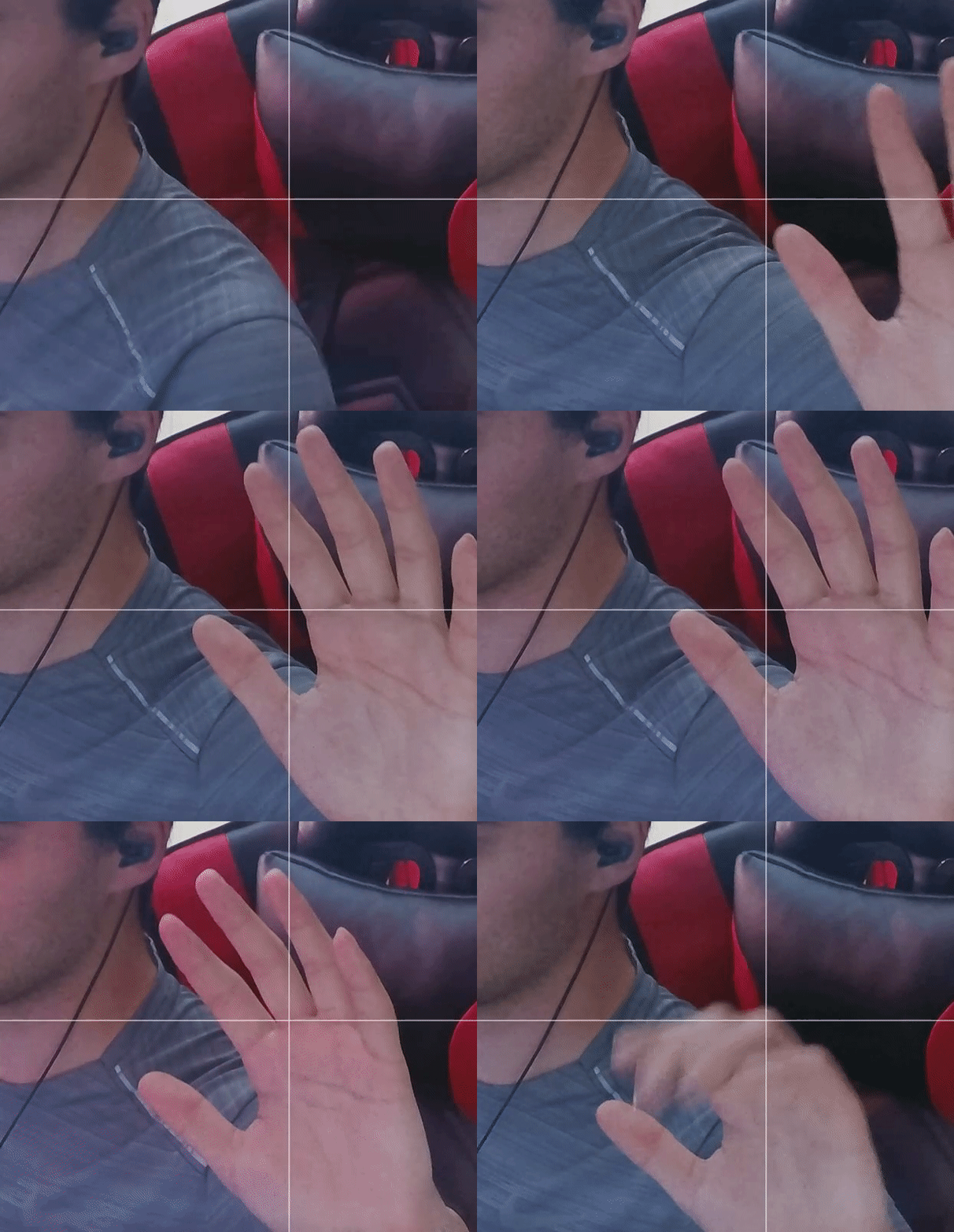 sand fossil
scenic fiber
Post your camera questions here brotherman
sand fossil
scenic fiber
Post your camera questions here brotherman
Thanks!
 unkempt schooner
???
willow onyx
willow onyx
I’ve been having issues with the camera hub software. For some reason I have two...
I found the solution to my own problem. I uninstalled Camera Hub and DisplayLink. Reinstalled Camera Hub and instead of opening Camera Hub I opened DisplayLink and the Prompter works great. If you own a Mac and are having issues this solution resolved all of my issues.
 native jackal
unkempt schooner
I have this problem with my camera
native jackal
unkempt schooner
I have this problem with my camera
Whats the issue Afao, are you plugged into a USB 3.0 port on your pc (not a usb hub)?
you may also consider downloading the quick start guide: https://res.cloudinary.com/elgato-pwa/image/upload/v1702484762/QSGs/Facecam_QSG.pdf
quasi marsh
@scenic fiber i use epocam and sometimes it wont let me zoom in/ wont stay zoomed in for long. do you know why?
scenic fiber
quasi marsh
<@123127235811999745> i use epocam and sometimes it wont let me zoom in/ wont st...
I haven’t used EpocCam in a while
Does it happen during streams?
quasi marsh
when im recording yeah, when i check back its back to being zoomed out
quasi marsh
scenic fiber
Does it happen during streams?
everything is updated i think its a bug
quasi marsh
lemme check
drowsy glade
sand fossil
currently
Do you have any idea where this is coming from?
atomic niche
Hey, I just got my prompter and I'm super stoked to start using it with my DSLR that is connected to my PC via Camlink 4K.
I want to use it on my work laptop as well so I'm wondering has anyone found a setup that enables easy switching of this between 2 computers?
unkempt schooner
Good morning, it seems I won't find any help here either with what is happening to me with my camera.
 short dirge
🥳
 sand fossil
short dirge
🥳
sand fossil
short dirge
🥳
I’m waiting on mine.
sand fossil
drowsy glade
Do you have any idea where this is coming from?
No, not really. Maybe open a ticket with #official-tech-support
native jackal
drowsy glade
Hello, it's normal ?
you running your camera as a virtual camera with the nvidia filters on it or anything?!
drowsy glade
native jackal
you running your camera as a virtual camera with the nvidia filters on it or any...
No
 desert cloak
I tested with my Canon EOS Mirrorless R10 with Elgato CamLink 4K. It's working with 1080p with 60fps, it has clean HDMI Output. I did check the website about camera compatible that R10 is not listed. So, I wanted to test with my camera. Same as I tested my Sony ZV-1F, it's working too. I let you know.
delicate valley
sand fossil
Yes! it’s on their site!
heya, the camera hub wont connect my iphone and my pc together. Using a high bandwidth USB-C cable from Belkin, it worked before.
Is there an order I should turn things on / connect things?
sand fossil
delicate valley
Is there an order I should turn things on / connect things?
I can help after work!
delicate valley
sand fossil
I can help after work!
❤️
sand fossil
delicate valley
❤️
Ready?
 ebon halo
hey guys i have a problem with the elgato cam 1080p/60fps when i stream on twitch a game with good graphic then it freeze
I can reduce it if I deactivate obs preview and leave the elgato cam app open, but even then it freeze
whether 1080p/60fps or 720p/30fps it change not that much
it just freezes less

If the graphics card is loaded to 70%-100% then it hangs up more often but just because of OBS it is increased to 60%-65%
scenic fiber
ebon halo
hey guys i have a problem with the elgato cam 1080p/60fps when i stream on twit...
Hey, what is your setup looking like?
Any usb hubs? What usb port are you using
ebon halo
scenic fiber
Any usb hubs? What usb port are you using
I think its a 3.0 the usb port is yellow
scenic fiber
Alright, and are you using any hubs?
scenic fiber
Once you complete these steps, Windows will no longer power off USB devices connected to your computer, which will fix any problem are experiencing as a result of this Windows feature. Windows 10+ includes the USB selective suspend feature that lets you automatically put USB devices in a very low-power state when they’re not actively… Continue r...
Try this
If you’ve already tried that:
 ebon halo
scenic fiber
https://streamdecklabs.com/%F0%9F%A7%AF-how-to-disable-windows-10-11s-usb-select...
ebon halo
scenic fiber
https://streamdecklabs.com/%F0%9F%A7%AF-how-to-disable-windows-10-11s-usb-select...
thank you i try it
I just did that and started obs. After a few seconds the camera turned off immediately (without starting the camera hub) 
scenic fiber
ebon halo
I just did that and started obs. After a few seconds the camera turned off immed...
Then we re-enable the setting
ebon halo
okay
ebon halo
scenic fiber
i have the original elgato cable weird that i need a another one to try iit
scenic fiber
I’d say try the first setting first
ebon halo
yes
scenic fiber
I’d disregard if it’s a official Elgato cable
ebon halo
okay
ebon halo
scenic fiber
At 90%-100% graphic card utlulization the camera starts to jerk but below that everything runs smoothly
scenic fiber
Even with the changed settings?
ebon halo
yes
scenic fiber
Maybe send a lil ticket to #official-tech-support
ebon halo
scenic fiber
Maybe send a lil ticket to <#842491937038925865>
thank you !!
 random seal
hi, i don´t know if this the right channel for the question, but i need to know if i buy a prompter bundle with camera pro with shipping to Los Angeles California, how many time will take to arrive?
sand fossil
random seal
hi, i don´t know if this the right channel for the question, but i need to know ...
Idk mine is coming 2/7
wooden tulip
Can someone what the Prompter is for?
violet hawk
The Prompter is to fit your camera, webcam or phone behind it, and on the glass infront of the camera you'll be able to see either text, streamchat, discord or any other application as it functions as an extra screen
So while you're reading chat, you'll be looking AT the viewers, much like they do in TV studios when they read the news, they read from a Prompter but it looks to you like they're looking at the camera
wooden tulip
violet hawk
The Prompter is to fit your camera, webcam or phone behind it, and on the glass ...
can i use it for scripting videos?
violet hawk
Yep
 polar musk
Anyone know if there's stream deck controls for the prompter?
Like I want to have a way to control the text screen when I'm reading scripts
It would be nice to have a control for it on the stream deck
wide flint
polar musk
Anyone know if there's stream deck controls for the prompter?
Its part of the Elgato camera hub software and plugin.
 polar musk
OHHHHHH
Ok that makes a lot more sense
I thought it was a separate prompter control
Thanks! Gonna set that up later
 grim spire
Hi, I just wanted to confirm that ZV E10 is working great with the camlink for me as well:
#capture-cards message
forest brook
does anyone use the wall mount with the Prompter?
part of me was thinking of getting a wall mount with the prompter with the longer arms, but not really sure how much it'd support or look
sand fossil
forest brook
part of me was thinking of getting a wall mount with the prompter with the longe...
Look at weight as it is a bit heavier than I thought. Make sure it can hold the weight.
forest brook
I assume it does based on this.... but I also planned on getting the Flex Arm L so not sure if that adds or reduces the amout of weight it can handle

 sand fossil
forest brook
sand fossil
forest brook
Just make sure it won’t droop.
forest brook
sand fossil
Just make sure it won’t droop.
is there any way to know that without buying it 😅
I haven't seen any videos on people using prompter for any other mount besides the ones that clamp to the desk.... except mine doesn't really allow that to be possible lol.
I've been using the mini mount I had for a while but its a pain to adjust and takes space on the desk
sand fossil
forest brook
is there any way to know that without buying it 😅
Well, I’m kinda lifehacking my own. I’m letting it a little bit on my monitor… I’m using mic arm. So I have support in 2 areas. The extension for the flex arm slightly droops.

I can how the other part tomorrow when I wake up. I’m going to sleep
forest brook
👍
scenic fiber
What a goated setup
sand fossil
forest brook
👍
Forgot to show the way it is held up.
 forest brook
sand fossil
Forgot to show the way it is held up.
forest brook
sand fossil
Forgot to show the way it is held up.
is that the wall mount?
wait you said it was the arm mount
sand fossil
forest brook
wait you said it was the arm mount
Right the mic arm mount. The overhead one
And a flex arm extension.
So it will droop.
Best if you use an LP or a master mount.
Unless…
If elgato makes the platform6 desk rack mount wall mounted, then it would hold no issues.
But there is a solution that @solemn lark talked me through. Just have to wait till I redesign to do that, but it involves a trip to Home Depot/lowes
forest brook
ugh so many decisions to make 😒
I got 2 ring lights from a cheap Walmart bundle as well but need to mount that as well cause the mounts it comes with are too big for my room 😭
sand fossil
Then I can hide my clamps behind my monitor “floating” vs on my desk. Also involves stud finding to make sure it will carry weight.
If I do it the way Krabs said, I want to take my wave panels down, and figure out cable routing, and the remount the panels and other stuff. So options
Or I buy a platform6 desk
👀💙🔥
forest brook
can you even fit 3 monitors + a PC on that kind of desk?
sand fossil
forest brook
can you even fit 3 monitors + a PC on that kind of desk?
technically yes, depending on if they are 27 inches, or 2 32in, or 1 49 in, but I could also fit the 57 in samsung.
I could do 1 vertical, and one ultrawide.
forest brook
I got 2x 27 and a 24 rn, but I guess I'd go for 3x 27 if thats do-able
but still 2k for a desk seems a lot
sand fossil
forest brook
but still 2k for a desk seems a lot
depends on the desk you're buying.
 keen edge
Hi! I have an elgato wave 3 mic, but when I want to hear something in my corsair hs80 headset I don’t hear nothing
sand fossil
keen edge
Hi! I have an elgato wave 3 mic, but when I want to hear something in my corsair...
let's move this to #wave-audio
 sour token
Would it be possible to ask a question regarding Epoccam? I'm wondering does anyone know how to utilize the presets of cameras w/ shortcut keys? I heard maybe you could tie it to a stream deck, but I don't have one 😦 and was wondering what my other options might be. Appreciate the help thank you!
Also wondering, can you hook up multiple cameras in EpocCam Camera Hub and utilize them as different sources in OBS?
sour token
So I'm getting told on r/elgato that I can control EpocCam with a Stream Deck, but is it possible with another app? I just dont' have a stream deck so trying to avoid that if possible :/ Appreciate the help, thanks!
sand fossil
sour token
Would it be possible to ask a question regarding Epoccam? I'm wondering does any...
There is mobile, but if you’re using the same device it may not work the way you want cause it will pause or cut out the video feed.
sour token
sand fossil
There is mobile, but if you’re using the same device it may not work the way you...
Thanks Vic, maybe I can utilize digital zoom in OBS, do you know the max resolution it can use I think the iPhone 11 is 4k resolution? So maybe I can just have it zoom in like that.
I wonder if there's a macro bases software that can setup macros on the app. Hmm may be a stretch, can Camera hub utilize multiple devices that you know of?