#camera-prompter
1 messages · Page 1 of 1 (latest)
 sand fossil

 lucid urchin
I can't seem to figure out what is wrong with my Facecam. I was streaming yesterday and it kept stuttering and would eventually show the connect camera screen. It's plugged in to the rear motherboard USB 3.0 port and is sharing the same USB 3.0 controller as the Wave:1.
sand fossil
lucid urchin
I can't seem to figure out what is wrong with my Facecam. I was streaming yester...
hmm… that is odd. Whas there any other program running trying to use the camera vs rec./setreaming software?
lucid urchin
I don't think so. I use Elgato Virtual Camera in OBS.
Would scene nesting cause issues with camera?
The main camera source is one scene, which is then placed in another scene for me apply filters, then I nest that scene in my main broadcast scenes
sand fossil
lucid urchin
Would scene nesting cause issues with camera?
The main camera source is one scen...
i've never done that. I do use filters to move my camera via transitions, but that's on my scene not my source. I don't think that would be the issue.
lucid urchin
Could the Wave be the issue being on the same controller?
sand fossil
lucid urchin
Could the Wave be the issue being on the same controller?
when you say controller, are you using a hub?
lucid urchin
No. Rear motherboard ports
sand fossil
lucid urchin
No. Rear motherboard ports
then no, because each port has it's own power. @solemn lark explained this to me.
lucid urchin
Ah ok.
 quasi marsh
Hi ! I come here to ask you for help, I explain to you, I have a lumix DMC-GX80, connect to my camlink 4k, and the camlink 4k and connect to my usb 3.0 (the hdmi and usb cables are very good quality), the problem, it worked, so I changed the DMC parameter, to increase the quality of REC (4k 25fps), after that, the camlink freezed, I had no more images on OBS, so I put the DMC image back in FULLHD 60 fps, unplugged, reconnected the usb, and it works but for only 10 seconds before freezing -.-, so I updated the BIOS, from the PC, from the camlink firmware, I deactivated the windows authorization to deactivate the usb (in power management) and despite all this, I have 10 seconds of image, I must each time disconnect the 'usb and reconnect it, to find the image on obs, which freezes after 10 seconds. thanks you !
sand fossil
quasi marsh
Hi ! I come here to ask you for help, I explain to you, I have a lumix DMC-GX80,...
do you have any pending updates?
quasi marsh
sand fossil
do you have any pending updates?
no, I checked everything, I don't understand, everything works fine, until I change the video quality in my lumix DMC, since then, even if I put the old parameters back, it freezes
i also noticed something else, if i don't touch the obs software, its working, if i click 1 button of obs, the camera freezes lol
Should I reset the camera maybe? factory reset? that I reinstall obs?
after the freeze, the white led of the camlink goes out, and from there, IMPOSSIBLE to have an image, if I restart the pc, I have a code 43 on the usb where the camlink is connected which tells me that the usb and unknown, I must unplug, reconnect is THE I have an image, and the white led
sand fossil
quasi marsh
after the freeze, the white led of the camlink goes out, and from there, IMPOSSI...
is the camera on the list for compatibility?
quasi marsh
sand fossil
is the camera on the list for compatibility?
yes full green
sand fossil
quasi marsh
yes full green
maybe reset the camera, see if any changes.
quasi marsh
sand fossil
maybe reset the camera, see if any changes.
yes, it's the last thing to do, I don't see what else to do
sand fossil
quasi marsh
yes, it's the last thing to do, I don't see what else to do
it’s causing rending drops when you change the settings. So my question, what gpu do you have?
quasi marsh
sand fossil
it’s causing rending drops when you change the settings. So my question, what gp...
980 TI
sand fossil
quasi marsh
980 TI
that might be why. what are the require specs for camlink?
quasi marsh
sand fossil
that might be why. what are the require specs for camlink?
he doesn't talk about a graphics card, but the 980 TI has more than enough to run full HD ^^
sand fossil
quasi marsh
980 TI
I checked the site. https://help.elgato.com/hc/en-us/articles/360028241671-Cam-Link-4K-System-Requirements

Elgato
The following are the System Requirements for Cam Link 4K. Operating Systems: Windows 10 (64 bit) macOS 10.12 Sierra, or later Connectivity: USB 3.x Port CPU: 4th generation quad-core Inte...
960 or higher, so gpu is fine. what about your cpu?
quasi marsh
sand fossil
960 or higher, so gpu is fine. what about your cpu?
2700x ryzen amd
sand fossil
quasi marsh
2700x ryzen amd
you should be fine. It might be the settings.
We can tinker later. I’m going to sleep, unless someone else beats me too it. Have a good night!
 cyan quiver
FYI Everyone! The Elgato Facecam Pro comes with a USB C to USB C cable... just in case.... Mine arrived today so I ordered a adaptor to USB 3.1
 cloud plinth
Lucky for me I have 3 type c ports
 wanton jetty
Hey, i got my facecam pro today and it is really fuzzy. Anyone might know why this is?
Default settings atm and room has good lighting but is is blurry
Trying to send a image but cant here 😦

It gets slightly clearer when I leave my roomn
I manually changed the focus and it got a lot clearer. But not great still
quasi marsh
sand fossil
you should be fine. It might be the settings.
Thanks ! and good night !
sand fossil
wanton jetty
I manually changed the focus and it got a lot clearer. But not great still
you might have to play around a bit with it, and maybe see if the distance is ideal or not
 scenic fiber
lucid urchin
I don't think so. I use *Elgato Virtual Camera* in OBS.
scenic fiber
lucid urchin
I don't think so. I use *Elgato Virtual Camera* in OBS.
No, the virtual cam itself is the issue
You could overcome this by using Nvidia broadcast for things like blur or greenscreen
lucid urchin
scenic fiber
No, the virtual cam itself is the issue
Ah ok. Thanks for that.
So, I should switch from Elgato Virtual Cam to Elgato Facecam in OBS?
scenic fiber
Yes.
sand fossil
lucid urchin
Ah ok. Thanks for that.
So, I should switch from *Elgato Virtual Cam* to *Elgato...
this would be idea, as I tested this out too.
quasi marsh
sand fossil
this would be idea, as I tested this out too.
Hi, unfortunately the result and the same, I start obs OR 4k utility, I have the image for 10 seconds, and freeze, tomorrow I will try to unplug everything, leave 5 minutes and reconnect, but I'm starting to despair.. .
sand fossil
quasi marsh
Hi, unfortunately the result and the same, I start obs OR 4k utility, I have the...
I can probably help maybe after work tomorrow!
lucid urchin
scenic fiber
Yes.
Why does virtual cam behave like that?
scenic fiber
That I dont know sadly
quasi marsh
sand fossil
I can probably help maybe after work tomorrow!
Hi ! problem solved, it works! I unplugged, waited 5 minutes, reconnected, and it works lol (now I have questions for the 4k60 pro) I change channel ! :)
quasi marsh
Problemo 😮
When not in a game, my Elgato Facecam works fine, but once the game becomes the main focus, the camera source turns to this:
Any ideas?
https://cdn.discordapp.com/attachments/581551338496983041/1081771683687436328/image.png
Firmware and software are up to date
It occasionally flickers between that image and me with extreme lag before flashing back to that image again...
What I've tried so far:
- Uninstalled and reinstalled the software
- Running the camera hub as administrator
- Tried multiple different USB ports
- Contacted tech support (they didn't seem to speak English and they were just copy/pasting FAQ's that weren't relevant )
- Updated it all, drivers and firmware etc
- Tried it in several games on different engines (Unreal/Unity) with no luck, problem occurs on both
- Tried running the game in windowed fullscreen instead of proper full screen but that didn't help
 lucid urchin
quasi marsh
Problemo 😮
When not in a game, my Elgato Facecam works fine, but once the game...
lucid urchin
quasi marsh
Problemo 😮
When not in a game, my Elgato Facecam works fine, but once the game...
Are you using Elgato Virtual Cam in OBS by chance?
quasi marsh
lucid urchin
Are you using `Elgato Virtual Cam` in OBS by chance?
Yeah... I read the comment above and from someone in the general chat and I'm about to try it with just Elgato Facecam instead
lucid urchin
Yeah, I had that issue. Switching helped.
quasi marsh
lucid urchin
Yeah, I had that issue. Switching helped.
I hope it works for me too! 😛 ty
lucid urchin
quasi marsh
I hope it works for me too! 😛 ty
No problem 🙂
sand fossil
quasi marsh
I hope it works for me too! 😛 ty
It should. Virtual cam has been a bit problematic lately.
quasi marsh
Yeah many thanks, it just worked flawlessly for the first time lol
 lucid epoch
?Oooo does anyone have a sidebyside comparison of the cam vs cam pro
 turbid elk
@floral badgeyou still how issues?
Because dont forget about the usb transfer mode in the firmware version and setting section
 distant dome
Has anyone else noticed how the new Facecam Pro seems to need a Thunderbolt 3/4 or USB 4 rated cable? At least on my desktop. I've tried USB C 3.1 Gen 2 rated at 20Gps at 10 feet, I've tried adding a Thunderbolt 3/4 rated cable 2 foot extension cord connected to the beefy 2M cord that Elgato provided and my camera hub thinks that they are USB 2.0 and won't work!? The only thing I have been able to "get away with" is the addition of a 40Gps rater right angle USB C adapter!? I do not think it is possible to use anything longer than a 2M cable, no matter how high it is specced (Thunderbolt cables never come longer than 2M). Has anyone tried a longer cable than the one provided and had any success???
 lofty jackal
Have some questions about using the Elgato FaceCam? Can anyone help me out?
sand fossil
distant dome
Has anyone else noticed how the new Facecam Pro seems to need a Thunderbolt 3/4 ...
i think the longest recommended is 10ft
scenic fiber
lofty jackal
Have some questions about using the Elgato FaceCam? Can anyone help me out?
Cant help if you don’t drop your questions
turbid elk
@lofty jackalSame
 gloomy token
Is there no way to customize the framerate in EpocCam if you're using NDI? There's framerate options in the standard camera hub mode, and other NDI camera apps support even higher resolutions + framerate so it doesn't seem to be a technical limitation of the protocol itself, yet I'm not seeing any option for it and I feel like it surely MUST be somewhere?
Edit: EpocCam Pro for iOS, app version 2022.2, iOS v16.3.1
quasi marsh
my wecam keeps flickering in obs, can anyone help: https://obsproject.com/logs/R4Q5HySz49QWWPka
 loud cedar
I'm not sure if this counts for the camera help but my Elgato Camera Hub is stuck on this, it works fine connecting to my ipad & iphone through my other laptop but that one isn't working due to unrelated tech issues, I have tried restarting everything, deleting and redownloading etc
 quasi marsh
good evening today I bought my fececam I encountered the problem that when I'm live it unlocks can you tell me why
distant dome
sand fossil
i think the longest recommended is 10ft
Well, I can't
get it to work past 2M (6.5 ft)... Anyone know of a cable that is working for them at 10 foot length?????
sand fossil
distant dome
get it to work past 2M (6.5 ft)... Anyone know of a cable that is working for th...
you might gave to check the cable specs and make sure it matches the requirements.
distant dome
sand fossil
you might gave to check the cable specs and make sure it matches the requirement...
I have bought USB 3.1 Gen2 rated for 20Gps, 10 feet, but it didn't work. Even a 40Gps rated two foot extension for the original cable Elgato provided did not work (it keeps telling me that I am using a USB 2.0 connection, which I was not using. It just seems to fail with cables longer than 2 M, at least for me.
sand fossil
distant dome
I have bought USB 3.1 Gen2 rated for 20Gps, 10 feet, but it didn't work. Even a ...
@solemn lark think windows is suspending the usb?
 solemn lark
sand fossil
<@234517444826234880> think windows is suspending the usb?
solemn lark
sand fossil
<@234517444826234880> think windows is suspending the usb?
No. The USB cable is too long.
 knotty radish
My facecam pro has to be unplugged and plugged back in every single time I turn my pc on in order for camera hub, or any application for that matter, to recognize it.
Has anyone else had this issue and found a fix, or have any ideas on workarounds?
 nova geode
Hey all, i have 3 elgato facecams connected to my streaming pc, but i get some random stuttering in OBS (not all at the same time).. all cams are on 1080p60, so i though maybe the usb bus is overloaded... is there someway i can check this? And is there a way to solve it? I already added an extra 4xUSB3 interface, but that didn't work..
distant dome
I have been able to use 40Gps rated right angle adapter for better cable management for my FaceCam Pro, but I found that if I let the FaceCam Pro run continuously it freezes the image and I need to remove and re-insert the USB and sometimes re-start the Camera Hub to get it working again. I am going to leave the right angle adapter off and see if the camera still freezes after a few hours...
 chilly field
Anyone know where i should head to get help with epoccam issue? 🙂
 violet hawk
Here, just state your questions and whenever someone has the answer to them they will respond 🙂
chilly field
The issue isnt camera. But it is the microphone. I have tried on two phones. And i have updated camerahub on my pc windows 11. And even reinstalled it afterwards. Still not able to get microphone to work 😦
 pine notch
 swift charm
i need help to fix this
 scenic fiber
swift charm
i need help to fix this
scenic fiber
swift charm
i need help to fix this
Virtual cam is broken
Use Nvidia broadcast for blur
swift charm
i try, it not work
scenic fiber
Little bit more details, are you using virtual cam?
What kind of USB cord are you using
swift charm
i use Epocam app on my iphone and connect wifi to pc
scenic fiber
Does epoc cam run through virtual cam?
swift charm
it runs on elgato software but obs doesn't show up and says "please run Camera Hub..."
scenic fiber
Hmm I don’t know much about EpocCam since the new update
sand fossil
swift charm
it runs on elgato software but obs doesn't show up and says "please run Camera H...
you have to select it in camera hub, and then make sure you set it up as a source in obs.
swift charm
obs worked, but i use epocam for other software it keeps saying "please run Camera Hub..." 😦
sand fossil
swift charm
obs worked, but i use epocam for other software it keeps saying "please run Came...
yeah it required camerahub now
swift charm
Can you help me fix it? Specifically, I use epocam to replace webcam with iphone in blender
 wet shoal
i cant find the download page for the app just some apk
 lapis girder
my phone wont connect to camerahub on my pc
i ahve a iphone 1 1pro
and i use epoc cam
 meager drift
can i use any usb cable for the elgato face cam?
i currently have a usb 3.1 cord thats capable of up to 10gbps speed
 fossil stone
Is there a way to lock shutter speed at 1/120 s and then use auto ISO?
for Elgato Facecam
not the pro
does the pro have that feature?

 keen thorn
my facecam is turning off randomly, any tips? Just sent in a ticket.
 pulsar breach
Question I have a potential camera how will I know it works, it uses a micro HDMI cable

I have a mirrored Sony m200 in case this one wouldn’t work
pulsar breach
so tempted to buy it today
pulsar breach
Anyone able to give me any clue?
 wide flint
pulsar breach
Anyone able to give me any clue?
wide flint
pulsar breach
Anyone able to give me any clue?
I'm reading that it doesn't have an easy way of getting a clean HDMI out. There seems to be a workaround some people use however how well that actually works and if it will work for you I dont know.
pulsar breach
Decided to get the canon m200
 narrow elk
pulsar breach
Decided to get the canon m200
narrow elk
pulsar breach
Decided to get the canon m200
an easy way to check camera compatibility is to connect the camera directly to a monitor or tv. unfortunately this would require you to already have said camera if we haven't added it to the list: https://www.elgato.com/en/cam-link/camera-check
 meager drift
for the elgato facecam, can i use a usb c to usb c cable? This one is usb 3.1 able to support up to 10gbps transfer speeds
 brave topaz
having an issue where I boot OBS or activate the camera on discord and it runs for 3 seconds and freezes, wasn't having this issue a week ago and my friend is experiencing the same thing any ideas? updated bios seemed to fix
sand fossil
meager drift
for the elgato facecam, can i use a usb c to usb c cable? This one is usb 3.1 ab...
test it out, should work.
 summer shadow
Hello! my elgato face cam does not work. Although my camera is connected to the usb 3.1 port on my computer, I get the "connect your elgato camera" warning. Also, the blue LED of the camera is not working. Can someone help me please.
narrow elk
summer shadow
Hello! my elgato face cam does not work. Although my camera is connected to the ...
@ everyones are not necessary, if you are looking for immediate help please contact #official-tech-support
sand fossil
summer shadow
Hello! my elgato face cam does not work. Although my camera is connected to the ...
your port isn't sowing it's connected hence the no light, no pick up, try this, and reboot, then try your camera. https://streamdecklabs.com/🧯-how-to-disable-windows-10-11s-usb-selective-suspend-setting/

Once you complete these steps, Windows will no longer power off USB devices connected to your computer, which will fix any problem are experiencing as a result of this Windows feature. Windows 10+ includes the USB selective suspend feature that lets you automatically put USB devices in a very low-power state when they’re not actively… Continue r...
sand fossil
summer shadow
Hello! my elgato face cam does not work. Although my camera is connected to the ...
also, might want to remove the @ everyone on your previous message.
Camera hub has an update 1.6
lucid epoch
sand fossil
Camera hub has an update 1.6
installing now, thanks for the info
 proven plume
I'm having a weird issue with the Elgato face cam I just got

Here's a video and I show the issue and I walk through trying to fix it but I don't understand why the camera starts flickering as soon as I go live
Everything was fine when I was offline. I was using the Elgato virtual camera and then as soon as I went live it started flickering and doing this thing where the message says use the virtual camera, when I was using the virtual camera.
I mentioned it in the video but when I click onto my second monitor the flickering would stop. But as soon as I click back onto my main monitor the flickering would start again
The only way I could get it to stop was like the non-virtual camera and OBS but then I could only use OBS controls to make changes and using the settings already saved onto the camera's flash memory
The first 15mins im dealing with the issue until i find a work around
sand fossil
proven plume
The first 15mins im dealing with the issue until i find a work around
the virtual cam has issues. Try it without the virtual cam for now.
proven plume
Okie dokie, has it always been that way? Any idea if it's going to be worked on in an update?
sand fossil
proven plume
Okie dokie, has it always been that way? Any idea if it's going to be worked on ...
idk, there was a 1.6 update 🤷🏻♀️
proven plume
Well poop. Well I guess that's fine. I'll just save settings directly to the camera I guess
sand fossil
proven plume
Well poop. Well I guess that's fine. I'll just save settings directly to the cam...
I would recommend it for now I’m wondering if maybe there might be something going on with the virtual cam as far as using the nvidia visual effects
 pastel sluice
does anyone know anything about the EpocCam Pro for iPhone with the Elgato Camera Hub
pastel sluice
anyone?
lucid epoch
You did ask at 4am. People going to be asleep xD
pastel sluice
lucid epoch
You did ask at 4am. People going to be asleep xD
it was 12am Eastern US time lol
lucid epoch
pastel sluice
it was 12am Eastern US time lol
Thats still very late
 slender shuttle
I often now get the error that the port of the USB could not be resetted (Error Code 43) when i reconnect the facecamp pro after it freezes .. any ideas?
 night sentinel
would love any help with my elgato facecam, im having a REALLY hard time adjusting the colors/lighting on it. No matter how much i play with the settings I have this ugly green hue, and even with lots of light the cam looks dark
narrow elk
would love any help with my elgato
night sentinel
hmm i cant access the thread you made, says i dont have permission @narrow elk
 green scarab
would any help with my elgato facecam? im having trouble after updating the firmware to 4.09 now the pc shows a message the usb device not recognized. on my laptop the webcam works fine.
meager drift
I have a multiple monitor setup, sometimes when i open the elgato face cam app, it is white and non responsive. I would have to make the monitor the app opens on the primary monitor for it to work
green scarab
green scarab
would any help with my elgato facecam? im having trouble after updating the firm...
got fixed due new installation of windows
 full mango
Does anyone else have an issue with epoccam on ios where their phone is overheating? Doesn't matter if it's wifi or usb my phone gets super hot. Is this normal?
 fervent vale
Anyone had issues when trying to update the camera hub but a file is missing? If so what did you do to fix it?
night sentinel
@narrow elk anyway you could make it so I could access our thread? I'd like to post the pics and get some answers
currently this is how it shows up for me.
 pastel sluice
does anyone know anything about the EpocCam Pro for iPhone with the Elgato Camer...
pastel sluice
pastel sluice
does anyone know anything about the EpocCam Pro for iPhone with the Elgato Camer...
Anyone know anything bout how to fix this
slender shuttle
Are there any known bugs with the FaceCam Pro and OBS Studio? My FaceCamp Pro always freezes since a few days after working for a couple of minutes. Deactivating and re-activating it does reset it and it works again - for some Minutes.
 true shadow
Is epoccam going to be available on Android?
wide flint
true shadow
Is epoccam going to be available on Android?
Elgato doesn't comment on future products or releases so there is no official information.
Based on the fact its already been several years though the answer is likely no.
quasi marsh
Anyone else experiencing camera hub closing on startup after the newest update?
 rustic roost
Anyone having issues with the facecam not showing in OBS
 junior trellis
I'm having an issue were I connect my camera to a usb 3 and says I'm connected to a usb 2
 copper void
today I downloaded the update for the facecam problem is my cam doesn't open anymore I looked into my setting on windows it's there my stream deck has no issues I did uninstall the file reinstalled it again still won't open
 glossy girder
I'm trying to use EpocCam with my iPhone but the PC app detects it but doesn't show any picture it just loads forever. Ive tried restarting my PC and reinstalling the app both on my phone and the PC and still no luck. if anyone could help me that'd be great
 copper void
Can anyone help me with knowing why my facecam won't work anymore, after an update was done yesterday nothing works I did check windows to see if that was the problem it's not, I did Uninstal the program and reinstall the program from the website itself of elgato and it still won't open the blue light on the right side does on and off time to time but thats it
Like I said just since the last update it won't work
sand fossil
glossy girder
I'm trying to use EpocCam with my iPhone but the PC app detects it but doesn't s...
trying with the updated app right now.
mine is working, what settings have you done? both app and pc?
 glossy girder
sand fossil
mine is working, what settings have you done? both app and pc?
glossy girder
sand fossil
mine is working, what settings have you done? both app and pc?
it wouldnt even give me a chance to do any settings they were all locked and it was in an infinite loop of loading
sand fossil
glossy girder
it wouldnt even give me a chance to do any settings they were all locked and it ...
strange, did you reboot the pc?
the pc is the same wifi network as the iphone right?
glossy girder
yea like it connects but the video doesnt show its just loads
sand fossil
glossy girder
yea like it connects but the video doesnt show its just loads
have you check epoccam settings and see if it's trying to choose between wired and wireless, and just select wireless. also make sure you don't have your camera covered.
glossy girder
sand fossil
have you check epoccam settings and see if it's trying to choose between wired a...
the settings are grayed out it doesnt let me change anything
sand fossil
glossy girder
the settings are grayed out it doesnt let me change anything
I'd suggest since it's a software issue, and it's greyed out, open a ticket with #official-tech-support
 inner forum
This came to me when I click on the button, the link directs me to another product. This is mistake?


the camera is actually not in 4k, but in 1080
pastel sluice
How do you fix the problem with this to stop the cam from glitching and lagging with EpocCam for iPhone
 somber gulch
(╯°□°)╯︵ ┻━┻
When your 5 year old pc runs cam link pro
But your year old pc with better specs is giving errors
 leaden sequoia
If you use elgato EpoCam with an iPhone 13, is it possible to enable the night mode?
 lapis cloud
does anyone have a amazon link to a usb c cable that is 10 feet or more that will work with the facecam? If so can you send me the link
 serene pilot
anyone has experience with PCI-E extension cards? I want to use my FaceCam on my USB-C port on my Motherboard but then i will need more Ports since i currently have my Wave3 connected to USB-C?
 worldly stirrup
anyone have issues with epoccam disconnecting after 5-10 minutes? i'm using an iphone 8 connected via usb and i've had this problem since before camera hub (the previous epoccam software) and also camera hub. i have to reconnect the phone for it to start working again, and sometimes that doesn't work and i need to restart either the phone or the software.
EDIT: bought a new cable and was able to use the camera for 30+ minutes. seems like the cable was the problem
scenic fiber
serene pilot
anyone has experience with PCI-E extension cards? I want to use my FaceCam on my...
No available usb 3 slots at all?
 surreal echo
Can I use any type of usb c to usb cable for Facecam / pro? I have a couple Anker braided ones laying around
wanton jetty
Anyone know why my streamcam pro just flashes a red light?
also the quality isnt great
It also makes a weird noise when plugged in for a sec. Its basically new
scenic fiber
wanton jetty
also the quality isnt great
You got examples? And what lights are you using
wanton jetty
scenic fiber
You got examples? And what lights are you using
facecam pro sorry*
scenic fiber
Mhm, what lights are you using?
wanton jetty
lights?
scenic fiber
Lights
wanton jetty
None?
scenic fiber

wanton jetty
Natural light
scenic fiber
Can I peep some pictures
wanton jetty
 scenic fiber
Some examples of the set up too, and your settings
scenic fiber
No clue, you should contact #official-tech-support for that
wanton jetty
 scenic fiber
But I can help you with image quality
wanton jetty
This red light doesn’t stop flashing
FYI just moved the cam down. It’s not normally there lol
scenic fiber
Are you using a hub by any chance
wanton jetty
nope
scenic fiber
Ill have to look into errors when I’m home
Though you want to make sure you’re lit well.
Usually the cam quality is as good as your lights
wanton jetty
ok if I DM you?
scenic fiber
Sure thing
Just send me your settings on the facecam and the lightning setup
Where the lights coming from etc
wanton jetty
If you listen to that
It’s doing that on loop now
Oh and it’s back to red light and silent
wanton jetty
scenic fiber
Yea that doesn’t sound very good
It had always done it when I tweaked the settings in the app. I thought it was normal when changing settings tbh
From when I got it
Ill make a ticket
 sullen urchin
@narrow elk I see that you may be the camera expert. I'm curious as to maybe you can help me with connecting my Panasonic Lumix DMC G7 to Cam Link. For some reason it does not pick up the signal but if I use my HD60+ then it would pick it up BUT there is a huge issue with lag on the 4k Capture Utility app vs if I just used OBS but then after a minute the video freezes even on OBS. Should I return the camera and get a different one?
 sullen urchin
scenic fiber
Should be compat <@190221245210558474>
sullen urchin
scenic fiber
Should be compat <@190221245210558474>
I️kr emphasis on the “should.” I’m just not seeing any answers that have helped. I’ve opted to just return and buy a Sony A6000
glossy girder
How come when I activate Elgato Virtual cam in OBS the camera freezes
I just upgraded to the elgato Facecam and it is already giving me trouble
scenic fiber
Elgato virtual cam is bugged @glossy girder
 thorny silo
Question! Would the Facecam Pro work with the Multi Mount System? And furthermore, does the Multi Mount come with all the stuff shown at the bottom?

I ask since I was in need of an arm for my Facecam Pro and figured this could be a good option
sand fossil
thorny silo
I ask since I was in need of an arm for my Facecam Pro and figured this could be...
some of these accessories are separate, but I think you can add them to the cart, and check them out. Maybe there’s a bundle option. Also, yes, facecam pro will be fine.
leaden sequoia
If you use elgato EpoCam with an iPhone, is it possible to enable the night mode like in the apple camera app?

 void stump
I wanted to use a mp4 file for my AI backround but it's not looping. The default elgato backgrounds are looping for me but not my own one. Is there any fix for this?
 modest mango
Guys i have a problem, help me pls
modest mango
guys, why does my facecam freeze during the live broadcast?
 idle nexus
modest mango
guys, why does my facecam freeze during the live broadcast?
idle nexus
modest mango
guys, why does my facecam freeze during the live broadcast?
It could be a lot of things, would you mind telling a bit more on what is usually happening when it freezes?
modest mango
basically while I'm in the stream, at a certain point although the live is going well, the only thing that gets stuck is the facecam
idle nexus
whats your resource usage whilst trying to stream?
modest mango
idle nexus
whats your resource usage whilst trying to stream?
In what sense?
idle nexus
Cpu /GPU usage
void stump
void stump
I wanted to use a mp4 file for my AI backround but it's not looping. The default...
Does anybody have an idea about that? 🙂 It's still not looping and I don't know how to fix this.
scenic fiber
lucid epoch
Pleased with the lighting set up and how it looks quality wise 😄
Nice use of lead lines in the corner on your room, 3 point set up. I approve
scenic fiber
modest mango
basically while I'm in the stream, at a certain point although the live is going...
Are you using the background blur filter?
modest mango
scenic fiber
Are you using the background blur filter?
No
scenic fiber
And the virtual cam?
 grim drum
Anyone ever replace the cam cable with a longer one, what did you use?
 deep prairie
I have the Stream cam (Not the 4K model) and i run into the same problem all the time, the icon from the camera hub in the taskbar doesn't open the Camera hub, i did reinstall the program about 5 times now, the only way to get it to work is to kill the process all the time and then start camera hub again, now lately i get the camera to show the blue light all the time, meaning it's operational while no program is using it, i'm on Win11 and even after a fresh install the problem stays, anybody have a fix (ping me)
sand fossil
grim drum
Anyone ever replace the cam cable with a longer one, what did you use?
As long as it’s the same power bandwidth it should be fine, but most people recommend not exceeding 10ft.
sand fossil
deep prairie
I have the Stream cam (Not the 4K model) and i run into the same problem all the...
are you connected to a usb 3.0 port on your mobo, and not a hub?
grim drum
sand fossil
As long as it’s the same power bandwidth it should be fine, but most people reco...
I think the one it comes with is 5 ft?
sand fossil
grim drum
I think the one it comes with is 5 ft?
I think the site has the length listed.
deep prairie
sand fossil
are you connected to a usb 3.0 port on your mobo, and not a hub?
Straight with original cable into the PC USB 3.2 port
sand fossil
deep prairie
Straight with original cable into the PC USB 3.2 port
did you prevent the suspend of power on win 11/10?
deep prairie
no, even reconnecting the camera etc doesn't help either, all other USB cables go to my screens their USB hubs so they don't draw too much power etc
For instance when i want to use the camera on discord it works instant, the camera hub just doesn't start up when i press the icon on my taskbar or try to start it with the menu shortcut, it's just not showing or working until i kill the process
deep prairie
sand fossil
did you prevent the suspend of power on win 11/10?
Also the controls on my streamdeck plus don't work, it's a software problem, the camera works fine
sand fossil
deep prairie
Also the controls on my streamdeck plus don't work, it's a software problem, the...
i think for the streamdeck you can ask in #stream-deck
deep prairie
once i close the process it works on the streamdeck +
sand fossil
deep prairie
For instance when i want to use the camera on discord it works instant, the came...
using the usb hub is the issue
deep prairie
sand fossil
using the usb hub is the issue
it's the 1st start of the camera hub that just doesn't work, after i end the process all works like it should
sand fossil
deep prairie
it's the 1st start of the camera hub that just doesn't work, after i end the pro...
have you uninstalled, and reinstalled?
deep prairie
Yes 5 times, even used revo uninstaller etc the last 3 times...
sand fossil
deep prairie
Yes 5 times, even used revo uninstaller etc the last 3 times...
isk what revo is, but did you delete the app data stuff for elsegato as well?
deep prairie
Even do a reboot before instaling again
deep prairie
sand fossil
isk what revo is, but did you delete the app data stuff for elsegato as well?
Revo uninstaller cleans the registry entries etc
sand fossil
deep prairie
Revo uninstaller cleans the registry entries etc
idk anything about that. I never trust software to do it all for me.
deep prairie
you can pick what to remove, it looks at the installer and checks where it writes to app data, registry etc, then when uninstalling it present the list to you to delete all those too
sand fossil
deep prairie
you can pick what to remove, it looks at the installer and checks where it write...
idk, I'd say check to make sure.
deep prairie
it's this precise in removing all leftovers

All gone

did a reinstall, after i reboot the icon on the is there, i click it, nothing happens, the blue light on the stream cam is lit, i need to kill the process or i can't use the camera because the camera is in use by the camera hub, same problem, it's there from day 1 i bought it a year ago through multiple versions of the software

Switched different USB ports etc (other controller)... So it's not the USB, it's just the initial boot that gets the program in a non responsive state
sand fossil
deep prairie
Switched different USB ports etc (other controller)... So it's not the USB, it's...
i'd suggest reaching out to #official-tech-support
deep prairie
yeah i guess that's the best option...
rustic roost
is there a reason why the facecam wont work on 60 fps in OBS
 real kernel
hello guys i have a problem with the facecam the facecam can not save my settings. Every time I start up the computer I have to reset the camera settings 😦 camerhub version is 1.6.1.999 and the facecam FW is 4.09 (ISP: 160.53)
sand fossil
rustic roost
is there a reason why the facecam wont work on 60 fps in OBS
it should, mine does.
sand fossil
real kernel
hello guys i have a problem with the facecam the facecam can not save my setting...
might want to reach out to #official-tech-support as there are very few who have this issue.
 harsh igloo
Hey guys, I could do with a little help if that's alright. I'm using an elgato facecam, yesterday I enable background blur within the camera hub, worked great. Today, it's not working in OBS (no blur) or Twitch Studio (no video). I absolutely love this effect and want to make the most out of it, but it's slowing things down right now. Help me please xxx the picture proves it was working yesterday xx

I took my problem to OBS and they sent me here
 neat elm
Hey! Last week I finally received my face cam pro!! (🤗) but It doesn’t work properly now. It doesn’t focus anything, doing a weird noise and the red led is blinking and crash a lot the camera hub, any idea? I tried different pc ports just in case it was some kind of connection issue
 graceful dew
I have the problem that the Camera Hub does not save my settings. Every time you restart, the settings are back to default.
harsh igloo
I guess I didn't get an answer then
 dreamy pelican
once again I ask, anyone here using Elgato Facecam + Tobii Eyetracker 5 together?
real kernel
graceful dew
I have the problem that the Camera Hub does not save my settings. Every time you...
same problem 😦
@graceful dew i saved my settings and i deleted the camerhub 😄
graceful dew
real kernel
same problem 😦
I completely deleted the Camera Hub again. Then reinstalled. Now everything works (for now)
 mossy mulch
Hey everyone.
I've been thinking about using my Facecam to record video for Youtube, but I notice that it does get a little bit blurry when recording over OBS, I was hoping for some tips on how to improve quality.
The current gear that I have is (beside the camera):
Elgato Keylight Air
This floodlight (for background lighting) - https://www.amazon.ca/gp/product/B0757MKRGH/ref=ppx_yo_dt_b_asin_title_o00_s00?ie=UTF8&psc=1
Any direction is appreciated, please consider the lack of budget to buy new lights hahaha ❤️

This is a Bluetooth connected APP control color changing LED flood light. "Control at your will", ”DIY Scenes“ and ”Timing“ are just three of its many unique functions. Download the "BRmesh" APP from Google Play or IOS APP Store. Features: Registration: Not Required Maximum Number of Devices: 100...
scenic fiber
harsh igloo
Hey guys, I could do with a little help if that's alright. I'm using an elgato f...
Hey Ted, the Virtual cam is bugged for loads of people. my workaround has you download Nvidia broadcast and use the background blur from the app rather than the camera hub!
scenic fiber
mossy mulch
Hey everyone.
I've been thinking about using my Facecam to record video for You...
Got any pictures how it looks now? And what settings are you running. Bonus points if you show me your light set up
scenic fiber
neat elm
Hey! Last week I finally received my face cam pro!! (🤗) but It doesn’t work pro...
Second time I’ve seen this issue.
@wanton jetty how have you fixed it?
mossy mulch
scenic fiber
Got any pictures how it looks now? And what settings are you running. Bonus poin...
Let me get a screenshot of my video I tested

@scenic fiber The light is aimed directly at the wall, but the Keylight just overtakes it
Settings on Camera Hub
Keylight Air:
Temperature: 7000k
Brightness: 68%
 neat elm
scenic fiber
<@166499735278977026> how have you fixed it?
neat elm
scenic fiber
<@166499735278977026> how have you fixed it?
Same issue here! with the noise and no focus at all. Red led blinking… is it a connection/power issue? @wanton jetty
wanton jetty
scenic fiber
<@166499735278977026> how have you fixed it?
Had to send it back. Support said it’s broken.
Still in the process of sending it tho, there super slow
wanton jetty
neat elm
Same issue here! with the noise and no focus at all. Red led blinking… is it a c...
^
neat elm
I’ll package it then… thanks!
harsh igloo
scenic fiber
Hey Ted, the Virtual cam is bugged for loads of people. my workaround has you do...
thanks for getting back to me, for the output do I want to be using the facecam or the virtual cam? I've actually used both the camera hub and nvidia broadcast and I still can't get it to work
harsh igloo
harsh igloo
thanks for getting back to me, for the output do I want to be using the facecam ...
I have it working now. Ending up uninstalling the camera hub, made sure my graphics drivers were up to date, reinstalling the hub, made sure output was virtual cam. I think outdated graphics driver were likely the issue. Always remember the basics everyone xD
harsh igloo
well it works in OBS, but not twitch
scenic fiber
You could add a little extra saturation if you’re missing some color. @mossy mulch
scenic fiber
harsh igloo
thanks for getting back to me, for the output do I want to be using the facecam ...
Just use the regular facecam output, not the virtual one
mossy mulch
scenic fiber
You could add a little extra saturation if you’re missing some color. <@23982922...
Wouldn't that add a lot of color to my face as well?
I don't want to look like a Simpson character hahahaha
scenic fiber
It does a little bit. But you can decrease that with some white balance tinkering
temperature etc
mossy mulch
Saturation 80%, WB 4300K
Key Air: 12% Brightness / 7000K Temp

 rigid gazelle
Does anyone know why an elgato facecam woujd constantly freeze up while on streamlabs obs? I unplug and plug it back in and it’ll work for like 30 mins then freeze again.
 rough ridge
I am currently trying to stream on a single PC, but for some reason my Elgato Facecam is lagging/freezing. I've tried using multiple different USB 3.0 slots and no dice. Any ideas? Specs: 3090, i9-12900K, 32GB of RAM. Using OBS Studio.
 eager knoll
rigid gazelle
Does anyone know why an elgato facecam woujd constantly freeze up while on strea...
eager knoll
rigid gazelle
Does anyone know why an elgato facecam woujd constantly freeze up while on strea...
I have trouble with the Facecam if Imm running it at 1080p and have too many usb things plugged in. Try removing some usb devices and or bumping it down to 720p
rough ridge
eager knoll
I have trouble with the Facecam if Imm running it at 1080p and have too many usb...
I am having a similar issue as he is. I tried scaling my down to 720p, but it doesn't help. I'm on a single Pc setup and I noticed that when I close out of a game entirely, my facecam stops freezing/lagging. What could be the cause of this?
rough ridge
Yes I am using the virtual camera because I have the blur background effect on.
dreamy pelican
try with normal output, I've had that happen too with Virtual Cam, seems to take up a lot of resources
or you can try prioritizing OBS and/or Camera Hub from Task Manager
rigid gazelle
eager knoll
I have trouble with the Facecam if Imm running it at 1080p and have too many usb...
Tried both and same thing. Even tried to run a lower fps. Just crazy I had zero problems with a cheaper webcam and I get the “nice” one and it doesn’t work half the time
scenic fiber
rough ridge
Yes I am using the virtual camera because I have the blur background effect on.
I recommend running it through Nvidia broadcast as the regular facecam.
Are you using a usb hub?
scenic fiber
rigid gazelle
Tried both and same thing. Even tried to run a lower fps. Just crazy I had zero...
Same for you here
rough ridge
scenic fiber
Are you using a usb hub?
It’s plugged into one of four USB 3.0 ports on my mobo
idle nexus
Heya, does anyone know what would cause Elgato Camera Hub's Virtual camera to crash every 20ish minutes? The camera hub itself works fine but output seems to just stop after a while
mossy mulch
mossy mulch
Saturation 80%, WB 4300K
Key Air: 12% Brightness / 7000K Temp
@scenic fiber Thoughts on it?
scenic fiber
idle nexus
Heya, does anyone know what would cause Elgato Camera Hub's Virtual camera to cr...
Its buggy, I’d suggest Nvidia broadcast if you want to use the background blur
scenic fiber
mossy mulch
<@123127235811999745> Thoughts on it?
I like that tbh. Its very very colourful
Maybe you could add a little contrast and add some noise reduction
idle nexus
scenic fiber
Its buggy, I’d suggest Nvidia broadcast if you want to use the background blur
I use it to use my iPhone as a webcam, I even paid for pro epoc cam hahaha. Any good alternatives?
scenic fiber
Can you access epoc cam through Nvidia? @idle nexus
scenic fiber
mossy mulch
<@123127235811999745> Thoughts on it?
What do you think about it though?
mossy mulch
I got a little bit worried, as I had to really crank up the contrast, and now I'm having challenges with the WB
scenic fiber
mossy mulch
Hey everyone.
I've been thinking about using my Facecam to record video for You...
This might be a long shot, but the initial issue, were you unhappy with the recording results of the cam, or the cam footage the way it looks before you press start recording
scenic fiber
mossy mulch
I got a little bit worried, as I had to really crank up the contrast, and now I'...
What are your settings now?
mossy mulch
scenic fiber
This might be a long shot, but the initial issue, were you unhappy with the reco...
The ones on the post:
 mossy mulch
NA
scenic fiber
Your shutter should then be 60
Otherwise the electricity frequency is off
With flicker etc
I personally think that your second picture is miles better than your first
Where you unhappy about the image quality before or after recording?
mossy mulch
oooh, is that what it is? hahahaha
scenic fiber
Hahahaha yea, it took me ages to figure out
You just gotta match the electricity with the shutter ezpz
mossy mulch
scenic fiber
Where you unhappy about the image quality before or after recording?
I'm not gonna lie, I was happy, but then I started noticing that other people with the Facecam were achieving better results xD so I started looking more into it
 mossy mulch
my anti flicker option is greyed out 🤔
mossy mulch
oh, it's because Exposure needs to be automatic, just found out
scenic fiber
mossy mulch
oh, it's because Exposure needs to be automatic, just found out
That’s the one
mossy mulch
But on auto, the quality takes a deep dive 🤣
scenic fiber
So you go to shutterspeed and set your shutter to 1/60
That fixes the flicker issue without auto exposure
mossy mulch
on any camera, tbh XD
 idle nexus
scenic fiber
Can you access epoc cam through Nvidia? <@714168070406668309>
idle nexus
scenic fiber
Can you access epoc cam through Nvidia? <@714168070406668309>
Nah, when camera hub VC crashes its just a black picture
scenic fiber
Drop the entire virtual cam
Log into the Nvidia broadcast
Select EpocCam as camera
Enjoy the background blur 
Few things to note, you need to make sure your phone is on usb adapter in your pc, a data transfer cable not a charging one
That way EpocCam itself is more stable
idle nexus
scenic fiber
That way EpocCam itself is more stable
Thank you for the wisdom 🙂 I’ll try it out
rough ridge
scenic fiber
Log into the Nvidia broadcast
If I try this as well, does that mean I don't need Camera Hub open any longer?
scenic fiber
rough ridge
If I try this as well, does that mean I don't need Camera Hub open any longer?
That I’m not so sure off
Let me know
rigid gazelle
scenic fiber
Same for you here
I’m using a usb directly into the laptop and still get problems
scenic fiber
What kind of cable?
rigid gazelle
scenic fiber
What kind of cable?
The one that came with the facecam
rigid gazelle
scenic fiber
are you running virtual cam at all?
Nah. Just the video input straight to streamlabs obs.
scenic fiber
Whats your % Task Manager looking like during activity?
Streamlabs is notorious for snacking on your resources
rigid gazelle
scenic fiber
Whats your % Task Manager looking like during activity?
I’ll have to get back to you during my next stream bro. I appreciate you helping
 waxen rover
I plugged in my new Panasonic Lumix G7 into my computer via Cam Link 4K using an HDMI cable and adapter, but there’s no signal to the Camera Hub and the camera screen keeps flickering.
 lusty coral
^ I'm having a similar issue but i'm not having any flickering on the camera (there's no effect at all). I'm pasting from a different chat as I was told to go here for help
Hey everyone, I recently got a Cam Link 4K to use with my Panasonic AG UX90. I've confirmed that I have a clean HDMI signal from the camera into a monitor. I've also verified that the Cam Link works with other HDMI signals and ensured that I was using an USB3.0 port and have tried multiple different 3.0 ports. Do yall have an idea of what steps I can take to troubleshoot this further? thx!
Thanks for any/all of the help ahead of time :)
scenic fiber
waxen rover
I plugged in my new Panasonic Lumix G7 into my computer via Cam Link 4K using an...
Are you using a dummy battery?
scenic fiber
lusty coral
^ I'm having a similar issue but i'm not having any flickering on the camera (th...
I don’t see the ux90 on the compatibility list
waxen rover
scenic fiber
Are you using a dummy battery?
Yeah!
waxen rover
I had to use one of my HDMI cables and get an adapter from Amazon
 scenic fiber
It is the right speed at least. I’m not sure how well adapters work, have you tried loading the cam in 4K capture utility
waxen rover
scenic fiber
It is the right speed at least. I’m not sure how well adapters work, have you tr...
No, I’m just using the Elgato Camera Hub - I set the camera to 1920x1080 30 FPS
scenic fiber
Try the capture utility real quick
waxen rover
scenic fiber
Try the capture utility real quick
Is it an app I need to download?
scenic fiber
Yes!
Elgato
These steps can be tried when Elgato Cam Link 4K video freezes in Elgato 4K Capture Utility, OBS Studio, or other software.
Troubleshooting steps:
Double Check The Port
USB cable
USB Controlle...
waxen rover
scenic fiber
https://help.elgato.com/hc/en-us/articles/360041899471-Cam-Link-4K-Troubleshooti...
I can’t find the download link!
waxen rover
scenic fiber
Google > 4K capture utility
Do I have to download from a third party? Or can I download from Elgato?
scenic fiber
From elgato itself
lusty coral
scenic fiber
I don’t see the ux90 on the compatibility list
yeah its not there but the list says that they haven’t tested every camera. If it had been tested and marked as incompatible that would be a different story
scenic fiber
Have you tried the 4K Utility app?
lusty coral
yeah it just says that theres no input signal
rough ridge
Hello. My Elgato Facecam (1080p) seems to not want to match up with the audio coming from my mic. There is a slight delay between the facecam video feed and mic audio. What could be causing this?
dreamy pelican
rough ridge
Hello. My Elgato Facecam (1080p) seems to not want to match up with the audio co...
on OBS? or Camera Hub preview?
Elgato
This guide will cover how to resolve audio and video desync when using Facecam in OBS Studio.
Set Facecam to 60 Frames Per Second
If Facecam is set to output 30 frame per second (fps) video,...
rough ridge
dreamy pelican
on OBS? or Camera Hub preview?
I use Streamlabs. It’s happening when streaming
dreamy pelican
probably the same thing with SLOBS
see if there's an option to set framerate to 60
and disable buffering
 sonic cosmos
Guys, anyone knows this issue?
So I just got Facecam and got an issue with Elgato Virtual Camera as a source in OBS AND:
The camera image stutters while I'm playing a game, say when the game is on top. It only occurs when Elgato Virtual Camera is being used as a source. If use straight Elgato Facecam - it's all good. But i need that effects from CameraHub. Tried changing USB mode - no use, firmware updated, used all possible usb 3.0 slots in PC. Image also stutters when I use Nvidia Broadcast as a source.
PC specs: i5 13600, rtx 3060, 32gb 5600 ddr5
dreamy pelican
I'm fairly certain it doesn't work quite as efficiently as it was intended, really heavy on the GPU and if you're doing encoding, gaming and video processing on a same 3060, it's is probably gonna bring it to its knees pretty quick
I have the same issue with my i9-9900KF, 3070ti, 32gb 2666 ddr4
so I just don't use those
and I'm sure we're not the only ones facing this issue
sonic cosmos
It worked fine with cheap cam 1080*30fps. GPU usage increased but for a bit which didn't affect the gameplay much
dreamy pelican
not sure what exactly causes it, im afraid.
sonic cosmos
I still believe it can be fixed somehow. I wonder though why there is still no tutorial on that issue.
rough ridge
dreamy pelican
and disable buffering
Yes I’ve set the frame rate to 60 and disabled buffering still didn’t work..
dreamy pelican
then I'll guess we have to wait for the fix from dev side.
rough ridge
💀
scenic fiber
Yea @sonic cosmos don’t use the virtual cam
If you want any effects run it though Nvidia broadcast
sonic cosmos
scenic fiber
If you want any effects run it though Nvidia broadcast
Yea but stutter occurs via Nvidia broadcast as well
pastel sluice
when is EpocCam for iPhone getting an update for iPhone 14 models.
scenic fiber
sonic cosmos
Yea but stutter occurs via Nvidia broadcast as well
Also running virtual cam through the broadcast?
rough ridge
sonic cosmos
Yea but stutter occurs via Nvidia broadcast as well
It looks like Elgato is having issues with their product lol. Hopefully they find a fix soon or I'll have to ditch them
 fathom furnace
Hi idk if anyone has had this issue before, but I have had an ongoing issue with the CamLink. Discord doesn't work with my CamLink anymore and gets stuck on a loading screen. Although I know my CamLink DOES work, because I started using OBS virtual cam (using the camlink) as my alternative solution. Any ideas?
scenic fiber
@fathom furnace Do you have 4k Capture Utility open by any chance when you try to use it on discord?
Or OBS
If the answer is yes, try closing it and checking again.
If no, open task manager and make sure that 4KCaptureUtility.exe is also closde.
Another work around, is using Nvidia Broadcast as a seperate source
fathom furnace
I do not even have that installed ! O: is that something I SHOULD have
 fallen grotto
Hi ! guys I just bought EpocCam Pro but there are some options missing on the software on Windows
Exposure, Picture, Processing, White Balance
how and why is that so ?
phone I'm using it with is a rather old iPhone SE so I would believe it could be that lmao
and also any time I try to record in 60FPS there's like a black filter on the screen for some reasons 🤷♂️
fallen grotto
fallen grotto
and also any time I try to record in 60FPS there's like a black filter on the sc...
nvm it just requires a lot more light
eager knoll
Hey folks I just got a camlink Pro (used to use 2 camlink 4k USB sticks) and I'm getting Intermittent No Signal gray screens on both cams. Sometimes it works flawlessly and other times it's plagued with drops.

AMD RYZEN 7 5700
Windows 11 Home
MEMORY 16 GB
RTX 3060
Cams
Panasonic Lumix G7
JVC PTZ KY-PZ200
eager knoll
Yesterday our nearly 3 hour stream went great. No dropped signal from the capture card.
Today, I start up OBS and constant drops.
[11:18 AM]
Weird though. If I have signal drops from the capture card on OBS, opening the 4k capture software from El Gato seems to stop the signal drops in OBS. Which makes me think it's a software issue.
 graceful coral
Hello. I have problem with my Elgato Face Cam - sometime webcamera stunning, and i need open webcam and activate - deactivate webcam for fix it.... Can you help me please? IDK where this problem.
Its new webcamera, all drivers updated, all soft updated, webcamera turn in USB 3.0+
I try change resolution, its doesn't work 😦
You can see on video what i have 😦
scenic fiber
Hey @graceful coral are you running the virtual cam?
graceful coral
scenic fiber
Hey <@325945630780293120> are you running the virtual cam?
No
scenic fiber
Alright, and youre using the cable that came with the camera?
graceful coral
scenic fiber
Alright, and youre using the cable that came with the camera?
Yes, original cable
scenic fiber
And do you have many USB3.0 slots plugged in at the same time?
graceful coral
Full slots used
scenic fiber
So theres no open slots remaining?
graceful coral
scenic fiber
So theres no open slots remaining?
Yes, i don't have open slots 😦
scenic fiber
Oof, alright. Well try re-arranging the USB slots to free up some bandwith.
Because the Camera takes alot of bandwitch if theres alot of USB devices connected.
Are you using a USB hub by any chance?
graceful coral
No i don't have USB hub
scenic fiber
Alright, so first thing to try.
graceful coral
scenic fiber
Alright, so first thing to try.
I noticed that with different games the webcam behaves differently.
scenic fiber
Graphic intense games and stuff?
graceful coral
If i streaming Hunt: Showdown, i don't have stunning
graceful coral
scenic fiber
Graphic intense games and stuff?
yes
If i streaming RDR2, or CyberPunk - i have stunning
scenic fiber
Alright, so make sure your Camera Hub is at version 1.2.2 or later, and your facecam firmware at 4.06 or later.
Afterwards you want to open Camera Hub, and on Windows press CTRL and click the facecam settings
graceful coral
scenic fiber
Alright, so make sure your Camera Hub is at version 1.2.2 or later, and your fac...
 graceful coral
scenic fiber
Alright, so make sure your Camera Hub is at version 1.2.2 or later, and your fac...
graceful coral
scenic fiber
Alright, so make sure your Camera Hub is at version 1.2.2 or later, and your fac...


 graceful coral
scenic fiber
graceful coral
scenic fiber
i don't have this options
scenic fiber
Thats why you press CTRL while clicking the Settings
scenic fiber
scenic fiber
Afterwards you want to open Camera Hub, and on Windows press CTRL and click the ...
This one
graceful coral
Ok, i set Isochronous
graceful coral
scenic fiber
This one
I'll try to stream tomorrow with the new settings, if nothing changes, I'll write here and tag you. 🙂
graceful coral
scenic fiber
Then afterwards tag me
Ok, thank you so much ! ❤️
scenic fiber
Goodluck, hopefully find a fix soon!
lucid epoch
@scenic fiber what do those settings do
scenic fiber
They change the way the usb transfers data @lucid epoch
Basically bulk just gulps bandwidth
And iso reserves it
lucid epoch
Ah I see thanks!
 fast oxide
@scenic fiber @lucid epoch Isoc mode is latency prioritized, bulk mode is like a saver way to transmit Data through USB
scenic fiber
Thats the better explaination.
fast oxide
scenic fiber
Thats the better explaination.
youre not false 😄 bulk is like " Hey i believe some data packages are missing send me again... and again and again ... "
 hazy quest
good evening guys, i'm new, i want to ask you for help because the elgato facecam has just arrived and the video is very grainy, can anyone help me?
violet hawk
Do you have sufficient lighting in your room?
hazy quest
I have little, but still it is strange that a webcam like this suffers from the lack of light
I tried to change usb port and video format but nothing
fallen grotto
I think every camera suffers from lack of light
I mean that's the very concept of being able to see. light
violet hawk
The better the camera, the better the sensor and cameras work by capturing light
If you'd try getting more light and see if the problem persists so we can see if there's a problem 🙂
hazy quest
I have another webcam that costs very little and does not suffer from grainy video
violet hawk
Cheaper cameras artificially boost brightness etc to make them actually useable, Elgato Facecam and other more premium cameras capture what they see
You can download Camera Hub and adjust the settings manually if you'd like 🙂 https://www.elgato.com/en/downloads
 hazy quest
ok thanks a lot, i tried, i've been trying the various settings of the program for several hours but i always have this problem, i'm sorry because i was really excited to try this webcam
violet hawk
Can you share a picture how your camera looks and the amount of lighting you have?
hazy quest
Shall I share it by taking a screen shot from my pc?
violet hawk
you can hold shift-Win-S and that will take a screensnip of where you target and then you can paste it here 🙂
hazy quest
 fallen grotto
ah yes there's a lot of grain
hazy quest
I do not know what to do
fallen grotto
you tried having more light ?
hazy quest
more light than this I have none
fallen grotto
Ah then hmhm :/ time for a ring light I guess
hazy quest
I will have to make the return
fallen grotto
:/
hazy quest
Anyone with suggestions please private message
scenic fiber
Lower your ISO @hazy quest
And go to a low ish shutterspeed to compensate for bad light
Like 60 shutter
There’s also a setting called noise reduction
lucid epoch
yes adjusting those 2 should benfit a lot
looks like iso is way high
even if you can find a lamp to pointat you would help too
 rigid kiln
Anyone know why my camera looks like this

It started happening a week ago
I’ve had this camera for over two years plugged into a cam link
rigid kiln
This is what it should look like
 hazy quest
@scenic fiber thanks a lot for your suggestions
@lucid epoch thanks I will try with a different lamp
fallen grotto
investing in lighting is good
scenic fiber
A cam is only as good as its lights
sand fossil
scenic fiber
A cam is only as good as its lights
Tis true
 south sand
Hey guys! I recently got the new Facecam Pro, and whilst it is super solid for the price I'm having 1 consistent issue: I can't seem to get the camera to not have latency when using it in OBS in 4k mode. I have tried a myriad of solutions like trying different cables, trying USB Type A instead of the included cable and nothing has fixed it. I also tried changing all of the settings in OBS itself because the preview in the camera Hub shows no latency but it does show it in OBS and also Streamlabs OBS. any ideas on how to fix? I don't have any other USB devices plugged in other than my keybaord and mouse. Thanks!
 pseudo rune
Hi. Any idea why my Facecam is freezing via OBS? In particular since updating the software???
scenic fiber
pseudo rune
Hi. Any idea why my Facecam is freezing via OBS? In particular since updating ...
Imma need as much details as you can provide me, obs / background blur / usb hubs etc
pseudo rune
scenic fiber
Imma need as much details as you can provide me, obs / background blur / usb hub...
Hi. Running OBS29.0.2 (64bit), no background blur applied. No USB Hubs, just the Startech 4-port USB3 Card it's plugged into.
I have today run all software updates on all Elgato products I have, (Streamdeck - latest S/W 6.1.0.18521 and Firmware updated to 1.03.000), Wavelink S/W 1.7.1.3057, Facecam S/W 1.6.1.999 and F/W updated today to 4.09 (ISP: 160.53). USB Transfer Mode on the Facecam is Isochronous, and no NVidia Broadcast Effects running. NVidia 3080 GFX Drivers updated tonight to 531.68.
While typing this I've got OBS open and monitoring the camera for freezes since the latest updates. I will say it worked absolutely fine with no issues until Sunday when the 1.6.1.999 S/W update was applied. Hoping now I've updated everything else it will settle.
scenic fiber
And have you noticed it happening during specific games? Are you using the virtual cam at all?
pseudo rune
I'm only streaming/playing Eve Online. Initially we thought it might be because of Marbles on Stream being started but that was discounted after I just had OBS open with Eve and I was still getting freezes. Not using Virtual Cam, just the straight Elgato Facecam Source into OBS.
scenic fiber
Im at a loss there then as wel, did you try the bulk transfer mode?
pseudo rune
Last night (before I did all the updates tonight) I think Bulk made it worse. So I've done all the updates, and got OBS open with just the cam running so I'm monitoring it while I do other stuff for now. I haven't noticed anything yet, tonight.
scenic fiber
Fingers crossed homie
scenic fiber
graceful coral
I'll try to stream tomorrow with the new settings, if nothing changes, I'll writ...
How’d it go?
pseudo rune
scenic fiber
Im at a loss there then as wel, did you try the bulk transfer mode?
It actually froze up again so switched to Bulk Transfer. Seems ok so far.
scenic fiber
Do you have a lot of usb devices active?
Your windows could also be trying to put the cam to sleep
Go to "Control Panel" -> "Device Manager"
Find which USB hub the camera is connected
Go to "Control Panel" -> "Power Manager"
Uncheck "Allow Windows to turn off"
pseudo rune
Trying that now, as it has frozen in Bulk Transfer mode.
I've got Wave 1, Streamdeck, Facecam, my old USB cam plugged in, as well as Corsair Void Pro Headset, Corsair Mouse and K70 Keyboard, plus a Belkin Bluetooth dongle.
pseudo rune
scenic fiber
Go to "Control Panel" -> "Device Manager"
Find which USB hub the camera is conne...
So I did that 40 minutes ago, and it's been fine. Going to go with some more monitoring tomorrow evening - off stream - but I think that may be the ticket.
scenic fiber
@acoustic flax do you have as many details for me as possible?
Virtual cam/amount of usb devices/any hubs?
 acoustic flax
So i just updated to 1.6.1.999 and everything else seems to work, but when swapping the preview format to 1080p 60 it would just totally lock up, I'm using a Facecam, I have never seem to have any type of issues until this update
scenic fiber
@acoustic flax does it freeze while live? Or only when switching framerates?
And what’s the USB load looking like, original cable?
Are you using virtual cam or any USB hubs?
acoustic flax
When swapping framerates it would lock up on the camera hub, Original cable, Usb hub
as i stated only now happaning since recent update so kinda odd
scenic fiber
I’d suggest swapping from a usb hub to a free usb 3.0 port
The cam takes quite a bit of bandwidth
acoustic flax
Yeah thats not a option for me, i have it plugged into a hub that has its own power sauce,
scenic fiber
I’d suggest unplugging everything that’s usb powered atm and try just the facecam
See if it’s still happening
So just a basic mouse / facecam
acoustic flax
Okay, So i turned everything off on the hub besides the camera and now its working fine
scenic fiber
So it’s a USB issue, I’d maybe re arrange your webcam so it has its own controller and put the rest in a hub
Try what works. Plug in some new things etc and toy around
acoustic flax
So my camera hub crashed out, After resetting it seems to be running fine with my current load
Just some of my settings have reset but thats not a problem
scenic fiber
Yea mine reset almost every day as well 😂😂✋
Feel you brother. Goodluck with the cam homie
acoustic flax
thanks for the help, Appreciate it
Think i found out whats causing it to crash it, its my HD60 S
When turning off the capture the cam will work without issue turning it on then i get the issue, Might have to play around and figure out something
 lusty swallow
Anyone know why on the Elgato Face cam Pro the indicator light is yellow? I have to unplug it and plug it back in so that it will turn blue. I dont know what is going on
 solid basin
I want to have twitch redemptions to change my lights on the strip light how do I get this to work ?
pseudo rune
pseudo rune
So I did that 40 minutes ago, and it's been fine. Going to go with some more mo...
So it seems none of what we thought was the issue actually caused it. I'd literally done everything - changed which USB port the Cam was plugged into,, changed USB port power settings, updated every piece of software I have just about. Shill stalls to a freeze randomly. It was to the point where last night on stream I had to revert to my old £15 amazon cheapie camera. Tonight I've rolled back to the previous version of the software, still froze.
I've just turned off a bunch of BTTV and 7TV Twitch extensions in Chrome. Almost immediate performance stabilization. Seems good so far. Might give it a go with the current software update and see how that goes. But somehow it looks like the Chrome extensions for Twitch (which also seem to update on the same weekend as I updated the Camera software) were screwing with the camera data flow.
pastel sluice
when Is Ecap gonna be compatible with iPhone 14 models
pseudo rune
pseudo rune
So it seems none of what we thought was the issue actually caused it. I'd liter...
Nope. Seemed fine last night, even better when setting OBS to capture at 30fps. Today I turn the PC on and it's jumpy and freezing all over the place again. I have done everything suggested. Going for a support ticket now. My £15 cheapie never let me down and the utter instability of this Facecam is disappointing and depressing. To be fair it was solid up until last Sunday from when I first installed it. It's just not been good since then, and I haven't changed anything except to try to rectify the freezing issue.
 blazing shuttle
Hey guys, for the last few days I've been having a problem with Camera Hub using an ungodly amount of virtual memory, like hundreds of GBs. If I leave OBS open long enough it will crash, but Camera Hub stays open. I'm not 100% sure my problem is Camera Hub itself, but it appears that way to me. When I check Event Viewer I have warnings that the page file is low, then when OBS crashes, it says it's because of low virtual memory. I've tried setting my page file to hundreds of GBs, which is a bit insane. I've let Windows manage it. It usually says is recommends around 9gb, but goes on to allocate hundreds of GBs. And I've tried disabling the page file since I figure my 64GB of ram should fit anything I ever do without needing a page file. Weirdly enough, I still get the low page file warning even when it's disabled. I've noticed if I leave Camera hub closed, I don't run into this issue. If anybody has any suggestions as to what I should do next, I sure would appreciate it. Oh, and if specs are needed, I have an X570 ProArt, 5900X, 64GB 3600 C14, 2x2TB NVMe in RAID0, 2x2TB SATA RAID0, 56TB HDDs, 750W EVGA G5, 2080Ti, Quadcast S, Face Cam, Face Cam Pro, GC573 & Cam Link Pro Capture Cards
 silver trellis
im guessing its already been talked about but with the 1.6 update for cam hub, the pro doesnt event want to start up. went back to 1.5.2 and did a firm update thinking it was the cam firm. then updated to 1.6 but the cam hub doesnt even want to work with the pro still. so went back to 1.5.2 since i was still on 1.5.1
1.6 works fine with facecam. just not the pro cam
wanton jetty
scenic fiber
<@166499735278977026> how have you fixed it?
Got it sent back. Was confirmed as a technical fault
scenic fiber
o7
wanton jetty
Yeah got a new one sent out. Works like a charm
 glad smelt
Template
Looking for help? Please copy, paste, and fill out this template in order for our community to better help you: **Device**: **Software & Version**: **Windows/Mac Version**: **Mobile App/Device**: **Question/Issue**:
Note: This is a community tech help channel and Official Elgato Support does not monitor this channel. Posting your questions here does not guarantee that you'll receive help. We recommend filing a support ticket at http://e.lga.to/help.
To contact Elgato Support via phone visit http://help.elgato.com/hc/articles/360028242811-How-do-I-contact-Elgato-support-via-phone.
You can browse through our help articles here:
https://help.elgato.com
Please remember that our members who are helping you troubleshoot are taking time out of their day to help and they are not staff. Any disrespect to them will end up in a warning/ban.
glad smelt
glad smelt
## Template
Looking for help? Please copy, paste, and fill out this template in ...
serene pilot
quick question regarding the cable. my facecam pro is relatively close to the wall because of the master mount l and i worry about the cable. has anyone used another offbrand usb c cable, something more flexible?
scenic fiber
serene pilot
quick question regarding the cable. my facecam pro is relatively close to the wa...
I think the limit was 10meter usb transfer cables with 10mb transfer data
serene pilot
OK, i dont think i will ever get 10m away with the cam 😄
No i was refering to a more flexible cable since Mine is pretty close to the Wall when plugged in and i want to prevent cable breaking
I saw on Amazon some cable with flexible heads and maybe someone is actually using one of these cables and can recommend me one
 golden moon
My face cam pro does this thing where it goes out of focus every hour or so while on. The only way to get it to focus again is to toggle the focus controls in Hub or to put something really@close to the lens and take it away and it focuses correctly.
This happens on both auto focus and manual focus. Anyone else have this issue or did I get a lemon?
 true cave
Device: Canon EOS M50 Mark 2
Software & Version: OBS 29.0.2
Windows/Mac Version: Windows 10
Console/Dual PC: PC
Question/Issue: Im setting up my new M50 Mark 2 for twitch streaming via a camlink 4k and everything seems fine initially. However after a minute or so of continuous footage into OBS, with it all working fine, it then cuts out to 'Elgato no signal'.
I've disabled Eco mode, Auto power off, auto focus and got a clean hdmi output.
Can anyone help? Thanks!
 hollow osprey
Gosh darn it, Elgato's camera hub when I open it goes white and never opens. Anyone know if there's a fix?
 fierce girder
Hello, I have an issue where I've accidentally deleted Backgrounds in the Camera Hub and I would like to use them again ... Is there a way to Recover those backgrounds that I've accidentally deleted? Thanks.
lucid epoch
hollow osprey
Gosh darn it, Elgato's camera hub when I open it goes white and never opens. An...
Is it just white or words on it?
hollow osprey
lucid epoch
Is it just white or words on it?
Just white, and forever stays at (Not Responding)

I've tried running as admin. I've read somewhere forcing it to open in another monitor/window, but not sure how to do that, however that's not a 100% solution as I read others did this and still had the blank/white window. It was working and then it stopped. Window's update mayber?
 topaz bluff
@dense knot When will the Facecam Pro be on Amazon Canada? I almost bought the regular one by mistake lol!
 narrow elk
topaz bluff
<@123831608976474113> When will the Facecam Pro be on Amazon Canada? I almost bo...
narrow elk
topaz bluff
<@123831608976474113> When will the Facecam Pro be on Amazon Canada? I almost bo...
please check rule #1. additionally no one in the discord will know this information, please reach out to #official-tech-support so customer service can check it out
lucid epoch
hollow osprey
I've tried running as admin. I've read somewhere forcing it to open in another ...
can't hurt to try. have you tried re-installing?
hollow osprey
lucid epoch
can't hurt to try. have you tried re-installing?
Yeah, four times. Cleaning the registry of everything pertaining/referencing it 😦
lucid epoch
could you post your pc specs here and the issue in one post and hopefully someone can help you
hollow osprey
lucid epoch
could you post your pc specs here and the issue in one post and hopefully someon...
Here ya go. Thanks, @lucid epoch
 lucid epoch
hollow osprey
Here ya go. Thanks, <@106661824333639680>
lucid epoch
hollow osprey
Here ya go. Thanks, <@106661824333639680>
Your ram is VERY slow
lucid epoch
hollow osprey
Here ya go. Thanks, <@106661824333639680>
have you tried it without the camera plugged in?
@hollow osprey if this does not work then I suggest talking to official support 🙂
violet hawk
Or, XMP isn’t turned on in the bios so it’s running on basespeed
hollow osprey
lucid epoch
Your ram is VERY slow
Oh really? Ok. Well the computer is 5 years old LOL.
lucid epoch
hollow osprey
Oh really? Ok. Well the computer is 5 years old LOL.
even for 5 years ago it is very slow.
lucid epoch
violet hawk
Or, XMP isn’t turned on in the bios so it’s running on basespeed
or that
either way thats a low clockspeed
 topaz palm
Hey there! Does anyone know the problem that after installing camera hub does not work normally and knows a solution?
Very often I just have a white screen, can not click the "settings button" or the settings when a camera is connected never appear. In fact I only found out that there should be an interface after I installed it on another computer.

I already tried to reinstall
But it is working. The camera input is coming through. But I really would like to do adjustments in the interface
 grave quarry
does anyone have any ideas to why the virtual camera just times out when you are using it.. and the only way to get it back on is to close the program out and reopen it
 ruby peak
so I ordered a facecam pro arriving on the 10th (maybe 9th) - Should I wait to install camera hub till it arrives? I have it downloaded but not installed atm.
grave quarry
topaz palm
Hey there! Does anyone know the problem that after installing camera hub does no...
make sure the software is up to date
topaz palm
grave quarry
make sure the software is up to date
I already checked for updates :(
grave quarry
topaz palm
I already checked for updates :(
i had to uninstall and reinstall 2xs and everything is working now..
i deleted each setup file before a new download
scenic fiber
grave quarry
does anyone have any ideas to why the virtual camera just times out when you are...
Virtual cam has bugs
Id use Nvidia as a program itself
meager drift
I recently got the facecam pro, am i able to use it on discord at 4k 60fps?
lucid epoch
meager drift
I recently got the facecam pro, am i able to use it on discord at 4k 60fps?
if you have nitro and the connection for it should be able to
 primal gazelle
Has anyone managed to fix or get around the Cam link pro being blocked by Valorant ?
narrow elk
primal gazelle
Has anyone managed to fix or get around the Cam link pro being blocked by Valora...
Elgato
Capture from DirectShow devices such as 4K60 Pro MK.2 or HD60 Pro may have a No Signal event after Valorant is launched.
Riot's anti-cheat Valorant intentionally blocks this.
This does NOT affect...
primal gazelle
narrow elk
https://help.elgato.com/hc/en-us/articles/9482241809805-Issues-with-Valorant-and...
I've seen that thank you, however its been 9 months and its still happening so i was wondering if anyone managed to get around it without having to purchase an entire second pc
narrow elk
primal gazelle
I've seen that thank you, however its been 9 months and its still happening so i...
https://support-valorant.riotgames.com/hc/en-us It is a Valorant issue, they may have more information
 burnt ivy
hi all, i'm sending 1080p60 from my gopro into the CamLink4k, but for some reason it's only coming out as 30 fps (every other frame is a duplicate). was able to record from OBS and also the ElGato Capture Utility and got the same result. how can i get to true 60fps?
 scenic fiber
@topaz palm did you ever get this fixed?
topaz palm
I will try multiple Reinstalls later this evening as @grave quarry (thanks for help btw :D) said. I'll tell you if it worked afterwards
 latent cliff
do you have a different USB port, and or cable
hollow osprey
topaz palm
I already tried to reinstall
I'm also having that issue, I cannot change settings due to this 😦 . It worked when I first installed the FacecamPro, but not sure if it was an Elgato update or a Window's update.
graceful coral
There is no strength to tolerate it anymore, I constantly have a camera freeze. Can this problem be fixed at all? Does this camera have to go to the garbage can?
USB bulb transmission mode - On it's not helping
I have it all time, i need activate / deactivate webcamera all time on my stream
It's not OK, really
It's new camera, all cable "original"
I can't streaming with this freezes, for 3 hours stream, i need restart camera 5-10 time on stream....
I don't use USB HUB
lucid epoch
great name btw
hollow osprey
Has anyone with this blank, not responding window for Camera Hub, fixed yet? It's the original cable, brand new actually, different USB ports, still same issues.
 lucid epoch
hollow osprey
Has anyone with this blank, not responding window for Camera Hub, fixed yet? It...
lucid epoch
hollow osprey
Has anyone with this blank, not responding window for Camera Hub, fixed yet? It...
might have to go direct through support now
 noble sierra
I am running Camera Hub 1.6.1 (latest at this time) with two Facecams on a MacBook Pro (M2). To move into and out of the Effects panel in Camera Hub, I have to click on the Effects tab, and then on the settings "Gear" icon on the upper right for the panel to change. Same to get out of that panel. Despite that minor annoyance, once I flip the camera for a top down view, it works as it should within camera hub. However, in OBS Studio (v29.0.2) the video feed is back to being upside down. From what I have read, the camera settings, all camera settings, should carry through to OBS. Am I missing something?
 covert sedge
I've been having the same issue with my camera hub. I've tried new cords, different ports, uninstalling and reinstalling, EVERYTHING.
I do sometimes get past this screen, but it says my camera is being used by another application. When i close everything it still says this.
I had to whip out the C920 for my stream tomorrow, and it looks like crap!
Anyone have a work around?
Note: This JUST started to do this yesterday
 hollow osprey
 scenic fiber
Lads, I really suggest #official-tech-support @quasi marsh @covert sedge @hollow osprey
And if you find a solution, tag me!
hollow osprey
https://www.reddit.com/r/elgato/comments/12hwcno/camera_hub_not_working_with_facecam_pro_in_win_11/
Found out the reddit post, that back dating, installing older version is the only current fix. So I deleted, yet again, the "current" version, and used 1.5.2 release.
@scenic fiber
reddit
3 votes and 19 comments so far on Reddit
😊
hollow osprey
My only complaint about back-dating, is that I notice now, there's a 2-3 second delay in the video.
 leaden sequoia
Hi everyone just a quick question , is there a fix to the Automatic exposure always resetting ? ( Have to turn it off everyday)
 patent salmon
covert sedge
I've been having the same issue with my camera hub. I've tried new cords, differ...
patent salmon
covert sedge
I've been having the same issue with my camera hub. I've tried new cords, differ...
im having this same issue. Were you able to fix it? @covert sedge
covert sedge
patent salmon
im having this same issue. Were you able to fix it? <@400806002460590090>
Nope. I'm currently in the middle of a ticket to see what's going on with it.
patent salmon
covert sedge
Nope. I'm currently in the middle of a ticket to see what's going on with it.
hopefully theres a fix soon.
is there a way we can download the older version of it instead of the newer update? @covert sedge not sure if that would be a fix or not
 umbral laurel
I always love the tech bites once an upgrade is installed. Might wanna C those b4 an upgrade is installed. I had to rebuild an entire 96 button program after an upgrade install. Done now, but upgrades will not be taken lightly, though my usage is pretty simple.
 molten galleon
I recently bought a Camlink 4K, and noticed that it gets very hot, just plugged into the USB while not in use. Is this normal for the Camlink? Should it be unplugged when not in use?
(Note: Originally asked in #capture-cards, was suggested I ask here instead.)
 deep cedar
Hey folks
I've recently ordered a facecam pro
If you have one - what's your favorite thing about it?
hollow osprey
So sad. So the fix was working as of this morning, then I fired it up again, and BAM back to the white window of death.
hollow osprey
patent salmon
is there a way we can download the older version of it instead of the newer upda...
https://www.reddit.com/r/elgato/comments/12hwcno/camera_hub_not_working_with_facecam_pro_in_win_11/
is the article and the version that DID work is:
https://help.elgato.com/hc/en-us/articles/13305988298125-Elgato-Camera-Hub-1-5-2-Release-Notes
reddit
3 votes and 25 comments so far on Reddit
Elgato
Release Date: 14 February 2023
Here are the changes in Elgato Camera Hub 1.5.2.
You can download Camera Hub 1.5.2 by clicking on the links below.
macOS
Camera Hub 1.5.2.pkg
Windows
Camera Hub...
hollow osprey
covert sedge
Nope. I'm currently in the middle of a ticket to see what's going on with it.
Hopefully something is submitted soon, as this is a real pain for such an expensive camera.
hollow osprey
I've also submitted a ticket, and have heard nothing.
narrow elk
hollow osprey
I've also submitted a ticket, and have heard nothing.
ticket #?
bear in mind that tickets are accepted on a first come first serve basis so it might take a few days to hear back
molten galleon
What's the trick to getting a preview image in Camera hub? I have my Canon T7i plugged into the Cam Link 4K via the HDMI port. Camera Hub sees the Cam Link and the T7i both, but then complains that the video preview is occupied, and that the device is currently in use. By Camera Hub.
If I plug the camera directly into my TV via the HDMI cable, I can see everything the camera sees. If I try with the Cam Link, I get nothing in Camera Hub. As near as I can tell, I have Windows set to allow access to the camera. I'm not quite sure what it is I'm missing in order to get the preview to work.

 rough ridge
Why does Elgato Virtual Cam lag so bad on a single PC setup?
patent salmon
hollow osprey
https://www.reddit.com/r/elgato/comments/12hwcno/camera_hub_not_working_with_fac...
downgrading worked for me. thank you for this @hollow osprey
scenic fiber
rough ridge
Why does Elgato Virtual Cam lag so bad on a single PC setup?
Because virtual cam doesn’t work
Try the Nvidia broadcast
You can also downscale resolution
rough ridge
scenic fiber
Because virtual cam doesn’t work
Rip.
molten galleon
scenic fiber
Because virtual cam doesn’t work
So it's safe to just delete that from devices?
scenic fiber
Nah don’t delete it
 vast frost
Anyone successfully using Camlink Pro with OBS and not experiencing what I can only explain by referring to it as video jitter?
FWIW, I also have a Camlink 4K that works flawlessly in the same setup, but I need the pro for some other things I want to do, and really want to figure out what's going on.
I've tried the following:
- Different PCIe slot
- Reinstalled its drivers
- Disabled ALL security software (I found a reddit thread where the OP was having a similar issue).
The only thing I haven't done is try it in a different PC as I don't have another desktop with which to test. Any additional things to try?
narrow elk
vast frost
Anyone successfully using Camlink Pro with OBS and not experiencing what I can o...
could you dm me a video of the issue?
or if you opened a ticket, you can provide me the ticket number
vast frost
I haven’t opened a ticket yet. I can dm in the morning since I’ll need to record another one.
narrow elk
vast frost
I haven’t opened a ticket yet. I can dm in the morning since I’ll need to recor...
yeah no prob
molten galleon
vast frost
Anyone successfully using Camlink Pro with OBS and not experiencing what I can o...
Wish I knew what to tell you. :/ I can't even get the Cam Link 4k to show an image. I put in a ticket, but don't expect to hear anything back until next week.
rough ridge
Is it possible to use two Elgato Facecams on a single PC?
molten galleon
rough ridge
Is it possible to use two Elgato Facecams on a single PC?
Found this on Elgato's website. I'm not sure how current it is in regards to using multiple cams, but it may help.
Elgato
If you want to use two Elgato USB 3.0 Devices on one computer at the same time, your computer will need to have two separate USB 3.0 Root Hubs or Host Controllers.
Elgato USB 3.0 Devices include:
E...
Also found this via a google search.
https://www.reddit.com/r/elgato/comments/saug2y/multiple_facecams_on_one_system/
rough ridge
Yeah I read those, but neither offers a solution. Is there a specific way it has to be setup?
molten galleon
Unfortunately, I haven't a clue.
Someone might be able to offer some better insight after the weekend. If not, it wouldn't hurt to put in a support ticket and see if they can help you sort it out.
rough ridge
molten galleon
Unfortunately, I haven't a clue.
Someone might be able to offer some better ins...
Thanks brother!
sand fossil
rough ridge
Is it possible to use two Elgato Facecams on a single PC?
I asked this in a stream they had, and as long as your power bandwidth can handle it, it should be fine. Phil suggested to make sure they aren’t in the same dual usb ports. so don’t put them right next to each other’s port so you get optimal power to both.
rough ridge
sand fossil
I asked this in a stream they had, and as long as your power bandwidth can handl...
How would one figure out if the pc can handle the power bandwidth? If it can’t, what can be done?
sand fossil
rough ridge
How would one figure out if the pc can handle the power bandwidth? If it can’t, ...
Do you already have 2 Facecams?
rough ridge
sand fossil
Do you already have 2 Facecams?
Yes I do
sand fossil
rough ridge
Yes I do
test it out!
rough ridge
Ok will do in the morning. Will check back with you tomorrow if that’s ok?
rough ridge
sand fossil
test it out!
It does appear in my Streamlabs Desktop, but it's very laggy
So is my main cam
scenic fiber
If you’re struggling with specs I wouldn’t recommend Streamlabs. Bloatware. Best to just use barebones OBS
And make sure you’re not using any hubs for extra hubs
rough ridge
scenic fiber
If you’re struggling with specs I wouldn’t recommend Streamlabs. Bloatware. Best...
I will try with OBS. What specs would be struggling?
rough ridge
scenic fiber
And make sure you’re not using any hubs for extra hubs
Tried OBS, dealt with same issues. RIP
scenic fiber
Maybe open a #official-tech-support
 vital steppe
Hi, I have a problem with Camera hub not detecting my Elgato Facecam anymore. It just suddenly stopped receiving signal. OBS get's the signal, but I can't access Camera Hub to do anything in it. It is stuck on Initializing video engine
molten galleon
vital steppe
Hi, I have a problem with Camera hub not detecting my Elgato Facecam anymore. It...
A recurring issue I have with the Cam Link 4K and Camera Hub is that I constantly have to unplug it and plug it back in for Camera Hub to find it after I launch the program for the first time. For some reason, it rarely detects it unless I do so. Once it's detected, as long as I don't exit the program, it's fine.
Have you tried that with your Facecam to see if it's having the same issue? I strongly suspect there's a bug somewhere in the code that causes this, but that's just my non-coder opinion.
vital steppe
molten galleon
A recurring issue I have with the Cam Link 4K and Camera Hub is that I constantl...
I've tried to unplug it and plug it back in.
 bold delta
i've been having a problem lately where my virtual camera just disables itself. sometimes, i just get that black screen saying to open camera hub to run the virtual camera, but camera hub is always open so i have to restart it to fix
scenic fiber
bold delta
i've been having a problem lately where my virtual camera just disables itself. ...
don’t run the virtual camera
Run the Nvidia broadcast if you want to use the virtual effects
That’s my workaround
 white fractal
I have a problem with camera hub not starting properly. All it does is showing me a white screen. I already tried restarting my PC and reinstalling the program, but it's still showing nothing but the white screen.
narrow elk
white fractal
I have a problem with camera hub not starting properly. All it does is showing m...
revert back to a previous version of camera hub and let me know if it persists: https://help.elgato.com/hc/en-us/articles/10343869095565-Elgato-Camera-Hub-1-5-Release-Notes
Elgato
Here are the changes in Elgato Camera Hub 1.5.
You can download Camera Hub 1.5 by clicking on the links below.
macOS
Camera Hub 1.5.pkg
Windows
Camera Hub 1.5.msi
What's new in Camera Hub 1....
 ivory hamlet
Camera hub isn't able to install on my PC with a popup that looks like this

 devout wind
 ivory hamlet
devout wind
ivory hamlet
devout wind
It's type c to usb a
devout wind
ivory hamlet
It's type c to usb a
is it?
ivory hamlet
yep!
devout wind
ivory hamlet
yep!
it looks type c
ivory hamlet
It's type c on the end that plugs into the webcam but type A on the other end
devout wind
 devout wind
ivory hamlet
It's type c on the end that plugs into the webcam but type A on the other end
devout wind
ivory hamlet
It's type c on the end that plugs into the webcam but type A on the other end
facecam PRO
devout wind
yeah'
ivory hamlet
So yeah you will need an adapter
ivory hamlet
yep
devout wind
do u have one or u use reg one
ivory hamlet
reg one
devout wind
ivory hamlet
reg one
hmmm do u think i could grab any type c to usb 3.0
ivory hamlet
yep
 ivory hamlet
Camera hub isn't able to install on my PC with a popup that looks like this
ivory hamlet
ivory hamlet
Camera hub isn't able to install on my PC with a popup that looks like this
.
narrow elk
Hey guys, just a reminder, please don't send dm's or other requests to members without permission. If you need help, please contact #official-tech-support Thanks! 
narrow elk
narrow elk
Hey guys, just a reminder, please don't send dm's or other requests to members w...
 digital gazelle
Camlink 4K Extension cable. Anyone know where to get a spare?
 wanton raft
Hey all. New to the server. Just purchased a Facecam Pro and I’m not able to get the Camera Hub to actually pop up. It just stays on the Initializing Video Engine screen. The cam itself works and I’ve tested a stream with it, I just can’t use the hub. Anyone know what the issue could be? I had to get a A to C cable to work with my PC, but with the camera working technically I wouldn’t think that was the issue.

 knotty vault
Good day.
I need a tool to display the video and audio from a Cam Link 4K.
Any idea what I could use for that?
 mild owl
knotty vault
Good day.
I need a tool to display the video and audio from a Cam Link 4K.
Any i...
mild owl
knotty vault
Good day.
I need a tool to display the video and audio from a Cam Link 4K.
Any i...
A tool to display video and audio? Like the vid single info and audio signal info coming from camera? Or……. Little trouble understand what you want from so tool?
knotty vault
The video stream itself, including any audio.
I tried VLC, however there the audio track is lagging behind quite a bit.
I also tried one of the Elgato tools itself (I think it was the cam view), but there doesn't seem to be audio support.
And if I "listen to" the audio source of the Cam Link in the Windows sound setting, the audio is choppy.
 bold imp
hello guys, i have a question about epoc cam. currently i have an iphone connected to my pc through USB connection.
but it need itunes to stay open in order for it to keep working. not a big deal, but i wonder if theres a way around that?
 frank lark
Looks like the latest Camera Hub version is having issues (atleast on my rig) : not detecting Face Cam after sleeping, the fix is to disconnect and reconnect the Face Cam and I'm starting to see a memory leak. Currently no video and lens cap on it is sitting at 1.4GB of RAM. I've seen it has high as 4.8GB at idle.
mild owl
knotty vault
I also tried one of the Elgato tools itself (I think it was the cam view), but t...
Okay i understand a little more. Have you tried obs studio? Its a free open source broadcasting and recording software. I use it myself with my elgato capture cards and will allow you to view video and audio from cameras, usb mics and mixers. Here is the link and they have a huge forums plus a discord you can learn so much about. https://obsproject.com/
OBS (Open Broadcaster Software) is free and open source software for video recording and live streaming. Stream to Twitch, YouTube and many other providers or record your own videos with high quality H264 / AAC encoding.
knotty vault
Oh, I didn't send the message.
Yea, I'm currently using OBS, but it's a bit "clunky", and I cannot set it to preview in fullscreen.
I was wondering if there's something better 🙂
mild owl
knotty vault
Yea, I'm currently using OBS, but it's a bit "clunky", and I cannot set it to pr...
You can use it in studio mode and see preview or program view as choose either of this for full screen preview as well and the plugin’s that make it do even more broadcast things as such. Obs studio is really the best free option. Next to it your probably needed to look at a physical video mixer like black magic items from b&h photo, that would be the in between going to full broadcast mixers where your talking way more money.
mild owl
knotty vault
Oh, studio mode?
I’m not my computer to show you a pic but open obs as normal would and on the right hand side lower bottom there is a button called toggle studio mode. That will give you preview and program view just like a real hardware mixer would.
vital steppe
I'm having a problem with the CameraHub not opening after I updated it to the latest version.. Anyone have any ideas?
knotty vault
mild owl
I’m not my computer to show you a pic but open obs as normal would and on the ri...
Works good enough.
Thanks for the tipp!
 runic zinc
4k 60fps
 dapper lake
I've upgraded from 1080p to 1440p and I have a facecam. What annoys me is that I lose quality on facecam because it gets upscaled in obs and then downscaled for twitch. I know it's a long shot but can I skip the upscaling in obs while still being able to appear fullscreen on the stream?
 feral hamlet
Anything preventing you from using a 1080p canvas on OBS?
If not, there’s nothing else you can do, OBS has to upscale in order to stretch to the full frame, as far as I’m aware it uses a fast method that can’t be changed to do this…
@dapper lake
dapper lake
feral hamlet
Anything preventing you from using a 1080p canvas on OBS?
oh, that's possible? so basically everything would scale down to 1080p right away?
feral hamlet
Yup
And it’s a better method of scaling too so looks nicer
set the base resolution to 1920x1080

then you just have to resize all of your sources to fit the new frame
dapper lake
that's nice, thanks a lot
 shadow fractal
hello I connect my facecam to the pc but the image freezes what can it be?
shadow fractal
Help me guys
 vague meadow
Hey guys!
I have connected epoccam to the pc and I have lanched the desktop app too. But everytime I try to use it, it says I havemt launched the app
any solution?
 olive spade
Device: Elgato FaceCam Pro
Software & Version: 1.6.1.999
Windows/Mac Version: Windows 11 latest public release
Question/Issue:
Is there anyway to disable Elgato Virtual Camera as a "device"? Seems the only time I've been having OBS crash was when I was trying to use/had Nvidia Broadcast running after upgrading to the FaceCam Pro and the EVC was installed. Also after the latest update seems I often have to turn on then back off the automatic exposure to get the correct manual settings to function.
 upper geyser
Device: Elgato FaceCam Pro
Software & Version: 1.6.1.999
Windows/Mac Version: Windows 11 latest public release
Question/Issue: So i've setup the hub, mirror and all. When I connect the cam to obs, all those settings and the mirror setting (the most important) is no where to be seen. How can i fix it?
olive spade
upper geyser
Device: Elgato FaceCam Pro
Software & Version: 1.6.1.999
Windows/Mac Version: W...
Mirror Effects show up under Elgato Virtual Camera
upper geyser
olive spade
Mirror Effects show up under Elgato Virtual Camera
yeah i know, but i dont get that option 😦 am i doing something wrong?
 sharp kettle
Is there a way to use both a FaceCam and a CamLink? It seems like it only lets me use one or the other but not both...
 brazen jay
Hey Everybody, are there any superthreads on USB controller issues with Facecam Pro? Seems like my elgato facecam pro and my USB controller are not getting along. I am running the latest drivers from the motherboard and there is only one device on the usb-c port. I have tried moving around devices to spread them across the USB controllers and was thinking about getting a PCIe USB expansion card. Any pointers on known good PCIe controllers or information about how to debug this would be great. My Symptoms are CameraHub crashing, OBS Crashes. I have extensive experience building and maintaining PC's but have not gone super deep on USB debugging and reading the Event Manager feels like sandscript.
brazen jay
brazen jay
Hey Everybody, are there any superthreads on USB controller issues with Facecam ...
PC Specs
- Intel Core i9-10900K 5.1GHz 10-Core Processor
- Corsair iCUE H150i ELITE CAPELLIX Liquid CPU Cooler
- Asus ROG STRIX Z490-E GAMING ATX LGA1200 Motherboard
- Corsair Vengeance RGB Pro 64 GB (4 x 16 GB) DDR4-3200
- Asus GeForce RTX 3090 24 GB ROG STRIX WHITE OC Video Card
- Corsair 4000D Airflow ATX Mid Tower Case
- Corsair RMx 1000 W Power Supply
 outer vessel
Does anyone know why i have a really good looking image quality in obs, on stream and in cam hub, but when i use the elgato facecam on discord my image looks like im using a 20 bucks cam? When i go on elgato virtual cam its a bit better but always freezes at the start for a short while. i am rly desperate to find a fix.. i hope someone can help me. i would love to have my good facecam quality in a discord call aswell...
it also goes from 1080p uncompressed to 720 mjpeg whenever i use it on discord..
sand fossil
outer vessel
it also goes from 1080p uncompressed to 720 mjpeg whenever i use it on discord..
lighting is everything.
outer vessel
sand fossil
lighting is everything.
my lighting is good and i have a perfect image in cam hub
its only on discord idk
sand fossil
outer vessel
its only on discord idk
how is your discord setup? via video?
sand fossil
outer vessel
I have all the nessecary settings on ig
I meant here
 outer vessel
sand fossil
I meant here
outer vessel
sand fossil
I meant here
i mean prolly the same as you
sand fossil
outer vessel
i mean prolly the same as you
I’s suggest checking it
outer vessel
its all set up properly and correctly
i know how all that stuff works. its not a lighting or setup issue
i can promise you that
olive spade
Device: Elgato FaceCam Pro
Software & Version: 1.6.1.999
Windows/Mac Version: Windows 11 latest public release
Question/Issue: Any idea why CameraHub is using up so much memory? Everything including OBS started crashing after this warning in Event Viewer. Memory leak? OBS I could understand because of replay buffers. Chrome is... well... chrome... But CameraHub consumed 162GB of virtual memory.
 scenic fiber
outer vessel
i can promise you that
scenic fiber
outer vessel
i can promise you that
Still, show us some of your setup. Not a lot to go off on your initial post
Examples + set up
 wise grotto
Afternoon guys and gals. Out of curiosity, is the Facecam Pro currently available to buy in the UK? I've browsed both the Elgato website and on Amazon and don't see any option to order it. Cheers 🙂
wide flint
<@&581565551495741448> in here too
latent cliff
Ty
 uneven burrow
hello all, im having an issue with my elgato facecam cam hub

i have it plugged in to 3.0, have tried different ports, using the original cable that came with it, just wont initialize. Firmware is up to date.
windows 10 pro btwe
anyone have any advice? ive uninstalled 3 times and still have this issue, left it on for several hours as well.
uneven burrow
okay, ive went an looked at older messages and it appears, they have never been answered, does no one know how to resolve this issue?
scenic fiber
@uneven burrow a PC restart usually sorts me out
uneven burrow
scenic fiber
<@508333642502635530> a PC restart usually sorts me out
i have in fact, turned it off and back on... no work
 past nexus
uneven burrow
i have it plugged in to 3.0, have tried different ports, using the original cabl...
past nexus
uneven burrow
i have it plugged in to 3.0, have tried different ports, using the original cabl...
hey! did you ever find a solution?
 slender harness
Hey everyone. With video backgrounds for facecam is there a way to get them to loop?
wide flint
slender harness
Hey everyone. With video backgrounds for facecam is there a way to get them to l...
Are you talking about from Camera Hub? They should just loop automatically. The backgrounds I have are only like 10s long and I never see them stop.
slender harness
wide flint
Are you talking about from Camera Hub? They should just loop automatically. The ...
That is what I am referring to. I uploaded two today and they do stop for some reason. Each video uploaded is about 25 seconds.
 muted laurel
Hello, I received my Facecam but when I launch the application
camera hub it says that I have to connect my camera even though it's already connected what should I do?
 brave valve
hello I have a case with my camera in August what is happening not so program strangely laguje and webcam does not give the quality I give and how to fire up the program is such a strange white square for a while and then turns on the window + I can not uninstall the program from the system why so
and in Snapcamera does not work for me virtual camera
scenic fiber
brave valve
hello I have a case with my camera in August what is happening not so program st...
Fee free to send some screenshots on how things look quality wise!
Maybe I can sort you out with some pointers (settings included)
brave valve

these options change sometimes and this camera works weird somehow it seems to me greenscreen doesn't work properly for me
it works so strangely and if I want to use it here in this program, it doesn't work

I start the elgato camera hub program and the camera in the snapcamera does not appear, why does it work
is it possible to use snapchat effects without snapcamera app if you can do it then help me it would be nice to do it
and I wanted to say if you give the camera in snapcamere as you have in the picture, the camera lags and does not work and now the camera is working and I don't have it running
this is where the camera in the software works

and here is the problem, each time you start the program

 scenic fiber
I would suggest not using the virtual cam
If you’re bent on using the effects consider downloading Nvidia broadcast
 analog obsidian
how do i get rid of screen link on my computer?
analog obsidian
analog obsidian
how do i get rid of screen link on my computer?
bumping this, or at least how to change webcam from screen link to my actual webcam
 obtuse sandal
I've noticed a BIG issue with my facecam
When I'm using it on Discord, it works fine
When I'm using it in a livestream, it works fine
But when I'm using it in a livestream while on a discord call (not even using the camera on discord), the cam stays active for less than a minute before it disconnects itself completely, only fixed by unplugging and reconnecting the camera, only for it to shut off again within 30 seconds
And even still, on some occasions, that just happens no matter what I'm doing
sand fossil
<@&581565551495741448> spamming channels
 manic frigate

slender harness
Any ideas why this would happen when opening camera hub? The controls are not visible. All I see is white around the camera image. Thank you.
 tame osprey
Hi all
Does the Face Cam use a specific type of cable? Cause the way my setup is set up the cable is not long enough. I opted to use the wave3 cable since it was longer but it only seems to work with the cable it was given with
 native jackal
youre using facecam and not facecam pro?
tame osprey
yeah the first one
native jackal
ok
tame osprey
I made the cable reach where I want the cam to be at.. But there is a bit on tension
native jackal
oh its likely needs a usb c to usb c cable for power and such
the wave I think is usb c to usb a
tame osprey
Ahh makes sense
native jackal
yep!
tame osprey
actually no
native jackal
you could try a third party usb c to c cable but elgato doesnt openly recommend that ya know
native jackal
 tame osprey
Yeah that what it uses
 tame osprey
native jackal
well the wave cable isnt 3.0
tame osprey
native jackal
well the wave cable isnt 3.0
Ahh that explains
So Il get 3.0 type C
Should work then
violet hawk
Just make sure it's a quality cable and no longer than 10feet (3 meters)
native jackal
Id say a usb-c to 3.0 usb a would be good, just make sure it has a blue connecter, and yeah what @violet hawk mentioned
tame osprey
Understood
Il take a look at the shops on Friday
Thank you Guys!
Appreciate the help!
violet hawk

 calm chasm
uneven burrow
okay, ive went an looked at older messages and it appears, they have never been ...
calm chasm
uneven burrow
okay, ive went an looked at older messages and it appears, they have never been ...
Hey, did you ever get a solution to this? I am having the same problem, stuck on this screen.
 calm chasm
Thanks, i'll try that!
 quasi peak
hi. so. i was using the canon eos webcam utility software, which decided 60% of my cpu % was cool to use - so i ordered a cam link - is that a little easier on cpu processing power with 1080/60 selected and what i understand would be the clean hdmi option from an 850d or is it going to be as cpu % intensive
edit: yes, using the stream link used way less processing power and worked out wonderfully.
 midnight rock
i keep getting the "There is a problem wthi this Windows Installer Package. A program required for this install to complete could not be run. Contact your support personnel or package vendor." message when i try to install any version of Elgato Camera Hub.
native jackal
Installing as admin?
midnight rock
native jackal
Installing as admin?
this worked. thanks.
i swear i tried that first lol
quasi marsh
Does anyone have a Fix for this Black Loading Screen ?
https://i.imgur.com/1N1M2ip.png
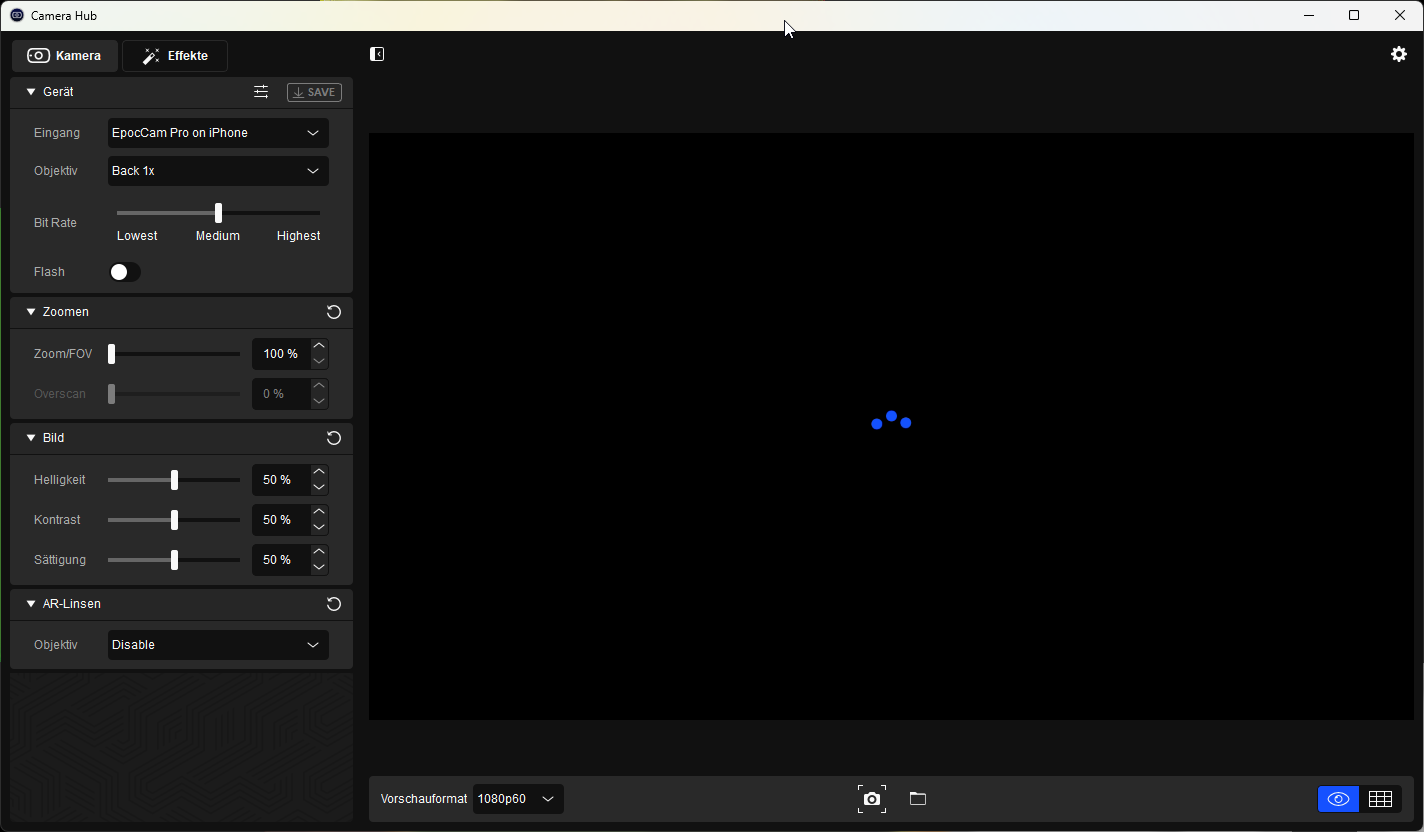 sand fossil
quasi marsh
Does anyone have a Fix for this Black Loading Screen ?
https://i.imgur.com/1N1M2...
sand fossil
quasi marsh
Does anyone have a Fix for this Black Loading Screen ?
https://i.imgur.com/1N1M2...
could be the bitrate, or wifi interfearance unless you're connected by cable.
quasi marsh
connected by cable, however its fixed now and i dont know how but its okay xd
 acoustic frigate
Hey guys, my camerahub updated yesterday and failed (no I'd didn't interrupt it) and now my computer doesn't have the driver at all. I tried rolling back all the way to 1.2 but no luck and my device manager just says the driver is unavailable
I'm stuck on the 'please connect a camera' screen on camerahub
quasi peak
i see you said you rolled it back - did you try uninstalling it completely as well ?
acoustic frigate
quasi peak
i see you said you rolled it back - did you try uninstalling it completely as we...
Yes everytime I tried an earlier version I completely uninstalled and restarted the computer
quasi marsh
Could yall please help me I have a facecam pro and a streamdeck plus and I am trying to create a button to be able to turn my facecam on and off. I have the camera hub plug in but they have all kinds of controls but not the simplest thing to be able to turn your camera on and off. How can I turn my camera on and off with the streamdeck? Thank you in advance!
wide flint
quasi marsh
Could yall please help me I have a facecam pro and a streamdeck plus and I am tr...
There is no on or off that I am aware of. Like most webcams the camera turns on if it detects software trying to use it and off when its not in use. If you want more then that you would need to setup some type USB disconnect.
quasi marsh
wide flint
There is no on or off that I am aware of. Like most webcams the camera turns on ...
Wow that is very shocking to me I would think that you would be able to turn your camera on or off in case someone came in your room while on a video call etc. without having to rush to the application to disable camera. Kind of like a mute button for your mic but rather a toggle for your camera. I really appreciate the information about a usb disconnect I may look into getting one I worry about privacy and would like to have a on and off switch. I really appreciate you helping me out!
slender harness
Good morning everyone. Any idea why when I connect my FC, using the cable provided into a 3.0 port, I would get a message in device manager that says unknown USB device device descriptor request failed? I have also tried other cables. Still get the same result.
native jackal
Question in OBS with Facecam Pro is it possible to prevent the settings here from affecting the picture?

 vital steppe
Hi, I've had issues with my Camera Hub not starting when I install the latest version for the last few months. When I install the update, the whole program just doesn't start. I've tried running as admin, but nothing happens at all. I can use my cam in OBS and in Discord, but it looks like factory-settings. Anyone have an idea?
 modest wharf
Has anybody used CamLink with StreamYard? I'm trying to get my CamLink signal to work but I'm having issues. I'm using a MacBook Pro right now but I have access to a PC as well.
modest wharf
vital steppe
Hi, I've had issues with my Camera Hub not starting when I install the latest ve...
I'm having the same issue! When I plug the HDMI into the CamLink it quits!
vital steppe
modest wharf
I'm having the same issue! When I plug the HDMI into the CamLink it quits!
I have just the FaceCam, not a cameralink
 hollow pollen
native jackal
hollow pollen
native jackal
@quasi marsh as far as I know those snap filters are all that is currently available, may not be the case forever but as far as the apps integration currently I believe that's it.
 onyx basin
i've just removed my facecam privacy cap and the lens came off...
 cunning jungle
I got a issue with my Facecam (And camerahub / OBS-Discord), sometime, during my stream, my camera source juste stop ? Screen linked.
If i change the source setting, it's juste show a black screen. Also if i create a new source...
BUT, camera hub previeuw work perfectly ? CH have default setting,
Plug/Unplug cam don't work
Restart OBS dont work
Restart computer work but... restart it every 30min in a stream isn't realy fun x)
Laste note ! Noticed today : It's only crash with rly big game, Today, Cyberpunk2077. A link ?

 scenic fiber
cunning jungle
I got a issue with my Facecam (And camerahub / OBS-Discord), sometime, during my...
scenic fiber
cunning jungle
I got a issue with my Facecam (And camerahub / OBS-Discord), sometime, during my...
You should avoid using the virtual cam if you can. If you run background blur you could consider getting NVIDIA Broadcast!
 frail reef
After hours of listening to online advice and tinkering with my CamLink 4K and Camera Hub I finally got them both to work with my Panasonic Gh5. BUT I can’t pull the video into OBS! The video feed shows up clearly in the software and looks good but I can’t get it to show up as a video capture source in OBS. What’s the secret? It worked for me a mere month ago and I wanted to get back into streaming but I guess I need to see if I can return the camlink now unless there’s an easy fix
 foggy harness
Hello. I recently got an Elgato Facecam and downloaded the software "Camera Hub." It has been stuck on the message "Video engine is initializing" for over an hour now. I have tried reinstalling the program and repairing it, but it still doesn't progress.
My technical specifications:
- Windows 10 Pro
- AMD Ryzen 5 2600 Six-Core Processor
- NVIDIA GeForce GTX 1660
- 16 GB Ram

 upbeat lichen
a quick fix is, go to task manager. force to end camera hub, than reopening camera hub
 true python
my elgato cam is lagging really bad while recording. how can i fix?
foggy harness
foggy harness
Is fixed 🙂
ruby peak
is it just me or does the camera hub use quite a bit of ram idle in the background with preview disabled and OBS closed? It's using like just over 1.5 gb?
That doesn't seem right for it to use that much memory when camera isn't even in use? Thought the camera did the processing itself? (FC Pro)
 keen bison
this may not be the right place to ask this question, but im trying to get my sony a7 to work inside of OBS. either thing is setup right but it will not display the image coming from the camera. I have talked with Sony and OBS in discord, they sent me here. Please help thanks
 sand igloo
has anyone run into the issue in which while using virtual camera the picture is fine but upon getting into a game it kinda glitches out and freezes off and on?
native jackal
I'd imagine its probably a matter of resources getting eating up, any particular reason youre using "virtual camera"? @sand igloo
 terse onyx
I have a following problem with brand new Elgato Facecam, anyone got tips to get it workin? Camera HUB is stuck on intializing video engine screen. I have tried older version down to 1.5.1 and also tried 1.7. Beta version. I have checked device manager, where it says "This device is working properly." I have also tried to make a new administrator account on my pc, downloaded the hub there and still not working. I have MSI B550 tomahawk motherboard and I have tested multiple USB3.0 ports with multiple different cables. The camera only shows black screen in windows camera, discord and obs studio.
 hollow pasture
Hello, my ordered Elgato Facecam Pro arrived today. Unfortunately, the autofocus is apparently defective. With every 4-5 times of focus, the focus gets stuck and it sounds as if it is driving against resistance. How do I get a replacement now. I don't want a refund but a replacement?
 steel cove
Hi all! I have question about AI backgrounds on elgato Facecame - is somehow possible have it with AMD graphic?
 steel cove
hmm i see, and maybe some alternative what can i use? do u know about something?
native jackal
What are you looking for in particular, just a blur?
steel cove
no, am streaming but my background isnt .. nice, so something where i can fix my background with some picture or something like that
native jackal
well if its in your budget I'd suggest a green screen, elgato has nice options, are you using facecam or cam link with a 3rd party camera?
steel cove
FaceCam .. yeah, green screen is good alternative, but is last tip for me 😄 ..
native jackal
ah okay, yeah thats unfortunately probably the best bet with regard to the AMD sorry
I was gonna say if youre using cam link you could consider a camera that is able to achieve that blur before hitting your pc

In this video we cover the 3 methods you can use to achieve background blur on your webcam or camera for live streaming, video chats, and more.
▶ How to connect DSLR/Mirrorless cameras to your computer to use as a webcam: https://www.elgato.com/us/en/p/cam-link-4k
▶ Nvidia Broadcast App: https://www.nvidia.com/en-us/geforce/broadcasting/broadc...
the third recommendation on that link is actually better than I expected it to be 
native jackal
I thought it was just gonna tell you to post up a blurry photo or something lol
np! goodluck!
 coarse wharf
A lot of people are reporting problems with cam link for pcie that they say the image is stuttering. Is that true ? I was planning on buying it
true cave
Hiya, I'm having trouble getting any signal from my canon M50 Mark 2 whilst using the camlink 4k. I've bought a new cable so I dont think its a dodgy cable connection. Is there a play by play standard solution I should try? I saw that some suggested downloading new drivers, but I also saw some saying never do that.
Thanks! ❤️
 old flicker
Hi! These are my devices.
- Elgato CamLink 4k (refurbished from Amazon)
- Alienware m15 r3 laptop Windows 11
- Micro HDMI cable
- Sony Alpha a6000
So, I have everything plugged in. I also have the recommended settings for my DSLR that were given in the YouTube video linked below. But when I go to OBS to add the source, it does one of two things; 1) The output preview lags when I switch to CamLink from the Integrated Camera or 2) It shows up as the image below (highlighted in the red outline, with the black and white stripes). The output also doesn't show up on other platforms such as discord or Streamlabs. One thing I did notice, though, is when I plug the CamLink into my laptop, the white LED light on the CamLink stays solid for a solid 2 second, then does a controlled flicker around 3 times and goes dark. Maybe this will indicate something? Someone please help me get an output 😭Also if anyone can help please ping or reply to this message so I get a notification.

 raven basin
hey guys, has anyone ever had the problem, that the Elgato Facecam stutters extremely in OBS whilst streaming? It stutters for eternity, sometimes freezes and sometimes loses connection afterwards
native jackal
is your facecam directly plugged into a usb c port on your pc?
raven basin
Its USB C (cam side) to USB A (USB 3 Port) on PC side
this happens a lot

i tried to follow the elgato help with changing output FPS of the camera to both 60 and 59 but happens on both
and i just changed hardware (mobo/cpu) and it occured before aswell
native jackal
are you using virtual camera?
native jackal
try setting it up like this instead
 native jackal
you dont have select deactivate when not showing
if you have camera hub you should be able to enable the blur in there and then save it to your camera and fire it up in obs
raven basin
i have it like this
 native jackal
virtual camera is sucking the life out of your resources more than likely
native jackal
change from elgato virtual cam to facecam
raven basin
had highest fps too, didnt work
native jackal
and you should be golden
raven basin
yeah but then people see my background KEKW
raven basin
native jackal
virtual camera is sucking the life out of your resources more than likely
its weird with a 7800x3d and a 3080 TI
and it just happens when streaming a game. if im on a pause scene no problem
but in tarkov it goes crazy
native jackal
why would they see your background if your blurring it? 
raven basin
maybe im misunderstanding
where do i blur if i use facecam instead of virtual camera


 raven basin
i have cam hub open
native jackal
top right, do you use that app to setup your cam?
raven basin
i use blur there
but if i select "facecam" as device in OBS it does not use the blur
just if i use the virtual
maybe im pepega right now, idk
native jackal
no i apologize I dont think youre wrong about that sorry!