#wave-audio

1 messages · Page 21 of 1

solemn wyvern
#

Right so, the 2.0 beta is what you’re using so… beta gonna beta, is about all I can say there.
The Reddit thread is where devs are present to be taking feedback reports on that.
If you want to uninstall and install the latest retail release, feel free.
Being two instances of wave link in the mixer is a little odd, but wave link itself won’t be making any sounds anyway so that’s just an artifact of how windows doesn’t really do audio mixing well, and many apps have multiple entries with no description of what they are for. (Eg, voice vs dings, for an app like discord)

But in the second pic I can see that you’re routing your audio around the wave link mixer instead of into it. Use a wave link channel as your default output so sounds will go to the mixer and you can control and hear them; and microphoneFX as your default input, so apps that ask for a mic will get it after your effects.

crude cosmos
#

Ok. So now I have to do more thinking. Is there a way to minimize latency (I'm waiting for the wave xlr dock to arrive) while keeping the stream deck + & XLR dock combo connected to the stream PC? Could I use the headphones out to line in on game PC while still hearing audio from stream PC without having the stream deck/XLR combo on game PC?

azure wing
solemn wyvern
azure wing
#

Ok so I changed to the FX mic, but what about the speakers, that should be fine, no?

solemn wyvern
crude cosmos
solemn wyvern
azure wing
#

How amI directing to a headphone? I don't see that

#

It shows speakers

#

Funny enough, I can hear all the sound from everything except Zoom

solemn wyvern
azure wing
#

This is very confusing, why it got so messed up 😦 I don't know, but it's very frustrating

solemn wyvern
# azure wing How amI directing to a headphone? I don't see that

Speaker/headphone. doesn’t matter, the point is you aren’t routing it to wave link.
Select a wave link channel for all audio to route to. Then all audio goes to wave link.
In wave link set the monitor mic to whatever speaker/headphone you want to listen on.

azure wing
#

SO which Wave channel should it be?

#

Freegin stream deck keeps losing it's connection to wave audio.

solemn wyvern
#

For default I use game (so I don’t have to route ever game individually) but many people use system or something. Doesn’t matter, just chose one.

azure wing
#

The sound is very low now going through system channel

#

I'll have to test zoom now, as it was the one that lost sound completely

solemn wyvern
solemn wyvern
azure wing
#

Ok, So I'll crank all the Window's Volume Mixers to 100%, THEN route to System as the Output, and WL Mic VFX(as it is now), THEN use the Streamdeck to control all the sounds? Does that seem correct?

solemn wyvern
#

Yeah stream deck serves as a hardware controller you can touch.
Wave link software is the mixer. So that’s the thing to keep in mind. Sound goes into mixer, and then goes to the outputs. Monitor mix to your ears, stream mix to the audience, and microphoneFX is a mic-only output, so apps that want your mic only.

azure wing
#

weird that Wave link is still showing up twice as is discord in the window's volume mixer???

#

I will say, I can't touch the System on streamdeck as it creates feedback.

#

I also have an audio switch

#

Does that look correct? Or should it be my speakers for the primary? I'm assuming the System as I have it

#

I used to ahve have it the speakers, and the headphone and it worked well, but since these changes I've made, probably different?

solemn wyvern
azure wing
solemn wyvern
# azure wing

So the switch would be between whichever devices you want to listen on. Not wave link channels.

#

If you route the output of wave link…. Back into one of wave link’s channels… then it will feed back…

azure wing
#

Ok, so I'll "switch" those back to what I had, Headset and Speakers to switch between and NOT the Wave channels.

solemn wyvern
#

Yes exactly. The monitor mix is an output. From wave link; a mix off all the channels.
So if you set that to be sent to a wave link channel, you see why that would feedback.
Which is why those channels aren’t available in the menu. Haha

azure wing
#

Well, no the feedback was coming when I used the Elgato channel input, which doesn't show on my Stream deck, as I'm assuming that's how it would work anyways.

#

I mute that usually(not in the pic obviously)

#

I'll eventually learn how to use this properly LOL

#

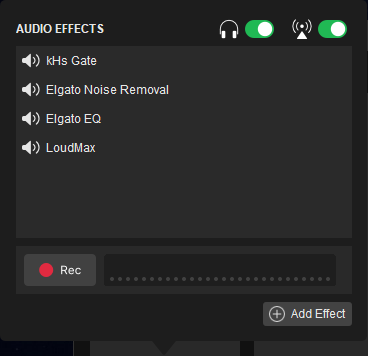
Oh the other note, any idea why I can't apply the effects?

solemn wyvern
azure wing
#

which one is the mic channel? The Zoom?

solemn wyvern
azure wing
#

In this case, it shows the fx

solemn wyvern
# azure wing

Oh I see. The switches to apply effects to either mix are disabled.

azure wing
#

It gives me the option to turn it on or off at the top right

solemn wyvern
#

And on the mic they are on. So there you go

azure wing
#

AWWWWW ok

#

DOH

#

You're awesome, sorry been staring at it too long

solemn wyvern
#

Effects can be optionally bypassed on a per-mix basis… per channel.

azure wing
#

got it

#

Thank you SO much for being patient with me

solemn wyvern
#

So I see you have a lot of effect on the audio coming from zoom.
That’s pretty usual. You’re wanting to use those effects on the other people on your zoom calls?

azure wing
#

Hasn't been a very good day. I appreciate peeps like you that are so helpful, and patient.

solemn wyvern
#

Sure, that’s why we are here!!

azure wing
#

Yeah, it helps with the sound

#

I noticed I sound more like sir mixalot, well, Al Green at least

rough sedge
#

Does it matter whether my stream deck and wave xlr are plugged into usb 2.0, 3.0 or 3.1? I've been having all my usb devices crash so I turned off xhci hand off to reduce it to 2.0 and increased the pch voltage to see if that fixes it...the event viewer says elgato is crashing

solemn wyvern
#

Stream decks don’t like to be plugged into hubs.
But I have my wave xlr in a hub and it’s totally solid.
I do use a hub with external power, though. It’s the current —not voltage— that would be an issue if a usb bus is overdrawn with too many devices.
I have seen not enough current do very strange things before.

rough sedge
proven raft
#

So having this issue in wave link where i am not getting sound output from my capture card from the monitor mix, but when I switch from monitor mix to stream mix, sound starts outputing to BOTH the monitor and stream mixes, or at least i hear 1 but see two. See attached video. Any ideas?

Note: Looks like the video outputs sound the entire time, however I cannot hear it from my headphones, but seems to be outputing to the stream mix regardless what mix i select, i only am able to hear it myself via headphones if I select the stream mix as shown in the video

solemn wyvern
proven raft
#

and it works fine for my pc capture card and every other sound input, its just external capture card my console is on

solemn wyvern
#

Weirdness….. if you haven’t yet, could you try deleting that channel from wave link and adding it back in? And I presume you’ve restarted and everything like that already. @gritty jackal what do you make of this one?

split crane
#

Decided to reinstall my VSTs and properly placed everything into the wave link VST folder and that seemed to have fixed it.
I guess your first guess was somewhat right haha
Thank you for the help!

pure wing
proven raft
# pure wing And you made sure the device your listening to is correct in the dropdown for mo...

correct, as i stated in my reply to @solemn wyvern, ithe monitor mix works fine for all of my other audio inputs in wave link, just not that one. I was able to fix it by removing the device completely from wave link and re adding it, ive fixed it that way before, was just hoping someone know of a way for it not to be something I have to constantly do, but im kinda used to quirky issues with wave link at this point lol.

pure wing
#

omg not yelling.

solemn wyvern
azure wing
#

So this happens every morning on bootup:
I have to shutdown streamdeck and restart in order for it to "see" Wavelink.

solemn wyvern
tepid yew
#

Hi

solemn wyvern
azure wing
#

let you know in a few. I'm barely awake.

#

I'm not sure how to change the order

#

startup.bat?

solemn wyvern
#

I don't know. I've never had to do this. I bet a bat file could do it.

strange hill
#

Hihi! So, i've been streaming an no problem with the audio. popped in today to stream and there is no audio going to obs. There was a recent microsoft update, but i checked to the input and output settings and they're the same. Any advice?

#

The mic is picking up just fine

#

Figured it out. it was actually OBS.

#

Just had to remove the old stream mixer and reclick stuff.

wild vine
#

its all connected

naive totem
#

Hello guys... i have a problem with wavelink. ive rolled back the software to an old version BUT my Game audio STILL doesnt work :( any ideas?

placid eagle
#

Hey guys

Could someone tell me how to stop the mic from cutting off my voice when I’m yelling

#

I noticed my voice disappears when I’m loud

#

Is there something I have to change in voice effects?

#

I don’t really know much

naive totem
placid eagle
#

And one more question, if you using a mic that is connected with a USB cable, the wave link effects cannot be applied?

naive totem
placid eagle
#

I unticked clipguard

placid eagle
#

Well I got the XLR dock

#

I thought unticking clipguard will help

naive totem
placid eagle
#

But still when i rewatch my streams

#

My voice disappears when im yelling

placid eagle
naive totem
#

The streamdeck+ is ur software key

placid eagle
naive totem
placid eagle
solemn wyvern
# wild vine help

If this is happening at a fresh instal, You probably connected it at the wrong time. Leave it disconnected until the app tells you to plug it in.
If you didn’t just install and it was previously working, you may have issue with your computer’s usb ports being overloaded, underpowered, or check usb selective suspend.

solemn wyvern
# placid eagle Hey guys Could someone tell me how to stop the mic from cutting off my voice wh...

This is probably a noise reduction plugin.
(It’s not clipguard, you should be using clipguard to make your gain staging easier.)
If you’re using any kind of machine learning noise suppression, and you yell into it loud enough to distort the sound, it can read that distortion as noise.
Use a compressor and clip guard and set your gain staging correctly to prevent distortion when you yell, and this should reduce.
If it’s still not liking the sound of your yelling even if you aren’t distorted (check by disabling the noise suppression), then it’s a matter of “you get what you pay for” with free noise suppression. There are better plugins out there, but they aren’t free.

placid eagle
solemn wyvern
placid eagle
#

Elgato website doesn’t accept paypal payment righf

#

Right

placid eagle
#

Nvm

#

Damn $50

solemn wyvern
#

It’s been on sale for as little as 30$ before. With Black Friday coming up….
If they offer a bundle as they often do, “maxxvolume” and “silk vocal” are the other two I would check out.
That’s my entire wave link mic chain right there.
You can try them for free also, to make sure it works for you.

placid eagle
#

When is it?

solemn wyvern
placid eagle
#

Ok ty

wild vine
#

didn’t work

placid eagle
wild vine
solemn wyvern
wild vine
#

No no no lol

#

but I can’t update it

solemn wyvern
#

Then you’re fine. I’m using windows 10.
If you’re having trouble installing and running various apps, there must be something more generally wrong with your computer.
Maybe consider updating your bios and reinstalling windows fresh. Maybe you have accumulated some interfering junk and weird settings

wild vine
#

Like the version
Is windows 10 enterprise 2016 LTBS

#

Idk I’ve never seen that before this pic

solemn wyvern
#

Ok I don’t know what that is.
Enterprise version is a weird thing for a user to have on their machine. It might have specific changes made to it. Win 10 home is fine for normal use.

wild vine
#

Hmmm

wild vine
placid eagle
#

@naive totem I keep my game audio on System, never added Game channel. Gna try doing that and see if it works. Now what is NOT working with me is the SFX. I added it and ticked the MicFX box and tried to choose it in COD MW3 and BO6 to be able to use the soundboard, but it seems like it is not working dno why. It does work on Discord

crude cosmos
#

Just out of curiosity, anyone has the stream deck + w/XLR dock connected to a powered USB hub?

If so, any issues? I only ask because I'm debating if I should use my last remaining USB port on my laptop or just have it on a powered USB hub (XLR dock arriving today).

Currently using my thunderbolt 4 Dell monitor (usb4 with windows).

solemn wyvern
crude cosmos
#

But it's running fine on stream deck + and wave xlr dock combo connected to my thunderbolt 4 monitor hub

solemn wyvern
crude cosmos
#

It looks beautiful from the back...

spare oyster
#

Is there a VST or some way to get it to reject audio from other audio tracks on my Wave XLR? I dunno, so my soundbar when in voice chats doesn't sometimes pick up other people's voices and put it thru my mic

solemn wyvern
spare oyster
#

I'm beginning to lose trust in headphones in general. They keep breaking in a year or less even when I'm very gentle and careful with them.

solemn wyvern
#

Shrug. I’ve had the same ones since 2003… replaced the ear pads several times as those wear out…

placid eagle
#

@crude cosmos What is that white XLR cable? May I know the brand

solemn wyvern
late jackal
silver knoll
# late jackal huh?

Make sure your Wave Link is updated. Then try completely closing Stream Deck and Wave Link and then relaunching them. Looks like the plugin lost connection

gritty lagoon
#

Can I Use an XLR Splitter to Connect One Microphone to Both the Wave XLR and Stream Deck+ for a Dual-PC Streaming Setup?

I have the wave xIr and I also have a stream deck + by purchasing the wave xlr dock accessory. Can I connect the same microphone to these two devices using an xIr splitter cable? This would be for a 2-pc stream configuration.

gritty jackal
cloud coyote
#

If I buy the xlr attachment for the stream deck +, and a wave Xlr, with a di box, will I be able to have my guitar and wave dx separate in Wave link? I tried the Scarlett 4i4, and had nothing but issues with it. At first it was mixing the guitar and my mic on one channel, then when I plugged my guitar into the 1/4 inch jack in the back, I couldn’t hear the guitar, but I was getting raw input from the mic on the guitar input, so I ended up sending it back, and I’m now looking for a way to have both guitar and mic show up in wave link and windows as separate sources.

solemn wyvern
# cloud coyote If I buy the xlr attachment for the stream deck +, and a wave Xlr, with a di box...

Two interfaces will work, but the the guitar interface should not be an Elgato one, since wave link will already be authorized by the xlr stream deck and a second wave device won’t be recognized.
Something like a hi-z guitar input from shure would do the job just fine, or even the Scarlett if you already have one, I think.
You can use any audio hardware as an aux channel in wave link, it just won’t recognize multi-channel from it. Get what I mean?

cloud coyote
#

Yes, I get it. I ended up sending the Scarlett back, but I may pick up a 3rd gen scarlett. Do you know of an interface that has a gain setting for the 1/4 inch inputs? The Scarlett 4i4 only had gain adjustment for the 2 front inputs, not the rear 1/4 inch ones. Ideally I'd want one device that would allow me to plug both Mic, and Guitar in and have them as 2 audio souces in windows. The other question I have is, does Wave Link Use ASIO or just the Windows devices?

solemn wyvern
# cloud coyote Yes, I get it. I ended up sending the Scarlett back, but I may pick up a 3rd gen...

The rear are line inputs on those, which is something you wouldn’t normally expect to have a gain adjustment. Nor can they connect a guitar anyway because it’s totally the wrong level.

Wave link does not have an asio driver, and again, it CAN NOT use multi-channel from any interface. You can add your audio device to wave link (replaces an aux) and it will receive the sum of the channels.
So this is why I suggest a guitar interface that is just a hi-z input and nothing else that you don’t need and won’t use.
Then you’d add the guitar to wave link by adding that device, and your mic is the wave device.

cloud coyote
#

Alright. Thank you for that. I'll look into something like that.

solemn wyvern
# cloud coyote Alright. Thank you for that. I'll look into something like that.

You could get some multi-channel interface with its own monitor mixer suite, that may have effects which might even be DSP, which is great for music as they aren’t host-based so there isn’t an input buffer latency to deal with.
… and then feed the mix from that into wave link where it can be mixed with other audio from your computer and streaming… but wave link won’t be able to see the individual channels.
Wave link isn’t focused on music production so they don’t have the asio driver with the sample-accurate timings and latency reporting that comes along with that for working in a DAW.
(I do audio production for my day job and I have and use devices like this is my studio, but not with wave link)

cloud coyote
#

Ahh ok. I was using VoiceMeeter Potato, with a VST host, and It got a bit complicated, not to mention I'd like to only use one program for VST and routing, if possible. I will try the Guitar interface route.

cloud coyote
solemn wyvern
#

So yeah I guess I’m just wrong about shure making that product. Don’t know what I was thinking.
But apogee jam is a good one.

#

Oh I see now. The shure things I was thinking about was the motiv line. Which seems to be discontinued.

topaz flicker
#

Hello, i would like to report that I when I launched Destiny 2 after upgrading to wave link audio 1.11.1, the game was stuck on a infinite loading screen. Downgrading my wave link audio to 1.10 fixed the issue.

gritty jackal
# topaz flicker Hello, i would like to report that I when I launched Destiny 2 after upgrading t...

This is a community help channel - if you're looking specifically to report a bug, you'd want to go through #official-tech-support and the link there.

That's definitely an odd issue though. I can't see what would trip things up there unless Destiny's sound engine is oddly picky, in which case a restart might be enough to clear that after upgrading.

You might want to check out the 2.0 beta instead too, to see if it works there.

silk lake
next fiber
#

I will try this to fix my echo. Thank you for sharing!

placid eagle
cyan widget
#

i'm using wave link on a laptop, when i take the laptop out i don't bring my wave 3 lol, is there a quick way of routing all of my audio back to my laptop speakers? without disturbing my wave link config, so if i disconnect my wave 3, everything goes to my speakers, but if i connect the wave 3, it goes as i had on wave link

solemn wyvern
# cyan widget i'm using wave link on a laptop, when i take the laptop out i don't bring my wav...

Everything will default to a device that exists, so it should all go back to that when it’s disconnected.
For restoring back to wave link, you can backup and restore mixer configs under the left click of the tray icon.
For routing apps, I’m assuming that won’t go back easily. I’d generally recommend setting windows default output to your preferred wave link channel, and then hopefully you’ll only have one or two apps that you want to go to a different channel.

tribal lance
wispy sun
#

Germany ?

opaque shale
#

Why does my Wave Link software not show presets? I even downloaded the Beta and they still aren't there, and there's also no plus in this menu either

#

Not sure why it's like this, but any help would be amazing since I'd like to be able to use presets and such

opaque shale
#

Wave Link has plugins?

#

And how do you update them if it does?

solemn wyvern
solemn wyvern
opaque shale
thorn magnet
#

Anyone know how to fix this? This only happens with the Elgato EQ. It doesn't size properly to the window and you can't adjust anything. Once out of every 10 times I open it will it size properly.

solemn wyvern
thorn magnet
terse glen
#

how can i get Wavelink not to turn off my EQ and noise supression everytime i open the app?

solemn wyvern
terse glen
#

i have three

#

when i turn PC off and back on they are turned off

solemn wyvern
thorn magnet
#

I have this same issue. On PC start up I have to turn effects back on. Mic is unmuted. Effects do not turn back on by themselves.

#

except today, lol they were on.

solemn wyvern
#

Wave link is supposed to dissable effects when muted and they come back on when you unmute. My mic boots up muted and when I unmute my effects come back on.
In versions past there was a bug where this wasn't working but it was resolved by v1.9 that I'm still on. (And there are a few versions now past me, but these don't have features I need and some people have a few bugs with them, so I haven't updated)

vestal mist
#

Can not log into account on wave link.... not able to download anything from marketplace. I completley uninstalled the app including %appdata% data and all registry files. re insatlled newest version still cant log in to my account

solemn wyvern
flat thunder
#

Hi all. If I'm using a single mic (wave 3) and strem deck plus (with wave link) on a 2 PC setup, should I connect everything to gaming PC or Streaming PC? Does anyone have an opinion on which? I currently use it on gaming pc side

solemn wyvern
#

I prefer wave link on the Game PC side, because you need things like voice chat to work right, and the low latency and mic-only output isn't needed on stream PC. But you might want your stream deck on the Stream PC, depending on what you want to control, if you want to control wave link with it, then you might go that way. In which case you have to route voice output back to the game PC to use voice chat in games, and note that your game audio will be a little bit latent that way, since you're hearing it after the capture card.
Or you can add a small analog mixer between the two PCs, to mix the game audio from game PC and everything else from wave link... into a headphone output for you. To solve the latency issue.

vestal mist
flat thunder
#

The way I have it now is everything hardware and software is on the Gaming PC side and I capture with my elgato to the streaming PC. So i would set up all my scenes in OBS on the gaming pc and then that goes to OBS through capture card using wavelink to the Streaming PC OBS in a simple scene and then out.

solemn wyvern
solemn wyvern
# flat thunder The way I have it now is everything hardware and software is on the Gaming PC si...

so, all the compositing is being done in OBS on game PC, stream PC is just encoding? Seems like a waste of processing, but ok. I don't run OBS at all on my game PC; main monitor is captured by the capture card and obs is running on the stream PC, getting the stream mix from wave link over HDMI. Alerts are routed back to Game PC over a 3.5mm cable.

And no, you don't need two mics for any of these setups. You just need to route anything that's needed back to the computer it's needed on.
If all your stuff is on the stream PC, you will need to route your mic (microphoneFX) over a 3.5mm cable to the game PC if you want people to hear you in game voice chat.
And if you want your game audio to not be latent, then you get a mixer to combine the monitor mix from the stream PC (leave game audio out) with the game audio from the game PC.

flat thunder
# solemn wyvern so, all the compositing is being done in OBS on game PC, stream PC is just encod...

So for the 1st part the efficient way is to capture the monitor with the elgato and set up everything on the stream pc? Someone needs to make better videos on this as all the videos I've seen led me to set it the way I have it. I've been wanting release the resources on the game pc to just GAME. I've already followed the steps in the elgato guide to get the stream mix to the elgato capture card. My alerts are in botrix so i can set them up as browser sources on stream pc when I set up obs over there. Now I just need to remove obs on the game pc and run everything on stream PC.

The last part, I'm lost but will try to research routing the stuff back to the game pc

vestal mist
# solemn wyvern so... download from there?...

I can access the marketplace page to download the apps for wave link, I click on the download lets say "equalizer" or noise removal" click on open in wavelink and it does not apply it to my wavelink cause i cant log into my account on the wave link app

solemn wyvern
flat thunder
#

ok, that's what I need to look up. If I put stream deck and wave link and mic on streaming pc then just find how to route that back to gaming pc

solemn wyvern
flat thunder
solemn wyvern
#

That does have an isolator built in. But it’s a y cable, isn’t it? I don’t know. Isolators are like 8$ of that doesn’t work.

flat thunder
#

yes it's a Y cable so to speak. It has 2 ends and a break off for plugin in your headset

solemn wyvern
#

You need a cable with 2 male ends for this

flat thunder
#

@solemn wyvern Yes it has...So condensed. 1-Just put OBS and all your scenes and sources configured on Stream PC>
2- In OBS on stream PC setup Elgato Capture card as the source to capture you game from the Gaming PC. (Connect USB to capture card to stream PC and HDMI IN to Game PC
3- Connect 3.5mm with ground loop isolator 1 end to game PC input and 1 end to Stream PC Output
4- Connect Wave 3 | Stream Deck + to stream PC
Install discord and wavelink and app to stream PC
5- Setup wavelinK Stream Mix for audio as device in audio mixer

Lastly figure how to monitor audio from stream pc on the gaming pc via the 3.5mm cable I installed

#

Thank You Much!

spare oyster
#

I just got a steelseries arctis pro to replace my broken Rode NTH-100s. How do I configure its hardware with battery charger to work with wave link?

solemn wyvern
solemn wyvern
spare oyster
#

hmm... the rodes sucked tbh. they sent me two units that both broke so I no longer trust rode for headphones

spare oyster
flat thunder
#

Sorry on Stream PC

spare oyster
#

I may have gotten it working somewhat, jn. I'll have to fool with it more tomorrow after work, loonnnggg day been out of the house for like 14 hrs

flat thunder
copper siren
#

Hello, if in the audio output I set wave link system the volume does not work no matter how much I change it, does that mean that the audio output I should always choose the speaker I use or the headphones every time?

#

My keyboard has the volume button and I try to use that mode but there is no change when I am using wave link system output

#

Is not compatible with keyboard volume?

solemn wyvern
solemn wyvern
#

Properties of microphoneFX, listen to this device on,… set to line out. .

solemn wyvern
flat thunder
solemn wyvern
flat thunder
#

so just pluging the 3.5 and set the input to listen and that's it

solemn wyvern
flat thunder
#

ok. Thank You. that solved it. I just have to keep OBS open when I'm playing games

solemn wyvern
flat thunder
solemn wyvern
flat thunder
#

The old elgato legacy software for hd60 capture card had a sound software for this stuff lol

flat thunder
solemn wyvern
#

Wave link is still the boss of your audio world.
If you were monitoring through OBS you set something up wrong there.
The only sources that should monitor in OBS, are sounds that OBS made, like alerts.

flat thunder
#

For obs i only need on stream pc now so thats a plus

flat thunder
solemn wyvern
#

Yeah and only your alerts are set to monitor. Everything else should be output only. Because you don’t need to hear the stream mix

flat thunder
#

I think i put the wrong end of the gound loop isolator in the wrong pc. Let me swirch them because i hear feedback on the stream mix and not the monitor mix

flat thunder
#

Thanks for helping. Its huge!

solemn wyvern
solemn wyvern
flat thunder
flat thunder
#

I will get the isolator and try again. Should i mute anything in my wavelink in stream pc with this setup

solemn wyvern
#

It goes on the 3.5mm line from stream to game. Because that’s the analog connection you have.

#

Just make it sound the way you want. The mixes are up to you.

flat thunder
#

I meant so audio isnt doubled

solemn wyvern
#

You will need to add the capture card as a channel in wave link or you won’t hear game audio.
But no, there is no audio loop.

flat thunder
#

@solemn wyvern Thank You so much

spare oyster
rain goblet
#

Sonar WILL brick pretty much anything

#

so don't

solemn wyvern
spare oyster
#

seems I can enable "Windows Sonic" in the headphones properties window, I dunno if that'd enable it without their GG software?

spare oyster
#

yep sonic seems to work, so yea I can remove GG from startup so it doesn't run

gritty jackal
#

Should just be find disabling Sonic inside GG too, in the settings too. But whichever works

dull rover
#

None of my game audio will come out through any of my channels. I thought is was a problem with my Razer Synapse software but then I realized after Uninstalling the software I was still not getting any game audio UNLESS I would start the game on then go into the SOUND MIXER and then change Output to one of my WaveLink inputs and then I would no longer get any audio EVEN after I would change it back to DEFAULT

dull rover
urban umbra
#

Elgato microphone frequency response graphs when

solemn wyvern
solemn wyvern
somber patrol
#

Hello, I'm using Wave Link, but I'm encountering an issue. I can separate my tracks and adjust them for myself or for a stream, but the overall sound on the stream is quite low. I have to boost the audio track of Wave Link by +20 dB in OBS for it to sound right.

Is this normal, and is there a solution to this problem?

P.S.: Note that I don’t have this issue when not using Wave Link.

solemn wyvern
# somber patrol Hello, I'm using Wave Link, but I'm encountering an issue. I can separate my tra...

Make sure all the wave link devices are at 100% in windows sound device settings. Both the recording and playback devices.
The levels won’t be the same for anything that isn’t at 100% there. Basically you want to feed full level to the wave link mixer and then do your mixing in wave link, this will be the easiest to understand and keep track of, rather than adjusting levels in more than one place.

somber patrol
solemn wyvern
urban umbra
main mantle
solemn wyvern
# dull rover How can I go back software?

Uninstall and then install the version you want. A whole version history can be found if you look. Google is your friend.
Note that if you have other interactions like stream deck, you will need versions that are coincident with each other for them to be compatible.

violet lodge
#

is anybody experiencing weird crackling in the sources connected to Wave link? including the microphone?..

It is definitely Wave link having some weird interactions, because as soon as i remove music / browser / voice chat sources from their respective programs, the crackling stops in the audio.. but i can't really do that with the microphone.. so my mic is essentially useless

rain goblet
flat thunder
#

Hi if anyone can help answer a question or 2. i want to make sure my 2 pc stream setup is correct, because if it is I would need to research what could be wrong with my audio. bare with me it's my 1st Dual PC setup.

Streaming PC - Elgato 4K X | Stream Deck + | Wavelink | Speakers
(ignore Game Channel, I will record somethimes from this PC)
I put a channel for my elgato 4K X
I conntected HDMI to Graphics card on Gaming PC, other end to INPUT on 4K X
USB C to Streaming PC

Gaming PC - Wave 3 Mic | Wavelink | Heaphones into Wave 3
AUX 1 Channel is for Analog Audio
In Audio settings in Recording Tab I went to properties on the Wave Link Stream and Selected Listen tab and checked "listen to this device" and Chose Elgato 4K X (Nvidia High Def Audio)

Additionally the Aux 1 channel in wavelink:
I connected a 3.5mm cable with ground loop isolatior set to ON (Tried OFF but was terrible) to the input (blue) in back of motherboard and the other end to streaming PC out (green).
Then in sound settings on Gaming PC in Record tab The "Line In" properties I chose "listen to this device" and chose the Aux 1 Channel since nothing uses that channel
*In Wavelink at the bottom I selected my Headphones (Elgato Wave:3) for monitor Mix & Elgato 4K X under stream Mix. **I Also muted the AUX 1 (Stream mix)
This Aux 1 channel is for my Alerts to come in from my Stream PC

Is there anything else I should do before I proceed to setting up OBS?
Is there any channels on EITHER wavelink that I should Mute (Stream Mix or Monitor mix)

Thank You!

rain goblet
#

whoa wall of text xd

flat thunder
#

I thought I'd try to be thorough with exactly what i am in need of Help/Confirmation about

rain goblet
#

I'm completely lost when it comes to dual setups, but I need to learn eventually because that's my plan too. But it looks correct?

violet lodge
rain goblet
#

woops

#

this window

#

and then this

#

Try changing settings around, make sure the bit and hz matches everywhere

flat thunder
rain goblet
#

Could be yeah if that's the only mismatch

#

unless you're mixing bitrate also, 16 vs 24 etc

flat thunder
#

And i cant set system as the default for some reason on the stream pc with speakers as main output so yea

rain goblet
#

I use Game as the Default output because some games don't follow the rules, and this way I don't have to route new games I wanna try either 🙂

violet lodge
flat thunder
#

Happened after i plugged in analog cable

rain goblet
#

like buzz

#

I'm going to bed, it's midnight xd nighty ElgatoHeart

flat thunder
#

Ok

solemn wyvern
#

Yeah ground loops are when there is more than one connection between the two devices. Its electrical.
The ground loop isolator floats the ground across that connection with a transformer so it can’t electrically loop.
The buzz will be much, much quieter with that in place.

wicked veldt
#

Hi guys, i've just gotten the Wave XLR and shure sm7b, when i open Wavelink, i dont see any input, theres no green bar rising.

flat thunder
#

And i understand your point on the isolator. I'll try moving away from everything

flat thunder
#

I got to a better play @solemn wyvern. sounds a little better. The lag between what I hear and what the stream mix isn't so bad

solemn wyvern
#

Show wave link

flat thunder
solemn wyvern
flat thunder
#

I have my stream deck + on the streaming PC and I moved the mic over to the gaming pc so I can heave wavelink on both system, but I'm wondering if it's worth it now. It's about 1/2 second delay

#

So either put them both on the streaming pc and have no wavelink on gaming pc and no game chat (could care less) or get another stream deck or another mic

solemn wyvern
#

So if the mic is on game pc, then your headphones need to be on game pc to hear game audio without delay

#

You never need two mics

flat thunder
#

the mic wave 3 and my headphones plugin into the back of them and it's a delay when I hear the actual game without headphones through my speaker that are on the streaming pc

#

So when the game is playing out the speakers on the stream pc it's faster in time then what I hear in my heaphones on the gaming pc out the back of the mic

#

so i just need to turn off the pc speakers🤣

solemn wyvern
#

So… turn the speakers off…. You don’t need to monitor the game sound on the stream pc; that’s just for the audience

#

Haha

flat thunder
#

that's what I said. I was checking how far behind it would be

solemn wyvern
#

You’re gonna be an expert by the end of this.
Any of 4 wiring diagrams you’ve tried them all

flat thunder
#

Was I supposed to mute anything in wavelink other than the channel on the game PC

#

the stream mix on aux (the alerts come through there by way of the 3.5mm jack

violet lodge
solemn wyvern
wicked veldt
#

I've also tried setting google's output to browser, when i start the video, it doesnt even run

solemn wyvern
# violet lodge slight bump on this, if anyone is familiar with the issue

As Och said earlier, crackling can be buffer errors, or bit depth mismatch that isn’t correcting fully.
Try making sure all your devices are on the same sample rate and bit depth, and make sure your buffer settings aren’t too low for your system. (96khz sample rate will make this much harder, just use 48 as there’s no point to 96 anyway)

solemn wyvern
wicked veldt
#

This just worked @solemn wyvern

violet lodge
solemn wyvern
flat thunder
#

@solemn wyvern I had an epiphany. NOT really. But... When I am not streaming I listen to spotify from then streaming PC on my speakers. AND. When I am streaming put an input track for music in obs and that way I can listen in real time with the audience and just not play music from my gaming PC

#

🤣 solved. Now I just got to get obs setup and that as as simple as setting up scenes and choosing the default audio as the stream mix in the scenes I want anything to play. No need to st up mic since it's all coming from the Elgato 4K X

#

Too bad I loose Game Capture. I have to remember to show anything on screen

solemn wyvern
#

If it’s quiet enough it might not matter

flat thunder
#

oh, I don't ever use my speakers during a stream

#

well unless I mute my mic, but very rarely

#

now I have to figure out what is supposed to be the default input defvice on the stream pc, since there is no mic there, although I don't think it matters. In discord, I can use stream mix i believe

solemn wyvern
#

Doesn’t matter. Yeah

flat thunder
#

thank so much again!

wicked veldt
#

For the applications

solemn wyvern
flat thunder
#

@solemn wyvern if i have a video on my streaming pc what audioo source do i need so everyone can here it

#

like i dont know what to use as a monitoring device or how to ouput since everything comes through the capture card

solemn wyvern
flat thunder
#

👍

wicked veldt
#

I have my audio settings pre determined for music in WaveLink, when i choose, a audio output source, i choose the wavelink_music. But it is SOOOO loud, when i listen its so quiet.

solemn wyvern
# wicked veldt I have my audio settings pre determined for music in WaveLink, when i choose, a ...

I’m slightly confused by the way you worded this, but I’ll try to clear up what might be the confusion.

If you add “wave link music” as a source in OBS, then your OBS is hearing the source of that music, not the output from wave link. So the volume faders in wave link won’t control the volume that OBS hears.

If you want to use wave link to control the volume of things in OBS, you need to add the wave link stream mix to OBS, not the individual channels wave link uses.
Then you’ll be able to balance the mix to your liking in wave link stream mix, knowing that is exactly what OBS hears.

wicked veldt
solemn wyvern
dull rover
#

anyone experiencing issues where the Wave Link Game not able to make a test sound is just overall not working?

solemn wyvern
plush pendant
#

Hey folks! Just picked up the Wave XLR and downloaded Wave Link. However it doesn't seem to open (I'm on Mac), does anybody have any suggestions? 😄

solemn wyvern
twilit marten
#

any mac users here use wavelink?

fringe blade
#

I still can't for the life of me figure out how to fix the GUI not showing up for audio effects. I have my graphics drivers up to date. I have uninstalled wave link and not saved the settings and reinstalled probably 10+ times. I have completed removed the VST's and resinstalled like 10+ times

solemn wyvern
#

Have you toggled the gui resizing setting off and on again to see if that wake it up?
My go-to move for this is deleting the vst DLL files and re-downloading them…

Are you using a mismatched version of wave link and plugins? Like a beta with an old plugin? Or an old wave link with a new plugin version?
Throwing out everything I can think of.

fringe blade
#

The files that I'm getting from the marketplace for the audio effects I have completely deleted and reinstalled

#

In my VST3 file is only two items

#

I can open the Reaper plugin windows just fine

noble maple
#

Hello, I very recently have invested into the Elgato ecosystem. I have a Wave XLR, Stream Deck + and the XLR Mic. However, I need some help as my Audio is really choppy and distorted when Wave Link software is open (with no VSTs Installed, I already tried deleting them just in case), I have also increased the Buffer size to Large but to no avail. Could someone reach out to me to assist?

solemn wyvern
# noble maple Hello, I very recently have invested into the Elgato ecosystem. I have a Wave X...

If you’re set to 96khz, drop that down to 48.
Check your windows sound device properties to see if anything is turned on in the audio enhancements. Stuff like voice isolation or whatever windows calls it, or maybe even spatial stuff. Anything like that… windows likes to turn that crap on when it shouldn’t. (Which is almost ever)
If none of that is the issue, check task manager to see any thing looks like it’s sucking a lot of CPU resources. If you see high utilization anywhere, or on the individual cores if you see a really spiky graph or one core that’s consistently high.

mental yew
solemn wyvern
#

That nvidia noise reduction plugin is notoriously buggy. It works fine for some but if it doesn't work for you, I know of nothing that ever solved it.
For me it worked fine excpet that the process uses about 3 time as much GPU resources as if I do the same thing with nvidia broadcast. So it doesn't seem like a solid implementation.

#

I use a better noise reduction instead.

noble maple
oak dagger
unkempt oak
#

Hi, I'm not sure if this is the right place to ask this but I'm trying to download the equalizer program from the elgato site and it's just stuck on loading after selecting 'GET' on the product page

solemn wyvern
unkempt oak
#

ive tried it on multiple browsers

night tide
#

so im looking for audio stuff for a dual pc setup i was wondering if its worth getting the wave mic and XLR and a used elgato capture card. would it be easier to setup beacuse they all have the same manufacturer

solemn wyvern
# night tide so im looking for audio stuff for a dual pc setup i was wondering if its worth g...

Wave mic and wave xlr aren’t compatible/overlapping products; those are one or the other. Either get a usb mic like wave 3, or a wave xlr to use with a xlr mic. (Wave dx is elgato’s xlr mic)
With regard to capture cards, elgato’s are premium like all their products, but there isn’t anything about having your capture card and audio interface from the same company changes anything there.
They work great, but don’t work any less great paired with a different capture card.

sick pelican
# solemn wyvern Wave mic and wave xlr aren’t compatible/overlapping products; those are one or t...

I would not say their cards are premium. I have an Elgato 4K60 Pro and a AverMedia Live Gamer Ultra along with an Elgato 4K X and a AverMedia Live Gamer 4K 2.1. I have done back to back comparisons with each. AverMedia had better colors in the shootout of the HDMI 2.0 cards and with the 2.1 cards neither company's cards can properly capture 120hz 4K passthrough recorded at 4K60, the Elgato has significant color banding and AverMedia has slight color banding but microstutters in the recording. So @night tide if you want to play 120hz games then capture on a single PC without a card or if on consoles... Just don't as there is still nothing on the market that does the job.

fallen dagger
#

Hi, Do anyone know the difference between wave panel bleu & wave panel white ?

solemn wyvern
fallen dagger
#

That all ? because the bleu is 50€ (without discount) and the white 120€ (without discount too)

solemn wyvern
#

Are you sure you aren’t looking at different size kits? (Number of panels)

#

Stock and prices might be different for different variations and regions might also vary. In the USA as I look right now the blue starter pack is $60 while the white starter pack is $100

fallen dagger
#

no both have 6 wave panel in the box apparently

#

On the US store blue one is 60$ and white one 100$ so i supposed it's only the color that change and my contry that loose their mind xD

#

It's only because i don't know what to choose between the mic arm LP or the mic arm Pro
I look over and over and i can't decide myself which one to choose

solemn wyvern
night tide
#

Would that be able to run smooth

sick pelican
#

Then I think the older cards can do higher refresh in 1080? Pretty sure the 4k60 pro MK2 can do it, just steer clear of the 2.1 cards for the time being.

fallen dagger
#

Did anyone have a opinion about th mic LP or the mic LP pro ?

solemn wyvern
#

But considering the deep discount for Black Friday, go for the pro. It’s a very good deal compared to other boom arms of similar quality.

fallen dagger
#

Yeah you are probably right, even if in my contry they're is not a discount on the pro itself yet (only on the bundle) it's still a good deal to have the panel with it (and the faceplate of the wave xlr is not a thing very necessary for me)

Now i have to choose either the black or the white stream deck + kapsloLUL

fallen dagger
#

Well, the XLD bundle LP pro is order, i hope i will succes to have it this time, apparently my ordering problem has been resolve, can't wait to receive it

past furnace
#

Hello.

Does anyone with the Beta Wave Link software experience the issue of only one slider being effected when output is set to all for the streamdeck+ dial?
This does not appear to be an issue on the non-beta version of the app

solemn wyvern
fallen dagger
#

Wait, they're is a beta and a no-beta version ?

pure wing
#

1.11.1 is the current, and the beta is 2.0

fallen dagger
#

omg, how can i turn this on ?

pure wing
fallen dagger
#

Having the beta version i supposed ? usually it's more buggy but more complete

#

i don't know if it"s a good idea

#

but i must be something to try ? x)

pure wing
fallen dagger
#

Thank youuuuu

#

so the 1.11.1 is a beta too, but the 2.0 is more beta ?

pure wing
fallen dagger
#

Oh ! okay ^^
And what do you think about beta ? Is that a good thing to try or too buggy ?

pure wing
fallen dagger
#

Okay thank you, i'll wait the releases if you think it's better, don't want to loose things in the middle of a live of a class

pure wing
drifting summit
#

hello! I have a question. I use this software on my desktop and just got it for my laptop to use with the stream deck +. However for some reason when audio plays it only shows through the "stream mix" and no actual audio happens at all.

The bars above the "browser" or "music" tabs dont move and the monitor mix shows no sound happening. The stream mix indicates that sound is happening but I get no sound

#

can anyone help me troubleshoot this? I am sure that its something minor and silly like I am forgetting a button but still .

#

screenshot showing stream mix finding the music thats playing through the "music" link but I dont hear anything and obviously music and monitor mix show nothing happening

#

nm needed a restart

solemn wyvern
#

Yeah that looks like a turn it off and on again...
Sometimes this can be fixed by removing and re-adding the channel

past furnace
lusty spindle
#

Hey all have a question if anyone has an answer! Hopefully lol! Been looking all over but can’t seem to find an answer yet.

I have a dual pc setup. Stream pc has the internal 4k mk.2 capture card. I have wave link running on the game pc to send audio to my stream pc. On the game pc I have all my audio channels set up on wavelink (game, chat, music)

When using streamlabs obs on the stream pc all the audio comes through under 1 audio source (the capture card)

So yes it does pick up all audio and i can hear everything from my stream pc through my IEM’s that are plugged into my elgato wave 3.

Question is!!! I want to separate the audio on streamlabs obs so i can use their “audio tracks” feature so when I have recordings/clips I can remove audio that i don’t want included.

How do I go about setting this up properly :(?

Hopefully my post makes sense lol! Thanks in advance

rain goblet
# lusty spindle Hey all have a question if anyone has an answer! Hopefully lol! Been looking all...

Stream Mix that you can send to your capturecard as I suppose you already have it set up, so it's just 1 audiotrack from your gamingrig to your streamingrig, so the way I would do it is to mute the Music channel in Wave Link so I can play music without it going to the VOD. There's currently not multiple outputs, but it's coming "sometime".
Let's also shamelessly tag @gritty jackal which is great at capturecards ElgatoHeart

#

Ideally you only want the Game audio from your gamingrig going through the capturecard anyhow and have the rest of your audio on your Streamingrig

lusty spindle
#

Im referring to this btw guess i should have mentioned

gritty jackal
#

Once things are mixed into the stream mix, that's it, there are a sinale audio stream and there's no separation. Likewise anything passing through that 4K60 Pro Mk2 is going to come out as a single audio feed.
What you'd have to do is send the specific audio sources you need separated over to the other PC as a different output. Eg you could run one feed via an aux cable from a Line Out to Line In, or you could use a third party app like Voicemeeter Banana with their VBAN network transmission to send over multiple feeds.

#

So this isn't really something you can do via Wave Link between two PCs. If it were a single PC it's partly possible by using Audio Output Capture to grab the Wave Link inputs (this bypasses any processing on them like volume control, but does let you use them as multiple virtual channels to workaorund input for OBS)

rain goblet
#

On a Single PC, I have Wave Link Music muted for the Stream Mix, and using an Application Audio Capture of Spotify so I have it as a separate audiotrack in OBS so I'm able to have it on Audio Track 2 which is sent to the VOD so I don't get DMCA'd

gritty jackal
#

Yeah, if you can move the other audio source over to the streaming PC that does make things easier

lusty spindle
rain goblet
#

Ages ago I wanted one, after I discovered Wave Link I no longer want one xd

lusty spindle
lusty spindle
#

I “love” audio….. said no one 😂

#

So on my game pc i obviously have my game audio, am currently using discord on the game pc cuz i have the elgato 3 pedal foot pedal

On the stream pc that is where i do play music

gritty jackal
#

Audio gets to be a headache because it's what people think is going to be the easy step. But there's so many things you can do with it, and so many ways to do it, that it gets really complex quickly if you're not careful.

#

As for the Discord, that's going to be tricky.

#

Unless you're moving both Discord and the mic over to the stream PC

lusty spindle
lusty spindle
rain goblet
lusty spindle
#

Too bad can’t have wave link on both stream pc and game pc, and have them showing exactly the same thing, so you can do all changes on the stream pc 🤣 that would probably solve so much

gritty jackal
#

If you can get another feed from the gaming PC to the streaming PC other than the HDMI you could use Windows "Listen to" option to send the mic feed over to the other machine, to be able to use the mic on both

#

something like the 3.5 mm aux

#

or VBAN

lusty spindle
rain goblet
#

Once I'm ready to deploy a streamingrig I think I'll pick up a used Wave:1 or Wave:3 mic so I can use Wave Link on StreamingPC aswell xD

lusty spindle
#

But yeah maybe in the future they can come out with an elgato wave link update to be able to run wavelink on both pc’s to have the available for audio tracks on a stream pc lol

solemn wyvern
lusty spindle
#

Kk sounds good! Thanks everyone for all the quick replies

gloomy fiber
#

Hello, every time I turn on the PC the Wave XLR configuration is lost
I set up the 48V, the colors of the lights, the effects, the gain of the microphone, I click on save in the Hardware and when I turn on the PC again nothing has been saved
I have deleted the WaveLink folder in AppData and saved the profile manually and it still does nothing, that is, it is not saved and I have to configure it every day
Is there a solution I have had the product for a while and this has happened to me from the beginning

solemn wyvern
outer fulcrum
#

Hi @polar flume moving your request for help over into here:

nooms — Today at 4:52 PM
https://www.reddit.com/r/elgato/comments/1h13n93/high_cpu_ram_usage_constant_network_connections/ does anyone have any insight?

Wavelink connects to the Elgato Marketplace, which might be accounting for some of these network connections you're wondering about. Equalizers, VSTs and other wave link plugins can be managed through your Marketplace account and directly installed into the Wave Link software.

I went ahead and forwarded your reddit thread to the team so they can have a look about the memory leak. If you keep running into more issues I would also recommend opening a support ticket, as that team can also help assist with error logging and passing that information along to our devs.

polar flume
#

I appreciate it. I expect it to want to connect for some things like you said (marketplace & updates) I've just never seen a program try and make so many connections all the time (thousands per minute)

solemn wyvern
polar flume
#

Yes I'll go boot up the PC in a minute and let you know which, I assume if they're not being actively used it doesn't matter? Otherwise I'll just upload the full list of everything installed

solemn wyvern
polar flume
#

unfortunately task manager doesn't really show any extra info

solemn wyvern
#

If anything. Might not be a plugin, but that’s a good way to tell

polar flume
#

fully uninstall or just remove from the active pool?

solemn wyvern
#

I think just take it off any channels. Probably need to close and reopen wave link.

polar flume
#

Disabling them/removing didn't work but I did find something but I'm not IT savvy enough to know the meaning

#

When I terminate the Qt6Core.dll all is fine, CPU usage is low and doesn't prevent my microphone working.

#

Now I just need to find out what it does

solemn wyvern
#

Is that DLL in any of your plugins folders?
I’ve not heard of it. Plug plugins are DLL files

rain goblet
#

QT6 is a framework used to make the Elgato apps afaik

#

I just know it says it inside all the apps but not really sure what the framework is for really

#

So perhaps deleting all the Elgato programs and files and installing them from scratch can fix it in case something went wrong with it

frozen helm
#

are risers available for the mic arm LP? I know it was introduced for the mic arm LP Pro

full chasm
#

Hi there, just an FYI for those who have high CPU with Wave Link software even if you're not using the elgato nvidia noise suppression. What finally worked for me after communicating with elgato engineers is this:
``
The dynamic port range was not correctly configured in Windows in my case.

You can check on the commandline with

netsh int ipv4 show dynamic tcp
The result should be:

Protocol tcp Dynamic Port Range

Start Port : 49152
Number of Ports : 16384
If there is another range defined you can set the correct one with:

netsh int ipv4 set dynamic tcp start=49152 num=16384

'`
source: https://www.reddit.com/r/elgato/comments/t4ap71/comment/ipyizy1/

basically windows was giving incorrect dynamic port range, which ended up wave link having high CPU and not being recognized in stream deck software (in stream deck it says "please launch wave link" when it's already launched)
hope this helps!

Reddit

Explore this conversation and more from the elgato community

lost stream
#

Anyone ever try painting a wave 1?

hard crown
#

anyone here use Rvox compressor?

small edge
#

i cant download wavelink from the website

#

anyone had the same issue

solemn wyvern
# hard crown anyone here use Rvox compressor?

I use waves plugins in my mic chain.
R comp is great but what you should be looking at from waves is maxxvolume, which contains the rcomp compressor in a simpler to use form, along with a bunch of other great dynamics control features.

small edge
#

this what happens when i try to download wavelink

small edge
#

i just got the stream deck + with the XLR dock

#

the Wave DX

#

but it wont let me install the software

solemn wyvern
#

I can’t tell what’s happening in this video. What is there audio here but it’s not to do with your issue?
Anyway, have you tried turning it off and on again?

small edge
#

ive restarted my pc

#

no fix

#

and i was watching a vid

#

but when i click the windows installer

#

it pops up for less then a second

#

then closes itself

solemn wyvern
#

Is your device connected to the computer? It shouldn’t be for installation.
You might have a corrupted installer downloaded, or something on your system is interfering with the installer. Delete and get a fresh installer from the official site, the retail release.
Restart a few more times, close or don’t open any background apps (some RGB software that auto launches can do weird things, for example)
Stuff like that.

frozen helm
#

Should I get a foam windscreen for my wave dx mic? I've noticed that I can still hear some explosive P's when i speak right at the mic

gritty jackal
#

It may help a bit, but you can also consider getting a third party pop filter to put in front of it - the ones on a gooseneck that clamp to your mic arm tend to work fairly well.

frozen helm
#

oh is there one that you would recommend?

gritty jackal
#

If it's only very mild plosives you're getting you can try the windscreen.

Also consider looking up mic technique and positioning, as these can help too. Generally I keep my mic around 45 degrees to the side of me - that way it captures audio from my mouth, but the main rush of wind when I make a popping sound goes to the side of it, instead of into the capsule, that that goes mostly forward.

#

Not offhand - personally I'd check local music stores to see what they have. Most of them are fairly similar.

frozen helm
#

the pop filter for the wave 3 wont be compatible with the dx?

gritty jackal
#

It is not - it mounts to the Wave:3 via the side screws. DX doesn't have those.

frozen helm
#

i see im going to look into the positioning of the mic, i think adding the windscreen might make my sound more muffled which is decreasing the voice quality?

gritty jackal
#

It can affect the tone of voice at times, yes. It shouldn't make it too muddy, but can make it deeper in tone as the foam muffles more of the high end, for example.

#

It'd be a very subtle change though, unless you have a really dense or thick windscreen

frozen helm
#

sounds good! thank you for your input

gritty jackal
#

No problem, good luck with it!

solemn wyvern
# frozen helm sounds good! thank you for your input

To add to this, Technically, The foam covers aren’t for plosives they are for mild wind at most. A pop screen needs an air gap behind it to work right.
I’d suggest trying to just move the mic off to the side a little bit and see if that takes care of it. Make the puffs of air just miss the mic!

frozen helm
solemn wyvern
#

High density will definitely absorb high frequencies. Yes

#

Wind covers are very low density, open cell foam. Those are fine to use but might not be as effective against plosives as a real pop screen, or just moving the mic a little off direct path.
Position: the most effective pop screen!

frozen helm
#

sounds good, thank you!

solemn wyvern
#

Omg Elgato is asking just $70 for the dx right now?
That’s wild. Great mic for anybody and at entry level prices.

gritty jackal
#

Am debating adding one to my setup for the work machine. So many things I want to buy - so few I should actually be buying

solemn wyvern
#

Isn’t that the way….

gritty jackal
#

Prompter sits in my cart, taunting me. But I'm out of USB ports

#

And already have multiple hubs

#

I should really upgrade the PC first

solemn wyvern
#

Haha!

solemn wyvern
#

Waves always does a Black Friday freebie and this one might be another great tool for use in wave link. (like silk, from last year) this one is a compressor with some intelligent auto-frequency stuff in it. They said there is a low latency version which is what we would care about here.
(I haven’t put through paces yet but free is free)

https://www.waves.com/black-friday-2024/free-plugin

waves.com

FREE during Black Friday Only – IDX Intelligent Dynamics: The ultimate tool for energy, punch, and focus. Intelligently optimize the energy of your tracks and add the impact, punch, and “in-your-face" sound you’ve been missing.

#

Their demo looks like it would get a lot of people to where they want to be maybe without any additional eq.

rain goblet
#

Bunch of stuff i want, plugins, prompter, keylight, capturecard, sd pedal, xlr dock...

#

i wish i could win the lottery xd

twin parrot
#

I just got a Stream Deck + and I'm really struggling trying to setup individual audio channels. I'm sort of bottle necked at recieving my own mic audio and I can't find any tutorials with what I'm working with. Could anybody help me setup Wavelink and potentially linking my Stream Deck+?

solemn wyvern
shy token
#

can any one help me with set up

solemn wyvern
#

Only if you describe your problem in detail!

dull rover
#

does anyone know why when Im listening to my game audio in my monitor Mix its coming out super staticy but when I listen to it in my Stream Mix its clear?

dull rover
turbid summit
#

anyone recommend using the beta of wave link or not really?

viscid fern
#

Yes

#

It's been stable for me

turbid summit
#

guessing to install it i need to remove the current verison of wave link. Do I also need to install the stream deck plugin beta for it next to the download button if I own a stream deck?

viscid fern
#

You shouldn't need to uninstall the current one

turbid summit
#

cheers

solemn wyvern
small edge
#

non works

#

still doesnt want to open the download for me

gritty jackal
# small edge tried all of this

If the installer is still failing, I'd generally reach out to #official-tech-support to see what's going on at this point - though it's also possible to view the installer log like you see them doing for Stream Deck here: #stream-deck message

You could also try a previous version from here https://help.elgato.com/hc/en-us/sections/4913442828941-Wave-Link-Release-Notes
Or the beta version from https://www.elgato.com/s/beta

Elgato

Become a beta tester to try our software before it’s released, and contribute to making it great.

small edge
#

and i cant look at any log because its crashing before the install even happens

gritty jackal
#

It should log WHY it closed

#

That's why you have to run the installer with specific instructions that make a log

small edge
#

closes that fast it doesnt log it closes

small edge
#

i have no "specific instructions" to follow

#

it may as well not even open

#

i dont have anything odd open that could stop a download

#

its not on my pc already

#

i have unplugged the mic

#

i have unplugged the XLR dock

#

nothing works

#

i have tried everything that i have been asked to try and nothing works to even get more then a second out of the downloader

gritty jackal
small edge
#

thats what this is

#

thats what i did

#

it closes so fast that it doesnt even log a close

gritty jackal
#

Okay, if that's all the logs are giving you you're going to have to reach out to the official support team to have them look into it. You also tried the previous versions like 1.10?

gritty jackal
#

Then I would reach out to support to take a look at this point

#

Only other thing I could suggest is try installing something else to see if the whole windows installer service is borked

#

But if it's just Wave Link, I'd go through support

#

The empty log makes me think Windows installer service might be messed up here, but that'd be a more general tech support issue if it is

small edge
#

any msi file i have tried to download just now from the website

#

nothing works

#

but i have things like cam hub

#

stream deck

#

control centre

#

they all downloaded for me but that was around a year ago

gritty jackal
#

Yeah, if no MSIs are running the Windows installation service is likely broken on that PC. I'd probably try System File Checker https://support.microsoft.com/en-us/topic/use-the-system-file-checker-tool-to-repair-missing-or-corrupted-system-files-79aa86cb-ca52-166a-92a3-966e85d4094e

small edge
#

yeah im on win 11

gritty jackal
#

Yeah, try the sfc scan then

small edge
#

did the scan

#

it said it found some corrupt things and fixed them

#

but the file will still not download

gritty jackal
#

Don't forget to reboot the PC after that

small edge
#

oh okay

gritty jackal
#

If it still doesn't work you might need to run a repair on your Windows installation

small edge
#

yeah idk how to do that

#

would ihave to fully reinstall windows

#

and do like a fresh wipe

gritty jackal
#

It's pretty much installing Windows over the existing one to repair any services. Some apps like VPN and security tools might need to be reinstalled after. If you'r not already familiar with the process it might be better to take the thing to a shop though - this can break some apps like security apps or VPN

small edge
#

could i not just do a clean wipe of all my files

#

and do a fresh install

gritty jackal
#

If you'ore willing to do a completely fresh install and have your stuff backed up that's probably a better option, yes

small edge
#

okay

#

i dont really have anything on my pc that i need to keep

#

it would ghet rid of old clips and vids and my editied photos

#

but i have most of them on a sd card

#

and i can always relog into apps to get back games

gritty jackal
#

Sounds like a plan then - a fresh install should give you a working installer service

#

Can rebuild it all from there

small edge
#

do you think any of that could change anything?

gritty jackal
#

It might

#

for example if it's the 24H2 update it replaces a lot of system files - could fix the installer

#

Doesn't really hurt to try except maybe some lost time

small edge
#

is 24H2 is broken for tabbing in and out of fullscreen games?

#

or did they fix most of its issues

gritty jackal
#

Most of what I've heard was audio issues so far, so I'm not familiar if that one was fixed or not

#

Wait they broke Alt-Tab entirely?

#

What on earth

small edge
#

yeah

#

when i was in a fullscreen game

gritty jackal
#

10 second delay on it on some sysetms while the screen is black

small edge
#

it would make both monitors go black and have a huge delay and freeze

gritty jackal
#

Ugh, I though macOS 15's update broke some stuff. How do you even break Alt-Tab

small edge
#

even when my desktop was 1920 and the game was 1920

#

everything goes black

#

and then a freeze

gritty jackal
#

It looks liek disabling Windows Game Mode fixed it for some folks

small edge
#

then a mouse inmput delay/lag

#

i rolled back my 24H2

#

because of that

#

but i might go to it when everything is fixed anf good

small edge
#

second settings

#

that could work over a clean wipe

gritty jackal
#

Worth a shot, yes

small edge
#

.exe files work fine

#

i wonder if elgato are going to swap at somepoint to .exe files

gritty jackal
#

Typically companies go the other way from exes to msi files if they're going to switch

small edge
#

exe is just better and newer tho

#

idk why they would swap to MSI when its older

flat thunder
#

Hi all. I'm back for more questions on 2 pc setup.
I noticing that although I thought the lag wouldn't bother me by having my mic and stream deck + on my streaming PC, but the delay in the game is getting to me in shooters.
I also can't use game capture in OBS

I've been told here and noticed a lot of videos show having the mic and stream deck + on the gaming PC and installing OBS on both PC's.

For anyone that use 2 instances of obs on both PC's does the Projection method work for you?

lime yarrow
#

i had to update wavelink recently (to current, 1.11.x) due to some issues and the issues got resolved, but now wave link loads incredibly slowly after reboots. it seems to take a couple minutes to finish loading in, setting up all the virtual channels (they all have the little yellow caution sign and 'activate' one or two at a time), and then the very last thing it does is actually hook into the proper output. prior to this it'd usually load so fast that even the windows startup sound would play through a wave link output. it's livable just... weird. need to make sure i turn speakers off so the default volumes don't blast through suddenly until it settles down. i've tried a full uninstall/reboot/reinstall/reboot and nothing changed, has anybody else run into this?

gritty jackal
glad glacier
#

in my setup of wave link i mostly use my headset as output, well i recently got speakers that connect to my pc via USB how can i intergrate that into wave link and switch between the two with my stream deck+

gritty jackal
glad glacier
dry rock
#

what is the latest wave 3 firmware

solemn wyvern
#

@twin parrot this is the place to ask questions about elgato audio stuff. Not DMs, thanks.

#

By setting your default input to monitor mix, you are telling windows to use monitor mix as the microphone for apps.
Your default input should be microphoneFX.

rugged cedar
#

How can I apply a VST to the full Stream Mix output from Wavelink software? Specifically, I'm using iZotope products, and I'd like to use Relay so I can carve out space for my vocal within my full stream mix. When I try applying one to the input in OBS it doesn't show on my Microphone's iZ Nectar interface as a selectable Relay, whereas when I apply Relay to a single source (eg browser) in Wavelink, it shows up just fine. I want to apply a single Relay to the entire signal and be able to have those mapped together live so I can automatically ensure my vocal is always present and not cluttered.

solemn wyvern
rugged cedar
#

Why would that not be added? It seems like a pretty useful feature to omit

#

Disappointing, but understood.

solemn wyvern
# rugged cedar Why would that not be added? It seems like a pretty useful feature to omit

The long- requested feature we are still waiting for is sidechain connections within wave link, which is typically used for what you’re trying to achieve here, while being compatible with the intended typical workflow of wave link, where your mic is included in the stream mix. …which also makes it compatible with 2pc setups and doesn’t require a specific 3rd party processor to have created that workflow.
So never say never! But yeah we have been requesting side chain for years and it’s still not a part of the upcoming v2.0 (if the current beta is any indication)

rugged cedar
#

Great, glad to hear that it's at least on the radar albeit by the sound of it not actively being worked on

#

Thanks for the swift response!

wanton sparrow
#

Anyone have issues with wave link plug in for stream deck, both software are up to date . but my wave link controls keep dropping connection for some reason .

proven needle
#

Does anyone else notice a significant metallic resonance within their microphone monitoring while using the Elgato Wave:3? I am also noticing latency in the monitoring compared to my $20 Samson microphone.
It's almost muffled yet metallic, the monitoring sound.
Makes me sound like.. a robot in my own ears actually. It's like a robot filter.

solemn wyvern
proven needle
#

I have my IEMs plugged directly into the microphone?

solemn wyvern
proven needle
solemn wyvern
proven needle
#

I don't think it's doubled then, not sure. I am glad you know your stuff, good audiophile sh*t.
Still getting that robotic droning monitoring tone with a touch of latency. I do not have "Listen to this device" box checked in the "Additional Sound Settings" under the sounds tab in my system settings.

solemn wyvern
knotty fulcrum
#

Hello ! I got a litle probelm with my new Elgato Wave 3 can someone help me ?

Like when i plug the Wave 3 i dont have any sound
i followed some guides and videos
but
nothing is working

(I got a wireless headphone )

solemn wyvern
proven needle
#

It still sounds near-thin.

solemn wyvern
proven needle
#

Oh, it's not all the way to the right- sorry.

#

I just have it leaning more PC side.

solemn wyvern
#

With nothing else changing, the sound of your mic monitoring shouldn’t change when you move it from all mic to the middle. (Maybe the volume, but not the sound)
Does the metallic sound change when you do that?
And don’t hear your mic at all when the slider is all they to pc?

proven needle
#

I do not hear my microphone when it is all the way to the right focusing PC side, correct.
The sound doesn't really change, it's quieter so it's a bit more.. tolerable?

solemn wyvern
proven needle
#

My room is not treated and there are not large flat surfaces in here, not echo either. I do not hear this when using my Samson Go Microphone's monitoring on any pattern, especially cardioid.
I connected a pair of Astro A10s and that robotic noise is still present. I don't think it's a power issue either.

#

Where do I increase the volume of microphone monitoring without adjusting output volume in general?

solemn wyvern
#

I’m just not sure.
Is there any other apps open? Anything that could be doing something with sound, like OBS?
I’m just not sure. Normally when people say metallic thin sound it’s comb filtering from double monitoring.

Could your wave link install be messed up?

proven needle
#

No other apps that would be causing interference at all, install could be wonky? I talked to support and they said to reinstall it.

solemn wyvern
proven needle
#

The actual microphone quality is great, unscathed. The issue is the monitoring, music still sounds normal through here, just not the monitoring.

solemn wyvern
proven needle
#

It does sound like a sort of double monitoring but I can't find where it's coming from either.

#

Is there a way I can reset the on-board firmware on the mic?

solemn wyvern
solemn wyvern
#

Ok well at least you know something changed! haha! The software belives it's a different device now. So disconnect and restart

proven needle
#

Had to close the program and re-open it

#

Still sounds thin. What a weird issue.

#

How does yours sound?

solemn wyvern
#

Mine is always normal, unless I turn on software monitoring to the monitor mix. I have a wave XLR but that doesn't matter.
And I actually don't use the direct monitoring at all anyway.

#

tell me this. does the latent copy you hear get more latent if you put a bunch of effects on the mic? Because it should. See how many you can stack in there and if the sound changes at all.

proven needle
#

The thing that's throwing me off so much is, I can't really discern whether or not its a copy. Usually I can tell instantly. Are you talking like compression and things of that nature?

solemn wyvern
#

Yeah if what’s happening is that it’s software monitoring to you even when that’s muted, the software monitoring will contain any effects you use. So you’ll be able to hear those effects.
Also the effects will add a small bit of additional latency so the copy will get more and more latent the more you add.
But this might tell you something.

#

If it’s working as it should, the effects won’t change anything in your ears if the mic is muted from the monitor mix.

#

So if you put an eq on and do something really big in the eq. And you can hear that change in your headphones…

proven needle
#

Maybe it's not that it's latent it's that weird sound I am hearing that's disturbing me

dry rock
#

what's the latest wave 3 firmware?

proven needle
dry rock
#

ty

dry rock
#

hi guys when i stream my screen on discord people can hear themselves is there any way i can fix that?

solemn wyvern
solemn wyvern
rain goblet
#

because Screen Share makes Discord capture itself also

dry rock
#

thx

hollow crater
#

Turned my computer off last night, everything was fine. Turned on my computer this morning and all my virtual inputs/outputs are gone (and all the custom plugins I had -_-)
v1.11.1 (2824)

How can I return my settings as they were before?

hollow crater
#

Any reason why the program may have done this so I can make sure it doesn't happen again? notlikecryblob

gritty jackal
#

Windows updates seem to have triggered a few resets recently, if there was one pending when you shut down that'd be my bet

hollow crater
#

Hearing my music with my custom equalizer is making me significantly happier. Thank you! 10000

gritty jackal
#

No problem, glad you were able to get it restored!

hollow crater
solemn wyvern
#

I bet windows is changing the unique identifier for the virtual devices.
Just a guess but I think it’s a good one.

proven needle
solemn wyvern
placid eagle
#

Hey guys

I have an issue with Geforce Experience recording my videos with no sound, only my mic. I chose "Wavelink stream" as source but there is still no sound

Any idea how to fix it

#

Ok it doesn't even record my mic, no sound at all

proven needle
solemn wyvern
solemn wyvern
proven needle
#

That boxy noise I am hearing only applies on my voice, no other sounds. Perhaps it's just the way my vocal timbre interacts with this microphone? I am not sure.

#

I have muted both and I still hear myself

solemn wyvern
proven needle
#

It is 100% only in my monitoring

solemn wyvern
proven needle
#

The microphone sounds 40% worse on the monitoring than it records, which is completely opposite to my other microphone, I hear how it records.

#

That's why I asked if there was a way to reset the on-board firmware but that doesn't seem to have done anything.

placid eagle
solemn wyvern
proven needle
#

Is there any way I can stop listening to the monitor mix? I can't deselect the green ear at the bottom.

#

Or- perhaps I wouldn't want to do that.

placid eagle
#

Ummm but what does that have to do with geforce recording my screen with no sound? Everything in wavelink is fine but for some reason geforce acting weird

solemn wyvern
proven needle
#

👍

solemn wyvern
solemn wyvern
placid eagle
#

My streaming PC getting all audio as it should so I assume there is no issue in Wavelink

proven needle
#

I hear nothing from my computer when that mix is all the way down.

solemn wyvern
proven needle
#

Right, that's what I was saying. It sounds nothing like it records and I find that peculiar.

solemn wyvern
# placid eagle

Why are we talking about a stream pc when before you were asking about gforce experience?

placid eagle
#

I meant the sounds are there working fine so I assume Wavelink is working fine @solemn wyvern

solemn wyvern
placid eagle
#

Or maybe it’s because the audio is being sent to my streaming pc, therefor it is not being sent to geforce experience?

#

Like the stream mix cannot be sent to 2 places at once?

#

I turned my streaming PC off but now my gaming pc monitor is off facepalm

solemn wyvern
placid eagle
#

Ok my gaming PC monitor won’t turn on

#

Nvm

#

It was on HDMI and not DP

proven needle
#

I can't imagine why they'd have made the microphone monitoring sound so thin and unlike it records.

solemn wyvern
#

Probably don’t turn it off. If it’s mirrored the pc might change to a different primary, or it might change modes like that.

solemn wyvern
proven needle
#

Do you think I should try to exchange for a different unit and see if that is the issue or is that not really worth it?

#

I ordered mine on Amazon and I know Amazon products sometimes have lower quality standards than if you were to just order it directly from the storefront's webiste.

#

I tried two closed back headphones and two in ear buds and it still sounded as I had described.

solemn wyvern
#

Amazon doesn’t make or QC the products or get a different production line. If the seller is Elgato then it’s a new product just like any other. (Who told you that?!)
Anyway, I don’t know. Since it’s only in your headphones I really can’t verify what you’re hearing.
I guess exchange and see if the next one sounds different. Could be you got a dud!

proven needle
#

I have ordered things from storefronts websites then the same thing on amazon and the quality was lower, there's also a plethora of threads discussing the same inconsistency on the internet.

#

I'll see what I can do.

#

Also if you want support with some products you purchase on amazon and you go to the company's support they redirect you to their Amazon team for support as if it's a whole different branch that deals with Amazon stuff particularly because it.. might be different? Maybe?

#

Sounds doable Dre, there may be some noticable latency.

solemn wyvern
proven needle
#

Affirmative. I've emailed Elgato support and had one response two days ago, emailed them right after, and nothing since. Granted, it was Sunday yesterday and it is around the holidays.

inner locust
#

can someone help me

#

im having trouble with wave link on my mac

inner locust
#

nevermind i got it to work thumbsup

worn flax
#

So I was working on some things regarding EQ and Compression on my Microphone, and when I went to stream I realized that the actual audio is being affected by the EQ and Compression as well. I am not sure why this is, and if it's ok for me to send a clip I can send one to explain.

(I don't have any audio filters on anything but my main mic input. Game and other audio inputs do not have a filter.)

#

I was going through a recent vod when I noticed it, and I don't know how to fix it.

solemn wyvern
#

(Wave link doesn’t have the ability to add effects to the whole mix)

worn flax
solemn wyvern
worn flax
#

I might have to double check and see if the VSTs are removed on the OBS end. I could've swore i had them removed. This is why I don't do stuff while sick kekw

worn flax
solemn wyvern
worn flax
#

Yeah. It was OBS.

real yacht
#

On MacOS with latest Wave Link software - suddenly my MicrophoneFX channel isn't working anywhere, and Wave Link isn't showing any waveforms when I speak into the mic. The OS itself and apps detect the mic, and are detecting incoming sound when I switch to it directly, but it appears anything Wave Link related is just... dead? I did an uninstall-reinstall to no effect.

solemn wyvern
real yacht
#

latest retail - OS 14.7.1

#

I'm trying another full uninstall and going to beta to see if that gets anywhere

solemn wyvern
#

Hmm. Don’t know then.
Sorry. I guess no harm in trying the beta

real yacht
#

it was working for about a second then it stopped again

wet briar
#

I read on reddit that if my wavelink isn't saving settings to roll back the firmware now that I did it my wavelink app isnt detecing my wave xlr and its not turning on

solemn wyvern
wet briar
#

it says connect a compatible deivce

#

its all hooked up as u can see

wet briar
#

nvm it fixed it self I guess? I click the knob on the wave xlr, and then the app prompted me to update firmware and I did then it works just like it used to

#

and the firmware is 1.3.1 which i think is the one that doesnt have the issue of saving settings, cuz initially my issue was that 1.3.4 would put my gain all the way up to 20 instead of 12

#

where can I find the json settings file I can probably just adjust it there and it will save for good

solemn wyvern
# wet briar and the firmware is 1.3.1 which i think is the one that doesnt have the issue of...

Yes some of them seem to have gone out with an incorrect, future firmware that causes this and a couple other issues.

If your firmware update failed the first time I’d be a little suspicious of your usb port being on top heavily a shared bus, or if it’s a hub make sure it has external power.

… there is a button in the mic channel settings pane which saves settings to the device. No json needed. (Nor would it probably work, since the service doesn’t reference a file on your computer, but rather settings are actually saved to the hardware)

wet briar
#

I clicked that button every time I made a change but it literally switches back to 20db everytime

#

its like that buttom doesn't actually save

#

the USB is connected to my PC directly, which has a mosue a kb a camera and the wave xlr, so no heavy bus'

solemn wyvern
wet briar
#

what the "good" firmware

#

I currently I am on 1.3.1

gritty jackal
#

er

#

that's the wrog reply tagged sorry

wet briar
#

these are the settings from the json file

#

mixer configurations

solemn wyvern
#

Hold crtl and click the mic channel, then click update firmware. That will fetch the correct one.
I suspect yours didn’t update correctly the first time.

(And cameras use a lot of data and we can’t be sure how much current your motherboard is providing, so don’t assume that’s sufficient)

wet briar
#

what is that gain lol

solemn wyvern
#

Mixer configs are in software not hardware.

gritty jackal
#

Floating point number, likely converted in the app. Not really meant to be human readable in the settings JSON

solemn wyvern
#

Hahah there is nothing you want in that json file, man

wet briar
solemn wyvern
#

Your psu has nothing to do with it

wet briar
#

so I should be all good with 1.3.1

#

also for the firmware, it prompted me to pick a dtfu file

#

and there were 4 in the elgato file

#

I picked one of em and thats when it bricked

gritty jackal
#

That is not an expected step

solemn wyvern
#

Mmmm it should be fetching the firmware from the internet. It shouldn’t ask you for anything

wet briar
gritty jackal
#

Do you mean a dfu file?

wet briar
#

These are the current version

wet briar
gritty jackal
#

Wait, Wave:1? Did you rename that?

wet briar
#

nope i just say that my self lol

solemn wyvern
#

Oh boy….

wet briar
#

??

gritty jackal
#

Wave:1 is a different product - you may have flashed the wrong firmware. You held CTRL down when you hit update too for file selection, didn't you?

wet briar
#

yea

#

that's just a name tho

#

back then i changed the name to just blue sona

solemn wyvern
#

Totally different device.

wet briar
#

which is the mic I am using

gritty jackal
#

Which file did you use? If this is Wave XLR you should have used wave_xlr_firmware.dfu

wet briar
#

OH NO

#

I might have clicked wave 1 lmaooooooooo

gritty jackal
#

I'm surpised it let you, if you did, tbh

wet briar
#

I mean I ended up removing the app completely

#

and reinstalling

gritty jackal
#

I'd go thorugh it again like jnTracks suggested earlier, use the Wave_xlr file this time to be safe

wet briar
#

then I moved my elgato folder back to appdata

#

which I guess is why it let me in

#

cuz I jsut installed it

#

and then I returned the file

#

and it basically just over wrote the settings with my old ones except the firmware

#

hmmmmmm

#

so what I do now

gritty jackal
#

Reflash the firmware again with the proper file

wet briar
solemn wyvern
#

I think you might be confusing wave link and the device hardware still, but ultimately we need wave link installed in order to flash the correct firmware.

We think you need to do it again and this time select the wave xlr firmware. Right @gritty jackal ?

wet briar
#

how

#

cuz if I click ctrl on the firmware now it doesnt do anything

gritty jackal
#

Even when holding CTRL down?

wet briar
#

yea

solemn wyvern
#

Hold crtl when you click the mic channel. Then hold crtl again when clicking the firmware button

wet briar
#

it opened this

#

when I clicked firmware

#

also what file back up should Isave to not lose my settings before i do this

gritty jackal
#

go to C:\Program Files\Elgato\WaveLink\Firmware

wet briar
gritty jackal
#

use wave_xlr_firmware.dfu

wet briar
#

before I do that

#

what files should is ave

#

save*

gritty jackal
#

Are you trying to back up an effects chain or all of wave link?

wet briar
#

EQ settings, compressor settings noise gate settings and uhh

#

all the configurations

gritty jackal
#

Effects chain would be your plugin settings, go to the effects list hit add effect and export the chain

wet briar
#

I have these

gritty jackal
#

I suggest backing up the effects chain on it's own though because you're reflashing the firmware

wet briar
#

should I just copy this file elsewhere

gritty jackal
#

Flashing the firmware won't move your backup files, they're fine where they are

wet briar
#

kk

#

what is the effects chain

gritty jackal
#

It's a "chain" of all the plugins / effects you have applied to an audio input/output

#

Since it runs your audio thorugh those effects in a chain of steps

wet briar
#

import?

gritty jackal
#

If you're making a backup, export

wet briar
#

created one for today

gritty jackal
#

That's a full app backup not the chain though

wet briar
#

uhh

#

Where is that then

gritty jackal
wet briar
#

Done saved

#

now to reflashing

#

Fingers crossed it doesnt brick

#

name and firmware are still the same

#

Mind u I renamed it back to my mic

#

and then back to that name

gritty jackal
#

Yeah, rename it to something you recognize

#

We know you're on the right firmware now at least

wet briar
#

how do I know if it works now

#

like if I did the right thing

gritty jackal
#

Basically just test it, best way to be sure

solemn wyvern
#

Set your gain, low pass, clip guard…. And then reboot the computer.
If it keeps those settings, it’s right.

gritty jackal
#

This is the way

wet briar
#

Restarting

#

Whats clipguard btw

#

I dont use it

solemn wyvern
#

You probably should.
Google it for their video.

wet briar
#

oki it kept the settings wooooooooo

#

actually nvm I apparently use it

#

what is wave gain lock

solemn wyvern
#

Prevents apps from changing the gain on the mic preamp without permission.

wet briar
#

oooooooo

#

thats cool I will use that as well

#

Thank you both for your help really, it doesn't go unoticed, I appreciate it

gritty jackal
#

Glad you've got it sorted out!

wet briar
#

❤️

#

Also one more thing, hope I am not bothering you

#

So i have a YETI studio (formerly known as blue Sona) it's just a better version of the blue sona with couple of things updated. Essentially its supposed to sound extremely close to SM7B, with less Plosives. I personally LOVE how it sounds, So essentiallyI added (a dumb amount of bass but what can I say I like it) it's at 90HZ 9.0 db (i know that's an extreme, but when recording my self on obs (using microphone FX) It doesn't sound like it, but when i apply the same EQ profile on system sounds it sounds how I want it to sound

#

is that due to double profiles or

#

Thing is I dont wanna increase the bass more cuz it sounds bad choppy and there's popping noises

gritty jackal
#

If you're trying to get it to sound the same everywhere, try using Wave Link's MicrophoneFX output. It'll let other apps use just your mic and it's effects in other apps

#

No need to mess with other things like system sounds then

solemn wyvern
#

System sounds, as in, not your mic but a different channel?

Yeah if you apply your eq in wave link, you don’t ever need it added anywhere else….

wet briar
#

I use MicrophoneFX as an input cuz it's my mic, the eq noisegate and compressor are applied on it

#

yea system sounds is the channel in the wave link app

solemn wyvern
#

Why would you eq system sounds the same as your mic? It’s not your mic…

#

I don’t understand

wet briar
#

so harris heller made a vid explaining how to best eq ur mic

#

he said to record on obs

#

and watch the vid while applying said eq on system sounds

#

so u listen to ur self with them

#

and change how u like

solemn wyvern
#

Oh oh!!!

wet briar
#

these are my current settings

solemn wyvern
#

Yes he is telling you to record your raw mic, play it into system channel, eq it there

wet briar
#

ohhhhh

#

that eq is on my mic

#

this is my discord input

#

does this mean its using my eq ?right?

solemn wyvern
#

So what you want to do once you’re happy with it, is save that effects chain from your system channel,
Import it onto your mic channel. Then you can remove it from the system channel. Now it’s on your mic. Job done

solemn wyvern
wet briar
#

Okay so I am good then

#

so what it was, it was double profiling

#

reason i heard more bass is irecorded with that eq on mic fx, and applied that same eq on system sounds when I was listening to said clip

#

Got it

solemn wyvern
#

Right. The recording you play into system sounds should be raw with no effects.
Then you set up all your effects…
Then copy the effects settings back to the mic channel and remove them from the system sounds channel.

tired mason
#

Hello everyone, new to the discord so there's probably a thread already created somewhere about my issue... I have a Wave Link XLR, Stream Deck+ and a Shure mv7x microphone.

I randomly decided to check if my wave link needed an update. Don't remember what firmware it was currently on but 1.11.1 was available to download. I updated my Wave Link, now literally ALL my audio is messed up. Plus my microphone does not want to work.

Ended up downloading 1.10.1 firmware to see if the issue would be fixed but it didn't. Ended up redownloading 1.11.1 firmware because I've read different reddit threads about the audio and other stuff being fixed. Still nothing.

tired mason
solemn wyvern
tired mason
#

With that screenshot, I have my output as Wave Link System, then changed my browser to Wave Link Browser and I'm not getting any audio. Once I put my output back to Speakers (audio will go to my headphones) and my browers back to default that's when I get audio back

#

And would the 1.11.1 firmware also effect my microphone from not working? There's not input from a mic detected on discord

solemn wyvern
#

Firstly, we are talking about wave link versions, not firmware.

Right now your default input is set to mic in, which is the raw mic. To use the mic feed from wave link select microphoneFX.

As for the other sound, I assume you’re using headphones connected directly to the wave xlr headphone port?

tired mason
solemn wyvern
tired mason
solemn wyvern
tired mason
solemn wyvern
#

But nothing on your Realtek audio jack….

tired mason
#

I reverted the output back to default and my audio comes back

solemn wyvern
tired mason
#

Should I uninstall streakdeck or that doesn't be effected

solemn wyvern
#

Streamdeck shouldn’t matter for this

#

The theory here is, audio routed into wave link, mixed to the mix outputs, route those to your headphones.

If you hear things when routed directly to your headphones that is routing AROUND wave link, so it seems like it was set right but not working so, here we are at this step.

tired mason
#

@solemn wyvern Still the same issue. Output is Realtek. Output for browser is Wave Link Browser. No audio through headphones. Only works when I revert output back to default for browser

solemn wyvern
tired mason
solemn wyvern
#

Click the mic channel title in wave link

#

Then screenshot the wave link window. It’s so settings for the wave xlr that I was a peek at

solemn wyvern
# tired mason

Yeah that’s right, but I don’t see the problem I was looking for.
Do other channels work? Just put on a YouTube video and flip the browser around to different channels.
Also let’s try a different app, besides edge. Get sound from other apps into wave link.

#

And all your led colors are red… that’s not very helpful since you can’t tell the difference between muted and live. Did you set that?

#

But that wouldn’t have anything to do with not hearing audio

tired mason
solemn wyvern
tired mason
#

It's crazy how the newer version of Wave Link just completely messed up my audio lol

solemn wyvern
#

Ok so, far as we can tell things are working right except the monitor mix doesn’t play through your selected device.

What happens if you select the wave xlr headphones and connect some headphones to it?

….i think there is something else going on here. It’s just the refreshing of the devices that triggered it, but I think windows may have done something stupid. 95% of wave link problems are some windows changing the properties of an audio device without permission.

#

I’m bundling up to walk the dogs in the cold but I’ll be back later.

#

Another thing to check: click the greet eat by the stream mix fader to audition that mix… if the issue is with the monitor mix device, the stream mix will will work and that tells us something.