This PC was wiped and reinstalled so that's going to need to be done anyway.
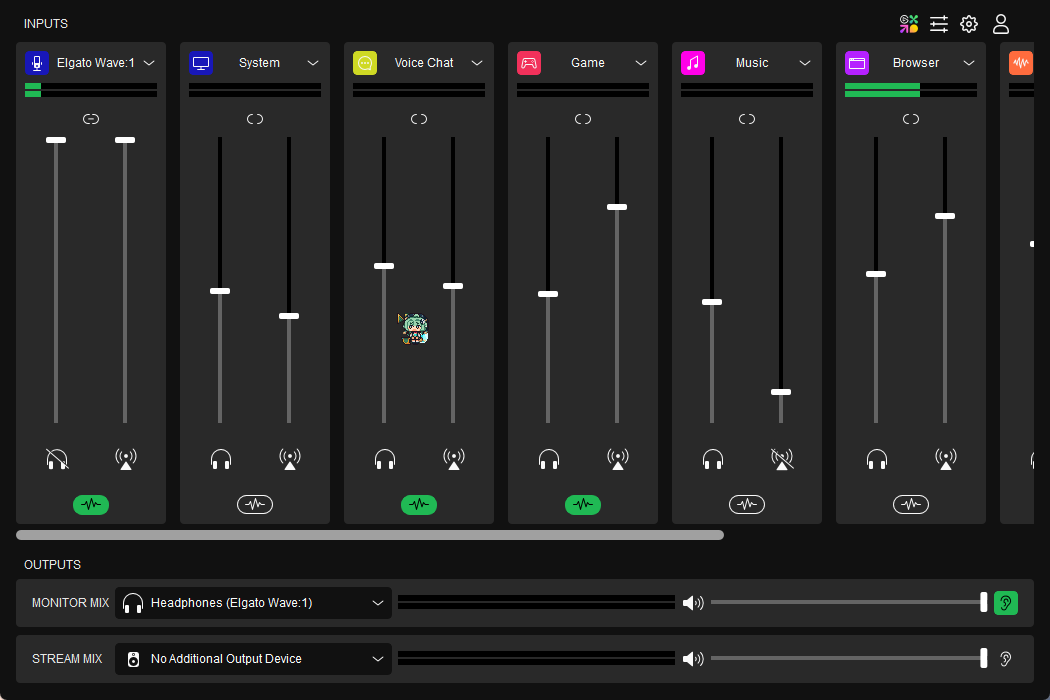
But yes, as Nosut is saying your Windows Audio Mixer needs to be setup again to point Spotify to one of your virtual inputs in Wave Link (eg, Wave Link Music), then add that to the mixer above, and mute it on the stream-mix feed (the little broadcast tower). That way you can listen to it on the monitor mix, without it going to stream mix
#wave-audio
1 messages · Page 8 of 1
 gritty jackal
gritty jackal
gritty jackal
Okay, just had to make sure that's setup. And you muted the broadcast tower slider but not the headphone (monitor) slider on that input right?

 thorn storm
when es mute the stream symbol i dont hear anything
gritty jackal
What is your Monitor-mix set to right now
thorn storm
the headphone symbol doesn't changes anything
now it installs all audiotype i guess

Let me look at that for a moment
 thorn storm
yes
 gritty jackal
That still says Headphones (Elgato Wave:1) - are your headphones plugged into the headphone jack on the back of your Wave:1 mic?
thorn storm
my headph are bluetooth
gritty jackal
Then set Monitor Mix to whatever your headphones are. Right now it's set to the Wave:1's headphone jack.
gritty jackal
No problem! Good luck with it!
thorn storm
Can I leave some praise for you?
gritty jackal
I'm just a volunteer here - I don't work for Elgato. The Thanks are enough 🙂 Thanks though
thorn storm
I also have the 15 Streamdeck, is there a way to save the settings in the future?
gritty jackal
Settings for Wave Link or settings for Stream Deck?
thorn storm
nono just streamdeck himself
gritty jackal
You should be able to backup the profiles you set on your streamdeck, containing your settings here.

For more questions on that though, #stream-deck would be the place to ask
thorn storm
❤️
 coral mural
@solemn wyvern so i tried seperating the audio for music onto obs but it was playing all audio in my headset
 solemn wyvern
coral mural
<@628587626479484928> so i tried seperating the audio for music onto obs but it ...
solemn wyvern
coral mural
<@628587626479484928> so i tried seperating the audio for music onto obs but it ...
Monitor mix is separate from stream mix. You can build out the monitor mix with everything and stream mix with only what needs to be in it.
coral mural
but all i want is just music seperate so i can remove it from vods
but when i chose to put it seperate i was able to here discord twice
solemn wyvern
Do music and discord appear on the same channel?
You shouldn’t need OBS to monitor any of this audio back to you. Since it’s not possible for audio to be doubled in wave link, you must be monitoring some audio from OBS to hear something twice.
So it sounds like the audio source you added to OBS you turned on monitoring. And if you heard discord through it, you just have discord routed to that source, instead of just music.
Again, all monitoring should be off in OBS, unless it’s a sound originating in OBS, like stream alerts. Other than that, everything you hear can be done in wave link same as always.
coral mural
so basically wave link would only be used for my mic at that point
so in obs i put a audio output device, and put it as my headset
solemn wyvern
What? No wavelink has everything in it. Build the mix the way you like to hear it. That’s your monitor mix.
Now mute music channel in wavelink from the stream mix. Now your stream mix is the same as your monitor mix, minus the music. Now add the music channel to OBS as a separate source. Make sure to set this source in OBS to output only, no monitor.
coral mural
oh okay, so let me send some screenshots after im done with this game im playing
 storm wave
Hey there i updated my Wavelink software few minutes ago, but my elgato noise removal and EQ dont got updated, no access to the new features... what i have to do?
solemn wyvern
Manually update them in the marketplace?
storm wave
solemn wyvern
Manually update them in the marketplace?
okay got it .... have to click "Open in Wave Link" instead of something like "update" 😄
 wooden chasm
is it possible to fix EQ not being able to save presets? I tried reinstalling the plugin, and it's still not working properly
solemn wyvern
wooden chasm
is it possible to fix EQ not being able to save presets? I tried reinstalling th...
Do you mean the elgato eq? Update that came out yesterday?
solemn wyvern
 indigo monolith
Hey, Wave Software isnt detecting my Wave XLR Anymore
indigo monolith
Hey, Wave Software isnt detecting my Wave XLR Anymore
Did you do the update that came yesterday?
What have you tried so far?
indigo monolith
No
How should I install an Update if i cant even press the update button
I am reinstalling it now
solemn wyvern
That’s all new so you’re the first to ask about it. I don’t have any advice besides standard troubleshooting. Uninstall, reboot, etc.
 teal orchid
Anyone having issues installing plugins on Mac?
teal orchid
I can download the plugin but when I try to use it it isn't there
solemn wyvern
teal orchid
I can download the plugin but when I try to use it it isn't there
Check that the installer put it in the right folder; tell wavelink to rescan the folder.
teal orchid
I don't have the option to scan a folder 😦
teal orchid
I think I figurd out how to manually download them
 knotty perch
Hmm i just noticed that i have some noise pops in my audio when i send it through a audio lane from wave... if i send it directyl to my yamaha with my headphones its finde.... I slowly think this thing is unusable.... so sad
wooden chasm
solemn wyvern
That’s all new so you’re the first to ask about it. I don’t have any advice besi...
Is there a certain folder plugins are installed to?
knotty perch
knotty perch
Hmm i just noticed that i have some noise pops in my audio when i send it throug...
For ppl with the same problem. My buffer was set to low. On medium it seems to be fine for now
but i still want a feature to sync mic with sound before sending it to the stream mix -.- @fringe arrow
solemn wyvern
wooden chasm
Is there a certain folder plugins are installed to?
Yes, the various plugin formats have default locations on both windows and mac.
wooden chasm
Ok, now it's working all of a sudden. I didn't even do anything
might've been a glitch or bug, maybe?
 shy vortex
wave buggy  Elgato Equalizer not showing presets and crashes wave trying to dl them
shy vortex
Equalizer didn't/doesn't auto update?
Had to go to Marketplace /account/products click Equalizer under VST and DL to VST3 folder 
 faint wagon
Gain and mic max out by its self while using on zoom call, any ideas?
Ahh, I'm thinking Wage Gain lock will to the trick
solemn wyvern
faint wagon
Ahh, I'm thinking Wage Gain lock will to the trick
That should do it, yes.
 hallow mica
Anyone know where downloaded presets from Marketplace go? I downloaded some and got the confirmation, but i dont know where they are
checked the VST3 location but that's just the EQ file, not seeing any preset information anywhere
solemn wyvern
Would presets not be within the plugin configuration window?
Click the cog next to the eq plugin.
 dire depot
Can you tell me if with the 1.9.0, if I mute my microphone (hardware) does it still mutes the vst effects on the software input?
Wont upgrade otherwise so I appreaciate if someone can tell me
solemn wyvern
dire depot
Can you tell me if with the 1.9.0, if I mute my microphone (hardware) does it st...
It still disables the plugins when you mute.
solemn wyvern
dire depot
Wont upgrade otherwise so I appreaciate if someone can tell me
For my info: are you saying you want it to disable plugins when you mute? Or want it to leave them on, like v1.5 does?
dire depot
Leave them on
Becouse I have a vst that when disabled it resets some stuff and its a pain
solemn wyvern
Yeah 1.5 was the last version that left them on.
I am also staying on 1.5 still because noise reduction doesn’t work as well after that. I thought it was because of this same issue, but now I’m testing and finding that it might be more complicated.
dire depot
Ig I'll still be stuck on 1.5 forever 
Like they never though of making that feature a setting or something ... 
 indigo tree
Does anyone know why all the audio from the game channel of wave link it glitching in and out it doesn't do that on any of the other channels
solemn wyvern
Seemingly. But just this morning I was testing 1.9 and actually found that even when I left the plugins on (and muted by another method, after the plugins) the noise reduction was still not working fully. So something deeper is going on.
I'm trying to reach somebody about it but I don't know how that's going to work. Don't have a direct line to development or anything.
solemn wyvern
indigo tree
Does anyone know why all the audio from the game channel of wave link it glitchi...
do you have any plugins on game channel? any plugins on any other channel?
indigo tree
I have only a limiter on the game channel and vst's on my mic and voice chat,
it worked fine yesterday and now it broken
solemn wyvern
save your channel settings so you can restore them. and then remove all of them.
Also check your buffer settings; change back to default if they are anything different.
Also, have you rebooted before testing?
There was an update recently released, did you do that? etc.
dire depot
solemn wyvern
Seemingly. But just this morning I was testing 1.9 and actually found that even...
ehhh.. I feel like they don't even take a look on this chat whatsoever so I'm just yapping for nothing, thanks anyway
indigo tree
solemn wyvern
save your channel settings so you can restore them. and then remove all of them....
buffer settings are on the lowest I just backed up my wave link with the way that was added in the new update
and I have restared wave link just about 1hr ago and rebooted my pc
solemn wyvern
indigo tree
buffer settings are on the lowest I just backed up my wave link with the way tha...
update means there was a change. And I would highly suggest leaving buffer at default
indigo tree
what is the buffers default normmally
solemn wyvern
doesn't it say default right on it? I don't know, I am on v1.5
indigo tree
it says small medium and large i am on the newest version
solemn wyvern
medium will be default, then
indigo tree
Ok I just changed it to medium let me see if that fixed it
Ok that seemed to fix it weirdly I have used smallest for like the whole time I have had my mic and it worked fine
solemn wyvern
The virtual audio subsystem is updated in 1.9 and game channel has a low latency option now, so expect it to behave differently and maybe need a bigger buffer.
 rain goblet
The amount of VST's and the types will affect your total latency and at some point it just doesn't work with the smallest samplesize anymore without issues
solemn wyvern
that doesn't surprise me
indigo tree
rain goblet
The amount of VST's and the types will affect your total latency and at some poi...
does that fall across all channels then or only on the game channel cause I have only 1 filters on the game channel
solemn wyvern
the buffer is for the whole app,
rain goblet
I haven't tried really messing with the Game channel apart from an EQ I toggle depending on game I'm playing, to hear steps better in CS for example
indigo tree
rain goblet
I haven't tried really messing with the Game channel apart from an EQ I toggle d...
ah ok yeah I have like 5 effects active all together on each of my channels
rain goblet
That might be the problem ^^
indigo tree
they are just mostly all limiters
solemn wyvern
striving for the lowest buffer really won't change much. I would say it's preferrable to have stability than save a few ms of latency on the mixer output. especially since the game channel can now bypass the mix bus entirely, and that's the only channel that could be latency critical.
dire depot
solemn wyvern
Seemingly. But just this morning I was testing 1.9 and actually found that even...
Btw now that I think about it, what noise reduction vst are you talking about?
solemn wyvern
I'm using waves Clarity VX
rain goblet
It's incredible, love it ❤️
solemn wyvern
it's incredible in 1.5
It's barely doing anything by comparison in versions from 1.6 onward...
dire depot
Yes The issue I found is that when I disable it for a long time the AI resets sort of and stops working for a while
solemn wyvern
yeah.. well this morning i tested for an hour or so and even when it's not dissabled, it works a lot worse in 1.9.
rolled back to 1.5 and it's working perfectly and fast again.
rain goblet
Personally I never mute the mic in wave link, I have a toggle on my streamdeck to switch between voice activation and push-to-talk effectively using it as a mute for coughing etc, and another toggle for OBS using the hotkey functionality so never had these issues that Jn has
dire depot
1.5 Gang forever ig 👍
solemn wyvern
rain goblet
Personally I never mute the mic in wave link, I have a toggle on my streamdeck t...
yeah. so... do you find that clarity doesn't always clamp down fully? like if you open the window and watch it... when you're not talking it should basically be muting you completely. I found that 1.9 lets a lot through, and 1.5 clamps down right away and stays that way until I talk.
dire depot
rain goblet
Personally I never mute the mic in wave link, I have a toggle on my streamdeck t...
I guess that'll do but I personally just like to mute the hardware directly when I want to
rain goblet
I haven't really looked at the plugin no since I set it up, and I rarely monitor my own voice because I get distracted by the latency caused by my interface xD
I do want Wave XLR
solemn wyvern
Yeah I don't want to hear it, but you can open the clairy window to visualize what it's doing
dire depot
solemn wyvern
yeah. so... do you find that clarity doesn't always clamp down fully? like if yo...
Umm... idk I never tested exacly that, my problem was with the noise reduction stopping working becouse It disabled the vsts and the AI "reset" and needs to calculate the stuff again
solemn wyvern
that's what it looks like with my furnace running in the next room. The pink is reduction. this is 1.5

in 1.9 it's only removing a little of that, and it takes 30 seconds or so of hearing it to catch on.
rain goblet
If I set to same settings without my ReaGate it looks like this
 solemn wyvern
So it seems to be working right for you, and you never disable...
rain goblet
But without my gate, the mic hears me first when I speak, and then through my headphones into the mic again o.o
I'm still on 1.8.2 though, too lazy atm to re-select SFX channel on 360 samples xD
solemn wyvern
ugh
well I dunno then, but something could be better, or isn't working right on many of our systems after 1.5... I really hope somebody is able to take a look at this, but I'm not holding my breath that they will respond.
rain goblet
And yeah, I never mute any channel in Wave Link, and I basically never reboot either xD

#lazy ❤️
solemn wyvern
woah
rain goblet
Longest uptime I had on a windows machine was 187 days, then I had a fatal BSOD that borked the entire install xD
dire depot
Maybe having the vx before everything so it's always "doing something", maybe they have something that sleep the vsts if they aren't doing something, idk
rain goblet
I have my VX first yeah, then ReaGate
solemn wyvern
yeah always place it first
definitely before anything that does gating. And eq would be ok to go before it, but it's not necessary
dire depot
Ok then it's not that xd
rain goblet

My signalchain, and then a few VST's that I toggle on Streamdeck such as reverb etc for funny moments
solemn wyvern
rain goblet
pst.... maxxvolume contains a gate
rain goblet
I copied your settings and it wasn't doing enough xD
solemn wyvern
ah well no prob. the waves gate is really simple, but it's doesn't err on the "closed too much" side. It's gentle and does a good job of not cutting off anything.
you could maybe just turn the slider up. it's based on my mic, afterall
rain goblet
Yeah I can hear myself breathing and tongue noises and didn't want that, even adjusting the Gate doesn't do enough to remove it
It does make my audio slightly stuttery if I'm right at the threshold but rather that than slurps and stuff xD
solemn wyvern
you see how my clarity is set? maxed on type 2. it suppresses most of my breaths, and sometimes cuts off laughter if it's subtle. hehe
rain goblet
Yeah I changed from 1 to 2
I also usually have Clarity at about 70% otherwise it sounds too artificial
I turn into GlaDOS
solemn wyvern
well that's really interesting that yours clamps down in 1.8 but mine doesn't maybe it is still the uptime... but in my testing after being on for quite a while it still wasn't doing good.
rain goblet
Maybe the uptime I got trains it like crazy?
dire depot
Yeh something like that
solemn wyvern
it's the plugin being bypassed, I think. Because I mute my input to it, by muting the mic at the hardware level, and that doesn't bother it.
rain goblet
Hmm ok
dire depot
I think you have to keep it disabled for sometime
rain goblet
But, having VST's run without any signal coming through just wastes CPU cycles so it's probably just optimization from the Dev's part, but it only messes up any AI noise suppression
dire depot
I sure becouse some times when I came back to talk to someone that noise reduction was not working after unmuting and then it kicks on again after the "re-train"
In 1.5, sure maybe I'm wasting cycles but it does not stops working after a long time muted at hardware level
solemn wyvern
Mine never seems to have trouble when it stays enabled, even with signal to it muted.
But when it disables it really let's off the supression.
yeah I think it probably was a CPU load saving technique. But if they asked me (and they didn't) I would tell them that with audio plugins it's often more important to be stable and maintain a constant CPU load. Not always, but with how light this stuff is, it really shouldn't matter...
At most it should be optional.
rain goblet
I do like options yeah
solemn wyvern
1.5% CPU is all wavelink ever uses, with all plugins on all the time. It's not consequential.
rain goblet
0,4% for me at most
Probably more with game channel, browser etc active also
right now it's mic and constant stream of music
dire depot
solemn wyvern
Mine never seems to have trouble when it stays enabled, even with signal to it m...
Yes.. I'm so mad of why they can't make it a settings , options, whatever ... lol look at the preferences window, it's so empty xd
rain goblet
Whooo it reached 0,7% with everything going at once xd
solemn wyvern
wow. is your CPU huge, or is mine runing on lower clocks because it's not being stressed, or what? I have 5800x
rain goblet
5800X underclocked xD
solemn wyvern
hahah
rain goblet
 solemn wyvern
well anyway, maybe 1.8 uses less CPU. If only I could make it work right for me
solemn wyvern
Mine always stays around 4.2 to 4.4 yeah it's bouncing around
rain goblet
I would get way more performance if I had 3600MHz ram also, only have 3200MHz
solemn wyvern
oh yeah i have 3600 to match the fabric
rain goblet
I want
solemn wyvern
you're probably leaving less that 5% actual game performance on the table. CPU is a funny thing
rain goblet
Had this on shelf for almost a year, hate having adhd and can’t get past executive block

This 5800X is going into future streaming PC whenever I can get past not being able to do anything
5900X going into this
solemn wyvern
sheesh!
 round quiver
Anyone have issues with the wave link and Nvidia shadow play? Seem to be capture no audio, Would use OBS but apparently my pc ain't a big fan of that 😂 Nvm I'm just a big dumb dumb and forgot to unmute the wave link
 gilded patrol
Anyone else on MacOS having an issue with it not actually downloading the components?
 gilded patrol
It appears to be installing them in the wrong folder. Instead of the one mentioned in the popup, it's installing them under the user: /Users/[username]/Library/Audio/Plug-Ins/Components/~/Library/Audio/Plug-Ins. It's creating a nested route under the user profile instead of the system level.
 prime meteor
Device: Wave 3
Software & Version: Wave link
Windows/Mac Version: Windows 11
Question/Issue: Im getting "Please Disconnect Secondary wave device" and i only have 1 connected. If i unplug it, it says i dont have anything connected. Id love to keep using the wave software, the main reason i got this Mic
gritty jackal
Have you already restarted the PC? If so, try opening Wave Link without the mic and see what happens - only plug the mic in when it asks to connect a device to see if that resets it, which should force it to redetect.
If not, the next quickest fix is probably to install the new version that came out this week (assuming you don't have a bunch of unsaved settings in your VSTs). Or reinstall current version you have. If you want to give the new one a shot, its' at https://help.elgato.com/hc/en-us/articles/23329469596429-Elgato-Wave-Link-1-9-Release-Notes-Windows
indigo tree
OK, I was having an issue earlier today that for some reason my game channel audio cuts in and out but not any of my other channels. I was able to get it fixed with changing my input and output buffer. But after I restart my pc it just breaks again until I change the buffer again and clue why that is I just tried to reinstall wave link all together and that didn't work... I also just found out if I open OBS the audio cutting in and out stops completly on the game channel but then no audio goes through the channel
solemn wyvern
indigo tree
OK, I was having an issue earlier today that for some reason my game channel aud...
That all doesn’t quite add up; the OBS stuff. Since OBS can’t change what’s routed to the game channel.
But if you did the 1.9 update then it changes the virtual audio devices system so all your OBS inputs will need to be redone. Maybe that’s part of it.
But either way it sounds like something isn’t installed right so you should reinstall.
And maybe wipe out the $user/appdata/elgato/wavelink folder between. To make sure corrupted setting are not carried over.
indigo tree
solemn wyvern
That all doesn’t quite add up; the OBS stuff. Since OBS can’t change what’s rout...
If I decide to wipe out the wavelink folder which one would I get rid of I have 2 in appdata
solemn wyvern
Well that could be your problem right there.
That’s just where it keeps settings files. So…
indigo tree
they each have something different than the other one has just 1 file the other looks like the main wave link folder
the one that just has 1 file is just a folder called QtWebEngine with a subfolder called OffTheRecord with nothing in it
indigo tree
solemn wyvern
Well that could be your problem right there.
That’s just where it keeps setting...
I mean so should I just get rid of the folder that looks like the main wave link one
Ok I tried delating both Wave Link folders and unistalled wave link from my pc... I then reinstalled the wave link from the main site back to my PC and restored the backup of my filters and the game channel is still cutting in and out
indigo tree
and now for some reason none of my audio is not getting outputed to the montior mix/stream mix even with all of my programs routed correctly I can see the levels move up and down on wave link but not in the montior mix/stream mix
 civic basalt
Hello guys, this is a question, I decided to install a preset on wave eq, but at first it was just installed and did not appear anywhere, and then the wave link began to crash, I checked the onedrive folder and all this, I did not find any preset
civic basalt
Okay, I found a loophole, so to speak, on how to download presets for the same wave eq, we need to go to the Elgato Marketplace/manage your account/products website and here you can see a section with supposedly downloaded presets, select the preset you are interested in, and click on the button download (down arrow), a window with the code opens for you, you copy the code and paste it into a text document, then change the document format to xml and throw it into the vst plugins folder in documents, now the preset is added to you in wave eq


I really hope that a fix will be released soon, but for now the presets will most likely only be downloaded this way, but in general it’s better to learn how to use the equalizer and make a preset for your voice, although I haven’t learned it myself yet 🙂
 brazen fossil
So anyone having an issue where in wavelink, the game audio does not output to Game Audio.. its routed correctly. Ive uninstalled wavelink 1.9 and reinstalled it. updated drivers... However if i route any game to SFX input, i have no issues. The difference i see between the two is one as that low latency and other doesnt.. could this be the problem? Also, Do you guys have wavelink 1.8 available for me to download to revert back to the older version of wavelink? I am currently running windows 11 version 10.0.22631 build 22631
solemn wyvern
indigo tree
and now for some reason none of my audio is not getting outputed to the montior ...
Show us a screenshot
solemn wyvern
brazen fossil
So anyone having an issue where in wavelink, the game audio does not output to G...
Were does the audio go when you send the game audio to game? Can you see any other channel moving meters if you open the windows sound devices settings?
Have you disabled or removed any of the virtual channels that wavelink creates from windows sound devices?
 viral sinew
Hey just got my streeam deck+ rly great, only problem i got; i am using a motu m2 with a rode podmic and running the motu m2 through wave link it sounds rly muffled, is there any fixc?
 crystal holly
After some research from wanting to step away from voicemeeter, I learned that apparently you can route capture card audio to a different device via wave link and it says my capture card is supported but when I install wave link it just gives me the “connect compatible device” screen and the application is unusable
On second thought, I’m assuming I need the appropriate microphone too right?
 solemn wyvern
viral sinew
Hey just got my streeam deck+ rly great, only problem i got; i am using a motu m...
solemn wyvern
viral sinew
Hey just got my streeam deck+ rly great, only problem i got; i am using a motu m...
I’ve seen several reports that wavelink has problems with motu interfaces. Don’t know why, but they sound like double monitoring, which causes comb filtering (like talking in a metal tube)
No fix I’m aware of. Ask #official-tech-support
solemn wyvern
crystal holly
On second thought, I’m assuming I need the appropriate microphone too right?
Wave link requires any wave device or streamdeck + to be connected.
Wave mic or wave xlr, or sd+
solemn wyvern
indigo tree
https://i.imgur.com/fko3h1Z.png
Yup, that’s definitely wrong.
Software isn’t installed right or something.
I’d try to completely reinstall, reboot in between. Make sure to connect the device only when told to. And make sure the routing works before you restore any saved channel presets or settings backups, in case the problem is saved in those.
If it works after a complete reinstall, then try loading back your settings but if it breaks, you know where the problem is.
indigo tree
solemn wyvern
Yup, that’s definitely wrong.
Software isn’t installed right or something.
I’d...
ok I will try that but still any clue why the game channel is breaking as well?
would that maybe fix it as well?
solemn wyvern
Could be. You’d be good to fully reset to a fresh install with default settings.
I see plugins on there, that would the another part of the troubleshooting; to remove those
But all things considered you should start totally fresh and bring in your personalized settings and plugins and stuff one at a time. Keep testing to find what step makes it misbehave.
indigo tree
ok I am uninstalling wave link
solemn wyvern
indigo tree
would that maybe fix it as well?
Are you the one that I was telling to wipe out the appdata folder?
indigo tree
solemn wyvern
Are you the one that I was telling to wipe out the appdata folder?
yeah and that there was 2
solemn wyvern
That should be done to make sure settings don’t copy over.
Ok good. Yes. Still do that.
If you restored a backup, could still need to be wiped out.
indigo tree
ok I will get back when I finish reinstalling
solemn wyvern
brazen fossil
So anyone having an issue where in wavelink, the game audio does not output to G...
a quick google finds the version history page with download links https://help.elgato.com/hc/en-us/sections/4913442828941-Wave-Link-Release-Notes
indigo tree
solemn wyvern
That should be done to make sure settings don’t copy over.
Ok good. Yes. Still ...
Ok, I reinstalled wave link and just scanned the VS2/VST3 plugin folder and that made the audio stop going to the montior/stream mix it seems the reinstalling helped the game audio thing at least cause I can't hear it but it not cutting on the meter
ok... a restart of wave link fixed that issue
solemn wyvern
indigo tree
Ok, I reinstalled wave link and just scanned the VS2/VST3 plugin folder and that...
So it broke again when you scanned the plugin folder?
So we might have an incompatible plugin. I'd take those all out of the folder and try them one by one.
Oh and with 1.9 VST2 plugins can't work with the low latency game channel mode, so try only loading VST3 plugins one by one and see which one caused the problem. If it's one of your VST2 you should just not use those at all anymore if you can help it
viral sinew
solemn wyvern
I’ve seen several reports that wavelink has problems with motu interfaces. Don’t...
Thats rly sad to hear, but thanks
solemn wyvern
viral sinew
Thats rly sad to hear, but thanks
Yeah, I worked with a guy for a whole day trying to troubleshoot and we never fixed it.
I'm convinced he wasn't doing anything wrong at this point.
I'd be interested to hear what support says to you, though.
indigo tree
solemn wyvern
So it broke again when you scanned the plugin folder?
So we might have an incomp...
I just have decided to not use any plugins on the main game channel the only vst2 plugin I use is repears noise gate
solemn wyvern
but you said scanning them is when the problem started? or was it when you added them to a channel?
indigo tree
when i scanned the vst2 folder it broke I then removed the one it told me that crashed wave link and adding just all my effects back but none on the game channel
and now everything seems to work back the way it was usppoed to
solemn wyvern
ok, slightly confused by your phrasing.
To be clear, what's different about how it's set up now vs before? Have you removed plugins from your folder? Or just removed them from the channels, but they are still in the plugins menu?
indigo tree
I removed both plugins from the VST2 folder and from the channel
solemn wyvern
k
indigo tree
thanks a bunch for the help jn by the way much appericated
kinda was in a distress cause of an event I am doing today that I needed my audio to work
solemn wyvern
right, well thanks for filling back in on the fix.
Likely you won't be the only person to have this issue, if it's a VST2 compatability... Since that's what changed.
indigo tree
solemn wyvern
right, well thanks for filling back in on the fix.
Likely you won't be the only ...
yeah it was rnnoise plugin
solemn wyvern
indigo tree
yeah it was rnnoise plugin
ah, great
you don't need that anyway. The elgato noise removal (the one that isn't nvidia) is the same plugin. it's a wrapper of RNnoise.
indigo tree
ah ok
solemn wyvern
and the new update reportedly brought and update to that plugin, with added settings of some kind.
 hollow hazel
hello everyone, For a few days my microphone makes a weird noise every 20 seconds or so. The sound looks like a pchiiiiii and lasts 3-4 seconds an idea?
solemn wyvern
hollow hazel
hello everyone, For a few days my microphone makes a weird noise every 20 second...
one of your plugins is a demo and it's blasting static as copy protection.
Either buy a license for it, or remove it.
viral sinew
solemn wyvern
Yeah, I worked with a guy for a whole day trying to troubleshoot and we never fi...
Did send out a mail, will inform u asap. Trying to sell my m2 then 😂 i got a accaptable result using the eq, but its only a bandaid and annoys me
solemn wyvern
viral sinew
Did send out a mail, will inform u asap. Trying to sell my m2 then 😂 i got a ac...
Yeah, it’s a shame. Nothing wrong with motu gear. And that’s the only brand that I’ve seen these reports of.
Something weird in interaction with their driver or something.
I hope elgato support can become aware and work with motu to resolve it.
 fringe dust
anyone got the same problem that the SFX channel doesnt route to microphone FX anymore?
 candid yarrow
Is there a way to refresh your stream mix now with the new update?
Its always set on my Elgato MK2 4k60 capture card to pass through audio since the new update but when the streaming PC turns on i have to basically reselect it and refresh it by choosing it in the stream mix panel.
I also can't choose stream mix as a streamdeck button for easy button refresh.
Any other solutions to let my streaming PC instantly pick up audio?
solemn wyvern
candid yarrow
Is there a way to refresh your stream mix now with the new update?
Its always ...
Don’t know. Worked for me when I tested it.
Routed to HD60S+ and then later turned on stream pc. Picked up right away without any other action.
brazen fossil
solemn wyvern
Were does the audio go when you send the game audio to game? Can you see any oth...
game audio goes no where.. all other channels work properly as they should. i dont think i removed any virtual channels, how would i go about that?
solemn wyvern
brazen fossil
game audio goes no where.. all other channels work properly as they should. i do...
It can be done in windows sound settings. But I’m sure you didn’t if you didn’t know.
So the next thing to check is plugins.
I’d suggest removing all your plugins and maybe even removing the files from your vst2 folder. Games channel is not compatible with vst2 anymore. (Side effects of the lower latency)
Somebody earlier got a solve from removing vst2 plugins.
New updates are sometimes a moving target.
brazen fossil
solemn wyvern
It can be done in windows sound settings. But I’m sure you didn’t if you didn’t ...
just rolled back to version 1.82 and everything works. i do not think 1.9 is ready fully i believe with the low latency .. its conflicting and unstable.. in my opinion... i also dont have any vst2 plugins
solemn wyvern
brazen fossil
just rolled back to version 1.82 and everything works. i do not think 1.9 is rea...
If you haven’t checked about plugins yet, could be that. As said, somebody else was having strange behavior with games channel in 1.9 and it turned out to be plugin related. Clearing older, incompatible vst2 plugins fixed.
And obviously many are using 1.9 just fine.
brazen fossil
solemn wyvern
If you haven’t checked about plugins yet, could be that. As said, somebody else ...
ill keep you updated, thank you
solemn wyvern
Personally, I’d clear the vst2 folder completely, restart wave link and rescan. Use only vst3
brazen fossil
solemn wyvern
Personally, I’d clear the vst2 folder completely, restart wave link and rescan. ...
ill give it a try and report back my findings.
 lavish ivy
updated to new wavelink and now obs sound isn't working and this is what i'm showing

does anyone know how to revert back to previous version or know how to fix this?
solemn wyvern
Yeah, route it. It’s all in the update notes.
 misty field
Hey there, i'm excited about the new Stream Mix to hardware for macos, but the release notes lack in depth tutorial or more information, how to make dual pc set up possible using the feature? I have a capture card but use it to capture footage from my consoles, so how can I share the audio to my second pc?
lavish ivy
solemn wyvern
Yeah, route it. It’s all in the update notes.
I did route it to headphones... no sound is coming through OBS still
solemn wyvern
lavish ivy
I did route it to headphones... no sound is coming through OBS still
Route it to the stream mix device if you want OBS to pick it up just as before.
The new options are only helpful if you use a capture card.
Again, this is all explained in the update notes.
lavish ivy
i read the update notes. it's not working. I don't know how to fix it. routing to stream mix device doesn't show up anymore
solemn wyvern
misty field
Hey there, i'm excited about the new Stream Mix to hardware for macos, but the r...
Second pc would receive on the capture card. New feature is that stream mix can be assigned to a hardware device. If you don’t have a hardware device receiving your stream mix then this doesn’t apply to you.
It’s just an easier to way to do what was previously possible. So if you weren’t already sending stream mix to a capture card, this new option doesn’t do anything for you.
misty field
solemn wyvern
Second pc would receive on the capture card. New feature is that stream mix can ...
would you suggest me buying second capture card? So I can capture audio and screen of my mac to my windows pc and then redirect audio from wavelink to second capture card? Is this what the new feature is about?
candid yarrow
solemn wyvern
Don’t know. Worked for me when I tested it.
Routed to HD60S+ and then later tur...
Ah it ''picks it up'' in terms of that the icon goes away and it stays selected, but its not actually selected, when clicking on it it highlights another monitor and i have to click on the capture card again to fully select it and let audio come through it. Frustrating
solemn wyvern
misty field
would you suggest me buying second capture card? So I can capture audio and scre...
I’m not suggesting buying anything. But if you have a separate stream computer from the one you game on, this feature makes that easier
misty field
solemn wyvern
It’s just an easier to way to do what was previously possible. So if you weren’t...
actually I wanted to use dual pc set up with the wavelink but didn't know it was possible. And when I clicked stream mix it didn't give me any options. Now it does so i'm wondering how to make it happen
misty field
solemn wyvern
I’m not suggesting buying anything. But if you have a separate stream computer f...
okay, can you please send me some youtube video or article about dual pc stream setup using wavelink 🙏
 fossil patrol
Do anyone know why my stream Mix audio isn't popping up?

It's not working in OBS either
lavish ivy
fossil patrol
Do anyone know why my stream Mix audio isn't popping up?
Mine isn't working either, let me know if you figure this out. I uninstalled and reverted back to a previous version, and it didn't fix it.
fossil patrol
lavish ivy
Mine isn't working either, let me know if you figure this out. I uninstalled and...
Yeah I unplugged my Mic because i was moving my setup around and when I plugged it back it up, I can't hear myself through the mic even though I have my headphones plugged in and then my Stream Mix stopped working
lavish ivy
fossil patrol
Yeah I unplugged my Mic because i was moving my setup around and when I plugged ...
the only things i can get working is Spotify. It shows OBS playing the sound in the audio, but nothing will move in wave link even with it selected to the right channels
well, spotify and discord.
solemn wyvern
As it says in the notes, the update to the virtual audio device subsystem means all OBS audio sources have to be reset, as well as the stream mix.
This will only need to happen once after the update. Just reset them all to what they were before.
lavish ivy
solemn wyvern
As it says in the notes, the update to the virtual audio device subsystem means ...
how do you reset them? do you mean literally going to the audio settings tab, and reselecting the system? or do you mean going to advanced audio properties.. and selecting audio monitoring?
or both?
solemn wyvern
Yeah the whole system will not recognize the old inputs. They will have the same names, but be new as far as the computer is concerned. So each will have to be routed as though you are setting it up for the first time. Route games to game, etc.
in OBS, properties of each audio source, set it to whatever it was previously set to. (It will appear to be a new device to OBS as well.
(I didn’t do any of this myself, I just read it in the update notes)
 covert scaffold
Why do I not have a Stream Mix option?


i see the messages above, but there was never any update, i only started using it yesterday 😅 There has just never been a stream mix option, even in OBS
solemn wyvern
covert scaffold
i see the messages above, but there was never any update, i only started using i...
If you select something else like any headphone or speakers, does the stream mix device appear after that?
Someone above said something like that.
When I tested 1.9 I saw that stream mix was still a device on my computer audio devices, check to make sure yours is still there. That can be assigned to OBS just as normal.
 astral pawn
Question: Anyone having issues with the audio presets for the wave XLR not showing in the EQ settings?
 twilit marten
Im trying to use Obs but if i connect headphones to my console (switch) it wont play any audio, i have an elgato link chat cable which should make it work regardless but it still doesnt work, any advice
its a pro cable btw
solemn wyvern
astral pawn
Question: Anyone having issues with the audio presets for the wave XLR not showi...
Yes some reports of that. Above somebody said that they downloaded the preset as a txt file and the renamed it to an xml file and then it worked.
Best I can do.
solemn wyvern
twilit marten
Im trying to use Obs but if i connect headphones to my console (switch) it wont ...
You may have it routed backwards or something?
The cable you’re talking about is a splitter so it should be just an analog connection; nothing too fancy.
If you still need help, describe your setup in full detail and maybe we can think of what to check.
 half pawn
Weird thing I've noticed with the Wave XLR: I have the Wave XLR behind a USB 3.0 Switch so I can easily swap it between my gaming pc and work Mac along with other peripherals. For some reason tho whenever I switch it to my gaming pc, it won't register any audio until I reconnect it completely 
ah there was an update for wave link and after updating audio seems to be working after switching back and forth
solemn wyvern
1.9 came a couple days ago, yeah.
But that doesn’t surprise me. Dont hear about switching like that very often but thanks for the report.
 errant lintel
i have a question or suggestion for the software audio wave. I sometimes switch between headsets and now i have to open wavelink to manualy change the monitor mix to the other headset. Is there an other way or is there in the future maybe a option to bind a button or key combi to change the monitor mix device.
solemn wyvern
errant lintel
i have a question or suggestion for the software audio wave. I sometimes switch ...
Stream deck is what they’ve build this functionality around. So if you have one of those, or a Corsair keyboard with G keys, or the mobile streamdeck app. (Which has 6 buttons for free on the iOS version)
errant lintel
solemn wyvern
Stream deck is what they’ve build this functionality around. So if you have one ...
thx for your answer. i got the streamdeck and also corsair keyboard. wasnt aware of this function in steamdeck. found it. thnks 🙂
covert scaffold
Does anyone know how to get game audio back when using this? Its just silent 😅 (I am not nor have I ever used any VSTs)

 pure wing
covert scaffold
Does anyone know how to get game audio back when using this? Its just silent 😅 ...
pure wing
covert scaffold
Does anyone know how to get game audio back when using this? Its just silent 😅 ...
Looks like low latency is on with no VST
 warm totem
yeah this update is bs
gritty jackal
covert scaffold
Does anyone know how to get game audio back when using this? Its just silent 😅 ...
Typically you setup your game to point to Wave Link Music. Then once you add that input you'd listen to it on the monitor mix (and send it to stream with the stream mix). Was that initial setup done and something changed? Or are you still trying to get it to work from scratch? (also is this macOS or Windows - Wave Link inputs are a little different depending)
gritty jackal
warm totem
yeah this update is bs
What trouble are you running into with it?
warm totem
 gritty jackal
ah
warm totem
Basically telling I can use it smoother with a dual pc Nahh
gritty jackal
Needs to be on the gaming PC
warm totem
You can
pure wing
warm totem
yeah this update is bs
What’s exactly going with it?
warm totem
Shouldn’t ever had to plug any mix amp into your stream pc that’s drawing power away the game
Bs update it is
gritty jackal
If it's on the Gaming PC, Stream Mix now allows you to send a copy of it to a hardware output - like HDMI or 3.5mm.
I'd agree that I'd normally have it on the streaming PC but it's becoming increasingly commmon for folks to want to use the mics on the gaming PC for discord and the like.
pure wing
warm totem
Shouldn’t ever had to plug any mix amp into your stream pc that’s drawing power ...
Can you break it down a bit more vs your frustration please?
gritty jackal
pure wing
Can you break it down a bit more vs your frustration please?
I think their problem is that they don't want to have to hook the Wave:1/Wave:3/Wave XLR/ StreamDeck+ to the gaming PC to enable Wave Link
pure wing
There is a guide for Dual PC via Wave Link.
warm totem
I’d never run discord on a gaming pc why would you do that? It’s silly meaning for a dual pc is the less amount of things on the pc while gaming? Like what would you be doing using it on your gaming pc?
covert scaffold
gritty jackal
Typically you setup your game to point to Wave Link Music. Then once you add th...
THe game audio is already routed to Game audio and works fine usually, only when I turn this on I can no longer hear it (I see the bars moving still) - obviously I am listening to the monitor mix myself, so its just a case of how I can hear everything myself normally (not the monitor mix) Its windows
pure wing
covert scaffold
THe game audio is already routed to Game audio and works fine usually, only when...
Are you using anything other than Wave Link
gritty jackal
warm totem
I’d never run discord on a gaming pc why would you do that? It’s silly meaning f...
Sharing screen, easy access it you're using PTT, etc. A lot of folks are just using the streaming PC to offload video encoding these days, since they keep everything they same on the gaming PC and when they're not streaming. I get where you're coming from though.
That said if you're not running any of that on the gaming PC you can get away with different apps anyway since you won't need the mixer - like the Sound Capture app that was bundled with Game Capture HD.
covert scaffold
pure wing
Are you using anything other than Wave Link
Wave XLR
warm totem
@gritty jackal So what is the best way to sort it so from stream to gaming?
i have the mic sorted
i dont care about the mic
its the game sound
pure wing
covert scaffold
Wave XLR
This is the current guide for Dual PC. https://help.elgato.com/hc/en-us/articles/360045679072-Wave-Link-Dual-PC-Streaming-Send-Sound-to-a-Streaming-PC-from-the-Gaming-PC

Elgato
This guide will walk through how to send audio from a gaming PC to a streaming PC using Wave Link and a capture card in a dual PC streaming configuring.
Requirements for this setup:
A gaming P...
covert scaffold
I dont use dual pc
pure wing
Sound Capture isn’t usually needed if one is using Wave Link
pure wing
covert scaffold
I dont use dual pc
Single PC setup?
gritty jackal
They're not using Wave Link on the Gaming PC, it's on the STreaming PC so that guide doesn't apply
pure wing
covert scaffold
I dont use dual pc
Sorry this was meant for Gogzy
I would say it’s worth the read, and perhaps this might sort out a bit for Gogzy
warm totem
becasue no lie im so close to fing this out the window and go buy a goxlr as i was told my many poeple this mix amp is 1000 times better than a goxlr
gritty jackal
warm totem
<@269997944671830017> So what is the best way to sort it so from stream to gamin...
Honestly if you're not splitting the mic or anything, and just want to send ALL sound to two places, I've used both Voicemeeter Banana, and the Elgato Sound Capture app that came bundled with the Game Capture HD software - https://help.elgato.com/hc/en-us/articles/360027964072-Elgato-Game-Capture-HD-Software-Release-Notes-Windows . You don't get any fancy mixing like you would if you were running Wave Link on the gaming PC though, just all or nothing (and no mic carry over). (Game Capture HD also isn't compatible with newer capture cards, but the budled Sound Capture app works fine).
It's basically just this for the setup
 warm totem
are you able to set it up?
gritty jackal
That just goes on the Gaming PC, and splits the audio - all it does. If you need more complexity and don't want the Wave hardware on the gaming PC, look into Voicemeeter. That's notably more complex though
warm totem
so basicaly the wave xlr is a bs of a mix amp and is only good for a solo pc?
gritty jackal
covert scaffold
THe game audio is already routed to Game audio and works fine usually, only when...
Just to confirm, when you turn Low Latency on you're loosing the game audio? You can still see it but it's not in the Monitor Mix? Is it still in the Stream Mix?
solemn wyvern
covert scaffold
Does anyone know how to get game audio back when using this? Its just silent 😅 ...
As per the update notes, you’ll need to reassign everything to the channels you want, OBS, too. Did you do that?
gritty jackal
warm totem
so basicaly the wave xlr is a bs of a mix amp and is only good for a solo pc?
I mean, if your mic is attached to the streaming PC, it still unlocks Wave Link there you can still do all your VSTs, and tuning and Stream Mix setup on the streaming PC - but it is primarily a single PC device, and primarily a XLR interace for the mic, it cannot do multi pc routing in hardware. You have to choose to put it on either the Gaming PC or the Streaming PC.
The steam-mix update with 1.9 was meant more for people with it on the gaming PC (either they need the mic there for something else or are offloading stream encoding to a smaller setup like a NUC or something). The idea is that now they can setup a Stream Mix and send it to the HDMI (or line out) directly from Wave Link - it previously couldn't do that without setting a "Listen to" flag in Windows Audio.
covert scaffold
solemn wyvern
As per the update notes, you’ll need to reassign everything to the channels you ...
Reassign what?>
gritty jackal
But yeah, for routing audio from the gaming PC, just use Sound Capture or Voicemeeter to split the audio - set the PC to use Sound Capture, and tell it what output your want to listen to it on and then set the other to the HDMI output you have going to the streaming PC. Then you should be able to pull the audio off the capture card in the streaming PC, and it'll be synced with the video delay and everything.
covert scaffold
I didnt update, I downloaded the program for the first time on this update, I have never updated
pure wing
covert scaffold
I didnt update, I downloaded the program for the first time on this update, I ha...
Did you ever route your audio?
 solemn wyvern
covert scaffold
Reassign what?>
solemn wyvern
covert scaffold
Reassign what?>
Everything. Everything that’s assigned to, or from a channel in wave link. All the virtual audio devices are new as far as your computer is concerned.
warm totem
yeah wave xlr is getting smashed off the wall waste of 190 euro
pure wing
solemn wyvern
Everything. Everything that’s assigned to, or from a channel in wave link. All t...
Thanks, I’m popping out. I am at work till 7pm. 😦
solemn wyvern
warm totem
so basicaly the wave xlr is a bs of a mix amp and is only good for a solo pc?
I’ve been using wavelink with dual pc since day one. For years. Update made that easier (while maybe making single pc streaming slightly more confusing)
solemn wyvern
Probably cool it with the hostility.
You can find a lot of help and advice here. But we are volunteers and we don’t have to put up with attitude from anybody.
covert scaffold
solemn wyvern
Everything. Everything that’s assigned to, or from a channel in wave link. All t...
As I said there was nothing to reassign, I opened the program for the first time yesterday, I assigned everything already on first time use so I am not sure this applies or I am not understanding correctly aha
pure wing
solemn wyvern
Probably cool it with the hostility.
You can find a lot of help and advice here...
This is the 2nd mention. Btw
warm totem
nah nah not giving out to none of ye at all ye have helped 100 times more than elagto ever would
just makes me mad
they people who work there email back saying oh this is better than any other mix amp
pure wing
covert scaffold
As I said there was nothing to reassign, I opened the program for the first time...
What did you setup as your monitoring device?
warm totem
so much easier for a dual pc
so you get me it makes me mad when its 1 step forward
2000 backwards
solemn wyvern
Dual pc works great before this update. And better after, so not sure what the issue is. Sorry I’ve been busy I wasn’t catching up yet but keyed into the anger here. I’ll watch.
gritty jackal
warm totem
they people who work there email back saying oh this is better than any other mi...
It's not a MixAmp is the main problem - it's a USB XLR Interface, with mixer software. Sorry it sounds like that got some wires crossed 😦
covert scaffold
pure wing
What did you setup as your monitoring device?
My headphones
pure wing
covert scaffold
My headphones
I’m hopping off due to work, but maybe @solemn wyvern can help further
warm totem
wait im not angry
i can promise that
messages may come across that way but i am not 1 bit angry with anybody here
covert scaffold
Its this part I am not understanding. It says it wont play through the monitor submix anymore but it will continue to play through the monitor mix. Whats the difference 😅 how do I go to the normal monitor mix? I thought I was on that but assuming not

 solemn wyvern
covert scaffold
Its this part I am not understanding. It says it wont play through the monitor s...
solemn wyvern
covert scaffold
Its this part I am not understanding. It says it wont play through the monitor s...
If in low latency mode, the game channel passes directly to the output device that you choose as the monitor mix
But you won’t hear anything if you assign something else to listen to monitor mix, like OBS
covert scaffold
Just fyi, when I press the Ear on the stream mix I can hear it again
solemn wyvern
Because that audio is bypassing the mixer to lower the latency
Yeah that’s working as intended, sounds like.
gritty jackal
warm totem
messages may come across that way but i am not 1 bit angry with anybody here
All good. If you need hardware based mutli device mixing you're going to be looking for hardware mixers, not XLR interfaces on their own sadly - Wave XLR is single input only.
Wave Link can do similar (but not quite the same) by running it on the gaming PC, sorting the audio and sending it to the streaming PC over HDMI - but requires running the wave gear on the gaming PC (with associated minor overheads, though thankfully audio mixing is light). Even then that's mostly just using it as a Single PC device (on the gaming PC), and sending the single audio channel across to another output and letting the Streaming PC getting it do it's own thing with whta it gets in. I don't think it's what you're looking for if you're worried about that overhead. At this time Elgato doesn't have any hardware based multi input mixers.
covert scaffold
solemn wyvern
If in low latency mode, the game channel passes directly to the output device th...
Okay so how do I hear it ? aha
solemn wyvern
Assign the monitor mix to your headphones. As usual. Worked as described when I tested it.
Driving for a bit. Won’t be able to answer

 fallow stream
HELLO! I have a buddy who is not very audio savvy and he just got a Stream Deck Plus and we want to figure out how to route his audio with WaveLink. I am a GoXLR user so i am unsure how to help him. We are in a call sharing screens so if anyone could help us in call that would be HUGE! Thanks!
pure wing
fallow stream
HELLO! I have a buddy who is not very audio savvy and he just got a Stream Deck ...
Are they only routing for windows, or OBS too?
fallow stream
we windows for now, stream later
fallow stream
pure wing
Are they only routing for windows, or OBS too?
do you think you could help us??
pure wing
fallow stream
we windows for now, stream later
See the little hamburger menu top right? Open it, and you can start routing
fallow stream
pure wing
See the little hamburger menu top right? Open it, and you can start routing
free for a fast call??
pure wing
fallow stream
free for a fast call??
No, I’m working
pure wing
fallow stream
he is more hands on help needed and im just playing telephone hehe
Have them join the server and we can help at a later time
fallow stream
ill have them join, be prepared for loads of questions we are lost asf
what does he need selected as his input in the bottom right of the task bar? on elgato i have system but idk what it is for wave link
pure wing
fallow stream
what does he need selected as his input in the bottom right of the task bar? on ...
I have mine as MIC FX, for my input, and my Default to System
fallow stream
he also doens have an elgato mic which makes it a little more difficult
solemn wyvern
covert scaffold
Look at my picture, its already my headphones, thats the problem aha
Sure looks like it’s working to me. And you’re saying you hear nothing?
Have you rebooted? Have you flipped monitor assignment to something else and then back? Do you have any vst2 plugins installed on the system, even if none are on the channel?
Have you turned off low latency mode?
Have you reassigned all apps to their proper channels, as if you’re starting from default?
pure wing
fallow stream
he also doens have an elgato mic which makes it a little more difficult
Shouldn’t
fallow stream
he is coming, yall help the homie out thank yall for your responses to me
 eternal matrix
hello Vic
fallow stream
^homie is here
eternal matrix
around what time is it good to help?
fallow stream
she will be helping here, she cant talk
youll have to send screenshots and questions
eternal matrix
Hey guys i just got this StreamDeck and i am getting frustated because is not working for me, and no one seems to help , even in the elgato discord. i dont know what to do
solemn wyvern
You’re in the Elgato discord right now, asking.
Why are you saying we aren’t helping?…..sigh….
Ok so moving on…
We can help only after you describe your problem in detail, including describing your setup exactly. Be as specific as possible.
gritty jackal
Just saw the post in general - yeah, general tends to sit when the volunteers are busy. I don't think there's anyone around right now for a full walkthrough call on it, as Vic just stepped out. Are there any particular issues you're hitting setting up Wave Link with the SD+? https://help.elgato.com/hc/en-us/articles/360044566172-Wave-Link-First-Time-Setup-for-Windows-10 should have a basic setup guide for you (just swap out the wave mic with whatever mic you're using if it's not an Elgato one, since the SD+ unlocks Wave Link without it).
The process is mostly the same for Win 11 as well
gritty jackal
eternal matrix
Hey guys i just got this StreamDeck and i am getting frustated because is not wo...
What is the problem you're having? I don't see any message history for you on the server. If it's Stream Deck Specific and not Wave Audio it should be in #stream-deck
covert scaffold
solemn wyvern
Sure looks like it’s working to me. And you’re saying you hear nothing?
Have you...
I hear nothing when it's on, audio comes back when I turn it off
I rebooted
Monitors havent changed or anything as such
There is vst2 plugins on the mic channel only so I could try that
Yeah removing the VST2s does nothing
solemn wyvern
covert scaffold
I hear nothing when it's on, audio comes back when I turn it off
I rebooted
Moni...
“Monitors haven’t changed” doesn’t help us here.
The update changed many things. So if you haven’t done what the directions say and re-route everything…. Nothing will work.
And also be sure to try the rest of what I listed.
covert scaffold
I did all of it
solemn wyvern
covert scaffold
I did all of it
Ok, if you’ve done all that stuff then I have nothing left besides a full reinstall.
And I suggest you uninstall and then delete the $user/appdata/elgato/wavelink folder
Then reboot. (This is to fully wipe all your settings in case there is corruption there)
Then reinstall.
If it doesn’t work after that reinstall and setting it up… then I have nothing left and I’ll send you to #official-tech-support
covert scaffold
I am building a whole new pc in a few days so I will just wait for that and see if its working 😅 Thank you for your help!
solemn wyvern
covert scaffold
I am building a whole new pc in a few days so I will just wait for that and see ...
K. You can also uninstall and go get the installer for 1.8 from the web site. Google wave link version history and you can find all the update notes by version and each have the historical installers.
covert scaffold
The new latency thing was only in 1.9 though right?
gritty jackal
Yes, only in 1.9
fallow stream
is anyone able to help seup wave link in a call? me and Kash are stumped and no youtube video is helping
just asking for assistance for him to understand the program ill straight up give $10 so this man can stop stressing ab it
solemn wyvern
Don't offer money; that's not ok here.
Describe your setup and problem in detail and we will try to help. we can't help until you fill us in on what's going on.
 rugged cedar
How well does Rodecaster Pro II intergrate with wavelink? My Motu M2 doesn't play well with wave for microphonefx, the audio comes out tinny, forget the exact term but it is the result of two identical signals being offset just slightly which results in frequencies to interfere - I contacted support months ago and after weeks and weeks of back and forth we had no progress so I eventually gave up on it. I'd love to just use the motu m2 if possible but I haven't heard about any major updates or overhauls that might address this issue
solemn wyvern
rugged cedar
How well does Rodecaster Pro II intergrate with wavelink? My Motu M2 doesn't pla...
Still haven’t found a solution for you. in face, just yesterday another user reported the same issue with a motu interface.
Rodecaster will be overlapping a lot of (but not all of) the functionality of wave link… so it’s a pretty expensive kit when all you really need is a simple interface with a decent preamp.
If you want to use wavelink, I’d suggest something from the focusrite Scarlett line, which are excellent for the price.
So far motu is the only brand that I’ve seen incompatibility reports with.
So I have no reason to think rode gear would be a problem.
Scarlett solo is the lowest cost interface I’d recommend. It’s great, I’m not saying it’s a compromise.
Then of course there is elgato’s own wavexlr and other interfaces from Presonus or rode if you want to spend a little more.
But these are all quite similar in mic preamp quality.
 fast grail
The new mac wave link update is very cool, love the 2nd stream mix output - just to note the marketplace audio plugins install in bunch of folders which wave link doesn't pick up - move to component root folder works fine.
 median heart
fast grail
The new mac wave link update is very cool, love the 2nd stream mix output - just...
median heart
fast grail
The new mac wave link update is very cool, love the 2nd stream mix output - just...
Second stream mix output?
👀👀
solemn wyvern
fast grail
The new mac wave link update is very cool, love the 2nd stream mix output - just...
Thanks for the report; yeah I’ve seen this a couple times from folks that it installs to the wrong folders.
And not totally right on windows either.
rain goblet
median heart
Second stream mix output?
No
solemn wyvern
median heart
Second stream mix output?
I figured they meant assignable, since it wasn’t before.
median heart
Ahhhhhhh
rain goblet
Can't wait for 2nd actual Stream Mix though

 fast grail
median heart
Second stream mix output?
fast grail
median heart
Second stream mix output?
should have been clear, not another "stream Mix', it does let you add an additional output device - same mix to 2 outputs
 barren remnant
How do I add voice mod to the wave Link to change my voice with a click of a button?
solemn wyvern
barren remnant
How do I add voice mod to the wave Link to change my voice with a click of a but...
You can’t add it “to wavelink” but you can route the microphone fx output to the input of voicemod.
In that case, anything you want to send your voice to will need to listen to the voicemod output, not micfx. And note that the voicemod effect won’t be part of the stream mix unless you route voicemod’s output back into a wave link aux channel (and be sure to mute the mic channel in that case)
 lucid quiver
Can anyone help me with the double mic issue with Wave XLR?
Whenever my mic is muted I hear everything coming into my headset quite loudly
It's like having Sidetone
I can't figure out how to get it to go away
or Mic monitoring
solemn wyvern
lucid quiver
Whenever my mic is muted I hear everything coming into my headset quite loudly
Yes, side tone is another word for it. It’s direct monitoring. Any competent usb interface will have it.
To turn that off, adjust the pc/mic balance all the way to the pc side, either with the slider in the mic channel of wave link, or with the knob on the wave xlr. Click the knob to switch between the modes: headphone volume, mic gain, and pc/mic balance.
lucid quiver
solemn wyvern
Yes, side tone is another word for it. It’s direct monitoring. Any competent usb...
So even with it all the way to the left I still hear it

I am not sure what I am doing wrong
solemn wyvern
lucid quiver
So even with it all the way to the left I still hear it
Ah. You’re not hearing direct monitoring. You’re routing your mic to the monitor mix.
That will be latent, so it’s not recommended.
Every channel has a volume slide and a mute button for the monitor and stream mix.
Mute your mic from the stream mix so it’s not playing back to you.
 solemn wyvern
lucid quiver
So selecting this and turning it all the way to the right
solemn wyvern
lucid quiver
So selecting this and turning it all the way to the right
All the way to the right?
It’s a button. You just click it.
Anyway, yes, that’s the button for routing to monitor mix. You have muted your mic in the monitor mix.
If you ever want to hear your voice (without latency) in the headphones a little, you can adjust that pc/mic mix to include a little more mic.
But don’t bother routing the mic channel, since that goes through the mix buffer so there is latency.
lucid quiver
Okay thank you
I appreciate your help
Now time to figure out how to set up my DT990 pros that I just got in today
L o l
lucid quiver
So when using a headset plugged into the back of the Wave XLR, it’s now easy to figure out all the inputs and get everything to work how I want it too.
But when trying to use a dedicated amp (Schiit Magni stacked) with some DT 880 pros. I now struggle to get the Wave link software to work. Anyone have a fix or work around for this?

 west berry
Hey everyone, I'm having an issue. I updated wave link yesterday but now I don't have a stream link option. It just say no additional output device.
Thoughts?
 edgy island
Hi, I have a problem. When I plug my headphones into my wave link, no sounds comes out from my headset. However, when I plug into my pc's audio port, it works. Toughts ?
solemn wyvern
lucid quiver
So when using a headset plugged into the back of the Wave XLR, it’s now easy to ...
Is that a dac? A separate audio device on the computer?
solemn wyvern
west berry
Hey everyone, I'm having an issue. I updated wave link yesterday but now I don't...
It’s still working as before you just have the option to directly attach it to a hardware device now. This probably doesn’t matter to you unless you stream with a second computer and capture card.
Be sure to follow the direction in the update notes and reassign all your audio routing and sources in OBS, since they are new from the computer’s perspective.
solemn wyvern
edgy island
Hi, I have a problem. When I plug my headphones into my wave link, no sounds com...
You’re need to route all your audio to the various channels in wave link and then set wave link monitor output to its headphones.
Wave link is a mixer so you need to feed audio into it, and then listen to its output.
Follow the setup guide.
west berry
solemn wyvern
It’s still working as before you just have the option to directly attach it to a...
Thanks for the response! So prior to the update I would have the stream link option for stream mix and that would be the audio input I would use in OBS, now is that no longer an option? Do I have to assign each audio input individually into OBS?
I have a different issue as well unrelated to wave link, I'm not sure if you'd be able to assist. My game audio when streaming sounds like it's underwater, all other audio is crystal clear. Just the game audio sounds distorted and sometimes will cut out as if it's far away underwater.
Again, thank you in advance.
solemn wyvern
west berry
Thanks for the response! So prior to the update I would have the stream link opt...
Yes. Wave link stream (the device selectable is OBS) is still on your system and still works as it always did, automatically. You only need to select something in that box if you want to route the stream mix to a hardware device like a capture card.
But you need to do like I said (and like it says to in the notes) and reassign everything to the various channels and audio sources. They have all been refreshed so your computer thinks they are new. Once you reassign OBS source to stream mix it will work as before.
For your other problem, don’t have plugins on the game channel? Is it in low latency mode? Show a screen shot if that helps
lucid quiver
solemn wyvern
Is that a dac? A separate audio device on the computer?
Correct
solemn wyvern
lucid quiver
Correct
Select your device in the “monitor mix” dropdown at the bottom of wave link. Now your device will hear everything routed to the monitor mix.
(Reminder: zero latency mic monitoring doesn’t work in this mode)
lucid quiver
Ahhhhh. So I pick it there
The Wave link is extremely nice, so cool what you can do with it
But kind of confusing at first
In sure when I get it figured out it’ll be one of my favorite things on my desk
Also have to learn how to pair it with my stream deck
solemn wyvern
lucid quiver
The Wave link is extremely nice, so cool what you can do with it
It’s a mixer. So if you didn’t know what audio mixers do before, then that’s what was confusing.
Stream deck: there’s a wave link plugin on stream deck. After that’s installed you’ll have all the commands there, ready to drag onto keys.
lucid quiver
Yeah never messed with a mixer like this before
west berry
Ahh okay, makes sense. I forgot that all the settings will get reverted. That should fix it. Thank you.
solemn wyvern
west berry
Ahh okay, makes sense. I forgot that all the settings will get reverted. That sh...
That should do it. Kind of a "click everything once" move and then you should be good from then on.
I've updated now, (I usually wait a bit) and finding this to be a good version. Albeit with some confusion users having around needing to reset all devices.
 oak dagger
#stream-deck message would anyone mind helping me set this up with Wave Link and Streamdeck
 empty apex
Hey all, I have a simple set up, Capture card, stream deck etc,its there anyway that I can control a wireless lavier mic via the stream deck if it is attached to one of my cameras? If not what would be the best route to go?
solemn wyvern
oak dagger
https://discord.com/channels/581549424518365226/1080643347070320700/119970223778...
Hard to follow jumping in late; was this solved for you? (I’m not a stream deck expert but I’ve setup some audio effect changing keys before)
oak dagger
solemn wyvern
Hard to follow jumping in late; was this solved for you? (I’m not a stream deck ...
no i havent done anything with it yet the only thing ive done even closely related is add noise suppression
solemn wyvern
empty apex
Hey all, I have a simple set up, Capture card, stream deck etc,its there anyway ...
Sounds like a matter of toggling or adjusting something on the audio source part of the capture card. So probably OBS commands via stream deck. You should ask in #stream-deck unless it’s a question about wave link. Are you using wave link with stream deck + ?
solemn wyvern
oak dagger
no i havent done anything with it yet the only thing ive done even closely relat...
So… what are you trying to do?
rain goblet
He needs help to setup soundboard, microphonefx and all that stuff with vst's
empty apex
solemn wyvern
Sounds like a matter of toggling or adjusting something on the audio source part...
I'm using Stream deck+
rain goblet
I meant Amiru 🙂
oak dagger
^
solemn wyvern
empty apex
I'm using Stream deck+
In that case you’ll be able to use the various commands in the wave link plugin, once it’s installed in stream deck. In wave link Muting channels, adjusting levels, toggling vst plugins…
Those are all there in stream deck (with the wave link plugin) and then feed the wave link stream mix to your capture card.
I think step one if the mic is on the camera is to add the camera audio device as a channel in wave link. Then you should be off to the races.
solemn wyvern
oak dagger
^
So fill me in about what you are trying to do.
empty apex
solemn wyvern
In that case you’ll be able to use the various commands in the wave link plugin,...
Ah yes ok, tbh, I am literally a newbie unboxing and working things out 😀
empty apex
solemn wyvern
In that case you’ll be able to use the various commands in the wave link plugin,...
I'll try that cheers man
solemn wyvern
(This is one of those days I wish we had threads. But I know it creates as many problems as it solves. Haha)
oak dagger
solemn wyvern
So fill me in about what you are trying to do.
whatever @rain goblet said
mostly mic fx and soundboard
idk what vsts r so not sure if i need them
solemn wyvern
oak dagger
whatever <@94969675699462144> said
Ok, that’s some general topics.
There is good help and setup materials from Elgato and if you don’t know where to start, probably the video setup guides and feature demonstrations will be the best place to start.
Go ahead and google to find elgato’s videos and maybe their help pages on these topics and come back after you’ve worked on it a bit when you have specific questions about a problem you ran into
oak dagger
Thanks i'll have a look shortly
 weak stirrup
is “low latency mode” working for you after 1.9.1 update?
solemn wyvern
weak stirrup
is “low latency mode” working for you after 1.9.1 update?
Yes. In fact, I’ve routed my browser into the game channel since YouTube videos previously had a noticeable latency. It’s much shorter now.
weak stirrup
it's not working for me right now, I'll try another restart
solemn wyvern
You mean the latency isn’t different? Or some other problem?
Other channels working as expected? Any plugins on the game channel?
weak stirrup
no sound at all
I'm trying again now after a restart
well... after the second restart it is all fixed.
 blissful elk
how do i make my audio not sound deep in adobe premire and obs
and not have background noise
solemn wyvern
blissful elk
how do i make my audio not sound deep in adobe premire and obs
Not sure what you mean. Can you describe the problem differently?
Noise: make you room quieter and add a noise reduction plugin.
blissful elk
well for some reason the mic is making this noise in the background like a buzzing noise like and my voice doesnt sound normal for some reason it sounds much deeper
solemn wyvern
The buzz could just be noise, or maybe there’s some ground loop hum.
But the pitch being wrong could be sample rate. Make sure your interface/mic is the same sample rate as you project.
Assuming you don’t have some vst plugins on that you forgot about
solemn wyvern
The thing you connect the dx to: that’s the interface.
blissful elk
i have headphones connected as well with the wave xlr
i have the wave xlr and the wave mic arm
solemn wyvern
So, in wave link, make sure the sample rate is set to the same as your video project when you record
solemn wyvern
If playback of your recording is the wrong pitch. I think there is a sample rate mismatch. Set the sample rate the same in both
blissful elk
whats the simple rate
solemn wyvern
You should google that. This you’ll need to understand in order to do VO with software.
blissful elk
im sorry
solemn wyvern
Not at all!
You may have needed help figuring out where to start. So I’m glad to point you that way. But now it’s time to go back to google and work out how to set these so you can work.
blissful elk
sigh
im echoing
it looks like im just wasting my time at this point
cause im stumped
solemn wyvern
blissful elk
im echoing
Could be the mic channel routed to the monitor mix, which will be delayed because it’s after the mix buffer. So mute that. You can use zero latency monitoring with the wavexlr knob in “mix” mode.
Also could be your input channel in premier: if that is monitoring audio back to you it will also sound like an echo
blissful elk
i have no idea what you are talking about im super confused
i tried everything and nothing works
so thanks for nothing
rain goblet
Being rude doesn't help you either, and is actually against the rules of the server
solemn wyvern
blissful elk
so thanks for nothing
Look, you clearly tried to hook this up and push record without watching or reading any of the very helpful setup information that Elgato creates for their products. And there are some big holes in your understanding of how microphones and computer interact that will make it tough to do what you’re trying to do. That’s not an insult but it highlights that you will need to learn about this before you’ll be able to do what you’re wanting to do.
If that’s beyond the effort you’re willing to put in in order to learn how to record VO in premier, then there’s nothing I’ll be able to do from where I sit.
We are here to help users who run into bugs or struggle to set up the gear the way they want to, after learning how it’s meant to work and following the directions.
As you did at the start, you had a weird sound you didn’t understand. I recognize that and I have an educated guess as to what’s causing it, and I told you how to fix it.
If you didn’t understand the vocabulary I used then it’s a matter of googling to fill in that knowledge about computer audio systems.
At this point I question that you’ve ever recorded VO in premier since I don’t know how you would ever work on an audio/video project without knowing what sample rate is… but at least now you know what you need to learn up on.
 small epoch
Please someone able to help, 1) I'm on a Mac...
I'm using Lumia Stream for all my Twitch Point redemptions, I bought the Stream Deck+ to better deal with audio and using the latest Wave Link. But as you can see it doesn't pull up all the audio sources. Does anyone know how to fix it? It can see the audio playing, but for sources not there 😦
 lucid quiver
Wtf @solemn wyvern is so helpful
rain goblet
Jn is incredible yes ❤️
lucid quiver
Do you think calling Elgato would be good for help
Or is that not what it's there for
rain goblet
lucid quiver
Do you think calling Elgato would be good for help
The official supportstaff on phone and mail is incredible aswell, but depending on your issue it would be faster to get answers from the community, they get a LOT of tickets.
lucid quiver
Are you good with wave link and using an external DAC / headset with it?
rain goblet
I do use Wave Link yes but not using DAC etc
lucid quiver
Well JN Helped me setup the dac
I think I am good there tbh
But Wave link now
I am lost
My browser tab vanished? or like the input for it
rain goblet
Is it already added to any of the other inputs in Wave Link?
solemn wyvern
Nothing about using a DAC is any different than say, another usb headset.
lucid quiver
Yeah that part is figured out now thanks to you
It's just trying to get my speakers and stuf going now
solemn wyvern
Mmmm sometimes in the past wavelink might not save it's config if the app didn't shut down fully. But you should just be able to click the plus on the right of all your channels and add that back
solemn wyvern
lucid quiver
It's just trying to get my speakers and stuf going now
whatever you're wanting to listen on, swap the monitor mix to that using the same dropdown as when you switched it to your external DAC
 solemn wyvern
mmmmm so that's weird.
Well, I will say that the channels other than game and sfx are just names, so it doesn't actually matter which one you use.
However, it shouldn't be gone so that makes me think it got disabled in the windows sound device settings
right click your sound icon in system tray and click "sounds" then explore the recording and payback tab and search for the browser channel and see if it was disabled.
rain goblet
Or maybe the installer/updater got borked
solemn wyvern
Yeah, if you can't find it, I'd suggest reinstalling wave link.
lucid quiver
solemn wyvern
Yeah, if you can't find it, I'd suggest reinstalling wave link.
I re-installed before bringing it up in here
To see
So maybe windows
Let me check
Hmmm
It's gone there too
Not in windows Playback either
solemn wyvern
ok so I think you should run the installer again. You'll need to unplug your waveXLR, run the installer, and connect it again once it tells you to.
something got messed up
rain goblet
Wohoo 😄
lucid quiver
Okay
Now for speakers
Should I plug the 3.5mm into the back of the Wave XLR ?
Then if I want to use them, how would I switch
or should I be plugging it into my DAC or computer
solemn wyvern
You can plug it in there, or directly to the computer. whatever you want. You'll be selecting whatever device you want to listen to by choosing from the list in monitor mix
My speakers are connected to the audio out on my motherboard, so I select the realtek speakers out when I want to listen on them.
Switch to waveXLR headphone when I want to listen to that output.
lucid quiver
Gosh you are the best
Okay
I feel like that other dude earlier just didn't know how to wipe his own ass without help
(Sorry)
solemn wyvern
hehe
lucid quiver
Okay music coming out speakers
solemn wyvern
well at least you don't mind taking what I say and trying to do it. Or google if I said a word you didn't get.
lucid quiver
So to swap around just do it through Wave Link
solemn wyvern
Yup, wave link is your audio mixer now.
solemn wyvern
all audio goes into any channel there, and the monitor out is what you hear
balance the channels for yourself, and balance the stream mix for stream if you do that.
rain goblet
I recommend adding the Wave Link Music by itself to OBS though so you can exclude it in the Twitch VOD Track
solemn wyvern
check out EposVox youtube playlist "perfect stream audio". he explains audio processing to a beginner correctly, but also understandably.
And I say "correctly" because my day job is audio engineering.
lucid quiver
That is for later on lol, I just want to get everything sounding good right now
I am being medically retired from the military this year and will try to stream once that happens
Are the Wave XLR EQ plugins all I need?
solemn wyvern
eq and compressor. and probably noise reduction
lucid quiver
Okay let me see what I have
solemn wyvern
all in marketplace will get you started
lucid quiver
Okay I just didn't have compressor
How do I access the plugins?

We getting close
solemn wyvern
Now's a good time to watch a "get started with wavelink" video from elgato
lucid quiver
Okay let's pull that up
solemn wyvern
learn the layout. It's an older video but
lucid quiver
Oh anything you think is a must? For me to get for my stream deck
solemn wyvern
Oh I don't have one of those.
lucid quiver
Bet
All I needed to know, you truly have been so helpful
Drop your apple cash or Venmo lmao

This video ?
solemn wyvern
yeah. You'll see what's up with things from that
It's an older version, but most of it is the same
solemn wyvern
lucid quiver
Drop your apple cash or Venmo lmao
naw man, that's against the rules. We're here because we like the gear and we like to help. The green names have a fun club
rain goblet
We have cookies and stuff ;3
rain goblet
lucid quiver
Nice setup, post in #flex-zone to have a chance to win prices, enter every month, win up to once per year ❤️
lucid quiver
solemn wyvern
yeah. You'll see what's up with things from that
Amazin, thank you so much.
lucid quiver
rain goblet
Nice setup, post in <#740515253527248957> to have a chance to win prices, enter ...
Maybe when I get it all done
Definitely still got wires everywhere
oak dagger
question about Wave Link so if i want to set my audio for my games and put them into OBS do i just have to feed all of the audio sources through to the "Wave Link: Games" channel?
pure wing
oak dagger
question about Wave Link so if i want to set my audio for my games and put them ...
Are you only doing 1 source, or separate audio tracks?
oak dagger
pure wing
Are you only doing 1 source, or separate audio tracks?
itd be for OBS clipping so for example if im playing cod but then go onto cs2. so in short im not sure how to answer ur question lol
pure wing
oak dagger
itd be for OBS clipping so for example if im playing cod but then go onto cs2. s...
so you’re just wanting to route your game audio?
oak dagger
pretty much
pure wing
oak dagger
pretty much
Why not just use stream mix, unless you plan to separate audio? that way it’s easy! if you do want to separate your audio, you would have to go into the menu for the apps for volume from wave link, route the game to the correct, audio channels in wave link, and then an OBS set up an audio output and select wave link game.
oak dagger
Ah I see
so my idea was if i route all of my game audios through to the game channel in wave link i can then put it in OBS as a audio track so then if i switch game it goes straight through to Wave Link then through to OBS so my "stream"/clips can hear the game audio
i think were both saying the same things in different ways tbh lol
 high saddle
oak dagger
i think were both saying the same things in different ways tbh lol
high saddle
oak dagger
i think were both saying the same things in different ways tbh lol
This is a kinda confusing chat about it but Vic is saying that there are two different methods you can use Wave Link to add audio into OBS.
Option 1: Single channel
- This option is where the only audio device you will see in OBS is
Wave Link Stream mix.- This is a very simple method that allows you to easily control your audio via wave link software using the stream side(right) audio controls or a Stream deck/Stream deck +
- However this method will not allow you to create a separate VoD track that excludes certain audio.
Option 2: Mutli channel
- This option is where you add the specific Wave link channels into OBS such as
Wave Link Game,Wave Link Music, andWave Link SFX.- This option is more advanced and will allow you to setup specfic channels to record for a VoD so you can save a VoD while excluding a channel like Wave Link Music.
- However if you use this method you will not be able to control the stream volume via Wave Link. You will need to control the stream volume via the OBS mixer itself.
Both options would allow you to set multiple games audio channel to Wave Link Game and still be heard in OBS when used.
oak dagger
Ah I understand.
So I would most likely be using the 1st option as all I was asking is if I route my game audio through to Wave Link Game if I switch game would the audio still be audible within my OBS clips.
In the past I have attempted to setup multiple audio tracks but it never tended to work as I intended especially when replaying the clips as if I wanted to hear certain audio I would have to switch audio tracks but then I cant hear other audio which was slightly annoying so I just switched back to using OBS normally via adding "Desktop Audio" capture to make my life easier since I couldn't be bothered setting up all the audio sources again (I'd just reset my pc at the time)
high saddle
oak dagger
Ah I understand.
So I would most likely be using the 1st option as all I was ask...
Yes in your situation if you are not concerned about things like VoDs option 1 would likely be your best bet.
With this option the way you should have things set:
Game settings:
Game 1: Wave Link Game
Game 2: Wave Link Game
Game 3: Wave Link Game
OBS setting:
in OBS add
Wave Link Stream Mixas your audio device.
Wave Link settings:
Set the volume you want via the Game channel
Mute or unmute any additional channels you want heard in OBS via the little stream icon in each channel.
 pure wing
high saddle
Both options would allow you to set multiple games audio channel to `Wave Link G...
pure wing
high saddle
Both options would allow you to set multiple games audio channel to `Wave Link G...
thanks for stepping in. I’m under the weather. So I’m a bit delayed.
solemn wyvern
And I might suggest, just set windows default to game channel. Saves hassle and some games don’t follow the rules and can’t be routed, so this solves that, too.
oak dagger
Thanks for the help guys i appreciate it ill take all of this into consideration tomorrow or whenever i get the chance to finish my Wave Link stuff
 keen prairie
hey guys i need some help. I got a new pc and i don't know how to transfer all of my mic settings, EQ etc to the new pc. how can I can transfer all of it to another pC?
solemn wyvern
keen prairie
hey guys i need some help. I got a new pc and i don't know how to transfer all o...
You can save individual channel plugin chains within the plugin menu on each channel, and then restore them on the other side, or now with v1.9 you can backup all your settings and restore to the new computer. That one is under the right click from task tray icon.
 pure imp
Updated to 1.9 today, and 1.9.2 now - How is the "Low Latency" mode supposed to work? When I enable it I don't get any output from that input anymore on my headphones / monitor mix 
Tried with my headphones on the Wave XLR as an output on the Monitor Mix and my speakers that are connected to my motherboard - they work fine if I have Low Latency disabled, but the moment I activate it they are not outputting on the Monitor MIx
The Game input does work fine on the Stream mix in low latency mode though
solemn wyvern
pure imp
Tried with my headphones on the Wave XLR as an output on the Monitor Mix and my ...
Low latency has no change on the stream mix, but on the monitor mix it passes directly to the monitor device, skipping the mix bus to save latency.
It’s not compatible with vst2 plugins. I expect your issue is to do with plugins somehow.
Try removing any plugins you have on the game channel.
solemn wyvern
1.9.2 I’m not aware of. 1.9 is the latest installer on the download page
pure imp
1.9.2 I got by searching for an update inside Wave Link
solemn wyvern
Ok I don’t know about that yet.
 solemn wyvern
Well 1.9 has no issues for me. For what that’s worth. Besides the confusion some users have needing to re-route everything the first time
pure imp
I tried 1.9 as well, didn't work on that either
and yeah I did have to do the re-routing
solemn wyvern
Maybe a reinstall over the top is in order. Maybe do a reboot or two
pure imp
that's fair, it didn't ask me to reboot after 1.9.2, lemme try that
solemn wyvern
Mm yeah try a couple times. I’ve seen reports of funniness that lasted until a second reboot before. Oddly
pure imp
 okay I'mma try a 2nd reboot if the first won't work
It worked at first, but then I swapped the monitor mix output device and now it's broken again
So seems like something isn't properly catching that change in the code
solemn wyvern
Oh what about wiggling the volume slider
pure imp
let me try another reboot first - had it on speakers, now I have it on headphones so it'll be that after reboot as well
solemn wyvern
I’ve had that where it doesn’t work until I touch the slider and then it’s all back alive. Like it’s stuck at zero with a visual bug
pure imp
oh interesting
okay, so it worked for a bit after the reboot and hten it just cut out
and now it's not working again
sliders don't doo anything
solemn wyvern
Hmmm.
I have to say, I might do a backup of your settings (handy new feature) and uninstall/reinstall. Maybe roll back to 1.9. See if it comes to life, then restore your backup and make sure that doesn’t break it again.
Feels like something is up.
pure imp
I mean, neither 1.9 nor 1.9.2 fixed the issue with the weird "airplane" noise when I put the capture card in as it's own input
A bit annoying, didn't even hear back from the team about a potential beta or needing more info etc. etc.
Maybe it is a tough one to track down, I don't know honestly
So I'm still "stuck" with the "Listen to this device" option in Windows (which had the weird crackling every now and then)
Soooooooo yeah. Thought I'd mention that as well
trying an uninstall and reinstall of 1.9 now
as in - uninstall, reboot, install, reboot
wait hang on
I fully closed wave link, unplugged my wave xlr, then started it again and plugged it in when the prompt came up
and... now it seems to be working? wonder for how long
on another note - could it be that low latency mode at least on the headphones causes it to be of a lower volume?
low latency vs. normal mode


wait, and now with the speakers selected, it doesn't show any visuals in that bar when I have low latency mode enabled
 This seems like a bit of a mess ngl
as for it being low volume in low latency mode, it only is lower volume if I set the overall output lower

having that at 100 will make it sound the same volume in both normal and low latency mode with the headphones I have connected to the Wave XLR
sounds (hah, get it) like it's applying the 75% twice when I have the low latency mode enabled
(wall of text, I know, but just reporting my findings)
solemn wyvern
pure imp
*sounds* (hah, get it) like it's applying the 75% **twice** when I have the low ...
Sort of. The point is that low latency bypasses the mix bus. So that master volume is no longer in the chain for game channel
pure imp
What do you mean it's no longer in the chain?
Changing that will still affect the output volume for that channel
And to me it sounds like it's setting it to 75% * 75%, so about 56%
Because if I go lower it is also very much lower (or even fully muted)
(Maybe I'm misunderstanding what you're saying)
solemn wyvern
Ok I’m not getting any volume differences on my end anyway.
But according to the update notes, low latency routes the game channel directly to the monitor device to save latency.
pure imp
Hmm
In which case that slider shouldn't affect its volume at all, right?
Either that, or the volume you set in the 2 vertical sliders
solemn wyvern
I would expect that lowering master volume would not lower the game channel with it… in low latency mode. The game channel monitor slider would be its own master.
pure imp
the vertical sliders don't affect the "multiplied" volume at all
if I have it on 100 vs. 50, it's still lower volume in the end with low latency
only master volume is affecting it in low latency mode
solemn wyvern
That is not how mine behaves. I’ve been adjusting volume at the game channel monitor volume as I always did in previous versions.
My masters are always at 100% for what that’s worth
pure imp
should I still give a full reinstall a try?
I'd like to avoid it if possible in the case of others maybe running into this issue as well
So these 2 issues can potentially get properly tracked down and fixed
solemn wyvern
The fact that you’re getting behavior changes as you toggle things and after reboots or relaunching…. Makes me think there’s something up with your install.
pure imp
I only ever did updates through the app
And I honestly have to say, it shouldn't be expected from users to fully uninstall and reinstall software if there's an update
Hence why I am a bit hesitant to do it for now
Because it could potentially fix it. But if it does, then tracking down said issue wouldn't really be doable anymore
solemn wyvern
Well. It’s not expected.
It works perfectly for me and for thousands of others.
Yours is the only report so far of anything like this
But these rare one-offs do happen. Almost every update causes strangeness for somebody. And I see the reports here.
pure imp
reported in here apparently
solemn wyvern
But people don’t come to this channel in the hundreds to report that everything is working.
That’s a silent population
pure imp
3 people in that thread alone that I can spot that have issue with low latency mode not outputting at all
solemn wyvern
I’m not denying yours is messed up. And pointing out that your experience is obviously not the common or expected one.
pure imp
I do want to mention on the side, I'm not wanting this to sound like I'm complaining or anything - mostly just reporting and, as a software dev myself, I'd rather help figure this stuff out and debug it
solemn wyvern
My last troubleshooting step with wave link is always to uninstall and wipe out the $user/appdata/elgeto/wavelink folder to eliminate any corrupted settings, and then reinstall.
solemn wyvern
That’s worked for people a few times when nothing else did and problems persisted through uninstalls
pure imp
unplug, uninstall, reboot
install, reboot
plug in
Who knows, maybe that'll also fix the airplane-/flanger sounding audio for when I put the capture card in directly
luckily don't have a lot of things on this pc / attached to it, so reboots are really fast
both issues still present
So no, full reinstall did not fix it
Which is both good and bad
Good because that means I can (potentially) help debug it.
Bad because... well, the issues are still present ofc
solemn wyvern
Did you delete that folder in between?
pure imp
I did not, no. I feared that it would delete the backup
Copied the file out now
let me do the procedure again
solemn wyvern
Well you can manually do a backup and put it anywhere
pure imp
so just delete the WaveLink folder?
solemn wyvern
That folder shouldn’t have anything in it that the installer won’t replace. It’s safe. But yeah out your backup where you want it. Mine go in documents folder
Under appdata/elgato. Yeah
pure imp
As in, uninstall, reboot, delete folder, install, reboot, try to reproduce issues again?
solemn wyvern
You can delete and reboot on the first step
pure imp
Fair
solemn wyvern
We’re just manually clearing settings files in case it’s something sticky in there
pure imp
Gotcha gotcha
ok installed again, with no inputs set
so reboot, then loading the backup
solemn wyvern
Test before loading your backup
pure imp
I can also try with just the game channel / capture card first
yeye
clean settings, always good to rule out the rest
Okay so.
Speakers as monitor mix output.
Low latency off, works.
Low latency on, the volume bar isn't doing anything but it's still outputting - also the volume isn't quiter compared to without.
Headphones as monitor mix output
Low latency off, works
Low latency on, volume bar is still working, but the volume is quieter now compared to without low latency.
After restarting Wave Link once, it doesn't output anymore when Low Latency is on
Adding the capture card as an input and I immediately hear the airplane / flanger sound
So both issues are still present
solemn wyvern
Ok so the behavior is different with headphones selected…. Where is your pc/mic balance slider?
Oh I haven’t asked what device you’re using.
pure imp
Wave XLR and Stream Deck+
and the capture card is the Mk2 internal, forgot it's name just now
4k60 Pro Mk.2
solemn wyvern
Could that balance slider be resetting somehow? That might cause a difference in volume and might even mute the output
pure imp
which balance slider do you mean? the one in wave link?
solemn wyvern
Which wouldn’t be present on any other monitor device option
pure imp
I tried dragging that just now, no change
solemn wyvern
Yeah on the mic channel, or it’s one of the options for what the wavexlr knob can control
pure imp
nah, no changes on either
solemn wyvern
Ok I’m stumped
#official-tech-support to start a ticket. I expect they will want you to go through what we did (you should describe preemptively) and then probably have you use their system information reporting tool so they can check your system all out.
pure imp
Honestly, I'm just gonna respond to the already open ticket
Since the airplane noises are still present, so might as well tag this on, too
solemn wyvern
Oh right. Already open
pure imp
Yep 😄
solemn wyvern
Yeah that’s probably a different issue. But yea
pure imp
Yup, but still present 😉
solemn wyvern
In the mean time you can find the latest 1.8 installer and get game channel back up and running.
pure imp
Aaaaand sent
Well, besides the low latency issue it mostly seems to work fine on 1.9
(and some slight audio crackling every now and then, which I also reported)
solemn wyvern
Oh so it works ok in normal latency mode. I suppose no good reason to roll back then
pure imp
It's also "good" to see that there are other users that seem to be experiencing these same issues - but yeah, as said, I'm more than happy to help track this down, especially knowing how different someone's PC setup can be.
If anything, it could already be a difference in RAM speed that causes this
Well yeah, mostly
For now, gotta wait and see what the response from the team will be to my email
solemn wyvern
The only other report I saw here about game channel making no sound with low latency mode, I asked the user to delete everything from their vst2 folder and make sure wave link got the message that nothing was there….
Then they reported it solved.
Sometimes there’s confusion here, but that’s what they reported. Best I can do.
Seems like you already accounted for that
pure imp
which is weird... if I don't have any VST2 plugins added to the game channel, then it... shouldn't use them at all, right?
But yeah, I do have 2 VST2 plugins from Reaper
I can try setting it to a different folder temporarily and try again
Nope 😄
solemn wyvern
Figured
But yeah reported that working for one user. Maybe they misunderstood and actually a reboot is all it took for them, but they also deleted the folder so they thought it was that.
Tech support is hard
pure imp
Ah
And yeah, it is
Esp. when not everyone is dedicated to helping out with issues that are tricky to reproduce
solemn wyvern
As for the “why” this actually does happen sometimes with recording software. Projects crash can be caused by an incompatible plugin even if it’s not instantiated into the project.
Rare but not unheard of.
 stoic forge
So a quick question i wanted to ask using the WaveXLR, How come the Stream Output for the XLR is a microphone source and not a audio monitor source in OBS like "voicechat" and "browser" ect.?
solemn wyvern
stoic forge
So a quick question i wanted to ask using the WaveXLR, How come the Stream Outpu...
Because apps like OBS or anything that record audio needs to be able to “receive” audio from it.
That’s the only way it could be that would work
stoic forge
Interesting, was mostly just confused why it doesn't show up as a source in the "Desktop Audio" sections but did for "Mic/Auxiliary Audio"
solemn wyvern
Yup, that’s why.
Wave link is a mixer. Its outputs (the mixes you build) appear as inputs to other apps because that’s what they need to be in order to feed audio into them.
OBS is an outlier since it can actually receive audio from inputs and outputs. But for most apps, inputs are what they need. So this is appropriate.
Apps receive audio from microphone or “recording” devices, as windows calls them. So wave links output are, appropriately, microphones to windows.
Likewise with microphone fx, which is the appropriate mic source for voice apps like discord or zoom
stoic forge
So how come you can still use the individual "Music" "VoiceChat" "Browser" and "Game" inputs as a regular desktop audio device?
Because my initial thought behind why "Stream output" had to be used as a microphone source was because it includes the microphone source itself
solemn wyvern
stoic forge
So how come you can still use the individual "Music" "VoiceChat" "Browser" and "...
You’re correct, stream mix is the one input you need.
Build the mix and add it once to OBS
Adding the various channels individually actually bypasses the mixer. You’re then adding speaker sources, backwards.
Also doing this means any mixing changes you make like adjusting volume or applying effects won’t be heard in OBS… because you aren’t listening to the output of the mixer.
stoic forge
Im aware how that functions, but im just listing the individual audio channels as well onto my scenes for the sake of video editing in the future, obviously though streaming will only receive the "Stream output" audio source though
solemn wyvern
Yup. There you go
pure imp
(on a side-note, it would be cool if I could do like... a 1:1 call or a DM with one of the WaveLink devs about these issues - wouldn't be surprised if showing it to them would end up in a like "snaps fingers oh it's that! why didn't you say that sooner?" - but Elgato / Corsair isn't really a startup sooooo yeah, I do understand that it's not really feasible)
rain goblet
stoic forge
Im aware how that functions, but im just listing the individual audio channels a...
I can really recommend using Nested Scenes, great videos on YouTube on how to use them to your advantage 
stoic forge
rain goblet
I can really recommend using Nested Scenes, great videos on YouTube on how to us...
Turns out i have been unintentionally been doing nested scenes in the first place, primarily for my stream deck toggle buttons to change between my game capture and my display capture lol
Interesting i though by selecting "Wave link music" source that the volume would change based on my Monitoring levels, but it presumably just uses the System audio level instead
solemn wyvern
stoic forge
Interesting i though by selecting "Wave link music" source that the volume would...
That’s right, that device is a speaker, to windows, so it can receive from apps like music players. Wave link receives that and then mixes it into stream mix and monitor mix.
dire depot
Do you got any news from 1.9.1 or 1.9.2? They released those so close to each other it feels like everything is broken
solemn wyvern
dire depot
Do you got any news from 1.9.1 or 1.9.2? They released those so close to each ot...
No clue. Hadn’t even heard they were out.
I haven’t looked at my computer. Still using 1.9
dire depot
👍 No problem
 light crest
Anyone else having a problem assigning outputs to the "Game" out put in Wave Link? I'm not getting anything. I've tried swapping from input to input. Programs work fine in other channels but "Game" seems to be dead. Not sure what is going on. I even uninstalled/re-installed Wave Link.
pure imp
Alright, just heard back from Elgato. They told me I should try 1.9.2, so I'll update to that again and do a bit more testing (cc jnTracks)
Unfortunately, as tested yesterday, the issues are still present. I forgot to tell them in the e-mail yesterday, so I thought "Hey, let's give it another try with a manual install instead of the in-app updater"
Just sent a reply back 😄
solemn wyvern
light crest
Anyone else having a problem assigning outputs to the "Game" out put in Wave Lin...
Was working on this with Lordmau5 about this yesterday. Dont have a solution.
Does your work right if you turn of low latency mode? Any plugins in the channel? What about changing monitor devices?
Wiggle all the volume sliders?
Maybe you two can compare notes.
pure imp
ok we getting somewhere
The ElgatoLLMService (Low Latency Mode) appears to be crashing on my system
Support asked me to check for a crash in the event viewer, and also if the service is actually running in Task Manager. So I'm gonna report that back real quick
pure imp
@light crest can you check the Event Viewer and see if you perhaps also got an error about the ElgatoLLMService?
So in Windows Logs => Application on the left, then in the list there should be something like this

 magic leaf
Hey, i want to use my wave 1 to my Mac in addition to my pc, is it possible?
I mean not at the same time, but to switch between the computers with the same mic.
 covert plume
magic leaf
Hey, i want to use my wave 1 to my Mac in addition to my pc, is it possible?
I m...
covert plume
magic leaf
Hey, i want to use my wave 1 to my Mac in addition to my pc, is it possible?
I m...
Shouldn’t be a problem switching from one to the other as long as system requirement are met: https://help.elgato.com/hc/en-us/articles/360044558292-Elgato-Wave-1-System-Requirements
Elgato
The following are the System Requirements for Wave:1.
Operating Systems:
Windows 10 (64-bit)
macOS 10.15 or newer
Connectivity:
USB 2.0 port
Memory:
4GB RAM
magic leaf
👍
light crest
solemn wyvern
Was working on this with Lordmau5 about this yesterday. Dont have a solution.
Do...
I haven't tried much in Low latency mode. I HAVE done all the usual suspects though. No plugins, changed devices even uninstalled/reinstalled Wave Link. I guess I'll fiddle around with it some more to check things off the list.
light crest
pure imp
<@568189300441743436> can you check the Event Viewer and see if you perhaps also...
I haven't had any errors at all. The channel is just dead.
Nothing links to it.
It's not like, it connects and then crashes, it just doesn't push sound from any game, broadcast or monitor.
@pure imp So you're having the same problem?
light crest
pure imp
Unfortunately, as tested yesterday, the issues are still present. I forgot to te...
I was having this issue with some games before the update (I think) but now it's just a doorstop of a channel. I'm currently runing games through the Voice Chat channel.
pure imp
I am having the same problem only if I enable the Low Latency mode
it works fine with it disabled
light crest
Weird.
light crest
SO here's a new bit. I tried putting it in Low Latency mode and regular mode again. Also tried quiting Wave Link and restarting. When I restart it puts the game (I've been using Aliens: Fireteam Elite as the control) BACK into the Voice Chat channel I had it in on restart.
In many ways, it's like the channel doesn't even exist. And yes I tried removing the input completely and putting it back in.
covert plume
Wish I could help but I've stuck with 1.8 as its working just fine for me at the moment 
audio always gives me sudden onset-anxiety
light crest
covert plume
Wish I could help but I've stuck with 1.8 as its working just fine for me at the...
you don't still have that installer do you?
covert plume
lemme check, doubtful though
covert plume
light crest
you don't still have that installer do you?
Elgato
Release Date: 5 September 2023
Here are the changes in Wave Link 1.8.2
You can download Elgato Wave link 1.8.2 by clicking on the links below.
Windows
Elgato Wave Link 1.8.2.msi
macOS
E...
This is the one I'm on... I think theres a download link in the release notes
 covert plume
cool, honestly though, I cant say for certain the version youre using is the problem as I dont think anyone else has mentioned the game channel being "dead"
light crest
Me either but i know it WAS working before. If it doens't fix it, I'm out 7 mins?
rugged cedar
Hey, there's some delay between raw input and the microphoneFX output with no effects on in Wave Link, is there any way to finetune this to reduce latency?
I just purchased another interface to replace the MOTU M2 that was tinny, got a Scarlett 2i2 4th edition and have it configured and set up in Wave Link experiencing the above behavior
 maiden pollen
Good evening all,
Question, I am not getting game audio into obs. I think all is set up right but i get nuffin. Any suggestions?
covert plume
maiden pollen
Good evening all,
Question, I am not getting game audio into obs. I think all is...
Try posting some screen shots of how your audio (in wave link and obs) is currently set up and someone may be able to help more.
pure wing
maiden pollen
Good evening all,
Question, I am not getting game audio into obs. I think all is...
are you doing separate audio outputs?
light crest
maiden pollen
Good evening all,
Question, I am not getting game audio into obs. I think all is...
Do you have your audio in OBS settings set to Wave Link Stream?
solemn wyvern
rugged cedar
Hey, there's some delay between raw input and the microphoneFX output with no ef...
Some is normal. In fact, inevitable in digital audio.
If you need to monitor your mic, you should be doing so with the hardware direct monitoring on your device.
 spring belfry
pure wing
are you doing separate audio outputs?
spring belfry
pure wing
are you doing separate audio outputs?
i have a stream deck plus wich makes it that i can use the wave link software wich has been told to be a better audio service then voicemeter. so i changed. first it was great but now i randomly get issues of static noise on my microphone (wich uses the microphone fx) and my spotify (that is going trough elgato music) i also have the browser and voice chat etc but they dont seem to have this issue. so i am here to ask if anyone knows about a fixer up xp. https://cdn.discordapp.com/emojis/1162009242702717069.gif?size=48&name=dancing&quality=lossless
 solemn wyvern
spring belfry
i have a stream deck plus wich makes it that i can use the wave link software wi...
solemn wyvern
spring belfry
i have a stream deck plus wich makes it that i can use the wave link software wi...
Static on your microphone, does this come and go intermittently?
solemn wyvern
I checked out the 1.9.2 update and the notes look the same except for the mention of fixing that EQ presets were installing to the wrong folder. Seems like a small bug fix.
No word yet about the issues a few users have been experiencing with the game channel.
rain goblet
Seems to just be related to the Low Latency mode, I haven’t activated it and no issues
solemn wyvern
Works fine over here. But 2 or 3 people have mentioned it. and I couldn't work it out with them.
(frankly, I'm routing browser and stuff into game now because youtube videos are noticeably out of sync without low latency
Yeah, anyway. Seems like a new process, the one with LLM in the name, may be crashing for some users.
spring belfry
i just make my appdata ave link name to 2 so i would need to remake it and now it is gone ? weird
solemn wyvern
spring belfry
i just make my appdata ave link name to 2 so i would need to remake it and now i...
I'm not understanding what you're trying to say here. Are there typos in this message or maybe you can phrase it differently?
rugged cedar
solemn wyvern
Some is normal. In fact, inevitable in digital audio.
I understand that some small amount is going to be inevitable as work is being performed on the signal and there is no such thing as a zero time complexity, I am a software engineer after all. I wasn't asking for monitoring purposes, I do music production so low latency is important. What I am saying is that the raw microphone FX with no effects already has a noticeable delay over the input signal, probably on the order of 100 or so milliseconds, I could set up an experiment where I record the two signals simultaneously and get a more exact figure but I'm just saying that it is a noticeable value which I would quite like to fine-tune, if there is a low latency mode or maybe I can reduce the buffer size or something of that nature. Also, it would be very useful to know the round trip latency right in wavelink
solemn wyvern
rugged cedar
I understand that some small amount is going to be inevitable as work is being p...
Gotcha.
You can change the buffer size in wave link. But it doesn’t tell you what size it’s using in samples like a DAW does. Results may vary. Sounds like you’ll know buffer errors when you hear them.
Maybe worth noting that it’s not just the input buffer but also the output buffer you’re measuring, if you’re using microphonefx since that’s a mix output. (One that contains the mic and notionally the sfx channel)
Finally, I think it’s worth noting since this is your interest, that elgato’s software stack is very much not designed around music production. My “real job” is audio engineering, studio recording and mixing; I know what you’re wanting but what you’re going to find is that wavelink isn’t going to perform like a DAW as far as sample-accurate time alignment for recordings. You can probably measure the latency and offset for it, but it will change if anything in your config changes, and wavelink doesn’t report it anywhere.
Music just isn’t a focus of their brand.
covert plume
light crest
Well I retro'd to 1.8 and it fixed the issue.
Interesting, I wonder if you installed the newer version now if it would remain fixed or not but also, if it ain’t broke don’t fix it 
rugged cedar
Understood, thank you for the great answer and information! How do I modify the input and output buffer size? I don't remember seeing means to do so inside the software but I am not at the PC just yet to double check, is there any documentation on tuning latency and buffer size? Yeah, I definitely understand that the target audience isn't going to be audio production but it seems like it would be a useful extension to the product since Elgato also sells video production elements so some sort of plug-in to dynamically offset the video delay based on the total round trip latency of the processed audio would be really useful as well as some sort of simple UI to understand the cumulative latency applied to the signal so you can see if any of your VST effects for example are particularly expensive and are increasing your latency so ideally you can set a desired buffer size and it shows in real time if you exceed that value and gives you a total millisecond value that is also exposed so that the aforementioned plug-in or similar can make use of that value
solemn wyvern
rugged cedar
Understood, thank you for the great answer and information! How do I modify the ...
Ok hopefully I don’t miss any part of this:
Buffer size, in the preferences window (cog in the corner) there is a tab with buffer settings.
As far as reporting and measuring, I’m not sure if it’s strictly not possible or difficult to do, but I do know that cameras vary also and that’s what you’ll actually have to align to in a streaming OBS setup…. So I assumed they didn’t bother because it wouldn’t actually solve you from having to measure and manually adjust sync offset in OBS… since you don’t know the zero you’re aligning to from audio alone.
So I set up my chain and then record a short video and zoom in to align the offsets in OBS. One time and then done, as long as I don’t change anything.
This goes for streaming setups in general, not just wave link, but the process is the same and I think it would still be required even if wavelink reported. Because of cameras.
Google “twitch 60hz sync” to find a video frame counter that I’ve used to do this, along with a visual clap slate on my camera. Then open that in an editor and measure the MS.
Hope that helps!
rugged cedar
Great! Thank you and will do. Appreciate it!
I see only selections for Small/Medium/Large input/output buffer - what are the approximate values of these?
rain goblet
We've made suggestions to see the actual numbers but so far we can't
rugged cedar
sweet, reducing the buffer size helped with the latency a fair bit, I'll be fine with this for the time being and will be awaiting future updates 🙂
rain goblet
Mine was fine at medium, tried now changing to small and no artifacts in audio so far so I'll try this ^^
 snow anvil
hello, my wave XLR seems to be working and accepting audio from my mic but its not playing any sounds to my headphoines, i had this issue last night and i updated the wave XLR software and that seemed to fix it again but this morning the same ting is happening and the software is up to date
solemn wyvern
snow anvil
hello, my wave XLR seems to be working and accepting audio from my mic but its n...
Not playing “any” sounds?
What apps are routing sound to wave link, are those channels routed to the monitor mix and turned up, is your monitor mix device selected properly at the bottom, and is the device turned up?
snow anvil
solemn wyvern
Not playing “any” sounds?
What apps are routing sound to wave link, are those ch...
im a little new to this but i think this is what you are talking about,
 solemn wyvern
snow anvil
im a little new to this but i think this is what you are talking about,
solemn wyvern
snow anvil
im a little new to this but i think this is what you are talking about,
Here I can see all your channels and that the monitor device selected in the headphone port on your wave device. But no sound is coming into wave link so no sound will be heard coming from wavelink.
Click the horizontal sliders icon in the top right and route apps sound into the various channel as you see fit. Then that sound will be mixed to wavelink output.
(It would probably be a good idea to watch the getting started videos that Elgato produced, to familiarize yourself with how this all works. )

 solemn wyvern
snow anvil
oh i just didnt have anything playing sorry
solemn wyvern
snow anvil
oh i just didnt have anything playing sorry
Here I see audio on the monitor output but not on any of the channels so I don’t know where that’s coming from.
Maybe you routed audio directly to the headphone output instead of to any wavelink channel?
Either way, do watch that video to make clear how the mixer is meant to work. It’ll help clarify what is happening here and if it’s really a problem or just set up wrong.
snow anvil
solemn wyvern
Either way, do watch that video to make clear how the mixer is meant to work. It...
ok so i got all the channels aet i think but i still dont hear audio in my headphones
its weird when i unplug the elgato and plug it back in i hear my mic for a second
solemn wyvern
Did you watch the video? Is there some part you’re getting stuck on specifically?
If you’re unplugging the device then windows is probably switch itself audio device. So you’re complicating things by doing that.
snow anvil
i just uninstallked the software and reinstalled and that seems to have fixed it
uninstalled*
i was doing the steps in the video and on my screen it looked like they were working but still no audio coming out of my headphones
but when i uninstalled and reinstalled it fixed it, idk thank you for your help
Althought @solemn wyvern maybe you could help me understand this, why does discord appear twice in my apps?
 keen prairie
solemn wyvern
You can save individual channel plugin chains within the plugin menu on each cha...
keen prairie
solemn wyvern
You can save individual channel plugin chains within the plugin menu on each cha...
hey can you please explain to me how to save my settings, I don't know where to find that option?
solemn wyvern
snow anvil
Althought <@628587626479484928> maybe you could help me understand this, why doe...
One is discords sound like beeps, while the other is voice and video. But discord has urs own setting so set you voice in and out within discord instead
solemn wyvern
keen prairie
hey can you please explain to me how to save my settings, I don't know where to ...
Individual channels plugin chains is in the plugins window for each channel. Click the plus like you do when you add a plugin.
As of 1.9 the full settings back controls is found by right clicking the tray icon.
keen prairie
solemn wyvern
Individual channels plugin chains is in the plugins window for each channel. Cli...
ok got it thank you. Turns out I was needed to update haha
keen prairie
solemn wyvern
Individual channels plugin chains is in the plugins window for each channel. Cli...
can i do the same with my stream deck?
solemn wyvern
keen prairie
can i do the same with my stream deck?
I don’t know much about stream deck. Can ask the experts in that channel.
keen prairie
solemn wyvern
I don’t know much about stream deck. Can ask the experts in that channel.
sure thing. thanks again
 lean crag
Guys, for my audio effects be active I have to set my input to MicFX or just Mic In?

 solemn wyvern
lean crag
Guys, for my audio effects be active I have to set my input to MicFX or just Mic...
solemn wyvern
lean crag
Guys, for my audio effects be active I have to set my input to MicFX or just Mic...
MicrophoneFX is the mixer output which contains the processing (plugins) on the mic channel, and optionally sfx channel.
lean crag
solemn wyvern
MicrophoneFX is the mixer output which contains the processing (plugins) on the ...
Im using the Noise Removal, só in order to works correctly, Im setting my input MicFX in Discord, Games etc. So its the right in the case, isnt it?
solemn wyvern
lean crag
Im using the Noise Removal, só in order to works correctly, Im setting my input ...
Yes
lean crag
solemn wyvern
Yes
Tyy
 rocky fossil
I am trying to make reaction vidos for YouTube, and I am BEYOND frustrated with the audio sounding like GARBAGE!!! ANy help?
solemn wyvern
rocky fossil
I am trying to make reaction vidos for YouTube, and I am BEYOND frustrated with ...
Sure, tell us about your setup in detail, and what issue you’re experiencing.
 hard crown
hello guys,
is there a way to mute each channel in wave link?
solemn wyvern
hard crown
hello guys,
is there a way to mute each channel in wave link?
Sure. Any device in windows can be muted. Or you can mute them from each mix with the routing buttons.
 elfin magnet
Heya whenever i use the elgato x nvidia noise supression i sometimes sound like a freaking robot with a 6kb line.
Any idea how to fix this?
solemn wyvern
elfin magnet
Any idea how to fix this?
The plugin is notoriously buggy.
If it’s not working for you switching to something else is the only fix I know about
elfin magnet

 fading grove
Having an issue with my audio will completely stop working until I restart my Pc on a new pc and windows, 11

Any help would be much appreciated
Also, when I launch some games not all it will freeze my game for a few seconds, and then disconnect my audio completely until I restart the PC
solemn wyvern
fading grove
Having an issue with my audio will completely stop working until I restart my Pc...
Good job getting the error message.
This is something where I would try doing a complete uninstall reinstall, deleting the $user/appdata/elgato/wavelink folder in between to make sure no bad settings files persist to the new install.
If that doesn’t work #official-tech-support ticket. And this error will help them.
You can backup your settings.
But I would test before restoring to make sure the problem isn’t also backed up with the settings.
fading grove
It definitely seems to be an audio issue of some sort I’m just not sure if it’s to do with wave software or not I have tried so many different things
I will definitely give what you’re saying a go Hopefully that can solve the problem Thanks for the help. I’ll let you know how I get on.
solemn wyvern
Both of those behaviors sound like audio device crashing and trying to restart. There are audio devices in your GPU so it can seem to reboot the GPU driver also, so vice/versa.
hard crown
solemn wyvern
Sure. Any device in windows can be muted. Or you can mute them from each mix wit...
how to mute them?
 solemn wyvern
hard crown
how to mute them?
solemn wyvern
hard crown
how to mute them?
Those icons at the bottom of each channel.
In this shot your mic is muted to the monitor mix.
hard crown
solemn wyvern
Those icons at the bottom of each channel.
In this shot your mic is muted to th...
yes it mute for monitor only / streammix
when i put it to obs, its not muted
i though i can mute inside wavelink without using mute button in obs
solemn wyvern
hard crown
yes it mute for monitor only / streammix
when i put it to obs, its not muted
i t...
Stream mix is the audio source you should be using in OBS.
Then you mute to the stream mix and that will work.
OBS listens to stream mix > you mute what you don’t want to hear in stream mix
hard crown
solemn wyvern
Stream mix is the audio source you should be using in OBS.
Then you mute to the...
But the downside, i can not record multiple channel in obs if i do this
solemn wyvern
hard crown
But the downside, i can not record multiple channel in obs if i do this
Yes. If you want the sound channels separated, then you can’t mix them in wave link. Have to add them separately to OBS and mix them there.
Its possible to do kind of a combination of both, if you add the stream mix and make that channel 1, and then add every part of the stream mix as separate sources also and make those the other channels; balance them in editing software post production. … but anyway, you get the idea.
Anything you do in the wave link mixer is only reflected in wave link’s output mix.
hard crown
solemn wyvern
Yes. If you want the sound channels separated, then you can’t mix them in wave l...
Thanks bro
 supple junco
Hey, i want a new Headset. I am using the Wave XLR. I want to buy the DT 770 PRO. but with one would be the best 32,80 or 250 ohm? Greetings
solemn wyvern
250 is too high for wave xlr
Probably the 32 if this is the only thing you use it with. But 80 should work fine also, if you want to pair them with some other, higher impedance amps, too.
80 is more common in this kind of headphone.
supple junco
solemn wyvern
Probably the 32 if this is the only thing you use it with. But 80 should work fi...
thanjs a lot m8
 analog ginkgo
I just bought the wave XLR and stream deck plus. Haven't set it up yet but something I'm struggling to find info on is using a wireless/USB headset with the interface. In this case, I have a corsair HS80. How might this headset work with the Wave XLR? From what I've researched so far, it seems like it's possible but there would be latency. Is there a USB to 3.5mm aux in order to get the direct connection? If there is, would it even work?
Not sure if this is relevant but I have a shure sm7b microphone as well.
gritty jackal
Unless that HD80 also has it's own adapter to 3.5mm, you're going to need to drive it from the computer.
Just change your monitoring device to the headset. There will be minor latency - but that's inherent to wireless headsets anyway so it shouldn't be noticeably different than wat you already get - a handful of millsecons maybe (give or take any added by filters you add if you add any, but that would get wired ones too).
analog ginkgo
gritty jackal
Unless that HD80 also has it's own adapter to 3.5mm, you're going to need to dri...
Alright thanks. I'll set it up tomorrow and see how it goes.
gritty jackal
Good luck!
The only real thing you lose aside from a handfull of milliseconds is going to be real time mic monitoring - but that's filter free, and from on the Wave XLR itself (hence the ability to be real time).
elfin magnet
What about the build in clipguard vs a compressor vst, which would you guy suggest?
Also what is the ''Auto Makeup'' setting in the new Elgato made Compressor.
solemn wyvern
elfin magnet
What about the build in clipguard vs a compressor vst, which would you guy sugge...
Clip guard is a second audio path that is switched to if your signal would have clipped. Its not “instead of” a compressor, but allows you to more confidently site your gain a bit higher and not worry about.
You still should use a compressor.
Makeup gain automatically raises the input to compensate for how much reduction the compressor is doing. (Roughly, it’s not exact)
If you need to learn the basics of how to use audio processing check out EposVox YouTube playlist “perfect stream audio”
elfin magnet
solemn wyvern
Clip guard is a second audio path that is switched to if your signal would have ...
From your perspective, it would be nice to know whether you would use ''Auto Makeup'' or set the gain manually or leave it at 0dB.
solemn wyvern
elfin magnet
From your perspective, it would be nice to know whether you would use ''Auto Mak...
Almost always auto-makeup.
You will usually want the overall level to stay the same, or possibly get louder, in this setting. Auto makes it easier to hear what’s changing about your sound.
 tropic bridge
Hey everyone, I've been getting Audio Crackles on any output after I've applied the NVIDIA Noise Removal VST effect to my Wave 3 inside the wave link software.
I found this article acknowledging that it was a known issue and should be fixed by updating to NVIDIA GeForce driver 536.99 - https://help.elgato.com/hc/en-us/articles/18340170805389 . I'm currently on version 551.23.
Was wondering if anyone knows of a fix? Thanks ^^
Elgato
Elgato received reports that when using the NVIDIA Noise removal by Elgato VST Audio Effect and playing games or putting high load on the GPU, audio passing through Wave Link might pop, crack or st...
solemn wyvern
tropic bridge
Hey everyone, I've been getting Audio Crackles on any output after I've applied ...
It’s always been buggy.
I think there may have been some improvements… but it’s still not reliable for some people.
 tough yew
Hello My friends, did someone know what audio efect I hace to use to bost an audio level? Thanks for the help uwu
elfin magnet
solemn wyvern
Almost always auto-makeup.
You will usually want the overall level to stay the...
Wouldnt a Limiter after a compressor be a better a idea instead?
Like e.g. LoudMax.
solemn wyvern
elfin magnet
Wouldnt a Limiter after a compressor be a better a idea instead?
A better idea than auto-makeup gain on the compressor?
Those aren’t exclusive. You might want a limiter for safety also, but it’s usually not necessary.
solemn wyvern
tough yew
Hello My friends, did someone know what audio efect I hace to use to bost an aud...
Check out EposVox YouTube playlist “perfect stream audio”
He does the best job I’ve seen of explaining how to process audio, what settings mean, and how to listen for and adjust them… without using jargon; beginner friendly.
(From the perspective of a pro audio engineer)
tough yew
solemn wyvern
Check out EposVox YouTube playlist “perfect stream audio”
He does the best job I...
I'll do it, thanks for the help :]
solemn wyvern
elfin magnet
Like e.g. LoudMax.
I don’t know that plugin specifically, but it sounds like it’s a maximizer, which is really just a limiter with auto-makeup gain… so it makes louder and prevents overs at the same time with usually one control.
There’s nothing wrong with a limiter, but usually it would only change your sound at all durning the loudest peaks anyway. Compressor doing majority of the work at controlling dynamics, so you might not need it but it doesn’t hurt.
Also check that playlist mentioned above. It’ll get you on the path!
fading grove
Okay, now, this issue was really confusing me no audio or monitor mix But as soon as I go to stream mix I get audio but soon as I go back to monitor I no longer get audio
solemn wyvern
fading grove
Okay, now, this issue was really confusing me no audio or monitor mix But as soo...
If you wiggle the volume slider on the browser channel does it come back to life?
Have you rebooted, maybe a couple times?
fading grove
Rebooted the pc a few times Also tried to move the volume slide as nothing just fixed it had to add the channels again very strange bug
solemn wyvern
Oh so remove channel from the mixer and add it back? That fixed it?
covert plume
the wave link equivalent of unplugging and plugging it back in huh?
solemn wyvern
But in a fun, new style other than rebooting! Haha
fading grove
solemn wyvern
Oh so remove channel from the mixer and add it back? That fixed it?
Yes that was the only fix
But it was the last thing I tried
😂
I thought restarting the PC would’ve sorted it out closing and reopening wave but nope just unplugged and plug. The channels themselves
solemn wyvern
Well thanks, I’ll keep that in my list of steps before a reinstall and
 inland herald
Good morning,
I just received version 1.9.2 of Wave Link. The latter integrates a very interesting functionality, that of an overview of audio levels via Streamdeck.
But it doesn't show up.
Is this a beta version?
Because on the Elgato site, 1.9.2 is available.

Ah I just found it.
You need to update the StreamDeck plugins.
Something that is not possible automatically.
Which is a shame, especially since user accounts are just popping up.
analog ginkgo
gritty jackal
Unless that HD80 also has it's own adapter to 3.5mm, you're going to need to dri...
When you said change monitoring device to the headset, are you talking about the output device in windows settings?
solemn wyvern
analog ginkgo
When you said change monitoring device to the headset, are you talking about the...
Monitor at the bottom of wave link.
Windows should be set to game or system, whatever channel you’d like things to come into the mixer on by default.
analog ginkgo
solemn wyvern
Monitor at the bottom of wave link.
Windows should be set to game or system, wh...
Yeah I think I got it figured out now. Thank you
analog ginkgo
Everything is setup and working fine. Very happy with the result so far. Much easier to use than the goxlr I had. Also no longer have white noise in my headset since making the switch which could have been my fault but that's why the simplicity is helpful. Fantastic results so far. Can't wait to get the stream deck to further it's uses.
 hollow pawn
Im having trouble getting my wavelink audio to show up on my stream. Under the stream mix I have "no additional output device" with no option to select OBS to get all my audio on my stream
covert plume
hollow pawn
Im having trouble getting my wavelink audio to show up on my stream. Under the ...
I put my stream mix into obs in settings under the audio tab

you should also be able to add it as a source:
 hollow pawn
I have that there too might need to mess around a bit to get it working then. In the actual wave link software it says there is no additional output source


 hollow pawn
Correct. I have no option for stream output there. I used to but after redoing some audio stuff its gone
rain goblet
That's just a new feature to send the audio to a capturecard
don't worry about it 🙂
stream mix works as it did before, no need to select it in wavelink
hollow pawn
Oh wow. If thats the case then thank you!
covert plume
so long as you have stream mix set in obs everything routed through wavelink should come through it