#capture-cards
1 messages · Page 30 of 1
 sage storm
 past basin
The one I use is a SteelSeries GameDAC Gen 2 - currently runs about $150 CAD. (well mine is the wireless one which is paired to their headset and way more - the wired one you can use with any wired headset is about $150.). Some folks recommend the Astro MixAmp TR Pro which is about $200 CAD. Not sure for pricing in US or other regions.
There are other options, those are just the 2 common ones I know of, off the top of my head.
sage storm
past basin
The one I use is a SteelSeries GameDAC Gen 2 - currently runs about $150 CAD. (...
ok thank you
 shut cypress
Hello. I just bought the Elgato Game Capure Neo and i always have the issue that the newer capture cards from elgato are not working on my gaming laptop.
I had the HD 60S back then and that device worked but i wanted to upgrade my capture card but the HD 60X AND now the NEO are not working for some reason.
Im kinda frustrated on this issue. Idk if its bc of the 4K Capture Utility Software or my USB 3.0 ports dont supply enough power or what.
I wonder if anyone had this issue too.
I cant find anything online so im asking here.
I have 3 USB 3.0 ports btw and all dont work
shut cypress
otherwise if i cant fix this issue i have to return it and get the hd60s back... 💀
shut cypress
idk how or why or whatever...
but Wallpaper Engine was causing this issue
...........wtf
 sick yacht
Hello, I bought a 4k X and tried to connect on my Xbox/PC but im not getting audio. Apparently video is fine but im getting very loud stuttering audio. I used a laptop just for test and it worked both audio and video in Elgato 4k capture utility
So if it worked on the laptop the problem is probably my PC. Trying to figure out what is the problem and what can i do to solve this. I have a motherboard x470 gaming pro carbon (MS-7B78) with a 1 x USB 3.1 Gen2 (SuperSpeed USB 10Gbps) Type-C port on the back panel that im connecting the elgato 4k x. I have a radeon RX Vega, ryzen Ryzen 7 2700X and 16gb ram. I updated the drivers on MSI. I updated the motherboard drivers from msi website, tried to reconnect all the cables, reset PC. Tried on OBS same problem. any help?
past basin
shut cypress
but Wallpaper Engine was causing this issue
Huh. Glad you managed to sort it out at least. Does Wallpaper engine use a camera for anything? The capture cards show up to the PC as a camera and only one app can use them at a time.
past basin
sick yacht
Hello, I bought a 4k X and tried to connect on my Xbox/PC but im not getting aud...
Two mains things here - first check that the card's interal volume isn't maxed out, as it can get turned up loud enough to clip it's own audio. Press Windows Key +R , type mmsys.cpl and press okay. Go to the recording tab, find 4K X, go to properties and check the Levels tab. set it to around 70. If it' above 80 on some setups the audio will clip all over the place. Second do you know what chipset in on that 3.1 Gen 2 USB controller? I know a while back the team was looking into audio issues with that card that only showed up on 10 Gbps ASMedia USB controllers. The suggested work around was us a port on a different controller, even if you had to limit yourself to a 5 Gbps one.
 formal sigil
got this problem after updating to windows 11
 shut cypress
past basin
Huh. Glad you managed to sort it out at least. Does Wallpaper engine use a cam...
shut cypress
past basin
Huh. Glad you managed to sort it out at least. Does Wallpaper engine use a cam...
bruh idk. how should wallpaper engine make use of it?
it plays audio but it doesnt use video
past basin
No idea - that's the only reason I could see it blocking a capture card though.
Oh you mean wallpaper engine? I thought the card was broken again
past basin
formal sigil
got this problem after updating to windows 11
It won't adjust back up? If you selet the drop down arrow is it going to the right sound device?
formal sigil
it changes names too
 shut cypress
now the card is working even if i have wallpaper engine on...
past basin
shut cypress
now the card is working even if i have wallpaper engine on...
If something else was already using the card when wallpaper engine launched, if it DOES use the card for some god forsaken reason, then that tracks - first app to access it gets to keep it
 past basin
That looks about normal - I think the other one that's at 1 is meant for Screen Link that runs inside 4K Capture.
 formal sigil
huh
past basin
Worst case if the audio still won't come back after a Windows upgrade, try reinstalling it - download is at https://www.elgato.com/downloads
formal sigil
i dont get why it show up like this when the capture card is hdmi
 sick yacht
past basin
Two mains things here - first check that the card's interal volume isn't maxed o...
sick yacht
past basin
Two mains things here - first check that the card's interal volume isn't maxed o...
I tried mmsys.cpl but didnt work. Its AMD chipset.
can i use an adapter like this and plug it on a USB-A 3.1?
 past basin
You can give it a shot, yes. As long as the adapter is rated for 5Gbps or faster (usb 3). Some are only meant for charging and run at usb 2
past basin
formal sigil
i dont get why it show up like this when the capture card is hdmi
That's optical out on your PC soundcard. 4K capture doesn't list the capture card HDMI there
 barren light
I've got a question. The system requirements mentioned is it only meant for the main gaming setup or also the secondary setup that you want to use as streaming PC? The gaming PC meets all the requirements while the streaming PC only has an iGPU by Intel which could be an issue if it also needs to be in those requirements
 warped ledge
barren light
I've got a question. The system requirements mentioned is it only meant for the ...
warped ledge
barren light
I've got a question. The system requirements mentioned is it only meant for the ...
not sure about that gpu, but i don't see why it wouldn't work.
barren light
I am gonna try and see
past basin
barren light
I've got a question. The system requirements mentioned is it only meant for the ...
The system requirements listed are for the streaming PC, not the gaming PC. As the Streaming PC is the one that's doing the video encoding. However they're also only aimed at recording with 4K Capture Utility (which has best performance with NVidia GPUs). If you're using a third part app like OBS Studio there's some wiggle room in the requirements
Especially if that iGPU also has a hardware encoder for the video to take on the bulk of the load
 lyric parrot
hey, im using a 4k60 pro mk2 and i want to record in view my ps5 in 1080p 120hz is that possible
shut cypress
past basin
If something else was already using the card when wallpaper engine launched, if ...
it could also be Logitech G-Hub that caused problems. Now i dont have issues anymore for some reason.
Idk
past basin
Interesting. Haven't used GHub in a while. But something I'll make a note of if I see it again
past basin
lyric parrot
hey, im using a 4k60 pro mk2 and i want to record in view my ps5 in 1080p 120hz ...
Yes - though not with 4K Capture Utility as that doesn't record in 120fps. You'll want something like OBS Studio to get high refresh rate recording
shut cypress
i think theres maby an issue with Rainmeter actually?

its giving me the message that the microphone is muted and unmuted every so often
can i prevent rainmeter from using my mic somehow?
on windows 11
can i disable rainmeters access to my mic somehow?

its not possible in windows settings
past basin
You can disable exclusive control of a mic (Press Windows Key + R, type mmsys.cpl and press ok, go to recording tab, find your mic, go to properties, and on the advanced tab turn off the option that allows an application to take exclusive control. You may have to restart the PC after this for it to work).
I don't genreally recommend doing this unless you're actually having issues though
 slate shore
Hi question. Can my audio loop back through the capture card from my PC to my headset? I'm using an HD60 S+ on my ps5 and everything is fine to my PC and I still hear the game in my headset, but I want to hear my PC to my headset as well for alerts and sounds bits ect.
past basin
No.
Getting PC into your headset at the same time will require either a headset with dual simultaneous connections or additional hardware like a MixAmp or GameDAC that does the same.
slate shore
Thank you! So i'm not beating my head against a wall anymore lol. I've heard about audio mixers might work like VB bannan, but i can't figure that out either it's the same issue.
past basin
Voicemeeter Banana could work for a Dual PC setup - but not PS5.
That said - if you're not using voice chat through your console headset, just listening to the audio through the PC is an option. There may be a few milliseconds of delay though
slate shore
You're the best thank you!
past basin
If you're using a wired headset, something like Astro MixAmp TR Pro, or Steelseries GameDAC Gen 2 would work. I use a Arctis Nova Pro wireless that works like the GameDAC Gen 2 - basically speaker line from PC goes to line in on it, line out from it goes to the capture card like a Chat Link cable. Headset goes in the headset jack on it. The Astro one works similarly. Both have a couple settings you can adjust with their app (eg I turn off mic on the line out jack since I have a dedicated mic on my PC).
 steady pawn
Just got a 4k x capture card. Setup pretty much everything except for the output audio from my gaming pc to my streaming pc. The sounds is just horrible. It sounds awful and cuts out every second. Anyone knows a fix?
warped ledge
steady pawn
Just got a 4k x capture card. Setup pretty much everything except for the output...
Did you set it to listen?
steady pawn
Wdym?
steady pawn
warped ledge
Did you set it to listen?
The thing is
the elgato sound device doenst show up as a recording device
more like a playback device
warped ledge
steady pawn
more like a playback device
So you don’t have it under recording?
warped ledge
On your streaming pc right?
steady pawn
No idea how to move it

on my gaming pc
under playback devices
So when i turn that one on
it brings my output to the streaming pc
but it sounds horrible and i can't hear from my headset anymore
past basin
Define horrible. There's a lot of things that can distort it. A common one is spatial audio or surround sound being on on the gaming PC, or the streaming PC have noise cancelling effects applied by another app. Both of these sound different
 autumn moth
This is more of just a general question not an issue but whenever i try to scale my elgato 4k60x up to 2160x1440p or higher in obs settings for it my game display screen seems to freeze or pull up the elgato no signal screen and i cant record games in 1440p or 4k despite knowing i have a 4k monitor and a system + elgato that has 4k capibilites im just curious as to why it isnt working and how I could get it to work if anyone has any advice or tips! It's brand new two months old 4k util is up to date and its plugged into a usb 3.0 port on the back of my motherboard.
warped ledge
autumn moth
This is more of just a general question not an issue but whenever i try to scale...
Is it the 4K X?
autumn moth
warped ledge
Is it the 4K X?
yes
warped ledge
autumn moth
yes
Does your 4K monitor have DSC limits?
autumn moth
warped ledge
Does your 4K monitor have DSC limits?
im not sure
it doesnt freeze on the monitor itself it freeze in obs
warped ledge
autumn moth
it doesnt freeze on the monitor itself it freeze in obs
Is your pc able to render/rec at a full 4k?
autumn moth
warped ledge
Is your pc able to render/rec at a full 4k?
it should im running a 3060 with a ryzen 5 5500
warped ledge
autumn moth
it should im running a 3060 with a ryzen 5 5500
Imm thinking it may be an OBS configuration. I can play/rec in 4k but at a cost to quality on my 3080Ti. You might have to dial down settings. I have one configuration that allows me playing at 4k but downscales to 2K, without quality loss. It may be your gpu is screaming at you. 
I can help after work! Today is gonna be busy for me until 6pm cst.
autumn moth
warped ledge
I can help after work! Today is gonna be busy for me until 6pm cst.
alright well ill be down to figure it out and i would greatly appreciate the help lol
warped ledge
autumn moth
alright well ill be down to figure it out and i would greatly appreciate the hel...
Sure thing! Just dm me so I don’t forget or this get lost in others popping in here for help.
 granite pendant
Is this the right place to ask about cam link?
granite pendant
warped ledge
In <#1080643564616286288>
Thank you
 arctic thicket
anyone get the 4K60 Pro working on windows 11
warped ledge
arctic thicket
anyone get the 4K60 Pro working on windows 11
Did you install the drivers?
 tawdry quiver
I believe my HD60X capture card has been acting up. The past few times I've used it for streaming, the game audio suddenly stops. I figured out a possible solution by unplugging the capture card and plugging it back in, but the issue still persists. Does anyone know of any other remedies here?
warped ledge
autumn moth
alright well ill be down to figure it out and i would greatly appreciate the hel...
Ok I’m available!
warped ledge
tawdry quiver
I believe my HD60X capture card has been acting up. The past few times I've used...
try this and reboot. https://streamdecklabs.com/🧯-how-to-disable-windows-10-11s-usb-selective-suspend-setting/

Once you complete these steps, Windows will no longer power off USB devices connected to your computer, which will fix any problem are experiencing as a result of this Windows feature. Windows 10+ includes the USB selective suspend feature that lets you automatically put USB devices in a very low-power state when they’re not actively… Continue r...
tawdry quiver
warped ledge
try this and reboot. https://streamdecklabs.com/%f0%9f%a7%af-how-to-disable-wind...
I have a MacBook Air. Will this work?
warped ledge
tawdry quiver
I have a MacBook Air. Will this work?
no, macs are buils different.
warped ledge
tawdry quiver
I have a MacBook Air. Will this work?
are you connected to a usb 3.0 port?
tawdry quiver
warped ledge
are you connected to a usb 3.0 port?
I think so
warped ledge
tawdry quiver
I think so
your mac should let you know in the apple icon, info screen. I think is says system something, it's been like 2-3 years since i had a mac.
tawdry quiver
warped ledge
your mac should let you know in the apple icon, info screen. I think is says sys...
It said some software was blocked from OBS. I've been having issues with OBS as well lately so I wonder if that was why I've been having these issues
warped ledge
tawdry quiver
It said some software was blocked from OBS. I've been having issues with OBS as ...
this might help
 barren light
steady pawn
Just got a 4k x capture card. Setup pretty much everything except for the output...
barren light
steady pawn
Just got a 4k x capture card. Setup pretty much everything except for the output...
Download the game capture driver on the gaming PC and only use sound capture from it. Install it when it asks you. It will merge them and use different setup but you can hear your audio on both. Not sure rn if on the streaming OBS the monitor and output under advanced audio options is needed.
It is how i made it possible cause for me it was not under recording either
 hearty terrace
I dual pc set up using 4k x capture card, but on obs on 2nd pc it seems slightly choppy? definitely not smooth like 60fps, can that be fixed?
warped ledge
hearty terrace
I dual pc set up using 4k x capture card, but on obs on 2nd pc it seems slightly...
You mean the video?
hearty terrace
warped ledge
You mean the video?
Yeah the video. Im projecting it from OBS on my gaming PC. Same issue if i screen cloned
hearty terrace
Actually i dont think it has to do with the projection, when i move my mouse over the elgato monitor, it seems like its not in 60 frames. Anyone know how i can fix that?
past basin
Make sure the USB bus on the streaming PC isn't overloaded - try buffering on and off in your OBS source properties for the card
 tall nest
I have a elgato 4k x it caputers all my sound except my game sound on this pic what can I do to fix it
 smoky sleet
Good morning, I left my pc downloading games overnight, meaning my Elgato 4K60 MK2 was completely inactive during the night. When I woke up in a moment I was confused on why was my computer inactive so I noticed how I logged in like if it was a restart. Anyways, I went for a debug and found this:

Turns out I got hit by another BSOD again, and from the looks of it, Windows 10's June update pretty much gave problems to the drivers again, these other crashes are also from the same capture card driver, and when I called Elgato, I made sure that:
- GPU drivers are up to date
- Reinstalled the drivers for the capture card (this fixed it)
- Made sure the driver is up to date
- Windows at this point is already up to date LMAO
- I personally deleted way too much software and today I cleared about 2 TB of games
TLDR----- They told me that reinstalling the drivers can fix it, so I did. BUT this new update for windows gave it issues again. So from the looks of it, there hasnt been any fix at all.

Hoping reinstalling the drivers fix it again, I didn't respond to the guys at Elgato because I thought the fix was done but this update came in and broke it
Extra information:
I don't use OBS, I use my capture card as an audio passthrough when I'm alone on console so I can have everything in one headset, and also I don't use the capture software which the rep told me that it really isn't needed since the firmware updates are the same as the driver installer in their website, if I DO stream it's through discord's capture feature.
These crashes have been whenever I'm not using the elgato at all and im not even running any audio or anything.
Also one last thing, the capture card is used for literally everything:
- PS5
- Series X
- Steam Deck
- Switch
As of last night there was nothing plugged in through HDMI
warped ledge
smoky sleet
Hoping reinstalling the drivers fix it again, I didn't respond to the guys at El...
have you removed uninstalled the device from device manager, power off the pc, removed the card after powering down. Power on pc with the card removed, reinstalled the drivers. power down, and reinstall the card?
warped ledge
smoky sleet
These crashes have been whenever I'm not using the elgato at all and im not even...
try this and reboot. https://streamdecklabs.com/🧯-how-to-disable-windows-10-11s-usb-selective-suspend-setting/
Once you complete these steps, Windows will no longer power off USB devices connected to your computer, which will fix any problem are experiencing as a result of this Windows feature. Windows 10+ includes the USB selective suspend feature that lets you automatically put USB devices in a very low-power state when they’re not actively… Continue r...
warped ledge
tall nest
I have a elgato 4k x it caputers all my sound except my game sound on this pic w...
dual pc setup?
tall nest
warped ledge
dual pc setup?
Yeah
warped ledge
tall nest
Yeah
https://help.elgato.com/hc/en-us/articles/360049800232-PC-Game-Recording-with-Elgato-Game-Capture-4K60-Pro-MK-2-Setup & https://help.elgato.com/hc/en-us/articles/360027964072-Elgato-Game-Capture-HD-Software-Release-Notes-Windows follow the guide, and if you want sound capture the 2nd link will allow you to install it with the legacy software.
warped ledge
tall nest
Yeah
if you have wave link though there is a different process for dual pc setup. https://help.elgato.com/hc/en-us/articles/360045679072-Wave-Link-Dual-PC-Streaming-Send-Sound-to-a-Streaming-PC-from-the-Gaming-PC
tall nest
Thank you

 fresh obsidian
Keeps connecting and disconnecting. May I have some assistance please? Thank you
👍
@warped ledge
warped ledge
fresh obsidian
<@476160810457235466>
Please don't ping people, we will help when we have availability. Currently I'm not avail. Thanks for understanding. 🙂
smoky sleet
the job's done, will leave this pc on for two days straight to see
warped ledge
smoky sleet
the job's done, will leave this pc on for two days straight to see
I don't think 2 days is needed, more so like 1-3 hours is usually the ideal gaming time most people stream. test with a reboot as well.
warped ledge
fresh obsidian
Keeps connecting and disconnecting. May I have some assistance please? Thank you
try a different usb 3.0 port, also try this. https://streamdecklabs.com/🧯-how-to-disable-windows-10-11s-usb-selective-suspend-setting/
Once you complete these steps, Windows will no longer power off USB devices connected to your computer, which will fix any problem are experiencing as a result of this Windows feature. Windows 10+ includes the USB selective suspend feature that lets you automatically put USB devices in a very low-power state when they’re not actively… Continue r...
smoky sleet
warped ledge
I don't think 2 days is needed, more so like 1-3 hours is usually the ideal gami...
but the thing is im not streaming nor using the capture card
blue screens come when im nopt even using it
 sturdy mantle
Does anyone know how to fix my hd60x from having audio delay when I play my playstation through it
On obs
warped ledge
smoky sleet
blue screens come when im nopt even using it
Have you done anything else to your pc? Used Revo or something? Messed with registry edit? Removed any files?
warped ledge
sturdy mantle
On obs
Create two sources, for video and mute the video in the audio mixer, and then audio input in monitor and output, the audio input using your capture card as the source for the audio input.
sturdy mantle
I’ve already tried that and it hasn’t worked
tall nest
Sorry Vic I just woke up and went through all that its everything I have tried what is the next steps?
 supple mural
hi
I'm having a problem with my capture machine. It is the GAME CAPTURE HD60X. The Elgato 4K capture utility software won't start even though I have the capture machine perfectly connected. Can someone please help me?
warped ledge
sturdy mantle
I’ve already tried that and it hasn’t worked
Hm… I might be able to help in a little bit like 1-2 hours.
warped ledge
tall nest
Sorry Vic I just woke up and went through all that its everything I have tried w...
Still having issues?
warped ledge
supple mural
I'm having a problem with my capture machine. It is the GAME CAPTURE HD60X. The ...
Are you connected to a usb 3.0 port?
tall nest
warped ledge
Still having issues?
I will test a few more things it seems to be only certain games maybe jst
just games on steam
warped ledge
tall nest
just games on steam
Dual pc?
 chrome maple
Hey guys I want to get an Elgato HD60 X for my xbox series x. Problem is there is no clarification if I can use my main monitor on 1440p 120fps. My current cap card disables VRR and can only use 1080p 120fps on my main monitor. Any help is appreciated!
warped ledge
chrome maple
Hey guys I want to get an Elgato HD60 X for my xbox series x. Problem is there i...
1080p will be the output, but you’d be ok for passthrough, are you looking to make 1080p content?
chrome maple
warped ledge
1080p will be the output, but you’d be ok for passthrough, are you looking to ma...
1080p 60fps is plenty for stream quality. What i'm wondering is if I can use VRR and 1440p 120fps on my monitor I play on 😄
warped ledge
chrome maple
1080p 60fps is plenty for stream quality. What i'm wondering is if I can use VRR...
Yes, the hd60x allows VRR
chrome maple
warped ledge
Yes, the hd60x allows VRR
And will I be able to play on 120fps 1440p
Will look 🙂
 green garden
chrome maple
Hey guys I want to get an Elgato HD60 X for my xbox series x. Problem is there i...
green garden
chrome maple
Hey guys I want to get an Elgato HD60 X for my xbox series x. Problem is there i...
Get the 4K X
chrome maple
green garden
Get the 4K X
sadly out of my price range
 warped ledge
 carmine sky
What are you running into as the issue currently?
carmine sky
After restart i see device (4K X) but after a while it dissapears
i just swapped back to 5Gbit and it works
after restart i can see it, but it's not working (no signal), then dissapears
green garden
chrome maple
sadly out of my price range
I am so sorry I should have been considerate and should have asked for if you would be able to get the 4K X capture card but @chrome maple would you be able to wait for couple of months more since 4K X might be available during summer sale of if you are from the United States try Best buy and Micro Centre they would have a good deals for 4K X
green garden
carmine sky
After restart i see device (4K X) but after a while it dissapears
Adam are you running it on type c to type thunderbolt cable or are you running it on Type c to type A cable
chrome maple
green garden
I am so sorry I should have been considerate and should have asked for if you wo...
No problem sir. By the looks of it the 60 X can do 1440p 120fps passtrough so its great perfect for me 🙂
 golden bobcat
Hello, I just bought the HD60X and am streaming with my Xbox One X onto OBS. I am not getting any game audio in my stream. Can someone please help?
warped ledge
carmine sky
after restart i can see it, but it's not working (no signal), then dissapears
By chance have you tried the beta?
warped ledge
golden bobcat
Hello, I just bought the HD60X and am streaming with my Xbox One X onto OBS. I a...
Did you monitor and output in OBS?
golden bobcat
Yes I do. For more information I started my stream realized I didn’t have game audio then I randomly clicked some things and got it back. Then my mic wouldn’t work. Once I fixed the mic the game audio left and never came back
 unkempt mantle
Hey this is doing my head in
warped ledge
golden bobcat
Yes I do. For more information I started my stream realized I didn’t have game a...
do you have 1 or 2 sources for the capture card?
unkempt mantle
I got Elgato HD60s + and my audio from switch to obs/4k utility is crackling like crazy
golden bobcat
warped ledge
do you have 1 or 2 sources for the capture card?
im sorry two sources?
unkempt mantle
I'm using on monitor and I'm pretty sure I have recorded audio from my switch about a year ago without any issues
warped ledge
golden bobcat
im sorry two sources?
yeah 1 video source mutes, and 1 audio input monitor and output. the capture card would be for both sources.
unkempt mantle
Yeah I even found an old video where the audio is working
 visual swan
Hello guys, i intend to start a youtube channel were i play and review ps2 and ps3 games, so naturally the game recorder has to be ideal for ps2/ps3 game recording. I am aware that elgato doesnt provide you with everything you need ( for exaple a ps2 adaptor to turn the wires into hdmi ) and also that some people experience black screens, low frames and no audio problems. So i am kindly asking for assistance and guidance on deciding on which elgato game capture device i need and on what extra parts i need for the completion of the setup. Some adaptor or a second screen maybe?
warped ledge
carmine sky
after restart i can see it, but it's not working (no signal), then dissapears
are you running on ipad or mac?
 lament notch
Hi there. Trying to get my Capture Card Neo set up (Xbox Series X/Mac/OBS) but it's capturing at a frustratingly low framerate. Set to 60 but it looks like 15. Is there a toggle I'm missing?
 scenic wave
I have a 4x60 x capture card. And a few days ago it started saying no signal. Did the few things that people say to do online and it’s not working for me. Is there a trick to it
 gritty plover
Hi, My friend have HD60x. For the first time he's setting up with the PS5 to Mac. But the error came with invalid output selected. If he reduced the output application on his PS5 he will get his screen pink
 past basin
There's 2 usual causes for that error - First, their app is set to use a resolution that's higher than the PS5 it outputtig (eg trying to capture at 1440p when the PS5 is set to 1080p). Second - the USB connection isn't running at usb 3.0. Either they are using a cable that isn't rated fr 5 Gbps, or have something lile a USB-A to USB-C adapter or hub/dock that's slowing things down
Given that it's a mac, the USB-C to USB-A adapter is the usual suspect. Try using a 5 Gbps USB-C to USB-C cable instead, if the device doesn't have any USB-A ports.
past basin
scenic wave
I have a 4x60 x capture card. And a few days ago it started saying no signal. Di...
I'm assuming that's the 4K X you mean? Or is it a 4K60 Pro? If it's the 4K X, what lights are lit up on the card? And what are you connecting it to - consle like PS5 or a dual PC setup?
past basin
lament notch
Hi there. Trying to get my Capture Card Neo set up (Xbox Series X/Mac/OBS) but i...
Is the frame rate issue also in the preview or just the recording? What are the system specs of the recording PC?
gritty plover
past basin
There's 2 usual causes for that error - First, their app is set to use a resolut...
It doesn't have USB A so it is already connected with Type C
past basin
gritty plover
It doesn't have USB A so it is already connected with Type C
Are you sure the cable is rated for 5 Gbps or faster? A lot of cables out there are only USB 2.0 - epsecially charging cables that have high wattage, but lower data rates
gritty plover
I don't know. Can we check that?
past basin
Honeslty if it's not labelled it's pretty much a guessing game. The mac does have a system report somewhre under "about this mac" in the settings that has a section where you can find the USB Devices to see what speed they're at. If you can find that and it says 480 Mbps then it's a USB 2.0 cable.
carmine sky
green garden
Adam are you running it on type c to type thunderbolt cable or are you running ...
C->c, and it was working fine before 14.5
carmine sky
warped ledge
are you running on ipad or mac?
Mac 14.5
carmine sky
warped ledge
By chance have you tried the beta?
Which one? I got the one that allowed me to change from 5 to 10 gbit/s usb speed
past basin
There is no update on the 14.5 /iOS issue that I'm aware of yet. Elgato is working on it, but whatever changed was on Apple's side so it may take a while to work around or even need patching by Apple, depending on what actually changed.
Whatever it was broke 10 Gbps mode 😦
green garden
carmine sky
C->c, and it was working fine before 14.5
I See Adam
gritty plover
past basin
Honeslty if it's not labelled it's pretty much a guessing game. The mac does ha...
I think it is USB 2.0. But i ordered a new one with the support of 20Gbps
past basin
gritty plover
I think it is USB 2.0. But i ordered a new one with the support of 20Gbps
Prefect, with any luck that should take care of it. In the meantime if you drop the console to 720p some folks have reported that they've gotten it to work like that as it drops the required bandwidth (though it's not officially supported to run on USB 2.0 at all). Can't guarantee it will work but might be worth trying. If you get the Pink cast on the screen again try using Capture Device Utility to change the EDID input mode to "display"
gritty plover
past basin
Prefect, with any luck that should take care of it. In the meantime if you drop...
Not working, and it's okay
past basin
The 720p mode? Yeah, I wasn't sure if it would or not. I've never been able to get it working on my own either (to overcome that USB 2.0 issue) - the fact some people did was confusing tbh 🙂
But figured it was worth a shot
gritty plover
past basin
The 720p mode? Yeah, I wasn't sure if it would or not. I've never been able to...
 past basin
Hopefully you live somewhere that new cable will be there in a day or two 🙂
tall nest
I have a dual pc setup im using sound caputer but my streaming pc isnt picking up game sound or discord sound but is pickinmg up youtube sound
past basin
Check your sound mixer on the gaming PC to make sure everything is routed to Default and not specific devices.
(or to the Sound Capture Virtual device)
Sound capture normally works by setting itself as default when it's in PC Gaming mode. So if anything else is specifically routed to a device other than default it may not get picked up
scenic wave
past basin
I'm assuming that's the 4K X you mean? Or is it a 4K60 Pro? If it's the 4K X, ...
4k60 pro. Ps5 console
past basin
HDCP didn't turn back on, on your PS5 with a system update did it? Also if you're gaming at 4K, make sure the PS5 isn't trying to use 120hz mode, as 4K120 needs HDMI 2.1 and 4K60 Pro only supports HDMI 2.0.
tall nest
past basin
Check your sound mixer on the gaming PC to make sure everything is routed to Def...
I have sound capture on both pc gamikng pc is set in game mode setting so i can hear it in my headphones and send it to my capture card and streaming pc is set to advanced with the audio input is the elgato 4k x have I done anything wrong? it seems wierd its picking up youtube but not disord or game sound
past basin
You should generally have it set to Off on the streaming PC, it's only needed on the gaming PC as that's where you're splitting the audio (I'm assuming you're listening to the games from the gaming PC).
Windows Sound Mixer is the other thing to check - make sure the things you can't hear are going to the default sound device. When Sound Capture is running in PC Gaming mode it will keep itself set as the default
 tall nest
every one of them is on default
past basin
Then yes, very weird that only YouTube is going across. Are you hearing everythign in the headset or speakers on the gaming PC?
past basin
So everything is going to the headset, but not all of it is making it to the streaming PC? Does all audio play normally on YouTube or are you getting voices but other sounds are muffled or distorted?
Also how is your Sound Capture setup? at least one of the outputs is going to the HDMI OUT that links to the capture card right? (You mentioned inputs before, but I want to make sure it's set as an output on the gaming PC)
tall nest
all sounds are normally heard no problem always on the headset
 past basin
On the streaming PC how are you listening to the capture card? 4K Capture Utility, OBS, Windows "Listen to"?
tall nest
streamlabs
past basin
On the gaming PC, if you load up Windows Sound Settings (Press windows key + R, type mmsys.cpl and press okay, and find your HDMI in the "Playback" tab, is the little meter on the right showing sound when there should be sound playing through the HDMI?
tall nest
I have to go out I will give it a go when i get back thanbk you
past basin
Good luck - I've got to head off for a bit, but that least bit should at least confirm if the sound is leaving the gaming PC right. If it moves as expected, we'll have to look at the intake on the capture card after
unkempt mantle
No one?
My hd60s + gives me distorted audio on switch and I even have a video where I can hear that it used to work
past basin
Windows or mac? Also do voices like NPC voices sound fine while everything else is distorted?
unkempt mantle
Windows
past basin
It's not uncommon for Windows audio enchancements to get turned on with updates and treat capture card audio like a mic. If it's all sounds, make sure the Switch is set to Stereo audio under the TV Settings though - the capture card can't process Dolby or surround correctly
unkempt mantle
Hmm it has mic icon in 4k utility 🤔. Actually it looks like both the mic and audio is giving audio
past basin
If it's audio enchancements, check Windows Settings, under System > Sound and choose the capture card. Look towards the bottom of the section to see if audio enchancements are listed. If they are turn them off. Otherwise try the old sound settings instead (Press Windows Key + R, type mmsys.cpl and press okay). Check the recording tab for your HD60 S+, and go to properties. Check if there's an enhancement tab and turn anything there off, then check if there's any mention of enhancements under the advanced tab and turn those off too.
If you think it's picking up mic distortion you can mute it just clicking that mic icon in the bottom right
tall nest
past basin
Good luck - I've got to head off for a bit, but that least bit should at least c...
@meetvic yesterday I got youtube and discord sound during the day and after dinner It was working fine
unkempt mantle
Seriously I'm getting crazy
past basin
Are the audio enchancement options not listed there? Also do you have a sample of the distorted audio? You didn't clarify yet if you could hear voices fine and only other audio was skewed or not
past basin
Is this only happening with your switch or with other devices as well?
That sounds like a hardware encoding issue - Switch is set for plain Stereo in the TV settings, right?
unkempt mantle
I have only tested it with the switch but I literally have an old video where it's working
past basin
The fact the video distorts there though could indicate USB Connectivity issues as well
unkempt mantle
I have tried multiple USB ports
this is dirrectly in the mother board
Same PC too
past basin
Do you happen to have a different USB 3.0 rated (or faster) cable you can try?
And is there anything else beyond keyboard and mouse plugged into the USB ports that could be interfering?
unkempt mantle
Well I do create music too
Sound card
Midi keyboard
Webcam
Feel like I have tried eveyrhting
past basin
I'd try disconnecting other devices if you can to see if anything changes. If you're using OBS I'd also try adding HD60 S+ as it's own audio input capture and mute the feed form the video - it can sometimes cause sample rate mismatch problems
past basin
If you turn on "Listen to this device" in Windows is the audio distroted there too?
 past basin
huh. And it's going to the correct playback device to hear?
It's not turned down or muted on the levels tab is it?
unkempt mantle
levels tab is at 100%
past basin
Is exclusive mode on, or off, on the Advanced tab?
 unkempt mantle
Both those are ticked
past basin
I don't like the fact there's no audio when Listen To is enabled - that should jsut play the capture card out through whatever audio device you select in the dropdown, regarless of other issues. If that's not working, generally it shouldn't work anywhere else - it COULD be hooked by an app in exclusive mode. If you reboot the PC and try listen to, and click apply while no other apps are running yet, does it kick in?
past basin
Welcome to the headache that is Windows audio 😦
unkempt mantle
wtf
past basin
Something change?
unkempt mantle
well now it has small clicks now and then
or well quite often but it sounds way better
but that got fixed now when I disconnected some devices
past basin
Is it only in recordings or also in live preview?
unkempt mantle
I'll see
tall nest
this looks right to me

 sacred heron
Hey there everyone|
I currently have an HD60 S; it's connected to my pc through a usb 3.0 cable AND port
for some reason, it says there's a communication error and i should connect it through an usb 3.0 port
I tried uninstalling and reinstalling the software, drivers and even disabling and reenabling my usb 3.0 controller hub, nothing seems to work
anyone who can help? Is there a way to bypass this check?
tall nest
past basin
On the gaming PC, if you load up Windows Sound Settings (Press windows key + R, ...
I have come back and now my game sound is working but discord is not
past basin
Check your Discord voice and video settings. They override the windows settings
past basin
sacred heron
Hey there everyone|
I currently have an HD60 S; it's connected to my pc through ...
There's no bypassing it- if the connection isn't working at USB 3.0 speed, the card isn't going to work. Try USB Tree Viewer to get a better idea what's going on (https://www.uwe-sieber.de/usbtreeview_e.html). There will be a section like this when you select your card that tells device speed, port speed, and connection speed

That'll help narrow down the issue so you can work from there
sacred heron
Seems the usb does not run at 3.0 speed but rather 2.1
past basin
2.1 indicates something running in 2.0 mode in a USB 3.0 or faster port normally
sacred heron
port maximum speed: high-speed
past basin
Does it mention anything about a companion port?
sacred heron
in what section should i be looking for it? summary, usb device, registry
past basin
It'd be right next to port speed.
sacred heron
no mention, no
it does say superspeed as maximum speed
i see a device connection speed set as high-speed
could that mean the cable doesn't support superspeed?
past basin
Can I get a screen shot of that? Shift + Windows key + S will let you select the area to get a shot of
sacred heron
 past basin
But if port speed and device speed say max of superspeed and the connection is hi speed, then yes, probably a cable problem.
hm
Give me a second to update my usb tree viwer and check something
That actually looks like the port on the PC is USB 2.0
If it was a USB 3.0 port but bad cable it usually shows up like this https://imgur.com/a/facecam-mk2-on-usb-2-0-cable-99F2vdA
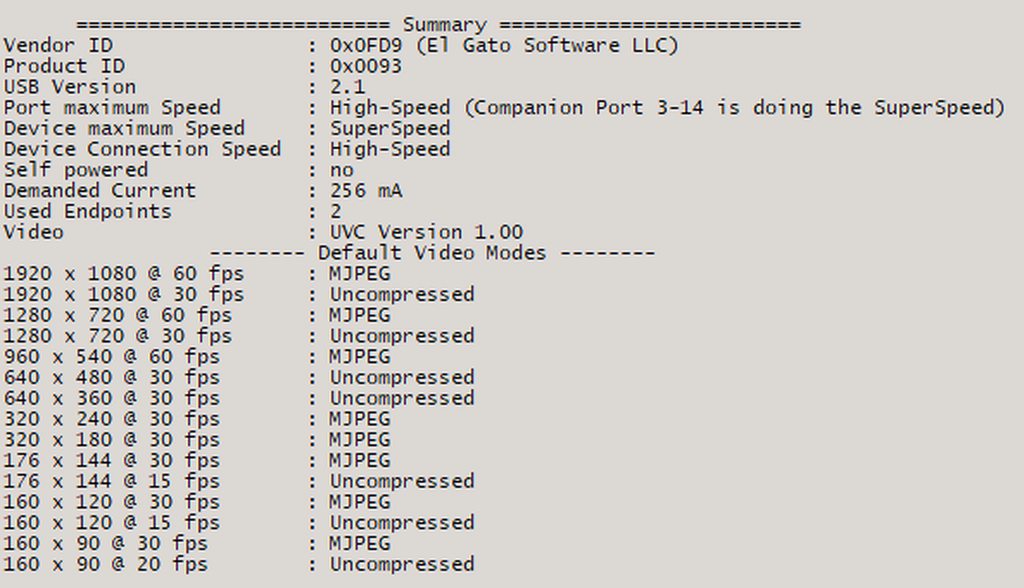
Where it mentions a companion port
sacred heron
i see
past basin
Companion port is the same port in a different speed.
If the port is supposed to be 3.0 but running in 2.0 mode, check your drivers for your motherboard are up to date, and check that there's no option in the BIOS that switched the port mode
The USB Controller your card is under can give some insight too
 sacred heron
it's in italian but this is what the device manager gives me

this should mean i have usb3.0 ports correct?
past basin
You have them somewhere - what's the section the card is under look like?
 past basin
oh I mean in the USB Tree Viewer
Mine looks like this so I can see on the left side the card I'm using is connected to the USB 3.2 controller

 past basin
What on earth. That looks like a USB 2.0 port wired to a 3.2 controller?
Is the actual port using the optional blue colour for the plastic in it?
sacred heron
Nop, none of them are
that's what io'm worried about mainly lol
it's a preasembled hp omen mounting a 12th gen i7 and a 3080 i'd be kinda pissed if i don't have 3.0 ports on it
past basin
Yeah 12th gen CPU should have it. Happen to have the full model tag from the side of the chassis?
sacred heron
No unfortunately
I've been trying to find the precise model myself for ages but it was gifted to me
past basin
Fun. Give me a second, I'm trying to dig up a USB 2.0 cable to confirm the way this app works hasn't changed
sacred heron
in the meantime i'll try booting up the bios and see if anything's wrong in there
supple mural
warped ledge
Are you connected to a usb 3.0 port?
Yes
sacred heron
Doesn't say anything about USBs in my bios settings
past basin
Just checked with my Facecam - app stlll shows a companion port if the port is actually supposed to support SuperSpeed (3.0).
sacred heron
It is an HP GT15-0xxx model and I'm guessing the xxx can be traced back with the i7 model and gpu
past basin
Possibly. If you press Windows Key + R and type msinfo32 it might list the full model in the Baseboard product
sacred heron
GT15-0017nl
Apparently only two ports are 3.0 and they're not signaled in any way
no blue plastic, no SS label
past basin
Might also only be Type-C ports that are 3.0 on that series
 sacred heron
actually the only USB ports labelled as are the top ones is that a thing?
past basin
Oh the front ones are Type A
sacred heron
I thought top ports tended to be the slower ones
past basin
It can be a thing. Bit odd. USB 2.0 are usually on the back these days though so folks can use the fast front ones for things like USB flash drives
past basin
Did anything change?
sacred heron
Let's try the C ports I guess
past basin
Don't forget to refresh the app from the menu
If that's what you're checking with
(it's also possible we're getting issues from both the port and the cable)
sacred heron
i killed the process and started it again,. same issue as before
even the c ports are giving me issues
god
past basin
Huh.
 past basin
Progress at least
But yeah, that's exactly what you'd see if the cable wasn't correctly running at 3.0 speeds
sacred heron
at least i narrowed it down, yeah
past basin
Dirt on the pins or damage could do it too
sacred heron
that's super progress
past basin
If you have to get a new one, check the speed on them - a LOT of cables these days are aimed at charging and only run USB 2.0 mode while supporting higher wattage. USB-A to C adapters can slow down the connection like a cable too. If does doesn't save 3.0 or faster, check for the actual speed and look for 5 Gbps or faster.
Especially since very few things actually need 3.0 speeds
tall nest
past basin
On the gaming PC, if you load up Windows Sound Settings (Press windows key + R, ...
what should my next steps be sorry
past basin
Did the Discord Voice and Video settings I mentioned have everything set to defaults? Does restarting Discord fix anything?
unkempt mantle
Sorry I got busy
Thanks for the help 🙌
The crackling noise is still there when I output the audio to desktop audio
scenic wave
past basin
HDCP didn't turn back on, on your PS5 with a system update did it? Also if you'...
HDCP didn’t turn back on
 nimble torrent
Hi getting the elgato hd60 x this Saturday is there anything I need to know specifically about it
unkempt mantle
But not when I pick capture audio only in OBS however this means I can’t hear the audio live except like if I swap to the switch hdmi.
In short if I livestream I can’t hear the audio
Well I can’t hear the audio at all with capture audio only on the PC but it records fine
Meaning it records the switch audio fine too so the video isn’t silent
past basin
unkempt mantle
But not when I pick capture audio only in OBS however this means I can’t hear th...
Wait is your OBS Source not set to Capture only? Set it to capture only and turn on monitoring for the audio source in the OBS Advanced Audio Settings (gear icon on the mixer)
Then you should be able to hear it through OBS correctly
unkempt mantle
Oh really 🙈. Well I followed this video
0:00 Start
00:17 What you will Need
00:28 Installation
00:57 OBS Setup
2:22 Can't hear game audio Fix
2:50 Elgato Program SETUP
3:26 Live Commentary Echo Fix on Elgato
3:37 Outro
Complete guide on how to setup your Nintendo Switch using Elgato HD 60 S
Audio fixes on Elgato Game Capture and can't hear game sound on OBS
Download Links
Elgato pr...
past basin
Yeah there's a few different ways to accomplish the same things, but some are more prone to certain issues than others. Some also work better with older cards or with internal or external cards specifically.
past basin
Ah, that's for HD60 S which used a DirectShow driver so worked a bit differently. HD60 S+ is UVC based
unkempt mantle
But gives me a result like this sort of

THERES THREE POSSIBLE SOLUTIONS
-
CTRL + Right Click the the settings cogwheel and change the USB Transfer Mode to BULK under the advanced tab
-
Under the Capture tab, move the quality slider all the way to the right to BEST
-
Change the profile resolution under the capture tab to match whatever your recording from (720p for switch, 1080 ...
Do you have images of where I put on that option in advanced audio
?
The headache is real 🙈
past basin
Take your capture card audio and set it to "monitor and output". Monitor is for you to hear, output goes to stream and recordings. By default OBS adds things with monitoring off incase it's audio already coming from the local PC.

If you keep getting crackle try muting the HD60 S+ and add it again as an Audio Input Capture. That can fix some issues OBS has when pulling audio thorugh the video feeed, such as incorrect sample rates. (then put that audio source on monitor so you can hear it too)
unkempt mantle
Amazing 🤩 I’ll try in like 2 hours
 worthy trout
hello, is it possible to use a workaround to get 120 hz with the hd60s?
past basin
worthy trout
hello, is it possible to use a workaround to get 120 hz with the hd60s?
If you're using a console, no. If you're using a dual PC setup, hook the card and monitor to different GPU ports and clone the main display to the card.
sacred heron
@past basin cable just came in; It worked!
The problem was the usb-c cable being 2.0 and none of the usb-A ports actually being 3.0
So the original A to C cable wouldn't work and the C cable I had wasn't supported
Thanks a lot man, really
past basin
Nice, glad you've got it working!
unkempt mantle
past basin
Take your capture card audio and set it to "monitor and output". Monitor is for...
This seems to work well actually
I can even play and monitor at the same time obviously the lag is killing me
Input lag
past basin
Ah, not quite input lag, works out the same though. The audio and video are both delayed because the capture card has to convert the HDMI signal to something the computer can use, then actually render that on screen. So the stuff you're reacting to (and video of your reaction) is already late rather than the input. Same net effect though.
For the video, the workaround is to use the HDMI OUT (passthrough) to connect another display - the passthrough signal has no delay. You can pass the audio that way too, or use a HDMI extractor (or headphone jack on a display). Other alternative for audio is a Chat Link Pro or similar device to split the audio out of the console without the processing delay (the card will normally sync the audio it gets to the video delay automatically).
unkempt mantle
I don’t have room for another screen 😂🙈
No other solution?
Or like how does chat link pro work?
tall nest
I went off my pc and back on again and it just seems like it is really struggling to pic up sounds, seems to be filtering out most sound like background music
please can I get some help sorry
past basin
unkempt mantle
Or like how does chat link pro work?
Chat Link Pro would only improve the audio latency - it goes into the headset jack on the controller, then splits that - one end goes to your headset the other to the captrue card (Which you then set to analog audio in 4K Capture Utility). So the headset's audio is real time from the console.
HD60 S+ should only have about 60-70ms of latency though. Newer cards like HD60 X are a bit faster at about 30ms for 1080p SDR. But either of those is about comparable to playing on a TV that isn't in low latency mode
past basin
tall nest
I went off my pc and back on again and it just seems like it is really strugglin...
Sounds like noise cancellation is on, and applying to your capture card. Was that rig Windows or Mac?
Assuming Windows, most of those can be disabled by turning off Windows Audio Enchancements.
Check in your Windows Settings, under system > Sound, then select your capture card. Check towards the bottom of the options to see if the Audio Enchancements section is there and turn if off if it is. If it isn't check the older settings instead - press Windows Key + R, tyep mmsys.cpl in the popup, and press OK. Go to the recording tab, find the captue card, check the properties. If there's an enchancement tab turn them off. Then check the Advanced tab to see if that mentions audio enchancements and if so, turn that off.
tall nest
on the gaming or streaming pc?
past basin
streaming PC
The OS treats the audio in like a mic so some noise supression apps that come pre-installed or even some Windows effects, sometimes get applied to it in error
Fortuantaely 80-90% of those you can just turn off the Audio Enchancements and it gets the noise suppression too.
tall nest
there wasnt an enchancement tab but on advanced it did let me disable enhancements
past basin
Excellent - with any luck that'll clear it up. In some cases you might need to reboot the PC for it to take effect, but usually it kicks in right away
tall nest
I will reboot it hasnt seemed to have had any effect
so very iunteresting I got game sound youtube sound discord notication sound but not discord voices sound after that reboot
unkempt mantle
Now I just need to figure out perfect balance for microphone and game audio
tall nest
past basin
Excellent - with any luck that'll clear it up. In some cases you might need to ...
what is the next step
past basin
tall nest
what is the next step
Check your Voice and Video settings if you haven't already - make sure they're pointing to your default device, or Elgato Sound Capture (on the gaming PC). Theyir setting overrides the sounds mixer in Windows

Likewise for any games that aren't playing - make sure their in game audio is set to default or elgato sound capture
past basin
unkempt mantle
Now I just need to figure out perfect balance for microphone and game audio
That is something people will mess with for the duration of their streaming career - good luck 🙂
tall nest
changed it and cant seem to hear anyone despite playing with the sound capture
past basin
Output Device is set to Sound Capture? Is it making it to the headset and not the streaming PC or neither?
unkempt mantle
Well I just focus on YouTube videos for now 😊
But it would be nice to streaks sometimes too
tall nest
past basin
Output Device is set to Sound Capture? Is it making it to the headset and not t...
I sent it to the capture card instead of the sound capture changed that and seems to be working
past basin
tall nest
I sent it to the capture card instead of the sound capture changed that and seem...
Sounds like Sound Capture is either not running right or not setup for the right devices. If it's fully setup right you might wind up needing to reinstall it, or maybe even try something else like Voicemeeter Banana (or Wave Link if you have a Elgato mic, Wave XLR or Stream Deck+ on the gaming PC)
tall nest
past basin
Sounds like Sound Capture is either not running right or not setup for the right...
thank you very much for all the help hope your getting paid well for this
past basin
heh, this is the community support channel, but thanks 🙂
tall nest
🥲
 jagged topaz
Hey
Im having an isssue with hd60x.
I am plugging my headset into my pc and my capture card into the correct spots, but hd60x is only playing audio in obs when i set it as the default device, but then i get no sound through my headset.
 queen thorn
Hi my hd60x is not popping up on obs having trouble
warped ledge
jagged topaz
I am plugging my headset into my pc and my capture card into the correct spots, ...
are you using a chat link?
past basin
jagged topaz
I am plugging my headset into my pc and my capture card into the correct spots, ...
Is this a dual PC setup or a Single PC Setup? Are you just trying to capture the single PC you're using or is there a console or something here? The way you're describing it sounds like single PC, in which case you don't really need a capture card, as it offers no notable performance difference from OBS software capture since the CPU and GPU stilll need to encode the video - but if you want to use it anyway you'll need an app like Sound Capture, Wave Link or Voicemeeter Banana to send the audio to two places at once (since windows can't do that by default)
past basin
queen thorn
Hi my hd60x is not popping up on obs having trouble
Do you mean you get no video or you don't see the HD60 X to add to your sources at all?
queen thorn
Both
past basin
Does the card power on?
jagged topaz
past basin
Is this a dual PC setup or a Single PC Setup? Are you just trying to capture th...
Dual
past basin
What app are you using to split the audio coming out of the gaming PC to go to two places?
If you're not using one, and if you don't need to send the gaming PC's mic to the streaming PC, try Sound Capture (bundled with Game Capture HD available here https://help.elgato.com/hc/en-us/articles/360027964072-Elgato-Game-Capture-HD-Software-Release-Notes-Windows ). Install on gaming PC, set it to PC gaming mode, set one device to your headset and one to your capture card and it'll handle splitting the audio
If you do need mic, then if you have a Wave Mix on the gaming PC, try Wave Link. Otherwise you'll need a third party app like Voicemeeter
lament notch
Hi there. Trying to get my Capture Card Neo set up (Xbox Series X/Mac/OBS) but it's capturing at a frustratingly low framerate. OBS community has helped me determine it's probably a system issue, but nothing more specific than that. I had no trouble with this same computer and the El Gato HD60 I used to have. I've only had problems since switching to the Neo. Any advice is appreciated, I've only got today to troubleshoot this.
past basin
What are the specs on the system?
Also are there many other USB devices connected?
You might also want to try manually setting the buffering option in OBS for it to be safe

It'd also help to know if the choppiness is only in recordings or also in the preview
lament notch
past basin
It'd also help to know if the choppiness is only in recordings or also in the pr...
It's in the preview as well. Don't know how to get to the buffering options, it doesn't show up under source preferences. The only other USB device connected is the external hard drive the video files save to.
What system specs do you need to see?
past basin
Generally things like CPU, how much memory, GPU
 past basin
Ah, missed the mac bit in the start. How does it look if you use QuickTime instead of OBS?
(it's setup the same way as HD60 X for that - https://help.elgato.com/hc/en-us/articles/5706462847757-Elgato-Game-Capture-HD60-X-How-to-record-video-using-Quicktime-on-macOS )
lament notch
past basin
Ah, missed the mac bit in the start. How does it look if you use QuickTime inst...
Strange. When I opened New Movie Recording in QT I had Max open with a show going, and it popped up immediately. But got this message as soon as I switched over to a game.
 past basin
hm. So you saw the consoles menus but then it switched to this when it loaded into the game?
lament notch
past basin
hm. So you saw the consoles menus but then it switched to this when it loaded i...
Saw the show I was watching on Max, full preview. Got that message when I switched, yeah. Tried restarting QT with the game up already and got the same message.
Oh weird, now the show's not previewing in QT either.
past basin
oh wait, you were watching a show on HBO MAX on the Xbox? Probably tripped up HDCP.
You shouldn't in theory be able to get that up - but it might have tripped up the card and xbox now. May have to disconnect and reconnect it
lament notch
past basin
You shouldn't in theory be able to get that up - but it might have tripped up th...
Okay. Yeah I know Netflix and Disney usually don't allow playback when a capture card is attached, that's why I was confused I could play something with passthrough.
past basin
I don't think we have Max here in Canada so I can't test that with my own setup
lament notch
past basin
I don't think we have Max here in Canada so I can't test that with my own setup
Okay there we go. Disconnected and reconnected the card. Video playback for the game looks perfect in QT.
past basin
okay, if it's smooth there, we just have to see why it's not playing nice with OBS
You can close QT there now and switch back
lament notch
past basin
You can close QT there now and switch back
Weird, when I went back to OBS the game preview had been transformed to a smaller portion of the screen without me touching anything.
Aaand... it seems like it's running perfectly smooth there now. 😛
past basin
Huh. I wonder if it had tried to pull 4K through there before or something. That could cause issues.
Well it's working, I guess that's the main thing. Guess it just needed everything disconnected and reconnected?
If it gives you any more troubles use the Capture Device Utility from the site to see if there are any firmware updates for the card.
lament notch
Maybe. Just gotta know what to do if this issue occurs again. Just run it through QT and disconnect/reconnect each time there's an issue?
Downloading Capture Device Utility.
Huh. And it says "No Elgato Capture device(s) found".
lament notch
past basin
If it gives you any more troubles use the Capture Device Utility from the site t...
Framerate is better but now the resolution is low. File is 1080 but the video definitely isn't.
past basin
looks 1080p on my end - but what are your encoder settings in OBS?
lament notch
past basin
looks 1080p on my end - but what are your encoder settings in OBS?
I usually don't get as much artifacting at 1080 when I've recorded before. Even in the earlier clip I posted with the bad framerate the video quality was sharper.
 past basin
Does Video Encoder list other options there? Software encoding might be a bit rough on older hardware
In theory I would expect it to list Core Video that'll use the AMD AMF encoder framework on your GPU
lament notch
past basin
Does Video Encoder list other options there? Software encoding might be a bit r...
No it just has x264 in the dropdown, nothing else.
past basin
Huh. That's fine - just going to be more of a load on the CPU. I had through OBS supported hardware encoding on Intel macs though. If it didn't list the AMD one I would have expected the intel one 😐
lament notch
past basin
Huh. That's fine - just going to be more of a load on the CPU. I had through O...
Anything else that could be causing the resolution drop? You can see it clearly in that video on the weapon crosshairs, they shouldn't be as pixelated as they are. It only did that after I switched to QT and back.
past basin
It looks more like an encoding issue than anything else to me - artifacting usually happens when the encoder can't keep up or needs more bitrate than it has
does the OBS log indicate any errors? If you turn the quality preset up a notch does anything change?
lament notch
past basin
does the OBS log indicate any errors? If you turn the quality preset up a notch...
This one?
I'm not sure how to parse this myself.
lament notch
past basin
does the OBS log indicate any errors? If you turn the quality preset up a notch...
Turned up the quality, no noticeable change in the image, but now after switching the quality back my whole system is running super slow, including typing here.
past basin
hm. Might want to check with the OBS community again. I've sadly got little experience with encoding on Intel Macs. Might wind up having to make some advanced adjustments to improve it. If you're recoring right now with the settings up could just be maxing out the CPU or it could be thermal throttling if it overheated
If it's still slow I'd restart the laptop
lament notch
past basin
hm. Might want to check with the OBS community again. I've sadly got little ex...
That's more or less what they suggested over there, but then said there wasn't really anything else they could do without looking at the hardware from my end. I've restarted a couple times. Used to record long play sessions for campaign walkthroughs, 4+ hrs sometimes with no problem. If just 30 minutes is already causing overheating problems it's probably not gonna work for my purposes. :/
past basin
I meant the mac not hte card
Since the mac is what does the encoding
Has it ever had the thermal paste redone?
lament notch
That's what I meant. I've restarted the whole computer.
lament notch
past basin
Has it ever had the thermal paste redone?
Not sure what this means.
past basin
It's something you'd have to have had the machine opened up for. Some systems get more prone to overheating as they get older because thermally conductive paste between the CPU and cooler degrades. Not usually a major issue unless you hit serious overheat problems
lament notch
past basin
It's something you'd have to have had the machine opened up for. Some systems g...
No, I haven't had this Mac for very long. It's never had any issues or work done.
And like I said, used to record on it before with an HD60 without problem or quality drops.
past basin
Only thing I would expect would chance is because Neo is a USB 3.0 card over HD60's USB 2.0, there might be more fine detail which could bog down the encoder.
That said, a red room like that may also not be the best place for testing it, as strong colour casts can affect artifacting too
though you're seeing more than I'd expect - I haven't used x264 in a while though
OBS logs look clean, no sign of overloads
I can't tell why it's having encoding issues over the old HD60, unless there IS more detail captured by the new card. If that's the case you might have to turn up the encoder, or actually put it in advanced mode so you can adjust just the bitrate up
lament notch
past basin
I can't tell why it's having encoding issues over the old HD60, unless there IS ...
Any chance you could guide me through this?
I just tried recording the initial cutscene again, ran it through QT first and then reloaded in OBS, same framerate issues. It only seems to resolve when I disconnect and reconnect the Neo from USB port. So my concern is that the framerate issues are from a CPU overusage, but the cause of that is the device itself, so the longer I record the more likely those issues are to pop up. :/
Maybe the solution is just to record through QT?
past basin
Hm - could be. I honestly have little experience with the Intel macs
One of the other voluneteers might have some other ideas though. I'll see if I can dig up anything on it after - you meet the listed spec for Game Capture Neo, but I don't have a setup on hand to compare with my own gear.
I don't like that the Capture Device Utility didn't see your Game Capture Neo though
lament notch
past basin
I don't like that the Capture Device Utility didn't see your Game Capture Neo th...
Yeah, overall this has been a really frustrating experience. The HD60 worked right out of the box with no issues, this has felt like a major downgrade by comparison.
past basin
You could try a ticket with #official-tech-support - sadly they usually have a bit of a wait time and I know you mentioned needing it fixed today
 plain tide
So I recently got an hd60x that I've been trying to use. I am having some trouble getting it to work though. I have tried both OBS and Elgato 4K Capture utility. In both cases I can hear the game audio coming from computer, but there is no video being captured; instead I get the error "USB communication issue detected" on 4K Capture Utility. I know that it is detecting the device because this error only appears when I plug in the USB. When it is unplugged it instead says "No capture devices found." Additionally, the passthrough is working fine, I am using the original cables for HDMI and USB that came with the card, I have verified that I am using USB3.0 ports on my computer, and the capture card has the red flashing light. I have tried other screens, other computers, other USB cables, and other HDMI cables. I have allowed camera and microphone access in windows privacy settings. I have also made sure that my OS power plan is set to performance. I also messed around with settings on the game console. I have even tried installing new USB drivers on my computer. Nothing has worked and I've been messing around with this for a few days now. Any help would be greatly appreciated.
past basin
Passthrough will work as long as the card is getting power, generally.
Based on what you've already done, try using USB Tree Viewer https://www.uwe-sieber.de/usbtreeview_e.html - it should give you some more insight into the connection and what's going on
For example you should have a summary section when you select the card that lists three speeds - device, port and connection. They should all be superspeed for higher - if any are not we know where to start

(not that a companion with SuperSpeed port on the port maximum speed also counts as that port having 3.0 mode
plain tide

so this is what my tree looks like, to note i also tested the card while having my mouse and keyboard unplugged just in case that was causing issues.
past basin
What does the summary look like though, on the right side when you select the card at the bottom
 past basin
Okay, so port and device are good but connection is stuck at 2.0 speeds. (companion port just indicates a 3.x port in 2.0 mode there - same physical port just running in a different mode for backwards compatibility)
This usually indicates the cable you're using is 2.0, or you have aa USB-C to USB-A adapter, or a hub or extnesion that's 2.0. It can also indicate the port is dirty as that can impair the connection.
The spare cables you tried, were they rated for 5 Gbps or faster?
Most device cables are only 2.0 because not many things need that much data. Same thing with store bought - there are lot of cables that are charging cables, high wattage but only usb 2.0 speed
So check the ones you've got, see if they're labeled for 3.0 or 5 Gbps or faster
(They can degrade over time too, especially if they're moved or bent a lot - that's more common on the ones you use to charge things like phones than a device that just sits on your desk though)
If the port is dirty, use something soft and non conductive that won't scratch up the pins like a rubber coated dnetal pick
plain tide
I no longer have the other cables I was using to test with me right now so I'm not 100% confident that they were rated properly. I feel like I checked, but that could be the problem. Thanks for the tip, I'll give that a try when once I get access to good cables. In the meantime I'll make sure that the port is clean.
past basin
Good luck! Hopefully that's all it is. Had to replace a cable on my own audio interface recently - it's bad when you think you're going crazy and it winds up being a defective or damaged cable 😦
plain tide
Yea it was definelty a case of I think this a fast cable. Im pretty confident now that I didnt check for certain. Really hoping that is the fix.
past basin
Hopefully - if you've got to get a new one, just make sure it's at least 5 Gbps. Thunterbolt 3 and 4 cables should be backwards compatible too (but generally overkill since they're expensive and faster than needed here). Elgato sells them at www.elgato.com/spare-parts too, but any 5 Gbps cable should be fast enough (just make sure you don't need any adapters or anything with it too - those can slow it down)
 finite fiber
could anyone help me set my capture card with a dual pc set up on streamlabs youtube seems to be no help
warped ledge
finite fiber
could anyone help me set my capture card with a dual pc set up on streamlabs you...
What part are you stuck at?
finite fiber
warped ledge
What part are you stuck at?
the audio now
warped ledge
finite fiber
the audio now
Set the card to listen.
finite fiber
where abouts?
will that pick up my mic as well as i have to run my mic from my gaming pc as my streaming pc doesnt support the software i use
worthy trout
how do i fix hd 60 s please connect to a usb 3.0 when its connected to a 3.0
 hasty sequoia
Hello everyone, a few months ago I bought the HD60X, new, I have had the same problem for several months, the audio that comes out of the capturer sounds as if it had effects when it doesn't, I have already done everything I have found on the internet , update the firmware, change from 16 to 24 bits, connect to another port, in the video you can clearly hear when the "listen to this device" option is activated, I am using wavelink, I don't know what else I should do, I hope someone can help me . Thanks since now!
warped ledge
finite fiber
will that pick up my mic as well as i have to run my mic from my gaming pc as my...
In the sound settings.
warped ledge
worthy trout
how do i fix hd 60 s please connect to a usb 3.0 when its connected to a 3.0
Try a different usb 3.0 port
warped ledge
hasty sequoia
Hello everyone, a few months ago I bought the HD60X, new, I have had the same pr...
Dual pc?
hasty sequoia
warped ledge
Dual pc?
Yes
 finite frigate
So I’m not able to capture the game Valorant on console from my HD60s+. Is it just not possible or do I need to change some settings?
past basin
finite frigate
So I’m not able to capture the game Valorant on console from my HD60s+. Is it ju...
Make sure your console doesn't have 120Hz mode enabled. Valorant is one of the games that will actually use that, and HD60 S+ only supports 60.
finite frigate
past basin
Make sure your console doesn't have 120Hz mode enabled. Valorant is one of the ...
On the PS5 right?
finite frigate
past basin
Make sure your console doesn't have 120Hz mode enabled. Valorant is one of the ...
Thank you so much
past basin
finite frigate
On the PS5 right?
Yeah, there should be able option to uncheck in the video settings of the PS5 that will disable 120Hz mode
Hopefully that's all it is - good luck!
past basin
hasty sequoia
Hello everyone, a few months ago I bought the HD60X, new, I have had the same pr...
Have you already checked that Windows Audio Enchancements and Spatial Audio are off?
There's three places to check for those (on the streaming PC, if this is a multi PC setup).
First the new windows settings - press start, go to settings, then System, sound and find your Capture Card. Check if Windows Audio Enchancements or Spatial audio are listed at the bottom and if so, turn them off.
If it's not there, the other two places are in the old sound settings. Press Windows Key + R on the keyboard, type mmsys.cpl in the box that comes up and press OK. Go to the recordng tab, find your capture card and go to properties for it. Check for Enchancement and/or Spatial Audio tabs and if they're there, turn the options unde them off. If not, check the Advanced tab and turn off any mention of spatial audio or enchancements. You may need to reboot after this to get things to take effect.
 spice stone
I have the Elgato 4k x but I can’t seem to get any audio coming from this upscaler im using. However, when I tried 4k 60 pro mk 2 it was able to detect audio from the upcaler connected hdmi via input to the mk 2 but not the 4k x. Is there a compatibility issue I’m missing here?
 rotund gorge
Anyone here has problem with Elgato + Iphone ios 17?
I have 4 Friends that use Iphone 13, 15, 12,
All of them have issue with Elgato capture card.
Where the output is too bad, low resolution
Now all my friend stop using elgato capture card and using mirroring app.
Its happen since the first version of ios 17.
But currently i just downgrade to ios 16, and its back to normal
warped ledge
spice stone
I have the Elgato 4k x but I can’t seem to get any audio coming from this upscal...
mac or pc?
spice stone
pc windows
warped ledge
spice stone
pc windows
there shouldn't be an issue, but try this, and reboot. also, make sure your using a usb 3.2 port. https://streamdecklabs.com/🧯-how-to-disable-windows-10-11s-usb-selective-suspend-setting/
Once you complete these steps, Windows will no longer power off USB devices connected to your computer, which will fix any problem are experiencing as a result of this Windows feature. Windows 10+ includes the USB selective suspend feature that lets you automatically put USB devices in a very low-power state when they’re not actively… Continue r...
warped ledge
hasty sequoia
Hello everyone, a few months ago I bought the HD60X, new, I have had the same pr...
i think for the audio part you could ask in #wave-audio and I think someone can help. 🙂 I did mention to a buddy. perhaps he might be able to help. If not, maybe @past basin could help. 🙂
 lone crypt
hasty sequoia
Hello everyone, a few months ago I bought the HD60X, new, I have had the same pr...
lone crypt
hasty sequoia
Hello everyone, a few months ago I bought the HD60X, new, I have had the same pr...
Sry I can’t listen right now (but I will later when I’m not needing to be quiet)
The “listen to this device on” is actually the old way to do that. Since wave link 1.9 we can route the stream mix directly to the capture card using the stream mix selector box in wave link.
If you did this AND did the old listen to this device trick, you’d have the stream mix hitting the capture card twice, one of them being delayed. It would sound like a short echo.
Could that be the issue?
spice stone
warped ledge
there shouldn't be an issue, but try this, and reboot. also, make sure your usin...
you mean the 3.2 type c to c that comes with it right?
spice stone
warped ledge
there shouldn't be an issue, but try this, and reboot. also, make sure your usin...
question. Why would i want to put my usb in a low power state under power options? But how would this address the issue that I cant output audio from my retrptink 5x?
warped ledge
spice stone
question. Why would i want to put my usb in a low power state under power option...
Not sure about the 3rd party device.
warped ledge
lone crypt
Sry I can’t listen right now (but I will later when I’m not needing to be quiet)...
Thanks buddy! 
unkempt mantle
Anyone has experience running a long hdmi cable or some other solution successfully from pc to consoles?
Hdmi length I need is probaly 3-5 meters 🙈
Elgato hd60s +
unkempt mantle
Does anyone know how long the cable usb cable that comes with Elgato hd60s+ is?
 eager radish
Hello, I just got the HD60X.
Right now the video capture works fine, but for audio capture, I have to set my gaming pc's audio device as the HD60 rather than my audio interface.
Is it possible to have the audio on the gaming pc output to both the audio interface and the capture card?
 frosty badge
Thank you 🥰
 past basin
unkempt mantle
Does anyone know how long the cable usb cable that comes with Elgato hd60s+ is?
past basin
unkempt mantle
Does anyone know how long the cable usb cable that comes with Elgato hd60s+ is?
I think it's like 180 CM. Go witht he longer HDMI Cable - a USB 3.0 cable can't generally go beyond 300cm withouth active boosting, HDMI cables can go much longer.
past basin
eager radish
Hello, I just got the HD60X.
Right now the video capture works fine, but for aud...
I'm assuming this is a dual PC setup and you're looking to split the audio on the gaming PC to go to both the capture card and whatever you want to listen on? If you don't have a mixer or something, you'll want software to split it. If you don't need to split a mic or anything, just the audio out, easiest I've found to use is Sound Capture, (bundled with Game Capture HD available here- https://help.elgato.com/hc/en-us/articles/360027964072-Elgato-Game-Capture-HD-Software-Release-Notes-Windows ). Install that on the gaming PC, set it to PC Gaming mode, set one output to your capture card, one to whatever you want to listen to.
If you also need to mix in a mic, Wave Link works if you have a Wave Mic, Wave XLR or Streamdeck + on the gaming PC. Otherwise you'll need a third party app like voicemeeter
past basin
warped ledge
i think for the audio part you could ask in <#1080643528503341107> and I think s...
I already had replied there :p
unkempt mantle
past basin
I think it's like 180 CM. Go witht he longer HDMI Cable - a USB 3.0 cable can't...
I thought it was the other way around?
past basin
No HDMI can go something like 25-50ft without needing an active boost
USB 3.0 caps at around 9-10.
(then drops off to USB 2.0 speeds)
Even USB 2.0 only gets something like 15 (I have to look up the actual number for 2 - haven't had coffee yet)
If you need longer USB 3.0 cables you'll want one with an active repeater, booter or some sort of fibre conversion. Usually cheaper just to use the longer HDMI
eager radish
past basin
I'm assuming this is a dual PC setup and you're looking to split the audio on th...
Thank you! Yes, is it a dual pc setup (or rather 1 laptop and 1 pc).
Software splitting would be the solution since I don't have the other devices you mentioned. Currently giving Game Capture HD a try. Was hopeful that there would be a solution that didn't require another software download but oh well
past basin
Good luck with it! Hopefully that sorts it out for you
eager radish
past basin
Good luck with it! Hopefully that sorts it out for you
It worked! But can I ask about the voicemeeter solution? I do have a mic that I would like to mix in as well. Is it difficult to set up? I've never used it before
past basin
It's pretty complex to setup if you're not used to how physical mixers look, since it's setup to look like that. I'd follow a guide.
You could also set your mic to "Listen to" in Windows sound settings (Windows Key + R, type mmsys.cpl and press OK, go to the recroding tab and set the liten to tab in the properties of your mic) and point it to the HDMI port / capture card specifically - but this can be a pain to adjust
It'd always run the mic feed to the HDMI port, and unlike a mixer you'd have to go into the setting and levels to tun the miv volume up or down.
eager radish
I think I'll work with that for the time being.
Is there a way to adjust the volume for the sound capture software though? Using it as the playback device pushes volume to maximum. However, the volume in the program is a little too soft.

 past basin
In the capture program? It should match whatever the game on the PC is outputting at so check that's turned up first
lone crypt
eager radish
Is there a way to adjust the volume for the sound capture software though? Using...
If you’re trying to get any kind of control over level balance, and even using effects like compression to process the sound… I think you’re quickly going to want an actual software mixer, which is what wave link does.
Look into an Elgato wave device or stream deck plus! (This is why we like those!)
lone crypt
hasty sequoia
Hello everyone, a few months ago I bought the HD60X, new, I have had the same pr...
Now that I’ve listened, it could be what I said about doubling up, sending the mix from wave link and then also with the “listen to this device on” thing. So make sure you’re not using that trick anymore and using just wave link.
But it also might be some windows audio enhancement or Spatial Audio enabled for the audio device. Check the properties of the devices in that window you have open there for enhancements or spatial.
 tidal blade
Hi!! 👋
I have the El Gato 4k (the one that plugs into MOBO) and I want to stream my PS5, which I can. But the audio is very slightly delayed when I listen via my PC (I listen on PC because I stream, so I want to hear notifications.)
🔔 How can I get rid of this delay?
I would just keep my wireless headset connected to my PS5 if I had to, but when I do, my desktop audio doesn’t pick up the el gato(ps5) audio.
past basin
tidal blade
Hi!! 👋
I have the El Gato 4k (the one that plugs into MOBO) and I want to stre...
The audio delay is generally expected - the capture card has a slight delay on HDMI video processing, and the audio gets delayed to match to keep everything in sync. This can be noticeable if you're listening through the PC but playing in latency free passthrough on another screen - for 4K X it'd likely be about 30ms or so off (with some variation for computer setup and software used).
The easiest way to bypass the delay is usually using a Chat Link Pro cable straight to Line In on your PC as this bypasses the capture card for audio entirely, so it can't sync it up - you may need to apply a sync in streaming software like OBS later to match things up (generally add two copies of the device - one in monitor only for you to listen to with no delay, one in Monitor Off for your stream and recording that you sync up the offset with the video).
Trying to bring a wireless headset into the mix is going to make things significantly more difficult for most setups though - wireless audio is encrypted so you can't capture it directly, and PS5 will turn off the audio feed to HDMI when an headset is connected, as it uses a one audio stream per user model.
Some folks have gotten a partial workaround by signing in a second controller and using a Chat Link (or even an aux cable) to capture the audio through that.
The other alternative requiest specific headsets - some headsets like SteelSeries Arctis Nova Pro Wireless, and Astro A50X have modes were you can connect them to your console but also output the audio to your PC. The Nova Pros have a line out aux port you can setup in Streaming mode, and configure using their software (Engine in the GG app). The A50 X I've not used myself but am told it has the ability to connect to the PS5 and PC at the same time, and gets a virtual stream audio source over the PC's USB Connection you can setup in their software.
Beyond that there's pretty much no way to capture wireless headset audio - you either need a device that also has wired out, or cheese it with a second controller and deal with the limits like the fact the second controller would have issues with voice chat being a different user.
 ivory shard
Hey i have a elgato hd60s+ and i stream with my ps4. i have problems with the audio. nothing is in my obs from my ps4 audio. what can i do?
past basin
Are you using any kind of headset with your PS4?
If so that'll mute the HDMI audio feed and you'd need something like Chat Link Pro to capture the headset audio feed instead
ivory shard
past basin
If so that'll mute the HDMI audio feed and you'd need something like Chat Link P...
yes i use headset. ok ill look at a chat link pro thy
past basin
No problem. Keep in mind that's a solution designed for a wired headset - if you use a wireless one things get a lot more complications. Chat Links also only split audio out from the console not mics
hasty sequoia
lone crypt
Now that I’ve listened, it could be what I said about doubling up, sending the m...
I already have fixed thanks a lot
ivory shard
past basin
No problem. Keep in mind that's a solution designed for a wired headset - if yo...
So only ingame audio ? not party voice chat
past basin
ivory shard
So only ingame audio ? not party voice chat
It'll get party chat - anything that goes to the headset. It won't get your OWN mic though. Most people add a mic to the PC to mix their voice back in.
ivory shard
past basin
It'll get party chat - anything that goes to the headset. It won't get your OWN...
ok. i allready have a mic on my pc so all good
thym
 hushed musk
Hey y'all, I'm having some issues my capture card/elgato 4k ultitly. It was working fine for a while but suddenly it works then it says no devices detected out of nowhere. I'm wondering if it's the USBC cable because everything is showing up on my other computer monitor.
Device :elgato hd60 x, platform: Windows. Installed the latest update on the elgato software
past basin
Could be - passthrough only needs power. If the cable has a damaged data wire, or dirt on one of the data pins, it could keep the PC from connecting to it but still give it power for passthrough
Happen to have a spare 5Gbps or faster USB cable around?
(They'd be labeled something like USB 3.0, 3.1 or 3.2 generally)
hushed musk
Could be. I am using the official elgato hd60x cable
hushed musk
past basin
Happen to have a spare 5Gbps or faster USB cable around?
Usba to USBC ? I do but they're not 5gbps
hushed musk
past basin
Could be - passthrough only needs power. If the cable has a damaged data wire, ...
When it turns off then it turns back on
IDK if that helps
Could get another cable off of Amazon
past basin
hushed musk
When it turns off then it turns back on
It could have slight internal damage. That said when you stay it turns off and then back on does the video on the computer come back or only the video on the display?
hushed musk
It's the former. Cause the switch monitor is working fine with no issues
past basin
And just ot confirm you're using the standard setup of Console to card, card to display?
You can try using USB Tree Viewer to see what speeds your card is connected at - https://www.uwe-sieber.de/usbtreeview_e.html
Everying for HD60 X should be superspeed or better. (so the summary in the app will list port speed, device speed and connection speed). If the card doesn't show up at all, I'd defnitely try a new cable
hushed musk
past basin
And just ot confirm you're using the standard setup of Console to card, card to ...
Yep
hushed musk
past basin
Everying for HD60 X should be superspeed or better. (so the summary in the app ...
tried that and everything is superspeed
 past basin
Keep that open and if it cuts out again hit the file menu and to to refresh
See if the card is still listed when the app says it's not detected
 green cobalt
I literally fixed my capture card last week and now its blinking in red
 olive sparrow
Hello, i just started using a elgatio capture card and i connected my PS4 to it and im getting a signal in the "4K Capture Utility" Programm but i have no sound and a black screen, i cant figure out whats the problem, Im using the HD60 X
green cobalt
i just tried the same cables and same connection on my HD60S and it worked fine, i tried it on my HD60X which was working this past Sunday and problems occured a ton
olive sparrow
green cobalt
i just tried the same cables and same connection on my HD60S and it worked fine,...
problem that i have aswell? such as blackscreen?
green cobalt
olive sparrow
problem that i have aswell? such as blackscreen?
my HD60S works fine with full game on TV and full game on PC both with audio fine. The HD60X has full game on TV with full audio on TV and full audio through the PC, but the game is black screen on OBS or 4K capture utility. i can:t do the HDCP trick because I:m not using a Playstation device I:m using a Nintendo Switch for the game
olive sparrow
i deactivated HDCP already but still having the black screen
green cobalt
olive sparrow
i deactivated HDCP already but still having the black screen
yeah for me The Nintendo switch doesn:t have the option to active or deactive HDCP because the option to change it isn:t even in the settings of the Nintendo switch
olive sparrow
should i open a support ticket?
green cobalt
you could
I just switched to my HD60S for now since I know it works and I:m gonna try to fix my HD60X later
olive sparrow
is HD60S an older one?
olive sparrow
so just for my understanding, its known that the HD60X has many problems?
green cobalt
yeah
olive sparrow
oh yeah great
green cobalt
at least in my experience]
olive sparrow
😂
i mean i just went to the store saw elgato capture card and took it, now im stuck with it and nothing works xD
olive sparrow
olive sparrow
i mean i just went to the store saw elgato capture card and took it, now im stuc...
and my friends told me go buy the elgato capture card
past basin
HD60 X is generally one of the most reliable cards out there. If you're having ongoing issues with one Charizard, check your firmware is up to date. https://help.elgato.com/hc/en-us/articles/5406375649933-Elgato-Game-Capture-HD60-X-Firmware-Update . Just checking in here now - have to scroll back through what's going on here
past basin
green cobalt
I literally fixed my capture card last week and now its blinking in red
Blinking red is generally an issue with HDMI signal. If it's owkring with the HD60 S and not the X, odds are you have an EDID problem. Is there a monitor or TV hooked into the HDMI out of the card? If so, go into the 4K Capture Utility and check what your EDID Input mode is set to in the settings on the device tab
past basin
olive sparrow
i deactivated HDCP already but still having the black screen
This can happen if the card is already being used by another app as only one can pull video at a time. What app are you currently trying to use the card with?
It can also happen if you have it in a USB 2.0 port, or you have too many high data USB 3.0 devices connceted to same controller and the card can't get enough bandwidth for the video
green cobalt
past basin
Blinking red is generally an issue with HDMI signal. If it's owkring with the H...
i don't use 4K capture utility. I direct capture into OBS. Using "Video Capture Device"
olive sparrow
past basin
This can happen if the card is already being used by another app as only one can...
Do you mean if i have to many USB connected to my PC ?
past basin
If you're on Windows 11, go to Windows Settings, check the privacy section for Camera. Check that its' set to allow camera access and that the let desktop apps access the camera is enabled (as the capture card shows up as a camera). Then check the recent activity section - make sure anything showing up in there aside from your capture software isn't set to use the capture card as a default camera
green cobalt
past basin
This can happen if the card is already being used by another app as only one can...
I have a motherboard that only has USB 3.2 or better ports on it and I'm using Windows 11
past basin
green cobalt
i don't use 4K capture utility. I direct capture into OBS. Using "Video Capture ...
That's fine - but some settings that get set on the card like EDID mode have to be adjusted in 4K Capture Utility (or Capture Device Utility on mac). OBS can only access settings that are available over UVC - that doesn't include the EDID mode. Once you change the setting it stays set on the card
green cobalt
ok i'll give it a shot
olive sparrow
past basin
If you're on Windows 11, go to Windows Settings, check the privacy section for C...
 past basin
olive sparrow
Do you mean if i have to many USB connected to my PC ?
past basin
olive sparrow
Do you mean if i have to many USB connected to my PC ?
I mean more if you have too much data in use. Each USB 3.0 controller in your PC only gets 5 Gbps to work with. If you attached too many high data things like video camreas and capture cards to one USB controller you can flood it
past basin
olive sparrow
Yeah, check that nothing in there is using your capture card as the default camera. Especially teams - that in particular doesn't even always let go the card when it's shut down
olive sparrow
past basin
I mean more if you have too much data in use. Each USB 3.0 controller in your P...
i just have streamdeck, keyboard, mouse, headset
olive sparrow
past basin
Yeah, check that nothing in there is using your capture card as the default came...
ok let me see
past basin
Unlikely to be USB overload then, at least
olive sparrow
im gonna try connectin again
past basin
Sounds good - check your firmware version on the card too. It should be 22.04.26 or 23.04.26 depending on the revision of the card, iirc. It'll be in 4K Capture under settingsunder the device tab (don't try opening settings until the "one moment please" screen clears
olive sparrow
is it normal that the "one moment please" screen takes so long?
past basin
Yeah - it is checking you card's settings. Takes about 10-20 seconds sometimes.
Can take longer if there's an issue
olive sparrow
for me it takes much longer xD
green cobalt
past basin
That's fine - but some settings that get set on the card like EDID mode have to ...
i treid to find those settingsd but couldn:t
but also doesn:t help that I:m learning Japanese and have my Elgato softwares set to Japanese
past basin
green cobalt
i treid to find those settingsd but couldn:t
It doesn't show up like this?

oh, yeah that coudl get confusing
olive sparrow
already waiting 3minutes xd
past basin
green cobalt
i treid to find those settingsd but couldn:t
If the card has been having detection issues, try to set it to Internal if you can find it and see if that helps (you may need to disconnect and reconnect the console to get it to take the new display modes).
past basin
olive sparrow
already waiting 3minutes xd
Yeah, that's not expected. Let's check the card is getting the right connection. Close out 4K Capture, and try this app, USB Tree Viewer: https://www.uwe-sieber.de/usbtreeview_e.html
Should give you a summary section for your card that lists port speed, device connection speed and device speed
 olive sparrow
i have it open now
green cobalt
it only gives me Capture Device, firmware version and video output @past basin
past basin
green cobalt
it only gives me Capture Device, firmware version and video output <@26999794467...
What's the firmware version?
past basin
olive sparrow
i have it open now
Ideally we want all 3 speeds to be SuperSpeed or faster in there
green cobalt
22.04.26(MCU:22.04.08)
past basin
Okay you've got the same revision I do then, that's good at least. Give me a moment to check something
olive sparrow
past basin
Ideally we want all 3 speeds to be SuperSpeed or faster in there
for me its like this
 past basin
olive sparrow
for me its like this
past basin
olive sparrow
for me its like this
Huh, that's what I'd expect for sure. Is your 4K Capture Utility up to date?
 past basin
green cobalt
22.04.26(MCU:22.04.08)
past basin
green cobalt
22.04.26(MCU:22.04.08)
Is your Switch set to automatic for resolution? If not what's the resolution it's using?
olive sparrow
past basin
Huh, that's what I'd expect for sure. Is your 4K Capture Utility up to date?
yes
 green cobalt
past basin
Is your Switch set to automatic for resolution? If not what's the resolution it...
green cobalt
past basin
Is your Switch set to automatic for resolution? If not what's the resolution it...
format is 1080p 60
olive sparrow
 past basin
olive sparrow
yes
past basin
olive sparrow
yes
Okay, that shouldn't be taking several minutes to bring up settings. Go into settings hit Reset Defaults, then close the app, restart the computer and see if anything changes when it comes back up
olive sparrow
before i restart and do that should i disconnect all that from my pc?
past basin
olive sparrow
before i restart and do that should i disconnect all that from my pc?
You can give that a shot too - but reset to defaults before you disconnect it all to be safe
olive sparrow
ok
past basin
That looks like something else is still hooking the card so hopefully a full reset will help here
past basin
green cobalt
format is 1080p 60
Something I should mention too - if you move the card to a different port and are using OBS you may have to add it again (or reselect it in properties for the source)
past basin
green cobalt
format is 1080p 60
Can you disconnect anything in the HDMI out port of the card and see if that changes the situation?
That'll help us rule out EDID conflicts
 past basin
Fantastic! Glad we've got one of them sorted now 🙂
green cobalt
past basin
Can you disconnect anything in the HDMI out port of the card and see if that cha...
sure
green cobalt
past basin
That'll help us rule out EDID conflicts
EDID option/drop down doesn't show up in Capture utility at all
past basin
green cobalt
EDID option/drop down doesn't show up in Capture utility at all
Hm. That's not expected - usually indicates something is interfering with the connection to the card.
Or you've opened the app while it's still in the "One Moment Please" screen at the start
green cobalt
i'll work on it when i have more dedicated time i'm currently multi-tasking
but thanks for the help so far
past basin
You might want to try the same reset defaults option in the bottom left that Reicher tried as well, followed by resetting the PC. Something is out of sync there if the card can't load up all the settings.
green cobalt
yeah will look into that for sure
past basin
Sounds good - I've got to step out for a bit there now, but will check ina gain when I get a moment
green cobalt
I'm just playing Fire Emblem Engage in Full 日本語
 tribal thunder
is it possible to bring the sound from my capture card to my wireless headphones
past basin
If you're trying to get the sound that the capture card is already capturing, and the headphones are attached to the computer doing the capturing, usually, yes.
If you're using something like OBS, just change your monitoring device to your headphones and setup the OBS advanced sound properties for the card to Monitor & Output. If you're using 4K Capture Utility just change the default sound device on your PC to the headphones (or route it specifically with Windows Sound Mixer)
tribal thunder
past basin
If you're using something like OBS, just change your monitoring device to your h...
my capture card is not recognized there
past basin
Not recognized where? OBS?
tribal thunder
4k caputre
past basin
Does it work with other apps? What model card is it?
tribal thunder
jes with OBS. its the HD60x
past basin
It really should show up in 4K Capture Utility - But that's fine, you can just route the sound with OBS
Go to the gear icon on the audio panel, where it shows all the volume bars. Set the capture card to Monitor & Output
Then in your OBS settings, set the monitor device under audio options in the advanced section to your wireless headphones
tribal thunder
here ?
 past basin
Yeah it's in monitor off right now. Choose whatever the equivalent is to Monitor and Output for the first device there.
OBS adds new audio sources in monitor off in case you already hear it. So you have to turn on audio monitoring to be able to hear it through the PC
tribal thunder
is it possible with every capture card ?
wtf is this sound, it sound very pitched
past basin
tribal thunder
is it possible with every capture card ?
With most. Not all.
Do you have an clip of the audio you're hearing?
past basin
It's downloading now
That's unusual. Might be two issues overlapping.
First try muting the HD60 X, then add it again as an Audio Input Capture source. Somtimes OBS can have issues with pulling the capture card audio through the video. Then set that to monitor and see what it sounds like, if there's any difference
tribal thunder
not really
past basin
Is there a display or anything connected to the HDMI Out on the card? Also is this Mario 64 passing through any kind of A/V adapter (eg and Adapter to run it from a N64 to HDMI), or is it running from something like a Switch (the 3D-All Stars version)? Is the audio coming through the HDMI feed correct if you hook it straight to a TV or other device?
tribal thunder
past basin
Is there a display or anything connected to the HDMI Out on the card? Also is t...
its on a ossc and from the ossc to the capture card and in a normal monitor
on my monitor is the sound normal
past basin
Okay, we know we have good sound to start with then. Next to track down - is it an OBS sound problem, or a all software problem. If you try using 4K Capture Utility instead of OBS, does it have the same issue with the sound?
 past basin
Right you mentioned that sorry
Though that's expected if OBS is still open - only one application can use the capture card at a time
tribal thunder
I have already restarted my pc and opened obs but it still doesn't work
past basin
You mean closed OBS?
past basin
Okay, lets skip this step for now, and look at possible audio issues.
We'll try turning off Windows Audio Enhancements - they can treat the card like a mic and cause issues.
We have to check three places for this. First go to Windows Settings, under System, then Sound. Look for your capture card. Check towards the bottom of the capture card settings page for any mention of Windows Audio Enhancements - if it's there, turn it off.
Next we check the old Windows Sound Settings - Press the Windows Key + R on your keyboard and type mmsys.cpl in the box that pops up, and press OK.
Go to the recording tab on the sound settings that come up. Find the capture card and go to properties. Check for an Enchancements tab - if it's there, turn everything under it off. Then check the advanced tab - if audio enchancements are mentioned there, turn them off.
past basin
It SHOULD work with OBS.
You can try it with StreamLAbs - but that's based on OBS.
VLC player can be used too
tribal thunder
i try reinstalling obs
past basin
Try using Windows Sound recorder - see if that gets the sound OK
You should be able to select your capture card as a mic in the bottom left. That will at least tell us if it's a OBS specific issue
 tribal thunder
the same problems
past basin
Okay. Do you have anything other than the ossc you can try - another console, laptop, etc? Just to make sure the card is not having a compatibilty problem with the source device?
tribal thunder
i can try
mhh ther is the sound normal
but how is it the n64 i mean i hear the monitor sound normal
or ossc
omg i fixed it
i had the wrong ossc audio settings
past basin
Oh! Glad you managed to figure out the issue.
I was starting to run out of ideas to check 🙂
tribal thunder
thx for your help anywase
past basin
No worries, glad you got it sorted!
 weary quartz
i cant toogle my capture card on without it taking off one my displays any fixes?

running a dual pc set set up
sick yacht
Hello. Im trying to setup a dual pc with a elgato 4k X but when i connect the elgato the option to enable HDR on my gaming pc disappear. how to fix that?
weary quartz
sick yacht
Hello. Im trying to setup a dual pc with a elgato 4k X but when i connect the el...
Same for me you can’t have the screen duplicated I’m pretty sure
 sacred juniper
Guys when using the external capture card with a Nitendo switch can I stream that in disocrd calls and such?? How do I set it up?
past basin
sick yacht
Hello. Im trying to setup a dual pc with a elgato 4k X but when i connect the el...
As was suggested, if you're cloning your card instead of passthrough (using the HDMI Out for the monitor), you'll lose HDR support, as Windows doesn't support HDR when cloning a display. Is this a cloned setup or a passthrough setup?
past basin
sacred juniper
Guys when using the external capture card with a Nitendo switch can I stream tha...
Share your capture software with Discord screen share, generally. If using OBS put it in Projector mode first and share that (right click the card, go to projector, either fullscreen or windowed)
past basin
weary quartz
i cant toogle my capture card on without it taking off one my displays any fixes...
Are you trying to clone a display or extend a display here?
sacred juniper
past basin
Share your capture software with Discord screen share, generally. If using OBS ...
What about sound?
past basin
If you're sharing 4K Capture it should include the sound. If OBS, set the capture card to monitor first, and then projector sharing should include that
sacred juniper
past basin
If you're sharing 4K Capture it should include the sound. If OBS, set the captu...
The elgato 60x right?
Or whatever it's called
Trying too decide too buy it or not
My monitor is huge at 1440 34 inch 6:10 ratio
past basin
Yes - you can also use it like a camera in Discord, but that gets a bit more complicated to handle the sound unless you have a mixer app like Wave Link
past basin
Yeah, you can just used it as a camera in a video call then. Add your capture card and mic to a Voicemeeter mix and feed that to Discord as the mic
(the card will show up as a camera)
sacred juniper
But my motherboard also has a HDMI port on the back would I plug my Nitendo switch dock into that?
past basin
No - the motherboard HDMI is an output not an input
You'd go from the Switch dock to the HDMI IN on the capture card. It connects to the PC with USB.
(you can then use the HDMI Out to connect to another monitor of TV is you have one dedicated for the Switch)
sacred juniper
I thought you can screen share with screen share not the whole camera thing
Like sharing application
Vrchat chrome etc
I thought it'd work like that
 hollow zephyr
I get no audio with HD60X capture card i have the gameplay just no audio for party chats nor game audio (I have A50X) any help
past basin
sacred juniper
I thought you can screen share with screen share not the whole camera thing
You can - that was the first option I described.
past basin
hollow zephyr
I get no audio with HD60X capture card i have the gameplay just no audio for par...
Hook your A50X to the PC too, and use the virtual stream feed from that. The capture card can only get HDMI audio and if you're using a A50X game audio is HDMI but party chat is USB. So you need the audio from the headset instead
weary quartz
@past basin clone
past basin
weary quartz
<@269997944671830017> clone
And all the the displays and the capture card connect to the main GPU?
I would expect a 3080Ti to handle 3+ displays easy enough - that's pretty common. There's no display adapters like USB-C in here here are there?
 native cloud
USB Transfer Mode not showing up in Camera Hub, anyone has same problem?
finite fiber
could anyone help get my headset audio from my gaming pc to streaming sorted mic just need headset
past basin
native cloud
USB Transfer Mode not showing up in Camera Hub, anyone has same problem?
Which camera and are you using - not all of them have that. Are you remembering to hold CTRL down when you open settings to expose the extra settings?
Also that's better asked in #camera-prompter
native cloud
past basin
Which camera and are you using - not all of them have that. Are you remembering...
hi, elgato camlink 4K, yes I hold CTRL...
thanks for your help
when I use it with my camera that is listed at elgato website as compatibile, it randomly freezes and the software then won't really respond
finite fiber
finite fiber
could anyone help get my headset audio from my gaming pc to streaming sorted mic...
or what does everyone use to get their headset audio across both pcs
 hidden path
i wanna digitalize some old home videos with my HD60X. since the HD60X does not have any RCA plugs, can i just use an HDMI to RCA cable?
 oak folio
So the problem I’m having is that when my capture card is on my ps5 I only hear my ps5
Like when I’m in a discord call with friends I can’t hear them but they can hear me
past basin
finite fiber
or what does everyone use to get their headset audio across both pcs
If the gaming PC has a Wave mic, Wave XLR or Stream Deck+, Wave Link. Otherwise if you don't need to split a mic, Sound capture that's bundled with Game Capture HD. If neither of those meet your needs probably Voicemeeter Banana.
past basin
hidden path
i wanna digitalize some old home videos with my HD60X. since the HD60X does not ...
Yes, that should work fine. There's also the Elgato Video Capture device for RCA capture, but if you already have the HD60 X, then the adapter is probably the way to go
past basin
oak folio
So the problem I’m having is that when my capture card is on my ps5 I only hear ...
Do you mean Discord on PS5 or PC that you're streaming? What sort of setup are you using here?
oak folio
past basin
Do you mean Discord on PS5 or PC that you're streaming? What sort of setup are ...
pc
weary quartz
past basin
And all the the displays and the capture card connect to the main GPU?
I would e...
not at all. i been having this issue
past basin
oak folio
pc
That's not enough info in the setup - how is is connected, eg, are you using just the HDMI or is there a Chat Link involved? I assume your headset is connected to the PC?
past basin
weary quartz
not at all. i been having this issue
Did NVidia support have any input on why your GPU doesn't seem to support 3 displays at a time?
What specifically does NVidia Control Panel look like if you clone the card? Will it let you do it with Windows Display Settings instead?
weary quartz
past basin
Did NVidia support have any input on why your GPU doesn't seem to support 3 disp...
I fixed it I believe . I have a question, can hdr be enabled if I clone monitor with capture card ?
past basin
weary quartz
I fixed it I believe . I have a question, can hdr be enabled if I clone monitor ...
No - Windows will disabled HDR when cloning a display
weary quartz
Dang . Got this super nice monitor for hdr and can’t use it but thank you
oak folio
past basin
That's not enough info in the setup - how is is connected, eg, are you using jus...
I’m not using a chat link and the headset is connected to the capture card
past basin
oak folio
I’m not using a chat link and the headset is connected to the capture card
None of the Elgato Capture Cards have an audio out jack, only a Line In for use with things like Chat Link.
Generally you would listen using the audio out from your soundcard on the PC if you need to be able to hear the PC Discord
oak folio
past basin
None of the Elgato Capture Cards have an audio out jack, only a Line In for use ...
I don’t have an legato
past basin
Then you're better looking for help from a Discord support group than the Elgato one. Or one for whoever made your card. We don't have the details on how other brand cards work here, generally, so our advice may not apply
I would suggest checking if your capture card actually does audio out on that jack though as I don't know of any one that does PC Audio Out, just console connectivity.
 limber dew
can i get some help? my hd60 s+ capture card refuses to give me audio on nintendo switch. it just doesnt work! it makes no sense. any help?
i tried installing the drivers they recommend but i dont have the right hardware apparently
ivory shard
past basin
It'll get party chat - anything that goes to the headset. It won't get your OWN...
Hey. I buyed a chat link pro and it worked ! It doesn’t work with the capture card so I put the chat link in my pc and now it works perfectly 🥹 tysm
ivory shard
limber dew
can i get some help? my hd60 s+ capture card refuses to give me audio on nintend...
I had the problem on my ps4 idk if it is the same problem but then you need a chat link pro that is connected with you hs and your pc
past basin
ivory shard
Hey. I buyed a chat link pro and it worked ! It doesn’t work with the capture ca...
Glad you got it sorted out!
past basin
limber dew
i tried installing the drivers they recommend but i dont have the right hardware...
There are no drivers for HD60 S+ - it is a UVC based card and relies on USB Video Class drivers that are built into your OS. Do you get any audio at all? What app are you using the card with? Is there a headset attached to the Switch?
ivory shard
past basin
Glad you got it sorted out!

limber dew
past basin
There are no drivers for HD60 S+ - it is a UVC based card and relies on USB Vide...
i somehow fixed it, just kept switching it from hdmi to analog and back several times and it just started to work at some point
apparently when 4k capture utility is open at the same time as obs, sound just doesnt work at all if video shows up on the other side
past basin
limber dew
apparently when 4k capture utility is open at the same time as obs, sound just d...
You generally don't want them both open at the same time anyway, because if you've added the card to OBS as a Video Capture Device (for best performance) only one is going to get video (only one app can access the card's video feed at a time).
It's also possible one of them is hooking the card in Exclusive mode in Windows Sound settings - which can be disabled if need be. But opening both apps at the same time can cause issues anyway, as mentioned, so I'd generally stick to the one.
Glad you got it sorted though!
limber dew
well sound wasnt working at first until i reinstalled 4k capture utility, opened it and messed with the settings and closed it again.
when i closed it, it stopped
dont know why it wasnt working before, probably cause settings dont save if i uninstall 4k capture utility
 upbeat holly
I tried searching to see if anyone else brought this up…but I just got my Cam Link Pro card (the one that plugs into the PCIE slot) and my MOBO is the MSI z790 Edge TI Max.
The Cam Link Pro is not being recognized at all. I read something about how utilizing certain M.2 slots might limit the number of PCIe slots you can use on your MOBO.
I’m currently using 3 out of 5 M.2 slots. Can I get clarity on if it’s possible to use 3 M.2 SSDs as well as the Cam Link Pro?
past basin
upbeat holly
I tried searching to see if anyone else brought this up…but I just got my Cam Li...
Should generally be fine in the bottom slot. Might be slowing down your GPU a touch if the M2_1 slot is in use though.
Questions for Cam Link Pro should go in #camera-prompter though.
Did you try installing the standalone driver for it, and what app are you trying to use it in? https://help.elgato.com/hc/en-us/articles/360027961152-Elgato-Gaming-Hardware-Drivers
 upbeat holly
past basin
Should generally be fine in the bottom slot. Might be slowing down your GPU a t...
upbeat holly
past basin
Should generally be fine in the bottom slot. Might be slowing down your GPU a t...
Thank you so much for your quick response. So first off, I should be okay with the amount of M.2 drives I’m using?
Yes, I downloaded the driver and I was trying to locate it in the device list in the camera hub
past basin
upbeat holly
Thank you so much for your quick response. So first off, I should be okay with ...
Yeah, only the top slot is affected by the m2 slots apparently.
upbeat holly
Okay great
past basin
upbeat holly
Yes, I downloaded the driver and I was trying to locate it in the device list in...
Cam Link Pro shows up in 4K Capture Utility instead
upbeat holly
Oh I didn’t realize. Great! I’ll check it right now
past basin
Hopefully that's all it is - good luck!
upbeat holly
Mahalo 🙏🏽🙏🏽
 craggy relic
is anyone able to help me with a small problem on my elgato / obs? lmk asap pls thanks
 iron panther
Has anyone got the new NEO and know-how to connect it to OBS????
past basin
craggy relic
is anyone able to help me with a small problem on my elgato / obs? lmk asap pls ...
If you're having issues, drop the problem in the channel and volunteers will look at it when they can.
past basin
iron panther
Has anyone got the new NEO and know-how to connect it to OBS????
You should just need to add it as a Video Capture Device - it sets up the same as HD60 X https://www.youtube.com/watch?v=27fYbUln-Vg

In this video we show you how to set up your Game Capture HD60 X with OBS Studio on Windows and macOS.
▼ Click "Show More" for details and features.
▼ HD60 X Highlights:
► 4K60 HDR10, 1440p120, 1080p120, 1080p240, VRR passthrough.
► High resolution 4K30 or 1080p60 HDR10 capture.
► No watermarks, no time limits, no subscriptions.
► Play in HD...
iron panther
past basin
You should just need to add it as a Video Capture Device - it sets up the same a...
Its not popping up at all for me
past basin
Mac or Windows? Does the light on the device come on?
iron panther
Windows with PS5 and yes everything works but trying to get it to connect to OBS🥹
I know its all connected because the neo-capture application works
past basin
And the card doesn't show up to be added to OBS?
Or the picutre doesn't show up?
Make sure you don't have 4K Capture Utility open when you start OBS - only one app can use the card at a time
past basin
And you're trying to add the card though Video Capture Device, correct?
past basin
Do you see any other devices in the list of Video Capture Devices? Have you already restarted the whole PC?
past basin
Ah, glad you got it sorted at least
warped ledge
@fossil rover moving the chat here.
 fossil rover
okay ty
warped ledge
fossil rover
okay ty
So the hd60x had no signal and a purple light?
fossil rover
warped ledge
So the hd60x had no signal and a purple light?
correct
and right before this happened it was working completely fine
i looked into it online and i saw somebody saying they were experiencing it before, and it possibly is not actually a purple light. but maybe both the red and blue are on at the same time, and it appears to be purple from the outside
but that doesnt help my case because it still says no signal in 4k capture
warped ledge
fossil rover
but that doesnt help my case because it still says no signal in 4k capture
Unplug it for 1 min.
fossil rover
okay
fossil rover
warped ledge
Unplug it for 1 min.
plugged it back in, went blue for a moment, then went into the normal red blinks, then immediately to solid purple
and i just have this
 warped ledge
fossil rover
and i just have this
warped ledge
fossil rover
and i just have this
You’re connected to a usb 3.0 port?
fossil rover
yes i am
warped ledge
Are these official elgato cables?
fossil rover
that was the first thing i verified, and yes im fairly certain it is the original cable
although im not 100% sure but im pretty sure
 acoustic siren
I have the cam link 4k and for some reason there's a delay on OBS and other software of my cam. There's a fix?
past basin
acoustic siren
I have the cam link 4k and for some reason there's a delay on OBS and other soft...
A short delay is expected, as it takes time to convert from HDMI to something your comptuer can use, then the app you're using has to render on screen. Should work out to around a 1/10th of a second in most cases though, unless you're passing it through more than one app
acoustic siren
past basin
A short delay is expected, as it takes time to convert from HDMI to something yo...
oh ok
thanks
past basin
If you're using it with something like OBS you can use the Sync offset in the sound settings to delay your sound to match, if that's an issue
warped ledge
fossil rover
although im not 100% sure but im pretty sure
The cable would have it on it like numbers.
 fast juniper
I’m using a hd60x with a 144hz fhd gaming laptop. The display looks fine on obs but the TV I have my ps5 connected to screen is split.
 past basin
fast juniper
I’m using a hd60x with a 144hz fhd gaming laptop. The display looks fine on obs ...
past basin
fast juniper
I’m using a hd60x with a 144hz fhd gaming laptop. The display looks fine on obs ...
Disable VRR on the PS5 - almost always that will resolve it. Either the display doesn't support VRR and the PS5 thinks it does because the HD60 X does, or the VRR spec between the devices doesn't match up.
 hard glen
does the hd 60 s plus not work with 2 25ft hdmi cables? ive been having issues getting a signal and it only ends up working like 1% of the time but when i get a signal it stays
past basin
hard glen
does the hd 60 s plus not work with 2 25ft hdmi cables? ive been having issues g...
Depends on the cables, really, but it should be fine if you mean you've got a 25 ft one on each side. I assume they're HDMI 2.0 or faster?
hard glen
yeah theyre 8k or something
the only time i managed to get it to work yesterday was after realizing the ps5 had HDCP and i turned it off
using it in the wii u did not work at all, even though it worked in the past
though i wasnt using these cables
past basin
A standard Wii with an adapter or a Wii U?
Some adapters might not put out as strong a signal
past basin
hm. That'd generally work fairly well, I'd expect since it doesn't do anything above HD60 S's 1080p60
hard glen
yep 1080p60
past basin
Does the console work with those cables straight to a TV or monitor?
hard glen
yes
past basin
And doe sit get signal on either the HDMI OUT of the card, or the software or no signal to both?
hard glen
well i havent tried the wii u but the ps5 does
past basin
(Also what lights come on on the HD60 S?)
hard glen
initially it was turning red but that mightve been because hdcp
after that it would flash white for a second every time i try to plug it in
it was never making that windows chime when you plug in a usb device idk if that matters
obs would list it as an available video capture device but it would just be a black screen
past basin
White is normal to indicate it powers on.
Red would be HDCP or bad signal normally. So I wonder if it's not seeing the signal at all
Does it work with shorter cables?
hard glen
i believe i only got the red light while i didnt know ps5 had hdcp
ill try it with short cables
It does work with short cables
So I guess I should get a signal booster or something
Cheaper than the upgraded card I was considering
past basin
Generally you shouldn't need a booster for HDMI, but some cables do start to drop off around 25 ft (though many can make it to 50)
But if it works with the short cables it at least tells us something doesn't like your new cables
hard glen
i know the wii u has weak usb power so maybe it also has a weak hdmi signal
if thats how that works
idk
seems like my best bet atm is to try a booster
past basin
I'm a touch unfamiliar with those beyond uisng a repeater to join multiple cables, but hopefully that'll fix it for you.
past basin
No worries, wish I had clearer answers there. Good luck with it!
hard glen
apparently fiber optic hdmi cables are good for distance
 jade tinsel
@warped ledge I'm plugged into a Thunderbolt port. At least I believe I should be. I know the Mac's typically have differently powered USBC slots. Let me try switching it to a different port.
warped ledge
jade tinsel
<@476160810457235466> I'm plugged into a Thunderbolt port. At least I believe I ...
does it let you do 5gbs?
@past basin you know the issue with Macs right?
past basin
warped ledge
<@269997944671830017> you know the issue with Macs right?
You mean the issue with os 14.5 and running in 10Gbps mode for 4K X?
jade tinsel
past basin
You mean the issue with os 14.5 and running in 10Gbps mode for 4K X?
Essentially I am plugged directly into the mac, but I don't see Capture Devices within discord to stream
past basin
jade tinsel
Essentially I am plugged directly into the mac, but I don't see Capture Devices ...
As in it's not showing up as a camera option? Or there's no signal when you do it?
warped ledge
gonna step away, i got out of work, and I'llbe on in a bit. but I figured you'd know more on the Mac end.
jade tinsel
past basin
As in it's not showing up as a camera option? Or there's no signal when you do ...
The entire capture devices option doesn't show for me
it shows applications and screens
but not capture devices
past basin
warped ledge
gonna step away, i got out of work, and I'llbe on in a bit. but I figured you'd ...
I hanen't even laid hands on once since ibooks were still colourful :p But I have some ideas
past basin
jade tinsel
The entire capture devices option doesn't show for me
What do you mean capture devices? I thought you were using Discord here?

 past basin
I did not even know that was a thing - when did that get added?
I've always just shared out my OBS Projector window
Huh, looks like it was added nearly a year ago now.
I'm going to have to get my hands on a mac 😐 I can't find enough info on this discord feature at the moment to confirm it's not Windows only
jade tinsel
past basin
I'm going to have to get my hands on a mac 😐 I can't find enough info on this ...
I did figure out now that I could set the el gato as my discord camera. Unsure if that retains the audio support that OBS + Projector has. I'll tinker with it!
past basin
jade tinsel
I did figure out now that I could set the el gato as my discord camera. Unsure i...
Yeah you can use the OBS Projector window and any audio you have set to monitoring in the advanced audio settings can carry over.
If you're using the camera route if you have an app like Wave Link to mix the audio (requires Wave Mic, Wave XLR or StreamDeck+) or a DAW to mix the mic and capture card audio together youc an feed it into Discord as the mic feed. (otherwise you have to pick the card audio or mic when using it as a regular video call)
jade tinsel
past basin
Yeah you can use the OBS Projector window and any audio you have set to monitori...
So far OBS Projector seems to be the easiest solution I have found on my end. Camera testing had it quite choppy vs projector where it was a lot smoother, and it also didn't have audio as where projector did.
Thanks for your guys' help! I appreciate it. If I figure out anything else I'll be sure to come back and let you know
past basin
Glad you got a setup figured out - I'm going to test out that Capture Devices tab in Discord later. Maybe see if I can find out for sure if that's also available on mac or just PC
jade tinsel
past basin
Glad you got a setup figured out - I'm going to test out that Capture Devices ta...
Let me know if you can figure out how to get it to show up. I can't see it on Mac. If I need to switch to one of my windows computers I can if it's exclusive to their OS for now
craggy relic
im gay
fast juniper
past basin
Disable VRR on the PS5 - almost always that will resolve it. Either the display...
VRR is disabled already unfortunately, is there anything else you can think of?
past basin
fast juniper
VRR is disabled already unfortunately, is there anything else you can think of?
Could also be a timing mismatch, try chaning the Input EDID setting in the device tab of your 4K Capture Utility to "Display". If that still doesn't work try another HDMI cable.
fast juniper
past basin
Could also be a timing mismatch, try chaning the Input EDID setting in the devic...
Gonna try that now
fast juniper
past basin
Could also be a timing mismatch, try chaning the Input EDID setting in the devic...
You’re talking about the 4K capture app on the pc correct?
past basin
Yes. Or capture device utility if you have a mac
fast juniper
past basin
Yes. Or capture device utility if you have a mac
That worked thank you. Not sure if this is a dumb question but can I use the built in microphone for audio when streaming to twitch
past basin
fast juniper
That worked thank you. Not sure if this is a dumb question but can I use the bui...
Not through the capture card - the console won't output the mic audio out over HDMI (or the headset jack for that matter) for the capture card to pick it up. So you'd likely want a standalone mic like Wave Neo or Wave:3 for the computer to mix your voice back in.
fast juniper
past basin
Not through the capture card - the console won't output the mic audio out over H...
Got ya got ya, gonna get one from target. For the time being can I use the laptop's default microphone for my voice despite the sound quality?
past basin
Should be able to, yes.
If you're using 4K Capture Utility, set the mic in the settings under the mic tab. For something like OBS eiter set the mic in the audio settings or add it as an audio input capture in the sources
fast juniper
past basin
If you're using 4K Capture Utility, set the mic in the settings under the mic ta...
You're the GOAT I was wracking my brain all night trying to stop the screen tearing. Thank you
past basin
No problem! Glad you got it sorted out.
fast juniper
past basin
No problem! Glad you got it sorted out.
Yep, I got a chat link cable and usb microphone for my game audio, party chat audio and my “commentary”. Thanks again
craggy relic
hey yall just wondering
i got a capture card and record through obs, but the recording when i watch back is just freezing for 10 seconds then plays 2 seconds then freezes again.
is this my laptop? (it's a very bad laptop) or is it OBS? thanks!
 balmy matrix
Hi, I have a HDR monitor and I use the elgato 4k X capture card for my dual PC setup. Everytime I tried to turn on HDR from windows 11 the screen turns black and I can't see a dang thing.. I would have to use the monitor the streaming PC to be able to turn it off again..
What I would like to know why does it do that? Does the 4k X not allow hdr? Idk why that happens
past basin
craggy relic
hey yall just wondering
i got a capture card and record through obs, but the rec...
Could be - what are the specs? Does your OBS show any errors in the log such as encoder overload?
past basin
balmy matrix
Hi, I have a HDR monitor and I use the elgato 4k X capture card for my dual PC s...
Is this hooked up in passthrough or are you cloning to the capture card? When cloning Windows will disable HDR.
If it's passthrough, try going into 4K Capture Utility (Capture Device Uility on mac), and set the Input EDID in the device settings tab to Display and see if that changes anything.
 ionic lily
Kinda hard to find the answer here but i seeing if anyone is using an hdmi 2.0 monitor that’s 1440p240. Has anyone been able to find out about how to properly capture it using separate connection? I’m new to this. I currently have hdmi 2.1 oled and may exchange for the KTC that’s also oled but $200 cheaper. Sadly that’s hdmi 2.0. So I know that won’t display out 240hz unless it’s DisplayPort.
Any proper solutions IF I were to go that route instead without taking much of a performance hit?
And I know, to disclaim it now. It’s more logical to just keep the LG oled monitor that’s hdmi 2.1 instead. But I’m seeing options if it helps me save $200. And currently I have the elgato 4k X (external)
past basin
ionic lily
Kinda hard to find the answer here but i seeing if anyone is using an hdmi 2.0 m...
Clone the card - I'm assuming this is a dual PC setup since you're going over 120Hz to start with. Just hook up the card with HDMI IN to the GPU and clone your main display to the virtual display on the card with Windows or your GPU software. The GPU will handle the different refresh rates, sending 240 to the main, and somethign compatible with the card to the card and/or HDMI 2.0. (This does prevent HDR though, as Windows doesn't support HDR over cloned displays). Performance hit is low since the frames are already rendered, the GPU just has to hand them out to the connected devices at different speeds.
ionic lily
past basin
Clone the card - I'm assuming this is a dual PC setup since you're going over 12...
Is HDR worth it in oled? I should test it out. I’m upping my gpu from 4070 to 7900 xt. As long I can play 240hz hdr in 1440p I’m good and may keep the lg oled instead. And yes, dual pc setup- MacBook m2 pro for capture/stream/recording and windows 11 pc for gaming.
past basin
ionic lily
Is HDR worth it in oled? I should test it out. I’m upping my gpu from 4070 to 79...
If you're on OLED there's a good chance it could be. That said Macs can't currently capture HDR over UVC capture cards so the recording will be in SDR using the tonemapper on the card anyway. Might be worth sticking with SDR so what you see more closely matches what will get recorded / streamed.
Though the card is capable of passing through HDR to yoru monitor while capturing SDR for the mac
ionic lily
Oh ok. So passthrough HDR is fine but SDR in Mac capture. That’s fine by me. I’ll do some testing later on.
Thank you
balmy matrix
past basin
Is this hooked up in passthrough or are you cloning to the capture card? When c...
I'm not cloning anything I have my monitor connected to the capture card
balmy matrix
past basin
Is this hooked up in passthrough or are you cloning to the capture card? When c...
I don't have Mac and I don't have that program
past basin
balmy matrix
I don't have Mac and I don't have that program
Windows uses the first program 4K Capture Utility then. Mac users use the other one, so you don't have to care about second part.
They're both available at https://www.elgato.com/downloads

This setting once changed, stays set on the card so you can use it with other apps
carmine sky
quick question, is 10gbit fixed again in some update after 14.5 (OSX) ? or we are still waiting for Elgato to fix it again?
(in summary, 10gbit USB connection is again broken on MacOS 14.5)
past basin
Still waiting. Not sure if fix has to come from Elgato or from Apple, given it was the OS update that broke things
eager radish
Heyo, I have a Wave XLR now and using Wave Link.
Do I still need Elgato Sound Capture to transmit audio to the streaming PC if I'm using Wave Link?
past basin
If Wave Link is on your Gamnig PC, no. Just set your monitor mix to what you want to listen to and your Stream Mix to HDMI so it goes to the streaming PC.
If Wave Link is on the streaming PC though, it can't split audio on the gaming PC, so you'd still want something like Sound Capture or Voicemeeter to split the audio
 west igloo
I got the Elgato HD60 X capture card and it randomly stops capturing in OBS. The capture freezes and the only way to fix it is to unplug and replug it. It's only been 3 months since I've owned this. At the price of $139.99, I shouldn't be having any issues. It's pretty frustrating. Anybody else has this capture card and same issue in OBS?
past basin
west igloo
I got the Elgato HD60 X capture card and it randomly stops capturing in OBS. The...
Does your OBS log show what's happening when things freeze? Are there a lot of other USB Devices like HD Video that could be causing it to cap on USB bandwidth?
west igloo
past basin
Does your OBS log show what's happening when things freeze? Are there a lot of ...
I actually don't know how to access the OBS logs. USB population could cause the card to stop working? If so, then that might be the root cause and not the capture card itself. I hope that's the case because I had 2 EVGA capture cards that failed me. The last one did similar but eventually stopped working altogether,
 short surge
can anyone tell me why my elgato hd60 x wont appear when i try and connect it to the softwear
it wont connect to my ps5 either the monitor doesnt show anything and im 100 sure its not the monitor
i had an elgato facecam that wouldnt connect either
past basin
west igloo
I actually don't know how to access the OBS logs. USB population could cause the...
If you've had issues with previous capture cards there, check that your BIOS and drivers for your motherboard are all up to date, as that could affect USB performance. If it's your USB chipset or a device connected to the same USB controller that's bugging out it'll be worth looking into that before spending too much time looking at the capture hardware itself (eg, I've prevoously had a client who had a bad USB mouse that was occasionally shorting and locking up every connected USB device all at once).
https://help.elgato.com/hc/en-us/articles/360042824631-Two-Elgato-USB-3-0-Devices-on-one-Computer-Two-USB-3-0-Root-Hubs-Needed has a bit of info on telling how many Root Hubs your PC has inside - if you have multiple video devices or other high bandwidth things it can help to put them on different root hubs/controllers (though figuring out which ports go to which hubs is largely trial and error).
past basin
short surge
can anyone tell me why my elgato hd60 x wont appear when i try and connect it to...
What lights are on, on the card, and what software are you trying to use?
short surge
no lights are on the card and elgato 4k capture utility
i was able to finally get the ps5 to show up on the monitor but capture card wont show up on the software
past basin
If the light isn't on the card isn't powering on. Check that the USB port you're plugging it into works with something else or try a different port you know works. If it's still no go, swap the cable for another that does at least USB 3.0 (5 Gbps). Also make sure there's no hubs or adapters between the card and PC as they can interfere (especially hubs tht don't provide their own power)