#capture-cards
1 messages · Page 23 of 1
 warped ledge
 valid dove
warped ledge
Please see my video in <#837073573981323314> it can help
valid dove
warped ledge
Please see my video in <#837073573981323314> it can help
ok tks
 empty breach
before i lose my mind over trying to figure out what keeps "taking control" of my el gato hd60 x, how can i figure out what application or software is using my el gato footage? I have closed basically everything that id think would conflict with it, like OBS and discord, and even browsers to be safe. i have even tried the microsoft program locater application where you copy/paste from properties, but had no luck.
 past basin
empty breach
before i lose my mind over trying to figure out what keeps "taking control" of m...
past basin
empty breach
before i lose my mind over trying to figure out what keeps "taking control" of m...
If it's Windows 11 you can find this in the Camera Privacy settings (press Start > type camera privacy and it should come up). There's a recent activity section that shows everything making calls to use a camera (which the capture card shows up as to Windows)
empty breach
unfortunately i have win10 so i cannot try that method, thank you though
past basin
Technically HD60 X is a HDMI 2.0 card, you can use 2.1 cords with it, and it is in fact ideal as they give more room for error, but the card will still only run at HDMI 2.0 mode. Regarding your other question - these are the modes supported by HD60 X officially https://help.elgato.com/hc/en-us/articles/5293283235469-Elgato-Game-Capture-HD60-X-Supported-Resolutions - it does include 1080p 240 in passthrough (though it will only capture that up to 120).
past basin
empty breach
unfortunately i have win10 so i cannot try that method, thank you though
Ah, I'm not sure for Win 10 tbh. It's possible it may have similar settings in recent updates - I haven't used it in a while. If I come across something I'll let you know. But usual culprits are anything that uses a camera - teams, discord, zoom, some websites. Good luck tracking it down.
If this error is coming up in 4K Capture Utility you may also wish to try something like OBS Studio to see if that has the same issue. It's rare, but I have seen 4KCU get blocked out specifically. If the card is always blocked, make sure Windows Privacy settings allows apps to access your "camera" - see https://help.elgato.com/hc/en-us/articles/360027958672-Capture-Card-not-working-due-to-Windows-10-11-Privacy-Settings

Elgato
The Windows 10 April 2018 Update (1803) introduced new privacy settings that may interfere with certain capture cards and camera devices.Affected products:
FacecamCam LinkCam Link 4KGame Capture HD...
past basin
@green garden When you say the audio is not caputuring game audio, do you see the meter moving for the audio and just don't hear it, or nothing at all? What are you trying to capture (eg, ps5, xbox, dual PC setup)?
 green garden
past basin
<@307411540158447617> When you say the audio is not caputuring game audio, do yo...
green garden
past basin
<@307411540158447617> When you say the audio is not caputuring game audio, do yo...
I can share my Twitch VOD and my OBS Screenshots, basically I am using an HD60 X to capture my Game audio and after stream I go back to check my VOD the Audio is too low
past basin
Ah, so it is capturing, just too quiet?
First thing I'd check here is Windows sound settings levels for that card. Press Windows Key + R, type mmsys.cpl, and go to the recording tab. Find your card, select it and select properties. Go to the Levels tab, check that it's turned all the way up. Press okay. While you're at it, go to the communications tab and set it to "do nothing" just in case it's turning down the card while your mic is active.
green garden
past basin
First thing I'd check here is Windows sound settings levels for that card. Pres...


 green garden
past basin
First thing I'd check here is Windows sound settings levels for that card. Pres...
green garden
past basin
First thing I'd check here is Windows sound settings levels for that card. Pres...
Thank You So Much, I will Check this by streaming in sometime and would require assitance if this persists further
past basin
Sounds good - keep in mind though to check the levels option too. Not the volume mixer. You're looking for this one

 balmy matrix
idk if this is the right channel to ask but its related to capture card.
so i am trying to do a dual pc setup using the elgato capture card and I saw a video from elgato that says I have to connect the usb end to the streaming pc and the hdmi port to the gaming pc but my gaming pc has 3 display ports and 1 hdmi port which my monitor is being used as it takes hdmi but I don't see the card at all when I tried to find it. Am I doing something wrong? idk if this makes sense.
warped ledge
balmy matrix
idk if this is the right channel to ask but its related to capture card.
so i ...
IN connects to the Gaming PC, Out Connects to the Gaming Monitor/TV, and the uSB connects to the Streaming PC.
balmy matrix
warped ledge
IN connects to the Gaming PC, Out Connects to the Gaming Monitor/TV, and the uSB...
i think i got it thank you so much
warped ledge
balmy matrix
i think i got it thank you so much
glad I could help
 next yew
@warped ledge hey i just wanted to check in and see if there was anyway that i could cast the audio differently
balmy matrix
warped ledge
glad I could help
now i'm trying to figure how to get my gameplay and game audio from the gaming pc to my streaming pc showing up on obs.
warped ledge
balmy matrix
now i'm trying to figure how to get my gameplay and game audio from the gaming p...
I have a photo somewhere here. Hold a sec
warped ledge
balmy matrix
now i'm trying to figure how to get my gameplay and game audio from the gaming p...
Make sure to do this on your streaming pc.

 south fox
ive set up a new PC and would like to assure that im getting the lowest latency while capturing my PS4 via OBS through my Elgato HD60x. what is the best way to go about this?
i remember when i first started trying to capture my PS4, i was told i should bypass the Elgato app and just capture straight into OBS's Video Device capture.
i would also have problems with my Elgato either if i would plug it into my SS10 port, or unless i would plug it into my SS10 port, but i cant remember since i rarely capture console. is there anything specific i should focus on now?
thanks in advance.
 drifting glade
is its normal for a 4K X to have sub 60fps in the preview?
i know its not my hardware, drivers, firmware versions, etc.
i know im fine with a founders 4090 and a 12th gen i9 Skull with 32 gigs of ddr5
 drifting glade
Pretty sure it’s in the recordings too, honestly I forget if I checked because it’s about 7 am
Going to sleep now
 craggy relic
Hi, I have a elgato hd60s+ and it was working fine before, and the quality is great on obs but now the audio won’t come through to obs or the elgato 4k capture app, I play on Xbox and I use obs to record and idk what to doooo
craggy relic
Nvm it’s fine now
south fox
south fox
ive set up a new PC and would like to assure that im getting the lowest latency ...
yeah so my capture cards audio crackles if i plug it into the SS10 port on both of my PCs
i think ill file an official tech support ticket though
unless someone has advice
which is weird because my Focusrite 8i6 acts up unless i plug it into my other SS10 port
 proud spear
Hey I just got my HD60 X and Im using it with the ps5 and everything is plugged in correctly I already turned off HDCP and my ps5 is displaying good but when I go to make the video capture on obs nothing pops up on the preview not even a black screen
balmy matrix
warped ledge
Make sure to do this on your streaming pc.
ok thank you. Do i have to download/install anything or do anything on the gaming PC?
warped ledge
balmy matrix
ok thank you. Do i have to download/install anything or do anything on the gamin...
4K Capture Utility & OBS.
drifting glade
warped ledge
4K Capture Utility & OBS.
do you know if its posible to reinstall the firmware on a 4K X
its the only thing I can think of to get this card to record in more than 30 fps
when I first plugged it in I updated it
it did some weird things then failed
i replugged it back in and it said the version was MCU (Invalid) and then after a few minutes it went back to normal
warped ledge
drifting glade
its the only thing I can think of to get this card to record in more than 30 fps
It’s a fairly new card. Elgato would be the only one to suggest a firmware update currently.
warped ledge
drifting glade
i replugged it back in and it said the version was MCU (Invalid) and then after ...
Sounds scary like bricking… reach out to #official-tech-support
past basin
drifting glade
.
Can you confirm your card is running on a 10 Gbps USB connection and not 5? Your video modes are limited if you're using 5Gbps, and 4K will only capture at 30fps in that case. (modes that are available in 5Gbps mode are listed here at the bottom chart: https://e.lga.to/4K_X_Resolutions )
If you're not sure how to confirm, try running a tool called USB Tree Viewer from https://www.uwe-sieber.de/usbtreeview_e.html and look for the summary for your card. For example here is my HD60 X. You can see that the device is connected at SuperSpeed which is 5 Gbps, but the port supports SuperSpeedPlus which is 10. In your case, all three of these need to show SuperSpeedPlus to run 4K X at full speed and get full resolution support, including 60+fps at 4K.
Elgato
This is a list of supported passthrough and capture resolutions. For each input resolution, the supported capture resolution is shown as supported by 4K X.
These resolutions and frame rates do no...
drifting glade
past basin
Can you confirm your card is running on a 10 Gbps USB connection and not 5? You...
Thanks for the really in depth message
I was tested with every port on my pc
All usb 3.1 and higher ranging up to 3.2 gen 2x2
With thunderbolt 4 as well
So theoretically I shouldn’t be having bandwidth issues
But I’ll check using the tool you sent
past basin
What does the summary look like? SuperspeedPlus on all three speed listings? If not that can help us find a bottleneck.
past basin
Ah fair.
drifting glade
Maybe I’m maxing throughput on the USB controller
But I’m pretty sure I tested with most peripherals disconnected
past basin
That could be as well. Though at 1080p on a 3.2 Gen 2, you'd have to be running other HD video devices pretty much to max it out
drifting glade
And i doubt what I have plugged in reaches the theoretical possible minimum for my max throughput (40 gigs)
past basin
(or recording to an external SSD over the same USB bus)
drifting glade
Yeah that’s why I’m thinking it’s a firmware issue because of what happened when I first tried updating it
I’m obviously using the hdmi and usb-c that came with it as well
past basin
It showing invalid a moment is normal as the software and card sync up if you'd only just updated
What app are you recording with?
drifting glade
That’s good to know however I still find it weird it “successfully updated” after telling me it failed
drifting glade
past basin
What app are you recording with?
Testing with OBS, Streamlabs OBS, and the 4K capture utility.
But I prefer OBS because I can disable buffering (which, no, is not the cause of this issue)
past basin
I believe that usually refers to the Audio buffer, tough it's been a while since I looked.
What's the source device? PS5, Dual PC, etc?
drifting glade
Tested mostly with a PS3 Super Slim (legally bypassing HDCP for legal personal purposes), an Xbox 360, and a Nintendo Switch.
I tested momentarily with my PS4, PS5, and my Xbox One S though.
And it shouldn’t be a source issue because when when I use passthrough I Get the full 1080p60 in my tests
past basin
I'd just leave the HDCP bit off if no one asks - surprisingly some regions don't have clauses allowing personal use. But regardless.
If you use 4KCU does it show the source coming in at 1080p60 up in the top right? And does it list anything different for capture?
drifting glade
past basin
I'd just leave the HDCP bit off if no one asks - surprisingly some regions don't...
Figured I’d leave it in since where I live it’s legal, plus I bet somebody would have found it weird I can capture my ps3.
In 4KCU it shows 1080p60, correct
Even on the recorded file itself it shows 1080p60 in details on windows explorer properties
It’s definitely not reaching 60fps though
past basin
In both recording and preview or just preview?
drifting glade
past basin
In both recording and preview or just preview?
I’d I really wanted I could provide undoubtful proof but I don’t have time at the moment.
In the recording and the preview
past basin
Actually and chance you have a short sample showing the issue? You can dm it if you like
drifting glade
Would be easiest to send a side by side comparison on passthrough vs capture
Is the preview supposed to reach 60fps?
If so that would make it easier
past basin
Generally it should, yes. I have seen issues where things cause it to not - usually GPU problems or something like a 75hz montior where the 60hz preview just gets torn up. But I wouldn't expect that issue over all those different apps
drifting glade
I’ll just do a side by side then, but it’ll take me a minute to set up everything. I’m in the middle of shifting stuff around and whatnot.
past basin
drifting glade
Figured I’d leave it in since where I live it’s legal, plus I bet somebody would...
Also that's fair - I get a number of questions on that occasionally - usually have to recommend a component cable setup and upscaler (proper one if they can swing it) since can't get in trouble for bypassing the HDCP if it's not applied to the analog video to start with 🙂
past basin
drifting glade
I’ll just do a side by side then, but it’ll take me a minute to set up everythin...
No rush - I'll be back and forth here for a bit with chores and stuff but will check in shortly.
drifting glade
past basin
Also that's fair - I get a number of questions on that occasionally - usually ha...
Smart lol
balmy matrix
warped ledge
4K Capture Utility & OBS.
but i have the elgato HD60 S
past basin
4K Capture Utility works with HD60 S. It will also work with OBS if you've installed the drivers - https://help.elgato.com/hc/en-us/articles/360027961152-Elgato-Gaming-Hardware-Drivers
Elgato
Elgato Gaming Hardware Drivers - Windows 10/11
When you install Elgato Game Capture HD software for Windows 10/11 or Elgato 4K Capture Utility, the necessary drivers should automatically be i...
But looking back at the original question those are for the streaming PC
drifting glade
Bruh I have to update my Xbox in order to show the game lol I might just do my ps3 because it’s very obvious in its XMB
past basin
If you're looking to split the audio at your gaming PC you can use Elgato Wave Link if you have a Wave Mic or Stream Deck+. Or you can look into an app like Voicemeeter Banana. There's also Elgato Sound Capture that's bundled with Game Capture HD, but the app itself has been disconinued (though still avialable for download with the Game Capture Bundle from here: https://help.elgato.com/hc/en-us/articles/360027964072-Elgato-Game-Capture-HD-Software-Release-Notes-Windows )
Elgato
Below is a comprehensive list of Elgato Game Capture HD software releases.Still using Windows 7? Download Game Capture 3.2 here.Please Note: Elgato Game Capture HD60 S and Elgato Game Capture 4K60 ...
past basin
drifting glade
Bruh I have to update my Xbox in order to show the game lol I might just do my p...
Whichever works, I just want to see a sample so I can see if it matches any of the patterns of interference I'm used to seeing
balmy matrix
past basin
4K Capture Utility works with HD60 S. It will also work with OBS if you've inst...
what is the 4k capture utility for? Because all I need is the game capture and sound capture to get the game and sound from my gaming PC to be able to have it show up to my streaming pc.. and should i get all of these programs on both PC's?
past basin
balmy matrix
what is the 4k capture utility for? Because all I need is the game capture and s...
No, that why I was looking back on it there. If you're going to listen to the audio on your streaming PC just set your audio ouput in Windows to your HDMI port (in some cases you may need to install the full version of your driver software for this).
If you want to listen to the gaming PC at the gaming PC and still send a copy to the streaming PC you would need an application like Voicemeeter Banana setup on the gaming PC to send the audio two places at once (two other options mentioned in the previous message as well are Wave Link which has a hardware requirement and the now discontinued but still useful Sound Capture).
balmy matrix
past basin
No, that why I was looking back on it there. If you're going to listen to the a...
well i want the chat/viewers to be able to listen to the audio and see the game when streaming
and yes I wanna be able to hear the game as well but from the youtube videos I've seen i don't need voicemeter at all.
past basin
You can do that in either setup. The question is where do you want to listen to the game from? The streaming PC or the gaming PC? If you're listening at the streaming PC, just send all your gaming PC audio to the HDMI port, and setup your streaming PC to listen to it (with OBS you would need to set the capture card to monitor and output for example)
balmy matrix
oh i want to be able to listen to the game from the streaming pc so i can be able to still hear sound alerts and talk to people on discord while streaming.
so yea all of it will be on the streaming pc so I'll set everything up on the streaming PC
past basin
In that case you shouldn't need anything else on the gaming PC - just set your Windows Audio default to the HDMI output on the gaming PC. Then on the streaming PC make sure you're setting your capture card to mointor the audio (monitor is audio you hear, output is audio your stream and recordings hear)
Good luck with it
balmy matrix
past basin
In that case you shouldn't need anything else on the gaming PC - just set your W...
so no downloads or software or drivers i need to install or programs to install?
past basin
Not on the gaming PC. Just change your Windows Default Audio device.
If the HDMI port doesn't show up as an audio device you may need to reinstall your GPU driver though
balmy matrix
ok i'll try it out, thanks a lot ❤️
past basin
No worries, good luck with it!
warped ledge
past basin
No worries, good luck with it!
Thanks it’s been a busy day at work. I haven’t had any time to check anything. We have someone unexpectedly out today. Chaos

past basin
warped ledge
Thanks it’s been a busy day at work. I haven’t had any time to check anything. W...
Ah fair enough. It's a holiday here in Canada for Good Friday so I've had time to stick my head in here earlier than usual between chores.
Hopefully they're not going to be out long term and mess up your schedules
warped ledge
past basin
Hopefully they're not going to be out long term and mess up your schedules
Nah, it’s the same here. We’ve just been a little overloaded with the unexpected work.

Barely caught up
past basin
south fox
yeah so my capture cards audio crackles if i plug it into the SS10 port on both ...
Are these PCs using a B450 motherboard by any chance? There's an issue being tracked with those in particular where the audio is distorted using their 10Gbps port, but it works fine with their 5Gbps ones.
If not then, yes I would suggest what you tried earlier. Mute your HD60 X in OBS, and add it again as an audio input capture, as that works around an issue where OBS can get blocked from changing the sample rate and other settings over the video feed.
You may also want to make sure Windows Audio Enhancements are disabled on your capture card in the Windows Sounds Settings, as that can also distort the audio. https://imgur.com/a/evkPsMP
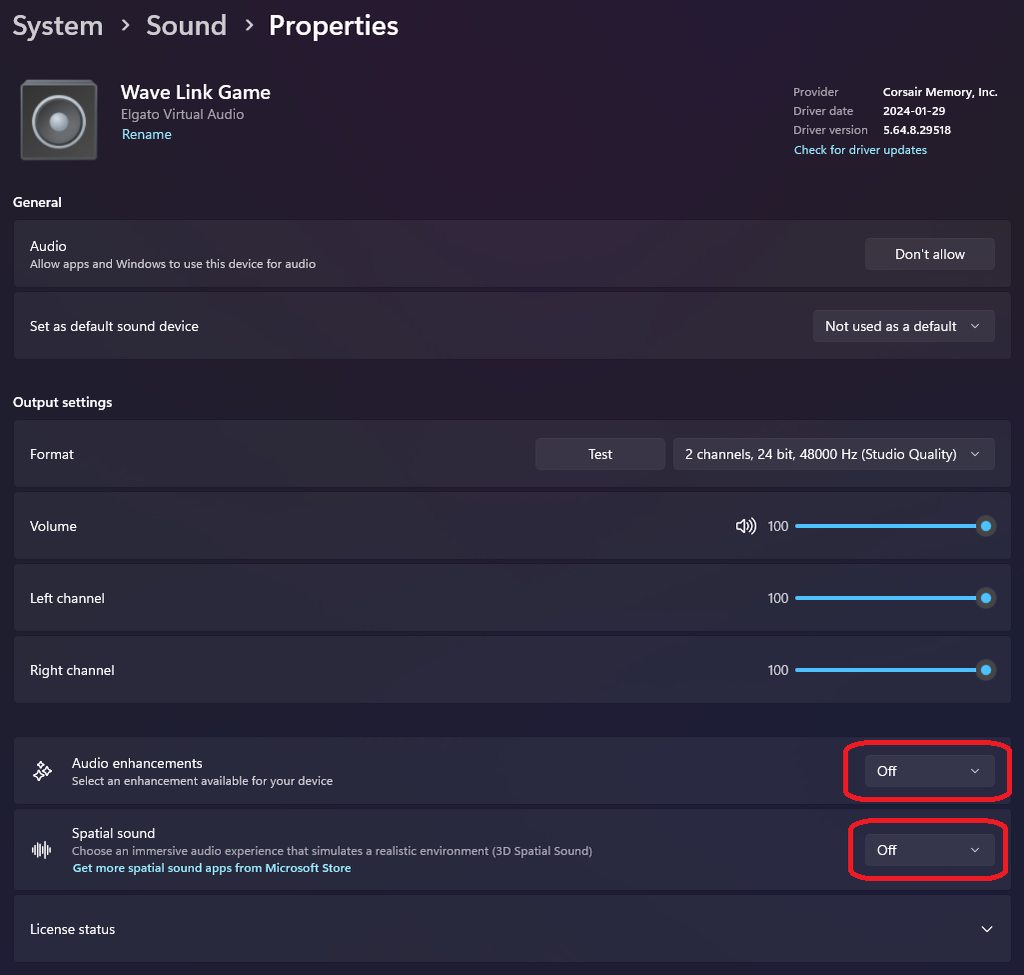
As for lowest latency, the audio latency on the card is paired with the video decode latency. And HD60 X is a 5Gbps card, so you don't have to run it in the 10Gbps ports, as that won't speed anything up. Most of the latency comes from the hardware - at 1080p in OBS that card usually has ~31ms delay. Some of it comes from rendering on screen so you can try other apps too, but they should all be very close on modern hardware.
south fox
past basin
Are these PCs using a B450 motherboard by any chance? There's an issue being tr...
only one is a B450 i think but yes
im getting like 200ms of delay
past basin
200ms? Is that using the card as it's own Audio Input Capture in OBS? Or through the video feed?
south fox
yeah, its own Audio Input Capture
past basin
Check if Windows audio enhancements are on too - that's been known to interfere and increase latency.
Is the audio synced with the video? And I assume there are no audio filters on that input capture?
south fox
im not sure im correctly navigating there?
 south fox
past basin
Check if Windows audio enhancements are on too - that's been known to interfere ...
south fox
past basin
Check if Windows audio enhancements are on too - that's been known to interfere ...
audio is pretty synced to video, no filters
south fox
to get Wave Link do i have to install the Elgato drivers? i didnt do that, i just plugged my Elgato straight into my new PC. should i download the drivers?
warped ledge
south fox
to get Wave Link do i have to install the Elgato drivers? i didnt do that, i jus...
you just install wave link, but that's a question for #wave-audio
past basin
Wave Link is also only available with specific hardware - it just happened to be the screenshot I had on hand showing where audio enchancements are sorry
If you have a Wave:1, Wave:3, Wave XLR, or Stream Deck+ you can use Wave Link
south fox
yeah then i cant even see those Audio Enhancement options
warped ledge
south fox
yeah then i cant even see those Audio Enhancement options
no, unless you have a device to unlock software usage.
next yew
ok this is actually an issue, my headset will randomly make some alien abduction noises every 5 to 10 min. and the only way to stop it is to unplug the 4k 60 mk2
@warped ledge i hate to ping but im worried its messing with my pc
south fox
actually @past basin its a B650E motherboard, not B450
i doubt that makes a difference but yeah
 dark furnace
Hi
I have a few questions
If someone could help I would appreciate it very much
Awhile ago some friends of mine gave me the advice of buying a capture card and so I did. I bought Elgato HD60X
Then I found out from an OBS Discord channel that you only use Capture Cards for consoles is it true ?
I thought I could use the Capture Card on my laptop to not put so much stress on my Graphics Card anymore and for it not to heat as much but apparently I was wrong
I found out this when I tried to reach out to someone to help me fix my resolution issue in OBS, I am talking about the black borders

 past basin
dark furnace
Then I found out from an OBS Discord channel that you only use Capture Cards for...
past basin
dark furnace
Then I found out from an OBS Discord channel that you only use Capture Cards for...
You can use a capture card with a PC as along as you have a HDMI out port. It is recommended for Dual PC setups though, not single ones though (and console - PC setups). There's not much benefit to using a capture card in s aingle pc setup because your GPU and CPU still have to do the software encoding, so Software capture like OBS works pretty much as well then
With a dual PC setup you can game on one, and send the video to another to move the video encoding wordload off your gaming hardware
2560x1600 isn't a supported resolution for HD60X though, which is why your card is scaling up to 2160p. You may have to manually crop off the edges with OBS's scene tools to get rid of the letterboxing there. I'm assuming the 1600 resolution is your laptop's panel and you're cloning the card?
past basin
south fox
i doubt that makes a difference but yeah
Probably not - still getting the extra latency? If you wanted to just remove audio latency we could run the sound through your PC's Line In jack with a Chat Link or aux cable instead - that way it's no longer synced to the Video delay.
You may also see some minor benefit from turning off HDR, as that increases the delay on the video in some cases.
south fox
past basin
Probably not - still getting the extra latency? If you wanted to just remove au...
the PS4 slim has no lagless external audio capabilities
i had to order another PS4 on eBay with Optical Audio Out and im praying that works
past basin
south fox
the PS4 slim has no lagless external audio capabilities
The headset jack on the controller would bypass the additional latency of the capture card though
south fox
i forget why but there was a reason the controller method didnt work for me
i think i couldnt find a way to assilimate it with my Focusrite Scarlett
dark furnace
past basin
You can use a capture card with a PC as along as you have a HDMI out port. It i...
Thank you so much for clarifying, a bit sad that I don`t benefit from a single pc setup at least 10% and yes the resolution of my laptop is 2560x1600
Do I get any benefit from cloning the card ?
warped ledge
dark furnace
Do I get any benefit from cloning the card ?
are you doing a dual pc setup?
past basin
warped ledge
are you doing a dual pc setup?
Single laptop. Sorry was out getting food just seeing they replied now
past basin
dark furnace
Do I get any benefit from cloning the card ?
If you were using a HDMI 2.1 monitor with that setup, using a cloned card setup would let you run the monitor in HDMI 2.1 resolutions and refresh rates while running the card at 2.0 (since HD60 X is a HDMI 2.0 card). It may let you work around some issues where anti cheat apps interfere with game capture - but that's a pretty rare situation
All it really does in the end though is give you a HDMI IN port, so there's very little benefit with the single laptop since the video is already available on that.
warped ledge
past basin
All it really does in the end though is give you a HDMI IN port, so there's very...
accurate
warped ledge
next yew
<@476160810457235466> i hate to ping but im worried its messing with my pc
I'm a bit lost, you have a 4K60 MK.2. If it's the PCIE card, make sure the connection is seated properly. As for audio static, what are your audio devices/interfaces?
dark furnace
past basin
If you were using a HDMI 2.1 monitor with that setup, using a cloned card setup ...
Once again thank you for explaining
 robust fiber
Hello! I've got an issue right now with my HD60X that I just bought, where I've got my HDMI port plugged into my gaming PC, and the USB-C routed into my Stream PC, but for whatever reason, the image is just frozen. I cant seem to get it to update at all.
warped ledge
robust fiber
Hello! I've got an issue right now with my HD60X that I just bought, where I've ...
did you duplicated the screen?
robust fiber
I've got a dual monitor setup, and I'm unsure how to duplicate my main monitor over to the capture card.
warped ledge
robust fiber
I've got a dual monitor setup, and I'm unsure how to duplicate my main monitor o...
I'll be back, but if @past basin beats me too it, I'll help in a bit.
robust fiber
Okay, thank you.
Of course right after I ask for help, it decides to randomly work. Thank you both so much for helping me out, and I'll stay in here incase the problem arises again.
past basin
This is what we call the Tech Aura. Just having someone around to help fix an issue often makes it go away 🙂
robust fiber
Okay, I've got one other issue. My audio is delayed in my headphones for some reason.
On stream its fine, but on my actual PC its delayed, and if I attempt to swap audio sources it cuts game audio from my stream completely.
past basin
Are you listening right from the PC itself? And using either OBS or StreamLabs?
robust fiber
past basin
Are you listening right from the PC itself? And using either OBS or StreamLabs?
Yes. In order to get my audio to work properly, I'm sending discord and such via Voicemeeter, but that audio is fine. My main issue is the ingame audio from my stream PC
I'm using Twitch Studio, but I'm not having any issues on stream directly.
past basin
Okay, if you're using OBS or Streamlabs, mute the capture card and add it again as an Audio Input Capture
There's an issue where pulling it through the Video Capture Device sometimes causes issues with sample rate and delay because it limits OBS's ability to change options
oh Twtich studio
hm. I'm . . not sure that has the same options
robust fiber
Hmm, okay. I'll try that, and report back.
past basin
About how delayed are we talking?
robust fiber
So for example in helldivers 2, I'll start firing a weapon, and about 0.5-1.5 seconds later, the audio of firing will start
Its not much, but its enough to throw me off
past basin
0.5 I could see being part of the capture delay - audio through the capture card is delayed by default to match the HDMI video processing delay. Over half a second is unusual though
If you want to bypass that you can run a 3.5mm from the source PC to the Gaming PC Line In instead
But then you have to sync it back up with the video in OBS (create two copies, one for you with no lag, one for the viewers with a sync offset). Sadly I'm not sure that's possible in Twitch Studio
robust fiber
Another thing is that this isn't with the actual stream. Its only happening with the audio that I'm hearing.
Which makes me think its nothing to do with the card itself
past basin
That could be too
Try checking if Windows Audio Enchancements are on for that device (Settings > System > Sound and select the device you're listening on)
 past basin
YEah, I'd turn that off
robust fiber
Alrighty, I'll report back and let you know. Thank you so much for the assistance :)
past basin
Also maybe home theature effects if it'll let you - I'm wholely unfamiliar with that one
Good luck!
robust fiber
Oof okay it made it slightly worse. Just to confirm, I should have the HD60X selected as my audio source, right?
past basin
in most setups yes
The fact it's only off in the monitoring is confusing. If you try a different audio device like your speakers instead of the headset, is it still out of sync?
robust fiber
Yeah. Its only out of sync while selecting the HD60X as my primary audio source.
past basin
Give me a minute, I'm going to see if I can install Twitch Studio and do the same workaround we use with OBS
robust fiber
Alright, no rush. Thank you again for your help.
past basin
No worries. If you're on Windows you might also want to try listening to it with 4K Capture Utility - that'll help us narrow down if the problem is specific to how it's setup in Twitch Studio or if we need to look into Windows Audio settings instead
robust fiber
Will do.
robust fiber
past basin
No worries. If you're on Windows you might also want to try listening to it wit...
Okay, it is still delayed in 4K Capture
I just dont understand why. I'm using both cords sent by Elgato, so I doubt its delay from either of those.
One other note, this isn't a gradual audio delay. Its instant and constant.
I wonder. I'm gonna test something, give me a moment.
disregard those last two things
Or not. Okay, yeah now my problem is that I dont have game audio period.
past basin
What changed?
robust fiber
I closed Voicemeeter (how I get my Discord & Spotify audio)
past basin
And you lost game audio too?
robust fiber
Mhm
Even when reopening it, I cant get audio back now.
I've tried restarting the capture card as well
past basin
Okay few things to check. Is your Windows audio on that system still pointing to the Voicemeeter virtual connection?
robust fiber
At one point it was, but even upon trying it on standard, it still wasn't working. Ill give it another shot though.
Yeah, just tried it again and still nothing.
past basin
Something I should have asked earlier and can't remember if I did - were the headphones in the gaming PC or the Streamig PC?
robust fiber
Headphones are plugged into the gaming PC via a HyperX 7.1 Surround Sound USB hub
But I'm also getting no audio on the Stream PC. I checked it via 4k Capture
past basin
Okay, so voicemeeter was being used ot send audio to the headphone and the HDMI port at the same time. Just wanted to be sure I was visualizing that right
So now it sounds like Voicemeeter isn't sending anything anywhere
robust fiber
Voicemeeter is sending things is the odd thing.
past basin
Give me a minute I need to go boot up the Win 10 machine I've got Voicemeeter on
robust fiber
I've only got Spotify & Discord on there, not the game audio.
I can still hear both just fine through Voicemeeter, but I get absolutely nothing from the capture card
Would it be best to just attempt a completely fresh slate, with no Voicemeeter in the way?
robust fiber
Correct. If I swap off of the capture card as my audio source on my gaming PC, I have game audio again. (swapping from the HD60X to my Headphones)
past basin
Okay so it sounds like something happened and Voicemeeter is no longer sending the audio to the HDMI out
robust fiber
I think I am going to attempt to just remove Voicemeeter to see if that is the issue. If it is, I'll just try and find a cheap-ish mixer of some kind.
past basin
You can try the Sound Capture Utility that's bundled with the old Game Capture HD. The app's been discontinued but generally still works fine
https://help.elgato.com/hc/en-us/articles/360027964072-Elgato-Game-Capture-HD-Software-Release-Notes-Windows has a download link
Elgato
Below is a comprehensive list of Elgato Game Capture HD software releases.Still using Windows 7? Download Game Capture 3.2 here.Please Note: Elgato Game Capture HD60 S and Elgato Game Capture 4K60 ...
You just load it up, go to the PC section and set the two output devices
robust fiber
past basin
You can try the Sound Capture Utility that's bundled with the old Game Capture H...
I'll take a look at that too. Thank you so much for your help, Arcsane, genuinely. I'd be so lost without this, LOL.
past basin
(it won't allow any mixing in of stuff like mics and that like Voicemeeter but will get your game audio over)
No worries, audio is one of the biggest headaches in streaming
Good luck with it
 full leaf
Arcsane is awesome! 
robust fiber
10000% agreed!!
Okay. I have obtained audio again. My issue now is I can't hear it through my headphones, but I can verify I have actual audio through the capture card.
Oh, duh, thats why you provided the Sound Capture stuff.
past basin
Yep. It should set itself to the default audio device (turn it back to off if you ever need it to stop doing that). Then just go to the PC section, choose the HDMI and you headset and that should be it
robust fiber
Okay, so my next question would be how would I get my microphone over to my stream PC then?
past basin
Ah, that's one thing Sound Capture can't do (unless you also want to be hearing the mic in your ear at the same time)
robust fiber
Ahh I see. Hm, I shall figure something out, but this is a good step in the right direction.
past basin
Yeah - in the end you might have to go back over the voicemeeter setup.
If you have a Wave:1, Wave:3, Wave XLR or Stream Deck+ and don't mind connecting it to the Gaming PC you can do this with Wave Link too
robust fiber
What I might do, is use a spare discord account I have, and join myself into a VC with it, to kind of "force" my mic over, but I dunno how much that would screw with the quality of my mic.
robust fiber
past basin
If you have a Wave:1, Wave:3, Wave XLR or Stream Deck+ and don't mind connecting...
I sadly have none of that. I'm working with no extra audio hardware
past basin
If you're not using the 3.5mm port on your PC, you can run an aux between the two machines. Feed it to line in on the streaming PC, and use windows "Listen To" feature to split the mic to go over that
robust fiber
Hmm, I'll take a look into that and see if I can find an old aux cord laying around somewhere.
past basin
To do that, on the gaming PC, press Windows Key + R, type mmsys.cpl and press OK. Find the mic in the recording tab, go to proeprties, and the Listen tab. Set it to Liten to this device, and choose the speaker output you're feeding to the other PC. Then run the aux cord over to the cyan coloured line in jack (pink mic usually works in a pinch but line in is the better option here due to speaker voltage). Add the line in to your app as an audio source
 balmy matrix
So i manage to get my gameplay and game audio from my gaming PC to my streaming Pc using obs on my dual PC setup BUT my gaming monitor has speakers and the game/sound/music/broswer everything all the noise comes out of the monitor built in speakers, how do I disable that without cutting off the game audio and audio in general from going thru obs
hope that makes sense
past basin
Most monitors should have volume controls in the menu, just turn that down
If it has a 3.5mm jack you can also plug in a set of headphones or a dummy plug to turn off the speakers
warped ledge
past basin
If it has a 3.5mm jack you can also plug in a set of headphones or a dummy plug ...
Can’t they disable it in sounds?
past basin
Depends on the setup. Sounds like the card is in pass through, so if we turn off the HDMI audio they'll lose the feed to the streaming pc
 proven fulcrum
past basin
Depends on the setup. Sounds like the card is in pass through, so if we turn of...
proven fulcrum
past basin
Depends on the setup. Sounds like the card is in pass through, so if we turn of...
could you send the sound capture download link?
past basin
It's part of the game capture HD bundle: https://help.elgato.com/hc/en-us/articles/360027964072-Elgato-Game-Capture-HD-Software-Release-Notes-Windows
Elgato
Below is a comprehensive list of Elgato Game Capture HD software releases.Still using Windows 7? Download Game Capture 3.2 here.Please Note: Elgato Game Capture HD60 S and Elgato Game Capture 4K60 ...
proven fulcrum
past basin
It's part of the game capture HD bundle: https://help.elgato.com/hc/en-us/articl...
I have that, but I remember you sent me a link before that was just sound capture and it worked good
past basin
Sound capture is its own app inside that bundle, but there's no individual download for just sound capture
proven fulcrum
past basin
Sound capture is its own app inside that bundle, but there's no individual downl...
got it thanks
warped ledge
past basin
Sound capture is its own app inside that bundle, but there's no individual downl...
i really wish there were for dual pc setups.
past basin
We can dream. I did submit that as a feature request once - but know telling how much of the same codebase it shares with the discontinued Game Capture HD I guess.
 stoic aspen
Hey there,
I've got an Elgato 4k60 Mk.2 installed, and I'm sending another computer's HDMI to the Input at 1920x1080p
On the host machine I'm using OBS with a 1920x1080 canvas, although the capture looks quite blurry in the preview?
I'm not sure if I'm missing something here or this is normal
 warped ledge
stoic aspen
warped ledge
stoic aspen
What’s the streaming PC’s base?
stoic aspen
warped ledge
What’s the streaming PC’s base?
In OBS? I've got it set to 1080

Although the actual source is insanely big, even though it should be 1080 as well?

I will also note - it is picking up the input as 2160 rather than 1080
 warped ledge
stoic aspen
Although the actual source is insanely big, even though it should be 1080 as wel...
warped ledge
stoic aspen
Although the actual source is insanely big, even though it should be 1080 as wel...
Ctrl+F that so it all fits. Doesn’t look blurry, just tiny.
Yup, I figured it was 4K being downscale
stoic aspen
warped ledge
Yup, I figured it was 4K being downscale
Interesting, because I have the gaming PC set to 1080 in Windows 👀
Any reason it's still being seen as 2160?
warped ledge
stoic aspen
Any reason it's still being seen as 2160?
Your source is 4K, being output to 1080p looks fine.
If you captured gameplay
As for desktop stuff, yeah it’s gonna look tiny
stoic aspen
warped ledge
Your source is 4K, being output to 1080p looks fine.
That's just it, the source should be 1080
warped ledge
stoic aspen
That's just it, the source should be 1080
Are you on a 4K monitor?
 warped ledge
stoic aspen
It's 1440p, but I'm adjusting it in Windows
warped ledge
stoic aspen
It's 1440p, but I'm adjusting it in Windows
Change it in the nvidia control panel
stoic aspen
warped ledge
Change it in the nvidia control panel
Ah that did it, thanks!
warped ledge
stoic aspen
Ah that did it, thanks!
You’re welcome!
stoic aspen
Assuming I want to use 1440, how would I go about that? That's what it was by default and it was seen as 2160 👀
warped ledge
stoic aspen
Assuming I want to use 1440, how would I go about that? That's what it was by de...
1440p is 2K I mixed up my formats.
stoic aspen
warped ledge
1440p is 2K I mixed up my formats.
Gotcha alrighty
 deft zinc
Is anyone else having this problem? this happened twice now. My xbox One X is connected to my 4K60 Pro MK.2 then to my 4K monitor which works fine. My setting in 4K Capture utility is set to recording in 4K60 but then I click start recording it records in 1080p59.94 despite it being set in 4K.
warped ledge
deft zinc
Is anyone else having this problem? this happened twice now. My xbox One X is co...
Could be the game resolution.
 pallid osprey
Hello! I was wondering if someone knew a way in which I could reduce my latency, I'll list down my setup:
Nintendo Switch (IN) > 4K60 Pro MK.2 > PC Monitor (Out) > 4K Capture Utility
Should I use any other software or any other piece of hardware? It's really annoying for those action packed games such as Smash Bros.
warped ledge
pallid osprey
Hello! I was wondering if someone knew a way in which I could reduce my latency,...
This card shouldn’t have that much latency. What the is delay?
pallid osprey
how can I see that?
past basin
How long do you feel the delay is. Very short, half second? Getting an actual number takes expensive, specialized testing gear.
a 4K60 Pro Mk2 running at 1080p60 in SDR to match a Switch usually has about 60-70ms delay though OBS.
Most of your delay with running a capture card is hardware based, for the time it takes the chipset in the card to convert HDMI into something a computer can use. Additional delay can come from the app you're using (if one feels long try another), or even if your PC's monitor isn't set to a gaming mode (when not in gaming mode they often add extra image processing to punch up the image, which can cause more latency).
warped ledge
past basin
How long do you feel the delay is. Very short, half second? Getting an actual ...
Thanks, I was busy indulging in shenanigans

past basin
I saw. Comfy in the timeout box with your ice cream? :p
warped ledge
past basin
I saw. Comfy in the timeout box with your ice cream? :p
Klover said I can have some, so I’m good!
pallid osprey
Helloooo
thank you very much for the support, I tried running the capture through OBS and worked out better, If I had to say, using Super Smash Bros as an example... Jumping took the same time as me pressing the button as far as I could and still having time to bring my finger back, making the short jumps impossible or at least forcing me to get used to it and then back to normal when not playing on PC
But in OBS is imperceptible, it does allow me to make short jumps as easily as on a TV screen
past basin
Glad to hear you were able to work around it with OBS!
 worldly hamlet

 haughty tendon
plugged in 3.0 tried using elgato facecam wire as well, drivers are updated, tried a C-C also same results.
hd60x
X670 AORUS ELITE AX (amd drivers [I have seen links to intel drivers and have found and downloaded the AMD drivers])

 twin remnant
Hello everyone,
I have à hardware question about my capture card choice:
I stream on overwatch who is a fast fps game who need lots of ips so a good fréquence.
I’m using a 4k60 pro mk2 BUT I can’t really using it directly on my screen because it doesn’t works with more than 60ips SO I made a set up with a screen that cast his self on the capture card but I can’t play my games in full screen and it’s not optimized.
I wanna know if I buy 4K pro will I still have this problem or will it be solved ?
I’m using a b450 as a motherboard
When I use my game in full screen I heave troubleshooting problems
I can’t use it in 2k it said no signal
My goal is to only use one screen in 2k with like 165hz 🤩
 shy halo
Hi,
I just bought elgato HD60 S+ to stream game from my iPad Pro ( 4th Generation)
the output is am getting is 2160p 50.
How can i get 60 fps with my ipad. Please help.
 coral coyote
Any solution to capture 4k60 from a DSLR cam ?
past basin
coral coyote
Any solution to capture 4k60 from a DSLR cam ?
Do you mean to capture a DSLR from a 4K60? As long as the DSLR has live view, a clean HDMI output and ideally, unlimited runtime in video mode, it should work fine.
past basin
shy halo
Hi,
I just bought elgato HD60 S+ to stream game from my iPad Pro ( 4th Generatio...
Before you focus too much on that, be aware that HD60S+ does not capture 4K60, only 4K30. (Though it will pass through 4K60).
Getting 60 fps from your ipad though, is more likely dependent on the HDMI adapter you're using with it.
past basin
haughty tendon
plugged in 3.0 tried using elgato facecam wire as well, drivers are updated, tri...
That motherboard is listed as having 4 USB 2.0 ports on the back. HD60 X requires USB 3.0 or faster - make sure you're plugging into one of the 3.2 ports it has - they will have either red or blue inserts on that board.
Likewise make sure that whatever USB C to C cable you're using is rated for 5 Gbps or faster - a LOT of them these days are aimed only at charging, they will output high wattage but only run at USB 2.0 speeds.
past basin
twin remnant
Hello everyone,
I have à hardware question about my capture card choice:
I str...
4K60 Pro Mk2 works at faster than 60Hz on a lot of resolutions - what resolution are you connecting your gaming PC to the streaming PC with?
twin remnant
past basin
4K60 Pro Mk2 works at faster than 60Hz on a lot of resolutions - what resolution...
Actually i'm using 1080 P with 165HZ
But when i'm running it in full screen 2K with more than 60FPS it doesen't work
@past basin

 past basin
twin remnant
<@269997944671830017>
past basin
twin remnant
<@269997944671830017>
That screen looks like what we often see when you have a 4K60 Pro Mk2 that's not getting a full x4 lanes of PCIe, and turn up the refresh rate or resolution. Though I've also seen similar caused by dodgy HDMI cables
What's the exact motherboard or PC model there?
twin remnant
past basin
What's the exact motherboard or PC model there?
The motherboard is using a B550M AORUS
twin remnant
past basin
That screen looks like what we often see when you have a 4K60 Pro Mk2 that's not...
I'm using a hdmi cable that has been seel with the screen
past basin
Are you sure that cable is rated for HDMI 2.0? Not all monitors ship with cables that will match their maximum performance (though you would think they would).
I'm checking the spec on the motherboard now, will be back shortly
twin remnant
past basin
I'm checking the spec on the motherboard now, will be back shortly
than you so much
i'm tcheking the hdmi cable
both
twin remnant
it said premium HDMI tm
past basin
ah
twin remnant
past basin
This is a 4K60 Pro mk2 PCIe card right?
Yes
past basin
Sadly premium doesn't clear up the spec
is there a 1.4, 2.0 or 2.1 mentioned anywhere? Or a gbps rating?
twin remnant
past basin
is there a 1.4, 2.0 or 2.1 mentioned anywhere? Or a gbps rating?
not at all
past basin
Good news is that it seems the only slot your card will fit into on that board is a PCIe 3.0 x4 slot, with no listed splits or bifurcation, so the board should meet the spec for the card
That said, is this a dual PC setup?
twin remnant
yes exactly ^^
past basin
Is GSync or Freesync enabled on the gaming PC?
twin remnant
past basin
Is GSync or Freesync enabled on the gaming PC?
I think
past basin
If so, can you check in 4K Capture Utility on the Streaming PC, what firmware version is listed for your 4K60 Pro Mk2 - it'll be in settings under the device tab
twin remnant
 past basin
Okay, that's good - it's on the latest, so it has VRR support
That screenshot with all the purple still looks more like a timing problem than anything else - any chance you have a spare HDMI cable kicking around? I blieve the 4K60 Pro itself should have shipped with one.
We could also try changing the EDID's so the list of supported display modes matches the card over instead of both the card and the monitor to see if that improves things
oh wait
past basin
twin remnant
You already have your EDID mode locked in at 1080p. Is that inentional?
twin remnant
past basin
You already have your EDID mode locked in at 1080p. Is that inentional?
you use it on default mode ?
past basin
Generally yes. EDID mode is more for troubleshooting compatibtility issues than anything.
Though now that I see the section above you have it set to Display mode. That means when your monitor and capture card send the list of supported timings to the gaming PC it only sends the modes from the Display, not the card - that could cause an issue where the gaming PC uses a timing supported by the monitor and not the card
Default behaviour is that it merges disiplay and internal modes. And internal mode at the bottom is usually left to default unless you're trying to force a specific resolution
If you se the EDID mode to Internal, and the bottom section to either default or 1440p does anything change?
twin remnant
past basin
If you se the EDID mode to Internal, and the bottom section to either default or...
I don't receive signal anymore on the card
but my screen on gaming pc is perfect
 past basin
That's unexpected - in Internal mode it should only provide modes supported by the card. Can you disconnect the HDMI and reconnect it to force things to resync?
past basin
Can you disconnect the gaming monitor screen for a moment to see if it switches over?
past basin
What's the resolution currently set to on the gaming PC?
twin remnant
Could it be the cable ? Be cause I reauest a 144hz on my gaming pc ?
past basin
It could be - if the cable isn't keeping up it could just drop the signal
Is the gaming monitor connected to the HDMI out of the capture card (in passthrough) or a cloned setup?
twin remnant
 twin remnant
past basin
Is the gaming monitor connected to the HDMI out of the capture card (in passthro...
twin remnant
past basin
Is the gaming monitor connected to the HDMI out of the capture card (in passthro...
it's in passthrought (usually i use my card in cloned set up )
past basin
If it's passthrough and it's working on the gaming monitor, probably not the cable then
If it was doing that in the cloned setup, I would have assumed the cable though
If you switch it back over to the cloned steup while the card it set to Internal, what happens?
past basin
Set it back to merged mode for the EDID mode and see if anything changes
If it still doesn't cooperate after that, I'd put it back the way you had it before
twin remnant
past basin
Set it back to merged mode for the EDID mode and see if anything changes
I merged and it doesn't work again
past basin
That's not making any sense to me. EDID internal should favour modes supported by the card over anything else 😐
twin remnant
but in screen it works
past basin
Let's make sure it's still working the other way then - you might want to reach out to support on this one though #official-tech-support . This card isn't behaving the way I would expect. I might just be missing something here this morning though
But going back to the earlier question 4K Pro would likely work - but this 4K60 Pro Mk2 should also be working for higher resolutions thn you're getting out of it
twin remnant
past basin
But going back to the earlier question 4K Pro would likely work - but this 4K60 ...
Men
i made it works in intern
with both (Gaming pc / 4K60 connected ) but in full screen i have no signal
past basin
Full screen sometimes causes issues in cloned setups if you're back to cloning the card
twin remnant
 past basin
Since fullscreen overrides windows settings
twin remnant
past basin
Full screen sometimes causes issues in cloned setups if you're back to cloning t...
yes i was cloning it
BUT
when i change the frequence of the card
they are weird things that happen
past basin
Just in fullscreen?
past basin
Since we've been moving the card around between clone and passthrough you might have to adjust the audio output on the gaming PC to point to the right HDMI feed again
twin remnant
Ok so I have The problem
Why under 60 hz it works perfectly in intern but above I have no signal ?
 past basin
I honeslty couldn't say - I would have expected Internal to work better, not worse, for this
twin remnant
In 100hz it works but the audio is cut like the whole pc audio
The problème is the card or the motherboard ? 👀
past basin
Yeah, changing the video refresh rate shouldn't affect the audio. I'd check in with support on that #official-tech-support - that card just sounds like it's behaving weird
If the motherboard is having bandwidth issues it could be that too
But nothing in the manual for that board indicates any conflicts for that PCIe port
I'm assuming it's in the X4 slot on the board (bottom one)
 upbeat laurel
Hi. Can anyone help with hd60s. I’m getting a black screen on utility software. Thanks
Will a nvidia GeForce 710gt run the hd60s?
coral coyote
past basin
Do you mean to capture a DSLR from a 4K60? As long as the DSLR has live view, a...
Thanks for the answer
 hollow mulch
hey can smone help with this problem ive been having. I have the hd60x and i cant share my screen on discord while i have the 4k capture utility app up. When i try the app just freezes and im not sure how to fix it. Everyone else can share their screen with their elgato while they have that app open except for me. All my drivers are up to date.
I tried to check stream link but that didnt work either im not sure what the problem is
warped ledge
hollow mulch
I tried to check stream link but that didnt work either im not sure what the pro...
Only one app at a time can use the card. You can stream in discord the device directly.
hollow mulch
I understand however many of my friends on discord are doing it with the same capture card
and if i use the card on discord i cant hear it
is there a way i can use audio and stream on discord?
I dont use the app for video just audio since i just switch to my hdmi to play so let me know if thats possible or if id just need a different card
hollow mulch
warped ledge
Only one app at a time can use the card. You can stream in discord the device di...
also im trying to share the app screen and not the capture card itself if thats worth mentioning
warped ledge
hollow mulch
also im trying to share the app screen and not the capture card itself if thats ...
Why do that when you can just share the card?
hollow mulch
warped ledge
Why do that when you can just share the card?
because when I share the card, I cannot hear the audio while playing
if theres a way i can that would solve all my problems
the audio can only be heard by the people watching the screen share and not by me
past basin
Try using OBS Studio instead - use a projector (fullscreen) to toss it up on a screen and capture that with Discord
to do that right click what you want to share - either the preview window or the specific source and look for the projector options
hollow mulch
past basin
Try using OBS Studio instead - use a projector (fullscreen) to toss it up on a s...
ill try that now
thats working
hollow mulch
past basin
to do that right click what you want to share - either the preview window or the...
now how can i add the sound so i can hear it
past basin
Ah, go into your advanced audio properties and put the capture card on "Monitor & Output"
hollow mulch
past basin
Ah, go into your advanced audio properties and put the capture card on "Monitor ...
Copy
I did it but still cant hear it
past basin
Is the meter for the volume moving in the audio mixer in OBS?
hollow mulch
past basin
Is the meter for the volume moving in the audio mixer in OBS?
not at all
past basin
Add an Audio Input Capture and add your capture card that way for audio and see if that fixes it (will need to be set to Monitor and Output as well)
hollow mulch
past basin
Add an Audio Input Capture and add your capture card that way for audio and see ...
Done however still nothing
past basin
This worked in 4K Capture Utility before we go any further right?
past basin
Okay, Press Windows Key + R, and type mmsys.cpl and press ok
hollow mulch
ok
past basin
Go to the recording tab, find the card, and go to properties. Check the levels tab that it's turned up and not muted. Then go to the advanced tab and remove the option that says Allow apps to take exclsive control of this device. Press Ok and close out everything we opened. Somtimes you may need to restart after this
If you start getting double audio it's because we added the card twice for audio so you can just remove the audio copy
hollow mulch
Done im gonna restart my pc
I hear it perfectly
let me try sharing my screen
ok so now its doing the same thing as the 4k capture app
it just froze my audio and capture the second i shared it
past basin
I've heard some people mention the Discord update from last week broke sharing with hardware acceleration - you might have hit that same issue
hollow mulch
should i take off hardware acceleration?
past basin
If you turn it off for Discord sharing then yes, give it a shot
hollow mulch
copy ill turn it off now and try again
thanks for trying to help i appreciate it alot
past basin
No worries, good luck with it
hollow mulch
yea man app just freezes the second i try sharing it still
You think its something in my pc thats causing this like the cpu or motherboard
hollow mulch
past basin
No worries, good luck with it
is there anything else you have in mind or is it out of our control
past basin
hollow mulch
is there anything else you have in mind or is it out of our control
If it's crashing two different apps it sounds like a Discord issue. I'd check that it's up to date, that your GPU drivers are up to date, and your version of Windows is up to date
Were you able to turn off the hardware acceleration?
hollow mulch
past basin
Were you able to turn off the hardware acceleration?
yea i tried still same issue
hollow mulch
past basin
If it's crashing two different apps it sounds like a Discord issue. I'd check t...
my windows is outdated ill try updating that
hollow mulch
past basin
If it's crashing two different apps it sounds like a Discord issue. I'd check t...
i thought so too however my friends never had this issue which leads me to think its something on my pc
past basin
Could be Discord doesn't like something specific about your PC as well though
hollow mulch
yea facts
only thing that isnt too high tier on my pc is my cpu and motherboard
still doesnt work Ill just wait for a future pc upgrade and hope itll start working then. thanks anyways for trying to help
 crimson walrus
My capture card is working in one of my old OBS scenes but when ever I add it again to the old one or a new one, it is just a black screen. Can anyone help?
past basin
crimson walrus
My capture card is working in one of my old OBS scenes but when ever I add it ag...
Are you adding it as the Existing source or with Create Source? Only one app can access the card at a time, and if you try to add it as two different sources it'll conflict.
past basin
No worries, good luck
 tiny willow
Say, does anyone know how to cap fps on your capture card?
i try to play bloodborne and that's capped at 30 and its having issues
past basin
Do you mean to cap the signal you're getting from the capture card? That's adjustable in most apps, but how you change it depends on the app you're using. Capping the passthrough signal is something else though, and best done on the source device if possible.
tiny willow
past basin
Do you mean to cap the signal you're getting from the capture card? That's adju...
i mean like if i could cap the fps since playing it throught the capture card is rather choppy
and the 4k capture utility? i'm using the elgato hd60x
past basin
You'd be capping the captured video FPS then? Just change the recording format in the settings of 4KCU, under the recording tab. There should be multiple options there for 30 fps instead of 60.
 stray tusk
Hey yall. Having some issues with my new to me Game Capture HD. Windows isnt recognizing it for some reason. Just looking for any troubleshooting steps I can try.
Ive already tried reinstalling Game Capture HD + drivers and tried 3 different usb cables and all the usb ports on my PC and nothing worked
warped ledge
stray tusk
Hey yall. Having some issues with my new to me Game Capture HD. Windows isnt rec...
what card do you have?
stray tusk
warped ledge
what card do you have?
the original Game Capture HD
warped ledge
stray tusk
the original Game Capture HD
what does device manager say?
stray tusk
warped ledge
what does device manager say?
This is what its showing under device manager
 warped ledge
stray tusk
This is what its showing under device manager
warped ledge
stray tusk
This is what its showing under device manager
unintall it, and the drivers when prompted
stray tusk
Will do, one moment
Ok so uninstalled that but no prompt for the drivers uninstall on it
unless you meant the software as well
warped ledge
stray tusk
unless you meant the software as well
no just drivers.
warped ledge
stray tusk
unless you meant the software as well
so unplug, and then plug back in.
stray tusk
warped ledge
so unplug, and then plug back in.
Threw the same error prompt
warped ledge
stray tusk
Threw the same error prompt
did you try to update firmware?
stray tusk
I tried out the latest drivers from both the software release page and the standalone drivers page if thats what you mean
warped ledge
stray tusk
I tried out the latest drivers from both the software release page and the stand...
let me check a few things.
stray tusk
Lemme know if you need any extra info regarding my OS or anything like that
warped ledge
stray tusk
Lemme know if you need any extra info regarding my OS or anything like that
win 10 right
stray tusk
warped ledge
win 10 right
I'm on Windows 11 currently
warped ledge
stray tusk
I'm on Windows 11 currently

Elgato
We've been working on the next big update for our Windows Game Capture software, version Elgato Game Capture HD 3.5.The major new features are:• Text Overlays: add static or dynamic text, or rea...
here are the drivers https://help.elgato.com/hc/en-us/articles/360027961152-Elgato-Gaming-Hardware-Drivers
Elgato
Elgato Gaming Hardware Drivers - Windows 10/11
When you install Elgato Game Capture HD software for Windows 10/11 or Elgato 4K Capture Utility, the necessary drivers should automatically be i...
stray tusk
Uninstalling current one and Ill install that version
ok some progress: Windows now at least recognizes it, but the software still is having a fit about it
 warped ledge
stray tusk
ok some progress: Windows now at least recognizes it, but the software still is ...
warped ledge
stray tusk
ok some progress: Windows now at least recognizes it, but the software still is ...
ok, let's uninstall it, remove drivers if prompted. 🙂
progress
stray tusk
ok uninstalled it and no change. Device manager is giving an error code 28 in properties for it though so possibly will need to manually install the drivers
warped ledge
stray tusk
ok uninstalled it and no change. Device manager is giving an error code 28 in pr...
no, reboot your pc after you uninstalled it, leave it unplgged
stray tusk
warped ledge
no, reboot your pc after you uninstalled it, leave it unplgged
will do, be back in a sec
alright, rebooted with it uninstalled and unplugged, lemme see what it does now when I plug it in
warped ledge
stray tusk
alright, rebooted with it uninstalled and unplugged, lemme see what it does now ...
wait
reinstall the drivers
stray tusk
warped ledge
reinstall the drivers
latest or a specific older revision?
warped ledge
stray tusk
latest or a specific older revision?
the newest one
stray tusk
Kk, installed it
warped ledge
ok, now plug it in
stray tusk


and picture is here now 

Thank you so much! I 100% would've not been able to get this working on my own lol
warped ledge
stray tusk
Thank you so much! I 100% would've not been able to get this working on my own l...
you're welcome! 🙂
deft zinc
warped ledge
Could be the game resolution.
It is not the game resolution. my xbox is set to 4K60 and this recently started happening with the recent update for 4KCU
warped ledge
deft zinc
It is not the game resolution. my xbox is set to 4K60 and this recently started ...
I can help tomorrow. I’m already asleep. 😴

past basin
deft zinc
Is anyone else having this problem? this happened twice now. My xbox One X is co...
If you disable HDR does it still do the same? That's expected behaviour for a HD60 X so it's possible the app is defaulting it to a 4K60 Pro Mk2 in error too.
Where HDR recording drops you to 1080p for most resolutions.
If you want to confirm it came from the latest update you can uninstall 4KCU and grab an older version from here: https://help.elgato.com/hc/en-us/sections/5126053814029-Elgato-4K-Capture-Utility-Release-Notes
shy halo
past basin
Before you focus too much on that, be aware that HD60S+ does not capture 4K60, o...
I have changed my adapter now i am getting the desired framerate 😀 .
Now the issue is the captured output screen goes black after 5 sec of capturing from my iPad pro.😔
past basin
shy halo
I have changed my adapter now i am getting the desired framerate 😀 .
Now the i...
Does your new adapter send a HDCP protected signal by any chance? You might also want to double check the HDMI cable used. Ideally I'd also test that adapter with a TV or monitor instead of just to the capture card to make sure the adapter itself isn't the issue.
twin remnant
@past basin I was wrîg on my motherboard
This is a a b550 elite v2

There is a PCIE x2 and PCIE 1_2 is there a difference ?
past basin
Your PCIe x2 is a two lane slot. The other two are both wired as PCIe x1 slots desptie the latter having a full size physical slot, so the _1 and _2 just indicate PCIe x1 slot one and slot two.
Neither of those is a x4 slot capable of running 4K60 Pro mk2 (or 4K Pro) at full speed though.
https://www.gigabyte.com/Motherboard/B550-AORUS-ELITE-V2-rev-10-11/sp#sp shows the slots are all PCIe 3.0, and matches up with the X2 and dual X1
robust fiber
Heya! Back with another question. So. I've got my audio mostly figured out, but, via Voicemeeter, is there a way I can make sure I don't hear my own mic through the AUX cord? I had to re-setup Voicemeeter to make sure that I could still have music on stream.
upbeat laurel
Can I have some help please.
upbeat laurel
 tawny peak
where can i find the software name and version number of my capture card
past basin
The software is whatever appliation you use to record from the card. What do you mean by version number of the card? The firmware or the model?
past basin
robust fiber
Heya! Back with another question. So. I've got my audio mostly figured out, but,...
How is your audio routed between the computers again? It's been a few days sorry
past basin
upbeat laurel
?template
 smoky mantleBOT
Looking for help? Please copy, paste, and fill out this template in order for our community to better help you:
**Device**:
**Software & Version**:
**Windows/Mac Version**:
**Console/Dual PC**: "this line is only for troubles with capture, camera, and lighting"
**Question/Issue**:```
- Note: This is a community tech help channel and **Official Elgato Support does not monitor this channel**. Posting your questions here does not guarantee that you'll receive help. We recommend filing a support ticket at <http://e.lga.to/help>.
- To contact Elgato Support via phone visit <http://help.elgato.com/hc/articles/360028242811-How-do-I-contact-Elgato-support-via-phone>.
- You can browse through our help articles here:
<https://help.elgato.com/>
Please remember that our members who are helping you troubleshoot are taking time out of their day to help and they are not staff. **Any disrespect to them will end up in a warning/ban.** Created by calucifer#0 (218276721516871693)
past basin
Created by calucifer#0 (218276721516871693)
past basin
There's not enough info there yet Harvey, can you fill that out
robust fiber
past basin
How is your audio routed between the computers again? It's been a few days sorr...
No worries. I just bought a mixer and an XLR mic today, so I'm gonna end up having to reset everything back up lol
 weary fjord
currently using the hd60x for streaming from my XBSX. very tempted to get the 4K X. my laptop only seems to have gen 1 USB (5gbps) and i cant find any info regarding the reduced capture rate, as to what that actually means. i want to be able to passthrough 4k 120 but would like to knnow what my max stream would be limited to? thanks
past basin
weary fjord
currently using the hd60x for streaming from my XBSX. very tempted to get the 4K...
They supported modes on 5Gbps are listed in the bottom chart here: https://e.lga.to/4K_X_Resolutions
Pass through is unaffected by the lower USB speed, only capture is, so you'd still be able to pass through 4K120
Elgato
This is a list of supported passthrough and capture resolutions. For each input resolution, the supported capture resolution is shown as supported by 4K X.
These resolutions and frame rates do no...
weary fjord
past basin
They supported modes on 5Gbps are listed in the bottom chart here: https://e.lga...
thank you
 mighty obsidian
@past basin I have a 4k x and i cant hear my audio in obs on my streaming pc and i already had voicemeter banana and it worked but when i got back from break i couldnt get any audio through from my gaming pc to my streaming pc. what should i do
past basin
Is your gaming PC's sound output still set to your Voicemeeter virtual input?
Windows updates will sometimes reset that
mighty obsidian
yes and still nothing is going through and all of my inputs and outputs are the same like last time when it worked and now it not
if i remember correct this was not like this when it was working @past basin
 warped ledge
mighty obsidian
if i remember correct this was not like this when it was working <@2699979446718...
warped ledge
mighty obsidian
if i remember correct this was not like this when it was working <@2699979446718...
did you enable it?
past basin
If it won't re-enabled, unplug and replug the cable
Because that should almost certainly be connected
 past basin
Glad you got it sorted! If there's more than one HDMI port on your GPU that might explain the double options there - otherwise I might update the GPU driver later, and restart the system to clear that up 🙂
 silent tree
Is it true that i can't use wireless USB headset with the elgato to work on OBS? (Hi, new here)
warped ledge
silent tree
Is it true that i can't use wireless USB headset with the elgato to work on OBS?...
please fill this out
smoky mantleBOT
Looking for help? Please copy, paste, and fill out this template in order for our community to better help you:
**Device**:
**Software & Version**:
**Windows/Mac Version**:
**Console/Dual PC**: "this line is only for troubles with capture, camera, and lighting"
**Question/Issue**:```
- Note: This is a community tech help channel and **Official Elgato Support does not monitor this channel**.  Posting your questions here does not guarantee that you'll receive help. We recommend filing a support ticket at <http://e.lga.to/help>.

- To contact Elgato Support via phone visit <http://help.elgato.com/hc/articles/360028242811-How-do-I-contact-Elgato-support-via-phone>.

- You can browse through our help articles here:
<https://help.elgato.com/>

Please remember that our members who are helping you troubleshoot are taking time out of their day to help and they are not staff. **Any disrespect to them will end up in a warning/ban.**Device: Elgato HD60X
Software & Version: 1.7.11 (5032)
Windows/Mac Version: Windows 10 Home (22H2)
Console/Dual PC: "this line is only for troubles with capture, camera, and lighting"
Question/Issue: I have no audio when i put my Elgato in OBS. I have already browsed the internet and people told me i can't use a wireless headset connect with USB to my PS5. That i need to use a chat link cable, with headset connected to my controller + external microphone
 shy shell
Device: Elgato HD60 pro
Software & Version: 1.7.9 and 1.7.11
Windows/Mac Version: win 10.0.1945 - 19045
Console/Dual PC: PS5
Question/Issue: So this used to work like last night. Today I am getting black screen in the 4K utility (tried updating, did not help) and just no feed in OBS at all. Audio is coming through both places. Anybody know why? addition - same situation with the nintendo switch so its the card, cable or hdmi switch
UPDATE: Rebooting PC and thus the cap card, helped. I panicked 😂
 severe vault
Device: Elgato 4k x
Software & Version: 1.7.11 (5032)
Windows/Mac Version: Win 11
Dual PC
Question/Issue: Can't seem to get OBS video capture device to capture just the gameplay. I have been using window capture. But it captures both the top and bottom of the 4k capture utility application. Just curious if anyone else has this problem. I resize it to hide it, but can't do it on TT live.
past basin
severe vault
Device: Elgato 4k x
Software & Version: 1.7.11 (5032)
Windows/Mac Version: Win 1...
Generally you don't setup OBS using Window capture with 4K X, you would setup OBS using Video Capture Device. It sets up the same way as HD60 X so you can follow this video - https://www.youtube.com/watch?v=27fYbUln-Vg

In this video we show you how to set up your Game Capture HD60 X with OBS Studio on Windows and macOS.
▼ Click "Show More" for details and features.
▼ HD60 X Highlights:
► 4K60 HDR10, 1440p120, 1080p120, 1080p240, VRR passthrough.
► High resolution 4K30 or 1080p60 HDR10 capture.
► No watermarks, no time limits, no subscriptions.
► Play in HD...
past basin
silent tree
**Device**: Elgato HD60X
**Software & Version**: 1.7.11 (5032)
**Windows/Mac Ver...
This depends on the headset, but is generally true. PS5 does a one audio stream per user model, so if you plug in a headset it turns off the HDMI audio, and if you force it back on it turns off the headset audio. Unfortunately wireless headset signals are encrypted so generally you can't capture audio from a wireless headset setup - with exceptions like the SteelSeries Arctis Nova Pro, and Astro A50, where the wireless base station has a 3.5mm line out (or stream port) for exactly this purpose. Unless you have a high end headset with an audio out, typically a wired headset with Chat Link Pro is the easiest way to split the audio coming out of the console while using a headset.
Some folks have also reported that they can work around this by signing a second user into a second controller and running an aux cable from that controller to the capture card to capture audio - though this workaround has a few limits.
 brittle spade
Hi, I just got my 4K X capture card and I am trying to capture my S22 Ultra gameplay. However, I have no sound. I also have HD60 X which works fine.... Can anyone help? I can still hear the game in the phone after the capture card is in.
silent tree
past basin
This depends on the headset, but is generally true. PS5 does a one audio stream...
thank you!
past basin
brittle spade
Hi, I just got my 4K X capture card and I am trying to capture my S22 Ultra game...
That sounds unusual that the phone's audio isn't switching off when the cable is connected - that should generally happen even if your 4K X doesn't pick it up. I'd probably reboot the phone and reconnect your HDMI adapter after it's up first. Sadly a bit unfamiliar with Android capture, other than the fact Samsung devices usually have HDCP on which can make them a pain to capture.
brittle spade
past basin
That sounds unusual that the phone's audio isn't switching off when the cable is...
No, the phones audio is staying on when connected. when connecting HD60 X it starts working in 4K Capture or OBS. However in 4k X the phone audio is not "picked up". HDCP is fine, it works with HD60 X
past basin
brittle spade
No, the phones audio is staying on when connected. when connecting HD60 X it sta...
I was more asking about the HDCP in case any additional hardware was connected that might interfere with it. Does the audio also stay on, on the phone when using HD60 X?
severe vault
past basin
Generally you don't setup OBS using Window capture with 4K X, you would setup OB...
That's the current issue I'm having. In video capture device, I am able to see the elgato 4k x capture card as an option. But when I select it, it's just a blank screen.
I know the capture card is working because the capture utility program shows my game play.
past basin
severe vault
That's the current issue I'm having. In video capture device, I am able to see t...
If you try this while 4K Capture Utility is open you will get just a blank screen, as only one app can use it at a time. You would need to close 4K Capture Utility and restart OBS before it would start picking up the video again
brittle spade
past basin
I was more asking about the HDCP in case any additional hardware was connected t...
Audio is captured normally on HD60 X
past basin
brittle spade
Audio is captured normally on HD60 X
Does that mean that the phone does stop playing the audio itself and only sends it to the HDMI? I'm asking because you indicate the phone keeps playing it's own audio when you're using 4K X - I want to confirm that it DOESN'T do that with HD60 X or not.
brittle spade
1 minute testing
HD60 X works well but it only has

this works perfect
sound included 🙂

No sound captured. Sounds play in phone
I tried all video formats
Please help
past basin
The card should accept audio over HDMI regardless of the settings being used here. Even if the card were in Analog mode, generally the HDMI from the source would still get sent over and the device should switch to HDMI audio even if you don't hear it. The fact you still hear it from the phone when it's connected generally indicates an issue. Are you using the same HDMI cable you used with yoru HD60 X?
brittle spade
same cables. just changed the card
I updated the firmware and I might have unplugged the USB from the computer a bit too fast after it asked me to unplug?
4K Capture program says the firmware is up to date
I mean the latest version is there

same issue with both HDMI and Analog
I am using 8k HDMI cable and the one that came with 4K X and I have a 4070TI graphics card
past basin
With most adapters the instant you connect a HDMI cable the phone audio turns off and only goes to HDMI. Doesn't matter what settings are on the card as long as it's connected to something. That didn't change when you restarted the phone?
past basin
And your HD60 X's audio correctly turns off on the phone when connected to HDMI correct?
And only goes over the HDMI then?
severe vault
past basin
If you try this while 4K Capture Utility is open you will get just a blank scree...
I tried, error still persists. 4k capture utility is not open. I even restarted my laptop. Everything is on default settings. Only have 1 other source. 😦
 past basin
severe vault
I tried, error still persists. 4k capture utility is not open. I even restarted ...
past basin
severe vault
I tried, error still persists. 4k capture utility is not open. I even restarted ...
Check that it's not blocked out by Windows Privacy settings. The card gets treated as a camera by the operating system, so sometimes Windows winds up blocking access to the video feed - https://help.elgato.com/hc/en-us/articles/360027958672-Capture-Card-not-working-due-to-Windows-10-11-Privacy-Settings
Elgato
The Windows 10 April 2018 Update (1803) introduced new privacy settings that may interfere with certain capture cards and camera devices.Affected products:
FacecamCam LinkCam Link 4KGame Capture HD...
severe vault
past basin
Check that it's not blocked out by Windows Privacy settings. The card gets trea...
Thank you! This narrowed it down to this ...

I stopped using vertical canvas and instead using TT live. So I didn't have it open. But it was still grabbing it in the background.
severe vault
past basin
Check that it's not blocked out by Windows Privacy settings. The card gets trea...
 past basin
Good to know. Glad you got it sorted out!
 hot jolt
Just changed from the sony zv1 to a sony A6000 and my lights sign behind me has streaks on it now, anyway to change that?
 brittle spade
past basin
And your HD60 X's audio correctly turns off on the phone when connected to HDMI ...
brittle spade
past basin
And your HD60 X's audio correctly turns off on the phone when connected to HDMI ...
yes. HD60 X turns on and off on the phone correctly
brittle spade
past basin
And only goes over the HDMI then?
yes
 proper ember
Hey can i stream my Nintendo switch with my camlink pro 4k?
past basin
Yes, Cam Link 4K and Cam Link Pro both support 1080p60 video that the Switch outputs at. Though neither has passthrough HDMI out ports to play on, so you'll have to play on the captured video feed, which has a short delay of about 60-70 ms.
warped ledge
proper ember
Hey can i stream my Nintendo switch with my camlink pro 4k?
Yes, but so don’t think you’ll get audio.
 urban zodiac
not sure where to go...have a hd60x...and it wont show my game...i have the projector on for the capture card and everything is turned on. anyone know how to fix?
dual pc system
 past basin
warped ledge
Yes, but so don’t think you’ll get audio.
past basin
warped ledge
Yes, but so don’t think you’ll get audio.
They should get it if they're using HDMI actually - Cam Link has HDMI audio support since a lot of cameras have mics, and people often shoot with external mics like a shotgun attached to the camera and fed in. (I've had to look that up before too though). If they need to use a headset Chat Link is out though, unless they have a line in on the PC.
past basin
urban zodiac
not sure where to go...have a hd60x...and it wont show my game...i have the proj...
That's an impressive fault in it's own right - since you're in projector I assume this is OBS - can you link a screenshot of the settings for the Capture Card Source there?
 warped ledge
past basin
They should get it if they're using HDMI actually - Cam Link has HDMI audio supp...
warped ledge
past basin
They should get it if they're using HDMI actually - Cam Link has HDMI audio supp...
So it will relay the gaming console audio?
past basin
warped ledge
So it will relay the gaming console audio?
As long as there's no headset, it should
warped ledge
past basin
As long as there's no headset, it should
Didn’t realize it had audio capabilities.
I thought it was video only.
past basin
Fair assumption, had to check it myself the first time someone asked me.
But yeah, audio included since a lot of cameras have mic capability
urban zodiac
@past basin is that what you were wanting
past basin
urban zodiac
<@269997944671830017> is that what you were wanting
Yeah, sadly still poking for ideas on what would case that distorition - does your HD60 X work if you try any other HDMI sources in it (if you have something like a console on hand)? Because that colour banding only is Not something I've seen before
The source isn't just messed up on the canvas is it? If you remove your HD60 X and add it back, does anything change?
urban zodiac
color banding is my background
past basin
ooh
urban zodiac
nevermind i got it
past basin
I'm guessing screen isn't mirrored?
urban zodiac
no it was projecting and everything. just would pick it up
just reset everything back up and it worked
urban zodiac
you good bro thanks
weary fjord
im in the UK, if i order from elgato does anyone know where it ships from ?
warped ledge
weary fjord
im in the UK, if i order from elgato does anyone know where it ships from ?
You might want to reach out to #official-tech-support and they should provide that answer.
 fickle dragon
weary fjord
im in the UK, if i order from elgato does anyone know where it ships from ?
fickle dragon
weary fjord
im in the UK, if i order from elgato does anyone know where it ships from ?
Netherlands typically
In a lot of cases shipments from there only take maybe 2-3 business days to UK in my experience.
deft zinc
past basin
If you disable HDR does it still do the same? That's expected behaviour for a H...
I just checked and HDR is off. I will try an older version of 4KCU.
warped ledge
fickle dragon
In a lot of cases shipments from there only take maybe 2-3 business days to UK i...
Thanks!!!
 sharp quest
Hi
south fox
i just got a "new" (older model) PS4 so i can have Optical Audio. CUH-1001A. my Elgato is getting flickering while connected to this.
it doesnt flicker when connected straight to the TV, and my newer model Slim PS4 captures just fine, but this older model flickers when trying to capture.
is the CUH-1001A just unable to capture? do i need to change an additional setting? what gives?
HDCP...
warped ledge
south fox
HDCP...
Hdcp is off right?
 neon charm
Just got the 4k60 pro. I installed it in my stream machine. When I connect the HDMI cables…only the wallpaper from my gaming machine is displayed…no mouse functions or anything…OBS sees the card as a source and the utility recognizes the card…I’m kinda stuck…I did update all cpu and GPU components
past basin
Did you set it up for passthrough (HDMI In from gaming PC, HDMI out to the gaming monitor), or a cloned setup? This sounds like a clone setup where the card is connected on it's own, but without cloning the display in Windows Display settings
 teal holly
if i’m using 2 hd60xs on the same of can i rename 1 or no?
warped ledge
teal holly
if i’m using 2 hd60xs on the same of can i rename 1 or no?
No, they don’t have that option in 4K Capture Utility, but you can label them different in OBS.
neon charm
past basin
Did you set it up for passthrough (HDMI In from gaming PC, HDMI out to the gamin...
Negative and no idea how lol…
past basin
neon charm
Negative and no idea how lol…
Press Windows Key + R, type desk.cpl and press ok. That'll get you to the Display settings. Select your main display and in the bottom right of the section that shows the layout there should be an option that's currently set to extend - set that to clone to the virtual display of your HD60 X
neon charm
past basin
Press Windows Key + R, type desk.cpl and press ok. That'll get you to the Displ...
Thanks for the reply. I will try that when I get home.
neon charm
past basin
Press Windows Key + R, type desk.cpl and press ok. That'll get you to the Displ...
May I DM you???
past basin
You can, but I'm not at the computer at the moment so replies might be delayed
 tidal hamlet
past basin
You can, but I'm not at the computer at the moment so replies might be delayed
tidal hamlet
past basin
You can, but I'm not at the computer at the moment so replies might be delayed
Hello is it possible to disable ps5 party chat audio and only record in game audio with capture card
neon charm
Ok no biggie…I’m in a little over my head as to what to do…I got it to render correctly, but the size is ENORMOUS, and I cant see how to adjust it via the machine…
past basin
tidal hamlet
Hello is it possible to disable ps5 party chat audio and only record in game aud...
Kind of? Doing it has a lot of potential issues though. You'd need to feed the voice chat to a headset then switch the game audio back to HDMI and capture that. But doing that turns off audio on the same headset - so unless you have a headset that allows two connections at one to get the game audio back from the PC, you'd have problems hearing it
past basin
neon charm
Ok no biggie…I’m in a little over my head as to what to do…I got it to render co...
There should be a resolution setting partway down that desk.cpl screen. Though if you duplicated it, it's only matching your main monitor. You might just want to turn down the size you record with (in 4K Capture Utility that's in settings under the recording tab)
If it's OBS change canvas size instead in the settings under video
past basin
tidal hamlet
Thanks
Yeah, sorry it's a bit of a mess to do. If you have a dual connection headset or something like a dual connection mixer or GameDAC Gen 2, it's a little easier. But the problem is splitting it to two different feeds as it leaves the PS5 and then getting out back together into one after you've captured it so you can hear both
tidal hamlet
past basin
Yeah, sorry it's a bit of a mess to do. If you have a dual connection headset o...
I am using astro
Headset
Is it the same thing
past basin
Which one? I think you can do that with the A40 of you have the mixamp or the A50
tidal hamlet
A50
past basin
Okay, in that has l case yes, though you'll need a couple extra aux cables and maybe a ground loop isolator if the sound gets a buzz.
Plug the a50 to the PS5, in the PS5 audio settings set game audio to HDMI. At that point you're only getting chat to the A50. So then art the PC where you've captured sound over HDMI, run an aux cable from the speaker out to the aux on back of your A50, so you can listen to the captured game audio in the same headset.
This will add a small amount of latency to the game audio though since it's passing through so many things, but it should be minimal
If using OBS don't forget to put the card on monitor and output in advanced settings so you can hear it
brittle spade
Hi again, can anyone help me with 4K X that doesn't capture sound as above? I don't have any idea what to do. All my tests failed. I also don't see why HD60 X works with the same settings and 4K X doesn't. Please help or let me know who can help!
same settings, same resolution, same cables HD60 X captures sound, 4K X doesn't
all firmware updated
past basin
What are you cpaturing and is there any kind of headset, Chat Link or external audio cabling hooked up?
If you're using a Chat Link or something don't forget the step to set your 4K to Analog mode in 4K Capture Utility (Windows) or Capture Device Utility (macOS).
 alpine shard
Need help with an elgato hd60, can anyone ehelp?
past basin
Depends on what the issue is - what's on the go with it?
alpine shard
there is no signal being detected even though my computer says it's in connected devices
i keep plugging it in and out and the white lights all light up then turn red
past basin
What are you connecting to it? Red lights usually indicates a problem with signal, or HDCP is enabled on what you're trying to connect
past basin
Are you using the card in a passthrough setup (where a monitor or TV is connected to the HDMI out?)
Are you using the latest drivers from https://help.elgato.com/hc/en-us/articles/360027961152-Elgato-Gaming-Hardware-Drivers ? What app are you using with the card?
Also why are you unplugging it - if it's because something it frozen or something you could be crashing the driver resulting in the BSOD.
brittle spade
past basin
What are you cpaturing and is there any kind of headset, Chat Link or external a...
I am capturing Samsung S22 Ultra with no Chat link. Actually I bought Chat Link Pro yesterday from Amazon and it does not work with it either
 drowsy mango
I just got a cable USB A 3.1 to USB C (10Gb/s) in OBS 4K60 is without input lag but when put to 60+ fps got 1-1.5 sec in put lag in obs
and some serious framedrop from time to time in 1080p120+
 drifting cedar
Hello, can anybody help me with elgato 4k 60 s+? When i switch to recordings format to mkv my files have 2 audios ...(DETECTED: Audio = 2 ch. / 16bits / 48000 Hz ) Can anyone know how to disable it? Im mailing some time with support and did all they they wrote but it didnt help... They say dont know the reason why i get 2 audio files (2 audio stream) when i record in mkv format...
past basin
drowsy mango
I just got a cable USB A 3.1 to USB C (10Gb/s) in OBS 4K60 is without input lag ...
If this is a 4K60 S+, which is the only USB card with 4K60 in the name, it's not rated to go above 60fps in the technical specs.
past basin
drifting cedar
Hello, can anybody help me with elgato 4k 60 s+? When i switch to recordings for...
What do you mean you have 2 audios? You've listed 2 channels - that's correct, 2 channels is basic stereo sound.
Are you seeing a second recording with your audio or something?
drifting cedar
past basin
What do you mean you have 2 audios? You've listed 2 channels - that's correct, ...
I see this... Few weeks ago i didnt have 2 aucdio channels...
 past basin
drifting cedar
I see this... Few weeks ago i didnt have 2 aucdio channels...
past basin
drifting cedar
I see this... Few weeks ago i didnt have 2 aucdio channels...
Ah, two audio streams with 2ch each, embedded in the same file. Sadly that's definitely a question for official support, not community support. It sounds like the MKV encoder on the card is just setup to keep a redundant or backup copy of the audio. They might even have to escalate to dev to find out why - though with the card being End of Life in Nov 2022, I'm not sure how much support is still offered for it.
 uneven frigate
Hello I got my elgato hd60x to show on my screen but can’t get it to work I’m streamlabs
drifting cedar
past basin
Ah, two audio streams with 2ch each, embedded in the same file. Sadly that's de...
They dont know what's going on with my case...
warped ledge
drifting cedar
They dont know what's going on with my case...
you may have to open another ticket if the person helping doesn't know. This is beyond the community help.
warped ledge
uneven frigate
Hello I got my elgato hd60x to show on my screen but can’t get it to work I’m st...
you're selecting it as a source?
drifting cedar
warped ledge
you may have to open another ticket if the person helping doesn't know. This is ...
If i good count, 3 person are handling my case and also producent doesnt know how to help me...
warped ledge
drifting cedar
If i good count, 3 person are handling my case and also producent doesnt know ho...
best of luck mate, but we wont be able to help with that issue.
drifting cedar
warped ledge
best of luck mate, but we wont be able to help with that issue.
Ehhh, too bad. But thanks for that info
 night glen
hello, I just purchased an Elgato HD60X for my PS5 to PC. and i am having static noise issues. There is no hardware for HD60X and i've already installed the 4K SOFTWARE, the firm version i have is 22.04.26(msu:22.04.08) can anybody help me with this audio static issue? i've looked on the elgato website and on reddit and can't find anything...
warped ledge
night glen
hello, I just purchased an Elgato HD60X for my PS5 to PC. and i am having static...
are you using OBS or just 4K Capture Utility?
night glen
it's static on 4K capture but i do intend to use OBS
warped ledge
night glen
it's static on 4K capture but i do intend to use OBS
are you connected to a usb 3.0 port?
night glen
Yes labeled ss, it is a 3.0 port
warped ledge
night glen
Yes labeled ss, it is a 3.0 port
try a different port, and make sure all cables are secure.
drowsy mango
past basin
If this is a 4K60 S+, which is the only USB card with 4K60 in the name, it's not...
My bad I mean 4K X ^^
night glen
warped ledge
try a different port, and make sure all cables are secure.
All wires are new and secure. It’s static when I use audio input device from hdmi but no static when I used headphones connected to controller… but then I won’t be able to pick up the audio from my OBS
But it isn’t an hdmi cable issue, I’ve tried 2 different cables both new…
I’ve seen on reddit a lot of people have the same issue 🥲
warped ledge
night glen
I’ve seen on reddit a lot of people have the same issue 🥲
If you’re using a headset, are you using chatlink, and in analog audio?
warped ledge
drowsy mango
My bad I mean 4K X ^^
This card from what I’ve been using hasn’t had latency. Are you in a 3.2 port?
drowsy mango
warped ledge
This card from what I’ve been using hasn’t had latency. Are you in a 3.2 port?
this is I don't have a usb c on my pc so I took a USB C3.2 to USB A 3.1
warped ledge
drowsy mango
this is I don't have a usb c on my pc so I took a USB C3.2 to USB A 3.1
This idk if it could be the issue, but sounds like it might be.
drowsy mango
I need to change motherboard xD
warped ledge
drowsy mango
this is I don't have a usb c on my pc so I took a USB C3.2 to USB A 3.1
I’ll research a few things.
warped ledge
drowsy mango
I need to change motherboard xD
Time to upgrade!
night glen
warped ledge
If you’re using a headset, are you using chatlink, and in analog audio?
I have my headphones pluuged into my goxlr...
warped ledge
night glen
I have my headphones pluuged into my goxlr...
Are you using any thing extra like a switcher, etc?
past basin
night glen
hello, I just purchased an Elgato HD60X for my PS5 to PC. and i am having static...
What motherboard are you using? There's a known issue with B450 motherboards where the 10 Gbps USB (3.2 Gen 2, 3.1 Gen 2) ports can cause the cards to produce static sound, but the 5 Gbps ports work fine.
past basin
drowsy mango
I just got a cable USB A 3.1 to USB C (10Gb/s) in OBS 4K60 is without input lag ...
That amount of delay on a 4K X is indeed unusual. What settings are you trying to capture it at, and have you tried it in OBS with both buffering enabled, and not enabled? What is the spec of the connected computer?
drowsy mango
past basin
That amount of delay on a 4K X is indeed unusual. What settings are you trying ...
I tried to go near the usb c speed with one cable on amazon but if I go higher than 4K60+ FPS in obs the delay is quite high.
If I go higher than 60 it start lagging but I think it's the fact I cannot use a usb c to usb c. I maybe need to buy a usb c header.
past basin
Maybe - if you're going that high while using a 5Gbps USB connection the card also has to compress the video to MJPEG I believe, which will increase the latency
drowsy mango
Dunno if I can send a screenshot here
past basin
You can
There's a list of what modes work in 5Gbps mode and 10Gbps mode at the bottom of this - https://e.lga.to/4K_X_Resolutions
Elgato
This is a list of supported passthrough and capture resolutions. For each input resolution, the supported capture resolution is shown as supported by 4K X.
These resolutions and frame rates do no...
drowsy mango
this is what I took as a usb cable to go near usb c speed

I'm gonna try tomorrow to buy a usb c header and try if it change something
past basin
What's the motherboard? Doesit have a Gen 2 port or header?
drowsy mango
X570 Aorus Elite
I got a header port on the MB but I cannot connect it on my case.
I can maybe add one to the back of my PC
past basin
The two red ports on the back should be 3.2 Gen 2 as well apparently -
 night glen
past basin
What motherboard are you using? There's a known issue with B450 motherboards wh...
night glen
past basin
What motherboard are you using? There's a known issue with B450 motherboards wh...
I have a MPG X670E
drowsy mango
past basin
The two red ports on the back should be 3.2 Gen 2 as well apparently -
I did connect it to it.
But the box cable with the 4K X is USB C to UBS C.
I need to find a program to check speed
past basin
USB Tree Viewer
Will give you a summar telling you if the port you've connected a device to is SuperSpeed (5 Gbps) or SuperSpeedPlus (10Gbps)
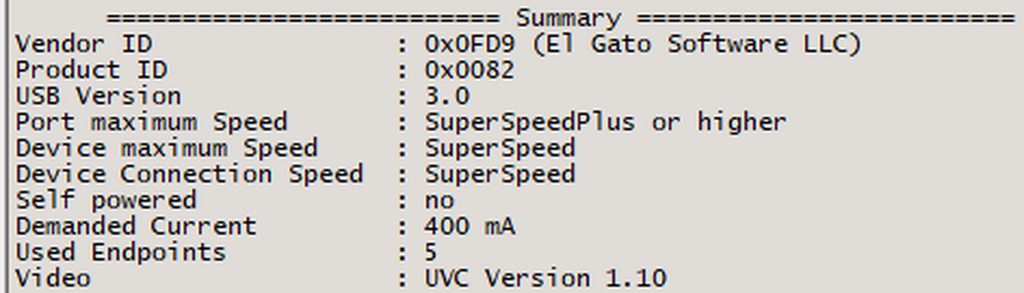 drowsy mango
past basin
USB Tree Viewer
drowsy mango
past basin
USB Tree Viewer
On my macbook with the original cable there is no problem.
So I maybe need to get a USB C header for the original cable in the box
past basin
Are you using the Capture Utility 1.3 Beta on the Macbook that unlocked 10 Gbps mode?
But yeah, could still be partly cabling issues
drowsy mango
OBS for both

OBS on macbook with original cable 4K120 is perfect
On windows with third party cable not possible.
past basin
You're getting a 10Gbps connection then - shouldn't need to worry about the cables.
What are your settings like for the card? And have you already tried both buffering on and off?
past basin
night glen
I have a MPG X670E
Hm. Not aware of any issues with that one - though it wouldn't hurt to try another port if you have one.
drowsy mango
past basin
What are your settings like for the card? And have you already tried both buffe...
let me check with these options
Doesn't change a thing sadly.
past basin
What is the source device? And does anything change if you disable Variable Refresh Rates?
drowsy mango
Source ? VRR doesn't change a thing
past basin
Like is this a console, or dual PC setup?
drowsy mango
Console
1080p120 or 240 have 0 input lag
4K60 working fine but 120+ is not possible ^^
past basin
Is HDR on, on the console? That may affect this as well
Since if HDR is on it has to tonemap back to SDR (since actually capturing HDR drops you back to 4K30)
drowsy mango
Not activated
past basin
Happen to have a OBS log uploaded we could look at? (you can upload under the help menu - it starts a new one each time you open it, so I would at least do a couple seconds of recording before uploading a log)
Might give us some insights as to why it's not playing nice. Especially since it's working on the mac
drowsy mango
I can try
A question does the EDID can be a problem since I don't have a TV connected to the output of the card ?
past basin
It can be - since that's giving the consoel the supported modes the TV and capture card support. You can try setting it to Internal to see if that helps things - though by default it should switch to that anyway
Setting a specific one may cause some issues though asI believe the specific ones in the drop down are still specced for HDMI 2.0 last I checked
drowsy mango
Gonna record to get a log file and I will try to change the EDID setting
night glen
past basin
Hm. Not aware of any issues with that one - though it wouldn't hurt to try anot...
tried different ports, different hdmi cables and usb ports. im just gonna return it. i think this device is just faulty.
rip. been at it since 1pm lol.
past basin
What kind of static are you getting with it anyway - do you have a recording sample?
drowsy mango
past basin
Happen to have a OBS log uploaded we could look at? (you can upload under the h...
while playing at 4K120+ it feel like cloud gaming ^^
and changing the EDID did nothing sadly
past basin
Yeah, it could just be the fact that at that refresh rate it switches to MJPEG and the encoding adds extra processing 😦 I haven't had a chance to test mine that high yet as my 4K screen caps at 60Hz. I'll have to try it internal only later
night glen
past basin
What kind of static are you getting with it anyway - do you have a recording sam...
https://youtu.be/xZnruh6vjdM it was a lot worse but manage to make it slighlty better but it's a lot worse when using 4K cap. in this recording i used OBS
 drowsy mango
past basin
Yeah, it could just be the fact that at that refresh rate it switches to MJPEG a...
drowsy mango
past basin
Yeah, it could just be the fact that at that refresh rate it switches to MJPEG a...
Thanks for the help Arcsane 🙂
past basin
drowsy mango
and changing the EDID did nothing sadly
Though the OBS canvas being 1080p and scaling down with bicubic might have minor effects - you can rule that out with Projector mode though - right click the captuer card in sorces and toss it up on a Projector Fullscreen (source) and see if that has the same issue
drowsy mango
I have a 1080p screen so I cannot go down ^^
drowsy mango
past basin
Though the OBS canvas being 1080p and scaling down with bicubic might have minor...
Same problem at 120+
past basin
drowsy mango
I have a 1080p screen so I cannot go down ^^
Yeah, projector will just turn off the scaling filter. Sound like it didn't help then
I'll see if I have the same delay on my 4K X later, I'll have to move some stuff around to set that up
drowsy mango
No problem, thanks you for helping me out 🙂
past basin
night glen
https://youtu.be/xZnruh6vjdM it was a lot worse but manage to make it slighlty b...
Ah, popping and distortion, not constant static. Okay that can change a few thigns
past basin
Good news - I can suddenly reproduce this popping - Bad new, I've no idea what changed here
Is this was Windows updates again I'm going to be so angry
Well, so far I can rule out the console (box Xbox and PS5 are getting it), the HDMI switch (pulled it), the USB hub - tried different ones on different root hubs. The app (both 4K and OBS gets it - OBS also gets it when added as an individual audio source. I've gotten no new firmware updates. So something likely changed software wise
And it's not passthrough monitor EDID interference
night glen
i had windows 11 22H2 version and just updated to version 23H2 (popping occured before and after updates)
past basin
Huh, I hadn't even realized I'd bumped to 23H2 from 22H2.
Fantastic. Issue is just occasionally enough there that it'll go long enough without a pop that I'll think I imagined it and then it'll do it again 😐
I have not had this issue in the over a year I've had this card. 😐
(though I haven't used it in about a month)
night glen
So it’s a software issue?
past basin
Not sure yet
Not sure what changed in my own setup that I'm getting this
I'm still switching stuff around
Will switch to my old Windows 10 box to test shortly - I suspect software issue though, yes
Might be something new I plugged into the USB bus too. Time to start unplugging. . .
I think my issue may have been a buggy USB hub I plugged in to test something the other day - even though the card wasn't going through that hub
Removing is seems to have fixed it? still testing
nevermind 😐
night glen

past basin
night glen
<:philcreep:583448117614084117>
Can you do a test recording and see fi the audio issue crops up there? Mine is only showing up on live audio - the glicthing isn't present in the recordings
night glen
hmm the link i sent you was through an OBS recording
past basin
right, right. Sorry - so many things open I lost track of that
night glen
its okay
past basin
Might want to give #official-tech-support a shout on this one.
I'm still trying to figure out how I broke my own now
night glen
haha is it the same popping sound you're getting?
past basin
Yeah - thing is that popping sound can be a dozen things.
Usually he audio trying to sync up (eg sample rate issues, data connection issues)
 past basin
If I come up with anything else I'll let you know - might still be a similar issue
But . . I don't get what changed. My setup worked for a solid year.
I literally troubleshoot these cards all the time so the fact my own is having a fit bothers me a lot
As does the fact trying to install an older version of OBS for testing it telling me the files are in use by Samsung Magician? O_o
If my system is bugging out because of the SSD app . . .
Because I did update that this week. . .
past basin
night glen
alright, thank you for trying anyways
If you have Samsung Magician installed try turning that off. Apparently that's why was breaking my audio. And that's what changed, I updated that this week. Why is this a thing.
(though if you still have crunchy audio and are using OBS, mute the card and add it again as an Audio Input Capture - that fixes some sample rate issues that can come up).
night glen
hmm i don't have that, i have a wd black ssd
but will try re-adding audio input capture
ty 
past basin
Good luck! I've got to go do some more testing to see if reopening this brings the problem back now.
Because this issue doesn't make any sense to me
night glen

brittle spade
where can I raise a ticket for my capture card please?
I think it's broken
I don't see any reason why it is not capturing audio
drowsy mango
brittle spade
I don't see any reason why it is not capturing audio
Hey,
Did you mirror the sound in the setting in obs ?
Or you can add a new microphone in obs with the capture card source to have 0 delay
brittle spade
drowsy mango
Hey,
Did you mirror the sound in the setting in obs ?
Or you can add a new mic...
I am not aure on the term, but I did have a new source in OBS for each capture card. Additionally, I tried to add a new input in Wave link for the capture card. When I had HD60 X selected as an input I could see the audio from it. After switching to 4K X as input in Wave Link there was no sound visible and I could hear the sound in the phone, hence no sound capture.
drowsy mango
I don't use wave link so I cannot help you with that.
brittle spade
drowsy mango
I don't use wave link so I cannot help you with that.
I can try tonight when I get home from work in about 5-6 hours
drowsy mango
Since I don't have wave link I just use the source of the capture card in the microphone setting in obs and monitor the sound without output to avoid 2 audio sources
warped ledge
brittle spade
I am not aure on the term, but I did have a new source in OBS for each capture c...
how many wave link channels inputs do you have?
brittle spade
warped ledge
how many wave link channels inputs do you have?
I am using all of them
I can show you in 1-2 hours
still at work
warped ledge
brittle spade
I can show you in 1-2 hours
I believe you can only have up to 9. if you have more than that to add, one needs to be removed.
warped ledge
brittle spade
oh yes I have 9
that m,ight be why. if you try to add more than it wont.
warped ledge
brittle spade
the problem is not with Wave Link
what's the issue with the capture card audio?
past basin
Their phone isn't detecting a HDMI connection. It doesn't switch over to HDMI audio so they keep hearing it on the phone.
Cosmin did you try another adapter after? As we went over before the instant a HDMI cord is plugged into that adapter the phone should switch over, regardless if the 4K X is processing audio correctly or not.
brittle spade
well, when capturing Samsung S22 Ultra and Using 4K X there is no sound captured. With the same cables and same setting I have sound with HD60 X
warped ledge
past basin
Their phone isn't detecting a HDMI connection. It doesn't switch over to HDMI a...
i'm guessing it's the adapter. as the new 4k x has a different board.
brittle spade
I tried two adaptorz both work with HD60 X and not with 4K X
I bought a 34 pounds one that foes 4K and charge specially for this capture card
I get great video on both
past basin
And did you try something else in the card to test the audio? Does you S22 allow you to manually select the audio device?
Even if the card isn't working as long as the cable and adapter are good, plugging in HDMI to your phone should generally cause the audio to flip to HDMI audio.
brittle spade
I tryed everything I can think of
warped ledge
past basin
And did you try something else in the card to test the audio? Does you S22 allo...
agreed
past basin
The only other thing to check then is something else in the card to make sure the card's audio pins aren't disconnected or something. That's the only reason I could see your adapter not picking up that there's an audio feed connected, short of having some sort of extractor on the device, or a monitor on the HDMI Out with a conflicting EDID - but you haven't mentioned a monitor, so I'm assuming there isn't one going to the HDMI out
brittle spade
still at work
warped ledge
past basin
The only other thing to check then is something else in the card to make sure th...
seems like this is common with android from stuff I'm researching too.
warped ledge
brittle spade
the out is going in my GPU which is a 4070 TI
gonna say those aren't out yet
brittle spade
🤣
past basin
brittle spade
the out is going in my GPU which is a 4070 TI
remove the output from that. your GPU is also an output, and you don't want to pair output and output. That could interfere with things
IF you don't have a monitor or tv to go into the output, leave it empty
warped ledge
past basin
remove the output from that. your GPU is also an output, and you don't want to ...
correct out should be going to a tv/gaming monitor.
past basin
yep
Output is only used for HDMI passthrough
So only if you're connecting it to a TV or Monitor
brittle spade
hmmm I thought that passthrough means not recording on my PC
past basin
No passthrough means it's passing a signal through the card. So it avoide the latency and resolution limits of the captured video
For example HD60 X can pass through 4K60 signals because HDMI 2.0 is 18Gbps. The USB we're capturing to is only USB 3.0 / 5 Gbps, so maxes out at 4K30. You want to be playing at 4K60 if you can run it, so passing the signal through sends a copy of the original to the monitor or TV to play on, without any video encoding lag, while the card splits a copy to the USB for capture at the lower resolution or refresh rate.
Essentially think of it like a splitter
Pass through is original signal passing through, while capture is a signal that's been converted for the PC to see or use
brittle spade
OH MY GOD! I have been using HD60+ HD60X and 4k X wrong for 5 years....
it all works now
brittle spade
past basin
For example HD60 X can pass through 4K60 signals because HDMI 2.0 is 18Gbps. Th...
THANK YOU SOO MUCH!
sorry if too many caps 😄
past basin
Ah, glad you got it sorted out!
warped ledge

brittle spade
uuuuf.....
I wanted it to work soo much I didnt even check which capture card I have
still not working 4k X /cry

with HD60 X I can see the sound in Wave Link
agony 😦
 warped ledge
brittle spade
warped ledge
brittle spade
is USB audio routing turned off?
warped ledge
brittle spade
on S22 or PC?
on the s22
brittle spade
warped ledge
on the s22
no it's not Audio routing is on
it works with HD60 X and after 10 seconds when I change to 4k X doesnt
sorry to be a pain
warped ledge
brittle spade
sorry to be a pain
try turning it off.
brittle spade
warped ledge
try turning it off.
restarted the Phone no change
warped ledge
brittle spade
restarted the Phone no change
I'll do more research.
 midnight pulsar
Have a question with HD60X, I heard that you can connect DSLR camera into the HD60X or HD60S, but after connecting the camera, which app would detect that the camera is inserted?
warped ledge
midnight pulsar
Have a question with HD60X, I heard that you can connect DSLR camera into the HD...
4K capture Utility, or OBS.
 storm cradle
hello... i have an elgato hd60 s and im trying to connect my ipad to my laptop but im having trouble with getting anything to appear when i use streamlabs
ive done this before but it was a few months ago and now i cant seem to figure it out
i have two hdmi cords, one usb c to usb a, and an usb c to hdmi adapter that i am using
through streamlabs I have chosen video capture device, any help would be great thank you ^^
 dull ridge
Anyone else have the latest obs update screwball their capture card fps? Even set at 60fps the hd60x looks like it’s still at 30
weary fjord
dull ridge
Anyone else have the latest obs update screwball their capture card fps? Even se...
hasnt seemed to have messed mine. i was up to yesterday using the hd60x im now on the 4k x. might be worth removing the capture card from obs and re-adding it ??
dull ridge
weary fjord
hasnt seemed to have messed mine. i was up to yesterday using the hd60x im now o...
Yeah I’ll try that next.
dull ridge
Nope, now it's giving me an issue where the screen won't even display, and the frame rate selection bar has no choices to choose from:
 weary fjord
is that obs or streamlabs ? looks like the slobs gui ?
dull ridge
Obs. Turns out I had to set something in the bottom most dropdown for frame rates to appear. But setting to 60 still appears to be 30 on output
It looks fine in a quick time recording window for what it’s worth. Just OBS producing the stutter
weary fjord
dull ridge
It looks fine in a quick time recording window for what it’s worth. Just OBS pro...
have you checked the fps here ?
 dull ridge
Pretty sure I did but I’ll double check when I get back to the battle station
weary fjord
i mostly use it for streams so havent really had to fault find in the recording element
any quick recordings i make to check levels these are the settings on mine, video always seems ok to me

maybe also look at the video encoder and recording format ??
sorry I've probably been as helpful as a chocolate fireguard !
dull ridge
weary fjord
have you checked the fps here ?
Confirmed at 60fps there
honestly i use it to stream as well, but the OBS discord wanted logs and recordings too, but sometimes i just use OBS to play offline on my setup anyway, and noticed that post-update it just looks like it's only at 30fps output
activity monitor doesn't appear to be struggling
 eternal summit
so I used to have a set up with an old knockoff capture card on amazon so I can hear and see my game audio on my computer whilst also hearing my friends and streaming my OBS to discord and it worked really well, I could hear my game and see my game just fine until when I set up my ps5, it still worked but on certain games like god of war it would limit the setting for the framerate because of the passthrough not supporting 4k 60/120, so fast forward now I have the elgato 4K X to fix that issue I have it set up the same way to OBS and followed elgato's 4kx setup youtube video so I can hear the game and see from my pc's headphones and the video problem is fixed now as it can passthrough the higher fps but now for some reason I'm having an audio issue, both on the OBS and elgato's 4k capture utility the capture card only seems to be picking up certain audio and not the full range of the game, As for example in god of war I can only hear sound effects and attacks loud and clearly while voices, walking, footsteps etc sounds like its missing or faint and echoed like its in the distance.
warped ledge
eternal summit
so I used to have a set up with an old knockoff capture card on amazon so I can ...
I have a guide for setup in #community-resources maybe see if that will help.
eternal summit
warped ledge
I have a guide for setup in <#837073573981323314> maybe see if that will help.
nothing seems to have worked the only issue im having is how its capturing audio, its only picking up partial parts of the audio, I think it might have something to do with the stereo settings or something but I'm unable to change them as I dont have my earbuds plugged into my ps5 as I'm trying to set it up that I'm listening to everything through my pc
warped ledge
eternal summit
nothing seems to have worked the only issue im having is how its capturing audio...
Make sure your cables are secure
 young surge
Have a situation with a 4K X card. Plugged it into my Gaming Laptop , when I clicked on “listen to device” on the sounds settings on my laptop so I could hear gameplay from my console, I’m getting a weird crackling/echo sound on my headphones (Astro A50) from my Xbox Series X. anyone able to help ?
eternal summit
warped ledge
Make sure your cables are secure
yeah everythings plugged in correctly
warped ledge
eternal summit
yeah everythings plugged in correctly
What else are you running?
warped ledge
young surge
Have a situation with a 4K X card. Plugged it into my Gaming Laptop , when I cli...
@past basin you know the fix for astros right?
eternal summit
warped ledge
What else are you running?
Im just running my ps5 connected to the 4kx which is connected to the PC and the hdmi out to my TV, im using OBS for software (for listening im using earbuds that are connected to my computer realtek hd audio)
past basin
warped ledge
<@269997944671830017> you know the fix for astros right?
Depends on how they're wired up. But getting crackling from the console with them is unusual unless they're also using the HDMI Astro adapter or something. Or there wireless interference with the headset
If it was coming from the PC side there's a few things to check.
For Xbox though, mostly check that audio is set to uncompressed stereo and not using spatial sound or something
young surge
past basin
Depends on how they're wired up. But getting crackling from the console with th...
Have the usb connected to my laptop, set the tab in the back of the base to PC. No astro adapter. Don’t think it’s wireless interference cause when I plugged it back in my Xbox it was fine
past basin
young surge
Have the usb connected to my laptop, set the tab in the back of the base to PC. ...
How is it connected to get the Xbox audio? Aux cable to controller? And if so is it a TRRS Aux? (Standard one won't do mic, some Xbox controllers may not like that)
If wait
Nevermind I'm mixing it up with the a40
Though I still need to know how the connection is routed here, to the console. Does mic audio also get distorted or just the game audio?
young surge
past basin
How is it connected to get the Xbox audio? Aux cable to controller? And if so ...
All I did was connect the usb from my A50 base to the pc. The base on the A50 has a tab on the back to switch it from Xbox to pc, So I figure to switch it to pc. That’s really all I did besides go into my sound setting on my laptop and in the advanced sound settings where the “recording” tab is, clicked on the Elgato 4k X, and checked the box that says “listen to this device” so I can hear the audio coming from the Xbox.
But it’s giving me a cracking/echo kind of noise which is weird.
It’s happening on game audio
past basin
Oh. You're listening to the 4K X, not the audio passed though the A50
And you checked that Xbox audio is set to uncompressed stereo?
You may also get some changes if you turn down the levels on the cards audio settings. And there's a possible issue with B450 motherboards causing cracking audio when used with their 10Gbps USB ports
Sadly I've got to hit the road there now, I'll see if I can check in again when I stop for gas
warped ledge
past basin
Sadly I've got to hit the road there now, I'll see if I can check in again when ...
Same gym time.
past basin
I drove like 4 hours to see the sun for the eclipse due to local weather. Have to drive back now
warped ledge
past basin
I drove like 4 hours to see the sun for the eclipse due to local weather. Have ...
We had overcast so all I saw always Darkness
 tranquil blade
Evening y’all, I need a lil bit of troubleshooting help when someone can get the chance. Just picked up the 4KX, currently have it running into my mobo (usbC 3.1 gen 2/10gbs port), which is an msi x399 sli plus, and have the 4k capture utility installed and device manager is saying it is coming up as an unrecognized device. I have the 4k pro driver installed since i currently also have the 4k pro running in the same rig and im just wondering if theres somewhere i can get a dedicated driver to install?
 sage epoch
hi, guys, I'm new here. I'm trying to find a capture card with low latency, but I couldn't find any info about that in the product docs. Did I miss something
warped ledge
tranquil blade
Evening y’all, I need a lil bit of troubleshooting help when someone can get the...
Doesn’t give the option to select which card to use? Should be a dropdown box.
warped ledge
sage epoch
hi, guys, I'm new here. I'm trying to find a capture card with low latency, but ...
HD60X, 4K X, 4K60MK.2, and 4K Pro are great!
tranquil blade
warped ledge
Doesn’t give the option to select which card to use? Should be a dropdown box.
Nope! Haha just tested my facecam pro in the c slot as well, also unrecognized and camhub doesnt see it so i think my board is having an issue.
The 1950x has a loooot of bandwidth / pcie lanes so i cant imagine thats the issue…so i wonder if im having a mobo usb port driver issue.
warped ledge
tranquil blade
The 1950x has a loooot of bandwidth / pcie lanes so i cant imagine thats the iss...
Make sure your bios/drivers are updated.
tranquil blade
Yep will reconvene tomorrow lol 1:09am for me haha
sage epoch
warped ledge
HD60X, 4K X, 4K60MK.2, and 4K Pro are great!
Thanks for the recommendations! Do you happen to know if there are any official tests available that measure the latency for these cards
past basin
Official tests, no. Though EposVox has done some third party testing that compares then (and others may have as well). IIRC at 1080p60 SDR in OBS, 4K Pro is fastest at 30ms, followed by HD60 X at 31, then 4K X at 35 and 4K60 Pro Mk2 at 58.
 jagged lake
Hello, OBS shows the video, but no audio. Dual PC set up. On gaming pc i have my wave xlr, wave link software connected. I have the HD60x in between the two computers. It is connected HDMI out of GPU to HDMI in of the HD60x. HD60x connected via provided usb cable to stream pc. OBS on the stream PC sees the HD60x. On stream pc i have the sound option checked to “listen” to HD60x. On OBS i have gone through the advanced audio options and switched it between all 3 different monitoring settings. Also have the HD60x as the audio aux/mic in the OBS settings. On my game PC i have wave link set to stream mix HD60x. Everything sounds great on the game PC, but just need OBS to capture the sound too. Any ideas?
sage epoch
past basin
Official tests, no. Though EposVox has done some third party testing that compa...
I watched that amazing video as well. Elgato 4K Pro and Elgato HD60 X are the top two capture cards with the lowest latency according to EposVox's testing. However, the official data for Magewell 4K Pro is even better than them, and it also supports a low-latency mode to make latency extremly low.
Could it be that their testing methods are different?
past basin
Could be, even just different testing methods
https://obsproject.com/forum/resources/capture-card-documentation-latency-decode-modes-formats-more.777/ <- here's some of EposVox's other testing, including a Google Sheets link early on comparing some cards
OBS Forums
TABLE OF CONTENTS
Intro/Overview
Decode Mode Support
Notes on RGB Color Space
Format Support
Notes on Scaler Support
Input Latency Testing
Notes on “Bitrate” support
Testing Methodology
Limitations & Future Improvement
How to submit capture...
I'm not familiar with the specific card you're talking about, but so far I'm not aware of any that beat an Elgato 4K Pro in that particular test setup
silent tree
Device: Elgato HD60X
Software & Version: 1.7.11 (5032)
Windows/Mac Version: Windows 10 Home (22H2)
Question/Issue: I have no audio when i put my ElgatoHD60x in OBS. I am using a link cable from elgato and everything is connected properly but i have no audio. I am wondering if i have to change either playstation or OBS/PC settings.
When i disconnect the link cable from the controller i do have audio on OBS (but of course can't listen to it)
I use the QWare gamig headset that comes with the playstation starter pack
proper ember
Hey, I have a new pc and it have an cam link pro Inside. Im complete new to the Streaming world, and i want to ask if i can stream my Nintendo Switch with my cam link. Maybe someone can send me a DM and can help me? This would be really nice 🙂
past basin
silent tree
Device: Elgato HD60X
Software & Version: 1.7.11 (5032)
Windows/Mac Version: Wind...
Did you switch your HD60 X to use the Analog audio jack when you connected your Chat Link?

This setting will save on the card so it can be used with other apps like OBS once changed
silent tree
past basin
Did you switch your HD60 X to use the Analog audio jack when you connected your ...
i will check
i didnt
let me test it
you are amazing! Thanks! it worked
past basin
proper ember
Hey, I have a new pc and it have an cam link pro Inside. Im complete new to the ...
CamLink Pro should be usable for capturing Nintendo Switch. You'll need either the Camera Hub app or the drivers from here https://help.elgato.com/hc/en-us/articles/360027961152-Elgato-Gaming-Hardware-Drivers and a third party app like OBS Studio to setup your capture. Most of the Camera Hub specific side of that would go go under #camera-prompter
Elgato
Elgato Gaming Hardware Drivers - Windows 10/11
When you install Elgato Game Capture HD software for Windows 10/11 or Elgato 4K Capture Utility, the necessary drivers should automatically be i...
past basin
silent tree
you are amazing! Thanks! it worked
Glad to hear it!
proper ember
past basin
CamLink Pro should be usable for capturing Nintendo Switch. You'll need either ...
Thank you, is it possible to stream my screen for you later? Im really new into all the elgato stuff
past basin
I'll have to get back to you on that later as my work schedule for the day doesn't seem to give me much time for taking calls later.
 static token
is it bad to uninstall softwares and reinstall them, im having lots of problems with streamlabs and game capture HD and was wondering if i just completley do a reset will that help ?
it feels like i just have lots of bloatwear or audio inputs and ouputs that idk where they came from.
tranquil blade
warped ledge
Make sure your bios/drivers are updated.
Hey there just touching base. So I’ve uninstalled and reinstalled all drivers, updated the chipset, but windows still doesnt see it. However if i go into my bios, when hovering over that port the bios can see and identify the facecam pro. So im not sure what to make of it.
warped ledge
tranquil blade
Hey there just touching base. So I’ve uninstalled and reinstalled all drivers, u...
and you made sure your bios/drivers are updated?
tranquil blade
With the exception of a bios update, yes.
Its a mobo issue for sure, i may need to contact MSI
Like a windows driver issue or something
warped ledge
tranquil blade
Like a windows driver issue or something
i'd suggest updating the bios.
calling it a night.
tranquil blade
Yeah thats the last step, bios updates just stress me out lol
warped ledge
tranquil blade
Gn!! I appreciate the responses. Will reconvene again tm haha
warped ledge
tranquil blade
Yeah thats the last step, bios updates just stress me out lol
I hear ya, did mine yesterday since there was an update I forgot about
@dim stirrup over here!

 dim stirrup
I need to connect the capture card to the gaming pc and stream pc but nothing throw the output, rigth?
dim stirrup
warped ledge
Make sure you do this!
by the way, Where cai i get this option?
warped ledge
dim stirrup
by the way, Where cai i get this option?
The streaming pc should be connected to the capture card, via usb. The IN to the Gaming PC, and OUT to your Gaming TV/ GamingMonitor. The setting is in sound, advance
dim stirrup
im here


