#capture-cards
1 messages · Page 16 of 1
 lost crane
 warped ledge
SDR is ideal mostly. Not all HDR content comes through nice… However, if you’re ...
warped ledge
SDR is ideal mostly. Not all HDR content comes through nice… However, if you’re ...
could you please link me the video you made on hdr content
 steady sorrel
lost crane
could you please link me the video you made on hdr content
steady sorrel
lost crane
could you please link me the video you made on hdr content
You can find a lot of Vic’s informative stuff in #community-resources
 supple lantern
Hi! I am considering ordering a Sony ZV-E10 to use it with a camlink. My problem is that this camera is not on the compatibility list (https://www.elgato.com/us/en/s/cam-link-camera-check) but I see people are using this combo without problem. Can someone confirms that his combo would work? This is a (relatively) new camera and my guess is the compatibility list is not up to date or Elgato just have not had the chance to test this specific device, but not sure.
warped ledge
supple lantern
Hi! I am considering ordering a Sony ZV-E10 to use it with a camlink. My problem...
If it’s not on the list, proceed with caution as there may be no help to assist, unless a future list update comes out.
supple lantern
warped ledge
If it’s not on the list, proceed with caution as there may be no help to assist,...
Yeah, a bit risky. Thanks for your answer.
 normal chasm
supple lantern
Hi! I am considering ordering a Sony ZV-E10 to use it with a camlink. My problem...
normal chasm
supple lantern
Hi! I am considering ordering a Sony ZV-E10 to use it with a camlink. My problem...
I have a ZV-E10 and camlink connects to it perfectly
No problems
 ripe temple
normal chasm
I have a ZV-E10 and camlink connects to it perfectly
ripe temple
normal chasm
I have a ZV-E10 and camlink connects to it perfectly
With a dummy battery? What’s your setup!
normal chasm
MicroHDMI to HDMI adapter, HDMI cable, and Camlink for the video transfer to PC
A dummy battery kit that I bought from Amazon to keep the camera powered on
warped ledge
normal chasm
A dummy battery kit that I bought from Amazon to keep the camera powered on
Let’s move the camera stuff to #camera-prompter
 jagged flare
i just got the 4k60 pro mk2 and it says no capture devices found
does anyone know how to fix it?
 past basin
Did you install the driver package for it? Does your motherboard actually have 4x lanes in the PCIe slot used (you can't just go by if the slot fits these days, especially if the motherboard shares lanes). What app are you trying to use it with?
Try installing the driver from here, https://help.elgato.com/hc/en-us/articles/360027961152-Elgato-Gaming-Hardware-Drivers and make sure if you're using Elgato Capture Software that you're using the 4K Capture Utility and not the older Game Capture HD.
jagged flare
the pc i have it in is the Z590 PRO WIFI
motherboard
i did the driver install already and im using obs
PCI_E3 is what it says for the lane its in
past basin
Hm. Manual seems to indicate that's a x4 slot. That's good
Does the card show up to 4K Capture Utility?
jagged flare
no it just says no capture devices found
past basin
Does it show up in Device Manager on Windows?
 past basin
Not even the sound drivers? Can you download that driver pack and reinstall it - make sure you're getting hte one for the mk2 as well - the original 4K60 pro has different drivers
The fact it's now showing even the Elgato sound capture there, nor any unkown devices is a problem
 azure hemlock
Is the slot perhaps disabled in UEFI/BIOS?
or is the PCI lanes already taken by an NVME drive?
jagged flare
past basin
Not even the sound drivers? Can you download that driver pack and reinstall it ...
i just installed this one again
 jagged flare
azure hemlock
Is the slot perhaps disabled in UEFI/BIOS?
jagged flare
azure hemlock
Is the slot perhaps disabled in UEFI/BIOS?
where do i find this in bios
azure hemlock
Click Advanced Mode so you see more options, then it should be in one of the menus, really depends on manufacturer and version where it's located
 jagged flare
So take it out and put it back in ?
azure hemlock
Yeah
jagged flare
Oks
azure hemlock
The manual for your motherboard is one of the worst I've seen, barely any usable info at all :/
Just making sure, are you using any NVME drives next to the slot? It's known to steal PCI Lanes and causing issues
jagged flare
how do i tell
past basin
Manual for that board doesn't list any PCIe splits for M.2
azure hemlock
The SSD's in shape of bubblegum sticks screwed onto the motherboard
The manual doesn't say a lot of things tho, nothing about any lanes
just that it "takes from chipset"
past basin
It does list the m.2 restrictions. Usually MSI is good at putting the PCIe split info in either the expansion slot or storage sections
 jagged flare
The green
 azure hemlock
I do hope you have your Windows install on the NVME under the heatsink next to the CPU cooler, if so then mind removing the NVME SSD under the graphicscard, plug in the capturecard again and see if it shows up in devicemanager?
Also, what graphicscard is that actually?
jagged flare
It’s the 1660 ti
azure hemlock
Ok yeah that should clear the requirements
I really hope the 4K60 shows up after the nvme is removed
jagged flare
That nvme ssd is the only drive I have so my windows is on it
azure hemlock
Then you should have it above the GPU
underneath that heatsink
Black little heatsink between graphicscard and your Hyper 212 cooler
You'll also get faster speeds generally
jagged flare
If I move it to above my gpu and reinstall the capture card it should work ?
azure hemlock
Hopefully yes if my hypothesis is correct
jagged flare
There was nothing above my gpu
 azure hemlock
Yep 😄
jagged flare
So all I have to do is just move my ssd to there and it’s all good
jagged flare
I don’t have to do any like transfers or anything
azure hemlock
And the heatsink will also help with some temperatures also, remember there's usually a plastic film you need to remove from the heatsink
jagged flare
This?
 azure hemlock
yeah 🙂
jagged flare
Do I remove it or keep it
azure hemlock
Install the nvme in that slot, remove the plastic film, and then put the heatsink ontop of the nvme and screw it into place
azure hemlock
It's good knowledge to know how to build your own PC, makes it cheaper to upgrade and also troubleshoot if something stops working or making noise or something
It's basically adult lego's, they've designed most things so they only fit one way ^^
just more expensive lego's
 cinder hemlock
Hello, I currently use a HD60s+ with a PS5 where I then stream to my laptop in OBS. Whenever I change scene for example to facecam only, the capture freezes and audio cuts out. Is there a solution to this problem?
jagged flare
azure hemlock
It's good knowledge to know how to build your own PC, makes it cheaper to upgrad...
i tried to screw it in but the screw just isnt long enough
azure hemlock
Then you're either not using the right screw or doing something wrong

 azure hemlock
Move the silver standoff that's to your left to the NVME slot where the screw needs to go in
that needs to be between the motherboard and the nvme
or else you bend the nvme to oblivion
jagged flare
Are you talking about the tall one
 jagged flare
Yeah there’s one
 azure hemlock
well actually don't really need to screw in the nvme since you have a heatsink, but why not
jagged flare
I can remove the 2nd standoff
azure hemlock
if you didnt have a heatsink you would have to screw it in, heatsink keeps it down anyway
I'm mostly just concerned about getting PC up and running and hoping that the 4K60 shows up and works 🙂
jagged flare
So I don’t need to screw in the ssd?
azure hemlock
Nah skip it, keep that standoff for another NVME you'll pick up when you wanna install more games ^^
jagged flare
So just keep the 2nd standoff that I unscrewed and just rescrew it since I don’t need to move it
azure hemlock
rescrew it so you don't lose it
jagged flare
Ok now just put the heatsink on top of the ssd
azure hemlock
yeah, remember the plastic film
jagged flare
Ok I got it in now I’m just putting my graphics card back in
jagged flare
Ok I got everything back in and turned it on now what


 dreamy kite
Device: Elgato, 4K60 Pro MK.2
Software and version: I’m not sure everything is updated.
Windows version: 11
Console: PS5
Questions/ Hello, I have the problem that after about 2 hours I get an audio delay. Does anyone know what the problem is?
azure hemlock
@jagged flare Make sure the NVME is properly seated, remove the heatsink and make sure it's all in the socket, bend it back down and reattach the heatsink. I don't generally do DM's
jagged flare
Oks
azure hemlock
jagged flare
Oks
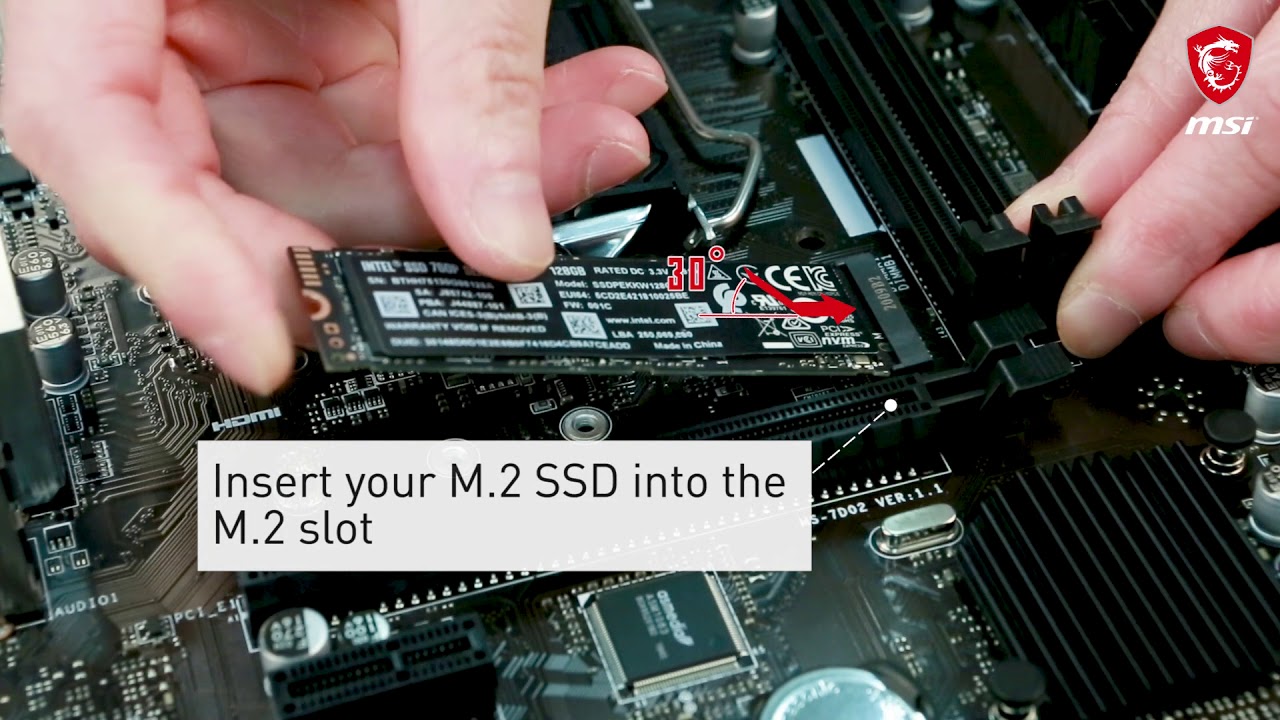
In this demonstration, we'll show you the steps to install M.2 module on MSI motherboard.
Follow us to get the latest news!
► Facebook: https://www.facebook.com/MSIGaming/
► Twitter: https://twitter.com/msitweets
► Instagram: https://www.instagram.com/msigaming/
jagged flare
I did it the way the video is and it’s still only booting bios
jagged flare
azure hemlock
https://www.youtube.com/watch?v=2UeWMgjwogU
Could it be my gpu ?
That slot just doesn’t detect the ssd and I screwed in everything
 jovial python
is anyone here to help?
ripe temple
jovial python
is anyone here to help?
Depends on what you need!
Template
Looking for help? Please copy, paste, and fill out this template in order for our community to better help you: **Device**: **Software & Version**: **Windows/Mac Version**: **Console/Dual PC**: **PC/Mac Specs**: **Question/Issue**:
Note: This is a community tech help channel and Official Elgato Support does not monitor this channel. Posting your questions here does not guarantee that you'll receive help. We recommend filing a support ticket at http://e.lga.to/help.
To contact Elgato Support via phone visit http://help.elgato.com/hc/articles/360028242811-How-do-I-contact-Elgato-support-via-phone.
You can browse through our help articles here:
https://help.elgato.com
Please remember that our members who are helping you troubleshoot are taking time out of their day to help and they are not staff. Any disrespect to them will end up in a warning/ban.
Fill this, and someone might pick it up!
 forest stirrup
Guys i have a problem with my elgato hd60 x capture card. Is there anyone that can help?
I wanna stream but i play on my ps5. The problem that i have is that i don’t hear any game audio through my pc. I even tried the chat link pro but then i cant hear any audio from my pc.
 chilly crystal
my card on obs keeps saying one moment after like 9 minutes
and then it doesnt comeback on whatsoever unless i reset obs
any ideas
 chilly pewter
forest stirrup
I wanna stream but i play on my ps5. The problem that i have is that i don’t hea...
chilly pewter
forest stirrup
I wanna stream but i play on my ps5. The problem that i have is that i don’t hea...
Have you enabled analog audio in 4k capture utility?
past basin
forest stirrup
I wanna stream but i play on my ps5. The problem that i have is that i don’t hea...
Following on what Viper was saying, the PS5 only allows one audio stream per user - if you have a headset plugged in, it'll shut off the HDMI audio. You can switch it back, but then it'll shut off your headset audio. This is why we use the Chat Link (which only works with wired headsets), because it splits the audio once it's out of the jack. But the HD60X needs to be set to use the Analog Audio jack using the 4K Capture Utility (Windows) or Capture Device Utility (macOS). The option will stay set on the card itself once changed though, so it can be used with other apps.
Beyond that if you're using an app like OBS Studio, make sure you've set the capture card's audio to "Monitor & Output" if you want to hear it on the PC, and not just feed it to your stream or recording.
past basin
chilly crystal
my card on obs keeps saying one moment after like 9 minutes
What card are you using, what are you connecting? There's not really enough info here sorry.
forest stirrup
past basin
Following on what Viper was saying, the PS5 only allows one audio stream per use...
Thank you both for the reply. I have the chat link pro. And if i connect it then i do hear the game audio and its also being heard on stream. But the problem is that i dont hear any audio from my pc when i have it like that. Its difficult to explain but i need to hear ps5 audio and pc audio through the same headset. It might not be possible. I tried plugging the chat link pro into my pc instead of the capture card and it made me hear my ps5 audio and pc audio. But in the output nothing will be heard, its showing that there is audio but i tried recording it, turns out its a annoying zoom sound. I hope i explained it in a way that its understandable. My capture card goes from a Usb C to a usb C.
past basin
Oh, you're trying to listen to both PC and PS5 at the same time. Yeah, that gets interesting. The ChatLink cable isn't exactly direction but can only be used as an input or output at a time. You could in theory add splitters, but then you've got two outputs hooked to the same line and could run into voltage issues and in theory damage at high volume/voltage. Ideally you want additional hardware to mix things going into the headset for something like that, assuming it's pricey enough you don't want to risk like (like most capture cards are)
Personally I use the Arctis Nova pro and can hook the console to a USB on it, while plugging the PC's speaker feed into Line In to listen to both. They make that GameDac gen 2 available as a standalone now too.
I think some various mixamps like Astro's might do it too
forest stirrup
So the chat link pro won’t be helping in this situation? Is the problem actually coming from the pc or the capture card? Just wondering cause ppl seem to make it work on YouTube
past basin
Some folks just use bluetooth earbuds inside their headphones to listen to the PC too.
forest stirrup
I do that now yeah, it’s just not really comfortable lol
past basin
But you CAN try to wire it up with splitters and adapters to get it going to both - just be aware there's some risk because you've got two output sources on the same line
That can in theory damage either output, the headset or the capture card input if the volume gets turned up too high because they're only meant to handle voltage from one source at a time
forest stirrup
I saw the astro a50+ if im correct, it works with a mode that can switch from ps5 to pc audio but not at the same time im guessing
past basin
I believe it works with both actually - the A50 has a "stream" mode. On the older ones it's an aux jack but I believe on the newer ones it's a Virtual audio device you connect to over USB
(eg, the A50X doesn't have any aux connectors)
 craggy relic
Will HD60 S work with a PS5 and a 165hz Monitor while streaming through OBS with a Windows PC?
past basin
craggy relic
Will HD60 S work with a PS5 and a 165hz Monitor while streaming through OBS with...
Yes but only at 60Hz. The monitor will step down to work with it.
craggy relic
past basin
Yes but only at 60Hz. The monitor will step down to work with it.
thanks! so it will automaticall adjust?
forest stirrup
Alright, what do you consider i should do now? It kinda sucks having a expensive capture card that wont help with the audio through pc issue
past basin
If you're planning to play on the captured feed, Windows will still work at the higher refresh rate and adjust for the captured video - but be aware captured video has a short delay due to the time it takes to decode HDMI to something the PC can use (like 30-70 ms usually)
past basin
forest stirrup
Alright, what do you consider i should do now? It kinda sucks having a expensive...
The problem is the capture card is an input only, not an output. Most capture cards don't have audio out. If you're not using the mic on the headset you can just listen to everything through the PC
Otherwise you're looking at taking some risk and putting a splitter on the ChatLink to connect to both PC speaker out and capture card line in at the same time, or adding audio hardware
forest stirrup
I have a external mic, my headset does have a mic tho but i dont use it
craggy relic
past basin
If you're planning to play on the captured feed, Windows will still work at the ...
alright so my game will be ahead of the stream by a little bit?
will it automatically capture game audio as well?
past basin
craggy relic
alright so my game will be ahead of the stream by a little bit?
Are you planning to watch on the captured video is what I was getting at. The instant the video passes over the USB it's captured video with all the delay, even if you're watching on the preview screen.
craggy relic
past basin
Are you planning to watch on the captured video is what I was getting at. The i...
hmm, im not sure. i have 2 monitors so 1 will be for the game and the other for obs. hope that makes sense!
 past basin
forest stirrup
I have a external mic, my headset does have a mic tho but i dont use it
past basin
forest stirrup
I have a external mic, my headset does have a mic tho but i dont use it
If you don't use the headset with the console for talking to party chat, then you can just listen to the captured audio from the PC and get both PC and console on the same headset. It does get that slight capture card delay of 30-70 ms on the audio though, to keep it paired with the video (unless you use the Stereo Line In jack on your PC's soundcard which gets around that).
past basin
craggy relic
hmm, im not sure. i have 2 monitors so 1 will be for the game and the other for ...
If you're using the HDMI out on the card to connect to the second display that'll be passthrough and avoid the latency.
It should also get the audio- though if you're planning to use a headset with the PS5 there's some quirks and you'll likely need a chatlink (assuming a wired headset)
forest stirrup
Yeah i just don’t hear my ps5 audio through my pc when everything is plugged in
past basin
forest stirrup
Yeah i just don’t hear my ps5 audio through my pc when everything is plugged in
Using OBS or StreamLabs? If so they default the audio to Monitor Off so you don't hear it, assuming you already hear if elsewhere. Set it to monitor and output instead, in the Advanced Audio properties (gear on the audio mixer panel). That should enable you to hear it.
craggy relic
past basin
If you're using the HDMI out on the card to connect to the second display that'l...
got it. i usually just plug my controller to external speakers for game audio. Do I need chat link if I play a game with other people?
craggy relic
past basin
If you're using the HDMI out on the card to connect to the second display that'l...
Yeah, so I'll be plugging both my PS5 and monitor to the HD60 S.
 gleaming garnet
2 more days
past basin
craggy relic
got it. i usually just plug my controller to external speakers for game audio. D...
Chat Link will let you use a headset and pass through the headset mic. But if you don't speak to people you can just capture over HDMI or run an Aux able from the controller to the card instead.
forest stirrup
past basin
Using OBS or StreamLabs? If so they default the audio to Monitor Off so you don...
I tried that yes, it still doesn’t work for me which is really weird. I tried a different way and then i could hear pc and ps5 audio through my headset. Audio was shown but it was a buzzing noise
past basin
forest stirrup
I tried that yes, it still doesn’t work for me which is really weird. I tried a ...
A buzzing noise? You weren't plugged into a mic jack instead were you? They expect lower voltage than a line in
craggy relic
past basin
Chat Link will let you use a headset and pass through the headset mic. But if y...
Thanks! So HD60 S connected to speakers with an Aux?
forest stirrup
I hope this explains it a bit lol

 forest stirrup
past basin
A buzzing noise? You weren't plugged into a mic jack instead were you? They ex...
forest stirrup
past basin
A buzzing noise? You weren't plugged into a mic jack instead were you? They ex...
No just the headphones one
past basin
craggy relic
Thanks! So HD60 S connected to speakers with an Aux?
No, controller connected to the HD60S with aux, listen to speakers through PC feed. Or just skip the aux and listen over HDMI through the PC feed
past basin
forest stirrup
I hope this explains it a bit lol
Can you confirm how you have that plugged in. The end you have circled blue is the TRS end that goes into the capture card (the TRS end doesn't have a mic lead and only has 3 metal contacts as opposed to the TRRS end that's supposed to go into the controller). If it's plugged in that way it's backwards.
forest stirrup
past basin
Can you confirm how you have that plugged in. The end you have circled blue is ...
So there are two different ones? Could that actually be the problem then?
craggy relic
past basin
No, controller connected to the HD60S with aux, listen to speakers through PC fe...
Got it! Thank you! I’ll be testing my setup within the day. I’ll come back here and let you know 🙏
past basin
forest stirrup
So there are two different ones? Could that actually be the problem then?
The plug? Could be - depends on the hardware used, because if it's in backwards it could short over the mic feed on some interfaces.
forest stirrup
Alright. Should that chat link plug always have to be in the capture card itself as well?
On the right side
 past basin
That's where it goes, yes. Specifically the end with 3 metal bits / 2 black bands.
You can also use Stereo Line in on a PC if it has one (blue jack on the sound card). Running it through the HD60X keeps it synced with the video better though
If you unplug the chatlink from the controller though, don't forget to switch the card back to HDMI mode in 4K capture utility. Otherwise just leave it all plugged in that way all the time
forest stirrup
Alright. Is there a way to capture the game audio through the 4k capture utility app? Idk if thats even possible
past basin
forest stirrup
Alright. Is there a way to capture the game audio through the 4k capture utility...
Yes, it'll do that by default if you're just using HDMI
forest stirrup
So if i understand it right, i’m not able to hear the ps5 audio and pc audio at the same time using chat pro link? Im guessing that there is nothing i can do to actually make that work besides using a splitter which is a risk?.
past basin
Pretty much. The risk is small, so you'll see plenty of folks doing tutorials for the splitters, but it is still a small risk.
ChatLink Pro is meant more for getting the audio from the console, including the voice chat, rather than caring about anything form the PC
forest stirrup
Alright got it, so the only way to actually hear it is using a EarPod
past basin
You can listen on speakers and turn them up, or use earbuds. Or invest in a compatible mixer or DAC. But based on the gear you have now, probably the earbuds, yeah
 reef remnant
"Hey there! I just wanted to share something with you. I recently bought the Elgato HD60 X capture card because I'm planning to do a live stream of PUBG Mobile from my phone. However, I've been encountering a bit of lag in the video of my game in 4k capture utility software. So i decided to watch some tutorial videos but all of them are like 4 years old. But in those videos everyone is using a software name (game capture) so i decided to install that but not available on elgato.com somehow i downloaded it but its not supporting hd60 X. Do you have any suggestions or tips on how to troubleshoot this issue? I'd really appreciate your help!"
past basin
That's correct, the older Elgato Game Capture HD was not updated to support the HD60X - the 4K Capture Utility is the newer version.
As for lag, what kind of lag are you seeing? All captured video, no matter what card you're using has some slight delay due to the conversion of HDMI into something the computer can use, followed by rendering it on the computer - on current Elgato cards it's in the 30-70ms range generally. The recomendation for dealing with that is using HDMI passthrough - the HDMI out port on the HD60X - to drive your gaming screen, as the HDMI to HDMI connection has no such conversion delays.
reef remnant
Bro I'm not really a tech person.in Most of the videos i watch about Pubg Mobile live stream from phone with elgato capture card people didn't use elgato HDMI Out port. So the question is after connecting to the HDMI out port where in my pc im supposed to plug it in in my graphics card or pc hdmi port.
past basin
HDMI IN goes to the phone. HDMI OUT goes to the monitor. USB-C goes to the PC. That's how it'd look in a passthrough setup. Generally these setups also use a second monitor so one can go to the source device (your phone) and the other goes to the PC so you can control your stream or recording.
That said this still might not be the issue - you haven't really descirbed the lag you're seeing - if it's input lag or just video delay, passthrough is the usual fix though.
 autumn zephyr
Just wanted to confirm about Elgato HD60 X
It doesn't have HDMI 2.1 Ports correct?
If so, how does it support VRR?
Can someone confirm with his PS5 that the VRR is enabled with the Elgato HD60 X connected?
And do you use HDMI 2.1 for that to work as well?
autumn zephyr
@warped ledge or someone can enlighten me?
steady sorrel
autumn zephyr
And do you use HDMI 2.1 for that to work as well?

2.1 is expected tomorrow. the HD60X is simply passthrough with VRR IIRC
reef remnant
past basin
HDMI IN goes to the phone. HDMI OUT goes to the monitor. USB-C goes to the PC....
There is a prominent video delay. Also, It's giving less than 90 or 120 fps(frame per second)
past basin
Usual cap on phone capture fps output is the video out adapter - they don't always support over 60fps. How much video delay are you seeing though? With a HD60X it should be around 30-50ms usually - that's expected. The HD60X is actually one of, if not the fastest capture cards out there right now in terms of video latency. You're not trying it play the FPS on the captured video though, are you? Ideally you want to use the HDMI passthrough to a second screen (or the first screen if you don't need it) to bypass conversion delays.
Additional delays can come from the software thoguh - what app are you using to capture the video? Eg, is the delay better or worse if you compare OBS Studio with 4K Capture? You'll never get rid of all of the delay as it's a hardware restriction, but you might be able to get rid of some of it. If the delay is above double digit milliseconds you may have software issues.
Phone capture isn't usually my specaility though - it would help others who might have an idea if you mention what kind of phone you're capturing though, as that can affect some of this.
past basin
autumn zephyr
If so, how does it support VRR?
VRR support is optional on HDMI 2.0 as well (technically 2.0b). It's part of the standard set on 2.1 though (though ironically not all HDMI 2.1 devices will support it).
It should work just fine on PS5 (though constant fps is still best performance for recording with the way most of the software works).That said if you're concerned about HDMI 2.1 the new card launches tomorrow.
That said, yes the PS5 will see VRR available
 warped ledge
steady sorrel
2.1 is expected tomorrow. the HD60X is simply passthrough with VRR IIRC
warped ledge
steady sorrel
2.1 is expected tomorrow. the HD60X is simply passthrough with VRR IIRC
Thanks! I’m at work, so my responses are majorly delayed. I’m learning new stuff, so that has my focus currently.
autumn zephyr
steady sorrel
2.1 is expected tomorrow. the HD60X is simply passthrough with VRR IIRC
So did I buy this right now for nothing?

Will this combo work @past basin ?
 past basin
That should mostly be fine - though the HD60X only runs HDR mode at 60FPS based on the supported resolutions matrix. https://help.elgato.com/hc/en-us/articles/5293283235469-Elgato-Game-Capture-HD60-X-Supported-Resolutions So if you wanted to record in HDR at high refresh you might want to wait on tomorrows launch when we get the full specs on the new card. If HDR isn't an issue that card should do 1080p up to 240Hz without HDR on passthrough (though actual capture is capped at 120). Though the PS5 will cap at 120 anyway so that's not usually an issue.
Do note that people often find VRR recordings less smooth than constant refresh rates though - the Xbox will even warn you about that on it's own built in clips when you turn it on on that platform. It should work fine on the passthrough though with no effect on the display if that's you're main concern though.
So it should be fine (and possibly cheaper than the new card), with the potential caveat of High Refresh HDR (Which we're not sure the new card will have either yet).

Elgato
This is a list of supported Passthrough and Capture Resolutions. For each input resolution, the supported capture resolution is shown supported by HD60 X hardware.These resolutions and frame rates ...
autumn zephyr
What I'm most concerned is the VRR
I want the VRR to be enabled
I don't care about HDR
I want VRR to work fine
past basin
Yeah, it should enable just fine. Won't affect the display quality, may affect the recording smoothness though
past basin
More some setups see stutters as the recording app tries to keep up with the changing framerate.
Some of that will be dependant on the PC and software you're using - you may not notice it at all.
autumn zephyr
but the players on the main monitor won't have any problem
it only come through the recording setup afterwards
past basin
Yeah, main monitor should have no issues
autumn zephyr
Ok
And tomorrow a new card is released which won't have any smoothness problems as well?
past basin
Can't say - we don't have the full spec or test results on it yet
They likely seeded review models that come off NDA tomorrow so I'm sure there will be a ton of day one reviews on YouTube and the like that'll answer questions like that though
The smoothness might be up to the host PC in most cases anyway, rather than the card. I have to admit I've not really have a chance to play with it since my own setup doesn't do high refresh rates at the moment.
autumn zephyr
So I shouldn't be concerned with what I have now since my PC are high end
steady sorrel
did you just recently get the hd60x?
steady sorrel
might have pulled the trigger a bit too soon there, I'd check out the reviews and cards tomorrow and consider an upgrade 
but thats just me
what you currently have has been working for many up until now though
autumn zephyr
I bet the new capture card will be over 300$ though, right?
past basin
At CES they said $230 US
(So if you're in Canada like me, probably $300 after conversion. Alas)
autumn zephyr
I just needed to test the waters mostly, so the players who will be playing on the PS5 won't have any spec of lag with the VRR enabled, while at the same time I have the feed of the game intact to either stream it or record it
steady sorrel
theoretically thats whats expected to happen
Make sure you set everything up correctly and you should be a-ok: https://www.youtube.com/watch?v=ZwJKJFBZAmk

In this video we show you how to set up your Game Capture HD60 X with Sony PlayStation 5.
▼ Click "Show More" for details and features.
▼ HD60 X Highlights:
► 4K60 HDR10, 1440p120, 1080p120, 1080p240, VRR passthrough.
► High resolution 4K30 or 1080p60 HDR10 capture.
► No watermarks, no time limits, no subscriptions.
► Play in HDR while captu...
 pliant dew
past basin
At CES they said $230 US
pliant dew
past basin
At CES they said $230 US

CES details:
Elgato 4K Pro internal HDMI 2.1 capture card: $280
4K X USB HDMI 2.1 capture card: $230
Releasing February 1
 pliant dew
280 for internal, 230 for external
pliant dew
autumn zephyr
I bet the new capture card will be over 300$ though, right?
under 300
past basin
Yeah, I've been assuming they'd be looking at the external given they picked up the HD60X - but good to point out
steady sorrel
this card is expected to just get you that 4k/8k recording no?
past basin
No 8K recording, but it will allow 8K passthrough.
azure hemlock
4K but 8K passthrough afaik
steady sorrel
ah ok
 upbeat arch
hey does anyone know how to make my audio not delay when i am trying to record a game on xbox series x on streamlabs obs im using the hd60s plus
everytime i try to record a certain game like rust console edition it makes the audio really delayed
and i dont know how to fix it
past basin
Mute the HD60S+ in your audio panel and try adding it again as an Audio Input Capture source (it'll show up as Game Capture HD60S+ in the options). This should resolve some sample rate issues that can crop up causing delay and other audio tomfoolery.
I had to do the same thing with my HD60X in OBS Studio a while back
(since pulling the audio thorugh the video in DirectShow doesn't allow sample rate changes or other options to OBS/SL as near as I can tell)
upbeat arch
Alr I’m gonna try that rn
BRO YOUR A W MANS BRO THANK YOU SO MUCH
IF I COULD KISS YOU I WOULD AYOOOOOOOOOOOOOOO💀
naw im jp but thank you a lot fr i appreciate it @past basin have a good rest of your day!
past basin
No worries, good luck with it!
 finite bobcat
Hey everyone, I’ve been having lots of headaches trying to set up gsync with the hd60x. I followed the guide somewhat without success. GSYNC only works in borderless full screen with capture card plugged in. After following Blur Busters' G-SYNC 101 guide, I've been having excellent results with G-SYNC. However, after introducing a capture card (HD60X) into the setup, I noticed that G-SYNC only works when my games are set to full-screen borderless or windowed borderless. Typically, I play games in Fullscreen Exclusive mode when not using the capture card. Is this normal? I'd prefer playing in fullscreen exclusive with the capture card and having GSYNC to work as well.
gleaming garnet
One more day
warped ledge
finite bobcat
Hey everyone, I’ve been having lots of headaches trying to set up gsync with the...
Did you change the EDID to Display?
gleaming garnet
0 more days
 pseudo oak
4K X Ordered ❤️
gleaming garnet
4k pro is 280
azure hemlock
230 for external, you're looking at HD60X, bit older model
azure hemlock
It's ok 
warped ledge
pseudo oak
4K X Ordered ❤️
How?! It’s not up yet!
warped ledge
I’m not slacking I had to refresh and it was there!!!

Elgato
8K60 passthrough, 4K60 capture. VRR and true 10-bit HDR. 4K Pro turns your high-end PC or dual PC setup into the ultimate streaming machine.
azure hemlock
WOOOO 
warped ledge
This part makes no sense…


Why the Dash, if it does 4K144
I get the external dash with the - 8k but the pcie is that a typo?
gleaming garnet
Maybe it's not 🤔 prob is
pliant dew
LFG
 gleaming garnet
Nice Im poor rn and finishing my pc and streaming pc so
warped ledge
gleaming garnet
Maybe it's not 🤔 prob is
No. I got clarification. The internal PCI card is going to provide pass-through for 144, and the external is going to be able to capture 144.
gleaming garnet
So the internal can only capture 4k60
warped ledge
gleaming garnet
So the internal can only capture 4k60
Most online stuff does only 60 anyway
gleaming garnet
True but external being able too 🤔
pseudo oak
warped ledge
How?! It’s not up yet!
It is now 😉

just looked at my previous elgato orders and just realised how much stuff I have ordered for elgato
*with
warped ledge
gleaming garnet
True but external being able too 🤔
I’d say go with your gut both are great cards. for portability 4KX is great.
 fickle dragon
gleaming garnet
So the internal can only capture 4k60
fickle dragon
gleaming garnet
So the internal can only capture 4k60
Depends on the input signal type, same recording options as before for 4K60 Pro MK.2 pretty much. Up to 60fps at 4K. Up to 144fps at 1440p. Up to 240fps at 1080p. But when you're working with 4K120 input, or 1440p240 input, that's where things shift a little.
4K Pro is based on the 4K60 Pro MK.2 platform, inheriting some of that behavior.
 dark ruin
Not seeing any info about audio passthrough. What’s the tech specs for that?
gleaming garnet
fickle dragon
Depends on the input signal type, same recording options as before for 4K60 Pro ...
Ah new one is 1440p240 ain't it and 240 passthrough
azure hemlock
1440P144hz for capture on the new ones
 paper brook
dark ruin
Not seeing any info about audio passthrough. What’s the tech specs for that?
paper brook
dark ruin
Not seeing any info about audio passthrough. What’s the tech specs for that?
Stereo audio only for 4K X and 4K Pro. We are looking into adding 5.1 surround sound passthrough and capture to 4K Pro at a later date.
gleaming garnet
Does 4k pro not have 1440p 240 passthrough
@paper brook just wanna ask to confirm sorry for bugging u
fickle dragon
gleaming garnet
Does 4k pro not have 1440p 240 passthrough
It does. Just not 1440p240 capture
gleaming garnet
Ah it'd just not shown on product page
pseudo oak
Holy moly, was not expecting to get this, after only ordering it 2 hours ago. Elgato is quick 😉

now the waiting game haha
gleaming garnet
Nice
fickle dragon
gleaming garnet
Ah it'd just not shown on product page
We have more planned for the site. 
 astral mason
fickle dragon
Depends on the input signal type, same recording options as before for 4K60 Pro ...
astral mason
fickle dragon
Depends on the input signal type, same recording options as before for 4K60 Pro ...
Is the 4K capture utility being updated to reflect 120/144fps recording? Or is OBS the only option for that
gleaming garnet

fickle dragon
astral mason
Is the 4K capture utility being updated to reflect 120/144fps recording? Or is O...
That's gonna be an OBS thing for now.
astral mason
Ah fair enough
fickle dragon
Which I'd love to have a video up showing how to do HFR in OBS.
warped ledge
fickle dragon
Which I'd love to have a video up showing how to do HFR in OBS.
Ideas,but for which card?
astral mason
Yeah, the day YouTube eventually starts supporting 120fps uploads will be huge for gaming content creation
fickle dragon
warped ledge
Ideas,but for which card?
Just a general video since you can do 120/144/240 on multiple cards now.
warped ledge
Also, I’m saving for a 5090 so I have to do these in segments for the pricey products
My 3080Ti chokes on a few workloads
pseudo oak
Which streaming sites support 120fps?
warped ledge
pseudo oak
Which streaming sites support 120fps?
Twitch can do 1440p/144 last I played around
pseudo oak
warped ledge
Twitch can do 1440p/144 last I played around
oooo niceee
 last meteor
Does the 4k X work on macbookpro m3?
fickle dragon
pseudo oak
Which streaming sites support 120fps?
Officially no, but Twitch definitely is experimenting
fickle dragon
last meteor
Does the 4k X work on macbookpro m3?
Yes
pseudo oak
fickle dragon
Officially no, but Twitch definitely is experimenting
Can't wait!
warped ledge
It’s buggy if you want an option, but they are playing with AV1.
fickle dragon
I got into that enhanced beta, but haven't had time to try it.
warped ledge
I don’t think I got in, but yeah others say it’s good.
No. Maybe Crest can help on that.
fickle dragon
I can report the issue at the very least, but not sure.
warped ledge
Thanks Brett!!!
fickle dragon
As long as you got the confirmation it should be fine. Did you get a second email or was that a message on the site?
ripe temple
Getting some major issues while broadcasting with the 4k X USB card
My screen keeps freezing.
(on OBS)
warped ledge
ripe temple
(on OBS)
I wanna help, but working. What are your OBS settings?
 faint monolith
I have this problem can someone help me
 ripe temple
warped ledge
I wanna help, but working. What are your OBS settings?
ripe temple
warped ledge
I wanna help, but working. What are your OBS settings?
What are you looking for, Ill screenshot the tab
warped ledge
faint monolith
I have this problem can someone help me
Best to ask in #camera-promter
finite bobcat
warped ledge
Did you change the EDID to Display?
Yes, changed it to display
warped ledge
finite bobcat
Yes, changed it to display
Any better?


 warped ledge
ripe temple
warped ledge
ripe temple
Change this to custom, keep the resolution 1080p, see if the video format can be set to default, and disable buffering.
ripe temple
warped ledge
Change this to custom, keep the resolution 1080p, see if the video format can be...
It can be set to any
warped ledge
ripe temple
It can be set to any
Yeah
faint monolith
warped ledge
Best to ask in #camera-promter
I did not understand your question
finite bobcat
warped ledge
Any better?
I meant I had already changed it beforehand. Like I said in my op, it works 1 time out of 10 in fullscreen exclusive (always works in borderless mode).
ripe temple
Youre asking a camera related question @faint monolith
warped ledge
finite bobcat
I meant I had already changed it beforehand. Like I said in my op, it works 1 t...
We were talking about this earlier, and Bowles’s seems to be the correct way for that to work.
pliant dew
pseudo oak
Holy moly, was not expecting to get this, after only ordering it 2 hours ago. El...
Does tracking start with 1ZW or 1Z4? 1ZW ships from Geogria and 1Z4 ships from California
ripe temple
I plugged in my hd60X for now
faint monolith
warped ledge
Best to ask in #camera-promter
oh I have this camera
 warped ledge
ripe temple
I plugged in my hd60X for now
warped ledge
ripe temple
I plugged in my hd60X for now
I can get with you after work. It’s gonna be late/early. I am in central time so I get out at seven CST.
finite bobcat
warped ledge
We were talking about this earlier, and Bowles’s seems to be the correct way for...
Bowle’s? Sorry what is that?
warped ledge
finite bobcat
Bowle’s? Sorry what is that?
Sorry auto correct… Borderless
finite bobcat
Oh ok!
pseudo oak
pliant dew
Does tracking start with 1ZW or 1Z4? 1ZW ships from Geogria and 1Z4 ships from C...
I am from UK
ripe temple
warped ledge
I can get with you after work. It’s gonna be late/early. I am in central time so...
sounds good!
 sharp wing
Is it true that a PCIe capture card might limit my Graphics Card? Is there any chance to check this before buying it? 🙂 My current Mainboard states this in the manual. Iam using a 3080Ti
 warped ledge
sharp wing
Is it true that a PCIe capture card might limit my Graphics Card? Is there any c...
warped ledge
sharp wing
Is it true that a PCIe capture card might limit my Graphics Card? Is there any c...
Which card?
sharp wing
warped ledge
Which card?
The 4k Pro
warped ledge
sharp wing
The 4k Pro
Hmm… I’ll have to check a few things during break.
gleaming garnet
I wonder how long till they are on amazon
warped ledge
More than likely will stay on, but maybe they change the ad.
 frank pivot
does the new 4k pro seriously not capture 4k 144?
 frank pivot
ok upon looking it up, they have a matrix that says I think it can pass through the signal at least, but sad the usb card provides more than the more expensive pcie variant
fickle dragon
sharp wing
Is it true that a PCIe capture card might limit my Graphics Card? Is there any c...
PCIe E3 looks like it would work without limiting your GPU
fickle dragon
frank pivot
does the new 4k pro seriously not capture 4k 144?
4K Pro: Up to 60fps at 4K HDR
With a 4K144 input signal it will capture at 1080p144.
frank pivot
got it, not that big of a deal considering it looks like it also handles HDR which is nice. I think a big reason to get these is the VRR support.
warped ledge
frank pivot
does the new 4k pro seriously not capture 4k 144?
No, but it does passthrough
warped ledge
fickle dragon
4K Pro: Up to 60fps at 4K HDR
With a 4K144 input signal it will capture at 1080...
Which platforms can handle 1080 144hz? Also, what OBS settings can achieve this? I can’t wait to thinker around!!!
frank pivot
im watching some reviews right now, debating if I even need to upgrade from my mk2 tbh
fickle dragon
warped ledge
Which platforms can handle 1080 144hz? Also, what OBS settings can achieve this?...
None afaik. And for OBS just need to change the FPS value in the video tab to 120
 real quarry
frank pivot
im watching some reviews right now, debating if I even need to upgrade from my m...
real quarry
frank pivot
im watching some reviews right now, debating if I even need to upgrade from my m...
Only for passthrough which is the situation I am in
warped ledge
fickle dragon
None afaik. And for OBS just need to change the FPS value in the video tab to 1...
You just made my future video easy. also, I’m still gonna pick up the 4KX but in a month or so.
Finances…

💸
frank pivot
real quarry
Only for passthrough which is the situation I am in
i just need a comprehensive chart comparing the two lol, afaik the big thing is these new cards support capturing above 4k60 in vrr, which is something i’m definitely interested in
warped ledge
frank pivot
i just need a comprehensive chart comparing the two lol, afaik the big thing is ...
4KPro


4K X

 real quarry
These articles contradict each other the tech specs for the 4K Pro here says up to 2160p60 passthrough https://help.elgato.com/hc/en-us/articles/23710571317517-Elgato-Game-Capture-4K-Pro-Technical-Specifications where as the product page says 4K144 passthrough https://www.elgato.com/uk/en/p/game-capture-4k-pro
Elgato
These are the technical specifications for Elgato Game Capture HD60 X.
Content
Technical specifications
Capture resolutions
Supported sources
Supported software
In the Box
Technical specificatio...
Elgato
8K60 passthrough, 4K60 capture. VRR and true 10-bit HDR. 4K Pro turns your high-end PC or dual PC setup into the ultimate streaming machine.
frank pivot
yeah but apparently the matrix for the 4kpro isnt even complete based on elgato’s comment on another video

so its skewing the device a little negatively lol
fickle dragon
The team on the product page has been working on it.
frank pivot
but I want it now 
fickle dragon
frank pivot
i just need a comprehensive chart comparing the two lol, afaik the big thing is ...
Something nuanced is that it is VRR passthrough. The video being captured is converted to a CFR / constant framerate video feed. So you can play and enjoy VRR on your TV/Monitor but the video will be constant like 29.97, 59.94, 120.00, 144.00fps etc
warped ledge
fickle dragon
The team on the product page has been working on it.
I just got the info on the update hence my screen shots.
 frank pivot
thank you for the response @fickle dragon, i’ll look more into it but right now i’m leaning towards need for my series X and ps5 console streams.
warped ledge
frank pivot
thank you for the response <@65061149367861248>, i’ll look more into it but righ...
What resolution or capture rate are you wanting?
frank pivot
TBH I mostly stream so the thing i’m concerned about is pass through VRR support at up to 4k 120, which if I remember correctly the 4k pro mk2 can only handle up to 1440p 144hz vrr support
warped ledge
frank pivot
TBH I mostly stream so the thing i’m concerned about is pass through VRR support...
So you only care about passthrough vs capture? What are you outputting?
frank pivot
1080p60 since i’m only an affiliate on twitch
fickle dragon
fickle dragon
The team on the product page has been working on it.
Oh I think I misunderstood your message at first. But yea we're fixing things across articles and product page that slipped through in the last few hours of launch.
warped ledge
frank pivot
1080p60 since i’m only an affiliate on twitch
Honestly if it’s passthrough what are the needs external/portability or setup not portable?
I think depending on portability or not would be a choice. I think the external is an ideal buy. Personally I wanted a pcie upgrade, but I’m still planning on the external for my iPad. for those nights I want to be in my bedroom.
frank pivot
I don’t think my MOBO has a usb c 3.1 port, so the pcie card is preferred
warped ledge
Keep an eye on those Matrix as they are continually being updated. like another just came through.
warped ledge
frank pivot
I don’t think my MOBO has a usb c 3.1 port, so the pcie card is preferred
Do you have a usb-c?
fickle dragon
frank pivot
I don’t think my MOBO has a usb c 3.1 port, so the pcie card is preferred
If you have a Type A 5Gbps port that can work too.
Just won't hit the top level bandwidth 4K X offers
warped ledge
fickle dragon
Just won't hit the top level bandwidth 4K X offers
Unrelated but any reason why using usb-c would require to unplug, and plug back in for the Facecam pro/promter, or capture card?
frank pivot
warped ledge
Do you have a usb-c?
there is a port on there but the random times I tried to use it (charge my phone or another device) it never worked so I just pretend it isnt there
warped ledge
frank pivot
there is a port on there but the random times I tried to use it (charge my phone...
I understand kinda why I asked Brett this question about type c

this is with official power supported cables!
fickle dragon
warped ledge
Unrelated but any reason why using usb-c would require to unplug, and plug back ...
Not specifically. It's not required for any reason. if there was an issue with an app locking onto the device and not letting go, reconnecting can help.
frank pivot
I will say, upon watching epos’ video review, the feature that really stands out here on the new card is tonemapping HDR content to SDR capture, because currently when I capture HDR content on my mk2 its pretty dark. So that’s another win in my book.
fickle dragon
UVC with some apps get clingy
warped ledge
fickle dragon
Not specifically. It's not required for any reason. if there was an issue with a...
I was thinking maybe it’s a windows 11 thing… something about the timing for things to load.
sharp wing
fickle dragon
PCIe E3 looks like it would work without limiting your GPU
So the 4k X might be better for me? As I can't be sure that my Mainboard is enough that my GPU is not limited by the 4K Pro?
fickle dragon
sharp wing
So the 4k X might be better for me? As I can't be sure that my Mainboard is enou...
Without knowing more about your specific system, I think 4K X would be a safe choice.
sharp wing
fickle dragon
Without knowing more about your specific system, I think 4K X would be a safe ch...
I can provide mor details if that helps. What would you need ?
frank pivot
hm my motherboard actually has a usb 3.2 port… maybe the usb card might be the way to go 
fickle dragon
sharp wing
I can provide mor details if that helps. What would you need ?
Sorry I was getting mixed up with someone else. Nothing in that document shows me that your GPU shares PCIe lanes with anything. Top slot is the GPU, everything else runs through your chipset lanes. Basically separate connections
warped ledge
frank pivot
hm my motherboard actually has a usb 3.2 port… maybe the usb card might be the ...
Sweet!!!!
 brave bluff
warped ledge
Sweet!!!!
brave bluff
warped ledge
Sweet!!!!
Tried the beta version 1.7.11 still didn’t work
Lowkey strange
brave bluff
@warped ledge you got any other ideas?
warped ledge
brave bluff
<@476160810457235466> you got any other ideas?
Possibly but it’ll have to wait till I get out of work.
 full leaf

TikTok
192 likes, 10 comments. “You asked (A LOT), and they're finally here! Meet our new HDMI 2.1 capture cards, 4K X and 4K Pro.”
 bronze turtle
So difficult to find a straight answer to this question... does El Gato Pro Mk2 CAPTURE in 1080p120?
fickle dragon
bronze turtle
So difficult to find a straight answer to this question... does El Gato Pro Mk2 ...
4K60 Pro Mk.2? yes.You'll need to use something like OBS Studio for 120fps though.
bronze turtle
So other software that uses the cap card won';t be fed 120 fps?
fickle dragon
4K60 Pro MK.2 will send 120fps to the software, but the software needs to be able to actually process and encode at that speed. 4K Capture Utility supports up to 60fps. OBS Studio can do 240fps I believe. So you just need a program that can handle that framerate.
warped ledge
brave bluff
Ok
ready?
 warped ledge
brave bluff
Sorry that I’m late
warped ledge
brave bluff
Sorry that I’m late
go ahead and DM me. 🙂
brave bluff
Kk
brave bluff
warped ledge
go ahead and DM me. 🙂
I can’t dm you
Looks like we both got our dms closed
I’ll open mine up temporarily
Try to dm me now
warped ledge
brave bluff
Try to dm me now
Called
warped ledge
brave bluff
Try to dm me now
#official-tech-support will be able to help with the 4k capture utility app issue since it's not opening.
 tropic depot
any compare 4K PRO VS 4K 60 PRO mk1 vs 4K 60 PRO mk2 ?
past basin
The original 4K60 Pro and the Mk2 only have a few changes - smaller card (with low bracket option), the ability to be used by more than one app at a time, and HDR support (with tonemapping). I'm not aware of many comparisons on the new one yet though, but I'm sure they'll pop up during the next couple days if you don't want to manually compare them yourself. The basic idea is they're largely the same but with higher resolution and refresh rate support to match the HDMI 2.1 bandwidth.
 maiden jay
A new line-up of capture cards released, Congratulations! But where do we fall? I'm someone who's experiencing BSOD issues with my 4K 60 Pro MK2, which I bought brand new with the same enthusiasm & energy back then, but I've been so frustrated since last 2 months now. Elgato x Corsair, two big names, and not a single person to tackle this issue professionally? It's literally screwing up my entire streaming experience, I own a bunch of corsair & elgato devices and never been into any such issues, this is the only device that has given me such nightmares, will someone ever help me genuinely to fix this issue?
- I upgraded my RAM from 16 to 32 just because of this issue
- I've updated the bios to the latest version
- I'm using a very high speed 8K HDMI cable
I've tried everything, including reverting the drivers to previous versions, also to a beta version provided by one of the staff members, still the same. Multiple support emails, searched whole Internet but still no luck, I can't even return it as its bought an year ago, what am I supposed to doA new line-up of capture cards released, Congratulations! But where do we fall? I'm someone who's experiencing BSOD issues with my 4K 60 Pro MK2, which I bought brand new with the same enthusiasm & energy back then, but I've been so frustrated since last 2 months now. Elgato x Corsair, two big names, and not a single person to tackle this issue professionally? It's literally screwing up my entire streaming experience, I own a bunch of corsair & elgato devices and never been into any such issues, this is the only device that has given me such nightmares, will someone ever help me genuinely to fix this issue?
- I upgraded my RAM from 16 to 32 just because of this issue
- I've updated the bios to the latest version
- I'm using a very high speed 8K HDMI cable
I've tried everything, including reverting the drivers to previous versions, also to a beta version provided by one of the staff members, still the same.
Multiple support emails, searched whole Internet but still no luck, I can't even return it as its bought an year ago, what am I supposed to do now?
real quarry
4K X and 4K Pro over the 4K60 Pro Mk.2 allow better passthrough framerates but you sacrifice capture quality. With the 4K X you lose the ability to capture HDR at the higher refresh rate of 4K144 and even 4K60 and with the 4K pro at 4K144 or 4K240 passthrough you lose the ability to capture in 4K and have to capture in 1080p. EposVox out a nice video explaining all this good mess 🙂 https://youtu.be/BMEGV7ltc2Q?si=k7cSiXfk4RvcrbY0

Pick up my OBS Definitive Guide course for 50% off w/ RELAUNCH at https://glitch.mov/obs
Background music by @BackingTrackMusic - https://backingtrack.gg
Full written review: https://streamguides.gg/2024/02/elgato-4k-x-4k-pro-review
It's finally here! @elgato has dropped TWO HDMI 2.1 capture cards today: The PCIe 4K Pro and USB 3.2 Gen 2 4K X! ...
 robust elm
alr my capture card (Hd60 x or wtv) has been buggin on my ps5. tom clancys rainbow six seige is like 14 fps and the ps5 says its like 120-140
and fortnite on 120fps mode
ive tried changing the settings resetting the settings and uninstalling n reinstallling
ion know
and i got a 3060ti that aint bugging
past basin
What resolution are you playing at? The HD60X can only do 4K capture at 30fps max (though it allows 4K60 passthrough).
Since it's an fps I'm assuming there's a monitor hooked up in passthrough - is that also affected, or just the captured video?
 split burrow
Hi, I have a question about a stutter sound problem during my stream on Dayz, I use a double pc streaming, equipped with elgato HD60 pro, windows 10 for both PC, latest software version for obs and elgato game capture.
Here is the video with the stutter sound problem: https://clips.twitch.tv/UnsightlyAssiduousClipsdadBrainSlug-gWzOD-xGtOkIJFrj
Thanks a lot for help

 mortal crescent
 mystic basin
maiden jay
A new line-up of capture cards released, Congratulations! But where do we fall? ...
mystic basin
maiden jay
A new line-up of capture cards released, Congratulations! But where do we fall? ...
What is the BSOD error code that you get? You can find it in event viewer if it goes by too quick
maiden jay
mystic basin
What is the BSOD error code that you get? You can find it in event viewer if it ...
SC0710, driver IRQL less or not equal.
mystic basin
maiden jay
SC0710, driver IRQL less or not equal.
Yeah that’s definitely a driver level issue, I’m guessing you’ve force removed it through command prompt and tried a reinstall?
maiden jay
mystic basin
Yeah that’s definitely a driver level issue, I’m guessing you’ve force removed i...
Yeah, not through command prompt but through device manager.
real quarry
Watching some of the videos from Elgato on these new capture cards. I understand HDMI passthrough bandwidth being capped at 40Gbps is limited I guess by the card and not the HDMI port. Also I understand that the capture quality such as the 4K X being capped at 4K144 SDR and the 4K Pro having to scale anything 4K60+ down to a quarter of the resolution (e.g. 8K60 down to 4K60 and 4K240 down to 1080p240) are both limited by their interfaces such as USB 3.2 Gen 2 and PCIe 2.0 x4 respectively. Is there a way software/firmware updates could remove these caps in the future? Such as using USB 3.2 Gen 2x2 increasing USB bandwidth to 20Gbps? PCIe 2.0 16Gbps cap to 3.0 32Gbps? They use the pinout I think? isn't it just different encoding?
past basin
Generally that's not something that can be patched as it's definied in hardware by the chipsets used.
If the card were designed with say a USB4 chipset and only enabled for 3.2 or something it could in theory be possible, but that's an extereme rarity to happen
warped ledge
I’ll be getting both soon. I’ll be able to help with them.
 thick leaf
Anyone else get issues where obs will have a green screen or a super colorful static screen from the 4K capture utility? I either have to restart my ps5 or unplug and plug the hdmi cable to reset. Using 4k60 pro
 limber mist
real quarry
Watching some of the videos from Elgato on these new capture cards. I understand...
limber mist
real quarry
Watching some of the videos from Elgato on these new capture cards. I understand...
these are hardware limits, by hdmi and by the cards, we're still working on the devices and they might support something more here and there but we can not double the bandwidth
robust elm
past basin
What resolution are you playing at? The HD60X can only do 4K capture at 30fps m...
1080p idk its just really laggy
and no its just whats being captured
past basin
Does it lag on the preview window too or just recording/stream?
warped ledge
thick leaf
Anyone else get issues where obs will have a green screen or a super colorful st...
I do from time to time, but closing out and reopening seems to do the trick. Hopefully the newer cards don’t have this issue. I’ll be playing with them soon enough!!!
 brazen pasture
I just found out my 4k60 pro isn’t compatible because I have a Ryzen 5 instead of a 7, it’s still usuable, but every now and then I’ll get a blue screen
warped ledge
brazen pasture
I just found out my 4k60 pro isn’t compatible because I have a Ryzen 5 instead o...
Yeah hardware limitations. It has to meet the requirements for it to work optimally. If it’s working that’s great though. Might be time for a pc upgrade.
gleaming garnet
warped ledge
Yeah hardware limitations. It has to meet the requirements for it to work optima...
So ryzen 7 is needed or is it the generation that matters like 3800 vs 5800
@warped ledge idk if I tagged u cus I'm genuinely curious sorry if double tag
warped ledge
gleaming garnet
<@476160810457235466> idk if I tagged u cus I'm genuinely curious sorry if doubl...
I hope this helps! https://help.elgato.com/hc/en-us/articles/360055661032-Elgato-Game-Capture-4K60-Pro-MK-2-System-Requirements

Elgato
These are the system requirements for the Game Capture 4K60 Pro MK.2.
These system requirements apply when using 4K60 Pro MK.2 in the Elgato 4K Capture Utility software.
Using 4K60 Pro MK.2 in...
limber mist
brazen pasture
I just found out my 4k60 pro isn’t compatible because I have a Ryzen 5 instead o...
that belongs, we made the hardwarespecs before the ryzen 5 3xxx came out, we're investigating bluescreens right now - you can feel free to check out our latest driver which is still a beta but hopefully helps: https://edge.elgato.com/egc/windows/drivers/4k60-pro-mk2/Game_Capture_4K60_Pro_MK2_1.1.0.202.exe if you send me your dumpfile i can have a look what caused the crash (can't see everything but sometimes this can be caused by a side effect)
brazen pasture
limber mist
that belongs, we made the hardwarespecs before the ryzen 5 3xxx came out, we're ...
Ok I literally just bought the cpu about 3+ weeks ago cuz I my pc had an amd fx in it before. I will check it out when I get home from work today
 heady hare
Can I operate more than 1 4KX with 1 PC to support several cams? Or can I operat 1 4K PRO and 1 4K X together for at least 2 cams on one PC?
 wanton cliff
heady hare
Can I operate more than 1 4KX with 1 PC to support several cams? Or can I operat...
wanton cliff
heady hare
Can I operate more than 1 4KX with 1 PC to support several cams? Or can I operat...
Cameras or PCs/Consoles? If cameras what resolution and frame rate are you trying to capture?
wanton cliff
limber mist
these are hardware limits, by hdmi and by the cards, we're still working on the ...
Yeah I ended up cancelling my 4K Pro and going with the 4K X because 95% of the time I'm using the gaming pc which is 1440p240. Frame rate capture is not a deal breaker to me over resolution. So the 4K Pro only doing 720p240 with no option of higher resolution 120/60fps options was why I switched my order. Will be perfectly happy with 1440p60 capture with 1440p240 pass through. If the next version of the 4K Pro can do that I'll move to that, much prefer internal cards (my setup really doesn't need more cables and boxes 🤣).
 runic radish
Does anyone know if there’s a way to record my Xbox using my hd60 x but only with one monitor and just have my pc record it on a different hdmi
 frosty badge
Greetings to everyone. I am currently using two different computers. I want to purchase Game Capture 4K60 Pro MK.2 to be able to record 4k 60FPS. I use AMD for gaming. The Intel one is for broadcasting and other operations. After purchasing this device, I am thinking of using it for an INTEL device. Do you think the system is sufficient for recording or broadcasting? Can I register comfortably? Do you have any recommendations?
Thank you so much.

 gentle rapids
So the new 4K X is pretty awesome, I’ve been playing with it a bit, mostly with my gaming PC running at 4K120 HDR and that’s been working great. But my PS5 which is also hooked up to the same HDMI 2.1 AVR as my PC, is showing a black screen
Signal path is PS5 > AVR > 4K X > LG OLED
same PC hooked up to the AVR works with 4K120 HDR and G-Sync activated
brazen pasture
limber mist
so 3. 5. or 7 ryzen gen?
It’s a Ryzen 5 5500
 north light
wanton cliff
Yeah I ended up cancelling my 4K Pro and going with the 4K X because 95% of the ...
north light
wanton cliff
Yeah I ended up cancelling my 4K Pro and going with the 4K X because 95% of the ...
I ended up going for a 4k Pro because I’m currently saving up for a 4k 240hz OLED monitor and it can do 4k 240hz passthrough, 1080p 240hz capture. Though I wished that it could do the same capture as the pass through though lol
 signal thicket
Need some help. Just got the HD60x so I can have VRR from my ps5. I use an Astro mixamp for my headset and it worked perfectly with the HD S, but the set up for the HD60x is making the screen split. What can I do?
gentle rapids
frosty badge
Greetings to everyone. I am currently using two different computers. I want to p...
You should consider buying one of the new capture cards (4K Pro or 4K X) so that you can enjoy higher resolution and frame rate while gaming. But that computer build will definitely be amazing for encoding a stream. EDIT: I agree with @north light below me though about the Intel CPU being better for gaming.
north light
frosty badge
Greetings to everyone. I am currently using two different computers. I want to p...
For sure the new capture cards will be really good with your setup. As for choosing between Intel and AMD, I’d choose Intel for gaming and AMD CPU for streaming as your encoder in OBS because they deliver the best quality for a dual PC setup.
wanton cliff
north light
I ended up going for a 4k Pro because I’m currently saving up for a 4k 240hz OLE...
Yeah I've had the UltraGear 1440p240 OLED since launch (likely was the first US order since they accidentally had the page visible to search engines but not their main site at midnight launch day). It's right next to a 27" 4K and honestly I don't see any difference when gaming. Love that picture OLED gets. Gamed on a CX55 OLED that was set back to a distance that resulted in the same perceived size as a 27" monitor at my normal gaming distance before I got the UG.
north light
wanton cliff
Yeah I've had the UltraGear 1440p240 OLED since launch (likely was the first US ...
Oh yeah, the UltraGear monitors I heard have been incredible. I’ve been using a 1080p 240hz monitor for 3-4 years and decided to skip the 1440p route and have gone with 4k since OLED is becoming a thing for it now.
wanton cliff
north light
Oh yeah, the UltraGear monitors I heard have been incredible. I’ve been using a ...
Only time I notice the difference is photo editing. Which is when I use the 4K. (I wish there was a mount that allowed me to just rotate/swap which one was in the middle of my 3 monitor setup 😂) . Looking to upgrade the 4k to one of the 4K UltraFine OLED LG's for editing.
north light
wanton cliff
Only time I notice the difference is photo editing. Which is when I use the 4K. ...
That’ll be something! 👀
warped ledge
north light
I ended up going for a 4k Pro because I’m currently saving up for a 4k 240hz OLE...
I’m thinking maybe next pcie card may be a fully loaded card that can do amazing capture, with the new tech in the 4K X. it’s just hunch, and passthrough is 100% fine. I got both cards though.  I’m saying I deserve it, and I’ll be able to make videos on them. I’m actually excited to use my Rommie’s Mac m2 chip for the 4K X.
north light
warped ledge
I’m thinking maybe next pcie card may be a fully loaded card that can do amazing...
Oh?! Many people that I’ve talked to were pretty much saying the same thing. It seems that the 4K X got more hyped than the 4K Pro. And that’s also good to hear with how Apple Desktops/Laptops and iPads are coming to play with these cards too.
warped ledge
north light
Oh?! Many people that I’ve talked to were pretty much saying the same thing. It ...
Yeah, I’m kind excited to test on my iPad if my iPad doesn’t meet the specs, I may need to upgrade in the near future. I’ve been meaning to upgrade, but other stuff I wanted first.
north light
warped ledge
Yeah, I’m kind excited to test on my iPad if my iPad doesn’t meet the specs, I m...
Ah I see. It’s all about trial and error and meeting those expectations 100%. And of course, the budget.
warped ledge
north light
Ah I see. It’s all about trial and error and meeting those expectations 100%. An...
Yup!!! 
north light
warped ledge
Yup!!! <a:Hype:916496820639760424>
That’ll be exciting news to see how certain iPads will play out from these new cards.
warped ledge
north light
That’ll be exciting news to see how certain iPads will play out from these new c...
If I upgrade I’m getting the 12in one. I want a bigger screen.
size matters
north light
warped ledge
<a:Lol:916496820472000563> size matters
Agreed!
I’m all for singleplayer and exploration, so I’m looking to go for a 4k display at some point.
warped ledge
north light
I’m all for singleplayer and exploration, so I’m looking to go for a 4k display ...
I was gonna wall mount my tv in my office for games and movie night. Or maybe look for a 4k240hz vrr allm tv/monitor
But first a 5090
That is my next big purchase
north light
I have a 4090 so I’m chilling. A 5090 whether it’ll come out this fall or next fall would be something!
north light
warped ledge
I was gonna wall mount my tv in my office for games and movie night. Or maybe lo...
I know that Alienware recently released a 4k 240hz vrr allm for $1200 on Dell’s official website. And the feedback from YouTubers were generally impressive. I might get it as well down the line, I know a buddy of mine recently just got it, so I’m waiting to hear back from him once it arrives at his doorstep.
warped ledge
I would love a 4090, but since I’m aware 5090’s are coming I can wait.
north light
And their protection plan is really good.
north light
warped ledge
I would love a 4090, but since I’m aware 5090’s are coming I can wait.
That’s understandable. And recently starting with the 3090s, the performance now hits the last generation pretty hard.
warped ledge
north light
That’s understandable. And recently starting with the 3090s, the performance now...
My 3080Ti gets mad at me.
north light
warped ledge
My 3080Ti gets mad at me.
My 3080 was like….
warped ledge
north light
My 3080 was like….
I can relate!
north light
warped ledge
I can relate! <a:Lol:916496820472000563>
At least I don’t have to upgrade the WHOLE rig!
warped ledge
north light
At least I don’t have to upgrade the WHOLE rig!
Very true! Same! just my GPU!
north light
warped ledge
Very true! Same! just my GPU!
It’s honestly such a blessing.
I’m mostly in for the 4k 240hz stuff on the new capture cards.
If I was going to do 4k 144hz, then I would’ve chose the 4k X.
warped ledge
north light
I’m mostly in for the 4k 240hz stuff on the new capture cards.
I got both to see what I would use what for.
north light
warped ledge
I got both to see what I would use what for.
I wished to get both too because I love testing tech stuff! But I’m going after that Alienware 4k display.
warped ledge
north light
I wished to get both too because I love testing tech stuff! But I’m going after ...
There are 4 contest that I know going currently! Enter them!!!
I’ve won a few times for other products, you never know! Anyone could win!
north light
warped ledge
There are 4 contest that I know going currently! Enter them!!!
Hold up wait a minute!
north light
warped ledge
I’ve won a few times for other products, you never know! Anyone could win!
All RNG, I’m not surprised. 
warped ledge
north light
All RNG, I’m not surprised. <:kappa:553114182137151498>
It’s not rigged! I swear! It was awesome to even win a Corsair Xeneon monitor!
north light
warped ledge
It’s not rigged! I swear! It was awesome to even win a Corsair Xeneon monitor!
Oh?!
RNG is never rigged, I had to grind hours upon hours upon hours to get a god roll weapon and armor stat, and of course I would in the end after like 16 hours of doing the same activity nonstop.
warped ledge
It’s an awesome monitor! It’s the OG version though, They have a few new ones!
north light
warped ledge
It’s an awesome monitor! It’s the OG version though, They have a few new ones!
Is it really?
warped ledge
Yes!!! But it’s 165hz and amazing!
Great colors too!
No hdmi 2.1 but it slaps!
I also love my Samsung Ultrawide
north light
Oh yeah you’re straight then!
My current is 2.0, but will be getting that Alienware one for the PS5 and dual PC setups that I currently have.
warped ledge
I may be rocking Dual soon as I get a 5090. my 3080Ti Will be used for streaming.
At some point I maybe get a 4080super or 4090 for it, but way after the 5090 comes out. But then prices should drop.
north light
warped ledge
I may be rocking Dual soon as I get a 5090. my 3080Ti Will be used for streaming...
That’s a great setup! However, there’s an AV1 encoding beta test that’s currently going on with Twitch and in order to get AV1 encoding, you’ll either need a 40 series GPU, AMD 7000 series GPU, or an Intel Arc GPU.
north light
warped ledge
At some point I maybe get a 4080super or 4090 for it, but way after the 5090 com...
That’s a smart move in my opinion.
warped ledge
north light
That’s a great setup! However, there’s an AV1 encoding beta test that’s currentl...
Yeah, I’m aware. I just have to budget and by the time a 5090 comes out, then I can look for a 4000’s for my amd build.
north light
warped ledge
Yeah, I’m aware. I just have to budget and by the time a 5090 comes out, then I ...
Ah I see! Overall it is a great time and plan to evolve!
frosty badge
gentle rapids
You should consider buying one of the new capture cards (4K Pro or 4K X) so that...
I am currently using HD60 X as a capture card. Because my graphics card was too big, I couldn't buy M.2 4k Pro. I will soon receive the equipment that I can put in a vertical position for the 4090 graphics card. I think this way I will be able to access the M2 slot.
gentle rapids
frosty badge
I am currently using HD60 X as a capture card. Because my graphics card was too ...
Get the 4K X.
frosty badge
north light
For sure the new capture cards will be really good with your setup. As for choos...
I was always using the graphics card as an encoder while broadcasting. I'll show you the setting I used while recording as a screenshot. I have made 4K uploads to the EY Gametv YouTube channel before. Can you please help me review and choose and if there is better video quality?
 north light
frosty badge
I was always using the graphics card as an encoder while broadcasting. I'll show...
north light
frosty badge
I was always using the graphics card as an encoder while broadcasting. I'll show...
These settings are also really good. And if you’re on YouTube, then you should stick with the GPU as your encoder because it supports AV1 encoding.
frosty badge
north light
These settings are also really good. And if you’re on YouTube, then you should s...
I did not change the bitrate and chose the AV1 encoder as you said. I will try to add a new video today using the processor. I've never tried anything like this before. After choosing the processor encoder, I won't have any problems if I set the bitrate to 140K, right?
north light
frosty badge
I did not change the bitrate and chose the AV1 encoder as you said. I will try t...
Correct.
frosty badge
north light
Correct.
I will try this. Thank you. I'll add a video soon.
 gray narwhal
My HD60X will no longer capture my ps5. I unplugged the power cable from the computer one time and now it wont work anymore. It used to show a white light and now all i ever get is a blue light. This is a brand new capture card.
Anyone able to help? This has been rough
north light
gray narwhal
My HD60X will no longer capture my ps5. I unplugged the power cable from the com...
Have you tried unplugging all of the cables and plugging them back in, switching cables, and getting the latest update for the HD60X in 4k Utility?
gray narwhal
When i plug in the cord that goes to the ps5 to the elgato it goes from white to blue. It only happens when i do that. Do i need a new HDMI cable?
past basin
Blue light indicates good HDMI signal.
north light
gray narwhal
When i plug in the cord that goes to the ps5 to the elgato it goes from white to...
Hmmmm. Which hdmi cable is that?
past basin
What happens on the PC when you try to use it?
north light
I use all of the hdmi cables that come in the box.
gray narwhal
its the hdmi in i believe
its the hdmi from the ps5 to the capture card
when i unplug it it goes back to being white
nothing. my hd capture shows no signal
past basin
HD Capture? You're not trying to use the HD60X with the older Game Capture HD are you? That app was never updated for the HD60X - it should be used with the 4K Capture Utility instead
north light
Do you have another hdmi cable that you could use and test it out just to see if it’s just the cable?
gray narwhal
im using 4k capture utility. I changed the cord still the same problem. no change
north light
Are you trying to capture 1080p60, 1080p120, or 4k60, 4k120? As well as 1440p120?
gray narwhal
whatever is the setting straight out of the box
north light
You’ll need to disable DHCP on the PlayStation
gray narwhal
I have done that
north light
In your PS5 settings, is your 120hz output set to automatic or off?
gray narwhal
still no signal. but i can see the pictue in the input
north light
It could also be connecting it to a different USB port in the motherboard as well.
gray narwhal
i need to try and plug it in to a different usb
north light
Try that. I connected mine to the blue color USB port of the motherboard.
gray narwhal
i unplugged one of my usbs and it started working again. goodness
not sure what thats about lol
north light
Yeah it’s weird. But I’m glad you got it resolved!
north light
@warped ledge Apologies for the ping, but where are the giveaways located at?
warped ledge
north light
<@476160810457235466> Apologies for the ping, but where are the giveaways locate...
2 on Twitter! Blerp, and One directly from Elgato! There is a Discord one, and I think there is one more. Maybe it was these 3.
https://x.com/elgato/status/1753477489283010774?s=46
https://x.com/blerp/status/1753458034989568087?s=46
#giveaways message
🎉 GIVEAWAY 🎉
To celebrate the launch of our new capture cards, one lucky winner will get their choice of either 4K X or 4K Pro.
To enter:
1️⃣ Follow @elgato
2️⃣ RT & ♥
Winner will be chosen February 8th.

 Twitter
·
Twitter
·
Free stuff Friday!
We’re giving away this El Gato HD60 Capture card!
To enter:
• Like this post
• Tag another creator
• Tag elgato and see if they’ll give us another one to give away 👀
Must follow @blerp and @elgato
 Twitter
·
north light
warped ledge
2 on Twitter! Blerp, and One directly from Elgato! There is a Discord one, and I...
Twitter
·
north light
warped ledge
2 on Twitter! Blerp, and One directly from Elgato! There is a Discord one, and I...
Oh wow thanks! This is juicy! 👀
Yeah I only did the Discord one, not on Twitter.


 quartz spindle
I have a question, What's better to get? A external Capture card or a Internal?
north light
quartz spindle
I have a question, What's better to get? A external Capture card or a Internal?
That depends on what you’re doing and what setup you have.
quartz spindle
north light
That depends on what you’re doing and what setup you have.
It's for gaming
warped ledge
north light
That depends on what you’re doing and what setup you have.

Based on the username, They want the BEST IN THE WORLD!
JK about the meme! Seemed funny, not intended to be hurtful, but playful! They love taps! 
quartz spindle
warped ledge
JK about the meme! Seemed funny, not intended to be hurtful, but playful! They ...
LOLL
warped ledge
quartz spindle
It's for gaming
It really does depend on what your end goal is. What kind of videos are you wanting to make, and what resolution do you want to capture, output, or passthrough
quartz spindle
warped ledge
It really does depend on what your end goal is. What kind of videos are you want...
I'll be very honest..... I only know about capturing in 4k idk too much about outputs and Passthrough
warped ledge
quartz spindle
I'll be very honest..... I only know about capturing in 4k idk too much about ou...
So 4K X is probably ideal for 4K Capture. Did you know it can Capture 4K 144!
north light
warped ledge
Based on the username, They want the BEST IN THE WORLD! <a:Lol:91649682047200056...

north light
quartz spindle
I'll be very honest..... I only know about capturing in 4k idk too much about ou...
Here’s a chart if you want to see it, but the 4k Pro chart is all blue, not a single green.


 quartz spindle
north light
Here’s a chart if you want to see it, but the 4k Pro chart is all blue, not a si...
quartz spindle
north light
Here’s a chart if you want to see it, but the 4k Pro chart is all blue, not a si...
so the 4k X can capture 4k60
north light
quartz spindle
so the 4k X can capture 4k60
Yup
north light
warped ledge
https://tenor.com/view/masters-of-the-universe-skeletor-mot-u-gif-54303016190659...
Good night!
quartz spindle
north light
Yup
i might go with that 1
gentle rapids
quartz spindle
so the 4k X can capture 4k60
Only in SDR
quartz spindle
gentle rapids
Only in SDR
What's the difference between SDR and HDR?
gentle rapids
One is SDR and the other is HDR
The difference is in the dynamic range of luminance. Hence the words that the letters stand for
north light
High dynamic range and standard dynamic range. On console it’s beautiful with HDR, but with Windows I’m not a big fan. But that’s just my opinion.
SDR still looks beautiful on both
split burrow
split burrow
Hi, I have a question about a stutter sound problem during my stream on Dayz, I ...
up
limber mist
brazen pasture
It’s a Ryzen 5 5500
that's fine in general, could you open up a ticket if you see issues at help.elgato.com for documentation and help?
limber mist
north light
Here’s a chart if you want to see it, but the 4k Pro chart is all blue, not a si...
you can also find a quiz on our site the "quality capture guide" https://www.elgato.com/us/en/p/game-capture-4k-x https://www.elgato.com/ww/en/p/game-capture-4k-pro that should be easy to use and answers what you can capture with your source

Elgato
4K X is game capture at its best. Equipped with HDMI 2.1, our most powerful USB card lets you capture the latest titles up to 4K HDR10 at 144 FPS – with ultra-low latency VRR passthrough for ultra-smooth frame rates, no compromises.
Elgato
8K60 passthrough, 4K60 capture. VRR and true 10-bit HDR. 4K Pro turns your high-end PC or dual PC setup into the ultimate streaming machine.
limber mist
quartz spindle
so the 4k X can capture 4k60
the 4k pro can also capture 4k60 and also in hdr if the input is 4k60 hdr - like the 4k60 pro mkII, what device fits to your needs can be found on our page, some people want higher resolution (4k pro), or higher framerates (4k x), some people prefer a lower price and that's also fine if they just need 4k60 or less (hd60 x/4k60 pro) we hope that we have a device for everyone
gentle rapids
I'm having trouble getting the 4K X to capture my PS5's signal. It captures my RTX 4090 PC at 4K 120 just fine. Cables all work at full HDMI 2.1 and work at 4K 120 HDR without the 4K X device
the 4K Capture Utility shows no signal coming from the PS5 and there is no passthrough either
limber mist
gentle rapids
the 4K Capture Utility shows no signal coming from the PS5 and there is no passt...
please make sure hdcp is off on your console we respect this copyright protection and won't show any picture while this is active
 next oasis
Anyone here plays console through OBS windowed projectile with Elgato 4k60 pro mk2? If so do you have stuttering? I feel sudden fps drops in preview window whenever playing and using ps5 included hdmi cable which should not have issues.
gentle rapids
limber mist
please make sure hdcp is off on your console we respect this copyright protectio...
Yep, that was it. Thank you
gentle rapids
next oasis
Anyone here plays console through OBS windowed projectile with Elgato 4k60 pro m...
This is an issue inherent to the OBS preview screen. There is no way to fix it. I've tried and have asked everyone about it.
next oasis
gentle rapids
This is an issue inherent to the OBS preview screen. There is no way to fix it. ...
I'm testing it now with gta again and it seems in runs in 60fps and then drops to catchup or something.
gentle rapids
next oasis
I'm testing it now with gta again and it seems in runs in 60fps and then drops t...
it will always do that with everything.
next oasis
gentle rapids
it will always do that with everything.
You recon new 4k pro will work better?
gentle rapids
the OBS full screen projection will always have frame drops. it doesn't matter what hardware you use. It'll be smooth for a while and then get choppy.
next oasis
Roger thanks 😄
gentle rapids
I tried using that to clone my PC display in HDR to my HDMI output and could not get around the frame drop thing.
 mild hawk
Hello guys! I was thinking on buying the shure sm7b, but I dont know if the preamp I have chosen goes with it. Could someone tell me? preamp: https://www.amazon.com/MAONO-Cancellation-MaonoCaster-AMC2-NEO/dp/B0CC886Z84/ref=sr_1_3?crid=1UNEI9QOTWVFI&keywords=One%2BPodcast%2BInterface%2Bfor%2BSolo%2BContent%2BCreators&qid=1706969359&s=musical-instruments&sprefix=one%2Bpodcast%2Binterface%2Bfor%2Bsolo%2Bcontent%2Bcreators%2Cmi%2C172&sr=1-3&ufe=app_do%3Aamzn1.fos.18630bbb-fcbb-42f8-9767-857e17e03685&th=1

[DELIVER EXCEPTIONAL AUDIO QUALITY]: Take your podcasting and streaming to new heights with the MAONOCASTER AMC2 NEO Audio Interface. Featuring a premium preamp with an adjustable gain of up to 60dB, this audio interface delivers unmatched sound quality. Thanks to its powerful preamp, AMC2 NEO is...
runic radish
Does anyone know if there’s a way to record my Xbox using my hd60 x but only with one monitor and just have my pc record it on a different hdmi
past basin
mild hawk
Hello guys! I was thinking on buying the shure sm7b, but I dont know if the prea...
Not really a question for Capture Cards - or the Elgato discord in general really.
But you'd be redlining the preamp in that interface for a SM7B. Reccomended gain to aim for is 60dB on the SM7B (may vary a little based on your setup). That setup caps at 60. It might work but you'd be better off with something with a bit more room - like the Wave XLR's 75dB. Rule of thumb is you get the least noise if you can keep the preamp under 80% of max (not that above that is unusable, we're just talking optimal)
past basin
runic radish
Does anyone know if there’s a way to record my Xbox using my hd60 x but only wit...
I'm not sure I understand the phrasing here - is there just one monitor total between the Xbox and the PC?
runic radish
Yeah I only have one monitor
past basin
You can in theory just capture the Xbox to the capture card and watch it on the captured video feed - there's a short latency of like 30-40ms there though with the HD60X, so I wouldn't suggest it for FPS for Soulsborne style games. Works fine for stuff like RPGs and the like though.
Alternatively if your monitor has two inputs you can switch between them.
I've also seen people use a tablet or phone to remote into the PC to control OBS while it's not connected to the monitor
runic radish
Yeha that’s what I used to do on obs but I wanted to change it so I could get better fps
mild hawk
past basin
Not really a question for Capture Cards - or the Elgato discord in general reall...
I dont want to spend over 600$
runic radish
By 2 inputs do u mean hdmi?
mild hawk
Im trying to keep it under 600
past basin
mild hawk
Im trying to keep it under 600
On both mic and interface? I'd suggest not aiming at the SM7B if you're on a budget - it's a nice mic, but overkill for most streaming setups. Maybe aim for hte MV7 if you're not interested in the Elgato mics. SM7B will need a beefy interface to run.
The MV7 can drive right off it's own USB
That said that question is better aimed at #general or #wave-audio if you're interested in any of the Elgato audio stuff. Not capture cards
runic radish
Nevermind I got it thanks for trying to help buddies
mild hawk
past basin
On both mic and interface? I'd suggest not aiming at the SM7B if you're on a bu...
Does a 75db preamp under 90$ exist?
past basin
No idea. The audio folks might know, but you're asking in capture cards, on a discord aimed at Elgato products specifically.
But driving a $500 mic through cheap no-name interface kinda defeats the point in a lot of cases. Especially if you haven't already invested in acoustically treating your recording space first.
There a reason your focusing on the big mic first?
mild hawk
past basin
There a reason your focusing on the big mic first?
Its because I dont want to spend thousounds of dollars on diffrent microphones. I want to buy a microphone that lasts a long time and is good quality. I heard the shure sm7b lasts up to 10 years.
ripe temple
mild hawk
Its because I dont want to spend thousounds of dollars on diffrent microphones. ...
Then why not spend an extra 100$ for a better interface
It’s like buying a Van Gogh and framing it in plastic
past basin
10 years is lowballing it. Most brand name XLR mics in the pro space should last that easily. MV7, SM58, SM57. Most of the Rode lineup. I would expect the Wave DX to do it too, if it had been out 10 years for us to have the data
warped ledge
mild hawk
Its because I dont want to spend thousounds of dollars on diffrent microphones. ...
Let’s move this to #wave-audio
signal thicket
Can anyone help me with some elgato HD60x and ps5 issues?
north light
limber mist
you can also find a quiz on our site the "quality capture guide" https://www.elg...
I was looking for this too, haha thanks for the link!
north light
signal thicket
Can anyone help me with some elgato HD60x and ps5 issues?
What’s up?
signal thicket
north light
What’s up?
So I’ve used a HD S for the longest time. And I use a Astro mixamp to capture audio from teammates etc. because PS5 audio is dumb. But I got a HD60x so I can use VRR and it look better but when I connect everything the screen is splitting.
warped ledge
signal thicket
So I’ve used a HD S for the longest time. And I use a Astro mixamp to capture au...
Did you change the edid to display?
signal thicket
warped ledge
Did you change the edid to display?
I’m not sure. I’ll have to check.
mild hawk
ripe temple
Then why not spend an extra 100$ for a better interface
Ok thanks! I got a better preamplifier
Is the Vocaster One Podcast Interface good
?
ripe temple
Idk do your research I’d say
past basin
Check with the audio guys in #wave-audio . Capture cards are for video capture. It's a Focusrite and meets your gain needs so probably. But again you're asking the video people here :p
signal thicket
Even on display I tried it and the screen blue screened. The video went through on the 4K but my monitor blue screened.
past basin
All I can say is I've been using the Focusrite 2i2 with my MV7 controlled though my StreamDeck+ for a while with good results
signal thicket
warped ledge
Did you change the edid to display?
Yea it didn’t do anything
past basin
Your system blue screened with the HD60X? If you check in settings in 4K Capture Utility, what firmware version are you on (if Vic didn't already ask earlier).

If the card is having stability issues it might have an older firmware
(since it uses the OS's UVC drivers those should be pretty stable)
signal thicket
Yea it’s updated. It’s going through a and switch different things. The screen either splits, blue screens or when I switch an input it’ll say VRR not supported. Which is kinda the whole point of the HD60x
 warped ledge
Sorry stepped out! Had to go get essentials
north light
signal thicket
Yea it’s updated. It’s going through a and switch different things. The screen ...
What’s your monitor?
 past basin
signal thicket
Yea it’s updated. It’s going through a and switch different things. The screen ...
past basin
signal thicket
Yea it’s updated. It’s going through a and switch different things. The screen ...
What happens if you try the EDID set to Internal instead of Display or mreged?
I've seen the split screen thing before I think (happen to have a screenshot?) and last time I saw it, it was related to VRR
north light
signal thicket
Does this monitor have HDMI 2.1 support?
past basin
Internal will send the cards EDID only to the PS5 which should only let it use HD60X supported VRR spec
(this might throw if off on the monitor though - we're doing it mostly to test)
signal thicket
past basin
What happens if you try the EDID set to Internal instead of Display or mreged?
I...
Yea it seems to be with VRR but isn’t that the entire point of the HD60x.
Hold I’m switching some cords around. And I’ll take a screenshot if it comes up.
past basin
signal thicket
Yea it seems to be with VRR but isn’t that the entire point of the HD60x.
The HD60X also bought in high refresh rate support, but yeah VRR was a big feature for it.
signal thicket
This is with it on internal.

I put it on “display” it automatically turns off VRR
 slender tundra
Hello, can somesome tell me if I can use the 4K X with USB Type A port that is 3.2 Gen 2?
past basin
signal thicket
I put it on “display” it automatically turns off VRR
That's unusual - in Display mode the EDID for the screen itself should be passed to the PS5. If the screen has VRR support it should still kick in, though the HD60X might have dropped out. VRR works fine on the PS5 and the screen without the card, right?
north light
According to your monitor specs, your monitor has HDMI 2.0 support, not 2.1. Your monitor needs to have 2.1 support in order to capture VRR.
 past basin
The HD60X is also HDMI 2.0. VRR is optional on HDMI 2.0, it's not just part of the 2.1 spec
specifically the 2.0b revision
signal thicket
past basin
That's unusual - in Display mode the EDID for the screen itself should be passed...
That’s correct.
north light
My monitor has HDMI 2.1 support and it captures VRR without any screen splitting. That’s my best guess.
past basin
signal thicket
That’s correct.
And on Internal, what does it do? Same splitting?
signal thicket
past basin
And on Internal, what does it do? Same splitting?

Yea same problem. Or it turns off VRR completely.
north light
past basin
The HD60X is also HDMI 2.0. VRR is optional on HDMI 2.0, it's not just part of ...
You can get a HDMI 2.1 splitter for the HD60 X for that as well. And you’ll need a monitor that has 2.1 support for it.
signal thicket
I have a strong feeling the problem is going through the Astro mixamp connection as well. There’s just so many connections happening. But from what I’ve seen that’s one of the limited ways to catch teammate audio.
north light
I do think that it’s NewsCaster’s monitor and other things related is the main cause. According to Internet research, you’ll need a monitor that has HDMI 2.1 support, and an HDMI 2.1 splitter that goes with the HD60 X. I don’t think I’ve ever seen 2.0 monitors capturing VRR. But that’s just from my observations.
past basin
You really shouldn't if the monitor supports VRR over 2.0. I've seen a number of folks with it working fine on 2.0 in passthorugh - but in the event of a compatibility issue the splitter trick would bypass it all.
That said it might be worth reaching out to official support on this too - http://e.lga.to/help. I've seen it crop up enough lately I'm sure they have internal help docs on it
north light
past basin
You really shouldn't if the monitor supports VRR over 2.0. I've seen a number o...
That’s good to know, thanks! I just never seen or heard of VRR supporting 2.0 monitors rather than 2.1 monitors.
signal thicket
Thanks guys. This is driving me insane.
 forest heart
If anyone has the new 4K Pro, does anyone know how many apps it can stream to maximum? Unsure if it was ever specified. Unsure if resolution and frame rate have a factor, but I’d like to know if it’s possible to stream to more than two apps at a time.
warped ledge
forest heart
If anyone has the new 4K Pro, does anyone know how many apps it can stream to ma...
What do you mean by how many apps?
forest heart
warped ledge
What do you mean by how many apps?
Sorry for the small delay,
For example: In my setup, I run one instance of OBS to stream and record my VODS. This VOD contains my entire overlay and I was looking to also record my raw gameplay on the side. I want to be able to stream my gameplay to my Discord friends as well, which should theoretically be possible with the multi-app support. What I was curious about was whether or not I could stream the feed to one instance of OBS and Discord, but also to a third app. Possibly another instance of OBS to just record raw gameplay for editing.
 warped ledge
forest heart
Sorry for the small delay,
For example: In my setup, I run one instance of OBS ...
warped ledge
forest heart
Sorry for the small delay,
For example: In my setup, I run one instance of OBS ...
So I know 4K capture utility can rec. OBS can stream/rec at the same time, but idk if throwing Discord into the mix will have issues. I mean you can test it but remember your gpu is encoding.
 hot jolt
I was wondering if I would have any delay or issues using a hdmi switcher with my hd60X
forest heart
warped ledge
So I know 4K capture utility can rec. OBS can stream/rec at the same time, but i...
Sounds good, thank you so much!
forest heart
hot jolt
I was wondering if I would have any delay or issues using a hdmi switcher with m...
This is going to 100% depend on your switcher. I use an HDMI Switcher to switch between PC, Switch, and Xbox gameplay. My gameplay for all three through a switch is nearly instant to almost exactly the same. I've had no issues.
hot jolt
forest heart
This is going to 100% depend on your switcher. I use an HDMI Switcher to switch ...
Copy, it would be for a duel pc setup. My streaming pc had all 4 inputs on my graphics card filled so I was thinking throwing one of the monitors that i play on with gaming pc on a switcher with the capture card
forest heart
hot jolt
Copy, it would be for a duel pc setup. My streaming pc had all 4 inputs on my gr...
Oh that should work good. Unsure if you bought an HDMI switcher, but if not, I can recommend you the one I purchased
hot jolt
I have not. I just now thought of this issue Lmao. I would love a recommendation
forest heart
hot jolt
I have not. I just now thought of this issue Lmao. I would love a recommendation

OREI 4x1 Supports Ultra HD HDMI 2. 0 Switch is a 4 port HDMI switcher for your Cable receiver, DirecTV, Gaming Console, Playstation, Nintendo Switch and Home Theater Setup. It supports 4 HDMI inputs and 1 HDMI output, allowing for HDMI 2. 0 and HDCP 2. 2, along with 4K Ultra HD and compatibility ...
hot jolt
forest heart
https://www.amazon.com/Ultra-Switcher-Audio-Extractor-Remote/dp/B07K6WH9V7/ref=s...
♥️
warped ledge
I'm so stoked! Since most stream are still 1080p I'm ok with this! Passthrough is awesome! (Forgets to turn off HDR. lol)

 warped ledge
 viral frigate
is that a micro usb, or usb 3.0?
past basin
I think the original Game Capture used a USB 2.0 Mini B. But if it's not the original cable make sure it's rated for USB 2.0 speed
viral frigate
 warped ledge
I'm hopping out for the day. I'm gonna be testing my Xbox Series X and PS5. Then Persona 3 Reload!
warped ledge
past basin
or two
Nah, I get bored easy, but low key play off stream after the first few streams.
Revisit it over time.
Sadly there aren't a lost of console games out that do 120 😦
PC on the other hand... YES
past basin
viral frigate
That doesn't tell us if it's a USB 2.0 (hi speed) or USB 1.1. Can you download and run USB Tree Viewer? https://www.uwe-sieber.de/usbtreeview_e.html That'll give us an idea what's going on with the card's connection
warped ledge
ok toodles!!! 
past basin
good luck with it!
viral frigate
past basin
That doesn't tell us if it's a USB 2.0 (hi speed) or USB 1.1. Can you download ...
 past basin
Good, what does it show on the right side there?
viral frigate
 past basin
Good, it sees the card and is connected at the correct speed. That's a good start. Now we can start poking at why Game Capture isn't seeing it
First off what version of game capture is installed there?
viral frigate
how i see that
past basin
I think either the info icon on the top right or in settings under about
It's been a while since I used Game Capture, so I can't recall where offhand sorry

 past basin
Check that you've got things plugged in, in the right order. The HDMI IN on the card should be connected to the console (or whatever other thing you're trying to capture). to get the screen up there you'd have to have it connected to the HDMI out of a comptuer
(unless this is a dual pc setup?)
viral frigate
is a laptop
past basin
Yeah, check they're plugged into the right sides of the card then. They're probably just flipped
viral frigate
 past basin
I can't read the ports from that. Check that the console is plugged in the HDMI in and not the other way around.
Also is this hooked to another monitor in the passthrough?
past basin
Glad you got it sorted
viral frigate
ty for the help arc
past basin
No worries. Good luck with it
viral frigate
i came back

 sleek viper
Hey guys, I've searched the entire internet but found nothing. However, could it be that the 4K X on OBS (Mac) not have XRGB 4:4:4 as an input format under Video Device Support, but only on Windows, for example, at 1080p60?
past basin
viral frigate
i came back
That just means another app is trying to use it at the same time. It shows up as a camera so if any other app like Discord, Teams, OBS Studio, etc, is trying to use it as a camera, that'll be the error that pops up in Game Capture HD (other apps will just get a black screen)
past basin
sleek viper
Hey guys, I've searched the entire internet but found nothing. However, could it...
It's possible, but I don't know for certain. I know the Mac lacks certain colour formats when used with things like webcams and capture cards which is why the 4K X can't do HDR capture on a Mac.
(OBS won't eve list the P010 10 bit format as an option)
viral frigate
how i fix delay btw (?
past basin
viral frigate
how i fix delay btw (?
All capture cards have a delay - the game capture HD being one of the older ones I think the delay is about a quarter second, as opposed to newer ones were it's only like 30-70 milliseconds.
Some of the delay might be software, you can try another app like OBS, but most of it is just hardware. It takes time to convert HDMI into something the PC can make use of. Typically this is why folks use the HDMI passthrough (the HDMI out on the card) plugged into another monitor - the HDMI to HDMI connection doesn't get the same delay.
actually game capture might be closer to a half second now that I'm checking on it.
viral frigate
i see
north light
warped ledge
Hope everyone has a goodnight! I’ll be helping tomorrow.
Have a good night!
warped ledge
north light
Have a good night!
You too!
 blazing quiver
Is it better to clone my monitor or pass through from the card? 4K Pro. I feel like my Warzone frames are suffering since upgrading. I’m playing 1440 240.
past basin
blazing quiver
Is it better to clone my monitor or pass through from the card? 4K Pro. I feel ...
It can vary based on your setup - even something as simple as driver versions can affect cloned display performance. I prefer to clone when I can, but sometimes passthrough will work better. The easiest way is to try it the other way with your own setup and see what happens.
 severe ore
Hey i have a math ish question,
Im thinking to buy the 4k pro in the near future but i am wondering if its going fit in my pc with my gpu
My gpu is the rtx 4070ti from msi the trio gaming x variant or something (3 slots)
And my motherboard is a msi mpg b550 gaming edge
north light
severe ore
Hey i have a math ish question,
Im thinking to buy the 4k pro in the near future...
What are you trying to capture? A PS5? Xbox Series X? A PC? And do you have a dual PC setup?
severe ore
north light
What are you trying to capture? A PS5? Xbox Series X? A PC? And do you have a du...
all the above
but don't have a dual pc setup (yet)
north light
You can send a picture of what the inside of your PC looks like
blazing quiver
past basin
It can vary based on your setup - even something as simple as driver versions ca...
So I'm trying passthrough and my monitor is just a black screen. I adjusted the resolution to match my monitor but I'm still not getting any video.
I can see video in the 4K Capture Utility
warped ledge
blazing quiver
I can see video in the 4K Capture Utility
HDCP is off?
severe ore
north light
You can send a picture of what the inside of your PC looks like
currently not
north light
blazing quiver
So I'm trying passthrough and my monitor is just a black screen. I adjusted the...
According to the chart provided, your OBS must capture it as 720p240
 north light
severe ore
currently not
north light
severe ore
currently not
No problem
blazing quiver
I'm not using OBS, I switched from monitor cloning to passthrough. And video isn't passing through.
north light
blazing quiver
I'm not using OBS, I switched from monitor cloning to passthrough. And video is...
Got it. Try switching the EDID in 4k Utility.
blazing quiver
north light
Got it. Try switching the EDID in 4k Utility.
That did it. Had to change the EDID (Internal) to 1440p
Ugh, not it won't go above 60 Hz. If I select anything higher it doesn't display video on the monitor.
north light
blazing quiver
That did it. Had to change the EDID (Internal) to 1440p
Can you change it to 720p?
Or anything lower for higher hz capture?
 serene marsh
Hello, I have a HD60x and randomly it has stopped getting capture from my Nintendo Switch it it blinking red on the captuere card and ideas why it could be doing that
frank pivot
viral frigate
how i fix delay btw (?
when i had the first elgato card that they ever released, I would delay my mic and camera at the time by 200 ms I think, that would sync up my reactions to the gameplay. Most you can do to compensate the delay on the card is delay yourself.
 crimson walrus
How much input delay would I face using the Elgato 4K X with a switch OLED?
warped ledge
crimson walrus
How much input delay would I face using the Elgato 4K X with a switch OLED?
I'll find out 2/7/24.
past basin
serene marsh
Hello, I have a HD60x and randomly it has stopped getting capture from my Ninte...
The flashing red light can indicate a few things, but the usual is bad HDMI signal. First thing I'd try is another HDMI cable if you happen to have access to one. Since the Switch is only 1080p60, HDMI 1.4 will do, but 2.0 or higher is best.
Alternatively do you have any other HDMI devices that the capture card actually still gets signal from?
blazing quiver
I just can't figure out why my frames in MW are now only around 90. I switched overver from a avermedia livegamer 4k, constant 180 frames. 1440. Now i'm only geting 80-90 with the 4k pro.
running a 3080
 sharp shore
testing out a capture card to play live on tiktok via PS5 & laptop. i'm able to get everything but the sound working. anyone know a fix? its an old elgato game capture hd i borrowed to see if i actually wanna buy one
north light
blazing quiver
I just can't figure out why my frames in MW are now only around 90. I switched ...

Have you read a comparison chart to see which capture card can do a pass through and capture with it?
With the Pro, you might need to follow the 1440p144 if you want the higher resolution with 144 fps
blazing quiver
I understand it won't capture at 1440, but it should still passthrough the 1440 signal. At leasts thats what was stated prior to me buying when I asked in the discord.
Again I had zero problems with an older, competitor product. This newer product should have no issues as well.
north light
That is weird.
 past basin
sharp shore
testing out a capture card to play live on tiktok via PS5 & laptop. i'm able to ...
past basin
sharp shore
testing out a capture card to play live on tiktok via PS5 & laptop. i'm able to ...
What software are you using? If I recall right TikTok studio doesn't access the card the same way as some other capture utilities. I believe a lot of folks just wind up doing screen capture for it using the 4K Capture Utility instead of calling it directly. There's some trick to getting audio through it I'm unfortunately not aware of
 terse umbra
4K60 Pro MK2 wont show up in my device manager or capture devices in OBS. It show as multimedia with a yellow warning in device manager. Tried installing/uninstalling drivers from the website and changing slots on motherboard. Changed power options to disable fast boot and fast startup. Tried unplugging and holding power button down. Any help appreciated
past basin
terse umbra
4K60 Pro MK2 wont show up in my device manager or capture devices in OBS. It sho...
Is this a new install or an existing one that started having issues? Does your motherboard have a full x4 PCIe lanes on the installed slot, and none of them are split off to any extra M.2's or anything? What does the status of the device actually say if you check the properties in device manager?
hot jolt
just bought a HD60X and im not seeing it on my displays, i know i need to clone to do a duel PC setup for streaming but its not showing anwhere for me to clone
past basin
How did you connect it? It should show up in Windows Display settings as an additional monitor to the gaming PC if you're doing a dual PC setup with cloning
But it also needs to be getting power from the USB from the streaming PC to power on and show
(and in a clone setup you don't use the HDMI Out port generally)
hot jolt
past basin
But it also needs to be getting power from the USB from the streaming PC to powe...
its now showing in the display settings
past basin
Sounds good then - all you've got to do is setup your cloned display in there, and it should show up on the streaming PC in the software. Good luck!
(don't forget to set the gaming PC to send it's audio to the HDMI or whatever other method you're setting up to get it to the streaming PC - apps like Voicemeeter, or Wave Link can be used on the gaming PC to split audio if needed)
 kind ember
Hello I just bought HD60 X, did the tuto on OBS, I have a Mac
All the connections are OK, the blue LED is on but I get no video feedback when I select it as a source. Any ideas please ?
hot jolt
past basin
Sounds good then - all you've got to do is setup your cloned display in there, a...
the hd60X isnt showing in the display so i then cant clone it. also not showing on the streaming pc either
wait, i have it from HDMI from gaming pc to HDMI in on hd60 then hdmi out to streaming PC
past basin
hot jolt
the hd60X isnt showing in the display so i then cant clone it. also not showing ...
You said it's now showing in display settings though? You're cloning one of those to the HD60X, not the HD60X to something else. Was "now" a typo?
Also yeah, don't use the HDMI out - that's meant for a monitor if you're playing in passthrough.
past basin
kind ember
Hello I just bought HD60 X, did the tuto on OBS, I have a Mac
All the connection...
https://help.elgato.com/hc/en-us/articles/360036388751-Capture-Device-not-working-with-macOS-Adjusting-Privacy-Settings Check this - sometimes macOS (and Windows) can hiccup on privacy settings for it because it sees it as a camera
Elgato
It is possible that your Capture Card will not be recognized if you are using macOS Catalina, or recently updated your macOS to this version.
If you install any of the following devices you should ...
hot jolt
i thought for duel PC setups you do passthrough
past basin
Nah, passthrough is HDMI passthrough - meant so you can watch on a monitor directly instead of having to watch through the captured video - and you're working around that with the cloning. Also HDMI on your PC is an output only (HDMI is directional) So leave out empty. HDMI in to the gaming PC, USB to the streaming PC to get the video
kind ember
past basin
https://help.elgato.com/hc/en-us/articles/360036388751-Capture-Device-not-workin...
It worked, thanks a lot
hot jolt
past basin
Nah, passthrough is HDMI passthrough - meant so you can watch on a monitor direc...
now my head is hurting.
hot jolt
past basin
Nah, passthrough is HDMI passthrough - meant so you can watch on a monitor direc...
are you available for a call by chance?
past basin
hot jolt
are you available for a call by chance?
Sadly on working hours at the moment, i'll be like 6-7 hours before I'm free
hot jolt
okay, so RN i have gaming pc graphics card, HDMI to HDMI in on hd60X then USB to USB on streaming PC motherboard. does that seem right?
north light
hot jolt
okay, so RN i have gaming pc graphics card, HDMI to HDMI in on hd60X then USB to...
Yes that’s right, however you’re missing out on one extra step.
hot jolt
north light
Yes that’s right, however you’re missing out on one extra step.
and that would be?? a little magic?
north light
HDMI Out from HD60 X -> your monitor
hot jolt
wouldnt that just display to another monitor and not as in input to obs or slobs?
north light
It’ll do both
hot jolt
cause arcsane is saying leave hdmi out alone as that is for passthrough
hot jolt
ye
north light
Unfortunately I’m also at working hours too. Try switching the EDID in the 4K Utility in settings.
hot jolt
should i have the 4k utility on gaming or streaming pc?
north light
Streaming PC
hot jolt
no signal on streaming pc
hot jolt
no signal, its white
past basin
Sounds like good connection but no signal. Check the display settings on the gaming PC to make sure the cloned display is setup correctly. How many screens are on the gaming PC?
north light
Did you update the 4K Utility as soon as you got the HD60 X?
hot jolt
past basin
Sounds like good connection but no signal. Check the display settings on the ga...
Display settings do not detect another monitor, so its not detecting the HD60X
north light
hot jolt
Display settings do not detect another monitor, so its not detecting the HD60X
It could be in your display Windows settings then
past basin
This is on the gaming PC right? and the HDMI is going into the HDMI IN on the card specifically?
Also just to be sure you're using the HDMI on the GPU, not a HDMI from the motherboard, right?
hot jolt
its on HDMI in on capture card, this is the gaming pc. and yes its on the GPU not MB
past basin
Can you take a screenshot of that window to put here? alt+Print Scrn keyboard will screenshot just that one window. Photo will do too. I want to see if there's any options set that could be causing issues
(the display settings that is)
hot jolt
 past basin
\o/
Nice, glad you've managed to sort that out
If the cord that didn't work was the one in box with the HD60X they will likely replace that for you if you go through #official-tech-support
hot jolt
i got this off amazon as a refurbished one
past basin
Ah, yeah, that'll probably not be covered. But at least you know that specific cable is a problem
hot jolt
Thank you, I appreciate all the assistance!!
past basin
No worries, good luck with it!
hot jolt
past basin
No worries, good luck with it!
best input EDID mode?
past basin
Leave it at default if it's all working. Otherwise for a cloned setup, you'd use Internal, since there's no monitor connected to HDMI out to get a Display one
hot jolt
copy!
hot jolt
past basin
Leave it at default if it's all working. Otherwise for a cloned setup, you'd us...
so my streaming pc doesnt have a line in, only a line out, mic in. i cant use the wave link software on the mic in as a setting can i?
past basin
You can capture the audio over HDMI with the HD60X if you have to
Is Wave Link on your streaming PC or the Gaming PC? If it's on the Gaming PC you can use that, if not you'll want to use something like Voicemeeter
past basin
Yes, that's a stereo line in jack
You'll just need to switch your HD60X to analog audio mode (in 4K Capture Utility)
hot jolt
copy
terse umbra
past basin
Is this a new install or an existing one that started having issues? Does your ...
Shows this in device manager. not new has worked in the past no problem until I installed windows 11 and havent tried the card since then until now. M2 SSD and hard drive installed. I removed both to test if they were the problem but still doesnt show up. thanks forthe reply
 hot jolt
got it! thank you!
past basin
terse umbra
Shows this in device manager. not new has worked in the past no problem until I ...
Something about that sound familiar - like someone had to uninstall part of the card that did get drivers to get the full driver package to take? I'll see if I can dig up the specifics or determine if that was a fever dream I had or something
terse umbra
past basin
Something about that sound familiar - like someone had to uninstall part of the ...
Thank you so much
hot jolt
@past basin another problem i found, ive been using my wave 1 on both pcs via the headphone jack on the back of the mic. using a 3.5 out the back of mic in the Mic in on gaming pc. now i have an issue when trying to hear using wave link.
terse umbra
past basin
Something about that sound familiar - like someone had to uninstall part of the ...
I just saw this message when restarting my pc
 sharp shore
past basin
What software are you using? If I recall right TikTok studio doesn't access the...
sharp shore
past basin
What software are you using? If I recall right TikTok studio doesn't access the...
Yeah tiktok studio.. Dang it
 urban charm
4K X showing firmware as MCU : (invalid) any ideas? HDCP turned off on PS5. Have tested and changed cables. All cables I’ve used, when connected directly to the PS5, work and are HDMI 2.1 including the cable that game with the card. Software recognizes the card as well.
past basin
terse umbra
I just saw this message when restarting my pc
Ah, that sounds like the old core isolation issue. I hadn't heard of that in a while - you can turn that Windows feature off here: https://support.microsoft.com/en-us/windows/a-driver-can-t-load-on-this-device-8eea34e5-ff4b-16ec-870d-61a4a43b3dd5
That said, when you reinstalled the drivers did you grab the latest from https://help.elgato.com/hc/en-us/articles/360027961152-Elgato-Gaming-Hardware-Drivers or did you reinstall what you'd used before?
Find out the steps you can take if you receive a message telling you a driver can't load on your device.
Elgato
Elgato Gaming Hardware Drivers - Windows 10/11
When you install Elgato Game Capture HD software for Windows 10/11 or Elgato 4K Capture Utility, the necessary drivers should automatically be i...
past basin
Sorry for the delay btw, been a busy day
terse umbra
thank you so much for the help
 still tendon
I have an elgato game capture hd original from 2012 and when I try to use it for my Nintendo switch on my pc with a ryzen 5600x and a rx 6600xt the recordings are laggy but when I use my old laptop the recordings are fine , is this because of the hardware on my pc being to new for the old game capture hd?
warped ledge
past basin
Sorry for the delay btw, been a busy day
Awe don’t spread yourself thin.
warped ledge
urban charm
4K X showing firmware as MCU : (invalid) any ideas? HDCP turned off on PS5. Have...
If the mcu is invalid, open a ticket with #official-tech-support they can help get that fixed
serene marsh
past basin
The flashing red light can indicate a few things, but the usual is bad HDMI sign...
I just tried to use a diffrent cable with no advil and I don't think i have another hdmi device
urban charm
warped ledge
If the mcu is invalid, open a ticket with <#842491937038925865> they can help ge...
Thank you. I’ve done that. What does MCU invalid mean?
warped ledge
urban charm
Thank you. I’ve done that. What does MCU invalid mean?
It means the firmware is borked.
warped ledge
urban charm
Thank you. I’ve done that. What does MCU invalid mean?
Did you try updating something and then this happened?
urban charm
warped ledge
Did you try updating something and then this happened?
No. I installed the capture utility software and connected the card. That was it.
warped ledge
urban charm
No. I installed the capture utility software and connected the card. That was it...
Yeah, the mcu is like a firmware. Reach out to #official-tech-support so they can fix it.
urban charm
warped ledge
Yeah, the mcu is like a firmware. Reach out to <#842491937038925865> so they can...
I have. Would be my luck. Just got it and it won’t work. Thanks
warped ledge
urban charm
I have. Would be my luck. Just got it and it won’t work. Thanks
They more than likely will RMA it. Probably send you a new one super fast given the issue.
north light
Poggers
 urban charm
warped ledge
They more than likely will RMA it. Probably send you a new one super fast given ...
urban charm
warped ledge
They more than likely will RMA it. Probably send you a new one super fast given ...
Would be interested to know where people are connecting it to their PC. I have a direct 10GB USB C connection on my MB. Capture utility does recognize the card.
steady sorrel
urban charm
Would be interested to know where people are connecting it to their PC. I have a...
can you post some photos of what you've got in place currently
 steady sorrel
I see you have the second usb c on your board have you tried using that one instead?
urban charm
steady sorrel
I see you have the second usb c on your board have you tried using that one inst...
The second one gave me an error message. I believe that’s a display option.
urban charm
past basin
Oh hey, I recognize that USB panel.
Hey there. Thanks again for all your support.
steady sorrel
hmm okay, any chance you have another pc you can give it a go using?
urban charm
steady sorrel
hmm okay, any chance you have another pc you can give it a go using?
Unfortunately no.
steady sorrel
I dont recognize that board unfortunately but have you checked to see that any and all updates to it have been applied? are other usb c devices working on it?
guessing its this one:

 crystal dune
I am using a HD60 X alongside Wave Link. My general PC audio is fine I have no issues but when I am playing game from my capture card the audio goes funky. Sometimes it won't do it in a session and other it will dip multiple times like I'm in a tunnel.
Here is an example from my stream.
I had it happen on multiple different games.
Hardware
I9 9900k
RTX 4080
Z390 Master - Capture Card in USB 3.1
I originally thought it was my HDMI I have replaced all my cables and HDMI Switch. So I'm not sure what else to try.
 wooden geode
I keep getting “Device is in use by other software” in the 4K capture utility, no idea what software is open. I’ve closed down OBS, who I thought it may have been. But I’m still getting that message. Has anyone encounter this with the 4K X?
crystal dune
wooden geode
I keep getting “Device is in use by other software” in the 4K capture utility, n...
I have had it with the HD60 X. Double Check if OBS is running in task manager. I had it both ways were 4K or OBS has not fully closed
wooden geode
crystal dune
I have had it with the HD60 X. Double Check if OBS is running in task manager. I...
That’s the issue, it’s not running in task manager 🤔
past basin
wooden geode
I keep getting “Device is in use by other software” in the 4K capture utility, n...
Because it shows up as a camera to any app on the PC, it's not uncommon for it to get hooked by something completely unexpected. I used to have an issue with MS teams hooking it and not letting it go on shutdown. If you're on Windows 10 or 11, the Privacy settings should have a camera section where you see what apps are trying to control cameras (inclduing capture cards) on your PC.
wooden geode
past basin
Because it shows up as a camera to any app on the PC, it's not uncommon for it t...
I’ll check the privacy settings 😃
limber mist
terse umbra
I just saw this message when restarting my pc
hi, is this still an issue, it looks for me like memory core isolation - that can get turned off in windows, i can also have a look, we updated the most drivers for that, these ones here should be ready for core isolation: https://help.elgato.com/hc/en-us/articles/360027961152-Elgato-Gaming-Hardware-Drivers
Elgato
Elgato Gaming Hardware Drivers - Windows 10/11
When you install Elgato Game Capture HD software for Windows 10/11 or Elgato 4K Capture Utility, the necessary drivers should automatically be i...
still tendon
I have an elgato game capture hd capture hard original from 2012 and when I try to use it for my Nintendo switch on my amd pc (ryzen 5 5600x and rx 6600xt) the recordings and preview are laggy on the capture studio and OBS but when I use my old laptop the recordings are fine, is this because of the hardware on my pc being to new for the old game capture hd? And will getting a elgato hd60s fix this?
warped ledge
still tendon
I have an elgato game capture hd capture hard original from 2012 and when I try...
Why not get a 4K X for future proofing?
limber mist
still tendon
I have an elgato game capture hd capture hard original from 2012 and when I try...
this could be a dying device, 12 years not bad... maybe its time to let your friend rest... but if you could send me your supportinfo i can have a look https://help.elgato.com/hc/en-us/articles/360027964592-How-do-I-use-the-Elgato-Windows-Reporter-utility - it may work better on your old system bc is has a different usb, a powered hub helped back in the days for a while
Elgato
The Elgato Windows Reporter is a free utility that collects selected information from users of Elgato products. It's compatible with Windows 7, Windows 8, Windows 10, and Windows 11.Please Note: E...
still tendon
limber mist
this could be a dying device, 12 years not bad... maybe its time to let your fri...
still tendon
limber mist
this could be a dying device, 12 years not bad... maybe its time to let your fri...
yeah it works completely fine on my old laptop but my newer hardware can’t seem to run it
limber mist
still tendon
yeah it works completely fine on my old laptop but my newer hardware can’t seem ...
had a look... my condolences
can work better (or worse) if you set the switch to 720p but overall the time for that device is over
still tendon
limber mist
can work better (or worse) if you set the switch to 720p but overall the time fo...
sad
Time to upgrade soon
severe ore
north light
No problem
Here you have a picture from inside my pc, i am only not sure if the slot is useable due the huge gpu

 tall marlin
Can someone please help with hd60x I have everything hooked up I see my ps5 screen but I can’t get it to one
Obs
past basin
tall marlin
Can someone please help with hd60x I have everything hooked up I see my ps5 scr...
Just seeing this now.
Have you gone through the setup guide video here: https://www.youtube.com/watch?v=27fYbUln-Vg or the text version here https://help.elgato.com/hc/en-us/articles/18421281165709-Elgato-Video-Capture-OBS-Studio-Setup-for-Windows-10-11 ? Those should cover most of it.
Beyond that make sure HDCP is turned off on the PS5 and check the setup guide here https://help.elgato.com/hc/en-us/articles/5329003032973-Elgato-Game-Capture-HD60-X-PlayStation-5-Setup https://www.youtube.com/watch?v=ZwJKJFBZAmk

In this video we show you how to set up your Game Capture HD60 X with OBS Studio on Windows and macOS.
▼ Click "Show More" for details and features.
▼ HD60 X Highlights:
► 4K60 HDR10, 1440p120, 1080p120, 1080p240, VRR passthrough.
► High resolution 4K30 or 1080p60 HDR10 capture.
► No watermarks, no time limits, no subscriptions.
► Play in HD...
Elgato
- What is OBS Studio?
- Getting Started with OBS Studio
- Configuring your Elgato Video Capture
- Adjusting the Scene
- Troubleshooting
In this guide we’ll show you how to use your Elgato Vi...
Elgato
This article will guide you on connecting the PlayStation 5 to the Elgato Game Capture HD60 X.
Inputs and Outputs
HD60 X has one HDMI input, one HDMI output, one USB output, and one audio ...
In this video we show you how to set up your Game Capture HD60 X with Sony PlayStation 5.
▼ Click "Show More" for details and features.
▼ HD60 X Highlights:
► 4K60 HDR10, 1440p120, 1080p120, 1080p240, VRR passthrough.
► High resolution 4K30 or 1080p60 HDR10 capture.
► No watermarks, no time limits, no subscriptions.
► Play in HDR while captu...
Beyodn that what colour is the light on the HD60X? If it's blue, the HDMI is good (likely the case since you're seeing it on the passthrough screen). If things are setup as expected there make sure the card is in a USB 3.0 port or faster
 kind echo
i got an hd60x for christmas but my laptop is an hp windows with intel core i3 am i cooked?? 😭😭
warped ledge
kind echo
i got an hd60x for christmas but my laptop is an hp windows with intel core i3 a...
Hope this helps! https://help.elgato.com/hc/en-us/articles/5293623183501-Elgato-Game-Capture-HD60-X-System-Requirements
Elgato
Here are the Elgato Game Capture HD60 X System Requirements.
Using HD60 X in recording and streaming software other than 4K Capture Utility software, such as OBS Studio, XSplit, Streamlabs OBS, a...
 crimson gate
Does anyone else's audio eventually sound hollow when mapping your 4K Pro or 4K60 Pro to Wave link?
It's happening with my PS5 with the new capture card
Like this
 crimson gate
https://help.elgato.com/hc/en-us/articles/360046620331-Wave-Link-Capture-Card-Support#h_01FW4BGXFJEC0FV1R6JY6XKMRW
following this is what causes the issue
Elgato
This guide will go over how to add a capture card as an input into Elgato Wave Link.
Wave Link is the audio mixing software for the Elgato Wave microphones. Together with the Wave microphone, up ...
crystal dune
crimson gate
Does anyone else's audio eventually sound hollow when mapping your 4K Pro or 4K6...
@crimson gate do you mean something like this #capture-cards message
 lofty veldt
I've been waiting a long time for a high htz 4k capture card. I've got the elgato 4k60 pro mk.2 and 2 cam links but I have a question I need to figure out an answer to before I order one of the new cards. I do not care about passthrough at all. I have the new dell 240hz 4k oled monitor. I've been using nvidia to duplicate that monitor with a 2nd output on my main pc that goes into the capture card. passthrough isn't being used.
Is there a separate hdr/sdr resolution support graph that covers what the max capture resolutions are when passsthrough isn't being used that differs from these pass through support graphs? Ideally i would like to set the capture card to capture at 4k240hz hdr or 4k144hz hdr and have my 240hz hdr 4k signal duplicated to it in nvidia. the screen tearing isn't ideal but it wouldn't be that bad and i would be capturing a gorgeous 4k144hz input into obs that i could use in a 4k60, 1440p60, or 1080p60 scene without disabling hdr from going to my game display.
If the 4k pro only supports a 4k60hz max capture without passthrough it provides no benefit over the old 4k60pro mk2. It seems like maybe the only thing I should consider is the 4k X to use in a duplicated 4K 144hz sdr capture without passthrough, but sadly i won't be able to game in hdr. hdr on the new monitors looks so good..
If there is a different chart with wider capture settings for non-passthrough support I would like to know. Thanks!
Elgato
This is a list of supported passthrough and capture resolutions. For each input resolution, the supported capture resolution is shown as supported by 4K X.
These resolutions and frame rates do no...
Elgato
This is a list of supported passthrough and capture resolutions. For each input resolution, the supported capture resolution is supported by 4K Pro.
These resolutions and frame rates do not consi...
crimson gate
crystal dune
<@83007192084516864> do you mean something like this https://discord.com/channel...
Yeah pretty much that. Audio starts sounding hollow. I've narrowed it down to when you add the the capture card audio directly to wave link. If you keep the 4k capture utility app open and route audio through that it's fine. There's just something that messes up when you add the capture card to wave link for some reason
 mighty trench
I have the Elgato hd60x connected to a Xbox series X & Razer Blade 15 laptop. I’m having an issue with the light blinking red and not showing the video display. Originally I had the wrong usb-c cable which temporarily resolved the issue but now it seems to time out. Where it will show the video feed when reconnected and function properly but then go back to blinking red and freeze the screen.
lofty veldt
lofty veldt
I've been waiting a long time for a high htz 4k capture card. I've got the elgat...
Just tested duplicating the 240hz4k 10bit hdr monitor to the 4k 60pro mk2 set to 4k60 8bit hdr. aparently when you duplicate hdr displays windows disables hdr. So for people with 4k 240hz hdr monitors that want to game in hdr they would have to use the 4k pro and live with it scaling the capture to 1080p240hz hdr. I think. I'm going to have to test if my monitor even runs at 240hz 4k via hdmi..
crystal dune
crimson gate
Yeah pretty much that. Audio starts sounding hollow. I've narrowed it down to wh...
I found a post on reddit that might be a temp work around until elgato fix the issue.
- Go in to your Audio Settings
- Recording Tab
- Open up the property for the capture card
- Listen To This Device and select one of the wave link channel
past basin
crimson gate
Yeah pretty much that. Audio starts sounding hollow. I've narrowed it down to wh...
So direct audio pull from the capture card sounds off? If you try recording sound from it with Windows Sound Recorder, does it have the same effect - would be good to narrow down if it's the card or the Wave Link connection that's bringing that in. It'd also be good to know if there's any audio enchancement software installed like Nahimic or Dolby on that setup - it might be applying an audio profile to the audio interface on the card, but not on the version that gets pulled through with the Video (which I think uses DirectShow and would bypass that).
If the issue seems like it's coming from the card when using the audio interface on it through WaveLink like that, it'd be worth checking your firmware in the 4K Capture Utility as well. If you hold down CTRL while opening settings it'll unlock the firmware update check on the device tab.
 meager dew
how do i maek it so i can here my game but also it come throught the recording
crystal dune
past basin
So direct audio pull from the capture card sounds off? If you try recording sou...
I have previously gone though all the audio setting and this has not resolved it.
Been looking around reddit and found quite a lot of reports linking it to wave link and the Aux channels the capture card uses
warped ledge
crimson gate
Yeah pretty much that. Audio starts sounding hollow. I've narrowed it down to wh...
Why not add it as a direct source into OBS?
crimson gate
warped ledge
Why not add it as a direct source into OBS?
I use the wave XLR and prefer to mix my audio through the wave link app
warped ledge
crimson gate
I use the wave XLR and prefer to mix my audio through the wave link app
I do as well, but for OBS I set it as its own source. Just for this reason alone. Everything else is wave link.
fickle dragon
crimson gate
I use the wave XLR and prefer to mix my audio through the wave link app
What exactly is sounding hollow? Your microhone? all audio coming through Wave Link?
 mighty stirrup
Phil mentioned that they're working on adding 5.1 surround to the 4K Pro at a later date. Any chance it happens for the 4K X with compression or at lower resolutions? Or is it just a no-go with bandwidth limitations?
crimson gate
fickle dragon
What exactly is sounding hollow? Your microhone? all audio coming through Wave L...
Only the capture card audio when the source is added through the wave link app like through the help article on the website: https://help.elgato.com/hc/en-us/articles/360046620331-Wave-Link-Capture-Card-Support#h_01FW4BGXFJEC0FV1R6JY6XKMRW But even then it's not a constant hollow/muffled sound, it will happen once in a while then go back to normal after a while or if the source is re-added. In this clip, it kicks in at 40 seconds: https://www.twitch.tv/videos/2056126586
Routing the audio from the 4k capture utility to the game audio source or just listening to the audio through obs works fine and didnt bring up any issues from what I can tell so far. There's no audio filters, profiles or anything that's applied, and I'm using the supplied 8K cable that came with the 4k Pro.

Elgato
This guide will go over how to add a capture card as an input into Elgato Wave Link.
Wave Link is the audio mixing software for the Elgato Wave microphones. Together with the Wave microphone, up ...
 ember citrus
Hi I need help. I bought the capture card 4K X And when you connect it to the xbox and the pc you hear the sound very distorted. That happens to me both in the 4k utillity program and when I put it in the obs.
And it also happens to me that the connection of the pc to the capture card by type c does not detect it. I have to put the usb 3.0 cable that I had from the other capture card to be able to have an image. Here's a video of how the distortion sounds. I need help please 🙏 🙏

Twitch
guipuchi went live on Twitch. Catch up on their Battlefield 2042 VOD now.

When I connect it through the Type-C port, the 4k x capture card doesn't detect me
still tendon
would the elgato hd60s work with amd newest drivers since it’s now discontinued I was wondering if that could affect it
still tendon
still tendon
would the elgato hd60s work with amd newest drivers since it’s now discontinued ...
Btw i have rx 6600xt gpu and ryzen 5600x cpu
warped ledge
ember citrus
When I connect it through the Type-C port, the 4k x capture card doesn't detect ...
Do you have a different usb-c port?
ember citrus
When I disconnect it from the usb-c port and connect it to usb 3.0 it works but the sound is very distorted
past basin
still tendon
would the elgato hd60s work with amd newest drivers since it’s now discontinued ...
Your recording software relies on the GPU drivers, not the capture card. That has it's own drivers.
still tendon
past basin
Your recording software relies on the GPU drivers, not the capture card. That h...
👍
 open cave
When are the cards going to be on amazon
 tired linden
What is different 4k pro or 4k60 pro mk.2
past basin
The 4K Pro supports HDMI 2.1, the 4K60 Pro Mk2 is a HDMI 2.0 card. So mostly higher refresh rate support and passthrough up to 8K
 frosty horizon
Is it possible to use the capture card if you have a 360hz 1440p display
or will you not be able to play on 360hz?
tired linden
past basin
The 4K Pro supports HDMI 2.1, the 4K60 Pro Mk2 is a HDMI 2.0 card. So mostly hi...
Thanks man time to upgradet
past basin
tired linden
Thanks man time to upgradet
Check out the list of supported modes before you do - passthrough is the biggest upgrade on it, as it still caps at 4K60 for capture. https://help.elgato.com/hc/en-us/articles/23479165158029-Elgato-Game-Capture-4K-Pro-Supported-Resolutions-and-Frame-Rates
Elgato
This is a list of supported passthrough and capture resolutions. For each input resolution, the supported capture resolution is supported by 4K Pro.
These resolutions and frame rates do not consi...
Good luck with it though!
past basin
frosty horizon
Is it possible to use the capture card if you have a 360hz 1440p display
I don't know if anyone has tested that yet, but it's not officialy listed as supported. The cloning method is a workarond though, if it comes to it.
frosty horizon
But cloning would put me down to 240 right?
past basin
The GPU should handle running them at different refresh rates
So the connection to the screen can run at 360 while the other one runs at whatever the capture card supports
frosty horizon
Wouldn't that cause tearing? @past basin
past basin
Depends on the setup, but it's indeed possible.
Thats said, it's possible to get tearing on a a regular setup with no capture card at all, or even with one in passthrough, depending on how things are setup though. But more complexity does increase the risk.
If you're playing at 360Hz odds are you're getting tearing anyway though, unless you're playing something like original counterstrike. Very few games are going to pump 360fps to keep up with that, and you're probably not running iwth Vsync on at that setting.
So you're likely to get mid refresh frame changes
 crisp crag
Hi all! We are getting our 3rd PC today & need a little help / guidance on how to do a 3 PC streaming/gaming setup. We use OBS as our software. Below is all the equipment we have that we need to get figured out & setup. If you know of any videos or anything to help us that would be great!
PC 1 - Gaming PC
PC 2 - Gaming PC
PC 3 - Streaming PC
Rodecaster Duo Audio Mixer
2 Rode Mics
2 Razer webcams
1 Elgato HD60+ Capture Card
1 Capture Card (can't remember the brand)
 acoustic oasis
Operation, an annoyingly complicated capture setup, is a success.
New 4K Pro in streaming PC. Old 4K60 pro M.2 in gaming PC and now have my PS5 and other consoles plugged into that, which I use the capture utility to play console games at full screen sent over to the new capture card in my streaming PC for streaming/capture.
acoustic oasis
crisp crag
Hi all! We are getting our 3rd PC today & need a little help / guidance on how t...
It should be fairly straight forward, assuming you are using both capture cards to get Gaming PC 1 & 2 into the streaming PC.
The complicated part will be to come up with an overlay that makes sense for dual PC streaming sessions that isn't cluttered
crisp crag
acoustic oasis
The complicated part will be to come up with an overlay that makes sense for dua...
We are probably overthinking it & I think once we start doing everything we will be able to figure things out. We are starting completely fresh so that will be easy. We currently have a duo / dual setup with overlays that we use now. Its just the configuring & routing that may be complicated
 static mango
Streamer X was a disaster on the video side so I’m going back to Elgato cam link 4k, but any rumors about a usb-c version? 🙂