#hugo tardis stuff
1233 messages · Page 2 of 2 (latest)
 half nacelle
and more importantly it can only be enabled when power is completely shutdown as thats when all the other lights turn off
while power is on the fires cannot have any lighting
 golden flare
Could you use DLights?
half nacelle
it wouldnt work for two reasons
one is that due to the custom lighting setup it has to use render.setlocalmodellights because regular dlights do not affect it
the second issue is the much bigger one and inherently unsolvable
models are hard limited to 4 dlights in source, you can notice this if you place 5 differently colored lights around a prop and youll notice that only 4 of them will affect it at a time
 golden flare
Gross
 late palm
Even with that limitation, it still looks amazing.
golden flare
Suppose you use render.SetModelLighting instead of render.SetLocalModelLights and calculate the total amount of lighting that each side of the model should receive from the lights around it.
This diagram shows how I think you could determine how brightly a given light should illuminate each side of a prop.
In 2D a light can only contribute to, at most, two sides of a square.
In 3D it could also be contributing to either the top or bottom of a cube in addition to two of the side faces.
In the diagram example, the BOX_LEFT side of the prop would get 33.3% of the light's brightness and the BOX_BACK side of the prop would get 66.6% of the light's brightness.
You would also want to reduce that brightness amount by the light's distance from the prop.
With multiple lights I think you could just add all of the BOX_LEFT, BOX_TOP, etc. values together and send that total to render.SetModelLighting
To simplify the math side of things, I'm pretty sure you can just use the dot product between the prop's direction vectors (ENT:GetRight(), ENT:GetUp(), etc.) and the direction to the light (light:GetPos() - prop:GetPos())
I'm not 100% on what those values would be off the top of my head, but I'm pretty sure a negative result would mean that the light can't shine on that side of the prop and the closer the result is to 1 the brighter it should be on that side.

You could probably get away with calculating this lighting periodically or when things are moving
half nacelle
golden flare
Suppose you use `render.SetModelLighting` instead of `render.SetLocalModelLights...
we already use setmodellighting for something entirely different :v
it is used under render.resetmodellighting in combination with render.suppressenginelighting to override default map lighting and give it our own lighting environment
every interior has its own value for basic brightness and then the 4 dlights + projected textures come in to give it its own convincing lighting
half nacelle
yesterday i used resetmodellighting to emulate light scattering around the console room when the doors open while it is fully shut down
 half nacelle
when you have to move your pc but disconnecting every cable and device is too inconvenient
half nacelle
is there some way i can join my game and pretend to be a client instead of the host
alot of things dont work in multiplayer and i just cant figure out how to code for multiplayer
golden flare
half nacelle
alot of things dont work in multiplayer and i just cant figure out how to code f...
The way I do development is that I start a lan-only dedicated server on my PC (I have a shortcut pinned to my start menu) and then I join it in Garry’s Mod.
All of the addon code lives in the server’s addons folder and my game’s addons folder is empty so any code that runs is what the server sends to me. In that way I’m developing under the same circumstances as the addon will be used in
I’d be happy to help get you set up with a similar setup if that’s of interest to you
 main spire
half nacelle
is there some way i can join my game and pretend to be a client instead of the h...
main spire
half nacelle
is there some way i can join my game and pretend to be a client instead of the h...
launch two gmod instances with -multirun
i think thats the launch parameter
then make a local server and join it from the other client using connect in console
half nacelle
golden flare
The way I do development is that I start a lan-only dedicated server on my PC (I...
oh that sounds fantastic and hopefully the best way to figure out why my stuff isnt working for my friends
i still dont quite understand when/how exactly to use functions like addcsluafile or include and how to make that actually send all the code to other players
golden flare
half nacelle
i still dont quite understand when/how exactly to use functions like addcsluafil...
It's not so bad once you get used to it.
The short version is that the server isn't going to send the client anything (other than lua files in lua/autorun/ and lua/autorun/client/which I think are automatically sent to clients) including lua files, models, textures, sounds, etc.
You'll need to call AddCSLuaFile on the server side before any clients join so that it knows what it needs to send to them when they join.
For other file types, you'll need to use resource.AddFile for the same purpose.
Standard practice (or at least the verison of it that I use) is to have one file in your addon's lua/autorun/ folder that handles setting up the addon, making sure the server knows what to send to the clients, and then running any other Lua scripts that need to run
When you call include() in a script, the game basically stops everything right there, loads whatever Lua file was passed as the argument to include, runs that loaded Lua script, then continues on in the original script
golden flare
Mostly your lua/autorun script should be full of lots of AddCSLuaFile() calls to send those files to the client
As a simple example, you might have an autorun file like this:
if SERVER then
    -- When the client joins the server, they'll download these files
    AddCSLuaFile( "my-addon/cl_some-client-script.lua" )
    AddCSLuaFile( "my-addon/sh_a-shared-script.lua" )

    -- If there are server-only scripts, don't send them to the client
    -- It increases download times unnecessarily, and it can have security
    -- implications in more extreme circumstances.

    -- This is also where you might want to run some server-only scripts
    include( "my-addon/server-only-script.lua" )
end

-- Because this is a client-only script, we don't want the server to run it
if CLIENT then
    -- If the client-only script defines the function "SomeClientFunction()",
    -- it will not exist here because that script has been downloaded by the
    -- client, but they haven't yet run the script.

    -- Run the client-only script to define "SomeClientFunction()"
    include( "my-addon/cl_some-client-script.lua" )

    -- Now we can call the function
    SomeClientFunction()
end

-- This shared script should be executed by both the server and the clients so
-- it gets executed outside of an "if CLIENT" or "if SERVER" block.
include( "my-addon/sh_a-shared-script.lua" )
would this allow me to send people the content to my addon without including the lua? after the last guy backstabbed me ive been paranoid as fuck about sending anyone the files to test stuff with
if i can just do that safely without exposing the lua that would make things easier
either that or just running a local server and joining as a client
golden flare
There’s no way to send someone a Lua file without sending them a Lua file. If some important parts of the addon are server-side only and you don’t send them to the client, they would need to recreate those server parts to use the addon
Whatever you send to the client, they could keep
main spire
just do -multirun in a shortcut that launches gmod

you can launch two gmod instances, host a local server on one, and join the server from the other
that's how I test multiplayer functionality solo
half nacelle
what about steam complaining that its the same account?
golden flare
half nacelle
what about steam complaining that its the same account?
Steam only complains if the game complains and the -multirun argument prevents the game from complaining
main spire
yeah it just works, steam doesn't care. You can only join lan servers when running with -multirun though
 dapper sigil
multirun is nice indeed, i have an ultrawide monitor and i have an exe that launches a windowed multirun gmod instance thats half my screen horizontal size so its nice and easy to start it on a local server and then join the other one through the server browser
half nacelle
what could i do to make the entity immune to being vaporized? this stupid spawn room vaporizes all entities inside it but it also has no functioning teleporter so there is no way to exit without noclip
i tried using AddEFlags(EFL_NO_DISSOLVE) but it either does nothing or i cant find a way to apply it early enough as the entity is spawning inside the map trigger that vaporizes it
golden flare
half nacelle
what could i do to make the entity immune to being vaporized? this stupid spawn ...
Depends entirely on how the room vaporizes the Entities
If you find that code, you should be able to write some code of your own to circumvent it (hopefully)
half nacelle
i am never going to find out
this is a random map i found via a map randomizer and ive never decompiled a map nor do i have interest in that entire process just for this one edge case
i think ill just visit a different map
golden flare
Maybe try overriding the ENT:Remove() function on the Tardis
That will definitely have unintended side-effects that would need to be sorted out, though
half nacelle
golden flare
Maybe try overriding the `ENT:Remove()` function on the Tardis
are you implying you can combat an entity being vaporized by deleting the remove functionality out of ent:remove()?
that would literally be like "if entity remove then dont() end"
golden flare
half nacelle
that would literally be like "if entity remove then dont() end"
Yeah, that's correct
No one's saying it's a good or functional solution
I'm just saying it could work
 rough star
half nacelle
what could i do to make the entity immune to being vaporized? this stupid spawn ...
rough star
half nacelle
what could i do to make the entity immune to being vaporized? this stupid spawn ...
got a link to the map? I can't make maps but I know how to decompile and read them in hammer. at least I used to years ago, I assume I still can. Might be able to figure out what it's doing and how it could be detected. we used to do that to figure out what entities names/flags/etc were to modify them (without needing to recompile the map) at runtime in lua so we could fix things that were abusable or broken on our TTT server
half nacelle
rough star
got a link to the map? I can't make maps but I know how to decompile and read th...
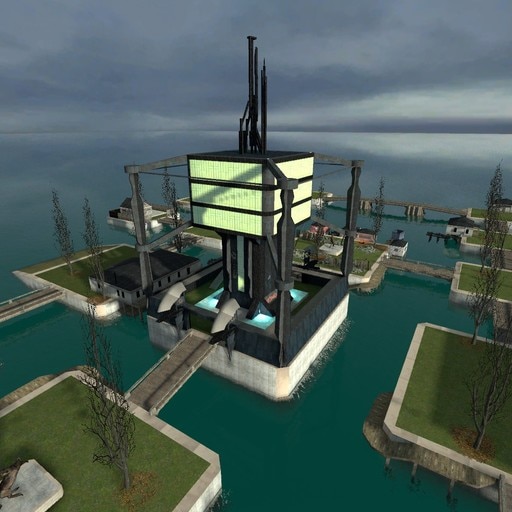
it was this map, day version, you spawn in the room shown in the clip
https://steamcommunity.com/sharedfiles/filedetails/?id=128294925
 rough star
decompiled, looks like there's 3 spawn corridors right next to each other. they're enclosed in a "trigger_physics_trap" so you're actually spawning inside that. I'll try post a screenshot of the flags
the flags
 half nacelle
oka thats what i thought, some sort of brush trigger that vaporizes stuff
im not sure if the flag EFL_NO_DISSOLVE will actually protect against these
if it does then again i cant find a way to apply it before the trigger starts vaporizing it
ive added it before the entity init function, right after, none of it did anything
rough star
does it do it to vehicles?
rough star
I'm wondering if you set a flag on the tardis if it'd cause the trigger to NOT dissolve it. could try https://wiki.facepunch.com/gmod/Enums/FL#FL_CLIENT FL_CLIENT and see if it works? not a good solution as that might break other things but for the purposes of testing it'd be interesting to know if it works
half nacelle
sounds very hacky to mark the tardis as being a "client" and also wouldnt work if it encounters a trigger that does dissolve clients
rough star
there's also FL_DONTTOUCH, again that's probably not great for other things but if you detect a trigger_physics_trap touch you could try setting that until it's out of it
half nacelle
ideally the flag EFL_NO_DISSOLVE would just prevent any dissolving altogether
half nacelle
rough star
there's also FL_DONTTOUCH, again that's probably not great for other things but ...
is it possible to detect hammer triggers via lua?
rough star
there's a FL_DISSOLVING, I wonder what happens if you constantly un-set that flag in a hook? would anything that causes a dissolve end up not working?
rough star
half nacelle
is it possible to detect hammer triggers via lua?
they should exist as entities that you can change properties with with lua/remove
example of how I've modified map entities via lua before
MapFunctions["ttt_complex_fix4_d"] = function()
    for _, prop in pairs( ents.FindInSphere(Vector(796, 383, 205), 100) ) do
        if prop:GetClass() == "trigger_once" then
            prop:SetPos( prop:GetPos() + Vector(0, -20, 0) ) -- Prevent glitching the axe
        end
    end
    for _, prop in pairs( ents.FindByName("Allgihtd2") ) do
        prop:SetKeyValue( "pattern", "mmmmmmmmmmmmmmmmmmmmmmmmm" ) -- Stop flickering the red lights
    end
end
oh its this easy?
that makes me wonder why jazztronauts doesnt just go and
delete all inconvenient map triggers
or maybe they do and i dont even notice
rough star
it could break maps if you do it too generic. it's useful for specific map targeting though. or in the case of the Tardis, if you experience a touch event with a trigger_physics_trap, you could try modify that trigger's flag to exclude tardis entities
rough star
https://developer.valvesoftware.com/wiki/Trigger_physics_trap says there's this keyvalue
Filter Name (filtername) <filter>
A filter entity to test potential activators against.
you'd be able to set something on that via lua (so that it fails the test if it's a tardis) eg :SetKeyValue( "filtername", "name_of_a_filter_entity_for_doing_testing" ) but I'm not familiar with how filter entities work
there's also this output
OnStartTouch
!activator = entity that caused this output
!caller = this entity
Fired when a valid entity starts touching this trigger.
so if you can hook into the trigger_physics_trap's OnStartTouch you'd be able to check if activator is a tardis entity and if so then do whatever lua (change something with the trigger, change something with the tardis, make it emergency exit, unsure if you can return false to stop it progressing with the touch), if not tardis then continue as normal to let it process as normal (edit: I'm assuming that OnStartTouch output is mapped in Gmod to https://wiki.facepunch.com/gmod/ENTITY:StartTouch)
half nacelle
ohh ill see if this works
rough star
I haven't tested this and you'll need to adjust it but to test what lua is capable of changing:
for _, mapent in ipairs( ents.FindByClass("trigger_physics_trap") ) do
    print("Found a trigger_physics_trap at", mapent:GetPos())

    mapent.StartTouch = function(ent)
        if ent:GetClass() == "ent_tardis" then
            print("trigger started touching a Tardis")
            -- try returning true/false here to see if it stops it progressing to the damage event?
        end
    end

    -- Try disabling it completely? idk
    mapent:Fire( "Disable" ) -- should call the 'disable' input

    -- Example of changing a key value
    mapent:SetKeyValue( "dissolvetype", 2 ) -- https://developer.valvesoftware.com/wiki/Trigger_physics_trap says 2 is "Light electrical"
end
could also try https://wiki.facepunch.com/gmod/GM:EntityTakeDamage on the Tardis, and if the damage is a DMG_DISSOLVE https://wiki.facepunch.com/gmod/CTakeDamageInfo:IsDamageType then prevent the damage? not sure how to prevent it though
Garry's Mod Wiki
Called when an entity is about to take damage. You can modify all parts of the damage info in this hook or completely block the damage event.
See GM:PostEntityTakeDamage if you wish to hook the final damage event.
Warning: Applying damage from this hook to the entity taking damage will lead to infinite loop/crash.
Garry's Mod Wiki
Returns whenever the damageinfo contains the damage type specified.
half nacelle
ive been told i can disable dlights from doing whatever this is to static props but i cannot find any information on this whatsoever
its probably a simple console command but i seriously cant find it
half nacelle
rough star
I haven't tested this and you'll need to adjust it but to test what lua is capab...
these entity dissolvers are ACTUAL FUCKING PIECES OF SHIT
NOTHING
WORKS ON THEM
keyvalues do fucking nothing, firing the "disable" input takes a fucking tick to update which means ITS TOO LATE FOR TELEPORTS
to make sure the useless fucking piece of shit dissolver doesnt destroy my entity i have to disable it IN ADVANCE
i tried to be nice to these shitty garbage rp maps by re enabling their useless dissolvers after teleporting out of them but i think its not even fucking worth it
maybe i should just nuke every single one of them across the map
half nacelle


ok this might get me somewhere
omg this actually works
if i specifically use entity:input instead of entity:fire, THEN and only THEN is the trigger disabled just in time for the entity to not get fucking obliterated
so now i can disable a trigger it's about to teleport into by just scanning the destination pos of the imminent teleport
golden flare
Love to see it. Hardening addons against the amount of weird bullshit that the game can do is hard, thankless work that no one using it will ever notice (hopefully) but I think it's the difference between "good" and "great" addons
half nacelle
now it essentially behaves like a forcefield that extends protection to everything around it as long as it stays parked there
golden flare
Bonus points if you visualize that in some way
half nacelle
technically not how it should work but there is no better way to do it
half nacelle
golden flare
Bonus points if you visualize that in some way
i already have a real forcefield for it that blocks props and bullets :v

it does not interact with the whole dissolving thing though
the tools lua has are just too limited for that
rough star
half nacelle
so now i can disable a trigger it's about to teleport into by just scanning the ...
nice! I did some testing too and only really found Disable to be effective. for some reason StartTouch/EndTouch/Touch don't seem to report for the trigger_physics_trap. Didn't try the other way around for the Tardis though.
I also tried this and it did not go well. ```lua
tardis.Think = function(t)
if t:IsFlagSet(FL_DISSOLVING) then
print("dissolving. try to stop.")
self:RemoveFlags(FL_DISSOLVING)
end
end
Sounds like something that might be patchable
half nacelle
rough star
nice! I did some testing too and only really found Disable to be effective. for ...
oh god youre overriding the thing's think function
i can see why it was not able to materialize
rough star
half nacelle
oh god youre overriding the thing's think function
I didn't call the original think🤦lmao, I'll fix that and try again. Not that this is the best method, but I wanted to find out if preventing that flag from being present would stop it dissolving
half nacelle

shoutouts to this one tiny little function for literally just allowing jazztronauts to function in singleplayer
https://wiki.facepunch.com/gmod/Weapon:CallOnClient
Garry's Mod Wiki
Calls a SWEP function on client. Does nothing on client.
Warning: This uses the usermessage internally, because of that, the combined length of the arguments of this function may not exceed 254 bytes/characters or the function will cease to function!
im finally free from arbitrarily inflated loading times due to networking
this is nice
golden flare
I dunno, that loading screen seems like it could be more thematic
half nacelle
until gmod adds an easy way to change the loading screen i wont try to mess with it
shit requires like setting up a website to change the loading screen
even that one addon that changes the loading screen to a snapshot of the last rendered frame (like half life 2) requires some external installation because the workshop alone cant do it
golden flare
Gross
half nacelle
ok yeah it was this
 rough star
half nacelle
rough star
half nacelle
cross map tardis? 🤯
rough star
half nacelle
even that one addon that changes the loading screen to a snapshot of the last re...
haven't looked at the code/method they're using but that could be worked around I think. in theory: lua takes screenshot of the last rendered frame, saves it to data folder as an image, then sets sv_loadingurl to a data url that references asset://garrysmod/data/seamless/snapshot.png in an <img> tag or css background. no html file needed.
rough star
looks like the only reason for the additional download is the loading.html file. They could instead include the CSS as a style.css.txt and the javascript as a script.js.txt (in the workshop addon) and just do sv_loadingurl of a data-url of this:
<html>
    <head>
        <link rel="stylesheet" href="asset://garrysmod/data_static/seamlessload/style.css.txt" type="text/css">
        <script type="text/javascript" src="asset://garrysmod/data_static/seamlessload/script.js.txt"></script>
    </head>
    <body>
        <div class="centre">
            LOADING...
        </div>
    </body>
</html>
You could do the same for this
half nacelle
is it possible to resize collision models on an arbitrary axis?
or can it only be scaled the same amount on every axis
golden flare
Uhhhh only all axes I think
half nacelle
main spire
just do `-multirun` in a shortcut that launches gmod
why the fuck can i not recreate this

 brisk tinsel
half nacelle
why the fuck can i not recreate this
brisk tinsel
half nacelle
why the fuck can i not recreate this
You have to do it on the gmod exe not on the steam shortcut of it
half nacelle
no i double checked every guide on multirun uses the shortcut
and gmod.exe has no target property either
brisk tinsel
show the gmod.exe one?
half nacelle
even the image i replied to uses the shortcut


i dont know what field im supposed to look for on the gmod.exe properties because not a single screenshot on the internet uses it
brisk tinsel
if you right click that gmod.exe and create shortcut off that
brisk tinsel
the first one is an internet shortcut with the gmod logo
Same thing as putting steam://rungameid/4000 in your browser
half nacelle
brisk tinsel
if you right click that gmod.exe and create shortcut off that
awesome it works now so thank you
rough star
steam://rungameid/{appid} should support launch parameters via steam://rungameid/{appid}/{params} but no point doing that unless the game you're running really needs to be initiated by Steam. some games don't like being called directly to the exe from Windows and need Steam to do it. Gmod isn't one of those though
half nacelle
now to figure out how to connect to myself (i really dont know anything)
it is actually annoying how i cant find any single resource for this on the internet
do they all just assume you automatically know how to do this??
or is it so extremely obvious i shouldnt be having this issue
oh i see i just have to use 'find multiplayer game' and then search under local network
i thought id have to use the connect console command
half nacelle
golden flare
Uhhhh only all axes I think
looks like it is possible in some way


i will have to investigate the code of this addon
golden flare
They may be doing it manually, I dunno
half nacelle
well thats still a way to do it and thats all i need
golden flare
What for?
half nacelle
basically this

this might look like a petty example but there are alot more controls that have very annoying hitboxes
golden flare
It's not a "petty" example, but it does make me think there's probably a better solution
half nacelle
i wish i could make these vortexes higher quality because itd make shots like this look alot better i think

but if i use anything above 512x and dxt1 then the filesize goes from 40 mb to 200 mb per texture..
main spire
half nacelle
basically this
surely that can be modified without changing the physics collision? Unless the code is super cursed or something
even then I think you could just add another larger use detection thing that doesn't involve physics or something maybe.....
half nacelle
main spire
surely that can be modified without changing the physics collision? Unless the c...
its just an entity with a simple use type
press E on it and it does its thing if the aim trace hits the collision box
but theres the thing, collision box
if i want it to be more generous ill have to resize the collision model
main spire
I mean it's kinda jank but you could just make another collision box or custom use check thing around the small one
and then just make sure it can't activate twice or something
average gmod jank setup or something
this game runs on tape, hopes, and dreams
golden flare
half nacelle
but if i use anything above 512x and dxt1 then the filesize goes from 40 mb to 2...
Are they animated?
half nacelle
yes
half nacelle
@rough star
https://discordapp.com/channels/565105920414318602/565108080300261398/1437791650243023028
wow do you even have any idea how nice that would be for the tardis map transitions
(obviously you do as youve commented on it before i just wanted to compliment your work)
rough star
that's the reason I started looking into it, it'd be very cool to be able to go between maps more seamlessly and without needing a mod or manual file editing 😀
the workshop mod you posted is great but having the game itself do some of the work + fitting it in with existing functionality would make it more accessible
half nacelle
i wonder if it would be possible to keep the last frame lingering for a bit after the game actually loads
to prevent instability to wait about 2 seconds after a map transition to spawn in the tardis (if a player used it to map travel) and in that time i basically just try to cover up the game with a grey screen
replacing that with the last rendered frame would probably be better
also gshaders bloom shows up through the grey screen and thats probably a bug (i just use util.screenfade for this)
rough star
half nacelle
i wonder if it would be possible to keep the last frame lingering for a bit afte...
not possible with the method that I'm suggesting, it's designed to be as generic and simple as possible so it has absolutely no conflict with anything, to improve the chance of it getting added.
but for your specific case where you're the one making the map change happen, you could capture the screen (minus hud) the frame before it changes and then display that image after the loading screen for a couple seconds while waiting for the Tardis to create itself. It should end up looking exactly the same as the frame the loading screen will use, so the end result is it looks like you're simply extending the frame for a few seconds.
half nacelle
whatever is going on in the dev chats is kinda scaring me
whats this cataclysm about jit.attach about
late palm
What’s jit.attach?
half nacelle
i dont have a clue
half nacelle
@golden flare @main spire hey i remember you two were theorizing on how to get the shadows to fade out a long time ago
i finally realized the idea
golden flare
Hey, nice! That looks really good
main spire
did you figure out a workaround to it modifying the shadows of all entities?
regardless it does look really nice
half nacelle
ok so peacekeeper deleted my entire message for using the small text formatting apparently
im not typing it out again
half nacelle
spent the day doing really cursed and unusual shenanigans
late palm
It would be really funny if you could still travel with just the tardis console
golden flare
Okay, now weld the console to a platform and stand on the platform and it should teleport you with it
half nacelle
oh yeah i forgot to post but i already did both of these (minus the platform but i think this is way more funny)
i dont really have a solution for the vortex clipping with the world because i cant find a way to make it ignorez for the world but not the viewmodel
golden flare
half nacelle
i dont really have a solution for the vortex clipping with the world because i c...
You would accomplish this by rendering the vortex after the world but before the view model
Garry's Mod Wiki
Called just before all view models (there are 3 per player, see Player:GetViewModel) and entities with RENDERGROUP_VIEWMODEL are drawn.
See GM:PreDrawViewModel and GM:PostDrawViewModel for hooks that run for specific view models.
You can use GM:PreDrawEffects as a "PostDrawViewModels" hook as it is called just after the all the view mo...
half nacelle
golden flare
You would accomplish this by rendering the vortex after the world but before the...
i dont think i can just use a rendering hook
the vortex is its own entity that is handled as a functional part by being parented to the exterior
(like every control lever for the console in the interior)
so it has its own draw function
the sad thing with rendering hooks is that i cant just go "for this one entity, do this"
it always affects every entity because thats just how rendering hooks work i guess
golden flare
Feels like the vortex doesn’t need to be an entity
But also, you can totally force an entity to draw
And set nodraw on it so it doesn’t draw itself
half nacelle
i finally got around to making a local music player that can play either your own files or music from addon packs


also has some neat 3d audio tech that allows the music to keep playing through camera switches (normally it'd cut off) and play through the doors when outside
https://streamable.com/j682ky
 half nacelle
and now we got timestamp saving through map travels
half nacelle
bass is a complete fucking piece of shit
what a useless library
cant play a simple .wav file in 3d mode which means no spatial positioning
now i have to reformat all wav files to mp3 and tell everyone else to also only ever use mp3
actual incompetent trash
it is JUST an audio file
it cant be that hard
half nacelle
half nacelle
technically not part of the main tardis addon but very related
golden flare
That seems like it would be pretty satisfying to do
golden flare
half nacelle
I don't know what this is demonstrating
half nacelle
golden flare
I don't know what this is demonstrating
minor piloting error
(it was just a funny moment that happened while i was giving the addon a spin for the first time in a while)
golden flare
Demonstrating mastery over your domain, got it
half nacelle
is this a negative thing? qwq