#📋︱community-support
1 messages · Page 2 of 1
 fresh basin
 real jay
lunar opened only the badlion that didn't
fresh basin
Can you check your RAM allocation?
 static ospreyBOT
How much ram should I allocate to Lunar Client?
To change your Lunar Client's allocated ram, head to the launcher's settings (bottom left) and look for "Allocated Memory".
- Allocate 1.0GB if your PC has 4.0GB installed,
- Allocate 2.0GB if your PC has 6.0GB installed,
- Allocate 3.0GB if your PC has 8.0GB installed,
- Allocate 4.0GB if your PC has more than 8.0GB installed.
real jay
fresh basin
Can you check your RAM allocation?
3 gb
fresh basin
How much does your system have?
real jay
what
static ospreyBOT
📢 Free Cosmetics? Here's How to Get Them!
- Launch into any version of Lunar Client.
- Hover over the 'link' button near the account manager (top-left), then click.
- Complete the prompts in your browser to claim your cosmetics!
Note that leaving the Discord server will remove these cosmetics.
fresh basin
Overall on your device, if you're unsure, you can check in the launcher it'll say how much you have to allocate
fresh basin
Okay 3.0GB should be good. What version and addon are you trying to load?
static ospreyBOT
Version Addons Information
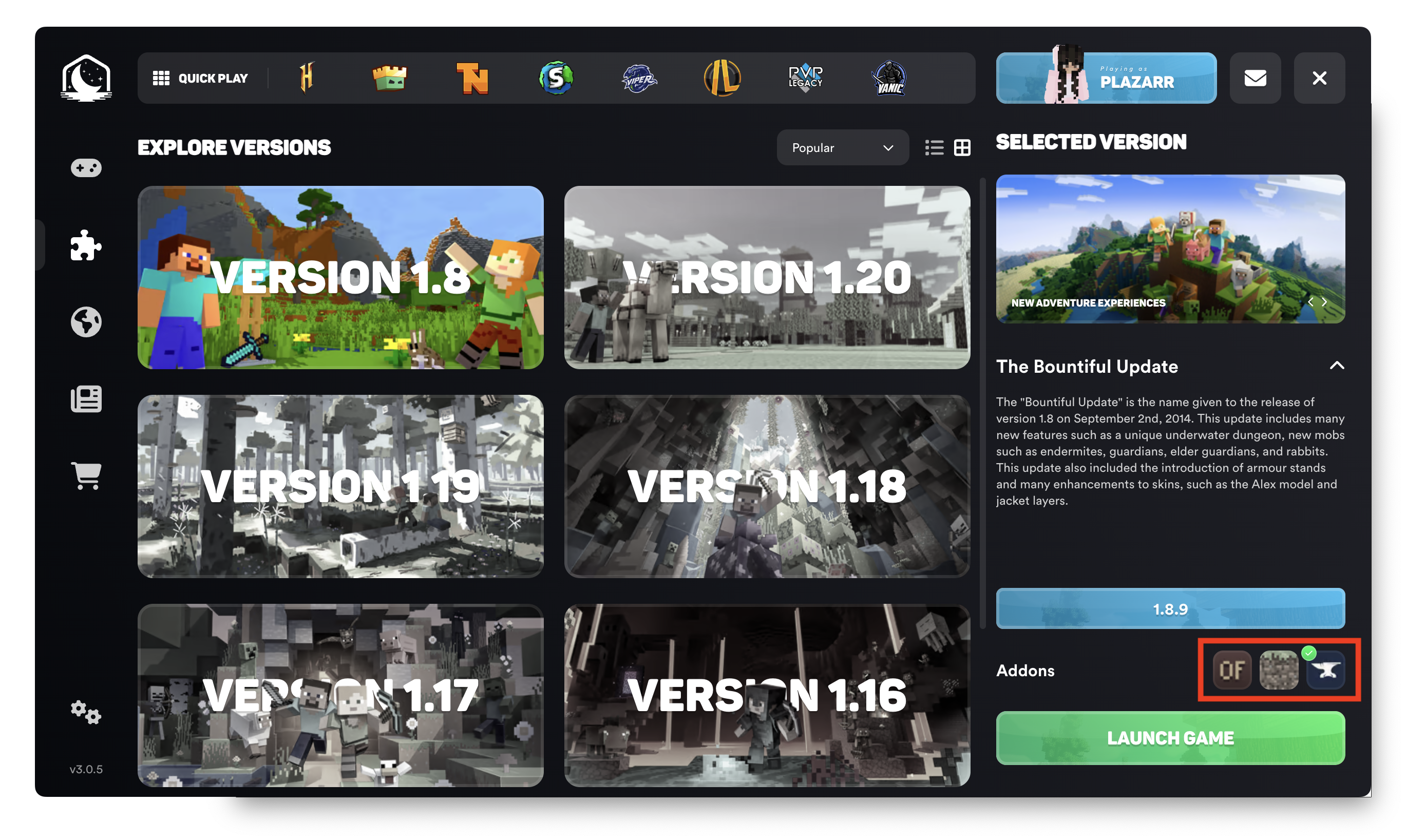
Version addons allow you to use our toolchain system to choose which mod loader you would like to use for Lunar Client.
These mod loaders have their own unique mods that are only accessible through them.
- 1.8.9 Forge: OptiFine, Replay Mod, SBA, NEU
- 1.12.2 Forge: OptiFine, Replay Mod
- 1.16.5 - 1.21.1 Fabric: Sodium, Iris, Indium, Replay Mod
- Latest minor versions only
- Noxesium on 1.19.4 and 1.20.1
Addons can be easily changed by going into the launch options menu and selecting the correct addon icon below the version number. See the screenshot for reference.
 real jay
1.8.9 badlion with badlion
fresh basin
And it's just the badlion version where you're encountering this?
real jay
yes
fresh basin
Ok no worries, can you try restarting your device? If this still doesn't work, can you make a ticket #📩︱create-ticket
 undone pivot
yes i get it all the time !
 whole marsh
undone pivot
yes i get it all the time !
whole marsh
undone pivot
yes i get it all the time !
fr?
 cobalt cosmos
I purchased Lunar+ over 24 months ago, but since then I haven't been receiving the special colors I'm supposed to get every three months. I think it's been six months now and I haven't received a special color or a new emoji every month.
whole marsh
cobalt cosmos
I purchased Lunar+ over 24 months ago, but since then I haven't been receiving t...
are you equipping the new colors?
they dont automatically change
 warped marten
why doesent my rewind feature work its js stuck on 0 00 and soemtimes crashes the game
whole marsh
undone pivot
every time i open the emote wheel it glitches the background
only happens on 1.8 for me
cobalt cosmos
whole marsh
are you equipping the new colors?
I know that, but I haven't received any new colors in 6 months.
whole marsh
what was the last color you got
cobalt cosmos
24 month lunar plus Pink
 lofty parrot
undone pivot
every time i open the emote wheel it glitches the background
lofty parrot
undone pivot
every time i open the emote wheel it glitches the background
I can't recreate this 😔
cobalt cosmos
 whole marsh
cobalt cosmos
whole marsh
cobalt cosmos
hmm idk then sorry
fresh basin
cobalt cosmos
When did you purchase lunar+?
undone pivot
tbf i dont get the monthly emotes either
whole marsh
undone pivot
tbf i dont get the monthly emotes either
i mean but if it's what lunar is selling as a perk of lunar+...
cobalt cosmos
fresh basin
When did you purchase lunar+?
Two years ago, or even more
fresh basin
cobalt cosmos
Two years ago, or even more
Interesting, was the subscription stopped at any point?
cobalt cosmos
It's been more than 5 months and I haven't received a new color.
cobalt cosmos
fresh basin
Interesting, was the subscription stopped at any point?
No, I pay every month.
It's automatic
cobalt cosmos
fresh basin
Interesting, was the subscription stopped at any point?
Can you help me? I used to get the emojis every month, but I haven't received them in a while.
fresh basin
Sorry about that, can you make a payment ticket?
Someone can take a closer look into this for you
 opaque steppe
How do I use mods that I downloaded in lunar? I’m trying to use litematica and it isnt showing up. I am on mac btw
static ospreyBOT
Do you want to use your own mods on Lunar Client?
Follow the instructions below to add third party mods to Lunar Client.
Note that this feature is only available on 1.16.5+ via the Fabric module!
1. Open Lunar Client's Versions tab and click on the version you want to add mods to,
2. In the bottom right, make sure the "Fabric" addon is selected,
3. Press the settings button (⚙️), then select the Mods tab at the top,
4. Drag your mod file (.jar) into the window OR click the blue folder icon to open the mods folder File Explorer.
fresh basin
Heres a guide on how to add mods!
static ospreyBOT
If you cannot find a solution to your issue by searching the channels past messages, using Ctrl+F, please create a ticket at support.lunarclient.com
cobalt cosmos
fresh basin
Sorry about that, can you make a payment ticket?
I have opened a support request. Will I receive a response today?
fresh basin
cobalt cosmos
I have opened a support request. Will I receive a response today?
Should be within 24 hours yes! :)
 waxen basin
i jst bought Minecraft and am using lunar but my fps r so unstable so how can i increase it and make it stable? 🙏🏻♥️
fresh basin
waxen basin
i jst bought Minecraft and am using lunar but my fps r so unstable so how can i ...
You can try following this guide for FPS related issues
static ospreyBOT
Why am I having FPS issues?
You can improve your FPS significantly by using a variety of different methods to optimize Minecraft.
You can view a detailed blog post written by the Lunar Client Team here, to assist you with the process 😎
waxen basin
fresh basin
You can try following this guide for FPS related issues
thankk u
fresh basin
No worries! :D
cobalt cosmos
fresh basin
Should be within 24 hours yes! :)
Thank you ❤️ 
fresh basin
Of course, if you need anything else, don't hesitate to reach out/ping
 primal jackal
how i can save minecraft setting when i switch 1.8.9 with 1.21.4 ? @fresh basin
fresh basin
A lot should automatically just be saved like your controls
fresh basin
I think they all will
primal jackal
no not setting for zqsd
 atomic marsh
primal jackal
but not all
atomic marsh
primal jackal
but not all
which one
primal jackal
zqsd and toggle perspective
atomic marsh
it should stay the same
primal jackal
no
atomic marsh
all controls stays same on me
fresh basin
Just double check that you don't have multiple hotkeys for them
primal jackal
fresh basin
Just double check that you don't have multiple hotkeys for them
but the setting change all time when i play 1.8.9 then 1.21.4
fresh basin
As in they reset to default?
primal jackal
YEAH but not all
fresh basin
Does this happen when you launch Vanilla Minecraft?
and switch between the two versions?
primal jackal
fresh basin
Does this happen when you launch Vanilla Minecraft?
yeah also
primal jackal
fresh basin
and switch between the two versions?
yh
fresh basin
Not too sure, It seems to be a Minecraft problem rather than a Lunar Problem :(
primal jackal
fresh basin
Not too sure, It seems to be a Minecraft problem rather than a Lunar Problem :(
... shit
fresh basin
Sorry about that
primal jackal
fresh basin
Sorry about that
... but thxxx
fresh basin
No worries if you need anything else, feel free to ping
primal jackal
yeah thx
static ospreyBOT
If you cannot find a solution to your issue by searching the channels past messages, using Ctrl+F, please create a ticket at support.lunarclient.com
 leaden trout
@fresh basin sorry if I'm asking for the second time the same question but...
leaden trout
leaden trout
<@528610458274365481> sorry if I'm asking for the second time the same question...
My launcher is stacked in the loading screen
fresh basin
Sorry about that, did you try running your game as admin?
and checking your RAM allocation?
static ospreyBOT
How much ram should I allocate to Lunar Client?
To change your Lunar Client's allocated ram, head to the launcher's settings (bottom left) and look for "Allocated Memory".
- Allocate 1.0GB if your PC has 4.0GB installed,
- Allocate 2.0GB if your PC has 6.0GB installed,
- Allocate 3.0GB if your PC has 8.0GB installed,
- Allocate 4.0GB if your PC has more than 8.0GB installed.
 full timber
hi!
 gusty zephyr
hı
fresh basin
HI can I help with anything at all?
gusty zephyr
ıt sazs ı have to verıfz mz acc when ı trz too claım the cosmetıcs
fresh basin
gusty zephyr
ıt sazs ı have to verıfz mz acc when ı trz too claım the cosmetıcs
Follow this guide-
 dry bane
why does it say network protocol error when i try to join on 26.1.2 but when i try to join on 1.21.11 everything is fine
 static ospreyBOT
How do you link your Discord to Lunar Client?
Step 1: Launch into any version of Lunar Client.
Step 2: Next to the account manager in the top left corner, hover and click the 'link' button.
Step 3: Follow the prompts in your browser to complete the rest of the process.
 fresh basin
leaden trout
fresh basin
leaden trout
Did you also check your RAM allocation?
fresh basin
gusty zephyr
howw do ı check that
nono the guide above to link the discord is here
fresh basin
static osprey
^^
fresh basin
dry bane
why does it say network protocol error when i try to join on 26.1.2 but when i t...
Do you have any mods you're trying to run?
gusty zephyr
ıt doesent work
leaden trout
3 GB I think, but it isn't important, I think, 'cause is in the launcher the problem
fresh basin
gusty zephyr
ıt doesent work
Can you proivide a screenshot of your game showing your discord is linked?
dry bane
fresh basin
Do you have any mods you're trying to run?
hmm idk maybe ima check
 leaden trout
3 GB I think, but it isn't important, I think, 'cause is in the launcher the pro...
leaden trout
leaden trout
3 GB I think, but it isn't important, I think, 'cause is in the launcher the pro...
I uploaded the video for make you see better @fresh basin
gusty zephyr
look
fresh basin
leaden trout
3 GB I think, but it isn't important, I think, 'cause is in the launcher the pro...
Sometimes your game won't load due to the amount of RAM, but that should be fine!
gusty zephyr
come room 2
fresh basin
leaden trout
I uploaded the video for make you see better <@528610458274365481>
What version and addon are you trying to load?
fresh basin
gusty zephyr
come room 2
I can't join a VC right now, I apologise for any inconvenience
can you try providing a screenshot instead?
leaden trout
fresh basin
Sometimes your game won't load due to the amount of RAM, but that should be fine...
I'm only in the launcher, is in the launcher the problem
 dusky hatch
i am logging into my account but when i try to launch it gives this, in the bottom right you can see i just logged in too
 leaden trout
leaden trout
leaden trout
this video can help you @fresh basin ?
fresh basin
dusky hatch
i am logging into my account but when i try to launch it gives this, in the bott...
Can you try re-starting Lunar?
fresh basin
leaden trout
this video can help you <@528610458274365481> ?
I see, which version and addon are you trying to load?
fresh basin
dusky hatch
restarting pc and force closing lunar
Can you try this guide?
static ospreyBOT
Are you having trouble with logging into your Minecraft account?
Windows:
1. Fully close Lunar Client, using Task Manager's "End Task",
2. Open the official Minecraft launcher,
3. Log out of your Microsoft account, and then log back in,
4. Launch any version of Minecraft and connect to any server,
5. Close Minecraft and then re-open Lunar Client.
macOS:
1. Fully close Lunar Client, using Activity View,
2. Open the official Minecraft launcher,
3. Log out of your Microsoft account, and then log back in,
4. Launch any version of Minecraft and connect to any server,
5. Close Minecraft and then re-open Lunar Client.
fresh basin
gusty zephyr
staff demon and ıgıulo
As I mentioned previously, I am unable to VC right now. Can you provide a screenshot instead?
gusty zephyr
zou can see my mc
leaden trout
fresh basin
I see, which version and addon are you trying to load?
nothing: I was trying to launch the 1.8.9 Badlion, but it seems that I can't...
fresh basin
leaden trout
nothing: I was trying to launch the 1.8.9 Badlion, but it seems that I can't...
Can you try launching the Lunar version?
Instead of badlion
fresh basin
gusty zephyr
too screen shot
windows + shift + s
dry bane
i disabled a few mods it fixed
leaden trout
fresh basin
Can you try launching the Lunar version?
The launcher is stucked in the loading page, so I can't select that instance
fresh basin
dry bane
i disabled a few mods it fixed
Great glad to hear it works now! :D
fresh basin
leaden trout
The launcher is stucked in the loading page, so I can't select that instance
Try closing your launcher and re-opening
leaden trout
fresh basin
Try closing your launcher and re-opening
I've tried that for all the afternoon
fresh basin
It may be connection related. Can you try flush your DNS?
static ospreyBOT
How do I flush my DNS cache?
Windows
1. Run Command Prompt as Administrator.
2. Enter the following ipconfig /flushdns and then hit Enter.
macOS
1. Open Terminal,
2. Enter the following sudo dscacheutil -flushcache; sudo killall -HUP mDNSResponder and then hit Enter.
leaden trout
fresh basin
It may be connection related. Can you try flush your DNS?
How I can do it on Mac?
fresh basin
There are mac guides above! :)
- Open Terminal,
- Enter the following sudo dscacheutil -flushcache; sudo killall -HUP mDNSResponder and then hit Enter.
leaden trout
sorry I saw only in this moment
gusty zephyr
look
fresh basin
No worries!
leaden trout
only a question: is that safe? I didn't used the terminal before
fresh basin
leaden trout
only a question: is that safe? I didn't used the terminal before
Yes it's safe! :)
If it wasn't safe I wouldn't suggest to do these steps!
leaden trout
okappa, if I'll not return in 2 minutes... you know why hahaha
static ospreyBOT
📢 Free Cosmetics? Here's How to Get Them!
- Launch into any version of Lunar Client.
- Hover over the 'link' button near the account manager (top-left), then click.
- Complete the prompts in your browser to claim your cosmetics!
Note that leaving the Discord server will remove these cosmetics.
leaden trout
fresh basin
If it wasn't safe I wouldn't suggest to do these steps!
okappa
 fresh basin
leaden trout
okappa
fresh basin
leaden trout
okappa
No worries, feel free to ping
gusty zephyr
how can i make a badlion acc
leaden trout
fresh basin
No worries, feel free to ping
It don't function anyway
gusty zephyr
right
leaden trout
@fresh basin ?
fresh basin
 lofty helm
Can you try this:
Close Minecraft.
Temporarily remove or disable Iris.
Are you able to run your game then?
fresh basin
leaden trout
<@528610458274365481> ?
Sorry to hear, do you have a firewall or antivirus that could be blocking Lunar Client from running?
If so, can you try temp disable those and relaunching?
leaden trout
fresh basin
Sorry to hear, do you have a firewall or antivirus that could be blocking Lunar ...
No, it functioned until yesterday
fresh basin
gusty zephyr
how can i make a badlion acc
It will be the same as your regular account, but to access the badlion settings, you can do this in your launcher
 lofty helm
fresh basin
Can you try this:
Close Minecraft.
Temporarily remove or disable Iris.
Are you...
lofty helm
fresh basin
Can you try this:
Close Minecraft.
Temporarily remove or disable Iris.
Are you...
trying rn
fresh basin
 fresh basin
lofty helm
trying rn
fresh basin
lofty helm
trying rn
Let me know
fresh basin
leaden trout
No, it functioned until yesterday
Sorry about that, and restarting your device doesn't resolve this issue?
leaden trout
I'll try
fresh basin
👍
leaden trout
I'll be back soon
fresh basin
okay, feel free to ping
fresh basin
leaden trout
it doesn't function even this time...
In this cause, can you try making a ticket #📩︱create-ticket
an agent can take a closer look into what could be causing this
lofty helm
@fresh basin it seems to be working but iris reinstalled after rebooting lunar launcher ?
how do i changew that
fresh basin
lofty helm
<@528610458274365481> it seems to be working but iris reinstalled after rebootin...
If you're in-game there are some steps that you can try to fix this
Open Options.
Open Distant Horizons Settings.
Go to Advanced → Graphics → Experimental.
Set Rendering API to OpenGL.
Restart the game.
Then it should work with IRIS (hopefully)
lofty helm
okie trying now
fresh basin
Let me know!
leaden trout
fresh basin
In this cause, can you try making a ticket <#673624906201694219>
Sorry for the italian language in the picture @fresh basin
 fresh basin
leaden trout
Sorry for the italian language in the picture <@528610458274365481>
fresh basin
leaden trout
Sorry for the italian language in the picture <@528610458274365481>
You need to create an account!
static ospreyBOT
How do you create a ticket?
Step 1: Navigate to the #📩︱create-ticket channel and click the button to go to the support website. Alternatively, click here:
Step 2: Click “Sign Up” and create an account.
Step 3: Once you have created an account, click “New Support Ticket” as shown.
Step 4: Fill out all the relevant information regarding your issue or suggestion, submit and wait for a response.
If you require more assistance in creating a ticket, check out this video.
You will receive a reply in up to 48 hours, unless it is a Payment Support ticket in which case it may take longer.
fresh basin
then make a new ticket that way
leaden trout
fresh basin
You need to create an account!
thanks
fresh basin
leaden trout
thanks
No worries, let me know if you need any further help!
lofty helm
seems to have worked! tysm @fresh basin
fresh basin
lofty helm
seems to have worked! tysm <@528610458274365481>
Perfect, I am glad to hear that worked !
static ospreyBOT
📢 Free Cosmetics? Here's How to Get Them!
- Launch into any version of Lunar Client.
- Hover over the 'link' button near the account manager (top-left), then click.
- Complete the prompts in your browser to claim your cosmetics!
Note that leaving the Discord server will remove these cosmetics.
fresh basin
Does it load in Vanilla Minecraft?
lofty helm
uhh
how do i check that
it worked before i updated to new update for mc
and i downloaded the new pack for the new 26.1
fresh basin
Download the Vanilla Launcher and try that, can you let me know how that goes?
 noble falcon
Why can't I add my account after I downloaded the new lunar client update?
lofty helm
hm
fresh basin
noble falcon
Why can't I add my account after I downloaded the new lunar client update?
Can you try these steps?
static ospreyBOT
Are you having trouble with logging into your Minecraft account?
Windows:
1. Fully close Lunar Client, using Task Manager's "End Task",
2. Open the official Minecraft launcher,
3. Log out of your Microsoft account, and then log back in,
4. Launch any version of Minecraft and connect to any server,
5. Close Minecraft and then re-open Lunar Client.
macOS:
1. Fully close Lunar Client, using Activity View,
2. Open the official Minecraft launcher,
3. Log out of your Microsoft account, and then log back in,
4. Launch any version of Minecraft and connect to any server,
5. Close Minecraft and then re-open Lunar Client.
 rose rose
@fresh basin
fresh basin
yeah? :)
rose rose
💟
 woven talon
Item frames dissappear in game. it appears for 2-3 seconds when i reload chunks tho. Does this happen because of a setting?

 fresh basin
woven talon
Item frames dissappear in game. it appears for 2-3 seconds when i reload chunks ...
fresh basin
woven talon
Item frames dissappear in game. it appears for 2-3 seconds when i reload chunks ...
Do you encounter this in Vanilla Minecraft?
woven talon
no i didnt
fresh basin
Do you encounter this on all versions?
woven talon
i didn't check it on other lunar versions but i don't think so
static ospreyBOT
📢 Free Cosmetics? Here's How to Get Them!
- Launch into any version of Lunar Client.
- Hover over the 'link' button near the account manager (top-left), then click.
- Complete the prompts in your browser to claim your cosmetics!
Note that leaving the Discord server will remove these cosmetics.
fresh basin
woven talon
i didn't check it on other lunar versions but i don't think so
Can you please check another version?
fresh basin
#📩︱create-ticket and you please report this here
 uncut prism
hi
fresh basin
Hey, can I help with anything at all?
fresh basin
Up to 24 hours
 fresh basin
 storm stag
Can you try run as admin
storm stag
what is that?
storm stag
fresh basin
Can you try run as admin
how
fresh basin
right click the lunar icon, run as admin
storm stag
fresh basin
right click the lunar icon, run as admin
didnt work
also i uninstalled it and reinstalled but that also didnt fix it
fresh basin
storm stag
didnt work
Can you try checking if you have a firewall/antivirus blocking Lunar from running?
storm stag
im pretty sure i put it as an exclusion yesterday
fresh basin
If nothing is blocking Lunar, can you try make a ticket here #📩︱create-ticket
an agent can take a closer look into this for you
 primal token
storm stag
primal token
storm stag
do you live in russia?
storm stag
primal token
do you live in russia?
no
 karmic elk
can someone help me? my brother deleted lunar client yesterday and ive been trying to download it again but it wont let me it said something about not being able to find "lunarclient.exe" but ion know what that means
 marble compass
karmic elk
can someone help me? my brother deleted lunar client yesterday and ive been tryi...
marble compass
karmic elk
can someone help me? my brother deleted lunar client yesterday and ive been tryi...
You need to reinstall the installer from their website
karmic elk
marble compass
You need to reinstall the installer from their website
i did
marble compass
Idk then
 fallow snow
Hey
static ospreyBOT
📢 Free Cosmetics? Here's How to Get Them!
- Launch into any version of Lunar Client.
- Hover over the 'link' button near the account manager (top-left), then click.
- Complete the prompts in your browser to claim your cosmetics!
Note that leaving the Discord server will remove these cosmetics.
 fresh basin
You could try flushing your DNS
marble compass
Could be antivirus, not enough space
fallow snow

static ospreyBOT
How do I flush my DNS cache?
Windows
1. Run Command Prompt as Administrator.
2. Enter the following ipconfig /flushdns and then hit Enter.
macOS
1. Open Terminal,
2. Enter the following sudo dscacheutil -flushcache; sudo killall -HUP mDNSResponder and then hit Enter.
 nimble jacinth
what is vulkan compat?
 fresh basin
Or check to see if a firewall/antivirus is blocking Lunar
nimble jacinth
nimble jacinth
what is vulkan compat?
anyone know what this does or means?
 cursive venture
All dropped things are invisible????
How to fix
@fresh basin mind helping (sorry for the ping) i really need this rn
 oblique lagoon
 drowsy crag
my entire screen is black when i launch 1.21.4
its a mod maybe but it doesnt give me a report and idk what to do
 wispy breach
drowsy crag
its a mod maybe but it doesnt give me a report and idk what to do
wispy breach
drowsy crag
its a mod maybe but it doesnt give me a report and idk what to do
wavey cape?

 mild lantern
bro what is game crash oxooooooc4 typa shit
static ospreyBOT
📢 Free Cosmetics? Here's How to Get Them!
- Launch into any version of Lunar Client.
- Hover over the 'link' button near the account manager (top-left), then click.
- Complete the prompts in your browser to claim your cosmetics!
Note that leaving the Discord server will remove these cosmetics.
 valid beacon
mild lantern
bro what is game crash oxooooooc4 typa shit
valid beacon
mild lantern
bro what is game crash oxooooooc4 typa shit
Could you send me your latest.log, you can find this under Game Logs.
 jovial hamlet
valid beacon
Could you send me your latest.log, you can find this under Game Logs.
jovial hamlet
valid beacon
Could you send me your latest.log, you can find this under Game Logs.
can you help_
static ospreyBOT
How do I find my Lunar Client logs?
1. Open the Lunar Client launcher.
2. Click on the Lunar Client dropdown at the top left corner.
3. Click on the Open Logs Folder button.
4. Click on either Launcher or Game Logs in the dropdown menu.
5. Look for the most recent file according to the Date Modified.
 valid beacon
jovial hamlet
can you help_
valid beacon
jovial hamlet
can you help_
What's up?
 mild lantern
valid beacon
Could you send me your latest.log, you can find this under Game Logs.
mild lantern
valid beacon
Could you send me your latest.log, you can find this under Game Logs.
where do i go to game logs?
valid beacon
static osprey
.
valid beacon
jovial hamlet
Could you try logging out and back in inside the Launcher?
mild lantern
@valid beacon where do i go to game logs
valid beacon
static osprey
Follow this guide
jovial hamlet
valid beacon
Could you try logging out and back in inside the Launcher?
I did everything, I restarted my pc too
mild lantern
@valid beacon when i click open mods folder it literally takes me to my files
valid beacon
mild lantern
<@778640343985815582> when i click open mods folder it literally takes me to my ...
Yes, send the latest.log file here!
mild lantern
valid beacon
Yes, send the latest.log file here!
WHERE DO I GO TO THE LOGS
IT TAKES ME TO THE FILES
AND THERE IS SOO MANY ONES
 valid beacon
Yes, one of the files is named latest.log, send that file here.
valid beacon
jovial hamlet
If nothing works, then I'd suggest creating a ticket in #📩︱create-ticket. I'm not sure what could cause this issue.
 spiral sentinel
Why doesnt the medal lunar client quest show up on my medal
valid beacon
spiral sentinel
Why doesnt the medal lunar client quest show up on my medal
You need to have a new medal account for it to work.
spiral sentinel
valid beacon
You need to have a new medal account for it to work.
Shlawg.
valid beacon
mild lantern
called latest log
Try launching your game first, that should generate a latest.log file.
spiral sentinel
what if i js make a new acc fr
mild lantern
valid beacon
Try launching your game first, that should generate a latest.log file.
i did?
valid beacon
mild lantern
i did?
Can you search for the latest.log file in the File Explorer window that opens? It should be there.
mild lantern
valid beacon
Can you search for the latest.log file in the File Explorer window that opens? I...
i tried bro it doesnt work
valid beacon
mild lantern
i tried bro it doesnt work
Could you send me the file that was edited the most recently then?
mild lantern
valid beacon
Could you send me the file that was edited the most recently then?
which one is that
valid beacon
mild lantern
which one is that
Click on the Sort button and then select the option that says Edited last

or something liket hat
mild lantern
the weird thing is my computer has 2 graphic cards the nvidia rtx one and the integrated ones. whenever i disable the nvidia one my game doesnt crash but it averages 30 fps
mild lantern
valid beacon
Click on the Sort button and then select the option that says Edited last
yeah theres not option saying edited last
static ospreyBOT
Why is Lunar Client using my integrated graphics card?
Windows may not detect Lunar Client as a game, so it uses the high-efficiency graphics as a result. Follow the steps below to force Lunar Client to use your GPU in your NVIDIA settings.
1. Open NVIDIA Control Panel on your computer,
2. Click on Manage 3D Settings on the left,
3. Click on Program Settings, "Add", then "Browse...",
4. Paste in %UserProfile%\.lunarclient\jre in the File Explorer bar,
5. For each folder, go into the zulu folder, then bin folder,
6. Look for and double click "javaw.exe" (Make sure you do thise for all folders),
7. Scroll down until you see "OpenGL rendering GPU" and select your Graphics Card.
mild lantern
static osprey
bro read what i said
I said when its not using the integrated ones it crashe
valid beacon
mild lantern
yeah theres not option saying edited last
Search for the one that was created the most recently then.
 mild lantern
and when using them it doenst crash but gets 30 fps
mild lantern
valid beacon
Search for the one that was created the most recently then.
yo i dont understand please send a video or something
valid beacon
Do you have the logs folder open right now?
mild lantern
valid beacon
Do you have the logs folder open right now?
yes
valid beacon
mild lantern
yes
Filter your files on date, and send the most recent one here.
mild lantern
valid beacon
Filter your files on date, and send the most recent one here.
there is no filter for that'
there is only date modified
valid beacon
Same thing
mild lantern
and the latest onoe is just something that says main
 valid beacon
static osprey
valid beacon
static osprey
Follow this guide
static ospreyBOT
If you cannot find a solution to your issue by searching the channels past messages, using Ctrl+F, please create a ticket at support.lunarclient.com
mild lantern
i did i clicked the bottom left
but there is no open logs folder type stuff
please send a video
valid beacon
mild lantern
i did i clicked the bottom left
You need to click on the TOP left corner
It should say Lunar Client
valid beacon
Game Logs
jovial hamlet

@valid beacon
the game still is not openi,ng
i removed the game and redownloaded
wispy breach
mild lantern
<@778640343985815582> i know found the latest
you can just drag it into the caht input arrea
jovial hamlet
@wispy breach Can u help me
valid beacon
mild lantern
<@778640343985815582> i know found the latest
It won't be the latest.log anymore, we need to use the log exactly from when you crashed.
Not sure which one it is, but it should say some weird things at the bottom of the log file
30s oylan
bruh
mild lantern
@valid beacon here u go
valid beacon
mild lantern
<@778640343985815582> here u go
Is that the latest or the one from when you crashed?
wispy breach
valid beacon
30s oylan
T - 40s
mild lantern
valid beacon
Is that the latest or the one from when you crashed?
this is a crash
valid beacon
jovial hamlet
Does it not generate any text in there?
wispy breach
jovial hamlet
<@995518596329525338> Can u help me
you didnt have enough info for me to figure out what happened
you can #📩︱create-ticket
mild lantern
@valid beacon so do you know whats wrong since i sent the log
wispy breach
mild lantern
<@778640343985815582> so do you know whats wrong since i sent the log
can you possibly launch your game again
and see if it crashes
then send latest.log
valid beacon
mild lantern
<@778640343985815582> so do you know whats wrong since i sent the log
Do you often get this issue?
mild lantern
valid beacon
Do you often get this issue?
no usually my fans are hella loud and its workinig great
i restarted computer and sutff but its not working
when fans are quite it crashes its weird
mild lantern
valid beacon
Do you often get this issue?
so do you know whats wwrong
jovial hamlet
valid beacon
Does it not generate any text in there?
 valid beacon
jovial hamlet
valid beacon
jovial hamlet
I have no idea what could cause this sorry, could you create a ticket #📩︱create-ticket so someone more experienced can take a look?
static ospreyBOT
📢 Free Cosmetics? Here's How to Get Them!
- Launch into any version of Lunar Client.
- Hover over the 'link' button near the account manager (top-left), then click.
- Complete the prompts in your browser to claim your cosmetics!
Note that leaving the Discord server will remove these cosmetics.
wispy breach
wispy breach
can you possibly launch your game again
@mild lantern
mild lantern
wispy breach
<@1127082300522365038>
yes
wispy breach
I think if you provide enough information we can figure things out
So why don't try that again
mild lantern
im trying to provide as much as i can
i dont know what inofrmation you guys need :/
valid beacon
^^ we want to know if you are still getting the [Render thread/ERROR]: 65539: Invalid key -96 error in your logs.
valid beacon
mild lantern
i dont know what inofrmation you guys need :/
Could you send another log from after that here?
wispy breach
mild lantern
im trying to provide as much as i can
ive told you the steps
 atomic delta
does anyone know why everytime i open a gui or tab my game freezes a little bit?
this is happening on regular lunar with no mods
wispy breach
atomic delta
does anyone know why everytime i open a gui or tab my game freezes a little bit?
in mc accessibility settings
turn narrator to off
it is a minecraft bug
atomic delta
wispy breach
in mc accessibility settings
tysm
mild lantern
wispy breach
ive told you the steps
well its not crashing right now since my nvidia graphics are disabled but im getting 30 fps since im using my integrated ones
when the nvidia graphics were turned on tho it crashed
wispy breach
mild lantern
well its not crashing right now since my nvidia graphics are disabled but im get...
then turn it on and see what shows up in your logs?
or #📩︱create-ticket and upload your logs
mild lantern
wispy breach
then turn it on and see what shows up in your logs?
well that log that i just sent was when it was turned on
wispy breach
an agent will take a look on that
static ospreyBOT
If you cannot find a solution to your issue by searching the channels past messages, using Ctrl+F, please create a ticket at support.lunarclient.com
wispy breach
 quiet sequoia
how do i get lefthand on 1.8.9
quiet sequoia
how do i get lefthand on 1.8.9
you cannot do that at the moment but feel free to #1070121335902175313
quiet sequoia
thanks
 outer scarab
guys my lunar is stuck on loading what do i do

i reinstalled and uninstalled, im on mac, my internet is perfect
idk what to do
jovial hamlet
outer scarab
guys my lunar is stuck on loading what do i do
fix your time and it will be fixed
jovial hamlet
jovial hamlet
i had same problem
outer scarab
oh rlly thanks
jovial hamlet
np
outer scarab
tried everything but that xD
outer scarab
i had to change my time bc i had to overcome the vpn limits lol
jovial hamlet
no worries
outer scarab
yay it worked
jovial hamlet
🥳
drowsy crag
wispy breach
wavey cape?
how doesss that help me?? i launch game and instead of the single/multi player its just a blacck screen
i cant edit anything
wispy breach
drowsy crag
how doesss that help me?? i launch game and instead of the single/multi player i...
do you have that mod installed
 rough tartan
Does anyone know why no one has replied to my ticket? It's been 11 days now
are the admins just not active or smth
 ivory flame
why its like that in preview but its different when equipped?


 gleaming blade
.
 compact forge
what do i do if i have been stuck on this for like 30 mins
 static ospreyBOT
If you cannot find a solution to your issue by searching the channels past messages, using Ctrl+F, please create a ticket at support.lunarclient.com
 coral vessel
HOW DO I FIX THIS I DOWNLOADED SOME MODS AND THIS HAPPENS
 coral vessel
HOW DO I FIX THIS I DOWNLOADED SOME MODS AND THIS HAPPENS
coral vessel
coral vessel
HOW DO I FIX THIS I DOWNLOADED SOME MODS AND THIS HAPPENS
can anyone help @fresh basin can you help me pls
coral vessel
coral vessel
HOW DO I FIX THIS I DOWNLOADED SOME MODS AND THIS HAPPENS
anyone or nah?
ok sorry
coral vessel
coral vessel
HOW DO I FIX THIS I DOWNLOADED SOME MODS AND THIS HAPPENS
IF YALL ARE GON NAME A FUCKING PROBLEM THEN MAKE IT IN THE FUCKING CONTACT SUPPORT SITE ?? IM JS TRYING TO PLAY BRO I JS NEED HELP
fucking help bro
 noble bear
coral vessel
HOW DO I FIX THIS I DOWNLOADED SOME MODS AND THIS HAPPENS
noble bear
coral vessel
HOW DO I FIX THIS I DOWNLOADED SOME MODS AND THIS HAPPENS
whats ur mods
coral vessel
noble bear
whats ur mods
i got like 160 how can i tell you all
cani screen share it to you?
noble bear
Do u have any mods that changes capes
coral vessel
not sure let me check but i dont rly think so
coral vessel
 coral vessel
noble bear
Did u all the mods together or added them 1 by 1?
coral vessel
noble bear
Did u all the mods together or added them 1 by 1?
1by 1
noble bear
um
Honestly, id just disable each one 1 by 1 to see which one causes it
If u have any mod that adds a lot of content to the game, disable it temp
static ospreyBOT
📢 Free Cosmetics? Here's How to Get Them!
- Launch into any version of Lunar Client.
- Hover over the 'link' button near the account manager (top-left), then click.
- Complete the prompts in your browser to claim your cosmetics!
Note that leaving the Discord server will remove these cosmetics.
coral vessel


@noble bear theres still more and hella red and yellow
wait minecraft opened
noble bear
usually normal
 heavy sundial
how come my customer sky keeps getting cut off like this? my custom sky setting is on and so is my regular sky. whenever i turn one off, the custom sky is removed and turns into the regular minecraft sky. how do i fix it?

 terse radish
Hello, don't let me come in and play what I can do?

 wintry axle
terse radish
Hello, don't let me come in and play what I can do?
wintry axle
terse radish
Hello, don't let me come in and play what I can do?
Relaunch launcher
terse radish
wintry axle
Relaunch launcher
I already did that, I also restarted my PC and deleted Lunar and reinstalled it
wintry axle
terse radish
I already did that, I also restarted my PC and deleted Lunar and reinstalled it
Maybe yr wifi is dead rn
terse radish
wintry axle
Maybe yr wifi is dead rn
So, since I'm writing via Discord...
heavy sundial
thanks for the help lmfao
wintry axle
terse radish
So, since I'm writing via Discord...
Maybe wifi down for lunar client only 😭
Lmao
 tranquil basalt
the time might be off on ur computer
wintry axle
The hell is that way to play 😭
 deep portal
wintry axle
The hell is that way to play 😭
deep portal
wintry axle
The hell is that way to play 😭
my monitor screen is small bro :/
OH
mb
static ospreyBOT
If you cannot find a solution to your issue by searching the channels past messages, using Ctrl+F, please create a ticket at support.lunarclient.com
deep portal
anyone can help me?
i use a notebook and a seoond monitor, im trying to put minecraft fullscreen on my second monitor but everytime is goin to fullscreen on my notebook, anyone know how to fix?
wintry axle
deep portal
anyone can help me?
i use a notebook and a seoond monitor, im trying to put min...
I think u exit and show the cursor and drag the cursor to monitor and then f11
deep portal
wintry axle
I think u exit and show the cursor and drag the cursor to monitor and then f11
i try
and not work
 past atlas
no its a server problem, if you try joining cracked servers some servers dont show your optifine cape for sm reason
karmic elk
fresh basin
Or check to see if a firewall/antivirus is blocking Lunar
Nah did that didnt work turns out it was a storage problem
Just deleted apex and it worked
wintry axle
past atlas
no its a server problem, if you try joining cracked servers some servers dont sh...
Why u needa join cracked
 rocky tendon
i stucked at this building cache

 silent latch
rocky tendon
i stucked at this building cache
silent latch
rocky tendon
i stucked at this building cache
How long have you been waiting
rocky tendon
silent latch
How long have you been waiting
like 5 min and then it crash
rocky tendon
silent latch
Would restarting lunar help?
u mean restart pc?
silent latch
You can try that too
rocky tendon
i did but not work
rocky tendon
it is ok
 teal pebble
rocky tendon
i stucked at this building cache
teal pebble
rocky tendon
i stucked at this building cache
reinstall lunar
rocky tendon
teal pebble
reinstall lunar
alr
teal pebble
rocky tendon
alr
that happened to me last time and i tried everything including reinstalling but its just stuck at building cache
so i got off and got on a few days later and it went back to normal
rocky tendon
teal pebble
that happened to me last time and i tried everything including reinstalling but ...
do mods affect lunar?
static ospreyBOT
If you cannot find a solution to your issue by searching the channels past messages, using Ctrl+F, please create a ticket at support.lunarclient.com
teal pebble
rocky tendon
do mods affect lunar?
what kinda mods
rocky tendon
teal pebble
what kinda mods
hmm just some mods like sodium and crystal optimize
@teal pebble ty it works but idk why it loaded so long
teal pebble
rocky tendon
<@860308074359423027> ty it works but idk why it loaded so long
alr np
 nimble swift
how to add mods in lunar client?
 true hedge
spent all my money on it
 real bay
nimble swift
how to add mods in lunar client?
real bay
nimble swift
how to add mods in lunar client?
in version settings
static ospreyBOT
Do you want to use your own mods on Lunar Client?
Follow the instructions below to add third party mods to Lunar Client.
Note that this feature is only available on 1.16.5+ via the Fabric module!
1. Open Lunar Client's Versions tab and click on the version you want to add mods to,
2. In the bottom right, make sure the "Fabric" addon is selected,
3. Press the settings button (⚙️), then select the Mods tab at the top,
4. Drag your mod file (.jar) into the window OR click the blue folder icon to open the mods folder File Explorer.
 vital dirge
guys why does it not let my skin change in lunar?
 light python
lunar client has been really glitchy recently when i go fullscreen
the screen starts flickering and flicekrs for at least ten seconds then it gets stuck on a screen something like this and im forced to restart the game
i didnt update my drivers, windows or any mods everything is the same.

 real pollen
light python
lunar client has been really glitchy recently when i go fullscreen
the screen ...
real pollen
light python
lunar client has been really glitchy recently when i go fullscreen
the screen ...
Enable borderless fullscreen
 upbeat maple
hi there, i’m having an issue with servers and settings, i put the mouse over some option but nothing highlights, i need to move it to the left for something to be highlighted, any fix for this?
light python
real pollen
Enable borderless fullscreen
idh multiple monitors
real pollen
light python
idh multiple monitors
You dont need to
light python
real pollen
You dont need to
same thing, no change
i literally cant play the game at all
 broken fractal
help
i am so mad i re downloaded client yesterday beacuse glitchies and this
bro why no one replying i will delete this f ing client
static ospreyBOT
If you cannot find a solution to your issue by searching the channels past messages, using Ctrl+F, please create a ticket at support.lunarclient.com
 storm geyser
Medal isn't detecting Minecraft, help
 boreal stream
where is minimal view bobbing
 patent token
boreal stream
where is minimal view bobbing
patent token
boreal stream
where is minimal view bobbing
in the new overlay mod i believe
boreal stream
can i make a hotkey to toggle on/off lighting mod (full bright)?
 heavy jay
boreal stream
can i make a hotkey to toggle on/off lighting mod (full bright)?
heavy jay
boreal stream
can i make a hotkey to toggle on/off lighting mod (full bright)?
it’s in the lighting mod
 sonic abyss
.
 mighty veldt
can someone help i use normal mc launcher but when i used lunar for 3 minutes and went back to normal mc launcher it made my mc way worse
boreal stream
can i make it so that in blc ss i take get copied to my clipboard automatically like how it is in lunar?
 minor lily
my crosshair is stuck in the f3 mode thing can anyone help?

 fresh basin
mighty veldt
can someone help i use normal mc launcher but when i used lunar for 3 minutes an...
fresh basin
mighty veldt
can someone help i use normal mc launcher but when i used lunar for 3 minutes an...
Can you elaborate?
minor lily
fresh basin
^
tyyy
 dusky parcel
I am having trouble with sodium. my Minecraft is crashing and only know its cus my sodium is weird and i dont know how to fix it
here are some pics to maybe help

 fresh basin
minor lily
tyyy
fresh basin
minor lily
tyyy
No worries
fresh basin
dusky parcel
I am having trouble with sodium. my Minecraft is crashing and only know its cus ...
Can you try downloading the newest version and then disabling the old one (not deleting)
dusky parcel
i got the same log
valid beacon
 thorny gazelle
It still didnnt work
thorny gazelle
It still didnnt work
Could you follow t his guide and click on Game Logs, then send me your latest.log!
static ospreyBOT
How do I find my Lunar Client logs?
1. Open the Lunar Client launcher.
2. Click on the Lunar Client dropdown at the top left corner.
3. Click on the Open Logs Folder button.
4. Click on either Launcher or Game Logs in the dropdown menu.
5. Look for the most recent file according to the Date Modified.
 craggy horizon
how do i ban minimap mod for lunar client om my 26.1.2 fabric server
valid beacon
craggy horizon
how do i ban minimap mod for lunar client om my 26.1.2 fabric server
You can do this by heading over to our https://lunarclient.dev/ website, were you can find how to disable this!
The Lunar Client Developer Documentation serves as your centralized hub for all things Lunar Client and Moonsworth related. Whether you're looking for example snippets or tutorials, we've got it covered.
craggy horizon
ok
fresh basin
dusky parcel
i got the same log
Sorry to hear, what version are you trying to load?
dusky parcel
1.21.11
fresh basin
And what version of sodium are you trying to use?
dusky parcel
this one
 craggy horizon
valid beacon
You can do this by heading over to our https://lunarclient.dev/ website, were yo...
craggy horizon
valid beacon
You can do this by heading over to our https://lunarclient.dev/ website, were yo...
appolo is not available for fabric
fresh basin
dusky parcel
this one
What mods are you trying to load with it or is it just sodium?
 swift wind
why when i try to download newest sodium version and deleted old one when i click launch lunar just reinstall sodium version 0.8.2 and i ended up with 2 sodium jar file
craggy horizon
how do i ban minimap mod for lunar client om my 26.1.2 fabric server
valid beacon
craggy horizon
appolo is not available for fabric
I'd suggest you to ask about this in https://lunarclient.com/developers-discord/.
Discord
Check out the Lunar Client Developers community on Discord – hang out with 1066 other members and enjoy free voice and text chat.
 static ospreyBOT
If you cannot find a solution to your issue by searching the channels past messages, using Ctrl+F, please create a ticket at support.lunarclient.com
 molten rivet
hey I cant log in my account (Double Account, getting the newer one so we're skipping this on. is in th logs)
blc also dont work, same problem
normal minecraft works
storm geyser
storm geyser
Medal isn't detecting Minecraft, help
true hedge
Pay jukabot132 10m if you wanna buy the doctor donut stasis base with auto regear to
 devout basalt
help linked twitch

 wooden swallow
Hello, does anyone know if you can cancel your Lunar+ subscription?
real pollen
wooden swallow
Hello, does anyone know if you can cancel your Lunar+ subscription?
@fresh basin
I dont think you can
But It might be possible idk
 real pollen
wooden swallow
real pollen
wooden swallow
Nice!
dusky parcel
dusky parcel
wispy breach
wooden swallow
Hello, does anyone know if you can cancel your Lunar+ subscription?
/cancellunarplus
storm geyser
storm geyser
Medal isn't detecting Minecraft, help
please?
 weak zealot
the normal lunar client mods or forge/fabric mods?
 sterile girder
wispy breach
\/cancellunarplus
sterile girder
wispy breach
\/cancellunarplus
hey man do you happen to know why my smooth camera aint working? mods like snaplook, freelook, zoom i have enabled smooth camera in all of them but none of them seem to work
wintry axle
I got a problem
So right after I launch mine craft on lunar and start play, my fps is low like 30 FPS for like 20 secs then goes back to normal at 110
 knotty isle
hi why i no have badlion option 🙁

 green nebula
wispy breach
\/cancellunarplus
green nebula
wispy breach
\/cancellunarplus
when next discount n how much is it gonna be
static ospreyBOT
If you cannot find a solution to your issue by searching the channels past messages, using Ctrl+F, please create a ticket at support.lunarclient.com
 wild dagger
knotty isle
hi why i no have badlion option 🙁
wild dagger
knotty isle
hi why i no have badlion option 🙁
im new to lunar what does badlion mean
knotty isle
wild dagger
im new to lunar what does badlion mean
old client bought by lunar
thorny gazelle
valid beacon
Could you follow t his guide and click on **Game Logs**, then send me your lates...
Check DMs
fresh basin
molten rivet
hey I cant log in my account (Double Account, getting the newer one so we're ski...
Can you try this guide?
static ospreyBOT
Are you having trouble with logging into your Minecraft account?
Windows:
1. Fully close Lunar Client, using Task Manager's "End Task",
2. Open the official Minecraft launcher,
3. Log out of your Microsoft account, and then log back in,
4. Launch any version of Minecraft and connect to any server,
5. Close Minecraft and then re-open Lunar Client.
macOS:
1. Fully close Lunar Client, using Activity View,
2. Open the official Minecraft launcher,
3. Log out of your Microsoft account, and then log back in,
4. Launch any version of Minecraft and connect to any server,
5. Close Minecraft and then re-open Lunar Client.
fresh basin
Let me know how that goes
thorny gazelle
Deemons can you help me?
fresh basin
wild dagger
im new to lunar what does badlion mean
You can switch between lunar and badlion


Both settings need to be enabled
fresh basin
knotty isle
hi why i no have badlion option 🙁
Make sure the 2nd setting is enabled
fresh basin
thorny gazelle
Deemons can you help me?
What’s the issue?
fresh basin
wintry axle
So right after I launch mine craft on lunar and start play, my fps is low like 3...
When do you encounter this?
Is it when opening UIS?
fresh basin
devout basalt
help linked twitch
Are you still encountering this?
thorny gazelle
fresh basin
What’s the issue?
I've DMed you.
fresh basin
Sorry I do not see the message
wintry axle
fresh basin
Is it when opening UIS?
What is UIS?
fresh basin
Inventory, chest etc
thorny gazelle
thorny gazelle
fresh basin
Inventory, chest etc

Meanwhile, BLC is working perfectly fine, With my old profiles in it
wintry axle
fresh basin
Inventory, chest etc
To me?
 tropic walrus
wassup
static ospreyBOT
📢 Free Cosmetics? Here's How to Get Them!
- Launch into any version of Lunar Client.
- Hover over the 'link' button near the account manager (top-left), then click.
- Complete the prompts in your browser to claim your cosmetics!
Note that leaving the Discord server will remove these cosmetics.
fresh basin
wintry axle
To me?
Yes
fresh basin
thorny gazelle
What version and addon?
fresh basin
can you try this guide?
static ospreyBOT
Why am I having FPS issues?
You can improve your FPS significantly by using a variety of different methods to optimize Minecraft.
You can view a detailed blog post written by the Lunar Client Team here, to assist you with the process 😎
thorny gazelle
fresh basin
What version and addon?
1.8.9
Optifine
fresh basin
have you made a ticket for this?
wintry axle
fresh basin
can you try this guide?
It’s no use-
FPS always low in the first few secs but normal after a bit
fresh basin
wintry axle
It’s no use-
What version and addon are you experiencing this issue?
wintry axle
fresh basin
What version and addon are you experiencing this issue?
26.1.2
wintry axle
Xaero maps
fresh basin
Can you see if you experience this without mods enabled?
wintry axle
fresh basin
Can you see if you experience this without mods enabled?
Oki I’ll try
fresh basin
👍 Let me know how that goes
fresh basin
Sorry to hear, have you checked your RAM allocation?
static ospreyBOT
How much ram should I allocate to Lunar Client?
To change your Lunar Client's allocated ram, head to the launcher's settings (bottom left) and look for "Allocated Memory".
- Allocate 1.0GB if your PC has 4.0GB installed,
- Allocate 2.0GB if your PC has 6.0GB installed,
- Allocate 3.0GB if your PC has 8.0GB installed,
- Allocate 4.0GB if your PC has more than 8.0GB installed.
 naive gust
awd
fresh basin
Heres a guide on how much you should allocate compared to how much your system has
How much does your system have?
thorny gazelle
fresh basin
have you made a ticket for this?
Not yet
wintry axle
fresh basin
How much does your system have?
8
fresh basin
thorny gazelle
Not yet
Can you try making a ticket here #📩︱create-ticket
and then attach your logs, so an agent can take a closer look
static ospreyBOT
How do I find my Lunar Client logs?
1. Open the Lunar Client launcher.
2. Click on the Lunar Client dropdown at the top left corner.
3. Click on the Open Logs Folder button.
4. Click on either Launcher or Game Logs in the dropdown menu.
5. Look for the most recent file according to the Date Modified.
fresh basin
wintry axle
8
Can you try allocating 3.0GB if you aren't already
wintry axle
fresh basin
Can you try allocating 3.0GB if you aren't already
Oki
fresh basin
👍 Let me know if that helps at all
wintry axle
fresh basin
👍 Let me know if that helps at all
It didn’t fix it totally, but definitely did boost frame rates to 60 or so after launched 😀
fresh basin
Hmmm, can you also check this setting?
right shift > mods > settings > borderless fullscreen
make sure that's enabled if it isn't already
wintry axle
fresh basin
right shift > mods > settings > borderless fullscreen
It on
fresh basin
I don't think there is much else more I can suggest for FPS related issues.
You could try make a ticket #📩︱create-ticket for the random lag spikes, as that shouldn't occur
I have seen a few users with this issue, so maybe an agent has a specific fix! :)
fresh basin
No worries, if you need help with the ticket, let me know!
 rancid dawn
I tried adding my alt account to lunar, keeps saying this. Followed all the steps in /loginissues (didnt work), any servers I try join will say "invalid session", and idk what to do


and it keeps saying this which ive done multiple times
 fresh basin
rancid dawn
I tried adding my alt account to lunar, keeps saying this. Followed all the ste...
fresh basin
rancid dawn
I tried adding my alt account to lunar, keeps saying this. Followed all the ste...
Can you try this?
static ospreyBOT
Are you having trouble with logging into your Minecraft account?
Windows:
1. Fully close Lunar Client, using Task Manager's "End Task",
2. Open the official Minecraft launcher,
3. Log out of your Microsoft account, and then log back in,
4. Launch any version of Minecraft and connect to any server,
5. Close Minecraft and then re-open Lunar Client.
macOS:
1. Fully close Lunar Client, using Activity View,
2. Open the official Minecraft launcher,
3. Log out of your Microsoft account, and then log back in,
4. Launch any version of Minecraft and connect to any server,
5. Close Minecraft and then re-open Lunar Client.
fresh basin
Let me know how that goes
rancid dawn
try restarting?
fresh basin
The guide above! :)
boreal stream
blc fps drops like crazy whenever new chunks load whereas lunar doesnt have the same issue, i still wanna use blc because the fps when all the chunks are loaded is generally higher i.e its not an issue for games like bedfight on mmc but bedwars is unplayable. can you help
static ospreyBOT
📢 Free Cosmetics? Here's How to Get Them!
- Launch into any version of Lunar Client.
- Hover over the 'link' button near the account manager (top-left), then click.
- Complete the prompts in your browser to claim your cosmetics!
Note that leaving the Discord server will remove these cosmetics.
fresh basin
boreal stream
blc fps drops like crazy whenever new chunks load whereas lunar doesnt have the ...
Im not too familiar with badlion sadly, but you could try make a ticket #📩︱create-ticket
rancid dawn
fresh basin
Can you try this?
wdym
fresh basin
static osprey
This guide here
boreal stream
fresh basin
Im not too familiar with badlion sadly, but you could try make a ticket <#673624...
would it be possible to ping some staff that are familiar with blc? ticket takes too long imo
fresh basin
boreal stream
would it be possible to ping some staff that are familiar with blc? ticket takes...
I'm not too sure which staff are familar with it
Sorry about that
boreal stream
np ill create a ticket
 solemn crater
this appeared for the second time when i wanted to update

tag me if any solutions or staff that can help me yk
fresh basin
solemn crater
this appeared for the second time when i wanted to update
Can you try running your game as admin?
solemn crater
wait i think it fiixed when i clicked retry,
no popups now and the launch screen is good
nvm, tho thanks
fresh basin
Do you get a crash message?
 charred spire
ye
fresh basin
Can you provide a screenshot?
charred spire
crash log?
fresh basin
Nope just a screenshot of the crash message
charred spire
 fresh basin
What version and addon?
charred spire
1.20.1 fabric with iris shaders, status effect timer, sodium, player health indicators, noxesium, mod menu, lithium, indium, in game account swithcer, ferritecore and fabric api obv
fresh basin
Can you launch without mods?
static ospreyBOT
If you cannot find a solution to your issue by searching the channels past messages, using Ctrl+F, please create a ticket at support.lunarclient.com
green nebula
guys is the medal quest still available ?
 knotty burrow
Want to play games together, friends?
fresh basin
green nebula
guys is the medal quest still available ?
Should be
fresh basin
charred spire
it works without mods
It may be a mod causing this issue
lofty parrot
green nebula
guys is the medal quest still available ?
It's only available for new Medal accounts as far as I know
green nebula
fresh basin
Should be
i have medal installed but i dont see the quest
green nebula
lofty parrot
It's only available for new Medal accounts as far as I know
alr ty ill make new acc then
green nebula
fresh basin
Should be
also do you know when is the next discount and how much is it
boreal stream
can someone explain what these options do
 lofty parrot
boreal stream
can someone explain what these options do
lofty parrot
boreal stream
can someone explain what these options do
Slot locking = You can lock a slot so you can't drop it
Slot binding = You can bind several slots to switch items faster between them (by shift clicking)
green nebula
all the quests
boreal stream
lofty parrot
Slot locking = You can lock a slot so you can't drop it
Slot binding = You can b...
ah i see slot binding will make it so much easier to block+ladder clutch!
green nebula
wth
lofty parrot
boreal stream
ah i see slot binding will make it so much easier to block+ladder clutch!
well kind of
green nebula
what should i send then
fresh basin
green nebula
what should i send then
You can try in DMS
lofty parrot
uh I don't think you know how it works though
 empty dirge
how do i disable seeing lunar cosmetics
fresh basin
or send it a few at a time screenshots
fresh basin
empty dirge
how do i disable seeing lunar cosmetics
right shift > mods > setttings
you can disable them all there
empty dirge
ok ty
fresh basin
No worries
green nebula
fresh basin
or send it a few at a time screenshots
I sent on dms
u can check without accepting my dms its fine
 steel crow
Yoo how do you link your acc?
static ospreyBOT
How do you link your Discord to Lunar Client?
Step 1: Launch into any version of Lunar Client.
Step 2: Next to the account manager in the top left corner, hover and click the 'link' button.
Step 3: Follow the prompts in your browser to complete the rest of the process.
fresh basin
steel crow
Yoo how do you link your acc?
this guide
steel crow
Alr
fresh basin
green nebula
I sent on dms
2 seconds! :)
green nebula
fresh basin
2 seconds! :)
tyt
 neon grove
Why dont i hear kill sounds ?
fresh basin
neon grove
Why dont i hear kill sounds ?
check kill sounds mod
neon grove
fresh basin
check kill sounds mod
its on and everything
 steel crow
@fresh basin idk which one to choose if I’m on mobile
macOS?
green nebula
do i have to download medal from lunar link or doesnt matter ?
fresh basin
green nebula
do i have to download medal from lunar link or doesnt matter ?
Doesn't matter
green nebula
mhm
steel crow
@fresh basin what do I download if I’m on apple mobile
 woven locust
When I have the toggle sprint keybind override enabled in the mod, the vanilla sprint keybind still changes it from toggled
valid beacon
steel crow
<@528610458274365481> what do I download if I’m on apple mobile
Lunar Client is only for the Java Edition of Minecraft. We don't support Bedrock!
steel crow
Pluh
 late field
Lunar support ive filed a ticket about a scammer that is in this server.
green nebula
valid beacon
Lunar Client is only for the Java Edition of Minecraft. We don't support Bedrock...
can u tell me how much does the discounts be in average
valid beacon
late field
Lunar support ive filed a ticket about a scammer that is in this server.
Oh, you have to use /report instead!
late field
Ah alright
valid beacon
green nebula
can u tell me how much does the discounts be in average
The discounts on the store?
green nebula
valid beacon
The discounts on the store?
yes
static ospreyBOT
If you cannot find a solution to your issue by searching the channels past messages, using Ctrl+F, please create a ticket at support.lunarclient.com
valid beacon
green nebula
yes
Depends on if there's a special event or not. I'm not too sure about the exact info
green nebula
valid beacon
Depends on if there's a special event or not. I'm not too sure about the exact i...
like in the next discount ig its for summer
fresh basin
neon grove
its on and everything
If you reset the mod does it work?
valid beacon
green nebula
like in the next discount ig its for summer
I would think so yes
fresh basin
green nebula
I sent on dms
Did you try following this? https://quests.medal.tv/lunar

Use Medal to clip and record your favorite moments in Minecraft and receive exclusive rewards on the Lunar client while doing so!
let me know if that helps at all
green nebula
fresh basin
Did you try following this? https://quests.medal.tv/lunar
I do but i dont see the quest 😭 that it
fresh basin
And did you make a new medal account?
fresh basin
green nebula
google or doesnt matter
As long as its a fresh medal account it should show
 unkempt stag
im having this really annoying bug where my sodium says i have to update to 1.2.11 from 0.8.2 and when i do that it still doesnt work
fresh basin
unkempt stag
im having this really annoying bug where my sodium says i have to update to 1.2....
Did you try disabling the other version? (not delete)
 earnest oriole
when ever i try changing my pack it stuck on loading window and need to restart just to change a pack tf is this
unkempt stag
fresh basin
Did you try disabling the other version? (not delete)
i did
it does the same exact thing
fresh basin
earnest oriole
when ever i try changing my pack it stuck on loading window and need to restart...
Can you check your RAM allocation?
static ospreyBOT
How much ram should I allocate to Lunar Client?
To change your Lunar Client's allocated ram, head to the launcher's settings (bottom left) and look for "Allocated Memory".
- Allocate 1.0GB if your PC has 4.0GB installed,
- Allocate 2.0GB if your PC has 6.0GB installed,
- Allocate 3.0GB if your PC has 8.0GB installed,
- Allocate 4.0GB if your PC has more than 8.0GB installed.
fresh basin
unkempt stag
it does the same exact thing
Sorry to hear, can you try creating a ticket for this #📩︱create-ticket
an agent can assist further
earnest oriole
sure a sec
unkempt stag
alright
fresh basin
in the meantime, removing mods should load your game
fresh basin
earnest oriole
sure a sec
How much RAM does your system have and how much are you allocating?
fresh basin
👍 Let me know
earnest oriole
3
earnest oriole
fresh basin
👍 Let me know
3 gb
green nebula
I see it now woah
fresh basin
earnest oriole
3 gb
Ok that's fine. How many packs do you have?
lofty parrot
👀
fresh basin
green nebula
I see it now woah
Perfect, glad to hear that worked!
green nebula
fresh basin
Perfect, glad to hear that worked!
ye ty much
earnest oriole
fresh basin
Ok that's fine. How many packs do you have?
like 8 or 9
fresh basin
green nebula
ye ty much
No worries, if you need anything else, let me know/feel free to ping
fresh basin
earnest oriole
like 8 or 9
What version?
earnest oriole
should i inc my ram allocatng ?
lofty parrot
earnest oriole
like 8 or 9
If the resourcepack you're trying to use is too heavy that might be causing it
earnest oriole
fresh basin
What version?
1.21.1
fresh basin
earnest oriole
should i inc my ram allocatng ?
Your RAM should be fine, it may be worth seeing if closing any background applications help
earnest oriole
lofty parrot
If the resourcepack you're trying to use is too heavy that might be causing it
just 3 mb pack
fresh basin
in task manager
you could also run your game as admin and maybe increase your RAM if you need but it should be ok
earnest oriole
fresh basin
Your RAM should be fine, it may be worth seeing if closing any background applic...
i have all background running app off
fresh basin
You could try allocating 3.5GB
but for the most part, your RAM allocation should be fine
earnest oriole
fresh basin
you could also run your game as admin and maybe increase your RAM if you need bu...
okie it happens 6/10 times
fresh basin
Try increasing it by 0.5 let me know if it happens again
earnest oriole
okie
fresh basin
👍
fresh basin
That's probably too much
earnest oriole
or 4gb
fresh basin
if you have only 8.0GB on your system
green nebula
fresh basin
No worries, if you need anything else, let me know/feel free to ping
can't u tell how much is the next discount gotta be or in average
fresh basin
Allocating too much can cause issues too so it's best to allocate 3.5GB in this case, since you are experiencing lag
 maiden zealot
why does medal not detect minecraft when i use lunar
fresh basin
green nebula
can't u tell how much is the next discount gotta be or in average
I don't have an ETA on when the next discount will be; nor do I know how much
earnest oriole
fresh basin
Allocating too much can cause issues too so it's best to allocate 3.5GB in this ...
ok ty 3.5 is okie or 4 gb ?
fresh basin
You should keep an eye in #📬︱announcements for the next one!
fresh basin
earnest oriole
ok ty 3.5 is okie or 4 gb ?
3.5 for now
 short vessel
am i able to send screenshots here?
fresh basin
maiden zealot
why does medal not detect minecraft when i use lunar
Check your medal settings? What does it show?
earnest oriole
ty buddy lemme check it rq
green nebula
fresh basin
I don't have an ETA on when the next discount will be; nor do I know how much
alr ty
fresh basin
short vessel
am i able to send screenshots here?
Yes, if its to get help for a Lunar related issue! :)
short vessel
alright
fresh basin
earnest oriole
ty buddy lemme check it rq
No worries! :)
 lean ermine
Anyone know how to fix this?
My mouse wheel works everywhere else, including normal Minecraft settings, but it won't scroll in the Lunar Options menu (HUD, Performance, Mods, etc.).
I've already restarted Lunar Client and Minecraft, and my mouse is working fine. Has anyone had this issue before or knows a fix?
earnest oriole
fresh basin
No worries! :)
😄 and wht abut resolution ?
fresh basin
lean ermine
Anyone know how to fix this?
My mouse wheel works everywhere else, including no...
Do you encounter this on Vanilla Minecraft?
fresh basin
earnest oriole
😄 and wht abut resolution ?
Can you elaborate?
lofty parrot
lean ermine
Anyone know how to fix this?
My mouse wheel works everywhere else, including no...
Are you getting this bug in 1.8 by any chance?
short vessel
can someone help me out i cant login

 fresh basin
short vessel
can someone help me out i cant login
fresh basin
short vessel
can someone help me out i cant login
Can you try this guide?
static ospreyBOT
Are you having trouble with logging into your Minecraft account?
Windows:
1. Fully close Lunar Client, using Task Manager's "End Task",
2. Open the official Minecraft launcher,
3. Log out of your Microsoft account, and then log back in,
4. Launch any version of Minecraft and connect to any server,
5. Close Minecraft and then re-open Lunar Client.
macOS:
1. Fully close Lunar Client, using Activity View,
2. Open the official Minecraft launcher,
3. Log out of your Microsoft account, and then log back in,
4. Launch any version of Minecraft and connect to any server,
5. Close Minecraft and then re-open Lunar Client.
fresh basin
Let me know how that goes
lean ermine
lofty parrot
Are you getting this bug in 1.8 by any chance?
yes
earnest oriole
1220x780 is my current its fine or should I lower it i need stable 200 fps i usually get 150+ to 220 but it keeps spikeing
static ospreyBOT
Your issue has been reported!
Your issue has already been reported, you are not the only user facing this issue and it has been forwarded to the developers to be looked into. There is no ETA (Estimated Time of Arrival) as to when the issue will be resolved, thank you for being patient.
fresh basin
^
fresh basin
earnest oriole
1220x780 is my current its fine or should I lower it i need stable 200 fps i us...
I believe the FPS spikes users are experiencing are being looked into
but you could follow this guide
static ospreyBOT
Why am I having FPS issues?
You can improve your FPS significantly by using a variety of different methods to optimize Minecraft.
You can view a detailed blog post written by the Lunar Client Team here, to assist you with the process 😎
short vessel
fresh basin
Can you try this guide?
alr
earnest oriole
earnest oriole
1220x780 is my current its fine or should I lower it i need stable 200 fps i us...
okie ty buddy thnx for ur assist
fresh basin
🙏 No worries, if you need anything else don't hesitate to reach out
earnest oriole
sure
short vessel
fresh basin
Let me know how that goes
it didnt work
fresh basin
short vessel
it didnt work
Did you try re-logging into your account?
short vessel
fresh basin
Did you try re-logging into your account?
on the official launcher?
static ospreyBOT
📢 Free Cosmetics? Here's How to Get Them!
- Launch into any version of Lunar Client.
- Hover over the 'link' button near the account manager (top-left), then click.
- Complete the prompts in your browser to claim your cosmetics!
Note that leaving the Discord server will remove these cosmetics.
fresh basin
short vessel
on the official launcher?
On lunar
short vessel
fresh basin
On lunar
Yeah
fresh basin
after doing the steps on vanilla minecraft
short vessel
Yes
fresh basin
Sorry to hear that didn't work, can you try make a ticket for this ? #📩︱create-ticket
short vessel
alright
 karmic lodge
je n'ai pas la quete medal qui apparait est ce que c'est normal je ne l'ai pas encore faite
The medal quest hasn't appeared for me. Is that normal? I haven't done it yet.
lofty parrot
karmic lodge
je n'ai pas la quete medal qui apparait est ce que c'est normal je ne l'ai pas e...
Hey, the medal quest is only available for new medal accounts
 warm breach
hello
did lunar remouve all its parterships with servers ?
im not seeing any stared servers
 rancid smelt
hey I can't see the height limit even when turning on the height limit option under the hypixel bedwars mod.
karmic lodge
lofty parrot
Hey, the medal quest is only available for new medal accounts
j'ai cree un compte car j'en avais pas mais la quete n'apparais toujours pas
I created an account because I didn't have one, but the quest still hasn't appeared.
lofty parrot
karmic lodge
j'ai cree un compte car j'en avais pas mais la quete n'apparais toujours pas
I c...
Hm but how new is the account?
did you create it just now?
karmic lodge
lofty parrot
did you create it just now?
yes
lofty parrot
Try following this
oh okay well I'll send you the link in DMs
since it gets deleted if I send it here
 elfin sonnet
how do i disable shift + tab opening some lunar menu
lofty parrot
elfin sonnet
how do i disable shift + tab opening some lunar menu
Go to settings and there should be a setting to disable opening the friends menu
That'll do it
elfin sonnet
mc settings or lunar settings>
lofty parrot
lunar settings
elfin sonnet
like in here?
 lofty parrot

 jade root
 vestal viper
does any1 know how to fix this my cosmetics are tweakin out rn

 mortal parcel
vestal viper
does any1 know how to fix this my cosmetics are tweakin out rn
mortal parcel
vestal viper
does any1 know how to fix this my cosmetics are tweakin out rn
maybe bc of the shader?
 proper mica
yo does someone got essential mod if yes would anyone want to play horror mods with me?
jade root
does anyone know the conversion from the old sensitivity to the new sensitivity on lunar 1.8
lofty parrot
jade root
does anyone know the conversion from the old sensitivity to the new sensitivity ...
You probably mean the fact that "raw mouse input" automatically enables itself when switching to a modern version
There's no new sensitivity
 somber goblet
does anyone have this issue? MC account not connecting to Lunar (for reference in on a mac, but this wasnt an issue a couple weeks ago)
 jade root
no 1.8 sensitivity changed like 1 update ago its very annoying
Improved raw mouse input support for legacy versions
wispy breach
jade root
no 1.8 sensitivity changed like 1 update ago its very annoying
is the new raw input actually bad?
jade root
well its different and i dont know the conversion
wispy breach
jade root
well its different and i dont know the conversion
can you tell me how different is that
jade root
its like my sensitivity is basically lower and i cant find the exact sensitivity i need to have now
wispy breach
you are the first person in this channel saying this is bad
wispy breach
jade root
its like my sensitivity is basically lower and i cant find the exact sensitivity...
have you ever tried badlion
with the same sensitivityl, how do you feel there
jade root
ill try it
static ospreyBOT
If you cannot find a solution to your issue by searching the channels past messages, using Ctrl+F, please create a ticket at support.lunarclient.com
jade root
it wouldve been really good if the made the sensitivity the same as 1.21 but its just an entirely different sensitivity
bruh badlion crashes
rancid smelt
my height limit is not displaying even though I have it enabled
wispy breach
jade root
it wouldve been really good if the made the sensitivity the same as 1.21 but its...
how much is the difference
jade root
its like a bit slower that what it was before
wispy breach
jade root
its like a bit slower that what it was before
icl i dont feel the differences, and i dont see other people complain it after the fix/update
maybe make a #1070121335902175313
rancid smelt
yo height limit not displaying even though the option is turned on
 noble elbow
I found fake lunar server that tries to steal your account. Ip is lunar-nw[dot] xyz. Do not verify account!!
jade root
bruh everytime i restart my game the settings get reset to before i changed anything its very annoying
trying to set my sensitivity to an exact number but it keeps changing it back
its also unselecting my resourcepacks
jade root
wispy breach
icl i dont feel the differences, and i dont see other people complain it after t...
its probably cause i had the raw input setting disabled it seems to make it so its the same as 1.21 sens but i cant properly test it cause of this other issue thats its reverting my settings
weird that the sens without raw input changed though
wispy breach
jade root
bruh everytime i restart my game the settings get reset to before i changed anyt...
Try to create two profiles
One for legacy version
One for modern version
You can do that by making a lunar profile
jade root
i alr have that
static ospreyBOT
📢 Free Cosmetics? Here's How to Get Them!
- Launch into any version of Lunar Client.
- Hover over the 'link' button near the account manager (top-left), then click.
- Complete the prompts in your browser to claim your cosmetics!
Note that leaving the Discord server will remove these cosmetics.
 spring marsh
can anyone tell me how i can play badlion?
 modern kestrel
what is goin on
 grim umbra
modern kestrel
what is goin on
grim umbra
modern kestrel
what is goin on
its a bug, restart your game and uniquip + reiquip your cosmetic
modern kestrel
okay sir
wispy breach
modern kestrel
what is goin on
it is a known issue
modern kestrel
wispy breach
it is a known issue
yea sayin that really helps 😭 🙏
wispy breach
modern kestrel
yea sayin that really helps 😭 🙏
so that means no fix to this at the moment
but it should be fixed soon
modern kestrel
okay dylan
 radiant finch
does anyone know how to report a bug with the lunarmodpack? or is it just #📩︱create-ticket ?
 mild mica
modern kestrel
what is goin on
mild mica
modern kestrel
what is goin on
happens when you have first person cosmetics (flame hands) + shaders, so the fix atm is just to disable either of those
mild mica
radiant finch
does anyone know how to report a bug with the lunarmodpack? or is it just <#6736...
yep, create a ticket :)
 junior eagle
my friend said it improves fps when im at steady 144 fps but i get stutters why?
 round elbow
y
 wicked yew
endless update of lunar client. how to fix it?

 obtuse crag
So I got Vulkan mod and i removed sodium but it keeps on saying i have sodium and i opened the mod folder and removed sodium and it still keeps on popping up that i have to pick 1 to remove
valid beacon
obtuse crag
So I got Vulkan mod and i removed sodium but it keeps on saying i have sodium an...
Vulkan is currently not supported.
obtuse crag
valid beacon
Vulkan is currently not supported.
bruh
it worked for me before on minecraft
 twin warren
wicked yew
endless update of lunar client. how to fix it?
twin warren
wicked yew
endless update of lunar client. how to fix it?
try to close the lunar client task in the task manager, then start the launcher again
static ospreyBOT
📢 Free Cosmetics? Here's How to Get Them!
- Launch into any version of Lunar Client.
- Hover over the 'link' button near the account manager (top-left), then click.
- Complete the prompts in your browser to claim your cosmetics!
Note that leaving the Discord server will remove these cosmetics.
wicked yew
twin warren
try to close the lunar client task in the task manager, then start the launcher ...
It doesn't help
twin warren
wicked yew
It doesn't help
is it stuck at 0% or what exactly happens?
wicked yew
twin warren
is it stuck at 0% or what exactly happens?
yes
 woven coral
Hey everyone, I need some help. I'm having a bug with Lunar. When I'm playing in fullscreen, it seems like I'm only getting 50 fps, even though it says I'm getting 300 fps. But it doesn't happen with Badlion.
wicked yew
twin warren
is it stuck at 0% or what exactly happens?
and also when I click on launch game, I also have an infinite update
twin warren
wicked yew
and also when I click on launch game, I also have an infinite update
id try to download the installer again from lunarclient.com and installing it over the current one
tell me if that works
wicked yew
twin warren
id try to download the installer again from lunarclient.com and installing it ov...
okey
woven coral
Hey everyone, I need some help. I'm having a bug with Lunar. When I'm playing in fullscreen, it seems like I'm only getting 50 fps, even though it says I'm getting 300 fps. But it doesn't happen with Badlion.
 storm ore
This just started yester day but when im opening containers or my inv my screen freezes for a second, its inconsistant when opening my inv but almost always happens when I open something
valid beacon
storm ore
This just started yester day but when im opening containers or my inv my screen ...
Try disabling the Narrator in the Minecraft settings!
woven coral
Please reply.
storm ore
valid beacon
Try disabling the Narrator in the Minecraft settings!
ty idk why it was doing that without the narrorator saying anything
valid beacon
storm ore
ty idk why it was doing that without the narrorator saying anything
That's a Mojang issue, nothing we can do about it 🤷
valid beacon
woven coral
Hey everyone, I need some help. I'm having a bug with Lunar. When I'm playing in...
Could you create a ticket in #📩︱create-ticket?
 celest charm
why does my game always crash when i launch fabulously optimized?
 shrewd obsidian
how long does it take to get a response if ur applying for a partner
real pollen
shrewd obsidian
how long does it take to get a response if ur applying for a partner
Depends but wait for 4 weeks
shrewd obsidian
real pollen
Depends but wait for 4 weeks
holy
 forest lava
Hello, my fps is being limited to 60 only when im in full screen. im on 1.8.9 with optifine and its only doing this on lunar. someone earlier said to turn on borderless full screen but that didn't fix the problem.
static ospreyBOT
📢 Free Cosmetics? Here's How to Get Them!
- Launch into any version of Lunar Client.
- Hover over the 'link' button near the account manager (top-left), then click.
- Complete the prompts in your browser to claim your cosmetics!
Note that leaving the Discord server will remove these cosmetics.
 queen yarrow
Guys im playing on lunar client and im expierencing massive fps drops and lags. It always starts after 10-20 minutes ingame and on the normal mc launcehr i get like 200 fps and with lunar 400-900 but still i get massive fps drops to like 30 or 0. And lags. I appreciate every answer
twin warren
queen yarrow
Guys im playing on lunar client and im expierencing massive fps drops and lags. ...
try to increase your allocated ram and/or install the fabric mod "FerriteCore"
queen yarrow
twin warren
try to increase your allocated ram and/or install the fabric mod "FerriteCore"
I first increased it to 8gb ( i have 32 gb RAM) and then lowered to 6 GB. I have sodium installed and it didnt help but i will install ferriteCore
And thanks 🙂
twin warren
queen yarrow
I first increased it to 8gb ( i have 32 gb RAM) and then lowered to 6 GB. I have...
you could also try to put this into your jvm arguments: "-XX:+UseZGC -XX:+ZGenerational"
tell me if it helps
queen yarrow
twin warren
you could also try to put this into your jvm arguments: "-XX:+UseZGC -XX:+ZGener...
uhm okay ill try it out
queen yarrow
twin warren
tell me if it helps
Sure
 brazen quail
forest lava
brazen quail
forest lava
Hey @forest lava, I've sent you a friend request
brazen quail
queen yarrow
Guys im playing on lunar client and im expierencing massive fps drops and lags. ...
Hey @queen yarrow, I've sent you a friend request
primal token
wicked yew
endless update of lunar client. how to fix it?
Russia related problem, if you're using 'zapret', consider changing your strategy (open service.bat - 11. Run tests - dpi checkers). also make sure to change your DNS server
if nothing else works, just ping me
 wind beacon
hi I was wondering how I make a custom folder that contains like the recource packs folder and mods folder just like on the default minecraft launcher
wispy breach
wind beacon
hi I was wondering how I make a custom folder that contains like the recource p...

try this
 wind beacon
ok tysm
wispy breach
and after that you can override your game directory to a new place (you have to turn on advanced settings to see that option)
but as for now I don't think you can fully isolate your profile
you can still keep your resource packs and settings isolated
 compact parcel
Hello, can anyone please tell me why my game takes so long to start? It takes ussally like 6-8 minutes to load 1.21.11
 cobalt jungle
Why's this client lwk messed up my fps randomly drops when everything else stays the same and then fixes when I go out of fullscreen then back into it
static ospreyBOT
If you cannot find a solution to your issue by searching the channels past messages, using Ctrl+F, please create a ticket at support.lunarclient.com
 livid pond
can someonne help me get lunar to work in a vc so i can share screen
fresh basin
livid pond
can someonne help me get lunar to work in a vc so i can share screen
I can't call but can you provide a screenshot?
fresh basin
cobalt jungle
Why's this client lwk messed up my fps randomly drops when everything else stays...
Can you try this guide?
static ospreyBOT
Why am I having FPS issues?
You can improve your FPS significantly by using a variety of different methods to optimize Minecraft.
You can view a detailed blog post written by the Lunar Client Team here, to assist you with the process 😎
fresh basin
You can also check this setting :
right shift > mods > settings > borderless fullscreen
livid pond
its not fps
fresh basin
make sure it's enabled
fresh basin
livid pond
its not fps
This was for another person! :)
cobalt jungle
fresh basin
make sure it's enabled
it is but it still happens
livid pond
o my bad
fresh basin
cobalt jungle
it is but it still happens
Did you checkout the guide provided above?
cobalt jungle
fresh basin
Did you checkout the guide provided above?
I'll do it now
livid pond
idk how to screen shot but when i launch ms in lunar its just reguler mc
fresh basin
windows + shift + s
livid pond
sorry for spelling