#ComfyUI for Intel Arc using IPEX
1 messages · Page 3 of 1
 earnest grotto
I get the same thing when trying to train a flux lora, big lag spike, happens when backward()ing, but according to my oom killer my vram was ~9gb
I wonder if it simply spiked too fast

 earnest grotto
 sour depot
any way to solve this
sour depot
any way to solve this
what version of ipex
sour depot
i installed comfyui from this guide setup_comfy_ipex.ps1, so
earnest grotto
sour depot
any way to solve this
an intel person should probably comment on that one (ipex uses old pytorch? report?)
 glacial pebble
@earnest grotto do you have any idea what this mean ?
 earnest grotto
@glacial pebble replace
    lin_results = [original_functional_linear(split_inputs[i], split_weights[i], bias) for i in range(CHUNKS)]
    return torch.sum(torch.stack(lin_results), dim=0)
with
    lin_results = [original_functional_linear(split_inputs[i], split_weights[i], None) for i in range(CHUNKS)]
    sum = torch.sum(torch.stack(lin_results), dim=0)
    return sum if bias is None else sum+bias
Say if anything changes, maybe not but eh
glacial pebble
i have this entry in the hijacks.py but it is different i want to show you the original entry
lin_results = [original_functional_linear(input, split_weights[i], split_biases[i]) for i in range(CHUNKS)]
return torch.cat(lin_results, dim=-1)```Error happens
NameError: name 'split_inputs' is not defined```Please give context
Workflow, etc.
glacial pebble
earnest grotto
Workflow, etc.
i can give you the workflow, i load a simple video 11 seconds long of a man walking and then run it. Picture of the Models included, when it comes to the KSampler the error apears
 earnest grotto
Please link your models when I ask for them
Where is the VAE from
a link specifically
is it just the sdxl vae?
glacial pebble
1min
earnest grotto
and why are you using a controlnet that says it's for sd1.5 (controlnet_v11p_sd15s2_lineart...) with an sdxl animatediff model
does that work on nvidia?
i kinda doubt it
that's your issue, isn't it
glacial pebble
yes, i loaded the models from the Manager
earnest grotto
yes it works on nvidia, or yes the issue is that you used the wrong controlnet
glacial pebble
i have not ry it on nvidia yet, im testing different Controlnet
earnest grotto
ok, so your issue IS the controlnet then
there are controlnets for SDXL, use those, with SDXL
you can't use an SD1.5 controlnet with an SDXL model, like juggernaut xl
earnest grotto
earnest grotto
is it just the sdxl vae?
and your ambiguously-named VAE, if it's the SD1.5 VAE, expect issues
Rename it in either case
earnest grotto
earnest grotto
there are controlnets for SDXL, use those, with SDXL
you can't use an SD1.5 cont...
And if for some reason you decide to use pony xl - pretty much anything that works with an SDXL-based model, will be broken with it, because it deviates too much from base SDXL. You will not get errors, but the results will be broken. Controlnet will not work well. Animatediff will likely be even worse.
I'm still not even sure if you can just use a raw SD controlnet model with animatediff, you should read what the person who made the custom nodes says about that
maybe you can, but, consult the readme (on github)
earnest grotto
glacial pebble
i know this place is for ComfyUI but anybody testet the Intel Playground AI ?
 reef ivy
glacial pebble
i know this place is for ComfyUI but anybody testet the Intel Playground AI ?
reef ivy
glacial pebble
i know this place is for ComfyUI but anybody testet the Intel Playground AI ?
yeah, there is a section for it https://discord.com/channels/554824368740630529/1243956384052285560 It's pretty cool from what I tried of it.
Anybody messed around with CogVideoX yet on arc? Probably only usable on a770 if at all i think
earnest grotto
Scrolling through some issues, https://github.com/intel/torch-xpu-ops/issues/628#issuecomment-2295269539
 sour depot
how do you install openvino execution provider?
earnest grotto
pip install onnxruntime-openvino
give context
%UserProfile%\miniconda3\Scripts\activate.bat
conda activate ./cenv (if you're in the folder with the conda environment)
There is a bat file in the Comfy_Intel folder that activates it, you can see that
You do not need to call in the beginning when typing the commands yourself
sour depot
earnest grotto
`%UserProfile%\miniconda3\Scripts\activate.bat`
`conda activate ./cenv` (if you'...
DWPose: Onnxruntime with acceleration providers detected, it worked, thanks again
earnest grotto
you do not need to do anything, this is so that I can change the file in the pinned comment
 civic charm
earnest grotto
civic charm
earnest grotto
I hope they will also support Flash Attention out of the box
Otherwise PyTorch 2.5 will be doa
Because it will force FP32 if the GPU doesn't have flash attention support
 brisk blade
I wanna say THANK YOU to everyone here for all you do for getting this to work. Though i'm using a quantized model, I am pulling 3.10s/it on an A750 (at 768x768). No clue if this is optimal or whatever, but I have been enjoying myself. Thank you again
 reef ivy
brisk blade
I wanna say THANK YOU to everyone here for all you do for getting this to work. ...
reef ivy
brisk blade
I wanna say THANK YOU to everyone here for all you do for getting this to work. ...
what model?
brisk blade
reef ivy
what model?
flux1-dev-Q4_0.gguf
reef ivy
really? I get like 16s/it or more at 512
brisk blade
reef ivy
really? I get like 16s/it or more at 512
what are you using?
reef ivy
fastest for me is fp8 after first gen, at like 5s/it or something like that
Oh, are you on the very latest drivers? Maybe that is the reason
brisk blade
I'm on linux (EndeavourOS, i915 driver)
reef ivy
Ohh, yeah okay. that's why then lol. Wonder why windows is so bad with it
I would expect linux to be a little faster, but not that much faster
brisk blade
I CAN use Q8, but at the risk of crashing my PC
reef ivy
I think sd1.5 was like 2s or so slower last I checked, outside of diffusers
brisk blade
(using/loading Q8 causes my system to hiccup for a second at certain points)
reef ivy
with 32gb of ram it works pretty good for me, first gen is like 16s then it's like 4-6 depending on ipex version
--lowvram of course
I would expect it to be much faster in linux also
brisk blade
reef ivy
--lowvram of course
I'm not even using that flag. I'm only using the disable ipex optimize flag
reef ivy
yeah, try lowvram and fp8 if you have at least 32gb of ram, only the first gen should be slow then it should be fast after that
I guess loading the model etc
brisk blade
reef ivy
yeah, try lowvram and fp8 if you have at least 32gb of ram, only the first gen s...
tfw you have 24GB
reef ivy
lol, 24 might work at the very least with lowvram it shouldn't crash i don't think
brisk blade
not touching the mouse or using the web browser tends to make it faster
I was hitting sub 3 second iterations
generated in 91 seconds
 reef ivy
nice! maybe I will set up wsl again and try it in there. I guess I COULD turn on my linux hdd setup and try that again too.
earnest grotto
reef ivy
nice! maybe I will set up wsl again and try it in there. I guess I COULD turn ...
use 22.04 ubuntu rather than 24.04/latest
earnest grotto
reef ivy
really? I get like 16s/it or more at 512
You most likely ran out of vram (in a way that IPEX doesn't break, still not sure when it can offload and when it can't)
if you have some videos open in your browser, lots of other tabs, discord open, etc., close and reopen the browser and close discord, and you can probably free up ~1gb of vram
reef ivy
It should just offload to ram like fp8 and then run faster if that's the case I would think. Fp8 will load into vram and ram and then runs pretty fast. gguf is always slow, actually the biggest 8bit gguf is faster than the 4bit
the only fast gguf model is hte smallest one, but quality is bad. and this was all done with only one tab and browser open so I think it's something with windows ipex
granted this was also a couple weeks ago maybe things are better now
 covert flax
what are the new install instructions then? sorry if I've missed it
 rancid plover
how to install flux on comfyui??
reef ivy
rancid plover
how to install flux on comfyui??
just download the models and then find a workflow if you don't know how to set up the nodes etc.
models should be downloaded to unet folder btw
 snow gyro
reef ivy
It should just offload to ram like fp8 and then run faster if that's the case I ...
snow gyro
reef ivy
It should just offload to ram like fp8 and then run faster if that's the case I ...
Thanks for the post that 8bit is faster than 4bit. I tired it and it's about 1.3s/it faster.
earnest grotto
rancid plover
how to install flux on comfyui??
If you have an A770 16GB, it's simple https://comfyanonymous.github.io/ComfyUI_examples/flux/#simple-to-use-fp8-checkpoint-version
rancid plover
how to install GGUF FLUX Comfyui for arc gpu
earnest grotto
rancid plover
how to install GGUF FLUX Comfyui for arc gpu
Install this custom node in comfyui https://github.com/city96/ComfyUI-GGUF
Download some GGUF quantization/s of flux https://huggingface.co/city96/FLUX.1-dev-gguf https://huggingface.co/city96/FLUX.1-schnell-gguf
Put them in the unet folder
Look at the example image in the linked repository
GitHub
GGUF Quantization support for native ComfyUI models - city96/ComfyUI-GGUF
earnest grotto
earnest grotto
If you have an A770 16GB, it's simple https://comfyanonymous.github.io/ComfyUI_e...
You will still need the VAE and T5XXL
rancid plover
how can i add this 3

 rancid plover
earnest grotto
Install this custom node in comfyui https://github.com/city96/ComfyUI-GGUF
Downl...
rancid plover
earnest grotto
Install this custom node in comfyui https://github.com/city96/ComfyUI-GGUF
Downl...
I did everything but when i try to add this gguf node i cant find anything
earnest grotto
Show a screenshot of your custom nodes folder
rancid plover
 earnest grotto
Show what the command prompt says when you launch comfyui
rancid plover


 rancid plover
where?
earnest grotto
when you have activated the comfyui_env, you type those into the command prompt
you can also paste them by right clicking (ctrl+v will not work)
ctrl+shift+v might work
rancid plover
 earnest grotto
launch comfyui now
 earnest grotto
rancid plover
earnest grotto
rancid plover
Show the command prompt again
reef ivy
Go to manager and install missing nodes
Or go to import failed and if anything shows, select all and try fix then restart

 reef ivy
Did you update or install something? Try reinstalling the requirements-ipex.txt
 rancid plover
reef ivy
Did you update or install something? Try reinstalling the requirements-ipex.txt
rancid plover
reef ivy
Did you update or install something? Try reinstalling the requirements-ipex.txt
no i did,t install anything
reef ivy
Just press okay, torch audio is not included with ipex requirements. If nothing is running then run the regular requirements first then run ipex-requirements. If you still have issues run Viks script and have it install everything for you
Torch audio should be included with viks script though, if you actually need it for something (I am not sure what it is used for on comfy tbh)
earnest grotto
Opinions on making the script, optionally? install a bunch of extensions (e.g. rghtree)
I'm adding gguf to it
reef ivy
I think that would help alot of people out
earnest grotto
I don't think rghtree would be a massive help
I will make it install the gguf one always
 trail flax
finally got comfyui to launch, thank you vik for the script. now to see if i can actually generate an image lol
trail flax
used the script to install + the ipex requirements, it starts loading the model, then just stops. i dont see any obvious errors

 earnest grotto
hmm
trail flax
i think i did everything right, could be wrong though. fresh windows install, installed the oneapi stuff, etc
earnest grotto
Try again. Show the VRAM usage in the screenshot. You're going to get a pretty fried image with 512x512 but that shouldn't cause it to just close like that
trail flax
heres the usage chart i'll get a vram one. is hwinfo64 ok?
earnest grotto
Just take a screenshot of task manager, you already had it open
earnest grotto
trail flax
i think i did everything right, could be wrong though. fresh windows install, in...
"the oneapi stuff"?
trail flax
i accidentally reset the hwinfo graph but it hits around 1.7gb for a few seconds

that dip is to around 14gb
trail flax
earnest grotto
"the oneapi stuff"?
the base toolkit, whatever it said to install on comfyui github page
trail flax
i used the script you provided, is it required to call it? i just open the environment with the lowvram script that showed up, not sure if that's correct
earnest grotto
What driver version
trail flax
arc control doesnt want to show text, one sec
whatever was available as whql last week, lemme see
earnest grotto
that sounds like a bit of a problem
earnest grotto
trail flax
arc control doesnt want to show text, one sec
well, this

 earnest grotto
well, try it now
trail flax
test run 1, i clicked queue a few too many times because it was doing nothing until i touched the cmd window

idk why i have to press the enter key in terminal sometimes
could be a remote desktop thing, ive never had this on my main pc
earnest grotto
you're running this in a vm?
earnest grotto
trail flax
perhaps a restart is in order
you restarded the pc or arc control?
trail flax
pc
trail flax
it looks like ai playground doesnt want to run things either, it loads model in vram then empties vram
i think my drivers are messed up possibly, reinstalling them
earnest grotto
run furmark or any other random benchmark
timespy, whatever

@rancid plover Please install ComfyUI using the script ^, then download the 4-bit quantized flux dev (again using the script), use the workflow image that I posted and say what happens
I will be off for now though
trail flax
@earnest grotto solution was to reinstall drivers. im not sure why my drivers broke in the first place, i first noticed the odd behavior in ai playground but assigned that was just playground being broken. thanks for your help
 earnest grotto
pretty odd that it broke like that
trail flax
arc control not loading, models not loading, it's weird
i didnt do anything different. one night i generated an image in ai playground, next night it didnt work. no restarts, updates, nothing, just idle
it's flux time
earnest grotto
trail flax
it's flux time
If you don't have flux downloaded already, you can download it with the (new) script
In a way that will save you ~5GB if you want to have both dev (20-50 steps) and schnell (turbo/lightning, 2-8 steps)
Or different quantizations (4-bit can be used for bigger images, 8 bit uses lots of vram even with 16gb)
IIRC Flux is intended to work up to 2MP or so, but in practice can work fine up to at least 1080p, if you want a wallpaper
trail flax
how big resolution can i go on 8 bit with 16gb vram?
i think i'll just download all of it manually, i have like 300gb free and dont see myself needing too much space yet
earnest grotto
Can do 1024x1024, but not sure about higher than that, and would depend on if you have other things open
trail flax
pc is pretty much dedicated to messing around with ai so it'll be ok
reef ivy
trail flax
used the script to install + the ipex requirements, it starts loading the model,...
don't use the ipex requirements if using the script, they are 2 different versions of ipex.
requirements is an older version, for me it is faster with flux though (last I tried anyway)
earnest grotto
yeah, if you're using the script, it installs everything you need
(windows only)
no basekits, no other stuff
 wheat grove
(GenAI) E:\COMFIUI\ComfyUI>pip install -r requirements-ipex.txt
ERROR: torch-2.1.0a0+cxx11.abi-cp310-cp310-win_amd64.whl is not a supported wheel on this platform.
can anyone help me to solve this ?
earnest grotto
@wheat grove Install using the script, first pinned comment
wheat grove
RuntimeError: mat1 and mat2 must have the same dtype, but got Float and Half
now having this error
earnest grotto
earnest grotto
<@445172999700873216> Install using the script, first pinned comment
Did you do this and run with the shortcut created?
@wheat grove
wheat grove
i have done this but didn't run with shortcut created
how do i create shortcut ?
earnest grotto
The installer creates a shorcut for you.
In the same directory where it is.

@wheat grove
wheat grove
is it in same directory where it has installed ?
wheat grove
i have put the script in the main directory but those file didn't appeared
 earnest grotto
@wheat grove The shortcut was created where the script was when you ran it. The file will not appear when you move the script around.
If you are completely unable to find it, delete comfyUI and run the script again.
wheat grove
sorry maybe i have misunderstand
can you mension the script link me again ?
 wheat grove
thank you everything is working fine now
 pine jackal
getting this error. Please help me
 earnest grotto
@pine jackal Install comfyUI using this script ^
Or, do
pip install numpy==1.26.4
pine jackal
Thank you so much ♥. It's working fine.
 honest hull
What do you guys think if we add an option in AI Playground to use comfyUI as backend? this could eventually open up more feature opportunities.. for example we can have a defined gguf Q4, Q8 flux workflow defined and use AI Playground as front end to generate images for starters
reducing the need to work with comfy workflow, and still resonates with “AI made easy”
earnest grotto
If it's just a backend, it won't make much of a difference from a user perspective, will it? 🤷
No being able to suddenly open up some nodes?
But I think it's a good idea; that's what SwarmUI does
honest hull
yeah, AIPG will become something like a taliored UX for end users, and can always keep things up to date
for example, Flux.1
comfyUI is more for advanced users
rancid plover
what to do ?
 earnest grotto
rancid plover
what to do ?
earnest grotto
rancid plover
what to do ?
You're using an incorrect combination of models
rancid plover
How can i use properly?
earnest grotto
After a bunch of attempts, it's possible to train one for fp8 directly, works; trained in comfyUI with a port of kohya to some nodes 😛 https://github.com/kijai/ComfyUI-FluxTrainer
I haven't been able to actually use them in ComfyUI, as things break when any lora (e.g. random ones from civitai) is applied, but the loras themselves are not broken, had a friend test them out with an Nvidia GPU
I was pretty tight on VRAM, fresh boot without anything open, 512x512, 1 more gigabyte of vram used by the browser, discord or whatever else and it'd OOM


kinda cooked but decent enough for an experiment
 raw cairn
Are the hijacks broken in the latest comfy version? I'm getting OoM errors again
raw cairn
earnest grotto
show the error
I'm out and about atm, I'll get you a screenshot when I can. It was something like xpu ran oom trying to allocate 1024mb, GPU 15.6gb, requested 8gb and 8gb already in use by pytorch
Trying to upscale an sdxl size image by approx 500 pixels, width and height both
glacial pebble
for some Reason i can not install the setup_comfy_ipex.ps1 anymore :/
the translation, I don't know why it's now partly in German.
In Zeile: 10 Zeichen: 65
In line: 10 Characters: 65
Die Zeichenfolge hat kein Abschlusszeichen
The string has no terminator
 earnest grotto
glacial pebble
for some Reason i can not install the setup_comfy_ipex.ps1 anymore :/
the trans...
earnest grotto
glacial pebble
for some Reason i can not install the setup_comfy_ipex.ps1 anymore :/
the trans...
Which version of the script are you using
I've updated it over time
Or, well, what's its name
glacial pebble
setup_comfy_ipex.ps1 this is the name. i also try a004v but both dont work
earnest grotto
glacial pebble
setup_comfy_ipex.ps1 this is the name. i also try a004v but both dont work
The new one will give a different error, show what that is, or do you not have it
earnest grotto
it is the _004 one
glacial pebble
i run it and chose "S" = Same Error
earnest grotto
The error will be slightly different because it will not say "An error occurred: -ForegroundColor Red"
glacial pebble
yes
earnest grotto
oh well, let me think
glacial pebble
when i installed the older Version a week ago everything worked well.
earnest grotto
You don't need to rerun the script and completely reinstall comfy to update
I guess I'll add the ability to do some updating to the script
Though, it seems in the future my bad script might not be as necessary 😛
glacial pebble
really like the script and also the desktop shurtcut, it was easy to start
It's strange because Intel playground also doesn't start anymore and unfortunately debug on 1 didn't help either
earnest grotto
glacial pebble
It's strange because Intel playground also doesn't start anymore and unfortunate...
That does not fix things, it just makes it so the error is shown, so we can see it and figure something out
Have you changed your system language in the last week
what have you installed in the last week
glacial pebble
let me think... for some reason there was a Language option in the right corner that was not there before but i don't know where it came from, i also think that it is not because of the Script or Intel Playground, anything changed but i don't know what it is yet
i installed NET 6.0. because it was needet for some program
earnest grotto
Change your windows display language to english
You will be prompted to log out or something along those lines, do that
Run the script again
glacial pebble
earnest grotto
Run the script again
i changed it and run it again but i still have the same problem. :/
i found that if i start Anaconda Powershell is also shows something

 earnest grotto
glacial pebble
i changed it and run it again but i still have the same problem. :/
i found that...
earnest grotto
glacial pebble
i changed it and run it again but i still have the same problem. :/
i found that...
Reinstall anaconda
glacial pebble
i just did that 🙂 before i posted
earnest grotto
send me the anaconda3\shell\condabin\Conda.psm1 file
glacial pebble
earnest grotto
@glacial pebble Do you have a space in your windows username
glacial pebble
no its a short name of 5 leters.
I'm wondering how or what caused this, I hardly changed anything, just installed and uninstalled a few games. This error message for Anaconda is also new.
Maybe I should completely reinstall Windows
earnest grotto
I don't think I want to bother with this much anymore
If you reinstall windows, don't put spaces, umlauts, apostrophes, quotation marks, semicolons, anything that is not these characters in your username, and keep the language to english
It's a conda issue https://github.com/conda/conda/issues/12501
 glacial pebble
thank you.
honest hull
glacial pebble
i changed it and run it again but i still have the same problem. :/
i found that...
when you create your virtual env, give it a proper name
for example conda create -n comfyui python=3.10
it looks like your env name is like D:\Comfy_Intel\cenv so it's erroring out
rancid plover
what to do ??
 earnest grotto
honest hull
it looks like your env name is like D:\Comfy_Intel\cenv so it's erroring out
earnest grotto
honest hull
it looks like your env name is like D:\Comfy_Intel\cenv so it's erroring out
I made conda create the environment in a folder next to comfyui, like a venv, as opposed to somewhere inside conda's install directory that it does by default
It works, this is how it's shown - with the full path, its name is just cenv
earnest grotto
Well, it works under normal circumstances
Something broke with this person's OS, and AIPG also broke
earnest grotto
rancid plover
what to do ??
Change the dtype to fp16 in the various nodes, say what happens
earnest grotto
Oh, I remembered, I should add brushnet and some other stuff to the install script, it's too good for inpainting
raw cairn
Tried to completely revert to the previous aug 25th version of comfy that I used before but it's still erroring. I wonder if the arc driver changed somehow
rancid plover
earnest grotto
Change the dtype to fp16 in the various nodes, say what happens
from where and how??
earnest grotto
rancid plover
from where and how??
in the nodes
rancid plover
now this is happyning
 earnest grotto
rancid plover
now this is happyning
earnest grotto
rancid plover
now this is happyning
some nodes, you can see in your screenshot, have a dtype
there's 2 in the centre

 earnest grotto
look through all of them and change the dtype to fp16, float16 or half or half precision
these all mean the same thing
rancid plover
rancid plover
now this is happyning
but this happen
earnest grotto
all the nodes
 earnest grotto
hm, well then
set all the nodes to bf16
 earnest grotto
Show a screenshot of the nodes
rancid plover
 earnest grotto
rancid plover
earnest grotto
rancid plover
What does the SUPIRMODEL collapsed node have? expand it
Topp Centre right of image

 rancid plover
earnest grotto
What does the SUPIRMODEL collapsed node have? expand it
rancid plover
earnest grotto
What does the SUPIRMODEL collapsed node have? expand it
i didnt understant what to do!can you please more specific?
earnest grotto
rancid plover
i didnt understant what to do!can you please more specific?
The nodes on the top are expanded
The nodes on the bottom are collapsed

this
 rancid plover
 earnest grotto
Expand the node and show what it says.
rancid plover
how ???
earnest grotto
In ComfyUI, you expand collapsed nodes by clicking the 🔵 on the left ⬅️
 earnest grotto
ah, my bad, that's a reroute
rancid plover
earnest grotto
In ComfyUI, you expand collapsed nodes by clicking the 🔵 on the left ⬅️
How can i do this can you show me?
earnest grotto
hold on
rancid plover
Ok
earnest grotto
rip, eaten by the bot again
well, I'll DM it
my very bad hack will not be semi-public
raw cairn
Sorry Vik, is the stack trace enough or do you want the full log?
earnest grotto
Show the stack trace
raw cairn
I dunno why but discord keeps turning my copy paste into a text file, but here
earnest grotto
Discord doesn't let you post text >1000 characters long (2000 if nitro)
Yeah, this isn't something to be fixed with more hijacks or whatever
raw cairn
Yeah, I tried to troubleshoot it myself in all manner of ways
earnest grotto
Show the nodes
Are you running comfyu with --lowvram?
If you installed with my script, the shortcut does that by default
raw cairn
- **ComfyUI Version:** v0.2.2-55-g3326bdf
- **Arguments:** ./main.py --bf16-unet --disable-ipex-optimize --lowvram
- **OS:** nt
- **Python Version:** 3.10.14 | packaged by Anaconda, Inc. | (main, May  6 2024, 19:44:50) [MSC v.1916 64 bit (AMD64)]
- **Embedded Python:** false
- **PyTorch Version:** 2.1.0.post3+cxx11.abi
## Devices

- **Name:** xpu
  - **Type:** xpu
  - **VRAM Total:** 16704737280
  - **VRAM Free:** 11294732288
  - **Torch VRAM Total:** 5637144576
- **Torch VRAM Free:** 227139584```yup
earnest grotto
show the nodes
raw cairn
Sorry, do you mind if I DM you?
earnest grotto
raw cairn
Sorry, do you mind if I DM you?
no problem


 earnest grotto
o
ipex 2.3.110 is out for windows too
@raw cairn Here's the guide with the exact command to install ipex
I'll update the script, I want to make it install brushnet and supir and such anyways
raw cairn
I think I did purposefully install an old version of ipex just in case that was the issue
raw cairn
Thank you, new error, nothing on google on this one
 earnest grotto
raw cairn
Thank you, new error, nothing on google on this one
earnest grotto
raw cairn
Thank you, new error, nothing on google on this one
source /opt/intel/oneapi/setvars.sh
raw cairn
 earnest grotto
or, did you source the things the instructions call for first?
raw cairn
oh, did I miss something with ipex? I'll doublecheck
rancid plover
earnest grotto
hold on
what about my problem?
earnest grotto
I DMed you
raw cairn
Wait, isn't this ipex version only for the integrated arc gpu?
raw cairn
ah yeah, this error
 earnest grotto
raw cairn
ah yeah, this error
earnest grotto
raw cairn
ah yeah, this error
if you are sleepy, sleep
this is for linux, not wsl
look at the guide a bit more carefully
well, I guess I will (sleep)
earnest grotto
rancid plover
what about my problem?
If you're still struggling with what I told you to do in DMs, in a day or whatever I will update the script to just do that directly
raw cairn
You are correct, I am sleepy, but also that page (i.e. the steps 4 & 5 of the installation guide) doesn't mention WSL at all
raw cairn
https://intel.github.io/intel-extension-for-pytorch/index.html#installation?platform=gpu&version=v2.3.110%2Bxpu&os=linux%2Fwsl2&package=pip this link and then here, right?

This website introduces Intel® Extension for PyTorch*
earnest grotto
Or like, are you counting the substeps or something
ah
hmmm
Do the first step, then 4 and 5 https://dgpu-docs.intel.com/installation-guides/ubuntu/ubuntu-jammy-arc.html#step-1-add-package-repository
@raw cairn
not sure if that is actually necessary
no idea, I am getting sleepy
raw cairn
same thing unfortunately
rancid plover
Ok
earnest grotto
Script updated
@rancid plover
You can run the new one without deleting comfyui, to update or to fix SUPIR
Keep in mind it's fairly easy to run out of VRAM with SUPIR at high resolutions
rancid plover
How?
earnest grotto
Just run it and choose the option to set up comfyui
put the script where you ran the last one
If you had installed comfyui with the script
rancid plover
I Don't how and Where to start can you please explain me in a simple way
earnest grotto
Did you use the script to install comfyui before?
rancid plover
i install confiy from here
 rancid plover
??
earnest grotto
rancid plover
i install confiy from here

 sacred jetty
Any way to get the latest basekit on arch? Looks like the repo version is still 2024.1
earnest grotto
sacred jetty
Any way to get the latest basekit on arch? Looks like the repo version is still ...
Intel
Select your operating system, distribution channel and then download your customized installation of Intel® oneAPI.
sacred jetty
that's not a package though
out of distribution packages is a surefire way to thrash a system
was curious if anyone had packaged it or at least knew what files it touched before I went ahead and did that
is it just in /opt/?
I suppose I can modify the original pkgbuild from the arch repos
sacred jetty
okay this installs Something I haven't tested it yet
brisk blade
Got torch 2.5 (nightly xpu torch) working, but getting OOM errors, which I haven't gotten on 2.1.30. Am I missing something?
earnest grotto
brisk blade
Got torch 2.5 (nightly xpu torch) working, but getting OOM errors, which I haven...
Show the errors
Show the workflow
2.5 might still be buggy
If you want something more recent, there's 2.3 now, showed up recently, works
brisk blade
2.1.30 seems to offload some of the model to system memory whereas 2.5 is giving me trouble
hang on
 earnest grotto
Interesting, don't think I had any offloading working on linux for me
brisk blade
(let's not talk about the prompt in the screenshot :))))))) )
earnest grotto
run with --lowvram
even if offloading did work, it will be faster with --lowvram
brisk blade
earnest grotto
run with --lowvram
even if offloading did work, it will be faster with --lowvram
i am. Look in system information for proof
earnest grotto
ah, i was expecting that n the top
brisk blade
regardless, 2.1.0 is still faster, even with normal_vram
earnest grotto
yeah I don't think you've done anything wrong or whatever
brisk blade
earnest grotto
yeah I don't think you've done anything wrong or whatever
guessing torch 2.5 still has a bit of fine tuning to do then. as I said, 2.1.0-post2 + ipex 2.1.30 gave 2.95s/it vs 2.5 at ~4s/it
downside is I have to re-run the prompt first time i queue, since it throws !!! Exception during processing !!! The model is mixed with different device type
second time it works fine
earnest grotto
man are the instructions for 2.3 broken or what
pip instructions call for a conda prefix, whereas the conda instructions' pytorch does not seem to get installed
earnest grotto
raw cairn
same thing unfortunately
@raw cairn Install miniconda, make a conda environment, follow the instructions for installing for conda instead of pip
check if pytorch is installed just in case (pip list | grep torch), if it's not then copypaste the command to install from the pip instructions
then say what happens, since the libsycl error isn't related to installing that bunch of packages in wsl, and I don't recall needing them, though I could've completely forgotten
raw cairn
Oh sorry, I ended up fixing it by reinstalling windows in the end. I decided to treat it as a chance to set up for the future reinstalls coming pretty soon
earnest grotto
🤷
might make the script install for linux in the future now that I ported it to python
rancid plover
earnest grotto
how to install comfi with this scrpit
earnest grotto
rancid plover
how to install comfi with this scrpit
You double click it
And then follow the instructions
rancid plover
BRO HOW??
earnest grotto
@rancid plover ^
Install python. The specific version doesn't matter, just shouldn't be extremely outdated.
Look at the image below, with the 2 screenshots from the python installer.
rancid plover
PYTHON IS ALRADY INSTALLED ON MY PC
earnest grotto
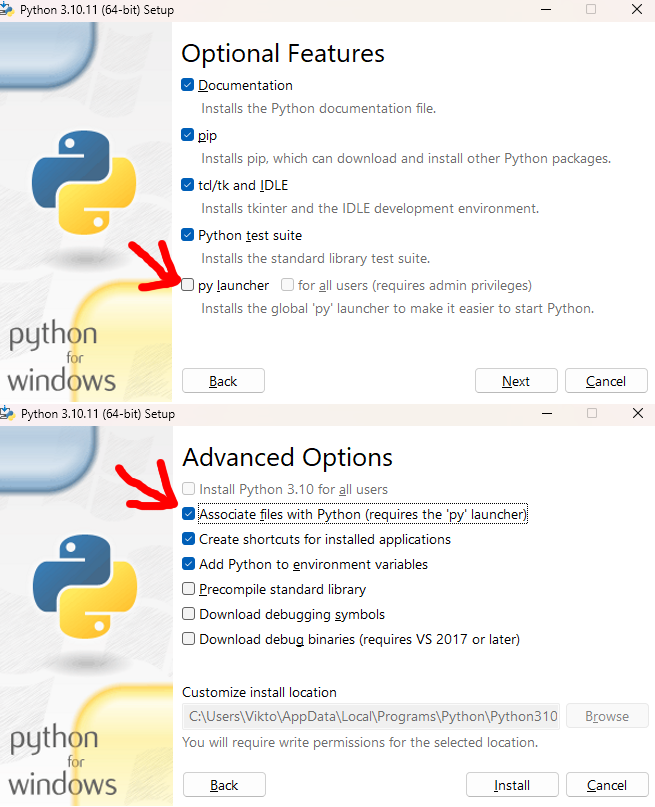
When installing python, by default these are unticked.
If you don't want to tick them, you can also launch it from the command line.
I could rewrite the installer in C++ to not require that either, but distributing a random exe file would probably be fairly suspicous 🤔
rancid plover
when i try to open the scrip this happen
earnest grotto
right click, open with, look for python with a blue rocket on the bottom left corner
if you can't find that, shift + right click the background of the folder, click open powershell here or open command prompt here, type in python ./Setup_ComfyUI_Intel.py, press enter
 earnest grotto
type python -m pip install requests
 earnest grotto
rancid plover
then?
earnest grotto
rancid plover
then?
Install miniconda or if you already have it installed, put its path at the top
rancid plover
is this one
 earnest grotto
rancid plover
is this one
earnest grotto
rancid plover
is this one
Do you have a shortcut for it in your start menu?
rancid plover
No
rancid plover
rancid plover
is this one
downloaded anaconda now??
earnest grotto
Download the script again. Run it again. It will show you a link to download conda from. That link is https://docs.anaconda.com/miniconda/#latest-miniconda-installer-links
rancid plover
now?
 earnest grotto
re-run the comfyui setup script
 earnest grotto
rancid plover
??
earnest grotto
rancid plover
??
Before starting the script, it tells you where it will use conda from
Where did it say?
rancid plover
 earnest grotto
ok, lemme think
rancid plover
Ok
earnest grotto
@rancid plover Alright, I've fixed all those issues, sorry
Please download the script again and run it
rancid plover
@earnest grotto you didn’t tell me what to do?
 rancid plover
What is the problem?
 karmic jasper
@earnest grotto I was about to ask whether I should attempt to install comfyui with you script tonight but I see you have your hands full already 🤣
earnest grotto
karmic jasper
<@311915623179485186> I was about to ask whether I should attempt to install com...
I'll put back the old one that worked while I figure it out
it's not activating conda, and I kinda feel like the old one wouldn't have worked either in that regard but whatever
earnest grotto
Also, would you be ok with running it if it was instead a random suspicious exe file? (code on github, download from github)
No setting executionpolicy to unrestricted, no installing specific python stuff
earnest grotto
karmic jasper
<@311915623179485186> I was about to ask whether I should attempt to install com...
I've re-added the old one which should work
karmic jasper
earnest grotto
I've re-added the old one which should work
ive tried so many guides for forge, comfyui but nothing so far worked. If AMD guys have it difficult I don't know what we're experiencing lol
earnest grotto
karmic jasper
ive tried so many guides for forge, comfyui but nothing so far worked. If AMD gu...
The problems I was having here were me being dumb / not testing the script enough and just running it on My System, since it Works On My System™️, not Intel-related or anything like that
Intel is in a better state than AMD from what I can tell as AMD still has no official, proper Windows support for pytorch
karmic jasper
earnest grotto
Intel is in a better state than AMD from what I can tell as AMD still has no off...
I'm really not sure about that. For LLM there is straight up an rocm version of kobold.
Of course Linux is where AMD really shines.
earnest grotto
That's not using pytorch
earnest grotto
karmic jasper
ive tried so many guides for forge, comfyui but nothing so far worked. If AMD gu...
Well? Success with the powershell script?
karmic jasper
earnest grotto
Well? Success with the powershell script?
I went to sleep mate, I'll try it today 😉
rancid plover
rancid plover
What is the problem?
@earnest grotto you didn’t tell me what to do?
earnest grotto
rancid plover
<@311915623179485186> you didn’t tell me what to do?
It's something I need to fix, hold on
rancid plover
Ok
earnest grotto
@rancid plover Download it again. Run it again. Say if anything's broken.
rancid plover
this happen
 earnest grotto
rancid plover
this happen
earnest grotto
rancid plover
this happen
Send the full log
rancid plover
 earnest grotto
@rancid plover Open command prompt, type in D: & "C:\Users\Sheikh Shariar Nehal\miniconda3\Scripts\activate.bat", show what it says
 earnest grotto
rancid plover
earnest grotto
rancid plover
How about just "C:\Users\Sheikh Shariar Nehal\miniconda3\Scripts\activate"?
 earnest grotto
Go into C:\Users\Sheikh Shariar Nehal\, and delete the miniconda3 and .conda folders.
Run the script again, it will offer to install conda for you. Do that.
After it closes, open command prompt again and type in "C:\Users\Sheikh Shariar Nehal\miniconda3\Scripts\activate" again.
rancid plover
this happen
 earnest grotto
rancid plover
earnest grotto
rancid plover
When you type this in the command prompt, you get the same thing again?
rancid plover
no
 earnest grotto
Download and install this miniconda3
Then, open command prompt, type in "C:\Users\Sheikh Shariar Nehal\miniconda3\Scripts\activate", show what happens
 earnest grotto
@rancid plover https://www.anaconda.com/download/success Download regular anaconda. Install it in a location that has no spaces in its path. So, not any folder with your windows username in the path. Open the script in a text editor, at the top you see condapath = "replace this text with your conda directory", if your anaconda3 path is let's say C:/stuff/anaconda3, then replace the text: condapath = "C:/stuff/anaconda3".
Kent Pribbernow
Anaconda is the birthplace of Python data science. We are a movement of data scientists, data-driven enterprises, and open source communities.
"Program Files" and "Program Filex (x86)" also have spaces in their path.
So, don't install there.
earnest grotto
earnest grotto
<@1248112198622904444> https://www.anaconda.com/download/success Download regula...
Very important to note, if you directly copy windows' slashes (\), you will need to put a 2nd one on each one
condapath = "C:\\stuff\\anaconda3"
Like this. With this direction of slashes.

 earnest grotto
rancid plover
script edit
earnest grotto
rancid plover
script edit
"D:\\App"
rancid plover
then
earnest grotto
run the script
karmic jasper
earnest grotto
run the script
Be prepared, in 7 hours I'm gonna try your script 🤣
earnest grotto
karmic jasper
Be prepared, in 7 hours I'm gonna try your script 🤣
The issue here is having spaces in the username
There was another person with the same thing
It breaks conda
If you don't have spaces, it won't have issues
If you do have spaces, idk what to tell you
rename your account or something
karmic jasper
earnest grotto
The issue here is having spaces in the username
There was another person with t...
I guarantee I will have issues 😉

 earnest grotto
rancid plover
what to do??
earnest grotto
rancid plover
what to do??
Did you set everything to bf16?
rancid plover
no
rancid plover
@earnest grotto??
 earnest grotto
alright, hold on, I'm downloading the models and I'll send you a workflow
rancid plover
ok
earnest grotto
fair warning, 370.56 seconds

original image is 635x638
guess i slightly messed up in making it a square
it doesn't need to be a square
rancid plover
How can i run?
rancid plover
earnest grotto
alright, hold on, I'm downloading the models and I'll send you a workflow
@earnest grotto??
earnest grotto
rancid plover
<@311915623179485186>??
Download the image, drag it onto confyui
rancid plover
stuck
 earnest grotto
rancid plover
stuck
earnest grotto
rancid plover
stuck
What resolution image did you use?
earnest grotto
If the image (after upscaling) is bigger that 1536x1536 you're probably going to run out of vram
I was hoping that the various tiled options would help with that but they don't, and you'd need to manually crop and tile your images
probably tiles not being offloaded to cpu when they should be
wonder if i can fix it
rancid plover
i use this image
 rancid plover
@earnest grotto how cant you please send me a vidoe how to do that?
earnest grotto
rancid plover
i use this image
Too big, reduce the upscaling from 2.5 to 1.8
earnest grotto
karmic jasper
I guarantee I will have issues 😉
Where issues 🐒
karmic jasper
earnest grotto
Where issues 🐒
I didn't have time to create any, hopefully tonight mate lol
But I appreciate you checking in with me
earnest grotto
if your internet is slow, it will take a while to download things
wheat grove
any help ?
 earnest grotto
wheat grove
any help ?
earnest grotto
wheat grove
any help ?
Your model has downloaded successfully, that error doesn't matter
Use the python script, I've also added more models and it can install a bunch of extensions for you (incl. fixes for supir)
wheat grove
okay got it
Native API failed. Native API returns: -5 (PI_ERROR_OUT_OF_RESOURCES) -5 (PI_ERROR_OUT_OF_RESOURCES)
is there any problem ?
ow thats the resolution
it was 1024 by 1024
which my pc can't handle
earnest grotto
wheat grove
Native API failed. Native API returns: -5 (PI_ERROR_OUT_OF_RESOURCES) -5 (PI_ERR...
You ran out of VRAM. Did you use the workflow that I posted?
wheat grove
same
earnest grotto
hmm
wheat grove
i am using a750
wheat grove
 earnest grotto
@reef ivy You had an a750, right? Did you need to close other programs or something, to get the q4 to work?
earnest grotto
wheat grove
In the meantime, you can download https://huggingface.co/city96/FLUX.1-dev-gguf/blob/main/flux1-dev-Q3_K_S.gguf and put it in ComfyUI/models/unet
Use that in the unet loader
Shouldn't oom with that one
sour depot
what do use for arc gpu in replace of xformers?
earnest grotto
nothing
reef ivy
earnest grotto
<@490291944841281547> You had an a750, right? Did you need to close other progra...
No it just worked but it is always slow. I never had much open just Firefox or edge and sometimes discord. I think closing discord did help speed a lil bit but not much, fp8 was the fastest with lowvram and an initial long generation.
reef ivy
sour depot
what do use for arc gpu in replace of xformers?
This may now be run automatically but you can try --use-pytorch-cross-attention
earnest grotto
reef ivy
No it just worked but it is always slow. I never had much open just Firefox or ...
Are you using a specific older driver?
earnest grotto
reef ivy
This may now be run automatically but you can try ```--use-pytorch-cross-attenti...
It was automatically used last i checked
reef ivy
I am still on 5971, I think this is the same driver I last tried it on. I haven't tried it since I last posted my results so it may be better on newer drivers or newer models/comfy updates etc.
earnest grotto
just noticed a bunch of various classes, properties seem to be missing in ipex 2.3
e.g. no torch.xpu.whatevertensor
raw cairn
what does this mean? incompatibility with things?
earnest grotto
It means the hijacks break, I did a PR to hackily fix that, no idea where some of the stuff went https://github.com/Disty0/ipex_to_cuda/pull/1
karmic jasper
@earnest grotto using the ps script, it's too late for me to figure out how to run python
reef ivy
Just check out some basic youtube vids and download some workflows etc.
earnest grotto
karmic jasper
no idea how to use comfyui though
There is an example image below the instructions (ball, says "use this workflow")
Download it, full resolution, not the preview, then drag it onto comfyui
karmic jasper
earnest grotto
There is an example image below the instructions (ball, says "use this workflow"...
Yeah, I only used fooocus before and I gotta say there UI difference is huge
I don't know what half the stuff does
I couldn't figure out how to change the gguf from 4_0 to 4_1 so I just renamed my file lol
I was sleepy
I have no idea why sometimes I get anime pics instead of realistic looking ones either
So there are loads to figure out
earnest grotto
karmic jasper
I have no idea why sometimes I get anime pics instead of realistic looking ones ...
Did you prompt for photos?
karmic jasper
earnest grotto
Did you prompt for photos?
Yes, just like I do in sd
earnest grotto
Show a screenshot
karmic jasper
earnest grotto
Show a screenshot
Does Q5 give better but slower results?
earnest grotto
karmic jasper
Does Q5 give better but slower results?
It takes more VRAM, it gives a better result. I think the performance of all of them is roughly the same.
karmic jasper
earnest grotto
It takes more VRAM, it gives a better result. I think the performance of all of ...
Oh, so there is no reason why I shouldn't go for that 😄
earnest grotto
If you have an A770 16GB, you can use all of them up to the fp8/Q8 ones, to generate at 1024x1024 without CFG (AKA 1 CFG)
karmic jasper
I think the setting is already at 1 cfg
earnest grotto
However, with fp8 I've run out of VRAM going above 1024x1024
karmic jasper
im trying to generate some images to see if it still goes back and forth with realistic and anime style pics
earnest grotto
karmic jasper
I think the setting is already at 1 cfg
"Classifier-free guidance" means predicting the noise twice, one with a blank or "negative" prompt (which would cause the model to predict a more generic or undesirable result), one with a regular prompt, and amplifying the difference
It helps with following prompts. Flux-dev is trained to not need CFG (normal diffusion models do), but CFG does help it anyways
Here is an example of CFG vs no CFG (what setting it to 1 does)
karmic jasper
so im already doing the right thing if mine is at 1, right?
earnest grotto
It's a choice to improve quality. It will take more VRAM, you will get better prompt following and negative prompts (to an extent).
karmic jasper
earnest grotto
It's a choice to improve quality. It will take more VRAM, you will get better pr...
What samplers and schedulers do you suggest?
earnest grotto
The default ones
earnest grotto
karmic jasper
well, i've got 16, gotta make the most of it
Flux can generate sane images that don't break up to at least 2048x2048, and for that resolution you will need spare vram
With Q4 you can do it
With fp8 you can't
with Q6... 🤷
karmic jasper
earnest grotto
with Q6... 🤷
first try
 earnest grotto
ya oomed most likely
karmic jasper
really?
wtf
restarted flux, batch size 1
now it's doing it, 4s/it
Ok, i even put anime and manga style in the negative prompt and i still got a cartoonish image
Let's see if i remove the negative ones
I have a feeling Flux just defaults to anime or manga style if the prompt sounds fantasy. I just now specified that it's a photo shot with a nikon camera, see if that makes a difference lol
unlike fooocus, comfyui is doing all 3 images at the same time therefore the it/s goes up by 3x if you want 3 images
However god damn, flux generates some amazing images
reef ivy
earnest grotto
However, with fp8 I've run out of VRAM going above 1024x1024
Tiling should help, I was able to upscale with flux using it without going over vram and thats on the a750.
 wicked fulcrum
Anyone try Flux1.1 pro?
rancid plover
can i use it on arc 750?
rancid plover
how can i fix this
 reef ivy
rancid plover
how can i fix this
reef ivy
rancid plover
how can i fix this
You need to download the requirements-ipex.txt in the pinned post and put in that folder. Also, it's probably much easier to just use Vik's script instead
 frozen warren
hello sorry for me being newbie
my question is which file i will use For Core Ultra w built-in Arc requirements-ipex-ultra.txt
For Arc dGPU requirements-ipex.txt
if my Laptop processor is " Intel(R) Core(TM) i5-7200U CPU @ 2.50GHz 2.70 GHz
earnest grotto
frozen warren
hello sorry for me being newbie
my question is which file i will use For Core ...
Neither. Your laptop is too old. Best case scenario, you can maybe run SDNext on the CPU but I wouldn't be sure about that and I'd expect more than 1 minute per image with SD 1.5.
frozen warren
earnest grotto
Neither. Your laptop is too old. Best case scenario, you can maybe run SDNext on...
what are the minimum requirment?
earnest grotto
frozen warren
what are the minimum requirment?
Intel Core Ultra with built-in Arc (e.g. 256V, 258V, 266V), or preferably an Arc discrete GPU (e.g. Intel Arc A770 16GB).
reef ivy
Open vino is probably best for CPU, not sure if Comfy has an Openvino option, but SDNext def does.
earnest grotto
Yeah but that CPU is also old, and only 2 cores/4 threads
Something modern would be at least 2x faster per-thread, probably including the efficiency cores now, nevermind the count
reef ivy
Yeah, not sure it would work or not but if he wanted to mess with it it COULD work for him(maybe), and faster than other cpu methods if it does at least.
civic charm
OpenVINO can use the iGPU
frozen warren
earnest grotto
Intel Core Ultra with built-in Arc (e.g. 256V, 258V, 266V), or preferably an Arc...
what about this specification ?NVIDIA GeForce RTX 3060 6GB - Intel Core-i7-11800H (Up to 5.0 GH
reef ivy
frozen warren
what about this specification ?NVIDIA GeForce RTX 3060 6GB - Intel Core-i7-11800...
3060 will not need anything arc related and will run on cuda. 6gb is rough but it should work out the box
might need alot of vram optimization settings though. Should be able to find info online
 pliant sleet
can you guys help me? flux dev fp8 (arc a750)
reef ivy
Are you using a premade workflow? Cant tell whats going on enough to know, flux won't work in the default workflow

 reef ivy
Try a smaller image and make sure you are running lowvram and have enough ram in your system. You could possibly be running out of vram. Also try one of the gguf models. Also what is the total size of that model an link where you got it.
pliant sleet
Civitai flux model pruned model fp8 15.91gb https://civitai.com/models/618692/flux
which model do you recommend for 1024x1024 flux on arc a750?
earnest grotto
That model will not work on an a750 no matter what resolution (not enough VRAM). Go get the 4 bit quantized one, install the GGUF extension
pliant sleet
It did work on 512x512 flux fp8 work it ,but its not working 1024x1024
earnest grotto
Go get the 4 bit gguf
earnest grotto
very nice
reef ivy
pliant sleet
Civitai flux model pruned model fp8 15.91gb https://civitai.com/models/618692/fl...
it's too big, go for the 11.9gb version of the fp8 if you want to use that version. I have only used shnell as dev would take way too long for me. Also, you will need a lot of system ram, I have 32gb. I find gguf to be slower but it should take less vram
reef ivy
pliant sleet
It did work on 512x512 flux fp8 work it ,but its not working 1024x1024
you will need to use some sort of tiled upscaler to go higher if you want to still use that one.
pliant sleet
i have 32 gb system ram, but only Q2 works with 1024x1024. Q4 not works dont know why
reef ivy
i was able to get 1024x1024(iirc) to work on fp8 with these https://huggingface.co/Kijai/flux-fp8/tree/main I have only tried shnell at like 4-8 steps though

probably would need 64gb of ram for the larger model is my guess
pliant sleet
thanks, i will try it out
karmic jasper
honest hull
pytorch 2.5 is now released. has xpu support
What does this mean for us plebs?
I'm sure it sounds great
 twin ivy
i am getting some errors
can anyone help me out
A module that was compiled using NumPy 1.x cannot be run in
NumPy 2.1.2 as it may crash. To support both 1.x and 2.x
versions of NumPy, modules must be compiled with NumPy 2.0.
Some module may need to rebuild instead e.g. with 'pybind11>=2.12'.
karmic jasper
twin ivy
can anyone help me out
I don't even know what your problem is 😔
twin ivy
i copied and pasted it here already
everything works fine but as i enter this command "python main.py --bf16-unet" it starts throwing some errorz
my system works but
theres this warning
WARNING: some comfy_extras/ nodes did not import correctly. This may be because they are missing some dependencies.
IMPORT FAILED: nodes_upscale_model.py
IMPORT FAILED: nodes_canny.py
IMPORT FAILED: nodes_morphology.py
IMPORT FAILED: nodes_audio.py
karmic jasper
And what are you trying to achieve? Just to install comfy UI?
twin ivy
no i am trying to run flux1 - dev
karmic jasper
Gguf?
twin ivy
?
karmic jasper
GGUF format?
twin ivy
whats that?
 twin ivy
 twin ivy
i am running this by downloading its safetensors to the comfyui folders
i have already applied all the safetensors to the respective folders
in comfyui
karmic jasper
Please answer the question above
twin ivy
Total VRAM 16896 MB, total RAM 32373 MB
pytorch version: 2.1.0a0+git7bcf7da
Set vram state to: NORMAL_VRAM
Device: xpu
karmic jasper
In any cause, I don't know how you installed comfyui but our lord and saviour @earnest grotto wrote a script that installs everything for you except the flux files.
It's pinned in this thread
twin ivy
shall i go for q6, or q8 or f16
karmic jasper
Try Q5 then you can go higher but keep in mind you have 16gb and your system uses some too
twin ivy
ok
karmic jasper
I think Q8 is already out of question
Due to size
You also need vae, etc in the appropriate folders for flux
Resources
text encoders(clip_l, t5xxl): https://huggingface.co/comfyanonymous/flux_text_encoders/tree/main
vae:

Let me find the dev vae
I think your link had the dev vae , use that
twin ivy
i was following this for installing comfyui gguf
https://github.com/city96/ComfyUI-GGUF?tab=readme-ov-file
GitHub
GGUF Quantization support for native ComfyUI models - city96/ComfyUI-GGUF
i got this
Installing backend dependencies ... error
error: subprocess-exited-with-error
× pip subprocess to install backend dependencies did not run successfully.
│ exit code: 1
ERROR: Failed building wheel for ninja
Failed to build ninja
Problem with the CMake installation, aborting build. CMake executable is cmake
[end of output]
i already have installed vae files, text_encoders, clip etc
for clip model its instructed to use whatever i was using earlier
civic charm
honest hull
pytorch 2.5 is now released. has xpu support
Do we have this function on XPU?
torch.backends.cuda.allow_fp16_bf16_reduction_math_sdp(True)
PyTorch 2.5 forces FP32 on SDPA Math attention and it is slow
civic charm
civic charm
Do we have this function on XPU?
```
torch.backends.cuda.allow_fp16_bf16_reducti...
Welp, this affects XPU as well
1.3 s/it with it False and 1.1 it/s with True
I guess rest is a performance degradation between IPEX and PyTorch 2.5 XPU
civic charm
civic charm
I guess rest is a performance degradation between IPEX and PyTorch 2.5 XPU
1.65 it/s on ipex vs 1.1 it/s on pytorch 2.5 with sdxl
pliant sleet
reef ivy
i was able to get 1024x1024(iirc) to work on fp8 with these https://huggingface....
it did not worked either
 reef ivy
pliant sleet
it did not worked either
reef ivy
pliant sleet
it did not worked either
try adding a tiled vae node
pliant sleet
can you share your workflow? please
reef ivy
So far its not working for me either, might be the latest drivers broke something with memory allocation.
Yup, cant even do 512 anymore and still on the old commit I used that was working
The last driver I was on when this worked was 5971 if you want to try, I don't feel like reverting to test right now. I will try and update comfy and see if it works
Probably best off just using gguf ATM.
Man I need more gigumbytes 
Yeah something broke in the latest drivers I think, probably not noticable on 16gb's
civic charm
honest hull
pytorch 2.5 is now released. has xpu support
Stable Cascade works on Pytorch 2.5 XPU
 honest hull
perf is a bit slower with pytorch 2.5, but dev experience is much better
honest hull
karmic jasper
What does this mean for us plebs?
this means that it would be easier to setup lots of those pytorch on github for Intel GPUs, without needing to use IPEX. workflow is more native and dev experience is better
more stable too 🙂
reef ivy
Would it work in comfy just by installing? Or would it need extra code etc
karmic jasper
honest hull
this means that it would be easier to setup lots of those pytorch on github for ...
I've actually been looking for a way to get local tts working like alltalk. but there are no guides anywhere as far as i can see so...
honest hull
reef ivy
Would it work in comfy just by installing? Or would it need extra code etc
probably need to change couple lines
no longer needing to import ipex
since ipex is not installed, then comfy device check would through error
reef ivy
karmic jasper
I've actually been looking for a way to get local tts working like alltalk. but ...
There is this, I think it does tts and voice cloning https://discord.com/channels/554824368740630529/1153719740351664239
earnest grotto
reef ivy
Would it work in comfy just by installing? Or would it need extra code etc
Comfy already has code to handle it
And disty's hijacks will still be necessary as long as people try to use cuda explicitly
i think the rocm version for amd had something akin to the hijacks built-in? 🤔
civic charm
earnest grotto
i think the rocm version for amd had something akin to the hijacks built-in? 🤔
ROCm didn't introduce any new kind of device
It uses the cuda device
So no hijack needed
earnest grotto
twin ivy
i got this
Show what you typed in
 devout tangle
So as pt 2.5 has been released does it mean i can just install it and run ollama and othe stuff out of the box?
karmic jasper
twin ivy
gguf files dont work on comfyui for intel arc using ipex
well, im using it mate
karmic jasper
reef ivy
There is this, I think it does tts and voice cloning https://discord.com/channel...
i'll have a look at that, thanks.
karmic jasper
devout tangle
So as pt 2.5 has been released does it mean i can just install it and run ollam...
I highly doubt that
karmic jasper
cause it would be awesome if i could just install pytorch 2.5 for alltalk and it would run natively lol
civic charm
civic charm
I guess rest is a performance degradation between IPEX and PyTorch 2.5 XPU
PyTorch 2.5 has performance degradation all across the board, not just Intel
twin ivy
karmic jasper
well, im using it mate
can you please guide me then?
karmic jasper
twin ivy
can you please guide me then?
delete whatever you have, use the script that's pinned in this thread by @earnest grotto and download all the files i mentioned to you before and you're all set.
 muted dagger
reef ivy
The last driver I was on when this worked was 5971 if you want to try, I don't f...
muted dagger
reef ivy
The last driver I was on when this worked was 5971 if you want to try, I don't f...
i can confirm its working on 5971 but not on latest drivers. i hope it will be fixed in new releases.
reef ivy
muted dagger
i can confirm its working on 5971 but not on latest drivers. i hope it will be f...
Can you make a report in #1028170137158811659 , appreciate the testing.
reef ivy
pliant sleet
can you share your workflow? please
seems that I was right and fp8 will no longer work right in the latest drivers, try reverting to 5971 if you want to use that version on an a750.
pliant sleet
it works on 5972 whql fp8 flux (1024x1024)
Even the original version of FP32 flux works, it just takes a long time.
reef ivy
I may have asked this a while back, but has anybody tried a cogvideox model on arc? I can't seem to get any of them working including 2b models. Just want to know if they even work on intel at all even if only on a770.
reef ivy
Same prompt in sd3.5 fp8. lol. At least no where near as good as flux with natural language prompts (or maybe at all). Although decent prompt coherence.
 earnest grotto
well uh, he definitely has 1 thumb and 4 non-thumb fingers
reef ivy
Probably need a lot of negative prompts like older SD models is my guess. really like how flux can just figure things out. Cool thing though, Sd3.5 gguf are actually faster than fp8 unlike my experience with flux
wicked fulcrum
reef ivy
Same prompt in sd3.5 fp8. lol. At least no where near as good as flux with nat...
Doesn't compare for sure. Stable Diffusion has always needed pretrained checkpoints to get to good quality. The base models tend to be wonky. Maybe we'll see this with SD3.5
reef ivy
Yeah, some finetunes may come this time with the new license. Flux is just a different beast, but I believe it's also harder to finetune so there is that
raw cairn
well, sd 3.5 is an open-weights model so whoever has a dataset and enough compute can finetune it, flux is closed source or step-distilled, so much much harder to finetune
earnest grotto
raw cairn
well, sd 3.5 is an open-weights model so whoever has a dataset and enough comput...
Flux Schnell has an apache license, SD3.5 has stability's (now better) license that requires you pay for commercial use (past >$1m)
raw cairn
earnest grotto
Flux Schnell has an apache license, SD3.5 has stability's (now better) license t...
yeah but schnell is step-distilled right? so finetuning it is probably not a good idea
there's openflux now, I guess
earnest grotto
people have been making some attempts to un-distill it yeah
wicked fulcrum
It's amazing how long and good SD1.5 has been with community checkpoints. This is what StabilityAI has going for it. Perhaps the community will lean in on 3.5
raw cairn
I think it'll be SD 3.5 medium if it turns out good cause large is a bit too much for most people to run atm
reef ivy
With gguf models anything higher than like 4.8 gb witb flux is slow, even when it fits into vram. Literally goes from 1s/it to like 15s/it. On a750. Haven't tried the larger sd3.5 models yet so could just be flux.
Also new lite distilled models out and gguf versions, only tried gguf-4ks and it was as bad as 2bit regular maybe slightly better. https://huggingface.co/city96/flux.1-lite-8B-alpha-gguf/tree/main

Also doesn't work with lora, at least not gguf
reef ivy
yooo, finally fixed generation speed with gguf on an a750 (at least with the gguf4 model for now). If you are on an a750 add --reserve-vram 6.0 I went from between 9-30s/it at 512x512 to like 4s/it with 1024x1024 WITH a lora loaded. crazy. This is along side --lowvram btw
If you are on an a770 it may work the same way with larger models that may be running slower than they should. I am on older drivers since the latest are broken, 5971
karmic jasper
reef ivy
With gguf models anything higher than like 4.8 gb witb flux is slow, even when i...
A770 16gb can do Q6 on my end around 3-6s/it
karmic jasper
reef ivy
yooo, finally fixed generation speed with gguf on an a750 (at least with the ggu...
I think I use the second option either way but what's the first one?
reef ivy
karmic jasper
I think I use the second option either way but what's the first one?
I am not entirely sure, but it is something with stopping random offloading of the model to ram I think. So 6gb is reserved for the model I think, I only have 8gb total and like up to 1gb or more can be used randomly by the system.
I also use a node to completely offload the text encoder to ram, it is made by the same maker of the gguf nodes. That may also help.
https://github.com/comfyanonymous/ComfyUI/commit/045377ea893d0703e515d87f891936784cb2f5de. All i can safely say is, flux go burrrr lol
pliant sleet
(system: 32gb ram intel arc a750 8gb) with the latest drivers (32.0.101.6129) 1024x1024 flux fp8 on comfyui works fine with "--reserve-vram 6.0" startup command. https://civitai.com/models/618692/flux?modelVersionId=691639 pruned model fp8 15.91gb AIO

1.37 time is very good
reef ivy
pliant sleet
(system: 32gb ram intel arc a750 8gb) with the latest drivers (32.0.101.6129) 10...
So vram fix? Nice!
Gonna upgrade in a few
pliant sleet
reef ivy
So vram fix? Nice!
but not works without "--reserve-vram 6.0" startup command
karmic jasper
But the question is, does this make any difference for an A770 16gb?
muted dagger
probably
earnest grotto
karmic jasper
But the question is, does this make any difference for an A770 16gb?
Could help with speed/startup
Test and find out
pliant sleet
After all, for example, if you are going to use FP32, VRAM exceeds 16 and as a result, VRAM explodes.
earnest grotto
you would need 48gb for flux at fp32
reef ivy
karmic jasper
But the question is, does this make any difference for an A770 16gb?
it should especially with models that are pushing your vram cap. Obviously you will likely need a larger number than. There is likely more info online, I kinda stumbled on this because Lora's were going so slow wtih flux and the solution ended up speeding up everything for me lol.
reef ivy
pliant sleet
but not works without "--reserve-vram 6.0" startup command
so fp8 won't work at all without it? I haven't tried it with the fp8 model on the older drivers yet but fp8 works out the box for me so i guess the vram fix isn't in yet.
if you can try the 11gb fp8 model without it and see if it works at all.
pliant sleet
Yes it hasn't arrived yet, it was working on driver 5972 but it took around 15 minutes.
pliant sleet
reef ivy
if you can try the 11gb fp8 model without it and see if it works at all.
I'm trying now
reef ivy
Okay, thanks man. I appreciate it.
pliant sleet
it does not working without "--reserve-vram 6.0" startup command.(latest drivers 32.0.101.6129)
 reef ivy
pliant sleet
it does not working without "--reserve-vram 6.0" startup command.(latest driver...
reef ivy
pliant sleet
it does not working without "--reserve-vram 6.0" startup command.(latest driver...
appreciate you checking it out. I will wait for the fix to update. Really glad I found that command though, seems to help a lot
muted dagger
so basically you can fix the latest drivers manually with startup command
reef ivy
Well the issue isn't just in comfy, it's in ipex in general. Also effects ai playground
pliant sleet
reef ivy
appreciate you checking it out. I will wait for the fix to update. Really glad...
I am grateful that you found this command, thank you.
reef ivy
No problem, it was all luck lol
karmic jasper
reef ivy
No problem, it was all luck lol
i'll pump it up to 14 then. 2gb left for shits and giggles in my vram then. i'll run some tests in a minute
Oh, turns out I'm using Q8.
Currently I'm getting 2.74s/it
with --reserve-vram 14.0 im getting 3.82s/it
with --reserve-vram 10.0 Im getting 3.50s/it
with --reserve-vram 6.0 I'm getting 3.19s/it
I guess I just won't use it 😄
reef ivy
karmic jasper
I guess I just won't use it 😄
What size is the model?
karmic jasper
reef ivy
What size is the model?
q8 is 12.4
reef ivy
Might only help with models reaching towards 16gb
reef ivy
So you may get better speeds with a higher quality model
I haven't tried ot with sd3.5, the q4 model was already fast for me. Could try a larger one.
Wasn't that impressed with it either, will look for some fine-tunes
Flux is now on par(without lora) with the speed I got with gguf4 sd3.5
reef ivy
You should be able too
karmic jasper

oh ok
at first it disappeared
now look into the eyes of that cat and say it's not impressive
XDDDDDDDDD
reef ivy
Lol, as long as you hide hands its pretty decent. Not sure if better than sdxl though. But probably just used to finetunes
Prompt cohesion is almost as good as flux
karmic jasper
reef ivy
Lol, as long as you hide hands its pretty decent. Not sure if better than sdxl ...
Oh i know mate, after using finetunes even flux is meh sometimes...
reef ivy
Yeah, right now skin is plasticy and its hard to do specific stylizations. Could probably controlnet with an sdxl or sd1.5 model though
Sd is better with art styles in general
karmic jasper
where am i supposed to put the sd3.5 gguf in comfyui? I tried both the diffusion_models and checkpoints folder but it's not picking it up
karmic jasper
flux is in diffusion for me
reef ivy
I have only used the fp8 model, maybe they have updated the checkpoint loader but it didn't work when I first tried.
karmic jasper
yeah nothing is picking it up
reef ivy
here is a gguf workflow for sd3.5 https://drive.google.com/file/d/1BF2xojTArCIoeKPRItc2fqHcIBAHF95O/view
you also need the gguf nodes if you haven't downloaded them, you can get them in the manager.
Credit to a youtuber named Monzon Media for that workflow, not my work at all.
 junior flume
hi is stable diffusion 3.5 can run in comfyui using intel Arc iGPU?
I have the same problem here
reef ivy
junior flume
hi is stable diffusion 3.5 can run in comfyui using intel Arc iGPU?
Yes, and use the script in pinned comments to install comfy
 tawny dock
Hi,does anyone know how to "launch with --bf16-unet"?
earnest grotto
tawny dock
Hi,does anyone know how to "launch with --bf16-unet"?
Say your issue and how you installed comfy
tawny dock
I installed comfy by following this message

 tawny dock
I used method two then
earnest grotto
tawny dock
I used method two then
Both methods require you to type in the console, command prompt, terminal, the black rectangle window, whatever you wanna call it
Show what you last typed in
When launching ComfyUI
earnest grotto
@tawny dock
Download this file https://raw.githubusercontent.com/a-One-Fan/ComfyUI-Intel-Installer-Script/refs/heads/one/Setup_ComfyUI_Intel.py
Put it in a folder where you want ComfyUI to be installed.
Run it, follow its instructions.
tawny dock
is it done?
earnest grotto
tawny dock
is it done?
It's done when it says it's done. Wait it out.
It will make a shortcut for you, then you double click the shortcut to run.
reef ivy
karmic jasper
have you tried SD3.5?
So tried sd3.5 both gguf4 and 5.1, with the argument 5.1 is faster but 4 is way slower. It probably only helps with models that are bigger than can 100% fit into vram.
Could also have to adjust the number according to the models size, bot flux gguf4 and sd3.5 gguf5.1 are over 6gb while sd3.5 gguf4 is like 4gb
karmic jasper
reef ivy
So tried sd3.5 both gguf4 and 5.1, with the argument 5.1 is faster but 4 is way ...
I couldn't get it to work, no work flow actually worked for me
reef ivy
You may need to go into nodes and open a command prompt in the gguf nodes and git pull to update manually
Try the install instructions here https://github.com/city96/ComfyUI-GGUF?tab=readme-ov-file#installation
GitHub
GGUF Quantization support for native ComfyUI models - city96/ComfyUI-GGUF
wicked fulcrum
reef ivy
yooo, finally fixed generation speed with gguf on an a750 (at least with the ggu...
junior flume
Hi i use the first method to install the comfyui and this error shows up
junior flume
(comfyui_env) C:\ComfyUI>python main.py --bf16-unet C:\ComfyUI\comfyui_env\lib\site-packages\torchvision\io\image.py:13: UserWarning: Failed to load image Python extension: 'Could not find module 'C:\ComfyUI\comfyui_env\Lib\site-packages\torchvision\image.pyd' (or one of its dependencies). Try using the full path with constructor syntax.'If you don't plan on using image functionality from `torchvision.io`, you can ignore this warning. Otherwise, there might be something wrong with your environment. Did you have `libjpeg` or `libpng` installed before building `torchvision` from source? warn( Traceback (most recent call last): File "C:\ComfyUI\main.py", line 90, in <module> import execution File "C:\ComfyUI\execution.py", line 13, in <module> import nodes File "C:\ComfyUI\nodes.py", line 21, in <module> import comfy.diffusers_load File "C:\ComfyUI\comfy\diffusers_load.py", line 3, in <module> import comfy.sd File "C:\ComfyUI\comfy\sd.py", line 5, in <module> from comfy import model_management File "C:\ComfyUI\comfy\model_management.py", line 143, in <module> total_vram = get_total_memory(get_torch_device()) / (1024 * 1024) File "C:\ComfyUI\comfy\model_management.py", line 112, in get_torch_device return torch.device(torch.cuda.current_device()) File "C:\ComfyUI\comfyui_env\lib\site-packages\torch\cuda\__init__.py", line 940, in current_device _lazy_init() File "C:\ComfyUI\comfyui_env\lib\site-packages\torch\cuda\__init__.py", line 319, in _lazy_init torch._C._cuda_init() RuntimeError: Found no NVIDIA driver on your system. Please check that you have an NVIDIA GPU and installed a driver from http://www.nvidia.com/Download/index.aspx
reef ivy
junior flume
``(comfyui_env) C:\ComfyUI>python main.py --bf16-unet
C:\ComfyUI\comfyui_env\lib...
The version with the requirements-ipex? Of so make sure you downloaded the right requirements version for your hardware then Try and pip install it again inside the environment.
Sometimes updates can override ipex install ao you have to run it again iirc
karmic jasper
reef ivy
You may need to go into nodes and open a command prompt in the gguf nodes and gi...
ok, got it to work, my bad. 1.6s/it
However I have no idea, i get images like this:
 reef ivy
So a new cogvideox model released and I got it to work! But I think the ipex hijacks don't work with cog video, if I try to go higher res or higher length I get something like this RuntimeError: Current platform can NOT allocate memory block with size larger than 4GB! Tried to allocate 6.43 GiB (GPU 0; 7.75 GiB total capacity; 3.71 GiB already allocated; 4.25 GiB reserved in total by PyTorch)

Reddit
Explore this post and more from the StableDiffusion community
snow gyro
reef ivy
So a new cogvideox model released and I got it to work! But I think the ipex hij...
I was getting the same kinda code in SwamUI when I tired to Upscale after an image generation.
reef ivy
Usually if it says it can't allocate more than 4gb then the fix isn't being implemented, not sure if that is availabe in swarmUI or not but you can check the pins for how to implement it in comfy. It was originally implemented by Disty in sdnext
I may be the first person to generate a video with cogvideox on arc afaik lol, nobody here seems interested in it for some reason.
reef ivy
karmic jasper
However I have no idea, i get images like this:
I get the same output with your workflow, might be the samplers.
snow gyro
reef ivy
Usually if it says it can't allocate more than 4gb then the fix isn't being impl...
I don't use the ipex-hijack so I'm not sure. I use my ComfyUI Standalone fork with the Intel wheels. I'm interested, video would be kuul to get working tho.
reef ivy
snow gyro
I don't use the ipex-hijack so I'm not sure. I use my ComfyUI Standalone fork wi...
#1193952640225267802 message
reef ivy
karmic jasper
ok, got it to work, my bad. 1.6s/it
actually I know, you need the tripple clip loader for sd3.5, dual clip is for flux. Actually you are missing a lot of nodes needed for sd3.5 try this workflow https://drive.google.com/file/d/1BF2xojTArCIoeKPRItc2fqHcIBAHF95O/view
Google Docs
snow gyro
reef ivy
https://discord.com/channels/554824368740630529/1193952640225267802/127488630169...
Yeah I read that but not sure what exactly it does? I used most of Bob Duffy's instructions to install ComfyUI and it's working good. What is the ipex-hijack supposed to do?
reef ivy
There is bascially a flaw in how arc handles vram so it cannot allocate more than 4gb at a time, the hijacks help get around that so you can generate larger images and use larger models etc. How it works I am not exactly sure you'd have to ask Disty or someone more knowledgeable about the code
But its pretty much a must have
i have an a750, so I have alot of issue. I've only gotten the latest model to run that I posted tbh.
snow gyro
reef ivy
There is bascially a flaw in how arc handles vram so it cannot allocate more tha...
I hadn't run into that problem until using SwarmUI. Which GPU do you have? How did you get Cogvideo working?
reef ivy
snow gyro
I hadn't run into that problem until using SwarmUI. Which GPU do you have? How d...
not sure how my answer got above your question lol, must have been editing something and forgot
snow gyro
reef ivy
not sure how my answer got above your question lol, must have been editing somet...
Yes I was but deleted it. Would you provide me with the workflow please? Thank you.
reef ivy
snow gyro
Yes I was but deleted it. Would you provide me with the workflow please? Thank y...
try this one, the 2b img2vid is the only model I have gotten to work, after you install all custom nodes you should be able to just auto install it by picking it in the model loader.
Oh, you may need to make the output smaller or less frames I saved it while messing with that stuff.
snow gyro
reef ivy
try this one, the 2b img2vid is the only model I have gotten to work, after you ...
Thanks. I got it working.
wicked fulcrum
reef ivy
So a new cogvideox model released and I got it to work! But I think the ipex hij...
There's a known issue on the memory bandwidth. I think Disty wrote a script to chunk it up
reef ivy
wicked fulcrum
There's a known issue on the memory bandwidth. I think Disty wrote a script to c...
I have his hijacks installed in comfyui, but they just don't seem to work with cogvideox for some reason. Unless there is also another script he has.
earnest grotto
reef ivy
I have his hijacks installed in comfyui, but they just don't seem to work with c...
If you installed with my script, I didn't enable them for a bit
it was one of those uh, temporary things
i updated the script now to re-enable them
or you can just go edit model_management, it downloads them, just doesn't edit that
reef ivy
I installed with the first script, I do see the line in management.py if torch.xpu.is_available(): from ipex_to_cuda import ipex_init ipex_init() xpu_available = True except: pass
I have only gotten the error with cogvideox, can work with flux, sd3.5 etc fine.
earnest grotto
ah, from back when i did have it enabled
reef ivy
*edit fixed!
Only reason I can get this model to work is because it's the only one that allows smaller sizes I think.
reef ivy
Okay, maybe this is an error on my end when I had to update before. I am redownload the model_management.py and going to manually edit.
Okay, when I did an update I think the way the line was placed in the .py got messed up, I was trying to use git to update without having to delete and re-edit the file every update and I guess it messed up the code even though it didn't pull an error. Seems fixed now will try some more sizes/lengths
snow gyro
reef ivy
Okay, maybe this is an error on my end when I had to update before. I am redow...
I think we are running out of vram memory because I have A770 and when I generate a video and look in task manager it's use about 13.5GB of VRAM and if I change the Resolution or length that's when I get the error. The max I can do is 480x368.
reef ivy
if it says trying to allocate more than 4gb, you need the hijacks. I fixed it and can get longer generations now. When I run out vram I get the Api error and have to restart comfy(so far)
on an a770 you should be able to do higher, I am on an a750 btw.
snow gyro
reef ivy
if it says trying to allocate more than 4gb, you need the hijacks. I fixed it a...
Ok. What file did you edit and what code did you use? Thank you.
sour depot
reef ivy
on an a770 you should be able to do higher, I am on an a750 btw.
will this work with mimic motions too? please share the file
reef ivy
snow gyro
Ok. What file did you edit and what code did you use? Thank you.
#1193952640225267802 message
reef ivy
sour depot
will this work with mimic motions too? please share the file
I don't know what that is, sorry. I posted a workflow for cogvideo above, and the ipex hikack process is in the pined posts.
snow gyro
Thank you. What resolution and how long of video are you able to make now?
civic charm
reef ivy
So a new cogvideox model released and I got it to work! But I think the ipex hij...
If cogvideo is using attention masks, it should be fixed with the last commit i pushed
reef ivy
I updated to the latest, it seems to work. I also had something messed up in my file
reef ivy
snow gyro
Thank you. What resolution and how long of video are you able to make now?
I did 480x720 and 49frames. It took 30 minutes though lol, and the output wasn't any better. The 2b model doesn't seem to be that great but it works. Might try some more images though.
snow gyro
civic charm
If cogvideo is using attention masks, it should be fixed with the last commit i ...
How do I install your hijack in Comfy standalone? Thank you.
snow gyro
reef ivy
I did 480x720 and 49frames. It took 30 minutes though lol, and the output wasn'...
I wonder if you can use a better model now?
reef ivy
For image2video you have to run the 5b at 480x720 and 49frames, and I can't handle that on 8gb I don't think. For the text models I am not sure, and there is also the fun models that may work with image2video but I am not sure.
earnest grotto
@snow gyro See 4 and 5 ^
git clone https://github.com/Disty0/ipex_to_cuda into Comfyui's comfy subfolder
Modify Line 67-74 in model_management.py inside the comfy subfolder to this:
try:
    import intel_extension_for_pytorch as ipex
    if torch.xpu.is_available():
        from ipex_to_cuda import ipex_init
        ipex_init()
        xpu_available = True
except:
    pass
GitHub
Adapt IPEX to CUDA. Contribute to Disty0/ipex_to_cuda development by creating an account on GitHub.
model_management has slightly changed though iirc 🤔
reef ivy
yeah, but just replace the same part and it should work. It worked for me so far.
snow gyro
earnest grotto
git clone https://github.com/Disty0/ipex_to_cuda into Comfyui's comfy subfolder
...
Yeah this it what mine looks like. What do I need to replace? Thank you.
 earnest grotto
snow gyro
Yeah this it what mine looks like. What do I need to replace? Thank you.
earnest grotto
snow gyro
Yeah this it what mine looks like. What do I need to replace? Thank you.
add
from ipex_to_cuda import ipex_init
ipex_init()
after import intel_extension_for_pytorch as ipex
indent it the same way as the other lines, the same amount and using the same whitespace (tabs or spaces)
snow gyro
earnest grotto
add
```
from ipex_to_cuda import ipex_init
ipex_init()
```
after import intel_ex...
Thanks it works but just wondering why is says skipping IPEX hijack Is this normal?
 earnest grotto
No idea. Don't think the hijacks say "True Message".
reef ivy
sd3.5 medium released, and it seems to still have a lady on the grass problem. But I think it has a fix in the workflow in comfyui to make anatomy better.
From my small testing of flux vs sd3.5 large, Flux seems to have the better prompt comprehension, while sd3.5 just has better and more diverse art styles
Flux can also do graphic design level text, which is honestly impressive. There was an sdxl lora that did something similar and this is better than that.
snow gyro
reef ivy
sd3.5 medium released, and it seems to still have a lady on the grass problem. ...
I tried the b5 but it was to big. I also tried the 5b GGUF model but I get this error. How did u get longer video's?
 reef ivy
gguf doesn't seem to work, you should be able to use the 5b model with 16gb vram? Are you still getting the 4gb error. And the max with 5b is 49 frames, I don't think you can adjust it at all. There may be ways to stitch videos together but not sure. I think the new 2b model can do longer than 49 but I haven't tried it. But you can try the Fun models, should be able to download them automatically but you need to change the sampler to the fun sampler (might be a workflow on their github) I think they can do longer or shorter videos and different resolutions.
reef ivy
New driver, someone let me know if it fixes the a750 memory issues lol.
reef ivy
I can't get a decent image out of the sd3.5 full models at all, only the turbo outputs right. flux gguf with 8step turbo lora vs sd3.5 turbo. Flux has the full text

 snow gyro
reef ivy
gguf doesn't seem to work, you should be able to use the 5b model with 16gb vram...
snow gyro
reef ivy
gguf doesn't seem to work, you should be able to use the 5b model with 16gb vram...
If I run the regular 5b I get the error in the pic and if I run the 5b-I2v I get this error RuntimeError: Native API failed. Native API returns: -999 (Unknown PI error) -999 (Unknown PI error). Idk?
 reef ivy
flux shcnell (forgot to add have a detail lora on both flux outputs)
 reef ivy
snow gyro
If I run the regular 5b I get the error in the pic and if I run the 5b-I2v I get...
reef ivy
snow gyro
If I run the regular 5b I get the error in the pic and if I run the 5b-I2v I get...
default settings? Try the fun models
also, do you start the Ui with --lowvram? if not try that
could also try this, with supplementing a larger (or maybe smaller) number for vram (not sure how it works exactly) #1193952640225267802 message
sd 3.5 gguf 5_1. Might try and download the gguf 8, I can't figure out how to get a good image, 20-40 steps different cfg's
 snow gyro
default setting on the 2 I mentioned. Tired with low vram and got same errors. I don't think I'm going to waste my time downloading any other 5b stuff.
reef ivy
No doubt, just with the fun stuff you can change the sizes etc. They require a different sampler as well
Haven't gotten any of them to work yet though, but may try later.
snow gyro
reef ivy
No doubt, just with the fun stuff you can change the sizes etc. They require a d...
I can change the sizes on the 2b are you not able too? I looked to see if a 2b GGUF was available but I couldn't find one.
wicked fulcrum
reef ivy
I have his hijacks installed in comfyui, but they just don't seem to work with c...
reef ivy
snow gyro
I can change the sizes on the 2b are you not able too? I looked to see if a 2b G...
Yeah, the latest 2b i2v can but I was referring to the 5b fun models
reef ivy
wicked fulcrum
https://discord.com/channels/554824368740630529/1127742927347666964/118705966533...
I have gotten it to work now, thanks for the help.
 quartz kelp
Got SD 3.5 medium running on my A580. It takes about 1 min per generation with 20 steps at 1024X1024.

 reef ivy
Redtash1 tried and couldn't get it to work, are you guys on latest drivers? It could be the vram issue effects the a770 too, if the 2b works for me the 5b should work for you all. I am on 5971
Cant get any of the gguf to work, only 2b i2v so far gonna try some other 2b models later
civic charm
snow gyro
Thanks it works but just wondering why is says skipping IPEX hijack Is this norm...
If you try to hijack multiple times, it will skip after the first one
civic charm
reef ivy
I can't get a decent image out of the sd3.5 full models at all, only the turbo o...
CLIP projections encoding corrupts with IPEX, try PyTorch 2.5
reef ivy
Has the speed issue been fixed in 2.5?
snow gyro
civic charm
If you try to hijack multiple times, it will skip after the first one
What is the solution to fix it?
snow gyro
civic charm
Remove the second hijack
Not sure how to do that. Could I just close terminal and restart Comfy? So if I get an error during image generation don't restart Comfy through Manager but shutdown terminal and do a complete relaunch of Comfy? Also is pytorch 2.5 ready for Intel now and do we have to change torch, touch audio and torch vision versions also and if so which versions do we use? Thank you.
reef ivy
Show a screenshot of what you added
karmic jasper
I would say I'm a pretty technical guy but reading all this I'm starting not understand what to do to get either sd3.5 or the video generator working lol
quartz kelp
wicked fulcrum
Is there a workflow or special tricks for sd3.5?
Besides running the latest version of comfyui I also am using torch 2.3.110+xpu and the following command line args "--bf16-unet --disable-ipex-optimize --lowvram --reserve-vram 7.5". Also here is the workflow I use.
snow gyro
quartz kelp
Besides running the latest version of comfyui I also am using torch 2.3.110+xpu ...
What GPU do you have? What is the --reserve-vram 7.5" for? Thank you.
quartz kelp
snow gyro
What GPU do you have? What is the --reserve-vram 7.5" for? Thank you.
I am using an ARC A580 8GB for SD 3.5 Medium, that command line arg I believe is to tell torch how much vram to use.
reef ivy
Shouldn't need the argument for medium, might make it slower
Haven't tried it, large only turbo works right in ipex
quartz kelp
reef ivy
Shouldn't need the argument for medium, might make it slower
It crashed without that arguement
reef ivy
Oh, you are on latest drivers? There is a memory issue in ipex, 5971/2 are the last working drivers, I guess that command helps on comfy though.
But in my experience, with smaller models it increases inference time a bit. Larger models it speeds them up
quartz kelp
is it fixed in 6130?
snow gyro
Here is a link to some SD 3.5 GGUF models. https://huggingface.co/ND911/stable-diffusion-3.5-medium-GGUF/tree/main
 reef ivy
quartz kelp
is it fixed in 6130?
reef ivy
quartz kelp
is it fixed in 6130?
Don't think so, but I didn't update since it wasn't announced. There is a thread in support about it.
https://discord.com/channels/554824368740630529/1297234954224144384 seems the vram command I found does help with it though but I won't update till it's fixed
brisk blade
ayyy i think i found my issue! Running stress tests at this point
 earnest grotto
the reserve-vram argument is (supposed to) make comfyui try to leave the specified amount of vram for the OS
whoops, got a bit confused
brisk blade
well no my issue was running ANYTHING AI related on my computer caused the video module to lock up, most of the time rendering the system unusable until you pressed the reset button
i915.enable_guc=3 in boot options helped I think
command used for this session was python main.py --bf16-unet --disable-ipex-optimize --lowvram --reserve-vram 7.5
pulling a crisp 3.5s/it at 768x768
reef ivy
earnest grotto
the reserve-vram argument is (supposed to) make comfyui try to leave the specifi...
Might be because arc cant allocate more than 4gb anyway?
reef ivy
Checking vram usage its definitely using less vram and the speed increase falls off at about 4gb reserved. I am guessing it is speeding up the process of using both vram and system ram by having a set number.
karmic jasper
I really gotta sort mine out one day
I'm just sad that flux doesn't know UK politicians well enough, I had such great memes in mind.
Now I'd have to get into face swapping and stuff and that's just too much effort for a meme.
reef ivy
So the cogvideox-5b-fun models do work, even on a750 just have to lower resolution and length. Use the fun workflows here https://github.com/kijai/ComfyUI-CogVideoXWrapper/tree/main/examples The img2video output isn't great though, about the same so far as the 2b(maybe worse with following prompt). I've only tried one picture though, the darth vader one I got off some youtube video. I've also changed my startup settings to reserve-vram 4.0 since I don't see any benefit to going higher atm and lower seems to worsen speed and increase chance of oom's but test for yourselves.

GitHub
Contribute to kijai/ComfyUI-CogVideoXWrapper development by creating an account on GitHub.
wicked fulcrum
reef ivy
So the cogvideox-5b-fun models do work, even on a750 just have to lower resoluti...
 snow gyro
If I try to run Regular GGUF workflow with hijack I get this error but if I remove the hijack it works fine.

 reef ivy
karmic jasper
This is my current workflow for sd3.5 but it doesn't work.
reef ivy
karmic jasper
This is my current workflow for sd3.5 but it doesn't work.
You need triple clip loader with the g and l encoders
Also, sd3.5 doesnt seem to output proper except the turbo model in ipex #1193952640225267802 message
Try this workflow #1193952640225267802 message
For turbo make sure its 4 steps and 1 cfg also.
reef ivy
snow gyro
If I try to run Regular GGUF workflow with hijack I get this error but if I remo...
tried the workflow and it worked for me. If it worked without the hijacks you may have made an error in the process. also post the error
snow gyro
reef ivy
tried the workflow and it worked for me. If it worked without the hijacks you m...
It's working now. I think I mite have figured out why 5b wasn't working, I was trying to use it with image to video but will have to try later. when you were using 2b, 5b and 5b fun were doin image to video or text to video?
reef ivy
For image to video the fun nodels all work but for the regular 5b you need the specific I2V(image to video) model. I only got the fun models to work because the i2v only runs at one resolution and frame amount which is too big for 8gb. Also you need to run the specific workflow for the fun models and regular models as they require different samplers and other nodes.
karmic jasper
reef ivy
Also, sd3.5 doesnt seem to output proper except the turbo model in ipex https://...
If it's only turbo then I'd consider it useless. Do we have a tutorial on the video one?
civic charm
reef ivy
Has the speed issue been fixed in 2.5?
Nope, still the same on 2.5.1 on all vendors
You can also run the CLIP models on the CPU with IPEX
CLIP is fast so it shouldn't be a problem to run on CPU
T5 is fine on the GPU
CLIP corrupts
This affects SD 1.5 and SDXL as well
SD 3 is more sensitive to this
reef ivy
It could just be the gguf models, I've tried sending clip to cpu but the results still seem bad most the time.
reef ivy
karmic jasper
If it's only turbo then I'd consider it useless. Do we have a tutorial on the vi...
I have only tried the gguf models so maybe the full models are better, you could try this workflow and see I sent the clip to cpu and maybe it improved the output some I dont' know. just drag the photo into comfyui.
 karmic jasper
reef ivy
I have only tried the gguf models so maybe the full models are better, you could...
karmic jasper
reef ivy
I have only tried the gguf models so maybe the full models are better, you could...
Okay. Do you have a list of what I have to download for the text to video stuff?
And the workflow?
reef ivy
karmic jasper
Okay. Do you have a list of what I have to download for the text to video stuff?
just load these workflows and then install missing nodes in manager #1193952640225267802 message
fun models for the fun workflows etc, models should download automatically when you select them.
karmic jasper
reef ivy
fun models for the fun workflows etc, models should download automatically when ...

GitHub
Contribute to kijai/ComfyUI-CogVideoXWrapper development by creating an account on GitHub.