I've been keeping my eye open for a used wacom intuos pro in my area for the 8000 units of pressure sensitivity (double I'm used to with my standard intuos) but I'm starting to think about just getting a brand new one of these Huions that have 8000 pressure because they seem to be ~$45, slightly cheaper than the asking price for a used wacom and the buttons are ideal for me as they are perfectly setup for things that have plus and minus like zoom, opacity etc. But the spinning wheel function on the wacom looks appealing, and my experience with my curent Wacom only leaves me trusting wacom but wanting more buttons and sensitivity and they are frequently for sale in the city near me. Anyone have any input on this to help me decide?
#š¬chat-general
1 messages Ā· Page 86 of 1
Does anyone knows a nice site like 99designs with inspiration for a wide range of graphic designs? Apps, UI UX e-t-c
Behance is nice, it's where everyone posts their projects and you can filter by discipline
https://www.behance.net/
Behance is the world's largest creative network for showcasing and discovering creative work
I also like Inspiration grid, maybe not so much for UI/UX but you can find some. It's like a random showcase of designers of all skills and paths
https://theinspirationgrid.com/
The aim of 99 designs is to sell their services so I bet they only showcase projects from people who operate there.
There are other specialised websites for print design, websites etc..
Design Boom, eye magazine, AIGA, the AOI, Colossal, Hyperallergic. Thousands of them!
I screenshot my bookmarks if you want to have a rummage (and I defo don't have everything bookmarked!)
hi guys its vex
sorry idk what happened,i think my account got hacked
i m really sorry for the links i posted
i created this account to insure it wouldnt happen again,i m sorry
THANK YOU SO MUCH 
Gave +1 Creative Carma to @ruby jackal (current: #6 - 932)
You're welcome!
Thank you!
Gave +1 Creative Carma to @graceful summit (current: #12 - 192)
Yo
Can anyone help me with a logo redesign(volunteer)
I don't know if this is even an approiate place to ask this question (apologies for the horrible drawing š)
I remember there are website designs, or like UX design more like, which include a certain animation. For exmaple, you would hover over an object or box in the site, and out of the box comes a line that smoothly travels to the side of the page which makes a popup appear, of an image or more text.
Either a website or maybe the name of how this type of animation is referred to.
Apologies if my language isn't comprehensible. 
need someone whos good at designing logos hmu in the dm pls
Anyone happen to have a site they go to for sound samples you can use similarly to unslpash and pixabay for images where it's legal/ethical to do so? I'm specifically searching for kind of bubble popping sound effects
Duh, I forgot pixabay has sound effects
Hi, is anyone willing to help remove these texts from videos? theyāre just like clips from the day I went out. Itās pretty short lol
Adobe stock comes with your subscription, as well. Thereās also many on this page: https://www.adobe.com/products/audition/free-sound-effects.html#
Hi, please explain more , is it a video you recorded? Is it an overlaid text? Or text messages received as you were recording? It is not legal to remove a watermark. Are you aware that this is the photo channel? Premiere pro is there: https://discord.gg/adobepremiere
Its videos I recorded but I added texts on there and I saved it, but I want the texts to be gone lol
How did you add the texts? Donāt you have the sources anymore? Anyways this is an after effects/premiere pro job, not an after effects one. Their discord has even more pros than here, might be hard to find pro bono help.
That is Photoshop - but Version PS 7.x (Year of publication 2002)
thank you
hi someone knows why my iphone 13 distorts light like astigmatism
is the camera broken?
do you have any smudges/covers on your camera lens? could be the light reflecting against that
did you accidentally leave any filters on?
does it happens with other apps too?(such as snapchat)
are you using 1x, 0.5x or 2x lens?
i have no cover, nothing
i tried with instagram and i have the same problem no filter and it's 1x
i tried to clean my camera few times but it doesnt work
im watching old pictures and i have this problem since a long time
Look inside the lens, is there any cracks or damage?
i notice the two are not the same
in what way?
The issue you're having is called lens flare - if that helps you in any way
Some say that this is a normal effect to have and the only solution really is to have re-angle the camera & have certain filters
or try tapping on the screen in the camera app and swiping down to reduce the brightness
thank you! outside the problem the subject is really interesting it makes a rapprochement between the human eye and a camera lens, the problem appears for human as "astigmatism"
Yeah when your squint your eyes haha, but in the camera world it's simply called lens flare š
I don't know what actually happens in optics, but it reminds me of my high school classes.
and there are even people who develop this disease and there are glasses for it.
Yep
thank you for your time !
No worries š
It could be that one of your lenses (there are likely many) is slightly shifted, they should all be parallel to each others, but if one has shifted from its slot, you would get a bizarre refraction of light between all the lenses (light bouncing nilly willly)
Is anyone idle this morning/afternnon/evening?
https://www.youtube.com/watch?v=qx14Juo4AQo&t=2s
šļø ååč³¼å „ćć¼ćøļ¼https://amzn.to/4fe5oJT
š ę Ŗå¼ä¼ē¤¾ć·ć°ć
āļø TELļ¼044-989-7430
š https://www.sigma-global.com/jp/
š©https://maps.app.goo.gl/T5P9cB5kd5VZGtgS6
š ćåćåć : processx2@gmail.com
šø Copyright(C) 2022. ProcessX. all rights reserved.
That's why lenses are fragile š
One of the ones I was most fond of.
Hi, You can put the toolbar on two rows, float the documents⦠not sure if youāll be able to find a win XP skin for windows š
Anyone know of an option to send a file to someone that is too large to send through an email?
Upload to Google Drive and send them a link to it.
Or you could use wetransfer.com
Seems like they're on the up-and-up. lol
I love "businesses" that hide their whois info.
Is there a reason to avoid that website because of that? I almost feel like if I was a business owner I would also prefer to keep my address private if given the choice.
Its one thing for an individual to hide their whois info. It might be their home address. When a "business entity" does it, its pretty sketchy.
Maybe they're fine. But that sort of thing makes me suspicious. Sorry. :)
Of course, if you're doing something sketchy yourself, perhaps you want a sketchy service. lol
lol. Yeah I'll probably go with google drive just because I'd rather the person download something from a familiar name anyways. But in the future it's nice to know of wetransfer. Thanks to both of you for helping me solve this problem
If James uses it a lot, they're probably fine. I just don't like when I see whois info redacted. :)
I'll probably end up using it eventually to avoid google telling me more about my data limit which stays perpetually at 90% for literally years somehow. I would be surprised/happy if I reached wetransfers 10 free transfers/3GB monthly limit.
My opinion of it is: Google already knows everything about me. Why would I share my info with yet another third-party that I don't know and who hides their contact information? To each their own. :)
Ooh
"Google already knows everything about me" lol I can relate with that mindset.
To be honest, I've been using wetransfer for 10+ years and it's never let me down. - They've definitely tried to monetize it more in the last 12 months, motivating people to subscribe, extend 'life' of downloads etc, but if you just ignore it and use the free options, it's solid. (In my experience at least).
Its not about tinfoil hats. I already have a Google account which comes with like 15GB of storage. Most people do. Why bother giving my data, info, whatever to some other company? Particularly one who hides who they are. If you're comfortable doing that: great.
Google can have my info for google maps alone. But throw in google calendar etc. and then this: https://labs.google/experiments. Hell, they can enjoy borrowing my identity whenever they wish lol.
hi I have a quick question, it's kinda asap so could someone help me?
Nobody would be able to help if you do not explain what is your request.
yo can anyone help me search for a font, ive been looking and its nothing like this one
āThis oneā did not show. Did you use the font identification websites?
is anyone running into an issue where you create a new document and photoshop just doesnt do anything
lets me open a previous document though
What is the size of the document that you're trying to create? Be mindful of the unit type. Take care that it's correct. Meaning that its not 2000 centimeters or similar insane size.
just 1024x1024 pixels
Does anyone know a setting in PS that can turn, let's say a good definiton photo, image of a landscape e-t-c into something more HD and cinematic? like 4k something.
??? 
where can i ask for help regarding somethign
Help with what exactly? You want to learn how to do something or you want someone to create something for you?
I click on it and it doesnt work
its a lot of frames and i dont wanna re-do it
How many frames is it? The max is 500 for GIFa
im at 29 rn
it isnt much but still i cant click on it wtf
Hello everyone
How are you all doing
I don't know. Save for Web works for me. What version do you have installed?
Adobe Photoshop Version: 25.12.0 20240903.r.806 055f5e9 x64
If iclose it do i need to do those frames again?
Save the Photoshop File (PSD) on your drive first. Restart Photoshop. Then try it again.
The frames are gone...?
I got the frames but its still not working
omg
Try a different file and see if that Export Type works with something else.
No it doesnt work with another file
I don't have 25.x anymore; I'm running v26.4.1. and its working for me.
i think i solved it
do you perhaps also know i can fix the photoshop back to normal ?
right now its set up to use for pixel art
Do you mean the Workspace?
yes
Window > Workspace... Choose a Workspace or Reset [Workspace Name]
What is the size of your document?
You need to change the resampling method to bicubic
Did you use liquify to slightly change the layers?
I actually made that with Adobe After Effects.
Everyone should try making a dumpster fire at least once during their career. haha
Do you think making that in After Effects was quicker than if you were to make it in Photoshop?
Technically, I made the dumpster and the initial fire shape in Adobe Illustrator. Then I animated the fire with After Effects because I could do the animation with an algorithm. So, yeah, it was way easier. I could tweak the settings for the animation at will. In Photoshop, I would have to paint/repaint the frames.
Also, with Photoshop, I would've been limited to a certain bitmap grid size. Given that its vector art, I could also rescale it to different sizes without quality loss. :)
Alright I gotta get on the ball and just finally dedicate some time to learn the basics of After Effects because that sounds cool
The whole controlling the animation with an algorithm
If you're into animation and motion graphics, its a no-brainer that you would want to learn it.
Photoshop, Illustrator, After Effects, Premiere... Its like the 4 legs of the CG/VFX table. :D
It's just so easy to procrastinate learning another program. The very begining is always the biggest headache.
It's daunting for sure. These are big apps with a lot of features and effective methods are not always obvious. But maybe you can approach it as learning various workflows. Steps that get you from inception to completion.
Yeah, thanks that sounds like a more practical way to look at it
Gave +1 Creative Carma to @river furnace (current: #2 - 2784)
could anyone help me edit a photo with closed eyes to make it open
I have my eyes from another photo
dm
I'm trying to find the perfect monitor for gaming and Lightroom. What colour accuracy is more important? sRGB or Adobe RGB? Because i see some monitors that are 95% + 99% - i'm assuming Adobe 99/100% would be ideal
Adobe RGB has a wider gamut so generally, the colors should be [more] accurate and perhaps more vibrant.
Yeah that's what i figured
Ideally i'd like 100% adobe (i've seen it higher than 100% somehow..) because i shoot a lot of drift cars with hectic liveries so i'd like to have the colours as accurate as possible
Cheers š
guys how can i achive this text effect?
Iām also impress by what cavalry (a third party app) can bring for motion design
Hi, which of the multiple effects on the text do you allude to? (It might even be hand drawn)
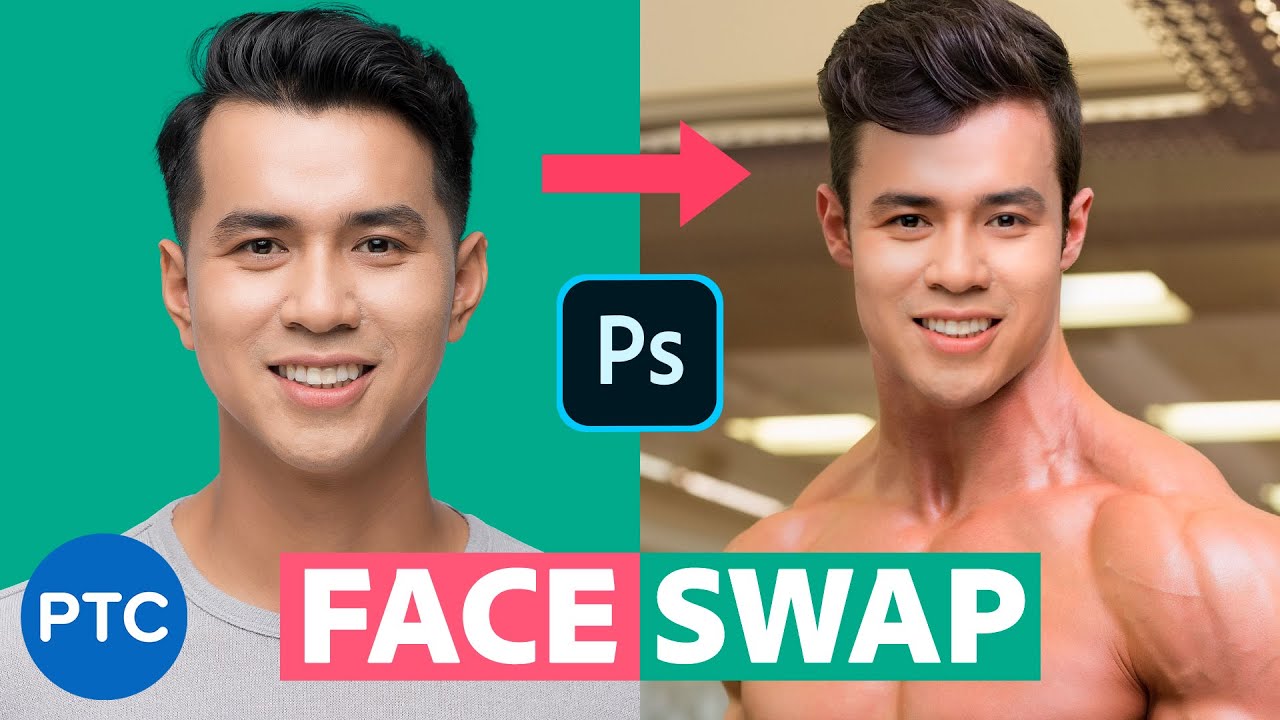
Hi, assuming both pics have the same angle and lighting , you do a face swap but just for the eyes: https://youtu.be/gOQ25Kp6jPY?si=87BkfRN2AUfXE-1C
FAST and EASY method for Swapping Faces in Photoshop! Automatically match brightness and skin tones.
In this tutorial, you will learn to Swap faces In Photoshop. Swapping faces or swapping heads is perhaps what Photoshop is most commonly used for. Almost every magazine cover or movie poster that you see has had a head or face replaced.
There a...
Hey can someone help me i wanted to take pics for insta but i have a type of skin dissease that brings down my confidence im willing to pay a litte if you can remove them. š
Hello
I can do it
Hey sadik thank you but i already have someone working on it. Thank you tho
Gave +1 Creative Carma to @fast gazelle (current: #976 - 1)
š
Do you have any other projects for meš
Not rn man sorry
Okay š
Can anyone help a brotha out?
Why does photoshop automatically alter my raw photos when i open them? i just want them exactly as shot
like with the profiles
i dont want none of that photoshop leave a fella alone
Hi, could you elaborate? Which camera are they from? Which profile are you using? By default you see the jpeg preview. You can setup ACR to use a camera matching profile. https://helpx.adobe.com/camera-raw/using/adjust-color-rendering-camera-camera.html
how do i change the anvas size and the image at the same time so it becomes 1170 and 1118
I see your canvas is smaller. You'll have to go to Image > Canvas Size... Then enter the values.
@here Psst! The Photoshop team is hosting an AMA on Reddit for the next hour. Jump in and ask your burning questions. Remember to keep it civil. https://www.reddit.com/r/photoshop/comments/1jg2nkv/photoshop_office_hours_ama/
hi guys
Hello, I downloaded more than 200 fonts for Photoshop. They are all on my desktop as files. Is there a way to transfer them with one click?
You can install all fonts at once by selecting them all, right-clicking, and choosing "Install for all users" (on Windows) or dragging them into Font Book (on Mac). This will install them in Photoshop and other programs automatically.š
I'm doing work that consists of putting series and films (even if it's minimal details) in a single photo. If it's like this, can anyone give ideas of what to add and where to put it?
You could add elements from other iconic movies or series to enhance the crossover theme. Maybe:
A lightsaber in his hand (Star Wars)
The One Ring floating nearby (Lord of the Rings)
A Joker card on the ground (The Dark Knight)
Hogwarts Castle in the background (Harry Potter)
It depends on the vibe you're going forāepic, chaotic, or subtle references!
thanks lot
Gave +1 Creative Carma to @drifting sapphire (current: #976 - 1)
Sounds like a Windows permissions error. Or some Windows System file is corrupt. Difficult to know. If you think this is related to an Adobe installation program, you can try contacting Adobe Customer Care. However, this sounds like you need Windows Tech Support.
Has anyone ever used these discounted PS/LR plans? As far as I can tell the difference is instead of 1TB cloud it's 20GB so if you can do away with that it's only $10 a month.
thanks,i like your ideas,If you could give me more ideas, I would really appreciate it.
Gave +1 Creative Carma to @drifting sapphire (current: #631 - 2)
I'm just looking at it waiting for there to be a catch but it just seems like a genuinely good deal that just isn't advertised.
Here are a few more creative additions to make the image even more engaging:
Thanosā Infinity Gauntlet resting on the armrest of the throne
The DeLorean (Back to the Future) in the background, as if it just arrived
A Portal (Doctor Strange or Portal game) opening somewhere in the scene
Deadpool peeking from behind the throne with a speech bubble saying something funny
Sherlock Holmes' magnifying glass placed near the character as if heās investigating
A PokƩball (PokƩmon) rolling on the floor
Spider-Manās web hanging from the top corner
i think windows
Commissioning for a small project
check dm
Can some one help me photoshop just a white dot away Ong pls
I need serious help yall have no idea
send it here
what to remove?
There is a white dot on the orange cable I need this gone
I promise ima go today when itās morning and cut the thing away Iām a electrician and I will get serious problems
Need to send a picture to my bos
can you mark that white dot?
Thank u men Iām 17 Iām new to this job shouldnāt be an excuse
But I will check next time
Forgot to cut these zip ties
Daaaamnnnnn thanks men wonāt ever happen again
Want a Amazon gift card? I only have cash Iām not allowed to use credit card ore twint
U saved me sorry for spamming Iām out let me know
nah it's fine. It was just a 1 sec work
Thanks men
what's it about?
dm me please
can't. you do
i did - need you to friend me back
kk
the lil smudge effet i alr know the font and that it has a drop shadow but the inner smudge
Hello
new to ps, how do I help with the contrast here? Does high contrast make it a good composition?
Can anyone make me a thumbnail
For something if they are free
Do you mean on the A and E? Itās the part that looks hand drawn to meā¦
What are your results so far with a powerful smudge tool?
Sometimes, it is a cast shadow, you need to render the drop shadow and move it.
ok thanks im gonna try that
Gave +1 Creative Carma to @graceful summit (current: #12 - 193)
sorry, but you gave me some very good ideas, I wanted to find a fund for my work if you could help me I would appreciate it
No problem! Iām glad you got some good ideas.
hey guys
in what channel could I ask for photoshop advice/help
If its a question about how to do something with Photoshop, then the #āask-a-question channel.
Do you have any idea what I can put as the background?
ah yes, thanks
Gave +1 Creative Carma to @river furnace (current: #2 - 2788)
Sure ,What u need bro
DMs
Howās all⦠I would like to see if someone can help me in DM with doing something for me as my computer is slow using the software and my file contents are rather sensitive, hence donāt feel comfortable sharing publicly. Can someone send me DM please? Thank you in advance
Once again asking if someone can help me finish up a project as my previous editor went MIA as heās dealing with personal things. I can look into commissioning you as well and share full details with you through DM. Please reach out if interested. Thank you
You too, huh? Feel like everyone has things more than usual right now
Your editor I mean oops^^
Yes sadly he just stopped responding⦠he had a lot of family issues and then I think he told me something where he got sick. Sent the man prayers because he was literally a saint I was working with
I might end up getting a MIDI keyboard and was just wondering if anyoneknows if it's possible to assign the MIDI knobs to things such as opacity/flow/brush size etc. because that would be the coolest.
I've seen some interesting custom shortcut assignments using Stream Decks. Not sure about using MIDI. Maybe.
I've got one of these: https://www.tourboxtech.com/en/tourbox-neo/
I didn't like it at first. Felt clunky. However, after I customized it for my workflows, it's awesome. Really... uh, handy.
Yes, you need an in between software: https://www.bome.com/forums/3/12071/controlling-nonmidi-software-like-photoshop-via-midi/
There is a discussion on the topic:
https://community.adobe.com
I work for a company and do image processing all most on a production level.Ā We are looking in new ways to streamline our process.Ā One feature we are looking at is using midi controllers, setting a row of buttons that take you thru the process.Ā Just wondering if any one else uses such a device...
Between the bulk of a MIDI keyboard, customization of intermediary software, and then mapping it across to work with Photoshop, it seems like a hassle to me. But to each their own. :)...
I totally understand that, but I think I'll like doing it/enjoying the outcome just as much as I like using PS. Like this would basically become my favorite decoration and also be usable.
Definitely a fun learning experience and if it ends up working out, useful as well. :D
Hi
Hi, if it is a pixel layer, invert its colors, Ctrl+I
Hello, can anybody tell me what's required to run 4k content (movies/podcasts) natively?
Do I need a dedicated GPU, does motherboard hdmi/dport standard matter in this case?
I have an old build I use for movies, i5 2nd gen so I'm unsure if the motherboard supports hdmi 1.4 or hdmi 2.0 although I do have the cables already.
can anyone make help me photoshop this image
tips for photoshop?
hmm okok
this?
yea
say me
me
Millenium Edition
guys, i did a nightclub photo shoot and the client wants some of my photos to add some darkness around edges to fill void and make things look more occupied
do u guys know how to do this?
You can get a solid layer of black, then use a mask and invert it (ctrl+i) then paint it in by using white in the mask or a gradient ex: radial gradient to make a "vignette" or black around the corners. If you don't know about lowering opacity and flow already, that will help you paint it more subtle in areas. Also messing with blending modes and opacity of the layer can help.
^
Can anyone help me solve a text, shape, etc. pixelated problem in photoshop? Iāll share some screenshots. I have tried everything from YouTube, Google and Adobe Agents.
I have never loved something so much one second and then hated it the next as I have with auto-select.
Where are the memes part ?
@inner hemlock
Is there any chance u could show me by u sharing ur screen, i have 0 experience in photoshop so a very quick show would save me man thank u so much
If u could help me out for a couple mins
Hi pls check this out if you are PS expert: https://discord.com/channels/547473772727238676/1353222917953163444
Hi, you want to add a vignette. The easiest is to do it in camera raw or Lightroom. Select you layer, then go to filter>camera raw, in the effects tab select the vignette and adjust. https://helpx.adobe.com/camera-raw/using/vignette-grain-effects-camera-raw.html
if as I hope, you edited your images in Lightroom; add it from there, it is way faster to apply it to multiple images. (You could use bridge to launch camera raw on one image, then right click this image, copy the develop settings and paste to the other images.
Gosh I was just trying to cancel my monthly plan and got hit with a like 80 dollars cancellation fee if i want to.
I understand it says like annual-monthly when you purchase, but it wasn't so clear to me that it'd be this high.
I feel like it's a little deceptive.
Extortion.
Can anyone assist?
Hi, there is a feedback channel if needed.
Try to get help on https://community.adobe.com/t5/account-payment-plan/ct-p/ct-account-payment-and-plan?page=1&sort=latest_replies&lang=all&tabid=all we do not deal with accounts at all.
ok
Hi guys, I had some issues in Canva, would someone mind helping me out.
I was wondering could someone help me out with removing the name if itās possible like how would I do it please and thank you
A Canva discord would be more relevant.
it does not exist yet, that's why I reached out here.
Hi, if you have Photoshop the fastest would be to use the remove tool: https://helpx.adobe.com/photoshop/using/remove-tool.html
Have you already tried the Remove tool? (here a quick & dirty attempt)
You could try Reddit: https://www.reddit.com/r/canva/ or Facebook: https://www.facebook.com/groups/220885194946296
Sorry, I don't have the capabilities to do that right now. Your going to want to look up vignette. Also if you want it more than just in the very outside of the image (results of a vignette) you will want to look up masking (In my opinion the most important thing to know about image editing as it's a key starting block of everything I do).
No assistance?
Why can't you export this?
Here is one way to do a vignette...
I can. I was attempting to discern file size differences at the same resolution, which I forgot to say.
Might be an issue I've been encountering with the Export As module.
Best to put a question like this in ask-a-question channel
can somebody make my image higher quality cause i dont know how
Did anyone sign up/watch those PS creative summit videos today?
need someone who is good with PS to do a few edits on a single picture for me, paying $$!
Hey guys, i am looking to make an album cover, what are some good tips i can use to make it
Hello,I will do it
Check your dm
š¤
Ok, bye I am quiting
š
Keanu Reeves wholesome 100
Minecraft good fortnite bad Destruction 100
Edit: Thanks for the gold kind stranger
Gave +1 Creative Carma to @jagged gulch (current: #977 - 1)
All right. Come on. I think that's enough.
It's your turn to make a creepy cat pic now
Life was good. Then we ran out of Fancy Feast.
Winner for today
Just enough time left in the weekend for some motivational graphics: https://discord.com/channels/547473772727238676/1353571518076031018
Can someone do a photoshop job for me
Of course, check your dmš
Dm for free,photo editing or thumbnail design
Im trying to make my school jerseys. Can anyone help Me? The same design and everything But yellow with black lining
i im having a promblem were i need to add a therhold adjustment on single image but when i add its applying on all the photos below
Hi! Alt+click between threshold and the layer to clip the adjustment.
https://helpx.adobe.com/photoshop-elements/using/clipping-masks.html
Anyone know anything bout pixel art??
Hi Please ask directly! Most of the pixel art issues revolve about the interpolation method. Set it to nearest neighbor: https://www.photoshopessentials.com/basics/how-to-resize-pixel-art-in-photoshop/
Oh I know that, I was just curious if anyone had any tips cause I'm trying to get Into pixel art
Did you watch some classes: https://creativecloud.adobe.com/fr/discover/video/Pixel-Art-Workflow/22383
I tried some isometric pixel art but I want to learn the general process for creating it
No....
I'll check it out
Start with https://www.youtube.com/watch?v=TmJpHk37Nrg and also https://www.youtube.com/watch?v=Ju1ExnQBt24
Step right into 2024 with Pixel Art. Learn how to best set up the canvas and unleash your creativity in Photoshop to bring vibrant, pixelated masterpieces to life.
šØāØ In this episode, we're thrilled to have the incredibly talented Illustrator Jeremy Lord join us for a burst of pixel magic.
Join us LIVE on Behance: https://behance.net/adobelive...
Weāre live from OFFF 2022 in Barcelona! Get your portfolio reviewed by leading creatives as they present their work and share insights into the creative industry.
Join us LIVE on Behance: https://www.behance.net/live/adobelive
Adobe Creative Cloud gives you the world's best creative apps so you can turn your brightest ideas into your gre...
Thank you š
Gave +1 Creative Carma to @graceful summit (current: #12 - 196)
@latent gorge - You can't advertise here. Sorry.
lol, that would make a great shirt. If you don't already know about https://www.threadless.com I'd recomend signing up. At the very least it's an easy/affordable way to get your own designs on a shirt for yourself (when the sales happen). But you can potentially make passive income from other's buying them.
It should be a poster in every break room. heh
guys, what are your thoughts on this album art?
what could i do to improve it, i am at wits end, one of my friends asked me to help them with their design
Everything can always be good or bad.
Whether it's good or bad will depend on whether or not you attend the briefing.
Did your friends give you a briefing?
there was no briefing, i am pretty sure she would be satisfied, but i feel like theres more i could have done to make it look better idk
what do you guys think?
Well...
If she is satisfied, don't worry and just deliver it like that.
We often "sin" by wanting to put too much stuff in.
Take advantage of the fact that you are excited and make another version, but if it is good, finish it.
what do you think i should do about a font, any different suggestion, i feel like it doesnt pair as well with the rest of the design
As I mentioned, without a brief for my mind to think about what the image should follow, it may or may not be good.
Maybe if you say what you want someone to perceive with your design, it will help the group to tell if something is missing.
If you think the font is not good, it is a sign that your art does not yet portray what you want to convey.
So, change the font.
can someone please help me for university application and give me 2-3 of their works if someone's down for that dm me or help me to make something easy because im in the rush\
Please elaborate, youād want them side by side, or the lighting of the second one to the first one?
???
wdym?
your asking for other peoples work for a university application? why?
Thereās indeed a huge ethical if not legal issue, and the topic is not even stated, and if it was digital art, shouldnāt OP have some images of their own to submit?
exactly
Need somebody asap that's pretty good at Photoshop, 200⬠budget. Hmu asap
Please do not post the same thing multiple times / in multiple channels. Here is the appropriate place to ask for project help.
check dm
Thoughts?
Hello. Please use #šproject-feedback for feedback and suggestions.
Some really interesting/well done edits https://anya-anti.com
Anya Anti Art
Official website of fine art photographer Anya Anti. An internationally published and award winning photo artist from Ukraine now based in New York, USA. I've been into photography since 2009. I've always been a creative person ā as a child I was good at painting and crafts. As my passion for art gr
^The blueberry one was my favorite
Can someone give me a fake job reference. I'll pay 5$
Dm me
Can anyone here do Pop Art? Need it for Instagram highlights
Can someone help me with a quick photo shop?
Would literally take like 5 min I just donāt know how to use ps
If you don't know how to use Photoshop then how do you know it would take five mins?
Is this your only purpose for being here? To post GIFs?
yes.
OK.
hehe I was assuming he's going to lose the server.
Dude just wants to reply to everything I post with a GIF... Sayonara.
yea this was next level stupidity. was watching from yesterday.
is ai in the current version of photoshop
im trying to make a logo for my and my griflreinds travel adventures youtube channel
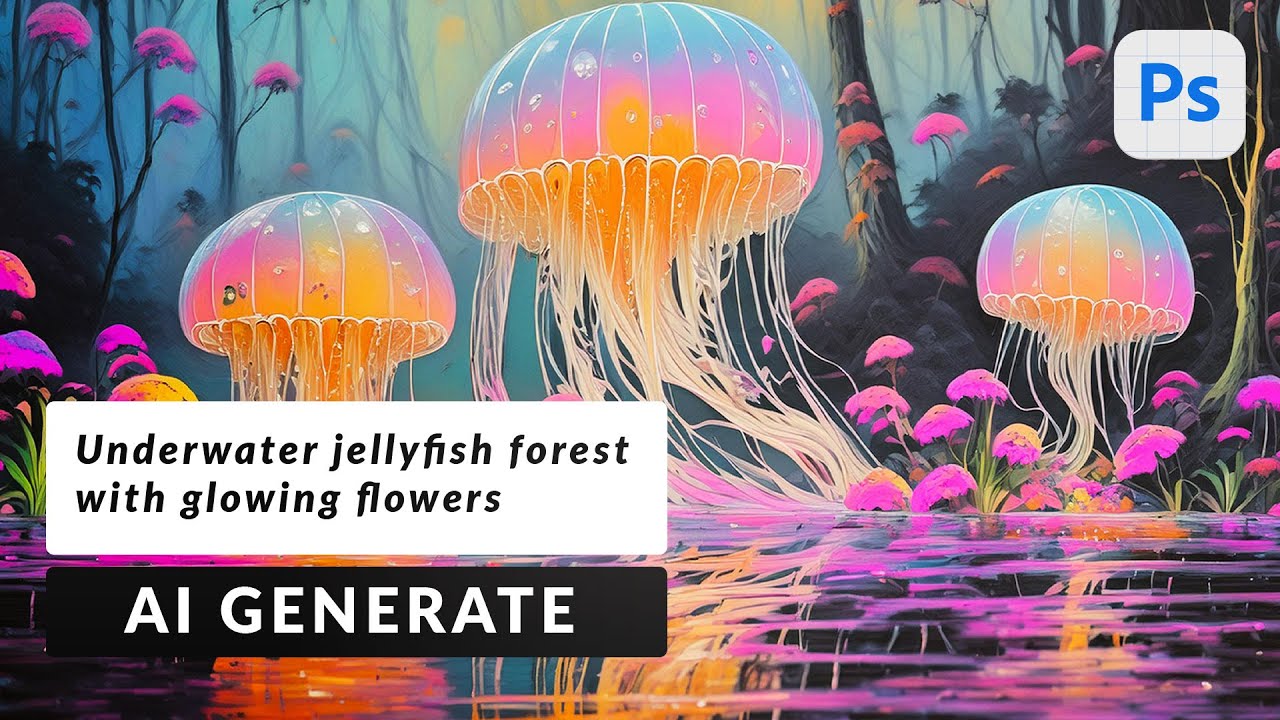
Yes. Generative Fill and Generate Image are in the current version of Photoshop.
any good videos on how to use these?
This is for the Photoshop Beta but some of these items are now in the General Release. https://youtu.be/5P4id0gvKXw?si=8jirP4B29LxiBb50
Craft stunning visuals from scratch in Photoshop Beta. In this tutorial we'll show you how to use text to create photorealistic or artistic styles, and seamlessly replace backgrounds.
Download the Sample Images and PSDs:
https://phlearn.com/tutorial/how-to-generate-images-from-text-in-photoshop-beta/
Learn the ins and outs of AI with our in-de...
Does anyone use illustrator here that could answer a few questions?
You can ask. We also have a dedicated Illustrator Discord.
Oh cool! Where can I join the illustrator discord!
Adobe Illustrator - https://www.discord.gg/adobeillustrator
Wow. Golf ball size hail. Just watched the movie day after tomorrow. https://www.instagram.com/share/reel/BAGmRPm4ii
I know, out of principle, i'm never using this sh *t again. It's so manipulative what they are doing.
Hi, does anyone do comission logos for free? I would like to have a new logo for my channel, and my budget is $0 USD. My idea is pretty basic DM if you would like to help me.
https://www.tyndellphotographic.com/personalized-gifts/tyndell-wood-wine-box
looking to pay someone who can help me make a laser engraving file in photoshop for this box
This beautifully crafted walnut wood wine box is perfect for a housewarming gift, anniversary, wedding, birthday gift and more! Customize the box to make it extra special. The box features a fully removable sliding lid for easy opening.
Please dm me
if there is any good photoshopper than can create an invoice for me for cash
In my experience people will be more likely to answer if you explain exactly what you need.
That helps not wasting anyone's time if they don't feel like doing it
check dm
hey anyone could make a desgin for this picture it has to be 500cm x 100cm
Please post in #šproject-feedback
what warrants that kind of size?
hello there
if any one looking for website development or website design just hit me up!
Pay gorn
There are 5 of them on this link: https://medium.com/design-bootcamp/10-design-prompt-generators-to-sharpen-your-design-skills-11853259a791
hi @river furnace this is ben
my alt
my personal one
@drowsy flicker 's gmail is gone
so that is the problem
Hi there! š±āØ Calling all Android creatives! Be among the first to test Photoshop on Android! No prior Photoshop experience needed. Join our pre-release community to:
Experience the new app before public release
Connect directly with our product team
Shape the future of mobile creativity
If you love creating and have an Android device, take our quick survey to see if you're a fit.
https://research.rallyuxr.com/adobe_community/lp/cm89bawwc0fk5i8lchp5h15f7?channel=share&signupFormId=cm89bawwc0fk4i8lc8jp4az64
ReOps platform for UX Researchers.
It's just a matter of time now for there to be a first person in the world to get in a car accident while Photoshopping
Do you need a phone with specific specs?
Hi all. I've been asked by a client to reproduce something with a similar background to this.
I suspect that the background is an image with camera trickery/ lighting.
Would there be any way of creating something similar using the Adobe suite?
uuum I have a question
soo my professor sent me a his photo and said that he needed to fix costume, he also said If I did it I will have good grades this semester, problem is I have no Idea how to do it, can someone help me?
You could generate some kind of abstract design in greyscale. Then put a Gradient Map over it. Then also add a mid-tone greyscale layer and apply a Halftone Filter to that. Something like that...
Thank you so much! I love the detail you have gone into to help me out
Gave +1 Creative Carma to @river furnace (current: #2 - 2795)
Can someone please help me and change the words THE ROCK to ON THIS ROCK with ON being where THE is with the same format and color and font as it currently is
I need to put my art onto the surface of wooden letters. The templates i was provided are of the wooden letters with a light background. I need to replace the wood with my art. Of course the background is not a solid color, and neither are the letters. Unfortunately i have over 90 of these to create. Can someone show me a quick process to accomplish this?
If I was an Adobe marketer I think I would try to introduce people/get them comfortable with Firefly by recomending it as a companion for other photo editing apps like GIMP etc. Because while there are a bunch of options for AI generators I haven't seen any yet that have the generative fill/removal which I think is a big deal in image editing.
can someone help me make a portfolio for application?
yes I can already help you š
Hey everyone, i'm new to this discord and kinda new to photoshop, i'm training and trying to reproduce images more or less complex, today i'm reproducing a color change in a ball, i would like to ask, does anyone know how can i chance the black color of the ball to a yellow one, emulating the result that i want (which is the image with the blue ball that i want to copy) ? I tried brush paint, overlay screen, but it's not with sucess, i'm not famliar with the flow of the brush either, as said i'm new and willing to learn. (also if i posted in the wrong channel feel free to guide me to the correct one)
the closest result that i came to is a color fill with the blend mode in color but i don't it's that, i need to get rid of the black color below and add on top a layer of yellow to get the blue style ball type of effect (i like this image for training because it shows me the guy clearly changed the color as he forgot to change the blue behind the psg club logo leaving it to it's original black color, so if he can do it, i can do it too)
Yeah, use a gradient map
a gradient map over the selection of the black square that i want to change the color of right ? Or the entire ball
Like this š š
Just over the bits you want to edit.
change your brush at least so it's got a hard 'edge' so the 'paint' doesn't blur off out the sides too much
yeah i brushed quicly to post a pic for you to see
thanks man
i appreciate the time you took to help that's exactly what i was looking for
Can you please share some visual examples for what you're talking about
paying 50 usd to anyone who makes the grass bit on top transparent
(has to be a good job)
I will do it
No no it's free
ty
And I can't do it now, what if I do it 15 hours later?
Here ya go
to clarify, the first is the template I have, the second is almost what I want. I want it without the print space and safe space shown on the letter like it is now.
I just added a reply with a template example, and an example with my art on it, but it has the creation safe space and dotted lines on it that I don't want.
I'm suspicious that you won't get 50 bucks...
lol no I know.
That was something else @low marsh š
So you want to put the paint splodges, in the perfect 'C' shape of the first image?
yes
Still waiting for my fitty. :D
Probably going to be difficult to match that poorly rendered AI text. Might be easier to just re-do it all. I'm not saying this is it but I am saying "all of the text should match."
This approach could be quickly used to do the whole alphabet if you need....
Thanks , I'll look at that in a minute or two. I have the entire alphabet, plus all the numbers and a few other shapes as well. 5 or 6 different designs for each.
Gave +1 Creative Carma to @desert portal (current: #5 - 1136)
Thank you but could you also change all the text to juste make it ON THIS ROCK?
Gave +1 Creative Carma to @river furnace (current: #2 - 2797)
@desert portal This looks like it should work. is the bulk mask a part of photoshop or an add on?
Nothing that I did in that section there used any addon.
On this rock... I shall build my doc.
Guys do you think there a good way to blend the ball better with the hand, i tried some dark patches with the paint brush to darken the area, what do you think ? Is there better way to do this
It needs to be less mushy and transparent. Darker. Closer to the edge of the ball.
I was thinking more like this:
how did you kept the painting below ? When i paint and i get too close to the ball it paints on the ball and not hte hand despite my layer being below the ball
Since there are multiple light sources, you might have to experiment with a couple of shadows in this.
Why does it do this?
The snowflake file is not actually transparent. It has a checkerboard background.
Google is a liar
lol
it will be painful to remove the background šŗ
It's a 'premium' stock image, that they want you to pay for...
how did you find so fast?
Reverse image search
unn
Wow, I didnāt realize the Snipping Tool had this feature. Iāve been doing it manually on Bing.
btw, shortcut for snipping tool is: win+shift+s
What are your opinions on the Photoshop app for iPad? I'm coming from Procreate here, and I've heard that the Photoshop app for iPad is really bad compared to the computer version
I didn't know it either.... until 8 seconds after i started looking for snowflakes š
Anyone experienced with drawing?
i draw
Is this a commission request?
What do you think of my skills?
It can be, I am trying to make a logo but I suck at putting pen to paper
(joke.... mine ain't that good)
I can tell who it is tbh...
can I share this image with my friends (I'll give you credit if you wish lol)
Suni, if you want I can DM you and we can discuss my idea if you want to make some $$
I was gonna say that I'm more of an animator/illustrator and not really a graphic designer so I'm not sure if I'd be the best fit for the job
No worries
Good luck with your logo design!
I got ai to make this
Idk how good it's going to look with what I'm creating I'm trying to create a version of this
Something like that with some adjustments to centre piece and some text
Can anyone help me make a lochness monster using different animals like i used a dinosaur head, turtle body, and a whale tail (all royalty free) but im having trouble blending them together so it looks like a lochness monster
Came for help š„³
Show what you have so far!
IMHO, firefly should recognize the watermark and refuse to work.
?
Hi, are you proposing to help, or seeking help? If the latter, state clearly your request and expectations, itās faster than asking to ask š
can anyone use this prompt in photoshop gen.. and show me the result please? try to make it as realistic as possible: An overgrown jungle alive with vivid greenery, ancient ruins partly hidden under layers of moss and vines. A mysterious glowing artifact emits a soft golden light amidst the dense foliage. Exotic birds and animals peek through the lush vegetation, with rays of sunlight streaming through the canopy in a serene yet adventurous atmosphere.
There is a lot here to capture in a one-shot generation. You should do this in pieces and comp it together.
Also, "a mysterious glowing artifact" is likely too general. What artifact? Is it a statue? A vase? You should be specific about it.
I was working on generative workspace so no option for that. but I generate and then open into Photoshop and work from there. But I was wondering what other peoples result looks like.
If someone uses the exact same prompt, they aren't likely to be very different.
No options for what? You build up the comp in pieces instead of trying to prompt everything in a one-shot generation.
yea I understand it will be different. but I wanna see the quality. how realistic it would be.
No. I said, "If someone uses the same prompt and settings, it will likely NOT be very different."
umm. will it really be a similar view?
That's what it gave me. For Content Type, I used "Photo" and set the Effect to be "Hyper-realistic"
As I said at the start, I would not try to do this all in one prompt, in a one-shot generation. I would generate pieces and composite them together.
Background, midground, foreground (or subject of interest for foreground)
okay I will try that.
Think of the AI as your camera or photographer. Use it to capture the elements you'll need for the scene you're trying to create.
Then do what we've always done with Photoshop. Composite disparate elements together to build up the composition.
Great point!
Anyways... that's what I do. AI never just gives me what I want. I always have to manipulate everything. So I just go in with that notion that I will build the composite. I want do that anyways because I want to be in control of the tools as opposed to the tools telling me what I get. :)
hehe your right. Thanks.
Also, the quality of the objects and scenes that it will produce are directly proportional to the training data they used. So general descriptions of things, like "an artifact" could result in almost anything being rendered. It would perhaps even render something that doesn't make a lot of sense like in my example. I'm not even sure what that is. Some sort of golden relief carving there in middle of a monument. It's weird. :)
got it. I will be more specific about that.
You need Android with at least 6GB of RAM available š
dms
It's fine. I was just kidding. If you want to do something nice, please donate it to a good cause or charity of your choice.
hello i just added a thershold on 1 image but why it is applied on every image i dont want that to happen so how can i only apply in one image
or any effect, how to just add in a single image
Is it an Adjustment Layer? If so, right-click on it and choose 'Create Clipping Mask' and then it will only apply to the layer directly below it.
so after doing that i can add any different effect i want in the rest images
Correct. That's what it should look like. See how only the apples layer is affected?
yes sir
thank you
btw whats smart object
convert to a smart object
like i wanted to change the dark area colour to something else
Smart Object creates a protective container around an image. It essentially embeds one image inside the parent image. It also encapsulates it so that you can add transformations, effects, etc without resulting in a destructive effect on the pixels inside the image.
Add a Gradient Map as an Adjustment Layer and choose colors for the dark and light regions of the image. Then "clip it" like you did with the Threshold Adjustment earlier.
When painting I frequently only mess with flow, does anyone use both that and lowered opacity while brushing? Or perhaps just opacity?
I use both. Depends on what I'm painting.
I also have Brushes that make use of Opacity and Flow jitter (controlled by Pen Pressure)
You can find that under "Transfer" in Brush Settings... and the "Control" feature.
I did not know about those settings, but definitely can see me messing with them. Thanks for sharing that nugget of info
Gave +1 Creative Carma to @river furnace (current: #2 - 2801)
I am a Professional Photoshop expert any work for me dm
little pay cause need money thanks
I always shoot many of the same photos with my phone and I need a windows software that can automatically just find the good photos and delete the bad ones, but I can't find any function for that inside lightroom cc. Help! 
You can try software like Adobe Sensei (built into Lightroom CC), ON1 Photo RAW, or Excire Fotoāthese use AI to help sort and rank images based on quality. If you're looking for an automatic way to delete bad photos, tools like PhotoSweeper (Mac & Windows) or Duplicate Cleaner can help find blurry or duplicate shots.
For a fully automated AI tool, you might want to check out Aftershoot or Narrative Select, which specialize in culling bad photos automatically. Let me know if you need more recommendations!š
I cant find it in lightroom cc
PhotoSweeper is only available on mac
You're rightāPhotoSweeper is Mac-only. Unfortunately, Lightroom CC doesnāt have an automatic āgood vs. badā photo selection feature.
For Windows, you can try Excire Foto (AI-powered culling) or Duplicate Cleaner (helps remove bad/duplicate shots). If you want full automation, Aftershoot or Narrative Select are great AI-powered options. Let me know if you need help setting one up!
ummm... no
Guys, I need a Japanese guy, I need to consult with him.
And you thought you'd randomly mention that in the chat channel of the Photoshop Server... (?)
I think it's both a stupid thing to ask for... but also intrigued š
Hey guys, is there a way for me to clean up the neck and have a nicer looking smoother neck ? The image original i got it from twitter (the neck is inda bad there too)
anyone have any idea how can i fix this small piece of skin lacking in my character, how can i properly fill it ? Thx
You can fix this by using the Clone Stamp Tool or Content-Aware Fill in Photoshop.
Clone Stamp Tool: Select an area of skin close to the missing part and paint over the gap.
Content-Aware Fill: Make a selection around the missing part, go to Edit > Content-Aware Fill, and let Photoshop fill it automatically.
Both methods should work, but for more control, the Clone Stamp Tool is best.
I'm calling that 2025 will be the year that ClipArt comes back in style lol
Feel free to provide an example of this clip art.
Like this? Or that juicy word art
lol, this is exactly what I was referring to.
thanks ill try tomorrow
Gave +1 Creative Carma to @drifting sapphire (current: #472 - 3)
I always wanted to own a legit camera but after watching some of those PS virtual summit videos I feel like I am craving one
It was like a commercial for cool things that can be done with one
What are you watching?
Just now "Creating āminiatureā scenes in Photoshop" from the PS virtual creativity summit but there was so many other videos I skimmed through that just made using photography look like something cool and interesting
Got a link? I'd be curious to see what's the bleeding edge
Even in a world of fully ai generated imagery (pre AGI) it's sooo worth it to learn all the skills like photography! Great new hobby that enriches my and probs your own life, amd to be cynical, you'll understand how to make better prompts š
Tools will never replace ideas
Ehh that sound like sanctimonious BS, but you get the idea xD
(Sorry not to say you're oblivious to all this :D)
Here's the link If you didn't already sign up you'll have to do that, and there's a chance you're too late as today was the last day of it. But if you can sign up with your email the free access does end Friday
Passed me by sadly. Was there a particular piece of tech that made an impession on you?
Some of these new image models are crazy
Just the camera and them taking the time to set up the shoot strategically with lighting and whatever just seems like something "new and exciting." I've never used anything better than a budget smartphone camera.
As in how proper the image comes out?
Yeah. How good they are at everything.
I just got early access to Whisk Animate from Google. This is gonna be fun. heh
Nice!
There are too many things coming out. Over-stimulated.
@river furnace @inner hemlock I think I saw the camera rig for the matrix (1999) bullet time shots and was like.. right, yep, that's maxxed š
Best time to be alive now. Quality of life with all the tech. Can't help but feeling it's moving too fast though.
From google GenType lol. I was hoping it was just one person for each letter but I'm not complaining
Something things like this have sorta shown me is that original ideas are so rare these days were happy with just a novel recreation
No hate, it is fun and novel I guess But the whole, 'nothing new under the sun' is so true and yet so, I dunno, needs an update
Looking forward to seeing how the anti ai work I branding and art proliferates, to see what that movement looks like
For me I wanna learn to make stained glass and linocuts, hope there'll be a PS update to negate years of craft š
What's stopping you? Do it.
Typeset an entire newspaper using hand-carved woodblock letters and illustrations. That might be fun.
Good bloody question.
Learn how to churn your own butter.
Did it once accidentally
You're so right.
With AI and automation, there will be all kinds of time for these things in the near future.
Hopefully..
hello, why my photoshop is always grey screen whenever i opened it on my macbook?
Try pressing W, and zoom out?
Because the GUI is grey until you open a document or start a new one.
F sorry
not working š¦
Screenshot?
like this
and whenever i want to make a new document it doesn't let me do anything :"
Maybe because its some old hacked version of the app... (?)
idk, i get it from my friend who unfortunately moving abroad to study :""
Better catch him before he leaves. I think he gave you broken, hacked software.
Or get yourself an Adobe Account and a legit copy.
Maybe the window is elsewhere? If you have a 2nd monitor, looks like you've dragged the open file out of the app if that makes sense... or it's just scuffed
Looks bust
how much should i pay for a legit copy..?
If you have no files open, looks broke
idk how to undrag it (if that's make sense)
I don't know. Check https://adobe.com Plans
I'd say click the window option at the top but looks like you don't have any ui...
it has, actually. then which one i shall click?
Reset Essentials...
it does work when i click photography, but
But what? File > New...
but it wont work when i want create new file
@river furnace
Yeah is this just because you haven't got anything open?
Ahh
Sorry it sure. Definitely not normal š¬
I think your new document is covering the entire screen.
I see*
Try to scale it down. The window.
how to do this... u mean like the whole photoshop window? or new file option window?
I really don't know. The New Document window.
Do you know how to scale a window on a Mac? Grab one of the edges and scale it down.
I really have no idea what's going on with this thing.
it appears that it won't let me create a new file, but if open existing file, it could.
ahhh, yes it works but the pixels and all the info you should fill is blank...
Are you sure that its just not a grey background in the image? Look at the Layers Panel.
This is extremely difficult to troubleshoot.
there are no layers to be selected. it just grey as if it wont let me create a new document....
sorry guys :""""
Sorry but perhaps get a real version of Photoshop. I can't spend all night trying to help fix some broken, hacked version of the app.
alright, thanks...
Gave +1 Creative Carma to @river furnace (current: #2 - 2803)
also thanks @mortal stratus
My guess: a tattoo design, to make sure it does not say āthe one wearing this is stupid?ā
Is that post AI generated? Cause it sure as hell sounds like AI generated

Anyone know why this could be happy when importing a photo into photoshop. They've been downloaded from facebook and its only just started doing this
seems to be data corruption
(similar to this topic: #āask-a-question message)
Please I need help with my illustrator
(wrong server)
Please ask your question there: https://discord.com/channels/634884897185595412/637037500451258369
Help with 'my illustrator' ...is your illustrator a person who does illustrations for you or are you referring to the app from Adobe? :)
helo
so i just looked at every tool and i have a basic idea of all of them
i wanna know what to do next
like what to learn next
ask ppl what to make
do free commisioning
u learn while provide
Create something.
Can someone help me with my picture?
I have photographed a car in a residential area which is of course not so nice now.
Could someone possibly help me to insert the picture or the car into another location?
Unfortunately I don't know how to do this so I need your help
you could just drag the Img from file explorer to photoshop
or go to file -> place embedded then select the Img you want
š±āØ Calling all Android creatives! Be among the first to test Photoshop on Android! No prior Photoshop experience needed. Join our pre-release community to:
Experience the new app before public release
Connect directly with our product team
Shape the future of mobile creativity
If you love creating and have an Android device, take our quick survey to see if you're a fit.
https://research.rallyuxr.com/adobe_community/lp/cm89bawwc0fk5i8lchp5h15f7?channel=share&signupFormId=cm89bawwc0fk4i8lc8jp4az64
ReOps platform for UX Researchers.
Perhaps show us the picture please?
I have PS Mobile
I donāt know how to use PS on Pc
Sure wait
It might help you get more accurate answers if you state it in your opening post, as it he toolset and number of users is way different.
Here is how to replace a background on Photoshop on iPhone: https://helpx.adobe.com/ie/photoshop/mobile/edit-images/retouch-images/change-or-replace-backgrounds.html youāll need to find a new background with a similar perspective and lighting.
Ok, the shot of the car is ok.
Pop it into photoshop: use select subject, then select and mask - pop into a new layer with layer mask. Then open the pic you want to put it in. Drag the car layer from its tab to the tab with the new background.
Hi, are those instructions for Ps mobile?
No, I posted before his PS mobile comment - PS desktop
Ok, wanted to make sure
i want a video editor for my fitness content
dm me
payment method: paytm
the clone stamp worked so well thank you
Gave +1 Creative Carma to @drifting sapphire (current: #374 - 4)
anyone have any idea how can i smoothen a skin
How about
I have a student plan on Adobe creative cloud is it possible to share access with my friend?
You would have to give them the username/email and password to your Adobe Account. Probably not a wise move. Also, its probably against the ToS. You should read the license agreement.
is there an After Effects specific server?
im trying to get a crash course on useful animations, etc
If you need any help related to animation, feel free to contact me. I can also do any work related to it.
Yes. Adobe Video - https://discord.gg/adobepremiere
ok thanks!
hello how to flip this image to the right side
Anyone know how do we make these yellow stick, is it just the pencil tool and then create a hard pencil stroke around and add the top of the tip from google png ??
perfect i'll look it up
i thik so
try once
I did the trendy cartoon effect, and it made me fat as hell
i want to cut the image and fix this in the blue box
how to do it i cant figure out
yeah my bad i just out on youtube (i didn't know how to say arrow in english but i finally found it)
I need help with bending my text better
The Akillian at the top needs to bend more like this
can i get help with the erase background tool
i click on the orange and start brushing, but it seems to remove everything BUT the background
literally refuses to get rid of any of the extremely obvious background
hi anyone can make my photo to ghibli art?
you can do it in the new chat gpt (it's free for a few try)
i cant do it by using chat gpt im using gork ai
im not getting accurate images
maybe they got complaints and changed policy i guess
i have such mixed feelings about that
i hate ai for most things for a lot of reasons but like
it looks pretty good
yeah same, i just saw a lot of people posting about the "ghibli effect" on the new chat gpt on twitter today so i was like maybe that's what he is talking about
gork did somting like this
anyone know how i can save a generative photo so that i can apply to different photos?
do you mean copy the same generation onto other projects?
does it lack quality or definition for you ? I don't know what they're supposed to look like to be honest (the ghibbi thing)
yes
i believe you can just duplicate the layer into any project you want by right clicking on it (the name of the layer, not the thumbnail) and clicking "duplicate layer" and selecting your desired project
or background or something? iām trying to add a background to a car iām trying to sell and i donāt wanna show the background of my house
iām a newbie at this soā¦
well then you should probably use select subject, object select, or quick select to select the car, then invert the selection (ctrl shift i) and then use generative fill
then put the fill layer behind the car layer
idk how to do that is there a video that i can learn or something
i can walk you through it in more detail
first go to edit > preferences > image processing, and switch it to "cloud"
that way it'll give better results
okay
then select the "object select" tool, and change it to lasso with the dropdown at the top (should say marquee by default)
then draw around the car with the object select tool
it should select just the car and nothing else
now invert the selection
i've always used the keybind so i actually don't know what menu it's in, but the keybind is ctrl+shift+i
now you should be able to click the generative fill button, and type in a prompt for whatever you want as the background
oh actually after this step before you do the other steps press ctrl j to isolate the car on its own layer
forgot that part
so much work
it's a lot quicker when you start to memorize things
after using the generative fill, move it behind the layer with just the car
i see adobe lightroom
if you have the license for it, you should be able to use the web version
license?
if you're paying for photoshop
bruh
you might be able to though
i had a pc but i took it apart
i know there's lightroom on mobile
I just want something like this to control opacity/flow/brush size and everything else. Is that too much to ask? lol
if you bought a controller similar to this you could probably set it up to do exactly that
thanks for the help
I've read things about people doing so but it might be over my head. Still trying to get something cheap on ebay to try though.
Anyone who knows how to do text pls dm me
creating a circle/freehand that fits the shape of your text should work fine
well you said you used an ellipse and typed on its edge by alt clicking
if you hold shift while making an ellipse it locks it into a circle aspect ratio, so typing on it should result in that effect
in your image it just looks like the ellipse you used was too small and a little too wide
maybe not make it a perfect circle?
no i think you want it to be a perfect circle
Why is the width not in pixels?
Right-click on the field and you can choose whichever unit type you prefer.
It seems like you accidentally typed a # character in there.
Please define "it"
What are you trying to do?
What is selected?
Right-click on the field. A flyout is displayed. Choose "Pixels" if that's the unit type you want.
Those are Smart Guides, they can mean its centered to "something" - it appears to be centered to the canvas.
I made some guides using the ruler
Final result
Not bad for someone who has never used PS before
You folks wanna see a bunch of creepy photoshops I made in paint.net when I was 14 out of boredom
yea
if anybody is good at photoshops dm me pls
check dm
da hell
Hi where can i download free video effects example smoke, fire, explotions etc. Inknow this is photoshop channel but il trying my luck
Indeed, try there: https://discord.gg/adobepremiere
If you use blender, see: https://jangafx.com/software/embergen/download/free-vdb-animations
Real-time VFX Software for the next generation of real-time VFX artists. Easily create visual effects simulations and assets.
how to apply drop show like why its looking like this
make smart objet croped, intro smart add drop shadow on pic
Hi, make sure you do have full transparency around the subject.
Hey
Hey anyone want to make $10 editing a photo? Just need some cool rain effects, make it darker, maybe edit some water. Make it cooler essentially
š±āØ Calling all Android creatives! Be among the first to test Photoshop on Android! No prior Photoshop experience needed. Join our pre-release community to:
Experience the new app before public release
Connect directly with our product team
Shape the future of mobile creativity
If you love creating and have an Android device, take our quick survey to see if you're a fit.
https://research.rallyuxr.com/adobe_community/lp/cm89bawwc0fk5i8lchp5h15f7?channel=share&signupFormId=cm89bawwc0fk4i8lc8jp4az64
ReOps platform for UX Researchers.
This looks cool! is it you on the picture? Which country is it?
It's gray as Poland XD
I am interested
Please DM me
what do you guys think as my first poster, part of my coursework and ive barely used photoshop before
theres definitely some parts i could improve on like the tiny bit under the lip and change other stuff around
i think ive done quite well
Hi, looks nice, but please post in the feedback channel. https://discord.com/channels/547473772727238676/601848427541692447
ok ty
Gave +1 Creative Carma to @graceful summit (current: #12 - 199)
Hi guys, Iām free right now and feeling boredš¶ . If anyone needs any editing work done, feel free to DM me!š
If you want to monitor the channel looking for project requests, and then reach out to those people, that's fine.
hi guys im making a poster so i need some good elements to add up in my poster so would look little attractive
What sort of "elements" are you looking for?
brutalism, y2k, scribble and vector elements
im not able to find how to download these but pinterest as all in one it needs to be cropped
but its a time waste š¦
Are you not looking on the stock imagery sites? Pixabay, Pexels, Unsplash, etc?
i checked on Pinterest
Hello guys
I'm assuming that you want royalty free assets and free to use imagery, etc.
Is there any discord bot can edit photos?
None here. Sorry.
Ik there is no here
But do u know any bot can do it?
Iāve been searching for a day now
This is a Photoshop Server. People learn to edit their own images. That's kinda the point of it.
There probably are but I don't know of any. Sorry. Keep searching.
So Im searching for a bot can help me till i can get a new pc
Use one of the LLMs to do it.
Np bro thanks for help
Gave +1 Creative Carma to @river furnace (current: #2 - 2806)
Can someone give me a job reference rn and I'll pay 5$
?
Anyone here that can help me with a few questions, Iām new to photoshop but have been using it since I start doing photography.
#āask-a-question don't ask to ask just ask
Bet I asked in there
Can someone do critic for this post
Please, post on feedback channel š #šproject-feedback
can someone help me to put my friends face in humpty dumpty's body?
I can
Hello guys, can anyone remove the text from this image please?
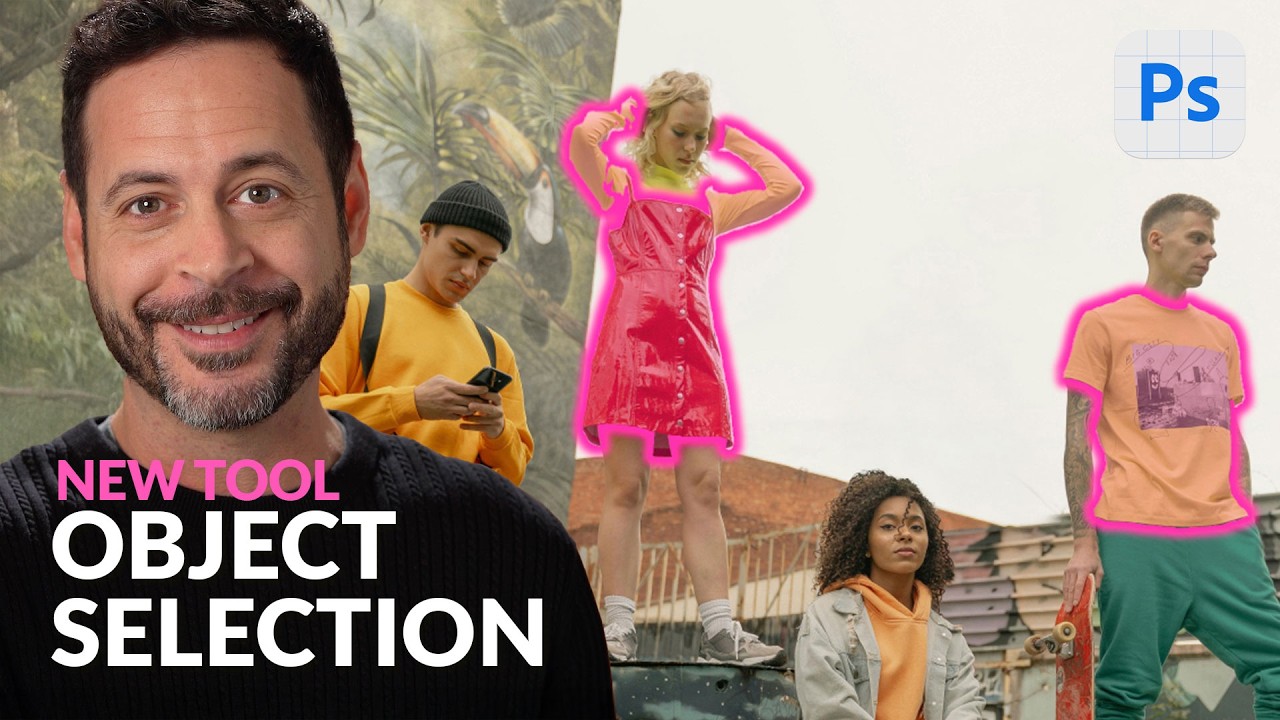
I'm curious what people think is a bigger deal: Generative image features in PS, or the Beta PS selection upgrade where you can do things like effortlessly mask a tennis racket, or even a chainlink fence, but more importantly, inbetween the arms of people lol
@river furnace hi bro
long time
bro i wanna be community expert
how to become
Sorry. I don't know who you are.
Ben who?
Sorry. I don't know any Ben Sanders.
okay
If you're Ben Sanders, why is your display name Vihaan A?
but i wanted to make a app for photoshop with all the all in one tools
that is my real name
ben is my hidden name
to hide my identity
i am vihaan aneja
OK Ben Vihaan Sanders A. I don't know you so its a bit strange that you're pretending that "we were friends."
no
i wanted to make a all in one app for photoshop remember we spoke abt that with all the effects plugins
remember
just call me ben
I don't remember. Sorry.
Yeah. I doubt that.
OK, Ben, well, I'm really not in the mood for any games right now so... Good luck with the plugin or whatever you're working on.
okay bro
yo thank you so man man
Gave +1 Creative Carma to @inner hemlock (current: #66 - 30)
I don't get what people with those packs of 1000s of fonts do. How do they even decide which one to use?
It feels like having too maybe makes creativity harder because it ends up with spending hours trying to pick one to use
Hi guys
Could anyone make a banner similar to the completed one I attached. Please use the blank image and the title should be "The FedEx Virtual Spring Tour". Thanks!
I only have 40 fonts I used to have hundreds
40 is much better
And 20 or 60 brushes are more than enough
how to add effect in a empty layer so the effect can be applied in all layers blow
Fill the layer with a 50% gray (like in the screenshot below). Set the layer to linear light. And now apply the noise.
Especially when all of them are of bad quality... I have some that I checked, and I use them for everything...
I have more Brushes than Fonts. Too many options can lead to indecision paralysis.
Especially now that I can generate Brushes, my collection has grown considerably.
can someone use their magic eraser tool for me? i just need a couple spots gone should be easy il pay $, via paypal let me know
should take quite literally 2-3 mins
check dm. let me see.
alright
Could someone please edit the shirt in this photo to be black trying to see how the suit would look with a black shirt trying to prepare for prom
this is more of a web design question, but I think it fits. -- I am working with on a website layout (from a premade) and adding my own images, but I'm not the best at picking colors (from the images for my layout) to match. would anyone be willing to help? (it's fansite style)
Adobe Color is a good option for this, you can create themes based on images or create custom ones: https://color.adobe.com/
What feels worse to you? That minute you think you lost your wallet, phone or drawing tablet pen? lol
Phone. Everything else is easier to replace. Also, I have two Wacom Pens so if I lose one, it's all good.
How did you end up with two pens?
I purchased an extra Wacom "Slim Pen" to try it out. Technically, I have 3 pens because I have two Wacom tablets. One is hooked up to another PC. heh
I'm jealous. If I loose my pen I feel like it would be as big of a downgrade with PS as going back to GIMP.
That's the problem with using a tablet. Once you get used to that workflow, you can never go back.
Yeah, I honestly feel bad for the many I assume are out there ignorant to how great they are.
Well, drawing with the potato is ridiculous to begin with. But even if you can't technically "draw" most people know how to use a writing implement so it makes sense on a physical level just doing pen-type things with the tablet. heh
That and the sensitivity is awesome, especially for tight corners in masking. If your ever running low on idea's for videos I suggest considering making one about drawing tablets and how useful they are.
does anyone know what filter did they use for this?
lol @ everything from the username to the picture.
how could I get the starry background behind both me and the fence
mask the fence too and place it under the layer
how do i mask the fence it wont select as a subject
Would you ask how to rob a bank at a bank front desk? Thatās what you are doing asking this question in the official Adobe Photoshop discordā¦
Hi! Try the new beta photoshop. https://www.youtube.com/watch?v=Rd_as1HLojw&pp=0gcJCfcAhR29_xXO
Photoshop Beta's Object Selection Tool just got a massive boost! Now, you can select people and their individual features for easy adjustments. Let's explore how it works!
Download the Sample Images:
https://phlearn.com/tutorial/exploring-the-new-object-selection-tool/
Go PRO:
Interested in learning more about Photoshop? Explore our exclusive ...
Hi, Maybe the detail, clarity or dehaze Sliders in Camera Raw.
ok thanks ill check it out
Gave +1 Creative Carma to @graceful summit (current: #12 - 201)
how will i find that option?
i can only select this part
damn it works well. thanks man
Gave +1 Creative Carma to @graceful summit (current: #12 - 202)
Filter>Camera raw
Hi, since itās not a full screen capture, I canāt tell if you are using the beta, nor if you are using the cloud based selection. What did you click on?
@spring wren Don't ask for help with pirated software here.
I'm calling within 5 years there will be a photo editing competition game show, similar to the one's that are out there with glass blowing, tattoo making etc.