#❓ask-a-question
1 messages · Page 31 of 1
 thick tangle
 ivory rampart
even when you use edit -> content-aware fill?
 near nacelle
how do I get the same color as the first image to the other project the second image


 warm grove
near nacelle
how do I get the same color as the first image to the other project the second i...
warm grove
near nacelle
how do I get the same color as the first image to the other project the second i...
Eyedropper tool
Shortcut : I
near nacelle
how do i put it to the other project
warm grove
copy the code
near nacelle
code?
 near nacelle
warm grove
near nacelle
warm grove
how do i get that window
warm grove
near nacelle
how do i get that window
double click here
 near nacelle
it's not the same colors the green
 near nacelle
merge how do I do that
 near nacelle
it just added another layer
 near nacelle
it's still not showing the green color
 warm grove
use eyedropper and take screenshot pls
near nacelle
wheres the eye dropper tool

 near nacelle
how do I do that
warm grove
near nacelle
how do I do that
now u wanna tell me, what u wanna do 😅
warm grove
 stone mural
could someone help me?
stone mural
could someone help me?
sure
stone mural
warm grove
sure
can you photoshop?
warm grove
yeap
stone mural
alr so what i need is like a body with 20 organs and i have to switch them to 10 fruits and 10 vegetables
but idk how
and i got like 10 hours left
so could you help me? @warm grove
warm grove
explain more 😂 😂
ivory rampart
mask out fruits, use transform tool to move/scale
ivory rampart
you can use gimp
ivory rampart
yes
but it's not as powerful as PS
but still you can mask fruits
and transform
 ivory rampart
directly
stone mural
but you can help me right like guid me through it?
ivory rampart
I haven't use gimp for a while
 ripe quest
stone mural
but you can help me right like guid me through it?
ripe quest
stone mural
but you can help me right like guid me through it?
We're here to discuss Photoshop. If you have questions about Gimp, you should join their Discord.
stone mural
k
ivory rampart
stone mural
and i got like 10 hours left
that's a really tight deadline 
 tulip chasm
does anyone know how i can make a image look like this with the colorful pixels

 pale tide
you can download trial photoshop or photoshop light
ripe quest
stone mural
ive join like 5 servers today asking for help
If you're asking for someone to create something for you, please read the following: https://discord.com/channels/547473772727238676/1042833042378592329
ivory rampart
even if he will use trial version of PS it will take at least few hours to learn how to basics
stone mural
ripe quest
If you're asking for someone to create something for you, please read the follow...
ok i will
ripe quest
Otherwise, this channel is for questions about creating with Photoshop.
ripe quest
tulip chasm
does anyone know how i can make a image look like this with the colorful pixels
Not sure what you mean, "with the colorful pixels" - What is it that you're trying to do?
tulip chasm
ripe quest
Not sure what you mean, "with the colorful pixels" - What is it that you're tryi...
you see how is chain is like distored or like colorful

and it carries with the whole image other then hsi body
i want to recreat it for someone
ripe quest
tulip chasm
you see how is chain is like distored or like colorful
Yeah. We would call that a "poor quality image." :)
It looks like a tiny image that has been rescaled / upsampled and it has gotten blurry.
tulip chasm
so i would just need to make it into a tiny image and just rescale it
cause it looks bad but good yk
 ripe quest
tulip chasm
so i would just need to make it into a tiny image and just rescale it
ripe quest
tulip chasm
so i would just need to make it into a tiny image and just rescale it
I suppose that's one way to handle it. Create it really small and then drastically upscale it so that the interpolation causes it to look blurry/pixelated.
ivory rampart
isn't there a filter to pixelate images, maybe that worth giving a shot 
ripe quest
ivory rampart
isn't there a filter to pixelate images, maybe that worth giving a shot <:thinki...
This just looks like some old poor quality, heavily compresseed JPEG that has been upsampled.
ivory rampart
so throw it few times on websites with memes and it will get worse 😏
ivory rampart
you could try to export as jpeg with lowest quality, few times
ripe quest
tulip chasm
any suggestions >
Do you have an image that you're working with?
tulip chasm
ya
ivory rampart
usually it's the other way peoples try to get as much information from old pics
tulip chasm
nah im just tryna make a pic look like that
ripe quest
tulip chasm
nah im just tryna make a pic look like that
Image > Image Size... Reduce the size by a lot. 300% maybe. Then File > Export > Save for Web... Turn the quality way down. Save it. Then open it back up and Image > Image Size and scale it back up to the original size.
See what that creates. heh
stone mural
guys nobody can help me 😭
tulip chasm
ripe quest
Image > Image Size... Reduce the size by a lot. 300% maybe. Then File > Export >...
howe i reduce the size lol
 ripe quest
stone mural
guys nobody can help me 😭
ripe quest
stone mural
guys nobody can help me 😭
You've posted your question in chat. You'll just have to wait to see if someone is interested in working on it.
ivory rampart
tulip chasm
howe i reduce the size lol
change to pixels and just type new size
you can use math like 300/3
ripe quest
tulip chasm
howe i reduce the size lol
Change from inches to pixels. Then you can divide in the input field.
stone mural
ripe quest
You've posted your question in chat. You'll just have to wait to see if someone ...
ok
ripe quest
stone mural
ok
You probably shouldn't count on anyone doing this for you. You should probably find another way to get it done.
tulip chasm
ripe quest
Change from inches to pixels. Then you can divide in the input field.
you lost me at the end ngl
i some what understand my bad lol
ripe quest
tulip chasm
you lost me at the end ngl
The fields say "inches" .... change them to "pixels"
tulip chasm
i did
ripe quest
Then in the width field, you have 4032... you could type /3 and hit the tab key and it will do the math (division) for you.
tulip chasm
oh damn word thank u
ripe quest
Hit OK. Now it should be much smaller.
ripe quest
tulip chasm
nvm i got it
I think you should do some basic tutorials and learn how to use the basic tools and techniques. You're going to find this to be difficult if can't make simple edits on your own.
tulip chasm
ya nah ik im not really the best at photoshop but ik like basic things for the most part but thanks
ripe quest
Also, there is no guarantee that any of this is going to work out the way you want. A lot of this generally requires experimentation to get to a desired result.
tulip chasm
ya ik but it still helped me to learn something new
ripe quest
@crisp saffron - Use the Remove Tool...
Or since you deleted your question, I guess you figured it out or changed your mind. lol
 ripe quest
 light stream
The file size is probably too large.
When files get too large, Photoshop will present you with the option to save in PSB format.
TL;DR PSB (Photoshop Big) is the Adobe Photoshop Large Document Format. It's used for images that are too large to be saved as regular Photoshop document (.PSD) files. PSB files are nearly identical to PSD files, but they can be much larger. PSB files can support documents up to 300,000 pixels in either dimension and file sizes up to 4 exabytes. The PSD file format has a maximum height and width of 30,000 pixels and a file size limit of 2GB.
32000 x 32000 @ 6000 ppi, I would say that 6000 ppi might be a bit... excessive. heh

 odd geyser
how to fast select 1 color on picture and delete it?
ripe quest
odd geyser
how to fast select 1 color on picture and delete it?
Select > Color Range... Apply Layer Mask. Adjust Layer Mask.
 fluid craneBOT
Gave +1 Creative Carma to @ripe quest (current: #3 - 1695)
 ripe quest
 gray pebble
Redraw the boxes with vector shapes. Delete the old image. Then rotate the new sharp vector objects.
The Rectangle Tool...

Choose Shape mode. Use the same color for the Fill as the original shapes...
 gray pebble
still get the fuzzy edges when I rotate it
ripe quest
gray pebble
still get the fuzzy edges when I rotate it
How small is the image? There might not be enough pixels to represent the angle.
gray pebble
1024*1024 72 ppi
it is for a ets2 skin but no sure if I scale up the image if that will end up wierd in the game
ripe quest
Did you draw the rectangles in "Shape" mode or "Pixels"? Are you viewing this at 100%? Because if you're zoomed in, of course, you're going to see the 'stair-step pixel edges'. View it at 100%
gray pebble
I am at 100% and did the same as you shown in the pictures above yes
ripe quest
gray pebble
I am at 100% and did the same as you shown in the pictures above yes
Then I don't know what to tell you because the edges of my objects are not "fuzzy" at 100% zoom.
You're in RGB Mode or Indexed Color?
gray pebble
rgb
ripe quest
Also, I have no idea what an "ets2" skin is or what the requirements are for whatever that is. Sorry.
gray pebble
Ets2 is Euro truck simulator 2
I tried to scale it up to 4k and works fine now., thx for helping anyways!
 sly hawk

Yeah, looks like someone used Cabazon and then messed with the *tittle * to make it a triangle.

 elfin furnace
Hi, can I ask a followup to this? Is there a way to shift a grayscale image values downwards by a certain offset? Specifically, if sea level rises then the mountains aren't as high above sea level as they used to be so they need to get darker.
In other words when I just mask with a threshold, then I have mountains that fall sharply off into sea when I want them to be turning into islandss if that makes sense
sly hawk
elfin furnace
Hi, can I ask a followup to this? Is there a way to shift a grayscale image valu...
It feels like you'd be better off trying to find out if there is a way to render/generate the mountains in something like Blender. - Then you could literally draw in a literal 'sea level' and raise on lower it accordingly.
elfin furnace
Basically the operation I am trying to achieve is shift every grayscale pixel down by a certain value and every pixel who was already below that value should disappear. I know how to achieve the second with the layer mask, but the ones who remain keep their values.
I am a photoshop noob so there might be an obvious way to shift pixels like that, brightness doesnt seem to do exactly that
sly hawk
elfin furnace
Basically the operation I am trying to achieve is shift every grayscale pixel do...
What do you consider 'greyscale'? Literally every pixel between BLACK AND WHITE?
(So all of them?)
elfin furnace
Yes all of them, I am working with 16bit grayscale images
so every pixel is a 16bit unsigned integer the way i understand
I want to deduct a specific value from all those numbers
sly hawk
You'll have to excuse me for asking, but can't you do this by just changing the Threshold layer once at a time?

 formal seal
can I ask a question about a bug?
sly hawk
formal seal
can I ask a question about a bug?
Have you updated photoshop first?
sly hawk
elfin furnace
I want to deduct a specific value from all those numbers
Could you get the effect you're after by putting a white background in, and then slowly changing the 'greyscale' opacity?
sly hawk
from 100% down to 0%?
sly hawk
 elfin furnace
i am confused how is brightness different from opacity
like maathematically
i can tell it's different but I dont get why it is
formal seal
sly hawk
Have you updated photoshop first?
its more of the login process
like I cant get the organisational login
 little warren
anyone got the adobe illustrator server link?
sly hawk
elfin furnace
i can tell it's different but I dont get why it is
This might be gibberish but:
 little warren
sly hawk
<#854103488904036392>
little warren
sly hawk
<#854103488904036392>
ty
fluid craneBOT
Gave +1 Creative Carma to @sly hawk (current: #7 - 777)
sly hawk
(check the bottom) - or simply google it
formal seal
formal seal
like I cant get the organisational login
⬆️
sly hawk
formal seal
⬆️
What? Like this?
 sly hawk
That happens after you've put in your username and password.
It asks you only AFTER it knows who you are
formal seal
I did however make a personal account with my uni email
sly hawk
Yes, login with it. It will likely ask you then. - If you even have an 'organisational account'. If it doesn't ask, I'm going to assume you don't have a team/organisational account.
formal seal
I dont have uni account if thats what u mean
formal seal
sly hawk
Yes, login with it. It will likely ask you then. - If you even have an 'organisa...
it doesnt, thats the thing (I deleted the personal account btw)
sly hawk
Maybe have a quick scan over this perhaps?
https://helpx.adobe.com/enterprise/using/manage-adobe-profiles.linkfree.html
elfin furnace
hmm opacity wasn't quite the operation i was looking for,
I wanted: A to become A-X and B to become B-X, for two unsigned integer pixel values A and B
Opacity does (for 50% for example): A into A/2 and B into B/2
Opacity is like dividing everything by a number instead of deducting a number from everything
sly hawk
elfin furnace
hmm opacity wasn't quite the operation i was looking for,
I wanted: A to becom...
Ok. That makes sense.
formal seal
sly hawk
Maybe have a quick scan over this perhaps?
https://helpx.adobe.com/enterprise/us...
ty, will read this
sly hawk
elfin furnace
hmm opacity wasn't quite the operation i was looking for,
I wanted: A to becom...
This any good?
It kinda 'swallows up' white pixels and then the further your slide, the darker and darker it will consume
formal seal
sly hawk
Maybe have a quick scan over this perhaps?
https://helpx.adobe.com/enterprise/us...
so typically what should happen is when I type my uni email it will redirect to my organisational login page
sly hawk
elfin furnace
hmm opacity wasn't quite the operation i was looking for,
I wanted: A to becom...
This here explains now why that slider runs from 0-255.
 sly hawk
formal seal
so typically what should happen is when I type my uni email it will redirect to ...
sly hawk
formal seal
so typically what should happen is when I type my uni email it will redirect to ...
I don't know too much about it, but yeah - that logic makes sense.
no wait.
formal seal
sly hawk
I don't know too much about it, but yeah - that logic makes sense.
prob something on their end (the uni I mean)
formal seal
this doesnt happen
sly hawk
Maybe scroll to the bottom and check the FAQ's, or speak to your uni about it. - Sorry I can't be any more help
 pulsar ferry
hey guys i have an assignment for my image processing class, i’ve created a movie about a drunk santa claus and the movie is starring the real santa claus. here is the dvd cover i made! i’m not allowed to use any composite images , and i have to create merchandise for this project , and i really only started using photoshop at the end of January . due to circumstances in my household i got an extension and i’m still trying to wrap my head around the tools and how to use them. i’m really not happy with the way my work looks so far and i was wondering if you guys have any advice on what i could improve on? for example i got stressed and burned the little boys face! 😦
 formal seal
this looks cursed and something I'd watch at the same time
elfin furnace
sly hawk
This any good?
Playing around with the blending options, it seems substract does exactly what I was describing
sly hawk
pulsar ferry
hey guys i have an assignment for my image processing class, i’ve created a movi...
What do you mean by "i’m not allowed to use any composite images"?
formal seal
formal seal
this looks cursed and something I'd watch at the same time
@pulsar ferry
pulsar ferry
formal seal
<@469645310772248577>
i’m gonna to proudly take this as a compliment
pulsar ferry
sly hawk
What do you mean by *"i’m not allowed to use any composite images"*?
for example i had to add the clouds in the background, and the sky separate. Everything is separate, even the wreath in the second preview on the back of the cover is separate from the image.
sly hawk
pulsar ferry
for example i had to add the clouds in the background, and the sky separate. Eve...
So you mean everything has to built separately. - Which ironically is what composite means. - but yeah, cool. I get what you mean.
To be fair, I'm really impressed what you've done.
I tried something using AI....

Your DVD cover legitimately looks like something I'd have seen in blockbusters back in the 90's. - Which means I guess you're on the right track!
pulsar ferry
sly hawk
this is actually amazing 😂😂thank you for the feedback, i haven’t gotten any so far, i’m a little stressed on time but i think i’m happy with my dvd cover, i also have a movie poster made, but i’m struggling a lot with implementing graphics onto a t shirt, i know about displacement but it really doesn’t seem to be working out for me. 😦 and the warp tool is my mortal enemy, lol
elfin furnace
is there a tutorial to understand what blending does? substract isnt working the way I expected it and I need heelp understanding some basic stuff.

thats a white and black box on layer 2 and a gray box (70%) on layer 1
i am confused on what is being blended when I click the small fx button for layer 2
gray pebble
Hi.
is there a way to make like a center so when the red pice is placed where I want it the black pice will snapp to that place when draged ower it, on its own side as a mirror kinda?
 elfin furnace
oh i figured it out, blending options on a layers affects how that layer blends into the rest of the painting
also blending modes have a lot of weird math behind them it seems
 jade slate
Seems like a silly question but what's the best way to blend the bottom black border into the BG color? Seems like the blur feature even at highest hardness doesn't work

 limber stream
how do you give some parts of a image less opacity than other parts
 tacit inlet
anyone know how to have 2 separate layer styles so when i move the angle of one drop shadow it dont effect both layers and just the one?
never mind figured it out was (Global Light)
sly hawk
jade slate
Seems like a silly question but what's the best way to blend the bottom black bo...
Apply a 'gradient' to it.
sly hawk
limber stream
how do you give some parts of a image less opacity than other parts
The imagd will need to be split into multiple layers. - so draw a selection box around it, then cut and paste it back in. - then change the opacity of the new layer bits
 river otter
is there any guides to make this skeuomorphism style interface in adobe? I'm curious about how this was made


 nocturne cairn
thick tangle
nocturne cairn
thick tangle
What version of Photoshop do you have?
thick tangle
2022
nocturne cairn
thick tangle
2022
If you choose OK, does it open fine?
nocturne cairn
thick tangle
yeah
Does your Layers panel look OK? Are all of your layers and groups as they should be?
nocturne cairn
thick tangle
yeah
If you click on the “Don’t show again” checkbox in the lower left corner hopefully you shouldn’t see it again
thick tangle
nocturne cairn
Does your Layers panel look OK? Are all of your layers and groups as they should...
well except one cos when i was 'cleaning up' my layers because i had a mess there i named one group ... and idk it disappeard and after that everytime i save this happens
nocturne cairn
thick tangle
well except one cos when i was 'cleaning up' my layers because i had a mess ther...
Does it only happen with this one file or every file?
thick tangle
only this document
nocturne cairn
thick tangle
only this document
That's good. Weird. But good.
thick tangle
yeah i mean its not that important because in that group was nothing too necessary
but i just dont know why it disapperad when i named it ...
nocturne cairn
thick tangle
yeah i mean its not that important because in that group was nothing too necessa...
As a double check you could do a Save As to create a new file. Or copy all of the layers to a new file and save that.
nocturne cairn
thick tangle
yeah i mean its not that important because in that group was nothing too necessa...
Sorry what disappeared when you named what?
thick tangle
my group
nocturne cairn
thick tangle
my group
OK
thick tangle
after i named it ... (like actually three dots)
nocturne cairn
thick tangle
after i named it ... (like actually three dots)
Does your name have any weird characters in it?
thick tangle
? what do u mean... like where
nocturne cairn
Like is your layer/group name something like "*&^%^%$^&#%$#%" instead of something like "some simple text"?
thick tangle
every group that i named had 'normal name' except one cos i didnt know how to name it so i named it ... (i named it three dots like ...) and after that it just despawned and every time i try to save this pops up but it saves normally after i click OK
nocturne cairn
thick tangle
every group that i named had 'normal name' except one cos i didnt know how to na...
And if you change the name from "..."?
nocturne cairn
thick tangle
i dont see that group
Oh wow! You sure you didn't accidentally move or delete it?
thick tangle
98% im sure
nocturne cairn
thick tangle
98% im sure
So 2% not sure? 😉
thick tangle
😅
nocturne cairn
thick tangle
😅
I'm signing off buddy. Have yourself a great day 🙂
thick tangle
but anyways if i'd deleted it why it would be poping up this attention thing
thick tangle
nocturne cairn
I'm signing off buddy. Have yourself a great day 🙂
why? 🥲
yeah u too
thick tangle
thick tangle
but anyways if i'd deleted it why it would be poping up this attention thing
.
anyone else here to help me figure this out? 😁 😅
 serene coral
thick tangle
serene coral
thick tangle
You can safely ignore it and check 'don't show again' unless you are going to open this file in a version of Ps that is over 10 years old
 warm badge
Could someone help me with a prob with after effects?
ivory rampart
warm badge
Could someone help me with a prob with after effects?
I think Adobe Video is better place to ask - https://discord.gg/adobepremiere
 sly lark
isnt there a way i can change the checkered background on a png from white to black?
pulsar ferry
does anyone know what this guy means in this particular section of the video? for context i’m trying to create a promotional phone case for my fictional movie, and i think im trying to make this camera layer completely invisible. i’m confused he says i should press backspace or delete and it never works for me
sly lark
sly lark
isnt there a way i can change the checkered background on a png from white to bl...
like only in photoshop
limber stream
can anyone tell me how the pictures fade into eachother so smoothly?
 ivory rampart
top layer has low opcity and it's been placed moved with transform tool
serene coral
sly lark
isnt there a way i can change the checkered background on a png from white to bl...
like this? interface-level?
 serene coral
pulsar ferry
does anyone know what this guy means in this particular section of the video? fo...
serene coral
pulsar ferry
does anyone know what this guy means in this particular section of the video? fo...
they are changing the layer mask of 'Design' layer by ctrl-clicking on other layers' thumbnails to select their pixels. Then, with the mask still selected, they are deleting those pixels from the mask
 native portal
Is this a good laptop spec wise for creative cloud. (Its $800)

 river otter
for some reason my photoshop only lets me undo a certain amount of times before not undoing any more
native portal
river otter
for some reason my photoshop only lets me undo a certain amount of times before ...
Photoshop only lets you undo up to 50 times.
 river otter
is there a way to increase it ?
native portal
river otter
is there a way to increase it ?
Yes, by default its set to 50 undos for performance optimization. It can be changed by going to your preferences (Ctrl + K / Cmd + K) then go to the Performance tab and change the History States value to up to 1000 (this refers to the maximum amount of allowed undos. More may cause a fluctuation in performance, dependent on your computers specs.
serene coral
native portal
Is this a good laptop spec wise for creative cloud. (Its $800)
yes, looks pretty solid. in general, any recent hardware will run Photoshop just fine, just make sure you're not running low on disk space and you have at least 16GB of ram
serene coral
native portal
Yes, by default its set to 50 undos for performance optimization. It can be chan...
each history step is kept in cache so setting it to more than 100 is risky if you work on larger files (speaking from experience)
pulsar ferry
does anybody know the exact effect to make this bus stop advert glow?i understand what they did with the lens flare but i still don’t know how they make the advert glow, make the floor have a light reflection and how the made the back of the bus stop glow.

this is the best quality i could get :/
 river otter
native portal
Yes, by default its set to 50 undos for performance optimization. It can be chan...
river otter
native portal
Yes, by default its set to 50 undos for performance optimization. It can be chan...
tysm
 dry swallow
can anyone help with change any color with color code with hue saturation
serene coral
dry swallow
can anyone help with change any color with color code with hue saturation
what do you mean by color code? do you want to use hue/sat adjustment to change some color to a specific hex value? can you show the image you want to change?
dry swallow
serene coral
what do you mean by color code? do you want to use hue/sat adjustment to change ...
with the hue sat adjustments with the excat color code as the pink.
 dry swallow
serene coral
dry swallow
serene coral
how do i select the color and change it
serene coral
dry swallow
how do i select the color and change it
use the eyedropper 
 tall sky
hello photoshopists!!
does anyone know why this happens or how i can fix it
i want to keep the pixels when I export it
or is this because of my image viewer
 tall sky
hello photoshopists!!
does anyone know why this happens or how i can fix it
i wa...
tall sky
tall sky
hello photoshopists!!
does anyone know why this happens or how i can fix it
i wa...
another example
 serene coral
tall sky
hello photoshopists!!
does anyone know why this happens or how i can fix it
i wa...
serene coral
tall sky
hello photoshopists!!
does anyone know why this happens or how i can fix it
i wa...
You're previewing at 2120% so image viewer antialiases the preview
serene coral
tall sky
hello photoshopists!!
does anyone know why this happens or how i can fix it
i wa...
What is the purpose of these images?
tall sky
serene coral
What is the purpose of these images?
art
serene coral
tall sky
art
With the current state of how web and social media work, your art is going to be viewed at 100% zoom or less
ripe quest
This looks like a heavily compressed JPEG...
 serene coral
ripe quest
This looks like a heavily compressed JPEG...
serene coral
ripe quest
This looks like a heavily compressed JPEG...
They are at 600% zoom here :p
ripe quest
That's part of it...
tall sky
does the image viewer compress my png?
serene coral
tall sky
no i am going to print it
Are you designing in a printable resolution? Or are those pixel arts and you want to upscale them?
 ripe quest
tall sky
i just want people to see that they are pixels and not blury blobs
ripe quest
tall sky
i just want people to see that they are pixels and not blury blobs
The source file is 8000 pixels and you've exported it out to what size?
Not 8000 pixels x 6000 pixels. Looks like its reduced. Then you're zooming in 600%. heh
tall sky
it looks like the same size as my ps document
 tall sky
serene coral
You're at 72 pixels per inch of a print
tall sky
serene coral
You're at 72 pixels per inch of a print
is that bad?
serene coral
tall sky
is that bad?
That's one of the standards. But imagine you print your design and a single pixel of your design takes 1/72 of an inch when printed. Is that what you want?
tall sky
serene coral
That's one of the standards. But imagine you print your design and a single pixe...
sorry i dont understand
serene coral
tall sky
sorry i dont understand
do you have a printer? press ctrl+P, make sure the scale is set to 100% and look at the preview
go ahead and print what you see (at 100%). This is the file you're working on right now
 somber stag
I have typography and or reproduction question: is it a font or an effect on Adobe PS for the bottom text?
 serene coral
somber stag
serene coral
somber stag
that's a gradient overlay layer style
gray pebble
Hi.
is there a way to make like a center so when the red pice is placed where I want it the black pice will snapp to that place when draged ower it, on its own side as a mirror kinda?
 somber stag
serene coral
that's a gradient overlay layer style
somber stag
serene coral
that's a gradient overlay layer style
Thanks. Also is the rough edge part of the font or an effect?
fluid craneBOT
Gave +1 Creative Carma to @serene coral (current: #6 - 813)
serene coral
gray pebble
Hi.
is there a way to make like a center so when the red pice is placed where I ...
use align buttons (at the top when move tool is selected)
gray pebble
aha okay I will try
serene coral
somber stag
Thanks. Also is the rough edge part of the font or an effect?
looks like it's a specific of the font used
somber stag
Thank you 👍
 rotund marsh
hey, could i get in trouble for taking images of a google/pintrest, edit them, put it on a t-shirt and sell it?
serene coral
rotund marsh
hey, could i get in trouble for taking images of a google/pintrest, edit them, p...
you'd eventually get the bill with the amount to pay to the owner of the image
rotund marsh
how do i know if certain image belong to someone
 ashen otter
hoiii, need help with making a gif, i found a web page that has a cool gif, i wanted to know how i could make something like that
don't think i can post links here tho
EPILEPSY WARNING

it the background for this
i wanna make a gif like that, without all the flashing lights
 wild sleet
ive created a ui design using graphic shapes in photoshop
how would i crop the canvas to perfectly fit the ui?
 serene coral
wild sleet
ive created a ui design using graphic shapes in photoshop
how would i crop the c...
serene coral
wild sleet
ive created a ui design using graphic shapes in photoshop
how would i crop the c...
Image>Trim
wild sleet
serene coral
Image>Trim
awesome thanks!
fluid craneBOT
Gave +1 Creative Carma to @serene coral (current: #6 - 814)
serene coral
ashen otter
i wanna make a gif like that, without all the flashing lights
save for web offers a lot in terms of limiting colors and dithering
 ashen otter
serene coral
save for web offers a lot in terms of limiting colors and dithering
ashen otter
serene coral
save for web offers a lot in terms of limiting colors and dithering
eh, nyo how would i make the text do that?
 sudden zenith
hey everyone
where can I submit a collective request from a bunch of creatives to adobe team directly ?
serene coral
sudden zenith
hey everyone
where can I submit a collective request from a bunch of creatives t...
...what kind of requests?
serene coral
ashen otter
eh, nyo how would i make the text do that?
move? you can animate position change but you'll have to use video timeline
sudden zenith
serene coral
...what kind of requests?
Regional Pricing Adjustments for a selective set of countries
serene coral
sudden zenith
Regional Pricing Adjustments for a selective set of countries
https://community.adobe.com
Master Photoshop with the help of our global community.
sudden zenith
Thank you @serene coral but I think that I need to reach out to the sales team or someone closer to that
fluid craneBOT
Gave +1 Creative Carma to @serene coral (current: #6 - 815)
 bronze galleon
how can i make lights in a image glow a bit brighter ?
gray pebble
How would one bend it like this? and not change the spacing between the 3 black lines?

 pallid umbra

i am trying to recreate this artstyle, what is it called?

nvm google bard answered my question
serene coral
bronze galleon
how can i make lights in a image glow a bit brighter ?
Use curves or levels adjustments
serene coral
gray pebble
How would one bend it like this? and not change the spacing between the 3 blac...
Sorry but I'm unable to guess what I am looking at?
gray pebble
serene coral
Sorry but I'm unable to guess what I am looking at?
sorry, the black line that bends
river otter
is there a way to change all of a specific one color in a selected area?
ivory rampart
river otter
is there a way to change all of a specific one color in a selected area?
create mask for selection and then use hue/saturation with clipping mask above
 rotund marsh
serene coral
you'd eventually get the bill with the amount to pay to the owner of the image
rotund marsh
serene coral
you'd eventually get the bill with the amount to pay to the owner of the image
how do i know if certain image belongs to someone
bronze galleon
whats a good place to find brushes ?
 forest glade
rotund marsh
how do i know if certain image belongs to someone
forest glade
rotund marsh
how do i know if certain image belongs to someone
you could do a reverse image search to see if you can find somewhere that says it's protected by someone
rotund marsh
right, how about editing the image to the point where its hard to tell its originality, would that work?
 velvet pivot
hey can u help me please:
first picture the file is perfect but if i place it (second picture) the file is like low resulution

 jade slate
sly hawk
Apply a 'gradient' to it.
jade slate
sly hawk
Apply a 'gradient' to it.
okay, interesting. TY. Will look into it
nocturne cairn
velvet pivot
hey can u help me please:
first picture the file is perfect but if i place it (...
Are you resizing when/after you place it?
velvet pivot
the normal picture is bigge after i place it in 32x32 pixel
i want a big picture for mc item
 cedar kestrel
what type of effect can i use to make a regular rose turn into this?

 river otter
cedar kestrel
what type of effect can i use to make a regular rose turn into this?
river otter
cedar kestrel
what type of effect can i use to make a regular rose turn into this?
Threshold + grain effects
nocturne cairn
river otter
What exactly is the problem?
river otter
nocturne cairn
What exactly is the problem?
won't let me save to cloud
sly hawk
velvet pivot
hey can u help me please:
first picture the file is perfect but if i place it (...
Change Interpolation settings as shown in my old video here:
#❓ask-a-question message
bronze galleon
I cant crop this image... I select the part i want to keep and go to image>crop but it doesn't work
 nocturne cairn
river otter
won't let me save to cloud
nocturne cairn
river otter
won't let me save to cloud
Could this be the issue?
Discontinuation of Creative Cloud Synced files
https://helpx.adobe.com/au/creative-cloud/kb/eol-creative-cloud-synced-files.html
 oblique dagger
Hi guys I have an exercise to do which is to remove people from a particular image but when I do it it's not qualitative if anyone could help me I would be grateful. Thanks in advance
river otter
bronze galleon
I cant crop this image... I select the part i want to keep and go to image>crop ...
tbh I use the marque tool to crop images
nocturne cairn
oblique dagger
Hi guys I have an exercise to do which is to remove people from a particular ima...
Can you post the image and guidelines so we can offer you suggestions?
oblique dagger
Yeah thanks Michael
I have to remove the two girls while keeping the boy. But the brunette's shadow hides the boy and I know that this will be detrimental to the final score. The fact that the boy is dark-skinned is done on purpose. I'm French so I hope I'll be clear enough
Look at my first work
I wanted to use color contrast but it looks like a cartoon
and as I'm just starting out I don't understand all the subtleties
river otter
tbh I'd do the opposite and get rid of the guy XD
Also I'd like to note that in this one the wave gets cut off, the white part of the wave just abruptly stops, then starts again
 fallow peak
Anyone can edit for me the picture
270 X 349 pixels
300 resulation
Size 13-14 kb
souravsdtapash2000@gmail.com
 river otter
fallow peak
Anyone can edit for me the picture
270 X 349 pixels
300 resulation
Size 13-14 k...
river otter
fallow peak
Anyone can edit for me the picture
270 X 349 pixels
300 resulation
Size 13-14 k...
no
oblique dagger
river otter
tbh I'd do the opposite and get rid of the guy XD
XDD
@river otter well seen I hadn't even noticed. you think you could help me ?? 😂😂
river otter
oblique dagger
<@456226577798135808> well seen I hadn't even noticed. you think you could help ...
a bit XD
oblique dagger
but seriously, since I made water appear, the teacher took me for Moses?
river otter
interesting
bronze galleon
fallow peak
Anyone can edit for me the picture
270 X 349 pixels
300 resulation
Size 13-14 k...
aint no way
oblique dagger
Nice pic on BMW m4cs btw
 hollow basin
I have banners from which there is light and reflection in the sea. Now I have changed the content of the banner and its color. How can I change the color of the reflection so that no difference is visible?
 velvet pivot
thanks
river otter
oblique dagger
Nice pic on BMW m4cs btw
ty ty
fluid craneBOT
Gave +1 Creative Carma to @oblique dagger (current: #847 - 1)
 inner stone
how do i extend this pattern its like 4 sqaures of this connected to each other but hte lines on the end connect
 ripe quest
@fallow peak Please read this post: https://discord.com/channels/547473772727238676/1042833042378592329
ripe quest
inner stone
how do i extend this pattern its like 4 sqaures of this connected to each other ...
If you have a current version of Photoshop, you can try to use Generative Fill / Generative Expand...
inner stone
ripe quest
If you have a current version of Photoshop, you can try to use Generative Fill /...
i tried but it just make some random weird background that had nothing to do with it
and put random text and stuff
 sand plank
this has got me going crazy. My brushes never did this before. for some reason, it does not remember the size i change it to, and keeps reverting back to size 22. the shape dynamic gets reverted when ever i switch brushes too, same with opacity.
It normally would stay to what ever setting i changed it to without having to make a new brush. if i changed hard round to size 4 and added shape dynamic pressure, it would stay that way when i went to a different brush and come back. Can anyone help?
the only way i can change it is by making a whole new brush
serene coral
sand plank
this has got me going crazy. My brushes never did this before. for some reason, ...
so you have 2 brushes. Hard round does not have size specified. Edge brush has a preset size of 22. Blue brush outline means you are using the settings the preset was saved in. Orange outline means the preset has been applied and modified
 serene coral
 compact berry
but it doesnt tell me how to make a gif from a video
compact berry
but it doesnt tell me how to make a gif from a video
use any online converter. Photoshop is not the tool for this
 south stirrup
yk why I cant do the challenge
 serene coral
south stirrup
yk why I cant do the challenge
serene coral
south stirrup
yk why I cant do the challenge
what is the link?
 serene coral
south stirrup
https://www.behance.net/challenge/photoshop
serene coral
south stirrup
https://www.behance.net/challenge/photoshop
works fine for me
south stirrup
I am on a school account
serene coral
south stirrup
I am on a school account
does it work if you open it in an incognito window?
ivory rampart
inner stone
how do i extend this pattern its like 4 sqaures of this connected to each other ...
You can make this pattern seamless with offset filter and clone tool, bit old school way of making game textures

Or if you have substance sampler you can do this within few clicks
 amber thicket
Any tips on how to remove the white under the colours so that the colours are more transparent rather than looking like colours over a white bsckground?
 ivory rampart
I don’t think you can remove white from under colours
Probably you would have to redo this with gradients set to to transparent
serene coral
amber thicket
Any tips on how to remove the white under the colours so that the colours are mo...
color range masking or blend-ifs. or if you want to use it as an overlay on another image, use blending modes
 quasi mica
amber thicket
Any tips on how to remove the white under the colours so that the colours are mo...
quasi mica
amber thicket
Any tips on how to remove the white under the colours so that the colours are mo...
?
 hollow basin
I have banners from which there is light and reflection in the sea. Now I have changed the content of the banner and its color. How can I change the color of the reflection so that no difference is visible? I tried to highlight these highlights, but it turned out a little wrong. Is there some other option?
 amber thicket
serene coral
color range masking or blend-ifs. or if you want to use it as an overlay on anot...
amber thicket
serene coral
color range masking or blend-ifs. or if you want to use it as an overlay on anot...
Thanks, I'll do some research on colour range masking and blend ifs
fluid craneBOT
Gave +1 Creative Carma to @serene coral (current: #6 - 816)
amber thicket
quasi mica
?
Is this color range masking or blend-ifs?
serene coral
amber thicket
Is this color range masking or blend-ifs?
color range mask - you can see the layer mask next to the layer's thumbnail
serene coral
hollow basin
I have banners from which there is light and reflection in the sea. Now I have c...
was this made with Generative Fill? you could try selecting the reflection and regenerating it while being specific about the color you want to get and selection
amber thicket
serene coral
color range mask - you can see the layer mask next to the layer's thumbnail
Thanks mate
fluid craneBOT
Gave +1 Creative Carma to @serene coral (current: #6 - 817)
hollow basin
serene coral
was this made with Generative Fill? you could try selecting the reflection and r...
No, the image was taken in midjourney. I've already tried using generative fill, but it only makes things worse
serene coral
hollow basin
No, the image was taken in midjourney. I've already tried using generative fill,...
just to make sure - we're talking about the water reflection of the screen at the top in the middle, right? blue and pink?
hollow basin
serene coral
just to make sure - we're talking about the water reflection of the screen at th...

 next ferry
want a second opinion on colours in this image. any recs?
 serene coral
hollow basin
serene coral
hollow basin
like this?
 hollow basin
serene coral
like this?
hollow basin
serene coral
like this?
Well, rather yes than no
serene coral
hollow basin
Well, rather yes than no
I have removed the existing reflection with Generative Fill (empty prompt) and added the reflection using 'classic' methods. I copied the screens visible at the top, mirrored and placed at the bottom, where the reflection should be. Then I blurred them a bit, changed the blending mode to linar light (or you can use screen) and used blend if to hide the layer where the background layer (water) is dark. Then I adjusted it a bit with curves and hue/sat
hollow basin
serene coral
I have removed the existing reflection with Generative Fill (empty prompt) and a...
Of course it sounds difficult to me, but I'll try. Thank you.
fluid craneBOT
Gave +1 Creative Carma to @serene coral (current: #6 - 818)
serene coral
hollow basin
Of course it sounds difficult to me, but I'll try. Thank you.
Don't worry, update on the process and ask for help here if you need to!
pulsar ferry
does anyone have any ideas on how to add a gradient to this using the elliptical marquee tool? i need to use this tool for my assignment
 serene coral
pulsar ferry
does anyone have any ideas on how to add a gradient to this using the elliptical...
serene coral
pulsar ferry
does anyone have any ideas on how to add a gradient to this using the elliptical...
the elliptical marquee tool  is used when you want to make elliptical selection. You can't directly add gradients or any pixels only with this tool
pulsar ferry
sorry, my mistake! i meant the rectangular marquee tool
my tutor has a video up where he uses this tool to blend a woman to a background, and i am lost on how to do it in my image, because i used the distort and perspective transform tools and the gradient doesn’t look right
serene coral
pulsar ferry
sorry, my mistake! i meant the rectangular marquee tool
still, this is only a selection tool. Or is it that your process has to include it? can you link the video you're talking about?


 crystal flower
I need a slight bit of help. Basically I have a lot of images and I want to make them all exactly the same size
serene coral
pulsar ferry
Ok so first they make a selection of area they want to affect and then use the gradient tool to place a gradient within the selected area
serene coral
crystal flower
I need a slight bit of help. Basically I have a lot of images and I want to make...

Got a lot of photos to resize? Don't spend ages at the computer. Read our article on how to batch resize images in Photoshop for faster results!
crystal flower
thank you
pulsar ferry
serene coral
Ok so first they make a selection of area they want to affect and then use the g...
thank you so much 😄
fluid craneBOT
Gave +1 Creative Carma to @serene coral (current: #6 - 819)
crystal flower
is there any way to alter the gradient of an image to approximately 2.2
serene coral
crystal flower
is there any way to alter the gradient of an image to approximately 2.2
can you clarify?
 sage jackal
hi! i am designing a project for uni, the brand name is “mundane memories” they are a restaurant that sells foods which remind you of those really regular things you did as a kid, i need to design a logo and would appreciate any ideas as im a little stuck :))
serene coral
sage jackal
hi! i am designing a project for uni, the brand name is “mundane memories” they ...


 serene coral
pulsar ferry
serene coral
pulsar ferry
you have a selection active while the tutorial doesn't use any? they create a radial gradient
pulsar ferry
thanks for the advice, i thought it was the elliptical marque tool 🙂 do you have any advice on my bus stop advert, do you think it looks similar to the one in the tutorial?
serene coral
pulsar ferry
thanks for the advice, i thought it was the elliptical marque tool 🙂 do you hav...
yes, I like the glare!
 hearty kettle
hey i want to blend this eye with this character but i dont know which is the best way to do this

if i use auto blend it messes up the edges of the character a lot
ripe quest
hearty kettle
hey i want to blend this eye with this character but i dont know which is the be...
Add a Layer Mask and paint on the mask... See: https://discord.com/channels/547473772727238676/1045711257178738760
hearty kettle
ripe quest
Add a Layer Mask and paint on the mask... See: https://discord.com/channels/5474...
thanks does it matter that the eye that i want to use is lighter in terms of colors to the one that the character has which is darker?
fluid craneBOT
Gave +1 Creative Carma to @ripe quest (current: #3 - 1696)
ripe quest
hearty kettle
thanks does it matter that the eye that i want to use is lighter in terms of col...
First, you'd paint the mask to start the composite. You can adjust the colors, brightness, contrast later.
hearty kettle
okayyy
 stable reef
Whats teh best way to remove transparent pixels like this?
 hearty kettle
also whats the best way to make an image pop/the colors look more alive
 deep radish
how to download or add Camera Raw Filter to photoshop CS6 Extended?
thick tangle
deep radish
how to download or add Camera Raw Filter to photoshop CS6 Extended?
save an image as an PNG or JPEG
then u have to open it as camera raw
thick tangle
hearty kettle
also whats the best way to make an image pop/the colors look more alive
Camera Raw filter
hearty kettle
thick tangle
Camera Raw filter
thank you thank you
fluid craneBOT
Gave +1 Creative Carma to @thick tangle (current: #847 - 1)
thick tangle
no problem
river otter
Really weird question, but does anyone know why the right side looks brighter than the left side? The files are untouched and I haven't added anything to them, but for whatever reason anything that goes to the right side suddenly looks more bright no matter the position, size or rotation

 mental kiln
river otter
Really weird question, but does anyone know why the right side looks brighter th...
mental kiln
river otter
Really weird question, but does anyone know why the right side looks brighter th...
bro, it looks normal
river otter
mental kiln
bro, it looks normal
Are you sure? I've checked on both monitors, on my cellphone, even asked a friend which he noticed the difference as well
Here, maybe you'll notice the brightness difference in this zoomed screenshot
 mental kiln
river otter
Are you sure? I've checked on both monitors, on my cellphone, even asked a frien...
mental kiln
river otter
Are you sure? I've checked on both monitors, on my cellphone, even asked a frien...
Ah yes now, I only the background, but it must be something you did...
thick tangle
then i guess just make that one side a little bit darker 😅 🤷
river otter
mental kiln
Ah yes now, I only the background, but it must be something you did...
Like, I really haven't done nothing but add images, resize them and place them together, I don't know if my .psd files are permanently screwed up at this point
river otter
thick tangle
then i guess just make that one side a little bit darker 😅 🤷
I was thinking about that.. Got any suggestions?
mental kiln
Without seeing the project and the layers it is difficult to give you a solution
thick tangle
well u can only select that 'background' and make it a little bit darker with Curves/Levels
or the opposite make that one lighter ... what will be easier
or maybe u can use Match coclor in Photoshop but not sure if that will will do it...
river otter
Guys, I believe I have found the problem
I think.. It's an optical illusion
🤯
The design pattern is in a way where there's a subtle gradient. Where the left end meets the right is where the darkest and brightest parts of the gradient meet
 mental kiln
Why don't you just duplicate one of the gradients?
river otter
I mean, these cards are already images, not layers upon layers
mental kiln
river otter
I mean, these cards are already images, not layers upon layers
ok, but photoshop gives you all the freedom to cut and copy....
thick tangle
nah
i figured it out
i understand now
if u look ate 'the left side' it goes from a slightly lighter to darker and at the right side its literlly the same thing
but theres this darker bottom right next to the lighter top
thats why it look like that
river otter
Yeah, an optical illusion
I can't describe how confusing this is to process, on my mind at very least
mental kiln
Yep, for me it's simple, I remove the saturation of the layer, add a solid background color and use the texture as an overlay mode, if any side is darker I would correct it using levels
Now if you don't understand anything, it's better to take a basic course on YouTube
river otter
No, yeah, it's clear as crystal
But I'll take a bit of a break for now, I may let you know how the thing turns out
I really appreciate your help, you two

 peak briar
https://www.youtube.com/watch?v=EnKJdAv7agE&t=152s
anyone can tell me on this video what he used to make that black and white bad quality look ?
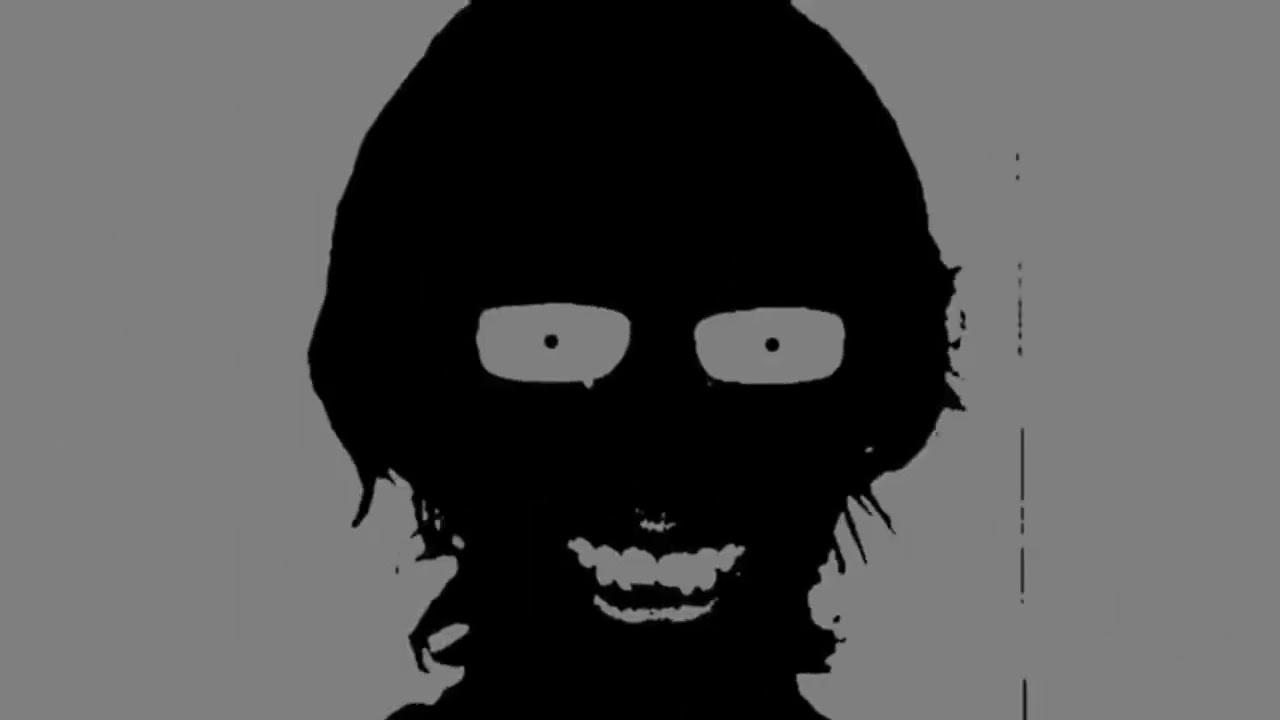
#1hour #1час #music #phonk #vibe #tiktok #tiktokphonk #slowed #slowedandreverb #slowedsongs #slowedsong
like fully black and white
 sly hawk
river otter
Really weird question, but does anyone know why the right side looks brighter th...
sly hawk
river otter
Really weird question, but does anyone know why the right side looks brighter th...
They're all exactly the same?
The gradient just changes at the top of the card. That's why it doesn't match.
sly hawk
peak briar
https://www.youtube.com/watch?v=EnKJdAv7agE&t=152s
anyone can tell me on this vi...
"threshold"
peak briar
ty\
sly hawk
river otter
Really weird question, but does anyone know why the right side looks brighter th...
What are they for anyway? I'd have assumed they were due to be printed, but there's no tickmarks or bleed, then I thought you were making them for TTS, but you're not in the TTS server either 🙂
river otter
thick tangle
I see, I see
river otter
sly hawk
The gradient just changes at the top of the card. That's why it doesn't match.
Yeah, it seems to be like that
sly hawk
Hey! Coffee Rush!
river otter
sly hawk
What are they for anyway? I'd have assumed they were due to be printed, but ther...
Also, good observation! I'm currently gonna print this game for myself, making a smaller version
And yeah, those assets are from the TTS workshop too, a guy I know translated it

 sly hawk
Well TTS probably has some slightly yellow lighting on it.,
river otter
The images themselves are alright, for the most part
You can check them individually, too

Also I think you can change the lighting in a TTS session as well
sly hawk
river otter
The whole game looks like it doesn't need translation anyway?

Only saw this one counter?
Which I'm going to assume says "Open"
sly hawk
river otter
Also I think you can change the lighting in a TTS session as well
Yeah, you can - and interestingly enough....

(Ok, this is probably veering off topic a little ) - Glad that you seemingly got it sorted.
river otter
sly hawk
The whole game looks like it doesn't need translation anyway?
Well, its either print this one or the russian version 
thick tangle
does falling lava have shadws?
thick tangle
its dark ish...
sly hawk
The glow of the sun in the daylight is typically lighter than some lava.

 thick tangle
theres no sun in the image and the lava sholud be my lightsource...
sly hawk
 bleak granite
a true gap for the S
bleak granite
a true gap for the S
What's the end goal? Are you going to be printing it?
bleak granite
yes
sly hawk
thick tangle
theres no sun in the image and the lava sholud be my lightsource...
In that case, no. the flame from a lit match doesn't cast its own shadow.
sly hawk
bleak granite
yes
how big?
bleak granite
im not sure the exact dimensions
 sly hawk
bleak granite
sly hawk
bleak granite
Gimmie a moment 🙂
bleak granite
i can give ue psd
sly hawk
bleak granite
i can give ue psd
Yeah cool. Cheers
bleak granite
check dms in a sec
thick tangle
sly hawk
In that case, no. the flame from a lit match doesn't cast its own shadow.
okay but then how can i actually make it more 'realistic' cos now it looks like just smashed on to the image ...
 kind wren
CAN SOMEONE TELL ME WHY IS THIS HAPPENING

i just need the photo to be imported normally zommed in and not zoomed out
sly hawk
bleak granite
check dms in a sec
sly hawk
I'd have likely done it in Adobe Illustrator, and I could have picked an 'offset stroke' type setting but in photoshop, which is raster... I'd do it like this..
bleak granite
wow thank you so much
kind wren
mental kiln
you must be working on a huge file
NO I
made new
and just placed an image
sly hawk
kind wren
made new
How big is the canvas?
kind wren
i reinstalled photoshop
1280 720
pixels
and img is 1920p
why does that matter
it was perfect 2 months a go
bleak granite
could u send the pf in dms
mental kiln
dpi? and the size of the file you are trying to insert?
 thick tangle
okay but then how can i actually make it more 'realistic' cos now it looks like ...
thick tangle
thick tangle
okay but then how can i actually make it more 'realistic' cos now it looks like ...
pls
 sly hawk
kind wren
CAN SOMEONE TELL ME WHY IS THIS HAPPENING
sly hawk
kind wren
CAN SOMEONE TELL ME WHY IS THIS HAPPENING
I need to ask, so sorry if this is insulting, but are you sure it's 1280 PIXELS? and not inches or anything?
sly hawk
kind wren
the problem
doubtful
sly hawk
thick tangle
pls
It's kinda hard to help when I can't see your image
sly hawk
kind wren
thanks for help james mate
What was it?
kind wren
that
i suposseee
dude i had photoshop 2023 downloaded
and i wenmt back to 2021
.-.
sly hawk
lol
 ember lichen
Hey guys I REALLY need help with something
ripe quest
 spare pier
I no longer find import image at the bottim of the image
spare pier
I no longer find import image at the bottim of the image
I don't understand what this means. You can just drag and drop an image into the interface...
spare pier
Under the white image IT wrote import image, but IT dissapeared
 ember lichen
hey know anyone really good at photoshop?
some douchebag crashed into my friend and brandished a gun on him and his gf
we need help unblurring the liscence plate number
I don’t know if this is against the rules
But the reason I joined is simply that
ripe quest
ember lichen
hey know anyone really good at photoshop?
some douchebag crashed into my friend ...
You're probably not going to be able to "unblur" it.
spare pier
@ripe quest can You solve my problem?
ripe quest
spare pier
<@712015771596750931> can You solve my problem?
I don't even know what you're referring to.
spare pier
Below the white image was a rectangle with the import image function
ember lichen
ripe quest
You're probably not going to be able to "unblur" it.
Can I dm it to you just in case?
ripe quest
spare pier
Below the white image was a rectangle with the import image function
Are you talking about the "Contextual Task Bar"? Main menu: Window > Contextual Task Bar...
ripe quest
ember lichen
Can I dm it to you just in case?
No. If this was a crime, call the authorities.
ember lichen
That’s why I want to unblur it
We took pics but the numbers are too blurry
But if you can’t it’s fine
ripe quest
ember lichen
But if you can’t it’s fine
You're probably not going to be able to "deblur" the image. You take the image and the description to the cops and let them deal with it.
spare pier
ripe quest
Are you talking about the "Contextual Task Bar"? Main menu: Window > Contextual ...
Something like that
ripe quest
spare pier
Something like that
Sorry. I don't know what you're talking about.
 candid python
ok so I'm a artist and I've been trying to draw in photo shop and I'm some areas of my art whit boxes appear when I use my brush, now I know it has something to do with my gpu and ik theres a setting in my preferences that can fix my issue but it makes photoshop laggy anyone experienced user know how to fix it??
 ripe quest
candid python
ok so I'm a artist and I've been trying to draw in photo shop and I'm some areas...
ripe quest
candid python
ok so I'm a artist and I've been trying to draw in photo shop and I'm some areas...
Sounds like some sort of realtime rendering issue. Check, main menu: Help > GPU Compatibility... any errors or issues reported there?
candid python
ripe quest
Sounds like some sort of realtime rendering issue. Check, main menu: Help > GPU ...
this is what pops up,
 ripe quest
spare pier
it dissapeared
ripe quest
spare pier
it dissapeared
That's how you turn it back on. Clicking the menu item toggles it on/off. If its toggled on, maybe its on a second screen. Do you have two displays? Otherwise, save your work and restart Photoshop. Try that.
spare pier
i haven t two screens
ripe quest
candid python
this is what pops up,
Says right there. "Update drivers." The driver is out of date. Try updating your GPU drivers. Reboot. And then try again.
ripe quest
spare pier
i haven t two screens
Then read the rest of what I said... Perhaps its a glitch. Restart Photoshop.
spare pier
it appeared again
It was automatically disabled
Idk why IT was automatically disabled
ripe quest
spare pier
Idk why IT was automatically disabled
I don't know either. Its either on or off based on the setting in that menu.
ripe quest
spare pier
At the moment iT was a option set a normal layer
That menu bar is "contextual" meaning that it will change based what tool is selected or if an area of the canvas is selected, etc.
candid python
ripe quest
Says right there. "Update drivers." The driver is out of date. Try updating your...
I keep getting told that I already have the best drivers installed
ripe quest
candid python
I keep getting told that I already have the best drivers installed
Well, Photoshop is telling you that its two [2] years old. This is the first thing to try when you have rendering issues.
 ashen ridge
how do i improve my creativity? some days i have a really foggy brain and just stare at my computer like i don’t know what im doing (i don’t know), but my creativity isn’t the best and i have some issues with that, so my question is: how can i improve my creativity?
 glacial vortex
could someone photoshop me something? ill pay for it
ripe quest
ashen ridge
how do i improve my creativity? some days i have a really foggy brain and just s...
Finding inspiration can be tough. People deal with creative block many different ways. Sometimes, it happens when you step away from the computer and going to look elsewhere... music, movies, books, taking a walk outside, shooting photos, etc etc.
ashen ridge
ripe quest
Finding inspiration can be tough. People deal with creative block many different...
thank you
fluid craneBOT
Gave +1 Creative Carma to @ripe quest (current: #3 - 1697)
 tulip obsidian
Anyone knows why i cant add stroke to the text?
ripe quest
tulip obsidian
Anyone knows why i cant add stroke to the text?
The Opacity is set to "0" - turn it up so its visible.
tulip obsidian
ripe quest
The Opacity is set to "0" - turn it up so its visible.
Im so dumb, i thought 0% was max. Thanks bro
fluid craneBOT
Gave +1 Creative Carma to @ripe quest (current: #3 - 1698)
ripe quest
tulip obsidian
Im so dumb, i thought 0% was max. Thanks bro
You may want to "reset" your Layer Styles. Only a few of them are showing up in the menu.
tulip obsidian
Gotcha ty
ripe quest
tulip obsidian
Gotcha ty
 candid python
ripe quest
Well, Photoshop is telling you that its two [2] years old. This is the first thi...
candid python
ripe quest
Well, Photoshop is telling you that its two [2] years old. This is the first thi...
Ok so I updated it and now theres no errors that come up with the gpu but its still showing white boxes
 paper summit
you're
 leaden current
How do you find good fonts
There’s Dafont but I can’t find any I like
But when I look beyond that
All the fonts I like are for money on like
Freepik or Vectezzy (I think)
ripe quest
leaden current
How do you find good fonts
Adobe Fonts
Adobe Fonts partners with the world’s leading type foundries to bring thousands of beautiful fonts to designers every day. No need to worry about licensing, and you can use fonts from Adobe Fonts on the web or in desktop applications.
Search. Activate. Automatically available in Adobe apps.
 bright prairie
@glacial vortex have you found someone? I can help. Send a request.
leaden current
ripe quest
https://fonts.adobe.com
How do you make the font 3D in a sense
 dire sable
spare pier
It was automatically disabled
dire sable
spare pier
It was automatically disabled
Hi, the "Import image" will pop up on the contextual toolbar then you open a new blank color Background document and then new document have focus. and disappears then the new document is out of focus or that you add something on the blank document like a new layer.
if you choose transparent background as new document will you not see "Import Image" because it's not a "background" in layer panel.
With other words as soon you do something on the document you will see the normal contextual toolbar. So what I know that how that's toolbar work.
You canvas be empty for you shall see "Import Image" in the contextual toolbar. Hope this answer why Import Image disappear.
deep radish
thick tangle
save an image as an PNG or JPEG
thank you
fluid craneBOT
Gave +1 Creative Carma to @thick tangle (current: #545 - 2)
thick tangle
No problem
 real zenith
Guys, I need a bit of help.
Watch the intro of this video - https://youtu.be/-Hwlvkfp698?si=YOFQdDb5TdiZIjDC
How is he randomly adding the subtitles on the screen wherever he wants, but it still looks like they are aligned? How can I do that as well?
I know this channel is for Photoshop, but you guys should have an idea of how to do it.

If you enjoy hearing about the transformative power of sleep, I recommend you check out my conversation with Dr Matthew Walker, which you can find here: https://www.youtube.com/watch?v=Us8n8VBQn_c
00:00 Intro
02:13 Why do you do the work you do?
02:48 What your work is and involves
05:03 The Importance Of Sleep Wake Timing - circadian rhythm
10...
 vapid flume
real zenith
Guys, I need a bit of help.
Watch the intro of this video - https://youtu.be/-H...
vapid flume
real zenith
Guys, I need a bit of help.
Watch the intro of this video - https://youtu.be/-H...
I would imagine they are using guides? I mean that's how I would do that. However this is likely done in After effects.
real zenith
Yeah I was thinking the same, they're probably using the guides, we can add guides in after effects, so no big deal.
vapid flume
If you need more info, their discord server is here
discord.gg/adobepremiere
real zenith
Thanks!
vapid flume
leaden current
How do you make the font 3D in a sense
You can easily create 3D shapes from a font (or any shape for that matter) in Adobe Illustrator. You could in PS, but they removed the 3D capabilities a while ago. You could make fake 3D though, real 3D will be either Illustrator or a proper 3D software (Blender, Substance etc)
dire sable
good morning Sandrine! You can still do font 3D in Photoshop with help off Layer style but it's better to do it in the other apps you said, because they have 3D tools.
vapid flume
dire sable
good morning Sandrine! You can still do font 3D in Photoshop with help off Layer...
Welll, you can create the 3D shape still, but lighting and texturing have almost all but disapeared. I mean I would expect top have some lighting and cameras fully functionnal if I wanted to do 3D 🙂
It's also insanely complicated compared to how you'd do it in Illustrator
Also since the phasing out have been going on for years now, I would say, if you haven't migrated to a proper 3D workflow yet, start it now 🙂
https://community.adobe.com/t5/photoshop-ecosystem-discussions/photoshop-3d-features-are-being-removed/td-p/12322748
https://community.adobe.com
As of Photoshop 22.5, released in August 2021, Photoshop’s 3D features will be discontinued. 3D features have enjoyed long success within Photoshop over the course of 10+ years, however the personal computing industry has recently been transitioning away from use of OpenGL (having to do specific...


 dire sable
vapid flume
Welll, you can create the 3D shape still, but lighting and texturing have almost...
dire sable
vapid flume
Welll, you can create the 3D shape still, but lighting and texturing have almost...
It's not often I use 3D and it's only for fun. I have a 3D cad program then I work with 3D
vapid flume
dire sable
It's not often I use 3D and it's only for fun. I have a 3D cad program then I w...
Yes, I used to use 3D in Photoshop as well. I started in earnest just a bit before I started being interested in 3D agin (My luck! 😂) and I used it to model things and then I would use Dimension to stage them. It was pretty laggy and a bit bug prone though (In my opinion)
Maybe it was a very good alternative when nothing else existed. I think the combo Illustrator for modelling and Dimension for staging (lights, camaras, texturing) is a way simpler workflow for those who don't want to bother with very technical stuff. Of course it's limited compared to what you can do with a "proper" 3D software, but it's still good fun, and you learn about working around limitations!
Also Illustrator and Dimension are both in the standard CC subscription, so it's a good alternative on a budget (bar going to Blender which is free) and even if Dimension is marked "end-of-life" (but still fully working, it's just that's it's not updated beyond bug fixing nowadays) it's still a very good entry point if people want to work in the Substance environement (same UI, same logic etc)
But I digress 😂
 civic portal
hey so im trying to color correct this image, how do i take out the red overcast?
 dire sable
I have Blender but I have not have I nearly don't use it.
I have seen some tests of 3D apps and Adobe's 3D sweet stands up well in the competition. But have a complex workflow if I can say so.
vapid flume
civic portal
hey so im trying to color correct this image, how do i take out the red overcast...
One simple way is to add a Hue/Saturation adjustment layer on top, select "reds" in the dropdown menu and lower the saturation slider in there
sometimes darken it as well works
There are other ways (Curves which is more precise) but Hue / Sat is the more strightforward
civic portal
vapid flume
One simple way is to add a Hue/Saturation adjustment layer on top, select "reds"...
it turns it into a very desaturated grey
vapid flume
 vapid flume
civic portal
it turns it into a very desaturated grey
vapid flume
civic portal
it turns it into a very desaturated grey
Maybe lower it just a little, obviously not to 0
also you can try tweaking the Hue towards the right so the red becomes more yellow and blends better
you need to test things, move all 3 sliders untill you get something that fits
vapid flume

red removed, to be in line with the rest
Now the red cast wasn't the real issue (But you did ask about the red 🙂 )
civic portal
vapid flume
Now the red cast wasn't the real issue (But you did ask about the red 🙂 )
oh sorry about that
vapid flume
civic portal
oh sorry about that
No worries, I am just being cheeky
dire sable
Selective colors can do wonders sometime also.
vapid flume
Is it a jpeg or or a RAW image?
civic portal
raw
vapid flume
because with a RAW image it's easier
civic portal
ya
vapid flume
Using Camera raw filter
 vapid flume
When there, you get into a module that ressembles Lightroom, which is more intuitive to retouch images.
First off, you need to search for a neutral grey into your image. It will be your refernece point

the hoodie worn by the character in the background seems a good contender
in the "colour" panel, check this eye dropper and click on the hoodie

That way, you get only the colour cast set by the sun
civic portal
yea
vapid flume
Then I would go towards the colour mixer there and tweak the colours further

click on this icon and then click in the image to select exactly the colours you want to change

place yourself in either hue, saturation or Luminance, and move the mouse right or left, directly within the image to check the results
civic portal
thanks , it will surely help me ahead tho
i doubt theres much that can be done further tho coz the image was so overexposed?
 vapid flume

Of course, I am working from the screenshot and I can't extract any details from the face, but it would be within those settings
civic portal
oh lemme try that
vapid flume
Let me send over the different settings, in case that helps


I didn't go into much details but you get the thing
 lavish glade
Is there a way to implement the sprites from a sprite sheet into photoshop easily? Or am I asking a question that would be better fit for a different software? I'm trying to take a single sprite and put it onto a map.
 vapid flume
lavish glade
Is there a way to implement the sprites from a sprite sheet into photoshop easil...
vapid flume
lavish glade
Is there a way to implement the sprites from a sprite sheet into photoshop easil...
Do you mean extract each element from the whole sheet and insert them into a photoshop document? It depends how the sheet is made (Is it a flat file? layered? which file format?)
civic portal
this is what we get
 vapid flume
civic portal
this is what we get
vapid flume
civic portal
this is what we get
I think eventually you will have to work on selections by masking. Keeping the face lighter while keeping the background lighter

there are very cooll selection methods in Lightroom (in some respects even better than in PS proper)
civic portal
oh i see
for now i just know basic color correction just fixing exposure and matching the whites blacks and greys with curves eyedropper
lavish glade
vapid flume
Do you mean extract each element from the whole sheet and insert them into a pho...
Correct. I'm trying to extract a singular sprite from the sheet to implement onto a different image. I'm not sure what you're asking in the 2nd question, but what you see is pretty much what you get. The format is a png but it still has that green background. The way I currently see a workaround is to screenshot the individual sprite I need, remove the background, then place that sprite into the map but it sounds dreadful doing it that many times, even if it's as needed.
civic portal
would be great to delve deeper into more advanced techniques for sure
if you could recommend some resources
dire sable
Selective colors and camera raw filter
 vapid flume
lavish glade
Correct. I'm trying to extract a singular sprite from the sheet to implement ont...
vapid flume
lavish glade
Correct. I'm trying to extract a singular sprite from the sheet to implement ont...
I was asking as more often than not those sheets are either .ai files, a .svg, or an .eps (or an affinity designer file) that's what I have been given every time I had to work from those
If it's a flat png, the only way would be to carefully select the sprite you want to extract, and go CTRL/CMD+J (copy from selection)
lavish glade
vapid flume
I was asking as more often than not those sheets are either .ai files, a .svg, o...
Yeah I see what you mean. Unfortunately, I'm just using this for a recreational project to try and learn PS a bit better, so this isn't an official sheet such as .svg.
vapid flume

In this video, I will show you how to edit ANY PHOTO in Photoshop. It doesn't matter how low quality, or how bad the photo was taken, you can always do some kind of edit. This step-by-step tutorial will walk you through how to use the built-in Camera Raw Filter in Photoshop.
🟢 Get 70% OFF Envato Elements: https://bit.ly/LSPV-Envato-70-OFF
📌 Env...
In this Photoshop tutorial, learn how to use camera raw filter in Photoshop. You can use the camera raw filter on smart objects in Photoshop to edit the camera raw settings.
Check out my Photoshop classes on Skillshare 👉 https://pxlbr.link/PhotoshopEssentials
I use Screen Studio to record tutorials 👉 https://pxlbr.link/screenstudio
MY TUTORIA...
lavish glade
vapid flume
If it's a flat png, the only way would be to carefully select the sprite you wan...
I'm still a little new to PS, would I use the Object Selection Tool to initially select the sprite I want before copying it?
vapid flume
lavish glade
Yeah I see what you mean. Unfortunately, I'm just using this for a recreational ...
Depending the size of each prite, you can extract roughtly the area using the shortcut I shared earlier (select first using the rectangular marquee tool - shortcut M -and use the magic wand -shortcut W - to remove the remaining background colour from the new layer
dire sable
civic portal
would be great to delve deeper into more advanced techniques for sure
The workflow for my test
vapid flume
this tutorial is cool too!
https://www.youtube.com/watch?v=11jwSwUu2WI
📸 Discover the Secrets of Adobe Camera Raw in This Comprehensive Tutorial!
Join us in this in-depth Adobe Photoshop tutorial where we delve into the world of Adobe Camera Raw. Perfect for both beginners and seasoned photographers, this video is your ultimate guide to mastering raw images and taking your photo editing skills to the next level.
...
vapid flume
lavish glade
I'm still a little new to PS, would I use the Object Selection Tool to initially...
Object selection tool would work, unless the sprites are very small, which I suspect they are.
Try it, and see if it manages
lavish glade
vapid flume
Object selection tool would work, unless the sprites are very small, which I sus...
Alright, progress. Now doesn't PS have a built in "remove background" type of feature?

Or is there an easier way of removing the green
vapid flume
I mean most often than not, the success of using one feature over an other depend on the kind of colour, contrast and size of the element concerned (since those tools work according to edge and colour detection) so it will be a question of trial and error
vapid flume
lavish glade
Alright, progress. Now doesn't PS have a built in "remove background" type of fe...
Try the magic wand as I told you earlier?
it's a single colour so you should have some success with those settings

select the magic wand tool, and then click on the colour you want to remove. It will select it. Once selected, click CTRL/CMD+X to delete or mask it using the masking icon in the layer panel
lavish glade
vapid flume
Try the magic wand as I told you earlier?
Oh apologies, I missed that earlier/ forgot that step. So I've never used the magic wand before

What do I do after it's highlighted? (I know I can probably look it up, but I assume it's faster if you tell me and I really appreciate your help btw)
vapid flume
click on the green with the magic wand on the new layer. It should select only the green. then cut or mask as explained above
civic portal
thanks for your tutorials ill check them out !
vapid flume
you should see the "marching ants" (the blinking line) indicating the area selected
lavish glade
Oops lol almost there, I just CTRL+J'd but it removed the sprite rather than the green
 vapid flume
civic portal
thanks for your tutorials ill check them out !
vapid flume
civic portal
thanks for your tutorials ill check them out !
Selecting areas, people etc in ACR is really a breeze. I would suggest doing a global colour correction and when it's done concentrating on the face to lighten it and bring details. Don't blow up the whole thing. Keep the background quite dark and then work on the face separately
lavish glade
I tried copying and pasting it, but it doesn't seem I can copy the sprite
vapid flume
lavish glade
Oops lol almost there, I just CTRL+J'd but it removed the sprite rather than the...
before cutting, you will need to invert the selection (CTRL/CMD+I). It shouldn't be like that if you clicked on the green background though
so select, invert and cut... In that order
see how it selected the green only there

after cutting, note than some parts are semi transparent
 lavish glade
vapid flume
before cutting, you will need to invert the selection (CTRL/CMD+I). It shouldn't...
lavish glade
vapid flume
before cutting, you will need to invert the selection (CTRL/CMD+I). It shouldn't...
I was having trouble with CTRL+I, but found out that it's SHIFT+CTRL+I for me (not sure why, but just wanted to let you know).
lavish glade
vapid flume
after cutting, note than some parts are semi transparent
Yeah it seems I'm at that part but it's clipping into the actual sprite itself

It doesn't matter where I select the image with the magic wand, it always selects the same outline
Even if I click on the corner of the green
vapid flume
you can clean the residual stuff with the eraser
 vapid flume
lavish glade
Even if I click on the corner of the green
vapid flume
lavish glade
Even if I click on the corner of the green
can you show me the whole PS screen? (with all the panels etc)
lavish glade
vapid flume
can you show me the whole PS screen? (with all the panels etc)
Yeah no problem. Like this?
 sage jackal
hi! im working on a project thats meant to be a restaurant that sells memories via foods, ive started working on a menu and would like some feedback, its very rough rn but im stuck on what sort of direction to take it
 vapid flume
lavish glade
Yeah no problem. Like this?
vapid flume
lavish glade
Yeah no problem. Like this?
Yes that's OK. What settings do you have for the magic wand? Nothing seems off in the screenshot you shared
lavish glade
vapid flume
Yes that's OK. What settings do you have for the magic wand? Nothing seems off i...
Umm I'm not sure what settings could be changed. This is literally the first time I ever selected the magic wand, so it should be default everything
Yeah I just tried again and it's highlighting more than just the green. Is there a way I'd be able to tell it to only remove the green?
 dire sable
Sandrin have you used history log anytime.
lavish glade
I wish there was like a paint bucket/ fill but for creating a PNG background
I just need to remove one static color
vapid flume
lavish glade
Yeah I just tried again and it's highlighting more than just the green. Is there...
Yes, lowering the tolerance in the magic wand settings. See those I shared earlier
serene coral
as you're trying to select a single plain color, tolerance at 0 should do the job without spilling the selection anywhere
vapid flume
dire sable
Sandrin have you used history log anytime.
Yes, I used to, but not anymore, it just adds to the file size, and none of my client care about how I do my things 🙂 (not that I will share anything mind)
lavish glade
vapid flume
Yes, lowering the tolerance in the magic wand settings. See those I shared earli...
Once again, progress lol. What tolerance worked for you? It's now only removing the background.. but then leaves me with faded pixels. I'm not sure if tolerance even impacts this, but I tried 10
 serene coral
lavish glade
Is there a way to implement the sprites from a sprite sheet into photoshop easil...
serene coral
lavish glade
Is there a way to implement the sprites from a sprite sheet into photoshop easil...
can you send the source image?
dire sable
vapid flume
Yes, I used to, but not anymore, it just adds to the file size, and none of my c...
You can save automatic as a text file and your fil size on the image will not increase. only the logfile I started my logfile 11 January and to day is the text file only 2.6 MB
lavish glade
lavish glade
Is there a way to implement the sprites from a sprite sheet into photoshop easil...
@serene coral this?
serene coral
lavish glade
<@270302650078199808> this?
yes, the image you sent gives me weird results
 vapid flume
dire sable
You can save automatic as a text file and your fil size on the image will not in...
vapid flume
dire sable
You can save automatic as a text file and your fil size on the image will not in...
It's more than I have no use for it 🙂
dire sable
vapid flume
It's more than I have no use for it 🙂
Agree, the only use I can see is you will do Actions or Tutorial to transcribe your settings for different tools
vapid flume
dire sable
Agree, the only use I can see is you will do Actions or Tutorial to transcribe y...
I generally work exclusively with smart objects and I can always see what I have done by clicking on the filters settings there. I used log files a lot when I was learning and I agree they are useful to reverse engineer things. Unfortunately nowadays I will thrive mostly for efficiency and trying to keep files relatively straightforward and light!
dire sable
Efficiency is no trouble for me if it take 10 min or 1 week no matter I'm retired
vapid flume
My retirement (if any) is still a long way away unfortunately! 😂
 wild totem
sly hawk
sage jackal
hi! im working on a project thats meant to be a restaurant that sells memories v...
wild totem
sly hawk
sage jackal
hi! im working on a project thats meant to be a restaurant that sells memories v...
Good start! - But it's always easier if you're not forced to start completely from scratch.
Something coming in from the edges could look nice:

 thick hearth
hi um can anyone sugest and good drawing pad with styles i can not find one that is what i want the the one i am using is getting a little bit old and is starting not to work
sly hawk
sage jackal
hi! im working on a project thats meant to be a restaurant that sells memories v...
I think it helps if you can find a nice colour pallette that you can pull from, it's always tough if you just randomly pick colours as you're designing:


I see you've already picked the crayon drawing style, but I also think 'stickers' could work quite well... So it looks like a child made the menu by putting wonky stickers around it.


 blazing kestrel
can someone straighten this mat?
 sly hawk
lavish glade
<@270302650078199808> this?
sly hawk
lavish glade
<@270302650078199808> this?
I'm a bit confused. The image you posted is an awfully low resolution. - It's all just blurry when you zoom in.
If you literally have nothing better, I'd suggest you follow the first 1/2 of this video here:
sly hawk
blazing kestrel
can someone straighten this mat?
It's still going to still look jagged and pixelated.
here we go.
blazing kestrel
ok thanks. can you please send me the picture?
 blazing kestrel
thanks👍
serene coral
sly hawk
I'm a bit confused. The image you posted is an awfully low resolution. - It's a...
that would actually be fine but only if pixels weren't aliased somehow in the image they sent
 wary rivet
I've been having an issue with Photoshop, where sometimes I'll Quick Export as PNG, wait for it to finish, then, in Photoshop, change the image size without saving new copy.. but the image that I saved before has now been replaced with a saved version of the new size- example:
Quick Save guardians.png at 1024x1024 onto Desktop > Press Enter > Change image size of guardians.png to 512x512 > Press Enter > guardians.png, which is on the Desktop, now reads as 512x512,
-even though all I did was change the size of the still-being-edited document in photoshop, and did not save again.
ripe quest
wary rivet
I've been having an issue with Photoshop, where sometimes I'll *Quick Export as ...
If there is only one copy of guardians.png and its on the desktop and you save over it (use the same name) of course its replaced. Thats how files work. :)
Save the PSD first. Then do Quick Export.
ripe quest
wary rivet
I've been having an issue with Photoshop, where sometimes I'll *Quick Export as ...
If the file itself is still open in Photoshop, you might be able to use the History panel to go back to a certain state. Window > History...
sly hawk
Out of interest, what is the layer called? I'm sure I saw a video where the guy was auto-saving files by simply adding .png to the layer name!
ripe quest
I actually do this a lot but using the right-click option, Quick Export PNG.
wary rivet
ripe quest
If there is only one copy of guardians.png and its on the desktop and you save o...
I'm aware, as I said twice, I'm not saving it again after editing it, it seems to automatically replace it sometimes at random
I do this a lot because I'm making icons and I need about 5 different sizes of each, so this is a constant process, but sometimes, when I change the size without saving, it will somehow save it anyway, replacing the file I just saved
If I catch it in time, I can save it, just Ctrl Z to before the resize then resave it as the full size image, then try resizing it again, but that's an annoying process and requires that I double check that each icon hasn't mysteriously been saved over without actively trying to do so
ripe quest
wary rivet
I do this a lot because I'm making icons and I need about 5 different sizes of e...
Why not use File > Export > Export as... ? You can Export multiple files/sizes at once.
wary rivet
ripe quest
Why not use File > Export > Export as... ? You can Export multiple files/sizes a...
Can this batch process also execute a specific naming convention?
or is it just filename(1), (2), (3), etc..
For my purposes, the filenames need to be
FilenameΩ
Filename8x8
Filename4x4
Filename2x2
Filename1x1
ripe quest
wary rivet
For my purposes, the filenames need to be
FilenameΩ
Filename8x8
Filename4x4
Fil...
Then you should probably use the Image Processor script. @sly hawk can probably show you a method. I think he uses this a lot.
Or tediously export them out one by one... it's up to you. Heh
ripe quest
Ok. Then carry on as before. Just save the PSD first if this odd behavior is occurring.
Then delete the PSD later if you don't need it.
ripe quest
wary rivet
cause I suck at script shenanigans
It has a GUI. You're not writing Javascript.
wary rivet
Well, I suppose I'll see if James replies
sly hawk
Probably a few options.
You could probably create an 'action' that saves, resize, save, resize, save etc.
You could maybe use a duplicated smart object and a load of artboards? - then batch save all artboards
Or you could save all the images in the same psd together as separate layers and then 'export layers as files'
Then you could save all the 8x8 in one single hit.
The names of the files could be [Layer Name] - 8x8.png
@wary rivet
wary rivet
All that does sound very appealing-
ripe quest
sly hawk
Probably a few options.
You could probably create an 'action' that saves, resize...
I was actually thinking "Image Processor Pro" add-on but perhaps its overkill.
sly hawk
I sense a "but"
wary rivet
I suck at script- majorly
sly hawk
wary rivet
I suck at script- majorly
So do I. None of that uses custom scripting
wary rivet
Then how do I achieve this?
sly hawk
Can you please DM me a zip file with a bunch of your example files?
wary rivet
Oooh, free scam?
sly hawk
I'm out getting lunch but due home in 10 mins
wary rivet
sly hawk
Can you please DM me a zip file with a bunch of your example files?
Okay, thank you
fluid craneBOT
Gave +1 Creative Carma to @sly hawk (current: #7 - 779)
sly hawk
@ripe quest - would you please do the honours with zryn... I'm just jumping in the car
wary rivet
Wait, no, I want my free fake 50 dolla!
ripe quest
You'll have to go out back, in the dumpster. That's where I put the spam. heh
wary rivet
I've done worse for absolutely no benefit!
sly hawk
@wary rivet I've had to post here since it's over 50MB
(Hope you don't mind) -
I'm happy delete the video once you've downloaded it
I'll explain the rest in a DM
wary rivet
I do not mind :)
 last prism
hii does anyone have some advice on how i can make something like this? i've been racking my brain over it all day lol
 wary rivet
last prism
hii does anyone have some advice on how i can make something like this? i've bee...
wary rivet
last prism
hii does anyone have some advice on how i can make something like this? i've bee...
Like, specifically the foreground colours flipping when overlapping the background?
last prism
wary rivet
Like, specifically the foreground colours flipping when overlapping the backgrou...
nah like the outline of the people
 tidal ice
Is someone willing to help me find a certain font? Please pm
wary rivet
last prism
nah like the outline of the people
If you're able to get cutouts of the people, you can make them a flat colour and match that colour to the background while giving them a 'stroke' effect the layer fx
sly hawk
wary rivet
I do not mind :)
(Just one more video - very faffy, but you'll hopefully catch the gist of what I was doing)
sly hawk
last prism
hii does anyone have some advice on how i can make something like this? i've bee...
Adding a stroke around a person is easy?
wary rivet
sly hawk
(Just one more video - very faffy, but you'll hopefully catch the gist of what I...
ty!
I'm sure I can decipher your instructions :>
 ripe burrow
Is there someone who could help me with fixing a blurry photo? The focus is not on the subject, I tried a few things but no progress. I can also share the image if that would help 🙂
river otter
yo quick question, what's the best way of centering the text next to the image?
 sly hawk
last prism
hii does anyone have some advice on how i can make something like this? i've bee...
sly hawk
last prism
nah like the outline of the people
sly hawk
last prism
hii does anyone have some advice on how i can make something like this? i've bee...
sly hawk
last prism
nah like the outline of the people
This is if you don't want the people inverting when they touch each other
sly hawk
river otter
yo quick question, what's the best way of centering the text next to the image?
sly hawk
ripe burrow
Is there someone who could help me with fixing a blurry photo? The focus is not ...
Yes. Please share the pic. Either openly or privately if you prefer.
last prism
sly hawk
This is if you don't want the people inverting when they touch each other
thank you so much! i really appreciate it :))
fluid craneBOT
Gave +1 Creative Carma to @sly hawk (current: #7 - 780)
 stuck sonnet
Does anyone have a prompt for making ember/fire particles? like this
 river otter
sly hawk
river otter
sly hawk
thanks quick question how do u get like the pink lines to appear when u dragged 123? they dont seem to appear for me
fluid craneBOT
Gave +1 Creative Carma to @sly hawk (current: #7 - 781)
sly hawk
river otter
thanks quick question how do u get like the pink lines to appear when u dragged ...
Pink lines I think are smart guides.
View > Show > Smart Guides
sly hawk
stuck sonnet
Does anyone have a prompt for making ember/fire particles? like this
Best I could do was:

"a black screen with fire in red particles on it, in the style of light gold and dark brown, scattered composition, atmospheric and dreamy, glittery and shiny, dark brown and orange, tumblewave, shot on 70mm --ar 16:9"
stuck sonnet
sly hawk
Best I could do was:
been getting the exact same results :/ cant get them to spread out more
sly hawk
As you can probably guess,, this was based on me asking midjourney to describe it
stuck sonnet
"small campfire particle texture on black background" this is the best ive found so far

 sly hawk
stuck sonnet
"small campfire particle texture on black background" this is the best ive found...
sly hawk
stuck sonnet
"small campfire particle texture on black background" this is the best ive found...
can you try gen fill on a larger area?


Then take a different crop?
 vague remnant
 vague remnant
vague remnant
vague remnant
Should I add or remove the trophy and what other adjustments shouts I add
stuck sonnet
sly hawk
can you try gen fill on a larger area?
Good idea 🙂
 sharp pivot
Hello, does anybody knows what the posters or designs made with this style of brushes/strokes are called?
 dire sable
sly hawk
Out of interest, what is the layer called? I'm sure I saw a video where the guy ...
dire sable
sly hawk
Out of interest, what is the layer called? I'm sure I saw a video where the guy ...
Paul did a demonstration of that future in a live stream, I don't rember then it was
 languid scaffold
I can’t remove back round from subject to make it white any thoughts ???
I want to take a simple image and put it on a white background plate

 tribal bloom
river otter
tribal bloom
river otter
trying to copy paste something from one psd to another but when i paste it just creates an empty layer. why is this happening?
 foggy palm
has it always been like this that Opacity is not actually saving when exporting it as PNG?
it seems that the Opacity is not preserved when exporting. i tried the quick PNG export, save as (and web), ticked on Transparency but it will remain as-is. this is what I want to achieve but the result is:


 undone lodge
Hello all! Could someone teach me how to thicken the neck in images? I'm trying and failing miserably right now 😄
river otter
foggy palm
it seems that the Opacity is not preserved when exporting. i tried the quick PNG...
looks like it saved hence the green is darker because its blending with the gray. youd probably notice it more if you put it on something
 median forge
I’m just gonna put this in #📝project-feedback I think I picked the wrong channel 😂 any advice still appreciated here tho
river otter
foggy palm
it seems that the Opacity is not preserved when exporting. i tried the quick PNG...
ofc though the gray of file explorer and whatever else does not have a pattern to let you know its opaque. i could be wrong ofc but it really does look like you got what was intended
foggy palm
it is indeed opaque 
-20 minutes wasted and im like.. ok
appreciate the point-out haha
ripe quest
river otter
trying to copy paste something from one psd to another but when i paste it just ...
You should be able to drag and drop a layer to another PSD file. Also, you can right-click on it (in the Layers Panel) and choose, "Duplicate" and then choose the destination document.
ripe quest
median forge
I’m just gonna put this in <#601848427541692447> I think I picked the wrong chan...
The #📝project-feedback is the appropriate place for this.

 ripe quest
river otter
tried both of those methods
ripe quest
river otter
tried both of those methods
You'll have to share more because its impossible to understand based on these fragments of screenshots.


 river otter
initially i thought maybe the original file types of both images was the problem but ive done this many times and its never been a problem until now
ripe quest
river otter
Drag Layer 1 to the other tab, hold there until Ps puts the document in focus, then drop it. It should be that simple.
river otter
hm
the logo was insanely oversized. its possible the shirt wouldve fit right between the gaps of it
but why wouldnt it show on the layers view?
bottom is what just worked, top is me trying to copy paste it again
 ripe quest
river otter
but why wouldnt it show on the layers view?
ripe quest
river otter
but why wouldnt it show on the layers view?
Its probably there but its "insanely large" - try to transform one of the so-called "empty" layers... Ctrl T.
 hardy smelt
Hello, would anyone know how to create this lighting effect? It is the one that appears drawn in blue

 ripe quest
hardy smelt
Hello, would anyone know how to create this lighting effect? It is the one that ...
ripe quest
hardy smelt
Hello, would anyone know how to create this lighting effect? It is the one that ...
Its a "rim light" or "edge light" effect. There are various tutorials on YouTube for that.
hardy smelt
ripe quest
Its a "rim light" or "edge light" effect. There are various tutorials on YouTube...
thanks haha I didn't know how to look for it on YouTube😅
fluid craneBOT
Gave +1 Creative Carma to @ripe quest (current: #3 - 1700)
sly hawk
hardy smelt
Hello, would anyone know how to create this lighting effect? It is the one that ...
Here's a good starter 🙂
hardy smelt
sly hawk
Here's a good starter 🙂
Thanks :^]
fluid craneBOT
Gave +1 Creative Carma to @sly hawk (current: #7 - 782)
sly hawk
@serene coral @ripe quest @vapid flume - You might get a message from @ripe burrow about unblurring an image. For once it's nothing to do with unblurring license plates, telephone numbers or the exam answers on a teachers desk! - AI is allowed to help fill in the gaps on this one.
nocturne cairn
spare pier
Îs anyone here
The Photoshop 3D capabilities have/are been removed by Adobe
spare pier
really?
ripe burrow
sly hawk
<@270302650078199808> <@712015771596750931> <@705735115434622987> - You might ge...
thank you! all help is much appreciated 🙏
fluid craneBOT
Gave +1 Creative Carma to @sly hawk (current: #7 - 783)
 willow gale
spare pier
really?
willow gale
spare pier
really?
@spare pier Yes, see https://helpx.adobe.com/photoshop/kb/3d-faq.html
 uncut hound
hey guys is there a way to fix the blurry edges when im making a 32x32 pixel circle?
 wispy ore
uncut hound
hey guys is there a way to fix the blurry edges when im making a 32x32 pixel cir...
wispy ore
uncut hound
hey guys is there a way to fix the blurry edges when im making a 32x32 pixel cir...
looks like youre zoomed in 740%, wouldn't the edges always be that blurry? unless you want no anti aliasing at all?
uncut hound
figured it out, actually it was more of a work around
 rigid forge
Hey guys, does anyone here by chance looking for commission? I’m looking for someone who’s pretty experienced in photoshop and I have a request, interest please dm me
serene coral
rigid forge
Hey guys, does anyone here by chance looking for commission? I’m looking for som...
 radiant socket
if i make a lazzo this happens

 limber whale
Hi does anyone have some advice on how I can make this frame? I assume the easiest way would to be make a square frame then use perspective warp.
 thick hearth
hi does anyone know what photoshop i use to reshape images like changes someon's facial features
radiant socket
radiant socket
if i make a lazzo this happens
no one?