#persisting-ad
1 messages · Page 1 of 1 (latest)
 cinder hare
 lofty void
What sub-GPO is used to grant users and groups access to local groups on the hosts that the GPO applies to?
i cant find the answer
nudgepls
 calm flower
lofty void
**What sub-GPO is used to grant users and groups access to local groups on the h...
calm flower
lofty void
**What sub-GPO is used to grant users and groups access to local groups on the h...
 lofty void
you are an angel
calm flower
If you need another nudge, LMK.
 warped haven
Requesting reset on subnet 10.200.88.X
warped haven
calm flower
Where are you stuck?
nvm
 cinder radish
 hard escarp
Thanks a lot am03bam4n all the AD networks were very interesting
hard escarp
Thanks a lot am03bam4n all the AD networks were very interesting
Glad you liked it 🙂
 wild fog
@raw parcel Please don't spam your link over 8 channels, post it once in #resources and that's it.
 agile goblet
I've been trying to find the registry that specifies the password rotation...anyone know what that registry is? I'd like to try and modify it in lab, it is a rather clever way to extend persistence
 cinder radish
agile goblet
I've been trying to find the registry that specifies the password rotation...any...
cinder radish
agile goblet
I've been trying to find the registry that specifies the password rotation...any...
Set-ItemProperty -Path 'Registry::HKEY_LOCAL_MACHINE\SYSTEM\CurrentControlSet\Services\Netlogon\Parameters' -Name DisablePasswordChange -Value 1 😉
Should however already be set for the hosts in the lab. Since I don't want the machine accounts to rotate (might cause hosts to go out of sync with AD)
agile goblet
cinder radish
Should however already be set for the hosts in the lab. Since I don't want the m...
Thank you so much!
 vestal relicBOT
Gave +1 Rep to @cinder radish
agile goblet
Also I'm going to drop this here, because apparently Metcalf already answered this at some point on his blog and I'm bllind
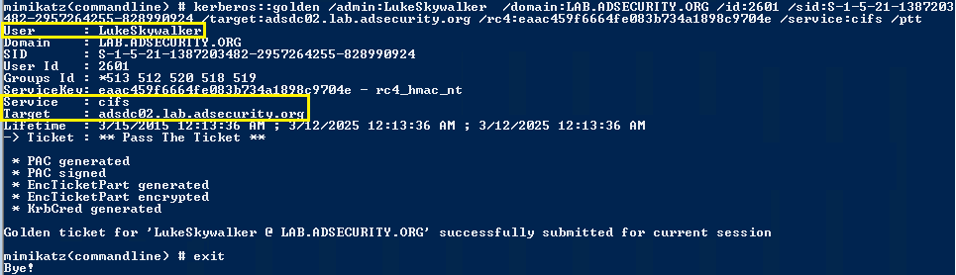
Usually Golden Tickets (forged Kerberos TGTs) get all the press, but this post is about Silver Tickets and how attackers use them to exploit systems. I have talked about how Silver Tickets can be used to persist and even re-exploit an Active Directory enterprise in presentations at security conferences this year. This post continues this ...
 twilit fiber
@cinder radish Anyone had issues with connectivity to the lab. I can't ping any of the targets and obviously no DNS. Same result with both my local machine and THM Attack box. @crimson sluice Can you reset the lab please?
 hearty tree
twilit fiber
<@697878147332309156> Anyone had issues with connectivity to the lab. I can't pi...
hearty tree
twilit fiber
<@697878147332309156> Anyone had issues with connectivity to the lab. I can't pi...
Which subnet are you in?
twilit fiber
hearty tree
Which subnet are you in?
Hi @hearty tree , I am on the 10.50.84.x/24 subnet. The range will need to be reset now as I shutdown the ntds service and lost my SSH connection. Can't authenticate via NTLM or Kerberos.
hearty tree
twilit fiber
Hi <@177529177707118592> , I am on the 10.50.84.x/24 subnet. The range will need...
we need to know your 10.200.x.101 subnet, not your VPN subnet, unless 10.50.84.x correlates to 10.200.84.x (I'm not sure), and if you vote to reset each hour it would have reset by now.
twilit fiber
hearty tree
we need to know your 10.200.x.101 subnet, not your VPN subnet, unless 10.50.84.x...
@hearty tree 10.200.88.X subnet. Everything is working fine now. Thanks.
vestal relicBOT
Gave +1 Rep to @hearty tree
 zinc pumice
Hey everyone ,
ssh connection waaaaaaaaaaay very slow ,any ideas ?
and ssh shell freezing after 1 min
i send 10 only 5 received
 zinc pumice
it was due to some DNS conf issue ,fixed it now

 lavish heron
hi all, I can't ssh into the network from the attackbox with the Administrator:tryhackmewouldnotguess1@ credentials. Tried restarting the attack box and restarting systemctl but I just keep getting "Permission denied, please try again."
Makes me think that maybe the Admin password has been changed? Appreciate any help. Cheers

there's a screenshot just in case
if it helps, I also can't ssh in with the credentials generated from distributor.za.tryhackme.loc/creds either
@cinder radish help needed if you have a spare sec, thanks!
vestal relicBOT
Gave +1 Rep to @cinder radish
cinder radish
lavish heron
<@697878147332309156> help needed if you have a spare sec, thanks!
If the Admin password has been changed, best course of action would be a network reset, Your SSH line looks correct so I don't think it is that. Can you please vote to reset the network?
lavish heron
Yep I've voted for reset
cinder radish
👍 Hopefully that gets the issue resolved. If not let me know and I'll take a look.
lavish heron
cheers mate, appreciate it
lavish heron
can anyone else vote to reset the network? still need 2 more votes and still can't ssh in as admin or generated creds. Thanks!
calm flower
lavish heron
can anyone else vote to reset the network? still need 2 more votes and still can...
Which subnet are you on?
lavish heron
calm flower
Which subnet are you on?
Sorry for the late reply, I've since completed this room and got the ADversary badge! Shout out to everyone that worked on putting those rooms together, especially @cinder radish who tried to help me whenever I got stuck! Great rooms, really in depth information, and some really challenging exercises to test my knowledge.
cinder radish
lavish heron
Sorry for the late reply, I've since completed this room and got the ADversary b...
Glad you liked it! 🙂
 subtle dome
I am not getting za-THMDC-CA.pfx file in crypto::certificates /systemstore:LOCAL_MACHINE /export
 subtle dome
Also cant add THMROOTDC.tryhackme.loc in AD Users snap

@cinder radish i am not able to query the parent domain despite bidirectional trust
cinder radish
subtle dome
I am not getting za-THMDC-CA.pfx file in `crypto::certificates /systemstore:LOCA...
On which machine are you? You should be on the DC
cinder radish
subtle dome
<@697878147332309156> i am not able to query the parent domain despite bidirecti...
I'm not 100% sure that that DC is live in Persisting AD. Just make sure
subtle dome
cinder radish
On which machine are you? You should be on the DC
Yes on dc
subtle dome
cinder radish
I'm not 100% sure that that DC is live in Persisting AD. Just make sure
I can ping root dc
cinder radish
subtle dome
Yes on dc
Then recheck the commands, on the DC you should be pulling the CA if you executed the patch. You can send the output of each step
cinder radish
subtle dome
I can ping root dc
Mmm, what about then just changing your domain to tryhackme.loc in the Users and Groups snap-in?
subtle dome
cinder radish
Mmm, what about then just changing your domain to tryhackme.loc in the Users and...
Same error
My subscription is over today i will purchase and retry
cinder radish
subtle dome
Same error
Mmm, other option is to directly auth to ROOTDC? Just remove the za component from the domain string but safe mode administrator creds will be the same.
subtle dome
cinder radish
Mmm, other option is to directly auth to ROOTDC? Just remove the `za` component ...
Nope, something is wrong with rootdc i guess
 subtle dome
If you were to RDP into one of the hosts and use the AD Users and Groups snap-in, you would be able to view the SID history attribute added to your user.
Where I can find that?
 cinder radish
subtle dome
Nope, something is wrong with rootdc i guess
cinder radish
subtle dome
Nope, something is wrong with rootdc i guess
You can send me your VPN profile to check, but Reset should fix it
cinder radish
subtle dome
> If you were to RDP into one of the hosts and use the AD Users and Groups snap-...
I'm unsure if you can, but your best be is to enable advance options and then check in the attributes section for sidHistory
subtle dome
I always write tryhackme.loc in the browser 😅
subtle dome
cinder radish
You can send me your VPN profile to check, but Reset should fix it
Sent you
subtle dome
Could someone submit the rest request in 10.200.88.0/24 room for me?
Only one request is required now
 hearty tree
calm flower
hearty tree
calm flower
To be fair, it'd been a couple days 😅
calm flower
Ye! Haha
 acoustic crater
What does this mean?
 hearty tree
acoustic crater
What does this mean?
hearty tree
acoustic crater
What does this mean?
The networks get congested, so users are removed from the room after 3 days. It doesn't remove your progress and you can rejoin it at any time
 cinder radish
 plush kernel
On which host are you?
plush kernel
cinder radish
On which host are you?
I don't remember
Should I be on thmdc?
cinder radish
plush kernel
I don't remember
Should I be on thmdc?
Ideally yes? That's where the domain ntds service is listening?
plush kernel
cinder radish
Ideally yes? That's where the domain ntds service is listening?
Thanks
vestal relicBOT
Gave +1 Rep to @cinder radish
 noble shore
Task 7 " In the C:\Tools\ directory, a script Invoke-ADSDPropagation is provided". It looks like someone deleted this script. It is not there or in other map. I could work around it but perhaps good to get the script there again.
noble shore
Compliments for this interesting room! And also scary to know what is possible and the almost impossible job to secure the business. 😉
subtle dome
Hey @cinder radish I am unable to call the SDPropagation from the powershell script and ldp.exe. I have added a user to Domain Admin group, but it is still member of the the protected group Domain Admin.
Steps to reproduce
- Select any user from distributor creds
- Login to DC using admin
- Add the user obtained from step 1, add it to Domain Admin group
- Run the Invoke-ADSDPropagation.ps1 with any task name on the DC
- Refresh the users snapin in MMC
- Check member of tab of the user from step 1, Domain Admin still exists
 swift night
Hello, can anyone help me with wireshark
 hallow sedge
hey @cinder radish I got this very weird error , while exporting TGT from certificate with Rubues.exe , any idea what to do ???

 smoky scarab
hallow sedge
hey <@697878147332309156> I got this very weird error , while exporting TGT fro...
smoky scarab
hallow sedge
hey <@697878147332309156> I got this very weird error , while exporting TGT fro...
Make sure you're on the correct system maybe? I dunno.
I have a suspicion you may have done the first few steps on thmwrk1 instead of thmdc.
smoky scarab
Man, the worst is letting your network fall asleep and then it just never comes back up properly. "Destination host unreachables" Hopefully it'll come back next time someone is in.
cinder radish
hallow sedge
hey <@697878147332309156> I got this very weird error , while exporting TGT fro...
Are you doing this from your own Windows VM? I'm not 100% sure what the client not trusted error is since I haven't got it before.
I'm on leave for this week so will only be back next week to properly debug
subtle dome
subtle dome
Hey <@697878147332309156> I am unable to call the SDPropagation from the powersh...
Any updates?
subtle dome
swift night
Hello, can anyone help me with wireshark
Sure what help you want?
subtle dome
smoky scarab
Man, the worst is letting your network fall asleep and then it just never comes ...
yeah I had to search for running rooms 😆 for learning. I can feel this
swift night
subtle dome
Sure what help you want?
I want to learn how to read packets data like man in the middle attack
hallow sedge
cinder radish
Are you doing this from your own Windows VM? I'm not 100% sure what the client n...
okk
hallow sedge
smoky scarab
I have a suspicion you may have done the first few steps on thmwrk1 instead of t...
yupp !! you're right !! , I have done the first few steps on on THMWRK1 !! ; so it means if we want to extract TGT from certificates using rubeus.exe , we need to be on domain controller ????
smoky scarab
@hallow sedge yes
hallow sedge
smoky scarab
<@754394628312006706> yes
Okk 👍 !! thanks man !!
vestal relicBOT
Gave +1 Rep to @smoky scarab
hallow sedge
hey can someone help ; I have successfully clone the SID history for domain admin groups to my "low Priv user" , but then also i am not able to access the resources on DC . any reason why ??
 hallow sedge
hey can someone help ; I have successfully clone the SID history for domain admi...
hallow sedge
hallow sedge
hey can someone help ; I have successfully clone the SID history for domain admi...
Okk ; got it , we need SSH again ; after SID history has been update !!
subtle dome
Hello @cinder radish, Why you havent demontrated RACE under ACL persistence?
https://github.com/samratashok/RACE
http://www.labofapenetrationtester.com/2019/08/race.html
GitHub
RACE is a PowerShell module for executing ACL attacks against Windows targets. - GitHub - samratashok/RACE: RACE is a PowerShell module for executing ACL attacks against Windows targets.

Home of Nikhil SamratAshok Mittal. Posts about Red Teaming, Offensive PowerShell, Active Directory and Pen Testing.
cinder radish
subtle dome
Hello <@697878147332309156>, Why you havent demontrated RACE under ACL persisten...
Hey there,
I have discussed this before I think in some of the other network channels as well.
The AD networks I provided here are tool agnostic, except for Bloodhound in enumerating AD. The reason for this is that I want to teach users the fundamental principles of attacking (and defending) AD environments.
ACL exploitation was taught in Exploiting AD - Task 2 and Persisting AD - Task 7. If you understand the fundamental principle of how ACL exploitation works in AD, then you can either manually perform the exploitation or persistence technique or use a tool for it. If I just show users, "here's a tool", then I'm not teaching them the core principle.
You can find almost an infinite number of niche tools that perform or automate an infinite number of AD exploitation/persistence techniques. Teaching users tools makes them script kiddies and increases the chance that they will just simply run a tool without actually understanding what it does, the impact that it will have, or the fact that the tool itself may be malicious.
However, if you understand the core of an AD exploitation technique, then it allows you to better understand the tool that you find online and allows you to sanity check it yourself before using it.
The RACE tool you mention there is one that I look at in the past, however, even in its README you can see that it is simply wrapping the AD-RSAT powershell cmdlet:
Note that the functions Set-ADACL and Set-DCPermissions need Microsoft ActiveDirectory module.
So why not just teach users how to use the legitimate AD-RSAT cmdlet itself? If this is a tool that you want to add to your arsenal for testing, go for it, but I don't think this tool, like so many other tools out there, allows THM to better teach users the core principle of ACL exploitation for AD.
The only tool that I will actively champion as a "must have" for AD exploitation is Bloodhound. Simply because it changes the thinking process behind AD. It was explained in a couple of conference talks (and in the THM room) about "Defenders think in lists, attackers think in graphs". This is a fundamental breakthrough that Bloodhound achieved, setting it apart from any other tool out there for AD testing.
 lethal ocean
I can't run mimikatz. It kept crashing my ssh session. I then noticed that the exe contains 0 bytes.
lethal ocean
I put a copy of mimikatz in the Download folder of the Admin account on THMWRK1 as to continue with the room
 rapid shard
Running into some trouble on task 7 it seems using runas to inject the administrator creds. command prompt opens, but unable to add users and computers to mmc because of no rights? This should be open with the netonly admin creds right?
I also am getting wrong user and pass if trying to dir \thmdc......\C$, ive tried a few times
If i SSH to THMWRK1 and dir \THMDC.za.....\C$\ as administrator that works.. Just not over RDP with low tier account and using the runas /netonly command
hmm seems i needed to type in the admin account with the domain in front za\administrator in the netonly command. guess it was trying to use a local account or something
subtle dome
Hello @cinder radish what exactly is difference between OU and Group? I mean both can contain users and computers (lets stick to these resources for now).
I see OU is basically used to attach policies with the descendants (members of OU) and the Group is used to assign set of privileges to collection of users. How does this make difference? I am confused
calm flower
Say you have Bob, Alice and Jim.
You place Bob in a group and he can access files you enable them to.
Jim isn't placed in the group so he can't access the files Bob has access to.
Alice can be assigned into a OU to have an admin status over Jim and/or Bob.
cinder radish
subtle dome
Hello <@697878147332309156> what exactly is difference between OU and Group? I m...
It is just a logical split for AD management. AD Groups are primarily used to structure and manage other AD groups, users and computer objects.
OUs are used to structure the entire AD object space. However, AD group membership doesn't really mean anything, unless there are actual permissions granted to the AD group and that is only done through two ways:
- ACEs - Grants the group actual security permissions over another AD object
- GPOs - Affects an entire OU to make updated to local computer and user configuration.
You can't assign a GPO to an AD group, only to an OU where it will then be applied to all AD objects that are stored in that OU. Of course you can have filters to restrict its application, but GPOs do not care about groups, users, or computers, it applies the GPO indiscriminately for the entire OU based on the filters.
So OUs are for AD policies, and AD Groups are for structuring permissions. Also note that the GPOs of OUs have the ability to change actual computer configuration, like who the local administrators are, but AD groups does not have the ability to affect anything other than actual AD objects.
Its weird, but the split does make sense if you play around with it
rapid shard
@cinder radish Just so I understand, at the end of this room where you remove the authenticated users from your script GPO policy, what we are doing is removing the ability of any domain user from viewing/editing this GPO? And since we added Domain Computers the only way now to get a shell would be when a Machine account authenticates? Is that correct? Or am I missing something.
cinder radish
rapid shard
<@697878147332309156> Just so I understand, at the end of this room where you re...
That is correct yes. Those permissions are strictly for viewing and editing rights. Those permissions have nothing to do with the actual permissions specified in the GPO.
So I think what you might be missing slightly, is remember where the GPO executes. It executes on a server host. For the GPO to apply, it therefore has to be read by the machine account of the associated server host. So that host still needs read access to the GPO to apply it. Once the GPO is applied, it is a local thing where the script is now already copied and will execute locally on the server once the user authenticates.
rapid shard
cinder radish
That is correct yes. Those permissions are strictly for viewing and editing righ...
Nice Thanks for that! And for that great OU vs Group run down above. So nobody can touch it, but it still exists there and functions as the GPO as intended when users logon. Unfortunately for me, i dont get my shell anymore after locking down the GPO
when logging in with a t1 user but itll try it again.
vestal relicBOT
Gave +1 Rep to @cinder radish
cinder radish
rapid shard
Nice Thanks for that! And for that great OU vs Group run down above. So nobody c...
So there is another thing to consider (which I did not explain in the task).
The running shell was configured as a User Policy in the GPO. So even though the Machine account pulls the GPO, the User account needs access to determine which policies apply to it. Since we removed access, that specific shell would not work.
However, remember policies can have Computer Policies and User Policies. So the trick to get this hidden GPO working nad persistent, is to stick to Computer Policies, like local group membership (think Local Administrators group). That way, only the machine account needs to ever interact with the GPO, meaning you get persistence and can hide it from everything except the Domain Computers.
So in short, that shell won't work with the hidden policy, you need to get a bit more creative with using Computer Policies for persistence, not User Policies. But can't just give away all the secrets, you have to do some exploring on your own 😉
rapid shard
Perfect! Thanks!!!!
 solid crescent
Need some help with Task 7. I have added Active Directory Users and Groups snap-in to MMC under the context of za/Administrator. I can see the list of contents under za.tryhackme.loc, but i don't see System in the list. The room mentioned to enable Enhanced Features (View->Advanced Features), but when I clicked View, I don't see Advanced Features too.
 pure talon
Hello everyone
Strange, in task 4, after all the actions with the certificate:
Access denied.
pure talon

 warm imp
Humm, I can't seem to find the "Invoke-ADSDPropagation.ps1" script. So I imported it from git (https://raw.githubusercontent.com/edemilliere/ADSI/master/Invoke-ADSDPropagation.ps1)
And I get this msg
Exception calling "GetCurrentDomain" with "0" argument(s): "Current security context is not associated with an Active Directory domain or forest." At line:1 char:1 + Invoke-ADSDPropagation + ~~~~~~~~~~~~~~~~~~~~~~ + CategoryInfo : NotSpecified: (:) [], MethodInvocationException + FullyQualifiedErrorId : ActiveDirectoryOperationException
[EDIT]
So after reading the script, there is a parameter that we can provide
Param(
        [Parameter(Mandatory=$false,
            HelpMessage='Name of the domain where to force SDProp to run',
            Position=0)]
        [ValidateScript({Test-Connection -ComputerName $_ -Count 2 -Quiet})]
        [String]$DomainName = [System.DirectoryServices.ActiveDirectory.Domain]::GetCurrentDomain().Name,

        [ValidateSet('RunProtectAdminGroupsTask','FixUpInheritance')]
        [String]$TaskName = 'RunProtectAdminGroupsTask'
    )
So I tried to call the script like Invoke-ADSDPropagation za.tryhackme.loc which worked
pure talon
Yes, I also wanted to speed up the process on task 7. To avoid waiting 60 minutes for SDProp.
And there is no script there((((
 pure talon
Hello everyone!!
Who can help me, I have been trying to repeat task 4 several times, but every time I write:
Access is denied
Why is this happening?! Have any thoughts?!
(I do everything alone in odi on assignment)


😩
 heady rain
Hi, does the Administrator:tryhackmewouldnotguess1@ working? I'm trying to start at Task 2. I can't even login, it keeps permission denied.
 wispy thunder
Hello, Im doing the SDProp part in task7, I gave my Account a Full Control of AdminSDHolder, then Invoked the ps1 but my account does not show up on the Domain Admins Group. I watched the video from Tyler Ramsbey, I was doing everything right, however, my account doesnt have the [ZA\louis.cole] after the account name. what am I doing wrong?
 wispy thunder
pure talon
Yes, I also wanted to speed up the process on task 7. To avoid waiting 60 minute...
wispy thunder
pure talon
Yes, I also wanted to speed up the process on task 7. To avoid waiting 60 minute...
Its in the \THMDC.za.tryhackme.loc\c$\Tools
Im not sure why
wispy thunder
wispy thunder
Hello, Im doing the SDProp part in task7, I gave my Account a Full Control of Ad...
Ooooh I figured out, was checking the members of Domain admin, It was on the Security tab, I had the Full control of Domain Admin.
pure talon
wispy thunder
Its in the \\THMDC.za.tryhackme.loc\c$\Tools
Im not sure why
I just waited)))
(thanks, I'll know)
cinder radish
pure talon
Yes, I also wanted to speed up the process on task 7. To avoid waiting 60 minute...
Hey there, sorry I was on leave.
The script is on the DC, if you RDP or SSH to the DC you will find the script
cinder radish
pure talon
Hello everyone!!
Who can help me, I have been trying to repeat **task 4** severa...
Is Sean Hopkins a DA? From what I remember they should not be? So if you generate a cert from Sean Hopkins, you will get a KRB ticket for that user, meaning you will get the permissions associated with that user. Try forging the cert for a more privileged user?
cinder radish
wispy thunder
Ooooh I figured out, was checking the members of Domain admin, It was on the Sec...
Exactly! So remember the SDProp affects the Security of the Group, not the ACTUAL group. But since you now have full security permissions over the group, you can just add anyone you like to that group. Hope that makes sense!
pure talon
cinder radish
Is Sean Hopkins a DA? From what I remember they should not be? So if you generat...
Hi, in the end I waited until the server was updated, and tried to do the same thing (clearly on the task) but with a different user.
And everything turned out without any problems.
Thank you!)
vestal relicBOT
Gave +1 Rep to @cinder radish
 karmic fulcrum
@last belfry ⬆️
 last belfry
@deep haven Don't post referral links here.
 deep haven
Ok I'm sorry
 proper oyster
Anyone else not able to reach the hosts on this network? nslookup is failing for me and I can't ping THMDC or THMWRK1 by IP address... Wasn't like this earlier today. I voted for network reset, not sure if anyone can check on things sooner. The network is showing as Running with about 1 hour left...
Btw, I'm on the VPN and am getting Destination Host Unreachable messages from the THM Persisting AD network router 10.50.58.1 when I ping 10.200.61.101 (THMCHILDDC).
Please @ me if anything changes. I'm going to step away from computer for a bit....
 pliant bluff
Hello guys, I am doing from the Persisting Active Directory room the Persistence through ACLs task, and I can't find Active Directory Users and Groups Snap-In, so I replaced that with Active Directory Users and Computers Snap-In, but I can't still see the za.tryhackme.loc domain, so I clicked on Add domain an wrote in it but pop-up warning showed: "The domain za.tryhackme.loc could not be found because: The user name or password is incorrect". Can you please help me?
Thanks a lot.
pliant bluff
pliant bluff
Hello guys, I am doing from the Persisting Active Directory room the Persistence...
Reset solved that.
pliant bluff
Hello guys, it's me again. I am doing the Task 8, and when I wrote "Th34rch1t3ct - persisting GPO" into form (right-click on the Admins OU and select Create a GPO in this domain, and Link it here), pop-up showed: "Network access denied". Does anyone know what to do with that? Now I'm trying resetting that, but its required submit the rest requests. Thanks a lot.
pliant bluff
pliant bluff
Hello guys, it's me again. I am doing the Task 8, and when I wrote "Th34rch1t3ct...
Reset didn't work
pliant bluff
pliant bluff
Reset didn't work
Solved by repeating Task 6.
 opaque steeple
pliant bluff
Hello guys, it's me again. I am doing the Task 8, and when I wrote "Th34rch1t3ct...
opaque steeple
pliant bluff
Hello guys, it's me again. I am doing the Task 8, and when I wrote "Th34rch1t3ct...
same
opaque steeple
pliant bluff
Solved by repeating Task 6.
didnt for me tho :[
using mmc with lower privilege acc did work. ig someone broke the perms on admin xD
 spark cloak
HELLO
 grand moth
spark cloak
HELLO
grand moth
spark cloak
HELLO
@last belfry this one is a scammer he instantly dm's you with a scam message
last belfry
DM me a screenshot of their DM, please?
grand moth
i blocked him and it deleted the message
last belfry
You can click to view the message
grand moth
last belfry
You can click to view the message
done i had to unblock him it didn't show up the conversation
last belfry
-ban 1050327266464383007 -ddays 1 Promoting a pyramid scheme via DMs
vestal relicBOT
🔨 Banned eriptv#3252 indefinitely
grand moth
thanks
 inland merlin
Hello, I am sorry, I made a mistake and accidentally deleted Rubeus.exe and CertForge.exe on THMDC (THMCHILDDC 10.200.x.101) because I did not remember that my Windows Defender was on. I tried to Restore the files, but it did not work. Maybe some admin should reset the machine before some users are confused about this situation. Sorry again 😦
cinder radish
inland merlin
Hello, I am sorry, I made a mistake and accidentally deleted Rubeus.exe and Cert...
Not a problem. Please just vote to reset the environment and it will happen once sufficient votes have been reached as well
 hoary stream
!link 4608
 short tulip
hello everybody
 haughty sapphire
In task 7 on persisting though ACLs, mmc can't load the "User and Computer" snap-in and prompt this error : "the directory schema is not accessible because an invalid directory path name was passed".
This is done from thmwrk1 with a terminal loaded with the credentials of a Domain Administrator. I verified that the credentials are valid by listing folders in the DC.
Is a network reset the only solution ? Or I did something wrong ?
 stray comet
is there anybody to good at domain controller and ad (windows machine)
i wanna ask something
 quick tulip
stray comet
is there anybody to good at domain controller and ad (windows machine)
quick tulip
stray comet
is there anybody to good at domain controller and ad (windows machine)
Don't ask to ask, just ask! Screenshots and as many details as possible. Otherwise there will be back and forth.
cinder radish
https://github.com/MWR-CyberSec/tabletop-lab-creation
There is also quite a number of videos out there like those from John Hammond on how to create a mini AD lab.
Once you have your own will be easy to test theories
GitHub
Vagrant provisioning scripts to create a simulated network environment for tabletop exercises - GitHub - MWR-CyberSec/tabletop-lab-creation: Vagrant provisioning scripts to create a simulated netwo...
 native halo
last belfry
-ban 1050327266464383007 -ddays 1 Promoting a pyramid scheme via DMs
native halo
last belfry
-ban 1050327266464383007 -ddays 1 Promoting a pyramid scheme via DMs
😳 Ayo
My guy got the hammer
 open compass
What is this AD?
deep haven
Active Directory. Search online for an anwser
cinder radish
Debugging your initial connection to the network.
As mentioned when the networks released, DNS is a part of AD testing whether you like it or not. This is because one of the two major AD authentication protocols, Keberos, relies on DNS to create tickets. Tickets cannot be associated with IPs, so DNS is a must.
If you are going to test AD networks on security assessment, you will have to equip yourself with the skills required to solve DNS. You therefore have two options:
- Hardcode entries in your
/etc/hostsfile - Works great, but on a network of 10000 hosts probably not the way to go - Actually fix your DNS to point to the name servers in the network - Harder to do, but in the long run yields good results
Whenever a task is not working for you, your first thought should be: "Is my DNS working?" I've personally wasted countless hours on assessments wondering why my tooling is not working, only to realise my DNS has changed. 99% of the time, it's DNS.
How to connect your DNS to the THM AD network:
- Follow the steps provided in the initial task on DNS configuration - If you use a different OS that AttackBox or Kali, you are probably going to have to google your equivalent configuration
- Run
ping <THM DC IP>- This will verify that the network is actually live. If you get no response, chances are your network is not started or in the "bricked mode" (see below) state - Run
nslookup tryhackme.loc <THM DC IP>- This will verify that the THM Name server is active. If the PING worked but this does not, time to contact support here since something is wrong. I'd also suggest hitting the network reset button - Run
nslookup tryhackme.loc- If the first nslookup command worked, but this second one does not, you did something wrong with your DNS configuration and need to go back to step 1.
These AD networks are rated medium, which means if you just joined THM, this is probably not where you should start your learning journey. AD is massive, and you will need to apply the mindset of "figuring stuff out" if you want to make a success of testing it. However, if above all it still fails for you, please be as descriptive on what your are trying and doing to enable support to help you as efficiently as possible.
cinder radish
cinder radish
*Debugging your initial connection to the network.*
As mentioned when the netwo...
Network Bricked Mode state
If you are unable to ping the DC, but the network on your network diagram shows that the network is started, your network has probably entered the "bricked state"
What has happened?
One of the users in your network subnet clicked on the UI "Extend" button when the network timer reached zero. This causes a bug where the backend thinks that they network is still live, but in fact it is not.
What can you do?
The best thing to do is to wait until the network time expires, then press the "Start" button again. However, you can also attempt a bypass, which does sometimes work:
- Refresh your network THM room page
- Right click on the Start button and say inspect element
- Remove the disabled state from the HTML button
- Click the Start button
In certain cases, this can help to resync the backend, so give it 5 minutes to see if that worked for you. Otherwise, we are back to square one about waiting for the network time to expire.
cinder radish
cinder radish
*Network Bricked Mode* state
If you are unable to ping the DC, but the network ...
 ashen frigate
hello im in task 4 on "persisting-ad" and i have got a problem
with my low-privilleged account it just can't open mimikatz.exe , it shows it contains 0KB . but from the admin user it has size and i can use it only from there. help ?
 oblique fern
ashen frigate
hello im in task 4 on "persisting-ad" and i have got a problem
with my low-priv...
oblique fern
ashen frigate
hello im in task 4 on "persisting-ad" and i have got a problem
with my low-priv...
I had some problems with Mimikatz also. I used the 32 bit version instead which worked 🙂
 viscid skiff
Heyy!! In my case i failed to download persisting ad vpn config file
How to solve it ?
karmic fulcrum
viscid skiff
How to solve it ?
404 When trying to download the Wreath Network VPN?
Can you head over to the room https://tryhackme.com/room/wreath
Press "options" -> "leave room"
After that, click here -> https://tryhackme.com/jr/wreath
Once you have rejoined the network, make sure to regenerate your new configuration file by heading to https://tryhackme.com/access, selecting the network from the dropdown, and finally clicking "regenerate"
Ensure to wait up to 2 minutes before downloading your OpenVPN file!
jabba thm support....
just replace wreath with this network and tada the same instructions apply

TryHackMe
Learn how to pivot through a network by compromising a public facing web machine and tunnelling your traffic to access other machines in Wreath's network. (Streak limitation only for non-subscribed users)

TryHackMe
TryHackMe is a free online platform for learning cyber security, using hands-on exercises and labs, all through your browser!
deep haven
How long does the network need to start? DC is up and working, DNS resolution is working, however I can't ping thmwrk1 ... Network is running for 15min, seems long enough?
 simple lantern
deep haven
How long does the network need to start? DC is up and working, DNS resolution is...
simple lantern
deep haven
How long does the network need to start? DC is up and working, DNS resolution is...
its super buggy man, wait out the timer and try again, painful...i know
simple lantern
deep haven
How long does the network need to start? DC is up and working, DNS resolution is...
usually 5 minutes for me
viscid skiff
At persisting as in last GPO task i don't crate a new GPO in rdp session with admin of thmwrk1
Help
In Task 8 , RDP session on thmwrk1 low privilege user I login and use runas script of administrator .After that in mmc Admins OU I can't able to create GPO
viscid skiff

 olive patrol
@viscid skiff What I usually do if I am stuck, rather than asking I check the chat history. I looked for any mentions of "task 8" and then found these messages. #persisting-ad message
Read from there onwards and that should help you on your way. If still in doubt, you could also look for writeups online as the jr pathway has been out for a while.
I'm not subbed anymore nor have I done this room so can't help much more than this
 tepid haven
viscid skiff
In Task 8 , RDP session on thmwrk1 low privilege user I login and use runas scri...
tepid haven
viscid skiff
In Task 8 , RDP session on thmwrk1 low privilege user I login and use runas scri...
You may have to go back and do a couple of steps. I know I did several times... took me a week + to get this done....
Read.. do.. read more and do more...
 amber dagger
Hi, I'm working through persisting-AD and have an issue with Task 3. I can create a golden ticket ok and can dir c$ on thmdc but when I create a silver ticket for thmserver1 or thmserver2 and try to dir c$ I get "Access Denied". Has anyone else seen this ?
 gloomy willow
I can't ssh or rdp into any of the machines
I can see them with nslookup what can cause this?
gloomy willow
Ok today it's working
 eager dragon
THMSERVER2 and THMWRK1 are down.
 uncut vapor
haughty sapphire
In task 7 on persisting though ACLs, mmc can't load the "User and Computer" snap...
uncut vapor
haughty sapphire
In task 7 on persisting though ACLs, mmc can't load the "User and Computer" snap...
hello, it s a bit late but you have to :
Right click on "Active Directory..." -> change domain -> za.tryhackme.loc
And it should be good
 fading junco
viscid skiff
In Task 8 , RDP session on thmwrk1 low privilege user I login and use runas scri...
fading junco
viscid skiff
In Task 8 , RDP session on thmwrk1 low privilege user I login and use runas scri...
in case you haven't solved it yet, the user parameter in the runas command must be /u:<domain>\administrator. before i did it without specifying domain and got the same error
 robust fable
Hi, I have made a dcsync of all users dumping it in the log as indicated in the guide but while extracting things from the txt generated on my local machine, I lost connection by ssh to the server, is this normal?
gloomy willow
In task 7 Persisting with AdminSDHolder
I get this warning when trying to import the snapi in

And this error also

Im running runas with administrator creds but it looks like it's not doing the magic
nvm , I tried what Dimka wrote above and it worked
 rugged tundra
If anyone is in the 10.200.88 room can you vote to reset it? The network has become unresponsive even though it is running.
I actually think someone has shut down THMWRK1 in that room
 zinc widget
Anyone know what the I'm dumb and can't follow instructions. I missed the ERROR kuhl_m_lsadump_dcsync ; GetNCChanges: 0x000020f7 (8439) error means in mimikatz? I'm trying to follow along the instructions and don't see if I'm missing an instruction. From what I did see, it appears to be a lack of permissions. But isn't that what our account should be?Log in as the ZA administrator part
 novel berry
gloomy willow
In task 7 Persisting with AdminSDHolder
I get this warning when trying to import...
novel berry
gloomy willow
In task 7 Persisting with AdminSDHolder
I get this warning when trying to import...
I am also facing same issue. bro have you resolved it?
novel berry
novel berry
I am also facing same issue. bro have you resolved it?
@cinder radish please help
cinder radish
novel berry
<@697878147332309156> please help
See here for solution: #persisting-ad message
deep haven
Hello, I got a strange bug on task#8 Persistence through GPOs, when i'm logged on the right server, with the low credentials and with a run as cmd with administrator and then mmc. When I'm trying to add a GPO I got : "Network Access is denied". Someone know why thanks your help.
cinder radish
deep haven
Hello, I got a strange bug on task#8 Persistence through GPOs, when i'm logged ...
See same message for the fix: #persisting-ad message
deep haven
thx ! @cinder radish
vestal relicBOT
Gave +1 Rep to @cinder radish
novel berry
cinder radish
See here for solution: https://discord.com/channels/521382216299839518/994316857...
runas /netonly /user:za\Administrator cmd.exe using this command but it isn't working
cinder radish
novel berry
**runas /netonly /user:za\Administrator cmd.exe** using this command but it isn'...
If you specify ZA, you are only specifying the shortname of the domain which will not resolve itself. You then have to change the domain to the FQDN which should be za.tryhackme.loc. Your other option is to in the runas command, specify the fqdn
novel berry
cinder radish
If you specify ZA, you are only specifying the shortname of the domain which wil...
it worked, Thank you
vestal relicBOT
Gave +1 Rep to @cinder radish
 quaint palm
Task 8 testing the gpo by logon to server with t1 does not execute the script... can get it and run it manually but GPO does not run it?
Did sign out and in and a gpupdate /force and also tested rebooting the server
Got it needed to add script network path not path on dc server
quaint palm
Nope scratch that... did not work either
cinder radish
quaint palm
Task 8 testing the gpo by logon to server with t1 does not execute the script......
What you can do for debugging purposes, on the host, run gpresult /H report.html This will output a HTML report so you can see which group policies were applied. Will help you figure out why yours might not be executing.
Also, start small, maybe first just touch a file somewhere? Verify that that works?
quaint palm
Thanks will try on clear session later to troubleshoot
quaint palm
cinder radish
What you can do for debugging purposes, on the host, run `gpresult /H report.htm...
Got it, redid the task but unlinked and deleted the other gpo's that should not be there and it worked fine
One thing though, even though I set the delegation to remove all access including owner and only dc can delete it. I was still as the Admin user able to unlink and delete the object
So how is that hard to remove? I didn't even need to pth of the dc computer account?
cinder radish
quaint palm
Got it, redid the task but unlinked and deleted the other gpo's that should not ...
So remember that GPOs fight each to "win". You can actually see this is you run gpresult you will see it shows you which GPO is the "winning" GPO.
In terms of the removal, you do need a couple of additional steps to fully remove an admin's ability to simply just delete the GPO. For safety reasons, I decided to leave the last couple of steps out. But some self research should guide you in what is required
quaint palm
Perfect, thanks... time to break my home lab😎
 lost notch
cinder radish
So remember that GPOs fight each to "win". You can actually see this is you run ...
lost notch
cinder radish
So remember that GPOs fight each to "win". You can actually see this is you run ...
there is an easy way to remember which GPO will win
it's always the one loaded last
in sequence local - site - domain - organisational unit
LSDOU
cinder radish
lost notch
LSDOU
Any idea how enforcement of GPOs can change this behaviour? For example if I enforce a site GPO, does that overwrite a domain GPO?
Also, how does it decide which one to take if two are defined at the same level?
I'm asking cause GPOs are a massive pain and something that I haven't perfected yet
lost notch
at the same level it's the one below in the same stack
i need read up on gpo enforcement though
an enforced GPO acts outside of its stack and always wins unless there is anotehr enforced GPO being loaded after that one
cinder radish
lost notch
an enforced GPO acts outside of its stack and always wins unless there is anoteh...
Thanks for the info! Yeah GPOs are weird and I find often they don't 100% behave the way you think they are going to behave.
vestal relicBOT
Gave +1 Rep to @lost notch
lost notch
microsoft decided to revamp the GPO rights management, which opened a whole other can of worms
cinder radish
lost notch
microsoft decided to revamp the GPO rights management, which opened a whole othe...
Oh yes, and intune is crazy. At work we can't seem to get meeting devices to not autolock. Been dealing with this issue for a week now with the correct intune GPO just simply not applying.
Now even with new rights management and structures just going to be fun!
lost notch
even the 2016 revamp still causes problems, lots of broken GPO infrastructures that are still using 2012 and below settings and basically either pushing them everywhere via authenticated users or they're not readable for computers, causing them not to do anything
cinder radish
lost notch
even the 2016 revamp still causes problems, lots of broken GPO infrastructures t...
Know of any better way to debug apart from gpresult?
 tawdry island
Hi, in Task 2: What is the NTLM hash associated with the krbtgt user?
mimikatz # lsadump::dcsync /domain:za.tryhackme.loc /all - This command output is not working
any suggestions plz
 clear stirrup
@cinder radish thank you for the rooms. Another small typo I've seen. 🙈 sorry.
In Task 2 Q2. The hint is missing a @ in the krbtgt UPN
vestal relicBOT
Gave +1 Rep to @cinder radish
clear stirrup
 clear stirrup
On Task 5, (and Task 2 when we are given the Admin Creds), it's not clear that to stop NTDS we should be SSH-ing into
ssh za\\Administrator@thmdc.za.tryhackme.loc
If it wasn't for a previous question in chat, I'd have hit a brick wall here.

Maybe a little note to say which server the admin account should be logged into would help here 🙂
cinder radish
clear stirrup
On Task 5, (and Task 2 when we are given the Admin Creds), it's not clear that t...
It was mentioned in words? Get an SSH session on THMDC using the Administrator credentials for this next part. I can maybe bold it? This is now for task 5
 cinder radish
clear stirrup
<@697878147332309156> thank you for the rooms. Another small typo I've seen. 🙈...
cinder radish
clear stirrup
<@697878147332309156> thank you for the rooms. Another small typo I've seen. 🙈...
Thanks for reporting! Fixed
vestal relicBOT
Gave +1 Rep to @clear stirrup
cinder radish
clear stirrup
On Task 5, (and Task 2 when we are given the Admin Creds), it's not clear that t...
Same for task 2 it seems. Can probably bold it or something, but it does mention where you need to get a session using which credentials?
 clear stirrup
cinder radish
Same for task 2 it seems. Can probably bold it or something, but it does mention...
clear stirrup
cinder radish
Same for task 2 it seems. Can probably bold it or something, but it does mention...
Sorry, "task 2" probably confused the matter. I take that back. I meant that this was the point that Admin Creds were introduced and it didn't say what server to log in to, but as you've rightly pointed out, the Admin is going to log in to THMWRK1 and THMDC. So it wouldn't make sense to mention where to SSH at this point of the room.
clear stirrup
cinder radish
It was mentioned in words? `Get an SSH session on THMDC using the Administrator ...
Oops, that one's on me, I totally missed that. I'm a visual guy and I saw this in the mock Terminal and went straight to THMWRK1
 cinder radish
clear stirrup
Sorry, "task 2" probably confused the matter. I take that back. I meant that thi...
cinder radish
clear stirrup
Sorry, "task 2" probably confused the matter. I take that back. I meant that thi...
I think the thing is this is the last room in the AD series so at this point you should know a tad bit more. They are meant to be done in order 🙂
So at this point things should be a tad bit more clear on how to for example SSH using creds. So I thought would be sufficient to just mention host and cred-set to use and users should be ready to go
cinder radish
clear stirrup
Yeah that's a mistake, one second
Fixed, made it THMCHILDDC to make things more clear
clear stirrup
cinder radish
I think the thing is this is the last room in the AD series so at this point you...
Yeah, that's fair, thank you for the explanation. I'd not seen NTDS before and old grey matter couldnt connect that dots.
vestal relicBOT
Gave +1 Rep to @cinder radish
clear stirrup
cinder radish
Fixed, made it THMCHILDDC to make things more clear
you da best ❤️
cinder radish
clear stirrup
Yeah, that's fair, thank you for the explanation. I'd not seen NTDS before and o...
Glad you are learning! AD is a massive field, so this is sadly only a taste, a lot more to explore out there!
Thanks for reporting bugs for fixes!
vestal relicBOT
Gave +1 Rep to @clear stirrup
clear stirrup
@cinder radish
Task 7: "Users and Computers" was accidentally labelled as "Users and Groups" in the write-up.

 clear stirrup
Also Task 7: Would it be better if this runas command has runas /netonly /user:thmchilddc.tryhackme.loc\Administrator cmd.exe instead?

It was failing to runas as administrator for MMC without the "thmchilddc" server. I noticed Tyler had a similiar issue in his video
cinder radish
clear stirrup
<@697878147332309156>
Task 7: "Users and Computers" was accidentally labelled ...
Fixed
cinder radish
clear stirrup
Also Task 7: Would it be better if this runas command has ```runas /netonly /use...
Fixed as well, thanks for reporting!
vestal relicBOT
Gave +1 Rep to @clear stirrup
 magic pollen
Hey guys, for Task 5 - Persistence using Certificates
I am having issues with the rubeus command for requesting a TGT
[X] KRB-ERROR (62) : KDC_ERR_CLIENT_NOT_TRUSTED
magic pollen
anyone can assist?
magic pollen
Hey guys, can someone help me reset the network for persisting AD network?
my subnet is 10.200.61.XXX
 strong cairn
magic pollen
[X] KRB-ERROR (62) : KDC_ERR_CLIENT_NOT_TRUSTED
strong cairn
magic pollen
[X] KRB-ERROR (62) : KDC_ERR_CLIENT_NOT_TRUSTED
I am having the same problem. Did you got the solution ?
cinder radish
magic pollen
anyone can assist?
We only fixed this in the Exploiting AD room. Will have to fix it here as well. Here are the steps in the mean time:
- Log into the CHILDDC
- Run MMC
- Add snap in certificates
- When asked, say for local computer
- Right click on personal and say enroll new certificate
- Follow the prompts and select all available certificstes for enrollment
- Enroll
- Should work again
cinder radish
strong cairn
I am having the same problem. Did you got the solution ?
See steps posted again now until we patch the machine
strong cairn
cinder radish
See steps posted again now until we patch the machine
Okay, I will follow the steps and try to solve it again
Thank You
vestal relicBOT
Gave +1 Rep to @cinder radish
cinder radish
cinder radish
We only fixed this in the Exploiting AD room. Will have to fix it here as well. ...
 fallen latch
Hello Everyone!
where can I download mimkatz.exe? I found link to github page from tryhackme room but I can not find mimkatz.exe program?!
 mellow pelican
Yay! Thanks @cinder radish
 vestal relicBOT
Gave +1 Rep to @cinder radish
cinder radish
mellow pelican
Yay! Thanks <@697878147332309156>
Well done!!
vestal relicBOT
Gave +1 Rep to @cinder radish
 half sonnet
Thank you for these networks @cinder radish! It's been quite the learning journey
 cinder radish
half sonnet
Thank you for these networks <@697878147332309156>! It's been quite the learning...
cinder radish
half sonnet
Thank you for these networks <@697878147332309156>! It's been quite the learning...
Just a pleasure!
 verbal flame
hi i'm having issue with completing the Task 4 Persistence through Certificates in this room
mimikatz # crypto::certificates /systemstore:local_machine /export
- System Store : 'local_machine' (0x00020000)
- Store : 'My'
- Subject :
Issuer : DC=loc, DC=tryhackme, DC=za, CN=za-THMDC-CA
Serial : 0800000000006f4c69a01c8fbbad0800000010
Algorithm: 1.2.840.113549.1.1.1 (RSA)
Validity : 5/11/2022 2:29:07 PM -> 5/11/2023 2:29:07 PM
Hash SHA1: de718d0c39b7b8564b1a4ad73acc1dcecf6fc692
Key Container : 8d822ca2f7b58a2dc5da34819224d0a4_cf5b8e23-6097-4b09-af93-e79b05557c3f
Provider : Microsoft RSA SChannel Cryptographic Provider
Provider type : RSA_SCHANNEL (12)
Type : AT_KEYEXCHANGE (0x00000001)
|Provider name : Microsoft RSA SChannel Cryptographic Provider
|Key Container : te-ComputerCertificateTemplate-6aec0025-30fd-4cf4-b476-d4a796f9af9e
|Unique name : 8d822ca2f7b58a2dc5da34819224d0a4_cf5b8e23-6097-4b09-af93-e79b05557c3f
|Implementation: CRYPT_IMPL_SOFTWARE ;
Algorithm : CALG_RSA_KEYX
Key size : 2048 (0x00000800)
Key permissions: 0000003b ( CRYPT_ENCRYPT ; CRYPT_DECRYPT ; CRYPT_READ ; CRYPT_WRITE ; CRYPT_MAC ; )
Exportable key : NO
Public export : OK - 'local_machine_My_0_.der'
Private export : OK - 'local_machine_My_0_.pfx'
za\administrator@THMWRK1 C:\Users\Administrator.ZA\hey>dir
Volume in drive C is Windows
Volume Serial Number is 1634-22A9
Directory of C:\Users\Administrator.ZA\hey
05/31/2023 05:37 PM <DIR> .
05/31/2023 05:37 PM <DIR> ..
05/31/2023 05:37 PM 1,405 local_machine_My_0_.der
05/31/2023 05:37 PM 3,277 local_machine_My_0_.pfx
2 File(s) 4,682 bytes
2 Dir(s) 50,714,611,712 bytes free
za\administrator@THMWRK1 C:\Users\Administrator.ZA\hey>
i cant seem to generate any certificates like this shown in the walkthrough
05/10/2022 12:12 PM 939 local_machine_My_1_za-THMDC-CA.der
05/10/2022 12:12 PM 2,685 local_machine_My_1_za-THMDC-CA.pfx
which is necessary for the task can anyone help me with this?
verbal flame
verbal flame
------------------------------------------------------
-------------------------...
this is what i got after dir in the ssh terminal
 median wyvern
Hi New Here, I'm trying t run mimikatz in the persistence room bit my ssh terminal just hangs there and the file size of the mimikatz app shows zero idk if that means anything or that's how it is normally please help
 trim crest

why??
I did everything the guide told me to do
certificate : fulladmin.pfx
password : Password123
dc : 10.200.99.101
 soft plinth
trim crest
soft plinth
trim crest
stuck here as well, same error
 ruby grotto
trim crest
ruby grotto
trim crest
Same here
ruby grotto
soft plinth
stuck here as well, same error
Find a solution?
soft plinth
ruby grotto
Find a solution?
Nah I’ll try again tomorrow
ruby grotto
soft plinth
Nah I’ll try again tomorrow
Yeah it seems scuffed. Luckily you don't need to grab a flag for it tho, so u could just continue on and take note of the last few steps.
soft plinth
ruby grotto
Yeah it seems scuffed. Luckily you don't need to grab a flag for it tho, so u co...
Yeah my thoughts exactly
 feral siren
Hi everyone can someone tell me why it says "3 days of access letf" on this room? 😱 plz
half sonnet
feral siren
Hi everyone can someone tell me why it says "3 days of access letf" on this room...
users are rotated out every few days to ease the load on the network, you'll just have to rejoin and won't lose any progress
feral siren
🙏 thanks you so much!!! I was kinda scared
karmic fulcrum
feral siren
Hi everyone can someone tell me why it says "3 days of access letf" on this room...
it will kick you from the network so that the load and amount of networks are lower to save costs for tryhackme.... none of your answered questions or completed tasks will get removed and you can just rejoin imidiattly after it kicks you out.... assuming you have the requirements to join the network room( being a subscriber or having the day streak depends on the network )
feral siren
thank you
deep haven
Hey guys! Just got to this room and I only see the network without any buttons for interaction (Start, Extend). I don't have the Status in the top right corner. Is this expected?
 dry swift
trim crest
why??
dry swift
trim crest
why??
I met the same error, after some debugging, it turns out that the Rubeus.exe is somehow corrupted (showing 0 bytes when listing with dir). I copied Rubeus binary from the previous task to make it work
dry swift
For Task 8, I've successfully tested my reverse shell payload and it's functioning as expected. I've also added the persisting - GPO and included the .bat file in the logon script. Despite logging in and out multiple times with the t1 user, I'm not receiving the reverse shell as anticipated. I've checked the c:\tmp directory under the t1 user, but the reverse shell payload is not present. Could you help me identify any potential mistakes or provide guidance on how to troubleshoot this issue? @cinder radish
cinder radish
dry swift
For Task 8, I've successfully tested my reverse shell payload and it's functioni...
gpresult /h report.html on the host can tell you what happened with the application of the GPOs. GPOs are sadly one of those tricky things where it might not actually work exactly like you think it would work
dry swift
I've noticed that other Group Policy Objects (GPOs) are visible, but mine isn't. Do I need to remove the others for mine to function correctly, or do you have any other suggestions for resolving this issue? the result is here:

also the html file
i also tried the gpudate /force in t1 user, the command worked, but not downloading the payload when loggin 😦
cinder radish
dry swift
i also tried the `gpudate /force` in t1 user, the command worked, but not downl...
/force only means it forces the update, not your specific GPO
cinder radish
dry swift
I've noticed that other Group Policy Objects (GPOs) are visible, but mine isn't....
Probably means one of the other GPOs is "winning" above your GPO, so then yes, would need to enforce your GPO to get it to work
 tribal light
hello, could I get a few more people to vote on restarting the network pls 🙂
calm flower
tribal light
hello, could I get a few more people to vote on restarting the network pls 🙂
Please state your subnet, there is multiple instances.
tribal light
calm flower
Please state your subnet, there is multiple instances.
the DC is 10.200.82.100
 lament quarry
Hi, I'm stuck on task 4 in https://tryhackme.com/room/persistingad. When using the forged certificate to create a kerberos TGT I get the following error:
`za\barbara.reid@THMWRK1 C:\Users\barbara.reid>\Tools\Rubeus.exe asktgt /user:Administrator /enctype:aes256 /certificate:fullAdmin.pfx /password:Password456 /outfile:Administrator.kirbi /domain:za.tryhackme.loc
(_____ \ | |
) ) | | _____ _ _ ___
| __ /| | | | _ | ___ | | | |/)
| | \ | || | |) ) | || | |
|| ||/|/|_____)_/(/
v2.0.0
[*] Action: Ask TGT
[] Using PKINIT with etype aes256_cts_hmac_sha1 and subject: CN=User
[] Building AS-REQ (w/ PKINIT preauth) for: 'za.tryhackme.loc\Administrator'
[X] KRB-ERROR (16) : KDC_ERR_PADATA_TYPE_NOSUPP`
Could you help me with that?
cinder radish
lament quarry
Hi, I'm stuck on task 4 in https://tryhackme.com/room/persistingad. When using t...
Has the network been resetted recently?
lament quarry
cinder radish
Has the network been resetted recently?
The last network reset took place yesterday (see comment by JamesMason59). Even a day after it's still not working.
calm flower
lament quarry
The last network reset took place yesterday (see comment by JamesMason59). Even ...
Are you on the same subnet as Jason? xxx.xxx.82.xxx ?
lament quarry
calm flower
Are you on the same subnet as Jason? xxx.xxx.82.xxx ?
Yes
cinder radish
lament quarry
The last network reset took place yesterday (see comment by JamesMason59). Even ...
Can you try a debug for me? I'm not at my pc so can only check later.
- Authenticate to the child domain controller
- Run mmc
- File -> add snap in
- Add the Certificates snap in but make sure to specific for the machine account
- View the personal certificates of the DC and see if the Kerberos or Client Authentication cert has expire
- If so, say request new certificate
- Follow the prompts and enroll for all three available certificates
- Retry your kerberos ticket and it should work
If this is the case then I know what the issue is and will be able to fix it
lament quarry
cinder radish
Can you try a debug for me? I'm not at my pc so can only check later.
1. Authe...
Yes, sure. Give me a sec.
lament quarry
cinder radish
Can you try a debug for me? I'm not at my pc so can only check later.
1. Authe...
Ok, you had the right feeling. Renewing both certificates (Domain Controller Authentication & Kerberos Authentication) did the trick. Both expired on 27.04.2023.
cinder radish
lament quarry
Ok, you had the right feeling. Renewing both certificates (Domain Controller Aut...
I see, quite a while ago. But in this room the renewal should be automatic. I've pinned the message and will check to implement a permanent fix for it
cinder radish
cinder radish
Can you try a debug for me? I'm not at my pc so can only check later.
1. Authe...
 wise ocean
Hi, where is supposed to be the module linked to SDProp ?
I can't find it neither in thmdc nor in thmwrk1
calm flower
@last belfry I pinged you in #red-team-capstone-challenge
Unsure if you deleted or they did.


 cinder radish
 sudden island
i runned runas to thmwrk1
sudden island
i runned runas to thmwrk1
Means the credentials are not correct. You can verify by running dir \\za.tryhackme.loc\sysvol from the CMD window that opened when you did runas. If that works but MMC does not work, then it is something else
 sudden island
I put the credentials 3 times
 slow swallow
same problem here, I can read thmdc.za.tryhackme.loc\c$\ , which implies the credentials are correct, but not za.tryhackme.loc\sysvol
 ionic garden
Hi everyone, just wanted to drop a couple comments in here RE: the Persisting AD room:
- The ForgeCert.exe on THMWRK1 doesn't work (had to compile this on a local Windows box, which was great learning btw but not intended so dropping a note)
- The Kerberos Auth certificate had expired again (was getting the "[X] KRB-ERROR (16) : KDC_ERR_PADATA_TYPE_NOSUPP" error when trying to run Rubeus). Had to follow am03bam4n's steps above to renew it, after which the TGT was granted 🙂

Sshot of the expired cert for reference
 cinder radish
ionic garden
Hi everyone, just wanted to drop a couple comments in here RE: the Persisting AD...
cinder radish
ionic garden
Hi everyone, just wanted to drop a couple comments in here RE: the Persisting AD...
Thanks for the update. We are busy updating all AD networks. The updates for Breaching AD should go live this week, then onto the next ones! Please bare with us, will probably take us around a month to update all these networks but then each should see a significant uptick in stability
vestal relicBOT
Gave +1 Rep to @ionic garden
calm flower
You need to use the VPN unique to the network
This channel is for persisting, so you'll need to use th e persisting VPN.
 lofty moon
cinder radish
Thanks for the update. We are busy updating all AD networks. The updates for Bre...
lofty moon
cinder radish
Thanks for the update. We are busy updating all AD networks. The updates for Bre...
Will be starting AD today as part of CompTIA Pentest+, can let you know of any incidents i come across?
cinder radish
lofty moon
Will be starting AD today as part of CompTIA Pentest+, can let you know of any i...
You can, but prefer that you do it in the channels, as most problems have already been either resolved by the community or has pinned messages addressing it. Good luck with the studies!
lofty moon
cinder radish
You can, but prefer that you do it in the channels, as most problems have alread...
Rgr that
 spice moss
Hi, I'm getting that error when requesting the TGT with my generated certificate with Rubeus, I don't really know why, I followed all the steps :
 cinder radish
spice moss
Hi, I'm getting that error when requesting the TGT with my generated certificate...
cinder radish
spice moss
Hi, I'm getting that error when requesting the TGT with my generated certificate...
See message here: #persisting-ad message - Part of the updates we are currently performing
spice moss
cinder radish
See message here: https://discord.com/channels/521382216299839518/99431685701004...
Ok sorry, thought it was an older pinned message, I do this
spice moss
Hi, is this linked to some AD network issue which will be patched ?

I have the proper rights :

Maybe better logging directly as Administrator account or something
It works, I don't know what is the issue by using runas command, or maybe just the wrong hostname. In the exploiting room, the hostname is THMDC.za.. instead of THMCHILDDC.za, I tried both without success
spice moss
Hi, is there any network issue ? The openvpn works fine, the network status looks "OK" but I'm not connected to the network :


Pinging hosts gives me destination unreachable output
calm flower
spice moss
Hi, is there any network issue ? The openvpn works fine, the network status look...
Access Machines could be bugged.
If you do ip a s you should have an interface called persisting or something along those lines.
calm flower
Have you edited /etc/resolv.conf to have the THMDC as the top most nameserver?
spice moss
calm flower
Have you edited `/etc/resolv.conf` to have the THMDC as the top most nameserver?
Yep, actually even without DNS properly configured, I could reach the hosts IPs :
 calm flower
spice moss
Yep, actually even without DNS properly configured, I could reach the hosts IPs ...
calm flower
spice moss
Yep, actually even without DNS properly configured, I could reach the hosts IPs ...
Does the network state "Running" in the diagram?
spice moss
calm flower
Does the network state "Running" in the diagram?
yes
calm flower
you might need to reset it, or wait until the time runs out.
spice moss
I see, thank you, I will wait the reset, even with time running out, the issue was still there one hour ago
 mighty trench
My OVPN file has been permanently stuck on loading for months, even after resetting it over 20 times

 odd plover
median wyvern
Hi New Here, I'm trying t run mimikatz in the persistence room bit my ssh termin...
odd plover
median wyvern
Hi New Here, I'm trying t run mimikatz in the persistence room bit my ssh termin...
Im also having this problem, i see the mimikatz application is zero length. is there something wrong with this box?
I just downloaded mimikatz archive on the THM attack box, ran a python http server and transfered it over to THMWRK1 in a folder called mimikatz_working. not sure how long that will persist for people
odd plover
For reference, I moved the broken mimikatz dir to mimikatz_broken and moved my version to mimikatz_trunk so if anyone tries to use it in the future, it should just work according to the walkthrough
 elfin smelt
Hey, I'm doing https://tryhackme.com/room/persistingad Task 4 and when I try to use Rubeus to request a TGT using the certificate to verify that the certificate is trusted I got this message:
Any help?

TryHackMe
TryHackMe is a free online platform for learning cyber security, using hands-on exercises and labs, all through your browser!
elfin smelt
Is the 10.200.126.100 server down?
 mossy zodiac
elfin smelt
Hey, I'm doing https://tryhackme.com/room/persistingad Task 4 and when I try to...
mossy zodiac
elfin smelt
Hey, I'm doing https://tryhackme.com/room/persistingad Task 4 and when I try to...
You gotta use .101 not .101
You gotta use .101 not .100 * 🙃
elfin smelt
I can't connect to persistingad VPN.
elfin smelt
ssh: Could not resolve hostname thmwrk1: No such host is known.
what happens?
 fickle isle
Did you setup DNS like the room tells you to?
elfin smelt
I'm alreaddy connected via SSH
But I'm trying to copy a file from THMDC to THMWRK1 and I got that message.
fickle isle
ah, what task is this?
elfin smelt
task 4
elfin smelt
this is a chaos... every time the sever shuts down nothing runs well. I'm upset of this room. It's taken me over 3 days to get a rubeus ticket verification.
 elfin smelt
cinder radish
I see, quite a while ago. But in this room the renewal should be automatic. I've...
elfin smelt
cinder radish
I see, quite a while ago. But in this room the renewal should be automatic. I've...
When are you going to fix it?
elfin smelt
there are many trolls right here shutting down machines. 
 keen beacon
Hi all,
I'm having problems with the 3rd flag of PersistingAD - tmhuser3.
It does not connect. I've tried from the same windows host, i've tried from kali and it says:
Core(warning): Certificate received from server is NOT trusted by this system, an exception has been added by the user to trust this specific certificate.
Failed to initialize NLA, do you have correct Kerberos TGT initialized ?
Failed to connect, CredSSP required by server.
When i come to discord i see people have different kind of issues. I even see a separate VPN for this one but i dont see any VPN on my side and i was able to use Evil-winrm just fine.
Any idea?
 fringe osprey
keen beacon
Hi all,
I'm having problems with the 3rd flag of PersistingAD - tmhuser3.
It d...
fringe osprey
keen beacon
Hi all,
I'm having problems with the 3rd flag of PersistingAD - tmhuser3.
It d...
is this Task 4 Persistence through Certificates?
keen beacon
fringe osprey
is this Task 4 Persistence through Certificates?
Task 2
 fringe osprey
keen beacon
Task 2
fringe osprey
keen beacon
Task 2
I dont understand How is that related to this channel?
Anyways let me check my notes
karmic fulcrum
keen beacon
Task 2
ah sorry for the confusion... this channel is for the network room for persisting active directory... that windows local persistence room hints and help would go in #room-help
fringe osprey
keen beacon
Hi all,
I'm having problems with the 3rd flag of PersistingAD - tmhuser3.
It d...
You cannot RDP into the machine as thmuser3, cuz you are not part of Remote Desktop Users
or Remote Management Users groups. But if you want to then after RID Hijacking, use the below command to add user to RDP group and then Try RDP if you did the RID Hijacking as mentioned you should be logged into the administrator's desktop
||```Powershell
net localgroup 'Remote Desktop Users' thmuser3 /add

 dusky pagoda
odd plover
Im also having this problem, i see the mimikatz application is zero length. is t...
dusky pagoda
odd plover
Im also having this problem, i see the mimikatz application is zero length. is t...
Thanks for your posts! Same problem here. Still not fixed
vestal relicBOT
Gave +1 Rep to @odd plover
odd plover
no problem 🙂
dusky pagoda
I actually had luck using the 32-bit version of mimikatz (noting this for future readers)
 urban bane
can someone please reset here ? https://tryhackme.com/room/persistingad i am in 10.200.106.100
TryHackMe
TryHackMe is a free online platform for learning cyber security, using hands-on exercises and labs, all through your browser!
 jaunty urchin
Can someone rest this ?
I try for many times, but the dns is not wrking and I can'"t ping any ip
I'm conected at the vpn
But seems to not work
one more please
fickle isle
jaunty urchin
Can someone rest this ?
People can't reset the network if they don't know which subnet you are on, additionally you can try leaving the room and then coming back a little bit later and you will probably be assigned a different subnet
 tall raven
cinder radish
Can you try a debug for me? I'm not at my pc so can only check later.
1. Authe...
tall raven
cinder radish
Can you try a debug for me? I'm not at my pc so can only check later.
1. Authe...
This is still useful today 😄
 wild hatch
Hi just a question re Task 8 - GPO persistence: I'm RDPed into thmwrk1, ran runas thmdc.tryhackme.loc\Administrator, opened MMC and tried to link and create a GPO, but I got a network access denied error:
I can see the GPO created by someone else so it is clearly possible. Any ideas what I did wrong?
wild hatch
Not sure if I can upload screenshots in this discord ... if I could it would be easier to illustrate the issue.
 safe reef
wild hatch
Not sure if I can upload screenshots in this discord ... if I could it would be ...
safe reef
wild hatch
Not sure if I can upload screenshots in this discord ... if I could it would be ...
!docs verify
 ripe pondBOT

 TryHackMe
Verify your TryHackMe Profile!
From TryHackMe with ❤!
safe reef
go through this and verify your account then you will be able to send the ss @wild hatch
wild hatch
safe reef
go through this and verify your account then you will be able to send the ss <@...
Thanks! Missed that somehow ...
vestal relicBOT
Gave +1 Rep to @safe reef
wild hatch
Actually apologies, I'll move the screenshot under my original message for better visibility.
wild hatch
wild hatch
Hi just a question re Task 8 - GPO persistence: I'm RDPed into thmwrk1, ran runa...
 wild hatch
wild hatch
wild hatch
I can see the GPO created by someone else so it is clearly possible. Any ideas what I did wrong?
safe reef
wild hatch
are you sure you are in as admin?
wild hatch
safe reef
are you sure you are in as admin?
Fairly sure, I ran the runas command, see this screenshot:
 safe reef
wild hatch
Fairly sure, I ran the runas command, see this screenshot:
safe reef
wild hatch
Fairly sure, I ran the runas command, see this screenshot:
you are trying to start the cmd as administrator not logged as one
wild hatch
safe reef
you are trying to start the cmd as administrator not logged as one
Hmm ... according to the instructions, we're supposed to be logged in as a non-privileged user, then execute runas with admin credentials?
safe reef
wild hatch
Hmm ... according to the instructions, we're supposed to be logged in as a non-p...
 wild hatch
safe reef
wild hatch
safe reef
Hmm ... the line above this section seems to indicate that we're meant to exec runas from a low-privilege account? Maybe I'm reading it wrong haha
 wild hatch
Hmm ... the line above this section seems to indicate that we're meant to exec r...
wild hatch
wild hatch
Hmm ... the line above this section seems to indicate that we're meant to exec r...
"You will need to RDP into THWRK1 and use a runas window running as the Administrator for the next steps."
wild hatch
wild hatch
"You will need to RDP into THWRK1 and use a runas window running as the Administ...
I don't know if I misread that and/or misunderstood runas ... I thought runas would give you the privileges of the user you specified?
safe reef
the user that you have created is that in the Administrators group
wild hatch
safe reef
the user that you have created is that in the Administrators group
No that's the auto-generated one from http://distributor.za.tryhackme.loc/creds
safe reef
wild hatch
I don't know if I misread that and/or misunderstood runas ... I thought runas wo...
yeah it will give but if that user is not in the Administrators groups you wont be able to modify the GPO's
safe reef
wild hatch
No that's the auto-generated one from http://distributor.za.tryhackme.loc/creds
then you wont be able to modify the GPO's with that user
you have the admin creds right? It was given in task 2 sign out and use them to modify the GPO's and then log back again as the user and then try to perform the task..
wild hatch
safe reef
yeah it will give but if that user is not in the Administrators groups you wont ...
Ahh interesting ... it's a bit strange that for Task 7 that's not the case ... you can modify AdminSDHolder with low-privileged user and runas Administrator ...
safe reef
wild hatch
Ahh interesting ... it's a bit strange that for Task 7 that's not the case ... y...
different method different approach :0
wild hatch
wild hatch
Ahh interesting ... it's a bit strange that for Task 7 that's not the case ... y...
Windows is so weird lol ... Don't know why the two cases are different
safe reef
wild hatch
Ahh interesting ... it's a bit strange that for Task 7 that's not the case ... y...
that was ACL in order to modfiy the gpo's you will need a account that is in the Administrators group
safe reef
wild hatch
Windows is so weird lol ... Don't know why the two cases are different
:0 security
wild hatch
safe reef
that was ACL in order to modfiy the gpo's you will need a account that is in the...
Thanks, will give that a try. Help much appreciated!
vestal relicBOT
Gave +1 Rep to @safe reef
safe reef
wild hatch
Thanks, will give that a try. Help much appreciated!
happy to help!! 
wild hatch
safe reef
happy to help!! <:blobfingerguns:658062473617866753>
Thanks, got it working thanks to your help. 🙂
vestal relicBOT
Gave +1 Rep to @safe reef

 severe elbow
Has anyone get their ssh session get stuck whenever try to execute mimikatz
 sonic peak
Someone need online job, dm me. Our company is on promotion so, you can earn from beginning
 austere kindle
Anyone unable to spawn a cmd shell or even ssh into the thmchilddc\Administrator?
I think the administrator account is messed up
ssh keeps hanging when trying to connect to it

it dies immediately
austere kindle
Fixed the issue above, was an issue with the network, this works now

However when creating the GPO, as an Administrator through a /runas command from the low priv user, i stumble across this issue
I checked my permissions and i can indeed view the contents of \thmdc.za.tryhackme.loc\c$\
runas /netonly /user:thmchilddc.tryhackme.loc\Administrator cmd.exe
Using this command to get my admin window?
safe reef
wild hatch
Hmm ... according to the instructions, we're supposed to be logged in as a non-p...
check this..
@austere kindle
austere kindle
austere kindle
runas /netonly /user:thmchilddc.tryhackme.loc\Administrator cmd.exe
With this command
safe reef
but are we editing the file in the terminal :/
safe reef
austere kindle
Administrator would be the local admin then
yup
austere kindle
Okay i got ya
safe reef
austere kindle
Thanks for the clarification
safe reef
austere kindle
Thanks for the clarification
happy to help 🙌
austere kindle

My low priv user is part of the Domain Admins group but is not allowed to create a GPO in mmc
Same error as above
fringe osprey
austere kindle
first try this with your given user i.e Administrator then try with the user you have
# Try this command and the password of the given Domain Admin
runas /netonly /user:Administrator cmd.exe
no, try removing this part thmchilddc.tryhackme.loc
austere kindle
My low user was part of the Domain Admins so i should be able to make the gpo
I did log into the local admin of thmwrk
Still network access error
fringe osprey
fringe osprey
first try this with your given user i.e Administrator then try with the user you...
the admin here is not local admin, this is a DA
did you get DA creds in task 2? use them
austere kindle
Yeah i tried it with the local admin and the DA administrator
All of them basically gave me that error
fringe osprey
if its ok, can you do it now? i can help you
austere kindle
I just documented the stuff and moved on, not on kali anymore
Because i used powershell to link my low priv user to the domain admins group
And he still could not create the gpo
He was however able to list the c drive of the thmdc computer
fringe osprey
well if you want to try again, instead of using low priv user just login as DA and try mmc directly
austere kindle
Alright thanks for the help though i really appreciate it, next up is credential harvesting :p
 jade python
Hello All - I'm likely doing something wrong but wanted to post here and see if anyon has input. I'm on task 3 for genrating tickets. I've got the SID for the domain, and the KRBTGT NTLM hash...generated a golden ticket with mimikatz and when I try and run dir \thmdc.za.tryhackme.loc\c$ I get an access denied.

Anyone have any thoughts as to what I may be doing wrong or why this is happening?
jade python
note: the silver ticket worked against thmserver1
jade python
umm, i'm trying to do this room again today and I'm faced with a very strange problem...when I try and use mimikatz to do a full DC sync I get an error - I did a google search and it appears that the problem is when the environment variable of %LOGONSERVER% isnt set. I tried to manually set it (with administrator account) but it didn't take...probably some fancy lockdown settings for shared environments. Anyhow, just wanted to report it....and hopefully get to doing the lab again. Thanks

 jade python
having a bit of trouble with persistingAD....must be doing something wrong. When I try and launch MMC for ADDS as the remote administrator it doesnt' see my runas terminal running under the administrator user....so when I launch the MMC it thinks i'm the low level user:

lol but by this step now.....i relogged and my low-level user is actually a domain admin....so its allowing me but I think the idea is to impersonate the DA to manipulate AdminSDHolder
and I take it back....after expanding the AD tree with my 'DA' low-level user...there is nothing in the config tree, so im kinda stuck 😦
jade python
I HAVE COMPLETED THE ROOM! Huzzah.
Real quick question and thought for persistence. Shouldn't we edit the actial script/exe permissions itself to prevent deletion? Otherwise I could just go to SYSVOL and try and locate the rogue script to just remove it.........yea?

 mortal spire
cinder radish
Can you try a debug for me? I'm not at my pc so can only check later.
1. Authe...
mortal spire
cinder radish
Can you try a debug for me? I'm not at my pc so can only check later.
1. Authe...
Its ok, the steps here fixed it. Thank you.
vestal relicBOT
Gave +1 Rep to @cinder radish
 spring karma
fringe osprey
You cannot RDP into the machine as thmuser3, cuz you are not part of Remote Des...
spring karma
fringe osprey
You cannot RDP into the machine as thmuser3, cuz you are not part of Remote Des...
It did not work for me, I do not know why since it seems very logic for me. The weird think is that when I changed the RID back worked. I went around using runas but the exe execution did not give me the flag 😦
 undone wolf
getting access denied whenever try using mimikatz even as Admin
karmic fulcrum
undone wolf
getting access denied whenever try using mimikatz even as Admin
before or after running privilege::debug
undone wolf
karmic fulcrum
before or after running `privilege::debug`
both
 near iron
At the 8th task I can't manage to open a meterpreter. The script doesn't copied the shell after the logon, however I added it to the AD's logon script. Any idea?
 wide lintel
Hello. I just joined the Persisting Active Directory room. On the top left I'm seeing a message that says "3 days of access left." Is this room end-of-life soon?
calm flower
No, after 3 days you'll be removed on the network, incase you finish the room in 1 day and don't leave.
As it's a network room it runs 24/7, so if a user is left in without doing anything it's using up resources.
You're free to re-join after the 3 days access.
wide lintel
calm flower
No, after 3 days you'll be removed on the network, incase you finish the room in...
Thank you! I understand now. 🙂
vestal relicBOT
Gave +1 Rep to @calm flower (current: #3 - 1804)
 cedar venture
Why running mimikatz as Administrator not response ?
za\administrator@THMWRK1 C:\Tools\mimikatz_trunk\x64>mimikatz.exe
Stuck for a long time
i was properly setup the DNS
└─$ nslookup thmdc.za.tryhackme.loc
Server:         10.200.61.101
Address:        10.200.61.101#53

Name:   thmdc.za.tryhackme.loc
Address: 10.200.61.101
Please .. need help....
cedar venture
i am trying to re-upload mimikatz and execute the uploaded got
za\administrator@THMWRK1 C:\Users\Administrator.ZA>mimikatz.exe
This version of C:\Users\Administrator.ZA\mimikatz.exe is not compatible with the version of Windows you're running. Check your computer's system information and then conta
ct the software publisher.
nvm that's a box is Win32
cedar venture
Hi i got error while running Rubeus
za\nicholas.pearson@THMWRK1 c:\Users\nicholas.pearson>C:\Tools\ForgeCert\ForgeCert.exe --CaCertPath local_machine_My_1_za-THMDC-CA.pfx --CaCertPassword mimikatz --Subject CN=Us
er --SubjectAltName Administrator@za.tryhackme.loc --NewCertPath fullAdmin.pfx --NewCertPassword Password123
CA Certificate Information:
  Subject:        CN=za-THMDC-CA, DC=za, DC=tryhackme, DC=loc
  Issuer:         CN=za-THMDC-CA, DC=za, DC=tryhackme, DC=loc
  Start Date:     4/27/2022 7:58:15 PM
  End Date:       4/27/2027 8:08:09 PM
  Thumbprint:     C12FCB4B88467854B3D4D7F762ADB50B0FD8346E
  Serial:         1EF93E3A3DA3249842EF04E3DA57E190

Forged Certificate Information:
  Subject:        CN=User
  SubjectAltName: Administrator@za.tryhackme.loc
  Issuer:         CN=za-THMDC-CA, DC=za, DC=tryhackme, DC=loc
  Start Date:     1/19/2024 10:46:00 AM
  End Date:       1/19/2025 10:46:00 AM
  Thumbprint:     F2DF74593ED6BF1F187F0220695D9EF397296C70
  Serial:         20B251DB909501ED66BDAD8D508818A4

Done. Saved forged certificate to fullAdmin.pfx with the password 'Password123'

za\nicholas.pearson@THMWRK1 c:\Users\nicholas.pearson>C:\Tools\Rubeus.exe asktgt /user:Administrator /enctype:aes256 /certificate:fullAdmin.pfx /password:Password123 /outfile:a
dministrator.kirbi /domain:za.tryhackme.loc /dc:10.200.61.101

   ______        _
  (_____ \      | |
   _____) )_   _| |__  _____ _   _  ___
  |  __  /| | | |  _ \| ___ | | | |/___)
  | |  \ \| |_| | |_) ) ____| |_| |___ |
  |_|   |_|____/|____/|_____)____/(___/

  v2.0.0

[*] Action: Ask TGT

[*] Using PKINIT with etype aes256_cts_hmac_sha1 and subject: CN=User
[*] Building AS-REQ (w/ PKINIT preauth) for: 'za.tryhackme.loc\Administrator'

[X] KRB-ERROR (16) : KDC_ERR_PADATA_TYPE_NOSUPP
 lament owl
In this room there are two sentences about KDC and TGTs that go as follows: "Speaking of contents, the KDC will only validate the user account specified in the TGT if it is older than 20 minutes. This means we can put a disabled, deleted, or non-existent account in the TGT, and it will be valid as long as we ensure the timestamp is not older than 20 minutes."
From my reading of this it seems that these sentences contradict each other, should the first sentence read "... TGT if it is **NOT **older than 20 minutes."?
And if those sentences are accurate can someone explain how they don't contradict each other?
 late kestrel
cedar venture
Hi i got error while running Rubeus
```
za\nicholas.pearson@THMWRK1 c:\Users\ni...
late kestrel
cedar venture
Hi i got error while running Rubeus
```
za\nicholas.pearson@THMWRK1 c:\Users\ni...
I faced the same issue today. Did you solve it?
cedar venture
late kestrel
I faced the same issue today. Did you solve it?
Yups… it’s session user
late kestrel
What do you mean by session user?
cedar venture
Follow step bu step carefully i miss one step when do that.
late kestrel
I'm sorry I just did all the steps again and carefully. I'm not able to see which step I missed!
Do you export the private key from thmdc.za.tryhackme.loc? Because the room get one root and one child DC...
cedar venture
late kestrel
Do you export the private key from thmdc.za.tryhackme.loc? Because the room get ...
Yes and Upload the Certificate to THMJMP1 And re-generate Ticket
 valid socket
@late kestrel @cedar venture The KDC_ERR_PADATA_TYPE_NOSUP error seems to be a general issue with the room. Looks like the certificates did run out.
You need to create new domain certificates to make it work.
Please follow the steps from @cinder radish here: #room-bugs message
late kestrel
Thank you for the explaination
 shell flower
Hlo I am facing a small issue
In Forging for fun and profit
I have krbtgt ntlm hash pass for golden ticket
But for silver ticket I need ntlm hash of THMSERVER1 account which I can get through that username_dcdump.txt
But when I try to search the THMSERVER1 name it doesn't show anything

Anyone have idea how I can get that NTLM hash although I can get with other means but when I have .text file how can I get the NTLM hash from that
 lethal mason
shell flower
Anyone have idea how I can get that NTLM hash although I can get with other mean...
lethal mason
shell flower
Anyone have idea how I can get that NTLM hash although I can get with other mean...
hi, try this to get the specific user details
lsadump::dcsync /domain:za.tryhackme.loc /user:THMSERVER1$
 river quest
I think I found a misspelling in one of the code, I'm not sure:

I think in the second command it should be kerberos::silver
Because we're trying to generate silver ticket.
river quest
shell flower
For Screenshots try to click on your main os Taskbar, then press Shift+Windows+S button. Then you can select the area you want to show, then Ctrl+V to the target location. 😉
river quest
verbal flame
hi i'm having issue with completing the Task 4 Persistence through Certificates ...
I have the same issue.
verbal flame
river quest
I have the same issue.
Did you find a way to fix it?
river quest
verbal flame
Did you find a way to fix it?
Not yet. Did you?
I'm just watching a video on YT where a guy logged out of SSH, then logged back and did the same process and it worked. I tried but it doesn't work for me 😄
river quest
verbal flame
Did you find a way to fix it?
I GOT IT NOW!
You have to log in as Administrator into the THMDC and not the THMWRK1 server.
They just forgot to mention this in the description 😄
And this was also the issue with the SID history.
Maybe they should leave a note somewhere because it's not clear and just took me 3 hours to find out 😄
verbal flame
river quest
They just forgot to mention this in the description 😄
That helps!! Thanks 😊
vestal relicBOT
Gave +1 Rep to @river quest (current: #1336 - 2)
river quest
@normal ember I'd like to report the continous confusion during this whole room. In the Description the author refer to THMWRK1 server when you need to SSH or RDP and it doesn't work with the commands provided! Only works with THMDC server, but nowhere mentioned this in the Decription!
And it makes really difficult to get through the room, even though it should be easy to follow.
If you could just clarify when should people connect to THMDC server instead of THMWRK1 that would make a big difference!

On this example you can clearly see that in the command there is thmdc but then we should RDP to THMWRK1
And even if there's a reason... on the following steps:

I should navigate to the files without mentioning that they're on the other server.
Which is not even on the Graph.

I love you guys and hopefully you can clarify this.
And I hope I can save some time for others! 😄
Or maybe it's just me who got confused. 😄
 somber dragon
Hi. In Persisting Active Directory, Task 4, Persistence through Certificates, are we supposed to be able to work through this or is it informational? I was able to ssh into THMROOTDC using the Administrator creds in task 2, like it states, but I'm getting hung up on being able to "privilege::debug" in mimikatz. I get the error that says I don't have permission: "ERROR kuhl_m_privilege_simple ; RtlAdjustPrivilege (20) c0000061". So when I try to export certificates it doesn't export the PFX files, or DER. Thanks in advance.
river quest
somber dragon
Hi. In Persisting Active Directory, Task 4, Persistence through Certificates, ar...
Did you started cmd as administrator?
 cerulean gull
guys I need help in task 8 - Persisting with GPOs. I successfully runas the DC Administrator, then run MMC. But everytime I want to "create new GPO and link" to the Admins OU, always error "Network access is denied". Any solutions?
here is the screenshot https://i.imgur.com/oSR3jrp.png
river quest
cerulean gull
guys I need help in task 8 - Persisting with GPOs. I successfully runas the DC A...
Maybe you're connected with a low privileged account.
Or maybe you missed a step before, where you should gain access.
Or maybe you're connected to the wrong Server
These were my main issues.
river quest
river quest
<@582156409194676243> I'd like to report the continous confusion during this who...
@cerulean gull Maybe check my previous comment. It might helps.
cedar venture
cerulean gull
guys I need help in task 8 - Persisting with GPOs. I successfully runas the DC A...
Please verify your account to upload image
 vivid matrixBOT

Discord: How do I verify my TryHackMe account?
cerulean gull
river quest
Maybe you're connected with a low privileged account.
Or maybe you missed a step...
yes, I found out that I had to login using the actual admin account then it works.
cerulean gull
cedar venture
Please verify your account to upload image
thanks for the information!
vestal relicBOT
Gave +1 Rep to @cedar venture (current: #203 - 26)
river quest
cerulean gull
yes, I found out that I had to login using the actual admin account then it work...
Great! I'm glad you managed to sort it out 😉
 hasty lion
I think someone changed Administrator's password, I can't connect for nothing at his account
 lament owl
Hi Support,
I'm on Persisting Active Directory
task#4 Persistence through Certificates
As I run the command I'm getting
C:\Tools\Rubeus.exe asktgt /user:Administrator /enctype:aes256 /certificate:fullAdmin.pfx /password:Password123 /outfile:administrator.kirbi /domain:za.tryhackme.loc /dc:10.200.86.101
Previously I have exported the za-THMDC-CA.pfx from the DC and imported it into
za-THMDC-CA.pfx. I generated the fake certificate as
I have reset the lab multiple times, and also tried to logout for 30 minutes and login back but the results are the same. Please help me solve this issue.


 velvet meadow
On task 8, I am struggling to get shell. I have set up the GPO to run at login for all admin users, but when I log in with tier 1 admin credentials to THMSERVER1, nothing happens in my listener. I have used gpupdate /force and verified that the GPO is indeed updated by going into the Group Policy Management on THMSERVER1. I have also verified that the scripts themselves work by manually running them directly on the DC, which did give me a shell. Am I missing something here, everything seems to be set up the same as in the task instructions.
velvet meadow
@asad I followed the instructions on the post linked below and it worked. #room-bugs message
 scenic cedar
lament owl
scenic cedar
lament owl
Exactly the same error here! It's be great if someone could have a look at this!
lament owl
velvet meadow
@asad I followed the instructions on the post linked below and it worked. https:...
But mine was related to the task 4
 rancid hedge
Hey yall - mimikatz freezes whenever I run it as admin, Task 4
It just hangs there after I run the command "c:\tools\mimikatztrunk"... etc. Mimikatz never actually loads.
Okay, I left the room and rejoined. It is working at this point. Cheers
velvet meadow
@lament owl sorry for the late response. My message to you was about task 4. Separate from my question above it.
lament owl
velvet meadow
<@969530314152091679> sorry for the late response. My message to you was about t...
But I'm not sure how its linked to task#4 as it doesn't require use of mmc
velvet meadow
lament owl
But I'm not sure how its linked to task#4 as it doesn't require use of mmc
Sorry its been a while and my notes aren't great on this, but if I recall correctly that is how you fix the bug with the room even though the task has nothing to do with mmc. Can't hurt to try it out.
 raven bloom
Room: persistingad
Network is down

 silent vale
anyone know what happened to the AttackBox? I have no persistad, exploitad,etc... interfaces anymore. The persistad ovpn file in NetworkConfigs is empty with a readme that says you don't need it, but here we are with nil interfaces outside of ens5. I'll try my own box when I get a chance as I can download a ovpn file from my access page.
calm flower
silent vale
anyone know what happened to the AttackBox? I have no persistad, exploitad,etc.....
Your config file might be blank.
silent vale
calm flower
Your config file might be blank.
Do I copy it in from the one I can download from my access portal or is there a more general one for the AttackBox?
This is what I currently see under NetworkConfigs directory;
root@ip-10-10-xx-xxx:~/Desktop/NetworkConfigs# ls -l
total 4
-rw-r--r-- 1 root root 0 Aug 14 15:12 exploitingad.ovpn
-rw-r--r-- 1 root root 0 Aug 14 15:12 persistingad.ovpn
-rw-r--r-- 1 root root 56 Aug 14 15:12 README.md
root@ip-10-10-xx-xxx:~/Desktop/NetworkConfigs# cat README.md
These VPN configs are already running on this machine..
silent vale
silent vale
Do I copy it in from the one I can download from my access portal or is there a ...
I went ahead and tried exactly that and I seem to now have an persistad interface and was able to resolve/ping things. Thanks @calm flower
vestal relicBOT
Gave +1 Rep to @calm flower (current: #1 - 2625)
 eager cloud
lament owl
But I'm not sure how its linked to task#4 as it doesn't require use of mmc
eager cloud
lament owl
But I'm not sure how its linked to task#4 as it doesn't require use of mmc
have you found a solution? Have the same issue
eager cloud
velvet meadow
Sorry its been a while and my notes aren't great on this, but if I recall correc...
How did you fix it?
 autumn zealot
same here KRB-ERROR (16) : KDC_ERR_PADATA_TYPE_NOSUPP
autumn zealot
Task4 Problem is the certs from THMDC are expired.4/27/2023
Need to push a fix once a year. In the mean time, you can take the following steps to fix it yourself:
- RDP to the DC
- Run MMC
- Add the certificate snap-in for the Computer Account
- Under Personal, select request new cert
- Request the Kerberos, Domain Controller, and Domain Controller Authentication certificates
- Enroll
Should be working again then
That fixed it

 karmic jackal
Hey fellas,
where can I learn linux anti forensics techniques and persistance techniques? I been doing some htb battlegrounds and I have found some tricks that my adversary has done, but I am still not able to resolve
 muted sable
autumn zealot
Task4 Problem is the certs from THMDC are expired.4/27/2023
Need to push a fix ...
muted sable
autumn zealot
Task4 Problem is the certs from THMDC are expired.4/27/2023
Need to push a fix ...
^ This was the fix, thank you so much!
vestal relicBOT
Gave +1 Rep to @autumn zealot (current: #2229 - 1)
autumn zealot
👍🏻
 foggy ivy
Hey everyone, I'm trying to work on Task 4 and while on the step where I we're requesting a TGT using, I keep getting the KDC_ERR_CLIENT_NOT_TRUSTED error. I verified that the previous commands I ran are what were in the exercise and entered the correct certificate and password in the Rubeus command.
za\sarah.hilton@THMWRK1 C:\Users\sarah.hilton>C:\Tools\Rubeus.exe asktgt /user:Administrator /enctype:aes256 /certificate:fullAdmin.pfx /password:Password123 /outfile:administrator.ki
rbi /domain:za.tryhackme.loc /dc:10.200.61.101

   ______        _
  (_____ \      | |
   _____) )_   _| |__  _____ _   _  ___
  |  __  /| | | |  _ \| ___ | | | |/___)
  | |  \ \| |_| | |_) ) ____| |_| |___ |
  |_|   |_|____/|____/|_____)____/(___/

  v2.0.0

[*] Action: Ask TGT

[*] Using PKINIT with etype aes256_cts_hmac_sha1 and subject: CN=User
[*] Building AS-REQ (w/ PKINIT preauth) for: 'za.tryhackme.loc\Administrator'

[X] KRB-ERROR (62) : KDC_ERR_CLIENT_NOT_TRUSTED
Any idea why it doesn't work? 🤔
 timber tapir
Hello guys,
[TryHackMe]
Persisting Active Directory
In this room i have problems opening mimikatz idk why.
Can someone maybe give me a hint.
it will just freeze when i try to open it.
I tried to leave the room and enter again, still same problem
 worldly turtle
timber tapir
Hello guys,
[TryHackMe]
Persisting Active Directory
In this room i have prob...
worldly turtle
timber tapir
Hello guys,
[TryHackMe]
Persisting Active Directory
In this room i have prob...
I am having same problem as well
You are better off just watching Tyler Ramsbeys stream of it and following along and filling out answers because there are just too many trolls hiding flags/removing flags, and if certain tasks need previous stuff from other tasks you are never going to get anywhere with people mucking about in the room.
worldly turtle
@deep canopy Thanks for streaming this. Would have been a nightmare without it
vestal relicBOT
Gave +1 Rep to @deep canopy (current: #126 - 59)
 deep canopy
worldly turtle
<@891184263943299084> Thanks for streaming this. Would have been a nightmare wit...
deep canopy
worldly turtle
<@891184263943299084> Thanks for streaming this. Would have been a nightmare wit...
Glad you found it helpful! I did these streams over a year ago (i think almost 2 years ago) - so awesome that people still find them beneficial!
 safe gulch
foggy ivy
Hey everyone, I'm trying to work on Task 4 and while on the step where I we're r...
safe gulch
foggy ivy
Hey everyone, I'm trying to work on Task 4 and while on the step where I we're r...
hmmm the error i got was "KDC_ERR_PADATA_TYPE_NOSUPP", which is likely due to the outdated certificates, which u can redeploy. Seems like u are getting a different error. Could be the wrong certificate used.
The microsoft documentation states that "This typically happens when user’s smart-card certificate is revoked or the root Certification Authority that issued the smart card certificate (in a chain) isn't trusted by the domain controller."
https://learn.microsoft.com/en-us/previous-versions/windows/it-pro/windows-10/security/threat-protection/auditing/event-4768
safe gulch
Does anyone have an issue with task 7? I am not able to create a GPO under the admins OU, I keep getting an error network access is denied
 hard siren
Hey, im having an issue with Persisting Active Directory Task 4. I am SSH'd into the Domain Controller and when I try running mimikatz on it, it causes my terminal to freeze. I've tried many times and terminated my VM and stated a new one but the same issue keeps happening. I've also reset the network, but issue persists. Any suggestions? I can move around and do stuff in the DC without any issue until I try running Mimikatz :/
 granite valve
hard siren
Hey, im having an issue with Persisting Active Directory Task 4. I am SSH'd into...
granite valve
hard siren
Hey, im having an issue with Persisting Active Directory Task 4. I am SSH'd into...
Are you using the correct mimikatz binary - x86 or x64 - for the target? Haven't done the room myself though
hard siren
granite valve
Are you using the correct mimikatz binary - x86 or x64 - for the target? Haven't...
It says to use x64 and that's what I've been trying to use
 topaz pecan
hard siren
Hey, im having an issue with Persisting Active Directory Task 4. I am SSH'd into...
topaz pecan
hard siren
Hey, im having an issue with Persisting Active Directory Task 4. I am SSH'd into...
IIRC mimikatz took quite awhile to run when I went through it. I think I let it sit for a good 5 or so minutes before it worked.
hard siren
topaz pecan
IIRC mimikatz took quite awhile to run when I went through it. I think I let it ...
i waited like 1 hour one time. I ended up just giving up on it. was never able to fix it even after trying it multiple times on multiple days.
Skipped that challenge
topaz pecan
Ouch, are you using attack box?
hard siren
topaz pecan
Ouch, are you using attack box?
Yes the Ubuntu one
deep haven
How to Solve this CA Certificate One
 deep haven
autumn zealot
Task4 Problem is the certs from THMDC are expired.4/27/2023
Need to push a fix ...
deep haven
autumn zealot
Task4 Problem is the certs from THMDC are expired.4/27/2023
Need to push a fix ...
Let me Try this Out
deep haven
autumn zealot
got this error
 autumn zealot
Try kerberos first then the failing
 snow fiber
Does someone also have some issues with launching the network for the Persisting AD Room?
 grand plume
snow fiber
Does someone also have some issues with launching the network for the Persisting...
grand plume
snow fiber
Does someone also have some issues with launching the network for the Persisting...
me too unrechable ip
 jolly gulch
What is networks ?
I saw it since first day on the site but I didn't understanded the purpose of it
calm flower
It's a network of machines in one room.
 warm flax
Wassup, I'm having so much trouble accessing the network on this room. I've tried accessing it through both the Attackbox and a Local VM with openvpn. I've tripple checked my dns configs and I'm still unable to see any of the devices on the network. Is this a consistent issue because I'm about ready to give up and watch a walkthrough
 sturdy pebble
Is this room supposed to look like this. I tried exiting the room and re-entering the room, but this is what happens everytime. Also, when I ran the room on the attackbox, I was able to ping all of the IP addresses in the network, but I wasn't able to use nslookup for any of them. I also was not able to access the http://distributor.za.tryhackme.loc/creds website as well. Is this room just bugged?

 cobalt crow
i'm currently trying breachingad
any suggewstion on how to fix this
 calm flower
cobalt crow
i'm currently trying breachingad
any suggewstion on how to fix this
calm flower
cobalt crow
i'm currently trying breachingad
any suggewstion on how to fix this
By any chance, is your server IP the same as the IP as your name server that you've blurred out?
cobalt crow
calm flower
By any chance, is your server IP the same as the IP as your name server that you...
no
the ip i blurred out is 192.168........
 fallow kelp
sturdy pebble
Is this room supposed to look like this. I tried exiting the room and re-enterin...
fallow kelp
sturdy pebble
Is this room supposed to look like this. I tried exiting the room and re-enterin...
i think its ok looking like this coz its about post exploitation (persistence) only
 versed steppe
When I run mimikatz in Task 2, it seems to have hung and not response. Anybody encounter this before? Found the answer. use the Win32 version instead
 vivid trout
Hi Colleagues, have you had any issues with the jump host? I've configured all the DNS settings, but the host doesn't respond to ping or trace. However, the DCs respond normally.
i show the thmwrk1 issues
or offline
deep haven
someone turned off thmwrk1.za.tryhackme.loc on 10.200.82.xxx subnet
congrats
 neon grove
Does anyone have an idea on the "state" of the network ? The webpae says it's running but it seems i can't resolv any name (yes i i have performed the DNS steps in the introcution task) nor reach any host using their IP address
 unborn veldt
 stoic badger
Are you also facing issues in Persisting Active Directory room
While connecting ssh in task 1?
 spice raven
hard siren
Yes the Ubuntu one
spice raven
hard siren
Yes the Ubuntu one
win32 worked for me. If you RDP into the machine in and try to use x64 it tells you its not supported. Thats why it keeps freezing.
 fluid pulsar
Anyone having SSH issues in task 1? (with correct DNS)
 sonic badge
Can someone help me on task 4 of the room ???

 exotic iris
sonic badge
Can someone help me on task 4 of the room ???
exotic iris
sonic badge
Can someone help me on task 4 of the room ???
Yeah that command won't work as PKINIT is disabled
exotic iris
exotic iris
@sonic badge check this solution by @odd coyote
Is this normal? (Task 7)
I googled this error and found these:
https://learn.microsoft.com/en-us/answers/questions/1301493/gpo-error-0x80070041-network-access-is-denied
https://support.microsoft.com/en-us/topic/ms15-011-vulnerability-in-group-policy-could-allow-remote-code-execution-february-10-2015-91b4bda2-945d-455b-ebbb-01d1ec191328
So does that mean Microsoft fixed this vulnerability and we can no longer create GPOs as directed in the walkthrough?


I encountered an issue while attempting to create a duplicate of an existing mapped drive Group Policy Object (GPO) and modifying it for a different path in my environment. Unfortunately, I made a mistake by specifying an incorrect path, resulting in an…
Resolves a vulnerability in Windows. A remote code execution vulnerability exists in how Group Policy receives and applies connection data when a domain-joined system connects to a domain controller.
 pulsar furnace
exotic iris
Is this normal? (Task 7)
I googled this error and found these:
https://learn.mi...
pulsar furnace
exotic iris
Is this normal? (Task 7)
I googled this error and found these:
https://learn.mi...
i met the same 😢
 nimble current
Also in task7 of Persisting Active Directory
has the powershell script dissapeared from c:\Tools?
PS C:\Tools> Import-Module .\Invoke-ADSDPropagation.ps1
PS C:\Tools> Invoke-ADSDPropagation
Edit: Fixed, it was on the THMCHILDDC server
 finite flare
Hello, is anyone having success with this room? It does not respond to ping. I checked already for 2 days. using both my MV and the attack box. I changed the DNS to DC. The access page shows I am connected.
I will try to leave the room and get back in an hour, maybe that works
 dreamy belfry
finite flare
Hello, is anyone having success with this room? It does not respond to ping. I c...
dreamy belfry
finite flare
Hello, is anyone having success with this room? It does not respond to ping. I c...
are you using THM VPN or THM AttackBox?
finite flare
dreamy belfry
are you using THM VPN or THM AttackBox?
I have tried both, but maybe today I am lucky. I left the room.
dreamy belfry
finite flare
I have tried both, but maybe today I am lucky. I left the room.
when using THM VPN, make sure you download the v2 VPN file
finite flare
dreamy belfry
when using THM VPN, make sure you download the v2 VPN file
yes, I downloaded persist_ad_v2, I have been trying both ways. and still do get anything
dreamy belfry
finite flare
yes, I downloaded persist_ad_v2, I have been trying both ways. and still do get ...
if the v2 VPN file does not work, regenerate it and try again Make sure the 2 VPN files are different (you can compare their MD5 hashes with md5sum)
this is assuming that:
- the network is running
- you do not have any other THM VPN instance running, including no THM AttackBox running
other directions for troubleshooting: - are you able to connect with other AD networks?
- you may have more success with connecting through THM AttackBox, as you can use
tryconnectmecommand for troubleshooting
one more thing: - you may want to go through the following conversation with another user connecting to another AD network (Later Movement and Pivoting) with THM AttackBox
- that conversation was mainly yesterday betwen #site-support message and #site-support message, and ended with succesful pinging of the DC IP
- the principles are the same, hence it may be helpful for your case
dreamy belfry
need help on connecting with ssh into THMWRK1 at 10.200.73.248
I have connected successfully to the Persist AD network using THM AttackBox
I have the credentials generated from distributor.za.tryhackme.loc
each ssh attempt is rejected with permission denied as per screenshot
troubleshooting so far:
- I have reset the network multiple times
- I have left the room and joined again
- I have tried to use the credentials for connecting with
RDPinstead ofSSH, but no success there either - another user reported the same issue yesterday: #site-support message
 finite flare
dreamy belfry
need help on connecting with `ssh` into THMWRK1 at `10.200.73.248`
I have connec...
finite flare
dreamy belfry
need help on connecting with `ssh` into THMWRK1 at `10.200.73.248`
I have connec...
Yeah, I have been unable to get a ping response from THMCHILDC and THMWK1, at least you get credentials. I will try again tomorrow. I created a ticket with support. I did not have this problem with the other AD rooms.
dreamy belfry
finite flare
Yeah, I have been unable to get a ping response from THMCHILDC and THMWK1, at le...
thanks for that feedback
I could not get DNS working: that is another issue in this room
however, there is a workaround for DNS not working, in order to request the credentials for THMWRK1:
- add the IP for
distributor.za.tryhackme.locto/etc/hosts - the line would be:
10.200.73.201 distributor.za.tryhackme.loc - then you can browse to
http://distributor.za.tryhackme.loc/credsand press the button to get the credentials
as to THMCHILDC and THMWK1 not responding to ping, I do not know if it is abnormal You can usenmap -Pn <IP>to check if they are up
also, I created a bug report for this issue: #1433133920299388970 message
I look forward to the feedback you will get for the ticket you opened 🙃
vestal relicBOT
Gave +1 Rep to @finite flare (current: #3235 - 1)
finite flare
dreamy belfry
thanks for that feedback
I could not get DNS working: that is another issue in t...
I just tried again, and the same problem occurred. THMCHILDDC and THMWRK1 are not responding, no ping. I will try your workaround with the DNS.
cinder radish
dreamy belfry
thanks for that feedback
I could not get DNS working: that is another issue in t...
Can you please DM me your THM username? I will investigate the specific network instance tomorrow. No image changes were made with v2 so it should be working out the box, but the permission denied is worrysome since it most likely indicates a DC issue, so want to boot this specific one and check.
dreamy belfry
cinder radish
Can you please DM me your THM username? I will investigate the specific network ...
thank you for your feedback: DM just sent
vestal relicBOT
Gave +1 Rep to @cinder radish (current: #33 - 339)
cinder radish
Hi all, issue has been resolved. There was an image mismatch for the THMCHILDDC. Image has been fixed and I have reset the active network. For networks that were inactive I have cleaned them up, so you may have to rejoin the network again, but access should be working again like it should.
finite flare
cinder radish
Hi all, issue has been resolved. There was an image mismatch for the THMCHILDDC....
Thanks
vestal relicBOT
Gave +1 Rep to @cinder radish (current: #33 - 340)
dreamy belfry
cinder radish
Hi all, issue has been resolved. There was an image mismatch for the THMCHILDDC....
thanks for the fix
vestal relicBOT
Gave +1 Rep to @cinder radish (current: #33 - 341)
 small pawn
wooohoo finally it's fixed
finite flare
I just tried again, and the same problem occurred. THMCHILDDC and THMWRK1 are not responding, no ping
deep haven
heyyy
 vapid grove
Hello
 bold silo

 median mauve
@open shale hey 👋
Interested
 tough knoll
🥳
karmic fulcrum
so now the new badge is finally obtainable
cinder radish
karmic fulcrum
so now the new badge is finally obtainable
Happy hunting!
 obtuse halo
First question. First of all, thanks for your hard work. I learned a lot. THMDC does not write IP. how do i find this
 cinder radish
obtuse halo
First question. First of all, thanks for your hard work. I learned a lot. THMDC ...
cinder radish
obtuse halo
First question. First of all, thanks for your hard work. I learned a lot. THMDC ...
That will be THMCHILDDC, I'll quickly just update that to make it clear. Although you can use any of the two DCs really, the DNS is recursive
obtuse halo
Yep working thx!!!
cinder radish
obtuse halo
Yep working thx!!!
Made the small update there, thanks for reporting 🙂
vestal relicBOT
Gave +1 Rep to @obtuse halo
calm flower
Great room 😄
 obtuse halo
Thank u so much!
 cinder radish
obtuse halo
Thank u so much!
cinder radish
obtuse halo
Thank u so much!
Congrats!
cinder radish
calm flower
Great room 😄
Congrats!


 vestal relicBOT
Gave +1 Rep to @cinder radish
cinder radish
 fervent parcel
🥳
fervent parcel
🥳
Thank you and congrats!
vestal relicBOT
Gave +1 Rep to @fervent parcel
 warped cobalt
You all moved quick! I need to catch up haha
warped cobalt
Is the network down? It's showing as running for me but I can no longer connect.
I've left and rejoined and regenerated my vpn config as well
 peak igloo
warped cobalt
Is the network down? It's showing as running for me but I can no longer connect.
peak igloo
warped cobalt
Is the network down? It's showing as running for me but I can no longer connect.
Same for me ...
 dusty copper
you both could be on different subnets tho, mine died but people voted and it reset
warped cobalt
Hopefully more will vote to reset soon lol
Nvm. I joined a different subnet and it's working
calm flower
There isn't much hacking in this one compared to others.
warped cobalt
Persistence is always fun though!
 tall nest
🥳 @cinder radish again, really really thank you very much for the effort put in creating this content. It will never stick in my mind but that's not your or thm fault. ADversary: one of my most undeserved badges 🙂
vestal relicBOT
Gave +1 Rep to @cinder radish
cinder radish
tall nest
🥳 <@697878147332309156> again, really really thank you very much for the eff...
Really glad you liked it! Hacking AD is such a broad field, hopefully this gave you a taste of it and a good reference point to come back to as you continue your hacking journey 😂
cinder radish
calm flower
There isn't much hacking in this one compared to others.
I mean we kinda give everyone DA, so we can't really hide the flags 😂 So I mean users can speedrun this network and choose not to do any of the activities. That being said, these techniques I like though, my favourite being the SDAdminHolders group and GPO persistence. Those techniques as fancy!
calm flower
cinder radish
I mean we kinda give everyone DA, so we can't really hide the flags 😂 So I mean...
Would have been interesting if you didn't 😄
cinder radish
calm flower
Would have been interesting if you didn't 😄
Sadly then the name would have to still be exploiting AD and not persisting 🙂 But the capstone network should be real nice!
calm flower
cinder radish
Sadly then the name would have to still be exploiting AD and not persisting 🙂 B...
Looking forward to it 😄
warped cobalt
Great series! ❤️ 🍻
 cinder radish
warped cobalt
Great series! ❤️ 🍻
cinder radish
warped cobalt
Great series! ❤️ 🍻
Congrats!
 gray oyster
Hi ! I need help for persisting AD room please :
I try to perform dc sync with mimkatz in order to dump krbtgt.za.tryhackme.loc hash but it gave me the following error : ERROR kull_m_rpc_drsr_CrackName ; CrackNames (name status): 0x00000002 (2) - ERROR_NOT_FOUND
calm flower
What syntax are you using?
gray oyster
While running mimikatz as Administrator :
mimikatz # lsadump::dcsync /domain:za.tryhackme.loc /user:krbtgt.za.tryhackme.loc
cinder radish
gray oyster
While running mimikatz as Administrator :
mimikatz # lsadump::dcsync /domain:za...
Should be "@" not . So krbtgt@za.tryhackme.loc I think
gray oyster
cinder radish
Should be "@" not . So krbtgt@za.tryhackme.loc I think
Thanks you ! it works 🙂
vestal relicBOT
Gave +1 Rep to @cinder radish
cinder radish
gray oyster
Thanks you ! it works 🙂
Perfect 🙂 I'm glad I can still remember dc sync syntax from memory 😂
calm flower
cinder radish
Perfect 🙂 I'm glad I can still remember dc sync syntax from memory 😂
All that room making.
cinder radish
calm flower
Bah.
+1 Thanks for Scrubs as well. His method of just dumping all hashes would work as well! 🙂
vestal relicBOT
Gave +1 Rep to @calm flower
cinder radish
calm flower
All that room making.
Must be! 🙂
gray oyster
 paper mulch
Done also. That's nice knowledge. https://tryhackme.com/KaitoSheep/badges/adversary

 clear crest
I am a bit stuck answering the What sub-GPO is used to grant users and groups access to local groups on the hosts that the GPO applies to? question.
calm flower
clear crest
I am a bit stuck answering the `What sub-GPO is used to grant users and groups a...
The answer is in the top half of Task 8.
This one is a little tricky as it's not in bold, so you've probably read it a few times and not clicked.
Infact, it's before Preperation
clear crest
I was missing an s in the end.
calm flower
So you got it? Good going 😄
clear crest
Typos are always a problem in IT. 
calm flower
I thought if you were missing the s answer tolerance may kick in.
paper mulch
calm flower
I thought if you were missing the `s` answer tolerance may kick in.
I think the tolerance is very room dependant
It's inconsistent on this
calm flower
You've given DC credentials.
You use the low level to demonstrate the process.
Then you use the Administrator with mimikatz.
I was a step ahead.
Are you on the silver/golden tickets?
yes.
No its not.
cinder radish
You can use mimikatz to load a TGT for your user without admin privs. Trick is you don't need to run privilege::debug so just skip that. Then you can just use the command to inject the kerberos ticket for your user context once you have it generate to a file
I see there was one location where I still had privilege::debug in the terminal window. I've removed it since it is not needed
Glad you got it sorted! Yeah specific mimikatz tasks, like interfacing with LSASS requires the debug privilege, but loading TGTs and TGSs is not one of those actions
 stone gyro
hello, when is the capstone network coming out?
cinder radish
stone gyro
hello, when is the capstone network coming out?
Don't have a timeline for that yet. First busy with some other networks for things like DevOps, AD Hardening, and Blue Teams. But should get it on the priority list still hopefully this year
stone gyro
thank youu
calm flower
cinder radish
Don't have a timeline for that yet. First busy with some other networks for thin...
More networks! sounds great!
deep canopy
For anyone who might be stuck on something, I worked through the first 4 tasks on stream last night. Here's the recording:
https://youtu.be/GiiODa-mjSk

Now that we have exploited AD and achieved some positions from which we can execute our goals, we need to make sure that we deploy persistence to make sure the blue team can't just kick us out.
In this video series, we will explore several different methods that could be used to persist in AD.
In the first part, I demonstrate the following ...