#red-team-capstone-challenge
1 messages · Page 5 of 1
 clear ember
I understand all that, but when you have chosen a path and everything goes right is annoiyng to go back and start another one.
 cerulean wraith
clear ember
I understand all that, but when you have chosen a path and everything goes right...
cerulean wraith
clear ember
I understand all that, but when you have chosen a path and everything goes right...
fair but in real life red teaming stuff you will often have to do just that
as you should try and find all the vulns to write down in your report depending on how the contract is structured
some of them are only about the end goal execution though
clear ember
cerulean wraith
so so so so many many many crashes
There shouldn't be any if the team had tested the challenge before publishing.
 pseudo parrot
clear ember
There shouldn't be any if the team had tested the challenge before publishing.
pseudo parrot
clear ember
There shouldn't be any if the team had tested the challenge before publishing.
Hiya!
As one of the room testers before the network released.
There was no issues that you were having.
pseudo parrot
pseudo parrot
Hiya!
As one of the room testers before the network released.
There was no is...
And this was after it was tested internally by QA.
cerulean wraith
also it is hard to test on the scale of basically all discord members hammering away at the same time to get in
pseudo parrot
You're split in to groups. I think the maximum is 5.
clear ember
You have already received this flag. If you wish to retry this flag using a different method, please remove the flag first. I haven't received the flag. What can I do?
cerulean wraith
check your email
clear ember
cerulean wraith
check your email
Thanks, the first time the process didn't finished.
 brittle badgeBOT
Gave +1 Rep to @cerulean wraith (current: #4 - 1658)
 languid zodiac
The TryHackMe Red Team Capstone Challenge is an amazing network for practicing AD pentesting. In this short CTF_Walkthrough video I demonstrate the final step in this 20 flag mammoth Active Directory CTF sandbox designed by Tinus Green (am03bam4n).
||https://www.youtube.com/watch?v=5W4aCwhSdaY #ethicalhacking #redteaming #tryhackme||
clear ember
What does the right-up message "2 days of access left" mean?
cerulean wraith
clear ember
What does the right-up message "2 days of access left" mean?
it means it makes you auto leave the room after that amount of time
this is to keep the amount of instances of the network running low to keep costs down
you can just rejoin the room when that happens
none of your answered questions will reset
clear ember
oop, I was thinking all my work will be for nothing.
cerulean wraith
clear ember
oop, I was thinking all my work will be for nothing.<:blobhuh:658062568191033373...
well not nescarily
some of the stuff will obviously reset when the network resets but it can do that before you even leave the room anyways
at least most of the time the passwords and exploit path stay the same
clear ember
ok
 fresh bane
is there any changes in this network compared to its first launch ?
pseudo parrot
Nah.
clear ember
Does anyone know why there aren't any IP after breaching the perimeter?
 pseudo parrot
clear ember
Does anyone know why there aren't any IP after breaching the perimeter?
pseudo parrot
clear ember
Does anyone know why there aren't any IP after breaching the perimeter?
Traceroute?
clear ember
no, p.e. wrk1's IP
 lyric stream
clear ember
no, p.e. wrk1's IP
lyric stream
clear ember
no, p.e. wrk1's IP
Did you answer Task 3 Question 2? That's when the IP will appear for WRK1 🙂
More information is revealed in the Network Diagram as you answer more questions.
clear ember
lyric stream
Did you answer Task 3 Question 2? That's when the IP will appear for WRK1 🙂
Ok, now I see. Thx.
lyric stream
clear ember
Ok, now I see. Thx.
Good luck with the network! 🥳
clear ember
lyric stream
Good luck with the network! 🥳
thanks
brittle badgeBOT
Gave +1 Rep to @lyric stream (current: #16 - 433)
 twilit sable

My entire subnet isn't up, even after a reset
the subnet shown on THM is also different
 twilit sable
twilit sable
twilit sable
Basically, none of the assigned IPs (10.200.113.0/24) are responding, and the THM-shown aren't either (10.200.36.0/24)
a reset didn't work

I've also got this problem
this is the IP
 pseudo parrot
twilit sable
pseudo parrot
twilit sable
You might need to reset.
twilit sable
pseudo parrot
You might need to reset.
A reset didn't work
pseudo parrot
twilit sable
A reset didn't work
Yeah, The THM networks have a bug where start after a reset, and they won't work for a a little time.
twilit sable
pseudo parrot
Yeah, The THM networks have a bug where start after a reset, and they won't work...
I reset twice over two days so far
twilit sable
Can I get any support on the issue?
This box is the reason I got the THM subscription, I'd expect to be able to do it ;-;
twilit sable
cerulean wraith
have you done the entire red team pathway???
I have
twilit sable
cerulean wraith
try some new paths in
I appreciate it, but I really want to get this network
and I haven't been able to connect for a week
twilit sable
twilit sable
and I haven't been able to connect for a week
to this network, I mean
cerulean wraith
casually pings @tardy wharf hoping for insights....
twilit sable
The VPN file works fine and I get my IP, but the IP range I got assigned 10.200.113.0/24 isn't working for me
neither is the one shown here
 twilit sable
cerulean wraith
casually pings <@106094485129162752> hoping for insights....
twilit sable
cerulean wraith
casually pings <@106094485129162752> hoping for insights....
Thanks thanks :)
brittle badgeBOT
Gave +1 Rep to @cerulean wraith (current: #4 - 1665)
cerulean wraith
try generating a new vpn file from the vpn host
as the generated files have a tendency to break on network restarts
twilit sable
this might be the issue
 twilit sable
cerulean wraith
try generating a new vpn file from the vpn host
twilit sable
cerulean wraith
try generating a new vpn file from the vpn host
I've done that three times so far
but the IP address assigned to my capstone account is tied to the 113 subnet
and the 113 subnet is broken
it looks like it's the only one broken too
cerulean wraith
wanna try playing subnet roulette???
 tardy wharf
twilit sable
but the IP address assigned to my capstone account is tied to the `113` subnet
tardy wharf
twilit sable
but the IP address assigned to my capstone account is tied to the `113` subnet
mhhm from your screenshot you should be on 10.200.121
can you DM me the VPN profile that the access page is giving you please
twilit sable
Sure sure
twilit sable
It's all working now :)
it turns out I was being real dumb and forgot that I had to press the "regenerate VPN" button, I thought redownloading regenerated it like with the regular VPNS ;-;
+rep @tardy wharf
brittle badgeBOT
Gave +1 Rep to @tardy wharf (current: #7 - 819)
tardy wharf
anytime:) hf gl
cerulean wraith
YAY ben fix thingy +rep @tardy wharf
brittle badgeBOT
Gave +1 Rep to @tardy wharf (current: #7 - 820)
twilit sable
Hey hey, I need another bit of help ||connecting to the VPN login||
I tried ||logging into the VPN web portal using the Hydra users (laura and mohammad)||, which didn't work. After I asked a friend for a sanity check, he said that it should work
Here's the Burp suite requests
Any help would be appreciated a lot :)
pseudo parrot
Why are you logging in with burp?
Why not just normal?
I'd hide the passwords too
pseudo parrot
Where are you loggin in?
The VPN portal?
twilit sable
pseudo parrot
I'd hide the passwords too
should I remove the images?
twilit sable
pseudo parrot
Where are you loggin in?
The VPN portal?
yep yep, .12/index.php
pseudo parrot
twilit sable
yep yep, `.12/index.php`
Maybe you have credentials to login somewhere else 👀
pseudo parrot
twilit sable
should I remove the images?
I would, you could re-attach them with password hidden, 😄
twilit sable
pseudo parrot
I would, you could re-attach them with password hidden, 😄
alright, but you're sure I'm doing everything right in burp suite?
pseudo parrot
twilit sable
alright, but you're sure I'm doing everything right in burp suite?
It looks good to me.
twilit sable
pseudo parrot
Maybe you have credentials to login somewhere else 👀
And I appreciate the help, but are you sure these creds can't be used in the VPN login?
pseudo parrot
twilit sable
And I appreciate the help, but are you sure these creds can't be used in the VPN...
I can check.
twilit sable

 twilit sable
pseudo parrot
I would, you could re-attach them with password hidden, 😄
twilit sable
pseudo parrot
I would, you could re-attach them with password hidden, 😄
I did, but isn't it fine to upload hints/info with a spoiler tag as it's been a lot more than 72 hours?
pseudo parrot
twilit sable
I did, but isn't it fine to upload hints/info with a spoiler tag as it's been a ...
It has. but Amo3 put alot of work in to this, and you'd be letting some people skip a number of steps
twilit sable
Right, I appreciate his work but I would expect that people who click spoiler tags are ready to be spoiled
pseudo parrot
I need to wait 5 mins for my network to boot up
Try removing the domain from the username
so it's just laura.wood
twilit sable
I did try that already
twilit sable
pseudo parrot
I need to wait 5 mins for my network to boot up
Sure sure, I appreciate it :)
pseudo parrot
twilit sable
Sure sure, I appreciate it :)
I was able to login to the VPN portal.
pseudo parrot
I used mohammad.ahmed [PASSWORD]
pseudo parrot
twilit sable
I can DM you them if you'd like
Sure, thanks for asking.
brittle badgeBOT
Gave +1 Rep to @twilit sable (current: #101 - 62)
clear ember
can anyone take a look at VPN Sever? It's down.
twilit sable
twilit sable
It turns out that the subnet was broken and joining a new one fixed it
twilit sable
clear ember
can anyone take a look at VPN Sever? It's down.
Just the capstone.ovpn? for me it's working
|| I'm having some VPN trouble with the corp.ovpn:
PUSH: Received control message: 'PUSH_REPLY,route 10.200.53.21 255.255.255.255,route 10.200.53.22 255.255.255.255,route-metric 1000,route-gateway 12.100.1.1,topology subnet,ping 5,ping-restart 120,ifconfig 12.100.1.9 25
5.255.255.0,peer-id 0'

PUSH: Received control message: 'PUSH_REPLY,route 172.32.5.21 255.255.255.255,route 172.32.5.22 255.255.255.255,route-metric 1000,route-gateway 12.100.1.1,topology subnet,ping 5,ping-restart 120,ifconfig 12.100.1.8 255.
255.255.0,peer-id 0'
I found this fix:
┌─[root@edu-virtualbox]─[/home/edu/THM/red_team_capstone]
└──╼ #ip route add 10.200.53.21 dev tun0
┌─[root@edu-virtualbox]─[/home/edu/THM/red_team_capstone]
└──╼ #ip route add 10.200.53.22 dev tun0
┌─[root@edu-virtualbox]─[/home/edu/THM/red_team_capstone]
└──╼ #nmap -sn -T4 --min-rate=5000 10.200.53.0/24
Starting Nmap 7.94 ( https://nmap.org ) at 2024-03-13 12:22 CET
Nmap scan report for 10.200.53.11
Host is up (0.027s latency).
Nmap scan report for 10.200.53.12
Host is up (0.053s latency).
Nmap scan report for 10.200.53.13
Host is up (0.053s latency).
Nmap scan report for 10.200.53.250
Host is up (0.12s latency).
Nmap done: 256 IP addresses (4 hosts up) scanned in 3.93 seconds
┌─[root@edu-virtualbox]─[/home/edu/THM/red_team_capstone]
└──╼ #nmap -sn -T4 --min-rate=5000 10.200.53.0/24
Starting Nmap 7.94 ( https://nmap.org ) at 2024-03-13 12:26 CET
Nmap scan report for 10.200.53.11
Host is up (0.032s latency).
Nmap scan report for 10.200.53.12
Host is up (0.057s latency).
Nmap scan report for 10.200.53.13
Host is up (0.057s latency).
Nmap scan report for 10.200.53.250
Host is up (0.12s latency).
Nmap done: 256 IP addresses (4 hosts up) scanned in 3.80 seconds
┌─[root@edu-virtualbox]─[/home/edu/THM/red_team_capstone]
└──╼ #
but it isn't working ||
For extra context, here's the entire OVPN log (spoiler):
twilit sable
twilit sable
|| I'm having some VPN trouble with the corp.ovpn:
```
PUSH: Received control me...
I'll leave this here to answer it
It turns out that the servers don't seem to respond to pings after a reset, but sometimes after a while they will
so for me, ||.22 and .21|| are still available after routing, but they just don't respond to pings
pseudo parrot
twilit sable
so for me, ||.22 and .21|| are still available after routing, but they just don'...
There's a reason for that 😉
twilit sable
Fair fair, I guess I got lucky my first time around because everything was responding to pings
probably because of previous hackers opening some stuff up
But I hope it will clear some confusion for others when IPs suddenly disappear after a reset :)
clear ember
Is there any way the web notifes you before the time's up?
pseudo parrot
I think if you allow THM to send you notifications from the browser.
clear ember
pseudo parrot
I think if you allow THM to send you notifications from the browser.
ok I'll try
twilit sable
damn

 tardy copper
Damn nice room . Just a perfect room after learning "compromising AD"
 vale pewter
Hi Folks, wanted to know if someone has done this network with a C2, if yes, which C2 did you use?
If no, is it even possible to do it with a C2, I have got no idea, pretty new into AD and this will be my first experience with a C2, if I decide to have one.
clear ember
what happens with the network, I can't connect to the second VPN.
2024-03-22 07:01:44 Options error: route parameter network/IP '10.2001.21' must be a valid address
2024-03-22 07:01:44 Options error: route parameter network/IP '10.2001.22' must be a valid address
lyric stream
clear ember
what happens with the network, I can't connect to the second VPN.
2024-03-22 07...
Missing a dot. 😄
clear ember
Yeah, why? it has to do with the server.
pseudo parrot
clear ember
Yeah, why? it has to do with the server.
Look at your command.
Or output rather
pseudo parrot
clear ember
Yeah, why? it has to do with the server.
/IP '10.2001.21'
clear ember
pseudo parrot
`/IP '10.2001.21'`
That's not my command it's the corpUsername.ovpn output.
pseudo parrot
clear ember
That's not my command it's the corpUsername.ovpn output.
Yeah, but you may need to edit the VPN file.
clear ember
I've already done.
client
dev tun
proto tcp
sndbuf 0
rcvbuf 0
remote 10.200.121.12 1194
resolv-retry infinite
pseudo parrot
Was this before or after you ran the above output?
clear ember
before, I've been working with that configuation since the beginning
clear ember
No solution yet?
pseudo parrot
What is your error?
clear ember
There are two of them:
-
When I connect to the corp...vpn I got
2024-03-22 07:01:44 Options error: route parameter network/IP '10.2001.21' must be a valid address
2024-03-22 07:01:44 Options error: route parameter network/IP '10.2001.22' must be a valid address -
When I connecto to the VPN server web and I introduce credentials or any username without password, always says the username or password incorrect.
None of them happened before.
pseudo parrot
clear ember
There are two of them:
1) When I connect to the corp...vpn I got
2024-03-...
Can you cat the corp vpn?
pseudo parrot
Interesting, it looks ok.
Can you show a screenshot of the output?
cerulean wraith
have a feeling it might be that the vpn server borked itself
meaning it needs a reset
 dull kestrel
clear ember
There are two of them:
1) When I connect to the corp...vpn I got
2024-03-...
dull kestrel
clear ember
There are two of them:
1) When I connect to the corp...vpn I got
2024-03-...
Back when I did this during the limited time only. This was intentional. You'll have to add the routes manually.
clear ember
dull kestrel
Back when I did this during the limited time only. This was intentional. You'll ...
Where?
dull kestrel
clear ember
Where?
In the terminal itself.
ip route command
As for the 2nd problem resetting the network fixed it most of the time.
clear ember
But until know it was the VPN server who assigned the ips
dull kestrel
clear ember
But until know it was the VPN server who assigned the ips
Yup. The Open VPN file would give 10.2000s.21
The first few days of the challenge it was working fine, and then it started assigning this. We were told it's intentional.
clear ember
oop! Intentional?
dull kestrel
Yeah
clear ember
dull kestrel
In the terminal itself.
ip route command
ip route add <destination_network> via <gateway_ip>
but do I have to run the corp...vpn before?
dull kestrel
clear ember
ip route add <destination_network> via <gateway_ip>
but do I have to run the co...
Run VPN if you get the correct IP you are good. if not ip route
clear ember
dull kestrel
Run VPN if you get the correct IP you are good. if not ip route
Now it runs well with route. But I can't acces the Web Server with any credentials.

 copper blade
After the site was updated.
I downloaded the file to myself again ("corpUsername.ovpn"), changed the address to the required one. But it feels like something is wrong with the connection.
I've already pumped it twice.
Can you check your VPN?

I mean, I don't see the two hosts that I saw before.
clear ember
copper blade
After the site was updated.
I downloaded the file to myself again ("corpUsername...
You're right. It seems nobody wants to realize there is a misconfiguration on that file. Plesae, someone from the Techinician Team fix it.
pseudo parrot
@trim beacon is 2024-03-23 16:42:15 Options error: route parameter network/IP '10.2001.21' must be a valid address 2024-03-23 16:42:15 Options error: route parameter network/IP '10.2001.22' must be a valid address intenional, or not?
 trim beacon
pseudo parrot
<@697878147332309156> is `2024-03-23 16:42:15 Options error: route parameter net...
trim beacon
pseudo parrot
<@697878147332309156> is `2024-03-23 16:42:15 Options error: route parameter net...
Seems like someone modified the VPN file there that pushes the config. So syntax error on it missing a dot. If they give me the remote address in their network VPN file I can fix it
pseudo parrot
trim beacon
Seems like someone modified the VPN file there that pushes the config. So syntax...
@clear ember am03 can help
trim beacon
pseudo parrot
<@697878147332309156> is `2024-03-23 16:42:15 Options error: route parameter net...
But then also, the same holds where the VPN does connect and this is something you can fix yourself. ||Route configuration is a client-side control, so you can simply set this yourself, as you would have to do this in anycase with the other issue we deliberately introduced.||
clear ember
trim beacon
But then also, the same holds where the VPN does connect and this is something y...
I've done it. But then I can'r RDP other machines.
clear ember
trim beacon
Seems like someone modified the VPN file there that pushes the config. So syntax...
Nobody can fix the error on the VPN config file?
trim beacon
clear ember
Nobody can fix the error on the VPN config file?
You fixing the error is part of the challenge
clear ember
I got done 50% of of the challenge and since this is happening I'm stuck
trim beacon
clear ember
I've done it. But then I can'r RDP other machines.
Then there is a good possibility that how you fixed it was not correct and you should change the approach
clear ember
I think the shouldn't be changed while is working on it,
trim beacon
You can read in the pinned messages where it was explained that we have small differences in different subnets of the same network. This challenge has multiple ways to be completed and if you join a different subnet, chances are your old methods will not work exactly as it did in the previous subnet. Your two options is then to either adapt and make the changes required or to pursue a different path.
If you are doing a professional red team for a client, and that one reliable host that you used to stage your malware goes down, what are you going to do?
copper blade
Did I understand correctly that this was intentionally done in this file and we need to look for another way to connect to the internal subnet?
It's just that everything worked before without any manipulation of files, that's why I decided to clarify whether everything is fine or not.
That's how it was with me before. Without any manipulation of the file.
 trim beacon
copper blade
Did I understand correctly that this was intentionally done in this file and we ...
trim beacon
copper blade
Did I understand correctly that this was intentionally done in this file and we ...
Correct yes. Each subnet is set to reconfigure those values at a random interval. So after each reset, there is a random interval of when the syncronisation will take effect. You might be lucky and get a network where this has happened and then next time you don't. It doesn't change the fact that ||Route configuration is a client-side control, so you can simply set this yourself||
trim beacon
copper blade
However you are highlighting the wrong thing within your image. That is not the section to focus on
clear ember
trim beacon
You can read in the pinned messages where it was explained that we have small di...
Understand. You're right, but is a bit confuse when you find that changes without notice them.
trim beacon
clear ember
Understand. You're right, but is a bit confuse when you find that changes withou...
Sorry about that, but it is also part of the normal red team process. Something worked, now it doesn't, figuring out what changed is an important process
copper blade
trim beacon
However you are highlighting the wrong thing within your image. That is not the ...
I know it's from my notes. (the highlighted information is more there for me))), I didn't save any other pictures.
copper blade
trim beacon
Correct yes. Each subnet is set to reconfigure those values at a random interval...
Thank you,@trim beacon, for the clarification, I am happy to sit on this network, it allows you to pump up your skills very much after the module.
brittle badgeBOT
Gave +1 Rep to @trim beacon (current: #29 - 276)
pseudo parrot
copper blade
Thank you,<@697878147332309156>, for the clarification, I am happy to sit on thi...
The good thing about this network is the number of ways you can attack it.
trim beacon
copper blade
Thank you,<@697878147332309156>, for the clarification, I am happy to sit on thi...
happy to help. Feel free to DM if needed, but yeah, debugging what is different is going to be key to do this network. Good luck!
clear ember
trim beacon
Sorry about that, but it is also part of the normal red team process. Something ...
well, I'm a bit lost after this change. I'm trying ip route and I can breach the perimeter but I can't get an RDP connection to any machine coz they're behing the firewall, any hint?
cerulean wraith
clear ember
well, I'm a bit lost after this change. I'm trying ip route and I can breach the...
look into proxying/pivoting from the hosts you can compromise
trim beacon
clear ember
well, I'm a bit lost after this change. I'm trying ip route and I can breach the...
What information do you have to tell you that it is a firewall that is preventing you?
clear ember
trim beacon
What information do you have to tell you that it is a firewall that is preventin...
I can't get the open ports on that sever with nmap
trim beacon
clear ember
I can't get the open ports on that sever with nmap
Not getting an open port could be for a variety of reasons. Firewall could be one of them, but there can be other challenges as well. Have you confirmed things like your routing for example? If correct, and if you do think it is a firewall, then as shadow says, probably time to pivot. You won't be able to reach everything directly from your initial breach in any case. Networks always have segments to them so a proxy or a pivot will be required.
clear ember
cerulean wraith
look into proxying/pivoting from the hosts you can compromise
hey can I DM you_
?
cerulean wraith
clear ember
hey can I DM you_
rather you did not and post your question here instead to make it possible for others to get help from it too
clear ember
ok
clear ember
Any hint without using corpUsername.ovpn?
clear ember
I already breached the perimeter and I was working on the WRK2 server kerberosting, but now I'm lost. I don't know why.
clear ember
cerulean wraith
proxychains
phishing
That is after breaching the perimeter. I need to compromise any of the three servers out of the network. Everything has changed.
 azure knot
Hello everyone,
I'm just starting and something went wrong with registration script : the script shows my username and password, but the account/email not created.
the log is attached.
any help please?
pseudo parrot
azure knot
Hello everyone,
I'm just starting and something went wrong with registration sc...
Can you access the mail webapp?
azure knot
pseudo parrot
Can you access the mail webapp?
no
pseudo parrot
azure knot
no
You should look for that first. 🙂
azure knot
ah ok! thank you!
azure knot
pseudo parrot
You should look for that first. 🙂
in fact, something weired going on, I'm connected to network vpn and when I check on the access page I see I'm disconnected, and on room page I'm not connected and at the same time I could get the initial email (RoE) ...
I don't understand what's going on
pseudo parrot
azure knot
in fact, something weired going on, I'm connected to network vpn and when I chec...
The access page is broken. If ignore it.
azure knot
but room page too shows I'm disconnected; I'll reboot my client and try again.
 pseudo parrot
azure knot
but room page too shows I'm disconnected; I'll reboot my client and try again.
pseudo parrot
azure knot
but room page too shows I'm disconnected; I'll reboot my client and try again.
Where does it show that?
Access machines page is broken, that includes that button.
azure knot
pseudo parrot
Where does it show that?
`Access machines` page is broken, that includes that b...
this is in the room page, on access page this shows connected
even if on my kali machine I'm connected
pseudo parrot
azure knot
this is in the room page, on access page this shows connected
If you can ssh in, you're connected
brittle badgeBOT
Gave +1 Rep to @pseudo parrot (current: #1 - 2116)
pseudo parrot
azure knot
thank you <@958383130102870026>
Np happy hacking
clear ember
@pseudo parrot any hint to compromise VPN Sever?
cerulean wraith
clear ember
<@958383130102870026> any hint to compromise VPN Sever?
command injection command injection command injection
clear ember
I did it before the changes on the ovpn files, but know I can't get the req......vpn.p.. page
azure knot
hello everyone!
I have access to 5 servers and I found 0 flag, is this normal?
pseudo parrot
azure knot
hello everyone!
I have access to 5 servers and I found 0 flag, is this normal?
They will have been E-mailed to you.
pseudo parrot
azure knot
hello everyone!
I have access to 5 servers and I found 0 flag, is this normal?
You need to follow the steps in it to get E-mailed the flags
azure knot
I received no emails and it seems I have some issue with my access.. anyways, I will check this later 🙂 thank you @pseudo parrot
brittle badgeBOT
Gave +1 Rep to @pseudo parrot (current: #1 - 2126)
azure knot
Hello,
I'm trying to submit a proof of compromise (Corp Tier 0 foothold and admin) but it looks like the bot using THMSetup account does not have permission to connect.
THMSetup@10.200.XXX.102: Permission denied (publickey,keyboard-interactive).
Any help please?
cerulean wraith
@trim beacon any clues on the above failure to auth????
 ashen ocean
azure knot
Hello,
I'm trying to submit a proof of compromise (Corp Tier 0 foothold and adm...
ashen ocean
azure knot
Hello,
I'm trying to submit a proof of compromise (Corp Tier 0 foothold and adm...
I just re-verified the Tier 0 admin successfully. Seems like the rights of the account are fine.
azure knot
ashen ocean
I just re-verified the Tier 0 admin successfully. Seems like the rights of the a...
Thak you, I tried multiple times with no luck, and it may be normal as we are not in the same network likely.
Anyways, may be when I finish everything else I'll reset the lab just to check.
azure knot
Hello everyone.
I'm done with the network, it was great!
I'm still stuck with flags for CORP Tier 0.. so if anybody is with me (network 135) please request a reset of the network, maybe it will be better after.
 muted folio
Hi
trim beacon
azure knot
Hello,
I'm trying to submit a proof of compromise (Corp Tier 0 foothold and adm...
Can you please send me the remote IP in your VPN file so I can just investigate that subnet?
azure knot
trim beacon
Can you please send me the remote IP in your VPN file so I can just investigate ...
After resetting the network everything went fine, I could submit the missing flags. The issue was in the SSH authentication for the connection to retrieve the files to get the flag using thmsetup account.
Anyways, if you still need my IP just let me know.
trim beacon
azure knot
After resetting the network everything went fine, I could submit the missing fla...
Thanks for letting me know. The only way that can happen is if someone tampered with the admin SSH authorized_keys files on the host and deleted the existing keys. A network reset should resolve that yes
brittle badgeBOT
Gave +1 Rep to @azure knot (current: #2054 - 1)
 radiant peak
I mistakenly broke the lab. I will avoid it. Please help to reset. 
cerulean wraith
radiant peak
I mistakenly broke the lab. I will avoid it. Please help to reset. <a:everything...
which subnet????
radiant peak
cerulean wraith
which subnet????
113
 quaint marsh
Did anyone have some issue with me? i cannot start the red team capstone challenge
 copper blade
Hey, guys!
I am at the stage - "Administrative access to Corporate Division Tier"
||(WRK1 and WRK2)||
I found the password from the local administrator [||THMSetup||] on the host - ||SERVER 1||
I see that this is a local account on those two stations, but the password does not fit.
Although it works on the ||SERVER 1|| host.
What does this mean?
Which way should I move to get the Administrator on the hosts (||WRK1 and WRK2||)?
 pale wraith
anyone else having connection issues on the network ? seems like all the machines went down for a bit
lyric stream
quaint marsh
Did anyone have some issue with me? i cannot start the red team capstone challen...
Try: Options > Leave and re-join the room.
tardy wharf
copper blade
Hey, guys!
I am at the stage - "Administrative access to Corporate Division Tier...
Local administrator is just that - the local administrator to that machine. It isn't even an AD thing. If you install Windows Desktop for example, you will have a local administrator account. You can have say 5 machines I.e. WRK1 -> WRK5 each with their own local administrator account that all have different passwords. If you want access to administrator across multiple machines with a same pair of creds, you might be better off looking at access to AD account such as domain admin, or an AD user that has local admin perms via GPO.
Course, you might get lucky that it happens to be that the same password was set for local admin on those workstations, but this doesn't seem to be the case here
copper blade
Thanks, @tardy wharf, for the comment, it probably is.
I'm just trying to figure out what other way to become an Administrator on these hosts.
Maybe it will work out after I compromise the AD?🤔
brittle badgeBOT
Gave +1 Rep to @tardy wharf (current: #7 - 834)
pseudo parrot
copper blade
Thanks, <@106094485129162752>, for the comment, it probably is.
I'm just trying ...
Is this the initial windows boxes?
copper blade
pseudo parrot
Is this the initial windows boxes?
WRK1 and WRK2
pseudo parrot
copper blade
WRK1 and WRK2
Yeah, you want done help I suggest || red team path > Lay of the Land||
copper blade
ok, I'll reread this section again. Thanks!
copper blade
I understood correctly that the way to answer the question (Flag-4: Administrative access to Corporate Division Tier 2 Infrastructure) lies through the enumeration of hosts (WRK1 and WRK2) and other hosts (SERVER1 and SERVER2) do not participate in any way.
I mean the accounts and credits found on the server machines.
clear ember
I'm following the writeup and I'm having some trouble. Does the writeup updated or it's been changed anything?
clear ember
bullshit with this room
pseudo parrot
clear ember
bullshit with this room
You ok there?
pseudo parrot
We're sorry you're feeling this way, however as with most things in Tech, we can't assure that it will run perfect 24/7.
clear ember
I've been in IT fopr
sorry, for 40 years
nobody has to tell me what IT is and how to teach it
pseudo parrot
That's irrelevant.
However, what are you having an issue with?
clear ember
Irrelevant?
Irrelevant is that someone writes a walkthrough and you follow it nothing works as he says
pseudo parrot
Are you using the attackbox or a VM?
pseudo parrot
Could be other things set up that differ from yours.
clear ember
I talk to you about this issue earlier and I gave it up and now I've come back to see whether something has changed and it hasn't.
sorry for my aptitude
I had done half the challenge and now I can't log in the vpn server.
nothing to say about it?
pseudo parrot
clear ember
nothing to say about it?
No.
I'm not TryHackMe staff, the only fix I can offer is reset the network.
clear ember
can you try to log in?
I've tryed with attackbox too and nothing
NOTE
If you find this issue, according to the staff, you can do the following:
You can try leaving the room, waiting 20-30 minutes, then rejoining it (this should put you on a new subnet) Once done, you can check if the IP has changed. If it has, then you can try downloading the config file again.
 pseudo parrot
clear ember
I've tryed with attackbox too and nothing
pseudo parrot
clear ember
I've tryed with attackbox too and nothing
I can log in fine.
clear ember
pseudo parrot
I can log in fine.
oop. what's the matter then? From attackox or VM?
clear ember
pseudo parrot
I can log in fine.
which account have you used, lau*** or mo****?
pseudo parrot
clear ember
which account have you used, lau*** or mo****?
Both
clear ember
pseudo parrot
Both
Then somthing strange is happening coz I can't log in witn any of them
copper blade
A small review about this network after 100% completion.
I will remember this network for a long time, I have never met such a well-developed and well-thought-out network! I passed it with great pleasure, the creator of the network invested in it thoroughly and with his soul. I bow low for this, am03bam4n, and to all those who participated.
Cool upgrades the skills of hacking AD Windows and the important skill "Pivoting".
Who else thinks whether to go through this wonderful network or not, then 220% percent of it is worth it.
Every minute spent on this network is worth it!!
Thanks again to the creator!
Mega respect!🩷 🤝 🩷
 radiant pawn
copper blade
A small review about this network after 100% completion.
I will remember this ne...
radiant pawn
copper blade
A small review about this network after 100% completion.
I will remember this ne...
Oh wow look at the kind words of him @trim beacon 🙂
Glad you enjoyed the network!
trim beacon
copper blade
A small review about this network after 100% completion.
I will remember this ne...
Thanks for the amazing feedback! Glad you enjoyed it!
brittle badgeBOT
Gave +1 Rep to @copper blade (current: #847 - 4)
clear ember
vpn server is down. Anyone can restart it?
cerulean wraith
clear ember
vpn server is down. Anyone can restart it?
which subnet???
clear ember
113
radiant pawn
on subnet 113, the WRK-1 service is no longer present, making it impossible to do privesc
pseudo parrot
Two people having issues on 113 will be sorted with a reset.
clear ember
Is the BANKDC on subnet 113 up?
 vale vector
Does anybody have connection issues? The Mail-server within the network is not reachable, although the vpn connection is established
pseudo parrot
vale vector
Does anybody have connection issues? The Mail-server within the network is not ...
Can you verify and share a screenshot?
 gentle masonBOT

Discord: How do I verify my TryHackMe account?
pseudo parrot
vale vector
Does anybody have connection issues? The Mail-server within the network is not ...
I think what you're experiencing is intended, just want to confirm
vale vector
pseudo parrot
I think what you're experiencing is intended, just want to confirm
I can ssh into the e-Citizen communication portal, but it tells me following:
There was an issue with email access, the most likely cause is a network reset. Please stand by....
Creating email user
ssh: connect to host 10.200.117.11 port 22: No route to host
Something went wrong with user creation
Repopulating mailbox. Please stand by.....
[Errno 113] No route to host
Error: unable to send email
Your email has been recreated. Please wait 2 minutes then try to access your inbox again. If you still encounter issues, please contact support on Discord.
vale vector
@pseudo parrot After the network stopped and i started it again, the hosts are reachable again
 tropic sonnet
@pseudo parrot Could you rest .89 network as WRK1 and WRK2 aren't reachable?
pseudo parrot
tropic sonnet
<@958383130102870026> Could you rest .89 network as WRK1 and WRK2 aren't reachab...
I can't, I'm not staff.
You'll need to vote to reset yourself.
tropic sonnet
Even after rest WRK1 and WRK2 workstations aren't working on .89 Subnet, any help?
 cerulean hawk
Yes, it seems this lab is broken
pseudo parrot
cerulean hawk
Yes, it seems this lab is broken
What's not working for you?
pseudo parrot
Did you correct the vpn file?
cerulean hawk
No I have not
pseudo parrot
There is a hint to look.
Look at the corp vpn and your own
cerulean hawk
But it generates 172.32 ip range
pseudo parrot
Yeah, you may need to change part of it to match your own.
clear ember
 clear ember
Congrats to the creator of the room. It's a large way until get the payment done, even though you have to struggle with some misinterpretation from the original write up. It's worh it.
 outer tusk
hi guys, did the foothold of the challenge changed?
cerulean wraith
outer tusk
hi guys, did the foothold of the challenge changed?
doubt it
there are multiple different footholds though so kinda hard to know for sure
sometimes one or two break down though
meaning the network would need a restart
outer tusk
i tried every user-pass combo on every service and i can't get a login successfull
i mean i have the pass policy and everyting but i just can't log anywhere
outer tusk
i can't log in the VPN portal login
pseudo parrot
outer tusk
i can't log in the VPN portal login
Do you have a correct username and password?
outer tusk
yep, i can write u in dm
pseudo parrot
outer tusk
yep, i can write u in dm
Please ask before you dm people
 fresh quiver
Hello, is this module still working? My attack box wont auto connect to the VPN, and downloading the VPN file manually returns a 500 error
 hasty fox
I'm having problems with this too, is it working or not?
Any way someone of the staff or support check this?
 exotic rampart
Hello, I'm not sure if I can get a nudge. I just started the capstone and network, I made rules to match the policy and gathered usernames but not able to get a successful login. I however did get on to the web server but not sure how to move forward with no valid domain creds.
pseudo parrot
exotic rampart
Hello, I'm not sure if I can get a nudge. I just started the capstone and networ...
Are the creds for a web server, or something else?
What does the email look like?
hasty fox
Is there a way to contact support to understand what can be causing this error?
pseudo parrot
What's not working?
hasty fox
When I have to register via ssh the account it never gets validated and the process times out, the account is "regenerated" but this also never happens
Right after the project registration @pseudo parrot when this step is made, the script that runs is not working, after trying to validate it several times the msg I get is "Go for support on Discord" The second picture shows the process.


As you can see, the same process repeats over and over, and even after the challenge's reset, the issue persists.
pseudo parrot
Maybe @trim beacon can help when they return to work, (if they're off)
hasty fox
Thanks @pseudo parrot I didn't know if is allow to tag the creators or any other one who can help with this, cause apparently is something that other users had issues too in the past. I appreciate the response
brittle badgeBOT
Gave +1 Rep to @pseudo parrot (current: #1 - 2631)
pseudo parrot
I don't tag them all, I know Am03 replies if and when he can though, as apposed to other staff members, they're not really here for support (I think).
hasty fox
That's what I thought so I didn't do it. Luckily you saw the problem and came to help
 stable sleet
hasty fox
Thanks <@958383130102870026> I didn't know if is allow to tag the creators or an...
stable sleet
hasty fox
Thanks <@958383130102870026> I didn't know if is allow to tag the creators or an...
hes probably on his way home this week and iirc he told me at DC its 35+ hr flight. so it may be a bit before he can reply
hasty fox
stable sleet
hes probably on his way home this week and iirc he told me at DC its 35+ hr flig...
I thought that might happen cause of DC ahah. Thanks for letting me know !!
brittle badgeBOT
Gave +1 Rep to @stable sleet (current: #890 - 4)
 short yew
Hi, I'm having fun with Red Team Capstone Challenge and on the first "Flag-1: Breaching the Perimeter" I can't complete the challenge. Can anyone help me understand why it's not working?
exotic rampart
pseudo parrot
Are the creds for a web server, or something else?
What does the email look li...
Creds were for the web server ||go for admin, not any users from the directory listing|| the emails look like firstname.lastname@corp.thereserve.loc for example ||antony.ross|| not sure if my rule syntax was messed up but I can’t get hits on my users list
pseudo parrot
exotic rampart
Creds were for the web server ||go for admin, not any users from the directory l...
They're for more than a web server:D
 ruby fable
exotic rampart
Hello, I'm not sure if I can get a nudge. I just started the capstone and networ...
ruby fable
exotic rampart
Hello, I'm not sure if I can get a nudge. I just started the capstone and networ...
I've had the same issue here, I think the whole room is busted, even the scoring e-citizen server can't connect to any of the VM's
It's like the whole network has a AWS policy or something set to prevent traffic
@pseudo parrot can you please let someone know at THM that this is broken, because I've tried everything at my end and it's definitely not something locally
Even got others trying the same room at my end too (but different computers, accounts, etc) to no avail
fresh quiver
ruby fable
I've had the same issue here, I think the whole room is busted, even the scoring...
Same issue from my end, e-citizen won't provision, can't brute force using the provided password policies, no luck In scanning the Windows boxes, as above, everything seems to be blocked, vulnerability patched, and creds changed.
ruby fable
thanks @fresh quiver glad I'm not the only one, @trim beacon, @tall sorrel , @stuck kite can you help?
brittle badgeBOT
Gave +1 Rep to @fresh quiver (current: #2181 - 1)
exotic rampart
Thanks Michael and Matt, I’m glad I’m not the only one lol after using the policy and finding users, I couldn’t brute force through any method. Nothing works, hopefully our comments can get things fixed!
ruby fable
exotic rampart
Thanks Michael and Matt, I’m glad I’m not the only one lol after using the polic...
We can only hope, I’ve been trying for a week now to get THM to actually look at it, I just can’t believe how frustrating this experience has been, I was enjoying the platform up to this point, but I’m incredibly disappointed
hasty fox
From what I can see, apparently the challenge seems to not be working as it should, I also hope THM can fix it soon.
pseudo parrot
exotic rampart
Thanks Michael and Matt, I’m glad I’m not the only one lol after using the polic...
Can you tell send the me the user list and password list?
pseudo parrot
ruby fable
I've had the same issue here, I think the whole room is busted, even the scoring...
Is your server running?
 short yew
Hi, I'm having fun with Red Team Capstone Challenge and on the first "Flag-1: Br...
short yew
short yew
Hi, I'm having fun with Red Team Capstone Challenge and on the first "Flag-1: Br...
Any help me?
ruby fable
pseudo parrot
Is your server running?
My room isn’t anywhere close to that filled in given I can’t get much further than the starting point due to the issues, it’s been some hours since I started it hence it was probably off/timed out when you checked
pseudo parrot
ruby fable
My room isn’t anywhere close to that filled in given I can’t get much further th...
We're all on different subnets.
ruby fable
pseudo parrot
We're all on different subnets.
Oh ok, my subnet is identical to your screenshot, hence I'm not sure
pseudo parrot
ruby fable
Oh ok, my subnet is identical to your screenshot, hence I'm not sure
You're in xxx.xxx.20.xxx ?
ruby fable
pseudo parrot
You're in xxx.xxx.20.xxx ?
Sure are:

@pseudo parrotshould this be the case?
ruby fable
I kept trying to leave the room and come back to it and finally got a new ip range, however are having identical issues to previous

 waxen hazel
Am I tripping or does it not even really create a internal user? and not just a email
I cant log in to the VPN website
I just want to know that I'm not missing something here
stable sleet
are these actual issues here?
because im starting this monday via a challenge from THM and i dont want it to get in the way
pseudo parrot
Yes.
hasty fox
Several issues
stable sleet
i messages martaS as shes my PoC for my THM challenge they offered me. gonna see if she can talk to the creator and see if they ARE fixable
no promises tho
pseudo parrot
I've already pinged the creator...
And reported to staff.
The team may be on holiday as they were at Def Con/Black Hat.
I know Amo3 was.
stable sleet
okay sweet! it may be an off week to be honest
ruby fable
Oh thank goodness, I thought I was going crazy! - Thanks for posting, I'm glad it's just not me
trim beacon
pseudo parrot
I've already pinged the creator...
Hey sorry all, was away for a bit, what exactly is the issue? Is it a specific network or with the creation of a specific user? Then I can start to investigate
waxen hazel
The issue is that no one can create users & emails in the perimeter network
Which halts progression in the challenge
trim beacon
You don't have to create a user in the perimeter network? You only get an e-citizen user that allows you access to a mailbox. But that isn't a perimeter user? In which subnet is this?
e-citizen system seems fully online and healthy? So might be a specific subnet then?
System load:  0.16              Processes:             106
  Usage of /:   8.4% of 48.27GB   Users logged in:       0
  Memory usage: 23%               IPv4 address for ens5: 172.32.5.248
  Swap usage:   0%
I think creating the users in the e citizen is giving everyone issues.
trim beacon
pseudo parrot
I think creating the users in the e citizen is giving everyone issues.
I can't see an issue in the system itself, will try and join from a network to test there but don't see a direct issue with the system being offline
trim beacon
pseudo parrot
I think creating the users in the e citizen is giving everyone issues.
Perimeter seems healthy:
root@ip-10-10-242-108:~# nmap -p 22,80 10.200.117.11 -Pn

Starting Nmap 7.60 ( https://nmap.org ) at 2024-08-19 11:56 BST
Nmap scan report for ip-10-200-117-11.eu-west-1.compute.internal (10.200.117.11)
Host is up (0.0016s latency).

PORT   STATE SERVICE
22/tcp open  ssh
80/tcp open  http

Nmap done: 1 IP address (1 host up) scanned in 0.41 seconds
root@ip-10-10-242-108:~# nmap -p 22,80 10.200.117.12 -Pn

Starting Nmap 7.60 ( https://nmap.org ) at 2024-08-19 11:56 BST
Nmap scan report for ip-10-200-117-12.eu-west-1.compute.internal (10.200.117.12)
Host is up (0.042s latency).

PORT   STATE SERVICE
22/tcp open  ssh
80/tcp open  http

Nmap done: 1 IP address (1 host up) scanned in 0.31 seconds
root@ip-10-10-242-108:~# nmap -p 22,80 10.200.117.13 -Pn

Starting Nmap 7.60 ( https://nmap.org ) at 2024-08-19 11:56 BST
Nmap scan report for ip-10-200-117-13.eu-west-1.compute.internal (10.200.117.13)
Host is up (0.0015s latency).

PORT   STATE SERVICE
22/tcp open  ssh
80/tcp open  http

Nmap done: 1 IP address (1 host up) scanned in 0.31 seconds
E-citizen creation works:
root@ip-10-10-242-108:~# ssh e-citizen@10.200.117.250
The authenticity of host '10.200.117.250 (10.200.117.250)' can't be established.
ECDSA key fingerprint is SHA256:Qj5RY0vX+xb9qIzWUzkdsnBrda//gMz2u+g/aLCfkIo.
Are you sure you want to continue connecting (yes/no)? yes
Warning: Permanently added '10.200.117.250' (ECDSA) to the list of known hosts.
e-citizen@10.200.117.250's password:

Welcome to the e-Citizen platform!
Please make a selection:
[1] Register
[2] Authenticate
[3] Exit
Selection:1
Please provide your THM username: am0tester
Creating email user
User has been succesfully created


=======================================
Thank you for registering on e-Citizen for the Red Team engagement against TheReserve.
Please take note of the following details and please make sure to save them, as they will not be displayed again.
=======================================
Username: am0tester
Password: redacted
MailAddr: am0tester@corp.th3reserve.loc
IP Range: 10.200.117.0/24
=======================================

These details are now active. As you can see, we have already purchased a domain for domain squatting to be used for phishing.
Once you discover the webmail server, you can use these details to authenticate and recover additional project information from your mailbox.
Once you have performed actions to compromise the network, please authenticate to e-Citizen in order to provide an update to the government. If your update is sufficient, you will be awarded a flag to indicate progress.

=======================================
Please note once again that the e-Citizen platform, and this VPN server, 10.200.117.250, are not in-scope for this assessment.
Any attempts made against this machine will result in a ban from the challenge.
=======================================

Best of luck and
may
you
hack
the
bank!
So not sure what the issue is?
brittle badgeBOT
Gave +1 Rep to @pseudo parrot (current: #1 - 2641)
trim beacon
This is testing directly from the attackbox, no weird internal network. Just joined a red team capstone challenge network and tested with it?
If I can get the subnets I can verify the issue. I know we have a couple of buggy subnets so maybe one is being affected by this, but vanilla joining a random subnet does not show me the issue right now. Please send through the subnet and I'll be able to check
stable sleet
todays the DAY i start the challenege!!
 gilded geyser
I am facing issues with the challenge as well. I just tried both, the AttackBox and OpenVPN. The subnet is 10.201.151.0/24.
When I try connecting using the AttackBox, the AttackBox wont auto connect to the network as Matt mentioned on 08/10/2024 (also there is no capstone adapter when I list the network interfaces).
When I connect using OpenVPN, I can reach the network, however the e-citizen portal is timing out when creating a new user (had to cancel twice because SSH timed out):
felix@ubuntu-vm:~/thm/capstone/notes$ ssh e-citizen@10.201.151.250
e-citizen@10.201.151.250's password:

Welcome to the e-Citizen platform!
Please make a selection:
[1] Register
[2] Authenticate
[3] Exit
Selection:1
Please provide your THM username: [ REDACTED ]
Creating email user
ssh: connect to host 10.201.151.11 port 22: Connection timed out

^CSomething went wrong with user creation


=======================================
Thank you for registering on e-Citizen for the Red Team engagement against TheReserve.
[ SNIP ]
=======================================
Username: [ REDACTED ]
Password: [ REDACTED ]
MailAddr: [ REDACTED ]@corp.th3reserve.loc
IP Range: 10.201.151.0/24
=======================================

These details are now active.

[ SNIP ]

Best of luck and
may
you
hack
the
bank!


^CTraceback (most recent call last):
  File "/home/ubuntu/flag-system/communicator.py", line 514, in <module>
    comms.start()
  File "/home/ubuntu/flag-system/communicator.py", line 488, in start
    self.register()
  File "/home/ubuntu/flag-system/communicator.py", line 80, in register
    self.verifier.send_information_pack(0, username)
  File "/home/ubuntu/flag-system/verify.py", line 30, in send_information_pack
    self.emailConnect.send_email(username, messages[choice][0], messages[choice][1])
  File "/home/ubuntu/flag-system/emailconnect.py", line 47, in send_email
    smtpObj = smtplib.SMTP(self.mailserver)
  File "/usr/lib/python3.6/smtplib.py", line 251, in __init__
    (code, msg) = self.connect(host, port)
  File "/usr/lib/python3.6/smtplib.py", line 336, in connect
    self.sock = self._get_socket(host, port, self.timeout)
  File "/usr/lib/python3.6/smtplib.py", line 307, in _get_socket
    self.source_address)
  File "/usr/lib/python3.6/socket.py", line 713, in create_connection
    sock.connect(sa)
KeyboardInterrupt
Connection to 10.201.151.250 closed.
When trying to verify the email address, it times out as well:
felix@ubuntu-vm:~/thm/capstone/notes$ ssh e-citizen@10.201.151.250
e-citizen@10.201.151.250's password:

Welcome to the e-Citizen platform!
Please make a selection:
[1] Register
[2] Authenticate
[3] Exit
Selection:2
Please provide your username: [ REDACTED ]
Please provide your password: [ REDACTED ]

Welcome [ REDACTED ]

What would you like to do?
Please select an option
[1] Submit proof of compromise
[2] Verify past compromises
[3] Verify email access
[4] Get hints
[5] Exit
Selection:3

Verifying your email access using your credentials, please stand by....

There was an issue with email access, the most likely cause is a network reset. Please stand by....
Creating email user
ssh: connect to host 10.201.151.11 port 22: Connection timed out

^CSomething went wrong with user creation

Repopulating mailbox. Please stand by.....
[Errno 110] Connection timed out
Error: unable to send email

Your email has been recreated. Please wait 2 minutes then try to access your inbox again. If you still encounter issues, please contact support on Discord.

What would you like to do?
Please select an option
[1] Submit proof of compromise
[2] Verify past compromises
[3] Verify email access
[4] Get hints
[5] Exit
Selection:5

Thank you for using e-Citizen, goodbye!
Connection to 10.201.151.250 closed.
Hope this helps and you can fix the issue, I am really looking forward to finally finishing the challenge 🙂
trim beacon
gilded geyser
I am facing issues with the challenge as well. I just tried both, the AttackBox ...
This was one of the affected networks. Had nothing to do with the capstone challenge but the backend network itself.
Patch was pushed 39 minutes ago that should resolve all networks. Will you give it another go?
gilded geyser
The patch fixed it for me, thank you!
trim beacon
gilded geyser
The patch fixed it for me, thank you!
Happy to hear!
trim beacon
stable sleet
todays the DAY i start the challenege!!
Good luck!
hasty fox
Thanks for the info!!! I'll test it and let you know also on my end !
exotic rampart
trim beacon
This was one of the affected networks. Had nothing to do with the capstone chall...
I was on the same network and super glad to hear there’s a fix, is the patch automatically applied to the attack box/personal vpn or is there something on the user end?
trim beacon
exotic rampart
I was on the same network and super glad to hear there’s a fix, is the patch aut...
Patch will apply automatically. It is server side within the actual network configuration
ruby fable
Thanks @trim beacon the patch did it for me too! - Thank goodness, can finally get started on the challenge
brittle badgeBOT
Gave +1 Rep to @trim beacon (current: #29 - 286)
trim beacon
ruby fable
Thanks <@697878147332309156> the patch did it for me too! - Thank goodness, can ...
Sorry for the delay!
ruby fable
trim beacon
Sorry for the delay!
all good, just wish I hadn't wasted 50hrs getting no where and getting useless support from THM 😦
stable sleet
uhhh is this legit the IP's im supposed to be getting for the internal subnet

ive resetted so many times and this ip suite is coming up like 4 times already
trim beacon
stable sleet
uhhh is this legit the IP's im supposed to be getting for the internal subnet
May I interest you in a pinned message during this trying time?
trim beacon
ruby fable
all good, just wish I hadn't wasted 50hrs getting no where and getting useless s...
Sorry about that, networks in general are getting quite a large revamp which should help with the support of them as well. They are, and have been for a while, quite a black box except for a select few
trim beacon
stable sleet
ive resetted so many times and this ip suite is coming up like 4 times already
And this is the wrong approach to take. Trust me that the network is working and that you need to figure things out pls
stable sleet
trim beacon
May I interest you in a pinned message during this trying time?
of course!
trim beacon
Message one: #red-team-capstone-challenge message
Message two: #red-team-capstone-challenge message
Message three: #red-team-capstone-challenge message
trim beacon
stable sleet
of course!
there you go
ruby fable
thanks @trim beacon can report I've been successfully able to get the first 3 flags, so definitely looks like we're sorted 🙂
brittle badgeBOT
Gave +1 Rep to @trim beacon (current: #29 - 287)
pseudo parrot
Yay I get to watch more people fumble around.
fresh quiver
Whilst I was now able to create an e-citizen account, when i try and connect to the windows boxes nmap scans still aren't showing port 3389 as being open, and so I cannot rdp into the boxes. Any thoughts @trim beacon ?
┌──(matt㉿kali-proxmox)-[~]
└─$ nmap -sT -sC -sV 10.200.16.21 -Pn -vv
Starting Nmap 7.94SVN (
Scanning 10.200.16.21 [1000 ports]
Discovered open port 21/tcp on 10.200.16.21
Discovered open port 1720/tcp on 10.200.16.21
Discovered open port 1723/tcp on 10.200.16.21
Discovered open port 554/tcp on 10.200.16.21
Completed Connect Scan at 18:57, 4.62s elapsed (1000 total ports)
Initiating Service scan at 18:57
Scanning 4 services on 10.200.16.21
└─$ nmap -sT -sC -sV 10.200.16.21 -Pn -vv -p 3389
PORT STATE SERVICE REASON VERSION
3389/tcp filtered ms-wbt-server no-response
trim beacon
fresh quiver
Whilst I was now able to create an e-citizen account, when i try and connect to ...
There can be a lot of reasons for this and a number of steps that you yourself have to do to fix it. So I would suggest you dig a bit deeper
Same for this one. There would be a reason why this happens.
fresh quiver
trim beacon
There can be a lot of reasons for this and a number of steps that you yourself h...
Okay so after re-downloading the VPN file for the Capstone room, re-downloading the VPN file for the VPN server, obtaining a new subnet (10.200.18.x) the windows boxes are returning with all ports in ignored states, including the rdp port now. The 10.200.16.x range was atleast returning some open ports. Why would different subnets be returning different open ports? It seems as if there may still be an issue with the subnets?
└─$ nmap -sT -sC -sV 10.200.118.21 -Pn -vv -T4
All 1000 scanned ports on 10.200.118.21 are in ignored states.
Not shown: 1000 filtered tcp ports (no-response)
└─$ nmap -sT -sC -sV 10.200.118.21 -Pn -vv -T4 -p 3389
PORT STATE SERVICE REASON VERSION
3389/tcp filtered ms-wbt-server no-response
trim beacon
fresh quiver
Okay so after re-downloading the VPN file for the Capstone room, re-downloading ...
If you read the pinned messages, you will see there are slight differences in each network. This is to avoid this exact thing where people try to follow a walkthrough as is. The challenge has more than 7000 possible ways you can solve it. Track your own path and like a normal red team, if one avenue does not work, find another.
stable sleet
did someone take down the vpn server
 pseudo parrot
stable sleet
did someone take down the vpn server
pseudo parrot
stable sleet
did someone take down the vpn server
Check your ip routes.
stable sleet
i did everything was fine couldnt ping anything.
went to submit the 3rd flag and it all died
pseudo parrot
Wonder if somebody voted to reset.
pseudo parrot
I'm assuming it's running?
stable sleet
yes sir
pseudo parrot
Capstone is the only I know that I know of that stops after x hour(s). Probably because of the sheer size of it, don't shout at me Am03 and Tim. 
stable sleet
200.116
trim beacon
 pseudo parrot
trim beacon
pseudo parrot
trim beacon
In this case, another 6998.
 clear badger
I can confirm from experience that there are various ways to complete it
But this wasn’t meant to be easy, or medium, it borders between Hard and Insane
Got to look at everything, enumeration will be your biggest asset here, including post exploitation enumeration
lyric stream
Gaining M&Ms is hard. 😉
hasty fox
The vpn server is down again? and well I can't reach anything on the network, and I was just inside lol
 fresh quiver
stable sleet
8 down 12 to go
fresh quiver
stable sleet
8 down 12 to go
@brittle badge did you end up having to leave and rejoin the room to get a working subnet?
 hidden galleon
stable sleet
are the m&m's worth it at this point <:omegalul:997142318643683419>
hidden galleon
stable sleet
are the m&m's worth it at this point <:omegalul:997142318643683419>
I am getting my M&M's worth for sure 😈 I can promise the learning is worth it though!
stable sleet
fresh quiver
<@204255221017214977> did you end up having to leave and rejoin the room to get ...
No I’m on same one
lyric stream
Red Team M&Mstone challenge.™️
stable sleet
lyric stream
Red Team M&Mstone challenge.™️
Can you get me a shirt that says this?
lyric stream
T-shirt: "I rage quit a Red Team challenge 6 times, and all I got was unlimited M&Ms." 😄
stable sleet
 yes pls
stable sleet
But I like the first one better ngl 
short yew
short yew
Hi, I'm having fun with Red Team Capstone Challenge and on the first "Flag-1: Br...
@trim beacon che you help me?
ruby fable
@short yew I managed to get this one, however used WRK1 or WRK2 (i.e. you get into one of the Windows systems
trim beacon
short yew
<@697878147332309156> che you help me?
This issue happens when users overwrite the config of that server. So the verification system is no longer able to verify your compromise. You can simply continue and verify the compromise from the workstations.
For whoever overwrote the config of the VPN server, it is quite bad opsec, since you are effectively ensuring that people would notice something being wrong. Always need to make sure the changes you are making, like adding an SSH key, does not overwrite the existing SSH keys.
cerulean wraith
trim beacon
This issue happens when users overwrite the config of that server. So the verifi...
this is why shadow copied the file and then added their own key and placed back the copied keys
trim beacon
cerulean wraith
this is why shadow copied the file and then added their own key and placed back ...
Smart thinking! 🙂
cerulean wraith
yeah it also made sure to not get other users locked out or stuffs
trim beacon
stable sleet
But I like the first one better ngl <:KEKEZ:1246246168103485532>
How's it going with the progress for the network?
stable sleet
Really good! My internet has been iffy the last day and waiting on ISP to fix it today, but Wednesday night I was able to grab a total of 12 flags and grab EA. This is definitely not for the faint of heart.
Someone overwrote the config of the vpn server? What would even warrant that
stable sleet
@hidden galleon @gentle mason YOU GUYS OWE ME SOME M&M'S
 ruby fable
Congrats @stable sleet, I'm slowly going through it myself, but might be a day or so until I complete it also
stable sleet
ruby fable
Congrats <@173401984127336448>, I'm slowly going through it myself, but might be...
you are gonna do great ❤️
ruby fable
Thanks @stable sleet , almost at the CorpDC which is starting to get exciting
brittle badgeBOT
Gave +1 Rep to @stable sleet (current: #760 - 5)
trim beacon
stable sleet
<@995950736192057385> <@1174317373893902387> YOU GUYS OWE ME SOME M&M'S
Well done!! Hope you had fun!
ruby fable
I just had my network reset, so I'm back to the starting point... too bad, was making such good progress
stable sleet
ruby fable
I just had my network reset, so I'm back to the starting point... too bad, was m...

ruby fable
Yay, looks like I've successfully finished it too:
 stable sleet
ruby fable
Yay, looks like I've successfully finished it too:
stable sleet
ruby fable
Yay, looks like I've successfully finished it too:
🏆 
stable sleet
ruby fable
Yay, looks like I've successfully finished it too:
CONGRATS
HOW DID YOU LIKE IT
ruby fable
@stable sleet Thanks, it was equal parts tear your hair out frustrating and other parts exciting, so definitely a bit of an emotional rollercoaster!
brittle badgeBOT
Gave +1 Rep to @stable sleet (current: #664 - 6)
ruby fable
Over all though, after doing it, I didn't hate it, but definitely glad it's over 🙂
stable sleet
ruby fable
Over all though, after doing it, I didn't hate it, but definitely glad it's over...
sounds like my last drinking session
You learned tho right?
ruby fable
oh definitely, the skills are invaluable 🙂 - And too true on the drinking session!
short yew
ruby fable
<@1203501817879724094> I managed to get this one, however used WRK1 or WRK2 (i.e...
THank you for the answer
brittle badgeBOT
Gave +1 Rep to @ruby fable (current: #2197 - 1)
short yew
trim beacon
This issue happens when users overwrite the config of that server. So the verifi...
THank you for the answer
 light parcel
I have completed the red teaming path + no experince with practical should I go for it?
There are few AD Room left which I will not be doing because they suck I am learnimg Ad From external sources
light parcel
- I have all notes of full path
pseudo parrot
AD rooms will help.
light parcel
pseudo parrot
AD rooms will help.
I have done Breaching AD
And rest are nightmare for mw
exotic rampart
Is anyone else having this issue? I was about to authenticate to the CORP Domain Controller, then the network reset. After the network reset, I can't authenticate to WRK1 and WRK2 anymore and all the ports are filtered. I feel like the network is messed up again, at least for my sake. Thanks all
exotic rampart
2024-09-02 20:21:06 net_route_v4_add: 172.32.5.21/32 via 12.100.1.1 dev [NULL] table 0 metric 1000
2024-09-02 20:21:06 net_route_v4_add: 172.32.5.22/32 via 12.100.1.1 dev [NULL] table 0 metric
This is what my VPN config says now vs 10.201.109.21/32 and 10.201.109.22/32 prior to the network resetting. I can't reach WRK1 or WRK2 and the config is adding the wrong route
stable sleet
exotic rampart
2024-09-02 20:21:06 net_route_v4_add: 172.32.5.21/32 via 12.100.1.1 dev [NULL] t...
I had this issue as well, the only thing I could do it let it time out to where it would shutdown and start back up with the normal ports
I would never reset it
And if I did it would be before I sleep to let it die off
stable sleet
light parcel
I have completed the red teaming path + no experince with practical should I go ...
I say try it for sure. See if you can grab the first two flags and then continue till you can’t go any further then study up. Doesn’t hurt to try
light parcel
stable sleet
I say try it for sure. See if you can grab the first two flags and then continue...
Oki thats good I also few days of subcription leff
exotic rampart
stable sleet
I had this issue as well, the only thing I could do it let it time out to where ...
LOL thank you, that did the trick!
brittle badgeBOT
Gave +1 Rep to @stable sleet (current: #608 - 7)
 remote furnace
Guys I need help with e-citizen thing.
I started the network yesterday and registered on e-citizen portal.
I forgot to save the email and password after registration.
is there any way to reset the password of my e-citizen portal email?
pseudo parrot
remote furnace
Guys I need help with e-citizen thing.
I started the network yesterday and regis...
Nope,.you'll need to create a new user.
remote furnace
pseudo parrot
Nope,.you'll need to create a new user.
alright,
thank you.
brittle badgeBOT
Gave +1 Rep to @pseudo parrot (current: #1 - 2790)
remote furnace
Guys, I am back.
need help with server1 and 2 connections.
I got the creds for server1 but can't seems to connect to it
i guess I am having trouble with pivoting
any help is much appreciated
pseudo parrot
Do you have a route to it?
pseudo parrot
So you need to get access to the machines?
I wonder how you could to tunnel in to them
remote furnace
pseudo parrot
So you need to get access to the machines?
I wonder how you could to *tun*nel i...
i have access to both WRK1 and WRK2 machines, but I don't know how to tunnnel to servers.
tried ligolo-ng but it didn't work. infact it messed up 😅
pseudo parrot
remote furnace
i have access to both WRK1 and WRK2 machines, but I don't know how to tunnnel to...
So you have a VPN connection to them?
remote furnace
pseudo parrot
So you have a VPN connection to them?
yep
remote furnace
pseudo parrot
Then RDP?
i have complete access to both WRK machines, I need nudge on Server machines. I am not able to find a way to those machines.
remote furnace
pseudo parrot
Oh, you need of them.
i figured it out. the route was from the vpn server
thanks
pseudo parrot
I was hoping you'd get that hint from "tunnel"
remote furnace
pseudo parrot
I was hoping you'd get that hint from "*tun*nel"
I did,
But I didn't know how to make that tunnel.
short yew
short yew
I guess the #red-team-capstone-challenge room is now abandoned
short yew
 chilly mauve
Hey everyone, are you guys to start the red team capstone machines?
 delicate plank
Hi everyone, I would like to ask why crackmapexec can't enumerate the login credentials of WRK Machine but hydra succeeds? Is there a mistake in the way I use it? Has anyone else succeeded with crackmapexec enumeration?
┌──(root㉿kali)-[~/Documents/Pentest/TryHackMe/redteamchallenge]
└─# crackmapexec --timeout 60000 rdp 10.200.118.21 -u user_geted.list -p pass_geted.list
RDP         10.200.118.21   3389   WRK1             [*] Windows 10 or Windows Server 2016 Build 17763 (name:WRK1) (domain:corp.thereserve.loc) (nla:True)
RDP         10.200.118.21   3389   WRK1             [-] corp.thereserve.loc\laura.wood:Password1@
RDP         10.200.118.21   3389   WRK1             [-] corp.thereserve.loc\laura.wood:Password1!
RDP         10.200.118.21   3389   WRK1             [-] corp.thereserve.loc\laura:Password1@
RDP         10.200.118.21   3389   WRK1             [-] corp.thereserve.loc\laura:Password1!
RDP         10.200.118.21   3389   WRK1             [-] corp.thereserve.loc\wood:Password1@
RDP         10.200.118.21   3389   WRK1             [-] corp.thereserve.loc\wood:Password1!
RDP         10.200.118.21   3389   WRK1             [-] corp.thereserve.loc\mohammad.ahmed:Password1@
RDP         10.200.118.21   3389   WRK1             [-] corp.thereserve.loc\mohammad.ahmed:Password1!
RDP         10.200.118.21   3389   WRK1             [-] corp.thereserve.loc\mohammad:Password1@
RDP         10.200.118.21   3389   WRK1             [-] corp.thereserve.loc\mohammad:Password1!
RDP         10.200.118.21   3389   WRK1             [-] corp.thereserve.loc\ahmed:Password1@
RDP         10.200.118.21   3389   WRK1             [-] corp.thereserve.loc\ahmed:Password1!
┌──(root㉿kali)-[~/Documents/Pentest/TryHackMe/redteamchallenge]
└─# hydra 10.200.118.21 -L user_geted.list -P pass_geted.list rdp
Hydra v9.5 (c) 2023 by van Hauser/THC & David Maciejak - Please do not use in military or secret service organizations, or for illegal purposes (this is non-binding, these *** ignore laws and ethics anyway).

Hydra (https://github.com/vanhauser-thc/thc-hydra) starting at 2024-11-23 10:56:10
[WARNING] rdp servers often don't like many connections, use -t 1 or -t 4 to reduce the number of parallel connections and -W 1 or -W 3 to wait between connection to allow the server to recover
[INFO] Reduced number of tasks to 4 (rdp does not like many parallel connections)
[WARNING] the rdp module is experimental. Please test, report - and if possible, fix.
[DATA] max 4 tasks per 1 server, overall 4 tasks, 12 login tries (l:6/p:2), ~3 tries per task
[DATA] attacking rdp://10.200.118.21:3389/
[3389][rdp] host: 10.200.118.21   login: laura.wood   password: Password1@
[ERROR] freerdp: The connection failed to establish.
1 of 1 target successfully completed, 1 valid password found
Hydra (https://github.com/vanhauser-thc/thc-hydra) finished at 2024-11-23 10:56:37
Is that not a valid credential there?
 delicate plank
pseudo parrot
Is that not a valid credential there?
delicate plank
pseudo parrot
Is that not a valid credential there?
I've checked that hydra and Crackmapexec use the same credential file for enumeration. So I'm confused
 north temple
delicate plank
I've checked that hydra and Crackmapexec use the same credential file for enumer...
north temple
delicate plank
I've checked that hydra and Crackmapexec use the same credential file for enumer...
i have problems too but with hydra and evolution. (and hashcat/john before when i was generating wordlist), on both machines attackbox and kali it won't find the passwords but the correct credentials are in there. And when i try to connect to server with evolution it won't connect.
 rotund imp
Just wanted to ask, is everything in this network you need to know in the red team path? or is there stuff that could involve knowing stuff outside the red team path to complete this?
 unreal egret
Gday all, Are there any more write ups or videos for this room, Ive been stuck trying to get flag 4 for ahile now, and just need some guidance on where i could be wrong. ive got the standard 1s, but would like some more detailed 1s.
rotund imp
unreal egret
Gday all, Are there any more write ups or videos for this room, Ive been stuck t...
I have got the first 3 flags as well just now today. Am I right in thinking that for flag4 u just need admin on one of the workstations?
or do u need to compromise one of the two servers?
lyric stream
rotund imp
I have got the first 3 flags as well just now today. Am I right in thinking that...
It depends which version deployed for you. 😄
rotund imp
lyric stream
It depends which version deployed for you. 😄
version?
lyric stream
rotund imp
version?
Of the network. There is variability.™️
rotund imp
lyric stream
Of the network. There is variability.™️
ah ok, oh well. Guess I have to just compromise all machines and priv esc to find out I guess 😅
lyric stream
rotund imp
ah ok, oh well. Guess I have to just compromise all machines and priv esc to fin...
Now we're talking. 👏
rotund imp
lyric stream
Now we're talking. 👏
I did find it strange that I got 3 flags by just compromising low priv user on 1 single machine. So yes I can understand it must be confusing how flags are dished out.
lyric stream
rotund imp
I did find it strange that I got 3 flags by just compromising low priv user on 1...
Not uncommon in reality to not require elevated privileges to obtain objectives. 🙂
rotund imp
I do find the password mangling to be unrealistic. Which client is going to come up to you and say "here is a set of passwords we use often you will need these".
rotund imp
can we get a reset on the 10.200.118.X network. Passwd file is screwed up on VPN host: www-data@ip-10-200-118-12:/var/backups$ cat /etc/passwd
cat /etc/passwd
hacker::0:0:Hacker:/root:/bin/bash . Pretty sure last time I reset the network someone did something like that with the passwd file. Its currently 1/5
@lyric stream not sure if u have perms? or who it is that does, or do I have to wait till 4 other people hit reset to get the broken passwd file fixed?
its a pain that once u get a foothold that u can no longer progress because of something like this.
pseudo parrot
rotund imp
<@719230703161835633> not sure if u have perms? or who it is that does, or do I ...
It will need to be reset from the room with votes, thankfully you get one vote every 30 min(s).
rotund imp
pseudo parrot
It will need to be reset from the room with votes, thankfully you get one vote e...
Thank you, I assumed it was every hour. That is good to know.
brittle badgeBOT
Gave +1 Rep to @pseudo parrot (current: #1 - 3100)
rotund imp
its a pity they had to pick a binary for priv esc that could potentially be a roadblock if used wrong by literally at least one person. I would not mind if they picked that binary for a stand-alone VM because then u can just restart the VM.
rotund imp
Is the Backup service supposed to drop an error message when you net start it in powershell?
rotund imp
@pseudo parrot can I dm, I have got foothold on server1 but for some reason its not accepting the flags
I don't want to paste any screenshots for spoilers here
ignore me managed to find a way. Man the submission is very strict.
can't even use notepad with my RDP GUI access to paste it in a .txt file , had to use cmd 😅
rotund imp
All completed finally. I have learnt a lot in this room. 🔥
lyric stream
rotund imp
All completed finally. I have learnt a lot in this room. 🔥
Now you are fully equiped to do the Side Quests. 😄
rotund imp
lyric stream
Now you are fully equiped to do the Side Quests. 😄
I honestly cannot be bothered to be finding the keycards for the challenges 😄 . Id much rather do it after THM next year split them into separate rooms like they did last year.
just easier to just open a room and just do it straight away, than find a missing key
unreal egret
afternoon all.
is there any reason as to why I can no longer ping 10.200.x.61 (JMP).
I was able to get in and the flag yesterday from JMP, but today. I can even ping it
Final 4 flags to go
 frosty bluff
I been having a really hard time with them
what I mean by that is
attackbox doesnt have the capstone adapter that the network says it should have
I tried using my own vm
but i guess it doesnt have enough power
so it keeps freezing on me
I would like to be able to use the attackbox
to pentest the redteam capstone network
pseudo parrot
Leave the network and re join
frosty bluff
pseudo parrot
Leave the network and re join
How?
pseudo parrot
Use the options
pseudo parrot
A5 the top of the room
frosty bluff
What do you mean?
Where are the A5?
i left the network and rejoined
Riddleman speaking riddles again
still nothing
pseudo parrot
frosty bluff
Riddleman speaking riddles again
How?
frosty bluff
u tell me how
pseudo parrot
frosty bluff
still nothing
Leave for 15 mins
frosty bluff
pseudo parrot
Leave for 15 mins
Why only 15?
Back to my question
How do I rejoin?
pseudo parrot
Re enter the room
frosty bluff
pseudo parrot
Re enter the room
Ok, please be more specific. I am trying to understand you
pseudo parrot
frosty bluff
Ok, please be more specific. I am trying to understand you
These are basic instructions
 ocean sandal
hi i am also confused
frosty bluff
pseudo parrot
These are basic instructions
Are you insulting my intelligence?
I am asking for more guidance, sasying that they're basic does not help
pseudo parrot
frosty bluff
I am asking for more guidance, sasying that they're basic does not help
On what?
ocean sandal
can u try being more respectufl to newbies like us
frosty bluff
pseudo parrot
On what?
I am asking you SPECIFICALLY how to rejoin a room
not a "uhh just rejoin"
That's not very helpful
pseudo parrot
frosty bluff
I am asking you SPECIFICALLY how to rejoin a room
Which room?
frosty bluff
Red team capstone challenge?
ocean sandal
yes this
pseudo parrot
Then re-join the room on TryHackMe, as in go to it.
frosty bluff
Ok, I refreshed the page. It's not working
pseudo parrot
What isn't?
frosty bluff
pseudo parrot
What isn't?
Dude, can you be more specific with your instructions, its genuinely confusing. I am getting frustrated with your help.
they are asking how to leave and rejoin the room
frosty bluff
frosty bluff
Dude, can you be more specific with your instructions, its genuinely confusing. ...
Can I speak to another mod?
pseudo parrot
Moderators aren't site staff.
frosty bluff
Ok, can I speak to another community mentor?
pseudo parrot
frosty bluff
they are asking how to leave and rejoin the room
it's not working
Is very vague.
ocean sandal
can u give specific instructions
frosty bluff
pseudo parrot
> it's not working
Is very vague.
All due respect, at this point I feel like you are trolling me
ocean sandal
for a fix
pseudo parrot
frosty bluff
All due respect, at this point I feel like you are trolling me
Sure, just stop replying to me and someone will pop up at some point. 👍
pseudo parrot
ocean sandal
can u give specific instructions
You haven't even told me what is "not working".
So you'll need to be more specific. 🙂
ocean sandal
i can't rejoin
frosty bluff
they are asking how to leave the room and rejoin
i dont wanna answer cuz no micromodding allowed
pseudo parrot
ocean sandal
i can't rejoin
What error do you get?
pseudo parrot
frosty bluff
they dont know how to leave the room
Please stop speaking for them. 🙂
frosty bluff
i am making it easier to understand
frosty bluff
pseudo parrot
Please stop speaking for them. 🙂
All due respect, I would rather them speak for me than get trolled by you.
With your vague responses and riddles
ocean sandal
frosty bluff
I am just waiting for somebody to help me, other than a "community mentor" who is trolling me
pseudo parrot
To leave and re-join the room.
- Click options
- Click leave room
- go back to the Capstone Challenge room
- click to enter.
pseudo parrot
frosty bluff
I am just waiting for somebody to help me, other than a "community mentor" who i...
I'm a moderator too.
frosty bluff
pseudo parrot
To leave and re-join the room.
1) Click options
2) Click leave room
3) go back...
I don't trust you anymore. Sorry.
You have lost my trust as an advisor.
ocean sandal
pseudo parrot
To leave and re-join the room.
1) Click options
2) Click leave room
3) go back...
i do not understand
pseudo parrot
Excellent.
Somebody will come along and tell you the exact same instructions as I have.
Have a nice day. 🙂
ocean sandal
k
frosty bluff

click this
you will see leave room
and then click on join network
it is a green button
frosty bluff
frosty bluff
it is a green button
Thank you, I appreciate it
brittle badgeBOT
Gave +1 Rep to @dusty wasp (current: #392 - 14)
frosty bluff
Why couldn't you @pseudo parrot explain it like that in the beginning?
pseudo parrot
frosty bluff
Why couldn't you <@958383130102870026> explain it like that in the beginning?
Again, both sets of basic instructions.
frosty bluff
And yet again, you are insulting my intelligence
I don't appreciate it
Just because you failed to explain it properly doesn't mean you have to put down others
 delicate reef
hi everyone
Merry Christmas in advance 🙂
I read the discussion, @frosty bluff u need to be a bit more professional
frosty bluff
@pseudo parrot I left for 15 minutes
frosty bluff
delicate reef
I read the discussion, <@456226577798135808> u need to be a bit more professiona...
Which part?
rejoined
and still no capstone adapter
pseudo parrot
Which adapters do you have?
frosty bluff

 pseudo parrot
frosty bluff
<@958383130102870026> I left for 15 minutes
pseudo parrot
frosty bluff
<@958383130102870026> I left for 15 minutes
Did you also terminate and re-deploy the Attackbox?
frosty bluff
yes
@pseudo parrot Imma wait for the answer here
Thank you in advanc
@daring flame Please help him?
Scrubz is trolling members at this point
pseudo parrot
frosty bluff
<@958383130102870026> Imma wait for the answer here
Which subnet are you in?
frosty bluff
 pseudo parrot
frosty bluff
pseudo parrot
frosty bluff
Can you check your network config directory,.should be on the attackbox desktop.
Is the red team VPN pack 0 bytes?
frosty bluff
so just connect with the ovpn file?
ngl instructions of this challenge should be updated
very misleading
but I see it ovpn file
Wait, so yall's chellenge is broken?
frosty bluff
pseudo parrot
Is the red team VPN pack 0 bytes?
it is 0 bytes
And you just gave this man a "run around" for the last 2 hours
pseudo parrot
frosty bluff
it is 0 bytes
That's why the adapter isn't working.
You'll need to email support.
frosty bluff
pseudo parrot
You'll need to email support.
What's broken in the challenge tho?
pseudo parrot
frosty bluff
What's broken in the challenge tho?
Right now some networks have blank VPN files.
frosty bluff
pseudo parrot
You'll need to email support.
what is the support email
gentle masonBOT
 pseudo parrot
I would not expect a reply until late December early January though.
pseudo parrot
Usually leaving the room until you get a different subject usually works, very rarely it does.
frosty bluff
okay
ocean sandal
gentle mason
hackthebox would never :<
 pseudo parrot
Good bye 👋
unreal egret
afternoon all.
is there any reason as to why I can no longer ping 10.200.x.61 (JMP).
I was able to get in and the flag yesterday from JMP, but today. I can even ping it
Final 4 flags to go??
pseudo parrot
unreal egret
afternoon all.
is there any reason as to why I can no longer ping 10.200.x.61 (...
You may need to reset the network.
unreal egret
pseudo parrot
You may need to reset the network.
so close to the end
never really understood the "reset" button. being this close to the end, and was a mountain (For me) to climb to get here lol.
Hitting the "reset" reset everthing yes? so i would need to go back and move things back up etc?
There is a lot of work involved to get back to this stage.
Could it be because someone else maybe on it atm?
pseudo parrot
unreal egret
Could it be because someone else maybe on it atm?
Nah, sometimes people change things accidentally
And break the network
unreal egret
ok, so if I "Reset" will I loose tools and stuff that ive managed to move around, like Chisel, ssh keys etc?
Ive got a deadline to finish this, and with christmas approcaching i dont have a lot of time on my hands
pseudo parrot
unreal egret
ok, so if I "Reset" will I loose tools and stuff that ive managed to move around...
I'm not too sure, been a while since I've had to reset it
When is your deadlin
unreal egret
6th Jan. Suppose to be going away after Christmas
pseudo parrot
If everything does reset, you'll just need to repeat the steps that you already know.
 small tinsel
rotund imp
Is the Backup service supposed to drop an error message when you net start it in...
small tinsel
rotund imp
Is the Backup service supposed to drop an error message when you net start it in...
I had the same, have you resolved it ?
rotund imp
small tinsel
I had the same, have you resolved it ?
nah I went a different path. I compromised the VPN server then pivoted from there instead.
small tinsel
Oh, I also have to find another way to access other hosts when I can not login to VPN server using enumerated account.
Pain
 inner sphinx
Hi, have some problem to start the network/
when i try to start the network i got the error Uh-No! Failed to start the network.
and i can't download my vpn file too if someone can help me


 void kraken
does Red Team Capstone Challenge back to premium subscription?
pseudo parrot
void kraken
does Red Team Capstone Challenge back to premium subscription?
Y3s
 quasi badge
inner sphinx
Hi, have some problem to start the network/
when i try to start the network i go...
quasi badge
inner sphinx
Hi, have some problem to start the network/
when i try to start the network i go...
same here, doesn't work with premium subs either
not sure if it's down or what
quasi badge
btw is it normal that I cann't find any flags anymore from machines ?
pseudo parrot
quasi badge
btw is it normal that I cann't find any flags anymore from machines ?
The flags get emailed to you.
 frigid sphinx
inner sphinx
Hi, have some problem to start the network/
when i try to start the network i go...
frigid sphinx
inner sphinx
Hi, have some problem to start the network/
when i try to start the network i go...
I was trying to start this network as well but I have the same issue. Is it temporary and will be fixed or there is some other way how we can reach this network?
 maiden condor
rotund imp
nah I went a different path. I compromised the VPN server then pivoted from ther...
maiden condor
rotund imp
nah I went a different path. I compromised the VPN server then pivoted from ther...
I am stuck trying to gain admin access - I have root on the VPN machine. How did you pivot? I am a bit lost.
maiden condor
I am after a bit of help - I have access to WRK1 and 2 and Root on the VPN server. I have tried chisel and a meterpreter reverse shell but still cant get access to anything. I have followed multiple write ups and nothing has worked. Any help would be great. edit got access to server 1 but as I tried to submit my work the network was reset.
rotund imp
maiden condor
I am stuck trying to gain admin access - I have root on the VPN machine. How did...
I honestly cannot remember I did it back in December last year. Sorry about that.
maiden condor
rotund imp
I honestly cannot remember I did it back in December last year. Sorry about that...
Not a problem - I worked it out and everything just clicked and I finished it last night!
 warm scaffold
Hey, anyone else on subnet 121? I'm having a lot of difficulty and starting to suspect it might not be working right.
 sharp dust
Hi, I'm on Red Team Capstone Challenge and have tried following multiple write-ups
I have discovered the credentials that was supposed to give me access to the vpn server portal to download the files, however, I keep getting login fail
I have tried all I could but can't pass this point
Is this something I'm doing wrong?
sharp dust
maiden condor
I am after a bit of help - I have access to WRK1 and 2 and Root on the VPN serve...
Hey Nathan, did you manage to login to the web portal with the credentials to download the ovpn files?
gilded geyser
Hi, are there any updates on the capstone challenge?
Over the past few months, several people (myself included) have run into an issue where the network fails to boot with the error: Uh-no! Failed to start the network.
My assigned subnet is 10.200.117.0/24.
cerulean wraith
to be honest it seems nearly all the networks on tryhackme have some problems
and shadow has no answers on if and when it will be fixed
 azure folio
Greetings. I am not sure if this is the room to discuss my issue, but I cannot access any of the three machines on the external portion of the redteamcapstone room. I was able to access the machines earlier today but after rebooting, I could not access the machines. I rebooted and regenerated a new vpn file and the status page says that I am connected but there is no route available to accessing any of the machines. Is there a troubleshooting guide or some help I can get to resolve this issue?
pseudo parrot
azure folio
Greetings. I am not sure if this is the room to discuss my issue, but I cannot a...
How are you accessing them?
azure folio
pseudo parrot
How are you accessing them?
I was able to get access after waiting for a short period
azure folio
Ok, I am back. My session with the room timed out, reconnected via VPN and now I can't access any of the Internet facing servers. I've downloaded a new .ovpn file, I cannot connect to any of the three servers.
This happens very frequently. It seems like I have to wait a long period of time before I can access the machines again.
I've done a ping scan on the subnet and only .250 is up.
azure folio
I can not access 10.10.10.10 even when VPN'd in. Is something going with the THM VPN?
For th record, I've regenerated the ovpn file sever several times
Ok, I am out of options here. I found the THM vpn test script and that didn't help. I don't have tun0 open after running openvpn.
 scarlet plinth
My email account fails to be created even after trying to verify with option 3. Anyone able to assist?
I get: 550, b'Unknown user
This happens when submitting a flag
 honest jewel
 pale marsh
Issue with reading the file provided: 'utf-8' codec can't decode byte 0xff in position 0: invalid start byte```
 lyric stream
 crystal atlas
guys i cant find the download for any network
crystal atlas
guys i cant find the download for any network
Hello, they only show up for networks where you're actively joined in the room.
 marsh wasp
Hi, is anyone here interested in making a team and play the red team capstone challenge with me ?
lyric stream
marsh wasp
Hi, is anyone here interested in making a team and play the red team capstone ch...
That's an interesting idea for this network, solve it as a team, similar to how we utilize teams during the recent CTF events. 👍 @trim beacon
 azure lodge
Hi, so i m doing this challenge, but i m not able to connect to wrk1 via rdp. it says i m not part of that group. Please help ?
 fierce cobalt
azure lodge
Hi, so i m doing this challenge, but i m not able to connect to wrk1 via rdp. it...
fierce cobalt
azure lodge
Hi, so i m doing this challenge, but i m not able to connect to wrk1 via rdp. it...
Self explanatory. Means the user you're trying to connect with isn't in the authorised RDP-privileged group.
azure lodge
Thanks bro, actually i have completed everything now. For last flag my email password is not working, i tried verifying email in e citizen it saying its ok/working. Not able to get my pin. Any idea/hint/help
Also using password for email which i got during e-citizen creation same as e-citizen password
 slender sparrow
Hey all just doing the cyber capstone and I’m wondering what fishing platform did anyone use for this engagement?
 calm elbow
how can i reset the Red Team Capstone
calm elbow
in the Red Team Capstone when proxychains bloodhound-python -d corp.thereserve.loc -u user -p "pass" -c all -ns ip --dns-tcp error ```[proxychains] config file found: /etc/proxychains4.conf
[proxychains] preloading /usr/lib/x86_64-linux-gnu/libproxychains.so.4
[proxychains] DLL init: proxychains-ng 4.17
INFO: BloodHound.py for BloodHound LEGACY (BloodHound 4.2 and 4.3)
[proxychains] Strict chain ... 127.0.0.1:1080 ... ip:53 ... OK
INFO: Found AD domain: corp.thereserve.loc
[proxychains] Strict chain ... 127.0.0.1:1080 ... ip:53 ... OK
[proxychains] Strict chain ... 127.0.0.1:1080 ... ip:53 ... OK
Traceback (most recent call last):
File "/usr/bin/bloodhound-python", line 33, in <module>
sys.exit(load_entry_point('bloodhound==1.8.0', 'console_scripts', 'bloodhound-python')())
~~~~~~~~~~~~~~~~~~~~~~~~~~~~~~~~~~~~~~~~~~~~~~~~~~~~~~~~~~~~~~~~~~~~~~~~~~~~~^^
File "/usr/lib/python3/dist-packages/bloodhound/init.py", line 314, in main
ad.dns_resolve(domain=args.domain, options=args)
~~~~~~~~~~~~~~^^^^^^^^^^^^^^^^^^^^^^^^^^^^^^^^^^
File "/usr/lib/python3/dist-packages/bloodhound/ad/domain.py", line 726, in dns_resolve
q = self.dnsresolver.query(query.replace('pdc','gc'), 'SRV', tcp=self.dns_tcp)
File "/usr/lib/python3/dist-packages/dns/resolver.py", line 1363, in query
return self.resolve(
~~~~~~~~~~~~^
qname,
^^^^^^
...<7 lines>...
True,
^^^^^
)
^
File "/usr/lib/python3/dist-packages/dns/resolver.py", line 1320, in resolve
timeout = self._compute_timeout(start, lifetime, resolution.errors)
File "/usr/lib/python3/dist-packages/dns/resolver.py", line 1076, in _compute_timeout
raise LifetimeTimeout(timeout=duration, errors=errors)
dns.resolver.LifetimeTimeout: The resolution lifetime expired after 3.106 seconds: Server Do53:ip@53 answered The DNS operation timed out.
 jolly mural
Hello everyone!
After reset openvpn file adds routes to the wrong network, can we force reset?
 rose peak
Hi I get this error on red team capstone challenge
2025-08-17 22:20:23 SENT CONTROL [server]: 'PUSH_REQUEST' (status=1)
2025-08-17 22:20:23 PUSH: Received control message: 'PUSH_REPLY,route 10.2001.21 255.255.255.255,route 10.2001.22 255.255.255.255,route-metric 1000,route-gateway 12.100.1.1,topology subnet,ping 5,ping-restart 120,ifconfig 12.100.1.8 255.255.255.0,peer-id 0'
2025-08-17 22:20:23 Options error: route parameter network/IP '10.2001.21' must be a valid address
2025-08-17 22:20:23 Options error: route parameter network/IP '10.2001.22' must be a valid address
when I connect to the secound open VPN I get this error.
What should I do? (edited)
rose peak
rose peak
Hi I get this error on red team capstone challenge
2025-08-17 22:20:23 SENT CON...
I found the problem and I fixed it.
 vague gate
I can't able to connect to the internal VPN,
No access to VPN Portal
No access to any machine
Even after a network reset, regeneration of the ovpn file, even tried with AttackBox.
Please help me I am stuck.
 vague gate
rose peak
I found the problem and I fixed it.
vague gate
rose peak
I found the problem and I fixed it.
How
rose peak
vague gate
How
The VPN connection that you find in VPN server is wrong.
You should make your own VPN with one of those email addresses that you find in network.
 terse briar
 jagged owl
jolly mural
Hello everyone!
After reset openvpn file adds routes to the wrong network, can w...
jagged owl
jolly mural
Hello everyone!
After reset openvpn file adds routes to the wrong network, can w...
hmm
 frozen zenith
hey guyss i cant connect to RDP it say error connecting. Any tips on how to fix?
ive got access to the webmail and enabled corpusername vpn.
 solemn hemlock

 static hinge
hey fellas, regarding WRK machines (not WORK), are both expected to be offline consistently? e.g. i used them when i first started, and gained access to them and beyond, but since reset (and many more) I no longer have access to these machines at all. nmap says filtered, no reply to pings, or connect attempts. is this expected? perhaps it's forcing me to try a new avenue / starting again? n.b. this is all while connected to a certain openvpn profile, of course.
trim beacon
static hinge
hey fellas, regarding WRK machines (not WORK), are both expected to be offline c...
Can you send me your THM username so I can check from the backend on if the hosts are active?
 frigid crag
hi guys
it appears as though there is a problem with the room
I'm at the part where I transfer funds
and a message appears which says
"Check your email for the confirmation PIN number!"
except no email ever arrives
frigid crag
@trim beacon is this a bug with the room, perhaps caused as a result of the network being reset?
frigid crag
azure lodge
Thanks bro, actually i have completed everything now. For last flag my email pas...
I am facing a similar problem, I entered the details for the transaction and no PIN was sent to me
uhhhhhh
nevermind @trim beacon
kindly disregard that report
I have solved the problem
🤣
 meager plinth
xin chào mọi người
 shy depot
meager plinth
xin chào mọi người
shy depot
meager plinth
xin chào mọi người
This Is A English Language Server, I Will Suggest u To Use English Language in This Server
 cyan locust
Hi @trim beacon I'm trying to start this room, I finally managed to "register" but it keeps giving me an error setting up an email user. I've tried multiple times, I even switched my user name from upper case to lower case (just in case, ha ha), nothing seems to be working. I've been at this for hours and I'm not even "in" the room properly 😭 is there some way you can help me out?
--snippet--
You cannot call a method on a null-valued expression.
At C:\add-mailusers.ps1:35 char:3
- $hmact.save()
-
+ CategoryInfo          : InvalidOperation: (:) [], RuntimeException
+ FullyQualifiedErrorId : InvokeMethodOnNull
Something went wrong with user creation
Repopulating mailbox. Please stand by.....
{'👽 @corp.th3reserve.loc': (550, b'Unknown user')}
Error: unable to send email
Your email has been recreated. Please wait 2 minutes then try to access your inbox again. If you still encounter issues, please contact support on Discord.
trim beacon
cyan locust
Hi <@697878147332309156> I'm trying to start this room, I finally managed to "re...
From the looks of it, you have special characters in your username? Just avoid the special characters and try again. Just do normal alphabet characters.
Also make sure you are connecting to the v2 VPN profile. It should say v2 in the OVPN profile you downloaded.
cyan locust
Hi@trim beacon haha noooo I was just trying to be clever in public not to show my actual name...
@trim beacon the file does end in _v2.ovpn
Technically the "registration" was (finalllllyyyy) successful (I tried from the Attackbox first, that's another story), because I was given an e-mail address and password, etc. It just won't/can't create the e-mail account 🥺
trim beacon
cyan locust
Technically the "registration" was (finalllllyyyy) successful (I tried from the ...
A couple of things:
-
You should really not run both the AttackBox and the VPN profile. This will create conflicts as the Attackbox uses the same VPN profile as the one you download. When running both, they will de-authenticate each other, which will make it seem like the network or VPN is failing. Safest is, choose one, and stick to it fully. If using the Attackbox, you can use the
tryconnectmescript (just run that in terminal) to help debug the network connection and ensure it is working. -
You are connecting to the e-citizen server that is then connecting on your behalf to all the other servers. In this specific case for registration, it is failing for communication to the Email server. This is what gives it away:
At C:\add-mailusers.ps1:35 char:3
+   $hmact.save()
+   ~~~~~
    + CategoryInfo          : InvalidOperation: (:) [], RuntimeException
    + FullyQualifiedErrorId : InvokeMethodOnNull
That tells me that $hmact never initialised. And it is confirmed with this:
Repopulating mailbox. Please stand by.....
{'👽 @corp.th3reserve.loc': (550, b'Unknown user')}
Error: unable to send email
Which says that it can't find that user, since registration failed. But that is weird since it means hmail is running (tries to find user for sending email and gets a response) but registration is failing, which is why I think it has to do with your username.
-
There is only one instance of the RTCC currently active, so going to assume this is the network instance you are in. You can check your OVPN file and it should have this as the remote:
34.255.31.84. If that isn't your remote, then it means you probably left and rejoined the network several times and your OVPN file has now desynced from your actual network. If this is the case, refresh the room page, check that the network is actually started, then go and regenerate your VPN profile before you continue. -
This instance of the RTCC network (
34.255.31.84) is working like it should. I've just tested it registering a new test user, see below:
Welcome to the e-Citizen platform!
Please make a selection:
[1] Register
[2] Authenticate
[3] Exit
Selection:1
Please provide your THM username: testusernew
Creating email user
User has been succesfully created


=======================================
Thank you for registering on e-Citizen for the Red Team engagement against TheReserve.
Please take note of the following details and please make sure to save them, as they will not be displayed again.
=======================================
Username: testusernew
Password: <<<<<<>>>>
MailAddr: testusernew@corp.th3reserve.loc
IP Range: 10.200.40.0/24
=======================================

These details are now active. As you can see, we have already purchased a domain for domain squatting to be used for phishing.
Once you discover the webmail server, you can use these details to authenticate and recover additional project information from your mailbox.
Once you have performed actions to compromise the network, please authenticate to e-Citizen in order to provide an update to the government. If your update is sufficient, you will be awarded a flag to indicate progress.

=======================================
Please note once again that the e-Citizen platform, and this VPN server, 10.200.40.250, are not in-scope for this assessment.
Any attempts made against this machine will result in a ban from the challenge.
=======================================

Best of luck and
may
you
hack
the
bank!

Thank you for using e-Citizen, goodbye!
Some other things to consider:
- When the network is just starting, give it a few minutes for all services to boot. Same when the network resets.
- Always keep tabs on your VPN network. If you see multiple disconnects, probably means you are running more than one profile. Kill then, or regen the profile to kill them automatically
brittle badgeBOT
Gave +1 Rep to @cyan locust (current: #3515 - 1)
cyan locust
@trim beacon Oh wow you went to a lot of effort, I hope I can get this right! - I apologize in advance if I end up asking for more help, I've been working on this for hours and it's 3:45am here and I'm very tired - and very much a n00b anyways, which doesn't make it any easier 🙄
I'll just say - I had wanted to try to do the room from a Kali VM (I've had so many glitches, hangs, errors, timeouts with the Attackbox in other rooms, OMG)... but I tried for almost 3 days to set up the Kali VM and things kept going wrong 😭 (it doesn't read Guest Additions, among other things), so I tried to use the Attackbox today when starting the room
BUT ... when I got to the ssh registration - nothing. Absolutely nothing. I tried and tried and tried... It kept timing out. I refreshed multiple times. I just didn't know what to do.
(but I hadn't even created the special openVPN file yet)
So that's when I got desperate and tried from my half-configured Kali VM - and it works (kind of), but the VPN connection process looks like it stops halfway through - It doesn't report it's connected, there's no error, no prompt. It just stops halfway through (I spent a day trying to figure that out the first time a couple of weeks ago 🤦♀️ 😭 )
Sooo... I'm not sure how I can keep tabs on the VPN connection? I'm sure there's something obvious, but my brain is just not there right now 🥴
@trim beacon
"This instance of the RTCC network (34.255.31.84) is working"
Yes, that's mine!
So if "but registration is failing, which is why I think it has to do with your username" -
What do I need to do about my username? I just copied it right from my account - it's the same one that prefixes the openVPN file... 😬
*let me add that I did keep running ifconfig in a terminal tab to make sure I still had the IP, and I always did...
trim beacon
cyan locust
<@697878147332309156> Oh wow you went to a lot of effort, I hope I can get this ...
I would highly recommend doing the other network rooms first. The RTCC is meant for users that have gotten used to networks a bit more and know their way around regarding red team elements, pivoting, and Active Directory.
You don't have to use the Attackbox, you can use your own VM. But then you are also a bit more on your own. If something breaks in your kali or doesn't work in your kali, then support isn't really in a position to help you all that much. If it is the Attackbox, they can reproduce your exact steps. So, happy for you to use your own machine, but if something doesn't work there, I won't be able to exactly replicate your steps. As I've shown you, the email server and the e-citizen server are working as expected when I connect from the Attackbox.
If it kept timing out, that tells me that your network connection (VPN) was most likely the issue. On Kali you have to investigate the VPN logs. On the AttackBox you can use tryconnectme.
You don't have to create a special VPN profile, it gets created for you when you join the network.
To keep tabs on it, learn what the output from the VPN connection log means. Google or chatgpt it. It is just English words telling you what is happening. If you don't understand what a certain line means, Google or gpt can help. That's the best way to learn.
If your username is the issue, simplest is to just shorten it and take out any special characters.
While running ifconfig helps, it gives you point in time information. What if there was a disconnect five seconds ago? Ifconfig won't show you that. Only the terminal where you are running the OVPN profile will show you what is happening.
Last thing, if you use kali, make sure you are ONLY running the network OVPN profile. Running the THM OVPN and the network OVPN will just slow down your network traffic for no good reason. The network OVPN connects directly without the need to use the THM OVPN profile.
However, as mentioned at the start, the RTCC is for users for have gotten a decent amount of experience on the THM platform. Ideally completed all the other AD network rooms. If you haven't, I think you might struggle a bit with this one and I would suggest first doing some of the other networks and learning paths first.
cyan locust
@trim beacon I absolutely appreciate the suggestion about the other rooms - I AGREE, and would love to do ALL the other rooms first - but I didn't sign up with THM, I signed up with TAFE in Australia (like continuing education, it's supposed to be part-time), and they require us to do certain rooms in a certain order - and by a certain deadline 🤷♀️
Over 18 months we've acquired a lot of superficial knowledge on a broad array of cybersercurity topics - in this case, I feel like they really just want us to "get through it" (the challenge, for the "exposure" to the methods, tactics, etc) and there's a deadline (coming up!) 🙄 We absolutely did not have the time to gain the in-depth knowledge it would take to go through this on our own; it's implied (well actually, mentioned) that we'll be following walkthroughs and writeups for the main processes 🤷♀️
I don't want to use the Kali VM - it's a nightmare. It's just that I was having very bad luck with the Attackbox as well. ngl, Murphy has hit me hard through most of the rooms we've been told to do 🙄
To be clear: It was the Attackbox that kept timing out with ssh to the 'Trimento portal'. No VPN - Just the Attackbox: ssh e-citizen@xxx.xxx.xx.xx - portal 22 kept timing out
[*well, I do use a VPN on my computer for all connections]
Can I go back to the Attackbox?? What is the surest way to just make this thing work now? 😭
trim beacon
cyan locust
<@697878147332309156> I absolutely appreciate the suggestion about the other roo...
I feel like you are leaving this challenge a tad bit late? I had someone else from the program contact me about 1-2 months ago when they started it? 😅 if you are starting with registration now I think things are going to be quite hectic to finish.
Honestly, both kali and Attackbox is going to require effort from your side. Especially if this is your first experience with THM networks. There isn't a quick fix here vs just requiring time to get used to it and learn how it works.
As mentioned before, choose one and stick to it. Personally I use my own machine, but also since I have a decent amount of experience in how these things work and how to Debug them myself. The surest way is whatever way you feel comfortable with debugging. The Attackbox isn't magical. It makes the exact same VPN connection you are doing in kali. The one thing I will say that is nice with the Attackbox is if your Internet is unstable, the Attackbox doesn't have that issue being hosted in AWS. So sure the web UI might be a pain, but at least the connection will remain stable. On the other hand, the Attackbox has a timeout limit, so more than six hours it will kill itself and you will have to have made good notes to restart with a fresh Attackbox.
Sadly this is the one challenge that tests all your skills together, it was designed that way. So sadly I did not really build any "shortcuts" into this challenge 😅 it was meant as a single amalgamation test that is going to get a LOT harder than just registering.
cyan locust
@trim beacon I understand. If it were up to me I would not be doing this room.
I've been in many THM rooms throughout the course. We also had a unit working with a Kali VM last year - it was a nightmare then as well - which is why I've always used the Attackbox since that time.
We have actually done dozens of rooms as part of the course. Just not enough or the right ones to have this particular knowledge at our fingertips.
I've actually spent a lot of time preparing (trying to prepare) for this - taking notes on walkthroughs, write-ups, planning steps, looking up resources and tools, noting code and tactics, trying to learn from other people's miscalculations ... I'm not saying I'm fully prepared, but I'm definitely not winging it - I may be exhausted, but my delirium doesn't extend quite that far 😜
But here's what I don't understand: When I started this room - the room itself, the Attackbox itself - did not have an internet problem. I used the Firefox browser to look up other things, and it worked fine.
And I could see the network map, with the servers labeled...
It just Could Not Connect to the Trimento portal. I mean, I sat there and typed ssh and tried and refreshed etc. for well over an hour.
I can't believe that simply "registering the account" is supposed to be part of the "challenge" of the room?
What am I supposed to do if that happens again? There is nothing I can do if I can't even complete the registration...
PS: I'm not sure if you think the person who contacted you was in the same "class", but TAFE offers 7 or 8 terms a year that overlap, so we are in different terms depending on when we first started and whether we've deferred terms, etc. - so that individual was very likely in a different term, quite possibly 1 or 2 terms ahead of me.
PPS: My user name is six alphabetic characters. That's it. I don't think the structure of my username is the problem. If there's some conflict with something in THM's system regarding my username, I don't know what it is.
trim beacon
cyan locust
<@697878147332309156> I understand. If it were up to me I would not be doing thi...
That is because the attackbox sometimes isn't automatically connecting to the VPN of the network correctly. Best way to test is to simply ping the VPN server. If it doesn't respond to pings, means that the VPN profile isn't loaded on the attackbox. You can fix this by running tryconnectme, which is a script that helps you debug the VPN connection on the attackbox by asking you to provide it information and then it runs a series of tests to resolve the issue for you.
The network map is just a JavaScript UI element. It has nothing to do with the actual network if that makes sense? So the true test of connectivity is usually, can you (and it should remain stable) ping the VPN server. If that works, 99% of the time means everything else is working as it should.
trim beacon
cyan locust
PS: I'm not sure if you think the person who contacted you was in the same "clas...
That is possible, not sure 🤷♂️ Just saying was interesting that someone contacted me about 2 months ago from the same class
trim beacon
cyan locust
PPS: My user name is six alphabetic characters. That's it. I don't think the str...
Just register any name. Honestly even just going for KJ might work.
I can register a name for you, but that defeats the purpose, since registration is technically the first "litmus test" to make sure your connection is working before you start tackling the network. So if I register on your behalf, I'm just basically kicking the can down the road where you will then struggle with network issues while you try to breach the perimeter if that makes sense.
cyan locust
trim beacon
That is because the attackbox sometimes isn't automatically connecting to the VP...
👍
trim beacon
Also, you can simply pull the python code of the tryconnectme script if you want to see what it does. But in short, it does the same pings and things I told you about here 😅 But might be good to have that script for your own kali machine. Of course the cloud-init part which pulls the VPN profiles won't work since your kali is not hosted in THM's AWS instance
cyan locust
trim beacon
Also, you can simply pull the python code of the `tryconnectme` script if you wa...
👍 👍
 cosmic rapids
any network hacking discord link please
 noble lark
Can anyone help me to perform some action on a website , I have the vulnerability but don't know how to exploit
pseudo parrot
noble lark
Can anyone help me to perform some action on a website , I have the vulnerabilit...
Which website?
noble lark
pseudo parrot
Which website?
I have one
fierce cobalt
noble lark
I have one
Anything outside of THM Rooms, we can't help.
noble lark
Anyone know any tool which convert hash into plain text special md 5
 vast inlet
noble lark
Anyone know any tool which convert hash into plain text special md 5
vast inlet
noble lark
Anyone know any tool which convert hash into plain text special md 5
trying to breach any security vulnerability without permission is illegal, i recommend you use try hack me for practice !
noble lark
If i perform MITM attack arp sniffing does it create a logs in host page of website
 eternal needle
ahhh red team capstone challenge when I came to you I was but the learner, now I am the master
 cold kite
heyy, i got to the last stage (47) on holo network , i ran my ntlm relay , everything ran correctly, but SRV-ADMIN is not athenticating so i cant get his ticket
my freind also tried and ran into the same issue
anyone got this issue before?????
 finite fern
noble lark
Anyone know any tool which convert hash into plain text special md 5
finite fern
noble lark
Anyone know any tool which convert hash into plain text special md 5
it's impossible now
 low iris
@noble lark you could try this site not sure if this helps or not https://hashes.com/en/decrypt/hash
Decrypt and crack your MD5, SHA1, SHA256, MySQL, MD5 Email, SHA256 Email, and NTLM hashes for free online. We also support Bcrypt, SHA512, Wordpress and many more.
 abstract ibex
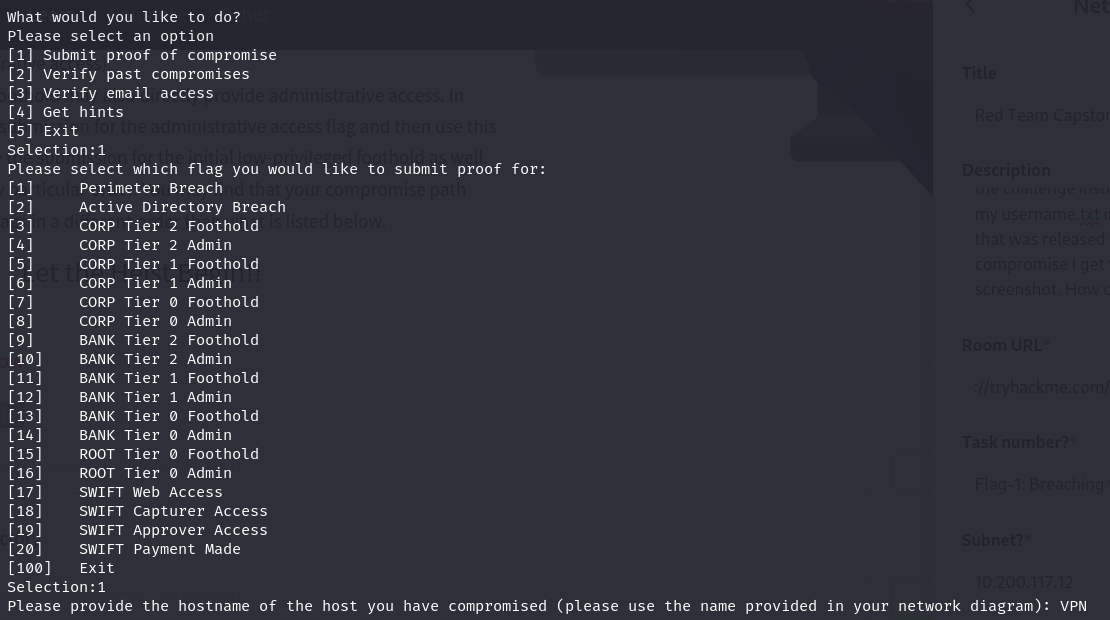
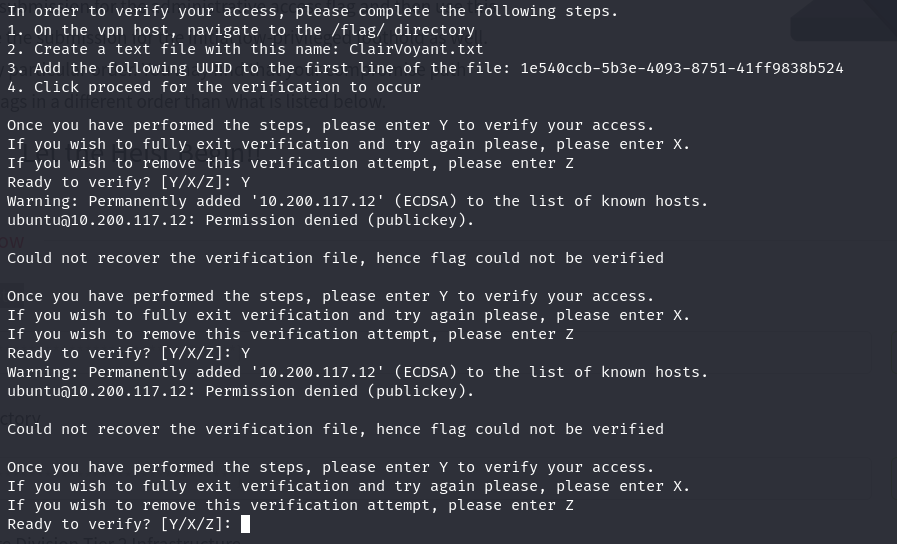
 green swift
@trim beacon I previously connected to the OpenVPN and RDPd in a WRK computer with Mohammad's details. It seems I'm no longer able to access these two available WRK devices (21 and 22) to RDP. Is this normal? Tried Remmina instead of just terminal as well but didn't work. I've tried reset etc.
trim beacon
green swift
<@697878147332309156> I previously connected to the OpenVPN and RDPd in a WRK co...
Hey, this path is one that is only open sometimes. So basically post reset, there is a chance that it isn't available. Given that the red team capstone challenge was created in a way to have multiple available paths, we kept this in as an element of realism. As with a normal red team, when one path closes, time to find another one
green swift
trim beacon
Hey, this path is one that is only open sometimes. So basically post reset, ther...
Thanks, this is helpful. It's sometimes hard figuring out what is a glitch and what is intended to replicate a real environment.
brittle badgeBOT
Gave +1 Rep to @trim beacon (current: #32 - 354)
trim beacon
green swift
Thanks, this is helpful. It's sometimes hard figuring out what is a glitch and w...
Ah, I have a lot of sympathy for that. I think if it was any other challenge, the answer would be to query it. I think the RTCC was designed in such a way to try and emulate real life. On a real red team, you cannot really call the client and ask them why the VPN hack doesn't work 😅 You just have to persist in finding another way in.
Good luck there!
green swift
trim beacon
Ah, I have a lot of sympathy for that. I think if it was any other challenge, th...
Ah yes this is true 😂 Look, in a similar train of thought. The email where we are supposed to capture our flags has been working with no issues since the commencement of the exercise (I am using thunderbird). All of sudden at my fourth flag (I surpassed the RDP issue) it no longer lets me access my email account? Is this also a reflection of a real life situation? It's frustrating to get to the flags and then not be able to access them.
green swift
green swift
Ah yes this is true 😂 Look, in a similar train of thought. The email where we a...
For reference when I verified the breach in my SSH account, whilst it said well done check your email, in brackets it said 550 unknown user - those are my auth details though.
trim beacon
green swift
Ah yes this is true 😂 Look, in a similar train of thought. The email where we a...
Mmm, it is not no. I'm not that mean 😅
Can you help me by getting some more details for me please?
- Can you still log in via the webmail portal? (Roundcube)
- Can you still log into the mail server with your account? (So like thunderbird access)
- When you log onto e-citizen, what happens when you run the "Verify email" command?
If you give me some details, I think I can help.
Looking at your 550 unknown line, I think if you run "Verify email user" it should resolve the issue for you. Basically, the VPNs keep a global DB of users. BUT, your specific network instance has a local email server. So the VPN server needs to sync your user to the email server. This needs to happen every time you are dropped into a new network instance. In the past, your IPs of your subnet would change, telling you you are in a new network. Now with v2 networks they are all the same, so harder to spot. But the "Verify" command will rectify the problem if that is the case.
green swift
trim beacon
Mmm, it is not no. I'm not that mean 😅
Can you help me by getting some more d...
You were 100% correct. I selected verify email and it said issue with email access, most likely cause is a network reset. It created email user again and repopulated mailbox. Brilliant! Flag attained and submitted. This exercise may send me loopy 😂
trim beacon
green swift
You were 100% correct. I selected verify email and it said issue with email acce...
I will refer you to the Task 1 disclaimer of this room.
Going loopy will be a requirement to finish this thing yourself 😅
Good luck! And if you have any feedback or suggestions, happy to hear them
green swift
Haha, thank you!
green swift
@trim beacon last flag, trying to login in on swift with the destination email and password given in flag 17 but they don't work? Is this supposed to happen?
trim beacon
green swift
<@697878147332309156> last flag, trying to login in on swift with the destinatio...
It should work. Can you explain which part is failing? You should receive a destination account to send money, but then log into your accounts you compromised to send the money (capture and approve) and once done verify with e-citizen?
green swift
Yeah so the @destination.loc and my destination password won't work to authenticate to swift. Says email of password is incorrect. But those are the instructions? The details were given in flag 17 yeah?
Or should we just be authenticating to source and making a new transaction, pin confirm, capture, pin confirm, approve pin confirm?
trim beacon
green swift
Yeah so the @destination.loc and my destination password won't work to authentic...
I hope I'm understanding this correctly. But the gist is, YOU have to compromise SWIFT. I'm not giving you credentials to SWIFT, I'm just giving you the "dummy account" to show you can facilitate the transfer.
You still need to actually compromise one capturer and one approver. Meaning creds to log into SWIFT and facilitate transactions.
Once you have this, THEN, and only then, can you start the journey of doing the last few flags, which is the fraudulent transaction.
Hope that makes sense?
green swift
Thanks, I ended up figuring it out. I had all the credentials. The wording in the 20 flag verification threw me off! The happy news is, it's done! Very challenging room. Many hours spent tearing my hair out! 😂 Thanks for your help!
trim beacon
green swift
Thanks, I ended up figuring it out. I had all the credentials. The wording in th...
Congrats! 🎉
 prime ivy
So I forgot my password. It's been like a year or so. I went back to try and still can't Authenticate or just register. Is there anything I can do? Short of making a new account and double paying.
 hazy fractal
Great room, I really enjoyed it. Many thanks to the creators.