#site-support
1 messages · Page 235 of 1
 delicate elm
 patent lark
try logging out and logging back in, also clear your browser cache to be sure.
delicate elm
i did twice and also tried incognito
patent lark
It's strange, the requirement is seven days of strike, and even if you lose them after you get it the Networks are still available, surely another user will be able to help you.
 pine star
I sent an email but I haven't received an answer yet, is this normal ?
delicate elm
pine star
I sent an email but I haven't received an answer yet, is this normal ?
yes be patient
patent lark
pine star
I sent an email but I haven't received an answer yet, is this normal ?
Be patient, it won't take long for them to respond 👍
 placid mango
Try leaving Wreath room and joining again.
 livid vapor
Sounds like you might have multiple vpns running
delicate elm
placid mango
Try leaving Wreath room and joining again.
Ok I will try and update
 prisma zephyr
Guess you tried to install kali-large and your VM don't have enough space to install it. You can try to increase size of the VM and try again.
Btw this channel is for VPN and other technical questions related to TryHackMe
 astral vortex
Hey, unfortunately i couldnt get to do my daily THM Task yesterday because of some private stuff. Is there a way to get my streak back?
prisma zephyr
astral vortex
Hey, unfortunately i couldnt get to do my daily THM Task yesterday because of so...
Heya, yea just email:
support@tryhackme.com
Username:
Email:
What your streak should be:
astral vortex
@prisma zephyr Oh great, thank you 👍
 scenic torrentBOT
Gave +1 Rep to @prisma zephyr
 lusty plover
Can anyone help, I'm having trouble connecting to jewel.uploadvulns.thm in the UploadVulns room. I ran the command in task one, but I can't access the web page. (I'm using the thm attackbox)
livid vapor
check your /etc/hosts file and make sure you only have one entry for those sites, and that you are connected to the vpn
 rotund tinsel
Hi! Currently having a problem with the Offensive pentesting path, specifically the "Getting started" room. When i try to enter Vulnversity, Blue or Kenobi, im just met with a eternal loading screen. I've had this problem for a while. I was able to solve some of the tasks in Vulnversity, but now it's back to just loading again. Any tips on how to fix this?
 sour spindle
hey does anyone having the same issue that im facing : my rooms is showing that rooms that i visited but i did'nt joined , and also when we checkmark on hide completed it still shows linux fundamental rooms as incomplete
lusty plover
sour spindle
hey does anyone having the same issue that im facing : my rooms is showing that ...
this is probably because they added new linux fundamental rooms to replace the older ones
sour spindle
lusty plover
this is probably because they added new linux fundamental rooms to replace the o...
i have completed the new ones too
 wraith knot
Is anyone experiencing really slow load time? - Every command I do on an SSH challenge has a large delay - Currently trying to run linpeas and its been over 20+ minutes and it hasn't finished
 waxen patio
yeah im on the owasp juice shop room and I am also experiencing incredibly slow lag times with the app
 stone mural
I forgot the email address to my Discord account, and can no longer access the account where I've verified my TryHackMe account. When I try to verify this account with my TryHackMe token, it obviously doesn't work since the token is already associated with my other account. I don't think I'll be able to gain access to my old discord account, so is there a way to generate a new TryHackMe account token?
 vocal ledge
Anyone know how to prevent auto-renewing ? I vaguely remember a cancel auto-subscribe button, but can't seem to see it
livid vapor
Should be somewhere in your profile and payment options
 sleek kayak
hey guys, i'm finding the at my VPN connection is constantly timing out while using WREATH.
this is the output, i'm getting, you can see the server times out after only 4 minutes, does this happen with anyone else?

it does restart, but requires my to completely restart the session each time from scratch as my terminal freezes whenever the server restarts while logged in
livid vapor
check for multiple vpns running
sleek kayak
just the one running
 sacred sparrow
!multivpn
 sharp bisonBOT

 TryHackMe
Learn how to look for duplicate instance of your OpenVPN connection.
• Step 1
Make sure you have setup your VPN connection correctly https://tryhackme.com/room/openvpn
• Step 2
Type ps aux | grep openvpn into your terminal and press enter
• Step 3
If there's more than one line (that don't start with "grep" or sudo), do the following steps
• Step 4
Type sudo killall openvpn into your terminal and press enter
• Step 5
Start the VPN with sudo openvpn <path-to-config>
From TryHackMe with ❤!
lusty plover
livid vapor
check your /etc/hosts file and make sure you only have one entry for those sites...
So I tried both the THM attack box and my kali vm and I still can't access the jewel.uploadvulns.thm web page. My /etc/hosts only has one entry for each site and I'm connected to the VPN.
livid vapor
verify with the bot (read the link below) and post a screenshot of your hosts file and the error you're getting when loading the page
!docs verify
sharp bisonBOT
 TryHackMe
Verify your TryHackMe Profile!
From TryHackMe with ❤!
 visual tiger
Having trouble starting the machine. Every time I try to do it, I get an error message saying: the Remote Desktop server is currently unavailable. How can I fix this?
delicate elm
+rep @placid mango thanks rejoining the room resolved the issue
scenic torrentBOT
Gave +1 Rep to @placid mango
vocal ledge
livid vapor
Should be somewhere in your profile and payment options
Thanks, but I wasn't able to find anything in regards to payment options for some reason. I only see an option to cancel my subscription. Do you know if I click Cancel Subscription if it will cancel immediately, or cancel after by next renew period. I will reach out to the THM staff, but wanted to reach to the members here first
scenic torrentBOT
Gave +1 Rep to @livid vapor
livid vapor
I'm not 100% certain, but I'm pretty confident that it will cancel the renewal, but you still would get the rest of the time you've already paid for as a subscriber
so if you would normally renew on the 15th, let's say, you'd still be a subscriber until that time, you just won't be billed again
vocal ledge
Thank you so much. I like to be mindful of my spending, so this helps a lot
livid vapor
!docs verify
sharp bisonBOT
TryHackMe
Verify your TryHackMe Profile!
From TryHackMe with ❤!
 daring kayak
Room: Upload Vulnerabilities
Task: 11
Issue: I have everything done but I cannot hit my netcat server. I am using OpenVPN. What should my IP for my reverse shell be?
daring kayak
well darn, I have it set to that. Okay thanks
 uneven wind
hi, I can't seem to use owasp zap or Burp on the Try Hack Me AttackBox machine
the FireFox says "Software is Preventing Firefox From Safely Connecting to This Sitezap is most likely a safe site, but a secure connection could not be established"
 gaunt mica
can anyone see my lab, is this how it surposed to be or its set wrong? Im trying to find upload file on the website

it look like this on main page, dont see upload

 north quail
hi all, I week ago I did send an email for a refund for my annual subscription.
None has answer me .
That was a follow up on a previous email for the ame matter. ( which wasa send almost at the begining of my subscription was activated )
 eager fulcrum
north quail
hi all, I week ago I did send an email for a refund for my annual subscription. ...
eager fulcrum
north quail
hi all, I week ago I did send an email for a refund for my annual subscription. ...
You're going to need to deal with that via email.
This channel is staffed by volunteers, not THM staff.
 fervent storm
Hi guys. Started Mr. Robot. Can't open web page on my Kali (local) http://10.10.16.70/ ? Tried restarting a few times. Any ideas? Just getting a loading spinner
 spring crag
Does the timer keep going when tryhackme is closed?
 naive dust
hey can someone help me?
im new to tryhackme, and im doing the http in detail module:
got stuck in a question
What response header tells the browser how much data to expect?
if you could explain to me what exactly this mean i would be grateful
eager fulcrum
@naive dust #room-hints #room-help for hints or help with rooms please
eager fulcrum
fervent storm
Few more rooms are down
Rooms can't be down because the VM instances are not shared with other users.
naive dust
eager fulcrum
<@456226577798135808> <#690557518837186560> <#522158539129618453> for hints or h...
silly question i made, i didnt read a part of it.
just got the correct one rn
 slender star
I have a problem, I'm connected to the tryhackme network, I can ping, use nmap, the status code returns with '200', I can even see the source code for the page but the web server keeps loading and doesn't enter.
eager fulcrum
@slender star As I said, check the pinned messages in this channel and try the MTU fix.
slender star
eager fulcrum
<@451486170593886219> As I said, check the pinned messages in this channel and t...
thanks ;D
scenic torrentBOT
Gave +1 Rep to @eager fulcrum
rotund tinsel
Hi! Currently having a problem with the Offensive pentesting path, specifically the "Getting started" room. When i try to enter Vulnversity, Blue or Kenobi, im just met with a eternal loading screen. I've had this problem for a while. I was able to solve some of the tasks in Vulnversity, but now it's back to just loading again.All other rooms work as they should. Any tips on how to fix this?
eager fulcrum
It's a site bug
rotund tinsel
okey, so there is nothing i can do then
 polar flame
Hi guys, looks like the Linux fundamentals server is down
eager fulcrum
polar flame
Hi guys, looks like the Linux fundamentals server is down
VMs for rooms cannot be down like that, because they're not shared with other users.
When you click deploy, that machine is yours and only yours
polar flame
Gotcha, in that case, my machine isn’t connecting and it says to contact the sys admin if it persists
 split jackal
For Mods of this server: there's a user that is a spam bot in this server that just DMed me with a shady crypto exchange link.
Elliptical
#7501

@eager fulcrum just tagging you because you look like the only active mod right now.
eager fulcrum
split jackal
For Mods of this server: there's a user that is a spam bot in this server that j...
They're all banned
split jackal
eager fulcrum
They're all banned
Thanks! Appreciate it 🙂
scenic torrentBOT
Gave +1 Rep to @eager fulcrum
 prisma yacht
Hi
 subtle pine
I am having issue connected to THM. I don't see the blue Start Attach Box button. Any ideas?
eager fulcrum
That's unrelated to connecting to THM?
subtle pine
Actually figured it out.
gaunt mica
last night worked , thers no upload

new day, opened my lab, and it doesnt work, what happened?

i mean this one
 eager fulcrum
gaunt mica
i mean this one
eager fulcrum
gaunt mica
i mean this one
https, not quite right.
Also you haven't specified the port.
gaunt mica
allright ill do nmap then
that worked in last night and not today... i have to restart the lab and see now
its 3333 oh
 finite sorrel
Hi,
Any idea why would my progress in a specific room gets reset?
There are 3 rooms on the Complete Beginner path > Linux Fundamentals > Linux Fundamentals Part 1,2,3
I did these 3 then few weeks ago found them marked as no done. Re-did them and today again they're marked as not done.
 gaunt mica
lets see what will this link bringsd
here it is and it worked plus, thers no upload...

 bronze vale
finite sorrel
Hi,
Any idea why would my progress in a specific room gets reset?
There are 3 ro...
gaunt mica
bronze vale
finite sorrel
Hi,
Any idea why would my progress in a specific room gets reset?
There are 3 ro...
gaunt mica
what am i doing wrong that there is no place to upload on that screenshot
eager fulcrum
gaunt mica
here it is and it worked plus, thers no upload...
You have to find the upload form.
The room walks you through these steps
If you need more help with them, please use #room-hints or #room-help
 zinc nexus
I'm in the room EasyCTF. I have a file from a CVE that I need to run. It tells me I don't have something installed then I install it, but it tells me it's already installed. Anyone know why this might be happening?
Edit: I just found your recommendation for https://www.pythonconverter.com/. Thanks @dry cloak

http://pythonconverter.com/
Python2 to Python3 code converter online
gaunt mica
@eager fulcrum i have done as followed and still have same problem
 eager fulcrum
Great. Check out the directories you found.
I do not see the problem
Please describe the problem if you're going to ask for help with something
lusty plover
Hey. Recently the locate command on my kali linux vm stopped working. I read online you need to run "sudo updatedb" to keep it running, however whenever I do, it just freezes the terminal
eager fulcrum
@lusty plover this channel is for directly THM related tech support like site or VPN issues
lusty plover
eager fulcrum
<@307671931992408074> this channel is for directly THM related tech support like...
Oh ok, My bad
naive dust
how can i fix my openvpn connection? because the vnp don't ping the remote vm
finite sorrel
bronze vale
https://discord.com/channels/521382216299839518/546650767495397376/8474306970434...
alrighty then - thanks for your reply 🙂
Third time's a charm 🤞
scenic torrentBOT
Gave +1 Rep to @bronze vale
north quail
eager fulcrum
You're going to need to deal with that via email.
This channel is staffed by vol...
they never answer emails.. but thanks !
scenic torrentBOT
Gave +1 Rep to @eager fulcrum
eager fulcrum
north quail
they never answer emails.. but thanks !
They do
The support person makes sure the inbox is cleared regularly
north quail
maybe are busy ,,, I will wait then
 faint bough
So still can not connect to any machines or even ping them. Is there still server issues? Looks like other people are connecting ok
faint bough
yeah kali vm
livid vapor
where is the vpn running? the host os or the kali guest?
livid vapor
what's the command you are using the start the vpn?
livid vapor
and you're leaving that terminal window open/running?
livid vapor
the attackbox is totally different
on your vm, open a new terminal and do:
ps aux | grep openvpn
livid vapor
screenshot it and share it
faint bough
snip
 sharp bisonBOT
TryHackMe
sharp bisonBOT
TryHackMe
Learn how to look for duplicate instance of your OpenVPN connection.
• Step 1
Make sure you have setup your VPN connection correctly https://tryhackme.com/room/openvpn
• Step 2
Type ps aux | grep openvpn into your terminal and press enter
• Step 3
If there's more than one line (that don't start with "grep" or sudo), do the following steps
• Step 4
Type sudo killall openvpn into your terminal and press enter
• Step 5
Start the VPN with sudo openvpn <path-to-config>
From TryHackMe with ❤!
faint bough
mmm so only have one terminal window running with it. But alright I will just do a restart of the machine to make sure all are stopped
livid vapor
a restart isn't needed
faint bough
ah yeah just reading that
livid vapor
just do the sudo killall openvpn 🙂
faint bough
Yes! thanks for that @livid vapor ! Appreciate the help
scenic torrentBOT
Gave +1 Rep to @livid vapor
livid vapor
you're welcome :). Glad it was an easy fix
faint bough
yeah, now can get back into it. Thanks again, have a good one
livid vapor
you too
 pure ridge
I keep getting a 404 on the openvpn connection package download
Has anyone else run into this?
 mental slate

 lone cypress
I'm on the Blue box and can't seem to reliably use the exploit, what should I do?
It keeps failing...
 marsh magnet
@lone cypress #room-help please
lone cypress
@marsh magnet Alright, thanks
scenic torrentBOT
Gave +1 Rep to @marsh magnet
 quiet holly
hello, I need help
I am from india, and want to subscribe thm. i used debitcard to purchase premium but it failed
what can i do
placid mango
I think you need to have enabled interantional transaction. Contact your bank.
quiet holly
it shows We've encountered a problem while accessing your paypal account.
when i try using paypal
 hushed scroll
pure ridge
Has anyone else run into this?
hushed scroll
pure ridge
Has anyone else run into this?
I'm getting 404 when I try to download the OpenVPN config. I that what you're referring?
patent lark
hushed scroll
I'm getting 404 when I try to download the OpenVPN config. I that what you're re...
Try logging out and logging back in, clear your browser cache to be sure. You can also try regenerating the configuration file again and try downloading it. Remember to wait a few minutes before trying to download it after regenerating it.
hushed scroll
Thanks. Yea I tried that. I also tried on a different machine and got the same. I'll wait a bit, then try again
 umbral flax
Hey THM Staff
I'm just wondering how long the review process takes when submitting a room?
Really excited for my first vulnerable machine to go live!
eager fulcrum
umbral flax
Hey THM Staff
I'm just wondering how long the review process takes when submitti...
The review process is almost entirely volunteers, so there's no set timeframe
umbral flax
Ah right, Thanks for the info!
 nova warren
is anyone facing issues when running Burp on a forwaded port?
eager fulcrum
Probably best to ask in #infosec-general, this channel is for directly THM related tech support like site or VPN issues
nova warren
okkie, thanks!
 livid vapor
 vagrant jungle
Try resetting your progress on the last room and doing it again. I think that's what I had to do
 wet ferry
Guys my PC has been infected with 2 Trojans as per windows defender scan and it states them as a sever threat. There names are (Trojan:Win32/AgentTesla!ml) and (Trojan:MSIL/ClipBanker.MR!MTB). I'm removing them using the Windows defender but it doesn't want to leave my computer it comes back as soon as I remove it. Please somebody suggest me a way.
eager fulcrum
@wet ferry This channel is for THM related tech support
eager fulcrum
Try #infosec-general
 hollow blaze
Hello, everyone
I have a question, on how can check my hacking streak?
on my profile I can see that is 46 days, I am not sure if I answered some questions yesterday and I don't want to start my hacking streak again. If any one can help I would appreciate it!
prisma zephyr
hollow blaze
on my profile I can see that is 46 days, I am not sure if I answered some questi...
Either check your Dashboard (https://tryhackme.com/dashboard ) there will be a graph with answered questions or check your public profile:
https://tryhackme.com/profile
once you're there click on public profile and then yearly activity

TryHackMe
An online platform for learning and teaching cyber security, all through your browser.
TryHackMe
An online platform for learning and teaching cyber security, all through your browser.
 warm anvil
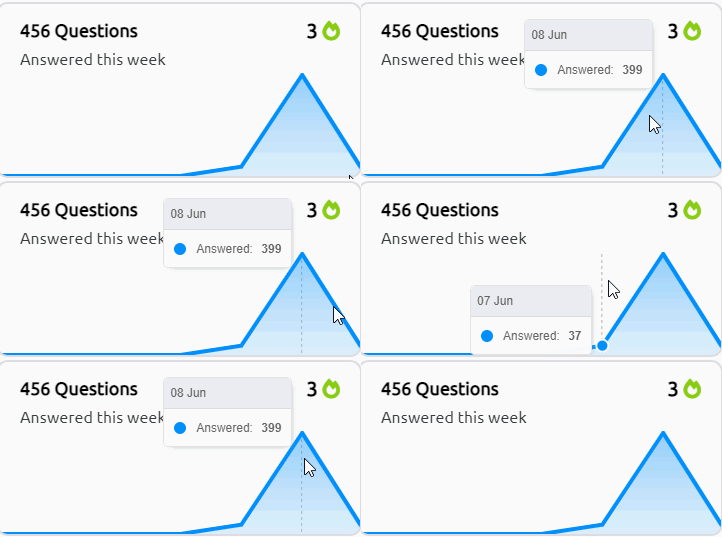
To help explain what @prisma zephyr was getting at here's a gif showing the date & # of questions completed: https://i.imgur.com/1IFDprb.gif
 restive rampart
Hello , I want to ask can we change name on the certificate we get from TryHackMe when we complete any path?
eager fulcrum
You cannot
restive rampart
Actually it has taken my Username but I want my real name on the certificate 😅. If by any chance I can...
eager fulcrum
restive rampart
Actually it has taken my Username but I want my real name on the certificate 😅....
No, it can't be changed once it's generated.
restive rampart
Ohh 😔
warm anvil
For the week - you can see day by day hovering over the graph like in my gif
eager fulcrum
Just ask your question, we do not know if we can help unless we see the issue
No
!vpn
sharp bisonBOT
TryHackMe
Learn how to use OpenVPN to connect to our network!
From TryHackMe with ❤!
eager fulcrum
Follow those steps
Follow the steps in the room
That's your config file.
Something totally unrelated that isn't needed?
Some random thing you installed
Follow the steps in the room.
hollow blaze
warm anvil
To help explain what <@!753559995714502666> was getting at here's a gif showing ...
Thank you
scenic torrentBOT
Gave +1 Rep to @warm anvil
 pseudo cipher
Hey THM Staff
the website doesnot open
when i connect open vpn
when i do try to do website directtory traversal
 scarlet harness
Facing this issue in Windows Priv Esc room

 cloud kite
hi @bronze vale , i contacted you guys for the third time yesterday about having issues getting my certificate and still didn't get an answer, am i doing something wrong, are you guys working on the problem and what should i do
 scarlet harness
then again when loading the page
scarlet harness
scarlet harness
then again when loading the page
it's showing that the machine is running
bronze vale
cloud kite
hi <@!270975958511517697> , i contacted you guys for the third time yesterday ab...
Hi there 👋
Thank you for your email, I usually don’t respond to these, I simply forward them to the correct people :)
scenic torrentBOT
Gave +1 Rep to @cloud kite
cloud kite
bronze vale
Hi there 👋
Thank you for your email, I usually don’t respond to these, I simpl...
thank you, but it has been 2 weeks now without any respond so i am a bit worried.
scenic torrentBOT
Gave +1 Rep to @bronze vale
bronze vale
Sorry, there is not much I can do I’m afraid.
 lilac wraith
Hello
How can i get my streak back because of some work i wad unable to maintain my streak please help
....
prisma zephyr
lilac wraith
How can i get my streak back because of some work i wad unable to maintain my st...
Heya send a email to: support@tryhackme.com
Username:
What your streak should be:
Email:
prisma zephyr
!docs verify
sharp bisonBOT
TryHackMe
Verify your TryHackMe Profile!
From TryHackMe with ❤!
prisma zephyr
Follow the steps in the link ^
 peak echo
Hi mates! Are there any issue on tryhackme actually ? I am experiencing weird behavior from boxes (That's the ticket, Cat Pictures) since yesterday evening. Timeouts, do not answer to pings...Then back to normal and issues again... I don't think that is coming from my home network as I experience no issue browsing other websites...
livid vapor
peak echo
Hi mates! Are there any issue on tryhackme actually ? I am experiencing weird be...
Sounds like you might have multiple vpn's running
!multivpn
sharp bisonBOT
TryHackMe
Learn how to look for duplicate instance of your OpenVPN connection.
• Step 1
Make sure you have setup your VPN connection correctly https://tryhackme.com/room/openvpn
• Step 2
Type ps aux | grep openvpn into your terminal and press enter
• Step 3
If there's more than one line (that don't start with "grep" or sudo), do the following steps
• Step 4
Type sudo killall openvpn into your terminal and press enter
• Step 5
Start the VPN with sudo openvpn <path-to-config>
From TryHackMe with ❤!
 regal heron
I am new to this server. Does someone mind telling me how this discord works and how I can be an active member of it?
livid vapor
#start-here might be a good place to start 🙂
 rapid steppe
Hello Tech Support! I am trying to set up an OpenVPN connection but when I try to download the VPN configuration files it gives me a 404 error. Is there somewhere else these are stored. Thanks!
sharp bisonBOT
TryHackMe
Contact us for support, teaching enquires and more!
From TryHackMe with ❤!
rapid steppe
Thank You!
livid vapor
the only other things I can think to try: try a different vpn server, clear cache, and/or log out and back in
 primal cedar
I have a question about zip and RAR files
I'm doing the Jack The Ripper lab and I'm trying to crack several zip and RAR files
My only issue is, how do I download these files into my TryHackMe box
livid vapor
are you using a vm or the attackbox?
primal cedar
The attackbox
livid vapor
So that one I'm not sure about, actually. I never use the AB
primal cedar
Yeah, it's a difficult issue
 spring herald
Anyone know why I might be getting the NET::ERR_SSL_OBSOLETE_VERSION? It was working fine just an hour ago when logging in. It wasn’t even really let me proceed past this screen.
eager fulcrum
spring herald
Anyone know why I might be getting the NET::ERR_SSL_OBSOLETE_VERSION? It was wor...
On what? Where?
 somber tide
I just changed my email to my student email on THM, I didn't receive any verification email. Will THM automatically apply the subscription discount after a certain amount of time?
livid vapor
I don't think it will happen automatically, but I might be wrong. I think you have to email support@tryhackme.com
eager fulcrum
livid vapor
I don't think it will happen automatically, but I might be wrong. I think you ha...
It should be automatic
livid vapor
ah, my mistake
spring herald
eager fulcrum
On what? Where?
I figured it out. It was a stupid update on my computer that wasn’t showing up until I restarted my pc… thanks for reply though!
scenic torrentBOT
Gave +1 Rep to @eager fulcrum
 vestal needle
I don't know if this is the appropriate place to ask, but I am unable to COPY and PASTE, ie: from the attack box to the answer boxes. Whenever I find a flag, I have to type it by hand, which is difficult and tedious. Now, in the OWASP room, I have a session ID in base 64 which I need to copy from the attack box and paste in a Base 64 converter. Any ideas on how to fix my copy/paste? I have tried using the mouse and CTRL-C & CTRL-V, and neither method is working.
eager fulcrum
There's a slide out tray on the left edge
livid vapor
vestal needle
I don't know if this is the appropriate place to ask, but I am unable to COPY an...
On the left side of the attackbox is a slideout tray
eager fulcrum
Firefox is also a bit weird with clipboard access
livid vapor
Dangit, James, beat me by 0.02 seconds
 vestal needle
I'll look, I figured you guys would know. Thanx, and thanx for contributing your time on here for us newbies.
 obtuse saddle
Hi in the Authenticate room i am unable to connect to the website with an IP address on my browser, but i can ping it successfully.
prisma zephyr
obtuse saddle
Hi in the Authenticate room i am unable to connect to the website with an IP add...
Sounds like you forgot to add the port. The port is 8888
obtuse saddle
@prisma zephyr Thank you it worked!! Needed to change it to HTTP from HTTPS
scenic torrentBOT
Gave +1 Rep to @prisma zephyr
 dry nova
Hi I got stuck in this room “OpenVAS” Task 7 Q1. I am entering the correct answer but I don’t know why it’s TryHackMe gives the output as wrong answer!!!
 wooden osprey
SLMail Buffer Overflow
I am trying to set up the SLMail vulnerability via the Buffer Over Flow room and am running into the problem when i do the install as admin and restart the application it kicks me out of my connection.
Steps I took:
(1) xfreerdp /u:admin /p:password /cert:ignore /v:MACHINE_IP /workarea
(2) home network
(3) Opened vulnerable folder
(4) Run SLMail55_4433 as admin
(5) go through set-up process and only bind to local host IP addy
(6) Then asks me to restart machine and when I do I get kicked from the logon via xfreerdp
Is there a way to work-around this?? I use the attack machine provided online?
 halcyon kraken
Hey, does anyone here know how to add scss to Flask framework (python)?
 tame solar
Hello! I have used my student email but the discount has not been applied to my subscription
 wary kestrel
Hey guys I'm unable to ssh into the try hackme server, I'm getting connection timed out
 tardy vessel
are you connected with THM network?
are you running the openvpn file? and can you ping the machine?
@wary kestrel
tardy vessel
hmm, maybe the pings dont respond to the machine, and are you sure that youre trying to ssh in the correct port? cuz in some boxes ssh ports are not 22
wary kestrel
ohhh, how do i come to know about that ?
tardy vessel
do a quick portscan via threader3000 or rustscan or via nmap. {and uh feed the open ports to nmap and then you'll get the services running on those ports}
wary kestrel
ssh -vvv tryhackme@10.10.174.18
OpenSSH_8.4p1 Debian-5, OpenSSL 1.1.1k 25 Mar 2021
debug1: Reading configuration data /etc/ssh/ssh_config
debug1: /etc/ssh/ssh_config line 19: include /etc/ssh/ssh_config.d/*.conf matched no files
debug1: /etc/ssh/ssh_config line 21: Applying options for *
debug2: resolve_canonicalize: hostname 10.10.174.18 is address
debug3: expanded UserKnownHostsFile '~/.ssh/known_hosts' -> '/root/.ssh/known_hosts'
debug3: expanded UserKnownHostsFile '~/.ssh/known_hosts2' -> '/root/.ssh/known_hosts2'
debug2: ssh_connect_direct
debug1: Connecting to 10.10.174.18 [10.10.174.18] port 22.
debug1: connect to address 10.10.174.18 port 22: Connection timed out
ssh: connect to host 10.10.174.18 port 22: Connection timed out
tardy vessel
uh what room you doing..?
tardy vessel
i feel like you're giving the wrong username, let me see real quick
wary kestrel
uname and pass both are tryhackme
wary kestrel
nothing comes up 😦 I am using kali v 2021.2
eager fulcrum
You aint connected to the VPN then @wary kestrel
wary kestrel
how come? @eager fulcrum it shows me the green tick
eager fulcrum
The access page lies to you.
You cannot access resources using the VPN, therefore it is not functional.
wary kestrel
oh so I cannot ssh into the room machine from my kali ?
wary kestrel
i mean i can use the built-in web version of ubuntu which they provide, but i lost out on time so i thought i'd use my kali
eager fulcrum
You are not properly connected to the VPN. The VPN is not currently working for you.
wary kestrel
eager fulcrum
You are not properly connected to the VPN. The VPN is not currently working for ...
so how do I ensure that i am connected properly?
eager fulcrum
!vpnscript
sharp bisonBOT
TryHackMe
Use our VPN troubleshooting script to diagnose common issues!
From TryHackMe with ❤!
eager fulcrum
You would be able to access http://10.10.10.10 if you were connected
wary kestrel
eager fulcrum
You would be able to access http://10.10.10.10 if you were connected
im getting config not found in current directory despite following the instructions
eager fulcrum
This channel is for directly THM related tech support like site or VPN issues @icy creek
 icy creek
Oh, my bad
wary kestrel
eager fulcrum
This channel is for directly THM related tech support like site or VPN issues <@...
Thank you so much! You have saved me! 🙌 it's working now! so from next time, i just run this script right ?
scenic torrentBOT
Gave +1 Rep to @eager fulcrum
eager fulcrum
wary kestrel
Thank you so much! You have saved me! 🙌 it's working now! so from next time, i...
No, connect to the VPN just once and leave the terminal with it open
wary kestrel
pwd
eager fulcrum
When you want to disconnect, swap back to that terminal and Control C once. Let it exit
wary kestrel
oh but i am trying to ssh again but it is not working this time
without running the script
i guess i'll have to run the script everytime (for a particular session) only then it works
eager fulcrum
wary kestrel
i guess i'll have to run the script everytime (for a particular session) only th...
No
Bad
Don't do that
wary kestrel
Why not? It's not working otherwise
eager fulcrum
!docs verify
sharp bisonBOT
TryHackMe
Verify your TryHackMe Profile!
From TryHackMe with ❤!
eager fulcrum
Follow those steps, then you can post images. Show us what the script says.
 reef onyx
Hello guys! Task 23rd s machine is unresponsive. Its been like for 15 minutes. I'm connected to thm's vpn network. Is it just me? Can anyone check it?
No ping response.
eager fulcrum
Room? Task?
reef onyx
advent of cyber
reef onyx
yes
eager fulcrum
Windows machines block pings over the VPN by default
naive dust
Hey, It's almost a month since I've completed the "How the web works" module and I haven't received the badge yet. Any help?
 patent tendon
Hello people I am trying to connect with my machine trough VPN and I cant ssh on the exercise. Anyone to help me figureing out this ?
I am on Oracle Virtual box could it be that ?
patent tendon
done
on access page it says connected and I have my internal virtual Ip adress
do I have to ssh to that before ssh to exercise ?
ifconfig gives me the tun0 info
http://my IP gives me an error
forcing https
placid mango
Why are you browsing your own ip? It'll only return page if you have web server running.
patent tendon
in open vpn room : Go to http://MACHINE_IP - can you see a website?
placid mango
Yup, use openvpn machine ip in the browser.
patent tendon
done
placid mango
And?
placid mango
Are you properly connected to vpn? Try visiting http://10.10.10.10/ page.
patent tendon
nothing
but access page in tryhackme gives me my ip and says i am connected
Tor browser could be an issue ?
ok with tor 10.10.10.10 nothing
with firefox I got something
so PzK instead of mocking people
@placid mango with the all 10 on firefox I got the page saying I am connected
patent tendon
ok I was connected with my account in tor I ll try from firefox
naive dust
patent tendon
so PzK instead of mocking people
?
I mean who would use tor for tryhackme? what is the reason lmao
patent tendon
ok worked
patent tendon
naive dust
I mean who would use tor for tryhackme? what is the reason lmao
people how are testing the tools ?
naive dust
?
patent tendon
and works with tor as well just needed to understand the procedure
Thank @placid mango
scenic torrentBOT
Gave +1 Rep to @placid mango
livid vapor
naive dust
Hey, It's almost a month since I've completed the "How the web works" module and...
Reset your progress on the last room and do it again, that worked for me
naive dust
livid vapor
Reset your progress on the last room and do it again, that worked for me
Thanks 🙂
scenic torrentBOT
Gave +1 Rep to @livid vapor
eager fulcrum
patent tendon
in open vpn room : Go to http://MACHINE_IP - can you see a website?
If you're still seeing MACHINE_IP then you haven't deployed the machine
 ivory latch
Heyyy, any chance to unverify a discord acc?
patent tendon
Thanks @eager fulcrum I manage to figure everything out SSH as well first of all I was inverting user and address + server was too slow changed server and couldSSH into machine
scenic torrentBOT
Gave +1 Rep to @eager fulcrum
 dusky wave
Is there something wrong with the "Network Services" room? I can't connect and the browser is saying "The connection was reset". I am able to connect to other rooms in the beginner pathway. Sorry if this is not the right place to ask this
prisma zephyr
dusky wave
Is there something wrong with the "Network Services" room? I can't connect and t...
Should be working. There's a channel for room help -> #room-help
dusky wave
I will ask in there too.
livid vapor
dusky wave
Is there something wrong with the "Network Services" room? I can't connect and t...
Sounds like you might have multiple vpns running. Check this:
!multivpn
sharp bisonBOT
TryHackMe
Learn how to look for duplicate instance of your OpenVPN connection.
• Step 1
Make sure you have setup your VPN connection correctly https://tryhackme.com/room/openvpn
• Step 2
Type ps aux | grep openvpn into your terminal and press enter
• Step 3
If there's more than one line (that don't start with "grep" or sudo), do the following steps
• Step 4
Type sudo killall openvpn into your terminal and press enter
• Step 5
Start the VPN with sudo openvpn <path-to-config>
From TryHackMe with ❤!
dusky wave
I dont have any VPNs running. I haven't even downloaded the config for it
Its literally just this room. Before I subscribed I was redirected to a page that said it was for paid members only. After subscribing, it just gives connection reset message in the browser
sharp bisonBOT
TryHackMe
Verify your TryHackMe Profile!
From TryHackMe with ❤!
dusky wave
site/room i am trying to access

message i am getting

other paid room (tried to get to this before subbing)

 livid vapor
sounds like that might be your local network. Both rooms load fine for me
dusky wave
yes it is something here and seems to be in chrome. it loaded fine for me in edge
no idea why
ok i have fixed it. not sure why but my AV was blocking just that one room. after toggling it off and on that room loaded
livid vapor
probably one of the commands in there for enumerating things got flagged
which AV do you use?
naive dust
why I can't join the General VC ?
sharp bisonBOT
TryHackMe
Verify your TryHackMe Profile!
From TryHackMe with ❤!
 small pecan
hello, does anyone know why i cant use the traceroute command on my AttackBox?
warm anvil
It's there, I just did the room the other day @granite sentinel Can DM for a sanity check if you want
livid vapor
you might be looking in the wrong place
 granite sentinel
its hidden, nvm
dusky wave
livid vapor
probably one of the commands in there for enumerating things got flagged
It was my first time loading it :) but Avast. It just decided to blacklist that rooms url
livid vapor
it probably scanned it as it was loading it and flagged the content
some scanners block the entire domain, I've heard
dusky wave
That's rough lol. It let me do the nmap stuff with no problems
livid vapor
might wanna whitelist the domain, to be "safe"
 crimson rover
im having the same issue where my username showed up on my certificate. Is it possible to just reset the progress on my account and i will just redo AOC to get my full name on the certificate?
 vague rune
Morning all - having some issues with the starting room VPN although the Lab VPN is perfectly fine. Tried re-downloading switching from UDP to TCP.. left it over night
2021-06-11 07:40:16 TLS Error: TLS key negotiation failed to occur within 60 seconds (check your network connectivity)
2021-06-11 07:40:16 TLS Error: TLS handshake failed
2021-06-11 07:40:16 SIGUSR1[soft,tls-error] received, process restarting
2021-06-11 07:40:16 Restart pause, 5 second(s)
2021-06-11 07:40:21 Outgoing Control Channel Authentication: Using 256 bit message hash 'SHA256' for HMAC authentication
2021-06-11 07:40:21 Incoming Control Channel Authentication: Using 256 bit message hash 'SHA256' for HMAC authentication
its begins to connect then I just get that
using Openvpn
oops wrong room!
thought I was in Hackthebox
 chilly jungle
is there an maintenance going on cause i have tired 3 times and the room vulnversity and the server doesn't respond

i tired to launch the machine 3 times
yesterday it was working fine
bronze vale
It’s http not https @chilly jungle
chilly jungle
bronze vale
It’s http not https <@426939679338659840>
i tired everythign
its not responding
bronze vale
Type http and then screenshot that page
chilly jungle
bronze vale
Type http and then screenshot that page
ya and even when i tired to do ssh in the llinux room even that got stuck
is there a issue going on?
i am using attack box
chilly jungle
bronze vale
Type http and then screenshot that page
one sec
naive dust
Hi, I deleted my current account and I want to verify my discord token with new account token

but I am getting an error like above.
patent lark
naive dust
but I am getting an error like above.
In https://docs.tryhackme.com/docs/discord/verify/ you can read the following: For security, your Discord token on the TryHackMe site can only be assigned to one Discord account at a time. Get in touch with the Moderators there if you need it removed.
patent lark
You can send an email to support@tryhackme.com, they will surely be able to help you.
naive dust
Oh, okay thanks for help
patent lark
naive dust
Oh, okay thanks for help
Your help has arrived!
bronze vale
What's your old account's ID @naive dust
I asked for your account's Discord ID, not your token :p
bronze vale
!tokenremove 319985062164561926
sharp bisonBOT
Done, no more entry with UID "319985062164561926".
bronze vale
!tokenremove @naive dust
sharp bisonBOT
Done, no more entry with UID "@naive dust".
bronze vale
bonk there you go 
 naive dust
bronze vale
Don't email me pls
naive dust
bronze vale
Don't email me pls
Lmao
 distant leaf
if i buy thm voucher now then it will expired
eager fulcrum
Answered elsewhere.
sharp bisonBOT
TryHackMe
That topic does not exist!
Use !docs to list all of the available topics.
From TryHackMe with ❤!
 woeful hedge
!vpn
sharp bisonBOT
TryHackMe
Learn how to use OpenVPN to connect to our network!
From TryHackMe with ❤!
woeful hedge
sharp bison
@hushed ledge here is the documentation to get you started with the VPN
 hushed ledge
prisma zephyr
hushed ledge
prisma zephyr
Doesn't matter. I use VM everytime.
if you want to share screenshots you have to verify first
!docs verify
sharp bisonBOT
TryHackMe
Verify your TryHackMe Profile!
From TryHackMe with ❤!
prisma zephyr
if you follow the steps above ^ you can share screens then
eager fulcrum
Ignore the access page, as a general rule. It's not reliable.
 maiden imp
If I use Premium/Pay version for exactly 1 month. Will I lose access to the work achieved once the subscription is over?
prisma zephyr
Progress will be saved, but you'll lose access to the rooms @maiden imp
 haughty forge
Sorry is there a way to migrate account of discord
i mean is not a big deal, but i'd prefer to use this one
eager fulcrum
haughty forge
Sorry is there a way to migrate account of discord
Log in on the other account, and ask in this channel for your token to be removed
haughty forge
Ok thanks
naive dust
This is my account
may my token be removed please?
may i talk to an admin in dm
i do not have anymore my token
thanks
 sharp wharf
I signed up for throwback and completed it. Once the 30 days is up will I still be able to view the room once time lapses? I'll continue to have the paid version just not the TB network?
 white mirage
Good eving. Anyone using kali notist it getting realy slow suddently? Running clean cali on a laptop that was installed only a month ago. And suddently today everything is super slow. Took 20 sec just to connect to vpn. And 5 6 sec minimun for any web page to load. Cant realy figgure out why. And why it happend so suddently
 night bone
is someone familiar with arp spoofing??
i need help pls DM
naive dust
Guys i am getting ssh: connect to host (my.machine.ip) port 22: connection refused ( even i am connected to openvpn then too) please help
Are you sure it's on port 22?
Yes
naive dust
naive dust
Guys i am getting ssh: connect to host (my.machine.ip) port 22: connection refus...
I am trying to find solution for this for 2 days now
What room are you doing?
Linux fundamentals Part 2
windows/linux?
your os
Host os: windows guest os: linux i am doing on my linux terminal
Or are you using the attackbox
ok, so you are connected to openvpn, and you're trying this command :
ssh tryhackme@machine_ip right
Yes
visit 10.10.10.10 if you're really connected
Ping 10.10.10.10 you mean?
no in normal browser
visit
Ok 1 sec
Flag{connection_verified}
Your vpn/tryhackme IP is: (my ip)
hmm that's weird
I have noticed 1 more issue after every 1 use vpn gets disconnected
naive dust
naive dust
Flag{connection_verified}
Your vpn/tryhackme IP is: (my ip)
You can try to connect via AttackBox (I am not really fan of it, but you can try) xd
Like i am connected to vpn
I tried to ssh into machine
( Disconnected )
Tried again to connect
Visited 10.10.10.10
( Again disconnected )
You can try to "reload" your ovpn
How to do that?🤔
profile -> access
there you'll see on the right above corner a Ovpn servers, so just select one and download it again (delete the previous) and connect via openvpn again
Or maybe i should try to change server too maybe that work out
firstly try to terminate the machine and load it again, then (if its not working) try the thing with ovpn config file
Ok
What is the command to uninstall openvpn and install again?
nooooo, just delete the config file
Ok
 carmine kindle
Anyone available to help me with a little issue?
I'm doing the Kenobi box, and I cannot connect with SSH using the RSA PRIVATE KEY
naive dust
@naive dust no man still got the same msg port 22: connection refused
carmine kindle
Just stays here
 naive dust
<@456226577798135808> no man still got the same msg port 22: connection refused
naive dust
naive dust
<@456226577798135808> no man still got the same msg port 22: connection refused
have you've done sudo openvpn [config file] ?
carmine kindle
I think so
naive dust
naive dust
have you've done `sudo openvpn [config file]` ?
Yes

 wide oasis
carmine kindle
I think so
wide oasis
carmine kindle
I think so
Have you given specific perms to id_rsa file?
carmine kindle
wide oasis
Have you given specific perms to id_rsa file?
Yes | chmod 600 id_rsa
haughty forge
wide oasis
Have you given specific perms to id_rsa file?
it should say that there is a permission issue
probably the file is corrupted
or the username is wrong
carmine kindle
I just fixed the issue
haughty forge
what was it?
haughty forge
np
carmine kindle
There is the difference
 night bone
is someone familiar with arp spoofing??
i need help pls
carmine kindle
night bone
is someone familiar with arp spoofing??
i need help pls
Yeah, I am.
night bone
finally
haughty forge
Sorry admins but i have a problem with my tryhackme discord token
haughty forge
haughty forge
Sorry admins but i have a problem with my tryhackme discord token
since i left the server with the old account
naive dust
@naive dust It worked out man thank you so much i was stucked for 2 complete days
scenic torrentBOT
Gave +1 Rep to @harsh pendant
night bone
carmine kindle
Yeah, I am.
how can i access internet in victim machine
while spoofing IP address
wide oasis
This channel is for tryhackme site or vpn issues. You should ask your question in #infosec-general
haughty forge
haughty forge
since i left the server with the old account
My token has gone
naive dust
night bone
**how can i access internet in victim machine
while spoofing IP address**
Make it sound ethical or they may ban you bro😂
haughty forge
and the bot says that it is already connected
night bone
naive dust
Make it sound ethical or they may ban you bro😂
its my machine
naive dust
naive dust
<@456226577798135808> It worked out man thank you so much i was stucked for 2 co...
Glad to help! 🙂
wide oasis
haughty forge
and the bot says that it is already connected
You should ask a mod to delete your old discord token
haughty forge
wide oasis
You should ask a mod to delete your old discord token
How
i cannot dm mods
i can only ask here
thanks btw for the response
wide oasis
haughty forge
i can only ask here
Probably give it a try in general chat or shoot a mail at support@tryhackme.com
I think this is the correct email
naive dust
night bone
its my machine
Cool
wide oasis
night bone
its my machine
This is not the right place to ask such thing. Please move to #infosec-general
carmine kindle
night bone
hey <@!566770105820643329>
hi!
carmine kindle
night bone
hey <@!566770105820643329>
sorry i missed your question, what was it?
carmine kindle
night bone
**how can i access internet in victim machine
while spoofing IP address**
How do you mean? You want to intercept victim traffic using ARP spoofing?
sharp bisonBOT
Done, no more entry with UID "456554883311730688".

 quiet patrol
try running sudo apt update
 supple hawk
kk
supple hawk
quiet patrol
try running sudo apt update
worked. you're amazing ❤️
supple hawk
I did. I googled around a bit and still didnt know how to fix it
oh wait
it was right there
quiet patrol
yep....

 lethal obsidian
Can anybody check As i am not able to open hackpark in Advance Exploitation> offensive Pentesting
livid vapor
if you get the spinning circle thing, try clearing cache and refreshing
lethal obsidian
Its now open thanks bud
livid vapor
you're welcome
 full ginkgo
I am trying to start a room but it says i have 3 machines running, however I can't see anywhere that shows open machines to close?
livid vapor
go to the rooms you've done recently and stop those machines
there's also a way to see what's running, but I'll have to hunt for it
livid vapor
full ginkgo
thanks
livid vapor
you're welcome
 clear void
Hi - I registered using a student email address - but for some reason I am not getting the 20% discount.
is there anyone that can help me?
livid vapor
I would email support@tryhackme.com for that one
most people here are just volunteers or other users, not staff
I would guess it may take a few days to get a response, with it being the weekend now.
clear void
oh ok - thanks.
I will email them
also - getting this error when trying to connect to one of my first machines
Connected to Guacamole. Waiting for response...
nevermind - connected now.
livid vapor
you may also want to verify with the bot, to link your profile and be able to post pictures
read the link below for info
!docs verify
sharp bisonBOT
TryHackMe
Verify your TryHackMe Profile!
From TryHackMe with ❤!
reef onyx
Hi guys! Is anything wrong with Advent of Cyber: Day 24 machine? Its works for like 20 seconds and then whatever request I send, it doesn't respond for a minute and again works for 20 seconds and keeps happening like this. Is this intended?
Watched a short clip from Dark's walkthrough. Doesn't seem it's intended.
 runic dirge
hello everyone , i think there is a problem with a room nmaed internal

wordpress isn't loading completely
wide oasis
Try to clear cache memory from browser and then refresh the page again?
runic dirge
tried everything ! changed the connecting server too
wide oasis
Have you:
- Check you internet connection
- Check if you're properly connected to thm vpn
- Refresh the webpage
- Delete browser cookies webpage
- Terminate machine and then re-spin up (it sometimes work for me)
- Change vpn server
wide oasis
Hmmm then maybe staff can help you
 wide oasis
Click on "Skip to content" on first line
naive dust
Hi! yesterday for not being able to connect to the platform, I lost my days in streak, but I have heard that you can help me to recover it.
That I have to do?
wide oasis
naive dust
Hi! yesterday for not being able to connect to the platform, I lost my days in s...
Shoot a mail at support@tryhackme.com
naive dust
Yes I did it
runic dirge
wide oasis
Click on "Skip to content" on first line
it does nothing just brings down to #content section on the page
wide oasis
runic dirge
it does nothing just brings down to #content section on the page
Hmm, then you should just wait for staff for sometime. I'm not the right person to ask if such prob exist
 little berry
website is responding very slowly ....even machine pings are about 1019ms ....
 lethal flame
Start machine not getting connected in linux fundamentals 1 room
 prisma basalt
Is it possible to change your username on tryhackme? Because the box is "grayed-out" for me
prisma zephyr
prisma basalt
Is it possible to change your username on tryhackme? Because the box is "grayed-...
Yea, just email: support@tryhackme.com
They'll need
Old: <old username here>
New: <new username here>
Email: <Email of your THM account here>```ok thank you!
scenic torrentBOT
Gave +1 Rep to @prisma zephyr
 finite harbor
Can we change our country from our tryhackme account?
eager fulcrum
runic dirge
Not a bug, you need to add it to /etc/hosts
naive dust
Do they usually take time to answer an email?
 terse plover
I'm having a nightmare of a time getting my VPN to work with my Kali VM. I downloaded the config files for the server i want to use, imported them, the VPN shows as connected, but whenever I try to access the site or anything else, it says that the DNS address can't be found with a DNS_PROBE_POSSIBLE alert
Tried changing servers and regenerating the config a few times, but I can't get a connection
Do I have to connect directly to the machine?
sharp bisonBOT
TryHackMe
Verify your TryHackMe Profile!
From TryHackMe with ❤!
livid vapor
are you able to access http://10.10.10.10 in a web browser?
naive dust
Hey guys, im quite new here. But I got some problems with the site. When I start a AttackBox, it tells me that its starting. But i cant find it anywhere? ):
terse plover
livid vapor
can you verify with the bot and post a screenshot?
Like this?
livid vapor
terse plover
Like this?
delete that image 🙂
livid vapor
if you can, then that means you are connected to the vpn. Should show you a page with a THM{} flag on it
terse plover
ok great
livid vapor
naive dust
Hey guys, im quite new here. But I got some problems with the site. When I start...
It should open on the page where you started the attackbox. You can maybe also try checking https://tryhackme.com/my-machine
naive dust
Well, in my room it says my machine is up. On that site, "Machine Idle"
sharp bisonBOT
TryHackMe
That topic does not exist!
Use !docs to list all of the available topics.
From TryHackMe with ❤!
terse plover
So is this preventing any connection to the internet outside the VM?
livid vapor
no
naive dust
Verified, what screenshot should I post?
livid vapor
the THM vpn will not touch your normal traffic
terse plover
Strange, I can't connect to anything else
livid vapor
naive dust
Verified, what screenshot should I post?
the error
livid vapor
terse plover
Strange, I can't connect to anything else
how did you launch the vpn?
terse plover
I launched it through the gui
Imported the configuration I downloaded from the site
livid vapor
I've heard that's buggy/less reliable. Better to do it via the terminal
sudo openvpn <your vpn file>
make sure you only ever have one vpn instance running
terse plover
oh wow, it just took ages, but it did open the exploit-db page I'd refreshed
let me try to close and reopen using terminal, I prefer that anyway to learn
naive dust
So thats what I see in my room. But when im on my_machines, it says "Machine Idle"
 livid vapor
naive dust
So thats what I see in my room. But when im on my_machines, it says "Machine Idl...
livid vapor
naive dust
So thats what I see in my room. But when im on my_machines, it says "Machine Idl...
That's not the "AttackBox", that is your target machine
you would connect to that either from your own machine, a VM running on your machine, or the AttackBox, which is another machine you can start. I think non-subscribers can only do 1 hour of AttackBox per day though
naive dust
Hm. Do I need to be a Sub to connect with my own machine? OpenVPN doesnt seem to work on my local
naive dust
It takes ages "connecting", and right after tells me he cant. Gimme a sec, waiting for the error
livid vapor
what OS are you connecting from?
naive dust
Windows
terse plover
It appears to be working now @livid vapor thanks so much
scenic torrentBOT
Gave +1 Rep to @livid vapor
livid vapor
eventually, you'll probably want a kali vm, but we can work with that for now
livid vapor
terse plover
It appears to be working now <@!815077626418954251> thanks so much
you're welcome 🙂
naive dust
 livid vapor
are you running any other vpns?
naive dust
Dont think so. just installed openvpn
livid vapor
https://tryhackme.com/room/openvpn read the instructions there, that'll be better than I could explain probably
 bronze vale
naive dust
bronze vale
naive dust
You should be able to access an output log, can you post it here?
naive dust
everytime i open my terminator it doesn't give me my root/kali prompt anymore?
naive dust
bronze vale
<#760623494681067551> <#680459914828972076>
sorry mate
bronze vale
Not a problem :)
naive dust
Did exactly whats in that openvpn-room. Imported the configuration, still no connection. Wnich output-log exactly? Checked the openvpn-folder, theres only an agent.log
terse plover
Would the VPN cause a TCP nmap scan to take a lot longer than usual?
naive dust
Also tried to switch the Server from EU-Regular-2 to EU-Regular-1, no change
livid vapor
terse plover
Would the VPN cause a TCP nmap scan to take a lot longer than usual?
The VPN is an extra link in the chain, so it does slow down traffic a little, but it shouldn't be an issue for you here. Although subscribers do get access to private VPN machines (less crowded, might be faster).
More than likely, the issue is you're doing a -A -p-, which is a very slow scan
terse plover
Well you nailed it, thats exactly what I did lol
livid vapor
don't do -A to start
that does os detection, version scanning, etc. You don't need all that for every port. Also, some rooms will tell you the port is XXXX, so you can scan ports 0-9999 instead of all 65535 ports
livid vapor
naive dust
Also tried to switch the Server from EU-Regular-2 to EU-Regular-1, no change
See if you can find the log file that contains the error message
terse plover
Good to know, I've been playing around with the 1st Kioptrix box and the -T4 -p- -A runs pretty fast, so I erroneously expected a similar speed
that VM is run locally on my own network though so that may be why
livid vapor
yeah, local traffic doesn't have to go anywhere, so it'll be fast
terse plover
makes sense, thanks a lot for the help, I'm really excited to get started with this
livid vapor
🙂 if you haven't already, check out #start-here or the complete beginner path on THM
naive dust
 terse plover
Yeah the beginner path is what I'm starting with. I'm in IT and doing a comp sci degree, so I have a lot of basic networking and hardware stuff under my belt, and I'm taking the Security+ next week, but I have some holes in my knowledge so I'm starting from the beginning on tryhackme
livid vapor
naive dust
I'm not sure what's happening here, hopefully someone else can provide an idea
livid vapor
terse plover
Yeah the beginner path is what I'm starting with. I'm in IT and doing a comp sc...
Cool. For Sec+ questions, #infosec-general is the best place to ask. I haven't taken it myself, don't know how useful the beginner path will be for it.
terse plover
livid vapor
Cool. For Sec+ questions, <#760623494681067551> is the best place to ask. I hav...
It probably covers some of the basics. I'm doing tryhackme as a separate thing, so even though I may understand more advanced security concepts from my own experience and study, I'd rather reinforce it with the beginner track
naive dust
Okay, thank you
livid vapor
you're welcome. Sorry I couldn't be more helpful
naive dust
Okay wait, guess i got it. SO once OpenVPN-Connection is ready, i can connect via terminal ssh and that IP displayed on the room?
naive dust
Okay, how it now worked for me:
The download-link on https://tryhackme.com/room/openvpn installed a wrong openvpn-version for me. Went on https://openvpn.net/community-downloads/ and got the .msi-installer straight from their website, and now it works. A completely different looking tool

Visit this page to download the latest version of the open source VPN, OpenVPN.
naive dust
Seems so, cause the one I downloaded at first right off that room had no context menu similar to the one on the screenshots
Thanks for the help guys
livid vapor
Not sure how the download link gave you the wrong version, it just links to the download page
maybe you got it from another link somewhere else?
 thorny nest
Hello, could someone give me some guidance on an openvpn issue?
I ran the troubleshooting script and received this message. Basically my vpn is very inconsistent. I've tried different regions as well to no avail. Very frustrating as I am essentially forced to use the attack box
livid vapor
verify with the bot (read the link below) and you can post screenshots here
!docs verify
sharp bisonBOT
TryHackMe
Verify your TryHackMe Profile!
From TryHackMe with ❤!
 thorny nest
10.10.10.10 did not connect.
here you can see some odd patterns in my ovpn terminal logs

this is consistent across different regions
10.10.10.10 connected after about a minute
after the SIGUSR1 ping-restart message you can see in the logs
livid vapor
At a glance, that looks reasonably okay
what is the vpn doing. You say it's inconsistent
thorny nest
I'll get maybe 5 minutes connected and 5 minutes down
if I restart the vpn manually I will be able to ping the box
livid vapor
that kinda sounds like a multiple vpn issue, but the script checks for that
just as a sanity check, do a:
ps aux | grep openvpn
thorny nest
what am I looking for
livid vapor
screenshot it
 livid vapor
so that looks okay, I think.
I'd need to double check with mine, but I think the 1760 PID creates the 1762
are you running any other vpns? on the host system perhaps?
 barren birch
Yeah, that sounds distinctly like it's being used elsewhere
thorny nest
if this works fml
I guess I'll find out in a couple minutes
Thanks for the help guys
thorny nest
unfortunately the issue persists after the reboot
eager fulcrum
thorny nest
unfortunately the issue persists after the reboot
Are you using a VM?
thorny nest
yes
eager fulcrum
And you're connected to the VPN only in the VM? Not on the host?
thorny nest
yes, the vpn is active in my kali vm
not the host
even weirder, I am able to access 10.10.10.10 but not ping the box
eager fulcrum
They take time to boot
thorny nest
see here. Pinging fine, a few minutes later, nothing. I was using the original box for about 20 minutes before it started giving me problems
 livid vapor
is your network otherwise working fine? I'm wondering if it's some weird wifi issue, or a short in your cable, or like a branch on your satellite dish or something weird like that
thorny nest
i suppose its possible, but i am still able to access web pages and chat on discord. it's happening as I'm typing to you
livid vapor
hm
thorny nest
head scratcher
eager fulcrum
Change VPN server @thorny nest
livid vapor
even just having some packet loss in that first batch is very strange

 lament bison
why would my nc always give invalid local port messages?
 past ledge
I'm new to discord Where can I post questions about CEH?
 thick carbon
past ledge
I'm new to discord Where can I post questions about CEH?
thick carbon
past ledge
I'm new to discord Where can I post questions about CEH?
I think #cyber-and-careers would be a good place for related questions
 novel thunder
I'm having the exact same issues as @thorny nest .. very frustrating. did you manage to find a solution...?
lament bison
I'm having a general issue. When I use my own Kali VM (Windows 10 with VM Ware Workstation) and do any modules or boxes that involve reverse shells I cannot get nc to reply to any scripts. Is there a setting somewhere I need to change? I've tried using my VPN IP, my regular IP, etc. Not sure how to run this and make it work. If I'm in a supplied virtual box it works, so I know I can do it, but I'd rather be in the habit of using my own machine...
novel thunder
after running some more diagnostics, I got this warning about the tryhackme ovpn config file: " • 'comp-lzo' was deprecated in OpenVPN 2.4 and has been or may be removed in a later version"
placid mango
Try mtu fix which is in the pins.
eager fulcrum
lament bison
I'm having a general issue. When I use my own Kali VM (Windows 10 with VM Ware W...
Run the VPN directly in the VM
lament bison
eager fulcrum
Run the VPN directly in the VM
when i run the vpn from within the VM I can connect to the host sites, etc (can't do when not on VPN so know I'm connected), but then nc constantly gives me this error
eager fulcrum
!docs verify
sharp bisonBOT
TryHackMe
Verify your TryHackMe Profile!
From TryHackMe with ❤!
eager fulcrum
Follow those steps, then you can post images
lament bison

i'll just get that on any attempt to nc from within my own VM when running the VPN from inside kali...
prisma zephyr
lament bison
i'll just get that on any attempt to nc from within my own VM when running the V...
p has to be at the end. nc -lvnp 9443
Otherwise you tell nc to use n as the port
lament bison
ah ok, let me try that
lament bison
prisma zephyr
p has to be at the end. `nc -lvnp 9443`
Thank you so, so much Noctrise. Don't know why I didn't catch that. Spent literally 5 hours on this stupid issue today. Learned a lot of random stuff while trying to solve that in 50 other ways and it was so simple LOL. I was running my php code through checkers and all kinds of nonsense 😄
scenic torrentBOT
Gave +1 Rep to @prisma zephyr
naive dust
lament bison
Thank you so, so much Noctrise. Don't know why I didn't catch that. Spent litera...
I have these days too, literally soo easy fix and I'm spending the whole day on it 
lament bison
naive dust
I have these days too, literally soo easy fix and I'm spending the whole day on ...
Especially I start double problem solving. So actually fixed that typing error pointed out above, but did that when the VPN was external to Kali. Gotta slow down and do one variable at a time LOL
novel thunder
placid mango
Try mtu fix which is in the pins.
didn't solve it... thing is, I'm having these connection issues in two physically separate machines, Mac and Kali, so it doesn't really seem to be an issue on my end..
I'll try downloading a different openvpn config file
 mystic idol
Hmmm... the THM AttackBox is being extremely slow and laggy today, both over VNC (web based) and RDP. My internet speed is good, so I'm not sure what the problem is 🙂
 solemn umbra
 frail harbor
my attackbox has been stuck on
python3 -m http.server
Serving HTTP on 0.0.0.0 port 8000 (http://0.0.0.0:8000/) ...
for 6 minutes now, is that normal?
(I ran this command on the tryhackme user like i was told in the task)
bronze vale
That command is basically starting a webserver on your machine
The reason on why it is not outputting anything is because there is no traffic to the server
frail harbor
Its supposed to come back with a result, i didnt get a result after 10 minutes now, so i ran the command which was the next step and still nothing :/
using commands like ls is giving no output either
Its Linux Fundamentals Part 3, task 4
bronze vale
It tells you to start it and then navigate to the webpage..?

I don't see it as you to wait for a result 🙂
frail harbor
i mean i done wget (the link) but im not sure if it downloaded or not
because i cant do ls or cat as the attackbox is not responding to any commands
bronze vale
It is responding
When you use the command, it stops you from typing in the terminal
And why are you using it on the AttackBox?
frail harbor
Thats what the task told me to do

 frail harbor
read the next task
eager fulcrum
@zealous yoke Some feedback for the Linux Fundamentals rooms and site wide: People keep referring to the deployable with In Browser access as the AttackBox, whether it's a target machine, Windows, Linux, or anything.
This makes it super confusing to help people as they're misusing the key word. Can you potentially address this please?
eager fulcrum
frail harbor
read the next task
!docs verify
sharp bisonBOT
TryHackMe
Verify your TryHackMe Profile!
From TryHackMe with ❤!
frail harbor
"Download the file http://10.10.108.17:8000/.flag.txt onto the TryHackMe AttackBox"
eager fulcrum
Follow those steps, then you can post images
bronze vale
It says download the file onto the attackbox, not run the command 😄
 frail harbor
im so confused :(
bronze vale
Me too tbh
frail harbor
how do i run the command on the machine then?
eager fulcrum
bronze vale
It says download the file onto the attackbox, not run the command 😄
wget is from the attackbox, python3 -m http.server is on the target machine
eager fulcrum
frail harbor
how do i run the command on the machine then?
You do not
There are two commands involved, one runs the server and one makes the request to the server to download the file.
Don't get them mixed up.
frail harbor
Ill try to verify and show you an image, maybe im just being stupid haha
bronze vale
-> Start the instance at the start of the room.
-> Run the command with python on the instance you started.
-> Go to the AttackBox and wget the file.
bronze vale
Not a problem, as long as you understand what it is you are doing 😄
frail harbor
I didnt know i had to open a new tab in the terminal to go back to my own attackbox, maybe i missed it in the instructions
zinc nexus
I'm doing the Lian_Yu room. I've looked at manyyyyyy write ups and walk throughs and tried what they are doing, but it isn't working. Is there something wrong here or am I just missing something?
(I've looked on 10.10.10.10 and I am successfully connected. The machine is still active - I even tried turning it off and on again.)
It also doesn't work when I try any ||searching within directories in the IP||
||"gobuster dir --url 10.10.219.160/island/ --wordlist /usr/share/wordlists/dirbuster/directory-list-2.3-medium.txt"||
or
||"gobuster dir -u 10.10.219.160/island/ -w /usr/share/wordlists/dirbuster/directory-list-2.3-medium.txt"||
Another note: It also has a ||Youtube video on the IP/island/2100 page and it says that users account was removed from Youtube||. Not sure if that's how it's supposed to be or if that has anything to do with it not working?

 hard radish
Hello, just want to warn you a problem on the relevant room today, the machine as crashed several times and needed to terminate / reload it several times.
eager fulcrum
hard radish
Hello, just want to warn you a problem on the relevant room today, the machine a...
But I bet you it was a VPN issue
Or it was expiring after one hour.
naive dust
🤟
 molten forge
Hello, is it normal to have connection issues when I connect my OpenVPN client on 2 different machines at the same time?
 humble plover
hello ! idk why, but when i tried to connect on openvpn, all seems good, i'm connected, but when i tried ( for example a nfs share ) on the server, nothing happend.
The problem is when i tried on the web inclued kali linux all happend normaly, so i don't think that's a typing problem
eager fulcrum
molten forge
Hello, is it normal to have connection issues when I connect my OpenVPN client o...
Yes.
Some of the rooms are not yet released.
molten forge
eager fulcrum
Yes.
thanks !
scenic torrentBOT
Gave +1 Rep to @eager fulcrum
full ginkgo
is there a way to get files from a room into an attackbox instance besides hosting it publicly and wgetting it
got lazy and used drive
 quartz tendon
naive dust
quartz tendon
naive dust
hi, im currently finishing task 14 of furthernmap, when preforming the command sudo nmap -sX -Pn -p1-999 -vv MACHINE_IP I receive the response of 998 closed ports when I'm supposed to receive the response of 999 open|filtered ports. Does anyone know why this is happening?
i hope i asked in the right channel
full ginkgo
hey, so zip2john doesn't exist anymore with the standard or jumbo john package? might want to update the john room
it was hiding
faint bough
Anyone used updog? (https://pypi.org/project/updog/) It has installed its self into .local/bin but if I move it out of there it does not work anymore

PyPI
Updog is a replacement for Python's SimpleHTTPServer. It allows uploading and downloading via HTTP/S, can set ad hoc SSL certificates and use http basic auth.
placid mango
Ask in #infosec-general . This channel is for support related to site or vpn.
granite sentinel
anyone ever have this issue with meterpreter? Post interrupted by the console user
hmm, exiting that session and starting a new one seemed to fix it. Little odd bug
 bronze thistle
hello, i've had an issue with openvpn so i downloaded oenvpn troubleshooting but it gave syntax error i did exactly the same thing which was written
but still not working
has anyone had the same problem
pls can somebody help me cuz i am not able to complete rooms in spite of this issue
patent lark
bronze thistle
hello, i've had an issue with openvpn so i downloaded oenvpn troubleshooting but...
Please check your THM profile on Discord and share us a screenshot.
!docs verify
sharp bisonBOT
TryHackMe
Verify your TryHackMe Profile!
From TryHackMe with ❤!
delicate elm
https://tryhackme.com/room/privescplayground
is this room no more avaliable ?
TryHackMe
An online platform for learning and teaching cyber security, all through your browser.
patent lark
delicate elm
https://tryhackme.com/room/privescplayground
is this room no more avaliable ?
I tried to enter in, but it keeps loading, I think you should try again later.
delicate elm
ah ok
it keeps loading i though its no longer accesable
or removed or privated for some reasons
 feral dock
delicate elm
https://tryhackme.com/room/privescplayground
is this room no more avaliable ?
feral dock
delicate elm
https://tryhackme.com/room/privescplayground
is this room no more avaliable ?
Yeah it was removed, where did you find the link for it?
delicate elm
tcm linux priv esc course
delicate elm
feral dock
Yeah it was removed, where did you find the link for it?
ok ty for the info
scenic torrentBOT
Gave +1 Rep to @feral dock
delicate elm
any specific reason why is it removed?
feral dock
Yeah, the creator was banned so he removed his rooms from the site
delicate elm
ah ok ok
how many hours can i access a target machine as normal user
machine expiring soon i am getting this lil msg even i have around 40min and i have been using it since 3 hrs
faint bough
does kali do anything odd with .bashrc files? I am trying to set aliases and I open the .bashrc file in my kali directory do the edits save, restart the terminal and no changes :/ It does work if I just do the command alias x=xy but then when terminal closes that is gone
feral dock
Kali switched to zsh
faint bough
ohh
wide oasis
Look for .zshrc file@faint boughif you're using zsh terminal
faint bough
will do
cheers
ahhhh thanks heaps @feral dock and @wide oasis been wasting ages messing with these bashrc files and right away that zshrc file was what I needed and have everything all good
scenic torrentBOT
Gave +1 Rep to @feral dock
 gentle hazel
Hey all, my ISP shut me down because someone was hacking from my network. I managed to get some logs and I was wondering if one of you guys could help me out a bit in finding the source of the hacks
eager fulcrum
@gentle hazel This channel is for directly THM related tech support.
Talk to the police.
gentle hazel
Ah alright, sorry!
naive dust
I need to swap my discord token from my old THM account to the new one I am using now. can anyone help please
eager fulcrum
So new THM account?
naive dust
eager fulcrum
So new THM account?
yea, but I d like to keep the same discord account (this one)
eager fulcrum
!tokenremove 840599496383791127
sharp bisonBOT
Done, no more entry with UID "840599496383791127".
eager fulcrum
You should be able to verify again now
 upbeat quarry
Hi, "Network Services" room does not seem to load. I started it last night, and it was OK. A few days ago, I could not start it either. Just me?
 timber shale
hello i am doing offensive pentesting module, my machine does not match the machine in the video, the answer neither
naive dust
eager fulcrum
You should be able to verify again now
thanks chief
scenic torrentBOT
Gave +1 Rep to @eager fulcrum
 raven sail
Are nmap scans using -A and -p- switches supposed to take a loooooong time? I am working through Network Services on the Complete Beginner pathway. I started an nmap scan using those switches (because it specifically says to do so in the instructions) but 20 mins later I am still only 30% through the scan. Is that normal?
 mental loom
I had that issue also, I'd recommend just letting it scan.
Go on a walk or play an offline game or something
raven sail
OK, thank you, good to know you had the same thing. I will be patient! 🙂
mental loom
How would I print out a .txt file's information with SMBClient?
I'm actually redoing Network Services right now, forgot how I did it last time lol
Nevermind, had to get the file from the share to my VM.
upbeat quarry
mental loom
I'm actually redoing Network Services right now, forgot how I did it last time l...
I think there is the more command for that
mental loom
I figured it out
upbeat quarry
mental loom
I figured it out
Are you on Network Services rigt now, as that room does not seem to load for me
mental loom
Yep, i am.
upbeat quarry
upbeat quarry
Hi, "Network Services" room does not seem to load. I started it last night, and ...
Solved by adding exception for tryhackme.com in my antivirus. Yesterday no issue of that kind though...
 craggy sable
 eager fulcrum
@craggy sable This channel is for directly THM related tech support
Ask in #infosec-general
naive dust
idk why but I lost the subscriber tag even though im 100% subscribed @eager fulcrum
eager fulcrum
It takes a while to sync
 fiery marsh
hey guys, need some help with my OpenVPN settings. I am from Singapore. Anyone know which TryHackMe OpenVPN servers I should connect to for the fastest connection? I tried using AUS and US_West-VIP, but both of them are still really slow.
 left pagoda
@fiery marsh what are all the vpn options?
 slow steppe
Hi, now im doing Linux Fundamentals Part 1
and i cant run the machine. Any one help?
https://ctrlv.cz/G6MI here screenshot.
 compact drum
guys i need some help in a Qscx file format some kind of ransom ware
bronze vale
They have a virus?
compact drum
yes
it locked all the date 20TB+
and theres a notepad file on desktop
including this

if anyone ever faced such malware please help or give some tip
bronze vale
This isn't really my area.
If @barren birch would be so kind, they could offer you some help.
I'm going to hand the situation to them.
compact drum
okay
its a new virus @bronze vale
i searched the internet
every single video is not older then a day
 bronze vale
It's a little out-of-scope for this chat and honestly the Discord. But I am unsure on how to proceed.
barren birch
@compact drum Contact your local police
bronze vale
Thanks Muirland
 strange tusk
for some reason no modules are showing up for any of my paths on chrome

looks like this
but they display properly on microsoft edge
and they were displaying properly on chrome a few minutes ago
i tried restarting chrome but that didn't fix
alright i cleared my browser cache and that did the trick
eager fulcrum
Show the error
 sleek zephyr
is this wiresharke