#site-support
1 messages · Page 234 of 1
 haughty glacier
 eager fulcrum
The VPN runs in the guest, so it's independent of the host
Oh, and @barren birch your script aint workin
 barren birch
What's wrong with it?
haughty glacier
you could try the full path to your script when requested /home/user/Downloads/filename.ovpn
 frosty sand
[-] Config not found in current directory
Please enter the path to your config: /home/grey/Downloads/Wannahack.ovpn
[+] Config Located successfully
[+] Stable internet connection
[+] OpenVPN is installed
[+] tun0 exists
[+] tun0 IP is in the correct range
[+] Only one instance of OpenVPN is running
[+] Confirming connectivity
[+] Connectivity checks completed!
[+] You are connected to the TryHackMe Network
Your TryHackMe IP address is: 10.6.80.137
Happy Hacking!
barren birch
There's a fairly good chance that ZSH won't accept the trick I used to make the tilde work as a substitution for $HOME
That was a bash thing
frosty sand
yup pinged and got a reply
haughty glacier
they did nmap scan the target before
and it worked
just ssh returns 'connection refused'
frosty sand
└─$ ping -c 1 10.10.146.153
PING 10.10.146.153 (10.10.146.153) 56(84) bytes of data.
--- 10.10.146.153 ping statistics ---
1 packets transmitted, 0 received, 100% packet loss, time 0ms
barren birch
What box is this?
frosty sand
is that the right way to ping that?
linux fundamentals part 3
i can ssh into it using the browser based machine
barren birch
Well that let me in just fine. What the heck is going on there
barren birch
You can, just on different ports
eager fulcrum
barren birch
Well that let me in just fine. What the heck is going on there
Yeah, super weirded out because nmap could grab the banner for it but ssh says connectionrefused
barren birch
Yeah, that is nuts
haughty glacier
you are supposed to run the HTTP server on the target machine, not the attackbox, so you can actually do it on the default port
but a lot of users ran it on the attackbox instead for some reason
frosty sand
i was ssh into it when i tried to run that. is that not correct?
eager fulcrum
haughty glacier
but a lot of users ran it on the attackbox instead for some reason
Maybe this should be clarified in the room cc @zealous yoke
frosty sand
i can try to access a different box to see if that will do anything different
linux fund part 2 will let me ssh into that machine just fine
is this just a room issue?
frosty sand
does thm always bring up that message about how to access a machine once you spin one up?
haughty glacier
yeah it has been for me lately
frosty sand
ah ok. i was wondering if maybe it was doing that for me because it wasn't seeing me as connected or something
ok so i terminated the first machine and started another one. now it let me ssh into it for linux fund part 3
eager fulcrum
Ok, right, good
frosty sand
ok so i guess stuff is working for me now. I don't know what the deal was. Thanks to everyone who helped me out!
haughty glacier
might have been a mix of how you were running the vpn previously and who knows what
frosty sand
well now i know how to start it properly in the terminal. Clearly the GUI thing doesn't work right.
eager fulcrum
Yeah the GUI thing is very weird
 rancid temple
hey team, im doing the "chill hack" room. there's a script that is vulnerable to command injection. in writeups i'm reading, they just type /bin/sh and they have a shell as a escalated user. When i try to do that, my screen sort of freezes. the cursor keeps blinking but It never does anything. Any thoughts?
rancid temple
rancid temple
hey team, im doing the "chill hack" room. there's a script that is vulnerable to...
 placid mango
Ask in #room-hints or #room-help .
 silk hawk
hello im new here im using #start-here while im using this links ,i need to use kali or normal windows 10 cuz kali is in virtual box
?
 flat halo
hey guys, how can I clean metasploit history ? when I enter hosts, or services as well as vulns, it outputs me the info about the previous machines
placid mango
silk hawk
hello im new here im using <#806554132117979143> while im using this links ,i n...
If you are new to this then its best to use kali in vm.
 magic ledge
Hey guys, how can I find my ip address on a kali linux VM while using ovpn? when I used the ifconfig command it came out with both eth0 and lo
I basically wanted to do the php reverse shell thing but I'm not sure if I should use the eth0 inet thing or the other one
 dense bramble
magic ledge
Hey guys, how can I find my ip address on a kali linux VM while using ovpn? when...
dense bramble
magic ledge
Hey guys, how can I find my ip address on a kali linux VM while using ovpn? when...
Type this in the terminal
ip a s tun0
magic ledge
it says "Device "tun0" does not exist."
dense bramble
Then you're likely not connected with openvpn
What does this show
ps aux | grep openvpn
magic ledge
" root 1113 0.0 0.0 6180 716 pts/0 S+ 12:54 0:00 grep --color=auto openvpn "
dense bramble
hmm I believe the output was different if you're connected, try to start it again
sudo openvpn [username].ovpn
In the folder where your file is
magic ledge
I should also probably mention that I am rn using ovpn on windows while kali is running in virual box maybe thats not how I'm supposed to be doing it
dense bramble
Yeah, that's not it
You should be running the ovpn in your Kali VM
Good that you mentioned it
magic ledge
tysm for help!
magic ledge
yup
dense bramble
great
silk hawk
placid mango
If you are new to this then its best to use kali in vm.
okay thanx
 twin wraith
can anyone help me in room roysrus im unable to open webserver on port1234
i can open other server on port 80
eager fulcrum
twin wraith
can anyone help me in room roysrus im unable to open webserver on port1234
Please don't ask the same question over several channels
 cedar gorge
am i in the right channel 👀
 naive dust
Hello, Is it a bad idea (Security-wise) to use a Windows machine with THM VPN? I am not sure if other people in the network won't do recon/ exploit bruteforce on my machine.
twin wraith
eager fulcrum
Please don't ask the same question over several channels
ok can u resolve the issue im facing
eager fulcrum
cedar gorge
am i in the right channel 👀
This channel is for asking technical questions directly related to tryhackme, like site or VPN issues
eager fulcrum
twin wraith
ok can u resolve the issue im facing
No because you asked it over a several channels and I have to go do something
It was not a reply to you.
naive dust
Oh, sorry.
twin wraith
eager fulcrum
No because you asked it over a several channels and I have to go do something
where should i ask for bugs or issues that i found in room
eager fulcrum
It sounds very much like user error so not a bug
twin wraith
i dont think so bcoz im able to connect to another http server on port 80
eager fulcrum
Take a look through the channel names and channel topics and you will see where to report bugs with rooms
But I recommend asking in #room-help and providing full details about the problem first because it's almost never an issue with the room.
twin wraith
thanks for the help
naive dust
naive dust
Hello, Is it a bad idea (Security-wise) to use a Windows machine with THM VPN? I...
.
eager fulcrum
naive dust
Hello, Is it a bad idea (Security-wise) to use a Windows machine with THM VPN? I...
You'll want a Kali VM just purely because of the tools available. They're hard to install on Windows.
Then you run the VPN directly in Kali rather than on the host.
naive dust
eager fulcrum
You'll want a Kali VM just purely because of the tools available. They're hard t...
Yeah about that, the PC I am talking about is a low end laptop which I will be using when I am away from my workstation so VM option is out. I cant install Linux either because of driver compatibility issues.
eager fulcrum
You are going to struggle attacking using Windows, would really recommend against it unless you're a really experienced hacker
dense bramble
How about a live USB?
naive dust
Thanks you but I am not talking about tools, I am more concerned about my machines safety on the network.
Connecting a Windows machine to a network full of pentesters that are better than me dosen't sound like a good idea to me.
eager fulcrum
Nothing is safe
With situations like this, it's a risk that YOU need to evaluate and weigh up yourself.
eager fulcrum
naive dust
Connecting a Windows machine to a network full of pentesters that are better tha...
If you don't like that idea, don't do it.
naive dust
@eager fulcrum Okay, thank you for your help.
 scenic torrentBOT
Gave +1 Rep to @eager fulcrum
naive dust
dense bramble
How about a live USB?
I think that is the best solution, I'll give it a try thanks.
dense bramble
Maybe not super ideal, but should do the job
eager fulcrum
I run a VM on an old Thinkpad X230. It runs nicely.
naive dust
Thank you all.
 earnest vessel
enum4linux is broken in the attackbox, it doesn't correctly enumerate users. In this room, it's not possible to complete the challenge with attackbox but works fine in kali as is https://tryhackme.com/room/basicpentestingjt#

TryHackMe
This is a machine that allows you to practise web app hacking and privilege escalation
 bleak sandal
Hey can anyone help me with the Wreath issue ? I really wanna do it before eJPT 
placid mango
 glad radish
Awesome, thanks. I think it was an issue with RDP binary itself.
scenic torrentBOT
Gave +1 Rep to @livid vapor
 valid pollen
The Metasploit room is stuck on an infinite loading loop for me, other rooms load fine
 sleek kayak
Hi all, Ive been having random issues that are quite frustrating.
97% of the time I can use my own Kali VM just fine and everything works, but sometimes there might be a tiny thing that wont work, but yet works just fine on the attackbox with all else being the same.
For example, i cannot load the webpage for port 8080 on the steel mountain room from my Kali VM, but can load it INSTANTLY on the attack box
eager fulcrum
Can you navigate to http://10.10.10.10 from Kali?
eager fulcrum
What
sleek kayak
Sorry
eager fulcrum
It's a webpage, go to it in your browser.
sleek kayak
🤦♂️
 sharp bisonBOT

 TryHackMe
Verify your TryHackMe Profile!
From TryHackMe with ❤!
eager fulcrum
Does 10.10.10.10 show your VPN IP?
sleek kayak
Yes
eager fulcrum
Ok, so this is 100% a guess but in the pins in this channel there's an "MTU Fix"
Try the ip version of that.
eager fulcrum
sleek kayak
Ok so after about 5 minutes the page actually loads. But this didn’t seem to make that any better
Should i restart after running that?
 gentle void
hi
sleek kayak
And how would I do that?
So strange its only for port 8080
And other rooms have given me similar issues like one thing wont work. But everything works just fine on the attackbox
 wind mason
I'm working on setting up VMware on my computer, I don't fully understand what Windows Hypervisor Platform is?
sleek kayak
A hypervisor allows you to run the VM
On windows you use Windows Hypervisor Platform
sleek kayak
Your main machine is called your “host”, and your VMs are called “guest” machines, which run in the hypervisor.
eager fulcrum
@wind mason this channel is for directly tryhackme related tech support like site or VPN issues
eager fulcrum
sleek kayak
And how would I do that?
On the access page.
sleek kayak
Are the VIP VPNs for paid user only and have better connections?
wind mason
eager fulcrum
<@439226973609525264> this channel is for directly tryhackme related tech suppor...
oh my bad. is there anywhere I can ask about setting up VMware here, or no?
sleek kayak
Im in Vancouver, but usually connect to a VPN in Montreal. So which would he the best to run through? Currently on US-WEST-REGULAR
eager fulcrum
wind mason
oh my bad. is there anywhere I can ask about setting up VMware here, or no?
eager fulcrum
sleek kayak
Im in Vancouver, but usually connect to a VPN in Montreal. So which would he the...
Don't nest VPNs.
wind mason
Thanks!
sleek kayak
eager fulcrum
Don't nest VPNs.
Why not? I knkw it will slow things down, but i hardly notice
And you solved my issue
eager fulcrum
Because it breaks things 99% of the time.
sleek kayak
I changed server
eager fulcrum
But nesting VPNs is bad.
eager fulcrum
Still recommend verifying with the bot
sleek kayak
What do you mean?
I checked 10.10.10.10 again
And see that my ip is connected via access lage
eager fulcrum
!docs verify
sharp bisonBOT
TryHackMe
Verify your TryHackMe Profile!
From TryHackMe with ❤!
sleek kayak
there ya go
verified paid subsciber
ohhh now I can post screenshots of my problems! LEVEL UP!
One more thing Id like to ask, if I am connecting to the VPN is there any way to still get access to the internet? When i connect using my own Kali VM i loose internet on that VM
It works on the attackbox
eager fulcrum
Don't use Kali's VPN manager. It's atrociously bad. Connect from the command line.
@sleek kayak
sleek kayak
i must be doing something crazily wrong because it doesn't work unless I connect from that VPN manager. I will have to reconfigure
i have to use that
eager fulcrum
Screenshot what happens when you connect from the command line with the openvpn command then
sleek kayak
and then connect using "sudo openvpn filename.ovpn"
let's just forget i said anything, because now it is seeming to work just fine
maybe my issues were all linked to the VPN manager
i now have both internet and connectivity, but now I solved this issue, i need to go back to room-help
thanks a bunch @eager fulcrum
scenic torrentBOT
Gave +1 Rep to @eager fulcrum
eager fulcrum
VPN manager atrociously bad 😉
sleek kayak
NOTED
 tropic hinge
The Vulnversity and Blue rooms are stuck loading for me upon initial entry. Other rooms work fine. Tried different browsers, different computers, different ISPs, and incognito mode.
valid pollen
I have the same issue with the Metasploit room ^, except it is not my first time accessing the room
tropic hinge
Just tried Metasploit and same for me
 wraith tapir
how do I get out of text mode and go into graphics mode? I tried cntrl alt f7 but it didn't work
Debian 10
wraith tapir
My pc :(
haughty glacier
probably head over to #infosec-general as this support is for VPN and technical THM stuff
 gaunt mica
i need tech support for my thm lab doesnt work with my firefox browser on parrot OS, my mouse pointer is having a rainbow box
gaunt mica
staffs, please dm me for solving the issues, thanks
 still pendant
 haughty glacier
I imagine for completing the A+ exam succesfully

Default
CompTIA A+ is the preferred certification for technical support and IT operational roles. Learn about the certification, available training and the exam.
 jagged cape
Not sure if this is the right channel but is the "forgot password" feature down atm? Tried it twice but haven't received a single email.
gaunt mica
#site-support I need help with my virtual lab doesnt work well with firefox, my mouse cursor have rainbow box, how to fix it?
I cant exit nano by press ctrl, it doesnt work plus that mouse cursor is having rainbow box, how may i progress my work? I paid for it
haughty glacier
gaunt mica
I cant exit nano by press ctrl, it doesnt work plus that mouse cursor is having ...
can you verify and then post a screenshot
!docs verify
sharp bisonBOT
TryHackMe
Verify your TryHackMe Profile!
From TryHackMe with ❤!
gaunt mica
im sorry i thought i did, here i done verify, i put screenshot on here?
haughty glacier
yeah
gaunt mica
mouse cursor problem ,and cant ctrl out
 haughty glacier
well I can't really see the cursor issue but ctrl-x should work in nano
 woeful hedge
gaunt mica
mouse cursor problem ,and cant ctrl out
woeful hedge
gaunt mica
mouse cursor problem ,and cant ctrl out
The cursor problem is probably your operating system
haughty glacier
probably not going to show if it doesn't in a screesnhot
gaunt mica
ctrl x didnt work and let me try another screen shot
haughty glacier
is there a reason you aren't just using the VPN if you are already in Parrot?
woeful hedge
And to control out from the attack box you need to use the little box
 woeful hedge
Why won't it copy out from the Linux side?
Do the reverse of what you did to paste into the box
haughty glacier
is your parrot a virtual machine or your host OS?
gaunt mica
parrot is my host
it doesnt work well with other labs from other sites too i tested it
haughty glacier
might need to talk to parrot support about that, I don't really know
but why don't you just use the VPN for THM to connect and do labs that way?
woeful hedge
The attack box should run normally on any operating system
gaunt mica
i thought so too but its parrot obiviously and it was fine on ubuntu
woeful hedge
Any mouse weirdness is going to be your operating system generally
gaunt mica
okay ill direct myself to parrot support
haughty glacier
woeful hedge
The attack box should run normally on any operating system
it is running fine but it sounds like his keyboard inputs aren't getting passed into it correctly
gaunt mica
yes thats correct
woeful hedge
My thoughts as well. Check your drivers
gaunt mica
okay thanks for a tip
woeful hedge
Unfortunately, it's time for me to bounce as it's bedtime
gaunt mica
good night , i appreciate your help
 trail stone
Hi. I have some issues with the clipboard. When I highlight a text in Firefox (within THM AttackBox), sometimes it will overwrite the info in the clipboard.
 oak verge
Hello I am facing problem with vpn file recently. I can't connect to the THM network, it's always stuck on restart pause
 meager shell
I'm having an issue with the Burp Suite room in the absolute beginner track. Whether I use Kali or the Attack box, once I've enabled the proxy and (on Kali, it's already set up on the AB) added the certificate to firefox, I can no longer access any website through the browser, including the web application on the target. It just sits and loads infinitely. What am I likely doing wrong?
haughty glacier
you need to check your intercept tab in burp probably?
and click 'forward'
if you want the page to load
meager shell
For what it's worth, the instant i turn intercept off in burp I can access websites again
haughty glacier
burp is set to 'intercept' your web requests so it holds them till you process it
meager shell
The forward option is greyed out
Interesting, ok I'll keep reading and playing, thanks again @haughty glacier
scenic torrentBOT
Gave +1 Rep to @haughty glacier
haughty glacier
yeah it might be some proxy settings are wrong then
on your kali vm (i dunno about attack box) I suggest installing foxy proxy
and setting that up for burp (will make switching proxy on and off a lot easier)
and then post a screenshot in #room-help with ur burp, foxy proxy settings and webpage and smeone can probably help a bit
it does sound like it's intercepting requests or your proxy is misconfigured though at a guess
meager shell
Ah I found the issue, it was me misunderstanding how the proxy and the tool work together, thanks for the help
haughty glacier
np, glad you sorted it
naive dust
haughty glacier
np, glad you sorted it
you read every channel waiting for someone to send a message huh 
haughty glacier
naive dust
you read every channel waiting for someone to send a message huh <:blobknife:68...
works slow right now so I figure i'll try help people with stuff I feel reasonably confident with
kind of helps retain things I've learned in some ways too
hah hah
naive dust
lmaooo
 novel inlet
Is there some way I can resolve this visual bug? https://i.imgur.com/cQGTrg6.png
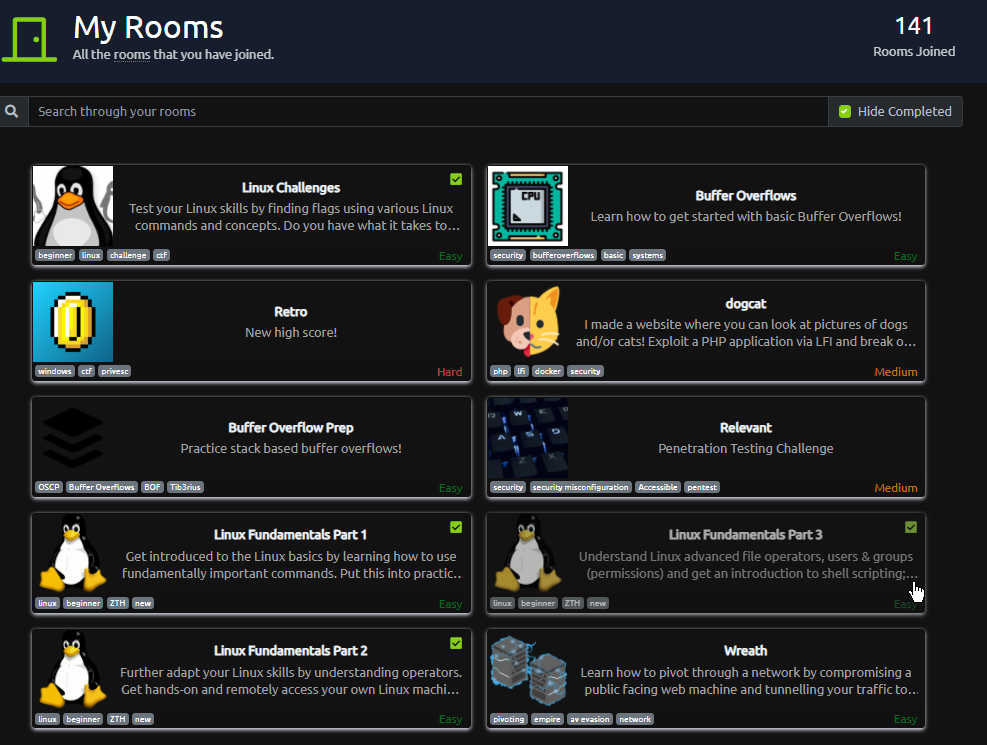
Some rooms still show up even though I completed them
 prisma zephyr
click the filter again?
novel inlet
that doesn't help https://i.imgur.com/HF7fSW6.gif
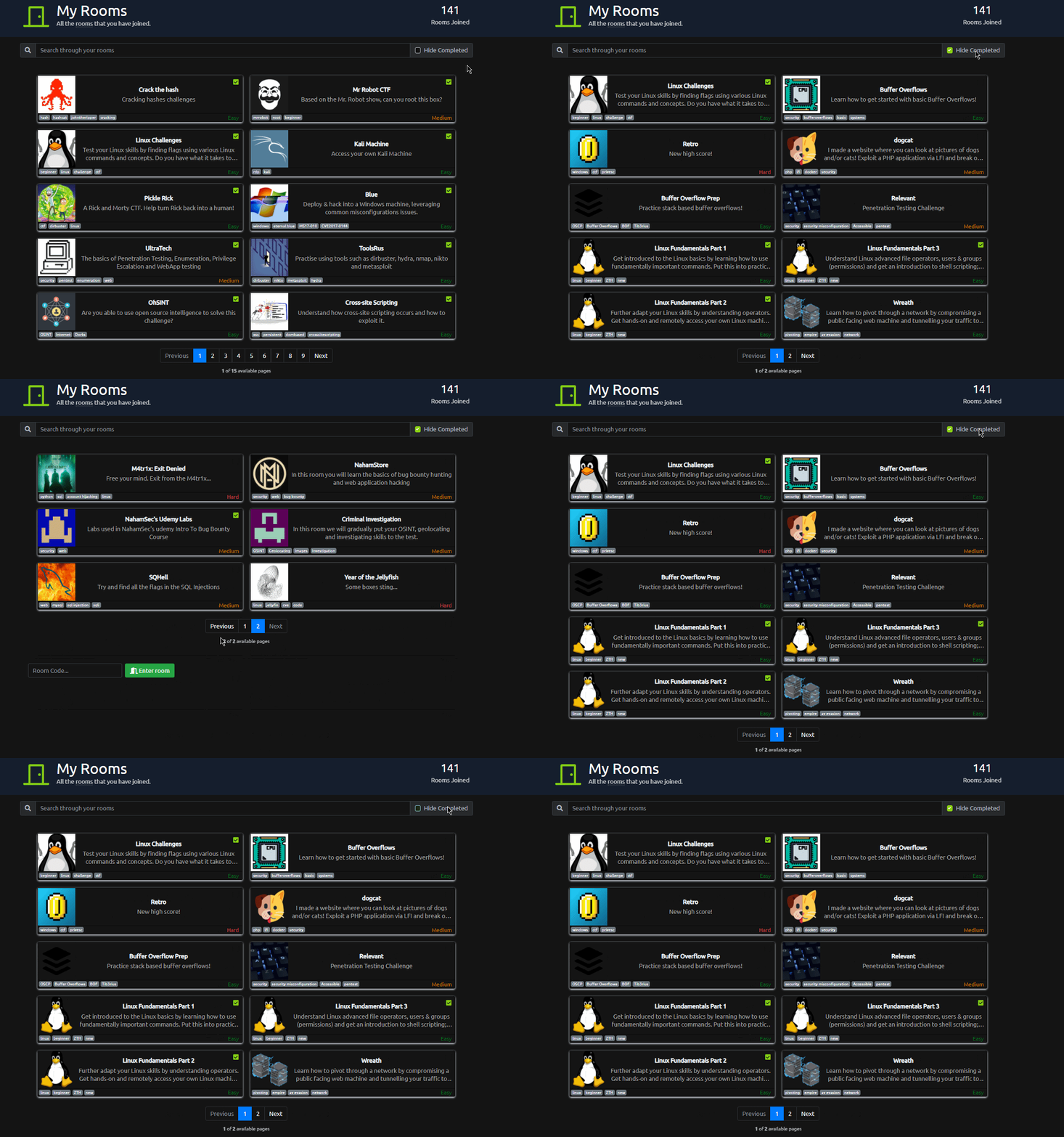 prisma zephyr
Then reload the page and try again
 patent lark
I think they already know about that bug, in my list even appear the rooms of the previous series of Linux Fundamentals.
 full wraith
Hi all, how i can stop VPN connection from THM when i don't need it anymore ?
on kali
 abstract harness
i cant
 proud tusk
abstract harness
i cant
proud tusk
abstract harness
i cant
Yeah what did u typed
abstract harness
sudo openvpn /Desktop/pasty1x.ovpn
abstract harness
ill dm u a ss
proud tusk
No
abstract harness
bruh im not typing it ou
proud tusk
Send it here it self
proud tusk
Ok
abstract harness
no image perms
prisma zephyr
the path is wrong
prisma zephyr
!docs verify
sharp bisonBOT
TryHackMe
Verify your TryHackMe Profile!
From TryHackMe with ❤!
proud tusk
prisma zephyr
the path is wrong
I think it should be in Downloads dir bbut I am not sure I have to see the error
Error should be like no file in the dir
prisma zephyr
Depends on where eexk moved it
proud tusk
And they didn't specify the dir in which they are writting the commamd
A picture is worth a thousand words
😜
prisma zephyr
for example that's my path /home/kali/Downloads/noctrise.ovpn
proud tusk
Yes I also have it like that
abstract harness
how do i find my path
prisma zephyr
If you haven't moved it, it will be in your downloads folder
proud tusk
abstract harness
how do i find my path
Yeah do locate name.Ovpn file
Name should be of ur file
prisma zephyr
You can try with sudo openvpn ~/Downloads/<yourfile>.ovpn
proud tusk
Or this if it works ^
prisma zephyr
Doubt that eexk moved it
proud tusk
But I still need to see the screenshot
abstract harness
 proud tusk
The file path is not correct ig
abstract harness
oh i know
proud tusk
Yeah try out locate Name.ovpn
abstract harness
i have to download the file on my vm
abstract harness
i downloaded it on my pc
abstract harness
there we go
 paper stirrup
hey all, Im struggling alittle with the Upload Vulnerabilities section, I am following all the instructions, such as: echo "10.10.103.24 overwrite.uploadvulns.thm shell.uploadvulns.thm java.uploadvulns.thm annex.uploadvulns.thm magic.uploadvulns.thm jewel.uploadvulns.thm" | sudo tee -a /etc/hosts --- But I cannot seem to access the site as per the challenge, has anyone else faced this issue
patent lark
paper stirrup
hey all, Im struggling alittle with the Upload Vulnerabilities section, I am fol...
Check that the IP of the deployed machine is the correct one and in the browser remember to prefix http:// to the URLs.
paper stirrup
patent lark
Check that the IP of the deployed machine is the correct one and in the browser ...
hi, thank you for the reply, the IP is correct, and i am also prefixing the http, but unfortuantely same issue of unable to connect or just a white screen
scenic torrentBOT
Gave +1 Rep to @patent lark
patent lark
paper stirrup
hi, thank you for the reply, the IP is correct, and i am also prefixing the http...
Check that you are correctly connected to THM's VPN from http://10.10.10.10/
eager fulcrum
paper stirrup
hi, thank you for the reply, the IP is correct, and i am also prefixing the http...
Make sure your hosts file doesn't contain entries from previous attempts
paper stirrup
patent lark
Check that you are correctly connected to THM's VPN from http://10.10.10.10/
I cannot seem to connect to that address...so possibly not correctly set up, I deployed the machine from the browser
paper stirrup
eager fulcrum
Make sure your hosts file doesn't contain entries from previous attempts
Thnak you for this, I will check the hosts file too
patent lark
paper stirrup
I cannot seem to connect to that address...so possibly not correctly set up, I d...
If you can't visit http://10.10.10.10/ check out the following room https://tryhackme.com/room/openvpn
flat halo
guys can anyone tell me how to fix this ?
I'm using WSL with Kali and since I used to develop with Ubuntu I'm used to use vscode as my text editor
I installed earlier kali-linux-large to have the whole package via sudo apt install -y kali-linux-largebut now my command code . to open the folder with vscode doesn't work anymore, i get this message:
┌──(leon㉿MSI)-[~]
└─$ code .
┏━(Message from Kali developers)
┃ code is not the binary you may be expecting.
┃ You are looking for \"code-oss\"
┃ Starting code-oss for you...
┗━
The futex facility returned an unexpected error code.
http://: Invalid host name.

Unexpected crash report id length
Failed to get crash dump id.
Report Id:
Aborted
I think it doesn't let me use code and instead correct my command for "code-oss"
how can I correct this and use the "code" command ?
patent lark
flat halo
how can I correct this and use the "code" command ?
Check in a PowerShell session if the code command works
flat halo
if you mean start kali from the powershell and run the code commands, it doesn't work, but just inside powershell yes it works
also, I can still connect to my kali linux vm with code
so it's really just this correction that I get from the kali developers' message
I ran this command "code-oss" by curiosity and I get the exact same output
┌──(leon㉿MSI)-[~]
└─$ code-oss
The futex facility returned an unexpected error code.
http://: Invalid host name.

Unexpected crash report id length
Failed to get crash dump id.
Report Id:
Aborted
so it really is my code command swapped to "code-oss"
patent lark
Try echo $PATH in your Kali Linux
flat halo
┌──(leon㉿MSI)-[~]
└─$ echo $PATH
/home/linuxbrew/.linuxbrew/bin:/home/linuxbrew/.linuxbrew/sbin:/usr/local/sbin:/usr/local/bin:/usr/sbin:/usr/bin:/sbin:/bin:/usr/games:/usr/local/games:/mnt/c/Program Files (x86)/Razer Chroma SDK/bin:/mnt/c/Program Files/Razer Chroma SDK/bin:/mnt/c/Program Files (x86)/Razer/ChromaBroadcast/bin:/mnt/c/Program Files/Razer/ChromaBroadcast/bin:/mnt/c/Program Files (x86)/Intel/Intel(R) Management Engine Components/iCLS/:/mnt/c/Program Files/Intel/Intel(R) Management Engine Components/iCLS/:/mnt/c/Windows/system32:/mnt/c/Windows:/mnt/c/Windows/System32/Wbem:/mnt/c/Windows/System32/WindowsPowerShell/v1.0/:/mnt/c/Windows/System32/OpenSSH/:/mnt/c/Program Files (x86)/Intel/Intel(R) Management Engine Components/DAL:/mnt/c/Program Files/Intel/Intel(R) Management Engine Components/DAL:/mnt/c/Program Files (x86)/Intel/Intel(R) Management Engine Components/IPT:/mnt/c/Program Files/Intel/Intel(R) Management Engine Components/IPT:/mnt/c/Program Files (x86)/NVIDIA Corporation/PhysX/Common:/mnt/c/WINDOWS/system32:/mnt/c/WINDOWS:/mnt/c/WINDOWS/System32/Wbem:/mnt/c/WINDOWS/System32/WindowsPowerShell/v1.0/:/mnt/c/WINDOWS/System32/OpenSSH/:/mnt/c/Program Files/NVIDIA Corporation/NVIDIA NvDLISR:/mnt/c/ProgramData/chocolatey/bin:/mnt/c/Program Files/PuTTY/:/mnt/c/WINDOWS/system32/config/systemprofile/AppData/Local/Microsoft/WindowsApps:/mnt/c/Program Files/Docker/Docker/resources/bin:/mnt/c/ProgramData/DockerDesktop/version-bin:/mnt/c/Users/Leon/scoop/shims:/mnt/c/Users/Leon/AppData/Local/Programs/Python/Python38-32/Scripts/:/mnt/c/Users/Leon/AppData/Local/Programs/Python/Python38-32/:/mnt/c/Users/Leon/AppData/Local/Microsoft/WindowsApps:/mnt/c/Users/Leon/AppData/Local/Programs/Microsoft VS Code/bin
@flat halo @patent lark This channel is for directly tryhackme related tech support only.
patent lark
eager fulcrum
<@!288233641979412480> <@!836477089997783050> This channel is for directly tryha...
That's right, my apologies
 ruby ice
i am having issues with the linux fundementals box not spawning
anyone else experiencing the same currently?
 halcyon sonnet
How do I do that?
 eager fulcrum
halcyon sonnet
How do I do that?
eager fulcrum
halcyon sonnet
How do I do that?
This channel is for directly THM related tech support like site or VPN issues
halcyon sonnet
Oh sorry
ruby ice
more info i am connected to the vpn, just the 'start machine' box is clicked and asks me to wait and then nothing..
any ideas? i cant see what the issue may be or if its only for myself?
 rugged shoal
How do I change from a monthly subscription to annual without losing my student discount?
 lilac wraith
Hello
 marsh magnet
rugged shoal
How do I change from a monthly subscription to annual without losing my student ...
marsh magnet
rugged shoal
How do I change from a monthly subscription to annual without losing my student ...
Email support@tryhackme.com and speak to them.
@lilac wraith explain your issue
lilac wraith
I am unable to get attackbox in tryhackme
I clicked on start machine then its not showing
And where i can terminate it
proud tusk
lilac wraith
I clicked on start machine then its not showing
can you send the screen shot of whats happening
please
lilac wraith
Its saying you don't have permission to attach files
Please help
I don't have permission to send any ss and pics
sharp bisonBOT
TryHackMe
Verify your TryHackMe Profile!
From TryHackMe with ❤!
rugged shoal
marsh magnet
Email support@tryhackme.com and speak to them.
@marsh magnet I did 7 hours ago, no reply... I guess I’ll have to wait longer!
marsh magnet
rugged shoal
<@!106802244329955328> I did 7 hours ago, no reply... I guess I’ll have to wait ...
Please be patient. It's one person on the email and they get loads of emails per day
@lilac wraith follow the link just posted.....
TryHackMe
The largest part of the TryHackMe community is the very active Discord server. You can use this invite link to join the server: https://discord.gg/tryhackm
lilac wraith
How much time does it takes to verify
ruby ice
i am having the same issue when clicking start machine on linux fundementals #1
lilac wraith
How to terminate linux fundamental 1
 mild trellis
Linux Fundamentals 1 still having Issues, can not load right now
ruby ice
thankyou i wasnt sure if it was an issue just for myself
rugged shoal
marsh magnet
Please be patient. It's one person on the email and they get loads of emails per...
Oh yes I know it’s 1 person, I just thought I’d of had a reply by now.
eager fulcrum
rugged shoal
Oh yes I know it’s 1 person, I just thought I’d of had a reply by now.
7 hours is a typical time for someone to sleep. What if you emailed just as Jabba went to sleep?
The poor guy doesn't work 24/7 or even all of his waking hours.
 limber mango
Is it wanted that u can just "sudo su" to root in a room? Instead of doing normal exploitation as guided?
eager fulcrum
If it's a walkthrough room, then perhaps
 olive imp
Hello, Is tryhackme down? I cannot access the main dashboard page
 tawny apex
oh good, its not just me lol
 viral solstice
+1
 iron heart
I'm running into the same thing @olive imp
hope i don't lose my streak because of this...i'm on day 133
 serene hawk
hello, hope everyone having a great day
eager fulcrum
iron heart
hope i don't lose my streak because of this...i'm on day 133
If you do, you can email support and they will restore it.
iron heart
eager fulcrum
If you do, you can email support and they will restore it.
oh awesome, thanks!
scenic torrentBOT
Gave +1 Rep to @eager fulcrum
 sinful talon
how much time is it going to be down
eager fulcrum
No one knows
@sinful talon Please don't ping staff like that, not even the right person to ping
sinful talon
eager fulcrum
<@!682803434625302548> Please don't ping staff like that, not even the right per...
sorry
 cursive mantle
It's just come back up.
eager fulcrum
Wait 5-10 minutes
cursive mantle
yah it's still a bit poorly
 dusk nimbus
no use using the robot , i have to select 3 images
 weak needle
do staff come in here and update us on things like this?
 sleek rivet
Yeah I cant get in at all lol
 urban pelican
can someone tell how to deploy virtual machine ? what do they mean by deploying ?
relaunch it after terminating and then try
sinful talon
ig its down again
weak needle
mine has never come back up, I can get the dashboard to load, but not stats or course links
weak needle
I haven't touched tryhackme in over two weeks and then i get on and this happens. lol my bad
sinful talon
did ddos the website
 strange edge
urban pelican
strange edge
urban pelican
What is the use of password or username provided then ? just for show ?
weak needle
they just couldn't handle me staring at the screen reading all those walkthroughs
 sleek topaz
Is there a way to verify certifications with the bot?
 woeful gorge
anyone stuck with the tryhackme website? or is it just me?
 sleek rose
@woeful gorge seems like everyone is facing the same issue
cam here to ask the same thing
weak needle
@woeful gorge yeah we down
 shrewd elk
me too. and cloudflare is constantly complaining with captchas here too. with and without VPN
sleek rose
i completed the room like 2 minutes before the site went down xD
 wind wedge
weak needle
wind wedge
weak needle
i'm going to die, if we find out tryhackme was hit by ransomware
shrewd elk
@sleek rose is the one to blame 🙂
ruby ice
RIP some streaks 🙂
weak needle
yeah, I spent 4 hours this morning working on a room, this will suck
woeful gorge
I wonder if the engineers know about this🤔
wind wedge
they do
weak needle
lol best name @wind wedge
sleek rose
BTW guys can anyone recommend some room or any other platform to solve crypto as well as binary challenges?
naive dust
woeful gorge
anyone stuck with the tryhackme website? or is it just me?
Same here
 livid vapor
see #announcements
 upper pollen
woeful gorge
anyone stuck with the tryhackme website? or is it just me?
upper pollen
woeful gorge
anyone stuck with the tryhackme website? or is it just me?
yeah its being funky today, started slow, then kept getting 500s and 504s
naive dust
Is the servers down? or Slow?
wind wedge
weak needle
Performance vs outage
woeful gorge
upper pollen
yeah its being funky today, started slow, then kept getting 500s and 504s
hope the progress does not vanish away!!!
upper pollen
woeful gorge
hope the progress does not vanish away!!!
me too!! im in the middle of a room!!
wind wedge
You won't lose any progress
naive dust
wind wedge
<#546650767495397376>
Thank you
scenic torrentBOT
Gave +1 Rep to @wind wedge
upper pollen
wind wedge
You won't lose any progress
awesome! thanks!!!
scenic torrentBOT
Gave +1 Rep to @wind wedge
naive dust
Oh well. This is a great motivation to nap till its up and running again hahaha
woeful gorge
upper pollen
me too!! im in the middle of a room!!
that's a nightmare...stuck within a room😰 😂
and this error
wind wedge
It shouldn't be too long til it's back up
weak needle
tell the intern the password is solarwinds123
urban pelican
Its taking more than enough time to load . What the hell is wrong ?
 lavish oriole
urban pelican
ok got it
lavish oriole
urban pelican
ok got it
🖐️
woeful gorge
urban pelican
Any indians here ?
🙋♂️
 alpine galleon
are there issues with login? I can't login
iron heart
site seems to be coming back up slowly again. I'm able to actually load some rooms
alpine galleon
I got charged twice for subscription, who can I contact to resolve this?
wind wedge
alpine galleon
I got charged twice for subscription, who can I contact to resolve this?
alpine galleon
ty
naive dust
Hello, I am getting Cloudflare 1020 access errors on tryhackme.com/login. Is there a DDos or something? I was able to access it just yesterday.
woeful gorge
naive dust
Hello, I am getting Cloudflare 1020 access errors on tryhackme.com/login. Is th...
naive dust
woeful gorge
<#546650767495397376>
Oh, okay so that falls under performance issues, thanks.
scenic torrentBOT
Gave +1 Rep to @woeful gorge
 sand olive
Saw in #announcements that everything is back to normal, but I can't deploy https://tryhackme.com/room/linuxfundamentalspart1
Can anyone try to see if it's just me?

TryHackMe
Embark on the journey of learning the fundamentals of Linux. Learn to run some of the first essential commands on an interactive terminal.
naive dust
@sand olive I tried and it doesn't come up. I have the same problem in another room. Refreshing the page, lets you start again, but to no avail.
 lusty coral
I've been having my VPN drop all day, and intermittent connectivity issues to VMs even when the VPN is up
 patent heath
Tried 3 rooms just now to start the machine but no go.
 midnight merlin
 manic nova
i need tech help
manic nova
i need tech help
ok
manic nova
it's about my HDD
 glad egret
lusty coral
I've been having my VPN drop all day, and intermittent connectivity issues to VM...
glad egret
lusty coral
I've been having my VPN drop all day, and intermittent connectivity issues to VM...
Try to regenerate your configuration
glad egret
@manic nova This channel is for THM related support
manic nova
DAMN IT
glad egret
Please head to #infosec-general
manic nova
CURSE YOU COMPLICATED DC SERVERS
eager fulcrum
Lmao they left the discord
marsh magnet
Kekw
glad egret
Lol welp
lusty coral
@glad egret I just regenerated the VPN config but I think it's a network issue. My discord keeps disconnecting and apparently Cloudflare is having an outage in US EAST. Not sure if Cloudflare has anything to do with network connectivity to the VMs
glad egret
I'm on the East side as well. Maybe it's just your end then :/
 scarlet harness
'Start Machine' option is not working in the "Splunk 101" room
 void ridge
scarlet harness
'Start Machine' option is not working in the "Splunk 101" room
void ridge
scarlet harness
'Start Machine' option is not working in the "Splunk 101" room
Having a similar issue in a different room. Watching a youtube video and hopefully It will work once it has finished 😛
patent heath
Been broken for more then 2 hours now...
 paper oasis
Oh I thought this was just me, My machine won't deploy in Linux Fundamentals 1
eager fulcrum
@zealous yoke Lot of people seem to be getting this
 light flame
Suggestion, do minor adjustment in discord roles colors so 0x3 and god rank are easily recognised
 jovial yacht
+1 to machine not starting issue - can't start "Hacking with Powershell" vm
 zealous yoke
ty for reporting -- investigation for a fix is going on atm (: cc @eager fulcrum @scarlet harness @void ridge @paper oasis
 abstract jolt
i am not able to start this machine. why? I am at linux fundamentals 1
haughty glacier
see the message above yours
abstract jolt
oh ok
abstract harness
when i start my oracle VM i can login into Kali but after i login i get a black screen???
eager fulcrum
This channel is for directly THM related tech support like site and VPN issues
abstract harness
so where do i go
eager fulcrum
 wise coral
is linux 1 room purposely closed?
 trim moat
there is an issue launching the machines that is being fixed
 ocean bloom
Ah okay good to know, was wondering why I can't launch anything.
 subtle coral
for the recent weeks, opening the website becomes really slow
 lost osprey
I have some problems with Linux Fundamentals Part 1
when i click start machine it doesnt starts
it is stuck at this
haughty glacier
read above
lost osprey
 haughty glacier
lol
eager fulcrum
Known issue, read above
lost osprey
alrighty
 safe ledge
Hey, I bought the 30 day schedule for Throwback but I can not see the VPN file available under Access - Networks. It has already been 2 days. Please help me
naive dust
alright just reporting also wont deploy for me either; linux fundementals 1.
livid vapor
safe ledge
Hey, I bought the 30 day schedule for Throwback but I can not see the VPN file a...
You may want to email support@tryhackme.com for this one
safe ledge
livid vapor
You may want to email support@tryhackme.com for this one
Thanks for quick response. Mistakenly I had dropped an email to help@tryhackme.com. Dropping to Support team now.
scenic torrentBOT
Gave +1 Rep to @livid vapor
livid vapor
I am not sure, but it might be the same person checking both emails
THM is a fairly small team
safe ledge
livid vapor
THM is a fairly small team
Sure No problem. I will wait for the response!
livid vapor
🙂
Hopefully you can get that resolved soon. I think there MIGHT be an issue with network vpns right now, I've seen people asking about not seeing the wreath vpn download
so maybe there's a bug with that at the moment. Not sure.
safe ledge
ohkay. makes sense. Then I could be part of ongoing issue because I can also not see anything for WREATH. I was bit worried as I thought may be payment did not sync well in the backend. 👍
livid vapor
While that's certainly possible, my guess would be that it's a bug related to network vpn displays, but again, that's just a guess.
Either way, emailing support will be able to provide more info/confirmation. Most people here are just volunteers, not actual staff, so we (I) can't see your account details, etc.
abstract harness
what am i supposed to do after this, i tried doing wget then the link but nothing happens
 haughty glacier
can you screenshot your wget
also we can take this to #848213138565365760 as it seems like you are doing linux fundamentals3?
livid vapor
Sounds like this might be a room question more than a vpn/tech support question
woeful hedge
Agreed
livid vapor
Neon beat me to it
woeful hedge
All 3 of us just lurking for the question lol
naive dust
Would it be possible please to completely reset my profile progress-wise? Un-enroll me from all the paths and rooms, reset all progress (for practice/learning purpose)
livid vapor
I think for that one you might have to email support@tryhackme.com. I don't believe there's a way for you to do that, but they might be able to
naive dust
will email em, thanks
livid vapor
you're welcome
 neat drift

 wide oasis
Nope
 elder wraith
any blog for difference between nc -nvlp and nc -lnvp
eager fulcrum
There is no difference.
 pine mist
im on the blaster room
been waiting here for 20ish mins
but it aint loading at all
it doesnt even return pings
not really sure what i can do
site doesnt load either
eager fulcrum
It's not meant to respond to pings
 naive atlas
Hi has anyone had issues running hashcat on M1 macs? I'm getting a clCreateKernel(): CL_INVALID_KERNEL
eager fulcrum
#infosec-general please
This channel is for directly THM related tech support like site or VPN issues
naive atlas
my b
pine mist
eager fulcrum
It's not meant to respond to pings
not even dirbusting?
eager fulcrum
That's not pings. I was talking about pings.
pine mist
because i cant do that either
the point is i dont know if the box is even responsive
i am connected to the network
i can scan its ports
but i cant open the site or ping it
timeouts everyhwere

is this intentional?
pine mist
would switching servers be a good idea?
il do that.
@eager fulcrum fixed,just had to switch servers
thanks for the assistance!
scenic torrentBOT
Gave +1 Rep to @eager fulcrum
naive dust
Hello guys 🙂 May i ask You for help with network? Need some basic configuration to make internet run on my VMWare for boxes (sth went wrong)
eager fulcrum
This channel is for directly THM related tech support like site or VPN issues
Please ask in #infosec-general
naive dust
thx
 maiden imp
Is there a bug in the filter? When I select "free only", I still see some rooms where I need to subscribe
wide oasis
It'll take a second or two to filter what you want, i don't think there's a bug
 gentle mist
How to get the eJPT role?
 delicate elm
gentle mist
How to get the eJPT role?
delicate elm
gentle mist
How to get the eJPT role?
they will give it to u
delicate elm
anytime
gentle mist
eager fulcrum
This channel is for directly THM related tech support like site or VPN issues
Can I have the eJPT role? I can send you the proof in DM.
wide oasis
gentle mist
Can I have the eJPT role? I can send you the proof in DM.
You should ask in #general this channel is for vpn and website issues
eager fulcrum
wide oasis
You should ask in <#680459914828972076> this channel is for vpn and website issu...
Eh this channel is ok for it
I'm just in the middle of stuff so I can't add the role
wide oasis
Okay sir, got it :)@eager fulcrum
 thorny dock
What is the status with the windows machines? Not sure if I remember correctly, but hasn't someone mentioned there would be updates happen & stuff? I came across this one at the "Persistence" room.. https://tryhackme.com/room/persistence


TryHackMe
An online platform for learning and teaching cyber security, all through your browser.
light flame
a bit of a minor bug , my !rank says I am not subscribed, help is appreciated
wide oasis
Refresh the page?👀
eager fulcrum
wide oasis
Refresh the page?👀
!rank is a discord command
No pages involved.
livid vapor
light flame
a bit of a minor bug , my !rank says I am not subscribed, help is appreciated
I think it shows that for everyone. I think the bot has a bug/is missing that feature 🤷♂️
 limber herald
Hello, please i have problem accessing the internet each time i connect to the labs on thm CompTIA pentest path
thorny dock
Again, has anyone heard about updates regarding the Windows machines as I mentioned??
gentle mist
eager fulcrum
I'm just in the middle of stuff so I can't add the role
Ok. Maybe after sometime?
eager fulcrum
thorny dock
Again, has anyone heard about updates regarding the Windows machines as I mentio...
Is there a question? Just ignore the updates
The machines don't have internet access
thorny dock
eager fulcrum
Is there a question? Just ignore the updates
The thing is, I couldn't do anything besides clicking "OK". I then tried to get a connection to metasploit. But there was nothing. And I used the correct address (thm vpn) so I thought the connection was blocked. In taskmanager it showed the CPU up to 99%.. Something was going on and I thought that was maybe the reason. ¯_(ツ)_/¯
I'll check again a bit later..
olive imp
Thank you so much for the solution I was getting the same error.
scenic torrentBOT
Gave +1 Rep to @dusty parcel
trim moat
!docs verify
sharp bisonBOT
TryHackMe
Verify your TryHackMe Profile!
From TryHackMe with ❤!
 spring wing
Hello all, Which room would I go to to inquire about auto-renewal for my subscription?
eager fulcrum
here
spring wing
Ok I give up. what do I need to do?
eager fulcrum
??
spring wing
I just want to be able to renew my subscription to tryhackme.com Is that here in settings or on the website? I'm not sure what to do.
eager fulcrum
It's on the website. If you paid with Stripe then it will auto renew unless you bought a voucher
If you paid with paypal or bought a voucher, it will not autorenew
spring wing
I paid with paypal. I don't remember paying with Stripe
eager fulcrum
Ok, then it will not auto renew
Wait for it to expire, then pay with a card rather than paypal if you would like it to auto renew
spring wing
when did thm go to stripe?
spring wing
will i loose everything ive earned
eager fulcrum
No
spring wing
ok so let it expire and renew with a CC ?
spring wing
OK thank you very much.
naive dust
Hi, I've got some strange problems regularly i.e.: timeouts, box page doesn't load properly, can't upload file to box that guy from write up uploaded etc. My question is: Can my hosts VPN interfere my VMWares connections? Or should it be transparent?
naive dust
Thanks Mate 🙂
 modern lake
I am on the complete beginner path, I cant deploy attack box, I keep getting "uh oh non subscribed users can only deploy the free attackbox for 1 hour a day" this has been happening for longer than a day. Sorry if this is a dumb question, but could anyone give me a clue as to what I am doing wrong
 rich snow
I'm trying to start the "Rust" room, but the room just perpetually loads. I'm able to access other rooms fine.
Any solutions?
eager fulcrum
It's a known site issue
rich snow
Oh so it's not me. Thanks
modern lake
Anybody??
ruby ice
are there any plans for a dark mode option on the site?
wind wedge
It's one of the main things people want lmao but most people just use an extension for dark mode such as dark reader
ruby ice
yea i just added dark reader now myself and it works great, thanks
 livid vapor
 gentle lodge
Hello, I'm a student. How do I get the 20% off?
gentle lodge
Hello, I'm a student. How do I get the 20% off?
email support@tryhackme.com from your school email address
with your account name
 runic sand
test
hey, I am having a problem with a room I am developing. For some reason new task questions are not populating even if I reset my own room progress.
 solemn jetty
had an 80 day streak the other day, is it possible to regain it?
haughty glacier
well you did it once
solemn jetty
yes, and the staff from tryhackme themselves mentioned they can renew lost streaks.
haughty glacier
oh you mean you want them to restore your streak
that's different but if you email support they might be able to help
!support
!docs support
sharp bisonBOT
TryHackMe
That topic does not exist!
Use !docs to list all of the available topics.
From TryHackMe with ❤!
haughty glacier
well, anyway it's hello@tryhackme.com and support@tryhackme.com
as per the pins in this channel they want
Streaks:
-Username:
-What your streak should be:
-Email:
 torpid lance
Guys, can help me with vpn so bad
light flame
torpid lance
Guys, can help me with vpn so bad
sudo openvpn the_file_you_downloaded.ovpn
wide oasis
torpid lance
Guys, can help me with vpn so bad
Try changing vpn server
torpid lance
My vpn connect, but, when i am go to server, its said "unable to connect", what should i do?
do I need premium for that?
patent lark
torpid lance
do I need premium for that?
Check if you can visit http://10.10.10.10, if not try to change the server, you only need to be subscribed to connect to the VIP servers.
remember to regenerate and re-download the configuration file to be sure.
thorny dock
eager fulcrum
Is there a question? Just ignore the updates
So... Just wanted to clarify.. cough
Of course it worked. I was just not smart enough to double check the syntax when I made the backdoor with msfvenom...
@eager fulcrum Thanks
scenic torrentBOT
Gave +1 Rep to @eager fulcrum
 celest folio
Hello, do I ask for help with the room issue here?
eager fulcrum
Probably #room-help or #room-hints if it's something for a room
celest folio
Thanks, I'd go there, but I just realized that I was typing wrong ip address:/
livid vapor
runic sand
hey, I am having a problem with a room I am developing. For some reason new task...
I'd ask a mod to add you to the creator's channel, they might be able to help
 whole hare
Originally posted this in room-hints, but I suppose it is better posted here. I'm working on the OWASP Top 10 room, Task 20, Question 5 On the same page, create an alert popup box appear on the page with your document cookies. I've tried a number of scripts that all produce the same cookie data. <script>alert(“document.cookie”)</script>
<script>onclick(alert("document.cookie"));</script>
var x = document.cookie; window.alert(x);
I get a popup with connect.sid=s%3Alc0.... Clicking ok gives another popup with document.cookie. Clicking ok then just closes the dialog without showing another popup with the flag or updating the page to show a flag like it did for the previous stored XSS question. I can post screenshots if needed. Is this a program error, or am I missing something?
Any help would be appreciated. Thanks.
 thick carbon
Hi there, that could indicate an issue with your connection or with the proxy that Burp uses
 sullen pond
Iam not able to connect to the host for any machines,even though iam connected to HTB network with openvpn..getting error message as "Host is down"
eager fulcrum
This is not HTB
So I would recommend using the TryHackMe VPN rather than the HackTheBox one
If you'd like help with the HackTheBox VPN, they have their own discord
whole hare
@eager fulcrum I posted a question above. I've been working on this and hoping for some help for almost 2 hours. I don't want to have my profile flagged for spamming. Can you suggest where I should post my question so I can get some help, or confirm that there is an issue with that question?
eager fulcrum
Please don't just ping me when you want help.
Everyone here is a volunteer. No one is paid to help here.
whole hare
Sorry, I just didn't want to flood several channels with the same question.
eager fulcrum
Yeah, please avoid doing that
whole hare
Can you suggest where I should post my question?
livid vapor
if it's room related, one of #subs-room-help #room-help #room-hints
eager fulcrum
#room-help was appropriate, I see you've asked there already
When someone can help, they will
whole hare
OK. Thanks for your time.
whole hare
whole hare
Originally posted this in room-hints, but I suppose it is better posted here. I'...
Got some help, and got it solved. Thank you.
 wicked ridge
guys i can't verify my discord using the token on the profile
eager fulcrum
??
eager fulcrum
No angle brackets
scenic torrentBOT
Gave +1 Rep to @eager fulcrum
 rough cave
Hello, my AttackBox is expired, and i need it to pass the pathway, i have kali linux on my machine, is there any alternative way to pass ? (the problem is that they ask me question that i need to do it on the AttackBox, like find this file...)
sharp bisonBOT
TryHackMe
Learn how to use OpenVPN to connect to our network!

From TryHackMe with ❤!
rough cave
i have connected to vpn, but how i can get the required files (like access.log) ? ssh maybe ?
eager fulcrum
In Linux Fundamentals?
rough cave
yes
eager fulcrum
You're not using the attackbox there, you're SSHing into the deployed machine.
@zealous yoke I keep seeing this confusion. People keep labelling any deployable with in-browser access as "the attackbox".
rough cave
but if i want to ssh into the deployable machine, how can i get the password ?
@eager fulcrum
eager fulcrum
You're given it?
rough cave
?
eager fulcrum
You either have in browser access, or you're given the credentials.
Read the tasks.

 karmic ledge
Hi I just made a kali linux VM to do the throwback network as been using attackbox for it for a few days but want to run it on my actual machine. I have connected to the VPN but for some reason I can't ping any of the machines on the throwback network. It is definitely running and I don't believe it is a VPN issue because I tested deploying a machine from a different challenge and that one worked. It is just the throwback network I cannot connect to.
eager fulcrum
In the tasks. @rough cave
eager fulcrum
karmic ledge
Hi I just made a kali linux VM to do the throwback network as been using attackb...
Throwback has its own VPN profile
karmic ledge
eager fulcrum
Throwback has its own VPN profile
Oh right thank you
scenic torrentBOT
Gave +1 Rep to @eager fulcrum
rough cave
where is the tasks (sorry, i'm just new in the platform)
eager fulcrum
rough cave
where is the tasks (sorry, i'm just new in the platform)
The tasks, labelled with Task X are on the left there, part of the room.
rough cave
i have just in-browser
eager fulcrum
No
On the left. The drop downs. Those are tasks.
The ones with Task in the title
rough cave
yes i know, but the only task that says you to connect is the task 3 (Interacting With Your First Linux Machine (In-Browser)
eager fulcrum
Ok. So you don't need the attackbox or anything.
You can just do it all in browser for the first Linux Fundamentals room.
I believe the next one expects you to SSH in, and provides the credentials to do so.
rough cave
oh, it's worked, at first, the "start machine" button was unclickable, and after refreshing it's worked
thank you
 queen gazelle
Having an issue with python2 and paramiko. i have paramiko installed via pip, but when the script is run with python2, i get a traceback error saying there is no module named paramiko. I don't have much experience with python2; I learned with 3. How do I get paramiko to work with python2?
placid mango
Ask in #infosec-general .
queen gazelle
ok, wasn't exactly sure which channel the question would be best in. Thanks.
 dire patrol
Hi, anybody know if THM doesn't isolate each VM ?
The problem was related about some person talks about all vm's are open to anybody, so if you are connected to vm , and you expose your connection trough vpn, anybody can access to your machine ...
is it true ?
it doesnt happen in another platforms.
eager fulcrum
dire patrol
Hi, anybody know if THM doesn't isolate each VM ?
The problem was related about...
I replied to you in #general
Please don't ask the same question over several channels.
dire patrol
thanks 😉 and sorry 😉 I think that general maybe was wrong place to ask that 😉
 velvet charm
Whenever I'm using the Attackbox ( on the website ) it's getting to 99.99%, stuck without moving or completing the scan, does anybody know why??
velvet charm
I also cannot use mysql in the attackbox VM
eager fulcrum
?
light flame
cant access https://tryhackme.com/room/rpburpsuite# task 6 machine in browser
TryHackMe
An online platform for learning and teaching cyber security, all through your browser.
even without burp
 sleek rover
Is there any way to speed up the nmap scanning for some of the boxes? I assume response times are slow because there's a ton of people scanning the same machines, but it's taking me 2 hours+ for a scan to complete in most modules.
eager fulcrum
sleek rover
Is there any way to speed up the nmap scanning for some of the boxes? I assume r...
Machines are not shared with other users outside of networks
sleek rover
eager fulcrum
Machines are not shared with other users outside of networks
Ok, but then why would it be taking so long to scan?
eager fulcrum
IDK, some are just bad for it
sleek rover
eager fulcrum
IDK, some are just bad for it
👍
 steel thorn
eager fulcrum
steel thorn
eager fulcrum
Sounds like something for #feedback-and-ideas
 eager fulcrum
1
eager fulcrum
What
 daring kayak
I am on Task 5 in the Upload Vulnerabilities room and the url is not available to me. It is the http://demo.uplo..... It was working but it stopped. I restarted everything and it is still not working.
eager fulcrum
daring kayak
I am on Task 5 in the Upload Vulnerabilities room and the url is not available t...
Demo is not meant to work.
This is stated in very big letters in the room.
 daring kayak
Thanks
 cyan yoke
hi - new paid member - having trouble typing in numbers to my virtual machine, letters work fine, any ideas?
possible to connect to box using https://remmina.org/?
pine mist
i cannot download the VPN file
it all started with the error by which the webpages dont load on boxes
so went to https://tryhackme.com/access to change servers
TryHackMe
An online platform for learning and teaching cyber security, all through your browser.
but whenever i try downloading the file
it redirects me to 404
help?

 patent lark
pine mist
it redirects me to 404
patent lark
pine mist
it redirects me to 404
Try to regenerate it and then try to download it again.
pine mist
i did
patent lark
Did you try to delete the browser cache?
placid mango
`If you are receiving a 404 error after attempting to download the OpenVPN Configuration file please try these steps:
• Press regenerate, wait 2 minutes and then try downloading again
• Change VPN server and try downloading again
• Log out of your account and log back in.`
pine mist
placid mango
`If you are receiving a 404 error after attempting to download the OpenVPN Confi...
thank you!
scenic torrentBOT
Gave +1 Rep to @placid mango
 novel thunder
hi, paid user here. I've been experiencing very slow connections on the VPN, with frequent timeouts, even when trying from different machines/OS. any ideas on how to diagnose this? everything works fine from the attackbox but I miss having my own tools and persistence of working files (or is there a way to persist files across attackbox sessions?)
 agile plume
Why I cant find this port when using my machine but can find using in browser?


Sorry for my terrible English
eager fulcrum
agile plume
You are probably not connected to the THM VPN
 slender frost
Good day . I'm hawing a little bit of trubble trying to connect. I'm doing the upload vulnerabilities section but so far it seems that I can't connect to any link from the exercises . I haw the machine on and I'm connected via vpn but can't connect to the pages to solve the problem .
agile plume
eager fulcrum
You are probably not connected to the THM VPN
but the right top shows connected
slender frost
yes
if i try to acces the ip via the browser it dosen`t show anything or say service temporary unavailable
I also re-donwloade my vpn credential but to no success
eager fulcrum
agile plume
but the right top shows connected
Ok, but you can't connect to the port so you aint connected properly
eager fulcrum
slender frost
Good day . I'm hawing a little bit of trubble trying to connect. I'm doing the u...
Update the IP in your hosts file
slender frost
in the vpn file?
eager fulcrum
slender frost
how come I can`t uploade photos
!docs verify
sharp bisonBOT
TryHackMe
Verify your TryHackMe Profile!
From TryHackMe with ❤!


 eager fulcrum
slender frost
eager fulcrum
slender frost
Remove https
http://
But make sure you updated your hosts file, it needs the right IP in there
slender frost
same thing
eager fulcrum
Hosts file.
slender frost
sorry for asking such noob question
if my logic is right i must update the ip with the one that I get after I connect trough vpn ?
eager fulcrum
No.
slender frost
the one that shows up next to my profile with green
eager fulcrum
The target machine's IP.
slender frost
oh ok
eager fulcrum
You would have put the IP in your hosts file with the snippet provided if you did the room previously
slender frost
dose export ip command work , is it enough ?
eager fulcrum
I fully recommend reading the tasks thoroughly, especially for rooms from Muirland
slender frost
i forgot about this requirement 😦
and was paniking for a few hours why I could not connect
 hushed ledge
Hi I can not connect the openvpn to server
I download on my kali linux to the server from tryhackme when
slender frost
haw you downloaded your file ?
sudo openvpn /home/youruser/Downloads/youruser.ovpn
slender frost
dose it show you any error ?
hushed ledge
Yeah
Loop
Authentications process
I choose another server gives the same
US or EU
Give me the same
But i try to connect on server thehackbox its run correctly without error
What is the problem?
Any help? Please
slender frost
 sry I`m not that skilled , maybe wait a few minutes and Ninja might help you as well
in the meantime try working from the attackbox that has a kali machine preinstalled
you don`t need to set up vpn and it runes from browser
hushed ledge
Ok thks
daring kayak
I am on Task 7 (Bypassing Client-Side Filtering) of the "Upload Vulnerabilities" room
I am trying to connect to "java.uploadvulns.thm" and it says "Unable to connect - Firefox can't establish a connection to the server.
I ran the code in the "Getting Started" (Task 1) that states all the names of the domains for all the tasks.
I just did a "curl" and I see the source code in Terminal, so it looks like it is Firefox stopping me.
Thoughts?
thorny dock
daring kayak
I am on Task 7 (Bypassing Client-Side Filtering) of the "Upload Vulnerabilities"...
are the entries in the hosts file correct?
daring kayak
I am good now, Firefox was sending me to Google and asking did I mean to go to java.uploadvulns.thm, so I hit yes and all good
thanks @thorny dock
scenic torrentBOT
Gave +1 Rep to @thorny dock
livid vapor
daring kayak
I am good now, Firefox was sending me to Google and asking did I mean to go to j...
FF likes to add https:// if you don't force http://
 bronze vale
Your level is level 2
naive dust
no im level 3
bronze vale
No, you are level 2 :)
bronze vale
Are you sure?
naive dust
connection error on linuxfundpt1
 spare gale
thorny dock
spare gale
thorny dock
it IS free..
thorny dock
google kali linux download ¯_(ツ)_/¯
 dim canopy
i dont know where to start?
thorny dock
cedar gorge
im getting expiring soon pop up when i dont even have a machine running, then few minutes later i would get the expired pop up. seems that i cant post a img of it here
slender frost
cedar gorge
im getting expiring soon pop up when i dont even have a machine running, then fe...
!docs verify
sharp bisonBOT
TryHackMe
Verify your TryHackMe Profile!
From TryHackMe with ❤!
slender frost
verify your account using the discord code from your account on the website
also you might haw a machine running that you did not terminate

 slender frost
it automatically turned off
cedar gorge
yes , but im still getting the pop ups
slender frost
even after you re-open browser and log in ?
cedar gorge
yes, i just updated firefox mid day today
slender frost
maybe clear browser cache
void ridge
Is this the best room to ask for Tech Support on an issue with metasploit on my machine?
cedar gorge
now we wait
thorny dock
void ridge
Is this the best room to ask for Tech Support on an issue with metasploit on my ...
probably
eager fulcrum
void ridge
Is this the best room to ask for Tech Support on an issue with metasploit on my ...
This channel is for directly tryhackme related tech support, like site or VPN issues
void ridge
eager fulcrum
This channel is for directly tryhackme related tech support, like site or VPN is...
Ok thank you.
scenic torrentBOT
Gave +1 Rep to @eager fulcrum
maiden imp
How to access the Premium/Pay version for exactly 1 month. Do I pay once, or am I responsible to unsubscribe myself?
 honest pivot
I'm having two issuesthe main one is no matter what card I use to buy a premium membership the website says it was declined, even when I know there is no issues with payment
secondly when I'm using the virtual machine I cannot use any commands on the command line, it says that i need to download them first into linux but when i try it won't let me
haughty glacier
maiden imp
How to access the Premium/Pay version for exactly 1 month. Do I pay once, or am ...
if you pay, and then unsubscribe right away, you still have access for the whole month.
alternatively you could buy a voucher for 1 month instead
 next pendant
Is there any way to get the student discount without a student email?
eager fulcrum
Yes, email support.
next pendant
okay, thanks
 ornate nebula
Someone suggested it so I'll try. I got distracted by BSides Nova and broke my 100+ streak... Any possibility of giving it back and letting me keep it going?
eager fulcrum
Email support
ornate nebula
Sure what's the email?
prisma zephyr
 velvet hemlock
I have my own Kali machine vía bootable USB with persistence. Can I just use my own Kali machine without having to use the VMs provided?
naive dust
TechIT room is always stooping my rev shell is not receiving data from the room
solemn jetty
are there any suggested fixes for constantly disconnecting from the vpn?
 soft bluff
hi! the school email i registered with got removed/revoked (graduated). i emailed support@tryhackme.com but no replies.
is there anyone support member i can reach out to for this issue?
 stray wadi
I added my university email to the tryhackme account but the student discount isn't showing up. Can anyone please help out with the issue?
Thanks
 swift kayak
I think there is connection issue on anthem? Been trying to restart the machine but I can access another machine
naive dust
stray wadi
I added my university email to the tryhackme account but the student discount is...
Reach support by email ( support@tryhackme.com ) and show proof of your uni email associated with your TryHackMe's account, that's what I had to do too
stray wadi
naive dust
Reach support by email ( support@tryhackme.com ) and show proof of your uni emai...
okay thanks for the help
scenic torrentBOT
Gave +1 Rep to @soft thunder
naive dust
You’re welcome !
 bitter dove
how can i show my full name on the badges earned...it only shows username which has no link to the full name
bronze vale
Hey!
You need to put your Full Name into the Full Name section on your profile (https://tryhackme.com/profile).
If you did not put your first name into your profile before generating your certificate, your username will appear.
Currently, this is not changeable, sorry.
bronze vale
bronze vale
Hey!
You need to put your **Full Name** into the **Full Name** section on your ...
bitter dove
I have my full name in the profile section however it is still generating badges with username
The first badge I got of advent-of-cyber-2 had my full name...thereafter all my badges is having username
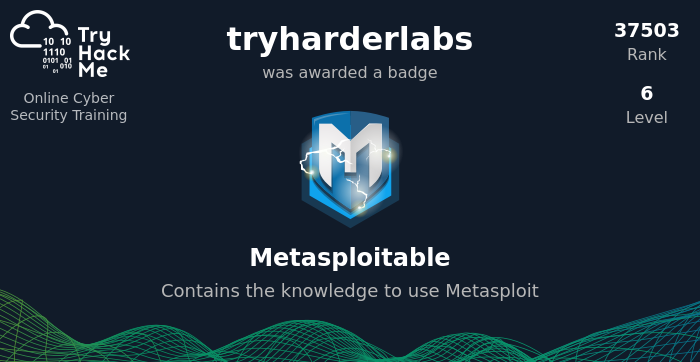
even my profile badge ID is not showing full name
 eager fulcrum
bitter dove
The first badge I got of advent-of-cyber-2 had my full name...thereafter all my ...
eager fulcrum
bitter dove
The first badge I got of advent-of-cyber-2 had my full name...thereafter all my ...
I believe that was a certificate, not a badge.
They are different
bitter dove
eager fulcrum
They are different
Ok thx but it does not solve the problem for me ..I want full name on the badges instead of username...thx for understanding
scenic torrentBOT
Gave +1 Rep to @eager fulcrum
eager fulcrum
bitter dove
Ok thx but it does not solve the problem for me ..I want full name on the badges...
Ok. You can't for badges.
Trying to bypass the VPN restrictions would be illegal, so please do not ask here.
bitter dove
eager fulcrum
Ok. You can't for badges.
Thx that clarifies the issue...but can it be taken up in future if someone wants full name on badges
eager fulcrum
bitter dove
Thx that clarifies the issue...but can it be taken up in future if someone wants...
 severe yacht
eager fulcrum
Trying to bypass the VPN restrictions would be illegal, so please do not ask her...
severe yacht
eager fulcrum
Trying to bypass the VPN restrictions would be illegal, so please do not ask her...
Oh, my bad didn't know that! thanks for letting me know!
scenic torrentBOT
Gave +1 Rep to @eager fulcrum
 distant leaf
hy I can get openvpn file for accessing wreath network
proud tusk
distant leaf
hy I can get openvpn file for accessing wreath network
yeah sure
a screen shot would be helpfull
distant leaf
 proud tusk
distant leaf
proud tusk
distant leaf
did you join the wreath
distant leaf
proud tusk
can you try one thing
what thing
proud tusk
distant leaf
what thing
can u disable the brave shiled and refresh and try again
distant leaf
proud tusk
can u disable the brave shiled and refresh and try again
nothing happ
proud tusk
distant leaf
nothing happ
hmm wierd
distant leaf
yeah
proud tusk
its pretty wired thing tbh
eager fulcrum
Leave the room and rejoin
 livid mauve
I, too, had to disable Brave Shield on THM, if that helps
proud tusk
livid mauve
I, too, had to disable Brave Shield on THM, if that helps
sorry
didnt get you
distant leaf
eager fulcrum
Leave the room and rejoin
nothing happen
distant leaf
eager fulcrum
Leave the room and rejoin
yah thanks option are shown
scenic torrentBOT
Gave +1 Rep to @eager fulcrum
distant leaf
proud tusk
its pretty wired thing tbh
thanks to you man also
proud tusk
distant leaf
thanks to you man also
nahh james there just post ur queries in right channels
happy hacking
distant leaf
proud tusk
happy hacking
you too
naive dust
hello, do someone know how to connect between a database and a html form?
eager fulcrum
This channel is for directly THM related tech support like site and VPN issues
 grim smelt
Hey...I'm doing the empire room and after installing Starkiller, i cant log in? What could be the problem?
 grim smelt
Hey...I'm doing the empire room and after installing Starkiller, i cant log in? ...
grim smelt
grim smelt
Hey...I'm doing the empire room and after installing Starkiller, i cant log in? ...
I got it to work anyways...I re-installed empire
 midnight nymph
is anyone else getting random timeouts on boxes? i have fine connection to the wider internet it just seems to be the vpn or the box
sharp bisonBOT
TryHackMe
Use our VPN troubleshooting script to diagnose common issues!
From TryHackMe with ❤!
midnight nymph
hm, it said there was multiple connections running even though ps aux said otherwise when i checked
i'll let you know if it continues
 zinc nexus
I am in the room Internal. I found the credentials, but whenever I try to go to the "Log In" page in this screenshot, it says "Page not found". It appears when I look it up in the write ups that this page should be found?

 pine star
My gmail account was hacked and it happened that i forgot my password how do i tryhackme reset my password. I have progressed quite a bit and I wouldn't want to lose all my progress. Please 😩 😩 is there a way to reset my password without going through my gmail account?
eager fulcrum
Email support@tryhackme.com
eager fulcrum
zinc nexus
I am in the room Internal. I found the credentials, but whenever I try to go to ...
You need to add it to /etc/hosts
zinc nexus
eager fulcrum
You need to add it to /etc/hosts
Thank you! I will work on figuring out what this means haha 🙂
scenic torrentBOT
Gave +1 Rep to @eager fulcrum
pine star
eager fulcrum
Email support@tryhackme.com
thanks
scenic torrentBOT
Gave +1 Rep to @eager fulcrum
 wind notch
guys i got a problem , i connected to vpn and even the tryhackme showing that im connected .. but when i paste my ip in firefox its saying no page found im supposed to get a page ryt ?
placid mango
Which room?
gaunt mica
can anyone look in linux fundamentals part 3, it can be tech support because it didnt do anything as i followed the instructions
i posted in linux fundamentals chat room
 orchid stirrup
Hi, I need help/answers about using machines. I'd like to VC if anyone is available. Thanks
 faint bough
Is it just me or does the room servers seem to constantly crash/become unresponsive for me? I pay for the subscription but can hardly do anything with them being un responsive so often
I don't remember it ever being this bad
And I am not doing anything crazy, just trying to login to SSH on the basic pentesting room
wide oasis
orchid stirrup
Hi, I need help/answers about using machines. I'd like to VC if anyone is availa...
You can ask for hints in #room-hints and help in #room-help
delicate elm
this is weird idk why this is happening i have more than 7 days streak
 patent lark
delicate elm
this is weird idk why this is happening i have more than 7 days streak
patent lark
delicate elm
this is weird idk why this is happening i have more than 7 days streak
In https://tryhackme.com/room/wreath please read the task Accessing the Network, there you will be able to read the following: Note: this will only appear if you have joined the room. If you are only viewing the room just now, click the "Join" button at the top right of this page!.