#site-support
1 messages · Page 233 of 1
 restive reef

 karmic crow
 neon viper
at the first step it is one half blue and one more grey/white
neon viper
at the first step it is one half blue and one more grey/white
it means that u didnt solve those rooms
 neon viper
 prisma zephyr
You probably missed the last task
prisma zephyr
You probably missed the last task
i picked one of those three
but nothing happened
prisma zephyr
If you need help with a room then it's better to ask in #room-help. That channel is for technical issues related to THM
 naive dust
Next steps for 100% ig
neon viper
?
 dense bramble
I think I broke john, after I initially stopped the process (because it was taking forever on bcrypt, and thought I should try to figure out how to filter rockyou.txt), it keeps crashing
any way to fix this or should I just reboot my VM?

 patent lark
dense bramble
I think I broke john, after I initially stopped the process (because it was taki...
patent lark
dense bramble
I think I broke john, after I initially stopped the process (because it was taki...
remember that if you specify a user name it must be separated from the hash by a colon
dense bramble
no username here, just the hash
patent lark
try to delete the recovery file (john.rec)
dense bramble
patent lark
try to delete the recovery file (john.rec)
oh... that was simple, it worked, thank you
 scenic torrentBOT
Gave +1 Rep to @patent lark
patent lark
dense bramble
oh... that was simple, it worked, thank you
if it happens again, before deleting the file verify that the permissions are correct
dense bramble
Thanks, I'll keep that in mind in case I need to
 rare roost
I cannot ping the machine
this is my tun0 interface

Oh wait nmap discovered ports
So I guess it's reachable
 eager fulcrum
@undone folio We won't tolerate platform bashing here.
RedHat is a distribution of Linux, not a hacking hat.
-mute @undone folio 20m Cut out the trolling. We will not tolerate platform bashing here, especially when you did it in such an inappropriate way.
scenic torrentBOT
🔇 Muted F2#2320 for 20 minutes
eager fulcrum
This channel is for directly THM related tech support like site or VPN issues
it doesn't say that
 kindred kelp
hi, I used my university's email but i didnt get the student discount
can someone help me
 haughty glacier
@kindred kelp I think you can email support@tryhackme.com and they might be able to fix it for you, if you have some proof/documentation, there is a pin in this channel about it.
 dull hound

this keeps popping up even when i have extended the timers
like its popping up every minute becomin very annoying
oh my idk what to do this has happened like almost everytime now i run a box and it wont stop spamming
haughty glacier
after you hit extend you might need to refresh the page
so that the timer part updates correctly
it shouldn't 'spam' however it's been a week or more since I did a box myself so not sure about that
kindred kelp
why after subcribing, my subcribtion fee changed from 10 usd a month to 10 pound a month?
is it just a symbol error?
eager fulcrum
I think so
 novel inlet
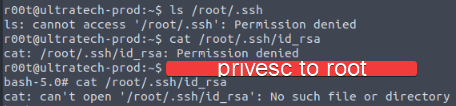
/root/.ssh disappears in privesc shell, does anyone know why?
the files in /home disappeared too
 lime pagoda
do you have to use "attackbox" with openvpn?
eager fulcrum
No
 minor sun
Anyone here have Kali running on Raspberry pi 4? I'm almost 100% sure that the internal WiFi chip supports monitor mode but I'm having trouble getting it there. Everything is fully updated btw
 glad egret
minor sun
Anyone here have Kali running on Raspberry pi 4? I'm almost 100% sure that the i...
glad egret
minor sun
Anyone here have Kali running on Raspberry pi 4? I'm almost 100% sure that the i...
It doesn't support monitor mode. You'll need an adapter
FYI, this channel is for THM related technical support. Other security related topics can go in #infosec-general
minor sun
Ok thanks and noted
 meager pendant
does windows have ftp or ssh open by default?
eager fulcrum
No
 loud bramble
In the Network Services / Telnet section, when I try to enumerate open port after starting a machine all I get is that all ports are closed. What do I need to do to fix this problem?
eager fulcrum
What are you doing to enumerate?
loud bramble
nmap
eager fulcrum
Ok, exactly how?
Because the open port is not a common port, nmap will not find it unless you tell it to scan all ports or the right range of ports
loud bramble
Thank you very much
 hearty bobcat
in task 9 of osquery the question "what is the schema for win_event_log_data" I got the answer but it's not working for some reason
||CREATE TABLE win_event_log_data('time' bigint, 'datetime' text, 'source' text, 'provider_name' text, 'provider_guid' text, 'eventid' integer, 'task' integer, 'level' integer, 'keywords' bigint, 'data' text, 'eid' text hidden);||
glad egret
@hearty bobcat You may need to capitalize some of the text. And please use #room-hints or #room-help for questions related to rooms
hearty bobcat
glad egret
<@!216560999040286720> You may need to capitalize some of the text. And please u...
||CREATE TABLE WIN_EVENT_LOG_DATA('time' BIGINT, 'datetime' TEXT, 'source' TEXT, 'provider_name' TEXT, 'provider_guid' TEXT, 'eventid' INTEGER, 'task' INTEGER, 'level' INTEGER, 'keywords' BIGINT, 'data' TEXT, 'eid' TEXT HIDDEN);|| tried that already
im not sure what I'm doing wrong, it perfectly lines up with the answer format
glad egret
Might be a formatting issue. Try ||CREATE TABLE win_event_log_data(time BIGINT, datetime TEXT, source TEXT, provider_name TEXT, provider_guid TEXT, eventid INTEGER, task INTEGER, level INTEGER, keywords BIGINT, data TEXT, eid TEXT HIDDEN);||
hearty bobcat
nope, doesn't work either
glad egret
Paste what I sent but retype the '
 glad egret
No I think I had a similar issue. The apostrophe doesn't paste correctly
 rigid wasp
Hi, how can I share the clipboard in the browser machine?
glad egret
rigid wasp
Hi, how can I share the clipboard in the browser machine?
Click the 3 dots on the left
rigid wasp
I have a windows machine in the browser for the room "corp" but I can't transfer the clipboard
 sharp bisonBOT

 TryHackMe
Verify your TryHackMe Profile!
From TryHackMe with ❤!
rigid wasp
glad egret
Click the 3 dots on the left
The what
hearty bobcat
I dont think you get a clipboard tool when it's a windows machine
glad egret
rigid wasp
The what
Are you using the AttackBox?

 rigid wasp
glad egret
rigid wasp
glad egret
That's what I usually use but this is not the attacker machine but the room machine itself
I opened it in split-view due to some issues with my xfreerdp
glad egret
Can you share a screenshot please?
rigid wasp
I'm verifying so I can share it 🤘
glad egret
You're verified now 🔥
 rigid wasp
glad egret
You're verified now 🔥
rigid wasp
glad egret
You're verified now 🔥
^^^
My last resort would be a powershell http server?
rigid wasp
I can't RDP into it so I must stay in this machine
 rocky niche
from username to my real na,e
glad egret
You can't change the name once it's generated
rigid wasp
hearty bobcat
I dont think you get a clipboard tool when it's a windows machine
I hope you aren't right haha I can't rdp but I need to copy a hash string
glad egret
Why can't you RDP?
rigid wasp
glad egret
Why can't you RDP?
I don't know, I get a visual of the Windows machine initiating and logging in for less than a second and then it's pitch black
Okay, I solved it by copying the text file containing my data via ssh
it worked as expected, but it's not very efficient in some scenarios
glad egret
Hmmm, well glad to hear you were able to figure something out
rigid wasp
glad egret
Hmmm, well glad to hear you were able to figure something out
Thanks you for your help
scenic torrentBOT
Gave +1 Rep to @glad egret
glad egret

 sick robin
On "Learn the Linux Fundamentals Part 2" I start the machine but I am unable to ping or ssh into it.
oh nvm. My free hour ran out.
 dusty seal
Hi guys... new here! Can anyone give me some advice how to get kali wordlist in linux mint/ubuntu... Im trying to build a VM from scratch to really learn all the stuff...
eager fulcrum
This channel is for directly THM related tech support like site or VPN issues, try #site-support
dusty seal
eager fulcrum
This channel is for directly THM related tech support like site or VPN issues, t...
Oh... sorry! I thought this was the right channel...
 radiant phoenix
Found a ovpn file in one of the room (https://tryhackme.com/room/linuxprivesc), not sure if there will be security risks if people use it👀
 livid vapor
I might be wrong here, but I think that one is actually intentional. James probably remembers better than I do.
eager fulcrum
I haven't done that one
 carmine kindle
i'm here @whoeverwassupposedtohelpme
livid vapor
I'll try to help. can't guarantee anything
we're all just volunteers here, but we'll try
carmine kindle
livid vapor
I'll try to help. can't guarantee anything
that will be more than enough
i've got the opvn file, etc.
hellooooooooooo!
livid vapor
sorry, was in another channel
are you seeing any errors? what's the issue you're running into?
carmine kindle
i don't even know how to begin setting it up
livid vapor
This room might be able to explain it better than I can, or in more detail: https://tryhackme.com/room/openvpn

are you running a virtual machine?
carmine kindle
yeah.
carmine kindle
livid vapor
This room might be able to explain it better than I can, or in more detail: http...
Thank you, it helped a lot.
scenic torrentBOT
Gave +1 Rep to @livid vapor
livid vapor
sure
livid vapor
there's a task you didn't finish then. I bet I know what happened. Is this the room that asks you to choose a path?
livid vapor
in order to post screenshots, you need to verify withh the bot first. See the link below:
!docs verify
sharp bisonBOT
TryHackMe
Verify your TryHackMe Profile!
From TryHackMe with ❤!
livid vapor
And I'm happy to help in private, but it's usually best to ask in the public channels, as more people have the chance to answer. And there are a lot of things I don't know/can't be very helpful with 🙂
carmine kindle
I'm having problems locating my token
livid vapor
one sec, I'll get the link
carmine kindle
i found it already 🙂
livid vapor
my work here is done 🙂
livid vapor
yep, send it
carmine kindle
What do I do now?
 livid vapor
click on that tutorial room
carmine kindle
I did.
livid vapor
scroll down towards the bottom. My guess is, there's one (or more) questions that you didn't click the "submit" button for
livid vapor
can you link that room please?
carmine kindle
I wanna start with "Blue."
carmine kindle
livid vapor
can you link that room please?

TryHackMe
An online platform for learning and teaching cyber security, all through your browser.
livid vapor
so at the bottom of this room: https://tryhackme.com/room/tutorial it asks you to choose a path, but go a little bit lower

TryHackMe
Learn how to use a TryHackMe room to start your upskilling in cyber security.
there's a green button there to submit it. Basically just saying that you've read that section
 south hatch
I am working on the Network Services 2 room on Task 4. I have downloaded and copied the bash file to the target machine, but whenever I use "sudo chmod +s bash" and inspect it, the permissions never end with an x the way it's supposed to. I am not terribly experienced with Linux yet, so I would like to help understanding what I did wrong here. I already did a "sudo chown root bash" on the file as well. (I also tried to use "sudo chmod u+s bash" and that didn't seem to work either.)
carmine kindle
livid vapor
there's a green button there to submit it. Basically just saying that you've rea...
i submitted the flag already
ohhhh
livid vapor
south hatch
I am working on the Network Services 2 room on Task 4. I have downloaded and co...
I think you need a +xs
livid vapor
you're welcome 🙂 did you get it?
south hatch
livid vapor
I think you need a +xs
I'll try that now, thanks!
scenic torrentBOT
Gave +1 Rep to @livid vapor
livid vapor
south hatch
I'll try that now, thanks!
I'm going off a very rusty memory here, but re-read the instructions carefully. I think it says +xs
carmine kindle
livid vapor
you're welcome 🙂 did you get it?
yeah☺
livid vapor
carmine kindle
yeah☺
Cool. So just to clarify, a lot of the intro rooms have tasks/sections like this, where you don't have to submit an answer, just click the button saying you've read it. In this particular room, it's strange in that the link takes you out of the room before you actually get to that answer/question
but if you see the top of the room, there's a green progress bar- that tells you how much you've done
south hatch
livid vapor
I'm going off a very rusty memory here, but re-read the instructions carefully. ...
Unfortunately, it does not. The initial question asking what letter to use for the SUID was only looking for an "s", and I re read all of it several times without seeing an x for the command.
Your help did the trick though! Much appreciated!
livid vapor
south hatch
Unfortunately, it does not. The initial question asking what letter to use for t...
I could've sworn it had +x. Mind linking the room? I'll re-read, try to remember
south hatch
TryHackMe
An online platform for learning and teaching cyber security, all through your browser.
livid vapor
SO the 4th question there tells you what the permissions should look like- if they don't/didn't at the start, just modify it until they do
it's possible the bash exec either didn't have the +x, or got changed, or something. Not sure.
south hatch
Due to my overall lack in Linux knowledge, I had thought the chmod command in question 3 was supposed to give it the x it was looking for.
livid vapor
nope, the +s just tells it to maintain owner permissions when run. Let me find something that describes it in more detail.
south hatch
I 100% need to get a bit more in-depth with permissions after this. Thanks for helping me with this. I need to dive in way deeper with linux basics.
livid vapor
I strongly recommend doing all the linux rooms in the beginner path
there are also some rooms not in the paths that explain other linux commands that are very useful
south hatch
I did, I'm running through in the proper order, but I didn't retain quite enough.
I'll need to hop into those other rooms then too.
livid vapor
take notes :). I use CherryTree, others use Notion or Joplin. But get in the habit of taking notes for every room you do, every tool you learn
https://www.redhat.com/sysadmin/suid-sgid-sticky-bit not the best writeup, but somewhat helpful

Enable Sysadmin
south hatch
Thanks! I'll look into those suggestions too. Much appreciated! Sorry for my linux newness. (You would think a 10+ year windows admin could grasp this easier......)
livid vapor
Here is a short note/cheat sheet for Linux directory and file permissions. The table below gives numbers for all permission types of a File/Directory.

I printed that cheat sheet image and keep it handy, I always forget which is which
Also, if you don't mind, let's move the permissions chat over to #infosec-general , or room-related questions to one of: #subs-room-help #room-help or #room-hints , and keep this one for vpn/tech support stuff 🙂
south hatch
Saving forever! Thanks for these links and resources, I need all the help I can get.
Oh! I didn't realize this was the wrong place for it. I'll keep that in mind.
livid vapor
no problem 🙂 just trying to keep it semi on topic
 unreal zodiac
I'm having some problems with the box Relevant. I cannot enumerate smb, frankly I'm not sure I can do anything involving smb. smbclient -L <machine ip> gives me the error do_connect: Connection to <machine ip> failed (Error NT_STATUS_IO_TIMEOUT). Google has a few people suggesting to add min and max protocols to /smb.conf but that didn't work at all for me. Digging down in the logs I see ./../source3/smbd/process.c:341(read_packet_remainder read_fd_with_timeout failed for client <client ip> read error = NT_STATUS_END_OF_FILE. I've gone ahead and apt purged and reinstalled stuff on my machine but still stuck at square one. Also run the vpn troubleshooting script but that looked fine, so hoping someone here has some insight
If this isn't the best channel for this let me know, just figured it was more technical than the standard "i need a nudge on this box"
livid vapor
ooh. So this one I can't be too helpful with, but I'll try. Sounds like you've already done a fair bit of debugging
unreal zodiac
im like 45 tabs deep in the problem solving process lol
I hate asking people for help
livid vapor
get over that- that's what we are here for 🙂
so a couple baseline questions- has the vpn worked for you just fine in other rooms? Or are you pretty new to thm?
unreal zodiac
I've never had an issue with openvpn on thm or other places (htb, pwk, oscp)
livid vapor
and just as a sanity check- make sure you aren't running multiple vpns
and the vpn should be in the guest os, not the host
unreal zodiac
Not a super experienced thm guy but im not brand new
nope, just one vpn
and its running on a bare metal kali box
 golden juniper
I never tried the vpn yet, been using the in browser VM but to be honest it's kind of slow and it would be nice to use my own machien
I have a windows device not a linux machine so not sure how complicated the setup would be
livid vapor
golden juniper
I never tried the vpn yet, been using the in browser VM but to be honest it's ki...
Most people prefer that, but it's a little more complex to set up. Most of us use a VM with kali in it
 glad epoch
im trying to get my vpn to run to run in my VM and it keeps saying tls handshake failed.
golden juniper
I have windows 10 pro so i can get vm software
eager fulcrum
You can get VM software on windows 10 home too
golden juniper
I should probably just do it
livid vapor
glad epoch
im trying to get my vpn to run to run in my VM and it keeps saying tls handshake...
check the pinned messages, I think the bottom one might be helpful for you
livid vapor
golden juniper
I have windows 10 pro so i can get vm software
vmware and virtualbox are the two common ones. vbox is free, vmware is not, I think.
eager fulcrum
Vmware player is free
Less features than the full workstation pro
I'd recommend virtualbox as a good free offering
VMware workstation if you get it free through university etc
livid vapor
 what James said
James, I didn't want to ping you, but rdew has an issue I can't really help with. I don't know if it's a tech support thing or a room issue.
unreal zodiac
dont forget the possibility of user error as well
golden juniper
Cool guys. Thanks for the information. Havn't been on thm too much these past couple days but gotta get back into it
dense bramble
I've been using VMWare for free with zero issues
Is the rust room (https://tryhackme.com/room/rust) unavailable or something? just keeps spinning and doesn't load up, I have no problems loading up any other rooms.

TryHackMe
Learn Rust for someone who knows programming but doesn't know low level programming
 livid vapor
It's doing the same for me. I've seen others report that recently too. I've heard replacing the "room" with "jr" in the url sometimes helps
dense bramble
same thing, unfortunately
livid vapor
yeah, for me as well
 glad epoch
this is going to sound like a dumb question but i will ask anyway
if i run ps aux | grep openvpn and see 3 lines then thats 3 vpn's ?
└─$ ps aux | grep openvpn
root 1395 0.0 0.2 8972 4268 ? S 21:47 0:00 sudo openvpn /home/kali/Downloads/icecreammanz.ovpn
root 1396 0.0 0.3 10680 7068 ? S 21:47 0:00 openvpn /home/kali/Downloads/icecreammanz.ovpn
kali 1793 0.0 0.0 6176 708 pts/1 S+ 22:12 0:00 grep --color=auto openvpn
unreal zodiac
well one of them will be your grep
livid vapor
the other two means two instances of a vpn running. That'll break things.
glad epoch
ok so kali OS runs a vpn by default , im guessing ?
unreal zodiac
look at the times on the first two, i think it just spawns two
livid vapor
it's different process ids
unreal zodiac
I just killed my vpn and confirmed there werent any openvpn processes then started it back up and i now have 2 processes with sequential pids
livid vapor
what's failing?
glad epoch
TLS still failing
dense bramble
I have even more lines when I run ps aux | grep openvpn but it's working fine 😕
livid vapor
reason I ask is that some countries block that port
glad epoch
i had it work on my local. but now i want to run it in my VM
livid vapor
dense bramble
I have even more lines when I run `ps aux | grep openvpn` but it's working fine ...
how many? paste/screenshot it?
glad epoch
im USA
livid vapor
glad epoch
im USA
Shouldn't be an issue then, unless you're behind some other firewall/vpn/corporate network/etc
glad epoch
└─$ ps aux | grep openvpn
root 1395 0.0 0.2 8972 4268 ? S 21:47 0:00 sudo openvpn /home/kali/Downloads/icecreammanz.ovpn
root 1396 0.0 0.3 10680 7068 ? S 21:47 0:00 openvpn /home/kali/Downloads/icecreammanz.ovpn
kali 1793 0.0 0.0 6176 708 pts/1 S+ 22:12 0:00 grep --color=auto openvpn
┌──(kali㉿kali)-[~]
└─$
dense bramble
 glad epoch
livid vapor
dense bramble
glad epoch
livid vapor
dense bramble
I'd probably recommend killing em all and restarting one. Looks like that could become problematic.
 gaunt thorn
sudo killall openvpn and re-run ?
glad epoch
i run norton firewall and openvpn has a trusted rating
unreal zodiac
openvpn just spawns two i think
livid vapor
unreal zodiac
openvpn just spawns two i think
but arth0s has 6
unreal zodiac
yeah but the top two pairs say <defunct>
livid vapor
good point. I'm not sure what that means in this case though
unreal zodiac
so looks like it didnt terminate the old ones correctly but he said its working fine
livid vapor
glad epoch
i run norton firewall and openvpn has a trusted rating
And you said this has worked on your host os but not your guest os/kali?
glad epoch
yeah
glad epoch
i cant get the thm 10.10.10.10 pages to come up
livid vapor
where is the norton firewall running?/
glad epoch
host os
livid vapor
and you're only running openvpn in kali, NOT on the host, right?
glad epoch
yes
livid vapor
So I'm not familiar with norton's FW, but I'm not sure if it can differentiate apps internal to the VM. So I'd say try disabling it entirely, then retest
dense bramble
unreal zodiac
yeah but the top two pairs say <defunct>
oh yeah, you're right, didn't even notice it says defunct, must be why weverything's fine
livid vapor
if that works, we can narrow down what's blocking it
failing that, the only other idea I have (and I don't think it'll change anything) is to regenerate the vpn file, wait 2-3 minutes, then download it. Maybe choose a diff vpn server
glad epoch
ill have to give that a try tomorrow. its no dice right now and i gotta get some sleep. thanks for all your help
livid vapor
you're welcome. good luck with it
glad epoch
ill pry to completely reinstall it all and check to make sure permissions arent screwed up
thanks
 steel wave
hey folks, I'm seeing a "This room has been locked!" message when I try to access Vulnversity on my Kali box. if I try to access from Windows, it loads endlessly. Other people seem to be able to do the room, from what I can see in this server... Is this a question for here, or a question for the support email?
when I say 'access', I literally just mean accessing the THM webpage.
 tawdry orbit
steel wave
hey folks, I'm seeing a "This room has been locked!" message when I try to acces...
tawdry orbit
steel wave
hey folks, I'm seeing a "This room has been locked!" message when I try to acces...
The room page loads fine for me in Chrome 91.
steel wave
gotcha. i'll email support
 livid cradle
Owasp top 10. Followed instructions exactly on task 7, but i dont get a flag, just a notice that says i have to be in the right account to see the flag
naive dust
livid cradle
Owasp top 10. Followed instructions exactly on task 7, but i dont get a flag, ju...
if you want to provide a screenshot in #room-help I’d be happy to assist there
dense bramble
btw, that's for #room-help
 bronze cargo
there is a reference to the data "sizes" each bottom half layer of the OSI model transmits data in
dense bramble
look at the images in the room, I'm pretty sure that was there
 small plank
How long does it takes to review a wlkthrough? I have submitted my first one yesterday.
naive dust
In my experience the longest I have waited was 2 - 3 days, I’d give it time 🙂
small plank
Mmm
 dark meadow
Hello!
I've got a problem that the room 'vulnversity' won't load.
I have all the tasks completed across the final one.
I've got this loading for screen for 20 minutes now, i tried reloading the page or even tried to acess it from different browser but no luck there.
Other rooms load perfectly fine, and i loaded vulnversity without logged in fine too, but when i log in it won't load.
No machine should be up in that room.
 naive dust
Hi, same issue : the room 'vulnversity' won't load.
 night knoll
I need help with fluxion
dark meadow
naive dust
Hi, same issue : the room 'vulnversity' won't load.
great, atleast i'm not alone
night knoll
but I am
 limber hazel
I understand this is not related to THM tech but I would be grateful, If somebody could help me in adding a exploit from exploitdb to metasploit exploit database.
I have tried every thing like adding the exploit file to /root/.msf4/modules/... but could not succeed.
 placid mango
#infosec-general ask here.
limber hazel
placid mango
<#760623494681067551> ask here.
thanks!
scenic torrentBOT
Gave +1 Rep to @placid mango
 uneven root
Hi! I'm in the Upload Vulnerabilities room, started my machine and I'm connected to the VPN as well. edited the /etc/hosts file as described in this section however can't connect to overwrite.uploadvulns.thm When I put that into the browser a simple google search comes up. What am I doing wrong here?
 shut oyster
uneven root
Hi! I'm in the Upload Vulnerabilities room, started my machine and I'm connected...
shut oyster
uneven root
Hi! I'm in the Upload Vulnerabilities room, started my machine and I'm connected...
try http://overwrite.uploadvulns.thm
uneven root
it works like that, thanks a lot!
 eager fulcrum
Did you extract rockyou?
naive dust
Hi, issue : the room 'vulnversity' won't load !!
 sacred sparrow
naive dust
Hi, issue : the room 'vulnversity' won't load !!
sacred sparrow
naive dust
Hi, issue : the room 'vulnversity' won't load !!
elaborate please. the room wont load? you cant access the box? :)
naive dust
sacred sparrow
elaborate please. the room wont load? you cant access the box? :)
It's loading loading in loop....
the room wont load
sharp bisonBOT
TryHackMe
Contact us for support, teaching enquires and more!
From TryHackMe with ❤!
naive dust
thx
sacred sparrow
np
livid vapor
I think this might be a known issue. A few people have reported this, but it's not unique to vulnversity. I don't know if it is at all room related, or if it's just a site bug that happens randomly/sporadically.
sacred sparrow
livid vapor
I think this might be a known issue. A few people have reported this, but it's n...
yeah, some weird ones like rust just keep loading :P
hi eb :)
livid vapor
Hi AscendantCat 😉
sacred sparrow
lul 
livid vapor
And yeah, rust and vulnversity seem to be the common ones, but I suspect it's a site-wide bug
just a guess
sacred sparrow
yeah
livid vapor
thank you 🙂
 native goblet
I got the same problem with the Metasploit room. Guess it's a site bug then 🙂
sacred sparrow
try later
eager fulcrum
livid vapor
And yeah, rust and vulnversity seem to be the common ones, but I suspect it's a ...
Yeah it's a known site bug
There are a few things that seem to help like a hard refresh or clearing cache, but otherwise we don't know how to help
naive dust

 sacred sparrow
yeah
naive dust
It works !!!!!!!!!!!!!!! boum boum boummmmmm 🙂
 cerulean hearth
hi i was trying to host a site and im getting this error 🙂 if anyone knows how to fix this please let me know

this is my .htaccess file
 naive dust
oke oke oke so basically smb client option is broken in CC: pentesting
and smbmap last question
Heya 🙂 greezz from germany! i'm trying to open the metasploit room https://tryhackme.com/room/rpmetasploit
but it does not go beyond the loading screen

TryHackMe
Learn to use Metasploit, a tool to probe and exploit vulnerabilities on networks and servers.
naive dust
naive dust
Heya 🙂 greezz from germany! i'm trying to open the metasploit room https://try...
clear cache
web cache
well... room showed up. but after logging in again its loading & loading & loa...
no issues with other rooms so far
sacred sparrow
cerulean hearth
hi i was trying to host a site and im getting this error 🙂 if anyone knows how ...
wrong channel, sorry :(
cerulean hearth
sacred sparrow
wrong channel, sorry :(
ohhh
cerulean hearth
sacred sparrow
you should have said its for a box
no
actually
i was creating a box :) and i got this error
sacred sparrow
yeah
 trim moat
you can ask in #infosec-general but check your perms
cerulean hearth
it works on other server but not on ubuntu
sacred sparrow
sorry :)
cerulean hearth
trim moat
you can ask in <#760623494681067551> but check your perms
greatt thanks
scenic torrentBOT
Gave +1 Rep to @trim moat
sacred sparrow
so it is for a box, :P
cerulean hearth
sacred sparrow
so it is for a box, :P
:)
sacred sparrow
(im dumb)
ask a mod to add you to creators lounge, dedicated place for thise questions
cerulean hearth
sacred sparrow
ask a mod to add you to creators lounge, dedicated place for thise questions
ohhh
okayyy
:)
sacred sparrow
gl with your box
cerulean hearth
thanks mann
sacred sparrow
you should be able to ask in #infosec-general or just #general
cerulean hearth
suree
naive dust
Hi, I'm trying to verify my account but it says "Sorry, you already have a token on this account." I registered a different account last year that I have since lost the credentials to or deleted (can't remember).
dense bramble
Yeah, you can't have one token assigned to multiple accounts, I guess it's best to contact support
trim moat
naive dust
Hi, I'm trying to verify my account but it says "Sorry, you already have a token...
you need to get one of the mods to help with that
eager fulcrum
dense bramble
Yeah, you can't have one token assigned to multiple accounts, I guess it's best ...
That's a discord thing rather than a site thing, so it should be dealt with in the discord
 dense sleet
Hello 👋
Only thm tech related questions to be asked here ?
Cheers !
eager fulcrum
dense sleet
Hello 👋
Only thm tech related questions to be asked here ?
Cheers !
Yes. VPN and other technical questions related to TryHackMe
sacred sparrow
@naive dust go ahead :)
naive dust
Im currently doing the network services course and i need to have my local THM ip
sacred sparrow
yeah
naive dust
But i dont know where i can find it
sacred sparrow
pop open a terminal and runip as tun0
naive dust
ah okay
glad egret
Or go to the access page
sacred sparrow
yeah or that
naive dust
thank you
eager fulcrum
sacred sparrow
pop open a terminal and run`ip as tun0`
a s
naive dust
yes, i should have looked a lil further i just subscribed this afternoon
sacred sparrow
yeah, additionally you can browse to http://10.10.10.10 and it should say your ip when connected the vpn
 quiet shuttle
for the very first activity, i'm assuming you cant be using a vpn that isnt openvpn?
quiet shuttle
I see, thank you!
naive dust
naive dust
Hi, I'm trying to verify my account but it says "Sorry, you already have a token...
Could a mod please help me deregister my old TryHackMe verification code so I can register the new one?
eager fulcrum
naive dust
Could a mod please help me deregister my old TryHackMe verification code so I ca...
Hi, please DM me your token and I can try that
glad epoch
can anybody give me hand troubleshooting my Openvpn
glad epoch
sorry just cant connect at all. redownloaded. imported file correctly
sacred sparrow
show screenshot of opvn log?
glad epoch
how would i do that
sacred sparrow
are you doing sudo openvpn in terminal?
glad epoch
in windows
eager fulcrum
No
sacred sparrow
nope
glad epoch
hmm i was honeslty trying to get it to work on my windows host then troubleshoot in my kali VM
eager fulcrum
You want to run the VPN in the VM
sacred sparrow
^^
glad epoch
it kind of made the most sense, Openvpn is trusted with my nortons firewall.
eager fulcrum
Makes everything much easier because there's no NAT involved that way
Also bleh norton
sacred sparrow
you want to run the vpn in the vm
glad epoch
sorry had a power failure, big storm rolling through
it wasnt working in the VM last night either.
i figured it made the most sense to get it to work on the host then troubleshoot the VM
glad epoch
not really
sacred sparrow
show the openvpn logs from inside the vm?
glad epoch
are they clashing having the profile on two machines.
glad epoch
i gotta start the VM it will be a minute
sacred sparrow
ok :)
glad epoch
ok here goes nothing
i kept getting tls handshake failijg
failing
i stsrated it and its failing
──(kali㉿kali)-[~]
└─$ ps aux | grep openvpn
root 1160 0.0 0.2 8972 4372 ? S 21:14 0:00 sudo openvpn /home/kali/Downloads/icecreammanz.ovpn
root 1161 0.0 0.3 10680 7052 ? S 21:14 0:00 openvpn /home/kali/Downloads/icecreammanz.ovpn
kali 1486 0.0 0.0 6176 720 pts/1 S+ 21:16 0:00 grep --color=auto openvpn
🌋
Anybody got a clue
sacred sparrow
uh
livid vapor
oh, yeah, I vaguely recall this. You were getting the tsl handshake fails after 60s thing, right?
sacred sparrow
hsow the logs of openvpn
glad epoch
yeah man, still trying to figure this out
sacred sparrow

One of the most common problems in setting up OpenVPN is that the two OpenVPN daemons on either side of the connection are unable to establish a TCP or UDP connection with each other. This is usually the result of: A perimeter firewall on the server's network is filtering out incoming OpenVPN packets (by default […]
glad epoch
yeah im reading it now
livid vapor
Cat, James- iirc, he can get it to run in the host but not the guest. Has norton firewall on the host (win). Looked like he was doing everything correctly.
My guess is the firewall is related.
Proto- did you try disabling it completely?
sacred sparrow
try to trust the vm in norton?
glad epoch
correction i had it run on the host but it wont anymore
yeah i disabled in and it didnt work
livid vapor
Yeah, I would say try 1) totally disable norton, see if that changes anything and 2) switch to a diff vpn, regenerate file, wait 2-3 mins before downloading
beyond that, I'm kinda out of ideas. Hopefully Cat or James will think of something I didn't
(or anyone)
glad epoch
any suggestions for a different free vpn ?
eager fulcrum
You can't.
It doesn't work like VPN provider's VPNs.
It needs to be the THM VPN because it puts you on the tryhackme network.
It doesn't touch your internet traffic.
Make sure the system time is correct in the VM.
glad epoch
yes it is
sacred sparrow
just to clarify, VPNs have two purposes:
- to change your ip by routing it through a computer somewhere else, using their ip
- to access internal resources not exposed to the public web. These types of VPNs do not change your ip like the first one does, it is only to access resources in a closed network.
THM is the 2nd one, and that's why you cant use a normal vpn.
glad epoch
ok im trying to open the port
sacred sparrow
on your router? you dont need to
glad epoch
no nortons
sacred sparrow
if disabling it completely didnt help, i dont see how this would but go ahead
glad epoch
i guess your right
sacred sparrow
you could still try, no harm in trying
im afraid im running out of ideas D: sorry
glad epoch
well on the good side i dont feel so foolish or not being able to figure it out
glad epoch
it didnt connect, not sure if i waited long enough
i cant just open one port with this GUI, so i disabled everything and it didnt work
──(kali㉿kali)-[~]
└─$ ps aux | grep openvpn
root 1160 0.0 0.2 8972 4372 ? S 21:14 0:00 sudo openvpn /home/kali/Downloads/icecreammanz.ovpn
root 1161 0.0 0.3 10680 7052 ? S 21:14 0:00 openvpn /home/kali/Downloads/icecreammanz.ovpn
kali 1486 0.0 0.0 6176 720 pts/1 S+ 21:16 0:00 grep --color=auto openvpn
just to confirm this isnt multiple vpn's running ??
i fixed it !
livid vapor
what was it?
sacred sparrow
^^ @glad epoch what was it?
livid vapor
We're all dying to find out 😆
sacred sparrow
yes
must write it in our little booklet of solutions
which i should actually get around to starting
 dawn parcel
hi guys, is it possible the attack machine is bugged?? getting conection closed at port 22 while trying to connect with ssh
dawn parcel
I connected to it yesterday, trying to resume the exercise today and got this
I will nmap it again
livid vapor
you'd need to restart the machine, it will get a new IP
and if it involved a change to your /etc/hosts file, you'd need to update that as well
 weak chasm
I want to subscribe and pay in dollars.. but my country is shown to be UK and im unable to change that from profile..
patent lark
weak chasm
I want to subscribe and pay in dollars.. but my country is shown to be UK and im...
As far as I know it is not possible to change the type of currency, I may be wrong.
 light flame
hello I am facing a problem in the beginner learning path, Ive finished linux fundamentals and even shared the badges on my linked in, but now they show as not complete, other paths are fine
 true needle
light flame
hello I am facing a problem in the beginner learning path, Ive finished linux fu...
true needle
light flame
hello I am facing a problem in the beginner learning path, Ive finished linux fu...
Think you should check announcements to see if the latest one is applicable to your situation 🙂
light flame
@true needle yea that explains it, thanks 
scenic torrentBOT
Gave +1 Rep to @true needle
 chrome stratus
Hey guys, I've got some issues when im trying to connect with my ovpn-machine. I've downloaded the ovpn-file and connected. Worked fine. (cli: initialization Sequence completed, THM-access-page: serverStatus = check + connected = check). But when I try to access the ip via the web-browser (firefox) it's reject with 'can't establish a connection to the server at *my-ip'. I even tried the troubleshoot script and it says all fine. 😦
true needle
chrome stratus
Hey guys, I've got some issues when im trying to connect with my ovpn-machine. I...
What do you mean connect to your ovpn-machine?
chrome stratus
im using a vm with kali on my windows and there im running my ovpn-file or what u mean? And with that ovpn connection im trying to access my machine via web-browser.
true needle
I hope I understand it. First of all make sure you're using the right IP address as the VPN connection has it's own local IP address that gets assigned. 2nd make sure you've got something listening/available on the port you're trying to connect to.
chrome stratus
After connecting to ovpn, a new network interface will appear at 'ifconfig'. My locale-vpn ip is then displayed to me. That is the ip im trying to connect to right? But i do not exactly know what u mean with port, where can i check if i configured the valid port.
true needle
chrome stratus
After connecting to ovpn, a new network interface will appear at 'ifconfig'. My ...
Well it depends on what you're trying to do, if you want to connect back to your IP address from a box where you got root, you have to make sure that you have a local server running on that port. Thus I don't really understand what you're trying to achieve. If your VPN is connected, and you can visit the http://10.10.10.10 from the box where the VPN is active, then you can just start with all the courses and learn stuff.
chrome stratus
Thank you so much!! The last sentence is exactly what i wanted to do. I thought the whole time i had do insert my local vpn and no the 10.10.10.10 i thought it was an example. 🙂
 cloud kite
hi, i've just completed the Complere beginner path, but when i try to get the certificate, it redirects me to another page which gives me this message "This XML file does not appear to have any style information associated with it. The document tree is shown below. "
 leaden trellis
if i m using nc to connect to a thms machine with bridged connection do i have to download openvpn files on my host machine?
asking this as i dont hear anything on the listening end after uploading a reverse shell
cloud kite
leaden trellis
if i m using nc to connect to a thms machine with bridged connection do i have t...
you have to execute the reverse shell
eager fulcrum
On the target machine.
You can't usually just upload it and have it automatically run
Sometimes you can, but usually no
 inner comet
hey guys, how can i contact a developer for a problem with my account?
eager fulcrum
sharp bisonBOT
TryHackMe
Contact us for support, teaching enquires and more!
From TryHackMe with ❤!
inner comet
ty
 earnest vessel
I just noticed all my the linux fundementals rooms I did are reset to incomplete on the complete beginner path
 hasty linden
Hi , I am doing the USTOUN room , I am trying to authenticate and get a shell in the mssql server . But everytime I try to connect , it shows connection refused . I have tried waiting and doing it , still not working. Any help would be appreciated
 next totem
Hi, I have completed my Beginner's Linux Part 1 but how come it restart all over again?
prisma zephyr
next totem
Hi, I have completed my Beginner's Linux Part 1 but how come it restart all over...
The rooms got reworked ( see #announcements )
next totem
Got it, looks like i have to wait for the refresh on their end. Thanks!
earnest vessel
https://tryhackme.com/room/linuxfundamentalspart1
Reviewing the new course I've noticed on task 7 for the & operator it doesn't tell you how to actually background the process, for example unless you've done it before it wouldn't be apparent that the & goes at the end of the command

TryHackMe
Embark on the journey of learning the fundamentals of Linux. Learn to run some of the first essential commands on an interactive terminal.

 earnest vessel
How would a beginner know to write "echo text &" vs "& echo text"
next totem
Sorry, noob question here, I have subscribed for $10/month, am I able to use "Attackbox" unlimited? Because I'm seeing 2 hours on my end
prisma zephyr
next totem
Sorry, noob question here, I have subscribed for $10/month, am I able to use "At...
Yea you can
next totem
Got it, thanks for being helpful 🙂
earnest vessel
Aircon the machine will expire in 2 hours but you should now be able to extend it
dense bramble
next totem
Got it, thanks for being helpful 🙂
You can add to the 2 hours timer, but sometimes it gets unstable after prolonged use, so I'd recommend restarting it
eager fulcrum
You will also have to redeploy it every 5-6 hours
earnest vessel
Is this the place for suggestions anyway?
prisma zephyr
Sounds more like #feedback-and-ideas
eager fulcrum
#feedback-and-ideas for site stuff,
#room-bugs for things that could be made clearer etc in rooms
naive dust
Does someone has a idea how i can turn my pc on with my mobile? I want it too work only with my local network because that seems more safe
earnest vessel
What are you trying to do?
eager fulcrum
This channel is for tech support that is directly THM related
naive dust
Can someone help me? I'm currently doing the network services 2 about nfs. I mounted the file system and i can see the capucino folder, but in the folder is no bash file... Is this a bug or am i doing something wrong?
eager fulcrum
You need to put that there
naive dust
I also have the same problem can somebody help on it
 wise marlin
so i have a pi 4b with kali on it... recently i noticed it wasnt updating (getting 404 errors)
so i thought i could fix it by "fixing" the sources.list
and sure enough, it gets an updated list now
but there's something off, because it doesnt seem to think any packages need updating
and i know that's wrong
any ideas?
 bronze vale
#infosec-general or #general please! This chat is for site related issues :)
naive dust
This is problem in every room that has start machine functionality.
 fading cypress
I have a problem
I mentioned the problem early here but i got nothing
i have completed all the Linux Fundamentals
But when today i entered my account it says I had not completed them

But in "My Rooms" it shoes i completed them....

 dense bramble
fading cypress
I mentioned the problem early here but i got nothing
dense bramble
fading cypress
I mentioned the problem early here but i got nothing
check announcements
fading cypress
dense bramble
check announcements
Thanks for the info
scenic torrentBOT
Gave +1 Rep to @dense bramble
 glossy patio
Hey im having an issue, but its more a kali os issue. ive tried researching the issue but out of the 5 or so things ive tried haven't worked
dense bramble
I think that's for #infosec-general or just #general
glossy patio
Ok
 daring kayak
@dense bramble thanks for the "the rooms got reworked" because I was wondering too what happened. Does this happen often?
scenic torrentBOT
Gave +1 Rep to @dense bramble
dense bramble
daring kayak
<@!752921660834709594> thanks for the "the rooms got reworked" because I was won...
I've haven't been here long enough to know how often it happens, but I would assume it's not a frequent occurrence. In any case, it's good for refreshing old knowledge and learning something new. Keep an eye on #announcements, so you'll know next time something like that happens.
daring kayak
Okay thanks @dense bramble
 prisma zephyr
 steel thorn
Lost my progress on Linux fundamentals, ever happened to anyone?
steel thorn
Lost my progress on Linux fundamentals, ever happened to anyone?
Rooms got reworked to be more beginner friendly. See #announcements
 calm violet

 alpine onyx
steel thorn
Will be nice refresher I guess
alpine onyx
steel thorn
Will be nice refresher I guess
I've just done it and it's funny how easy it has become, it's also a good indicator of hom much i have learned.
 cursive kindle
I just noticed but for some reason, I lost all of progress for the Linux Fundamentals section within the Complete Beginner Pathway? I already completed all three of the sections for that part too. But I have no problem going through it again, more practice I guess.
dense bramble
cursive kindle
I just noticed but for some reason, I lost all of progress for the Linux Fundame...
check #announcements , rooms have been reworked to be more beginner-friendly
cursive kindle
dense bramble
check <#546650767495397376> , rooms have been reworked to be more beginner-frien...
Thank you for pointing me to that.
scenic torrentBOT
Gave +1 Rep to @dense bramble
 sleek kayak
Im having some issues with the connections as well
Is there any known issues today with VPN/VM or is it kikely something on my end?
Im having significant issue with connecting to VULNERSITY. Other rooms seem to work.
 tacit gulch
is the metasploit room working properly?
eager fulcrum
@tacit gulch please do not wsk the same question over secerwl channels
 quick stream
Has anyone ever experienced the "hosts -d" command just not work in metasploit? I can't seem to get two of the three hosts in there to get deleted, I'm entering "hosts -d ip". If anyone knows what directory the hosts are stored in that would be helpful as well.
 warm hemlock
Hola, I purchased a couple vouchers last week to raffle off in a discord, and I must be stupid because I cannot find that "simple dashboard" with my voucher codes to give out now. If anyone could let me know how to get to that dashboard, preferably without having to buy more vouchers, I would greatly appreciate it!
and if this isn't the right place to ask, let me know which channel to do so, thanks
eager fulcrum
Should have been emailed to you?
warm hemlock
yup, indeed i am an idiot, thanks @eager fulcrum ! 
scenic torrentBOT
Gave +1 Rep to @eager fulcrum
naive dust
steel thorn
Lost my progress on Linux fundamentals, ever happened to anyone?
Same thing happened to me. Guess I’ll have to jump back through them at some point.
 shadow basin
livid vapor
they're effectively new rooms that replaced the old
shadow basin
livid vapor
they're effectively new rooms that replaced the old
Was a good refresh 20min done, just few new things
 manic flint
I really don't want to spin up my own machine, but do I need to do that in order to get a web server on port 80 for the attack box
nvm found a fix in general
 crimson badger
Hello tiene guys, i dont Know if this is the proper room but i need help related to payment and my a account.
patent lark
crimson badger
Hello tiene guys, i dont Know if this is the proper room but i need help related...
You can send an email to support@tryhackme.com, they will surely be able to help you.
crimson badger
patent lark
You can send an email to support@tryhackme.com, they will surely be able to help...
Thanks dude
scenic torrentBOT
Gave +1 Rep to @patent lark
 sleek rivet
ayo, anyone here use virt-manager?
 strange edge
Many, many scripts on Exploit-DB dont work on Kali because the scripts are written in python2, and I dont know how to install python2 modules when the default is python3. I've tried a lot of stuff but I cant get it to work. For example this script (SSH user enum) https://www.exploit-db.com/exploits/45233 fails to run because I cant install paramiko for python2.

Exploit Database
2to3 doesnt work either
I tried googling a lot but didnt find any help
patent lark
strange edge
Many, many scripts on Exploit-DB dont work on Kali because the scripts are writt...
try changing _handler_table to _client_handler_table
also adds parentheses to print, and try to run with python 3 again
I don't know what room you're doing, but watch out for rabbit holes...
strange edge
I'm working on fixing the script now as per your instructions, and I'm not doing any room I'm just annoyed by this issue so I decided to see what I could do about it
patent lark
and I think the room to talk about this is #room-help
strange edge
now I get "TabError: inconsistent use of tabs and spaces in indentation". So I change all to tabs now?
I did that, now it works! thanks
patent lark
gj
strange edge
nevermind it basically failed catastrophically
but atleast it started running
Pastebin
Pastebin.com is the number one paste tool since 2002. Pastebin is a website where you can store text online for a set period of time.
thats what happened
eager fulcrum
This channel is for directly THM related tech support like site or VPN issues. Try #site-support
 jaunty willow
Hello people, Is there any possibility of getting back the streaks. i missed yesterday and lost all my streaks
eager fulcrum
Email support
jaunty willow
thankyou
 civic snow
Hey, I'm not sure if this is the right place to ask about this but avast seems to block some of the site e.g the dashboard. Although not all of the sites all blocked? Like the rooms still work for me, idk if I'm the only one with this issue, I can't find anything on it anywhere else 😩
eager fulcrum
Yeah. Add it to the whitelist.
civic snow
Alright cool thanks
next totem
civic snow
Hey, I'm not sure if this is the right place to ask about this but avast seems t...
happened to me too and added into white list at under "web shield" in the program. It's under "preference" if you are using mac
civic snow
next totem
happened to me too and added into white list at under "web shield" in the progra...
i seee, thanks!
scenic torrentBOT
Gave +1 Rep to @next totem
kindred kelp
my ssh terminal will not be able to type anything if it is inactive for like 10 seconds
how do i fix it
next totem
Have you tried ctrl + c ?
 spring crag
Could anyone help me setup my open vpn im having some troubles
livid vapor
This room does a pretty good job of explaining it: https://tryhackme.com/room/openvpn but feel free to ask questions here
spring crag
Ok,when i do sudo apt install openvpn it works saying openvpn is already the newest version (2.4.7-1). 0 upgraded, 0 newly installed, 0 to remove and 26 not upgraded. and the when i do sudo openvpn /path-to-file/file-name.ovpn it gives me the error Options error: In [CMD-LINE]:1: Error opening configuration file: /path-to-file/file-name.ovpn Use --help for more information.
prisma zephyr
You need to specify the path where your openvpn file is located. (which should be in downloads)
Should be something like this sudo openvpn /home/kali/Downloads/fiery.ovpn
prisma zephyr
Go to the directory where you downloaded it. kali is just the username
prisma zephyr
you can use locate <your-openvpn-file.ovpn> to find it
spring crag
alright
haughty glacier
are you usling linux?
spring crag
yes
haughty glacier
if you are in the terminal where your ovpn file is you can just type pwd to get the full path
or use it directly from there
~ is the shortcut for /home/currentusername/ so other people might just use ~/Downloads/neon.ovpn
so the full command would be openvpn --config ~/Downloads/neon.ovpn OR as Noctrise said
openvpn --config /home/neon/Downloads/neon.ovpn
spring crag
Sorry very new to this, what would i put in place of neon
haughty glacier
your username
spring crag
alright
haughty glacier
and it depends where you downloaded your openvpn file too so don't just copy the command
but hopefully it should make sense
naive dust

Hello, when i try to connect to the vpn i get this and i cant even ping a pingable machine
Can someone tell me what's wrong?
livid vapor
naive dust
Can someone tell me what's wrong?
Check the pins in this channel. I think the one at the bottom will give you more info
naive dust
thank you
livid vapor
you're welcome 🙂
kindred kelp
I can't wget the flag in task 4
it's stuck on http request sent, awaiting response...
haughty glacier
can you post some screenshots? and maybe do it in #room-help
screenshot of ur http server, and ur wget command
you will need to verify before you can post screenshots
!docs verify
sharp bisonBOT
TryHackMe
Verify your TryHackMe Profile!
From TryHackMe with ❤!
kindred kelp
!docs verify
sharp bisonBOT
TryHackMe
Verify your TryHackMe Profile!
From TryHackMe with ❤!
livid cradle
naive dust
if you want to provide a screenshot in <#522158539129618453> I’d be happy to ass...
Ill send it soon as i can
 clever lichen
hello I keep getting connected to guacamole waiting for response screen and switching from black to white background when I start the machine
nvm I switched to full screen and it connected
 still pendant
quick question about kali
eager fulcrum
This channel is for directly tryhackme related tech support like site or VPN issues
 azure mountain
Hi, im doing the learning path, some days ago completed the "Linux fundamentals" today i was checking in and found that in the path there is no progress at all about those rooms, but in my profile the 3 rooms are completed. is it normal?
dense bramble
azure mountain
Hi, im doing the learning path, some days ago completed the "Linux fundamentals"...
yes, the rooms got reworked, they're basically new, you can check #announcements
azure mountain
So.. i have to do it again?
dense bramble
you don't necessarily have to, unless you want a refresher, but if you hadn't completed the path yet and want the certificate, then yes
azure mountain
Thank you
haughty glacier
if you did the old rooms the new ones should be fairly quick
 tight saffron
rooms i've completed seem to be showing as not compeleted
haughty glacier
which ones?
haughty glacier
we were just talking about linux fundamentals but you can see the announcement yourself here
they were refreshed, and re-added to the paths I guess so yeah, you can go do them again for more points!
tight saffron
time constraints are a factor
haughty glacier
well, if you completed the old ones, you can leave these ones
tight saffron
i have only done a few rooms so far but i can imagine if i had done lots of rooms this would be pretty frustrating. i take notes and do revision but it's still pretty hard to keep track of anything
everything^
maybe in future you could maintain some record of old rooms
 tight saffron
fair enough
 lethal ermine
What's wrong with Agent SUDO Room
I can't scan anything always disconnect and lagging
livid vapor
sounds like you might be running multiple vpn instances
do a ps aux | grep openvpn and post the results
eager fulcrum
!vpnscript
sharp bisonBOT
TryHackMe
Use our VPN troubleshooting script to diagnose common issues!
From TryHackMe with ❤!
eager fulcrum
lethal ermine
but there tun0 and tun1 why?
Because killall isn't the proper way to exit OpenVPN
lethal ermine
ctrl + z and then killall
lethal ermine
eager fulcrum
Because killall isn't the proper way to exit OpenVPN
what's the proper way?
eager fulcrum
Control C in the terminal where it's running
Do not use Control Z
Control Z does not kill it
lethal ermine
ahaa new things to know
what's the different between them
I think z suspend only, right?
livid vapor
backgrounds it, I think
rigid wasp
Hello, I think "script" has a bug (Or misconfiguration) at task #2
TryHackMe
An online platform for learning and teaching cyber security, all through your browser.
`
user@paulie:~/CTF/thm-scripting$ run
success. Your first hop will be at port 2222
++
The time is: 0
[+]Connection @ 10.10.223.72:2222
Hop no. 1: add 1
Next hop: 9765
++++++++++ END +++++++++++++
Reached the end. Response:
b'HTTP/1.0 200 OK\r\nContent-Type: text/html; charset=utf-8\r\nContent-Length: 4\r\nServer: Werkzeug/0.14.1 Python/3.5.2\r\nDate: Fri, 28 May 2021 21:25:07 GMT\r\n\r\nSTOP'
`
I reached the STOP port, but I only got 1 hop. The instruction was to add 1 to the initial number (0). So 1 is my final number, which is, of course, wrong
I made my script extremely descriptive because I had trouble understanding the instructions
In another attempt I reached port 9765 at the second hop and the numbers weren't right either
rigid wasp
Update on "script":
The instructions aren't clear. How do I make a request for edition? (I could redact accurate instructions if you need to)
 ivory ibex
all of my progress on the linux fundamentals rooms reset on their own
is this a known issue
i can do it again i guess but kind of annoying for tracking purposes
livid vapor
they are new rooms that replaced the old
daring kayak
Burp Suite Room - Task 10 - Question: Change over Sequencer and select 'Start live capture'
Issue: I do this but get Error in Burp saying "Invalid custom location configuration"
I can try to configure it but not what sure to put in the fields. Thoughts?
nvm, I think I solved it
 frosty sand
VPN issue: when i run thm-troubleshoot i get a [-] Config not found in current directory. its asking for the config file i downloaded from the access menu correct? if yes when i specify that file (which IS in the same dir) it still says config not found and exits. I'm a complete noob and any help would be greatly appreciated.
rigid wasp
frosty sand
VPN issue: when i run thm-troubleshoot i get a [-] Config not found in current d...
How are you trying to run the TryHackMe ovpn file?
If you're using kali (Or any other linux distro), you can always
sudo systemctl start openvpn && sudo openvpn /path/your_provile.ovpn
frosty sand
i have pop os 20.10 when i use the the above way i get [server] Inactivity timeout (--ping-restart), restarting in an endless loop. However, the access page in the tryhackme browser still shows me as being connected?
 tepid hamlet
hi there doesn't seem to be a man page for rustscan, does it use the same flags as nmap or is there a guide somewhere?
patent lark
tepid hamlet
hi there doesn't seem to be a man page for rustscan, does it use the same flags ...
You could read the documentation in the official repository (https://rustscan.github.io/RustScan/) or run rustscan -h (the answer is there...)
tepid hamlet
cheers, sorry pal still relatively new to stuff
patent lark
tepid hamlet
cheers, sorry pal still relatively new to stuff
we are all new to something, let's keep learning!
tepid hamlet
👍
sleek rivet
Hey guys, does anyone here use virt-manager for their kali VM?
eager fulcrum
sleek rivet
Hey guys, does anyone here use virt-manager for their kali VM?
This channel is for directly THM related tech support like site or VPN issues
sleek rivet
eager fulcrum
This channel is for directly THM related tech support like site or VPN issues
Oh ok, my bad man
 knotty folio
I dont get on the website for room network services (https://tryhackme.com/room/networkservices), is it just me or the website down?
 thorny dock
knotty folio
I dont get on the website for room network services (https://tryhackme.com/room/...
thorny dock
knotty folio
I dont get on the website for room network services (https://tryhackme.com/room/...
Seems to be just you. I can reach it
knotty folio
still not working for me. Tried different browser, incognito, different ip
any other room works fine
fixed it, installed one of these shitty antivirus softwares yesterday, uninstalled, works fine now
 ebon plume
Rust room is not accessible
naive dust
Hi, I'm running the OSQueryf8 room the part of windows: osqueryi --allow-unsafe --extension "C:\Program Files\osquery\extensions\osq-ext-bin\plgx_win_extension.ext.exe" when I run the query I need to run, like this one (different) select count(*) from win_event_log_data where source = 'Microsoft-Windows-Sysmon/Operational' ; I get warnings and no result: W0529 05:20:34.377457 4600 plgx_win_extension.ext.cpp:606] Running multiple instances of extn is Not-Supported, can be Error Prone: 0 cleaning up queue. It takes ages, the machine is running at 100% . Ideas, suggestions?
 sly sigil
Hey. Some of my progress got deleted (talking about a whole room missing). Any ideas what what happend and how to fix it?
eager fulcrum
Can I ask what room you're talking about?
Because the Linux Fundamentals rooms were not reset, they were replaced.
sly sigil
Oh. That might be the one I saw earlier. Thanks
patent lark
If you go to My Rooms, and check Hide Completed you can probably see it there in a very mysterious way
 midnight crescent
Hello
How long does the support team takes to reply to an email?
 delicate elm
jabba has full control over it ig average time depends on time zone and the time u sent approxly 8hrs
 gilded vault
is first cve for VLC media player CVE-2019-14438?
 flint anvil
I can't leave a room
I left a room 2 days ago, and now when I just clock on the room, it says I have not left it
Please help, Thanks in advance 🙂
naive dust
hey, can someone help me with my iphone, or does someone know how to hack a phone i forgot my Passwort and my Apple-ID so there is no way i can use it unless i "hack" it. Pls some help
with kali linux or something
midnight crescent
delicate elm
jabba has full control over it ig average time depends on time zone and the time...
Its been more than 16 hours now
delicate elm
Oh sometimes it may take a day also
midnight crescent
Okay then
Thanks @CraZy_mAn#8888
delicate elm
He is online just ping him I'm not sure if he replies
midnight crescent
naive dust
hey, can someone help me with my iphone, or does someone know how to hack a phon...
midnight crescent
delicate elm
He is online just ping him I'm not sure if he replies
Okay
midnight crescent
midnight crescent
Its been more than 16 hours now
@bronze vale
bronze vale
Please be patient.
delicate elm
Here we go :)
midnight crescent
Okay Thanks
 tough umbra
Gd day, anyone having issues entering metasploit room? i can't access it. page forever loading
kindred kelp
hi, my ssh terminal always freeze if i dont touch it for like 10 seconds
anyone knows how to fix it?
after its frozen i cant do anything, even ctrl z, c
 polar copper
Hi!
When I start the attack box, this message appears... Is this normal?

It's settled, sorry for the inconvenience!
 sacred junco
polar copper
Hi!
When I start the attack box, this message appears... Is this normal?
sacred junco
polar copper
Hi!
When I start the attack box, this message appears... Is this normal?
My friend got the same thing after creating his account...
Hello, I would like to tell you that Windows Server in Complete Beginner > Intro to Windows is really slow and unusable. It's very complicated to do anything on it.
1GB of RAM omg
 drowsy frigate
Anyone been having problems with seemingly dead instances today? I've fired up a /dailybugle instance a few times today, and it's been completely inaccessible
drowsy frigate
Thats what i thought too, but it says i'm connected, and it's the same IP I always get
bronze vale
Just because you're connected, doesn't mean you don't have issues :p
drowsy frigate
guess i can restart the service
bronze vale
!vpnscript
sharp bisonBOT
TryHackMe
Use our VPN troubleshooting script to diagnose common issues!
From TryHackMe with ❤!
bronze vale
^ this should help
drowsy frigate
Thanks @bronze vale
scenic torrentBOT
Gave +1 Rep to @bronze vale
drowsy frigate
not sure where it picked up a second instance of openvpn from but <shrug>
bronze vale
Backgrounded
When you don't close the service properly it stays open
Shutdown or not
drowsy frigate
hm, good point, i suppose. oh well off for try 349865 on finishing this room
 solid anchor
does anyone use killer control center?
 supple warren
Hey, my linux basics completion in the beginner track has reset - i have the badge to showcase completion. Wondering what I should do, I don't mind going through it again to be honest.
 sudden rune
Hey guys I want to get a antivirus but I want the best one
isnt it malaware bytes
steel wave
supple warren
Hey, my linux basics completion in the beginner track has reset - i have the bad...
came here to say the same thing. did the rooms just get updated?
 gaunt mica
hi, im new to this hackme, i started on split screen and , it couldnt connect
how to solve this, it just basic linux thing that im testing on
finally it worked
 mystic idol
steel wave
came here to say the same thing. did the rooms just get updated?
mystic idol
steel wave
came here to say the same thing. did the rooms just get updated?
Yep, new versions of the three Linux Fundamentals rooms have been released, so your progress will have disappeared but your badges will stay.
 fresh cliff
Sir My streak is braked by mistake.
Can I restore my streak back in my account.
prisma zephyr
fresh cliff
Sir My streak is braked by mistake.
Can I restore my streak back in my account.
You can email support@tryhackme.com
Streaks:
Username:
What your streak should be:
Email:``` vale osprey
Hi there! Can't seem to access the "Learn Rust" room, been trying all day.
daring kayak
I need to know if this room/task is broken or if it is me.
OWASP Top 10 - Task 7 - [Severity 2] Broken Authentication Practical
I follow the instructions and I get "You need to login with specific account to be able to find the flag."
 upbeat ether
Hey everyone
Dear TryHackMe support, missed one day in my learning path , i'm now returned to 2 days 😦

🙂
Can you restore my counter, you will be awesome , thaaannnnks ! 😄
prisma zephyr
upbeat ether
Can you restore my counter, you will be awesome , thaaannnnks ! 😄
Email the support and they might help you out: support@tryhackme.com
upbeat ether
Thx 👍
 gritty void
On Linux Fundamentals Part 1 when i press start machine an atack box opens and it just doesnt load it has like a connection error does anyone else have this problem?
 icy yew
What happened to THM? I leave the room once completed, now Hide Completed filter doesn't work on all the rooms
 bronze vale
You have't checked it?
quick stream
daring kayak
I need to know if this room/task is broken or if it is me.
OWASP Top 10 - Task ...
Are you attempting to register the correct user name? It states the one they want you to use.
icy yew
bronze vale
You have't checked it?
 prisma zephyr
icy yew
prisma zephyr
icy yew
Jabba meant: #announcements message
They got reworked
daring kayak
@quick stream yeah I am good now thanks. I literally was using " Darren" with the quotes. LOL
scenic torrentBOT
Gave +1 Rep to @quick stream
icy yew
I'm missing something, because got no idea what you're talking about. But since some rooms seems that cleared the user progress, I'd just manually search for the wanted rooms
 nova warren
I registered my account using my personal mail.
How can I avail the student discount now? I do have my student mail available
eager fulcrum
upbeat ether
For what it's worth, they don't track the same events
 round fiber
i have an openvpn problem and i tried alot of solutions but in vain
can someone help
eager fulcrum
Please describe your problem
No one can know if they can help until they know the problem
frosty sand
I still have a openvpn issue. Whenever i try to connect to thm it locks everything up as though i have zero internet access. I tried to use the changes suggested with nmcli on thm but they return as being invalid options. I'm currently using pop os with a virtual box kali machine to attempt to access thm. nmcli networking connectivity shows i have full access even though the browser i'm logged into thm is locked like i have no access. Outside of the VM i still have internet access. It has to be something misconfigured right? I can access a normal vpn just fine. I just can't access thm.
 timid sparrow
Hello , I verified my email and am still unable to get the student discount
 bleak sandal
Hey why I can't download the Wreath Network openvpn files ? I have a 7 day streak

 wind mason
why did my beginner path stuff for Linux Fundamentals reset? I finished them all and was getting ready for Networking Fundamentals, but for some reason it's saying I didn't complete Linux
bleak sandal
wind mason
why did my beginner path stuff for Linux Fundamentals reset? I finished them all...
They came out with some more, friendlier content on Linux Fundamentals!
karmic crow
bleak sandal
Hey why I can't download the Wreath Network openvpn files ? I have a 7 day strea...
try to join room first
https://tryhackme.com/jr/wreath
TryHackMe
An online platform for learning and teaching cyber security, all through your browser.
 prisma zephyr
bleak sandal
Something funny is happening :((
prisma zephyr
bleak sandal
Something funny is happening :((
Checked mine and it's normal. Maybe try relogin / hard refresh?
bleak sandal
I did that : Used it in a new browser. Still the same
Browsers used : Brave and Firefox
 celest sapphire
@bleak sandal should you have access to any networks?
if not then that looks to me like intended behaviour
celest sapphire
normally it would show up there but it disappears after your access expires
not sure how wreath works after the time expires, I can't really help with that :/
naive dust
hi, who can help me with windows 10 PRO ghost spectre?
 tranquil herald
hey.. did you get a reply to this?
 glad radish
Hi TryHackme team, while solving Wreath room, on Task 21. While mounting shared drive on windows target using RDP. I am getting following error
[10:32:26:317] [7866:7866] [ERROR][com.winpr.commandline] - Failed at index 1 [/v:10.200.101.150]: Invalid sigil
[10:32:26:317] [7866:7866] [ERROR][com.winpr.commandline] - Failed at index 2 [/u:myuser]: Unescaped sigil
[10:32:26:317] [7866:7866] [ERROR][com.winpr.commandline] - Failed at index 6 [/drive:/usr/share/windows-resources,share]: PostFilter rule could not be applied
xfreerdp /v:10.200.101.150 /u:myuser /p:password +clipboard /dynamic-resolution /drive:/usr/share/windows-resources,share
this command works from my friends machine but I am getting error
also, unable to access the box
root@kali:/usr/share/windows-resources# ping 10.200.101.150
PING 10.200.101.150 (10.200.101.150) 56(84) bytes of data.
From 10.50.102.1 icmp_seq=1 Destination Host Unreachable
From 10.50.102.1 icmp_seq=2 Destination Host Unreachable
From 10.50.102.1 icmp_seq=3 Destination Host Unreachable
From 10.50.102.1 icmp_seq=4 Destination Host Unreachable
^C
--- 10.200.101.150 ping statistics ---
5 packets transmitted, 0 received, +4 errors, 100% packet loss, time 4061ms
Sounds like a bad pivot
@lucid flame this channel is for directly tryhackme related tech support.
 lucid flame
oops, sorry where should i ask?
naive dust
hlo guys
eager fulcrum
#infosec-general along with some basic information like what you're working on and where you got the code from @lucid flame
naive dust
iam a new bee
eager fulcrum
Ok, best to ask your teachers then
Usually you shouldn't be asking for help with it
lucid flame
I just dont understand one line of expression
eager fulcrum
Talk to your teachers. They're literally paid to help you.
lucid flame
they dont even reply to discussion forum much :). I just need someone to explain me me one line of expression where I cant even search from google. Well nvm then thank you very much @eager fulcrum
scenic torrentBOT
Gave +1 Rep to @eager fulcrum
livid vapor
glad radish
Hi TryHackme team, while solving Wreath room, on Task 21. While mounting shared ...
There's also the #wreath-network room that's just focused on that room
 sterile robin
instead of using a synaptic driver, my touchpad in using the same driver as my mouse (win10 ,laptop)
happened before for anyone?
i kno it's pretty weird
bronze vale
This chat is for issues related to TryHackMe 🙂
Try asking in #infosec-general or #general
sterile robin
wo wo....gomenesai
steel thorn
Hey guys
so I have a problem with Gobuster

As you can see, instead of progressing on the same line
it inputs a new line
so if I run it on the background, I can't keep track of it found
I can use -q but I would quite like it to be able to see
the progress
seems like with other txt file it works (progress stays on the same line)
 ornate vigil
I'm struggling to get a stable RDP for Buffer Overflow Prep. I've got a good ethernet connection on my end. Tried xfreerdp and Remmima. After a while the connection terminates and refuses new connections. I end up having to terminate the VM and start over again with a new one.
I've had to go AFK for unavoidable interruptions (I thought I'd get more peace when I started). Does it timeout after a certain amount of idle time? Would going into the Windows power management settings do anything for this or is there anything else I can do? Or is it a problem with my connection and are there any tips on what I can do about that?
edit Looks like changing the power management settings is all that was required. 🙂
@steel thorn have you tried using Feroxbuster instead?
steel thorn
ornate vigil
<@488263441178427394> have you tried using Feroxbuster instead?
Never tried it, I'll check it thanks
scenic torrentBOT
Gave +1 Rep to @ornate vigil
 warped stag
I made once de linux path, but now it seems to not be done
do I have to make it again?
prisma zephyr
warped stag
do I have to make it again?
Yea they got reworked and got new content
warped stag
prisma zephyr
Yea they got reworked and got new content
ah, ok, perfect, I'll do it then, just to practice 😉
steel thorn
Any way to change Vi to Nano on Meterpreter command edit file?
frosty sand
Can anyone help me figure out why the thm-troubleshoot script says it can't find my ovpn config? the script and the ovpn pack are in the same folder? When try to connect via openvpn it shows i have an IP on the network but i can't access the machines using my VM kali machine.
haughty glacier
are you connecting to OpenVPN in your VM or host OS?
frosty sand
in the VM
it gives me an IP like i'm connected and the access page shows me as connected.
but when i i check service openvpn status it shows it as being inactive? even though the little thing on the top right of the screen shows as being connected via vpn
haughty glacier
not sure about the service status or anything if you can connect to 10.10.10.10 and the page says you are on
it should be working
is there any other indicator that it's not? you said you can't access machines?
frosty sand
i can access 10.10.10.10 and it shows all good but for example when i try to ssh into the machine on linux fundamentals part 3 it shows connection refused
haughty glacier
how exactly are you connecting to the vpn? in the terminal?
frosty sand
i've tried both ways using the GUI in the top right and clicking to start my ovpn and by terminal with similar results
haughty glacier
I've only ever used the terminal method sudo openvpn --config ~/Downloads/OpenVPNFilename.ovpn
and everything just works, you could try another vpn server and re-download the config
(wait a few minutes before downloading the config)
which is also the only way they say to do it in the openvpn room
othewise, if you run the script from the terminal (the checking script) what does it say?
frosty sand
when i use to terminal it seems to get stuck on the part where it gives you the warning about config and says Initialization Sequence Completed
haughty glacier
can you paste a screenshot?

 frosty sand
my terminal does finish the task though it just sits there like that
frosty sand
so i just use another terminal and leave that one open?
haughty glacier
yes
frosty sand
ok i'm waiting to see if i can ssh into this fundamentals machine
haughty glacier
ok
frosty sand
i'm a complete noob btw so i really appreciate the help
haughty glacier
👍
frosty sand
it still shows connection refused
haughty glacier
can you show a screenshot
frosty sand
 livid vapor
do a:
ping -c 1 10.10.10.10
frosty sand
PING 10.10.10.10 (10.10.10.10) 56(84) bytes of data.
64 bytes from 10.10.10.10: icmp_seq=1 ttl=61 time=110 ms
--- 10.10.10.10 ping statistics ---
1 packets transmitted, 1 received, 0% packet loss, time 0ms
rtt min/avg/max/mdev = 110.095/110.095/110.095/0.000 ms
livid vapor
okay, then you're connected to the vpn. Try doing an nmap scan on the target machine (10.10.146.153)
frosty sand
sub
Starting Nmap 7.91 ( https://nmap.org ) at 2021-05-31 18:05 CDT
Nmap scan report for 10.10.146.153
Host is up (0.11s latency).
Not shown: 998 closed ports
PORT STATE SERVICE VERSION
22/tcp open ssh OpenSSH 8.2p1 Ubuntu 4ubuntu0.2 (Ubuntu Linux; protocol 2.0)
80/tcp open http Apache httpd 2.4.41
Service Info: Host: ip-10-10-146-153.eu-west-1.compute.internal; OS: Linux; CPE: cpe:/o:linux:linux_kernel
Service detection performed. Please report any incorrect results at https://nmap.org/submit/ .
Nmap done: 1 IP address (1 host up) scanned in 16.40 seconds
Nmap Free Security Scanner, Port Scanner, & Network Exploration Tool. Download open source software for Linux, Windows, UNIX, FreeBSD, etc.
livid vapor
is the user supposed to be "tryhackme" ?
frosty sand
Use The Following Credentials:
IP Address: 10.10.146.153
Username: tryhackme
Password: tryhackme
eager fulcrum
livid vapor
is the user supposed to be "tryhackme" ?
Refused is a network issue, rather than username
And Nmap can connect to it
haughty glacier
that is strange
livid vapor
yeah
frosty sand
i've struggled with this issue for 4 days now.
i can't figure out what is wrong and like i said to begin with the thm-troublshoot script won't run
it says it can't find my config
even when i specify the path
haughty glacier
can you show the output of that in your terminal
frosty sand

it's in the same spot as the script like the instructions said
could this be an issue with my host being POP OS?
2021-05-31 18:12:52 Authenticate/Decrypt packet error: packet HMAC authentication failed
i got that message on my vpn terminal
haughty glacier
I'm really not sure, it is quite strange