#site-support
1 messages · Page 213 of 1
 urban quiver
 proud eagle
I see. I'm afraid I do not know
 wind wedge
urban quiver
I am a complete beginner to TryHackMe and data security what so ever. I was told...
wind wedge
urban quiver
I am a complete beginner to TryHackMe and data security what so ever. I was told...
It's split into three separate rooms now
Linux fundamentals
 placid mango
Blackout 
wind wedge
hehehe 😄
placid mango
I better type fast next time. 
wind wedge
Either, they're both beginner friendly and cones down to preference
proud eagle
TryHackMe says AttackBox is recommended
wind wedge
Yea I would recommend it but they're both great
proud eagle
Ah ok thanks
urban quiver
wind wedge
Linux fundamentals
Ah ok thanks
 hallow cobalt
are there any known vpn connection problems right now?
Cant connect to the vpn anymore ...
 bronze vale
Which server?
hallow cobalt
EU-Regular-2
bronze vale
Try 1 for me
hallow cobalt
cant change it manually - only a "refresh" is possible but always stays on EU-Regular-2
 lusty timber
how can i set an animated profile picture on tryhackme?
lusty timber
oh but i see that other people have it
bronze vale
Yeah, the permission was removed but if you had it before it then you still have it
 exotic pawn
Hello guys, I was searching but couldn't find the answer.
If I plan to buy a subscription today January 19th, will it be renewed automatically on February 19th?
Do I pay for 30 days (from 19/1 to 19/2) or it is billed e.g for whole month from today until the end of month and then since February 1st once again for whole month?
Thanks in advance
hallow cobalt
"If I plan to buy a subscription today January 19th, will it be renewed automatically on February 19th?"
this one
exotic pawn
Thanks, however am I billed from 19/1 until 31/1 for a whole month and then from 1/2 until 28/2 for another one ?
or from 19/1 to 19/2 as a whole month and then it renews every month on 19th?
hallow cobalt
from 19/1 to 19/2
so yes, it will always last for 1 month (30 days)
exotic pawn
Ok then it is clear, great and thanks again 🙂
 ornate lily
what to to if your tryhackme account is banned , and support@tryhackme.com does not reply back at all
placid mango
If you do not get reply within a week then send another follow up mail.
 trim stag
Hello! I'm a beginner at TryHackMe and was trying to connect to the network through Open VPN but it gives error "TLS Error: TLS key negotiation failed to occur within 60 seconds (check your network connectivity)" and keeps getting refreshed and gives the same error..tried it on my Kali and Windows both..
 austere pebble
GitHub
Troubleshooting bash script for the TryHackMe OpenVPN connection pack - tryhackme/openvpn-troubleshooting
 serene coyote
My VPN is up, my box is deployed, can't ping it.
can reach 10.10.10.10
but not my deployed host
 tardy vessel
Wait a few minutes for machine to boot.
Generally needs a minute for linux machines and 3 for windows, unless specified otherwise
serene coyote
It's been up and reachable, I was working with the services on the host, it's no longer reachable
serene coyote
I'll just re-deploy
 round nymph
Windows doesn't reply ping in default settings. Cause they ignore ICMP ECHO_REQUEST.
 eager fulcrum
@serene coyote what room?
serene coyote
Was Alfred, I've sorted the connectivity with a re-deploy though
eager fulcrum
@zealous yoke ^
 pliant aspen
hello quick question, where do the VMs get their time from? I noticed that if I change VPN server the time is slightly different when you are in a machine. thanks
eager fulcrum
It'll be handled by AWS
pliant aspen
i see, thanks
 naive dust
hello
 tribal frigate
Hi man. is there a similar method on here here to HTB to get verified ?
eager fulcrum
tribal frigate
Hi man. is there a similar method on here here to HTB to get verified ?
!docs verify
 sharp bisonBOT

 TryHackMe
Verify your TryHackMe Profile!
From TryHackMe with ❤!
tribal frigate
ty
naive dust
I have a question, I made sure there is only 1 ovpn connection, and I run the IP
it doesnt work
I get 403 forbidden
eager fulcrum
Screenshot.
And you cannot run the ip. Please be more precise, and describe exactly what you're doing
You're not meant to put in your own IP to your browser
10.8.x.x are user IP addresses
eager fulcrum
naive dust
I know I use the one in tryhackme
No, you're using your own VPN address
Not the address of the machines that you need to interact with
10.10.x.x are machines deployed on tryhackme
10.8.x.x and various others are user's IP addresses, you use that IP for reverse shells and interacting with your own PC/machine
eager fulcrum
That's not the VM that you deployed in the room
You want the IP address under Active Machine Information
If you don't have one, click the green deploy button with a cloud on it
eager fulcrum
naive dust
I redownloaded the ovpn file pack, lets see if it works now
You were connected
There was nothing wrong, except you were using the wrong IP
 cinder glacier
is there a fix for this ? no matter what i do this is the result
the linux fundamentals part2
cinder glacier
eager fulcrum
Comnect to the VPN <@552326025355329539>
i am connected, still saying the same thing.
eager fulcrum
@cinder glacier I don't think you're connected then
As I've said more than 3 times now, the IP that starts 10.8 is NOT the IP that you're meant to enter in your browser
eager fulcrum
Just as a recommendation
If you don't understand, ask.
Rather than repeating the same steps over and over and expecting different results
It's kind of annoying when people don't listen after asking for help, especially if you've said the same thing several times. Ask if you don't understand what we're saying
naive dust
It was working at first, but I screwed it up, and I wasnt putting in the right IP. I thought the website was giving out the IP I was supposed to use,
thank you Ninja
i apologize for being annoying
naive dust
hello sir i am from help and i can india you
cinder glacier
eager fulcrum
<@552326025355329539> I don't think you're connected then
I fixed what was happening.
no supported authentication methods available (server sent: publickey)
Should
This is what im getting
eager fulcrum
That'd be the wrong machine then
cinder glacier
eager fulcrum
<@552326025355329539> I don't think you're connected then
alright
 spark depot
Hey everyone! I have a question. I'm trying to listen to an audio file (flag32.mp3 from the Linux intro challenges), but can't seem to select or link my host machine's audio devices from the kali box in the browser. I have managed to enable pulseaudio using -D command in the vm, but still can't hear the file. Any help plz?
tribal frigate
Hi , doing Linux Fund part 2: and its not deploying a machine for me ?
wind wedge
You have to ssh into it, not all rooms deploy an attached vm
tribal frigate
yeah i already did ssh into it from the attack box , but its saying in task 3 to use Putty
so i imagined it would deploy a windows machine ?
tribal frigate
all good lol , got a bit confused there! thanks mate
 plain cosmos
Hey, is anyone else having issues openvpn'ing into EU server?
it seems the ovpn file doesn't contains any certs. Switching the server to US solved it tho
 shut tiger
Hello! I'm super excited to try the machines as a total beginner but am having trouble with openVPN. I've downloaded the conf file but it's on my C: drive in windows, not in the virtual box environment where I have kali.
Options error: [CMD-LINE]:1: error opening configuration file: barnaby.ovpn
Is what I get when I try the sudo openvpn myname.ovpn command in kali. The location of the conf file is:
C:\Users\19702\downloads\barnaby.ovpn
Any ideas how to download it to Kali? It won't transfer from windows. PS I'm only doing the free level now until I know I can handle it
eager fulcrum
shut tiger
Hello! I'm super excited to try the machines as a total beginner but am having t...
Open a browser in Kali. Sign in to THM
shut tiger
Super! I'll get after that!
 noble fossil
checkcheck
naive dust
Hi
noble fossil
Can you screenshot your browser for me?
naive dust
Yes
noble fossil
Please do so
eager fulcrum
What room are you trying to do?
noble fossil
Just post it here?
naive dust
No terminal window
eager fulcrum
Precisely what room?
naive dust
Yes
eager fulcrum
Because Linux Fundamentals 1 has a terminal in browser
Linux fundamentals 2 walks you though connecting to it using SSH.
noble fossil
You should be able to connect via SSH, most of the time you have to enum your ways into the box.
noble fossil
Okay, so connect via openvpn on your kali box
naive dust
okay
naive dust
oh okay
noble fossil
I need to check the room but if I recall correctly you do get initial credentials
noble fossil
so then your command would be ssh shiba2@10.10.14.245
then it'll prompt for a password which should also be in the room details
naive dust
I have to start kali first
noble fossil
correct
naive dust
I started attackbox.....its loading
noble fossil
give that a try and if you have any issues @ me and I'll see if I can help ya.
I'd also advise verifying so you can get a color and stuff
naive dust
So I type in that command from attackbox to ssh into the box in the room?
noble fossil
Correct ! 😄
naive dust
Thank you
noble fossil
What you're doing is opening a connection from your machine, to the target machine, via the Secure Shell protocol to login as a different user (normally on port 22)
naive dust
from the attackbox on tryhackme to the box in the room...right?
eager fulcrum
Yep
naive dust
Just one more thing so I am sure that it is okay to proceed
I don't have a vm set up on this computer. It's okay to use attackbox on tryhackme to ssh into the room machine?
🙂
thanks James
It said can't be established but then asks do you want to proceed? Using sha256
port 22 broken pipe
eager fulcrum
Can you screenshot that please?
 naive dust
Thanks James and Ikari for getting me unstuck.....I was figuring out how this website worked this evening but think you guys cleared that up for me.
noble fossil
No problem 🙂
Don't forget to verify so you can track your progress 😄
!docs verify
sharp bisonBOT
TryHackMe
That topic does not exist!
From TryHackMe with ❤!
noble fossil
!docs verify
sharp bisonBOT
TryHackMe
Verify your TryHackMe Profile!
From TryHackMe with ❤!
naive dust
@James I need plenty of magic......I need to practice .......don't get much in a 1 year post graduate course
noble fossil
Hey you gotta start somewhere, right? You've taken the first step.
Keep that momentum going.
naive dust
I did enjoy finding the encryption key in ram....that was fun. I deleted two lines of code in the program first and then printed to screen before and after to see what was going on....it was converting it to ascii code
Good ole DES 🙂
sorry wrong chatroom for that...apologies
 tawdry orbit
Windows Magic™️
 half lark
someone knows why I can't connect to the bufferoverflow machine?
The oscp program is already running on immunity debbuger and I can also reach it through netcat:
here's the connection with the server:
eager fulcrum
half lark
someone knows why I can't connect to the bufferoverflow machine?
The oscp progr...
It's python2
half lark
eager fulcrum
It's python2
thanks!
 junior gull
Hello, guys sorry for the noob question but, I have a free account and I am doing OWASP top 10 room which is free, but applications do not connect because it attempts to connect to some CDN (I know free account does not give internet to attack box), is there a way to make the attack box not attempting to connect to external resources? thanks in advance
eager fulcrum
I'd use your own VM for that
 ebon tundra
How to enable kali to windows file transfer in kali live usb?
ebon tundra
Okay
 teal rune
hey so im trying to load the Whats The Shell room, but its not loading can i get some help with this
 trim harness
can someone help me configure this please?
 raven sphinx
Hello I am trying to finish Linux Fundamentals 1 and I am trying to get the in browser machine to work but it isnt its just a blank white screen but it says it is running. Also I setup the openvpn thing but really not sure where to go from there. Any help would be awesome. Not really good with this kind of stuff (still learning) so be patient with me haha
placid mango
Can you see the IP of deployed machine? If yes, then you can ssh to that machine from yours.
raven sphinx
placid mango
Can you see the IP of deployed machine? If yes, then you can ssh to that machine...
got it thank you!!
trim harness
can someone please help w
me with this...I can't connect to it
naive dust
are you connected to the vpn
 scarlet talon
trim harness
can someone please help w
me with this...I can't connect to it
scarlet talon
trim harness
can someone please help w
me with this...I can't connect to it
you have to be connected to the vpn
trim harness
yes regarding that
scarlet talon
 trim harness
can someone help me configure this please?
trim harness
trim harness
can someone help me configure this please?
i have tried this way alsoo
scarlet talon
trim harness
i have tried this way alsoo
^^
scarlet talon
wait for 60 seconds after regenerating
trim harness
ok
ill try that
thank you
guess its something regarding my wifi...
i stay at a hostel that has blocked pretty much everything...can that be a reason?
is there a way i can still use the vpn?
scarlet talon
@trim harness if you live in a country , that blocks openvpn , then you cant help it ( use the attackbox) otheriwse it shouldnt be a problem , you just have to choose a good server
trim harness
ok I'll try attackbox
 wintry valve
hey guys I'm trying to connect to the windows intro rdp using linux but I'm stuck used
xfreerdp /f /u:USERNAME /p:PASSWORD /v:HOST[:PORT]
but didn't work
wintry valve
nvm it worked
naive dust
how can i change myc ountry on thm?
plain cosmos
Cert field in EU openvpn config is empty. Is anyone else experiencing difficulties connecting to EU server?
bronze vale
plain cosmos
Cert field in EU openvpn config is empty. Is anyone else experiencing difficulti...
Switch to Eu1 if you're connecting to eu2
!vpn
sharp bisonBOT
TryHackMe
Learn how to use OpenVPN to connect to our network!
From TryHackMe with ❤!
bronze vale
@raw fossil ^
plain cosmos
bronze vale
Switch to Eu1 if you're connecting to eu2
Neither worked. Only the US seemed to
bronze vale
Have you tried pressing regenerate, waiting 2 minutes then re-downloading the file?
Have you tried logging in and out?
 raw fossil
plain cosmos
raw fossil
plain cosmos
Yes many time. But I would try to regenerate and leave it for a longer while this time
bronze vale
@raw fossil please try these steps:
• Press regenerate, wait 2mins and then try downloading again
• Change VPN server and try downloading again
• Log out of your account and log back in.
 trim harness
please help, please...
wintry valve
trim harness
please help, please...
is that the online machine?
trim harness
wdym by that..im completely new to this..
bronze vale
That is a personal machine
trim harness
its parrot ova on vb
i tried installing the github troubleshooter for ovpn too..but that isnt running either.
even after giving it the perm by chmod +x
bronze vale
If that doesn't work try sudo openvpn slipknot9621.ovpn --dev tun0
bronze vale
You're not running the file in that screenshot
trim harness
um..how?
bronze vale
./file_to_run
trim harness
oh
ok
this shows up.
i tried doing the same with anonsurf on and off, no difference...
bronze vale
https://forums.openvpn.net/viewtopic.php?t=389
https://support.hidemyass.com/hc/en-us/community/posts/360007706319-Options-error-You-must-define-TUN-TAP-device-dev-
https://github.com/dperson/openvpn-client/issues/226
https://github.com/haugene/docker-transmission-openvpn/issues/1254
https://askubuntu.com/questions/648470/how-to-set-tun-tap-devices
https://www.raspberrypi.org/forums/viewtopic.php?t=33865
Try troubleshooting these for the moment
.
trim harness
bronze vale
<https://forums.openvpn.net/viewtopic.php?t=389>
<https://support.hidemyass.com/...
i guess its my wifi...it's a hostel wifi that has blocked pretty much everything...
idk if i can do anything abt that...thanks for the help.
plain cosmos
trim harness
i guess its my wifi...it's a hostel wifi that has blocked pretty much everything...
I don't think its the wifi homie, Mine is fully okay.. one day it was working fine, the next it doesn't
trim harness
Ur WiFi has restrictions on it ?
plain cosmos
Nope it's fully fine
trim harness
I have to open yt thru a vpn lmao
plain cosmos
Try to open the config file in editor
trim harness
ok
plain cosmos
and look for <cert> flag
trim harness
ok
plain cosmos
I guess we're getting configs with empty flags
I tried servers outside the EU and got configs with certs that worked jusst normal
So I assume it's a server side issue
trim harness
I'll start the machine and test it out... thanks
trim harness
plain cosmos
and look for <cert> flag
its empty?
is this what im supposed to see?....i opened it with nano
 compact cove
@warm spear Just got a response from you to a support ticket, is it ok to DM?
 wide summit
hello I get this error in my ovpn teminal: Authenticate/Decrypt packet error: bad packet ID (may be a replay): [ #12 ] -- see the man page entry for --no-replay and --replay-window for more info or silence this warning with --mute-replay-warnings. I've tried other rooms which work fine. it is not working for the Upload Vulnerabilities room but was working in the room yesterday. I was wondering if it is anything to do with having the do this: echo "MACHINE_IP overwrite.uploadvulns.thm shell.uploadvulns.thm java.uploadvulns.thm annex.uploadvulns.thm magic.uploadvulns.thm jewel.uploadvulns.thm" | sudo tee -a /etc/hosts.
anyone know what my problem is? thank you
 pastel vault
My attackbox is running too slow since 3-4 days and I am a paid subscriber. Is this only happening with me? Is there a way to ssh Into the attackbox. @sharp bison
scarlet talon
@trim harness so much restrictions on your wifi uh... Buy data plans dude... It will be helpful
 warm spear
compact cove
<@!253088742821068801> Just got a response from you to a support ticket, is it o...
warm spear
compact cove
<@!253088742821068801> Just got a response from you to a support ticket, is it o...
No 🙂
If I sent you here, it means I can't solve your problem 😅
Otherwise!
Email back
I'll sort it tomorrow 😄
compact cove
np np ❤️ 🤗
eager fulcrum
wide summit
hello I get this error in my ovpn teminal: Authenticate/Decrypt packet error: ba...
They're unrelated and that's just a warning
Make sure you don't have duplicate entries in /etc/hosts
wide summit
wide summit
hello I get this error in my ovpn teminal: Authenticate/Decrypt packet error: ba...
if anyone has this same problem it is because the file hosts doesnt get over written and you need to nano in and remove the old ip addresses from your previous sessions 🙂
trim harness
scarlet talon
<@682488313177047056> so much restrictions on your wifi uh... Buy data plans dud...
no data towers...have abt 260gb in my data pack just sitting unused
trim harness
eager fulcrum
I don't think you opened it
please guide me how to
scarlet talon
trim harness
no data towers...have abt 260gb in my data pack just sitting unused
No data towers? No offense but is your hostel far from cityside like a jungle area or something? 🤣🤣
trim harness
its difficult to say lmao but kinda yes
scarlet talon
Loll.... Maybe you can dm me and then share your screen... I don't know but I think I can fix it
Like as James said... You are not opening it properly
 wind berry
level not up sad
naive dust
Hello, I have an error on my openvpn while connecting to any vpn (not just for the tryhackme), can someone tell me what do I have to do? It happened because I pressed Ctrl+C while the vpn was connecting. From that point on, the tool just stopped working.
I used the tryhackme troubleshooter for openvpn and this is my output:
[+] Stable internet connection
[+] OpenVPN is installed
[-] tun0 interface does not exist
Would you like the script to attempt a connection automatically (Y/n)? y
[+] Connecting....
[-] Fatal Error: Inline Certificate is invalid
Please regenerate your VPN config on the access page (https://tryhackme.com/access)
If errors persist, change server then regenerate the config.
If all else fails, ask for further assistance on the TryHackMe Discord server, subreddit or forums.
[-] Exiting
I already tried to regenerate the config, changing the config zone, uninstalling and installing openvpn again... changing the system date... nothing works..
and this is what openvpn gives:
(...)
2021-01-20 10:25:31 OpenSSL: error:0909006C:PEM routines:get_name:no start line
2021-01-20 10:25:31 OpenSSL: error:140AD009:SSL routines:SSL_CTX_use_certificate_file:PEM lib
2021-01-20 10:25:31 Cannot load inline certificate file
2021-01-20 10:25:31 Exiting due to fatal error
eager fulcrum
Ok. That's the fix tho.
eager fulcrum
Try it again. Time that minute.
naive dust
it does not work. tried again. The problem is not on the tryhackme configuration, it is on my openvpn
I searched for answers but nothing worked
eager fulcrum
naive dust
it does not work. tried again. The problem is not on the tryhackme configuration...
That's incorrect
The problem is with the certificate in the config file
Which is on THM's side
eager fulcrum
Yes. That's what I'm saying.
eager fulcrum
I mean I've said the fix. Try a different server.
naive dust
tried different region already
 summer shoal
Hi I'm also experiencing problems with the VPN connection.
summer shoal
Maybe THM got hacked.. 😉
naive dust
that's exactly my problem
 late widget
seems like some other people have had this
I've been able to connect to THM before
I just regenerated my config
summer shoal
yep
naive dust
the thing is, I have this problem for a week now
naive dust
I tried and it didn't worked for me. Try it yourself and let me know how it went
naive dust
i tried us east
round nymph
I'm using AU-Regular-1, it's working fine now.
late widget
I got a slightly different message
but it still just hangs
that's odd
I've just regenerated the HTB vpn, and that connects fine, so it's not a me problem
bronze vale
@late widget Please use another VPN server, I have told Ashu that there is an issue with EU
late widget
ah Kevin is here, we're saved
summer shoal
Hope it's not because of the Brexit 😉
naive dust
but I also tried one from US and it didn't work
round nymph
How about AU?
naive dust
didn't try yet
round nymph
Welcome to Asia/Pacific.
summer shoal
Yes, cofirmed. US East works
naive dust
xD
round nymph
The internet connect us. beautiful story.✨
naive dust
yepppp, US-E works. Thanks america for making THM great again
naive dust
I have vpn working but when im trying to ping i get no reponse
round nymph
Windows doesn't reply ping.
naive dust
hello i've regenerate a new openvpn config file , downloaded it , issue : cant connect to it(TLS handshake failed) , and my network connectivity is working like charm.
bronze vale
Are you in a country that usually blocks openvpn
naive dust
no at all , my old generated vpn was working
i changed to a vip server as i subscribed , and the issue popped up
naive dust
bronze vale
Are you in a country that usually blocks openvpn
i resolved the problem thank you
 shadow arch
Just wanted to report that Download config file for EU-VIP-1 redirects to a 404
bronze vale
If you are receiving a 404 error after attempting to download the OpenVPN Configuration file please try these steps:
• Press regenerate, wait 1min and then try downloading again
• Change VPN server and try downloading again
• Log out of your account and log back in.
shadow arch
bronze vale
If you are receiving a 404 error after attempting to download the OpenVPN Config...
It worked with another server, just thought there was a problem with EU-VIP-1, my bad
 dim lintel
can i stream in the study rooms?
 keen cove
#Wireshark issue: I'm currently in the Introductory Networking room. Task 5 wants me to download an attached .pcap file (Wireshark capture). I'm using a #macbook and once I download the file, there's no way to open it. Is there a workaround for this? I'm new to THM and this is my first question.
 barren birch
You can, yes @dim lintel
 sharp bear
keen cove
#Wireshark issue: I'm currently in the Introductory Networking room. Task 5 want...
sharp bear
keen cove
#Wireshark issue: I'm currently in the Introductory Networking room. Task 5 want...
Install wireshark kekw
 mighty oyster
@warm spear I work on a team that is using THM remotely to train. Is there a way to view their profile and what their points/what room they are in without adding them as friends? Assuming I know what their profile name is
dim lintel
keen cove
#Wireshark issue: I'm currently in the Introductory Networking room. Task 5 want...
it says i dont have permission
sharp bear
mighty oyster
<@!253088742821068801> I work on a team that is using THM remotely to train. Is ...
THM API
mighty oyster
sharp bear
THM API
Got a link to any documentation?
sharp bear
!docs api
sharp bisonBOT
TryHackMe
Read about the TryHackMe API!
From TryHackMe with ❤!
mighty oyster
Thats a 404
sharp bisonBOT
TryHackMe
Contact us for support, teaching enquires and more!
From TryHackMe with ❤!
mighty oyster
After looking at the public api I think I can do it that way, working on it now
thanks
sharp bear
horshaaaaark!
 cinder junco
Hello...Is the site having technical problems?
scarlet talon
Why?
cinder junco
Thank you for checking. I will try that, thank you again 🙂
 violet ermine
How do you download the .pcap file into the attack vm?
scarlet talon
It's not necessary to download if your doing that room ig
 trim moat
violet ermine
How do you download the .pcap file into the attack vm?
trim moat
violet ermine
How do you download the .pcap file into the attack vm?
what room is it for
 solemn flower
Does anyone know if the AttackBox is downloadable so that I can run it in a local VM?
eager fulcrum
It is not.
solemn flower
eager fulcrum
It is not.
Thanks!
 fleet maple
Since :
A.) The feedback channel is read only.
B.) TryHackMe requires a login to post to the feedback.
C.) The issue is with the login system itself..
I’ll say it here: basically the website doesn’t inform you before your account will be locked on the very next failed password. That’s all fine.
The problem is: you CAN reset your password but upon doing so, TryHackMe doesn’t remove the lock. If the lock was from failed password attempts and I have just reset it via email then the lock should be removed.
Does it really matter?
Well my personal choice of password is a very long pattern so this becomes a frequent issue that other major services handle just fine. (Also for that reason, I consider it kinda a “tech-support” issue.)
eager fulcrum
fleet maple
Since :
A.) The feedback channel is read only.
B.) TryHackMe requires a login to...
There's a feedback form on the site.
But that sounds more like a bug.
fleet maple
See point B
fleet maple
Alrighty. But yeah it’s just been real annoying. I’ll go there now cuz it’s finally expired
 urban pendant
Hey guys, I was just going through the OWASP ZAP room, and was having some issues, so I decided to leave and come back to it later, but now I can't access and webpages unless I have it running jaja. So it seems a configuration is messed up. Can anyone here help me sort it out?
urban pendant
I assume it has somehing to do with the proxy
urban pendant
eager fulcrum
remove the proxy from the browser?
ah yes, that did it.
naive dust
I am trying to run the vpn and i get fatal error.
eager fulcrum
naive dust
I am trying to run the vpn and i get fatal error.
Screenshot please


 grand kernel
hello i am in the last question (ssh to maachine with key u got from smb) exploiting smb section of the network services room and i get connection closed by (ip) port 22 whenever i try to connect using the key (i chmod'd the key properly), i have verified that i am connected to the network (machine pings fine) and tried both with my own vm and with the attackbox, as well as changed the mtu to 1200 and changed vpn servers and got a new vpn file etc
oh ive also rebooted the box a bunch too
im a bit at the end of my rope here
nvm i just redid my vpn config and got the key again (4th time) and it worked for some reason lol
 split tree
Hi, I'm thinking about subscription, how can I use 20% off for students?
bronze vale
!docs student
sharp bisonBOT
TryHackMe
Redeem your student discount!
From TryHackMe with ❤!
split tree
Thx!:)
 covert quiver
I have a problem with SSH connection on day 20 (task 25) in Advent of cyber 2, permission denied, bad password. Attackbox and openvpn same problem. i changed machine like 10 times, waited for more than 20 minutes each, every time the same problem
 zinc narwhal
Are you entering correct password?
bronze vale
Alex it's a bug
 twin kayak
bronze vale
Alex it's a bug
twin kayak
bronze vale
Alex it's a bug
I had posted it in the room-bug channel
 ocean tinsel
Hey I have a qst,
I used my school email and I didn't get the discount !
bronze vale
!docs student
sharp bisonBOT
TryHackMe
Redeem your student discount!
From TryHackMe with ❤!
ocean tinsel
thanks
 calm lodge
Trying to connect to the thm network, after running the config file with openvpn it hangs in the terminal like this. (it works fine but its just a bit annoying)
calm lodge
oh ok
i'll just move it into a different workspace then so it's not in the way
Thanks
 proud tusk
how to know if my vpn is working fine
placid mango
!vpnscript
sharp bisonBOT
TryHackMe
Use our VPN troubleshooting script to diagnose common issues!
From TryHackMe with ❤!
 left sparrow
i have a problem with my openvpn config
placid mango
Try switching server or regenerating. And wait 2 mins before downloading config.
placid mango
Which server you are using?
placid mango
Try switching to us or other.
left sparrow
ok
proud tusk
my trouble shooting script didn't show any problem and i can see my ip at 10.10.10.10 but still cant access htttp;//10.10.53.181:3333/
can any one tell what exactly the problem is
 glad oyster
Is this for a room?
wind wedge
proud tusk
my trouble shooting script didn't show any problem and i can see my ip at 10.10....
Vulnversity?
proud tusk
wind wedge
Vulnversity?
yes
wind wedge
Are you using the attack box by any chance?
proud tusk
wind wedge
Are you using the attack box by any chance?
no
wind wedge
@proud tusk Ahh ok then it's because you miss typed it
you put htttp;
should be http:
proud tusk
wind wedge
<@!783755529599189012> Ahh ok then it's because you miss typed it
ok leme try that
proud tusk
wind wedge
<@!783755529599189012> Ahh ok then it's because you miss typed it
no doesnt wwork it was a typo when i typed it in discord
still doesnt connect nor i can use gobuster
wind wedge
Can you show a screenshot please
lusty timber
just a quick question. how can i run a command in the background if "&" is not working?
wind wedge
Try reconnecting the vpn
proud tusk
wind wedge
Try reconnecting the vpn
sure
proud tusk
wind wedge
Try reconnecting the vpn
cn you visit the link
proud tusk
wind wedge
Works fine for me
doesn't work even after reconnecting
wind wedge
Maybe try regenerating your file wait 60 secs and download a new one
proud tusk
wind wedge
You're connected
proud tusk
wind wedge
You're connected
but i cant see it on side
 jovial hill
Hey, who can I contact in here to change my country? I've been assigned the wrong one for some reason?
eager fulcrum
grand kernel
hello i am in the last question (ssh to maachine with key u got from smb) exploi...
Wrong username then
eager fulcrum
wind wedge
You're connected
They have multiple VPNs running
grand kernel
but i just reset it over and over ti lit worked lol
tested other machine with ssh earlier n that didnt cooperate as well for some reason
proud tusk
eager fulcrum
They have multiple VPNs running
how do you know ?? can you please tell
wind wedge
Ahh yea I see now because it says tun2
do sudo killall openvpn then rerun the vpn
and you should only have one running
eager fulcrum
wind wedge
Ahh yea I see now because it says tun2
Also the File Exists
proud tusk
wind wedge
Ahh yea I see now because it says tun2
so there should tun0 like now
 gaunt yew
Hi who can help me i can't run my openvpn t
 glad egret
What are you running it on? What OS?
proud tusk
gobuster dir -u http://10.10.205.173:3333 -w /home/lakshya/Downloads/wordlist.txt
2021/01/21 20:34:08 [!] 2 errors occurred:
* WordList (-w): Must be specified (use -w - for stdin)
* Url/Domain (-u): Must be specified
can ay one explain this error
any
naive dust
How do I cancel my subscription once I made it. Is it possible over your website?
eager fulcrum
naive dust
How do I cancel my subscription once I made it. Is it possible over your website...
Yes
Unless you used a voucher or paypal then it will not renew
naive dust
ok ty
 spiral mica
Anyone here rocking an M1 MacBook for pen testing/hacking? Is it usable in that area yet? Google didn’t spit out much yet.
glad egret
I have the M1. But haven't done much hacking with it
It doesn't have virtualization really
spiral mica
Yeah, that is what is keeping me from purchasing it right now. I eventually want to buy one, but not being able to run kali. Well, if the tools would run on it (heard most programs should) that would be something at least.
glad egret
Most things will run on it just fine through Rosetta
spiral mica
Awesome. Well, here goes 1.5k lol. Thanks for the info.
glad egret
Np! In the coming months, more and more things will run natively. Or you could wait for the remodel later this year
spiral mica
Isn’t that just the pro? But MagSafe really made me consider. Plus, maybe M2? Man. This is hard. I kinda need a new laptop. Recently saved my main one from death but that one is really heavy and battery life is non existent. Really annoying for school and on the go working.
spiral mica
Execute openvpn path/to/your/config
 bleak junco
In kali or?
glad egret
Kali
spiral mica
On the machine you want to connect to the network, so yes, kali Linux.
glad egret
If you're on Windows, you need to download OpenVPN and drag and drop your config file
bleak junco
Alright
naive dust
Hello may i ask, is there any problem with thm... Boxxes keeps crashing. They work for a bit and then stop.
eager fulcrum
naive dust
Hello may i ask, is there any problem with thm... Boxxes keeps crashing. They ...
!vpnscript
sharp bisonBOT
TryHackMe
Use our VPN troubleshooting script to diagnose common issues!
From TryHackMe with ❤!
naive dust
what do you mean
glad egret
If you're already running a VPN, the OpenVPN won't work well
naive dust
ohh ok i ll try the vpnscript ^
eager fulcrum
glad egret
If you're already running a VPN, the OpenVPN won't work well
Or multiple connections to the THM VPN
glad egret
Yes
glad egret

jovial hill
Can you change countries in your profile in THM? I cant seem to find the option to do that.
wind wedge

TryHackMe
An online platform for learning and teaching cyber security, all through your browser.
This will automatically update it
jovial hill
Ah thanks! Exactly what i needed mate!
naive dust
I switched server, reinstalled openvpn, upgraded the System and updated too
What can I do
naive dust
I emailed support for username change. How long will it take?
 white trench
hey, when i paste the ip into the machines firefox i get an error
bronze vale
What's the error?
white trench
bronze vale
Which machine is this
bronze vale
Okay on that screen where you started the attackbox
Do you see a "fullscreen" button?
white trench
yeah
bronze vale
Click it
This takes you into the attackbox's full screen view
From there, you use the attackbox to "hack" or complete rooms on the site
 void nova
Hi, I'm having problems getting my SSH to work. When using PuTTY I get a blank screen before a connection timed out message. I get the same thing when trying to SSH directly from the cmd. I tried to SSH github thinking this might let me see if it's something to do with the IP and get a different error? I also saw a lot of places saying that it could be to do with your firewall but I tried disabling mine and still got the connection timed out error. Any help would be appreciated 🙂
bronze vale
Are you connected to the VPN
void nova
I'm connected to my own, not the openVPN one
sharp bisonBOT
TryHackMe
Learn how to use OpenVPN to connect to our network!
From TryHackMe with ❤!
void nova
Ah that makes sense, thanks very much!
bronze vale
@naive dust ?
void nova
Hi, I now get connection failed when trying to get to the vpn?
bronze vale
Can you output the logs here
void nova
I can take a screenshot but I can't focus the window to get the text
bronze vale
please try these steps:
• Press regenerate, wait 1min and then try downloading again
• Change VPN server and try downloading again
• Log out of your account and log back in.
void nova
Will do, thanks
void nova
I now get a different error
I tried quite a few different regenerations - not sure if that would use up the TAP adapters?
eager fulcrum
There's a pinned fix here
 harsh needle
Hi! Is it possible to change THM username?
eager fulcrum
Yes. Email support, follow the template in the pins
harsh needle
eager fulcrum
Yes. Email support, follow the template in the pins
Cool, thanks!
naive dust
naive dust
any help ?
eager fulcrum
naive dust
any help ?
Same steps jabba detailed above
naive dust
i did that
eager fulcrum
Then do it for a different server
eager fulcrum
naive dust
i will just reinstall my os
Ok, that won't help at all
 hot flax
anyone know why attackbot lags?
dim lintel
why do i not have permission to stream to the study rooms?
wind wedge
Staff only I think
dim lintel
hmm ok
 bright imp
Hey Guys - is there a way to get Series that I've enrolled in to appear in my dashboard so I don't have to keep going back to the Learn -> Series -> <series> page?
 iron dragon
I found a bug in the site today. I received a friend invite from a user on thm today In the mail is written "Come join **** in their hacking journey! The thing is, it was using their real name and not their user name. Aren't the real names supposed to be kept private on thm? I wouldn't like to send someone a friend invite with my real name shown, isn't that why we have user names?
naive dust
when it says im connected to the IP, and it gives me my computer tryhackme IP. Then I put in the box IP, and it should work, but most of the time it doesnt, am I doing something wrong? It takes a very long time always?
i bought vip and now I get a thing inside, which is nice, but still Im wondering why this takes so long always
eager fulcrum
naive dust
when it says im connected to the IP, and it gives me my computer tryhackme IP. T...
Not all machines run webservers on port 80
You cannot assume that they do.
Therefore you cannot just put the IP in your address bar and hope it works
eager fulcrum
naive dust
thanks for that, I will try other common ports then
Use nmap?
 haughty glacier
anyone reported any VPN issues today? I'm having some disconnects, but it could be my VM acting up
naive dust
eager fulcrum
Yes. Email support, follow the template in the pins
How long will it take?
 iron loom
been having some issues regarding postexploit room, it says to RDP or SSH into the box but for some reason it wont let me.
I've checked my VPN, checked Im using the correct credentials, and just cant seem to connect on either service. Anyone able to help?
never mind, had my own VPN running as well 😄
zinc narwhal
iron loom
never mind, had my own VPN running as well 😄
👀
iron loom
Conflict between my personal vpn and the THM Vpn
naive dust
Hello, I'm in trouble to get my voucher receipt, can anybody help me ?
 idle marlin
Hello guys , I try to install volatility but it doesn't work and when I try to install manually , I have a lot of error when I run vol.py. Any idea ?
bronze vale
Not a sure issue, try #infosec-general
idle marlin
ok ty 🙂
 deep trellis
 upper tusk
hello, my profile badges also have errors <:NotLikeThis:689847725969244171>
upper tusk
hello, my profile badges also have errors <:NotLikeThis:689847725969244171>
Fixed:)
 wide arch
hi i have a question on completed machine
i completed encryption and hashing. there was tick (as finished machine) before. but i cannot see now. when i get inside of completed machine. It says %100
upper tusk
deep trellis
Fixed:)
Thank you 😄 ^^
 bronze dawn
hello guy i have some issue to update my kali linux machine
you don't have enough free space in var/cache/apt/archives/
i already tried apt autoremove
and to resize partition but i cant
compact cove
Need help, https://admin.tryhackme.com is not working for me
wide arch
wide arch
i completed encryption and hashing. there was tick (as finished machine) before...
@deep trellis is it normal?
wind wedge
That's temporary for the moment
deep trellis
wide arch
<@!243160021674754048> is it normal?
Totally normal - We're updating pathway views, and so its been removed for the moment.
iron dragon
Did I post my query above in the wrong place? Or is it normal that the real names of thm users are sent out in the invite mails?
 tulip star
regarding write up submissions :
i submitted write ups for one machine : Gaming server
and it's been 8 months that was left with no response
how will i know my writeup is approved or not ?
and 2 days before i submitted another writeup
same question
how will i kno ? becoz i'm not receiving any notifications
wind wedge
For gaming server it's up to Suitguy as he's the creator of that room but he went on a break for a while but he's back maybe ask him
tulip star
jus asking is there any notifcations service in tryhackme ?
on approval and disapproval of writeup?
jus wanna kno
wind wedge
Yep you would get an email
tulip star
oh person who created the box is responsible ? for approval and disapproval ?
wind wedge
Yep
tulip star
gotcha
thanks
wide arch
i have a problem of downloading offensive security path's certificate . my nickname is written instead of my full name
wide arch
@wind wedge do you have any idea?
wind wedge
Nope unsure
wide arch
can someone help me @zealous yoke
 zealous yoke
The name generated on the certificate will be the name you provide in your profile. Update your profile with the details that you want and then email support@tryhackme.com (:
@wide arch
wide arch
i have only problem on offensive pentesting path. others are written by my full name
wide arch
zealous yoke
<@!252759671499259905>
i have 4 certificate but only offensive pentesting have this problem
naive dust
An average?
eager fulcrum
The person who handles it doesn't work set hours.
As I said, you have to be patient.
It won't take more than like a week?
 balmy prism
Hii,
In The Linux tutorial I am not able to connect the ssh port neither on Linux nor on putty configuration.
naive dust
Where can I send suggestions for THM?
wind wedge
naive dust
Where can I send suggestions for THM?
TryHackMe
An online platform for learning and teaching cyber security, all through your browser.
eager fulcrum
naive dust
Where can I send suggestions for THM?
The feedback form on the site
eager fulcrum
balmy prism
Hii,
In The Linux tutorial I am not able to connect the ssh port neither on Linu...
Connect to the VPN
balmy prism
I tried but not working
round nymph
balmy prism
I tried but not working
any error messages or screenshot?
balmy prism
It shows connection refused
When I try to connect it asks for the password I write the correct password but it doesn't get connected it shows wrong password.
I am getting the IP for connection
naive dust
Thabjd, guys
naive dust
eager fulcrum
The feedback form on the site
Done
round nymph
balmy prism
I am getting the IP for connection
did you login target IP? I think you're confusing your own IP with the target IP.
or, just input wrong password.
balmy prism
No I am targeting the correct ip which is started from 10.10.x.x
balmy prism
round nymph
or, just input wrong password.
I tried many times.
round nymph
How to set username when you type ssh?
balmy prism
ssh shiba1@ip
round nymph
Hmm... Then i don't know. restart your box, target, and reconnect your VPN
balmy prism
Ook thanks
 hearty shard
you might also want to pass a -p argument if you have specified a specific port for your SSH server to run on
balmy prism
I tried it
ssh shiba1@ip -p (port)
hearty shard
are you running this the ssh server on a local machine?
and are you trying to user your local IP or your public IP
eager fulcrum
balmy prism
When I try to connect it asks for the password I write the correct password but ...
Where did you get that IP?
Under Active Machine Information or the top bar?
balmy prism
By connecting openvpn
eager fulcrum
balmy prism
By connecting openvpn
You do not get a 10.10.x.x IP from connecting to the VPN.
I'll ask you again. Where did you get that IP?
balmy prism
I am sending a pic
balmy prism
Yes I am connecting with this ip
eager fulcrum
You're not meant to use that IP to SSH to.
That IP is your own PC
Not a TryHackMe machine.
You are in the metasploit room. Why are you trying to SSH?
eager fulcrum
@barren birch why is this banner broken?
eager fulcrum
balmy prism
I am in learn Linux room
Click deploy in task 1.
Use the IP that comes up under active machine information
Learn Linux was replaced by Linux Fundamentals.
balmy prism
Ook thanks I will try the Linux fundamental
barren birch
eager fulcrum
<@650476435269484549> why is this banner broken?
Uh.... goodness knows. I have no idea where the right one is -- ask CMN
eager fulcrum
@zealous yoke
balmy prism
eager fulcrum
Use the IP that comes up under active machine information
Thanks now it's working in the Linux fundamental room
eager fulcrum
You were using your own IP before.
naive dust
Im having a probelem connecting to the hack the box open vpn
 limpid gyro
I have submitted 2-3 subscription room write-ups. Will I get to know if they were added after my subscription ends?
 supple sonnet
this isn't HTB support @naive dust
naive dust
naive dust
I have some problems with the vpn
please give me a help
ok ill try to help
try this command
limpid gyro
naive dust
I have some problems with the vpn
ctrl+c and try again. also see if you can visit tryhackme.com/access and see anything
limpid gyro
you can edit messages on discord. no need to use *
naive dust
i also change the server
limpid gyro
what about tryhackme.com/access?
naive dust
in this page there are only the link of the vpn
limpid gyro
naive dust
in this page there are only the link of the vpn
you are not even trying dude
naive dust
you meant the status of connection?
or the regenerate button
because i already tried them
im also having a problem with the vpn... here's a screen shot
round nymph
VPN can sometimes make your network unstable. You may want to reboot your Kali and your router too.
naive dust
kali vm
ok it must be my network because i rebooted kali 2 times
@limpid gyro i think it might be my region based on the doc
limpid gyro
naive dust
I have some problems with the vpn
check your system time and make sure its correctly synced
naive dust
It is
limpid gyro
and also try this room https://tryhackme.com/room/openvpn
naive dust
Already tried
limpid gyro
theres a connection test at the end
naive dust
But it gives the same information
limpid gyro
ping working?
limpid gyro
ping google and check. without openvpn
limpid gyro
ohhk im out of options. wait for mods to solve your issue, sorry
naive dust
@limpid gyro thanks it was my region, now it works!!
Maybe it’s a thm server problem
this is try hack me
I’m sorry
lol did the same thing
alright bye!!
I also tried to connect with another pc
But same thing
limpid gyro
naive dust
<@!430618679546347520> thanks it was my region, now it works!!
cool. you figured it out!
limpid gyro
naive dust
Maybe it’s a thm server problem
i was able to connect just fine. I tried 2 mins ago
trim moat
naive dust
I also tried to connect with another pc
what is the error you are getting
limpid gyro
try restarting your router
naive dust
limpid gyro
try restarting your router
Done
naive dust
naive dust
I have some problems with the vpn
@trim moat
trim moat
what server are you on
trim moat
have you tried to regenerate the key, wait 30 secs and re-download
naive dust
I also tried to connect with the other servers
trim moat
same error no matter what server?
naive dust
Yea
trim moat
what is the command you are running, can't tell from the screenshot
naive dust
Sudo openvpn name.opnvpn
im sry im back trying to connect to vpn and got this error message
ssh: connect to host 10.10.13.8 port 22: Connection timed out
trim moat
naive dust
im sry im back trying to connect to vpn and got this error message
see if you can ping 10.10.10.10, also try to surf to the site
naive dust
ok thanks ill try that if not probably my network
eager fulcrum
limpid gyro
ohhk im out of options. wait for mods to solve your issue, sorry
That's not what mods are for.
naive dust
lol sorry just put in the wrong ip
limpid gyro
eager fulcrum
That's not what mods are for.
sorry, I didn't know. it was wrong of me to assume that mods will help 🙏🏻
eager fulcrum
Well that comes off as rude @limpid gyro
limpid gyro
yeah im sorry i really didnt know
trim moat
James can you look at @naive dust error, not sure what is causing it, they have tried different servers, currently on EU-1
limpid gyro
i tried helping but couldnt solve their issue so i thought someone experienced/mods might help and said that
naive dust
so what do you advise me to do
trim moat
naive dust
so what do you advise me to do
usually the regenerating fixes some issues, I know that they did some re-config to the setup from #announcements
 safe cairn
Hello everyone. Is there a way to reset my account box history? Progress etc... ?
trim moat
email support@tryhackme.com
safe cairn
Thanks @trim moat
 random fractal
Hey is there ANY way i can have my username changed on the tryhackme site
wind wedge
email support@tryhackme.com with this template
Old: <old username here> New: <new username here> Email: <Email of your THM account here
compact cove
Had VPN issue today, regenerating as per the #announcements channel got it working for me again, rejoice 🎉
Finally ran through this room on my Kali VM, very enjoyable 👍
 flat crest
having trouble installing Volatility on my linux machine
sudo apt-get install volatility 100 ⨯
Reading package lists... Done
Building dependency tree
Reading state information... Done
E: Unable to locate package volatility
any ideas?
compact cove
flat crest
any ideas?

GitHub
An advanced memory forensics framework. Contribute to volatilityfoundation/volatility development by creating an account on GitHub.
probably best not to spam channels either 👍
eager fulcrum
@naive dust #room-help
naive dust
thx
 crisp cedar
hi there. Not sure if this is much of a bug or not but, on the THM browser box, I can't seem to properly use enum4linux. It keeps throwing this error, even after I reinitialize the box
specifically when trying to enumerate users on SMB
 sullen plank
Hey my username on tryhackme got changed
i remember there was no option too did that happen to anybody else??
 dusk bay
Can you change your country on THM?
wind wedge
TryHackMe
An online platform for learning and teaching cyber security, all through your browser.
This will automatically update it
 snow folio
what color depth setting is recommended for RDP to your Kali machine? I saw it say it is better to lower it but it doesnt say to which, to decrease network latency
eager fulcrum
snow folio
what color depth setting is recommended for RDP to your Kali machine? I saw it s...
This channel is for directly THM related questions
 solid phoenix
Hi, hoping this is the right place to ask. Creating a couple of vulnerable machines for a university project, ideally wanted a linux and windows one. I remember reading somewhere about licensing issues when using Windows VM, is there anything I'd need to do in advance for THM before uploading a windows vm built from an iso? Thanks.
solid phoenix
Great, cheers 👍
 hidden sky
have try hack me discount for students? how much is it?
 oblique otter
Subscribing
hot flax
VM isn't deploying in Linux Fundamentals Part 2
 pastel raven
Oops, my bad
 jolly glen
Hi, the vpn is very unstable...I use US-West-VIP and it disconnects every 5 seconds!?!? I can't even make a move. Last time I was one click away from "cat root.txt" and it lost connection, so I had to do it all over again...Is there any solutions?
eager fulcrum
Change server?
jolly glen
I used EU before and it was slow...So I thought, maybe try some server in different timezone
eager fulcrum
There are other US servers
eager fulcrum
Probably not that significant on the US servers
It's only "faster" because there are less people that can use it
jolly glen
Wow, I get it. Probably because I'm too far away from the US so it's slow and unstable. I'll try others.
Thanks
It works!
 fervent latch
yo
is there anyway I can change my country flag?
I can't find the option too
I remember back then it has the option to
Looks like I googled around
its based on time zone now huh
i dnt like my country being revealed lol
i assume when you use a VPN it will update the flag based on the VPN's country's time zone?
 candid yacht
fervent latch
i assume when you use a VPN it will update the flag based on the VPN's country's...
candid yacht
fervent latch
i assume when you use a VPN it will update the flag based on the VPN's country's...
if you hit http://tryhackme.com/update-timezone it will update your country flag
TryHackMe
An online platform for learning and teaching cyber security, all through your browser.
fervent latch
Yeah I wana hide my country
leaving this here
so that in future dev gives the option
eager fulcrum
They used to
candid yacht
i think it'd be best to submit it as feedback here https://tryhackme.com/feedback. the option to change your country used to be a thing
eager fulcrum
It's because streaks use your timezone now
What points bar?
Not all rooms award points
zealous yoke
barren birch
Uh.... goodness knows. I have no idea where the right one is -- ask CMN
Hahahaahah that's funny -- I'll get that sorted
naive dust
eager fulcrum
It's because streaks use your timezone now
cool
placid mango
Are you running it as sudo?
 raven kernel
yes
placid mango
Try regenerating config and wait 2 mins and download them.
placid mango
-undelete -a
 odd dagger
Anyone know how I can hide the completion of the word (in blue) and the symbol above (in red).
placid mango
@sullen plank is this room related?
sullen plank
for knoledge
sullen plank
placid mango
<@739880411441790976> is this room related?
Does the link break any rules?
placid mango
@sullen plank well, #site-support is for questions related to site and vpn. So, ask in #infosec-general .
sullen plank
sorry then ill delete the message
sullen plank
placid mango
<@739880411441790976> well, <#521771811768107008> is for questions related to si...
anyway my username was changed, is there anything to worry about
?
on THM
placid mango
Nope, no need to worry.
sullen plank
placid mango
Nope, no need to worry.
Thanks for the help!
naive dust
raven kernel
Try diffrent servers
 lucid aspen
Creds were not posted in the room
odd dagger
What better: gobuster or wfuzz?
(for check directory on-site)
 past night
My web browser in kali (VM) is often very slow, even though i have a fast internet. In my NON-VM my chrome is very fast. Any idea what i can do to fix this?
eager fulcrum
@past night #infosec-general
past night
eager fulcrum
<@420618912212713472> <#760623494681067551>
Wouldn't it be more relevant in tech.support as it is a technical issue i'm experiencing?
past night
Ok
It is mainly the THM website that is the slowest, as many items on the page keeps "Loading..". But i'll ask there
balmy prism
Hii,
I want to get subscription for premium membership. I am a student can I get discount on the subscription fees??
eager fulcrum
!docs student
sharp bisonBOT
TryHackMe
Redeem your student discount!
From TryHackMe with ❤!
 slim hearth
Is it possible to get a full account reset ?
Would like to start all over again..
A new account is an option but would like to keep the same username ;P
 graceful garden
Bushido - How many rooms have you completed?
 formal fiber
Hi team, I cant seem to get internet access after I connect to my VPN for THM. I am connecting on ParrotOS using the integrated network manger.
formal fiber
I havent done that before, anything I should be aware of starting out?
eager fulcrum
!vpn
sharp bisonBOT
TryHackMe
Learn how to use OpenVPN to connect to our network!
From TryHackMe with ❤!
eager fulcrum
Follow this.
formal fiber
thank you!
 blazing lion
Hello, do i still need to click "deploy" after openvpn is already running and connected?
eager fulcrum
Yes
Deploy starts up a machine for you to interact with
Usually the machine to attack
blazing lion
so it means that even im using openvpn i still only get one hour for free user right?
eager fulcrum
No
The one hour limit is on the attackbox
OpenVPn allows you to use your own machine
blazing lion
i see..
eager fulcrum
You can extend the target VMs
There's no limits on how many hours,but I believe you have to redeploy after 5 or so
If you're spending 5 hours on a single VM that is
 novel raven
my boxes keeps getting terminated even if I have more than an hour left
at about 40 min I get a popup saying that the time is about to run out, so I add 1 hour. But a small time after the box gets terminated
eager fulcrum
@novel raven What room?
novel raven
RF Metasploit
eager fulcrum
@zealous yoke probably need the hour fix?
 icy blaze
Um i have answered a few question this morning but it hasn't registered that i have answered any question on the 24/01/2021 and hasn't updated my streak so close to my 7 day streak i don't want to loose it.
Am i doing something wrong ???
 stray temple
Hi everyone, last night I answered my first question of the day at 23.20, however when I looked at the day it went back to 1.. I was on a 113 day streak, who can I contact to have this fixed?
wide arch
how to get act of kindness badge?
bronze vale
What does the badge say?
wide arch
i wanna do a step ahead but what's the way to get it? as helping people here?
wide arch
/room/blue i have solved this and now has problem on joining room
naive dust
Yo i'm getting an error on my ovpn does anyone know what this is?
"2021-01-24 14:57:21 TLS Error: Unroutable control packet received from [AF_INET]34.253.19.14:1194 (si=3 op=P_CONTROL_V1)"
eager fulcrum
Shouldn't be a problem
naive dust
alrighty ty
It keeps happening so I google'd the issue apparently it's to do with my date/time being out however my date&time are legit to where I am. Do you have any idea as to whats causing it?
Never had this issue before
naive dust
eh if anyone gets this issue I just re-downloaded my ovpn and changed server seems to be fine..
 rigid wasp
Hi everyone. I'm having issues with the "blue" room, specifically with Metasploit and migrating the meterpreter to a PID of the remote windows.
eager fulcrum
#room-help preferably
pastel raven
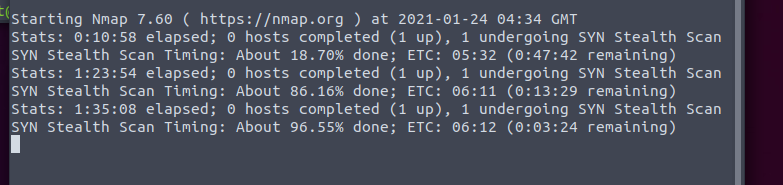
Is it normal for an nmap scan from AttackBox to take 90 minutes?
nmap -p- [deployed machine IP] is the scan I ran
https://i.imgur.com/S67wk0C.png

 eager fulcrum
use -v to get nmap to print the ports as it finds them
pastel raven
i've just been doing other rooms while i wait, i ran into this last night and wanted to see if it happened again so i could notify somebody
haughty glacier
novel raven
at about 40 min I get a popup saying that the time is about to run out, so I add...
does it actually get terminated or just the pop up, I've extended boxes twice before and gotten two pop ups saying it's terminated (due to the timer for the initial and subsequent deploys on the site running out) - however the box never terminated and I kept going
if I refresh the room it updates and the timer comes back/box window thing
 fast root
Hey quick question here do the rooms in the paths gets updated as new rooms come out or nah?
placid mango
Yup, they'll get updated.
naive dust
Does someone know what will Wrath network be?
odd dagger
What is the difference between binwalk and steghide?
bronze vale
VPN and other technical questions related to TryHackMe try #infosec-general
bronze vale
naive dust
Does someone know what will Wrath network be?
Wreath is a free network which will teach you the basics of networks and networking tools.
odd dagger
bronze vale
`VPN and other technical questions related to TryHackMe` try <#76062349468106755...
Thx
 nimble steeple
is tmux..an essential tool to know??...when we can configure the hotkeys for managing terminals from preferences of terminal itself ...then why do we need this tool??
bronze vale
bronze vale
`VPN and other technical questions related to TryHackMe` try <#76062349468106755...
.
 turbid lodge
.
 fleet sundial
During my nmap scanning
I tried various different options
But got same result
I.e. all 1000 ports are filtered
Now can pls someone help me how to bypass filter
It's is just general ques
eager fulcrum
@fleet sundial this channel is for directly tryhackme related questions
 marble linden
Hi, i have some troubles with the VPN, when i use it under Wds, there is a timeout and under linux (with thm-troubleshoot) i have this error
marble linden
placid mango
Are you root user?
marble linden
yes
placid mango
Try regenerating config and wait 2 mins before downloading and connect again.
marble linden
yes i already try it and change localisation
fleet sundial
Ok @eager fulcrum