
#🆘│community-support
1 messages · Page 421 of 1
 humble sequoiaBOT
 outer kayak
How do i inite the premium bot?
humble sequoiaBOT
The first thing you will need to do is invite the premium bot, an invite can be found here
Once the bot is in your server we will head to the dashboard and manage your server. When you are managing your server, you want to head into "Server Configs" then click the drop down menu under "Select the bot you would like to use on this server" then click "Ticket Tool#6207" and then save.

 lyric nest
Could someone possibly setup my ticket tool bot to be designed like this?
 humble sequoiaBOT
Multipanels are panels with multiple buttons attached to them.
How to create a Multipanel
Premium users can combine multiple panels into one multipanel.
First, find the IDs of each panel you wish to combine. You can find them in your Panel Configs in the Dashboard
Next, send the multipanel to a channel using $panel [id1] [id2] {id3} ....
e.g. $panel 1 2 4 17 35 to combine panels 1, 2, 4, 17 and 35.
Up to 25 panels may be combined.
You can also watch this video tutorial.

For a more convenient use of multipanels, you can now combine panels on the dashboard. This will allow you to directly send the multipanel from the dashboard or via the $panel ID command.
Where can I find this?
You can find this setting on the Dashboard -> Panel Configs -> Settings -> General Options
Note: if you're attaching all the panels to a panel called English, don't include English in the attached panels box (If you do this, it will create duplicate)
This will put all buttons from all of your panels on one message. The message is the panel message from the panel you're combining these panels in.
You can also watch this video tutorial.
 lyric nest
So, since I dont have premium, I cant use it?
 covert swallow
Correct
lyric nest
alr
 scenic plinth
You can do it without premium, although those messages have not been updated to show our primary bot, so it will still show a premium subscription.
outer kayak
Do you need to have both bots in for it to work?
It says bot is not in the server becasue only premium bot is..
humble sequoiaBOT
How to disable the premium bot
To disable the premium bot you will have to go to the Dashboard ➞ Server Configs ➞ Premium bot ➞ And on the right-hand side select the primary free bot in the drop down menu.
Premium features will still work on the normal bot.

 pure snow
Hi so i have an issue with the tickets saying that the user doesnt have permission to open a ticket?
 gilded verge
pure snow
Hi so i have an issue with the tickets saying that the user doesnt have permissi...
gilded verge
pure snow
Hi so i have an issue with the tickets saying that the user doesnt have permissi...
Hey, please make sure the role of the user who wants to open a ticket is not on the Blacklist Roles (Server Configs) or on the Disabled Roles (Panel Settings->Expand Button Options->Create Ticket Settings)
 quiet mango
Hey so i'm trying to setup the ticket bot but it keeps saying in not in a server with it or that its offline
covert swallow
Try to relog
humble sequoiaBOT
Don't see your server in the dashboard?
You will possibly need to relog. Look below to see steps on how to relog.
How to relog in the Dashboard.
First, you will need to go to the dashboard. Once your there, click on your avatar on the top right. after you clicked it, you will see button that says Logout. You must click that. Once you have logged out, you can log back in.
Note:
You need one of these 3 things to access the dashboard.
1. Server Owner (Level: 6)
2. Server Administrator (Level: 4)
3. Dashboard Role (Level: 2)
:warning: You can check your level using $level on your Discord Server
User permission level with Ticket Tool
@User is permission level: 0 (User)
```» *If it shows that your permission is **0**, you don't have any of the above **3 things** to manage the dashboard.*
**See the GIF below on how to relog:** quiet mango
covert swallow
Try to relog
quiet mango
covert swallow
Try to relog
i tried to 7 different times
 jade topaz
One message removed from a suspended account.
jade topaz
One message removed from a suspended account.
jade topaz
lyric nest
Could someone possibly setup my ticket tool bot to be designed like this?
One message removed from a suspended account.
covert swallow
Oh, you mean embed customization
jade topaz
One message removed from a suspended account.
covert swallow
Yes you do
jade topaz
One message removed from a suspended account.
covert swallow
Premium or the embed customization?
jade topaz
One message removed from a suspended account.
why does premium keeps dropping

it shows online here but offline on my servers
covert swallow
In the panel configs, click on the setting button for the panel you want to edit, theres a dropdown menu called "Panel Options" with a submenu called "Panel Message" with a big blue button labeled "Edit Panel Message", click the big blue button
covert swallow
jade topaz
why does premium keeps dropping
Memory leak most likely, by any chance do you know if youre on shard 2?
jade topaz
covert swallow
Memory leak most likely, by any chance do you know if youre on shard 2?
no idea
 wild spire
Just came to check here because the premium bot is down in our server as well 😅
covert swallow
One of the clusters is having issues, I have alerted the development team
wild spire
covert swallow
One of the clusters is having issues, I have alerted the development team
Thank you 🙏🏻
 iron nightBOT
Gave +1 Rep to @covert swallow
covert swallow
No problem!
jade topaz
salam
guys i have created verify system with ticket
now when tickeet is created everyone have access to it all of the members how can i fix this can anyone help me
humble sequoiaBOT
How to hide tickets from everyone
Head over to your Dashboard ➞ Panel Configs ➞ Settings ➞ Permission Options ➞ Edit Everyone Roles Opened Permissions

NOTE that @everyone can type aswell if it has permissions to send messages
 fallow ingot
Check this out ^
jade topaz
fallow ingot
Check this out ^
thanks
iron nightBOT
Gave +1 Rep to @fallow ingot
fallow ingot
np
jade topaz
can u please send the link
fallow ingot
Link for the dashboard?
jade topaz
of dashboard since I am on phone
fallow ingot
Sure
jade topaz
fallow ingot
Link for the dashboard?
yup
humble sequoiaBOT
fallow ingot
^
jade topaz
fallow ingot
^
thanks
fallow ingot
yup :)
fallow ingot
Are you getting any error or is just not responding?
humble sequoiaBOT

You can check our documentation here;
You can also check #📂│information for the basic setup;
You can also watch this video tutorial.
Our documentation contains all the info you need about the bot to be able to setup and configure the bot however you like.
fallow ingot

humble sequoiaBOT
Don't see your server in the dashboard?
You will possibly need to relog. Look below to see steps on how to relog.
How to relog in the Dashboard.
First, you will need to go to the dashboard. Once your there, click on your avatar on the top right. after you clicked it, you will see button that says Logout. You must click that. Once you have logged out, you can log back in.
Note:
You need one of these 3 things to access the dashboard.
1. Server Owner (Level: 6)
2. Server Administrator (Level: 4)
3. Dashboard Role (Level: 2)
:warning: You can check your level using $level on your Discord Server
User permission level with Ticket Tool
@User is permission level: 0 (User)
```» *If it shows that your permission is **0**, you don't have any of the above **3 things** to manage the dashboard.*


**See the GIF below on how to relog:**Check this out ^
 raven gorge
bro wdym dashboard
is just said back to tab not even show like this
2x invite the bot to the server
fallow ingot
What?
fallow ingot
Your making no sense
fallow ingot
raven gorge
i will show it
That would be appreciated, thanks.
raven gorge
do i need to login too
fallow ingot
To the Dashboard yes.
humble sequoiaBOT
fallow ingot
^

 fallow ingot
What site are you using?
raven gorge
ok is alr working on phone thx yo
ok thx dude
i need to click that link
if want to manage
fallow ingot
um ok 👌
 waxen swan
I get an error in discord when I try to open new tickets:
its says "interaction failed"
the debug gives following response:

 sly cypress
It’s happening to us as well. The bot just went completely offline.
iron nightBOT
Gave +1 Rep to @sly cypress
sly cypress
@waxen swan has yours went offline as well?
waxen swan
yes
sly cypress
I’m sure a member of TT support will assist us soon 😅
waxen swan
its not visible in the "online" / members list on the right hand side
fallow ingot
What shard is your server on? @sly cypress
sly cypress
fallow ingot
What shard is your server on? <@218379316520681473>
I can’t use debug mode because it’s offline:
 open karma
waxen swan
oh ok thanks for this info. the message didnt reach me xD^^
open karma
waxen swan
oh ok thanks for this info. the message didnt reach me xD^^
Some Times , Your Shared Will Go offline so it will be
fallow ingot
sly cypress
I can’t use debug mode because it’s offline:
It can be viewed via the Dashboard, it’s ok tho. Can I have the server ID?
sly cypress
724045741508657244
fallow ingot
Thanks 😊
waxen swan
Mine is 960891063265017966 @fallow ingot
fallow ingot
ty
Seems like this is only occurring for servers on Shard 15. I’ll keep an eye on it and hope it resolves it’s self quickly.
sly cypress
Am I able to kick the bot and reinvite a different shard?
fallow ingot
Your best bet right now is to use the primary bot.
sly cypress
Problem with that is it won’t have the premium features will it?
fallow ingot
Nope, premium features work on both bots.
Only difference is premium is faster and more steady.
sly cypress
Do I need to change anything on the panel or once it’s invited it’ll be up and running?
fallow ingot
Ticket Tool Premium Issues?
We are aware of issues occurring with the premium bot, at the moment this seems to only be occurring with servers on Shard 15.
We apologise for any inconvenience caused & appreciate your patience :)
fallow ingot
sly cypress
Do I need to change anything on the panel or once it’s invited it’ll be up and r...
You will need to re send the panel
sly cypress
Okay, thank you.
fallow ingot
No problem
sly cypress
fallow ingot
You will need to re send the panel
Since the other bot has come online but has a major major timespan delay; the primary isn’t responding to anything assuming because the other one is online; what should I do in this instance?
 pale pilot
it should be fixed now
sly cypress
Yeah, it’s resolved for now than you guys!
iron nightBOT
Gave +1 Rep to @fallow ingot
waxen swan
thanks @pale pilot
fallow ingot
waxen swan
thanks <@768144576946110475>
np
 glossy slate
can i set that a muted role cant open a ticket?
humble sequoiaBOT
Any role you assign as a blacklisted role won't be able to use commands or reactions.
Selecting a blacklisted role
Go to your Dashboard ➞ Server Configs. There you will find the option to select blacklisted roles.
Note: Don't forget to save.
 glossy slate
thanks 😄
 shrewd palm
Hey guys, I have set up ticket tool. The problem is when a user clicks open ticket, they cannot see that ticket unless ive added the generic role to additional roles... but then the whole server can see... What am i doing wrong?
 quasi cliff
shrewd palm
Hey guys, I have set up ticket tool. The problem is when a user clicks open tick...
quasi cliff
shrewd palm
Hey guys, I have set up ticket tool. The problem is when a user clicks open tick...
Head over to your Dashboard ➞ Panel Configs ➞ Settings ➞ Permission Options ➞ User Opened Permissions ➞ Enable View Channel and Send Message 
shrewd palm
quasi cliff
Head over to your Dashboard ➞ Panel Configs ➞ Settings ➞ Permission Options ➞ Us...
Yep, those settings are checked
quasi cliff
Is it for every user who tries to create ticket
shrewd palm
The unverified role (everyone) has been set to not be allowed but the verified role has been set to read and send
quasi cliff
Allowed what?
Wait so you have Verified role allowed to read and send in all tickets?

 quasi cliff
This should work
shrewd palm
that's what i thought lol
quasi cliff
Did u check new ticket, old tickets won't be affected by changing perms
shrewd palm
yeah 2 secs Ill show what my user account sees when i open the ticket


and my only workaround is if i add the role into the additional roles settings but then everyone in the server can see
quasi cliff
shrewd palm
Does it actually mention the ticket channel and allows you to click it?
Try adding Read Message History for User Opened Permissions
shrewd palm
Yep so the first image shows the ticket created notification, then after clicking that it brings me to the second image where I cant see anything
Okay 2 secs
quasi cliff
I kinda feel like it's your client issue to not be able to view new channel then as it mentions channel and u can click it too 🤔 can you ask another user to try creating ticket
shrewd palm
quasi cliff
I kinda feel like it's your client issue to not be able to view new channel then...
Read message history didn't work. I will see what other users get when they interact. Thanks for your help mate, will report back when I can find someone else to test lol
iron nightBOT
Gave +1 Rep to @quasi cliff
quasi cliff
You can also check if Ticket Tool added perms for the user in ticket channel. Ticket channel's settings -> User (who created ticket) perms. If you see user's perms as View and Send msg then it's client/app issue
shrewd palm
quasi cliff
You can also check if Ticket Tool added perms for the user in ticket channel. Ti...

Yep permissions correct
quasi cliff
So client issue, try updating discord
shrewd palm
You think it could be because I'm using the 'view server as a role function when testing?
quasi cliff
yes
 grave kite
I just boosted how to claim my perks
quasi cliff
$vr
humble sequoiaBOT
View As Role feature
Discord's integrated View As Role feature will allow you to see how different groups of roles will have access to your server's channels. Even though, this feature isn't reliable for thoroughly testing Ticket Tool considering that the tickets are created based on User roles, and that Roles permissions are only used for Support Team Roles, and Additional Roles.
For testing Ticket Tool as a user we suggest you ask a friend to open a ticket for you as a regular member would do, or use an alternative account to simulate the same process to make sure everything is set properly.
quasi cliff
grave kite
I just boosted how to claim my perks
Thank you so much for boosting!
iron nightBOT
Gave +1 Rep to @grave kite
quasi cliff
shrewd palm
Stupid me
It happens 😅
If you require any further information, let me know.
shrewd palm
Will do mate thanks @quasi cliff
gilded verge
hey, what you mean? 🤔
jade topaz
like in verification they cant see the question
gilded verge
oh ^-^
Panel Configs->Panel Settings->Expand Permission Options->User Opened Permissions->
 jade topaz
link
covert swallow
Link to what?
gilded verge
uhm, but you need go to dashboard first...
jade topaz
yup
gilded verge
jade topaz
gilded verge
<https://tickettool.xyz/manage-servers>
thanks
iron nightBOT
Gave +1 Rep to @gilded verge
 summer wadi
hey guys i have a question
humble sequoiaBOT
We would love to help you, but if you don't tell us what you need help with we can't help you :(
summer wadi
hey so i got a new computer my old one broke and when i downloaded the game to my new mac when i log in it says this character has been banned but i was playing fine like a day ago and never got talked to or emailed about anything as there was no reason for the ban is it a glitch only happened after i downloaded the game to this computer was working fine like 2 days ago please help would like to get back into my account
humble sequoiaBOT
⚠️ You're in the wrong place
We provide support for @pseudo glen discord bot and cannot help you with whatever issue you have.
- We don't know which Support Team you should contact to get this issue resolved, and unfortunately we won't be able to accurately tell you.
If you don't have any further questions regarding our bot Ticket Tool, please close this ticket
gilded verge
humble sequoia
@summer wadi, wrong server
jade topaz
One message removed from a suspended account.
One message removed from a suspended account.
One message removed from a suspended account.
humble sequoiaBOT
⚠️ You're in the wrong place
We provide support for @pseudo glen discord bot and cannot help you with whatever issue you have.
- We don't know which Support Team you should contact to get this issue resolved, and unfortunately we won't be able to accurately tell you.
If you don't have any further questions regarding our bot Ticket Tool, please close this ticket
 maiden field
wherer to throw a ticket?
quasi cliff
Wdym?
 slender minnow
 vale laurel
Nvm. It’s back working
vale laurel
Nvm. It’s back working
#premium-chat message
this may help you for more info
jade topaz
How to change prefix
quasi cliff
$help prefix
humble sequoiaBOT
How to change Ticket tool's prefix
The default prefix for ticket tool is $ and @Ticket Tool#4843 however that can be changed on the Dashboard under Server Configs -> Command Prefix.
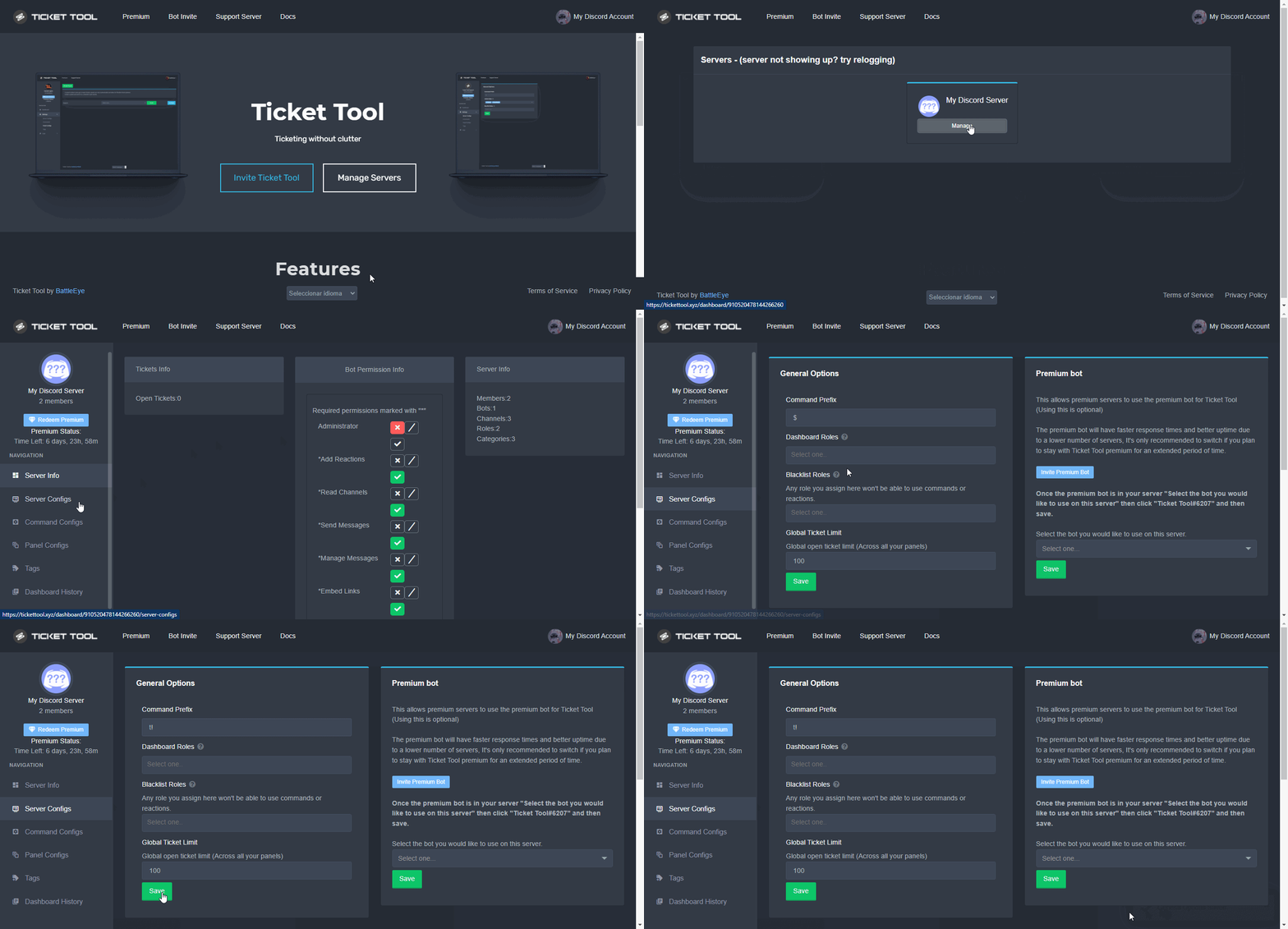
NOTE that @Ticket Tool#4843 will always work as a prefix even if there is a custom prefix.
 civic lance
How can we restart paint on the panel?
Hello, is there an error in the bot, it automatically closes the request by spamming itself ?
https://barancirak.is-pretty.cool/7uaK8un.png
 quasi cliff
The developer is restarting the bot and it should be fixed soon
civic lance
quasi cliff
The developer is restarting the bot and it should be fixed soon
Could you please restart the bot, players are unable to support
And there is an extreme error
quasi cliff
It should be online now
 quasi cliff
Did u click the button twice?
civic lance

 solid stream
civic lance
https://barancirak.is-pretty.cool/3Gh4SiJ.png
solid stream
civic lance
https://barancirak.is-pretty.cool/3Gh4SiJ.png
server id?
civic lance
There is no problem since, but the support that opens is also trying to turn off the bot automatically
civic lance
solid stream
server id?
742695246911111258
solid stream
$t shard 742695246911111258 1200
humble sequoiaBOT
solid stream
$t shard 742695246911111258 1200
Server 742695246911111258 should be on shard 1074 - checked using 1200 shards
solid stream
Looks more like someone spam clicked close
since the mod message and closed message only set once.
civic lance
solid stream
Looks more like someone spam clicked close
so how can we view it
civic lance
solid stream
Looks more like someone spam clicked close
How can we see this in detail?
quasi cliff
solid stream
Looks more like someone spam clicked close
But the close button option can be seen after moderator message 🤔 which wouldn't work unless error
solid stream
There's currently nothing logging that.
There's only a few people with access to the tickets
I would assume?
You could also add the variable {user} to the close message
civic lance
solid stream
There's currently nothing logging that.
there is only the authorities, there is someone among the official who did this, we want to see it, but we can't find it
solid stream
civic lance
there is only the authorities, there is someone among the official who did this,...
Unless you changed permissions the owner of the ticket should also be able to do it.
civic lance
Can we write the official who closed the support on the site and show it in the message?
pale pilot
you can use the {user}variable on the message and it will show whoever executed the command

 civic lance
solid stream
civic lance
solid stream
Thank you, I found the person who made it ❤️
iron nightBOT
Gave +1 Rep to @solid stream
 silent sedge
Bot down again ?
 winter carbon
seems so 😦
quasi cliff
Yes, the developer is fixing!
 delicate sigil
how do u block a person from making tickets
jade topaz
maybe hide the channel from them
humble sequoiaBOT
Any role you assign as a blacklisted role won't be able to use commands or reactions.
Selecting a blacklisted role
Go to your Dashboard ➞ Server Configs. There you will find the option to select blacklisted roles.
Note: Don't forget to save.
quasi cliff
delicate sigil
how do u block a person from making tickets
Or do you want to block them for a particular panel?
winter carbon
How do I claim the Premium subscriber role if I have it on my discord?
scenic plinth
$pc @winter carbon
Well, use that command in #🤖│bot-spam when the bot wakes itself.
winter carbon
scenic plinth
Well, use that command in <#910978476536905738> when the bot wakes itself.
haha thank you!
iron nightBOT
Gave +1 Rep to @scenic plinth
quasi cliff
$pc 764072400886431746
My bad, I thought this is #🤖│bot-spam
humble sequoiaBOT

Thank you
Thank you for purchasing Ticket Tool Premium @winter carbon. You have now been given the <@&535595160189403136> role!
Found 6 servers in total and 1 with premium and permission
 next oxide
Is ticket tool down for anyone else?
jade topaz
solid stream
Looks more like someone spam clicked close
Hey you able to check on my server as well?
solid stream
what's up with it?
jade topaz
991119197541245009
bot is down entirely
Oh
it's back up now entirely, nevermind...
solid stream
jade topaz
991119197541245009
If you head over to #premium-chat I've been talking about the premium outage
 lost hare
How can I close all tickets
 keen ivy
how do I see my previous tickets?
Like past tickets that got closed
are they saved somewher?
quasi cliff
lost hare
How can I close all tickets
There's currently no way to close them all together
quasi cliff
keen ivy
how do I see my previous tickets?
Like past tickets that got closed
are they sav...
You can if you saved transcripts, otherwise you can't
keen ivy
I reinstalled windows and saved nothing
 narrow comet
how do u get the role for the premium bot
keen ivy
so tickets are gone?
quasi cliff
narrow comet
how do u get the role for the premium bot
$pc @narrow comet
humble sequoiaBOT
Thank you
Thank you for purchasing Ticket Tool Premium @narrow comet. You have now been given the <@&535595160189403136> role!
Found 35 servers in total and 1 with premium and permission
quasi cliff
keen ivy
I reinstalled windows and saved nothing
Transcripts are saved by clicking the Transcript button or $transcript command and not on your pc
lost hare
quasi cliff
There's currently no way to close them all together
I want to be a time then ticket close auto
quasi cliff
lost hare
I want to be a time then ticket close auto
Not yet but expected in coming update
lost hare
How many tickets can I close at the same time
quasi cliff
lost hare
How many tickets can I close at the same time
There's like a 6-9seconds rate limit iirc
lost hare
How can I do it
 tribal cedar
 novel kraken
$pc
humble sequoiaBOT
Premium Check
I was unable to detect a premium server for @novel kraken.
Found 3 servers in total and 0 with premium and permission
novel kraken
Huh? I have premium
gilded verge
novel kraken
Huh? I have premium
Please use commands on #🤖│bot-spam
btw could you show you have premium, please?
novel kraken
gilded verge
Please use commands on <#910978476536905738>
btw could you show you have premiu...
How?
gilded verge
you bought a monthly subscription with money, right?
novel kraken
gilded verge
you bought a monthly subscription with money, right?
Correct still have it get charged every month
gilded verge
Go to Dashboard -> click Active-Manage -> click Manage Subscriptions and show screenshot please :>
novel kraken
gilded verge
Go to `Dashboard` -> click `Active-Manage` -> click `Manage Subscriptions` and s...
OK let me switch to the computer then
gilded verge
okay
novel kraken
gilded verge
okay
 gilded verge
Okay, so after selecting the server, you choose Save Subscriptions button, right?
novel kraken
gilded verge
Okay, so after selecting the server, you choose `Save Subscriptions` button, rig...
I never messed with any of that stuff should I do that the only thing I ever did was buy the subscription for my server
gilded verge
wait but the premium bot works on your server, right?
novel kraken
gilded verge
wait but the premium bot works on your server, right?
Yep still kicking
gilded verge
Done 😊
novel kraken
gilded verge
Done 😊
So why did it do that?
gilded verge
You know what, sometimes it takes a few minutes for the bot to load the settings so I checked your premium status and you already have the role ^-^
novel kraken
gilded verge
You know what, sometimes it takes a few minutes for the bot to load the settings...
Love y’all’s ticket tool This has definitely solve a lot of issues whenever our server gets too busy
 terse egret
Hello! Ive seen this as an option in servers. However I dont know how to make the different buttons to open specific tickets. How does one do that?
 humble sequoiaBOT
For a more convenient use of multipanels, you can now combine panels on the dashboard. This will allow you to directly send the multipanel from the dashboard or via the $panel ID command.
Where can I find this?
You can find this setting on the Dashboard -> Panel Configs -> Settings -> General Options
Note: if you're attaching all the panels to a panel called English, don't include English in the attached panels box (If you do this, it will create duplicate)
This will put all buttons from all of your panels on one message. The message is the panel message from the panel you're combining these panels in.
You can also watch this video tutorial.
gilded verge
humble sequoia
Ayo @terse egret 👋, check
terse egret
Thank you!
 quick ermine
can i mention roles in this embed? thanks 🙂
 gilded verge
quick ermine
can i mention roles in this embed? thanks 🙂
gilded verge
quick ermine
can i mention roles in this embed? thanks 🙂
Of course you can, but if you put a mention in the embed, then the role will not get ping. If you want an actual reference, add a ping to the Message Text.
Example:
 quick ermine
thank you, i don't need to ping the role, only display it in the embed
gilded verge
aaa, so answer is yes 😄
quick ermine
Thanks @gilded verge !
iron nightBOT
Gave +1 Rep to @gilded verge
 nova bobcat
Hello. Is it possible to configure the bot so that when the case is closed, the user can view the history.
gilded verge
Hey, so you mean transcripts :>
There you go :>
humble sequoiaBOT
How do I save transcript to a channel?
To save transcripts to a channel go to the Dashboard -> Panel Configs -> Settings -> Logging Options -> Transcript Channel
 gilded verge
After that, you need (in ticket channel) use transcript button or $transcript
nova bobcat
no access is needed by the user who created it
gilded verge
oh wait... so i misunderstood, sorry
You want Direct Message Transcript but this option is for premium servers 😕
 outer oyster
Where is the control site?
gilded verge
outer oyster
Where is the control site?
Dashboard? Here: https://tickettool.xyz/manage-servers :>
 frozen pilot
Hmm
gilded verge
need help? 🤔
terse egret
hello is there a way to make it for the support role to not have the ability to delete the ticket? like in permissions
gilded verge
terse egret
hello is there a way to make it for the support role to not have the ability to ...
Heyo, go to Dashboard->Command Configs->command $delete Settings->if checked, uncheck Support team only and add everyone to Disabled Roles.
Then go to Panel Configs->Panel Settings->Expand Button Options->Close Ticket Settings->if checked, uncheck Support team only and add everyone to Disabled Roles
terse egret
gilded verge
Heyo, go to `Dashboard`->`Command Configs`->command `$delete` Settings->if check...
okay thank you agains!
iron nightBOT
Gave +1 Rep to @gilded verge
novel kraken
How do I make a suggestion the channel is read only?
gilded verge
on #🤖│bot-spam run command s!suggest
novel kraken
gilded verge
on <#910978476536905738> run command `s!suggest`
Didn’t work
 olive sigil
Hello, how do i fix someone making a ticket and everyone is able to see inside that ticket?
Pls pls
novel kraken
olive sigil
Hello, how do i fix someone making a ticket and everyone is able to see inside t...
Your configurations settings do you know how to do that?
olive sigil
novel kraken
Your configurations settings do you know how to do that?
Im there but can't figure out how
novel kraken
olive sigil
Im there but can't figure out how
I’ll send you a screenshot
olive sigil
novel kraken
I’ll send you a screenshot
Thank you
iron nightBOT
Gave +1 Rep to @novel kraken

 gilded verge
novel kraken
Didn’t work
gilded verge
novel kraken
Didn’t work
uhm..
s!suggest your message
novel kraken
gilded verge
uhm..
`s!suggest your message`
Thanks
iron nightBOT
Gave +1 Rep to @gilded verge
olive sigil
novel kraken
Yep i did that but then noone can read the tickets. What should i do?
novel kraken
olive sigil
Yep i did that but then noone can read the tickets. What should i do?
Hmmmm It might be your permission settings in the server
gilded verge
guys, if I can interrupt... i recommend these perms: https://cdn.discordapp.com/attachments/979861967936290816/979874986946875412/Panel_Permissions.mp4
olive sigil
novel kraken
Hmmmm It might be your permission settings in the server
Is that in panel config?
novel kraken
olive sigil
Is that in panel config?
No permission options
 gilded verge
you need choose Panel Configs there to switch/change perms in panel ^-^
novel kraken
My bad my eyes are blind
gilded verge
and @jonkurtislee sorry again for interrupt (because you started to help and I cut in)
novel kraken
gilded verge
and `@jonkurtislee` sorry again for interrupt (because you started to help and I...
That’s not a problem I appreciate the video I’m gonna be sharing it with a few people I know that always have issues like that
 gilded verge
novel kraken
That’s not a problem I appreciate the video I’m gonna be sharing it with a few p...
gilded verge
novel kraken
That’s not a problem I appreciate the video I’m gonna be sharing it with a few p...
oh, so I will add something else for you,
the best perms for bot (beyond the required): https://cdn.discordapp.com/attachments/979861967936290816/979875252433731605/Ticket_Tool_Discord_role_perms.mp4 :>
novel kraken
Now scroll down to permission options
olive sigil
I'm there that's where i just changed that other thing
But after i changed the first permission you said noone can see the support ticket, including the person who opened it
novel kraken
olive sigil
But after i changed the first permission you said noone can see the support tick...
Only the person who opened it and the support team should be able to see it
novel kraken
olive sigil
Remove the role member
olive sigil
novel kraken
Remove the role member
From?
 olive sigil
Just removed. I just added it after i tried what u tried it was never there to begin with
novel kraken
olive sigil
Just removed. I just added it after i tried what u tried it was never there to b...
If you’re still having issues I can go in there and try to help you and fix it for you it’s really not a problem
olive sigil
Please do
novel kraken
olive sigil
Please do
Are you still having issues?
olive sigil
Yes it doesnt work
novel kraken
olive sigil
Yes it doesnt work
I’ll dm you
 dense pecan
Good evening I have a request at the same time the question I need to help you when I give send or do not know how to describe it writes me this and I do not know how to run that $debug

Every time I give a send we write this
humble sequoiaBOT
ᅠ
@pseudo glen requires the following permissions:
Add Reactions
Read Channels
Send Messages
Manage Messages
Embed Links
Attach Files
Read History
Manage Roles
Manage Channels
To change the role permissions, you can go to your Discord Server ➞ Server Settings ➞ Roles ➞ @Ticket Tool
To change the channel permissions, you can go to your Channel Settings ➞ Permissions ➞ Ticket Tool
ᅠ
Note:
You can give Ticket Tool Administrative Permissions instead of all the permissions listed above, but it's entirely optional and NOT necessary.
 gilded verge
+add bot role to channel where you want send panel with permissions: View Channel, Send Messages, Read Message History
novel kraken
gilded verge
+add bot role to channel where you want send panel with permissions: View Channe...
So that other guy The one with the permission problem I have helped him and fixed his issue it was a lot more than that I went into his server and there were so many permission levels that were lacking so I helped him fix all of that so his issue has been fixed and he is now happy
novel kraken
dense pecan
Good evening I have a request at the same time the question I need to help you w...
 forest otter
oh
 bleak stream
Question. I have ticket tool on servers servers. On one my ticket limit on a category is 50 and another it’s 100. Like when I claim and it lives the tickets. How can I move the limit to 100 on all my categories
 shut bolt
Not possible
shut bolt
bleak stream
Question. I have ticket tool on servers servers. On one my ticket limit on a cat...
It's a discord limit
$overflow
humble sequoiaBOT
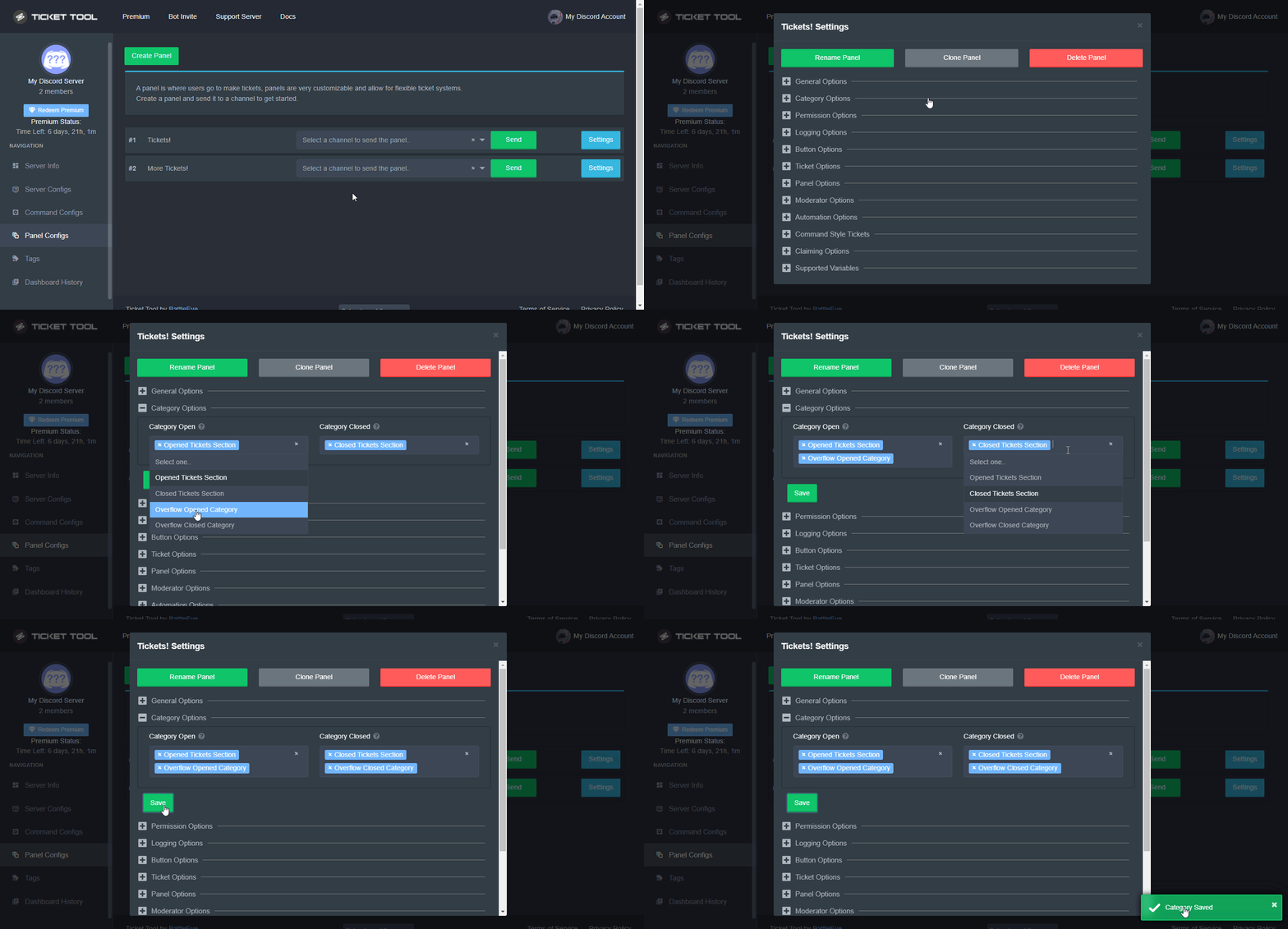
Discord only allows to stack up to 50 channels per category, meaning that if you have already 50 tickets in one category, the bot won't be able to place a ticket in that category, for such reason Ticket Tool counts with overflow categories, meaning that if your main category is filled, the bot will go ahead and place the ticket on the next one available, simply choose a second category in the category pickers:
 shut bolt
Check the overflow feature 
 shut bolt
 naive lance
Can someone explain me this?
naive lance
Can someone explain me this?
That's the transcript of a ticket you opened
shut bolt

bleak stream
shut bolt
It's a discord limit
Ty
iron nightBOT
Gave +1 Rep to @shut bolt
shut bolt
bleak stream
Ty
jade topaz
Hi, So i made an appeal server and when i click manage servers it dosent show up, I already tried reloading the tab and i kicked the bot and re-invited it.
 frigid pollen
Does anyone know why there are two buttons to create the ticket?
 humble sequoiaBOT
Don't see your server in the dashboard?
You will possibly need to relog. Look below to see steps on how to relog.
How to relog in the Dashboard.
First, you will need to go to the dashboard. Once your there, click on your avatar on the top right. after you clicked it, you will see button that says Logout. You must click that. Once you have logged out, you can log back in.
Note:
You need one of these 3 things to access the dashboard.
1. Server Owner (Level: 6)
2. Server Administrator (Level: 4)
3. Dashboard Role (Level: 2)
:warning: You can check your level using $level on your Discord Server
User permission level with Ticket Tool
@User is permission level: 0 (User)
```» *If it shows that your permission is **0**, you don't have any of the above **3 things** to manage the dashboard.*


**See the GIF below on how to relog:**How many panels do you have?
*If you are not sure if you did the multipanel right, you can check my example:
Message link 1: #🆘│community-support message
Message link 2: #🆘│community-support message
jade topaz
SOS
humble sequoiaBOT
We would love to help you, but if you don't tell us what you need help with we can't help you :(
 lucid bluff
$help ping
humble sequoiaBOT
How to make Ticket Tool ping a role
To make ticket tool ping a role when a ticket is opened, go to the Dashboard -> Panel Configs -> Settings -> Ticket Options -> Ticket Message -> Message Text and do this:
{@Role name} This is case sensitive and the role must have @mentions enabled
 quasi cliff
You can test the commands in #🤖│bot-spam !
 mossy shadow
How do I make it so other roles can see the ticket
humble sequoiaBOT
How to let support team see into a ticket
About support roles
A support role lets your support team see into tickets with out having to add them manually to each and every ticket.
You can add as many support roles as you like per panel.
NOTE that the way discord works all admins can see into tickets regardless of this.
How to set a support role
To set a Support role go to the Dashboard -> Panel Configs -> Settings -> General Options -> Support Team Roles.

NOTE that the support role will not be able to see into tickets that are already created..
gilded verge
other roles like moderators? if so, check
humble sequoiaBOT
Ticket Tool Premium
Get premium at https://tickettool.xyz/premium
Manage your subscriptions at https://tickettool.xyz/subscriptions
Why Premium?
Premium lets you customize the bot just how you want it. It also helps keep the bot running.
 misty ridge
hello
 past charm
How can I ping a role once a ticket gets opened?
slender minnow
$help ping
humble sequoiaBOT
How to make Ticket Tool ping a role
To make ticket tool ping a role when a ticket is opened, go to the Dashboard -> Panel Configs -> Settings -> Ticket Options -> Ticket Message -> Message Text and do this:
{@Role name} This is case sensitive and the role must have @mentions enabled
slender minnow
@past charm
iron nightBOT
Gave +1 Rep to @slender minnow
past charm
👍
 strange jay
frigid pollen
gilded verge
~~How many panels do you have?~~
*If you are not sure if you did the multipanel...
strange jay
frigid pollen
gilded verge
~~How many panels do you have?~~
*If you are not sure if you did the multipanel...
That was problem, thanks!
Can I translate this message?
Or do we not have access to that part?
 slender minnow
frigid pollen
Can I translate this message?
Or do we not have access to that part?
slender minnow
frigid pollen
Can I translate this message?
Or do we not have access to that part?
Unfortunately, I don't think that's possible to be translated.
$epmessage
humble sequoiaBOT
How can I edit/disable the ephemeral message?
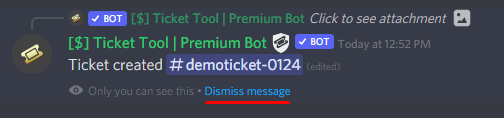
These pop ups can only be seen by the user who triggered a certain action, like creating a ticket. They cannot be edited or disabled, as they are a discord requirement that is set by the developer of any bot. The ephemeral messages can be removed by pressing the little blue Dismiss message text, or by restarting your discord client.
 tardy vale
humble sequoiaBOT
tardy vale
humble sequoiaBOT
Within all the messages the bot's sends (both embeds and text) you can mention either channels, roles, or even users, these mentions will only send a notification to the user if they are used within a text field, e.g: a role mentioned in an embed won't ping at all the users who have that role.
For mentioning a role you can use one out of three options:
{@Role Name} ➞ Which is Case Sensitive.
{RoleID} ➞ Replace RoleId with the Id of the role you are trying to ping.
<@&RoleID> ➞ Discord's native syntax to ping roles.
<#ChannelID> ➞ Mention a channel by its ID.
<@UserID> ➞ Mention a user by its ID.
 wheat isle
Is it possible to have a drop down instead of a bunch of buttons to create a ticket?
gilded verge
wheat isle
Is it possible to have a drop down instead of a bunch of buttons to create a tic...
nope
wheat isle
Dang
 nimble spruce
Hallo ich suche ein neten server mein name ist andreas jaehnert bin 37 jahre alld binauf dem sehrver dorch patrick65974 kekomen hate nor kein bann mein tmp id 883328 mein steam id 64:76561198284772908
humble sequoiaBOT
⚠️ You're in the wrong place
We provide support for @pseudo glen discord bot and cannot help you with whatever issue you have.
- We don't know which Support Team you should contact to get this issue resolved, and unfortunately we won't be able to accurately tell you.
If you don't have any further questions regarding our bot Ticket Tool, please close this ticket
 marsh urchin
does anybody know
how i can make a role with admin perms with ticket tool if i have ticket tool in my server
 tulip lotus
failed to send: access denied ticet tool doesnt have pemission to view or send into this channel?????
What's going on guys?
gilded verge
marsh urchin
how i can make a role with admin perms with ticket tool if i have ticket tool in...
I am not sure what you are asking because Ticket Tool does not create roles. To create a role, you need to do so in your server settings. Tell me what you mean because I don't know if you want "this" role to have access to tickets or access to the dashboard.
humble sequoiaBOT
ᅠ
@pseudo glen requires the following permissions:
Add Reactions
Read Channels
Send Messages
Manage Messages
Embed Links
Attach Files
Read History
Manage Roles
Manage Channels
To change the role permissions, you can go to your Discord Server ➞ Server Settings ➞ Roles ➞ @Ticket Tool
To change the channel permissions, you can go to your Channel Settings ➞ Permissions ➞ Ticket Tool
ᅠ
Note:
You can give Ticket Tool Administrative Permissions instead of all the permissions listed above, but it's entirely optional and NOT necessary.
gilded verge
humble sequoia
@tulip lotus, check
marsh urchin
@gilded verge okay so pretty much my account got banned and people keep raiding it but i wasnnt in this discord before but i have ticket tool in my server with admin perms i needd someone to ccreate a role and add admin perms in it so i can ban the raiders
gilded verge
marsh urchin
<@334671104704774154> okay so pretty much my account got banned and people keep ...
use Report Raid
 tulip lotus
gilded verge
<@345260075256119296>, check <:this:894279341108772914>
tulip lotus
gilded verge
<@345260075256119296>, check <:this:894279341108772914>
This did not happen as a result
gilded verge
marsh urchin
i dont have report raid
you need Manage Server or Administrator permission to access this button 😳
gilded verge
tulip lotus
This did not happen as a result
Also, remember to add a bot role to the channel you want to send the panel to
tulip lotus
gilded verge
Also, remember to add a bot role to the channel you want to send the panel to
It already exists
gilded verge
what perms does the bot's role have on that channel?
tulip lotus
gilded verge
what perms does the bot's role have on that channel?
Did you give it to Administrator?
gilded verge
no, TT does not require admin perms. This is my perms: https://cdn.discordapp.com/attachments/979861967936290816/979875252433731605/Ticket_Tool_Discord_role_perms.mp4
+and on the channel I am sending the panel bot have permissions: View Channel, Send Messages, Read Message History
tulip lotus
gilded verge
no, TT does not require admin perms. This is my perms: https://cdn.discordapp.co...
It's really like that
gilded verge
then you know what, try my permissions and add bot role to the channel you want to send the panel to: View Channel, Send Messages, Read Message History
tulip lotus
ok
tulip lotus
gilded verge
then you know what, try my permissions and add bot role to the channel you want ...
I already tried your method and it didn't work for me Do you support kicking the bot? And invite him again to the server?
gilded verge
hm... let's try something else, please run $debug on your server and send link here (link from bot)
but answering your question, you can of course do it if you want (and I say right away that you will not lose any panels or settings you have made so far)
tulip lotus
I already lost everything huh
 terse kiln
hey guys, is the bot down?
gilded verge
tulip lotus
I already lost everything huh
uhm...when I had to kick the bot from the server and invite it again, all the settings were as before 😳
I have the feeling that I am not able to help you and it would be better for you to contact the Staff, I'm sorry 🥺
Please go to #🎫│make-a-ticket
tulip lotus
gilded verge
uhm...when I had to kick the bot from the server and invite it again, all the se...
It doesn't matter because I didn't bother editing
tulip lotus
gilded verge
uhm...when I had to kick the bot from the server and invite it again, all the se...
I'm sorry to bother you, bye
 empty flower
Hi there, is there a way upon opening a ticket to @ a specific role for assistance?
humble sequoiaBOT
Within all the messages the bot's sends (both embeds and text) you can mention either channels, roles, or even users, these mentions will only send a notification to the user if they are used within a text field, e.g: a role mentioned in an embed won't ping at all the users who have that role.
For mentioning a role you can use one out of three options:
{@Role Name} ➞ Which is Case Sensitive.
{RoleID} ➞ Replace RoleId with the Id of the role you are trying to ping.
<@&RoleID> ➞ Discord's native syntax to ping roles.
<#ChannelID> ➞ Mention a channel by its ID.
<@UserID> ➞ Mention a user by its ID.
gilded verge
humble sequoia
Hey! Put mention in Message Text :>
empty flower
gilded verge
Hey! Put mention in `Message Text` :>
thanks 🙂
iron nightBOT
Gave +1 Rep to @gilded verge
jade topaz
Anyone know if there’s a way to have it ban people who don’t message after opening a ticket😭😂
 hearty parrot
how to auto rename the ticket?
when the member open the ticket the ticket will be already named
past charm
Why can't my friend see the server he wants to manage in the dashboard? He has manage server permissions
jade topaz
the ticket logging isn’t working
humble sequoiaBOT
You can check our documentation here;
You can also check #📂│information for the basic setup;
You can also watch this video tutorial.
Our documentation contains all the info you need about the bot to be able to setup and configure the bot however you like.
gilded verge
humble sequoia
Hey @vapid gyro, check
humble sequoiaBOT
The ticket name is the default channel name of all tickets. To edit it, go to your Dashboard > Panel Configs > Settings > Ticket Options. There you can edit the channel name of opened and closed tickets. You can also use variables in there.

 Note: This is a premium feature
gilded verge
humble sequoia
Note: This is a premium feature
gilded verge
humble sequoia
@hearty parrot, check
hearty parrot
gilded verge
<@848943926823747589>, check <:this:894279341108772914>
ty
iron nightBOT
Gave +1 Rep to @gilded verge
humble sequoiaBOT
Any role you put there will have full access to the ticket tool dashboard. The server owner and users with admin permissions already have access to the dashboard.
Be careful of which roles to put here
 gilded verge
humble sequoia
gilded verge
humble sequoia
@past charm, In the case of the Ticket Tool bot, the permission to manage the server will not help it. Your friend's role must be added to the Dashboard Roles, or they must have server admin perms.
past charm
gilded verge
<@452570376577220608>, In the case of the Ticket Tool bot, the permission to man...
thanks a lot
iron nightBOT
Gave +1 Rep to @gilded verge
gilded verge
jade topaz
the ticket logging isn’t working
Please describe what is happening? Is any error popping up or anything else?
jade topaz
gilded verge
Please describe what is happening? Is any error popping up or anything else?
Nope it used to log all tickets in the sepcific channel without any problems, but suddenly today it doesn’t log anything
gilded verge
Free or Premium version?
jade topaz
Free
gilded verge
I will check some of my servers in a moment, please be patient 🤔 (max 10 mins)
jade topaz
Sure thank you
hearty parrot
some members in the opened ticket
gilded verge
I noticed that the Logging Channel does not work in either the premium version or the free version 😳 I passed the information to the Staff so there was nothing else to do but wait for a response on the channel #📣│bot-news
shut bolt
 vapid gyro
<@518666147441278998> it didn’t send me a copy of the setup link
vapid gyro
<@518666147441278998> it didn’t send me a copy of the setup link
Didn't it DM you the transcript?
vapid gyro
Yes but it’s just a picture that I can’t do anything with😭
vapid gyro
Thank you!
shut bolt
iron nightBOT
Gave +1 Rep to @shut bolt
vapid gyro
There
shut bolt

jade topaz
gilded verge
I noticed that the `Logging Channel` does not work in either the premium version...
Oh ok so it’s a common problem. Thanks for helping 
vapid gyro
This dashboard is too confusing😭
@shut bolt
0-0
Why u tell me that now
sorry!!!!
I didn’t mean to ping lol
gilded verge
try rule 4 on #📂│information 😄
you need some help with dashboard or..?
gilded verge
Try to explain what you need help with 😊
vapid gyro
I don’t know how to use any of the configuration settings
I have the mind of a three year old
But I’m really 13😭
like I went to your setup website
And then went to the dashboard
And logged in
Then I went to my server and pressed manage
but it’s saying I can’t send a ticket message bc I didn’t give it permission Idk how to do that
humble sequoiaBOT
ᅠ
@pseudo glen requires the following permissions:
Add Reactions
Read Channels
Send Messages
Manage Messages
Embed Links
Attach Files
Read History
Manage Roles
Manage Channels
To change the role permissions, you can go to your Discord Server ➞ Server Settings ➞ Roles ➞ @Ticket Tool
To change the channel permissions, you can go to your Channel Settings ➞ Permissions ➞ Ticket Tool
ᅠ
Note:
You can give Ticket Tool Administrative Permissions instead of all the permissions listed above, but it's entirely optional and NOT necessary.
vapid gyro
Yea that’s all
like that for me
But when I pressed
Look can I put a picture here?
gilded verge
yup
vapid gyro

I don’t know how to do any of that
and when I pressed send message to the channel it said it can’t bc it doesn’t have permissions
gilded verge
You have to expand, click +
gilded verge
try this: #🆘│community-support message
vapid gyro
I came from there
I pressed dashboard
Oh Maby I didnt read it
hold up gotta read📘📕📙📕📙📗
Okay but like on here
There’s like hundreds of things per expandable title

do I need all of it?
gilded verge
It is worth checking yourself everything that will be suitable for your server 😳
btw did you checked setup video? i mean tutorial
humble sequoiaBOT
You can check our documentation here;
You can also check #📂│information for the basic setup;
You can also watch this video tutorial.
Our documentation contains all the info you need about the bot to be able to setup and configure the bot however you like.
vapid gyro
Uh no and no
Lol I have no time to check all of that and fill out every speck of detail lol
gilded verge
Do not rush ^-^
vapid gyro
AHHH I GOT IT
I FIGURED IT OUT WITH MY FIVE YO BRAIN
🥳🥳 THANK U
Thanks @gilded verge
iron nightBOT
Gave +1 Rep to @gilded verge
vapid gyro
Yay!
 lucid forum
I don’t know what to do
 gilded verge
uhm, what you trying?
 abstract coral
trying to set up the bot and it wont let me select a role as the verified role in the dashboard
wait wrong server
 vapid vessel
 humble sequoiaBOT
Don't see your server in the dashboard?
You will possibly need to relog. Look below to see steps on how to relog.
How to relog in the Dashboard.
First, you will need to go to the dashboard. Once your there, click on your avatar on the top right. after you clicked it, you will see button that says Logout. You must click that. Once you have logged out, you can log back in.
Note:
You need one of these 3 things to access the dashboard.
1. Server Owner (Level: 6)
2. Server Administrator (Level: 4)
3. Dashboard Role (Level: 2)
:warning: You can check your level using $level on your Discord Server
User permission level with Ticket Tool
@User is permission level: 0 (User)
```» *If it shows that your permission is **0**, you don't have any of the above **3 things** to manage the dashboard.*


**See the GIF below on how to relog:**@vapid vessel, check
Hey again @jade topaz, I just wanted to say that this logs is now fixed 😊
 wheat torrent
Hello
wheat torrent
wheat torrent
Hello
؟
humble sequoiaBOT
 Faster Premium Bot
Automatic Transcripts
Full Customization
Custom Buttons
Direct Messages
Ticket Automation
Multipanels
Premium Support
You can purchase premium here:
Price
$6 - Monthly
$66 - Yearly
 Premium
 silent veldt
is there a way to auto kick someone who has opened a ticket and not responded in 24 hours?
 craggy geyser
No
silent veldt
welp
silent veldt
so no role assigning or anything possible?
quasi cliff
Not yet
jade topaz

 solid vale
jade topaz
solid vale
jade topaz
It says "Ticket Tool doesn't have permission to view or send Into this channel" Give ticket tool permission.
 muted marten

 rustic gale
Try opening a French support ticket? #🎫│make-a-ticket
muted marten
why i didn't see my server ??
humble sequoiaBOT
Don't see your server in the dashboard?
You will possibly need to relog. Look below to see steps on how to relog.
How to relog in the Dashboard.
First, you will need to go to the dashboard. Once your there, click on your avatar on the top right. after you clicked it, you will see button that says Logout. You must click that. Once you have logged out, you can log back in.
Note:
You need one of these 3 things to access the dashboard.
1. Server Owner (Level: 6)
2. Server Administrator (Level: 4)
3. Dashboard Role (Level: 2)
:warning: You can check your level using $level on your Discord Server
User permission level with Ticket Tool
@User is permission level: 0 (User)
```» *If it shows that your permission is **0**, you don't have any of the above **3 things** to manage the dashboard.*


**See the GIF below on how to relog:**already done
rustic gale
Did you invite the bot to your server?
muted marten
yes sure
rustic gale
Try entering tickettool.xyz/dashboard/######, put your server's ID in place of ######
rustic gale
Here's a cheap way. Go to your server, right-click any message, and pick Copy Message Link. Paste the link anywhere. It looks something like this
https://discord.com/channels/ (server ID) /(channel ID)/(message ID)
muted marten
When I want to invite the bot to check it doesn't show me any servers
rustic gale
Screenshot?
muted marten
 rustic gale
Make sure you have the right permissions in the server you're trying to add
muted marten
oh no I forgot I changed my password
rustic gale
If it's a server that already has the bot, try typing $level in a channel the bot can see
If it's a server that doesn't have the bot, make sure you have at least the Administrator permission
 oblique kayak
This might seem stupid, but what do I do to start setting up tickets? Or I guess what’s the prefix so I can get help from the bot?
 bold veldt
I have edited my panel message and saved it in the dashboard, yet the panel message in my Discord is still unchanged

 scenic plinth
You have to resend the panel for the panel message to update.
bold veldt
excuse me, new to the bot. How do I do that? 🙂
humble sequoiaBOT
Creating a panel
To create a panel we are going to need to head over to the panel configs on the dashboard
Once at the dashboard we will need to click Create Panel
Enter a panel name (Fill in any optional settings you want)
Click Create Panel and your ready to get started with configuring your panel
An example of a creating a panel is shown below.
 iron nightBOT
Gave +1 Rep to @scenic plinth
 snow iron
Hey team, I have a bug-report for the Panel Embed Settings when setting the "Color" field of the panel 🙂
I'm unable to type my own colour hexcode into the field due to the color picker overriding the value each time I input my colour code. Specifically looking to have our company colours showing in the panel but can't select it using the colour tool and can't paste the hexcode or type it in 🙂
 craggy geyser
snow iron
Hey team, I have a bug-report for the Panel Embed Settings when setting the "Col...
craggy geyser
snow iron
Hey team, I have a bug-report for the Panel Embed Settings when setting the "Col...
The dashboard is in the middle of being completely rewritten. This is an issue we are aware of. I seem to recall there is a way to paste it in, I think you might be able to overwrote the hex code in the colour picker itself (if not, it's the main one. There was one that worked last it was discussed)
rustic gale
Copy+paste should hopefully work
Select All on the text box, then paste your hex code. It works for me. Hope it works for you
 ebon dew
How do i make that tickets go to a category?
rustic gale
$help category
humble sequoiaBOT
How to set the open category
To set a open category go to the Dashboard -> Panel Configs -> Settings -> Category Options -> Category Open
 ebon dew
Thanks @rustic gale
iron nightBOT
Gave +1 Rep to @rustic gale
ebon dew
Oh my bad
 rare comet
Hi friends, I've never had TT pop this error before, historically saving to this channel has never been an issue, I even temporarily gave the bot admin perms as a work around with the same error.
 craggy geyser
ebon dew
Oh my bad
craggy geyser
ebon dew
Oh my bad
That message isn't meant to pop up when thanks is included so you're fine. The code got a bit glitched and we aren't sure why as it looks fine.
iron nightBOT
Gave +1 Rep to @ebon dew
ebon dew
craggy geyser
That message isn't meant to pop up when thanks is included so you're fine. The c...
Ok
quasi cliff
rare comet
Hi friends, I've never had TT pop this error before, historically saving to this...
I feel like BattleEye needs to check this as he did some changes in cache and it's affecting it according to me
Is that for all transcripts?
rare comet
Let me check!
 exotic hearth
rare comet
Hi friends, I've never had TT pop this error before, historically saving to this...
exotic hearth
rare comet
Hi friends, I've never had TT pop this error before, historically saving to this...
Yeah just started for me too. Created a support ticket about it 😅
Happens with every transcript command I try
 hazy dagger
Hello. Sry to trouble, but anyone know what kind of error is this one when I try transcript to another channel something?
Transcript failed to save to blablabla Cannot read properties of undefined (reading 'id')
exotic hearth
Yeah read up a few messages, a few of us are seeing it
hazy dagger
aaah, sry hahahaha
exotic hearth
Lolol no worries. We all be a bit confused
rare comet
quasi cliff
Is that for all transcripts?
So just to throughly check it is working for one of our transcript logging channels, the other two it won't. I tried it on a the original ticket that threw the error, and one I created myself with the same results
quasi cliff
Mhm tested it, it's giving issue on Primary Bot
rare comet
I can swap bots and try it again on premium really fast?
quasi cliff
It's giving error on command and for button it just logs in same channel
It's working fine on Premium Bot
Oh wait no
Only Button on Premium bot is working as of now.. let's wait for the Developer
rare comet
Yeah I was about to say, for the channels it's set to automatically save to with the button is fine, command for other channels isn't
scenic plinth
Before you all get chaotic
vapid vessel
gilded verge
<@906210381532385311>, check <:this:894279341108772914>
Done thanks
iron nightBOT
Gave +1 Rep to @gilded verge
 ripe idol
GM @scenic plinth ! Is there a way you can view a ticket once its deleted?
scenic plinth
ripe idol
GM <@615207454443044904> ! Is there a way you can view a ticket once its deleted...
Only via transcripts, and don't ping support randomly for questions. Wait for someone to respond.
ripe idol
scenic plinth
Only via transcripts, and don't ping support randomly for questions. Wait for so...
Sorry about that! I won't do it in the future.
How can I view transcripts? Are they gone once you delete the ticket?
scenic plinth
You need to have saved it to a channel. If you saved it to a channel, it is as simple as finding it clicking the link. If it is not saved, you cannot view it.
ripe idol
Thanks!
 bronze hare
 scenic plinth
Error should be fixed
 bright slate
how do I increase the number of tickets in a category before it goes to overflow?
quasi cliff
bright slate
how do I increase the number of tickets in a category before it goes to overflow...
Discord has a limit of 50 channels per category
bright slate
quasi cliff
Discord has a limit of 50 channels per category
50 tickets right?
quasi cliff
Yes, if you don't have any other non-ticket channel in the same category
bright slate
thanks!
quasi cliff
If you require any further information, let me know.
snow iron
craggy geyser
The dashboard is in the middle of being completely rewritten. This is an issue w...
Ahh, awesome to hear we are getting a new dashboard! Looking forward to that! I'm sure everyone asks, but any timeline on when we might start to see that? 🙂
I did try to overwrite it in the colour picker itself but didn't have any luck there either 🙂
I will wait with a colour that's close for now! 🚀
rustic gale
rustic gale
Select All on the text box, then paste your hex code. It works for me. Hope it w...
Did you try this for selecting the color?
snow iron
rustic gale
Did you try this for selecting the color?
I had, but let me hard-refresh and give it another go 🙂
quasi cliff
I tried hex already but as of now only selecting works
quasi cliff
snow iron
Ahh, awesome to hear we are getting a new dashboard! Looking forward to that! I'...
There's no ETA for it but sneak peak
 snow iron
rustic gale
Did you try this for selecting the color?
snow iron
rustic gale
Did you try this for selecting the color?
Yes! It did it now! 🚀 Thanks!!!
The text I copied included the # as well
iron nightBOT
Gave +1 Rep to @rustic gale
jade topaz
Hey guys! How do you add custom emojis in the embed of panel or ticket msg?
I tried a lot but somehow its not working for me
also when I check the button emoji, the same emoji has a different ID than when I copy the ID from Discord (but none work)
quasi cliff
$idcommand
humble sequoiaBOT
How do I get the ID of Roles/Channels/Emojis?
Ticket Tool has a useful command that helps you get the ID of various things like channels, roles, emojis and your server.
Just use the command $id <#channel/@role/:emoji:>. Now copy everything, including the brackets <...>, to your dashboard (or wherever you want it)
If you want the server ID, just use $id.
Examples:
Server ID: $id ➝
509192800865353738
Roles: $id @Role ➝@humble sequoia
Channel: $id #channel ➝#🤖│bot-spam
User: $id @user ➝@copper owl
Emoji: $id
 quasi cliff
jade topaz
also when I check the button emoji, the same emoji has a different ID than when ...
quasi cliff
jade topaz
also when I check the button emoji, the same emoji has a different ID than when ...
You need to goto the last star column for custom emojis for the buttons
jade topaz
oh that one worked, thank you so much!!
jade topaz
quasi cliff
\<:PabloAngry:993264465757884479>
I tried it like this but it turned out I had to put a letter "a" before the first :
quasi cliff
"a" for animated emojis
quasi cliff
just a thank you with ping but it's not really needed
jade topaz
Thank @quasi cliff , appreciate your help a lot! ❤️
iron nightBOT
Gave +1 Rep to @quasi cliff
quasi cliff

 somber belfry
Hello, a question: can the bot also react to a command that comes from another bot?
craggy geyser
Yes. But not by defuakt
On the dashboard under server configs (think it's that page at least) there is an option to put the id of bots that ticket tool responds to
 warm wigeon
$help
humble sequoiaBOT
Help Options
$help commands - Information on commands
$help setup - Information on bot setup
$help faq - Frequently asked questions
quasi cliff
Please use #🤖│bot-spam for testing commands!
 gilded verge
warm wigeon
anyone know hot to fix this
gilded verge
warm wigeon
anyone know hot to fix this
It looks like one of your roles has been placed in the Blacklist Roles (Server Configs) or the Disabled Roles(Panel Configs->Panel Settings->Expand Button Options->Create Ticket Settings).
 ornate garden
Just installed setup ticket tool yesterday. Panel is located in a "support tickets" channel. In category options I set open tickets to go the the "Open Tickets" category and closed tickets to go to the "Closed Tickets" category. When I open a ticket it goes to the Open Tickets category as desired, but when I close the ticket it stays in the Open Tickets category. What might I be doing wrong?
ornate garden
ornate garden
Just installed setup ticket tool yesterday. Panel is located in a "support ticke...
NM, figured it out - permissions.
somber belfry
craggy geyser
On the dashboard under server configs (think it's that page at least) there is a...
works, thanks
iron nightBOT
Gave +1 Rep to @craggy geyser
 cyan kite
How do I make the tickets go under a category?
craggy geyser
$help category
humble sequoiaBOT
How to set the open category
To set a open category go to the Dashboard -> Panel Configs -> Settings -> Category Options -> Category Open
bright slate
is there a way to auto close/delete tickets?
only see an option for when people leave
rustic gale
There's an option to autodelete tickets when they're closed, if that helps
bright slate
rustic gale
There's an option to autodelete tickets when they're closed, if that helps
yeah, that would help. do you know where that is?
 sweet girder
 humble sequoiaBOT
Don't see your server in the dashboard?
You will possibly need to relog. Look below to see steps on how to relog.
How to relog in the Dashboard.
First, you will need to go to the dashboard. Once your there, click on your avatar on the top right. after you clicked it, you will see button that says Logout. You must click that. Once you have logged out, you can log back in.
Note:
You need one of these 3 things to access the dashboard.
1. Server Owner (Level: 6)
2. Server Administrator (Level: 4)
3. Dashboard Role (Level: 2)
:warning: You can check your level using $level on your Discord Server
User permission level with Ticket Tool
@User is permission level: 0 (User)
```» *If it shows that your permission is **0**, you don't have any of the above **3 things** to manage the dashboard.*


**See the GIF below on how to relog:** gilded verge
humble sequoia
gilded verge
humble sequoia
@meager charm, If you can't see your server, check out the last bot message
and rule 4 on #📂│information
humble sequoiaBOT
Don't see your server in the dashboard?
You will possibly need to relog. Look below to see steps on how to relog.
How to relog in the Dashboard.
First, you will need to go to the dashboard. Once your there, click on your avatar on the top right. after you clicked it, you will see button that says Logout. You must click that. Once you have logged out, you can log back in.
Note:
You need one of these 3 things to access the dashboard.
1. Server Owner (Level: 6)
2. Server Administrator (Level: 4)
3. Dashboard Role (Level: 2)
:warning: You can check your level using $level on your Discord Server
User permission level with Ticket Tool
@User is permission level: 0 (User)
```» *If it shows that your permission is **0**, you don't have any of the above **3 things** to manage the dashboard.*


**See the GIF below on how to relog:**@shut bolt hi! You helped me the other day with overflows. Does that work the same for the claimed categories?
shut bolt
bleak stream
<@518666147441278998> hi! You helped me the other day with overflows. Does that ...
Hey there, yup
 bitter ledge
hello, are tags working? i made a tag however when i do $tagname, nothing shows up
shut bolt
bitter ledge
hello, are tags working? i made a tag however when i do $tagname, nothing shows ...
The tags don't include the prefix, if your tag is named tagname, then the trigger is tagname and not $tagname
bitter ledge
ok great ty!
 meager charm
gilded verge
<@691505303363125259>, If you can't see your server, check out the last bot mess...
meager charm
gilded verge
<@691505303363125259>, If you can't see your server, check out the last bot mess...
Ty
iron nightBOT
Gave +1 Rep to @gilded verge
bleak stream
shut bolt
Hey there, yup
Ok ty!
shut bolt
meager charm
@shut bolt sorry for @ but what does ticket tool premium do?
 prime bridgeBOT
 It's Ƒʉͫcͧкͭιͪηͣ hamood#4143 has been warned!

 They were notified via dms.
humble sequoiaBOT
Faster Premium Bot
Automatic Transcripts
Full Customization
Custom Buttons
Direct Messages
Ticket Automation
Multipanels
Premium Support
You can purchase premium here:
Price
$6 - Monthly
$66 - Yearly
Premium
shut bolt
This is a list of the perks you obtain by having a premium subscription
iron nightBOT
Gave +1 Rep to @shut bolt
humble sequoiaBOT
How to make Ticket Tool ping a role
To make ticket tool ping a role when a ticket is opened, go to the Dashboard -> Panel Configs -> Settings -> Ticket Options -> Ticket Message -> Message Text and do this:
{@Role name} This is case sensitive and the role must have @mentions enabled
 knotty gulch
bro I need help I'm trying to edit my ticket so it's very buggy
jade topaz
help me
humble sequoiaBOT
We would love to help you, but if you don't tell us what you need help with we can't help you :(
 fallow ingot
Check that ticket tool has permissions in that channel
or just the correct permissions in general
If you run $debug it will show you what permissions are missing.
jade topaz
fallow ingot
If you run `$debug` it will show you what permissions are missing.
 u can help me run $debug
fallow ingot
I’m sure you are capable of running a command yourself
We try to avoid going into peoples server unless absolutely necessary
jade topaz
fallow ingot
I’m sure you are capable of running a command yourself
The problem is that I don't know how to run….
fallow ingot
You just type it into the channel like your doing now
quasi cliff
fallow ingot
Check that ticket tool has permissions in that channel
that's actually when user doesnt have perms to create ticket and not bot perms
fallow ingot
quasi cliff
that's actually when user doesnt have perms to create ticket and **not** bot per...
Thanks lol
iron nightBOT
Gave +1 Rep to @quasi cliff
fallow ingot
@jade topaz Sorry I didn’t read that properly. Make sure you don’t have any blacklisted roles.
humble sequoiaBOT
Any role you assign as a blacklisted role won't be able to use commands or reactions.
Selecting a blacklisted role
Go to your Dashboard ➞ Server Configs. There you will find the option to select blacklisted roles.
Note: Don't forget to save.
fallow ingot
jade topaz

 jade topaz
fallow ingot
<:this:894279341108772914>
jade topaz
fallow ingot
<:this:894279341108772914>
It was working fine before, I thought the ticket was under maintenance 
quasi cliff
$buttons
humble sequoiaBOT

The new Discord Buttons allow for a much smoother and convenient experience. They reduce lag and work much better than emojis. With ticket tool you can edit all the buttons however you like! Buttons can show emojis, text and can have 4 different colors.
Where can I edit them?
Dashboard ➞ Panel Configs ➞ Settings ➞ Button Options ➞ Setting
 quasi cliff
Check Create Button if you have any allowed or disabled roles
 quasi cliff
"Support Team Only" 
fallow ingot
It’s support team only ^
Sorry my wifi isn’t the best right now making my replies late
jade topaz
Was able to create a ticket, thank you very much @quasi cliff @fallow ingot ❤️
iron nightBOT
Gave +1 Rep to @quasi cliff
 sick trout
What is the command (typed like > $opentickt) to open a ticket
quasi cliff
sick trout
What is the command (typed like > $opentickt) to open a ticket
$new <optional_reason> or $ticket
 sinful trench
Hey I added the Bot to another server of Mine and my server is not showing on the Dashboard
humble sequoiaBOT
Don't see your server in the dashboard?
You will possibly need to relog. Look below to see steps on how to relog.
How to relog in the Dashboard.
First, you will need to go to the dashboard. Once your there, click on your avatar on the top right. after you clicked it, you will see button that says Logout. You must click that. Once you have logged out, you can log back in.
Note:
You need one of these 3 things to access the dashboard.
1. Server Owner (Level: 6)
2. Server Administrator (Level: 4)
3. Dashboard Role (Level: 2)
:warning: You can check your level using $level on your Discord Server
User permission level with Ticket Tool
@User is permission level: 0 (User)
```» *If it shows that your permission is **0**, you don't have any of the above **3 things** to manage the dashboard.*


**See the GIF below on how to relog:**
sinful trench
Thanks
humble sequoiaBOT
You can check our documentation here;
You can also check #📂│information for the basic setup;
You can also watch this video tutorial.
Our documentation contains all the info you need about the bot to be able to setup and configure the bot however you like.
quasi cliff
 hollow tangle
how to set up ticket tool ?
hollow tangle
how to set up ticket tool ?
hollow tangle
tysm
humble sequoiaBOT
━━ moved to ticket ━━
sick trout
quasi cliff
`$new <optional_reason>` or `$ticket`
It is not working , is it something that you need to enable on my dashboard
fallow ingot
Yes
Go to command style tickets
So Dashboard > Panel Configs > Settings > Command Style Tickets
You need to set a channel for ticket tool to monitor
humble sequoiaBOT
Command Style Tickets allow you to open tickets VIA the $new or $ticket commands. This feature also allows you to open tickets for people, by using the aforementioned commands with the user's ping or ID.
You can enable this feature by heading over to your server's dashboard. Then head over to Panel Configs ➞ Settings ➞ Command Style Tickets. (GIF below shows you how to get to it as well).
This section of the panel settings also contains the following features
- Bypass channel list and watch all of them → when you enable this option, Ticket Tool will create a ticket whenever someone uses the $new or the $ticket command in a channel it has access to .
- Channel to monitor for command $new and $ticket → This is the opposite of the previous option, you can actually select in which channels Ticket Tool should look for the $new command instead of looking in the whole server.
- Delete command after creating ticket → If enabled, Ticket Tool will delete the command (whether it's
$newor$ticket) a few seconds after you run it.
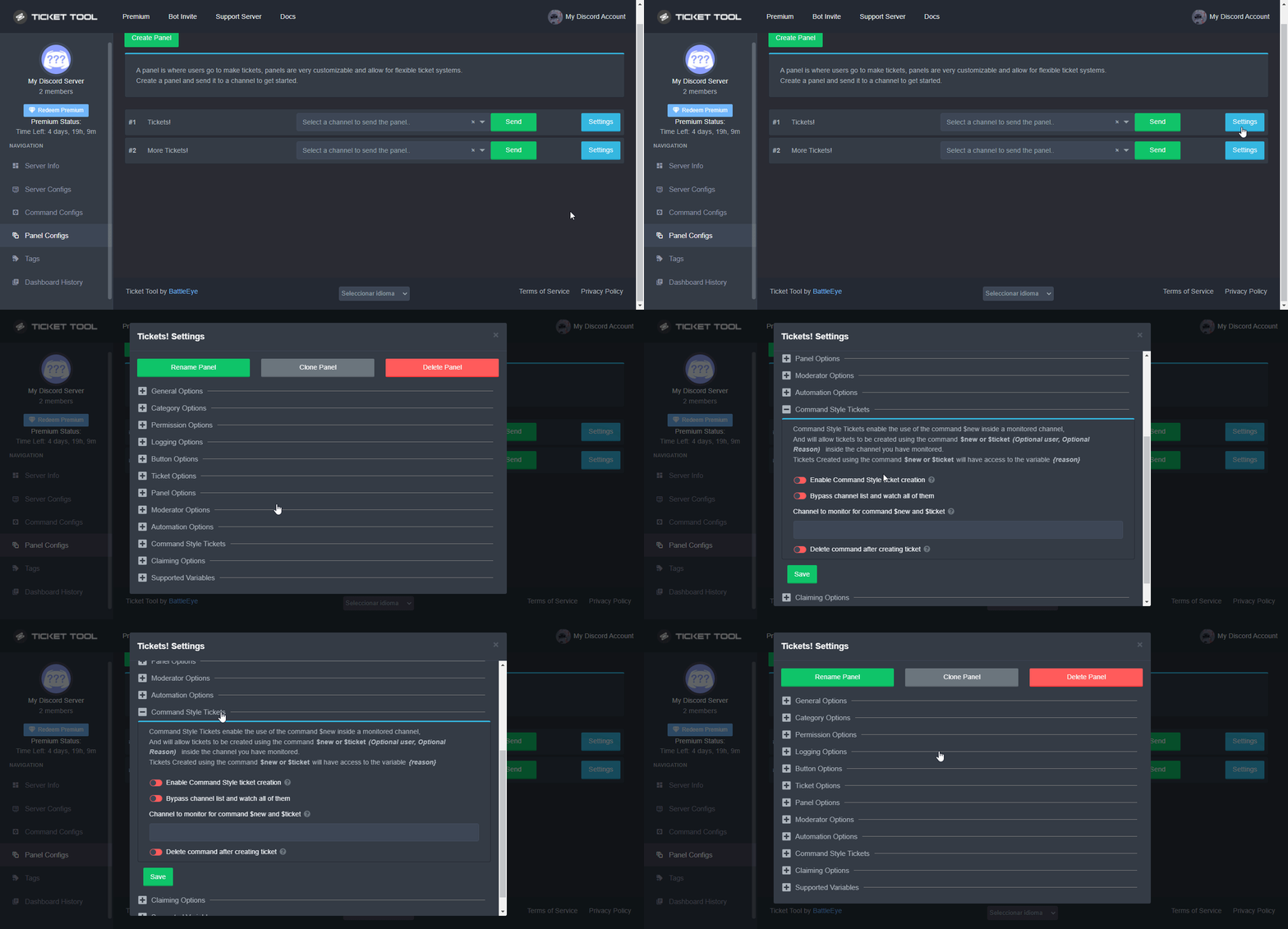 fallow ingot
sick trout
fallow ingot
<:this:894279341108772914>
Thanks
iron nightBOT
Gave +1 Rep to @fallow ingot
 humble sequoiaBOT
The Ticket Message is the first message sent by the bot in a new ticket. To customise it head over to your Dashboard ➞ Panel Configs ➞ Settings ➞ Ticket Options ➞ Edit Ticket Message
 fallow ingot
hollow tangle
let me check
sick trout
Any idea on how to create ticket with sapphire ? I tried but the bot is creating it not me .

 rancid trout
sick trout
rancid trout
sick trout
Sapphire bot will type in automatically the word $ticket
quasi cliff
You'll have to figure out that with Sapphire then
If it can say $ticket @user then TT can create a ticket for that user
sick trout
quasi cliff
You'll have to figure out that with Sapphire then
well it is setup here #📌│automated-support
rancid trout
This isn't Sapphire support though, I think that's what they were trying to get at
quasi cliff
sick trout
well it is setup here <#977951125674291271>
It's a reply to use #📌│automated-support and not to make ticket directly
meager charm
I have a question how to I make it to were I can control what channels the tickets go
sick trout
rancid trout
This isn't Sapphire support though, I think that's what they were trying to get ...
I am asking the command for creating a ticket like $ticket. but nevermind
rancid trout
On the dash, panel config @meager charm
meager charm
No no when the ticket already made
quasi cliff
You mean category?
meager charm
 quasi cliff
$help category
humble sequoiaBOT
How to set the open category
To set a open category go to the Dashboard -> Panel Configs -> Settings -> Category Options -> Category Open
meager charm
Like I want each ticket under this
rancid trout
ye it's in panel config
meager charm
Ok
rancid trout
make a panel for each of your support types and set the "open" category to the corresponding category
hollow tangle
how to disabled close ticket permission from member ??
quasi cliff
$buttons
humble sequoiaBOT
The new Discord Buttons allow for a much smoother and convenient experience. They reduce lag and work much better than emojis. With ticket tool you can edit all the buttons however you like! Buttons can show emojis, text and can have 4 different colors.
Where can I edit them?
Dashboard ➞ Panel Configs ➞ Settings ➞ Button Options ➞ Setting
quasi cliff
hollow tangle
how to disabled close ticket permission from member ??
Goto close ticket button options and make it "Support Team only"
iron nightBOT
Gave +1 Rep to @quasi cliff
 drowsy nova
Help please.

Just created the ticked, https://docs.tickettool.xyz/
NSamotes (Twitter)
Whats next

Ticketing without Clutter
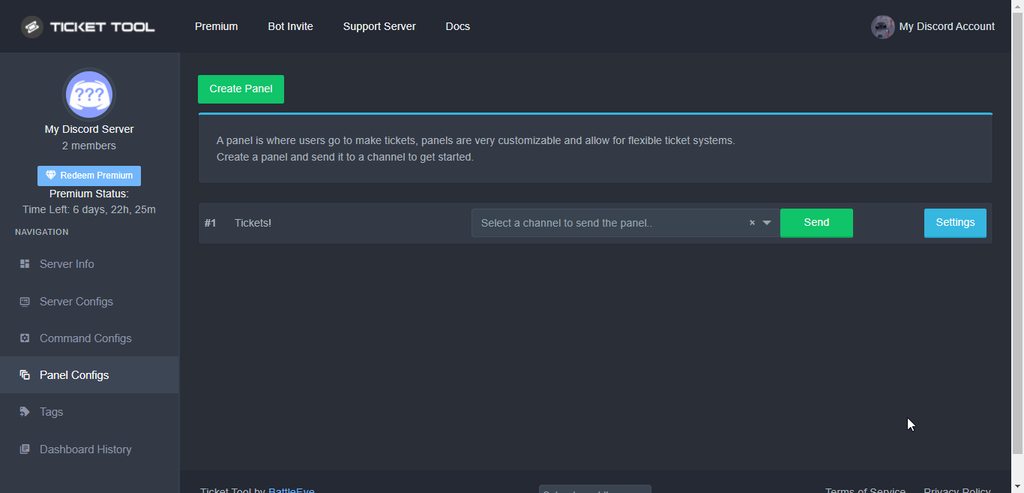

 sick trout
Guys how do you disable this one

whenever you type in command >$new it will throw that warning
hollow tangle
how to increase panel message limit, it's only 250 characters ??
quasi cliff
sick trout
whenever you type in command >$new it will throw that warning
You have $new command enables on multiple panels
quasi cliff
hollow tangle
how to increase panel message limit, it's only 250 characters ??
Premium! 
hollow tangle
thanks @quasi cliff
iron nightBOT
Gave +1 Rep to @quasi cliff
sick trout
quasi cliff
You have $new command enables on multiple panels
oh let me disable the other ones
 shy moss
Is there a way to auto delete the ticket channel when the ticket closes?
scenic plinth
shy moss
Is there a way to auto delete the ticket channel when the ticket closes?
On the general options of your panel, disable two step ticket
iron nightBOT
Gave +1 Rep to @scenic plinth
bright slate
is there a way to auto close/delete tickets?
only see an option for when people leave
quasi cliff
bright slate
is there a way to auto close/delete tickets?
only see an option for when people ...
When do you want to auto close/delete?
 lean glade
How do I create a panel I don’t understand on mobile
humble sequoiaBOT
You can check our documentation here;
You can also check #📂│information for the basic setup;
You can also watch this video tutorial.
Our documentation contains all the info you need about the bot to be able to setup and configure the bot however you like.
quasi cliff
Panel Configs
bright slate
quasi cliff
When do you want to auto close/delete?
1-2 days.
or at least auto-delete every time a ticket is closed
 dire aspen
I have a question - a gaming server that uses this bot for tickets to report game violations, but the player being reported is part of an alliance - when the ticket is created we have to manually tag the alliance leaders, can the ticket system be customized to have a push button to hit that can select which alliance that will then tag those associated with it?
quasi cliff
bright slate
1-2 days.
or at least auto-delete every time a ticket is closed
Not possible yet
For the second case:
On the general options of your panel, disable two step ticket
rustic gale
Sure enough, but you'll have to create a bunch of different tickets with their own settings
And add the corresponding alliance role to each of them as Additional Role
$addroles
humble sequoiaBOT
Additional Roles are roles that are independent from Support Roles. You can assign unique permissions for roles defined as additional roles in tickets.
To assign permissions for additional roles, go to Dashboard ➞ Panel Configs ➞ Settings ➞ Permission Options ➞ Additional Opened/Closed Permissions.
Note: Additional Roles do NOT get affected by the Change other support team permissions when claimed feature under Claiming Options, meaning they don't gain/lose any permissions set in that feature once a ticket is claimed.
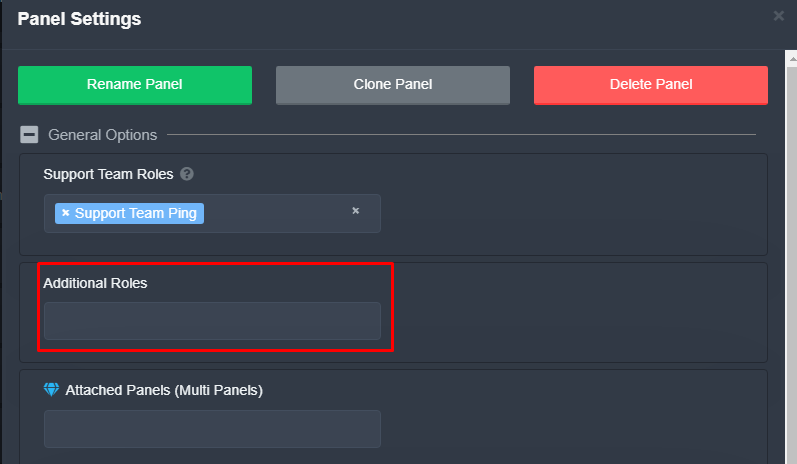
 austere wyvern
Hey. I've purchased premium and I want to switch to the premium bot. Can I kick the free bot?
scenic plinth
As long as you enable the premium bot for your server (shown below), yes, you can kick the free version. Although due to discord limits, you will have to resend your panels.
(Commands for tickets for closing, transcripts, etc can still be used for tickets created with the free version)
humble sequoiaBOT
How to disable the premium bot
To disable the premium bot you will have to go to the Dashboard ➞ Server Configs ➞ Premium bot ➞ And on the right-hand side select the primary free bot in the drop down menu.
Premium features will still work on the normal bot.
austere wyvern
scenic plinth
As long as you enable the premium bot for your server (shown below), yes, you ca...
I see. If I don't kick the free bot but I switch to the premium bot, will all panels continue working properly without resending them?
scenic plinth
austere wyvern
I see. If I don't kick the free bot but I switch to the premium bot, will all pa...
If you switch to premium bot on the server configurations, you will have to use the bot you select. With Discord, their buttons feature limits you to the bot that sends the button, as oppose to earlier in the year, reactions could be used cross bots.
scenic plinth
jade topaz
Premium bot is down rn
Just fact checked this, does not seem to be the case.
austere wyvern
scenic plinth
If you switch to premium bot on the server configurations, you will have to use ...
Okay. So I also have to close all the open tickets, right?
jade topaz
Nope, still down for me-
scenic plinth
austere wyvern
Okay. So I also have to close all the open tickets, right?
You don't have to. When they are "ready", you can close them using commands if the buttons do not work, which they shouldn't because of you switching between bot the bots.
scenic plinth
jade topaz
Nope, still down for me-
Are you receiving any errors?
austere wyvern
scenic plinth
You don't *have* to. When they are "ready", you can close them using commands *i...
Okay, thanks!
iron nightBOT
Gave +1 Rep to @scenic plinth
jade topaz
Said to run debug command, but when I did, nothing happened. I ensured that I used the correct prefix and everything
I heard it’s been a running issue
quasi cliff
jade topaz
Said to run debug command, but when I did, nothing happened. I ensured that I us...
Make sure that bot has perms to read and send message in the channel where you are trying to run debug and bot's not off
jade topaz
Still doesn’t appear to be working. It has admin and says it’s online
quasi cliff
jade topaz
Still doesn’t appear to be working. It has admin and says it’s online
Is it premium bot?
jade topaz
Yes
scenic plinth
I can't seem to find a server that you are in that has premium, are you sure you are using the correct bot?
 humble sequoiaBOT
How to disable the premium bot
To disable the premium bot you will have to go to the Dashboard ➞ Server Configs ➞ Premium bot ➞ And on the right-hand side select the primary free bot in the drop down menu.
Premium features will still work on the normal bot.
quasi cliff
jade topaz
That's the premium Bot
Looks like you dont have premium so you can shift to Normal Bot
jade topaz
I find that odd since I had it in my other server and it worked just fine, even when I didn’t have premium
But I’ll use the normal one fir now
quasi cliff
7d premium Trial
quasi cliff
Here to help you!
 lavish obsidian
Hy
jade topaz
If I created a panel that had premium features on it, like custom emojis and stuff, would that panel still work after the premium subscription expired?
Or would it deactivate
quasi cliff
It should give error
jade topaz
Asking because I’m considering premium
quasi cliff
I'll definitely suggest you to go with premium
jade topaz
Like if I tried to create a ticket with the panel after the subscription expired, it wouldn’t work?
quasi cliff
If you use the panels on Normal Bot then it will work
All the panels of Premium Bot will stop working
but the configs will be saved under normal bot
jade topaz
So if I got premium but still used the normal bot and added premium configs to the panel, it’d still work after the subscription expired?
quasi cliff
The normal bot will keep working but the premium stuffs will stop
quasi cliff
Custom emojis in text is free btw
jade topaz
How do I customize where the ticket is created?
quasi cliff
Category?
jade topaz
Like how do I get it to create the ticket into a certain category?
quasi cliff
$help category
humble sequoiaBOT
How to set the open category
To set a open category go to the Dashboard -> Panel Configs -> Settings -> Category Options -> Category Open
jade topaz
Ok thanx
jade topaz
hi is it possible to periodically send a panel in a chan?
quasi cliff
Nope, just curious why do you need to resend periodically
jade topaz
make advertisement for my premium services in public channels because sometimes users only goes to these chans and not to the chans presenting my premium services
with periodic panels I could send "Don't find what you need? Try our premium services" with a button to directly create the ticket
quasi cliff
That's not a feature yet but you can suggest it!
s!suggest <suggestion>in #🤖│bot-spam
iron nightBOT
Gave +1 Rep to @quasi cliff
quasi cliff
If you require any further information, let me know.
quick ermine
Hi, how can I disable opening new tickets for users
And generate like a message "Opening new tickets is not possible at this time"
gilded verge
Hey, as far as I know, you can do it so that either opening tickets will be available only when someone has a specific role or set a limit, e.g. that 1 user can have 1 open ticket. 🤔
quick ermine
Yeah! How does it work with the role thing? I want some users to not open tickets in a specific role
gilded verge
Oh, so please go to Panel Configs->Panel Settings->Button Options->Create Ticket Settings->and to Disabled Roles add roles you don't want them to open a ticket :>
 visual aspen
i had a private ticket on a discord i left and i received some info that i forgot to write down
i cant re-see the ticket after rejoining the server
is there any way to see the logs?
rustic gale
You will have to ask staff to re-add you
If staff deleted it and kept a transcript, you can ask staff to let you see the transcript
If they didn't keep a transcript, you're out of luck.
quick ermine
gilded verge
Oh, so please go to `Panel Configs`->`Panel Settings`->`Button Options`->`Create...
Thank you sir!
iron nightBOT
Gave +1 Rep to @gilded verge
quick ermine
Another question, how can we ping roles in the ticket message? (not the embed)
humble sequoiaBOT
Within all the messages the bot's sends (both embeds and text) you can mention either channels, roles, or even users, these mentions will only send a notification to the user if they are used within a text field, e.g: a role mentioned in an embed won't ping at all the users who have that role.
For mentioning a role you can use one out of three options:
{@Role Name} ➞ Which is Case Sensitive.
{RoleID} ➞ Replace RoleId with the Id of the role you are trying to ping.
<@&RoleID> ➞ Discord's native syntax to ping roles.
<#ChannelID> ➞ Mention a channel by its ID.
<@UserID> ➞ Mention a user by its ID.
rustic gale
@quick ermine Check this out
 hoary vigil
does anyone know how to make it to where when i make the ticket it opens a private voice channel to specifically for that person
 night urchin
 fluid notch
probably outsider 
rustic gale
Damn. Busted
jade topaz
if someone makes a ticket and the ticket doesnt appear how do i fix it
quasi cliff
What's the error
 upbeat light
Why Do sofern member get invalid form body issue
 mystic sun
I just had that problem today, and after they updated discord it worked properly again
 supple tulip
Can someone help me to only let the support team close the ticket?
slender minnow
supple tulip
Can someone help me to only let the support team close the ticket?
Hi, you can make the close button support team only by enabling the support team only option from the button settings.
supple tulip
Thanks @slender minnow


 slender minnow
 magic heath
Hey, does the server has an active premium plan?
magic heath
Yes.
slender minnow
Did you enable the premium bot?
magic heath
I'll check, but I have multiple servers under the same subscription, and they are working fine.
slender minnow
magic heath
I'll check, but I have multiple servers under the same subscription, and they ar...
can I have the server ID so i can check?
magic heath
788795418293043210
slender minnow
thank you, let me check
slender minnow
magic heath
788795418293043210
Ok, so it seems like your server is not on a premium plan
magic heath
Hm, ok, I'll alert my superior
 mellow garden
yo can anybody helpmme
novel kraken
How do I give someone dashboard role?
Never mind I figured it out
novel kraken
So I added the dashboard role but it still says I have user permission level zero?
 edgy tiger
How do I let a role view tickets
novel kraken
So I was made temp admin of a server I set up the ticket tool then set up the dashboard role now I’m a mod but says I have user permission level 0?
I even tested it on another server that I am admin on gave an alternate account the dashboard role says user permission level 2?
edgy tiger
edgy tiger
How do I let a role view tickets
I put in support roles and it still doesnt work
humble sequoiaBOT
Multipanels are panels with multiple buttons attached to them.
How to create a Multipanel
Premium users can combine multiple panels into one multipanel.
First, find the IDs of each panel you wish to combine. You can find them in your Panel Configs in the Dashboard
Next, send the multipanel to a channel using $panel [id1] [id2] {id3} ....
e.g. $panel 1 2 4 17 35 to combine panels 1, 2, 4, 17 and 35.
Up to 25 panels may be combined.
You can also watch this video tutorial.
For a more convenient use of multipanels, you can now combine panels on the dashboard. This will allow you to directly send the multipanel from the dashboard or via the $panel ID command.
Where can I find this?
You can find this setting on the Dashboard -> Panel Configs -> Settings -> General Options
Note: if you're attaching all the panels to a panel called English, don't include English in the attached panels box (If you do this, it will create duplicate)
This will put all buttons from all of your panels on one message. The message is the panel message from the panel you're combining these panels in.
You can also watch this video tutorial.
rustic gale
 frank elm
does anyone know how do i make multi tickets?
frank elm
does anyone know how do i make multi tickets?
Here you go
edgy tiger
my turn!!
frank elm
thank you! : D
rustic gale
novel kraken
So I was made temp admin of a server I set up the ticket tool then set up the da...
Whichever role they gave you does not have dashboard permissions. That's why you have permission level 0. You will need to tell the owner or an admin to give you a dashboard role.
rustic gale
edgy tiger
I put in support roles and it still doesnt work
Try testing it on a new ticket.
edgy tiger
Make a new panel or open a new ticket?
rustic gale
Channel permission changes aren't retroactively applied to existing tickets.
Open a new ticket
 sly linden
Hey
How can i get id panel?
rustic gale
What do you mean by id panel?
sly linden
humble sequoia
The first step i doesn't understand where i can find panel id exactly
rustic gale
Well. In your dashboard, look at Panel Configs
See how they are all numbered 1, 2, 3, 4 and so on?
That's the IDs
sly linden
Oh thanks
frank elm
how can i make it so that the tickets appear in like at the bottom of all the categories
slender minnow
$help category
humble sequoiaBOT
How to set the open category
To set a open category go to the Dashboard -> Panel Configs -> Settings -> Category Options -> Category Open
novel kraken
rustic gale
Whichever role they gave you does not have dashboard permissions. That's why you...
Oh I see so if I was temporary admin and gave myself the role that doesn’t count right?
slender minnow
humble sequoia
@frank elm
frank elm
slender minnow
<@884654584985944104>
thank you!
iron nightBOT
Gave +1 Rep to @slender minnow
rustic gale
novel kraken
Oh I see so if I was temporary admin and gave myself the role that doesn’t count...
Depends what permissions the role has
humble sequoiaBOT
Don't see your server in the dashboard?
You will possibly need to relog. Look below to see steps on how to relog.
How to relog in the Dashboard.
First, you will need to go to the dashboard. Once your there, click on your avatar on the top right. after you clicked it, you will see button that says Logout. You must click that. Once you have logged out, you can log back in.
Note:
You need one of these 3 things to access the dashboard.
1. Server Owner (Level: 6)
2. Server Administrator (Level: 4)
3. Dashboard Role (Level: 2)
:warning: You can check your level using $level on your Discord Server
User permission level with Ticket Tool
@User is permission level: 0 (User)
```» *If it shows that your permission is **0**, you don't have any of the above **3 things** to manage the dashboard.*


**See the GIF below on how to relog:**You need one of these 3 things to access the dashboard: to be the server owner, to have a role with the Administrator permission, or to have a role that's among the dashboard roles set up with Ticket Tool.
novel kraken
rustic gale
Depends what permissions the role has
Well it doesn’t matter I got the owner to remove the dashboard role and then put it back and it worked Learn something new from you thank you very much
iron nightBOT
Gave +1 Rep to @rustic gale
humble sequoiaBOT
⚠️ You're in the wrong place
We provide support for @pseudo glen discord bot and cannot help you with whatever issue you have.
- We don't know which Support Team you should contact to get this issue resolved, and unfortunately we won't be able to accurately tell you.
If you don't have any further questions regarding our bot Ticket Tool, please close this ticket
sly linden
How can i change ticket name to the person who claim it
 serene lily
Howdy, My ticket bot is letting people who are not admin see others tickets how do I hide others tickets from anyone who is not an admin?
 plush sun
why when a player create a ticket can close the ticket i don’t want that i went it is the moderation team support close the ticket not player thanks
rustic gale
sly linden
How can i change ticket name to the person who claim it
It's a premium feature
rustic gale
serene lily
Howdy, My ticket bot is letting people who are not admin see others tickets how ...
In Permission Options, edit User Opened Permissions and deny the Read Messages permission
sly linden
rustic gale
It's a premium feature
I have free trial
rustic gale

rustic gale
sly linden
I have free trial
Under Claiming Options, look for Enable Claim Name. Change it to {ticket.user.name}-{count}
sly linden
rustic gale
Under Claiming Options, look for Enable Claim Name. Change it to `{ticket.user.n...
Thx, when trial end is it disabled?
rustic gale
Yep
serene lily
rustic gale
In Permission Options, edit User Opened Permissions and deny the Read Messages p...
now its not letting the person who requested the ticket to see the ticket