#🆘│community-support
1 messages · Page 417 of 1
 jade topaz
 humble sequoiaBOT
Help Options
$help commands - Information on commands
$help setup - Information on bot setup
$help faq - Frequently asked questions
jade topaz
You can do help setup
 crisp skiff
Ok
 marble frost
How can I change the ticket limits ?
humble sequoiaBOT
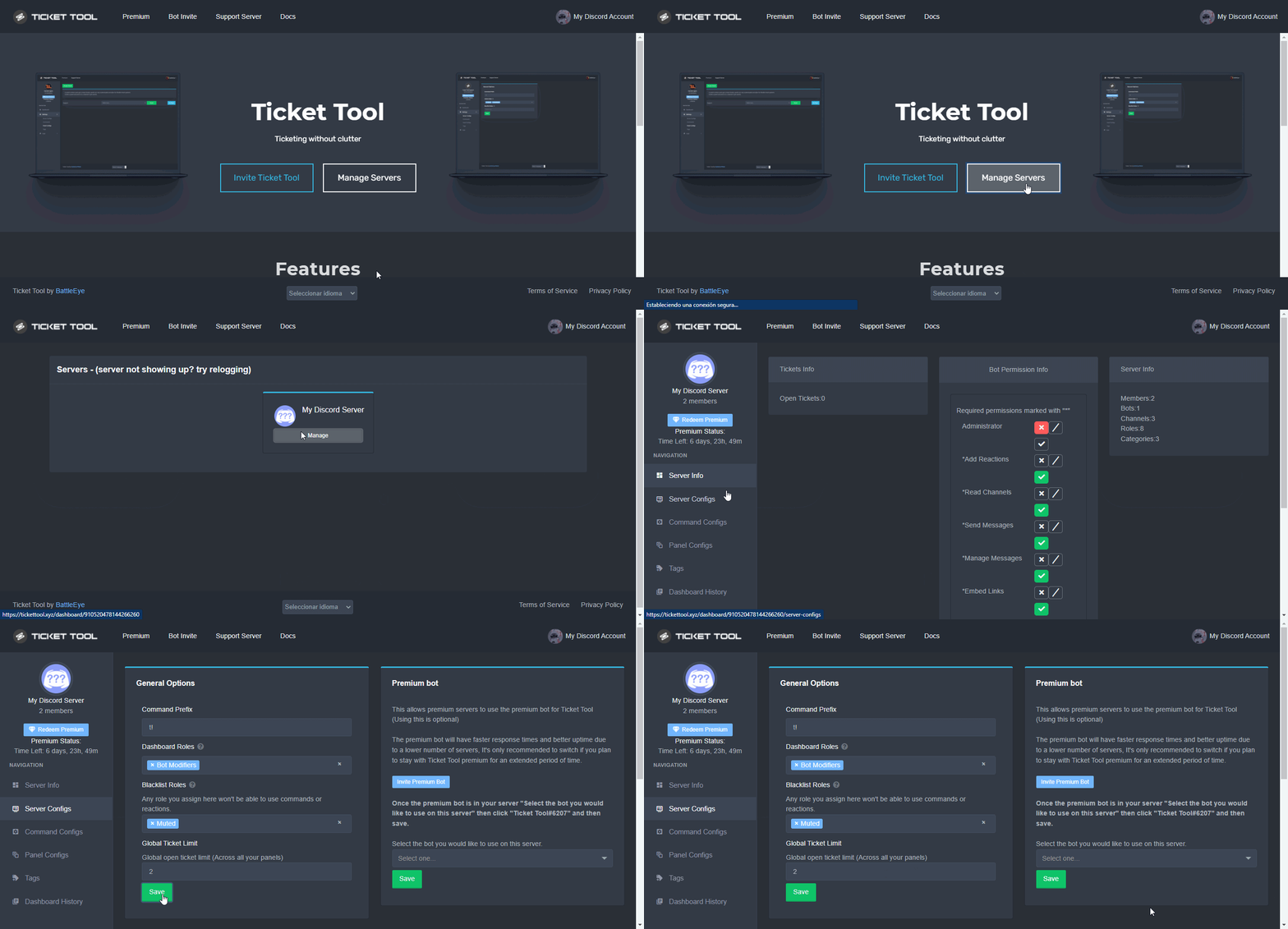
Unlike the regular Ticket Limit, the global limit will limit the amount of tickets a user can create at the same time for ALL Panels. When a ticket is closed again, the limit resets for that user.
To customize it head over to your Dashboard ➞ Server Configs ➞ Global Ticket Limit
Note:
This is not a limit for how many tickets a user can open at all times or how many tickets you can have open on the server in total. This is just a limit per user for open tickets.
 polar palm
how can i set a channel for tickets?
 quasi cliff
marble frost
How can I change the ticket limits ?
quasi cliff
marble frost
How can I change the ticket limits ?
Check this Global limit ^, also if this doesn't work then send a ss so we know which type of limit
jade topaz
polar palm
how can i set a channel for tickets?
When you make a panel you can select a channel, after you made your panel you need to send it and the panel will creat your panel in the channel
 subtle summit
Sorry for the late reply, yes he was.
quasi cliff
subtle summit
Sorry for the late reply, yes he was.
They need to update their Discord
humble sequoiaBOT
Update your discord App
Buttons are a relatively new addition to discord and don't work with some older versions of the app.
Please verify that you have the latest version of discord, by going to the app or play store.
Discord for the  App Store
Discord for the  Play Store
 proud flame
Sorry, but I just spent 35 dollars on the park mod for it not to even start, if you could tell me how to fix this, that would be great:) Also, nothing shows that I own this item
humble sequoiaBOT

⚠️ You're in the wrong place
We provide support for @pseudo glen discord bot and cannot help you with whatever issue you have.
- We don't know which Support Team you should contact to get this issue resolved, and unfortunately we won't be able to accurately tell you.
If you don't have any further questions regarding our bot Ticket Tool, please close this ticket
jade topaz
hello! I'm trying to generate an automatic response when i write a !word. How can i do in ticket tool premium?
my tickets arent tagging staff roles when created - did i miss a checkbox when i setup?
quasi cliff
$mentions
humble sequoiaBOT
Within all the messages the bot's sends (both embeds and text) you can mention either channels, roles, or even users, these mentions will only send a notification to the user if they are used within a text field, e.g: a role mentioned in an embed won't ping at all the users who have that role.
For mentioning a role you can use one out of three options:
{@Role Name} ➞ Which is Case Sensitive.
{RoleID} ➞ Replace RoleId with the Id of the role you are trying to ping.
<@&RoleID> ➞ Discord's native syntax to ping roles.
<#ChannelID> ➞ Mention a channel by its ID.
<@UserID> ➞ Mention a user by its ID.
The Ticket Message is the first message sent by the bot in a new ticket. To customise it head over to your Dashboard ➞ Panel Configs ➞ Settings ➞ Ticket Options ➞ Edit Ticket Message
 quasi cliff
jade topaz
my tickets arent tagging staff roles when created - did i miss a checkbox when i...
quasi cliff
jade topaz
my tickets arent tagging staff roles when created - did i miss a checkbox when i...
Add the role in "Message Content" of Ticket message ^
 iron nightBOT
Gave +1 Rep to @quasi cliff
jade topaz
😂
quasi cliff
jade topaz
hello! I'm trying to generate an automatic response when i write a !word. How ca...
You can add Tags,
Dashboard -> Tags
 quasi cliff
Just create the name as word and it will work as $word
jade topaz
@quasi cliff so ive edited it and it looks good, but its not tagging the appropriate role. i know user is {user} is the role not @ role?
quasi cliff
humble sequoia
^
quasi cliff
jade topaz
<@924356699161231410> so ive edited it and it looks good, but its not tagging th...
I suggest using role as <@&RoleID>
jade topaz
@quasi cliff thank you
iron nightBOT
Gave +1 Rep to @quasi cliff
jade topaz
quasi cliff
Just create the name as `word` and it will work as `$word`
Don't work 😦


nothing. In the name has a space XD
thank you @quasi cliff
iron nightBOT
Gave +1 Rep to @quasi cliff
 high oyster
jade topaz
Don't work 😦
high oyster
jade topaz
Don't work 😦
Does it work or not?
quasi cliff
jade topaz
nothing. In the name has a space XD
^
high oyster
K mb
jade topaz
high oyster
Does it work or not?
yes it works but i write the command but it doesnt dissapear

 jade topaz
i see it now XDD thank you @high oyster
iron nightBOT
Gave +1 Rep to @high oyster
subtle summit
quasi cliff
They need to update their Discord
They said they have the lastest version of Discord.
quasi cliff
subtle summit
They said they have the lastest version of Discord.
Are you able to create tickets? If yes, then it's his client (discord) issue
subtle summit
Let me check
 autumn cove
Is there a way to change the category that the tickets are going to appear?
humble sequoiaBOT
How to set the open category
To set a open category go to the Dashboard -> Panel Configs -> Settings -> Category Options -> Category Open

 gilded verge
humble sequoia
gilded verge
humble sequoia
@autumn cove, yes, 
iron nightBOT
Gave +1 Rep to @gilded verge
gilded verge
you're welcome 😊
humble sequoiaBOT
For a more convenient use of multipanels, you can now combine panels on the dashboard. This will allow you to directly send the multipanel from the dashboard or via the $panel ID command.
Where can I find this?
You can find this setting on the Dashboard -> Panel Configs -> Settings -> General Options
Note: if you're attaching all the panels to a panel called English, don't include English in the attached panels box (If you do this, it will create duplicate)
This will put all buttons from all of your panels on one message. The message is the panel message from the panel you're combining these panels in.
You can also watch this video tutorial.
 gilded verge
@jade topaz, check
*If you are not sure if you did the multipanel right, you can check my example:
Message link 1: #🆘│community-support message
Message link 2: #🆘│community-support message
jade topaz
$buttons
humble sequoiaBOT

The new Discord Buttons allow for a much smoother and convenient experience. They reduce lag and work much better than emojis. With ticket tool you can edit all the buttons however you like! Buttons can show emojis, text and can have 4 different colors.
Where can I edit them?
Dashboard ➞ Panel Configs ➞ Settings ➞ Button Options ➞ Setting

Tags
Tags are used to send a predefined response to your channels using a command. Tags will only respond if the command itself is used, it will not function if you put the tag into a sentence. The prefix is not included.
To create tags, go to: Dashboard > Tags > Create Tag. After creating and naming one, tap on the response button, and you can edit the response.
 gilded verge
@jade topaz, please use commands in #🤖│bot-spam
jade topaz
gilded verge
<@456226577798135808>, please use commands in <#910978476536905738>
Srry
how do i make something like this
https://cdn.discordapp.com/attachments/987826138044833832/987826192210083870/unknown.png
 jade topaz
how do i make something like this
https://cdn.discordapp.com/attachments/9878261...
jade topaz
jade topaz
how do i make something like this
https://cdn.discordapp.com/attachments/9878261...
Hey! You can do that using multipanels.
humble sequoiaBOT
Multipanels are panels with multiple buttons attached to them.
How to create a Multipanel
Premium users can combine multiple panels into one multipanel.
First, find the IDs of each panel you wish to combine. You can find them in your Panel Configs in the Dashboard
Next, send the multipanel to a channel using $panel [id1] [id2] {id3} ....
e.g. $panel 1 2 4 17 35 to combine panels 1, 2, 4, 17 and 35.
Up to 25 panels may be combined.
You can also watch this video tutorial.

For a more convenient use of multipanels, you can now combine panels on the dashboard. This will allow you to directly send the multipanel from the dashboard or via the $panel ID command.
Where can I find this?
You can find this setting on the Dashboard -> Panel Configs -> Settings -> General Options
Note: if you're attaching all the panels to a panel called English, don't include English in the attached panels box (If you do this, it will create duplicate)
This will put all buttons from all of your panels on one message. The message is the panel message from the panel you're combining these panels in.
You can also watch this video tutorial.
 spiral aurora
how to change the ticket tool discord name and photo? or not able to do that?
 tribal cedar
You can change the name in your server but you can't change the photo
At this time anyway
spiral aurora
i've been trying to change emojis on the panels but they just stay the default ticket emoji. i click save then send to panel after
 pallid void
Ticket-{UserID} What would the correct tag be? to display there name VS count number 😛
 stable egret
 humble sequoiaBOT
Don't see your server in the dashboard?
You will possibly need to relog. Look below to see steps on how to relog.
How to relog in the Dashboard.
First, you will need to go to the dashboard. Once your there, click on your avatar on the top right. after you clicked it, you will see button that says Logout. You must click that. Once you have logged out, you can log back in.
Note:
You need one of these 3 things to access the dashboard.
1. Server Owner (Level: 6)
2. Server Administrator (Level: 4)
3. Dashboard Role (Level: 2)
:warning: You can check your level using $level on your Discord Server
User permission level with Ticket Tool
@User is permission level: 0 (User)
```» *If it shows that your permission is **0**, you don't have any of the above **3 things** to manage the dashboard.*
**See the GIF below on how to relog:** gilded verge
humble sequoia
gilded verge
humble sequoia
@stable egret, check all of
spiral aurora
how to add bold text in panel message text? I did the markdown ** and that did nothing
 radiant moss
spiral aurora
how to add bold text in panel message text? I did the markdown ** and that did n...
radiant moss
spiral aurora
how to add bold text in panel message text? I did the markdown ** and that did n...
Do
** **
And the text in the middle
**This message is bolded**
 smoky blaze
when a new member opens a ticket they cant see the message history and i dont wanna keep editing tickets
humble sequoiaBOT
━━ moved to ticket ━━
 barren latch
Hello! Is there a way to remove the ticket created message, only visible to the user?
 red furnace
is there a way to make tags support-team only?
barren latch
And can I change the message when a user does not have the permission to close the ticket?
spiral aurora
i've been trying to change emojis on the panels but they just stay the default ticket emoji. i click save then send to panel after
gilded verge
Hey @barren latch, I'm not sure about the answer so could you please send screenshots of "those" messages that you would like to change?
barren latch
gilded verge
Hey <@636126493671424000>, I'm not sure about the answer so could you please sen...
Sure!

This one and the one, which is being sent if you don't have the permission to close the ticket.
gilded verge
barren latch
Unfortunately, this message cannot be changed
barren latch
Oh okay, thanks. The other message can't be changed as well I suppose?
gilded verge
rather not ... wait a minute, I'll make sure ...
barren latch
Sure, thank you very much!
gilded verge
so if you mean this (as second message), then we can't change this too 😳
 iron nightBOT
Gave +1 Rep to @gilded verge
gilded verge
you're welcome 😊
barren latch
Have a good one! 👋
jade topaz
gilded verge
you're welcome 😊
Gi can u check my ticket #987885497814753370
gilded verge
jade topaz
Gi can u check my ticket <#987885497814753370>
I'm not Staff, so i can't
jade topaz
Can i dm u ?
gilded verge
please wait for answer in ticket from Staff
red furnace
is there a way to make tags support-team only?
gilded verge
red furnace
is there a way to make tags support-team only?
I was just looking for an answer for you, but at the moment there is no such possibility
gilded verge
spiral aurora
i've been trying to change emojis on the panels but they just stay the default t...
but you know that to change the emoji in the panel button your server must have premium? Emoji is premium feature 
@jade topaz i said "please wait for answer in ticket from Staff", so don't DM me please 😐
jade topaz
Oe ok.sry
red furnace
gilded verge
I was just looking for an answer for you, but at the moment there is no such pos...
oh
humble sequoiaBOT
━━ moved to ticket ━━
 scenic plinth
humble sequoia
━━ moved to ticket ━━
scenic plinth
humble sequoia
━━ moved to ticket ━━
(Oohsehun)
 copper oracle
 noble pilot
hello - just wondering can you set up the bot to delete a message once closed automatically?? cant seem to find the option on the dashboard
NVM found it
 safe mauve
How do I add someone to the ticket?
gilded verge
safe mauve
How do I add someone to the ticket?
in ticket channel use command $add @user or $add @userid
 mental crown
Can anyone help me


I want to make it liek the 1st photo
But I don’t know how to do it
How to I allow people to make a ticket
Can anyone help me I want to make it like people can create their own ticket but how do I do it
humble sequoiaBOT

You can check our documentation here;
You can also check #📂│information for the basic setup;
You can also watch this video tutorial.
Our documentation contains all the info you need about the bot to be able to setup and configure the bot however you like.
gilded verge
uhm... @mental crown, check
 humble sequoiaBOT
Don't see your server in the dashboard?
You will possibly need to relog. Look below to see steps on how to relog.
How to relog in the Dashboard.
First, you will need to go to the dashboard. Once your there, click on your avatar on the top right. after you clicked it, you will see button that says Logout. You must click that. Once you have logged out, you can log back in.
Note:
You need one of these 3 things to access the dashboard.
1. Server Owner (Level: 6)
2. Server Administrator (Level: 4)
3. Dashboard Role (Level: 2)
:warning: You can check your level using $level on your Discord Server
User permission level with Ticket Tool
@User is permission level: 0 (User)
```» *If it shows that your permission is **0**, you don't have any of the above **3 things** to manage the dashboard.*


**See the GIF below on how to relog:** can help you
 mental crown
This happens
mental crown
mental crown
This happens
I already logged out 3times
jade topaz
mental crown
Which one I press
Try refreshing your page, then press "Manage Servers"
 outer maple
I’m wondering how to let the Ticket Bot to create the tickets in a specific category, how can I do that?
 craggy geyser
$help category
humble sequoiaBOT
How to set the open category
To set a open category go to the Dashboard -> Panel Configs -> Settings -> Category Options -> Category Open
 stark path
you don't know how to set up the language?
 dreamy sable
 azure needle
How to set up mutliple buttons? example:
 humble sequoiaBOT
For a more convenient use of multipanels, you can now combine panels on the dashboard. This will allow you to directly send the multipanel from the dashboard or via the $panel ID command.
Where can I find this?
You can find this setting on the Dashboard -> Panel Configs -> Settings -> General Options
Note: if you're attaching all the panels to a panel called English, don't include English in the attached panels box (If you do this, it will create duplicate)
This will put all buttons from all of your panels on one message. The message is the panel message from the panel you're combining these panels in.
You can also watch this video tutorial.
high oyster
@azure needle Read the above.
iron nightBOT
Gave +1 Rep to @high oyster
 maiden valley
DB bot
high oyster
maiden valley
DB bot
What does that mean exactly?
humble sequoiaBOT
We would love to help you, but if you don't tell us what you need help with we can't help you :(
 brave acorn
!help
gilded verge
brave acorn
!help
with?
 candid iris
!help
humble sequoiaBOT
We would love to help you, but if you don't tell us what you need help with we can't help you :(
brave acorn
gilded verge
with?
I need help adding ticket tool to my server
humble sequoiaBOT
You can check our documentation here;
You can also check #📂│information for the basic setup;
You can also watch this video tutorial.
Our documentation contains all the info you need about the bot to be able to setup and configure the bot however you like.
 whole path
How can I make a ticket
gilded verge
humble sequoia
@whole path, just check this setup
 thorny flicker
Arabic
 oak salmon
How to solve "Unknown integration error" when opening a ticket
humble sequoiaBOT
━━ moved to ticket ━━
 jaunty shard
Hi, why my tickets jump to the top of discord?
 shut bolt
jaunty shard
Hi, why my tickets jump to the top of discord?
shut bolt
jaunty shard
Hi, why my tickets jump to the top of discord?
Unless you've assigned a category for tickets to be created in, they will be created on the top of the server's channel list, if you had selected a category and they aren't being placed there let me know and I'll assist you through
 haughty grail
hello friends could you help me to make a report of my game. it's that I haven't passed 84% for days or I won't have
humble sequoiaBOT
⚠️ You're in the wrong place
We provide support for @pseudo glen discord bot and cannot help you with whatever issue you have.
- We don't know which Support Team you should contact to get this issue resolved, and unfortunately we won't be able to accurately tell you.
If you don't have any further questions regarding our bot Ticket Tool, please close this ticket
jaunty shard
shut bolt
Unless you've assigned a category for tickets to be created in, they will be cre...
Yea I have a category for them
shut bolt
jaunty shard
Yea I have a category for them
$overflow
humble sequoiaBOT
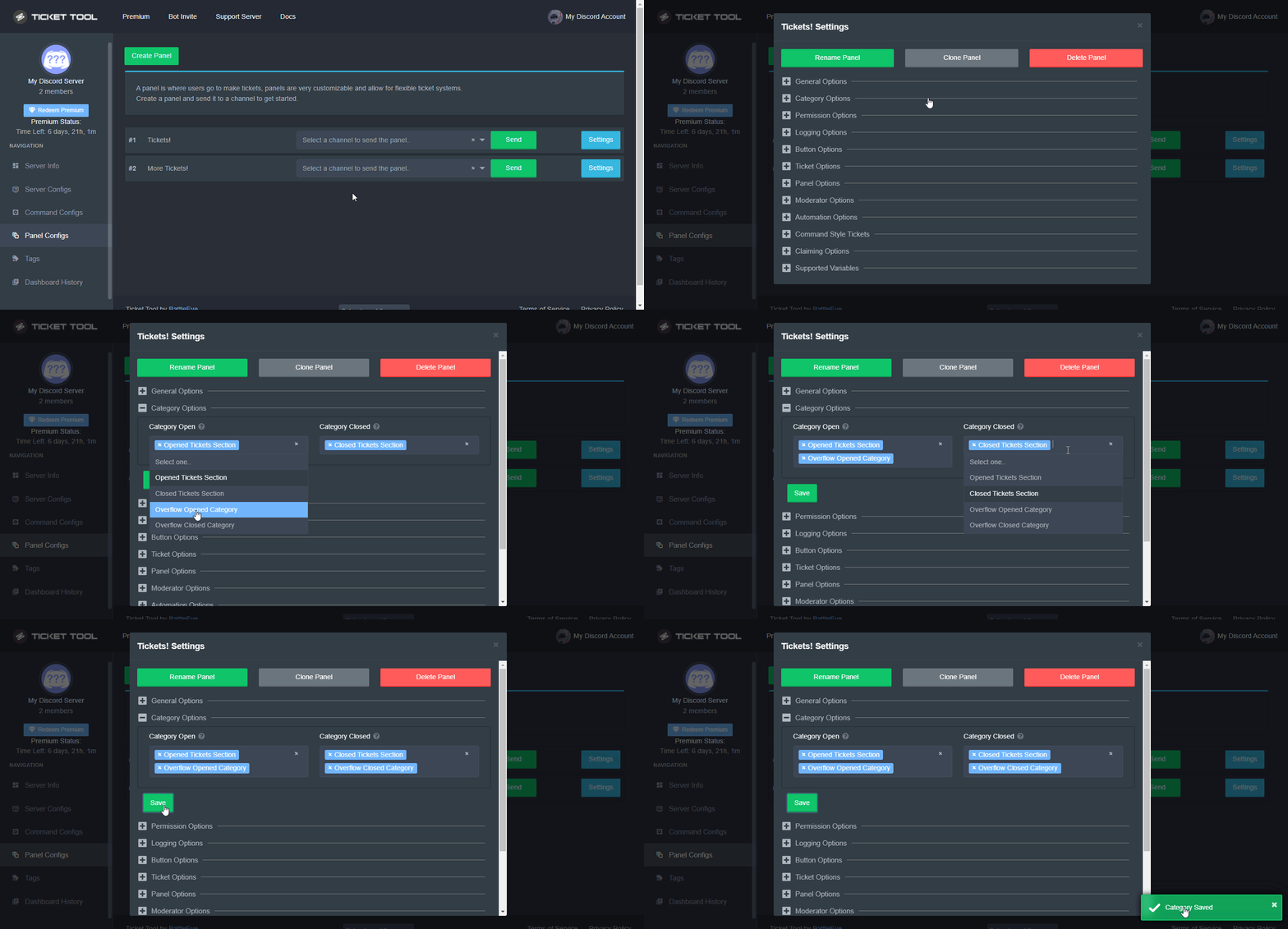
Discord only allows to stack up to 50 channels per category, meaning that if you have already 50 tickets in one category, the bot won't be able to place a ticket in that category, for such reason Ticket Tool counts with overflow categories, meaning that if your main category is filled, the bot will go ahead and place the ticket on the next one available, simply choose a second category in the category pickers:
 shut bolt
Check this
azure needle
What is additional roles for general options? is it just which role can be included in the ticket?
shut bolt
azure needle
What is additional roles for general options? is it just which role can be inclu...
The Additional are an option to which you can assign a different set of permissions within tickets to the selected roles apart from the permissions given to the support team roles
$help perms
humble sequoiaBOT
How to set the permissions for tickets
To set a change permissions go to the Dashboard -> Panel Configs -> Settings -> Permission Options
 shut bolt
The Permissions Options may be able to clear up your doubt a bit more too
azure needle
Is it possible to only have a certain role open a certain ticket?
shut bolt
azure needle
Is it possible to only have a certain role open a certain ticket?
Yes
$buttons
humble sequoiaBOT
The new Discord Buttons allow for a much smoother and convenient experience. They reduce lag and work much better than emojis. With ticket tool you can edit all the buttons however you like! Buttons can show emojis, text and can have 4 different colors.
Where can I edit them?
Dashboard ➞ Panel Configs ➞ Settings ➞ Button Options ➞ Setting
shut bolt
Go into the Create Ticket settings, disable everyone, enable the role you want to be able to use the create ticket button
azure needle
Ah thanks
 undone remnant
Wondering how to ping roles in a ticket from the bot when it opens a ticket
humble sequoiaBOT
Within all the messages the bot's sends (both embeds and text) you can mention either channels, roles, or even users, these mentions will only send a notification to the user if they are used within a text field, e.g: a role mentioned in an embed won't ping at all the users who have that role.
For mentioning a role you can use one out of three options:
{@Role Name} ➞ Which is Case Sensitive.
{RoleID} ➞ Replace RoleId with the Id of the role you are trying to ping.
<@&RoleID> ➞ Discord's native syntax to ping roles.
<#ChannelID> ➞ Mention a channel by its ID.
<@UserID> ➞ Mention a user by its ID.
gilded verge
humble sequoia
@undone remnant, use mention in Message Text
[Panel Settings->Ticket Options->Ticket Message->Message Text]
undone remnant
thanks @gilded verge
iron nightBOT
Gave +1 Rep to @gilded verge
gilded verge
you're welcome 😊
 short zealot
How do I make it so that a certain role can access, close, open etc. tickets?
gilded verge
like support role? check this:
humble sequoiaBOT
How to let support team see into a ticket
About support roles
A support role lets your support team see into tickets with out having to add them manually to each and every ticket.
You can add as many support roles as you like per panel.
NOTE that the way discord works all admins can see into tickets regardless of this.
How to set a support role
To set a Support role go to the Dashboard -> Panel Configs -> Settings -> General Options -> Support Team Roles.

NOTE that the support role will not be able to see into tickets that are already created..
short zealot
gilded verge
like support role? check this:
Ok, so if I'm the owner, and I can see tickets, and there's an employee role whom I want to see tickets, this is how I would give everyone with that role access?
Permanently
And all I do is add them as a support team role, like this?
 gilded verge
humble sequoia
gilded verge
humble sequoia
As long as the given user has "this" role, he has access to the tickets.
I don't quite understand your question so please wait for someone else.
short zealot
gilded verge
I don't quite understand your question so please wait for someone else.
Ok
 quick meadow
Hello i found a strange bug in the version PlateUp! 0.18.1 (F28E)
In Steam
The next day doesn't come
What should I do?
humble sequoiaBOT
⚠️ You're in the wrong place
We provide support for @pseudo glen discord bot and cannot help you with whatever issue you have.
- We don't know which Support Team you should contact to get this issue resolved, and unfortunately we won't be able to accurately tell you.
If you don't have any further questions regarding our bot Ticket Tool, please close this ticket
quick meadow
Oh, where should I write then? Tell me please
 lean herald
I need help adding the ticket tool to my server
quasi cliff
quasi cliff
lean herald
I need help adding the ticket tool to my server
Simply click the above link ^
lean herald
 quasi cliff
It should be in then
lean herald
But i need help creating a panel
humble sequoiaBOT
You can check our documentation here;
You can also check #📂│information for the basic setup;
You can also watch this video tutorial.
Our documentation contains all the info you need about the bot to be able to setup and configure the bot however you like.
lean herald
 quasi cliff
It says to run $debug
quasi cliff
simply type $debug in the channel where you trying to post the panel
lean herald
But it doesn't do anything
quasi cliff
do @Ticket Tool#4843 debug
 quasi cliff
Check if it has send message perms
lean herald
what do you mean
quasi cliff
Channel settings -> Send Message 
lean herald
in discord settings
jade topaz
how to change ticket panel name
quasi cliff
Yes, for channel
quasi cliff
jade topaz
how to change ticket panel name
Dashboard -> Panel configs -> Settings -> Rename Panel
 jade topaz
ok
lean herald
help
quasi cliff
Simply goto Dashboard -> Server Info -> Bot Permissions info
 lean herald
 quasi cliff
Oh, so the bot has Admin perms
quasi cliff
lean herald
Just noticed that the bot doesn't have status
lean herald
status for what?

 lean herald
 quasi cliff
Looks like the shard is down for you 🤔
uh looks like they got auto muted by Wick for text wall and then they left 
jade topaz
when i save a ticket from a server i dont own after a couple days i cant view the transcript it says invalid request?
quasi cliff
transcripts remain as long as the transcript message hasn't been deleted
 marsh dune
Is it possible to give a role when a member creates a ticket
gilded verge
marsh dune
Is it possible to give a role when a member creates a ticket
Unfortunately no
 tawdry linden
Seems like the shard is down for this server, any chance someone could reconnect it?
Server ID: 927737129197531197
 pale pilot
tawdry linden
Seems like the shard is down for this server, any chance someone could reconnect...
pale pilot
tawdry linden
Seems like the shard is down for this server, any chance someone could reconnect...
don't see anything wrong. Try running the $debug command
 severe cape
I brought a months premium but it’s not showing up on my account what do I do as the bot has stopped working
 full cypress
Tooo dumb to know
 stoic flame
Can you set the Ticket Tool so that a transcript is always saved for a ticket? Without pressing the button.
 slender minnow
stoic flame
Can you set the Ticket Tool so that a transcript is always saved for a ticket? W...
slender minnow
stoic flame
Can you set the Ticket Tool so that a transcript is always saved for a ticket? W...
Hey, automated actions are premium features.
 inland gorge
Hello
Can I somehow assign a role to a member through a ticket tools bot?
slender minnow
severe cape
I brought a months premium but it’s not showing up on my account what do I do as...
Hey, please open a ticket from #🎫│make-a-ticket for help.
stoic flame
slender minnow
Hey, automated actions are premium features.
also with the transcript
slender minnow
inland gorge
Hello
Can I somehow assign a role to a member through a ticket tools bot?
Unfortunately, not with Ticket Tool.
slender minnow
stoic flame
also with the transcript
it can directly transcript the ticket, and can send it as a copy to the user in their dm
but both are premium features
iron nightBOT
Gave +1 Rep to @slender minnow
stoic flame
slender minnow
it can directly transcript the ticket, and can send it as a copy to the user in ...
Okay
tawdry linden
pale pilot
don't see anything wrong. Try running the $debug command
Is there a message supposed to show up once you run the command?
jade topaz
Hey there I’m trying to use the tag for quicker response and it’s working for two but not the /goodbye one
Any ideas?

Resolved ^
 languid quail
I need help so basically people make a ticket and it says "you don't have permission to use this
gilded verge
languid quail
I need help so basically people make a ticket and it says "you don't have permis...
Please make sure that the user's role is not in Blacklist Roles (Dashboard-> Server Configs) and that in the ticket creation button their role is not in Disabled Roles, or that the user has a role that is as allowed.
 tame arrow
Hi anyone here?
Can I know if it's possible to make the bot automatically dm the transcript of ticket
gilded verge
tame arrow
Can I know if it's possible to make the bot automatically dm the transcript of...
Hey, ofc you can but this is premium feature 😳
 tame arrow
Oh ok
...
spiral aurora
for ticket-{count}, any way to add the panel name in there?
humble sequoiaBOT
{server.name} ➞ Name of the server
{server.id} ➞ ID of the Server

[#🆘│community-support](/guild/509192800865353738/channel/776680605517742090/) = <#channel> ➞ Channel link of the current channel
{channel.name} ➞ Name of the current channel
{channel.id} ➞ ID of the current channel

{author} = <@user> ➞ Mention of the user triggering this message
{author.name} ➞ Name of the user triggering this message
{author.id} ➞ ID of the user triggering this message
{author.nickname} ➞ Nickname of the user triggering this message
{author.icon} ➞ Direct Url of the profile picture of the user triggering this message
{author.tag} ➞ 4 digit tag (discriminator) of the user triggering this message
{author.full} ➞ username + 4 digit discriminator of the user triggering this message

{panel.count} ➞ The current count number of the panel (Tickets only)
{panel.name} ➞ The name of the panel (Tickets Only)
{panel.ticketLimit} ➞ The current limit of the panel (Ticket Only)

{ticket} = <#channel> ➞ Channel mention of the ticket
{ticket.id} ➞ Channel ID of the ticket

{ticket.user} = <@user> ➞ User mention of the ticket user
{ticket.user.name} ➞ Name of the ticket user
{ticket.user.id} ➞ User ID of the ticket user
{ticket.user.nickname} ➞ Nickname of the ticket user
{ticket.user.icon} ➞ Direct Url of the profile picture of the ticket user
{ticket.user.tag} ➞ Tag / Discriminator of the ticket user
{ticket.user.full} ➞ Username + Discirimator of the ticket user```
Roles can be either
{@role name} or {role ID}
_ _
_ _
Additional variables
{reason}
» works on $close <reason>, $delete <reason>, $new <reason>, $claim <reason>
» displays the reason, you can optionally give with some commands
Transcript Variables
{ticket_name}➞ Name of the ticket
{panel_name}➞ Name of the panel
{transcript_url}➞ File link of the transcript
Hide Link under blue text:
[Click me](https://tickettool.xyz)➞ Click me
Time Variable
Sends the current unix time in seconds. Optinally add or remove seconds
<t:{!time+43200}:R>➞ <t:1655780390:R>
<t:{!time+43200}:R>➞ <t:1655693990:R>
<t:{!time+43200}:R>➞ <t:1655737190:R>
» Remove ! before time
_ _
<t:1641006000>➞ <t:1641006000>
<t:1641006000:f>➞ <t:1641006000:f>
<t:1641006000:F>➞ <t:1641006000:F>
<t:1641006000:D>➞ <t:1641006000:D>
<t:1641006000:d>➞ <t:1641006000:d>
<t:1641006000:t>➞ <t:1641006000:t>
<t:1641006000:T>➞ <t:1641006000:T>
<t:1641006000:R>➞ <t:1641006000:R>
» You can use https://hammertime.djdavid98.art/ to create custom dates/times
high oyster
@spiral aurora {panel_name}
 turbid tiger
Hey Im here. It looks like members on my server are unable to open tickets also
high oyster
turbid tiger
Hey Im here. It looks like members on my server are unable to open tickets also
Can you ask a user to screenshot the error they receive.
turbid tiger

 warm viper
Hey guys 👋 my question is there an automated way to prevent users from having the permission to tag any role automatically in every ticket created?
high oyster
turbid tiger
- System Failure: Ticket Tool Missing permission(s)
- Ticket Tool is missing permissions to work properly, check the mentioned permissions by the bot in the channel, in the category, and in the role. You can use $debug as a help tool.
turbid tiger
high oyster
- System Failure: Ticket Tool Missing permission(s)
+ Ticket Tool is missing pe...
Could this have randomly changed? It was working fine a few hours ago
high oyster
turbid tiger
Could this have randomly changed? It was working fine a few hours ago
I doubt so, check your Dashboard History to see if anyone has changed anything.
high oyster
warm viper
Hey guys 👋 my question is there an automated way to prevent users from having t...
I do not believe so, the developers are trying to attempt to bring out more features in permission customisation however.
turbid tiger
high oyster
I doubt so, check your Dashboard History to see if anyone has changed anything.
Nothing has changed since May 29th
high oyster
turbid tiger
Nothing has changed since May 29th
May have been a change in your discord server that is not logged onto the dashboard as it will only log changes on the dashboard.
turbid tiger
high oyster
May have been a change in your discord server that is not logged onto the dashbo...
How would I change the permissions in the server? Its managed as an integration and only has 2 permission options I can change
high oyster
turbid tiger
How would I change the permissions in the server? Its managed as an integration ...
The tickettool system is setup by an integration?
 high oyster
Check the channel, category permissions and that role permission that is still the permissions that is assigned to the bot.
humble sequoiaBOT
ᅠ
@pseudo glen requires the following permissions:
Add Reactions
Read Channels
Send Messages
Manage Messages
Embed Links
Attach Files
Read History
Manage Roles
Manage Channels
To change the role permissions, you can go to your Discord Server ➞ Server Settings ➞ Roles ➞ @Ticket Tool
To change the channel permissions, you can go to your Channel Settings ➞ Permissions ➞ Ticket Tool
ᅠ
Note:
You can give Ticket Tool Administrative Permissions instead of all the permissions listed above, but it's entirely optional and NOT necessary.
 high oyster
@turbid tiger read the above.
gilded verge
Winter, can I interrupt for a while? 😳
high oyster
gilded verge
Winter, can I interrupt for a while? 😳
Sure
gilded verge
I just wanted to write that these perms are the best: https://cdn.discordapp.com/attachments/979861967936290816/979875252433731605/Ticket_Tool_Discord_role_perms.mp4
high oyster
turbid tiger
Yeah. It does get managed as a role anymore it seems
It is still managed from the role it is just non assignable to users.
turbid tiger
I think I got it. It got quarantined by Wick even though I have it whitelisted. Wick removed permissions from it
high oyster
turbid tiger
I think I got it. It got quarantined by Wick even though I have it whitelisted. ...
Ah yes security bots such as Wick may mistake what Ticket Tool is doing.
To bypass that either whitelist is or have the ticket tool role higher than the roles Wick have.
turbid tiger
Thank you for the help!
high oyster
turbid tiger
Thank you for the help!
No problem have an amazing rest of your day!
turbid tiger
high oyster
No problem have an amazing rest of your day!
You as well!
jade topaz
Help?
 high oyster
jade topaz
Help?
high oyster
jade topaz
Help?
This does not refer to you unless you have a issue with your server, ignore it.

 summer geyser
Olá, não estou conseguindo acessar o dashboard do Ticket Tool.
O que está acontecendo? Qual o site de dashboard?
high oyster
jade topaz
im getting this on a new server i setup
~~Premium is down please wait momentarily. ~~
Should be up now.
jade topaz
high oyster
~~Premium is down please wait momentarily. ~~
Should be up now.
yes sir. oits working
high oyster
jade topaz
yes sir. oits working
Great have an amazing rest of your day!
high oyster
summer geyser
O que está acontecendo? Qual o site de dashboard?
It should be up now.
maiden valley
How can join in the bot web. ?
humble sequoiaBOT
high oyster
@maiden valley Link is above.
maiden valley
Iam join the bot from the app in play store this bot that disapple
But in this time will join this bot
 tidal chasm
anyone know how to do slow mode in a ticket upon creation?
high oyster
tidal chasm
anyone know how to do slow mode in a ticket upon creation?
It is currently not possible but head over to #🤖│bot-spam and type s!suggest yoursuggestionhere so the developers can notice it.
tidal chasm
dang alright
high oyster
maiden valley
Iam join the bot from the app in play store this bot that disapple
But in this ...
You shouldn't be in the play store the bot isn't a app.
quasi cliff
tidal chasm
anyone know how to do slow mode in a ticket upon creation?
But there is a default slowmode iirc
quasi cliff
For panels or whole, im not sure
maiden valley
high oyster
You shouldn't be in the play store the bot isn't a app.
This app to join bots
 high oyster
maiden valley
This app to join bots
high oyster
maiden valley
This app to join bots
Can you send me a screenshot of what you mean?
maiden valley
This app
high oyster
maiden valley
This app
Are you trying to invite the bot to your server?
maiden valley
 tidal chasm
@quasi cliff I cant find anything in the ticket tool settings about slowmode
maiden valley
This bot , I join another bots and its real but this bot cant
high oyster
Ok the dashboard is a website link, the bot is non configurable in any application by the play or the app store -> https://tickettool.xyz/manage-servers
quasi cliff
tidal chasm
<@924356699161231410> I cant find anything in the ticket tool settings about slo...
not settings, but a default one. I'll ping when i find the exact cooldown
maiden valley
I dont know that another version
high oyster
maiden valley
I dont know that another version
We cannot provide support on any application, if an application is suggesting they can configure the @pseudo glen in the app it is definitely a scam.
quasi cliff
tidal chasm
<@924356699161231410> I cant find anything in the ticket tool settings about slo...
Ticket creation has a 7-10 second cooldown before you can use it again, assuming you haven't hit a limit, it would just not allow you to. There is not a way to bypass / change it, this limit is per user and not server wide.
You'll get a warning like:
Warning: You're doing that too quickly, try again in 9s
tidal chasm
I fixed it already. Just made a bot that listens for ticket creations and sets their cooldown to 60 seconds.
Thank you for your help though
quasi cliff
tidal chasm
I fixed it already. Just made a bot that listens for ticket creations and sets t...
Not very sure how can your bot add a cooldown to Ticket Tool's buttons
tidal chasm
I was looking for cooldown inside the ticket channel
humble sequoiaBOT
How to set the open category
To set a open category go to the Dashboard -> Panel Configs -> Settings -> Category Options -> Category Open
high oyster
@shrewd roost Read the above.
 shrewd roost
okay cheers, also saying that i cant send the control panel due to wrong permissions?
high oyster
shrewd roost
okay cheers, also saying that i cant send the control panel due to wrong permiss...
Read the below.
humble sequoiaBOT
ᅠ
@pseudo glen requires the following permissions:
Add Reactions
Read Channels
Send Messages
Manage Messages
Embed Links
Attach Files
Read History
Manage Roles
Manage Channels
To change the role permissions, you can go to your Discord Server ➞ Server Settings ➞ Roles ➞ @Ticket Tool
To change the channel permissions, you can go to your Channel Settings ➞ Permissions ➞ Ticket Tool
ᅠ
Note:
You can give Ticket Tool Administrative Permissions instead of all the permissions listed above, but it's entirely optional and NOT necessary.
maiden valley
my server cant showed in the servers mange
humble sequoiaBOT
Don't see your server in the dashboard?
You will possibly need to relog. Look below to see steps on how to relog.
How to relog in the Dashboard.
First, you will need to go to the dashboard. Once your there, click on your avatar on the top right. after you clicked it, you will see button that says Logout. You must click that. Once you have logged out, you can log back in.
Note:
You need one of these 3 things to access the dashboard.
1. Server Owner (Level: 6)
2. Server Administrator (Level: 4)
3. Dashboard Role (Level: 2)
:warning: You can check your level using $level on your Discord Server
User permission level with Ticket Tool
@User is permission level: 0 (User)
```» *If it shows that your permission is **0**, you don't have any of the above **3 things** to manage the dashboard.*


**See the GIF below on how to relog:**Check this out
maiden valley
ok
jade topaz
how do you setup transcripts with the ticket bot
humble sequoiaBOT
How do I save transcript to a channel?
To save transcripts to a channel go to the Dashboard -> Panel Configs -> Settings -> Logging Options -> Transcript Channel

 humble sequoiaBOT
The panel message is where people react to make a ticket. To customize it head over to your Dashboard --> Panel Configs -> Settings -> Panel Options -> Edit Panel Message
 quasi cliff
jade topaz
how do i get this ??
quasi cliff
jade topaz
how do i get this ??
jade topaz
how do you make ticket tool send emojis throught panel
high oyster
@jade topaz Do you mean this?
humble sequoiaBOT
The new Discord Buttons allow for a much smoother and convenient experience. They reduce lag and work much better than emojis. With ticket tool you can edit all the buttons however you like! Buttons can show emojis, text and can have 4 different colors.
Where can I edit them?
Dashboard ➞ Panel Configs ➞ Settings ➞ Button Options ➞ Setting
 high oyster
jade topaz
no like this
high oyster
jade topaz
no like this
If you add a \ before any emoji you type on discord it would give its ID, you would simply place it in that text.
 thorn vault
Hello, I created a panel and I would like to put an animated emoji in the embed except that it is not sent correctly
https://cdn.discordapp.com/attachments/988516086976757790/988516269735178361/unknown.png?size=4096
https://cdn.discordapp.com/attachments/988516086976757790/988516341466144858/unknown.png?size=4096

 high oyster
thorn vault
Hello, I created a panel and I would like to put an animated emoji in the embed ...
high oyster
thorn vault
Hello, I created a panel and I would like to put an animated emoji in the embed ...
Is that animated emoji in your server?
thorn vault
Yes
high oyster
thorn vault
Yes
Try just the ID by itself, I am not so familiar with it I do not think you can get animated emojis in embeds.
quasi cliff
You can use them
thorn vault
 quasi cliff
Just recheck if the emoji is in your server. Otherwise add the emoji again and try again with new
thorn vault
Ok
high oyster
<a:emojiname:emojiID>
try this leaving the <a: as it symbolises animated and then changing the emojiname and emojiID
shut bolt
quasi cliff
Just recheck if the emoji is in your server. Otherwise add the emoji again and t...
Note that if the emoji isn't of that server you'll need to grant the bot external emojis permission @thorn vault
high oyster
@jade topaz the same goes for you.

 quasi cliff
Are you sure that it's the exact same emoji name, as you changed "Middle" to "middle" now
thorn vault
Yes I tried to change
It's good, I succeeded, there was a number missing from the id
Ty @quasi cliff
iron nightBOT
Gave +1 Rep to @quasi cliff
quasi cliff
Great that it worked!
high oyster
thorn vault
Ty <@924356699161231410>
Have an amazing rest of your day!
quasi cliff
Looks like you are super excited. Results will be out in #📣│server-news whenever final!
 opal mica
invite to the bot?
scenic plinth
$invite
humble sequoiaBOT
Ticket Tool Invite & Support
scenic plinth
Bottom one!
shut bolt
 cinder flame
How can I have a support role pinged automatically when a ticket is opened?
cinder flame
How can I have a support role pinged automatically when a ticket is opened?
Hi there
Check the message below
$help ping
humble sequoiaBOT
How to make Ticket Tool ping a role
To make ticket tool ping a role when a ticket is opened, go to the Dashboard -> Panel Configs -> Settings -> Ticket Options -> Ticket Message -> Message Text and do this:
{@Role name} This is case sensitive and the role must have @mentions enabled
 cinder flame
shut bolt
Hi there
cinder flame
shut bolt
Hi there
Thank you!
iron nightBOT
Gave +1 Rep to @shut bolt
shut bolt

 ripe rapids
Quick community question if anyone knows (probably)
How long is a transcript saved for ?
 spare gale
ripe rapids
How long is a transcript saved for ?
spare gale
ripe rapids
How long is a transcript saved for ?
1000 messages are saved. If that is what you meant.
ripe rapids
Oh… Jeez… Okay. Hoped it was higher haha thanks
Just to make sure, I meant as in how far back
spare gale
Unless you have Premium of course.
 outer kayak
How do you invite the premium bot to the server?
spare gale
outer kayak
How do you invite the premium bot to the server?
You have premium?
ripe rapids
How far back will premium save then? A years worth? 2000 messages or something?
spare gale
ripe rapids
How far back will premium save then? A years worth? 2000 messages or something?
Actually that is a question I can not answer, sadly.
ripe rapids
(I have another ticket bot that never deletes transcripts ig so just curious)
 patent sonnet
السلام عليكم
ripe rapids
Ah
patent sonnet
I'm wont support arabic
outer kayak
spare gale
You have premium?
Yes indeed just purchased it
spare gale
outer kayak
How do you invite the premium bot to the server?
Follow these steps:
- Go to your server dashboard
- Go to your Server Configs
- Click the blue Invite Premium Bot button at the right.
- Select which bot you want to use in the server (Either Premium or Standard)
- Press Save and you're set.
With Premium you can make Multi-Panels.
Check #📌│automated-support for more information 😉
scenic plinth
spare gale
With Premium you can make Multi-Panels.
Check <#977951125674291271> for more in...
Correction, we recently made multipanels free, so this no longer requires for you to have premium.
This also goes for button names and colors.
scenic plinth
ripe rapids
How far back will premium save then? A years worth? 2000 messages or something?
Since Jarvo was unsure, which is fine,
We no longer save a certain amount of images in transcripts as per Discord, after exceeding the images count, the image "hyperlink" displays an error.
Transcripts are saved as long as you have a transcript channel saved and the link to the said transcript is saved, or you have downloaded its save file.
As for the amount of messages, I am unsure, but I believe it saves all messages, but I could be wrong. There is nothing exactly stating this at the time I send this.
 prime bridgeBOT
 Xylum#4679 has been warned!

 They have dms disabled however.
humble sequoiaBOT
The Ticket Message is the first message sent by the bot in a new ticket. To customise it head over to your Dashboard ➞ Panel Configs ➞ Settings ➞ Ticket Options ➞ Edit Ticket Message
shut bolt
Edit the default message by following the guide above
You can edit it with a 250-character limit but you can still edit it without premium
opal mica
scenic plinth
Bottom one!
Ty
iron nightBOT
Gave +1 Rep to @scenic plinth
iron nightBOT
Gave +1 Rep to @shut bolt
 burnt jasper

 glossy laurel
 barren perch
And mine too
quasi cliff
barren perch
Becuase discord have a large issue do all bots like loritta and mee6 go offline and some bots are online the censor bot is offline but ill be online and ticktool ill be online don't worry
 astral reef
Hello there. I'm having a problem with the bot. Is there anyone who can help?
slender minnow
astral reef
Hello there. I'm having a problem with the bot. Is there anyone who can help?
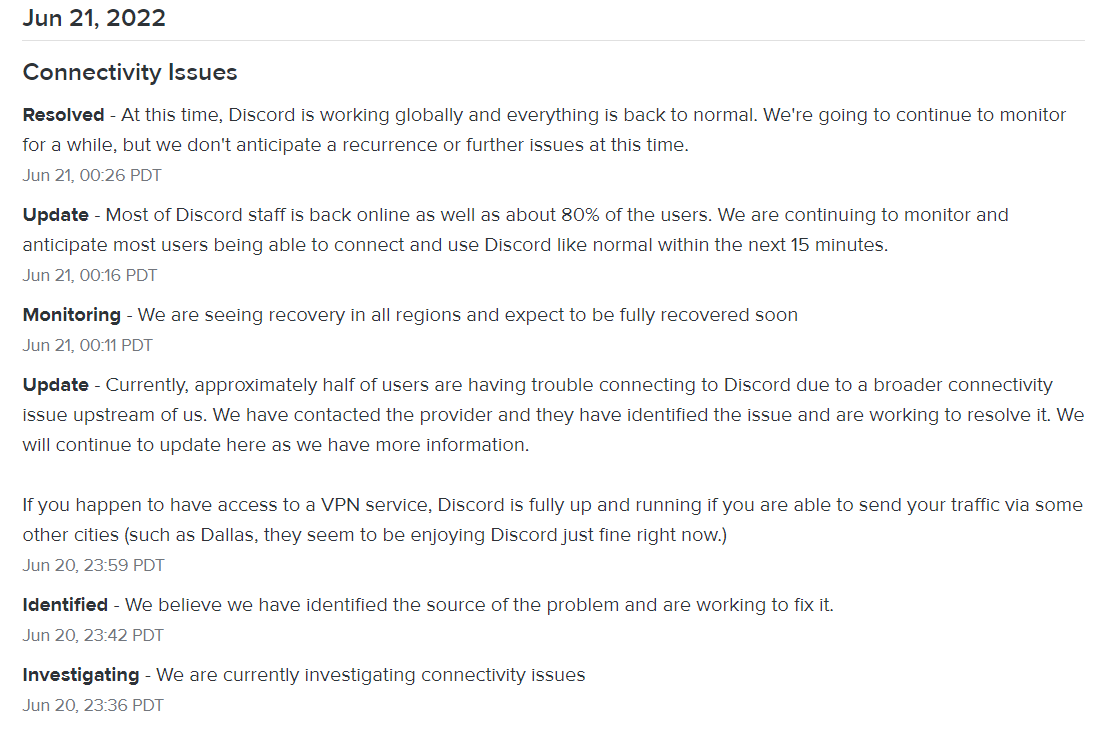
There was a discord outage, it may take time to get things back to normal.
https://i.imgur.com/Lk9HFWG.png
 astral reef
slender minnow
There was a discord outage, it may take time to get things back to normal.
http...
astral reef
slender minnow
There was a discord outage, it may take time to get things back to normal.
http...
okey thank you
jade topaz
why is he offline
 slender minnow
There was a discord outage, it may take time to get things back to normal.
http...
slender minnow
slender minnow
There was a discord outage, it may take time to get things back to normal.
http...
@jade topaz refer this
scenic plinth
Can you... read above 2 messages...?
 Bot offline, help me
In case you have not given #📣│bot-news a good look, Discord started to have issues with API, meaning half of Discord users could not connect to Discord. Ticket Tool is one of the many "major" bots that went offline due to this.
Some servers are working, such as ours. If your bot is offline, all you can do is be patient and read #📣│bot-news or this channel from support members regarding the bot coming online. The Developer is very well aware as other bot developers and is working hard to get the bot back online fully for you all.
- And no, we do not have an ETA on the bot being back fully, so avoid asking
All servers should be back online fully.
Can you... read above 0 message.. ?
 cosmic hazel
Can anyone help me how to enable claim option
humble sequoiaBOT
How does the claim command work?
Ticket Tool claiming is a premium only command that allows your support team to claim tickets and have the ticket renamed, changed permissions or moved to another category
gilded verge
Claim option is premium feature
craggy geyser
gilded verge
Claim option is premium feature <:premium_red:662032717906444329>
They made a ticket too. So been double answered now
gilded verge
oh, okay
craggy geyser
I don't understand why people feel the need to ask in multiple channels
gilded verge
I guess they think they'll get an answer that way faster 😐

 slender minnow
jade topaz
slender minnow
jade topaz
Hey, can you check and let me know which bot you are using?
jade topaz
slender minnow
Hey, can you check and let me know which bot you are using?
@pseudo glen
slender minnow
and does it has permission to view channels?
jade topaz
slender minnow
and does it has permission to view channels?
Yes It Does
slender minnow
jade topaz
Yes It Does
can I have your server id?
jade topaz
slender minnow
can I have your server id?
@silk sun
jade topaz
slender minnow
can I have your server id?
988467025234001991
slender minnow
jade topaz
<@988467025234001991>
seems like you have invited the premium bot instead of primary bot
you need to invite the primary bot as your server is not on an active premium plan
jade topaz
slender minnow
seems like you have invited the premium bot instead of primary bot
Oh th
bruh i added @pseudo glen only
slender minnow
jade topaz
bruh i added <@557628352828014614> only
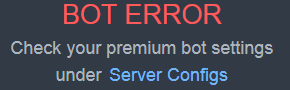
this error is what's causing you the problem ^^;
https://i.imgur.com/QR0YFNi.png
 jade topaz
slender minnow
this error is what's causing you the problem ^^;
https://i.imgur.com/QR0YFNi.png
jade topaz
slender minnow
this error is what's causing you the problem ^^;
https://i.imgur.com/QR0YFNi.png
Yes
slender minnow
head to server configs, and under premium bot category dropdown select Ticket Tool#4843
 jade topaz
breh i hve added both but it aint working
slender minnow
can you kick both the bots and re invite the primary bot using
https://discord.com/oauth2/authorize?client_id=557628352828014614&scope=applications.commands+bot&permissions=2416045072
@jade topaz ^
jade topaz
slender minnow
<@456226577798135808> ^
bruh
 slender minnow
head to server configs
jade topaz
slender minnow
head to server configs
 slender minnow
jade topaz
slender minnow
jade topaz
select primary bot from this ddrop down
https://i.imgur.com/Fb3p32B.png
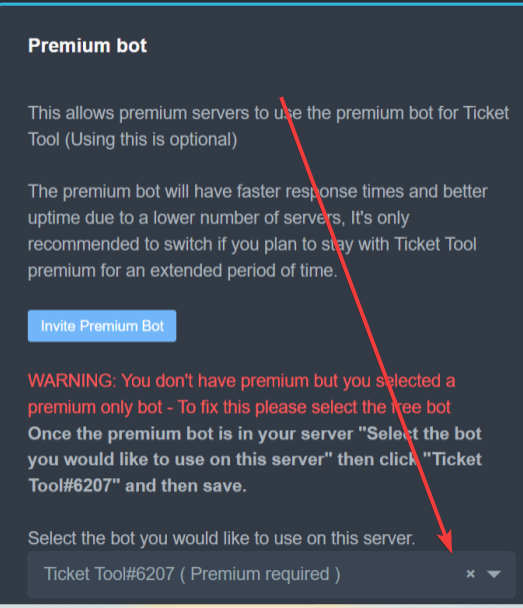

 stark cloud
Is there a way I can view deleted tickets?
slender minnow
jade topaz
click save
slender minnow
stark cloud
Is there a way I can view deleted tickets?
if they were transcripted? sure
jade topaz
slender minnow
click save
 stark cloud
slender minnow
if they were transcripted? sure
stark cloud
slender minnow
if they were transcripted? sure
Do they have to be transcripted manually or is it automatically?
slender minnow
jade topaz
now try using the commands
slender minnow
stark cloud
Do they have to be transcripted manually or is it automatically?
either
as long as you have the transcript saved by the bot, you can view the saved ticket
https://i.imgur.com/2AVqOIn.png
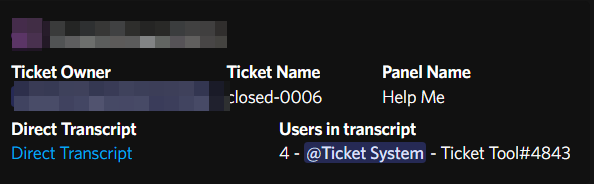 jade topaz
slender minnow
now try using the commands
jade topaz
slender minnow
now try using the commands
Ty Works
iron nightBOT
Gave +1 Rep to @slender minnow
stark cloud
slender minnow
as long as you have the transcript saved by the bot, you can view the saved tick...
How can I check the transcripts, where can I find them?
slender minnow
stark cloud
How can I check the transcripts, where can I find them?
you save transcripts once a ticket is closed (using the transcript button) and its saved in the ticket (if no transcript channel is specified) or is sent to a specified channel
iron nightBOT
Gave up trying to execute custom command #11 after 1 minute because there is already one or more instances of it being executed.
 naive canyon
What does Dashboard roles mean?
craggy geyser
Answered in ticket
shut bolt
You'll need to click the Transcript button on your Moderator's message, or use the $transcript command, make sure you've set a transcript channel as shown on the next message

$help transcript
humble sequoiaBOT
How do I save transcript to a channel?
To save transcripts to a channel go to the Dashboard -> Panel Configs -> Settings -> Logging Options -> Transcript Channel
 marsh bay
thanks!
shut bolt
Sure
humble sequoiaBOT
For a more convenient use of multipanels, you can now combine panels on the dashboard. This will allow you to directly send the multipanel from the dashboard or via the $panel ID command.
Where can I find this?
You can find this setting on the Dashboard -> Panel Configs -> Settings -> General Options
Note: if you're attaching all the panels to a panel called English, don't include English in the attached panels box (If you do this, it will create duplicate)
This will put all buttons from all of your panels on one message. The message is the panel message from the panel you're combining these panels in.
You can also watch this video tutorial.
high oyster
@hollow raft Read the above.
iron nightBOT
Gave +1 Rep to @high oyster
high oyster
 hollow raft
Thanks <@922820920882626571>
hollow raft
Thanks <@922820920882626571>
No problem, have an amazing rest of your day.
hollow raft
high oyster
No problem, have an amazing rest of your day.
You to.
tawdry linden
Bot seems to not be working in a server, when I try close or make a ticket it says 'this interaction failed'
shut bolt
tawdry linden
Bot seems to not be working in a server, when I try close or make a ticket it sa...
Has the bot been removed from the server?
tawdry linden
ah, thats it, a different bot banned it for deleting channels lmao
shut bolt
Glad to hear you figured it out 
tawdry linden

jade topaz
How can I make a Support ticket link for my server?
shut bolt
jade topaz
How can I make a Support ticket link for my server?
You mean how to set the bot for your server?
jade topaz
Yeah
humble sequoiaBOT
You can check our documentation here;
You can also check #📂│information for the basic setup;
You can also watch this video tutorial.
Our documentation contains all the info you need about the bot to be able to setup and configure the bot however you like.
shut bolt
Check this guide out
jade topaz
Thanks
shut bolt
hollow raft
How do I make a claim ticket botton inside the ticket?
jade topaz
Help
How can I make the ticket massage?
Like the this

@shut bolt
@high oyster
Bro help
 covert swallow
Be patient
humble sequoiaBOT
The Ticket Message is the first message sent by the bot in a new ticket. To customise it head over to your Dashboard ➞ Panel Configs ➞ Settings ➞ Ticket Options ➞ Edit Ticket Message
 unkempt vector
I need help
humble sequoiaBOT
We would love to help you, but if you don't tell us what you need help with we can't help you :(
unkempt vector
how can i move my ticket from top into the right place below this look at the Screenshot

if i open a ticket then it goes straight to the top
humble sequoiaBOT
How to set the open category
To set a open category go to the Dashboard -> Panel Configs -> Settings -> Category Options -> Category Open
unkempt vector
humble sequoia
i cant see my section there, what's the problem then ?
unkempt vector
i didn't work
quasi cliff
Screenshot pls
unkempt vector
idon't know why
just a moment


if you want i can show it on screen, do you have time to call and then i show you my screen
quasi cliff
This should be fixed by refreshing the page actually but if it doesn't then try logging out and in
unkempt vector
it didnt't work
quasi cliff
Did you try relog
quasi cliff
Can you check if bot can see those categories
unkempt vector
quasi cliff
Can you check if bot can see those categories
where ?👍
quasi cliff
unkempt vector
If bot can see the "Ticket" category
unkempt vector
where can i fix that
quasi cliff
unkempt vector
You have the ticket panel message in the #support-ticket, right?
The "create ticket" button
quasi cliff
So bot should already have perms 🤔
radiant moss
Hey @unkempt vector I am going to create your a ticket and I will help you there
jade topaz
w
 deep pumice
humble sequoiaBOT
deep pumice
humble sequoiaBOT
Don't see your server in the dashboard?
You will possibly need to relog. Look below to see steps on how to relog.
How to relog in the Dashboard.
First, you will need to go to the dashboard. Once your there, click on your avatar on the top right. after you clicked it, you will see button that says Logout. You must click that. Once you have logged out, you can log back in.
Note:
You need one of these 3 things to access the dashboard.
1. Server Owner (Level: 6)
2. Server Administrator (Level: 4)
3. Dashboard Role (Level: 2)
:warning: You can check your level using $level on your Discord Server
User permission level with Ticket Tool
@User is permission level: 0 (User)
```» *If it shows that your permission is **0**, you don't have any of the above **3 things** to manage the dashboard.*


**See the GIF below on how to relog:**try
shrewd roost
my verified members cant seem to see the open ticket option?
quasi cliff
shrewd roost
my verified members cant seem to see the open ticket option?
Make sure they have "Read Message" permissions in the channel
jade topaz
how to set ticket name to user name who claimed the ticket
gilded verge
jade topaz
how to set ticket name to user name who claimed the ticket
in your panel settings, like this:

 proven galleon
hi sers
i'd like to set view & send msg permission to user who created ticket
how can i do that ?
quasi cliff
Head over to your Dashboard ➞ Panel Configs ➞ Settings ➞ Permission Options ➞ Edit User Opened Permissions
proven galleon
yes i did
quasi cliff
It won't affect old tickets
quasi cliff
quasi cliff
Head over to your Dashboard ➞ Panel Configs ➞ Settings ➞ Permission Options ➞ Ed...
Did you add "Read Message" and "Send Message" permissions
proven galleon
yes i did
quasi cliff
Make sure you Saved it
 proven galleon
i'm setting up back from the beginning
still the same :((
created user couldn't access ticket

saved, exit & login . i did all
gilded verge
proven galleon
add Read Message History too ^-^
btw i have this perms, maybe that could help you too ^-^ https://cdn.discordapp.com/attachments/979861967936290816/979874986946875412/Panel_Permissions.mp4
proven galleon
i need to fix only for user created permission correct? ser
gilded verge
+Additionally: I have the impression that you are using the "View As Role" option, don't do it because it doesn't work. Use an alternative account, only then you can be sure that you have the right settings.
proven galleon
yes i logged into with alt acc either
quasi cliff
Is the user able to see the channel or they just can't see the old messages
proven galleon
quasi cliff
Is the user able to see the channel or they just can't see the old messages
couldn't even see the
created ticket channel
quasi cliff
And bot says "created #ticket", right?
proven galleon
yes
and i can see created channel as administrator
but not as normal user , i tried with alt acc either
still i couldn't see created ticket channel
quasi cliff
Check the channel (ticket created) perms once, did the bot add user
 gilded needle
In my server, what is the command to make a ticket?
humble sequoiaBOT
━━ moved to ticket ━━
 worthy pine
hello
i tried to invite ticket tool to my server but one of my other servers only appeared
i own 2 servers, one of them only appearing, i tried re-inviting and it didn't work, can someone help me
humble sequoiaBOT
Don't see your server in the dashboard?
You will possibly need to relog. Look below to see steps on how to relog.
How to relog in the Dashboard.
First, you will need to go to the dashboard. Once your there, click on your avatar on the top right. after you clicked it, you will see button that says Logout. You must click that. Once you have logged out, you can log back in.
Note:
You need one of these 3 things to access the dashboard.
1. Server Owner (Level: 6)
2. Server Administrator (Level: 4)
3. Dashboard Role (Level: 2)
:warning: You can check your level using $level on your Discord Server
User permission level with Ticket Tool
@User is permission level: 0 (User)
```» *If it shows that your permission is **0**, you don't have any of the above **3 things** to manage the dashboard.*


**See the GIF below on how to relog:**Hey, @worthy pine please refer the above response ^
Let me know, if there is anything else.
iron nightBOT
Gave +1 Rep to @slender minnow
worthy pine
shut
jade topaz
does anyone know if i can use emojis from my server in a ticket panel?
slender minnow
jade topaz
does anyone know if i can use emojis from my server in a ticket panel?
hi, yes you can
jade topaz
how do i do it? i tried putting the text version in a field but it just showed the text
slender minnow
can i see the screenshot of how you entered it?
jade topaz
 slender minnow
can you try using it with the id?
<:emoji-name:emoji-id>
you can use the id command to get the emoji id
jade topaz
that worked, tysm 🙂
slender minnow
You're welcome, have a great day 
 lime dust
Hello, sorry for my English. But I have a problem and I don’t find the answer.
If someone makes a ticket, and a new channel was created, there is a Tag for the user {user} who hast made the role. But can I make a @jolly ginkgorole in this massage too or something like this, that the supporters gets a notification? I have the free version from the bot.
humble sequoiaBOT
The Ticket Message is the first message sent by the bot in a new ticket. To customise it head over to your Dashboard ➞ Panel Configs ➞ Settings ➞ Ticket Options ➞ Edit Ticket Message
Within all the messages the bot's sends (both embeds and text) you can mention either channels, roles, or even users, these mentions will only send a notification to the user if they are used within a text field, e.g: a role mentioned in an embed won't ping at all the users who have that role.
For mentioning a role you can use one out of three options:
{@Role Name} ➞ Which is Case Sensitive.
{RoleID} ➞ Replace RoleId with the Id of the role you are trying to ping.
<@&RoleID> ➞ Discord's native syntax to ping roles.
<#ChannelID> ➞ Mention a channel by its ID.
<@UserID> ➞ Mention a user by its ID.
quasi cliff
lime dust
Hello, sorry for my English. But I have a problem and I don’t find the answer.
I...
Hey @lime dust, you can simply add that Support role to Ticket Message. Check the above info for help.
I personally recommend using <@&RoleID> for mentioning the role so that you can change role name without editing Ticket Tool settings
This is Free to edit!
jade topaz
How to fix this🥲 I checked dashboard nth times still not get it
 humble sequoiaBOT
Any role you assign as a blacklisted role won't be able to use commands or reactions.
Selecting a blacklisted role
Go to your Dashboard ➞ Server Configs. There you will find the option to select blacklisted roles.
Note: Don't forget to save.
 high oyster
@jade topaz Please refer to the above help sheet.
jade topaz
high oyster
<@456226577798135808> Please refer to the above help sheet.
There is null bl roles
I added one bot role still not working
high oyster
jade topaz
There is null bl roles
Relog just to make sure.
jade topaz
high oyster
Relog just to make sure.

 hollow quail
Heyheyy how do I mention a channel in the ticket welcome message? ik the command to mention role or user but forgot the one for a channel
quasi cliff
jade topaz
Check if you added any role to "Allowed" / "Disabled" roles.
jade topaz
quasi cliff
Check if you added any role to "Allowed" / "Disabled" roles.
thanks but From where-
iron nightBOT
Gave +1 Rep to @quasi cliff
quasi cliff
$buttons
humble sequoiaBOT
The new Discord Buttons allow for a much smoother and convenient experience. They reduce lag and work much better than emojis. With ticket tool you can edit all the buttons however you like! Buttons can show emojis, text and can have 4 different colors.
Where can I edit them?
Dashboard ➞ Panel Configs ➞ Settings ➞ Button Options ➞ Setting
quasi cliff
jade topaz
thanks but From where-
quasi cliff
hollow quail
Heyheyy how do I mention a channel in the ticket welcome message? ik the command...
Hey, just like you mention role, simply add <#Channel_ID> in Ticket Message.
jade topaz
quasi cliff
<:this:894279341108772914>
Thanks
quasi cliff
If you require any further information, let me know.
 brisk trellis
I can’t add ticket tool to a server I’m setting up
I go through all the actions but it’s not showing up
humble sequoiaBOT
Don't see your server in the dashboard?
You will possibly need to relog. Look below to see steps on how to relog.
How to relog in the Dashboard.
First, you will need to go to the dashboard. Once your there, click on your avatar on the top right. after you clicked it, you will see button that says Logout. You must click that. Once you have logged out, you can log back in.
Note:
You need one of these 3 things to access the dashboard.
1. Server Owner (Level: 6)
2. Server Administrator (Level: 4)
3. Dashboard Role (Level: 2)
:warning: You can check your level using $level on your Discord Server
User permission level with Ticket Tool
@User is permission level: 0 (User)
```» *If it shows that your permission is **0**, you don't have any of the above **3 things** to manage the dashboard.*


**See the GIF below on how to relog:**Try this
If you mean you can't add it to a server, you'll need Manage Server perms
Or administrator
But to do the full setup manage server isn't enough
 proper folio
hello, can someone tell me how to enable transcripts in my server ( without premium)
shut bolt
proper folio
hello, can someone tell me how to enable transcripts in my server ( without prem...
$help transcript
humble sequoiaBOT
How do I save transcript to a channel?
To save transcripts to a channel go to the Dashboard -> Panel Configs -> Settings -> Logging Options -> Transcript Channel
brisk trellis
shut bolt
Or administrator
I am
shut bolt
Click on the transcript button
proper folio
alrr tysm
shut bolt
brisk trellis
I am
Then read the message I sent above
brisk trellis
shut bolt
Then read the message I sent above
I have every permission I can add assigned to my role. Do I need more still?
high oyster
jade topaz
Sorry that I went afk like that.
proper folio
shut bolt
$help transcript
hi, im not even getting an option to generate a transcript when im closing it
shut bolt
brisk trellis
I have every permission I can add assigned to my role. Do I need more still?
Read the whole embed I sent, it's a process to do
shut bolt
proper folio
hi, im not even getting an option to generate a transcript when im closing it
Is the ticket getting automatically deleted after that
proper folio
shut bolt
Is the ticket getting automatically deleted after that
yepp
when i click on close it gets deleted
 shut bolt
proper folio
yepp
shut bolt
proper folio
yepp
Go into the panel settings
General Options
Enable the two step ticket
If you need further help please open a ticket since I'm about to be unavailable
proper folio
shut bolt
Enable the two step ticket
it worked thanks!
iron nightBOT
Gave +1 Rep to @shut bolt
 compact loom
Who know how to make time for tecket to auto close.I mean when player take a ticket more then 1 day its auto detele the tecket
jade topaz
How to put ticket in my server
 neat helm
jade topaz
How to put ticket in my server
neat helm
jade topaz
How to put ticket in my server
I'm not staff but go tohttps://docs.tickettool.xyz/ to get more information

Ticketing without Clutter
shut bolt
proper folio
it worked thanks!
shut bolt
 atomic sedge
one here?
atomic sedge
one here?
If you have a question don't ask to ask, just ask directly and don't try at all pinging us
shut bolt
$help category
humble sequoiaBOT
How to set the open category
To set a open category go to the Dashboard -> Panel Configs -> Settings -> Category Options -> Category Open
shut bolt
Assign a category as shown above and new tickets will be created there
shut bolt
Sure, let me know how it goes
atomic sedge
shut bolt
If you have a question don't ask to ask, just ask directly and don't try at all ...
Sorry
 haughty musk
shut bolt
Sure, let me know how it goes
haughty musk
shut bolt
Sure, let me know how it goes
thanks it worked out!
iron nightBOT
Gave +1 Rep to @shut bolt
atomic sedge
But how can I buy Premium؟
shut bolt
haughty musk
thanks it worked out!
Sure!
shut bolt
atomic sedge
But how can I buy Premium؟
Check the message below
humble sequoiaBOT
Ticket Tool Premium
Get premium at https://tickettool.xyz/premium
Manage your subscriptions at https://tickettool.xyz/subscriptions
Why Premium?
Premium lets you customize the bot just how you want it. It also helps keep the bot running.
shut bolt
jade topaz
what can I do when Ticket Tool kicks a member (with the support role) who claimed and closed the ticket? it's quite annoying for my mods because they can't delete ticket 
quasi cliff
jade topaz
what can I do when Ticket Tool kicks a member (with the support role) who claime...
Can you describe a bit more and be clear, Ticket Tool doesnt kick members 🤔
quasi cliff
so like removing the support member?
jade topaz
yes
quasi cliff
Why would Ticket Tool remove the Support member who claimed ticket
It doesn't remove the person who claimed it, unless used $remove @user
 silk chasm
jade topaz
yes
silk chasm
jade topaz
yes
do you still need help?
jade topaz
no
 zinc wyvern
As a ticket tool user, do I need to click "close" on the ticket for it to actually get looked it, or should close only be use when it's resolved?
 zinc wyvern
Opened this ticket and have gotten zero response
I understand, I'm asking how the bot works - is the ticket created and open for support when I make it, or do I need to click "close" for it to go into their queue to be addressed?
zinc wyvern
Ok, so the purpose of the "close" button is like any normal help ticket - "This issue is resolved, closing the ticket"
quasi cliff
yes
zinc wyvern
Copy that. It's for the Kingdom Guard game, which has incredibly slow/terrible support anyways...I was just making sure it wasn't my fault this time
quasi cliff
Hope you get a reply from them soon!
quasi cliff
I haven't, maybe you can find interested people in #💬│general-chat
zinc wyvern
I couldn't in good conscience try to get anyone else to play this game
Anyways, thanks for the clarification on how your tool works. You've been a big help
 bright reef
Does this bot have a feature where they cannot open another ticket within a certain amount of time?
I would like it where if they open a shop ticket, they can't open another one 24 hours
quasi cliff
Hey Lexii, there is no time defined cooldown but you can limit them based on count, for example: Max 5 tickets per panel or max 10 tickets globally in the server
The count is reset to 0 once the previous ticket is closed
bright reef
Yea but the problem is the open one close it than immediately open another one
quasi cliff
You can simply close them afterwards if they still need a ticket
 thorny crag
okej, a więc generalnie jestem zielona, ale potrzebuję pomocy w odebraniu głosów na premkę 😌
humble sequoiaBOT
How to redeem premium (Key)
To redeem your premium key, go to the dashboard, select your server, then click " Redeem Premium" under the server's icon and name.
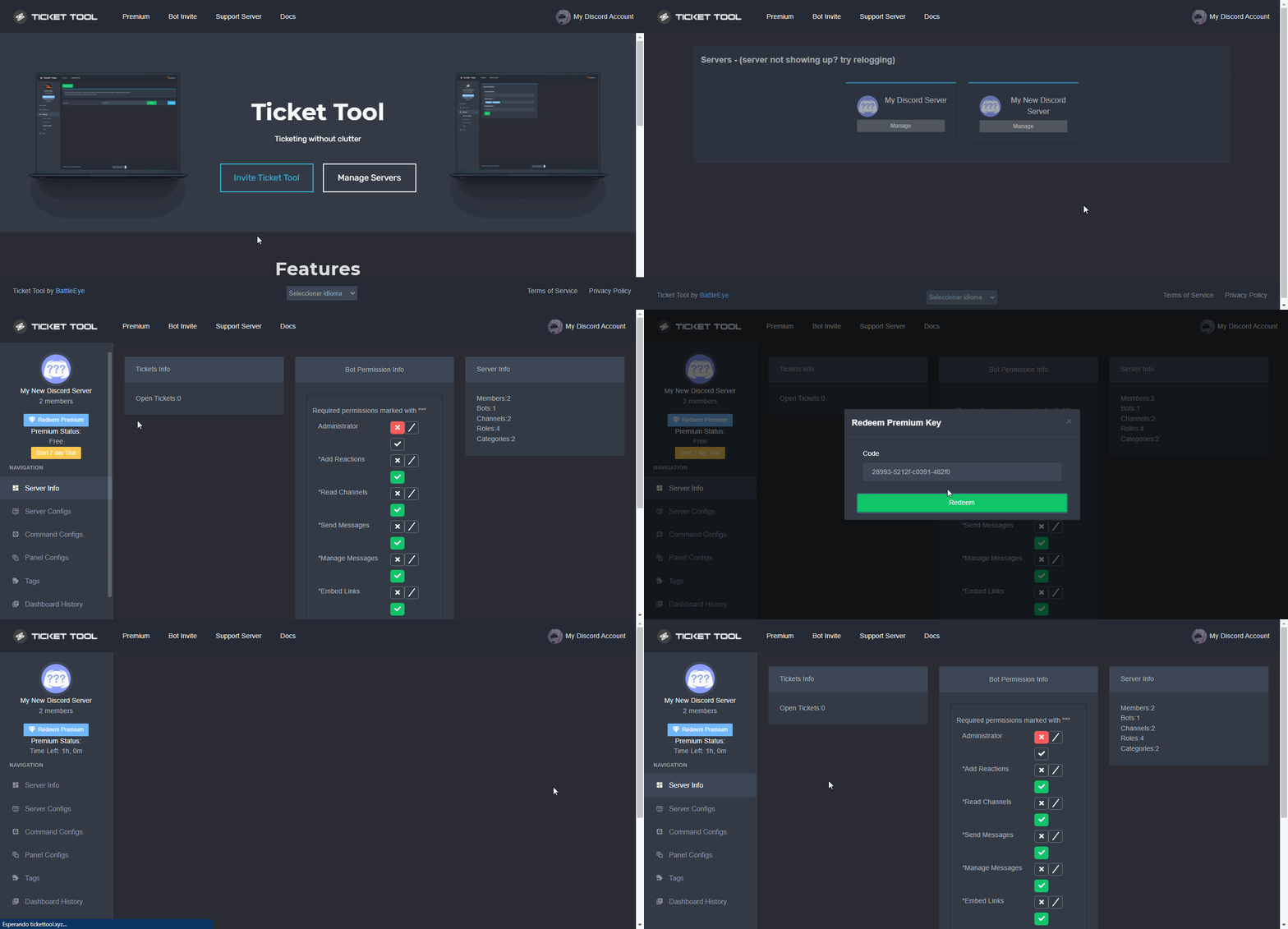 gilded verge
humble sequoia
gilded verge
humble sequoia
@thorny crag, Gdy używasz komendy $vote, to pojawia Ci się taka wiadomość (przykład na screenie poniżej) i tam na samym dole masz informację: "To redeem your current votes use $vote redeem", czyli używasz komendy $vote redeem (na swoim serwerze, lub tutaj na kanale #🤖│bot-spam ) a potem bot Ticket Tool wysyła Ci wiadomość prywatną z kodem, który odbierasz na stronie. Tak jak tutaj
 thorny crag
omg thanks @gilded verge
iron nightBOT
Gave +1 Rep to @gilded verge
gilded verge
welcome 😊
 wooden shadow
Hi there, my TicketTool is no longer moving channels to the closed ticket group.
Thoughts?
quasi cliff
Categories have a limit of 50 channels
You can add another category to your "Closed Category" section on dashboard
iron nightBOT
Gave +1 Rep to @quasi cliff
quasi cliff
If you require any further information, let me know.
lime dust
quasi cliff
Hey <@646798359222288384>, you can simply add that Support role to Ticket Messag...
Thank you for your help 👍
iron nightBOT
Gave +1 Rep to @quasi cliff
 humble sequoiaBOT
For a more convenient use of multipanels, you can now combine panels on the dashboard. This will allow you to directly send the multipanel from the dashboard or via the $panel ID command.
Where can I find this?
You can find this setting on the Dashboard -> Panel Configs -> Settings -> General Options
Note: if you're attaching all the panels to a panel called English, don't include English in the attached panels box (If you do this, it will create duplicate)
This will put all buttons from all of your panels on one message. The message is the panel message from the panel you're combining these panels in.
You can also watch this video tutorial.
shut bolt
jade topaz
how do i add multiple buttons
Check the message above, it also has a video tutorial from our channel if the guide doesn't seem clear enough
jade topaz
How to setup tickets
humble sequoiaBOT
You can check our documentation here;
You can also check #📂│information for the basic setup;
You can also watch this video tutorial.
Our documentation contains all the info you need about the bot to be able to setup and configure the bot however you like.
 timid grail
How do you view transcripts?
 quartz vault
How u get a ticket
humble sequoiaBOT
How do I save transcript to a channel?
To save transcripts to a channel go to the Dashboard -> Panel Configs -> Settings -> Logging Options -> Transcript Channel
gilded verge
humble sequoia
@timid grail, First you need to set up a channel for transcription. Then in the ticket you use the command $transcript or the transcript button and then you can see the transcripts on the channel you set.
gilded verge
humble sequoia
@quartz vault, check
quartz vault
Check what
gilded verge
setup...
 quasi portal
hello, is there a way to organize the information of closed tickets?
quartz vault
I need a ticket
gilded verge
quartz vault
I need a ticket
#📂│information -> choose Setup Guide
gilded verge
quasi portal
hello, is there a way to organize the information of closed tickets?
Hey, could you give an example or something of what you mean?
quasi portal
gilded verge
Hey, could you give an example or something of what you mean?
Every ticket is a new channel, is there a way to automatically delete the closed tickets channel and collect the ticket information then restore it somewhere?
 gilded verge
Okay, I can't answer everything (bcs i don't know) so please wait for someone else to help you, or open a ticket and ask Staff 😊 #🎫│make-a-ticket
quartz vault
Hi
 raw birch
 humble sequoiaBOT
You can check our documentation here;
You can also check #📂│information for the basic setup;
You can also watch this video tutorial.
Our documentation contains all the info you need about the bot to be able to setup and configure the bot however you like.
quasi cliff
quasi portal
Every ticket is a new channel, is there a way to automatically delete the closed...
When do you want them to be deleted? Like whenever they are closed? And you can have auto transcript whenever they are closed and/or deleted [Premium]
quasi portal
quasi cliff
When do you want them to be deleted? Like whenever they are closed? And you can...
is delete immediately possible?
quasi cliff
Yes
quasi portal
quasi cliff
Yes
ok I will have a look, thanks
iron nightBOT
Gave +1 Rep to @quasi cliff
quasi cliff
quasi portal
is delete immediately possible?
You can disable two step ticket, witch means when you run $close it deletes.
Dashboard > Panel Configs > Settings > General Options and disable
"Two step ticket"
quartz vault
Wsg
 pine tide
im trying to use my key but it keeps saying error sending data
gilded verge
pine tide
im trying to use my key but it keeps saying error sending data
can you show this error?

 humble sequoiaBOT
⚠️ You're in the wrong place
We provide support for @pseudo glen discord bot and cannot help you with whatever issue you have.
- We don't know which Support Team you should contact to get this issue resolved, and unfortunately we won't be able to accurately tell you.
If you don't have any further questions regarding our bot Ticket Tool, please close this ticket
 gleaming spindle
does this bot have an api?
gilded verge
gleaming spindle
does this bot have an api?
Ticket Tool bot has an api but it is not public
 old owl
Hello
I need help with it requesting my phone number but it says its already used
How do i fix this or bypass this
slender minnow
old owl
I need help with it requesting my phone number but it says its already used
Hey, that's I suppose from discord. Discord requires you to verify your mobile number when you create a new account or if you don't have one linked.
If you already have the number linked to some other account, you will get the error stating that it's already in use. You cannot bypass it, to fix it just use a different mobile number.
 ashen mesa
Hello
I need help
I logging in into tickettool dashboard and i can't find my server i find just 1 server
And i trying to relogging but this didn't work
humble sequoiaBOT
Don't see your server in the dashboard?
You will possibly need to relog. Look below to see steps on how to relog.
How to relog in the Dashboard.
First, you will need to go to the dashboard. Once your there, click on your avatar on the top right. after you clicked it, you will see button that says Logout. You must click that. Once you have logged out, you can log back in.
Note:
You need one of these 3 things to access the dashboard.
1. Server Owner (Level: 6)
2. Server Administrator (Level: 4)
3. Dashboard Role (Level: 2)
:warning: You can check your level using $level on your Discord Server
User permission level with Ticket Tool
@User is permission level: 0 (User)
```» *If it shows that your permission is **0**, you don't have any of the above **3 things** to manage the dashboard.*


**See the GIF below on how to relog:**@ashen mesa, Hey, check all of message
 languid patrol
My question is quick so pls quick answer.
How to edit that?
 gilded verge
languid patrol
My question is quick so pls quick answer.
How to edit that?
gilded verge
languid patrol
My question is quick so pls quick answer.
How to edit that?
you can't edit this message
languid patrol
Even in premium?
gilded verge
only developer can change this message
languid patrol
Which developer
gilded verge
developer of ticket tool 😐
languid patrol
Not a panel?
gilded verge
as I mentioned, nobody except the bot creator can edit this message
craggy geyser
Yet...
languid patrol
I don't think you understand me
I want to change the content of the displayed text in this message
in all that will show up after creating the ticket
humble sequoiaBOT
How can I edit/disable the ephemeral message?
These pop ups can only be seen by the user who triggered a certain action, like creating a ticket. They cannot be edited or disabled, as they are a discord requirement that is set by the developer of any bot. The ephemeral messages can be removed by pressing the little blue Dismiss message text, or by restarting your discord client.
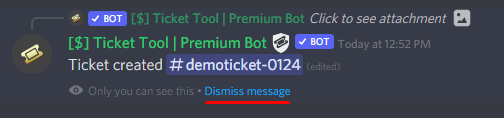 languid patrol
so I just can't change this "Ticket created"?
gilded verge
languid patrol
My question is quick so pls quick answer.
How to edit that?
Okay then, maybe i'll try explain to you in polish (i saw our mutual servers)...
Nie możesz zmienić tekstu wiadomości, który wyświetla się po utworzeniu biletu, czyli tego tekstu co pokazałeś na zrzucie ekranu.
languid patrol
gilded verge
Okay then, maybe i'll try explain to you in polish (i saw our mutual servers)......
Nawet w panelu? I nie ma innej opcji?
gilded verge
languid patrol
Nawet w panelu? I nie ma innej opcji?
Niezbyt rozumiem dlaczego nadal naciskasz z tym pytaniem, bo wspomniałem kilkukrotnie, że nikt oprócz twórców bota nie ma możliwości tego zmienić... To jest tylko zwykła wiadomość, którą w każdej chwili możesz zamknąć bo ona nie robi żadnej różnicy poza tym, że pokazuje dokładny kanał biletu danego użytkownika 😕
także finalnie: Niestety nie możemy zmienić tej wiadomości
languid patrol
gilded verge
także finalnie: Niestety nie możemy zmienić tej wiadomości
Ani ustawić czegoś innego po tym?
gilded verge
uhm... ale co chciałbyś po tym ustawić? potrzebuję przykładu żeby zrozumieć co masz na myśli
languid patrol
Np. wiadomość, która by się wyświetliła przez kilka sekund, a potem usunęła, którą byśmy sami mogli zmodyfikować w panelu
gilded verge
w ten sposób... to nie, taka opcja do tej pory nie powstała. Zresztą deweloperzy by się nie zgodzili na to bo wtedy każdy mógłby robić złe wiadomości a potem twórcy by za to obrywali od Discorda i skończyłoby się to źle a tego nikt nie chce 😐
languid patrol
Przecież jest możliwość zmienienia wszystkiego, więc czemu akurat przez to, by mieli obrywać?
gilded verge
Nie wszystko jesteśmy w stanie zrozumieć i prawdopodobnie tak powinno zostać. Wracając do tematu... Takiej możliwości nie było a narazie nie zapowiada się aby ta opcja była dostępna.
jade topaz
how do i remove the transcript thing
gilded verge
jade topaz
how do i remove the transcript thing
Could you show in the screenshot what exactly would you like to remove, please?
 gilded verge
but you want to delete only the text or the buttons below this text?
 finite remnant
hey, I need help with an issue. I have set up a ticket bot and I have a rection role verification system in place. The problem is when I create ticket as a verified role I can't access the created ticket channel and if I allow that verified role then every verified member have access to the created ticket channel.
so how do I tackle this problem?
jade topaz
so transcript open and delete arent there
finite remnant
finite remnant
hey, I need help with an issue. I have set up a ticket bot and I have a rection ...
@forest goblet
gilded verge
jade topaz
so transcript open and delete arent there
oh, then go to Panel Configs->Panel Settings->Expand Button Options->Transcript Settings->screenshot->and Save
 finite remnant
gilded verge
oh, then go to `Panel Configs`->`Panel Settings`->Expand `Button Options`->`Tran...
finite remnant
gilded verge
oh, then go to `Panel Configs`->`Panel Settings`->Expand `Button Options`->`Tran...
hey please help with my issue, thanks 😊
iron nightBOT
Gave +1 Rep to @gilded verge
gilded verge
finite remnant
hey please help with my issue, thanks 😊
i'm trying to understand how i can help you, give me a minute...
wait.... do you use View As Role or alternative account ?
let's try with ping...
@finite remnant, do you use View As Role or alternative account?
finite remnant
gilded verge
*let's try with ping*...
<@918963462095400970>, do you use `View As Role` or al...
I tried both
languid patrol
How to edit this message?
 gilded verge
finite remnant
I tried both
gilded verge
finite remnant
I tried both
*so remember, View As Role does not work as it should (with tickets)
I recommend these permissions, that can help you: https://cdn.discordapp.com/attachments/979861967936290816/979874986946875412/Panel_Permissions.mp4
gilded verge
languid patrol
How to edit this message?
same situation as before, currently you can't edit this message (probably this editing is planned but im not sure so I do not confirm for sure if it will be available)
finite remnant
gilded verge
*so remember, `View As Role` does not work as it should (with tickets)
I recomm...
From alternate account it's showing you don't have permission to use this...
languid patrol
gilded verge
same situation as before, currently you can't edit this message (probably this e...
Thx
iron nightBOT
Gave +1 Rep to @gilded verge
gilded verge
finite remnant
From alternate account it's showing you don't have permission to use this...
Please make sure that the given role of the alternate account is not blacklisted (in Sever Configs)
 languid patrol
and probably the last one, can it be modified without premium? same as "Opened"
 gilded verge
Please make sure that the given role of the alternate account is not blacklisted...
gilded verge
gilded verge
Please make sure that the given role of the alternate account is not blacklisted...
*or in alt account you have a role that is added to the Disabled Roles (Panel Settings->Button options)
gilded verge
languid patrol
and probably the last one, can it be modified without premium? same as "Opened"
unfortunately not, this is premium feature
 languid patrol
gilded verge
unfortunately not, this is premium feature <:premium_red:662032717906444329>
languid patrol
gilded verge
unfortunately not, this is premium feature <:premium_red:662032717906444329>
Thx
iron nightBOT
Gave +1 Rep to @gilded verge
gilded verge
you're welcome 😊
finite remnant
gilded verge
Please make sure that the given role of the alternate account is not blacklisted...
Nope it isn't, I only blacklisted everyone role and alternative account got verified role.
gilded verge
wait, so to Blacklist Roles you add everyone?
finite remnant
Yep
gilded verge
oh... this is problem, delete everyone from blacklist ^-^
finite remnant
Ok, 😅
finite remnant
gilded verge
*so remember, `View As Role` does not work as it should (with tickets)
I recomm...
Saving settings will work or I have to send ticket message ( panel) again?
gilded verge
just save ^-^
if you want to give reputation point, you need send message, no edit ^-^
you're welcome 😊
finite remnant
Everything is working fine, thanks @gilded verge 😊🙌
iron nightBOT
Gave +1 Rep to @gilded verge
quartz vault
Wap
 opaque helm
Ok i had a question is there any way I can get the bot to keep the channel name as ticket-[username]?
Also how do I get the transcript feature to work?
quartz vault
How do I make a ticket
gilded verge
opaque helm
Ok i had a question is there any way I can get the bot to keep the channel name ...
Ofc, but to change that, your server need premium
anyway, this is the answer.:
Dashboard-Panel Configs->Panel Settings->Expand Ticket Options->Ticket Opened channel name-> use {author.name}
 humble sequoiaBOT
How do I save transcript to a channel?
To save transcripts to a channel go to the Dashboard -> Panel Configs -> Settings -> Logging Options -> Transcript Channel
gilded verge
humble sequoia
once you do this, on the ticket channel you use the command $transcript or the transcript button
 light tinsel
hello
i have added ticket bot to my server, but when i go to dashboard i don't see it

any help here??
humble sequoiaBOT
Don't see your server in the dashboard?
You will possibly need to relog. Look below to see steps on how to relog.
How to relog in the Dashboard.
First, you will need to go to the dashboard. Once your there, click on your avatar on the top right. after you clicked it, you will see button that says Logout. You must click that. Once you have logged out, you can log back in.
Note:
You need one of these 3 things to access the dashboard.
1. Server Owner (Level: 6)
2. Server Administrator (Level: 4)
3. Dashboard Role (Level: 2)
:warning: You can check your level using $level on your Discord Server
User permission level with Ticket Tool
@User is permission level: 0 (User)
```» *If it shows that your permission is **0**, you don't have any of the above **3 things** to manage the dashboard.*


**See the GIF below on how to relog:**check
iron nightBOT
Gave +1 Rep to @humble sequoia
 digital dune
Cant seem to figure this out. Everytime someone opens up a ticket the entire server can see it. Cant figure it out at all
quasi cliff
$kv
humble sequoiaBOT
How to hide tickets from everyone
Head over to your Dashboard ➞ Panel Configs ➞ Settings ➞ Permission Options ➞ Edit Everyone Roles Opened Permissions

NOTE that @everyone can type aswell if it has permissions to send messages
quasi cliff
digital dune
Cant seem to figure this out. Everytime someone opens up a ticket the entire ser...
digital dune
quasi cliff
<:this:894279341108772914>
❤️
haughty grail
Does anyone know how to contact technical support?
quasi cliff
Do you need help with Ticket Tool bot?
humble sequoiaBOT
⚠️ You're in the wrong place
We provide support for @pseudo glen discord bot and cannot help you with whatever issue you have.
- We don't know which Support Team you should contact to get this issue resolved, and unfortunately we won't be able to accurately tell you.
If you don't have any further questions regarding our bot Ticket Tool, please close this ticket
haughty grail
or another discord channel
quasi cliff
Not in this server, sorry
 quartz basin
Lll
 jaunty coral
no one know if you can edit this message ?
https://imgur.com/ejZGS1P.png
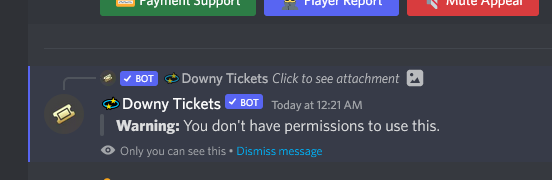
if so where
humble sequoiaBOT
How can I edit/disable the ephemeral message?
These pop ups can only be seen by the user who triggered a certain action, like creating a ticket. They cannot be edited or disabled, as they are a discord requirement that is set by the developer of any bot. The ephemeral messages can be removed by pressing the little blue Dismiss message text, or by restarting your discord client.
 granite lintel
craggy geyser
$epmessage
granite lintel
craggy geyser
$epmessage
can you reply me in #989533164894560327
 lone coyote
アルファテスターに申請します

 reef geyser
Hi everyone. I have a question. The roles cant see the tickets. They can create one but the ticket doesn't appear. Can anyone help?
humble sequoiaBOT
⚠️ You're in the wrong place
We provide support for @pseudo glen discord bot and cannot help you with whatever issue you have.
- We don't know which Support Team you should contact to get this issue resolved, and unfortunately we won't be able to accurately tell you.
If you don't have any further questions regarding our bot Ticket Tool, please close this ticket
high oyster
@lone coyote ^^
 copper blade
is there any way to configure the bot to auto-delete tickets a few seconds (or immediately after) they are closed?
quasi cliff
copper blade
is there any way to configure the bot to auto-delete tickets a few seconds (or i...
You can disable two step ticket, witch means when you run $close it deletes.
Dashboard > Panel Configs > Settings > General Options and disable
copper blade
quasi cliff
You can disable two step ticket, witch means when you run $close it deletes.
> D...
sweet, i'll try that, thanks
iron nightBOT
Gave +1 Rep to @quasi cliff
quasi cliff
If you require any further information, let me know.
spiral aurora
how can I custom change the color of the panel? It won't let me type the hex I want
copper blade
just a minor followup, when the transcript msg is printed, it includes a panel like this in the msg

is this necessary, or can it be turned off somewhere
quasi cliff
copper blade
is this necessary, or can it be turned off somewhere
That is the text which is actually the transcript and the one you see by clicking direct link is representation of that particular text so it should be necessary iirc, you can change the embed text attached accordingly with premium
copper blade
yeah, i've changed the text below it in the embed, wasn't sure if the above one was needed (or if it needed to be so spammy with the server, channel, messages, attachments lines)
quasi cliff
it's the html file so necessary as far as I know
copper blade
hmm i see
this part isnt in the transcript tho, but i guess there's no way to disable or remove it
 quasi cliff
No way to remove as of now, also it looks like a file on mobile without that content visible.
copper blade
okay, thanks
quasi cliff
spiral aurora
how can I custom change the color of the panel? It won't let me type the hex I w...
You can simply use the selector option

 agile roost
hi guys
 dull burrow
Hiii

 dull burrow
yea
agile roost
which should i choose to proceed
dull burrow
now just select a channel where you want the panel to be in
and press "send" check your channel in discord there should be an embed with buttons
after clicking the button a channel should be created named "ticket-xxx"
agile roost
 dull burrow
exactly
agile roost
after that?
dull burrow
now you can press on "create a ticket" and a ticket will be made
quasi cliff
It doesn't goto panel's message
Re-open button is in Moderator message or by $open command
agile roost
dull burrow
look in pinned messages and click "re-open ticket"
sry im lost at here
agile roost
quasi cliff
Re-open button is in Moderator message or by `$open` command
how do i access the re-open button
dull burrow
ehh
agile roost
i tried to $open but only says
 quasi cliff
you need to try in ticket itself
agile roost
would i be able to open in a new ticket?
dull burrow
 agile roost
cause that ticket already closed
humble sequoiaBOT
We would love to help you, but if you don't tell us what you need help with we can't help you :(
 worn folio
Everytime I create a pannel and ask to send it on a chat, nothing happens. when i try again it asks to use $debug, I do type $debug and nothing happens again
quasi cliff
Is the bot having permissions in that channel?
spiral aurora
quasi cliff
You can simply use the selector option
yeah, but it's hard to get a certain color. super easy to just type it in
worn folio
yea check it out
 agile roost
dull burrow
agile roost
dull burrow
cant seem to locate the trancript open and delete button
worn folio
the ticket tool is the role that the bot is inside, it has full permissions
quasi cliff
spiral aurora
yeah, but it's hard to get a certain color. super easy to just type it in
I've added that to Bug report, can expect it to be fixed in next update (No ETA)
 quasi cliff
Try @Ticket Tool#4843 debug


 quasi cliff
That's the bot ping and not role ping right
worn folio
ah you mean the role
worn folio
yeah, wont work either
quasi cliff
worn folio
yeah full green for him
Send message and Embed too, right?
 feral mauve
Why does this appear to me?
 worn folio
quasi cliff
Send message and Embed too, right?
worn folio
quasi cliff
Send message and Embed too, right?
uhum, all the tags
quasi cliff
Is the bot online for you and has status?
worn folio
 quasi cliff
feral mauve
Why does this appear to me?
quasi cliff
feral mauve
Why does this appear to me?
Hey, you changed the Global limit to 0. Make sure to increase it
feral mauve
Where do I find this global limit?
quasi cliff
worn folio
Check Dashboard > Server Config > Make sure you have selected the free bot with #4843 tag
 quasi cliff
feral mauve
Where do I find this global limit?
quasi cliff
feral mauve
Where do I find this global limit?
Dashboard ➞ Server Configs ➞ Global Ticket Limit ➞ General Options
worn folio
quasi cliff
Check Dashboard > Server Config > Make sure you have selected the free bot with ...
my account has premium tho
at least 7 days one, but let me try
AAAAA bc i didnt invite the premium bot
quasi cliff
Still you are using the Free Bot with premium features
worn folio
THATS IT