#🆘│community-support
1 messages · Page 412 of 1
 iron nightBOT
 eternal vale
helo
ltttle noobu moko here. would rely love some help., maybe jus hope in call with me for 5 mins? il tip ya
 rigid fern
is there any way through which i can get the info back of deleted ticket channels
i just forgot to save the transcript of the ticket channel and deleted it :(
 kind hawk
 jade topaz
I cant creat my panel tool
jade topaz
I cant creat my panel tool
what do you mean ? you just don't see your server on the dashboard?
kind hawk
eternal vale
ltttle noobu moko here. would rely love some help., maybe jus hope in call with ...
We do not help in VC since it's way easier here in chat
kind hawk
rigid fern
is there any way through which i can get the info back of deleted ticket channel...
Sadly, no.
rigid fern
kind hawk
Sadly, no.
🥲, thx for the info
iron nightBOT
Gave +1 Rep to @kind hawk
 crimson void
 cloud orbit
Were arabic support?
cloud orbit
Were arabic support?
ياهلا؟
crimson void
قول
cloud orbit
crimson void
قول
كيف اخلي التكت يخلي الناس اللي عندهم رتبه يشوفوه؟
crimson void
قصدك رتب السبورت ؟
cloud orbit
يب
cloud orbit
crimson void
قصدك رتب السبورت ؟
كيف اسويها؟
 humble sequoiaBOT
How to let support team see into a ticket
About support roles
A support role lets your support team see into tickets with out having to add them manually to each and every ticket.
You can add as many support roles as you like per panel.
NOTE that the way discord works all admins can see into tickets regardless of this.
How to set a support role
To set a Support role go to the Dashboard -> Panel Configs -> Settings -> General Options -> Support Team Roles.

NOTE that the support role will not be able to see into tickets that are already created..
crimson void
@cloud orbit ^^
 heavy schooner
Hello. I want to use this bot I have already premium
But the ticket sent from this @pseudo glen
<@&642118166243311646>
crimson void
heavy schooner
But the ticket sent from this <@557628352828014614>
كيف اقدر اخدمك ؟ ايش المشكله بالضبط .
heavy schooner
ابي التذكره أسويها من البوت البريميوم
يعني لما ارسلها تنرسل من البوت العادي ليش ؟
jade topaz
السلام عليكم ليش مقدر اسوي تكت في سيرفري؟؟
crimson void
heavy schooner
ابي التذكره أسويها من البوت البريميوم
لازم تختارين البوت البريميوم كـ أساسي
heavy schooner
اعطي البوت رول عالي
heavy schooner
crimson void
لازم تختارين البوت البريميوم كـ أساسي
من وين
crimson void
$arpremiumbot
humble sequoiaBOT
دعوة واختيار البريميوم بوت
أول شيء عليك القيام به هو دعوة بوت البريميوم ، ويمكن العثور على الدعوة هنا
بمجرد أن يكون بوت البريميوم في سيرفرك ، سننتقل إلى لوحة التحكم وتختار سيرفرك. عندما تختار السيرفر الخاص بك ، فأنت تريد التوجه إلى "Server Configs" ثم النقر فوق القائمة المنسدلة ضمن "حدد الروبوت الذي ترغب في استخدامه على هذا السيرفر" ثم انقر فوق "Ticket Tool
#6207" ثم احفظ.
 crimson void
ماعليك من الترجمه سيئه نوعاً ما .
 sudden arrow
السلام عليكم ابي مساعده
crimson void
ياليت تقول المشكله
sudden arrow
كيف اشيل ال Cloce عند الممبر
crimson void
humble sequoia
@heavy schooner اذا اضفتيه ارسلي البانل مره ثانيه عشان ينرسل من البريميوم
jade topaz
jade topaz
السلام عليكم ليش مقدر اسوي تكت في سيرفري؟؟
ممكن جواب؟؟
sudden arrow
sudden arrow
كيف اشيل ال Cloce عند الممبر
 crimson void
jade topaz
ممكن جواب؟؟
crimson void
jade topaz
ممكن جواب؟؟
ايش المشكله بالضبط؟
sudden arrow
ابي مساعده اخوي
jade topaz
ادخل تكت تول من قوقل ما اقدر اسوي تكت ما تظهر في السيرفر
heavy schooner
humble sequoia
وين اجيبها ذي
crimson void
sudden arrow
ابي مساعده اخوي
روح لأعدادات البانل حقتك في الموقع بعدين Buttons Options بعدين اضغط على Close بعدين فعّل اول خيار يخلي بس السبورت هم اللي يقدرون يسكرون التكت
crimson void
heavy schooner
وين اجيبها ذي
Dashboard > Server Configs بعدين بتلقينه باليمين
crimson void
jade topaz
ادخل تكت تول من قوقل ما اقدر اسوي تكت ما تظهر في السيرفر
اعط البوت رتبه بالسيرفر اول شيء
jade topaz
crimson void
اعط البوت رتبه بالسيرفر اول شيء
عاطيه ادمن رتبه بوت فيهم ادمن
sudden arrow
crimson void
روح لأعدادات البانل حقتك في الموقع بعدين `Buttons Options` بعدين اضغط على Close ...
وش اسوي هنا ؟
 crimson void
jade topaz
عاطيه ادمن رتبه بوت فيهم ادمن
crimson void
jade topaz
عاطيه ادمن رتبه بوت فيهم ادمن
طيب الحين وش المشكله اجل ؟
jade topaz
ثواني بصور لك
crimson void
sudden arrow
وش اسوي هنا ؟
اول خيار Support team only فعّله و بيصير بس السبورت و الرتب الأعلى تقدر تقفل التكت بس .
 crimson void
heavy schooner
crimson void
heavy schooner
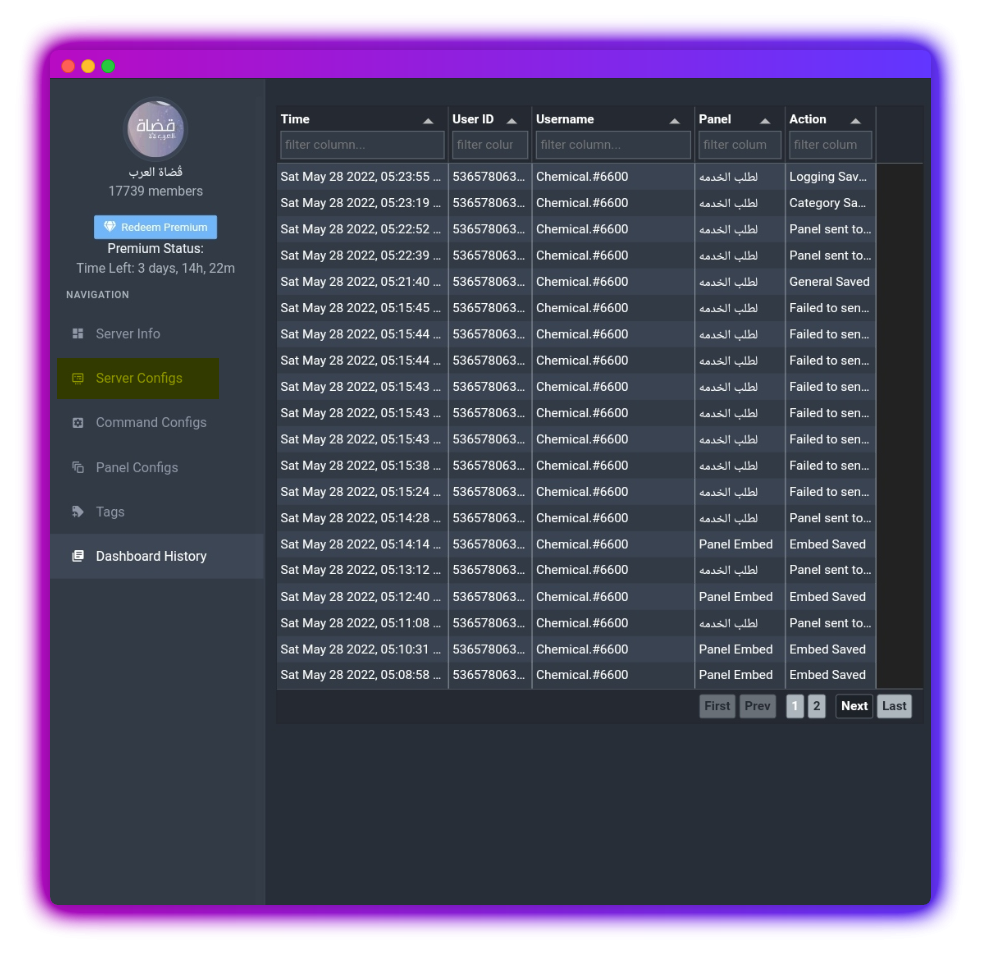 sudden arrow
crimson void
اول خيار Support team only فعّله و بيصير بس السبورت و الرتب الأعلى تقدر تقفل الت...
sudden arrow
crimson void
اول خيار Support team only فعّله و بيصير بس السبورت و الرتب الأعلى تقدر تقفل الت...
فعلتها خلاص ما يقدرون الممبر يشفونها ؟
crimson void
sudden arrow
فعلتها خلاص ما يقدرون الممبر يشفونها ؟
يشوفونها بس مايقدرون يضغطونها
sudden arrow
crimson void
يشوفونها بس مايقدرون يضغطونها
تمام
sudden arrow
crimson void
يشوفونها بس مايقدرون يضغطونها
طيب كيف اخفيها بس السبورت يشوفونها
crimson void
sudden arrow
طيب كيف اخفيها بس السبورت يشوفونها
تقدر تلغي الزر كامل بس للكل
humble sequoiaBOT
For a more convenient use of multipanels, you can now combine panels on the dashboard. This will allow you to directly send the multipanel from the dashboard or via the $panel ID command.
Where can I find this?
You can find this setting on the Dashboard -> Panel Configs -> Settings -> General Options
Note: if you're attaching all the panels to a panel called English, don't include English in the attached panels box (If you do this, it will create duplicate)
This will put all buttons from all of your panels on one message. The message is the panel message from the panel you're combining these panels in.

 Note: This is a premium feature
crimson void
Note: This is a premium feature
crimson void
لازم يكون عندك اكثر من بانل بالداشبورد ^
heavy schooner
وش يعني
crimson void
heavy schooner
وش يعني
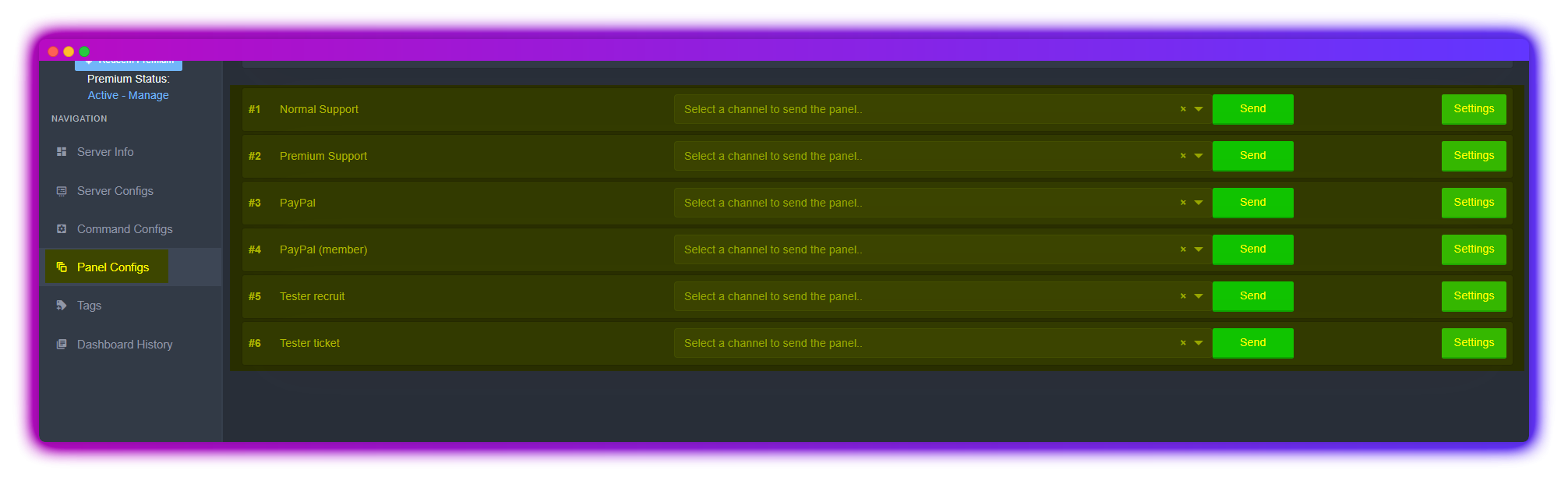 heavy schooner
اسوي أكثر من واحده ؟
crimson void
crimson void
https://i.imgur.com/5v5mhhM.png
كل بانل موجود بالصوره مسؤول عن زر لفتح التكت
crimson void
heavy schooner
اسوي أكثر من واحده ؟
يب
crimson void
heavy schooner
كذا بيفك زر يديد ولا بيسوي تيكت لحاله ؟
لا بيفك زر جديد
sudden arrow
crimson void
تقدر تلغي الزر كامل بس للكل
اخوي طيب دخلت ب حساب اخويه و جربت اقفل التكت ضبط انا ابيها ما يقدرون يعملولها Cloce
crimson void
تمام اول شيء افضل نحلّ سالفة اللي اكثر من زر @heavy schooner
heavy schooner
انت سعودي ؟
crimson void
بعدين بشرحلك عن الكلايم
heavy schooner
crimson void
تمام اول شيء افضل نحلّ سالفة اللي اكثر من زر <@607737907171688489>
اوكي دقيقه
crimson void
heavy schooner
انت سعودي ؟
يب ..
heavy schooner
شرأيك اعطيك رول و تسوي انت 
 heavy schooner
رد واضح 😭😭
ياخي لسه كل شي سويته بسوي مره ثانيه يا لييييل
اقلك صح اقدر اسويها منسوخه ؟
sudden arrow
sudden arrow
اخوي طيب دخلت ب حساب اخويه و جربت اقفل التكت ضبط انا ابيها ما يقدرون يعملولها Cl...
اخوي Purple
heavy schooner
حتي ما اعيد الكلام 

crimson void
sudden arrow
اخوي طيب دخلت ب حساب اخويه و جربت اقفل التكت ضبط انا ابيها ما يقدرون يعملولها Cl...
ضيف الرتبه اللي ماتبيها تسوي كلوز ابداً هنا
 crimson void
heavy schooner
اقلك صح اقدر اسويها منسوخه ؟
crimson void
heavy schooner
اقلك صح اقدر اسويها منسوخه ؟
يب بس هو ماراح يفرق لأن الكلام الأساسي بيكون باللوحه الآولى بس الباقيين بس تغيّرين الازرار.
heavy schooner
اها اوكي
طيب و الكلام داخل التيكت ابغاهم كلهم نفس الكلام فقط اختلاف يعني الزر و اسم الزر و نسيت الثالثه
اي تذكرت مكان فتح التيكت يعني التيكت وين يروح
crimson void
هذي كلها سهله كم تبغين تسوين زر من الاساس؟
heavy schooner
crimson void
هذي كلها سهله كم تبغين تسوين زر من الاساس؟
4
sudden arrow
crimson void
ضيف الرتبه اللي ماتبيها تسوي كلوز ابداً هنا
طيب بخفيها ابي شرح صوره غلبتك اخوي
crimson void
sudden arrow
طيب بخفيها ابي شرح صوره غلبتك اخوي
بتخفيها نهائياً؟
sudden arrow
يب بس الممبر ما يشفونها ابداا بس ال تبعون التكت يعملو $Close
heavy schooner
thanks @crimson void
iron nightBOT
Gave +1 Rep to @crimson void
crimson void
sudden arrow
يب
الغي اللي عليها اكس و سوي حفظ بس
 sudden arrow
crimson void
الغي اللي عليها اكس و سوي حفظ بس
sudden arrow
crimson void
الغي اللي عليها اكس و سوي حفظ بس
ذي اشيلها ؟
 crimson void
يب
crimson void
الحين سوي اللي قلتلك و جرب احد يفتح تكت و يسوي امر كلوز
sudden arrow
تمام
 severe path

humble sequoiaBOT
Claiming allows you to change the ticket name, category and permissions. To use it you have to enable it first on your Dashboard > Panel Configs > Claiming Options.
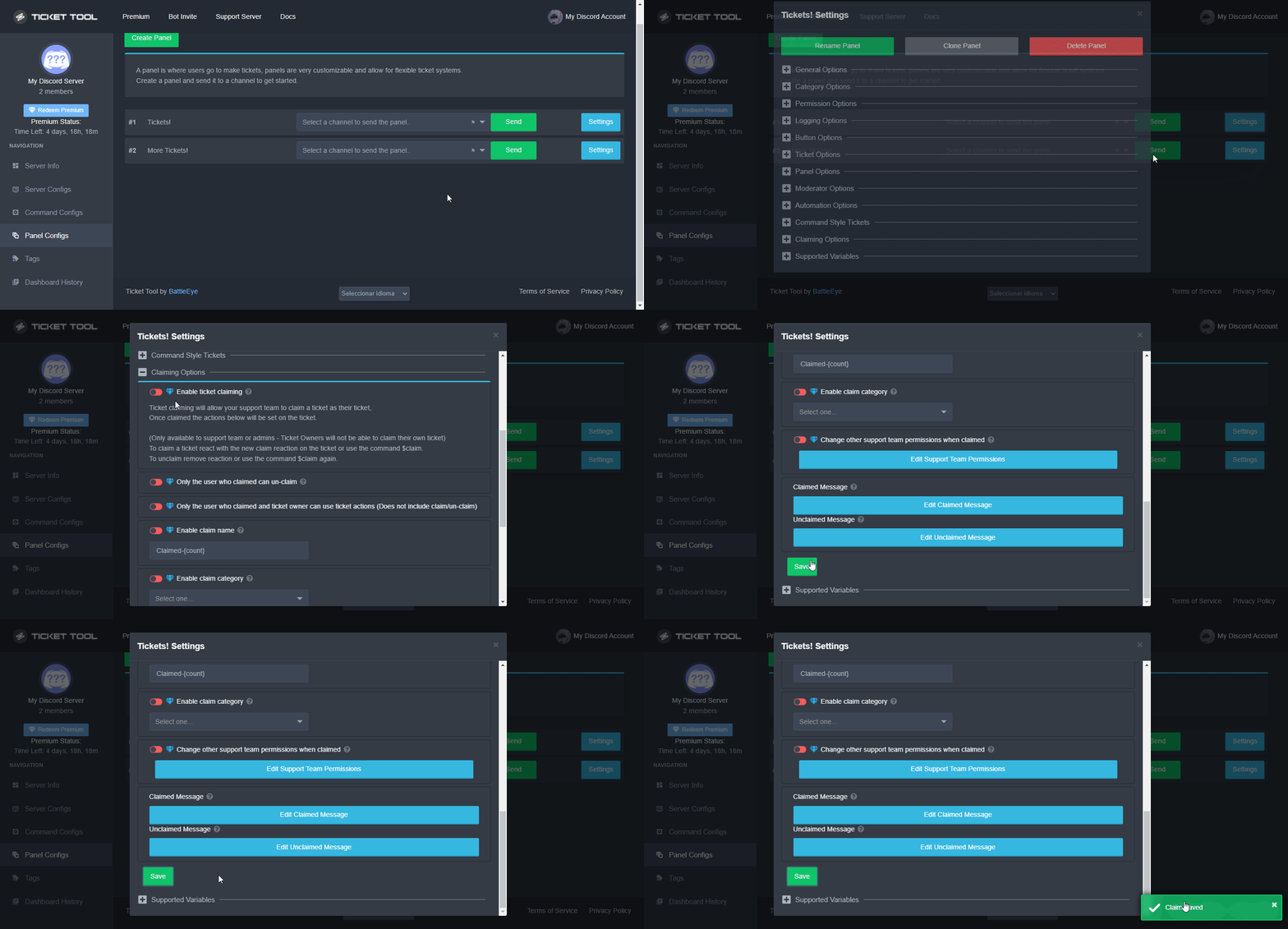
 Note: This is a premium feature
 prime bridgeBOT
 Successful bans:
 1
 Unsuccessful bans:
 0
 Reason: Mentioning staff for support during staff break/server lockdown. Left the server to avoid punishment.
 Moderator: @forest goblet
 forest goblet
 torn stream
how do put a member in a ticket?
torn stream
how do put a member in a ticket?
$help add
humble sequoiaBOT
How to add or remove users on tickets
To add a user to a ticket use $add <user>
To remove a user from a ticket use $remove <user>
torn stream
forest goblet
$help add
oh ok ty. after i run the cmd which panel will it put the user in?
 bitter knoll
Hi
I've added the bot to two of my servers, but it is only showing up one server on the dashboard.
What am I doing wrong?
forest goblet
torn stream
oh ok ty. after i run the cmd which panel will it put the user in?
No problem. Since these commands can only be ran within tickets, the user is just added to this specific ticket, so the same panel that the ticket was created with.
forest goblet
bitter knoll
Hi
I've added the bot to two of my servers, but it is only showing up one serve...
Please try the steps below:
humble sequoiaBOT
Don't see your server in the dashboard?
You will possibly need to relog. Look below to see steps on how to relog.
How to relog in the Dashboard.
First, you will need to go to the dashboard. Once your there, click on your avatar on the top right. after you clicked it, you will see button that says Logout. You must click that. Once you have logged out, you can log back in.
Note:
You need one of these 3 things to access the dashboard.
1. Server Owner (Level: 6)
2. Server Administrator (Level: 4)
3. Dashboard Role (Level: 2)
:warning: You can check your level using $level on your Discord Server
User permission level with Ticket Tool
@User is permission level: 0 (User)
```» *If it shows that your permission is **0**, you don't have any of the above **3 things** to manage the dashboard.*
**See the GIF below on how to relog:** torn stream
forest goblet
No problem. Since these commands can only be ran within tickets, the user is jus...
torn stream
forest goblet
No problem. Since these commands can only be ran within tickets, the user is jus...
Ohh ok tysm! so i need to create a ticket myself & add the user to the ticket channel 
forest goblet
torn stream
Ohh ok tysm! so i need to create a ticket myself & add the user to the ticket ch...
If you want to create a ticket for a user, you can also enable command style tickets on the dashboard in the settings of the respective panel, and set up a channel that is monitored by the $new command. You can then use $new [user] where [user] can be replaced with a user ID or mention.
bitter knoll
forest goblet
Please try the steps below:
- Dashboard Role (Level: 2)
is this supposed to be created automatically when the bot is invited?
forest goblet
bitter knoll
3. Dashboard Role (Level: 2)
is this supposed to be created automatically when ...
No, you can set up dashboard roles on the dashboard under Server configs. Doing so makes sense if you want users with a certain role, but without Administrator permission, to be able to access the dashboard.
iron nightBOT
Gave +1 Rep to @forest goblet
forest goblet
No problem.
torn stream
forest goblet
If you want to create a ticket for a user, you can also enable command style tic...
oh okay noted tysm Felix
 serene dew
BALLS WTF
 alpine pollen
Is it possible to have the remove command remove someone in the “Additional roles” slot? I was trying to do that but it doesn’t seem like it works. If not is there an alternative option to make it to where I can have a certain role see a ticket and then be able to remove specific people from that ticket with that role?
 placid dew
thanks @forest goblet
iron nightBOT
Gave +1 Rep to @forest goblet
forest goblet
@serene dew Please do not misuse this channel.
forest goblet
alpine pollen
Is it possible to have the remove command remove someone in the “Additional role...
That should work normally, unless the user has Administrator permission.
serene dew
forest goblet
<@699224095098798192> Please do not misuse this channel.
I’m very sorry
 worldly saffron
Hello wonderful people of ticket tool~ I have a question  Does Ticket Tool really require admin Perms{img1] to Create the tickets? (since there's already a perm{img2] to create Tickets so i think that would just suffice wouldn't it
  )
)

 humble sequoiaBOT
ᅠ
@pseudo glen requires the following permissions:
Add Reactions
Read Channels
Send Messages
Manage Messages
Embed Links
Attach Files
Read History
Manage Roles
Manage Channels
To change the role permissions, you can go to your Discord Server ➞ Server Settings ➞ Roles ➞ @Ticket Tool
To change the channel permissions, you can go to your Channel Settings ➞ Permissions ➞ Ticket Tool
ᅠ
Note:
You can give Ticket Tool Administrative Permissions instead of all the permissions listed above, but it's entirely optional and NOT necessary.

 gilded verge
Hey, please check 
Personally, I recommend these permissions, then everything works as it should:
https://cdn.discordapp.com/attachments/979861967936290816/979875252433731605/Ticket_Tool_Discord_role_perms.mp4
 sand cipher
hey guys i have recently purchased the no recoil script for razer version and it hasen't arrived?
worldly saffron
gilded verge
Personally, I recommend these permissions, then everything works as it should:
...
Alright~ I Understood that it doesn't really need admin perms, thanks for the info peepo person 
iron nightBOT
Gave +1 Rep to @gilded verge
sand cipher
i also have the email that it was purchased with
gilded verge
sand cipher
hey guys i have recently purchased the no recoil script for razer version and it...
Hey, what you mean? Can you show screenshot?
sand cipher
i can show screenshot of the transaction
gilded verge
wait....
humble sequoiaBOT

⚠️ You're in the wrong place
We provide support for @pseudo glen discord bot and cannot help you with whatever issue you have.
- We don't know which Support Team you should contact to get this issue resolved, and unfortunately we won't be able to accurately tell you.
If you don't have any further questions regarding our bot Ticket Tool, please close this ticket
gilded verge
i think
gilded verge
as bot mentioned, you are asking about it on the wrong server 😕
sand cipher
what server should i go to?
gilded verge
🤷
 quasi cliff
sand cipher
what server should i go to?
quasi cliff
sand cipher
what server should i go to?
- We don't know which Support Team you should contact to get this issue resolved, and unfortunately we won't be able to accurately tell you.
jade topaz
Hello how can set the ticket bot correctly
gilded verge
Hey, what you mean? 😳 If there is any error, show me please
jade topaz
How can I set my ticket bot correctly
gilded verge
but you mean first setup?
jade topaz
For an ADAC dc I brew the
gilded verge
I don't understand a bit what you mean, so I'll answer differently...
humble sequoiaBOT

You can check our documentation here.
You can also check #573205317870157855 for the basic setup.
Our documentation contains all the info you need about the bot to be able to setup and configure the bot however you like.
How to disable the premium bot
To disable the premium bot you will have to go to the Dashboard ➞ Server Configs ➞ Premium bot ➞ And on the right-hand side select the primary free bot in the drop down menu.
Premium features will still work on the normal bot.
 gilded verge
was that what you meant?
sand cipher
hey guys ive solved the problem i forgot to download file after you purchased
now i just need to set this up
gilded verge
okay but still wrong server 😕
alpine pollen
forest goblet
That should work normally, unless the user has `Administrator` permission.
Weird, they don’t have administrator permissions.
quasi cliff
forest goblet
That should work normally, unless the user has `Administrator` permission.
Adding up to that, it won't work like that. Using the "remove" command actually removes the user's permissions from the settings and doesn't not remove "Send/Read" perms.
 pure jewel
بوت تمت بريمو اقدر غير اسم و صورة
crimson void
pure jewel
بوت تمت بريمو اقدر غير اسم و صورة
لا .
crimson void
pure jewel
لازم تسوا
ان شاءالله قريب .
crimson void
pure jewel
<@971175151934775316> كيف اخلي لبوت خلي مرتب
مافهمتك
pure jewel
ظبتت
worldly saffron
Hello~  I use the free Version of Ticket tool and I'm wondering what Tags can do and how you use it in an instance
 humble sequoiaBOT
Tags
Tags are used to send a predefined response to your channels using a command. Tags will only respond if the command itself is used, it will not function if you put the tag into a sentence. The prefix is not included.
To create tags, go to: Dashboard > Tags > Create Tag. After creating and naming one, tap on the response button, and you can edit the response.
 crimson void
^^
worldly saffron
crimson void
^^
Understood  but where can you apply tags to? (correction
  )
)
alpine pollen
quasi cliff
Adding up to that, it won't work like that. Using the "remove" command actually ...
Oh, so in order to remove a desired person from the channel the way to do that would be manually?
 hearty dirge
Hey sorry to bother @everyone but idk what to do, I got this and I dont know what to do with it

Could someone help me please? I can't "react" on it but it says so
gilded verge
hearty dirge
Could someone help me please? I can't "react" on it but it says so
Hey, but you have to click the Create ticket button,
Are you seeing any errors when opening a ticket? If so, please send a screenshot
*and if you cannot click this button at all, try refreshing the application or check if you can click this button after logging in to Discord via the website 
 foggy birch
Hello, I have some issues with the ticket tool for a while now and everytime I click on it, it says "Invalid Form Body"
I tried reinstalling and such but it didn't worked so could I get some help since I wish to be able to open tixkets on my phone
humble sequoiaBOT
Update your discord App
Buttons are a relatively new addition to discord and don't work with some older versions of the app.
Please verify that you have the latest version of discord, by going to the app or play store.
Discord for the  App Store
Discord for the  Play Store
gilded verge
humble sequoia
@foggy birch, Please check
 fickle bluff
Hello? This bot is really great but I do have 1 request, I would love it if there was a whitelist feature so ppl with certain roles could use the bot. is that something in the making by any chance???
foggy birch
gilded verge
<@686000413526458436>, Please check <:this:894279341108772914>
It says that it's on the newest version
gilded verge
Force stop the Discord app and try again, let me know
foggy birch
Still the same issue
gilded verge
fickle bluff
Hello? This bot is really great but I do have 1 request, I would love it if ther...
Hey, do you mean, when the user open the ticket, the people in 'this' role have access to that ticket right away?
gilded verge
foggy birch
Still the same issue
Or there is a error in the panel, try creating a new panel and send to the channel
fickle bluff
gilded verge
Hey, do you mean, when the user open the ticket, the people in 'this' role have ...
Yes Exactly
gilded verge
There you go:
humble sequoiaBOT
How to let support team see into a ticket
About support roles
A support role lets your support team see into tickets with out having to add them manually to each and every ticket.
You can add as many support roles as you like per panel.
NOTE that the way discord works all admins can see into tickets regardless of this.
How to set a support role
To set a Support role go to the Dashboard -> Panel Configs -> Settings -> General Options -> Support Team Roles.
NOTE that the support role will not be able to see into tickets that are already created..
fickle bluff
I know there's a blacklist role but I would appreciate it if there was a whitelist because anyone can use the bot
 thin spoke
hey guys can somebody help me out
gilded verge
fickle bluff
I know there's a blacklist role but I would appreciate it if there was a whiteli...
If the certain role is included in Blacklist Roles, it means that all other roles can open a ticket 
thin spoke
how do i give a team access to the dashboard?
gilded verge
thin spoke
how do i give a team access to the dashboard?
Hey, go to Dashboard->Server Configs->add a specific role to the Dashboard Roles and then each of these users will have access to the dashboard
 foggy birch
gilded verge
Or there is a error in the panel, try creating a new panel and send to the chann...
foggy birch
gilded verge
Or there is a error in the panel, try creating a new panel and send to the chann...
What I meant is like that I can't do it in any type of server. And I tested it on my own server by adding the bot and making a panel but still the same issue
thin spoke
gilded verge
Hey, go to `Dashboard`->`Server Configs`->add a specific role to the `Dashboard ...
you sir are the man
fickle bluff
gilded verge
If the certain role is included in Blacklist Roles, it means that all other role...
Thank you for getting back with me but i only want 1 role to use the bot
iron nightBOT
Gave +1 Rep to @gilded verge
thin spoke
gilded verge
Hey, go to `Dashboard`->`Server Configs`->add a specific role to the `Dashboard ...
thank you
iron nightBOT
Gave +1 Rep to @gilded verge
gilded verge
foggy birch
What I meant is like that I can't do it in any type of server. And I tested it o...
Could you please send me an invitation to the server in a private message for me to look at the problem?

 humble sequoiaBOT
Don't see your server in the dashboard?
You will possibly need to relog. Look below to see steps on how to relog.
How to relog in the Dashboard.
First, you will need to go to the dashboard. Once your there, click on your avatar on the top right. after you clicked it, you will see button that says Logout. You must click that. Once you have logged out, you can log back in.
Note:
You need one of these 3 things to access the dashboard.
1. Server Owner (Level: 6)
2. Server Administrator (Level: 4)
3. Dashboard Role (Level: 2)
:warning: You can check your level using $level on your Discord Server
User permission level with Ticket Tool
@User is permission level: 0 (User)
```» *If it shows that your permission is **0**, you don't have any of the above **3 things** to manage the dashboard.*


**See the GIF below on how to relog:**@hallow sable
 hallow sable
W admins
jade topaz
Is there a way to use a different integration so when posting it shows your avatar and username rather than the bots and can you create or add more buttons?
thin spoke
@gilded verge i have a question mate
thin spoke
gilded verge
Hey, go to `Dashboard`->`Server Configs`->add a specific role to the `Dashboard ...
does this mean users of this role can access the dashboard or can manage the dashboard fren
gilded verge
fickle bluff
Thank you for getting back with me but i only want 1 role to use the bot
Dashboard->Panel Configs->Panel Settings->Expand Button Options->Create Ticket Settings->to Allowed Roles add a role that will be able to open tickets.
My Example:
 fickle bluff
@gilded verge thank you for helping me
iron nightBOT
Gave +1 Rep to @gilded verge
gilded verge
thin spoke
does this mean users of this role can access the dashboard or can manage the das...
everyone who has a role that you add to the Dashboard Roles will be able to manage the entire dashboard
iron nightBOT
Gave +1 Rep to @gilded verge
jade topaz
Is there a way to use a different integration so when posting it shows your avatar and username rather than the bots and can you create or add more buttons?
gilded verge
hallow sable
W admins
It's working now?
gilded verge
jade topaz
Is there a way to use a different integration so when posting it shows your avat...
If you want more buttons like this on screenshot, you mean multipanels
but I don't understand what you are asking a moment earlier, could you show an example please?
 humble sequoiaBOT
For a more convenient use of multipanels, you can now combine panels on the dashboard. This will allow you to directly send the multipanel from the dashboard or via the $panel ID command.
Where can I find this?
You can find this setting on the Dashboard -> Panel Configs -> Settings -> General Options
Note: if you're attaching all the panels to a panel called English, don't include English in the attached panels box (If you do this, it will create duplicate)
This will put all buttons from all of your panels on one message. The message is the panel message from the panel you're combining these panels in.
Note: This is a premium feature
gilded verge
oof, wait 😄
humble sequoiaBOT
The Ticket Message is the first message sent by the bot in a new ticket. To customise it head over to your Dashboard ➞ Panel Configs ➞ Settings ➞ Ticket Options ➞ Edit Ticket Message
 jade topaz
So you know how when posting it shows the bot name and avatar, anyway to change it so you can use your avatar and name rather then the support ticket?

I want to view the ticket I closed
jade topaz
jade topaz
I want to view the ticket I closed
?
gilded verge
jade topaz
So you know how when posting it shows the bot name and avatar, anyway to change ...
you probably mean whitelabel, though I'm not sure. Anyway, as far as I know, whitelabel is planned
jade topaz
Is there any authorized support?
gilded verge
jade topaz
I want to view the ticket I closed
Wait, I didn't understand a bit. So you had an open ticket on some server, you closed it and you no longer have access to it, right?
jade topaz
gilded verge
Wait, I didn't understand a bit. So you had an open ticket on some server, you c...
a client opened a ticket on my server
and I closed that ticket
I want to access the conversations on this ticket
gilded verge
but uhm, then you have to ask for access to the channel on the server where the ticket was closed, because if you do not have permissions, administrators on your server can grant them to you.
jade topaz
gilded verge
but uhm, then you have to ask for access to the channel on the server where the ...
how will I do?
jade topaz
gilded verge
but uhm, then you have to ask for access to the channel on the server where the ...
I am my own server and admin
gilded verge
wait, has this ticket been closed or deleted? because it makes a difference
jade topaz
gilded verge
wait, has this ticket been closed or deleted? because it makes a difference
closed and deleted
gilded verge
uh... if the ticket has been deleted and the transcript has not been saved, you cannot access because the chat does not exist because the channel does not exist 😕
jade topaz
gilded verge
uh... if the ticket has been deleted and the transcript has not been saved, you ...
hmm
Can't the authorities help?
gilded verge
next time, use the command $transcript to save the conversation
unfortunately no one can, if the channel does not exist then it is not possible to get those messages 😕
 mortal igloo
How would I put the ticket invite into a channel?
gilded verge
mortal igloo
How would I put the ticket invite into a channel?
huh? what you mean? 😳
mortal igloo
gilded verge
huh? what you mean? 😳
So, basically,
I've added the Ticket Tool into my server.
But I need to place it into a channel so that people can click " create ticket "
If that is understandable?
gilded verge
ooh, just go to Dashboard->Panel Configs->and send panel to certain channel
 mortal igloo
Thank you!
 loud cypress
 humble sequoiaBOT
For a more convenient use of multipanels, you can now combine panels on the dashboard. This will allow you to directly send the multipanel from the dashboard or via the $panel ID command.
Where can I find this?
You can find this setting on the Dashboard -> Panel Configs -> Settings -> General Options
Note: if you're attaching all the panels to a panel called English, don't include English in the attached panels box (If you do this, it will create duplicate)
This will put all buttons from all of your panels on one message. The message is the panel message from the panel you're combining these panels in.
Note: This is a premium feature
gilded verge
This is multipanels
gilded verge
gilded verge
Could you please send me an invitation to the server in a private message for me...
Update: Everything is working fine.
Cause found: This user has a problem with the Discord application on the phone.
 past tide
i have invited the bot 4 times now and i have tried relogging det website 8 times now, what do i do?
 humble sequoiaBOT
Don't see your server in the dashboard?
You will possibly need to relog. Look below to see steps on how to relog.
How to relog in the Dashboard.
First, you will need to go to the dashboard. Once your there, click on your avatar on the top right. after you clicked it, you will see button that says Logout. You must click that. Once you have logged out, you can log back in.
Note:
You need one of these 3 things to access the dashboard.
1. Server Owner (Level: 6)
2. Server Administrator (Level: 4)
3. Dashboard Role (Level: 2)
:warning: You can check your level using $level on your Discord Server
User permission level with Ticket Tool
@User is permission level: 0 (User)
```» *If it shows that your permission is **0**, you don't have any of the above **3 things** to manage the dashboard.*


**See the GIF below on how to relog:**Check
 gilded verge
you mean how to make several buttons in one panel?
if so, check this:
humble sequoiaBOT
For a more convenient use of multipanels, you can now combine panels on the dashboard. This will allow you to directly send the multipanel from the dashboard or via the $panel ID command.
Where can I find this?
You can find this setting on the Dashboard -> Panel Configs -> Settings -> General Options
Note: if you're attaching all the panels to a panel called English, don't include English in the attached panels box (If you do this, it will create duplicate)
This will put all buttons from all of your panels on one message. The message is the panel message from the panel you're combining these panels in.
Note: This is a premium feature
 formal spruce
سلام عليكم
 robust sandalBOT
formal spruce
سلام عليكم
robust sandalBOT
formal spruce
سلام عليكم
 ! miroxik74
Peace be upon you
 Arabic (ar) → English (en)
humble sequoiaBOT
Arabic (ar) → English (en)
humble sequoiaBOT
We would love to help you, but if you don't tell us what you need help with we can't help you :(
jade topaz
Can this ticket bot allow you to use your own webhook?
formal spruce
humble sequoia
Well, my problem is the message that comes after closing the ticket - there is a spelling mistake and I don't know how to change it
 gilded verge
Okay, I have no idea how to help you both, so please wait for someone else to help
 quasi pine
formal spruce
Well, my problem is the message that comes after closing the ticket - there is a...
quasi pine
formal spruce
Well, my problem is the message that comes after closing the ticket - there is a...
Hi there! I can help you.
Is this a DM ticket log or a ticket log sent a specific channel?
formal spruce
quasi pine
Is this a DM ticket log or a ticket log sent a specific channel?
This sends to a specific channel
quasi pine
formal spruce
This sends to a specific channel
Settings > Logging Options > Edit transcript message
You should find it there!
quasi pine
jade topaz
Can this ticket bot allow you to use your own webhook?
It can, but very limitedly and it requires premium!
jade topaz
I have premium, how would I do it?
formal spruce
quasi pine
Settings > Logging Options > Edit transcript message
Thx
iron nightBOT
Gave +1 Rep to @quasi pine
quasi pine
jade topaz
I have premium, how would I do it?
Talk with a staff member in #premium-support !
If you do not have access, run $pc !
Sadly the bot channel is closed so you can do it here!
$pc
humble sequoiaBOT

Thank you
Thank you for continuing to support Ticket Tool @quasi pine.
Found 4 servers in total and 1 with premium and permission
humble sequoiaBOT
Premium Check
I was unable to detect a premium server for @broken plaza.
Found 2 servers in total and 0 with premium and permission
jade topaz
Oh interesting
quasi pine
Make sure you have your username and ID connected!
jade topaz
Alright!
quasi pine
jade topaz
Alright!
You can do it by going to the subscriptions page and logging in by clicking “Manage Subscriptions”. Then, once in, click the settings icon and enter your username and ID!
Make sure you remember what email you used when purchasing!
humble sequoiaBOT
Premium Check
I was unable to detect a premium server for @broken plaza.
Found 3 servers in total and 0 with premium and permission
jade topaz
Ah!
 steep drum
why can i only see the bot as the owner of the server and if im like a recruit or communnity in the server and i click on make a ticket it doesnt show up?
gilded verge
Can you show error when you try make a ticket?
steep drum
its doesnt show an error it just doesnt let me see it unless i put on my owner role
 candid vale
how can i make a ticket
steep drum
u can just ask right here
gilded verge
steep drum
its doesnt show an error it just doesnt let me see it unless i put on my owner r...
So every time you open a ticket you don't have access to the channel, right?
steep drum
ya
candid vale
ya
gilded verge
This could mean that panel permissions are misconfigured. I recommend these: https://cdn.discordapp.com/attachments/979861967936290816/979874986946875412/Panel_Permissions.mp4
humble sequoiaBOT
You can check our documentation here.
You can also check #573205317870157855 for the basic setup.
Our documentation contains all the info you need about the bot to be able to setup and configure the bot however you like.
gilded verge
@candid vale,
gilded verge
candid vale
i did not let me go in
I did not understand what you wrote now, can you try again please? 😳
humble sequoiaBOT
Setting up Ticket Tool
Visit the docs for setup info
General Setup
candid vale
when we get in what do we gotta press
gilded verge
humble sequoia
https://docs.tickettool.xyz/general/setup
if you go here you will find out how you can create a ticket on your server
candid vale
ok
what do you put for server
how do you create a server
because i keep trying to get a server but does not wrk
humble sequoiaBOT
Votes
Current Votes: 3
Lifetime Votes: 11
Linked Votes: 0
Vote Links
Linking Info
Linked User: Not Linked
You can give your future votes to another user by linking with that user.
To link use $vote link (@user or userId)
To unlink use $vote unlink
Redeeming
Each vote is worth 12 hours of premium and can be redeemed once you have atleast 6 votes.
Your current votes are worth 1 day, 12h, 0m
To redeem your current votes use $vote redeem
 thorny flicker
$vote
humble sequoiaBOT
Votes
Current Votes: 6
Lifetime Votes: 14
Linked Votes: 0
Vote Links
Linking Info
Linked User: Not Linked
You can give your future votes to another user by linking with that user.
To link use $vote link (@user or userId)
To unlink use $vote unlink
Redeeming
Each vote is worth 12 hours of premium and can be redeemed once you have atleast 6 votes.
Your current votes are worth 3 days, 0h, 0m
To redeem your current votes use $vote redeem
gilded verge
thorny flicker
$vote
you can use the same command on your server
jade topaz
why my people can't attach files when they create a ticket? someone help me
 blissful bolt
perm problem
jade topaz
yes
blissful bolt
go in the channel where the tickets are open and go to perms and attach files
 wary brook
How do I add them to my server
blissful bolt
?
wary brook
Like once they in it what do I do
blissful bolt
add what
wary brook
To use it all it says is it is in my server
jade topaz
blissful bolt
go in the channel where the tickets are open and go to perms and attach files
so i have to do that eveytime they create a ticket?
blissful bolt
i use a different ticket tool bc of that reason but yeah you do
gilded verge
jade topaz
why my people can't attach files when they create a ticket? someone help me
Dashboard->Panel Configs->Panel Settings->Expand Permission Options->User Opened Permissions->Attach Files to ✅
wary brook
blissful bolt
i use a different ticket tool bc of that reason but yeah you do
Bro can u screen record showing me that
I’m lost
jade topaz
gilded verge
`Dashboard`->`Panel Configs`->`Panel Settings`->Expand `Permission Options`->`Us...
ty
iron nightBOT
Gave +1 Rep to @gilded verge
blissful bolt
wary brook
Bro can u screen record showing me that
what getting a new ticket tool?
gilded verge
@wary brook check this:
humble sequoiaBOT
Ticket Tool Invite & Support
wary brook
And I’m getting mad
 novel lance
hello, I have problems with my character who is Rayko Douglas whose face is misconfigured, I have not been able to roleplay because of it, I wonder how I could solve it. since it is in the origin the evolution attached photo so you can see it.
 upper flower
not here buddy...
novel lance
 upper flower
go somewhere that cares
 primal turret
ehm, guess I have to keep it shorter? Transcripts are showing broken image with "attachement" links that only result in errors. is this something related to tickettool settings or discord?
 shut bolt
primal turret
ehm, guess I have to keep it shorter? Transcripts are showing broken image with ...
shut bolt
primal turret
ehm, guess I have to keep it shorter? Transcripts are showing broken image with ...
Heyyyyy
Sorry for that
I unmuted you, the bot wasn't supposed to mute you lol
This is a discord issue, they changed the way the store their deleted files which doesn't keep them for too long now. The premium bot does save max 8mb worth of files on your transcript
primal turret
I see so thats why I can see the pictures I posted in a ticket, but others can't
or maybe even I won't be able to see them shortly?
(no worries about mute)
rather unfortunate, but thank you for clarifying! 🙂
shut bolt
primal turret
I see so thats why I can see the pictures I posted in a ticket, but others can't...
Indeed
shut bolt
primal turret
rather unfortunate, but thank you for clarifying! 🙂
No problem, glad to help
 dense kettle
so i gave the bot administration and everything and it still wont show the server under manage servers
shut bolt
#📈│reviews is the place for you
shut bolt
dense kettle
so i gave the bot administration and everything and it still wont show the serve...
Check the message below
humble sequoiaBOT
Don't see your server in the dashboard?
You will possibly need to relog. Look below to see steps on how to relog.
How to relog in the Dashboard.
First, you will need to go to the dashboard. Once your there, click on your avatar on the top right. after you clicked it, you will see button that says Logout. You must click that. Once you have logged out, you can log back in.
Note:
You need one of these 3 things to access the dashboard.
1. Server Owner (Level: 6)
2. Server Administrator (Level: 4)
3. Dashboard Role (Level: 2)
:warning: You can check your level using $level on your Discord Server
User permission level with Ticket Tool
@User is permission level: 0 (User)
```» *If it shows that your permission is **0**, you don't have any of the above **3 things** to manage the dashboard.*


**See the GIF below on how to relog:**thanks
iron nightBOT
Gave +1 Rep to @shut bolt
shut bolt

Anything wrong?
You say how to make a review, I sent you the channel to do one
Oh, yeah, probably due to the revamp #📣│server-news
 vernal remnant
I'm wondering if anyone can help? Ticket tool dashboard webpage isn't showing my discord server I just invited the bot to.
humble sequoiaBOT
Don't see your server in the dashboard?
You will possibly need to relog. Look below to see steps on how to relog.
How to relog in the Dashboard.
First, you will need to go to the dashboard. Once your there, click on your avatar on the top right. after you clicked it, you will see button that says Logout. You must click that. Once you have logged out, you can log back in.
Note:
You need one of these 3 things to access the dashboard.
1. Server Owner (Level: 6)
2. Server Administrator (Level: 4)
3. Dashboard Role (Level: 2)
:warning: You can check your level using $level on your Discord Server
User permission level with Ticket Tool
@User is permission level: 0 (User)
```» *If it shows that your permission is **0**, you don't have any of the above **3 things** to manage the dashboard.*


**See the GIF below on how to relog:**Yeap, check
vernal remnant
Thank you. I can't find anything on changing my permission level so I can get that taken care of.
 red nexus
I need help
humble sequoiaBOT
We would love to help you, but if you don't tell us what you need help with we can't help you :(
 gilded verge
Please run $debug on your server and send link here from bot
red nexus
What
gilded verge
On your server use command $debug and send link here
Example link:

 gilded verge
i.. uhm, only link
gilded verge
He's missing something ... what do you think?
❌ - Manage Channels
❌ - Manage Messages
gilded verge
For the future, I recommend these permissions, then it works best: https://cdn.discordapp.com/attachments/979861967936290816/979875252433731605/Ticket_Tool_Discord_role_perms.mp4
Server Settings -> Roles -> Ticket Tool -> ....
gilded verge
 pine nimbus
Eu fiz uma coisa que n sabia que podia
pine nimbus
Eu fiz uma coisa que n sabia que podia
Servidor errado
pine nimbus
Qual é o servidor
gilded verge
🤷
pine nimbus
Por favor cara gosto do jogo
gilded verge
⚠️ Você está no lugar errado
Fornecemos suporte para o bot de discórdia da Ticket Tool e não podemos ajudá-lo com qualquer problema que você tenha.
- Não sabemos com qual equipe de suporte você deve entrar em contato para resolver esse problema e, infelizmente, não poderemos informar com precisão.
Se você não tiver mais dúvidas sobre nossa ferramenta de tickets de bot, feche este ticket
@pine nimbus
 chrome pilot
when i choose multi panels, name of the panel order than buttons name

 gilded verge
chrome pilot
when i choose multi panels, name of the panel order than buttons name
gilded verge
chrome pilot
when i choose multi panels, name of the panel order than buttons name
From what I understood, in this case you need to disable the ticket button in the main panel
 chrome pilot
gilded verge
From what I understood, in this case you need to disable the ticket button in th...
chrome pilot
gilded verge
From what I understood, in this case you need to disable the ticket button in th...

 gilded verge
sooo... solved?
gilded verge
ooo wait i missed it 😅
chrome pilot
i'm dumb
gilded verge
Go to each panel separately and set the name as it should be
I'm not sure if that's it what you mean, but I hope so 

 hidden flame
question I have ticket tool setup but when tickets are created everyone can view? Any idea on how change to creator only?
gilded verge
hidden flame
question I have ticket tool setup but when tickets are created everyone can view...
I recommend these permissions: https://cdn.discordapp.com/attachments/979861967936290816/979874986946875412/Panel_Permissions.mp4
chrome pilot
gilded verge
Go to each panel separately and set the name as it should be
*I'm not sure if t...
i know and fixed it, and also thank you for helping me :3
iron nightBOT
Gave +1 Rep to @gilded verge
gilded verge
yassss! 
hidden flame
gilded verge
I recommend these permissions: https://cdn.discordapp.com/attachments/9798619679...
Thank you!
iron nightBOT
Gave +1 Rep to @gilded verge
 jaunty ermine
guys how can i add a role can see my private tickets pls 🙂
gilded verge
Probably you mean Support Team Roles
humble sequoiaBOT
How to let support team see into a ticket
About support roles
A support role lets your support team see into tickets with out having to add them manually to each and every ticket.
You can add as many support roles as you like per panel.
NOTE that the way discord works all admins can see into tickets regardless of this.
How to set a support role
To set a Support role go to the Dashboard -> Panel Configs -> Settings -> General Options -> Support Team Roles.
NOTE that the support role will not be able to see into tickets that are already created..
jaunty ermine
i do it not working like i dont wanna give admin on the role like normal role can see the ticket like support
 teal river
it says we can create tickets but we cant see make-a-ticket

is this intentional or not?
gilded verge
On which channel do you see this message? 😳
teal river
gilded verge
ah yes, currently this channel is not available because the server is being rebuilt
teal river
oh
prime bridgeBOT
☯SatanRayshe☯†ᴮᶠᶠ#7833 has been warned!

 They were notified via dms.
shut bolt
$help category
humble sequoiaBOT
How to set the open category
To set a open category go to the Dashboard -> Panel Configs -> Settings -> Category Options -> Category Open

 humble sequoiaBOT
Multipanels are a premium feature  that allow for a single panel with multiple buttons to open different tickets.
How to create a Multipanel
Premium users can combine multiple panels into one multipanel.
First, find the IDs of each panel you wish to combine. You can find them in your Panel Configs in the Dashboard
Next, send the multipanel to a channel using $panel [id1] [id2] {id3} ....
e.g. $panel 1 2 4 17 35 to combine panels 1, 2, 4, 17 and 35.
Up to 25 panels may be combined.
 chrome pilot
@jade topaz ^^
jade topaz
@chrome pilot how can i get premium
humble sequoiaBOT
Ticket Tool Premium
Get premium at https://tickettool.xyz/premium
Manage your subscriptions at https://tickettool.xyz/subscriptions
Why Premium?
Premium lets you customize the bot just how you want it. It also helps keep the bot running.
chrome pilot
Also you can use $vote, every 6 votes you'll receive 12h of ticket tool premium
chrome pilot
$invite
humble sequoiaBOT
Ticket Tool Invite & Support
chrome pilot
wait
humble sequoiaBOT
The first thing you will need to do is invite the premium bot, an invite can be found here
Once the bot is in your server we will head to the dashboard and manage your server. When you are managing your server, you want to head into "Server Configs" then click the drop down menu under "Select the bot you would like to use on this server" then click "Ticket Tool#6207" and then save.
 chrome pilot
thx
jade topaz
@chrome pilot invited now how can i create mulit pannel
quasi cliff
chrome pilot
Also you can use `$vote`, every 6 votes you'll receive 12h of ticket tool premiu...
Every vote gives 12h premium and minimum is 6 votes for claiming
quasi cliff
humble sequoia
@jade topaz Multipanels
jade topaz
@quasi cliff @jade topaz where's is multi plannel
 quasi cliff
Goto settings in panel
humble sequoiaBOT
Multipanels are a premium feature that allow for a single panel with multiple buttons to open different tickets.
How to create a Multipanel
Premium users can combine multiple panels into one multipanel.
First, find the IDs of each panel you wish to combine. You can find them in your Panel Configs in the Dashboard
Next, send the multipanel to a channel using $panel [id1] [id2] {id3} ....
e.g. $panel 1 2 4 17 35 to combine panels 1, 2, 4, 17 and 35.
Up to 25 panels may be combined.
jade topaz
@chrome pilot i didn't understand this
quasi cliff
jade topaz
<@924356699161231410>

 jade topaz
$vote
humble sequoiaBOT
Votes
Current Votes: 21
Lifetime Votes: 121
Linked Votes: 0
Vote Links
Linking Info
Linked User: Not Linked
You can give your future votes to another user by linking with that user.
To link use $vote link (@user or userId)
To unlink use $vote unlink
Redeeming
Each vote is worth 12 hours of premium and can be redeemed once you have atleast 6 votes.
Your current votes are worth 10 days, 12h, 0m
To redeem your current votes use $vote redeem
jade topaz
$help
humble sequoiaBOT
Help Options
$help commands - Information on commands
$help setup - Information on bot setup
$help faq - Frequently asked questions
jade topaz
$help setup
humble sequoiaBOT
Setting up Ticket Tool
Visit the docs for setup info
General Setup
jade topaz
$vote redeem
 craggy geyser
jade topaz
$vote redeem
craggy geyser
jade topaz
$vote redeem
You can run this in your own server
humble sequoiaBOT
How to redeem premium (Key)
To redeem your premium key, go to the dashboard, select your server, then click " Redeem Premium" under the server's icon and name.
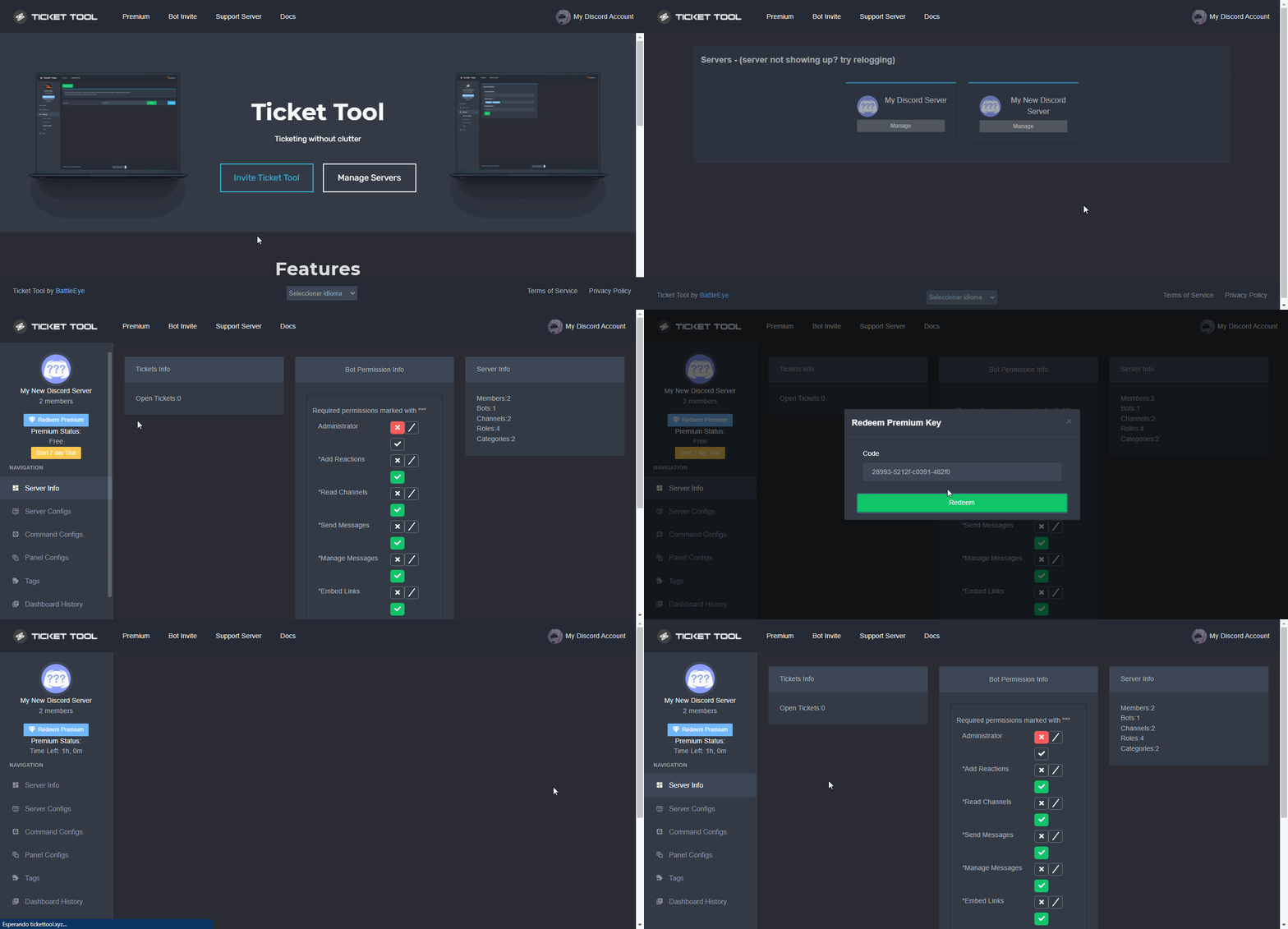
 nova wharf
How did you get access to that?
hearty dirge
gilded verge
Hey, but you have to click the `Create ticket` button,
Are you seeing any error...
It still doesnt work
I tried everything but still nothing
 craggy sky
Is there any way we can check our ticket history?
mortal igloo
jade topaz
ı added ticket tool to my server
You need to create a panel.
humble sequoiaBOT
You can check our documentation here.
You can also check #573205317870157855 for the basic setup.
Our documentation contains all the info you need about the bot to be able to setup and configure the bot however you like.
jade topaz
@formal tulip
chrome pilot
jade topaz
<@760179143672594452>
deleted channel 😢
 astral rapids
My panel is creating tickets into another category
how do I put it in the same channel?
chrome pilot
astral rapids
how do I put it in the same channel?
 astral rapids
thanks, I will try that
 thorn grove
Hello, such a problem, the bot does not change the permissions when the ticket is closed, although I configured everything on the site.
 weak oasis
thorn grove
Hello, such a problem, the bot does not change the permissions when the ticket i...
weak oasis
thorn grove
Hello, such a problem, the bot does not change the permissions when the ticket i...
make sure that you saved the desired settings if didn’t work. go to the channel that have panel sent to and delete the message then resend it again
thorn grove
the bot does not change the permissions when the ticket is closed
 slow ravine
premissions of what
thorn grove
of user
weak oasis
do the bot have permissions to that specific category or administrator in general?
thorn grove
weak oasis
do the bot have permissions to that specific category or administrator in genera...
yes
thorn grove
 lapis swift
I added the bot to my server & idk how to use it
lapis swift
I added the bot to my server & idk how to use it
use $help
 wicked abyss
Is it still possible to gain premium acces?
weak oasis
wicked abyss
Is it still possible to gain premium acces?
yeah of course
weak oasis
thorn grove
yes
can you please type $debug and send me the link in dm's
 mortal walrus
كيف أخلي البوت يرسل في قسم معين
weak oasis
mortal walrus
كيف أخلي البوت يرسل في قسم معين
من الموقع
mortal walrus
weak oasis
من الموقع
أي بس كيف الطريقة
weak oasis

 sharp prawn
Hellooo
weak oasis
hey there
weak oasis
if you want auto transcript then yeah it needs premium. but other than that transcript is free
mortal walrus
كيف أخلي البوت يفتح التكت في قسم معين
weak oasis
mortal walrus
كيف أخلي البوت يفتح التكت في قسم معين
راجع الصورة الي فوق يقلبي
sharp prawn
weak oasis
if you want auto transcript then yeah it needs premium. but other than that tran...
What does auto transcript mean?
What is the difference between auto and manual?
mortal walrus
weak oasis
راجع الصورة الي فوق يقلبي
انا مو قصدي اني أخليه يرسل التذكرة أنا قصدي أنه لامن أفتح التذكرة أبيها تنفتح في قسم معين
thorn grove
weak oasis
can you please type $debug and send me the link in dm's
In private messages? Or what do you mean by "dm's"?
weak oasis
sharp prawn
What does auto transcript mean?
What is the difference between auto and manual?
for manual, you have to $transcript command every time you need to save a log or click the button when ticket is closed, but for auto. if you close the ticket it will automatically do it for you and save the logs
weak oasis
thorn grove
In private messages? Or what do you mean by "dm's"?
yeah private messages
mortal walrus
ولا أقولك بكتب في اليوتيوب
 mystic mica
Why isn't my current votes updating, I just voted but shown on $vote
thorn grove
weak oasis
yeah private messages
Should I wait for you to accept a friend request, or what private messages should I send the link to?
weak oasis
mortal walrus
انا مو قصدي اني أخليه يرسل التذكرة أنا قصدي أنه لامن أفتح التذكرة أبيها تنفتح في...
اها, تفضل من هنا يعيوني
 weak oasis
thorn grove
Should I wait for you to accept a friend request, or what private messages shoul...
weak oasis
thorn grove
Should I wait for you to accept a friend request, or what private messages shoul...
no just send it right away, my private are open anyway
weak oasis
mystic mica
Why isn't my current votes updating, I just voted but shown on `$vote`
try in a minute or so
mystic mica
Been 5min haven't updated yet
 meager glen
I support community
mortal walrus
weak oasis
اها, تفضل من هنا يعيوني
أحسك 🆘
weak oasis
mortal walrus
أحسك 🆘
هذا الروم للمساعدة فقط
jade topaz
1 more day
 uneven berry
How do i remove the bot from my server? Whenever i try to do it, it says that I do not have permissions to remove this integration
 north dagger
how do i add a ticket in a special channel
 tepid islandBOT
 mouse#0679
 The
The util module has been denied for your role on this server.
humble sequoiaBOT
Setting up Ticket Tool
Visit the docs for setup info
General Setup
 silk chasm
north dagger
how do i add a ticket in a special channel
silk chasm
north dagger
how do i add a ticket in a special channel
next to the send button there will be a channel next to it so change it to the specific channel you want then press send :)
north dagger
do you have a screenshot
 brazen trench
hello ,
I can't connect to my moderation space
north dagger
silk chasm
next to the send button there will be a channel next to it so change it to the s...
it didnt work
north dagger
 subtle bobcat
how buy jailbreak cash
subtle bobcat
how buy jailbreak cash
dont know
humble sequoiaBOT
⚠️ You're in the wrong place
We provide support for @pseudo glen discord bot and cannot help you with whatever issue you have.
- We don't know which Support Team you should contact to get this issue resolved, and unfortunately we won't be able to accurately tell you.
If you don't have any further questions regarding our bot Ticket Tool, please close this ticket
shut bolt
Wrong server
north dagger
@severe path can you help me
astral rapids
Transcript channel #transcript missing permission
what permissions does the transcript channel require? I keep getting this error
jade topaz
Hey i want tt premium how i get
humble sequoiaBOT
The first thing you will need to do is invite the premium bot, an invite can be found here
Once the bot is in your server we will head to the dashboard and manage your server. When you are managing your server, you want to head into "Server Configs" then click the drop down menu under "Select the bot you would like to use on this server" then click "Ticket Tool#6207" and then save.
 coarse wedge
astral rapids
what permissions does the transcript channel require? I keep getting this error
coarse wedge
astral rapids
what permissions does the transcript channel require? I keep getting this error
As far as I know it needs at least view channel, send messages embed links and attach files to work properly in the transcript channels
astral rapids
brilliant, I will see
jade topaz
Any other way
coarse wedge
jade topaz
Any other way
Wdym by other way?
The premium bot is only for premium servers
 languid crane
I made a ticket to discuss a situation in my server. How do I add the person now to the ticket?
coarse wedge
languid crane
I made a ticket to discuss a situation in my server. How do I add the person now...
$help add
humble sequoiaBOT
How to add or remove users on tickets
To add a user to a ticket use $add <user>
To remove a user from a ticket use $remove <user>
coarse wedge
You can add a user using this command above
languid crane
Okay thanks!
jade topaz
coarse wedge
Wdym by other way?
The premium bot is only for premium servers
Means any other way to do autosave transcript when we close or delete
coarse wedge
jade topaz
Means any other way to do autosave transcript when we close or delete
Automatic transcripts are only possible with premium you can create a transcript using the $transcript command
languid crane
Okay it's not working. I type it and it won't let me add them. Do I need to have additional roles set to the panel or something??
coarse wedge
languid crane
Okay it's not working. I type it and it won't let me add them. Do I need to hav...
Does the command output any error?
How do you use it? May send a screenshot
languid crane
It will say missing role/user
So to be more specific- the panel is set to only admins as support team. I made the ticket and now I want to add the regular member we need to talk to, but when I type @ it will only let me add the other admin and then specific roles it won't let me pick any members. Then when I hit invite it gives a server link for my friends list.
And when I manually try to type the member's @ it will just say missing user/role
coarse wedge
You may try using the user id of the user you want to add
languid crane
I did
coarse wedge
Like $add 618805150756110336?
languid crane
It's all numbers? How do I find that
coarse wedge
It normally also should work with the ping but Idk why it don´t work for you
Just a alternative to the user ping
languid crane
How do I find a user id
coarse wedge
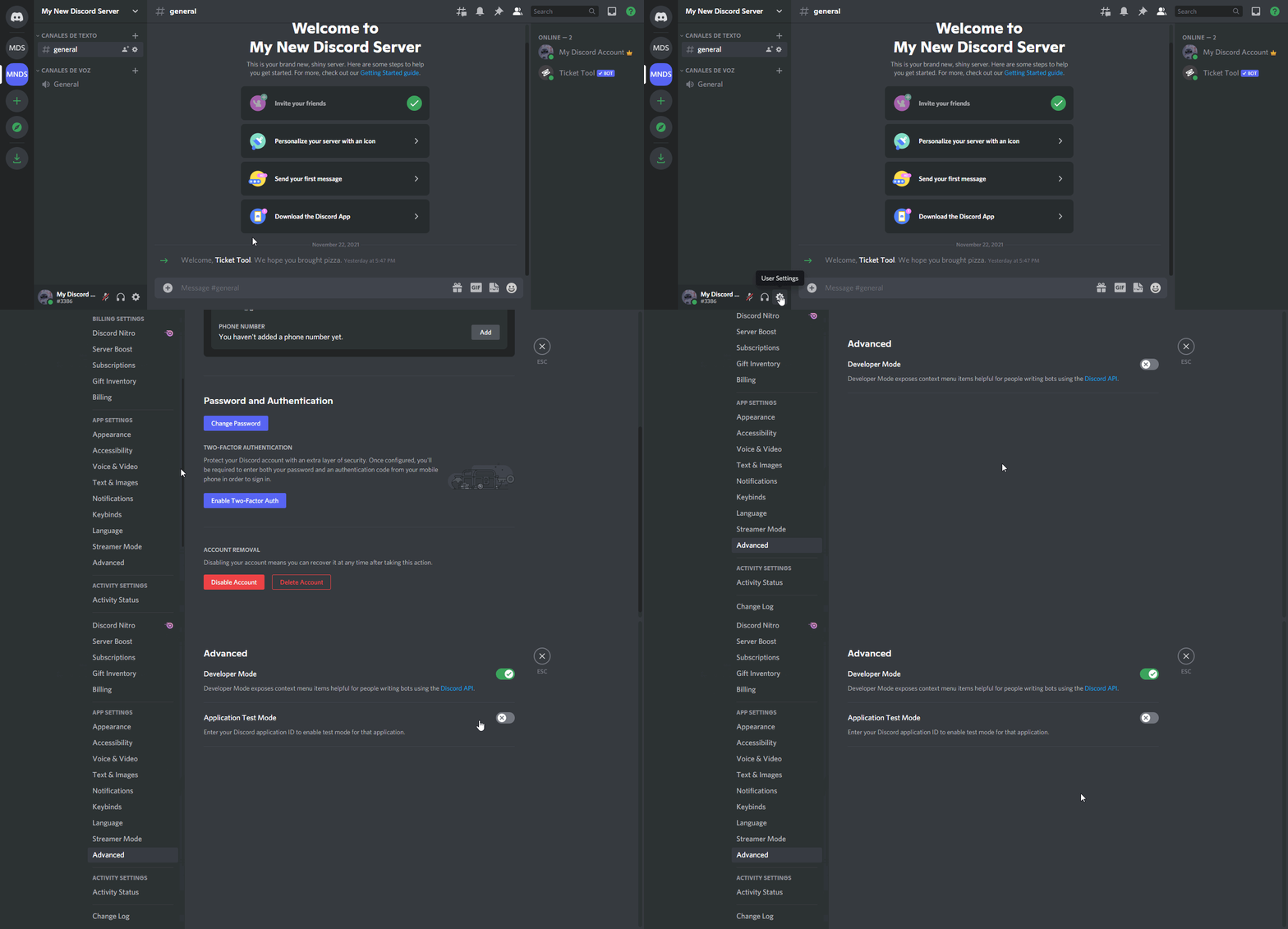
$devmode
humble sequoiaBOT
How to turn on developer mode
To enable developer mode do the following:
[:desktop: PC] go to Settings ➞ Advanced ➞ Developer mode
[:mobile_phone: Mobile] go to Settings ➞ Appearance ➞ Developer mode
Developer Mode allows you to get the ID of any channel, user, role, or server.
VIA the ID, you can use them with <> alongside their corresponding format to mention a channel/role/user...
They're mostly used to mention channels, users, or roles in Embeds
Formats
Channels: <#ID> ➝ #🤖│bot-spam
Users: <@ID> ➝ @humble sequoia
Roles: <@&ID> ➝ <@&642118166243311646>
 coarse wedge
You have developer mode enabled?
languid crane
I don't think so no
coarse wedge
Try enable that
and then copy the user id from the user you want to add to the ticket
by right clicking the user for example in the member list
And then do $add theirID
languid crane
Ah so I'll need to hop on my pc
coarse wedge
No would also work on mobile too isf you don´t want to switch devices
Instead of right clicking you can copy it on their profile
languid crane
Okay
 robust sandalBOT
هذه هي الميزة المتميزة متعددة الألواح. في الأساس ، يمكنك ربط لوحات متعددة برسالة لوحة تذاكر واحدة.
English (en) → Arabic (ar)
 slender minnow
$help support
humble sequoiaBOT
How to let support team see into a ticket
About support roles
A support role lets your support team see into tickets with out having to add them manually to each and every ticket.
You can add as many support roles as you like per panel.
NOTE that the way discord works all admins can see into tickets regardless of this.
How to set a support role
To set a Support role go to the Dashboard -> Panel Configs -> Settings -> General Options -> Support Team Roles.
NOTE that the support role will not be able to see into tickets that are already created..
slender minnow
@bleak lion ^
 bleak lion
thanks
mystic mica
Votes on top.gg dosent update I think, because it only updated for discordforbots one. Idk if it's a big or smth
coarse wedge
languid crane
Okay
You got it working?
jade topaz
Hi, regarding the opened tickets. Is there an option for moderators/owners to claim the ticket so other personals cant type in there too?
severe path
north dagger
<@252364399669542913> can you help me
🤷♂️
coarse wedge
jade topaz
Hi, regarding the opened tickets. Is there an option for moderators/owners to cl...
Yea the claiming feature could be the solution but thats a premium feature.
humble sequoiaBOT
Claiming allows you to change the ticket name, category and permissions. To use it you have to enable it first on your Dashboard > Panel Configs > Claiming Options.
Note: This is a premium feature
jade topaz
i love you so much man ( no homo)
coarse wedge
👍
jade topaz
coarse wedge
👍
is there also an option where you can hand it over to another personal when its claimed?
brazen trench
I can't connect to my moderation space
coarse wedge
jade topaz
is there also an option where you can hand it over to another personal when its ...
Yea the staff can also unclaim it to let a different staff claiming it.

Can also be protected by the option above allowing only the user who claimed it to be unclaimed
jade topaz
i see
languid crane
coarse wedge
You got it working?
No. Now it says failed to add, missing permissions
 wispy cave
hey, so I have enabled claiming but it's still coming up with warning: claiming isn't enabled when it is?


also using the premium bot
 coarse wedge
wispy cave
hey, so I have enabled claiming but it's still coming up with **warning: claimin...
coarse wedge
wispy cave
hey, so I have enabled claiming but it's still coming up with **warning: claimin...
Did you hit the save button just to be sure 😄
wispy cave
yup
wispy cave
fixed, thanks!
languid crane
I still cant add people- now it says missing permissions, but i dont know what permissions to add
coarse wedge
languid crane
I still cant add people- now it says missing permissions, but i dont know what p...
The bot opened the ticket normally right?
coarse wedge
languid crane
> Failed to add Missing Permissions
Has the bot manage roles from the server side settings?
May you run the $debug command and screenshot its output here
languid crane
oh! let me go check
languid crane
coarse wedge
Has the bot manage roles from the server side settings?
yes it does
coarse wedge
languid crane
yes it does
Hm strange you may view the output of $debug
languid crane
coarse wedge
Sadly Im´not staff to view this link but does it tell you any missing permissions?
shut bolt
coarse wedge
Sadly Im´not staff to view this link but does it tell you any missing permission...
I'll send it for you
coarse wedge
😮
shut bolt
 languid crane
shut bolt
I'll send it for you
languid crane
shut bolt
I'll send it for you
Do you know why I can't add people to the channel?
shut bolt
languid crane
Do you know why I can't add people to the channel?
I'll let Martin help you, if he needs help I'll be glad to assist, but Martin is helping you 
languid crane
Okay
languid crane
coarse wedge
Hmm seems fine are you sure the user id is correct?
Yes, it added the person but then said failed to add missing permissions
coarse wedge
languid crane
Yes, it added the person but then said failed to add missing permissions
Lol strange that would actually be a bug if it works and it still oulputs an error
languid crane
You sure?
languid crane
coarse wedge
Lol strange that would actually be a bug if it works and it still oulputs an err...
So i just cant add people?
humble sequoiaBOT
Missing Permissions
If Ticket Tool is missing one of the needed permissions it won't be able to properly manage the tickets, hence leading to the mentioned error. Run $debug within the channel you are facing the issue, any permission marked by the bot as :x: is missing for proper functioning.
What if everything is ✅?
Note that Ticket Tool, or any other bot, isn't able to grant or deny any permission to anyone if it doesn't have it within its permissions, such as a regular user. If within your Permission Options you marked Send TTS Messages and/or Use External Emojis as  or
or  and Ticket Tool doesn't have those permissions within its role (since they aren't needed to the basic functioning) the bot won't be able to assign the overrides you have specified.
To fix this, grant the mentioned permissions to the bot or mark them as  inside the Permission Options menu.
coarse wedge
humble sequoia
May you follow this little guide
languid crane
I dont understand
languid crane
coarse wedge
May you follow this little guide
So It needs be able to send tts messages and external emojis?
 kind talon
sorry if this has been answered a million times but some people on my discord don't see the ticket panels, they only see the button to open tickets

i did search for an answer but to no avail
coarse wedge
languid crane
So It needs be able to send tts messages and external emojis?
Yea you may still check the bots permission if it has alll these permissions as explained above.
Bots can only add perms they also have
languid crane
coarse wedge
Yea you may still check the bots permission if it has alll these permissions as ...
i added the external and tts perms and it worked finally
slender minnow
kind talon
sorry if this has been answered a million times but some people on my discord do...
Hi, make sure that your server members have this enabled
https://i.imgur.com/xkNM9Pb.png
 iron nightBOT
Gave +1 Rep to @coarse wedge
slender minnow
its under text and images
coarse wedge
languid crane
thanks <@618805150756110336>
No problem glad its solved now 😄 Enjoy your day 🙂
jade topaz
Wasnt WhiteWolf and such already probationary support?
jade topaz
shut bolt
We hadn't introduce them tho
So what about the applicants that applied, (for english support) if they werent mentioned, did that mean they failed?
shut bolt
jade topaz
So what about the applicants that applied, (for english support) if they werent ...
 jade topaz
Ah, i understand.
kind talon
slender minnow
its under text and images
thanks a million!
iron nightBOT
Gave +1 Rep to @slender minnow
slender minnow
np
kind talon
one more thing i can't figure out, tickets are not being opened in the category i want them to, even though i have them set in the settings
slender minnow
$help category
humble sequoiaBOT
How to set the open category
To set a open category go to the Dashboard -> Panel Configs -> Settings -> Category Options -> Category Open
 atomic solstice
kind talon
one more thing i can't figure out, tickets are not being opened in the category ...
atomic solstice
kind talon
one more thing i can't figure out, tickets are not being opened in the category ...
make sure the bot has the Send Messages, Manage Permissions, Manage Channels, Manage Roles permissions in the category as well
iron nightBOT
Gave +1 Rep to @atomic solstice
 silk crown
so i cannot make a ticket setup without the dashboard??
slender minnow
silk crown
so i cannot make a ticket setup without the dashboard??
nope, you can't 😦
bcz you need to create a panel first which is basically like a setup
silk crown
i don’t have access to the dashboard as i’m not owner of the server but i am helping making it and they don’t know much about bots as much i do, so this kind of limits me
i’ve tried logging in and out, not sure what perms you need to see the dashboard
slender minnow
silk crown
i don’t have access to the dashboard as i’m not owner of the server but i am hel...
You probably do not have admin perm in your role. You can ask your server owner (or whoever can) to give your role admin perm.
atomic solstice
silk crown
i’ve tried logging in and out, not sure what perms you need to see the dashboard
you can also ask the owner to assign a role as a dashboard role, which will let you view the dashboard
humble sequoiaBOT
Any role you put there will have full access to the ticket tool dashboard. The server owner and users with admin permissions already have access to the dashboard.
Be careful of which roles to put here

 mystic hound
jade topaz
So what about the applicants that applied, (for english support) if they werent ...
mystic hound
jade topaz
So what about the applicants that applied, (for english support) if they werent ...
All applications have been processed
Anyone not mentioned in the announcement has unfortunately not made the cut
mystic hound
Unfortunately not
mystic hound
If you haven't been contacted with specific feedback, the denial reason is simply that we felt you weren't a good fit for our team
(this goes for everyone)
gilded verge
 rancid kettle
<@413723907619684352>
rancid kettle
<@413723907619684352>
#📂│information rules 4
weak oasis
rancid kettle
Bot's message history is deleted, how can we fix it?
what do you mean?
 soft tiger
what do I do after this ?
gilded verge
soft tiger
what do I do after this ?
Does this still apply to redeem code?
soft tiger
gilded verge
Does this still apply to redeem code?
the redeeming votes thing, yeah
gilded verge
When you use $vote redeem, Ticket Tool bot sends you a private message with a premium code
soft tiger
oh okay
gilded verge
Next if you copy this code, go to Dashboard->and click Redeem Premium
 soft tiger
gilded verge
When you use `$vote redeem`, Ticket Tool bot sends you a private message with a ...
soft tiger
gilded verge
When you use `$vote redeem`, Ticket Tool bot sends you a private message with a ...
im not getting the priv msg for some reason
nvm got it now
soft tiger
gilded verge
Next if you copy this code, go to `Dashboard`->and click `Redeem Premium`
ty
iron nightBOT
Gave +1 Rep to @gilded verge
gilded verge
😊
soft tiger
^^
 spark cosmos
why doesnt the website detect my other server
i wanna change my premium to another server
 buoyant condor
gilded verge
spark cosmos
why doesnt the website detect my other server
buoyant condor
gilded verge
spark cosmos
why doesnt the website detect my other server
Can you show where you wanted to change the premium server? I mean screenshot please
spark cosmos
 gilded verge
oh... try:
humble sequoiaBOT
Don't see your server in the dashboard?
You will possibly need to relog. Look below to see steps on how to relog.
How to relog in the Dashboard.
First, you will need to go to the dashboard. Once your there, click on your avatar on the top right. after you clicked it, you will see button that says Logout. You must click that. Once you have logged out, you can log back in.
Note:
You need one of these 3 things to access the dashboard.
1. Server Owner (Level: 6)
2. Server Administrator (Level: 4)
3. Dashboard Role (Level: 2)
:warning: You can check your level using $level on your Discord Server
User permission level with Ticket Tool
@User is permission level: 0 (User)
```» *If it shows that your permission is **0**, you don't have any of the above **3 things** to manage the dashboard.*


**See the GIF below on how to relog:**same as above, try logging out and logging back in, then check
spark cosmos
oh it worked thanks
gilded verge
no problem 😊
thin spoke
if i select a tickket category, will tickets overflow once the category has reached 100 or tickets collectively reach 100
and do i need to change each panels config or will the multipanel config apply to each panel
weak oasis
thin spoke
if i select a tickket category, will tickets overflow once the category has reac...
ticket's more than 100 in 1 category will not be created so i strongly suggest a close category
multipanel is same as panels each so config will be each panel not in one category/one setting
thin spoke
weak oasis
ticket's more than 100 in 1 category will not be created so i strongly suggest a...
thanks
iron nightBOT
Gave +1 Rep to @weak oasis
weak oasis
anytime
thin spoke
what i mean is if tickets begin to overflow at the top, will this be delayed if i have multiple categories
will send eg
weak oasis
it will never overflow since it will not be created so if you can make multiple category's for each purpose of panel
thin spoke
 thin spoke
weak oasis
it will never overflow since it will not be created so if you can make multiple ...
thin spoke
weak oasis
it will never overflow since it will not be created so if you can make multiple ...
why do they overflow at the top?
weak oasis
is it connected to a category?
weak oasis
that's why
thin spoke
if it is connected to a category is the ticket per category max 100 or total 100, thanks
weak oasis
yeah the maximum number of channels created set by discord is 100 so it will be stucked
thin spoke
weak oasis
yeah the maximum number of channels created set by discord is 100 so it will be ...
ty mate ❤️
iron nightBOT
Gave +1 Rep to @weak oasis
weak oasis
no problems, glad to help ❤️
craggy geyser
thin spoke
if it is connected to a category is the ticket per category max 100 or total 100...
Neither. Its a limit of 50 channels per category
thin spoke
craggy geyser
Neither. Its a limit of 50 channels per category
thanks do tickets delete once limit reached or overflow at the top
iron nightBOT
Gave +1 Rep to @craggy geyser
craggy geyser
thin spoke
thanks do tickets delete once limit reached or overflow at the top
Overflow at the top unless you set a second (or more) category
$overflow
humble sequoiaBOT
Discord only allows to stack up to 50 channels per category, meaning that if you have already 50 tickets in one category, the bot won't be able to place a ticket in that category, for such reason Ticket Tool counts with overflow categories, meaning that if your main category is filled, the bot will go ahead and place the ticket on the next one available, simply choose a second category in the category pickers:
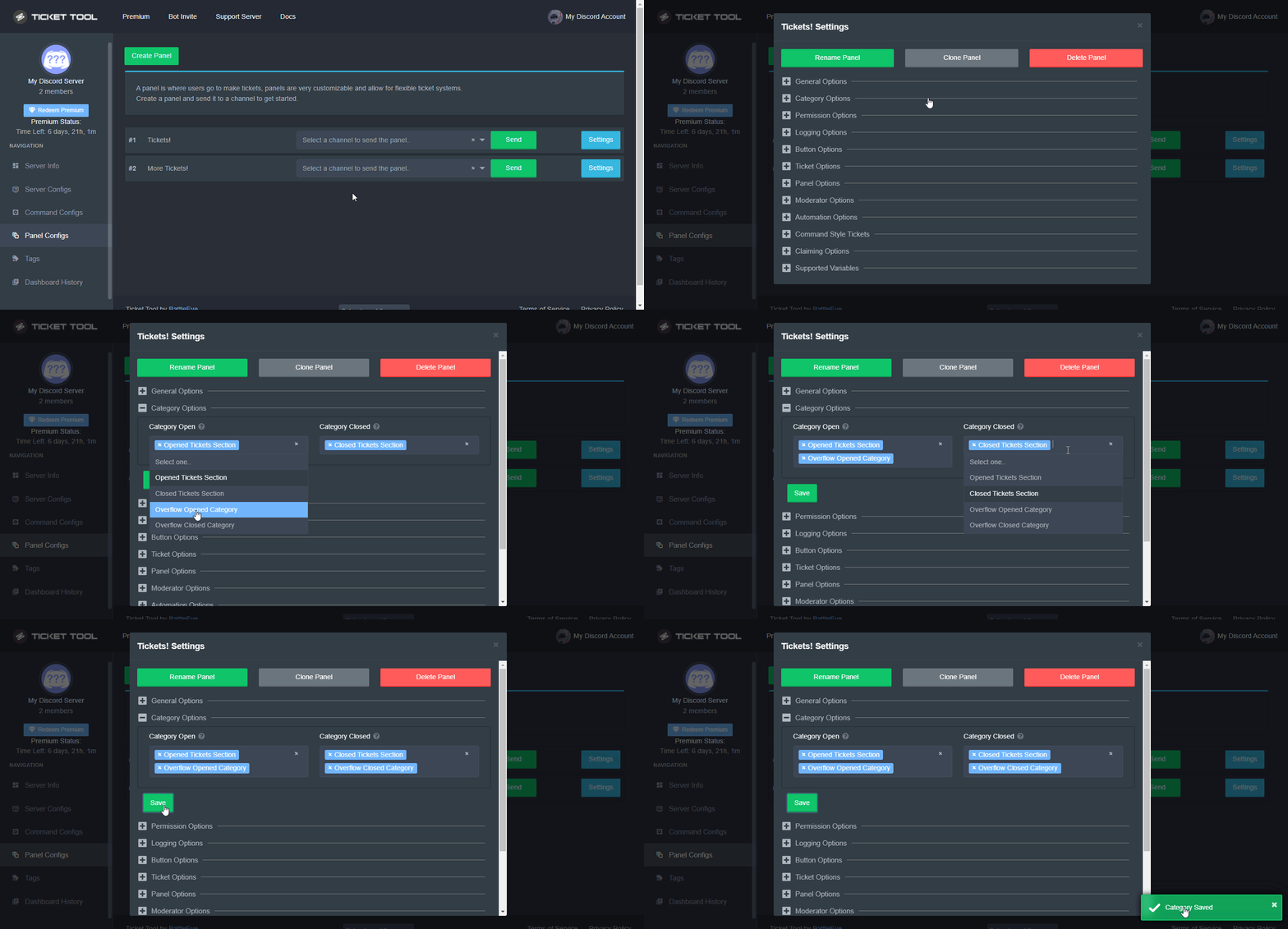 jade topaz
how to setup like this 🤡?
 humble sequoiaBOT
Multipanels are a premium feature that allow for a single panel with multiple buttons to open different tickets.
How to create a Multipanel
Premium users can combine multiple panels into one multipanel.
First, find the IDs of each panel you wish to combine. You can find them in your Panel Configs in the Dashboard
Next, send the multipanel to a channel using $panel [id1] [id2] {id3} ....
e.g. $panel 1 2 4 17 35 to combine panels 1, 2, 4, 17 and 35.
Up to 25 panels may be combined.
For a more convenient use of multipanels, you can now combine panels on the dashboard. This will allow you to directly send the multipanel from the dashboard or via the $panel ID command.
Where can I find this?
You can find this setting on the Dashboard -> Panel Configs -> Settings -> General Options
Note: if you're attaching all the panels to a panel called English, don't include English in the attached panels box (If you do this, it will create duplicate)
This will put all buttons from all of your panels on one message. The message is the panel message from the panel you're combining these panels in.
Note: This is a premium feature
quasi cliff
jade topaz
Only for premium?
Yes
jade topaz
Kk thanks
worldly saffron
hello~  can i inquire information about the bot but i don't know if this channel is appropriate to inquire bot info 🤔
 willow shard
Hello everyone hope all is good . So I have a question , can I remove someone from a ticket even if they have the support team role ?
shut bolt
willow shard
Hello everyone hope all is good . So I have a question , can I remove someone fr...
Hey there, you can use the $remove command
Since the user perms are over role oerms
It will remove their access
willow shard
Ye I tried that but it didn't work ?
shut bolt
Huh, weird
willow shard
It works normally on people who don't have the support team role
shut bolt
Really weird, if you had like open a ticket at #🎫│make-a-ticket for our team to check it, right now I can't test but we'll have someone to help you
willow shard
shut bolt
Really weird, if you had like open a ticket at <#571706435449257997> for our tea...
Ok mate. Thanks for the quick reply . I'll do that tomorrow
iron nightBOT
Gave +1 Rep to @shut bolt
shut bolt
willow shard
Ok mate. Thanks for the quick reply . I'll do that tomorrow
No problem, have a great day
willow shard
You too
worldly saffron
shut bolt
You are in the right channel
Alright~ So i was testing if it shows images{img1] when i view the ticket but when i tested with other types of files, XML seems to not be able to show{img2&3]


 shut bolt
worldly saffron
Alright~ So i was testing if it shows images{img1] when i view the ticket but wh...
shut bolt
worldly saffron
Alright~ So i was testing if it shows images{img1] when i view the ticket but wh...
Due to recent changes discord made to the way the keep their deleted files. Now they don't store then for too long as they used to do. This causes the issue you have that images aren't accesible, the premium bot saves up to 8mb on the transcript file
worldly saffron
shut bolt
Due to recent changes discord made to the way the keep their deleted files. Now ...
alr alr~ understood, thanks for the info! i have one more thing to ask about. If premium can save 8mb on a Transcript file, then how much can The Free version store?
iron nightBOT
Gave +1 Rep to @shut bolt
shut bolt
worldly saffron
alr alr~ understood, thanks for the info! i have one more thing to ask about. If...
Currently the free bot doesn't store any file, it's a premium feature, for now
alpine pollen
Is it possible to make the remove feature remove someones read and write permissions from a ticket if they have a role in the “additional roles” section?
worldly saffron
shut bolt
Currently the free bot doesn't store any file, it's a premium feature, for now
...
Alright~ Thanks again and Gladly Appreciated
 iron nightBOT
Gave +1 Rep to @shut bolt
worldly saffron
alpine pollen
Is it possible to make the remove feature remove someones read and write permiss...
You can, Go to Panel Settings > Permission Options > Additional Roles Opened Permissions/Additional Roles Closed Permissions And then Turn off Read and Send Messages

 copper token
Hello When i go to manage my servers my server dont pops upp i have invite it it the server. What Will i do?
humble sequoiaBOT
━━ moved to ticket ━━
alpine pollen
worldly saffron
You can, Go to `Panel Settings` > `Permission Options` > `Additional Roles Opene...
That appears to take away the whole roles access itself, wanted to only take a specific person away
worldly saffron
alpine pollen
That appears to take away the whole roles access itself, wanted to only take a s...
Ahh oke~ Then it's not Possible since there is Only options for Opener and Role, not a Specified User to Remove
alpine pollen
Ahh. Maybe they can add this feature in the future. Thank you for the help
thanks @worldly saffron
iron nightBOT
Gave +1 Rep to @worldly saffron
worldly saffron
alpine pollen
thanks <@695237423281471589>
No problem~
 steady pier
I bought eulen for 1 month and so far I haven't received the key, I only received the invoice... help!!! someone help me
Can someone help me please ?
gilded verge
what is eulen? 😐
steady pier
eulen gta menu mod
gilded verge
lol
humble sequoiaBOT
⚠️ You're in the wrong place
We provide support for @pseudo glen discord bot and cannot help you with whatever issue you have.
- We don't know which Support Team you should contact to get this issue resolved, and unfortunately we won't be able to accurately tell you.
If you don't have any further questions regarding our bot Ticket Tool, please close this ticket
jade topaz
Hello. Im having a problem. When i try to wiev my server settings, the page says this, y relogged like 8 times, and i don't know what to do..
 humble sequoiaBOT
Don't see your server in the dashboard?
You will possibly need to relog. Look below to see steps on how to relog.
How to relog in the Dashboard.
First, you will need to go to the dashboard. Once your there, click on your avatar on the top right. after you clicked it, you will see button that says Logout. You must click that. Once you have logged out, you can log back in.
Note:
You need one of these 3 things to access the dashboard.
1. Server Owner (Level: 6)
2. Server Administrator (Level: 4)
3. Dashboard Role (Level: 2)
:warning: You can check your level using $level on your Discord Server
User permission level with Ticket Tool
@User is permission level: 0 (User)
```» *If it shows that your permission is **0**, you don't have any of the above **3 things** to manage the dashboard.*


**See the GIF below on how to relog:**Hey @jade topaz, Check
jade topaz
gilded verge
Hey <@456226577798135808>, Check <:this:894279341108772914>
I did that.
It follows not seeing.
gilded verge
but you did everything this what message says?
jade topaz
gilded verge
but you did everything this what message says?
Yes
gilded verge
what's your $level?
jade topaz
Any one know how make this in ticket
 humble sequoiaBOT
For a more convenient use of multipanels, you can now combine panels on the dashboard. This will allow you to directly send the multipanel from the dashboard or via the $panel ID command.
Where can I find this?
You can find this setting on the Dashboard -> Panel Configs -> Settings -> General Options
Note: if you're attaching all the panels to a panel called English, don't include English in the attached panels box (If you do this, it will create duplicate)
This will put all buttons from all of your panels on one message. The message is the panel message from the panel you're combining these panels in.
Note: This is a premium feature
gilded verge
yap
jade topaz
@gilded verge thx <3
iron nightBOT
Gave +1 Rep to @gilded verge
 jade igloo
Where do I need to go to start a ticket for a dayz server ? I thought I did in the "make a ticket" channel but the bot replied I was in the wrong place and couldn't be helped.
quasi pine
jade igloo
Where do I need to go to start a ticket for a dayz server ? I thought I did in t...
Hi there! Since this was a ticket for a specific server, we sadly do not know how their ticket formatting works and cannot help you. Apologies!
There are hundreds of thousands of servers that use Ticket Tool so support for a specific server is not possible
Unless I am reading your message incorrectly.
jade igloo
I don't remember his name but there was a guy a little over a month ago that was moderating a dayz channel that's not there anymore. He said to open a ticket and I'd gotten a response it was being worked on, and then another saying changes had been made and to let them know if it had made a difference. He's left so I don't have the chat log anymore... but you're saying if I have lag issues etc on my private server, there's noone from nitrado that can help ?
Do/can I put the problem in here and see if the general community has any help or suggestions ?
jade topaz
gilded verge
what's your `$level`?
owner
gilded verge
jade topaz
owner
If logging out and back in doesn't work, you can create a ticket and ask staff for help (#🎫│make-a-ticket)
 inland plover
I am truly unsatisfied by the space 
 jade topaz
Hey everyone. I have this message and I can't find any solution online.
I'm the admin of the server - not me nor anyone else can open a ticket.
Help?
 gilded verge
jade topaz
Hey everyone. I have this message and I can't find any solution online.
I'm the ...
gilded verge
jade topaz
Hey everyone. I have this message and I can't find any solution online.
I'm the ...
Hey, please use $debug on your server and send here the link you get from the bot
jade topaz
gilded verge
Hey, please use `$debug` on your server and send here the link you get from the ...
Tried twice - nothing happening

Checked, it is the correct prefix
humble sequoiaBOT
ᅠ
@pseudo glen requires the following permissions:
Add Reactions
Read Channels
Send Messages
Manage Messages
Embed Links
Attach Files
Read History
Manage Roles
Manage Channels
To change the role permissions, you can go to your Discord Server ➞ Server Settings ➞ Roles ➞ @Ticket Tool
To change the channel permissions, you can go to your Channel Settings ➞ Permissions ➞ Ticket Tool
ᅠ
Note:
You can give Ticket Tool Administrative Permissions instead of all the permissions listed above, but it's entirely optional and NOT necessary.
jade topaz
Tried as well - it seems the bot doesn't respond to $ commands in my server
Tried to change the prefix - doesn't work still
gilded verge
btw I recommend these permissions, then everything works as it should: https://cdn.discordapp.com/attachments/979861967936290816/979875252433731605/Ticket_Tool_Discord_role_perms.mp4
In that case, the bot has a temporary outage on your server, usually returning within 30 minutes 🤔
jade topaz
gilded verge
In that case, the bot has a temporary outage on your server, usually returning w...
Does it normally happen? Because I've had Ticket Tool in my server for a few months now with no problem.
jade topaz
gilded verge
btw I recommend these permissions, then everything works as it should: https://c...
Helped - thanks!
iron nightBOT
Gave +1 Rep to @gilded verge
gilded verge
woah! nice 😊
gilded verge
jade topaz
Does it normally happen? Because I've had Ticket Tool in my server for a few mon...
psst interesting fact: you can have a premium bot for free, you only need to vote for it and when you receive a premium code and invite a premium bot, you will not experience any problems with using it 😁
just go to #🤖│bot-spam and use $vote
jade topaz
gilded verge
*psst* interesting fact: you can have a premium bot for free, you only need to v...
Alright, thanks. (:
iron nightBOT
Gave +1 Rep to @gilded verge
 cloud kiln
How do I set up the ticket tool in servers?
humble sequoiaBOT
You can check our documentation here.
You can also check #573205317870157855 for the basic setup.
Our documentation contains all the info you need about the bot to be able to setup and configure the bot however you like.
gilded verge
Check docs or go to #📂│information and click Setup Guide
 paper briar
Hi all, can someone help me work out how to make the ticket panel combine all ticket types into one panel, where you have a few buttons for the different tickets, and simply select which one you need. I’ve seen this on a few servers but I only seem to be able to do one ticket per panel currently. Is this a premium feature or something?
humble sequoiaBOT
For a more convenient use of multipanels, you can now combine panels on the dashboard. This will allow you to directly send the multipanel from the dashboard or via the $panel ID command.
Where can I find this?
You can find this setting on the Dashboard -> Panel Configs -> Settings -> General Options
Note: if you're attaching all the panels to a panel called English, don't include English in the attached panels box (If you do this, it will create duplicate)
This will put all buttons from all of your panels on one message. The message is the panel message from the panel you're combining these panels in.
Note: This is a premium feature
gilded verge
Hey, check
paper briar
gilded verge
Hey, check <:this:894279341108772914>
I’ll take a look, thanks
iron nightBOT
Gave +1 Rep to @gilded verge
 still mason
The bot in my server does the following:
When a ticket is closed, I have the option to Transcript, Open, or Delete.
When I press delete, a transcript is sent to the person who opened the ticket via DM, and a transcript is saved to my transcript channel.
Question 1:
If I press Transcript before I delete the ticket, does the transcript only go to the transcript channel, and not the ticket opener's DMs?
Question 2
If I close the ticket, it will no longer allow the individual who opened the ticket to see that ticket. If I have a conversation with my admins on the ticket after it's been closed, does the conversation that follows the ticket closing get included in the transcript that is sent to the ticket owner's DMs?
 tight sand
I set up the ticket tool but when someone makes a ticket it says 'Missing Permissions' what does it mean?
still mason
tight sand
I set up the ticket tool but when someone makes a ticket it says 'Missing Permis...
The ticket bot needs perms to open channels. You need to make sure:
The ticket tool has permission to open channels and permissions to give access to those channels.
tight sand
still mason
The ticket bot needs perms to open channels. You need to make sure:
The ticket ...
Where do I allow the permissions?
still mason
tight sand
Where do I allow the permissions?
In your "roles" section of the server settings.
tight sand
still mason
In your "roles" section of the server settings.
And which permissions are mandatory?
still mason
tight sand
And which permissions are mandatory?
Manage Roles, Manage Channels, Manage Messages
humble sequoiaBOT
ᅠ
@pseudo glen requires the following permissions:
Add Reactions
Read Channels
Send Messages
Manage Messages
Embed Links
Attach Files
Read History
Manage Roles
Manage Channels
To change the role permissions, you can go to your Discord Server ➞ Server Settings ➞ Roles ➞ @Ticket Tool
To change the channel permissions, you can go to your Channel Settings ➞ Permissions ➞ Ticket Tool
ᅠ
Note:
You can give Ticket Tool Administrative Permissions instead of all the permissions listed above, but it's entirely optional and NOT necessary.
still mason
humble sequoia
@tight sand
tight sand
OK thank you!
craggy geyser
still mason
The bot in my server does the following:
When a ticket is *closed*, I have the ...
Hi there. The button purely does the channel. As for dms, you can set it to transcript upon closing and then it won't show further conversations
You can have it automatically go to the channel too
still mason
Thanks @craggy geyser!
iron nightBOT
Gave +1 Rep to @craggy geyser
gilded verge
craggy geyser
You can have it automatically go to the channel too
I was just about to write .. ahh that Staff, always faster XDDDD
tight sand
Last time I accidentally didn't allow manage roles and now when I try to change it doesn't work? What do I do?
gilded verge
*btw I recommend these permissions, then everything works as it should: https://cdn.discordapp.com/attachments/979861967936290816/979875252433731605/Ticket_Tool_Discord_role_perms.mp4
gilded verge
tight sand
Last time I accidentally didn't allow manage roles and now when I try to change ...
in the dashboard you only have a preview, you can change the permissions only in the Discord role settings
tight sand
gilded verge
in the dashboard you only have a preview, you can change the permissions only in...
Oh, but I'm on phone and for some reason I don't have the manage roles permission in the settings.
gilded verge
So then you don't have permission to change roles on the server, and that's probably why you can't.
tight sand
I'm the owner though but in the permissions it doesn't have a permission shown for ticket tool to manage.
gilded verge
oh, so there has been a little misunderstanding, sorry
sometimes the Discord application can be buggy and the best thing to do is check if you have an update available, maybe then you will be able to change permissions on your phone again
tight sand
These are the permissions that I can see

And I've got no update for discord. Is it possible to change the permissions on the dashboard website?
gilded verge
As I mentioned, you only have a visual preview in the dashboard, you cannot change role permissions there.
If you want change role perms, go to Server Settings-> Roles-> Ticket Tool -> .....
tight sand
OK thank you...
 upper compass
Hi anybody know how can i disable this message ?
 craggy geyser
$epmessage
humble sequoiaBOT
How can I edit/disable the ephemeral message?
These pop ups can only be seen by the user who triggered a certain action, like creating a ticket. They cannot be edited or disabled, as they are a discord requirement that is set by the developer of any bot. The ephemeral messages can be removed by pressing the little blue Dismiss message text, or by restarting your discord client.
 molten edge
tight sand
These are the permissions that I can see
molten edge
tight sand
These are the permissions that I can see
Go to https://docs.tickettool.xyz/ then dashboard and if you didn't see your group log out and log in again.

Ticketing without Clutter
molten edge
tight sand
OK thank you...
Or use $level in your group
 cyan rover
Any one have queries fell free to ask if due to any reason you cant ask here fell free to dm me ❤:-)😊
 frank snow
molten edge
Go to https://docs.tickettool.xyz/ then dashboard and if you didn't see your gro...
frank snow
molten edge
Go to https://docs.tickettool.xyz/ then dashboard and if you didn't see your gro...
Yea
Go to https://docs.tickettool.xyz/ then dashboard and if you didn't see your group log out and log in again.
Ticketing without Clutter
YEA YOU SURE
humble sequoiaBOT
Don't see your server in the dashboard?
You will possibly need to relog. Look below to see steps on how to relog.
How to relog in the Dashboard.
First, you will need to go to the dashboard. Once your there, click on your avatar on the top right. after you clicked it, you will see button that says Logout. You must click that. Once you have logged out, you can log back in.
Note:
You need one of these 3 things to access the dashboard.
1. Server Owner (Level: 6)
2. Server Administrator (Level: 4)
3. Dashboard Role (Level: 2)
:warning: You can check your level using $level on your Discord Server
User permission level with Ticket Tool
@User is permission level: 0 (User)
```» *If it shows that your permission is **0**, you don't have any of the above **3 things** to manage the dashboard.*


**See the GIF below on how to relog:**Read in the above
 past basin
Yoo, what i've noticed that the bot commands $add user/id don't work on mondays for 1 hour. Is there any reason for this? Maintenance ?
molten edge
past basin
Yoo, what i've noticed that the bot commands $add user/id don't work on mondays ...
Look #📣│bot-news So you can see what happen.
past basin
mhm strange
molten edge
Probably in your server it doesn't work because in my server it does work. @past basin .
past basin
i didn't say it didn't work at all. I said it didn't work for some minutes and it worked again all of a sudden nothing changed of settings etc..
 opal mica


 jade topaz
can anyone help me with ticket. i made a support role and it keeps adding other admins. i only want it to view support can anyone help me?
craggy geyser
If a user has the administrator permission, they can't be prevented from viewing any channel due to discord permissions
 sick stirrup
Hi, is it normal that the site disconnected me from my account and before that a strange verification was necessary
gilded verge
sick stirrup
Hi, is it normal that the site disconnected me from my account and before that a...
Hey, can you show it please?
sick stirrup
I had it before but now I don't
gilded verge
Was it something like that?
 sick stirrup
yes
gilded verge
ooh this is Cloudflare protection, everything its okay 😊
sick stirrup
Ok thank you for your help I was scared for a moment
gilded verge
no problem 😁
 marble sequoia
Hi when i close the ticket Is there a way to save the ticket automatically?
weak oasis
unfortunately, this future is only for premium bot
marble sequoia
weak oasis
unfortunately, this future is only for premium bot
thanks
iron nightBOT
Gave +1 Rep to @weak oasis
weak oasis
if you type thanks it will automatically rep
marble sequoia
weak oasis
if you type thanks it will automatically rep

 radiant fractal
Hi support, I'd like to change the name of my bot and avatar. How can I go about doing that?
 high oyster
radiant fractal
Hi support, I'd like to change the name of my bot and avatar. How can I go about...
high oyster
radiant fractal
Hi support, I'd like to change the name of my bot and avatar. How can I go about...
You cannot change the Ticket Tool avatar however you can nickname the bot if you have permissions in that discord server.
gilded verge
Yep, whitelabels is planned
radiant fractal
high oyster
You cannot change the Ticket Tool avatar however you can nickname the bot if you...
Hey Winter, gotcha. I've seen some other ticket tools with the same features with custom avatar and name -- is that a different bot?
high oyster
radiant fractal
Hey Winter, gotcha. I've seen some other ticket tools with the same features wit...
There is only @humble sequoia and @pseudo glen they have similar icons just different colours. You can nickname the bot but not change the avatar you must be referring to a different bot.
 wooden panther
$invite
humble sequoiaBOT
Ticket Tool Invite & Support
wooden panther
how can I get the Premium Role on this Server?
jade topaz
wooden panther
how can I get the Premium Role on this Server?
I recommend you too make a #🎫│make-a-ticket for that one.
high oyster
wooden panther
how can I get the Premium Role on this Server?
There you go.
wooden panther
ty
craggy geyser
For reference, if you run $pc in #🤖│bot-spam it will check automatically if you have premium and give the role
 crude canyon
yooo
is there a way to download all the transcripts for a channel?
wispy cave
is there a way when you claim a ticket it removes the button or is that not possible?
jade topaz
wispy cave
is there a way when you claim a ticket it removes the button or is that not poss...
What button are you exactly talking about?
wispy cave
claiming button.
jade topaz
From my knowledge there isn't.
wispy cave
using premium* -- forgot to say, sorry.
jade topaz
wispy cave
using premium* -- forgot to say, sorry.
You can do $pc in #🤖│bot-spam to get your role here.
wispy cave
jade topaz
You can do $pc in <#910978476536905738> to get your role here.
thank you.
iron nightBOT
Gave +1 Rep to @next mist
humble sequoiaBOT
How do I save transcript to a channel?
To save transcripts to a channel go to the Dashboard -> Panel Configs -> Settings -> Logging Options -> Transcript Channel
 gilded verge
humble sequoia
gilded verge
humble sequoia
@crude canyon, Hey, I would like to help you but I have to understand what you mean because to get the transcript from the ticket you have to click:
- the transcript button on the ticket channel,
- use the $transcript command,
- or set it to automatically send the transcript (if the ticket is closed or deleted) to a specific channel.
Check on how to set up a channel for transcription.
crude canyon
gilded verge
<@572584828495462420>, Hey, I would like to help you but I have to understand wh...
yooo ty for helping out
iron nightBOT
Gave +1 Rep to @gilded verge
jade topaz
gilded verge
<@572584828495462420>, Hey, I would like to help you but I have to understand wh...
Hey! How exactly did you make that pop up?
crude canyon
so yea I have the channel setup and all transcripts are there
jade topaz
The bot pop up.
crude canyon
but is there a way to mass download
crude canyon
jade topaz
The bot pop up.
like the video?
jade topaz
Yeah.
crude canyon
oh idk but yea thats sick
jade topaz
He got magic fingers.
gilded verge
jade topaz
Hey! How exactly did you make that pop up?
check the pinned message on the channel #🤖│bot-spam
jade topaz
Alright!
iron nightBOT
Gave +1 Rep to @gilded verge
crude canyon
gilded verge
check the pinned message on the channel <#910978476536905738>
is there a way to mass download all the transcripts?
they're in the right channel
or should I just download all the channel history
gilded verge
as I mentioned, you can set yourself to automatically save transcripts when the ticket is closed or removed and then all transcriptions will be available there 🤔
I still have the impression that I do not fully understand what you mean so maybe wait for help from someone who will know, sorry 😢
jade topaz
wispy cave
using premium* -- forgot to say, sorry.
I suppose not either way. Since you need to have an option besides the command to unclaim the ticket.
crude canyon
oh my b! didn't realize u weren't a mod haha sorry for spamming with questions
appreciate u trying to help @gilded verge ❤️
gilded verge
I try my best 😢 ❤️
 rancid basin
How to i setup the ticket tool?
quasi cliff
rancid basin
How to i setup the ticket tool?
#📂│information >> Setup Guide
rancid basin
quasi cliff
<#509239005481664524> >> Setup Guide
Thank i forget when i see the tutorial in youtube i remaking my dead server
iron nightBOT
Gave +1 Rep to @quasi cliff
kind hawk
crude canyon
oh my b! didn't realize u weren't a mod haha sorry for spamming with questions
Don't worry, #🆘│community-support is here for people to help each other, and @gilded verge is always here. Feel free to spam him with questions XD (just don't @tag people like I just did tho) :p
 upper shuttle
the option to create ticket does not appear;/
even though I am server administrator
kind hawk
@upper shuttle did you send your panel to the right channel?
And does the role <@&722578447553265715> has the right permissions.
Go over this guide again to be sure the setup is done
humble sequoiaBOT
You can check our documentation here.
You can also check #573205317870157855 for the basic setup.
Our documentation contains all the info you need about the bot to be able to setup and configure the bot however you like.
upper shuttle
there is no option to send a ticket in any channel
kind hawk
@upper shuttle there is, you got to go on the web panel. As stated in the setup guide.
upper shuttle
kind hawk
<@563339868906848271> there is, you got to go on the web panel. As stated in the...
ok
kind hawk
Click your server name, then on the left, panels, and then in the list, pick your support channel, and click send.
It is explained in the setup guide.
upper shuttle
that's the issue, the server doesn't appear in the list ;-
upper shuttle
jade topaz
Reloading the page.
yes
jade topaz
Alright, try logging out and logging back in.
upper shuttle
ok
jade topaz
Lemme know if that worked.
upper shuttle
it worked, thank you
jade topaz
Your welcome!
crude canyon
kind hawk
Don't worry, <#776680605517742090> is here for people to help each other, and <@...
Haha sounds good! Do you know the answer to my question?
Am wondering if it’s possible to download all the transcripts from our support tickets
I have them in a channel but wondering if I can mass download them all from the bot
 tranquil owl
Anyone know if there is a limit to how many open tickets you can have before it’s capped - with the premium plan ?
gilded verge
tranquil owl
Anyone know if there is a limit to how many open tickets you can have before it’...
If I remember correctly, there is no limit to having open/closed tickets, so you can have a lot of them, but...
There are 2 types of limits:
GlobalPer user
You set Global limits by going to Dashboard->Server Configs->Global Ticket Limit
You set Per user limits in the panel by going to Dashboard->Panel Configs->Expand General Options->set Ticket Limit
There is something else... In one category you can have a maximum of 50 channels, so if you want more, you have to create and set a new category because they just won't fit and will go beyond their specific place
If I made a mistake somewhere, I apologize
gilded verge
crude canyon
Haha sounds good! Do you know the answer to my question?
Am wondering if it’s ...
I am constantly trying to figure out how I can answer your question ...
When you say mass download, do you mean saving transcripts to a specific server channel with one command, or do you mean this download to another place, e.g. desktop on your computer?
-
If you mean
mass save transcripts on a specific channel on the server with one commandit is potentially possible but then you would have to configure your bot and then add your bot ID toDashboard->Server Configs->Bots ID's Ticket Tool can respond to (Comma separated)
[check screenshot] -
If you mean
mass save transcripts to desktop on computerthen I can't help but I noticed that there are tutorials on the Internet on the subject of "How to Download Discord Channel" and it's possible you mean something like that, but again I'm not sure xDDDDDD

*sorry if that's not it but i tried 😕
crude canyon
gilded verge
I am constantly trying to figure out how I can answer your question ...
When yo...
Appreciate u brother
I think ima just download the discord channel
gilded verge
phew ... so managed to help at least a little 😁
kind hawk
Also discord has a maximum of 500 channels, and 1,000,000 users possible. per-server.
 static ridge
How do I make the bot be able to create tickets and close ticekts pls help rn <3
humble sequoiaBOT
You can check our documentation here.
You can also check #573205317870157855 for the basic setup.
Our documentation contains all the info you need about the bot to be able to setup and configure the bot however you like.
shut bolt
Hey there, check this guide out, should help
static ridge
THANK YOU
i cant find ticket panels on the webstie
@shut bolt
can u give link
@gilded verge
upper flower
static ridge
whats that for
i already read the slides im on the last one i just need to know how to go to the ticekt panel, the webstie doesnt give me an option too
NVM
upper flower
mhmm
jade topaz
any1 know where to chage the create ticket button at?
 safe vine
Hi!
humble sequoiaBOT
━━ moved to ticket ━━
 distant ibex
Hey, How do you find each panel ticket ID?
shut bolt
On the left side of the panel's name there is a # followed by it's ID