#🆘│community-support
1 messages · Page 408 of 1
 jade topaz
 crimson void
jade topaz
I need help getting my benefits back and i have no idea who the hell i can talk ...
crimson void
jade topaz
I need help getting my benefits back and i have no idea who the hell i can talk ...
What do you mean? Please explain more.
jade topaz
I need #ticket-support or #support-ticket i cant see any of my islands maybe im even the wrong place idk
crimson void
Wait you mean you want to rename your tickets to a specific name? Or am i wrong
jade topaz
No i switch my switches, so i need my benefits with my new island.
 humble sequoiaBOT

⚠️ You're in the wrong place
We provide support for @pseudo glen discord bot and cannot help you with whatever issue you have.
- We don't know which Support Team you should contact to get this issue resolved, and unfortunately we won't be able to accurately tell you.
If you don't have any further questions regarding our bot Ticket Tool, please close this ticket
 viscid maple
I have a question is there a way to like @ the support role when someone makes a ticket how do we know when one is made
 shut bolt
viscid maple
I have a question is there a way to like @ the support role when someone makes a...
shut bolt
viscid maple
I have a question is there a way to like @ the support role when someone makes a...
$help ping
humble sequoiaBOT
How to make Ticket Tool ping a role
To make ticket tool ping a role when a ticket is opened, go to the Dashboard -> Panel Configs -> Settings -> Ticket Options -> Ticket Message -> Message Text and do this:
{@Role name} This is case sensitive and the role must have @mentions enabled
 shut bolt
Check this out :)
viscid maple
Oh - thank you so much
 toxic forum
Hey, how does Premium work if I setup the bot for a server, but someone else wants to pay for it?
ah dw, found the FAQ 😄
 agile flare
the server is not displayed on the site. What to do?
humble sequoiaBOT
Don't see your server in the dashboard?
You will possibly need to relog. Look below to see steps on how to relog.
How to relog in the Dashboard.
First, you will need to go to the dashboard. Once your there, click on your avatar on the top right. after you clicked it, you will see button that says Logout. You must click that. Once you have logged out, you can log back in.
Note:
You need one of these 3 things to access the dashboard.
1. Server Owner (Level: 6)
2. Server Administrator (Level: 4)
3. Dashboard Role (Level: 2)
:warning: You can check your level using $level on your Discord Server
User permission level with Ticket Tool
@User is permission level: 0 (User)
```» *If it shows that your permission is **0**, you don't have any of the above **3 things** to manage the dashboard.*


**See the GIF below on how to relog:**
 quick bone
there u go
agile flare
Thank
 gilded verge
don't ping Staff #546557408902905896, rule 4
humble sequoiaBOT

You can check our documentation here.
You can also check #573205317870157855 for the basic setup.
Our documentation contains all the info you need about the bot to be able to setup and configure the bot however you like.
quick bone
if you want to make a ticket in a specific server other than making your own panel, you can go to the servers respective create a ticket channel and press open a ticket
jade topaz
how can i set it up so only the aditional role who claims tickets sees it
gilded verge
Hey @jade topaz, please check this: #🆘│community-support message
jade topaz
gilded verge
Hey <@456226577798135808>, please check this: https://discord.com/channels/50919...
oh ty, so basically additional roles will still see the ticket even if claimed.
gilded verge
I do not know this yet, but in an hour I will be able to check if they still have access if ticket is claimed 
 jaunty sail
Hello
I had a question
Could anyone assist me with getting tool bot in my server
I invited the bot but idk what to do next and the explaining in #573205317870157855 doesn't rlly help
humble sequoiaBOT
You can check our documentation here.
You can also check #573205317870157855 for the basic setup.
Our documentation contains all the info you need about the bot to be able to setup and configure the bot however you like.
quick bone
@jaunty sail ^
jaunty sail
Ty
quick bone
np
 light adder
Hello!
I made it that the ticket will only open in a category but the user who created it can't actually see the ticket
gilded verge
light adder
Hello!
I made it that the ticket will only open in a category but the user who c...
Hey, take my configs, this can help you: https://cdn.discordapp.com/attachments/776680605517742090/957333296428224582/2022-03-24_18-11-242.mp4
light adder
gilded verge
Hey, take my configs, this can help you: https://cdn.discordapp.com/attachments/...
ty!
gilded verge
jade topaz
oh ty, so basically additional roles will still see the ticket even if claimed.
Yes, I just checked and unfortunately after using $claim, Additional Roles will still see the ticket
jade topaz
gilded verge
Yes, I just checked and unfortunately after using `$claim`, `Additional Roles` w...
yes, this work as i as thought it would.
jade topaz
gilded verge
Yes, I just checked and unfortunately after using `$claim`, `Additional Roles` w...
thanks
 iron nightBOT
Gave +1 Rep to @gilded verge
jade topaz
is there a way to limit how many tickets they can claim at once?
 fallow ingot
jade topaz
is there a way to limit how many tickets they can claim at once?
fallow ingot
jade topaz
is there a way to limit how many tickets they can claim at once?
no that’s not possible right now
i don’t think it’s ever been suggested either
jade topaz
fallow ingot
i don’t think it’s ever been suggested either
good suggestion 🙂
fallow ingot
perhaps, some users may like it.
 valid shell
Is there any support in Spanish connected?
gilded verge
yes, you can go to channel #🎫│make-a-ticket and click Spanish if you need Spanish Staff
iron nightBOT
Gave +1 Rep to @fallow ingot
 hot moth
Hey, how to change from « ticket-0001 » to (for example) « used-001 » by default ?
humble sequoiaBOT
The ticket name is the default channel name of all tickets. To edit it, go to your Dashboard > Panel Configs > Settings > Ticket Options. There you can edit the channel name of opened and closed tickets. You can also use variables in there.

 Note: This is a premium feature
gilded verge
Note: This is a premium feature
gilded verge
@hot moth, check 
hot moth
Thank you !
 plush wigeon
how do i get specific roles to add and remove members from tickets?
gilded verge
Dashboard->Command Configs->command settings $add and command settings $remove->to Allowed Roles add the role you want to be able to use this command.
Example on screenshot

@plush wigeon I don't know if I was supposed to ping you if there was an answer
jade topaz
For some reason my setup has stopped moving the closed tickets to the closed ticket category?
gilded verge
Remember that you can have a maximum of 49-50 channels in one category.
Please make sure the bot has Closed category permissions
iron nightBOT
Gave +1 Rep to @gilded verge
crimson void
@charred nexus can you screenshot the error ?
 charred nexus
Hi i need help please i make some panels and when i try to send i got the error message : failed to send use $debug command on the Chanel but when i try the command Nothing happen
 gilded verge
Purple, can I ?
crimson void
Yeah go ahead i have to go anyway for few
gilded verge
charred nexus
Okay Torvi, so please on your server use command $debug but add role bot to channel where you use command because bot can't responding to your commands if he don't have permissions
charred nexus
Nothing happen
 twilit gate
So how do I make it so when the ticket is closed the transcript is saved to a specific channel?
humble sequoiaBOT
How do I save transcript to a channel?
To save transcripts to a channel go to the Dashboard -> Panel Configs -> Settings -> Logging Options -> Transcript Channel
 crimson void
@twilit gate ^^
gilded verge
charred nexus
Nothing happen
Okay, let me switch to computer, please wait
This permission is the best for Ticket Tool: https://cdn.discordapp.com/attachments/776680605517742090/972156942766211194/2022-05-06_17-20-51.mp4
twilit gate
crimson void
<@509850373859835925> ^^
Ty
iron nightBOT
Gave +1 Rep to @crimson void
crimson void
Anytime ~
gilded verge
Then go to the settings of the channel to which you want to send the panel and add permissions for the bot role: View Channel, Send Messages, Read Message History
and when you do the things in the video and here what i said, then send your panel again, okay @charred nexus? Let me know
charred nexus
same message
gilded verge
if you did what in the video and as I wrote, now use the command $debug on your server
charred nexus
nothing happen
gilded verge
huh? uhm.. can you take me to your server? but send me invite in DM's
charred nexus
i make
 restive solar
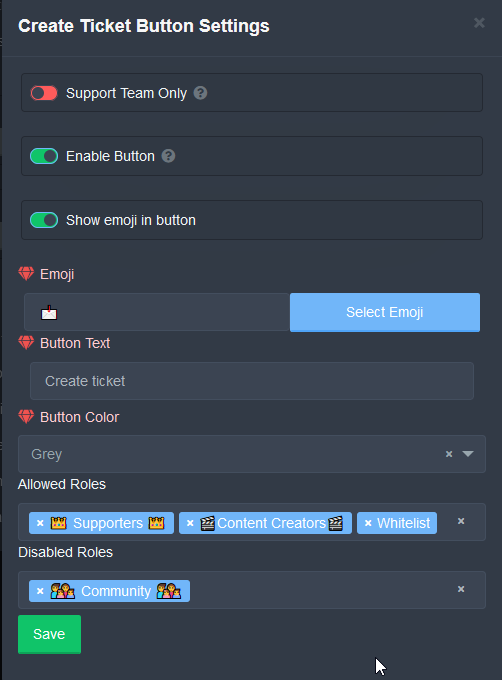
Question, if a allowed role user also has a disabled role, will the allowed role bypass the disabled role if it's set?
 gilded verge
Solved Torvi problem in his/her server
charred nexus
Thank you @gilded verge
iron nightBOT
Gave +1 Rep to @gilded verge
gilded verge
restive solar
Question, if a allowed role user also has a disabled role, will the allowed rol...
Give me a minute, I'll check it for you
charred nexus
I want translate that un french please
 crimson void
charred nexus
I want translate that un french please
crimson void
charred nexus
I want translate that un french please
This for premium only sadly. As my knowledge.
humble sequoiaBOT
Help Options
$help commands - Information on commands
$help setup - Information on bot setup
$help faq - Frequently asked questions
gilded verge
restive solar
Question, if a allowed role user also has a disabled role, will the allowed rol...
If the user has an allowed and denied role, he will be able to use the button because the allowed role is prioritized. In that case, I can recommend that you add the everyone role to theDisabled Roles instead of the Community role and then it will work as you want.
Example:
 gilded verge
charred nexus
I want translate that un french please
gilded verge
charred nexus
I want translate that un french please
If I remember it correctly, you currently have 7 days of free premium, so go to Dashboard->Panel Configs->Panel Settings->Expand Button Options->Create Ticket Settings->and change Button Text
 crimson void
gilded verge
If the user has an allowed and denied role, he will be able to use the button be...
crimson void
gilded verge
If the user has an allowed and denied role, he will be able to use the button be...
Additional info, After you for sure:
if the denied role underneath the Allowed roles, (in server settings) it will not Affect so they can still use the ticket ^
gilded verge
Exactly, if everyone is in Disabled Roles, only Allowed Roles can use the ticket button
restive solar
gilded verge
If the user has an allowed and denied role, he will be able to use the button be...
Thanks that fixed it!
thanks @gilded verge
iron nightBOT
Gave +1 Rep to @gilded verge
restive solar
btw we have the free version atm, I have set tickets to go to a bin category for our 6 types, but one of them isn't moving them, it just sits as closed? could that be a lag/free issue type thing?

 uneven tiger
Just realized that I probably should've asked before suggesting, but I've noticed that when a Support member without the Admin role opens a ticket and closes it, they're locked out of making any further changes to it when User Closed Permissions has view perms set to  , even if Support Team Closed Permissions has all set to
gilded verge
restive solar
btw we have the free version atm, I have set tickets to go to a bin category for...
Please make sure the bot has permission to the category you have set
gilded verge
Personally, I have such permissions and recommend them: https://cdn.discordapp.com/attachments/776680605517742090/957333296428224582/2022-03-24_18-11-242.mp4
uneven tiger
Oh, I've got mine set the same way
The problem I'm having is that when someone with a support team role closes the ticket that they opened, their view access is revoked
gilded verge
in these permissions it is so that Supp Role still has access, the only thing it cannot do after closing is sending messages on the ticket channel but reading and sending messages and seeing the channel are turned on
oh wait, missclick xD Supp role can also write after closing in this perms😅
so I hope you find this setup useful
uneven tiger
Thanks!
O hai Yaggy 
Are there any other perms I need to set? I tried that, and when a mod closed their own ticket, they got this response:
 jade topaz
how to switch my membership from a banned server to a new one?
crimson void
jade topaz
how to switch my membership from a banned server to a new one?
Best option now is Open a ticket #🎫│make-a-ticket .
 high island
Hello, how can I make the ticket be created in a separate category?
humble sequoiaBOT
How to set the open category
To set a open category go to the Dashboard -> Panel Configs -> Settings -> Category Options -> Category Open
 crimson void
@high island ^^ check this out
high island
Thanks
crimson void
Anytime ~
uneven tiger
uneven tiger
Are there any other perms I need to set? I tried that, and when a mod closed the...

crimson void
uneven tiger
Are there any other perms I need to set? I tried that, and when a mod closed the...
Sorry what the issue exactly ? If you can explain it more... again sorry
uneven tiger
Alright so, to break it down:
Some support staff do not have Admin perms. When they create a ticket themselves and close it, they are locked out from making any further edits since the User Close Permissions override the Support Close Permissions for some reason
crimson void
uneven tiger
Alright so, to break it down:
Some support staff do not have Admin perms. When t...
So you want to make the support can edit to the ticket they made ?
uneven tiger
Mhm, I.e. access to re-open, create transcript, and delete on-close
crimson void
Have you changed these settings ?

 uneven tiger
Yes
crimson void
The Support Team Closed Permissions + Support Team roles .
crimson void
uneven tiger
Yes
Open a ticket so they can check your permissions, debug, etc ... #🎫│make-a-ticket
uneven tiger
Thank you, I'll do so in a bit
crimson void
Anytime ~
uneven tiger

 sour wadi
does the changes made while in premium remains after the premium expires ?
crimson void
sour wadi
does the changes made while in premium remains after the premium expires ?
When your premium expires, the bot leaves as it is two separate bots. When purchased, the server chosen is whitelisted for premium.
everything would return to normal, however you might need to resend panels.
sour wadi
oh ok
restive solar
gilded verge
Please make sure the bot has permission to the category you have set <:peepoBlus...
Does it just need read rights or?
humble sequoiaBOT
Help Options
$help commands - Information on commands
$help setup - Information on bot setup
$help faq - Frequently asked questions
Help Options
$help commands - Information on commands
$help setup - Information on bot setup
$help faq - Frequently asked questions
restive solar
$help setup
humble sequoiaBOT
Setting up Ticket Tool
Visit the docs for setup info
General Setup
restive solar
Doesn't mention anything about perms within a category being needed other then just access? or am I blind?
crimson void
Sorry can you explain the issue you have again? @restive solar
restive solar
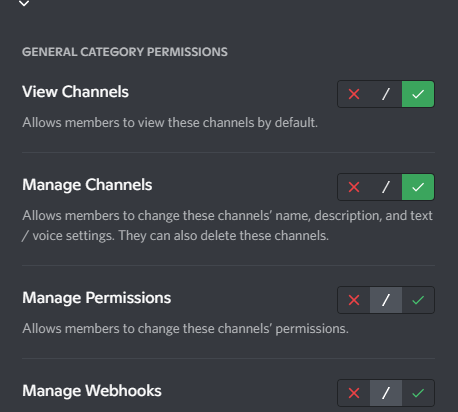
I have given bot perms in the categories for tickets
but when I close, it doesn't move it to the bin we setup to move closed tickets
I was told to check perms, found they were not added, so added them but not sure what perms exactly it needs
crimson void
restive solar
I was told to check perms, found they were not added, so added them but not sure...
Show me your permissions if you don't mind .
restive solar
 crimson void
For the bot ? I always use Administrator permission so everything will be easy .
 slender minnow
crimson void
For the bot ? I always use `Administrator` permission so everything will be easy...
slender minnow
crimson void
For the bot ? I always use `Administrator` permission so everything will be easy...
Admin perm is really not necessary if its been given sufficient perms.
crimson void
@restive solar check this out
crimson void
slender minnow
Admin perm is really not necessary if its been given sufficient perms.
As i said I always use
slender minnow
Ah i see, don't mind me interfering :x
I'm off
crimson void
Np
restive solar
Yeah I have set all that on the role then given the bot the role
i've used this tool on so many discords just fine lol
crimson void
restive solar
Yeah I have set all that on the role then given the bot the role
Open a ticket #🎫│make-a-ticket so they can only ones who can check your permissions, etc ..
valid shell
Is there any support in Spanish connected?
crimson void
valid shell
Is there any support in Spanish connected?
Open a ticket and wait them, they will be with you As soon as possible.
Or if that an small issue, say it here
 misty crown
Hello. What is the command to start a giveaway?
slender minnow
misty crown
Hello. What is the command to start a giveaway?
Ticket Tool does not has a giveaway function.
misty crown
Good, thanks ❤️
humble sequoiaBOT
⚠️ You're in the wrong place
We provide support for @pseudo glen discord bot and cannot help you with whatever issue you have.
- We don't know which Support Team you should contact to get this issue resolved, and unfortunately we won't be able to accurately tell you.
If you don't have any further questions regarding our bot Ticket Tool, please close this ticket
crimson void
^
misty crown
??
crimson void
I guess you mean other bot, not ticket tool.
misty crown
Seeing the sortro channel, I thought the bot had it
crimson void
It's okay.
 neon solar
Hello
Community members in my server are trying to create ticket and it’s creating the ticket number as a channel,I checked and tried to create one myself and it’s saying missing server access,what do I do please?
crimson void
neon solar
Community members in my server are trying to create ticket and it’s creating the...
Are you the owner or only admin? In the server
jade topaz
OK
humble sequoiaBOT
Don't see your server in the dashboard?
You will possibly need to relog. Look below to see steps on how to relog.
How to relog in the Dashboard.
First, you will need to go to the dashboard. Once your there, click on your avatar on the top right. after you clicked it, you will see button that says Logout. You must click that. Once you have logged out, you can log back in.
Note:
You need one of these 3 things to access the dashboard.
1. Server Owner (Level: 6)
2. Server Administrator (Level: 4)
3. Dashboard Role (Level: 2)
:warning: You can check your level using $level on your Discord Server
User permission level with Ticket Tool
@User is permission level: 0 (User)
```» *If it shows that your permission is **0**, you don't have any of the above **3 things** to manage the dashboard.*


**See the GIF below on how to relog:**that might be the issue (sorry for coming in like that)
crimson void
Might be the permissions
So you can't see the other server? Or what?
Okay make sure you have an administrator role, if Not then let the owner add it manually from the dashboard^
neon solar
crimson void
Are you the owner or only admin? In the server
I’m the owner
crimson void
Relogin to the dashboard then and try
crimson void
humble sequoia
Check this out @jade topaz
crimson void
neon solar
I’m the owner
So you're the only one who can't open a ticket? In your server
valid shell
Is there any support in Spanish connected?
crimson void
Anytime ^
crimson void
valid shell
Is there any support in Spanish connected?
Open a ticket and wait for them
Good^
humble sequoiaBOT

Equipo de Soporte Español
Querido usuario, si está buscando ayuda, por favor abra un ticket para contactar al Equipo de Soporte Español. Diríjase a #🎫│make-a-ticket y presione el botón :flag_es:.
crimson void
^^
neon solar
crimson void
So you're the only one who can't open a ticket? In your server
Everyone else can,but it opens the ticket number as a channel
crimson void
@agile mesa you mean you want to see deleted tickets ?
 agile mesa
crimson void
<@705167881041739866> you mean you want to see deleted tickets ?
agile mesa
crimson void
<@705167881041739866> you mean you want to see deleted tickets ?
yeah, I have opened a several tickets in different servers and I wanna check if that's possible to see the history what was written there
crimson void
agile mesa
yeah, I have opened a several tickets in different servers and I wanna check if ...
There's only one way to check what was in the ticket, if there's a Transcript saved
humble sequoiaBOT
How do I save transcript to a channel?
To save transcripts to a channel go to the Dashboard -> Panel Configs -> Settings -> Logging Options -> Transcript Channel
agile mesa
crimson void
There's only one way to check what was in the ticket, if there's a *Transcript* ...
It is if I own a server, right? But if I'm just a member? Is there's a way how can I check it?
crimson void
agile mesa
It is if I own a server, right? But if I'm just a member? Is there's a way how c...
If they're enabled the transcript sent to DM for the user then you can. But otherwise no.
or you can open another ticket and ask them for a transcript, also for the auto transcript sent, it sent by @humble sequoia so check the DM with the bot^


 gilded verge
neon solar
gilded verge
neon solar
Hey Efosa,
Oh, you need some perms... Take my config, this can help you: https://cdn.discordapp.com/attachments/776680605517742090/972156942766211194/2022-05-06_17-20-51.mp4
 bitter wren
Just go to configure panel
Then you will have to choose a category for him to send ticj
ticket
humble sequoiaBOT
How to set the open category
To set a open category go to the Dashboard -> Panel Configs -> Settings -> Category Options -> Category Open
gilded verge
yes, like
bitter wren
Hi, mine has ADM but when it goes there on the dashboard it says it's not on any of my servers
crimson void
bitter wren
Hi, mine has ADM but when it goes there on the dashboard it says it's not on any...
Relog to the dashboard if you have an Admin permission at the server already .
-if you mean the server not shows up in dashboard
crimson void
humble sequoia
@bitter wren ^
bitter wren
yes but i already made a friend
neon solar
gilded verge
Hey Efosa,
Oh, you need some perms... Take my config, this can help you: https:/...
Just did this and it worked. Thanks so much.
iron nightBOT
Gave +1 Rep to @gilded verge
crimson void
bitter wren
yes but i already made a friend
Have you check this:
First, you will need to go to the dashboard. Once your there, click on your avatar on the top right. after you clicked it, you will see button that says Logout. You must click that. Once you have logged out, you can log back in.```@jade topaz check this
jade topaz
hello can i get premium in TRY
humble sequoiaBOT
Ticket Tool Premium
Get premium at https://tickettool.xyz/premium
Manage your subscriptions at https://tickettool.xyz/subscriptions
Why Premium?
Premium lets you customize the bot just how you want it. It also helps keep the bot running.
quick bone
@jade topaz ^
crimson void
jade topaz
hello can i get premium in TRY
After you ayaan,
or if you want to be sure open a ticket as a billing and they will help you ^
jade topaz
ok
gilded verge
i want answer too 😄
Hey @jade topaz, you can get free 7 days of premium on the website. Just click Start 7 day Trial
 crimson void
@jade topaz What do you mean? do you mean you want when someone opened a ticket it will move it to specific category ?
If yes, then check this out
humble sequoiaBOT
How to set the open category
To set a open category go to the Dashboard -> Panel Configs -> Settings -> Category Options -> Category Open
jade topaz
crimson void
If yes, then check this out
thankss
crimson void
Anytime~
 azure kindle
Man I need a help with this bot, when I open a ticket in any server it says "invalid from body" and don't open can anyone tell me how do I fix this
crimson void
azure kindle
Man I need a help with this bot, when I open a ticket in any server it says "inv...
Seems you use a discord mobile app?
jade topaz
Quelqun parle francais ?
azure kindle
Yep u r right I do have a PC but I use it when I am outdoor
humble sequoiaBOT

L'équipe du support Français
Cher client,
Si vous avez besoin d'aide, ouvriez un ticket pour le support Français s'il vous plaît.
Allez au #🎫│make-a-ticket et tapez sur le button contenant l'emoji 🇫🇷
crimson void
azure kindle
Yep u r right I do have a PC but I use it when I am outdoor
Update your discord App
Buttons are a relatively new addition to discord and don't work with some older versions of the app.
Please verify that you have the latest version of discord, by going to the app or play store.
humble sequoiaBOT
Update your discord App
Buttons are a relatively new addition to discord and don't work with some older versions of the app.
Please verify that you have the latest version of discord, by going to the app or play store.
Discord for the  App Store
Discord for the  Play Store
crimson void
humble sequoia
@jade topaz
jade topaz
Merciii
crimson void
Anytime ~
azure kindle
crimson void
`Update your discord App`
Buttons are a relatively new addition to discord and d...
K thx bro
iron nightBOT
Gave +1 Rep to @crimson void
crimson void
azure kindle
K thx bro
Anytime ~ ^
 wheat torrent
Hello , I have one question please
How can I make more then 1 button in the panel?
Just like this one
 humble sequoiaBOT
For a more convenient use of multipanels, you can now combine panels on the dashboard. This will allow you to directly send the multipanel from the dashboard or via the $panel ID command.
Where can I find this?
You can find this setting on the Dashboard -> Panel Configs -> Settings -> General Options
Note: if you're attaching all the panels to a panel called English, don't include English in the attached panels box (If you do this, it will create duplicate)
This will put all buttons from all of your panels on one message. The message is the panel message from the panel you're combining these panels in.
 Note: This is a premium feature
slender minnow
Note: This is a premium feature
slender minnow
@wheat torrent its a premium feature ^
crimson void
ياهلا تابع الشرح ^ بس لازم تكون بريميوم
 slender minnow
wheat torrent
But he is not using the premium bot
slender minnow
wheat torrent
But he is not using the premium bot
most likely it is a server with a premium subscription using the free version bot :)
wheat torrent
slender minnow
most likely it is a server with a premium subscription using the free version bo...
ow
 robust sandalBOT
crimson void
ياهلا تابع الشرح ^ بس لازم تكون بريميوم
robust sandalBOT
crimson void
ياهلا تابع الشرح ^ بس لازم تكون بريميوم
 WhiteWolf
Welcome continue explaining but it must be premium
 Arabic (ar) → English (en)
wheat torrent
Arabic (ar) → English (en)
wheat torrent
تمام Thx
robust sandalBOT
wheat torrent
تمام Thx
WhiteWolf
All Thx
Persian (fa) → English (en)
 serene echo
Hello! Im using ticket tool for verification and a user trying to enter received this and cant create a ticket

How do i solve this?
humble sequoiaBOT
Update your discord App
Buttons are a relatively new addition to discord and don't work with some older versions of the app.
Please verify that you have the latest version of discord, by going to the app or play store.
Discord for the App Store
Discord for the Play Store
gilded verge
Hey @serene echo, try
serene echo
thanks! i'll suggest that to the user, hopefully it will be fixed
thanks @gilded verge
iron nightBOT
Gave +1 Rep to @gilded verge
charred nexus
I need to create income rôle but i dont know how ?
And i want to know if i can create more than one
gilded verge
When you say income role, you mean in bot Unbelievaboat or Ticket Tool ?
gilded verge
On this server, you can only get help for the Ticket Tool bot. If you need help with Unbelievaboat, please go to his server support 😕
charred nexus
I can make that with ticket tool?
 scarlet jewel
Hi
gilded verge
Ticket Tool don't have economy (now)
iron nightBOT
Gave +1 Rep to @gilded verge
shut bolt
gilded verge
Ticket Tool don't have economy (now)
It won't probably have one, it's not really related to tickets
jade topaz
Yo do I have to give my support role administrator in order for them to see tickets?
slender minnow
jade topaz
Yo do I have to give my support role administrator in order for them to see tick...
not really
you can add their role as support role and they will have access to the tickets
you can also adjust their perms from the dashboard
jade topaz
I’m at a loss on what perm is needed I can’t find where the setting is on the dashboard to add a role
I went to the dashboard after not finding a perm in the server
And can’t seem to find it
Because I figured there would be settings in the dashboard that allow you to add support roles^
gilded verge
Hey, if you want add Support Team Roles, you need go to Panel Configs->Panel Settings->Expand General Options and there you can add
slender minnow
here
shut bolt
I'm so funny
shut bolt
slender minnow
what is that 😂
Me trying to imitate the sound of a bad joke in the drums
🥁 badum
tssss
JAJAJJAA
slender minnow
lol
quick bone
pablo this is community support >:(
shut bolt
quick bone
pablo this is community support >:(
I'm aware of that, but pinging Wolf in general chat wouldn't have make sense, I saw an opportunity and took it 
slender minnow
lol
 reef apex
anyone know how to fix this message "Failed: Cannot edit a message authored by another user"
when someone tries to make a ticket
this is what it does
shut bolt
reef apex
anyone know how to fix this message "Failed: Cannot edit a message authored by a...
Resend the panel
And delete the one generating the issue
That will make it work 
reef apex
ty
shut bolt
Sure 
 low cypress
Are there any Russian speakers? Tell me how to write to the support service? Today, all progress from level 26 has been reset to zero
robust sandalBOT
У нас нет русской команды поддержки, но и у нас нет какого-либо уровня с нашим ботом, вы, вероятно, находитесь не в том партнере по серверу.
English (en) → Russian (ru)
 warm jacinth
How do I change it to go under and not at the top of the discord
humble sequoiaBOT
How to set the open category
To set a open category go to the Dashboard -> Panel Configs -> Settings -> Category Options -> Category Open
gilded verge
@warm jacinth, check
iron nightBOT
Gave +1 Rep to @gilded verge
jade topaz
I need help
humble sequoiaBOT
We would love to help you, but if you don't tell us what you need help with we can't help you :(
jade topaz
I have ticket tool in my sever, someone pulled a ticket and they were talking and I closed it, but how do I see what they said after the ticket deleted ?
 rocky birch
hellow hellow everyone
where can I enable logging for the tickets?
Or is it premium?
Like being able to know what went on a ticket once it was deleted?
humble sequoiaBOT
How do I save transcript to a channel?
To save transcripts to a channel go to the Dashboard -> Panel Configs -> Settings -> Logging Options -> Transcript Channel
gilded verge
jade topaz
I have ticket tool in my sever, someone pulled a ticket and they were talking an...
oh, if you didn't save transcript, then you can't see this conversation, next time use command $transcript on ticket channel 😕
check
gilded verge
humble sequoia
Hey @rocky birch, you need this too
use command $transcript on ticket channel if you want save conversation
and no, transcripts is not premium, everyone can use that
rocky birch
gilded verge
Hey <@974274817119367188>, you need this too <:this:894279341108772914>
use comm...
ou so it's a must, or else it wont do it right?:D
gilded verge
yes, if you don't use the command the transcript will not be sent
rocky birch
tanq
one more question, I forgot how I made it so no one can delete their own tickets
How do I make it so only I can delete tickets? And not the support roles?
gilded verge
Dashboard->Panel Configs->Panel Settings->Expand Button Options->Close Ticket or Delete Ticket and click Settings->add everyone to Disabled Roles
Example:

or/and in $delete command, go toDashboard->Command Configs:
 rocky birch
gilded verge
`Dashboard`->`Panel Configs`->`Panel Settings`->Expand `Button Options`->`Close ...
rocky birch
gilded verge
`Dashboard`->`Panel Configs`->`Panel Settings`->Expand `Button Options`->`Close ...
Thanks a ton
just disabling the first option
the only support team wouldn't work right?
iron nightBOT
Gave +1 Rep to @gilded verge
gilded verge
As in the screenshot, you also need to add the everyone role to make it work the way you want
rocky birch
tanqqq
rocky birch
gilded verge
or/and in `$delete` command, go to`Dashboard`->`Command Configs`:
this one's necessary to do so too right?
gilded verge
rather yes, that is, uncheck Support Team Only and add the roleeveryone to the Disabled Roles
rocky birch
thanks a lot^-^
do i need to clone my ticket thingy or just disabling does it all alrdy?
gilded verge
no you don't need to clone the panel, if you saved everything it should be fine
rocky birch
Thanks a lot again
for your time, patience and the answers ♥️
 versed barn
yo the server refuses to show up in this area

i've like refreshes relogged and everything
humble sequoiaBOT
Don't see your server in the dashboard?
You will possibly need to relog. Look below to see steps on how to relog.
How to relog in the Dashboard.
First, you will need to go to the dashboard. Once your there, click on your avatar on the top right. after you clicked it, you will see button that says Logout. You must click that. Once you have logged out, you can log back in.
Note:
You need one of these 3 things to access the dashboard.
1. Server Owner (Level: 6)
2. Server Administrator (Level: 4)
3. Dashboard Role (Level: 2)
:warning: You can check your level using $level on your Discord Server
User permission level with Ticket Tool
@User is permission level: 0 (User)
```» *If it shows that your permission is **0**, you don't have any of the above **3 things** to manage the dashboard.*


**See the GIF below on how to relog:**please check
versed barn
thanks it works now
warm jacinth
Is there a cooldown on how many tickets can be open?
shut bolt
warm jacinth
Is there a cooldown on how many tickets can be open?
There's a 10 second limit per each user, and 10 tickets per minute for free servers
 simple nova
I added the bot to my server but when someone opens a ticket the whole server can see it? How do I go around that to make it where not everyone can see it
shut bolt
simple nova
I added the bot to my server but when someone opens a ticket the whole server ca...
$help perms
humble sequoiaBOT
How to set the permissions for tickets
To set a change permissions go to the Dashboard -> Panel Configs -> Settings -> Permission Options
 shut bolt
Check two things
Thing number one Everyone Opened Permissions, the Read Messages should be set to 
Number two
$help support
humble sequoiaBOT
How to let support team see into a ticket
About support roles
A support role lets your support team see into tickets with out having to add them manually to each and every ticket.
You can add as many support roles as you like per panel.
NOTE that the way discord works all admins can see into tickets regardless of this.
How to set a support role
To set a Support role go to the Dashboard -> Panel Configs -> Settings -> General Options -> Support Team Roles.

NOTE that the support role will not be able to see into tickets that are already created..
shut bolt
Check your support team roles, and that no public role or everyone has been marked as one
simple nova
Ah ok, I’ll try again. I have it to where support team can see it just when I open one everyone can chat in it from the server. So I just needa turn off read messages ?
shut bolt
If those are the settings you have on the dashboard, yes, update them the way I indicated so new tickets don't face this issue
simple nova
Ah under everyone role opened permissions I had read messages and sent messages on. Turned those off that should fix it
shut bolt
Affirmative
simple nova
Ah ok so perfect when someone opens one now only support team can see it. That’s what I needed. And is there anyway when someone opens a ticket it can pop up under a certain channel? Bc when someone opens one it appears all the way at the top of the discord channels
humble sequoiaBOT
How to set the open category
To set a open category go to the Dashboard -> Panel Configs -> Settings -> Category Options -> Category Open
simple nova
Perfect, thank you
 sharp stratus
I'm so lost on how to set up ticket mod
simple nova
Haha Pablo will help you kinky
crimson void
#546557408902905896 rule#4 ...
Please say what is your problem and explain it.
crimson void
warm jacinth
Is there a cooldown on how many tickets can be open?
Also be aware there's a limit of the opened tickets at all, you can check it out by:
Dashboard > Server Configs > Global Ticket Limit from there you can change the limit for all ^ .
crimson void
sharp stratus
I'm so lost on how to set up ticket mod
How can we help ?
humble sequoiaBOT
You can check our documentation here.
You can also check #573205317870157855 for the basic setup.
Our documentation contains all the info you need about the bot to be able to setup and configure the bot however you like.
 tulip portal
Hi! How can I add emojis in the Ticket Message/Close Ask Message?
crimson void
tulip portal
Hi! How can I add emojis in the Ticket Message/Close Ask Message?
If you mean the main message when someone open a ticket
Dashboard > panel configs > Ticket options from there you can change Open & Close Ticket message
crimson void
crimson void
If you mean the main message when someone open a ticket
`Dashboard` > `panel co...
- use the
$idcommand like this:
Then copy that and paste it in the message box^


@tulip portal Do it in your server. The command
jade topaz
Hello, how to setup triggers with ticket tool?
crimson void
jade topaz
Hello, how to setup triggers with ticket tool?
What do you mean by triggers?
jade topaz
Triggers means like

Like when I sent the msg !btc ticket tool sent the btc address
@crimson void
humble sequoiaBOT
Tags
Tags are used to send a predefined response to your channels using a command. Tags will only respond if the command itself is used, it will not function if you put the tag into a sentence. The prefix is not included.
To create tags, go to: Dashboard > Tags > Create Tag. After creating and naming one, tap on the response button, and you can edit the response.
 crimson void
@jade topaz check this out^
jade topaz
Thanks @crimson void
iron nightBOT
Gave +1 Rep to @crimson void
crimson void
Anytime ^
humble sequoiaBOT
Don't see your server in the dashboard?
You will possibly need to relog. Look below to see steps on how to relog.
How to relog in the Dashboard.
First, you will need to go to the dashboard. Once your there, click on your avatar on the top right. after you clicked it, you will see button that says Logout. You must click that. Once you have logged out, you can log back in.
Note:
You need one of these 3 things to access the dashboard.
1. Server Owner (Level: 6)
2. Server Administrator (Level: 4)
3. Dashboard Role (Level: 2)
:warning: You can check your level using $level on your Discord Server
User permission level with Ticket Tool
@User is permission level: 0 (User)
```» *If it shows that your permission is **0**, you don't have any of the above **3 things** to manage the dashboard.*


**See the GIF below on how to relog:**@simple orchid check this out for your issue^
 simple orchid
crimson void
<@890452038662627349> check this out for your issue^
simple orchid
crimson void
<@890452038662627349> check this out for your issue^
TYSMM
crimson void
Anytime^
 candid bronze
Is there a fprm option? Like this
https://conor.is-cool.tech/
 crimson void
candid bronze
Is there a fprm option? Like this
https://conor.is-cool.tech/...
crimson void
candid bronze
Is there a fprm option? Like this
https://conor.is-cool.tech/...
As my knowledge no.
candid bronze
crimson void
As my knowledge no.
oof, thanks
iron nightBOT
Gave +1 Rep to @crimson void
crimson void
Anytime ^
gilded verge
candid bronze
Is there a fprm option? Like this
https://conor.is-cool.tech/...
not yet
There are many great things going on the backstage, Battle is working hard to release this epic update
 candid bronze
gilded verge
> not yet
> There are many great things going on the backstage, Battle is worki...
candid bronze
gilded verge
> not yet
> There are many great things going on the backstage, Battle is worki...
oh thanks for the little teazer
iron nightBOT
Gave +1 Rep to @gilded verge
fallow ingot
gilded verge
> not yet
> There are many great things going on the backstage, Battle is worki...
how do you know 
gilded verge
Ctrl+F 
crimson void
It's not the place you can do your dare 🙂 !
slender minnow
@atomic solstice a bit help here
 honest orchid
On my own discord server ticket bot not working anyone can help me out?
crimson void
honest orchid
On my own discord server ticket bot not working anyone can help me out?
What the issue exactly?
humble sequoiaBOT
Setting up Ticket Tool
Visit the docs for setup info
General Setup
You can check our documentation here.
You can also check #573205317870157855 for the basic setup.
Our documentation contains all the info you need about the bot to be able to setup and configure the bot however you like.
crimson void
Check these ^^
honest orchid
crimson void
What the issue exactly?
Well when my squad try make ticket it said invaid
crimson void
honest orchid
Well when my squad try make ticket it said invaid
Can you show us a screenshot please ?
 crimson void
honest orchid
crimson void
honest orchid
Can you see the video how to setup tickettool?
if not help feel free to ask
https://www.youtube.com/watch?v=rPz5-r4KEgo
or this
https://www.youtube.com/watch?v=WtRGutJmj6I 25min everything explained
honest orchid
Gona check it out
fallow ingot
You need to setup ticket tool via the dashboard not a command. Watching the tutorial will only show/help you set it up.
Our documentation is decent, and provides a framework of how to set stuff up without having to pause and start a video every 20 seconds.
crimson void
humble sequoia
https://docs.tickettool.xyz/general/setup
After aaronxyas, if you want easy setup check this ^^ as aaronxyas said
 woeful lily
@crimson void
 hoary oar
how to remove this inscription?
 crimson void
hoary oar
how to remove this inscription?
crimson void
hoary oar
how to remove this inscription?
You can't remove the description .
hoary oar
can I change it?
crimson void
hoary oar
can I change it?
No..
hoary oar
okey thanks
crimson void
Anytime ~
 crimson void
humble sequoia
crimson void
humble sequoia
@green wyvern check this out ^
 green wyvern
crimson void
<@856867036658925568> check this out ^
green wyvern
crimson void
<@856867036658925568> check this out ^
its set as per the gif
crimson void
green wyvern
why is this happening?
Are you the owner of the server ?
green wyvern
yes i am, this is the image taken in my alt account
crimson void
Miroxik is coming hehe .
gilded verge
Hey @green wyvern, please make sure you set the appropriate role to allowed.
Dashboard->Panel Configs->Panel Settings->Expand Button Options->Create Ticket Settings
Example:
 green wyvern
gilded verge
Hey <@856867036658925568>, please make sure you set the appropriate role to allo...
green wyvern
gilded verge
Hey <@856867036658925568>, please make sure you set the appropriate role to allo...
thanks so much, got it working again
iron nightBOT
Gave +1 Rep to @gilded verge
green wyvern
does this mean that tickets can only be opened by support team and nobody else
 gilded verge
yep, but I don't know how it works for people with the role of server administrator, wait a minute, I'll check it
crimson void
Yes, you can click at the question mark and see what's this doing for making easy to you ^^~ when you click it you will see the explanation.
green wyvern
👍
 rigid fern
i want to make such a ticket system of @pseudo glen that whenever any user opens a ticket he/she will get a role immediately, can we create such a system??
crimson void
rigid fern
i want to make such a ticket system of <@557628352828014614> that whenever any u...
As my knowledge No.
gilded verge
green wyvern
does this mean that tickets can only be opened by support team and nobody else
Okay, so if this option is checked, it does not affect the server administrators because they will be able to use it anyway even if the Support Team Only option is enabled.
but others will not be able to use because they will get this error:
 rigid fern
crimson void
As my knowledge No.
rigid fern
crimson void
As my knowledge No.
okk
sharp stratus
crimson void
How can we help ?
I'm new yo being a mod and discord I want to set up where ever one must open a ticket and get verified before getting access to the server
humble sequoiaBOT
You can check our documentation here.
You can also check #573205317870157855 for the basic setup.
Our documentation contains all the info you need about the bot to be able to setup and configure the bot however you like.
crimson void
sharp stratus
I'm new yo being a mod and discord I want to set up where ever one must open a t...
Check this out^
crimson void
@pine jolt hello, if you want any help please here, and what you need ? ^
 pine jolt
I have added my mods & helpers in the server config
But they still can't see the tickets people make
humble sequoiaBOT
Any role you put there will have full access to the ticket tool dashboard. The server owner and users with admin permissions already have access to the dashboard.
Be careful of which roles to put here
 crimson void
Oh okay follow this:
Dashboard > Panel Configs > Settings for your panel > General Options > you will see Support Team Roles there you can add the role you want them to see the tickets.
pine jolt
Oh ok wait lemme check
crimson void
Take your time..
humble sequoiaBOT
━━ moved to ticket ━━
 echo haven
عندي مشكلة في البوت لاكن في اي شخص يتكلم عربي ؟
humble sequoiaBOT

فريق الدعم الفني العربي
عميلنا العزيز ان كنت تبحث عن مساعدة يرجى فتح تكت خاص بفريق الدعم الفني العربي
اذهب الى#🎫│make-a-ticket
ثم قم بلضغط على الايموجي الاتي (🇯🇴)
crimson void
echo haven
عندي مشكلة في البوت لاكن في اي شخص يتكلم عربي ؟
يب قول مشكلتك
It's disabled temporary
gilded verge
oof, right, my fault 
echo haven
انا كل ما اجرب افتح تكت في سيرفر تطلعلي ذي الرسالة وش الحل ؟
System Failure: Missing Permissions
crimson void
echo haven
انا كل ما اجرب افتح تكت في سيرفر تطلعلي ذي الرسالة وش الحل ؟
System Failure: Mi...
سيرفرك؟
echo haven
crimson void
سيرفرك؟
ايه
pine jolt
crimson void
Take your time..
Omg thank you it worked
iron nightBOT
Gave +1 Rep to @crimson void
crimson void
fallow ingot
nvm
fallow ingot
crimson void
https://ptb.discord.com/channels/509192800865353738/571706435449257997/973835216...
i was thinking of something else

crimson void
echo haven
ايه
حلو تأكد من الصلاحيات حقته بعطيك فيديو سو نفسه .
crimson void
fallow ingot
i was thinking of something else
Np ^
echo haven
crimson void
حلو تأكد من الصلاحيات حقته بعطيك فيديو سو نفسه .
تمام بس ترى عطيته رتبت ادمن استريتر و ما ضبط
crimson void
echo haven
تمام بس ترى عطيته رتبت ادمن استريتر و ما ضبط
ابعطيك الفيديو وتأكد انت بس ( تأكد من الصلاحيات في البوت نفسه ) الموقع
echo haven
crimson void
ابعطيك الفيديو وتأكد انت بس ( تأكد من الصلاحيات في البوت نفسه ) الموقع
تمام
crimson void
gilded verge
Hey Efosa,
Oh, you need some perms... Take my config, this can help you: https:/...
@echo haven
humble sequoiaBOT
⚠️ أنت في المكان الخطأ
نحن نقدم دعمًا لـ@pseudo glen ديسكورد بوت ولا يمكننا مساعدتك في المشكلة التي تواجهها.
- يرجى التأكد من الاتصال بفريق الدعم المناسب.
إذا لم يكن لديك أي أسئلة أخرى بخصوص بوت تيكت توول ، يرجى إغلاق هذه التذكرة
crimson void
$arts
humble sequoiaBOT
استكشاف الأخطاء وإصلاحها
إذا كان البوت لا يعمل بشكل صحيح ، فجرّب الخطوات التالية:
-
قم بتشغيل الأمر ** debug$ ** في السيرفر الخاص بك ، للتحقق من أذونات البوت. أرسل الرابط الذي تحصل عليه إلينا.
-
تحقق مما إذا كان لديك أي رولات بقائمة المحضورين في Server Configs. أي رولات مدرجة هناك لن تكون قادرة على استخدام البوت / إنشاء التذاكر.
-
أثناء تواجدك في Server Configs، تأكد من عدم اختيار بوت البريميوم لديك ، دون أن يكون لديك بالفعل اشتراك برمييوم أو البوت على السيرفر.
هذه هي المشاكل الأكثر شيوعًا. إذا استمرت مشكلتك ، يمكنك الانتقال إلى صفحة استكشاف الأخطاء وإصلاحها للحصول على مزيد من الإصلاحات.
crimson void
$perms
humble sequoiaBOT
ᅠ
@pseudo glen requires the following permissions:
Add Reactions
Read Channels
Send Messages
Manage Messages
Embed Links
Attach Files
Read History
Manage Roles
Manage Channels
To change the role permissions, you can go to your Discord Server ➞ Server Settings ➞ Roles ➞ @Ticket Tool
To change the channel permissions, you can go to your Channel Settings ➞ Permissions ➞ Ticket Tool
ᅠ
Note:
You can give Ticket Tool Administrative Permissions instead of all the permissions listed above, but it's entirely optional and NOT necessary.
 crimson void
humble sequoia
crimson void
humble sequoia
@echo haven هذا راح يفيدك
echo haven
يعطيك العافيه يالغالي بس توي استوعب اني كنت مخلي البرو بوت بريميوم يشيل صلاحيات اي بوت تجيه صلاحيات بس عدلتها @crimson void
ما قصرت و معليش على الأزعاج
crimson void
حلو بالتوفيق يارب
jade topaz
is it possible for like, you open a ticket and it goes into a specific category [without premium]
gilded verge
$help category
humble sequoiaBOT
How to set the open category
To set a open category go to the Dashboard -> Panel Configs -> Settings -> Category Options -> Category Open
crimson void
^
iron nightBOT
Gave +1 Rep to @gilded verge
gilded verge
jade topaz
thanks <@334671104704774154>
Hey, next time you can ping me and ask for help in Polish 😉
jade topaz
alr! xD
humble sequoiaBOT
How does the claim command work?
Ticket Tool claiming is a premium only command that allows your support team to claim tickets and have the ticket renamed, changed permissions or moved to another category
gilded verge
Hey, go to Dashboard->Panel Configs->Panel Settings->Expand Claiming Options and turn it on

don't forget about it:
Dashboard->Command Configs->Claim Ticket Settings

 static remnant
gilded verge
don't forget about it:
`Dashboard`->`Command Configs`->`Claim Ticket Settings`
static remnant
gilded verge
don't forget about it:
`Dashboard`->`Command Configs`->`Claim Ticket Settings`
thanks! How do I make the channel name the user that claimed the ticket?
iron nightBOT
Gave +1 Rep to @gilded verge
gilded verge
You can change in Enable claim name
 static remnant
yeah
but what is the placeholder to make the name the same as the person that claimed the ticket
humble sequoiaBOT
{server.name} ➞ Name of the server
{server.id} ➞ ID of the Server

[#🆘│community-support](/guild/509192800865353738/channel/776680605517742090/) = <#channel> ➞ Channel link of the current channel
{channel.name} ➞ Name of the current channel
{channel.id} ➞ ID of the current channel

{author} = <@user> ➞ Mention of the user triggering this message
{author.name} ➞ Name of the user triggering this message
{author.id} ➞ ID of the user triggering this message
{author.nickname} ➞ Nickname of the user triggering this message
{author.icon} ➞ Direct Url of the profile picture of the user triggering this message
{author.tag} ➞ 4 digit tag (discriminator) of the user triggering this message
{author.full} ➞ username + 4 digit discriminator of the user triggering this message

{panel.count} ➞ The current count number of the panel (Tickets only)
{panel.name} ➞ The name of the panel (Tickets Only)
{panel.ticketLimit} ➞ The current limit of the panel (Ticket Only)

{ticket} = <#channel> ➞ Channel mention of the ticket
{ticket.id} ➞ Channel ID of the ticket

{ticket.user} = <@user> ➞ User mention of the ticket user
{ticket.user.name} ➞ Name of the ticket user
{ticket.user.id} ➞ User ID of the ticket user
{ticket.user.nickname} ➞ Nickname of the ticket user
{ticket.user.icon} ➞ Direct Url of the profile picture of the ticket user
{ticket.user.tag} ➞ Tag / Discriminator of the ticket user
{ticket.user.full} ➞ Username + Discirimator of the ticket user```
Roles can be either
{@role name} or {role ID}
_ _
_ _
Additional variables
{reason}
» works on $close <reason>, $delete <reason>, $new <reason>, $claim <reason>
» displays the reason, you can optionally give with some commands
Transcript Variables
{ticket_name}➞ Name of the ticket
{panel_name}➞ Name of the panel
{transcript_url}➞ File link of the transcript
Hide Link under blue text:
[Click me](https://tickettool.xyz)➞ Click me
Time Variable
Sends the current unix time in seconds. Optinally add or remove seconds
<t:{!time+43200}:R>➞ <t:1652759902:R>
<t:{!time+43200}:R>➞ <t:1652673502:R>
<t:{!time+43200}:R>➞ <t:1652716702:R>
» Remove ! before time
_ _
<t:1641006000>➞ <t:1641006000>
<t:1641006000:f>➞ <t:1641006000:f>
<t:1641006000:F>➞ <t:1641006000:F>
<t:1641006000:D>➞ <t:1641006000:D>
<t:1641006000:d>➞ <t:1641006000:d>
<t:1641006000:t>➞ <t:1641006000:t>
<t:1641006000:T>➞ <t:1641006000:T>
<t:1641006000:R>➞ <t:1641006000:R>
» You can use https://hammertime.djdavid98.art/ to create custom dates/times
static remnant
example:
#Viktor#9999-1
gilded verge
let's check variables, wait please 
 radiant moss
author.name should work
static remnant
okay i can try
gilded verge
static remnant
example:
#Viktor#9999-1
but if you want with discriminator like you said #9999, then use {author.full} instead of {author.name}

 acoustic marsh
hello i want to ask is there like auto deletion function after closing ticket and will create transcript to the user instead?
crimson void
acoustic marsh
hello i want to ask is there like auto deletion function after closing ticket an...
Hello there,
1- Yes you can make it auto-deletion when you close the ticket:
Dashboard > Panel configs > choose your server panel settings > General Options > you gonna see down below something called Two step ticket Make sure to Disable it  .
.
2-Yes, you can. But this option now available for Premium. Which is send the transcript auto.
Dashboard > Panel configs > choose your server panel settings > Logging Options > Down below you can see Direct message Transcript & Auto Save transcript.
 subtle pivot
Hi ! I am sorry, this may be kind of an awkward question. This is the first time I use ticket tool and I have some difficulties with it. If i want my tickets to be in a certain category, where can I put the tickets in that certain category ? Thank you 😅
humble sequoiaBOT
How to set the open category
To set a open category go to the Dashboard -> Panel Configs -> Settings -> Category Options -> Category Open
crimson void
@subtle pivot check this out^^
static remnant
I tried setting a server limit to tickets,
but for some reason, it only set the limit to how many tickets one user can have at once.
I often experience that there becomes to many tickets that the tickets start going out of the category and the whole server is a mess.
Is there a way I can restrict the amount of tickets being open at once in the whole server instead of it being only per user?
 slender minnow
jade topaz
slender minnow
jade topaz
Dashboard role will allow the users with that role access to the dashboard.
slender minnow
there is no auto role feature in ticket tool
not sure why that would be necessary in a bot that offers ticket services
iron nightBOT
Gave +1 Rep to @slender minnow
slender minnow
np
 golden delta
anyone else having issues viewing screenshots after tickets are closed? use to work fine about 1-2 weeks ago
humble sequoiaBOT
━━ moved to ticket ━━
static remnant
static remnant
I tried setting a server limit to tickets,
but for some reason, it only set the...
please help me with this one
gilded verge
static remnant
please help me with this one
Hey, you can set a global limit of all tickets and a limit of tickets per user 😳
Limit for all tickets:Dashboard->Server Configs-> Global open ticket limit (Across all your panels)
Limit in panel per user: Dashboard->Panel Configs->Panel Settings->Expand General Options->Set Ticket Limit
- Remember that you can have a maximum of 50 channels in one category
static remnant
gilded verge
+ Remember that you can have a maximum of 50 channels in one category
global ticket limit is global ticket limit per user
for some reason
gilded verge
Huh? How it's possible? it is completely different 😳 Please make sure the global limit number is higher than the limit in the panel.
My config:


if I don't understand something, I'm sorry
static remnant
from my old server i set my global to 20, and the ticket overflooded
i also tested it out by setting global to 1, and try opening a ticket on 2 different accounts so the total is 2
it worked completely fine
weird, probably something I did wrong
static remnant
gilded verge
Huh? How it's possible? it is completely different 😳 Please make sure the glob...
thanks
iron nightBOT
Gave +1 Rep to @gilded verge
gilded verge
Probably we need Staff because I don't quite know how to fix your problem... in case of it, I'm sorry 
static remnant
so weird
gilded verge
#Staff , can you help him, please? 
oh wait, i forgot about something... you can go to #🎫│make-a-ticket and ask Staff for help there 😅
 kind hawk
golden delta
anyone else having issues viewing screenshots after tickets are closed? use to w...
kind hawk
golden delta
anyone else having issues viewing screenshots after tickets are closed? use to w...
It's not an issue, it's normal discord behavior. If you post a file in the channel, the hosting of said file will be deleted when the channel is also deleted.
Unless it's a link from a different host. Then the files are still accessible somewhere else.
 sick hearth
um how long is the rate limit xd
 pale pilot
sick hearth
um how long is the rate limit xd
pale pilot
sick hearth
um how long is the rate limit xd
uh, one hour 😬
sick hearth
pale pilot
uh, one hour 😬
rip
 winged kayak
where do I enable Support team ticket controls?
 fallow ingot
winged kayak
where do I enable Support team ticket controls?
fallow ingot
winged kayak
where do I enable Support team ticket controls?
What do you mean by that?
winged kayak
fallow ingot
What do you mean by that?
in my server it only closes them without that other embed popping up with the 3 options
how do I enable the last embed thing
fallow ingot
Enable two step ticket

 silk chasm
jade topaz
on the website
silk chasm
jade topaz
on the website
are you looking for another server?
jade topaz
i want to add it yeah
silk chasm
jade topaz
i want to add it yeah
is it added to your server?
silk chasm
jade topaz
nvm sir.
wait what are you trying to say?
jade topaz
@shut bolt 975415495815753819
shut bolt
jade topaz
<@518666147441278998> 975415495815753819
Thanks, we are looking into the issue
iron nightBOT
Gave +1 Rep to @sand anvil
 mystic lily
@shut bolt It's back online now, but was off for awhile 866936141046218762
shut bolt
mystic lily
<@518666147441278998> It's back online now, but was off for awhile 8669361410462...
Thanks, the developer has been looking into the issue since we got your reports!
iron nightBOT
Gave +1 Rep to @mystic lily
 serene kestrel
having interaction failed currently
shut bolt
serene kestrel
having interaction failed currently
Are you on a mobile device?
serene kestrel
nope
shut bolt
What's your server's ID?
serene kestrel
208227206793658370
shut bolt
serene kestrel
208227206793658370
Is it fine if I open a ticket on your behalf to check into the issue?
serene kestrel
sure
humble sequoiaBOT
━━ moved to ticket ━━
humble sequoiaBOT
You can check our documentation here.
You can also check #573205317870157855 for the basic setup.
Our documentation contains all the info you need about the bot to be able to setup and configure the bot however you like.
crimson void
^^
crimson void
jade topaz
Can anyone teach me how to create a ticket
if you mean you want to create ticket in the server?
crimson void
No need.
jade topaz
crimson void
No need.
Kk
crimson void
humble sequoia
Follow the Document here, and if you face any issue just feel free to ask .
iron nightBOT
Gave +1 Rep to @crimson void
jade topaz
- Rep
crimson void
anytime^
jade topaz
+1 Rep to @crimson void
crimson void
iron night
Gave +1 Rep to **<@971175151934775316>**
no need it's already done ^"^
jade topaz
- 1 Rep to @crimson void
jade topaz
crimson void
no need it's already done ^"^
Alr
 paper mortar
is there a way to give everyone in your server access to the $add command so anyone can add someone/multiple people to a ticket?
crimson void
paper mortar
is there a way to give everyone in your server access to the $add command so any...
Yes follow this:
Dashboard > Command configs > Down below to until you see $add Click at Settings > Disable the Support team only And Add the allowed Roles if you want .
paper mortar
crimson void
Yes follow this:
`Dashboard` > `Command configs` > `Down below to until you see ...
ohh okay, thank you!
iron nightBOT
Gave +1 Rep to @crimson void
 obtuse wave
Why do all transcripts give "Invalid Request" when opening the link? (all recent ones* old ones work just fine)
jade topaz
obtuse wave
Why do all transcripts give "Invalid Request" when opening the link? (all recent...
transcripts remain as long as the transcript message hasn't been deleted
they're indefinite basically.. As long as you don't delete the transcript message itself
obtuse wave
well we just create it paste the link in another channel and close the ticket
we've done that for months and we never had such issue
did something change recently?
jade topaz
obtuse wave
did something change recently?
I am not quietly sure. If you want open a ticket to be sure #🎫│make-a-ticket
 dull crest
hey guys i just saw that now in a server I press a button and I get the ticket as a message in the same channel only viewable to me
is this an update?
gilded verge
dull crest
hey guys i just saw that now in a server I press a button and I get the ticket a...
Hey, you mean this? 😳
If not, please show what you mean

 chilly geode
Hey! how to make it so that when a ticket is opened, the role of administrators or other roles that we specify will be noted
humble sequoiaBOT
How to let support team see into a ticket
About support roles
A support role lets your support team see into tickets with out having to add them manually to each and every ticket.
You can add as many support roles as you like per panel.
NOTE that the way discord works all admins can see into tickets regardless of this.
How to set a support role
To set a Support role go to the Dashboard -> Panel Configs -> Settings -> General Options -> Support Team Roles.
NOTE that the support role will not be able to see into tickets that are already created..
gilded verge
Hey @chilly geode, I got the feeling you mean the Support Team Roles. Please check
chilly geode
gilded verge
Hey <@769117584678322176>, I got the feeling you mean the `Support Team Roles`. ...
yes you were right, thank you, very helpful!
iron nightBOT
Gave +1 Rep to @gilded verge
 slender wolf
Hi guys, how to setting so that user can send file or media within the ticket? For now it’s at default and blocking them from sending. I have to manually change it all the time
Appreciate if anyone could help
gilded verge
slender wolf
Appreciate if anyone could help
Hey, please take my config, this can help you: https://cdn.discordapp.com/attachments/776680605517742090/957333296428224582/2022-03-24_18-11-242.mp4
slender wolf
Is this premium version?
gilded verge
My configuration is for each version (free+premium)
slender wolf
Ok thank you so much, I’ll take a look
 devout pivot
Anyone know why it keeps saying interaction failed?
 humble sequoiaBOT
Update your discord App
Buttons are a relatively new addition to discord and don't work with some older versions of the app.
Please verify that you have the latest version of discord, by going to the app or play store.
Discord for the App Store
Discord for the Play Store
gilded verge
Please try
devout pivot
I am using the google chrome version
gilded verge
Please try to add a new panel, there may have been a error.
devout pivot
It worked, thanks
 past basin
is it me or is the add command an issue on mobile ?
gilded verge
Can you show error or smth what you see?
valid shell
What types of bots do you have?
gilded verge
valid shell
What types of bots do you have?
who are you asking? 😳
valid shell
to whatever
gilded verge
i have free and premium :>
valid shell
tell me the free ones please
gilded verge
wait, because it depends what you need
valid shell
It's just to know if you don't want to, don't tell me
gilded verge
I mean, you know, I might not quite understand your question. I thought you were asking what bots I have on the server, so I wrote that it was free and premium, but I only meant the Ticket Tool bot 😳
valid shell
yes yes what bots do you have on the server that is
gilded verge
Now I don't think this conversation should have happened on this channel because you're not asking for help.
but this is my the best bots :>
 crimson void
let's move this to #💬│general-chat please ^
valid shell
Ok thanks @gilded verge
iron nightBOT
Gave +1 Rep to @gilded verge
valid shell
Well, gotta go, bye
humble sequoiaBOT
You can check our documentation here.
You can also check #573205317870157855 for the basic setup.
Our documentation contains all the info you need about the bot to be able to setup and configure the bot however you like.
crimson void
^^ @jade topaz
past basin
gilded verge
Can you show error or smth what you see?
sometimes i could not add any user in mobile version
gilded verge
past basin
sometimes i could not add any user in mobile version
From what I noticed, you need additional permissions for the bot, I recommend these because then everything works fine: https://cdn.discordapp.com/attachments/776680605517742090/972156942766211194/2022-05-06_17-20-51.mp4
After that, it should work perfectly for you :>
past basin
i did it already but still the same problem
gilded verge
but you used my perms? 😳
if necessary, remember to set the roles that will be allowed to use the $add command: Dashboard->Command Configs
or just choose Support Team Only
 past basin
i did support team only
but sometimes someone else changes some settings
could it be that problem?
sometimes it works and all of a sudden when someone changed something i don't work anymore
gilded verge
gilded verge
From what I noticed, you need additional permissions for the bot, I recommend th...
therefore you can ask them not to change permissions if everything works fine 😐
anyway, I recommend you my settings and everything should work fine back

 patent saffron
Hey how do I claim premium? I paid for it
gilded verge
past basin
do i need to change something here?
no, looks fine but sometimes the administrator privilege doesn't change much, that's why I recommend the permissions I sent because then everything will work as you want ^-^
gilded verge
patent saffron
Hey how do I claim premium? I paid for it
Hey, please go to Dashboard->click Active - Manage
and then you should have a place where you can choose the server where the subscription will be active ^-^
Example:
 patent saffron
Okay then the bot should be working?
humble sequoiaBOT
The first thing you will need to do is invite the premium bot, an invite can be found here
Once the bot is in your server we will head to the dashboard and manage your server. When you are managing your server, you want to head into "Server Configs" then click the drop down menu under "Select the bot you would like to use on this server" then click "Ticket Tool#6207" and then save.
 gilded verge
yep
crimson void
@neat wyvern check this
humble sequoiaBOT
Ticket Tool Premium
Get premium at https://tickettool.xyz/premium
Manage your subscriptions at https://tickettool.xyz/subscriptions
Why Premium?
Premium lets you customize the bot just how you want it. It also helps keep the bot running.
 neat wyvern
👍
neat wyvern
crimson void
<@406300208910041098> check this
Do we need to keep normal ticket tool bot in order to use premium
crimson void
neat wyvern
Do we need to keep normal ticket tool bot in order to use premium
no. because it's separate bot ^
crimson void
gilded verge
Now I don't think this conversation should have happened on this channel because...
like this one the first bot is premium and the other is normal ^
humble sequoiaBOT
The first thing you will need to do is invite the premium bot, an invite can be found here
Once the bot is in your server we will head to the dashboard and manage your server. When you are managing your server, you want to head into "Server Configs" then click the drop down menu under "Select the bot you would like to use on this server" then click "Ticket Tool#6207" and then save.
gilded verge
Check
neat wyvern
How do I start the setup
crimson void
@neat wyvern if you have any question just say it here ^
humble sequoiaBOT
You can check our documentation here.
You can also check #573205317870157855 for the basic setup.
Our documentation contains all the info you need about the bot to be able to setup and configure the bot however you like.
crimson void
check this ^
neat wyvern
also I want the tickets to open in no category
like the top page where there is no channel category
crimson void
yeah it's default opening in up ^
neat wyvern
alright
jade topaz
neat wyvern
also I want the tickets to open in no category
yep, just go to the category settings on your pannel settings and don't select any !
crimson void
Enjoy
jade topaz
np !
neat wyvern
thanks @jade topaz
iron nightBOT
Gave +1 Rep to @topaz falcon
jade topaz
: - )
crimson void
nothing much ^
gilded verge
5-10 minutes cooldown to using again "thanks @user"
jade topaz
yup
i guess it can help people get accepted into the staff team
not sure if the managers check reputation though
neat wyvern
lol
gilded verge
neat wyvern
what does rep do?
Reputation points generally do nothing, that is, they don't give you anything in return. After awarding a point to the user who helped you, it goes to the table of others who helped, and this way you can see who and how many times someone helped someone or how many times someone repaid him for adequate help.
 boreal needle
Could I get personal help setting up tickets in my sever ?
slender minnow
boreal needle
Could I get personal help setting up tickets in my sever ?
you can refer the docs, i dont think anyone does that
$help docs
humble sequoiaBOT
Help Options
$help commands - Information on commands
$help setup - Information on bot setup
$help faq - Frequently asked questions
slender minnow
humble sequoia
<https://docs.tickettool.xyz>
refer this link
boreal needle
I’ve alr tryed to setup but I still don’t understand it
slender minnow
did you set up the panel?
boreal needle
That’s the problem idk how lol
I made the channel for it
But idk where to go from their
slender minnow
$help panel
humble sequoiaBOT
Creating a panel
To create a panel we are going to need to head over to the panel configs on the dashboard
Once at the dashboard we will need to click Create Panel
Enter a panel name (Fill in any optional settings you want)
Click Create Panel and your ready to get started with configuring your panel
An example of a creating a panel is shown below.

 hot shuttle
anyone know how i make the bot ping me when someone makes a ticket so i know theres been one made?
slender minnow
hot shuttle
anyone know how i make the bot ping me when someone makes a ticket so i know the...
did you tried {user} variable?
slender minnow
humble sequoia
Server dashboard ---> Panel config
You can create the panel from there @boreal needle
hot shuttle
like that?
hot shuttle
slender minnow
{user}
its a variable
yeah it pings the person that made the ticket. not me tho
slender minnow
hot shuttle
yeah it pings the person that made the ticket. not me tho
ah i see
 formal ibex
I have a single user that gets error 'invalid form body' when trying to create a ticket. Have tried, changing roles, uninstalling and reinstalling discord, kicking and re-adding to server. Has anyone else seen this before and can offer advise on how to fix
slender minnow
$mentions
humble sequoiaBOT
Within all the messages the bot's sends (both embeds and text) you can mention either channels, roles, or even users, these mentions will only send a notification to the user if they are used within a text field, e.g: a role mentioned in an embed won't ping at all the users who have that role.
For mentioning a role you can use one out of three options:
{@Role Name} ➞ Which is Case Sensitive.
{RoleID} ➞ Replace RoleId with the Id of the role you are trying to ping.
<@&RoleID> ➞ Discord's native syntax to ping roles.
<#ChannelID> ➞ Mention a channel by its ID.
<@UserID> ➞ Mention a user by its ID.
slender minnow
@hot shuttle refer above ^
slender minnow
formal ibex
I have a single user that gets error 'invalid form body' when trying to create a...
If they are getting an invalid body format error, they are using an outdated discord client.
You can ask them to update it from their respective app store.
formal ibex
slender minnow
If they are getting an invalid body format error, they are using an outdated dis...
I thought that and got them to uninstall and reinstall discord
slender minnow
did that work?
formal ibex
nope
crimson void
hot shuttle
yeah it pings the person that made the ticket. not me tho
you can manage it to mention you by:
Dashboard > Panel configs > Choose the panel you want to edit at click at settings > Ticket Options > Edit Ticket message then add <@UserID> beside the {user} on the message text .
- So now when someone open a ticket should mention them and you.
slender minnow
crimson void
you can manage it to mention you by:
Dashboard > Panel configs > Choose the pane...
already taken care of ^^;
crimson void
formal ibex
I have a single user that gets error 'invalid form body' when trying to create a...
he/she use the discord app in phone?
formal ibex
crimson void
he/she use the discord app in phone?
yes discord on a phone
crimson void
formal ibex
yes discord on a phone
Tell them to update it ^
slender minnow
formal ibex
nope
the only thing i could of was updating their discord client
if they did not see any update while reinstalling then ask them to clear them their app store cache
also, ask them to try again on another platform, a pc client hopefully
gilded verge
If someone has this error ('invalid form body'), it is recommended to: Update the application / Check if the interaction is correct - re-sending the panel to the channel / Ultimately update the device - phone/computer
formal ibex
slender minnow
the only thing i could of was updating their discord client
if they did not see ...
thx. I will get them to try this
jade topaz
Is there anyway to get ticket logs from an old server?
 molten kettle
$help
humble sequoiaBOT
Help Options
$help commands - Information on commands
$help setup - Information on bot setup
$help faq - Frequently asked questions
molten kettle
$help commands
humble sequoiaBOT
() = optional
[] = required
*==================================
Ticket Commands
==================================*
_ _
`$add [User] (channel)`
Description: Adding additional users to a ticket
Aliases: none
`$remove [User] (channel)`
Description: Removing users from a ticket
Aliases: none
`$close`
Description: Closing tickets
Aliases: none
`$open`
Description: Opening closed tickets
Aliases: none
`$delete`
Description: Deleting tickets
Aliases: none
`$rename`
Description: Renaming tickets/channels
Aliases: none
`$transcript (send channel)`
Description: Creating transcripts
Aliases: none
`$new (user) (reason)`
Description: Creating tickets in a monitored channel (when command style is enabled)
Aliases: none
`$claim`
Description: Claiming tickets (when claim is enabled)
Aliases: "unclaim"
_ _
*==================================
General Commands
==================================*
_ _
`$help (Help Options)`
Description: Help Command
Aliases: none
`$debug`
Description: Debuging issues with running Ticket Tool
Aliases: none
`$id (@role/@user/#channel/emoji)`
Description: Converting roles, users, channels and emojis to ID
Aliases: "getid"
`$permlevel`
Description: Checking permission level with Ticket Tool
Aliases: "level"
`$ping`
Description: Checking response time with discord api
Aliases: none
`$vote (link | unlink | redeem) (user)`
Description: Earn premium by voting on top.gg or Discord.boats
Aliases: "votes"
gilded verge
jade topaz
Is there anyway to get ticket logs from an old server?
If the transcripts have not been saved, it will not be possible to check them
jade topaz
gilded verge
If the transcripts have not been saved, it will not be possible to check them
Okay Thankyou
 dense oyster
Is it possible to have the $new command come from reacting to a post with a 🎟️ emoji ?
Actually I don't even have a $new command available.
gilded verge
The $new command allows you to create a ticket without clicking on the open ticket button but...(I will answer in a moment)
 sly pulsar
hello, I have added the ticket tool bot to my server, but I want the members of the server to be able to send only 1 ticket per day, where can I set this?
crimson void
sly pulsar
hello, I have added the ticket tool bot to my server, but I want the members of ...
Not possible as of now the 1 per day
sly pulsar
I saw that they did this on a game's discord server, only 1 ticket per day could be opened.
crimson void
$help limit
humble sequoiaBOT
How to set a ticket limit
A ticket limit may be set per panel to prevent users from spamming tickets. By default this limit is set to 3. Once a user hits this limit the bot will notify the users that they reached the limit.
To set a ticket limit go to the Dashboard -> Panel Configs -> Settings -> General Options -> Ticket Limit
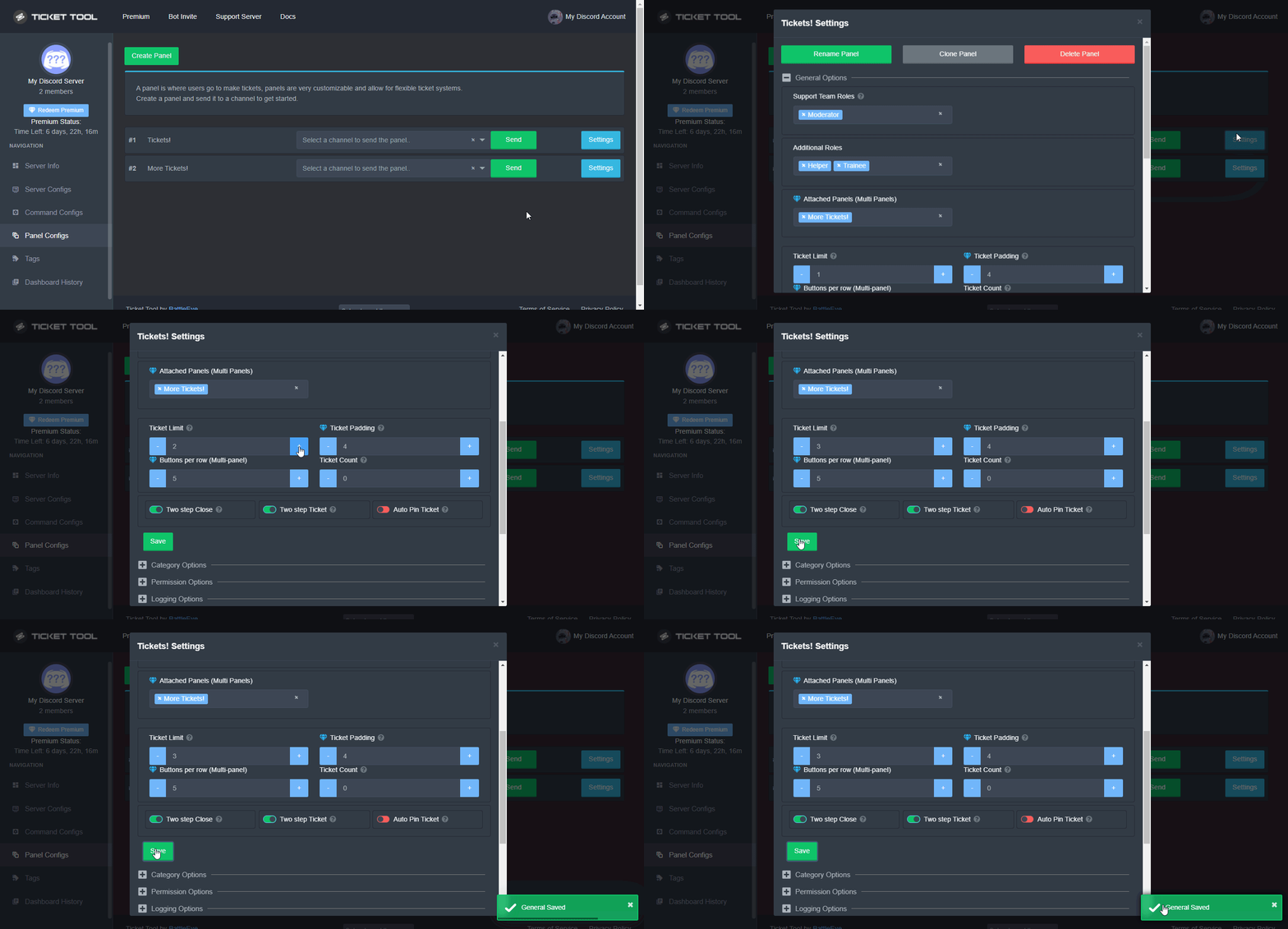 sly pulsar
So each member could only send one ticket per day.
crimson void
There's no per day .
gilded verge
dense oyster
Actually I don't even have a $new command available.
I probably understand what you mean but I'm not sure so I'll answer like this.:
Go to Dashboard->Panel Configs->Panel Settings->Expand Command Style Tickets and turn on Enable Command Style ticket creation->to Channel to monitor for command $new and $ticket select the channel on which you will be able to use this command ($new or $ticket) or do not select any channel so that you can use this command on each channel, then select the option Bypass channel list and watch all of them.
As far as I know, it is best to enable this option for only one panel because it may conflict with others
My config is in the screenshot:
 dense oyster
gilded verge
I probably understand what you mean but I'm not sure so I'll answer like this.:
...
dense oyster
gilded verge
I probably understand what you mean but I'm not sure so I'll answer like this.:
...
Thanks, does this bot have a react to create ticket option? Ie if a member asksa question in general chat a mod can react with a ticket emoji to open a ticket for that user?
iron nightBOT
Gave +1 Rep to @gilded verge
gilded verge
dense oyster
Thanks, does this bot have a react to create ticket option? Ie if a member asksa...
No no, to open a ticket, the member must click directly on the bot reaction [examples of buttons are on the channel #🎫│make-a-ticket] (i.e. on the panel you send to a specific channel) or after using the $new command
crimson void
||@broken dust||
For your question you can change it follow the instructions below please:
humble sequoiaBOT
The ticket name is the default channel name of all tickets. To edit it, go to your Dashboard > Panel Configs > Settings > Ticket Options. There you can edit the channel name of opened and closed tickets. You can also use variables in there.
Note: This is a premium feature
crimson void
Change the {count} to {ticket.user.name} so now when song opened a ticket it will be like this #ticket-Purple
 ancient sand
Can I change perms so other people other than those with administrator permissions can see tickets?
shut bolt
ancient sand
Can I change perms so other people other than those with administrator permissio...
Yes
$help perms
humble sequoiaBOT
How to set the permissions for tickets
To set a change permissions go to the Dashboard -> Panel Configs -> Settings -> Permission Options
shut bolt
You can change the different set of roles within the permission options, I suggest going through
https://docs.tickettool.xyz/dashboard/panel-configs/permission-options

Instructions on editing permissions set within tickets.
ancient sand
Cheers
shut bolt

candid bronze
this is premium right?

 hallow marlin
candid bronze
this is premium right?
hallow marlin
candid bronze
this is premium right?
yes correct, this is the premium bot
candid bronze
oof
jade topaz
Hi, I just had a question
hallow marlin
How can we help you? 
jade topaz
If I use the ticket tool bot, how do I monitor the tickets, and organize where they go.
hallow marlin
jade topaz
If I use the ticket tool bot, how do I monitor the tickets, and organize where t...
do you want to set in which category the ticket will be created?
 languid lantern
candid bronze
this is premium right?
languid lantern
candid bronze
this is premium right?
I think so
jade topaz
Is there a way someone can come into the server to set it up?
humble sequoiaBOT
You can check our documentation here.
You can also check #573205317870157855 for the basic setup.
Our documentation contains all the info you need about the bot to be able to setup and configure the bot however you like.
hallow marlin
@jade topaz maybe take a look at this.
Here you can find all the information on how to set up ticket tool bot.
iron nightBOT
Gave +1 Rep to @hallow marlin
hallow marlin
anytime
 cursive thunder
So in a server i run, The "admin" role doesnt have actual admin perms but we have an actual administrator role for certain admins. for the admins that dont have "administrator", when a ticket is claimed, they can no longer see the ticket. any way to fix that?
shut bolt
cursive thunder
So in a server i run, The "admin" role doesnt have actual admin perms but we hav...
Hey there
You can remove their administrator role from the support team roles and add it to the additional roles set, additional roles aren't affected when a ticket is claimed
humble sequoiaBOT
The first thing you will need to do is invite the premium bot, an invite can be found here
Once the bot is in your server we will head to the dashboard and manage your server. When you are managing your server, you want to head into "Server Configs" then click the drop down menu under "Select the bot you would like to use on this server" then click "Ticket Tool#6207" and then save.
shut bolt
For 3MK Mentos#8888
languid lantern
can i copy ur ticket panels?
or someone give me a link?
cuz they r really cool tbh!
shut bolt
languid lantern
can i copy ur ticket panels?
Sure, go ahead
languid lantern
link?
shut bolt
We don't got one
languid lantern
so how i am gonna get them?
shut bolt
languid lantern
so how i am gonna get them?
You got #🎫│make-a-ticket to know which are the panels
languid lantern
but i want all of it
including clain etc...
im not a ticket supporter to get them
shut bolt
languid lantern
including clain etc...
Then we can't do much for you, you can always customize to your preference your panels at your server so you can do it even better than the ones we got here
languid lantern
ok thx anyways!
shut bolt
Sure!
languid lantern
candid bronze
this is premium right?
how do i got 3 tickets at once?
thanks @shut bolt
iron nightBOT
Gave +1 Rep to @shut bolt
humble sequoiaBOT
For a more convenient use of multipanels, you can now combine panels on the dashboard. This will allow you to directly send the multipanel from the dashboard or via the $panel ID command.
Where can I find this?
You can find this setting on the Dashboard -> Panel Configs -> Settings -> General Options
Note: if you're attaching all the panels to a panel called English, don't include English in the attached panels box (If you do this, it will create duplicate)
This will put all buttons from all of your panels on one message. The message is the panel message from the panel you're combining these panels in.
Note: This is a premium feature
shut bolt
languid lantern
thanks <@518666147441278998>
Sure
languid lantern
thx
how do i make the 3 it only makes 2 and how to change emojis of each one of them?
shut bolt
languid lantern
how do i make the 3 it only makes 2 and how to change emojis of each one of them...
You need to attach 2 panels to a general panel
$buttons
humble sequoiaBOT

The new Discord Buttons allow for a much smoother and convenient experience. They reduce lag and work much better than emojis. With ticket tool you can edit all the buttons however you like! Buttons can show emojis, text and can have 4 different colors.
Where can I edit them?
Dashboard ➞ Panel Configs ➞ Settings ➞ Button Options ➞ Setting
 shut bolt
And then to edit go into the create ticket settings of each panel and update it there
languid lantern
thx
shut bolt
No problem
warm jacinth
Is there away to make a ticket cooldown
shut bolt
warm jacinth
Is there away to make a ticket cooldown
Not as of now sorry
 bold imp
I relogged a thousand times already and my server is still not there…
 humble sequoiaBOT
Don't see your server in the dashboard?
You will possibly need to relog. Look below to see steps on how to relog.
How to relog in the Dashboard.
First, you will need to go to the dashboard. Once your there, click on your avatar on the top right. after you clicked it, you will see button that says Logout. You must click that. Once you have logged out, you can log back in.
Note:
You need one of these 3 things to access the dashboard.
1. Server Owner (Level: 6)
2. Server Administrator (Level: 4)
3. Dashboard Role (Level: 2)
:warning: You can check your level using $level on your Discord Server
User permission level with Ticket Tool
@User is permission level: 0 (User)
```» *If it shows that your permission is **0**, you don't have any of the above **3 things** to manage the dashboard.*


**See the GIF below on how to relog:**@bold imp, please check 
 stoic mason
hey is there anyway to use the ticket bot and have to option of 2 different types of tickets? like the one in the ss

it has 3 different ticket options instead of just one
shut bolt
stoic mason
hey is there anyway to use the ticket bot and have to option of 2 different type...
Hi there, yep!
humble sequoiaBOT
For a more convenient use of multipanels, you can now combine panels on the dashboard. This will allow you to directly send the multipanel from the dashboard or via the $panel ID command.
Where can I find this?
You can find this setting on the Dashboard -> Panel Configs -> Settings -> General Options
Note: if you're attaching all the panels to a panel called English, don't include English in the attached panels box (If you do this, it will create duplicate)
This will put all buttons from all of your panels on one message. The message is the panel message from the panel you're combining these panels in.
Note: This is a premium feature
shut bolt
Check this out 
cursive thunder
shut bolt
You can remove their administrator role from the support team roles and add it t...
ahh, thank you
iron nightBOT
Gave +1 Rep to @shut bolt
shut bolt
Sure!
 restive sinew
stoic mason
restive sinew
stoic mason
aw man it's premium only
 dark field
shut bolt
dark field
shut bolt
@restive sinew please use commands in #🤖│bot-spam not here
 devout ferry
ALLIANCE
humble sequoiaBOT
We would love to help you, but if you don't tell us what you need help with we can't help you :(
 meager kindle
Hi. Is it true Ticket Tool was hacked?
shut bolt
meager kindle
Hi. Is it true Ticket Tool was hacked?
No it is not true, there was an exploit a month ago but it was solved as soon as it was detected
meager kindle
shut bolt
No it is not true, there was an exploit a month ago but it was solved as soon as...
Omg thanks.
iron nightBOT
Gave +1 Rep to @shut bolt
shut bolt
Sure
jade topaz
how do I see transcripts? is the saved transcript will be deleted too if I delete a ticket?
oh nvm I get it now
candid bronze
how did you guys make the bot say "Moved to ticket"?
 fluid owl
How do I create a ticket
humble sequoiaBOT
Tags
Tags are used to send a predefined response to your channels using a command. Tags will only respond if the command itself is used, it will not function if you put the tag into a sentence. The prefix is not included.
To create tags, go to: Dashboard > Tags > Create Tag. After creating and naming one, tap on the response button, and you can edit the response.
 regal goblet
@candid bronze we used tags ^^
humble sequoiaBOT
You can check our documentation here.
You can also check #573205317870157855 for the basic setup.
Our documentation contains all the info you need about the bot to be able to setup and configure the bot however you like.
candid bronze
regal goblet
<@921691773514965023> we used tags ^^
thanks
iron nightBOT
Gave +1 Rep to @regal goblet
regal goblet
humble sequoia
@fluid owl read above please ^^
regal goblet
candid bronze
thanks
no problemo
 scenic plinth
jade topaz
premium bot offline right?
scenic plinth
jade topaz
premium bot offline right?
Heyo! Can I get your servers ID? I can't seem to find an issue with premium!
jade topaz
739450321155391538
 sonic sigil
scenic plinth
Heyo! Can I get your servers ID? I can't seem to find an issue with premium!
sonic sigil
scenic plinth
Heyo! Can I get your servers ID? I can't seem to find an issue with premium!
me too , I created the ticket
scenic plinth
Alright. Allow me a moment to take a look for you greatness!
sonic sigil
okie thanks
jade topaz
well, I have tags and bot doesnt respond, so I assume it is just offline
okay, couldnt create a ticket
def bot is offline
 zenith nest
Is there a way to check the ticket that is already closed?
scenic plinth
If it is still a channel, yes.
If the channel was deleted, no, unless you have a transcript of the ticket saved somewhere in the server.
zenith nest
scenic plinth
If it is still a channel, yes.
If the channel was deleted, no, unless you have...
Thank u !
iron nightBOT
Gave +1 Rep to @scenic plinth
scenic plinth
For those who had inquiries of the bot not being responsive or online in your servers, Ticket Tool should respond now. Some servers felt drowsy 😴
slender wolf
Hi, how can I config so that user can post link within their created ticket?
regal goblet
slender wolf
Hi, how can I config so that user can post link within their created ticket?
Enable Embed Permissions to Users
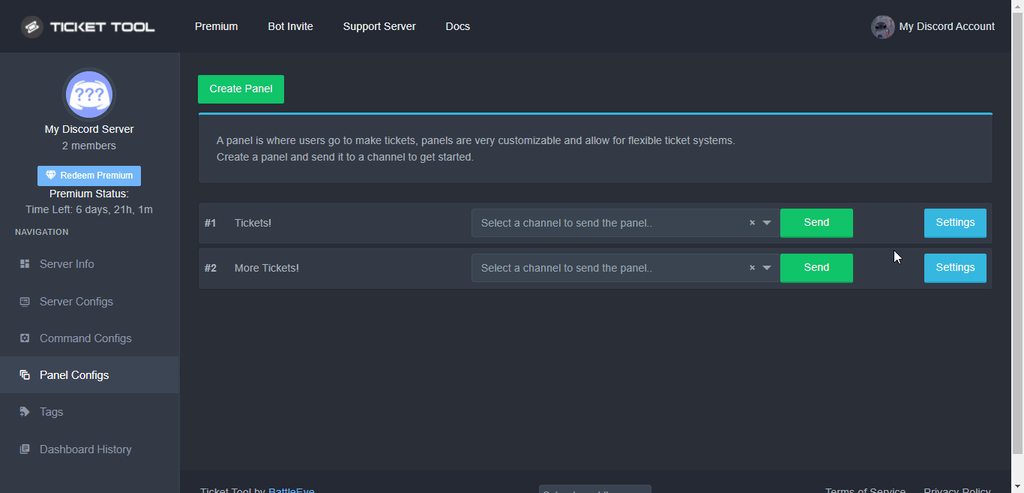 slender wolf
I've try turning on embed links but still not working
Maybe dyno bot is blocking it
regal goblet
slender wolf
Maybe dyno bot is blocking it
it is possible, in that case, you would need to whitelist the category your tickets are being crated at, on Dyno's Dashboard (if that's even possible)
if whitelisting the category is not possible, the only other alternative would be removing admins perms to Dyno's role, that way it wont be able to see into newly created tickets
candid bronze
slender wolf
Maybe dyno bot is blocking it
In that case you log on onto dyno go to the automod and whitelist whereever the ticket's are
slender wolf
Ya thanks for the suggestions guys. Seems like it's the only way
humble sequoiaBOT
Don't see your server in the dashboard?
You will possibly need to relog. Look below to see steps on how to relog.
How to relog in the Dashboard.
First, you will need to go to the dashboard. Once your there, click on your avatar on the top right. after you clicked it, you will see button that says Logout. You must click that. Once you have logged out, you can log back in.
Note:
You need one of these 3 things to access the dashboard.
1. Server Owner (Level: 6)
2. Server Administrator (Level: 4)
3. Dashboard Role (Level: 2)
:warning: You can check your level using $level on your Discord Server
User permission level with Ticket Tool
@User is permission level: 0 (User)
```» *If it shows that your permission is **0**, you don't have any of the above **3 things** to manage the dashboard.*


**See the GIF below on how to relog:**@torpid umbra check this out ^
 toxic wraith
Hi
 olive carbon
crimson void
olive carbon
crimson void
 torpid umbra
<@971175151934775316> i have done it many times before
torpid umbra
<@971175151934775316> i have done it many times before
if the relog doesn't work, then make sure the bot in your server .

 crimson void
don't ping please .
olive carbon
It might not be working because your in incognito, but I'm not 100 percent sure.
olive carbon
Alright
crimson void
Are you the owner of the server ?
torpid umbra
olive carbon
It might not be working because your in incognito, but I'm not 100 percent sure.
not working
olive carbon
torpid umbra
not working
Weird, like Purple said, are you the owner of the server?
torpid umbra
enh
crimson void
torpid umbra
enh
?
torpid umbra

is it necessary for me to be owner of the server?
to be able to view it on dashboard
olive carbon
torpid umbra
is it necessary for me to be owner of the server?
Yes, I'm pretty sure it is.
torpid umbra
ok
crimson void
torpid umbra
is it necessary for me to be owner of the server?
No, you let the owner add the role to dashboard . so you can see dashboard ^
humble sequoiaBOT
Any role you put there will have full access to the ticket tool dashboard. The server owner and users with admin permissions already have access to the dashboard.
Be careful of which roles to put here
crimson void
Check this out ^
torpid umbra
just handed ownership to another person . lol. because im not so active
olive carbon
humble sequoia
Have the owner of the server do this btw.
torpid umbra
ok
im a poor mod now
lol
just added the "admin role" to my self and can view my server
thx
crimson void
Enjoy ~
 wary mountain
Hello, can i speack French ? I'm verry bad in English
crimson void
wary mountain
Hello, can i speack French ? I'm verry bad in English
if you want a help with french then open a ticket ^ for best
$frticket
humble sequoiaBOT
L'équipe du support Français
Cher client,
Si vous avez besoin d'aide, ouvriez un ticket pour le support Français s'il vous plaît.
Allez au #🎫│make-a-ticket et tapez sur le button contenant l'emoji 🇫🇷
wary mountain
Thanx you !
 final lantern
if, i took the free premium membership of 7 days and then started using the premium bot and after 7 days, when my membership will end, will the premium bot work or not?
gilded verge
Hey, when your premium runs out you will have to change this bot to a free one or your tickets won't work. Below you will find information on how to disable premium bot later.
humble sequoiaBOT
How to disable the premium bot
To disable the premium bot you will have to go to the Dashboard ➞ Server Configs ➞ Premium bot ➞ And on the right-hand side select the primary free bot in the drop down menu.
Premium features will still work on the normal bot.
 final lantern
gilded verge
Hey, when your premium runs out you will have to change this bot to a free one o...
final lantern
gilded verge
Hey, when your premium runs out you will have to change this bot to a free one o...
and if i am using premium features with the primary bot, will it stop working if the membership ends?
gilded verge
if you use primary bot all the time, it will just run out of premium features so it will still work but if you have a problem with panels (I'm talking about the ones where you added premium options) and panels won't work, create new panel, send to channel and it will work again -here I mean after the premium expires
final lantern
ok
gilded verge
I hope I helped and if you need help again, go ahead 

 crimson void
 coral sigil
i hot 7 days free trial premium
coral sigil
i hot 7 days free trial premium
افتح تكت اذا تحتاج مساعده: بالمناسبه البريميوم تفعّل تلقائياً .
 crimson void
jade topaz
Bro There is
crimson void
jade topaz
Bro There is
solved 🙂
jade topaz
o
robust sandalBOT
crimson void
افتح تكت اذا تحتاج مساعده: بالمناسبه البريميوم تفعّل تلقائياً .
 JG101
JG101
Open a tick if you need help: by the way premium does automatically.
Arabic (ar) → English (en)
 green idol
I opened a ticket on a server but I left and when I came back, I didn't have access to the ticket but it's still say to me that I've made a ticket
hallow marlin
green idol
I opened a ticket on a server but I left and when I came back, I didn't have acc...
You need to contact the team on the affected server and ask them to close or reopen your ticket.
Probably it is not deleted yet but already closed.
 crimson void
 cyan river
ذا وش عجزت افهمه
cyan river
ذا وش عجزت افهمه
كلهم قصدك ولا خيار معين ؟ ولا تقصد وش معنى الأعدادات هذي ؟
cyan river
crimson void
كلهم قصدك ولا خيار معين ؟ ولا تقصد وش معنى الأعدادات هذي ؟
كلها ياعيني
crimson void
cyan river
كلها ياعيني
هذي اعدادات اللوحة حقت التيكت اللي موجوده عندك بروم التيكت اللي لما يجي شخص و يضغطها عشان يفتح تكت
من هنا تقدر تغيّر الرساله و كل شيء يخصّها
 shy briar
Are things like claiming tickets premium features or am I just to dumb to get it done
crimson void
shy briar
Are things like claiming tickets premium features or am I just to dumb to get it...
Yes it is
shy briar
crimson void
Yes it is
Oh okay, so I'd guess having tickets auto-deleted after closing is too?
crimson void
shy briar
Oh okay, so I'd guess having tickets auto-deleted after closing is too?
No. you can use it without premium
Dashboard > Panel configs > Choose your panel settings > General Options > Two step ticket Disabled it .
shy briar
crimson void
No. you can use it without premium
`Dashboard` > `Panel configs` > `Choose your...
Okay thanks for you help
iron nightBOT
Gave +1 Rep to @crimson void
crimson void
Anytime ~
shy briar
;)
 drifting umbra
Why does tickets generated sometimes go to the top of my server even though I assigned a particular category to go under?
pale pilot
$overflow
humble sequoiaBOT
Discord only allows to stack up to 50 channels per category, meaning that if you have already 50 tickets in one category, the bot won't be able to place a ticket in that category, for such reason Ticket Tool counts with overflow categories, meaning that if your main category is filled, the bot will go ahead and place the ticket on the next one available, simply choose a second category in the category pickers:
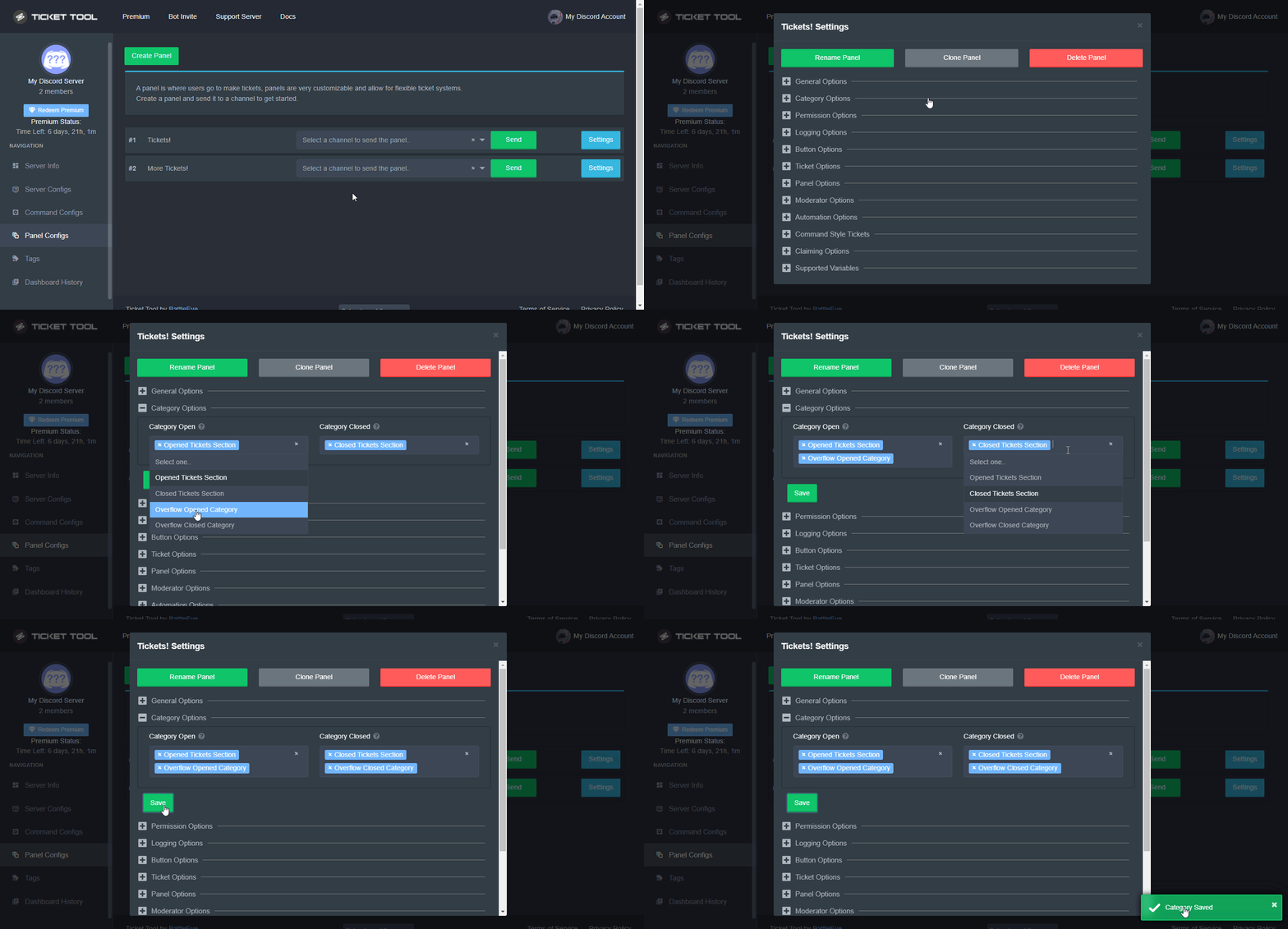 pale pilot
@drifting umbra
humble sequoiaBOT
We would love to help you, but if you don't tell us what you need help with we can't help you :(
 lyric owl
 humble sequoiaBOT
Don't see your server in the dashboard?
You will possibly need to relog. Look below to see steps on how to relog.
How to relog in the Dashboard.
First, you will need to go to the dashboard. Once your there, click on your avatar on the top right. after you clicked it, you will see button that says Logout. You must click that. Once you have logged out, you can log back in.
Note:
You need one of these 3 things to access the dashboard.
1. Server Owner (Level: 6)
2. Server Administrator (Level: 4)
3. Dashboard Role (Level: 2)
:warning: You can check your level using $level on your Discord Server
User permission level with Ticket Tool
@User is permission level: 0 (User)
```» *If it shows that your permission is **0**, you don't have any of the above **3 things** to manage the dashboard.*


**See the GIF below on how to relog:**Check


 gilded verge
humble sequoia
gilded verge
humble sequoia
Read everything the bot sent and make sure you did
shut bolt
lyric owl
how do you look at the server level?
Using the $level command

 loud turtle
shut bolt
Using the `$level` command
loud turtle
shut bolt
Using the `$level` command
I never knew that. How to get more levels?
fallow ingot
You get levels for what permissions you have in the server. So, if you have level 0 you are a normal user level 4 server administrator level 6 server owner.
It all depends on what permissions the user has.
Oh and level 2 for a dashboard role
humble sequoiaBOT
Any role you put there will have full access to the ticket tool dashboard. The server owner and users with admin permissions already have access to the dashboard.
Be careful of which roles to put here
fallow ingot
loud turtle
fallow ingot
<:this:894279341108772914>
Thanks
iron nightBOT
Gave +1 Rep to @fallow ingot
fallow ingot
yup
shut bolt
@keen stump I'm not billing, can't talk there sorry 
 keen stump
shut bolt
<@754561931133714473> I'm not billing, can't talk there sorry <:PensiveMassive_O...
keen stump
shut bolt
<@754561931133714473> I'm not billing, can't talk there sorry <:PensiveMassive_O...
Np :P
shut bolt
keen stump
Np :P
One of them will be with you asap, thanks for your patience 
iron nightBOT
Gave +1 Rep to @keen stump
keen stump
