#🆘│community-support
1 messages · Page 407 of 1
 iron nightBOT
Gave +1 Rep to @gilded verge
 candid bronze
also whats 2 step ticket?
 gilded verge
If enable, this will cause tickets to be deleted instead of closed.
candid bronze
oh ok
 nova ocean
gilded verge
nova ocean
gilded verge
what you mean?
gilded verge
ofc
gilded verge
uhm... you have active premium 😐
 gilded verge
uhm, okay, then please go to channel #🎫│make-a-ticket and choose reaction  Billing, there ask for help
 fallow ingot
Hi there @nova ocean
You have the free trial enabled, so that’s why it says time left 6 days. As long as you have Active - Manage your subscription is active. Also, opening multiple tickets won’t get you help any faster.
gilded verge
fallow ingot
Hi there <@794357468650012703>
You have the free trial enabled, so that’s why i...
Thanks, good to know for the future 
iron nightBOT
Gave +1 Rep to @fallow ingot
 jade topaz
what is DmC
gilded verge
jade topaz
what is DmC
can you show it what you mean?
jade topaz
WEBHOOK
gilded verge
stop using caps, which webhook?
So please show screenshot with this what you mean
 fiery yoke
Hi guys, how can i see how many tickets someone answer?
fallow ingot
fiery yoke
Hi guys, how can i see how many tickets someone answer?
Not something we have that you can check like statistics. But what I’ve done, is set a transcript channel and using the discord search feature search the staff members ID and it shows all the tickets they’ve sent messages in.
fiery yoke
I usually do that, but i have a double confirmation feature enabled, so one member can have two or more entrys for each ticket anwsered. Anyway, thanks for this
fallow ingot
Yeah, not sure of any other way to be honest.
fallow ingot
fiery yoke
I usually do that, but i have a double confirmation feature enabled, so one memb...
No problem 
fiery yoke
Do you know if i lost my tickets and configs when i start to use premium bot on my server?
fallow ingot
fiery yoke
Do you know if i lost my tickets and configs when i start to use premium bot on ...
What do you mean?
You lost them when you started to use the premium bot?
fiery yoke
No, i want to know if this will happen
I have the premium bot, but im not using this
Im afraid of lost my tickets and configs if i do that
 pliant zodiac
join a server a played on now when a pull my map up it crashes
 humble sequoiaBOT

⚠️ You're in the wrong place
We provide support for @pseudo glen discord bot and cannot help you with whatever issue you have.
- We don't know which Support Team you should contact to get this issue resolved, and unfortunately we won't be able to accurately tell you.
If you don't have any further questions regarding our bot Ticket Tool, please close this ticket
gilded verge
@pliant zodiac 
fallow ingot
fiery yoke
Im afraid of lost my tickets and configs if i do that
Nah it won’t
Everything will be the same, but instead you’ll have a faster bot 
 sonic bridge
Hello, is there any way to restore the tickets deleted by the tool?
my friend made a mistake and entered the delete command and I delete all the closed tickets, but I need them
gilded verge
Hey, you can't restore deleted tickets. However, if you have saved the transcript, you can look at them but it is not possible to restore them.
sonic bridge
no way? or with any bot or something?
gilded verge
as far as i know it is generally not possible to restore channels 😐
 craggy geyser
This is correct. Discord might be able to do something but deleting is deleting the channel. Not something nornally reversible
 tame ferry
Is there a leader board for "claimed" tickets.. staff likes it to be a competition
sonic bridge
craggy geyser
This is correct. Discord might be able to do something but deleting is deleting ...
I don't delete the channel, I just enter the command to delete the closed tickets
my question is if those tickets can be recovered
fiery yoke
Delete tickets means delete channel i think
craggy geyser
sonic bridge
I don't delete the channel, I just enter the command to delete the closed ticket...
Ticket Tool deletes the channel when you use the delete command. As Miro said, you can set up transcripts
craggy geyser
tame ferry
Is there a leader board for "claimed" tickets.. staff likes it to be a competiti...
Not yet. But an update is being worked on with an entire rework of the dashboard so possibly coming
tame ferry
Should I suggest that?
sonic bridge
wow, thank you for responding so quickly :D
tame ferry
Or you think it's "already" included, haha
craggy geyser
Its been suggested. Stats are definitely being added, I just don't know for certain what is being tracked
sonic bridge
Thanks @gilded verge @craggy geyser
iron nightBOT
Gave +1 Rep to @gilded verge
 austere parcel
Hello. I can't log in on the site and in the game. Where can I turn?
humble sequoiaBOT
⚠️ You're in the wrong place
We provide support for @pseudo glen discord bot and cannot help you with whatever issue you have.
- We don't know which Support Team you should contact to get this issue resolved, and unfortunately we won't be able to accurately tell you.
If you don't have any further questions regarding our bot Ticket Tool, please close this ticket
gilded verge
@austere parcel, Hey, check
 stoic estuary
is ticket tool having issues for others as well?
gilded verge
uhm.. it works fine for me
Which issues you have?
stoic estuary
Warning: This server isn't active, Please make sure this is the correct bot (premium vs free)
craggy geyser
You are trying to use the premium bot without premium active
 chrome pilot
stoic estuary
Warning: This server isn't active, Please make sure this is the correct bot (pre...
chrome pilot
stoic estuary
Warning: This server isn't active, Please make sure this is the correct bot (pre...
If you don't have premium, bot will say this
Go Server Configs -> Premium Bot -> Change to Ticket Tool#4843 ( free )
fiery yoke
i have the same problem, but i have premium 😦


 humble sequoiaBOT
How to disable the premium bot
To disable the premium bot you will have to go to the Dashboard ➞ Server Configs ➞ Premium bot ➞ And on the right-hand side select the primary free bot in the drop down menu.
Premium features will still work on the normal bot.
 gilded verge
Just try to disable and enable premium bot
chrome pilot
fiery yoke
nah
if u choose premium bot
u need to add premium bot to your server
fiery yoke
 fiery yoke
but what happens with the old tickets?
chrome pilot
fiery yoke
but what happens with the old tickets?
old ticket ?
old panel = new panel but it change Normal bot -> premium bot
nothing happen with your old panel
fiery yoke
Ok
jade topaz
how do i make my server members can create tickets?
humble sequoiaBOT

You can check our documentation here.
You can also check #573205317870157855 for the basic setup.
Our documentation contains all the info you need about the bot to be able to setup and configure the bot however you like.
gilded verge
first make a panel, check
chrome pilot
humble sequoia
@jade topaz read this
jade topaz
what exactly
gilded verge
bot message 😐
jade topaz
but nothing is written there
gilded verge
wait, then you probably have blocked Ticket Tool bot if you dont see this:
humble sequoiaBOT
You can check our documentation here.
You can also check #573205317870157855 for the basic setup.
Our documentation contains all the info you need about the bot to be able to setup and configure the bot however you like.
gilded verge
STOP
jade topaz
I didn't block anyone
gilded verge
@spiral onyx Stop using caps!
jade topaz
ну так переводчиком воспользуйся
gilded verge
jade topaz
I didn't block anyone
then just go to #573205317870157855 and check setup
Staff ??
fallow ingot

gilded verge
uhm, why is he acting so badly? 😐
fallow ingot
What do you need help with?
gilded verge
me too... ehm, this is weird 😐
fallow ingot
Few moments please
 prime bridgeBOT
 Successful Timeouts:
 1
 Unsuccessful Timeouts:
 0
 Reason: Misuse of #🆘│community-support, disrespectful behavior, spam.
 Moderator: @forest goblet
fallow ingot
 slender minnow
ik i shouldnt translate that
slender minnow
ik i shouldnt translate that
Nah it’s ok, a moderator will be here soon.
there we go.
slender minnow
2x2 to the rescue :D
jade topaz
gilded verge
then just go to <#573205317870157855> and check setup
where to check it
gilded verge
Thanks @forest goblet
iron nightBOT
Gave +1 Rep to @forest goblet
slender minnow
fallow ingot
Nah it’s ok, a moderator will be here soon.
btw i didnt react to translate that message 😂
fallow ingot
slender minnow
btw i didnt react to translate that message 😂
oh lol
gilded verge
jade topaz
where to check it
If you can't see the bot's message, go here: https://docs.tickettool.xyz/general/setup
This is general setup.
jade topaz
ok
austere parcel
I can't log in to MegaCube. 0x12E0F25Cf89041B6b78dB9B07493b2b19a2eeE4f
humble sequoiaBOT
⚠️ You're in the wrong place
We provide support for @pseudo glen discord bot and cannot help you with whatever issue you have.
- We don't know which Support Team you should contact to get this issue resolved, and unfortunately we won't be able to accurately tell you.
If you don't have any further questions regarding our bot Ticket Tool, please close this ticket
gilded verge
 hoary fjord
I have a "invalid form body " problem what can i do
humble sequoiaBOT
Update your discord App
Buttons are a relatively new addition to discord and don't work with some older versions of the app.
Please verify that you have the latest version of discord, by going to the app or play store.
Discord for the  App Store
Discord for the  Play Store
gilded verge
hoary fjord
Still not working
jade topaz
why do some bots have a check mark and some do not?
craggy geyser
The check means it is a verified bot
chrome pilot
hoary fjord
Still not working
i never seen it
can u send a screenshot about your problem
jade topaz
Can I create bots on your server? if yes then ok
chrome pilot
jade topaz
Can I create bots on your server? if yes then ok
nah
what do u mean
"Can i create bots on your server"
 kind hawk
@jade topaz not here no.
 copper owl
$help panel
humble sequoiaBOT
Creating a panel
To create a panel we are going to need to head over to the panel configs on the dashboard
Once at the dashboard we will need to click Create Panel
Enter a panel name (Fill in any optional settings you want)
Click Create Panel and your ready to get started with configuring your panel
An example of a creating a panel is shown below.
 copper owl
jade topaz
can I create bots on my server?
copper owl
jade topaz
can I create bots on my server?
Check the gif above on how to create a panel and setup ticket tool
 restive sleet
How do i make the tickets that get created, go to a different category? Because i don’t want them to go right under my 🎫create-a-ticket channel
 atomic solstice
$help category
humble sequoiaBOT
How to set the open category
To set a open category go to the Dashboard -> Panel Configs -> Settings -> Category Options -> Category Open
 chrome pilot
restive sleet
How do i make the tickets that get created, go to a different category? Because ...
chrome pilot
restive sleet
How do i make the tickets that get created, go to a different category? Because ...
Panel Configs -> Settings -> Category Options
Change your Category Open & Category Close to what you want
restive sleet
ok thanks
fallow ingot
If another support member/member helps another user already then there is no need to interfere. @chrome pilot
chrome pilot
fallow ingot
If another support member/member helps another user already then there is no nee...
I see that the instruction is unrealistic for the uninitiated.
but
nvm
craggy geyser
chrome pilot
I see that the instruction is unrealistic for the uninitiated.
Your message was the same as text within the embed so that doesn't work as a reason
 ornate cape
Hi guys! Is it possible to auto-close tickets after 24h?
ornate cape
craggy geyser
Not yet
Gotcha. Thanks. Any ETA on a "statistics" feature?
iron nightBOT
Gave +1 Rep to @craggy geyser
humble sequoiaBOT
━━ moved to ticket ━━
fallow ingot
Whoever opened the ticket should automatically see the ticket assuming permissions haven’t been changed.
fallow ingot
 quick frigate
how can i let people see their tickets when they open one
quick frigate
how can i let people see their tickets when they open one
Can users not see tickets they’ve opened?
quick frigate
fallow ingot
Can users not see tickets they’ve opened?
no they cant
fallow ingot
Ok, refer to your ticket you’ve just created.
humble sequoiaBOT
━━ moved to ticket ━━
fallow ingot
$help support
humble sequoiaBOT
How to let support team see into a ticket
About support roles
A support role lets your support team see into tickets with out having to add them manually to each and every ticket.
You can add as many support roles as you like per panel.
NOTE that the way discord works all admins can see into tickets regardless of this.
How to set a support role
To set a Support role go to the Dashboard -> Panel Configs -> Settings -> General Options -> Support Team Roles.

NOTE that the support role will not be able to see into tickets that are already created..
fallow ingot
@jade topaz ^
 stoic sinew
I'm considering getting Premium so that I can create a Panel with multiple buttons.
Once I get it, how do I create it?
fallow ingot

humble sequoiaBOT
For a more convenient use of multipanels, you can now combine panels on the dashboard. This will allow you to directly send the multipanel from the dashboard or via the $panel ID command.
Where can I find this?
You can find this setting on the Dashboard -> Panel Configs -> Settings -> General Options
Note: if you're attaching all the panels to a panel called English, don't include English in the attached panels box (If you do this, it will create duplicate)
This will put all buttons from all of your panels on one message. The message is the panel message from the panel you're combining these panels in.

 Note: This is a premium feature
fallow ingot
Note: This is a premium feature
fallow ingot
Check this out
stoic sinew
love it
fallow ingot
Awesome.
fallow ingot
stoic sinew
love it
It's really easy, isn't too complicated but if it does get complicated for you, remember we are always here to help :)
stoic sinew
fallow ingot
It's really easy, isn't too complicated but if it does get complicated for you, ...
thank you so much! just to double check, this panel is using the "Multipanel" function?
 iron nightBOT
Gave +1 Rep to @fallow ingot
fallow ingot
Yup, that's multi-panels alright.
stoic sinew
They created a panel for "Generic," as well as separate panels for the other 3. Then they just added Attached Panels to the first Generic panel settings?
jade topaz
Is there a way to have my Support Ticket category always allow sharing links and images even if the everyone permission does not allow links or images?
fallow ingot
stoic sinew
They created a panel for "Generic," as well as separate panels for the other 3. ...
Yep.
fallow ingot
jade topaz
Is there a way to have my Support Ticket category always allow sharing links and...
Hi there, thanks for asking. If you want the ticket users to be able to attach files etc. You need to go to Dashboard > Panel Configs > Settings > Permission Options > User opened Permissions and tick  Attach files.
iron nightBOT
Gave +1 Rep to @ashen pike
jade topaz
fallow ingot
<a:waveneon:973258992220508181> Hi there, thanks for asking. If you want the tic...
Oh perfect - thank you - cheers
iron nightBOT
Gave +1 Rep to @fallow ingot
fallow ingot
No problem, happy to help!
humble sequoiaBOT
Update your discord App
Buttons are a relatively new addition to discord and don't work with some older versions of the app.
Please verify that you have the latest version of discord, by going to the app or play store.
Discord for the App Store
Discord for the Play Store
fallow ingot
 dense stirrup
I update and was the same issue
Can you came call and I will stream to you what the problem
@fallow ingot hi
dense stirrup
Why
dense stirrup
I did it more than once
fallow ingot
And you are still experiencing this issue?
fallow ingot
What device are you using?
dense stirrup
A51 Samsung
fallow ingot
It's something to do with your app.
A discord issue, updating the app has worked for everyone previously.
dense stirrup
How
fallow ingot
You may have not have done it correctly, or you may have. I can't tell you, but it's best to contact Discord.
As it's not a ticket tool issue.
dense stirrup
Ho I will Do that
hoary fjord
chrome pilot
can u send a screenshot about your problem
It was the problem of my phone i not had done the system update of my phone
 teal quest
DEAD NEED HELP
HOW I FIX IF I HAVE ANOTHER SERVER IM ADMI/OWNER AND I CAN BOTS BUT WHEN I GO TO MANGE SERVERS THE SERVER NOT THERE
gilded verge
please delete capslock 😐
but if you dont see server, then look below:
humble sequoiaBOT
Don't see your server in the dashboard?
You will possibly need to relog. Look below to see steps on how to relog.
How to relog in the Dashboard.
First, you will need to go to the dashboard. Once your there, click on your avatar on the top right. after you clicked it, you will see button that says Logout. You must click that. Once you have logged out, you can log back in.
Note:
You need one of these 3 things to access the dashboard.
1. Server Owner (Level: 6)
2. Server Administrator (Level: 4)
3. Dashboard Role (Level: 2)
:warning: You can check your level using $level on your Discord Server
User permission level with Ticket Tool
@User is permission level: 0 (User)
```» *If it shows that your permission is **0**, you don't have any of the above **3 things** to manage the dashboard.*


**See the GIF below on how to relog:**

 uneven thunder
Hey! Soooooo I use this bot in a server that I moderate and it’s not working🥺🥺 I have no idea what to do and it has all the permissions
jade topaz
humble sequoia
@uneven thunder
uneven thunder
I’m an administrator and it’s still not working. The other bots are working fine, just not ticket tool
I don’t wanna delete the bot and have to restart the assignment for it
craggy geyser
uneven thunder
I’m an administrator and it’s still not working. The other bots are working fine...
What's not working with it?
uneven thunder
Hang on I’ll send you screenshot

It has every permission that I can allow it tho
craggy geyser
Run $debug for me and send me the link
The link is just an easier way for us to see the same embed it sends you so is fine to send here. It links to a message in a private channel on this server
craggy geyser
Yep
uneven thunder
Ooooo good thank you
craggy geyser
Actually, that link isn't seeming to take me anywhere. Might be discord mobile playing up
uneven thunder
Well ummmmm I think I’ll just have to figure it out when I get home from work and can use my laptop
But thank you for trying to help🥺
 shut bolt
craggy geyser
Actually, that link isn't seeming to take me anywhere. Might be discord mobile p...
shut bolt
craggy geyser
Actually, that link isn't seeming to take me anywhere. Might be discord mobile p...
Not mobile one, it's not a link we can access
craggy geyser
Wasn't sure if someone else did the command and they took the link. Anyway, I'm heading to sleep so hopefully you can fix your issue when you are home. If not there will be staff (like Pablo) around
uneven thunder
Okay thanks
shut bolt
craggy geyser
Wasn't sure if someone else did the command and they took the link. Anyway, I'm ...
There's no debug for the server the link they shared either
But yeah, I'll be around to help :)
jade topaz
I did the stake and it's not processed. Can someone help me?
shut bolt
jade topaz
I did the stake and it's not processed. Can someone help me?
Sorry, you did what?
jade topaz
I staked on the site. To earn the coins and the magic box
jade topaz
shut bolt
Sorry, you did what?
I staked on the site. To earn the coins and the magic box
humble sequoiaBOT
⚠️ You're in the wrong place
We provide support for @pseudo glen discord bot and cannot help you with whatever issue you have.
- We don't know which Support Team you should contact to get this issue resolved, and unfortunately we won't be able to accurately tell you.
If you don't have any further questions regarding our bot Ticket Tool, please close this ticket
gilded verge
@jade topaz
Hey @uneven thunder, I don't know if your problem has been solved, but if not, here's my permission configuration. After you've tweaked the permissions, you ticket should be fine.
https://cdn.discordapp.com/attachments/776680605517742090/972156942766211194/2022-05-06_17-20-51.mp4
 proud creek
Hi, im looking to have a ticket option where it creates a ticket for all new members automatically, does this do that?
gilded verge
Hey, everyone has to manually click the open button for the ticket to be created, otherwise there are no options.
proud creek
Ok thanks
 dense wind
how to make bot ping a role in ticket creation message

also you guys open for partnership ?
chrome pilot
dense wind
how to make bot ping a role in ticket creation message
U can use {@role name}, {roleid}, <@&roleid>
 fathom pollen
is there a way to auto delete closed tickets?
 echo lodge
Hello. I'm having trouble setting up a ticket. I can't ping the role.
How can i do this?
chrome pilot
chrome pilot
U can use `{@role name}`, `{roleid}`, `<@&roleid>`
@echo lodge
chrome pilot
echo lodge
Hello. I'm having trouble setting up a ticket. I can't ping the role.
How can i ...
also you need to put role ping into the text
echo lodge
Thanks, I saw it, but the problem is already solved)
chrome pilot
echo lodge
Thanks, I saw it, but the problem is already solved)
oh
 cerulean axle
humble sequoiaBOT
cerulean axle
humble sequoiaBOT
Update your discord App
Buttons are a relatively new addition to discord and don't work with some older versions of the app.
Please verify that you have the latest version of discord, by going to the app or play store.
Discord for the App Store
Discord for the Play Store
 tawdry sinew
help
humble sequoiaBOT
We would love to help you, but if you don't tell us what you need help with we can't help you :(
tawdry sinew
does ticket tool have analytics like total ticket solved weekly?
fallow ingot
Sadly not.
tawdry sinew
and monthly?
fallow ingot
I'm sure it's planed but don't take my word for it.
tawdry sinew
I would suggest it should be added
Companies who use the bot for example needs report of how many ticket was solved
Weekly and monthly. Hoping this feature can be added,
craggy geyser
fallow ingot
I'm sure it's planed but don't take my word for it.
It is planned. Not sure what exact things are but statistics are going to be in the major dashboard update being worked on (no eta)
fallow ingot
Yup, thought i recall someone saying that.
tawdry sinew
craggy geyser
It is planned. Not sure what exact things are but statistics are going to be in ...
Awesome! Thank you
iron nightBOT
Gave +1 Rep to @craggy geyser
 runic locust
How can i make all tickets that open go into a certain category ?
humble sequoiaBOT
How to set the open category
To set a open category go to the Dashboard -> Panel Configs -> Settings -> Category Options -> Category Open
gilded verge
runic locust
legend thanks
 inner tiger
How do you claim your premium subscription role 👀
chrome pilot
inner tiger
How do you claim your premium subscription role 👀
You need to buy premium
inner tiger
I have it already
chrome pilot
If u did go #🎫│make-a-ticket
gilded verge
No, wait
chrome pilot

chrome pilot
@inner tiger
 iron nightBOT
Gave +1 Rep to @gilded verge
 supple idol
.
supple idol
It seems like it works now, sorry.
It said 'This interaction failed' a couple of times but the ticket is gone now.
fallow ingot
No worries
jade topaz
Hi guys, quick question
fallow ingot
hi
jade topaz
How do I make a poll to assign a role based on reactions? Like, as soon someone reacts to a choice, they would receive that role
fallow ingot
This is Ticket tool
jade topaz
fallow ingot
This is Ticket tool
I know
I am asking if someone knows a bot that does that ser 🙂
gilded verge
react-roles? then Carl better 😕
jade topaz
thank u very much!
fallow ingot
gilded verge
react-roles? then Carl better 😕
really?
gilded verge
yap
fallow ingot
i use circle or dyno for everything so wouldn’t know lol
gilded verge
as long as i use them i find Carl has more stability in the service 
 daring notch
Do you have to create a bunch of different panels to be able to have multiple tickets created at the same time? It's telling me I reached my limit for the panel of one ticket.
gilded verge
oof, then you have a set limit. You can change it here: Dashboard->Panel Configs->Panel Settings->Expand General Options:
 humble sequoiaBOT
For a more convenient use of multipanels, you can now combine panels on the dashboard. This will allow you to directly send the multipanel from the dashboard or via the $panel ID command.
Where can I find this?
You can find this setting on the Dashboard -> Panel Configs -> Settings -> General Options
Note: if you're attaching all the panels to a panel called English, don't include English in the attached panels box (If you do this, it will create duplicate)
This will put all buttons from all of your panels on one message. The message is the panel message from the panel you're combining these panels in.
Note: This is a premium feature
gilded verge
but I have a better solution for you, check it out
an example of what a multipanel looks like can be found on the channel #🎫│make-a-ticket
daring notch
Ty
 delicate grail
hi i need help
humble sequoiaBOT
We would love to help you, but if you don't tell us what you need help with we can't help you :(
delicate grail
im trying to add this bot to my server and it wont let me give it administrator and it also keeps repeating 'add to server' when i have many times
gilded verge
Hey, are you sure you have the required permissions to add bots? [Manage Server or Administrator or Owner]
delicate grail
yeah I did, it wont let me give admininstrator and I gave manage server already
im on the dashboard and clicking it and it wont work
the administrator permission thing
delicate grail
it says its authorized but doesnt add to the server
it still says 'add to server'
gilded verge
I just realized what you mean
delicate grail
yeah
gilded verge
can you show this problem on screenshot, please?
delicate grail
one sec
gilded verge
okay
gilded verge
i can see only link, i cant see this image
delicate grail
hold on, 1 sec

did this work
ah there
it says its there in my server but it still says add to server
gilded verge
wait ... you mean that button? Add to Server ???
 delicate grail
yeah it keeps saying it and wont let me click administartor either
gilded verge
oh ... it's just a button that allows anyone to add a bot to their server. If the bot is on your server then everything works fine. This button will be available at all time 😄
gilded verge
delicate grail
yeah it keeps saying it and wont let me click administartor either
where he wont let you click?
gilded verge
aaa, you can't change there, you must change it in server settings, in his role 😳
on dashboard this is only visual view
humble sequoiaBOT
━━ moved to ticket ━━
fallow ingot
Can you refer to your ticket please.
There isn’t any point me helping you in your ticket, and someone else helping you here.
gilded verge
I have the impression that it would be better if he asked for help on the ticket, because I do not fully understand what he is trying to do.
fallow ingot
He wanted to send the panel, and add they’re support team to the tickets. Both questions have been answered in #974032504912760932
humble sequoiaBOT
You can check our documentation here.
You can also check #573205317870157855 for the basic setup.
Our documentation contains all the info you need about the bot to be able to setup and configure the bot however you like.
gilded verge
Hey @jade topaz, you mean tickets? Please read
 next meteor
Hello, is there a setting so the ticket is only useable once per member?
gilded verge
Hey, you can restrict one ticket in the panel per user and then add a role that will prevent them from creating tickets. This is the only thing that popped into my mind because what you are talking about cannot be done that way. 😕
[Dashboard->Panel Configs->Panel Settings->Expand General Options->Ticket Limit]
 next meteor
Got it, was actually thinking the same but wanted to make sure from from more experienced ppl

 untold oracle
My server is not showing up on the Ticket tool dashboard, I tried to reinvite and I relogged into discord.
humble sequoiaBOT
Don't see your server in the dashboard?
You will possibly need to relog. Look below to see steps on how to relog.
How to relog in the Dashboard.
First, you will need to go to the dashboard. Once your there, click on your avatar on the top right. after you clicked it, you will see button that says Logout. You must click that. Once you have logged out, you can log back in.
Note:
You need one of these 3 things to access the dashboard.
1. Server Owner (Level: 6)
2. Server Administrator (Level: 4)
3. Dashboard Role (Level: 2)
:warning: You can check your level using $level on your Discord Server
User permission level with Ticket Tool
@User is permission level: 0 (User)
```» *If it shows that your permission is **0**, you don't have any of the above **3 things** to manage the dashboard.*


**See the GIF below on how to relog:**No problem, have a great day!
 glad plume
Yo. The recent compromise got identified and resolved correct?
shut bolt
glad plume
Yo. The recent compromise got identified and resolved correct?
Which one?
The webhook one of $add?
glad plume
shut bolt
Which one?
I believe so. The most recent one where I think it was caused by an update unless there was another one I'm unaware of?
shut bolt
glad plume
I believe so. The most recent one where I think it was caused by an update unles...
It was resolved as soon as it was reported, a month ago
#📣│bot-news message
glad plume
shut bolt
It was resolved as soon as it was reported, a month ago
https://canary.discord.c...
That's what I thought. Just double checking. Ty!
shut bolt
Sure
glad plume
One quick question, where could I see the comparisons and pricing for premium vs free?
humble sequoiaBOT
Ticket Tool Premium
Get premium at https://tickettool.xyz/premium
Manage your subscriptions at https://tickettool.xyz/subscriptions
Why Premium?
Premium lets you customize the bot just how you want it. It also helps keep the bot running.
shut bolt
On the first link you can see the comparison
glad plume
Perfect. Ty! Appreciate it!
shut bolt
Sure
glad plume

 fluid rain
anyone have any issue with get blocked by chrome extension lately

 midnight compass
how do you guys fix this interaction failed
 misty crown
Good morning, the ticket system is giving me problems, it won't let me close or open it. Please help me 😔
 atomic solstice
misty crown
Good morning, the ticket system is giving me problems, it won't let me close or ...
atomic solstice
misty crown
Good morning, the ticket system is giving me problems, it won't let me close or ...
We noticed the primary bot is offline. We are currently waiting for the bot to fix itself as it looks like a problem we had recently.
misty crown
Ok, thank ❤️
humble sequoiaBOT
The ticket name is the default channel name of all tickets. To edit it, go to your Dashboard > Panel Configs > Settings > Ticket Options. There you can edit the channel name of opened and closed tickets. You can also use variables in there.
 Note: This is a premium feature
{server.name} ➞ Name of the server
{server.id} ➞ ID of the Server

[#🆘│community-support](/guild/509192800865353738/channel/776680605517742090/) = <#channel> ➞ Channel link of the current channel
{channel.name} ➞ Name of the current channel
{channel.id} ➞ ID of the current channel

{author} = <@user> ➞ Mention of the user triggering this message
{author.name} ➞ Name of the user triggering this message
{author.id} ➞ ID of the user triggering this message
{author.nickname} ➞ Nickname of the user triggering this message
{author.icon} ➞ Direct Url of the profile picture of the user triggering this message
{author.tag} ➞ 4 digit tag (discriminator) of the user triggering this message
{author.full} ➞ username + 4 digit discriminator of the user triggering this message

{panel.count} ➞ The current count number of the panel (Tickets only)
{panel.name} ➞ The name of the panel (Tickets Only)
{panel.ticketLimit} ➞ The current limit of the panel (Ticket Only)

{ticket} = <#channel> ➞ Channel mention of the ticket
{ticket.id} ➞ Channel ID of the ticket

{ticket.user} = <@user> ➞ User mention of the ticket user
{ticket.user.name} ➞ Name of the ticket user
{ticket.user.id} ➞ User ID of the ticket user
{ticket.user.nickname} ➞ Nickname of the ticket user
{ticket.user.icon} ➞ Direct Url of the profile picture of the ticket user
{ticket.user.tag} ➞ Tag / Discriminator of the ticket user
{ticket.user.full} ➞ Username + Discirimator of the ticket user```
Roles can be either
{@role name} or {role ID}
_ _
_ _
Additional variables
{reason}
» works on $close <reason>, $delete <reason>, $new <reason>, $claim <reason>
» displays the reason, you can optionally give with some commands
Transcript Variables
{ticket_name}➞ Name of the ticket
{panel_name}➞ Name of the panel
{transcript_url}➞ File link of the transcript
Hide Link under blue text:
[Click me](https://tickettool.xyz)➞ Click me
Time Variable
Sends the current unix time in seconds. Optinally add or remove seconds
<t:{!time+43200}:R>➞ <t:1652379826:R>
<t:{!time+43200}:R>➞ <t:1652293426:R>
<t:{!time+43200}:R>➞ <t:1652336626:R>
» Remove ! before time
_ _
<t:1641006000>➞ <t:1641006000>
<t:1641006000:f>➞ <t:1641006000:f>
<t:1641006000:F>➞ <t:1641006000:F>
<t:1641006000:D>➞ <t:1641006000:D>
<t:1641006000:d>➞ <t:1641006000:d>
<t:1641006000:t>➞ <t:1641006000:t>
<t:1641006000:T>➞ <t:1641006000:T>
<t:1641006000:R>➞ <t:1641006000:R>
» You can use https://hammertime.djdavid98.art/ to create custom dates/times
 pale pilot
misty crown
pale pilot
misty crown
confirm that the bot is active again, thanks support team, you're the best 🎉
fallow ingot

 slender wind
The ticket bot has a commands? {I want make ticket in my server

 plain raft
wdym cards
fallow ingot
slender wind
The ticket bot has a commands? {I want make ticket in my server
Ticket tool doesn't support slash commands as of just now. Not sure if it will change.
plain raft
Do you mean autocorrect?
slender wind
YES
plain raft
OK
plain raft
You have to go over tickettool dashboard to edit the tickets thing
plain raft
what axe
 fringe spade
hey, can i edit this msg?
 gilded verge
fringe spade
hey, can i edit this msg?
gilded verge
fringe spade
hey, can i edit this msg?
Hey, actually no
fringe spade
gilded verge
Hey, actually no
Ty
iron nightBOT
Gave +1 Rep to @gilded verge
slender wind
PLS HELP ME SOMEONE REACT ME EVREYTIME
jade topaz
Can anyone set my ticket tool bot in my srvr?
humble sequoiaBOT
You can check our documentation here.
You can also check #573205317870157855 for the basic setup.
Our documentation contains all the info you need about the bot to be able to setup and configure the bot however you like.
gilded verge
No, you have to do it yourself. Check
 hollow iron
Pls I'm unable to create a ticket, I have done it severally don't know what seems to be the issue
fallow ingot
Is there any error?
 bitter heron
I want premium bot link
humble sequoiaBOT
The first thing you will need to do is invite the premium bot, an invite can be found here
Once the bot is in your server we will head to the dashboard and manage your server. When you are managing your server, you want to head into "Server Configs" then click the drop down menu under "Select the bot you would like to use on this server" then click "Ticket Tool#6207" and then save.
 gilded verge
 grave marsh
How are you? I want to know the bot commands and how to adjust the bot
humble sequoiaBOT
━━ moved to ticket ━━
jade topaz
ok
humble sequoiaBOT
You can check our documentation here.
You can also check #573205317870157855 for the basic setup.
Our documentation contains all the info you need about the bot to be able to setup and configure the bot however you like.
humble sequoiaBOT
() = optional
[] = required
*==================================
Ticket Commands
==================================*
_ _
`$add [User] (channel)`
Description: Adding additional users to a ticket
Aliases: none
`$remove [User] (channel)`
Description: Removing users from a ticket
Aliases: none
`$close`
Description: Closing tickets
Aliases: none
`$open`
Description: Opening closed tickets
Aliases: none
`$delete`
Description: Deleting tickets
Aliases: none
`$rename`
Description: Renaming tickets/channels
Aliases: none
`$transcript (send channel)`
Description: Creating transcripts
Aliases: none
`$new (user) (reason)`
Description: Creating tickets in a monitored channel (when command style is enabled)
Aliases: none
`$claim`
Description: Claiming tickets (when claim is enabled)
Aliases: "unclaim"
_ _
*==================================
General Commands
==================================*
_ _
`$help (Help Options)`
Description: Help Command
Aliases: none
`$debug`
Description: Debuging issues with running Ticket Tool
Aliases: none
`$id (@role/@user/#channel/emoji)`
Description: Converting roles, users, channels and emojis to ID
Aliases: "getid"
`$permlevel`
Description: Checking permission level with Ticket Tool
Aliases: "level"
`$ping`
Description: Checking response time with discord api
Aliases: none
`$vote (link | unlink | redeem) (user)`
Description: Earn premium by voting on top.gg or Discord.boats
Aliases: "votes"
jade topaz
@grave marsh check commands here too^
 hot shuttle
I’d like to make it so my moderators can see the tickets however I can’t find the is option on the panel. May I know how i do it?
chrome pilot
humble sequoia
@hot shuttle ^^ check this
 crimson void
chrome pilot
<@740260944646635660> ^^ check this
crimson void
chrome pilot
<@740260944646635660> ^^ check this
I believe he didn't mean this, Anyway @hot shuttle,
To make your supporters/moderators see all tickets, and responding to them then here you go:
Open Dashboard > Panel Configs > Chose your panel and click at Settings > General Options > Support Team Roles Here you can add any role you want be able to see the panel of tickets ^ .
fallow ingot
chrome pilot
<@740260944646635660> ^^ check this
The user was asking how to add they’re support team to tickets. Not why they can’t see the Dashboard. They didn’t even mention the Dashboard. Please read what users say before attempting to help them.
chrome pilot
fallow ingot
The user was asking how to add they’re support team to tickets. Not why they can...
sorry
crimson void
@jade topaz Hello there, what do you mean by You can't config the bot? i mean which step .
humble sequoiaBOT
You can check our documentation here.
You can also check #573205317870157855 for the basic setup.
Our documentation contains all the info you need about the bot to be able to setup and configure the bot however you like.
 loud turtle
crimson void
<@456226577798135808> Hello there, what do you mean by `You can't config the bot...
loud turtle
crimson void
<@456226577798135808> Hello there, what do you mean by `You can't config the bot...
You can't config the bot.
crimson void
Just in case check this ^
crimson void
loud turtle
You can't config the bot.
Huh? I didn't say anything, i asked him because he ask this in general. Also i am sure he mean to configure the settings .
loud turtle
crimson void
Huh? I didn't say anything, i asked him because he ask this in general. Also i a...
Don't care, didn't ask
jade topaz
I would like to be able to configure the place to pick up some mouths that cannot close the tickets it is deleted
crimson void
jade topaz
I would like to be able to configure the place to pick up some mouths that canno...
Sorry but i didn't get what do you mean, sorry.
If you can show me using screenshots, or anything ^ .
fallow ingot
@loud turtle Please check this channels pins. It would also be nice if you were a little kinder to Purple, who at the end of the day was only trying to help.

 loud lichen
I bought a premium And I chose my server as shown here, but nothing happened. Where can I check the premium key?
 gilded verge
If you bought premium with money, you don't get the code, you have it active right away.
fallow ingot
gilded verge
If you bought premium with money, you don't get the code, you have it active rig...
Not right away, you need to select the server you want it on.
Or the server won't have premium 
gilded verge
right
loud lichen
I had a free experience for 7 days before, so I have a few minutes left. Do I have to register the server after that time is over?
gilded verge
aaronxyas, I have a question about the premium purchase, if i want buy premium, do I have to go to Active - Manage to check when it ends?
fallow ingot
Yup
You need to go to https://tickettool.xyz/subscriptions click manage sub and view it from there.
But i'm sure that does that anyway.
loud lichen
Can't I sub while the premium is still on?
fallow ingot
What do you mean?
loud lichen
If I'm using a premium, can't I apply the premium to the server before the subscription period ends?
fallow ingot
loud lichen
If I'm using a premium, can't I apply the premium to the server before the subsc...
You mean before the free trail ends?
loud lichen
Yes
fallow ingot
No you can add the premium to the server before the trial ends.
gilded verge
fallow ingot
But i'm sure that does that anyway.
thank you
iron nightBOT
Gave +1 Rep to @fallow ingot
fallow ingot
It won't effect it
One the free trial ends, you will still have premium if you select that server anyway.
loud lichen
So why aren't premium added to my server?
gilded verge
fallow ingot
Not right away, you need to select the server you want it on.
@loud lichen
fallow ingot
It should be
fallow ingot
loud lichen
You have a server select here
@loud lichen You have premium selected for: 게임 편하게하기, was that the server you wanted the premium on?
If not, go to https://tickettool.xyz/subscriptions and select the dropdown menu and change it.
loud lichen
fallow ingot
<@707057088752386090> You have premium selected for: **게임 편하게하기**, was that the ...
Yes
 pale pilot
The time left has nothing to do with your subscription. It's from your free trial. As long as it says "Active - Manage", your subscription is active
fallow ingot
$help add
humble sequoiaBOT
How to add or remove users on tickets
To add a user to a ticket use $add <user>
To remove a user from a ticket use $remove <user>
fallow ingot
Check this out ^ @ivory snow
 ivory snow
Thanks bro!
fallow ingot
no problem
humble sequoiaBOT
How to let support team see into a ticket
About support roles
A support role lets your support team see into tickets with out having to add them manually to each and every ticket.
You can add as many support roles as you like per panel.
NOTE that the way discord works all admins can see into tickets regardless of this.
How to set a support role
To set a Support role go to the Dashboard -> Panel Configs -> Settings -> General Options -> Support Team Roles.
NOTE that the support role will not be able to see into tickets that are already created..
kind hawk
This is for you @potent cliff ⬆️
glad plume
How can you allow links and images in the ticket that gets created when all links and attachments are disabled and being monitored by other bots like mee6/dyno?
gilded verge
glad plume
How can you allow links and images in the ticket that gets created when all link...
but what you are talking about is just need the Embed Linksand Attach Files permission in User Opened Permissions
 outer elm
hello is there a command to delete multiple tickets in a category?
kind hawk
@outer elm no, you have to do it manually.
jade topaz
how do i make tickets ping everyone when opened
 solid stream
jade topaz
how do i make tickets ping everyone when opened
solid stream
jade topaz
how do i make tickets ping everyone when opened
just write the words @everyone
jade topaz
and instead of the ticket name being ticket-001 could i make it ticket-{user]
jade topaz
solid stream
just write the words `@everyone`
does the bot not have a feature that auto pings on open
solid stream
jade topaz
does the bot not have a feature that auto pings on open
It does, by default it pings the user who opens it
jade topaz
cant it ping everyone so support can be notified
solid stream
And if you wish to ping your support set their role.
jade topaz
how
solid stream
jade topaz
cant it ping everyone so support can be notified
You can write the words hello {user} - Support: @everyone in your message text and discord converts that to the ping.
$help ping
humble sequoiaBOT
How to make Ticket Tool ping a role
To make ticket tool ping a role when a ticket is opened, go to the Dashboard -> Panel Configs -> Settings -> Ticket Options -> Ticket Message -> Message Text and do this:
{@Role name} This is case sensitive and the role must have @mentions enabled
 jade topaz
thanks
humble sequoiaBOT
<@&642118166243311646>
<@&642118166243311646>
 drifting talon
$help close
humble sequoiaBOT
Help Options
$help commands - Information on commands
$help setup - Information on bot setup
$help faq - Frequently asked questions
 twin moat
$help setup
humble sequoiaBOT
Setting up Ticket Tool
Visit the docs for setup info
General Setup
twin moat
hey i have the bot in a server of mine, works fine on another but the panel and perms are set correctly all the same yet im getting response from the bot, no matter what the command nothing is happening, the dashboard tells me to run debug but when i do nothing comes back no link like usual.
fallow ingot
twin moat
hey i have the bot in a server of mine, works fine on another but the panel and ...

What's the server ID?
You likely aren't getting a response from the bot, because ticket tool can't see the channel.
jade topaz
is it possible to make it so it tags me when someone creates a ticket?
humble sequoiaBOT
How to make Ticket Tool ping a role
To make ticket tool ping a role when a ticket is opened, go to the Dashboard -> Panel Configs -> Settings -> Ticket Options -> Ticket Message -> Message Text and do this:
{@Role name} This is case sensitive and the role must have @mentions enabled
jade topaz
ive tried adding @jade topaz to the ticket message
fallow ingot
Oh just you?
jade topaz
yh
fallow ingot
do this @copper stratus
jade topaz
is that my discord id?
fallow ingot
yeah
jade topaz
so this will tag me?
 fallow ingot
It should.
jade topaz
thanks @fallow ingot
iron nightBOT
Gave +1 Rep to @fallow ingot
jade topaz
hahaha
fallow ingot
thanks for the rep
 chrome folio
i added to another one of my servers and the server wont pop up i keep refreshing and even waited like 10 min and it just wont show
 humble sequoiaBOT
Don't see your server in the dashboard?
You will possibly need to relog. Look below to see steps on how to relog.
How to relog in the Dashboard.
First, you will need to go to the dashboard. Once your there, click on your avatar on the top right. after you clicked it, you will see button that says Logout. You must click that. Once you have logged out, you can log back in.
Note:
You need one of these 3 things to access the dashboard.
1. Server Owner (Level: 6)
2. Server Administrator (Level: 4)
3. Dashboard Role (Level: 2)
:warning: You can check your level using $level on your Discord Server
User permission level with Ticket Tool
@User is permission level: 0 (User)
```» *If it shows that your permission is **0**, you don't have any of the above **3 things** to manage the dashboard.*


**See the GIF below on how to relog:**@chrome folio
chrome folio
gilded verge
<@971825180227797002> <:this:894279341108772914>
its my server so i have owner and it still dont show
gilded verge
humble sequoia
but try relog like bot said
chrome folio
ok
 stark apex
can i use premium embed edit features and embed still work after the premium end?
 chrome pasture
Is premium down for everyone?
 cinder badge
is premium down rn?
gilded verge
stark apex
can i use premium embed edit features and embed still work after the premium end...
Probably no but im not sure
I have tested this option before and you cannot do it. Because when my premium was over, I had to create a new panel to get my tickets working again.
stark apex
gilded verge
Probably no but im not sure <:PepoG:867607055460335626>
I have tested this opti...
so i can't even set a good embed when someone open ticket :I
gilded verge
stark apex
so i can't even set a good embed when someone open ticket :I
as far as I know, embed has up to 250 characters for free, so you can
 scenic plinth
cinder badge
is premium down rn?
scenic plinth
cinder badge
is premium down rn?
Is this still an ongoing issue for you? Do you have a server ID of the server you believe it's down on?
gilded verge
Everything works for me (premium)
 long kestrel
Premium down for our server as well
scenic plinth
 Ticket Tool Premium Offline?
Some servers with premium are having issues, however it is expected to restart itself, the development team has been notified in case the bot needs to be restarted. Recommended to check #premium-chat or #📣│bot-news for updates further.
gilded verge
scenic plinth
<:statusIdle:899040126842314782> **Ticket Tool Premium Offline?**
Some servers ...
i think must be pinned
scenic plinth
 Ticket Tool fully offline?
The bot (Premium & Free variation) are undergoing a manual restart, you will be unable to use the dashboard or use ticket functions. Bot should be online within 30 minutes after the restart. Check #📣│bot-news for more updates.
 Premium is now online and does not apply to the above content.
 Free variation should be online in 20-30 minutes fully. Some servers are online.
 Both bots are online and functional!
 inner slate
 scenic plinth
Read previous messages
 dark field
Mine is offline too
Is the Premium version always Online and how much does it cost?
humble sequoiaBOT
⚠️ Please read the messages previously sent by our team ⚠️
 patent thistle
hı
humble sequoiaBOT
Ticket Tool Premium
Get premium at https://tickettool.xyz/premium
Manage your subscriptions at https://tickettool.xyz/subscriptions
Why Premium?
Premium lets you customize the bot just how you want it. It also helps keep the bot running.
shut bolt
6 dollars monthly for the first server
 hollow eagle
 jade topaz
How soon will the time be available again?
dark field
humble sequoia
Nice!
jade topaz
Thanks for information
shut bolt
Sure
scenic plinth
scenic plinth
<:redstatus:943616533106679848> **Ticket Tool fully offline?**
The bot (Premium...
 Please read this message to see why the bot is offline in your server.
glad plume
gilded verge
Hey, take my configs: https://cdn.discordapp.com/attachments/776680605517742090/...
Thank you!!!!
iron nightBOT
Gave +1 Rep to @gilded verge
 mossy plover
Hello, how do I access all the saved transcripts from my server
shut bolt
mossy plover
Hello, how do I access all the saved transcripts from my server
Do you have a transcript channel?
mossy plover
No
shut bolt
Then there isn't a way to check them, you should enable a transcript channel for all tickets to be saved on
$help transcript
humble sequoiaBOT
How do I save transcript to a channel?
To save transcripts to a channel go to the Dashboard -> Panel Configs -> Settings -> Logging Options -> Transcript Channel

 bronze vale
How do I make the bot ping my staff members? the tickets are going through, but us staff do not receive a ping.
dark field
I want to buy Premium, and i have to sign in with my email, but it is showing my Discord acc which i maybe gonna delete in future, do i still have the rights for the premium ticket even if i use new acc on discord (in future) but have Owner rights in my server?
kind hawk
bronze vale
How do I make the bot ping my staff members? the tickets are going through, but ...
i answered you in your ticket #974480539673296916
kind hawk
dark field
I want to buy Premium, and i have to sign in with my email, but it is showing my...
Your premium will be linked to your email account, you can change the discord account linked to the package when needed.
dark field
kind hawk
Your premium will be linked to your email account, you can change the discord ac...
Thanks! That's awesome and now i bought premium
iron nightBOT
Gave +1 Rep to @kind hawk
dark field
How can I invite the Premium Bot now?
 marble sequoia
الحل بالله
 humble sequoiaBOT
The first thing you will need to do is invite the premium bot, an invite can be found here
Once the bot is in your server we will head to the dashboard and manage your server. When you are managing your server, you want to head into "Server Configs" then click the drop down menu under "Select the bot you would like to use on this server" then click "Ticket Tool#6207" and then save.
kind hawk
like this @dark field ⬆️
dark field
kind hawk
like this <@744304513057292438> ⬆️
Thanks
iron nightBOT
Gave +1 Rep to @kind hawk
kind hawk
im heading to bed, good night
marble sequoia
How can I move the tickets that get opened to the correct category which I just made?

@kind hawk
crimson void
marble sequoia
How can I move the tickets that get opened to the correct category which I just ...
الأصفر هو: التكتات المفتوحه
الأحمر: التكتات المُغلقه.
 jade topaz
Is there an option to pause the creation of tickets? Like say if support is offline the ability to create tickets will be paused and if support is back online the ability to create tickets will be available again.
crimson void
jade topaz
Is there an option to pause the creation of tickets? Like say if support is offl...
As my knowledge No.
loud turtle
jade topaz
Is there an option to pause the creation of tickets? Like say if support is offl...
You could assign everyone on a blacklist role. They can't make a ticket until you remove them from it.
candid bronze
is there premium with robux for this bot?
scenic plinth
No...
loud turtle
candid bronze
is there premium with robux for this bot?
Bruh
candid bronze
scenic plinth
No...
thanks
iron nightBOT
Gave +1 Rep to @scenic plinth
 spiral stratus
Hello how to add an icon over here? What size should the icon be? Secondly how to add multiple buttons to the panel like the SS?
 gilded verge
spiral stratus
Hello how to add an icon over here? What size should the icon be? Secondly how t...
gilded verge
spiral stratus
Hello how to add an icon over here? What size should the icon be? Secondly how t...
Hey, to Footer Icon Url add link to image and to Footer add some text otherwise there will be no picture (footer pic)
Example in screenshot:

 dark field
jade topaz
Is there an option to pause the creation of tickets? Like say if support is offl...
dark field
jade topaz
Is there an option to pause the creation of tickets? Like say if support is offl...
you can just hide the Channel of the Ticket like "everyone role" -> cant see the channel
then open it up, when Supports are online
I cant find my redeem premium code
gilded verge
But did you buy premium or wanted to redeem the premium code?
dark field
gilded verge
But did you buy premium or wanted to redeem the premium code?
I bought Premium yesterday Evening
You have 1 available subscription/s from 2Personen#0001
I choose my Server, Save subscription, but when i go to dashboard i dont have premium rights
gilded verge
Can you show me your server like this? :
 dark field
 gilded verge
okay now invite a premium bot
dark field
it is already on my server
humble sequoiaBOT
The first thing you will need to do is invite the premium bot, an invite can be found here
Once the bot is in your server we will head to the dashboard and manage your server. When you are managing your server, you want to head into "Server Configs" then click the drop down menu under "Select the bot you would like to use on this server" then click "Ticket Tool#6207" and then save.
dark field
Yes, then I choose my server and save subscription, right?
dark field
But then nothing happening, like its not working 😄
gilded verge
You wrote that the Redeem Premium button is showing up all the time, right?
dark field
yes
gilded verge
he will not delete once you start having premium, he is available all the time xD
dark field
and i dont have the rights to change settings or even use the premium bot
i thought the prefix is $
gilded verge
can you show me ss like this? : (from your panel)

 gilded verge
i.e. premium works fine
dark field
nvm, sorry for wasting your time
dark field
gilded verge
i.e. premium works fine
Thanks!
gilded verge
yes, his prefix is $ but you need text to use command, like $help which you said :3
iron nightBOT
Gave +1 Rep to @gilded verge
gilded verge
everything is okay ❤️
craggy geyser
dark field
https://prnt.sc/j6uQoylcj9Rs
You can see premium works from this screenshot. The Active - Manage shows a subscription is active
$pc 744304513057292438
humble sequoiaBOT

Thank you
Thank you for purchasing Ticket Tool Premium @dark field. You have now been given the <@&535595160189403136> role!
Found 14 servers in total and 1 with premium and permission
dark field
craggy geyser
You can see premium works from this screenshot. The `Active - Manage` shows a su...
I thought i gonna show me like that it gonna end in 1 months if i dont keep paying for it and not just "Active - Manage" and maybe cuz i had the free bot, it might caused problems?
craggy geyser
It only shows a time left if it is premium not from subscription (so from a timed key)
craggy geyser
humble sequoia
And you just have to select which bot you want to use as shown here. You can have both in the server but only one responds
 wispy cobalt
craggy geyser
And you just have to select which bot you want to use as shown here. You can hav...
wispy cobalt
craggy geyser
And you just have to select which bot you want to use as shown here. You can hav...
why is my ticket toll not pinging role when creating ticket
dark field
craggy geyser
And you just have to select which bot you want to use as shown here. You can hav...
Ah okay, thats why I had to kick first the Free Version to be able to use the Premium Bot
loud turtle
gilded verge
Hey, to `Footer Icon Url` add link to image and to `Footer` add some text otherw...
You use discohook
gilded verge
loud turtle
You use discohook
yes
humble sequoiaBOT
We would love to help you, but if you don't tell us what you need help with we can't help you :(
wispy cobalt
why is my ticket toll not pinging role when creating ticket
humble sequoiaBOT
Within all the messages the bot's sends (both embeds and text) you can mention either channels, roles, or even users, these mentions will only send a notification to the user if they are used within a text field, e.g: a role mentioned in an embed won't ping at all the users who have that role.
For mentioning a role you can use one out of three options:
{@Role Name} ➞ Which is Case Sensitive.
{RoleID} ➞ Replace RoleId with the Id of the role you are trying to ping.
<@&RoleID> ➞ Discord's native syntax to ping roles.
<#ChannelID> ➞ Mention a channel by its ID.
<@UserID> ➞ Mention a user by its ID.
crimson void
wispy cobalt
why is my ticket toll not pinging role when creating ticket
Hey there, you can manage it to mention supporter role by:
Dashboard > Panel configs > Choose the panel you want to edit at click at settings > Ticket Options > Edit Ticket message then add {role ID} or <@&RoleID> beside the {user} on the message text .
- So now when someone open a ticket should mention them and the role like supporter, etc ..
humble sequoiaBOT
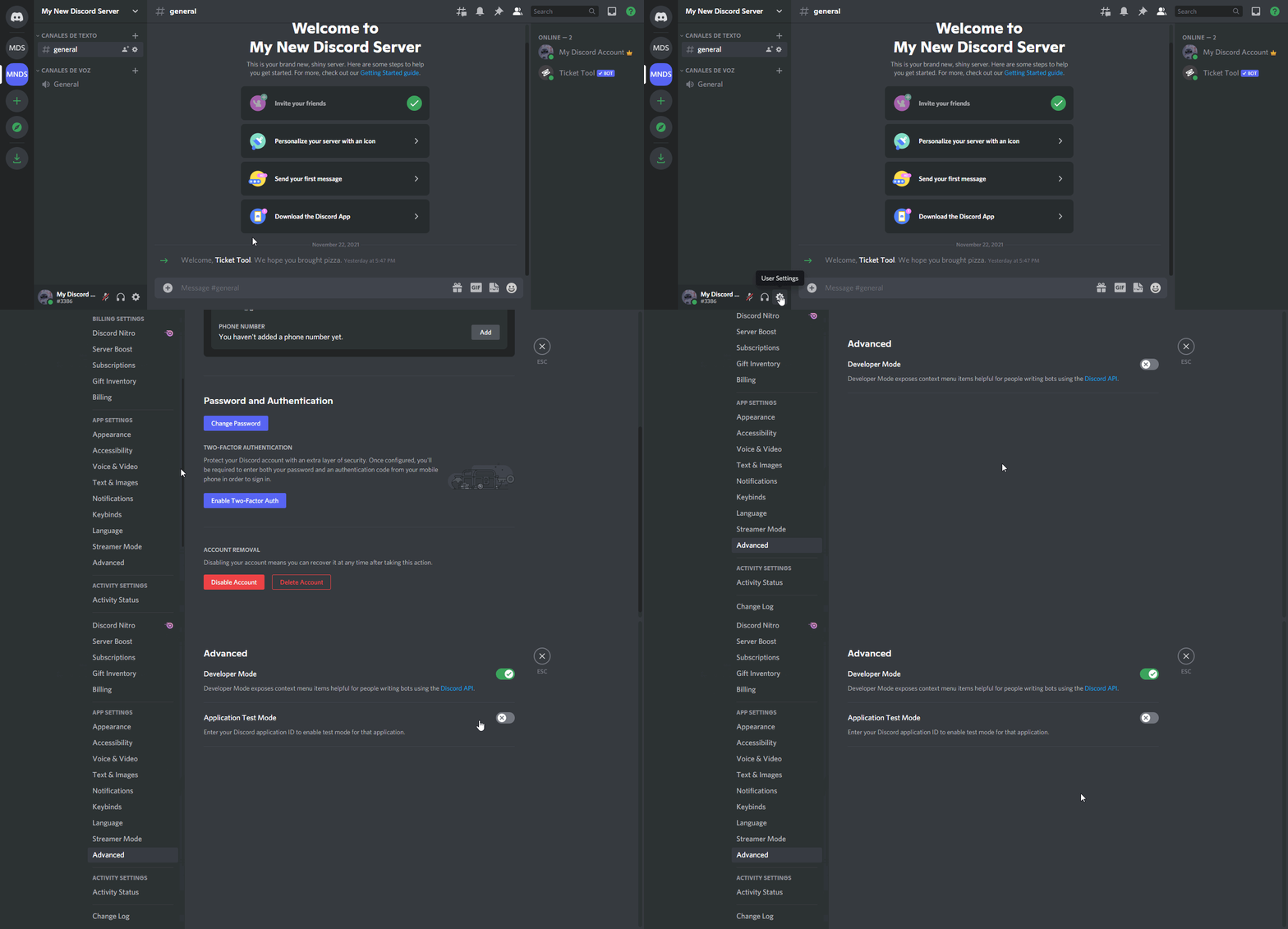
How to turn on developer mode
To enable developer mode do the following:
[:desktop: PC] go to Settings ➞ Advanced ➞ Developer mode
[:mobile_phone: Mobile] go to Settings ➞ Appearance ➞ Developer mode
Developer Mode allows you to get the ID of any channel, user, role, or server.
VIA the ID, you can use them with <> alongside their corresponding format to mention a channel/role/user...
They're mostly used to mention channels, users, or roles in Embeds
Formats
Channels: <#ID> ➝ #🤖│bot-spam
Users: <@ID> ➝ @humble sequoia
Roles: <@&ID> ➝ <@&642118166243311646>
 wispy cobalt
crimson void
Hey there, you can manage it to mention supporter role by:
`Dashboard` > `Panel ...
wispy cobalt
crimson void
Hey there, you can manage it to mention supporter role by:
`Dashboard` > `Panel ...
ok tq
crimson void
Anytime ~
 odd sapphire
Help me to open ticket🙏
crimson void
odd sapphire
Help me to open ticket🙏
What the issue you face ? #🎫│make-a-ticket if you want make a ticket there .
odd sapphire
Support me pls
crimson void
 slender umbra
Support me
slender umbra
Support me
How can we help ?
slender umbra
I'm locked account
gilded verge
What are you talking about?
crimson void
slender umbra
I'm locked account
What do you mean ?
crimson void
odd sapphire
Support me pls
How can we help ?
slender umbra
my account is locked
gilded verge
Where
slender umbra
while entering the gift code
gilded verge
Show me where
slender umbra
 humble sequoiaBOT
⚠️ You're in the wrong place
We provide support for @pseudo glen discord bot and cannot help you with whatever issue you have.
- We don't know which Support Team you should contact to get this issue resolved, and unfortunately we won't be able to accurately tell you.
If you don't have any further questions regarding our bot Ticket Tool, please close this ticket
crimson void
^^
 exotic yoke
i cant contarle a bot in my finds discod server
crimson void
exotic yoke
i cant contarle a bot in my finds discod server
Hello there, make sure you have An Administrator permission.
gilded verge
Bot don't need admin perms 😕
shut bolt
He left btw
crimson void
shut bolt
He left btw
I see
gilded verge
oh
humble sequoiaBOT
ᅠ
@pseudo glen requires the following permissions:
Add Reactions
Read Channels
Send Messages
Manage Messages
Embed Links
Attach Files
Read History
Manage Roles
Manage Channels
To change the role permissions, you can go to your Discord Server ➞ Server Settings ➞ Roles ➞ @Ticket Tool
To change the channel permissions, you can go to your Channel Settings ➞ Permissions ➞ Ticket Tool
ᅠ
Note:
You can give Ticket Tool Administrative Permissions instead of all the permissions listed above, but it's entirely optional and NOT necessary.
 shut bolt
A bit more of what miroxik said :)
crimson void
crimson void
Hello there, make sure you have An Administrator permission.
I mean he need an admin permission the person himself ., as i said make sure you have an Administrator permissions
gilded verge
The best permissions for the bot are with me 
https://cdn.discordapp.com/attachments/776680605517742090/972156942766211194/2022-05-06_17-20-51.mp4
shut bolt
crimson void
I mean he need an admin permission the person himself ., as i said make sure **y...
Oh alright
Well that isn't totally needed either
You can have a dashboard role
But yes, that's the main way people access first to the dashboard
crimson void
shut bolt
You can have a dashboard role
Yeah for sure, but for me the fastest way the admin permission hehe .
Oh i click on tag off sorry
gilded verge
crimson void
Hello there, make sure you have An Administrator permission.
Oh my mistake, because from the momentum I thought you meant a bot 😅
shut bolt
I have no problem with pings on responses while chatting
I do not enjoy people randomly pinging me for support, that's where I actually ask to not do it
crimson void
gilded verge
Oh my mistake, because from the momentum I thought you meant a bot 😅
It's okay ^^
shut bolt
But you good :)
shut bolt
gilded verge
Oh my mistake, because from the momentum I thought you meant a bot 😅
Same here, my bad 
crimson void
shut bolt
I do not enjoy people randomly pinging me for support, that's where I actually a...
Aye Aye Captain .
 candid ginkgo
How to get ticket tool bot premium?
humble sequoiaBOT
Ticket Tool Premium
Get premium at https://tickettool.xyz/premium
Manage your subscriptions at https://tickettool.xyz/subscriptions
Why Premium?
Premium lets you customize the bot just how you want it. It also helps keep the bot running.
crimson void
^
shut bolt
candid ginkgo
How to get ticket tool bot premium?
If you mean how to invite it
humble sequoiaBOT
The first thing you will need to do is invite the premium bot, an invite can be found here
Once the bot is in your server we will head to the dashboard and manage your server. When you are managing your server, you want to head into "Server Configs" then click the drop down menu under "Select the bot you would like to use on this server" then click "Ticket Tool#6207" and then save.
shut bolt

shut bolt
crimson void
^
Sorry to intervene, this user recently boosted so I inferred his question was towards enabling the premium itself
crimson void
Opps i use $premium without bot.
crimson void
shut bolt
Sorry to intervene, this user recently boosted so I inferred his question was to...
No need to sorry, you have all the rights ^^
shut bolt
crimson void
No need to sorry, you have all the rights ^^
I don't usually intervene while someone else is helping out, I only do it when I feel we can assist you on helping them 🤝
crimson void
shut bolt
I don't usually intervene while someone else is helping out, I only do it when I...
Really it's okay, Also thanks to intervene ^^
 wind tendon
@crimson void
crimson void
Yes ?
shut bolt
wind tendon
<@971175151934775316>
Please don't ping people at random
 crimson void
wind tendon
Why can't I open a ticket
crimson void
wind tendon
Why can't I open a ticket
ياهلا الدعم الفني العربي حالياً مُغلق ماتقدر تفتح تكتات عربيه, اذا تبي آنصحك حالياُ تفتح تيكت انقليزي .
wind tendon
crimson void
ياهلا الدعم الفني العربي حالياً مُغلق ماتقدر تفتح تكتات عربيه, اذا تبي آنصحك حال...
ک يحب
 mental otter
Can someone help me make it so when you open a ticket it pings a certain role @shut bolt
shut bolt
mental otter
Can someone help me make it so when you open a ticket it pings a certain role <@...
Even though you edited the message and the edits don't ping, don't ping anyone at all
shut bolt
mental otter
Can someone help me make it so when you open a ticket it pings a certain role <@...
$help pong
humble sequoiaBOT
Help Options
$help commands - Information on commands
$help setup - Information on bot setup
$help faq - Frequently asked questions
humble sequoiaBOT
How to make Ticket Tool ping a role
To make ticket tool ping a role when a ticket is opened, go to the Dashboard -> Panel Configs -> Settings -> Ticket Options -> Ticket Message -> Message Text and do this:
{@Role name} This is case sensitive and the role must have @mentions enabled
mental otter
ok thank you!
shut bolt
Sure!
tame ferry
I set up the ticket bot, thought I got it right.. when a new ticket is made it @ ticket staff but none of the staff report getting the ping.. same goes for my admin role on some of the tickets (set up multi panels). If I look at the ticket the ping is there.. just no one is getting it
kind hawk
@tame ferry you need to use {@roletotag} in the ticket message.
crimson void
crimson void
Hey there, you can manage it to mention supporter role by:
`Dashboard` > `Panel ...
@tame ferry check this .
Oh okay sorry seb
kind hawk
Don't be, it's all good. :p
tame ferry
It is
crimson void
tame ferry
It is
Screenshot please .
tame ferry

Ping it right there and in the panel it is set up with the {}

Maybe it needs to be part of the main message and not embed?
crimson void
it should be beside the Thank you @name for submitting a ticket @support#4228er role will be with you shortly
tame ferry
Ahh figured
crimson void
Yeah it will not pinged anyone while the tag inside the embed .
tame ferry
Thank you @crimson void , I will change shortly
iron nightBOT
Gave +1 Rep to @crimson void
crimson void
Anytime ^~
 quick bone
Don't ping people for help!
quick bone
stop pinging people...
prime bridgeBOT
Ev - 𝐀 𝐋 7 𝐎 𝐎 𝐓#0001 has been warned!

 They were notified via dms.
shut bolt
wind tendon
<@518666147441278998> Can I buy Premium with Credit
With credit what? Credit card?
 shut bolt
We aren't Probot
wind tendon
You don't know what I mean, thank you
shut bolt
Alright
 queen radish
Yoo is there a way to create a Ticket Ban role?
quick bone
go to your dashboard then blacklisted roles i think it's called
queen radish
quick bone
go to your dashboard then blacklisted roles i think it's called
That appears to be just for not allowing users to use commands or reactions
 humble sequoiaBOT
Any role you assign as a blacklisted role won't be able to use commands or reactions.
Selecting a blacklisted role
Go to your Dashboard ➞ Server Configs. There you will find the option to select blacklisted roles.
Note: Don't forget to save.
 gilded verge
quick bone
well, i was helping but ok
quick bone
queen radish
That appears to be just for not allowing users to use commands or reactions
it means that if they try to run a command or use the button it will do nothing
gilded verge
quick bone
well, i was helping but ok
Yes, I noticed a very good job
queen radish
quick bone
it means that if they try to run a command or use the button it will do nothing
Ahhhhhh alrighty
thanks :3
quick bone
no worries
queen radish
Does a ticket have to be deleted for it to show the transcript message in the logs channel or is just it being closed good enough?
 torn tangle
Question
trying to navigate the ticket tool and add my admins to be able to view tickets, cause currently only iam (Owner of discord) able to view said tickets
queen radish
torn tangle
Question
trying to navigate the ticket tool and add my admins to be able to view...
Add the roles you want to be able to view the tickets here

Panel Configs -> Select your Panel which you created -> General Options
 iron glen
Does anyone know the reason for this?
 iron glen
Does anyone know the reason for this?
iron glen
iron glen
Does anyone know the reason for this?
@queen radish ?
queen radish
Do what it says, run $debug in the channel you're trying to run the panel in
 uneven tiger
Quick question, is it possible to have a two-step opening process similar to the two-step closing process?
I.e. a user confirmation message to open the ticket
solid stream
Not currently, but it is a planned feature
uneven tiger

copper owl
wind tendon
You don't know what I mean, thank you
ما فيك تشتريه بكريدت برو بوت.. ما في علاقة بينات برو بوت و تكت تول للأسف
البريميوم بفلوس حقيقية
 wind tendon
copper owl
البريميوم بفلوس حقيقية
wind tendon
copper owl
البريميوم بفلوس حقيقية
ماعندي بطاقة عشان ادفع
copper owl
wind tendon
ماعندي بطاقة عشان ادفع
فيك بالcrypto
shut bolt
Can you develop more on that, what's the problem being?
copper owl
wind tendon
كيف
Bitcoin, Ethereum او Litecoin
copper owl
wind tendon
ما اعرفها
اه, يعني ما في طريقة للأسف
 bleak token
when some one on on my server clicks creat ticket it says they dont have perms
how do i fix that
humble sequoiaBOT
ᅠ
@pseudo glen requires the following permissions:
Add Reactions
Read Channels
Send Messages
Manage Messages
Embed Links
Attach Files
Read History
Manage Roles
Manage Channels
To change the role permissions, you can go to your Discord Server ➞ Server Settings ➞ Roles ➞ @Ticket Tool
To change the channel permissions, you can go to your Channel Settings ➞ Permissions ➞ Ticket Tool
ᅠ
Note:
You can give Ticket Tool Administrative Permissions instead of all the permissions listed above, but it's entirely optional and NOT necessary.
gilded verge
@bleak token, Hi, please check required permissions.
 still river
shut bolt
Can you develop more on that, what's the problem being?
still river
shut bolt
Can you develop more on that, what's the problem being?
managed to solve it thanks 
iron nightBOT
Gave +1 Rep to @shut bolt
shut bolt
still river
managed to solve it thanks <:Love:972108031846391868>
Glad to hear that, sorry for our delay
still river
shut bolt
Glad to hear that, sorry for our delay
No worries 🙂
 acoustic yarrow
@scenic plinthi was talking about this


Gist
Create custom forms for your discord server and send submissions to a channel of your choice using webhooks - forms.md
shut bolt
acoustic yarrow
<@615207454443044904>i was talking about this
Hey there, the implementation of modals is planned for the major update our developer is working on
acoustic yarrow
noice
shut bolt
Also, please don't ping support members, although I know it's a follow up from #💬│general-chat it's better to not ping, sometimes it can be annoying
shut bolt
acoustic yarrow
noice
There are some nice things cooking on the grill 
acoustic yarrow
alright
shut bolt
 mellow stirrup
Can i configure my own message to an ticket?
mellow stirrup
Can i configure my own message to an ticket?
Hi there, do you mean the panel message or the ticket message itself?
 humble sequoiaBOT
The panel message is where people react to make a ticket. To customize it head over to your Dashboard --> Panel Configs -> Settings -> Panel Options -> Edit Panel Message
 shut bolt
You can't make it to have the button
But you can customize the panel message
And make it include the message you've built
shut bolt
mellow stirrup
I don't know how to do this. the page categories are very mixed
Which page categories are confusing? I can assist you on that if you would like to
mellow stirrup
All, lol. There is no option to import a ready-made embed
shut bolt
mellow stirrup
All, lol. There is no option to import a ready-made embed
You just need to copy and paste over the fields of the message, there's no option to import premade embeds
mellow stirrup
it is an embed in a description only. there is no way to matter


I'll try another way, thanks and bye 💗
solid stream
Yeah.. The updated dashboard in development really fixes alot of these organizational problems.
 mortal walrus
كيف أخلي البوت يرسل في قسم معين
copper owl
$help category
humble sequoiaBOT
How to set the open category
To set a open category go to the Dashboard -> Panel Configs -> Settings -> Category Options -> Category Open
copper owl
mortal walrus
كيف أخلي البوت يرسل في قسم معين
^
mortal walrus
اك شكراً
 robust sandalBOT
mortal walrus
كيف أخلي البوت يرسل في قسم معين
robust sandalBOT
mortal walrus
كيف أخلي البوت يرسل في قسم معين
 JG101
JG101
How to clear the bot sent in a particular section
 Arabic (ar) → English (en)
robust sandalBOT
mortal walrus
اك شكراً
JG101
Arabic (ar) → English (en)
robust sandalBOT
mortal walrus
اك شكراً
JG101
Thank you, thank you.
Arabic (ar) → English (en)
crimson void
 warm breach
Hi, how can I change the msg when someone creates a ticket?
warm breach
Hi, how can I change the msg when someone creates a ticket?
Dashboard > Panel configs > Settings > Ticket Options > Edit Ticket message
warm breach
a
warm breach
crimson void
`Dashboard` > ` Panel configs` > `Settings` > `Ticket Options` > `Edit Ticket me...
well, thank u so much
iron nightBOT
Gave +1 Rep to @crimson void
crimson void
Anytime ^~
humble sequoiaBOT
How to set the open category
To set a open category go to the Dashboard -> Panel Configs -> Settings -> Category Options -> Category Open
jade topaz
ah
crimson void
^
jade topaz
@crimson void one more question, how do i make the ticket ping a specific role when it is made
crimson void
jade topaz
<@971175151934775316> one more question, how do i make the ticket ping a specifi...
Like for supporter role? For example
jade topaz
yea
crimson void
jade topaz
yea
you can manage it to mention supporter role by:
Dashboard > Panel configs > Choose the panel you want to edit at click at settings > Ticket Options > Edit Ticket message then add {role ID} or <@&RoleID> beside the {user} on the message text .
- So now when someone open a ticket should mention them and the role like supporter, etc ..
If you need anything feel free to ask ^
 soft adder
$help
humble sequoiaBOT
Help Options
$help commands - Information on commands
$help setup - Information on bot setup
$help faq - Frequently asked questions
crimson void
soft adder
$help
Use it in #🤖│bot-spam
jade topaz
Hey there, the ticket tool was working fine but then it started to acting weird now... when a member opened a ticket, other member were in the ticket too, and the ticket is not placed in the right category either, can i please get some help?
crimson void
jade topaz
Hey there, the ticket tool was working fine but then it started to acting weird ...
Hello there for the category can you check this please again
humble sequoiaBOT
How to set the open category
To set a open category go to the Dashboard -> Panel Configs -> Settings -> Category Options -> Category Open
jade topaz
crimson void
Hello there for the category can you check this please again
I clicked save after choose that category again
 crimson void
Try open a ticket and make sure you choose the correct panel from the dashboard
 jade topaz
crimson void
Try open a ticket and make sure you choose the correct panel from the dashboard
jade topaz
crimson void
Try open a ticket and make sure you choose the correct panel from the dashboard
we only have 1 panel

Is there a opened ticket limit for a category?
crimson void
@jade topaz To be clear open a ticket in #🎫│make-a-ticket ^ if they need more things .
crimson void
jade topaz
Is there a opened ticket limit for a category?
Yeah sure,
Dashobard > Panel Configs > Settings > General options > Ticket Limit
jade topaz
crimson void
Yeah sure,
`Dashobard` > `Panel Configs` > `Settings` > `General options` > `Ti...
got it ty!
crimson void
Anytime ~ ^
crimson void
@restive thorn
You can log out from the dashboard then relogin again .
 strong shuttle
How do I make ticket tool ask questions?
crimson void
humble sequoia
Check this too
 restive thorn
Is still cant see it i logged out and logged in and nothing :(
crimson void
restive thorn
Is still cant see it i logged out and logged in and nothing :(
Is the bot already invited to the server you want? + make sure you have the permissions to see edit the server in the dashboard .
crimson void
strong shuttle
How do I make ticket tool ask questions?
As my knowledge, So far we don't offer that option, you can make multipanels but we don't have the feature to make the bot to ask a questions.
strong shuttle
Aw man.
crimson void
strong shuttle
Aw man.
Currently the best would be to edit the ticket message, right now a set of questions isn't a possibility but I believe it has been suggested.


 crimson void
restive thorn
Do i need to be the owner of the server
crimson void
restive thorn
Do i need to be the owner of the server
No, if you still can't see the server can you let the owner add your role in the dashboard?:
Dashboard > Server Configs > Dashboard roles > then add your role in the dashboard roles section
jade topaz
im confuse abt ticket count
when i set it to 10 does that make the next ticket 11 then after that its 21?
shut bolt
The ticket count is the number of the the current ticket, so if it's 1 next it's 2 then 3 and then 4
jade topaz
And what is additional roles?
crimson void
jade topaz
And what is additional roles?
After you pablo, this you can add more roles so they can get access to the dashboard.
shut bolt
crimson void
After you pablo, this you can add *more* roles so they can get access to the das...
That's dashboard roles
shut bolt
jade topaz
And what is additional roles?
Additional roles are set of roles you can pick to grant them a different set of permissions than the support team roles
jade topaz
shut bolt
Additional roles are set of roles you can pick to grant them a different set of ...
Tysm
jade topaz
crimson void
After you pablo, this you can add *more* roles so they can get access to the das...
ty
iron nightBOT
Gave +1 Rep to @crimson void
crimson void
shut bolt
That's dashboard roles
Oh my bad i thought he asked about dashboard roles not the additional roles inside the panel settings.
shut bolt
jade topaz
Tysm

shut bolt
crimson void
Oh my bad i thought he asked about dashboard roles not the additional roles insi...
It's fine
crimson void
jade topaz
ty
Anytime~
 cedar mirage
how to do this ?
 crimson void
Hello @cedar mirage ,
You mean the link hidden with the texts ?
 sharp valley
Hey I already put the ami server bot but how to activate it I'm from the phone
cedar mirage
crimson void
Hello <@648363731310477334> ,
You mean the link hidden with the texts ?
the whole thing how to make it
crimson void
cedar mirage
the whole thing how to make it
if you want to customize the panel, then follow this:
Dashboard > Panel Configs > Choose the panel you want and click at settings > Panel Options > Edit panel message
*From there you can edit everything for the panel layout . *
if you want to change the **button **then follow this:
Dashboard > Panel Configs > Choose the panel you want and click at settings > Button Options > Choose whether you want to change Create ticket button or anything else
- Note:
Most of the options for premium^ .
cedar mirage
crimson void
if you want to **customize the panel**, then follow this:
`Dashboard` > `Panel C...
thanks
iron nightBOT
Gave +1 Rep to @crimson void
crimson void
anytime ^
queen radish
Can I setup a staff role which gets pinged everytime a ticket is opened in my server?
crimson void
queen radish
Can I setup a staff role which gets pinged everytime a ticket is opened in my se...
Yes sure.
you can manage it to mention supporter role by:
Dashboard > Panel configs > Choose the panel you want to edit at click at settings > Ticket Options > Edit Ticket message then add {role ID} or <@&RoleID> beside the {user} on the message text .
- So now when someone open a ticket should mention them and the role like supporter, etc ..
queen radish
Also could it be setup so transcripts are made automatically once a ticket has been closed and you don't have to click on the transcript button everytime?
queen radish
crimson void
Yes sure.
you can manage it to mention supporter role by:
`Dashboard` > `Panel ...
Thanks a ton!
crimson void
queen radish
Also could it be setup so transcripts are made automatically once a ticket has b...
For the transcript automatically saved only for premium sub.
 queen radish
Ahhhhh aight, ty again! :3
crimson void
Anytime^
 waxen nest
Hello, i would like to ask how you do multi-reaction on the tickets? I'll like some advice
humble sequoiaBOT
For a more convenient use of multipanels, you can now combine panels on the dashboard. This will allow you to directly send the multipanel from the dashboard or via the $panel ID command.
Where can I find this?
You can find this setting on the Dashboard -> Panel Configs -> Settings -> General Options
Note: if you're attaching all the panels to a panel called English, don't include English in the attached panels box (If you do this, it will create duplicate)
This will put all buttons from all of your panels on one message. The message is the panel message from the panel you're combining these panels in.
Note: This is a premium feature
gilded verge
Hey @waxen nest, check
waxen nest
Thanks 🤙
crimson void
Hello @jade topaz ,
for this you need to be a premium, to change this follow the steps:
Dashboard > Panel Configs > Settings for the panel > Ticket Options > and you can see the Ticket Opened channel name & Ticket closed channel name
Add this Ticket-{ticket.user.name} instead of Ticket-{count}
 valid shell
What do I do when it puts me on my server will support be with you shortly?
gilded verge
You mean message in ticket?
valid shell
Yes
humble sequoiaBOT
The Ticket Message is the first message sent by the bot in a new ticket. To customise it head over to your Dashboard ➞ Panel Configs ➞ Settings ➞ Ticket Options ➞ Edit Ticket Message
 gilded verge
valid shell
OK thanks you 🤘
gilded verge
i have some, wait please
humble sequoiaBOT
Within all the messages the bot's sends (both embeds and text) you can mention either channels, roles, or even users, these mentions will only send a notification to the user if they are used within a text field, e.g: a role mentioned in an embed won't ping at all the users who have that role.
For mentioning a role you can use one out of three options:
{@Role Name} ➞ Which is Case Sensitive.
{RoleID} ➞ Replace RoleId with the Id of the role you are trying to ping.
<@&RoleID> ➞ Discord's native syntax to ping roles.
<#ChannelID> ➞ Mention a channel by its ID.
<@UserID> ➞ Mention a user by its ID.
How to turn on developer mode
To enable developer mode do the following:
[:desktop: PC] go to Settings ➞ Advanced ➞ Developer mode
[:mobile_phone: Mobile] go to Settings ➞ Appearance ➞ Developer mode
Developer Mode allows you to get the ID of any channel, user, role, or server.
VIA the ID, you can use them with <> alongside their corresponding format to mention a channel/role/user...
They're mostly used to mention channels, users, or roles in Embeds
Formats
Channels: <#ID> ➝ #🤖│bot-spam
Users: <@ID> ➝ @humble sequoia
Roles: <@&ID> ➝ <@&642118166243311646>
gilded verge
maybe you need this too
crimson void
gilded verge
maybe you need this too <:peepoBlush:843212225208123412>
Additional info, after you ( to make it easy for him)
Dashboard > Panel configs > Choose the panel you want to edit at click at settings > Ticket Options > Edit Ticket message then add <@YourID> beside the {user} on the message text . @valid shell
valid shell
Ok than you 🤘. @crimson void
crimson void
Anytime ^~
valid shell
What is this?
Support will be with you shortly.
To close this ticket react with lock
quick bone
it means you've opened a ticket and you'll get a response soon
if you want to close the ticket react with the lock
valid shell
Ok thanks you @quick bone
iron nightBOT
Gave +1 Rep to @quick bone
quick bone
np
valid shell
how to configure the labels?
sorry for being heavy
valid shell
The labels
 valid shell
Yes
quick bone
$buttons
humble sequoiaBOT

The new Discord Buttons allow for a much smoother and convenient experience. They reduce lag and work much better than emojis. With ticket tool you can edit all the buttons however you like! Buttons can show emojis, text and can have 4 different colors.
Where can I edit them?
Dashboard ➞ Panel Configs ➞ Settings ➞ Button Options ➞ Setting
 crimson void
But to inform you, most of the options are only for premium .
For example: the name of the button, the emoji and the color of the button only for premium .
quick bone
^^
gilded verge
valid shell
The labels
hmm, if think he don't mean buttons, but I can be wrong
humble sequoiaBOT
Tags
Tags are used to send a predefined response to your channels using a command. Tags will only respond if the command itself is used, it will not function if you put the tag into a sentence. The prefix is not included.
To create tags, go to: Dashboard > Tags > Create Tag. After creating and naming one, tap on the response button, and you can edit the response.
 quick bone
yea
gilded verge
humble sequoia
i think he meant
crimson void
valid shell
The labels
If none of these works, please put this in english and send it again.
valid shell
how to activate the command $claim ?
quick bone
you need premium
then in the panel you want to go down to claiming options then enable it from there
valid shell
I don't understand English I'm Spanish
crimson void
valid shell
I don't understand English I'm Spanish
I recommend to open a ticket #🎫│make-a-ticket,
you can open a ticket with spanish supporters ^
quick bone
you can also use @robust sandal
 leaden fox
why everyone who join my serve could manage serve ?how can i turn off their permissions
quick bone
$permissions
quick bone
leaden fox
why everyone who join my serve could manage serve ?how can i turn off their perm...
go to the dashboard and i think its called manager roles
humble sequoiaBOT
ᅠ
@pseudo glen requires the following permissions:
Add Reactions
Read Channels
Send Messages
Manage Messages
Embed Links
Attach Files
Read History
Manage Roles
Manage Channels
To change the role permissions, you can go to your Discord Server ➞ Server Settings ➞ Roles ➞ @Ticket Tool
To change the channel permissions, you can go to your Channel Settings ➞ Permissions ➞ Ticket Tool
ᅠ
Note:
You can give Ticket Tool Administrative Permissions instead of all the permissions listed above, but it's entirely optional and NOT necessary.
valid shell
What are the tickets for?
¿Para qué sirven los tickets?
gilded verge
leaden fox
why everyone who join my serve could manage serve ?how can i turn off their perm...
Sorry, I didn't understand what you meant before because I thought you meant a bot. From what I noticed, you should go to server settings and change perms in roles 😕
gilded verge
valid shell
What are the tickets for?
¿Para qué sirven los tickets?
Please explain what you mean.
valid shell
What are the tickets for? (Para qué sirven las entradas)
What are the tickets (que son los tickets)
crimson void
valid shell
What are the tickets for? (Para qué sirven las entradas)
What are the tickets (...
Sorry but still your i don't understand your question clearly, if you want go to #🎫│make-a-ticket and click at spanish so spanish supporter will help you ^^ for quick response,
valid shell
How do I use the tickets?
Tickets are for any questions that arise?
humble sequoiaBOT
You can check our documentation here.
You can also check #573205317870157855 for the basic setup.
Our documentation contains all the info you need about the bot to be able to setup and configure the bot however you like.
crimson void
Do you mean this ? ^
valid shell
Yes !!!!
humble sequoiaBOT

Equipo de Soporte Español
Querido usuario, si está buscando ayuda, por favor abra un ticket para contactar al Equipo de Soporte Español. Diríjase a #🎫│make-a-ticket y presione el botón :flag_es:.
crimson void
humble sequoia
@valid shell check this too ^, for better service with spanish language !
valid shell
Ok