#🆘│community-support
1 messages · Page 406 of 1
 ornate moss
 jade topaz
😭
 pale pilot
14 shards just came back, so if it keeps up that speed it should be back in about 15 minutes
Clusters I should say
 azure hornet
bot offline why

 next topaz
azure hornet
bot offline why
next topaz
azure hornet
bot offline why
Me too...bot offline
next topaz
 fallow ingot
Small outrage.
fallow ingot
Small outrage.
thx
 iron nightBOT
Gave +1 Rep to @fallow ingot
fallow ingot
yup, no worries. Thanks for your understanding
next topaz
fallow ingot
yup, no worries. Thanks for your understanding
Have a good day 😄 thx
fallow ingot

azure hornet
fallow ingot
Should be online shortly
but why only in my server not in all
discord glitch or wot
fallow ingot
azure hornet
but why only in my server not in all
We have clusters, it’s not offline for every server. Only some clusters.
next topaz
azure hornet
but why only in my server not in all
I think is different server><
azure hornet
okk
jade topaz
Thank you
next topaz
Done thx team~ 😄
fallow ingot
jade topaz
Thank you
Yup, thanks for your understanding.
iron nightBOT
Gave +1 Rep to @tidal pecan
jade topaz
fallow ingot
We have clusters, it’s not offline for every server. Only some clusters.
yuh
 tropic current
Hey, I have a question, if you do not have a premium version of the bot, it can be done somehow that after closing the ticket, he will write to him on pv that his ticket has been closed?
pale pilot
@tropic current that option can be found under automation option in your panel configs
tropic current
OK thanks
 sly linden
Can i allow send pictures to everyone in ticket?
sly linden
sly linden
Can i allow send pictures to everyone in ticket?
@pale pilot
pale pilot
fallow ingot
sly linden
Can i allow send pictures to everyone in ticket?
This is possible, yes.
Go to the Dashboard > Panel Configs > Settings > Permissions Options > User Opened Permissions > enable  Attach files
sly linden
Ok thanks
fallow ingot
No problem
fallow ingot

 kind hawk
Do not click this link guys. A mod will delete it any moment now
 slender minnow
@fallow ingot no manage message perm?
fallow ingot
slender minnow
<@768144576946110475> no manage message perm?
nope
slender minnow
rip 
fallow ingot
:(
slender minnow
josiah probably removed it
fallow ingot
Likely as he removed #💬│general-chat one
slender minnow
yess
 solid stream
I did?
Oh, yeah, I deleted them lol
and added in a new content filter to block em.
 quaint harness
 fallow ingot
Hi it’s a premium option, but a guide is below.
 humble sequoiaBOT
For a more convenient use of multipanels, you can now combine panels on the dashboard. This will allow you to directly send the multipanel from the dashboard or via the $panel ID command.
Where can I find this?
You can find this setting on the Dashboard -> Panel Configs -> Settings -> General Options
Note: if you're attaching all the panels to a panel called English, don't include English in the attached panels box (If you do this, it will create duplicate)
This will put all buttons from all of your panels on one message. The message is the panel message from the panel you're combining these panels in.

 Note: This is a premium feature
 lean bluff
Hello guys i m unaable to set ticket system in server channel
fallow ingot
lean bluff
Hello guys i m unaable to set ticket system in server channel
Any error?
lean bluff
fallow ingot
Any error?
I dont know how to set it up
humble sequoiaBOT

You can check our documentation here.
You can also check #573205317870157855 for the basic setup.
Our documentation contains all the info you need about the bot to be able to setup and configure the bot however you like.
fallow ingot
@lean bluff 
lean bluff
Thanks got help
jade topaz
hi all, need help with channels the tool created
I thought I set the tool up to move closed tickets to another category on the server, but it's not working, can anyone help me out?
fallow ingot
jade topaz
hi all, need help with channels the tool created
I thought I set the tool up to ...
Hi there
Do you have any channels in the closed category?
jade topaz
fallow ingot
Do you have any channels in the closed category?
yes, 4 rn
I started moving them manually, but then I remembered there must be a solution...
fallow ingot
Ok, does ticket tool have access to the category?
jade topaz
I think the tool has manage access to all categories by default
fallow ingot
Ok, before moving forward, can you go to the servers dashboard and check that you still have a category set.
jade topaz
but yeah no I see
fallow ingot
This can be found in Category Options.
fallow ingot
That explains it.
jade topaz
the move closed tickets rule is set up on the online dashboard, right?
yeah, found it
might make another category for open tickets
they're piling up
jade topaz
fallow ingot
This can be found in Category Options.
would the bot move closed tickets now, after they've been closed, or should I move them manually?
(nice, the rule is def working)
jade topaz
fallow ingot
That explains it.
thanks for the help, appreciated.
iron nightBOT
Gave +1 Rep to @fallow ingot
 still spear
jade topaz
would the bot move closed tickets now, after they've been closed, or should I mo...
still spear
jade topaz
would the bot move closed tickets now, after they've been closed, or should I mo...
The bot should move them automatically. ^^
jade topaz
still spear
The bot should move them automatically. ^^
turns out the bot only tries to move them when the ticket it closed
if it fails, it doesn't try again later
still spear
jade topaz
turns out the bot only tries to move them when the ticket it closed
if it fails,...
Yep. Does it fail?
jade topaz
still spear
Yep. Does it fail?
not any more 😄 it's got the right access
fallow ingot
jade topaz
would the bot move closed tickets now, after they've been closed, or should I mo...
Yeah when they get closed. No need to move manually now.
 meager oxide
I won't be able to buy any mint until buck buck open to the public again?
kind hawk
@meager oxide this discord is for @humble sequoia support only. We cannot help you with any issues on other platforms.
Sorry.
 sand zinc
Hello, is there any way to tie a ticket panel to an existing embed?
 copper owl
Nope
the closest you'll get is sending the panel and removing the embed by pressing the little x
sand zinc
Gotcha, thanks!
kind hawk
Or, put the link between <>
Like: https://www.google.ca/ and it will prevent the embed to even show up.
Oh, we're probably not talking about the same thing. Mb xD
 meager oxide
Okay, fine where can I go for help or depends what can of I need. It's not medical, mental or physical issue. It's all about crypto.
humble sequoiaBOT

⚠️ You're in the wrong place
We provide support for @pseudo glen discord bot and cannot help you with whatever issue you have.
- We don't know which Support Team you should contact to get this issue resolved, and unfortunately we won't be able to accurately tell you.
If you don't have any further questions regarding our bot Ticket Tool, please close this ticket
fallow ingot
@meager oxide ^
fallow ingot
It won't work if it's deleted...
 weak wing
fallow ingot
It won't work if it's deleted...
weak wing
fallow ingot
It won't work if it's deleted...
.
fallow ingot
I'm confused, can you please be a little more informative? I am unable to help if I don't know what issue you experiencing.
weak wing
weak wing
some people can not create ticket
It's as it is. What information do you need?
weak wing
fallow ingot
I'm confused, can you please be a little more informative? I am unable to help i...
.
fallow ingot
Ok, so do you have any blacklisted roles set?
humble sequoiaBOT
Any role you assign as a blacklisted role won't be able to use commands or reactions.
Selecting a blacklisted role
Go to your Dashboard ➞ Server Configs. There you will find the option to select blacklisted roles.
Note: Don't forget to save.
 fallow ingot
Make sure you have no roles here ^
weak wing
fallow ingot
Make sure you have no roles here ^
where can i see blacklist roles?
fallow ingot
Go to your Dashboard > Server Configs.
weak wing
 weak wing
fallow ingot
Go to your Dashboard > Server Configs.
weak wing
fallow ingot
Go to your Dashboard > Server Configs.
no blacklist roles.
fallow ingot
What's the server ID?
weak wing
fallow ingot
What's the server ID?
828774318736539699
fallow ingot
Please allow me a few moments.
@weak wing Do any roles here? Panel Configs > Settings > Button Options > Create Ticket Settings?
 weak wing
fallow ingot
<@238273379046522880> Do any roles here? Panel Configs > Settings > Button Optio...
weak wing
fallow ingot
<@238273379046522880> Do any roles here? Panel Configs > Settings > Button Optio...
yes. i checked all panel's. blanks.
fallow ingot
Hmm, ok. Can you open a ticket please? I'm going off soon, and I can't find what is causing this issue.
weak wing
fallow ingot
Hmm, ok. Can you open a ticket please? I'm going off soon, and I can't find what...
ok. thank you for help.
iron nightBOT
Gave +1 Rep to @fallow ingot
humble sequoiaBOT
━━ moved to ticket ━━
 pallid star
Hello today on my server people Just cant do a tickets and idk why its out of nowhere so please help
 regal goblet
@pallid star are they getting an error?
 wispy kettle
😶 sometimes it throw this error :l
 humble sequoiaBOT
Update your discord App
Buttons are a relatively new addition to discord and don't work with some older versions of the app.
Please verify that you have the latest version of discord, by going to the app or play store.
Discord for the  App Store
Discord for the  Play Store
 gilded verge
@wispy kettle check this 👆
wispy kettle
gilded verge
<@886047348361408592> check this 👆
I'm already updated
gilded verge
Please re-send panel and try again
 feral night
Is there a way to allow the bot to ping the user when they make a ticket in the "Title" section?
 loud turtle
$help ping
humble sequoiaBOT
How to make Ticket Tool ping a role
To make ticket tool ping a role when a ticket is opened, go to the Dashboard -> Panel Configs -> Settings -> Ticket Options -> Ticket Message -> Message Text and do this:
{@Role name} This is case sensitive and the role must have @mentions enabled
 loud turtle
$mentions
humble sequoiaBOT
Within all the messages the bot's sends (both embeds and text) you can mention either channels, roles, or even users, these mentions will only send a notification to the user if they are used within a text field, e.g: a role mentioned in an embed won't ping at all the users who have that role.
For mentioning a role you can use one out of three options:
{@Role Name} ➞ Which is Case Sensitive.
{RoleID} ➞ Replace RoleId with the Id of the role you are trying to ping.
<@&RoleID> ➞ Discord's native syntax to ping roles.
<#ChannelID> ➞ Mention a channel by its ID.
<@UserID> ➞ Mention a user by its ID.
feral night
Thank you!
 rugged mural
How can I change the name of the rum without having powers?
 weak oriole
Panel configs>Settings>Button Option>Create Ticket Settings?
rugged mural
weak oriole
Panel configs>Settings>Button Option>Create Ticket Settings?
I explain
weak oriole
|explain
rugged mural
yes
weak oriole
No idea I’m new her lol
rugged mural
Ok No Problem
 mortal imp
gilded verge
<@960218185787916421>, please show screenshot from this message
mortal imp
gilded verge
<@960218185787916421>, please show screenshot from this message
staff delate ping
gilded verge
Next time please take a screenshot, this situations need proofs. I mean, to explain what's going on.
gilded verge
rugged mural
How can I change the name of the rum without having powers?
Sorry but what you meant about rum?
Please wait for answer or open ticket in channel #🎫│make-a-ticket
iron nightBOT
Gave +1 Rep to @gilded verge
gilded verge
I think...
humble sequoiaBOT
⚠️ You're in the wrong place
We provide support for @pseudo glen discord bot and cannot help you with whatever issue you have.
- We don't know which Support Team you should contact to get this issue resolved, and unfortunately we won't be able to accurately tell you.
If you don't have any further questions regarding our bot Ticket Tool, please close this ticket
gilded verge
This
humble sequoiaBOT
Don't see your server in the dashboard?
You will possibly need to relog. Look below to see steps on how to relog.
How to relog in the Dashboard.
First, you will need to go to the dashboard. Once your there, click on your avatar on the top right. after you clicked it, you will see button that says Logout. You must click that. Once you have logged out, you can log back in.
Note:
You need one of these 3 things to access the dashboard.
1. Server Owner (Level: 6)
2. Server Administrator (Level: 4)
3. Dashboard Role (Level: 2)
:warning: You can check your level using $level on your Discord Server
User permission level with Ticket Tool
@User is permission level: 0 (User)
```» *If it shows that your permission is **0**, you don't have any of the above **3 things** to manage the dashboard.*


**See the GIF below on how to relog:** copper owl
loud turtle
<@685734230646456325>
copper owl
loud turtle
<@685734230646456325>
you dont have double ping em
loud turtle
copper owl
you dont have double ping em
I thought they will not recieve it
jade topaz
components[0].components[0].label: This field is required what does this mean?
im trying to close a ticket but it says this
still spear
jade topaz
im trying to close a ticket but it says this
Can you send a screenshot?
fallow ingot
server ID?
jade topaz
ok its actually working now tysm tho!
 spiral smelt
Hi, can i give the TicketTool other Picture and Name on my Server ?
loud turtle
spiral smelt
Hi, can i give the TicketTool other Picture and Name on my Server ?
Custom ticket tool bots are not a feature
humble sequoiaBOT

Ticket Tool avatar/status Customisation
@pseudo glen is like another discord user; you can't control its avatar icon or status, and we cannot change it for a specific server.
However, on your server, you can change the bot's nickname
 kind hawk
@spiral smelt you can change his name but not his avatar
 lofty onyx
can I change the message when a ticket is opened
(Instead of it being “@.user Welcome”)
humble sequoiaBOT
The Ticket Message is the first message sent by the bot in a new ticket. To customise it head over to your Dashboard ➞ Panel Configs ➞ Settings ➞ Ticket Options ➞ Edit Ticket Message
 gilded verge
iron nightBOT
Gave +1 Rep to @gilded verge
loud turtle
y!rep @gilded verge
iron nightBOT
! miroxik74: 55 Rep (#23)
gilded verge
loud turtle
y!rep <@334671104704774154>
please use #🤖│bot-spam
loud turtle
Just checkin'
gilded verge
oh yeah but that's a command, nice to keep the channels clean 
spiral smelt
kind hawk
<@467242319972925440> you can change his name but not his avatar
And how ?
gilded verge
spiral smelt
And how ?
On your server, right click on the bot and select Change Nickname
 pallid timber
!rank
gilded verge
pallid timber
!rank
for commands please go to #🤖│bot-spam
pallid timber
ok
 past basin
does the bot needs to be on top of the roles in the server? I made a seperate BOTS roles to give every bot this role but is this also okay ?
humble sequoiaBOT
ᅠ
@pseudo glen requires the following permissions:
Add Reactions
Read Channels
Send Messages
Manage Messages
Embed Links
Attach Files
Read History
Manage Roles
Manage Channels
To change the role permissions, you can go to your Discord Server ➞ Server Settings ➞ Roles ➞ @Ticket Tool
To change the channel permissions, you can go to your Channel Settings ➞ Permissions ➞ Ticket Tool
ᅠ
Note:
You can give Ticket Tool Administrative Permissions instead of all the permissions listed above, but it's entirely optional and NOT necessary.
 gilded verge
@past basin, This is also fine, the most important thing is that the bot should have these perms in his role
gilded verge
which issues? 😳
past basin
sometimes we couldn't add an user
and sometimes we could
but we added some new roles into the server and maybe thats the issue
past basin
is that in server roles settings or in the bot panel?
 gilded verge
then you know what, in a few minutes in the video I can give you the permissions I gave for the bot in the server settings because I know that then everything will work fine, u want?
 golden wyvern
Why am I unable to open more tickets for this specific panel? I've had multiple tickets opened in the past but now it's refusing to let me open anymore?
 gilded verge
Oh, the ticket limit in your panel is 1. You have to delete your ticket first.
golden wyvern
gilded verge
Oh, the ticket limit in your panel is 1. You have to delete your ticket first.
But I've had multiple tickets opened in the past?
Why is it being weird now
Oh wait
I see
😆
gilded verge
@golden wyvern, @past basin,
If you managed to find the cause and fix it, I am very happy
@past basin, this is perms for TT bot in my server - ofc if you want then take
humble sequoiaBOT
You can check our documentation here.
You can also check #573205317870157855 for the basic setup.
Our documentation contains all the info you need about the bot to be able to setup and configure the bot however you like.
gilded verge
please check
 green venture
@gilded verge where is the panel section tho
gilded verge
on dashboard 😳
humble sequoiaBOT
 gilded verge
Example of panel section:
 gilded verge
@blazing sable come here
jade topaz
help i can't see my server in the manage
humble sequoiaBOT
Don't see your server in the dashboard?
You will possibly need to relog. Look below to see steps on how to relog.
How to relog in the Dashboard.
First, you will need to go to the dashboard. Once your there, click on your avatar on the top right. after you clicked it, you will see button that says Logout. You must click that. Once you have logged out, you can log back in.
Note:
You need one of these 3 things to access the dashboard.
1. Server Owner (Level: 6)
2. Server Administrator (Level: 4)
3. Dashboard Role (Level: 2)
:warning: You can check your level using $level on your Discord Server
User permission level with Ticket Tool
@User is permission level: 0 (User)
```» *If it shows that your permission is **0**, you don't have any of the above **3 things** to manage the dashboard.*


**See the GIF below on how to relog:**
 gilded verge
spiral smelt
Hi 🙂
If i close a ticket they didnt move to my Category closed
gilded verge
spiral smelt
Hi 🙂
If i close a ticket they didnt move to my Category closed
Hey, do you get an error when you close your ticket and it doesn't move to the category?

 gilded verge
spiral smelt
Just didn´t move it to Closed Category
gilded verge
spiral smelt
Just didn´t move it to Closed Category
Please use $debug command in your server and send link here 
humble sequoiaBOT
Update your discord App
Buttons are a relatively new addition to discord and don't work with some older versions of the app.
Please verify that you have the latest version of discord, by going to the app or play store.
Discord for the App Store
Discord for the Play Store
gilded verge
@lavish shuttle check
 lavish shuttle
gilded verge
<@819588257809301567> check <:this:894279341108772914>
lavish shuttle
gilded verge
<@819588257809301567> check <:this:894279341108772914>
thanks
iron nightBOT
Gave +1 Rep to @gilded verge
humble sequoiaBOT
We would love to help you, but if you don't tell us what you need help with we can't help you :(
jade topaz
trying to add emotes in ticket tool panel to have on my server channel but i dont know to do it
gilded verge
Remember that these emotes first need to be on your server before you can add them to panel.
 analog igloo
how can I add another user into 1 ticket?
jade topaz
gilded verge
Remember that these emotes first need to be on your server before you can add th...
they are
but doesnt show up some reason maybe the layout i put is wron?
wrong
gilded verge
analog igloo
how can I add another user into 1 ticket?
in the opened ticket use the command$add @user
analog igloo
ok thx
jade topaz
gilded verge
in the opened ticket use the command`$add @user`
you think you can help me?
jade topaz
gilded verge
Are you sure the bot has emoji permissions?
the ticket tool bot right
gilded verge
yes
gilded verge
I mean, you know what, from what I noticed, even if the bot has administrator perms, it does not change too much and that's why it must have the permission directly enabled
 gilded verge
<@336923260153233408>, this is perms for TT bot in my server - ofc if you want t...
gilded verge
gilded verge
<@336923260153233408>, this is perms for TT bot in my server - ofc if you want t...
@jade topaz
oof! he need "add reactions" too, you know what? try my perms
https://cdn.discordapp.com/attachments/776680605517742090/972156942766211194/2022-05-06_17-20-51.mp4
gilded verge
is everything alright now?
jade topaz
wait up lemme try
@gilded verge ill be back ima try it
please be active if i need more help
gilded verge
ofc, no problem but don't forget to ping me if you want my help 
*when you change these permissions in bot, just in case - you don't have to do it, but to be sure it's worth relog into the dashboard again and try
spiral smelt
gilded verge
Please use `$debug` command in your server and send link here <:PepoG:8676070554...
ok
gilded verge
permissions looks good
gilded verge
Sometimes it may happen that even if you save the settings, they may not load and in this case try to send the panel again, then try to create a ticket from a new panel and let me know if it still does not move to the closed category
gilded verge
I was just about to write to do this xD
nice 
jade topaz
Fsho bro ima try it with da tool again
Ticket tool to see if it worked
To have this white arrow 
@gilded verge
gilded verge
So you want to add this emote to the create ticket button, right? :whitearrow:
jade topaz
Can you help me please I can't open Ticket
kind hawk
Try $id emote in a channel shared with Ticket Tool. And use the reply in your message. @jade topaz
jade topaz
 humble sequoiaBOT
Update your discord App
Buttons are a relatively new addition to discord and don't work with some older versions of the app.
Please verify that you have the latest version of discord, by going to the app or play store.
Discord for the App Store
Discord for the Play Store
gilded verge
@jade topaz check
jade topaz
@gilded verge
bro
i want this look
those animated arrows the way it is in the video
gilded verge
this is panel message or ticket message?
jade topaz
gilded verge
this is panel message or ticket message?
panel
jade topaz
gilded verge
this is panel message or ticket message?
i have premium as u can see but do i needa remove the bot n do it again?
gilded verge
i can't send this on discord then i sent on screenshot xD
 jade topaz
lemme try it rq
in embed description or?
message panel
im doing it in embed description
gilded verge
ofc u can embed too ^-^
jade topaz
how
humble sequoiaBOT
The panel message is where people react to make a ticket. To customize it head over to your Dashboard --> Panel Configs -> Settings -> Panel Options -> Edit Panel Message
 jade topaz
@gilded verge thats different bro
i want the embed description to have moving arrow inside it
ima try the code you sent
gilded verge
in panel message you have embed 😳
jade topaz
gilded verge
in panel message you have embed 😳
where its highlighted brro

bro i want the arrows in there
with the texts i have
@gilded verge
gilded verge
 gilded verge
Example of animated emoji:

Example of no-animated emoji:


gilded verge
wait! I just remembered. add the \ sign in front of the emoticon and send it to the channel
like that:
!KEKSLIDE

 jade topaz
okay so \a: like this
gilded verge
\
gilded verge
without space
jade topaz
ya the way i texted was right
gilded verge
yes, and u must send that into channel, just like a normal message, try here
 weary flume
How do I put someone else, who is not an administrator, to have access to tickets?
gilded verge
weary flume
How do I put someone else, who is not an administrator, to have access to ticket...
Dashboard->Panel Configs->Panel Settings->Expand General Options->add moderator role to Support Team Roles
gilded verge
jade topaz
not the actual emoji
wait, I'll make a video ^-^
jade topaz
okay thank you sorry for being annoying ive was up all day last night till 4am trying
gilded verge
no no no, its okay  just wait, i want do it for you bcs i love help if i know how
jade topaz
perfect thanks so much
gilded verge
@jade topaz It's your delivery
humble sequoiaBOT
━━ moved to ticket ━━
gilded verge
^-^
jade topaz
let me try it here
@gilded verge YOUR A LIFE SAVER
I SWEAR
BRO
THANK YOU
FINALLY
gilded verge
yay!
gilded verge
everything is fine, glad i could help 
iron nightBOT
Gave +1 Rep to @gilded verge
humble sequoiaBOT
We would love to help you, but if you don't tell us what you need help with we can't help you :(
 eager mason
ticket tool not showing my servers
humble sequoiaBOT
Don't see your server in the dashboard?
You will possibly need to relog. Look below to see steps on how to relog.
How to relog in the Dashboard.
First, you will need to go to the dashboard. Once your there, click on your avatar on the top right. after you clicked it, you will see button that says Logout. You must click that. Once you have logged out, you can log back in.
Note:
You need one of these 3 things to access the dashboard.
1. Server Owner (Level: 6)
2. Server Administrator (Level: 4)
3. Dashboard Role (Level: 2)
:warning: You can check your level using $level on your Discord Server
User permission level with Ticket Tool
@User is permission level: 0 (User)
```» *If it shows that your permission is **0**, you don't have any of the above **3 things** to manage the dashboard.*


**See the GIF below on how to relog:**
eager mason
ok
eager mason
gilded verge
<:this:894279341108772914>
aight thanks it worked
iron nightBOT
Gave +1 Rep to @gilded verge
 rocky depot
؟؟؟ @gilded verge

 gilded verge
$perms
humble sequoiaBOT
ᅠ
@pseudo glen requires the following permissions:
Add Reactions
Read Channels
Send Messages
Manage Messages
Embed Links
Attach Files
Read History
Manage Roles
Manage Channels
To change the role permissions, you can go to your Discord Server ➞ Server Settings ➞ Roles ➞ @Ticket Tool
To change the channel permissions, you can go to your Channel Settings ➞ Permissions ➞ Ticket Tool
ᅠ
Note:
You can give Ticket Tool Administrative Permissions instead of all the permissions listed above, but it's entirely optional and NOT necessary.
gilded verge
@rocky depot please check
rocky depot
Okey
gilded verge
and check your prefix ^-^ (Server Configs->General Options)


 gilded verge
still not working $help ?
if not working, try my perms and next try again use help command in your server:
https://cdn.discordapp.com/attachments/776680605517742090/972156942766211194/2022-05-06_17-20-51.mp4
*Additionally, make sure that the role of the bot to access the channel in question
rocky depot
$help
humble sequoiaBOT
Help Options
$help commands - Information on commands
$help setup - Information on bot setup
$help faq - Frequently asked questions
 gilded verge
*Additionally, make sure that the role of the bot to access the channel in quest...
gilded verge
gilded verge
*Additionally, make sure that the role of the bot to access the channel in quest...
did you check it?
rocky depot
Usoek arbia
gilded verge
I have the impression that it will be difficult for us to communicate. Please create a ticket on the channel #🎫│make-a-ticket and ask for help there. 😕
jade topaz
hi there, is there an option to make ticket tool "mention" a channel in the message it is sending to the ticket? i mean like this #🆘│community-support
 shut bolt
jade topaz
hi there, is there an option to make ticket tool "mention" a channel in the mess...
shut bolt
jade topaz
hi there, is there an option to make ticket tool "mention" a channel in the mess...
Yup!
$mentions
humble sequoiaBOT
Within all the messages the bot's sends (both embeds and text) you can mention either channels, roles, or even users, these mentions will only send a notification to the user if they are used within a text field, e.g: a role mentioned in an embed won't ping at all the users who have that role.
For mentioning a role you can use one out of three options:
{@Role Name} ➞ Which is Case Sensitive.
{RoleID} ➞ Replace RoleId with the Id of the role you are trying to ping.
<@&RoleID> ➞ Discord's native syntax to ping roles.
<#ChannelID> ➞ Mention a channel by its ID.
<@UserID> ➞ Mention a user by its ID.
jade topaz
shut bolt
Yup!
works now, thanks!
shut bolt

 golden bear
i need help i cant use $ commands
jade topaz
$help commands
humble sequoiaBOT
() = optional
[] = required
*==================================
Ticket Commands
==================================*
_ _
`$add [User] (channel)`
Description: Adding additional users to a ticket
Aliases: none
`$remove [User] (channel)`
Description: Removing users from a ticket
Aliases: none
`$close`
Description: Closing tickets
Aliases: none
`$open`
Description: Opening closed tickets
Aliases: none
`$delete`
Description: Deleting tickets
Aliases: none
`$rename`
Description: Renaming tickets/channels
Aliases: none
`$transcript (send channel)`
Description: Creating transcripts
Aliases: none
`$new (user) (reason)`
Description: Creating tickets in a monitored channel (when command style is enabled)
Aliases: none
`$claim`
Description: Claiming tickets (when claim is enabled)
Aliases: "unclaim"
_ _
*==================================
General Commands
==================================*
_ _
`$help (Help Options)`
Description: Help Command
Aliases: none
`$debug`
Description: Debuging issues with running Ticket Tool
Aliases: none
`$id (@role/@user/#channel/emoji)`
Description: Converting roles, users, channels and emojis to ID
Aliases: "getid"
`$permlevel`
Description: Checking permission level with Ticket Tool
Aliases: "level"
`$ping`
Description: Checking response time with discord api
Aliases: none
`$vote (link | unlink | redeem) (user)`
Description: Earn premium by voting on top.gg or Discord.boats
Aliases: "votes"
 humble sequoiaBOT
━━ moved to ticket ━━
jade topaz
i've got that same issue + this going on


 meager glen
Done I am save now
gilded verge
jade topaz
i've got that same issue + this going on
To fix the warning in the first screenshot, go to: Dashboard->Panel Configs->Panel Settings->Button Options->and click Create Ticket Settings. To create tickets your role must be in Allowed Roles.
If there weren't a problem there, your role has been added to the Blacklist Roles and must be removed if it is there otherwise you won't be able to open a ticket if you have the role. Go to: Dashboard->Server Configs->Blacklist Roles
To fix the warning in the second ss, go to: Dashboard->Panel Configs->Panel Settings->Expand General Options and change Ticket Limit. Remember that you currently have 1 open ticket and if you increase the limit, others will also be able to have more than 1 open ticket.
copper owl
gilded verge
To fix the warning in the first screenshot, go to: `Dashboard`->`Panel Configs`-...
All of this is correct, except one thing
their role doesn't have to be in the allowed section unless there's a role they have in the Disabled one
gilded verge
copper owl
their role doesn't have to be in the allowed section unless there's a role they ...
right, that's what i meant ^-^
copper owl
You could keep both disabled and allowed empty and people should be able to open tickets with no problem (unless their role was blacklisted
also their issue was a blacklisted role, they opened a ticket and left when it was handled that's why
gilded verge
thank you @copper owl
iron nightBOT
Gave +1 Rep to @copper owl
loud turtle
No one is always perfect
 manic void
Hey! I saw you in botghost suggesting something
fallow ingot
?
manic void
Huh?
fallow ingot
Botghost is not affiliated with Ticket tool. If you don't have an issue with Ticket Tool, please don't talk in the support channel.
manic void
Ok
gilded verge
?
jade topaz
اريد اكواد حدف Ticket السريع.
و تغير الاسم السريع وكل اكوادها
gilded verge
?
 terse loom
How do I change which roles have access to tickets? I don't want them to have dashboard, just be able to review tickets
fallow ingot
$help support
humble sequoiaBOT
How to let support team see into a ticket
About support roles
A support role lets your support team see into tickets with out having to add them manually to each and every ticket.
You can add as many support roles as you like per panel.
NOTE that the way discord works all admins can see into tickets regardless of this.
How to set a support role
To set a Support role go to the Dashboard -> Panel Configs -> Settings -> General Options -> Support Team Roles.

NOTE that the support role will not be able to see into tickets that are already created..
fallow ingot
Check this out :)
fallow ingot
Yup, no problem.
 cold pelican
Hi everyone. so I renewed our subscription on our server and the ticket bot no longer works.. I keep getting this error...
anyone know how to fix this?
 fallow ingot
Hi, the error you are receiving is because the server doesn’t have an active subscription. Go to https://tickettool.xyz/subscriptions and select the dropdown menu, then select the server you’d like the premium on. For now you’ll have to disable it to use the bot.
humble sequoiaBOT
How to disable the premium bot
To disable the premium bot you will have to go to the Dashboard ➞ Server Configs ➞ Premium bot ➞ And on the right-hand side select the primary free bot in the drop down menu.
Premium features will still work on the normal bot.

 chrome steppe

jade topaz
how many panel i can make ?
copper owl
unlimited
although you probably won't need more than 15
but you aren't limited to a finite number
copper owl
good one

 safe prairie
Please don't ping us. Wait for an answer or open a #🎫│make-a-ticket
 chrome pilot

jade topaz
How i put the ticket tool to create a ticket on a channel?
humble sequoiaBOT
You can check our documentation here.
You can also check #573205317870157855 for the basic setup.
Our documentation contains all the info you need about the bot to be able to setup and configure the bot however you like.
Creating a panel
To create a panel we are going to need to head over to the panel configs on the dashboard
Once at the dashboard we will need to click Create Panel
Enter a panel name (Fill in any optional settings you want)
Click Create Panel and your ready to get started with configuring your panel
An example of a creating a panel is shown below.
 jade topaz
Guys
gilded verge
jade topaz
Guys
?
jade topaz
Nothing
 hollow jackal
Why are my tickets not working? I enter the command but nothing happens
 steel niche
Can someone pls explain this???
 gilded verge
steel niche
Can someone pls explain this???
gilded verge
steel niche
Can someone pls explain this???
everything is written there 😐
 alpine belfry
I have some tickets that are closed that will not disappear from my feed. When I try to open the message it is blank and try’s to load but nothing shows. How can I get rid of them?
 regal goblet
I would say that it is a discord issue itself, have you reloaded the app?
 hollow oxide
Guys
gilded verge
?
humble sequoiaBOT
━━ moved to ticket ━━
jade topaz
Hello, how can I change to have a different message here?
 humble sequoiaBOT
The panel message is where people react to make a ticket. To customize it head over to your Dashboard --> Panel Configs -> Settings -> Panel Options -> Edit Panel Message
gilded verge
@jade topaz, check
alpine belfry
regal goblet
I would say that it is a discord issue itself, have you reloaded the app?
Yeah a couple times… also have tried to restart my phone too.
gilded verge
alpine belfry
Yeah a couple times… also have tried to restart my phone too.
In such cases, it is worth checking if you have the current application and if that doesn't change anything, reinstall Discord and it should help.
 dull crest
why
 scenic plinth
No, no it didn't get "hacked"
 empty depot
can someone help me
 slow jackal
even I need a help ! whenever I am trying to open the transcript file it shows up like this
 empty depot
why do u need the transcript file 🤨
slow jackal
empty depot
why do u need the transcript file 🤨
to open the transcript
empty depot
ik but for what
slow jackal
I need to show it to someone as valid prof
alpine belfry
gilded verge
In such cases, it is worth checking if you have the current application and if t...
It was up to date… a simple uninstall and reinstall did the trick! Thx
iron nightBOT
Gave +1 Rep to @gilded verge
solid stream
slow jackal
even I need a help ! whenever I am trying to open the transcript file it shows u...
Should be fixed now.
 heady vortex
Hey all, can you tell me if there is a way to search on the contents of an archive?
jade topaz
ok
jade topaz
solid stream
Should be fixed now.
Hi, my friend still see's a ticket that I closed.
 vapid ingot
Is there a way for set tickets to auto-close if there's no activity within 5 minutes?
Meaning the ticket opener doesn't say anything
vapid ingot
jade topaz
Hi, my friend still see's a ticket that I closed.
Tickets will still be visible even after close from the small experience I have
In order for it to go away, you have to delete it
vapid ingot
So you clicked delete?
jade topaz
Yes.
vapid ingot
Best to wait for someone else then :3
jade topaz
I told her to create a new ticket and she still can see it. 😭
 wild delta
Vou dar a periquita pro loud coringa
 hollow vector
I have a problem that it does not appear to me to 3 servers and I want another server
 humble sequoiaBOT
Don't see your server in the dashboard?
You will possibly need to relog. Look below to see steps on how to relog.
How to relog in the Dashboard.
First, you will need to go to the dashboard. Once your there, click on your avatar on the top right. after you clicked it, you will see button that says Logout. You must click that. Once you have logged out, you can log back in.
Note:
You need one of these 3 things to access the dashboard.
1. Server Owner (Level: 6)
2. Server Administrator (Level: 4)
3. Dashboard Role (Level: 2)
:warning: You can check your level using $level on your Discord Server
User permission level with Ticket Tool
@User is permission level: 0 (User)
```» *If it shows that your permission is **0**, you don't have any of the above **3 things** to manage the dashboard.*


**See the GIF below on how to relog:**@hollow vector refer the above steps if ticket tool is already in the 4th server ^
 robust sandalBOT
wild delta
Vou dar a periquita pro loud coringa
robust sandalBOT
wild delta
Vou dar a periquita pro loud coringa
 WhiteWolf
I'm going to give the parakeet to loud joker
 Portuguese (Brazil) (pt) → English (en)
 placid mesa
Ticket tool premium bot have a lifetime premium plan or only monthly plan ???
 covert swallow
Lifetime premium is not offered for TT
placid mesa
😭
jade topaz
gilded verge
<@456226577798135808>, check <:this:894279341108772914>
okay, thank you!
 gilded verge
jade topaz
how to create this in sth channel?
gilded verge
jade topaz
how to create this in sth channel?
Hey, I can help you. React to the language that suits you better: 🇬🇧 / 🇵🇱
robust sandalBOT
gilded verge
Hey, I can help you. React to the language that suits you better: 🇬🇧 / 🇵🇱
Trying to translate to English but detected as English.
Please don't waste translations by trying to translate to the same language.
robust sandalBOT
gilded verge
Hey, I can help you. React to the language that suits you better: 🇬🇧 / 🇵🇱
 ! miroxik74
Hej, mogę ci pomóc. Reaguj na język, który bardziej Ci odpowiada: 🇬🇧 / 🇵🇱
English (en) → Polish (pl)
jade topaz
gilded verge
Hey, I can help you. React to the language that suits you better: 🇬🇧 / 🇵🇱
I have already reacted
gilded verge
Okay, to powiedz mi czego dokładnie potrzebujesz?
jade topaz
Chciałbym się zapytać, jak stworzyć kanał w którym można tworzyć tickety?
gilded verge
Stwórz zwykły kanał tekstowy bo właśnie na tamten kanał będziesz musiał wysłać panel. Czy masz gotowy panel?
jade topaz
Na razie nie.
gilded verge
Oh, to stwórz proszę panel, na kanale #573205317870157855 masz informację dotyczącą tego
Przy okazji polecam Ci abyś dodał/zaktualizował uprawnienia dla bota takie jak są u mnie, wtedy będziesz miał całkowitą pewność, że wszystko dobrze Ci będzie działać: https://cdn.discordapp.com/attachments/776680605517742090/972156942766211194/2022-05-06_17-20-51.mp4
Daj znać jeśli już to zrobisz
gilded verge
Gdybyś dalej miał z czymś problemy lub czegoś nie rozumiał, po prostu mnie pingnij i zapytaj a postaram się pomóc najlepiej jak tylko umiem ^-^
 shy knoll
i have tried to add the bot but when i refresh the website the server does not show up
copper owl
you need to relog, not refresh
shy knoll
relog as in logout and log back in?
copper owl
Yes.
iron nightBOT
Gave +1 Rep to @copper owl
shy knoll
yup, that fixed it, sorry for the misunderstanding
copper owl
Don't worry about it
jade topaz
hello how can i open a deleted ticket ?
gilded verge
jade topaz
hello how can i open a deleted ticket ?
Hey, if the ticket has been deleted then it cannot be restored.
copper owl
gilded verge
Hey, if the ticket has been deleted then it cannot be restored.
Unless you saved the transcript
gilded verge
true
solid stream
copper owl
Unless you saved the transcript
Even then it can't be restored, but it can be viewed.
copper owl
solid stream
Even then it can't be restored, but it can be viewed.
true, but it can be "opened" technically
just to see the contents
 flat ravine
gilded verge
flat ravine
gilded verge
Please go to Dashboard and then Server Configs and check the bot prefix on your server.
https://tickettool.xyz/manage-servers
done?
humble sequoiaBOT
ᅠ
@pseudo glen requires the following permissions:
Add Reactions
Read Channels
Send Messages
Manage Messages
Embed Links
Attach Files
Read History
Manage Roles
Manage Channels
To change the role permissions, you can go to your Discord Server ➞ Server Settings ➞ Roles ➞ @Ticket Tool
To change the channel permissions, you can go to your Channel Settings ➞ Permissions ➞ Ticket Tool
ᅠ
Note:
You can give Ticket Tool Administrative Permissions instead of all the permissions listed above, but it's entirely optional and NOT necessary.
gilded verge
Okay, now check if the bot has permission to see the channel on which you execute commands.
(View Channel, Send Messages, Read Message History)
gilded verge
From experience, I can say that this permission does not always make a difference (i mean admin perm)
humble sequoiaBOT
How to disable the premium bot
To disable the premium bot you will have to go to the Dashboard ➞ Server Configs ➞ Premium bot ➞ And on the right-hand side select the primary free bot in the drop down menu.
Premium features will still work on the normal bot.
gilded verge
In addition, it is worth checking if the correct bot is set.
To be sure, let's repeat.
Have you added bot permissions to the channel on which you want to use the command? (View Channel, Send Messages, Read Message History)
*If so, now try my perms: https://cdn.discordapp.com/attachments/776680605517742090/972156942766211194/2022-05-06_17-20-51.mp4
 jovial halo
If I add premium bot to my discord (And am keeping premium long term) Should I remove the old TicketBot (Non premium) ?
And also will it take over the current tickets I have lol.
gilded verge
jovial halo
If I add premium bot to my discord (And am keeping premium long term) Should I r...
If you have a premium bot on your server and if you changed the bot from free to premium in the dashboard in the Server Configs then you don't need a primary bot.
gilded verge
jovial halo
And also will it take over the current tickets I have lol.
Here I am not sure so I cannot answer.
jovial halo
Thank you for the information 🙂 My last question i put a ticket in, but maybe you can shed some light on it and I could close up my ticket lol.
thanks @gilded verge
iron nightBOT
Gave +1 Rep to @gilded verge
jovial halo
I may be blind as a bat, but I wanted to find out if there is a way to setup multi reactions for different ticket types. For example Support, Report Player, Suggestion and then it auto renames the ticket based on {user}-{tickettype}
gilded verge
jovial halo
I may be blind as a bat, but I wanted to find out if there is a way to setup mul...
you mean like this on #🎫│make-a-ticket ?
jade topaz
friends, what is the reason why it refuses interaction when I press reaction?
gilded verge
@jade topaz, show error please
jovial halo
gilded verge
you mean like this on <#571706435449257997> ?
Yes, so I can have multiple ticket types and it'll rename them to USERNAME-TICKETTYPE or example btngaming-report or btngaming-support
Oops, sorry, meant to disable the tag on that.
gilded verge
oh, then check:
humble sequoiaBOT
For a more convenient use of multipanels, you can now combine panels on the dashboard. This will allow you to directly send the multipanel from the dashboard or via the $panel ID command.
Where can I find this?
You can find this setting on the Dashboard -> Panel Configs -> Settings -> General Options
Note: if you're attaching all the panels to a panel called English, don't include English in the attached panels box (If you do this, it will create duplicate)
This will put all buttons from all of your panels on one message. The message is the panel message from the panel you're combining these panels in.
Note: This is a premium feature
 unborn siren
Can anyone show me how to put the ticket tool in one of my channels
gilded verge
but if you want rename it, then go to Dashboard->Panel Configs->Panel Settings->Expand Ticket Options and change name ^-^
 Note: This is a premium feature
probably you want variables too, so check this: #🤖│bot-spam message
gilded verge
unborn siren
Can anyone show me how to put the ticket tool in one of my channels
please go to #573205317870157855 and check: 3. Send the Panel
unborn siren
Hmm im confused, could you explain that more? Im just trying to add the ticket tool to the channel so it says “make ticket”
gilded verge
To be sure, have you already created a panel?
unborn siren
No, I only just added the bot to my server
humble sequoiaBOT
Creating a panel
To create a panel we are going to need to head over to the panel configs on the dashboard
Once at the dashboard we will need to click Create Panel
Enter a panel name (Fill in any optional settings you want)
Click Create Panel and your ready to get started with configuring your panel
An example of a creating a panel is shown below.
gilded verge
check
 rare viper
Does anyone know how to remove the ticket message created when one opens a ticket
 ebon saddle
why do when i try to click the create ticket button it says invalid form body?
gilded verge
rare viper
Does anyone know how to remove the ticket message created when one opens a ticke...
but do you want to delete the entire message or just change it? Because if you want to delete, the only thing you can delete is the content of the message and turn off the buttons, but finally it will look like this:
 humble sequoiaBOT
Update your discord App
Buttons are a relatively new addition to discord and don't work with some older versions of the app.
Please verify that you have the latest version of discord, by going to the app or play store.
Discord for the App Store
Discord for the Play Store
gilded verge
@ebon saddle, check
rare viper
gilded verge
but do you want to delete the entire message or just change it? Because if you w...
turn it off. It can?
gilded verge
I have not noticed anywhere the possibility of disabling ticket message 😕
rare viper
oh, thx
jovial halo
Where do I change the reaction info? I got 3 panels setup but they all show 3 reactions that say "Create Ticket 📩" lol.
Oh I'm an idiot...
"Button Options" I'm overthinking it.
gilded verge
Dashboard->Panel Configs->Panel Settings->Expand Button Options->Create Ticket Settings->and there you can ^-^

yes, good work
jovial halo
I was looking in Panel Options, overthinking everything as I usually do. XD
gilded verge
It's very good that you have found a solution yourself
jovial halo
For the "emoji" can you use emoji's from your discord? It doesn't seem to let me enforce ":ticketemojibtn:" as one
gilded verge
The emoji you want to use, must be on your server
jovial halo
I have one, but the button i created says "Player Report  " and in the button/reaction it says
 Player Report :banhammer:
no icon XD
gilded verge
uhm, can you show this? 😳
jovial halo
Sure one moment.
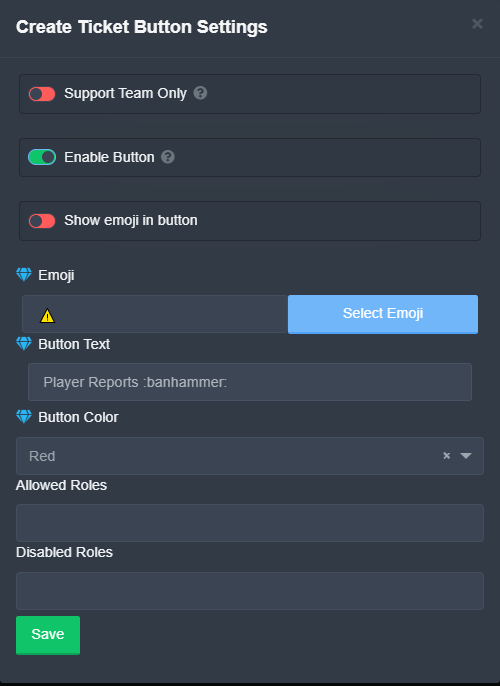
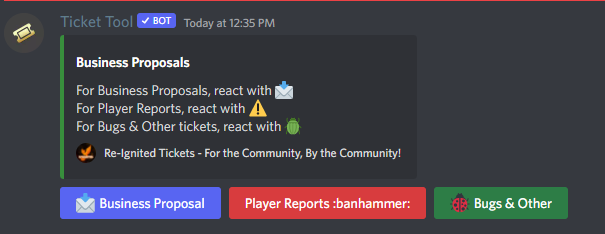
I can't put the emoji in the "Select Emoji" it doesn't register discord Emoji's in there.
gilded verge
i think this is problem xD
 jovial halo
I disabled that because it wasn't pulling my personal hammer in i
but i think i figured out why...
https://i.imgur.com/RsPY4AM.png
Have to select the Wildcard XD
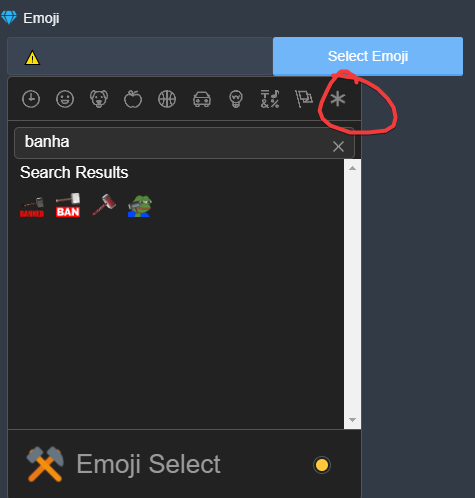 gilded verge
oh, true, I lost myself for a while, but now I understand too 😅
jovial halo
Now to get more color options for the button backgrounds XD since there is only red green blue and grey.
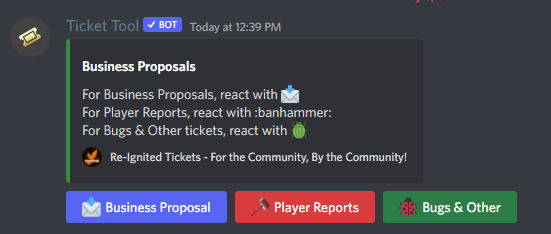
Doesn't like the hammer in the Embed Description I guess?
copper owl
jovial halo
Now to get more color options for the button backgrounds XD since there is only ...
gotta wait for discord to add more options
not a ticket tool limitation, it's a discord one. discord only allows for these colors for now
jovial halo
Typical Discord taking their sweet time on the prettier things. haha.
Would that be the same issue with the Embed Description not accepting my ":BANHAMMER:" thing?
gilded verge
I hope it can help you a little bit with emoticons to embed: https://cdn.discordapp.com/attachments/776680605517742090/972215496726446201/2022-05-06_21-15-34.mp4
jovial halo
I did NOT know about that. Thank you so much! That's freaking cool lol.
thanks @gilded verge
iron nightBOT
Gave +1 Rep to @gilded verge
jovial halo
Greatly appreciated
 fallen depot
how do i setup ticket transcripts
 hollow quail
Is there a way for certain support staff roles to be tagged when someone opens a ticket and not just for the member itself to be tagged?
 warped dew
hollow quail
Is there a way for certain support staff roles to be tagged when someone opens a...
warped dew
hollow quail
Is there a way for certain support staff roles to be tagged when someone opens a...
Under Panel Configs, Ticket Options, Ticket Message, add your staff pings in the Message Text:

Is there a way to create a tag for within tickets that can ping the ticket creator? I see things like {user} in the supported variables for tags, but it'd be super helpful if there was a way to do it for {ticket.user} etc.
hollow quail
warped dew
Under Panel Configs, Ticket Options, Ticket Message, add your staff pings in the...
I did it like this but it doesnt actually tag them like it doesnt give them a notif for some reason  any idea how to make it into an actual tag?
 warped dew
hollow quail
I did it like this but it doesnt actually tag them like it doesnt give them a no...
warped dew
hollow quail
I did it like this but it doesnt actually tag them like it doesnt give them a no...
Are you using the {@Role} option, or doing like <@&RoleIDnumber> option for adding your mentions?
Both should technically work, but I know the traditional <@&ID> does for sure send notification as that's what I use in my server.
scenic plinth
I would ensure the bot has permissions to ping the role...
hollow quail
warped dew
Both should technically work, but I know the traditional <@&ID> does for sure se...
I did it with the ID 
warped dew
Yup, that's the other thing, make sure the role is pingable by the bot
hollow quail
It should be tbh idk why it isn't pinging the staff even though visually it is pinged & bot has permission to ping
also how can I turn on the transcripts? I thought I did by putting transcript channel etc but tested it and bot is not taking any transcripts
loud turtle
hollow quail
also how can I turn on the transcripts? I thought I did by putting transcript ch...
$help transcript
humble sequoiaBOT
How do I save transcript to a channel?
To save transcripts to a channel go to the Dashboard -> Panel Configs -> Settings -> Logging Options -> Transcript Channel
 loud turtle
 wraith hearth
hey! so like, i just made a new role meant to open tickets. problem is, when the user MAKES the ticket, the ticket is made and generated just fine
however the user who makes the ticket doesnt have the permissions to actually view the newly opened channel
how do i go about fixing that? the layout of the panel config is very confusing o_O
loud turtle
#🎫│make-a-ticket @wraith hearth That is confusing
wraith hearth
im coming here for community support first in case its a simple fix lol
no need to be so rude
jeez louise
 wary cipher
How can I make a member have access to the tickets?
shut bolt
wary cipher
How can I make a member have access to the tickets?
You want them to be able to see all tickets?
wary cipher
Yes
shut bolt
$help support
humble sequoiaBOT
How to let support team see into a ticket
About support roles
A support role lets your support team see into tickets with out having to add them manually to each and every ticket.
You can add as many support roles as you like per panel.
NOTE that the way discord works all admins can see into tickets regardless of this.
How to set a support role
To set a Support role go to the Dashboard -> Panel Configs -> Settings -> General Options -> Support Team Roles.
NOTE that the support role will not be able to see into tickets that are already created..
shut bolt
You would need a support team role, new tickets will be visible to them
wary cipher
Thanks
shut bolt
Sure
 uncut dust
hi, how do i mention a channel on the embed? i know i sound really dumb 
 loud turtle
uncut dust
hi, how do i mention a channel on the embed? i know i sound really dumb <:happy:...
loud turtle
uncut dust
hi, how do i mention a channel on the embed? i know i sound really dumb <:happy:...
That's the neat part, you don't
uncut dust
loud turtle
That's the neat part, you don't
so you can't?
loud turtle
Of course. Use the message text
uncut dust
loud turtle
Of course. Use the message text
nvm i figured out lol, i used <> instead of {}
can't use message text because there's some custom font on it
but thanks anyway~!
humble sequoiaBOT
Ticket Tool Premium
Get premium at https://tickettool.xyz/premium
Manage your subscriptions at https://tickettool.xyz/subscriptions
Why Premium?
Premium lets you customize the bot just how you want it. It also helps keep the bot running.
 gentle cosmos
Sup guys. I have a problem when I go to the dash board I don’t see the bot. I relogging many times but he stil doesn’t find the bot in my server
 toxic birch
Re invite
gentle cosmos
I tried
humble sequoiaBOT
Don't see your server in the dashboard?
You will possibly need to relog. Look below to see steps on how to relog.
How to relog in the Dashboard.
First, you will need to go to the dashboard. Once your there, click on your avatar on the top right. after you clicked it, you will see button that says Logout. You must click that. Once you have logged out, you can log back in.
Note:
You need one of these 3 things to access the dashboard.
1. Server Owner (Level: 6)
2. Server Administrator (Level: 4)
3. Dashboard Role (Level: 2)
:warning: You can check your level using $level on your Discord Server
User permission level with Ticket Tool
@User is permission level: 0 (User)
```» *If it shows that your permission is **0**, you don't have any of the above **3 things** to manage the dashboard.*


**See the GIF below on how to relog:**Please read 
gentle cosmos
gilded verge
Please read <:fh_this:850104093170204732>
It worked ty 🙂
iron nightBOT
Gave +1 Rep to @gilded verge
 tepid imp
None of my tickets are open yet this is here?
 gilded verge
tepid imp
None of my tickets are open yet this is here?
gilded verge
tepid imp
None of my tickets are open yet this is here?
It looks like you have an open ticket, please close it so you can open a new ticket. From what you can see, the limit in your panel is 1, so you can't have any more open tickets. if you want to increase the number of open tickets per user, go to dashboard-> panel configs-> panel settings-> expand general options, there you can change the number of open tickets (ticket limit).
tepid imp
gilded verge
It looks like you have an open ticket, please close it so you can open a new tic...
I currently have no open tickets and I have double checked
I forgot to mention, I am making a ticket in another server. So I do not own the server oof
gilded verge
try to make a copy of the panel or a new panel, maybe there was a problem with it and the new panel will work normally.
You do not need to be the owner of the server, it is important that you have server management perms or access to the dashboard
 still ridge
Hello, how can I add this on panel. Cant find it on dashboard 
 humble sequoiaBOT
For a more convenient use of multipanels, you can now combine panels on the dashboard. This will allow you to directly send the multipanel from the dashboard or via the $panel ID command.
Where can I find this?
You can find this setting on the Dashboard -> Panel Configs -> Settings -> General Options
Note: if you're attaching all the panels to a panel called English, don't include English in the attached panels box (If you do this, it will create duplicate)
This will put all buttons from all of your panels on one message. The message is the panel message from the panel you're combining these panels in.
Note: This is a premium feature
gilded verge
@still ridge, check
hollow quail
loud turtle
<:this:894279341108772914>
Like I stated in my text, I did put a transcript channel
gilded verge
hollow quail
Like I stated in my text, I did put a transcript channel <:oops:9644563774372782...
Please make sure the bot has channel permissions otherwise it won't be able to send transcripts. (View channel, send messages, read message history)
still ridge
gilded verge
<@781597930196303964>, check <:fh_this:850104093170204732>
Thank you
iron nightBOT
Gave +1 Rep to @gilded verge
hollow quail
gilded verge
Please make sure the bot has channel permissions otherwise it won't be able to s...
It has those permissions yes
gilded verge
Remember that to save the transcript on the channel you specified. Use the $transcript command in ticket channel
 candid bronze
Is the bot open sorced?
pale pilot
Nope
iron nightBOT
Gave +1 Rep to @pale pilot
 kindred wasp
 fallow ingot
@kindred wasp Run $debug
hollow quail
gilded verge
Remember that to save the transcript on the channel you specified. Use the `$tra...
Oh the transcript button got removed fully?
gilded verge
No no, sorry. I mean, don't forget to use transcript button or command to save 😅
 paper apex
having a problem with my bot not moving closed tickets, whats the best solution?
 craggy geyser
paper apex
having a problem with my bot not moving closed tickets, whats the best solution?
craggy geyser
paper apex
having a problem with my bot not moving closed tickets, whats the best solution?
How many channels in the closed ticket category?
 south talon
gilded verge
<@781597930196303964>, check <:fh_this:850104093170204732>
south talon
gilded verge
<@781597930196303964>, check <:fh_this:850104093170204732>
about your little video, i do not get the same option, i put you a screen of what i got
south talon
 craggy geyser
paper apex
40
craggy geyser
paper apex
40
There is a discord limit of 50 channels per category. If it moves it sometimes but not others it could be a case of it filling up. If it never moves them it might be a permission issue
paper apex
craggy geyser
There is a discord limit of 50 channels per category. If it moves it sometimes b...
Ok cool cheers
south talon
why did it appears 2 times ? and why can't i make an other one ?
 gilded verge
south talon
gilded verge
south talon
I'm sorry but I'm not sure if you could tell what your problem is? 😳
I think everything is working fine
south talon
gilded verge
I'm sorry but I'm not sure if you could tell what your problem is? 😳
I think e...
my problem is that i can't make one more button under the message
and there is 2 times the same
 humble sequoiaBOT
Update your discord App
Buttons are a relatively new addition to discord and don't work with some older versions of the app.
Please verify that you have the latest version of discord, by going to the app or play store.
Discord for the App Store
Discord for the Play Store
gilded verge
@azure plover
 azure plover
Ok
gilded verge
south talon
and there is 2 times the same
hm.. please show how many panels do you have
 azure plover
Thanks
gilded verge
south talon
only one
it doesn't work like that ... as you noticed in my video, you need to have a few panels for it to be different
azure plover
Thanks @gilded verge
iron nightBOT
Gave +1 Rep to @gilded verge
azure plover
😂
south talon
gilded verge
it doesn't work like that ... as you noticed in my video, you need to have a few...
so if i want many buttons under my ticket message, i had to create others pannels ?
gilded verge
yep
iron nightBOT
Gave +1 Rep to @gilded verge
south talon
:p
 jade iris
hi, are my ticket's backed up if mods closed them?
i need the information in wrote in, and i don't know how to get it as a customer
south talon
gilded verge
I'm sorry but I'm not sure if you could tell what your problem is? 😳
I think e...
i did the same that in the video and it still don't work, in my roles pannels i did the settings for my Buttons options and it dont appear


i m really sorry
gilded verge
uhm... Remember that these panels must be added to the first panel and sent your first panel to channel 😳
south talon
i got it, but it stills make 2 time the adminstrator one xD
gilded verge
okay, wait please, I'll make one more video ...
south talon
gilded verge
okay, wait please, I'll make one more video ...
no bro its ok !!!
i made it
finally ! 😄
gilded verge
uff, yay!
south talon
sorry to bother you, thanks @gilded verge for your help !!
iron nightBOT
Gave +1 Rep to @gilded verge
gilded verge
jade iris
i need the information in wrote in, and i don't know how to get it as a customer
Hey, you can get a backup of the ticket, but only if the administration/moderators have set the option that after closing or deleting the ticket, the transcript is to be sent to the user.
(Dashboard->Panel Configs->Panel Settings->Expand Logging Options->Direct Message Transcript)
Note: This is a premium feature
 jade topaz
hello, how to change bot message after ticket creation?
 humble sequoiaBOT
The Ticket Message is the first message sent by the bot in a new ticket. To customise it head over to your Dashboard ➞ Panel Configs ➞ Settings ➞ Ticket Options ➞ Edit Ticket Message
kind hawk
@jade topaz ⬆️
jade topaz
thank you!
humble sequoiaBOT
The panel message is where people react to make a ticket. To customize it head over to your Dashboard --> Panel Configs -> Settings -> Panel Options -> Edit Panel Message
kind hawk
Oh, he left :/
 spare ingot
How to make a ticket appear in a specific category and have a specific name? Sorry for the mistakes, I'm using Google Translate.
gilded verge
spare ingot
How to make a ticket appear in a specific category and have a specific name? Sor...
If your language is Polish, do you prefer Polish or English?
spare ingot
Polish
gilded verge
Okay, Cześć! Proszę napisz jak mogę Ci pomóc.
To znaczy wiem co napisał#ś w poprzedniej wiadomości ale wolę się upewnić, dlatego pytam.
spare ingot
Co zrobić, żeby ticket pojawiał się w konkretnej kategorii? I żeby nazwa ticketa była taka jaką chcę?
gilded verge
a no to prościutko, patrz:
humble sequoiaBOT
How to set the open category
To set a open category go to the Dashboard -> Panel Configs -> Settings -> Category Options -> Category Open
 gilded verge
wchodzisz sobie tam i ustalasz kategorie
a jeśli chodzi o nazwę biletów to niestety ale to jest dla serwerów, które mają premium. Czy ten serwer o którym mowa, ma premium?
nie wiem czy odpowiesz więc zarzucam informacje a gdyby coś to mnie pingnij i postaram się jak najszybciej odpowiedzieć:
humble sequoiaBOT
The ticket name is the default channel name of all tickets. To edit it, go to your Dashboard > Panel Configs > Settings > Ticket Options. There you can edit the channel name of opened and closed tickets. You can also use variables in there.
 Note: This is a premium feature
 outer mango
@humble sequoia
 gilded verge
Hi, I'm sorry but what you mean?
 tawdry bolt
Are there Arab staff? 
humble sequoiaBOT

فريق الدعم الفني العربي
عميلنا العزيز ان كنت تبحث عن مساعدة يرجى فتح تكت خاص بفريق الدعم الفني العربي
اذهب الى#🎫│make-a-ticket
ثم قم بلضغط على الايموجي الاتي (🇯🇴)
gilded verge
@tawdry bolt @haughty drum
tawdry bolt
Mention
 gilded verge
يرجى الانتظار بصبر.@tawdry bolt
 haughty drum
ك
tawdry bolt
#973281541151145994 @gilded verge
gilded verge
Why you ping me and why you sent me DM? Look:
humble sequoiaBOT
فريق الدعم الفني العربي
عميلنا العزيز ان كنت تبحث عن مساعدة يرجى فتح تكت خاص بفريق الدعم الفني العربي
اذهب الى#🎫│make-a-ticket
ثم قم بلضغط على الايموجي الاتي (🇯🇴)
 barren wigeon
Can someone help me
Having trouble inviting the premium bot to my server
Premium status is active in my dashboard
gilded verge
Where is problem?
barren wigeon
I don't actually know how to do it
I have the standard bot in my server but not the premium
humble sequoiaBOT
The first thing you will need to do is invite the premium bot, an invite can be found here
Once the bot is in your server we will head to the dashboard and manage your server. When you are managing your server, you want to head into "Server Configs" then click the drop down menu under "Select the bot you would like to use on this server" then click "Ticket Tool#6207" and then save.
 gilded verge
Please check
barren wigeon
That worked thank you very much
barren wigeon
 gilded verge
Hello again 
What you need?
barren wigeon
Can someone tell me how to edit the message in this
gilded verge
ofc
humble sequoiaBOT
The Ticket Message is the first message sent by the bot in a new ticket. To customise it head over to your Dashboard ➞ Panel Configs ➞ Settings ➞ Ticket Options ➞ Edit Ticket Message
gilded verge
or maybe you mean:
humble sequoiaBOT
The panel message is where people react to make a ticket. To customize it head over to your Dashboard --> Panel Configs -> Settings -> Panel Options -> Edit Panel Message
gilded verge
yes, you meant this now
barren wigeon
Thank you @gilded verge
iron nightBOT
Gave +1 Rep to @gilded verge
 rustic badge
how do i change who can look and type in tickets?:
gilded verge
rustic badge
how do i change who can look and type in tickets?:
Sorry but can you explan what you mean please? 😳
rustic badge
me and my friend are making a server and we use ticket tool but people with certant perms cant see the tickets
gilded verge
Oh, so you mean Support Team Roles?
 compact harness
Hey, how can I use Tickettool with Sapphire?
kind hawk
Ya I think he is
kind hawk
compact harness
Hey, how can I use Tickettool with Sapphire?
Those are 2 different bot's. We inclusively deal with @pseudo glen and @humble sequoia here.
compact harness
How can I get @humble sequoia ?
humble sequoiaBOT
Ticket Tool Premium
Get premium at https://tickettool.xyz/premium
Manage your subscriptions at https://tickettool.xyz/subscriptions
Why Premium?
Premium lets you customize the bot just how you want it. It also helps keep the bot running.
 Faster Premium Bot
Automatic Transcripts
Full Customization
Custom Buttons
Direct Messages
Ticket Automation
Multipanels
Premium Support
You can purchase premium here:
Price
$6 - Monthly
$66 - Yearly
 Premium
kind hawk
Premium
kind hawk
@compact harness ⬆️
gilded verge
gilded verge
Oh, so you mean Support Team Roles?
@rustic badge, If so, then go to: Dashboard->Panel Configs->Panel Settings->Expand General Options->add role to Support Team Roles
+you can take my config of perms:
https://cdn.discordapp.com/attachments/776680605517742090/957333296428224582/2022-03-24_18-11-242.mp4
compact harness
kind hawk
Those are 2 different bot's. We inclusively deal with <@557628352828014614> and ...
On ModHQ I was told that I can press a button on Sapphire to open a ticket via Ticket tool.
 timid jewel
New members can't create a ticket because "they don't have permission" however I've done everything with their permissions to let them create one

Pending tryout is the new member role
kind hawk
compact harness
On ModHQ I was told that I can press a button on Sapphire to open a ticket via T...
Like I said, we only deal with the ticket Tool bot's here. Nothing else, you will have to seek support on the appropriate discord server.
@timid jewel maybe the bot does not have the right permissions. Can you type $debug in a channel you can see Ticket Tool bot in your discord.
I'll check
 kind hawk
Ok, and you're sure the players are able to see the panel? Because even if you change your own roles, if you're server owner, you see everything anyway.
timid jewel
kind hawk
Ok, and you're sure the players are able to see the panel? Because even if you c...
yes I am sure
timid jewel
Alr
kind hawk
Do not post a link here, just send in dm
kind hawk
Accept the request
kind hawk
Could you check and see if you have any roles in the blacklist
timid jewel
where do I see that again
kind hawk
One moment.
timid jewel
ayo the @ everyone role was on the blacklist even tho I removed it yesterday. I swear I remember pressing save too
weird
kind hawk
Go on the dashboard, in settings and then go through the permission tab and make sure you allow the role you want to be able to create and assure that you don't have a general role in there
Here you go :)
kind hawk
Np :)
 night nest
is there a way i can auto delete ticket when a ticket is closed?
cuz i remember there used to be an option to do that
gilded verge
I hope I am right, but I have not noticed anywhere that this option is available
night nest
cuz ik a couple discords i used to work with tickets for and there was an auto delete option

gilded verge
are you sure it was about Ticket Tool bot? 😳
night nest
ye pretty sure
gilded verge
I mean, I know there is something like this what you mean, but only this:
 night nest
ye i saw that
kind hawk
night nest
is there a way i can auto delete ticket when a ticket is closed?
The only way I know how on top of my head. Yeah, that "when user leaves server"
night nest
hmm
also is there a subscription where i can pay to permanently have the subscription and not have to pay annually/monthly
kind hawk
night nest
also is there a subscription where i can pay to permanently have the subscriptio...
Yearly.
We do not offer lifetime anymore
humble sequoiaBOT
Ticket Tool Premium
Get premium at https://tickettool.xyz/premium
Manage your subscriptions at https://tickettool.xyz/subscriptions
Why Premium?
Premium lets you customize the bot just how you want it. It also helps keep the bot running.
night nest
unfortunate
kind hawk
It was not a good business move to provide lifetime.
night nest
understandable
kind hawk
Less revenu = less developement :/
night nest
ye
that should be a feature added tho or re-added? idrk when you close a ticket it auto deleted
compact harness
I buyed premium but the bot its Not on my Server yet
humble sequoiaBOT
The first thing you will need to do is invite the premium bot, an invite can be found here
Once the bot is in your server we will head to the dashboard and manage your server. When you are managing your server, you want to head into "Server Configs" then click the drop down menu under "Select the bot you would like to use on this server" then click "Ticket Tool#6207" and then save.
gilded verge
@compact harness
night nest
how do i make a suggestion?
gilded verge
go to #🤖│bot-spam and use s!suggest yoursuggestmessage
 main raft
hello
compact harness
Can I put there the Id from Sapphire in?
 main raft
Is there a way I can view all transcripts vis website
gilded verge
main raft
Is there a way I can view all transcripts vis website
Hey, if you have a transcription channel set up and you save them via command $transcript or button transcript, they are sent to the specified channel where you can see saved transcripts
humble sequoiaBOT
How do I save transcript to a channel?
To save transcripts to a channel go to the Dashboard -> Panel Configs -> Settings -> Logging Options -> Transcript Channel
main raft
gilded verge
Hey, if you have a transcription channel set up and you save them via command `$...
Yeah, I already have that it did not save even when the log said it did.
Is there a way I can see it via the website
gilded verge
uhm ... as far as I know, to be able to open a transcription, the bot has to send it to the channel you choose to transcript, because there are direct links to the transcription in that message, but I don't know any other way you can do this 😕
kind hawk
The bot needs to be able to send messages in the channel you send your transcripts.
night nest
is there a way to remove the "confirm close" ticket option? like remove it completely, i dont want to close a ticket then confirm to close it
gilded verge
night nest
is there a way to remove the "confirm close" ticket option? like remove it compl...
Dashboard->Panel Configs->Panel Settings->Expand General Options->
 night nest
is there a way i can auto delete ticket when a ticket is closed?
night nest
night nest
is there a way i can auto delete ticket when a ticket is closed?
THERES A THING CALLED 2 STEP TICKET

GGGGGGGGGGGGGGGGGGGGGGGGGGGGG

gilded verge
night nest
what you showed here is something other than what you asked
night nest
gilded verge
what you showed here is something other than what you asked
is it?
no shot
cuz it deletes the ticket after it closes?
gilded verge
gilded verge
`Dashboard`->`Panel Configs`->`Panel Settings`->Expand `General Options`->
i think you want
gilded verge
night nest
cuz it deletes the ticket after it closes?
probably, i dont know bcs i dont use this before
 glass marten
How do I set tickets to ping a support role other than the person opening the ticket when opened I've been able to use it in the past but I can't remember how
humble sequoiaBOT
Within all the messages the bot's sends (both embeds and text) you can mention either channels, roles, or even users, these mentions will only send a notification to the user if they are used within a text field, e.g: a role mentioned in an embed won't ping at all the users who have that role.
For mentioning a role you can use one out of three options:
{@Role Name} ➞ Which is Case Sensitive.
{RoleID} ➞ Replace RoleId with the Id of the role you are trying to ping.
<@&RoleID> ➞ Discord's native syntax to ping roles.
<#ChannelID> ➞ Mention a channel by its ID.
<@UserID> ➞ Mention a user by its ID.
gilded verge
@glass marten, check
humble sequoiaBOT
How to turn on developer mode
To enable developer mode do the following:
[:desktop: PC] go to Settings ➞ Advanced ➞ Developer mode
[:mobile_phone: Mobile] go to Settings ➞ Appearance ➞ Developer mode
Developer Mode allows you to get the ID of any channel, user, role, or server.
VIA the ID, you can use them with <> alongside their corresponding format to mention a channel/role/user...
They're mostly used to mention channels, users, or roles in Embeds
Formats
Channels: <#ID> ➝ #🤖│bot-spam
Users: <@ID> ➝ @humble sequoia
Roles: <@&ID> ➝ <@&642118166243311646>
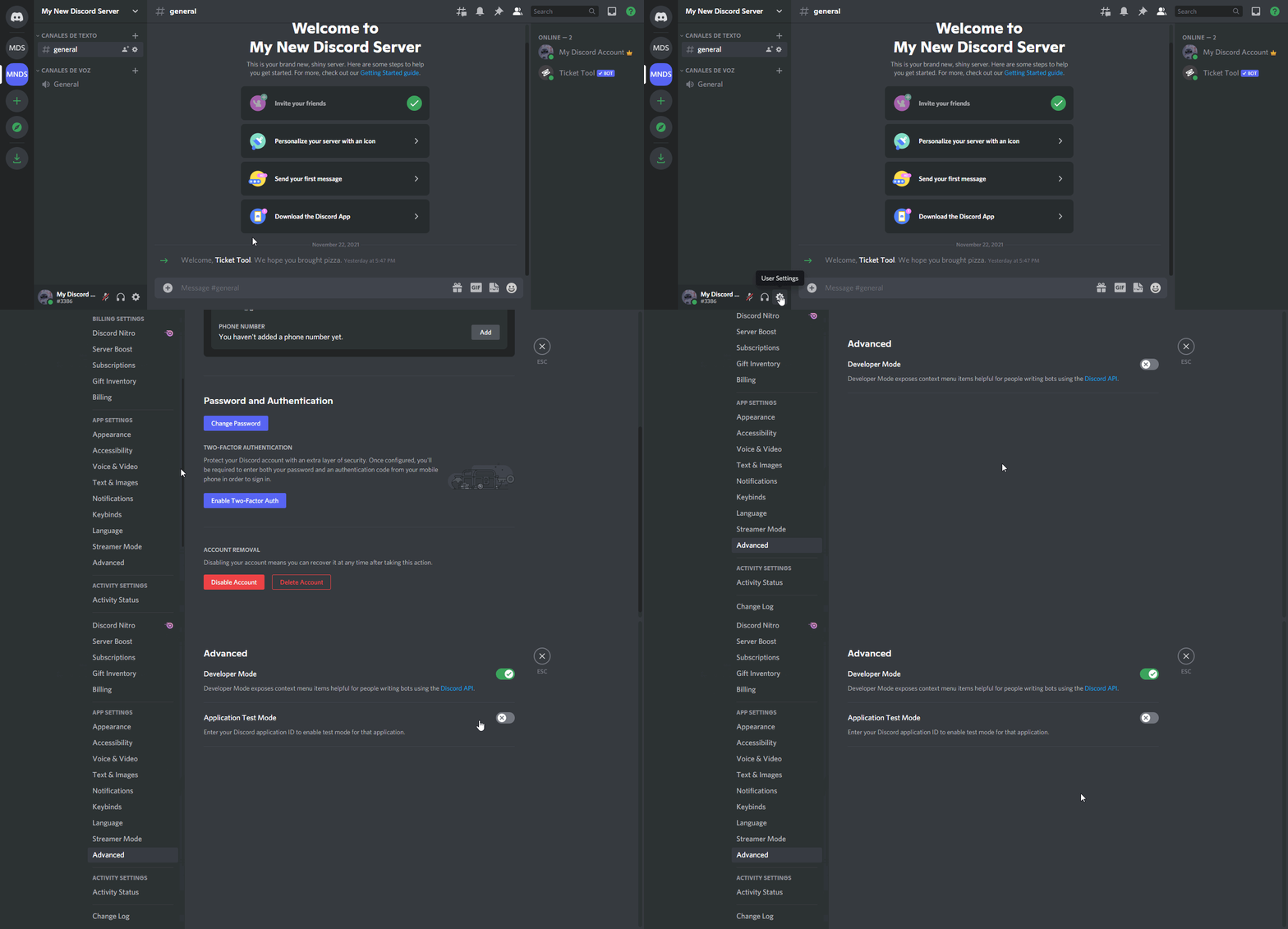 gilded verge
glass marten
gilded verge
<@535278296661884930>, check <:this:894279341108772914>
gilded verge
glass marten
gilded verge
<@535278296661884930>, check <:this:894279341108772914>
Thanks
iron nightBOT
Gave +1 Rep to @gilded verge
wraith hearth
hey, is it possible to only allow one user to create one ticket, and once its closed-- never let them make another?
i know about the global ticket limit but it still enables users to create tickets once they're closed
 craggy grail
How can I make it so that only a specific role can open tickets?
jade topaz
is ticket tool down or sum?
i can't find the website to manage my server with it
I think this is the website https://tickettool.xyz/
thx
np
 outer aurora


 deep spoke
when I was looking at a ticket transcript I got a cloudflare thing, is there like a reason I got that? Sorry if this isn't the right channel to ask
 cosmic furnace
How do I do a panel like this? dont ask about the names
 jade topaz
Hi Guys How I add Many Bottons in one ticket massage like this
 jade topaz
Is there something I can do to prevent people spamming tickets or make a timer until a role can close a ticket?
craggy grail
how can I make it so that only a specific role can open tickets?
jade topaz
There should be a Support Team Only in button options I think
In General Options go to Support Team Roles to set your support roles
humble sequoiaBOT
Multipanels are a premium feature that allow for a single panel with multiple buttons to open different tickets.
How to create a Multipanel
Premium users can combine multiple panels into one multipanel.
First, find the IDs of each panel you wish to combine. You can find them in your Panel Configs in the Dashboard
Next, send the multipanel to a channel using $panel [id1] [id2] {id3} ....
e.g. $panel 1 2 4 17 35 to combine panels 1, 2, 4, 17 and 35.
Up to 25 panels may be combined.
 scenic plinth
jade topaz
Hi Guys How I add Many Bottons in one ticket massage like this
scenic plinth
jade topaz
Hi Guys How I add Many Bottons in one ticket massage like this
Premium feature, explained above.
humble sequoiaBOT
How to set a ticket limit
A ticket limit may be set per panel to prevent users from spamming tickets. By default this limit is set to 3. Once a user hits this limit the bot will notify the users that they reached the limit.
To set a ticket limit go to the Dashboard -> Panel Configs -> Settings -> General Options -> Ticket Limit
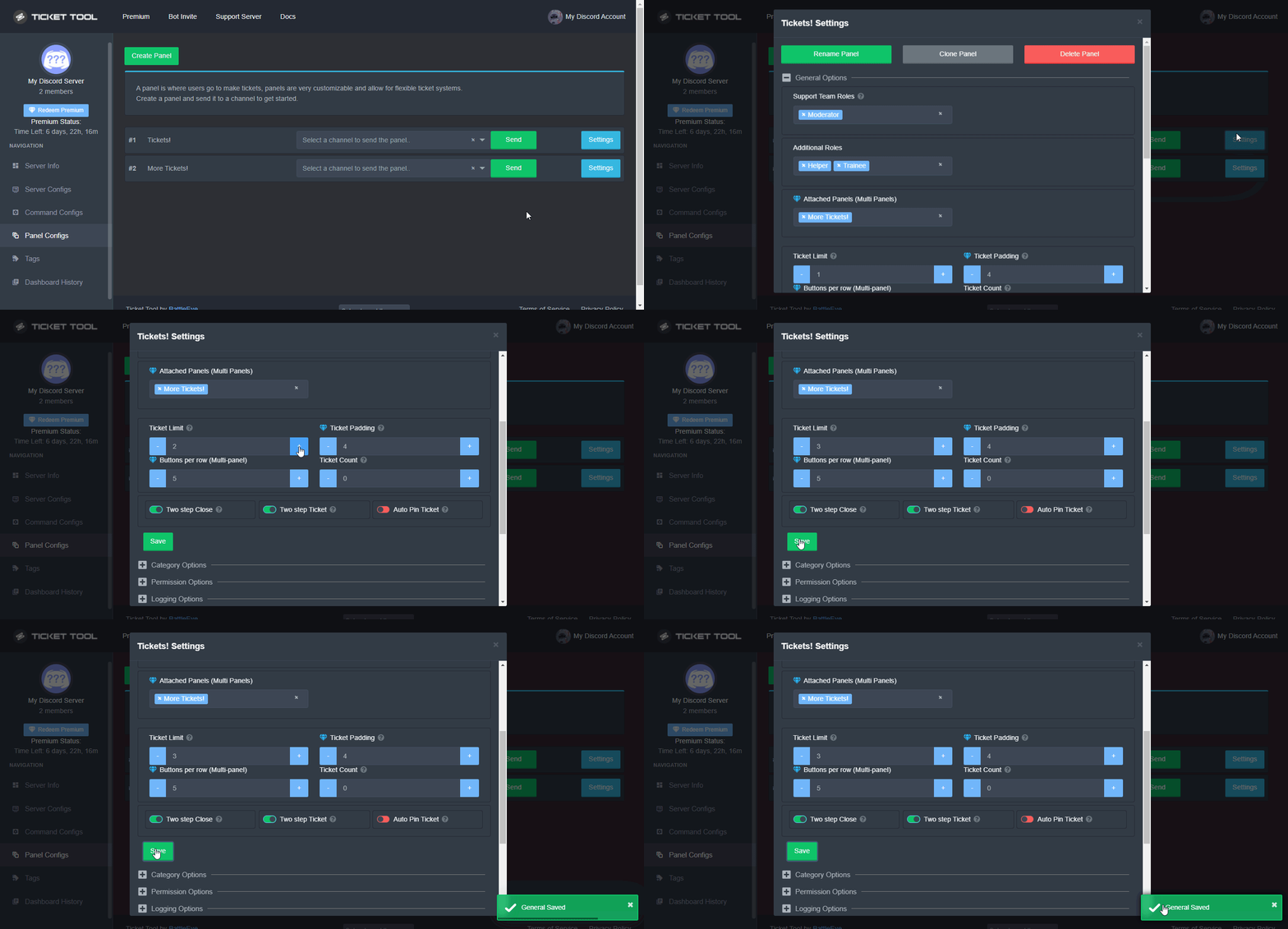 scenic plinth
jade topaz
Is there something I can do to prevent people spamming tickets or make a timer u...
scenic plinth
jade topaz
Is there something I can do to prevent people spamming tickets or make a timer u...
This is the closest you can get to limiting or spamming, or you can configure the global limit on your server configs via the dashboard.
jade topaz
Okay thanks @scenic plinth
iron nightBOT
Gave +1 Rep to @scenic plinth
jade topaz
What would be a good global ticket limit to have? My global ticket limit is currently set to 50.
scenic plinth
Depends the panel count on the server and the amount of members.
jade topaz
I have around 290-300 members and I have one panel which is my support
scenic plinth
Global limit wouldn't exactly do anything in this case then, usually it's better with multiple panels.
jade topaz
Okay again thanks for the big help @scenic plinth
iron nightBOT
Gave +1 Rep to @scenic plinth
craggy grail
how can I make it so that only a specific role can open tickets??
jade topaz
There should be a Support Team Only in button options I think
In General Options go to Support Team Roles to set your support roles
I am pretty sure but not 100%
craggy grail
?
 jade topaz
Go to General Options then go to Support Team Roles to set your support roles
craggy grail
 jade topaz
Go to button options create ticket and select support team roles and use the same roles for both and I think that should work
craggy grail
jade topaz
Go to button options create ticket and select support team roles and use the sam...
what I want is that a certain role can open a ticket, not about the support team, example: that everyone cannot but members can
jade topaz
So to create a ticket?
craggy grail
yes
jade topaz
Go to button options Create Ticket and select support team roles and use the same roles for both this and support team
Then only support team which are those roles can create a ticket
 jade topaz
No Button Options then Create Ticket
craggy grail
 jade topaz

 jade topaz
craggy grail
jade topaz
craggy grail
Yes
craggy grail
 craggy grail
ok
iron nightBOT
Gave +1 Rep to @patent terrace
 frank halo
hello!
does anyone know how to change the ticket embeds?
like. the one that you react to to make the ticket, as well as the one that pops up when the ticket is opened?
humble sequoiaBOT
The panel message is where people react to make a ticket. To customize it head over to your Dashboard --> Panel Configs -> Settings -> Panel Options -> Edit Panel Message
slender minnow
@frank halo ^
 raw skiff
i dont want the bot to save closed tickets, just delete
how can i do this
literally closed over 200 tickets a day by hand
chrome pilot
raw skiff
how can i do this
Go Dashboard -> Panel Configs -> Settings -> Loggins Options -> at the line near the end u will see the option Auto Save Transcript, turn into whatever you want
btw it's a Premium Feature
chrome pilot
raw skiff
how can i make it so it doesnt save closed tickets for free
can't
nah
bot won't save ticket if you don't have premium
gilded verge
?
chrome pilot
save or transcript ?
raw skiff
i dont want it to save ticket
it keeps saving closed tickets
when a ticket is closed i want it deleted
not clogging up channels
slender minnow
...
gilded verge
gilded verge
`Dashboard`->`Panel Configs`->`Panel Settings`->Expand `General Options`->
@raw skiff im not sure what you mean but try this
+Can you explain again please?
chrome pilot
he want delete the ticket 🤷
raw skiff
I dont want the bot to save closed tickets
gilded verge
when you say save, then you mean transcripts?
chrome pilot
gilded verge
when you say `save`, then you mean transcripts?
no, he doesn't have premium bot
auto save ticket is premium feature
gilded verge
so i understand you don't want the close button but you want remove the ticket instead, right?
If so, I will ask about one more thing. Should there be a confirmation to delete 'this' ticket?
 wheat torrent
humble sequoiaBOT
wheat torrent
humble sequoiaBOT
You can check our documentation here.
You can also check #573205317870157855 for the basic setup.
Our documentation contains all the info you need about the bot to be able to setup and configure the bot however you like.
gilded verge
@wheat torrent, check
Ticket Tool has had buttons instead of reactions for a long time 😅
 old sequoia
Hello how do i disable members to mention roles when opening tickets? I would want them to specifically mention a team account not role
deep spoke
is it normal when a transcript does a cloudflare captcha? Sorry if this isn't the right channel
gilded verge
deep spoke
is it normal when a transcript does a cloudflare captcha? Sorry if this isn't th...
I never seen it, can you show it please?
gilded verge
old sequoia
Hello how do i disable members to mention roles when opening tickets? I would wa...
Heyy, Nobody can disable mention members, you can only disable mention roles.
I think you will be better off when the bot automatically uses a specific mention after the user opens the ticket.
humble sequoiaBOT
Within all the messages the bot's sends (both embeds and text) you can mention either channels, roles, or even users, these mentions will only send a notification to the user if they are used within a text field, e.g: a role mentioned in an embed won't ping at all the users who have that role.
For mentioning a role you can use one out of three options:
{@Role Name} ➞ Which is Case Sensitive.
{RoleID} ➞ Replace RoleId with the Id of the role you are trying to ping.
<@&RoleID> ➞ Discord's native syntax to ping roles.
<#ChannelID> ➞ Mention a channel by its ID.
<@UserID> ➞ Mention a user by its ID.
How to turn on developer mode
To enable developer mode do the following:
[:desktop: PC] go to Settings ➞ Advanced ➞ Developer mode
[:mobile_phone: Mobile] go to Settings ➞ Appearance ➞ Developer mode
Developer Mode allows you to get the ID of any channel, user, role, or server.
VIA the ID, you can use them with <> alongside their corresponding format to mention a channel/role/user...
They're mostly used to mention channels, users, or roles in Embeds
Formats
Channels: <#ID> ➝ #🤖│bot-spam
Users: <@ID> ➝ @humble sequoia
Roles: <@&ID> ➝ <@&642118166243311646>
gilded verge
@old sequoia, Check


 old sequoia
gilded verge
<@531469076351025161>, Check <:this:894279341108772914>
old sequoia
gilded verge
<@531469076351025161>, Check <:this:894279341108772914>
Thanks!
iron nightBOT
Gave +1 Rep to @gilded verge
gilded verge
deep spoke
ah, this is cloudflare protection, it's okay so you can do captcha without any problem
deep spoke
gilded verge
ah, this is cloudflare protection, it's okay so you can do captcha without any p...
thanks
iron nightBOT
Gave +1 Rep to @gilded verge
deep spoke
there we go
candid bronze
is it free to make more then one selection?
 humble sequoiaBOT
For a more convenient use of multipanels, you can now combine panels on the dashboard. This will allow you to directly send the multipanel from the dashboard or via the $panel ID command.
Where can I find this?
You can find this setting on the Dashboard -> Panel Configs -> Settings -> General Options
Note: if you're attaching all the panels to a panel called English, don't include English in the attached panels box (If you do this, it will create duplicate)
This will put all buttons from all of your panels on one message. The message is the panel message from the panel you're combining these panels in.
Note: This is a premium feature
gilded verge