
#🆘│community-support
1 messages · Page 405 of 1
 spring saddle
 copper owl
did you create a panel?
spring saddle
copper owl
did you create a panel?
Yeah
In cellphone
copper owl
$help send
 humble sequoiaBOT
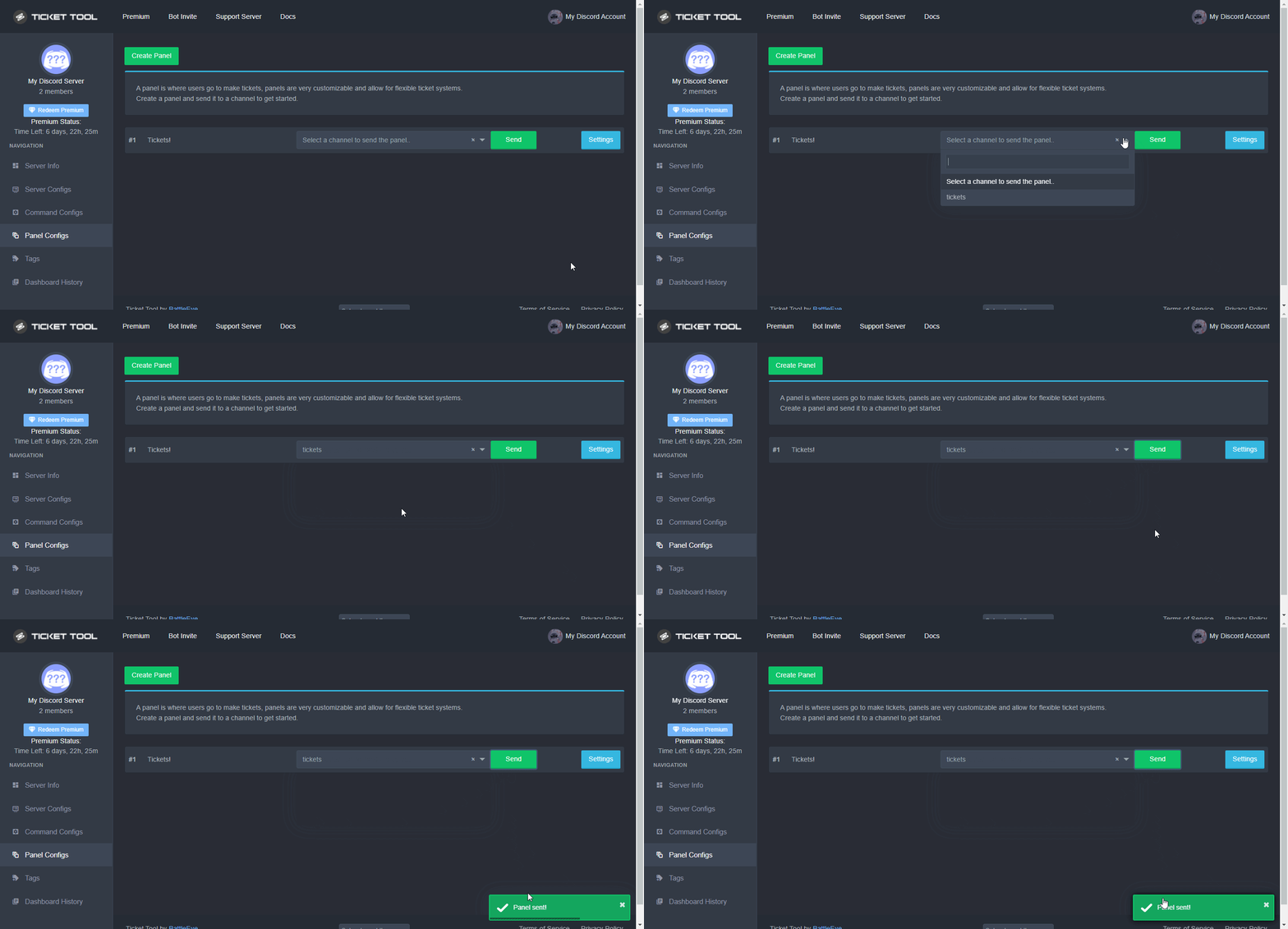
Sending a panel
Once you've created a panel on the dashboard you will need to send it to a channel using send on the dashboard
Select the channel you want your panel to be created in and click send.
For other questions checkout $help faq
An example of a sending a panel is shown below.
 copper owl
this is how you send it
spring saddle
Thx
 simple light
Just one question, how do you change the roles that can see the tickets ?
 gilded verge
do you mean the role of moderators (support team roles)? if so, please go to Dashboard->Panel Settings->Expand General and add role of moderators
 simple light
Thank you

 humble sequoiaBOT
Update your discord App
Buttons are a relatively new addition to discord and don't work with some older versions of the app.
Please verify that you have the latest version of discord, by going to the app or play store.
Discord for the  App Store
Discord for the  Play Store
gilded verge
@latent sequoia 
 latent sequoia
gilded verge
<@697568338045436075> <:this:894279341108772914>
latent sequoia
gilded verge
<@697568338045436075> <:this:894279341108772914>
Thank 
 iron nightBOT
Gave +1 Rep to @gilded verge

 fleet juniper
humble sequoiaBOT
fleet juniper
humble sequoiaBOT
The Ticket Message is the first message sent by the bot in a new ticket. To customise it head over to your Dashboard ➞ Panel Configs ➞ Settings ➞ Ticket Options ➞ Edit Ticket Message
 gilded verge
@jade topaz
 bitter turret
why cant i add the bot to my server
gilded verge
bitter turret
why cant i add the bot to my server
to add bots to servers you need required permissions on server: Manage Server, Administrator or Owner 😐
 wheat torrent
Hello everyone
I have one question
When I get the code for the premium version of @humble sequoia
Can I give it for one of my friends to invite the premium to my server ?
 craggy geyser
Anyone can invite the premium bot. But if the server doesn't have premium, the bot won't respond
wheat torrent
Today I get the code for the premium
Can I send it for someone to invite the bot for my server?
I have the normal version
craggy geyser
You can invite the bot to your own server if you have a code to use it
humble sequoiaBOT
The first thing you will need to do is invite the premium bot, an invite can be found here
Once the bot is in your server we will head to the dashboard and manage your server. When you are managing your server, you want to head into "Server Configs" then click the drop down menu under "Select the bot you would like to use on this server" then click "Ticket Tool#6207" and then save.
 craggy geyser
But yes, anyone can use the code
iron nightBOT
Gave +1 Rep to @craggy geyser
 spice gale
I need help, it's about the ticket tool bot, we're playing roleplay and currently have the problem that users who shouldn't actually have permission to issue commands to the bot, i.e. close tickets, even delete them or write them in
wheat torrent
What is the different between normal and premium bot ?
 fallow ingot
spice gale
I need help, it's about the ticket tool bot, we're playing roleplay and currentl...
fallow ingot
spice gale
I need help, it's about the ticket tool bot, we're playing roleplay and currentl...
What commands can they use?
fallow ingot
wheat torrent
What is the different between normal and premium bot ?
Premium works faster + better uptime & normal is just normal not much difference except from those two
wheat torrent
Ok what is the new addition?
In commands or in the dashboard
I just know there is a $claim button in the premium only
fallow ingot
$claim can be used on the free version, but you need premium.
humble sequoiaBOT
Warning: This channel isn't a ticket
fallow ingot
-_-
 severe basin
can someone help me disable customer's permission to @ roles in tickets? its disabled on every role and their permission to do
yet somehow they can still do it
how can i change that on the dashboard
@safe prairie
hey could u help?
fallow ingot
Pinging support members is prohibited #546557408902905896, and refer to your ticket please.
humble sequoiaBOT
━━ moved to ticket ━━
humble sequoiaBOT
The Ticket Message is the first message sent by the bot in a new ticket. To customise it head over to your Dashboard ➞ Panel Configs ➞ Settings ➞ Ticket Options ➞ Edit Ticket Message
fallow ingot
@jade topaz ^
 fringe torrent

There is a very slow connection deposit problem, so fix the problem
please give it to me WL-AMA-4
copper owl
fringe torrent
There is a very slow connection deposit problem, so fix the problem
please give ...
we're not an NFT server
or whatever that is actually. Im not sure if that's related to NFTs
 sharp prism
Is there a way to recover my account?
fallow ingot
sharp prism
Is there a way to recover my account?
Can you elaborate?
sharp prism
@fallow ingot I lost my gmail on a different phone with different phone number I forgot password
 mystic scaffold
Hi,
$new command is not working in my server, may i know why?
 empty lotus
Hello, I want to ask a question
When referring to a person, we use {user}, so what should I use when I want to mention a role?
copper owl
empty lotus
Hello, I want to ask a question
When referring to a person, we use {user}, so wh...
You can use
{@Role Name} (Case-Sensitive)
{Role ID}
<@&RoleID>
empty lotus
copper owl
You can use
`{@Role Name}` (Case-Sensitive)
`{Role ID}`
`<@&RoleID>`
Oke, thanks
iron nightBOT
Gave +1 Rep to @copper owl
 dense maple
Has the bot been updated not to read messages from other bots?
I used to use my own bot to .close, now it isnt working anymore
iron nightBOT
Gave +1 Rep to @copper owl
empty lotus
help me @copper owl

 alpine pelican
Hi, I have a question and it's that I've been searching with the bot for a while now and I don't know how to put several buttons on the same panel, could you explain it to me please?
empty lotus
Bot Premium
mystic scaffold
Hi @copper owl could u help me out with this?
$new command is not working in my server, may i know why?
 slender minnow
empty lotus
help me <@548583124062175232>
slender minnow
empty lotus
help me <@548583124062175232>
can you run the command $debug in the channel you are trying to run the command? Make sure the bot has view channel perms in there before running the command.
Also, when you get the response give the bot permissions marked with 
alpine pelican
With the 7-day trial ticket tool premium can I create several buttons in a panel?
empty lotus
slender minnow
can you run the command `$debug` in the channel you are trying to run the comman...
I gave the bot admin rights but it still doesn't work
slender minnow
yes
slender minnow
empty lotus
I gave the bot admin rights but it still doesn't work
you don't need to give the bot admin perm,
just providing the bot with the necessary perms is enough
alpine pelican
With the 7-day trial ticket tool premium can I create several buttons in a panel?
empty lotus
slender minnow
you don't need to give the bot admin perm,
just providing the bot with the nece...
I mean, I gave the bot admin rights but still got the error
slender minnow
empty lotus
I mean, I gave the bot admin rights but still got the error
Its not necessary to give the bot admin perm,
Instead giving it the basic required perms is fine
alpine pelican
With the 7-day trial ticket tool premium can I create several buttons in a panel?
fallow ingot
sharp prism
<@768144576946110475> I lost my gmail on a different phone with different phone ...
For ticket tool?
You’d only need an email if you had a subscription with us.
Are you sure you are in the right place?
fallow ingot
alpine pelican
With the 7-day trial ticket tool premium can I create several buttons in a panel...
Yes you can use multi-panels, however once it expires it won’t work, you’d need to resend the panels again.
alpine pelican
fallow ingot
Yes you can use multi-panels, however once it expires it won’t work, you’d need ...
I mean how can I put several buttons on the same panel since I don't see how to do it
humble sequoiaBOT
For a more convenient use of multipanels, you can now combine panels on the dashboard. This will allow you to directly send the multipanel from the dashboard or via the $panel ID command.
Where can I find this?
You can find this setting on the Dashboard -> Panel Configs -> Settings -> General Options
Note: if you're attaching all the panels to a panel called English, don't include English in the attached panels box (If you do this, it will create duplicate)
This will put all buttons from all of your panels on one message. The message is the panel message from the panel you're combining these panels in.

 Note: This is a premium feature
alpine pelican
Note: This is a premium feature
alpine pelican
thanks
fallow ingot
anytime
copper owl
 steady zenith
istg imma come at yall
steady zenith
istg imma come at yall
Well you're free to do that, but am not sure how well that would help
copper owl
steady zenith
why dont transcripts save pictures anymore
Discord's problem
They changed the way they cache deleted images/attachments
The dev will try to deploy a fix in the next major update, however the issue originated from a change done by discord, not us
 reef vigil
Hey guys, just a quick question, when I use $add command, it doesn't seen to add them to the ticket, is there a specific way to do this?
ok, I fixed it! I was using their discord server NIckname, and not their discord Name! silly me!
slender minnow
reef vigil
Hey guys, just a quick question, when I use $add command, it doesn't seen to add...
you can also use their user id 
reef vigil
slender minnow
you can also use their user id <:smil:936485535403356221>
oh! perfect! good to know! thank you 😄
iron nightBOT
Gave +1 Rep to @slender minnow
 signal frost
Hello why server not loaded
 reef vigil
signal frost
Hello why server not loaded
reef vigil
signal frost
Hello why server not loaded
try logging out, and back in, so the page refreshes 🙂
signal frost
reef vigil
try logging out, and back in, so the page refreshes 🙂
I did
reef vigil
other thing you could try, is kicking the bot from your discord server, and when re-adding make sure your permissions are correct, then relog on the web page
fallow ingot
reef vigil
other thing you could try, is kicking the bot from your discord server, and when...
that wouldn't be necessary.
reef vigil
oh fair enough 🙂
fallow ingot
If you logged out and back in, and nothing changes then you don't have admin, or a dashboard role or are the owner of the server. You can run $level to check what perms you have.
humble sequoiaBOT
User permission level with Ticket Tool
@fallow ingot is permission level: 0 (User)
Support Team: Probationary Support Member
fallow ingot
Like this ^
reef vigil
oh! Learn something new ever day!
fallow ingot
humble sequoiaBOT
User permission level with Ticket Tool
@reef vigil is permission level: 0 (User)
 ocean shell
normal bot added to server but not showing in server bot also not banned. why isnt it showing in the server
 main lichen
 ocean shell
is the bot down. i have admin perm on a server but it doesnt even show my own server for dashboard?
humble sequoiaBOT
━━ moved to ticket ━━
fallow ingot
$articket
humble sequoiaBOT

فريق الدعم الفني العربي
عميلنا العزيز ان كنت تبحث عن مساعدة يرجى فتح تكت خاص بفريق الدعم الفني العربي
اذهب الى#🎫│make-a-ticket
ثم قم بلضغط على الايموجي الاتي (🇯🇴)
fallow ingot
@main lichen ^^
 jade topaz
i dont see in site my server,i see russian one- tho , its not mines server that i cant see,'but i have admin perms in there and i added the bot.
I Think the bot didnt see aaudit-UHH changes so i cant see my server.
actually,the server that i need is rus one.Like i said,i dont own the server,i just helping them to finish it.
Support English
or rus IDc about it
 limpid forum
How do I fix this for a member to be able to use it? This is the message that pops up when a member opens a ticket
 jade topaz
any one know how to resolve this prob ?

 shut bolt
jade topaz
any one know how to resolve this prob ?
shut bolt
jade topaz
any one know how to resolve this prob ?
Is that when creating a ticket?
jade topaz
shut bolt
Is that when creating a ticket?
yup
shut bolt
jade topaz
yup
One of the buttons you have in your ticket message has an invalid emoji, it could got deleted or the bot doesn't have access to it longer
shut bolt
No hurries
 solid stream
The bot crashed when deleting the ticket, if this keeps happening then it's a permission issue.
Otherwise just delete it manually or try doing delete again.
jade topaz
hi how do i make log channel?
iron nightBOT
Gave +1 Rep to @solid stream
jade topaz
jade topaz
hi how do i make log channel?
...
solid stream
jade topaz
hi how do i make log channel?
Any channel the bot has permission to read and send messages can be a log channel.
 loud turtle
$help setup
humble sequoiaBOT
Setting up Ticket Tool
Visit the docs for setup info
General Setup
loud turtle
Read here pls @jade topaz
 cinder flame

I have a question 😭
In this setting when I put the {user} & a member opens a ticket it says their discord ID instead of the name

What would I have to put in order to have it as their name & not ID?
shut bolt
cinder flame
In this setting when I put the {user} & a member opens a ticket it says their di...
Use {ticket.user.name}
cinder flame
shut bolt
Use `{ticket.user.name}`
Thank you!!!! It worked
iron nightBOT
Gave +1 Rep to @shut bolt
 shut bolt
Sure
steady zenith
copper owl
They changed the way they cache deleted images/attachments
): thank you
iron nightBOT
Gave +1 Rep to @copper owl
jade topaz
How do I make the bot ping a role (support team) when someone opens a ticket
Ping me with an answer please whenever you get one
humble sequoiaBOT
Pong! Latency is 895ms. API Latency is 77ms [-]
humble sequoiaBOT
Within all the messages the bot's sends (both embeds and text) you can mention either channels, roles, or even users, these mentions will only send a notification to the user if they are used within a text field, e.g: a role mentioned in an embed won't ping at all the users who have that role.
For mentioning a role you can use one out of three options:
{@Role Name} ➞ Which is Case Sensitive.
{RoleID} ➞ Replace RoleId with the Id of the role you are trying to ping.
<@&RoleID> ➞ Discord's native syntax to ping roles.
<#ChannelID> ➞ Mention a channel by its ID.
<@UserID> ➞ Mention a user by its ID.
loud turtle
This should help @jade topaz
 raw kindle
How do I create a panel for this bot for teach support like this how do I make one like this with this bot
 mystic scaffold
Hi
$new command is not working in my server, may i know why?
mystic scaffold
hi
raw kindle
@eager cargo How do I create a panel for this bot for teach support like this how do I make one like this with this bot
 raw kindle
mystic scaffold
hi
raw kindle
mystic scaffold
hi
Add me as a friend please
mystic scaffold
.
raw kindle
How do I create a panel for this bot for teach support like this how do I make one like this with this bot

This is someone else server that I take a screen shot of
 scenic plinth
Start off by not pinging support team members and repeatedly reposting your questions. Visit the setup guide I the link below if you wish to use out bot. However, we cannot provide support for the bot you display in the image, nor can I direct you to the correct place.
$help setup
humble sequoiaBOT
Setting up Ticket Tool
Visit the docs for setup info
General Setup
raw kindle
Idk how to get to mange server
scenic plinth
mystic scaffold
Hi
`$new` command is not working in my server, may i know why?
Is it restricted to a channel? Do you have two panels using the $new command monitoring the same channel?
humble sequoiaBOT
 scenic plinth
humble sequoia
https://docs.tickettool.xyz/general/setup
scenic plinth
humble sequoia
https://docs.tickettool.xyz/general/setup
Have you given any attempt of reading the link I sent here?
Also try inviting it... if you're using the bot that is displayed in the screenshot we cannot help you.
loud turtle
scenic plinth
Have you given any attempt of reading the link I sent here?
Technically @humble sequoia sended it????
scenic plinth
...
loud turtle
Laughing Hardly
 daring prism
hey can anyone help me?
im trying to make categroy for open tickets and all new tickets open under that, but i dont want everyone to be able to see the open tickets category tab and only able to see it if they open a ticket, how to do that?
humble sequoiaBOT
━━ moved to ticket ━━
 ornate stag
someone know what permission can be?

 spring shore
s
 sour ore
709922247871168512
humble sequoiaBOT
ᅠ
@pseudo glen requires the following permissions:
Add Reactions
Read Channels
Send Messages
Manage Messages
Embed Links
Attach Files
Read History
Manage Roles
Manage Channels
To change the role permissions, you can go to your Discord Server ➞ Server Settings ➞ Roles ➞ @Ticket Tool
To change the channel permissions, you can go to your Channel Settings ➞ Permissions ➞ Ticket Tool
ᅠ
Note:
You can give Ticket Tool Administrative Permissions instead of all the permissions listed above, but it's entirely optional and NOT necessary.
 gilded verge
@ornate stag, please check
ornate stag
i gave everything but the bot cant let the closed tickets go to the closed tickets part
gilded verge
i.e. you mean that you close the ticket and the bot does not transfer to the category you set for closed tickets?
ornate stag
yess
gilded verge
remember that you can have a maximum of 50 channels in one category
ornate stag
doesn't have any
 jade topaz
How can i do the ticket system and the verifycation systeem
gilded verge
ornate stag
doesn't have any
please make sure the bot has permissions to this category 
humble sequoiaBOT

You can check our documentation here.
You can also check #573205317870157855 for the basic setup.
Our documentation contains all the info you need about the bot to be able to setup and configure the bot however you like.
gilded verge
@jade topaz
gilded verge
gilded verge
please make sure the bot has permissions to this category <:PepoG:86760705546033...
+sorry for a stupid question, but have you set the category of closed tickets in the panel settings and have you saved the changes?
 ornate stag
yess hehe, im gonna doble check this because the open works
gilded verge
hm... please run the command $debug on your server and show the response
Did you find the problem after using the command $debug ? 😳
gilded verge
can you show bot response please? 😳
[ES]
@jade topaz Oye, revisa el canal #🎫│make-a-ticket. Si encuentra su idioma allí, pida ayuda. 
ornate stag
 gilded verge
ornate stag
gilded verge
ornate stag
uhm, I have no idea ... but I can try to help you directly by going to your server only that then I would need admin perms to check where the error is but If someone else is able to help you faster, take help from them. I'm sorry I can't help you other than this way 
ornate stag
okayy Im gonna try here and I tell you
 twilit geode
Can ticket tool premium bot add the ticket button to a specific message ID?
 slender minnow
 crisp rune
hey, mind sharing whats wrong in here?
slender minnow
twilit geode
Can ticket tool premium bot add the ticket button to a specific message ID?
not to a specific message, but you can send a customized message with button using @humble sequoia
so it will look something like in #🎫│make-a-ticket
crisp rune
German pls ?
copper owl
$deticket
humble sequoiaBOT

Deutsches Support-Team
Wenn du Hilfe vom Deutschen Support-Team erhalten möchtest gehe in #🎫│make-a-ticket und öffne durch einen Klick auf den :flag_de: Button ein Ticket.
copper owl
crisp rune
German pls ?
 severe path

jade topaz
i can't make a ticket like the bot dropped what's going on
@pseudo glen I can't make a ticket on the board, what's going on with this bot
 atomic solstice
jade topaz
<@557628352828014614> I can't make a ticket on the board, what's going on with t...
atomic solstice
jade topaz
<@557628352828014614> I can't make a ticket on the board, what's going on with t...
Hi, are you getting an error when trying to open a ticket or creating a panel?
jade topaz
atomic solstice
Hi, are you getting an error when trying to open a ticket or creating a panel?
i don't get the error engo i don't see the server on the list
and I put administrator permissions
atomic solstice
jade topaz
i don't get the error engo i don't see the server on the list
and I put administ...
Try to log out and log back in to the dashboard like it says
that will reload the server list
jade topaz
atomic solstice
Try to log out and log back in to the dashboard like it says
thanks budy
iron nightBOT
Gave +1 Rep to @atomic solstice
atomic solstice
np
 stone patio
hello can someone help me
humble sequoiaBOT
We would love to help you, but if you don't tell us what you need help with we can't help you :(
stone patio
i want to know how to put it for only some roles to see the tickets
 loud coral
Hey
@severe path Sorry for ping, may you help me?
@atomic solstice Maybe you can help me?
atomic solstice
loud coral
<@601783394334015498> Maybe you can help me?
Firstly Pinging support is not allowed -> #546557408902905896
Secondly if you don't ask what you need help with we cannot help you
humble sequoiaBOT
Creating a panel
To create a panel we are going to need to head over to the panel configs on the dashboard
Once at the dashboard we will need to click Create Panel
Enter a panel name (Fill in any optional settings you want)
Click Create Panel and your ready to get started with configuring your panel
An example of a creating a panel is shown below.
 loud coral
I have my server and I have channel "open a ticket" and so on, and I dont know how to make people create ticket
K
Ty
stone patio
hello i need help
how do i make it that only the owner and the one who openned the ticket can see the ticket
loud coral
How do I create ticket transscript
 bleak bear
stone patio
how do i make it that only the owner and the one who openned the ticket can see ...
bleak bear
stone patio
how do i make it that only the owner and the one who openned the ticket can see ...
if you have roles with the administrator switch on you can't bc they are forced to watch all the channels.
for example in my server, i have an admin that wants to be locked out of the nsfw channels but cant bc he has a role with administrator perms
loud coral
Understandable
bleak bear
stone patio
how do i make it that only the owner and the one who openned the ticket can see ...
also another thing you can do is go to this amazing place called ''dm's''
😂
atomic solstice
$help transcript
humble sequoiaBOT
How do I save transcript to a channel?
To save transcripts to a channel go to the Dashboard -> Panel Configs -> Settings -> Logging Options -> Transcript Channel

 rain fiber
how do I ping a role when a ticket opens?
atomic solstice
humble sequoia
@loud coral ^^
loud coral
Ah
atomic solstice
$help ping
humble sequoiaBOT
How to make Ticket Tool ping a role
To make ticket tool ping a role when a ticket is opened, go to the Dashboard -> Panel Configs -> Settings -> Ticket Options -> Ticket Message -> Message Text and do this:
{@Role name} This is case sensitive and the role must have @mentions enabled
 atomic solstice
@rain fiber ^^
rain fiber
doing that doesnt ping it
 past mantle
hi
atomic solstice
rain fiber
doing that doesnt ping it
make sure the bot has the Mention @ everyone @ here and all roles permission
past mantle
uh
@atomic solstice i randomly clicked premium free trial on the tickettool premium thing and uhh how do u cancel it
rain fiber
ty
atomic solstice
past mantle
<@601783394334015498> i randomly clicked premium free trial on the tickettool pr...
You can't cancel it, it will run out after 7 days automatically
past mantle
atomic solstice
You can't cancel it, it will run out after 7 days automatically
oh it doesnt charge you?
atomic solstice
past mantle
oh it doesnt charge you?
no, which is why it's called a Free trial
past mantle
yeah i meant after
atomic solstice
no, unless you actually connect your card and buy a subscription it won't charge you
past mantle
ok
can u still get the premium bot in the free trial
or is that if u get subscription
atomic solstice
past mantle
can u still get the premium bot in the free trial
you can, but there would be no point as after 7 days it would stop working, but you can use the premium features on the free bot as well
iron nightBOT
Gave +1 Rep to @atomic solstice
past mantle
k
atomic solstice
no problem
loud coral
$help
humble sequoiaBOT
Help Options
$help commands - Information on commands
$help setup - Information on bot setup
$help faq - Frequently asked questions
loud coral
$help panel
humble sequoiaBOT
Creating a panel
To create a panel we are going to need to head over to the panel configs on the dashboard
Once at the dashboard we will need to click Create Panel
Enter a panel name (Fill in any optional settings you want)
Click Create Panel and your ready to get started with configuring your panel
An example of a creating a panel is shown below.
gilded verge
@stone patio ofc, you can take my configuration
https://cdn.discordapp.com/attachments/776680605517742090/957333296428224582/2022-03-24_18-11-242.mp4
+this wrong screenshot
+this

I hope I helped
stone patio
the members still cant make a ticket
 drifting umbra
Are we able to send newly generated tickets to a specific place? There are a ton of tickets on the top of the channels, but I want it to be at the bottom
iron nightBOT
Gave +1 Rep to @gilded verge
loud coral
thanks @bleak bear
iron nightBOT
Gave +1 Rep to @bleak bear
stone patio
nope its still says u dont have permission to use this
 bleak bear
oh so if u say ty to someone it gives them a rep?
loud coral
Idk man
stone patio
can someone tell me how to let members create a ticket
stone patio
ok
gilded verge
bleak bear
what is a rep
These are reputation points, you can give them to someone after he helped you.
gilded verge
stone patio
nope its still says u dont have permission to use this
Could you please send a screenshot to see what is happening?
I mean a error or something
bleak bear
stone patio
ok
i cant lol
stone patio
this happens when members try to open a ticket
 bleak bear
gilded verge
These are reputation points, you can give them to someone after he helped you.
bleak bear
gilded verge
These are reputation points, you can give them to someone after he helped you.
ohh
gilded verge
gilded verge
+this
@stone patio please check
bleak bear
so like if i just say ty {@user} for no reason im just gonna give em rep?
gilded verge
yes 😕
stone patio
it still doesnt work
 bleak bear
if someone gets an X amount of reps do they gain sth or is it just for fun?
bleak bear
 fleet fjord
How to create ticket
fleet fjord
How to create ticket
go to https://tickettool.xyz then go to your server then server panels create check the perms and ur done
gilded verge
bleak bear
if someone gets an X amount of reps do they gain sth or is it just for fun?
I don't know if it is for fun, I certainly know that it is some form of showing that someone helps others
drifting umbra
drifting umbra
Are we able to send newly generated tickets to a specific place? There are a ton...
re-up
bleak bear
ok thanks :)
fleet fjord
I created panel and no massage writeen
bleak bear
thanks @gilded verge
iron nightBOT
Gave +1 Rep to @gilded verge
bleak bear
fleet fjord
I created panel and no massage writeen
wait
stone patio
thanks @gilded verge
iron nightBOT
Gave +1 Rep to @gilded verge
humble sequoiaBOT
How to set the open category
To set a open category go to the Dashboard -> Panel Configs -> Settings -> Category Options -> Category Open
 gilded verge
@drifting umbra Oh, you mean categories. Of course, see above.
gilded verge
fleet fjord
I created panel and no massage writeen
You need to send the panel to a specific channel
Dashboard->Panel Configs->and select the channel to which the panel is to be sent
 gilded verge
bleak bear
mine sends it auto
gilded verge
bleak bear
mine sends it auto
if we do not specify the channel when creating the panel, the bot will not send the panel 😳
drifting umbra
thanks so much! @gilded verge
iron nightBOT
Gave +1 Rep to @gilded verge
bleak bear
gilded verge
if we do not specify the channel when creating the panel, the bot will not send ...
oh damn fr?
as you see there,
it is sent 2 times
on my sr
bleak bear
bleak bear
gilded verge
yes, there you showed two ways in which you can send a panel to a channel
bleak bear
yay :D
jade topaz
loud turtle
This should help <@456226577798135808>
Oh its confusing
 median knot
quick question - is there a specific migration strategy you need to deploy to switch from free to premium bot?
i have the free bot running
but it seems like i need to choose which bot im using
humble sequoiaBOT
━━ moved to ticket ━━
 hallow steppe
I need help!
humble sequoiaBOT
We would love to help you, but if you don't tell us what you need help with we can't help you :(
 regal goblet
jade topaz
You can't make an ticket and just ask for help here
regal goblet
jade topaz
You can't make an ticket and just ask for help here
?
 humble sequoiaBOT
Don't see your server in the dashboard?
You will possibly need to relog. Look below to see steps on how to relog.
How to relog in the Dashboard.
First, you will need to go to the dashboard. Once your there, click on your avatar on the top right. after you clicked it, you will see button that says Logout. You must click that. Once you have logged out, you can log back in.
Note:
You need one of these 3 things to access the dashboard.
1. Server Owner (Level: 6)
2. Server Administrator (Level: 4)
3. Dashboard Role (Level: 2)
:warning: You can check your level using $level on your Discord Server
User permission level with Ticket Tool
@User is permission level: 0 (User)
```» *If it shows that your permission is **0**, you don't have any of the above **3 things** to manage the dashboard.*
**See the GIF below on how to relog:** regal goblet
@hallow steppe ^^ refer to this please
hallow steppe
thnks my problem solved ❤️🔥 🧸
regal goblet
Yw
 jaunty fern
I’m an owner in a server I’ve added the bot I went to dashboard it wasn’t there I logged out and back in it still wasn’t there
regal goblet
humble sequoia
@jaunty fern you can refer to this message
 gusty kite
Hey guys.
If a user opened a ticket, is it possible to provide more buttons to him in the ticket? For example a button with the label "German". If he clicks it, only german staff has access to the ticket.
We want to do that inside the ticket and not in the regular ticket panels.
regal goblet
gusty kite
Hey guys.
If a user opened a ticket, is it possible to provide more buttons to ...
Hmmm seems like a nice idea, currently it's not possible, you can suggest it at #💡│suggestions
gusty kite
regal goblet
Hmmm seems like a nice idea, currently it's not possible, you can suggest it at ...
Will do, thanks!
iron nightBOT
Gave +1 Rep to @regal goblet
jaunty fern
regal goblet
<@882646052438671412> you can refer to this message
It worked thank you
iron nightBOT
Gave +1 Rep to @regal goblet
regal goblet
You are welcome
jade topaz
hey
jaunty fern
regal goblet
You are welcome
I wanna add spaces in between the texts
Like this
Hi
Hi
Idk how to tho
Someone tell me
regal goblet
You can't? @jaunty fern
jade topaz
can anyone explain or simply redirect me to where this feature is explained?
 regal goblet
jade topaz
can anyone explain or simply redirect me to where this feature is explained?
regal goblet
jade topaz
can anyone explain or simply redirect me to where this feature is explained?
If you have another bot that's using ticket tool commands, you need to add the other bots ID there, if not, ticket tool won't respond to the commands sent by the bot
jade topaz
regal goblet
If you have another bot that's using ticket tool commands, you need to add the o...
what was the goal with this addition? would love to learn how it can be implemented in a way that makes sense
regal goblet
jade topaz
what was the goal with this addition? would love to learn how it can be implemen...
I don't know the exact answer to that, but perhaps, security reasons, prevent bots form spamming commands and such
sharp prism
@humble sequoia @humble sequoia help recover my account
regal goblet
sharp prism
<@722196398635745312> <@722196398635745312> help recover my account
Hello, what account are we talking about?
humble sequoiaBOT

⚠️ You're in the wrong place
We provide support for @pseudo glen discord bot and cannot help you with whatever issue you have.
- We don't know which Support Team you should contact to get this issue resolved, and unfortunately we won't be able to accurately tell you.
If you don't have any further questions regarding our bot Ticket Tool, please close this ticket
sharp prism
@jaunty fern maybe support
 real osprey
He's already in my server.
 humble sequoiaBOT
Don't see your server in the dashboard?
You will possibly need to relog. Look below to see steps on how to relog.
How to relog in the Dashboard.
First, you will need to go to the dashboard. Once your there, click on your avatar on the top right. after you clicked it, you will see button that says Logout. You must click that. Once you have logged out, you can log back in.
Note:
You need one of these 3 things to access the dashboard.
1. Server Owner (Level: 6)
2. Server Administrator (Level: 4)
3. Dashboard Role (Level: 2)
:warning: You can check your level using $level on your Discord Server
User permission level with Ticket Tool
@User is permission level: 0 (User)
```» *If it shows that your permission is **0**, you don't have any of the above **3 things** to manage the dashboard.*


**See the GIF below on how to relog:**Gave +1 Rep to @humble sequoia
jaunty fern
I’m confused on how to add gaps between the letter
Example
Here to
Here
It just smudges them together
Someone come help out
scenic plinth
You just did it? Just put it here instead of the ticket message or wherever you are placing it...?
jaunty fern
scenic plinth
You just did it? Just put it here instead of the ticket message or wherever you ...
No I do it with the bot when I want to put the message in the panel it just puts everything together
scenic plinth
Where are you putting the message in?
jaunty fern
scenic plinth
Where are you putting the message in?
Ty tho
iron nightBOT
Gave +1 Rep to @scenic plinth
sharp prism
Lost my password
jaunty fern
For?
sharp prism
To login to MW
jaunty fern
MW?
sharp prism
Modern warships
jaunty fern
Bro
sharp prism
Game
jaunty fern
I thought bot help
sharp prism
Hmm
jaunty fern
$rep

 prime bridgeBOT
 Sith#8091 has been warned!

 They have dms disabled however.
shut bolt
 unborn abyss
hi how do I allow my moderators to see tickets
unborn abyss
hi how do I allow my moderators to see tickets
$help support
humble sequoiaBOT
How to let support team see into a ticket
About support roles
A support role lets your support team see into tickets with out having to add them manually to each and every ticket.
You can add as many support roles as you like per panel.
NOTE that the way discord works all admins can see into tickets regardless of this.
How to set a support role
To set a Support role go to the Dashboard -> Panel Configs -> Settings -> General Options -> Support Team Roles.

NOTE that the support role will not be able to see into tickets that are already created..
loud turtle
jade topaz
Oh its confusing
It's not. Just follow the steps. You'll be fine
I forgot to mention
$help ping
humble sequoiaBOT
How to make Ticket Tool ping a role
To make ticket tool ping a role when a ticket is opened, go to the Dashboard -> Panel Configs -> Settings -> Ticket Options -> Ticket Message -> Message Text and do this:
{@Role name} This is case sensitive and the role must have @mentions enabled
loud turtle
@jade topaz
unborn abyss
shut bolt
$help support
ty
iron nightBOT
Gave +1 Rep to @shut bolt
loud turtle
$help panel
humble sequoiaBOT
Creating a panel
To create a panel we are going to need to head over to the panel configs on the dashboard
Once at the dashboard we will need to click Create Panel
Enter a panel name (Fill in any optional settings you want)
Click Create Panel and your ready to get started with configuring your panel
An example of a creating a panel is shown below.
loud turtle
@hollow jackal
 ripe haven
Hey @shut bolt I was wondering if there was a way to automatically save all of the transcripts? Is that a premium feature or?
shut bolt
ripe haven
Hey <@518666147441278998> I was wondering if there was a way to automatically sa...
Hey there
Indeed it is a premium feature

General information and instructions regarding logs and transcripts.
This is the documentation on how to do it
ripe haven
And how does it exactly work ? does it send all of the transctipt messages to a new channel?
shut bolt
ripe haven
And how does it exactly work ? does it send all of the transctipt messages to a ...
It will only send the new transcripts generated, old transcript aren't moved there
We don't store transcripts so it would be impossible to do so
 reef pulsar
 humble sequoiaBOT
ᅠ
@pseudo glen requires the following permissions:
Add Reactions
Read Channels
Send Messages
Manage Messages
Embed Links
Attach Files
Read History
Manage Roles
Manage Channels
To change the role permissions, you can go to your Discord Server ➞ Server Settings ➞ Roles ➞ @Ticket Tool
To change the channel permissions, you can go to your Channel Settings ➞ Permissions ➞ Ticket Tool
ᅠ
Note:
You can give Ticket Tool Administrative Permissions instead of all the permissions listed above, but it's entirely optional and NOT necessary.
gilded verge
@reef pulsar Everything works correctly. Please check the permissions
next on your server use the command $debug so you can check the missing permissions.
--sorry i didn't notice he left the server
humble sequoiaBOT
We would love to help you, but if you don't tell us what you need help with we can't help you :(
 pine adder
how to close all tickets
gilded verge
Currently, it is not possible to delete all tickets. For now you have to do it singly.
pine adder
okay
gilded verge
@pine adder wait a minute ...
You can set bots that ticket tool will respond to. For example a custom bot that runs the
$deletecommand in all closed tickets
It allows people to have bots that ticket tool listens to for help, without it listening to all bots and being exploited.
Unfortunately, I can't help you because I don't know how to use that, but at least you have the answer that it can be done.
Dashboard->Server Configs->Bot

 eternal island
Guys
How can i add
Roles or members
to see the ticket
Like
everytime someone opens up a ticket i am able to see but i need more roles to be able to see along w me
gilded verge
eternal island
everytime someone opens up a ticket i am able to see but i need more roles to be...
Do you mean the role of moderators (support team roles)? if so, please go to Dashboard->Panel Settings->Expand General and add role of moderators
eternal island
ty
 dapper terrace
When creating a ticket now, everyone is able to view and text in the channel. It is no longer private to the triggerer nor other mod teams.
fallow ingot
$kv
humble sequoiaBOT
How to hide tickets from everyone
Head over to your Dashboard ➞ Panel Configs ➞ Settings ➞ Permission Options ➞ Edit Everyone Roles Opened Permissions

NOTE that @everyone can type aswell if it has permissions to send messages
fallow ingot
@dapper terrace ^
dapper terrace
This must be new because I never had to do this. Anyway,thanks.
 ocean steeple
 weak wing
how to fix "System Failure: Panel “XX” not found"??
 wide marsh
is there a limit to what a custom bot can use ticket tool cmds?
cause recently my custom bot is not able to use cmds of ticket tool
copper owl
weak wing
how to fix "System Failure: Panel “XX” not found"??
resend the panel
copper owl
wide marsh
cause recently my custom bot is not able to use cmds of ticket tool
check the server Configs page and make sure your custom bots ID is set so TT can respond to it
Ticket Tool responds to 30 commands executed by bots a minute
wide marsh
describe the issue and support team will help
 cold sentinel
um i dont know how to get the bot working in server
wait
so if you open ticket only staff can see right
wide marsh
yes
cold sentinel
ok how do you add that to a channel
like get it working
??
do you want to be added to my server so you can get it to work
wide marsh
go to panel configs and u can configure that
cold sentinel
confused can you do it for me
wide marsh
a support team member can guide you further if you want 😓
wide marsh
cold sentinel
confused can you do it for me
i am bit busy and some things on the other hand
cold sentinel
ok
wide marsh
u can create ur ticket and ask help in #🎫│make-a-ticket
copper owl
cold sentinel
confused can you do it for me
No one should do it for you.
you're very much capable of doing it yourself
$help panel
humble sequoiaBOT
Creating a panel
To create a panel we are going to need to head over to the panel configs on the dashboard
Once at the dashboard we will need to click Create Panel
Enter a panel name (Fill in any optional settings you want)
Click Create Panel and your ready to get started with configuring your panel
An example of a creating a panel is shown below.
copper owl
follow the steps above
gilded verge
Please go to Dashboard->Panel Settings->Expand General and add role of moderators to Support Team Roles
Don't ping Staff
gilded verge
Please use commands in #🤖│bot-spam channel
jade topaz
oh wait
ur the one whos helping
i thought your a bot
bcz of your pfp
bruhh
thanks
thanks @gilded verge
iron nightBOT
Gave +1 Rep to @gilded verge
jade topaz

jade topaz
gilded verge
Please go to `Dashboard`->`Panel Settings`->Expand `General` and add role of mod...
wait
i dont see any of thos
): m
gilded verge
Huh? But you don't see server dashboard or what you mean?
Go to https://tickettool.xyz/manage-servers ->next choose your server->Panel Configs->Panel Settings->Expand General and add role of moderators to Support Team Roles
jade topaz
Hey do we have to pay for the ticket tool
 cedar mulch
Im not sure how to use it lol been trying for 2 days to make a ticket for a free base
gilded verge
Hey, Ticket Tool bot is free but if you want premium features, you can buy premium bot.
cedar mulch
I'm new to discord so kinda lost
 still spear
Hey, you can read #573205317870157855 for a tutorial :D
cedar mulch
Nvmnd lol I'll just build a base I guess
Keeps saying failure check back later
Wish I was a little more discord savvy
regal goblet
Hello, we can't help you claim your base here tho 🤔 you need to contact support team of the whatever server you came from
And that error doesn't seem familiar, can you please send a screenshot
 honest spindle
Hi quick question is it possible to set up tickets by category kind like this that way when then click one a ticket opens ?
 still spear
As far as I know currently not- ^^
honest spindle
still spear
As far as I know currently not- ^^
You know if any thing similar can b done ?
still spear
If you have the Premium Version of the bot, you could add multiple buttons to a message - Are you using the premium version? ^^
honest spindle
still spear
If you have the Premium Version of the bot, you could add multiple buttons to a ...
Yea
still spear
You can build it like in #🎫│make-a-ticket then ^^ Use the "message" or the embed to describe the buttons and give the buttons emojis and names :D
 paper merlin
my server is not displayed on the dashboard
humble sequoiaBOT
Don't see your server in the dashboard?
You will possibly need to relog. Look below to see steps on how to relog.
How to relog in the Dashboard.
First, you will need to go to the dashboard. Once your there, click on your avatar on the top right. after you clicked it, you will see button that says Logout. You must click that. Once you have logged out, you can log back in.
Note:
You need one of these 3 things to access the dashboard.
1. Server Owner (Level: 6)
2. Server Administrator (Level: 4)
3. Dashboard Role (Level: 2)
:warning: You can check your level using $level on your Discord Server
User permission level with Ticket Tool
@User is permission level: 0 (User)
```» *If it shows that your permission is **0**, you don't have any of the above **3 things** to manage the dashboard.*


**See the GIF below on how to relog:**@paper merlin
 muted sky
Bought an account a long time ago but like I still never got the info so like what do I do
gilded verge
What you mean? Where?
muted sky
Me?
gilded verge
Well, in the sense where did you buy?
muted sky
Oh I don't even remember it's been a long time
Anything that you can help me with though or no
gilded verge
I mean on which platform you bought and what you bought. 😐
gilded verge
ok, then look below:
humble sequoiaBOT
⚠️ You're in the wrong place
We provide support for @pseudo glen discord bot and cannot help you with whatever issue you have.
- We don't know which Support Team you should contact to get this issue resolved, and unfortunately we won't be able to accurately tell you.
If you don't have any further questions regarding our bot Ticket Tool, please close this ticket
muted sky
It didn't really tell me anything but thanks for trying to help I guess
gilded verge
This server is for the Ticket Tool bot and I see your case is something else so we can't help you.
muted sky
Thanks for trying to help
Do you know anything that I can do
?
So I bought it and then I sent all the things to everybody that I needed to and then I just never got a response back after I sent like the ticket thing to the person and it didn't work
gilded verge
Report to the server related to your case. Please understand that we cannot help you because this server is for the Ticket Tool bot.
muted sky
It's not a discord server though they like sent me a link to this
gilded verge
In that case, someone deceived you.
gilded verge
As I wrote, we cannot help you in your case, sorry.
muted sky
But like what do I send to your ticket but
 hot moth
how ( as owner of the server ) can I receive the transcript of the tickets ?
humble sequoiaBOT
How do I save transcript to a channel?
To save transcripts to a channel go to the Dashboard -> Panel Configs -> Settings -> Logging Options -> Transcript Channel
muted sky
I'm only the support bot itself, If you need help please go back to the server I am in to get support.
For help with Ticket Tool visit the docs https://docs.tickettool.xyz
Ticketing without Clutter
It's what it sent me
Isk
Idk
gilded verge
oof, my message deleted xD
@hot moth, If your server does not have premium, to save transcripts, use the command $transcript on the channel with the ticket open.
gilded verge
muted sky
I'm only the support bot itself, If you need help please go back to the server I...
which bot sent that?
gilded verge
I am confused now. re-write what your problem is and describe as much detail as possible. 😐
muted sky
Okay so like a year ago I bought an account and it sent me a link to the ticket thing I sent the code to the ticket bot and it like sent me a link to something and I didn't know what to do I contacted somebody in the other server like not server but website and then I never got a reply back
gilded verge
but how did you buy the account? to have Ticket Tool premium, you do not buy an account, but you pay a monthly subscription, so...
muted sky
Even though bro I'm so confused and my mom thought we got scammed...
So I'm like trying to get it
Idk
gilded verge
uhm because I do not understand. Someone sent you a link to this server because you bought an account, but on this server, as I wrote earlier, we only help with the Ticket Tool bot and I think that your case concerns something other than this bot. A lot of users come here with similar information, e.g. from NFT etc. so you have most likely been scammed like them. 😕
fallow ingot
dapper terrace
This must be new because I never had to do this. Anyway,thanks.
nope, someone’s probably changed about your settings.
 left lark
Hello, I have a question. I just realized that whenever I save a transcript, and click on the Direct Transcript link, it takes me to the web and shows me everything that happened in the ticket channel. However, it won't let me see any images that people have sent, and I want to know if there is a reason why?
gilded verge
left lark
Hello, I have a question. I just realized that whenever I save a transcript, and...
Hey, I won't help much, but please check #📣│bot-news 
left lark
gilded verge
Hey, I won't help much, but please check <#571104498483986466> <a:peeposhy:88110...
Oh okay, so essentially if the file size is too big then the images won't show up?
gilded verge
I think it is, but I can be wrong so I apologize in advance if I mislead you. 😳
fallow ingot
left lark
Oh okay, so essentially if the file size is too big then the images won't show u...
To the extent of my knowledge, it’s discord deleting them. I’m not sure it’s about how big the file size is.
I’m not an expert in those kind of things lol :(
Actually so we aren’t giving any information that isn’t necessarily true, I will clarify with the team.
left lark
fallow ingot
Actually so we aren’t giving any information that isn’t necessarily true, I will...
Okay, because I am confused... In one of my transcripts, someone sent in two images but they showed up as "attachment," meaning that the images wouldn't show. But then in another transcript, the same person sent the same two images, with another one, and they showed
I have screenshots, if you need clarification
fallow ingot
Yup, I see what you mean. I’ll ask so we both know lol.
 pale pilot
@left lark when was the transcript saved?
left lark
pale pilot
<@329693621982986242> when was the transcript saved?
The first one was saved at 2:58 pm, and the second at 3:22 pm
left lark
Here are the transcripts as well. The one with 12 messages is the transcript that doesn't show any images, and the one with 20 messages is the one that had three images that all showed

 solid stream
left lark
Here are the transcripts as well. The one with 12 messages is the transcript tha...
solid stream
left lark
Here are the transcripts as well. The one with 12 messages is the transcript tha...
Open a ticket and I'll take a look
If ones open, ping me.
jade topaz
Hi, is it possible to close tickets automatically if the creator doesnt send a messge in it? I think I saw this once but can't find it...
sharp prism
I don't under stand what he means
 cinder badge
Hey
jade topaz
Hello, I was wondering within tickettool can we reopen a ticket even if is deleted? I'm trying to report a discord user to discord by sending a "message direct link".
solid stream
jade topaz
Hello, I was wondering within tickettool can we reopen a ticket even if is delet...
That's not possible once deleted, It would need to re-create every message sent.
Discord doesn't offer and un-delete option (would be kinda nice..)
solid stream
In the future try and keep the ticket open, sorry about that.
jade topaz
no worries!
 radiant seal
Hey so I can't get connected to my server on the dashboard
humble sequoiaBOT
Don't see your server in the dashboard?
You will possibly need to relog. Look below to see steps on how to relog.
How to relog in the Dashboard.
First, you will need to go to the dashboard. Once your there, click on your avatar on the top right. after you clicked it, you will see button that says Logout. You must click that. Once you have logged out, you can log back in.
Note:
You need one of these 3 things to access the dashboard.
1. Server Owner (Level: 6)
2. Server Administrator (Level: 4)
3. Dashboard Role (Level: 2)
:warning: You can check your level using $level on your Discord Server
User permission level with Ticket Tool
@User is permission level: 0 (User)
```» *If it shows that your permission is **0**, you don't have any of the above **3 things** to manage the dashboard.*


**See the GIF below on how to relog:**Try this
shut bolt
Sure
radiant seal
thanks @shut bolt very quick to respond
iron nightBOT
Gave +1 Rep to @shut bolt
shut bolt
 winged kayak
How do I make it so the user who created the ticket has pic perms in the new channel created @shut bolt
prime bridgeBOT
DIO YT#0001 has been warned!
They were notified via dms.
 alpine aurora
shut bolt
winged kayak
contesta al menos lol
alpine aurora
shut bolt
winged kayak
contesta al menos lol
Si te esperas a que atienda a aquellos que si usan el sistema que tenemos ya habría contestado
$help perms
humble sequoiaBOT
How to set the permissions for tickets
To set a change permissions go to the Dashboard -> Panel Configs -> Settings -> Permission Options
 shut bolt
Edit User Opened Permissions -  Attach Files, Save

 worthy dock
Hey - I have added ticket tool to my server - and it doesn't pop up in manage server - I have added it again, removed and added it again, waited 10 mins - Refreshed my page, but I can manage my server - Any suggestions
Can anyone help with this? 🙂
solid stream
worthy dock
Can anyone help with this? 🙂
This often happens if you login on the dashboard before inviting the bot or for newly created servers, try logging out of the dashboard and back in, it should show up.
 south stone
for some reason in my server when ever someone makes a ticket only the admins can view it and the person who creates it cant, it says that the tickets are private how do I turn that off?
still spear
$help perms
humble sequoiaBOT
How to set the permissions for tickets
To set a change permissions go to the Dashboard -> Panel Configs -> Settings -> Permission Options
still spear
What do you see in user opened permissions?
south stone
Everything is normal they can send messages and read them
still spear
Are the tickets in a category?
gilded verge
south stone
for some reason in my server when ever someone makes a ticket only the admins ca...
I'm not sure what you are talking about so I hope one of the options below will help you.
-
If you want your moderators to be able to access tickets as well, go to
Dashboard->Panel Configs->Panel Settings->ExpandGeneraland add role of moderators toSupport Team Roles -
You can take my configuration
https://cdn.discordapp.com/attachments/776680605517742090/957333296428224582/2022-03-24_18-11-242.mp4
 gilded verge
$perms
humble sequoiaBOT
ᅠ
@pseudo glen requires the following permissions:
Add Reactions
Read Channels
Send Messages
Manage Messages
Embed Links
Attach Files
Read History
Manage Roles
Manage Channels
To change the role permissions, you can go to your Discord Server ➞ Server Settings ➞ Roles ➞ @Ticket Tool
To change the channel permissions, you can go to your Channel Settings ➞ Permissions ➞ Ticket Tool
ᅠ
Note:
You can give Ticket Tool Administrative Permissions instead of all the permissions listed above, but it's entirely optional and NOT necessary.
gilded verge
please check bot perms
 craggy geyser
That is just a visual. You need to change it in discord
 cobalt moss
how?
gilded verge
Server settings->choose role Ticket Tool and add these perms
cobalt moss
kk
loud turtle
 oblique silo
Why are images in tickets not loading?
oblique silo
Why are images in tickets not loading?
It never
oblique silo
It used to
still spear
You can read #📣│bot-news for this ^^
 night tusk
How can I open a ticket with the help of a bot?
night tusk
 jovial kelp
On phone
jovial kelp
On phone
+1
gilded verge
How to setup bot? Look below.
humble sequoiaBOT
You can check our documentation here.
You can also check #573205317870157855 for the basic setup.
Our documentation contains all the info you need about the bot to be able to setup and configure the bot however you like.
night tusk
gilded verge
How to setup bot? Look below.
Can you please tell me which command should I write for the ticket command?
gilded verge
I don't understand. To create a ticket, you need to make a panel. There is no command that will do the panel itself.
gilded verge
¿Podría por favor explicar lo que quiere decir?
jade topaz
Si el juego no madeja entral
humble sequoiaBOT
⚠️ Está en el lugar equivocado
Brindamos soporte para el bot de Discord @pseudo glen y no le podemos ayudar con el problema que presenta.
- Por favor asegúrese de contactar al Equipo de Soporte adecuado.
Si no tiene alguna duda relacionada a nuestro bot, Ticket Tool, por favor cierre este ticket.
 sly obsidian
I just invited the bot in a new server but when I try to setup it on dashboard it says that it’s not in any server that I own (I checked status and also gave administrator perms to the bot) what should I do

@severe path @radiant moss
severe path
 sly obsidian
severe path
sly obsidian
severe path
obviously I did 😂
hot moth
Hi, how can I let the owners of my server open more than 1 ticket ?
Switch the ticket limit from 1 to like 10
 ripe path
 maiden leaf
hi there just wondering if theres any way to open a ticket with a certain person in a server
 rigid sphinx
hey, anyone knows how i can switch back to the free bot?
the 7 days trial for premium are over an i tried to invite the free bot again, but when i click on authorize no bot arriving at the discord.
 frigid epoch
how do i make an opening message on my ticket?
 scenic wing
Why does it say invalid from body
 timber hare
frigid epoch
how do i make an opening message on my ticket?
timber hare
frigid epoch
how do i make an opening message on my ticket?
Click on settings then click ticket option then click edit ticket message.
gilded verge
hot moth
Switch the ticket limit from 1 to like 10
Hey, if you are changing the ticket limit then you do it for each user. You cannot change the limit for a specific role only.
Dashboard->Panel Configs->Panel Settings->Expand General Options->and change limit in Ticket Limit
gilded verge
maiden leaf
hi there just wondering if theres any way to open a ticket with a certain person...
Hey, in that case, open a ticket on your server and then use the command $add @user on the channel with the ticket open.
maiden leaf
thanks @gilded verge
iron nightBOT
Gave +1 Rep to @gilded verge
humble sequoiaBOT
How to disable the premium bot
To disable the premium bot you will have to go to the Dashboard ➞ Server Configs ➞ Premium bot ➞ And on the right-hand side select the primary free bot in the drop down menu.
Premium features will still work on the normal bot.
 gilded verge
@rigid sphinx, check
humble sequoiaBOT
Update your discord App
Buttons are a relatively new addition to discord and don't work with some older versions of the app.
Please verify that you have the latest version of discord, by going to the app or play store.
Discord for the App Store
Discord for the Play Store
gilded verge
@scenic wing, check
humble sequoiaBOT
The Ticket Message is the first message sent by the bot in a new ticket. To customise it head over to your Dashboard ➞ Panel Configs ➞ Settings ➞ Ticket Options ➞ Edit Ticket Message
gilded verge
@frigid epoch, In case you were unsure how to do this, see above
 grand tide
How do I fix a issue to where it is not welcoming someone that is joining the server in just the one channel it is welcoming them in the rules and landing zone channel
gilded verge
huh? what you mean? can you show it?
 fair musk
grand tide
gilded verge
huh? what you mean? can you show it?
fair musk
grand tide
gilded verge
huh? what you mean? can you show it?
So when people join my discord server, I was wanting it to announce it in only in the welcome channel but it is welcoming in the rules channel as well.
gilded verge
but this does not apply to the Ticket Tool bot 😐
grand tide
Oh sorry sir
grand tide
gilded verge
but this does not apply to the Ticket Tool bot 😐
Sorry sir.
loud turtle
$ptticket
humble sequoiaBOT

Equipe de Suporte │ Português
Caro usuário,
Se você está procurando por ajuda, abra um ticket para entrar em contato com a Equipe de Suporte em Português. Vá para o canal: #🎫│make-a-ticket e pressione o botão: :flag_br:
jade topaz
I'm having an issue when users open tickets they are not able to see the ticket itself. I have tested this removing my admin roles and can verify I am unable to see a ticket I create even though the permissions for my user are set to view the channel
But the everyone permission is above that and has the view channel X
gilded verge
Try my configuration and let me know.
jade topaz
Same issue
 dense fable
guys how should I write to put any emoji into quote blocks like that?
 gilded verge
jade topaz
Same issue
gilded verge
jade topaz
Same issue
How did you check it? Have you used a different account for this?
gilded verge
dense fable
guys how should I write to put any emoji into quote blocks like that?
premium feature
dense fable
gilded verge
premium feature
I have it. I mean what's the way to show emojis into quote blocks
gilded verge
Dashboard->Panel Configs->Panel Settings->Expand Button Options->Click Close Ticket - Settings->Select Emoji and change
Wait, I'm afraid I got it wrong. 😐
Lets try again. Want to change the emoji in the ticket close button or do something like
this
or this?
gilded verge
🔒 example

🔒 example

I probably don't quite understand but at least I'm trying xDDDD
gilded verge
you can't do that, you need to have emoji copied, look....
🔒 test
then open the note in windows app
and copy

final: 🔒 test
or just use: https://pl.piliapp.com/emoji/list/ xDDD
dense fable
I was looking it to write into a bot text message
gilded verge
so that's the answer you were looking for, right?
gilded verge
Note that you can check Discord's text formatting yourself. Just write on the channel you want, then by selecting the text with the mouse. and you will see the formatting you need.
dense fable
oky thanks @gilded verge
iron nightBOT
Gave +1 Rep to @gilded verge
jade topaz
gilded verge
How did you check it? Have you used a different account for this?
Viewed the role as a user.
 gilded verge
Don't do that, it's a big mistake. I used to check it myself and then it looked different. Please create a new account and check with your new account. This is better than View as role.
iron nightBOT
Gave +1 Rep to @gilded verge
 serene birch
Hello. Is there a way to lock a ticket so only support panel can type?
gilded verge
Hey, so you want only people with a certain role to be able to open tickets, right?
serene birch
So we want everyone to be able to open a ticket.
After there has been enough discussion, the support team can make it so no one else can send messages. but still read/react.
for example.
u open a ticket.
we have a discussion.
enough has been said.
support team locks ticket so u cannot send any messages
gilded verge
oh, then you mean permissions... take my configuration
https://cdn.discordapp.com/attachments/776680605517742090/957333296428224582/2022-03-24_18-11-242.mp4
wait
still read?
serene birch
so when a ticket is opened, everyones permission for Send messages is True
but then support team is able to make it so the Send messages is false
gilded verge
so the point is that when the ticket is open, everyone can send messages, but when it is closed, no one should be able to write there, right?
serene birch
u just pointed me to my answer thx!
jade topaz
How do you make it so when someone close the ticket it auto deletes?
gilded verge
It is not possible to automatically delete a ticket after it has been closed.
jade topaz
gilded verge
It is not possible to automatically delete a ticket after it has been closed.
I have seen others been changing locations on where tickets appear at least, how do you fix that. Like normally when someone opens a ticket it comes up on the top but what to do if you want like all the way down instead
 proven tundra
would it be possible to have ticket bot to obey a command sent by mee6?
it was working yesterday and now it doesnt seem to work anymore
(mee6 sends the command in plain text)
humble sequoiaBOT
How to set the open category
To set a open category go to the Dashboard -> Panel Configs -> Settings -> Category Options -> Category Open
gilded verge
@jade topaz check
iron nightBOT
Gave +1 Rep to @gilded verge
hot moth
How can ticket tool send a message at the beginning of the ticket, saying to the members opening a ticket to wait ?
humble sequoiaBOT
The Ticket Message is the first message sent by the bot in a new ticket. To customise it head over to your Dashboard ➞ Panel Configs ➞ Settings ➞ Ticket Options ➞ Edit Ticket Message
gilded verge
@hot moth, check
jade topaz
how do i make it so members that open tickets can’t close them without a staff member closing it for them ?
pale pilot
do a space between @ and everyone
gilded verge
I was just writing a reply for him but got something like this: 😐
 craggy geyser
That is what Lukas was referring to
pale pilot
yeah, we blocked @ everyone, because that's what scam messages always include
gilded verge
I thought the text formatting was not affected ... but okay
craggy geyser
It doesn't check for pings, just the text. It's discords new feature not a bot
gilded verge
😳
jade topaz
jade topaz
how do i make it so members that open tickets can’t close them without a staff m...
sorry has there been a reply to my question or ? 😭
gilded verge
yes, take:
Dashboard->Panel Configs->Panel Settings->Expand Button Options->Close Ticket Settings-> add role everyone to Disabled Roles
jade topaz
oh kk ty !
gilded verge
yay, now works, thank you @pale pilot
iron nightBOT
Gave +1 Rep to @pale pilot
 brisk slate
When My withdrawals amount credit
humble sequoiaBOT
⚠️ You're in the wrong place
We provide support for @pseudo glen discord bot and cannot help you with whatever issue you have.
- We don't know which Support Team you should contact to get this issue resolved, and unfortunately we won't be able to accurately tell you.
If you don't have any further questions regarding our bot Ticket Tool, please close this ticket
gilded verge
@brisk slate,
gilded verge
Hey, what you mean?
loud turtle
 fierce viper
I opened a ticket fo degensol
fierce viper
I opened a ticket fo degensol
What do you mean by this?
slender minnow
@fierce viper you are in the wrong server. We don't know which Support Team you should contact to get this issue resolved, and unfortunately we won't be able to accurately tell you.
gilded verge
@vernal sierra please use #🤖│bot-spam
 vernal sierra
@gilded verge how to make setup like #🎫│make-a-ticket
2-3 botton in a single panel
humble sequoiaBOT
For a more convenient use of multipanels, you can now combine panels on the dashboard. This will allow you to directly send the multipanel from the dashboard or via the $panel ID command.
Where can I find this?
You can find this setting on the Dashboard -> Panel Configs -> Settings -> General Options
Note: if you're attaching all the panels to a panel called English, don't include English in the attached panels box (If you do this, it will create duplicate)
This will put all buttons from all of your panels on one message. The message is the panel message from the panel you're combining these panels in.
Note: This is a premium feature
gilded verge
this is multipanel
iron nightBOT
Gave +1 Rep to @gilded verge
jade topaz
why the bot in my server is offline?
 neon sail
commands dont work too

 plush prawn
jade topaz
why the bot in my server is offline?
plush prawn
jade topaz
why the bot in my server is offline?
Too
jade topaz
neon sail
commands dont work too
same
 potent horizon
Русские есть?
plush prawn
neon sail
commands dont work too
Bot is ofline
jade topaz
i dont speak russian
humble sequoiaBOT
Update your discord App
Buttons are a relatively new addition to discord and don't work with some older versions of the app.
Please verify that you have the latest version of discord, by going to the app or play store.
Discord for the App Store
Discord for the Play Store
gilded verge
Bot is not offline, please update your app.
plush prawn
I speak russian
 potent horizon
Ну так скажи
neon sail
gilded verge
Bot is not offline, please update your app. <:this:894279341108772914>
pc version?
 errant barn
potent horizon
Русские есть?
errant barn
potent horizon
Русские есть?
Да
 errant barn
Бот сдох
gilded verge
On your computer, you should have the update in the upper right corner.
oooo wait
 tropic bay
Bot is down
jade topaz

gilded verge
but only primary bot
plush prawn
Heyyy, community, bot is offline, please, help we
jade topaz
gilded verge
but only primary bot
i know but i havent premium
potent horizon
Yellow blu vas
potent horizon
errant barn
Бот сдох
Da
jade topaz
the primary is off pls help
 gentle kestrel
bot off ?
jade topaz
yes
 woven edge
potent horizon
woven edge
potent horizon
Net
gilded verge
Relax, let's wait for information from the Staff.
slender minnow
yes the primary bot is offline
jade topaz
gilded verge
Relax, let's wait for information from the Staff.
yes but its like staff is sleeping
plush prawn
when is turn on bot
 uneven vault
when is the bot coming back online?
 pine flax
Hey, so having problems with the bot or smthn.
pine flax
uneven vault
when is the bot coming back online?
It may occur because of the new Discord update.
plush prawn
Stop guys, waiting information
jade topaz
pine flax
It may occur because of the new Discord update.
mmh i dont think
the ot is offline
plush prawn
They don't spam
jade topaz
bot
uneven vault
pine flax
It may occur because of the new Discord update.
and how much time would it take?
jade topaz
uneven vault
and how much time would it take?
we dont know its a problem
pine flax
No idea tbh. But if @humble sequoia is online then it might be fixed soon.
jade topaz
@pale pilot
gilded verge
Please community take it easy, but If you really mind that the basic bot is offline, why don't you vote for the bot to have a premium one to make everything work for you? Im just thinking 😐
gilded verge
jade topaz
<@336243658816749570>
Don't ping staff
jade topaz
gilded verge
**Don't ping staff**
ther is a problem with the bot
pale pilot
yeah I noticed, no need to ping
jade topaz
is the bot down?
pale pilot
As far as I can see it, the bot is recovering by itself
uneven vault
its online here
jade topaz
the bot is online in one of my servers then offline on my other one....
jade topaz
uneven vault
its online here
yes 🤨
jade topaz
plush prawn
Ticket Tool online but in my server offline
same
gentle kestrel
@pseudo glenback
 graceful palm
jade topaz
the bot is online in one of my servers then offline on my other one....
graceful palm
jade topaz
the bot is online in one of my servers then offline on my other one....
same
 scarlet meteor
gentle kestrel
<@557628352828014614>back
scarlet meteor
gentle kestrel
<@557628352828014614>back
يابا احلي مسا عليك
jade topaz
yuh ig we just wait
plush prawn
Waiting...
gilded verge
But you know that it works in such a way that the bot takes a while to run normally on each server, right?
gentle kestrel
scarlet meteor
يابا احلي مسا عليك
اعملي واحد مش بايظ يعم
scarlet meteor
gentle kestrel
اعملي واحد مش بايظ يعم
الحمدلله مبنستخدمهوش ف سيرفرنا
بوت التكت بتاعنا فوق
gentle kestrel
scarlet meteor
الحمدلله مبنستخدمهوش ف سيرفرنا

uneven vault
online, still not working anyway
 scarlet meteor
gentle kestrel
<a:mony_btny:942542124929404928>
scarlet meteor
gentle kestrel
<a:mony_btny:942542124929404928>
طرب

 pseudo glenBOT
Pong! Latency is 167ms. API Latency is 45ms [-]
humble sequoiaBOT
Pong! Latency is 158ms. API Latency is 78ms [-]
scarlet meteor
هيبندوني دلوقتي
gentle kestrel
scarlet meteor
طرب
شوفلي حل للبروجيكت
still spear
uneven vault
online, still not working anyway
It might take some time after restarting, just be patient and wait ^^
 steep panther
uneven vault
online, still not working anyway
steep panther
uneven vault
online, still not working anyway
Mine doing same says online but does this
 maiden brook
What is off the bot?
plush prawn
Coming soon bot is online
jade topaz
 plush prawn
maiden brook
What is off the bot?
plush prawn
maiden brook
What is off the bot?
Wait
jade topaz
jade topaz
too
scarlet meteor
gentle kestrel
شوفلي حل للبروجيكت
لا
gentle kestrel
scarlet meteor
لا
ماشي
uneven vault
steep panther
Mine doing same says online but does this
let's just wait the staff can't help rn
jade topaz
steep panther
Mine doing same says online but does this
mine is offline
slender minnow
uneven vault
online, still not working anyway
update your discord client
scarlet meteor
gentle kestrel
ماشي
😂
jade topaz
jade topaz
too
interaction failed
scarlet meteor
slender minnow
update your discord client
wtf
plush prawn
jade topaz
Because bot is offline
jade topaz
slender minnow
update your discord client
no its a bot issue
gentle kestrel
uneven vault
slender minnow
update your discord client
the last update
gentle kestrel
@scarlet meteor
uneven vault
gentle kestrel
stop..
gentle kestrel
uneven vault
stop..
ok

 pale pilot
jade topaz
pale pilot
jade topaz
this page doesn't work automatic, it's manually updated
plush prawn
jade topaz
This are server online but others servers is offline
jade topaz
the website also doesn't work
jade topaz
jade topaz
the website also doesn't work
yes
plush prawn
Waiting guys please
 plush prawn
I don't no
jade topaz
jade topaz
we know we all have that problem
it says communication failed even though it is active
jade topaz
jade topaz
we know we all have that problem
kk
plush prawn
Whennnnnn
 rare sluice
Bot is down in my server
jade topaz
rare sluice
Bot is down in my server
its down for all
plush prawn
jade topaz
its down for all
Yes
 errant depot
Ok just checking if there was a problem!
So thanks for the users talking about it haha
rare sluice
Oh
pale pilot
Development team has been contacted
jade topaz
yay
plush prawn
pale pilot
Development team has been contacted
Luck
rare sluice
pale pilot
Development team has been contacted
Thank you
iron nightBOT
Gave +1 Rep to @pale pilot
plush prawn
Ohhhh...
 ornate moss
Bot down?
plush prawn
Ok, we waiting
plush prawn
ornate moss
Bot down?
Yes
 arctic pagoda
Yes
slender minnow
pale pilot
Bot got scared, boss is coming
battleeye or dev?
plush prawn
O
rare sluice
Back online 😄
pale pilot
BattleEye
plush prawn
Online
slender minnow
lol
plush prawn
Thanks
jade topaz
not in my server