#🆘│community-support
1 messages · Page 400 of 1
 loud turtle
 jade topaz
I can't find that
 robust sandalBOT
 👹🤩Ultimate_Rat🤩👹
How do you award repeat points?
 German (de) → English (en)
 humble sequoiaBOT
The first thing you will need to do is invite the premium bot, an invite can be found here
Once the bot is in your server we will head to the dashboard and manage your server. When you are managing your server, you want to head into "Server Configs" then click the drop down menu under "Select the bot you would like to use on this server" then click "Ticket Tool#6207" and then save.

 regal goblet
@jade topaz first link ^^ "here"
jade topaz
Thanks @regal goblet
 iron nightBOT
Gave +1 Rep to @regal goblet
 severe torrent
So I've been using ticket tool for a few months and its been great! But for some reason, recently the closed tickets haven't been going into our archive category and stay in our help desk category
regal goblet
severe torrent
So I've been using ticket tool for a few months and its been great! But for some...
do you have more than 50 channels in the category?
severe torrent
I do actually yes
regal goblet
well not "more than" max amount per category is 50 channels
severe torrent
Is that a discord issue?
regal goblet
indeed
severe torrent
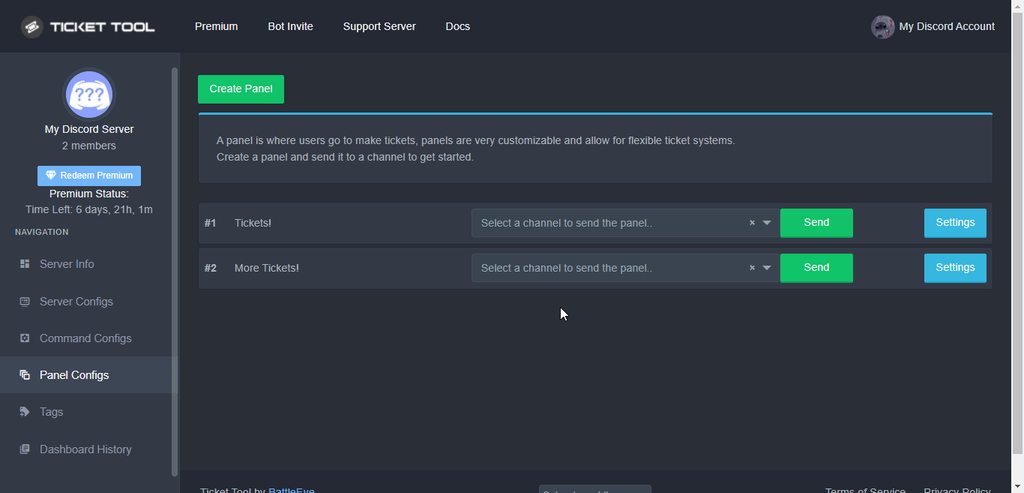
Whats the best work around?
 regal goblet
no problemo
iron nightBOT
Gave +1 Rep to @regal goblet
 fallow ingot
ratelimit
humble sequoiaBOT

Error 1015 - You are being rate limited
If you get the above error when trying to access our web page, don't be scared. This is just a security feature on our dashboard to mitigate possible attacks to the site. The only way to access the site is to wait for the temporary ban to be lifted automatically. It typically takes around 1 hour but can be quicker or longer.
fallow ingot

jade topaz
Can I use custom emoji in the reaction of the ticket? 
fallow ingot
jade topaz
Can I use custom emoji in the reaction of the ticket? <:be_HMMMMM:84053802728554...
Should be able to.
is it from your server or another server?
jade topaz
From my server
fallow ingot
then yes
fallow ingot
That would work.
fallow ingot
You'll need to go to the custom emoji that looks like * and there you will be able to find the emoji.
iron nightBOT
Gave +1 Rep to @fallow ingot
fallow ingot
no problem!
 cinder sphinx
Hey, hope someone can help, I just installed this bot on my server. I have several roles defined. However, only support roles can see ticket created by the base user. The base user role cannot see the actual ticket when it is created. The appropriate permissions were given in discord (react, view channel, read message history) but still cannot see. Any idea?
 drifting ravine
I dont now nothing from the bot 
jade topaz
J
 smoky shoal
How to embed link?
jade topaz
@forest goblet How do i make it so that ticket tool logs into a certain channel?
 forest goblet
cinder sphinx
Hey, hope someone can help, I just installed this bot on my server. I have sever...
forest goblet
cinder sphinx
Hey, hope someone can help, I just installed this bot on my server. I have sever...
You can set up the permissions of the @everyone role here:
$help perms
humble sequoiaBOT
How to set the permissions for tickets
To set a change permissions go to the Dashboard -> Panel Configs -> Settings -> Permission Options
 smoky shoal
This
forest goblet
drifting ravine
I dont now nothing from the bot <:doggopray:929543803621212252>
Do you need help with anything?
smoky shoal
How to embed a link on text
jade topaz
forest goblet
Do you need help with anything?
How do i make it so that ticket tool logs into a certain channel?
cinder sphinx
forest goblet
You can set up the permissions of the `@everyone` role here:
thanks
iron nightBOT
Gave +1 Rep to @forest goblet
forest goblet
jade topaz
J
Do you need assistance or want to help someone? If not, please do not use this channel.
drifting ravine
forest goblet
Do you need help with anything?
Ye 
jade topaz
forest goblet
Do you need assistance or want to help someone? If not, please do not use this c...
How do i make it so that ticket tool logs into a certain channel? 
forest goblet
smoky shoal
How to embed link?
What do you mean by that? Do you want a link to display as text?
smoky shoal
forest goblet
What do you mean by that? Do you want a link to display as text?
Yes just like that embed you send
Yes that thing
Hyperlink
drifting ravine
How I creat the ticket thing?
forest goblet
@jade topaz Please do not mention for support as per rule 4. A little more patience would be appreciated.
All logs can be set up on the dashboard under Panel Configs > Settings > Logging options.
jade topaz
ok
forest goblet
cinder sphinx
thanks
No problem.
jade topaz
forest goblet
<@456226577798135808> Please do not mention for support as per rule 4. A little ...
thanks
iron nightBOT
Gave +1 Rep to @forest goblet
jade topaz
🙂
forest goblet
smoky shoal
Yes just like that embed you send
You can use the format [text](link) for that.
forest goblet
drifting ravine
How I creat the ticket thing?
A setup guide can be found here:
humble sequoiaBOT

You can check our documentation here.
You can also check #573205317870157855 for the basic setup.
Our documentation contains all the info you need about the bot to be able to setup and configure the bot however you like.
drifting ravine
Oh thx
forest goblet
jade topaz
thanks
You're welcome.
smoky shoal
Thanks
humble sequoiaBOT
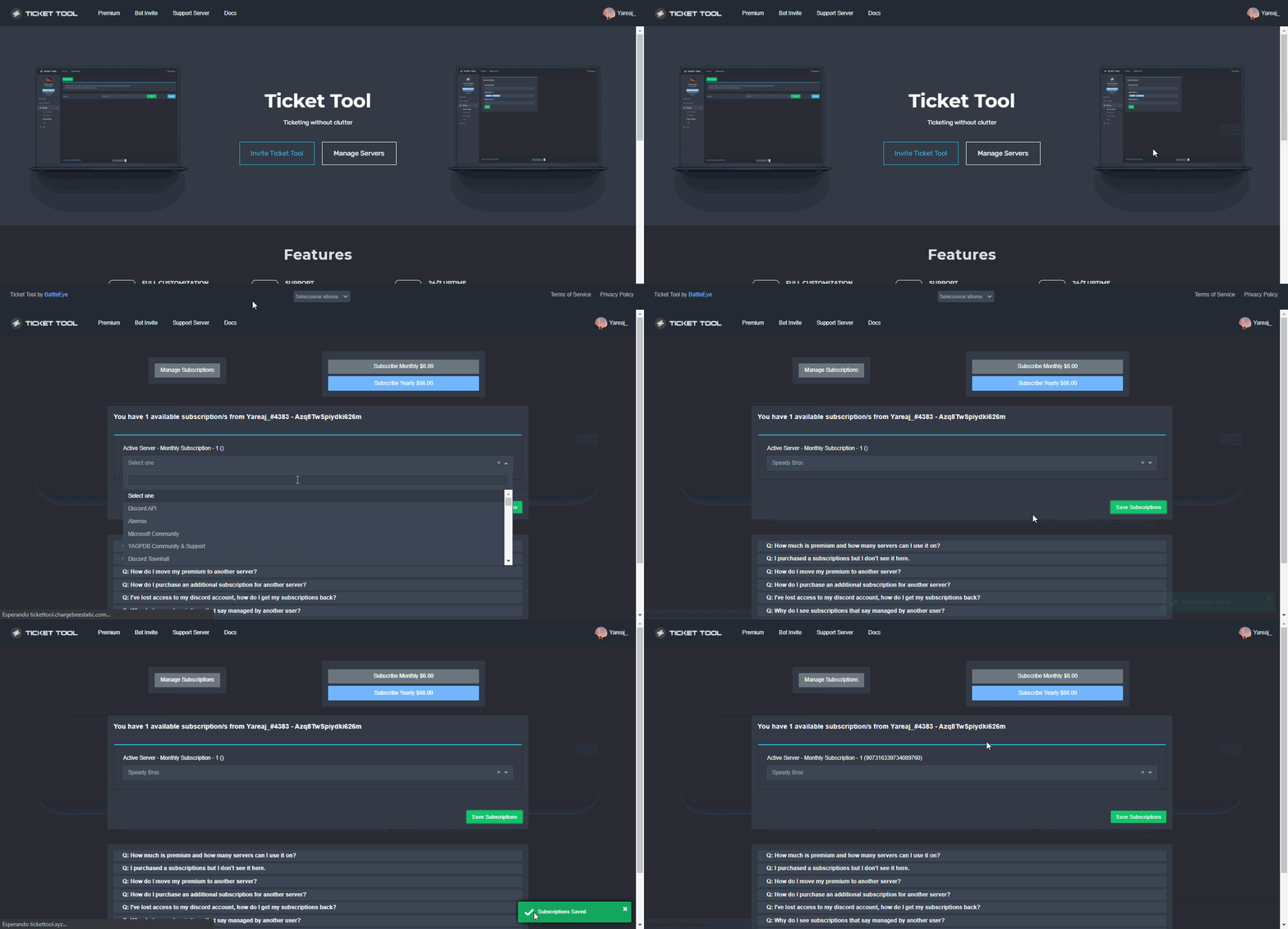
Redeeming premium on your server is really simple. Just head over to your Subscriptions Page. There you can select a server of your choice, which will get premium. You can change the server at any point.
 jade topaz
Ok
 gray goblet
Hey everyone ! Thanks for having me here :3
I use ticket tool, no problem, the doc did the job … but since yesterday the closed tickets stay in the chan « open tickets » and don’t move in chan « closed tickets » I’ve checked the bot status, all lights green.
I am sorry if the answer is somewhere, don’t hesitate to redirect me !
Thanks !!! ☺️
forest goblet
gray goblet
Hey everyone ! Thanks for having me here :3
I use ticket tool, no problem, the ...
Hi there,
did your category for closed tickets reach 50 channels by any chance? Categories can hold 50 channels at most, that is a Discord limitation that we cannot change.
gray goblet
Ohhhh good to know !!! Indeed, there are 54 tickets closed. Understand thanks a lot mister !
forest goblet
You're welcome!
 clear pewter
hi
how do I make the ticket tool
bot
in #server-support for my server
like u guys have with #🎫│make-a-ticket
 slender minnow
$help setup
humble sequoiaBOT
Setting up Ticket Tool
Visit the docs for setup info
General Setup
slender minnow
@clear pewter refer this setup guide ^
 regal ermine
How do you do this?
 humble sequoiaBOT
For a more convenient use of multipanels, you can now combine panels on the dashboard. This will allow you to directly send the multipanel from the dashboard or via the $panel ID command.
Where can I find this?
You can find this setting on the Dashboard -> Panel Configs -> Settings -> General Options
Note: if you're attaching all the panels to a panel called English, don't include English in the attached panels box (If you do this, it will create duplicate)
This will put all buttons from all of your panels on one message. The message is the panel message from the panel you're combining these panels in.

 Note: This is a premium feature
slender minnow
Note: This is a premium feature
slender minnow
@regal ermine ^
regal ermine
slender minnow
<@687179568389423117> ^
❤️
jade topaz
What does the claim button do
 shut bolt
$help claim
humble sequoiaBOT
How does the claim command work?
Ticket Tool claiming is a premium only command that allows your support team to claim tickets and have the ticket renamed, changed permissions or moved to another category
robust sandalBOT
jade topaz
Wie gebe ich Leuten Wiederholungunkte?
 WhiteWolf
How do I give people repetition points?
German (de) → English (en)
robust sandalBOT
jade topaz
Ich meinte rep
WhiteWolf
I meant rep
German (de) → English (en)
Das Vertretersystem stammt von einem anderen Bot namens YAGPDB
English (en) → German (de)
slender minnow
robust sandal
@jade topaz
jade topaz
slender minnow
<@456226577798135808>
und wie benutze ich es? Menschen @ Menschen und es gibt ihnen einen Punkt.
robust sandalBOT
jade topaz
und wie benutze ich es? Menschen @ Menschen und es gibt ihnen einen Punkt.
WhiteWolf
and how do I use it? People @ people and it gives them a point.
German (de) → English (en)
Sie können das auf dem YAGPDB-Bot-Server fragen
English (en) → German (de)
jade topaz
robust sandal
ähm ist das auf der discord bot liste?
drifting ravine
Someone translate?
drifting ravine
Well fuck
 proven void
Is there a discord setting that would disable a ticket from being able to expand/resolve a user_id in an embed?
that is to say... if I'm declaring <@id> in the description, it's showing the resolved name for me but for them it's just the <@#> syntax
jade topaz
/tranlat
robust sandalBOT
jade topaz
ähm ist das auf der discord bot liste?
WhiteWolf
um, is that on the discord bot list?
German (de) → English (en)
slender minnow
jade topaz
ähm ist das auf der discord bot liste?
yep, i am not sure though
robust sandalBOT
slender minnow
yep, i am not sure though
WhiteWolf
Ja, ich bin mir nicht sicher, aber
English (en) → German (de)
slender minnow
proven void
that is to say... if I'm declaring <@id> in the description, it's showing the re...
thats discord, if you see <@#id> instead of #channelname
slender minnow
Head over to panel config ---> logging
you can select the channel for logging ticket activities over there, additionally you can also direct transcripts to specific channels from there
p.s. you can choose what to log fromthere as well
click settings of any one of the panel you will be using and want to config
https://i.imgur.com/8v4ZQAY.png
if you click settings for any one of those panels and refer this image
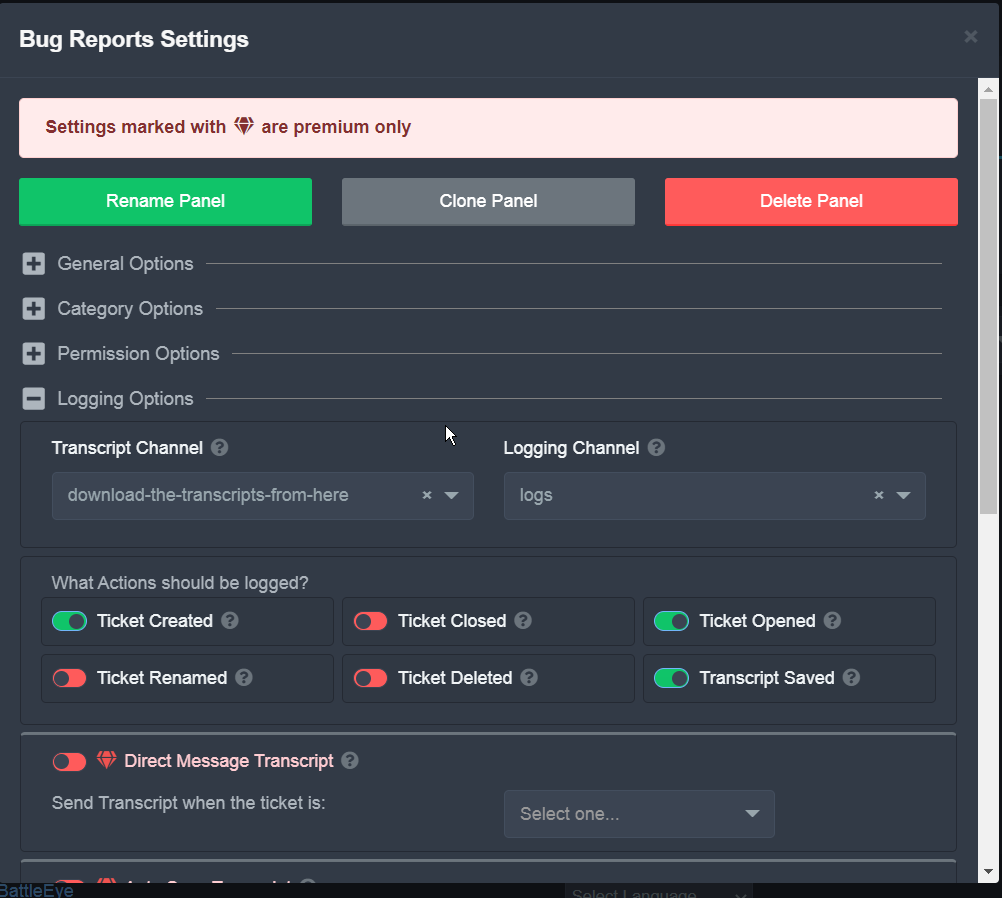
the logging channel will log ticket activities such as ticket open, close, reopen, delete, etc.
is there anything you need help with?
 tidal iron
ok
slender minnow
so to open a ticket again, you need to run that command in the ticket you want to reopen again if you have the access to it
if you dont, you should ask someone who can
tidal iron
oh ok
 bronze panther
slender minnow
so to open a ticket again, you need to run that command in the ticket you want t...
bronze panther
slender minnow
so to open a ticket again, you need to run that command in the ticket you want t...
Hey, if someone is timed out do they have option to open ticket to complain if they feel the decision is unfair?
slender minnow
bronze panther
Hey, if someone is timed out do they have option to open ticket to complain if t...
i dont think so, considering ticket tool uses private channels as tickets and timeout is server wide
bronze panther
Thank you so much
proven void
slender minnow
thats discord, if you see <@#id> instead of #channelname
I figured as much. I do not see it but the member does. At least in the screenshot he sent me.
slender minnow
if its <@#id> for channel mention then its just their discord client
jade topaz
How To Use Premu ?
slender minnow
$help claim
humble sequoiaBOT
How does the claim command work?
Ticket Tool claiming is a premium only command that allows your support team to claim tickets and have the ticket renamed, changed permissions or moved to another category
slender minnow
if thats what you were referring to ^
jade topaz
slender minnow
if thats what you were referring to ^
But I want it in Arabic.
slender minnow
humble sequoia
wrong command
what do you mean by using premium?
were you referring to purchasing it? or how to use it after purchasing it?
jade topaz
I mean the modification in the name and image.
slender minnow
you cannot change Ticket Tool's profile picture and name.
though you can rename its role and change its server nickname
jade topaz
slender minnow
you cannot change Ticket Tool's profile picture and name.
*though you can renam...
Premium ?!
slender minnow
jade topaz
**Premium ?!**
you can't even with premium
you can suggest that through #🤖│bot-spam using the command s!suggest suggestion
jade topaz
One last question:
- IF I Modified The Control Panel , Would The Normal Bot Apply The Commands Or The Premium ?
@slender minnow .
jade topaz
If You Want To Modify The Premium , How ?
slender minnow
you invite the premium bot (or you can use the primary bot)
and then set up the panel as you would normally do
jade topaz
But I Have The Normal And The Premium .
slender minnow
can you run $ping and check which bot is working?
jade topaz
@pseudo glen .
humble sequoiaBOT
The first thing you will need to do is invite the premium bot, an invite can be found here
Once the bot is in your server we will head to the dashboard and manage your server. When you are managing your server, you want to head into "Server Configs" then click the drop down menu under "Select the bot you would like to use on this server" then click "Ticket Tool#6207" and then save.
slender minnow
you can use premium bot this way
fallow ingot
@jade topaz You don't have premium?
slender minnow
but idk if that would make any difference
i mean if you can use premium benefits without the need of changing the bot, i dont think it is necessary to change
jade topaz
fallow ingot
<@456226577798135808> You don't have premium?
No.
fallow ingot
Why would you need to enable the premium bot if you don't have premium?
jade topaz
fallow ingot
Why would you need to enable the premium bot if you don't have premium?
r u kidding me ?
I Have .
fallow ingot
You have what?
jade topaz
Premium .
fallow ingot
are you using the free trial?
 soft ravine
Is there a way to send the person a copy of the ticket automatically?
like a full transcript of the ticket
 paper turtle
is there a way i can make the tickets ping my support when they open?
slender minnow
$help ping
humble sequoiaBOT
How to make Ticket Tool ping a role
To make ticket tool ping a role when a ticket is opened, go to the Dashboard -> Panel Configs -> Settings -> Ticket Options -> Ticket Message -> Message Text and do this:
{@Role name} This is case sensitive and the role must have @mentions enabled
 slender minnow
@paper turtle ^
soft ravine
Also I am an annual premium subscriber how do i get that role?
paper turtle
thank
 ornate tide
guys how to invite premium ticket?
humble sequoiaBOT
The first thing you will need to do is invite the premium bot, an invite can be found here
Once the bot is in your server we will head to the dashboard and manage your server. When you are managing your server, you want to head into "Server Configs" then click the drop down menu under "Select the bot you would like to use on this server" then click "Ticket Tool#6207" and then save.
 tawdry eagle
ornate tide
guys how to invite premium ticket?
tawdry eagle
ornate tide
guys how to invite premium ticket?
^^
tawdry eagle
soft ravine
Also I am an annual premium subscriber how do i get that role?
Run $pc in #🤖│bot-spam
soft ravine
tawdry eagle
Run `$pc` in <#910978476536905738>
I had someone help me thanks for the advice!
iron nightBOT
Gave +1 Rep to @tawdry eagle
tawdry eagle
np
fallow ingot
If you need something please state it, if not please don’t talk here instead use #💬│general-chat
 west wasp
hi
shut bolt

west wasp
how much credit for 1 month premium?
shut bolt
west wasp
how much credit for 1 month premium?
You mean how much it costs?
west wasp
yeh
shut bolt
6$
shut bolt
Sure bro
humble sequoiaBOT
 Faster Premium Bot
Automatic Transcripts
Full Customization
Custom Buttons
Direct Messages
Ticket Automation
Multipanels
Premium Support
You can purchase premium here:
Price
$6 - Monthly
$66 - Yearly
 Premium
shut bolt
Premium
shut bolt
A brief list of our epic perks 
 brave tartan
Pablo can i dm you?
shut bolt
brave tartan
Pablo can i dm you?
Is it related to Ticket Tool?
brave tartan
No
shut bolt
brave tartan
No
What is it related to?
brave tartan
Just a thanks
shut bolt
brave tartan
Just a thanks
Oh, sure
humble sequoiaBOT
For a more convenient use of multipanels, you can now combine panels on the dashboard. This will allow you to directly send the multipanel from the dashboard or via the $panel ID command.
Where can I find this?
You can find this setting on the Dashboard -> Panel Configs -> Settings -> General Options
Note: if you're attaching all the panels to a panel called English, don't include English in the attached panels box (If you do this, it will create duplicate)
This will put all buttons from all of your panels on one message. The message is the panel message from the panel you're combining these panels in.
Note: This is a premium feature
shut bolt
Check this out (cc: Jedi Gyes)
jade topaz
?
jade topaz
Wow thanks
shut bolt
Sure mate
jade topaz
shut bolt
Sure mate
Don't know why but can't get it to work 🤔
shut bolt
jade topaz
Don't know why but can't get it to work 🤔
Do you have premium?
jade topaz
shut bolt
Do you have premium?
Arrr thats why 🤣
shut bolt
jade topaz
Arrr thats why 🤣
😅 that would be it
jade topaz
Sorry for the question, I already asked my form for some time, do you know when I will get an answer?
shut bolt
jade topaz
Sorry for the question, I already asked my form for some time, do you know when ...
If you are accepted you should be contacted within days to weeks, if you were rejected, you will not be contacted
 modern sierra
How do I create a ticket with multiple categories? I mean, when you try to open one it asks you to select a theme
 jagged socket
hi guys, how do i change where the tickets show up?
right now it just shows up at the top
shut bolt
jagged socket
hi guys, how do i change where the tickets show up?
Hi there, update the open category as shown below
$help category
humble sequoiaBOT
How to set the open category
To set a open category go to the Dashboard -> Panel Configs -> Settings -> Category Options -> Category Open
 jagged socket
shut bolt
Hi there, update the open category as shown below
jagged socket
shut bolt
Hi there, update the open category as shown below
hey, thanks for helping me
iron nightBOT
Gave +1 Rep to @shut bolt
jagged socket
i did exactly as the video told me to but my tickets still appear randomly at the top
how can i resolve this?
regal goblet
@jagged socket do you have near 50 channels in The category?
jagged socket
regal goblet
<@667364475061534730> do you have near 50 channels in The category?
nope i dont
but i managed to resolve it
i deleted and re-implemented the ticket support bot all over again and it works
the only problem now is that whenever i close a ticket, i get this message:
System Failure: Missing Permissions
regal goblet
@jagged socket whats the name of your server?
 solar lake
where do I apply for support team
humble sequoiaBOT
How do be I become a Support Member?
You can become a support member in 2 ways:
1. You can be really active in #🆘│community-support gain <@&799500225579712543> role and get chosen by a Manager
2. You can apply VIA our applications that would be sent in #📣│server-news
We currently have Support Teams for the following languages:
:flag_us: English
:flag_jo: Arabic
:flag_fr: French
:flag_de: German
:flag_br: Portuguese
:flag_es: Spanish.
 vapid pecan
how to add picture like this

 lilac igloo
Tem algum outro link pra baixa meridian
 robust sandalBOT
lilac igloo
Tem algum outro link pra baixa meridian
robust sandalBOT
lilac igloo
Tem algum outro link pra baixa meridian
 WhiteWolf
Has some other link to low meridian
Portuguese (Brazil) (pt) → English (en)
humble sequoiaBOT

⚠️ You're in the wrong place
We provide support for @pseudo glen discord bot and cannot help you with whatever issue you have.
- Please make sure to contact the appropriate Support Team.
If you don't have any further questions regarding our bot Ticket Tool, please close this ticket
slender minnow
humble sequoia
@lilac igloo you are in the wrong server.
 nova merlin
It's not on the checklist

 humble sequoiaBOT

Don't see your server in the dashboard?
You will possibly need to relog. Look below to see steps on how to relog.
How to relog in the Dashboard.
First, you will need to go to the dashboard. Once your there, click on your avatar on the top right. after you clicked it, you will see button that says Logout. You must click that. Once you have logged out, you can log back in.
Note:
You need one of these 3 things to access the dashboard.
1. Server Owner (Level: 6)
2. Server Administrator (Level: 4)
3. Dashboard Role (Level: 2)
:warning: You can check your level using $level on your Discord Server
User permission level with Ticket Tool
@User is permission level: 0 (User)
```» *If it shows that your permission is **0**, you don't have any of the above **3 things** to manage the dashboard.*
**See the picture below on how to relog:**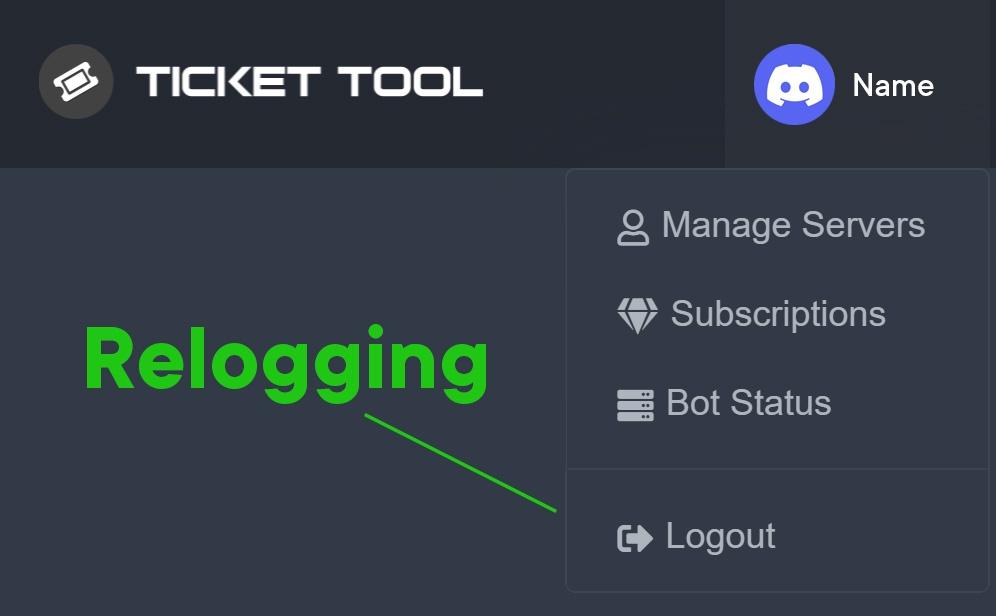 shut bolt
Try this
 split otter
GM!
I'm having a little issues with people in the server creating tickets
I changed the settings of the button settings > create ticket > everyon
and its still not working
shut bolt
split otter
I changed the settings of the button settings > create ticket > everyon
Is the error "you don't have permission to use this"?
split otter
shut bolt
Is the error "you don't have permission to use this"?
yeah thats right!
humble sequoiaBOT
Any role you assign as a blacklisted role won't be able to use commands or reactions.
Selecting a blacklisted role
Go to your Dashboard ➞ Server Configs. There you will find the option to select blacklisted roles.
Note: Don't forget to save.
 shut bolt
Check your blacklisted roles please
split otter
shut bolt
Check your blacklisted roles please
perfect!
that worked haha
thank you so much
thanks @shut bolt
iron nightBOT
Gave +1 Rep to @shut bolt
split otter

shut bolt
Sure 
 mental folio
What you want?
 mild blade
Okay so.
It says when someone opens a ticket they donat have permission
So any suggestions?
How do I fix it?
humble sequoiaBOT
━━ moved to ticket ━━
fallow ingot
you have a ticket open please refer to it
 silk ether
Hey gents, I'm having trouble keeping everyone from seeing the opened tickets. I changed some stuff and mustve screwed it up. Does anyone know where that setting is?
on the right side, everyone is able to see this ticket and the messages
 humble sequoiaBOT
How to hide tickets from everyone
Head over to your Dashboard ➞ Panel Configs ➞ Settings ➞ Permission Options ➞ Edit Everyone Roles Opened Permissions

NOTE that @everyone can type aswell if it has permissions to send messages
fallow ingot
@silk ether
silk ether
fallow ingot
<@!272220041783541760> <:this:894279341108772914>
Thanks for getting back to me Aaron
iron nightBOT
Gave +1 Rep to @fallow ingot
silk ether
Here is what i see in that tab

The additional and User opened both look like this though

I changed the additional users one and everyone went away. Thanks for the help brotha @fallow ingot
iron nightBOT
Gave +1 Rep to @fallow ingot
 hallow marlin
silk ether
I changed the additional users one and everyone went away. Thanks for the help b...
hallow marlin
silk ether
I changed the additional users one and everyone went away. Thanks for the help b...
What did you set in general options?
 cedar widget
Hey guys I have one member getting an error when submitting a ticket.. It says interaction failed.. anyone run into this issue?
hallow marlin
cedar widget
Hey guys I have one member getting an error when submitting a ticket.. It says i...
only one user with that problem?
cedar widget
hallow marlin
only one user with that problem?
Yes only one user
silk ether
hallow marlin
What did you set in general options?
Set this way

"Drivers" are the only people i want to be able to create a ticket
hallow marlin
silk ether
Set this way
remove drivers in tickettool and set the channel permission for the drivers to read
iron nightBOT
Gave +1 Rep to @hallow marlin
hallow marlin
silk ether
Thanks <@855793296155607051>
tell me, if it worked 🙂
fallow ingot
Hi. Thanks for your patience. Sorry I wasn’t any of assistance I was handling something else.
Let us know if you have any further questions either here or via #🎫│make-a-ticket
hallow marlin
cedar widget
Yes only one user
does he have a special role that no one else has?
cedar widget
hallow marlin
does he have a special role that no one else has?
No he doesnt..
hallow marlin
cedar widget
No he doesnt..
has he ever tried to restart discord? Sounds stupid but helps most of the time
silk ether
hallow marlin
tell me, if it worked 🙂
That worked perfect. Now they can make tickets perfectly
hallow marlin
silk ether
That worked perfect. Now they can make tickets perfectly
I'm glad to hear that!
cedar widget
hallow marlin
has he ever tried to restart discord? Sounds stupid but helps most of the time
Let me have him try that stand by😄
hallow marlin
cedar widget
Let me have him try that stand by😄
Because as long as he doesn't have an additional role that could block him, actually only he can be the problem i guess.
jade topaz
$premium invite
 gloomy grotto
How do I set it up
humble sequoiaBOT
You can check our documentation here.
You can also check #573205317870157855 for the basic setup.
Our documentation contains all the info you need about the bot to be able to setup and configure the bot however you like.
shut bolt
Follow this guide
 magic juniper
The Context:
I have a Premium Ticket Tool Subscription.
However, the server I had it all set up on was recently deleted.
Now when I'm looking in the Ticket Tool Dashboard/Server Management - that server is obviously gone and I can't edit the setup of it.
The Question:
Is there a way to copy previously used panel configs from an old server to a new server? So I don't have to create them all from scratch again zigh
shut bolt
magic juniper
__**The Context:**__
I have a Premium Ticket Tool Subscription.
However, the ser...
$transfer
humble sequoiaBOT

Premium Transfer
If you would like to move premium, panels, & tags to another server, please provide your old servers ID and your new servers ID or you can use our transfer feature yourself, learn more here
How do I find my server ID.
Open your Discord server, right-click on the server name, then select Copy ID or you can do $id in your server.
Server deleted? Can’t find the server ID?
If the server is deleted, please go into your search history and find the last time you were managing that server. At the end of the website, it should show a ID. That is your server ID.
I can't find either of them
Please notify a Support Team member that you can not find any of your Server IDs & they will assist you.
shut bolt
If you don't have the backup key, feel free to open a ticket in #🎫│make-a-ticket
magic juniper
@shut bolt - Thank you for that, but the hyperlink in the embed doesn't work.
iron nightBOT
Gave +1 Rep to @shut bolt
 magic juniper
Best to just make a ticket?
shut bolt
I'll check that
 errant depot
Hey,
Is it possible to automatically close tickets that the creator of them has left?
Think I found my own answer actually, thanks anyways and thank you for this amazing bot devs!
 gilded verge
errant depot
Hey,
Is it possible to automatically close tickets that the creator of them has...
gilded verge
errant depot
Hey,
Is it possible to automatically close tickets that the creator of them has...
🔽
shut bolt
gilded verge
🔽
It is possible
gilded verge
what?
shut bolt
gilded verge
what?
It's already possible
 gilded verge
damn, I thought it was automatic shutdown from no response. then sorry for misrepresentation
shut bolt
No problem, just letting you know :)
gilded verge
thank you @shut bolt
iron nightBOT
Gave +1 Rep to @shut bolt
shut bolt
Sure mate, glad to help
 faint geyser
If we buy premium, how many servers can we use the premium bot in?
Oh nevermind i see it ty
gilded verge
faint geyser
If we buy premium, how many servers can we use the premium bot in?
Q: How much is premium and how many servers can I use it on?
A: Premium is $6.00 per month for the first server and $5.00 for each additional server.
Also available annually for a 1 month discount.
oh oki 😄
gilded verge
I don't know anything about it at the moment 😳
faint geyser
dam
gilded verge
@jade topaz, you are on this server so why are you writing me a private message?
if you need help, come here
 maiden willow
Hey, lads. How do I set up the bot in my server to allow players to click a button to 'Open Ticket' that only Admin/Staff and the person who opened the ticket can see? Thank you, in advance.
humble sequoiaBOT
You can check our documentation here.
You can also check #573205317870157855 for the basic setup.
Our documentation contains all the info you need about the bot to be able to setup and configure the bot however you like.
shut bolt
Setup the bot following this guide
And it should work
If for any reason the guide decides to not work
$help panel
humble sequoiaBOT
Creating a panel
To create a panel we are going to need to head over to the panel configs on the dashboard
Once at the dashboard we will need to click Create Panel
Enter a panel name (Fill in any optional settings you want)
Click Create Panel and your ready to get started with configuring your panel
An example of a creating a panel is shown below.
 shut bolt
Create a panel :)
 shut bolt
Yeah, we are checking it, sorry for the problem
shut bolt
humble sequoia
This is like the
Summary.zip
You can also check #573205317870157855 for it
maiden willow
Ah, I see. That helped me a lot, actually. Will I find in here how to direct Ticket Transcripts to a designated channel, too? c:
I can be a little slow with this sort of thing.
Hey, I found it by myself! 😄
shut bolt
maiden willow
Hey, I found it by myself! 😄
Glad to hear that mate, sorry for my delay
iron nightBOT
Gave +1 Rep to @shut bolt
shut bolt
Sure! Have a great night
 rose hazel
how do i make the bot premium
fallow ingot
rose hazel
how do i make the bot premium
You need to purchase premium first.
fallow ingot
jade topaz
<@518666147441278998>
Rule 4 #546557408902905896
fallow ingot
jade topaz
I wanna recover a chat that I had in a server with the ticket
Unless you have a transcript channel set at the time of the ticket creation, you cannot recover a ticket.
jade topaz
fallow ingot
Unless you have a transcript channel set at the time of the ticket creation, you...
hello can I ask something?
fallow ingot
Sure
jade topaz
fallow ingot
Sure
how does the add command works?
loud turtle
jade topaz
how does the add command works?
It's $add @user
jade topaz
loud turtle
It's $add @user
I can't. I can't search a user that I want to add.
loud turtle
jade topaz
I can't. I can't search a user that I want to add.
Please discuss it carefully
jade topaz
loud turtle
Please discuss it carefully
I can't add a user on my active ticket
how do i make these buttons?
 loud turtle
You mean it can't function. The command?
loud turtle
jade topaz
how do i make these buttons?
$help multipanel
humble sequoiaBOT
Help Options
$help commands - Information on commands
$help setup - Information on bot setup
$help faq - Frequently asked questions
loud turtle
jade topaz
how do i make these buttons?
This is multipanel. Only on premium
jade topaz
loud turtle
This is multipanel. Only on premium
it dont work on free trial?
loud turtle
Yes
jade topaz
yes that it works on free trial?
jade topaz
loud turtle
You mean it can't function. The command?
yup
How can i change the prefix of this bot on muy sv
loud turtle
jade topaz
yes that it works on free trial?
No
jade topaz
loud turtle
No
ok
loud turtle
jade topaz
How can i change the prefix of this bot on muy sv
On the website
loud turtle
jade topaz
ok
You can use voting to redeem premium
jade topaz
But what is the comand to change ir that i dont found it
loud turtle
jade topaz
yup
Create a ticket pls #🎫│make-a-ticket
jade topaz
bro so the free 7 days trial is useless?
humble sequoiaBOT
━━ moved to ticket ━━
loud turtle
jade topaz
But what is the comand to change ir that i dont found it
In command configs on the website. There's an option to change the prefix. I prefer not changing that.
jade topaz
in which one is the mulitpanel
 loud turtle
jade topaz
in which one is the mulitpanel
loud turtle
jade topaz
in which one is the mulitpanel
I forgot but, There is an option to add another panel you created. You just have to find it for yourself
jade topaz
loud turtle
I forgot but, There is an option to add another panel you created. You just have...
cant find it
humble sequoiaBOT
For a more convenient use of multipanels, you can now combine panels on the dashboard. This will allow you to directly send the multipanel from the dashboard or via the $panel ID command.
Where can I find this?
You can find this setting on the Dashboard -> Panel Configs -> Settings -> General Options
Note: if you're attaching all the panels to a panel called English, don't include English in the attached panels box (If you do this, it will create duplicate)
This will put all buttons from all of your panels on one message. The message is the panel message from the panel you're combining these panels in.
Note: This is a premium feature
 atomic solstice
jade topaz
cant find it
atomic solstice
jade topaz
cant find it
here is is ^^
jade topaz
atomic solstice
here is is ^^
tysm
atomic solstice
jade topaz
tysm
no problem
loud turtle
I can't use the command. Not fair. (Not violating)
atomic solstice
loud turtle
I can't use the command. Not fair. (Not violating)
which command?
 wild rock
hey
jade topaz
now how do i use the multi panel? how does it work
wild rock
how can i setup the bot?
atomic solstice
wild rock
how can i setup the bot?
check out #573205317870157855
 vital holly
hey can i change the name and the pfp of the ticket tool bot? if yes how?
wild rock
 atomic solstice
jade topaz
now how do i use the multi panel? how does it work
atomic solstice
jade topaz
now how do i use the multi panel? how does it work
you create multiple panels based on how many types of tickets you want, then you combine them and you can have them look as we have in #🎫│make-a-ticket by editing the panel message
humble sequoiaBOT
The panel message is where people react to make a ticket. To customize it head over to your Dashboard --> Panel Configs -> Settings -> Panel Options -> Edit Panel Message


Ticket Tool avatar/status Customisation
@pseudo glen is like another discord user; you can't control its avatar icon or status, and we cannot change it for a specific server.
However, on your server, you can change the bot's nickname
 atomic solstice
humble sequoia
atomic solstice
humble sequoia
@vital holly ^^
vital holly
atomic solstice
<@939178946442981437> ^^
okay
vital holly
atomic solstice
<@939178946442981437> ^^
but if i have two seperated ticket panels they have the same nickname right?
jade topaz
atomic solstice
you create multiple panels based on how many types of tickets you want, then you...
Ah ok, but how do i get individuel buttons to different tickets?
atomic solstice
jade topaz
Ah ok, but how do i get individuel buttons to different tickets?
each different ticket is a different panel, you make multiple panels and then you can choose which ones you want to combine and which you don't want
$help panel
humble sequoiaBOT
Creating a panel
To create a panel we are going to need to head over to the panel configs on the dashboard
Once at the dashboard we will need to click Create Panel
Enter a panel name (Fill in any optional settings you want)
Click Create Panel and your ready to get started with configuring your panel
An example of a creating a panel is shown below.
atomic solstice
vital holly
but if i have two seperated ticket panels they have the same nickname right?
you can edit the panel message
humble sequoiaBOT
The panel message is where people react to make a ticket. To customize it head over to your Dashboard --> Panel Configs -> Settings -> Panel Options -> Edit Panel Message
jade topaz
atomic solstice
each different ticket is a different panel, you make multiple panels and then yo...
i havent got a clue what youre saying
loud turtle
atomic solstice
which command?
Other help commands
atomic solstice
loud turtle
Other help commands
you can, you just have to learn which ones they are, as they are custom tags in this server
for example for multipanels you type $mp or $mp2
loud turtle
Oh
atomic solstice
jade topaz
i havent got a clue what youre saying
Button = Panel, so to make individual ticket types you have to make as many panels as you need
atomic solstice
humble sequoia
with this
jade topaz
atomic solstice
Button = Panel, so to make individual ticket types you have to make as many pane...
i did but only 1 button comes
my bad
atomic solstice
jade topaz
i did but only 1 button comes
 jade topaz
atomic solstice
jade topaz
atomic solstice
it works now i just had to use my head
atomic solstice
jade topaz
it works now i just had to use my head
😉
wild rock
im trying read the docs for the bot but there is a problem with the website
atomic solstice
wild rock
im trying read the docs for the bot but there is a problem with the website
yes, the management team has been informed, they'll get this sorted out soon
atomic solstice
wild rock
can't you help me with the bot setup?
setting up the bot is easy, you first create a Panel
$help panel
humble sequoiaBOT
Creating a panel
To create a panel we are going to need to head over to the panel configs on the dashboard
Once at the dashboard we will need to click Create Panel
Enter a panel name (Fill in any optional settings you want)
Click Create Panel and your ready to get started with configuring your panel
An example of a creating a panel is shown below.
atomic solstice
that is the place from where the users open tickets from
you can customize it with this:
humble sequoiaBOT
The panel message is where people react to make a ticket. To customize it head over to your Dashboard --> Panel Configs -> Settings -> Panel Options -> Edit Panel Message
atomic solstice
then after you like it you can send it to a channel where the people will open tickets from with the send to channel button or by typing $panel panel-number in the channel
to change the message which appears inside the ticket once opened you customize it here:
humble sequoiaBOT
The Ticket Message is the first message sent by the bot in a new ticket. To customise it head over to your Dashboard ➞ Panel Configs ➞ Settings ➞ Ticket Options ➞ Edit Ticket Message
 fallow ingot
jade topaz
how does the add command works?
fallow ingot
jade topaz
how does the add command works?
$help add
humble sequoiaBOT
How to add or remove users on tickets
To add a user to a ticket use $add <user>
To remove a user from a ticket use $remove <user>
wild rock
thank you so much ❤️
 cyan matrix
hi i have a problem when my friend makes a ticket he cant see the ticket
pls @ me when you have time
hallow marlin
cyan matrix
hi i have a problem when my friend makes a ticket he cant see the ticket
Have you made any special Discord category settings?
cyan matrix
what do you mean
hallow marlin
cyan matrix
what do you mean
Or another question... does he have a role that you have locked via Discord or Ticket Tool?
cyan matrix
idk
hallow marlin
cyan matrix
idk
please send a screen of the general setting in the ticket tool
 supple idol
Is there a way to deny 'Send message' for support members, untill they claim the ticket?
While the member can still type.


 hallow marlin
cyan matrix
<@855793296155607051>
hallow marlin
cyan matrix
<@855793296155607051>
you should not blacklist everyone
remove everyone and try again
humble sequoiaBOT
We would love to help you, but if you don't tell us what you need help with we can't help you :(
hallow marlin
The best way to help you is to describe your problem 🙂
You have to log out and log in again
@jade topaz
Have you already invited the bot to your server?
👍
Nice to hear
jade topaz
how do u set up ticket tool
slender minnow
$help setup
humble sequoiaBOT
Setting up Ticket Tool
Visit the docs for setup info
General Setup
slender minnow
@jade topaz refer above ^
jade topaz
it says
The custom domain for this content has not been correctly configured. If you are the owner of this page, verify that your custom domain is correctly set up in GitBook.
@slender minnow
fallow ingot
Hi there

 warm topaz
how can i limit the ticket for specific roles?
fallow ingot
jade topaz
The custom domain for this content has not been correctly configured. If you are...
We are experiencing some technical difficulties at this time. We have notified the developer and we will fix it soon.
jade topaz
fallow ingot
We are experiencing some technical difficulties at this time. We have notified t...
kk so is there a way to do it rn
humble sequoiaBOT
Creating a panel
To create a panel we are going to need to head over to the panel configs on the dashboard
Once at the dashboard we will need to click Create Panel
Enter a panel name (Fill in any optional settings you want)
Click Create Panel and your ready to get started with configuring your panel
An example of a creating a panel is shown below.
fallow ingot
warm topaz
how can i limit the ticket for specific roles?
By disabling their role on the create ticket button.
warm topaz
fallow ingot
By disabling their role on the create ticket button.
how?
fallow ingot
$buttons
humble sequoiaBOT

The new Discord Buttons allow for a much smoother and convenient experience. They reduce lag and work much better than emojis. With ticket tool you can edit all the buttons however you like! Buttons can show emojis, text and can have 4 different colors.
Where can I edit them?
Dashboard ➞ Panel Configs ➞ Settings ➞ Button Options ➞ Setting
 iron nightBOT
Gave +1 Rep to @fallow ingot
jade topaz
ty @fallow ingot
iron nightBOT
Gave +1 Rep to @fallow ingot
iron nightBOT
Gave +1 Rep to @slender minnow
slender minnow
:p didnt had to thank me lol
fallow ingot
yes you assisted
slender minnow
well i dont do it for the reps, its just something that i do during my free time XD
jade topaz
ty @slender minnow
 fallow ingot
You can’t change that unfortunately.
 sleek locust
Hi everyone, I wanted to know why when the staff puts a message and a member copies and pastes the message, it automatically deletes itself?
warm topaz
fallow ingot
You can’t change that unfortunately.
what? dang
why
is there any way to change it?
or at least
this one

no?
shut bolt
$epmessage
humble sequoiaBOT
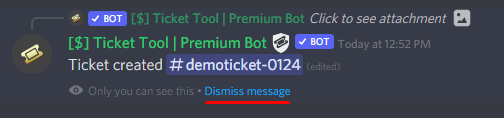
How can I edit/disable the ephemeral message?
These pop ups can only be seen by the user who triggered a certain action, like creating a ticket. They cannot be edited or disabled, as they are a discord requirement that is set by the developer of any bot. The ephemeral messages can be removed by pressing the little blue Dismiss message text, or by restarting your discord client.
━━ moved to ticket ━━

 dull ice
You don't have permission to see the history of that channel, hence why you can't see anything in that channel right now
mild blade
dull ice
You don't have permission to see the history of that channel, hence why you can'...
How can I give permission?
dull ice
Are you the owner or admin or have permission to modify channel/user permissions?
mild blade
dull ice
Are you the owner or admin or have permission to modify channel/user permissions...
I do.
dull ice
https://support.discord.com/hc/en-us/articles/206029707-Setting-Up-Permissions-FAQ
The above helps if your unsure about how to change permissions.
You need to specifically change it so that the view history is open to the role you wish for them to see it (Specifically this permission):
 mild blade
dull ice
https://support.discord.com/hc/en-us/articles/206029707-Setting-Up-Permissions-F...
mild blade
dull ice
https://support.discord.com/hc/en-us/articles/206029707-Setting-Up-Permissions-F...
Don’t understand. Please explain.
dull ice
Based off the picture, the discord user who is trying to use ticket tool is unable to see the messages in the channel to interact with Ticket Tool.
You need to give the role/user the ability to be able to view/read message history
mild blade
dull ice
Based off the picture, the discord user who is trying to use ticket tool is unab...
I did. It ain’t working.
@dull ice
Any help
Can anyone help with this fr
 shut bolt
dull ice
https://support.discord.com/hc/en-us/articles/206029707-Setting-Up-Permissions-F...
shut bolt
dull ice
https://support.discord.com/hc/en-us/articles/206029707-Setting-Up-Permissions-F...
It's what Doomlight said, there must be a role or something denying the read message history permission, that's what causes this
mild blade
shut bolt
It's what Doomlight said, there must be a role or something denying the read mes...
Okay.
dull ice
Question, how would I go about getting the premium subscriber role?
 scenic plinth
$pc @dull ice
humble sequoiaBOT

Premium Check
I was unable to detect a premium server for @dull ice.
Found 12 servers in total and 0 with premium and permission
scenic plinth
Enable it on your server and use that command in #🤖│bot-spam
dull ice
So I do have it enabled (for a year now):
Guess its because I don't have admin/owner privileges' on the account for the server?
 scenic plinth
It's whoever owns the subscription
dull ice
Ahh okay then, should I create a ticket to show billing?
scenic plinth
Do you have a server ID for the server you enabled the subscription on? Can you provide it?
dull ice
764951488408977428
scenic plinth
I'll check that out for your really quick, there isn't anything I see wrong the bot wouldn't recognize.
dull ice
That's no problem! I appreciate the check
 pale pilot
@dull ice i've given you the role now. Don't run the $pc command above, otherwise it'll take it away again ^^
dull ice
Got it thanks!
scenic plinth


 solid stream
You might be blocking the permission on the channel or category
solid stream
mild blade
It don’t work
doing so would override the global perms
mild blade
It still ain’t working
solid stream
from the image you're showing\ you're missing the read message history permission
if you have it on your role, then you're blocking on the channel or category
check the everyone role on each of them.
 tacit nexus
what do i do for this?
 gilded verge
Please make sure the bot has the appropriate permissions
humble sequoiaBOT
ᅠ
@pseudo glen requires the following permissions:
Add Reactions
Read Channels
Send Messages
Manage Messages
Embed Links
Attach Files
Read History
Manage Roles
Manage Channels
To change the role permissions, you can go to your Discord Server ➞ Server Settings ➞ Roles ➞ @Ticket Tool
To change the channel permissions, you can go to your Channel Settings ➞ Permissions ➞ Ticket Tool
ᅠ
Note:
You can give Ticket Tool Administrative Permissions instead of all the permissions listed above, but it's entirely optional and NOT necessary.
 jade topaz
Where can i edit the Discord bot Name?
humble sequoiaBOT
━━ moved to ticket ━━
gilded verge
jade topaz
Where can i edit the Discord bot Name?
Right click on bot and Change nickname 
 jade topaz
Thank you
tacit nexus
gilded verge
Please make sure the bot has the appropriate permissions
i fixed it
 wide raft
What is a ticket for?
 proper fulcrum
our agent accidentally reset the ticket name, how do we fix it ticket-2000001472 normally but now it's ticket-0001
warm topaz
can I block ticket creation in certain period?
humble sequoiaBOT
━━ moved to ticket ━━

 shut bolt
vital holly
shut bolt
vital holly
Run $debug in that channel
The bot is missing permissions to close properly the ticket
vital holly
shut bolt
The bot is missing permissions to close properly the ticket

what do i need to change?
shut bolt
vital holly
Go into the channel permissions and grant the bot the perms marked as ❌
vital holly
oh i see it need all maked perms with a star?
shut bolt
no problem mate
shut bolt
vital holly
i dont understand you message sry im not native engl
What's your native language?
vital holly
german
shut bolt
Alright
robust sandalBOT
Rollen verwalten ist keine Berechtigung innerhalb der Kanalberechtigungen, sondern wird als Verwaltungsberechtigungen bezeichnet
English (en) → German (de)
jade topaz
Does anyone need support in other languages?
vital holly
robust sandal
even that i dont understand 😄
so it need the manage roles perm globaly?
shut bolt
vital holly
so it need the manage roles perm globaly?
Affirmative
vital holly
is there no way arround it?
shut bolt
vital holly
is there no way arround it?
Grant manage permissions for the ticket
For some cases it can work, some it doesn't, discord is weird with perms
vital holly
so just the perms of the new created channels?

or globaly?
id it possible that the tickets get into a category instead of ontop of the server?

how did you guys make this?
vital holly
jade topaz
<#573205317870157855>
i did this, but my tickets are just on top of all channels and not in a category
sry i found it category open and closed
jade topaz
then you go to your server settings and change
jade topaz
vital holly
sry i found it category open and closed
just do as I said
shut bolt
$help setup
humble sequoiaBOT
Setting up Ticket Tool
Visit the docs for setup info
General Setup
 thin iris
how i change the language
 timid trellis
how do i create a ticket
timid trellis
thin iris
how i change the language
theres this select area where you see it and it says select lauage (other people can show where it is
slender minnow
$help setup
humble sequoiaBOT
Setting up Ticket Tool
Visit the docs for setup info
General Setup
slender minnow
@timid trellis refer the above guide to set up the bot for your server ^
jade topaz
hey i lost my acc and it had 2servers and a active subscription what can i do?
slender minnow
$transferacc
humble sequoiaBOT
How do I transfer my premium subscription from one account to another?
First, your subscription is not linked to your Discord account, but rather it is linked to the email that you purchased premium with.
However you will define which Discord account will be able to manage your subscription.
Go manage subscription and sign in using the email you purchased the premium with. Even if your account got disabled or deleted, you should still be able to sign in either way.
Next, head over to Account Details, and change the details there to match your new account details! Now, your subscription should be tied to your new account
See the GIF below the steps:
 slender minnow
@jade topaz ^
 simple junco
I want to thank you @fallow ingot , Thanks, I figured it out
iron nightBOT
Gave +1 Rep to @fallow ingot
jade topaz
slender minnow
<@456226577798135808> ^
thank you papi
iron nightBOT
Gave +1 Rep to @slender minnow
 maiden sail
HI, can anyone help with how to add multiple 'create a ticket' buttons and customise them?
gilded verge
Hey, do you mean something like on #🎫│make-a-ticket ?
 maiden sail
exactly
humble sequoiaBOT
For a more convenient use of multipanels, you can now combine panels on the dashboard. This will allow you to directly send the multipanel from the dashboard or via the $panel ID command.
Where can I find this?
You can find this setting on the Dashboard -> Panel Configs -> Settings -> General Options
Note: if you're attaching all the panels to a panel called English, don't include English in the attached panels box (If you do this, it will create duplicate)
This will put all buttons from all of your panels on one message. The message is the panel message from the panel you're combining these panels in.
Note: This is a premium feature
gilded verge
maiden sail
thank you!
 surreal talon
humble sequoiaBOT
surreal talon
humble sequoiaBOT
Solved in another channel.
humble sequoiaBOT
Don't see your server in the dashboard?
You will possibly need to relog. Look below to see steps on how to relog.
How to relog in the Dashboard.
First, you will need to go to the dashboard. Once your there, click on your avatar on the top right. after you clicked it, you will see button that says Logout. You must click that. Once you have logged out, you can log back in.
Note:
You need one of these 3 things to access the dashboard.
1. Server Owner (Level: 6)
2. Server Administrator (Level: 4)
3. Dashboard Role (Level: 2)
:warning: You can check your level using $level on your Discord Server
User permission level with Ticket Tool
@User is permission level: 0 (User)
```» *If it shows that your permission is **0**, you don't have any of the above **3 things** to manage the dashboard.*


**See the GIF below on how to relog:** lilac girder
 charred mulch
Where is the dashboard?
charred mulch
Where is the dashboard?

 acoustic rock
$help ping
humble sequoiaBOT
How to make Ticket Tool ping a role
To make ticket tool ping a role when a ticket is opened, go to the Dashboard -> Panel Configs -> Settings -> Ticket Options -> Ticket Message -> Message Text and do this:
{@Role name} This is case sensitive and the role must have @mentions enabled
 marble pier
$help
humble sequoiaBOT
Help Options
$help commands - Information on commands
$help setup - Information on bot setup
$help faq - Frequently asked questions
gilded verge
uhm, if you want use commands, you can use #🤖│bot-spam but if you need setup bot, look below:
humble sequoiaBOT
You can check our documentation here.
You can also check #573205317870157855 for the basic setup.
Our documentation contains all the info you need about the bot to be able to setup and configure the bot however you like.
humble sequoiaBOT
() = optional
[] = required
*==================================
Ticket Commands
==================================*
_ _
`$add [User] (channel)`
Description: Adding additional users to a ticket
Aliases: none
`$remove [User] (channel)`
Description: Removing users from a ticket
Aliases: none
`$close`
Description: Closing tickets
Aliases: none
`$open`
Description: Opening closed tickets
Aliases: none
`$delete`
Description: Deleting tickets
Aliases: none
`$rename`
Description: Renaming tickets/channels
Aliases: none
`$transcript (send channel)`
Description: Creating transcripts
Aliases: none
`$new (user) (reason)`
Description: Creating tickets in a monitored channel (when command style is enabled)
Aliases: none
`$claim`
Description: Claiming tickets (when claim is enabled)
Aliases: "unclaim"
_ _
*==================================
General Commands
==================================*
_ _
`$help (Help Options)`
Description: Help Command
Aliases: none
`$debug`
Description: Debuging issues with running Ticket Tool
Aliases: none
`$id (@role/@user/#channel/emoji)`
Description: Converting roles, users, channels and emojis to ID
Aliases: "getid"
`$permlevel`
Description: Checking permission level with Ticket Tool
Aliases: "level"
`$ping`
Description: Checking response time with discord api
Aliases: none
`$vote (link | unlink | redeem) (user)`
Description: Earn premium by voting on top.gg or Discord.boats
Aliases: "votes"
 quaint bough
$help setup
humble sequoiaBOT
Setting up Ticket Tool
Visit the docs for setup info
General Setup
 trail spear
anyone know how to solve "failed to send panel" error
fallow ingot
trail spear
anyone know how to solve "failed to send panel" error
Check that ticket tool has permissions to view the channels and send messages into the channel your sending the panel to.
trail spear
fallow ingot
Check that ticket tool has permissions to view the channels and send messages in...
yeah it has perms still dont work /:
hallow marlin
What kind of painting do you mean?
You can change it in the Ticket Options
- Ticket Opened channel name
- Ticket Closed channel name
regal goblet
@jade topaz the embed color you mean?
What painting then?
$rename name to manually change it
Or if you have premium subs you can automatically change it, as shown below
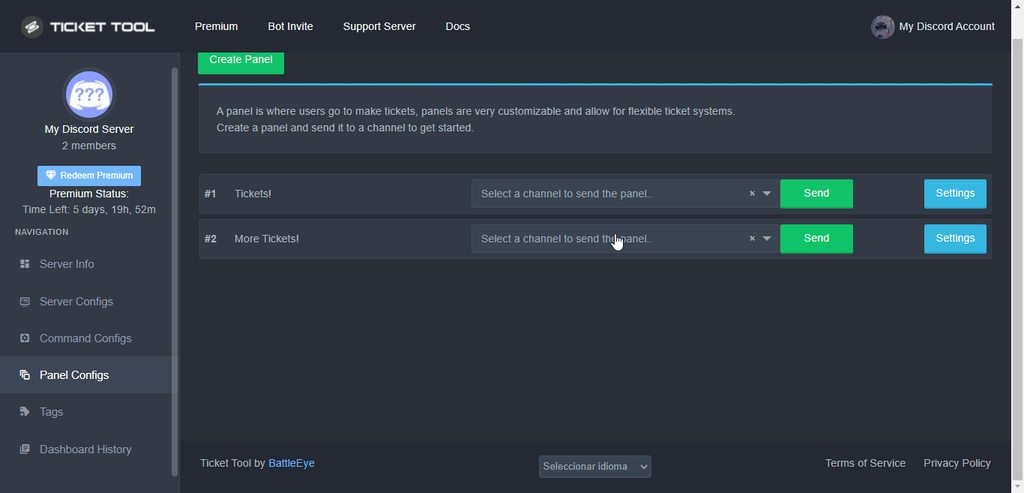
$rename
 tulip tide
hey, guys. I wanna know how to have another button next to create ticket.
 humble sequoiaBOT
For a more convenient use of multipanels, you can now combine panels on the dashboard. This will allow you to directly send the multipanel from the dashboard or via the $panel ID command.
Where can I find this?
You can find this setting on the Dashboard -> Panel Configs -> Settings -> General Options
Note: if you're attaching all the panels to a panel called English, don't include English in the attached panels box (If you do this, it will create duplicate)
This will put all buttons from all of your panels on one message. The message is the panel message from the panel you're combining these panels in.
Note: This is a premium feature
hallow marlin
$rename an the name you want for the ticket
humble sequoiaBOT
Warning: This channel isn't a ticket
hallow marlin
just use the command $rename in the ticket you want to rename
slender minnow
so, are you trying to change the name of the ticket?
hallow marlin
use the command $rename in the Ticket
This does not work with ticket tool, for that you need another bot..probably a custom bot
 dreamy abyss
Issue: Once I went back on the ticket tool website an I don’t see the server that I invited to, I’ve tried refreshing it & and restarting the website along with kicking the bot an inviting it back.
hallow marlin
dreamy abyss
Issue: Once I went back on the ticket tool website an I don’t see the server tha...
You have to log out once and log in again on the Ticket tool website.
This should help
dreamy abyss
hallow marlin
You have to log out once and log in again on the Ticket tool website.
This shoul...
Alright, I’ll see if that works.
Oh it works, Thanks for your support.
hallow marlin
Perfect, you're welcome! @dreamy abyss
 hallow marlin
 weak ermine
Which bot version do you use on your server?
weak ermine
hallow marlin
Which bot version do you use on your server?
Where do we see?
hallow marlin
weak ermine
Where do we see?
Do you have the Premium bot with the golden logo on your server?
weak ermine
no
gilded verge
@weak ermine, Dashboard->Server Configs->Change premium bot to free
(https://tickettool.xyz/manage-servers)
 hallow marlin
gilded verge
<@687283643776892935>, `Dashboard`->`Server Configs`->Change premium bot to free...
hallow marlin
gilded verge
<@687283643776892935>, `Dashboard`->`Server Configs`->Change premium bot to free...
exactly, thanks @gilded verge 🙂
iron nightBOT
Gave +1 Rep to @gilded verge
weak ermine
gilded verge
<@687283643776892935>, `Dashboard`->`Server Configs`->Change premium bot to free...
thanks you
iron nightBOT
Gave +1 Rep to @gilded verge
 leaden osprey
Cannot create an Odin node from rewards. I have now over 80 Thor. Metamask tells me cannot estimate gas fees and This transaction is expected to fail. What do I do?
humble sequoiaBOT
⚠️ You're in the wrong place
We provide support for @pseudo glen discord bot and cannot help you with whatever issue you have.
- Please make sure to contact the appropriate Support Team.
If you don't have any further questions regarding our bot Ticket Tool, please close this ticket
leaden osprey
Sorry. I do not see how to close this ticket.
 rocky moon
Why?
 humble sequoiaBOT
Update your discord App
Buttons are a relatively new addition to discord and don't work with some older versions of the app.
Please verify that you have the latest version of discord, by going to the app or play store.
Discord for the  App Store
Discord for the  Play Store
gilded verge
@rocky moon
rocky moon
Okay thanks@gilded verge
dreamy abyss
What does this mean I have 0 tickets? I set the ticket limit to 1
 hallow marlin
dreamy abyss
What does this mean I have 0 tickets? I set the ticket limit to 1
hallow marlin
dreamy abyss
What does this mean I have 0 tickets? I set the ticket limit to 1
check this

@dreamy abyss
hallow marlin
dreamy abyss
Thank you <@855793296155607051>, It worked.
perfect, you're welcome 🙂
 clever maple
Hi I have a question about making a ticket. I’m trying to set tickets up and wanted to know how to edit the message sent after a ticket is made. Ex:
 humble sequoiaBOT
The Ticket Message is the first message sent by the bot in a new ticket. To customise it head over to your Dashboard ➞ Panel Configs ➞ Settings ➞ Ticket Options ➞ Edit Ticket Message
clever maple
Ty
 shadow walrus
Hi. I cannot open a request. When I try to open it it says 'invalid form body'
How can I fix
humble sequoiaBOT
━━ moved to ticket ━━
 flint falcon
i cant send a panel to any server
it says it dosent have permisson
even tho it does
gilded verge
$perms
humble sequoiaBOT
ᅠ
@pseudo glen requires the following permissions:
Add Reactions
Read Channels
Send Messages
Manage Messages
Embed Links
Attach Files
Read History
Manage Roles
Manage Channels
To change the role permissions, you can go to your Discord Server ➞ Server Settings ➞ Roles ➞ @Ticket Tool
To change the channel permissions, you can go to your Channel Settings ➞ Permissions ➞ Ticket Tool
ᅠ
Note:
You can give Ticket Tool Administrative Permissions instead of all the permissions listed above, but it's entirely optional and NOT necessary.
gilded verge
@flint falcon, Please make sure the bot has the appropriate permissions
gilded verge
 ruby pike
How to do a ticket
ruby pike
How to do a ticket
Please read channel: #573205317870157855
 lunar rampart
@gilded verge My tool has all those permissions marked, yet still says it doesn't when trying to post?
 gilded verge
lunar rampart
<@334671104704774154> My tool has all those permissions marked, yet still says i...
gilded verge
lunar rampart
<@334671104704774154> My tool has all those permissions marked, yet still says i...
please use $debug on your server and show screenshot
lunar rampart
@gilded verge Nothing appears at all.
gilded verge
please go to the dashboard and check your prefix in Server Configs. Then use the command [yourprefix]debug
(https://tickettool.xyz/manage-servers)
 lunar rampart
I've sent it to your private messages @gilded verge
gilded verge
so now everything works, right?
gilded verge
okay, wait please
lunar rampart
Thank you very much.
When I first create the panel, it says that it's posted to the thread but nothing appears.
If I then manually send it, is when it appears with the denied tag.
humble sequoiaBOT
━━ moved to ticket ━━
flint falcon
cant add a panel
its says because of permission

@shut bolt
@hybrid dagger
help
 prime bridgeBOT
 Trippy#4196 has been warned!

 They were notified via dms.
shut bolt
If you want help from the support team please open a ticket and don't ping us
 harsh terrace
help
humble sequoiaBOT
We would love to help you, but if you don't tell us what you need help with we can't help you :(
 pastel quartz
Hello, my tickets are not being created on their respective categories. I made no changes on the dashboard, could you help me track what is the issue?
shut bolt
pastel quartz
Hello, my tickets are not being created on their respective categories. I made n...
How many channels have you right now on your regular category?
pastel quartz
shut bolt
How many channels have you right now on your regular category?
im not sure, but there are several tickets still open if that is relevant
shut bolt
pastel quartz
im not sure, but there are several tickets still open if that is relevant
Would you say there are more than 50 channels?
pastel quartz
shut bolt
Would you say there are more than 50 channels?
yeah, there are a lot of unanswered tickets...
shut bolt
pastel quartz
yeah, there are a lot of unanswered tickets...
$overflow
humble sequoiaBOT
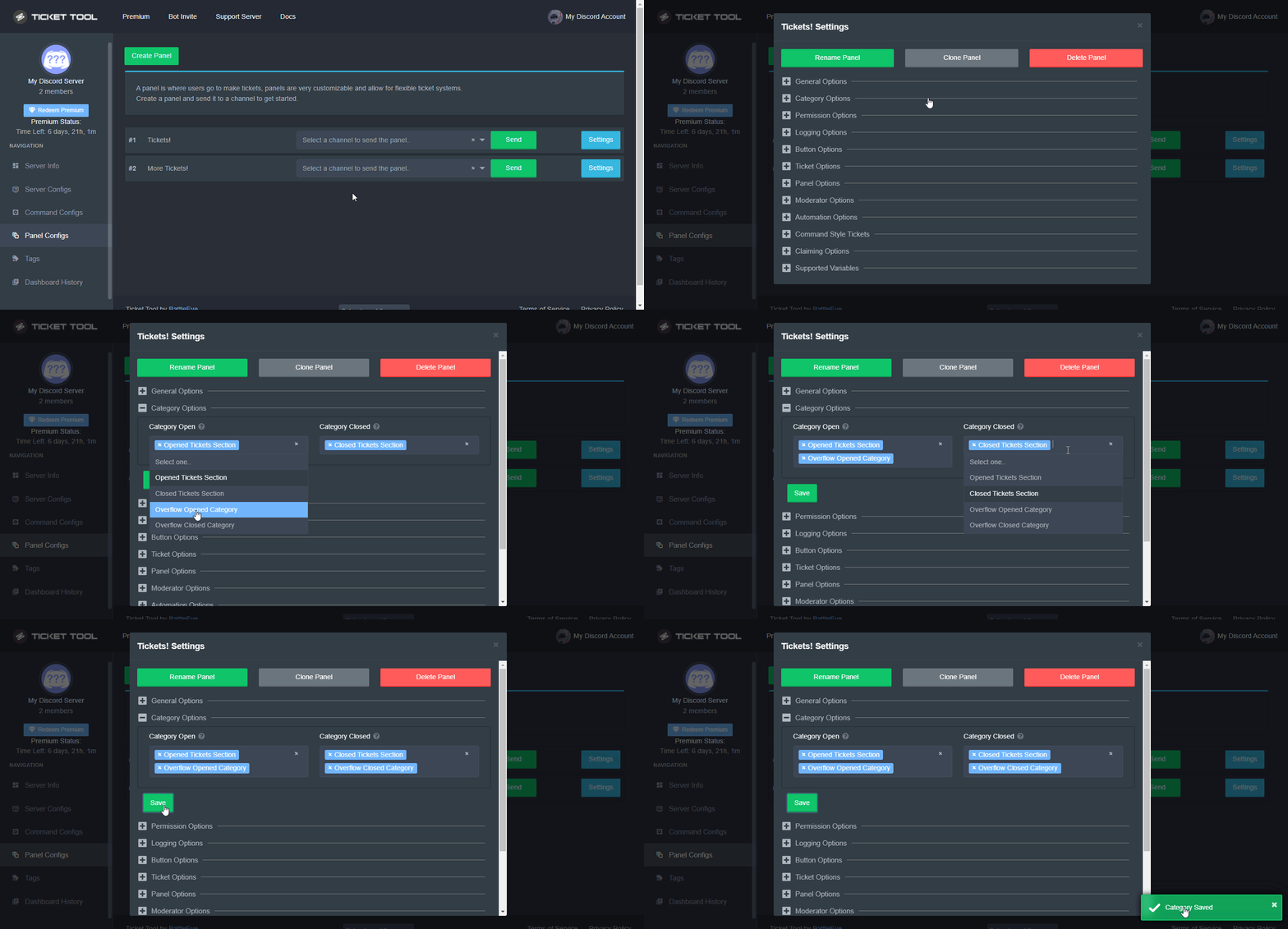
Discord only allows to stack up to 50 channels per category, meaning that if you have already 50 tickets in one category, the bot won't be able to place a ticket in that category, for such reason Ticket Tool counts with overflow categories, meaning that if your main category is filled, the bot will go ahead and place the ticket on the next one available, simply choose a second category in the category pickers:
 shut bolt
That's the reason for it
pastel quartz
shut bolt
That's the reason for it
Oh good to know! thank you!
iron nightBOT
Gave +1 Rep to @shut bolt
shut bolt
Sure
 astral trout
I need help how do I make it so no one can see my tickets
Apart from certain foles
Roles
slender minnow
$help support
humble sequoiaBOT
How to let support team see into a ticket
About support roles
A support role lets your support team see into tickets with out having to add them manually to each and every ticket.
You can add as many support roles as you like per panel.
NOTE that the way discord works all admins can see into tickets regardless of this.
How to set a support role
To set a Support role go to the Dashboard -> Panel Configs -> Settings -> General Options -> Support Team Roles.

NOTE that the support role will not be able to see into tickets that are already created..
slender minnow
@astral trout ^
flint falcon
i cant put a send a panel to any server
it says i dosent have the perms but i gave it every perm
slender minnow
flint falcon
it says i dosent have the perms but i gave it every perm
Can you cross check if tt has the required perms in the channel by running the debug command?
Or refer to this response
$perms
humble sequoiaBOT
ᅠ
@pseudo glen requires the following permissions:
Add Reactions
Read Channels
Send Messages
Manage Messages
Embed Links
Attach Files
Read History
Manage Roles
Manage Channels
To change the role permissions, you can go to your Discord Server ➞ Server Settings ➞ Roles ➞ @Ticket Tool
To change the channel permissions, you can go to your Channel Settings ➞ Permissions ➞ Ticket Tool
ᅠ
Note:
You can give Ticket Tool Administrative Permissions instead of all the permissions listed above, but it's entirely optional and NOT necessary.
slender minnow
Make sure the role has these permissions and for channel it is  incase your server everyone role has
 distant sphinx
how do i make the ticket bot ping me when someone makes a ticket
jade topaz
How do I change the bot image?
humble sequoiaBOT
━━ moved to ticket ━━
 atomic jay
when i make a ticket in my server it doesnt show up for a regular role
i can create one with a regular role but it doesnt show after
so what should i do
jade topaz
I cant do multipanels and remove the button off my first panel even when i untick disable button how do i fix that
ive attached the multipanels aswell

and disabled the buttons


still shows up like that
mainly just want the buttons removed but it wont remove
humble sequoiaBOT
For a more convenient use of multipanels, you can now combine panels on the dashboard. This will allow you to directly send the multipanel from the dashboard or via the $panel ID command.
Where can I find this?
You can find this setting on the Dashboard -> Panel Configs -> Settings -> General Options
Note: if you're attaching all the panels to a panel called English, don't include English in the attached panels box (If you do this, it will create duplicate)
This will put all buttons from all of your panels on one message. The message is the panel message from the panel you're combining these panels in.
Note: This is a premium feature
slender minnow
@jade topaz did you tried sending the panel again?
jade topaz
ive tried sending the panel multiple times
just shows up as panel 1 with the button from panel 2 no seperate panels under panel 1
 craggy geyser
You turned off the button so it won't send one
jade topaz
$ticket
$limit
how do i add custom server emojis into an embed ive had issues with this before it just shows up as

i do the <:name:id>
doesnt work
jade topaz
got it nvm
 strange hamlet
So I know how to run the commands and I do the $ help setup (without the space in between $ and help) I send it but the bot doesn’t respond. When I try it on my other server it works completely fine
humble sequoiaBOT
ᅠ
@pseudo glen requires the following permissions:
Add Reactions
Read Channels
Send Messages
Manage Messages
Embed Links
Attach Files
Read History
Manage Roles
Manage Channels
To change the role permissions, you can go to your Discord Server ➞ Server Settings ➞ Roles ➞ @Ticket Tool
To change the channel permissions, you can go to your Channel Settings ➞ Permissions ➞ Ticket Tool
ᅠ
Note:
You can give Ticket Tool Administrative Permissions instead of all the permissions listed above, but it's entirely optional and NOT necessary.
gilded verge
@strange hamlet, Please make sure the bot has the appropriate permissions
Another thing, check the server prefix in the Dashboard->Server Configs
 strange hamlet
okay
 modern oasis
strange hamlet
modern oasis
strange hamlet
they have all of the permissions that you listed and the $ sign was there as well
gilded verge
Please make sure in the settings of a given channel that the bot has the ability to view channel it and is visible on the right side of the given channel on the list of users. If it is not there, it means that it cannot respond to commands.

You see? $debug works
 humble sequoiaBOT
You can check our documentation here.
You can also check #573205317870157855 for the basic setup.
Our documentation contains all the info you need about the bot to be able to setup and configure the bot however you like.
gilded verge
@modern oasis
 little spoke
$help command isnt working
humble sequoiaBOT
Help Options
$help commands - Information on commands
$help setup - Information on bot setup
$help faq - Frequently asked questions
 copper owl
$deticket
humble sequoiaBOT

Deutsches Support-Team
Wenn du Hilfe vom Deutschen Support-Team erhalten möchtest gehe in #🎫│make-a-ticket und öffne durch einen Klick auf den :flag_de: Button ein Ticket.
copper owl
@jade topaz ^ :)
jade topaz
yes?
copper owl
No
jade topaz
türkei
copper owl
Nope
copper owl
you can check the #918271177988907079 to see where we're from. let's keep this for support
copper owl
jade topaz
can u help me
you do have a ticket opened. Please wait for the german support team to help you out
jade topaz
yes i did
 void rapids
Hoka
Hola soy santi_parla@msn.com este es mi correo
Sobre el tema de ayer que entraron en mi cuenta
Me han dicho que me bloquearon la cuenta temporalmente
 ionic sapphire
hi, i need to know the stats:
how many tickets were opened and closed in a given period. I can't find this information, is it somewher
copper owl
ionic sapphire
hi, i need to know the stats:
how many tickets were opened and closed in a given...
Not as of now, but stats are planned for the next major update
ionic sapphire
Oh my God😅
ionic sapphire
copper owl
Not as of now, but stats are planned for the next major update
we are looking forward to this feature!
copper owl
So am I to be honest haha
 lime prism
Hello
I have a problem
I can’t setup the panel from mobile so I can’t even add a transcript channel and I can’t even choose where ticket can appear
Can you help me
slender minnow
$help setup
humble sequoiaBOT
Setting up Ticket Tool
Visit the docs for setup info
General Setup
lime prism
Thanks
 frigid idol
Hi all,
kind of new here, so probably have question that would make you facepalm 😅
I've seen servers using this tool, and they seem to have managed to get rid of the info under the bot name.
Is there an option for this and where can I find that?
Using the premium version
jade topaz
Panel configs > Open the respective panel's settings modal > Ticket Options > Edit Ticket Message > Delete the footer
Dat bedoelde?
solid stream
frigid idol
Hi all,
kind of new here, so probably have question that would make you facepal...
This?

If so, that shard is just bugged, there's no option to set it per server ( even if I wanted )
jade topaz
ooh
frigid idol
@solid stream yes meant that one
jade topaz
sorry kzen dom
solid stream
jade topaz
sorry kzen dom
It was a quick and detailed response if they wanted to modify the footer.
frigid idol
but how do other have managed that ?
solid stream
frigid idol
but how do other have managed that ?
They didn't do it, When I restart the bot it's going to return.
frigid idol
I understand. Any chance this will be something for a future update?
solid stream
The bot has 896 shards, some of them break with it's status randomly
solid stream
frigid idol
I understand. Any chance this will be something for a future update?
Discord doesn't give us the option to modify that per server
solid stream
solid stream
Discord doesn't give us the option to modify that per server
It would change for all 2,000 other servers on your shard.
frigid idol
I understand. But this info that comes with the bot. So I would understand is that would not be an option for the free one, but would be nice to add that option for premium users?
So premium being automatically whitelabeled
jade topaz
It's not possible, Discord does not allow that
copper owl
jade topaz
It's not possible, Discord does not allow that
discord doesnt have anything got to do with whitelabel bots
copper owl
frigid idol
I understand. But this info that comes with the bot. So I would understand is th...
this is a planned feature.
jade topaz
So its possible to change the status of a bot per server? Since when 👀
copper owl
jade topaz
So its possible to change the status of a bot per server? Since when 👀
If the bot offers a whitelabel, it's possible
do you know what a whitelable is?
jade topaz
Not in this case, no
copper owl
jade topaz
Not in this case, no
a whitelabel is basically a copy of a bot but using your own application you make in the Discord Developer Portal.
You dont have access to the code itself, but rather a "copy" that's not accessable by anyone except ofc, the dev
So in this case, you can customize the pfp, name, status, about me, whatever. But you cannot actually edit the code
jade topaz
Ohh like that, yeah, like MEE6's custom bot feature
jade topaz
hey! I have added the bot to the server but it's not showing in the dashboard, can someone tell me why? i tried to re-login many times and tried to kick the bot and add him again but still nothing.

 solid stream
jade topaz
hey! I have added the bot to the server but it's not showing in the dashboard, c...
solid stream
jade topaz
hey! I have added the bot to the server but it's not showing in the dashboard, c...
Hmm, make sure you have permissions to use the bot on the server, what's your role? do you have admin? If not it's best to ask an admin to assign a dashboard role.
jade topaz
solid stream
Hmm, make sure you have permissions to use the bot on the server, what's your ro...
Yes I have all permissions since i'm the owner and I have ownership
I also tried to use command "$help" but bot didn't respond
solid stream
Let me see if we have any outages
We don't seem to have any
Can you try kicking and re-adding the bot?
jade topaz
Thank you, also the server has been crated today (hour ago) so isn't this the problem?
jade topaz
solid stream
Can you try kicking and re-adding the bot?
sure i'll try one more time
solid stream
jade topaz
sure i'll try one more time
And by re-logging, did you do that on the ticket tool dashboard?
The fact that your avatar is wrong on the dashboard makes me think you haven't logged out on TicketTool.xyz recently (didn't pull your newest avatar)
jade topaz
solid stream
The fact that your avatar is wrong on the dashboard makes me think you haven't l...
I did only once today but it's still the same as before (on the screenshot) but I can try to do it again on phone.
solid stream
Yeah, the bots detected just fine.
solid stream
jade topaz
I did only once today but it's still the same as before (on the screenshot) but ...
Needs to be done on whatever device you wish to make changes on.
It's also possible it's the wrong account? because it should be showing your current avatar in the top right.
solid stream
You too
frigid idol
jade topaz
Yes I have all permissions since i'm the owner and I have ownership
Have you added the bot to the channel in the channel permissions?
 hot sigil
Hey, I'm trying to get the tickets to open in a specific category and I've changed the option to do that but it isn't working.
 eager cargo
$help category
humble sequoiaBOT
How to set the open category
To set a open category go to the Dashboard -> Panel Configs -> Settings -> Category Options -> Category Open
eager cargo
Make sure TT has got the correct perms
Do $debug to see what perms it's missing (if any)
hot sigil
I'll check, ty
It isn't working
I've done the Category Options but for some reason it continues to create the tickets at the top of the server
Oh, I think I might've found out why
eager cargo
Is your category full
hot sigil
eager cargo
Is your category full
No
hot sigil
eager cargo
Is your category full
I got it, thank you for your help
iron nightBOT
Gave +1 Rep to @eager cargo
eager cargo
np
hot sigil
I do have another issue though
When I try to use the bot while not being an administrator, it says that the interaction failed
 tulip ocean
Hi guys! Our server currently has 2 admin roles. How do I limit one admin role to a specific ticket?
hot sigil
Do members need certain permissions for the create ticket button to work
 celest vessel
How to re-open a ticket that has been closed and deleted from the discord?
jade topaz
how?
 humble sequoiaBOT
For a more convenient use of multipanels, you can now combine panels on the dashboard. This will allow you to directly send the multipanel from the dashboard or via the $panel ID command.
Where can I find this?
You can find this setting on the Dashboard -> Panel Configs -> Settings -> General Options
Note: if you're attaching all the panels to a panel called English, don't include English in the attached panels box (If you do this, it will create duplicate)
This will put all buttons from all of your panels on one message. The message is the panel message from the panel you're combining these panels in.
Note: This is a premium feature
slender minnow
@jade topazrefer above ^
copper owl
already handled :) thanks
hot sigil
Are there any mods able to help me at this time?
fallow ingot
hot sigil
Are there any mods able to help me at this time?
What with?
I’m not a moderator but can pass stuff onto one.
hot sigil
Thanks.
For some reason when a second account I have tries to use the ticket system, it says something along the lines of “interaction failed”
But when my main acc makes a ticket, it works fine.
solid stream
Same device?
If you're using an old version of discord this is a fairly common error.
interaction failed without any other errors is a discord error
hot sigil
It’s a separate device. I’ll have to see if an update is available. I’ll check it out later. Thanks @fallow ingot
iron nightBOT
Gave +1 Rep to @fallow ingot
solid stream
hot sigil
It’s a separate device. I’ll have to see if an update is available. I’ll check i...
If it's apple you might need to re-install discord.
hot sigil
Yeah, it’s Apple. I’ll try that too if the update doesn’t work, thanks @solid stream
 mild estuary
Can someone help me set up my ticketing system?
humble sequoiaBOT
You can check our documentation here.
You can also check #573205317870157855 for the basic setup.
Our documentation contains all the info you need about the bot to be able to setup and configure the bot however you like.
fallow ingot
@mild estuary
mild estuary
fallow ingot
<@395782028337086466> <:this:894279341108772914>
I've seen it. Want someone to set it up for me.
mild estuary
mild estuary
I've seen it. Want someone to set it up for me.
There's much more than just this quick guide. (to do it right)
fallow ingot
We don't setup the bot for people, we can guide you trough it tho.
mild estuary
That's what I'm looking for. Someone with time to do it.
Doesn't have to be you - just someone more familiar than me.
hallow marlin
mild estuary
That's what I'm looking for. Someone with time to do it.
Doesn't have to be you...
Do you still need help?
 earnest tangle
Hello!! I just added the bot to my server but idk how to program it for making tickets. Can I get assistance with this please?
humble sequoiaBOT
You can check our documentation here.
You can also check #573205317870157855 for the basic setup.
Our documentation contains all the info you need about the bot to be able to setup and configure the bot however you like.
hallow marlin
@earnest tangle check this 🙂
earnest tangle
Ty!!
jade topaz
how do I name the ticket after the person who opened the ticket? I forgot how lmao
humble sequoiaBOT
The ticket name is the default channel name of all tickets. To edit it, go to your Dashboard > Panel Configs > Settings > Ticket Options. There you can edit the channel name of opened and closed tickets. You can also use variables in there.
 Note: This is a premium feature
jade topaz
Note: This is a premium feature
jade topaz
how do you do it though automatically instead of #s
regal goblet
humble sequoia
This is automatically (premium only), if you want the name of the person who opened the ticket type in {ticket.user.name} @jade topaz
jade topaz
so it would be
Ticket - {ticket.user.name}

@regal goblet talking about right here
instead of count I use
so it would be Ticket - Helios or w/e
regal goblet
Correct, ticket - {ticket.user.name} would show ticket - helios
regal goblet
Yw
 chrome canyon
it says my key isnt correct? i just purchased it and i tried making a ticket how do i make a damn ticket???
frigid idol
chrome canyon
it says my key isnt correct? i just purchased it and i tried making a ticket how...
frigid idol
 rough zephyr
what role that can peoples see the ticket?
rough zephyr
what role that can peoples see the ticket?
Is it possible you can clarify what you mean?
- Do you only want your staff to see the tickets?
- Do you want everyone on the discord server to see the tickets?
hot sigil
Thanks @solid stream , it's working now
iron nightBOT
Gave +1 Rep to @solid stream
hot sigil
I tagged for ^
 lofty cedar
Is there a limit of tickets per category?
 misty marsh
hello can someone help me im a mod on a server and i cant add ticket to the server
the server is not on my dashboard
 covert swallow
Do you have the manage server permission
misty marsh
hmmmm not sure im still new to discord
covert swallow
You need that permission to invite any bot to a server
misty marsh
ok thank you ill check it out now
 jovial egret
covert swallow
You need that permission to invite any bot to a server
jovial egret
covert swallow
You need that permission to invite any bot to a server
I’m getting missing permissions what’s that mean
covert swallow
It means youre missing permissions to do the action youre trying to do
misty marsh
covert swallow
You need that permission to invite any bot to a server
thank you its fixed now mwah
iron nightBOT
Gave +1 Rep to @covert swallow
misty marsh
😘
 mortal totem
Hello guys, how to fix this? the bot has the view channel perms and send message too.
 mortal totem
Hello guys, how to fix this? the bot has the view channel perms and send message...
mortal totem
mortal totem
Hello guys, how to fix this? the bot has the view channel perms and send message...
Fixed this,
this is now the new issue

cannot delete the opened ticket
 slender minnow
mortal totem
slender minnow
mortal totem
give the bot roles which are marked with 
in your case it is Manage Roles
mortal totem
Thanks @slender minnow
iron nightBOT
Gave +1 Rep to @slender minnow
lofty cedar
lofty cedar
Is there a limit of tickets per category?
.
slender minnow
lofty cedar
Is there a limit of tickets per category?
50 tickets per category
thats a discord limit
nothing can be done about it
lofty cedar
Aight thx
shut bolt
slender minnow
nothing can be done about it
Technically not
But
Practically
You can have multiple categories for that
$overflow
humble sequoiaBOT
Discord only allows to stack up to 50 channels per category, meaning that if you have already 50 tickets in one category, the bot won't be able to place a ticket in that category, for such reason Ticket Tool counts with overflow categories, meaning that if your main category is filled, the bot will go ahead and place the ticket on the next one available, simply choose a second category in the category pickers:


 slender minnow
well thats a workaround for that
i meant to say, we cant do anything about changing that 50 limit 
shut bolt
slender minnow
i meant to say, we cant do anything about changing that 50 limit <a:KEK:90226130...
That's right
🤝
slender minnow
yeah kinda
jade topaz
If anyone needs help, dm me
copper owl
jade topaz
If anyone needs help, dm me
you can help in this channel BTW.