#🆘│community-support
1 messages · Page 399 of 1
 loud turtle
 fallow ingot
@loud turtle ^
loud turtle
I'm here to help. Not here to base fundementals
 shut bolt
loud turtle
I'm here to help. Not here to base fundementals
shut bolt
loud turtle
I'm here to help. Not here to base fundementals
There's no need at all to talk like that to a support team member, they are letting you know the user's query has been taken into a ticket, Aaron mentioned you for that reason
There's a reason behind the moved to ticket message
 shut bolt
 twilit slate
Any help with this
twilit slate
Any help with this
Run $debug in the channel you are trying to send the panel to, if the bot doesn't answer, nor to your DMs, make sure that it has access to see the channel
 shut bolt
twilit slate
How I give him permissions?
shut bolt
twilit slate
How I give him permissions?
Go into the channel settings
Open the permissions tab
And add the bot's user if it's not there
twilit slate
Ok
shut bolt
Then mark as  all the perms it marked as
  on the $debug
And try to $debug again, if everything is on , should work fine
 shut bolt
Same thing, the bot is missing all the perms
 twilit slate
How I tick them tho
shut bolt
Open the channel's settings
twilit slate
How
shut bolt
twilit slate
How
Slide to the right on the channel you are trying to send the panel
Then click on settings above the user list
Then go to permissions
Click on add a member
Add the bot
And there you should mark the perms as
twilit slate
Ok
 boreal plume
Hellooo, was wondering if there is a limit to how many tickets could be open at once? Looked thru and either im not seeing it in docs or I missed it. Thanks 
shut bolt
boreal plume
Hellooo, was wondering if there is a limit to how many tickets could be open at ...
Hi there, it depends on your settings
You can restrict the amount of tickets a user can open per panel at once
You can also restrict the amount of tickets per user across al panels
boreal plume
Yup, saw those two settings. Assuming there's no max restriction by bot then, thank you Pablo! Very fast support 
shut bolt
boreal plume
Yup, saw those two settings. Assuming there's no max restriction by bot then, th...
Sure! The only restriction we have is how many tickets you can create per minute, with the free bot you can create 10 per minute. And the other restriction (Discord's) is that each server can only have 500 channels so if you hit that limit the bot won't be able to create more tickets
boreal plume
Noted on rate limit 
shut bolt

 shut bolt
Same
 jade topaz
can someone help me the messages ticket can send? for example like the role? im looking at faq for it but im stuck on this part

 lilac girder
jade topaz
can someone help me the messages ticket can send? for example like the role? im ...
lilac girder
jade topaz
can someone help me the messages ticket can send? for example like the role? im ...
Do you mean by editing the panel message?
jade topaz
oh yes
 humble sequoiaBOT
The panel message is where people react to make a ticket. To customize it head over to your Dashboard --> Panel Configs -> Settings -> Panel Options -> Edit Panel Message
 jade topaz
theres no setting there thou
oh wait
im blind 🧍♀️
sorry
what do i put here?

and field mesage
message*
 slender minnow
jade topaz
slender minnow
jade topaz
Field messages is a premium feature
Though, answering to your question...
this is how a field value looks like
This is how a field value looks like
It will add a bold and not bold text to your panel
 novel linden
humble sequoiaBOT
novel linden
humble sequoiaBOT
━━ moved to ticket ━━
loud turtle
There goes another one
 inner widget
How a server member can remove tickets panel
 humble sequoiaBOT
━━ moved to ticket ━━
fallow ingot
You don’t want them to be able to close tickets?
Yeah sure, just go to Panel Configs > Settings > Button options > Close Ticket and click settings from there you want to enable  Support Team Only.
Sorry for the delayed response I was doing something
 iron nightBOT
Gave +1 Rep to @fallow ingot
fallow ingot
no problem
 lilac girder
 pseudo oyster
Where I can give the permission, the bot have admin on the server
pseudo oyster
Where I can give the permission, the bot have admin on the server
You can try using the command $panel panelNo and replace panelNo with the panel number next to the panel title, if the bot have perms it will send.
 jade topaz
slender minnow
Field messages is a premium feature
jade topaz
slender minnow
Field messages is a premium feature
oh, it says i cant move on without field thou
 gilded verge
 past pollen
How can I fix this?
past pollen
How can I fix this?
Hi, give to Ticket Tool role View Channels permission in server settings if he don't have

but please check:
humble sequoiaBOT
ᅠ
@pseudo glen requires the following permissions:
Add Reactions
Read Channels
Send Messages
Manage Messages
Embed Links
Attach Files
Read History
Manage Roles
To change the role permissions, you can go to your Discord Server ➞ Server Settings ➞ Roles ➞ @Ticket Tool
To change the channel permissions, you can go to your Channel Settings ➞ Permissions ➞ Ticket Tool
ᅠ
Note:
You can give Ticket Tool Administrative Permissions instead of all the permissions listed above, but it's entirely optional and NOT necessary.
 past pollen
gilded verge
but please check:
past pollen
gilded verge
but please check:
How can I check what permissions are missing
I have all of them turned on but still not working
gilded verge
on your server use $debug and please show screenshot
past pollen
Thanks for that have sorted it !
gilded verge
Then I'm glad you made it! 
 ornate stag
Hi! A put the bot in a server but now don't show up in the dashboard. Is because the server isn't mine?
humble sequoiaBOT

Don't see your server in the dashboard?
You will possibly need to relog. Look below to see steps on how to relog.
How to relog in the Dashboard.
First, you will need to go to the dashboard. Once your there, click on your avatar on the top right. after you clicked it, you will see button that says Logout. You must click that. Once you have logged out, you can log back in.
Note:
You need one of these 3 things to access the dashboard.
1. Server Owner (Level: 6)
2. Server Administrator (Level: 4)
3. Dashboard Role (Level: 2)
:warning: You can check your level using $level on your Discord Server
User permission level with Ticket Tool
@User is permission level: 0 (User)
```» *If it shows that your permission is **0**, you don't have any of the above **3 things** to manage the dashboard.*
**See the picture below on how to relog:**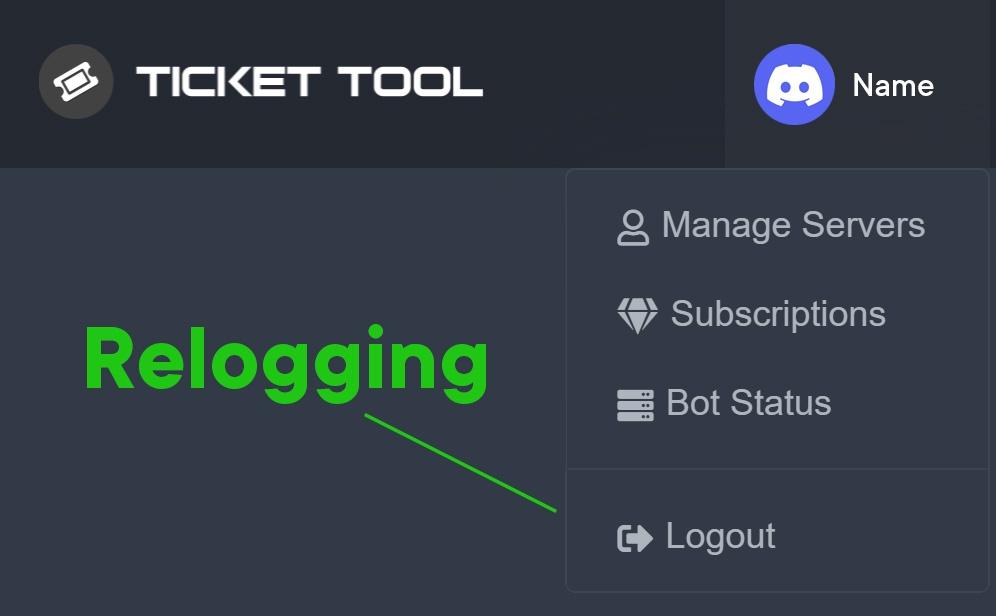 ornate stag
How to give a Dashboard role to someone?
 placid berry
I made a change in the settings but it doesn't change can anyone help me?


I had already created a ticket for this same channel the first time everything worked fine but when I update this message appears
 humble sequoiaBOT
Any role you put there will have full access to the ticket tool dashboard. The server owner and users with admin permissions already have access to the dashboard.
Be careful of which roles to put here

 regal goblet
@ornate stag ^^
@placid berry have you tried reverting what you updated?
According to the red message you need to grant view and send permissions to the channel
ornate stag
regal goblet
<@653464216014946305> ^^
thanxx
placid berry
So the channel that I'm trying to update has permission from the Bot but it doesn't update, I even deleted the bot that I had already created in the channel, it doesn't work at all
slender minnow
jade topaz
oh, it says i cant move on without field thou
Delete those added field values that you added (including the blank ones)
regal goblet
placid berry
I achieved
Fixed?
placid berry
regal goblet
Fixed?
Yes!
regal goblet
Am glad
placid berry
Thank you for your support!
I have a question, how can I make the ticket attribute reactions to comments from people in a channel? For example, every message that a member writes in a channel, the bot automatically puts a reaction on the message of these people, is this possible?
regal goblet
@placid berry not with ticket tool
 flint wraith
Hey there!
I've got the following Problem: everytime I try to interact with the bot, it says invalid Form Body. Did someone have to deal with this before?
placid berry
regal goblet
<@590398860325552138> not with ticket tool
Thanks!
iron nightBOT
Gave +1 Rep to @regal goblet
regal goblet
@flint wraith try updating your discord app
slender minnow
flint wraith
Discord is currently unavailable in the Google Play Store.
Wdym unavailable?
flint wraith
It doesn't Show up when I search for it.
 burnt silo
Hallo
burnt silo
regal goblet
<@497388975343009802> try updating your discord app
Hi sir can you help me
Do you know How i can add some more moderators to ticket tool
so some more besides team and me can answer tickets?
burnt silo
burnt silo
Do you know How i can add some more moderators to ticket tool
so some more besi...
@safe prairie
regal goblet
burnt silo
<@452872995438985227>
Avoid pinging please #546557408902905896 #4
humble sequoiaBOT
How to let support team see into a ticket
About support roles
A support role lets your support team see into tickets with out having to add them manually to each and every ticket.
You can add as many support roles as you like per panel.
NOTE that the way discord works all admins can see into tickets regardless of this.
How to set a support role
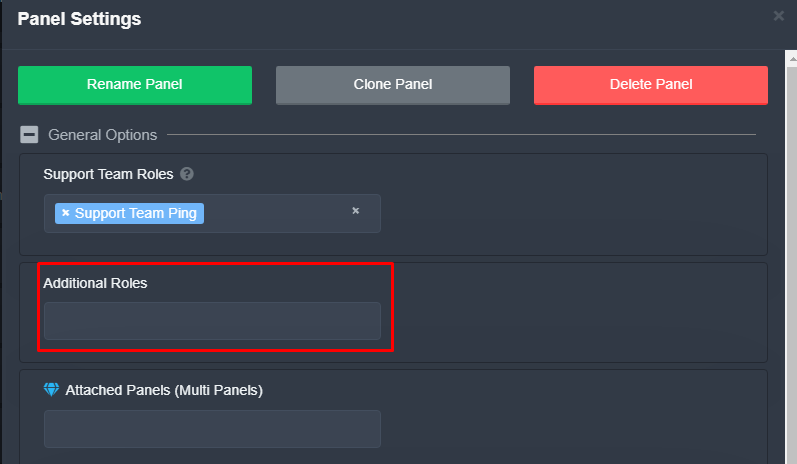
To set a Support role go to the Dashboard -> Panel Configs -> Settings -> General Options -> Support Team Roles.

NOTE that the support role will not be able to see into tickets that are already created..
Additional Roles are roles that are independent from Support Roles. You can assign unique permissions for roles defined as additional roles in tickets.
To assign permissions for additional roles, go to Dashboard ➞ Panel Configs ➞ Settings ➞ Permission Options ➞ Additional Opened/Closed Permissions.
Note: Additional Roles do NOT get affected by the Change other support team permissions when claimed feature under Claiming Options, meaning they don't gain/lose any permissions set in that feature once a ticket is claimed.
 burnt silo
regal goblet
Avoid pinging please <#546557408902905896> #4
burnt silo
regal goblet
Avoid pinging please <#546557408902905896> #4
Sorry
regal goblet
Check both embeds
burnt silo
regal goblet
Check both embeds
so i need to create new role Right?
then I put in additional roles right?
regal goblet
burnt silo
so i need to create new role Right?
then I put in additional roles right?
Basically yeah
burnt silo
regal goblet
Basically yeah
oh thank you so much, sorry for ping
iron nightBOT
Gave +1 Rep to @regal goblet
 ivory pagoda
$help
humble sequoiaBOT
Help Options
$help commands - Information on commands
$help setup - Information on bot setup
$help faq - Frequently asked questions
ivory pagoda
$help commands
humble sequoiaBOT
() = optional
[] = required
*==================================
Ticket Commands
==================================*
_ _
`$add [User] (channel)`
Description: Adding additional users to a ticket
Aliases: none
`$remove [User] (channel)`
Description: Removing users from a ticket
Aliases: none
`$close`
Description: Closing tickets
Aliases: none
`$open`
Description: Opening closed tickets
Aliases: none
`$delete`
Description: Deleting tickets
Aliases: none
`$rename`
Description: Renaming tickets/channels
Aliases: none
`$transcript (send channel)`
Description: Creating transcripts
Aliases: none
`$new (user) (reason)`
Description: Creating tickets in a monitored channel (when command style is enabled)
Aliases: none
`$claim`
Description: Claiming tickets (when claim is enabled)
Aliases: "unclaim"
_ _
*==================================
General Commands
==================================*
_ _
`$help (Help Options)`
Description: Help Command
Aliases: none
`$debug`
Description: Debuging issues with running Ticket Tool
Aliases: none
`$id (@role/@user/#channel/emoji)`
Description: Converting roles, users, channels and emojis to ID
Aliases: "getid"
`$permlevel`
Description: Checking permission level with Ticket Tool
Aliases: "level"
`$ping`
Description: Checking response time with discord api
Aliases: none
`$vote (link | unlink | redeem) (user)`
Description: Earn premium by voting on top.gg or Discord.boats
Aliases: "votes"
If Ticket Tool support requested this debug give them this link:
https://discordapp.com/channels/509192800865353738/662692902245498910/961642593396097134
Bot Permissions ឵ ឵឵ ឵ ឵឵ ឵ ឵឵ ឵ ឵឵
✅ - Read Channels
✅ - Send Messages
✅ - Embed Links
✅ - Attach Files
✅ - Add Reactions
✅ - Manage Roles
✅ - Manage Channels
✅ - Manage Messages
✅ - Read History
Channel Permissions ឵ ឵឵ ឵ ឵឵ ឵ ឵឵ ឵ ឵឵
✅ - Read Channels
✅ - Send Messages
✅ - Embed Links
✅ - Attach Files
✅ - Add Reactions
✅ - Manage Roles
✅ - Manage Channels
✅ - Manage Messages
✅ - Read History
Server Information ឵ ឵឵ ឵ ឵឵ ឵ ឵឵ ឵ ឵឵ ឵ ឵឵
Channel name:
•community-support
Channel ID:
776680605517742090
Channel Count:
201/500
Server name:
Ticket Tool Support
Server ID:
509192800865353738
User Information ឵ ឵឵ ឵ ឵឵ ឵ ឵឵ ឵ ឵឵ ឵ ឵឵
User name:
victor brayan#0472
User ID:
823573712380755999
Permission Level:
0 - User ()
Bot Information ឵ ឵឵ ឵ ឵឵ ឵ ឵឵ ឵ ឵឵ ឵ ឵឵
Prefix:
$
Premium Status:
Lifetime - ["subV2","time"]
Current shard:
1
API Latency:
93
 manic karma
$help commands
humble sequoiaBOT
() = optional
[] = required
*==================================
Ticket Commands
==================================*
_ _
`$add [User] (channel)`
Description: Adding additional users to a ticket
Aliases: none
`$remove [User] (channel)`
Description: Removing users from a ticket
Aliases: none
`$close`
Description: Closing tickets
Aliases: none
`$open`
Description: Opening closed tickets
Aliases: none
`$delete`
Description: Deleting tickets
Aliases: none
`$rename`
Description: Renaming tickets/channels
Aliases: none
`$transcript (send channel)`
Description: Creating transcripts
Aliases: none
`$new (user) (reason)`
Description: Creating tickets in a monitored channel (when command style is enabled)
Aliases: none
`$claim`
Description: Claiming tickets (when claim is enabled)
Aliases: "unclaim"
_ _
*==================================
General Commands
==================================*
_ _
`$help (Help Options)`
Description: Help Command
Aliases: none
`$debug`
Description: Debuging issues with running Ticket Tool
Aliases: none
`$id (@role/@user/#channel/emoji)`
Description: Converting roles, users, channels and emojis to ID
Aliases: "getid"
`$permlevel`
Description: Checking permission level with Ticket Tool
Aliases: "level"
`$ping`
Description: Checking response time with discord api
Aliases: none
`$vote (link | unlink | redeem) (user)`
Description: Earn premium by voting on top.gg or Discord.boats
Aliases: "votes"
 royal folio
How can I edit the message in the ticket
It's welcome
I don't need it
How can I edit it
In ticket tool not prim
 frank halo
i can try to help, what do you mean?
frank halo
you want to change that?
 frank halo
one second pls
royal folio
Tyt
frank halo
$help commands
humble sequoiaBOT
() = optional
[] = required
*==================================
Ticket Commands
==================================*
_ _
`$add [User] (channel)`
Description: Adding additional users to a ticket
Aliases: none
`$remove [User] (channel)`
Description: Removing users from a ticket
Aliases: none
`$close`
Description: Closing tickets
Aliases: none
`$open`
Description: Opening closed tickets
Aliases: none
`$delete`
Description: Deleting tickets
Aliases: none
`$rename`
Description: Renaming tickets/channels
Aliases: none
`$transcript (send channel)`
Description: Creating transcripts
Aliases: none
`$new (user) (reason)`
Description: Creating tickets in a monitored channel (when command style is enabled)
Aliases: none
`$claim`
Description: Claiming tickets (when claim is enabled)
Aliases: "unclaim"
_ _
*==================================
General Commands
==================================*
_ _
`$help (Help Options)`
Description: Help Command
Aliases: none
`$debug`
Description: Debuging issues with running Ticket Tool
Aliases: none
`$id (@role/@user/#channel/emoji)`
Description: Converting roles, users, channels and emojis to ID
Aliases: "getid"
`$permlevel`
Description: Checking permission level with Ticket Tool
Aliases: "level"
`$ping`
Description: Checking response time with discord api
Aliases: none
`$vote (link | unlink | redeem) (user)`
Description: Earn premium by voting on top.gg or Discord.boats
Aliases: "votes"
royal folio
?
 wintry kernel
frank halo
royal folio
?
wintry kernel
frank halo
royal folio
?
i looked it up, here's an article that tells you https://www.techy.how/tutorials/discord-support-ticket

Tech How
A short tutorial on how to create support tickets on your Discord server using the Tickets Tool Discord bot. This guide will show you how to quickly integrated the smart bot on Discord as well as some important settings you have to consider.
also! i wanted to ask if there was a way to rename the ticket transcript?
 river frigate
Hi, one member in my server seems unable to open tickets yet no one else has had an issue, it says "interaction failed" after they press the button to open one. Does anyone know what the issue could be and how to fix it?
 solid stream
river frigate
Hi, one member in my server seems unable to open tickets yet no one else has had...
solid stream
river frigate
Hi, one member in my server seems unable to open tickets yet no one else has had...
If it continues to happen they should try and update their discord app
 dark sky
Hi all Im experiencing this message when trying to close completed support tickets.
System Failure: Missing Access
slender minnow
dark sky
Hi all Im experiencing this message when trying to close completed support ticke...
Ticket Tool is missing some perms
can you run $debug and allow the ones with 
dark sky
slender minnow
can you run `$debug` and allow the ones with <:deny_red:836268265821962341>
Right on. I'll try that
jade topaz
I need help please.
How do I install this bot?
What do I have to type for this to work?
I already installed it but how do I activate it?
slender minnow
$help setup
humble sequoiaBOT
Setting up Ticket Tool
Visit the docs for setup info
General Setup
slender minnow
@jade topaz refer the above docs ^
jade topaz
thx
 tepid islandBOT
 YMX_750#5613
You work as a water slide tester and earn  210
210
Reply #50
 rose garnet
fallow ingot
rose garnet
fallow ingot
It’s okay.
jade topaz
Hi, How can I create a ticketed panel like the following image? And I saw if I click on the 1st button, the ticket names as help-num. If 2nd, it names as gw-num etc...
How can I do that?

Ping me while answering
humble sequoiaBOT
For a more convenient use of multipanels, you can now combine panels on the dashboard. This will allow you to directly send the multipanel from the dashboard or via the $panel ID command.
Where can I find this?
You can find this setting on the Dashboard -> Panel Configs -> Settings -> General Options
Note: if you're attaching all the panels to a panel called English, don't include English in the attached panels box (If you do this, it will create duplicate)
This will put all buttons from all of your panels on one message. The message is the panel message from the panel you're combining these panels in.

 Note: This is a premium feature
gilded verge
Note: This is a premium feature
gilded verge
@jade topaz, Hey, you probably mean multipanels. In that case, have a look here 
jade topaz
Ok
jade topaz
gilded verge
<@456226577798135808>, Hey, you probably mean multipanels. In that case, have a ...
I want to save the message for me
gilded verge
Hm? What do you mean?
gilded verge
okey
jade topaz
Hewo, if I vote Ticket Tool 6 times on top.gg, I will get the premium code by using $vote reedem right?
- If I do $vote redeem before reaching 6 votes, will anything happen?
Answer 1 and 2 questions serially
Hey, just redeemed my votes  How much time do I have left to claim the code?
lets say someone with the member role makes a ticket everyone with member role can see that ticket
how do i fix that
jade topaz
jade topaz
lets say someone with the member role makes a ticket everyone with member role c...
Panel configs > Permission Options. If you check those two, I believe you will be able to fix or detect the problem.


thank you
thanks @jade topaz
iron nightBOT
Gave +1 Rep to @rose geyser
jade topaz
hello how can i be on the support team?
shut bolt
jade topaz
hello how can i be on the support team?
$staffapps
humble sequoiaBOT
How do be I become a Support Member?
You can become a support member in 2 ways:
1. You can be really active in #🆘│community-support gain <@&799500225579712543> role and get chosen by a Manager
2. You can apply VIA our applications that would be sent in #📣│server-news
We currently have Support Teams for the following languages:
:flag_us: English
:flag_jo: Arabic
:flag_fr: French
:flag_de: German
:flag_br: Portuguese
:flag_es: Spanish.
jade topaz
How can I prevent users from closing their own tickets?
shut bolt
jade topaz
How can I prevent users from closing their own tickets?
$buttons
humble sequoiaBOT

The new Discord Buttons allow for a much smoother and convenient experience. They reduce lag and work much better than emojis. With ticket tool you can edit all the buttons however you like! Buttons can show emojis, text and can have 4 different colors.
Where can I edit them?
Dashboard ➞ Panel Configs ➞ Settings ➞ Button Options ➞ Setting
 shut bolt
Make the close ticket button a Support Team Only button
iron nightBOT
Gave +1 Rep to @shut bolt
shut bolt
Sure
 snow yacht
hey question how would i make a ticket bot where they fill out mutliple question which will answer if they can buy something or not
shut bolt
snow yacht
hey question how would i make a ticket bot where they fill out mutliple question...
You mean how to do the bot yourself from scratch?
snow yacht
kind of idk how to explain it
What is your in game usernamer:{username} What is the item you would like to buy today?(enter item) What texture would you like it to be?(enter texture) Do you have enough?(yes or no) How much do you have in your atm?(amount in atm)
something like that
its kind of like a survey
Im making for my server for township tale which is on oculus Vr
idk what ticket bot they had but they used it on this server i used to be on
shut bolt
snow yacht
What is your in game usernamer:{username} What is the item you would like to buy...
You can do something similar to that by having those questions set as your panel message, if you mean to somehow log those response to have them like a stage of the ticket right now you wouldn't be able to that with Ticket Tool, even though the inclusion of Discord's feature modals is on the development plans for an incoming update of the bot, so there's chances we can see that implemented :)
snow yacht
like so if they anwser the question then it would show the next question
shut bolt
Yeah, currently not possible
snow yacht
oh ok so they must have been using a different ticket bot
shut bolt
Most likely
snow yacht
i guess i could just program one which will be a pain
 cyan spire
hello, in my server some members are getting interation failed when trying to create tickets, how can i fix this?
 humble sequoiaBOT
Update your discord App
Buttons are a relatively new addition to discord and don't work with some older versions of the app.
Please verify that you have the latest version of discord, by going to the app or play store.
Discord for the  App Store
Discord for the  Play Store
shut bolt
Have them update their discord app, that's an error fixed by an update
cyan spire
shut bolt
Have them update their discord app, that's an error fixed by an update
ohhhh tysm for your help i will ask them to do that
shut bolt
cyan spire
ohhhh tysm for your help i will ask them to do that
No problem! If that doesn't work ask them to reinstall the app, that makes it work too
jade topaz
shut bolt
No problem! If that doesn't work ask them to reinstall the app, that makes it wo...
if it helps here in support how many days am i seated in the official team?
shut bolt
jade topaz
if it helps here in support how many days am i seated in the official team?
Sorry, what do you mean?
jade topaz
I'm saying to join the official staff team and I need to answer questions and be active right but how long does it take to be set on discord?
shut bolt
jade topaz
I'm saying to join the official staff team and I need to answer questions and be...
If you applied to be a support team member then you wait for being notified on your application ticket if you have passed the first phase, if you aren't contacted back then you didn't pass the application
 silver vector
hey how do i set this funky dude up
jade topaz
but she said 2 ways to get into staff there it says to be active on the support channel until someone sees it and sets you up how long does it take?
jade topaz
shut bolt
If you applied to be a support team member then you wait for being notified on y...
and how do I sign up for the ticket?
humble sequoiaBOT

You can check our documentation here.
You can also check #573205317870157855 for the basic setup.
Our documentation contains all the info you need about the bot to be able to setup and configure the bot however you like.
shut bolt
jade topaz
and how do I sign up for the ticket?
As you have been told in several occasions before, read #📣│server-news
jade topaz
shut bolt
As you have been told in several occasions before, read <#509770538051305493>
hello, I opened a Ticket for registration by accident, what do I do?
shut bolt
jade topaz
hello, I opened a Ticket for registration by accident, what do I do?
Close it
jade topaz
shut bolt
Close it
send blank?
shut bolt
State you close it by mistake and close it
jade topaz
shut bolt
State you close it by mistake and close it
Ok tanks
jade topaz
shut bolt
State you close it by mistake and close it
sorry again how long to see my application?
shut bolt
jade topaz
sorry again how long to see my application?
It's often seen within the next days you submit it, if you get accepted you'll get notified in the next weeks as stated in the ticket, otherwise you won't
jade topaz
shut bolt
It's often seen within the next days you submit it, if you get accepted you'll g...
Ok
 bold prawn
Brother, how do I control a bot and give it an honor? There is a link
jade topaz
shut bolt
State you close it by mistake and close it
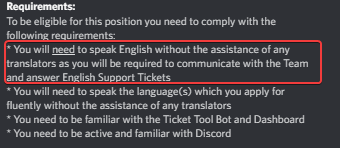
friend to apply, you have to write in English, right?
bold prawn
Brother, how do I control a bot and give it an honor? There is a link
jade topaz
do they contact you via dm?
shut bolt
jade topaz
friend to apply, you have to write in English, right?
https://i.imgur.com/cOO8oFp.png
That's right
 shut bolt
bold prawn
Brother, how do I control a bot and give it an honor? There is a link
shut bolt
bold prawn
Brother, how do I control a bot and give it an honor? There is a link
What do you mean?
shut bolt
jade topaz
do they contact you via dm?
If you get into the next phases they'll reopen your application ticket
jade topaz
I made my application I'm from Portugal but I know many languages I don't know if they accept me
shut bolt
jade topaz
I made my application I'm from Portugal but I know many languages I don't know...
As I've told you already, if you get into the next phase you'll be contacted, otherwise you won't
jade topaz
the next base is what?
shut bolt
Base?
jade topaz
shut bolt
Base?
what is next phase?
shut bolt
jade topaz
what is next phase?
More questions basically
jade topaz
about what?
shut bolt
Ticket Tool
jade topaz
shut bolt
Ticket Tool
What?
shut bolt
jade topaz
What?
That's what the questions are about lol
jade topaz
send an example asking questions about the bot?
shut bolt
I can't, if you get to the next phase you'll get to see them, it's solving common problems and questions
jade topaz
@shut bolt you are amazing lol
shut bolt
jade topaz
<@518666147441278998> you are amazing lol
lmao thanks
iron nightBOT
Gave +1 Rep to @rose geyser
shut bolt
Idk why but thanks
jade topaz
I understand thank you brother
shut bolt
Sure
 tame sigil
i saw in the support tickets that there was a message that would appear after a while asking if the user was still there and if they wanted to close the ticket
is this possible in another server?
loud turtle
I don't know
tame sigil
ok?
loud turtle
Maybe. Maybe not
tame sigil
thanks for telling me, but i don't really care.
loud turtle
Huh?
shut bolt
You can edit it's message following these steps
loud turtle
Available for primary?
 shut bolt
loud turtle
Available for primary?
shut bolt
loud turtle
Available for primary?
Yes
You'll need to have the Two Step Close enabled for the message to pop up
tame sigil
shut bolt
https://i.imgur.com/3Uof8Fr.gif
Ohhh wait, I didn't know that another person could use the conformation if someone else pressed it.
shut bolt
tame sigil
Ohhh wait, I didn't know that another person could use the conformation if someo...
That's right
loud turtle
You being senior support kinda scares me
shut bolt
Why so?
loud turtle
You being senior is like your the elder. Hhhhhhhhhh
Btw How do you and the support team get their roles in the first place
shut bolt
loud turtle
Btw How do you and the support team get their roles in the first place
$staffapps
humble sequoiaBOT
How do be I become a Support Member?
You can become a support member in 2 ways:
1. You can be really active in #🆘│community-support gain <@&799500225579712543> role and get chosen by a Manager
2. You can apply VIA our applications that would be sent in #📣│server-news
We currently have Support Teams for the following languages:
:flag_us: English
:flag_jo: Arabic
:flag_fr: French
:flag_de: German
:flag_br: Portuguese
:flag_es: Spanish.
shut bolt
Once you get to the team you are a probie
And once the managers see you are ready to be full support you get promoted
Same thing to get promoted to senior
loud turtle
Dem support here I come. Not that I'm demanding
loud turtle
Give mr my member role back managers
slender minnow
Rip
 wicked tartan
 loud turtle
Give me my member role back
solid stream
Enjoy!
Now we let someone yell at me.. because I have no idea why you didn't have it and I'm guessing someone removed it for a reason..
loud turtle
solid stream
Now we let someone yell at me.. because I have no idea why you didn't have it an...
Thanks
 brisk anchor
I’m trying to get tickets that are deleted to be archived on my discord. How do I do so? I can’t seem to figure it out
loud turtle
brisk anchor
I’m trying to get tickets that are deleted to be archived on my discord. How do ...
Transcript
$help transcript
humble sequoiaBOT
How do I save transcript to a channel?
To save transcripts to a channel go to the Dashboard -> Panel Configs -> Settings -> Logging Options -> Transcript Channel
 brisk anchor
Thank you
loud turtle
But, when the ticket is closed, your support team will have the option to create a transcript to the ticket
loud turtle
solid stream
Now we let someone yell at me.. because I have no idea why you didn't have it an...
I got timed out and then I lost it FYI
 harsh wigeon
How can I do this to link them to the channel?
 humble sequoiaBOT
Solved in another channel.
shut bolt
solid stream
Now we let someone yell at me.. because I have no idea why you didn't have it an...
He got timed out by Wick for spamming commands, wick didn't give it back
placid berry
How do I configure so that a certain position can open a ticket?
For example I want only one position on my server to be able to open a ticket where do I see the options on the dashboard?
tame sigil
placid berry
For example I want only one position on my server to be able to open a ticket wh...
Position as in a certain role?
placid berry
Sorry I'm not from USA so use a translation to communicate
I wanted for example to use a position to open tickets like a specific position to open tickets instead of everyone understands?
tame sigil
Oh alright. Just edit a channels permission so that only people with that role can access it.
Then send the ticket create embed there.
jade topaz
Hi
placid berry
I will give an example;
On my server I have an SOS channel social help (psychological support)
So I wanted to separate by positions, whoever has the position of requester will be able to talk to volunteers so whoever has the position of requester can open tickets instead of anyone doing that
tame sigil
placid berry
I will give an example;
On my server I have an SOS channel social help (psychol...
Okay so, go to the channel settings, permissions, disable “View channel” from @ everyone, and enable it for the @ requester position
placid berry
i will try
tame sigil
And to allow the volunteer role to access it go to the dashboard, then panel config, press “Settings” on the correct panel, go to the “General Options” category, and add the volunteer role.
jade topaz
jade topaz
Hewo, if I vote Ticket Tool 6 times on top.gg, I will get the premium code by us...
🔁
loud turtle
Can you add a private category to the "category options"? And if so, Will the people who opened a ticket see the category?
Nevermind got it
 wheat osprey
I don't know how to use it and I want someone to know how it is programmed
 toxic forum
Hi, Does TicketTool have any ability to display all tickets for a certain searchable user in the web dashboard, or otherwise in discord?
I see that i can save transcripts automatically to a channel, but i can see this becoming messy very fast.
humble sequoiaBOT
You can check our documentation here.
You can also check #573205317870157855 for the basic setup.
Our documentation contains all the info you need about the bot to be able to setup and configure the bot however you like.
fallow ingot
@wheat osprey ^
fallow ingot
toxic forum
Hi, Does TicketTool have any ability to display all tickets for a certain search...
No, but you can use the Discord search feature to look up a user if you have a transcript channel set.
iron nightBOT
Gave +1 Rep to @fallow ingot
fallow ingot
no problem, happy to help.

 craggy geyser
 steady delta
How do I set up closed tickets for automatic deletion
steady delta
How do I set up closed tickets for automatic deletion
It's not a feature currently
If you want them to delete straight away instead of closing first that's possible though. You just need to turn off two step ticket in the panels general options
craggy geyser
What form?
 copper owl
You've been told multiple times that you'll get contacted once you're accepted.
constantly asking when you'll be accepted, wanting questions we ask in the application and generally not following the application process lowers your chances.
So please, stop asking when you'll be accepted. This isn't the first time.
toxic forum
Hey, can i turn off the htm transcript upload to the log channel and only have the embed?
jade topaz
toxic forum
Hey, can i turn off the htm transcript upload to the log channel and only have t...
yes i think
toxic forum
For the life of me i cannot see the option
jade topaz
toxic forum
For the life of me i cannot see the option
should be in the settings no?
toxic forum
Yeah one would assume, hm i'll look later again, maybe just missing it.
jade topaz
toxic forum
Yeah one would assume, hm i'll look later again, maybe just missing it.
try to look again friend any question we are at your service
toxic forum
❤️
 lunar chasm
Is there a quick fix if the server I added the bot to is not showing up in the dashboard?
fallow ingot
lunar chasm
Is there a quick fix if the server I added the bot to is not showing up in the d...
log out and back in
lunar chasm
I am admin on the server
lunar chasm
fallow ingot
log out and back in
perfect, thank you
iron nightBOT
Gave +1 Rep to @fallow ingot
lunar chasm
a suggestion would be to have that on the page as things to try
fallow ingot
no problem
fallow ingot
lunar chasm
a suggestion would be to have that on the page as things to try
Yeah it's on the page.
lunar chasm
Ah I didn't see it, it just said I don't have any servers added and I could check to see if the bot was up
 cedar widget
Hey guys trying to see if anyone can help... When a user creates a ticket they cannot read the message history nor do they get the ticket intro or have the option to close the ticket.. The permissions seem to be good
 barren pilot
gilded verge
cedar widget
Hey guys trying to see if anyone can help... When a user creates a ticket they c...
barren pilot
gilded verge
cedar widget
Hey guys trying to see if anyone can help... When a user creates a ticket they c...
Hey, I do not know what your permissions are in the panel settings, but I have the same as in the video and they are ok, maybe you will try?
https://cdn.discordapp.com/attachments/776680605517742090/957333296428224582/2022-03-24_18-11-242.mp4
But if you mean "option to close the ticket",
go to Panel Configs->Panel Settings->Expand Button Options-> and to Allowed Roles add @everyone, next Save Settings
just like in the screenshot below:

 dreamy abyss
I’m wondering how can I make a embed just like this down below, I’m sorry I can’t show the whole screen but is there like a tutorial on how to make a embed and panel like that?
 jade topaz
dreamy abyss
I’m wondering how can I make a embed just like this down below, I’m sorry I can...
jade topaz
dreamy abyss
I’m wondering how can I make a embed just like this down below, I’m sorry I can...
hello friend i think there is
dreamy abyss
jade topaz
hello friend i think there is
Where?
jade topaz
dreamy abyss
Where?
see in not settings or youtube should have something to help solve
Bot*
jade topaz
dreamy abyss
Where?
any more questions friend?
dreamy abyss
jade topaz
any more questions friend?
I’ll just wait until a Ticket Tool Support help me, An No I don’t.
jade topaz
dreamy abyss
I’ll just wait until a Ticket Tool Support help me, An No I don’t.
ok wait for them to answer you will have an answer soon!
humble sequoiaBOT
Multipanels are a premium feature  that allow for a single panel with multiple buttons to open different tickets.
How to create a Multipanel
Premium users can combine multiple panels into one multipanel.
First, find the IDs of each panel you wish to combine. You can find them in your Panel Configs in the Dashboard
Next, send the multipanel to a channel using $panel [id1] [id2] {id3} ....
e.g. $panel 1 2 4 17 35 to combine panels 1, 2, 4, 17 and 35.
Up to 25 panels may be combined.

The panel message is where people react to make a ticket. To customize it head over to your Dashboard --> Panel Configs -> Settings -> Panel Options -> Edit Panel Message
fallow ingot
dreamy abyss
I’ll just wait until a Ticket Tool Support help me, An No I don’t.
Hi just checking you've seen how to do this?
dreamy abyss
fallow ingot
Hi just checking you've seen how to do this?
Yes sir.
fallow ingot
dreamy abyss
Yes sir.
Ok great! Let us know if you've got any further questions.
 glad wagon
How to open Ticket
jade topaz
glad wagon
How to open Ticket
just open choose your language and then someone will answer you
glad wagon
English
jade topaz
glad wagon
English
what is your doubt?
glad wagon
I'm Have Server And I Invite Ticket Bot But I Want Do Open Ticket
What command I Type To Open Ticket
 glad wagon
What I do ?
jade topaz
glad wagon
How?
just click on create Ticket and then it will automatically open
jade topaz
glad wagon
How?
understand friend?
 jade topaz
glad wagon
See I I'm Want Commnad
jade topaz
glad wagon
See I I'm Want Commnad
yes you have to put the Ticket in some channel to open it, understand?
glad wagon
Oh Ok
jade topaz
glad wagon
Oh Ok
or open this link and do the necessary configuration

if you have any questions come here to support I will help you with what I can
jade topaz
amigo, simplemente no presione cerrar el ticket y permanecerá abierto hasta que alguien haga clic en cerrar
look in your bot dashboard and change settings or restart bot
copper owl
jade topaz
look in your bot dashboard and change settings or restart bot
restarting the bot isnt something you guys can do
check your general options of your panel settings and enable Two Step Ticket
jade topaz
copper owl
No problem
jade topaz
copper owl
No problem
ok I was just trying to help but thanks for the tip 😉
iron nightBOT
Gave +1 Rep to @copper owl
jade topaz
If you have any questions or problems I'll be here to help you in any way I can.
 golden shoal
Is there an option to auto-close tickets if there's no response for X amount of days?
jade topaz
golden shoal
Is there an option to auto-close tickets if there's no response for X amount of ...
Yes
copper owl
golden shoal
Is there an option to auto-close tickets if there's no response for X amount of ...
No there isn't. The dev is trying to bring this back for the next major update though
loud turtle
I would love to put my departments back
jade topaz
loud turtle
I would love to put my departments back
Yes
just fight and you get to show your ability
loud turtle
I mean my sections
 tender cypress
Hi guys, I already put the bot on my server,but my server is not showing up on the site, what do I do? :( (sorry for my bad english)
jade topaz
tender cypress
Hi guys, I already put the bot on my server,but my server is not showing up on t...
hello I will send you the panel of our bot
jade topaz
tender cypress
Hi guys, I already put the bot on my server,but my server is not showing up on t...
jade topaz
tender cypress
Hi guys, I already put the bot on my server,but my server is not showing up on t...
try here i hope i helped you
tame sigil
 jade topaz
tame sigil
Read the pins.
jade topaz
tame sigil
Read the pins.
yes i'm just trying to help
tame sigil
I was already helping, though
jade topaz
tame sigil
I was already helping, though
sorry I didn't realize you were helping
tender cypress
jade topaz
https://tickettool.xyz/manage-servers
Oh,Thank You!!!Now is working
tame sigil
It’s fine.
jade topaz
tender cypress
Oh,Thank You!!!Now is working
No doubt or bug we are here to help you!

 devout flume
how do u file a ticket ifi bought something froma server
gilded verge
 formal hare
so they can see when a ticket opens
formal hare
so they can see when a ticket opens
on ticket use: $add @user
 gilded verge
wait, you mean moderators on ticket?
if so, you need go to Panel Configs->Panel Settings->Expand General Options and add moderator role to Support Team Roles

@formal hare did you do it as you wanted?
formal hare
uh
gilded verge
hm?
formal hare
 gilded verge
yep
formal hare
but still dotn work
gilded verge
did you save the settings?
 gilded verge
somewhere I came across information that you need to re-send the panel to the channel for it to work, try it please. 
oh wait wait
please check permissions:
https://cdn.discordapp.com/attachments/776680605517742090/957333296428224582/2022-03-24_18-11-242.mp4
now it's okay?
 quiet rain
 gilded verge
if you want debug, use $debug
So I am to understand that it still does not work for you?
 gilded verge
uhm 😐
gilded verge
formal hare
This is problem, do you see Command Prefix ?
You only need to have a $ sign there, nothing else.
quiet rain
gilded verge
This is problem, do you see `Command Prefix` ?
You only need to have a `$` sign ...
yes
quiet rain
gilded verge
This is problem, do you see `Command Prefix` ?
You only need to have a `$` sign ...

this is bug.
 gilded verge
wait because I got lost in it myself 😐
 gilded verge
From what I can see, the bot does not have the right to send messages but he needs it
humble sequoiaBOT
ᅠ
@pseudo glen requires the following permissions:
Add Reactions
Read Channels
Send Messages
Manage Messages
Embed Links
Attach Files
Read History
Manage Roles
To change the role permissions, you can go to your Discord Server ➞ Server Settings ➞ Roles ➞ @Ticket Tool
To change the channel permissions, you can go to your Channel Settings ➞ Permissions ➞ Ticket Tool
ᅠ
Note:
You can give Ticket Tool Administrative Permissions instead of all the permissions listed above, but it's entirely optional and NOT necessary.
 past radish
how do i make it so i have a certain role have access to tickets that doesn’t have administration role ?
gilded verge
@formal hare, If you have added moderators in the panel settings, create a new ticket and check if the moderators have been added.
 gilded verge
Let's try again then. Did you make sure moderator roles were added in the panel settings?
formal hare
 gilded verge
Have you made sure that you have the permissions in the panel settings as in the video I sent earlier?
i mean this: #🆘│community-support message

 formal hare
one sec
gilded verge
jade topaz
First screenshot is Panel Message but second screenshot is Ticket Message.
You can change this, then go to Panel Settings and Expand Ticket Options or Panel Options. It depends what you change first.

 gilded verge
quiet rain
gilded verge
quiet rain
I have no idea how you did it, but on all my servers this command works. 😐
Please make sure the bot has the ability to send / read messages on the given channel.
formal hare
i still cant
jade topaz
Ohhhh!
That makes sense
thank you
and one more question, is it premium to change the ticket emojis
ex:

 jade topaz
ohh okay, thank you so much again
gilded verge
formal hare
i still cant
I am constantly trying to find a solution for you.
tame sigil
asking here because my ticket isn't being replied to
are alternate accounts allowed in this server?
formal hare
Thank you
 steep estuary
steep estuary
steep estuary
anyone
gilded verge
steep estuary
Any help with this?
Please go to Server Configs on the website and change the bot from premium to free.
 tame sigil
asking here because my ticket isn't being replied to
are alternate accounts allo...
tame sigil
tame sigil
asking here because my ticket isn't being replied to
are alternate accounts allo...
please answerr
gilded verge
tame sigil
please answerr
If you haven't received a reply in your ticket yet, you need to wait.
 gilded verge
jade topaz
gilded verge
jade topaz
I use {user}
formal hare
How u go to that page?
 gilded verge
formal hare
Thank you
gilded verge
formal hare
Thank you
I try to help as much as I can, but because I am a visual learner, I would rather look directly. If you trust me enough to invite me to your server and give me an administrator so I can check where the error is, I can try to help but if not, and there is someone else who will be able to help, please take advantage of his help. 😕
formal hare
gilded verge
I try to help as much as I can, but because I am a visual learner, I would rathe...
Yes Look in messages i will inv you
gilded verge
formal hare
How u go to that page?
Dashboard->Panel Configs->Panel Settings->Expand Ticket Options->Edit Ticket Message
 jade topaz
gilded verge
I use `{user}`
jade topaz
gilded verge
I use `{user}`
thank you very much
iron nightBOT
Gave +1 Rep to @gilded verge
 minor birch
Hey can someone help
I want to move tickets when theyre created from appearing at the top of my discord server to the bottom is that possible 🙂
jade topaz
How to fix
 gilded verge
minor birch
I want to move tickets when theyre created from appearing at the top of my disco...
gilded verge
minor birch
I want to move tickets when theyre created from appearing at the top of my disco...
Hey, all you can do is set the ticket category.
 minor birch
gilded verge
Hey, all you can do is set the ticket category.
minor birch
gilded verge
Hey, all you can do is set the ticket category.
And does that put it in a specific category?
Hey bro also, do you know how to stop users from closing tickets? I only want mods to close them @gilded verge
gilded verge
minor birch
And does that put it in a specific category?
Yes, in the category you set.
minor birch
Is this under panel configs?
gilded verge
Panel Configs->Panel Settings->Category Options
gilded verge
minor birch
Hey bro also, do you know how to stop users from closing tickets? I only want mo...
try this:
 gilded verge
jade topaz
How to fix
gilded verge
jade topaz
How to fix
Read this: #🆘│community-support message
 deep radish
how do i make a ticket and it says i dont have permisson
humble sequoiaBOT
You can check our documentation here.
You can also check #573205317870157855 for the basic setup.
Our documentation contains all the info you need about the bot to be able to setup and configure the bot however you like.
gilded verge
@deep radish
but what you mean "i dont have permission" ? can you show it?
 bitter patrol
my server wont show up
humble sequoiaBOT
Don't see your server in the dashboard?
You will possibly need to relog. Look below to see steps on how to relog.
How to relog in the Dashboard.
First, you will need to go to the dashboard. Once your there, click on your avatar on the top right. after you clicked it, you will see button that says Logout. You must click that. Once you have logged out, you can log back in.
Note:
You need one of these 3 things to access the dashboard.
1. Server Owner (Level: 6)
2. Server Administrator (Level: 4)
3. Dashboard Role (Level: 2)
:warning: You can check your level using $level on your Discord Server
User permission level with Ticket Tool
@User is permission level: 0 (User)
```» *If it shows that your permission is **0**, you don't have any of the above **3 things** to manage the dashboard.*


**See the picture below on how to relog:**
 earnest osprey
earnest osprey
earnest osprey
i want like this
humble sequoiaBOT
For a more convenient use of multipanels, you can now combine panels on the dashboard. This will allow you to directly send the multipanel from the dashboard or via the $panel ID command.
Where can I find this?
You can find this setting on the Dashboard -> Panel Configs -> Settings -> General Options
Note: if you're attaching all the panels to a panel called English, don't include English in the attached panels box (If you do this, it will create duplicate)
This will put all buttons from all of your panels on one message. The message is the panel message from the panel you're combining these panels in.
Note: This is a premium feature
 calm ridge
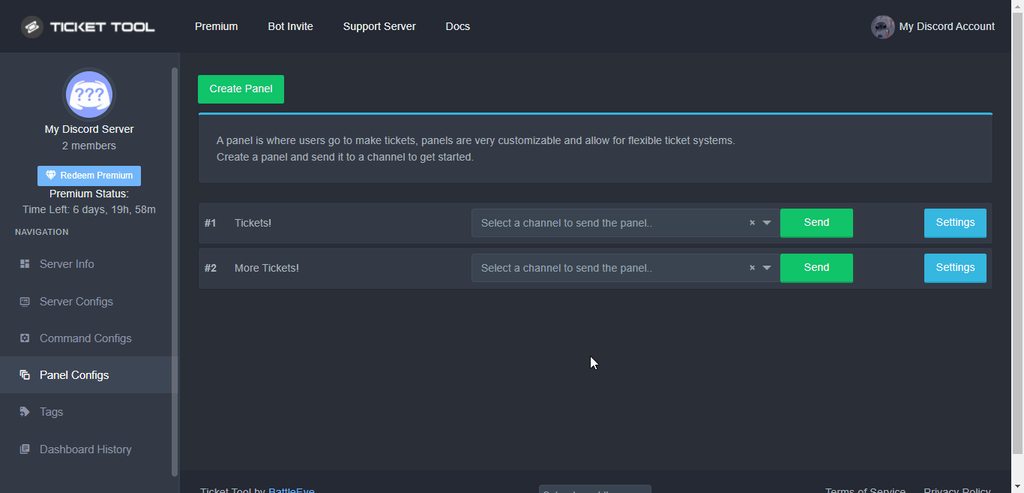
How can I automatically send the summary to the dm when I close the ticket?
regal goblet
calm ridge
How can I automatically send the summary to the dm when I close the ticket?
 nimble marten
@earnest osprey
jade topaz
nimble marten
<@927777333090336828>
no joking
any questions or bugs I'm on to clear your doubts!
 jade topaz
 keen bone
How to make
keen bone
keen bone
How to make
keen bone
Okay
jade topaz
keen bone
How to make
then click on your English language and then save
keen bone
Okay thanks
jade topaz
thank you I have any questions or bugs I will help you
 jade topaz
 cobalt knot
what is this
cobalt knot
what is this
is this from your server?
cobalt knot
yea
 final coral
Привет
jade topaz
cobalt knot
yea
must be buggy try to fix it on our panel
cobalt knot
aah
jade topaz
cobalt knot
aah
jade topaz
final coral
Привет
ты можешь сказать другу, что ты хочешь?
slender minnow
$help setup
humble sequoiaBOT
Setting up Ticket Tool
Visit the docs for setup info
General Setup
slender minnow
@boreal ledge refer above docs for setting up the bot ^
 boreal ledge
okay thx

 slender minnow
jade topaz
https://tickettool.xyz/manage-servers
slender minnow
jade topaz
https://tickettool.xyz/manage-servers
???
jade topaz
configure the bot here!
 jade topaz
slender minnow
ik the link
jade topaz
slender minnow
ik the link
yes but I was just helping 😉
yes conversations here please this tab is only for support if you want go in chat
fallow ingot
@jade topaz
 jade topaz
fallow ingot
<@456226577798135808>
jade topaz
fallow ingot
<@456226577798135808>
I didn't understand friend
copper owl
jade topaz
I didn't understand friend
if someone's already helping, don't start helping as well.
let the person help the user who needs assistance.
jade topaz
copper owl
let the person help the user who needs assistance.
OK sorry
jade topaz
copper owl
let the person help the user who needs assistance.
I will pay more attention
how to create a ticket channel?
jade topaz
jade topaz
how to create a ticket channel?
put your bot on your server in any channel
jade topaz
jade topaz
how to create a ticket channel?
configure the Ticket Tool on your server via this link
humble sequoiaBOT
You can check our documentation here.
You can also check #573205317870157855 for the basic setup.
Our documentation contains all the info you need about the bot to be able to setup and configure the bot however you like.
gilded verge
⬆️
jade topaz
jade topaz
i make its
I'm also portuguese do you want support in portuguese?
 tepid summit
السلام عليكم
jade topaz
tepid summit
السلام عليكم
hello what do you need?
copper owl
jade topaz
<#956946297087197184>
they're allowed to speak a different language in here
jade topaz
copper owl
they're allowed to speak a different language in here
I didn't know I thought it was just there
copper owl
For support, you can speak different languages in here
jade topaz
jade topaz
what
O quê precisa?
jade topaz
jade topaz
what
Diga a sua dúvida
e tipo pra poder criar um canal q tenha sistema pra clicar em um botao e criar um ticket
jade topaz
jade topaz
e tipo pra poder criar um canal q tenha sistema pra clicar em um botao e criar u...
Tipo assim você entra no painel do bot e adiciona o tiktok no seu canal percebeu?
jade topaz
jade topaz
e tipo pra poder criar um canal q tenha sistema pra clicar em um botao e criar u...
 jade topaz
e isso q eu quero
 worthy palm
Eu tbm
jade topaz
E o painel é este link/ https://tickettool.xyz/manage-servers
Tipo você tem que configurar entendeu
ta
jade topaz
jade topaz
e isso q eu quero
No painel do bot se precisar de ajuda pesquise no youtube como configurar o bot Ticket
worthy palm
 jade topaz
worthy palm
jade topaz
worthy palm
Pera ai vai na aba #573205317870157855
 vital crescent
Hello! I have just purchased premium. Does anyone know how to redeem it? Or to find the Premium Key? Thanks!
jade topaz
vital crescent
Hello! I have just purchased premium. Does anyone know how to redeem it? Or to f...
hello friend I'll try to help you, was it in the bot commands tab?
vital crescent
thank you! let me take a look
fallow ingot
vital crescent
Hello! I have just purchased premium. Does anyone know how to redeem it? Or to f...
Hi there.
vital crescent
@fallow ingot hello!
fallow ingot
You'll need to go to https://tickettool.xyz/subscriptions
jade topaz
vital crescent
<@768144576946110475> hello!
already found?
fallow ingot
and select the server you want the premium on.
vital crescent
@fallow ingot thank you! I will check here!
iron nightBOT
Gave +1 Rep to @fallow ingot
fallow ingot
no problem
jade topaz
fallow ingot
You'll need to go to https://tickettool.xyz/subscriptions
enter the link that my colleague sent you friend
vital crescent
@fallow ingot I have access here, thanks! Do you know the next steps? On where to go
fallow ingot
vital crescent
<@768144576946110475> I have access here, thanks! Do you know the next steps? On...
What would you like to do next?
jade topaz
vital crescent
<@768144576946110475> I have access here, thanks! Do you know the next steps? On...
I hope I helped you
vital crescent
@fallow ingot thank you!

@fallow ingot but when I go to my dashboard, it is stating to enter a code. But where do I get this code? Thank you
iron nightBOT
Gave +1 Rep to @fallow ingot
jade topaz
vital crescent
Any doubt we are at your disposal
jade topaz
vital crescent
<@768144576946110475> but when I go to my dashboard, it is stating to enter a co...
ai in your panel settings you have an option
fallow ingot
vital crescent
<@768144576946110475> but when I go to my dashboard, it is stating to enter a co...
So the redeem premium key is there for everyone, you don't need to enter any key as long as you have Active - Manage the server has premium.
fallow ingot
Yeah?
vital crescent
how come on my server, it does not say "Ticket Tool | Premium" Will this?
 fallow ingot
You would need to invite ticket tool premium and enable it.
humble sequoiaBOT
The first thing you will need to do is invite the premium bot, an invite can be found here
Once the bot is in your server we will head to the dashboard and manage your server. When you are managing your server, you want to head into "Server Configs" then click the drop down menu under "Select the bot you would like to use on this server" then click "Ticket Tool#6207" and then save.
 fallow ingot
vital crescent
excellent thank you. This is what I will neeed
fallow ingot
No problem, anymore questions feel free to ask or open a ticket in #🎫│make-a-ticket
jade topaz
vital crescent
excellent thank you. This is what I will neeed
any questions can always come here stay well
vital crescent
thank you both!
@fallow ingot Premium bot is now in! Can I simply kick out the old ticket tool bot?
Or will that cause any issues
fallow ingot
No the main ticket bot is no longer needed. You can kick or keep it, unlimitely up to you.
vital crescent
great thank you!
fallow ingot
np
jade topaz
who has more doubts just call
fallow ingot
Not with a dropdown menu, only buttons at this time. You could use multi panels like #🎫│make-a-ticket
jade topaz
if you need anything else come here
 warm topaz
hello
i am setting up the bot in my discord and the people who are intended on making the tickets it says they do not have permission do you have any idea to why that may be
humble sequoiaBOT
━━ moved to ticket ━━
jade topaz
warm topaz
hello
i am setting up the bot in my discord and the people who are intended on m...
hello you have to change your server settings for members or go to ticket panel
jade topaz
warm topaz
hello
i am setting up the bot in my discord and the people who are intended on m...
#🤖│bot-spam
fallow ingot
humble sequoia
━━ moved to ticket ━━
@jade topaz this was moved to a ticket
 tired trail
Hello, I have a question. How do I add someone to a ticket with the ticket tool?
fallow ingot
therefor your response wasn't needed.
jade topaz
fallow ingot
<@456226577798135808> this was moved to a ticket
ah ok thanks for notifying brother
iron nightBOT
Gave +1 Rep to @fallow ingot
fallow ingot
$help add
humble sequoiaBOT
How to add or remove users on tickets
To add a user to a ticket use $add <user>
To remove a user from a ticket use $remove <user>
tired trail
Thanks Bro!
fallow ingot
no problem, have a good one.
jade topaz
fallow ingot
no problem, have a good one.
are you saying to me bro?
fallow ingot
jade topaz
are you saying to me bro?
i was speaking to the user i was helping..
jade topaz
ok, I got it
fallow ingot
👍
jade topaz
@fallow ingot Me helping here can I also be from saff if you see that I help a lot?
???
Boosting perks?
fallow ingot
jade topaz
<@768144576946110475> Me helping here can I also be from saff if you see that I ...
This means giving users the correct support, and following the support channels rules and rules in #546557408902905896
 fallow ingot
jade topaz
Boosting perks?
jade topaz
fallow ingot
jade topaz
Boosting perks?
jade topaz
and do you think so far from what you've seen if I'm doing everything right?
fallow ingot
This channel is for support-enquires related to the ticket tool bot. Unless you need help with the bot please don't talk here.
fallow ingot
$help panel
humble sequoiaBOT
Creating a panel
To create a panel we are going to need to head over to the panel configs on the dashboard
Once at the dashboard we will need to click Create Panel
Enter a panel name (Fill in any optional settings you want)
Click Create Panel and your ready to get started with configuring your panel
An example of a creating a panel is shown below.

You can check our documentation here.
You can also check #573205317870157855 for the basic setup.
Our documentation contains all the info you need about the bot to be able to setup and configure the bot however you like.
fallow ingot
these two @delicate terrace
 delicate terrace
fallow ingot
$help panel
delicate terrace
fallow ingot
$help panel
Ty
iron nightBOT
Gave +1 Rep to @fallow ingot
 wraith hearth
hey uhhhh im just now integrating ticket tool into my server for appealing moderation action
i've created a new panel and set the "close ticket" and other buttons following that to allow mods and admins to use them-- but when my mods attempt to they're told they dont have the permission to
copper owl
can you show me how you did this
wraith hearth

should i instead just tick the "support team only" option?
"IN THE PIT" are the people who create the tickets, i want only staff to be able to close them
support team is set to mods
copper owl
wraith hearth
"IN THE PIT" are the people who create the tickets, i want only staff to be able...
set disabled roles to @everyone
wraith hearth
do i need to set all the other buttons the same way? such as cancel close, re-open, transcript, etc
copper owl
wraith hearth
do i need to set all the other buttons the same way? such as cancel close, re-op...
not really. Closed tickets wouldnt allow the users to see in them, so they wont see the reopen, transcript, delete buttons
also if you want this to be easier on yourself
you can just enable the support only button
so all the support roles can only use the buttons set as support only
wraith hearth
okie dokie
so then once those perms are changed, i need to re-send the panel right?
copper owl
wraith hearth
so then once those perms are changed, i need to re-send the panel right?
not entirely
the only time you need to resend the panel is if you've edited anything regarding the panel message
wraith hearth
alrighty
humble sequoiaBOT
Creating a panel
To create a panel we are going to need to head over to the panel configs on the dashboard
Once at the dashboard we will need to click Create Panel
Enter a panel name (Fill in any optional settings you want)
Click Create Panel and your ready to get started with configuring your panel
An example of a creating a panel is shown below.
wraith hearth
i'll give it a whirl and come back with results! thank you :)
o_O

i ticked them to "support team only" and the support team roles are set to @daring wedge Admins & @daring wedge Moderators
OH SORRY RANDOM PERSON
admins are able to, mods arent
 weary hinge
@shut bolt sorry im pinging you but i need to ask you question
copper owl
weary hinge
<@518666147441278998> sorry im pinging you but i need to ask you question
you were told already to not ping.
once more, and we'll have to warn you
copper owl
wraith hearth
o_O
can you send the ID of the server please?
weary hinge
ok but how iam suposted to ask you dude
copper owl
weary hinge
ok but how iam suposted to ask you dude
you ask and wait
wraith hearth
copper owl
can you send the ID of the server please?
723665626845020240
copper owl
you can definitely ask a question without pinging
copper owl
wraith hearth
`723665626845020240`
Checking, one moment
wraith hearth
im playing around with the settings, i removed the disabling "@ everyone" and instead just ticked support team only
 wraith hearth
waiting on results from my mods
weary hinge
ok then why its my partner bot offline and not onnline
copper owl
weary hinge
ok then why its my partner bot offline and not onnline
we dont offer partner bots
weary hinge
😦
copper owl
so im not sure if you're in the right place or asking the correct support
 wraith hearth
in which permission?
copper owl
Check the server configs page
wraith hearth
i set it to that because i don't want people who do have the ability to chat and stuff able to make a ticket. we mute users with dyno which applies our "IN THE PIT" role
hmmm ill try though
copper owl
wraith hearth
i set it to that because i don't want people who do have the ability to chat and...
well blacklisting it wouldnt be the correct thing to do
You can set it as a disabled role in the create ticket button
copper owl
no problemo
wraith hearth
is there any way to implement a slowmode in ticket channels by the way?
copper owl
Not currently
wraith hearth
just to ensure they arent used to abuse the system and spam / etc out of pettyness
aww okay
copper owl
well
it is a private channel so
they can technically spam all they want with not much damage happening
wraith hearth
yeah its just a nuisance since only one ticket can be opened at a time
just dont wanna waste much time
copper owl
wraith hearth
yeah its just a nuisance since only one ticket can be opened at a time
what do you mean?
copper owl
im not even sure what video you watched
because you can have 499 tickets open at a time if you want to be REALLY free
wraith hearth

Struggling to setup ticket tool in your discord server? By the end of today you will be able to have a working ticket system in your own discord server. Ticket's can make sorting issues out with your members so much easier and allows decisions to be dealt with correctly and in one place.
If you found the video useful, consider dropping a like!
...
ohhhhh wowza
copper owl
a discord server can have 500 channels open at a time
one channel for the panel message
and 499 tickets so yeah
what?
wraith hearth
thank you then :)
copper owl
wraith hearth
thank you then :)
No worries
search on youtube or go to coding servers
this isnt the place to ask for that type of support
well you wont get any luck here
we're ticket tool support

 fallow ingot
Hey, you don't have premium right?
 dull cypress
My friend added
fallow ingot
Mind giving me your server ID?
dull cypress
fallow ingot
Mind giving me your server ID?
Alright 1 min
fallow ingot
Ok, take your time.
dull cypress
955826493890650152
fallow ingot
I just want to clarify the server don't have premium so I can give you a fix to your problem.
One moment
dull cypress
Can I know whats the problem?
fallow ingot
Hey so, the premium bot has been added to the server but the main (free) bot hasn't witch means it won't work.
Invite the bot:
$invite
humble sequoiaBOT
Ticket Tool Invite & Support
dull cypress
Oh
fallow ingot
Click the "Ticket Tool - Bot invite"
dull cypress
Done added
fallow ingot
Ok, and can you run commands now?
fallow ingot
You'll need premium to run commands with the premium bot
humble sequoiaBOT
Faster Premium Bot
Automatic Transcripts
Full Customization
Custom Buttons
Direct Messages
Ticket Automation
Multipanels
Premium Support
You can purchase premium here:
Price
$6 - Monthly
$66 - Yearly
 Premium
fallow ingot
Premium
fallow ingot
fallow ingot
dull cypress
Means my friend has to setup?
What do you mean, sorry?
fallow ingot
Are you the owner or an admin?
dull cypress
I'm the owner
fallow ingot
No, then you can set it up.
dull cypress
Ok
fallow ingot
anyone with admin or who is the owner can edit the Dashboard. Anyone who's added as a dashboard role can aslo as well.
fallow ingot
No problem, have a good one.
jade topaz
😢
 clever herald
if im on trial could i get the premium bot or we use the normal?
fallow ingot
clever herald
if im on trial could i get the premium bot or we use the normal?
Yes, you can use the premium bot however once it runs out you'll need to re-enable the free version or else.. ticket tool won't work.
clever herald
ah alright thank
fallow ingot
no problem!
jade topaz
can someone tell me if they need portuguese staff?
copper owl
jade topaz
can someone tell me if they need portuguese staff?
you applied didnt you?
jade topaz
yes i made my registration
copper owl
jade topaz
yes i made my registration
and you were already told that continously asking about the application, the questions asked in the applications, or anything else shouldnt be done, right?
jade topaz
but i still didn't get an answer
copper owl
copper owl
and you were already told that continously asking about the application, the que...
@jade topaz but you were told this right?
jade topaz
yes, but i was just trying to find out
 modest tiger
I cant send a panel to a channel it keeps saying to $debug but that dont do anything XD
copper owl
jade topaz
yes, but i was just trying to find out
okay so since you were told already, stop asking about it.
this is the 2nd time i give you this warning myself. and you've been warned already as well.
jade topaz
yes they said but they also said they would get an answer and I haven't yet
copper owl
jade topaz
yes they said but they also said they would get an answer and I haven't yet
the ones who pass.
not everyone.
modest tiger
BRO THEY DONT WANT YOU! xD
copper owl
modest tiger
I cant send a panel to a channel it keeps saying to $debug but that dont do anyt...
are you using the premium bot by any chance?
modest tiger
copper owl
are you using the premium bot by any chance?
Yes 🙂
jade topaz
Ok
copper owl
modest tiger
Yes 🙂
go to your server configs page and select the premium bot in the drop down menu
copper owl
jade topaz
Ok
i would hope that I dont have to verbally warn you again about this.
jade topaz
so that's why I shouldn't have passed thanks anyway
modest tiger
copper owl
go to your server configs page and select the premium bot in the drop down menu
wow. Thank you man ❤️
iron nightBOT
Gave +1 Rep to @copper owl
 sweet arch

 winter oyster
@everyone
why doesnt my tickettool bot work when i add the bot and then i doesnt show up on the website
gilded verge
sweet arch
Do you mean picture like on the channel #🎫│make-a-ticket ?
 sweet arch
gilded verge
Do you mean picture like on the channel <#571706435449257997> ?
sweet arch
gilded verge
Do you mean picture like on the channel <#571706435449257997> ?
no, I mean my members can't do this
 gilded verge
ooke, wait please
gilded verge
If you mean Upload a file then this is permissions. Go to Dashboard->Panel Configs->Panel Settings->Expand Permission Options->and in User Opened Permissions change Attach Files to ✅
Like on screenshot:
 humble sequoiaBOT
Don't see your server in the dashboard?
You will possibly need to relog. Look below to see steps on how to relog.
How to relog in the Dashboard.
First, you will need to go to the dashboard. Once your there, click on your avatar on the top right. after you clicked it, you will see button that says Logout. You must click that. Once you have logged out, you can log back in.
Note:
You need one of these 3 things to access the dashboard.
1. Server Owner (Level: 6)
2. Server Administrator (Level: 4)
3. Dashboard Role (Level: 2)
:warning: You can check your level using $level on your Discord Server
User permission level with Ticket Tool
@User is permission level: 0 (User)
```» *If it shows that your permission is **0**, you don't have any of the above **3 things** to manage the dashboard.*


**See the picture below on how to relog:**@winter oyster

 gilded verge
Panel Configs (left side)
 sweet arch
where do I need to click?

 gilded verge
sweet arch
gilded verge
sweet arch
This is Your Dashboard
You did it?
(Dashboard->Panel Configs->Panel Settings->Expand Permission Options->and in User Opened Permissions change Attach Files to ✅ )
gilded verge
You're welcome 
sweet arch
😍
 lunar kraken
Hi, how can I use my custom emojis on my discord server for ticket tool? Here is an example

 split otter
Hi ther!
had a quick question
I am able to open tickets (as an admin)
but others are not able to
where do I change the settings to enable others to make tickets
gilded verge
split otter
Hi ther!
had a quick question
I am able to open tickets (as an admin)
but others...
Hey, please go to Dashboard->Panel Configs->Panel Settings->Expand Button Options->click Settings on Create Ticket->and add @everyone to Allowed Roles.
Don't forget to Save Settings 😄
 iron nightBOT
Gave +1 Rep to @gilded verge
gilded verge
You're welcome
 jovial saddle
Hello. I am unable to create a ticket with this bot no matter what server I’m on. But it works fine for everyone else. I’m not sure what the problem is.
humble sequoiaBOT
You can check our documentation here.
You can also check #573205317870157855 for the basic setup.
Our documentation contains all the info you need about the bot to be able to setup and configure the bot however you like.
gilded verge
shut bolt
jovial saddle
Hello. I am unable to create a ticket with this bot no matter what server I’m on...
Are you seeing any error?
jovial saddle
shut bolt
Are you seeing any error?
Yes when I click to open a ticket (even on this server) it says “this interaction failed”
shut bolt
jovial saddle
Yes when I click to open a ticket (even on this server) it says “this interactio...
Please try to update your mobile application, if that doesn't work, uninstall the application and install it again
jovial saddle
Okay thanks!
shut bolt
jovial saddle
Okay thanks!
Sure
lunar kraken
Hi, how can I use my custom emojis on my discord server for ticket tool? Here is an example
 shut bolt
lunar kraken
Hi, how can I use my custom emojis on my discord server for ticket tool? Here is...
shut bolt
lunar kraken
Hi, how can I use my custom emojis on my discord server for ticket tool? Here is...
Hey there
$id 
humble sequoiaBOT
<:mike:914179028997505125>
shut bolt
Use the ID command to obtain the string you must use
For example
!mike
That's what you'll have to copy and paste into your embeds :)
shut bolt
Sure mate
golden shoal
copper owl
No there isn't. The dev is trying to bring this back for the next major update t...
Thank you for the update.
iron nightBOT
Gave +1 Rep to @copper owl
 gusty schooner
create panel not showing up in panel configs
humble sequoiaBOT
━━ moved to ticket ━━
jade topaz
how do i put the premium code?
gilded verge
jade topaz
how do i put the premium code?
In your Dashboard click Redeem Premium, then paste the code in the field where it contains xxxx-xxxx-xxxx-xxxx
 jade topaz
hey how do i make it so other ppl can see tickets
 vernal dome
how do i create a ticket for everyone
 pearl minnow
 gilded verge
jade topaz
hey how do i make it so other ppl can see tickets
gilded verge
jade topaz
hey how do i make it so other ppl can see tickets
Hey, but other ppl you meaning moderators or the user who created the ticket?
humble sequoiaBOT
You can check our documentation here.
You can also check #573205317870157855 for the basic setup.
Our documentation contains all the info you need about the bot to be able to setup and configure the bot however you like.
gilded verge
@vernal dome


 gilded verge
 pastel mantle
oh, then please update your Discord ^-^
humble sequoiaBOT
Update your discord App
Buttons are a relatively new addition to discord and don't work with some older versions of the app.
Please verify that you have the latest version of discord, by going to the app or play store.
Discord for the App Store
Discord for the Play Store
jade topaz
gilded verge
Hey, but `other ppl` you meaning moderators or the user who created the ticket?
not a mod, but someone without a role that doesn't have permissions to destroy my server
gilded verge
could you please correct the message?
jade topaz
gilded verge
could you please correct the message?
which one
gilded verge
jade topaz
not a mod, but someone without a role that doesn't have permissions to destroy ...
this 😅
pastel mantle
gilded verge
oh, then please update your Discord ^-^
Ok
jade topaz
@gilded verge is that better
not a mod, but someone without a role that doesn't have permissions to destroy my server
gilded verge
wait are you sure you mean the Ticket Tool bot? 😐
I'm getting lost, please ask again what you mean or wait for someone else.
jade topaz
@gilded verge
 peak willow
hey friends! was wondering if the support team role needs to be admin to see the tickets?
jade topaz
I want to let someone else see the tickets and respond to them
but I dont want to give that person administrator of the server
peak willow
im having the same issue ^
gilded verge
jade topaz
but I dont want to give that person administrator of the server
aaa so you want to add a new user to the same ticket, right? Then on the channel with an open ticket, use the command $add @ user
gilded verge
peak willow
hey friends! was wondering if the support team role needs to be admin to see the...
No no no, just add moderator role to Support Team Roles

//If I misunderstood something, I apologize to you.
peak willow
gilded verge
No no no, just add moderator role to `Support Team Roles`
i opened a ticket to figure out the issue so we dont have to talk in general chat 🤗
jade topaz
ok
jade topaz
gilded verge
aaa so you want to add a new user to the same ticket, right? Then on the channel...
nono
they need to see all tickets
gilded verge
If you do not want to give a given user administrator perms, you can assign his role to the Support Team Roles and he will see all tickets.
peak willow
gilded verge
If you do not want to give a given user administrator perms, you can assign his ...
where do you see support team roles?
gilded verge
oh im sorry, please go to Dashboard->Panel Configs->Settings of your panel->Expand General Options->add role which you want
peak willow
gilded verge
oh im sorry, please go to `Dashboard`->`Panel Configs`->Settings of your panel->...
i have done this and it still doesnt work 😦
gilded verge
I know what can help you. Please try my perms.
https://cdn.discordapp.com/attachments/776680605517742090/957333296428224582/2022-03-24_18-11-242.mp4
peak willow
gilded verge
I know what can help you. Please try my perms.
https://cdn.discordapp.com/attach...
copied and still doesnt work 😦
gilded verge
but you added that role to user, right?
peak willow
i am currently testing it out by viewing the server as that role
it only works right now from roles that are admin perms
gilded verge
From my experience, I can tell you that it's not worth it. I had to create a test account and only then did I see it worked.
If you do not have such an account, I can enter your server, give me this role and then we will check it. What do you think?
peak willow
id prefer not to do that
gilded verge
then please create a new Discord account and assign this role to him, then you will be sure
gilded verge
So you have everything well done, nice.
peak willow
gilded verge
So you have everything well done, nice. <:peepoBlush:843212225208123412>
is there a way to see old messages?
gilded verge
You mean deleted tickets?
peak willow
gilded verge
You mean deleted tickets?
no i mean currently opened tickets
gilded verge
you would have to add this role separately to each ticket so that she could see the tickets. At least I think so.
because we are talking about tickets before these changes, what we wrote above, right?
peak willow
gilded verge
because we are talking about tickets before these changes, what we wrote above, ...
yes, i figured it out thought so thank you! :))
iron nightBOT
Gave +1 Rep to @gilded verge
gilded verge
yay! 
 vast bough
Hello team. In the Step Two you didn't mention any specific permissions for this role. I already have mod roles, for it, can I use it instead?

Second problem is when I try to send panel, I get this FAiled to send panel ....
When I run $debug in that channel, nothing happens.
 slender minnow
vast bough
Second problem is when I try to send panel, I get this `FAiled to send panel ......
slender minnow
vast bough
Second problem is when I try to send panel, I get this `FAiled to send panel ......
you need to run the debug command in the channel where you will be sending the panel to #🎫│make-a-ticket then i'll run the command in there
do make sure that the bot has the perm to view that channel, respond in that channel and read the message history
slender minnow
vast bough
Hello team. In the **Step Two** you didn't mention any specific permissions for ...
server-wise permissions is a discord thing, you can change it depending on your need
i can remove the ban perm from my mods if i want to or deny them both kick and ban perms
as for ticket tool, you can change the perms for your server support staff from the dashboard
vast bough
tnx for response, I was able to solve it somehow.
I think in the docs are not mentioned, that new created channel, need to invite Ticket bot
Also, is there a way that we can have ticket history in our dashboard? Because we need to delete those tickets after they are solved, otherwise it will overload the leftside of Disocrd. And once its deleted, we dont have history?
slender minnow
vast bough
Also, is there a way that we can have ticket history in our dashboard? Because w...
you can save the transcripts in a specific channel and access them in future
manic karma
welp
jade topaz
D
manic karma
I am the owner of a server, but I can't access the Dashboard of the ticket. It didn't show up the server\
fallow ingot
need something?
fallow ingot
manic karma
I am the owner of a server, but I can't access the Dashboard of the ticket. It d...
Log out and back in.
manic karma
fallow ingot
Log out and back in.
Thx, it appears now
fallow ingot
no problem!
 left palm
Why do I see that I am temporarily blocked from my server dashboard?
copper owl
Nope, doesn't exist currently
iron nightBOT
Gave +1 Rep to @copper owl
jade topaz
Wie vergibt man Wiederholungspunkte?
 robust sandalBOT
jade topaz
Wie vergibt man Wiederholungspunkte?
robust sandalBOT
jade topaz
Wie vergibt man Wiederholungspunkte?
 WhiteWolf
How do you award repeat points?
 German (de) → English (en)
humble sequoiaBOT
German (de) → English (en)
humble sequoiaBOT
Help Options
$help commands - Information on commands
$help setup - Information on bot setup
$help faq - Frequently asked questions
loud turtle
$help setup
humble sequoiaBOT
Setting up Ticket Tool
Visit the docs for setup info
General Setup
jade topaz
loud turtle
$help setup
I am premium subscriber and I want to invite premium bot not the primary
loud turtle
There is